This is the multi-page printable view of this section. Click here to print.

Return to the regular view of this page.

Documentation

Eclipse Leda

The Eclipse Leda project provides system image “recipes” to deliver a functional and always-available Linux-based image/distribution in the context of SDV (Software Defined Vehicle), by pulling together individual contributor pieces from Eclipse SDV and the larger OSS community.

The quickstart images help to learn how the SDV development, test and deployment lifecycle works from an E2E perspective, including the deployment of applications into the container runtimes on constrained embedded devices.

The ready images are also useful for quickly setting up showcases with virtual or real hardware devices.

Eclipse Leda provides a Poky-based reference build pipeline and an OpenEmbedded Metalayer meta-leda for integration into existing Yocto-based projects.

Usage

  1. Download latest Eclipse Leda release
  2. Run Eclipse Leda
  3. Configure device, e.g. provision the device
  4. Explore the device tools
  5. Develop your first Vehicle App using Eclipse Velocitas template
  6. Deploy a Vehicle App to the device

Supported Machines / Build Configurations

  • Emulated Qemu: x86-64, ARM64, ARM
  • Raspberry Pi 4

Introduction Video

Components Overview

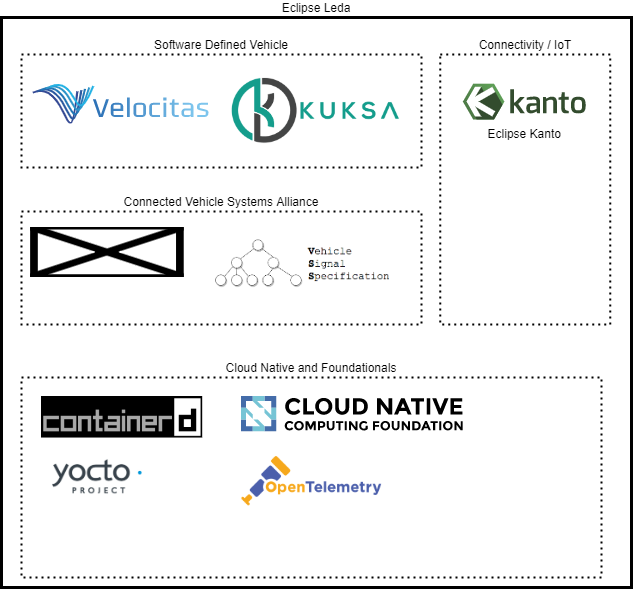
Eclipse Leda Component Overview

Features

  • Publish/Subscribe infrastructure for local messaging and cloud connectivity
  • Lightweight container runtime
  • Vehicle Update Manager to orchestrate deployments of Vehicle Applications over the air (SOTA)
  • Self Update Agent for firmware-over-the-air (FOTA) updates
  • Example Vehicle Seat Service implementation
  • Metrics and logs collector for Vehicle Apps

See About - Features for more details about current implementation and About - Roadmap for our future work.

This program and the accompanying materials are made available under the terms of the Apache License 2.0 which is available at https://www.apache.org/licenses/LICENSE-2.0

For details, please see our license NOTICE

1 - About Leda

The Eclipse Leda project will provide system image “recipes” to deliver a functional Linux-based image/distribution in the context of SDV (Software Defined Vehicle), by pulling together individual contributons from the SDV and the larger OSS community.

The Eclipse Leda distribution will work with build scripts, package definitions, image build pipelines, etc, with the goal to pull SDV projects and dependecies from the larger OSS community into a working Linux system. Such system images (or other useful forms of delivery, as determined by the project) will be made available for consumption for anyone who is interested in working with the SDV tech stack. These deliveries take the form of container (base) images, installable/flashable image files, etc (again to be evolved by the project team according to community needs). Also in scope is concise and useful documentation for consumers of the project’s deliverables, plus a method of delivering that documentation.

In the context described above - the ambition of SDV to build a technology ecosystem for software-defined vehicle concern - a prime challenge will be the combination of these initially diverse components into a coherent and useful whole: all the software components in the world will not have the impact needed to transform the automotive industry unless we can make them play together coherently an form a functional portfolio. As a first step towards that goal, this proposal (Eclipse Leda) is for a “SDV distribution” project that pulls together individual contributor pieces from SDV and the larger OSS community, to deliver a functional and always-available Linux-based image/distribution with two primary goals:

  • be the crystalization point for functionally integrating diverse SDV-scope projects into a working whole

  • deliver a continually available, always working starting image for developers interested in getting going with the SDV tech stack

1.1 - Architecture

Runtime Overview

Eclipse Leda SDV Reference Implementation

The runtime overview shows the general layer architecture for the runtime of the SDV edge stack as implemented by the Leda quickstart image. Dotted lines indicate out-of-scope components. They may be non-Edge components (such as cloud services, or SDKs and additional development tooling for vehicle applications). Dotted lines for in-vehicle edge components indicate that they may be used, but are not pre-installed or pre-configured on the Leda quickstart image.

Deployment Overview

Eclipse Leda can be used in different deployment scenarios: on physical hardware, on virtual machines or installed on existing Linux distributions. Depending on the specific deployment, some features may not be applicable. Each deployment option is meant for different uses. The applicabability depend to your specific requirements.

Eclipse Leda Quickstart Deployment View

  • Option 1: Hardware - Suitable for proof-of-concepts, system integration tasks, access to actual physical actuators and sensors. However, an automated setup is much harder to realize, as additional hardware for remote controlling of power supply is needed. The constrained environment of a physical device is good to verify accidental assumptions made by application developers, such as resource consumptions (CPU, memory) or the existence of Linux tools, Kernel modules or device drivers.
  • Option 2: Docker Containers - Good for quick startup and throw-away (ephemeral) uses, such as automated system testing or one-off troubleshooting. The access to physical hardware is limited and more complicated to set up. QEMU provides emulation of devices, such as CAN-Bus. Due to multiple nesting of abstraction technology (Docker + QEMU + OS), additional configuration of networking and device pass-thrus are necessary. It’s easy and cheap to spin-off many separate instances to simulate a whole vehicle system with multiple vehicle computers and simulated ECUs in the same vehicle network.
  • Option 3: Package Installation - Good for existing devices with feature-rich functionality where the original OS should be used. Leda does not support self-update for this deployment option, as it relies on the master OS distribution channels. The constraints of an embedded device are not replicable easily on a PC-style host machine without additional effort. Package installation is good when the focus is on exploring the Vehicle Applications, SDKs, Vehicle Signal Abstractions etc.
Option 1: Hardware Option 2: Docker Containers Option 3: Package Installation
Target use case PoC Automation Existing devices
Cloud communication ++ ++ +++
Automation +++ ++
Device provisioning ++ ++ +++
Access to hardware +++ - ++
Container isolation +++ ++ +++
Network flexibility +++ - ++
Self update +++ +
Realistic constrains +++ - -

Build Environment Overview

Eclipse Leda Build Infrastructure View

1.2 - Features

  • Publish/Subscribe messaging infrastructure for cloud connectivity by Eclipse Kanto
    • local messaging for applications and SDV system components via an MQTT message broker
    • connection to a backend messaging hub, such as Azure IoT Hub or the IoT Suite
    • device identification and authentication for cloud connectivity by using TLS device certificates
  • Container runtime
    • An OCI-compliant container orchestration for vehicle applications and services by Eclipse Kanto
    • containerd.io as the default container runtime. Both layers of container runtimes can be exchanged with other implementations
  • A Vehicle Update Manager to orchestrate deployments of Vehicle Applications, configurations and base operating system updates
  • An example Vehicle Seat Service implementation to showcase
  • A Self Update Agent for firmware-over-the-air (FOTA) updates, using an A/B deployment strategy
    • Integration with RAUC
  • An OpenTelemetry collector and example configurations to collect and publish logs and metrics of containerized Vehicle Applications to the cloud backend for further processing

The features of the reusable build recipes implemented as an OpenEmbedded metalayer meta-leda are:

  • Build recipes for a Yocto-based distribution to build SDV-related software components
  • Build recipes for customizations of the target device’s storage structure to enable A/B system updates
  • Build recipes for pre-packaging container images into the device during the manufacturing process to minimize initial online provisioning time
  • A customized minimal setup for use on constrained devices and a full setup with convenient developer tools
  • Ready images for virtual devices, for automated testing and evaluation purposes, eg QEMU ARM-64
  • Ready images for physical devices, for evaluation and demo purposes, eg Raspberry Pi 4

1.3 - Goals

The project aims to provide an integration point for Open Source components for the Software Defined Vehicle ecosystem.

In a complex architecture, there are many different ways of implementations and alternative solutions possible.

For embedded vehicle computer systems and their software stack, there are a lot of requirements to consider, depending on the actual use cases:

  • Integration and High-Level Testing (System Integrators, Suppliers)
  • Proof-of-Concept projects (Integrators, OEMs, ISVs)
  • Experiments and Hackathons (Developers, Research)
  • Development phase (Developers, OEMs)
  • Open Source Collaboration (Developers, OEMs, ISVs, Open Source Organizations, Standardization Organizations)

Some of the requirements derived from the above are taken into account for Leda’s quickstart setups. Thereas some other requirements can only be met once the project is in a nearer production environment and by customizing the target device image. The following document will list some of these requirements and give an explanation on why they are set as goals in the Leda quickstart distribution.

Overview

  • Provide an example operating system build and configuration for constrained in-vehicle devices: Suppliers and system integrators want a way to cusomize and optimize the base operating system as much as possible. This is to achieve a high efficiency, high level of reuse and cost benefits of the planned hardware. The build system for the operating system, and the selection of the underlying distribution is key to the convenience for new users, but also commercially a business decision with an impact on the future maintainability of the platform. The Yocto Project has been chosen as an established de-facto standard for customized Linux distributions for embedded systems. Leda provides an OpenEmbedded Meta-Layer, which can be used with many existing SDKs of SoC manufacturers. Additionally, Leda will strive for being easy to install on low-cost “evaluation boards” such as the Raspberry Pi, or development environments such as a virtual machine in the cloud.
  • Integrate software-defined-vehicle Open Source components to showcase the available features and their state of maturity: The SDV ecosystem will grow and a lot of new software projects will be needed to solve the current problems and challenges. The Eclipse SDV ecosystem already contains many software packages, which independently make sense for their set goals. With Leda, we want to increase the integrational aspect, helping project leads, developers, contributors, users and architects to evaluate the SDV portfolio, how it can be integrated with each other and how a possible reference architecture implementation might be loooking like.
  • Demonstrate the use and interaction of open protocols and specifications:
    • Vehicle Signal Specifications from the The Connected Vehicle Systems Alliance (COVESA) to establish a semantically useful abstraction model for vehicle signals.
    • OpenTelemetry specs and components, to show the possibilities of applying DevOps methodologies and technologies to operate, monitor and maintain fleets of vehicles and their distributed software applications
    • Eclipse IoT related specifications for software rollouts and digital twin representations

1.4 - Roadmap

  • Initial Open Source contribution expected by Q2 2022 (Done)
  • A first milestone build is expected end of 2022 (Done)
  • Plan for the first release cycle to be created in Q1/2023 (In Progress - Q2/2023)
  • Release cycles are planned every 3-6 months
  • Release planning will be conducted together with corresponding Eclipse projects

Backlog

The Leda team maintains a backlog roadmap using GitHub projects at https://github.com/orgs/eclipse-leda/projects/1/views/1

Future Work

The project intends to be the integration and collaboration platform for Software defined Vehicle functionality.

Exemplary future work:

  • Migrate to official Eclipse Kanto releases for Cloud Connector, Container Management and Vehicle Update Manager
  • Include reference implementations from the Eclipse Software Defined Vehicle working group projects:
    • Eclipse Velocitas
    • Eclipse Kuksa
    • Eclipse SommR
    • Eclipse Chariott
    • Eclipse Muto
    • Eclipse Backend function Bindings (BfB)
    • Eclipse SDV Blueprints
  • Include and showcase more features regarding development, operation and monitoring of Vehicle Services and Vehicle Applications

If you have feedback, please use GitHub Issues

1.5 - Releases

The Eclipse Leda project follows the Eclipse Release process. Please see Eclipse Project handbook for details about the process.

The release plans overview for Eclipse Leda is available at https://projects.eclipse.org/projects/automotive.leda/governance

1.5.1 - Milestone 0.1.0-M1

Release artifacts: https://github.com/eclipse-leda/leda-distro/releases/tag/v0.1.0-M1

Artifact Download Size
Leda Raspberry Pi 4 eclipse-leda-raspberrypi.tar.xz 578 MB
Leda QEMU ARM64 eclipse-leda-qemu-arm64.tar.xz 381 MB
Leda QEMU x86_64 eclipse-leda-qemu-x86_64.tar.xz 465 MB

Note: You need to uncompress eclipse-leda-raspberrypi.tar.xz multiple times until the plain .wic file is extracted, which can be flashed.

After download, continue with Getting Started

Release Notes

First pre-release of Eclipse Leda quickstart images, based on Yocto LTS release Kirkstone with Long Term Support until at least April 2024.

Minimal feature set to run software-defined-vehicle applications (such as Eclipse Velocitas apps) using COVESA Vehicle Signal Specification and the Eclipse Kuksa.VAL Databroker on virtual devices (QEMU), in Docker, or on physical consumer-grade devices (Raspberry Pi 4 64-Bit) for development, demonstration and prototyping purposes.

Includes example applications from Kuksa:

  • Example Seat Service
  • Example HVAC Service
  • DBC Feeder replays a Tesla Model 3 CAN-Dump and feeds it into Kuksa.VAL Databroker

Change log

  • Replaced k3s with Eclipse Kanto Container Management
  • Replaced packages licensed under GPLv3 and similar licenses with alternatives
    • Replaced Grub with U-Boot
    • Replaced nano with kibi
    • Removed readline library
    • Removed bash
  • RAUC Updates
    • Bundles available for each image type (Full, Minimal, Rescue)
    • Enabled verity format by default
    • Fixed the compatible configuration string
  • Added and updated Leda utilities
  • Build infrastructure improvements
    • Builds for Dockerized images
    • Switched to a BitBake build using kas for layer management
    • Added automated system tests using Robot framework and Dockerized environments
    • General cleanup of recipes, dependencies and structuring of the meta-leda sublayers to improve reusability
  • Automatic deployment of containers based on container manifests with ad-hoc updates (filewatcher in kanto-auto-deployer)
  • Preparation for AirGap installation of containers
  • General improvements, such as Wifi network management

Known Issues

The following issues were known to the development team before starting the 0.1.0-M1 build cycle. They have been prioritized as non-critical and may be fixed for later releases.

OSS IP Compliance Report

Report scan-report-web-app_0.1.0-M1.html

  1. Incorrectly detected license “biosl-4.0”

    • Rule: OCaaS Policy A9 License with no classification
    • Message: The license LicenseRef-scancode-biosl-4.0 found for package ‘Unmanaged::leda-distro-fork:0716b55ff8f57319263d67ee16d90e64588b391d’ is not categorized and / or evaluated for usage.
    • Evaluation: This license seems to be detected incorrectly by the tool being used, as it is an internal, proprietary license which is not used in the Eclipse Leda project.
  2. Incorrectly detected license “GPL-1.0” for ORT configuration file

    • Rule: OCaaS Policy C1 Strict Copyleft
    • Message: License GPL-1.0-only found for package ‘Unmanaged::leda-distro-fork:0716b55ff8f57319263d67ee16d90e64588b391d’ is categorized as strict-copyleft which must not be used for BT11 Open Source Development service applications.
    • Evaluation: The scan tool incorrectly detects its own configuration file (.ort.original.yml) as being licensed under GPL-v1.0
  3. Incorrectly detected license “GPL-2.0-only” for standard Leda license header (which is Apache Software License)

    • Rule: OCaaS Policy C1 Strict Copyleft
    • Message: License GPL-2.0-only found for package ‘Unmanaged::leda-distro-fork:0716b55ff8f57319263d67ee16d90e64588b391d’ is categorized as strict-copyleft which must not be used for BT11 Open Source Development service applications.
    • Evaluation: The scan tool incorrectly detects the Apache License header as GPL-2.0 license text
  4. Incorrectly detected license “proprietary”

    • Rule: OCaaS Policy C3 Commercial
    • Message: License LicenseRef-scancode-proprietary-license found for package ‘Unmanaged::leda-distro-fork:0716b55ff8f57319263d67ee16d90e64588b391d’ is categorized as commercial and requires special handling.
    • Evaluation: The scan tool incorrectly detects its own configuration file (.ort.original.yml) as being licensed under proprietary licenses.

1.5.2 - Milestone 0.1.0-M2

Release artifacts: https://github.com/eclipse-leda/leda-distro/releases/tag/v0.1.0-M2

Artifact Download Size
Leda Raspberry Pi 4 eclipse-leda-raspberrypi.tar.xz 578 MB
Leda QEMU ARM64 eclipse-leda-qemu-arm64.tar.xz 381 MB
Leda QEMU x86_64 eclipse-leda-qemu-x86_64.tar.xz 465 MB

Note: You need to uncompress eclipse-leda-raspberrypi.tar.xz multiple times until the plain .wic file is extracted, which can be flashed.

After download, continue with Getting Started

Release Notes

First pre-release of Eclipse Leda quickstart images, based on Yocto LTS release Kirkstone with Long Term Support until at least April 2024.

Minimal feature set to run software-defined-vehicle applications (such as Eclipse Velocitas apps) using COVESA Vehicle Signal Specification and the Eclipse Kuksa.VAL Databroker on virtual devices (QEMU), in Docker, or on physical consumer-grade devices (Raspberry Pi 4 64-Bit) for development, demonstration and prototyping purposes.

Includes example applications from Kuksa:

  • Example Seat Service
  • Example HVAC Service
  • DBC Feeder replays a Tesla Model 3 CAN-Dump and feeds it into Kuksa.VAL Databroker

Change log 0.1.0-M2

  • Remove skopeo dependency from packagegroup-sdv-tools.bb
  • Fix typo in SRCREV_FORMAT for pahocpp
  • dd kernel config for RAUC stream mode to raspberrypi4-64 and qemuarm64
  • Adding extra space in RPi for RAUC updates
  • Backport Go 1.20 from Poky Mickledore
  • Adding seatadjuster-app
  • seatadjuster-app distribution

Change log 0.1.0-M1

  • Replaced k3s with Eclipse Kanto Container Management
  • Replaced packages licensed under GPLv3 and similar licenses with alternatives
    • Replaced Grub with U-Boot
    • Replaced nano with kibi
    • Removed readline library
    • Removed bash
  • RAUC Updates
    • Bundles available for each image type (Full, Minimal, Rescue)
    • Enabled verity format by default
    • Fixed the compatible configuration string
  • Added and updated Leda utilities
  • Build infrastructure improvements
    • Builds for Dockerized images
    • Switched to a BitBake build using kas for layer management
    • Added automated system tests using Robot framework and Dockerized environments
    • General cleanup of recipes, dependencies and structuring of the meta-leda sublayers to improve reusability
  • Automatic deployment of containers based on container manifests with ad-hoc updates (filewatcher in kanto-auto-deployer)
  • Preparation for AirGap installation of containers
  • General improvements, such as Wifi network management

Known Issues

The following issues were known to the development team before starting the 0.1.0-M1 build cycle. They have been prioritized as non-critical and may be fixed for later releases.

OSS IP Compliance Report

Report scan-report-web-app_0.1.0-M1.html

  1. Incorrectly detected license “biosl-4.0”

    • Rule: OCaaS Policy A9 License with no classification
    • Message: The license LicenseRef-scancode-biosl-4.0 found for package ‘Unmanaged::leda-distro-fork:0716b55ff8f57319263d67ee16d90e64588b391d’ is not categorized and / or evaluated for usage.
    • Evaluation: This license seems to be detected incorrectly by the tool being used, as it is an internal, proprietary license which is not used in the Eclipse Leda project.
  2. Incorrectly detected license “GPL-1.0” for ORT configuration file

    • Rule: OCaaS Policy C1 Strict Copyleft
    • Message: License GPL-1.0-only found for package ‘Unmanaged::leda-distro-fork:0716b55ff8f57319263d67ee16d90e64588b391d’ is categorized as strict-copyleft which must not be used for BT11 Open Source Development service applications.
    • Evaluation: The scan tool incorrectly detects its own configuration file (.ort.original.yml) as being licensed under GPL-v1.0
  3. Incorrectly detected license “GPL-2.0-only” for standard Leda license header (which is Apache Software License)

    • Rule: OCaaS Policy C1 Strict Copyleft
    • Message: License GPL-2.0-only found for package ‘Unmanaged::leda-distro-fork:0716b55ff8f57319263d67ee16d90e64588b391d’ is categorized as strict-copyleft which must not be used for BT11 Open Source Development service applications.
    • Evaluation: The scan tool incorrectly detects the Apache License header as GPL-2.0 license text
  4. Incorrectly detected license “proprietary”

    • Rule: OCaaS Policy C3 Commercial
    • Message: License LicenseRef-scancode-proprietary-license found for package ‘Unmanaged::leda-distro-fork:0716b55ff8f57319263d67ee16d90e64588b391d’ is categorized as commercial and requires special handling.
    • Evaluation: The scan tool incorrectly detects its own configuration file (.ort.original.yml) as being licensed under proprietary licenses.

1.5.3 - Release Plan 0.1.0

The release plan is available at https://projects.eclipse.org/projects/automotive.leda/releases/0.1.0

Release Date

-Thursday, June 1, 2023- - We didn’t meet the planned release date. Work is in progress on IT build infrastructure and OSS IP and license compliance.

New: Tuesday, August 1, 2023

Deliverables

The team plans to deliver the following features:

  • Leda Quickstart Images for Qemu (x86_64, arm64), Raspberry Pi and Docker
  • Yocto / OpenEmbedded meta-layer for better reusability of the Eclipse SDV Vehicle.Edge stack in customized distributions for constrained devices
  • User documentation (Reference, Example Use Cases)
  • Automated system tests using Robot Framework
  • IP scanning with Eclipse Oniro Compliance Toolchain
  • Pre-Integrated Eclipse SDV Vehicle.Edge stack

The core SDV.EDGE stack in Leda would contain the following components for the first release (based upon availability):

  • Eclipse Kuksa.VAL: Data Broker
  • Eclipse Kanto: Container Management, Vehicle Update Manager
  • Eclipse Leda Incubator: Cloud Connector (Azure), Self Update Agent, Utilities (e.g kantui)

The following components are not yet released in public or did not yet finished the project review, and may only be added to the release on shorter notice:

  • (Eclipse Backend-Function-Bindings)
  • (Eclipse SommR)
  • (OTA Client)

Compatibility

Compatibility to previous versions is not considered for this first release.

Internationalization

No efforts towards i18n are done in this release.

Target Environments

  • Linux (virtual, qemu)
  • Raspberry Pi 4 (consumer grade)

1.5.4 -

ORT Scan Report

2 - Getting Started

  1. Download latest Eclipse Leda release
  2. Run Eclipse Leda
  3. Configure device, e.g. provision the device
  4. Explore the device tools
  5. Develop your first Vehicle App using Eclipse Velocitas template
  6. Deploy a Vehicle App to the device

2.1 - Introduction to SDV concepts

This page introduces the main concepts around Eclipse Leda, Eclipse Kuksa, Eclipse Velocitas, and Eclipse Kanto for developing and deploying applications for a software defined vehicle (SDV). The intention is to introduce the main concepts and how these projects interact. When you are already familiar with the general ideas of the Eclipse SDV, you can also jump to a hands-on tutorial on how to develop a seat adjuster application or replicate an Eclipse SDV Blueprint for managing vehicle fleets using Eclipse SDV concepts and technologies.

Abstract Architecture

For the software defined vehicle we may assume the following abstract architecture.

Abstract Architecture

The architecture evolves around actuators and sensors in a vehicle, like the state of a passenger seat or a door, which get controlled by connected ECUs. These ECUs react to and produce signals, which they communicate over automotive communication systems like CAN or SOME/IP. To establish a more flexible interaction between these ECUs and make the overall vehicle more software-defined, we assume various vehicle applications which want to interact with the actuators and sensors, e.g., to control a seat based on a saved driver profile. The architecture contains a vehicle abstraction layer between the ECUs and the vehicle applications. This abstraction layer introduces a potential control point for security and safety considerations and generally decouples the application logic from the more deeply embedded soft- and hardware layers.

Vehicle Abstraction Layer

As the name implies the vehicle abstraction layers offers abstract ways to interact with the underlying vehicle.

Vehicle Signal Specification (VSS)

We need a joint data model for the potential signals with which an application can interact. We propose to use the Vehicle Signal Specification (VSS) from the Connected Vehicle Systems Alliance (COVESA) for this.

VSS Tree

VSS essentially defines a rule set of how to express the definition of signals in a vehicle. This definition bases a tree structure where each domain, like body control, gets an individual sub-tree. The authors of VSS further provide a default tree of signals to be expected in a vehicle. However, it is common practice to tailor the default tree for a specific vehicle model by adding overlays.

VSS allows modeling and structuring of the data from a vehicle but does not define interfaces for the interaction with this data since this depends on the used communication technology and further circumstances like whether VSS data gets processed inside the vehicle or off-board.

For our architecture, we therefore add the Eclipse Kuksa.val databroker from the Eclipse Kuksa project.

Eclipse KUKSA.val databroker

The Eclipse Kuksa.val databroker acts as a vehicle abstraction layer by brokering VSS signals between vehicle applications and deeply embedded systems in the vehicle. Enabling this abstraction requires a vehicle-specific component to translate between the Kuksa.val databroker and the underlying transport systems and ECUs.
With Eclipse Kuksa, we refer to these software components as providers and further differentiate between actuation and data providers.

Eclipse Kuksa Actuation

For actuators, the Kuksa.val databroker stores the desired and the current state. Typically, an application would perform a control operation by setting the target state and monitoring the current state. It is then the task of the actuation provider to perform the action while the data provider updates the current state according to signals sent on the vehicle bus. To get notified of any changes, applications, and providers can subscribe to specific signals at the Kuksa.val databroker.

The Kuksa.val databroker is written in Rust and offers communication over gRCP. To make life easier for developers using the Kuksa.val databroker there is a Python-client which can be integrated in own applications. When developing with other languages, you may have to generate client code yourself with the gRPC tooling. Either way, these clients allow the development of vehicle applications and providers.

Vehicle Application Development

When developing an application to interact with the abstraction layer, there are a couple of aspects to cover, which are not specific to a single application. Because of that, some projects are evolving around the application development phase.

Eclipse Autowrx and digital.auto Playground

A good starting point to figure out what signals are available is the website of the digital.auto playground based on Eclipse Autowrx.

digital.auto Vehicle API

In the next step, you can ideate on new applications, start coding, and get fast feedback using the prototyping feature of the playground. Once you are confident with the initial version, you can continue the development journey with the help of Eclipse Velocitas, which comes with several features making the life of vehicle application developers easier.

digital.auto Prototyping

Eclipse Velocitas

Eclipse Velocitas™ is an open source project providing a development tool chain to create containerized Vehicle Apps, offering a development experience to increase the speed of a development team (velocity).

Among other things, Eclipse Velocitas provides a template repository. To kick-start the development of a new application, you can create an individual repository from this template. As an alternative, Eclipse Velocitas provides a CLI application with which you can configure the creation of a tailored vehicle application repository. Either way, the resulting repository contains skeleton code for the actual application and comes with pre-defined GitHub Actions workflows to automate the testing and releasing of applications as containers. The repository further contains the Dockerfile for a dev container that setups a development and vehicle environment on the developer machine. It is then possible to interact with this container through VSCode.

Another aspect of Eclipse Velocitas is the so-called vehicle model. Here it becomes possible to take a custom vehicle model expressed in VSS and generate a tailored SDK with specific domain classes to interact with a Kuksa.val databroker using the same model. This way, we can directly develop against the used vehicle model.

Velocitas Flow

A typical Eclipse Velocitas application development flow then may contain the following steps:

  • create Repository
  • build and run Dev Container locally from VSCode
  • start vehicle runtime in Dev container
  • develop vehicle application and integration tests
  • commit and push vehicle applications to trigger tests in GitHub Actions workflows
  • trigger release workflow in GitHub

As a result of the Release workflow, the generated repository contains a Container image with the vehicle application. A target device, e.g., a vehicle or test device, can pull and execute this container.

Vehicle Providers and Emulation

The underlying assumption when developing a vehicle application against the vehicle abstraction layer is that components below the abstraction fulfill the requests coming from the application. In other words: Developers have to assume that there are providers for the signals with which their application interacts. For a production-ready vehicle, this should be the case. But during development and testing the creation of such providers adds overhead and is a potential cause for further errors. An alternative is to use pre-developed services or even a generalized vehicle mock service which acts as such a provider. Developers can alter the vehicle mock service by defining the desired behavior through a Python-based DSL.

Vehicle Mock

Vehicle Application Runtime

The next step is to bring the application to the target device and the vehicle. There are various options for how to run and orchestrate vehicle application containers. Some originate from general IT scenarios like Kubernetes or Docker Compose, and others focus more on automotive and IoT-use cases like Eclipse Kanto. So a vehicle application developer now faces the challenge of picking a runtime and integrating this runtime with required infrastructure components like the Kuksa.val databroker or respective Kuksa.val providers to enable the vehicle application.

Eclipse Leda

Among other things, Eclipse Leda already provides such a target platform through a Linux-based distribution of pre-integrated Eclipse SDV components. See the architecture page for more details on the elements in Eclipse Leda. For the container execution, Eclipse Leda utilizes Eclipse Kanto, which implements lightweight management of OCI-compliant containers and comes by default with containerd. It is possible to manage the containers either through a CLI or by writing container manifest files and placing them in a dedicated folder on the file system from where Eclipse Kanto automatically performs them.

Service Exchange

Another challenge when deploying multiple components that need to collaborate as services is how they find and communicate with each other. In Eclipse Kanto, the discovery and exchange can happen over container indetifiers or topics on a local MQTT broker. The Eclipse SDV community already came up with other approaches for the service exchange topic like Eclipse uProtocol, Eclipse Chariott or Eclipse Zenoh.

Seat Adjuster

To see the explained concepts in action, it is best to build your own application. The Seat Adjuster is good starting point with specific examples.

2.2 - Download latest release

Latest Release Artifacts

Note: There are no official releases yet. The artifacts available on the Release page are for testing the build and release workflows. They should be considered as unstable nightly builds from the main branch. Releases marked -M1, -M2, -RC1 etc. are preparations for official releases according to the Eclipse Release process.

Go to the Eclipse Leda Releases page and download the release archive for the respective machine. The release archives container the disk image and the respective Linux kernel:

Machine Filename Description
QEMU x86_64 eclipse-leda-qemu-x86_64.tar.xz For running QEMU x86 64-Bit
QEMU ARM 64 eclipse-leda-qemu-arm64.tar.xz For running QEMU ARM 64-Bit
Raspberry Pi 4 eclipse-leda-raspberrypi.tar.xz For running on Raspberry Pi 4 (SD-Card Image)

Using GitHub CLI tool

To download all files of the latest release using the GitHub CLI:

  • Install GitHub CLI, e.g. for Ubuntu:

    curl -fsSL https://cli.github.com/packages/githubcli-archive-keyring.gpg | sudo dd of=/usr/share/keyrings/githubcli-archive-keyring.gpg
    echo "deb [arch=$(dpkg --print-architecture) signed-by=/usr/share/keyrings/githubcli-archive-keyring.gpg] https://cli.github.com/packages stable main" | sudo tee /etc/apt/sources.list.d/github-cli.list > /dev/null
    sudo apt update
    sudo apt install gh
    
  • Authenticate to GitHub:

    gh auth login
    
  • Download Leda latest release:

    On Linux:

    mkdir leda && cd leda
    
    gh release download \
      --pattern '*.zip' \
      --pattern 'eclipse-leda-*' \
      --repo eclipse-leda/leda-distro
    

    On Windows:

    gh release download --pattern "*.zip" --pattern "eclipse-leda-*" --repo eclipse-leda/leda-distro
    
  • Continue with Running Eclipse Leda on QEMU or Running Eclipse Leda on Raspberry Pi 4

2.3 - Running on Docker

By using the dockerized Leda quickstart images, the SDV vehicle edge components can be evaluated on emulated X86-64 and ARM64 system images, without having to install QEMU and dependencies manually.

Eclipse Leda Docker Compose Up

If you want to execute the image without Docker, please see Running on QEMU. This allows to tweak the startup script, modify the emulated hardware device and set up advanced network configurations.

There are two options to run Leda:

  • Docker: Simple, restricted to one container
  • Docker Compose: Advanced, allows networking between containers

Recommendations

  • A Linux host with 4 vCPUs, 8GB of RAM and SSD storage is recommended
  • Docker

Docker

The easiest way is to run a single instance of Leda in a Docker container:

  • Run the Leda Docker quickstart image:

    docker run -it ghcr.io/eclipse-leda/leda-distro/leda-quickstart-x86
    
  • Login with root

  • Stop the Docker container

    shutdown now
    

    Note: If you need to stop the container from outside, use the docker stop <id> command from a separate terminal.

Privileged Containers

When run as a privileged container, QEMU will try to set up a TAP network and use KVM acceleration. Network and CPU will be faster, depending on the host system.

To be able to use these host devices, QEMU needs access to the following devices:

  • /dev/kvm
  • /dev/net/tun

Example command:

docker run -it --privileged --device=/dev/kvm:/dev/kvm --device=/dev/net/tun:/dev/net/tun ghcr.io/eclipse-leda/leda-distro/leda-quickstart-x86

Exposing additional ports

To also expose ports to connect to ssh, mqtt or the Kuksa databroker, add the port mappings to the Docker command:

docker run -it --privileged -p 2222:2222 -p 1883:1883 -p 30555:30555 ghcr.io/eclipse-leda/leda-distro/leda-quickstart-x86:latest

The following ports are specifically of interest and exposed by the docker container:

  • 2222 for SSH (mapped internally to 22)
  • 1880 - free slot reserved for user service
  • 1883 for MQTT
  • 8888 - free slot reserved for user service
  • 30555 for Kuksa Databroker

Note: In unprivileged mode, only these ports are mapped by the Docker container and forwarded to the Leda system. In privileged mode, all TCP ports can be exposed, which will then be forwarded from the Docker container into the Leda system. See the entrypoint script for details.

Running ARM-64 version

To run the ARM-64 bit version of the image, use the leda-quickstart-arm64 container image:

docker run -it ghcr.io/eclipse-leda/leda-distro/leda-quickstart-arm64:latest

Docker Compose

A more convenient way to setup advanced scenarios is to use Docker Compose. There is a Docker Compose configuration for an Eclipse Leda setup in resources/docker-compose.

It will start up the following containers:

  • Leda Quickstart image (QEMU x86-64)
  • Leda Quickstart image (QEMU ARM-64)
  • Web Server with pre-built RAUC Update Bundles
  • MQTT Bridge
  • DNS Proxy (Allows QEMU to use the Docker DNS)

Usage

Get the Docker Compose configuration file and additional dockerfiles from the https://github.com/eclipse-leda/leda-distro repository:

git clone --filter=blob:none https://github.com/eclipse-leda/leda-distro
cd leda-distro/resources/docker-compose

Starting the containers with:

docker compose up --detach --wait

Log in to a development shell inside of the docker network:

docker compose run --rm devshell

Stopping the containers:

docker compose down

Docker Compose Services

Checking all containers are running or exited successfully:

$ docker compose ps
NAME                 COMMAND                  SERVICE              STATUS              PORTS
leda-arm64           "/docker/leda-quicks…"   leda-arm64           running (healthy)   1883/tcp, 0.0.0.0:2002->2222/tcp, 0.0.0.0:30556->30555/tcp
leda-bundle-server   "/docker-entrypoint.…"   leda-bundle-server   running (healthy)   0.0.0.0:8080->80/tcp
leda-dns-proxy       "dnsmasq -k"             dns-proxy            running             53/tcp, 0.0.0.0:5353->53/udp
leda-initializer     "/bin/sh -c /root/le…"   leda-initializer     exited (0)          
leda-mqtt-broker     "/docker-entrypoint.…"   mqtt-broker          running (healthy)   0.0.0.0:1883->1883/tcp
leda-x86             "/docker/leda-quicks…"   leda-x86             running (healthy)   1883/tcp, 0.0.0.0:30555->30555/tcp, 0.0.0.0:2001->2222/tcp

Network setup

As the networking is a bit more complicated to set up with emulated network inside of QEMU, the following explanation is helpful to understand networking better.

  • All docker compose containers are attached to a network called leda-bridge and leda-network and can see each other
  • The QEMU instances use a TAP network inside of each leda-quickstart-xxx container and do a NAT network translation to their own container
  • The Docker internal DNS server is being used. This is implemented by a DNS Proxy container, which will forward incoming DNS requests to the Docker DNS running on the 127.0.0.x network.
  • In unprivileged mode: Only the exposed ports are forwarded from the docker container into the QEMU process: mosquitto 1883, ssh 2222 and kuksa.val databroker 30555. In privileged mode, all TCP ports are forwarded from the Docker container into the QEMU process and the special port 2222 is forwarded to ssh port.

Developer Shell

Developer Shell:

docker compose run --rm devshell

From there, you can log in to either Leda on QEMU x86-64, or log in to Leda on QEMU ARM-64.

ssh leda-x86
ssh leda-arm64

To run an additional terminal in the developer shell, execute this:

docker compose exec devshell /bin/bash

Interacting with Eclipse Leda

  1. Check the general system status
sdv-health

Device Provisioning

  1. Run the provisioning script:

    sdv-provision
    
  2. Copy the fingerprints

  3. Go to Azure IoT Hub, create a new device

  4. Use the certificate’s common name (CN) as Device Id - on Leda, this defaults to a part of the MAC Address

  5. Select X.509 Self-Signed authentication type and enter both fingerprints

  6. Click Save

MQTT Broker Bridge

graph LR; A["MQTT Container
on docker host
localhost:1883"] -- Bridge --> B[leda-x86:31883]; A -- Bridge --> C[leda-arm64:31883]; B-->B1[mosquitto service
leda-x86:1883]; C-->C1[mosquitto service
leda-arm64:1883];

The Docker Compose setup will also start an Eclipse Mosquitto message broker as a bridge to both Leda instances. This allows a user or developer to monitor messages sent by or received by both virtual devices.

Connect your MQTT client to mqtt-broker.leda-network by using the exposed port 1883 on the host:

mosquitto_sub -h localhost -p 1883 -t '#' -v

Docker Networking

You need to enable IP forwarding from Docker containers to make networking work. The containers (leda-arm64, leda-x86) need to run with --privileged as they change iptables rules for proper forwarding of network packets.

See Docker documentation for bridge networking for details.

sudo sysctl net.ipv4.conf.all.forwarding=1
sudo iptables -P FORWARD ACCEPT

Each Eclipse Leda instance (ARM64, x86_64) is running within a QEMU emulated network (192.168.7.2), which itself is contained in a containerized network called leda-network (192.168.8.x).

The containers wrapping the QEMU instances will forward the following ports to the respective QEMU process:

  • SSH on port 2222
  • Mosquitto on port 1883

DHCP and DNS setup

Each Leda-QEMU container is running a local DHCP on the tap0 network interface and listens for DHCP requests by the Leda Distro running inside of QEMU. The DHCP server will respond with the same IP address (192.168.7.2) to the request from QEMU.

The DHCP response contains a DNS nameserver pointing to the dns-proxy.leda-network (192.168.8.14) IP, which in turn forwards to Docker’s internal 127.0.0.11 nameserver. This allows the QEMU guests to resolve Docker Compose Services by their service name, e.g. leda-bundle-server.leda-network.

Volumes

The /root path inside of the Leda containers is mounted as a volume and contains the raw disk image and runner scripts for the QEMU Leda distribution. Changes on the QEMU filesystem are made persistent on a copy of the QCOW2 disk image, so that restarting the device will keep any changes.

To reset to the original state, delete the respective docker volumes and restart the containers:

docker compose down
docker compose rm --force --stop --volumes
docker volume rm leda-arm64
docker volume rm leda-x86

Profiles

Profiles can be used to determine which containers (services) docker compose should be starting by default. This is mostly used to have the devshell container not start up by default.

  • tools: Contains docker containers which are not essential at runtime, must useful for testing and development purposes

2.4 - Running on Raspberry Pi

What you need:

  • A Raspberry Pi 4B (64 Bit) with 2 GiB of RAM or more, recommended is 8 GiB
  • Network connection (Ethernet or Wifi) with transparent internet access
  • Optional keyboard and display (makes it easier to troubleshoot)

Steps:

  • Download the latest released SD-Card Image: eclipse-leda-raspberrypi.tar.xz

  • Uncompress the SD Card image:

    apt-get install -y xz-utils
    tar xf eclipse-leda-raspberrypi.tar.xz
    bzip2 -d -f sdv-image-all-raspberrypi4-64.wic.bz2
    
  • Flash the sdv-image-all-raspberrypi4.wic file to an SD-Card

    • On Linux:
      • Install bmap tools: sudo apt-get install -y bmap-tools
      • Insert SD Card and check which device is mounted: sudo fdisk -l
      • Unmount the device: sudo umount /dev/mmcblk[X]
      • sudo bmaptool copy --bmap sdv-image-all-raspberrypi4-64.wic.bmap sdv-image-all-raspberrypi4-64.wic /dev/mmcblk[X]
      • Note: Using bmap is much faster but works the same as with plain dd if=<wic-file> of=dev/mmcblk[x].
    • On Windows:
  • Optional: If you need to adapt the network configuration eg Wifi credentials, edit the configuration files on the boot partition.

  • Shutdown the Raspberry and insert the SD-Card into the Raspberry Pi SD-Card slot at the bottom

  • Power on your Raspberry to boot the image

  • Login with root

  • Check disk space:

    • The raspberry-growdisk system service will do this automatically on first boot.

    • To manually enlarge the available disk space on the SD-Card, resize the disk partition: parted /dev/mmcblk0 resizepart 6 100% && resize2fs /dev/mmcblk0p6.

      Note: Due to changes in the disk partition, the partition number (6 in the example) may have changed.

    • Verify with df -h.

  • Verify and wait until container runtime is started: systemctl status container-management

  • Optional: Check the system health: sdv-health

  • Continue with Device Provisioning

2.4.1 - CAN-Bus extensions

The Eclipse Leda quickstart image has CAN-Bus kernel modules and some CAN hardware drivers pre-installed. However, some hardware configuration needs to be adapted at boot time depending on the specific CAN-Extension being attached to the device.

On Raspberry Pi, there is a /boot/config.txt file where you can configure the dtoverlay options accordingly.

Note: After modification, the device requires rebooting for the changes to take effect.

MCP2515 based modules

Products:

dtoverlay=mcp2515-can0,oscillator=12000000,interrupt=25,spimaxfrequency=2000000

MCP2518FD based modules

Products:

dtoverlay=2xMCP2517FD
#dtoverlay=2xMCP2518FD-spi0

2.5 - Running on QEMU

If you want to execute the image without building first, grab the latest release or build artifacts from https://github.com/eclipse-leda/leda-distro/

Recommendations

  • A Linux host with 8 vCPUs, 16GB of RAM and SSD storage is recommended
  • Your Linux user should be sudoer to allow TAP network interfaces to be set up

QEMU x86_64

  • Install Qemu, e.g. for Ubuntu:

    sudo apt-get update -y
    sudo apt-get install -y xz-utils qemu-system-x86-64
    
  • Download latest Eclipse Leda release

  • Uncompress the archive

    tar xf eclipse-leda-qemu-x86_64.tar.xz
    
  • Run QEMU on Linux:

    ./run-leda.sh
    
  • Run QEMU on Windows:

    run-leda.cmd
    

    Leda boot sequence

  • Login as root without password on login prompt

  • Verify and wait until container runtime is started: systemctl status container-management

  • Optional: Check the system health: sdv-health

    sdv-health

    Note: The status of some containers (e.g. cloud connector) are expected to stay in FAILED status as long as the Device Provisioning steps are not completed.

  • Continue with Device Provisioning

QEMU ARM 64-Bit

  • Install Qemu, e.g. for ARM 64-Bit: sudo apt install qemu-system-aarch64

  • Download latest Eclipse Leda release

  • Uncompress the archive

    tar xf eclipse-leda-qemu-arm64.tar.xz
    
  • Run QEMU on Linux:

    ./run-leda.sh
    
  • Run QEMU on Windows:

    run-leda.cmd
    
  • Login as root without password on login prompt

  • Verify and wait until container runtime is started: systemctl status container-management

  • Optional: Check the system health: sdv-health

    Note: The status of some containers (e.g. cloud connector) are expected to stay in FAILED status as long as the Device Provisioning steps are not completed.

  • Continue with Device Provisioning

2.5.1 - CAN Bus

Note: The configuration mentioned in this chapter is already enabled in the run-leda.sh script.

QEMU

General documentation about using CAN-Bus in Qemu: https://www.qemu.org/docs/master/system/devices/can.html

Enabling Virtual CAN Bus interfaces (vcan)

No special parameters are necessary for qemu, as vcan is virtual:

runqemu qemux86-64 nographic slirp qemuparams="-m 2048"

Bring interface up:

ip link add dev vcan0 type vcan
ip link set vcan0 up

Enabling CAN Bus interfaces (can)

Standalone CAN within Qemu

To run a standalone CAN setup, qemu must be instructed to emulate a specific CAN hardware device. We will be using the kvaser_pci device in this example:

runqemu qemux86-64 nographic slirp qemuparams="-m 2048 -object can-bus,id=canbus0 -device kvaser_pci,canbus=canbus0"

After the image has booted, load the Linux Kernel Module kvaser_pci device driver and configure the CAN-Bus device (eg bitrate) before bringing the interface up:

root@qemux86-64:~# modprobe kvaser_pci

root@qemux86-64:~# dmesg | grep kvaser
[    9.565149] kvaser_pci 0000:00:04.0: initializing device 10e8:8406
[    9.569308] kvaser_pci 0000:00:04.0: reg_base=00000000d5a68095 conf_addr=000000002b3c7ef6 irq=20
[    9.596942] kvaser_pci 0000:00:04.0: xilinx version=13 number of channels=0

root@qemux86-64:~# ip link show type can
4: can0: <NOARP,ECHO> mtu 16 qdisc noop state DOWN mode DEFAULT group default qlen 10
    link/can

Configure the interface:

root@qemux86-64:~# ip link set can0 type can bitrate 1000000
[  165.519919] kvaser_pci 0000:00:04.0 can0: setting BTR0=0x00 BTR1=0x14

root@qemux86-64:~# ip link set can0 up
[  186.906065] IPv6: ADDRCONF(NETDEV_CHANGE): can0: link becomes ready

root@qemux86-64:~# ip link show type can
4: can0: <NOARP,UP,LOWER_UP,ECHO> mtu 16 qdisc pfifo_fast state UP mode DEFAULT group default qlen 10
    link/can 

Tunneling a CAN Interface from the Host

runqemu qemux86-64 nographic slirp qemuparams="-m 2048 -object can-bus,id=canbus0 -object can-host-socketcan,id=canhost0,if=can0,canbus=canbus0 -device kvaser_pci,canbus=canbus0"

Bring interface up:

ip link add dev can0 type can
ip link set can0 type can bitrate 1000000
ip link set can0 up
ip link show type can

Raspberry Pi CAN HAT Extensions

Supported boards:

  • Boards with a Microchip MCP251x based CAN chip, such as Waveshare CAN HAT or PiCAN 2

Verify driver is loaded:

# dmesg | grep mcp
[    8.23543] mcp251x spi0.0 can0: MCP2515 successfully initialized

Verify SocketCAN network interface shows up:

# ip link show type can
3: can0: <NOARP,ECHO> mtu 16 qdisc noop state DOWN mode DEFAULT roup default qlen 10

Continue with configuring the CAN chip and bring up the SocketCAN network interface:

# ip link set can0 type can bitrate 1000000
# ip link set can0 up
# ip link show type can

Linux Kernel Modules

The following Linux Kernel modules are available on the quickstart images:

Note: For QEMU, only kvaser_pci is used

Leda main Kernel

  • peak_pciefd - Socket-CAN driver for PEAK PCAN PCIe/M.2 FD family cards
  • m_can - CAN bus driver for Bosch M_CAN controller
  • m_can_pci - CAN bus driver for Bosch M_CAN controller on PCI bus
  • m_can_platform - M_CAN driver for IO Mapped Bosch controllers
  • softing - Softing DPRAM CAN driver
  • cc770_platform - Socket-CAN driver for CC770 on the platform bus
  • cc770_isa - Socket-CAN driver for CC770 on the ISA bus
  • cc770 - cc770CAN netdevice driver
  • ifi_canfd - CAN bus driver for IFI CANFD controller
  • kvaser_usb - CAN driver for Kvaser CAN/USB devices
  • etas_es58x - Socket CAN driver for ETAS ES58X USB adapters
  • ucan - Driver for Theobroma Systems UCAN devices
  • peak_usb - CAN driver for PEAK-System USB adapters
  • kvaser_pciefd - CAN driver for Kvaser CAN/PCIe devices
  • kvaser_pci - Socket-CAN driver for KVASER PCAN PCI cards
  • f81601 - Fintek F81601 PCIE to 2 CANBUS adaptor driver
  • sja1000_isa - Socket-CAN driver for SJA1000 on the ISA bus
  • plx_pci - Socket-CAN driver for PLX90xx PCI-bridge cards with the SJA1000 chips
  • sja1000 - sja1000CAN netdevice driver
  • ems_pci - Socket-CAN driver for EMS CPC-PCI/PCIe/104P CAN cards
  • peak_pci - Socket-CAN driver for PEAK PCAN PCI family cards
  • sja1000_platform - Socket-CAN driver for SJA1000 on the platform bus
  • vxcan - Virtual CAN Tunnel
  • c_can_platform - Platform CAN bus driver for Bosch C_CAN controller
  • c_can - CAN bus driver for Bosch C_CAN controller
  • c_can_pci - PCI CAN bus driver for Bosch C_CAN/D_CAN controller
  • slcan - serial line CAN interface
  • can_dev - CAN device driver interface
  • vcan - virtual CAN interface
  • can-isotop - PF_CAN isotp 15765-2:2016 protocol
  • can-gw - PF_CAN netlink gateway
  • can-j1939 - PF_CAN SAE J1939
  • can-raw - PF_CAN raw protocol
  • can-bcm - PF_CAN broadcast manager protocol
  • can - Controller Area Network PF_CAN core

Raspberry Pi

The following Linux Kernel modules are available on the quickstart image for Raspberry Pi:

  • can - Controller Area Network PF_CAN core
  • vxcan - Virtual CAN Tunnel
  • can-dev - CAN device driver interface
  • can-bcm - PF_CAN broadcast manager protocol
  • can-gw - PF_CAN netlink gateway
  • can-raw - PF_CAN raw protocol
  • can-isotop - PF_CAN isotp 15765-2:2016 protocol
  • can-j1939 - PF_CAN SAE J1939
  • vcan - virtual CAN interface
  • slcan - serial line CAN interface
  • mcp251x - Microchip 251x/25625 CAN driver
  • mcp251xfd - Microchip 251xFD Family CAN controller driver
  • ems_usb - CAN driver for EMS Dr. Thomas Wuensche CAN/USB interfaces
  • gs_usb - Socket CAN device driver for Geschwister Schneider UG
  • peak_usb - CAN driver for PEAK-System USB adapters

2.5.2 - Transferring Files

Sharing a directory with the guest

When you want to copy files between the host and the guest, an easy way is to use an SFTP tunnel. With sshfs, you can mount a local directory to a remote directory via SSH.

Pre-Requisites

Installation of needed packages:

  • Run apt-get install sshfs on your host
  • Enable CORE_IMAGE_EXTRA_INSTALL += " openssh-sftp-server" in local.conf of your image (e.g. in the local_conf_header section in your kas file)
  • Verify SFTP connection working with sftp -P 2222 root@localhost

Transfering files from host to guest

When you want to copy files from the host to the guest, an easy way is to use an SFTP tunnel. With sshfs, you can mount a local directory to a remote directory via SSH.

  • Create a mount point on your host: mkdir remote
  • Open the SSH Filesystem tunnel: sshfs root@localhost:/ remote/ -p 2222
  • Check files: ls -al remote/ - you should see the root filesystem of the device now
  • You can now easily copy files: cp foo.txt remote/home/root/

Transfering files from guest to host

Note: The reverse direction, e.g. initiating an SSH tunnel from within the device to the host, is currently not supported by the installed software on the image.

2.6 - Running on Linux

To run the main components of the SDV EDGE stack on an existing Linux distribution (e.g. Debian, Ubuntu, Raspberry Pi OS), you need to install the following packages.

Please note that since this is not a full-system installation, but an additional installation, there are some differences compared to the usual Leda installation on Docker/QEMU/Devices using our Quickstart image:

  • The Self-Update use case is not used, as the distribution-specific channels apply. E.g. it does not make sense to use the Leda infrastructure to flash a full system image.
  • The configuration differs slightly and you need to put some more work into getting the examples to work out of the box. This may include different port numbers, different paths of volume mounts for containers etc.

Debian-based Linux distributions

Tested on x86_64 via Docker:

  • Debian 11
  • Debian 12
  • Ubuntu 20.04
  • Ubuntu 22.04
  • Ubuntu 23.10

Note: Ubuntu 18.04 is not supported, as the glibc is outdated.

Pre-Requisuites

The SDV stack requires the following packages to be present on the target system:

  • Mosquitto (adapt configuration, see below)

  • Data folders

    • Storage for Self Update Bundles: mkdir -p /data/selfupdates

    • Device Certificates Folder:

      # Required by Cloud Connector
      mkdir -p /data/var/certificates/
      touch /data/var/certificates/device.crt
      touch /data/var/certificates/device.key
      
  • systemd (Optional: You can also manually start the services)

  • D-Bus (Optional: This is for Self Update Agent to RAUC integration)

  • RAUC (Optional: Only for Self-Update Use Case or testing purposes)

Installation Steps

Note: The steps below are examples for x86 platform. If you deploy on ARM64 platform, adapt the filenames accordingly.

  1. Update repository and install dependencies:

    apt-get update
    apt-get -y install ca-certificates mosquitto wget
    
    # Optional:
    apt-get -y install dbus rauc
    
  2. Download the Debian package from the Eclipse Kanto release page

    wget "https://github.com/eclipse-kanto/kanto/releases/download/v0.1.0-M3/kanto_0.1.0-M3_linux_x86_64.deb"
    apt-get install -y ./kanto_0.1.0-M3_linux_x86_64.deb
    
    # Check if Kanto has been installed
    command -v container-management
    command -v kanto-cm
    systemctl status container-management
    

    Note: This will also install containerd.

  3. Download the Debian packages from the Eclipse Leda Utilities release page:

    wget "https://github.com/eclipse-leda/leda-utils/releases/download/v0.0.2/eclipse-leda-utils_0.0.2.0.00680_all.deb"
    apt-get install -y ./eclipse-leda-utils_0.0.2.0.00680_all.deb
    command -v sdv-health
    
    wget "https://github.com/eclipse-leda/leda-utils/releases/download/v0.0.2/eclipse-leda-kantui_0.0.2.0.00680_amd64.deb"
    apt-get install -y ./eclipse-leda-kantui_0.0.2.0.00680_amd64.deb
    command -v kantui
    
    wget "https://github.com/eclipse-leda/leda-utils/releases/download/v0.0.2/eclipse-leda-kanto-auto-deployer_0.0.2.0.00680_amd64.deb"
    apt-get install -y ./eclipse-leda-kanto-auto-deployer_0.0.2.0.00680_amd64.deb
    command -v kanto-auto-deployer
    
  4. Download the Debian package eclipse-leda-container-*.deb from the Eclipse Meta-Leda release page:

    wget "https://github.com/eclipse-leda/meta-leda/releases/download/0.1.0-M2/eclipse-leda-containers_0.1.0.2.0.422_all.deb"
    apt-get install -y ./eclipse-leda-containers_0.1.0.2.0.422_all.deb
    
  5. Run the kanto-auto-deployer to deploy the core components:

    kanto-auto-deployer /var/containers/manifests
    

    To install the example containers, run the following:

    kanto-auto-deployer /var/containers/manifests/examples
    

Configuration Hacks

  • Mosquitto must be configured to allow anonymous access and listen on the network interface available to the containers. The easiest (and least secure!) configuration would be:

    /etc/mosquitto/conf.d/public.conf:

    listener 1883 0.0.0.0
    allow_anonymous true
    

    Attention: Only apply this configuration on a device in a secured network, or adapt the configuration accordingly (e.g. specify internal IP address)

2.7 - Cheatsheet

This cheat sheet gives you an overview of common command line commands to interact with the tools available on the quickstart image.

General Commands

Category Task Command
General Overall info sdv-health
Show device info sdv-device-info
Device provisioning sdv-provision
Switch Keyboard layout loadkeys de
System System load htop
Disk free df -h -t ext4
Memory free free -h
Network Interfaces summary networkctl
Ethernet status networkctl status enp0s2
Routing table route
Active listeners netstat -l -n -t
Multicast for Some/IP route add -net 224.0.0.0 netmask 240.0.0.0 dev eth0
Kanto-CM Show all containers kanto-cm list
User interface kantui
Service logs journalctl -f -l -t container-management
Auto deployments See /data/var/containers/manifests/
Development deployments See /data/var/containers/manifests_dev/
Restart a container kanto-cm restart -n <containername>
Manage config sdv-kanto-ctl
Shell in container sdv-ctr-exec <containerId> <command>
Add Private Registry sdv-kanto-ctl add-registry -h <host> -u <user> -p <pass>
ContainerD Show images ctr --address /data/run/containerd/containerd/containerd.sock --namespace=kanto-cm i ls
Import local archive ctr --address /data/run/containerd/containerd.sock --namespace=kanto-cm i import <docker.tar>
Prune containers nerdctl system prune --all
Mosquitto Show all messages mosquitto_sub -v -t '#' -h localhost
Send message mosquitto_pub -t '<target/topic>' -h localhost -m '{"foo":"bar"}'
Connectivity status mosquitto_rr --quiet -h localhost -t 'edge/thing/request' -e 'edge/thing/response' -m ''
RAUC Self Update Current boot status rauc status
Switch to other boot slot rauc status mark-active other
CAN-Bus CAN Dump candump -l any,0:0,#FFFFFFFF

Configuring NTP

A failed download of container images may be caused by out-of-sync clock, thus failing the TLS certificate validation. A hardware device without hardware clock (such as the Raspberry Pi) relies on network time. In some (corporate) networks, there might be rogue NTP servers and it might be necessary to override the NTP sources.

To reset NTP server to a public server, follow these steps:

# Check NTP clock sync
timedatectl timesync-status
# Add your NTP server
vi /etc/systemd/timesyncd.conf
# Restart container management
systemctl restart container-management
systemctl restart kanto-auto-deployer

Reset container deployment

When things go really wrong and the container runtime is unable deploy containers properly, it may be necessary to reset the internal state. This is achieved by stopping the container runtime(s) and deleting the /var/lib/container-management folder:

# Stop all container runtimes
systemctl stop container-management 
systemctl stop containerd

# Delete the persistence of container management
# Attention! Here be dragons
rm -rf /var/lib/container-management

# Restart the container runtimes
systemctl start containerd
systemctl start container-management

# Redeploy the containers
systemctl restart kanto-auto-deployer

Running custom ad-hoc containers

To install arbitrary containers, create the container using the kanto-cm command line tool. If it’s not a background service, but a cli tool, adding the --t --i options allows console access.

root@qemux86-64:~# kanto-cm remove --name python
root@qemux86-64:~# kanto-cm create --name python --t --i --privileged docker.io/library/python:3.8.16-slim-bullseye
bf9deca4-dbf1-4132-9ba7-e0f378bd34a7
root@qemux86-64:~# kanto-cm start --name python --a --i
Python 3.8.16 (default, Jan 24 2023, 00:19:05) 
[GCC 10.2.1 20210110] on linux
Type "help", "copyright", "credits" or "license" for more information.
>>> quit()

Raspberry Pi Overlays

Edit /boot/config.txt and reboot:

# Disable to fix non-working standard Raspberry Pi 7" display
# dtoverlay=vc4-kms-v3d

# PiCAN 2
# dtoverlay=mcp2515-can0,oscillator=16000000,interrupt=25

# Waveshare RS485 CAN Hat
# dtoverlay=mcp2515-can0,oscillator=12000000,interrupt=25,spimaxfrequency=2000000

2.8 - Utilities

The quickstart image contains the following utilities. These utility scripts are meant to be convenience tools for users and developers. They help to experiment with the container deployment, device provisioning or vehicle data access.

  • sdv-health: Show SDV software components health status
  • kantui: A text user interface for kanto-cm to manage containers (start, stop, logs, redeploy all)
  • sdv-device-info: Show and update device information
  • sdv-provision: Generate device certificates and configuration of cloud connection
  • sdv-motd: Message-of-the-Day shown after login prompt
  • can-forward: Forwarding a CAN-bus network interface into a containerized Vehicle Application
  • kanto-auto-deployer: Automatically deploys containers on boot. Runs as a systemd service, and can also be invoked by a user directly.
  • sdv-ctr-exec: Execute arbitrary commands in existing containers
  • sdv-kanto-ctl: Manage the Kanto Container Management configuration via CLI
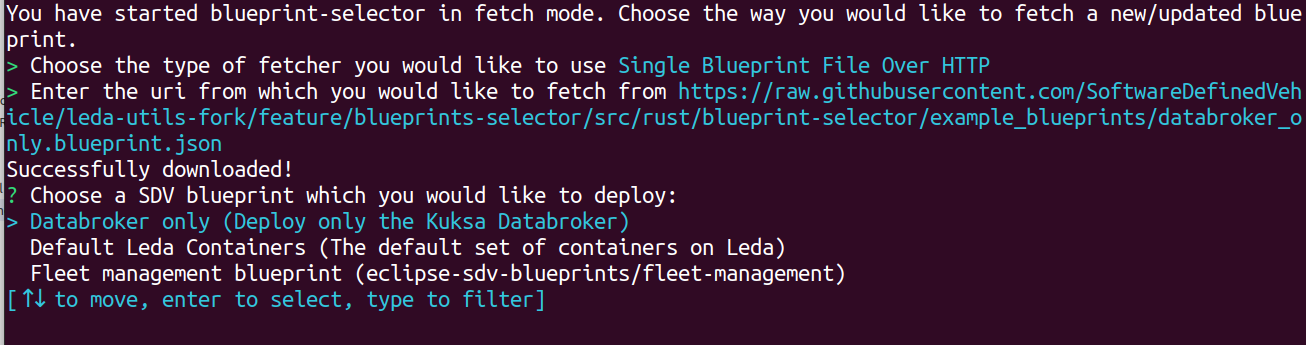
  • blueprint-selector: Deploy and fetch new SDV blueprints easily with an interactive CLI

Note: These scripts are not meant to be reused or called from production software. Their behaviour or command line syntax is not a stable API and should not be trusted for automation purposes. For details, please see leda-utils

2.8.1 - SDV Health

Health check

The sdv-health utility displays a status overview of some important dependencies and device configurations for the SDV edge stack. The sdv health utility can be configured using the sdv.conf configuration file.

Usage:

# sdv-health

Example output:

SDV Health Example Output

Version Information

The Leda image version and build time will be displayed at the top in the first category:

  • OS Release: Year and codename of the release version
  • Image Version: Name of the image and more specific version information, such as the git tag or commit id
  • Build timestamp in yyyMMddHHmmss notation

Note: The information is read from the system base file in /etc/os-release:

root@qemux86-64:~# cat /etc/os-release 
BUILD_ID="20230309083051"
DISTRO_CODENAME="Dracon"
ID=leda
IMAGE_VERSION="0.0.5-41-g82f2b12"
NAME="Eclipse Leda"
PRETTY_NAME="Eclipse Leda 2023 (Dracon)"
VERSION="2023 (Dracon)"
VERSION_CODENAME="Dracon"
VERSION_ID=0.0.5-41-g82f2b12

Bus networks

If available, vehicle bus network information, such as the status of the CAN-Bus, will be displayed iin its own category. This helps to quickly identify if there problems with the hardware connectivity for automotive bus networks.

Ports

The health utility checks the TCP ports of specific services. This helps to identify if these services are up and running and potentiallyconnectable via external network interfaces.

Services and Containers

The services category shows the status of required and optional containers. The required containers are supposed to be up and running for the SDV.EDGE stack to be correctly up and running. If any of these core components have a failed state, the functionality is impacted.

The optional containers are for additional features and for example applications. These containers may not be necessary for each use case and hence will be marked as a warning if they are not up and running. The overview still helps to identify which containers are working properly.

Errors, Warnings, Failed states

When there are errors or warnings related to the status of SDV related components, the health utility will print out these error states, and if available also a more detailed error message.

In the following example, the health utility helps the troubleshooting process:

  • The container runtime is properly started: “Kanto CM” is OK in the “SDV Ports” section and the “container-management” service is OK in the “SDV Services” section".
  • Some containers are in state “OK”, which means there is no general issue with the container runtime.
  • The cloud connector is in a “Stopped” state, which indicates that the user manually stopped the container by using “kanto-cm stop -n cloud-connector”.
  • The sua container is in a “Exited” state, which indicates the process exited with an error code.

SDV Health Example Errors

2.8.2 - KantUI

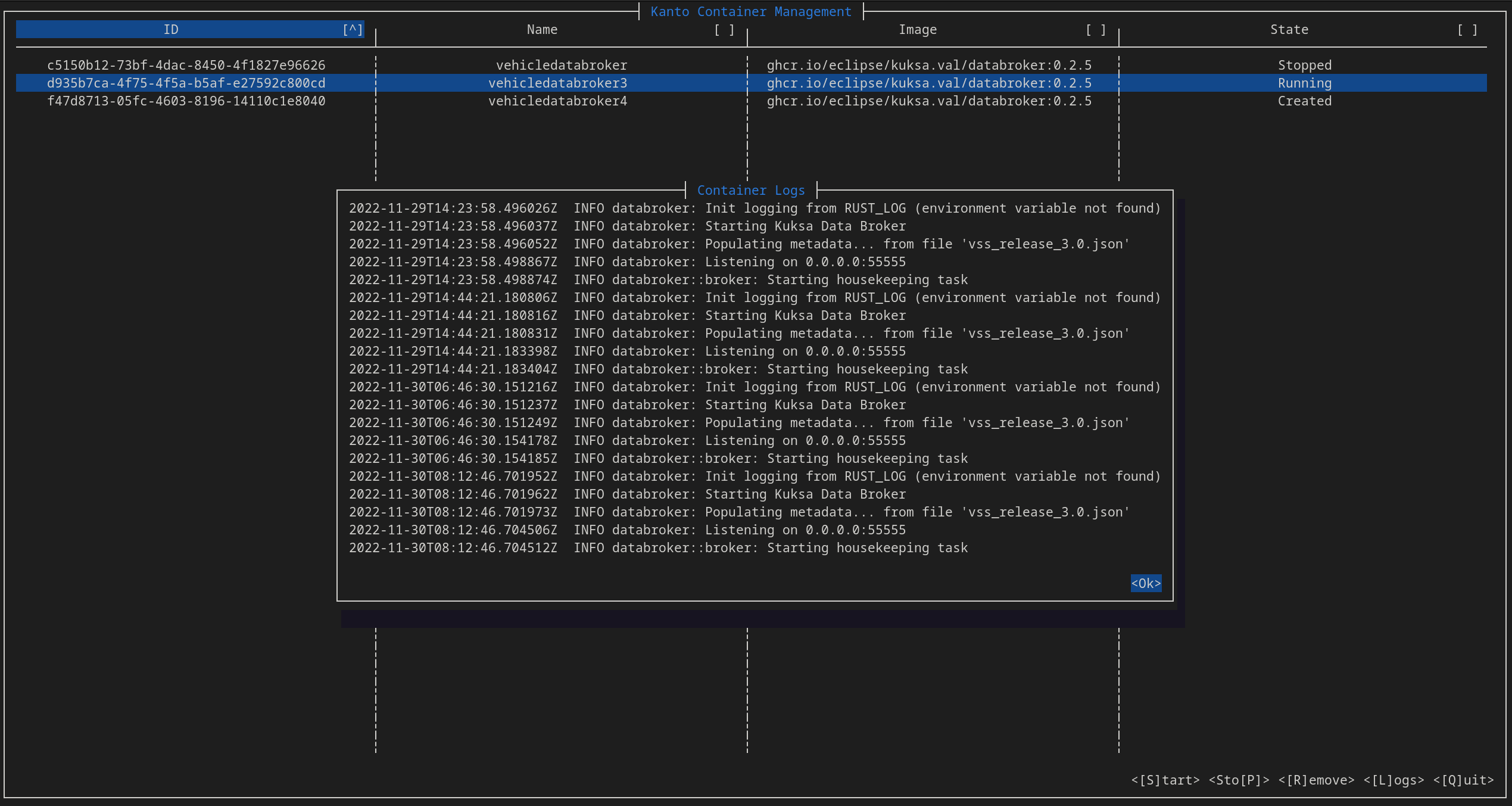
The KantoUI tool is a text-based user interface for conveniently managing containers in the Kanto Container Management. It supports simple navigation using keyboard and mouse to select a specific container. Commands to start, stop, remove and re-deploy containers are available along with a functionality to retrieve the application logs of a selected container.

Kanto User Interface

Usage:

kantui

Example output:

KantoUI

Command Line Options

Print command line help:

root@qemux86-64:~# kantui --help
kantui 0.2.0
A TUI for Kanto CM that allows easier management of deployed containers. Requires root.

USAGE:
    kantui [OPTIONS]

OPTIONS:
    -c, --config-file-path <CONFIG_FILE_PATH>
            Set a custom path for the kantui configuration file [default:
            /etc/kantui/kantui_conf.toml]

    -h, --help
            Print help information

    -V, --version
            Print version information

Note: All config values can be overridden through env variables prefixed with KANTUI_,
e.g. KANTUI_STOP_TIMEOUT=5 overrides the timeout before SIGKILL is sent to be 5 seconds.

Keyboard commands

  • Arrow keys Up and Down to select a container
  • Arrow keys Left and Right to select a column
  • Enter to change the sort ordering of the currently selected column
  • S to start the selected container which is currently not running
  • P to stop the selected container
  • R to remove a container
  • L to show the log output of a container
  • D to redeploy an existing container (rereads deployment descriptor)
  • Q to quit kantui

Note: The mouse can be used to select ui items when holding the Shift key.

Starting, Stopping, Removing containers

To use the lifecycle commands on a container:

  1. Select a container by using the mouse or the arrow keys.
  2. The selected container is highlighted.
  3. Press one of the lifecycle commands, e.g. s, p or r
  4. Wait for the value in the State column to change, before issueing the next command.

Note: When using the lifecycle commands for containers (Start, Stop, Remove), it may take a few seconds before the UI is updated with the status changes. The amount of time before a container is forcefully killed is determined by the stop_timeout configuration option.

Show container Logs

To view the container’s log output:

  1. Select a container by using the mouse or the arrow keys.
  2. Press the L key
  3. Log output will be displayed (tail, oldest messages first)
  4. Use the arrow keys Up and Down or drag the scrollbar using your mouse to scroll through the log
  5. Close the Log viewer by pressing Enter or clicking on the OK button

Note: The log output is not followed automatically. Close the dialog and reopen to see new output.

Redeploying containers

To redeploy a container, e.g. when a deployment descriptor has changed on disk:

  1. Select a container by using the mouse or the arrow keys.
  2. Press the P key to stop the container
  3. Press the R key to remove the container
  4. Press the D key to invoke the Kanto Auto Deployer, which will redeploy the missing containers

Note: Only containers managed by Kanto Auto Deployer will be redeployed.

Column Sorting

To sort a column:

  1. Select the column using the Left and Right arrow keys
  2. Press Enter to activate sorting
  3. Press Enter again on a sorted column to invert sort order (Ascending -> Descending -> Ascending)

Note: The selected sort order is not persisted and will reset to the default on restart: By ID, ascending

Configuration File

The default location of the configuration file is /etc/kantui/kantui_conf.toml:

# General Configuration Options
socket_path = "/run/container-management/container-management.sock" # Path to kanto-cm unix socket
stop_timeout = 5 # timeout (integer) in seconds before a SIGKILL is sent after a SIGTERM

[keyconfig]
start_btn_name = "[S]tart"
start_kbd_key = "s"

stop_btn_name = "Sto[P]"
stop_kbd_key = "p"

remove_btn_name = "[R]emove"
remove_kbd_key = "r"

logs_btn_name = "[L]ogs"
logs_kbd_key = "l"

quit_btn_name = "[Q]uit"
quit_kbd_key = "q"

redeploy_btn_name = "Re[D]eploy"
redeploy_kbd_key = "d"
# Includes a shell lexer so anything that would be a valid shell command can be used
# No pipes/redirects allowed.
# N.B.: Command inherits kantui's privileges (root)
redeploy_command = "systemctl restart kanto-auto-deployer.service"

2.8.3 - SDV Device Info

Displays the current device configuration, such as Device ID.

Note: Requires the Cloud Connector component to be configured and running.

Usage:

sdv-device-info

Eclipse Leda Device Info Example Output

Usage

Synposis: ./sdv-device-info [options] [command]

Full help:

root@qemux86-64:~# sdv-device-info --help
sdv-device-info v0.2
Usage: /usr/bin/sdv-device-info [options] [command]
Show SDV device configuration information
Example: /usr/bin/sdv-device-info show

Commands:
 show                 : Display configuration (default command)
 help                 : This message
 env                  : Format output for use in scripts

Options:
 --ansi | -a      : Don't use colored output.
 --norestart | -n : Do not automatically restart services
 --verbose | -v   : Enable verbose mode.
 --help | -h      : This message.

Use in scripts

To use device information on other scripts, it may be useful to source the device information variables into the current environment variable context:

Synposis: source ./sdv-device-info env

Example:

$ source ./sdv-device-info env
$ echo $DEVICE_ID
exampledevice1

2.8.4 - SDV Provision

The provisioning helper script can be used to manually perform a device provisioning with a cloud backend.

It is meant as a convenient tool for developers, who wish to connect their device to a selfmanaged cloud backend directly. In a production environment, the device provisioning functionality is implemented either by the Cloud Connector component.

The provisioning script currently supports the following backend and authentication options:

  • Azure IoT Hub
    • Connection String
    • Device Certificates
  • Azure IoT Device Provisioning Service
    • Device Certificates

Usage

The sdv-provision script is interactive and asks for the type of backend and authentication option:

root@qemux86-64:~# sdv-provision 
Checking Eclipse Leda Device Provisioning configuration...
- Certificates directory exists
Checking Device ID
- Based on network device: eth0
- Device ID: 52-54-21-4c-f9-5a
Checking whether either IdScope or ConnectionString is configured
 - Neither Id Scope file nor ConnectionString found, needs manual configuration
Do you want to use the global Azure IoT Device Provisioning Service (DPS) by using an Id Scope, or do you want to use a direct connection to a specific Azure IoT Hub using a Connection String?
d) Azure IoT Device Provisioning Service (DPS) with Id Scope
h) Azure IoT Hub with Connection String
Choose:d
Please enter your Id Scope of the Azure IoT Device Provisioning Service:example
Recreating the Cloud Connector container...
Checking device certificates
- All device certificates are present
- Primary device certificate: /data/var/certificates/device.crt
- Primary device private key: /data/var/certificates/device.key
- Secondary device certificate: /data/var/certificates/device2.crt
- Secondary device private key: /data/var/certificates/device2.key
Fingerprints (add these to the Azure IoT Hub Device)
- Primary thumbprint: 1B172ED3D06F4E25AFFEF675ADCE519457FFFFFF
- Secondary thumbprint: B6CD5EACE96E9D0448BCB0BAED2DEE87AFFFFFFF

Once a configuration has been selected, the script will:

  • Generate a random Device Id (based on physical network address)
  • Store the Device Id in /etc/deviceid
  • Generate a primary self-signed device certificate pair
  • Generate a secondary self-signed device certificate pair
  • Store the certificates in /data/var/certificates/
  • Reconfigure the container descriptor in /data/var/containers/manifests_dev/cloudconnector.json
  • Restarting the Cloud Connector container
  • Print the key fingerprints, used for onboarding the device in Azure IoT Device Provisioning Service

Reconfiguration

Note: Re-running the script will only print the existing configuration.

To reconfigure the device and use different options, perform the following steps:

  1. Delete the generated files

    rm /data/var/certificates/azure.idscope
    rm /data/var/certificates/azure.connectionstring
    rm /data/var/certificates/device*.crt
    rm /data/var/certificates/device*.key
    
  2. Rerun the script

    sdv-provision
    

2.8.5 - SDV MotD

The sdv-motd script provides an alternative motd profile, which displays some additional information after login.

The script does not have any command line options.

Example output:

Eclipse Leda Message Of The Day

2.8.6 - CAN Forward

The can-forward help script can be used to forward an existing CAN-Bus interface on the host system to a container process.

Note: Warning! The script does not yet support Kanto (or containerd) as a container runtime. It has been implemented for k3s.

Usage

root@qemux86-64:~# can-forward --help

Usage:  /usr/bin/can-forward {-h} {-p PID} {-c container} <hw_can>

  hw_can          Host CAN hw interface to forward. Default: can0
  -c container    Attemmpt to get netns PID from a running container: (docker, ctr). Default: seat_service
  -p PID          Use provided PID for transferring vxcan interface (e.g.: docker inspect -f '{{ .State.Pid }}' container)
  -h              Prints this message

The script performs the following steps:

  • Find the process ID of the target container process
  • Check and modprobe vxcan
  • Check and modprobe can-gw
  • Create a new virtual CAN interface (vxcanX)
  • Create a new virtual CAN interface (vxcanX+1)
  • Link both interfaces together
  • Move the second interface (vxcanX+1) into the namespace of the target container
  • Set up a bi-directional CAN-Bus packet forwarding between both interfaces using cangw

2.8.7 - Kanto Auto Deployer (KAD)

Automatically deploys containers to the Kanto Container Management based on deployment descriptors from a given path. All deployment descriptors in the manifests folder will be deployed (created and started) on startup of the service. The directory will then be monitored for creation of/changes to manifests and those changes will be redeployed.

Usage

Usage:

$ kanto-auto-deployer --help
kanto-auto-deployer 0.2.0
Automated deployment of Kanto Container Management Manifests

USAGE:
    kanto-auto-deployer [OPTIONS] [MANIFESTS_PATH]

ARGS:
    <MANIFESTS_PATH>    Set the path to the directory containing the manifests [default: .]

OPTIONS:
    -d, --daemon                   Run as a daemon that continuously monitors the provided path for
                                   changes
    -h, --help                     Print help information
    -s, --socket-cm <SOCKET_CM>    Set the path to the Kanto Container Management API socket
                                   [default: /run/container-management/container-management.sock]
    -V, --version                  Print version information

Example:

# Use container manifests from current working directory
root@qemux86-64:/data/var/containers/manifests# kanto-auto-deployer 
[2023-04-18T10:27:21Z INFO  kanto_auto_deployer] Running initial deployment of "/data/var/containers/manifests"
[2023-04-18T10:27:21Z INFO  kanto_auto_deployer] Reading manifests from [/data/var/containers/manifests]
[2023-04-18T10:27:21Z WARN  kanto_auto_deployer::manifest_parser] Failed to load manifest directly. Will attempt auto-conversion from init-dir format.
[2023-04-18T10:27:21Z INFO  kanto_auto_deployer] Already exists [cloudconnector]
[2023-04-18T10:27:21Z WARN  kanto_auto_deployer::manifest_parser] Failed to load manifest directly. Will attempt auto-conversion from init-dir format.
[2023-04-18T10:27:21Z INFO  kanto_auto_deployer] Already exists [databroker]

# Use container manifests from specified directory
root@qemux86-64:~# kanto-auto-deployer /data/var/containers/manifests/
[2023-04-18T10:27:44Z INFO  kanto_auto_deployer] Running initial deployment of "/data/var/containers/manifests"
[2023-04-18T10:27:44Z INFO  kanto_auto_deployer] Reading manifests from [/data/var/containers/manifests]
[2023-04-18T10:27:44Z WARN  kanto_auto_deployer::manifest_parser] Failed to load manifest directly. Will attempt auto-conversion from init-dir format.
[2023-04-18T10:27:44Z INFO  kanto_auto_deployer] Already exists [cloudconnector]
[2023-04-18T10:27:44Z WARN  kanto_auto_deployer::manifest_parser] Failed to load manifest directly. Will attempt auto-conversion from init-dir format.
[2023-04-18T10:27:44Z INFO  kanto_auto_deployer] Already exists [databroker]

Nоte: The warnings from the manifest_parser module are normal and expected when the manifest is in the Container Management Manifests Format

Usage as systemd service

In the Leda quickstart images, kanto-auto-deployer is installed as a systemd service.

Note the service uses the --daemon flag that asks KAD to continuously monitor the specified directory (see last line of logs).

The service unit configuration file is located in /lib/systemd/system/kanto-auto-deployer.service:

[Unit]
Description=Kanto Auto Deployer
After=network-online.target container-management.service
Wants=network-online.target container-management.service
Requires=container-management.service

[Install]
WantedBy=multi-user.target

[Service]
Restart=on-failure
RestartSec=5s
ExecStart=/usr/bin/kanto-auto-deployer /data/var/containers/manifests --daemon

Example output:

root@qemux86-64:/lib/systemd/system# systemctl status kanto-auto-deployer.service 
* kanto-auto-deployer.service - Kanto Auto Deployer
     Loaded: loaded (/lib/systemd/system/kanto-auto-deployer.service; enabled; vendor preset: enabled)
     Active: active (running) since Tue 2023-04-18 10:22:10 UTC; 3min 55s ago
   Main PID: 525 (kanto-auto-depl)
      Tasks: 10 (limit: 4708)
     Memory: 1.4M
     CGroup: /system.slice/kanto-auto-deployer.service
             `- 525 /usr/bin/kanto-auto-deployer /data/var/containers/manifests --daemon

Apr 18 10:22:48 qemux86-64 kanto-auto-deployer[525]: [2023-04-18T10:22:48Z INFO  kanto_auto_deployer] Creating [sua]
Apr 18 10:23:04 qemux86-64 kanto-auto-deployer[525]: [2023-04-18T10:23:04Z INFO  kanto_auto_deployer] Created [sua]
Apr 18 10:23:04 qemux86-64 kanto-auto-deployer[525]: [2023-04-18T10:23:04Z INFO  kanto_auto_deployer] Starting [sua]
Apr 18 10:23:05 qemux86-64 kanto-auto-deployer[525]: [2023-04-18T10:23:05Z INFO  kanto_auto_deployer] Started [sua]
Apr 18 10:23:05 qemux86-64 kanto-auto-deployer[525]: [2023-04-18T10:23:05Z WARN  kanto_auto_deployer::manifest_parser] Failed to load manifest directly. Will attempt auto-conversion from init-dir format.
Apr 18 10:23:05 qemux86-64 kanto-auto-deployer[525]: [2023-04-18T10:23:05Z INFO  kanto_auto_deployer] Creating [vum]
Apr 18 10:23:10 qemux86-64 kanto-auto-deployer[525]: [2023-04-18T10:23:10Z INFO  kanto_auto_deployer] Created [vum]
Apr 18 10:23:10 qemux86-64 kanto-auto-deployer[525]: [2023-04-18T10:23:10Z INFO  kanto_auto_deployer] Starting [vum]
Apr 18 10:23:11 qemux86-64 kanto-auto-deployer[525]: [2023-04-18T10:23:11Z INFO  kanto_auto_deployer] Started [vum]
Apr 18 10:23:11 qemux86-64 kanto-auto-deployer[525]: [2023-04-18T10:23:11Z INFO  kanto_auto_deployer] Running in daemon mode. Continuously monitoring "/data/var/containers/manifests"

2.8.8 - SDV Container Exec

The sdv-ctr-exec wrapper allows to execute arbitrary user commands in existing containers. Kanto Container Management cli tool (kanto-cm) only allows to manage the lifecycle of a container, but does not allow to specify or override the entrypoint or command definitions of an existing container. The ctr command line tool of containerd allows the execution of additional tasks in a running container.

Usage

As a convenient tool, sdv-ctr-exec allows the simple execution of arbitrary commands inside of containers. This is especially useful for non-service-containers, or containers which have additional binaries (e.g. cli tools) embedded.

Usage:

root@qemux86-64:~# sdv-ctr-exec 
/usr/bin/sdv-ctr-exec -h to print this message

Usage:
/usr/bin/sdv-ctr-exec <container-id> <command>
or
/usr/bin/sdv-ctr-exec -n <container-name> <command>

Example:

# Executing a containerized cli tool using sdv-ctr-exec
kanto-cm create --i --t --network=host --name=kuksa-client ghcr.io/eclipse/kuksa.val/kuksa-client:master
kanto-cm start --name=kuksa-client
sdv-ctr-exec -n kuksa-client /kuksa-client/bin/kuksa-client --port 30555 --protocol grpc --insecure

Alternatives

containerd: ctr

The above commands are equivalent to the following commands:

# Executing a containerized cli tool using ctr
ctr --namespace kanto-cm image pull ghcr.io/eclipse/kuksa.val/kuksa-client:master
ctr --namespace kanto-cm container create --net-host --tty ghcr.io/eclipse/kuksa.val/kuksa-client:master kuksa-client
ctr --namespace kanto-cm tasks start --detach kuksa-client
ctr --namespace kanto-cm tasks exec --tty --exec-id sometask kuksa-client /kuksa-client/bin/kuksa-client --port 30555 --protocol grpc --insecure

containerd: nerdctl

Note: nerdctl is currently not installed on the Leda Quickstart images.

containerd: ctr and mounting

To execute a binary natively (outside of a containerized environment), the container image may be mounted to the host filesystem using the ctr snapshots mount commands.

This approach only works if the binary is compatible with the host environment (dependencies, libraries etc.).

$CONTAINER_IMAGE="ghcr.io/my-org/my-project/my-container"
ctr --namespace kanto-cm image pull $CONTAINER_IMAGE
ctr --namespace kanto-cm container create --net-host --tty $CONTAINER_IMAGE my-container
mkdir my-container
ctr --namespace=kanto-cm snapshots mount my-container my-container | $SHELL
cd my-container
./bin/my-application --help

2.8.9 - SDV Kanto-Ctl

Manage the Kanto Container Management configuration via CLI.

Note: Requires jq to be installed.

Features:

  • Add and remove container registries (for authentication purposes)
  • Set primitive values in configuration
  • Restart container-management.service on configuration changes
  • Automatically back up configuration file
  • Display changes to user

Eclipse Leda Kanto Container Manager Configuration utility

Usage

Synposis: ./sdv-kanto-ctl <command> [<options>]

Full help:

$ ./sdv-kanto-ctl --help
Eclipse Kanto Container Manager Configuration Utility
See https://eclipse.dev/kanto/docs/references/containers/container-manager-config/
Usage: ./sdv-kanto-ctl <command> {options}
Commands:
        add-registry -h <hostname> -u <username> -p <password>
                Adds or replaces a container registry authentication configuration
                -h or --hostname: Configure the hostname of the container registry (e.g. hub.docker.io, ghcr.io, ...)
                -u or --username: Configure the username
                -p or --password: Configure the password
        remove-registry -h <hostname>
                Removes the specified container registry
                -h or --hostname: The hostname of the container registry
        remove-all-registries
                Removes all configured container registries
        list-registries
                Prints all configured container registries
        show-config
                Print the container management configuration
        set <key> <value>
                Set a primitive configuration value. Key in JSON Dot-Notation
                Examples: ./sdv-kanto-ctl set containers.registry_configurations.MyRegistry.credentials.password foobar
                          ./sdv-kanto-ctl set things.enable true
Options:
        --no-reload : Do not reload the configuration and restart the container-management service automatically
        --ansi : Don't use colored output.
        --verbose | -v : Enable verbose mode.
        --help : This message.

Example: Private Container Registries

To be able to pull container images, the container runtime needs access to the container registry. Some container registries require authentication. The Kanto Container Manager can be configured to use credentials when accessing remote container registries.

In the Leda images, the sdv-kanto-ctl tools allows to easily add authentication to the container manager configuration:

sdv-kanto-ctl add-registry -h <registryhostname> -u <your_username> -p <your_password>

For example, to access container images from GitHub Packages in a private repository, you need a GitHub Personal Access Token (PAT) with the read: packages scope. Then, add the repository as shown below:

sdv-kanto-ctl add-registry -h ghcr.io -u github -p <Your_GitHub_PersonalAccessToken>

sdv-kanto-ctl will make the necessary modifications to /etc/container-management/config.json and restarts the container-management.service systemd unit, so that the changes take effect. You may need to recreate or restart the container if a previous pull failed.

Please see the Eclipse Kanto Container Manager Configuration reference for details.

Example: Enabling Things management

Enable the container manager digital twin representation.

sdv-kanto-ctl set things.enable true

Example: Container Stop Timeout

Kanto waits for a timeout before forcefully stopping a container. The default is 30 seconds in Kanto, and 10 seconds in the Leda quickstart image.

To change this behavior at runtime:

sdv-kanto-ctl set manager.default_ctrs_stop_timeout 2

2.8.10 - Blueprint Selector

A Rust application that reads all blueprint files in a directory and provides the user with an interactive (supports filtering) menu to select the one to be deployed on the edge device via MQTT. If no directory is provided the default one on a Leda Quickstart Image is: /data/var/containers/blueprints.

Screenshot

The “blueprint” files are desired state messages, that have the extension “.blueprint.json” (configurable) and an additional metadata header (required):

{
  "blueprintMetadata": {
    "name": "<NAME>",
    "description": "<Short Description>"
  },
  "activityId": "correlation-id",
  "timestamp": 1235466
  "payload": {} // This is the desired state message
}

The metadata header will be used to construct the list of options presented to the user. You can find example blueprints under the example_blueprints directory in the leda-utils repository.

The selected blueprint is then published as an MQTT message on the vehicleupdate/desiredstate topic.

CLI options

To get all available configuration options use the --help/-h flag:

A user-friendly tool to select and deploy SDV blueprints

Usage: blueprint-selector [OPTIONS]

Options:
  -d, --blueprints-dir <BLUEPRINTS_DIR>
          The directory containing the SDV blueprints [default: /data/var/containers/blueprints]
  -f, --fetch-blueprints
          Start in fetch mode (presents a menu to fetch new/updated blueprints) from a remote repository
  -e, --blueprints-ext <BLUEPRINT_EXTENSION>
          Extension to use when iterating over the files in the blueprints directory [default: .blueprint.json]
      --mqtt-broker-host <HOST>
          Hostname/IP to the MQTT broker where the desired state message would be posted [default: 127.0.0.1]
      --mqtt-broker-port <PORT>
          Port for the MQTT broker [default: 1883]
      --mqtt-topic <TOPIC>
          Topic on which to publish the blueprint desired state message [default: vehicleupdate/desiredstate]
  -h, --help
          Print help
  -V, --version
          Print version

Normal mode

To run in normal mode use:

blueprint-selector

or if you’d like to provide a directory different from the default one, use:

blueprint-selector -d </path/to/dir>

Fetch mode

When starting the blueprint-selector with the -f/--fetch-blueprints flag, you will be presented with a selection of different fetchers that allow you to download/update blueprints directly in the directory specified with the -d/--blueprints-dir flag (or in the default directory if not specified). For example:

  blueprint-selector -fd </path/to/dir>

Selection

When you choose a fetcher, you will be asked for an URI and blueprint-selector will attempt to fetch the blueprints inside the directory specified by -d.

After providing a URI, pressing Enter, and a successful fetch, you will be brought back to the usual selector menu, this time including all successfully fetched manifests.

Success

2.9 - Wifi Configuration

BSP packages for emulated WiFi devices (QEMU) and hardware device drivers are provided in meta-leda for supported hardware. They usually do not require extra configuration.

For a guide on how to connect to a wireless network check the Connecting to Wi-Fi networks page.

Raspberry Pi 4B 64

The required kernel modules and binary blobs are provided with the sdv-wifi-kernel-config.inc config file and the packagegroup-sdv-rpi4wifi packagegroup. These are included in sdv-image-full.bb and sdv-image-minimal.bb by default.

If you, however, decide to define your own custom image based on Custom Distros, you would have to make sure the packagegroup is installed to enable WiFi connectivity.

QEMU

QEMU images provide the kernel modules necessary to set-up a virtual wlan interface and connect it to a virtual wifi network. This can be useful in various testing scenarios.

To create and link a virtual WiFi interface to eth0, boot your QEMU image and run:

$ ip link add link eth0 name wlan0 type virt_wifi

The SSID of the virtual network you can connect to is VirtWifi.

Note: Leda Quickstart QEMU images set the name of the default virtual ethernet interface to eth0 through kernel CMDLINE configurations (net.ifnames=0 biosdevname=0). If you are building a custom image with a different kernel CMDLINE replace eth0 with the name of your virtual interface (check ifconfig).

2.9.1 - Connecting to Wi-Fi networks

Here we will describe the basic steps on how to identify and connect to a WiFi network in interactive or headless mode.

Initial steps (identifying wlan interfaces)

Start by running:

$ ip a
 ...
3: wlan0: <BROADCAST,MULTICAST,UP,LOWER_UP> mtu 1500 qdisc fq_codel state DOWN group default qlen 1000
    link/ether <MAC> brd ff:ff:ff:ff:ff:ff
...

Note: Usually the name of the interface would be wlan0. It might however follow the newer “predictable interface names” standart. Then the interface name would start with wl* with the remaining characters identifying a physical bus/chip/number/etc corresponding to the interface. For simplicity we will wlan0 in all examples below.

Most likely your wlan interface would be in the state DOWN. To bring it up:

$ ip link set wlan0 up

Scanning for wireless networks

You can scan for wireless networks using either iw or wpa_cli.

$ iw wlan0 scan

Note: The output of this command can be quite verbose. You can grep for SSID to find the SSIDs of the networks around you.

$ wpa_cli scan && wpa_cli scan_results

The output of wpa_cli is cleaner and more readable so it is recommended to use that.

Connecting to a network

Once you have identified the SSID of your network you can connect to it by ussing the following commands:

$ wpa_passphrase <SSID> <Passphrase> >> /etc/wpa_supplicant.conf
$ systemctl restart wpa

You should now be connected to the wireless network. To confirm that, you can once again use ip a to check that wlan0 has been configured with an IP.

This configuration shall be remembered from now on and your interface will try to connect automaticatically to that network whenever it is available.

Headless Wi-Fi configuration

Similarly to the Raspbian, meta-leda provides a mechanism for headless configuration of Wi-Fi credentials for your device (Headless Raspberry Pi Setup).

To use this feature you have to prepapre your wpa_supplicant.conf ahead of time (check the reference above):

ctrl_interface=/var/run/wpa_supplicant
ctrl_interface_group=0
update_config=1

network={
        key_mgmt=NONE
}
network={
    ssid="<YOUR NETWORK NAME>"
    psk="<YOUR NETWORK PASSWORD>"
    key_mgmt=WPA-PSK
}

IMPORTANT: It is recommended that if you are creating this configuration file on Windows to use an editor such as Notepad++ that can save files using the “Unix Line endings” (DOS vs. Unix Line Endings), or run it through a tool such as dos2unix that can convert between the two file formats. Otherwise wpa_supplicant.conf might not be read properly in the Linux image.

Once you have your wpa_supplicant.conf put your SD-card in your Desktop machine and place the configuration file in the root of the BOOT partion.

When you boot your device it should now automatically connect to your Wi-Fi network.

2.10 - GPS Connectivity

GPSD

Leda Quickstart Images provide (within meta-leda) recipes for the integration and setup of GPSD. GPSD is a service daemon that monitors one or more GPSes or AIS receivers attached to a host computer through serial or USB ports, making all data on the location/course/velocity of the sensors available to be queried on TCP port 2947 of the host computer. To find out more about GPSD, check out its official documentation.

For easier interaction and debugging gpsd client utilities such as installed gpsfake, gpspipe, etc. are installed.

Service

GPSD is installed on Leda Quickstart Images as a service. To check its status and/or logs you can use the following two commands:

root@leda-525400123502:~# systemctl status gpsd.service
* gpsd.service - GPS (Global Positioning System) Daemon
     Loaded: loaded (/lib/systemd/system/gpsd.service; disabled; vendor preset: disabled)
     Active: active (running) since Mon 2023-10-02 11:19:54 UTC; 41min ago
     ...

and the socket:

root@leda-525400123502:~# systemctl status gpsd.socket
* gpsd.socket - GPS (Global Positioning System) Daemon Sockets
     Loaded: loaded (/lib/systemd/system/gpsd.socket; enabled; vendor preset: enabled)
     Active: active (running) since Mon 2023-10-02 11:19:30 UTC; 42min ago
    ...

With the location of the default config file being:

/etc/default/gpsd.default

By default, the GPSD service on Leda is configured to automatically discover USB devices (plug-and-play). In some cases, a system reboot might be required after plugging the USB GPS device.

Kuksa.val FeederGPS

The Kuksa GPS Feeder consumes gpsd as a data source and pushes location data to the kuksa.val server (databroker). It is installed as a pre-configured container on Leda Images through the feedergps.json container manifest. The container has an internal gpsd server (on port 2948) that connects to the host’s gpsd instance (on port 2947). With the provided container manifest feedergps should be plug-and-play.

Using pre-recorded GPS traces with gpsfake

Recording NMEA traces

It sometimes might be useful to mock gps services when testing, especially on QEMU virtual machines where emulated USB GPS hardware is not available. Pre-recorded traces should be in the NMEA-format.

To record a GPS trace in the NMEA format, on a device with physical GPS hardware, gpsd, and gpsd-client utilities installed, run:

gpspipe -R > gps_log.nmea

A sample NEMA file that can be used for testing is provided in the kuksa.val.feeders repository - simplelog_example.nmea.

Feeding NMEA traces to feedergps

Since the running gpsd service will interfere with the following steps, make sure to stop it first by running:

systemctl stop gpsd.service
systemctl stop gpsd.socket

To start gpsfake on port 2946 with gps_log.nmea as an input, either in the background (by adding & at the end of the shell line) or in a separate shell session run:

root@leda-525400123502:~# gpsfake -P 2946 gps_log.nmea
/usr/bin/gpsfake:21: DeprecationWarning: The distutils package is deprecated and slated for removal in Python 3.12. Use setuptools or check PEP 632 for potential alternatives
  from distutils import spawn
Processing gps_log.nmea
gpsfake: log cycle of gps_log.nmea begins.

Note: you can safely ignore the distutils warning.

Then, run a foreground instance of gpsd that reads from gpsfake on port 2946 on the loopback interface only and forwards the traffic on port 2947 for all interfaces:

gpsd -GNS 2947 gpsd://127.0.0.1:2946

These extra steps are needed as feedergps requires the gpsd server on port 2947 to be available on the kanto-cm0 bridge, as it’s running as a container and gpsfake cannot be configured to listen on an interface different from the loopback.

Restart feedergps:

kanto-cm stop -n feedergps
kanto-cm start -n feedergps

Known issues

Sometimes the feedergps container is started before the databroker and/or gpsd which leads to the container not being able to connect to either of those services. In such cases, after you’ve made sure the databroker and gpsd are up and running, restart feedergps with:

kanto-cm stop -n feedergps
kanto-cm start -n feedergps

3 - Device Provisioning

The device needs to be configured before it can make a connection to the cloud.

The following initial configuration steps are required:

  • Create a device in the cloud backend, such as Azure IoT Hub
  • Configure authentication on device
  • Configure credentials for accessing private container registries

3.1 - Manual Provisioning

Follow these steps to do a manual device provisioning:

  • Generate the device certificate (eg using openssl) and sign it with your CA.
  • Log in to Azure Portal, Go to Azure Iot Hub and create a new device
  • Select the proper authentication type, e.g. X.509 Self-signed or X.509 CA Signed
  • Copy the device certificate (cert file and key file) to the device to /data/var/certificate
  • Restart cloud connector service or container.

Create a device in Azure IoT Hub

For the device to be connectable, it needs to be known to the cloud service first. In these steps, we will create a new device identity by using Azure IoT Hub.

Pre-Requisites:

  • Virtual device must already be started with runqemu ... or leda

    Note: For Raspberry Pi, please follow the manual steps below and adapt the SSH connection options to the IP of your Raspbery Pi.

  • The virtual device needs to be remotely accessible via ssh port 2222 on the host’s localhost (Qemu port forwarding in userspace) or via ssh port 22 on the IP address 192.168.7.2 (Qemu virtual networking using TAP network interface)

  • The container runtime needs to have started successfully, check with sdv-health

  • A Device has been created in Azure IoT Hub

    Note: Do NOT create an “edge” device.

Configure authentication on device

For the proper device authentication, the device management backend authority needs to issue a device-specific certificate and sign it. This is a complex process and subject to the specific situation.

For the Leda quickstart images, the software configuration is prepared with dummy certificates which need to be replaced.

ATTENTION: The Leda example device certificates are public and insecure, they only serve demonstration purposes. You need to replace the intermediate certificates and device certificates with your own.

  • Generate a device certificate using openssl
  • Sign it with your intermediate CA certificate
  • Put it into /data/var/certificate/
  • Restart the cloud connector service or container: systemctl restart cloud-connector or kanto-cm stop -n cloudconnector --force; kanto-cm start -n cloudconnector

When finished, continue with

Private container registries

Please refer to the Container Registries on how to configure private container registries.

3.2 - Provisioning with sdv-provision

Meta-leda and the Leda-quickstart image provide a utility sdv-provision that simplifies the device provisioning procedure.

Connecting to the device

Since the procedure includes copying and pasting device IDs, it is recommended to connect to the device over a ssh connection. sdv-motd provides an easy way to find your device’s ip. More information on connecting via ssh can be found here.

Provisioning via a connection string

Device-side

  1. After connecting via ssh run sdv-provision.

    Example output:

    root@qemux86-64:~# sdv-provision
    Checking Eclipse Leda Device Provisioning configuration...
    - Certificates directory exists
    Checking Device ID
    - Based on network device: eth0
    - File does not exist, creating: /etc/deviceid
    - Device ID: XX-XX-XX-XX-XX-XX
    Checking whether either IdScope or ConnectionString is configured
    - Neither Id Scope file nor ConnectionString found, needs manual configuration
    Do you want to use the global Azure IoT Device Provisioning Service (DPS) by using an Id Scope, or do you want to use a direct connection to a specific Azure IoT Hub using a Connection String?
    d) Azure IoT Device Provisioning Service (DPS) with Id Scope
    h) Azure IoT Hub with Connection String
    Choose:
    
  2. Note the generated Device ID (XX-XX-XX-XX-XX-XX).

  3. Type h /Azure IoT Hub with Connection String/ and press Enter.

  4. Paste your Azure IoT Hub Connection String: HostName=<IoT Hub in Azure>.azure-devices.net;DeviceId=<XX-XX-XX-XX-XX-XX> and press enter. Where <IoT Hub in Azure> is your Azure IoT Hub name.

Azure Portal

  1. Go to https://portal.azure.com/ and to your Azure IoT Hub named <IoT Hub in Azure>.
  2. Choose Devices -> Add Device.
  3. Enter the Device ID XX-XX-XX-XX-XX-XX generated on the previous step as Device ID.
  4. Pick X.509 Self-Signed and paste the two thumbprints generated by sdv-provision.
  5. Save.

Device-Side

After all of the above steps have been completed, connect back to your device and restart the cloudconnector container by running:

kanto-cm stop -n cloudconnector --force
kanto-cm start -n cloudconnector

Or alternatively use:

$ kantui

And restart the container from the TUI.

3.3 - Vehicle Update Manager

The Vehicle Update Manager delegates two different types of updates:

  1. The Desired State on the container layer
  2. The Self Update on operating system layer

Vehicle Update Manager Architecture Overview

Desired State

The Desired State is applied at runtime on the container layer.

This type of update mechanism can update vehicle applications, vehicle services and other containers together with configuration resources or data files at runtime. If the applications support it, the rollout can also use high-availability strategies, such as rolling deployments. You can find out more about more about the Container Update Agent here.

Self Update

The Self Update is applied on reboot of the device only.

This type of update mechanism is used for system-level updates which require the operating system to be rebooted to take effect. You can find out more about the Self Update Agent in the tutorial.

3.3.1 - Configuration

Config file

The default location for the VUM service on the Leda Distro image can be found at /etc/update-manager/config.json. The location of the config file is specified with the --cfg-file [PATH] flag when starting the binary.

Minimal configuration

A minimal configuration (that is used by the Leda Distro) is the following:

{
    "log": {
      "logFile": "/var/log/update-manager/update-manager.log"
    },
    "domain": "vehicle",
    "agents": {
        "containers": {
            "name": "containers",
            "rebootRequired": false,
            "readTimeout": "30s"
        },
        "self-update": {
            "name": "self-update",
            "rebootRequired": true,
            "readTimeout": "30s"
        }
    },
    "thingsEnabled": false
}

Where:

  • “domain”: specifies the prefix for the MQTT topic, e.g. in this case it’s set to vehicle, so all VUM related topic are prefixed with vehicleupdate/[TOPIC]
  • “agents”: configures the update agents that would be available to VUM. Here the “readTimeout” key specifies how long should VUM wait for a response from the configured agent.
  • “thingsEnabled”: whether VUM should use the Kanto Things API for communication or not.

Full configuration

An example configuration file for VUM with all available options is the following one:

{
  "log": {
    "logFile": "log/update-manager.log",
    "logLevel": "ERROR",
    "logFileSize": 3,
    "logFileCount": 6,
    "logFileMaxAge": 29
  },
  "connection": {
    "broker":"www",
    "keepAlive": 500,
    "disconnectTimeout": 500,
    "username":"username",
    "password":"pass",
    "connectTimeout": 500,
    "acknowledgeTimeout": 500,
    "subscribeTimeout": 500,
    "unsubscribeTimeout": 500
  },
  "domain": "vehicle",
  "thingsEnabled": false,
  "rebootEnabled": true,
  "rebootAfter": "1m",
  "reportFeedbackInterval": "2m",
  "currentStateDelay": "1m",
  "phaseTimeout": "2m",
  "agents": {
    "self-update": {
      "rebootRequired": false,
      "readTimeout": "20s"
    },
    "containers": {
      "rebootRequired": true,
      "readTimeout": "30s"
    }
  }
}

Here keys (other the ones above) are self-explanatory. The “connection” section object specifies configuration options for the MQTT connection. Allowed log leves (in order of increasing verbosity)are: ERROR, WARN, INFO, DEBUG, TRACE.

3.3.2 - Message Flow

Note: This part of the Leda OSS stack is still in active development and there might be differences between the documented and the current version.

As described in Vehicle Update Manager takes a full update message for all domains, identifies the domains affected, the current component versions, actions to be taken, etc., and delegates those actions to the correct update agent (e.g. self-update/container update).

The update manager (UM) in Leda-distro is configured as specified in UM’s config.json, which on the final image is usually located in /etc/update-manager/config.json. The standard two domains supported are containers and self-update, with the latter requiring a reboot on a successful update.

Note: UM allows a custom prefix for all of its topics to be defined (“domain”) in its config.json On the Leda Distro image the default prefix is “vehicle”. If you decide to change it, replace “vehicle” in all MQTT topics mentioned below with your custom prefix.

A full specification of UM’s API and the relevant MQTT topics can be found in its documentation.

Update Message

The general structure of the update message is as follows:

{
  "activityId": "correlation-activity-uuid",
  "timestamp": 123456789,
  "payload": {
    "domains": [
      {
        "id": "domain",
        "config": [],
        "components": [
            {
                "id": "component1",
                "version": "component1-version",
                "config": [
                    {
                        "key": "component1-config-key-1",
                        "value": "component1-config-value-1"
                    }
                ]
            }
        ]
      }
    ]
  }
}

Where multiple domains and components per domain (each with multiple configuration key-value pairs) are allowed. To trigger an update, publish your full update message on the vehicleupdate/desiredstate MQTT topic. When UM receives your message, it splits it across the required domains and publishes messages to the topics that the domain-specific agents are monitoring.

Similarly, update progress can be monitored on the vehicleupdate/desiredstatefeedback topic.

Self-update

The messages for triggering a self-update (image update) are the same as in The Self Update Tutorial. The only difference here is that when you publish a self-update message on the vehicleupdate/desiredstate topic, UM will automatically take care to forward your message to the self-update agent, including forwarding back the update feedback on the vehicleupdate/-namespaced topics.

Containers update (desired state)

Similarly to the self-update, you should start by understanding the operation of the Container Update Agent. After constructing the desired state message you can publish it on the vehicleupdate/desiredstate and UM will, again, forward it to CUA automatically, based on the domain specified in the update message.

Combined update messages

The real strength of UM is deploying updates accross multiple domains with a single update message. For example, if you’d like to deploy an image update bundle (self-update) and a single hello-world container image with the environment variable FOO=BAR set, you can construct the following message:

{
   "activityId":"random-uuid-as-string",
   "timestamp":123456789,
   "payload":{
      "domains":[
         {
            "id":"self-update",
            "components":[
               {
                  "id":"os-image",
                  "version":"${VERSION_ID}",
                  "config":[
                     {
                        "key":"image",
                        "value":"https://leda-bundle-server/sdv-rauc-bundle-minimal-qemux86-64.raucb"
                     }
                  ]
               }
            ]
         },
         {
            "id":"containers",
            "config":[],
            "components":[
               {
                  "id":"hello-world",
                  "version":"latest",
                  "config":[
                     {
                        "key":"image",
                        "value":"docker.io/library/hello-world:latest"
                     },
                     {
                        "key":"env",
                        "value":"FOO=BAR"
                     }
                  ]
               }
            ]
         }
      ]
   }
}

And publish the message on the MQTT topic vehicleupdate/desiredstate. UM will take actions to identify the affected update domains and publish the correct messages on the respective topics. All feedback from the specific update agents will be forwarded back to the UM and published on the vehicleupdate/desiredstatefeedback topic. All these messages will use the same activityId so they can be correlated with each other.

3.4 - Self Updates

In general, the self-update mechanism for operating system level updates is done with two separate partitions. While one partition is the actively booted partition and in use, the other partition can be updated by writing a partition image to it, as it is unused or inactive.

Once the download and writing is done, a reboot is triggered and the boot loader will now switch to the newly updated partition.

If the booting of the updated partition fails, the self update mechanism can revert back to the previous partition or boot to a rescue partition.

Leda Self Update

As updating the running operating system cannot be done at runtime, the approach requires additional disk space, a second partition and also requires the device to be rebooted for the updates to take effect.

In a vehicle, the self-updater cannot decide on its own when to do a reboot, as the vehicle must be in a safe condition (eg parked, state of charge etc.). Hence, the trigger for performaing the switch to another slot and a subsequent reboot is handed over to a higher level component, such as the vehicle update manager, which may in turn rely on driver feedback or other conditions.

Implementation with RAUC Update Service

RAUC is a lightweight update client that runs on your embedded device and reliably controls the procedure of updating your device with a new firmware revision.

For general usage of the RAUC tool, please see the RAUC User manual

Reference configuration

The project contains an example reference implementation and configuration using RAUC, which allows the evaluation of the concepts, mechanisms and involved software components in an emulated, virtual environment.

The Leda quickstart image contains the following disk partitions:

  • a small rescue partition
  • a full SDV installation with a container runtime, pre-loaded SDV container images and deployment specifications and additional developer tools such as nerdctl and kantui.
  • a minimal SDV installation with a container runtime, but no additional examples or developer tools. This partition is used to demonstrate the self-update functionality.
  • additional boot and data partitions for keeping system state information

Note: All three rootfs partitions (rootfs) initially contain the same identical copies of the base operating system. Both SDV Root partitions will use the same shared data partition for the container persistent state.

3.4.1 - Self Update Tutorial

This chapter describes the steps necessary to perform a local (without cloud) self update of the operating system.

Self Update Architecture

Self-Update using RAUC Update Bundles

  • On host: Update bundle sdv-rauc-bundle-qemux86-64.raucb is in current folder

    Note: In the development environment, the update RAUC Update Bundle is located in the BitBake machine-specific output folder Example location is tmp/deploy/images/qemux86-64

  • On host: Start a dummy web server for serving the update file

    python3 -m http.server --bind 192.168.7.1
    
  • On host: open two new terminals - one for monitoring and one for triggering the self-update

    • Terminal 1: To view the progress, watch the MQTT topics selfupdate/desiredstate and selfupdate/desiredstatefeedback:

      mosquitto_sub -h 192.168.7.2 -p 1883 -t "selfupdate/#"
      
    • Terminal 2: Trigger the actual self update process by publishing an MQTT message to selfupdate/desiredstate:

      mosquitto_pub -h 192.168.7.2 -p 1883 -t "selfupdate/desiredstate" -f start-update-example.json
      mosquitto_pub -h 192.168.7.2 -p 1883 -t "selfupdate/desiredstate/command" -f download-command.json
      mosquitto_pub -h 192.168.7.2 -p 1883 -t "selfupdate/desiredstate/command" -f update-command.json
      mosquitto_pub -h 192.168.7.2 -p 1883 -t "selfupdate/desiredstate/command" -f activate-command.json
      mosquitto_pub -h 192.168.7.2 -p 1883 -t "selfupdate/desiredstate/command" -f cleanup-command.json
      

      Files:

      start-update-example.json

      download-command.json

      update-command.json

      activate-command.json

      cleanup-command.json

  • Switch to a terminal in the guest

  • On guest: After the self update process completed, check the status:

    rauc status --detailed
    

Self-Update Trigger Message

start-update-example.json file:

{
    "activityId": "random-uuid-as-string",
    "timestamp": 123456789,
    "payload": {
        "domains": [
            {
                "id": "self-update",
                "components": [
                    {
                        "id": "os-image",
                        "version": "${VERSION_ID}",
                        "config": [
                            {
                                "key": "image",
                                "value": "http://leda-bundle-server/sdv-rauc-bundle-minimal-qemux86-64.raucb"
                            }
                        ]
                    }
                ]
            }
        ]
    }
}

Example Message Flows

Current State

  1. Initial response message on startup from self update agent in topic selfupdate/currentstate, or upon request by sending message to selfupdate/currentstate/get

     {
           "activityId": "1234567890",
           "timestamp": 1687510087
     }
    

    Response by Self Update Agent on topic selfupdate/currentstate

     {
           "activityId": "1234567890",
           "timestamp": 1687787461,
           "payload": {
                 "softwareNodes": [
                 {
                       "id": "self-update-agent",
                       "version": "build-152",
                       "name": "OTA NG Self Update Agent",
                       "type": "APPLICATION"
                 },
                 {
                       "id": "self-update:leda-deviceimage",
                       "version": "v0.0.10-194-g3d48cb8",
                       "name": "Official Leda device image",
                       "type": "IMAGE"
                 }
                 ],
                 "hardwareNodes": [],
                 "associations": [
                 {
                       "sourceId": "self-update-agent",
                       "targetId": "self-update:leda-deviceimage"
                 }
                 ]
           }
     }
    

Desired State

  1. External trigger to update via desired state on topic selfupdate/desiredstate:

     {
           "activityId": "<uuid>",
           "timestamp": 123456789,
           "payload": {
                 "domains": [
                       {
                       "id": "self-update",
                       "components": [
                             {
                                   "id": "os-image",
                                   "version": "${VERSION_ID}",
                                   "config": [
                                   {
                                         "key": "image",
                                         "value": "http://leda-bundle-server/sdv-rauc-bundle-qemux86-64.raucb"
                                   }
                                   ]
                             }
                       ]
                       }
                 ]
           }
     }
    

    Response on topic selfupdate/desiredstatefeedback

     {
           "activityId": "1234567890",
           "timestamp": 1687786390,
           "payload": {
                 "status": "IDENTIFYING",
                 "message": "Self-update agent has received new desired state request and is evaluating it.",
                 "actions": []
           }
     }
    
     {
           "activityId": "1234567890",
           "timestamp": 1687786390,
           "payload": {
                 "status": "IDENTIFIED",
                 "message": "Self-update agent is about to perform an OS image update.",
                 "actions": [
                 {
                       "component": {
                             "id": "self-update:os-image",
                             "version": "v0.0.10-194-g3d48cb8"
                       },
                       "status": "IDENTIFIED",
                       "progress": 0,
                       "message": "Self-update agent is about to perform an OS image update."
                 }
                 ]
           }
     }
    
  2. External trigger to download command on topic selfupdate/desiredstate/command:

     {
           "activityId": "1234567890",
           "timestamp": 1687510087,
           "payload": {
                 "baseline": "BASELINE NAME",
                 "command": "DOWNLOAD"
           }
     }
    

    Response on topic selfupdate/desiredstatefeedback

     {
           "activityId": "1234567890",
           "timestamp": 1687786931,
           "payload": {
                 "status": "DOWNLOADING",
                 "message": "Self-update agent is performing an OS image update.",
                 "actions": [
                 {
                       "component": {
                             "id": "self-update:os-image",
                             "version": "v0.0.10-194-g3d48cb8"
                       },
                       "status": "DOWNLOADING",
                       "progress": 0,
                       "message": "Downloading 0.0 MiB..."
                 }
                 ]
           }
     }     
    
    {
          "activityId": "1234567890",
          "timestamp": 1687786936,
          "payload": {
                "status": "DOWNLOAD_SUCCESS",
                "message": "Self-update agent is performing an OS image update.",
                "actions": [
                {
                      "component": {
                            "id": "self-update:os-image",
                            "version": "v0.0.10-194-g3d48cb8"
                      },
                      "status": "DOWNLOAD_SUCCESS",
                      "progress": 100,
                      "message": "Downloaded 106.3 MiB..."
                }
                ]
          }
    }
    
  3. External trigger to update command on topic selfupdate/desiredstate/command:

     {
           "activityId": "1234567890",
           "timestamp": 1687510087,
           "payload": {
                 "baseline": "BASELINE NAME",
                 "command": "UPDATE"
           }
     }
    

    Response on topic selfupdate/desiredstatefeedback

     {
           "activityId": "1234567890",
           "timestamp": 1687787145,
           "payload": {
                 "status": "UPDATING",
                 "message": "Self-update agent is performing an OS image update.",
                 "actions": [
                 {
                       "component": {
                             "id": "self-update:os-image",
                             "version": "v0.0.10-194-g3d48cb8"
                       },
                       "status": "UPDATING",
                       "progress": 0,
                       "message": "Checking bundle version and version in desired state request."
                 }
                 ]
           }
     }
    
    {
          "activityId": "1234567890",
          "timestamp": 1687787228,
          "payload": {
                "status": "UPDATE_SUCCESS",
                "message": "Self-update completed, reboot required.",
                "actions": [
                {
                      "component": {
                            "id": "self-update:os-image",
                            "version": "v0.0.10-194-g3d48cb8"
                      },
                      "status": "UPDATING",
                      "progress": 100,
                      "message": "Writing partition completed, reboot required."
                }
                ]
          }
    }
    
  4. External trigger to activate command on topic selfupdate/desiredstate/command:

     {
           "activityId": "1234567890",
           "timestamp": 1687510087,
           "payload": {
                 "baseline": "BASELINE NAME",
                 "command": "ACTIVATE"
           }
     }
    

    Response on topic selfupdate/desiredstatefeedback

     {
           "activityId": "1234567890",
           "timestamp": 1687787302,
           "payload": {
                 "status": "ACTIVATING",
                 "message": "Self-update agent is performing an OS image activation.",
                 "actions": [
                 {
                       "component": {
                             "id": "self-update:os-image",
                             "version": "v0.0.10-194-g3d48cb8"
                       },
                       "status": "UPDATING",
                       "progress": 0,
                       "message": "Self-update agent is performing an OS image activation."
                 }
                 ]
           }
     }
    
    {
          "activityId": "1234567890",
          "timestamp": 1687787303,
          "payload": {
                "status": "ACTIVATION_SUCCESS",
                "message": "Self-update agent has activated the new OS image.",
                "actions": [
                {
                      "component": {
                            "id": "self-update:os-image",
                            "version": "v0.0.10-194-g3d48cb8"
                      },
                      "status": "UPDATED",
                      "progress": 0,
                      "message": "Self-update agent has activated the new OS image."
                }
                ]
          }
    }
    
  5. External trigger to cleanup command on topic selfupdate/desiredstate/command:

     {
           "activityId": "1234567890",
           "timestamp": 1687510087,
           "payload": {
                 "baseline": "BASELINE NAME",
                 "command": "CLEANUP"
           }
     }
    

    Response on topic selfupdate/desiredstatefeedback

     {
           "activityId": "1234567890",
           "timestamp": 1687787382,
           "payload": {
                 "status": "CLEANUP_SUCCESS",
                 "message": "Self-update agent has cleaned up after itself.",
                 "actions": [
                 {
                       "component": {
                             "id": "self-update:os-image",
                             "version": "v0.0.10-194-g3d48cb8"
                       },
                       "status": "UPDATE_SUCCESS",
                       "progress": 0,
                       "message": "Self-update agent has activated the new OS image."
                 }
                 ]
           }
     }
    
    {
          "activityId": "1234567890",
          "timestamp": 1687787382,
          "payload": {
                "status": "COMPLETE",
                "message": "Self-update completed.",
                "actions": [
                {
                      "component": {
                            "id": "self-update:os-image",
                            "version": "v0.0.10-194-g3d48cb8"
                      },
                      "status": "UPDATE_SUCCESS",
                      "progress": 0,
                      "message": "Self-update agent has activated the new OS image."
                }
                ]
          }
    }
    

Rollback command

  • External trigger to rollback command on topic selfupdate/desiredstate/command:

     {
           "activityId": "1234567890",
           "timestamp": 1687510087,
           "payload": {
                 "baseline": "BASELINE NAME",
                 "command": "ROLLBACK"
           }
     }
    

    Self Update Agent returns in Idle state

Can be used from

  • Downloading (when it is waiting for DOWNLOAD command)
  • Installing (when it is waiting for UPDATE command)
  • Installed (when it is waiting for ACTIVATE command)
  • Failed (when it is waiting for CLEANUP command)

3.4.2 - RAUC Integration

Leda integrates RAUC as a reference implementation and example configuration. It allows the evaluation of the concepts, mechanisms and involved software components in an emulated, virtual environment or on physical devices.

Checking the RAUC Status

Get the current RAUC boot status:

rauc status

Example output:

root@qemux86-64:~# rauc status
=== System Info ===
Compatible:  Eclipse Leda qemu86-64
Variant:     
Booted from: rootfs.1 (SDV_B)

=== Bootloader ===
Activated: rootfs.1 (SDV_B)

=== Slot States ===

o [rootfs.1] (/dev/sda5, ext4, inactive)
        bootname: SDV_B
        mounted: /
        boot status: good

x [rootfs.0] (/dev/sda4, ext4, booted)
        bootname: SDV_A
        boot status: good

Forcing to boot the other slot

To manually force the device to boot into another slot, mark the current booted slot as bad, mark the other partitions as active and perform a reboot:

rauc status mark-bad booted
rauc status mark-active other
reboot now

Testing the rescue system

By marking both root slots as bad, the bootloader is supposed to boot the rescue system:

rauc status mark-bad rootfs.0
rauc status mark-bad rootfs.1
reboot now

Example output of rauc:

o [rootfs.1] (/dev/sda5, ext4, inactive)
        bootname: B
        boot status: bad

o [rootfs.0] (/dev/sda4, ext4, booted)
        bootname: A
        mounted: /
        boot status: bad

Customizations

The configurations can be customized by applying or patching the following files:

  • RAUC Configuration file: meta-leda/recipes-bsp/rauc/files/qemux86-64/system.conf
  • Bootloader Configuration file: meta-leda/recipes-bsp/grub/files/grub.cfg
  • The physical disk partition configuration: meta-leda/recipes-sdv/wic/qemux86-grub-efi.wks

RAUC System Configuration

The RAUC System Configuration is the central configuration of the RAUC Update system.

Example:

[system]
compatible=Eclipse Leda qemu86-64
bootloader=grub
grubenv=/grubenv/grubenv
statusfile=/data/rauc.status

[keyring]
path=ca.cert.pem

[slot.efi.0]
device=/dev/sda
type=boot-gpt-switch
region-start=4M
region-size=100M

[slot.rescue.0]
device=/dev/sda3
type=ext4
readonly=true

[slot.rootfs.0]
device=/dev/sda4
type=ext4
bootname=SDV_A

[slot.rootfs.1]
device=/dev/sda5
type=ext4
bootname=SDV_B

GRUB Bootloader Configuration

The GRUB bootloader has a configuration file which describes which partitions are bootable, which partition they are located at and a reference to RAUC’s slot name.

The configuration also contains RAUC specific logic and variables required for a proper integration. Please see the full grub.cfg in the source repository and RAUC Documentation - Integration - GRUB for details.

Excerpt:

...

menuentry "SDV Slot A (OK=$SDV_A_OK TRY=$SDV_A_TRY)" {
    linux (hd0,4)/boot/bzImage root=/dev/vda4 $CMDLINE rauc.slot=SDV_A
}

menuentry "SDV Slot B (OK=$SDV_B_OK TRY=$SDV_B_TRY)" {
    linux (hd0,5)/boot/bzImage root=/dev/vda5 $CMDLINE rauc.slot=SDV_B
}

U-Boot Bootloader Configuration

Similarly to GRUB, integration of RAUC with U-Boot requires custom boot scripting. A highly detailed explaination can, again, be found in the official RAUC Documentation - Integration - U-Boot.

Meta-Leda provides such integration recipes and scripts for all U-boot based targets, for which a Leda Quickstart image is available (qemuarm64, qemuarm and rpi4-64). For example:

Note: A custom U-Boot device defconfig might be required for some devices to be integrated with RAUC. Leda Quickstart images patch the default defconfigs for qemuarm64 and qemuarm to save the U-Boot environment in a VFAT BOOT partition.

Disk Partitioning with OpenEmbedded Image Creator (WIC)

The OpenEmbedded Image Creator is used in BitBake to actually create full disk images with multiple partitions.

These disk images are machine specific and the structure of the partitions are configured in OpenEmbedded Kickstart files (*.wks).

Excerpt qemux86-grub-efi.wks

Note: The excerpt is exemplary, please see the sources for a full representation and documentation.

bootloader --ptable gpt

part --fixed-size 50M --source rawcopy --sourceparams="file=efi-boot.vfat" --fstype=vfat --label boot --active

part --fixed-size 10M --source rawcopy --sourceparams="file=grubenv.vfat" --fstype=vfat --label grubenv

part /rescue --source rootfs --fstype=ext4 --label rescue

part / --source rootfs --fstype=ext4 --label root_a

part / --source rootfs --fstype=ext4 --label root_b

part /data --fixed-size 4G --fstype=ext4 --label data

3.4.3 - API Reference

The self update agent (SUA) is a component responsible for the OS Update process SUA is communicating on MQTT interface via usage of defined messages. Internally, SUA uses RAUC to perform the update

Following sequence diagram shows the happy path example of communication between components.

Process Overview

sequenceDiagram participant m as MQTT Broker participant s as SUA participant r as RAUC s -->> m: connect loop Wait for OTA trigger Note left of s: Initial start s ->> m: Current state (installed version from booted partition) Note left of s: Trigger for OTA m ->> s: Desired state request (new version and url to bundle) s ->> m: Feedback (update actions are identified) Note left of s: Command for Download m ->> s: Download command s ->> s: Download bundle s ->> m: Feedback (downloading/downloaded/failed) Note left of s: Command for Update m ->> s: Update command s ->> r: Flash image to partition r ->> r: Flashing... s ->> m: Feedback (updating with percentage) r ->> s: Flash completed/failed s ->> m: Feedback (updated/failed) Note left of s: Command for Activate m ->> s: Activate command s ->> r: Switch partitions (booted <-> other) r ->> s: Switch completed/failed s ->> m: Feedback (activated/failed) Note left of s: Command for Cleanup m ->> s: Cleanup command s ->> s: Remove temporary files s ->> m: Cleanup completed + status from previously failed state
(completed/failed) end
stateDiagram Uninitialized --> Connected: Connected Connected --> Identified: Start (OTA trigger) Identified --> Downloading: Command download Identified --> Failed: If OTA trigger is invalid Downloading --> Updating: Command update Downloading --> Failed: If download has failed Updating --> Activate: Command activate Updating --> Failed: If update has failed Activate --> Cleanup: Command cleanup Activate --> Failed: If activate has failed Failed --> Cleanup: Command cleanup Cleanup --> Idle

Important: Uninitialized state is the default entry state or state in case connection is lost. To simplify reading of the diagram arrows from other states to Unitialized have been removed.

MQTT communication is done over 5 MQTT topics:

Trigger OTA

Topic Direction Description
selfupdate/desiredstate IN This message triggers the update process
The payload shall contain all data necessary to obtain the update bundle and to install it

Trigger self-update step/action

Topic Direction Description
selfupdate/desiredstate/command IN This message triggers the single step in update process (download/flash/activate/cleanup)

Report current state

Topic Direction Description
selfupdate/currentstate OUT This message is being sent either once on SUA start or as an answer to response received by selfupdate/currentstate/get
It contains information about the currently installed OS version

Get current state

Topic Direction Description
selfupdate/currentstate/get IN This message can be received at any point of time
Indicates that SUA should send back the version of the installed OS as current state.

Report status of self-update process

Topic Direction Description
selfupdate/desiredstatefeedback OUT This message is being sent by SUA to share the current progress of the triggered update process
This is the OUT counterpart of selfupdate/desiredstate input message

Checkout

SUA links to some 3rd party libraries, which are fetched as submodules, therefore the cloning shall be performed with recursive option:

git clone --recursive https://github.com/eclipse-leda/leda-contrib-self-update-agent.git

or if was cloned non recursively

git submodule init
git submodule update

3.5 - Container Management

Leda is using Kanto Container Management as the upper-layer container runtime and container orchestration engine.

Besides the command line tool kanto-cm, Kanto also has remote interfaces to manage containers.

Remote Interface

Kanto’s container-management service offers a remote interface via local messaging (MQTT) to interact with a digital twin on the cloud side. This feature can be easily enabled by setting "things": { "enabled": true } in /etc/container-management/config.toml.

When one of the cloud connector components, such as leda-contrib-cloud-connector or Kanto’s azure-connector, is connected to a cloud backend, the container-management will publish its own information using Eclipse Ditto and Eclipse Hono messages. For this, container-management only needs the device Id, gateway Id and tenant Id.

3.5.1 - Cloud Connectivity

Simulation of cloud connectivity

  1. Container Management starts and subscribes to edge/thing/response
  2. Cloud Connector starts and publishes the following message to edge/thing/response as soon as the connection is online:
{
    "deviceId":"<namespace>:<gatewayId>:<deviceId>",
    "tenantId":"<tenantId>"
}
  • namespace is azure.edge for Kanto’s Azure Cloud Connector
  • gatewayId indicates the hostname of the Azure IoT Hub
  • deviceId is the identifier for the device, this can either be part of the Azure Connection String or part of the device authentication certificate (CN)
  • tenantId is a configuration setting in the cloud connector

Note: You can simulate the cloud connector trigger by issueing the MQTT message manually on command line:

mosquitto_pub -t 'edge/thing/response' -m '{"deviceId":"dummy-namespace:dummy-gateway:dummy-device-id","tenantId":"dummy-tenant-id"}'

3.5.2 - Container Update Agent

About the Container Update Agent (CUA)

The container update agent is a component of kanto container management, that can be enabled in the Container Management’s config.json. When it receives a desired state message on the containersupdate/desiredstate topic it compares the containers (with their current versions and configuration) that are managed by Kanto Container Management and those described in the desired state messages. When it has identified the differences between the two, it resolves them by deleting, downloading, or re-creating containers.

The desired state message

A basic desired state message has a similar structure to all update messages. To deploy the hello-world docker container (removing all other containers currently deployed on the device), you can publish the following desired state message:

{
   "activityId":"test-correlation-activity-uuid",
   "payload":{
      "domains":[
         {
            "id":"containers",
            "config":[],
            "components":[
               {
                  "id":"hello-world",
                  "version":"latest",
                  "config":[
                     {
                        "key":"image",
                        "value":"docker.io/library/hello-world:latest"
                     }
                  ]
               }
            ]
         }
      ]
   }
}

You can configure port mappings, environment variables, device mapping, logging, and more, by adding additional key-value pairs to the “config” array of the given container. For example, if you want to set the environment variable FOO="BAR" inside the container, you can specify:

{
   "activityId":"test-correlation-activity-uuid",
   "payload":{
      "domains":[
         {
            "id":"containers",
            "config":[],
            "components":[
               {
                  "id":"hello-world",
                  "version":"latest",
                  "config":[
                     {
                        "key":"image",
                        "value":"docker.io/library/hello-world:latest"
                     },
                     {
                        "key": "env",
                        "value": "FOO=BAR"
                     }
                  ]
               }
            ]
         }
      ]
   }
}

A full list of all key-value pairs with their defaults can be found in this doc for CUA.

System containers

If a container is not specified in the desired state message, it would be deleted by CUA when the message is received. This might be undesirable for containers that are supposed to run as system services from the first boot of the device through its operation. Such a container might be the Self Update Agent container on the Leda Distro image, which we do not want to specify in every desired state message and deleting/recreating-it during an update might lead to unexpected behaviour. That’s why in Container Management’s config.json in the CUA section, you can specify in the “system_containers” array the names of those containers that would like to be treated as such.

MQTT Topics

Since the MQTT interface of the update agent is abstract, the following message flows are similar to those for the self-update agent mentioned in its tutorial

Getting the current state

On initialization, CUA will publish the current state of all containers on the containersupdate/currentstate topic, the activityId for such a message would be initial-current-state-<TIMESTAMP>. This message can be understood as the “current container inventory”. An example inventory from a running Leda image is currentstate-leda.json.

You can request an update of the current state at any point by publishing an empty message on the: containersupdate/currentstate/get:

{
   "activityId": "<UUID>",
   "timestamp": 123456789,
   "payload": {}
}

The updated inventory will, again, be published on the containersupdate/currentstate topic with correlation ID of <UUID>.

Deploying a desired state message

A desired state message describing the containers and their environments of a typical Leda Distro deployment is leda-desired-state.json. To trigger a desired state deployment directly from CUA, publish the message above on containersupdate/desiredstate, e.g. by running:

   mosquitto_pub -t containersupdate/desiredstate -f leda-desired-state.json

You can monitor the update feedback from CUA, by listening on the topic containersupdate/desiredstatefeedback.

Note: Since the desired state feedback can be quite verbose and happens in real time during the update it could be hard to understand manually. However it’s structured json, so it could be easily machine-parsed and monitored for specific key-value pairs.

3.5.3 - Orchestration

Container Management

The container management will respond to the cloud connectivity status message by initially sending a list of containers:

  1. Container Management responds with a list of containers in the topic e/<tenantId>/<gatewayId>:<deviceId>:edge:containers
{
    "topic": "<tenantId>/<gatewayId>:<deviceId>:edge:containers/things/twin/commands/modify",
    "headers": {
        "response-required": false
    },
    "path": "/features/SoftwareUpdatable",
    "value": {
        "definition": [
            "org.eclipse.hawkbit.swupdatable:SoftwareUpdatable:2.0.0"
        ],
        "properties": {
            "status": {
                "softwareModuleType": "oci:container",
                "installedDependencies": {
                    "ghcr.io%2Feclipse%2Fkuksa.val%2Fdatabroker.<uuid>:0.2.5": {
                        "group": "ghcr.io/eclipse/kuksa.val/databroker",
                        "name": "<uuid>",
                        "version": "0.2.5"
                    },
                    "ghcr.io%2Feclipse%2Fkuksa.val.services%2Fseat_service.<uuid>:v0.1.0": {
                        "group": "ghcr.io/eclipse/kuksa.val.services/seat_service",
                        "name": "<uuid>",
                        "version": "v0.1.0"
                    },
                    "ghcr.io%2Feclipse-leda%2Fleda-contrib-cloud-connector%2Fcloudconnector.<uuid>:latest": {
                        "group": "ghcr.io/eclipse-leda/leda-contrib-cloud-connector/cloudconnector",
                        "name": "<uuid>",
                        "version": "latest"
                    },
                    "ghcr.io%2Feclipse-leda%2Fleda-contrib-self-update-agent%2Fself-update-agent.<uuid>:build-20": {
                        "group": "ghcr.io/eclipse-leda/leda-contrib-self-update-agent/self-update-agent",
                        "name": "<uuid>",
                        "version": "build-20"
                    },
                    "ghcr.io%2Feclipse-leda%2Fleda-contrib-vehicle-update-manager%2Fvehicleupdatemanager.<uuid>:latest": {
                        "group": "ghcr.io/eclipse-leda/leda-contrib-vehicle-update-manager/vehicleupdatemanager",
                        "name": "<uuid>",
                        "version": "latest"
                    }
                }
            }
        }
    }
}
  1. Container Management answers with an additional message for each container in the topic e/<tenantId>/<gatewayId>:<deviceId>:edge:containers
{
    "topic": "<tenantId>/<gatewayId>:<deviceId>:edge:containers/things/twin/commands/modify",
    "headers": {
        "response-required": false
    },
    "path": "/features/Container:<uuid>",
    "value": {
        "definition": [
            "com.bosch.iot.suite.edge.containers:Container:1.5.0"
        ],
        "properties": {
            "status": {
                "name": "seatservice-example",
                "imageRef": "ghcr.io/eclipse/kuksa.val.services/seat_service:v0.1.0",
                "config": {
                    "domainName": "seatservice-example-domain",
                    "hostName": "seatservice-example-host",
                    "env": [
                        "VEHICLEDATABROKER_DAPR_APP_ID=databroker",
                        "BROKER_ADDR=databroker-host:30555",
                        "RUST_LOG=info",
                        "vehicle_data_broker=info"
                    ],
                    "restartPolicy": {
                        "type": "UNLESS_STOPPED"
                    },
                    "extraHosts": [
                        "databroker-host:host_ip"
                    ],
                    "portMappings": [
                        {
                            "proto": "tcp",
                            "hostPort": 30051,
                            "hostPortEnd": 30051,
                            "containerPort": 50051,
                            "hostIP": "localhost"
                        }
                    ],
                    "networkMode": "BRIDGE",
                    "log": {
                        "type": "JSON_FILE",
                        "maxFiles": 2,
                        "maxSize": "1M",
                        "mode": "BLOCKING"
                    }
                },
                "createdAt": "2023-02-02T08:46:33.792687313Z",
                "state": {
                    "status": "RUNNING",
                    "pid": 13627,
                    "startedAt": "2023-02-02T09:51:08.049572297Z",
                    "finishedAt": "2023-02-02T09:50:51.752255799Z"
                }
            }
        }
    }
}    

3.5.4 - Container Metrics

Container Metrics

Container-level metrics, such as CPU utilization or memory usage, can be retrieved on-demand and continuously by enabling the container metrics events. This is done by sending a request to the topic command//<namespaceId>:<gatewayId>:<deviceId>:edge:containers/req/<correlationId>/request:

  1. Enable Container Metrics with a frequency of 5s:
{
    "topic": "dummy-namespace/dummy-gateway:dummy-device-id:edge:containers/things/live/messages/request",
    "headers": {
        "timeout": "10",
        "response-required": true,
        "content-type": "application/json",
        "correlation-id": "3fdc463c-293c-4f39-ab19-24aef7944550"
    },
    "path": "/features/Metrics/inbox/messages/request",
    "value": {
        "frequency": "5s"
    }
}

Example command line:

mosquitto_pub -t command//dummy-namespace:dummy-gateway:dummy-device-id:edge:containers/req/3fdc463c-293c-4f39-ab19-24aef7944550/request -m '{"topic":"dummy-namespace/dummy-gateway:dummy-device-id:edge:containers/things/live/messages/request","headers":{"timeout":"10","response-required":true,"content-type":"application/json","correlation-id":"3fdc463c-293c-4f39-ab19-24aef7944550"},"path":"/features/Metrics/inbox/messages/request","value":{"frequency":"5s"}}'
  1. Container Metrics answers with an additional message for each container in the topic e/<tenantId>/<gatewayId>:<deviceId>:edge:containers
{
    "topic": "<tenantId>/<gatewayId>:<deviceId>:edge:containers/things/twin/commands/modify",
    "headers": {
        "response-required": false
    },
    "path": "/features/Container:<uuid>",
    "value": {
        "definition": [
            "com.bosch.iot.suite.edge.containers:Container:1.5.0"
        ],
        "properties": {
            "status": {
                "name": "seatservice-example",
                "imageRef": "ghcr.io/eclipse/kuksa.val.services/seat_service:v0.1.0",
                "config": {
                    "domainName": "seatservice-example-domain",
                    "hostName": "seatservice-example-host",
                    "env": [
                        "VEHICLEDATABROKER_DAPR_APP_ID=databroker",
                        "BROKER_ADDR=databroker-host:30555",
                        "RUST_LOG=info",
                        "vehicle_data_broker=info"
                    ],
                    "restartPolicy": {
                        "type": "UNLESS_STOPPED"
                    },
                    "extraHosts": [
                        "databroker-host:host_ip"
                    ],
                    "portMappings": [
                        {
                            "proto": "tcp",
                            "hostPort": 30051,
                            "hostPortEnd": 30051,
                            "containerPort": 50051,
                            "hostIP": "localhost"
                        }
                    ],
                    "networkMode": "BRIDGE",
                    "log": {
                        "type": "JSON_FILE",
                        "maxFiles": 2,
                        "maxSize": "1M",
                        "mode": "BLOCKING"
                    }
                },
                "createdAt": "2023-02-02T08:46:33.792687313Z",
                "state": {
                    "status": "RUNNING",
                    "pid": 13627,
                    "startedAt": "2023-02-02T09:51:08.049572297Z",
                    "finishedAt": "2023-02-02T09:50:51.752255799Z"
                }
            }
        }
    }
}    
  1. To disable Container Metrics, send a request with frequency of 0s:

    mosquitto_pub -t command//dummy-namespace:dummy-gateway:dummy-device-id:edge:containers/req/3fdc463c-293c-4f39-ab19-24aef7944550/request -m '{"topic":"dummy-namespace/dummy-gateway:dummy-device-id:edge:containers/things/live/messages/request","headers":{"timeout":"10","response-required":true,"content-type":"application/json","correlation-id":"3fdc463c-293c-4f39-ab19-24aef7944550"},"path":"/features/Metrics/inbox/messages/request","value":{"frequency":"0s"}}'
    

3.5.5 - Container Registries

When deploying containerized applications, the container runtime will pull container images from a (remote) container registry.

The pulled container images and their layers are then stored in a local storage.

Private Container Registries

To be able to pull container images, the container runtime needs access to the container registry. Some container registries require authentication. The Kanto Container Manager can be configured to use credentials when accessing remote container registries.

In the Leda images, the sdv-kanto-ctl tools allows to easily add authentication to the container manager configuration:

sdv-kanto-ctl add-registry -h <registryhostname> -u <your_username> -p <your_password>

For example, to access container images from GitHub Packages in a private repository, you need a GitHub Personal Access Token (PAT) with the read: packages scope. Then, add the repository as shown below:

sdv-kanto-ctl add-registry -h ghcr.io -u github -p <Your_GitHub_PersonalAccessToken>

sdv-kanto-ctl will make the necessary modifications to /etc/container-management/config.json and restarts the container-management.service systemd unit, so that the changes take effect. You may need to recreate or restart the container if a previous pull failed.

Please see the Eclipse Kanto Container Manager Configuration reference for details.

4 - Vehicle Applications

This chapter contains use cases and examples for SDV applications.

Some of these example are taken from the following sources:

4.1 - Seat Adjuster

The seat adjuster is an example to showcase how to create a vehicle application which senses and actuates signals in the vehicle for Eclipse Leda with help of Eclipse Velocitas and Eclipse Kuksa . The aim is not to build the best available seat adjuster application possible but to show how one can use the applied technologies to build a companion app for the interaction with a vehicle. If you are new to the concepts around Eclipse SDV and the mentioned projects we recommend to read the SDV Tutorial first.

Description

The idea of the seat adjuster application is to have a custom application to move the driver seat to positions defined in a driver profile hosted by a third-party web service.

Leda Seat Adjuster Use Case

The setup contains the following components:

  • Cloud or mobile trigger: not part of the Leda image, but we simulate it by issuing MQTT messages
  • Seat Adjuster : Developed with Eclipse Velocitas to be deployed by user
  • Eclipse Kuksa.val - KUKSA Databroker (pre-installed with Eclipse Leda)
  • Mock Service: Example provider for Eclipse Kuksa.VAL which mocks the behavior of the vehicle.
  • Seat ECU and the separate Seat Motor hardware can be emulated using a virtual CAN-Bus, which is beyond the scope of this guide.

In the following paragraphs, we next introduce the architecture and the assumed data flow before we explain the development and deployment steps. If you are more interested in the general development steps, you may directly jump to the develop seat adjuster.

4.1.1 - Architecture of Seat Adjuster

The seat adjuster application interacts with the vehicle through a Vehicle Abstraction Layer created by the KUKSA Databroker, which uses the Vehicle Signal Specification (VSS) to express the current value and in case of actuators also the desired state of the vehicle signal. By developing against the abstraction layer, the application becomes independent from the actual physical seat.

To control the position of the driver seat, the seat adjuster sets the target value of the Vehicle.Cabin.Seat.Row1.Pos1.Position signal in the KUKSA Databroker.

The architecture assumes so-called actuation providers that apply the changes to the actual vehicle as indicated in the target value, e.g., through interaction with the responsible ECUs. For this tutorial, we do not expect you to interface with an actual vehicle and thus abstract the vehicle by using the Kuksa.Val vehicle mock service. This vehicle mock service allows the definition of behavior toward the KUKSA Databroker like we would expect from the vehicle, for example, setting the current value after reacting to changes to the target value of a signal.

flowchart TB client[Client] anotherClient[Another Client] seatadjuster[Seat Adjuster] databroker[(KUKSA
Databroker)] mqttRequest[[MQTT topic
seatadjuster/setPosition/request]] mockservice[Provider: Mock Service] client -- "JSON Request: position, requestId" --> mqttRequest anotherClient -.-> mqttRequest mqttRequest --> seatadjuster seatadjuster -- "Set Target
Vehicle.Cabin.Seat.Row1.Pos1.Position
gRPC" --> databroker databroker <-- "Set Current
Vehicle.Cabin.Seat.Row1.Pos1.Position

Notify subscriber of changed target
Vehicle.Cabin.Seat.Row1.Pos1.Position" --> mockservice

As interface to the user, we assume a client that can, for example, be a local app in the infotainment domain with a user interface or an off-board application sending the request from a backend. Either way, the client controls our seat adjuster application through a JSON encoded message over MQTT using the topic setPosition/request.

An example request looks like this:

mosquitto_pub -t seatadjuster/setPosition/request 
    -m '{"position": 1000, "requestId": "12345"}'

The position parameter can be any value between 0 and 1000.

Getting Seat Position

When the seat moves, the provider gets this information, for example, from the seat ECU over the CAN-bus. We use the mock service as a provider and configure it to set the current value for the Vehicle.Cabin.Seat.Row1.Pos1.Position signal in the KUKSA Databroker after the target value for the signal changes.

To receive the changes to the seat position, the seat adjuster application already subscribed to the current value of the signals and thus gets notified. As a result, the seat adjuster constructs a JSON message and sends the new seat position to the MQTT-topic seatadjuster/currentPosition where any client can consume it.

The seat adjuster also sends responses to each request received at the MQTT-topic seatadjuster/request with a message to the MQTT-topic seatadjuster/response indicating whether it accepted the incoming request and set the target value or whether there was an error like the vehicle currently moving.

flowchart TD client[Client] anotherClient[Another Client] seatadjuster[Seat Adjuster] databroker[(KUKSA
Databroker)] mqttResponse[[MQTT topic
seatadjuster/setPosition/response]] mqttCurrent[[MQTT topic
seatadjuster/currentPosition]] mockservice[Provider: Mock Service] mockservice -- "Feed/Set
Vehicle.Cabin.Seat.Row1.Pos1.Position
(Sensor)" --> databroker databroker -- "Notify Subscriber
Vehicle.Cabin.Seat.Row1.Pos1.Position" --> seatadjuster seatadjuster -- "Once after processing
/setPosition/request
message" --> mqttResponse seatadjuster -- "While seat is moving" --> mqttCurrent mqttResponse -- "SetPosition Response
(Accepted / Error)" --> client mqttCurrent --> client mqttCurrent -.-> anotherClient mqttResponse -.-> anotherClient

The next step is to develop the seat adjuster with the help of Eclipse Velocitas.

4.1.2 - Develop Seat Adjuster

The following pages show how to execute the explained setup using Eclipse Velocitas and Eclipse Leda 0.1.0-M2:

On a high level, you need to perform the following steps described in more detail in this guide:

  1. Use the Eclipse Velocitas template repository to develop, build and deploy your version of the seat adjuster example.

  2. Run Eclipse Leda, for example, as container or with other options like QEMU, physical hardware, etc..

  3. Manage the Eclipse Kanto container runtime to deploy your seat adjuster application.

  4. Test the deployed setup by interacting with the seat adjuster to change the seat position.

Setup Eclipse Velocitas from template repository

We use Eclipse Velocitas to develop the seat application against the API of the Kuksa.val Databroker:

In the first step, you create a copy of the Eclipse Velocitas template repository. You create the copy by opening the repository in GitHub and selecting: Use this template -> Create a new repository. In the next step, you choose under which organization to place the created repository and whether it should be public. If you set the repository to private, you have to perform additional configuration steps mentioned below.

The template repository contains skeleton code for the application, test and release workflows for GitHub actions, and the configuration of a development environment in a container.

In addition to the Python template used in this guide, there is a C++ template available.

Execute Development Container in VSCode

You then checkout the repository on your development machine and open it in VSCode. From VSCode you can execute the development container (DevContainer) configured in the repository. For this to function, you need to install the following tools on your computer:

In the best case, VSCode may detect that the repository contains a DevContainer configuration and ask you whether to execute it. Alternatively, you can press F1 in VSCode and then enter DevContainers: Reopen in container to start the DevContainer. In either case, VSCode should reopen and then connect to the DevContainer. Because of the DevContainer, we do not need to make further modifications to the developer machine.

Develop the application

In the next step, we work on the actual application. You find the skeleton code in /app/src/main.py of the Eclipse Velocitas template and thus the DevContainer.

Eclipse Velocitas provides the code to realize the described seat adjuster application. One way to get the code is to use a pre-configured task in VSCode by pressing ‘F1’ and then typing ‘Run Task’.

As an alternative, you can check the latest version of the seat adjuster example code in the Eclipse Velocitas SDK repository in the Velocitas SDK directory.

There is a chance that the latest code for the seat-adjuster example in the main-branch of the Eclipse Velocitas SDK is a bit different compared to the code snippets below.

Let us walk through some lines of the code where the logic is in the vapp.py while the entry point is in main.py.

In the on_start(self) function we subscribe to any changes of the current value of the VSS signal Vehicle.Cabin.Seat.Row1.Pos1.Position in the KUKSA Databroker.

async def on_start(self):
        """Run when the vehicle app starts"""
        await self.Vehicle.Cabin.Seat.Row1.Pos1.Position.subscribe(
            self.on_seat_position_changed
        )

When the seat position changes, the on_seat_position_changed function is triggered and publishes the new seat position value as MQTT-message to the topic seatadjuster/currentPosition.

 async def on_seat_position_changed(self, data: DataPointReply):
        response_topic = "seatadjuster/currentPosition"
        await self.publish_event(
            response_topic,
            json.dumps(
                {"position": data.get(self.Vehicle.Cabin.Seat.Row1.Pos1.Position).value}
            ),
        )

In addition, we have the function on_set_position_request_received which is triggered for every MQTT-message to the topic seatadjuster/setPosition/request.

 @subscribe_topic("seatadjuster/setPosition/request")
    async def on_set_position_request_received(self, data_str: str) -> None:
        data = json.loads(data_str)
        (...)
        vehicle_speed = (await self.Vehicle.Speed.get()).value

        position = data["position"]
        if vehicle_speed == 0:
                try:
                    await self.Vehicle.Cabin.Seat.Row1.Pos1.Position.set(position)
        (...)

If the vehicle speed is zero, meaning that the vehicle does not move, we set the target value in the KUKSA Databroker for the position signal of the seat to the value requested in the incoming MQTT message.

The get() and set() functions are created based on a VSS model, and we assume that the KUKSA Databroker instance uses the same VSS model. In many cases, like the default Eclipse Leda, one may rely on the upstream VSS model, but some scenarios require further signals, e.g., by applying an overlay.

You can configure the used VSS model in the app/AppManifest.json file. This file includes an interface definition with the entry for the default vehicle_signal_interface. The VSS signals in this guide are part of VSS in version 3.0.0. The DevContainer generates the respective Eclipse Velocitas SDK based on this configuration. For more details see the Eclipse Velocitas Model Generator.

At this point, you may wonder how the application actually knows to which MQTT broker to connect and where to find the correct instance of the KUKSA Databroker. This service discovery is abstracted within the Velocitas SDK and involves the usage of so-called middleware to find and call the other components. As of writing this page, Eclipse Velocitas supports DAPR as middleware or uses the native approach to configure the correct address directly. The details of how to set and configure the used middleware are part of the deployment.

Signal Description: The signal indicates the seat position on the vehicle x-axis, where the value 0 is the frontmost position supported by the seat.

The value is the distance measured in millimeters.

The example implementation supports values between 0 and 1000 millimeters.

Note: This range of valid values is not reflected in the standard Vehicle Signal Specification. OEMs would overlay the VSS tree with actual Min/Max values, depending on the seat hardware available in the vehicle model.

Start Runtime in DevContainer to test application

You may skip the application testing since we already provide the example code. But it still makes sense to get a general idea of how to test and debug the code with the tooling in the DevContainer.

As mentioned before, the execution and, thus, the testing of the application requires a set of other components to be available like the KUKSA Databroker or an MQTT-broker. Furthermore, the deployment, the configuration, and the behavior of the application may change depending on the used (container) management solution. Therefore, Eclipse Velocitas allows the deployment of the required components and the application with the container management approach of choice inside the DevContainer.

The different runtimes are maintained in a separate Eclipse Velocitas repository. To start a runtime, we use the Eclipse Velocitas CLI:

velocitas exec runtime-kanto up

We use the Eclipse Kanto runtime here since we later deploy the seat adjuster application to Eclipse Leda, which uses Eclipse Kanto for container management.

Once the runtime is available, we add our application by executing:

velocitas exec deployment-kanto build-vehicleapp
velocitas exec deployment-kanto deploy-vehicleapp

You can now test the application by interacting with it through the local MQTT broker. To send and receive MQTT messages, use the VSMQTT plugin with a cloud icon in the left side of the VSCode instance connected to the DevContainer. We do not get into details for the topics and messages here since we will run the application in Eclipse Leda again later in this guide.

Once you finish the application testing and development, you can shutdown the runtime with:

velocitas exec runtime-kanto down

Eclipse Velocitas provides Tasks to abstract the mentioned calls of the velocitas CLI. As an alternative you can thus press F1 -> Run Task and scroll for the respective task like Kanto runtime Up.

Commit and Release Application

When you are confident about the application, you want to be able to distribute it. Here, pre-configured workflows from Eclipse Velocitas for GitHub Actions are helpful.

You now commit your changes and push them to your copy of the Eclipse Velocitas template repository in GitHub. Before you create the commit, we recommend running the pre-commit task, which performs similar checks and linting as the CI workflow from Eclipse Velocitas. You can trigger the pre-commit as a task in VSCode:

  1. Press F1
  2. Write Tasks: Run Task and press enter
  3. Write Pre Commit Action and press enter

The pre commit action should start in a terminal inside VSCode.

You can check the available tasks configured by Eclipse Velocitas in .vscode/tasks.json.

If the pre-commit was successful, you may push your changes and open the repository in the browser. In the meantime, the push should trigger the CI workflow and the Build multiarch image workflow, which you can track in the Actions tab.

If you set your copy of the template repository to private, the CI workflow may fail due to missing permissions to write container images to GitHub packages. You can grant more Workflow permissions in the Settings tab of the repository under Actions-> General.

To deploy your application to a target and if the two workflows have finished successfully, you can perform a release in GitHub. The subsequent release workflow will make the application available as a built container in the container registry of GitHub (Code -> Packages). To do the release in GitHub, go to the Code tab and click Releases on the right side of the page. Then you can Draft a new release, create a new tag and title for the release, and click Publish Release, which triggers the Release workflow.

The next step is to deploy the seat adjuster in Eclipse Leda

4.1.3 - Deploy Seat Adjuster

We now want to deploy the application to a target device. You may follow the remainder of this guide on a separate device like a RaspberryPi, but you can emulate such a device on your development machine too. Either way, we use Eclipse Leda in version 0.1.0-M2 as the target system, which is a Linux-based distribution with pre-installed SDV components like the KUKSA Databroker and Eclipse Kanto for container management. For more details on how to download and run Eclipse Leda, follow the respective guides:

We recommend to get started with the QEMU setup. In any case, you now need to configure Eclipse Kanto to execute the application. For this, it helps to get an overview of which containers are currently running in Eclipse Kanto. You can get this either through the command:

kantui

or

kanto-cm list

From this list, ensure that at least the KUKSA Databroker runs, which should be the case since it is are pre-configured with the Eclipse Leda release.

In Eclipse Kanto, you can manage a container with the command line application kanto-cm or container manifest files describing a desired container execution. The advantage of using the container manifests is that the configuration is persisted across a reboot of the system and is easier to use to describe a desired software state for the overall vehicle.

Eclipse Leda has the kanto-auto-deployer systemd service, which applies any changes to the manifests in /data/var/containers/manifests to Eclipse Kanto. Thus, the typical way to add or adapt containers is to modify the corresponding container manifest.

Disable other containers

The release 0.1.0-M2 of Eclipse Leda comes with a number of pre-configured and automatically executed containers. One of these containers is the feedercan that feeds changing values from a recording for signals such as Vehicle.Speed to the KUKSA Databroker. These values interfere with the seat adjuster application, which only moves the seat if the vehicle speed is zero. Another interfering container is the seatservice-example which reacts to changes in the signal Vehicle.Cabin.Seat.Row1.Pos1.Position and which we replace later with the mock service.

Therefore, we need to stop the feedercan and the seatservice-example container. This is possible in kantui by selecting the respective entry and pressing R. In addition, you need to remove the corresponding container manifests in /data/var/containers/manifests to avoid that the Eclipse Kanto auto-deployer re-deploys these containers. Another approach is to change the ending of the not-needed manifests to something other than .json.

If the feedercan container still runs, the seat adjuster application app will later respond with the following error message:

seatadjuster/setPosition/response
 {"requestId": "12345", "result": {"status": 1, "message": "Not allowed to move seat because vehicle speed is 9.0 and not 0"}}

Since they consume resources and are not needed for the seat adjustment, you may remove the containers and manifests for cloudconnector, hvacservice-example, sua, or vum as well.

Starting of container

Use kanto-cm

kanto-cm create \
    --name seatadjuster-app \
    --e="SDV_SEATSERVICE_ADDRESS=grpc://seatservice-example:50051" \
    --e="SDV_MQTT_ADDRESS=mqtt://mosquitto:1883" \
    --e="SDV_VEHICLEDATABROKER_ADDRESS=grpc://databroker:55555" \
    --e="SDV_MIDDLEWARE_TYPE=native" \
    --hosts="databroker:container_databroker-host, mosquitto:host_ip, seatservice-example:container_seatservice-example-host" \
    ghcr.io/<YOUR_ORG>/seat-adjuster-app:latest

kanto-cm start --name seatadjuster-app
kanto-cm logs --name seatadjuster-app

Add manifest for seat adjuster

As an alternative to using kanto-cm, you can add a container manifest to the directoy watched by the kanto-auto-deployer (data/var/containers/manifests).

To add the container manifest, create a new file inside this folder.

touch seat-adjuster.json
nano seat-adjuster.json

and copy the manifest from below. You can save the file with strg+s and close the window with strg+q. You can create the file on the development machine and copy it via scp too:

scp -P 2222 myapp.json root@localhost:/data/var/containers/manifests/

The example deployment descriptor below is available in meta-leda-components too. An interesting aspect of the snippet is the config.env section at the bottom of the container manifest. There, we define a number of environment variables for the container which configures the Eclipse Velocitas SDK to use the native middleware and where to find the MQTT-broker and the KUKSA Databroker to use. We did the same in kanto-cm call behind the parameter --e=.

More details on the general deployment approach can be found in Leda Vehicle Applications

If the GitHub packages in which you stored the container image are private, Eclipse Kanto needs a valid access token to download the container image. You can create a personal access token in the Developer Settings of your GitHub account. Select Personal access token -> Tokens (classic) and generate a new token that at least has the read:packages permission. Copy the generated token to a secure location or to Eclipse Kanto because GitHub will not show it again. You can now configure Eclipse Kanto in Eclipse Leda to use the token by executing: sdv-kanto-ctl add-registry -h <registryhostname> -u <your_username> -p <your_password>. In the case of GitHub, the registryhostname is ghcr.io , the username is your GitHub handle, and the password is the generated token. See Container Registries for more details.

To make sure that Eclipse Kanto detects the changes in the manifests folder, you can restart the respective system services:

systemctl restart kanto-auto-deployer

Mock Service

As explained in the description of the code, the seat adjuster application sets the target value for the seat positions in the KUSKSA Datbroker and waits for the current position to update.

For this to function, there needs to be a component that reacts to this change by moving the seat and updating the current value accordingly. Because we cannot assume that you have an actual ECU availabe for running this guide, we mock the vehicle behavior with the vehicle mock service from the Eclipse Kuksa project.

The mock service allows the definition of custom interaction sequences with the KUKSA Databroker. For instance, one can react to changes to specific signals or update signals with a time trigger. You can define the sequences in a Python file like the example mock.py below. The snippet shows how to use a change to the target value for the seat position signal as a trigger to update the current value to the target value step-wise over a duration of 10 seconds.

For the deployment, you create another container manifest in /data/var/containers/manifest with the content from below. The container manifest also mounts a custom mock.py into the container to replace the configuration of the default mock.py. With the container manifest below, Eclipse Kanto instead mounts from /data/var/mock/mock.py. Therefore, you need to create this directory and the file with the content from below.

You may now check with kantui or kanto-cm list whether all components (databroker, seatadjuster-app, and mock-service) are running well. The next step is to interact with the seat adjuster.

seat-application.json

This is the Eclipse Kanto container manifest for the seat adjuster application.

{
    "container_id": "seatadjuster-app",
    "container_name": "seatadjuster-app",
    "image": {
        "name": "ghcr.io/<identifier-for-container>:<tag-for-container>"
    },
    "host_config": {
        "devices": [],
        "network_mode": "bridge",
        "privileged": false,
        "restart_policy": {
            "maximum_retry_count": 0,
            "retry_timeout": 0,
            "type": "unless-stopped"
        },
        "runtime": "io.containerd.runc.v2",
        "extra_hosts": [        
                "mosquitto:host_ip",
                "databroker:container_databroker-host",
                "seatservice-example:container_seatservice-example-host"
        ],
        "port_mappings": [
            {
              "protocol": "tcp",
              "container_port": 30151,
              "host_ip": "localhost",
              "host_port": 50151,
              "host_port_end": 50151
            }
        ],
        "log_config": {
            "driver_config": {
                "type": "json-file",
                "max_files": 2,
                "max_size": "1M",
                "root_dir": ""
            },
            "mode_config": {
                "mode": "blocking",
                "max_buffer_size": ""
            }
        },
        "resources": null
    },
    "config": {
        "env": [
           "SDV_SEATSERVICE_ADDRESS=grpc://seatservice-example:50051",
           "SDV_VEHICLEDATABROKER_ADDRESS=grpc://databroker:55555",
           "SDV_MQTT_ADDRESS=mqtt://mosquitto:1883",
           "SDV_MIDDLEWARE_TYPE=native",
           "RUST_LOG=info",
           "vehicle_data_broker=info"
        ],
        "cmd": []
    }
}

mock.py

This is the example mock.py for mocking a seat provider:

from lib.animator import RepeatMode
from lib.dsl import (
    create_animation_action,
    create_behavior,
    create_event_trigger,
    create_set_action,
    get_datapoint_value,
    mock_datapoint,
)

from lib.trigger import ClockTrigger, EventType

mock_datapoint(
    path="Vehicle.Cabin.Seat.Row1.Pos1.Position",
    initial_value=0,
    behaviors=[
        create_behavior(
            trigger=create_event_trigger(EventType.ACTUATOR_TARGET),
            action=create_animation_action(
                duration=10.0,
                values=["$self", "$event.value"],
            ),
        )
    ],
)

mockservice.json

The container manifest for the mockservice may look like the following snippet. Note, that the files referenced in the source of the mount_points needs to be present in the file system of your Eclipse Leda instance.

{
    "container_id": "mockservice",
    "container_name": "mockservice",
    "image": {
        "name": "ghcr.io/eclipse/kuksa.val.services/mock_service:latest"
    },
    "mount_points": [
        {
            "source": "/data/var/mock/mock.py",
            "destination": "/mock.py",
            "propagation_mode": "rprivate"
        }
    ],
    "host_config": {
        "network_mode": "bridge",
        "privileged": false,
        "restart_policy": {
            "maximum_retry_count": 0,
            "retry_timeout": 0,
            "type": "unless-stopped"
        },
        "runtime": "io.containerd.runc.v2",
        "extra_hosts": [
            "databroker:container_databroker-host"
        ],
        "log_config": {
            "driver_config": {
                "type": "json-file",
                "max_files": 2,
                "max_size": "1M",
                "root_dir": ""
            },
            "mode_config": {
                "mode": "blocking",
                "max_buffer_size": ""
            }
        }
    },
    "config": {
        "env": [
           "VDB_ADDRESS=databroker:55555"
        ]
    }
}

4.1.4 - Interact with Seat Adjuster

We interact with the seat application through MQTT messages to emulate the behavior of an offboard application. To see the responses from the seat adjuster app, subscribe to the MQTT topic `seatadjuster/#``.

mosquitto_sub -t 'seatadjuster/#' -v

To initiate the moving of the seat, publish an MQTT message for the seat adjuster application to set the position to 1000 (which is the equivalent of 100%):

mosquitto_pub -t seatadjuster/setPosition/request -m '{"position": 1000, "requestId": "12345"}'

You may need to open a second terminal session to send the message. In the QEMU setup, you can do this through an SSH connection from the host machine by running ssh -p 2222 root@localhost.

After publishing the setPosition-message, the expected output for the seatadjuster/# subscription should look like this:

seatadjuster/setPosition/request {"position": 1000, "requestId": "12345"}
seatadjuster/setPosition/response {"requestId": "12345", "result": {"status": 0, "message": "Set Seat position to: 1000"}}
seatadjuster/currentPosition {"position": 00}
seatadjuster/currentPosition {"position": 10}
seatadjuster/currentPosition {"position": 20}
seatadjuster/currentPosition {"position": 30}
seatadjuster/currentPosition {"position": 40}
seatadjuster/currentPosition {"position": 50}
...

If you encounter an issue or want to look deeper into the state of the container, you can check the logs by executing:

kanto-cm --name <container-name> logs

Run Kuksa Client

Besides trusting the log information and the MQTT messages that the seat position in the KUKSA Databroker has changed you can read the values directly from the KUKSA Databroker with the KUKSA Client. Through the sdv-ctr-exec it becomes possible to interact with the CLI of the Eclipse KUKSA Client:

kanto-cm create --i --t --network=host --name=kuksa-client ghcr.io/eclipse/kuksa.val/kuksa-client:master
kanto-cm start --name=kuksa-client
sdv-ctr-exec -n kuksa-client /kuksa-client/bin/kuksa-client --port 30555 --protocol grpc --insecure

Congratulations, you have reached the end of the seat adjuster guide. Based on the used code, you can now continue to realize other applications by using other signals. You may need to adapt your mock.py accordingly. In addition, you can connect the seat service to a CAN-environment.

References

4.1.5 - CAN Setup for Seat Adjuster

Within the seat adjuster guide, we so far mocked the behavior of the actual vehicle. In the following, we give an overview of how to create a virtual CAN-bus and interact with it to send CAN-frames for moving a seat.

Instead of the mock service you use the seat service as a provider, which is another pre-installed container acting as the connection between the KUKSA Databroker and the underlying hardware. More specifically, it subscribes to the target value of the Vehicle.Cabin.Seat.Row1.Pos1.Position signal, can send CAN-frames, and updates the current value of the signal in small steps until it is equal to the target value. For more details, visit the Kuksa.val.services repository, which hosts the code for the seat service.

With a new installation of Eclipse Leda, the seat adjuster comes by default. If you performed the steps from the deploy the seat adjuster in Eclipse Leda guide, you need to re-add the seatadjuster container manifest and remove the mockservice. More details on how to do this are available in that guide.

The setup then looks as follows:

flowchart TB client[Client] anotherClient[Another Client] seatadjuster[Seat Adjuster] databroker[(KUKSA
Databroker)] mqttRequest[[MQTT topic
seatadjuster/setPosition/request]] %% mqttResponse[[MQTT topic
seatadjuster/setPosition/response]] %% mqttCurrent[[MQTT topic
seatadjuster/currentPosition]] seatservice[Seat Service] canbus[CAN-Bus and Seat ECU] client -- "JSON Request: position, requestId" --> mqttRequest anotherClient -.-> mqttRequest mqttRequest --> seatadjuster seatadjuster -- "Set Target
Vehicle.Cabin.Seat.Row1.Pos1.Position
gRPC" --> databroker databroker <-- "Set Current
Vehicle.Cabin.Seat.Row1.Pos1.Position

Notify subscriber of changed target
Vehicle.Cabin.Seat.Row1.Pos1.Position" --> seatservice seatservice -- "CAN Frame: SECU1_CMD1
CAN-ID 0x705" --> canbus

Virtual CAN-Bus

To set upa virtual CAN-Bus

  1. You will have to generate initial CAN frames that will emulate the car ECU responding to the service:

    $ cangen -v can0 -L 8 -I 712 -D r -n 5
    can0  712#4F.BF.B0.6B.5F.2D.54.09
    can0  712#13.2E.98.7E.77.11.99.5B
    can0  712#15.70.87.07.73.24.3A.7A
    can0  712#99.7F.F5.3F.FB.99.00.04
    can0  712#FE.1C.D5.55.22.86.3A.1F
    
  2. You can now start tracing CAN frames written to the bus with candump can0

  3. From now on when a request to change the seat position is issued you will be able to see the corresponding CAN frames in the trace.

Note: On QEMU you can tunnel the host CAN bus to the guest: Tunneling a CAN Interface from the Host.

Hardware CAN-Bus

The default configuration of the Seat Service is using simulated VCAN. If you want to switch to a physical CAN-Bus interface, the container needs to have access to the CAN-Bus hardware.

Such a CAN-Bus device might be a Raspberry Pi setup with an MCP251x-based CAN-Hat extension or a QEMU image with an emulated kvaser_pci device (enabled on the Leda QEMU Quickstart images by default).

This setup would require some adjustments to the container manifest in order for the container to have access to the physical CAN-Bus.

  1. Make Seat Service container privileged and run on the host network interface:

    "host_config": {
    ...
    "network_mode": "host",
    "privileged": true,
    ...
    }
    
  2. Remove all port mappings and extra hosts (set "extra_hosts": [] and "port_mappings": []) for the container as it’s now running in host-networking mode (host_ip variable no longer available) and all ports are directly exposed.

  3. Set the address to the databroker to localhost:30555:

        "config": {
        "env": [
           ...
            "BROKER_ADDR=127.0.0.1:30555",
           ...
        ],
        ...
        }
    
  4. Reconfigure the seat controller application to use the physical CAN interface,please see Eclipse Kuksa.VAL seat_controller/README.md for details:

    SC_CAN=can0
    CAN=can0
    

    All the necessary changes combined for clarity as a single diff can be found below:

    --- ../meta-leda-fork/meta-leda-components/recipes-sdv/eclipse-leda/kanto-containers/example_dev/seatservice.json	2023-03-06 11:32:00.771754434 +0200
    +++ seatservice-new.json	2023-03-06 11:37:12.967182044 +0200
    @@ -14,26 +14,16 @@
        "hooks": [],
        "host_config": {
            "devices": [],
    -        "network_mode": "bridge",
    -        "privileged": false,
    +        "network_mode": "host",
    +        "privileged": true,
            "restart_policy": {
                "maximum_retry_count": 0,
                "retry_timeout": 0,
                "type": "unless-stopped"
            },
            "runtime": "io.containerd.runc.v2",
    -        "extra_hosts": [
    -            "databroker-host:host_ip"
    -        ],
    -        "port_mappings": [
    -            {
    -              "protocol": "tcp",
    -              "container_port": 50051,
    -              "host_ip": "localhost",
    -              "host_port": 30051,
    -              "host_port_end": 30051
    -            }
    -        ],
    +        "extra_hosts": [],
    +        "port_mappings": [],
            "log_config": {
                "driver_config": {
                    "type": "json-file",
    @@ -58,9 +48,11 @@
        },
        "config": {
            "env": [
    -           "BROKER_ADDR=databroker-host:30555",
    -           "RUST_LOG=info",
    -           "vehicle_data_broker=info"
    +            "CAN=can0",
    +            "SC_CAN=can0",
    +            "BROKER_ADDR=127.0.0.1:30555",
    +            "RUST_LOG=info",
    +            "vehicle_data_broker=info"
            ],
            "cmd": []
        },
    

Safety Considerations

Attention: Safety considerations are not in scope for this example tutorial. This example is for demonstrating the general approach. Actual safety requirements must be handled within the Seat ECU as the lowest level component to guard against non-safe use of the seat motors. Non-ASIL domains are not certified for safety requirements. Please pay attention when following the physical CAN tutorial and attaching physical actuators to not harm anybody by accidental movements of seat motors or any other actuator.

However, the Seat Adjuster example application contains a rudimentary “Safe State” condition check: it will only allow to move the seat when the vehicle is not moving.

The condition is using VSS path notation: Vehicle.Speed == 0 (see main.py#L82 in v0.9.0)

Note: The Kuksa.VAL CAN Feeder, which is deployed by default on Eclipse Leda is constantly updating the Vehicle.Speed You need to disable the feedercan container (see step 7 of Getting started), otherwise the Seat Adjuster application will decline the request and not move the seat.

4.2 - Dog Mode

The Dog Mode use case has been derived from the Eclipse Velocitas Dog Mode example and the Eclipse Kuksa.VAL HVAC Service example.

Description

In the Dog Mode use case, an existing vehicle service (such as HVAC for Heating, Ventilation and Air Conditioning) is used for another use case. When a driver enables the dog mode, the vehicle will keep the climate in a status to accomodates the pet while the driver is gone for a few minutes.

The focus on this example is to show how an additional application can reuse existing functionality for new use cases. The vehicle service being used does not need to be adapted for the new use case. The new use case is deployed as an additional functionality, separated from the rest of the existing system.

Architecture Overview

Leda Dog Mode Use Case

  • Cloud or mobile trigger: not part of the Leda image, but can be simulated by issueing MQTT messages
  • Eclipse Velocitas - Vehicle Application: Dog Mode (to be deployed by user as part of the Velocitas tutorial)
  • Eclipse Kuksa.VAL - Example Service: HVAC Service (pre-installed)
  • Eclipse Kuksa.VAL - Data Broker (pre-installed)

Getting started

  1. Follow the Velocitas tutorial: build and deploy your clone of the dog mode example

  2. Download and run the Leda quickstart image

  3. Deploy the application to the container runtime, either manually by using kanto-cm create or by providing a deployment descriptor in /var/containers/manifests. An example deployment descriptor can be found in meta-leda-components. Details on the deployment can be found in Leda Vehicle Applications

  4. Ensure the databroker and the service containers are running and you know how to check their log files

  5. Monitor vehicle data: mosquitto_sub -t dogmode/display

  6. Enable dog mode by using the databroker-cli

     connect
     set Vehicle.Cabin.DogMode 1
    

4.3 - VSS & Kuksa.VAL

To generically interact with the Vehicle Signals which are managed in the Eclipse Kuksa.VAL Databroker, you can either use the natively installed databroker-cli command line tool, or use the CLI tool from an updated and released containerized image.

Kuksa Databroker CLI

To install a new version of the Kuksa Databroker CLI container, follow these steps:

  1. Create the container in Kanto:

     kanto-cm create --i --t --network=host --name=databroker-cli ghcr.io/eclipse/kuksa.val/databroker-cli:master
    
  2. Start the command line tool within a container in interactive mode:

     kanto-cm start --a --i --name databroker-cli
    
  3. In the databroker shell, connect to the databroker via the URL http://127.0.0.1:30555/:

     connect http://127.0.0.1:30555/
    

Kuksa Databroker CLI Container

Kuksa Client

To install a new version of the Kuksa Client container, follow these steps:

  1. Pull the container image

     ctr --namespace kanto-cm image pull ghcr.io/eclipse/kuksa.val/kuksa-client:master
    
  2. Create the container in Kanto Namespace:

     ctr --namespace kanto-cm container create --net-host --tty ghcr.io/eclipse/kuksa.val/kuksa-client:master kuksa-client
    
  3. Start the container in detached mode:

     ctr --namespace kanto-cm tasks start --detach kuksa-client
    
  4. Start the command line tool with additional command line options:

     ctr --namespace kanto-cm tasks exec --tty --exec-id sometask kuksa-client /kuksa-client/bin/kuksa-client --port 30555 --protocol grpc --insecure
    

4.3.1 - Custom Vehicle Signals

The Vehicle Signal Specification has a lot of standard Vehicle Signals already defined.

However, if you want to add additional custom signals or mappings from CAN-Bus for the Kuksa.VAL dbc2val feeder, the VSS data model needs to be customized and regenerated.

The following steps can be performed on a development machine to regenerate VSS data model with custom a vspec mapping.

  1. Concepts
  2. Setup workspace
  3. Defining the VSS Overlay
  4. Regenerate VSpec JSON
  5. Generate a candump
  6. Databroker and dbc2val containers
  7. Testing with data

Concepts

VSS Overlay

The VSS Overlay concept allows to override the standard signals in the specification with custom signals. It defines metadata attributes like signal name, datatype, description etc.

In addition, the vspec file allows to add custom metadata, such as the dbc node in the following example:

Vehicle.Speed:
  type: sensor
  datatype: float
  dbc:
    message: Kombi_01
    signal: KBI_angez_Geschw
    interval_ms: 1000

See Eclipse Kuksa documentation about dbc2val mapping for details.

There are also ways to automatically transform the CAN-Bus signal values into VSS values:

  • Mapping of literal values, such as enums and booleans
  • Mathematical transformations
  • Full and partial transformations

Setup workspace

Required tools

  • Git
  • Docker
  • Python 3
  • can-utils
  • a YAML/JSON text editor

Depending on your host OS, you may need to install the packages first:

sudo apt-get update
sudo apt-get install can-utils git docker python3

Workspace structure

You need the following files in your workspace folder:

  • ./custom.dbc - The vehicle-specific DBC file. You can use the Tesla Model 3 example or check out the opendbc project.
  • ./custom.vspec - The VSS overlay from the previous step

Defining the VSS Overlay

The definition of an VSS overlay is a manual process. It requires research, browsing the existing VSS catalog and deep knowledge of the vehicle signals. Especially knowing the semantic of a signal and how to map it between DBC and VSS is a complex task.

Note: The Leda team is not aware of any advanced tooling to support the automation of this task.

  1. Create a new file custom.vspec. Use YAML format
  2. For each identified signal:
    1. Look up if there already is a corresponding signal in VSS. You may use the Digital.Auto Playground or the spec directly.
    2. Add a new top-level entry to the custom.vspec file. The key is the full VSS path name in dot notation.
    3. Add the corresponding dbc node
    4. Add the signal attribute and enter the name of the CAN-Bus signal name in the DBC
    5. Add additional attributes such as interval_ms, message or transform.

      Note: The attributes signal, interval_ms and transform are evaluated by dbc2val. The attribute message is only evaluated by the below demo script and is optional.

Example:

# CAN Message: Kombi_01
Vehicle.Speed:
  type: sensor
  datatype: float
  dbc:
    message: Kombi_01
    signal: KBI_angez_Geschw
    interval_ms: 1000

# CAN Message: FS_Position_01
Vehicle.Cabin.Seat.Row1.Pos1.Position:
  type: sensor
  datatype: float
  dbc:
    message: FS_Position_01
    signal: FSS_Laenge_Pos
    interval_ms: 1000

These two extensions will be added to the combined VSS tree:

VSS Overlay with custom CAN-Bus metadata

Regenerating VSpec

The script vspec2json.py from COVESA VSS Tools can then be used to merge the overlay file with the standard specification.

For Leda devices, you can use kanto-cm to run the tool as a container:

# Copy custom.dbc and custom.vspec to /home/root
# Run in /home/root
kanto-cm create --name vspec2json --rp no --mp="/home/root:/data" ghcr.io/eclipse-leda/leda-vss-vspec2json:main
kanto-cm start --a --i --name vspec2json

For developer workstations, there is a convenient pre-built Docker container:

docker run --name vspec2json --rm -v `pwd`:/data ghcr.io/eclipse-leda/leda-vss-vspec2json:main

Or, if you want to run vspec2json from the sources, clone the repository and invoke it like this:

git clone \
    --recurse-submodules \
    --branch v3.1 \
    --single-branch \
    --depth 1 \
    https://github.com/COVESA/vehicle_signal_specification

python3 vehicle_signal_specification/vss-tools/vspec2json.py \
    -e dbc \
    -o custom.vspec \
    --uuid \
    --json-pretty \
    --json-all-extended-attributes \
    ../vehicle_signal_specification/spec/VehicleSignalSpecification.vspec \
    custom_vss_dbc.json

With the resulting file custom_vss_dbc.json and the corresponding DBC file, the dbc2val feeder can relay the signals to the databroker. dbc2val can either read from a CAN-Dump file (generated by candump from can-utils) in an endless loop, or can listen on actual virtual or physical CAN interfaces.

The output should look like this:

$ ls
custom.dbc  custom.vspec
$ docker run --name vspec2json --rm -v `pwd`:/data ghcr.io/eclipse-leda/leda-vss-vspec2json:main
INFO     Output to json format
INFO     Known extended attributes: dbc
INFO     Added 54 units from /vss/spec/units.yaml
INFO     Loading vspec from /vss/spec/VehicleSignalSpecification.vspec...
INFO     Applying VSS overlay from /data/custom.vspec...
INFO     Autocreating implicit branch Vehicle
INFO     Autocreating implicit branch Cabin
INFO     Autocreating implicit branch Seat
INFO     Autocreating implicit branch Row1
INFO     Autocreating implicit branch Pos1
INFO     Calling exporter...
INFO     Generating JSON output...
INFO     Serializing pretty JSON...
INFO     All done.
$ ls
custom.dbc  custom.vspec  custom_vss_dbc.json

Databroker Container

Ensure the databroker container is up and running:

On developer workstation:

docker run --name databroker --detach --rm -p 55555:55555/tcp ghcr.io/eclipse/kuksa.val/databroker:0.3.1

On Leda device (if not already running)

kanto-cm start --name databroker

Testing with data

To see actual data, we need to use the candump or another CAN source and feed that data into the databroker. After that is running, we can use the databroker-cli tool to subscribe to the example VSS signals.

Generate a candump

To generate a candump for testing purposes, start the candump tool and listen for some packets.

In the following example, the first 20 CAN frames are being recorded and the command will exit.

candump -L -n 20 vcan0 > candump.log

If you do not have an external CAN source, you may want to simulate CAN frames. There is a Python library for parsing DBC files, which also let’s you encode and send the actual CAN messages.

An example script could look like this:

Note: Due to GPL-3 licensing, the Leda quickstart image does not contain some Python standard libraries. This script will not run on a Leda quickstart image.

import random
import time
from pprint import pprint

import yaml
import cantools
import can

can_bus = can.interface.Bus('vcan0', bustype='socketcan')
db = cantools.database.load_file('custom.dbc')
with open("custom.vspec", "r") as stream:
    try:
        vspec = yaml.safe_load(stream)

        for key in vspec:
            message_name=vspec[key]['dbc']['message']
            signal_name=vspec[key]['dbc']['signal']
            example_message = db.get_message_by_name(message_name)

            # Initialize an empty message
            data = {}
            for signal in example_message.signals:
                data[signal.name] = False

            pprint("Message: %s" % example_message)

            # Send 10 frames with random data
            for x in range(10):
                data[signal_name] = random.uniform(0,100)
                encoded_data = example_message.encode(data)
                message = can.Message(arbitration_id=example_message.frame_id, data=encoded_data)
                pprint("CAN Frame: %s" % message)
                can_bus.send(message)
                # Wait up to 1 second
                time.sleep(random.random())

    except yaml.YAMLError as exc:
        print(exc)

Example output:

"Message: message('Kombi_01', 0x30b, False, 8, {None: 'MQB'})"
('CAN Frame: Timestamp:        0.000000    ID: 0000030b    X Rx                '
 'DL:  8    00 00 00 00 00 00 b9 00')
('CAN Frame: Timestamp:        0.000000    ID: 0000030b    X Rx                '
 'DL:  8    00 00 00 00 00 00 16 00')
('CAN Frame: Timestamp:        0.000000    ID: 0000030b    X Rx                '
 'DL:  8    00 00 00 00 00 00 ca 00')
('CAN Frame: Timestamp:        0.000000    ID: 0000030b    X Rx                '
 'DL:  8    00 00 00 00 00 00 ad 00')
('CAN Frame: Timestamp:        0.000000    ID: 0000030b    X Rx                '
 'DL:  8    00 00 00 00 00 00 b0 00')
('CAN Frame: Timestamp:        0.000000    ID: 0000030b    X Rx                '
 'DL:  8    00 00 00 00 00 00 79 00')
('CAN Frame: Timestamp:        0.000000    ID: 0000030b    X Rx                '
 'DL:  8    00 00 00 00 00 00 1b 01')
('CAN Frame: Timestamp:        0.000000    ID: 0000030b    X Rx                '
 'DL:  8    00 00 00 00 00 00 19 01')
('CAN Frame: Timestamp:        0.000000    ID: 0000030b    X Rx                '
 'DL:  8    00 00 00 00 00 00 0a 00')
('CAN Frame: Timestamp:        0.000000    ID: 0000030b    X Rx                '
 'DL:  8    00 00 00 00 00 00 b0 00')
"Message: message('FS_Position_01', 0x6be, False, 8, None)"
('CAN Frame: Timestamp:        0.000000    ID: 000006be    X Rx                '
 'DL:  8    59 00 00 00 00 00 00 00')
('CAN Frame: Timestamp:        0.000000    ID: 000006be    X Rx                '
 'DL:  8    31 00 00 00 00 00 00 00')
('CAN Frame: Timestamp:        0.000000    ID: 000006be    X Rx                '
 'DL:  8    29 00 00 00 00 00 00 00')
('CAN Frame: Timestamp:        0.000000    ID: 000006be    X Rx                '
 'DL:  8    07 00 00 00 00 00 00 00')
('CAN Frame: Timestamp:        0.000000    ID: 000006be    X Rx                '
 'DL:  8    40 00 00 00 00 00 00 00')
('CAN Frame: Timestamp:        0.000000    ID: 000006be    X Rx                '
 'DL:  8    55 00 00 00 00 00 00 00')
('CAN Frame: Timestamp:        0.000000    ID: 000006be    X Rx                '
 'DL:  8    54 00 00 00 00 00 00 00')
('CAN Frame: Timestamp:        0.000000    ID: 000006be    X Rx                '
 'DL:  8    07 00 00 00 00 00 00 00')
('CAN Frame: Timestamp:        0.000000    ID: 000006be    X Rx                '
 'DL:  8    62 00 00 00 00 00 00 00')
('CAN Frame: Timestamp:        0.000000    ID: 000006be    X Rx                '
 'DL:  8    59 00 00 00 00 00 00 00')

dbc2val on workstation

Get the latest sources:

git clone https://github.com/eclipse/kuksa.val.feeders

Looping a CAN dump recording:

kuksa.val.feeders/dbc2val/dbcfeeder.py \
    --dumpfile candump.log \
    --canport vcan0 \
    --server-type kuksa_databroker \
    --dbcfile custom.dbc \
    --mapping custom_vss_dbc.json

Listening on CAN interface:

# CAN must be set up up front, e.g.
# modprobe vcan
# ip link add dev vcan0 type vcan
# ip link set vcan0 up

kuksa.val.feeders/dbc2val/dbcfeeder.py \
    --canport vcan0 \
    --use-socketcan \
    --server-type kuksa_databroker \
    --dbcfile /custom/custom.dbc \
    --mapping /custom/custom_vss_dbc.json

dbc2val on Leda device

To run the dbc2val feeder on Leda, you can use kanto-cm (instead of docker) to create the respective containers.

Note: Due to Issue #73, the container ghcr.io/eclipse/kuksa.val.feeders/dbc2val:v0.1.1 cannot be used with SocketCAN. Please use a later release or build the container from the sources after fixing the bug. Alternatively, use the candump file instead of SocketCAN.

  1. Remove any existing dbc2val container:

    kanto-cm remove --force --name dbc2val
    
  2. Create the new container in Kanto Container Management:

    kanto-cm create \
        --name dbc2val \
        --mp="/home/root:/data" \
        --e=VDB_ADDRESS="databroker:30555" \
        --e=USECASE="databroker" \
        --network=host \
        --privileged \
        ghcr.io/eclipse/kuksa.val.feeders/dbc2val:v0.1.1 \
        /dist/dbcfeeder-exe \
        --canport vcan0 \
        --use-socketcan \
        --usecase databroker \
        --dbcfile /data/custom.dbc \
        --mapping /data/custom_vss_dbc.json
    

    Note: The host networking and privileged is used to allow the container access to the CAN sockets.

  3. Start the container:

    kanto-cm start --a --i --name dbc2val
    
  4. Check the logs to verify container is running:

    kanto-cm logs --name dbc2val
    

Querying via CLI

To be able to see the changes, you may want to use the Kuksa Databroker CLI:

docker run --rm -it --network host ghcr.io/eclipse/kuksa.val/databroker-cli:0.3.1

Now, depending on the way how the dbc2val feeder has been started (candump vs. socketcan), you will either already see data from the candump loop.

Eclipse Kuksa.VAL Databroker CLI

4.4 - CarSim

The CarSim example provides basic Vehicle Signals based on a physical model simulation and feeds them to the databroker.

Eclipse Leda CarSim Kinetics

Architecture Overview

Eclipse Leda CarSim DriverSim Architecture Overview

Description

CarSim is a simple physical model implementation, based on the kinematic bicycle model. It can be used as a mock implementation in development, testing and simulation scenarios.

It takes three external inputs:

  • accelerator position
  • brake position
  • steering wheel angle

It propagates the physical model in time with a pre-defined step interval (10ms), recalculates the acceleration components, speed and position, and finally publishes the numeric values as standard VSS datapoints to the databroker.

To simulate the input from a human driver, the optional DriverSim component can be run in parallel. DriverSim toggles between two different types of driver style in a pre-defined time interval:

  • Good driver - slowly accelerates and moves the steering angle accordingly and then slowly brakes.
  • Bad driver - accelerates hard (full throttle), moves the steering wheel randomly in both directions, brakes hard.

Background

Decoupled Design

CarSim and DriverSim only communicate through the databroker by using standardized Vehicle Signals.

Each component can be replaced individually at runtime, e.g. by more advanced or real implementations. There is no need to adapt, recompile or redeploy any of the other applications.

This is important for decoupling and standardizing vehicle signals, to enable future vehicle application platforms to evolve. Loose coupling and standardizing of vehicle signal interfaces enable thirdparty applications to use signals in higher-level applications or value-add services.

Both implementors (imagine separate organizations), can agree to use the Vehicle Signal Specification to decouple the development lifecycle for vehicle applications and vehicle services. This decoupling approach reduces the time and effort for proprietary design specifications processes tremendously.

Vehicle Signals

The CarSim application reads the following input signals from the databroker:

Input

“Human” driver input Python variable VSS subscription path VSS datatype
Brake pedal position DP_BRAKE_POS Vehicle.Chassis.Brake.PedalPosition uint8
Accelerator pedal position DP_ACCELR_POS Vehicle.Chassis.Accelerator.PedalPosition uint8
Steering wheel angle DP_STEER_ANGLE Vehicle.Chassis.SteeringWheel.Angle int16

Note: You can either provide these signals externally on your own, or use DriverSim to simulate them.

Output

The CarSim application feeds the following output signals to the databroker:

Python variable VSS feeding path VSS datatype
DP_SPEED Vehicle.Speed float
DP_ACCEL_LAT Vehicle.Acceleration.Lateral float
DP_ACCEL_LONG Vehicle.Acceleration.Longitudinal float
DP_ACCEL_VERT Vehicle.Acceleration.Vertical float

Getting started

  1. Start up Leda and wait for the runtime to be available. For other deployment options, see Getting Started

    docker run -it ghcr.io/eclipse-leda/leda-distro/leda-quickstart-x86
    
  2. Deploy the CarSim container:

    kanto-cm create --name carsim --e=DATABROKER_ADDRESS=databroker:55555 --hosts="databroker:container_databroker-host" ghcr.io/eclipse-leda/leda-example-applications/leda-example-carsim:v0.0.1
    kanto-cm start --name carsim
    
  3. Deploy DriverSim container:

    kanto-cm create --name driversim --e=DATABROKER_ADDRESS=databroker:55555 --hosts="databroker:container_databroker-host" ghcr.io/eclipse-leda/leda-example-applications/leda-example-driversim:v0.0.1
    kanto-cm start --name driversim
    
  4. Use kantui or kanto-cm logs --name <carsim|driversim> to view log files:

    Eclipse Leda KantUI CarSim Logs

    Eclipse Leda KantUI DriverSim Logs

  5. Use the databroker-cli to subscribe to the following VSS signals.

    Note: Separate multiple signals by commas. Use <TAB> to auto-complete signal names. See QUERY.md for the query syntax.

    $ databroker-cli
    connect localhost:30555
    subscribe
        SELECT
         Vehicle.Speed,
         Vehicle.Acceleration.Vertical,
         Vehicle.Acceleration.Longitudinal,
         Vehicle.Acceleration.Lateral
        WHERE
         Vehicle.Speed > 50
    

    Eclipse Leda CarSim Databroker-CLI

  6. Happy hacking!

    Need ideas? How about implementing your own driver simulation and integrate with existing open source simulation technologies from Autonomous Driving?

References

4.5 - Velocitas VApps

For local deployment without a cloud backend, deployment specifications for Eclipse Velocitas Vehicle Apps may be put directly onto the device.

  • Create a Kanto deployment specification for your vehicle app. You may copy one of the existing JSON files in /data/var/containers/manifests as a template
  • Copy the specification file to the device, e.g. scp -P 2222 myapp.json root@localhost:/data/var/containers/manifests/
  • Apply the specification: systemctl restart kanto-auto-deployer

To update an existing container when the configuration has changed, delete the container and restart kanto-auto-deployer:

kanto-cm remove -n myapp-example
# Edit /data/var/containers/manifests/myapp.json
kanto-auto-deployer

Configuration of Velocitas Middleware Type

The following Velocitas environment variables need to be set to configure the proper middleware type and hostnames of services:

SDV_MQTT_ADDRESS=mosquitto:1883
SDV_VEHICLEDATABROKER_ADDRESS=databroker:55555
SDV_MIDDLEWARE_TYPE=native

Example Deployment Specification

Attention: The current implementation requires all fields to be present in the JSON, even if the values are not set or used. Do not remove any fields, as it may break the functionality.

{
    "id": "",
    "name": "myapp-example",
    "image": {
        "name": "ghcr.io/my-org/my-repo/my-app:latest",
        "decrypt_config": null
    },
    "host_name": "",
    "domain_name": "",
    "resolv_conf_path": "",
    "hosts_path": "",
    "hostname_path": "",
    "mounts": [],
    "hooks": [],
    "host_config": {
        "devices": [],
        "network_mode": "bridge",
        "privileged": false,
        "restart_policy": {
            "maximum_retry_count": 0,
            "retry_timeout": 0,
            "type": "unless-stopped"
        },
        "runtime": "io.containerd.runc.v2",
        "extra_hosts": [],
        "port_mappings": [
            {
              "protocol": "tcp",
              "container_port": 30151,
              "host_ip": "localhost",
              "host_port": 50151,
              "host_port_end": 50151
            }
        ],
        "log_config": {
            "driver_config": {
                "type": "json-file",
                "max_files": 2,
                "max_size": "100M",
                "root_dir": ""
            },
            "mode_config": {
                "mode": "blocking",
                "max_buffer_size": ""
            }
        },
        "resources": null
    },
    "io_config": {
        "attach_stderr": false,
        "attach_stdin": false,
        "attach_stdout": false,
        "open_stdin": false,
        "stdin_once": false,
        "tty": false
    },
    "config": {
        "env": [
           "VEHICLEDATABROKER_DAPR_APP_ID=vehicledatabroker",
           "SDV_MQTT_ADDRESS=mosquitto:1883",
           "SDV_VEHICLEDATABROKER_ADDRESS=databroker:55555",
           "SDV_MIDDLEWARE_TYPE=native"
        ],
        "cmd": []
    },
    "network_settings": null,
    "state": {
        "pid": -1,
        "started_at": "",
        "error": "",
        "exit_code": 0,
        "finished_at": "",
        "exited": false,
        "dead": false,
        "restarting": false,
        "paused": false,
        "running": false,
        "status": "",
        "oom_killed": false
    },
    "created": "",
    "manually_stopped": false,
    "restart_count": 0
}

4.6 - Cloud2Device Messages

c2d-overview

In order to verify that the device and the cloud connector can successfully receive messages sent by the cloud backend, we will send a dummy message to the device.

Pre-Requisites

Validating configuration

First, let’s check that the cloud connection is active.

  • Login as root

  • Run sdv-health and check for the SDV Connectivity section:

    sdv-health
    

    sdv-health-connectivity

  • Start watching the output of the cloud connector:

    kantui
    
  • Select the cloud-connector container and press L to watch the logs

    Note: When an unknown type of message is received, the cloud connector will log an error:

    2022/04/13 16:04:41.911727  [agent]  ERROR  Handler returned error err="cannot deserialize cloud message: invalid character 'H' looking for beginning of value
    
  • Start watching on the MQTT message broker:

    mosquitto_sub -h localhost -t '#' --pretty -v
    

    Note: When a known type of message is received, the cloud connector will forward the message to the MQTT broker into the corresponding topic $appId/$cmdName

Sending a Device Message

  • Go to the Web Console of Azure IoT Hub
  • Select the device
  • Click on “Send Message”
  • Enter a C2D payload and click “Send”

Alternatively, on command line, use the Azure CLI client. Replace DeviceId and IotHubName with the appropriate names of your IoT Hub and device.

az iot device c2d-message send \
 --device-id ${DeviceID} \
 --hub-name ${IotHubName} \
 --data 'Hello World'

5 - Vehicle Signals

This chapter contains a reference of the vehicle signal metadata from the Vehicle Signal Specification Release 6.0.

The Vehicle Signals Specification is a tree of standardized information signals.

It starts with the Vehicle root node.

5.1 - Vehicle

Full qualified VSS Path: Vehicle
Description: High-level vehicle data.
flowchart LR Vehicle

Digital Auto: Playground

playground.digital.auto provides an in-browser, rapid prototyping environment utilizing the COVESA APIs for connected vehicles.

Vehicle Model Direct link to Vehicle Signal
ACME Car (EV) v0.1 Vehicle

Signal Information

The vehicle signal Vehicle is a Branch.

UUID

Each vehicle signal is identified by a Universally Unique Identifier (UUID)

The UUID for Vehicle is ccc825f94139544dbb5f4bfd033bece6

Children

This vehicle signal is a branch or structure and thus has sub-pages:

Feedback

Do you think this Vehicle Signal specification needs enhancement? Do you want to discuss with experts? Try the following ressources to get in touch with the VSS community:

Enhancement request Create COVESA GitHub Issue
Join COVESA www.covesa.global
Discuss VSS on Slack w3cauto.slack.com
VSS Data Experts on Google Groups covesa.global data-expert-group

About VSS

The Vehicle Signal Specification (VSS) is an initiative by COVESA to define a syntax and a catalog for vehicle signals. The source code and releases can be found in the VSS github repository.

5.1.1 - ControlUnit

Full qualified VSS Path: Vehicle.ControlUnit
Description: Root of the control unit branch
Comment: The listed instances in the VSS standard catalog shall be seen as an example and can be customized as needed
flowchart LR Vehicle-->ControlUnit

Digital Auto: Playground

playground.digital.auto provides an in-browser, rapid prototyping environment utilizing the COVESA APIs for connected vehicles.

Vehicle Model Direct link to Vehicle Signal
ACME Car (EV) v0.1 Vehicle.ControlUnit

Signal Information

The vehicle signal Vehicle.ControlUnit is a Branch.

UUID

Each vehicle signal is identified by a Universally Unique Identifier (UUID)

The UUID for Vehicle.ControlUnit is 6c9e99457e2355ecb9e808c93cc2d408

Children

This vehicle signal is a branch or structure and thus has sub-pages:

Feedback

Do you think this Vehicle Signal specification needs enhancement? Do you want to discuss with experts? Try the following ressources to get in touch with the VSS community:

Enhancement request Create COVESA GitHub Issue
Join COVESA www.covesa.global
Discuss VSS on Slack w3cauto.slack.com
VSS Data Experts on Google Groups covesa.global data-expert-group

About VSS

The Vehicle Signal Specification (VSS) is an initiative by COVESA to define a syntax and a catalog for vehicle signals. The source code and releases can be found in the VSS github repository.

5.1.1.1 - FrontLeft

Full qualified VSS Path: Vehicle.ControlUnit.FrontLeft
Description: Root of the control unit branch
Comment: The listed instances in the VSS standard catalog shall be seen as an example and can be customized as needed
flowchart LR Vehicle-->ControlUnit ControlUnit-->FrontLeft

Digital Auto: Playground

playground.digital.auto provides an in-browser, rapid prototyping environment utilizing the COVESA APIs for connected vehicles.

Vehicle Model Direct link to Vehicle Signal
ACME Car (EV) v0.1 Vehicle.ControlUnit.FrontLeft

Signal Information

The vehicle signal Vehicle.ControlUnit.FrontLeft is a Branch.

UUID

Each vehicle signal is identified by a Universally Unique Identifier (UUID)

The UUID for Vehicle.ControlUnit.FrontLeft is 95bba655772452219e5189cac7a7a21b

Children

This vehicle signal is a branch or structure and thus has sub-pages:

Feedback

Do you think this Vehicle Signal specification needs enhancement? Do you want to discuss with experts? Try the following ressources to get in touch with the VSS community:

Enhancement request Create COVESA GitHub Issue
Join COVESA www.covesa.global
Discuss VSS on Slack w3cauto.slack.com
VSS Data Experts on Google Groups covesa.global data-expert-group

About VSS

The Vehicle Signal Specification (VSS) is an initiative by COVESA to define a syntax and a catalog for vehicle signals. The source code and releases can be found in the VSS github repository.

5.1.1.1.1 - Health

Full qualified VSS Path: Vehicle.ControlUnit.FrontLeft.Health
Description: Health attributes and signals
flowchart LR Vehicle-->ControlUnit ControlUnit-->FrontLeft FrontLeft-->Health

Digital Auto: Playground

playground.digital.auto provides an in-browser, rapid prototyping environment utilizing the COVESA APIs for connected vehicles.

Vehicle Model Direct link to Vehicle Signal
ACME Car (EV) v0.1 Vehicle.ControlUnit.FrontLeft.Health

Signal Information

The vehicle signal Vehicle.ControlUnit.FrontLeft.Health is a Branch.

UUID

Each vehicle signal is identified by a Universally Unique Identifier (UUID)

The UUID for Vehicle.ControlUnit.FrontLeft.Health is d5102e2727575671b702e9196810a070

Children

This vehicle signal is a branch or structure and thus has sub-pages:

Feedback

Do you think this Vehicle Signal specification needs enhancement? Do you want to discuss with experts? Try the following ressources to get in touch with the VSS community:

Enhancement request Create COVESA GitHub Issue
Join COVESA www.covesa.global
Discuss VSS on Slack w3cauto.slack.com
VSS Data Experts on Google Groups covesa.global data-expert-group

About VSS

The Vehicle Signal Specification (VSS) is an initiative by COVESA to define a syntax and a catalog for vehicle signals. The source code and releases can be found in the VSS github repository.

5.1.1.1.1.1 - Network

Full qualified VSS Path: Vehicle.ControlUnit.FrontLeft.Health.Network
Description: Network attributes and signals
flowchart LR Vehicle-->ControlUnit ControlUnit-->FrontLeft FrontLeft-->Health Health-->Network

Digital Auto: Playground

playground.digital.auto provides an in-browser, rapid prototyping environment utilizing the COVESA APIs for connected vehicles.

Vehicle Model Direct link to Vehicle Signal
ACME Car (EV) v0.1 Vehicle.ControlUnit.FrontLeft.Health.Network

Signal Information

The vehicle signal Vehicle.ControlUnit.FrontLeft.Health.Network is a Branch.

UUID

Each vehicle signal is identified by a Universally Unique Identifier (UUID)

The UUID for Vehicle.ControlUnit.FrontLeft.Health.Network is 7f9fae9e59c651a187db6a7f4aaf51a5

Children

This vehicle signal is a branch or structure and thus has sub-pages:

Feedback

Do you think this Vehicle Signal specification needs enhancement? Do you want to discuss with experts? Try the following ressources to get in touch with the VSS community:

Enhancement request Create COVESA GitHub Issue
Join COVESA www.covesa.global
Discuss VSS on Slack w3cauto.slack.com
VSS Data Experts on Google Groups covesa.global data-expert-group

About VSS

The Vehicle Signal Specification (VSS) is an initiative by COVESA to define a syntax and a catalog for vehicle signals. The source code and releases can be found in the VSS github repository.

5.1.1.1.1.1.1 - CAN

Full qualified VSS Path: Vehicle.ControlUnit.FrontLeft.Health.Network.CAN
Description: CAN network attributes and signals
flowchart LR Vehicle-->ControlUnit ControlUnit-->FrontLeft FrontLeft-->Health Health-->Network Network-->CAN

Digital Auto: Playground

playground.digital.auto provides an in-browser, rapid prototyping environment utilizing the COVESA APIs for connected vehicles.

Vehicle Model Direct link to Vehicle Signal
ACME Car (EV) v0.1 Vehicle.ControlUnit.FrontLeft.Health.Network.CAN

Signal Information

The vehicle signal Vehicle.ControlUnit.FrontLeft.Health.Network.CAN is a Branch.

UUID

Each vehicle signal is identified by a Universally Unique Identifier (UUID)

The UUID for Vehicle.ControlUnit.FrontLeft.Health.Network.CAN is 31a0ae2938b65f6fb1dd7e02b512c203

Children

This vehicle signal is a branch or structure and thus has sub-pages:

Feedback

Do you think this Vehicle Signal specification needs enhancement? Do you want to discuss with experts? Try the following ressources to get in touch with the VSS community:

Enhancement request Create COVESA GitHub Issue
Join COVESA www.covesa.global
Discuss VSS on Slack w3cauto.slack.com
VSS Data Experts on Google Groups covesa.global data-expert-group

About VSS

The Vehicle Signal Specification (VSS) is an initiative by COVESA to define a syntax and a catalog for vehicle signals. The source code and releases can be found in the VSS github repository.

5.1.1.1.1.1.1.1 - IsNetworkOK

Full qualified VSS Path: Vehicle.ControlUnit.FrontLeft.Health.Network.CAN.IsNetworkOK
Description: Network status. True = No network problems detected. False = Network problems detected.
flowchart LR Vehicle-->ControlUnit ControlUnit-->FrontLeft FrontLeft-->Health Health-->Network Network-->CAN CAN-->IsNetworkOK

Eclipse Leda: Usage Example

In Eclipse Kuksa.VAL Databroker CLI:

$ databroker-cli
sdv.databroker.v1 > connect
[connect] OK
sdv.databroker.v1 > get Vehicle.ControlUnit.FrontLeft.Health.Network.CAN.IsNetworkOK
[get]  OK
Vehicle.ControlUnit.FrontLeft.Health.Network.CAN.IsNetworkOK: ( NotAvailable )
sdv.databroker.v1 > set Vehicle.ControlUnit.FrontLeft.Health.Network.CAN.IsNetworkOK false
[set]  OK

Digital Auto: Playground

playground.digital.auto provides an in-browser, rapid prototyping environment utilizing the COVESA APIs for connected vehicles.

Vehicle Model Direct link to Vehicle Signal
ACME Car (EV) v0.1 Vehicle.ControlUnit.FrontLeft.Health.Network.CAN.IsNetworkOK

Data Type & Unit

Path Vehicle.ControlUnit.FrontLeft.Health.Network.CAN.IsNetworkOK VSS: Addressing nodes
Data type boolean VSS: Datatypes

Note: The boolean datatype is a boolean value which technically allows values of either 0 and false; or 1 and true.

Signal Information

The vehicle signal Vehicle.ControlUnit.FrontLeft.Health.Network.CAN.IsNetworkOK is a Sensor.

The vehicle signal Vehicle.ControlUnit.FrontLeft.Health.Network.CAN.IsNetworkOK is a Signal.

UUID

Each vehicle signal is identified by a Universally Unique Identifier (UUID)

The UUID for Vehicle.ControlUnit.FrontLeft.Health.Network.CAN.IsNetworkOK is 0339a9fa051e5616943f5840f73c261a

Feedback

Do you think this Vehicle Signal specification needs enhancement? Do you want to discuss with experts? Try the following ressources to get in touch with the VSS community:

Enhancement request Create COVESA GitHub Issue
Join COVESA www.covesa.global
Discuss VSS on Slack w3cauto.slack.com
VSS Data Experts on Google Groups covesa.global data-expert-group

About VSS

The Vehicle Signal Specification (VSS) is an initiative by COVESA to define a syntax and a catalog for vehicle signals. The source code and releases can be found in the VSS github repository.

Supported datatypes

The following is a list of VSS supported built-in datatypes:

Name Type Min Max
uint8 unsigned 8-bit integer 0 255
int8 signed 8-bit integer -128 127
uint16 unsigned 16-bit integer 0 65535
int16 signed 16-bit integer -32768 32767
uint32 unsigned 32-bit integer 0 4294967295
int32 signed 32-bit integer -2147483648 2147483647
uint64 unsigned 64-bit integer 0 2^64 - 1
int64 signed 64-bit integer -2^63 2^63 - 1
boolean boolean value 0/false 1/true
float floating point number -3.4e -38 3.4e 38
double double precision floating point number -1.7e -300 1.7e 300
string character string n/a n/a

Min, max and default values defined in a Vehicle Signal Specification must be in the supported range of the data type.

5.1.1.1.1.1.2 - ETH

Full qualified VSS Path: Vehicle.ControlUnit.FrontLeft.Health.Network.ETH
Description: Ethernet network attributes and signals
flowchart LR Vehicle-->ControlUnit ControlUnit-->FrontLeft FrontLeft-->Health Health-->Network Network-->ETH

Digital Auto: Playground

playground.digital.auto provides an in-browser, rapid prototyping environment utilizing the COVESA APIs for connected vehicles.

Vehicle Model Direct link to Vehicle Signal
ACME Car (EV) v0.1 Vehicle.ControlUnit.FrontLeft.Health.Network.ETH

Signal Information

The vehicle signal Vehicle.ControlUnit.FrontLeft.Health.Network.ETH is a Branch.

UUID

Each vehicle signal is identified by a Universally Unique Identifier (UUID)

The UUID for Vehicle.ControlUnit.FrontLeft.Health.Network.ETH is ad544ec581d955e7bcf564680db01113

Children

This vehicle signal is a branch or structure and thus has sub-pages:

Feedback

Do you think this Vehicle Signal specification needs enhancement? Do you want to discuss with experts? Try the following ressources to get in touch with the VSS community:

Enhancement request Create COVESA GitHub Issue
Join COVESA www.covesa.global
Discuss VSS on Slack w3cauto.slack.com
VSS Data Experts on Google Groups covesa.global data-expert-group

About VSS

The Vehicle Signal Specification (VSS) is an initiative by COVESA to define a syntax and a catalog for vehicle signals. The source code and releases can be found in the VSS github repository.

5.1.1.1.1.1.2.1 - IsNetworkOK

Full qualified VSS Path: Vehicle.ControlUnit.FrontLeft.Health.Network.ETH.IsNetworkOK
Description: Network status. True = No network problems detected. False = Network problems detected.
flowchart LR Vehicle-->ControlUnit ControlUnit-->FrontLeft FrontLeft-->Health Health-->Network Network-->ETH ETH-->IsNetworkOK

Eclipse Leda: Usage Example

In Eclipse Kuksa.VAL Databroker CLI:

$ databroker-cli
sdv.databroker.v1 > connect
[connect] OK
sdv.databroker.v1 > get Vehicle.ControlUnit.FrontLeft.Health.Network.ETH.IsNetworkOK
[get]  OK
Vehicle.ControlUnit.FrontLeft.Health.Network.ETH.IsNetworkOK: ( NotAvailable )
sdv.databroker.v1 > set Vehicle.ControlUnit.FrontLeft.Health.Network.ETH.IsNetworkOK false
[set]  OK

Digital Auto: Playground

playground.digital.auto provides an in-browser, rapid prototyping environment utilizing the COVESA APIs for connected vehicles.

Vehicle Model Direct link to Vehicle Signal
ACME Car (EV) v0.1 Vehicle.ControlUnit.FrontLeft.Health.Network.ETH.IsNetworkOK

Data Type & Unit

Path Vehicle.ControlUnit.FrontLeft.Health.Network.ETH.IsNetworkOK VSS: Addressing nodes
Data type boolean VSS: Datatypes

Note: The boolean datatype is a boolean value which technically allows values of either 0 and false; or 1 and true.

Signal Information

The vehicle signal Vehicle.ControlUnit.FrontLeft.Health.Network.ETH.IsNetworkOK is a Sensor.

The vehicle signal Vehicle.ControlUnit.FrontLeft.Health.Network.ETH.IsNetworkOK is a Signal.

UUID

Each vehicle signal is identified by a Universally Unique Identifier (UUID)

The UUID for Vehicle.ControlUnit.FrontLeft.Health.Network.ETH.IsNetworkOK is cbed5922b9a3535298db68f67a4c4fb0

Feedback

Do you think this Vehicle Signal specification needs enhancement? Do you want to discuss with experts? Try the following ressources to get in touch with the VSS community:

Enhancement request Create COVESA GitHub Issue
Join COVESA www.covesa.global
Discuss VSS on Slack w3cauto.slack.com
VSS Data Experts on Google Groups covesa.global data-expert-group

About VSS

The Vehicle Signal Specification (VSS) is an initiative by COVESA to define a syntax and a catalog for vehicle signals. The source code and releases can be found in the VSS github repository.

Supported datatypes

The following is a list of VSS supported built-in datatypes:

Name Type Min Max
uint8 unsigned 8-bit integer 0 255
int8 signed 8-bit integer -128 127
uint16 unsigned 16-bit integer 0 65535
int16 signed 16-bit integer -32768 32767
uint32 unsigned 32-bit integer 0 4294967295
int32 signed 32-bit integer -2147483648 2147483647
uint64 unsigned 64-bit integer 0 2^64 - 1
int64 signed 64-bit integer -2^63 2^63 - 1
boolean boolean value 0/false 1/true
float floating point number -3.4e -38 3.4e 38
double double precision floating point number -1.7e -300 1.7e 300
string character string n/a n/a

Min, max and default values defined in a Vehicle Signal Specification must be in the supported range of the data type.

5.1.1.1.1.2 - Resources

Full qualified VSS Path: Vehicle.ControlUnit.FrontLeft.Health.Resources
Description: Resources attributes and signals
flowchart LR Vehicle-->ControlUnit ControlUnit-->FrontLeft FrontLeft-->Health Health-->Resources

Digital Auto: Playground

playground.digital.auto provides an in-browser, rapid prototyping environment utilizing the COVESA APIs for connected vehicles.

Vehicle Model Direct link to Vehicle Signal
ACME Car (EV) v0.1 Vehicle.ControlUnit.FrontLeft.Health.Resources

Signal Information

The vehicle signal Vehicle.ControlUnit.FrontLeft.Health.Resources is a Branch.

UUID

Each vehicle signal is identified by a Universally Unique Identifier (UUID)

The UUID for Vehicle.ControlUnit.FrontLeft.Health.Resources is 853a2a5bb4ee51fb860c2889f0b63492

Children

This vehicle signal is a branch or structure and thus has sub-pages:

Feedback

Do you think this Vehicle Signal specification needs enhancement? Do you want to discuss with experts? Try the following ressources to get in touch with the VSS community:

Enhancement request Create COVESA GitHub Issue
Join COVESA www.covesa.global
Discuss VSS on Slack w3cauto.slack.com
VSS Data Experts on Google Groups covesa.global data-expert-group

About VSS

The Vehicle Signal Specification (VSS) is an initiative by COVESA to define a syntax and a catalog for vehicle signals. The source code and releases can be found in the VSS github repository.

5.1.1.1.1.2.1 - Power

Full qualified VSS Path: Vehicle.ControlUnit.FrontLeft.Health.Resources.Power
Description: Power consumption
flowchart LR Vehicle-->ControlUnit ControlUnit-->FrontLeft FrontLeft-->Health Health-->Resources Resources-->Power

Eclipse Leda: Usage Example

In Eclipse Kuksa.VAL Databroker CLI:

$ databroker-cli
sdv.databroker.v1 > connect
[connect] OK
sdv.databroker.v1 > get Vehicle.ControlUnit.FrontLeft.Health.Resources.Power
[get]  OK
Vehicle.ControlUnit.FrontLeft.Health.Resources.Power: ( NotAvailable )
sdv.databroker.v1 > set Vehicle.ControlUnit.FrontLeft.Health.Resources.Power 0
[set]  OK

Digital Auto: Playground

playground.digital.auto provides an in-browser, rapid prototyping environment utilizing the COVESA APIs for connected vehicles.

Vehicle Model Direct link to Vehicle Signal
ACME Car (EV) v0.1 Vehicle.ControlUnit.FrontLeft.Health.Resources.Power

Data Type & Unit

Path Vehicle.ControlUnit.FrontLeft.Health.Resources.Power VSS: Addressing nodes
Data type float VSS: Datatypes
Unit W VSS: Units
Label watt
Description Power measured in watts VSS: Sensors & Actuators
Domain power

Note: The float datatype is a floating point number which technically allows values between -3.4e ^ -38 and 3.4e ^ 38

Signal Information

The vehicle signal Vehicle.ControlUnit.FrontLeft.Health.Resources.Power is a Sensor.

The vehicle signal Vehicle.ControlUnit.FrontLeft.Health.Resources.Power is a Signal.

UUID

Each vehicle signal is identified by a Universally Unique Identifier (UUID)

The UUID for Vehicle.ControlUnit.FrontLeft.Health.Resources.Power is 7e398640b75c5608ad6492b4a4e703c4

Feedback

Do you think this Vehicle Signal specification needs enhancement? Do you want to discuss with experts? Try the following ressources to get in touch with the VSS community:

Enhancement request Create COVESA GitHub Issue
Join COVESA www.covesa.global
Discuss VSS on Slack w3cauto.slack.com
VSS Data Experts on Google Groups covesa.global data-expert-group

About VSS

The Vehicle Signal Specification (VSS) is an initiative by COVESA to define a syntax and a catalog for vehicle signals. The source code and releases can be found in the VSS github repository.

Supported datatypes

The following is a list of VSS supported built-in datatypes:

Name Type Min Max
uint8 unsigned 8-bit integer 0 255
int8 signed 8-bit integer -128 127
uint16 unsigned 16-bit integer 0 65535
int16 signed 16-bit integer -32768 32767
uint32 unsigned 32-bit integer 0 4294967295
int32 signed 32-bit integer -2147483648 2147483647
uint64 unsigned 64-bit integer 0 2^64 - 1
int64 signed 64-bit integer -2^63 2^63 - 1
boolean boolean value 0/false 1/true
float floating point number -3.4e -38 3.4e 38
double double precision floating point number -1.7e -300 1.7e 300
string character string n/a n/a

Min, max and default values defined in a Vehicle Signal Specification must be in the supported range of the data type.

5.1.1.1.1.2.2 - Temperature

Full qualified VSS Path: Vehicle.ControlUnit.FrontLeft.Health.Resources.Temperature
Description: Instance temperature
flowchart LR Vehicle-->ControlUnit ControlUnit-->FrontLeft FrontLeft-->Health Health-->Resources Resources-->Temperature

Eclipse Leda: Usage Example

In Eclipse Kuksa.VAL Databroker CLI:

$ databroker-cli
sdv.databroker.v1 > connect
[connect] OK
sdv.databroker.v1 > get Vehicle.ControlUnit.FrontLeft.Health.Resources.Temperature
[get]  OK
Vehicle.ControlUnit.FrontLeft.Health.Resources.Temperature: ( NotAvailable )
sdv.databroker.v1 > set Vehicle.ControlUnit.FrontLeft.Health.Resources.Temperature 0
[set]  OK

Digital Auto: Playground

playground.digital.auto provides an in-browser, rapid prototyping environment utilizing the COVESA APIs for connected vehicles.

Vehicle Model Direct link to Vehicle Signal
ACME Car (EV) v0.1 Vehicle.ControlUnit.FrontLeft.Health.Resources.Temperature

Data Type & Unit

Path Vehicle.ControlUnit.FrontLeft.Health.Resources.Temperature VSS: Addressing nodes
Data type float VSS: Datatypes
Unit Celsius VSS: Units
Label degree Celsius
Description Temperature measured in degree Celsius VSS: Sensors & Actuators
Domain temperature

Note: The float datatype is a floating point number which technically allows values between -3.4e ^ -38 and 3.4e ^ 38

Signal Information

The vehicle signal Vehicle.ControlUnit.FrontLeft.Health.Resources.Temperature is a Sensor.

The vehicle signal Vehicle.ControlUnit.FrontLeft.Health.Resources.Temperature is a Signal.

UUID

Each vehicle signal is identified by a Universally Unique Identifier (UUID)

The UUID for Vehicle.ControlUnit.FrontLeft.Health.Resources.Temperature is b0b4636bbd395791a69c18fb64168b2f

Feedback

Do you think this Vehicle Signal specification needs enhancement? Do you want to discuss with experts? Try the following ressources to get in touch with the VSS community:

Enhancement request Create COVESA GitHub Issue
Join COVESA www.covesa.global
Discuss VSS on Slack w3cauto.slack.com
VSS Data Experts on Google Groups covesa.global data-expert-group

About VSS

The Vehicle Signal Specification (VSS) is an initiative by COVESA to define a syntax and a catalog for vehicle signals. The source code and releases can be found in the VSS github repository.

Supported datatypes

The following is a list of VSS supported built-in datatypes:

Name Type Min Max
uint8 unsigned 8-bit integer 0 255
int8 signed 8-bit integer -128 127
uint16 unsigned 16-bit integer 0 65535
int16 signed 16-bit integer -32768 32767
uint32 unsigned 32-bit integer 0 4294967295
int32 signed 32-bit integer -2147483648 2147483647
uint64 unsigned 64-bit integer 0 2^64 - 1
int64 signed 64-bit integer -2^63 2^63 - 1
boolean boolean value 0/false 1/true
float floating point number -3.4e -38 3.4e 38
double double precision floating point number -1.7e -300 1.7e 300
string character string n/a n/a

Min, max and default values defined in a Vehicle Signal Specification must be in the supported range of the data type.

5.1.1.1.1.2.3 - Utilization

Full qualified VSS Path: Vehicle.ControlUnit.FrontLeft.Health.Resources.Utilization
Description: Resources utilization branch
flowchart LR Vehicle-->ControlUnit ControlUnit-->FrontLeft FrontLeft-->Health Health-->Resources Resources-->Utilization

Digital Auto: Playground

playground.digital.auto provides an in-browser, rapid prototyping environment utilizing the COVESA APIs for connected vehicles.

Vehicle Model Direct link to Vehicle Signal
ACME Car (EV) v0.1 Vehicle.ControlUnit.FrontLeft.Health.Resources.Utilization

Signal Information

The vehicle signal Vehicle.ControlUnit.FrontLeft.Health.Resources.Utilization is a Branch.

UUID

Each vehicle signal is identified by a Universally Unique Identifier (UUID)

The UUID for Vehicle.ControlUnit.FrontLeft.Health.Resources.Utilization is 623205a599005639be66890fa3db7e7c

Children

This vehicle signal is a branch or structure and thus has sub-pages:

Feedback

Do you think this Vehicle Signal specification needs enhancement? Do you want to discuss with experts? Try the following ressources to get in touch with the VSS community:

Enhancement request Create COVESA GitHub Issue
Join COVESA www.covesa.global
Discuss VSS on Slack w3cauto.slack.com
VSS Data Experts on Google Groups covesa.global data-expert-group

About VSS

The Vehicle Signal Specification (VSS) is an initiative by COVESA to define a syntax and a catalog for vehicle signals. The source code and releases can be found in the VSS github repository.

5.1.1.1.1.2.3.1 - CPU

Full qualified VSS Path: Vehicle.ControlUnit.FrontLeft.Health.Resources.Utilization.CPU
Description: CPU utilization
flowchart LR Vehicle-->ControlUnit ControlUnit-->FrontLeft FrontLeft-->Health Health-->Resources Resources-->Utilization Utilization-->CPU

Eclipse Leda: Usage Example

In Eclipse Kuksa.VAL Databroker CLI:

$ databroker-cli
sdv.databroker.v1 > connect
[connect] OK
sdv.databroker.v1 > get Vehicle.ControlUnit.FrontLeft.Health.Resources.Utilization.CPU
[get]  OK
Vehicle.ControlUnit.FrontLeft.Health.Resources.Utilization.CPU: ( NotAvailable )
sdv.databroker.v1 > set Vehicle.ControlUnit.FrontLeft.Health.Resources.Utilization.CPU 0
[set]  OK

Digital Auto: Playground

playground.digital.auto provides an in-browser, rapid prototyping environment utilizing the COVESA APIs for connected vehicles.

Vehicle Model Direct link to Vehicle Signal
ACME Car (EV) v0.1 Vehicle.ControlUnit.FrontLeft.Health.Resources.Utilization.CPU

Data Type & Unit

Path Vehicle.ControlUnit.FrontLeft.Health.Resources.Utilization.CPU VSS: Addressing nodes
Data type float VSS: Datatypes
Unit percent VSS: Units
Label percent
Description Relation measured in percent VSS: Sensors & Actuators
Domain relation
Minimum value 0 VSS: Sensors & Actuators
Maximum value 100 VSS: Sensors & Actuators

Note: The float datatype is a floating point number which technically allows values between -3.4e ^ -38 and 3.4e ^ 38

Signal Information

The vehicle signal Vehicle.ControlUnit.FrontLeft.Health.Resources.Utilization.CPU is a Sensor.

The vehicle signal Vehicle.ControlUnit.FrontLeft.Health.Resources.Utilization.CPU is a Signal.

UUID

Each vehicle signal is identified by a Universally Unique Identifier (UUID)

The UUID for Vehicle.ControlUnit.FrontLeft.Health.Resources.Utilization.CPU is 832248cf93c45e1ab825c25e60941346

Feedback

Do you think this Vehicle Signal specification needs enhancement? Do you want to discuss with experts? Try the following ressources to get in touch with the VSS community:

Enhancement request Create COVESA GitHub Issue
Join COVESA www.covesa.global
Discuss VSS on Slack w3cauto.slack.com
VSS Data Experts on Google Groups covesa.global data-expert-group

About VSS

The Vehicle Signal Specification (VSS) is an initiative by COVESA to define a syntax and a catalog for vehicle signals. The source code and releases can be found in the VSS github repository.

Supported datatypes

The following is a list of VSS supported built-in datatypes:

Name Type Min Max
uint8 unsigned 8-bit integer 0 255
int8 signed 8-bit integer -128 127
uint16 unsigned 16-bit integer 0 65535
int16 signed 16-bit integer -32768 32767
uint32 unsigned 32-bit integer 0 4294967295
int32 signed 32-bit integer -2147483648 2147483647
uint64 unsigned 64-bit integer 0 2^64 - 1
int64 signed 64-bit integer -2^63 2^63 - 1
boolean boolean value 0/false 1/true
float floating point number -3.4e -38 3.4e 38
double double precision floating point number -1.7e -300 1.7e 300
string character string n/a n/a

Min, max and default values defined in a Vehicle Signal Specification must be in the supported range of the data type.

5.1.1.1.1.2.3.2 - Memory

Full qualified VSS Path: Vehicle.ControlUnit.FrontLeft.Health.Resources.Utilization.Memory
Description: Memory utilization
flowchart LR Vehicle-->ControlUnit ControlUnit-->FrontLeft FrontLeft-->Health Health-->Resources Resources-->Utilization Utilization-->Memory

Eclipse Leda: Usage Example

In Eclipse Kuksa.VAL Databroker CLI:

$ databroker-cli
sdv.databroker.v1 > connect
[connect] OK
sdv.databroker.v1 > get Vehicle.ControlUnit.FrontLeft.Health.Resources.Utilization.Memory
[get]  OK
Vehicle.ControlUnit.FrontLeft.Health.Resources.Utilization.Memory: ( NotAvailable )
sdv.databroker.v1 > set Vehicle.ControlUnit.FrontLeft.Health.Resources.Utilization.Memory 0
[set]  OK

Digital Auto: Playground

playground.digital.auto provides an in-browser, rapid prototyping environment utilizing the COVESA APIs for connected vehicles.

Vehicle Model Direct link to Vehicle Signal
ACME Car (EV) v0.1 Vehicle.ControlUnit.FrontLeft.Health.Resources.Utilization.Memory

Data Type & Unit

Path Vehicle.ControlUnit.FrontLeft.Health.Resources.Utilization.Memory VSS: Addressing nodes
Data type float VSS: Datatypes
Unit percent VSS: Units
Label percent
Description Relation measured in percent VSS: Sensors & Actuators
Domain relation
Minimum value 0 VSS: Sensors & Actuators
Maximum value 100 VSS: Sensors & Actuators

Note: The float datatype is a floating point number which technically allows values between -3.4e ^ -38 and 3.4e ^ 38

Signal Information

The vehicle signal Vehicle.ControlUnit.FrontLeft.Health.Resources.Utilization.Memory is a Sensor.

The vehicle signal Vehicle.ControlUnit.FrontLeft.Health.Resources.Utilization.Memory is a Signal.

UUID

Each vehicle signal is identified by a Universally Unique Identifier (UUID)

The UUID for Vehicle.ControlUnit.FrontLeft.Health.Resources.Utilization.Memory is ec4e69c8307151009b0cab6a03d1d49b

Feedback

Do you think this Vehicle Signal specification needs enhancement? Do you want to discuss with experts? Try the following ressources to get in touch with the VSS community:

Enhancement request Create COVESA GitHub Issue
Join COVESA www.covesa.global
Discuss VSS on Slack w3cauto.slack.com
VSS Data Experts on Google Groups covesa.global data-expert-group

About VSS

The Vehicle Signal Specification (VSS) is an initiative by COVESA to define a syntax and a catalog for vehicle signals. The source code and releases can be found in the VSS github repository.

Supported datatypes

The following is a list of VSS supported built-in datatypes:

Name Type Min Max
uint8 unsigned 8-bit integer 0 255
int8 signed 8-bit integer -128 127
uint16 unsigned 16-bit integer 0 65535
int16 signed 16-bit integer -32768 32767
uint32 unsigned 32-bit integer 0 4294967295
int32 signed 32-bit integer -2147483648 2147483647
uint64 unsigned 64-bit integer 0 2^64 - 1
int64 signed 64-bit integer -2^63 2^63 - 1
boolean boolean value 0/false 1/true
float floating point number -3.4e -38 3.4e 38
double double precision floating point number -1.7e -300 1.7e 300
string character string n/a n/a

Min, max and default values defined in a Vehicle Signal Specification must be in the supported range of the data type.

5.1.1.1.1.3 - SWSupervision

Full qualified VSS Path: Vehicle.ControlUnit.FrontLeft.Health.SWSupervision
Description: SW supervision attributes and signals
flowchart LR Vehicle-->ControlUnit ControlUnit-->FrontLeft FrontLeft-->Health Health-->SWSupervision

Digital Auto: Playground

playground.digital.auto provides an in-browser, rapid prototyping environment utilizing the COVESA APIs for connected vehicles.

Vehicle Model Direct link to Vehicle Signal
ACME Car (EV) v0.1 Vehicle.ControlUnit.FrontLeft.Health.SWSupervision

Signal Information

The vehicle signal Vehicle.ControlUnit.FrontLeft.Health.SWSupervision is a Branch.

UUID

Each vehicle signal is identified by a Universally Unique Identifier (UUID)

The UUID for Vehicle.ControlUnit.FrontLeft.Health.SWSupervision is 37e2f04eef7255deb8e6d748142942a5

Children

This vehicle signal is a branch or structure and thus has sub-pages:

Feedback

Do you think this Vehicle Signal specification needs enhancement? Do you want to discuss with experts? Try the following ressources to get in touch with the VSS community:

Enhancement request Create COVESA GitHub Issue
Join COVESA www.covesa.global
Discuss VSS on Slack w3cauto.slack.com
VSS Data Experts on Google Groups covesa.global data-expert-group

About VSS

The Vehicle Signal Specification (VSS) is an initiative by COVESA to define a syntax and a catalog for vehicle signals. The source code and releases can be found in the VSS github repository.

5.1.1.1.1.3.1 - IsAliveTriggered

Full qualified VSS Path: Vehicle.ControlUnit.FrontLeft.Health.SWSupervision.IsAliveTriggered
Description: Whether the alive supervision was triggered
flowchart LR Vehicle-->ControlUnit ControlUnit-->FrontLeft FrontLeft-->Health Health-->SWSupervision SWSupervision-->IsAliveTriggered

Eclipse Leda: Usage Example

In Eclipse Kuksa.VAL Databroker CLI:

$ databroker-cli
sdv.databroker.v1 > connect
[connect] OK
sdv.databroker.v1 > get Vehicle.ControlUnit.FrontLeft.Health.SWSupervision.IsAliveTriggered
[get]  OK
Vehicle.ControlUnit.FrontLeft.Health.SWSupervision.IsAliveTriggered: ( NotAvailable )
sdv.databroker.v1 > set Vehicle.ControlUnit.FrontLeft.Health.SWSupervision.IsAliveTriggered false
[set]  OK

Digital Auto: Playground

playground.digital.auto provides an in-browser, rapid prototyping environment utilizing the COVESA APIs for connected vehicles.

Vehicle Model Direct link to Vehicle Signal
ACME Car (EV) v0.1 Vehicle.ControlUnit.FrontLeft.Health.SWSupervision.IsAliveTriggered

Data Type & Unit

Path Vehicle.ControlUnit.FrontLeft.Health.SWSupervision.IsAliveTriggered VSS: Addressing nodes
Data type boolean VSS: Datatypes

Note: The boolean datatype is a boolean value which technically allows values of either 0 and false; or 1 and true.

Signal Information

The vehicle signal Vehicle.ControlUnit.FrontLeft.Health.SWSupervision.IsAliveTriggered is a Sensor.

The vehicle signal Vehicle.ControlUnit.FrontLeft.Health.SWSupervision.IsAliveTriggered is a Signal.

UUID

Each vehicle signal is identified by a Universally Unique Identifier (UUID)

The UUID for Vehicle.ControlUnit.FrontLeft.Health.SWSupervision.IsAliveTriggered is 1d32249d68f95e77bbdcfea247e91c8a

Feedback

Do you think this Vehicle Signal specification needs enhancement? Do you want to discuss with experts? Try the following ressources to get in touch with the VSS community:

Enhancement request Create COVESA GitHub Issue
Join COVESA www.covesa.global
Discuss VSS on Slack w3cauto.slack.com
VSS Data Experts on Google Groups covesa.global data-expert-group

About VSS

The Vehicle Signal Specification (VSS) is an initiative by COVESA to define a syntax and a catalog for vehicle signals. The source code and releases can be found in the VSS github repository.

Supported datatypes

The following is a list of VSS supported built-in datatypes:

Name Type Min Max
uint8 unsigned 8-bit integer 0 255
int8 signed 8-bit integer -128 127
uint16 unsigned 16-bit integer 0 65535
int16 signed 16-bit integer -32768 32767
uint32 unsigned 32-bit integer 0 4294967295
int32 signed 32-bit integer -2147483648 2147483647
uint64 unsigned 64-bit integer 0 2^64 - 1
int64 signed 64-bit integer -2^63 2^63 - 1
boolean boolean value 0/false 1/true
float floating point number -3.4e -38 3.4e 38
double double precision floating point number -1.7e -300 1.7e 300
string character string n/a n/a

Min, max and default values defined in a Vehicle Signal Specification must be in the supported range of the data type.

5.1.1.1.1.3.2 - IsDeadlineTriggered

Full qualified VSS Path: Vehicle.ControlUnit.FrontLeft.Health.SWSupervision.IsDeadlineTriggered
Description: Whether the deadline supervision was triggered
flowchart LR Vehicle-->ControlUnit ControlUnit-->FrontLeft FrontLeft-->Health Health-->SWSupervision SWSupervision-->IsDeadlineTriggered

Eclipse Leda: Usage Example

In Eclipse Kuksa.VAL Databroker CLI:

$ databroker-cli
sdv.databroker.v1 > connect
[connect] OK
sdv.databroker.v1 > get Vehicle.ControlUnit.FrontLeft.Health.SWSupervision.IsDeadlineTriggered
[get]  OK
Vehicle.ControlUnit.FrontLeft.Health.SWSupervision.IsDeadlineTriggered: ( NotAvailable )
sdv.databroker.v1 > set Vehicle.ControlUnit.FrontLeft.Health.SWSupervision.IsDeadlineTriggered false
[set]  OK

Digital Auto: Playground

playground.digital.auto provides an in-browser, rapid prototyping environment utilizing the COVESA APIs for connected vehicles.

Vehicle Model Direct link to Vehicle Signal
ACME Car (EV) v0.1 Vehicle.ControlUnit.FrontLeft.Health.SWSupervision.IsDeadlineTriggered

Data Type & Unit

Path Vehicle.ControlUnit.FrontLeft.Health.SWSupervision.IsDeadlineTriggered VSS: Addressing nodes
Data type boolean VSS: Datatypes

Note: The boolean datatype is a boolean value which technically allows values of either 0 and false; or 1 and true.

Signal Information

The vehicle signal Vehicle.ControlUnit.FrontLeft.Health.SWSupervision.IsDeadlineTriggered is a Sensor.

The vehicle signal Vehicle.ControlUnit.FrontLeft.Health.SWSupervision.IsDeadlineTriggered is a Signal.

UUID

Each vehicle signal is identified by a Universally Unique Identifier (UUID)

The UUID for Vehicle.ControlUnit.FrontLeft.Health.SWSupervision.IsDeadlineTriggered is 105d3a325b7d55dcb4ad5f8bf3266f05

Feedback

Do you think this Vehicle Signal specification needs enhancement? Do you want to discuss with experts? Try the following ressources to get in touch with the VSS community:

Enhancement request Create COVESA GitHub Issue
Join COVESA www.covesa.global
Discuss VSS on Slack w3cauto.slack.com
VSS Data Experts on Google Groups covesa.global data-expert-group

About VSS

The Vehicle Signal Specification (VSS) is an initiative by COVESA to define a syntax and a catalog for vehicle signals. The source code and releases can be found in the VSS github repository.

Supported datatypes

The following is a list of VSS supported built-in datatypes:

Name Type Min Max
uint8 unsigned 8-bit integer 0 255
int8 signed 8-bit integer -128 127
uint16 unsigned 16-bit integer 0 65535
int16 signed 16-bit integer -32768 32767
uint32 unsigned 32-bit integer 0 4294967295
int32 signed 32-bit integer -2147483648 2147483647
uint64 unsigned 64-bit integer 0 2^64 - 1
int64 signed 64-bit integer -2^63 2^63 - 1
boolean boolean value 0/false 1/true
float floating point number -3.4e -38 3.4e 38
double double precision floating point number -1.7e -300 1.7e 300
string character string n/a n/a

Min, max and default values defined in a Vehicle Signal Specification must be in the supported range of the data type.

5.1.1.1.1.3.3 - IsLogicalTriggered

Full qualified VSS Path: Vehicle.ControlUnit.FrontLeft.Health.SWSupervision.IsLogicalTriggered
Description: Whether the logical supervision was triggered
flowchart LR Vehicle-->ControlUnit ControlUnit-->FrontLeft FrontLeft-->Health Health-->SWSupervision SWSupervision-->IsLogicalTriggered

Eclipse Leda: Usage Example

In Eclipse Kuksa.VAL Databroker CLI:

$ databroker-cli
sdv.databroker.v1 > connect
[connect] OK
sdv.databroker.v1 > get Vehicle.ControlUnit.FrontLeft.Health.SWSupervision.IsLogicalTriggered
[get]  OK
Vehicle.ControlUnit.FrontLeft.Health.SWSupervision.IsLogicalTriggered: ( NotAvailable )
sdv.databroker.v1 > set Vehicle.ControlUnit.FrontLeft.Health.SWSupervision.IsLogicalTriggered false
[set]  OK

Digital Auto: Playground

playground.digital.auto provides an in-browser, rapid prototyping environment utilizing the COVESA APIs for connected vehicles.

Vehicle Model Direct link to Vehicle Signal
ACME Car (EV) v0.1 Vehicle.ControlUnit.FrontLeft.Health.SWSupervision.IsLogicalTriggered

Data Type & Unit

Path Vehicle.ControlUnit.FrontLeft.Health.SWSupervision.IsLogicalTriggered VSS: Addressing nodes
Data type boolean VSS: Datatypes

Note: The boolean datatype is a boolean value which technically allows values of either 0 and false; or 1 and true.

Signal Information

The vehicle signal Vehicle.ControlUnit.FrontLeft.Health.SWSupervision.IsLogicalTriggered is a Sensor.

The vehicle signal Vehicle.ControlUnit.FrontLeft.Health.SWSupervision.IsLogicalTriggered is a Signal.

UUID

Each vehicle signal is identified by a Universally Unique Identifier (UUID)

The UUID for Vehicle.ControlUnit.FrontLeft.Health.SWSupervision.IsLogicalTriggered is e3249afbecd15e72aabd457ed270457c

Feedback

Do you think this Vehicle Signal specification needs enhancement? Do you want to discuss with experts? Try the following ressources to get in touch with the VSS community:

Enhancement request Create COVESA GitHub Issue
Join COVESA www.covesa.global
Discuss VSS on Slack w3cauto.slack.com
VSS Data Experts on Google Groups covesa.global data-expert-group

About VSS

The Vehicle Signal Specification (VSS) is an initiative by COVESA to define a syntax and a catalog for vehicle signals. The source code and releases can be found in the VSS github repository.

Supported datatypes

The following is a list of VSS supported built-in datatypes:

Name Type Min Max
uint8 unsigned 8-bit integer 0 255
int8 signed 8-bit integer -128 127
uint16 unsigned 16-bit integer 0 65535
int16 signed 16-bit integer -32768 32767
uint32 unsigned 32-bit integer 0 4294967295
int32 signed 32-bit integer -2147483648 2147483647
uint64 unsigned 64-bit integer 0 2^64 - 1
int64 signed 64-bit integer -2^63 2^63 - 1
boolean boolean value 0/false 1/true
float floating point number -3.4e -38 3.4e 38
double double precision floating point number -1.7e -300 1.7e 300
string character string n/a n/a

Min, max and default values defined in a Vehicle Signal Specification must be in the supported range of the data type.

5.1.1.1.1.3.4 - IsWatchdogTriggered

Full qualified VSS Path: Vehicle.ControlUnit.FrontLeft.Health.SWSupervision.IsWatchdogTriggered
Description: Whether the watchdog deadline was triggered
flowchart LR Vehicle-->ControlUnit ControlUnit-->FrontLeft FrontLeft-->Health Health-->SWSupervision SWSupervision-->IsWatchdogTriggered

Eclipse Leda: Usage Example

In Eclipse Kuksa.VAL Databroker CLI:

$ databroker-cli
sdv.databroker.v1 > connect
[connect] OK
sdv.databroker.v1 > get Vehicle.ControlUnit.FrontLeft.Health.SWSupervision.IsWatchdogTriggered
[get]  OK
Vehicle.ControlUnit.FrontLeft.Health.SWSupervision.IsWatchdogTriggered: ( NotAvailable )
sdv.databroker.v1 > set Vehicle.ControlUnit.FrontLeft.Health.SWSupervision.IsWatchdogTriggered false
[set]  OK

Digital Auto: Playground

playground.digital.auto provides an in-browser, rapid prototyping environment utilizing the COVESA APIs for connected vehicles.

Vehicle Model Direct link to Vehicle Signal
ACME Car (EV) v0.1 Vehicle.ControlUnit.FrontLeft.Health.SWSupervision.IsWatchdogTriggered

Data Type & Unit

Path Vehicle.ControlUnit.FrontLeft.Health.SWSupervision.IsWatchdogTriggered VSS: Addressing nodes
Data type boolean VSS: Datatypes

Note: The boolean datatype is a boolean value which technically allows values of either 0 and false; or 1 and true.

Signal Information

The vehicle signal Vehicle.ControlUnit.FrontLeft.Health.SWSupervision.IsWatchdogTriggered is a Sensor.

The vehicle signal Vehicle.ControlUnit.FrontLeft.Health.SWSupervision.IsWatchdogTriggered is a Signal.

UUID

Each vehicle signal is identified by a Universally Unique Identifier (UUID)

The UUID for Vehicle.ControlUnit.FrontLeft.Health.SWSupervision.IsWatchdogTriggered is 47f6a9eeeeb55f1786c4537d754b369d

Feedback

Do you think this Vehicle Signal specification needs enhancement? Do you want to discuss with experts? Try the following ressources to get in touch with the VSS community:

Enhancement request Create COVESA GitHub Issue
Join COVESA www.covesa.global
Discuss VSS on Slack w3cauto.slack.com
VSS Data Experts on Google Groups covesa.global data-expert-group

About VSS

The Vehicle Signal Specification (VSS) is an initiative by COVESA to define a syntax and a catalog for vehicle signals. The source code and releases can be found in the VSS github repository.

Supported datatypes

The following is a list of VSS supported built-in datatypes:

Name Type Min Max
uint8 unsigned 8-bit integer 0 255
int8 signed 8-bit integer -128 127
uint16 unsigned 16-bit integer 0 65535
int16 signed 16-bit integer -32768 32767
uint32 unsigned 32-bit integer 0 4294967295
int32 signed 32-bit integer -2147483648 2147483647
uint64 unsigned 64-bit integer 0 2^64 - 1
int64 signed 64-bit integer -2^63 2^63 - 1
boolean boolean value 0/false 1/true
float floating point number -3.4e -38 3.4e 38
double double precision floating point number -1.7e -300 1.7e 300
string character string n/a n/a

Min, max and default values defined in a Vehicle Signal Specification must be in the supported range of the data type.

5.1.1.1.2 - ID

Full qualified VSS Path: Vehicle.ControlUnit.FrontLeft.ID
Description: Control unit ID
flowchart LR Vehicle-->ControlUnit ControlUnit-->FrontLeft FrontLeft-->ID

Eclipse Leda: Usage Example

In Eclipse Kuksa.VAL Databroker CLI:

$ databroker-cli
sdv.databroker.v1 > connect
[connect] OK
sdv.databroker.v1 > get Vehicle.ControlUnit.FrontLeft.ID
[get]  OK
Vehicle.ControlUnit.FrontLeft.ID: ( NotAvailable )
sdv.databroker.v1 > set Vehicle.ControlUnit.FrontLeft.ID 0
[set]  OK

Digital Auto: Playground

playground.digital.auto provides an in-browser, rapid prototyping environment utilizing the COVESA APIs for connected vehicles.

Vehicle Model Direct link to Vehicle Signal
ACME Car (EV) v0.1 Vehicle.ControlUnit.FrontLeft.ID

Data Type & Unit

Path Vehicle.ControlUnit.FrontLeft.ID VSS: Addressing nodes
Data type uint8 VSS: Datatypes
Default value 0 VSS: Sensors & Actuators

Note: The uint8 datatype is an unsigned 8-bit integer which technically allows values between 0 and 255 (inclusive).

Signal Information

The vehicle signal Vehicle.ControlUnit.FrontLeft.ID is an Attribute.

The vehicle signal Vehicle.ControlUnit.FrontLeft.ID is a Signal.

UUID

Each vehicle signal is identified by a Universally Unique Identifier (UUID)

The UUID for Vehicle.ControlUnit.FrontLeft.ID is 3735a49ab2b7500ab30ec09e6e44c0a5

Feedback

Do you think this Vehicle Signal specification needs enhancement? Do you want to discuss with experts? Try the following ressources to get in touch with the VSS community:

Enhancement request Create COVESA GitHub Issue
Join COVESA www.covesa.global
Discuss VSS on Slack w3cauto.slack.com
VSS Data Experts on Google Groups covesa.global data-expert-group

About VSS

The Vehicle Signal Specification (VSS) is an initiative by COVESA to define a syntax and a catalog for vehicle signals. The source code and releases can be found in the VSS github repository.

Supported datatypes

The following is a list of VSS supported built-in datatypes:

Name Type Min Max
uint8 unsigned 8-bit integer 0 255
int8 signed 8-bit integer -128 127
uint16 unsigned 16-bit integer 0 65535
int16 signed 16-bit integer -32768 32767
uint32 unsigned 32-bit integer 0 4294967295
int32 signed 32-bit integer -2147483648 2147483647
uint64 unsigned 64-bit integer 0 2^64 - 1
int64 signed 64-bit integer -2^63 2^63 - 1
boolean boolean value 0/false 1/true
float floating point number -3.4e -38 3.4e 38
double double precision floating point number -1.7e -300 1.7e 300
string character string n/a n/a

Min, max and default values defined in a Vehicle Signal Specification must be in the supported range of the data type.

5.1.1.2 - FrontRight

Full qualified VSS Path: Vehicle.ControlUnit.FrontRight
Description: Root of the control unit branch
Comment: The listed instances in the VSS standard catalog shall be seen as an example and can be customized as needed
flowchart LR Vehicle-->ControlUnit ControlUnit-->FrontRight

Digital Auto: Playground

playground.digital.auto provides an in-browser, rapid prototyping environment utilizing the COVESA APIs for connected vehicles.

Vehicle Model Direct link to Vehicle Signal
ACME Car (EV) v0.1 Vehicle.ControlUnit.FrontRight

Signal Information

The vehicle signal Vehicle.ControlUnit.FrontRight is a Branch.

UUID

Each vehicle signal is identified by a Universally Unique Identifier (UUID)

The UUID for Vehicle.ControlUnit.FrontRight is fe687dbb68bc53ea83f9b2d6c7cce5b1

Children

This vehicle signal is a branch or structure and thus has sub-pages:

Feedback

Do you think this Vehicle Signal specification needs enhancement? Do you want to discuss with experts? Try the following ressources to get in touch with the VSS community:

Enhancement request Create COVESA GitHub Issue
Join COVESA www.covesa.global
Discuss VSS on Slack w3cauto.slack.com
VSS Data Experts on Google Groups covesa.global data-expert-group

About VSS

The Vehicle Signal Specification (VSS) is an initiative by COVESA to define a syntax and a catalog for vehicle signals. The source code and releases can be found in the VSS github repository.

5.1.1.2.1 - Health

Full qualified VSS Path: Vehicle.ControlUnit.FrontRight.Health
Description: Health attributes and signals
flowchart LR Vehicle-->ControlUnit ControlUnit-->FrontRight FrontRight-->Health

Digital Auto: Playground

playground.digital.auto provides an in-browser, rapid prototyping environment utilizing the COVESA APIs for connected vehicles.

Vehicle Model Direct link to Vehicle Signal
ACME Car (EV) v0.1 Vehicle.ControlUnit.FrontRight.Health

Signal Information

The vehicle signal Vehicle.ControlUnit.FrontRight.Health is a Branch.

UUID

Each vehicle signal is identified by a Universally Unique Identifier (UUID)

The UUID for Vehicle.ControlUnit.FrontRight.Health is dc152fa430a95167bba65106e8805b91

Children

This vehicle signal is a branch or structure and thus has sub-pages:

Feedback

Do you think this Vehicle Signal specification needs enhancement? Do you want to discuss with experts? Try the following ressources to get in touch with the VSS community:

Enhancement request Create COVESA GitHub Issue
Join COVESA www.covesa.global
Discuss VSS on Slack w3cauto.slack.com
VSS Data Experts on Google Groups covesa.global data-expert-group

About VSS

The Vehicle Signal Specification (VSS) is an initiative by COVESA to define a syntax and a catalog for vehicle signals. The source code and releases can be found in the VSS github repository.

5.1.1.2.1.1 - Network

Full qualified VSS Path: Vehicle.ControlUnit.FrontRight.Health.Network
Description: Network attributes and signals
flowchart LR Vehicle-->ControlUnit ControlUnit-->FrontRight FrontRight-->Health Health-->Network

Digital Auto: Playground

playground.digital.auto provides an in-browser, rapid prototyping environment utilizing the COVESA APIs for connected vehicles.

Vehicle Model Direct link to Vehicle Signal
ACME Car (EV) v0.1 Vehicle.ControlUnit.FrontRight.Health.Network

Signal Information

The vehicle signal Vehicle.ControlUnit.FrontRight.Health.Network is a Branch.

UUID

Each vehicle signal is identified by a Universally Unique Identifier (UUID)

The UUID for Vehicle.ControlUnit.FrontRight.Health.Network is 2eb07dfdc1725d78b3d31877f9751ecf

Children

This vehicle signal is a branch or structure and thus has sub-pages:

Feedback

Do you think this Vehicle Signal specification needs enhancement? Do you want to discuss with experts? Try the following ressources to get in touch with the VSS community:

Enhancement request Create COVESA GitHub Issue
Join COVESA www.covesa.global
Discuss VSS on Slack w3cauto.slack.com
VSS Data Experts on Google Groups covesa.global data-expert-group

About VSS

The Vehicle Signal Specification (VSS) is an initiative by COVESA to define a syntax and a catalog for vehicle signals. The source code and releases can be found in the VSS github repository.

5.1.1.2.1.1.1 - CAN

Full qualified VSS Path: Vehicle.ControlUnit.FrontRight.Health.Network.CAN
Description: CAN network attributes and signals
flowchart LR Vehicle-->ControlUnit ControlUnit-->FrontRight FrontRight-->Health Health-->Network Network-->CAN

Digital Auto: Playground

playground.digital.auto provides an in-browser, rapid prototyping environment utilizing the COVESA APIs for connected vehicles.

Vehicle Model Direct link to Vehicle Signal
ACME Car (EV) v0.1 Vehicle.ControlUnit.FrontRight.Health.Network.CAN

Signal Information

The vehicle signal Vehicle.ControlUnit.FrontRight.Health.Network.CAN is a Branch.

UUID

Each vehicle signal is identified by a Universally Unique Identifier (UUID)

The UUID for Vehicle.ControlUnit.FrontRight.Health.Network.CAN is 00895a76400c5cb3b197754ba55611e5

Children

This vehicle signal is a branch or structure and thus has sub-pages:

Feedback

Do you think this Vehicle Signal specification needs enhancement? Do you want to discuss with experts? Try the following ressources to get in touch with the VSS community:

Enhancement request Create COVESA GitHub Issue
Join COVESA www.covesa.global
Discuss VSS on Slack w3cauto.slack.com
VSS Data Experts on Google Groups covesa.global data-expert-group

About VSS

The Vehicle Signal Specification (VSS) is an initiative by COVESA to define a syntax and a catalog for vehicle signals. The source code and releases can be found in the VSS github repository.

5.1.1.2.1.1.1.1 - IsNetworkOK

Full qualified VSS Path: Vehicle.ControlUnit.FrontRight.Health.Network.CAN.IsNetworkOK
Description: Network status. True = No network problems detected. False = Network problems detected.
flowchart LR Vehicle-->ControlUnit ControlUnit-->FrontRight FrontRight-->Health Health-->Network Network-->CAN CAN-->IsNetworkOK

Eclipse Leda: Usage Example

In Eclipse Kuksa.VAL Databroker CLI:

$ databroker-cli
sdv.databroker.v1 > connect
[connect] OK
sdv.databroker.v1 > get Vehicle.ControlUnit.FrontRight.Health.Network.CAN.IsNetworkOK
[get]  OK
Vehicle.ControlUnit.FrontRight.Health.Network.CAN.IsNetworkOK: ( NotAvailable )
sdv.databroker.v1 > set Vehicle.ControlUnit.FrontRight.Health.Network.CAN.IsNetworkOK false
[set]  OK

Digital Auto: Playground

playground.digital.auto provides an in-browser, rapid prototyping environment utilizing the COVESA APIs for connected vehicles.

Vehicle Model Direct link to Vehicle Signal
ACME Car (EV) v0.1 Vehicle.ControlUnit.FrontRight.Health.Network.CAN.IsNetworkOK

Data Type & Unit

Path Vehicle.ControlUnit.FrontRight.Health.Network.CAN.IsNetworkOK VSS: Addressing nodes
Data type boolean VSS: Datatypes

Note: The boolean datatype is a boolean value which technically allows values of either 0 and false; or 1 and true.

Signal Information

The vehicle signal Vehicle.ControlUnit.FrontRight.Health.Network.CAN.IsNetworkOK is a Sensor.

The vehicle signal Vehicle.ControlUnit.FrontRight.Health.Network.CAN.IsNetworkOK is a Signal.

UUID

Each vehicle signal is identified by a Universally Unique Identifier (UUID)

The UUID for Vehicle.ControlUnit.FrontRight.Health.Network.CAN.IsNetworkOK is c122a0bb2ece5d8d911357b897e47d26

Feedback

Do you think this Vehicle Signal specification needs enhancement? Do you want to discuss with experts? Try the following ressources to get in touch with the VSS community:

Enhancement request Create COVESA GitHub Issue
Join COVESA www.covesa.global
Discuss VSS on Slack w3cauto.slack.com
VSS Data Experts on Google Groups covesa.global data-expert-group

About VSS

The Vehicle Signal Specification (VSS) is an initiative by COVESA to define a syntax and a catalog for vehicle signals. The source code and releases can be found in the VSS github repository.

Supported datatypes

The following is a list of VSS supported built-in datatypes:

Name Type Min Max
uint8 unsigned 8-bit integer 0 255
int8 signed 8-bit integer -128 127
uint16 unsigned 16-bit integer 0 65535
int16 signed 16-bit integer -32768 32767
uint32 unsigned 32-bit integer 0 4294967295
int32 signed 32-bit integer -2147483648 2147483647
uint64 unsigned 64-bit integer 0 2^64 - 1
int64 signed 64-bit integer -2^63 2^63 - 1
boolean boolean value 0/false 1/true
float floating point number -3.4e -38 3.4e 38
double double precision floating point number -1.7e -300 1.7e 300
string character string n/a n/a

Min, max and default values defined in a Vehicle Signal Specification must be in the supported range of the data type.

5.1.1.2.1.1.2 - ETH

Full qualified VSS Path: Vehicle.ControlUnit.FrontRight.Health.Network.ETH
Description: Ethernet network attributes and signals
flowchart LR Vehicle-->ControlUnit ControlUnit-->FrontRight FrontRight-->Health Health-->Network Network-->ETH

Digital Auto: Playground

playground.digital.auto provides an in-browser, rapid prototyping environment utilizing the COVESA APIs for connected vehicles.

Vehicle Model Direct link to Vehicle Signal
ACME Car (EV) v0.1 Vehicle.ControlUnit.FrontRight.Health.Network.ETH

Signal Information

The vehicle signal Vehicle.ControlUnit.FrontRight.Health.Network.ETH is a Branch.

UUID

Each vehicle signal is identified by a Universally Unique Identifier (UUID)

The UUID for Vehicle.ControlUnit.FrontRight.Health.Network.ETH is a582459286765d208c65f4028b0dc947

Children

This vehicle signal is a branch or structure and thus has sub-pages:

Feedback

Do you think this Vehicle Signal specification needs enhancement? Do you want to discuss with experts? Try the following ressources to get in touch with the VSS community:

Enhancement request Create COVESA GitHub Issue
Join COVESA www.covesa.global
Discuss VSS on Slack w3cauto.slack.com
VSS Data Experts on Google Groups covesa.global data-expert-group

About VSS

The Vehicle Signal Specification (VSS) is an initiative by COVESA to define a syntax and a catalog for vehicle signals. The source code and releases can be found in the VSS github repository.

5.1.1.2.1.1.2.1 - IsNetworkOK

Full qualified VSS Path: Vehicle.ControlUnit.FrontRight.Health.Network.ETH.IsNetworkOK
Description: Network status. True = No network problems detected. False = Network problems detected.
flowchart LR Vehicle-->ControlUnit ControlUnit-->FrontRight FrontRight-->Health Health-->Network Network-->ETH ETH-->IsNetworkOK

Eclipse Leda: Usage Example

In Eclipse Kuksa.VAL Databroker CLI:

$ databroker-cli
sdv.databroker.v1 > connect
[connect] OK
sdv.databroker.v1 > get Vehicle.ControlUnit.FrontRight.Health.Network.ETH.IsNetworkOK
[get]  OK
Vehicle.ControlUnit.FrontRight.Health.Network.ETH.IsNetworkOK: ( NotAvailable )
sdv.databroker.v1 > set Vehicle.ControlUnit.FrontRight.Health.Network.ETH.IsNetworkOK false
[set]  OK

Digital Auto: Playground

playground.digital.auto provides an in-browser, rapid prototyping environment utilizing the COVESA APIs for connected vehicles.

Vehicle Model Direct link to Vehicle Signal
ACME Car (EV) v0.1 Vehicle.ControlUnit.FrontRight.Health.Network.ETH.IsNetworkOK

Data Type & Unit

Path Vehicle.ControlUnit.FrontRight.Health.Network.ETH.IsNetworkOK VSS: Addressing nodes
Data type boolean VSS: Datatypes

Note: The boolean datatype is a boolean value which technically allows values of either 0 and false; or 1 and true.

Signal Information

The vehicle signal Vehicle.ControlUnit.FrontRight.Health.Network.ETH.IsNetworkOK is a Sensor.

The vehicle signal Vehicle.ControlUnit.FrontRight.Health.Network.ETH.IsNetworkOK is a Signal.

UUID

Each vehicle signal is identified by a Universally Unique Identifier (UUID)

The UUID for Vehicle.ControlUnit.FrontRight.Health.Network.ETH.IsNetworkOK is d4281059e89b5bf4af24332b7087655a

Feedback

Do you think this Vehicle Signal specification needs enhancement? Do you want to discuss with experts? Try the following ressources to get in touch with the VSS community:

Enhancement request Create COVESA GitHub Issue
Join COVESA www.covesa.global
Discuss VSS on Slack w3cauto.slack.com
VSS Data Experts on Google Groups covesa.global data-expert-group

About VSS

The Vehicle Signal Specification (VSS) is an initiative by COVESA to define a syntax and a catalog for vehicle signals. The source code and releases can be found in the VSS github repository.

Supported datatypes

The following is a list of VSS supported built-in datatypes:

Name Type Min Max
uint8 unsigned 8-bit integer 0 255
int8 signed 8-bit integer -128 127
uint16 unsigned 16-bit integer 0 65535
int16 signed 16-bit integer -32768 32767
uint32 unsigned 32-bit integer 0 4294967295
int32 signed 32-bit integer -2147483648 2147483647
uint64 unsigned 64-bit integer 0 2^64 - 1
int64 signed 64-bit integer -2^63 2^63 - 1
boolean boolean value 0/false 1/true
float floating point number -3.4e -38 3.4e 38
double double precision floating point number -1.7e -300 1.7e 300
string character string n/a n/a

Min, max and default values defined in a Vehicle Signal Specification must be in the supported range of the data type.

5.1.1.2.1.2 - Resources

Full qualified VSS Path: Vehicle.ControlUnit.FrontRight.Health.Resources
Description: Resources attributes and signals
flowchart LR Vehicle-->ControlUnit ControlUnit-->FrontRight FrontRight-->Health Health-->Resources

Digital Auto: Playground

playground.digital.auto provides an in-browser, rapid prototyping environment utilizing the COVESA APIs for connected vehicles.

Vehicle Model Direct link to Vehicle Signal
ACME Car (EV) v0.1 Vehicle.ControlUnit.FrontRight.Health.Resources

Signal Information

The vehicle signal Vehicle.ControlUnit.FrontRight.Health.Resources is a Branch.

UUID

Each vehicle signal is identified by a Universally Unique Identifier (UUID)

The UUID for Vehicle.ControlUnit.FrontRight.Health.Resources is 9adc304dcef250b183d37e85193a0226

Children

This vehicle signal is a branch or structure and thus has sub-pages:

Feedback

Do you think this Vehicle Signal specification needs enhancement? Do you want to discuss with experts? Try the following ressources to get in touch with the VSS community:

Enhancement request Create COVESA GitHub Issue
Join COVESA www.covesa.global
Discuss VSS on Slack w3cauto.slack.com
VSS Data Experts on Google Groups covesa.global data-expert-group

About VSS

The Vehicle Signal Specification (VSS) is an initiative by COVESA to define a syntax and a catalog for vehicle signals. The source code and releases can be found in the VSS github repository.

5.1.1.2.1.2.1 - Power

Full qualified VSS Path: Vehicle.ControlUnit.FrontRight.Health.Resources.Power
Description: Power consumption
flowchart LR Vehicle-->ControlUnit ControlUnit-->FrontRight FrontRight-->Health Health-->Resources Resources-->Power

Eclipse Leda: Usage Example

In Eclipse Kuksa.VAL Databroker CLI:

$ databroker-cli
sdv.databroker.v1 > connect
[connect] OK
sdv.databroker.v1 > get Vehicle.ControlUnit.FrontRight.Health.Resources.Power
[get]  OK
Vehicle.ControlUnit.FrontRight.Health.Resources.Power: ( NotAvailable )
sdv.databroker.v1 > set Vehicle.ControlUnit.FrontRight.Health.Resources.Power 0
[set]  OK

Digital Auto: Playground

playground.digital.auto provides an in-browser, rapid prototyping environment utilizing the COVESA APIs for connected vehicles.

Vehicle Model Direct link to Vehicle Signal
ACME Car (EV) v0.1 Vehicle.ControlUnit.FrontRight.Health.Resources.Power

Data Type & Unit

Path Vehicle.ControlUnit.FrontRight.Health.Resources.Power VSS: Addressing nodes
Data type float VSS: Datatypes
Unit W VSS: Units
Label watt
Description Power measured in watts VSS: Sensors & Actuators
Domain power

Note: The float datatype is a floating point number which technically allows values between -3.4e ^ -38 and 3.4e ^ 38

Signal Information

The vehicle signal Vehicle.ControlUnit.FrontRight.Health.Resources.Power is a Sensor.

The vehicle signal Vehicle.ControlUnit.FrontRight.Health.Resources.Power is a Signal.

UUID

Each vehicle signal is identified by a Universally Unique Identifier (UUID)

The UUID for Vehicle.ControlUnit.FrontRight.Health.Resources.Power is 4a5fffaec29851fcadc50da51cbd38a3

Feedback

Do you think this Vehicle Signal specification needs enhancement? Do you want to discuss with experts? Try the following ressources to get in touch with the VSS community:

Enhancement request Create COVESA GitHub Issue
Join COVESA www.covesa.global
Discuss VSS on Slack w3cauto.slack.com
VSS Data Experts on Google Groups covesa.global data-expert-group

About VSS

The Vehicle Signal Specification (VSS) is an initiative by COVESA to define a syntax and a catalog for vehicle signals. The source code and releases can be found in the VSS github repository.

Supported datatypes

The following is a list of VSS supported built-in datatypes:

Name Type Min Max
uint8 unsigned 8-bit integer 0 255
int8 signed 8-bit integer -128 127
uint16 unsigned 16-bit integer 0 65535
int16 signed 16-bit integer -32768 32767
uint32 unsigned 32-bit integer 0 4294967295
int32 signed 32-bit integer -2147483648 2147483647
uint64 unsigned 64-bit integer 0 2^64 - 1
int64 signed 64-bit integer -2^63 2^63 - 1
boolean boolean value 0/false 1/true
float floating point number -3.4e -38 3.4e 38
double double precision floating point number -1.7e -300 1.7e 300
string character string n/a n/a

Min, max and default values defined in a Vehicle Signal Specification must be in the supported range of the data type.

5.1.1.2.1.2.2 - Temperature

Full qualified VSS Path: Vehicle.ControlUnit.FrontRight.Health.Resources.Temperature
Description: Instance temperature
flowchart LR Vehicle-->ControlUnit ControlUnit-->FrontRight FrontRight-->Health Health-->Resources Resources-->Temperature

Eclipse Leda: Usage Example

In Eclipse Kuksa.VAL Databroker CLI:

$ databroker-cli
sdv.databroker.v1 > connect
[connect] OK
sdv.databroker.v1 > get Vehicle.ControlUnit.FrontRight.Health.Resources.Temperature
[get]  OK
Vehicle.ControlUnit.FrontRight.Health.Resources.Temperature: ( NotAvailable )
sdv.databroker.v1 > set Vehicle.ControlUnit.FrontRight.Health.Resources.Temperature 0
[set]  OK

Digital Auto: Playground

playground.digital.auto provides an in-browser, rapid prototyping environment utilizing the COVESA APIs for connected vehicles.

Vehicle Model Direct link to Vehicle Signal
ACME Car (EV) v0.1 Vehicle.ControlUnit.FrontRight.Health.Resources.Temperature

Data Type & Unit

Path Vehicle.ControlUnit.FrontRight.Health.Resources.Temperature VSS: Addressing nodes
Data type float VSS: Datatypes
Unit Celsius VSS: Units
Label degree Celsius
Description Temperature measured in degree Celsius VSS: Sensors & Actuators
Domain temperature

Note: The float datatype is a floating point number which technically allows values between -3.4e ^ -38 and 3.4e ^ 38

Signal Information

The vehicle signal Vehicle.ControlUnit.FrontRight.Health.Resources.Temperature is a Sensor.

The vehicle signal Vehicle.ControlUnit.FrontRight.Health.Resources.Temperature is a Signal.

UUID

Each vehicle signal is identified by a Universally Unique Identifier (UUID)

The UUID for Vehicle.ControlUnit.FrontRight.Health.Resources.Temperature is b37dae6bd5ed51caae7c79b87b214b90

Feedback

Do you think this Vehicle Signal specification needs enhancement? Do you want to discuss with experts? Try the following ressources to get in touch with the VSS community:

Enhancement request Create COVESA GitHub Issue
Join COVESA www.covesa.global
Discuss VSS on Slack w3cauto.slack.com
VSS Data Experts on Google Groups covesa.global data-expert-group

About VSS

The Vehicle Signal Specification (VSS) is an initiative by COVESA to define a syntax and a catalog for vehicle signals. The source code and releases can be found in the VSS github repository.

Supported datatypes

The following is a list of VSS supported built-in datatypes:

Name Type Min Max
uint8 unsigned 8-bit integer 0 255
int8 signed 8-bit integer -128 127
uint16 unsigned 16-bit integer 0 65535
int16 signed 16-bit integer -32768 32767
uint32 unsigned 32-bit integer 0 4294967295
int32 signed 32-bit integer -2147483648 2147483647
uint64 unsigned 64-bit integer 0 2^64 - 1
int64 signed 64-bit integer -2^63 2^63 - 1
boolean boolean value 0/false 1/true
float floating point number -3.4e -38 3.4e 38
double double precision floating point number -1.7e -300 1.7e 300
string character string n/a n/a

Min, max and default values defined in a Vehicle Signal Specification must be in the supported range of the data type.

5.1.1.2.1.2.3 - Utilization

Full qualified VSS Path: Vehicle.ControlUnit.FrontRight.Health.Resources.Utilization
Description: Resources utilization branch
flowchart LR Vehicle-->ControlUnit ControlUnit-->FrontRight FrontRight-->Health Health-->Resources Resources-->Utilization

Digital Auto: Playground

playground.digital.auto provides an in-browser, rapid prototyping environment utilizing the COVESA APIs for connected vehicles.

Vehicle Model Direct link to Vehicle Signal
ACME Car (EV) v0.1 Vehicle.ControlUnit.FrontRight.Health.Resources.Utilization

Signal Information

The vehicle signal Vehicle.ControlUnit.FrontRight.Health.Resources.Utilization is a Branch.

UUID

Each vehicle signal is identified by a Universally Unique Identifier (UUID)

The UUID for Vehicle.ControlUnit.FrontRight.Health.Resources.Utilization is 832357b908435a8bb4d58ca4c3c19add

Children

This vehicle signal is a branch or structure and thus has sub-pages:

Feedback

Do you think this Vehicle Signal specification needs enhancement? Do you want to discuss with experts? Try the following ressources to get in touch with the VSS community:

Enhancement request Create COVESA GitHub Issue
Join COVESA www.covesa.global
Discuss VSS on Slack w3cauto.slack.com
VSS Data Experts on Google Groups covesa.global data-expert-group

About VSS

The Vehicle Signal Specification (VSS) is an initiative by COVESA to define a syntax and a catalog for vehicle signals. The source code and releases can be found in the VSS github repository.

5.1.1.2.1.2.3.1 - CPU

Full qualified VSS Path: Vehicle.ControlUnit.FrontRight.Health.Resources.Utilization.CPU
Description: CPU utilization
flowchart LR Vehicle-->ControlUnit ControlUnit-->FrontRight FrontRight-->Health Health-->Resources Resources-->Utilization Utilization-->CPU

Eclipse Leda: Usage Example

In Eclipse Kuksa.VAL Databroker CLI:

$ databroker-cli
sdv.databroker.v1 > connect
[connect] OK
sdv.databroker.v1 > get Vehicle.ControlUnit.FrontRight.Health.Resources.Utilization.CPU
[get]  OK
Vehicle.ControlUnit.FrontRight.Health.Resources.Utilization.CPU: ( NotAvailable )
sdv.databroker.v1 > set Vehicle.ControlUnit.FrontRight.Health.Resources.Utilization.CPU 0
[set]  OK

Digital Auto: Playground

playground.digital.auto provides an in-browser, rapid prototyping environment utilizing the COVESA APIs for connected vehicles.

Vehicle Model Direct link to Vehicle Signal
ACME Car (EV) v0.1 Vehicle.ControlUnit.FrontRight.Health.Resources.Utilization.CPU

Data Type & Unit

Path Vehicle.ControlUnit.FrontRight.Health.Resources.Utilization.CPU VSS: Addressing nodes
Data type float VSS: Datatypes
Unit percent VSS: Units
Label percent
Description Relation measured in percent VSS: Sensors & Actuators
Domain relation
Minimum value 0 VSS: Sensors & Actuators
Maximum value 100 VSS: Sensors & Actuators

Note: The float datatype is a floating point number which technically allows values between -3.4e ^ -38 and 3.4e ^ 38

Signal Information

The vehicle signal Vehicle.ControlUnit.FrontRight.Health.Resources.Utilization.CPU is a Sensor.

The vehicle signal Vehicle.ControlUnit.FrontRight.Health.Resources.Utilization.CPU is a Signal.

UUID

Each vehicle signal is identified by a Universally Unique Identifier (UUID)

The UUID for Vehicle.ControlUnit.FrontRight.Health.Resources.Utilization.CPU is acfa8acd4ba75f099b043a402721da10

Feedback

Do you think this Vehicle Signal specification needs enhancement? Do you want to discuss with experts? Try the following ressources to get in touch with the VSS community:

Enhancement request Create COVESA GitHub Issue
Join COVESA www.covesa.global
Discuss VSS on Slack w3cauto.slack.com
VSS Data Experts on Google Groups covesa.global data-expert-group

About VSS

The Vehicle Signal Specification (VSS) is an initiative by COVESA to define a syntax and a catalog for vehicle signals. The source code and releases can be found in the VSS github repository.

Supported datatypes

The following is a list of VSS supported built-in datatypes:

Name Type Min Max
uint8 unsigned 8-bit integer 0 255
int8 signed 8-bit integer -128 127
uint16 unsigned 16-bit integer 0 65535
int16 signed 16-bit integer -32768 32767
uint32 unsigned 32-bit integer 0 4294967295
int32 signed 32-bit integer -2147483648 2147483647
uint64 unsigned 64-bit integer 0 2^64 - 1
int64 signed 64-bit integer -2^63 2^63 - 1
boolean boolean value 0/false 1/true
float floating point number -3.4e -38 3.4e 38
double double precision floating point number -1.7e -300 1.7e 300
string character string n/a n/a

Min, max and default values defined in a Vehicle Signal Specification must be in the supported range of the data type.

5.1.1.2.1.2.3.2 - Memory

Full qualified VSS Path: Vehicle.ControlUnit.FrontRight.Health.Resources.Utilization.Memory
Description: Memory utilization
flowchart LR Vehicle-->ControlUnit ControlUnit-->FrontRight FrontRight-->Health Health-->Resources Resources-->Utilization Utilization-->Memory

Eclipse Leda: Usage Example

In Eclipse Kuksa.VAL Databroker CLI:

$ databroker-cli
sdv.databroker.v1 > connect
[connect] OK
sdv.databroker.v1 > get Vehicle.ControlUnit.FrontRight.Health.Resources.Utilization.Memory
[get]  OK
Vehicle.ControlUnit.FrontRight.Health.Resources.Utilization.Memory: ( NotAvailable )
sdv.databroker.v1 > set Vehicle.ControlUnit.FrontRight.Health.Resources.Utilization.Memory 0
[set]  OK

Digital Auto: Playground

playground.digital.auto provides an in-browser, rapid prototyping environment utilizing the COVESA APIs for connected vehicles.

Vehicle Model Direct link to Vehicle Signal
ACME Car (EV) v0.1 Vehicle.ControlUnit.FrontRight.Health.Resources.Utilization.Memory

Data Type & Unit

Path Vehicle.ControlUnit.FrontRight.Health.Resources.Utilization.Memory VSS: Addressing nodes
Data type float VSS: Datatypes
Unit percent VSS: Units
Label percent
Description Relation measured in percent VSS: Sensors & Actuators
Domain relation
Minimum value 0 VSS: Sensors & Actuators
Maximum value 100 VSS: Sensors & Actuators

Note: The float datatype is a floating point number which technically allows values between -3.4e ^ -38 and 3.4e ^ 38

Signal Information

The vehicle signal Vehicle.ControlUnit.FrontRight.Health.Resources.Utilization.Memory is a Sensor.

The vehicle signal Vehicle.ControlUnit.FrontRight.Health.Resources.Utilization.Memory is a Signal.

UUID

Each vehicle signal is identified by a Universally Unique Identifier (UUID)

The UUID for Vehicle.ControlUnit.FrontRight.Health.Resources.Utilization.Memory is 08c34513f81d569c8b228d25efdcd2ca

Feedback

Do you think this Vehicle Signal specification needs enhancement? Do you want to discuss with experts? Try the following ressources to get in touch with the VSS community:

Enhancement request Create COVESA GitHub Issue
Join COVESA www.covesa.global
Discuss VSS on Slack w3cauto.slack.com
VSS Data Experts on Google Groups covesa.global data-expert-group

About VSS

The Vehicle Signal Specification (VSS) is an initiative by COVESA to define a syntax and a catalog for vehicle signals. The source code and releases can be found in the VSS github repository.

Supported datatypes

The following is a list of VSS supported built-in datatypes:

Name Type Min Max
uint8 unsigned 8-bit integer 0 255
int8 signed 8-bit integer -128 127
uint16 unsigned 16-bit integer 0 65535
int16 signed 16-bit integer -32768 32767
uint32 unsigned 32-bit integer 0 4294967295
int32 signed 32-bit integer -2147483648 2147483647
uint64 unsigned 64-bit integer 0 2^64 - 1
int64 signed 64-bit integer -2^63 2^63 - 1
boolean boolean value 0/false 1/true
float floating point number -3.4e -38 3.4e 38
double double precision floating point number -1.7e -300 1.7e 300
string character string n/a n/a

Min, max and default values defined in a Vehicle Signal Specification must be in the supported range of the data type.

5.1.1.2.1.3 - SWSupervision

Full qualified VSS Path: Vehicle.ControlUnit.FrontRight.Health.SWSupervision
Description: SW supervision attributes and signals
flowchart LR Vehicle-->ControlUnit ControlUnit-->FrontRight FrontRight-->Health Health-->SWSupervision

Digital Auto: Playground

playground.digital.auto provides an in-browser, rapid prototyping environment utilizing the COVESA APIs for connected vehicles.

Vehicle Model Direct link to Vehicle Signal
ACME Car (EV) v0.1 Vehicle.ControlUnit.FrontRight.Health.SWSupervision

Signal Information

The vehicle signal Vehicle.ControlUnit.FrontRight.Health.SWSupervision is a Branch.

UUID

Each vehicle signal is identified by a Universally Unique Identifier (UUID)

The UUID for Vehicle.ControlUnit.FrontRight.Health.SWSupervision is c6271954b61d5ead818e6056af35b6fb

Children

This vehicle signal is a branch or structure and thus has sub-pages:

Feedback

Do you think this Vehicle Signal specification needs enhancement? Do you want to discuss with experts? Try the following ressources to get in touch with the VSS community:

Enhancement request Create COVESA GitHub Issue
Join COVESA www.covesa.global
Discuss VSS on Slack w3cauto.slack.com
VSS Data Experts on Google Groups covesa.global data-expert-group

About VSS

The Vehicle Signal Specification (VSS) is an initiative by COVESA to define a syntax and a catalog for vehicle signals. The source code and releases can be found in the VSS github repository.

5.1.1.2.1.3.1 - IsAliveTriggered

Full qualified VSS Path: Vehicle.ControlUnit.FrontRight.Health.SWSupervision.IsAliveTriggered
Description: Whether the alive supervision was triggered
flowchart LR Vehicle-->ControlUnit ControlUnit-->FrontRight FrontRight-->Health Health-->SWSupervision SWSupervision-->IsAliveTriggered

Eclipse Leda: Usage Example

In Eclipse Kuksa.VAL Databroker CLI:

$ databroker-cli
sdv.databroker.v1 > connect
[connect] OK
sdv.databroker.v1 > get Vehicle.ControlUnit.FrontRight.Health.SWSupervision.IsAliveTriggered
[get]  OK
Vehicle.ControlUnit.FrontRight.Health.SWSupervision.IsAliveTriggered: ( NotAvailable )
sdv.databroker.v1 > set Vehicle.ControlUnit.FrontRight.Health.SWSupervision.IsAliveTriggered false
[set]  OK

Digital Auto: Playground

playground.digital.auto provides an in-browser, rapid prototyping environment utilizing the COVESA APIs for connected vehicles.

Vehicle Model Direct link to Vehicle Signal
ACME Car (EV) v0.1 Vehicle.ControlUnit.FrontRight.Health.SWSupervision.IsAliveTriggered

Data Type & Unit

Path Vehicle.ControlUnit.FrontRight.Health.SWSupervision.IsAliveTriggered VSS: Addressing nodes
Data type boolean VSS: Datatypes

Note: The boolean datatype is a boolean value which technically allows values of either 0 and false; or 1 and true.

Signal Information

The vehicle signal Vehicle.ControlUnit.FrontRight.Health.SWSupervision.IsAliveTriggered is a Sensor.

The vehicle signal Vehicle.ControlUnit.FrontRight.Health.SWSupervision.IsAliveTriggered is a Signal.

UUID

Each vehicle signal is identified by a Universally Unique Identifier (UUID)

The UUID for Vehicle.ControlUnit.FrontRight.Health.SWSupervision.IsAliveTriggered is 74f0376546de5ad1b23d401f2f11565f

Feedback

Do you think this Vehicle Signal specification needs enhancement? Do you want to discuss with experts? Try the following ressources to get in touch with the VSS community:

Enhancement request Create COVESA GitHub Issue
Join COVESA www.covesa.global
Discuss VSS on Slack w3cauto.slack.com
VSS Data Experts on Google Groups covesa.global data-expert-group

About VSS

The Vehicle Signal Specification (VSS) is an initiative by COVESA to define a syntax and a catalog for vehicle signals. The source code and releases can be found in the VSS github repository.

Supported datatypes

The following is a list of VSS supported built-in datatypes:

Name Type Min Max
uint8 unsigned 8-bit integer 0 255
int8 signed 8-bit integer -128 127
uint16 unsigned 16-bit integer 0 65535
int16 signed 16-bit integer -32768 32767
uint32 unsigned 32-bit integer 0 4294967295
int32 signed 32-bit integer -2147483648 2147483647
uint64 unsigned 64-bit integer 0 2^64 - 1
int64 signed 64-bit integer -2^63 2^63 - 1
boolean boolean value 0/false 1/true
float floating point number -3.4e -38 3.4e 38
double double precision floating point number -1.7e -300 1.7e 300
string character string n/a n/a

Min, max and default values defined in a Vehicle Signal Specification must be in the supported range of the data type.

5.1.1.2.1.3.2 - IsDeadlineTriggered

Full qualified VSS Path: Vehicle.ControlUnit.FrontRight.Health.SWSupervision.IsDeadlineTriggered
Description: Whether the deadline supervision was triggered
flowchart LR Vehicle-->ControlUnit ControlUnit-->FrontRight FrontRight-->Health Health-->SWSupervision SWSupervision-->IsDeadlineTriggered

Eclipse Leda: Usage Example

In Eclipse Kuksa.VAL Databroker CLI:

$ databroker-cli
sdv.databroker.v1 > connect
[connect] OK
sdv.databroker.v1 > get Vehicle.ControlUnit.FrontRight.Health.SWSupervision.IsDeadlineTriggered
[get]  OK
Vehicle.ControlUnit.FrontRight.Health.SWSupervision.IsDeadlineTriggered: ( NotAvailable )
sdv.databroker.v1 > set Vehicle.ControlUnit.FrontRight.Health.SWSupervision.IsDeadlineTriggered false
[set]  OK

Digital Auto: Playground

playground.digital.auto provides an in-browser, rapid prototyping environment utilizing the COVESA APIs for connected vehicles.

Vehicle Model Direct link to Vehicle Signal
ACME Car (EV) v0.1 Vehicle.ControlUnit.FrontRight.Health.SWSupervision.IsDeadlineTriggered

Data Type & Unit

Path Vehicle.ControlUnit.FrontRight.Health.SWSupervision.IsDeadlineTriggered VSS: Addressing nodes
Data type boolean VSS: Datatypes

Note: The boolean datatype is a boolean value which technically allows values of either 0 and false; or 1 and true.

Signal Information

The vehicle signal Vehicle.ControlUnit.FrontRight.Health.SWSupervision.IsDeadlineTriggered is a Sensor.

The vehicle signal Vehicle.ControlUnit.FrontRight.Health.SWSupervision.IsDeadlineTriggered is a Signal.

UUID

Each vehicle signal is identified by a Universally Unique Identifier (UUID)

The UUID for Vehicle.ControlUnit.FrontRight.Health.SWSupervision.IsDeadlineTriggered is cbad5d27fb535c2985b7f015a6f523fd

Feedback

Do you think this Vehicle Signal specification needs enhancement? Do you want to discuss with experts? Try the following ressources to get in touch with the VSS community:

Enhancement request Create COVESA GitHub Issue
Join COVESA www.covesa.global
Discuss VSS on Slack w3cauto.slack.com
VSS Data Experts on Google Groups covesa.global data-expert-group

About VSS

The Vehicle Signal Specification (VSS) is an initiative by COVESA to define a syntax and a catalog for vehicle signals. The source code and releases can be found in the VSS github repository.

Supported datatypes

The following is a list of VSS supported built-in datatypes:

Name Type Min Max
uint8 unsigned 8-bit integer 0 255
int8 signed 8-bit integer -128 127
uint16 unsigned 16-bit integer 0 65535
int16 signed 16-bit integer -32768 32767
uint32 unsigned 32-bit integer 0 4294967295
int32 signed 32-bit integer -2147483648 2147483647
uint64 unsigned 64-bit integer 0 2^64 - 1
int64 signed 64-bit integer -2^63 2^63 - 1
boolean boolean value 0/false 1/true
float floating point number -3.4e -38 3.4e 38
double double precision floating point number -1.7e -300 1.7e 300
string character string n/a n/a

Min, max and default values defined in a Vehicle Signal Specification must be in the supported range of the data type.

5.1.1.2.1.3.3 - IsLogicalTriggered

Full qualified VSS Path: Vehicle.ControlUnit.FrontRight.Health.SWSupervision.IsLogicalTriggered
Description: Whether the logical supervision was triggered
flowchart LR Vehicle-->ControlUnit ControlUnit-->FrontRight FrontRight-->Health Health-->SWSupervision SWSupervision-->IsLogicalTriggered

Eclipse Leda: Usage Example

In Eclipse Kuksa.VAL Databroker CLI:

$ databroker-cli
sdv.databroker.v1 > connect
[connect] OK
sdv.databroker.v1 > get Vehicle.ControlUnit.FrontRight.Health.SWSupervision.IsLogicalTriggered
[get]  OK
Vehicle.ControlUnit.FrontRight.Health.SWSupervision.IsLogicalTriggered: ( NotAvailable )
sdv.databroker.v1 > set Vehicle.ControlUnit.FrontRight.Health.SWSupervision.IsLogicalTriggered false
[set]  OK

Digital Auto: Playground

playground.digital.auto provides an in-browser, rapid prototyping environment utilizing the COVESA APIs for connected vehicles.

Vehicle Model Direct link to Vehicle Signal
ACME Car (EV) v0.1 Vehicle.ControlUnit.FrontRight.Health.SWSupervision.IsLogicalTriggered

Data Type & Unit

Path Vehicle.ControlUnit.FrontRight.Health.SWSupervision.IsLogicalTriggered VSS: Addressing nodes
Data type boolean VSS: Datatypes

Note: The boolean datatype is a boolean value which technically allows values of either 0 and false; or 1 and true.

Signal Information

The vehicle signal Vehicle.ControlUnit.FrontRight.Health.SWSupervision.IsLogicalTriggered is a Sensor.

The vehicle signal Vehicle.ControlUnit.FrontRight.Health.SWSupervision.IsLogicalTriggered is a Signal.

UUID

Each vehicle signal is identified by a Universally Unique Identifier (UUID)

The UUID for Vehicle.ControlUnit.FrontRight.Health.SWSupervision.IsLogicalTriggered is 322ae313a9ed5632834d58f6836d6a9b

Feedback

Do you think this Vehicle Signal specification needs enhancement? Do you want to discuss with experts? Try the following ressources to get in touch with the VSS community:

Enhancement request Create COVESA GitHub Issue
Join COVESA www.covesa.global
Discuss VSS on Slack w3cauto.slack.com
VSS Data Experts on Google Groups covesa.global data-expert-group

About VSS

The Vehicle Signal Specification (VSS) is an initiative by COVESA to define a syntax and a catalog for vehicle signals. The source code and releases can be found in the VSS github repository.

Supported datatypes

The following is a list of VSS supported built-in datatypes:

Name Type Min Max
uint8 unsigned 8-bit integer 0 255
int8 signed 8-bit integer -128 127
uint16 unsigned 16-bit integer 0 65535
int16 signed 16-bit integer -32768 32767
uint32 unsigned 32-bit integer 0 4294967295
int32 signed 32-bit integer -2147483648 2147483647
uint64 unsigned 64-bit integer 0 2^64 - 1
int64 signed 64-bit integer -2^63 2^63 - 1
boolean boolean value 0/false 1/true
float floating point number -3.4e -38 3.4e 38
double double precision floating point number -1.7e -300 1.7e 300
string character string n/a n/a

Min, max and default values defined in a Vehicle Signal Specification must be in the supported range of the data type.

5.1.1.2.1.3.4 - IsWatchdogTriggered

Full qualified VSS Path: Vehicle.ControlUnit.FrontRight.Health.SWSupervision.IsWatchdogTriggered
Description: Whether the watchdog deadline was triggered
flowchart LR Vehicle-->ControlUnit ControlUnit-->FrontRight FrontRight-->Health Health-->SWSupervision SWSupervision-->IsWatchdogTriggered

Eclipse Leda: Usage Example

In Eclipse Kuksa.VAL Databroker CLI:

$ databroker-cli
sdv.databroker.v1 > connect
[connect] OK
sdv.databroker.v1 > get Vehicle.ControlUnit.FrontRight.Health.SWSupervision.IsWatchdogTriggered
[get]  OK
Vehicle.ControlUnit.FrontRight.Health.SWSupervision.IsWatchdogTriggered: ( NotAvailable )
sdv.databroker.v1 > set Vehicle.ControlUnit.FrontRight.Health.SWSupervision.IsWatchdogTriggered false
[set]  OK

Digital Auto: Playground

playground.digital.auto provides an in-browser, rapid prototyping environment utilizing the COVESA APIs for connected vehicles.

Vehicle Model Direct link to Vehicle Signal
ACME Car (EV) v0.1 Vehicle.ControlUnit.FrontRight.Health.SWSupervision.IsWatchdogTriggered

Data Type & Unit

Path Vehicle.ControlUnit.FrontRight.Health.SWSupervision.IsWatchdogTriggered VSS: Addressing nodes
Data type boolean VSS: Datatypes

Note: The boolean datatype is a boolean value which technically allows values of either 0 and false; or 1 and true.

Signal Information

The vehicle signal Vehicle.ControlUnit.FrontRight.Health.SWSupervision.IsWatchdogTriggered is a Sensor.

The vehicle signal Vehicle.ControlUnit.FrontRight.Health.SWSupervision.IsWatchdogTriggered is a Signal.

UUID

Each vehicle signal is identified by a Universally Unique Identifier (UUID)

The UUID for Vehicle.ControlUnit.FrontRight.Health.SWSupervision.IsWatchdogTriggered is 952f60885c3e55c2b51785eb27a8e666

Feedback

Do you think this Vehicle Signal specification needs enhancement? Do you want to discuss with experts? Try the following ressources to get in touch with the VSS community:

Enhancement request Create COVESA GitHub Issue
Join COVESA www.covesa.global
Discuss VSS on Slack w3cauto.slack.com
VSS Data Experts on Google Groups covesa.global data-expert-group

About VSS

The Vehicle Signal Specification (VSS) is an initiative by COVESA to define a syntax and a catalog for vehicle signals. The source code and releases can be found in the VSS github repository.

Supported datatypes

The following is a list of VSS supported built-in datatypes:

Name Type Min Max
uint8 unsigned 8-bit integer 0 255
int8 signed 8-bit integer -128 127
uint16 unsigned 16-bit integer 0 65535
int16 signed 16-bit integer -32768 32767
uint32 unsigned 32-bit integer 0 4294967295
int32 signed 32-bit integer -2147483648 2147483647
uint64 unsigned 64-bit integer 0 2^64 - 1
int64 signed 64-bit integer -2^63 2^63 - 1
boolean boolean value 0/false 1/true
float floating point number -3.4e -38 3.4e 38
double double precision floating point number -1.7e -300 1.7e 300
string character string n/a n/a

Min, max and default values defined in a Vehicle Signal Specification must be in the supported range of the data type.

5.1.1.2.2 - ID

Full qualified VSS Path: Vehicle.ControlUnit.FrontRight.ID
Description: Control unit ID
flowchart LR Vehicle-->ControlUnit ControlUnit-->FrontRight FrontRight-->ID

Eclipse Leda: Usage Example

In Eclipse Kuksa.VAL Databroker CLI:

$ databroker-cli
sdv.databroker.v1 > connect
[connect] OK
sdv.databroker.v1 > get Vehicle.ControlUnit.FrontRight.ID
[get]  OK
Vehicle.ControlUnit.FrontRight.ID: ( NotAvailable )
sdv.databroker.v1 > set Vehicle.ControlUnit.FrontRight.ID 0
[set]  OK

Digital Auto: Playground

playground.digital.auto provides an in-browser, rapid prototyping environment utilizing the COVESA APIs for connected vehicles.

Vehicle Model Direct link to Vehicle Signal
ACME Car (EV) v0.1 Vehicle.ControlUnit.FrontRight.ID

Data Type & Unit

Path Vehicle.ControlUnit.FrontRight.ID VSS: Addressing nodes
Data type uint8 VSS: Datatypes
Default value 0 VSS: Sensors & Actuators

Note: The uint8 datatype is an unsigned 8-bit integer which technically allows values between 0 and 255 (inclusive).

Signal Information

The vehicle signal Vehicle.ControlUnit.FrontRight.ID is an Attribute.

The vehicle signal Vehicle.ControlUnit.FrontRight.ID is a Signal.

UUID

Each vehicle signal is identified by a Universally Unique Identifier (UUID)

The UUID for Vehicle.ControlUnit.FrontRight.ID is 4da6f9cee7395cd4be5830eb3b8c0e3f

Feedback

Do you think this Vehicle Signal specification needs enhancement? Do you want to discuss with experts? Try the following ressources to get in touch with the VSS community:

Enhancement request Create COVESA GitHub Issue
Join COVESA www.covesa.global
Discuss VSS on Slack w3cauto.slack.com
VSS Data Experts on Google Groups covesa.global data-expert-group

About VSS

The Vehicle Signal Specification (VSS) is an initiative by COVESA to define a syntax and a catalog for vehicle signals. The source code and releases can be found in the VSS github repository.

Supported datatypes

The following is a list of VSS supported built-in datatypes:

Name Type Min Max
uint8 unsigned 8-bit integer 0 255
int8 signed 8-bit integer -128 127
uint16 unsigned 16-bit integer 0 65535
int16 signed 16-bit integer -32768 32767
uint32 unsigned 32-bit integer 0 4294967295
int32 signed 32-bit integer -2147483648 2147483647
uint64 unsigned 64-bit integer 0 2^64 - 1
int64 signed 64-bit integer -2^63 2^63 - 1
boolean boolean value 0/false 1/true
float floating point number -3.4e -38 3.4e 38
double double precision floating point number -1.7e -300 1.7e 300
string character string n/a n/a

Min, max and default values defined in a Vehicle Signal Specification must be in the supported range of the data type.

5.1.1.3 - RearLeft1

Full qualified VSS Path: Vehicle.ControlUnit.RearLeft1
Description: Root of the control unit branch
Comment: The listed instances in the VSS standard catalog shall be seen as an example and can be customized as needed
flowchart LR Vehicle-->ControlUnit ControlUnit-->RearLeft1

Digital Auto: Playground

playground.digital.auto provides an in-browser, rapid prototyping environment utilizing the COVESA APIs for connected vehicles.

Vehicle Model Direct link to Vehicle Signal
ACME Car (EV) v0.1 Vehicle.ControlUnit.RearLeft1

Signal Information

The vehicle signal Vehicle.ControlUnit.RearLeft1 is a Branch.

UUID

Each vehicle signal is identified by a Universally Unique Identifier (UUID)

The UUID for Vehicle.ControlUnit.RearLeft1 is b535811e209a57a8ae68fe2ed7133f91

Children

This vehicle signal is a branch or structure and thus has sub-pages:

Feedback

Do you think this Vehicle Signal specification needs enhancement? Do you want to discuss with experts? Try the following ressources to get in touch with the VSS community:

Enhancement request Create COVESA GitHub Issue
Join COVESA www.covesa.global
Discuss VSS on Slack w3cauto.slack.com
VSS Data Experts on Google Groups covesa.global data-expert-group

About VSS

The Vehicle Signal Specification (VSS) is an initiative by COVESA to define a syntax and a catalog for vehicle signals. The source code and releases can be found in the VSS github repository.

5.1.1.3.1 - Health

Full qualified VSS Path: Vehicle.ControlUnit.RearLeft1.Health
Description: Health attributes and signals
flowchart LR Vehicle-->ControlUnit ControlUnit-->RearLeft1 RearLeft1-->Health

Digital Auto: Playground

playground.digital.auto provides an in-browser, rapid prototyping environment utilizing the COVESA APIs for connected vehicles.

Vehicle Model Direct link to Vehicle Signal
ACME Car (EV) v0.1 Vehicle.ControlUnit.RearLeft1.Health

Signal Information

The vehicle signal Vehicle.ControlUnit.RearLeft1.Health is a Branch.

UUID

Each vehicle signal is identified by a Universally Unique Identifier (UUID)

The UUID for Vehicle.ControlUnit.RearLeft1.Health is aa6b70eb9ceb55268482aa08e75cafa2

Children

This vehicle signal is a branch or structure and thus has sub-pages:

Feedback

Do you think this Vehicle Signal specification needs enhancement? Do you want to discuss with experts? Try the following ressources to get in touch with the VSS community:

Enhancement request Create COVESA GitHub Issue
Join COVESA www.covesa.global
Discuss VSS on Slack w3cauto.slack.com
VSS Data Experts on Google Groups covesa.global data-expert-group

About VSS

The Vehicle Signal Specification (VSS) is an initiative by COVESA to define a syntax and a catalog for vehicle signals. The source code and releases can be found in the VSS github repository.

5.1.1.3.1.1 - Network

Full qualified VSS Path: Vehicle.ControlUnit.RearLeft1.Health.Network
Description: Network attributes and signals
flowchart LR Vehicle-->ControlUnit ControlUnit-->RearLeft1 RearLeft1-->Health Health-->Network

Digital Auto: Playground

playground.digital.auto provides an in-browser, rapid prototyping environment utilizing the COVESA APIs for connected vehicles.

Vehicle Model Direct link to Vehicle Signal
ACME Car (EV) v0.1 Vehicle.ControlUnit.RearLeft1.Health.Network

Signal Information

The vehicle signal Vehicle.ControlUnit.RearLeft1.Health.Network is a Branch.

UUID

Each vehicle signal is identified by a Universally Unique Identifier (UUID)

The UUID for Vehicle.ControlUnit.RearLeft1.Health.Network is 763495dae0145fc182f25c33e0604cad

Children

This vehicle signal is a branch or structure and thus has sub-pages:

Feedback

Do you think this Vehicle Signal specification needs enhancement? Do you want to discuss with experts? Try the following ressources to get in touch with the VSS community:

Enhancement request Create COVESA GitHub Issue
Join COVESA www.covesa.global
Discuss VSS on Slack w3cauto.slack.com
VSS Data Experts on Google Groups covesa.global data-expert-group

About VSS

The Vehicle Signal Specification (VSS) is an initiative by COVESA to define a syntax and a catalog for vehicle signals. The source code and releases can be found in the VSS github repository.

5.1.1.3.1.1.1 - CAN

Full qualified VSS Path: Vehicle.ControlUnit.RearLeft1.Health.Network.CAN
Description: CAN network attributes and signals
flowchart LR Vehicle-->ControlUnit ControlUnit-->RearLeft1 RearLeft1-->Health Health-->Network Network-->CAN

Digital Auto: Playground

playground.digital.auto provides an in-browser, rapid prototyping environment utilizing the COVESA APIs for connected vehicles.

Vehicle Model Direct link to Vehicle Signal
ACME Car (EV) v0.1 Vehicle.ControlUnit.RearLeft1.Health.Network.CAN

Signal Information

The vehicle signal Vehicle.ControlUnit.RearLeft1.Health.Network.CAN is a Branch.

UUID

Each vehicle signal is identified by a Universally Unique Identifier (UUID)

The UUID for Vehicle.ControlUnit.RearLeft1.Health.Network.CAN is bac3f481321d505ca95847a2516644f0

Children

This vehicle signal is a branch or structure and thus has sub-pages:

Feedback

Do you think this Vehicle Signal specification needs enhancement? Do you want to discuss with experts? Try the following ressources to get in touch with the VSS community:

Enhancement request Create COVESA GitHub Issue
Join COVESA www.covesa.global
Discuss VSS on Slack w3cauto.slack.com
VSS Data Experts on Google Groups covesa.global data-expert-group

About VSS

The Vehicle Signal Specification (VSS) is an initiative by COVESA to define a syntax and a catalog for vehicle signals. The source code and releases can be found in the VSS github repository.

5.1.1.3.1.1.1.1 - IsNetworkOK

Full qualified VSS Path: Vehicle.ControlUnit.RearLeft1.Health.Network.CAN.IsNetworkOK
Description: Network status. True = No network problems detected. False = Network problems detected.
flowchart LR Vehicle-->ControlUnit ControlUnit-->RearLeft1 RearLeft1-->Health Health-->Network Network-->CAN CAN-->IsNetworkOK

Eclipse Leda: Usage Example

In Eclipse Kuksa.VAL Databroker CLI:

$ databroker-cli
sdv.databroker.v1 > connect
[connect] OK
sdv.databroker.v1 > get Vehicle.ControlUnit.RearLeft1.Health.Network.CAN.IsNetworkOK
[get]  OK
Vehicle.ControlUnit.RearLeft1.Health.Network.CAN.IsNetworkOK: ( NotAvailable )
sdv.databroker.v1 > set Vehicle.ControlUnit.RearLeft1.Health.Network.CAN.IsNetworkOK false
[set]  OK

Digital Auto: Playground

playground.digital.auto provides an in-browser, rapid prototyping environment utilizing the COVESA APIs for connected vehicles.

Vehicle Model Direct link to Vehicle Signal
ACME Car (EV) v0.1 Vehicle.ControlUnit.RearLeft1.Health.Network.CAN.IsNetworkOK

Data Type & Unit

Path Vehicle.ControlUnit.RearLeft1.Health.Network.CAN.IsNetworkOK VSS: Addressing nodes
Data type boolean VSS: Datatypes

Note: The boolean datatype is a boolean value which technically allows values of either 0 and false; or 1 and true.

Signal Information

The vehicle signal Vehicle.ControlUnit.RearLeft1.Health.Network.CAN.IsNetworkOK is a Sensor.

The vehicle signal Vehicle.ControlUnit.RearLeft1.Health.Network.CAN.IsNetworkOK is a Signal.

UUID

Each vehicle signal is identified by a Universally Unique Identifier (UUID)

The UUID for Vehicle.ControlUnit.RearLeft1.Health.Network.CAN.IsNetworkOK is 14f95cd8564c59e2ba7e03485363b552

Feedback

Do you think this Vehicle Signal specification needs enhancement? Do you want to discuss with experts? Try the following ressources to get in touch with the VSS community:

Enhancement request Create COVESA GitHub Issue
Join COVESA www.covesa.global
Discuss VSS on Slack w3cauto.slack.com
VSS Data Experts on Google Groups covesa.global data-expert-group

About VSS

The Vehicle Signal Specification (VSS) is an initiative by COVESA to define a syntax and a catalog for vehicle signals. The source code and releases can be found in the VSS github repository.

Supported datatypes

The following is a list of VSS supported built-in datatypes:

Name Type Min Max
uint8 unsigned 8-bit integer 0 255
int8 signed 8-bit integer -128 127
uint16 unsigned 16-bit integer 0 65535
int16 signed 16-bit integer -32768 32767
uint32 unsigned 32-bit integer 0 4294967295
int32 signed 32-bit integer -2147483648 2147483647
uint64 unsigned 64-bit integer 0 2^64 - 1
int64 signed 64-bit integer -2^63 2^63 - 1
boolean boolean value 0/false 1/true
float floating point number -3.4e -38 3.4e 38
double double precision floating point number -1.7e -300 1.7e 300
string character string n/a n/a

Min, max and default values defined in a Vehicle Signal Specification must be in the supported range of the data type.

5.1.1.3.1.1.2 - ETH

Full qualified VSS Path: Vehicle.ControlUnit.RearLeft1.Health.Network.ETH
Description: Ethernet network attributes and signals
flowchart LR Vehicle-->ControlUnit ControlUnit-->RearLeft1 RearLeft1-->Health Health-->Network Network-->ETH

Digital Auto: Playground

playground.digital.auto provides an in-browser, rapid prototyping environment utilizing the COVESA APIs for connected vehicles.

Vehicle Model Direct link to Vehicle Signal
ACME Car (EV) v0.1 Vehicle.ControlUnit.RearLeft1.Health.Network.ETH

Signal Information

The vehicle signal Vehicle.ControlUnit.RearLeft1.Health.Network.ETH is a Branch.

UUID

Each vehicle signal is identified by a Universally Unique Identifier (UUID)

The UUID for Vehicle.ControlUnit.RearLeft1.Health.Network.ETH is bba3080555775e2f907f303cc3bfcbc6

Children

This vehicle signal is a branch or structure and thus has sub-pages:

Feedback

Do you think this Vehicle Signal specification needs enhancement? Do you want to discuss with experts? Try the following ressources to get in touch with the VSS community:

Enhancement request Create COVESA GitHub Issue
Join COVESA www.covesa.global
Discuss VSS on Slack w3cauto.slack.com
VSS Data Experts on Google Groups covesa.global data-expert-group

About VSS

The Vehicle Signal Specification (VSS) is an initiative by COVESA to define a syntax and a catalog for vehicle signals. The source code and releases can be found in the VSS github repository.

5.1.1.3.1.1.2.1 - IsNetworkOK

Full qualified VSS Path: Vehicle.ControlUnit.RearLeft1.Health.Network.ETH.IsNetworkOK
Description: Network status. True = No network problems detected. False = Network problems detected.
flowchart LR Vehicle-->ControlUnit ControlUnit-->RearLeft1 RearLeft1-->Health Health-->Network Network-->ETH ETH-->IsNetworkOK

Eclipse Leda: Usage Example

In Eclipse Kuksa.VAL Databroker CLI:

$ databroker-cli
sdv.databroker.v1 > connect
[connect] OK
sdv.databroker.v1 > get Vehicle.ControlUnit.RearLeft1.Health.Network.ETH.IsNetworkOK
[get]  OK
Vehicle.ControlUnit.RearLeft1.Health.Network.ETH.IsNetworkOK: ( NotAvailable )
sdv.databroker.v1 > set Vehicle.ControlUnit.RearLeft1.Health.Network.ETH.IsNetworkOK false
[set]  OK

Digital Auto: Playground

playground.digital.auto provides an in-browser, rapid prototyping environment utilizing the COVESA APIs for connected vehicles.

Vehicle Model Direct link to Vehicle Signal
ACME Car (EV) v0.1 Vehicle.ControlUnit.RearLeft1.Health.Network.ETH.IsNetworkOK

Data Type & Unit

Path Vehicle.ControlUnit.RearLeft1.Health.Network.ETH.IsNetworkOK VSS: Addressing nodes
Data type boolean VSS: Datatypes

Note: The boolean datatype is a boolean value which technically allows values of either 0 and false; or 1 and true.

Signal Information

The vehicle signal Vehicle.ControlUnit.RearLeft1.Health.Network.ETH.IsNetworkOK is a Sensor.

The vehicle signal Vehicle.ControlUnit.RearLeft1.Health.Network.ETH.IsNetworkOK is a Signal.

UUID

Each vehicle signal is identified by a Universally Unique Identifier (UUID)

The UUID for Vehicle.ControlUnit.RearLeft1.Health.Network.ETH.IsNetworkOK is deb319b401f6502c84780f32863f6db2

Feedback

Do you think this Vehicle Signal specification needs enhancement? Do you want to discuss with experts? Try the following ressources to get in touch with the VSS community:

Enhancement request Create COVESA GitHub Issue
Join COVESA www.covesa.global
Discuss VSS on Slack w3cauto.slack.com
VSS Data Experts on Google Groups covesa.global data-expert-group

About VSS

The Vehicle Signal Specification (VSS) is an initiative by COVESA to define a syntax and a catalog for vehicle signals. The source code and releases can be found in the VSS github repository.

Supported datatypes

The following is a list of VSS supported built-in datatypes:

Name Type Min Max
uint8 unsigned 8-bit integer 0 255
int8 signed 8-bit integer -128 127
uint16 unsigned 16-bit integer 0 65535
int16 signed 16-bit integer -32768 32767
uint32 unsigned 32-bit integer 0 4294967295
int32 signed 32-bit integer -2147483648 2147483647
uint64 unsigned 64-bit integer 0 2^64 - 1
int64 signed 64-bit integer -2^63 2^63 - 1
boolean boolean value 0/false 1/true
float floating point number -3.4e -38 3.4e 38
double double precision floating point number -1.7e -300 1.7e 300
string character string n/a n/a

Min, max and default values defined in a Vehicle Signal Specification must be in the supported range of the data type.

5.1.1.3.1.2 - Resources

Full qualified VSS Path: Vehicle.ControlUnit.RearLeft1.Health.Resources
Description: Resources attributes and signals
flowchart LR Vehicle-->ControlUnit ControlUnit-->RearLeft1 RearLeft1-->Health Health-->Resources

Digital Auto: Playground

playground.digital.auto provides an in-browser, rapid prototyping environment utilizing the COVESA APIs for connected vehicles.

Vehicle Model Direct link to Vehicle Signal
ACME Car (EV) v0.1 Vehicle.ControlUnit.RearLeft1.Health.Resources

Signal Information

The vehicle signal Vehicle.ControlUnit.RearLeft1.Health.Resources is a Branch.

UUID

Each vehicle signal is identified by a Universally Unique Identifier (UUID)

The UUID for Vehicle.ControlUnit.RearLeft1.Health.Resources is 751defadf02c5c0d9bc833f90d6d6ff6

Children

This vehicle signal is a branch or structure and thus has sub-pages:

Feedback

Do you think this Vehicle Signal specification needs enhancement? Do you want to discuss with experts? Try the following ressources to get in touch with the VSS community:

Enhancement request Create COVESA GitHub Issue
Join COVESA www.covesa.global
Discuss VSS on Slack w3cauto.slack.com
VSS Data Experts on Google Groups covesa.global data-expert-group

About VSS

The Vehicle Signal Specification (VSS) is an initiative by COVESA to define a syntax and a catalog for vehicle signals. The source code and releases can be found in the VSS github repository.

5.1.1.3.1.2.1 - Power

Full qualified VSS Path: Vehicle.ControlUnit.RearLeft1.Health.Resources.Power
Description: Power consumption
flowchart LR Vehicle-->ControlUnit ControlUnit-->RearLeft1 RearLeft1-->Health Health-->Resources Resources-->Power

Eclipse Leda: Usage Example

In Eclipse Kuksa.VAL Databroker CLI:

$ databroker-cli
sdv.databroker.v1 > connect
[connect] OK
sdv.databroker.v1 > get Vehicle.ControlUnit.RearLeft1.Health.Resources.Power
[get]  OK
Vehicle.ControlUnit.RearLeft1.Health.Resources.Power: ( NotAvailable )
sdv.databroker.v1 > set Vehicle.ControlUnit.RearLeft1.Health.Resources.Power 0
[set]  OK

Digital Auto: Playground

playground.digital.auto provides an in-browser, rapid prototyping environment utilizing the COVESA APIs for connected vehicles.

Vehicle Model Direct link to Vehicle Signal
ACME Car (EV) v0.1 Vehicle.ControlUnit.RearLeft1.Health.Resources.Power

Data Type & Unit

Path Vehicle.ControlUnit.RearLeft1.Health.Resources.Power VSS: Addressing nodes
Data type float VSS: Datatypes
Unit W VSS: Units
Label watt
Description Power measured in watts VSS: Sensors & Actuators
Domain power

Note: The float datatype is a floating point number which technically allows values between -3.4e ^ -38 and 3.4e ^ 38

Signal Information

The vehicle signal Vehicle.ControlUnit.RearLeft1.Health.Resources.Power is a Sensor.

The vehicle signal Vehicle.ControlUnit.RearLeft1.Health.Resources.Power is a Signal.

UUID

Each vehicle signal is identified by a Universally Unique Identifier (UUID)

The UUID for Vehicle.ControlUnit.RearLeft1.Health.Resources.Power is 93cdf58d9f0d5d079f9f413c0231c0e8

Feedback

Do you think this Vehicle Signal specification needs enhancement? Do you want to discuss with experts? Try the following ressources to get in touch with the VSS community:

Enhancement request Create COVESA GitHub Issue
Join COVESA www.covesa.global
Discuss VSS on Slack w3cauto.slack.com
VSS Data Experts on Google Groups covesa.global data-expert-group

About VSS

The Vehicle Signal Specification (VSS) is an initiative by COVESA to define a syntax and a catalog for vehicle signals. The source code and releases can be found in the VSS github repository.

Supported datatypes

The following is a list of VSS supported built-in datatypes:

Name Type Min Max
uint8 unsigned 8-bit integer 0 255
int8 signed 8-bit integer -128 127
uint16 unsigned 16-bit integer 0 65535
int16 signed 16-bit integer -32768 32767
uint32 unsigned 32-bit integer 0 4294967295
int32 signed 32-bit integer -2147483648 2147483647
uint64 unsigned 64-bit integer 0 2^64 - 1
int64 signed 64-bit integer -2^63 2^63 - 1
boolean boolean value 0/false 1/true
float floating point number -3.4e -38 3.4e 38
double double precision floating point number -1.7e -300 1.7e 300
string character string n/a n/a

Min, max and default values defined in a Vehicle Signal Specification must be in the supported range of the data type.

5.1.1.3.1.2.2 - Temperature

Full qualified VSS Path: Vehicle.ControlUnit.RearLeft1.Health.Resources.Temperature
Description: Instance temperature
flowchart LR Vehicle-->ControlUnit ControlUnit-->RearLeft1 RearLeft1-->Health Health-->Resources Resources-->Temperature

Eclipse Leda: Usage Example

In Eclipse Kuksa.VAL Databroker CLI:

$ databroker-cli
sdv.databroker.v1 > connect
[connect] OK
sdv.databroker.v1 > get Vehicle.ControlUnit.RearLeft1.Health.Resources.Temperature
[get]  OK
Vehicle.ControlUnit.RearLeft1.Health.Resources.Temperature: ( NotAvailable )
sdv.databroker.v1 > set Vehicle.ControlUnit.RearLeft1.Health.Resources.Temperature 0
[set]  OK

Digital Auto: Playground

playground.digital.auto provides an in-browser, rapid prototyping environment utilizing the COVESA APIs for connected vehicles.

Vehicle Model Direct link to Vehicle Signal
ACME Car (EV) v0.1 Vehicle.ControlUnit.RearLeft1.Health.Resources.Temperature

Data Type & Unit

Path Vehicle.ControlUnit.RearLeft1.Health.Resources.Temperature VSS: Addressing nodes
Data type float VSS: Datatypes
Unit Celsius VSS: Units
Label degree Celsius
Description Temperature measured in degree Celsius VSS: Sensors & Actuators
Domain temperature

Note: The float datatype is a floating point number which technically allows values between -3.4e ^ -38 and 3.4e ^ 38

Signal Information

The vehicle signal Vehicle.ControlUnit.RearLeft1.Health.Resources.Temperature is a Sensor.

The vehicle signal Vehicle.ControlUnit.RearLeft1.Health.Resources.Temperature is a Signal.

UUID

Each vehicle signal is identified by a Universally Unique Identifier (UUID)

The UUID for Vehicle.ControlUnit.RearLeft1.Health.Resources.Temperature is f93543a8954359d5a1178538fa018ba0

Feedback

Do you think this Vehicle Signal specification needs enhancement? Do you want to discuss with experts? Try the following ressources to get in touch with the VSS community:

Enhancement request Create COVESA GitHub Issue
Join COVESA www.covesa.global
Discuss VSS on Slack w3cauto.slack.com
VSS Data Experts on Google Groups covesa.global data-expert-group

About VSS

The Vehicle Signal Specification (VSS) is an initiative by COVESA to define a syntax and a catalog for vehicle signals. The source code and releases can be found in the VSS github repository.

Supported datatypes

The following is a list of VSS supported built-in datatypes:

Name Type Min Max
uint8 unsigned 8-bit integer 0 255
int8 signed 8-bit integer -128 127
uint16 unsigned 16-bit integer 0 65535
int16 signed 16-bit integer -32768 32767
uint32 unsigned 32-bit integer 0 4294967295
int32 signed 32-bit integer -2147483648 2147483647
uint64 unsigned 64-bit integer 0 2^64 - 1
int64 signed 64-bit integer -2^63 2^63 - 1
boolean boolean value 0/false 1/true
float floating point number -3.4e -38 3.4e 38
double double precision floating point number -1.7e -300 1.7e 300
string character string n/a n/a

Min, max and default values defined in a Vehicle Signal Specification must be in the supported range of the data type.

5.1.1.3.1.2.3 - Utilization

Full qualified VSS Path: Vehicle.ControlUnit.RearLeft1.Health.Resources.Utilization
Description: Resources utilization branch
flowchart LR Vehicle-->ControlUnit ControlUnit-->RearLeft1 RearLeft1-->Health Health-->Resources Resources-->Utilization

Digital Auto: Playground

playground.digital.auto provides an in-browser, rapid prototyping environment utilizing the COVESA APIs for connected vehicles.

Vehicle Model Direct link to Vehicle Signal
ACME Car (EV) v0.1 Vehicle.ControlUnit.RearLeft1.Health.Resources.Utilization

Signal Information

The vehicle signal Vehicle.ControlUnit.RearLeft1.Health.Resources.Utilization is a Branch.

UUID

Each vehicle signal is identified by a Universally Unique Identifier (UUID)

The UUID for Vehicle.ControlUnit.RearLeft1.Health.Resources.Utilization is 3413972ecdc55a92a9bbc4cd8d5b117d

Children

This vehicle signal is a branch or structure and thus has sub-pages:

Feedback

Do you think this Vehicle Signal specification needs enhancement? Do you want to discuss with experts? Try the following ressources to get in touch with the VSS community:

Enhancement request Create COVESA GitHub Issue
Join COVESA www.covesa.global
Discuss VSS on Slack w3cauto.slack.com
VSS Data Experts on Google Groups covesa.global data-expert-group

About VSS

The Vehicle Signal Specification (VSS) is an initiative by COVESA to define a syntax and a catalog for vehicle signals. The source code and releases can be found in the VSS github repository.

5.1.1.3.1.2.3.1 - CPU

Full qualified VSS Path: Vehicle.ControlUnit.RearLeft1.Health.Resources.Utilization.CPU
Description: CPU utilization
flowchart LR Vehicle-->ControlUnit ControlUnit-->RearLeft1 RearLeft1-->Health Health-->Resources Resources-->Utilization Utilization-->CPU

Eclipse Leda: Usage Example

In Eclipse Kuksa.VAL Databroker CLI:

$ databroker-cli
sdv.databroker.v1 > connect
[connect] OK
sdv.databroker.v1 > get Vehicle.ControlUnit.RearLeft1.Health.Resources.Utilization.CPU
[get]  OK
Vehicle.ControlUnit.RearLeft1.Health.Resources.Utilization.CPU: ( NotAvailable )
sdv.databroker.v1 > set Vehicle.ControlUnit.RearLeft1.Health.Resources.Utilization.CPU 0
[set]  OK

Digital Auto: Playground

playground.digital.auto provides an in-browser, rapid prototyping environment utilizing the COVESA APIs for connected vehicles.

Vehicle Model Direct link to Vehicle Signal
ACME Car (EV) v0.1 Vehicle.ControlUnit.RearLeft1.Health.Resources.Utilization.CPU

Data Type & Unit

Path Vehicle.ControlUnit.RearLeft1.Health.Resources.Utilization.CPU VSS: Addressing nodes
Data type float VSS: Datatypes
Unit percent VSS: Units
Label percent
Description Relation measured in percent VSS: Sensors & Actuators
Domain relation
Minimum value 0 VSS: Sensors & Actuators
Maximum value 100 VSS: Sensors & Actuators

Note: The float datatype is a floating point number which technically allows values between -3.4e ^ -38 and 3.4e ^ 38

Signal Information

The vehicle signal Vehicle.ControlUnit.RearLeft1.Health.Resources.Utilization.CPU is a Sensor.

The vehicle signal Vehicle.ControlUnit.RearLeft1.Health.Resources.Utilization.CPU is a Signal.

UUID

Each vehicle signal is identified by a Universally Unique Identifier (UUID)

The UUID for Vehicle.ControlUnit.RearLeft1.Health.Resources.Utilization.CPU is 5747abc243f85911a9a809f0a6022c4b

Feedback

Do you think this Vehicle Signal specification needs enhancement? Do you want to discuss with experts? Try the following ressources to get in touch with the VSS community:

Enhancement request Create COVESA GitHub Issue
Join COVESA www.covesa.global
Discuss VSS on Slack w3cauto.slack.com
VSS Data Experts on Google Groups covesa.global data-expert-group

About VSS

The Vehicle Signal Specification (VSS) is an initiative by COVESA to define a syntax and a catalog for vehicle signals. The source code and releases can be found in the VSS github repository.

Supported datatypes

The following is a list of VSS supported built-in datatypes:

Name Type Min Max
uint8 unsigned 8-bit integer 0 255
int8 signed 8-bit integer -128 127
uint16 unsigned 16-bit integer 0 65535
int16 signed 16-bit integer -32768 32767
uint32 unsigned 32-bit integer 0 4294967295
int32 signed 32-bit integer -2147483648 2147483647
uint64 unsigned 64-bit integer 0 2^64 - 1
int64 signed 64-bit integer -2^63 2^63 - 1
boolean boolean value 0/false 1/true
float floating point number -3.4e -38 3.4e 38
double double precision floating point number -1.7e -300 1.7e 300
string character string n/a n/a

Min, max and default values defined in a Vehicle Signal Specification must be in the supported range of the data type.

5.1.1.3.1.2.3.2 - Memory

Full qualified VSS Path: Vehicle.ControlUnit.RearLeft1.Health.Resources.Utilization.Memory
Description: Memory utilization
flowchart LR Vehicle-->ControlUnit ControlUnit-->RearLeft1 RearLeft1-->Health Health-->Resources Resources-->Utilization Utilization-->Memory

Eclipse Leda: Usage Example

In Eclipse Kuksa.VAL Databroker CLI:

$ databroker-cli
sdv.databroker.v1 > connect
[connect] OK
sdv.databroker.v1 > get Vehicle.ControlUnit.RearLeft1.Health.Resources.Utilization.Memory
[get]  OK
Vehicle.ControlUnit.RearLeft1.Health.Resources.Utilization.Memory: ( NotAvailable )
sdv.databroker.v1 > set Vehicle.ControlUnit.RearLeft1.Health.Resources.Utilization.Memory 0
[set]  OK

Digital Auto: Playground

playground.digital.auto provides an in-browser, rapid prototyping environment utilizing the COVESA APIs for connected vehicles.

Vehicle Model Direct link to Vehicle Signal
ACME Car (EV) v0.1 Vehicle.ControlUnit.RearLeft1.Health.Resources.Utilization.Memory

Data Type & Unit

Path Vehicle.ControlUnit.RearLeft1.Health.Resources.Utilization.Memory VSS: Addressing nodes
Data type float VSS: Datatypes
Unit percent VSS: Units
Label percent
Description Relation measured in percent VSS: Sensors & Actuators
Domain relation
Minimum value 0 VSS: Sensors & Actuators
Maximum value 100 VSS: Sensors & Actuators

Note: The float datatype is a floating point number which technically allows values between -3.4e ^ -38 and 3.4e ^ 38

Signal Information

The vehicle signal Vehicle.ControlUnit.RearLeft1.Health.Resources.Utilization.Memory is a Sensor.

The vehicle signal Vehicle.ControlUnit.RearLeft1.Health.Resources.Utilization.Memory is a Signal.

UUID

Each vehicle signal is identified by a Universally Unique Identifier (UUID)

The UUID for Vehicle.ControlUnit.RearLeft1.Health.Resources.Utilization.Memory is e9269c7cc7a059e290ce3ccd0d9e2d11

Feedback

Do you think this Vehicle Signal specification needs enhancement? Do you want to discuss with experts? Try the following ressources to get in touch with the VSS community:

Enhancement request Create COVESA GitHub Issue
Join COVESA www.covesa.global
Discuss VSS on Slack w3cauto.slack.com
VSS Data Experts on Google Groups covesa.global data-expert-group

About VSS

The Vehicle Signal Specification (VSS) is an initiative by COVESA to define a syntax and a catalog for vehicle signals. The source code and releases can be found in the VSS github repository.

Supported datatypes

The following is a list of VSS supported built-in datatypes:

Name Type Min Max
uint8 unsigned 8-bit integer 0 255
int8 signed 8-bit integer -128 127
uint16 unsigned 16-bit integer 0 65535
int16 signed 16-bit integer -32768 32767
uint32 unsigned 32-bit integer 0 4294967295
int32 signed 32-bit integer -2147483648 2147483647
uint64 unsigned 64-bit integer 0 2^64 - 1
int64 signed 64-bit integer -2^63 2^63 - 1
boolean boolean value 0/false 1/true
float floating point number -3.4e -38 3.4e 38
double double precision floating point number -1.7e -300 1.7e 300
string character string n/a n/a

Min, max and default values defined in a Vehicle Signal Specification must be in the supported range of the data type.

5.1.1.3.1.3 - SWSupervision

Full qualified VSS Path: Vehicle.ControlUnit.RearLeft1.Health.SWSupervision
Description: SW supervision attributes and signals
flowchart LR Vehicle-->ControlUnit ControlUnit-->RearLeft1 RearLeft1-->Health Health-->SWSupervision

Digital Auto: Playground

playground.digital.auto provides an in-browser, rapid prototyping environment utilizing the COVESA APIs for connected vehicles.

Vehicle Model Direct link to Vehicle Signal
ACME Car (EV) v0.1 Vehicle.ControlUnit.RearLeft1.Health.SWSupervision

Signal Information

The vehicle signal Vehicle.ControlUnit.RearLeft1.Health.SWSupervision is a Branch.

UUID

Each vehicle signal is identified by a Universally Unique Identifier (UUID)

The UUID for Vehicle.ControlUnit.RearLeft1.Health.SWSupervision is 610177aa91c65772802c86c55ac6d52b

Children

This vehicle signal is a branch or structure and thus has sub-pages:

Feedback

Do you think this Vehicle Signal specification needs enhancement? Do you want to discuss with experts? Try the following ressources to get in touch with the VSS community:

Enhancement request Create COVESA GitHub Issue
Join COVESA www.covesa.global
Discuss VSS on Slack w3cauto.slack.com
VSS Data Experts on Google Groups covesa.global data-expert-group

About VSS

The Vehicle Signal Specification (VSS) is an initiative by COVESA to define a syntax and a catalog for vehicle signals. The source code and releases can be found in the VSS github repository.

5.1.1.3.1.3.1 - IsAliveTriggered

Full qualified VSS Path: Vehicle.ControlUnit.RearLeft1.Health.SWSupervision.IsAliveTriggered
Description: Whether the alive supervision was triggered
flowchart LR Vehicle-->ControlUnit ControlUnit-->RearLeft1 RearLeft1-->Health Health-->SWSupervision SWSupervision-->IsAliveTriggered

Eclipse Leda: Usage Example

In Eclipse Kuksa.VAL Databroker CLI:

$ databroker-cli
sdv.databroker.v1 > connect
[connect] OK
sdv.databroker.v1 > get Vehicle.ControlUnit.RearLeft1.Health.SWSupervision.IsAliveTriggered
[get]  OK
Vehicle.ControlUnit.RearLeft1.Health.SWSupervision.IsAliveTriggered: ( NotAvailable )
sdv.databroker.v1 > set Vehicle.ControlUnit.RearLeft1.Health.SWSupervision.IsAliveTriggered false
[set]  OK

Digital Auto: Playground

playground.digital.auto provides an in-browser, rapid prototyping environment utilizing the COVESA APIs for connected vehicles.

Vehicle Model Direct link to Vehicle Signal
ACME Car (EV) v0.1 Vehicle.ControlUnit.RearLeft1.Health.SWSupervision.IsAliveTriggered

Data Type & Unit

Path Vehicle.ControlUnit.RearLeft1.Health.SWSupervision.IsAliveTriggered VSS: Addressing nodes
Data type boolean VSS: Datatypes

Note: The boolean datatype is a boolean value which technically allows values of either 0 and false; or 1 and true.

Signal Information

The vehicle signal Vehicle.ControlUnit.RearLeft1.Health.SWSupervision.IsAliveTriggered is a Sensor.

The vehicle signal Vehicle.ControlUnit.RearLeft1.Health.SWSupervision.IsAliveTriggered is a Signal.

UUID

Each vehicle signal is identified by a Universally Unique Identifier (UUID)

The UUID for Vehicle.ControlUnit.RearLeft1.Health.SWSupervision.IsAliveTriggered is 3f2b38500fc657d394cedc02aec2831f

Feedback

Do you think this Vehicle Signal specification needs enhancement? Do you want to discuss with experts? Try the following ressources to get in touch with the VSS community:

Enhancement request Create COVESA GitHub Issue
Join COVESA www.covesa.global
Discuss VSS on Slack w3cauto.slack.com
VSS Data Experts on Google Groups covesa.global data-expert-group

About VSS

The Vehicle Signal Specification (VSS) is an initiative by COVESA to define a syntax and a catalog for vehicle signals. The source code and releases can be found in the VSS github repository.

Supported datatypes

The following is a list of VSS supported built-in datatypes:

Name Type Min Max
uint8 unsigned 8-bit integer 0 255
int8 signed 8-bit integer -128 127
uint16 unsigned 16-bit integer 0 65535
int16 signed 16-bit integer -32768 32767
uint32 unsigned 32-bit integer 0 4294967295
int32 signed 32-bit integer -2147483648 2147483647
uint64 unsigned 64-bit integer 0 2^64 - 1
int64 signed 64-bit integer -2^63 2^63 - 1
boolean boolean value 0/false 1/true
float floating point number -3.4e -38 3.4e 38
double double precision floating point number -1.7e -300 1.7e 300
string character string n/a n/a

Min, max and default values defined in a Vehicle Signal Specification must be in the supported range of the data type.

5.1.1.3.1.3.2 - IsDeadlineTriggered

Full qualified VSS Path: Vehicle.ControlUnit.RearLeft1.Health.SWSupervision.IsDeadlineTriggered
Description: Whether the deadline supervision was triggered
flowchart LR Vehicle-->ControlUnit ControlUnit-->RearLeft1 RearLeft1-->Health Health-->SWSupervision SWSupervision-->IsDeadlineTriggered

Eclipse Leda: Usage Example

In Eclipse Kuksa.VAL Databroker CLI:

$ databroker-cli
sdv.databroker.v1 > connect
[connect] OK
sdv.databroker.v1 > get Vehicle.ControlUnit.RearLeft1.Health.SWSupervision.IsDeadlineTriggered
[get]  OK
Vehicle.ControlUnit.RearLeft1.Health.SWSupervision.IsDeadlineTriggered: ( NotAvailable )
sdv.databroker.v1 > set Vehicle.ControlUnit.RearLeft1.Health.SWSupervision.IsDeadlineTriggered false
[set]  OK

Digital Auto: Playground

playground.digital.auto provides an in-browser, rapid prototyping environment utilizing the COVESA APIs for connected vehicles.

Vehicle Model Direct link to Vehicle Signal
ACME Car (EV) v0.1 Vehicle.ControlUnit.RearLeft1.Health.SWSupervision.IsDeadlineTriggered

Data Type & Unit

Path Vehicle.ControlUnit.RearLeft1.Health.SWSupervision.IsDeadlineTriggered VSS: Addressing nodes
Data type boolean VSS: Datatypes

Note: The boolean datatype is a boolean value which technically allows values of either 0 and false; or 1 and true.

Signal Information

The vehicle signal Vehicle.ControlUnit.RearLeft1.Health.SWSupervision.IsDeadlineTriggered is a Sensor.

The vehicle signal Vehicle.ControlUnit.RearLeft1.Health.SWSupervision.IsDeadlineTriggered is a Signal.

UUID

Each vehicle signal is identified by a Universally Unique Identifier (UUID)

The UUID for Vehicle.ControlUnit.RearLeft1.Health.SWSupervision.IsDeadlineTriggered is 6b319ced7a8d5c6baddc5e6c87f87672

Feedback

Do you think this Vehicle Signal specification needs enhancement? Do you want to discuss with experts? Try the following ressources to get in touch with the VSS community:

Enhancement request Create COVESA GitHub Issue
Join COVESA www.covesa.global
Discuss VSS on Slack w3cauto.slack.com
VSS Data Experts on Google Groups covesa.global data-expert-group

About VSS

The Vehicle Signal Specification (VSS) is an initiative by COVESA to define a syntax and a catalog for vehicle signals. The source code and releases can be found in the VSS github repository.

Supported datatypes

The following is a list of VSS supported built-in datatypes:

Name Type Min Max
uint8 unsigned 8-bit integer 0 255
int8 signed 8-bit integer -128 127
uint16 unsigned 16-bit integer 0 65535
int16 signed 16-bit integer -32768 32767
uint32 unsigned 32-bit integer 0 4294967295
int32 signed 32-bit integer -2147483648 2147483647
uint64 unsigned 64-bit integer 0 2^64 - 1
int64 signed 64-bit integer -2^63 2^63 - 1
boolean boolean value 0/false 1/true
float floating point number -3.4e -38 3.4e 38
double double precision floating point number -1.7e -300 1.7e 300
string character string n/a n/a

Min, max and default values defined in a Vehicle Signal Specification must be in the supported range of the data type.

5.1.1.3.1.3.3 - IsLogicalTriggered

Full qualified VSS Path: Vehicle.ControlUnit.RearLeft1.Health.SWSupervision.IsLogicalTriggered
Description: Whether the logical supervision was triggered
flowchart LR Vehicle-->ControlUnit ControlUnit-->RearLeft1 RearLeft1-->Health Health-->SWSupervision SWSupervision-->IsLogicalTriggered

Eclipse Leda: Usage Example

In Eclipse Kuksa.VAL Databroker CLI:

$ databroker-cli
sdv.databroker.v1 > connect
[connect] OK
sdv.databroker.v1 > get Vehicle.ControlUnit.RearLeft1.Health.SWSupervision.IsLogicalTriggered
[get]  OK
Vehicle.ControlUnit.RearLeft1.Health.SWSupervision.IsLogicalTriggered: ( NotAvailable )
sdv.databroker.v1 > set Vehicle.ControlUnit.RearLeft1.Health.SWSupervision.IsLogicalTriggered false
[set]  OK

Digital Auto: Playground

playground.digital.auto provides an in-browser, rapid prototyping environment utilizing the COVESA APIs for connected vehicles.

Vehicle Model Direct link to Vehicle Signal
ACME Car (EV) v0.1 Vehicle.ControlUnit.RearLeft1.Health.SWSupervision.IsLogicalTriggered

Data Type & Unit

Path Vehicle.ControlUnit.RearLeft1.Health.SWSupervision.IsLogicalTriggered VSS: Addressing nodes
Data type boolean VSS: Datatypes

Note: The boolean datatype is a boolean value which technically allows values of either 0 and false; or 1 and true.

Signal Information

The vehicle signal Vehicle.ControlUnit.RearLeft1.Health.SWSupervision.IsLogicalTriggered is a Sensor.

The vehicle signal Vehicle.ControlUnit.RearLeft1.Health.SWSupervision.IsLogicalTriggered is a Signal.

UUID

Each vehicle signal is identified by a Universally Unique Identifier (UUID)

The UUID for Vehicle.ControlUnit.RearLeft1.Health.SWSupervision.IsLogicalTriggered is e01a1451d2985e1a8f89fc9c262334af

Feedback

Do you think this Vehicle Signal specification needs enhancement? Do you want to discuss with experts? Try the following ressources to get in touch with the VSS community:

Enhancement request Create COVESA GitHub Issue
Join COVESA www.covesa.global
Discuss VSS on Slack w3cauto.slack.com
VSS Data Experts on Google Groups covesa.global data-expert-group

About VSS

The Vehicle Signal Specification (VSS) is an initiative by COVESA to define a syntax and a catalog for vehicle signals. The source code and releases can be found in the VSS github repository.

Supported datatypes

The following is a list of VSS supported built-in datatypes:

Name Type Min Max
uint8 unsigned 8-bit integer 0 255
int8 signed 8-bit integer -128 127
uint16 unsigned 16-bit integer 0 65535
int16 signed 16-bit integer -32768 32767
uint32 unsigned 32-bit integer 0 4294967295
int32 signed 32-bit integer -2147483648 2147483647
uint64 unsigned 64-bit integer 0 2^64 - 1
int64 signed 64-bit integer -2^63 2^63 - 1
boolean boolean value 0/false 1/true
float floating point number -3.4e -38 3.4e 38
double double precision floating point number -1.7e -300 1.7e 300
string character string n/a n/a

Min, max and default values defined in a Vehicle Signal Specification must be in the supported range of the data type.

5.1.1.3.1.3.4 - IsWatchdogTriggered

Full qualified VSS Path: Vehicle.ControlUnit.RearLeft1.Health.SWSupervision.IsWatchdogTriggered
Description: Whether the watchdog deadline was triggered
flowchart LR Vehicle-->ControlUnit ControlUnit-->RearLeft1 RearLeft1-->Health Health-->SWSupervision SWSupervision-->IsWatchdogTriggered

Eclipse Leda: Usage Example

In Eclipse Kuksa.VAL Databroker CLI:

$ databroker-cli
sdv.databroker.v1 > connect
[connect] OK
sdv.databroker.v1 > get Vehicle.ControlUnit.RearLeft1.Health.SWSupervision.IsWatchdogTriggered
[get]  OK
Vehicle.ControlUnit.RearLeft1.Health.SWSupervision.IsWatchdogTriggered: ( NotAvailable )
sdv.databroker.v1 > set Vehicle.ControlUnit.RearLeft1.Health.SWSupervision.IsWatchdogTriggered false
[set]  OK

Digital Auto: Playground

playground.digital.auto provides an in-browser, rapid prototyping environment utilizing the COVESA APIs for connected vehicles.

Vehicle Model Direct link to Vehicle Signal
ACME Car (EV) v0.1 Vehicle.ControlUnit.RearLeft1.Health.SWSupervision.IsWatchdogTriggered

Data Type & Unit

Path Vehicle.ControlUnit.RearLeft1.Health.SWSupervision.IsWatchdogTriggered VSS: Addressing nodes
Data type boolean VSS: Datatypes

Note: The boolean datatype is a boolean value which technically allows values of either 0 and false; or 1 and true.

Signal Information

The vehicle signal Vehicle.ControlUnit.RearLeft1.Health.SWSupervision.IsWatchdogTriggered is a Sensor.

The vehicle signal Vehicle.ControlUnit.RearLeft1.Health.SWSupervision.IsWatchdogTriggered is a Signal.

UUID

Each vehicle signal is identified by a Universally Unique Identifier (UUID)

The UUID for Vehicle.ControlUnit.RearLeft1.Health.SWSupervision.IsWatchdogTriggered is 8c82856215a8598fa106a087231797ee

Feedback

Do you think this Vehicle Signal specification needs enhancement? Do you want to discuss with experts? Try the following ressources to get in touch with the VSS community:

Enhancement request Create COVESA GitHub Issue
Join COVESA www.covesa.global
Discuss VSS on Slack w3cauto.slack.com
VSS Data Experts on Google Groups covesa.global data-expert-group

About VSS

The Vehicle Signal Specification (VSS) is an initiative by COVESA to define a syntax and a catalog for vehicle signals. The source code and releases can be found in the VSS github repository.

Supported datatypes

The following is a list of VSS supported built-in datatypes:

Name Type Min Max
uint8 unsigned 8-bit integer 0 255
int8 signed 8-bit integer -128 127
uint16 unsigned 16-bit integer 0 65535
int16 signed 16-bit integer -32768 32767
uint32 unsigned 32-bit integer 0 4294967295
int32 signed 32-bit integer -2147483648 2147483647
uint64 unsigned 64-bit integer 0 2^64 - 1
int64 signed 64-bit integer -2^63 2^63 - 1
boolean boolean value 0/false 1/true
float floating point number -3.4e -38 3.4e 38
double double precision floating point number -1.7e -300 1.7e 300
string character string n/a n/a

Min, max and default values defined in a Vehicle Signal Specification must be in the supported range of the data type.

5.1.1.3.2 - ID

Full qualified VSS Path: Vehicle.ControlUnit.RearLeft1.ID
Description: Control unit ID
flowchart LR Vehicle-->ControlUnit ControlUnit-->RearLeft1 RearLeft1-->ID

Eclipse Leda: Usage Example

In Eclipse Kuksa.VAL Databroker CLI:

$ databroker-cli
sdv.databroker.v1 > connect
[connect] OK
sdv.databroker.v1 > get Vehicle.ControlUnit.RearLeft1.ID
[get]  OK
Vehicle.ControlUnit.RearLeft1.ID: ( NotAvailable )
sdv.databroker.v1 > set Vehicle.ControlUnit.RearLeft1.ID 0
[set]  OK

Digital Auto: Playground

playground.digital.auto provides an in-browser, rapid prototyping environment utilizing the COVESA APIs for connected vehicles.

Vehicle Model Direct link to Vehicle Signal
ACME Car (EV) v0.1 Vehicle.ControlUnit.RearLeft1.ID

Data Type & Unit

Path Vehicle.ControlUnit.RearLeft1.ID VSS: Addressing nodes
Data type uint8 VSS: Datatypes
Default value 0 VSS: Sensors & Actuators

Note: The uint8 datatype is an unsigned 8-bit integer which technically allows values between 0 and 255 (inclusive).

Signal Information

The vehicle signal Vehicle.ControlUnit.RearLeft1.ID is an Attribute.

The vehicle signal Vehicle.ControlUnit.RearLeft1.ID is a Signal.

UUID

Each vehicle signal is identified by a Universally Unique Identifier (UUID)

The UUID for Vehicle.ControlUnit.RearLeft1.ID is a7a3a5eeb2785939969520c854c0d34b

Feedback

Do you think this Vehicle Signal specification needs enhancement? Do you want to discuss with experts? Try the following ressources to get in touch with the VSS community:

Enhancement request Create COVESA GitHub Issue
Join COVESA www.covesa.global
Discuss VSS on Slack w3cauto.slack.com
VSS Data Experts on Google Groups covesa.global data-expert-group

About VSS

The Vehicle Signal Specification (VSS) is an initiative by COVESA to define a syntax and a catalog for vehicle signals. The source code and releases can be found in the VSS github repository.

Supported datatypes

The following is a list of VSS supported built-in datatypes:

Name Type Min Max
uint8 unsigned 8-bit integer 0 255
int8 signed 8-bit integer -128 127
uint16 unsigned 16-bit integer 0 65535
int16 signed 16-bit integer -32768 32767
uint32 unsigned 32-bit integer 0 4294967295
int32 signed 32-bit integer -2147483648 2147483647
uint64 unsigned 64-bit integer 0 2^64 - 1
int64 signed 64-bit integer -2^63 2^63 - 1
boolean boolean value 0/false 1/true
float floating point number -3.4e -38 3.4e 38
double double precision floating point number -1.7e -300 1.7e 300
string character string n/a n/a

Min, max and default values defined in a Vehicle Signal Specification must be in the supported range of the data type.

5.1.1.4 - RearLeft2

Full qualified VSS Path: Vehicle.ControlUnit.RearLeft2
Description: Root of the control unit branch
Comment: The listed instances in the VSS standard catalog shall be seen as an example and can be customized as needed
flowchart LR Vehicle-->ControlUnit ControlUnit-->RearLeft2

Digital Auto: Playground

playground.digital.auto provides an in-browser, rapid prototyping environment utilizing the COVESA APIs for connected vehicles.

Vehicle Model Direct link to Vehicle Signal
ACME Car (EV) v0.1 Vehicle.ControlUnit.RearLeft2

Signal Information

The vehicle signal Vehicle.ControlUnit.RearLeft2 is a Branch.

UUID

Each vehicle signal is identified by a Universally Unique Identifier (UUID)

The UUID for Vehicle.ControlUnit.RearLeft2 is 4f492d7dd47b54078c47599b648e7303

Children

This vehicle signal is a branch or structure and thus has sub-pages:

Feedback

Do you think this Vehicle Signal specification needs enhancement? Do you want to discuss with experts? Try the following ressources to get in touch with the VSS community:

Enhancement request Create COVESA GitHub Issue
Join COVESA www.covesa.global
Discuss VSS on Slack w3cauto.slack.com
VSS Data Experts on Google Groups covesa.global data-expert-group

About VSS

The Vehicle Signal Specification (VSS) is an initiative by COVESA to define a syntax and a catalog for vehicle signals. The source code and releases can be found in the VSS github repository.

5.1.1.4.1 - Health

Full qualified VSS Path: Vehicle.ControlUnit.RearLeft2.Health
Description: Health attributes and signals
flowchart LR Vehicle-->ControlUnit ControlUnit-->RearLeft2 RearLeft2-->Health

Digital Auto: Playground

playground.digital.auto provides an in-browser, rapid prototyping environment utilizing the COVESA APIs for connected vehicles.

Vehicle Model Direct link to Vehicle Signal
ACME Car (EV) v0.1 Vehicle.ControlUnit.RearLeft2.Health

Signal Information

The vehicle signal Vehicle.ControlUnit.RearLeft2.Health is a Branch.

UUID

Each vehicle signal is identified by a Universally Unique Identifier (UUID)

The UUID for Vehicle.ControlUnit.RearLeft2.Health is 3e4eaf282f5558168a5d5b844651b891

Children

This vehicle signal is a branch or structure and thus has sub-pages:

Feedback

Do you think this Vehicle Signal specification needs enhancement? Do you want to discuss with experts? Try the following ressources to get in touch with the VSS community:

Enhancement request Create COVESA GitHub Issue
Join COVESA www.covesa.global
Discuss VSS on Slack w3cauto.slack.com
VSS Data Experts on Google Groups covesa.global data-expert-group

About VSS

The Vehicle Signal Specification (VSS) is an initiative by COVESA to define a syntax and a catalog for vehicle signals. The source code and releases can be found in the VSS github repository.

5.1.1.4.1.1 - Network

Full qualified VSS Path: Vehicle.ControlUnit.RearLeft2.Health.Network
Description: Network attributes and signals
flowchart LR Vehicle-->ControlUnit ControlUnit-->RearLeft2 RearLeft2-->Health Health-->Network

Digital Auto: Playground

playground.digital.auto provides an in-browser, rapid prototyping environment utilizing the COVESA APIs for connected vehicles.

Vehicle Model Direct link to Vehicle Signal
ACME Car (EV) v0.1 Vehicle.ControlUnit.RearLeft2.Health.Network

Signal Information

The vehicle signal Vehicle.ControlUnit.RearLeft2.Health.Network is a Branch.

UUID

Each vehicle signal is identified by a Universally Unique Identifier (UUID)

The UUID for Vehicle.ControlUnit.RearLeft2.Health.Network is e70e7d4ba989506a9d7c9cb53f1e0681

Children

This vehicle signal is a branch or structure and thus has sub-pages:

Feedback

Do you think this Vehicle Signal specification needs enhancement? Do you want to discuss with experts? Try the following ressources to get in touch with the VSS community:

Enhancement request Create COVESA GitHub Issue
Join COVESA www.covesa.global
Discuss VSS on Slack w3cauto.slack.com
VSS Data Experts on Google Groups covesa.global data-expert-group

About VSS

The Vehicle Signal Specification (VSS) is an initiative by COVESA to define a syntax and a catalog for vehicle signals. The source code and releases can be found in the VSS github repository.

5.1.1.4.1.1.1 - CAN

Full qualified VSS Path: Vehicle.ControlUnit.RearLeft2.Health.Network.CAN
Description: CAN network attributes and signals
flowchart LR Vehicle-->ControlUnit ControlUnit-->RearLeft2 RearLeft2-->Health Health-->Network Network-->CAN

Digital Auto: Playground

playground.digital.auto provides an in-browser, rapid prototyping environment utilizing the COVESA APIs for connected vehicles.

Vehicle Model Direct link to Vehicle Signal
ACME Car (EV) v0.1 Vehicle.ControlUnit.RearLeft2.Health.Network.CAN

Signal Information

The vehicle signal Vehicle.ControlUnit.RearLeft2.Health.Network.CAN is a Branch.

UUID

Each vehicle signal is identified by a Universally Unique Identifier (UUID)

The UUID for Vehicle.ControlUnit.RearLeft2.Health.Network.CAN is 319d0fe61dfb56f89a38659f5b3e0601

Children

This vehicle signal is a branch or structure and thus has sub-pages:

Feedback

Do you think this Vehicle Signal specification needs enhancement? Do you want to discuss with experts? Try the following ressources to get in touch with the VSS community:

Enhancement request Create COVESA GitHub Issue
Join COVESA www.covesa.global
Discuss VSS on Slack w3cauto.slack.com
VSS Data Experts on Google Groups covesa.global data-expert-group

About VSS

The Vehicle Signal Specification (VSS) is an initiative by COVESA to define a syntax and a catalog for vehicle signals. The source code and releases can be found in the VSS github repository.

5.1.1.4.1.1.1.1 - IsNetworkOK

Full qualified VSS Path: Vehicle.ControlUnit.RearLeft2.Health.Network.CAN.IsNetworkOK
Description: Network status. True = No network problems detected. False = Network problems detected.
flowchart LR Vehicle-->ControlUnit ControlUnit-->RearLeft2 RearLeft2-->Health Health-->Network Network-->CAN CAN-->IsNetworkOK

Eclipse Leda: Usage Example

In Eclipse Kuksa.VAL Databroker CLI:

$ databroker-cli
sdv.databroker.v1 > connect
[connect] OK
sdv.databroker.v1 > get Vehicle.ControlUnit.RearLeft2.Health.Network.CAN.IsNetworkOK
[get]  OK
Vehicle.ControlUnit.RearLeft2.Health.Network.CAN.IsNetworkOK: ( NotAvailable )
sdv.databroker.v1 > set Vehicle.ControlUnit.RearLeft2.Health.Network.CAN.IsNetworkOK false
[set]  OK

Digital Auto: Playground

playground.digital.auto provides an in-browser, rapid prototyping environment utilizing the COVESA APIs for connected vehicles.

Vehicle Model Direct link to Vehicle Signal
ACME Car (EV) v0.1 Vehicle.ControlUnit.RearLeft2.Health.Network.CAN.IsNetworkOK

Data Type & Unit

Path Vehicle.ControlUnit.RearLeft2.Health.Network.CAN.IsNetworkOK VSS: Addressing nodes
Data type boolean VSS: Datatypes

Note: The boolean datatype is a boolean value which technically allows values of either 0 and false; or 1 and true.

Signal Information

The vehicle signal Vehicle.ControlUnit.RearLeft2.Health.Network.CAN.IsNetworkOK is a Sensor.

The vehicle signal Vehicle.ControlUnit.RearLeft2.Health.Network.CAN.IsNetworkOK is a Signal.

UUID

Each vehicle signal is identified by a Universally Unique Identifier (UUID)

The UUID for Vehicle.ControlUnit.RearLeft2.Health.Network.CAN.IsNetworkOK is 875e063a102555e5a5b75a7767927032

Feedback

Do you think this Vehicle Signal specification needs enhancement? Do you want to discuss with experts? Try the following ressources to get in touch with the VSS community:

Enhancement request Create COVESA GitHub Issue
Join COVESA www.covesa.global
Discuss VSS on Slack w3cauto.slack.com
VSS Data Experts on Google Groups covesa.global data-expert-group

About VSS

The Vehicle Signal Specification (VSS) is an initiative by COVESA to define a syntax and a catalog for vehicle signals. The source code and releases can be found in the VSS github repository.

Supported datatypes

The following is a list of VSS supported built-in datatypes:

Name Type Min Max
uint8 unsigned 8-bit integer 0 255
int8 signed 8-bit integer -128 127
uint16 unsigned 16-bit integer 0 65535
int16 signed 16-bit integer -32768 32767
uint32 unsigned 32-bit integer 0 4294967295
int32 signed 32-bit integer -2147483648 2147483647
uint64 unsigned 64-bit integer 0 2^64 - 1
int64 signed 64-bit integer -2^63 2^63 - 1
boolean boolean value 0/false 1/true
float floating point number -3.4e -38 3.4e 38
double double precision floating point number -1.7e -300 1.7e 300
string character string n/a n/a

Min, max and default values defined in a Vehicle Signal Specification must be in the supported range of the data type.

5.1.1.4.1.1.2 - ETH

Full qualified VSS Path: Vehicle.ControlUnit.RearLeft2.Health.Network.ETH
Description: Ethernet network attributes and signals
flowchart LR Vehicle-->ControlUnit ControlUnit-->RearLeft2 RearLeft2-->Health Health-->Network Network-->ETH

Digital Auto: Playground

playground.digital.auto provides an in-browser, rapid prototyping environment utilizing the COVESA APIs for connected vehicles.

Vehicle Model Direct link to Vehicle Signal
ACME Car (EV) v0.1 Vehicle.ControlUnit.RearLeft2.Health.Network.ETH

Signal Information

The vehicle signal Vehicle.ControlUnit.RearLeft2.Health.Network.ETH is a Branch.

UUID

Each vehicle signal is identified by a Universally Unique Identifier (UUID)

The UUID for Vehicle.ControlUnit.RearLeft2.Health.Network.ETH is dac0d73f92cb5834a22a02c0c14658da

Children

This vehicle signal is a branch or structure and thus has sub-pages:

Feedback

Do you think this Vehicle Signal specification needs enhancement? Do you want to discuss with experts? Try the following ressources to get in touch with the VSS community:

Enhancement request Create COVESA GitHub Issue
Join COVESA www.covesa.global
Discuss VSS on Slack w3cauto.slack.com
VSS Data Experts on Google Groups covesa.global data-expert-group

About VSS

The Vehicle Signal Specification (VSS) is an initiative by COVESA to define a syntax and a catalog for vehicle signals. The source code and releases can be found in the VSS github repository.

5.1.1.4.1.1.2.1 - IsNetworkOK

Full qualified VSS Path: Vehicle.ControlUnit.RearLeft2.Health.Network.ETH.IsNetworkOK
Description: Network status. True = No network problems detected. False = Network problems detected.
flowchart LR Vehicle-->ControlUnit ControlUnit-->RearLeft2 RearLeft2-->Health Health-->Network Network-->ETH ETH-->IsNetworkOK

Eclipse Leda: Usage Example

In Eclipse Kuksa.VAL Databroker CLI:

$ databroker-cli
sdv.databroker.v1 > connect
[connect] OK
sdv.databroker.v1 > get Vehicle.ControlUnit.RearLeft2.Health.Network.ETH.IsNetworkOK
[get]  OK
Vehicle.ControlUnit.RearLeft2.Health.Network.ETH.IsNetworkOK: ( NotAvailable )
sdv.databroker.v1 > set Vehicle.ControlUnit.RearLeft2.Health.Network.ETH.IsNetworkOK false
[set]  OK

Digital Auto: Playground

playground.digital.auto provides an in-browser, rapid prototyping environment utilizing the COVESA APIs for connected vehicles.

Vehicle Model Direct link to Vehicle Signal
ACME Car (EV) v0.1 Vehicle.ControlUnit.RearLeft2.Health.Network.ETH.IsNetworkOK

Data Type & Unit

Path Vehicle.ControlUnit.RearLeft2.Health.Network.ETH.IsNetworkOK VSS: Addressing nodes
Data type boolean VSS: Datatypes

Note: The boolean datatype is a boolean value which technically allows values of either 0 and false; or 1 and true.

Signal Information

The vehicle signal Vehicle.ControlUnit.RearLeft2.Health.Network.ETH.IsNetworkOK is a Sensor.

The vehicle signal Vehicle.ControlUnit.RearLeft2.Health.Network.ETH.IsNetworkOK is a Signal.

UUID

Each vehicle signal is identified by a Universally Unique Identifier (UUID)

The UUID for Vehicle.ControlUnit.RearLeft2.Health.Network.ETH.IsNetworkOK is 63bec0559779534684aaea0775b81618

Feedback

Do you think this Vehicle Signal specification needs enhancement? Do you want to discuss with experts? Try the following ressources to get in touch with the VSS community:

Enhancement request Create COVESA GitHub Issue
Join COVESA www.covesa.global
Discuss VSS on Slack w3cauto.slack.com
VSS Data Experts on Google Groups covesa.global data-expert-group

About VSS

The Vehicle Signal Specification (VSS) is an initiative by COVESA to define a syntax and a catalog for vehicle signals. The source code and releases can be found in the VSS github repository.

Supported datatypes

The following is a list of VSS supported built-in datatypes:

Name Type Min Max
uint8 unsigned 8-bit integer 0 255
int8 signed 8-bit integer -128 127
uint16 unsigned 16-bit integer 0 65535
int16 signed 16-bit integer -32768 32767
uint32 unsigned 32-bit integer 0 4294967295
int32 signed 32-bit integer -2147483648 2147483647
uint64 unsigned 64-bit integer 0 2^64 - 1
int64 signed 64-bit integer -2^63 2^63 - 1
boolean boolean value 0/false 1/true
float floating point number -3.4e -38 3.4e 38
double double precision floating point number -1.7e -300 1.7e 300
string character string n/a n/a

Min, max and default values defined in a Vehicle Signal Specification must be in the supported range of the data type.

5.1.1.4.1.2 - Resources

Full qualified VSS Path: Vehicle.ControlUnit.RearLeft2.Health.Resources
Description: Resources attributes and signals
flowchart LR Vehicle-->ControlUnit ControlUnit-->RearLeft2 RearLeft2-->Health Health-->Resources

Digital Auto: Playground

playground.digital.auto provides an in-browser, rapid prototyping environment utilizing the COVESA APIs for connected vehicles.

Vehicle Model Direct link to Vehicle Signal
ACME Car (EV) v0.1 Vehicle.ControlUnit.RearLeft2.Health.Resources

Signal Information

The vehicle signal Vehicle.ControlUnit.RearLeft2.Health.Resources is a Branch.

UUID

Each vehicle signal is identified by a Universally Unique Identifier (UUID)

The UUID for Vehicle.ControlUnit.RearLeft2.Health.Resources is 527bf7f0ad905d4eac5762aea5f3b09d

Children

This vehicle signal is a branch or structure and thus has sub-pages:

Feedback

Do you think this Vehicle Signal specification needs enhancement? Do you want to discuss with experts? Try the following ressources to get in touch with the VSS community:

Enhancement request Create COVESA GitHub Issue
Join COVESA www.covesa.global
Discuss VSS on Slack w3cauto.slack.com
VSS Data Experts on Google Groups covesa.global data-expert-group

About VSS

The Vehicle Signal Specification (VSS) is an initiative by COVESA to define a syntax and a catalog for vehicle signals. The source code and releases can be found in the VSS github repository.

5.1.1.4.1.2.1 - Power

Full qualified VSS Path: Vehicle.ControlUnit.RearLeft2.Health.Resources.Power
Description: Power consumption
flowchart LR Vehicle-->ControlUnit ControlUnit-->RearLeft2 RearLeft2-->Health Health-->Resources Resources-->Power

Eclipse Leda: Usage Example

In Eclipse Kuksa.VAL Databroker CLI:

$ databroker-cli
sdv.databroker.v1 > connect
[connect] OK
sdv.databroker.v1 > get Vehicle.ControlUnit.RearLeft2.Health.Resources.Power
[get]  OK
Vehicle.ControlUnit.RearLeft2.Health.Resources.Power: ( NotAvailable )
sdv.databroker.v1 > set Vehicle.ControlUnit.RearLeft2.Health.Resources.Power 0
[set]  OK

Digital Auto: Playground

playground.digital.auto provides an in-browser, rapid prototyping environment utilizing the COVESA APIs for connected vehicles.

Vehicle Model Direct link to Vehicle Signal
ACME Car (EV) v0.1 Vehicle.ControlUnit.RearLeft2.Health.Resources.Power

Data Type & Unit

Path Vehicle.ControlUnit.RearLeft2.Health.Resources.Power VSS: Addressing nodes
Data type float VSS: Datatypes
Unit W VSS: Units
Label watt
Description Power measured in watts VSS: Sensors & Actuators
Domain power

Note: The float datatype is a floating point number which technically allows values between -3.4e ^ -38 and 3.4e ^ 38

Signal Information

The vehicle signal Vehicle.ControlUnit.RearLeft2.Health.Resources.Power is a Sensor.

The vehicle signal Vehicle.ControlUnit.RearLeft2.Health.Resources.Power is a Signal.

UUID

Each vehicle signal is identified by a Universally Unique Identifier (UUID)

The UUID for Vehicle.ControlUnit.RearLeft2.Health.Resources.Power is 199e4e43d17f57d7b2291e794f30ca82

Feedback

Do you think this Vehicle Signal specification needs enhancement? Do you want to discuss with experts? Try the following ressources to get in touch with the VSS community:

Enhancement request Create COVESA GitHub Issue
Join COVESA www.covesa.global
Discuss VSS on Slack w3cauto.slack.com
VSS Data Experts on Google Groups covesa.global data-expert-group

About VSS

The Vehicle Signal Specification (VSS) is an initiative by COVESA to define a syntax and a catalog for vehicle signals. The source code and releases can be found in the VSS github repository.

Supported datatypes

The following is a list of VSS supported built-in datatypes:

Name Type Min Max
uint8 unsigned 8-bit integer 0 255
int8 signed 8-bit integer -128 127
uint16 unsigned 16-bit integer 0 65535
int16 signed 16-bit integer -32768 32767
uint32 unsigned 32-bit integer 0 4294967295
int32 signed 32-bit integer -2147483648 2147483647
uint64 unsigned 64-bit integer 0 2^64 - 1
int64 signed 64-bit integer -2^63 2^63 - 1
boolean boolean value 0/false 1/true
float floating point number -3.4e -38 3.4e 38
double double precision floating point number -1.7e -300 1.7e 300
string character string n/a n/a

Min, max and default values defined in a Vehicle Signal Specification must be in the supported range of the data type.

5.1.1.4.1.2.2 - Temperature

Full qualified VSS Path: Vehicle.ControlUnit.RearLeft2.Health.Resources.Temperature
Description: Instance temperature
flowchart LR Vehicle-->ControlUnit ControlUnit-->RearLeft2 RearLeft2-->Health Health-->Resources Resources-->Temperature

Eclipse Leda: Usage Example

In Eclipse Kuksa.VAL Databroker CLI:

$ databroker-cli
sdv.databroker.v1 > connect
[connect] OK
sdv.databroker.v1 > get Vehicle.ControlUnit.RearLeft2.Health.Resources.Temperature
[get]  OK
Vehicle.ControlUnit.RearLeft2.Health.Resources.Temperature: ( NotAvailable )
sdv.databroker.v1 > set Vehicle.ControlUnit.RearLeft2.Health.Resources.Temperature 0
[set]  OK

Digital Auto: Playground

playground.digital.auto provides an in-browser, rapid prototyping environment utilizing the COVESA APIs for connected vehicles.

Vehicle Model Direct link to Vehicle Signal
ACME Car (EV) v0.1 Vehicle.ControlUnit.RearLeft2.Health.Resources.Temperature

Data Type & Unit

Path Vehicle.ControlUnit.RearLeft2.Health.Resources.Temperature VSS: Addressing nodes
Data type float VSS: Datatypes
Unit Celsius VSS: Units
Label degree Celsius
Description Temperature measured in degree Celsius VSS: Sensors & Actuators
Domain temperature

Note: The float datatype is a floating point number which technically allows values between -3.4e ^ -38 and 3.4e ^ 38

Signal Information

The vehicle signal Vehicle.ControlUnit.RearLeft2.Health.Resources.Temperature is a Sensor.

The vehicle signal Vehicle.ControlUnit.RearLeft2.Health.Resources.Temperature is a Signal.

UUID

Each vehicle signal is identified by a Universally Unique Identifier (UUID)

The UUID for Vehicle.ControlUnit.RearLeft2.Health.Resources.Temperature is bdc8d001b629516c8a448309c456f52c

Feedback

Do you think this Vehicle Signal specification needs enhancement? Do you want to discuss with experts? Try the following ressources to get in touch with the VSS community:

Enhancement request Create COVESA GitHub Issue
Join COVESA www.covesa.global
Discuss VSS on Slack w3cauto.slack.com
VSS Data Experts on Google Groups covesa.global data-expert-group

About VSS

The Vehicle Signal Specification (VSS) is an initiative by COVESA to define a syntax and a catalog for vehicle signals. The source code and releases can be found in the VSS github repository.

Supported datatypes

The following is a list of VSS supported built-in datatypes:

Name Type Min Max
uint8 unsigned 8-bit integer 0 255
int8 signed 8-bit integer -128 127
uint16 unsigned 16-bit integer 0 65535
int16 signed 16-bit integer -32768 32767
uint32 unsigned 32-bit integer 0 4294967295
int32 signed 32-bit integer -2147483648 2147483647
uint64 unsigned 64-bit integer 0 2^64 - 1
int64 signed 64-bit integer -2^63 2^63 - 1
boolean boolean value 0/false 1/true
float floating point number -3.4e -38 3.4e 38
double double precision floating point number -1.7e -300 1.7e 300
string character string n/a n/a

Min, max and default values defined in a Vehicle Signal Specification must be in the supported range of the data type.

5.1.1.4.1.2.3 - Utilization

Full qualified VSS Path: Vehicle.ControlUnit.RearLeft2.Health.Resources.Utilization
Description: Resources utilization branch
flowchart LR Vehicle-->ControlUnit ControlUnit-->RearLeft2 RearLeft2-->Health Health-->Resources Resources-->Utilization

Digital Auto: Playground

playground.digital.auto provides an in-browser, rapid prototyping environment utilizing the COVESA APIs for connected vehicles.

Vehicle Model Direct link to Vehicle Signal
ACME Car (EV) v0.1 Vehicle.ControlUnit.RearLeft2.Health.Resources.Utilization

Signal Information

The vehicle signal Vehicle.ControlUnit.RearLeft2.Health.Resources.Utilization is a Branch.

UUID

Each vehicle signal is identified by a Universally Unique Identifier (UUID)

The UUID for Vehicle.ControlUnit.RearLeft2.Health.Resources.Utilization is eb0b58b49fc45c4db2087f11abec7d3d

Children

This vehicle signal is a branch or structure and thus has sub-pages:

Feedback

Do you think this Vehicle Signal specification needs enhancement? Do you want to discuss with experts? Try the following ressources to get in touch with the VSS community:

Enhancement request Create COVESA GitHub Issue
Join COVESA www.covesa.global
Discuss VSS on Slack w3cauto.slack.com
VSS Data Experts on Google Groups covesa.global data-expert-group

About VSS

The Vehicle Signal Specification (VSS) is an initiative by COVESA to define a syntax and a catalog for vehicle signals. The source code and releases can be found in the VSS github repository.

5.1.1.4.1.2.3.1 - CPU

Full qualified VSS Path: Vehicle.ControlUnit.RearLeft2.Health.Resources.Utilization.CPU
Description: CPU utilization
flowchart LR Vehicle-->ControlUnit ControlUnit-->RearLeft2 RearLeft2-->Health Health-->Resources Resources-->Utilization Utilization-->CPU

Eclipse Leda: Usage Example

In Eclipse Kuksa.VAL Databroker CLI:

$ databroker-cli
sdv.databroker.v1 > connect
[connect] OK
sdv.databroker.v1 > get Vehicle.ControlUnit.RearLeft2.Health.Resources.Utilization.CPU
[get]  OK
Vehicle.ControlUnit.RearLeft2.Health.Resources.Utilization.CPU: ( NotAvailable )
sdv.databroker.v1 > set Vehicle.ControlUnit.RearLeft2.Health.Resources.Utilization.CPU 0
[set]  OK

Digital Auto: Playground

playground.digital.auto provides an in-browser, rapid prototyping environment utilizing the COVESA APIs for connected vehicles.

Vehicle Model Direct link to Vehicle Signal
ACME Car (EV) v0.1 Vehicle.ControlUnit.RearLeft2.Health.Resources.Utilization.CPU

Data Type & Unit

Path Vehicle.ControlUnit.RearLeft2.Health.Resources.Utilization.CPU VSS: Addressing nodes
Data type float VSS: Datatypes
Unit percent VSS: Units
Label percent
Description Relation measured in percent VSS: Sensors & Actuators
Domain relation
Minimum value 0 VSS: Sensors & Actuators
Maximum value 100 VSS: Sensors & Actuators

Note: The float datatype is a floating point number which technically allows values between -3.4e ^ -38 and 3.4e ^ 38

Signal Information

The vehicle signal Vehicle.ControlUnit.RearLeft2.Health.Resources.Utilization.CPU is a Sensor.

The vehicle signal Vehicle.ControlUnit.RearLeft2.Health.Resources.Utilization.CPU is a Signal.

UUID

Each vehicle signal is identified by a Universally Unique Identifier (UUID)

The UUID for Vehicle.ControlUnit.RearLeft2.Health.Resources.Utilization.CPU is 58374ccea2f1569e9c3ab7329a6ea655

Feedback

Do you think this Vehicle Signal specification needs enhancement? Do you want to discuss with experts? Try the following ressources to get in touch with the VSS community:

Enhancement request Create COVESA GitHub Issue
Join COVESA www.covesa.global
Discuss VSS on Slack w3cauto.slack.com
VSS Data Experts on Google Groups covesa.global data-expert-group

About VSS

The Vehicle Signal Specification (VSS) is an initiative by COVESA to define a syntax and a catalog for vehicle signals. The source code and releases can be found in the VSS github repository.

Supported datatypes

The following is a list of VSS supported built-in datatypes:

Name Type Min Max
uint8 unsigned 8-bit integer 0 255
int8 signed 8-bit integer -128 127
uint16 unsigned 16-bit integer 0 65535
int16 signed 16-bit integer -32768 32767
uint32 unsigned 32-bit integer 0 4294967295
int32 signed 32-bit integer -2147483648 2147483647
uint64 unsigned 64-bit integer 0 2^64 - 1
int64 signed 64-bit integer -2^63 2^63 - 1
boolean boolean value 0/false 1/true
float floating point number -3.4e -38 3.4e 38
double double precision floating point number -1.7e -300 1.7e 300
string character string n/a n/a

Min, max and default values defined in a Vehicle Signal Specification must be in the supported range of the data type.

5.1.1.4.1.2.3.2 - Memory

Full qualified VSS Path: Vehicle.ControlUnit.RearLeft2.Health.Resources.Utilization.Memory
Description: Memory utilization
flowchart LR Vehicle-->ControlUnit ControlUnit-->RearLeft2 RearLeft2-->Health Health-->Resources Resources-->Utilization Utilization-->Memory

Eclipse Leda: Usage Example

In Eclipse Kuksa.VAL Databroker CLI:

$ databroker-cli
sdv.databroker.v1 > connect
[connect] OK
sdv.databroker.v1 > get Vehicle.ControlUnit.RearLeft2.Health.Resources.Utilization.Memory
[get]  OK
Vehicle.ControlUnit.RearLeft2.Health.Resources.Utilization.Memory: ( NotAvailable )
sdv.databroker.v1 > set Vehicle.ControlUnit.RearLeft2.Health.Resources.Utilization.Memory 0
[set]  OK

Digital Auto: Playground

playground.digital.auto provides an in-browser, rapid prototyping environment utilizing the COVESA APIs for connected vehicles.

Vehicle Model Direct link to Vehicle Signal
ACME Car (EV) v0.1 Vehicle.ControlUnit.RearLeft2.Health.Resources.Utilization.Memory

Data Type & Unit

Path Vehicle.ControlUnit.RearLeft2.Health.Resources.Utilization.Memory VSS: Addressing nodes
Data type float VSS: Datatypes
Unit percent VSS: Units
Label percent
Description Relation measured in percent VSS: Sensors & Actuators
Domain relation
Minimum value 0 VSS: Sensors & Actuators
Maximum value 100 VSS: Sensors & Actuators

Note: The float datatype is a floating point number which technically allows values between -3.4e ^ -38 and 3.4e ^ 38

Signal Information

The vehicle signal Vehicle.ControlUnit.RearLeft2.Health.Resources.Utilization.Memory is a Sensor.

The vehicle signal Vehicle.ControlUnit.RearLeft2.Health.Resources.Utilization.Memory is a Signal.

UUID

Each vehicle signal is identified by a Universally Unique Identifier (UUID)

The UUID for Vehicle.ControlUnit.RearLeft2.Health.Resources.Utilization.Memory is 1732531c061d5b1b8a049bc6906e3a8d

Feedback

Do you think this Vehicle Signal specification needs enhancement? Do you want to discuss with experts? Try the following ressources to get in touch with the VSS community:

Enhancement request Create COVESA GitHub Issue
Join COVESA www.covesa.global
Discuss VSS on Slack w3cauto.slack.com
VSS Data Experts on Google Groups covesa.global data-expert-group

About VSS

The Vehicle Signal Specification (VSS) is an initiative by COVESA to define a syntax and a catalog for vehicle signals. The source code and releases can be found in the VSS github repository.

Supported datatypes

The following is a list of VSS supported built-in datatypes:

Name Type Min Max
uint8 unsigned 8-bit integer 0 255
int8 signed 8-bit integer -128 127
uint16 unsigned 16-bit integer 0 65535
int16 signed 16-bit integer -32768 32767
uint32 unsigned 32-bit integer 0 4294967295
int32 signed 32-bit integer -2147483648 2147483647
uint64 unsigned 64-bit integer 0 2^64 - 1
int64 signed 64-bit integer -2^63 2^63 - 1
boolean boolean value 0/false 1/true
float floating point number -3.4e -38 3.4e 38
double double precision floating point number -1.7e -300 1.7e 300
string character string n/a n/a

Min, max and default values defined in a Vehicle Signal Specification must be in the supported range of the data type.

5.1.1.4.1.3 - SWSupervision

Full qualified VSS Path: Vehicle.ControlUnit.RearLeft2.Health.SWSupervision
Description: SW supervision attributes and signals
flowchart LR Vehicle-->ControlUnit ControlUnit-->RearLeft2 RearLeft2-->Health Health-->SWSupervision

Digital Auto: Playground

playground.digital.auto provides an in-browser, rapid prototyping environment utilizing the COVESA APIs for connected vehicles.

Vehicle Model Direct link to Vehicle Signal
ACME Car (EV) v0.1 Vehicle.ControlUnit.RearLeft2.Health.SWSupervision

Signal Information

The vehicle signal Vehicle.ControlUnit.RearLeft2.Health.SWSupervision is a Branch.

UUID

Each vehicle signal is identified by a Universally Unique Identifier (UUID)

The UUID for Vehicle.ControlUnit.RearLeft2.Health.SWSupervision is 8f0cf49b06da55ffa85c3ac679d35a60

Children

This vehicle signal is a branch or structure and thus has sub-pages:

Feedback

Do you think this Vehicle Signal specification needs enhancement? Do you want to discuss with experts? Try the following ressources to get in touch with the VSS community:

Enhancement request Create COVESA GitHub Issue
Join COVESA www.covesa.global
Discuss VSS on Slack w3cauto.slack.com
VSS Data Experts on Google Groups covesa.global data-expert-group

About VSS

The Vehicle Signal Specification (VSS) is an initiative by COVESA to define a syntax and a catalog for vehicle signals. The source code and releases can be found in the VSS github repository.

5.1.1.4.1.3.1 - IsAliveTriggered

Full qualified VSS Path: Vehicle.ControlUnit.RearLeft2.Health.SWSupervision.IsAliveTriggered
Description: Whether the alive supervision was triggered
flowchart LR Vehicle-->ControlUnit ControlUnit-->RearLeft2 RearLeft2-->Health Health-->SWSupervision SWSupervision-->IsAliveTriggered

Eclipse Leda: Usage Example

In Eclipse Kuksa.VAL Databroker CLI:

$ databroker-cli
sdv.databroker.v1 > connect
[connect] OK
sdv.databroker.v1 > get Vehicle.ControlUnit.RearLeft2.Health.SWSupervision.IsAliveTriggered
[get]  OK
Vehicle.ControlUnit.RearLeft2.Health.SWSupervision.IsAliveTriggered: ( NotAvailable )
sdv.databroker.v1 > set Vehicle.ControlUnit.RearLeft2.Health.SWSupervision.IsAliveTriggered false
[set]  OK

Digital Auto: Playground

playground.digital.auto provides an in-browser, rapid prototyping environment utilizing the COVESA APIs for connected vehicles.

Vehicle Model Direct link to Vehicle Signal
ACME Car (EV) v0.1 Vehicle.ControlUnit.RearLeft2.Health.SWSupervision.IsAliveTriggered

Data Type & Unit

Path Vehicle.ControlUnit.RearLeft2.Health.SWSupervision.IsAliveTriggered VSS: Addressing nodes
Data type boolean VSS: Datatypes

Note: The boolean datatype is a boolean value which technically allows values of either 0 and false; or 1 and true.

Signal Information

The vehicle signal Vehicle.ControlUnit.RearLeft2.Health.SWSupervision.IsAliveTriggered is a Sensor.

The vehicle signal Vehicle.ControlUnit.RearLeft2.Health.SWSupervision.IsAliveTriggered is a Signal.

UUID

Each vehicle signal is identified by a Universally Unique Identifier (UUID)

The UUID for Vehicle.ControlUnit.RearLeft2.Health.SWSupervision.IsAliveTriggered is 0432b4ab85955c3abd6d144e77253e55

Feedback

Do you think this Vehicle Signal specification needs enhancement? Do you want to discuss with experts? Try the following ressources to get in touch with the VSS community:

Enhancement request Create COVESA GitHub Issue
Join COVESA www.covesa.global
Discuss VSS on Slack w3cauto.slack.com
VSS Data Experts on Google Groups covesa.global data-expert-group

About VSS

The Vehicle Signal Specification (VSS) is an initiative by COVESA to define a syntax and a catalog for vehicle signals. The source code and releases can be found in the VSS github repository.

Supported datatypes

The following is a list of VSS supported built-in datatypes:

Name Type Min Max
uint8 unsigned 8-bit integer 0 255
int8 signed 8-bit integer -128 127
uint16 unsigned 16-bit integer 0 65535
int16 signed 16-bit integer -32768 32767
uint32 unsigned 32-bit integer 0 4294967295
int32 signed 32-bit integer -2147483648 2147483647
uint64 unsigned 64-bit integer 0 2^64 - 1
int64 signed 64-bit integer -2^63 2^63 - 1
boolean boolean value 0/false 1/true
float floating point number -3.4e -38 3.4e 38
double double precision floating point number -1.7e -300 1.7e 300
string character string n/a n/a

Min, max and default values defined in a Vehicle Signal Specification must be in the supported range of the data type.

5.1.1.4.1.3.2 - IsDeadlineTriggered

Full qualified VSS Path: Vehicle.ControlUnit.RearLeft2.Health.SWSupervision.IsDeadlineTriggered
Description: Whether the deadline supervision was triggered
flowchart LR Vehicle-->ControlUnit ControlUnit-->RearLeft2 RearLeft2-->Health Health-->SWSupervision SWSupervision-->IsDeadlineTriggered

Eclipse Leda: Usage Example

In Eclipse Kuksa.VAL Databroker CLI:

$ databroker-cli
sdv.databroker.v1 > connect
[connect] OK
sdv.databroker.v1 > get Vehicle.ControlUnit.RearLeft2.Health.SWSupervision.IsDeadlineTriggered
[get]  OK
Vehicle.ControlUnit.RearLeft2.Health.SWSupervision.IsDeadlineTriggered: ( NotAvailable )
sdv.databroker.v1 > set Vehicle.ControlUnit.RearLeft2.Health.SWSupervision.IsDeadlineTriggered false
[set]  OK

Digital Auto: Playground

playground.digital.auto provides an in-browser, rapid prototyping environment utilizing the COVESA APIs for connected vehicles.

Vehicle Model Direct link to Vehicle Signal
ACME Car (EV) v0.1 Vehicle.ControlUnit.RearLeft2.Health.SWSupervision.IsDeadlineTriggered

Data Type & Unit

Path Vehicle.ControlUnit.RearLeft2.Health.SWSupervision.IsDeadlineTriggered VSS: Addressing nodes
Data type boolean VSS: Datatypes

Note: The boolean datatype is a boolean value which technically allows values of either 0 and false; or 1 and true.

Signal Information

The vehicle signal Vehicle.ControlUnit.RearLeft2.Health.SWSupervision.IsDeadlineTriggered is a Sensor.

The vehicle signal Vehicle.ControlUnit.RearLeft2.Health.SWSupervision.IsDeadlineTriggered is a Signal.

UUID

Each vehicle signal is identified by a Universally Unique Identifier (UUID)

The UUID for Vehicle.ControlUnit.RearLeft2.Health.SWSupervision.IsDeadlineTriggered is a5a0c94a04645c968d4186cf9efe3020

Feedback

Do you think this Vehicle Signal specification needs enhancement? Do you want to discuss with experts? Try the following ressources to get in touch with the VSS community:

Enhancement request Create COVESA GitHub Issue
Join COVESA www.covesa.global
Discuss VSS on Slack w3cauto.slack.com
VSS Data Experts on Google Groups covesa.global data-expert-group

About VSS

The Vehicle Signal Specification (VSS) is an initiative by COVESA to define a syntax and a catalog for vehicle signals. The source code and releases can be found in the VSS github repository.

Supported datatypes

The following is a list of VSS supported built-in datatypes:

Name Type Min Max
uint8 unsigned 8-bit integer 0 255
int8 signed 8-bit integer -128 127
uint16 unsigned 16-bit integer 0 65535
int16 signed 16-bit integer -32768 32767
uint32 unsigned 32-bit integer 0 4294967295
int32 signed 32-bit integer -2147483648 2147483647
uint64 unsigned 64-bit integer 0 2^64 - 1
int64 signed 64-bit integer -2^63 2^63 - 1
boolean boolean value 0/false 1/true
float floating point number -3.4e -38 3.4e 38
double double precision floating point number -1.7e -300 1.7e 300
string character string n/a n/a

Min, max and default values defined in a Vehicle Signal Specification must be in the supported range of the data type.

5.1.1.4.1.3.3 - IsLogicalTriggered

Full qualified VSS Path: Vehicle.ControlUnit.RearLeft2.Health.SWSupervision.IsLogicalTriggered
Description: Whether the logical supervision was triggered
flowchart LR Vehicle-->ControlUnit ControlUnit-->RearLeft2 RearLeft2-->Health Health-->SWSupervision SWSupervision-->IsLogicalTriggered

Eclipse Leda: Usage Example

In Eclipse Kuksa.VAL Databroker CLI:

$ databroker-cli
sdv.databroker.v1 > connect
[connect] OK
sdv.databroker.v1 > get Vehicle.ControlUnit.RearLeft2.Health.SWSupervision.IsLogicalTriggered
[get]  OK
Vehicle.ControlUnit.RearLeft2.Health.SWSupervision.IsLogicalTriggered: ( NotAvailable )
sdv.databroker.v1 > set Vehicle.ControlUnit.RearLeft2.Health.SWSupervision.IsLogicalTriggered false
[set]  OK

Digital Auto: Playground

playground.digital.auto provides an in-browser, rapid prototyping environment utilizing the COVESA APIs for connected vehicles.

Vehicle Model Direct link to Vehicle Signal
ACME Car (EV) v0.1 Vehicle.ControlUnit.RearLeft2.Health.SWSupervision.IsLogicalTriggered

Data Type & Unit

Path Vehicle.ControlUnit.RearLeft2.Health.SWSupervision.IsLogicalTriggered VSS: Addressing nodes
Data type boolean VSS: Datatypes

Note: The boolean datatype is a boolean value which technically allows values of either 0 and false; or 1 and true.

Signal Information

The vehicle signal Vehicle.ControlUnit.RearLeft2.Health.SWSupervision.IsLogicalTriggered is a Sensor.

The vehicle signal Vehicle.ControlUnit.RearLeft2.Health.SWSupervision.IsLogicalTriggered is a Signal.

UUID

Each vehicle signal is identified by a Universally Unique Identifier (UUID)

The UUID for Vehicle.ControlUnit.RearLeft2.Health.SWSupervision.IsLogicalTriggered is e617141cf6075bd6b7db114636847875

Feedback

Do you think this Vehicle Signal specification needs enhancement? Do you want to discuss with experts? Try the following ressources to get in touch with the VSS community:

Enhancement request Create COVESA GitHub Issue
Join COVESA www.covesa.global
Discuss VSS on Slack w3cauto.slack.com
VSS Data Experts on Google Groups covesa.global data-expert-group

About VSS

The Vehicle Signal Specification (VSS) is an initiative by COVESA to define a syntax and a catalog for vehicle signals. The source code and releases can be found in the VSS github repository.

Supported datatypes

The following is a list of VSS supported built-in datatypes:

Name Type Min Max
uint8 unsigned 8-bit integer 0 255
int8 signed 8-bit integer -128 127
uint16 unsigned 16-bit integer 0 65535
int16 signed 16-bit integer -32768 32767
uint32 unsigned 32-bit integer 0 4294967295
int32 signed 32-bit integer -2147483648 2147483647
uint64 unsigned 64-bit integer 0 2^64 - 1
int64 signed 64-bit integer -2^63 2^63 - 1
boolean boolean value 0/false 1/true
float floating point number -3.4e -38 3.4e 38
double double precision floating point number -1.7e -300 1.7e 300
string character string n/a n/a

Min, max and default values defined in a Vehicle Signal Specification must be in the supported range of the data type.

5.1.1.4.1.3.4 - IsWatchdogTriggered

Full qualified VSS Path: Vehicle.ControlUnit.RearLeft2.Health.SWSupervision.IsWatchdogTriggered
Description: Whether the watchdog deadline was triggered
flowchart LR Vehicle-->ControlUnit ControlUnit-->RearLeft2 RearLeft2-->Health Health-->SWSupervision SWSupervision-->IsWatchdogTriggered

Eclipse Leda: Usage Example

In Eclipse Kuksa.VAL Databroker CLI:

$ databroker-cli
sdv.databroker.v1 > connect
[connect] OK
sdv.databroker.v1 > get Vehicle.ControlUnit.RearLeft2.Health.SWSupervision.IsWatchdogTriggered
[get]  OK
Vehicle.ControlUnit.RearLeft2.Health.SWSupervision.IsWatchdogTriggered: ( NotAvailable )
sdv.databroker.v1 > set Vehicle.ControlUnit.RearLeft2.Health.SWSupervision.IsWatchdogTriggered false
[set]  OK

Digital Auto: Playground

playground.digital.auto provides an in-browser, rapid prototyping environment utilizing the COVESA APIs for connected vehicles.

Vehicle Model Direct link to Vehicle Signal
ACME Car (EV) v0.1 Vehicle.ControlUnit.RearLeft2.Health.SWSupervision.IsWatchdogTriggered

Data Type & Unit

Path Vehicle.ControlUnit.RearLeft2.Health.SWSupervision.IsWatchdogTriggered VSS: Addressing nodes
Data type boolean VSS: Datatypes

Note: The boolean datatype is a boolean value which technically allows values of either 0 and false; or 1 and true.

Signal Information

The vehicle signal Vehicle.ControlUnit.RearLeft2.Health.SWSupervision.IsWatchdogTriggered is a Sensor.

The vehicle signal Vehicle.ControlUnit.RearLeft2.Health.SWSupervision.IsWatchdogTriggered is a Signal.

UUID

Each vehicle signal is identified by a Universally Unique Identifier (UUID)

The UUID for Vehicle.ControlUnit.RearLeft2.Health.SWSupervision.IsWatchdogTriggered is 657fd8f2e1835a80847ed6e144454725

Feedback

Do you think this Vehicle Signal specification needs enhancement? Do you want to discuss with experts? Try the following ressources to get in touch with the VSS community:

Enhancement request Create COVESA GitHub Issue
Join COVESA www.covesa.global
Discuss VSS on Slack w3cauto.slack.com
VSS Data Experts on Google Groups covesa.global data-expert-group

About VSS

The Vehicle Signal Specification (VSS) is an initiative by COVESA to define a syntax and a catalog for vehicle signals. The source code and releases can be found in the VSS github repository.

Supported datatypes

The following is a list of VSS supported built-in datatypes:

Name Type Min Max
uint8 unsigned 8-bit integer 0 255
int8 signed 8-bit integer -128 127
uint16 unsigned 16-bit integer 0 65535
int16 signed 16-bit integer -32768 32767
uint32 unsigned 32-bit integer 0 4294967295
int32 signed 32-bit integer -2147483648 2147483647
uint64 unsigned 64-bit integer 0 2^64 - 1
int64 signed 64-bit integer -2^63 2^63 - 1
boolean boolean value 0/false 1/true
float floating point number -3.4e -38 3.4e 38
double double precision floating point number -1.7e -300 1.7e 300
string character string n/a n/a

Min, max and default values defined in a Vehicle Signal Specification must be in the supported range of the data type.

5.1.1.4.2 - ID

Full qualified VSS Path: Vehicle.ControlUnit.RearLeft2.ID
Description: Control unit ID
flowchart LR Vehicle-->ControlUnit ControlUnit-->RearLeft2 RearLeft2-->ID

Eclipse Leda: Usage Example

In Eclipse Kuksa.VAL Databroker CLI:

$ databroker-cli
sdv.databroker.v1 > connect
[connect] OK
sdv.databroker.v1 > get Vehicle.ControlUnit.RearLeft2.ID
[get]  OK
Vehicle.ControlUnit.RearLeft2.ID: ( NotAvailable )
sdv.databroker.v1 > set Vehicle.ControlUnit.RearLeft2.ID 0
[set]  OK

Digital Auto: Playground

playground.digital.auto provides an in-browser, rapid prototyping environment utilizing the COVESA APIs for connected vehicles.

Vehicle Model Direct link to Vehicle Signal
ACME Car (EV) v0.1 Vehicle.ControlUnit.RearLeft2.ID

Data Type & Unit

Path Vehicle.ControlUnit.RearLeft2.ID VSS: Addressing nodes
Data type uint8 VSS: Datatypes
Default value 0 VSS: Sensors & Actuators

Note: The uint8 datatype is an unsigned 8-bit integer which technically allows values between 0 and 255 (inclusive).

Signal Information

The vehicle signal Vehicle.ControlUnit.RearLeft2.ID is an Attribute.

The vehicle signal Vehicle.ControlUnit.RearLeft2.ID is a Signal.

UUID

Each vehicle signal is identified by a Universally Unique Identifier (UUID)

The UUID for Vehicle.ControlUnit.RearLeft2.ID is 0a9a70a673cd5a908cafea4333fa18ae

Feedback

Do you think this Vehicle Signal specification needs enhancement? Do you want to discuss with experts? Try the following ressources to get in touch with the VSS community:

Enhancement request Create COVESA GitHub Issue
Join COVESA www.covesa.global
Discuss VSS on Slack w3cauto.slack.com
VSS Data Experts on Google Groups covesa.global data-expert-group

About VSS

The Vehicle Signal Specification (VSS) is an initiative by COVESA to define a syntax and a catalog for vehicle signals. The source code and releases can be found in the VSS github repository.

Supported datatypes

The following is a list of VSS supported built-in datatypes:

Name Type Min Max
uint8 unsigned 8-bit integer 0 255
int8 signed 8-bit integer -128 127
uint16 unsigned 16-bit integer 0 65535
int16 signed 16-bit integer -32768 32767
uint32 unsigned 32-bit integer 0 4294967295
int32 signed 32-bit integer -2147483648 2147483647
uint64 unsigned 64-bit integer 0 2^64 - 1
int64 signed 64-bit integer -2^63 2^63 - 1
boolean boolean value 0/false 1/true
float floating point number -3.4e -38 3.4e 38
double double precision floating point number -1.7e -300 1.7e 300
string character string n/a n/a

Min, max and default values defined in a Vehicle Signal Specification must be in the supported range of the data type.

5.1.1.5 - Trunk

Full qualified VSS Path: Vehicle.ControlUnit.Trunk
Description: Root of the control unit branch
Comment: The listed instances in the VSS standard catalog shall be seen as an example and can be customized as needed
flowchart LR Vehicle-->ControlUnit ControlUnit-->Trunk

Digital Auto: Playground

playground.digital.auto provides an in-browser, rapid prototyping environment utilizing the COVESA APIs for connected vehicles.

Vehicle Model Direct link to Vehicle Signal
ACME Car (EV) v0.1 Vehicle.ControlUnit.Trunk

Signal Information

The vehicle signal Vehicle.ControlUnit.Trunk is a Branch.

UUID

Each vehicle signal is identified by a Universally Unique Identifier (UUID)

The UUID for Vehicle.ControlUnit.Trunk is 9e4e48d8cc6c58b7a7168095c8572956

Children

This vehicle signal is a branch or structure and thus has sub-pages:

Feedback

Do you think this Vehicle Signal specification needs enhancement? Do you want to discuss with experts? Try the following ressources to get in touch with the VSS community:

Enhancement request Create COVESA GitHub Issue
Join COVESA www.covesa.global
Discuss VSS on Slack w3cauto.slack.com
VSS Data Experts on Google Groups covesa.global data-expert-group

About VSS

The Vehicle Signal Specification (VSS) is an initiative by COVESA to define a syntax and a catalog for vehicle signals. The source code and releases can be found in the VSS github repository.

5.1.1.5.1 - ID

Full qualified VSS Path: Vehicle.ControlUnit.Trunk.ID
Description: Control unit ID
flowchart LR Vehicle-->ControlUnit ControlUnit-->Trunk Trunk-->ID

Eclipse Leda: Usage Example

In Eclipse Kuksa.VAL Databroker CLI:

$ databroker-cli
sdv.databroker.v1 > connect
[connect] OK
sdv.databroker.v1 > get Vehicle.ControlUnit.Trunk.ID
[get]  OK
Vehicle.ControlUnit.Trunk.ID: ( NotAvailable )
sdv.databroker.v1 > set Vehicle.ControlUnit.Trunk.ID 0
[set]  OK

Digital Auto: Playground

playground.digital.auto provides an in-browser, rapid prototyping environment utilizing the COVESA APIs for connected vehicles.

Vehicle Model Direct link to Vehicle Signal
ACME Car (EV) v0.1 Vehicle.ControlUnit.Trunk.ID

Data Type & Unit

Path Vehicle.ControlUnit.Trunk.ID VSS: Addressing nodes
Data type uint8 VSS: Datatypes
Default value 0 VSS: Sensors & Actuators

Note: The uint8 datatype is an unsigned 8-bit integer which technically allows values between 0 and 255 (inclusive).

Signal Information

The vehicle signal Vehicle.ControlUnit.Trunk.ID is an Attribute.

The vehicle signal Vehicle.ControlUnit.Trunk.ID is a Signal.

UUID

Each vehicle signal is identified by a Universally Unique Identifier (UUID)

The UUID for Vehicle.ControlUnit.Trunk.ID is 32b57a30dc905320b2bad520e89a92cc

Feedback

Do you think this Vehicle Signal specification needs enhancement? Do you want to discuss with experts? Try the following ressources to get in touch with the VSS community:

Enhancement request Create COVESA GitHub Issue
Join COVESA www.covesa.global
Discuss VSS on Slack w3cauto.slack.com
VSS Data Experts on Google Groups covesa.global data-expert-group

About VSS

The Vehicle Signal Specification (VSS) is an initiative by COVESA to define a syntax and a catalog for vehicle signals. The source code and releases can be found in the VSS github repository.

Supported datatypes

The following is a list of VSS supported built-in datatypes:

Name Type Min Max
uint8 unsigned 8-bit integer 0 255
int8 signed 8-bit integer -128 127
uint16 unsigned 16-bit integer 0 65535
int16 signed 16-bit integer -32768 32767
uint32 unsigned 32-bit integer 0 4294967295
int32 signed 32-bit integer -2147483648 2147483647
uint64 unsigned 64-bit integer 0 2^64 - 1
int64 signed 64-bit integer -2^63 2^63 - 1
boolean boolean value 0/false 1/true
float floating point number -3.4e -38 3.4e 38
double double precision floating point number -1.7e -300 1.7e 300
string character string n/a n/a

Min, max and default values defined in a Vehicle Signal Specification must be in the supported range of the data type.

5.1.1.5.2 - Health

Full qualified VSS Path: Vehicle.ControlUnit.Trunk.Health
Description: Health attributes and signals
flowchart LR Vehicle-->ControlUnit ControlUnit-->Trunk Trunk-->Health

Digital Auto: Playground

playground.digital.auto provides an in-browser, rapid prototyping environment utilizing the COVESA APIs for connected vehicles.

Vehicle Model Direct link to Vehicle Signal
ACME Car (EV) v0.1 Vehicle.ControlUnit.Trunk.Health

Signal Information

The vehicle signal Vehicle.ControlUnit.Trunk.Health is a Branch.

UUID

Each vehicle signal is identified by a Universally Unique Identifier (UUID)

The UUID for Vehicle.ControlUnit.Trunk.Health is 5e824dd9232c5cb0a66348335be28c15

Children

This vehicle signal is a branch or structure and thus has sub-pages:

Feedback

Do you think this Vehicle Signal specification needs enhancement? Do you want to discuss with experts? Try the following ressources to get in touch with the VSS community:

Enhancement request Create COVESA GitHub Issue
Join COVESA www.covesa.global
Discuss VSS on Slack w3cauto.slack.com
VSS Data Experts on Google Groups covesa.global data-expert-group

About VSS

The Vehicle Signal Specification (VSS) is an initiative by COVESA to define a syntax and a catalog for vehicle signals. The source code and releases can be found in the VSS github repository.

5.1.1.5.2.1 - Network

Full qualified VSS Path: Vehicle.ControlUnit.Trunk.Health.Network
Description: Network attributes and signals
flowchart LR Vehicle-->ControlUnit ControlUnit-->Trunk Trunk-->Health Health-->Network

Digital Auto: Playground

playground.digital.auto provides an in-browser, rapid prototyping environment utilizing the COVESA APIs for connected vehicles.

Vehicle Model Direct link to Vehicle Signal
ACME Car (EV) v0.1 Vehicle.ControlUnit.Trunk.Health.Network

Signal Information

The vehicle signal Vehicle.ControlUnit.Trunk.Health.Network is a Branch.

UUID

Each vehicle signal is identified by a Universally Unique Identifier (UUID)

The UUID for Vehicle.ControlUnit.Trunk.Health.Network is e934dc1fe5de549f858d4287e6c1ab97

Children

This vehicle signal is a branch or structure and thus has sub-pages:

Feedback

Do you think this Vehicle Signal specification needs enhancement? Do you want to discuss with experts? Try the following ressources to get in touch with the VSS community:

Enhancement request Create COVESA GitHub Issue
Join COVESA www.covesa.global
Discuss VSS on Slack w3cauto.slack.com
VSS Data Experts on Google Groups covesa.global data-expert-group

About VSS

The Vehicle Signal Specification (VSS) is an initiative by COVESA to define a syntax and a catalog for vehicle signals. The source code and releases can be found in the VSS github repository.

5.1.1.5.2.1.1 - CAN

Full qualified VSS Path: Vehicle.ControlUnit.Trunk.Health.Network.CAN
Description: CAN network attributes and signals
flowchart LR Vehicle-->ControlUnit ControlUnit-->Trunk Trunk-->Health Health-->Network Network-->CAN

Digital Auto: Playground

playground.digital.auto provides an in-browser, rapid prototyping environment utilizing the COVESA APIs for connected vehicles.

Vehicle Model Direct link to Vehicle Signal
ACME Car (EV) v0.1 Vehicle.ControlUnit.Trunk.Health.Network.CAN

Signal Information

The vehicle signal Vehicle.ControlUnit.Trunk.Health.Network.CAN is a Branch.

UUID

Each vehicle signal is identified by a Universally Unique Identifier (UUID)

The UUID for Vehicle.ControlUnit.Trunk.Health.Network.CAN is 0009f5d443d65adb839b0e08fb64a2a0

Children

This vehicle signal is a branch or structure and thus has sub-pages:

Feedback

Do you think this Vehicle Signal specification needs enhancement? Do you want to discuss with experts? Try the following ressources to get in touch with the VSS community:

Enhancement request Create COVESA GitHub Issue
Join COVESA www.covesa.global
Discuss VSS on Slack w3cauto.slack.com
VSS Data Experts on Google Groups covesa.global data-expert-group

About VSS

The Vehicle Signal Specification (VSS) is an initiative by COVESA to define a syntax and a catalog for vehicle signals. The source code and releases can be found in the VSS github repository.

5.1.1.5.2.1.1.1 - IsNetworkOK

Full qualified VSS Path: Vehicle.ControlUnit.Trunk.Health.Network.CAN.IsNetworkOK
Description: Network status. True = No network problems detected. False = Network problems detected.
flowchart LR Vehicle-->ControlUnit ControlUnit-->Trunk Trunk-->Health Health-->Network Network-->CAN CAN-->IsNetworkOK

Eclipse Leda: Usage Example

In Eclipse Kuksa.VAL Databroker CLI:

$ databroker-cli
sdv.databroker.v1 > connect
[connect] OK
sdv.databroker.v1 > get Vehicle.ControlUnit.Trunk.Health.Network.CAN.IsNetworkOK
[get]  OK
Vehicle.ControlUnit.Trunk.Health.Network.CAN.IsNetworkOK: ( NotAvailable )
sdv.databroker.v1 > set Vehicle.ControlUnit.Trunk.Health.Network.CAN.IsNetworkOK false
[set]  OK

Digital Auto: Playground

playground.digital.auto provides an in-browser, rapid prototyping environment utilizing the COVESA APIs for connected vehicles.

Vehicle Model Direct link to Vehicle Signal
ACME Car (EV) v0.1 Vehicle.ControlUnit.Trunk.Health.Network.CAN.IsNetworkOK

Data Type & Unit

Path Vehicle.ControlUnit.Trunk.Health.Network.CAN.IsNetworkOK VSS: Addressing nodes
Data type boolean VSS: Datatypes

Note: The boolean datatype is a boolean value which technically allows values of either 0 and false; or 1 and true.

Signal Information

The vehicle signal Vehicle.ControlUnit.Trunk.Health.Network.CAN.IsNetworkOK is a Sensor.

The vehicle signal Vehicle.ControlUnit.Trunk.Health.Network.CAN.IsNetworkOK is a Signal.

UUID

Each vehicle signal is identified by a Universally Unique Identifier (UUID)

The UUID for Vehicle.ControlUnit.Trunk.Health.Network.CAN.IsNetworkOK is 8541713d26e35cf99ced2687c7f03103

Feedback

Do you think this Vehicle Signal specification needs enhancement? Do you want to discuss with experts? Try the following ressources to get in touch with the VSS community:

Enhancement request Create COVESA GitHub Issue
Join COVESA www.covesa.global
Discuss VSS on Slack w3cauto.slack.com
VSS Data Experts on Google Groups covesa.global data-expert-group

About VSS

The Vehicle Signal Specification (VSS) is an initiative by COVESA to define a syntax and a catalog for vehicle signals. The source code and releases can be found in the VSS github repository.

Supported datatypes

The following is a list of VSS supported built-in datatypes:

Name Type Min Max
uint8 unsigned 8-bit integer 0 255
int8 signed 8-bit integer -128 127
uint16 unsigned 16-bit integer 0 65535
int16 signed 16-bit integer -32768 32767
uint32 unsigned 32-bit integer 0 4294967295
int32 signed 32-bit integer -2147483648 2147483647
uint64 unsigned 64-bit integer 0 2^64 - 1
int64 signed 64-bit integer -2^63 2^63 - 1
boolean boolean value 0/false 1/true
float floating point number -3.4e -38 3.4e 38
double double precision floating point number -1.7e -300 1.7e 300
string character string n/a n/a

Min, max and default values defined in a Vehicle Signal Specification must be in the supported range of the data type.

5.1.1.5.2.1.2 - ETH

Full qualified VSS Path: Vehicle.ControlUnit.Trunk.Health.Network.ETH
Description: Ethernet network attributes and signals
flowchart LR Vehicle-->ControlUnit ControlUnit-->Trunk Trunk-->Health Health-->Network Network-->ETH

Digital Auto: Playground

playground.digital.auto provides an in-browser, rapid prototyping environment utilizing the COVESA APIs for connected vehicles.

Vehicle Model Direct link to Vehicle Signal
ACME Car (EV) v0.1 Vehicle.ControlUnit.Trunk.Health.Network.ETH

Signal Information

The vehicle signal Vehicle.ControlUnit.Trunk.Health.Network.ETH is a Branch.

UUID

Each vehicle signal is identified by a Universally Unique Identifier (UUID)

The UUID for Vehicle.ControlUnit.Trunk.Health.Network.ETH is da00d7bb705c5566ad7befbd48a687cf

Children

This vehicle signal is a branch or structure and thus has sub-pages:

Feedback

Do you think this Vehicle Signal specification needs enhancement? Do you want to discuss with experts? Try the following ressources to get in touch with the VSS community:

Enhancement request Create COVESA GitHub Issue
Join COVESA www.covesa.global
Discuss VSS on Slack w3cauto.slack.com
VSS Data Experts on Google Groups covesa.global data-expert-group

About VSS

The Vehicle Signal Specification (VSS) is an initiative by COVESA to define a syntax and a catalog for vehicle signals. The source code and releases can be found in the VSS github repository.

5.1.1.5.2.1.2.1 - IsNetworkOK

Full qualified VSS Path: Vehicle.ControlUnit.Trunk.Health.Network.ETH.IsNetworkOK
Description: Network status. True = No network problems detected. False = Network problems detected.
flowchart LR Vehicle-->ControlUnit ControlUnit-->Trunk Trunk-->Health Health-->Network Network-->ETH ETH-->IsNetworkOK

Eclipse Leda: Usage Example

In Eclipse Kuksa.VAL Databroker CLI:

$ databroker-cli
sdv.databroker.v1 > connect
[connect] OK
sdv.databroker.v1 > get Vehicle.ControlUnit.Trunk.Health.Network.ETH.IsNetworkOK
[get]  OK
Vehicle.ControlUnit.Trunk.Health.Network.ETH.IsNetworkOK: ( NotAvailable )
sdv.databroker.v1 > set Vehicle.ControlUnit.Trunk.Health.Network.ETH.IsNetworkOK false
[set]  OK

Digital Auto: Playground

playground.digital.auto provides an in-browser, rapid prototyping environment utilizing the COVESA APIs for connected vehicles.

Vehicle Model Direct link to Vehicle Signal
ACME Car (EV) v0.1 Vehicle.ControlUnit.Trunk.Health.Network.ETH.IsNetworkOK

Data Type & Unit

Path Vehicle.ControlUnit.Trunk.Health.Network.ETH.IsNetworkOK VSS: Addressing nodes
Data type boolean VSS: Datatypes

Note: The boolean datatype is a boolean value which technically allows values of either 0 and false; or 1 and true.

Signal Information

The vehicle signal Vehicle.ControlUnit.Trunk.Health.Network.ETH.IsNetworkOK is a Sensor.

The vehicle signal Vehicle.ControlUnit.Trunk.Health.Network.ETH.IsNetworkOK is a Signal.

UUID

Each vehicle signal is identified by a Universally Unique Identifier (UUID)

The UUID for Vehicle.ControlUnit.Trunk.Health.Network.ETH.IsNetworkOK is cf381167b5de542caf54b2c2be355979

Feedback

Do you think this Vehicle Signal specification needs enhancement? Do you want to discuss with experts? Try the following ressources to get in touch with the VSS community:

Enhancement request Create COVESA GitHub Issue
Join COVESA www.covesa.global
Discuss VSS on Slack w3cauto.slack.com
VSS Data Experts on Google Groups covesa.global data-expert-group

About VSS

The Vehicle Signal Specification (VSS) is an initiative by COVESA to define a syntax and a catalog for vehicle signals. The source code and releases can be found in the VSS github repository.

Supported datatypes

The following is a list of VSS supported built-in datatypes:

Name Type Min Max
uint8 unsigned 8-bit integer 0 255
int8 signed 8-bit integer -128 127
uint16 unsigned 16-bit integer 0 65535
int16 signed 16-bit integer -32768 32767
uint32 unsigned 32-bit integer 0 4294967295
int32 signed 32-bit integer -2147483648 2147483647
uint64 unsigned 64-bit integer 0 2^64 - 1
int64 signed 64-bit integer -2^63 2^63 - 1
boolean boolean value 0/false 1/true
float floating point number -3.4e -38 3.4e 38
double double precision floating point number -1.7e -300 1.7e 300
string character string n/a n/a

Min, max and default values defined in a Vehicle Signal Specification must be in the supported range of the data type.

5.1.1.5.2.2 - Resources

Full qualified VSS Path: Vehicle.ControlUnit.Trunk.Health.Resources
Description: Resources attributes and signals
flowchart LR Vehicle-->ControlUnit ControlUnit-->Trunk Trunk-->Health Health-->Resources

Digital Auto: Playground

playground.digital.auto provides an in-browser, rapid prototyping environment utilizing the COVESA APIs for connected vehicles.

Vehicle Model Direct link to Vehicle Signal
ACME Car (EV) v0.1 Vehicle.ControlUnit.Trunk.Health.Resources

Signal Information

The vehicle signal Vehicle.ControlUnit.Trunk.Health.Resources is a Branch.

UUID

Each vehicle signal is identified by a Universally Unique Identifier (UUID)

The UUID for Vehicle.ControlUnit.Trunk.Health.Resources is 8e41a31f205d5c3eb48665db9e9f2279

Children

This vehicle signal is a branch or structure and thus has sub-pages:

Feedback

Do you think this Vehicle Signal specification needs enhancement? Do you want to discuss with experts? Try the following ressources to get in touch with the VSS community:

Enhancement request Create COVESA GitHub Issue
Join COVESA www.covesa.global
Discuss VSS on Slack w3cauto.slack.com
VSS Data Experts on Google Groups covesa.global data-expert-group

About VSS

The Vehicle Signal Specification (VSS) is an initiative by COVESA to define a syntax and a catalog for vehicle signals. The source code and releases can be found in the VSS github repository.

5.1.1.5.2.2.1 - Power

Full qualified VSS Path: Vehicle.ControlUnit.Trunk.Health.Resources.Power
Description: Power consumption
flowchart LR Vehicle-->ControlUnit ControlUnit-->Trunk Trunk-->Health Health-->Resources Resources-->Power

Eclipse Leda: Usage Example

In Eclipse Kuksa.VAL Databroker CLI:

$ databroker-cli
sdv.databroker.v1 > connect
[connect] OK
sdv.databroker.v1 > get Vehicle.ControlUnit.Trunk.Health.Resources.Power
[get]  OK
Vehicle.ControlUnit.Trunk.Health.Resources.Power: ( NotAvailable )
sdv.databroker.v1 > set Vehicle.ControlUnit.Trunk.Health.Resources.Power 0
[set]  OK

Digital Auto: Playground

playground.digital.auto provides an in-browser, rapid prototyping environment utilizing the COVESA APIs for connected vehicles.

Vehicle Model Direct link to Vehicle Signal
ACME Car (EV) v0.1 Vehicle.ControlUnit.Trunk.Health.Resources.Power

Data Type & Unit

Path Vehicle.ControlUnit.Trunk.Health.Resources.Power VSS: Addressing nodes
Data type float VSS: Datatypes
Unit W VSS: Units
Label watt
Description Power measured in watts VSS: Sensors & Actuators
Domain power

Note: The float datatype is a floating point number which technically allows values between -3.4e ^ -38 and 3.4e ^ 38

Signal Information

The vehicle signal Vehicle.ControlUnit.Trunk.Health.Resources.Power is a Sensor.

The vehicle signal Vehicle.ControlUnit.Trunk.Health.Resources.Power is a Signal.

UUID

Each vehicle signal is identified by a Universally Unique Identifier (UUID)

The UUID for Vehicle.ControlUnit.Trunk.Health.Resources.Power is 6f70873086b45589b850611c50a268ec

Feedback

Do you think this Vehicle Signal specification needs enhancement? Do you want to discuss with experts? Try the following ressources to get in touch with the VSS community:

Enhancement request Create COVESA GitHub Issue
Join COVESA www.covesa.global
Discuss VSS on Slack w3cauto.slack.com
VSS Data Experts on Google Groups covesa.global data-expert-group

About VSS

The Vehicle Signal Specification (VSS) is an initiative by COVESA to define a syntax and a catalog for vehicle signals. The source code and releases can be found in the VSS github repository.

Supported datatypes

The following is a list of VSS supported built-in datatypes:

Name Type Min Max
uint8 unsigned 8-bit integer 0 255
int8 signed 8-bit integer -128 127
uint16 unsigned 16-bit integer 0 65535
int16 signed 16-bit integer -32768 32767
uint32 unsigned 32-bit integer 0 4294967295
int32 signed 32-bit integer -2147483648 2147483647
uint64 unsigned 64-bit integer 0 2^64 - 1
int64 signed 64-bit integer -2^63 2^63 - 1
boolean boolean value 0/false 1/true
float floating point number -3.4e -38 3.4e 38
double double precision floating point number -1.7e -300 1.7e 300
string character string n/a n/a

Min, max and default values defined in a Vehicle Signal Specification must be in the supported range of the data type.

5.1.1.5.2.2.2 - Temperature

Full qualified VSS Path: Vehicle.ControlUnit.Trunk.Health.Resources.Temperature
Description: Instance temperature
flowchart LR Vehicle-->ControlUnit ControlUnit-->Trunk Trunk-->Health Health-->Resources Resources-->Temperature

Eclipse Leda: Usage Example

In Eclipse Kuksa.VAL Databroker CLI:

$ databroker-cli
sdv.databroker.v1 > connect
[connect] OK
sdv.databroker.v1 > get Vehicle.ControlUnit.Trunk.Health.Resources.Temperature
[get]  OK
Vehicle.ControlUnit.Trunk.Health.Resources.Temperature: ( NotAvailable )
sdv.databroker.v1 > set Vehicle.ControlUnit.Trunk.Health.Resources.Temperature 0
[set]  OK

Digital Auto: Playground

playground.digital.auto provides an in-browser, rapid prototyping environment utilizing the COVESA APIs for connected vehicles.

Vehicle Model Direct link to Vehicle Signal
ACME Car (EV) v0.1 Vehicle.ControlUnit.Trunk.Health.Resources.Temperature

Data Type & Unit

Path Vehicle.ControlUnit.Trunk.Health.Resources.Temperature VSS: Addressing nodes
Data type float VSS: Datatypes
Unit Celsius VSS: Units
Label degree Celsius
Description Temperature measured in degree Celsius VSS: Sensors & Actuators
Domain temperature

Note: The float datatype is a floating point number which technically allows values between -3.4e ^ -38 and 3.4e ^ 38

Signal Information

The vehicle signal Vehicle.ControlUnit.Trunk.Health.Resources.Temperature is a Sensor.

The vehicle signal Vehicle.ControlUnit.Trunk.Health.Resources.Temperature is a Signal.

UUID

Each vehicle signal is identified by a Universally Unique Identifier (UUID)

The UUID for Vehicle.ControlUnit.Trunk.Health.Resources.Temperature is ad13d2b9102a5a6d80bf5d37bdf34397

Feedback

Do you think this Vehicle Signal specification needs enhancement? Do you want to discuss with experts? Try the following ressources to get in touch with the VSS community:

Enhancement request Create COVESA GitHub Issue
Join COVESA www.covesa.global
Discuss VSS on Slack w3cauto.slack.com
VSS Data Experts on Google Groups covesa.global data-expert-group

About VSS

The Vehicle Signal Specification (VSS) is an initiative by COVESA to define a syntax and a catalog for vehicle signals. The source code and releases can be found in the VSS github repository.

Supported datatypes

The following is a list of VSS supported built-in datatypes:

Name Type Min Max
uint8 unsigned 8-bit integer 0 255
int8 signed 8-bit integer -128 127
uint16 unsigned 16-bit integer 0 65535
int16 signed 16-bit integer -32768 32767
uint32 unsigned 32-bit integer 0 4294967295
int32 signed 32-bit integer -2147483648 2147483647
uint64 unsigned 64-bit integer 0 2^64 - 1
int64 signed 64-bit integer -2^63 2^63 - 1
boolean boolean value 0/false 1/true
float floating point number -3.4e -38 3.4e 38
double double precision floating point number -1.7e -300 1.7e 300
string character string n/a n/a

Min, max and default values defined in a Vehicle Signal Specification must be in the supported range of the data type.

5.1.1.5.2.2.3 - Utilization

Full qualified VSS Path: Vehicle.ControlUnit.Trunk.Health.Resources.Utilization
Description: Resources utilization branch
flowchart LR Vehicle-->ControlUnit ControlUnit-->Trunk Trunk-->Health Health-->Resources Resources-->Utilization

Digital Auto: Playground

playground.digital.auto provides an in-browser, rapid prototyping environment utilizing the COVESA APIs for connected vehicles.

Vehicle Model Direct link to Vehicle Signal
ACME Car (EV) v0.1 Vehicle.ControlUnit.Trunk.Health.Resources.Utilization

Signal Information

The vehicle signal Vehicle.ControlUnit.Trunk.Health.Resources.Utilization is a Branch.

UUID

Each vehicle signal is identified by a Universally Unique Identifier (UUID)

The UUID for Vehicle.ControlUnit.Trunk.Health.Resources.Utilization is be8ef2441bfc509e87f073290c2a2ec4

Children

This vehicle signal is a branch or structure and thus has sub-pages:

Feedback

Do you think this Vehicle Signal specification needs enhancement? Do you want to discuss with experts? Try the following ressources to get in touch with the VSS community:

Enhancement request Create COVESA GitHub Issue
Join COVESA www.covesa.global
Discuss VSS on Slack w3cauto.slack.com
VSS Data Experts on Google Groups covesa.global data-expert-group

About VSS

The Vehicle Signal Specification (VSS) is an initiative by COVESA to define a syntax and a catalog for vehicle signals. The source code and releases can be found in the VSS github repository.

5.1.1.5.2.2.3.1 - CPU

Full qualified VSS Path: Vehicle.ControlUnit.Trunk.Health.Resources.Utilization.CPU
Description: CPU utilization
flowchart LR Vehicle-->ControlUnit ControlUnit-->Trunk Trunk-->Health Health-->Resources Resources-->Utilization Utilization-->CPU

Eclipse Leda: Usage Example

In Eclipse Kuksa.VAL Databroker CLI:

$ databroker-cli
sdv.databroker.v1 > connect
[connect] OK
sdv.databroker.v1 > get Vehicle.ControlUnit.Trunk.Health.Resources.Utilization.CPU
[get]  OK
Vehicle.ControlUnit.Trunk.Health.Resources.Utilization.CPU: ( NotAvailable )
sdv.databroker.v1 > set Vehicle.ControlUnit.Trunk.Health.Resources.Utilization.CPU 0
[set]  OK

Digital Auto: Playground

playground.digital.auto provides an in-browser, rapid prototyping environment utilizing the COVESA APIs for connected vehicles.

Vehicle Model Direct link to Vehicle Signal
ACME Car (EV) v0.1 Vehicle.ControlUnit.Trunk.Health.Resources.Utilization.CPU

Data Type & Unit

Path Vehicle.ControlUnit.Trunk.Health.Resources.Utilization.CPU VSS: Addressing nodes
Data type float VSS: Datatypes
Unit percent VSS: Units
Label percent
Description Relation measured in percent VSS: Sensors & Actuators
Domain relation
Minimum value 0 VSS: Sensors & Actuators
Maximum value 100 VSS: Sensors & Actuators

Note: The float datatype is a floating point number which technically allows values between -3.4e ^ -38 and 3.4e ^ 38

Signal Information

The vehicle signal Vehicle.ControlUnit.Trunk.Health.Resources.Utilization.CPU is a Sensor.

The vehicle signal Vehicle.ControlUnit.Trunk.Health.Resources.Utilization.CPU is a Signal.

UUID

Each vehicle signal is identified by a Universally Unique Identifier (UUID)

The UUID for Vehicle.ControlUnit.Trunk.Health.Resources.Utilization.CPU is 9819ee5c82c858e7b74ef50653955c75

Feedback

Do you think this Vehicle Signal specification needs enhancement? Do you want to discuss with experts? Try the following ressources to get in touch with the VSS community:

Enhancement request Create COVESA GitHub Issue
Join COVESA www.covesa.global
Discuss VSS on Slack w3cauto.slack.com
VSS Data Experts on Google Groups covesa.global data-expert-group

About VSS

The Vehicle Signal Specification (VSS) is an initiative by COVESA to define a syntax and a catalog for vehicle signals. The source code and releases can be found in the VSS github repository.

Supported datatypes

The following is a list of VSS supported built-in datatypes:

Name Type Min Max
uint8 unsigned 8-bit integer 0 255
int8 signed 8-bit integer -128 127
uint16 unsigned 16-bit integer 0 65535
int16 signed 16-bit integer -32768 32767
uint32 unsigned 32-bit integer 0 4294967295
int32 signed 32-bit integer -2147483648 2147483647
uint64 unsigned 64-bit integer 0 2^64 - 1
int64 signed 64-bit integer -2^63 2^63 - 1
boolean boolean value 0/false 1/true
float floating point number -3.4e -38 3.4e 38
double double precision floating point number -1.7e -300 1.7e 300
string character string n/a n/a

Min, max and default values defined in a Vehicle Signal Specification must be in the supported range of the data type.

5.1.1.5.2.2.3.2 - Memory

Full qualified VSS Path: Vehicle.ControlUnit.Trunk.Health.Resources.Utilization.Memory
Description: Memory utilization
flowchart LR Vehicle-->ControlUnit ControlUnit-->Trunk Trunk-->Health Health-->Resources Resources-->Utilization Utilization-->Memory

Eclipse Leda: Usage Example

In Eclipse Kuksa.VAL Databroker CLI:

$ databroker-cli
sdv.databroker.v1 > connect
[connect] OK
sdv.databroker.v1 > get Vehicle.ControlUnit.Trunk.Health.Resources.Utilization.Memory
[get]  OK
Vehicle.ControlUnit.Trunk.Health.Resources.Utilization.Memory: ( NotAvailable )
sdv.databroker.v1 > set Vehicle.ControlUnit.Trunk.Health.Resources.Utilization.Memory 0
[set]  OK

Digital Auto: Playground

playground.digital.auto provides an in-browser, rapid prototyping environment utilizing the COVESA APIs for connected vehicles.

Vehicle Model Direct link to Vehicle Signal
ACME Car (EV) v0.1 Vehicle.ControlUnit.Trunk.Health.Resources.Utilization.Memory

Data Type & Unit

Path Vehicle.ControlUnit.Trunk.Health.Resources.Utilization.Memory VSS: Addressing nodes
Data type float VSS: Datatypes
Unit percent VSS: Units
Label percent
Description Relation measured in percent VSS: Sensors & Actuators
Domain relation
Minimum value 0 VSS: Sensors & Actuators
Maximum value 100 VSS: Sensors & Actuators

Note: The float datatype is a floating point number which technically allows values between -3.4e ^ -38 and 3.4e ^ 38

Signal Information

The vehicle signal Vehicle.ControlUnit.Trunk.Health.Resources.Utilization.Memory is a Sensor.

The vehicle signal Vehicle.ControlUnit.Trunk.Health.Resources.Utilization.Memory is a Signal.

UUID

Each vehicle signal is identified by a Universally Unique Identifier (UUID)

The UUID for Vehicle.ControlUnit.Trunk.Health.Resources.Utilization.Memory is 796e76d88f905dc29fe25c3a04d60a86

Feedback

Do you think this Vehicle Signal specification needs enhancement? Do you want to discuss with experts? Try the following ressources to get in touch with the VSS community:

Enhancement request Create COVESA GitHub Issue
Join COVESA www.covesa.global
Discuss VSS on Slack w3cauto.slack.com
VSS Data Experts on Google Groups covesa.global data-expert-group

About VSS

The Vehicle Signal Specification (VSS) is an initiative by COVESA to define a syntax and a catalog for vehicle signals. The source code and releases can be found in the VSS github repository.

Supported datatypes

The following is a list of VSS supported built-in datatypes:

Name Type Min Max
uint8 unsigned 8-bit integer 0 255
int8 signed 8-bit integer -128 127
uint16 unsigned 16-bit integer 0 65535
int16 signed 16-bit integer -32768 32767
uint32 unsigned 32-bit integer 0 4294967295
int32 signed 32-bit integer -2147483648 2147483647
uint64 unsigned 64-bit integer 0 2^64 - 1
int64 signed 64-bit integer -2^63 2^63 - 1
boolean boolean value 0/false 1/true
float floating point number -3.4e -38 3.4e 38
double double precision floating point number -1.7e -300 1.7e 300
string character string n/a n/a

Min, max and default values defined in a Vehicle Signal Specification must be in the supported range of the data type.

5.1.1.5.2.3 - SWSupervision

Full qualified VSS Path: Vehicle.ControlUnit.Trunk.Health.SWSupervision
Description: SW supervision attributes and signals
flowchart LR Vehicle-->ControlUnit ControlUnit-->Trunk Trunk-->Health Health-->SWSupervision

Digital Auto: Playground

playground.digital.auto provides an in-browser, rapid prototyping environment utilizing the COVESA APIs for connected vehicles.

Vehicle Model Direct link to Vehicle Signal
ACME Car (EV) v0.1 Vehicle.ControlUnit.Trunk.Health.SWSupervision

Signal Information

The vehicle signal Vehicle.ControlUnit.Trunk.Health.SWSupervision is a Branch.

UUID

Each vehicle signal is identified by a Universally Unique Identifier (UUID)

The UUID for Vehicle.ControlUnit.Trunk.Health.SWSupervision is d0dff7e023ba5ca5aef7f81bf7c0a8e4

Children

This vehicle signal is a branch or structure and thus has sub-pages:

Feedback

Do you think this Vehicle Signal specification needs enhancement? Do you want to discuss with experts? Try the following ressources to get in touch with the VSS community:

Enhancement request Create COVESA GitHub Issue
Join COVESA www.covesa.global
Discuss VSS on Slack w3cauto.slack.com
VSS Data Experts on Google Groups covesa.global data-expert-group

About VSS

The Vehicle Signal Specification (VSS) is an initiative by COVESA to define a syntax and a catalog for vehicle signals. The source code and releases can be found in the VSS github repository.

5.1.1.5.2.3.1 - IsLogicalTriggered

Full qualified VSS Path: Vehicle.ControlUnit.Trunk.Health.SWSupervision.IsLogicalTriggered
Description: Whether the logical supervision was triggered
flowchart LR Vehicle-->ControlUnit ControlUnit-->Trunk Trunk-->Health Health-->SWSupervision SWSupervision-->IsLogicalTriggered

Eclipse Leda: Usage Example

In Eclipse Kuksa.VAL Databroker CLI:

$ databroker-cli
sdv.databroker.v1 > connect
[connect] OK
sdv.databroker.v1 > get Vehicle.ControlUnit.Trunk.Health.SWSupervision.IsLogicalTriggered
[get]  OK
Vehicle.ControlUnit.Trunk.Health.SWSupervision.IsLogicalTriggered: ( NotAvailable )
sdv.databroker.v1 > set Vehicle.ControlUnit.Trunk.Health.SWSupervision.IsLogicalTriggered false
[set]  OK

Digital Auto: Playground

playground.digital.auto provides an in-browser, rapid prototyping environment utilizing the COVESA APIs for connected vehicles.

Vehicle Model Direct link to Vehicle Signal
ACME Car (EV) v0.1 Vehicle.ControlUnit.Trunk.Health.SWSupervision.IsLogicalTriggered

Data Type & Unit

Path Vehicle.ControlUnit.Trunk.Health.SWSupervision.IsLogicalTriggered VSS: Addressing nodes
Data type boolean VSS: Datatypes

Note: The boolean datatype is a boolean value which technically allows values of either 0 and false; or 1 and true.

Signal Information

The vehicle signal Vehicle.ControlUnit.Trunk.Health.SWSupervision.IsLogicalTriggered is a Sensor.

The vehicle signal Vehicle.ControlUnit.Trunk.Health.SWSupervision.IsLogicalTriggered is a Signal.

UUID

Each vehicle signal is identified by a Universally Unique Identifier (UUID)

The UUID for Vehicle.ControlUnit.Trunk.Health.SWSupervision.IsLogicalTriggered is b5be8ed6de1f5e8fa9269129979b3831

Feedback

Do you think this Vehicle Signal specification needs enhancement? Do you want to discuss with experts? Try the following ressources to get in touch with the VSS community:

Enhancement request Create COVESA GitHub Issue
Join COVESA www.covesa.global
Discuss VSS on Slack w3cauto.slack.com
VSS Data Experts on Google Groups covesa.global data-expert-group

About VSS

The Vehicle Signal Specification (VSS) is an initiative by COVESA to define a syntax and a catalog for vehicle signals. The source code and releases can be found in the VSS github repository.

Supported datatypes

The following is a list of VSS supported built-in datatypes:

Name Type Min Max
uint8 unsigned 8-bit integer 0 255
int8 signed 8-bit integer -128 127
uint16 unsigned 16-bit integer 0 65535
int16 signed 16-bit integer -32768 32767
uint32 unsigned 32-bit integer 0 4294967295
int32 signed 32-bit integer -2147483648 2147483647
uint64 unsigned 64-bit integer 0 2^64 - 1
int64 signed 64-bit integer -2^63 2^63 - 1
boolean boolean value 0/false 1/true
float floating point number -3.4e -38 3.4e 38
double double precision floating point number -1.7e -300 1.7e 300
string character string n/a n/a

Min, max and default values defined in a Vehicle Signal Specification must be in the supported range of the data type.

5.1.1.5.2.3.2 - IsWatchdogTriggered

Full qualified VSS Path: Vehicle.ControlUnit.Trunk.Health.SWSupervision.IsWatchdogTriggered
Description: Whether the watchdog deadline was triggered
flowchart LR Vehicle-->ControlUnit ControlUnit-->Trunk Trunk-->Health Health-->SWSupervision SWSupervision-->IsWatchdogTriggered

Eclipse Leda: Usage Example

In Eclipse Kuksa.VAL Databroker CLI:

$ databroker-cli
sdv.databroker.v1 > connect
[connect] OK
sdv.databroker.v1 > get Vehicle.ControlUnit.Trunk.Health.SWSupervision.IsWatchdogTriggered
[get]  OK
Vehicle.ControlUnit.Trunk.Health.SWSupervision.IsWatchdogTriggered: ( NotAvailable )
sdv.databroker.v1 > set Vehicle.ControlUnit.Trunk.Health.SWSupervision.IsWatchdogTriggered false
[set]  OK

Digital Auto: Playground

playground.digital.auto provides an in-browser, rapid prototyping environment utilizing the COVESA APIs for connected vehicles.

Vehicle Model Direct link to Vehicle Signal
ACME Car (EV) v0.1 Vehicle.ControlUnit.Trunk.Health.SWSupervision.IsWatchdogTriggered

Data Type & Unit

Path Vehicle.ControlUnit.Trunk.Health.SWSupervision.IsWatchdogTriggered VSS: Addressing nodes
Data type boolean VSS: Datatypes

Note: The boolean datatype is a boolean value which technically allows values of either 0 and false; or 1 and true.

Signal Information

The vehicle signal Vehicle.ControlUnit.Trunk.Health.SWSupervision.IsWatchdogTriggered is a Sensor.

The vehicle signal Vehicle.ControlUnit.Trunk.Health.SWSupervision.IsWatchdogTriggered is a Signal.

UUID

Each vehicle signal is identified by a Universally Unique Identifier (UUID)

The UUID for Vehicle.ControlUnit.Trunk.Health.SWSupervision.IsWatchdogTriggered is 220fdfd416f75583a6cec40077eeb924

Feedback

Do you think this Vehicle Signal specification needs enhancement? Do you want to discuss with experts? Try the following ressources to get in touch with the VSS community:

Enhancement request Create COVESA GitHub Issue
Join COVESA www.covesa.global
Discuss VSS on Slack w3cauto.slack.com
VSS Data Experts on Google Groups covesa.global data-expert-group

About VSS

The Vehicle Signal Specification (VSS) is an initiative by COVESA to define a syntax and a catalog for vehicle signals. The source code and releases can be found in the VSS github repository.

Supported datatypes

The following is a list of VSS supported built-in datatypes:

Name Type Min Max
uint8 unsigned 8-bit integer 0 255
int8 signed 8-bit integer -128 127
uint16 unsigned 16-bit integer 0 65535
int16 signed 16-bit integer -32768 32767
uint32 unsigned 32-bit integer 0 4294967295
int32 signed 32-bit integer -2147483648 2147483647
uint64 unsigned 64-bit integer 0 2^64 - 1
int64 signed 64-bit integer -2^63 2^63 - 1
boolean boolean value 0/false 1/true
float floating point number -3.4e -38 3.4e 38
double double precision floating point number -1.7e -300 1.7e 300
string character string n/a n/a

Min, max and default values defined in a Vehicle Signal Specification must be in the supported range of the data type.

5.1.1.5.2.3.3 - IsAliveTriggered

Full qualified VSS Path: Vehicle.ControlUnit.Trunk.Health.SWSupervision.IsAliveTriggered
Description: Whether the alive supervision was triggered
flowchart LR Vehicle-->ControlUnit ControlUnit-->Trunk Trunk-->Health Health-->SWSupervision SWSupervision-->IsAliveTriggered

Eclipse Leda: Usage Example

In Eclipse Kuksa.VAL Databroker CLI:

$ databroker-cli
sdv.databroker.v1 > connect
[connect] OK
sdv.databroker.v1 > get Vehicle.ControlUnit.Trunk.Health.SWSupervision.IsAliveTriggered
[get]  OK
Vehicle.ControlUnit.Trunk.Health.SWSupervision.IsAliveTriggered: ( NotAvailable )
sdv.databroker.v1 > set Vehicle.ControlUnit.Trunk.Health.SWSupervision.IsAliveTriggered false
[set]  OK

Digital Auto: Playground

playground.digital.auto provides an in-browser, rapid prototyping environment utilizing the COVESA APIs for connected vehicles.

Vehicle Model Direct link to Vehicle Signal
ACME Car (EV) v0.1 Vehicle.ControlUnit.Trunk.Health.SWSupervision.IsAliveTriggered

Data Type & Unit

Path Vehicle.ControlUnit.Trunk.Health.SWSupervision.IsAliveTriggered VSS: Addressing nodes
Data type boolean VSS: Datatypes

Note: The boolean datatype is a boolean value which technically allows values of either 0 and false; or 1 and true.

Signal Information

The vehicle signal Vehicle.ControlUnit.Trunk.Health.SWSupervision.IsAliveTriggered is a Sensor.

The vehicle signal Vehicle.ControlUnit.Trunk.Health.SWSupervision.IsAliveTriggered is a Signal.

UUID

Each vehicle signal is identified by a Universally Unique Identifier (UUID)

The UUID for Vehicle.ControlUnit.Trunk.Health.SWSupervision.IsAliveTriggered is b5135e9da8c55d12888acd7e58b26fd3

Feedback

Do you think this Vehicle Signal specification needs enhancement? Do you want to discuss with experts? Try the following ressources to get in touch with the VSS community:

Enhancement request Create COVESA GitHub Issue
Join COVESA www.covesa.global
Discuss VSS on Slack w3cauto.slack.com
VSS Data Experts on Google Groups covesa.global data-expert-group

About VSS

The Vehicle Signal Specification (VSS) is an initiative by COVESA to define a syntax and a catalog for vehicle signals. The source code and releases can be found in the VSS github repository.

Supported datatypes

The following is a list of VSS supported built-in datatypes:

Name Type Min Max
uint8 unsigned 8-bit integer 0 255
int8 signed 8-bit integer -128 127
uint16 unsigned 16-bit integer 0 65535
int16 signed 16-bit integer -32768 32767
uint32 unsigned 32-bit integer 0 4294967295
int32 signed 32-bit integer -2147483648 2147483647
uint64 unsigned 64-bit integer 0 2^64 - 1
int64 signed 64-bit integer -2^63 2^63 - 1
boolean boolean value 0/false 1/true
float floating point number -3.4e -38 3.4e 38
double double precision floating point number -1.7e -300 1.7e 300
string character string n/a n/a

Min, max and default values defined in a Vehicle Signal Specification must be in the supported range of the data type.

5.1.1.5.2.3.4 - IsDeadlineTriggered

Full qualified VSS Path: Vehicle.ControlUnit.Trunk.Health.SWSupervision.IsDeadlineTriggered
Description: Whether the deadline supervision was triggered
flowchart LR Vehicle-->ControlUnit ControlUnit-->Trunk Trunk-->Health Health-->SWSupervision SWSupervision-->IsDeadlineTriggered

Eclipse Leda: Usage Example

In Eclipse Kuksa.VAL Databroker CLI:

$ databroker-cli
sdv.databroker.v1 > connect
[connect] OK
sdv.databroker.v1 > get Vehicle.ControlUnit.Trunk.Health.SWSupervision.IsDeadlineTriggered
[get]  OK
Vehicle.ControlUnit.Trunk.Health.SWSupervision.IsDeadlineTriggered: ( NotAvailable )
sdv.databroker.v1 > set Vehicle.ControlUnit.Trunk.Health.SWSupervision.IsDeadlineTriggered false
[set]  OK

Digital Auto: Playground

playground.digital.auto provides an in-browser, rapid prototyping environment utilizing the COVESA APIs for connected vehicles.

Vehicle Model Direct link to Vehicle Signal
ACME Car (EV) v0.1 Vehicle.ControlUnit.Trunk.Health.SWSupervision.IsDeadlineTriggered

Data Type & Unit

Path Vehicle.ControlUnit.Trunk.Health.SWSupervision.IsDeadlineTriggered VSS: Addressing nodes
Data type boolean VSS: Datatypes

Note: The boolean datatype is a boolean value which technically allows values of either 0 and false; or 1 and true.

Signal Information

The vehicle signal Vehicle.ControlUnit.Trunk.Health.SWSupervision.IsDeadlineTriggered is a Sensor.

The vehicle signal Vehicle.ControlUnit.Trunk.Health.SWSupervision.IsDeadlineTriggered is a Signal.

UUID

Each vehicle signal is identified by a Universally Unique Identifier (UUID)

The UUID for Vehicle.ControlUnit.Trunk.Health.SWSupervision.IsDeadlineTriggered is bb80e6f0fc65596fa5e0765dfae7f2d2

Feedback

Do you think this Vehicle Signal specification needs enhancement? Do you want to discuss with experts? Try the following ressources to get in touch with the VSS community:

Enhancement request Create COVESA GitHub Issue
Join COVESA www.covesa.global
Discuss VSS on Slack w3cauto.slack.com
VSS Data Experts on Google Groups covesa.global data-expert-group

About VSS

The Vehicle Signal Specification (VSS) is an initiative by COVESA to define a syntax and a catalog for vehicle signals. The source code and releases can be found in the VSS github repository.

Supported datatypes

The following is a list of VSS supported built-in datatypes:

Name Type Min Max
uint8 unsigned 8-bit integer 0 255
int8 signed 8-bit integer -128 127
uint16 unsigned 16-bit integer 0 65535
int16 signed 16-bit integer -32768 32767
uint32 unsigned 32-bit integer 0 4294967295
int32 signed 32-bit integer -2147483648 2147483647
uint64 unsigned 64-bit integer 0 2^64 - 1
int64 signed 64-bit integer -2^63 2^63 - 1
boolean boolean value 0/false 1/true
float floating point number -3.4e -38 3.4e 38
double double precision floating point number -1.7e -300 1.7e 300
string character string n/a n/a

Min, max and default values defined in a Vehicle Signal Specification must be in the supported range of the data type.

5.1.1.6 - Central

Full qualified VSS Path: Vehicle.ControlUnit.Central
Description: Root of the control unit branch
Comment: The listed instances in the VSS standard catalog shall be seen as an example and can be customized as needed
flowchart LR Vehicle-->ControlUnit ControlUnit-->Central

Digital Auto: Playground

playground.digital.auto provides an in-browser, rapid prototyping environment utilizing the COVESA APIs for connected vehicles.

Vehicle Model Direct link to Vehicle Signal
ACME Car (EV) v0.1 Vehicle.ControlUnit.Central

Signal Information

The vehicle signal Vehicle.ControlUnit.Central is a Branch.

UUID

Each vehicle signal is identified by a Universally Unique Identifier (UUID)

The UUID for Vehicle.ControlUnit.Central is 3e7abc37a1e951f8b6f70ccf6394eb87

Children

This vehicle signal is a branch or structure and thus has sub-pages:

Feedback

Do you think this Vehicle Signal specification needs enhancement? Do you want to discuss with experts? Try the following ressources to get in touch with the VSS community:

Enhancement request Create COVESA GitHub Issue
Join COVESA www.covesa.global
Discuss VSS on Slack w3cauto.slack.com
VSS Data Experts on Google Groups covesa.global data-expert-group

About VSS

The Vehicle Signal Specification (VSS) is an initiative by COVESA to define a syntax and a catalog for vehicle signals. The source code and releases can be found in the VSS github repository.

5.1.1.6.1 - ID

Full qualified VSS Path: Vehicle.ControlUnit.Central.ID
Description: Control unit ID
flowchart LR Vehicle-->ControlUnit ControlUnit-->Central Central-->ID

Eclipse Leda: Usage Example

In Eclipse Kuksa.VAL Databroker CLI:

$ databroker-cli
sdv.databroker.v1 > connect
[connect] OK
sdv.databroker.v1 > get Vehicle.ControlUnit.Central.ID
[get]  OK
Vehicle.ControlUnit.Central.ID: ( NotAvailable )
sdv.databroker.v1 > set Vehicle.ControlUnit.Central.ID 0
[set]  OK

Digital Auto: Playground

playground.digital.auto provides an in-browser, rapid prototyping environment utilizing the COVESA APIs for connected vehicles.

Vehicle Model Direct link to Vehicle Signal
ACME Car (EV) v0.1 Vehicle.ControlUnit.Central.ID

Data Type & Unit

Path Vehicle.ControlUnit.Central.ID VSS: Addressing nodes
Data type uint8 VSS: Datatypes
Default value 0 VSS: Sensors & Actuators

Note: The uint8 datatype is an unsigned 8-bit integer which technically allows values between 0 and 255 (inclusive).

Signal Information

The vehicle signal Vehicle.ControlUnit.Central.ID is an Attribute.

The vehicle signal Vehicle.ControlUnit.Central.ID is a Signal.

UUID

Each vehicle signal is identified by a Universally Unique Identifier (UUID)

The UUID for Vehicle.ControlUnit.Central.ID is 39a03d78ab745a0ca5227e59f61ebc17

Feedback

Do you think this Vehicle Signal specification needs enhancement? Do you want to discuss with experts? Try the following ressources to get in touch with the VSS community:

Enhancement request Create COVESA GitHub Issue
Join COVESA www.covesa.global
Discuss VSS on Slack w3cauto.slack.com
VSS Data Experts on Google Groups covesa.global data-expert-group

About VSS

The Vehicle Signal Specification (VSS) is an initiative by COVESA to define a syntax and a catalog for vehicle signals. The source code and releases can be found in the VSS github repository.

Supported datatypes

The following is a list of VSS supported built-in datatypes:

Name Type Min Max
uint8 unsigned 8-bit integer 0 255
int8 signed 8-bit integer -128 127
uint16 unsigned 16-bit integer 0 65535
int16 signed 16-bit integer -32768 32767
uint32 unsigned 32-bit integer 0 4294967295
int32 signed 32-bit integer -2147483648 2147483647
uint64 unsigned 64-bit integer 0 2^64 - 1
int64 signed 64-bit integer -2^63 2^63 - 1
boolean boolean value 0/false 1/true
float floating point number -3.4e -38 3.4e 38
double double precision floating point number -1.7e -300 1.7e 300
string character string n/a n/a

Min, max and default values defined in a Vehicle Signal Specification must be in the supported range of the data type.

5.1.1.6.2 - Health

Full qualified VSS Path: Vehicle.ControlUnit.Central.Health
Description: Health attributes and signals
flowchart LR Vehicle-->ControlUnit ControlUnit-->Central Central-->Health

Digital Auto: Playground

playground.digital.auto provides an in-browser, rapid prototyping environment utilizing the COVESA APIs for connected vehicles.

Vehicle Model Direct link to Vehicle Signal
ACME Car (EV) v0.1 Vehicle.ControlUnit.Central.Health

Signal Information

The vehicle signal Vehicle.ControlUnit.Central.Health is a Branch.

UUID

Each vehicle signal is identified by a Universally Unique Identifier (UUID)

The UUID for Vehicle.ControlUnit.Central.Health is 73ce14fb3078587bac4e955010f43469

Children

This vehicle signal is a branch or structure and thus has sub-pages:

Feedback

Do you think this Vehicle Signal specification needs enhancement? Do you want to discuss with experts? Try the following ressources to get in touch with the VSS community:

Enhancement request Create COVESA GitHub Issue
Join COVESA www.covesa.global
Discuss VSS on Slack w3cauto.slack.com
VSS Data Experts on Google Groups covesa.global data-expert-group

About VSS

The Vehicle Signal Specification (VSS) is an initiative by COVESA to define a syntax and a catalog for vehicle signals. The source code and releases can be found in the VSS github repository.

5.1.1.6.2.1 - Network

Full qualified VSS Path: Vehicle.ControlUnit.Central.Health.Network
Description: Network attributes and signals
flowchart LR Vehicle-->ControlUnit ControlUnit-->Central Central-->Health Health-->Network

Digital Auto: Playground

playground.digital.auto provides an in-browser, rapid prototyping environment utilizing the COVESA APIs for connected vehicles.

Vehicle Model Direct link to Vehicle Signal
ACME Car (EV) v0.1 Vehicle.ControlUnit.Central.Health.Network

Signal Information

The vehicle signal Vehicle.ControlUnit.Central.Health.Network is a Branch.

UUID

Each vehicle signal is identified by a Universally Unique Identifier (UUID)

The UUID for Vehicle.ControlUnit.Central.Health.Network is 86c551a5544755fbb336c540bf80d374

Children

This vehicle signal is a branch or structure and thus has sub-pages:

Feedback

Do you think this Vehicle Signal specification needs enhancement? Do you want to discuss with experts? Try the following ressources to get in touch with the VSS community:

Enhancement request Create COVESA GitHub Issue
Join COVESA www.covesa.global
Discuss VSS on Slack w3cauto.slack.com
VSS Data Experts on Google Groups covesa.global data-expert-group

About VSS

The Vehicle Signal Specification (VSS) is an initiative by COVESA to define a syntax and a catalog for vehicle signals. The source code and releases can be found in the VSS github repository.

5.1.1.6.2.1.1 - CAN

Full qualified VSS Path: Vehicle.ControlUnit.Central.Health.Network.CAN
Description: CAN network attributes and signals
flowchart LR Vehicle-->ControlUnit ControlUnit-->Central Central-->Health Health-->Network Network-->CAN

Digital Auto: Playground

playground.digital.auto provides an in-browser, rapid prototyping environment utilizing the COVESA APIs for connected vehicles.

Vehicle Model Direct link to Vehicle Signal
ACME Car (EV) v0.1 Vehicle.ControlUnit.Central.Health.Network.CAN

Signal Information

The vehicle signal Vehicle.ControlUnit.Central.Health.Network.CAN is a Branch.

UUID

Each vehicle signal is identified by a Universally Unique Identifier (UUID)

The UUID for Vehicle.ControlUnit.Central.Health.Network.CAN is 2a4c4a68a3e7516a9b2396cb232f8d23

Children

This vehicle signal is a branch or structure and thus has sub-pages:

Feedback

Do you think this Vehicle Signal specification needs enhancement? Do you want to discuss with experts? Try the following ressources to get in touch with the VSS community:

Enhancement request Create COVESA GitHub Issue
Join COVESA www.covesa.global
Discuss VSS on Slack w3cauto.slack.com
VSS Data Experts on Google Groups covesa.global data-expert-group

About VSS

The Vehicle Signal Specification (VSS) is an initiative by COVESA to define a syntax and a catalog for vehicle signals. The source code and releases can be found in the VSS github repository.

5.1.1.6.2.1.1.1 - IsNetworkOK

Full qualified VSS Path: Vehicle.ControlUnit.Central.Health.Network.CAN.IsNetworkOK
Description: Network status. True = No network problems detected. False = Network problems detected.
flowchart LR Vehicle-->ControlUnit ControlUnit-->Central Central-->Health Health-->Network Network-->CAN CAN-->IsNetworkOK

Eclipse Leda: Usage Example

In Eclipse Kuksa.VAL Databroker CLI:

$ databroker-cli
sdv.databroker.v1 > connect
[connect] OK
sdv.databroker.v1 > get Vehicle.ControlUnit.Central.Health.Network.CAN.IsNetworkOK
[get]  OK
Vehicle.ControlUnit.Central.Health.Network.CAN.IsNetworkOK: ( NotAvailable )
sdv.databroker.v1 > set Vehicle.ControlUnit.Central.Health.Network.CAN.IsNetworkOK false
[set]  OK

Digital Auto: Playground

playground.digital.auto provides an in-browser, rapid prototyping environment utilizing the COVESA APIs for connected vehicles.

Vehicle Model Direct link to Vehicle Signal
ACME Car (EV) v0.1 Vehicle.ControlUnit.Central.Health.Network.CAN.IsNetworkOK

Data Type & Unit

Path Vehicle.ControlUnit.Central.Health.Network.CAN.IsNetworkOK VSS: Addressing nodes
Data type boolean VSS: Datatypes

Note: The boolean datatype is a boolean value which technically allows values of either 0 and false; or 1 and true.

Signal Information

The vehicle signal Vehicle.ControlUnit.Central.Health.Network.CAN.IsNetworkOK is a Sensor.

The vehicle signal Vehicle.ControlUnit.Central.Health.Network.CAN.IsNetworkOK is a Signal.

UUID

Each vehicle signal is identified by a Universally Unique Identifier (UUID)

The UUID for Vehicle.ControlUnit.Central.Health.Network.CAN.IsNetworkOK is 7529e44bcc965ba2bfe22f506af55176

Feedback

Do you think this Vehicle Signal specification needs enhancement? Do you want to discuss with experts? Try the following ressources to get in touch with the VSS community:

Enhancement request Create COVESA GitHub Issue
Join COVESA www.covesa.global
Discuss VSS on Slack w3cauto.slack.com
VSS Data Experts on Google Groups covesa.global data-expert-group

About VSS

The Vehicle Signal Specification (VSS) is an initiative by COVESA to define a syntax and a catalog for vehicle signals. The source code and releases can be found in the VSS github repository.

Supported datatypes

The following is a list of VSS supported built-in datatypes:

Name Type Min Max
uint8 unsigned 8-bit integer 0 255
int8 signed 8-bit integer -128 127
uint16 unsigned 16-bit integer 0 65535
int16 signed 16-bit integer -32768 32767
uint32 unsigned 32-bit integer 0 4294967295
int32 signed 32-bit integer -2147483648 2147483647
uint64 unsigned 64-bit integer 0 2^64 - 1
int64 signed 64-bit integer -2^63 2^63 - 1
boolean boolean value 0/false 1/true
float floating point number -3.4e -38 3.4e 38
double double precision floating point number -1.7e -300 1.7e 300
string character string n/a n/a

Min, max and default values defined in a Vehicle Signal Specification must be in the supported range of the data type.

5.1.1.6.2.1.2 - ETH

Full qualified VSS Path: Vehicle.ControlUnit.Central.Health.Network.ETH
Description: Ethernet network attributes and signals
flowchart LR Vehicle-->ControlUnit ControlUnit-->Central Central-->Health Health-->Network Network-->ETH

Digital Auto: Playground

playground.digital.auto provides an in-browser, rapid prototyping environment utilizing the COVESA APIs for connected vehicles.

Vehicle Model Direct link to Vehicle Signal
ACME Car (EV) v0.1 Vehicle.ControlUnit.Central.Health.Network.ETH

Signal Information

The vehicle signal Vehicle.ControlUnit.Central.Health.Network.ETH is a Branch.

UUID

Each vehicle signal is identified by a Universally Unique Identifier (UUID)

The UUID for Vehicle.ControlUnit.Central.Health.Network.ETH is 68be7a4537fd51f19faa773e25912112

Children

This vehicle signal is a branch or structure and thus has sub-pages:

Feedback

Do you think this Vehicle Signal specification needs enhancement? Do you want to discuss with experts? Try the following ressources to get in touch with the VSS community:

Enhancement request Create COVESA GitHub Issue
Join COVESA www.covesa.global
Discuss VSS on Slack w3cauto.slack.com
VSS Data Experts on Google Groups covesa.global data-expert-group

About VSS

The Vehicle Signal Specification (VSS) is an initiative by COVESA to define a syntax and a catalog for vehicle signals. The source code and releases can be found in the VSS github repository.

5.1.1.6.2.1.2.1 - IsNetworkOK

Full qualified VSS Path: Vehicle.ControlUnit.Central.Health.Network.ETH.IsNetworkOK
Description: Network status. True = No network problems detected. False = Network problems detected.
flowchart LR Vehicle-->ControlUnit ControlUnit-->Central Central-->Health Health-->Network Network-->ETH ETH-->IsNetworkOK

Eclipse Leda: Usage Example

In Eclipse Kuksa.VAL Databroker CLI:

$ databroker-cli
sdv.databroker.v1 > connect
[connect] OK
sdv.databroker.v1 > get Vehicle.ControlUnit.Central.Health.Network.ETH.IsNetworkOK
[get]  OK
Vehicle.ControlUnit.Central.Health.Network.ETH.IsNetworkOK: ( NotAvailable )
sdv.databroker.v1 > set Vehicle.ControlUnit.Central.Health.Network.ETH.IsNetworkOK false
[set]  OK

Digital Auto: Playground

playground.digital.auto provides an in-browser, rapid prototyping environment utilizing the COVESA APIs for connected vehicles.

Vehicle Model Direct link to Vehicle Signal
ACME Car (EV) v0.1 Vehicle.ControlUnit.Central.Health.Network.ETH.IsNetworkOK

Data Type & Unit

Path Vehicle.ControlUnit.Central.Health.Network.ETH.IsNetworkOK VSS: Addressing nodes
Data type boolean VSS: Datatypes

Note: The boolean datatype is a boolean value which technically allows values of either 0 and false; or 1 and true.

Signal Information

The vehicle signal Vehicle.ControlUnit.Central.Health.Network.ETH.IsNetworkOK is a Sensor.

The vehicle signal Vehicle.ControlUnit.Central.Health.Network.ETH.IsNetworkOK is a Signal.

UUID

Each vehicle signal is identified by a Universally Unique Identifier (UUID)

The UUID for Vehicle.ControlUnit.Central.Health.Network.ETH.IsNetworkOK is 6277d4eba1115d55bab1c9ea7233482e

Feedback

Do you think this Vehicle Signal specification needs enhancement? Do you want to discuss with experts? Try the following ressources to get in touch with the VSS community:

Enhancement request Create COVESA GitHub Issue
Join COVESA www.covesa.global
Discuss VSS on Slack w3cauto.slack.com
VSS Data Experts on Google Groups covesa.global data-expert-group

About VSS

The Vehicle Signal Specification (VSS) is an initiative by COVESA to define a syntax and a catalog for vehicle signals. The source code and releases can be found in the VSS github repository.

Supported datatypes

The following is a list of VSS supported built-in datatypes:

Name Type Min Max
uint8 unsigned 8-bit integer 0 255
int8 signed 8-bit integer -128 127
uint16 unsigned 16-bit integer 0 65535
int16 signed 16-bit integer -32768 32767
uint32 unsigned 32-bit integer 0 4294967295
int32 signed 32-bit integer -2147483648 2147483647
uint64 unsigned 64-bit integer 0 2^64 - 1
int64 signed 64-bit integer -2^63 2^63 - 1
boolean boolean value 0/false 1/true
float floating point number -3.4e -38 3.4e 38
double double precision floating point number -1.7e -300 1.7e 300
string character string n/a n/a

Min, max and default values defined in a Vehicle Signal Specification must be in the supported range of the data type.

5.1.1.6.2.2 - Resources

Full qualified VSS Path: Vehicle.ControlUnit.Central.Health.Resources
Description: Resources attributes and signals
flowchart LR Vehicle-->ControlUnit ControlUnit-->Central Central-->Health Health-->Resources

Digital Auto: Playground

playground.digital.auto provides an in-browser, rapid prototyping environment utilizing the COVESA APIs for connected vehicles.

Vehicle Model Direct link to Vehicle Signal
ACME Car (EV) v0.1 Vehicle.ControlUnit.Central.Health.Resources

Signal Information

The vehicle signal Vehicle.ControlUnit.Central.Health.Resources is a Branch.

UUID

Each vehicle signal is identified by a Universally Unique Identifier (UUID)

The UUID for Vehicle.ControlUnit.Central.Health.Resources is 9d52058d2ed25219b9fab1d0f6b68bf1

Children

This vehicle signal is a branch or structure and thus has sub-pages:

Feedback

Do you think this Vehicle Signal specification needs enhancement? Do you want to discuss with experts? Try the following ressources to get in touch with the VSS community:

Enhancement request Create COVESA GitHub Issue
Join COVESA www.covesa.global
Discuss VSS on Slack w3cauto.slack.com
VSS Data Experts on Google Groups covesa.global data-expert-group

About VSS

The Vehicle Signal Specification (VSS) is an initiative by COVESA to define a syntax and a catalog for vehicle signals. The source code and releases can be found in the VSS github repository.

5.1.1.6.2.2.1 - Power

Full qualified VSS Path: Vehicle.ControlUnit.Central.Health.Resources.Power
Description: Power consumption
flowchart LR Vehicle-->ControlUnit ControlUnit-->Central Central-->Health Health-->Resources Resources-->Power

Eclipse Leda: Usage Example

In Eclipse Kuksa.VAL Databroker CLI:

$ databroker-cli
sdv.databroker.v1 > connect
[connect] OK
sdv.databroker.v1 > get Vehicle.ControlUnit.Central.Health.Resources.Power
[get]  OK
Vehicle.ControlUnit.Central.Health.Resources.Power: ( NotAvailable )
sdv.databroker.v1 > set Vehicle.ControlUnit.Central.Health.Resources.Power 0
[set]  OK

Digital Auto: Playground

playground.digital.auto provides an in-browser, rapid prototyping environment utilizing the COVESA APIs for connected vehicles.

Vehicle Model Direct link to Vehicle Signal
ACME Car (EV) v0.1 Vehicle.ControlUnit.Central.Health.Resources.Power

Data Type & Unit

Path Vehicle.ControlUnit.Central.Health.Resources.Power VSS: Addressing nodes
Data type float VSS: Datatypes
Unit W VSS: Units
Label watt
Description Power measured in watts VSS: Sensors & Actuators
Domain power

Note: The float datatype is a floating point number which technically allows values between -3.4e ^ -38 and 3.4e ^ 38

Signal Information

The vehicle signal Vehicle.ControlUnit.Central.Health.Resources.Power is a Sensor.

The vehicle signal Vehicle.ControlUnit.Central.Health.Resources.Power is a Signal.

UUID

Each vehicle signal is identified by a Universally Unique Identifier (UUID)

The UUID for Vehicle.ControlUnit.Central.Health.Resources.Power is f442b72312445fe5b4a93730bdb1292b

Feedback

Do you think this Vehicle Signal specification needs enhancement? Do you want to discuss with experts? Try the following ressources to get in touch with the VSS community:

Enhancement request Create COVESA GitHub Issue
Join COVESA www.covesa.global
Discuss VSS on Slack w3cauto.slack.com
VSS Data Experts on Google Groups covesa.global data-expert-group

About VSS

The Vehicle Signal Specification (VSS) is an initiative by COVESA to define a syntax and a catalog for vehicle signals. The source code and releases can be found in the VSS github repository.

Supported datatypes

The following is a list of VSS supported built-in datatypes:

Name Type Min Max
uint8 unsigned 8-bit integer 0 255
int8 signed 8-bit integer -128 127
uint16 unsigned 16-bit integer 0 65535
int16 signed 16-bit integer -32768 32767
uint32 unsigned 32-bit integer 0 4294967295
int32 signed 32-bit integer -2147483648 2147483647
uint64 unsigned 64-bit integer 0 2^64 - 1
int64 signed 64-bit integer -2^63 2^63 - 1
boolean boolean value 0/false 1/true
float floating point number -3.4e -38 3.4e 38
double double precision floating point number -1.7e -300 1.7e 300
string character string n/a n/a

Min, max and default values defined in a Vehicle Signal Specification must be in the supported range of the data type.

5.1.1.6.2.2.2 - Temperature

Full qualified VSS Path: Vehicle.ControlUnit.Central.Health.Resources.Temperature
Description: Instance temperature
flowchart LR Vehicle-->ControlUnit ControlUnit-->Central Central-->Health Health-->Resources Resources-->Temperature

Eclipse Leda: Usage Example

In Eclipse Kuksa.VAL Databroker CLI:

$ databroker-cli
sdv.databroker.v1 > connect
[connect] OK
sdv.databroker.v1 > get Vehicle.ControlUnit.Central.Health.Resources.Temperature
[get]  OK
Vehicle.ControlUnit.Central.Health.Resources.Temperature: ( NotAvailable )
sdv.databroker.v1 > set Vehicle.ControlUnit.Central.Health.Resources.Temperature 0
[set]  OK

Digital Auto: Playground

playground.digital.auto provides an in-browser, rapid prototyping environment utilizing the COVESA APIs for connected vehicles.

Vehicle Model Direct link to Vehicle Signal
ACME Car (EV) v0.1 Vehicle.ControlUnit.Central.Health.Resources.Temperature

Data Type & Unit

Path Vehicle.ControlUnit.Central.Health.Resources.Temperature VSS: Addressing nodes
Data type float VSS: Datatypes
Unit Celsius VSS: Units
Label degree Celsius
Description Temperature measured in degree Celsius VSS: Sensors & Actuators
Domain temperature

Note: The float datatype is a floating point number which technically allows values between -3.4e ^ -38 and 3.4e ^ 38

Signal Information

The vehicle signal Vehicle.ControlUnit.Central.Health.Resources.Temperature is a Sensor.

The vehicle signal Vehicle.ControlUnit.Central.Health.Resources.Temperature is a Signal.

UUID

Each vehicle signal is identified by a Universally Unique Identifier (UUID)

The UUID for Vehicle.ControlUnit.Central.Health.Resources.Temperature is 4cf7808ce0cd555f83c020d83feafd26

Feedback

Do you think this Vehicle Signal specification needs enhancement? Do you want to discuss with experts? Try the following ressources to get in touch with the VSS community:

Enhancement request Create COVESA GitHub Issue
Join COVESA www.covesa.global
Discuss VSS on Slack w3cauto.slack.com
VSS Data Experts on Google Groups covesa.global data-expert-group

About VSS

The Vehicle Signal Specification (VSS) is an initiative by COVESA to define a syntax and a catalog for vehicle signals. The source code and releases can be found in the VSS github repository.

Supported datatypes

The following is a list of VSS supported built-in datatypes:

Name Type Min Max
uint8 unsigned 8-bit integer 0 255
int8 signed 8-bit integer -128 127
uint16 unsigned 16-bit integer 0 65535
int16 signed 16-bit integer -32768 32767
uint32 unsigned 32-bit integer 0 4294967295
int32 signed 32-bit integer -2147483648 2147483647
uint64 unsigned 64-bit integer 0 2^64 - 1
int64 signed 64-bit integer -2^63 2^63 - 1
boolean boolean value 0/false 1/true
float floating point number -3.4e -38 3.4e 38
double double precision floating point number -1.7e -300 1.7e 300
string character string n/a n/a

Min, max and default values defined in a Vehicle Signal Specification must be in the supported range of the data type.

5.1.1.6.2.2.3 - Utilization

Full qualified VSS Path: Vehicle.ControlUnit.Central.Health.Resources.Utilization
Description: Resources utilization branch
flowchart LR Vehicle-->ControlUnit ControlUnit-->Central Central-->Health Health-->Resources Resources-->Utilization

Digital Auto: Playground

playground.digital.auto provides an in-browser, rapid prototyping environment utilizing the COVESA APIs for connected vehicles.

Vehicle Model Direct link to Vehicle Signal
ACME Car (EV) v0.1 Vehicle.ControlUnit.Central.Health.Resources.Utilization

Signal Information

The vehicle signal Vehicle.ControlUnit.Central.Health.Resources.Utilization is a Branch.

UUID

Each vehicle signal is identified by a Universally Unique Identifier (UUID)

The UUID for Vehicle.ControlUnit.Central.Health.Resources.Utilization is 34f98d355cf9590fa181898a775be79b

Children

This vehicle signal is a branch or structure and thus has sub-pages:

Feedback

Do you think this Vehicle Signal specification needs enhancement? Do you want to discuss with experts? Try the following ressources to get in touch with the VSS community:

Enhancement request Create COVESA GitHub Issue
Join COVESA www.covesa.global
Discuss VSS on Slack w3cauto.slack.com
VSS Data Experts on Google Groups covesa.global data-expert-group

About VSS

The Vehicle Signal Specification (VSS) is an initiative by COVESA to define a syntax and a catalog for vehicle signals. The source code and releases can be found in the VSS github repository.

5.1.1.6.2.2.3.1 - CPU

Full qualified VSS Path: Vehicle.ControlUnit.Central.Health.Resources.Utilization.CPU
Description: CPU utilization
flowchart LR Vehicle-->ControlUnit ControlUnit-->Central Central-->Health Health-->Resources Resources-->Utilization Utilization-->CPU

Eclipse Leda: Usage Example

In Eclipse Kuksa.VAL Databroker CLI:

$ databroker-cli
sdv.databroker.v1 > connect
[connect] OK
sdv.databroker.v1 > get Vehicle.ControlUnit.Central.Health.Resources.Utilization.CPU
[get]  OK
Vehicle.ControlUnit.Central.Health.Resources.Utilization.CPU: ( NotAvailable )
sdv.databroker.v1 > set Vehicle.ControlUnit.Central.Health.Resources.Utilization.CPU 0
[set]  OK

Digital Auto: Playground

playground.digital.auto provides an in-browser, rapid prototyping environment utilizing the COVESA APIs for connected vehicles.

Vehicle Model Direct link to Vehicle Signal
ACME Car (EV) v0.1 Vehicle.ControlUnit.Central.Health.Resources.Utilization.CPU

Data Type & Unit

Path Vehicle.ControlUnit.Central.Health.Resources.Utilization.CPU VSS: Addressing nodes
Data type float VSS: Datatypes
Unit percent VSS: Units
Label percent
Description Relation measured in percent VSS: Sensors & Actuators
Domain relation
Minimum value 0 VSS: Sensors & Actuators
Maximum value 100 VSS: Sensors & Actuators

Note: The float datatype is a floating point number which technically allows values between -3.4e ^ -38 and 3.4e ^ 38

Signal Information

The vehicle signal Vehicle.ControlUnit.Central.Health.Resources.Utilization.CPU is a Sensor.

The vehicle signal Vehicle.ControlUnit.Central.Health.Resources.Utilization.CPU is a Signal.

UUID

Each vehicle signal is identified by a Universally Unique Identifier (UUID)

The UUID for Vehicle.ControlUnit.Central.Health.Resources.Utilization.CPU is 68af8bf9c56c50299a5352b2c09dd571

Feedback

Do you think this Vehicle Signal specification needs enhancement? Do you want to discuss with experts? Try the following ressources to get in touch with the VSS community:

Enhancement request Create COVESA GitHub Issue
Join COVESA www.covesa.global
Discuss VSS on Slack w3cauto.slack.com
VSS Data Experts on Google Groups covesa.global data-expert-group

About VSS

The Vehicle Signal Specification (VSS) is an initiative by COVESA to define a syntax and a catalog for vehicle signals. The source code and releases can be found in the VSS github repository.

Supported datatypes

The following is a list of VSS supported built-in datatypes:

Name Type Min Max
uint8 unsigned 8-bit integer 0 255
int8 signed 8-bit integer -128 127
uint16 unsigned 16-bit integer 0 65535
int16 signed 16-bit integer -32768 32767
uint32 unsigned 32-bit integer 0 4294967295
int32 signed 32-bit integer -2147483648 2147483647
uint64 unsigned 64-bit integer 0 2^64 - 1
int64 signed 64-bit integer -2^63 2^63 - 1
boolean boolean value 0/false 1/true
float floating point number -3.4e -38 3.4e 38
double double precision floating point number -1.7e -300 1.7e 300
string character string n/a n/a

Min, max and default values defined in a Vehicle Signal Specification must be in the supported range of the data type.

5.1.1.6.2.2.3.2 - Memory

Full qualified VSS Path: Vehicle.ControlUnit.Central.Health.Resources.Utilization.Memory
Description: Memory utilization
flowchart LR Vehicle-->ControlUnit ControlUnit-->Central Central-->Health Health-->Resources Resources-->Utilization Utilization-->Memory

Eclipse Leda: Usage Example

In Eclipse Kuksa.VAL Databroker CLI:

$ databroker-cli
sdv.databroker.v1 > connect
[connect] OK
sdv.databroker.v1 > get Vehicle.ControlUnit.Central.Health.Resources.Utilization.Memory
[get]  OK
Vehicle.ControlUnit.Central.Health.Resources.Utilization.Memory: ( NotAvailable )
sdv.databroker.v1 > set Vehicle.ControlUnit.Central.Health.Resources.Utilization.Memory 0
[set]  OK

Digital Auto: Playground

playground.digital.auto provides an in-browser, rapid prototyping environment utilizing the COVESA APIs for connected vehicles.

Vehicle Model Direct link to Vehicle Signal
ACME Car (EV) v0.1 Vehicle.ControlUnit.Central.Health.Resources.Utilization.Memory

Data Type & Unit

Path Vehicle.ControlUnit.Central.Health.Resources.Utilization.Memory VSS: Addressing nodes
Data type float VSS: Datatypes
Unit percent VSS: Units
Label percent
Description Relation measured in percent VSS: Sensors & Actuators
Domain relation
Minimum value 0 VSS: Sensors & Actuators
Maximum value 100 VSS: Sensors & Actuators

Note: The float datatype is a floating point number which technically allows values between -3.4e ^ -38 and 3.4e ^ 38

Signal Information

The vehicle signal Vehicle.ControlUnit.Central.Health.Resources.Utilization.Memory is a Sensor.

The vehicle signal Vehicle.ControlUnit.Central.Health.Resources.Utilization.Memory is a Signal.

UUID

Each vehicle signal is identified by a Universally Unique Identifier (UUID)

The UUID for Vehicle.ControlUnit.Central.Health.Resources.Utilization.Memory is 709724dd51ff58eca52a77d4b195ca17

Feedback

Do you think this Vehicle Signal specification needs enhancement? Do you want to discuss with experts? Try the following ressources to get in touch with the VSS community:

Enhancement request Create COVESA GitHub Issue
Join COVESA www.covesa.global
Discuss VSS on Slack w3cauto.slack.com
VSS Data Experts on Google Groups covesa.global data-expert-group

About VSS

The Vehicle Signal Specification (VSS) is an initiative by COVESA to define a syntax and a catalog for vehicle signals. The source code and releases can be found in the VSS github repository.

Supported datatypes

The following is a list of VSS supported built-in datatypes:

Name Type Min Max
uint8 unsigned 8-bit integer 0 255
int8 signed 8-bit integer -128 127
uint16 unsigned 16-bit integer 0 65535
int16 signed 16-bit integer -32768 32767
uint32 unsigned 32-bit integer 0 4294967295
int32 signed 32-bit integer -2147483648 2147483647
uint64 unsigned 64-bit integer 0 2^64 - 1
int64 signed 64-bit integer -2^63 2^63 - 1
boolean boolean value 0/false 1/true
float floating point number -3.4e -38 3.4e 38
double double precision floating point number -1.7e -300 1.7e 300
string character string n/a n/a

Min, max and default values defined in a Vehicle Signal Specification must be in the supported range of the data type.

5.1.1.6.2.3 - SWSupervision

Full qualified VSS Path: Vehicle.ControlUnit.Central.Health.SWSupervision
Description: SW supervision attributes and signals
flowchart LR Vehicle-->ControlUnit ControlUnit-->Central Central-->Health Health-->SWSupervision

Digital Auto: Playground

playground.digital.auto provides an in-browser, rapid prototyping environment utilizing the COVESA APIs for connected vehicles.

Vehicle Model Direct link to Vehicle Signal
ACME Car (EV) v0.1 Vehicle.ControlUnit.Central.Health.SWSupervision

Signal Information

The vehicle signal Vehicle.ControlUnit.Central.Health.SWSupervision is a Branch.

UUID

Each vehicle signal is identified by a Universally Unique Identifier (UUID)

The UUID for Vehicle.ControlUnit.Central.Health.SWSupervision is f270e9c2882f5e48bf48d82c25799bfb

Children

This vehicle signal is a branch or structure and thus has sub-pages:

Feedback

Do you think this Vehicle Signal specification needs enhancement? Do you want to discuss with experts? Try the following ressources to get in touch with the VSS community:

Enhancement request Create COVESA GitHub Issue
Join COVESA www.covesa.global
Discuss VSS on Slack w3cauto.slack.com
VSS Data Experts on Google Groups covesa.global data-expert-group

About VSS

The Vehicle Signal Specification (VSS) is an initiative by COVESA to define a syntax and a catalog for vehicle signals. The source code and releases can be found in the VSS github repository.

5.1.1.6.2.3.1 - IsAliveTriggered

Full qualified VSS Path: Vehicle.ControlUnit.Central.Health.SWSupervision.IsAliveTriggered
Description: Whether the alive supervision was triggered
flowchart LR Vehicle-->ControlUnit ControlUnit-->Central Central-->Health Health-->SWSupervision SWSupervision-->IsAliveTriggered

Eclipse Leda: Usage Example

In Eclipse Kuksa.VAL Databroker CLI:

$ databroker-cli
sdv.databroker.v1 > connect
[connect] OK
sdv.databroker.v1 > get Vehicle.ControlUnit.Central.Health.SWSupervision.IsAliveTriggered
[get]  OK
Vehicle.ControlUnit.Central.Health.SWSupervision.IsAliveTriggered: ( NotAvailable )
sdv.databroker.v1 > set Vehicle.ControlUnit.Central.Health.SWSupervision.IsAliveTriggered false
[set]  OK

Digital Auto: Playground

playground.digital.auto provides an in-browser, rapid prototyping environment utilizing the COVESA APIs for connected vehicles.

Vehicle Model Direct link to Vehicle Signal
ACME Car (EV) v0.1 Vehicle.ControlUnit.Central.Health.SWSupervision.IsAliveTriggered

Data Type & Unit

Path Vehicle.ControlUnit.Central.Health.SWSupervision.IsAliveTriggered VSS: Addressing nodes
Data type boolean VSS: Datatypes

Note: The boolean datatype is a boolean value which technically allows values of either 0 and false; or 1 and true.

Signal Information

The vehicle signal Vehicle.ControlUnit.Central.Health.SWSupervision.IsAliveTriggered is a Sensor.

The vehicle signal Vehicle.ControlUnit.Central.Health.SWSupervision.IsAliveTriggered is a Signal.

UUID

Each vehicle signal is identified by a Universally Unique Identifier (UUID)

The UUID for Vehicle.ControlUnit.Central.Health.SWSupervision.IsAliveTriggered is f20b7c7f9c9f538d97baca31c2c08f1a

Feedback

Do you think this Vehicle Signal specification needs enhancement? Do you want to discuss with experts? Try the following ressources to get in touch with the VSS community:

Enhancement request Create COVESA GitHub Issue
Join COVESA www.covesa.global
Discuss VSS on Slack w3cauto.slack.com
VSS Data Experts on Google Groups covesa.global data-expert-group

About VSS

The Vehicle Signal Specification (VSS) is an initiative by COVESA to define a syntax and a catalog for vehicle signals. The source code and releases can be found in the VSS github repository.

Supported datatypes

The following is a list of VSS supported built-in datatypes:

Name Type Min Max
uint8 unsigned 8-bit integer 0 255
int8 signed 8-bit integer -128 127
uint16 unsigned 16-bit integer 0 65535
int16 signed 16-bit integer -32768 32767
uint32 unsigned 32-bit integer 0 4294967295
int32 signed 32-bit integer -2147483648 2147483647
uint64 unsigned 64-bit integer 0 2^64 - 1
int64 signed 64-bit integer -2^63 2^63 - 1
boolean boolean value 0/false 1/true
float floating point number -3.4e -38 3.4e 38
double double precision floating point number -1.7e -300 1.7e 300
string character string n/a n/a

Min, max and default values defined in a Vehicle Signal Specification must be in the supported range of the data type.

5.1.1.6.2.3.2 - IsDeadlineTriggered

Full qualified VSS Path: Vehicle.ControlUnit.Central.Health.SWSupervision.IsDeadlineTriggered
Description: Whether the deadline supervision was triggered
flowchart LR Vehicle-->ControlUnit ControlUnit-->Central Central-->Health Health-->SWSupervision SWSupervision-->IsDeadlineTriggered

Eclipse Leda: Usage Example

In Eclipse Kuksa.VAL Databroker CLI:

$ databroker-cli
sdv.databroker.v1 > connect
[connect] OK
sdv.databroker.v1 > get Vehicle.ControlUnit.Central.Health.SWSupervision.IsDeadlineTriggered
[get]  OK
Vehicle.ControlUnit.Central.Health.SWSupervision.IsDeadlineTriggered: ( NotAvailable )
sdv.databroker.v1 > set Vehicle.ControlUnit.Central.Health.SWSupervision.IsDeadlineTriggered false
[set]  OK

Digital Auto: Playground

playground.digital.auto provides an in-browser, rapid prototyping environment utilizing the COVESA APIs for connected vehicles.

Vehicle Model Direct link to Vehicle Signal
ACME Car (EV) v0.1 Vehicle.ControlUnit.Central.Health.SWSupervision.IsDeadlineTriggered

Data Type & Unit

Path Vehicle.ControlUnit.Central.Health.SWSupervision.IsDeadlineTriggered VSS: Addressing nodes
Data type boolean VSS: Datatypes

Note: The boolean datatype is a boolean value which technically allows values of either 0 and false; or 1 and true.

Signal Information

The vehicle signal Vehicle.ControlUnit.Central.Health.SWSupervision.IsDeadlineTriggered is a Sensor.

The vehicle signal Vehicle.ControlUnit.Central.Health.SWSupervision.IsDeadlineTriggered is a Signal.

UUID

Each vehicle signal is identified by a Universally Unique Identifier (UUID)

The UUID for Vehicle.ControlUnit.Central.Health.SWSupervision.IsDeadlineTriggered is a2b5749cd452574a80594dd828e7086e

Feedback

Do you think this Vehicle Signal specification needs enhancement? Do you want to discuss with experts? Try the following ressources to get in touch with the VSS community:

Enhancement request Create COVESA GitHub Issue
Join COVESA www.covesa.global
Discuss VSS on Slack w3cauto.slack.com
VSS Data Experts on Google Groups covesa.global data-expert-group

About VSS

The Vehicle Signal Specification (VSS) is an initiative by COVESA to define a syntax and a catalog for vehicle signals. The source code and releases can be found in the VSS github repository.

Supported datatypes

The following is a list of VSS supported built-in datatypes:

Name Type Min Max
uint8 unsigned 8-bit integer 0 255
int8 signed 8-bit integer -128 127
uint16 unsigned 16-bit integer 0 65535
int16 signed 16-bit integer -32768 32767
uint32 unsigned 32-bit integer 0 4294967295
int32 signed 32-bit integer -2147483648 2147483647
uint64 unsigned 64-bit integer 0 2^64 - 1
int64 signed 64-bit integer -2^63 2^63 - 1
boolean boolean value 0/false 1/true
float floating point number -3.4e -38 3.4e 38
double double precision floating point number -1.7e -300 1.7e 300
string character string n/a n/a

Min, max and default values defined in a Vehicle Signal Specification must be in the supported range of the data type.

5.1.1.6.2.3.3 - IsLogicalTriggered

Full qualified VSS Path: Vehicle.ControlUnit.Central.Health.SWSupervision.IsLogicalTriggered
Description: Whether the logical supervision was triggered
flowchart LR Vehicle-->ControlUnit ControlUnit-->Central Central-->Health Health-->SWSupervision SWSupervision-->IsLogicalTriggered

Eclipse Leda: Usage Example

In Eclipse Kuksa.VAL Databroker CLI:

$ databroker-cli
sdv.databroker.v1 > connect
[connect] OK
sdv.databroker.v1 > get Vehicle.ControlUnit.Central.Health.SWSupervision.IsLogicalTriggered
[get]  OK
Vehicle.ControlUnit.Central.Health.SWSupervision.IsLogicalTriggered: ( NotAvailable )
sdv.databroker.v1 > set Vehicle.ControlUnit.Central.Health.SWSupervision.IsLogicalTriggered false
[set]  OK

Digital Auto: Playground

playground.digital.auto provides an in-browser, rapid prototyping environment utilizing the COVESA APIs for connected vehicles.

Vehicle Model Direct link to Vehicle Signal
ACME Car (EV) v0.1 Vehicle.ControlUnit.Central.Health.SWSupervision.IsLogicalTriggered

Data Type & Unit

Path Vehicle.ControlUnit.Central.Health.SWSupervision.IsLogicalTriggered VSS: Addressing nodes
Data type boolean VSS: Datatypes

Note: The boolean datatype is a boolean value which technically allows values of either 0 and false; or 1 and true.

Signal Information

The vehicle signal Vehicle.ControlUnit.Central.Health.SWSupervision.IsLogicalTriggered is a Sensor.

The vehicle signal Vehicle.ControlUnit.Central.Health.SWSupervision.IsLogicalTriggered is a Signal.

UUID

Each vehicle signal is identified by a Universally Unique Identifier (UUID)

The UUID for Vehicle.ControlUnit.Central.Health.SWSupervision.IsLogicalTriggered is 05fee3bf21c452baa5c17ed98a730c2e

Feedback

Do you think this Vehicle Signal specification needs enhancement? Do you want to discuss with experts? Try the following ressources to get in touch with the VSS community:

Enhancement request Create COVESA GitHub Issue
Join COVESA www.covesa.global
Discuss VSS on Slack w3cauto.slack.com
VSS Data Experts on Google Groups covesa.global data-expert-group

About VSS

The Vehicle Signal Specification (VSS) is an initiative by COVESA to define a syntax and a catalog for vehicle signals. The source code and releases can be found in the VSS github repository.

Supported datatypes

The following is a list of VSS supported built-in datatypes:

Name Type Min Max
uint8 unsigned 8-bit integer 0 255
int8 signed 8-bit integer -128 127
uint16 unsigned 16-bit integer 0 65535
int16 signed 16-bit integer -32768 32767
uint32 unsigned 32-bit integer 0 4294967295
int32 signed 32-bit integer -2147483648 2147483647
uint64 unsigned 64-bit integer 0 2^64 - 1
int64 signed 64-bit integer -2^63 2^63 - 1
boolean boolean value 0/false 1/true
float floating point number -3.4e -38 3.4e 38
double double precision floating point number -1.7e -300 1.7e 300
string character string n/a n/a

Min, max and default values defined in a Vehicle Signal Specification must be in the supported range of the data type.

5.1.1.6.2.3.4 - IsWatchdogTriggered

Full qualified VSS Path: Vehicle.ControlUnit.Central.Health.SWSupervision.IsWatchdogTriggered
Description: Whether the watchdog deadline was triggered
flowchart LR Vehicle-->ControlUnit ControlUnit-->Central Central-->Health Health-->SWSupervision SWSupervision-->IsWatchdogTriggered

Eclipse Leda: Usage Example

In Eclipse Kuksa.VAL Databroker CLI:

$ databroker-cli
sdv.databroker.v1 > connect
[connect] OK
sdv.databroker.v1 > get Vehicle.ControlUnit.Central.Health.SWSupervision.IsWatchdogTriggered
[get]  OK
Vehicle.ControlUnit.Central.Health.SWSupervision.IsWatchdogTriggered: ( NotAvailable )
sdv.databroker.v1 > set Vehicle.ControlUnit.Central.Health.SWSupervision.IsWatchdogTriggered false
[set]  OK

Digital Auto: Playground

playground.digital.auto provides an in-browser, rapid prototyping environment utilizing the COVESA APIs for connected vehicles.

Vehicle Model Direct link to Vehicle Signal
ACME Car (EV) v0.1 Vehicle.ControlUnit.Central.Health.SWSupervision.IsWatchdogTriggered

Data Type & Unit

Path Vehicle.ControlUnit.Central.Health.SWSupervision.IsWatchdogTriggered VSS: Addressing nodes
Data type boolean VSS: Datatypes

Note: The boolean datatype is a boolean value which technically allows values of either 0 and false; or 1 and true.

Signal Information

The vehicle signal Vehicle.ControlUnit.Central.Health.SWSupervision.IsWatchdogTriggered is a Sensor.

The vehicle signal Vehicle.ControlUnit.Central.Health.SWSupervision.IsWatchdogTriggered is a Signal.

UUID

Each vehicle signal is identified by a Universally Unique Identifier (UUID)

The UUID for Vehicle.ControlUnit.Central.Health.SWSupervision.IsWatchdogTriggered is a72a1c22717a5bd0870af668d790916b

Feedback

Do you think this Vehicle Signal specification needs enhancement? Do you want to discuss with experts? Try the following ressources to get in touch with the VSS community:

Enhancement request Create COVESA GitHub Issue
Join COVESA www.covesa.global
Discuss VSS on Slack w3cauto.slack.com
VSS Data Experts on Google Groups covesa.global data-expert-group

About VSS

The Vehicle Signal Specification (VSS) is an initiative by COVESA to define a syntax and a catalog for vehicle signals. The source code and releases can be found in the VSS github repository.

Supported datatypes

The following is a list of VSS supported built-in datatypes:

Name Type Min Max
uint8 unsigned 8-bit integer 0 255
int8 signed 8-bit integer -128 127
uint16 unsigned 16-bit integer 0 65535
int16 signed 16-bit integer -32768 32767
uint32 unsigned 32-bit integer 0 4294967295
int32 signed 32-bit integer -2147483648 2147483647
uint64 unsigned 64-bit integer 0 2^64 - 1
int64 signed 64-bit integer -2^63 2^63 - 1
boolean boolean value 0/false 1/true
float floating point number -3.4e -38 3.4e 38
double double precision floating point number -1.7e -300 1.7e 300
string character string n/a n/a

Min, max and default values defined in a Vehicle Signal Specification must be in the supported range of the data type.

5.1.2 - Connectivity

Full qualified VSS Path: Vehicle.Connectivity
Description: Connectivity data.
flowchart LR Vehicle-->Connectivity

Digital Auto: Playground

playground.digital.auto provides an in-browser, rapid prototyping environment utilizing the COVESA APIs for connected vehicles.

Vehicle Model Direct link to Vehicle Signal
ACME Car (EV) v0.1 Vehicle.Connectivity

Signal Information

The vehicle signal Vehicle.Connectivity is a Branch.

UUID

Each vehicle signal is identified by a Universally Unique Identifier (UUID)

The UUID for Vehicle.Connectivity is 89c267fccea35f3da9871cca2b4dc4df

Children

This vehicle signal is a branch or structure and thus has sub-pages:

Feedback

Do you think this Vehicle Signal specification needs enhancement? Do you want to discuss with experts? Try the following ressources to get in touch with the VSS community:

Enhancement request Create COVESA GitHub Issue
Join COVESA www.covesa.global
Discuss VSS on Slack w3cauto.slack.com
VSS Data Experts on Google Groups covesa.global data-expert-group

About VSS

The Vehicle Signal Specification (VSS) is an initiative by COVESA to define a syntax and a catalog for vehicle signals. The source code and releases can be found in the VSS github repository.

5.1.2.1 - IsConnectivityAvailable

Full qualified VSS Path: Vehicle.Connectivity.IsConnectivityAvailable
Description: Indicates if connectivity between vehicle and cloud is available. True = Connectivity is available. False = Connectivity is not available.
Comment: This signal can be used by onboard vehicle services to decide what features that shall be offered to the driver, for example disable the ‘check for update’ button if vehicle does not have connectivity.
flowchart LR Vehicle-->Connectivity Connectivity-->IsConnectivityAvailable

Eclipse Leda: Usage Example

In Eclipse Kuksa.VAL Databroker CLI:

$ databroker-cli
sdv.databroker.v1 > connect
[connect] OK
sdv.databroker.v1 > get Vehicle.Connectivity.IsConnectivityAvailable
[get]  OK
Vehicle.Connectivity.IsConnectivityAvailable: ( NotAvailable )
sdv.databroker.v1 > set Vehicle.Connectivity.IsConnectivityAvailable false
[set]  OK

Digital Auto: Playground

playground.digital.auto provides an in-browser, rapid prototyping environment utilizing the COVESA APIs for connected vehicles.

Vehicle Model Direct link to Vehicle Signal
ACME Car (EV) v0.1 Vehicle.Connectivity.IsConnectivityAvailable

Data Type & Unit

Path Vehicle.Connectivity.IsConnectivityAvailable VSS: Addressing nodes
Data type boolean VSS: Datatypes

Note: The boolean datatype is a boolean value which technically allows values of either 0 and false; or 1 and true.

Signal Information

The vehicle signal Vehicle.Connectivity.IsConnectivityAvailable is a Sensor.

The vehicle signal Vehicle.Connectivity.IsConnectivityAvailable is a Signal.

UUID

Each vehicle signal is identified by a Universally Unique Identifier (UUID)

The UUID for Vehicle.Connectivity.IsConnectivityAvailable is b6d11be2a6565996b68ffb07a96595a7

Feedback

Do you think this Vehicle Signal specification needs enhancement? Do you want to discuss with experts? Try the following ressources to get in touch with the VSS community:

Enhancement request Create COVESA GitHub Issue
Join COVESA www.covesa.global
Discuss VSS on Slack w3cauto.slack.com
VSS Data Experts on Google Groups covesa.global data-expert-group

About VSS

The Vehicle Signal Specification (VSS) is an initiative by COVESA to define a syntax and a catalog for vehicle signals. The source code and releases can be found in the VSS github repository.

Supported datatypes

The following is a list of VSS supported built-in datatypes:

Name Type Min Max
uint8 unsigned 8-bit integer 0 255
int8 signed 8-bit integer -128 127
uint16 unsigned 16-bit integer 0 65535
int16 signed 16-bit integer -32768 32767
uint32 unsigned 32-bit integer 0 4294967295
int32 signed 32-bit integer -2147483648 2147483647
uint64 unsigned 64-bit integer 0 2^64 - 1
int64 signed 64-bit integer -2^63 2^63 - 1
boolean boolean value 0/false 1/true
float floating point number -3.4e -38 3.4e 38
double double precision floating point number -1.7e -300 1.7e 300
string character string n/a n/a

Min, max and default values defined in a Vehicle Signal Specification must be in the supported range of the data type.

5.1.3 - Diagnostics

Full qualified VSS Path: Vehicle.Diagnostics
Description: Diagnostics data.
flowchart LR Vehicle-->Diagnostics

Digital Auto: Playground

playground.digital.auto provides an in-browser, rapid prototyping environment utilizing the COVESA APIs for connected vehicles.

Vehicle Model Direct link to Vehicle Signal
ACME Car (EV) v0.1 Vehicle.Diagnostics

Signal Information

The vehicle signal Vehicle.Diagnostics is a Branch.

UUID

Each vehicle signal is identified by a Universally Unique Identifier (UUID)

The UUID for Vehicle.Diagnostics is 26ac66b7dd5e5cbea0295843e2a2a09d

Children

This vehicle signal is a branch or structure and thus has sub-pages:

Feedback

Do you think this Vehicle Signal specification needs enhancement? Do you want to discuss with experts? Try the following ressources to get in touch with the VSS community:

Enhancement request Create COVESA GitHub Issue
Join COVESA www.covesa.global
Discuss VSS on Slack w3cauto.slack.com
VSS Data Experts on Google Groups covesa.global data-expert-group

About VSS

The Vehicle Signal Specification (VSS) is an initiative by COVESA to define a syntax and a catalog for vehicle signals. The source code and releases can be found in the VSS github repository.

5.1.3.1 - DTCCount

Full qualified VSS Path: Vehicle.Diagnostics.DTCCount
Description: Number of Diagnostic Trouble Codes (DTC)
flowchart LR Vehicle-->Diagnostics Diagnostics-->DTCCount

Eclipse Leda: Usage Example

In Eclipse Kuksa.VAL Databroker CLI:

$ databroker-cli
sdv.databroker.v1 > connect
[connect] OK
sdv.databroker.v1 > get Vehicle.Diagnostics.DTCCount
[get]  OK
Vehicle.Diagnostics.DTCCount: ( NotAvailable )
sdv.databroker.v1 > set Vehicle.Diagnostics.DTCCount 0
[set]  OK

Digital Auto: Playground

playground.digital.auto provides an in-browser, rapid prototyping environment utilizing the COVESA APIs for connected vehicles.

Vehicle Model Direct link to Vehicle Signal
ACME Car (EV) v0.1 Vehicle.Diagnostics.DTCCount

Data Type & Unit

Path Vehicle.Diagnostics.DTCCount VSS: Addressing nodes
Data type uint8 VSS: Datatypes

Note: The uint8 datatype is an unsigned 8-bit integer which technically allows values between 0 and 255 (inclusive).

Signal Information

The vehicle signal Vehicle.Diagnostics.DTCCount is a Sensor.

The vehicle signal Vehicle.Diagnostics.DTCCount is a Signal.

UUID

Each vehicle signal is identified by a Universally Unique Identifier (UUID)

The UUID for Vehicle.Diagnostics.DTCCount is 9aa7053b01cd51178f5f5bfb63df140a

Feedback

Do you think this Vehicle Signal specification needs enhancement? Do you want to discuss with experts? Try the following ressources to get in touch with the VSS community:

Enhancement request Create COVESA GitHub Issue
Join COVESA www.covesa.global
Discuss VSS on Slack w3cauto.slack.com
VSS Data Experts on Google Groups covesa.global data-expert-group

About VSS

The Vehicle Signal Specification (VSS) is an initiative by COVESA to define a syntax and a catalog for vehicle signals. The source code and releases can be found in the VSS github repository.

Supported datatypes

The following is a list of VSS supported built-in datatypes:

Name Type Min Max
uint8 unsigned 8-bit integer 0 255
int8 signed 8-bit integer -128 127
uint16 unsigned 16-bit integer 0 65535
int16 signed 16-bit integer -32768 32767
uint32 unsigned 32-bit integer 0 4294967295
int32 signed 32-bit integer -2147483648 2147483647
uint64 unsigned 64-bit integer 0 2^64 - 1
int64 signed 64-bit integer -2^63 2^63 - 1
boolean boolean value 0/false 1/true
float floating point number -3.4e -38 3.4e 38
double double precision floating point number -1.7e -300 1.7e 300
string character string n/a n/a

Min, max and default values defined in a Vehicle Signal Specification must be in the supported range of the data type.

5.1.3.2 - DTCList

Full qualified VSS Path: Vehicle.Diagnostics.DTCList
Description: List of currently active DTCs formatted according OBD II (SAE-J2012DA_201812) standard ([P
flowchart LR Vehicle-->Diagnostics Diagnostics-->DTCList

Eclipse Leda: Usage Example

In Eclipse Kuksa.VAL Databroker CLI:

$ databroker-cli
sdv.databroker.v1 > connect
[connect] OK
sdv.databroker.v1 > get Vehicle.Diagnostics.DTCList
[get]  OK
Vehicle.Diagnostics.DTCList: ( NotAvailable )
sdv.databroker.v1 > set Vehicle.Diagnostics.DTCList 0
[set]  OK

Digital Auto: Playground

playground.digital.auto provides an in-browser, rapid prototyping environment utilizing the COVESA APIs for connected vehicles.

Vehicle Model Direct link to Vehicle Signal
ACME Car (EV) v0.1 Vehicle.Diagnostics.DTCList

Data Type & Unit

Path Vehicle.Diagnostics.DTCList VSS: Addressing nodes
Data type string[] VSS: Datatypes

Signal Information

The vehicle signal Vehicle.Diagnostics.DTCList is a Sensor.

The vehicle signal Vehicle.Diagnostics.DTCList is a Signal.

UUID

Each vehicle signal is identified by a Universally Unique Identifier (UUID)

The UUID for Vehicle.Diagnostics.DTCList is 4db9489a1f3f540fa796e6242b08e370

Feedback

Do you think this Vehicle Signal specification needs enhancement? Do you want to discuss with experts? Try the following ressources to get in touch with the VSS community:

Enhancement request Create COVESA GitHub Issue
Join COVESA www.covesa.global
Discuss VSS on Slack w3cauto.slack.com
VSS Data Experts on Google Groups covesa.global data-expert-group

About VSS

The Vehicle Signal Specification (VSS) is an initiative by COVESA to define a syntax and a catalog for vehicle signals. The source code and releases can be found in the VSS github repository.

Supported datatypes

The following is a list of VSS supported built-in datatypes:

Name Type Min Max
uint8 unsigned 8-bit integer 0 255
int8 signed 8-bit integer -128 127
uint16 unsigned 16-bit integer 0 65535
int16 signed 16-bit integer -32768 32767
uint32 unsigned 32-bit integer 0 4294967295
int32 signed 32-bit integer -2147483648 2147483647
uint64 unsigned 64-bit integer 0 2^64 - 1
int64 signed 64-bit integer -2^63 2^63 - 1
boolean boolean value 0/false 1/true
float floating point number -3.4e -38 3.4e 38
double double precision floating point number -1.7e -300 1.7e 300
string character string n/a n/a

Min, max and default values defined in a Vehicle Signal Specification must be in the supported range of the data type.

5.1.4 - Exterior

Full qualified VSS Path: Vehicle.Exterior
Description: Information about exterior measured by vehicle.
flowchart LR Vehicle-->Exterior

Digital Auto: Playground

playground.digital.auto provides an in-browser, rapid prototyping environment utilizing the COVESA APIs for connected vehicles.

Vehicle Model Direct link to Vehicle Signal
ACME Car (EV) v0.1 Vehicle.Exterior

Signal Information

The vehicle signal Vehicle.Exterior is a Branch.

UUID

Each vehicle signal is identified by a Universally Unique Identifier (UUID)

The UUID for Vehicle.Exterior is 06c5def549f3580e8cdaffa3e0f5d25c

Children

This vehicle signal is a branch or structure and thus has sub-pages:

Feedback

Do you think this Vehicle Signal specification needs enhancement? Do you want to discuss with experts? Try the following ressources to get in touch with the VSS community:

Enhancement request Create COVESA GitHub Issue
Join COVESA www.covesa.global
Discuss VSS on Slack w3cauto.slack.com
VSS Data Experts on Google Groups covesa.global data-expert-group

About VSS

The Vehicle Signal Specification (VSS) is an initiative by COVESA to define a syntax and a catalog for vehicle signals. The source code and releases can be found in the VSS github repository.

5.1.4.1 - AirTemperature

Full qualified VSS Path: Vehicle.Exterior.AirTemperature
Description: Air temperature outside the vehicle.
flowchart LR Vehicle-->Exterior Exterior-->AirTemperature

Eclipse Leda: Usage Example

In Eclipse Kuksa.VAL Databroker CLI:

$ databroker-cli
sdv.databroker.v1 > connect
[connect] OK
sdv.databroker.v1 > get Vehicle.Exterior.AirTemperature
[get]  OK
Vehicle.Exterior.AirTemperature: ( NotAvailable )
sdv.databroker.v1 > set Vehicle.Exterior.AirTemperature 0
[set]  OK

Digital Auto: Playground

playground.digital.auto provides an in-browser, rapid prototyping environment utilizing the COVESA APIs for connected vehicles.

Vehicle Model Direct link to Vehicle Signal
ACME Car (EV) v0.1 Vehicle.Exterior.AirTemperature

Data Type & Unit

Path Vehicle.Exterior.AirTemperature VSS: Addressing nodes
Data type float VSS: Datatypes
Unit Celsius VSS: Units
Label degree Celsius
Description Temperature measured in degree Celsius VSS: Sensors & Actuators
Domain temperature

Note: The float datatype is a floating point number which technically allows values between -3.4e ^ -38 and 3.4e ^ 38

Signal Information

The vehicle signal Vehicle.Exterior.AirTemperature is a Sensor.

The vehicle signal Vehicle.Exterior.AirTemperature is a Signal.

UUID

Each vehicle signal is identified by a Universally Unique Identifier (UUID)

The UUID for Vehicle.Exterior.AirTemperature is a38d3f5dfeb35317aca8b90453dc1a75

Feedback

Do you think this Vehicle Signal specification needs enhancement? Do you want to discuss with experts? Try the following ressources to get in touch with the VSS community:

Enhancement request Create COVESA GitHub Issue
Join COVESA www.covesa.global
Discuss VSS on Slack w3cauto.slack.com
VSS Data Experts on Google Groups covesa.global data-expert-group

About VSS

The Vehicle Signal Specification (VSS) is an initiative by COVESA to define a syntax and a catalog for vehicle signals. The source code and releases can be found in the VSS github repository.

Supported datatypes

The following is a list of VSS supported built-in datatypes:

Name Type Min Max
uint8 unsigned 8-bit integer 0 255
int8 signed 8-bit integer -128 127
uint16 unsigned 16-bit integer 0 65535
int16 signed 16-bit integer -32768 32767
uint32 unsigned 32-bit integer 0 4294967295
int32 signed 32-bit integer -2147483648 2147483647
uint64 unsigned 64-bit integer 0 2^64 - 1
int64 signed 64-bit integer -2^63 2^63 - 1
boolean boolean value 0/false 1/true
float floating point number -3.4e -38 3.4e 38
double double precision floating point number -1.7e -300 1.7e 300
string character string n/a n/a

Min, max and default values defined in a Vehicle Signal Specification must be in the supported range of the data type.

5.1.4.2 - Humidity

Full qualified VSS Path: Vehicle.Exterior.Humidity
Description: Relative humidity outside the vehicle. 0 = Dry, 100 = Air fully saturated.
flowchart LR Vehicle-->Exterior Exterior-->Humidity

Eclipse Leda: Usage Example

In Eclipse Kuksa.VAL Databroker CLI:

$ databroker-cli
sdv.databroker.v1 > connect
[connect] OK
sdv.databroker.v1 > get Vehicle.Exterior.Humidity
[get]  OK
Vehicle.Exterior.Humidity: ( NotAvailable )
sdv.databroker.v1 > set Vehicle.Exterior.Humidity 0
[set]  OK

Digital Auto: Playground

playground.digital.auto provides an in-browser, rapid prototyping environment utilizing the COVESA APIs for connected vehicles.

Vehicle Model Direct link to Vehicle Signal
ACME Car (EV) v0.1 Vehicle.Exterior.Humidity

Data Type & Unit

Path Vehicle.Exterior.Humidity VSS: Addressing nodes
Data type float VSS: Datatypes
Unit percent VSS: Units
Label percent
Description Relation measured in percent VSS: Sensors & Actuators
Domain relation
Minimum value 0 VSS: Sensors & Actuators
Maximum value 100 VSS: Sensors & Actuators

Note: The float datatype is a floating point number which technically allows values between -3.4e ^ -38 and 3.4e ^ 38

Signal Information

The vehicle signal Vehicle.Exterior.Humidity is a Sensor.

The vehicle signal Vehicle.Exterior.Humidity is a Signal.

UUID

Each vehicle signal is identified by a Universally Unique Identifier (UUID)

The UUID for Vehicle.Exterior.Humidity is 6c785ec5d9a5534f98be7ce198d25d6b

Feedback

Do you think this Vehicle Signal specification needs enhancement? Do you want to discuss with experts? Try the following ressources to get in touch with the VSS community:

Enhancement request Create COVESA GitHub Issue
Join COVESA www.covesa.global
Discuss VSS on Slack w3cauto.slack.com
VSS Data Experts on Google Groups covesa.global data-expert-group

About VSS

The Vehicle Signal Specification (VSS) is an initiative by COVESA to define a syntax and a catalog for vehicle signals. The source code and releases can be found in the VSS github repository.

Supported datatypes

The following is a list of VSS supported built-in datatypes:

Name Type Min Max
uint8 unsigned 8-bit integer 0 255
int8 signed 8-bit integer -128 127
uint16 unsigned 16-bit integer 0 65535
int16 signed 16-bit integer -32768 32767
uint32 unsigned 32-bit integer 0 4294967295
int32 signed 32-bit integer -2147483648 2147483647
uint64 unsigned 64-bit integer 0 2^64 - 1
int64 signed 64-bit integer -2^63 2^63 - 1
boolean boolean value 0/false 1/true
float floating point number -3.4e -38 3.4e 38
double double precision floating point number -1.7e -300 1.7e 300
string character string n/a n/a

Min, max and default values defined in a Vehicle Signal Specification must be in the supported range of the data type.

5.1.4.3 - LightIntensity

Full qualified VSS Path: Vehicle.Exterior.LightIntensity
Description: Light intensity outside the vehicle. 0 = No light detected, 100 = Fully lit.
Comment: Mapping to physical units and calculation method is sensor specific.
flowchart LR Vehicle-->Exterior Exterior-->LightIntensity

Eclipse Leda: Usage Example

In Eclipse Kuksa.VAL Databroker CLI:

$ databroker-cli
sdv.databroker.v1 > connect
[connect] OK
sdv.databroker.v1 > get Vehicle.Exterior.LightIntensity
[get]  OK
Vehicle.Exterior.LightIntensity: ( NotAvailable )
sdv.databroker.v1 > set Vehicle.Exterior.LightIntensity 0
[set]  OK

Digital Auto: Playground

playground.digital.auto provides an in-browser, rapid prototyping environment utilizing the COVESA APIs for connected vehicles.

Vehicle Model Direct link to Vehicle Signal
ACME Car (EV) v0.1 Vehicle.Exterior.LightIntensity

Data Type & Unit

Path Vehicle.Exterior.LightIntensity VSS: Addressing nodes
Data type float VSS: Datatypes
Unit percent VSS: Units
Label percent
Description Relation measured in percent VSS: Sensors & Actuators
Domain relation
Minimum value 0 VSS: Sensors & Actuators
Maximum value 100 VSS: Sensors & Actuators

Note: The float datatype is a floating point number which technically allows values between -3.4e ^ -38 and 3.4e ^ 38

Signal Information

The vehicle signal Vehicle.Exterior.LightIntensity is a Sensor.

The vehicle signal Vehicle.Exterior.LightIntensity is a Signal.

UUID

Each vehicle signal is identified by a Universally Unique Identifier (UUID)

The UUID for Vehicle.Exterior.LightIntensity is 9b46b70490f853e891e1cc35dd08dddc

Feedback

Do you think this Vehicle Signal specification needs enhancement? Do you want to discuss with experts? Try the following ressources to get in touch with the VSS community:

Enhancement request Create COVESA GitHub Issue
Join COVESA www.covesa.global
Discuss VSS on Slack w3cauto.slack.com
VSS Data Experts on Google Groups covesa.global data-expert-group

About VSS

The Vehicle Signal Specification (VSS) is an initiative by COVESA to define a syntax and a catalog for vehicle signals. The source code and releases can be found in the VSS github repository.

Supported datatypes

The following is a list of VSS supported built-in datatypes:

Name Type Min Max
uint8 unsigned 8-bit integer 0 255
int8 signed 8-bit integer -128 127
uint16 unsigned 16-bit integer 0 65535
int16 signed 16-bit integer -32768 32767
uint32 unsigned 32-bit integer 0 4294967295
int32 signed 32-bit integer -2147483648 2147483647
uint64 unsigned 64-bit integer 0 2^64 - 1
int64 signed 64-bit integer -2^63 2^63 - 1
boolean boolean value 0/false 1/true
float floating point number -3.4e -38 3.4e 38
double double precision floating point number -1.7e -300 1.7e 300
string character string n/a n/a

Min, max and default values defined in a Vehicle Signal Specification must be in the supported range of the data type.

5.1.5 - MotionManagement

Full qualified VSS Path: Vehicle.MotionManagement
Description: Motion Management Information.
flowchart LR Vehicle-->MotionManagement

Digital Auto: Playground

playground.digital.auto provides an in-browser, rapid prototyping environment utilizing the COVESA APIs for connected vehicles.

Vehicle Model Direct link to Vehicle Signal
ACME Car (EV) v0.1 Vehicle.MotionManagement

Signal Information

The vehicle signal Vehicle.MotionManagement is a Branch.

UUID

Each vehicle signal is identified by a Universally Unique Identifier (UUID)

The UUID for Vehicle.MotionManagement is 4e254d1020e35bf18f1ba6c252ee035b

Children

This vehicle signal is a branch or structure and thus has sub-pages:

Feedback

Do you think this Vehicle Signal specification needs enhancement? Do you want to discuss with experts? Try the following ressources to get in touch with the VSS community:

Enhancement request Create COVESA GitHub Issue
Join COVESA www.covesa.global
Discuss VSS on Slack w3cauto.slack.com
VSS Data Experts on Google Groups covesa.global data-expert-group

About VSS

The Vehicle Signal Specification (VSS) is an initiative by COVESA to define a syntax and a catalog for vehicle signals. The source code and releases can be found in the VSS github repository.

5.1.5.1 - Steering

Full qualified VSS Path: Vehicle.MotionManagement.Steering
Description: MotionManagement related to steering.
flowchart LR Vehicle-->MotionManagement MotionManagement-->Steering

Digital Auto: Playground

playground.digital.auto provides an in-browser, rapid prototyping environment utilizing the COVESA APIs for connected vehicles.

Vehicle Model Direct link to Vehicle Signal
ACME Car (EV) v0.1 Vehicle.MotionManagement.Steering

Signal Information

The vehicle signal Vehicle.MotionManagement.Steering is a Branch.

UUID

Each vehicle signal is identified by a Universally Unique Identifier (UUID)

The UUID for Vehicle.MotionManagement.Steering is 6eb2d5f15cf951429d61e28eb6e4f3f0

Children

This vehicle signal is a branch or structure and thus has sub-pages:

Feedback

Do you think this Vehicle Signal specification needs enhancement? Do you want to discuss with experts? Try the following ressources to get in touch with the VSS community:

Enhancement request Create COVESA GitHub Issue
Join COVESA www.covesa.global
Discuss VSS on Slack w3cauto.slack.com
VSS Data Experts on Google Groups covesa.global data-expert-group

About VSS

The Vehicle Signal Specification (VSS) is an initiative by COVESA to define a syntax and a catalog for vehicle signals. The source code and releases can be found in the VSS github repository.

5.1.5.1.1 - Axle

Full qualified VSS Path: Vehicle.MotionManagement.Steering.Axle
Description: MotionManagement related to a specific axle.
flowchart LR Vehicle-->MotionManagement MotionManagement-->Steering Steering-->Axle

Digital Auto: Playground

playground.digital.auto provides an in-browser, rapid prototyping environment utilizing the COVESA APIs for connected vehicles.

Vehicle Model Direct link to Vehicle Signal
ACME Car (EV) v0.1 Vehicle.MotionManagement.Steering.Axle

Signal Information

The vehicle signal Vehicle.MotionManagement.Steering.Axle is a Branch.

UUID

Each vehicle signal is identified by a Universally Unique Identifier (UUID)

The UUID for Vehicle.MotionManagement.Steering.Axle is 440ce4d999b25fb8b52e9906b46454fd

Children

This vehicle signal is a branch or structure and thus has sub-pages:

Feedback

Do you think this Vehicle Signal specification needs enhancement? Do you want to discuss with experts? Try the following ressources to get in touch with the VSS community:

Enhancement request Create COVESA GitHub Issue
Join COVESA www.covesa.global
Discuss VSS on Slack w3cauto.slack.com
VSS Data Experts on Google Groups covesa.global data-expert-group

About VSS

The Vehicle Signal Specification (VSS) is an initiative by COVESA to define a syntax and a catalog for vehicle signals. The source code and releases can be found in the VSS github repository.

5.1.5.1.1.1 - Row1

Full qualified VSS Path: Vehicle.MotionManagement.Steering.Axle.Row1
Description: MotionManagement related to front axle.
flowchart LR Vehicle-->MotionManagement MotionManagement-->Steering Steering-->Axle Axle-->Row1

Digital Auto: Playground

playground.digital.auto provides an in-browser, rapid prototyping environment utilizing the COVESA APIs for connected vehicles.

Vehicle Model Direct link to Vehicle Signal
ACME Car (EV) v0.1 Vehicle.MotionManagement.Steering.Axle.Row1

Signal Information

The vehicle signal Vehicle.MotionManagement.Steering.Axle.Row1 is a Branch.

UUID

Each vehicle signal is identified by a Universally Unique Identifier (UUID)

The UUID for Vehicle.MotionManagement.Steering.Axle.Row1 is 018d6d9d7d88521fa7e0be8a57449d16

Children

This vehicle signal is a branch or structure and thus has sub-pages:

Feedback

Do you think this Vehicle Signal specification needs enhancement? Do you want to discuss with experts? Try the following ressources to get in touch with the VSS community:

Enhancement request Create COVESA GitHub Issue
Join COVESA www.covesa.global
Discuss VSS on Slack w3cauto.slack.com
VSS Data Experts on Google Groups covesa.global data-expert-group

About VSS

The Vehicle Signal Specification (VSS) is an initiative by COVESA to define a syntax and a catalog for vehicle signals. The source code and releases can be found in the VSS github repository.

5.1.5.1.1.1.1 - PositionOffsetTargetMode

Full qualified VSS Path: Vehicle.MotionManagement.Steering.Axle.Row1.PositionOffsetTargetMode
Description: Mode used for controlling position offset interface of axle steering actuator. 0 indicates interface disabled. Other values activate vehicle specific modes.
flowchart LR Vehicle-->MotionManagement MotionManagement-->Steering Steering-->Axle Axle-->Row1 Row1-->PositionOffsetTargetMode

Eclipse Leda: Usage Example

In Eclipse Kuksa.VAL Databroker CLI:

$ databroker-cli
sdv.databroker.v1 > connect
[connect] OK
sdv.databroker.v1 > get Vehicle.MotionManagement.Steering.Axle.Row1.PositionOffsetTargetMode
[get]  OK
Vehicle.MotionManagement.Steering.Axle.Row1.PositionOffsetTargetMode: ( NotAvailable )
sdv.databroker.v1 > set Vehicle.MotionManagement.Steering.Axle.Row1.PositionOffsetTargetMode 0
[set]  OK

Digital Auto: Playground

playground.digital.auto provides an in-browser, rapid prototyping environment utilizing the COVESA APIs for connected vehicles.

Vehicle Model Direct link to Vehicle Signal
ACME Car (EV) v0.1 Vehicle.MotionManagement.Steering.Axle.Row1.PositionOffsetTargetMode

Data Type & Unit

Path Vehicle.MotionManagement.Steering.Axle.Row1.PositionOffsetTargetMode VSS: Addressing nodes
Data type uint8 VSS: Datatypes

Note: The uint8 datatype is an unsigned 8-bit integer which technically allows values between 0 and 255 (inclusive).

Signal Information

The vehicle signal Vehicle.MotionManagement.Steering.Axle.Row1.PositionOffsetTargetMode is an Actuator.

The vehicle signal Vehicle.MotionManagement.Steering.Axle.Row1.PositionOffsetTargetMode is a Signal.

UUID

Each vehicle signal is identified by a Universally Unique Identifier (UUID)

The UUID for Vehicle.MotionManagement.Steering.Axle.Row1.PositionOffsetTargetMode is cda22482d4a95bf597fb53020b1b60eb

Feedback

Do you think this Vehicle Signal specification needs enhancement? Do you want to discuss with experts? Try the following ressources to get in touch with the VSS community:

Enhancement request Create COVESA GitHub Issue
Join COVESA www.covesa.global
Discuss VSS on Slack w3cauto.slack.com
VSS Data Experts on Google Groups covesa.global data-expert-group

About VSS

The Vehicle Signal Specification (VSS) is an initiative by COVESA to define a syntax and a catalog for vehicle signals. The source code and releases can be found in the VSS github repository.

Supported datatypes

The following is a list of VSS supported built-in datatypes:

Name Type Min Max
uint8 unsigned 8-bit integer 0 255
int8 signed 8-bit integer -128 127
uint16 unsigned 16-bit integer 0 65535
int16 signed 16-bit integer -32768 32767
uint32 unsigned 32-bit integer 0 4294967295
int32 signed 32-bit integer -2147483648 2147483647
uint64 unsigned 64-bit integer 0 2^64 - 1
int64 signed 64-bit integer -2^63 2^63 - 1
boolean boolean value 0/false 1/true
float floating point number -3.4e -38 3.4e 38
double double precision floating point number -1.7e -300 1.7e 300
string character string n/a n/a

Min, max and default values defined in a Vehicle Signal Specification must be in the supported range of the data type.

5.1.5.1.1.1.2 - PositionTargetMode

Full qualified VSS Path: Vehicle.MotionManagement.Steering.Axle.Row1.PositionTargetMode
Description: Mode used for controlling position interface of axle steering actuator. 0 indicates interface disabled. Other values activate vehicle specific modes.
flowchart LR Vehicle-->MotionManagement MotionManagement-->Steering Steering-->Axle Axle-->Row1 Row1-->PositionTargetMode

Eclipse Leda: Usage Example

In Eclipse Kuksa.VAL Databroker CLI:

$ databroker-cli
sdv.databroker.v1 > connect
[connect] OK
sdv.databroker.v1 > get Vehicle.MotionManagement.Steering.Axle.Row1.PositionTargetMode
[get]  OK
Vehicle.MotionManagement.Steering.Axle.Row1.PositionTargetMode: ( NotAvailable )
sdv.databroker.v1 > set Vehicle.MotionManagement.Steering.Axle.Row1.PositionTargetMode 0
[set]  OK

Digital Auto: Playground

playground.digital.auto provides an in-browser, rapid prototyping environment utilizing the COVESA APIs for connected vehicles.

Vehicle Model Direct link to Vehicle Signal
ACME Car (EV) v0.1 Vehicle.MotionManagement.Steering.Axle.Row1.PositionTargetMode

Data Type & Unit

Path Vehicle.MotionManagement.Steering.Axle.Row1.PositionTargetMode VSS: Addressing nodes
Data type uint8 VSS: Datatypes

Note: The uint8 datatype is an unsigned 8-bit integer which technically allows values between 0 and 255 (inclusive).

Signal Information

The vehicle signal Vehicle.MotionManagement.Steering.Axle.Row1.PositionTargetMode is an Actuator.

The vehicle signal Vehicle.MotionManagement.Steering.Axle.Row1.PositionTargetMode is a Signal.

UUID

Each vehicle signal is identified by a Universally Unique Identifier (UUID)

The UUID for Vehicle.MotionManagement.Steering.Axle.Row1.PositionTargetMode is 7be07512f5ed5906ac11b61f6ac1d02d

Feedback

Do you think this Vehicle Signal specification needs enhancement? Do you want to discuss with experts? Try the following ressources to get in touch with the VSS community:

Enhancement request Create COVESA GitHub Issue
Join COVESA www.covesa.global
Discuss VSS on Slack w3cauto.slack.com
VSS Data Experts on Google Groups covesa.global data-expert-group

About VSS

The Vehicle Signal Specification (VSS) is an initiative by COVESA to define a syntax and a catalog for vehicle signals. The source code and releases can be found in the VSS github repository.

Supported datatypes

The following is a list of VSS supported built-in datatypes:

Name Type Min Max
uint8 unsigned 8-bit integer 0 255
int8 signed 8-bit integer -128 127
uint16 unsigned 16-bit integer 0 65535
int16 signed 16-bit integer -32768 32767
uint32 unsigned 32-bit integer 0 4294967295
int32 signed 32-bit integer -2147483648 2147483647
uint64 unsigned 64-bit integer 0 2^64 - 1
int64 signed 64-bit integer -2^63 2^63 - 1
boolean boolean value 0/false 1/true
float floating point number -3.4e -38 3.4e 38
double double precision floating point number -1.7e -300 1.7e 300
string character string n/a n/a

Min, max and default values defined in a Vehicle Signal Specification must be in the supported range of the data type.

5.1.5.1.1.1.3 - RackPosition

Full qualified VSS Path: Vehicle.MotionManagement.Steering.Axle.Row1.RackPosition
Description: Represents the current position of the steering rack on axle steering actuator. Positive values leads to a left turn of the vehicle (based on ISO8855).
Comment: Alternative signal to SteerAngle.
flowchart LR Vehicle-->MotionManagement MotionManagement-->Steering Steering-->Axle Axle-->Row1 Row1-->RackPosition

Eclipse Leda: Usage Example

In Eclipse Kuksa.VAL Databroker CLI:

$ databroker-cli
sdv.databroker.v1 > connect
[connect] OK
sdv.databroker.v1 > get Vehicle.MotionManagement.Steering.Axle.Row1.RackPosition
[get]  OK
Vehicle.MotionManagement.Steering.Axle.Row1.RackPosition: ( NotAvailable )
sdv.databroker.v1 > set Vehicle.MotionManagement.Steering.Axle.Row1.RackPosition 0
[set]  OK

Digital Auto: Playground

playground.digital.auto provides an in-browser, rapid prototyping environment utilizing the COVESA APIs for connected vehicles.

Vehicle Model Direct link to Vehicle Signal
ACME Car (EV) v0.1 Vehicle.MotionManagement.Steering.Axle.Row1.RackPosition

Data Type & Unit

Path Vehicle.MotionManagement.Steering.Axle.Row1.RackPosition VSS: Addressing nodes
Data type int16 VSS: Datatypes
Unit mm VSS: Units
Label millimeter
Description Length measured in millimeters VSS: Sensors & Actuators
Domain length

Note: The int16 datatype is a signed 16-bit integer which technically allows values between -32768 and 32767 (inclusive).

Signal Information

The vehicle signal Vehicle.MotionManagement.Steering.Axle.Row1.RackPosition is a Sensor.

The vehicle signal Vehicle.MotionManagement.Steering.Axle.Row1.RackPosition is a Signal.

UUID

Each vehicle signal is identified by a Universally Unique Identifier (UUID)

The UUID for Vehicle.MotionManagement.Steering.Axle.Row1.RackPosition is 572b4e13a1995482abe792b451b2a068

Feedback

Do you think this Vehicle Signal specification needs enhancement? Do you want to discuss with experts? Try the following ressources to get in touch with the VSS community:

Enhancement request Create COVESA GitHub Issue
Join COVESA www.covesa.global
Discuss VSS on Slack w3cauto.slack.com
VSS Data Experts on Google Groups covesa.global data-expert-group

About VSS

The Vehicle Signal Specification (VSS) is an initiative by COVESA to define a syntax and a catalog for vehicle signals. The source code and releases can be found in the VSS github repository.

Supported datatypes

The following is a list of VSS supported built-in datatypes:

Name Type Min Max
uint8 unsigned 8-bit integer 0 255
int8 signed 8-bit integer -128 127
uint16 unsigned 16-bit integer 0 65535
int16 signed 16-bit integer -32768 32767
uint32 unsigned 32-bit integer 0 4294967295
int32 signed 32-bit integer -2147483648 2147483647
uint64 unsigned 64-bit integer 0 2^64 - 1
int64 signed 64-bit integer -2^63 2^63 - 1
boolean boolean value 0/false 1/true
float floating point number -3.4e -38 3.4e 38
double double precision floating point number -1.7e -300 1.7e 300
string character string n/a n/a

Min, max and default values defined in a Vehicle Signal Specification must be in the supported range of the data type.

5.1.5.1.1.1.4 - RackPositionOffsetTarget

Full qualified VSS Path: Vehicle.MotionManagement.Steering.Axle.Row1.RackPositionOffsetTarget
Description: Rack position offset request to the axle steering actuator (for steer-by-wire), added to the actuator internal calculated set-point. Positive values without internal calculated set point change lead to a left movement of the vehicle (based on ISO8855).
Comment: Alternative signal to SteerAngleOffsetTarget.
flowchart LR Vehicle-->MotionManagement MotionManagement-->Steering Steering-->Axle Axle-->Row1 Row1-->RackPositionOffsetTarget

Eclipse Leda: Usage Example

In Eclipse Kuksa.VAL Databroker CLI:

$ databroker-cli
sdv.databroker.v1 > connect
[connect] OK
sdv.databroker.v1 > get Vehicle.MotionManagement.Steering.Axle.Row1.RackPositionOffsetTarget
[get]  OK
Vehicle.MotionManagement.Steering.Axle.Row1.RackPositionOffsetTarget: ( NotAvailable )
sdv.databroker.v1 > set Vehicle.MotionManagement.Steering.Axle.Row1.RackPositionOffsetTarget 0
[set]  OK

Digital Auto: Playground

playground.digital.auto provides an in-browser, rapid prototyping environment utilizing the COVESA APIs for connected vehicles.

Vehicle Model Direct link to Vehicle Signal
ACME Car (EV) v0.1 Vehicle.MotionManagement.Steering.Axle.Row1.RackPositionOffsetTarget

Data Type & Unit

Path Vehicle.MotionManagement.Steering.Axle.Row1.RackPositionOffsetTarget VSS: Addressing nodes
Data type int16 VSS: Datatypes
Unit mm VSS: Units
Label millimeter
Description Length measured in millimeters VSS: Sensors & Actuators
Domain length

Note: The int16 datatype is a signed 16-bit integer which technically allows values between -32768 and 32767 (inclusive).

Signal Information

The vehicle signal Vehicle.MotionManagement.Steering.Axle.Row1.RackPositionOffsetTarget is an Actuator.

The vehicle signal Vehicle.MotionManagement.Steering.Axle.Row1.RackPositionOffsetTarget is a Signal.

UUID

Each vehicle signal is identified by a Universally Unique Identifier (UUID)

The UUID for Vehicle.MotionManagement.Steering.Axle.Row1.RackPositionOffsetTarget is 6d217376af7f5c36a1cb156f8ea94f68

Feedback

Do you think this Vehicle Signal specification needs enhancement? Do you want to discuss with experts? Try the following ressources to get in touch with the VSS community:

Enhancement request Create COVESA GitHub Issue
Join COVESA www.covesa.global
Discuss VSS on Slack w3cauto.slack.com
VSS Data Experts on Google Groups covesa.global data-expert-group

About VSS

The Vehicle Signal Specification (VSS) is an initiative by COVESA to define a syntax and a catalog for vehicle signals. The source code and releases can be found in the VSS github repository.

Supported datatypes

The following is a list of VSS supported built-in datatypes:

Name Type Min Max
uint8 unsigned 8-bit integer 0 255
int8 signed 8-bit integer -128 127
uint16 unsigned 16-bit integer 0 65535
int16 signed 16-bit integer -32768 32767
uint32 unsigned 32-bit integer 0 4294967295
int32 signed 32-bit integer -2147483648 2147483647
uint64 unsigned 64-bit integer 0 2^64 - 1
int64 signed 64-bit integer -2^63 2^63 - 1
boolean boolean value 0/false 1/true
float floating point number -3.4e -38 3.4e 38
double double precision floating point number -1.7e -300 1.7e 300
string character string n/a n/a

Min, max and default values defined in a Vehicle Signal Specification must be in the supported range of the data type.

5.1.5.1.1.1.5 - RackPositionTarget

Full qualified VSS Path: Vehicle.MotionManagement.Steering.Axle.Row1.RackPositionTarget
Description: Rack position request to the axle steering actuator (external set-point). Positive values lead to a left turn of the vehicle (based on ISO8855).
Comment: Alternative signal to SteerAngleTarget.
flowchart LR Vehicle-->MotionManagement MotionManagement-->Steering Steering-->Axle Axle-->Row1 Row1-->RackPositionTarget

Eclipse Leda: Usage Example

In Eclipse Kuksa.VAL Databroker CLI:

$ databroker-cli
sdv.databroker.v1 > connect
[connect] OK
sdv.databroker.v1 > get Vehicle.MotionManagement.Steering.Axle.Row1.RackPositionTarget
[get]  OK
Vehicle.MotionManagement.Steering.Axle.Row1.RackPositionTarget: ( NotAvailable )
sdv.databroker.v1 > set Vehicle.MotionManagement.Steering.Axle.Row1.RackPositionTarget 0
[set]  OK

Digital Auto: Playground

playground.digital.auto provides an in-browser, rapid prototyping environment utilizing the COVESA APIs for connected vehicles.

Vehicle Model Direct link to Vehicle Signal
ACME Car (EV) v0.1 Vehicle.MotionManagement.Steering.Axle.Row1.RackPositionTarget

Data Type & Unit

Path Vehicle.MotionManagement.Steering.Axle.Row1.RackPositionTarget VSS: Addressing nodes
Data type int16 VSS: Datatypes
Unit mm VSS: Units
Label millimeter
Description Length measured in millimeters VSS: Sensors & Actuators
Domain length

Note: The int16 datatype is a signed 16-bit integer which technically allows values between -32768 and 32767 (inclusive).

Signal Information

The vehicle signal Vehicle.MotionManagement.Steering.Axle.Row1.RackPositionTarget is an Actuator.

The vehicle signal Vehicle.MotionManagement.Steering.Axle.Row1.RackPositionTarget is a Signal.

UUID

Each vehicle signal is identified by a Universally Unique Identifier (UUID)

The UUID for Vehicle.MotionManagement.Steering.Axle.Row1.RackPositionTarget is 169bc22c80b852968158ea679c03322b

Feedback

Do you think this Vehicle Signal specification needs enhancement? Do you want to discuss with experts? Try the following ressources to get in touch with the VSS community:

Enhancement request Create COVESA GitHub Issue
Join COVESA www.covesa.global
Discuss VSS on Slack w3cauto.slack.com
VSS Data Experts on Google Groups covesa.global data-expert-group

About VSS

The Vehicle Signal Specification (VSS) is an initiative by COVESA to define a syntax and a catalog for vehicle signals. The source code and releases can be found in the VSS github repository.

Supported datatypes

The following is a list of VSS supported built-in datatypes:

Name Type Min Max
uint8 unsigned 8-bit integer 0 255
int8 signed 8-bit integer -128 127
uint16 unsigned 16-bit integer 0 65535
int16 signed 16-bit integer -32768 32767
uint32 unsigned 32-bit integer 0 4294967295
int32 signed 32-bit integer -2147483648 2147483647
uint64 unsigned 64-bit integer 0 2^64 - 1
int64 signed 64-bit integer -2^63 2^63 - 1
boolean boolean value 0/false 1/true
float floating point number -3.4e -38 3.4e 38
double double precision floating point number -1.7e -300 1.7e 300
string character string n/a n/a

Min, max and default values defined in a Vehicle Signal Specification must be in the supported range of the data type.

5.1.5.1.1.1.6 - SteerAngle

Full qualified VSS Path: Vehicle.MotionManagement.Steering.Axle.Row1.SteerAngle
Description: Represents the current actuated steering angle of the steered wheels. Signal orientation according ISO8855, single track model.
Comment: Alternative signal to RackPosition.
flowchart LR Vehicle-->MotionManagement MotionManagement-->Steering Steering-->Axle Axle-->Row1 Row1-->SteerAngle

Eclipse Leda: Usage Example

In Eclipse Kuksa.VAL Databroker CLI:

$ databroker-cli
sdv.databroker.v1 > connect
[connect] OK
sdv.databroker.v1 > get Vehicle.MotionManagement.Steering.Axle.Row1.SteerAngle
[get]  OK
Vehicle.MotionManagement.Steering.Axle.Row1.SteerAngle: ( NotAvailable )
sdv.databroker.v1 > set Vehicle.MotionManagement.Steering.Axle.Row1.SteerAngle 0
[set]  OK

Digital Auto: Playground

playground.digital.auto provides an in-browser, rapid prototyping environment utilizing the COVESA APIs for connected vehicles.

Vehicle Model Direct link to Vehicle Signal
ACME Car (EV) v0.1 Vehicle.MotionManagement.Steering.Axle.Row1.SteerAngle

Data Type & Unit

Path Vehicle.MotionManagement.Steering.Axle.Row1.SteerAngle VSS: Addressing nodes
Data type int16 VSS: Datatypes
Unit degrees VSS: Units
Label degree
Description Angle measured in degrees VSS: Sensors & Actuators
Domain angle

Note: The int16 datatype is a signed 16-bit integer which technically allows values between -32768 and 32767 (inclusive).

Signal Information

The vehicle signal Vehicle.MotionManagement.Steering.Axle.Row1.SteerAngle is a Sensor.

The vehicle signal Vehicle.MotionManagement.Steering.Axle.Row1.SteerAngle is a Signal.

UUID

Each vehicle signal is identified by a Universally Unique Identifier (UUID)

The UUID for Vehicle.MotionManagement.Steering.Axle.Row1.SteerAngle is cf011df2817655c5b0ed79d5f052b7bb

Feedback

Do you think this Vehicle Signal specification needs enhancement? Do you want to discuss with experts? Try the following ressources to get in touch with the VSS community:

Enhancement request Create COVESA GitHub Issue
Join COVESA www.covesa.global
Discuss VSS on Slack w3cauto.slack.com
VSS Data Experts on Google Groups covesa.global data-expert-group

About VSS

The Vehicle Signal Specification (VSS) is an initiative by COVESA to define a syntax and a catalog for vehicle signals. The source code and releases can be found in the VSS github repository.

Supported datatypes

The following is a list of VSS supported built-in datatypes:

Name Type Min Max
uint8 unsigned 8-bit integer 0 255
int8 signed 8-bit integer -128 127
uint16 unsigned 16-bit integer 0 65535
int16 signed 16-bit integer -32768 32767
uint32 unsigned 32-bit integer 0 4294967295
int32 signed 32-bit integer -2147483648 2147483647
uint64 unsigned 64-bit integer 0 2^64 - 1
int64 signed 64-bit integer -2^63 2^63 - 1
boolean boolean value 0/false 1/true
float floating point number -3.4e -38 3.4e 38
double double precision floating point number -1.7e -300 1.7e 300
string character string n/a n/a

Min, max and default values defined in a Vehicle Signal Specification must be in the supported range of the data type.

5.1.5.1.1.1.7 - SteerAngleOffsetTarget

Full qualified VSS Path: Vehicle.MotionManagement.Steering.Axle.Row1.SteerAngleOffsetTarget
Description: Steer angle offset request to the axle steering actuator (for steer-by-wire), added to the actuator internal calculated set-point. Signal orientation according ISO8855, single track model.
Comment: Alternative signal to RackPositionOffsetTarget.
flowchart LR Vehicle-->MotionManagement MotionManagement-->Steering Steering-->Axle Axle-->Row1 Row1-->SteerAngleOffsetTarget

Eclipse Leda: Usage Example

In Eclipse Kuksa.VAL Databroker CLI:

$ databroker-cli
sdv.databroker.v1 > connect
[connect] OK
sdv.databroker.v1 > get Vehicle.MotionManagement.Steering.Axle.Row1.SteerAngleOffsetTarget
[get]  OK
Vehicle.MotionManagement.Steering.Axle.Row1.SteerAngleOffsetTarget: ( NotAvailable )
sdv.databroker.v1 > set Vehicle.MotionManagement.Steering.Axle.Row1.SteerAngleOffsetTarget 0
[set]  OK

Digital Auto: Playground

playground.digital.auto provides an in-browser, rapid prototyping environment utilizing the COVESA APIs for connected vehicles.

Vehicle Model Direct link to Vehicle Signal
ACME Car (EV) v0.1 Vehicle.MotionManagement.Steering.Axle.Row1.SteerAngleOffsetTarget

Data Type & Unit

Path Vehicle.MotionManagement.Steering.Axle.Row1.SteerAngleOffsetTarget VSS: Addressing nodes
Data type int16 VSS: Datatypes
Unit degrees VSS: Units
Label degree
Description Angle measured in degrees VSS: Sensors & Actuators
Domain angle

Note: The int16 datatype is a signed 16-bit integer which technically allows values between -32768 and 32767 (inclusive).

Signal Information

The vehicle signal Vehicle.MotionManagement.Steering.Axle.Row1.SteerAngleOffsetTarget is an Actuator.

The vehicle signal Vehicle.MotionManagement.Steering.Axle.Row1.SteerAngleOffsetTarget is a Signal.

UUID

Each vehicle signal is identified by a Universally Unique Identifier (UUID)

The UUID for Vehicle.MotionManagement.Steering.Axle.Row1.SteerAngleOffsetTarget is bd3b1d6e203a5c5f93bddbafb056c02d

Feedback

Do you think this Vehicle Signal specification needs enhancement? Do you want to discuss with experts? Try the following ressources to get in touch with the VSS community:

Enhancement request Create COVESA GitHub Issue
Join COVESA www.covesa.global
Discuss VSS on Slack w3cauto.slack.com
VSS Data Experts on Google Groups covesa.global data-expert-group

About VSS

The Vehicle Signal Specification (VSS) is an initiative by COVESA to define a syntax and a catalog for vehicle signals. The source code and releases can be found in the VSS github repository.

Supported datatypes

The following is a list of VSS supported built-in datatypes:

Name Type Min Max
uint8 unsigned 8-bit integer 0 255
int8 signed 8-bit integer -128 127
uint16 unsigned 16-bit integer 0 65535
int16 signed 16-bit integer -32768 32767
uint32 unsigned 32-bit integer 0 4294967295
int32 signed 32-bit integer -2147483648 2147483647
uint64 unsigned 64-bit integer 0 2^64 - 1
int64 signed 64-bit integer -2^63 2^63 - 1
boolean boolean value 0/false 1/true
float floating point number -3.4e -38 3.4e 38
double double precision floating point number -1.7e -300 1.7e 300
string character string n/a n/a

Min, max and default values defined in a Vehicle Signal Specification must be in the supported range of the data type.

5.1.5.1.1.1.8 - SteerAngleTarget

Full qualified VSS Path: Vehicle.MotionManagement.Steering.Axle.Row1.SteerAngleTarget
Description: Steer angle request to the axle steering actuator (external set-point). Signal orientation according ISO8855, single track model.
Comment: Alternative signal to RackPositionTarget.
flowchart LR Vehicle-->MotionManagement MotionManagement-->Steering Steering-->Axle Axle-->Row1 Row1-->SteerAngleTarget

Eclipse Leda: Usage Example

In Eclipse Kuksa.VAL Databroker CLI:

$ databroker-cli
sdv.databroker.v1 > connect
[connect] OK
sdv.databroker.v1 > get Vehicle.MotionManagement.Steering.Axle.Row1.SteerAngleTarget
[get]  OK
Vehicle.MotionManagement.Steering.Axle.Row1.SteerAngleTarget: ( NotAvailable )
sdv.databroker.v1 > set Vehicle.MotionManagement.Steering.Axle.Row1.SteerAngleTarget 0
[set]  OK

Digital Auto: Playground

playground.digital.auto provides an in-browser, rapid prototyping environment utilizing the COVESA APIs for connected vehicles.

Vehicle Model Direct link to Vehicle Signal
ACME Car (EV) v0.1 Vehicle.MotionManagement.Steering.Axle.Row1.SteerAngleTarget

Data Type & Unit

Path Vehicle.MotionManagement.Steering.Axle.Row1.SteerAngleTarget VSS: Addressing nodes
Data type int16 VSS: Datatypes
Unit degrees VSS: Units
Label degree
Description Angle measured in degrees VSS: Sensors & Actuators
Domain angle

Note: The int16 datatype is a signed 16-bit integer which technically allows values between -32768 and 32767 (inclusive).

Signal Information

The vehicle signal Vehicle.MotionManagement.Steering.Axle.Row1.SteerAngleTarget is an Actuator.

The vehicle signal Vehicle.MotionManagement.Steering.Axle.Row1.SteerAngleTarget is a Signal.

UUID

Each vehicle signal is identified by a Universally Unique Identifier (UUID)

The UUID for Vehicle.MotionManagement.Steering.Axle.Row1.SteerAngleTarget is 008601df214b536c953bc210181ad0eb

Feedback

Do you think this Vehicle Signal specification needs enhancement? Do you want to discuss with experts? Try the following ressources to get in touch with the VSS community:

Enhancement request Create COVESA GitHub Issue
Join COVESA www.covesa.global
Discuss VSS on Slack w3cauto.slack.com
VSS Data Experts on Google Groups covesa.global data-expert-group

About VSS

The Vehicle Signal Specification (VSS) is an initiative by COVESA to define a syntax and a catalog for vehicle signals. The source code and releases can be found in the VSS github repository.

Supported datatypes

The following is a list of VSS supported built-in datatypes:

Name Type Min Max
uint8 unsigned 8-bit integer 0 255
int8 signed 8-bit integer -128 127
uint16 unsigned 16-bit integer 0 65535
int16 signed 16-bit integer -32768 32767
uint32 unsigned 32-bit integer 0 4294967295
int32 signed 32-bit integer -2147483648 2147483647
uint64 unsigned 64-bit integer 0 2^64 - 1
int64 signed 64-bit integer -2^63 2^63 - 1
boolean boolean value 0/false 1/true
float floating point number -3.4e -38 3.4e 38
double double precision floating point number -1.7e -300 1.7e 300
string character string n/a n/a

Min, max and default values defined in a Vehicle Signal Specification must be in the supported range of the data type.

5.1.5.1.1.2 - Row2

Full qualified VSS Path: Vehicle.MotionManagement.Steering.Axle.Row2
Description: MotionManagement related to rear axle.
flowchart LR Vehicle-->MotionManagement MotionManagement-->Steering Steering-->Axle Axle-->Row2

Digital Auto: Playground

playground.digital.auto provides an in-browser, rapid prototyping environment utilizing the COVESA APIs for connected vehicles.

Vehicle Model Direct link to Vehicle Signal
ACME Car (EV) v0.1 Vehicle.MotionManagement.Steering.Axle.Row2

Signal Information

The vehicle signal Vehicle.MotionManagement.Steering.Axle.Row2 is a Branch.

UUID

Each vehicle signal is identified by a Universally Unique Identifier (UUID)

The UUID for Vehicle.MotionManagement.Steering.Axle.Row2 is 0382036275a0528f806d0c511be3cb3b

Children

This vehicle signal is a branch or structure and thus has sub-pages:

Feedback

Do you think this Vehicle Signal specification needs enhancement? Do you want to discuss with experts? Try the following ressources to get in touch with the VSS community:

Enhancement request Create COVESA GitHub Issue
Join COVESA www.covesa.global
Discuss VSS on Slack w3cauto.slack.com
VSS Data Experts on Google Groups covesa.global data-expert-group

About VSS

The Vehicle Signal Specification (VSS) is an initiative by COVESA to define a syntax and a catalog for vehicle signals. The source code and releases can be found in the VSS github repository.

5.1.5.1.1.2.1 - SteerAngle

Full qualified VSS Path: Vehicle.MotionManagement.Steering.Axle.Row2.SteerAngle
Description: Represents the current actuated steering angle of the steered wheels on rear axle. Signal orientation according ISO8855, single track model.
flowchart LR Vehicle-->MotionManagement MotionManagement-->Steering Steering-->Axle Axle-->Row2 Row2-->SteerAngle

Eclipse Leda: Usage Example

In Eclipse Kuksa.VAL Databroker CLI:

$ databroker-cli
sdv.databroker.v1 > connect
[connect] OK
sdv.databroker.v1 > get Vehicle.MotionManagement.Steering.Axle.Row2.SteerAngle
[get]  OK
Vehicle.MotionManagement.Steering.Axle.Row2.SteerAngle: ( NotAvailable )
sdv.databroker.v1 > set Vehicle.MotionManagement.Steering.Axle.Row2.SteerAngle 0
[set]  OK

Digital Auto: Playground

playground.digital.auto provides an in-browser, rapid prototyping environment utilizing the COVESA APIs for connected vehicles.

Vehicle Model Direct link to Vehicle Signal
ACME Car (EV) v0.1 Vehicle.MotionManagement.Steering.Axle.Row2.SteerAngle

Data Type & Unit

Path Vehicle.MotionManagement.Steering.Axle.Row2.SteerAngle VSS: Addressing nodes
Data type int16 VSS: Datatypes
Unit degrees VSS: Units
Label degree
Description Angle measured in degrees VSS: Sensors & Actuators
Domain angle

Note: The int16 datatype is a signed 16-bit integer which technically allows values between -32768 and 32767 (inclusive).

Signal Information

The vehicle signal Vehicle.MotionManagement.Steering.Axle.Row2.SteerAngle is a Sensor.

The vehicle signal Vehicle.MotionManagement.Steering.Axle.Row2.SteerAngle is a Signal.

UUID

Each vehicle signal is identified by a Universally Unique Identifier (UUID)

The UUID for Vehicle.MotionManagement.Steering.Axle.Row2.SteerAngle is b3edde725e3459daa290588b2bcaa866

Feedback

Do you think this Vehicle Signal specification needs enhancement? Do you want to discuss with experts? Try the following ressources to get in touch with the VSS community:

Enhancement request Create COVESA GitHub Issue
Join COVESA www.covesa.global
Discuss VSS on Slack w3cauto.slack.com
VSS Data Experts on Google Groups covesa.global data-expert-group

About VSS

The Vehicle Signal Specification (VSS) is an initiative by COVESA to define a syntax and a catalog for vehicle signals. The source code and releases can be found in the VSS github repository.

Supported datatypes

The following is a list of VSS supported built-in datatypes:

Name Type Min Max
uint8 unsigned 8-bit integer 0 255
int8 signed 8-bit integer -128 127
uint16 unsigned 16-bit integer 0 65535
int16 signed 16-bit integer -32768 32767
uint32 unsigned 32-bit integer 0 4294967295
int32 signed 32-bit integer -2147483648 2147483647
uint64 unsigned 64-bit integer 0 2^64 - 1
int64 signed 64-bit integer -2^63 2^63 - 1
boolean boolean value 0/false 1/true
float floating point number -3.4e -38 3.4e 38
double double precision floating point number -1.7e -300 1.7e 300
string character string n/a n/a

Min, max and default values defined in a Vehicle Signal Specification must be in the supported range of the data type.

5.1.5.1.1.2.2 - SteerAngleTarget

Full qualified VSS Path: Vehicle.MotionManagement.Steering.Axle.Row2.SteerAngleTarget
Description: Steer angle request to the rear axle steering actuator (external set-point). Signal orientation according ISO8855, single track model.
flowchart LR Vehicle-->MotionManagement MotionManagement-->Steering Steering-->Axle Axle-->Row2 Row2-->SteerAngleTarget

Eclipse Leda: Usage Example

In Eclipse Kuksa.VAL Databroker CLI:

$ databroker-cli
sdv.databroker.v1 > connect
[connect] OK
sdv.databroker.v1 > get Vehicle.MotionManagement.Steering.Axle.Row2.SteerAngleTarget
[get]  OK
Vehicle.MotionManagement.Steering.Axle.Row2.SteerAngleTarget: ( NotAvailable )
sdv.databroker.v1 > set Vehicle.MotionManagement.Steering.Axle.Row2.SteerAngleTarget 0
[set]  OK

Digital Auto: Playground

playground.digital.auto provides an in-browser, rapid prototyping environment utilizing the COVESA APIs for connected vehicles.

Vehicle Model Direct link to Vehicle Signal
ACME Car (EV) v0.1 Vehicle.MotionManagement.Steering.Axle.Row2.SteerAngleTarget

Data Type & Unit

Path Vehicle.MotionManagement.Steering.Axle.Row2.SteerAngleTarget VSS: Addressing nodes
Data type int16 VSS: Datatypes
Unit degrees VSS: Units
Label degree
Description Angle measured in degrees VSS: Sensors & Actuators
Domain angle

Note: The int16 datatype is a signed 16-bit integer which technically allows values between -32768 and 32767 (inclusive).

Signal Information

The vehicle signal Vehicle.MotionManagement.Steering.Axle.Row2.SteerAngleTarget is an Actuator.

The vehicle signal Vehicle.MotionManagement.Steering.Axle.Row2.SteerAngleTarget is a Signal.

UUID

Each vehicle signal is identified by a Universally Unique Identifier (UUID)

The UUID for Vehicle.MotionManagement.Steering.Axle.Row2.SteerAngleTarget is 9d838b667a3553848bf599e8b399e615

Feedback

Do you think this Vehicle Signal specification needs enhancement? Do you want to discuss with experts? Try the following ressources to get in touch with the VSS community:

Enhancement request Create COVESA GitHub Issue
Join COVESA www.covesa.global
Discuss VSS on Slack w3cauto.slack.com
VSS Data Experts on Google Groups covesa.global data-expert-group

About VSS

The Vehicle Signal Specification (VSS) is an initiative by COVESA to define a syntax and a catalog for vehicle signals. The source code and releases can be found in the VSS github repository.

Supported datatypes

The following is a list of VSS supported built-in datatypes:

Name Type Min Max
uint8 unsigned 8-bit integer 0 255
int8 signed 8-bit integer -128 127
uint16 unsigned 16-bit integer 0 65535
int16 signed 16-bit integer -32768 32767
uint32 unsigned 32-bit integer 0 4294967295
int32 signed 32-bit integer -2147483648 2147483647
uint64 unsigned 64-bit integer 0 2^64 - 1
int64 signed 64-bit integer -2^63 2^63 - 1
boolean boolean value 0/false 1/true
float floating point number -3.4e -38 3.4e 38
double double precision floating point number -1.7e -300 1.7e 300
string character string n/a n/a

Min, max and default values defined in a Vehicle Signal Specification must be in the supported range of the data type.

5.1.5.1.1.2.3 - SteerAngleVelocityTarget

Full qualified VSS Path: Vehicle.MotionManagement.Steering.Axle.Row2.SteerAngleVelocityTarget
Description: Requested velocity for steer angle change. Signal orientation according ISO8855. Optional signal to adapt rear wheel steering closed loop control gain.
flowchart LR Vehicle-->MotionManagement MotionManagement-->Steering Steering-->Axle Axle-->Row2 Row2-->SteerAngleVelocityTarget

Eclipse Leda: Usage Example

In Eclipse Kuksa.VAL Databroker CLI:

$ databroker-cli
sdv.databroker.v1 > connect
[connect] OK
sdv.databroker.v1 > get Vehicle.MotionManagement.Steering.Axle.Row2.SteerAngleVelocityTarget
[get]  OK
Vehicle.MotionManagement.Steering.Axle.Row2.SteerAngleVelocityTarget: ( NotAvailable )
sdv.databroker.v1 > set Vehicle.MotionManagement.Steering.Axle.Row2.SteerAngleVelocityTarget 0
[set]  OK

Digital Auto: Playground

playground.digital.auto provides an in-browser, rapid prototyping environment utilizing the COVESA APIs for connected vehicles.

Vehicle Model Direct link to Vehicle Signal
ACME Car (EV) v0.1 Vehicle.MotionManagement.Steering.Axle.Row2.SteerAngleVelocityTarget

Data Type & Unit

Path Vehicle.MotionManagement.Steering.Axle.Row2.SteerAngleVelocityTarget VSS: Addressing nodes
Data type int16 VSS: Datatypes
Unit degrees/s VSS: Units
Label degree per second
Description Angular speed measured in degrees per second VSS: Sensors & Actuators
Domain angular-speed

Note: The int16 datatype is a signed 16-bit integer which technically allows values between -32768 and 32767 (inclusive).

Signal Information

The vehicle signal Vehicle.MotionManagement.Steering.Axle.Row2.SteerAngleVelocityTarget is an Actuator.

The vehicle signal Vehicle.MotionManagement.Steering.Axle.Row2.SteerAngleVelocityTarget is a Signal.

UUID

Each vehicle signal is identified by a Universally Unique Identifier (UUID)

The UUID for Vehicle.MotionManagement.Steering.Axle.Row2.SteerAngleVelocityTarget is 3660e1e22c1d50899f762a574dc830f6

Feedback

Do you think this Vehicle Signal specification needs enhancement? Do you want to discuss with experts? Try the following ressources to get in touch with the VSS community:

Enhancement request Create COVESA GitHub Issue
Join COVESA www.covesa.global
Discuss VSS on Slack w3cauto.slack.com
VSS Data Experts on Google Groups covesa.global data-expert-group

About VSS

The Vehicle Signal Specification (VSS) is an initiative by COVESA to define a syntax and a catalog for vehicle signals. The source code and releases can be found in the VSS github repository.

Supported datatypes

The following is a list of VSS supported built-in datatypes:

Name Type Min Max
uint8 unsigned 8-bit integer 0 255
int8 signed 8-bit integer -128 127
uint16 unsigned 16-bit integer 0 65535
int16 signed 16-bit integer -32768 32767
uint32 unsigned 32-bit integer 0 4294967295
int32 signed 32-bit integer -2147483648 2147483647
uint64 unsigned 64-bit integer 0 2^64 - 1
int64 signed 64-bit integer -2^63 2^63 - 1
boolean boolean value 0/false 1/true
float floating point number -3.4e -38 3.4e 38
double double precision floating point number -1.7e -300 1.7e 300
string character string n/a n/a

Min, max and default values defined in a Vehicle Signal Specification must be in the supported range of the data type.

5.1.5.1.2 - SteeringWheel

Full qualified VSS Path: Vehicle.MotionManagement.Steering.SteeringWheel
Description: MotionManagement related to steering wheel.
flowchart LR Vehicle-->MotionManagement MotionManagement-->Steering Steering-->SteeringWheel

Digital Auto: Playground

playground.digital.auto provides an in-browser, rapid prototyping environment utilizing the COVESA APIs for connected vehicles.

Vehicle Model Direct link to Vehicle Signal
ACME Car (EV) v0.1 Vehicle.MotionManagement.Steering.SteeringWheel

Signal Information

The vehicle signal Vehicle.MotionManagement.Steering.SteeringWheel is a Branch.

UUID

Each vehicle signal is identified by a Universally Unique Identifier (UUID)

The UUID for Vehicle.MotionManagement.Steering.SteeringWheel is 34f152e517e8594c9180d52777b83782

Children

This vehicle signal is a branch or structure and thus has sub-pages:

Feedback

Do you think this Vehicle Signal specification needs enhancement? Do you want to discuss with experts? Try the following ressources to get in touch with the VSS community:

Enhancement request Create COVESA GitHub Issue
Join COVESA www.covesa.global
Discuss VSS on Slack w3cauto.slack.com
VSS Data Experts on Google Groups covesa.global data-expert-group

About VSS

The Vehicle Signal Specification (VSS) is an initiative by COVESA to define a syntax and a catalog for vehicle signals. The source code and releases can be found in the VSS github repository.

5.1.5.1.2.1 - Angle

Full qualified VSS Path: Vehicle.MotionManagement.Steering.SteeringWheel.Angle
Description: Represents the current input angle of the steering system, typically corresponds to angle applied by driver on the steering-wheel. Positive for angle in counterclockwise direction (based on ISO8855).
flowchart LR Vehicle-->MotionManagement MotionManagement-->Steering Steering-->SteeringWheel SteeringWheel-->Angle

Eclipse Leda: Usage Example

In Eclipse Kuksa.VAL Databroker CLI:

$ databroker-cli
sdv.databroker.v1 > connect
[connect] OK
sdv.databroker.v1 > get Vehicle.MotionManagement.Steering.SteeringWheel.Angle
[get]  OK
Vehicle.MotionManagement.Steering.SteeringWheel.Angle: ( NotAvailable )
sdv.databroker.v1 > set Vehicle.MotionManagement.Steering.SteeringWheel.Angle 0
[set]  OK

Digital Auto: Playground

playground.digital.auto provides an in-browser, rapid prototyping environment utilizing the COVESA APIs for connected vehicles.

Vehicle Model Direct link to Vehicle Signal
ACME Car (EV) v0.1 Vehicle.MotionManagement.Steering.SteeringWheel.Angle

Data Type & Unit

Path Vehicle.MotionManagement.Steering.SteeringWheel.Angle VSS: Addressing nodes
Data type int16 VSS: Datatypes
Unit degrees VSS: Units
Label degree
Description Angle measured in degrees VSS: Sensors & Actuators
Domain angle

Note: The int16 datatype is a signed 16-bit integer which technically allows values between -32768 and 32767 (inclusive).

Signal Information

The vehicle signal Vehicle.MotionManagement.Steering.SteeringWheel.Angle is a Sensor.

The vehicle signal Vehicle.MotionManagement.Steering.SteeringWheel.Angle is a Signal.

UUID

Each vehicle signal is identified by a Universally Unique Identifier (UUID)

The UUID for Vehicle.MotionManagement.Steering.SteeringWheel.Angle is 98030b8cca965107bcebf4266ef797fa

Feedback

Do you think this Vehicle Signal specification needs enhancement? Do you want to discuss with experts? Try the following ressources to get in touch with the VSS community:

Enhancement request Create COVESA GitHub Issue
Join COVESA www.covesa.global
Discuss VSS on Slack w3cauto.slack.com
VSS Data Experts on Google Groups covesa.global data-expert-group

About VSS

The Vehicle Signal Specification (VSS) is an initiative by COVESA to define a syntax and a catalog for vehicle signals. The source code and releases can be found in the VSS github repository.

Supported datatypes

The following is a list of VSS supported built-in datatypes:

Name Type Min Max
uint8 unsigned 8-bit integer 0 255
int8 signed 8-bit integer -128 127
uint16 unsigned 16-bit integer 0 65535
int16 signed 16-bit integer -32768 32767
uint32 unsigned 32-bit integer 0 4294967295
int32 signed 32-bit integer -2147483648 2147483647
uint64 unsigned 64-bit integer 0 2^64 - 1
int64 signed 64-bit integer -2^63 2^63 - 1
boolean boolean value 0/false 1/true
float floating point number -3.4e -38 3.4e 38
double double precision floating point number -1.7e -300 1.7e 300
string character string n/a n/a

Min, max and default values defined in a Vehicle Signal Specification must be in the supported range of the data type.

5.1.5.1.2.2 - AngleTarget

Full qualified VSS Path: Vehicle.MotionManagement.Steering.SteeringWheel.AngleTarget
Description: Steering-wheel angle request to the steering actuator (external set-point for steer-by-wire). Positive sign for angle in counterclockwise direction (based on ISO8855).
flowchart LR Vehicle-->MotionManagement MotionManagement-->Steering Steering-->SteeringWheel SteeringWheel-->AngleTarget

Eclipse Leda: Usage Example

In Eclipse Kuksa.VAL Databroker CLI:

$ databroker-cli
sdv.databroker.v1 > connect
[connect] OK
sdv.databroker.v1 > get Vehicle.MotionManagement.Steering.SteeringWheel.AngleTarget
[get]  OK
Vehicle.MotionManagement.Steering.SteeringWheel.AngleTarget: ( NotAvailable )
sdv.databroker.v1 > set Vehicle.MotionManagement.Steering.SteeringWheel.AngleTarget 0
[set]  OK

Digital Auto: Playground

playground.digital.auto provides an in-browser, rapid prototyping environment utilizing the COVESA APIs for connected vehicles.

Vehicle Model Direct link to Vehicle Signal
ACME Car (EV) v0.1 Vehicle.MotionManagement.Steering.SteeringWheel.AngleTarget

Data Type & Unit

Path Vehicle.MotionManagement.Steering.SteeringWheel.AngleTarget VSS: Addressing nodes
Data type int16 VSS: Datatypes
Unit degrees VSS: Units
Label degree
Description Angle measured in degrees VSS: Sensors & Actuators
Domain angle

Note: The int16 datatype is a signed 16-bit integer which technically allows values between -32768 and 32767 (inclusive).

Signal Information

The vehicle signal Vehicle.MotionManagement.Steering.SteeringWheel.AngleTarget is an Actuator.

The vehicle signal Vehicle.MotionManagement.Steering.SteeringWheel.AngleTarget is a Signal.

UUID

Each vehicle signal is identified by a Universally Unique Identifier (UUID)

The UUID for Vehicle.MotionManagement.Steering.SteeringWheel.AngleTarget is 0d50dfdd61185a1783634f525b41cc72

Feedback

Do you think this Vehicle Signal specification needs enhancement? Do you want to discuss with experts? Try the following ressources to get in touch with the VSS community:

Enhancement request Create COVESA GitHub Issue
Join COVESA www.covesa.global
Discuss VSS on Slack w3cauto.slack.com
VSS Data Experts on Google Groups covesa.global data-expert-group

About VSS

The Vehicle Signal Specification (VSS) is an initiative by COVESA to define a syntax and a catalog for vehicle signals. The source code and releases can be found in the VSS github repository.

Supported datatypes

The following is a list of VSS supported built-in datatypes:

Name Type Min Max
uint8 unsigned 8-bit integer 0 255
int8 signed 8-bit integer -128 127
uint16 unsigned 16-bit integer 0 65535
int16 signed 16-bit integer -32768 32767
uint32 unsigned 32-bit integer 0 4294967295
int32 signed 32-bit integer -2147483648 2147483647
uint64 unsigned 64-bit integer 0 2^64 - 1
int64 signed 64-bit integer -2^63 2^63 - 1
boolean boolean value 0/false 1/true
float floating point number -3.4e -38 3.4e 38
double double precision floating point number -1.7e -300 1.7e 300
string character string n/a n/a

Min, max and default values defined in a Vehicle Signal Specification must be in the supported range of the data type.

5.1.5.1.2.3 - AngleTargetMode

Full qualified VSS Path: Vehicle.MotionManagement.Steering.SteeringWheel.AngleTargetMode
Description: Mode used for controlling Steering-wheel angle interface. 0 indicates interface disabled. Other values activate vehicle specific modes.
flowchart LR Vehicle-->MotionManagement MotionManagement-->Steering Steering-->SteeringWheel SteeringWheel-->AngleTargetMode

Eclipse Leda: Usage Example

In Eclipse Kuksa.VAL Databroker CLI:

$ databroker-cli
sdv.databroker.v1 > connect
[connect] OK
sdv.databroker.v1 > get Vehicle.MotionManagement.Steering.SteeringWheel.AngleTargetMode
[get]  OK
Vehicle.MotionManagement.Steering.SteeringWheel.AngleTargetMode: ( NotAvailable )
sdv.databroker.v1 > set Vehicle.MotionManagement.Steering.SteeringWheel.AngleTargetMode 0
[set]  OK

Digital Auto: Playground

playground.digital.auto provides an in-browser, rapid prototyping environment utilizing the COVESA APIs for connected vehicles.

Vehicle Model Direct link to Vehicle Signal
ACME Car (EV) v0.1 Vehicle.MotionManagement.Steering.SteeringWheel.AngleTargetMode

Data Type & Unit

Path Vehicle.MotionManagement.Steering.SteeringWheel.AngleTargetMode VSS: Addressing nodes
Data type uint8 VSS: Datatypes

Note: The uint8 datatype is an unsigned 8-bit integer which technically allows values between 0 and 255 (inclusive).

Signal Information

The vehicle signal Vehicle.MotionManagement.Steering.SteeringWheel.AngleTargetMode is an Actuator.

The vehicle signal Vehicle.MotionManagement.Steering.SteeringWheel.AngleTargetMode is a Signal.

UUID

Each vehicle signal is identified by a Universally Unique Identifier (UUID)

The UUID for Vehicle.MotionManagement.Steering.SteeringWheel.AngleTargetMode is 378f305cc6cd5b46b86047492a4a6182

Feedback

Do you think this Vehicle Signal specification needs enhancement? Do you want to discuss with experts? Try the following ressources to get in touch with the VSS community:

Enhancement request Create COVESA GitHub Issue
Join COVESA www.covesa.global
Discuss VSS on Slack w3cauto.slack.com
VSS Data Experts on Google Groups covesa.global data-expert-group

About VSS

The Vehicle Signal Specification (VSS) is an initiative by COVESA to define a syntax and a catalog for vehicle signals. The source code and releases can be found in the VSS github repository.

Supported datatypes

The following is a list of VSS supported built-in datatypes:

Name Type Min Max
uint8 unsigned 8-bit integer 0 255
int8 signed 8-bit integer -128 127
uint16 unsigned 16-bit integer 0 65535
int16 signed 16-bit integer -32768 32767
uint32 unsigned 32-bit integer 0 4294967295
int32 signed 32-bit integer -2147483648 2147483647
uint64 unsigned 64-bit integer 0 2^64 - 1
int64 signed 64-bit integer -2^63 2^63 - 1
boolean boolean value 0/false 1/true
float floating point number -3.4e -38 3.4e 38
double double precision floating point number -1.7e -300 1.7e 300
string character string n/a n/a

Min, max and default values defined in a Vehicle Signal Specification must be in the supported range of the data type.

5.1.5.1.2.4 - Torque

Full qualified VSS Path: Vehicle.MotionManagement.Steering.SteeringWheel.Torque
Description: Represents the current input torque for steering system, typically corresponds to torque applied by driver on the steering wheel. Positive for torque in counterclockwise direction (based on ISO8855).
flowchart LR Vehicle-->MotionManagement MotionManagement-->Steering Steering-->SteeringWheel SteeringWheel-->Torque

Eclipse Leda: Usage Example

In Eclipse Kuksa.VAL Databroker CLI:

$ databroker-cli
sdv.databroker.v1 > connect
[connect] OK
sdv.databroker.v1 > get Vehicle.MotionManagement.Steering.SteeringWheel.Torque
[get]  OK
Vehicle.MotionManagement.Steering.SteeringWheel.Torque: ( NotAvailable )
sdv.databroker.v1 > set Vehicle.MotionManagement.Steering.SteeringWheel.Torque 0
[set]  OK

Digital Auto: Playground

playground.digital.auto provides an in-browser, rapid prototyping environment utilizing the COVESA APIs for connected vehicles.

Vehicle Model Direct link to Vehicle Signal
ACME Car (EV) v0.1 Vehicle.MotionManagement.Steering.SteeringWheel.Torque

Data Type & Unit

Path Vehicle.MotionManagement.Steering.SteeringWheel.Torque VSS: Addressing nodes
Data type int16 VSS: Datatypes
Unit Nm VSS: Units
Label newton meter
Description Torque measured in newton meters VSS: Sensors & Actuators
Domain torque

Note: The int16 datatype is a signed 16-bit integer which technically allows values between -32768 and 32767 (inclusive).

Signal Information

The vehicle signal Vehicle.MotionManagement.Steering.SteeringWheel.Torque is a Sensor.

The vehicle signal Vehicle.MotionManagement.Steering.SteeringWheel.Torque is a Signal.

UUID

Each vehicle signal is identified by a Universally Unique Identifier (UUID)

The UUID for Vehicle.MotionManagement.Steering.SteeringWheel.Torque is 4f2cfb8e853456cbb15d7ac21200b8a4

Feedback

Do you think this Vehicle Signal specification needs enhancement? Do you want to discuss with experts? Try the following ressources to get in touch with the VSS community:

Enhancement request Create COVESA GitHub Issue
Join COVESA www.covesa.global
Discuss VSS on Slack w3cauto.slack.com
VSS Data Experts on Google Groups covesa.global data-expert-group

About VSS

The Vehicle Signal Specification (VSS) is an initiative by COVESA to define a syntax and a catalog for vehicle signals. The source code and releases can be found in the VSS github repository.

Supported datatypes

The following is a list of VSS supported built-in datatypes:

Name Type Min Max
uint8 unsigned 8-bit integer 0 255
int8 signed 8-bit integer -128 127
uint16 unsigned 16-bit integer 0 65535
int16 signed 16-bit integer -32768 32767
uint32 unsigned 32-bit integer 0 4294967295
int32 signed 32-bit integer -2147483648 2147483647
uint64 unsigned 64-bit integer 0 2^64 - 1
int64 signed 64-bit integer -2^63 2^63 - 1
boolean boolean value 0/false 1/true
float floating point number -3.4e -38 3.4e 38
double double precision floating point number -1.7e -300 1.7e 300
string character string n/a n/a

Min, max and default values defined in a Vehicle Signal Specification must be in the supported range of the data type.

5.1.5.1.2.5 - TorqueOffsetTarget

Full qualified VSS Path: Vehicle.MotionManagement.Steering.SteeringWheel.TorqueOffsetTarget
Description: Steering-wheel torque offset request to the steering actuator, added to the actuator internal calculated target value. Positive sign for torque in counterclockwise direction (based on ISO8855).
flowchart LR Vehicle-->MotionManagement MotionManagement-->Steering Steering-->SteeringWheel SteeringWheel-->TorqueOffsetTarget

Eclipse Leda: Usage Example

In Eclipse Kuksa.VAL Databroker CLI:

$ databroker-cli
sdv.databroker.v1 > connect
[connect] OK
sdv.databroker.v1 > get Vehicle.MotionManagement.Steering.SteeringWheel.TorqueOffsetTarget
[get]  OK
Vehicle.MotionManagement.Steering.SteeringWheel.TorqueOffsetTarget: ( NotAvailable )
sdv.databroker.v1 > set Vehicle.MotionManagement.Steering.SteeringWheel.TorqueOffsetTarget 0
[set]  OK

Digital Auto: Playground

playground.digital.auto provides an in-browser, rapid prototyping environment utilizing the COVESA APIs for connected vehicles.

Vehicle Model Direct link to Vehicle Signal
ACME Car (EV) v0.1 Vehicle.MotionManagement.Steering.SteeringWheel.TorqueOffsetTarget

Data Type & Unit

Path Vehicle.MotionManagement.Steering.SteeringWheel.TorqueOffsetTarget VSS: Addressing nodes
Data type int16 VSS: Datatypes
Unit Nm VSS: Units
Label newton meter
Description Torque measured in newton meters VSS: Sensors & Actuators
Domain torque

Note: The int16 datatype is a signed 16-bit integer which technically allows values between -32768 and 32767 (inclusive).

Signal Information

The vehicle signal Vehicle.MotionManagement.Steering.SteeringWheel.TorqueOffsetTarget is an Actuator.

The vehicle signal Vehicle.MotionManagement.Steering.SteeringWheel.TorqueOffsetTarget is a Signal.

UUID

Each vehicle signal is identified by a Universally Unique Identifier (UUID)

The UUID for Vehicle.MotionManagement.Steering.SteeringWheel.TorqueOffsetTarget is 914b81953ae85fd89099a68b467e2922

Feedback

Do you think this Vehicle Signal specification needs enhancement? Do you want to discuss with experts? Try the following ressources to get in touch with the VSS community:

Enhancement request Create COVESA GitHub Issue
Join COVESA www.covesa.global
Discuss VSS on Slack w3cauto.slack.com
VSS Data Experts on Google Groups covesa.global data-expert-group

About VSS

The Vehicle Signal Specification (VSS) is an initiative by COVESA to define a syntax and a catalog for vehicle signals. The source code and releases can be found in the VSS github repository.

Supported datatypes

The following is a list of VSS supported built-in datatypes:

Name Type Min Max
uint8 unsigned 8-bit integer 0 255
int8 signed 8-bit integer -128 127
uint16 unsigned 16-bit integer 0 65535
int16 signed 16-bit integer -32768 32767
uint32 unsigned 32-bit integer 0 4294967295
int32 signed 32-bit integer -2147483648 2147483647
uint64 unsigned 64-bit integer 0 2^64 - 1
int64 signed 64-bit integer -2^63 2^63 - 1
boolean boolean value 0/false 1/true
float floating point number -3.4e -38 3.4e 38
double double precision floating point number -1.7e -300 1.7e 300
string character string n/a n/a

Min, max and default values defined in a Vehicle Signal Specification must be in the supported range of the data type.

5.1.5.1.2.6 - TorqueOffsetTargetMode

Full qualified VSS Path: Vehicle.MotionManagement.Steering.SteeringWheel.TorqueOffsetTargetMode
Description: Mode used for controlling steering-wheel torque offset interface. 0 indicates interface disabled. Other values activate vehicle specific modes.
flowchart LR Vehicle-->MotionManagement MotionManagement-->Steering Steering-->SteeringWheel SteeringWheel-->TorqueOffsetTargetMode

Eclipse Leda: Usage Example

In Eclipse Kuksa.VAL Databroker CLI:

$ databroker-cli
sdv.databroker.v1 > connect
[connect] OK
sdv.databroker.v1 > get Vehicle.MotionManagement.Steering.SteeringWheel.TorqueOffsetTargetMode
[get]  OK
Vehicle.MotionManagement.Steering.SteeringWheel.TorqueOffsetTargetMode: ( NotAvailable )
sdv.databroker.v1 > set Vehicle.MotionManagement.Steering.SteeringWheel.TorqueOffsetTargetMode 0
[set]  OK

Digital Auto: Playground

playground.digital.auto provides an in-browser, rapid prototyping environment utilizing the COVESA APIs for connected vehicles.

Vehicle Model Direct link to Vehicle Signal
ACME Car (EV) v0.1 Vehicle.MotionManagement.Steering.SteeringWheel.TorqueOffsetTargetMode

Data Type & Unit

Path Vehicle.MotionManagement.Steering.SteeringWheel.TorqueOffsetTargetMode VSS: Addressing nodes
Data type uint8 VSS: Datatypes

Note: The uint8 datatype is an unsigned 8-bit integer which technically allows values between 0 and 255 (inclusive).

Signal Information

The vehicle signal Vehicle.MotionManagement.Steering.SteeringWheel.TorqueOffsetTargetMode is an Actuator.

The vehicle signal Vehicle.MotionManagement.Steering.SteeringWheel.TorqueOffsetTargetMode is a Signal.

UUID

Each vehicle signal is identified by a Universally Unique Identifier (UUID)

The UUID for Vehicle.MotionManagement.Steering.SteeringWheel.TorqueOffsetTargetMode is 3694edd53aaf59cfa93f9ea15e2a2630

Feedback

Do you think this Vehicle Signal specification needs enhancement? Do you want to discuss with experts? Try the following ressources to get in touch with the VSS community:

Enhancement request Create COVESA GitHub Issue
Join COVESA www.covesa.global
Discuss VSS on Slack w3cauto.slack.com
VSS Data Experts on Google Groups covesa.global data-expert-group

About VSS

The Vehicle Signal Specification (VSS) is an initiative by COVESA to define a syntax and a catalog for vehicle signals. The source code and releases can be found in the VSS github repository.

Supported datatypes

The following is a list of VSS supported built-in datatypes:

Name Type Min Max
uint8 unsigned 8-bit integer 0 255
int8 signed 8-bit integer -128 127
uint16 unsigned 16-bit integer 0 65535
int16 signed 16-bit integer -32768 32767
uint32 unsigned 32-bit integer 0 4294967295
int32 signed 32-bit integer -2147483648 2147483647
uint64 unsigned 64-bit integer 0 2^64 - 1
int64 signed 64-bit integer -2^63 2^63 - 1
boolean boolean value 0/false 1/true
float floating point number -3.4e -38 3.4e 38
double double precision floating point number -1.7e -300 1.7e 300
string character string n/a n/a

Min, max and default values defined in a Vehicle Signal Specification must be in the supported range of the data type.

5.1.5.1.2.7 - TorqueTarget

Full qualified VSS Path: Vehicle.MotionManagement.Steering.SteeringWheel.TorqueTarget
Description: Steering-wheel torque request to the steering actuator (external set-point for steer-by-wire). Positive sign for torque in counterclockwise direction (based on ISO8855).
flowchart LR Vehicle-->MotionManagement MotionManagement-->Steering Steering-->SteeringWheel SteeringWheel-->TorqueTarget

Eclipse Leda: Usage Example

In Eclipse Kuksa.VAL Databroker CLI:

$ databroker-cli
sdv.databroker.v1 > connect
[connect] OK
sdv.databroker.v1 > get Vehicle.MotionManagement.Steering.SteeringWheel.TorqueTarget
[get]  OK
Vehicle.MotionManagement.Steering.SteeringWheel.TorqueTarget: ( NotAvailable )
sdv.databroker.v1 > set Vehicle.MotionManagement.Steering.SteeringWheel.TorqueTarget 0
[set]  OK

Digital Auto: Playground

playground.digital.auto provides an in-browser, rapid prototyping environment utilizing the COVESA APIs for connected vehicles.

Vehicle Model Direct link to Vehicle Signal
ACME Car (EV) v0.1 Vehicle.MotionManagement.Steering.SteeringWheel.TorqueTarget

Data Type & Unit

Path Vehicle.MotionManagement.Steering.SteeringWheel.TorqueTarget VSS: Addressing nodes
Data type int16 VSS: Datatypes
Unit Nm VSS: Units
Label newton meter
Description Torque measured in newton meters VSS: Sensors & Actuators
Domain torque

Note: The int16 datatype is a signed 16-bit integer which technically allows values between -32768 and 32767 (inclusive).

Signal Information

The vehicle signal Vehicle.MotionManagement.Steering.SteeringWheel.TorqueTarget is an Actuator.

The vehicle signal Vehicle.MotionManagement.Steering.SteeringWheel.TorqueTarget is a Signal.

UUID

Each vehicle signal is identified by a Universally Unique Identifier (UUID)

The UUID for Vehicle.MotionManagement.Steering.SteeringWheel.TorqueTarget is 79f3e4fb26f25971b0d07ef40bf3db15

Feedback

Do you think this Vehicle Signal specification needs enhancement? Do you want to discuss with experts? Try the following ressources to get in touch with the VSS community:

Enhancement request Create COVESA GitHub Issue
Join COVESA www.covesa.global
Discuss VSS on Slack w3cauto.slack.com
VSS Data Experts on Google Groups covesa.global data-expert-group

About VSS

The Vehicle Signal Specification (VSS) is an initiative by COVESA to define a syntax and a catalog for vehicle signals. The source code and releases can be found in the VSS github repository.

Supported datatypes

The following is a list of VSS supported built-in datatypes:

Name Type Min Max
uint8 unsigned 8-bit integer 0 255
int8 signed 8-bit integer -128 127
uint16 unsigned 16-bit integer 0 65535
int16 signed 16-bit integer -32768 32767
uint32 unsigned 32-bit integer 0 4294967295
int32 signed 32-bit integer -2147483648 2147483647
uint64 unsigned 64-bit integer 0 2^64 - 1
int64 signed 64-bit integer -2^63 2^63 - 1
boolean boolean value 0/false 1/true
float floating point number -3.4e -38 3.4e 38
double double precision floating point number -1.7e -300 1.7e 300
string character string n/a n/a

Min, max and default values defined in a Vehicle Signal Specification must be in the supported range of the data type.

5.1.5.1.2.8 - TorqueTargetMode

Full qualified VSS Path: Vehicle.MotionManagement.Steering.SteeringWheel.TorqueTargetMode
Description: Mode used for controlling Steering-wheel torque interface. 0 indicates interface disabled. Other values activate vehicle specific modes.
flowchart LR Vehicle-->MotionManagement MotionManagement-->Steering Steering-->SteeringWheel SteeringWheel-->TorqueTargetMode

Eclipse Leda: Usage Example

In Eclipse Kuksa.VAL Databroker CLI:

$ databroker-cli
sdv.databroker.v1 > connect
[connect] OK
sdv.databroker.v1 > get Vehicle.MotionManagement.Steering.SteeringWheel.TorqueTargetMode
[get]  OK
Vehicle.MotionManagement.Steering.SteeringWheel.TorqueTargetMode: ( NotAvailable )
sdv.databroker.v1 > set Vehicle.MotionManagement.Steering.SteeringWheel.TorqueTargetMode 0
[set]  OK

Digital Auto: Playground

playground.digital.auto provides an in-browser, rapid prototyping environment utilizing the COVESA APIs for connected vehicles.

Vehicle Model Direct link to Vehicle Signal
ACME Car (EV) v0.1 Vehicle.MotionManagement.Steering.SteeringWheel.TorqueTargetMode

Data Type & Unit

Path Vehicle.MotionManagement.Steering.SteeringWheel.TorqueTargetMode VSS: Addressing nodes
Data type uint8 VSS: Datatypes

Note: The uint8 datatype is an unsigned 8-bit integer which technically allows values between 0 and 255 (inclusive).

Signal Information

The vehicle signal Vehicle.MotionManagement.Steering.SteeringWheel.TorqueTargetMode is an Actuator.

The vehicle signal Vehicle.MotionManagement.Steering.SteeringWheel.TorqueTargetMode is a Signal.

UUID

Each vehicle signal is identified by a Universally Unique Identifier (UUID)

The UUID for Vehicle.MotionManagement.Steering.SteeringWheel.TorqueTargetMode is 2a092c151fe05626a30d79556f6c3593

Feedback

Do you think this Vehicle Signal specification needs enhancement? Do you want to discuss with experts? Try the following ressources to get in touch with the VSS community:

Enhancement request Create COVESA GitHub Issue
Join COVESA www.covesa.global
Discuss VSS on Slack w3cauto.slack.com
VSS Data Experts on Google Groups covesa.global data-expert-group

About VSS

The Vehicle Signal Specification (VSS) is an initiative by COVESA to define a syntax and a catalog for vehicle signals. The source code and releases can be found in the VSS github repository.

Supported datatypes

The following is a list of VSS supported built-in datatypes:

Name Type Min Max
uint8 unsigned 8-bit integer 0 255
int8 signed 8-bit integer -128 127
uint16 unsigned 16-bit integer 0 65535
int16 signed 16-bit integer -32768 32767
uint32 unsigned 32-bit integer 0 4294967295
int32 signed 32-bit integer -2147483648 2147483647
uint64 unsigned 64-bit integer 0 2^64 - 1
int64 signed 64-bit integer -2^63 2^63 - 1
boolean boolean value 0/false 1/true
float floating point number -3.4e -38 3.4e 38
double double precision floating point number -1.7e -300 1.7e 300
string character string n/a n/a

Min, max and default values defined in a Vehicle Signal Specification must be in the supported range of the data type.

5.1.5.2 - Suspension

Full qualified VSS Path: Vehicle.MotionManagement.Suspension
Description: MotionManagement related to suspension.
flowchart LR Vehicle-->MotionManagement MotionManagement-->Suspension

Digital Auto: Playground

playground.digital.auto provides an in-browser, rapid prototyping environment utilizing the COVESA APIs for connected vehicles.

Vehicle Model Direct link to Vehicle Signal
ACME Car (EV) v0.1 Vehicle.MotionManagement.Suspension

Signal Information

The vehicle signal Vehicle.MotionManagement.Suspension is a Branch.

UUID

Each vehicle signal is identified by a Universally Unique Identifier (UUID)

The UUID for Vehicle.MotionManagement.Suspension is e25dbc8776465914b1e87a15ffdf6df0

Children

This vehicle signal is a branch or structure and thus has sub-pages:

Feedback

Do you think this Vehicle Signal specification needs enhancement? Do you want to discuss with experts? Try the following ressources to get in touch with the VSS community:

Enhancement request Create COVESA GitHub Issue
Join COVESA www.covesa.global
Discuss VSS on Slack w3cauto.slack.com
VSS Data Experts on Google Groups covesa.global data-expert-group

About VSS

The Vehicle Signal Specification (VSS) is an initiative by COVESA to define a syntax and a catalog for vehicle signals. The source code and releases can be found in the VSS github repository.

5.1.5.2.1 - Axle

Full qualified VSS Path: Vehicle.MotionManagement.Suspension.Axle
Description: MotionManagement for suspension for a specific axle.
flowchart LR Vehicle-->MotionManagement MotionManagement-->Suspension Suspension-->Axle

Digital Auto: Playground

playground.digital.auto provides an in-browser, rapid prototyping environment utilizing the COVESA APIs for connected vehicles.

Vehicle Model Direct link to Vehicle Signal
ACME Car (EV) v0.1 Vehicle.MotionManagement.Suspension.Axle

Signal Information

The vehicle signal Vehicle.MotionManagement.Suspension.Axle is a Branch.

UUID

Each vehicle signal is identified by a Universally Unique Identifier (UUID)

The UUID for Vehicle.MotionManagement.Suspension.Axle is a428e831a26b51258b55ab26032ac78f

Children

This vehicle signal is a branch or structure and thus has sub-pages:

Feedback

Do you think this Vehicle Signal specification needs enhancement? Do you want to discuss with experts? Try the following ressources to get in touch with the VSS community:

Enhancement request Create COVESA GitHub Issue
Join COVESA www.covesa.global
Discuss VSS on Slack w3cauto.slack.com
VSS Data Experts on Google Groups covesa.global data-expert-group

About VSS

The Vehicle Signal Specification (VSS) is an initiative by COVESA to define a syntax and a catalog for vehicle signals. The source code and releases can be found in the VSS github repository.

5.1.5.2.1.1 - Row1

Full qualified VSS Path: Vehicle.MotionManagement.Suspension.Axle.Row1
Description: MotionManagement for suspension for a specific axle.
flowchart LR Vehicle-->MotionManagement MotionManagement-->Suspension Suspension-->Axle Axle-->Row1

Digital Auto: Playground

playground.digital.auto provides an in-browser, rapid prototyping environment utilizing the COVESA APIs for connected vehicles.

Vehicle Model Direct link to Vehicle Signal
ACME Car (EV) v0.1 Vehicle.MotionManagement.Suspension.Axle.Row1

Signal Information

The vehicle signal Vehicle.MotionManagement.Suspension.Axle.Row1 is a Branch.

UUID

Each vehicle signal is identified by a Universally Unique Identifier (UUID)

The UUID for Vehicle.MotionManagement.Suspension.Axle.Row1 is 2928df3761745fc7bf63e24461c1e603

Children

This vehicle signal is a branch or structure and thus has sub-pages:

Feedback

Do you think this Vehicle Signal specification needs enhancement? Do you want to discuss with experts? Try the following ressources to get in touch with the VSS community:

Enhancement request Create COVESA GitHub Issue
Join COVESA www.covesa.global
Discuss VSS on Slack w3cauto.slack.com
VSS Data Experts on Google Groups covesa.global data-expert-group

About VSS

The Vehicle Signal Specification (VSS) is an initiative by COVESA to define a syntax and a catalog for vehicle signals. The source code and releases can be found in the VSS github repository.

5.1.5.2.1.1.1 - RollTorque

Full qualified VSS Path: Vehicle.MotionManagement.Suspension.Axle.Row1.RollTorque
Description: Actuated roll torque on this axle by anti-roll actuator. Signal orientation according to ISO8855.
flowchart LR Vehicle-->MotionManagement MotionManagement-->Suspension Suspension-->Axle Axle-->Row1 Row1-->RollTorque

Eclipse Leda: Usage Example

In Eclipse Kuksa.VAL Databroker CLI:

$ databroker-cli
sdv.databroker.v1 > connect
[connect] OK
sdv.databroker.v1 > get Vehicle.MotionManagement.Suspension.Axle.Row1.RollTorque
[get]  OK
Vehicle.MotionManagement.Suspension.Axle.Row1.RollTorque: ( NotAvailable )
sdv.databroker.v1 > set Vehicle.MotionManagement.Suspension.Axle.Row1.RollTorque 0
[set]  OK

Digital Auto: Playground

playground.digital.auto provides an in-browser, rapid prototyping environment utilizing the COVESA APIs for connected vehicles.

Vehicle Model Direct link to Vehicle Signal
ACME Car (EV) v0.1 Vehicle.MotionManagement.Suspension.Axle.Row1.RollTorque

Data Type & Unit

Path Vehicle.MotionManagement.Suspension.Axle.Row1.RollTorque VSS: Addressing nodes
Data type int16 VSS: Datatypes
Unit Nm VSS: Units
Label newton meter
Description Torque measured in newton meters VSS: Sensors & Actuators
Domain torque

Note: The int16 datatype is a signed 16-bit integer which technically allows values between -32768 and 32767 (inclusive).

Signal Information

The vehicle signal Vehicle.MotionManagement.Suspension.Axle.Row1.RollTorque is a Sensor.

The vehicle signal Vehicle.MotionManagement.Suspension.Axle.Row1.RollTorque is a Signal.

UUID

Each vehicle signal is identified by a Universally Unique Identifier (UUID)

The UUID for Vehicle.MotionManagement.Suspension.Axle.Row1.RollTorque is 997343bcaf065d7993b01a80594c31b9

Feedback

Do you think this Vehicle Signal specification needs enhancement? Do you want to discuss with experts? Try the following ressources to get in touch with the VSS community:

Enhancement request Create COVESA GitHub Issue
Join COVESA www.covesa.global
Discuss VSS on Slack w3cauto.slack.com
VSS Data Experts on Google Groups covesa.global data-expert-group

About VSS

The Vehicle Signal Specification (VSS) is an initiative by COVESA to define a syntax and a catalog for vehicle signals. The source code and releases can be found in the VSS github repository.

Supported datatypes

The following is a list of VSS supported built-in datatypes:

Name Type Min Max
uint8 unsigned 8-bit integer 0 255
int8 signed 8-bit integer -128 127
uint16 unsigned 16-bit integer 0 65535
int16 signed 16-bit integer -32768 32767
uint32 unsigned 32-bit integer 0 4294967295
int32 signed 32-bit integer -2147483648 2147483647
uint64 unsigned 64-bit integer 0 2^64 - 1
int64 signed 64-bit integer -2^63 2^63 - 1
boolean boolean value 0/false 1/true
float floating point number -3.4e -38 3.4e 38
double double precision floating point number -1.7e -300 1.7e 300
string character string n/a n/a

Min, max and default values defined in a Vehicle Signal Specification must be in the supported range of the data type.

5.1.5.2.1.1.2 - Wheel

Full qualified VSS Path: Vehicle.MotionManagement.Suspension.Axle.Row1.Wheel
Description: MotionManagement signals for a specific wheel.
flowchart LR Vehicle-->MotionManagement MotionManagement-->Suspension Suspension-->Axle Axle-->Row1 Row1-->Wheel

Digital Auto: Playground

playground.digital.auto provides an in-browser, rapid prototyping environment utilizing the COVESA APIs for connected vehicles.

Vehicle Model Direct link to Vehicle Signal
ACME Car (EV) v0.1 Vehicle.MotionManagement.Suspension.Axle.Row1.Wheel

Signal Information

The vehicle signal Vehicle.MotionManagement.Suspension.Axle.Row1.Wheel is a Branch.

UUID

Each vehicle signal is identified by a Universally Unique Identifier (UUID)

The UUID for Vehicle.MotionManagement.Suspension.Axle.Row1.Wheel is 0833c19934cc56f3a187ca15826186b5

Children

This vehicle signal is a branch or structure and thus has sub-pages:

Feedback

Do you think this Vehicle Signal specification needs enhancement? Do you want to discuss with experts? Try the following ressources to get in touch with the VSS community:

Enhancement request Create COVESA GitHub Issue
Join COVESA www.covesa.global
Discuss VSS on Slack w3cauto.slack.com
VSS Data Experts on Google Groups covesa.global data-expert-group

About VSS

The Vehicle Signal Specification (VSS) is an initiative by COVESA to define a syntax and a catalog for vehicle signals. The source code and releases can be found in the VSS github repository.

5.1.5.2.1.1.2.1 - Left

Full qualified VSS Path: Vehicle.MotionManagement.Suspension.Axle.Row1.Wheel.Left
Description: MotionManagement signals for a specific wheel.
flowchart LR Vehicle-->MotionManagement MotionManagement-->Suspension Suspension-->Axle Axle-->Row1 Row1-->Wheel Wheel-->Left

Digital Auto: Playground

playground.digital.auto provides an in-browser, rapid prototyping environment utilizing the COVESA APIs for connected vehicles.

Vehicle Model Direct link to Vehicle Signal
ACME Car (EV) v0.1 Vehicle.MotionManagement.Suspension.Axle.Row1.Wheel.Left

Signal Information

The vehicle signal Vehicle.MotionManagement.Suspension.Axle.Row1.Wheel.Left is a Branch.

UUID

Each vehicle signal is identified by a Universally Unique Identifier (UUID)

The UUID for Vehicle.MotionManagement.Suspension.Axle.Row1.Wheel.Left is e6ba3626aae5556e9de2f0b4ab11ed33

Children

This vehicle signal is a branch or structure and thus has sub-pages:

Feedback

Do you think this Vehicle Signal specification needs enhancement? Do you want to discuss with experts? Try the following ressources to get in touch with the VSS community:

Enhancement request Create COVESA GitHub Issue
Join COVESA www.covesa.global
Discuss VSS on Slack w3cauto.slack.com
VSS Data Experts on Google Groups covesa.global data-expert-group

About VSS

The Vehicle Signal Specification (VSS) is an initiative by COVESA to define a syntax and a catalog for vehicle signals. The source code and releases can be found in the VSS github repository.

5.1.5.2.1.1.2.1.1 - DampingForce

Full qualified VSS Path: Vehicle.MotionManagement.Suspension.Axle.Row1.Wheel.Left.DampingForce
Description: Actuated damping force at given wheel. Signal orientation according ISO8855, meaning positive force is pointing upwards.
Comment: Alternative signal to DampingRate.
flowchart LR Vehicle-->MotionManagement MotionManagement-->Suspension Suspension-->Axle Axle-->Row1 Row1-->Wheel Wheel-->Left Left-->DampingForce

Eclipse Leda: Usage Example

In Eclipse Kuksa.VAL Databroker CLI:

$ databroker-cli
sdv.databroker.v1 > connect
[connect] OK
sdv.databroker.v1 > get Vehicle.MotionManagement.Suspension.Axle.Row1.Wheel.Left.DampingForce
[get]  OK
Vehicle.MotionManagement.Suspension.Axle.Row1.Wheel.Left.DampingForce: ( NotAvailable )
sdv.databroker.v1 > set Vehicle.MotionManagement.Suspension.Axle.Row1.Wheel.Left.DampingForce 0
[set]  OK

Digital Auto: Playground

playground.digital.auto provides an in-browser, rapid prototyping environment utilizing the COVESA APIs for connected vehicles.

Vehicle Model Direct link to Vehicle Signal
ACME Car (EV) v0.1 Vehicle.MotionManagement.Suspension.Axle.Row1.Wheel.Left.DampingForce

Data Type & Unit

Path Vehicle.MotionManagement.Suspension.Axle.Row1.Wheel.Left.DampingForce VSS: Addressing nodes
Data type int16 VSS: Datatypes
Unit N VSS: Units
Label newton
Description Force measured in newton VSS: Sensors & Actuators
Domain force

Note: The int16 datatype is a signed 16-bit integer which technically allows values between -32768 and 32767 (inclusive).

Signal Information

The vehicle signal Vehicle.MotionManagement.Suspension.Axle.Row1.Wheel.Left.DampingForce is a Sensor.

The vehicle signal Vehicle.MotionManagement.Suspension.Axle.Row1.Wheel.Left.DampingForce is a Signal.

UUID

Each vehicle signal is identified by a Universally Unique Identifier (UUID)

The UUID for Vehicle.MotionManagement.Suspension.Axle.Row1.Wheel.Left.DampingForce is 89cbca9bf9e355d495b885073978127e

Feedback

Do you think this Vehicle Signal specification needs enhancement? Do you want to discuss with experts? Try the following ressources to get in touch with the VSS community:

Enhancement request Create COVESA GitHub Issue
Join COVESA www.covesa.global
Discuss VSS on Slack w3cauto.slack.com
VSS Data Experts on Google Groups covesa.global data-expert-group

About VSS

The Vehicle Signal Specification (VSS) is an initiative by COVESA to define a syntax and a catalog for vehicle signals. The source code and releases can be found in the VSS github repository.

Supported datatypes

The following is a list of VSS supported built-in datatypes:

Name Type Min Max
uint8 unsigned 8-bit integer 0 255
int8 signed 8-bit integer -128 127
uint16 unsigned 16-bit integer 0 65535
int16 signed 16-bit integer -32768 32767
uint32 unsigned 32-bit integer 0 4294967295
int32 signed 32-bit integer -2147483648 2147483647
uint64 unsigned 64-bit integer 0 2^64 - 1
int64 signed 64-bit integer -2^63 2^63 - 1
boolean boolean value 0/false 1/true
float floating point number -3.4e -38 3.4e 38
double double precision floating point number -1.7e -300 1.7e 300
string character string n/a n/a

Min, max and default values defined in a Vehicle Signal Specification must be in the supported range of the data type.

5.1.5.2.1.1.2.1.2 - DampingForceTarget

Full qualified VSS Path: Vehicle.MotionManagement.Suspension.Axle.Row1.Wheel.Left.DampingForceTarget
Description: Damping force request at given wheel. Signal orientation according ISO8855, meaning positive force is pointing upwards.
Comment: Alternative signal to DampingRateTarget.
flowchart LR Vehicle-->MotionManagement MotionManagement-->Suspension Suspension-->Axle Axle-->Row1 Row1-->Wheel Wheel-->Left Left-->DampingForceTarget

Eclipse Leda: Usage Example

In Eclipse Kuksa.VAL Databroker CLI:

$ databroker-cli
sdv.databroker.v1 > connect
[connect] OK
sdv.databroker.v1 > get Vehicle.MotionManagement.Suspension.Axle.Row1.Wheel.Left.DampingForceTarget
[get]  OK
Vehicle.MotionManagement.Suspension.Axle.Row1.Wheel.Left.DampingForceTarget: ( NotAvailable )
sdv.databroker.v1 > set Vehicle.MotionManagement.Suspension.Axle.Row1.Wheel.Left.DampingForceTarget 0
[set]  OK

Digital Auto: Playground

playground.digital.auto provides an in-browser, rapid prototyping environment utilizing the COVESA APIs for connected vehicles.

Vehicle Model Direct link to Vehicle Signal
ACME Car (EV) v0.1 Vehicle.MotionManagement.Suspension.Axle.Row1.Wheel.Left.DampingForceTarget

Data Type & Unit

Path Vehicle.MotionManagement.Suspension.Axle.Row1.Wheel.Left.DampingForceTarget VSS: Addressing nodes
Data type int16 VSS: Datatypes
Unit N VSS: Units
Label newton
Description Force measured in newton VSS: Sensors & Actuators
Domain force

Note: The int16 datatype is a signed 16-bit integer which technically allows values between -32768 and 32767 (inclusive).

Signal Information

The vehicle signal Vehicle.MotionManagement.Suspension.Axle.Row1.Wheel.Left.DampingForceTarget is an Actuator.

The vehicle signal Vehicle.MotionManagement.Suspension.Axle.Row1.Wheel.Left.DampingForceTarget is a Signal.

UUID

Each vehicle signal is identified by a Universally Unique Identifier (UUID)

The UUID for Vehicle.MotionManagement.Suspension.Axle.Row1.Wheel.Left.DampingForceTarget is dea80d4c5b1154bda0fce9d24952393a

Feedback

Do you think this Vehicle Signal specification needs enhancement? Do you want to discuss with experts? Try the following ressources to get in touch with the VSS community:

Enhancement request Create COVESA GitHub Issue
Join COVESA www.covesa.global
Discuss VSS on Slack w3cauto.slack.com
VSS Data Experts on Google Groups covesa.global data-expert-group

About VSS

The Vehicle Signal Specification (VSS) is an initiative by COVESA to define a syntax and a catalog for vehicle signals. The source code and releases can be found in the VSS github repository.

Supported datatypes

The following is a list of VSS supported built-in datatypes:

Name Type Min Max
uint8 unsigned 8-bit integer 0 255
int8 signed 8-bit integer -128 127
uint16 unsigned 16-bit integer 0 65535
int16 signed 16-bit integer -32768 32767
uint32 unsigned 32-bit integer 0 4294967295
int32 signed 32-bit integer -2147483648 2147483647
uint64 unsigned 64-bit integer 0 2^64 - 1
int64 signed 64-bit integer -2^63 2^63 - 1
boolean boolean value 0/false 1/true
float floating point number -3.4e -38 3.4e 38
double double precision floating point number -1.7e -300 1.7e 300
string character string n/a n/a

Min, max and default values defined in a Vehicle Signal Specification must be in the supported range of the data type.

5.1.5.2.1.1.2.1.3 - DampingRate

Full qualified VSS Path: Vehicle.MotionManagement.Suspension.Axle.Row1.Wheel.Left.DampingRate
Description: Actuated damping rate at given wheel. 0% = lowest possible damping rate 100% = highest possible damping rate
Comment: Alternative signal to DampingForce.
flowchart LR Vehicle-->MotionManagement MotionManagement-->Suspension Suspension-->Axle Axle-->Row1 Row1-->Wheel Wheel-->Left Left-->DampingRate

Eclipse Leda: Usage Example

In Eclipse Kuksa.VAL Databroker CLI:

$ databroker-cli
sdv.databroker.v1 > connect
[connect] OK
sdv.databroker.v1 > get Vehicle.MotionManagement.Suspension.Axle.Row1.Wheel.Left.DampingRate
[get]  OK
Vehicle.MotionManagement.Suspension.Axle.Row1.Wheel.Left.DampingRate: ( NotAvailable )
sdv.databroker.v1 > set Vehicle.MotionManagement.Suspension.Axle.Row1.Wheel.Left.DampingRate 0
[set]  OK

Digital Auto: Playground

playground.digital.auto provides an in-browser, rapid prototyping environment utilizing the COVESA APIs for connected vehicles.

Vehicle Model Direct link to Vehicle Signal
ACME Car (EV) v0.1 Vehicle.MotionManagement.Suspension.Axle.Row1.Wheel.Left.DampingRate

Data Type & Unit

Path Vehicle.MotionManagement.Suspension.Axle.Row1.Wheel.Left.DampingRate VSS: Addressing nodes
Data type uint8 VSS: Datatypes
Unit percent VSS: Units
Label percent
Description Relation measured in percent VSS: Sensors & Actuators
Domain relation
Minimum value 0 VSS: Sensors & Actuators
Maximum value 100 VSS: Sensors & Actuators

Note: The uint8 datatype is an unsigned 8-bit integer which technically allows values between 0 and 255 (inclusive).

Signal Information

The vehicle signal Vehicle.MotionManagement.Suspension.Axle.Row1.Wheel.Left.DampingRate is a Sensor.

The vehicle signal Vehicle.MotionManagement.Suspension.Axle.Row1.Wheel.Left.DampingRate is a Signal.

UUID

Each vehicle signal is identified by a Universally Unique Identifier (UUID)

The UUID for Vehicle.MotionManagement.Suspension.Axle.Row1.Wheel.Left.DampingRate is db5a8f4f3653550191b45f4560d01eed

Feedback

Do you think this Vehicle Signal specification needs enhancement? Do you want to discuss with experts? Try the following ressources to get in touch with the VSS community:

Enhancement request Create COVESA GitHub Issue
Join COVESA www.covesa.global
Discuss VSS on Slack w3cauto.slack.com
VSS Data Experts on Google Groups covesa.global data-expert-group

About VSS

The Vehicle Signal Specification (VSS) is an initiative by COVESA to define a syntax and a catalog for vehicle signals. The source code and releases can be found in the VSS github repository.

Supported datatypes

The following is a list of VSS supported built-in datatypes:

Name Type Min Max
uint8 unsigned 8-bit integer 0 255
int8 signed 8-bit integer -128 127
uint16 unsigned 16-bit integer 0 65535
int16 signed 16-bit integer -32768 32767
uint32 unsigned 32-bit integer 0 4294967295
int32 signed 32-bit integer -2147483648 2147483647
uint64 unsigned 64-bit integer 0 2^64 - 1
int64 signed 64-bit integer -2^63 2^63 - 1
boolean boolean value 0/false 1/true
float floating point number -3.4e -38 3.4e 38
double double precision floating point number -1.7e -300 1.7e 300
string character string n/a n/a

Min, max and default values defined in a Vehicle Signal Specification must be in the supported range of the data type.

5.1.5.2.1.1.2.1.4 - DampingRateTarget

Full qualified VSS Path: Vehicle.MotionManagement.Suspension.Axle.Row1.Wheel.Left.DampingRateTarget
Description: Damping rate request at given wheel. 0% = lowest possible damping rate 100% = highest possible damping rate
Comment: Alternative signal to DampingForceTarget.
flowchart LR Vehicle-->MotionManagement MotionManagement-->Suspension Suspension-->Axle Axle-->Row1 Row1-->Wheel Wheel-->Left Left-->DampingRateTarget

Eclipse Leda: Usage Example

In Eclipse Kuksa.VAL Databroker CLI:

$ databroker-cli
sdv.databroker.v1 > connect
[connect] OK
sdv.databroker.v1 > get Vehicle.MotionManagement.Suspension.Axle.Row1.Wheel.Left.DampingRateTarget
[get]  OK
Vehicle.MotionManagement.Suspension.Axle.Row1.Wheel.Left.DampingRateTarget: ( NotAvailable )
sdv.databroker.v1 > set Vehicle.MotionManagement.Suspension.Axle.Row1.Wheel.Left.DampingRateTarget 0
[set]  OK

Digital Auto: Playground

playground.digital.auto provides an in-browser, rapid prototyping environment utilizing the COVESA APIs for connected vehicles.

Vehicle Model Direct link to Vehicle Signal
ACME Car (EV) v0.1 Vehicle.MotionManagement.Suspension.Axle.Row1.Wheel.Left.DampingRateTarget

Data Type & Unit

Path Vehicle.MotionManagement.Suspension.Axle.Row1.Wheel.Left.DampingRateTarget VSS: Addressing nodes
Data type uint8 VSS: Datatypes
Unit percent VSS: Units
Label percent
Description Relation measured in percent VSS: Sensors & Actuators
Domain relation
Minimum value 0 VSS: Sensors & Actuators
Maximum value 100 VSS: Sensors & Actuators

Note: The uint8 datatype is an unsigned 8-bit integer which technically allows values between 0 and 255 (inclusive).

Signal Information

The vehicle signal Vehicle.MotionManagement.Suspension.Axle.Row1.Wheel.Left.DampingRateTarget is an Actuator.

The vehicle signal Vehicle.MotionManagement.Suspension.Axle.Row1.Wheel.Left.DampingRateTarget is a Signal.

UUID

Each vehicle signal is identified by a Universally Unique Identifier (UUID)

The UUID for Vehicle.MotionManagement.Suspension.Axle.Row1.Wheel.Left.DampingRateTarget is 8049fd7d31d85c3e87d2d2068f7cdee0

Feedback

Do you think this Vehicle Signal specification needs enhancement? Do you want to discuss with experts? Try the following ressources to get in touch with the VSS community:

Enhancement request Create COVESA GitHub Issue
Join COVESA www.covesa.global
Discuss VSS on Slack w3cauto.slack.com
VSS Data Experts on Google Groups covesa.global data-expert-group

About VSS

The Vehicle Signal Specification (VSS) is an initiative by COVESA to define a syntax and a catalog for vehicle signals. The source code and releases can be found in the VSS github repository.

Supported datatypes

The following is a list of VSS supported built-in datatypes:

Name Type Min Max
uint8 unsigned 8-bit integer 0 255
int8 signed 8-bit integer -128 127
uint16 unsigned 16-bit integer 0 65535
int16 signed 16-bit integer -32768 32767
uint32 unsigned 32-bit integer 0 4294967295
int32 signed 32-bit integer -2147483648 2147483647
uint64 unsigned 64-bit integer 0 2^64 - 1
int64 signed 64-bit integer -2^63 2^63 - 1
boolean boolean value 0/false 1/true
float floating point number -3.4e -38 3.4e 38
double double precision floating point number -1.7e -300 1.7e 300
string character string n/a n/a

Min, max and default values defined in a Vehicle Signal Specification must be in the supported range of the data type.

5.1.5.2.1.1.2.2 - Right

Full qualified VSS Path: Vehicle.MotionManagement.Suspension.Axle.Row1.Wheel.Right
Description: MotionManagement signals for a specific wheel.
flowchart LR Vehicle-->MotionManagement MotionManagement-->Suspension Suspension-->Axle Axle-->Row1 Row1-->Wheel Wheel-->Right

Digital Auto: Playground

playground.digital.auto provides an in-browser, rapid prototyping environment utilizing the COVESA APIs for connected vehicles.

Vehicle Model Direct link to Vehicle Signal
ACME Car (EV) v0.1 Vehicle.MotionManagement.Suspension.Axle.Row1.Wheel.Right

Signal Information

The vehicle signal Vehicle.MotionManagement.Suspension.Axle.Row1.Wheel.Right is a Branch.

UUID

Each vehicle signal is identified by a Universally Unique Identifier (UUID)

The UUID for Vehicle.MotionManagement.Suspension.Axle.Row1.Wheel.Right is 4a047e4600e15da8bde112a25007fc20

Children

This vehicle signal is a branch or structure and thus has sub-pages:

Feedback

Do you think this Vehicle Signal specification needs enhancement? Do you want to discuss with experts? Try the following ressources to get in touch with the VSS community:

Enhancement request Create COVESA GitHub Issue
Join COVESA www.covesa.global
Discuss VSS on Slack w3cauto.slack.com
VSS Data Experts on Google Groups covesa.global data-expert-group

About VSS

The Vehicle Signal Specification (VSS) is an initiative by COVESA to define a syntax and a catalog for vehicle signals. The source code and releases can be found in the VSS github repository.

5.1.5.2.1.1.2.2.1 - DampingForce

Full qualified VSS Path: Vehicle.MotionManagement.Suspension.Axle.Row1.Wheel.Right.DampingForce
Description: Actuated damping force at given wheel. Signal orientation according ISO8855, meaning positive force is pointing upwards.
Comment: Alternative signal to DampingRate.
flowchart LR Vehicle-->MotionManagement MotionManagement-->Suspension Suspension-->Axle Axle-->Row1 Row1-->Wheel Wheel-->Right Right-->DampingForce

Eclipse Leda: Usage Example

In Eclipse Kuksa.VAL Databroker CLI:

$ databroker-cli
sdv.databroker.v1 > connect
[connect] OK
sdv.databroker.v1 > get Vehicle.MotionManagement.Suspension.Axle.Row1.Wheel.Right.DampingForce
[get]  OK
Vehicle.MotionManagement.Suspension.Axle.Row1.Wheel.Right.DampingForce: ( NotAvailable )
sdv.databroker.v1 > set Vehicle.MotionManagement.Suspension.Axle.Row1.Wheel.Right.DampingForce 0
[set]  OK

Digital Auto: Playground

playground.digital.auto provides an in-browser, rapid prototyping environment utilizing the COVESA APIs for connected vehicles.

Vehicle Model Direct link to Vehicle Signal
ACME Car (EV) v0.1 Vehicle.MotionManagement.Suspension.Axle.Row1.Wheel.Right.DampingForce

Data Type & Unit

Path Vehicle.MotionManagement.Suspension.Axle.Row1.Wheel.Right.DampingForce VSS: Addressing nodes
Data type int16 VSS: Datatypes
Unit N VSS: Units
Label newton
Description Force measured in newton VSS: Sensors & Actuators
Domain force

Note: The int16 datatype is a signed 16-bit integer which technically allows values between -32768 and 32767 (inclusive).

Signal Information

The vehicle signal Vehicle.MotionManagement.Suspension.Axle.Row1.Wheel.Right.DampingForce is a Sensor.

The vehicle signal Vehicle.MotionManagement.Suspension.Axle.Row1.Wheel.Right.DampingForce is a Signal.

UUID

Each vehicle signal is identified by a Universally Unique Identifier (UUID)

The UUID for Vehicle.MotionManagement.Suspension.Axle.Row1.Wheel.Right.DampingForce is 70ed7cb54214592da7bc4b1d2ae46a18

Feedback

Do you think this Vehicle Signal specification needs enhancement? Do you want to discuss with experts? Try the following ressources to get in touch with the VSS community:

Enhancement request Create COVESA GitHub Issue
Join COVESA www.covesa.global
Discuss VSS on Slack w3cauto.slack.com
VSS Data Experts on Google Groups covesa.global data-expert-group

About VSS

The Vehicle Signal Specification (VSS) is an initiative by COVESA to define a syntax and a catalog for vehicle signals. The source code and releases can be found in the VSS github repository.

Supported datatypes

The following is a list of VSS supported built-in datatypes:

Name Type Min Max
uint8 unsigned 8-bit integer 0 255
int8 signed 8-bit integer -128 127
uint16 unsigned 16-bit integer 0 65535
int16 signed 16-bit integer -32768 32767
uint32 unsigned 32-bit integer 0 4294967295
int32 signed 32-bit integer -2147483648 2147483647
uint64 unsigned 64-bit integer 0 2^64 - 1
int64 signed 64-bit integer -2^63 2^63 - 1
boolean boolean value 0/false 1/true
float floating point number -3.4e -38 3.4e 38
double double precision floating point number -1.7e -300 1.7e 300
string character string n/a n/a

Min, max and default values defined in a Vehicle Signal Specification must be in the supported range of the data type.

5.1.5.2.1.1.2.2.2 - DampingForceTarget

Full qualified VSS Path: Vehicle.MotionManagement.Suspension.Axle.Row1.Wheel.Right.DampingForceTarget
Description: Damping force request at given wheel. Signal orientation according ISO8855, meaning positive force is pointing upwards.
Comment: Alternative signal to DampingRateTarget.
flowchart LR Vehicle-->MotionManagement MotionManagement-->Suspension Suspension-->Axle Axle-->Row1 Row1-->Wheel Wheel-->Right Right-->DampingForceTarget

Eclipse Leda: Usage Example

In Eclipse Kuksa.VAL Databroker CLI:

$ databroker-cli
sdv.databroker.v1 > connect
[connect] OK
sdv.databroker.v1 > get Vehicle.MotionManagement.Suspension.Axle.Row1.Wheel.Right.DampingForceTarget
[get]  OK
Vehicle.MotionManagement.Suspension.Axle.Row1.Wheel.Right.DampingForceTarget: ( NotAvailable )
sdv.databroker.v1 > set Vehicle.MotionManagement.Suspension.Axle.Row1.Wheel.Right.DampingForceTarget 0
[set]  OK

Digital Auto: Playground

playground.digital.auto provides an in-browser, rapid prototyping environment utilizing the COVESA APIs for connected vehicles.

Vehicle Model Direct link to Vehicle Signal
ACME Car (EV) v0.1 Vehicle.MotionManagement.Suspension.Axle.Row1.Wheel.Right.DampingForceTarget

Data Type & Unit

Path Vehicle.MotionManagement.Suspension.Axle.Row1.Wheel.Right.DampingForceTarget VSS: Addressing nodes
Data type int16 VSS: Datatypes
Unit N VSS: Units
Label newton
Description Force measured in newton VSS: Sensors & Actuators
Domain force

Note: The int16 datatype is a signed 16-bit integer which technically allows values between -32768 and 32767 (inclusive).

Signal Information

The vehicle signal Vehicle.MotionManagement.Suspension.Axle.Row1.Wheel.Right.DampingForceTarget is an Actuator.

The vehicle signal Vehicle.MotionManagement.Suspension.Axle.Row1.Wheel.Right.DampingForceTarget is a Signal.

UUID

Each vehicle signal is identified by a Universally Unique Identifier (UUID)

The UUID for Vehicle.MotionManagement.Suspension.Axle.Row1.Wheel.Right.DampingForceTarget is 0918d5b285b952e684867e77ad62b3a6

Feedback

Do you think this Vehicle Signal specification needs enhancement? Do you want to discuss with experts? Try the following ressources to get in touch with the VSS community:

Enhancement request Create COVESA GitHub Issue
Join COVESA www.covesa.global
Discuss VSS on Slack w3cauto.slack.com
VSS Data Experts on Google Groups covesa.global data-expert-group

About VSS

The Vehicle Signal Specification (VSS) is an initiative by COVESA to define a syntax and a catalog for vehicle signals. The source code and releases can be found in the VSS github repository.

Supported datatypes

The following is a list of VSS supported built-in datatypes:

Name Type Min Max
uint8 unsigned 8-bit integer 0 255
int8 signed 8-bit integer -128 127
uint16 unsigned 16-bit integer 0 65535
int16 signed 16-bit integer -32768 32767
uint32 unsigned 32-bit integer 0 4294967295
int32 signed 32-bit integer -2147483648 2147483647
uint64 unsigned 64-bit integer 0 2^64 - 1
int64 signed 64-bit integer -2^63 2^63 - 1
boolean boolean value 0/false 1/true
float floating point number -3.4e -38 3.4e 38
double double precision floating point number -1.7e -300 1.7e 300
string character string n/a n/a

Min, max and default values defined in a Vehicle Signal Specification must be in the supported range of the data type.

5.1.5.2.1.1.2.2.3 - DampingRate

Full qualified VSS Path: Vehicle.MotionManagement.Suspension.Axle.Row1.Wheel.Right.DampingRate
Description: Actuated damping rate at given wheel. 0% = lowest possible damping rate 100% = highest possible damping rate
Comment: Alternative signal to DampingForce.
flowchart LR Vehicle-->MotionManagement MotionManagement-->Suspension Suspension-->Axle Axle-->Row1 Row1-->Wheel Wheel-->Right Right-->DampingRate

Eclipse Leda: Usage Example

In Eclipse Kuksa.VAL Databroker CLI:

$ databroker-cli
sdv.databroker.v1 > connect
[connect] OK
sdv.databroker.v1 > get Vehicle.MotionManagement.Suspension.Axle.Row1.Wheel.Right.DampingRate
[get]  OK
Vehicle.MotionManagement.Suspension.Axle.Row1.Wheel.Right.DampingRate: ( NotAvailable )
sdv.databroker.v1 > set Vehicle.MotionManagement.Suspension.Axle.Row1.Wheel.Right.DampingRate 0
[set]  OK

Digital Auto: Playground

playground.digital.auto provides an in-browser, rapid prototyping environment utilizing the COVESA APIs for connected vehicles.

Vehicle Model Direct link to Vehicle Signal
ACME Car (EV) v0.1 Vehicle.MotionManagement.Suspension.Axle.Row1.Wheel.Right.DampingRate

Data Type & Unit

Path Vehicle.MotionManagement.Suspension.Axle.Row1.Wheel.Right.DampingRate VSS: Addressing nodes
Data type uint8 VSS: Datatypes
Unit percent VSS: Units
Label percent
Description Relation measured in percent VSS: Sensors & Actuators
Domain relation
Minimum value 0 VSS: Sensors & Actuators
Maximum value 100 VSS: Sensors & Actuators

Note: The uint8 datatype is an unsigned 8-bit integer which technically allows values between 0 and 255 (inclusive).

Signal Information

The vehicle signal Vehicle.MotionManagement.Suspension.Axle.Row1.Wheel.Right.DampingRate is a Sensor.

The vehicle signal Vehicle.MotionManagement.Suspension.Axle.Row1.Wheel.Right.DampingRate is a Signal.

UUID

Each vehicle signal is identified by a Universally Unique Identifier (UUID)

The UUID for Vehicle.MotionManagement.Suspension.Axle.Row1.Wheel.Right.DampingRate is a4caed0988e158ea8964b16dbbe4e817

Feedback

Do you think this Vehicle Signal specification needs enhancement? Do you want to discuss with experts? Try the following ressources to get in touch with the VSS community:

Enhancement request Create COVESA GitHub Issue
Join COVESA www.covesa.global
Discuss VSS on Slack w3cauto.slack.com
VSS Data Experts on Google Groups covesa.global data-expert-group

About VSS

The Vehicle Signal Specification (VSS) is an initiative by COVESA to define a syntax and a catalog for vehicle signals. The source code and releases can be found in the VSS github repository.

Supported datatypes

The following is a list of VSS supported built-in datatypes:

Name Type Min Max
uint8 unsigned 8-bit integer 0 255
int8 signed 8-bit integer -128 127
uint16 unsigned 16-bit integer 0 65535
int16 signed 16-bit integer -32768 32767
uint32 unsigned 32-bit integer 0 4294967295
int32 signed 32-bit integer -2147483648 2147483647
uint64 unsigned 64-bit integer 0 2^64 - 1
int64 signed 64-bit integer -2^63 2^63 - 1
boolean boolean value 0/false 1/true
float floating point number -3.4e -38 3.4e 38
double double precision floating point number -1.7e -300 1.7e 300
string character string n/a n/a

Min, max and default values defined in a Vehicle Signal Specification must be in the supported range of the data type.

5.1.5.2.1.1.2.2.4 - DampingRateTarget

Full qualified VSS Path: Vehicle.MotionManagement.Suspension.Axle.Row1.Wheel.Right.DampingRateTarget
Description: Damping rate request at given wheel. 0% = lowest possible damping rate 100% = highest possible damping rate
Comment: Alternative signal to DampingForceTarget.
flowchart LR Vehicle-->MotionManagement MotionManagement-->Suspension Suspension-->Axle Axle-->Row1 Row1-->Wheel Wheel-->Right Right-->DampingRateTarget

Eclipse Leda: Usage Example

In Eclipse Kuksa.VAL Databroker CLI:

$ databroker-cli
sdv.databroker.v1 > connect
[connect] OK
sdv.databroker.v1 > get Vehicle.MotionManagement.Suspension.Axle.Row1.Wheel.Right.DampingRateTarget
[get]  OK
Vehicle.MotionManagement.Suspension.Axle.Row1.Wheel.Right.DampingRateTarget: ( NotAvailable )
sdv.databroker.v1 > set Vehicle.MotionManagement.Suspension.Axle.Row1.Wheel.Right.DampingRateTarget 0
[set]  OK

Digital Auto: Playground

playground.digital.auto provides an in-browser, rapid prototyping environment utilizing the COVESA APIs for connected vehicles.

Vehicle Model Direct link to Vehicle Signal
ACME Car (EV) v0.1 Vehicle.MotionManagement.Suspension.Axle.Row1.Wheel.Right.DampingRateTarget

Data Type & Unit

Path Vehicle.MotionManagement.Suspension.Axle.Row1.Wheel.Right.DampingRateTarget VSS: Addressing nodes
Data type uint8 VSS: Datatypes
Unit percent VSS: Units
Label percent
Description Relation measured in percent VSS: Sensors & Actuators
Domain relation
Minimum value 0 VSS: Sensors & Actuators
Maximum value 100 VSS: Sensors & Actuators

Note: The uint8 datatype is an unsigned 8-bit integer which technically allows values between 0 and 255 (inclusive).

Signal Information

The vehicle signal Vehicle.MotionManagement.Suspension.Axle.Row1.Wheel.Right.DampingRateTarget is an Actuator.

The vehicle signal Vehicle.MotionManagement.Suspension.Axle.Row1.Wheel.Right.DampingRateTarget is a Signal.

UUID

Each vehicle signal is identified by a Universally Unique Identifier (UUID)

The UUID for Vehicle.MotionManagement.Suspension.Axle.Row1.Wheel.Right.DampingRateTarget is dce7290fa25852198fba9ae809ed77d6

Feedback

Do you think this Vehicle Signal specification needs enhancement? Do you want to discuss with experts? Try the following ressources to get in touch with the VSS community:

Enhancement request Create COVESA GitHub Issue
Join COVESA www.covesa.global
Discuss VSS on Slack w3cauto.slack.com
VSS Data Experts on Google Groups covesa.global data-expert-group

About VSS

The Vehicle Signal Specification (VSS) is an initiative by COVESA to define a syntax and a catalog for vehicle signals. The source code and releases can be found in the VSS github repository.

Supported datatypes

The following is a list of VSS supported built-in datatypes:

Name Type Min Max
uint8 unsigned 8-bit integer 0 255
int8 signed 8-bit integer -128 127
uint16 unsigned 16-bit integer 0 65535
int16 signed 16-bit integer -32768 32767
uint32 unsigned 32-bit integer 0 4294967295
int32 signed 32-bit integer -2147483648 2147483647
uint64 unsigned 64-bit integer 0 2^64 - 1
int64 signed 64-bit integer -2^63 2^63 - 1
boolean boolean value 0/false 1/true
float floating point number -3.4e -38 3.4e 38
double double precision floating point number -1.7e -300 1.7e 300
string character string n/a n/a

Min, max and default values defined in a Vehicle Signal Specification must be in the supported range of the data type.

5.1.5.2.1.2 - Row2

Full qualified VSS Path: Vehicle.MotionManagement.Suspension.Axle.Row2
Description: MotionManagement for suspension for a specific axle.
flowchart LR Vehicle-->MotionManagement MotionManagement-->Suspension Suspension-->Axle Axle-->Row2

Digital Auto: Playground

playground.digital.auto provides an in-browser, rapid prototyping environment utilizing the COVESA APIs for connected vehicles.

Vehicle Model Direct link to Vehicle Signal
ACME Car (EV) v0.1 Vehicle.MotionManagement.Suspension.Axle.Row2

Signal Information

The vehicle signal Vehicle.MotionManagement.Suspension.Axle.Row2 is a Branch.

UUID

Each vehicle signal is identified by a Universally Unique Identifier (UUID)

The UUID for Vehicle.MotionManagement.Suspension.Axle.Row2 is 306830dd13bd55ba850c967936b885d5

Children

This vehicle signal is a branch or structure and thus has sub-pages:

Feedback

Do you think this Vehicle Signal specification needs enhancement? Do you want to discuss with experts? Try the following ressources to get in touch with the VSS community:

Enhancement request Create COVESA GitHub Issue
Join COVESA www.covesa.global
Discuss VSS on Slack w3cauto.slack.com
VSS Data Experts on Google Groups covesa.global data-expert-group

About VSS

The Vehicle Signal Specification (VSS) is an initiative by COVESA to define a syntax and a catalog for vehicle signals. The source code and releases can be found in the VSS github repository.

5.1.5.2.1.2.1 - RollTorque

Full qualified VSS Path: Vehicle.MotionManagement.Suspension.Axle.Row2.RollTorque
Description: Actuated roll torque on this axle by anti-roll actuator. Signal orientation according to ISO8855.
flowchart LR Vehicle-->MotionManagement MotionManagement-->Suspension Suspension-->Axle Axle-->Row2 Row2-->RollTorque

Eclipse Leda: Usage Example

In Eclipse Kuksa.VAL Databroker CLI:

$ databroker-cli
sdv.databroker.v1 > connect
[connect] OK
sdv.databroker.v1 > get Vehicle.MotionManagement.Suspension.Axle.Row2.RollTorque
[get]  OK
Vehicle.MotionManagement.Suspension.Axle.Row2.RollTorque: ( NotAvailable )
sdv.databroker.v1 > set Vehicle.MotionManagement.Suspension.Axle.Row2.RollTorque 0
[set]  OK

Digital Auto: Playground

playground.digital.auto provides an in-browser, rapid prototyping environment utilizing the COVESA APIs for connected vehicles.

Vehicle Model Direct link to Vehicle Signal
ACME Car (EV) v0.1 Vehicle.MotionManagement.Suspension.Axle.Row2.RollTorque

Data Type & Unit

Path Vehicle.MotionManagement.Suspension.Axle.Row2.RollTorque VSS: Addressing nodes
Data type int16 VSS: Datatypes
Unit Nm VSS: Units
Label newton meter
Description Torque measured in newton meters VSS: Sensors & Actuators
Domain torque

Note: The int16 datatype is a signed 16-bit integer which technically allows values between -32768 and 32767 (inclusive).

Signal Information

The vehicle signal Vehicle.MotionManagement.Suspension.Axle.Row2.RollTorque is a Sensor.

The vehicle signal Vehicle.MotionManagement.Suspension.Axle.Row2.RollTorque is a Signal.

UUID

Each vehicle signal is identified by a Universally Unique Identifier (UUID)

The UUID for Vehicle.MotionManagement.Suspension.Axle.Row2.RollTorque is 73f030e062d3512a99b31e13173ea465

Feedback

Do you think this Vehicle Signal specification needs enhancement? Do you want to discuss with experts? Try the following ressources to get in touch with the VSS community:

Enhancement request Create COVESA GitHub Issue
Join COVESA www.covesa.global
Discuss VSS on Slack w3cauto.slack.com
VSS Data Experts on Google Groups covesa.global data-expert-group

About VSS

The Vehicle Signal Specification (VSS) is an initiative by COVESA to define a syntax and a catalog for vehicle signals. The source code and releases can be found in the VSS github repository.

Supported datatypes

The following is a list of VSS supported built-in datatypes:

Name Type Min Max
uint8 unsigned 8-bit integer 0 255
int8 signed 8-bit integer -128 127
uint16 unsigned 16-bit integer 0 65535
int16 signed 16-bit integer -32768 32767
uint32 unsigned 32-bit integer 0 4294967295
int32 signed 32-bit integer -2147483648 2147483647
uint64 unsigned 64-bit integer 0 2^64 - 1
int64 signed 64-bit integer -2^63 2^63 - 1
boolean boolean value 0/false 1/true
float floating point number -3.4e -38 3.4e 38
double double precision floating point number -1.7e -300 1.7e 300
string character string n/a n/a

Min, max and default values defined in a Vehicle Signal Specification must be in the supported range of the data type.

5.1.5.2.1.2.2 - Wheel

Full qualified VSS Path: Vehicle.MotionManagement.Suspension.Axle.Row2.Wheel
Description: MotionManagement signals for a specific wheel.
flowchart LR Vehicle-->MotionManagement MotionManagement-->Suspension Suspension-->Axle Axle-->Row2 Row2-->Wheel

Digital Auto: Playground

playground.digital.auto provides an in-browser, rapid prototyping environment utilizing the COVESA APIs for connected vehicles.

Vehicle Model Direct link to Vehicle Signal
ACME Car (EV) v0.1 Vehicle.MotionManagement.Suspension.Axle.Row2.Wheel

Signal Information

The vehicle signal Vehicle.MotionManagement.Suspension.Axle.Row2.Wheel is a Branch.

UUID

Each vehicle signal is identified by a Universally Unique Identifier (UUID)

The UUID for Vehicle.MotionManagement.Suspension.Axle.Row2.Wheel is dc4736439ef35ceeba1d0b42138b92c5

Children

This vehicle signal is a branch or structure and thus has sub-pages:

Feedback

Do you think this Vehicle Signal specification needs enhancement? Do you want to discuss with experts? Try the following ressources to get in touch with the VSS community:

Enhancement request Create COVESA GitHub Issue
Join COVESA www.covesa.global
Discuss VSS on Slack w3cauto.slack.com
VSS Data Experts on Google Groups covesa.global data-expert-group

About VSS

The Vehicle Signal Specification (VSS) is an initiative by COVESA to define a syntax and a catalog for vehicle signals. The source code and releases can be found in the VSS github repository.

5.1.5.2.1.2.2.1 - Left

Full qualified VSS Path: Vehicle.MotionManagement.Suspension.Axle.Row2.Wheel.Left
Description: MotionManagement signals for a specific wheel.
flowchart LR Vehicle-->MotionManagement MotionManagement-->Suspension Suspension-->Axle Axle-->Row2 Row2-->Wheel Wheel-->Left

Digital Auto: Playground

playground.digital.auto provides an in-browser, rapid prototyping environment utilizing the COVESA APIs for connected vehicles.

Vehicle Model Direct link to Vehicle Signal
ACME Car (EV) v0.1 Vehicle.MotionManagement.Suspension.Axle.Row2.Wheel.Left

Signal Information

The vehicle signal Vehicle.MotionManagement.Suspension.Axle.Row2.Wheel.Left is a Branch.

UUID

Each vehicle signal is identified by a Universally Unique Identifier (UUID)

The UUID for Vehicle.MotionManagement.Suspension.Axle.Row2.Wheel.Left is 17c664e19d3554f8bd5ef454f73f6e13

Children

This vehicle signal is a branch or structure and thus has sub-pages:

Feedback

Do you think this Vehicle Signal specification needs enhancement? Do you want to discuss with experts? Try the following ressources to get in touch with the VSS community:

Enhancement request Create COVESA GitHub Issue
Join COVESA www.covesa.global
Discuss VSS on Slack w3cauto.slack.com
VSS Data Experts on Google Groups covesa.global data-expert-group

About VSS

The Vehicle Signal Specification (VSS) is an initiative by COVESA to define a syntax and a catalog for vehicle signals. The source code and releases can be found in the VSS github repository.

5.1.5.2.1.2.2.1.1 - DampingForce

Full qualified VSS Path: Vehicle.MotionManagement.Suspension.Axle.Row2.Wheel.Left.DampingForce
Description: Actuated damping force at given wheel. Signal orientation according ISO8855, meaning positive force is pointing upwards.
Comment: Alternative signal to DampingRate.
flowchart LR Vehicle-->MotionManagement MotionManagement-->Suspension Suspension-->Axle Axle-->Row2 Row2-->Wheel Wheel-->Left Left-->DampingForce

Eclipse Leda: Usage Example

In Eclipse Kuksa.VAL Databroker CLI:

$ databroker-cli
sdv.databroker.v1 > connect
[connect] OK
sdv.databroker.v1 > get Vehicle.MotionManagement.Suspension.Axle.Row2.Wheel.Left.DampingForce
[get]  OK
Vehicle.MotionManagement.Suspension.Axle.Row2.Wheel.Left.DampingForce: ( NotAvailable )
sdv.databroker.v1 > set Vehicle.MotionManagement.Suspension.Axle.Row2.Wheel.Left.DampingForce 0
[set]  OK

Digital Auto: Playground

playground.digital.auto provides an in-browser, rapid prototyping environment utilizing the COVESA APIs for connected vehicles.

Vehicle Model Direct link to Vehicle Signal
ACME Car (EV) v0.1 Vehicle.MotionManagement.Suspension.Axle.Row2.Wheel.Left.DampingForce

Data Type & Unit

Path Vehicle.MotionManagement.Suspension.Axle.Row2.Wheel.Left.DampingForce VSS: Addressing nodes
Data type int16 VSS: Datatypes
Unit N VSS: Units
Label newton
Description Force measured in newton VSS: Sensors & Actuators
Domain force

Note: The int16 datatype is a signed 16-bit integer which technically allows values between -32768 and 32767 (inclusive).

Signal Information

The vehicle signal Vehicle.MotionManagement.Suspension.Axle.Row2.Wheel.Left.DampingForce is a Sensor.

The vehicle signal Vehicle.MotionManagement.Suspension.Axle.Row2.Wheel.Left.DampingForce is a Signal.

UUID

Each vehicle signal is identified by a Universally Unique Identifier (UUID)

The UUID for Vehicle.MotionManagement.Suspension.Axle.Row2.Wheel.Left.DampingForce is be5f74e2081850a59e45926582b61614

Feedback

Do you think this Vehicle Signal specification needs enhancement? Do you want to discuss with experts? Try the following ressources to get in touch with the VSS community:

Enhancement request Create COVESA GitHub Issue
Join COVESA www.covesa.global
Discuss VSS on Slack w3cauto.slack.com
VSS Data Experts on Google Groups covesa.global data-expert-group

About VSS

The Vehicle Signal Specification (VSS) is an initiative by COVESA to define a syntax and a catalog for vehicle signals. The source code and releases can be found in the VSS github repository.

Supported datatypes

The following is a list of VSS supported built-in datatypes:

Name Type Min Max
uint8 unsigned 8-bit integer 0 255
int8 signed 8-bit integer -128 127
uint16 unsigned 16-bit integer 0 65535
int16 signed 16-bit integer -32768 32767
uint32 unsigned 32-bit integer 0 4294967295
int32 signed 32-bit integer -2147483648 2147483647
uint64 unsigned 64-bit integer 0 2^64 - 1
int64 signed 64-bit integer -2^63 2^63 - 1
boolean boolean value 0/false 1/true
float floating point number -3.4e -38 3.4e 38
double double precision floating point number -1.7e -300 1.7e 300
string character string n/a n/a

Min, max and default values defined in a Vehicle Signal Specification must be in the supported range of the data type.

5.1.5.2.1.2.2.1.2 - DampingForceTarget

Full qualified VSS Path: Vehicle.MotionManagement.Suspension.Axle.Row2.Wheel.Left.DampingForceTarget
Description: Damping force request at given wheel. Signal orientation according ISO8855, meaning positive force is pointing upwards.
Comment: Alternative signal to DampingRateTarget.
flowchart LR Vehicle-->MotionManagement MotionManagement-->Suspension Suspension-->Axle Axle-->Row2 Row2-->Wheel Wheel-->Left Left-->DampingForceTarget

Eclipse Leda: Usage Example

In Eclipse Kuksa.VAL Databroker CLI:

$ databroker-cli
sdv.databroker.v1 > connect
[connect] OK
sdv.databroker.v1 > get Vehicle.MotionManagement.Suspension.Axle.Row2.Wheel.Left.DampingForceTarget
[get]  OK
Vehicle.MotionManagement.Suspension.Axle.Row2.Wheel.Left.DampingForceTarget: ( NotAvailable )
sdv.databroker.v1 > set Vehicle.MotionManagement.Suspension.Axle.Row2.Wheel.Left.DampingForceTarget 0
[set]  OK

Digital Auto: Playground

playground.digital.auto provides an in-browser, rapid prototyping environment utilizing the COVESA APIs for connected vehicles.

Vehicle Model Direct link to Vehicle Signal
ACME Car (EV) v0.1 Vehicle.MotionManagement.Suspension.Axle.Row2.Wheel.Left.DampingForceTarget

Data Type & Unit

Path Vehicle.MotionManagement.Suspension.Axle.Row2.Wheel.Left.DampingForceTarget VSS: Addressing nodes
Data type int16 VSS: Datatypes
Unit N VSS: Units
Label newton
Description Force measured in newton VSS: Sensors & Actuators
Domain force

Note: The int16 datatype is a signed 16-bit integer which technically allows values between -32768 and 32767 (inclusive).

Signal Information

The vehicle signal Vehicle.MotionManagement.Suspension.Axle.Row2.Wheel.Left.DampingForceTarget is an Actuator.

The vehicle signal Vehicle.MotionManagement.Suspension.Axle.Row2.Wheel.Left.DampingForceTarget is a Signal.

UUID

Each vehicle signal is identified by a Universally Unique Identifier (UUID)

The UUID for Vehicle.MotionManagement.Suspension.Axle.Row2.Wheel.Left.DampingForceTarget is a92cb43608a85ba18c111376b8c520cc

Feedback

Do you think this Vehicle Signal specification needs enhancement? Do you want to discuss with experts? Try the following ressources to get in touch with the VSS community:

Enhancement request Create COVESA GitHub Issue
Join COVESA www.covesa.global
Discuss VSS on Slack w3cauto.slack.com
VSS Data Experts on Google Groups covesa.global data-expert-group

About VSS

The Vehicle Signal Specification (VSS) is an initiative by COVESA to define a syntax and a catalog for vehicle signals. The source code and releases can be found in the VSS github repository.

Supported datatypes

The following is a list of VSS supported built-in datatypes:

Name Type Min Max
uint8 unsigned 8-bit integer 0 255
int8 signed 8-bit integer -128 127
uint16 unsigned 16-bit integer 0 65535
int16 signed 16-bit integer -32768 32767
uint32 unsigned 32-bit integer 0 4294967295
int32 signed 32-bit integer -2147483648 2147483647
uint64 unsigned 64-bit integer 0 2^64 - 1
int64 signed 64-bit integer -2^63 2^63 - 1
boolean boolean value 0/false 1/true
float floating point number -3.4e -38 3.4e 38
double double precision floating point number -1.7e -300 1.7e 300
string character string n/a n/a

Min, max and default values defined in a Vehicle Signal Specification must be in the supported range of the data type.

5.1.5.2.1.2.2.1.3 - DampingRate

Full qualified VSS Path: Vehicle.MotionManagement.Suspension.Axle.Row2.Wheel.Left.DampingRate
Description: Actuated damping rate at given wheel. 0% = lowest possible damping rate 100% = highest possible damping rate
Comment: Alternative signal to DampingForce.
flowchart LR Vehicle-->MotionManagement MotionManagement-->Suspension Suspension-->Axle Axle-->Row2 Row2-->Wheel Wheel-->Left Left-->DampingRate

Eclipse Leda: Usage Example

In Eclipse Kuksa.VAL Databroker CLI:

$ databroker-cli
sdv.databroker.v1 > connect
[connect] OK
sdv.databroker.v1 > get Vehicle.MotionManagement.Suspension.Axle.Row2.Wheel.Left.DampingRate
[get]  OK
Vehicle.MotionManagement.Suspension.Axle.Row2.Wheel.Left.DampingRate: ( NotAvailable )
sdv.databroker.v1 > set Vehicle.MotionManagement.Suspension.Axle.Row2.Wheel.Left.DampingRate 0
[set]  OK

Digital Auto: Playground

playground.digital.auto provides an in-browser, rapid prototyping environment utilizing the COVESA APIs for connected vehicles.

Vehicle Model Direct link to Vehicle Signal
ACME Car (EV) v0.1 Vehicle.MotionManagement.Suspension.Axle.Row2.Wheel.Left.DampingRate

Data Type & Unit

Path Vehicle.MotionManagement.Suspension.Axle.Row2.Wheel.Left.DampingRate VSS: Addressing nodes
Data type uint8 VSS: Datatypes
Unit percent VSS: Units
Label percent
Description Relation measured in percent VSS: Sensors & Actuators
Domain relation
Minimum value 0 VSS: Sensors & Actuators
Maximum value 100 VSS: Sensors & Actuators

Note: The uint8 datatype is an unsigned 8-bit integer which technically allows values between 0 and 255 (inclusive).

Signal Information

The vehicle signal Vehicle.MotionManagement.Suspension.Axle.Row2.Wheel.Left.DampingRate is a Sensor.

The vehicle signal Vehicle.MotionManagement.Suspension.Axle.Row2.Wheel.Left.DampingRate is a Signal.

UUID

Each vehicle signal is identified by a Universally Unique Identifier (UUID)

The UUID for Vehicle.MotionManagement.Suspension.Axle.Row2.Wheel.Left.DampingRate is 2595ed8521f45251b505665673358185

Feedback

Do you think this Vehicle Signal specification needs enhancement? Do you want to discuss with experts? Try the following ressources to get in touch with the VSS community:

Enhancement request Create COVESA GitHub Issue
Join COVESA www.covesa.global
Discuss VSS on Slack w3cauto.slack.com
VSS Data Experts on Google Groups covesa.global data-expert-group

About VSS

The Vehicle Signal Specification (VSS) is an initiative by COVESA to define a syntax and a catalog for vehicle signals. The source code and releases can be found in the VSS github repository.

Supported datatypes

The following is a list of VSS supported built-in datatypes:

Name Type Min Max
uint8 unsigned 8-bit integer 0 255
int8 signed 8-bit integer -128 127
uint16 unsigned 16-bit integer 0 65535
int16 signed 16-bit integer -32768 32767
uint32 unsigned 32-bit integer 0 4294967295
int32 signed 32-bit integer -2147483648 2147483647
uint64 unsigned 64-bit integer 0 2^64 - 1
int64 signed 64-bit integer -2^63 2^63 - 1
boolean boolean value 0/false 1/true
float floating point number -3.4e -38 3.4e 38
double double precision floating point number -1.7e -300 1.7e 300
string character string n/a n/a

Min, max and default values defined in a Vehicle Signal Specification must be in the supported range of the data type.

5.1.5.2.1.2.2.1.4 - DampingRateTarget

Full qualified VSS Path: Vehicle.MotionManagement.Suspension.Axle.Row2.Wheel.Left.DampingRateTarget
Description: Damping rate request at given wheel. 0% = lowest possible damping rate 100% = highest possible damping rate
Comment: Alternative signal to DampingForceTarget.
flowchart LR Vehicle-->MotionManagement MotionManagement-->Suspension Suspension-->Axle Axle-->Row2 Row2-->Wheel Wheel-->Left Left-->DampingRateTarget

Eclipse Leda: Usage Example

In Eclipse Kuksa.VAL Databroker CLI:

$ databroker-cli
sdv.databroker.v1 > connect
[connect] OK
sdv.databroker.v1 > get Vehicle.MotionManagement.Suspension.Axle.Row2.Wheel.Left.DampingRateTarget
[get]  OK
Vehicle.MotionManagement.Suspension.Axle.Row2.Wheel.Left.DampingRateTarget: ( NotAvailable )
sdv.databroker.v1 > set Vehicle.MotionManagement.Suspension.Axle.Row2.Wheel.Left.DampingRateTarget 0
[set]  OK

Digital Auto: Playground

playground.digital.auto provides an in-browser, rapid prototyping environment utilizing the COVESA APIs for connected vehicles.

Vehicle Model Direct link to Vehicle Signal
ACME Car (EV) v0.1 Vehicle.MotionManagement.Suspension.Axle.Row2.Wheel.Left.DampingRateTarget

Data Type & Unit

Path Vehicle.MotionManagement.Suspension.Axle.Row2.Wheel.Left.DampingRateTarget VSS: Addressing nodes
Data type uint8 VSS: Datatypes
Unit percent VSS: Units
Label percent
Description Relation measured in percent VSS: Sensors & Actuators
Domain relation
Minimum value 0 VSS: Sensors & Actuators
Maximum value 100 VSS: Sensors & Actuators

Note: The uint8 datatype is an unsigned 8-bit integer which technically allows values between 0 and 255 (inclusive).

Signal Information

The vehicle signal Vehicle.MotionManagement.Suspension.Axle.Row2.Wheel.Left.DampingRateTarget is an Actuator.

The vehicle signal Vehicle.MotionManagement.Suspension.Axle.Row2.Wheel.Left.DampingRateTarget is a Signal.

UUID

Each vehicle signal is identified by a Universally Unique Identifier (UUID)

The UUID for Vehicle.MotionManagement.Suspension.Axle.Row2.Wheel.Left.DampingRateTarget is 58bfbfdba76d58a59ff0ae07870a30a0

Feedback

Do you think this Vehicle Signal specification needs enhancement? Do you want to discuss with experts? Try the following ressources to get in touch with the VSS community:

Enhancement request Create COVESA GitHub Issue
Join COVESA www.covesa.global
Discuss VSS on Slack w3cauto.slack.com
VSS Data Experts on Google Groups covesa.global data-expert-group

About VSS

The Vehicle Signal Specification (VSS) is an initiative by COVESA to define a syntax and a catalog for vehicle signals. The source code and releases can be found in the VSS github repository.

Supported datatypes

The following is a list of VSS supported built-in datatypes:

Name Type Min Max
uint8 unsigned 8-bit integer 0 255
int8 signed 8-bit integer -128 127
uint16 unsigned 16-bit integer 0 65535
int16 signed 16-bit integer -32768 32767
uint32 unsigned 32-bit integer 0 4294967295
int32 signed 32-bit integer -2147483648 2147483647
uint64 unsigned 64-bit integer 0 2^64 - 1
int64 signed 64-bit integer -2^63 2^63 - 1
boolean boolean value 0/false 1/true
float floating point number -3.4e -38 3.4e 38
double double precision floating point number -1.7e -300 1.7e 300
string character string n/a n/a

Min, max and default values defined in a Vehicle Signal Specification must be in the supported range of the data type.

5.1.5.2.1.2.2.2 - Right

Full qualified VSS Path: Vehicle.MotionManagement.Suspension.Axle.Row2.Wheel.Right
Description: MotionManagement signals for a specific wheel.
flowchart LR Vehicle-->MotionManagement MotionManagement-->Suspension Suspension-->Axle Axle-->Row2 Row2-->Wheel Wheel-->Right

Digital Auto: Playground

playground.digital.auto provides an in-browser, rapid prototyping environment utilizing the COVESA APIs for connected vehicles.

Vehicle Model Direct link to Vehicle Signal
ACME Car (EV) v0.1 Vehicle.MotionManagement.Suspension.Axle.Row2.Wheel.Right

Signal Information

The vehicle signal Vehicle.MotionManagement.Suspension.Axle.Row2.Wheel.Right is a Branch.

UUID

Each vehicle signal is identified by a Universally Unique Identifier (UUID)

The UUID for Vehicle.MotionManagement.Suspension.Axle.Row2.Wheel.Right is c0068f52335c50f7a1be8560643cfeaa

Children

This vehicle signal is a branch or structure and thus has sub-pages:

Feedback

Do you think this Vehicle Signal specification needs enhancement? Do you want to discuss with experts? Try the following ressources to get in touch with the VSS community:

Enhancement request Create COVESA GitHub Issue
Join COVESA www.covesa.global
Discuss VSS on Slack w3cauto.slack.com
VSS Data Experts on Google Groups covesa.global data-expert-group

About VSS

The Vehicle Signal Specification (VSS) is an initiative by COVESA to define a syntax and a catalog for vehicle signals. The source code and releases can be found in the VSS github repository.

5.1.5.2.1.2.2.2.1 - DampingForce

Full qualified VSS Path: Vehicle.MotionManagement.Suspension.Axle.Row2.Wheel.Right.DampingForce
Description: Actuated damping force at given wheel. Signal orientation according ISO8855, meaning positive force is pointing upwards.
Comment: Alternative signal to DampingRate.
flowchart LR Vehicle-->MotionManagement MotionManagement-->Suspension Suspension-->Axle Axle-->Row2 Row2-->Wheel Wheel-->Right Right-->DampingForce

Eclipse Leda: Usage Example

In Eclipse Kuksa.VAL Databroker CLI:

$ databroker-cli
sdv.databroker.v1 > connect
[connect] OK
sdv.databroker.v1 > get Vehicle.MotionManagement.Suspension.Axle.Row2.Wheel.Right.DampingForce
[get]  OK
Vehicle.MotionManagement.Suspension.Axle.Row2.Wheel.Right.DampingForce: ( NotAvailable )
sdv.databroker.v1 > set Vehicle.MotionManagement.Suspension.Axle.Row2.Wheel.Right.DampingForce 0
[set]  OK

Digital Auto: Playground

playground.digital.auto provides an in-browser, rapid prototyping environment utilizing the COVESA APIs for connected vehicles.

Vehicle Model Direct link to Vehicle Signal
ACME Car (EV) v0.1 Vehicle.MotionManagement.Suspension.Axle.Row2.Wheel.Right.DampingForce

Data Type & Unit

Path Vehicle.MotionManagement.Suspension.Axle.Row2.Wheel.Right.DampingForce VSS: Addressing nodes
Data type int16 VSS: Datatypes
Unit N VSS: Units
Label newton
Description Force measured in newton VSS: Sensors & Actuators
Domain force

Note: The int16 datatype is a signed 16-bit integer which technically allows values between -32768 and 32767 (inclusive).

Signal Information

The vehicle signal Vehicle.MotionManagement.Suspension.Axle.Row2.Wheel.Right.DampingForce is a Sensor.

The vehicle signal Vehicle.MotionManagement.Suspension.Axle.Row2.Wheel.Right.DampingForce is a Signal.

UUID

Each vehicle signal is identified by a Universally Unique Identifier (UUID)

The UUID for Vehicle.MotionManagement.Suspension.Axle.Row2.Wheel.Right.DampingForce is 2e2ee07d1c3f55f5a4666b1bf0ed2d0d

Feedback

Do you think this Vehicle Signal specification needs enhancement? Do you want to discuss with experts? Try the following ressources to get in touch with the VSS community:

Enhancement request Create COVESA GitHub Issue
Join COVESA www.covesa.global
Discuss VSS on Slack w3cauto.slack.com
VSS Data Experts on Google Groups covesa.global data-expert-group

About VSS

The Vehicle Signal Specification (VSS) is an initiative by COVESA to define a syntax and a catalog for vehicle signals. The source code and releases can be found in the VSS github repository.

Supported datatypes

The following is a list of VSS supported built-in datatypes:

Name Type Min Max
uint8 unsigned 8-bit integer 0 255
int8 signed 8-bit integer -128 127
uint16 unsigned 16-bit integer 0 65535
int16 signed 16-bit integer -32768 32767
uint32 unsigned 32-bit integer 0 4294967295
int32 signed 32-bit integer -2147483648 2147483647
uint64 unsigned 64-bit integer 0 2^64 - 1
int64 signed 64-bit integer -2^63 2^63 - 1
boolean boolean value 0/false 1/true
float floating point number -3.4e -38 3.4e 38
double double precision floating point number -1.7e -300 1.7e 300
string character string n/a n/a

Min, max and default values defined in a Vehicle Signal Specification must be in the supported range of the data type.

5.1.5.2.1.2.2.2.2 - DampingForceTarget

Full qualified VSS Path: Vehicle.MotionManagement.Suspension.Axle.Row2.Wheel.Right.DampingForceTarget
Description: Damping force request at given wheel. Signal orientation according ISO8855, meaning positive force is pointing upwards.
Comment: Alternative signal to DampingRateTarget.
flowchart LR Vehicle-->MotionManagement MotionManagement-->Suspension Suspension-->Axle Axle-->Row2 Row2-->Wheel Wheel-->Right Right-->DampingForceTarget

Eclipse Leda: Usage Example

In Eclipse Kuksa.VAL Databroker CLI:

$ databroker-cli
sdv.databroker.v1 > connect
[connect] OK
sdv.databroker.v1 > get Vehicle.MotionManagement.Suspension.Axle.Row2.Wheel.Right.DampingForceTarget
[get]  OK
Vehicle.MotionManagement.Suspension.Axle.Row2.Wheel.Right.DampingForceTarget: ( NotAvailable )
sdv.databroker.v1 > set Vehicle.MotionManagement.Suspension.Axle.Row2.Wheel.Right.DampingForceTarget 0
[set]  OK

Digital Auto: Playground

playground.digital.auto provides an in-browser, rapid prototyping environment utilizing the COVESA APIs for connected vehicles.

Vehicle Model Direct link to Vehicle Signal
ACME Car (EV) v0.1 Vehicle.MotionManagement.Suspension.Axle.Row2.Wheel.Right.DampingForceTarget

Data Type & Unit

Path Vehicle.MotionManagement.Suspension.Axle.Row2.Wheel.Right.DampingForceTarget VSS: Addressing nodes
Data type int16 VSS: Datatypes
Unit N VSS: Units
Label newton
Description Force measured in newton VSS: Sensors & Actuators
Domain force

Note: The int16 datatype is a signed 16-bit integer which technically allows values between -32768 and 32767 (inclusive).

Signal Information

The vehicle signal Vehicle.MotionManagement.Suspension.Axle.Row2.Wheel.Right.DampingForceTarget is an Actuator.

The vehicle signal Vehicle.MotionManagement.Suspension.Axle.Row2.Wheel.Right.DampingForceTarget is a Signal.

UUID

Each vehicle signal is identified by a Universally Unique Identifier (UUID)

The UUID for Vehicle.MotionManagement.Suspension.Axle.Row2.Wheel.Right.DampingForceTarget is 776346ee48535ff2bb831cb811f78964

Feedback

Do you think this Vehicle Signal specification needs enhancement? Do you want to discuss with experts? Try the following ressources to get in touch with the VSS community:

Enhancement request Create COVESA GitHub Issue
Join COVESA www.covesa.global
Discuss VSS on Slack w3cauto.slack.com
VSS Data Experts on Google Groups covesa.global data-expert-group

About VSS

The Vehicle Signal Specification (VSS) is an initiative by COVESA to define a syntax and a catalog for vehicle signals. The source code and releases can be found in the VSS github repository.

Supported datatypes

The following is a list of VSS supported built-in datatypes:

Name Type Min Max
uint8 unsigned 8-bit integer 0 255
int8 signed 8-bit integer -128 127
uint16 unsigned 16-bit integer 0 65535
int16 signed 16-bit integer -32768 32767
uint32 unsigned 32-bit integer 0 4294967295
int32 signed 32-bit integer -2147483648 2147483647
uint64 unsigned 64-bit integer 0 2^64 - 1
int64 signed 64-bit integer -2^63 2^63 - 1
boolean boolean value 0/false 1/true
float floating point number -3.4e -38 3.4e 38
double double precision floating point number -1.7e -300 1.7e 300
string character string n/a n/a

Min, max and default values defined in a Vehicle Signal Specification must be in the supported range of the data type.

5.1.5.2.1.2.2.2.3 - DampingRate

Full qualified VSS Path: Vehicle.MotionManagement.Suspension.Axle.Row2.Wheel.Right.DampingRate
Description: Actuated damping rate at given wheel. 0% = lowest possible damping rate 100% = highest possible damping rate
Comment: Alternative signal to DampingForce.
flowchart LR Vehicle-->MotionManagement MotionManagement-->Suspension Suspension-->Axle Axle-->Row2 Row2-->Wheel Wheel-->Right Right-->DampingRate

Eclipse Leda: Usage Example

In Eclipse Kuksa.VAL Databroker CLI:

$ databroker-cli
sdv.databroker.v1 > connect
[connect] OK
sdv.databroker.v1 > get Vehicle.MotionManagement.Suspension.Axle.Row2.Wheel.Right.DampingRate
[get]  OK
Vehicle.MotionManagement.Suspension.Axle.Row2.Wheel.Right.DampingRate: ( NotAvailable )
sdv.databroker.v1 > set Vehicle.MotionManagement.Suspension.Axle.Row2.Wheel.Right.DampingRate 0
[set]  OK

Digital Auto: Playground

playground.digital.auto provides an in-browser, rapid prototyping environment utilizing the COVESA APIs for connected vehicles.

Vehicle Model Direct link to Vehicle Signal
ACME Car (EV) v0.1 Vehicle.MotionManagement.Suspension.Axle.Row2.Wheel.Right.DampingRate

Data Type & Unit

Path Vehicle.MotionManagement.Suspension.Axle.Row2.Wheel.Right.DampingRate VSS: Addressing nodes
Data type uint8 VSS: Datatypes
Unit percent VSS: Units
Label percent
Description Relation measured in percent VSS: Sensors & Actuators
Domain relation
Minimum value 0 VSS: Sensors & Actuators
Maximum value 100 VSS: Sensors & Actuators

Note: The uint8 datatype is an unsigned 8-bit integer which technically allows values between 0 and 255 (inclusive).

Signal Information

The vehicle signal Vehicle.MotionManagement.Suspension.Axle.Row2.Wheel.Right.DampingRate is a Sensor.

The vehicle signal Vehicle.MotionManagement.Suspension.Axle.Row2.Wheel.Right.DampingRate is a Signal.

UUID

Each vehicle signal is identified by a Universally Unique Identifier (UUID)

The UUID for Vehicle.MotionManagement.Suspension.Axle.Row2.Wheel.Right.DampingRate is 7467db21c7c85b149dc00cb9e264b429

Feedback

Do you think this Vehicle Signal specification needs enhancement? Do you want to discuss with experts? Try the following ressources to get in touch with the VSS community:

Enhancement request Create COVESA GitHub Issue
Join COVESA www.covesa.global
Discuss VSS on Slack w3cauto.slack.com
VSS Data Experts on Google Groups covesa.global data-expert-group

About VSS

The Vehicle Signal Specification (VSS) is an initiative by COVESA to define a syntax and a catalog for vehicle signals. The source code and releases can be found in the VSS github repository.

Supported datatypes

The following is a list of VSS supported built-in datatypes:

Name Type Min Max
uint8 unsigned 8-bit integer 0 255
int8 signed 8-bit integer -128 127
uint16 unsigned 16-bit integer 0 65535
int16 signed 16-bit integer -32768 32767
uint32 unsigned 32-bit integer 0 4294967295
int32 signed 32-bit integer -2147483648 2147483647
uint64 unsigned 64-bit integer 0 2^64 - 1
int64 signed 64-bit integer -2^63 2^63 - 1
boolean boolean value 0/false 1/true
float floating point number -3.4e -38 3.4e 38
double double precision floating point number -1.7e -300 1.7e 300
string character string n/a n/a

Min, max and default values defined in a Vehicle Signal Specification must be in the supported range of the data type.

5.1.5.2.1.2.2.2.4 - DampingRateTarget

Full qualified VSS Path: Vehicle.MotionManagement.Suspension.Axle.Row2.Wheel.Right.DampingRateTarget
Description: Damping rate request at given wheel. 0% = lowest possible damping rate 100% = highest possible damping rate
Comment: Alternative signal to DampingForceTarget.
flowchart LR Vehicle-->MotionManagement MotionManagement-->Suspension Suspension-->Axle Axle-->Row2 Row2-->Wheel Wheel-->Right Right-->DampingRateTarget

Eclipse Leda: Usage Example

In Eclipse Kuksa.VAL Databroker CLI:

$ databroker-cli
sdv.databroker.v1 > connect
[connect] OK
sdv.databroker.v1 > get Vehicle.MotionManagement.Suspension.Axle.Row2.Wheel.Right.DampingRateTarget
[get]  OK
Vehicle.MotionManagement.Suspension.Axle.Row2.Wheel.Right.DampingRateTarget: ( NotAvailable )
sdv.databroker.v1 > set Vehicle.MotionManagement.Suspension.Axle.Row2.Wheel.Right.DampingRateTarget 0
[set]  OK

Digital Auto: Playground

playground.digital.auto provides an in-browser, rapid prototyping environment utilizing the COVESA APIs for connected vehicles.

Vehicle Model Direct link to Vehicle Signal
ACME Car (EV) v0.1 Vehicle.MotionManagement.Suspension.Axle.Row2.Wheel.Right.DampingRateTarget

Data Type & Unit

Path Vehicle.MotionManagement.Suspension.Axle.Row2.Wheel.Right.DampingRateTarget VSS: Addressing nodes
Data type uint8 VSS: Datatypes
Unit percent VSS: Units
Label percent
Description Relation measured in percent VSS: Sensors & Actuators
Domain relation
Minimum value 0 VSS: Sensors & Actuators
Maximum value 100 VSS: Sensors & Actuators

Note: The uint8 datatype is an unsigned 8-bit integer which technically allows values between 0 and 255 (inclusive).

Signal Information

The vehicle signal Vehicle.MotionManagement.Suspension.Axle.Row2.Wheel.Right.DampingRateTarget is an Actuator.

The vehicle signal Vehicle.MotionManagement.Suspension.Axle.Row2.Wheel.Right.DampingRateTarget is a Signal.

UUID

Each vehicle signal is identified by a Universally Unique Identifier (UUID)

The UUID for Vehicle.MotionManagement.Suspension.Axle.Row2.Wheel.Right.DampingRateTarget is 7e7e4c2a52715e30bfe02597cbf679b7

Feedback

Do you think this Vehicle Signal specification needs enhancement? Do you want to discuss with experts? Try the following ressources to get in touch with the VSS community:

Enhancement request Create COVESA GitHub Issue
Join COVESA www.covesa.global
Discuss VSS on Slack w3cauto.slack.com
VSS Data Experts on Google Groups covesa.global data-expert-group

About VSS

The Vehicle Signal Specification (VSS) is an initiative by COVESA to define a syntax and a catalog for vehicle signals. The source code and releases can be found in the VSS github repository.

Supported datatypes

The following is a list of VSS supported built-in datatypes:

Name Type Min Max
uint8 unsigned 8-bit integer 0 255
int8 signed 8-bit integer -128 127
uint16 unsigned 16-bit integer 0 65535
int16 signed 16-bit integer -32768 32767
uint32 unsigned 32-bit integer 0 4294967295
int32 signed 32-bit integer -2147483648 2147483647
uint64 unsigned 64-bit integer 0 2^64 - 1
int64 signed 64-bit integer -2^63 2^63 - 1
boolean boolean value 0/false 1/true
float floating point number -3.4e -38 3.4e 38
double double precision floating point number -1.7e -300 1.7e 300
string character string n/a n/a

Min, max and default values defined in a Vehicle Signal Specification must be in the supported range of the data type.

5.1.5.2.2 - DampingPrioTarget

Full qualified VSS Path: Vehicle.MotionManagement.Suspension.DampingPrioTarget
Description: Prioritization target for damping control 0% = damping control by damping actuator (e.g. base functions) 100% = damping control by VMM system (e.g. vehicle dynamics)
flowchart LR Vehicle-->MotionManagement MotionManagement-->Suspension Suspension-->DampingPrioTarget

Eclipse Leda: Usage Example

In Eclipse Kuksa.VAL Databroker CLI:

$ databroker-cli
sdv.databroker.v1 > connect
[connect] OK
sdv.databroker.v1 > get Vehicle.MotionManagement.Suspension.DampingPrioTarget
[get]  OK
Vehicle.MotionManagement.Suspension.DampingPrioTarget: ( NotAvailable )
sdv.databroker.v1 > set Vehicle.MotionManagement.Suspension.DampingPrioTarget 0
[set]  OK

Digital Auto: Playground

playground.digital.auto provides an in-browser, rapid prototyping environment utilizing the COVESA APIs for connected vehicles.

Vehicle Model Direct link to Vehicle Signal
ACME Car (EV) v0.1 Vehicle.MotionManagement.Suspension.DampingPrioTarget

Data Type & Unit

Path Vehicle.MotionManagement.Suspension.DampingPrioTarget VSS: Addressing nodes
Data type uint8 VSS: Datatypes
Unit percent VSS: Units
Label percent
Description Relation measured in percent VSS: Sensors & Actuators
Domain relation
Minimum value 0 VSS: Sensors & Actuators
Maximum value 100 VSS: Sensors & Actuators

Note: The uint8 datatype is an unsigned 8-bit integer which technically allows values between 0 and 255 (inclusive).

Signal Information

The vehicle signal Vehicle.MotionManagement.Suspension.DampingPrioTarget is an Actuator.

The vehicle signal Vehicle.MotionManagement.Suspension.DampingPrioTarget is a Signal.

UUID

Each vehicle signal is identified by a Universally Unique Identifier (UUID)

The UUID for Vehicle.MotionManagement.Suspension.DampingPrioTarget is a59b894978a15b7a95397d2e5c2acd29

Feedback

Do you think this Vehicle Signal specification needs enhancement? Do you want to discuss with experts? Try the following ressources to get in touch with the VSS community:

Enhancement request Create COVESA GitHub Issue
Join COVESA www.covesa.global
Discuss VSS on Slack w3cauto.slack.com
VSS Data Experts on Google Groups covesa.global data-expert-group

About VSS

The Vehicle Signal Specification (VSS) is an initiative by COVESA to define a syntax and a catalog for vehicle signals. The source code and releases can be found in the VSS github repository.

Supported datatypes

The following is a list of VSS supported built-in datatypes:

Name Type Min Max
uint8 unsigned 8-bit integer 0 255
int8 signed 8-bit integer -128 127
uint16 unsigned 16-bit integer 0 65535
int16 signed 16-bit integer -32768 32767
uint32 unsigned 32-bit integer 0 4294967295
int32 signed 32-bit integer -2147483648 2147483647
uint64 unsigned 64-bit integer 0 2^64 - 1
int64 signed 64-bit integer -2^63 2^63 - 1
boolean boolean value 0/false 1/true
float floating point number -3.4e -38 3.4e 38
double double precision floating point number -1.7e -300 1.7e 300
string character string n/a n/a

Min, max and default values defined in a Vehicle Signal Specification must be in the supported range of the data type.

5.1.5.2.3 - RollPrioTarget

Full qualified VSS Path: Vehicle.MotionManagement.Suspension.RollPrioTarget
Description: Prioritization target for anti-roll control 0% = anti-roll control by anti-roll actuator (e.g. base function) 100% = anti-roll control by VMM system (e.g. vehicle dynamics)
flowchart LR Vehicle-->MotionManagement MotionManagement-->Suspension Suspension-->RollPrioTarget

Eclipse Leda: Usage Example

In Eclipse Kuksa.VAL Databroker CLI:

$ databroker-cli
sdv.databroker.v1 > connect
[connect] OK
sdv.databroker.v1 > get Vehicle.MotionManagement.Suspension.RollPrioTarget
[get]  OK
Vehicle.MotionManagement.Suspension.RollPrioTarget: ( NotAvailable )
sdv.databroker.v1 > set Vehicle.MotionManagement.Suspension.RollPrioTarget 0
[set]  OK

Digital Auto: Playground

playground.digital.auto provides an in-browser, rapid prototyping environment utilizing the COVESA APIs for connected vehicles.

Vehicle Model Direct link to Vehicle Signal
ACME Car (EV) v0.1 Vehicle.MotionManagement.Suspension.RollPrioTarget

Data Type & Unit

Path Vehicle.MotionManagement.Suspension.RollPrioTarget VSS: Addressing nodes
Data type uint8 VSS: Datatypes
Unit percent VSS: Units
Label percent
Description Relation measured in percent VSS: Sensors & Actuators
Domain relation
Minimum value 0 VSS: Sensors & Actuators
Maximum value 100 VSS: Sensors & Actuators

Note: The uint8 datatype is an unsigned 8-bit integer which technically allows values between 0 and 255 (inclusive).

Signal Information

The vehicle signal Vehicle.MotionManagement.Suspension.RollPrioTarget is an Actuator.

The vehicle signal Vehicle.MotionManagement.Suspension.RollPrioTarget is a Signal.

UUID

Each vehicle signal is identified by a Universally Unique Identifier (UUID)

The UUID for Vehicle.MotionManagement.Suspension.RollPrioTarget is b2d96461e5c350c68ed555864c848d71

Feedback

Do you think this Vehicle Signal specification needs enhancement? Do you want to discuss with experts? Try the following ressources to get in touch with the VSS community:

Enhancement request Create COVESA GitHub Issue
Join COVESA www.covesa.global
Discuss VSS on Slack w3cauto.slack.com
VSS Data Experts on Google Groups covesa.global data-expert-group

About VSS

The Vehicle Signal Specification (VSS) is an initiative by COVESA to define a syntax and a catalog for vehicle signals. The source code and releases can be found in the VSS github repository.

Supported datatypes

The following is a list of VSS supported built-in datatypes:

Name Type Min Max
uint8 unsigned 8-bit integer 0 255
int8 signed 8-bit integer -128 127
uint16 unsigned 16-bit integer 0 65535
int16 signed 16-bit integer -32768 32767
uint32 unsigned 32-bit integer 0 4294967295
int32 signed 32-bit integer -2147483648 2147483647
uint64 unsigned 64-bit integer 0 2^64 - 1
int64 signed 64-bit integer -2^63 2^63 - 1
boolean boolean value 0/false 1/true
float floating point number -3.4e -38 3.4e 38
double double precision floating point number -1.7e -300 1.7e 300
string character string n/a n/a

Min, max and default values defined in a Vehicle Signal Specification must be in the supported range of the data type.

5.1.5.2.4 - RollTorqueDistributionFrontMaximum

Full qualified VSS Path: Vehicle.MotionManagement.Suspension.RollTorqueDistributionFrontMaximum
Description: Maximum distribution range request of roll torque to front axle. 0% = Complete roll torque shall be shifted to rear axle 100% = Complete roll torque may be shifted to front axle
flowchart LR Vehicle-->MotionManagement MotionManagement-->Suspension Suspension-->RollTorqueDistributionFrontMaximum

Eclipse Leda: Usage Example

In Eclipse Kuksa.VAL Databroker CLI:

$ databroker-cli
sdv.databroker.v1 > connect
[connect] OK
sdv.databroker.v1 > get Vehicle.MotionManagement.Suspension.RollTorqueDistributionFrontMaximum
[get]  OK
Vehicle.MotionManagement.Suspension.RollTorqueDistributionFrontMaximum: ( NotAvailable )
sdv.databroker.v1 > set Vehicle.MotionManagement.Suspension.RollTorqueDistributionFrontMaximum 0
[set]  OK

Digital Auto: Playground

playground.digital.auto provides an in-browser, rapid prototyping environment utilizing the COVESA APIs for connected vehicles.

Vehicle Model Direct link to Vehicle Signal
ACME Car (EV) v0.1 Vehicle.MotionManagement.Suspension.RollTorqueDistributionFrontMaximum

Data Type & Unit

Path Vehicle.MotionManagement.Suspension.RollTorqueDistributionFrontMaximum VSS: Addressing nodes
Data type uint8 VSS: Datatypes
Unit percent VSS: Units
Label percent
Description Relation measured in percent VSS: Sensors & Actuators
Domain relation
Minimum value 0 VSS: Sensors & Actuators
Maximum value 100 VSS: Sensors & Actuators

Note: The uint8 datatype is an unsigned 8-bit integer which technically allows values between 0 and 255 (inclusive).

Signal Information

The vehicle signal Vehicle.MotionManagement.Suspension.RollTorqueDistributionFrontMaximum is an Actuator.

The vehicle signal Vehicle.MotionManagement.Suspension.RollTorqueDistributionFrontMaximum is a Signal.

UUID

Each vehicle signal is identified by a Universally Unique Identifier (UUID)

The UUID for Vehicle.MotionManagement.Suspension.RollTorqueDistributionFrontMaximum is 035d967a45f35d03b32c517e5b4c370b

Feedback

Do you think this Vehicle Signal specification needs enhancement? Do you want to discuss with experts? Try the following ressources to get in touch with the VSS community:

Enhancement request Create COVESA GitHub Issue
Join COVESA www.covesa.global
Discuss VSS on Slack w3cauto.slack.com
VSS Data Experts on Google Groups covesa.global data-expert-group

About VSS

The Vehicle Signal Specification (VSS) is an initiative by COVESA to define a syntax and a catalog for vehicle signals. The source code and releases can be found in the VSS github repository.

Supported datatypes

The following is a list of VSS supported built-in datatypes:

Name Type Min Max
uint8 unsigned 8-bit integer 0 255
int8 signed 8-bit integer -128 127
uint16 unsigned 16-bit integer 0 65535
int16 signed 16-bit integer -32768 32767
uint32 unsigned 32-bit integer 0 4294967295
int32 signed 32-bit integer -2147483648 2147483647
uint64 unsigned 64-bit integer 0 2^64 - 1
int64 signed 64-bit integer -2^63 2^63 - 1
boolean boolean value 0/false 1/true
float floating point number -3.4e -38 3.4e 38
double double precision floating point number -1.7e -300 1.7e 300
string character string n/a n/a

Min, max and default values defined in a Vehicle Signal Specification must be in the supported range of the data type.

5.1.5.2.5 - RollTorqueDistributionFrontMinimum

Full qualified VSS Path: Vehicle.MotionManagement.Suspension.RollTorqueDistributionFrontMinimum
Description: Minimum distribution range request of roll torque to front axle. 0% = Complete roll torque may be shifted to rear axle 100% = Complete roll torque shall be shifted to front axle
flowchart LR Vehicle-->MotionManagement MotionManagement-->Suspension Suspension-->RollTorqueDistributionFrontMinimum

Eclipse Leda: Usage Example

In Eclipse Kuksa.VAL Databroker CLI:

$ databroker-cli
sdv.databroker.v1 > connect
[connect] OK
sdv.databroker.v1 > get Vehicle.MotionManagement.Suspension.RollTorqueDistributionFrontMinimum
[get]  OK
Vehicle.MotionManagement.Suspension.RollTorqueDistributionFrontMinimum: ( NotAvailable )
sdv.databroker.v1 > set Vehicle.MotionManagement.Suspension.RollTorqueDistributionFrontMinimum 0
[set]  OK

Digital Auto: Playground

playground.digital.auto provides an in-browser, rapid prototyping environment utilizing the COVESA APIs for connected vehicles.

Vehicle Model Direct link to Vehicle Signal
ACME Car (EV) v0.1 Vehicle.MotionManagement.Suspension.RollTorqueDistributionFrontMinimum

Data Type & Unit

Path Vehicle.MotionManagement.Suspension.RollTorqueDistributionFrontMinimum VSS: Addressing nodes
Data type uint8 VSS: Datatypes
Unit percent VSS: Units
Label percent
Description Relation measured in percent VSS: Sensors & Actuators
Domain relation
Minimum value 0 VSS: Sensors & Actuators
Maximum value 100 VSS: Sensors & Actuators

Note: The uint8 datatype is an unsigned 8-bit integer which technically allows values between 0 and 255 (inclusive).

Signal Information

The vehicle signal Vehicle.MotionManagement.Suspension.RollTorqueDistributionFrontMinimum is an Actuator.

The vehicle signal Vehicle.MotionManagement.Suspension.RollTorqueDistributionFrontMinimum is a Signal.

UUID

Each vehicle signal is identified by a Universally Unique Identifier (UUID)

The UUID for Vehicle.MotionManagement.Suspension.RollTorqueDistributionFrontMinimum is c174a64379ab57bcaf82b1c66650be8c

Feedback

Do you think this Vehicle Signal specification needs enhancement? Do you want to discuss with experts? Try the following ressources to get in touch with the VSS community:

Enhancement request Create COVESA GitHub Issue
Join COVESA www.covesa.global
Discuss VSS on Slack w3cauto.slack.com
VSS Data Experts on Google Groups covesa.global data-expert-group

About VSS

The Vehicle Signal Specification (VSS) is an initiative by COVESA to define a syntax and a catalog for vehicle signals. The source code and releases can be found in the VSS github repository.

Supported datatypes

The following is a list of VSS supported built-in datatypes:

Name Type Min Max
uint8 unsigned 8-bit integer 0 255
int8 signed 8-bit integer -128 127
uint16 unsigned 16-bit integer 0 65535
int16 signed 16-bit integer -32768 32767
uint32 unsigned 32-bit integer 0 4294967295
int32 signed 32-bit integer -2147483648 2147483647
uint64 unsigned 64-bit integer 0 2^64 - 1
int64 signed 64-bit integer -2^63 2^63 - 1
boolean boolean value 0/false 1/true
float floating point number -3.4e -38 3.4e 38
double double precision floating point number -1.7e -300 1.7e 300
string character string n/a n/a

Min, max and default values defined in a Vehicle Signal Specification must be in the supported range of the data type.

5.1.5.2.6 - RollTorqueTarget

Full qualified VSS Path: Vehicle.MotionManagement.Suspension.RollTorqueTarget
Description: Roll torque request on vehicle level. Signal orientation according to ISO8855.
flowchart LR Vehicle-->MotionManagement MotionManagement-->Suspension Suspension-->RollTorqueTarget

Eclipse Leda: Usage Example

In Eclipse Kuksa.VAL Databroker CLI:

$ databroker-cli
sdv.databroker.v1 > connect
[connect] OK
sdv.databroker.v1 > get Vehicle.MotionManagement.Suspension.RollTorqueTarget
[get]  OK
Vehicle.MotionManagement.Suspension.RollTorqueTarget: ( NotAvailable )
sdv.databroker.v1 > set Vehicle.MotionManagement.Suspension.RollTorqueTarget 0
[set]  OK

Digital Auto: Playground

playground.digital.auto provides an in-browser, rapid prototyping environment utilizing the COVESA APIs for connected vehicles.

Vehicle Model Direct link to Vehicle Signal
ACME Car (EV) v0.1 Vehicle.MotionManagement.Suspension.RollTorqueTarget

Data Type & Unit

Path Vehicle.MotionManagement.Suspension.RollTorqueTarget VSS: Addressing nodes
Data type int16 VSS: Datatypes
Unit Nm VSS: Units
Label newton meter
Description Torque measured in newton meters VSS: Sensors & Actuators
Domain torque

Note: The int16 datatype is a signed 16-bit integer which technically allows values between -32768 and 32767 (inclusive).

Signal Information

The vehicle signal Vehicle.MotionManagement.Suspension.RollTorqueTarget is an Actuator.

The vehicle signal Vehicle.MotionManagement.Suspension.RollTorqueTarget is a Signal.

UUID

Each vehicle signal is identified by a Universally Unique Identifier (UUID)

The UUID for Vehicle.MotionManagement.Suspension.RollTorqueTarget is e1aee15e51d35a6fb8969b6dc7cfd1fd

Feedback

Do you think this Vehicle Signal specification needs enhancement? Do you want to discuss with experts? Try the following ressources to get in touch with the VSS community:

Enhancement request Create COVESA GitHub Issue
Join COVESA www.covesa.global
Discuss VSS on Slack w3cauto.slack.com
VSS Data Experts on Google Groups covesa.global data-expert-group

About VSS

The Vehicle Signal Specification (VSS) is an initiative by COVESA to define a syntax and a catalog for vehicle signals. The source code and releases can be found in the VSS github repository.

Supported datatypes

The following is a list of VSS supported built-in datatypes:

Name Type Min Max
uint8 unsigned 8-bit integer 0 255
int8 signed 8-bit integer -128 127
uint16 unsigned 16-bit integer 0 65535
int16 signed 16-bit integer -32768 32767
uint32 unsigned 32-bit integer 0 4294967295
int32 signed 32-bit integer -2147483648 2147483647
uint64 unsigned 64-bit integer 0 2^64 - 1
int64 signed 64-bit integer -2^63 2^63 - 1
boolean boolean value 0/false 1/true
float floating point number -3.4e -38 3.4e 38
double double precision floating point number -1.7e -300 1.7e 300
string character string n/a n/a

Min, max and default values defined in a Vehicle Signal Specification must be in the supported range of the data type.

5.1.5.3 - Brake

Full qualified VSS Path: Vehicle.MotionManagement.Brake
Description: MotionManagement related to braking (both frictions brakes and contribution from electric axles).
flowchart LR Vehicle-->MotionManagement MotionManagement-->Brake

Digital Auto: Playground

playground.digital.auto provides an in-browser, rapid prototyping environment utilizing the COVESA APIs for connected vehicles.

Vehicle Model Direct link to Vehicle Signal
ACME Car (EV) v0.1 Vehicle.MotionManagement.Brake

Signal Information

The vehicle signal Vehicle.MotionManagement.Brake is a Branch.

UUID

Each vehicle signal is identified by a Universally Unique Identifier (UUID)

The UUID for Vehicle.MotionManagement.Brake is c589f6eeff005455b7012314913bdfd2

Children

This vehicle signal is a branch or structure and thus has sub-pages:

Feedback

Do you think this Vehicle Signal specification needs enhancement? Do you want to discuss with experts? Try the following ressources to get in touch with the VSS community:

Enhancement request Create COVESA GitHub Issue
Join COVESA www.covesa.global
Discuss VSS on Slack w3cauto.slack.com
VSS Data Experts on Google Groups covesa.global data-expert-group

About VSS

The Vehicle Signal Specification (VSS) is an initiative by COVESA to define a syntax and a catalog for vehicle signals. The source code and releases can be found in the VSS github repository.

5.1.5.3.1 - Axle

Full qualified VSS Path: Vehicle.MotionManagement.Brake.Axle
Description: MotionManagement for brake actuation for a specific electric axle.
flowchart LR Vehicle-->MotionManagement MotionManagement-->Brake Brake-->Axle

Digital Auto: Playground

playground.digital.auto provides an in-browser, rapid prototyping environment utilizing the COVESA APIs for connected vehicles.

Vehicle Model Direct link to Vehicle Signal
ACME Car (EV) v0.1 Vehicle.MotionManagement.Brake.Axle

Signal Information

The vehicle signal Vehicle.MotionManagement.Brake.Axle is a Branch.

UUID

Each vehicle signal is identified by a Universally Unique Identifier (UUID)

The UUID for Vehicle.MotionManagement.Brake.Axle is 3ef2bcb3d76b571687e8c913097b4614

Children

This vehicle signal is a branch or structure and thus has sub-pages:

Feedback

Do you think this Vehicle Signal specification needs enhancement? Do you want to discuss with experts? Try the following ressources to get in touch with the VSS community:

Enhancement request Create COVESA GitHub Issue
Join COVESA www.covesa.global
Discuss VSS on Slack w3cauto.slack.com
VSS Data Experts on Google Groups covesa.global data-expert-group

About VSS

The Vehicle Signal Specification (VSS) is an initiative by COVESA to define a syntax and a catalog for vehicle signals. The source code and releases can be found in the VSS github repository.

5.1.5.3.1.1 - Row2

Full qualified VSS Path: Vehicle.MotionManagement.Brake.Axle.Row2
Description: MotionManagement for brake actuation for a specific electric axle.
flowchart LR Vehicle-->MotionManagement MotionManagement-->Brake Brake-->Axle Axle-->Row2

Digital Auto: Playground

playground.digital.auto provides an in-browser, rapid prototyping environment utilizing the COVESA APIs for connected vehicles.

Vehicle Model Direct link to Vehicle Signal
ACME Car (EV) v0.1 Vehicle.MotionManagement.Brake.Axle.Row2

Signal Information

The vehicle signal Vehicle.MotionManagement.Brake.Axle.Row2 is a Branch.

UUID

Each vehicle signal is identified by a Universally Unique Identifier (UUID)

The UUID for Vehicle.MotionManagement.Brake.Axle.Row2 is b38be1e7c1465622841b40c20a14312b

Children

This vehicle signal is a branch or structure and thus has sub-pages:

Feedback

Do you think this Vehicle Signal specification needs enhancement? Do you want to discuss with experts? Try the following ressources to get in touch with the VSS community:

Enhancement request Create COVESA GitHub Issue
Join COVESA www.covesa.global
Discuss VSS on Slack w3cauto.slack.com
VSS Data Experts on Google Groups covesa.global data-expert-group

About VSS

The Vehicle Signal Specification (VSS) is an initiative by COVESA to define a syntax and a catalog for vehicle signals. The source code and releases can be found in the VSS github repository.

5.1.5.3.1.1.1 - TorqueDistributionFrictionRightMaximum

Full qualified VSS Path: Vehicle.MotionManagement.Brake.Axle.Row2.TorqueDistributionFrictionRightMaximum
Description: Maximum distribution range of the friction brake request on the axle to the right wheel. 0% = Complete friction torque shall be shifted to the left wheel. 50% = At most 50% friction torque may be shifted to the right wheel. 100% = Complete friction torque may be shifted to the right wheel.
flowchart LR Vehicle-->MotionManagement MotionManagement-->Brake Brake-->Axle Axle-->Row2 Row2-->TorqueDistributionFrictionRightMaximum

Eclipse Leda: Usage Example

In Eclipse Kuksa.VAL Databroker CLI:

$ databroker-cli
sdv.databroker.v1 > connect
[connect] OK
sdv.databroker.v1 > get Vehicle.MotionManagement.Brake.Axle.Row2.TorqueDistributionFrictionRightMaximum
[get]  OK
Vehicle.MotionManagement.Brake.Axle.Row2.TorqueDistributionFrictionRightMaximum: ( NotAvailable )
sdv.databroker.v1 > set Vehicle.MotionManagement.Brake.Axle.Row2.TorqueDistributionFrictionRightMaximum 0
[set]  OK

Digital Auto: Playground

playground.digital.auto provides an in-browser, rapid prototyping environment utilizing the COVESA APIs for connected vehicles.

Vehicle Model Direct link to Vehicle Signal
ACME Car (EV) v0.1 Vehicle.MotionManagement.Brake.Axle.Row2.TorqueDistributionFrictionRightMaximum

Data Type & Unit

Path Vehicle.MotionManagement.Brake.Axle.Row2.TorqueDistributionFrictionRightMaximum VSS: Addressing nodes
Data type uint16 VSS: Datatypes
Unit percent VSS: Units
Label percent
Description Relation measured in percent VSS: Sensors & Actuators
Domain relation
Minimum value 0 VSS: Sensors & Actuators
Maximum value 100 VSS: Sensors & Actuators

Note: The uint16 datatype is an unsigned 16-bit integer which technically allows values between 0 and 65535 (inclusive).

Signal Information

The vehicle signal Vehicle.MotionManagement.Brake.Axle.Row2.TorqueDistributionFrictionRightMaximum is an Actuator.

The vehicle signal Vehicle.MotionManagement.Brake.Axle.Row2.TorqueDistributionFrictionRightMaximum is a Signal.

UUID

Each vehicle signal is identified by a Universally Unique Identifier (UUID)

The UUID for Vehicle.MotionManagement.Brake.Axle.Row2.TorqueDistributionFrictionRightMaximum is 2b63a8062de556ef813699ee8eff17b1

Feedback

Do you think this Vehicle Signal specification needs enhancement? Do you want to discuss with experts? Try the following ressources to get in touch with the VSS community:

Enhancement request Create COVESA GitHub Issue
Join COVESA www.covesa.global
Discuss VSS on Slack w3cauto.slack.com
VSS Data Experts on Google Groups covesa.global data-expert-group

About VSS

The Vehicle Signal Specification (VSS) is an initiative by COVESA to define a syntax and a catalog for vehicle signals. The source code and releases can be found in the VSS github repository.

Supported datatypes

The following is a list of VSS supported built-in datatypes:

Name Type Min Max
uint8 unsigned 8-bit integer 0 255
int8 signed 8-bit integer -128 127
uint16 unsigned 16-bit integer 0 65535
int16 signed 16-bit integer -32768 32767
uint32 unsigned 32-bit integer 0 4294967295
int32 signed 32-bit integer -2147483648 2147483647
uint64 unsigned 64-bit integer 0 2^64 - 1
int64 signed 64-bit integer -2^63 2^63 - 1
boolean boolean value 0/false 1/true
float floating point number -3.4e -38 3.4e 38
double double precision floating point number -1.7e -300 1.7e 300
string character string n/a n/a

Min, max and default values defined in a Vehicle Signal Specification must be in the supported range of the data type.

5.1.5.3.1.1.2 - TorqueDistributionFrictionRightMinimum

Full qualified VSS Path: Vehicle.MotionManagement.Brake.Axle.Row2.TorqueDistributionFrictionRightMinimum
Description: Minimum distribution range of the friction brake request on the axle to the right wheel. 0% = Complete friction torque may be shifted to the left wheel. 50% = At least 50% friction torque shall be shifted to the right wheel. 100% = Complete friction torque shall be shifted to the right wheel.
flowchart LR Vehicle-->MotionManagement MotionManagement-->Brake Brake-->Axle Axle-->Row2 Row2-->TorqueDistributionFrictionRightMinimum

Eclipse Leda: Usage Example

In Eclipse Kuksa.VAL Databroker CLI:

$ databroker-cli
sdv.databroker.v1 > connect
[connect] OK
sdv.databroker.v1 > get Vehicle.MotionManagement.Brake.Axle.Row2.TorqueDistributionFrictionRightMinimum
[get]  OK
Vehicle.MotionManagement.Brake.Axle.Row2.TorqueDistributionFrictionRightMinimum: ( NotAvailable )
sdv.databroker.v1 > set Vehicle.MotionManagement.Brake.Axle.Row2.TorqueDistributionFrictionRightMinimum 0
[set]  OK

Digital Auto: Playground

playground.digital.auto provides an in-browser, rapid prototyping environment utilizing the COVESA APIs for connected vehicles.

Vehicle Model Direct link to Vehicle Signal
ACME Car (EV) v0.1 Vehicle.MotionManagement.Brake.Axle.Row2.TorqueDistributionFrictionRightMinimum

Data Type & Unit

Path Vehicle.MotionManagement.Brake.Axle.Row2.TorqueDistributionFrictionRightMinimum VSS: Addressing nodes
Data type uint16 VSS: Datatypes
Unit percent VSS: Units
Label percent
Description Relation measured in percent VSS: Sensors & Actuators
Domain relation
Minimum value 0 VSS: Sensors & Actuators
Maximum value 100 VSS: Sensors & Actuators

Note: The uint16 datatype is an unsigned 16-bit integer which technically allows values between 0 and 65535 (inclusive).

Signal Information

The vehicle signal Vehicle.MotionManagement.Brake.Axle.Row2.TorqueDistributionFrictionRightMinimum is an Actuator.

The vehicle signal Vehicle.MotionManagement.Brake.Axle.Row2.TorqueDistributionFrictionRightMinimum is a Signal.

UUID

Each vehicle signal is identified by a Universally Unique Identifier (UUID)

The UUID for Vehicle.MotionManagement.Brake.Axle.Row2.TorqueDistributionFrictionRightMinimum is 0c78813468205bd19814d9d0f947b19e

Feedback

Do you think this Vehicle Signal specification needs enhancement? Do you want to discuss with experts? Try the following ressources to get in touch with the VSS community:

Enhancement request Create COVESA GitHub Issue
Join COVESA www.covesa.global
Discuss VSS on Slack w3cauto.slack.com
VSS Data Experts on Google Groups covesa.global data-expert-group

About VSS

The Vehicle Signal Specification (VSS) is an initiative by COVESA to define a syntax and a catalog for vehicle signals. The source code and releases can be found in the VSS github repository.

Supported datatypes

The following is a list of VSS supported built-in datatypes:

Name Type Min Max
uint8 unsigned 8-bit integer 0 255
int8 signed 8-bit integer -128 127
uint16 unsigned 16-bit integer 0 65535
int16 signed 16-bit integer -32768 32767
uint32 unsigned 32-bit integer 0 4294967295
int32 signed 32-bit integer -2147483648 2147483647
uint64 unsigned 64-bit integer 0 2^64 - 1
int64 signed 64-bit integer -2^63 2^63 - 1
boolean boolean value 0/false 1/true
float floating point number -3.4e -38 3.4e 38
double double precision floating point number -1.7e -300 1.7e 300
string character string n/a n/a

Min, max and default values defined in a Vehicle Signal Specification must be in the supported range of the data type.

5.1.5.3.1.1.3 - TorqueElectricMinimum

Full qualified VSS Path: Vehicle.MotionManagement.Brake.Axle.Row2.TorqueElectricMinimum
Description: Limit for regenerative brake torque at given axle. Brake Torque < 0Nm.
flowchart LR Vehicle-->MotionManagement MotionManagement-->Brake Brake-->Axle Axle-->Row2 Row2-->TorqueElectricMinimum

Eclipse Leda: Usage Example

In Eclipse Kuksa.VAL Databroker CLI:

$ databroker-cli
sdv.databroker.v1 > connect
[connect] OK
sdv.databroker.v1 > get Vehicle.MotionManagement.Brake.Axle.Row2.TorqueElectricMinimum
[get]  OK
Vehicle.MotionManagement.Brake.Axle.Row2.TorqueElectricMinimum: ( NotAvailable )
sdv.databroker.v1 > set Vehicle.MotionManagement.Brake.Axle.Row2.TorqueElectricMinimum 0
[set]  OK

Digital Auto: Playground

playground.digital.auto provides an in-browser, rapid prototyping environment utilizing the COVESA APIs for connected vehicles.

Vehicle Model Direct link to Vehicle Signal
ACME Car (EV) v0.1 Vehicle.MotionManagement.Brake.Axle.Row2.TorqueElectricMinimum

Data Type & Unit

Path Vehicle.MotionManagement.Brake.Axle.Row2.TorqueElectricMinimum VSS: Addressing nodes
Data type int16 VSS: Datatypes
Unit Nm VSS: Units
Label newton meter
Description Torque measured in newton meters VSS: Sensors & Actuators
Domain torque
Maximum value 0 VSS: Sensors & Actuators

Note: The int16 datatype is a signed 16-bit integer which technically allows values between -32768 and 32767 (inclusive).

Signal Information

The vehicle signal Vehicle.MotionManagement.Brake.Axle.Row2.TorqueElectricMinimum is an Actuator.

The vehicle signal Vehicle.MotionManagement.Brake.Axle.Row2.TorqueElectricMinimum is a Signal.

UUID

Each vehicle signal is identified by a Universally Unique Identifier (UUID)

The UUID for Vehicle.MotionManagement.Brake.Axle.Row2.TorqueElectricMinimum is fc4e035d73645b48818afe459c02111f

Feedback

Do you think this Vehicle Signal specification needs enhancement? Do you want to discuss with experts? Try the following ressources to get in touch with the VSS community:

Enhancement request Create COVESA GitHub Issue
Join COVESA www.covesa.global
Discuss VSS on Slack w3cauto.slack.com
VSS Data Experts on Google Groups covesa.global data-expert-group

About VSS

The Vehicle Signal Specification (VSS) is an initiative by COVESA to define a syntax and a catalog for vehicle signals. The source code and releases can be found in the VSS github repository.

Supported datatypes

The following is a list of VSS supported built-in datatypes:

Name Type Min Max
uint8 unsigned 8-bit integer 0 255
int8 signed 8-bit integer -128 127
uint16 unsigned 16-bit integer 0 65535
int16 signed 16-bit integer -32768 32767
uint32 unsigned 32-bit integer 0 4294967295
int32 signed 32-bit integer -2147483648 2147483647
uint64 unsigned 64-bit integer 0 2^64 - 1
int64 signed 64-bit integer -2^63 2^63 - 1
boolean boolean value 0/false 1/true
float floating point number -3.4e -38 3.4e 38
double double precision floating point number -1.7e -300 1.7e 300
string character string n/a n/a

Min, max and default values defined in a Vehicle Signal Specification must be in the supported range of the data type.

5.1.5.3.1.1.4 - TorqueFrictionDifferenceMaximum

Full qualified VSS Path: Vehicle.MotionManagement.Brake.Axle.Row2.TorqueFrictionDifferenceMaximum
Description: Maximum absolute wheel torque difference between left and right wheel for friction brake.
flowchart LR Vehicle-->MotionManagement MotionManagement-->Brake Brake-->Axle Axle-->Row2 Row2-->TorqueFrictionDifferenceMaximum

Eclipse Leda: Usage Example

In Eclipse Kuksa.VAL Databroker CLI:

$ databroker-cli
sdv.databroker.v1 > connect
[connect] OK
sdv.databroker.v1 > get Vehicle.MotionManagement.Brake.Axle.Row2.TorqueFrictionDifferenceMaximum
[get]  OK
Vehicle.MotionManagement.Brake.Axle.Row2.TorqueFrictionDifferenceMaximum: ( NotAvailable )
sdv.databroker.v1 > set Vehicle.MotionManagement.Brake.Axle.Row2.TorqueFrictionDifferenceMaximum 0
[set]  OK

Digital Auto: Playground

playground.digital.auto provides an in-browser, rapid prototyping environment utilizing the COVESA APIs for connected vehicles.

Vehicle Model Direct link to Vehicle Signal
ACME Car (EV) v0.1 Vehicle.MotionManagement.Brake.Axle.Row2.TorqueFrictionDifferenceMaximum

Data Type & Unit

Path Vehicle.MotionManagement.Brake.Axle.Row2.TorqueFrictionDifferenceMaximum VSS: Addressing nodes
Data type uint16 VSS: Datatypes
Unit Nm VSS: Units
Label newton meter
Description Torque measured in newton meters VSS: Sensors & Actuators
Domain torque

Note: The uint16 datatype is an unsigned 16-bit integer which technically allows values between 0 and 65535 (inclusive).

Signal Information

The vehicle signal Vehicle.MotionManagement.Brake.Axle.Row2.TorqueFrictionDifferenceMaximum is an Actuator.

The vehicle signal Vehicle.MotionManagement.Brake.Axle.Row2.TorqueFrictionDifferenceMaximum is a Signal.

UUID

Each vehicle signal is identified by a Universally Unique Identifier (UUID)

The UUID for Vehicle.MotionManagement.Brake.Axle.Row2.TorqueFrictionDifferenceMaximum is 7e6229a44c085f6295436634c9096a58

Feedback

Do you think this Vehicle Signal specification needs enhancement? Do you want to discuss with experts? Try the following ressources to get in touch with the VSS community:

Enhancement request Create COVESA GitHub Issue
Join COVESA www.covesa.global
Discuss VSS on Slack w3cauto.slack.com
VSS Data Experts on Google Groups covesa.global data-expert-group

About VSS

The Vehicle Signal Specification (VSS) is an initiative by COVESA to define a syntax and a catalog for vehicle signals. The source code and releases can be found in the VSS github repository.

Supported datatypes

The following is a list of VSS supported built-in datatypes:

Name Type Min Max
uint8 unsigned 8-bit integer 0 255
int8 signed 8-bit integer -128 127
uint16 unsigned 16-bit integer 0 65535
int16 signed 16-bit integer -32768 32767
uint32 unsigned 32-bit integer 0 4294967295
int32 signed 32-bit integer -2147483648 2147483647
uint64 unsigned 64-bit integer 0 2^64 - 1
int64 signed 64-bit integer -2^63 2^63 - 1
boolean boolean value 0/false 1/true
float floating point number -3.4e -38 3.4e 38
double double precision floating point number -1.7e -300 1.7e 300
string character string n/a n/a

Min, max and default values defined in a Vehicle Signal Specification must be in the supported range of the data type.

5.1.5.3.1.1.5 - Wheel

Full qualified VSS Path: Vehicle.MotionManagement.Brake.Axle.Row2.Wheel
Description: MotionManagement signals for a specific wheel.
flowchart LR Vehicle-->MotionManagement MotionManagement-->Brake Brake-->Axle Axle-->Row2 Row2-->Wheel

Digital Auto: Playground

playground.digital.auto provides an in-browser, rapid prototyping environment utilizing the COVESA APIs for connected vehicles.

Vehicle Model Direct link to Vehicle Signal
ACME Car (EV) v0.1 Vehicle.MotionManagement.Brake.Axle.Row2.Wheel

Signal Information

The vehicle signal Vehicle.MotionManagement.Brake.Axle.Row2.Wheel is a Branch.

UUID

Each vehicle signal is identified by a Universally Unique Identifier (UUID)

The UUID for Vehicle.MotionManagement.Brake.Axle.Row2.Wheel is e495362e0f2d5e36884f9309fd8d24bd

Children

This vehicle signal is a branch or structure and thus has sub-pages:

Feedback

Do you think this Vehicle Signal specification needs enhancement? Do you want to discuss with experts? Try the following ressources to get in touch with the VSS community:

Enhancement request Create COVESA GitHub Issue
Join COVESA www.covesa.global
Discuss VSS on Slack w3cauto.slack.com
VSS Data Experts on Google Groups covesa.global data-expert-group

About VSS

The Vehicle Signal Specification (VSS) is an initiative by COVESA to define a syntax and a catalog for vehicle signals. The source code and releases can be found in the VSS github repository.

5.1.5.3.1.1.5.1 - Left

Full qualified VSS Path: Vehicle.MotionManagement.Brake.Axle.Row2.Wheel.Left
Description: MotionManagement signals for a specific wheel.
flowchart LR Vehicle-->MotionManagement MotionManagement-->Brake Brake-->Axle Axle-->Row2 Row2-->Wheel Wheel-->Left

Digital Auto: Playground

playground.digital.auto provides an in-browser, rapid prototyping environment utilizing the COVESA APIs for connected vehicles.

Vehicle Model Direct link to Vehicle Signal
ACME Car (EV) v0.1 Vehicle.MotionManagement.Brake.Axle.Row2.Wheel.Left

Signal Information

The vehicle signal Vehicle.MotionManagement.Brake.Axle.Row2.Wheel.Left is a Branch.

UUID

Each vehicle signal is identified by a Universally Unique Identifier (UUID)

The UUID for Vehicle.MotionManagement.Brake.Axle.Row2.Wheel.Left is 9d3ba47771e75041b8dfb3b28057d77a

Children

This vehicle signal is a branch or structure and thus has sub-pages:

Feedback

Do you think this Vehicle Signal specification needs enhancement? Do you want to discuss with experts? Try the following ressources to get in touch with the VSS community:

Enhancement request Create COVESA GitHub Issue
Join COVESA www.covesa.global
Discuss VSS on Slack w3cauto.slack.com
VSS Data Experts on Google Groups covesa.global data-expert-group

About VSS

The Vehicle Signal Specification (VSS) is an initiative by COVESA to define a syntax and a catalog for vehicle signals. The source code and releases can be found in the VSS github repository.

5.1.5.3.1.1.5.1.1 - OmegaLower

Full qualified VSS Path: Vehicle.MotionManagement.Brake.Axle.Row2.Wheel.Left.OmegaLower
Description: Lower wheel speed limit request controlled by friction brake. ISO 8855 wheel-spin velocity.
flowchart LR Vehicle-->MotionManagement MotionManagement-->Brake Brake-->Axle Axle-->Row2 Row2-->Wheel Wheel-->Left Left-->OmegaLower

Eclipse Leda: Usage Example

In Eclipse Kuksa.VAL Databroker CLI:

$ databroker-cli
sdv.databroker.v1 > connect
[connect] OK
sdv.databroker.v1 > get Vehicle.MotionManagement.Brake.Axle.Row2.Wheel.Left.OmegaLower
[get]  OK
Vehicle.MotionManagement.Brake.Axle.Row2.Wheel.Left.OmegaLower: ( NotAvailable )
sdv.databroker.v1 > set Vehicle.MotionManagement.Brake.Axle.Row2.Wheel.Left.OmegaLower 0
[set]  OK

Digital Auto: Playground

playground.digital.auto provides an in-browser, rapid prototyping environment utilizing the COVESA APIs for connected vehicles.

Vehicle Model Direct link to Vehicle Signal
ACME Car (EV) v0.1 Vehicle.MotionManagement.Brake.Axle.Row2.Wheel.Left.OmegaLower

Data Type & Unit

Path Vehicle.MotionManagement.Brake.Axle.Row2.Wheel.Left.OmegaLower VSS: Addressing nodes
Data type uint16 VSS: Datatypes
Unit rad/s VSS: Units
Label radians per second
Description Angular speed measured in radians per second VSS: Sensors & Actuators
Domain angular-speed

Note: The uint16 datatype is an unsigned 16-bit integer which technically allows values between 0 and 65535 (inclusive).

Signal Information

The vehicle signal Vehicle.MotionManagement.Brake.Axle.Row2.Wheel.Left.OmegaLower is an Actuator.

The vehicle signal Vehicle.MotionManagement.Brake.Axle.Row2.Wheel.Left.OmegaLower is a Signal.

UUID

Each vehicle signal is identified by a Universally Unique Identifier (UUID)

The UUID for Vehicle.MotionManagement.Brake.Axle.Row2.Wheel.Left.OmegaLower is 9cdf38476ef65cfd801ca1b0a1dbea52

Feedback

Do you think this Vehicle Signal specification needs enhancement? Do you want to discuss with experts? Try the following ressources to get in touch with the VSS community:

Enhancement request Create COVESA GitHub Issue
Join COVESA www.covesa.global
Discuss VSS on Slack w3cauto.slack.com
VSS Data Experts on Google Groups covesa.global data-expert-group

About VSS

The Vehicle Signal Specification (VSS) is an initiative by COVESA to define a syntax and a catalog for vehicle signals. The source code and releases can be found in the VSS github repository.

Supported datatypes

The following is a list of VSS supported built-in datatypes:

Name Type Min Max
uint8 unsigned 8-bit integer 0 255
int8 signed 8-bit integer -128 127
uint16 unsigned 16-bit integer 0 65535
int16 signed 16-bit integer -32768 32767
uint32 unsigned 32-bit integer 0 4294967295
int32 signed 32-bit integer -2147483648 2147483647
uint64 unsigned 64-bit integer 0 2^64 - 1
int64 signed 64-bit integer -2^63 2^63 - 1
boolean boolean value 0/false 1/true
float floating point number -3.4e -38 3.4e 38
double double precision floating point number -1.7e -300 1.7e 300
string character string n/a n/a

Min, max and default values defined in a Vehicle Signal Specification must be in the supported range of the data type.

5.1.5.3.1.1.5.1.2 - OmegaUpper

Full qualified VSS Path: Vehicle.MotionManagement.Brake.Axle.Row2.Wheel.Left.OmegaUpper
Description: Upper wheel speed limit request controlled by friction brake. ISO 8855 wheel-spin velocity.
flowchart LR Vehicle-->MotionManagement MotionManagement-->Brake Brake-->Axle Axle-->Row2 Row2-->Wheel Wheel-->Left Left-->OmegaUpper

Eclipse Leda: Usage Example

In Eclipse Kuksa.VAL Databroker CLI:

$ databroker-cli
sdv.databroker.v1 > connect
[connect] OK
sdv.databroker.v1 > get Vehicle.MotionManagement.Brake.Axle.Row2.Wheel.Left.OmegaUpper
[get]  OK
Vehicle.MotionManagement.Brake.Axle.Row2.Wheel.Left.OmegaUpper: ( NotAvailable )
sdv.databroker.v1 > set Vehicle.MotionManagement.Brake.Axle.Row2.Wheel.Left.OmegaUpper 0
[set]  OK

Digital Auto: Playground

playground.digital.auto provides an in-browser, rapid prototyping environment utilizing the COVESA APIs for connected vehicles.

Vehicle Model Direct link to Vehicle Signal
ACME Car (EV) v0.1 Vehicle.MotionManagement.Brake.Axle.Row2.Wheel.Left.OmegaUpper

Data Type & Unit

Path Vehicle.MotionManagement.Brake.Axle.Row2.Wheel.Left.OmegaUpper VSS: Addressing nodes
Data type uint16 VSS: Datatypes
Unit rad/s VSS: Units
Label radians per second
Description Angular speed measured in radians per second VSS: Sensors & Actuators
Domain angular-speed

Note: The uint16 datatype is an unsigned 16-bit integer which technically allows values between 0 and 65535 (inclusive).

Signal Information

The vehicle signal Vehicle.MotionManagement.Brake.Axle.Row2.Wheel.Left.OmegaUpper is an Actuator.

The vehicle signal Vehicle.MotionManagement.Brake.Axle.Row2.Wheel.Left.OmegaUpper is a Signal.

UUID

Each vehicle signal is identified by a Universally Unique Identifier (UUID)

The UUID for Vehicle.MotionManagement.Brake.Axle.Row2.Wheel.Left.OmegaUpper is 69f94ef7f6e557cc8ecdb92c1a1d4f86

Feedback

Do you think this Vehicle Signal specification needs enhancement? Do you want to discuss with experts? Try the following ressources to get in touch with the VSS community:

Enhancement request Create COVESA GitHub Issue
Join COVESA www.covesa.global
Discuss VSS on Slack w3cauto.slack.com
VSS Data Experts on Google Groups covesa.global data-expert-group

About VSS

The Vehicle Signal Specification (VSS) is an initiative by COVESA to define a syntax and a catalog for vehicle signals. The source code and releases can be found in the VSS github repository.

Supported datatypes

The following is a list of VSS supported built-in datatypes:

Name Type Min Max
uint8 unsigned 8-bit integer 0 255
int8 signed 8-bit integer -128 127
uint16 unsigned 16-bit integer 0 65535
int16 signed 16-bit integer -32768 32767
uint32 unsigned 32-bit integer 0 4294967295
int32 signed 32-bit integer -2147483648 2147483647
uint64 unsigned 64-bit integer 0 2^64 - 1
int64 signed 64-bit integer -2^63 2^63 - 1
boolean boolean value 0/false 1/true
float floating point number -3.4e -38 3.4e 38
double double precision floating point number -1.7e -300 1.7e 300
string character string n/a n/a

Min, max and default values defined in a Vehicle Signal Specification must be in the supported range of the data type.

5.1.5.3.1.1.5.1.3 - Torque

Full qualified VSS Path: Vehicle.MotionManagement.Brake.Axle.Row2.Wheel.Left.Torque
Description: Estimated friction brake torque. Brake Torque < 0Nm.
flowchart LR Vehicle-->MotionManagement MotionManagement-->Brake Brake-->Axle Axle-->Row2 Row2-->Wheel Wheel-->Left Left-->Torque

Eclipse Leda: Usage Example

In Eclipse Kuksa.VAL Databroker CLI:

$ databroker-cli
sdv.databroker.v1 > connect
[connect] OK
sdv.databroker.v1 > get Vehicle.MotionManagement.Brake.Axle.Row2.Wheel.Left.Torque
[get]  OK
Vehicle.MotionManagement.Brake.Axle.Row2.Wheel.Left.Torque: ( NotAvailable )
sdv.databroker.v1 > set Vehicle.MotionManagement.Brake.Axle.Row2.Wheel.Left.Torque 0
[set]  OK

Digital Auto: Playground

playground.digital.auto provides an in-browser, rapid prototyping environment utilizing the COVESA APIs for connected vehicles.

Vehicle Model Direct link to Vehicle Signal
ACME Car (EV) v0.1 Vehicle.MotionManagement.Brake.Axle.Row2.Wheel.Left.Torque

Data Type & Unit

Path Vehicle.MotionManagement.Brake.Axle.Row2.Wheel.Left.Torque VSS: Addressing nodes
Data type int16 VSS: Datatypes
Unit Nm VSS: Units
Label newton meter
Description Torque measured in newton meters VSS: Sensors & Actuators
Domain torque
Maximum value 0 VSS: Sensors & Actuators

Note: The int16 datatype is a signed 16-bit integer which technically allows values between -32768 and 32767 (inclusive).

Signal Information

The vehicle signal Vehicle.MotionManagement.Brake.Axle.Row2.Wheel.Left.Torque is a Sensor.

The vehicle signal Vehicle.MotionManagement.Brake.Axle.Row2.Wheel.Left.Torque is a Signal.

UUID

Each vehicle signal is identified by a Universally Unique Identifier (UUID)

The UUID for Vehicle.MotionManagement.Brake.Axle.Row2.Wheel.Left.Torque is e81d98f9e5825271805bcb5f25b72c03

Feedback

Do you think this Vehicle Signal specification needs enhancement? Do you want to discuss with experts? Try the following ressources to get in touch with the VSS community:

Enhancement request Create COVESA GitHub Issue
Join COVESA www.covesa.global
Discuss VSS on Slack w3cauto.slack.com
VSS Data Experts on Google Groups covesa.global data-expert-group

About VSS

The Vehicle Signal Specification (VSS) is an initiative by COVESA to define a syntax and a catalog for vehicle signals. The source code and releases can be found in the VSS github repository.

Supported datatypes

The following is a list of VSS supported built-in datatypes:

Name Type Min Max
uint8 unsigned 8-bit integer 0 255
int8 signed 8-bit integer -128 127
uint16 unsigned 16-bit integer 0 65535
int16 signed 16-bit integer -32768 32767
uint32 unsigned 32-bit integer 0 4294967295
int32 signed 32-bit integer -2147483648 2147483647
uint64 unsigned 64-bit integer 0 2^64 - 1
int64 signed 64-bit integer -2^63 2^63 - 1
boolean boolean value 0/false 1/true
float floating point number -3.4e -38 3.4e 38
double double precision floating point number -1.7e -300 1.7e 300
string character string n/a n/a

Min, max and default values defined in a Vehicle Signal Specification must be in the supported range of the data type.

5.1.5.3.1.1.5.1.4 - TorqueArbitrated

Full qualified VSS Path: Vehicle.MotionManagement.Brake.Axle.Row2.Wheel.Left.TorqueArbitrated
Description: Brake system internally calculated friction brake torque target. Brake Torque < 0Nm.
flowchart LR Vehicle-->MotionManagement MotionManagement-->Brake Brake-->Axle Axle-->Row2 Row2-->Wheel Wheel-->Left Left-->TorqueArbitrated

Eclipse Leda: Usage Example

In Eclipse Kuksa.VAL Databroker CLI:

$ databroker-cli
sdv.databroker.v1 > connect
[connect] OK
sdv.databroker.v1 > get Vehicle.MotionManagement.Brake.Axle.Row2.Wheel.Left.TorqueArbitrated
[get]  OK
Vehicle.MotionManagement.Brake.Axle.Row2.Wheel.Left.TorqueArbitrated: ( NotAvailable )
sdv.databroker.v1 > set Vehicle.MotionManagement.Brake.Axle.Row2.Wheel.Left.TorqueArbitrated 0
[set]  OK

Digital Auto: Playground

playground.digital.auto provides an in-browser, rapid prototyping environment utilizing the COVESA APIs for connected vehicles.

Vehicle Model Direct link to Vehicle Signal
ACME Car (EV) v0.1 Vehicle.MotionManagement.Brake.Axle.Row2.Wheel.Left.TorqueArbitrated

Data Type & Unit

Path Vehicle.MotionManagement.Brake.Axle.Row2.Wheel.Left.TorqueArbitrated VSS: Addressing nodes
Data type int16 VSS: Datatypes
Unit Nm VSS: Units
Label newton meter
Description Torque measured in newton meters VSS: Sensors & Actuators
Domain torque
Maximum value 0 VSS: Sensors & Actuators

Note: The int16 datatype is a signed 16-bit integer which technically allows values between -32768 and 32767 (inclusive).

Signal Information

The vehicle signal Vehicle.MotionManagement.Brake.Axle.Row2.Wheel.Left.TorqueArbitrated is a Sensor.

The vehicle signal Vehicle.MotionManagement.Brake.Axle.Row2.Wheel.Left.TorqueArbitrated is a Signal.

UUID

Each vehicle signal is identified by a Universally Unique Identifier (UUID)

The UUID for Vehicle.MotionManagement.Brake.Axle.Row2.Wheel.Left.TorqueArbitrated is 5550b34168a55793b5582d4ef76e599f

Feedback

Do you think this Vehicle Signal specification needs enhancement? Do you want to discuss with experts? Try the following ressources to get in touch with the VSS community:

Enhancement request Create COVESA GitHub Issue
Join COVESA www.covesa.global
Discuss VSS on Slack w3cauto.slack.com
VSS Data Experts on Google Groups covesa.global data-expert-group

About VSS

The Vehicle Signal Specification (VSS) is an initiative by COVESA to define a syntax and a catalog for vehicle signals. The source code and releases can be found in the VSS github repository.

Supported datatypes

The following is a list of VSS supported built-in datatypes:

Name Type Min Max
uint8 unsigned 8-bit integer 0 255
int8 signed 8-bit integer -128 127
uint16 unsigned 16-bit integer 0 65535
int16 signed 16-bit integer -32768 32767
uint32 unsigned 32-bit integer 0 4294967295
int32 signed 32-bit integer -2147483648 2147483647
uint64 unsigned 64-bit integer 0 2^64 - 1
int64 signed 64-bit integer -2^63 2^63 - 1
boolean boolean value 0/false 1/true
float floating point number -3.4e -38 3.4e 38
double double precision floating point number -1.7e -300 1.7e 300
string character string n/a n/a

Min, max and default values defined in a Vehicle Signal Specification must be in the supported range of the data type.

5.1.5.3.1.1.5.1.5 - TorqueFrictionMaximum

Full qualified VSS Path: Vehicle.MotionManagement.Brake.Axle.Row2.Wheel.Left.TorqueFrictionMaximum
Description: Maximum wheel torque request for friction brake. Brake Torque < 0Nm.
flowchart LR Vehicle-->MotionManagement MotionManagement-->Brake Brake-->Axle Axle-->Row2 Row2-->Wheel Wheel-->Left Left-->TorqueFrictionMaximum

Eclipse Leda: Usage Example

In Eclipse Kuksa.VAL Databroker CLI:

$ databroker-cli
sdv.databroker.v1 > connect
[connect] OK
sdv.databroker.v1 > get Vehicle.MotionManagement.Brake.Axle.Row2.Wheel.Left.TorqueFrictionMaximum
[get]  OK
Vehicle.MotionManagement.Brake.Axle.Row2.Wheel.Left.TorqueFrictionMaximum: ( NotAvailable )
sdv.databroker.v1 > set Vehicle.MotionManagement.Brake.Axle.Row2.Wheel.Left.TorqueFrictionMaximum 0
[set]  OK

Digital Auto: Playground

playground.digital.auto provides an in-browser, rapid prototyping environment utilizing the COVESA APIs for connected vehicles.

Vehicle Model Direct link to Vehicle Signal
ACME Car (EV) v0.1 Vehicle.MotionManagement.Brake.Axle.Row2.Wheel.Left.TorqueFrictionMaximum

Data Type & Unit

Path Vehicle.MotionManagement.Brake.Axle.Row2.Wheel.Left.TorqueFrictionMaximum VSS: Addressing nodes
Data type int16 VSS: Datatypes
Unit Nm VSS: Units
Label newton meter
Description Torque measured in newton meters VSS: Sensors & Actuators
Domain torque
Maximum value 0 VSS: Sensors & Actuators

Note: The int16 datatype is a signed 16-bit integer which technically allows values between -32768 and 32767 (inclusive).

Signal Information

The vehicle signal Vehicle.MotionManagement.Brake.Axle.Row2.Wheel.Left.TorqueFrictionMaximum is an Actuator.

The vehicle signal Vehicle.MotionManagement.Brake.Axle.Row2.Wheel.Left.TorqueFrictionMaximum is a Signal.

UUID

Each vehicle signal is identified by a Universally Unique Identifier (UUID)

The UUID for Vehicle.MotionManagement.Brake.Axle.Row2.Wheel.Left.TorqueFrictionMaximum is 9d0e855220115e23b4379b33de67a3da

Feedback

Do you think this Vehicle Signal specification needs enhancement? Do you want to discuss with experts? Try the following ressources to get in touch with the VSS community:

Enhancement request Create COVESA GitHub Issue
Join COVESA www.covesa.global
Discuss VSS on Slack w3cauto.slack.com
VSS Data Experts on Google Groups covesa.global data-expert-group

About VSS

The Vehicle Signal Specification (VSS) is an initiative by COVESA to define a syntax and a catalog for vehicle signals. The source code and releases can be found in the VSS github repository.

Supported datatypes

The following is a list of VSS supported built-in datatypes:

Name Type Min Max
uint8 unsigned 8-bit integer 0 255
int8 signed 8-bit integer -128 127
uint16 unsigned 16-bit integer 0 65535
int16 signed 16-bit integer -32768 32767
uint32 unsigned 32-bit integer 0 4294967295
int32 signed 32-bit integer -2147483648 2147483647
uint64 unsigned 64-bit integer 0 2^64 - 1
int64 signed 64-bit integer -2^63 2^63 - 1
boolean boolean value 0/false 1/true
float floating point number -3.4e -38 3.4e 38
double double precision floating point number -1.7e -300 1.7e 300
string character string n/a n/a

Min, max and default values defined in a Vehicle Signal Specification must be in the supported range of the data type.

5.1.5.3.1.1.5.1.6 - TorqueFrictionMinimum

Full qualified VSS Path: Vehicle.MotionManagement.Brake.Axle.Row2.Wheel.Left.TorqueFrictionMinimum
Description: Minimum wheel torque request for friction brake. Brake Torque < 0Nm.
flowchart LR Vehicle-->MotionManagement MotionManagement-->Brake Brake-->Axle Axle-->Row2 Row2-->Wheel Wheel-->Left Left-->TorqueFrictionMinimum

Eclipse Leda: Usage Example

In Eclipse Kuksa.VAL Databroker CLI:

$ databroker-cli
sdv.databroker.v1 > connect
[connect] OK
sdv.databroker.v1 > get Vehicle.MotionManagement.Brake.Axle.Row2.Wheel.Left.TorqueFrictionMinimum
[get]  OK
Vehicle.MotionManagement.Brake.Axle.Row2.Wheel.Left.TorqueFrictionMinimum: ( NotAvailable )
sdv.databroker.v1 > set Vehicle.MotionManagement.Brake.Axle.Row2.Wheel.Left.TorqueFrictionMinimum 0
[set]  OK

Digital Auto: Playground

playground.digital.auto provides an in-browser, rapid prototyping environment utilizing the COVESA APIs for connected vehicles.

Vehicle Model Direct link to Vehicle Signal
ACME Car (EV) v0.1 Vehicle.MotionManagement.Brake.Axle.Row2.Wheel.Left.TorqueFrictionMinimum

Data Type & Unit

Path Vehicle.MotionManagement.Brake.Axle.Row2.Wheel.Left.TorqueFrictionMinimum VSS: Addressing nodes
Data type int16 VSS: Datatypes
Unit Nm VSS: Units
Label newton meter
Description Torque measured in newton meters VSS: Sensors & Actuators
Domain torque
Maximum value 0 VSS: Sensors & Actuators

Note: The int16 datatype is a signed 16-bit integer which technically allows values between -32768 and 32767 (inclusive).

Signal Information

The vehicle signal Vehicle.MotionManagement.Brake.Axle.Row2.Wheel.Left.TorqueFrictionMinimum is an Actuator.

The vehicle signal Vehicle.MotionManagement.Brake.Axle.Row2.Wheel.Left.TorqueFrictionMinimum is a Signal.

UUID

Each vehicle signal is identified by a Universally Unique Identifier (UUID)

The UUID for Vehicle.MotionManagement.Brake.Axle.Row2.Wheel.Left.TorqueFrictionMinimum is 4b6609b7ed8b5b08985bd56f31826526

Feedback

Do you think this Vehicle Signal specification needs enhancement? Do you want to discuss with experts? Try the following ressources to get in touch with the VSS community:

Enhancement request Create COVESA GitHub Issue
Join COVESA www.covesa.global
Discuss VSS on Slack w3cauto.slack.com
VSS Data Experts on Google Groups covesa.global data-expert-group

About VSS

The Vehicle Signal Specification (VSS) is an initiative by COVESA to define a syntax and a catalog for vehicle signals. The source code and releases can be found in the VSS github repository.

Supported datatypes

The following is a list of VSS supported built-in datatypes:

Name Type Min Max
uint8 unsigned 8-bit integer 0 255
int8 signed 8-bit integer -128 127
uint16 unsigned 16-bit integer 0 65535
int16 signed 16-bit integer -32768 32767
uint32 unsigned 32-bit integer 0 4294967295
int32 signed 32-bit integer -2147483648 2147483647
uint64 unsigned 64-bit integer 0 2^64 - 1
int64 signed 64-bit integer -2^63 2^63 - 1
boolean boolean value 0/false 1/true
float floating point number -3.4e -38 3.4e 38
double double precision floating point number -1.7e -300 1.7e 300
string character string n/a n/a

Min, max and default values defined in a Vehicle Signal Specification must be in the supported range of the data type.

5.1.5.3.1.1.5.2 - Right

Full qualified VSS Path: Vehicle.MotionManagement.Brake.Axle.Row2.Wheel.Right
Description: MotionManagement signals for a specific wheel.
flowchart LR Vehicle-->MotionManagement MotionManagement-->Brake Brake-->Axle Axle-->Row2 Row2-->Wheel Wheel-->Right

Digital Auto: Playground

playground.digital.auto provides an in-browser, rapid prototyping environment utilizing the COVESA APIs for connected vehicles.

Vehicle Model Direct link to Vehicle Signal
ACME Car (EV) v0.1 Vehicle.MotionManagement.Brake.Axle.Row2.Wheel.Right

Signal Information

The vehicle signal Vehicle.MotionManagement.Brake.Axle.Row2.Wheel.Right is a Branch.

UUID

Each vehicle signal is identified by a Universally Unique Identifier (UUID)

The UUID for Vehicle.MotionManagement.Brake.Axle.Row2.Wheel.Right is 20621c745e7b5139a14608e814e64a6f

Children

This vehicle signal is a branch or structure and thus has sub-pages:

Feedback

Do you think this Vehicle Signal specification needs enhancement? Do you want to discuss with experts? Try the following ressources to get in touch with the VSS community:

Enhancement request Create COVESA GitHub Issue
Join COVESA www.covesa.global
Discuss VSS on Slack w3cauto.slack.com
VSS Data Experts on Google Groups covesa.global data-expert-group

About VSS

The Vehicle Signal Specification (VSS) is an initiative by COVESA to define a syntax and a catalog for vehicle signals. The source code and releases can be found in the VSS github repository.

5.1.5.3.1.1.5.2.1 - OmegaLower

Full qualified VSS Path: Vehicle.MotionManagement.Brake.Axle.Row2.Wheel.Right.OmegaLower
Description: Lower wheel speed limit request controlled by friction brake. ISO 8855 wheel-spin velocity.
flowchart LR Vehicle-->MotionManagement MotionManagement-->Brake Brake-->Axle Axle-->Row2 Row2-->Wheel Wheel-->Right Right-->OmegaLower

Eclipse Leda: Usage Example

In Eclipse Kuksa.VAL Databroker CLI:

$ databroker-cli
sdv.databroker.v1 > connect
[connect] OK
sdv.databroker.v1 > get Vehicle.MotionManagement.Brake.Axle.Row2.Wheel.Right.OmegaLower
[get]  OK
Vehicle.MotionManagement.Brake.Axle.Row2.Wheel.Right.OmegaLower: ( NotAvailable )
sdv.databroker.v1 > set Vehicle.MotionManagement.Brake.Axle.Row2.Wheel.Right.OmegaLower 0
[set]  OK

Digital Auto: Playground

playground.digital.auto provides an in-browser, rapid prototyping environment utilizing the COVESA APIs for connected vehicles.

Vehicle Model Direct link to Vehicle Signal
ACME Car (EV) v0.1 Vehicle.MotionManagement.Brake.Axle.Row2.Wheel.Right.OmegaLower

Data Type & Unit

Path Vehicle.MotionManagement.Brake.Axle.Row2.Wheel.Right.OmegaLower VSS: Addressing nodes
Data type uint16 VSS: Datatypes
Unit rad/s VSS: Units
Label radians per second
Description Angular speed measured in radians per second VSS: Sensors & Actuators
Domain angular-speed

Note: The uint16 datatype is an unsigned 16-bit integer which technically allows values between 0 and 65535 (inclusive).

Signal Information

The vehicle signal Vehicle.MotionManagement.Brake.Axle.Row2.Wheel.Right.OmegaLower is an Actuator.

The vehicle signal Vehicle.MotionManagement.Brake.Axle.Row2.Wheel.Right.OmegaLower is a Signal.

UUID

Each vehicle signal is identified by a Universally Unique Identifier (UUID)

The UUID for Vehicle.MotionManagement.Brake.Axle.Row2.Wheel.Right.OmegaLower is 584dda897880511db9bbed6cb8829857

Feedback

Do you think this Vehicle Signal specification needs enhancement? Do you want to discuss with experts? Try the following ressources to get in touch with the VSS community:

Enhancement request Create COVESA GitHub Issue
Join COVESA www.covesa.global
Discuss VSS on Slack w3cauto.slack.com
VSS Data Experts on Google Groups covesa.global data-expert-group

About VSS

The Vehicle Signal Specification (VSS) is an initiative by COVESA to define a syntax and a catalog for vehicle signals. The source code and releases can be found in the VSS github repository.

Supported datatypes

The following is a list of VSS supported built-in datatypes:

Name Type Min Max
uint8 unsigned 8-bit integer 0 255
int8 signed 8-bit integer -128 127
uint16 unsigned 16-bit integer 0 65535
int16 signed 16-bit integer -32768 32767
uint32 unsigned 32-bit integer 0 4294967295
int32 signed 32-bit integer -2147483648 2147483647
uint64 unsigned 64-bit integer 0 2^64 - 1
int64 signed 64-bit integer -2^63 2^63 - 1
boolean boolean value 0/false 1/true
float floating point number -3.4e -38 3.4e 38
double double precision floating point number -1.7e -300 1.7e 300
string character string n/a n/a

Min, max and default values defined in a Vehicle Signal Specification must be in the supported range of the data type.

5.1.5.3.1.1.5.2.2 - OmegaUpper

Full qualified VSS Path: Vehicle.MotionManagement.Brake.Axle.Row2.Wheel.Right.OmegaUpper
Description: Upper wheel speed limit request controlled by friction brake. ISO 8855 wheel-spin velocity.
flowchart LR Vehicle-->MotionManagement MotionManagement-->Brake Brake-->Axle Axle-->Row2 Row2-->Wheel Wheel-->Right Right-->OmegaUpper

Eclipse Leda: Usage Example

In Eclipse Kuksa.VAL Databroker CLI:

$ databroker-cli
sdv.databroker.v1 > connect
[connect] OK
sdv.databroker.v1 > get Vehicle.MotionManagement.Brake.Axle.Row2.Wheel.Right.OmegaUpper
[get]  OK
Vehicle.MotionManagement.Brake.Axle.Row2.Wheel.Right.OmegaUpper: ( NotAvailable )
sdv.databroker.v1 > set Vehicle.MotionManagement.Brake.Axle.Row2.Wheel.Right.OmegaUpper 0
[set]  OK

Digital Auto: Playground

playground.digital.auto provides an in-browser, rapid prototyping environment utilizing the COVESA APIs for connected vehicles.

Vehicle Model Direct link to Vehicle Signal
ACME Car (EV) v0.1 Vehicle.MotionManagement.Brake.Axle.Row2.Wheel.Right.OmegaUpper

Data Type & Unit

Path Vehicle.MotionManagement.Brake.Axle.Row2.Wheel.Right.OmegaUpper VSS: Addressing nodes
Data type uint16 VSS: Datatypes
Unit rad/s VSS: Units
Label radians per second
Description Angular speed measured in radians per second VSS: Sensors & Actuators
Domain angular-speed

Note: The uint16 datatype is an unsigned 16-bit integer which technically allows values between 0 and 65535 (inclusive).

Signal Information

The vehicle signal Vehicle.MotionManagement.Brake.Axle.Row2.Wheel.Right.OmegaUpper is an Actuator.

The vehicle signal Vehicle.MotionManagement.Brake.Axle.Row2.Wheel.Right.OmegaUpper is a Signal.

UUID

Each vehicle signal is identified by a Universally Unique Identifier (UUID)

The UUID for Vehicle.MotionManagement.Brake.Axle.Row2.Wheel.Right.OmegaUpper is 58c45ddb010f5d39abc832ce02fe1460

Feedback

Do you think this Vehicle Signal specification needs enhancement? Do you want to discuss with experts? Try the following ressources to get in touch with the VSS community:

Enhancement request Create COVESA GitHub Issue
Join COVESA www.covesa.global
Discuss VSS on Slack w3cauto.slack.com
VSS Data Experts on Google Groups covesa.global data-expert-group

About VSS

The Vehicle Signal Specification (VSS) is an initiative by COVESA to define a syntax and a catalog for vehicle signals. The source code and releases can be found in the VSS github repository.

Supported datatypes

The following is a list of VSS supported built-in datatypes:

Name Type Min Max
uint8 unsigned 8-bit integer 0 255
int8 signed 8-bit integer -128 127
uint16 unsigned 16-bit integer 0 65535
int16 signed 16-bit integer -32768 32767
uint32 unsigned 32-bit integer 0 4294967295
int32 signed 32-bit integer -2147483648 2147483647
uint64 unsigned 64-bit integer 0 2^64 - 1
int64 signed 64-bit integer -2^63 2^63 - 1
boolean boolean value 0/false 1/true
float floating point number -3.4e -38 3.4e 38
double double precision floating point number -1.7e -300 1.7e 300
string character string n/a n/a

Min, max and default values defined in a Vehicle Signal Specification must be in the supported range of the data type.

5.1.5.3.1.1.5.2.3 - Torque

Full qualified VSS Path: Vehicle.MotionManagement.Brake.Axle.Row2.Wheel.Right.Torque
Description: Estimated friction brake torque. Brake Torque < 0Nm.
flowchart LR Vehicle-->MotionManagement MotionManagement-->Brake Brake-->Axle Axle-->Row2 Row2-->Wheel Wheel-->Right Right-->Torque

Eclipse Leda: Usage Example

In Eclipse Kuksa.VAL Databroker CLI:

$ databroker-cli
sdv.databroker.v1 > connect
[connect] OK
sdv.databroker.v1 > get Vehicle.MotionManagement.Brake.Axle.Row2.Wheel.Right.Torque
[get]  OK
Vehicle.MotionManagement.Brake.Axle.Row2.Wheel.Right.Torque: ( NotAvailable )
sdv.databroker.v1 > set Vehicle.MotionManagement.Brake.Axle.Row2.Wheel.Right.Torque 0
[set]  OK

Digital Auto: Playground

playground.digital.auto provides an in-browser, rapid prototyping environment utilizing the COVESA APIs for connected vehicles.

Vehicle Model Direct link to Vehicle Signal
ACME Car (EV) v0.1 Vehicle.MotionManagement.Brake.Axle.Row2.Wheel.Right.Torque

Data Type & Unit

Path Vehicle.MotionManagement.Brake.Axle.Row2.Wheel.Right.Torque VSS: Addressing nodes
Data type int16 VSS: Datatypes
Unit Nm VSS: Units
Label newton meter
Description Torque measured in newton meters VSS: Sensors & Actuators
Domain torque
Maximum value 0 VSS: Sensors & Actuators

Note: The int16 datatype is a signed 16-bit integer which technically allows values between -32768 and 32767 (inclusive).

Signal Information

The vehicle signal Vehicle.MotionManagement.Brake.Axle.Row2.Wheel.Right.Torque is a Sensor.

The vehicle signal Vehicle.MotionManagement.Brake.Axle.Row2.Wheel.Right.Torque is a Signal.

UUID

Each vehicle signal is identified by a Universally Unique Identifier (UUID)

The UUID for Vehicle.MotionManagement.Brake.Axle.Row2.Wheel.Right.Torque is af057afeb33b5128a492d8712e3cc4c4

Feedback

Do you think this Vehicle Signal specification needs enhancement? Do you want to discuss with experts? Try the following ressources to get in touch with the VSS community:

Enhancement request Create COVESA GitHub Issue
Join COVESA www.covesa.global
Discuss VSS on Slack w3cauto.slack.com
VSS Data Experts on Google Groups covesa.global data-expert-group

About VSS

The Vehicle Signal Specification (VSS) is an initiative by COVESA to define a syntax and a catalog for vehicle signals. The source code and releases can be found in the VSS github repository.

Supported datatypes

The following is a list of VSS supported built-in datatypes:

Name Type Min Max
uint8 unsigned 8-bit integer 0 255
int8 signed 8-bit integer -128 127
uint16 unsigned 16-bit integer 0 65535
int16 signed 16-bit integer -32768 32767
uint32 unsigned 32-bit integer 0 4294967295
int32 signed 32-bit integer -2147483648 2147483647
uint64 unsigned 64-bit integer 0 2^64 - 1
int64 signed 64-bit integer -2^63 2^63 - 1
boolean boolean value 0/false 1/true
float floating point number -3.4e -38 3.4e 38
double double precision floating point number -1.7e -300 1.7e 300
string character string n/a n/a

Min, max and default values defined in a Vehicle Signal Specification must be in the supported range of the data type.

5.1.5.3.1.1.5.2.4 - TorqueArbitrated

Full qualified VSS Path: Vehicle.MotionManagement.Brake.Axle.Row2.Wheel.Right.TorqueArbitrated
Description: Brake system internally calculated friction brake torque target. Brake Torque < 0Nm.
flowchart LR Vehicle-->MotionManagement MotionManagement-->Brake Brake-->Axle Axle-->Row2 Row2-->Wheel Wheel-->Right Right-->TorqueArbitrated

Eclipse Leda: Usage Example

In Eclipse Kuksa.VAL Databroker CLI:

$ databroker-cli
sdv.databroker.v1 > connect
[connect] OK
sdv.databroker.v1 > get Vehicle.MotionManagement.Brake.Axle.Row2.Wheel.Right.TorqueArbitrated
[get]  OK
Vehicle.MotionManagement.Brake.Axle.Row2.Wheel.Right.TorqueArbitrated: ( NotAvailable )
sdv.databroker.v1 > set Vehicle.MotionManagement.Brake.Axle.Row2.Wheel.Right.TorqueArbitrated 0
[set]  OK

Digital Auto: Playground

playground.digital.auto provides an in-browser, rapid prototyping environment utilizing the COVESA APIs for connected vehicles.

Vehicle Model Direct link to Vehicle Signal
ACME Car (EV) v0.1 Vehicle.MotionManagement.Brake.Axle.Row2.Wheel.Right.TorqueArbitrated

Data Type & Unit

Path Vehicle.MotionManagement.Brake.Axle.Row2.Wheel.Right.TorqueArbitrated VSS: Addressing nodes
Data type int16 VSS: Datatypes
Unit Nm VSS: Units
Label newton meter
Description Torque measured in newton meters VSS: Sensors & Actuators
Domain torque
Maximum value 0 VSS: Sensors & Actuators

Note: The int16 datatype is a signed 16-bit integer which technically allows values between -32768 and 32767 (inclusive).

Signal Information

The vehicle signal Vehicle.MotionManagement.Brake.Axle.Row2.Wheel.Right.TorqueArbitrated is a Sensor.

The vehicle signal Vehicle.MotionManagement.Brake.Axle.Row2.Wheel.Right.TorqueArbitrated is a Signal.

UUID

Each vehicle signal is identified by a Universally Unique Identifier (UUID)

The UUID for Vehicle.MotionManagement.Brake.Axle.Row2.Wheel.Right.TorqueArbitrated is 56018ac4d8f852599aed9ae9fb247266

Feedback

Do you think this Vehicle Signal specification needs enhancement? Do you want to discuss with experts? Try the following ressources to get in touch with the VSS community:

Enhancement request Create COVESA GitHub Issue
Join COVESA www.covesa.global
Discuss VSS on Slack w3cauto.slack.com
VSS Data Experts on Google Groups covesa.global data-expert-group

About VSS

The Vehicle Signal Specification (VSS) is an initiative by COVESA to define a syntax and a catalog for vehicle signals. The source code and releases can be found in the VSS github repository.

Supported datatypes

The following is a list of VSS supported built-in datatypes:

Name Type Min Max
uint8 unsigned 8-bit integer 0 255
int8 signed 8-bit integer -128 127
uint16 unsigned 16-bit integer 0 65535
int16 signed 16-bit integer -32768 32767
uint32 unsigned 32-bit integer 0 4294967295
int32 signed 32-bit integer -2147483648 2147483647
uint64 unsigned 64-bit integer 0 2^64 - 1
int64 signed 64-bit integer -2^63 2^63 - 1
boolean boolean value 0/false 1/true
float floating point number -3.4e -38 3.4e 38
double double precision floating point number -1.7e -300 1.7e 300
string character string n/a n/a

Min, max and default values defined in a Vehicle Signal Specification must be in the supported range of the data type.

5.1.5.3.1.1.5.2.5 - TorqueFrictionMaximum

Full qualified VSS Path: Vehicle.MotionManagement.Brake.Axle.Row2.Wheel.Right.TorqueFrictionMaximum
Description: Maximum wheel torque request for friction brake. Brake Torque < 0Nm.
flowchart LR Vehicle-->MotionManagement MotionManagement-->Brake Brake-->Axle Axle-->Row2 Row2-->Wheel Wheel-->Right Right-->TorqueFrictionMaximum

Eclipse Leda: Usage Example

In Eclipse Kuksa.VAL Databroker CLI:

$ databroker-cli
sdv.databroker.v1 > connect
[connect] OK
sdv.databroker.v1 > get Vehicle.MotionManagement.Brake.Axle.Row2.Wheel.Right.TorqueFrictionMaximum
[get]  OK
Vehicle.MotionManagement.Brake.Axle.Row2.Wheel.Right.TorqueFrictionMaximum: ( NotAvailable )
sdv.databroker.v1 > set Vehicle.MotionManagement.Brake.Axle.Row2.Wheel.Right.TorqueFrictionMaximum 0
[set]  OK

Digital Auto: Playground

playground.digital.auto provides an in-browser, rapid prototyping environment utilizing the COVESA APIs for connected vehicles.

Vehicle Model Direct link to Vehicle Signal
ACME Car (EV) v0.1 Vehicle.MotionManagement.Brake.Axle.Row2.Wheel.Right.TorqueFrictionMaximum

Data Type & Unit

Path Vehicle.MotionManagement.Brake.Axle.Row2.Wheel.Right.TorqueFrictionMaximum VSS: Addressing nodes
Data type int16 VSS: Datatypes
Unit Nm VSS: Units
Label newton meter
Description Torque measured in newton meters VSS: Sensors & Actuators
Domain torque
Maximum value 0 VSS: Sensors & Actuators

Note: The int16 datatype is a signed 16-bit integer which technically allows values between -32768 and 32767 (inclusive).

Signal Information

The vehicle signal Vehicle.MotionManagement.Brake.Axle.Row2.Wheel.Right.TorqueFrictionMaximum is an Actuator.

The vehicle signal Vehicle.MotionManagement.Brake.Axle.Row2.Wheel.Right.TorqueFrictionMaximum is a Signal.

UUID

Each vehicle signal is identified by a Universally Unique Identifier (UUID)

The UUID for Vehicle.MotionManagement.Brake.Axle.Row2.Wheel.Right.TorqueFrictionMaximum is 8f4a00c3a7885497839531107eadf11d

Feedback

Do you think this Vehicle Signal specification needs enhancement? Do you want to discuss with experts? Try the following ressources to get in touch with the VSS community:

Enhancement request Create COVESA GitHub Issue
Join COVESA www.covesa.global
Discuss VSS on Slack w3cauto.slack.com
VSS Data Experts on Google Groups covesa.global data-expert-group

About VSS

The Vehicle Signal Specification (VSS) is an initiative by COVESA to define a syntax and a catalog for vehicle signals. The source code and releases can be found in the VSS github repository.

Supported datatypes

The following is a list of VSS supported built-in datatypes:

Name Type Min Max
uint8 unsigned 8-bit integer 0 255
int8 signed 8-bit integer -128 127
uint16 unsigned 16-bit integer 0 65535
int16 signed 16-bit integer -32768 32767
uint32 unsigned 32-bit integer 0 4294967295
int32 signed 32-bit integer -2147483648 2147483647
uint64 unsigned 64-bit integer 0 2^64 - 1
int64 signed 64-bit integer -2^63 2^63 - 1
boolean boolean value 0/false 1/true
float floating point number -3.4e -38 3.4e 38
double double precision floating point number -1.7e -300 1.7e 300
string character string n/a n/a

Min, max and default values defined in a Vehicle Signal Specification must be in the supported range of the data type.

5.1.5.3.1.1.5.2.6 - TorqueFrictionMinimum

Full qualified VSS Path: Vehicle.MotionManagement.Brake.Axle.Row2.Wheel.Right.TorqueFrictionMinimum
Description: Minimum wheel torque request for friction brake. Brake Torque < 0Nm.
flowchart LR Vehicle-->MotionManagement MotionManagement-->Brake Brake-->Axle Axle-->Row2 Row2-->Wheel Wheel-->Right Right-->TorqueFrictionMinimum

Eclipse Leda: Usage Example

In Eclipse Kuksa.VAL Databroker CLI:

$ databroker-cli
sdv.databroker.v1 > connect
[connect] OK
sdv.databroker.v1 > get Vehicle.MotionManagement.Brake.Axle.Row2.Wheel.Right.TorqueFrictionMinimum
[get]  OK
Vehicle.MotionManagement.Brake.Axle.Row2.Wheel.Right.TorqueFrictionMinimum: ( NotAvailable )
sdv.databroker.v1 > set Vehicle.MotionManagement.Brake.Axle.Row2.Wheel.Right.TorqueFrictionMinimum 0
[set]  OK

Digital Auto: Playground

playground.digital.auto provides an in-browser, rapid prototyping environment utilizing the COVESA APIs for connected vehicles.

Vehicle Model Direct link to Vehicle Signal
ACME Car (EV) v0.1 Vehicle.MotionManagement.Brake.Axle.Row2.Wheel.Right.TorqueFrictionMinimum

Data Type & Unit

Path Vehicle.MotionManagement.Brake.Axle.Row2.Wheel.Right.TorqueFrictionMinimum VSS: Addressing nodes
Data type int16 VSS: Datatypes
Unit Nm VSS: Units
Label newton meter
Description Torque measured in newton meters VSS: Sensors & Actuators
Domain torque
Maximum value 0 VSS: Sensors & Actuators

Note: The int16 datatype is a signed 16-bit integer which technically allows values between -32768 and 32767 (inclusive).

Signal Information

The vehicle signal Vehicle.MotionManagement.Brake.Axle.Row2.Wheel.Right.TorqueFrictionMinimum is an Actuator.

The vehicle signal Vehicle.MotionManagement.Brake.Axle.Row2.Wheel.Right.TorqueFrictionMinimum is a Signal.

UUID

Each vehicle signal is identified by a Universally Unique Identifier (UUID)

The UUID for Vehicle.MotionManagement.Brake.Axle.Row2.Wheel.Right.TorqueFrictionMinimum is 5c20f588cf695ce29692e050e0783896

Feedback

Do you think this Vehicle Signal specification needs enhancement? Do you want to discuss with experts? Try the following ressources to get in touch with the VSS community:

Enhancement request Create COVESA GitHub Issue
Join COVESA www.covesa.global
Discuss VSS on Slack w3cauto.slack.com
VSS Data Experts on Google Groups covesa.global data-expert-group

About VSS

The Vehicle Signal Specification (VSS) is an initiative by COVESA to define a syntax and a catalog for vehicle signals. The source code and releases can be found in the VSS github repository.

Supported datatypes

The following is a list of VSS supported built-in datatypes:

Name Type Min Max
uint8 unsigned 8-bit integer 0 255
int8 signed 8-bit integer -128 127
uint16 unsigned 16-bit integer 0 65535
int16 signed 16-bit integer -32768 32767
uint32 unsigned 32-bit integer 0 4294967295
int32 signed 32-bit integer -2147483648 2147483647
uint64 unsigned 64-bit integer 0 2^64 - 1
int64 signed 64-bit integer -2^63 2^63 - 1
boolean boolean value 0/false 1/true
float floating point number -3.4e -38 3.4e 38
double double precision floating point number -1.7e -300 1.7e 300
string character string n/a n/a

Min, max and default values defined in a Vehicle Signal Specification must be in the supported range of the data type.

5.1.5.3.1.2 - Row1

Full qualified VSS Path: Vehicle.MotionManagement.Brake.Axle.Row1
Description: MotionManagement for brake actuation for a specific electric axle.
flowchart LR Vehicle-->MotionManagement MotionManagement-->Brake Brake-->Axle Axle-->Row1

Digital Auto: Playground

playground.digital.auto provides an in-browser, rapid prototyping environment utilizing the COVESA APIs for connected vehicles.

Vehicle Model Direct link to Vehicle Signal
ACME Car (EV) v0.1 Vehicle.MotionManagement.Brake.Axle.Row1

Signal Information

The vehicle signal Vehicle.MotionManagement.Brake.Axle.Row1 is a Branch.

UUID

Each vehicle signal is identified by a Universally Unique Identifier (UUID)

The UUID for Vehicle.MotionManagement.Brake.Axle.Row1 is 2a8510bfc2de5c14ae2f4797a9d3a4c1

Children

This vehicle signal is a branch or structure and thus has sub-pages:

Feedback

Do you think this Vehicle Signal specification needs enhancement? Do you want to discuss with experts? Try the following ressources to get in touch with the VSS community:

Enhancement request Create COVESA GitHub Issue
Join COVESA www.covesa.global
Discuss VSS on Slack w3cauto.slack.com
VSS Data Experts on Google Groups covesa.global data-expert-group

About VSS

The Vehicle Signal Specification (VSS) is an initiative by COVESA to define a syntax and a catalog for vehicle signals. The source code and releases can be found in the VSS github repository.

5.1.5.3.1.2.1 - TorqueDistributionFrictionRightMaximum

Full qualified VSS Path: Vehicle.MotionManagement.Brake.Axle.Row1.TorqueDistributionFrictionRightMaximum
Description: Maximum distribution range of the friction brake request on the axle to the right wheel. 0% = Complete friction torque shall be shifted to the left wheel. 50% = At most 50% friction torque may be shifted to the right wheel. 100% = Complete friction torque may be shifted to the right wheel.
flowchart LR Vehicle-->MotionManagement MotionManagement-->Brake Brake-->Axle Axle-->Row1 Row1-->TorqueDistributionFrictionRightMaximum

Eclipse Leda: Usage Example

In Eclipse Kuksa.VAL Databroker CLI:

$ databroker-cli
sdv.databroker.v1 > connect
[connect] OK
sdv.databroker.v1 > get Vehicle.MotionManagement.Brake.Axle.Row1.TorqueDistributionFrictionRightMaximum
[get]  OK
Vehicle.MotionManagement.Brake.Axle.Row1.TorqueDistributionFrictionRightMaximum: ( NotAvailable )
sdv.databroker.v1 > set Vehicle.MotionManagement.Brake.Axle.Row1.TorqueDistributionFrictionRightMaximum 0
[set]  OK

Digital Auto: Playground

playground.digital.auto provides an in-browser, rapid prototyping environment utilizing the COVESA APIs for connected vehicles.

Vehicle Model Direct link to Vehicle Signal
ACME Car (EV) v0.1 Vehicle.MotionManagement.Brake.Axle.Row1.TorqueDistributionFrictionRightMaximum

Data Type & Unit

Path Vehicle.MotionManagement.Brake.Axle.Row1.TorqueDistributionFrictionRightMaximum VSS: Addressing nodes
Data type uint16 VSS: Datatypes
Unit percent VSS: Units
Label percent
Description Relation measured in percent VSS: Sensors & Actuators
Domain relation
Minimum value 0 VSS: Sensors & Actuators
Maximum value 100 VSS: Sensors & Actuators

Note: The uint16 datatype is an unsigned 16-bit integer which technically allows values between 0 and 65535 (inclusive).

Signal Information

The vehicle signal Vehicle.MotionManagement.Brake.Axle.Row1.TorqueDistributionFrictionRightMaximum is an Actuator.

The vehicle signal Vehicle.MotionManagement.Brake.Axle.Row1.TorqueDistributionFrictionRightMaximum is a Signal.

UUID

Each vehicle signal is identified by a Universally Unique Identifier (UUID)

The UUID for Vehicle.MotionManagement.Brake.Axle.Row1.TorqueDistributionFrictionRightMaximum is f81323a6dc01570a86e881fb4e5133a9

Feedback

Do you think this Vehicle Signal specification needs enhancement? Do you want to discuss with experts? Try the following ressources to get in touch with the VSS community:

Enhancement request Create COVESA GitHub Issue
Join COVESA www.covesa.global
Discuss VSS on Slack w3cauto.slack.com
VSS Data Experts on Google Groups covesa.global data-expert-group

About VSS

The Vehicle Signal Specification (VSS) is an initiative by COVESA to define a syntax and a catalog for vehicle signals. The source code and releases can be found in the VSS github repository.

Supported datatypes

The following is a list of VSS supported built-in datatypes:

Name Type Min Max
uint8 unsigned 8-bit integer 0 255
int8 signed 8-bit integer -128 127
uint16 unsigned 16-bit integer 0 65535
int16 signed 16-bit integer -32768 32767
uint32 unsigned 32-bit integer 0 4294967295
int32 signed 32-bit integer -2147483648 2147483647
uint64 unsigned 64-bit integer 0 2^64 - 1
int64 signed 64-bit integer -2^63 2^63 - 1
boolean boolean value 0/false 1/true
float floating point number -3.4e -38 3.4e 38
double double precision floating point number -1.7e -300 1.7e 300
string character string n/a n/a

Min, max and default values defined in a Vehicle Signal Specification must be in the supported range of the data type.

5.1.5.3.1.2.2 - TorqueDistributionFrictionRightMinimum

Full qualified VSS Path: Vehicle.MotionManagement.Brake.Axle.Row1.TorqueDistributionFrictionRightMinimum
Description: Minimum distribution range of the friction brake request on the axle to the right wheel. 0% = Complete friction torque may be shifted to the left wheel. 50% = At least 50% friction torque shall be shifted to the right wheel. 100% = Complete friction torque shall be shifted to the right wheel.
flowchart LR Vehicle-->MotionManagement MotionManagement-->Brake Brake-->Axle Axle-->Row1 Row1-->TorqueDistributionFrictionRightMinimum

Eclipse Leda: Usage Example

In Eclipse Kuksa.VAL Databroker CLI:

$ databroker-cli
sdv.databroker.v1 > connect
[connect] OK
sdv.databroker.v1 > get Vehicle.MotionManagement.Brake.Axle.Row1.TorqueDistributionFrictionRightMinimum
[get]  OK
Vehicle.MotionManagement.Brake.Axle.Row1.TorqueDistributionFrictionRightMinimum: ( NotAvailable )
sdv.databroker.v1 > set Vehicle.MotionManagement.Brake.Axle.Row1.TorqueDistributionFrictionRightMinimum 0
[set]  OK

Digital Auto: Playground

playground.digital.auto provides an in-browser, rapid prototyping environment utilizing the COVESA APIs for connected vehicles.

Vehicle Model Direct link to Vehicle Signal
ACME Car (EV) v0.1 Vehicle.MotionManagement.Brake.Axle.Row1.TorqueDistributionFrictionRightMinimum

Data Type & Unit

Path Vehicle.MotionManagement.Brake.Axle.Row1.TorqueDistributionFrictionRightMinimum VSS: Addressing nodes
Data type uint16 VSS: Datatypes
Unit percent VSS: Units
Label percent
Description Relation measured in percent VSS: Sensors & Actuators
Domain relation
Minimum value 0 VSS: Sensors & Actuators
Maximum value 100 VSS: Sensors & Actuators

Note: The uint16 datatype is an unsigned 16-bit integer which technically allows values between 0 and 65535 (inclusive).

Signal Information

The vehicle signal Vehicle.MotionManagement.Brake.Axle.Row1.TorqueDistributionFrictionRightMinimum is an Actuator.

The vehicle signal Vehicle.MotionManagement.Brake.Axle.Row1.TorqueDistributionFrictionRightMinimum is a Signal.

UUID

Each vehicle signal is identified by a Universally Unique Identifier (UUID)

The UUID for Vehicle.MotionManagement.Brake.Axle.Row1.TorqueDistributionFrictionRightMinimum is a8592e71d2e1568bbd4d44171ed69dcc

Feedback

Do you think this Vehicle Signal specification needs enhancement? Do you want to discuss with experts? Try the following ressources to get in touch with the VSS community:

Enhancement request Create COVESA GitHub Issue
Join COVESA www.covesa.global
Discuss VSS on Slack w3cauto.slack.com
VSS Data Experts on Google Groups covesa.global data-expert-group

About VSS

The Vehicle Signal Specification (VSS) is an initiative by COVESA to define a syntax and a catalog for vehicle signals. The source code and releases can be found in the VSS github repository.

Supported datatypes

The following is a list of VSS supported built-in datatypes:

Name Type Min Max
uint8 unsigned 8-bit integer 0 255
int8 signed 8-bit integer -128 127
uint16 unsigned 16-bit integer 0 65535
int16 signed 16-bit integer -32768 32767
uint32 unsigned 32-bit integer 0 4294967295
int32 signed 32-bit integer -2147483648 2147483647
uint64 unsigned 64-bit integer 0 2^64 - 1
int64 signed 64-bit integer -2^63 2^63 - 1
boolean boolean value 0/false 1/true
float floating point number -3.4e -38 3.4e 38
double double precision floating point number -1.7e -300 1.7e 300
string character string n/a n/a

Min, max and default values defined in a Vehicle Signal Specification must be in the supported range of the data type.

5.1.5.3.1.2.3 - TorqueElectricMinimum

Full qualified VSS Path: Vehicle.MotionManagement.Brake.Axle.Row1.TorqueElectricMinimum
Description: Limit for regenerative brake torque at given axle. Brake Torque < 0Nm.
flowchart LR Vehicle-->MotionManagement MotionManagement-->Brake Brake-->Axle Axle-->Row1 Row1-->TorqueElectricMinimum

Eclipse Leda: Usage Example

In Eclipse Kuksa.VAL Databroker CLI:

$ databroker-cli
sdv.databroker.v1 > connect
[connect] OK
sdv.databroker.v1 > get Vehicle.MotionManagement.Brake.Axle.Row1.TorqueElectricMinimum
[get]  OK
Vehicle.MotionManagement.Brake.Axle.Row1.TorqueElectricMinimum: ( NotAvailable )
sdv.databroker.v1 > set Vehicle.MotionManagement.Brake.Axle.Row1.TorqueElectricMinimum 0
[set]  OK

Digital Auto: Playground

playground.digital.auto provides an in-browser, rapid prototyping environment utilizing the COVESA APIs for connected vehicles.

Vehicle Model Direct link to Vehicle Signal
ACME Car (EV) v0.1 Vehicle.MotionManagement.Brake.Axle.Row1.TorqueElectricMinimum

Data Type & Unit

Path Vehicle.MotionManagement.Brake.Axle.Row1.TorqueElectricMinimum VSS: Addressing nodes
Data type int16 VSS: Datatypes
Unit Nm VSS: Units
Label newton meter
Description Torque measured in newton meters VSS: Sensors & Actuators
Domain torque
Maximum value 0 VSS: Sensors & Actuators

Note: The int16 datatype is a signed 16-bit integer which technically allows values between -32768 and 32767 (inclusive).

Signal Information

The vehicle signal Vehicle.MotionManagement.Brake.Axle.Row1.TorqueElectricMinimum is an Actuator.

The vehicle signal Vehicle.MotionManagement.Brake.Axle.Row1.TorqueElectricMinimum is a Signal.

UUID

Each vehicle signal is identified by a Universally Unique Identifier (UUID)

The UUID for Vehicle.MotionManagement.Brake.Axle.Row1.TorqueElectricMinimum is 24a5a00e6dec5372ba7a39a9dacb7eaf

Feedback

Do you think this Vehicle Signal specification needs enhancement? Do you want to discuss with experts? Try the following ressources to get in touch with the VSS community:

Enhancement request Create COVESA GitHub Issue
Join COVESA www.covesa.global
Discuss VSS on Slack w3cauto.slack.com
VSS Data Experts on Google Groups covesa.global data-expert-group

About VSS

The Vehicle Signal Specification (VSS) is an initiative by COVESA to define a syntax and a catalog for vehicle signals. The source code and releases can be found in the VSS github repository.

Supported datatypes

The following is a list of VSS supported built-in datatypes:

Name Type Min Max
uint8 unsigned 8-bit integer 0 255
int8 signed 8-bit integer -128 127
uint16 unsigned 16-bit integer 0 65535
int16 signed 16-bit integer -32768 32767
uint32 unsigned 32-bit integer 0 4294967295
int32 signed 32-bit integer -2147483648 2147483647
uint64 unsigned 64-bit integer 0 2^64 - 1
int64 signed 64-bit integer -2^63 2^63 - 1
boolean boolean value 0/false 1/true
float floating point number -3.4e -38 3.4e 38
double double precision floating point number -1.7e -300 1.7e 300
string character string n/a n/a

Min, max and default values defined in a Vehicle Signal Specification must be in the supported range of the data type.

5.1.5.3.1.2.4 - TorqueFrictionDifferenceMaximum

Full qualified VSS Path: Vehicle.MotionManagement.Brake.Axle.Row1.TorqueFrictionDifferenceMaximum
Description: Maximum absolute wheel torque difference between left and right wheel for friction brake.
flowchart LR Vehicle-->MotionManagement MotionManagement-->Brake Brake-->Axle Axle-->Row1 Row1-->TorqueFrictionDifferenceMaximum

Eclipse Leda: Usage Example

In Eclipse Kuksa.VAL Databroker CLI:

$ databroker-cli
sdv.databroker.v1 > connect
[connect] OK
sdv.databroker.v1 > get Vehicle.MotionManagement.Brake.Axle.Row1.TorqueFrictionDifferenceMaximum
[get]  OK
Vehicle.MotionManagement.Brake.Axle.Row1.TorqueFrictionDifferenceMaximum: ( NotAvailable )
sdv.databroker.v1 > set Vehicle.MotionManagement.Brake.Axle.Row1.TorqueFrictionDifferenceMaximum 0
[set]  OK

Digital Auto: Playground

playground.digital.auto provides an in-browser, rapid prototyping environment utilizing the COVESA APIs for connected vehicles.

Vehicle Model Direct link to Vehicle Signal
ACME Car (EV) v0.1 Vehicle.MotionManagement.Brake.Axle.Row1.TorqueFrictionDifferenceMaximum

Data Type & Unit

Path Vehicle.MotionManagement.Brake.Axle.Row1.TorqueFrictionDifferenceMaximum VSS: Addressing nodes
Data type uint16 VSS: Datatypes
Unit Nm VSS: Units
Label newton meter
Description Torque measured in newton meters VSS: Sensors & Actuators
Domain torque

Note: The uint16 datatype is an unsigned 16-bit integer which technically allows values between 0 and 65535 (inclusive).

Signal Information

The vehicle signal Vehicle.MotionManagement.Brake.Axle.Row1.TorqueFrictionDifferenceMaximum is an Actuator.

The vehicle signal Vehicle.MotionManagement.Brake.Axle.Row1.TorqueFrictionDifferenceMaximum is a Signal.

UUID

Each vehicle signal is identified by a Universally Unique Identifier (UUID)

The UUID for Vehicle.MotionManagement.Brake.Axle.Row1.TorqueFrictionDifferenceMaximum is daa8ce945e7b5b98881ca1ae504ef0a9

Feedback

Do you think this Vehicle Signal specification needs enhancement? Do you want to discuss with experts? Try the following ressources to get in touch with the VSS community:

Enhancement request Create COVESA GitHub Issue
Join COVESA www.covesa.global
Discuss VSS on Slack w3cauto.slack.com
VSS Data Experts on Google Groups covesa.global data-expert-group

About VSS

The Vehicle Signal Specification (VSS) is an initiative by COVESA to define a syntax and a catalog for vehicle signals. The source code and releases can be found in the VSS github repository.

Supported datatypes

The following is a list of VSS supported built-in datatypes:

Name Type Min Max
uint8 unsigned 8-bit integer 0 255
int8 signed 8-bit integer -128 127
uint16 unsigned 16-bit integer 0 65535
int16 signed 16-bit integer -32768 32767
uint32 unsigned 32-bit integer 0 4294967295
int32 signed 32-bit integer -2147483648 2147483647
uint64 unsigned 64-bit integer 0 2^64 - 1
int64 signed 64-bit integer -2^63 2^63 - 1
boolean boolean value 0/false 1/true
float floating point number -3.4e -38 3.4e 38
double double precision floating point number -1.7e -300 1.7e 300
string character string n/a n/a

Min, max and default values defined in a Vehicle Signal Specification must be in the supported range of the data type.

5.1.5.3.1.2.5 - Wheel

Full qualified VSS Path: Vehicle.MotionManagement.Brake.Axle.Row1.Wheel
Description: MotionManagement signals for a specific wheel.
flowchart LR Vehicle-->MotionManagement MotionManagement-->Brake Brake-->Axle Axle-->Row1 Row1-->Wheel

Digital Auto: Playground

playground.digital.auto provides an in-browser, rapid prototyping environment utilizing the COVESA APIs for connected vehicles.

Vehicle Model Direct link to Vehicle Signal
ACME Car (EV) v0.1 Vehicle.MotionManagement.Brake.Axle.Row1.Wheel

Signal Information

The vehicle signal Vehicle.MotionManagement.Brake.Axle.Row1.Wheel is a Branch.

UUID

Each vehicle signal is identified by a Universally Unique Identifier (UUID)

The UUID for Vehicle.MotionManagement.Brake.Axle.Row1.Wheel is 19054cb58875518d8a3aa1fa92468663

Children

This vehicle signal is a branch or structure and thus has sub-pages:

Feedback

Do you think this Vehicle Signal specification needs enhancement? Do you want to discuss with experts? Try the following ressources to get in touch with the VSS community:

Enhancement request Create COVESA GitHub Issue
Join COVESA www.covesa.global
Discuss VSS on Slack w3cauto.slack.com
VSS Data Experts on Google Groups covesa.global data-expert-group

About VSS

The Vehicle Signal Specification (VSS) is an initiative by COVESA to define a syntax and a catalog for vehicle signals. The source code and releases can be found in the VSS github repository.

5.1.5.3.1.2.5.1 - Left

Full qualified VSS Path: Vehicle.MotionManagement.Brake.Axle.Row1.Wheel.Left
Description: MotionManagement signals for a specific wheel.
flowchart LR Vehicle-->MotionManagement MotionManagement-->Brake Brake-->Axle Axle-->Row1 Row1-->Wheel Wheel-->Left

Digital Auto: Playground

playground.digital.auto provides an in-browser, rapid prototyping environment utilizing the COVESA APIs for connected vehicles.

Vehicle Model Direct link to Vehicle Signal
ACME Car (EV) v0.1 Vehicle.MotionManagement.Brake.Axle.Row1.Wheel.Left

Signal Information

The vehicle signal Vehicle.MotionManagement.Brake.Axle.Row1.Wheel.Left is a Branch.

UUID

Each vehicle signal is identified by a Universally Unique Identifier (UUID)

The UUID for Vehicle.MotionManagement.Brake.Axle.Row1.Wheel.Left is 3c3dad483e73543b80b647db5ab3b952

Children

This vehicle signal is a branch or structure and thus has sub-pages:

Feedback

Do you think this Vehicle Signal specification needs enhancement? Do you want to discuss with experts? Try the following ressources to get in touch with the VSS community:

Enhancement request Create COVESA GitHub Issue
Join COVESA www.covesa.global
Discuss VSS on Slack w3cauto.slack.com
VSS Data Experts on Google Groups covesa.global data-expert-group

About VSS

The Vehicle Signal Specification (VSS) is an initiative by COVESA to define a syntax and a catalog for vehicle signals. The source code and releases can be found in the VSS github repository.

5.1.5.3.1.2.5.1.1 - OmegaLower

Full qualified VSS Path: Vehicle.MotionManagement.Brake.Axle.Row1.Wheel.Left.OmegaLower
Description: Lower wheel speed limit request controlled by friction brake. ISO 8855 wheel-spin velocity.
flowchart LR Vehicle-->MotionManagement MotionManagement-->Brake Brake-->Axle Axle-->Row1 Row1-->Wheel Wheel-->Left Left-->OmegaLower

Eclipse Leda: Usage Example

In Eclipse Kuksa.VAL Databroker CLI:

$ databroker-cli
sdv.databroker.v1 > connect
[connect] OK
sdv.databroker.v1 > get Vehicle.MotionManagement.Brake.Axle.Row1.Wheel.Left.OmegaLower
[get]  OK
Vehicle.MotionManagement.Brake.Axle.Row1.Wheel.Left.OmegaLower: ( NotAvailable )
sdv.databroker.v1 > set Vehicle.MotionManagement.Brake.Axle.Row1.Wheel.Left.OmegaLower 0
[set]  OK

Digital Auto: Playground

playground.digital.auto provides an in-browser, rapid prototyping environment utilizing the COVESA APIs for connected vehicles.

Vehicle Model Direct link to Vehicle Signal
ACME Car (EV) v0.1 Vehicle.MotionManagement.Brake.Axle.Row1.Wheel.Left.OmegaLower

Data Type & Unit

Path Vehicle.MotionManagement.Brake.Axle.Row1.Wheel.Left.OmegaLower VSS: Addressing nodes
Data type uint16 VSS: Datatypes
Unit rad/s VSS: Units
Label radians per second
Description Angular speed measured in radians per second VSS: Sensors & Actuators
Domain angular-speed

Note: The uint16 datatype is an unsigned 16-bit integer which technically allows values between 0 and 65535 (inclusive).

Signal Information

The vehicle signal Vehicle.MotionManagement.Brake.Axle.Row1.Wheel.Left.OmegaLower is an Actuator.

The vehicle signal Vehicle.MotionManagement.Brake.Axle.Row1.Wheel.Left.OmegaLower is a Signal.

UUID

Each vehicle signal is identified by a Universally Unique Identifier (UUID)

The UUID for Vehicle.MotionManagement.Brake.Axle.Row1.Wheel.Left.OmegaLower is fac6dea617d25770830d4aa82a049be4

Feedback

Do you think this Vehicle Signal specification needs enhancement? Do you want to discuss with experts? Try the following ressources to get in touch with the VSS community:

Enhancement request Create COVESA GitHub Issue
Join COVESA www.covesa.global
Discuss VSS on Slack w3cauto.slack.com
VSS Data Experts on Google Groups covesa.global data-expert-group

About VSS

The Vehicle Signal Specification (VSS) is an initiative by COVESA to define a syntax and a catalog for vehicle signals. The source code and releases can be found in the VSS github repository.

Supported datatypes

The following is a list of VSS supported built-in datatypes:

Name Type Min Max
uint8 unsigned 8-bit integer 0 255
int8 signed 8-bit integer -128 127
uint16 unsigned 16-bit integer 0 65535
int16 signed 16-bit integer -32768 32767
uint32 unsigned 32-bit integer 0 4294967295
int32 signed 32-bit integer -2147483648 2147483647
uint64 unsigned 64-bit integer 0 2^64 - 1
int64 signed 64-bit integer -2^63 2^63 - 1
boolean boolean value 0/false 1/true
float floating point number -3.4e -38 3.4e 38
double double precision floating point number -1.7e -300 1.7e 300
string character string n/a n/a

Min, max and default values defined in a Vehicle Signal Specification must be in the supported range of the data type.

5.1.5.3.1.2.5.1.2 - OmegaUpper

Full qualified VSS Path: Vehicle.MotionManagement.Brake.Axle.Row1.Wheel.Left.OmegaUpper
Description: Upper wheel speed limit request controlled by friction brake. ISO 8855 wheel-spin velocity.
flowchart LR Vehicle-->MotionManagement MotionManagement-->Brake Brake-->Axle Axle-->Row1 Row1-->Wheel Wheel-->Left Left-->OmegaUpper

Eclipse Leda: Usage Example

In Eclipse Kuksa.VAL Databroker CLI:

$ databroker-cli
sdv.databroker.v1 > connect
[connect] OK
sdv.databroker.v1 > get Vehicle.MotionManagement.Brake.Axle.Row1.Wheel.Left.OmegaUpper
[get]  OK
Vehicle.MotionManagement.Brake.Axle.Row1.Wheel.Left.OmegaUpper: ( NotAvailable )
sdv.databroker.v1 > set Vehicle.MotionManagement.Brake.Axle.Row1.Wheel.Left.OmegaUpper 0
[set]  OK

Digital Auto: Playground

playground.digital.auto provides an in-browser, rapid prototyping environment utilizing the COVESA APIs for connected vehicles.

Vehicle Model Direct link to Vehicle Signal
ACME Car (EV) v0.1 Vehicle.MotionManagement.Brake.Axle.Row1.Wheel.Left.OmegaUpper

Data Type & Unit

Path Vehicle.MotionManagement.Brake.Axle.Row1.Wheel.Left.OmegaUpper VSS: Addressing nodes
Data type uint16 VSS: Datatypes
Unit rad/s VSS: Units
Label radians per second
Description Angular speed measured in radians per second VSS: Sensors & Actuators
Domain angular-speed

Note: The uint16 datatype is an unsigned 16-bit integer which technically allows values between 0 and 65535 (inclusive).

Signal Information

The vehicle signal Vehicle.MotionManagement.Brake.Axle.Row1.Wheel.Left.OmegaUpper is an Actuator.

The vehicle signal Vehicle.MotionManagement.Brake.Axle.Row1.Wheel.Left.OmegaUpper is a Signal.

UUID

Each vehicle signal is identified by a Universally Unique Identifier (UUID)

The UUID for Vehicle.MotionManagement.Brake.Axle.Row1.Wheel.Left.OmegaUpper is 9ee49eee2ed052bc83471077c94b1034

Feedback

Do you think this Vehicle Signal specification needs enhancement? Do you want to discuss with experts? Try the following ressources to get in touch with the VSS community:

Enhancement request Create COVESA GitHub Issue
Join COVESA www.covesa.global
Discuss VSS on Slack w3cauto.slack.com
VSS Data Experts on Google Groups covesa.global data-expert-group

About VSS

The Vehicle Signal Specification (VSS) is an initiative by COVESA to define a syntax and a catalog for vehicle signals. The source code and releases can be found in the VSS github repository.

Supported datatypes

The following is a list of VSS supported built-in datatypes:

Name Type Min Max
uint8 unsigned 8-bit integer 0 255
int8 signed 8-bit integer -128 127
uint16 unsigned 16-bit integer 0 65535
int16 signed 16-bit integer -32768 32767
uint32 unsigned 32-bit integer 0 4294967295
int32 signed 32-bit integer -2147483648 2147483647
uint64 unsigned 64-bit integer 0 2^64 - 1
int64 signed 64-bit integer -2^63 2^63 - 1
boolean boolean value 0/false 1/true
float floating point number -3.4e -38 3.4e 38
double double precision floating point number -1.7e -300 1.7e 300
string character string n/a n/a

Min, max and default values defined in a Vehicle Signal Specification must be in the supported range of the data type.

5.1.5.3.1.2.5.1.3 - Torque

Full qualified VSS Path: Vehicle.MotionManagement.Brake.Axle.Row1.Wheel.Left.Torque
Description: Estimated friction brake torque. Brake Torque < 0Nm.
flowchart LR Vehicle-->MotionManagement MotionManagement-->Brake Brake-->Axle Axle-->Row1 Row1-->Wheel Wheel-->Left Left-->Torque

Eclipse Leda: Usage Example

In Eclipse Kuksa.VAL Databroker CLI:

$ databroker-cli
sdv.databroker.v1 > connect
[connect] OK
sdv.databroker.v1 > get Vehicle.MotionManagement.Brake.Axle.Row1.Wheel.Left.Torque
[get]  OK
Vehicle.MotionManagement.Brake.Axle.Row1.Wheel.Left.Torque: ( NotAvailable )
sdv.databroker.v1 > set Vehicle.MotionManagement.Brake.Axle.Row1.Wheel.Left.Torque 0
[set]  OK

Digital Auto: Playground

playground.digital.auto provides an in-browser, rapid prototyping environment utilizing the COVESA APIs for connected vehicles.

Vehicle Model Direct link to Vehicle Signal
ACME Car (EV) v0.1 Vehicle.MotionManagement.Brake.Axle.Row1.Wheel.Left.Torque

Data Type & Unit

Path Vehicle.MotionManagement.Brake.Axle.Row1.Wheel.Left.Torque VSS: Addressing nodes
Data type int16 VSS: Datatypes
Unit Nm VSS: Units
Label newton meter
Description Torque measured in newton meters VSS: Sensors & Actuators
Domain torque
Maximum value 0 VSS: Sensors & Actuators

Note: The int16 datatype is a signed 16-bit integer which technically allows values between -32768 and 32767 (inclusive).

Signal Information

The vehicle signal Vehicle.MotionManagement.Brake.Axle.Row1.Wheel.Left.Torque is a Sensor.

The vehicle signal Vehicle.MotionManagement.Brake.Axle.Row1.Wheel.Left.Torque is a Signal.

UUID

Each vehicle signal is identified by a Universally Unique Identifier (UUID)

The UUID for Vehicle.MotionManagement.Brake.Axle.Row1.Wheel.Left.Torque is 62bbfd22932b5740afeb5ff33c202e98

Feedback

Do you think this Vehicle Signal specification needs enhancement? Do you want to discuss with experts? Try the following ressources to get in touch with the VSS community:

Enhancement request Create COVESA GitHub Issue
Join COVESA www.covesa.global
Discuss VSS on Slack w3cauto.slack.com
VSS Data Experts on Google Groups covesa.global data-expert-group

About VSS

The Vehicle Signal Specification (VSS) is an initiative by COVESA to define a syntax and a catalog for vehicle signals. The source code and releases can be found in the VSS github repository.

Supported datatypes

The following is a list of VSS supported built-in datatypes:

Name Type Min Max
uint8 unsigned 8-bit integer 0 255
int8 signed 8-bit integer -128 127
uint16 unsigned 16-bit integer 0 65535
int16 signed 16-bit integer -32768 32767
uint32 unsigned 32-bit integer 0 4294967295
int32 signed 32-bit integer -2147483648 2147483647
uint64 unsigned 64-bit integer 0 2^64 - 1
int64 signed 64-bit integer -2^63 2^63 - 1
boolean boolean value 0/false 1/true
float floating point number -3.4e -38 3.4e 38
double double precision floating point number -1.7e -300 1.7e 300
string character string n/a n/a

Min, max and default values defined in a Vehicle Signal Specification must be in the supported range of the data type.

5.1.5.3.1.2.5.1.4 - TorqueArbitrated

Full qualified VSS Path: Vehicle.MotionManagement.Brake.Axle.Row1.Wheel.Left.TorqueArbitrated
Description: Brake system internally calculated friction brake torque target. Brake Torque < 0Nm.
flowchart LR Vehicle-->MotionManagement MotionManagement-->Brake Brake-->Axle Axle-->Row1 Row1-->Wheel Wheel-->Left Left-->TorqueArbitrated

Eclipse Leda: Usage Example

In Eclipse Kuksa.VAL Databroker CLI:

$ databroker-cli
sdv.databroker.v1 > connect
[connect] OK
sdv.databroker.v1 > get Vehicle.MotionManagement.Brake.Axle.Row1.Wheel.Left.TorqueArbitrated
[get]  OK
Vehicle.MotionManagement.Brake.Axle.Row1.Wheel.Left.TorqueArbitrated: ( NotAvailable )
sdv.databroker.v1 > set Vehicle.MotionManagement.Brake.Axle.Row1.Wheel.Left.TorqueArbitrated 0
[set]  OK

Digital Auto: Playground

playground.digital.auto provides an in-browser, rapid prototyping environment utilizing the COVESA APIs for connected vehicles.

Vehicle Model Direct link to Vehicle Signal
ACME Car (EV) v0.1 Vehicle.MotionManagement.Brake.Axle.Row1.Wheel.Left.TorqueArbitrated

Data Type & Unit

Path Vehicle.MotionManagement.Brake.Axle.Row1.Wheel.Left.TorqueArbitrated VSS: Addressing nodes
Data type int16 VSS: Datatypes
Unit Nm VSS: Units
Label newton meter
Description Torque measured in newton meters VSS: Sensors & Actuators
Domain torque
Maximum value 0 VSS: Sensors & Actuators

Note: The int16 datatype is a signed 16-bit integer which technically allows values between -32768 and 32767 (inclusive).

Signal Information

The vehicle signal Vehicle.MotionManagement.Brake.Axle.Row1.Wheel.Left.TorqueArbitrated is a Sensor.

The vehicle signal Vehicle.MotionManagement.Brake.Axle.Row1.Wheel.Left.TorqueArbitrated is a Signal.

UUID

Each vehicle signal is identified by a Universally Unique Identifier (UUID)

The UUID for Vehicle.MotionManagement.Brake.Axle.Row1.Wheel.Left.TorqueArbitrated is 1f8186ad720c55b9a6e03de839f66b19

Feedback

Do you think this Vehicle Signal specification needs enhancement? Do you want to discuss with experts? Try the following ressources to get in touch with the VSS community:

Enhancement request Create COVESA GitHub Issue
Join COVESA www.covesa.global
Discuss VSS on Slack w3cauto.slack.com
VSS Data Experts on Google Groups covesa.global data-expert-group

About VSS

The Vehicle Signal Specification (VSS) is an initiative by COVESA to define a syntax and a catalog for vehicle signals. The source code and releases can be found in the VSS github repository.

Supported datatypes

The following is a list of VSS supported built-in datatypes:

Name Type Min Max
uint8 unsigned 8-bit integer 0 255
int8 signed 8-bit integer -128 127
uint16 unsigned 16-bit integer 0 65535
int16 signed 16-bit integer -32768 32767
uint32 unsigned 32-bit integer 0 4294967295
int32 signed 32-bit integer -2147483648 2147483647
uint64 unsigned 64-bit integer 0 2^64 - 1
int64 signed 64-bit integer -2^63 2^63 - 1
boolean boolean value 0/false 1/true
float floating point number -3.4e -38 3.4e 38
double double precision floating point number -1.7e -300 1.7e 300
string character string n/a n/a

Min, max and default values defined in a Vehicle Signal Specification must be in the supported range of the data type.

5.1.5.3.1.2.5.1.5 - TorqueFrictionMaximum

Full qualified VSS Path: Vehicle.MotionManagement.Brake.Axle.Row1.Wheel.Left.TorqueFrictionMaximum
Description: Maximum wheel torque request for friction brake. Brake Torque < 0Nm.
flowchart LR Vehicle-->MotionManagement MotionManagement-->Brake Brake-->Axle Axle-->Row1 Row1-->Wheel Wheel-->Left Left-->TorqueFrictionMaximum

Eclipse Leda: Usage Example

In Eclipse Kuksa.VAL Databroker CLI:

$ databroker-cli
sdv.databroker.v1 > connect
[connect] OK
sdv.databroker.v1 > get Vehicle.MotionManagement.Brake.Axle.Row1.Wheel.Left.TorqueFrictionMaximum
[get]  OK
Vehicle.MotionManagement.Brake.Axle.Row1.Wheel.Left.TorqueFrictionMaximum: ( NotAvailable )
sdv.databroker.v1 > set Vehicle.MotionManagement.Brake.Axle.Row1.Wheel.Left.TorqueFrictionMaximum 0
[set]  OK

Digital Auto: Playground

playground.digital.auto provides an in-browser, rapid prototyping environment utilizing the COVESA APIs for connected vehicles.

Vehicle Model Direct link to Vehicle Signal
ACME Car (EV) v0.1 Vehicle.MotionManagement.Brake.Axle.Row1.Wheel.Left.TorqueFrictionMaximum

Data Type & Unit

Path Vehicle.MotionManagement.Brake.Axle.Row1.Wheel.Left.TorqueFrictionMaximum VSS: Addressing nodes
Data type int16 VSS: Datatypes
Unit Nm VSS: Units
Label newton meter
Description Torque measured in newton meters VSS: Sensors & Actuators
Domain torque
Maximum value 0 VSS: Sensors & Actuators

Note: The int16 datatype is a signed 16-bit integer which technically allows values between -32768 and 32767 (inclusive).

Signal Information

The vehicle signal Vehicle.MotionManagement.Brake.Axle.Row1.Wheel.Left.TorqueFrictionMaximum is an Actuator.

The vehicle signal Vehicle.MotionManagement.Brake.Axle.Row1.Wheel.Left.TorqueFrictionMaximum is a Signal.

UUID

Each vehicle signal is identified by a Universally Unique Identifier (UUID)

The UUID for Vehicle.MotionManagement.Brake.Axle.Row1.Wheel.Left.TorqueFrictionMaximum is c3807c24c46756a49c191b9ab5162ae1

Feedback

Do you think this Vehicle Signal specification needs enhancement? Do you want to discuss with experts? Try the following ressources to get in touch with the VSS community:

Enhancement request Create COVESA GitHub Issue
Join COVESA www.covesa.global
Discuss VSS on Slack w3cauto.slack.com
VSS Data Experts on Google Groups covesa.global data-expert-group

About VSS

The Vehicle Signal Specification (VSS) is an initiative by COVESA to define a syntax and a catalog for vehicle signals. The source code and releases can be found in the VSS github repository.

Supported datatypes

The following is a list of VSS supported built-in datatypes:

Name Type Min Max
uint8 unsigned 8-bit integer 0 255
int8 signed 8-bit integer -128 127
uint16 unsigned 16-bit integer 0 65535
int16 signed 16-bit integer -32768 32767
uint32 unsigned 32-bit integer 0 4294967295
int32 signed 32-bit integer -2147483648 2147483647
uint64 unsigned 64-bit integer 0 2^64 - 1
int64 signed 64-bit integer -2^63 2^63 - 1
boolean boolean value 0/false 1/true
float floating point number -3.4e -38 3.4e 38
double double precision floating point number -1.7e -300 1.7e 300
string character string n/a n/a

Min, max and default values defined in a Vehicle Signal Specification must be in the supported range of the data type.

5.1.5.3.1.2.5.1.6 - TorqueFrictionMinimum

Full qualified VSS Path: Vehicle.MotionManagement.Brake.Axle.Row1.Wheel.Left.TorqueFrictionMinimum
Description: Minimum wheel torque request for friction brake. Brake Torque < 0Nm.
flowchart LR Vehicle-->MotionManagement MotionManagement-->Brake Brake-->Axle Axle-->Row1 Row1-->Wheel Wheel-->Left Left-->TorqueFrictionMinimum

Eclipse Leda: Usage Example

In Eclipse Kuksa.VAL Databroker CLI:

$ databroker-cli
sdv.databroker.v1 > connect
[connect] OK
sdv.databroker.v1 > get Vehicle.MotionManagement.Brake.Axle.Row1.Wheel.Left.TorqueFrictionMinimum
[get]  OK
Vehicle.MotionManagement.Brake.Axle.Row1.Wheel.Left.TorqueFrictionMinimum: ( NotAvailable )
sdv.databroker.v1 > set Vehicle.MotionManagement.Brake.Axle.Row1.Wheel.Left.TorqueFrictionMinimum 0
[set]  OK

Digital Auto: Playground

playground.digital.auto provides an in-browser, rapid prototyping environment utilizing the COVESA APIs for connected vehicles.

Vehicle Model Direct link to Vehicle Signal
ACME Car (EV) v0.1 Vehicle.MotionManagement.Brake.Axle.Row1.Wheel.Left.TorqueFrictionMinimum

Data Type & Unit

Path Vehicle.MotionManagement.Brake.Axle.Row1.Wheel.Left.TorqueFrictionMinimum VSS: Addressing nodes
Data type int16 VSS: Datatypes
Unit Nm VSS: Units
Label newton meter
Description Torque measured in newton meters VSS: Sensors & Actuators
Domain torque
Maximum value 0 VSS: Sensors & Actuators

Note: The int16 datatype is a signed 16-bit integer which technically allows values between -32768 and 32767 (inclusive).

Signal Information

The vehicle signal Vehicle.MotionManagement.Brake.Axle.Row1.Wheel.Left.TorqueFrictionMinimum is an Actuator.

The vehicle signal Vehicle.MotionManagement.Brake.Axle.Row1.Wheel.Left.TorqueFrictionMinimum is a Signal.

UUID

Each vehicle signal is identified by a Universally Unique Identifier (UUID)

The UUID for Vehicle.MotionManagement.Brake.Axle.Row1.Wheel.Left.TorqueFrictionMinimum is c5469d25bb005cbebbfa1d1011f7c474

Feedback

Do you think this Vehicle Signal specification needs enhancement? Do you want to discuss with experts? Try the following ressources to get in touch with the VSS community:

Enhancement request Create COVESA GitHub Issue
Join COVESA www.covesa.global
Discuss VSS on Slack w3cauto.slack.com
VSS Data Experts on Google Groups covesa.global data-expert-group

About VSS

The Vehicle Signal Specification (VSS) is an initiative by COVESA to define a syntax and a catalog for vehicle signals. The source code and releases can be found in the VSS github repository.

Supported datatypes

The following is a list of VSS supported built-in datatypes:

Name Type Min Max
uint8 unsigned 8-bit integer 0 255
int8 signed 8-bit integer -128 127
uint16 unsigned 16-bit integer 0 65535
int16 signed 16-bit integer -32768 32767
uint32 unsigned 32-bit integer 0 4294967295
int32 signed 32-bit integer -2147483648 2147483647
uint64 unsigned 64-bit integer 0 2^64 - 1
int64 signed 64-bit integer -2^63 2^63 - 1
boolean boolean value 0/false 1/true
float floating point number -3.4e -38 3.4e 38
double double precision floating point number -1.7e -300 1.7e 300
string character string n/a n/a

Min, max and default values defined in a Vehicle Signal Specification must be in the supported range of the data type.

5.1.5.3.1.2.5.2 - Right

Full qualified VSS Path: Vehicle.MotionManagement.Brake.Axle.Row1.Wheel.Right
Description: MotionManagement signals for a specific wheel.
flowchart LR Vehicle-->MotionManagement MotionManagement-->Brake Brake-->Axle Axle-->Row1 Row1-->Wheel Wheel-->Right

Digital Auto: Playground

playground.digital.auto provides an in-browser, rapid prototyping environment utilizing the COVESA APIs for connected vehicles.

Vehicle Model Direct link to Vehicle Signal
ACME Car (EV) v0.1 Vehicle.MotionManagement.Brake.Axle.Row1.Wheel.Right

Signal Information

The vehicle signal Vehicle.MotionManagement.Brake.Axle.Row1.Wheel.Right is a Branch.

UUID

Each vehicle signal is identified by a Universally Unique Identifier (UUID)

The UUID for Vehicle.MotionManagement.Brake.Axle.Row1.Wheel.Right is dc1af9d2458a581583f5788674e5499c

Children

This vehicle signal is a branch or structure and thus has sub-pages:

Feedback

Do you think this Vehicle Signal specification needs enhancement? Do you want to discuss with experts? Try the following ressources to get in touch with the VSS community:

Enhancement request Create COVESA GitHub Issue
Join COVESA www.covesa.global
Discuss VSS on Slack w3cauto.slack.com
VSS Data Experts on Google Groups covesa.global data-expert-group

About VSS

The Vehicle Signal Specification (VSS) is an initiative by COVESA to define a syntax and a catalog for vehicle signals. The source code and releases can be found in the VSS github repository.

5.1.5.3.1.2.5.2.1 - OmegaLower

Full qualified VSS Path: Vehicle.MotionManagement.Brake.Axle.Row1.Wheel.Right.OmegaLower
Description: Lower wheel speed limit request controlled by friction brake. ISO 8855 wheel-spin velocity.
flowchart LR Vehicle-->MotionManagement MotionManagement-->Brake Brake-->Axle Axle-->Row1 Row1-->Wheel Wheel-->Right Right-->OmegaLower

Eclipse Leda: Usage Example

In Eclipse Kuksa.VAL Databroker CLI:

$ databroker-cli
sdv.databroker.v1 > connect
[connect] OK
sdv.databroker.v1 > get Vehicle.MotionManagement.Brake.Axle.Row1.Wheel.Right.OmegaLower
[get]  OK
Vehicle.MotionManagement.Brake.Axle.Row1.Wheel.Right.OmegaLower: ( NotAvailable )
sdv.databroker.v1 > set Vehicle.MotionManagement.Brake.Axle.Row1.Wheel.Right.OmegaLower 0
[set]  OK

Digital Auto: Playground

playground.digital.auto provides an in-browser, rapid prototyping environment utilizing the COVESA APIs for connected vehicles.

Vehicle Model Direct link to Vehicle Signal
ACME Car (EV) v0.1 Vehicle.MotionManagement.Brake.Axle.Row1.Wheel.Right.OmegaLower

Data Type & Unit

Path Vehicle.MotionManagement.Brake.Axle.Row1.Wheel.Right.OmegaLower VSS: Addressing nodes
Data type uint16 VSS: Datatypes
Unit rad/s VSS: Units
Label radians per second
Description Angular speed measured in radians per second VSS: Sensors & Actuators
Domain angular-speed

Note: The uint16 datatype is an unsigned 16-bit integer which technically allows values between 0 and 65535 (inclusive).

Signal Information

The vehicle signal Vehicle.MotionManagement.Brake.Axle.Row1.Wheel.Right.OmegaLower is an Actuator.

The vehicle signal Vehicle.MotionManagement.Brake.Axle.Row1.Wheel.Right.OmegaLower is a Signal.

UUID

Each vehicle signal is identified by a Universally Unique Identifier (UUID)

The UUID for Vehicle.MotionManagement.Brake.Axle.Row1.Wheel.Right.OmegaLower is ef5fe25bc7345c6fb8a9477c2dde9265

Feedback

Do you think this Vehicle Signal specification needs enhancement? Do you want to discuss with experts? Try the following ressources to get in touch with the VSS community:

Enhancement request Create COVESA GitHub Issue
Join COVESA www.covesa.global
Discuss VSS on Slack w3cauto.slack.com
VSS Data Experts on Google Groups covesa.global data-expert-group

About VSS

The Vehicle Signal Specification (VSS) is an initiative by COVESA to define a syntax and a catalog for vehicle signals. The source code and releases can be found in the VSS github repository.

Supported datatypes

The following is a list of VSS supported built-in datatypes:

Name Type Min Max
uint8 unsigned 8-bit integer 0 255
int8 signed 8-bit integer -128 127
uint16 unsigned 16-bit integer 0 65535
int16 signed 16-bit integer -32768 32767
uint32 unsigned 32-bit integer 0 4294967295
int32 signed 32-bit integer -2147483648 2147483647
uint64 unsigned 64-bit integer 0 2^64 - 1
int64 signed 64-bit integer -2^63 2^63 - 1
boolean boolean value 0/false 1/true
float floating point number -3.4e -38 3.4e 38
double double precision floating point number -1.7e -300 1.7e 300
string character string n/a n/a

Min, max and default values defined in a Vehicle Signal Specification must be in the supported range of the data type.

5.1.5.3.1.2.5.2.2 - OmegaUpper

Full qualified VSS Path: Vehicle.MotionManagement.Brake.Axle.Row1.Wheel.Right.OmegaUpper
Description: Upper wheel speed limit request controlled by friction brake. ISO 8855 wheel-spin velocity.
flowchart LR Vehicle-->MotionManagement MotionManagement-->Brake Brake-->Axle Axle-->Row1 Row1-->Wheel Wheel-->Right Right-->OmegaUpper

Eclipse Leda: Usage Example

In Eclipse Kuksa.VAL Databroker CLI:

$ databroker-cli
sdv.databroker.v1 > connect
[connect] OK
sdv.databroker.v1 > get Vehicle.MotionManagement.Brake.Axle.Row1.Wheel.Right.OmegaUpper
[get]  OK
Vehicle.MotionManagement.Brake.Axle.Row1.Wheel.Right.OmegaUpper: ( NotAvailable )
sdv.databroker.v1 > set Vehicle.MotionManagement.Brake.Axle.Row1.Wheel.Right.OmegaUpper 0
[set]  OK

Digital Auto: Playground

playground.digital.auto provides an in-browser, rapid prototyping environment utilizing the COVESA APIs for connected vehicles.

Vehicle Model Direct link to Vehicle Signal
ACME Car (EV) v0.1 Vehicle.MotionManagement.Brake.Axle.Row1.Wheel.Right.OmegaUpper

Data Type & Unit

Path Vehicle.MotionManagement.Brake.Axle.Row1.Wheel.Right.OmegaUpper VSS: Addressing nodes
Data type uint16 VSS: Datatypes
Unit rad/s VSS: Units
Label radians per second
Description Angular speed measured in radians per second VSS: Sensors & Actuators
Domain angular-speed

Note: The uint16 datatype is an unsigned 16-bit integer which technically allows values between 0 and 65535 (inclusive).

Signal Information

The vehicle signal Vehicle.MotionManagement.Brake.Axle.Row1.Wheel.Right.OmegaUpper is an Actuator.

The vehicle signal Vehicle.MotionManagement.Brake.Axle.Row1.Wheel.Right.OmegaUpper is a Signal.

UUID

Each vehicle signal is identified by a Universally Unique Identifier (UUID)

The UUID for Vehicle.MotionManagement.Brake.Axle.Row1.Wheel.Right.OmegaUpper is f09b6d3da3f55e358f934ac92fe6780f

Feedback

Do you think this Vehicle Signal specification needs enhancement? Do you want to discuss with experts? Try the following ressources to get in touch with the VSS community:

Enhancement request Create COVESA GitHub Issue
Join COVESA www.covesa.global
Discuss VSS on Slack w3cauto.slack.com
VSS Data Experts on Google Groups covesa.global data-expert-group

About VSS

The Vehicle Signal Specification (VSS) is an initiative by COVESA to define a syntax and a catalog for vehicle signals. The source code and releases can be found in the VSS github repository.

Supported datatypes

The following is a list of VSS supported built-in datatypes:

Name Type Min Max
uint8 unsigned 8-bit integer 0 255
int8 signed 8-bit integer -128 127
uint16 unsigned 16-bit integer 0 65535
int16 signed 16-bit integer -32768 32767
uint32 unsigned 32-bit integer 0 4294967295
int32 signed 32-bit integer -2147483648 2147483647
uint64 unsigned 64-bit integer 0 2^64 - 1
int64 signed 64-bit integer -2^63 2^63 - 1
boolean boolean value 0/false 1/true
float floating point number -3.4e -38 3.4e 38
double double precision floating point number -1.7e -300 1.7e 300
string character string n/a n/a

Min, max and default values defined in a Vehicle Signal Specification must be in the supported range of the data type.

5.1.5.3.1.2.5.2.3 - Torque

Full qualified VSS Path: Vehicle.MotionManagement.Brake.Axle.Row1.Wheel.Right.Torque
Description: Estimated friction brake torque. Brake Torque < 0Nm.
flowchart LR Vehicle-->MotionManagement MotionManagement-->Brake Brake-->Axle Axle-->Row1 Row1-->Wheel Wheel-->Right Right-->Torque

Eclipse Leda: Usage Example

In Eclipse Kuksa.VAL Databroker CLI:

$ databroker-cli
sdv.databroker.v1 > connect
[connect] OK
sdv.databroker.v1 > get Vehicle.MotionManagement.Brake.Axle.Row1.Wheel.Right.Torque
[get]  OK
Vehicle.MotionManagement.Brake.Axle.Row1.Wheel.Right.Torque: ( NotAvailable )
sdv.databroker.v1 > set Vehicle.MotionManagement.Brake.Axle.Row1.Wheel.Right.Torque 0
[set]  OK

Digital Auto: Playground

playground.digital.auto provides an in-browser, rapid prototyping environment utilizing the COVESA APIs for connected vehicles.

Vehicle Model Direct link to Vehicle Signal
ACME Car (EV) v0.1 Vehicle.MotionManagement.Brake.Axle.Row1.Wheel.Right.Torque

Data Type & Unit

Path Vehicle.MotionManagement.Brake.Axle.Row1.Wheel.Right.Torque VSS: Addressing nodes
Data type int16 VSS: Datatypes
Unit Nm VSS: Units
Label newton meter
Description Torque measured in newton meters VSS: Sensors & Actuators
Domain torque
Maximum value 0 VSS: Sensors & Actuators

Note: The int16 datatype is a signed 16-bit integer which technically allows values between -32768 and 32767 (inclusive).

Signal Information

The vehicle signal Vehicle.MotionManagement.Brake.Axle.Row1.Wheel.Right.Torque is a Sensor.

The vehicle signal Vehicle.MotionManagement.Brake.Axle.Row1.Wheel.Right.Torque is a Signal.

UUID

Each vehicle signal is identified by a Universally Unique Identifier (UUID)

The UUID for Vehicle.MotionManagement.Brake.Axle.Row1.Wheel.Right.Torque is ccb181ab97d15095b0cbace5ebf7fcf7

Feedback

Do you think this Vehicle Signal specification needs enhancement? Do you want to discuss with experts? Try the following ressources to get in touch with the VSS community:

Enhancement request Create COVESA GitHub Issue
Join COVESA www.covesa.global
Discuss VSS on Slack w3cauto.slack.com
VSS Data Experts on Google Groups covesa.global data-expert-group

About VSS

The Vehicle Signal Specification (VSS) is an initiative by COVESA to define a syntax and a catalog for vehicle signals. The source code and releases can be found in the VSS github repository.

Supported datatypes

The following is a list of VSS supported built-in datatypes:

Name Type Min Max
uint8 unsigned 8-bit integer 0 255
int8 signed 8-bit integer -128 127
uint16 unsigned 16-bit integer 0 65535
int16 signed 16-bit integer -32768 32767
uint32 unsigned 32-bit integer 0 4294967295
int32 signed 32-bit integer -2147483648 2147483647
uint64 unsigned 64-bit integer 0 2^64 - 1
int64 signed 64-bit integer -2^63 2^63 - 1
boolean boolean value 0/false 1/true
float floating point number -3.4e -38 3.4e 38
double double precision floating point number -1.7e -300 1.7e 300
string character string n/a n/a

Min, max and default values defined in a Vehicle Signal Specification must be in the supported range of the data type.

5.1.5.3.1.2.5.2.4 - TorqueArbitrated

Full qualified VSS Path: Vehicle.MotionManagement.Brake.Axle.Row1.Wheel.Right.TorqueArbitrated
Description: Brake system internally calculated friction brake torque target. Brake Torque < 0Nm.
flowchart LR Vehicle-->MotionManagement MotionManagement-->Brake Brake-->Axle Axle-->Row1 Row1-->Wheel Wheel-->Right Right-->TorqueArbitrated

Eclipse Leda: Usage Example

In Eclipse Kuksa.VAL Databroker CLI:

$ databroker-cli
sdv.databroker.v1 > connect
[connect] OK
sdv.databroker.v1 > get Vehicle.MotionManagement.Brake.Axle.Row1.Wheel.Right.TorqueArbitrated
[get]  OK
Vehicle.MotionManagement.Brake.Axle.Row1.Wheel.Right.TorqueArbitrated: ( NotAvailable )
sdv.databroker.v1 > set Vehicle.MotionManagement.Brake.Axle.Row1.Wheel.Right.TorqueArbitrated 0
[set]  OK

Digital Auto: Playground

playground.digital.auto provides an in-browser, rapid prototyping environment utilizing the COVESA APIs for connected vehicles.

Vehicle Model Direct link to Vehicle Signal
ACME Car (EV) v0.1 Vehicle.MotionManagement.Brake.Axle.Row1.Wheel.Right.TorqueArbitrated

Data Type & Unit

Path Vehicle.MotionManagement.Brake.Axle.Row1.Wheel.Right.TorqueArbitrated VSS: Addressing nodes
Data type int16 VSS: Datatypes
Unit Nm VSS: Units
Label newton meter
Description Torque measured in newton meters VSS: Sensors & Actuators
Domain torque
Maximum value 0 VSS: Sensors & Actuators

Note: The int16 datatype is a signed 16-bit integer which technically allows values between -32768 and 32767 (inclusive).

Signal Information

The vehicle signal Vehicle.MotionManagement.Brake.Axle.Row1.Wheel.Right.TorqueArbitrated is a Sensor.

The vehicle signal Vehicle.MotionManagement.Brake.Axle.Row1.Wheel.Right.TorqueArbitrated is a Signal.

UUID

Each vehicle signal is identified by a Universally Unique Identifier (UUID)

The UUID for Vehicle.MotionManagement.Brake.Axle.Row1.Wheel.Right.TorqueArbitrated is 681874dcf6de5168944a723e5e95de82

Feedback

Do you think this Vehicle Signal specification needs enhancement? Do you want to discuss with experts? Try the following ressources to get in touch with the VSS community:

Enhancement request Create COVESA GitHub Issue
Join COVESA www.covesa.global
Discuss VSS on Slack w3cauto.slack.com
VSS Data Experts on Google Groups covesa.global data-expert-group

About VSS

The Vehicle Signal Specification (VSS) is an initiative by COVESA to define a syntax and a catalog for vehicle signals. The source code and releases can be found in the VSS github repository.

Supported datatypes

The following is a list of VSS supported built-in datatypes:

Name Type Min Max
uint8 unsigned 8-bit integer 0 255
int8 signed 8-bit integer -128 127
uint16 unsigned 16-bit integer 0 65535
int16 signed 16-bit integer -32768 32767
uint32 unsigned 32-bit integer 0 4294967295
int32 signed 32-bit integer -2147483648 2147483647
uint64 unsigned 64-bit integer 0 2^64 - 1
int64 signed 64-bit integer -2^63 2^63 - 1
boolean boolean value 0/false 1/true
float floating point number -3.4e -38 3.4e 38
double double precision floating point number -1.7e -300 1.7e 300
string character string n/a n/a

Min, max and default values defined in a Vehicle Signal Specification must be in the supported range of the data type.

5.1.5.3.1.2.5.2.5 - TorqueFrictionMaximum

Full qualified VSS Path: Vehicle.MotionManagement.Brake.Axle.Row1.Wheel.Right.TorqueFrictionMaximum
Description: Maximum wheel torque request for friction brake. Brake Torque < 0Nm.
flowchart LR Vehicle-->MotionManagement MotionManagement-->Brake Brake-->Axle Axle-->Row1 Row1-->Wheel Wheel-->Right Right-->TorqueFrictionMaximum

Eclipse Leda: Usage Example

In Eclipse Kuksa.VAL Databroker CLI:

$ databroker-cli
sdv.databroker.v1 > connect
[connect] OK
sdv.databroker.v1 > get Vehicle.MotionManagement.Brake.Axle.Row1.Wheel.Right.TorqueFrictionMaximum
[get]  OK
Vehicle.MotionManagement.Brake.Axle.Row1.Wheel.Right.TorqueFrictionMaximum: ( NotAvailable )
sdv.databroker.v1 > set Vehicle.MotionManagement.Brake.Axle.Row1.Wheel.Right.TorqueFrictionMaximum 0
[set]  OK

Digital Auto: Playground

playground.digital.auto provides an in-browser, rapid prototyping environment utilizing the COVESA APIs for connected vehicles.

Vehicle Model Direct link to Vehicle Signal
ACME Car (EV) v0.1 Vehicle.MotionManagement.Brake.Axle.Row1.Wheel.Right.TorqueFrictionMaximum

Data Type & Unit

Path Vehicle.MotionManagement.Brake.Axle.Row1.Wheel.Right.TorqueFrictionMaximum VSS: Addressing nodes
Data type int16 VSS: Datatypes
Unit Nm VSS: Units
Label newton meter
Description Torque measured in newton meters VSS: Sensors & Actuators
Domain torque
Maximum value 0 VSS: Sensors & Actuators

Note: The int16 datatype is a signed 16-bit integer which technically allows values between -32768 and 32767 (inclusive).

Signal Information

The vehicle signal Vehicle.MotionManagement.Brake.Axle.Row1.Wheel.Right.TorqueFrictionMaximum is an Actuator.

The vehicle signal Vehicle.MotionManagement.Brake.Axle.Row1.Wheel.Right.TorqueFrictionMaximum is a Signal.

UUID

Each vehicle signal is identified by a Universally Unique Identifier (UUID)

The UUID for Vehicle.MotionManagement.Brake.Axle.Row1.Wheel.Right.TorqueFrictionMaximum is 4179ab905ca65f8dbdd3836d255d1ef1

Feedback

Do you think this Vehicle Signal specification needs enhancement? Do you want to discuss with experts? Try the following ressources to get in touch with the VSS community:

Enhancement request Create COVESA GitHub Issue
Join COVESA www.covesa.global
Discuss VSS on Slack w3cauto.slack.com
VSS Data Experts on Google Groups covesa.global data-expert-group

About VSS

The Vehicle Signal Specification (VSS) is an initiative by COVESA to define a syntax and a catalog for vehicle signals. The source code and releases can be found in the VSS github repository.

Supported datatypes

The following is a list of VSS supported built-in datatypes:

Name Type Min Max
uint8 unsigned 8-bit integer 0 255
int8 signed 8-bit integer -128 127
uint16 unsigned 16-bit integer 0 65535
int16 signed 16-bit integer -32768 32767
uint32 unsigned 32-bit integer 0 4294967295
int32 signed 32-bit integer -2147483648 2147483647
uint64 unsigned 64-bit integer 0 2^64 - 1
int64 signed 64-bit integer -2^63 2^63 - 1
boolean boolean value 0/false 1/true
float floating point number -3.4e -38 3.4e 38
double double precision floating point number -1.7e -300 1.7e 300
string character string n/a n/a

Min, max and default values defined in a Vehicle Signal Specification must be in the supported range of the data type.

5.1.5.3.1.2.5.2.6 - TorqueFrictionMinimum

Full qualified VSS Path: Vehicle.MotionManagement.Brake.Axle.Row1.Wheel.Right.TorqueFrictionMinimum
Description: Minimum wheel torque request for friction brake. Brake Torque < 0Nm.
flowchart LR Vehicle-->MotionManagement MotionManagement-->Brake Brake-->Axle Axle-->Row1 Row1-->Wheel Wheel-->Right Right-->TorqueFrictionMinimum

Eclipse Leda: Usage Example

In Eclipse Kuksa.VAL Databroker CLI:

$ databroker-cli
sdv.databroker.v1 > connect
[connect] OK
sdv.databroker.v1 > get Vehicle.MotionManagement.Brake.Axle.Row1.Wheel.Right.TorqueFrictionMinimum
[get]  OK
Vehicle.MotionManagement.Brake.Axle.Row1.Wheel.Right.TorqueFrictionMinimum: ( NotAvailable )
sdv.databroker.v1 > set Vehicle.MotionManagement.Brake.Axle.Row1.Wheel.Right.TorqueFrictionMinimum 0
[set]  OK

Digital Auto: Playground

playground.digital.auto provides an in-browser, rapid prototyping environment utilizing the COVESA APIs for connected vehicles.

Vehicle Model Direct link to Vehicle Signal
ACME Car (EV) v0.1 Vehicle.MotionManagement.Brake.Axle.Row1.Wheel.Right.TorqueFrictionMinimum

Data Type & Unit

Path Vehicle.MotionManagement.Brake.Axle.Row1.Wheel.Right.TorqueFrictionMinimum VSS: Addressing nodes
Data type int16 VSS: Datatypes
Unit Nm VSS: Units
Label newton meter
Description Torque measured in newton meters VSS: Sensors & Actuators
Domain torque
Maximum value 0 VSS: Sensors & Actuators

Note: The int16 datatype is a signed 16-bit integer which technically allows values between -32768 and 32767 (inclusive).

Signal Information

The vehicle signal Vehicle.MotionManagement.Brake.Axle.Row1.Wheel.Right.TorqueFrictionMinimum is an Actuator.

The vehicle signal Vehicle.MotionManagement.Brake.Axle.Row1.Wheel.Right.TorqueFrictionMinimum is a Signal.

UUID

Each vehicle signal is identified by a Universally Unique Identifier (UUID)

The UUID for Vehicle.MotionManagement.Brake.Axle.Row1.Wheel.Right.TorqueFrictionMinimum is ba390d0337cb542e95e2d4f0fc67de84

Feedback

Do you think this Vehicle Signal specification needs enhancement? Do you want to discuss with experts? Try the following ressources to get in touch with the VSS community:

Enhancement request Create COVESA GitHub Issue
Join COVESA www.covesa.global
Discuss VSS on Slack w3cauto.slack.com
VSS Data Experts on Google Groups covesa.global data-expert-group

About VSS

The Vehicle Signal Specification (VSS) is an initiative by COVESA to define a syntax and a catalog for vehicle signals. The source code and releases can be found in the VSS github repository.

Supported datatypes

The following is a list of VSS supported built-in datatypes:

Name Type Min Max
uint8 unsigned 8-bit integer 0 255
int8 signed 8-bit integer -128 127
uint16 unsigned 16-bit integer 0 65535
int16 signed 16-bit integer -32768 32767
uint32 unsigned 32-bit integer 0 4294967295
int32 signed 32-bit integer -2147483648 2147483647
uint64 unsigned 64-bit integer 0 2^64 - 1
int64 signed 64-bit integer -2^63 2^63 - 1
boolean boolean value 0/false 1/true
float floating point number -3.4e -38 3.4e 38
double double precision floating point number -1.7e -300 1.7e 300
string character string n/a n/a

Min, max and default values defined in a Vehicle Signal Specification must be in the supported range of the data type.

5.1.5.3.2 - VehicleForceDistributionFrontMaximum

Full qualified VSS Path: Vehicle.MotionManagement.Brake.VehicleForceDistributionFrontMaximum
Description: Maximum distribution range request of FxWhlSum to front axle. 0% = Complete longitudinal brake force shall be shifted to rear axle. 50% = At most 50% shall be shifted to front axle. 100% = Complete longitudinal brake force may be shifted to front axle.
flowchart LR Vehicle-->MotionManagement MotionManagement-->Brake Brake-->VehicleForceDistributionFrontMaximum

Eclipse Leda: Usage Example

In Eclipse Kuksa.VAL Databroker CLI:

$ databroker-cli
sdv.databroker.v1 > connect
[connect] OK
sdv.databroker.v1 > get Vehicle.MotionManagement.Brake.VehicleForceDistributionFrontMaximum
[get]  OK
Vehicle.MotionManagement.Brake.VehicleForceDistributionFrontMaximum: ( NotAvailable )
sdv.databroker.v1 > set Vehicle.MotionManagement.Brake.VehicleForceDistributionFrontMaximum 0
[set]  OK

Digital Auto: Playground

playground.digital.auto provides an in-browser, rapid prototyping environment utilizing the COVESA APIs for connected vehicles.

Vehicle Model Direct link to Vehicle Signal
ACME Car (EV) v0.1 Vehicle.MotionManagement.Brake.VehicleForceDistributionFrontMaximum

Data Type & Unit

Path Vehicle.MotionManagement.Brake.VehicleForceDistributionFrontMaximum VSS: Addressing nodes
Data type uint16 VSS: Datatypes
Unit percent VSS: Units
Label percent
Description Relation measured in percent VSS: Sensors & Actuators
Domain relation
Minimum value 0 VSS: Sensors & Actuators
Maximum value 100 VSS: Sensors & Actuators

Note: The uint16 datatype is an unsigned 16-bit integer which technically allows values between 0 and 65535 (inclusive).

Signal Information

The vehicle signal Vehicle.MotionManagement.Brake.VehicleForceDistributionFrontMaximum is an Actuator.

The vehicle signal Vehicle.MotionManagement.Brake.VehicleForceDistributionFrontMaximum is a Signal.

UUID

Each vehicle signal is identified by a Universally Unique Identifier (UUID)

The UUID for Vehicle.MotionManagement.Brake.VehicleForceDistributionFrontMaximum is b54a9477c025504ba8011129efcf8dc9

Feedback

Do you think this Vehicle Signal specification needs enhancement? Do you want to discuss with experts? Try the following ressources to get in touch with the VSS community:

Enhancement request Create COVESA GitHub Issue
Join COVESA www.covesa.global
Discuss VSS on Slack w3cauto.slack.com
VSS Data Experts on Google Groups covesa.global data-expert-group

About VSS

The Vehicle Signal Specification (VSS) is an initiative by COVESA to define a syntax and a catalog for vehicle signals. The source code and releases can be found in the VSS github repository.

Supported datatypes

The following is a list of VSS supported built-in datatypes:

Name Type Min Max
uint8 unsigned 8-bit integer 0 255
int8 signed 8-bit integer -128 127
uint16 unsigned 16-bit integer 0 65535
int16 signed 16-bit integer -32768 32767
uint32 unsigned 32-bit integer 0 4294967295
int32 signed 32-bit integer -2147483648 2147483647
uint64 unsigned 64-bit integer 0 2^64 - 1
int64 signed 64-bit integer -2^63 2^63 - 1
boolean boolean value 0/false 1/true
float floating point number -3.4e -38 3.4e 38
double double precision floating point number -1.7e -300 1.7e 300
string character string n/a n/a

Min, max and default values defined in a Vehicle Signal Specification must be in the supported range of the data type.

5.1.5.3.3 - VehicleForceDistributionFrontMinimum

Full qualified VSS Path: Vehicle.MotionManagement.Brake.VehicleForceDistributionFrontMinimum
Description: Minimum distribution range request of FxWhlSum to front axle. 0% = Complete longitudinal brake force may be shifted to rear axle. 50% = At least 50% shall be shifted to front axle. 100% = Complete longitudinal brake force shall be shifted to front axle.
flowchart LR Vehicle-->MotionManagement MotionManagement-->Brake Brake-->VehicleForceDistributionFrontMinimum

Eclipse Leda: Usage Example

In Eclipse Kuksa.VAL Databroker CLI:

$ databroker-cli
sdv.databroker.v1 > connect
[connect] OK
sdv.databroker.v1 > get Vehicle.MotionManagement.Brake.VehicleForceDistributionFrontMinimum
[get]  OK
Vehicle.MotionManagement.Brake.VehicleForceDistributionFrontMinimum: ( NotAvailable )
sdv.databroker.v1 > set Vehicle.MotionManagement.Brake.VehicleForceDistributionFrontMinimum 0
[set]  OK

Digital Auto: Playground

playground.digital.auto provides an in-browser, rapid prototyping environment utilizing the COVESA APIs for connected vehicles.

Vehicle Model Direct link to Vehicle Signal
ACME Car (EV) v0.1 Vehicle.MotionManagement.Brake.VehicleForceDistributionFrontMinimum

Data Type & Unit

Path Vehicle.MotionManagement.Brake.VehicleForceDistributionFrontMinimum VSS: Addressing nodes
Data type uint16 VSS: Datatypes
Unit percent VSS: Units
Label percent
Description Relation measured in percent VSS: Sensors & Actuators
Domain relation
Minimum value 0 VSS: Sensors & Actuators
Maximum value 100 VSS: Sensors & Actuators

Note: The uint16 datatype is an unsigned 16-bit integer which technically allows values between 0 and 65535 (inclusive).

Signal Information

The vehicle signal Vehicle.MotionManagement.Brake.VehicleForceDistributionFrontMinimum is an Actuator.

The vehicle signal Vehicle.MotionManagement.Brake.VehicleForceDistributionFrontMinimum is a Signal.

UUID

Each vehicle signal is identified by a Universally Unique Identifier (UUID)

The UUID for Vehicle.MotionManagement.Brake.VehicleForceDistributionFrontMinimum is 7a0b14dcde5655a690f4365611bd6d82

Feedback

Do you think this Vehicle Signal specification needs enhancement? Do you want to discuss with experts? Try the following ressources to get in touch with the VSS community:

Enhancement request Create COVESA GitHub Issue
Join COVESA www.covesa.global
Discuss VSS on Slack w3cauto.slack.com
VSS Data Experts on Google Groups covesa.global data-expert-group

About VSS

The Vehicle Signal Specification (VSS) is an initiative by COVESA to define a syntax and a catalog for vehicle signals. The source code and releases can be found in the VSS github repository.

Supported datatypes

The following is a list of VSS supported built-in datatypes:

Name Type Min Max
uint8 unsigned 8-bit integer 0 255
int8 signed 8-bit integer -128 127
uint16 unsigned 16-bit integer 0 65535
int16 signed 16-bit integer -32768 32767
uint32 unsigned 32-bit integer 0 4294967295
int32 signed 32-bit integer -2147483648 2147483647
uint64 unsigned 64-bit integer 0 2^64 - 1
int64 signed 64-bit integer -2^63 2^63 - 1
boolean boolean value 0/false 1/true
float floating point number -3.4e -38 3.4e 38
double double precision floating point number -1.7e -300 1.7e 300
string character string n/a n/a

Min, max and default values defined in a Vehicle Signal Specification must be in the supported range of the data type.

5.1.5.3.4 - VehicleForceElectric

Full qualified VSS Path: Vehicle.MotionManagement.Brake.VehicleForceElectric
Description: Regenerative brake force request (FxWhlSum). Sum of all tyre longitudinal forces. Brake Force < 0N.
flowchart LR Vehicle-->MotionManagement MotionManagement-->Brake Brake-->VehicleForceElectric

Eclipse Leda: Usage Example

In Eclipse Kuksa.VAL Databroker CLI:

$ databroker-cli
sdv.databroker.v1 > connect
[connect] OK
sdv.databroker.v1 > get Vehicle.MotionManagement.Brake.VehicleForceElectric
[get]  OK
Vehicle.MotionManagement.Brake.VehicleForceElectric: ( NotAvailable )
sdv.databroker.v1 > set Vehicle.MotionManagement.Brake.VehicleForceElectric 0
[set]  OK

Digital Auto: Playground

playground.digital.auto provides an in-browser, rapid prototyping environment utilizing the COVESA APIs for connected vehicles.

Vehicle Model Direct link to Vehicle Signal
ACME Car (EV) v0.1 Vehicle.MotionManagement.Brake.VehicleForceElectric

Data Type & Unit

Path Vehicle.MotionManagement.Brake.VehicleForceElectric VSS: Addressing nodes
Data type int16 VSS: Datatypes
Unit N VSS: Units
Label newton
Description Force measured in newton VSS: Sensors & Actuators
Domain force
Maximum value 0 VSS: Sensors & Actuators

Note: The int16 datatype is a signed 16-bit integer which technically allows values between -32768 and 32767 (inclusive).

Signal Information

The vehicle signal Vehicle.MotionManagement.Brake.VehicleForceElectric is an Actuator.

The vehicle signal Vehicle.MotionManagement.Brake.VehicleForceElectric is a Signal.

UUID

Each vehicle signal is identified by a Universally Unique Identifier (UUID)

The UUID for Vehicle.MotionManagement.Brake.VehicleForceElectric is 654778859416526294b34298b5bc039c

Feedback

Do you think this Vehicle Signal specification needs enhancement? Do you want to discuss with experts? Try the following ressources to get in touch with the VSS community:

Enhancement request Create COVESA GitHub Issue
Join COVESA www.covesa.global
Discuss VSS on Slack w3cauto.slack.com
VSS Data Experts on Google Groups covesa.global data-expert-group

About VSS

The Vehicle Signal Specification (VSS) is an initiative by COVESA to define a syntax and a catalog for vehicle signals. The source code and releases can be found in the VSS github repository.

Supported datatypes

The following is a list of VSS supported built-in datatypes:

Name Type Min Max
uint8 unsigned 8-bit integer 0 255
int8 signed 8-bit integer -128 127
uint16 unsigned 16-bit integer 0 65535
int16 signed 16-bit integer -32768 32767
uint32 unsigned 32-bit integer 0 4294967295
int32 signed 32-bit integer -2147483648 2147483647
uint64 unsigned 64-bit integer 0 2^64 - 1
int64 signed 64-bit integer -2^63 2^63 - 1
boolean boolean value 0/false 1/true
float floating point number -3.4e -38 3.4e 38
double double precision floating point number -1.7e -300 1.7e 300
string character string n/a n/a

Min, max and default values defined in a Vehicle Signal Specification must be in the supported range of the data type.

5.1.5.3.5 - VehicleForceElectricMinimumArbitrated

Full qualified VSS Path: Vehicle.MotionManagement.Brake.VehicleForceElectricMinimumArbitrated
Description: Brake system internally calculated regenerative force limit at vehicle level for eAxle actuation. Brake Force < 0N.
flowchart LR Vehicle-->MotionManagement MotionManagement-->Brake Brake-->VehicleForceElectricMinimumArbitrated

Eclipse Leda: Usage Example

In Eclipse Kuksa.VAL Databroker CLI:

$ databroker-cli
sdv.databroker.v1 > connect
[connect] OK
sdv.databroker.v1 > get Vehicle.MotionManagement.Brake.VehicleForceElectricMinimumArbitrated
[get]  OK
Vehicle.MotionManagement.Brake.VehicleForceElectricMinimumArbitrated: ( NotAvailable )
sdv.databroker.v1 > set Vehicle.MotionManagement.Brake.VehicleForceElectricMinimumArbitrated 0
[set]  OK

Digital Auto: Playground

playground.digital.auto provides an in-browser, rapid prototyping environment utilizing the COVESA APIs for connected vehicles.

Vehicle Model Direct link to Vehicle Signal
ACME Car (EV) v0.1 Vehicle.MotionManagement.Brake.VehicleForceElectricMinimumArbitrated

Data Type & Unit

Path Vehicle.MotionManagement.Brake.VehicleForceElectricMinimumArbitrated VSS: Addressing nodes
Data type int16 VSS: Datatypes
Unit N VSS: Units
Label newton
Description Force measured in newton VSS: Sensors & Actuators
Domain force
Maximum value 0 VSS: Sensors & Actuators

Note: The int16 datatype is a signed 16-bit integer which technically allows values between -32768 and 32767 (inclusive).

Signal Information

The vehicle signal Vehicle.MotionManagement.Brake.VehicleForceElectricMinimumArbitrated is a Sensor.

The vehicle signal Vehicle.MotionManagement.Brake.VehicleForceElectricMinimumArbitrated is a Signal.

UUID

Each vehicle signal is identified by a Universally Unique Identifier (UUID)

The UUID for Vehicle.MotionManagement.Brake.VehicleForceElectricMinimumArbitrated is 175ac6e8c3ec5f44b1a989bd9a677678

Feedback

Do you think this Vehicle Signal specification needs enhancement? Do you want to discuss with experts? Try the following ressources to get in touch with the VSS community:

Enhancement request Create COVESA GitHub Issue
Join COVESA www.covesa.global
Discuss VSS on Slack w3cauto.slack.com
VSS Data Experts on Google Groups covesa.global data-expert-group

About VSS

The Vehicle Signal Specification (VSS) is an initiative by COVESA to define a syntax and a catalog for vehicle signals. The source code and releases can be found in the VSS github repository.

Supported datatypes

The following is a list of VSS supported built-in datatypes:

Name Type Min Max
uint8 unsigned 8-bit integer 0 255
int8 signed 8-bit integer -128 127
uint16 unsigned 16-bit integer 0 65535
int16 signed 16-bit integer -32768 32767
uint32 unsigned 32-bit integer 0 4294967295
int32 signed 32-bit integer -2147483648 2147483647
uint64 unsigned 64-bit integer 0 2^64 - 1
int64 signed 64-bit integer -2^63 2^63 - 1
boolean boolean value 0/false 1/true
float floating point number -3.4e -38 3.4e 38
double double precision floating point number -1.7e -300 1.7e 300
string character string n/a n/a

Min, max and default values defined in a Vehicle Signal Specification must be in the supported range of the data type.

5.1.5.3.6 - VehicleForceMaximum

Full qualified VSS Path: Vehicle.MotionManagement.Brake.VehicleForceMaximum
Description: Maximum longitudinal brake force request (FxWhlSum). Sum of all tyre longitudinal forces. Brake Force < 0N.
flowchart LR Vehicle-->MotionManagement MotionManagement-->Brake Brake-->VehicleForceMaximum

Eclipse Leda: Usage Example

In Eclipse Kuksa.VAL Databroker CLI:

$ databroker-cli
sdv.databroker.v1 > connect
[connect] OK
sdv.databroker.v1 > get Vehicle.MotionManagement.Brake.VehicleForceMaximum
[get]  OK
Vehicle.MotionManagement.Brake.VehicleForceMaximum: ( NotAvailable )
sdv.databroker.v1 > set Vehicle.MotionManagement.Brake.VehicleForceMaximum 0
[set]  OK

Digital Auto: Playground

playground.digital.auto provides an in-browser, rapid prototyping environment utilizing the COVESA APIs for connected vehicles.

Vehicle Model Direct link to Vehicle Signal
ACME Car (EV) v0.1 Vehicle.MotionManagement.Brake.VehicleForceMaximum

Data Type & Unit

Path Vehicle.MotionManagement.Brake.VehicleForceMaximum VSS: Addressing nodes
Data type int16 VSS: Datatypes
Unit N VSS: Units
Label newton
Description Force measured in newton VSS: Sensors & Actuators
Domain force
Maximum value 0 VSS: Sensors & Actuators

Note: The int16 datatype is a signed 16-bit integer which technically allows values between -32768 and 32767 (inclusive).

Signal Information

The vehicle signal Vehicle.MotionManagement.Brake.VehicleForceMaximum is an Actuator.

The vehicle signal Vehicle.MotionManagement.Brake.VehicleForceMaximum is a Signal.

UUID

Each vehicle signal is identified by a Universally Unique Identifier (UUID)

The UUID for Vehicle.MotionManagement.Brake.VehicleForceMaximum is 8b271fc2448151b2bdef1f5e08b1ef11

Feedback

Do you think this Vehicle Signal specification needs enhancement? Do you want to discuss with experts? Try the following ressources to get in touch with the VSS community:

Enhancement request Create COVESA GitHub Issue
Join COVESA www.covesa.global
Discuss VSS on Slack w3cauto.slack.com
VSS Data Experts on Google Groups covesa.global data-expert-group

About VSS

The Vehicle Signal Specification (VSS) is an initiative by COVESA to define a syntax and a catalog for vehicle signals. The source code and releases can be found in the VSS github repository.

Supported datatypes

The following is a list of VSS supported built-in datatypes:

Name Type Min Max
uint8 unsigned 8-bit integer 0 255
int8 signed 8-bit integer -128 127
uint16 unsigned 16-bit integer 0 65535
int16 signed 16-bit integer -32768 32767
uint32 unsigned 32-bit integer 0 4294967295
int32 signed 32-bit integer -2147483648 2147483647
uint64 unsigned 64-bit integer 0 2^64 - 1
int64 signed 64-bit integer -2^63 2^63 - 1
boolean boolean value 0/false 1/true
float floating point number -3.4e -38 3.4e 38
double double precision floating point number -1.7e -300 1.7e 300
string character string n/a n/a

Min, max and default values defined in a Vehicle Signal Specification must be in the supported range of the data type.

5.1.5.4 - ElectricAxle

Full qualified VSS Path: Vehicle.MotionManagement.ElectricAxle
Description: MotionManagement for a specific electric axle.
flowchart LR Vehicle-->MotionManagement MotionManagement-->ElectricAxle

Digital Auto: Playground

playground.digital.auto provides an in-browser, rapid prototyping environment utilizing the COVESA APIs for connected vehicles.

Vehicle Model Direct link to Vehicle Signal
ACME Car (EV) v0.1 Vehicle.MotionManagement.ElectricAxle

Signal Information

The vehicle signal Vehicle.MotionManagement.ElectricAxle is a Branch.

UUID

Each vehicle signal is identified by a Universally Unique Identifier (UUID)

The UUID for Vehicle.MotionManagement.ElectricAxle is 8e68b27f815759fdaf80c6190ebf8847

Children

This vehicle signal is a branch or structure and thus has sub-pages:

Feedback

Do you think this Vehicle Signal specification needs enhancement? Do you want to discuss with experts? Try the following ressources to get in touch with the VSS community:

Enhancement request Create COVESA GitHub Issue
Join COVESA www.covesa.global
Discuss VSS on Slack w3cauto.slack.com
VSS Data Experts on Google Groups covesa.global data-expert-group

About VSS

The Vehicle Signal Specification (VSS) is an initiative by COVESA to define a syntax and a catalog for vehicle signals. The source code and releases can be found in the VSS github repository.

5.1.5.4.1 - Row1

Full qualified VSS Path: Vehicle.MotionManagement.ElectricAxle.Row1
Description: MotionManagement for a specific electric axle.
flowchart LR Vehicle-->MotionManagement MotionManagement-->ElectricAxle ElectricAxle-->Row1

Digital Auto: Playground

playground.digital.auto provides an in-browser, rapid prototyping environment utilizing the COVESA APIs for connected vehicles.

Vehicle Model Direct link to Vehicle Signal
ACME Car (EV) v0.1 Vehicle.MotionManagement.ElectricAxle.Row1

Signal Information

The vehicle signal Vehicle.MotionManagement.ElectricAxle.Row1 is a Branch.

UUID

Each vehicle signal is identified by a Universally Unique Identifier (UUID)

The UUID for Vehicle.MotionManagement.ElectricAxle.Row1 is 5b7d73d2bc485eabbce3a93d9704a982

Children

This vehicle signal is a branch or structure and thus has sub-pages:

Feedback

Do you think this Vehicle Signal specification needs enhancement? Do you want to discuss with experts? Try the following ressources to get in touch with the VSS community:

Enhancement request Create COVESA GitHub Issue
Join COVESA www.covesa.global
Discuss VSS on Slack w3cauto.slack.com
VSS Data Experts on Google Groups covesa.global data-expert-group

About VSS

The Vehicle Signal Specification (VSS) is an initiative by COVESA to define a syntax and a catalog for vehicle signals. The source code and releases can be found in the VSS github repository.

5.1.5.4.1.1 - RotationalSpeed

Full qualified VSS Path: Vehicle.MotionManagement.ElectricAxle.Row1.RotationalSpeed
Description: Rotational speed for the specified axle, positive sign for rotation in forward direction, negative sign for rotation in backward direction.
flowchart LR Vehicle-->MotionManagement MotionManagement-->ElectricAxle ElectricAxle-->Row1 Row1-->RotationalSpeed

Eclipse Leda: Usage Example

In Eclipse Kuksa.VAL Databroker CLI:

$ databroker-cli
sdv.databroker.v1 > connect
[connect] OK
sdv.databroker.v1 > get Vehicle.MotionManagement.ElectricAxle.Row1.RotationalSpeed
[get]  OK
Vehicle.MotionManagement.ElectricAxle.Row1.RotationalSpeed: ( NotAvailable )
sdv.databroker.v1 > set Vehicle.MotionManagement.ElectricAxle.Row1.RotationalSpeed 0
[set]  OK

Digital Auto: Playground

playground.digital.auto provides an in-browser, rapid prototyping environment utilizing the COVESA APIs for connected vehicles.

Vehicle Model Direct link to Vehicle Signal
ACME Car (EV) v0.1 Vehicle.MotionManagement.ElectricAxle.Row1.RotationalSpeed

Data Type & Unit

Path Vehicle.MotionManagement.ElectricAxle.Row1.RotationalSpeed VSS: Addressing nodes
Data type int16 VSS: Datatypes
Unit rpm VSS: Units
Label revolutions per minute
Description Rotational speed measured in revolutions per minute VSS: Sensors & Actuators
Domain rotational-speed

Note: The int16 datatype is a signed 16-bit integer which technically allows values between -32768 and 32767 (inclusive).

Signal Information

The vehicle signal Vehicle.MotionManagement.ElectricAxle.Row1.RotationalSpeed is a Sensor.

The vehicle signal Vehicle.MotionManagement.ElectricAxle.Row1.RotationalSpeed is a Signal.

UUID

Each vehicle signal is identified by a Universally Unique Identifier (UUID)

The UUID for Vehicle.MotionManagement.ElectricAxle.Row1.RotationalSpeed is d29a8a8b5abb54b1969134f18d772a3e

Feedback

Do you think this Vehicle Signal specification needs enhancement? Do you want to discuss with experts? Try the following ressources to get in touch with the VSS community:

Enhancement request Create COVESA GitHub Issue
Join COVESA www.covesa.global
Discuss VSS on Slack w3cauto.slack.com
VSS Data Experts on Google Groups covesa.global data-expert-group

About VSS

The Vehicle Signal Specification (VSS) is an initiative by COVESA to define a syntax and a catalog for vehicle signals. The source code and releases can be found in the VSS github repository.

Supported datatypes

The following is a list of VSS supported built-in datatypes:

Name Type Min Max
uint8 unsigned 8-bit integer 0 255
int8 signed 8-bit integer -128 127
uint16 unsigned 16-bit integer 0 65535
int16 signed 16-bit integer -32768 32767
uint32 unsigned 32-bit integer 0 4294967295
int32 signed 32-bit integer -2147483648 2147483647
uint64 unsigned 64-bit integer 0 2^64 - 1
int64 signed 64-bit integer -2^63 2^63 - 1
boolean boolean value 0/false 1/true
float floating point number -3.4e -38 3.4e 38
double double precision floating point number -1.7e -300 1.7e 300
string character string n/a n/a

Min, max and default values defined in a Vehicle Signal Specification must be in the supported range of the data type.

5.1.5.4.1.2 - RotationalSpeedMaximumLimit

Full qualified VSS Path: Vehicle.MotionManagement.ElectricAxle.Row1.RotationalSpeedMaximumLimit
Description: Maximum allowed axle rotational speed in torque control mode, positive sign for rotation in forward direction, negative sign for rotation in backward direction.
flowchart LR Vehicle-->MotionManagement MotionManagement-->ElectricAxle ElectricAxle-->Row1 Row1-->RotationalSpeedMaximumLimit

Eclipse Leda: Usage Example

In Eclipse Kuksa.VAL Databroker CLI:

$ databroker-cli
sdv.databroker.v1 > connect
[connect] OK
sdv.databroker.v1 > get Vehicle.MotionManagement.ElectricAxle.Row1.RotationalSpeedMaximumLimit
[get]  OK
Vehicle.MotionManagement.ElectricAxle.Row1.RotationalSpeedMaximumLimit: ( NotAvailable )
sdv.databroker.v1 > set Vehicle.MotionManagement.ElectricAxle.Row1.RotationalSpeedMaximumLimit 0
[set]  OK

Digital Auto: Playground

playground.digital.auto provides an in-browser, rapid prototyping environment utilizing the COVESA APIs for connected vehicles.

Vehicle Model Direct link to Vehicle Signal
ACME Car (EV) v0.1 Vehicle.MotionManagement.ElectricAxle.Row1.RotationalSpeedMaximumLimit

Data Type & Unit

Path Vehicle.MotionManagement.ElectricAxle.Row1.RotationalSpeedMaximumLimit VSS: Addressing nodes
Data type int16 VSS: Datatypes
Unit rpm VSS: Units
Label revolutions per minute
Description Rotational speed measured in revolutions per minute VSS: Sensors & Actuators
Domain rotational-speed

Note: The int16 datatype is a signed 16-bit integer which technically allows values between -32768 and 32767 (inclusive).

Signal Information

The vehicle signal Vehicle.MotionManagement.ElectricAxle.Row1.RotationalSpeedMaximumLimit is an Actuator.

The vehicle signal Vehicle.MotionManagement.ElectricAxle.Row1.RotationalSpeedMaximumLimit is a Signal.

UUID

Each vehicle signal is identified by a Universally Unique Identifier (UUID)

The UUID for Vehicle.MotionManagement.ElectricAxle.Row1.RotationalSpeedMaximumLimit is 0e0a05d4f4355e919d9a920b08b07943

Feedback

Do you think this Vehicle Signal specification needs enhancement? Do you want to discuss with experts? Try the following ressources to get in touch with the VSS community:

Enhancement request Create COVESA GitHub Issue
Join COVESA www.covesa.global
Discuss VSS on Slack w3cauto.slack.com
VSS Data Experts on Google Groups covesa.global data-expert-group

About VSS

The Vehicle Signal Specification (VSS) is an initiative by COVESA to define a syntax and a catalog for vehicle signals. The source code and releases can be found in the VSS github repository.

Supported datatypes

The following is a list of VSS supported built-in datatypes:

Name Type Min Max
uint8 unsigned 8-bit integer 0 255
int8 signed 8-bit integer -128 127
uint16 unsigned 16-bit integer 0 65535
int16 signed 16-bit integer -32768 32767
uint32 unsigned 32-bit integer 0 4294967295
int32 signed 32-bit integer -2147483648 2147483647
uint64 unsigned 64-bit integer 0 2^64 - 1
int64 signed 64-bit integer -2^63 2^63 - 1
boolean boolean value 0/false 1/true
float floating point number -3.4e -38 3.4e 38
double double precision floating point number -1.7e -300 1.7e 300
string character string n/a n/a

Min, max and default values defined in a Vehicle Signal Specification must be in the supported range of the data type.

5.1.5.4.1.3 - RotationalSpeedMinimumLimit

Full qualified VSS Path: Vehicle.MotionManagement.ElectricAxle.Row1.RotationalSpeedMinimumLimit
Description: Minimum allowed axle rotational speed in torque control mode, positive sign for rotation in forward direction, negative sign for rotation in backward direction.
flowchart LR Vehicle-->MotionManagement MotionManagement-->ElectricAxle ElectricAxle-->Row1 Row1-->RotationalSpeedMinimumLimit

Eclipse Leda: Usage Example

In Eclipse Kuksa.VAL Databroker CLI:

$ databroker-cli
sdv.databroker.v1 > connect
[connect] OK
sdv.databroker.v1 > get Vehicle.MotionManagement.ElectricAxle.Row1.RotationalSpeedMinimumLimit
[get]  OK
Vehicle.MotionManagement.ElectricAxle.Row1.RotationalSpeedMinimumLimit: ( NotAvailable )
sdv.databroker.v1 > set Vehicle.MotionManagement.ElectricAxle.Row1.RotationalSpeedMinimumLimit 0
[set]  OK

Digital Auto: Playground

playground.digital.auto provides an in-browser, rapid prototyping environment utilizing the COVESA APIs for connected vehicles.

Vehicle Model Direct link to Vehicle Signal
ACME Car (EV) v0.1 Vehicle.MotionManagement.ElectricAxle.Row1.RotationalSpeedMinimumLimit

Data Type & Unit

Path Vehicle.MotionManagement.ElectricAxle.Row1.RotationalSpeedMinimumLimit VSS: Addressing nodes
Data type int16 VSS: Datatypes
Unit rpm VSS: Units
Label revolutions per minute
Description Rotational speed measured in revolutions per minute VSS: Sensors & Actuators
Domain rotational-speed

Note: The int16 datatype is a signed 16-bit integer which technically allows values between -32768 and 32767 (inclusive).

Signal Information

The vehicle signal Vehicle.MotionManagement.ElectricAxle.Row1.RotationalSpeedMinimumLimit is an Actuator.

The vehicle signal Vehicle.MotionManagement.ElectricAxle.Row1.RotationalSpeedMinimumLimit is a Signal.

UUID

Each vehicle signal is identified by a Universally Unique Identifier (UUID)

The UUID for Vehicle.MotionManagement.ElectricAxle.Row1.RotationalSpeedMinimumLimit is c24c82bd2ca05df4acdb26f149926d0f

Feedback

Do you think this Vehicle Signal specification needs enhancement? Do you want to discuss with experts? Try the following ressources to get in touch with the VSS community:

Enhancement request Create COVESA GitHub Issue
Join COVESA www.covesa.global
Discuss VSS on Slack w3cauto.slack.com
VSS Data Experts on Google Groups covesa.global data-expert-group

About VSS

The Vehicle Signal Specification (VSS) is an initiative by COVESA to define a syntax and a catalog for vehicle signals. The source code and releases can be found in the VSS github repository.

Supported datatypes

The following is a list of VSS supported built-in datatypes:

Name Type Min Max
uint8 unsigned 8-bit integer 0 255
int8 signed 8-bit integer -128 127
uint16 unsigned 16-bit integer 0 65535
int16 signed 16-bit integer -32768 32767
uint32 unsigned 32-bit integer 0 4294967295
int32 signed 32-bit integer -2147483648 2147483647
uint64 unsigned 64-bit integer 0 2^64 - 1
int64 signed 64-bit integer -2^63 2^63 - 1
boolean boolean value 0/false 1/true
float floating point number -3.4e -38 3.4e 38
double double precision floating point number -1.7e -300 1.7e 300
string character string n/a n/a

Min, max and default values defined in a Vehicle Signal Specification must be in the supported range of the data type.

5.1.5.4.1.4 - RotationalSpeedTarget

Full qualified VSS Path: Vehicle.MotionManagement.ElectricAxle.Row1.RotationalSpeedTarget
Description: Target axle rotational speed in rotation speed control mode, positive sign for rotation in forward direction, negative sign for rotation in backward direction.
flowchart LR Vehicle-->MotionManagement MotionManagement-->ElectricAxle ElectricAxle-->Row1 Row1-->RotationalSpeedTarget

Eclipse Leda: Usage Example

In Eclipse Kuksa.VAL Databroker CLI:

$ databroker-cli
sdv.databroker.v1 > connect
[connect] OK
sdv.databroker.v1 > get Vehicle.MotionManagement.ElectricAxle.Row1.RotationalSpeedTarget
[get]  OK
Vehicle.MotionManagement.ElectricAxle.Row1.RotationalSpeedTarget: ( NotAvailable )
sdv.databroker.v1 > set Vehicle.MotionManagement.ElectricAxle.Row1.RotationalSpeedTarget 0
[set]  OK

Digital Auto: Playground

playground.digital.auto provides an in-browser, rapid prototyping environment utilizing the COVESA APIs for connected vehicles.

Vehicle Model Direct link to Vehicle Signal
ACME Car (EV) v0.1 Vehicle.MotionManagement.ElectricAxle.Row1.RotationalSpeedTarget

Data Type & Unit

Path Vehicle.MotionManagement.ElectricAxle.Row1.RotationalSpeedTarget VSS: Addressing nodes
Data type int16 VSS: Datatypes
Unit rpm VSS: Units
Label revolutions per minute
Description Rotational speed measured in revolutions per minute VSS: Sensors & Actuators
Domain rotational-speed

Note: The int16 datatype is a signed 16-bit integer which technically allows values between -32768 and 32767 (inclusive).

Signal Information

The vehicle signal Vehicle.MotionManagement.ElectricAxle.Row1.RotationalSpeedTarget is an Actuator.

The vehicle signal Vehicle.MotionManagement.ElectricAxle.Row1.RotationalSpeedTarget is a Signal.

UUID

Each vehicle signal is identified by a Universally Unique Identifier (UUID)

The UUID for Vehicle.MotionManagement.ElectricAxle.Row1.RotationalSpeedTarget is 64815a9bf8ab546282fea1c8c46d7be8

Feedback

Do you think this Vehicle Signal specification needs enhancement? Do you want to discuss with experts? Try the following ressources to get in touch with the VSS community:

Enhancement request Create COVESA GitHub Issue
Join COVESA www.covesa.global
Discuss VSS on Slack w3cauto.slack.com
VSS Data Experts on Google Groups covesa.global data-expert-group

About VSS

The Vehicle Signal Specification (VSS) is an initiative by COVESA to define a syntax and a catalog for vehicle signals. The source code and releases can be found in the VSS github repository.

Supported datatypes

The following is a list of VSS supported built-in datatypes:

Name Type Min Max
uint8 unsigned 8-bit integer 0 255
int8 signed 8-bit integer -128 127
uint16 unsigned 16-bit integer 0 65535
int16 signed 16-bit integer -32768 32767
uint32 unsigned 32-bit integer 0 4294967295
int32 signed 32-bit integer -2147483648 2147483647
uint64 unsigned 64-bit integer 0 2^64 - 1
int64 signed 64-bit integer -2^63 2^63 - 1
boolean boolean value 0/false 1/true
float floating point number -3.4e -38 3.4e 38
double double precision floating point number -1.7e -300 1.7e 300
string character string n/a n/a

Min, max and default values defined in a Vehicle Signal Specification must be in the supported range of the data type.

5.1.5.4.1.5 - Torque

Full qualified VSS Path: Vehicle.MotionManagement.ElectricAxle.Row1.Torque
Description: Axle torque, positive sign for torque in forward direction, negative sign for torque in backward direction.
flowchart LR Vehicle-->MotionManagement MotionManagement-->ElectricAxle ElectricAxle-->Row1 Row1-->Torque

Eclipse Leda: Usage Example

In Eclipse Kuksa.VAL Databroker CLI:

$ databroker-cli
sdv.databroker.v1 > connect
[connect] OK
sdv.databroker.v1 > get Vehicle.MotionManagement.ElectricAxle.Row1.Torque
[get]  OK
Vehicle.MotionManagement.ElectricAxle.Row1.Torque: ( NotAvailable )
sdv.databroker.v1 > set Vehicle.MotionManagement.ElectricAxle.Row1.Torque 0
[set]  OK

Digital Auto: Playground

playground.digital.auto provides an in-browser, rapid prototyping environment utilizing the COVESA APIs for connected vehicles.

Vehicle Model Direct link to Vehicle Signal
ACME Car (EV) v0.1 Vehicle.MotionManagement.ElectricAxle.Row1.Torque

Data Type & Unit

Path Vehicle.MotionManagement.ElectricAxle.Row1.Torque VSS: Addressing nodes
Data type int16 VSS: Datatypes
Unit Nm VSS: Units
Label newton meter
Description Torque measured in newton meters VSS: Sensors & Actuators
Domain torque

Note: The int16 datatype is a signed 16-bit integer which technically allows values between -32768 and 32767 (inclusive).

Signal Information

The vehicle signal Vehicle.MotionManagement.ElectricAxle.Row1.Torque is a Sensor.

The vehicle signal Vehicle.MotionManagement.ElectricAxle.Row1.Torque is a Signal.

UUID

Each vehicle signal is identified by a Universally Unique Identifier (UUID)

The UUID for Vehicle.MotionManagement.ElectricAxle.Row1.Torque is d28dce62900b514ea13a28a6f376cdc1

Feedback

Do you think this Vehicle Signal specification needs enhancement? Do you want to discuss with experts? Try the following ressources to get in touch with the VSS community:

Enhancement request Create COVESA GitHub Issue
Join COVESA www.covesa.global
Discuss VSS on Slack w3cauto.slack.com
VSS Data Experts on Google Groups covesa.global data-expert-group

About VSS

The Vehicle Signal Specification (VSS) is an initiative by COVESA to define a syntax and a catalog for vehicle signals. The source code and releases can be found in the VSS github repository.

Supported datatypes

The following is a list of VSS supported built-in datatypes:

Name Type Min Max
uint8 unsigned 8-bit integer 0 255
int8 signed 8-bit integer -128 127
uint16 unsigned 16-bit integer 0 65535
int16 signed 16-bit integer -32768 32767
uint32 unsigned 32-bit integer 0 4294967295
int32 signed 32-bit integer -2147483648 2147483647
uint64 unsigned 64-bit integer 0 2^64 - 1
int64 signed 64-bit integer -2^63 2^63 - 1
boolean boolean value 0/false 1/true
float floating point number -3.4e -38 3.4e 38
double double precision floating point number -1.7e -300 1.7e 300
string character string n/a n/a

Min, max and default values defined in a Vehicle Signal Specification must be in the supported range of the data type.

5.1.5.4.1.6 - TorqueMaximum

Full qualified VSS Path: Vehicle.MotionManagement.ElectricAxle.Row1.TorqueMaximum
Description: Maximum momentarily available eAxle torque, positive sign for torque in forward direction, negative sign for torque in backward direction.
flowchart LR Vehicle-->MotionManagement MotionManagement-->ElectricAxle ElectricAxle-->Row1 Row1-->TorqueMaximum

Eclipse Leda: Usage Example

In Eclipse Kuksa.VAL Databroker CLI:

$ databroker-cli
sdv.databroker.v1 > connect
[connect] OK
sdv.databroker.v1 > get Vehicle.MotionManagement.ElectricAxle.Row1.TorqueMaximum
[get]  OK
Vehicle.MotionManagement.ElectricAxle.Row1.TorqueMaximum: ( NotAvailable )
sdv.databroker.v1 > set Vehicle.MotionManagement.ElectricAxle.Row1.TorqueMaximum 0
[set]  OK

Digital Auto: Playground

playground.digital.auto provides an in-browser, rapid prototyping environment utilizing the COVESA APIs for connected vehicles.

Vehicle Model Direct link to Vehicle Signal
ACME Car (EV) v0.1 Vehicle.MotionManagement.ElectricAxle.Row1.TorqueMaximum

Data Type & Unit

Path Vehicle.MotionManagement.ElectricAxle.Row1.TorqueMaximum VSS: Addressing nodes
Data type int16 VSS: Datatypes
Unit Nm VSS: Units
Label newton meter
Description Torque measured in newton meters VSS: Sensors & Actuators
Domain torque

Note: The int16 datatype is a signed 16-bit integer which technically allows values between -32768 and 32767 (inclusive).

Signal Information

The vehicle signal Vehicle.MotionManagement.ElectricAxle.Row1.TorqueMaximum is a Sensor.

The vehicle signal Vehicle.MotionManagement.ElectricAxle.Row1.TorqueMaximum is a Signal.

UUID

Each vehicle signal is identified by a Universally Unique Identifier (UUID)

The UUID for Vehicle.MotionManagement.ElectricAxle.Row1.TorqueMaximum is fa0e0639b7ca5521b992b712651c8108

Feedback

Do you think this Vehicle Signal specification needs enhancement? Do you want to discuss with experts? Try the following ressources to get in touch with the VSS community:

Enhancement request Create COVESA GitHub Issue
Join COVESA www.covesa.global
Discuss VSS on Slack w3cauto.slack.com
VSS Data Experts on Google Groups covesa.global data-expert-group

About VSS

The Vehicle Signal Specification (VSS) is an initiative by COVESA to define a syntax and a catalog for vehicle signals. The source code and releases can be found in the VSS github repository.

Supported datatypes

The following is a list of VSS supported built-in datatypes:

Name Type Min Max
uint8 unsigned 8-bit integer 0 255
int8 signed 8-bit integer -128 127
uint16 unsigned 16-bit integer 0 65535
int16 signed 16-bit integer -32768 32767
uint32 unsigned 32-bit integer 0 4294967295
int32 signed 32-bit integer -2147483648 2147483647
uint64 unsigned 64-bit integer 0 2^64 - 1
int64 signed 64-bit integer -2^63 2^63 - 1
boolean boolean value 0/false 1/true
float floating point number -3.4e -38 3.4e 38
double double precision floating point number -1.7e -300 1.7e 300
string character string n/a n/a

Min, max and default values defined in a Vehicle Signal Specification must be in the supported range of the data type.

5.1.5.4.1.7 - TorqueMaximumLimit

Full qualified VSS Path: Vehicle.MotionManagement.ElectricAxle.Row1.TorqueMaximumLimit
Description: Maximum allowed eAxle torque in rotation speed control mode, positive sign for torque in forward direction, negative sign unused.
flowchart LR Vehicle-->MotionManagement MotionManagement-->ElectricAxle ElectricAxle-->Row1 Row1-->TorqueMaximumLimit

Eclipse Leda: Usage Example

In Eclipse Kuksa.VAL Databroker CLI:

$ databroker-cli
sdv.databroker.v1 > connect
[connect] OK
sdv.databroker.v1 > get Vehicle.MotionManagement.ElectricAxle.Row1.TorqueMaximumLimit
[get]  OK
Vehicle.MotionManagement.ElectricAxle.Row1.TorqueMaximumLimit: ( NotAvailable )
sdv.databroker.v1 > set Vehicle.MotionManagement.ElectricAxle.Row1.TorqueMaximumLimit 0
[set]  OK

Digital Auto: Playground

playground.digital.auto provides an in-browser, rapid prototyping environment utilizing the COVESA APIs for connected vehicles.

Vehicle Model Direct link to Vehicle Signal
ACME Car (EV) v0.1 Vehicle.MotionManagement.ElectricAxle.Row1.TorqueMaximumLimit

Data Type & Unit

Path Vehicle.MotionManagement.ElectricAxle.Row1.TorqueMaximumLimit VSS: Addressing nodes
Data type int16 VSS: Datatypes
Unit Nm VSS: Units
Label newton meter
Description Torque measured in newton meters VSS: Sensors & Actuators
Domain torque

Note: The int16 datatype is a signed 16-bit integer which technically allows values between -32768 and 32767 (inclusive).

Signal Information

The vehicle signal Vehicle.MotionManagement.ElectricAxle.Row1.TorqueMaximumLimit is an Actuator.

The vehicle signal Vehicle.MotionManagement.ElectricAxle.Row1.TorqueMaximumLimit is a Signal.

UUID

Each vehicle signal is identified by a Universally Unique Identifier (UUID)

The UUID for Vehicle.MotionManagement.ElectricAxle.Row1.TorqueMaximumLimit is 9ce9a99c1bde5b29a31cdf883b4a9898

Feedback

Do you think this Vehicle Signal specification needs enhancement? Do you want to discuss with experts? Try the following ressources to get in touch with the VSS community:

Enhancement request Create COVESA GitHub Issue
Join COVESA www.covesa.global
Discuss VSS on Slack w3cauto.slack.com
VSS Data Experts on Google Groups covesa.global data-expert-group

About VSS

The Vehicle Signal Specification (VSS) is an initiative by COVESA to define a syntax and a catalog for vehicle signals. The source code and releases can be found in the VSS github repository.

Supported datatypes

The following is a list of VSS supported built-in datatypes:

Name Type Min Max
uint8 unsigned 8-bit integer 0 255
int8 signed 8-bit integer -128 127
uint16 unsigned 16-bit integer 0 65535
int16 signed 16-bit integer -32768 32767
uint32 unsigned 32-bit integer 0 4294967295
int32 signed 32-bit integer -2147483648 2147483647
uint64 unsigned 64-bit integer 0 2^64 - 1
int64 signed 64-bit integer -2^63 2^63 - 1
boolean boolean value 0/false 1/true
float floating point number -3.4e -38 3.4e 38
double double precision floating point number -1.7e -300 1.7e 300
string character string n/a n/a

Min, max and default values defined in a Vehicle Signal Specification must be in the supported range of the data type.

5.1.5.4.1.8 - TorqueMinimum

Full qualified VSS Path: Vehicle.MotionManagement.ElectricAxle.Row1.TorqueMinimum
Description: Minimum momentarily available eAxle torque, positive sign for torque in forward direction, negative sign for torque in backward direction.
flowchart LR Vehicle-->MotionManagement MotionManagement-->ElectricAxle ElectricAxle-->Row1 Row1-->TorqueMinimum

Eclipse Leda: Usage Example

In Eclipse Kuksa.VAL Databroker CLI:

$ databroker-cli
sdv.databroker.v1 > connect
[connect] OK
sdv.databroker.v1 > get Vehicle.MotionManagement.ElectricAxle.Row1.TorqueMinimum
[get]  OK
Vehicle.MotionManagement.ElectricAxle.Row1.TorqueMinimum: ( NotAvailable )
sdv.databroker.v1 > set Vehicle.MotionManagement.ElectricAxle.Row1.TorqueMinimum 0
[set]  OK

Digital Auto: Playground

playground.digital.auto provides an in-browser, rapid prototyping environment utilizing the COVESA APIs for connected vehicles.

Vehicle Model Direct link to Vehicle Signal
ACME Car (EV) v0.1 Vehicle.MotionManagement.ElectricAxle.Row1.TorqueMinimum

Data Type & Unit

Path Vehicle.MotionManagement.ElectricAxle.Row1.TorqueMinimum VSS: Addressing nodes
Data type int16 VSS: Datatypes
Unit Nm VSS: Units
Label newton meter
Description Torque measured in newton meters VSS: Sensors & Actuators
Domain torque

Note: The int16 datatype is a signed 16-bit integer which technically allows values between -32768 and 32767 (inclusive).

Signal Information

The vehicle signal Vehicle.MotionManagement.ElectricAxle.Row1.TorqueMinimum is a Sensor.

The vehicle signal Vehicle.MotionManagement.ElectricAxle.Row1.TorqueMinimum is a Signal.

UUID

Each vehicle signal is identified by a Universally Unique Identifier (UUID)

The UUID for Vehicle.MotionManagement.ElectricAxle.Row1.TorqueMinimum is 232fba4ad49b56a194478c7e8b8b73ef

Feedback

Do you think this Vehicle Signal specification needs enhancement? Do you want to discuss with experts? Try the following ressources to get in touch with the VSS community:

Enhancement request Create COVESA GitHub Issue
Join COVESA www.covesa.global
Discuss VSS on Slack w3cauto.slack.com
VSS Data Experts on Google Groups covesa.global data-expert-group

About VSS

The Vehicle Signal Specification (VSS) is an initiative by COVESA to define a syntax and a catalog for vehicle signals. The source code and releases can be found in the VSS github repository.

Supported datatypes

The following is a list of VSS supported built-in datatypes:

Name Type Min Max
uint8 unsigned 8-bit integer 0 255
int8 signed 8-bit integer -128 127
uint16 unsigned 16-bit integer 0 65535
int16 signed 16-bit integer -32768 32767
uint32 unsigned 32-bit integer 0 4294967295
int32 signed 32-bit integer -2147483648 2147483647
uint64 unsigned 64-bit integer 0 2^64 - 1
int64 signed 64-bit integer -2^63 2^63 - 1
boolean boolean value 0/false 1/true
float floating point number -3.4e -38 3.4e 38
double double precision floating point number -1.7e -300 1.7e 300
string character string n/a n/a

Min, max and default values defined in a Vehicle Signal Specification must be in the supported range of the data type.

5.1.5.4.1.9 - TorqueMinimumLimit

Full qualified VSS Path: Vehicle.MotionManagement.ElectricAxle.Row1.TorqueMinimumLimit
Description: Minimum allowed axle torque in rotation speed control mode, positive sign unused, negative sign for torque in backward direction (ISO8855).
flowchart LR Vehicle-->MotionManagement MotionManagement-->ElectricAxle ElectricAxle-->Row1 Row1-->TorqueMinimumLimit

Eclipse Leda: Usage Example

In Eclipse Kuksa.VAL Databroker CLI:

$ databroker-cli
sdv.databroker.v1 > connect
[connect] OK
sdv.databroker.v1 > get Vehicle.MotionManagement.ElectricAxle.Row1.TorqueMinimumLimit
[get]  OK
Vehicle.MotionManagement.ElectricAxle.Row1.TorqueMinimumLimit: ( NotAvailable )
sdv.databroker.v1 > set Vehicle.MotionManagement.ElectricAxle.Row1.TorqueMinimumLimit 0
[set]  OK

Digital Auto: Playground

playground.digital.auto provides an in-browser, rapid prototyping environment utilizing the COVESA APIs for connected vehicles.

Vehicle Model Direct link to Vehicle Signal
ACME Car (EV) v0.1 Vehicle.MotionManagement.ElectricAxle.Row1.TorqueMinimumLimit

Data Type & Unit

Path Vehicle.MotionManagement.ElectricAxle.Row1.TorqueMinimumLimit VSS: Addressing nodes
Data type int16 VSS: Datatypes
Unit Nm VSS: Units
Label newton meter
Description Torque measured in newton meters VSS: Sensors & Actuators
Domain torque

Note: The int16 datatype is a signed 16-bit integer which technically allows values between -32768 and 32767 (inclusive).

Signal Information

The vehicle signal Vehicle.MotionManagement.ElectricAxle.Row1.TorqueMinimumLimit is an Actuator.

The vehicle signal Vehicle.MotionManagement.ElectricAxle.Row1.TorqueMinimumLimit is a Signal.

UUID

Each vehicle signal is identified by a Universally Unique Identifier (UUID)

The UUID for Vehicle.MotionManagement.ElectricAxle.Row1.TorqueMinimumLimit is 62107f0a57ea512896c3f47ff0924f2a

Feedback

Do you think this Vehicle Signal specification needs enhancement? Do you want to discuss with experts? Try the following ressources to get in touch with the VSS community:

Enhancement request Create COVESA GitHub Issue
Join COVESA www.covesa.global
Discuss VSS on Slack w3cauto.slack.com
VSS Data Experts on Google Groups covesa.global data-expert-group

About VSS

The Vehicle Signal Specification (VSS) is an initiative by COVESA to define a syntax and a catalog for vehicle signals. The source code and releases can be found in the VSS github repository.

Supported datatypes

The following is a list of VSS supported built-in datatypes:

Name Type Min Max
uint8 unsigned 8-bit integer 0 255
int8 signed 8-bit integer -128 127
uint16 unsigned 16-bit integer 0 65535
int16 signed 16-bit integer -32768 32767
uint32 unsigned 32-bit integer 0 4294967295
int32 signed 32-bit integer -2147483648 2147483647
uint64 unsigned 64-bit integer 0 2^64 - 1
int64 signed 64-bit integer -2^63 2^63 - 1
boolean boolean value 0/false 1/true
float floating point number -3.4e -38 3.4e 38
double double precision floating point number -1.7e -300 1.7e 300
string character string n/a n/a

Min, max and default values defined in a Vehicle Signal Specification must be in the supported range of the data type.

5.1.5.4.1.10 - TorqueTarget

Full qualified VSS Path: Vehicle.MotionManagement.ElectricAxle.Row1.TorqueTarget
Description: Target axle torque in torque control mode, positive sign for torque in forward direction, negative sign for torque in backward direction (ISO8855).
flowchart LR Vehicle-->MotionManagement MotionManagement-->ElectricAxle ElectricAxle-->Row1 Row1-->TorqueTarget

Eclipse Leda: Usage Example

In Eclipse Kuksa.VAL Databroker CLI:

$ databroker-cli
sdv.databroker.v1 > connect
[connect] OK
sdv.databroker.v1 > get Vehicle.MotionManagement.ElectricAxle.Row1.TorqueTarget
[get]  OK
Vehicle.MotionManagement.ElectricAxle.Row1.TorqueTarget: ( NotAvailable )
sdv.databroker.v1 > set Vehicle.MotionManagement.ElectricAxle.Row1.TorqueTarget 0
[set]  OK

Digital Auto: Playground

playground.digital.auto provides an in-browser, rapid prototyping environment utilizing the COVESA APIs for connected vehicles.

Vehicle Model Direct link to Vehicle Signal
ACME Car (EV) v0.1 Vehicle.MotionManagement.ElectricAxle.Row1.TorqueTarget

Data Type & Unit

Path Vehicle.MotionManagement.ElectricAxle.Row1.TorqueTarget VSS: Addressing nodes
Data type int16 VSS: Datatypes
Unit Nm VSS: Units
Label newton meter
Description Torque measured in newton meters VSS: Sensors & Actuators
Domain torque

Note: The int16 datatype is a signed 16-bit integer which technically allows values between -32768 and 32767 (inclusive).

Signal Information

The vehicle signal Vehicle.MotionManagement.ElectricAxle.Row1.TorqueTarget is an Actuator.

The vehicle signal Vehicle.MotionManagement.ElectricAxle.Row1.TorqueTarget is a Signal.

UUID

Each vehicle signal is identified by a Universally Unique Identifier (UUID)

The UUID for Vehicle.MotionManagement.ElectricAxle.Row1.TorqueTarget is 9e04b5c33f875d51904fc57aa50f7a85

Feedback

Do you think this Vehicle Signal specification needs enhancement? Do you want to discuss with experts? Try the following ressources to get in touch with the VSS community:

Enhancement request Create COVESA GitHub Issue
Join COVESA www.covesa.global
Discuss VSS on Slack w3cauto.slack.com
VSS Data Experts on Google Groups covesa.global data-expert-group

About VSS

The Vehicle Signal Specification (VSS) is an initiative by COVESA to define a syntax and a catalog for vehicle signals. The source code and releases can be found in the VSS github repository.

Supported datatypes

The following is a list of VSS supported built-in datatypes:

Name Type Min Max
uint8 unsigned 8-bit integer 0 255
int8 signed 8-bit integer -128 127
uint16 unsigned 16-bit integer 0 65535
int16 signed 16-bit integer -32768 32767
uint32 unsigned 32-bit integer 0 4294967295
int32 signed 32-bit integer -2147483648 2147483647
uint64 unsigned 64-bit integer 0 2^64 - 1
int64 signed 64-bit integer -2^63 2^63 - 1
boolean boolean value 0/false 1/true
float floating point number -3.4e -38 3.4e 38
double double precision floating point number -1.7e -300 1.7e 300
string character string n/a n/a

Min, max and default values defined in a Vehicle Signal Specification must be in the supported range of the data type.

5.1.5.4.2 - Row2

Full qualified VSS Path: Vehicle.MotionManagement.ElectricAxle.Row2
Description: MotionManagement for a specific electric axle.
flowchart LR Vehicle-->MotionManagement MotionManagement-->ElectricAxle ElectricAxle-->Row2

Digital Auto: Playground

playground.digital.auto provides an in-browser, rapid prototyping environment utilizing the COVESA APIs for connected vehicles.

Vehicle Model Direct link to Vehicle Signal
ACME Car (EV) v0.1 Vehicle.MotionManagement.ElectricAxle.Row2

Signal Information

The vehicle signal Vehicle.MotionManagement.ElectricAxle.Row2 is a Branch.

UUID

Each vehicle signal is identified by a Universally Unique Identifier (UUID)

The UUID for Vehicle.MotionManagement.ElectricAxle.Row2 is f48a236daac751d59e73ce0c0281583c

Children

This vehicle signal is a branch or structure and thus has sub-pages:

Feedback

Do you think this Vehicle Signal specification needs enhancement? Do you want to discuss with experts? Try the following ressources to get in touch with the VSS community:

Enhancement request Create COVESA GitHub Issue
Join COVESA www.covesa.global
Discuss VSS on Slack w3cauto.slack.com
VSS Data Experts on Google Groups covesa.global data-expert-group

About VSS

The Vehicle Signal Specification (VSS) is an initiative by COVESA to define a syntax and a catalog for vehicle signals. The source code and releases can be found in the VSS github repository.

5.1.5.4.2.1 - RotationalSpeed

Full qualified VSS Path: Vehicle.MotionManagement.ElectricAxle.Row2.RotationalSpeed
Description: Rotational speed for the specified axle, positive sign for rotation in forward direction, negative sign for rotation in backward direction.
flowchart LR Vehicle-->MotionManagement MotionManagement-->ElectricAxle ElectricAxle-->Row2 Row2-->RotationalSpeed

Eclipse Leda: Usage Example

In Eclipse Kuksa.VAL Databroker CLI:

$ databroker-cli
sdv.databroker.v1 > connect
[connect] OK
sdv.databroker.v1 > get Vehicle.MotionManagement.ElectricAxle.Row2.RotationalSpeed
[get]  OK
Vehicle.MotionManagement.ElectricAxle.Row2.RotationalSpeed: ( NotAvailable )
sdv.databroker.v1 > set Vehicle.MotionManagement.ElectricAxle.Row2.RotationalSpeed 0
[set]  OK

Digital Auto: Playground

playground.digital.auto provides an in-browser, rapid prototyping environment utilizing the COVESA APIs for connected vehicles.

Vehicle Model Direct link to Vehicle Signal
ACME Car (EV) v0.1 Vehicle.MotionManagement.ElectricAxle.Row2.RotationalSpeed

Data Type & Unit

Path Vehicle.MotionManagement.ElectricAxle.Row2.RotationalSpeed VSS: Addressing nodes
Data type int16 VSS: Datatypes
Unit rpm VSS: Units
Label revolutions per minute
Description Rotational speed measured in revolutions per minute VSS: Sensors & Actuators
Domain rotational-speed

Note: The int16 datatype is a signed 16-bit integer which technically allows values between -32768 and 32767 (inclusive).

Signal Information

The vehicle signal Vehicle.MotionManagement.ElectricAxle.Row2.RotationalSpeed is a Sensor.

The vehicle signal Vehicle.MotionManagement.ElectricAxle.Row2.RotationalSpeed is a Signal.

UUID

Each vehicle signal is identified by a Universally Unique Identifier (UUID)

The UUID for Vehicle.MotionManagement.ElectricAxle.Row2.RotationalSpeed is 8814e9975dc65f9882752f39cc86260b

Feedback

Do you think this Vehicle Signal specification needs enhancement? Do you want to discuss with experts? Try the following ressources to get in touch with the VSS community:

Enhancement request Create COVESA GitHub Issue
Join COVESA www.covesa.global
Discuss VSS on Slack w3cauto.slack.com
VSS Data Experts on Google Groups covesa.global data-expert-group

About VSS

The Vehicle Signal Specification (VSS) is an initiative by COVESA to define a syntax and a catalog for vehicle signals. The source code and releases can be found in the VSS github repository.

Supported datatypes

The following is a list of VSS supported built-in datatypes:

Name Type Min Max
uint8 unsigned 8-bit integer 0 255
int8 signed 8-bit integer -128 127
uint16 unsigned 16-bit integer 0 65535
int16 signed 16-bit integer -32768 32767
uint32 unsigned 32-bit integer 0 4294967295
int32 signed 32-bit integer -2147483648 2147483647
uint64 unsigned 64-bit integer 0 2^64 - 1
int64 signed 64-bit integer -2^63 2^63 - 1
boolean boolean value 0/false 1/true
float floating point number -3.4e -38 3.4e 38
double double precision floating point number -1.7e -300 1.7e 300
string character string n/a n/a

Min, max and default values defined in a Vehicle Signal Specification must be in the supported range of the data type.

5.1.5.4.2.2 - RotationalSpeedMaximumLimit

Full qualified VSS Path: Vehicle.MotionManagement.ElectricAxle.Row2.RotationalSpeedMaximumLimit
Description: Maximum allowed axle rotational speed in torque control mode, positive sign for rotation in forward direction, negative sign for rotation in backward direction.
flowchart LR Vehicle-->MotionManagement MotionManagement-->ElectricAxle ElectricAxle-->Row2 Row2-->RotationalSpeedMaximumLimit

Eclipse Leda: Usage Example

In Eclipse Kuksa.VAL Databroker CLI:

$ databroker-cli
sdv.databroker.v1 > connect
[connect] OK
sdv.databroker.v1 > get Vehicle.MotionManagement.ElectricAxle.Row2.RotationalSpeedMaximumLimit
[get]  OK
Vehicle.MotionManagement.ElectricAxle.Row2.RotationalSpeedMaximumLimit: ( NotAvailable )
sdv.databroker.v1 > set Vehicle.MotionManagement.ElectricAxle.Row2.RotationalSpeedMaximumLimit 0
[set]  OK

Digital Auto: Playground

playground.digital.auto provides an in-browser, rapid prototyping environment utilizing the COVESA APIs for connected vehicles.

Vehicle Model Direct link to Vehicle Signal
ACME Car (EV) v0.1 Vehicle.MotionManagement.ElectricAxle.Row2.RotationalSpeedMaximumLimit

Data Type & Unit

Path Vehicle.MotionManagement.ElectricAxle.Row2.RotationalSpeedMaximumLimit VSS: Addressing nodes
Data type int16 VSS: Datatypes
Unit rpm VSS: Units
Label revolutions per minute
Description Rotational speed measured in revolutions per minute VSS: Sensors & Actuators
Domain rotational-speed

Note: The int16 datatype is a signed 16-bit integer which technically allows values between -32768 and 32767 (inclusive).

Signal Information

The vehicle signal Vehicle.MotionManagement.ElectricAxle.Row2.RotationalSpeedMaximumLimit is an Actuator.

The vehicle signal Vehicle.MotionManagement.ElectricAxle.Row2.RotationalSpeedMaximumLimit is a Signal.

UUID

Each vehicle signal is identified by a Universally Unique Identifier (UUID)

The UUID for Vehicle.MotionManagement.ElectricAxle.Row2.RotationalSpeedMaximumLimit is 566f39f9850851c7894dc17790dffc68

Feedback

Do you think this Vehicle Signal specification needs enhancement? Do you want to discuss with experts? Try the following ressources to get in touch with the VSS community:

Enhancement request Create COVESA GitHub Issue
Join COVESA www.covesa.global
Discuss VSS on Slack w3cauto.slack.com
VSS Data Experts on Google Groups covesa.global data-expert-group

About VSS

The Vehicle Signal Specification (VSS) is an initiative by COVESA to define a syntax and a catalog for vehicle signals. The source code and releases can be found in the VSS github repository.

Supported datatypes

The following is a list of VSS supported built-in datatypes:

Name Type Min Max
uint8 unsigned 8-bit integer 0 255
int8 signed 8-bit integer -128 127
uint16 unsigned 16-bit integer 0 65535
int16 signed 16-bit integer -32768 32767
uint32 unsigned 32-bit integer 0 4294967295
int32 signed 32-bit integer -2147483648 2147483647
uint64 unsigned 64-bit integer 0 2^64 - 1
int64 signed 64-bit integer -2^63 2^63 - 1
boolean boolean value 0/false 1/true
float floating point number -3.4e -38 3.4e 38
double double precision floating point number -1.7e -300 1.7e 300
string character string n/a n/a

Min, max and default values defined in a Vehicle Signal Specification must be in the supported range of the data type.

5.1.5.4.2.3 - RotationalSpeedMinimumLimit

Full qualified VSS Path: Vehicle.MotionManagement.ElectricAxle.Row2.RotationalSpeedMinimumLimit
Description: Minimum allowed axle rotational speed in torque control mode, positive sign for rotation in forward direction, negative sign for rotation in backward direction.
flowchart LR Vehicle-->MotionManagement MotionManagement-->ElectricAxle ElectricAxle-->Row2 Row2-->RotationalSpeedMinimumLimit

Eclipse Leda: Usage Example

In Eclipse Kuksa.VAL Databroker CLI:

$ databroker-cli
sdv.databroker.v1 > connect
[connect] OK
sdv.databroker.v1 > get Vehicle.MotionManagement.ElectricAxle.Row2.RotationalSpeedMinimumLimit
[get]  OK
Vehicle.MotionManagement.ElectricAxle.Row2.RotationalSpeedMinimumLimit: ( NotAvailable )
sdv.databroker.v1 > set Vehicle.MotionManagement.ElectricAxle.Row2.RotationalSpeedMinimumLimit 0
[set]  OK

Digital Auto: Playground

playground.digital.auto provides an in-browser, rapid prototyping environment utilizing the COVESA APIs for connected vehicles.

Vehicle Model Direct link to Vehicle Signal
ACME Car (EV) v0.1 Vehicle.MotionManagement.ElectricAxle.Row2.RotationalSpeedMinimumLimit

Data Type & Unit

Path Vehicle.MotionManagement.ElectricAxle.Row2.RotationalSpeedMinimumLimit VSS: Addressing nodes
Data type int16 VSS: Datatypes
Unit rpm VSS: Units
Label revolutions per minute
Description Rotational speed measured in revolutions per minute VSS: Sensors & Actuators
Domain rotational-speed

Note: The int16 datatype is a signed 16-bit integer which technically allows values between -32768 and 32767 (inclusive).

Signal Information

The vehicle signal Vehicle.MotionManagement.ElectricAxle.Row2.RotationalSpeedMinimumLimit is an Actuator.

The vehicle signal Vehicle.MotionManagement.ElectricAxle.Row2.RotationalSpeedMinimumLimit is a Signal.

UUID

Each vehicle signal is identified by a Universally Unique Identifier (UUID)

The UUID for Vehicle.MotionManagement.ElectricAxle.Row2.RotationalSpeedMinimumLimit is 75c5fa81e67655b0aeb8be4e13c5639d

Feedback

Do you think this Vehicle Signal specification needs enhancement? Do you want to discuss with experts? Try the following ressources to get in touch with the VSS community:

Enhancement request Create COVESA GitHub Issue
Join COVESA www.covesa.global
Discuss VSS on Slack w3cauto.slack.com
VSS Data Experts on Google Groups covesa.global data-expert-group

About VSS

The Vehicle Signal Specification (VSS) is an initiative by COVESA to define a syntax and a catalog for vehicle signals. The source code and releases can be found in the VSS github repository.

Supported datatypes

The following is a list of VSS supported built-in datatypes:

Name Type Min Max
uint8 unsigned 8-bit integer 0 255
int8 signed 8-bit integer -128 127
uint16 unsigned 16-bit integer 0 65535
int16 signed 16-bit integer -32768 32767
uint32 unsigned 32-bit integer 0 4294967295
int32 signed 32-bit integer -2147483648 2147483647
uint64 unsigned 64-bit integer 0 2^64 - 1
int64 signed 64-bit integer -2^63 2^63 - 1
boolean boolean value 0/false 1/true
float floating point number -3.4e -38 3.4e 38
double double precision floating point number -1.7e -300 1.7e 300
string character string n/a n/a

Min, max and default values defined in a Vehicle Signal Specification must be in the supported range of the data type.

5.1.5.4.2.4 - RotationalSpeedTarget

Full qualified VSS Path: Vehicle.MotionManagement.ElectricAxle.Row2.RotationalSpeedTarget
Description: Target axle rotational speed in rotation speed control mode, positive sign for rotation in forward direction, negative sign for rotation in backward direction.
flowchart LR Vehicle-->MotionManagement MotionManagement-->ElectricAxle ElectricAxle-->Row2 Row2-->RotationalSpeedTarget

Eclipse Leda: Usage Example

In Eclipse Kuksa.VAL Databroker CLI:

$ databroker-cli
sdv.databroker.v1 > connect
[connect] OK
sdv.databroker.v1 > get Vehicle.MotionManagement.ElectricAxle.Row2.RotationalSpeedTarget
[get]  OK
Vehicle.MotionManagement.ElectricAxle.Row2.RotationalSpeedTarget: ( NotAvailable )
sdv.databroker.v1 > set Vehicle.MotionManagement.ElectricAxle.Row2.RotationalSpeedTarget 0
[set]  OK

Digital Auto: Playground

playground.digital.auto provides an in-browser, rapid prototyping environment utilizing the COVESA APIs for connected vehicles.

Vehicle Model Direct link to Vehicle Signal
ACME Car (EV) v0.1 Vehicle.MotionManagement.ElectricAxle.Row2.RotationalSpeedTarget

Data Type & Unit

Path Vehicle.MotionManagement.ElectricAxle.Row2.RotationalSpeedTarget VSS: Addressing nodes
Data type int16 VSS: Datatypes
Unit rpm VSS: Units
Label revolutions per minute
Description Rotational speed measured in revolutions per minute VSS: Sensors & Actuators
Domain rotational-speed

Note: The int16 datatype is a signed 16-bit integer which technically allows values between -32768 and 32767 (inclusive).

Signal Information

The vehicle signal Vehicle.MotionManagement.ElectricAxle.Row2.RotationalSpeedTarget is an Actuator.

The vehicle signal Vehicle.MotionManagement.ElectricAxle.Row2.RotationalSpeedTarget is a Signal.

UUID

Each vehicle signal is identified by a Universally Unique Identifier (UUID)

The UUID for Vehicle.MotionManagement.ElectricAxle.Row2.RotationalSpeedTarget is b0745eb905235361a7df9672db7095ec

Feedback

Do you think this Vehicle Signal specification needs enhancement? Do you want to discuss with experts? Try the following ressources to get in touch with the VSS community:

Enhancement request Create COVESA GitHub Issue
Join COVESA www.covesa.global
Discuss VSS on Slack w3cauto.slack.com
VSS Data Experts on Google Groups covesa.global data-expert-group

About VSS

The Vehicle Signal Specification (VSS) is an initiative by COVESA to define a syntax and a catalog for vehicle signals. The source code and releases can be found in the VSS github repository.

Supported datatypes

The following is a list of VSS supported built-in datatypes:

Name Type Min Max
uint8 unsigned 8-bit integer 0 255
int8 signed 8-bit integer -128 127
uint16 unsigned 16-bit integer 0 65535
int16 signed 16-bit integer -32768 32767
uint32 unsigned 32-bit integer 0 4294967295
int32 signed 32-bit integer -2147483648 2147483647
uint64 unsigned 64-bit integer 0 2^64 - 1
int64 signed 64-bit integer -2^63 2^63 - 1
boolean boolean value 0/false 1/true
float floating point number -3.4e -38 3.4e 38
double double precision floating point number -1.7e -300 1.7e 300
string character string n/a n/a

Min, max and default values defined in a Vehicle Signal Specification must be in the supported range of the data type.

5.1.5.4.2.5 - Torque

Full qualified VSS Path: Vehicle.MotionManagement.ElectricAxle.Row2.Torque
Description: Axle torque, positive sign for torque in forward direction, negative sign for torque in backward direction.
flowchart LR Vehicle-->MotionManagement MotionManagement-->ElectricAxle ElectricAxle-->Row2 Row2-->Torque

Eclipse Leda: Usage Example

In Eclipse Kuksa.VAL Databroker CLI:

$ databroker-cli
sdv.databroker.v1 > connect
[connect] OK
sdv.databroker.v1 > get Vehicle.MotionManagement.ElectricAxle.Row2.Torque
[get]  OK
Vehicle.MotionManagement.ElectricAxle.Row2.Torque: ( NotAvailable )
sdv.databroker.v1 > set Vehicle.MotionManagement.ElectricAxle.Row2.Torque 0
[set]  OK

Digital Auto: Playground

playground.digital.auto provides an in-browser, rapid prototyping environment utilizing the COVESA APIs for connected vehicles.

Vehicle Model Direct link to Vehicle Signal
ACME Car (EV) v0.1 Vehicle.MotionManagement.ElectricAxle.Row2.Torque

Data Type & Unit

Path Vehicle.MotionManagement.ElectricAxle.Row2.Torque VSS: Addressing nodes
Data type int16 VSS: Datatypes
Unit Nm VSS: Units
Label newton meter
Description Torque measured in newton meters VSS: Sensors & Actuators
Domain torque

Note: The int16 datatype is a signed 16-bit integer which technically allows values between -32768 and 32767 (inclusive).

Signal Information

The vehicle signal Vehicle.MotionManagement.ElectricAxle.Row2.Torque is a Sensor.

The vehicle signal Vehicle.MotionManagement.ElectricAxle.Row2.Torque is a Signal.

UUID

Each vehicle signal is identified by a Universally Unique Identifier (UUID)

The UUID for Vehicle.MotionManagement.ElectricAxle.Row2.Torque is 8fa19b6049a0525389e64ce8df833dde

Feedback

Do you think this Vehicle Signal specification needs enhancement? Do you want to discuss with experts? Try the following ressources to get in touch with the VSS community:

Enhancement request Create COVESA GitHub Issue
Join COVESA www.covesa.global
Discuss VSS on Slack w3cauto.slack.com
VSS Data Experts on Google Groups covesa.global data-expert-group

About VSS

The Vehicle Signal Specification (VSS) is an initiative by COVESA to define a syntax and a catalog for vehicle signals. The source code and releases can be found in the VSS github repository.

Supported datatypes

The following is a list of VSS supported built-in datatypes:

Name Type Min Max
uint8 unsigned 8-bit integer 0 255
int8 signed 8-bit integer -128 127
uint16 unsigned 16-bit integer 0 65535
int16 signed 16-bit integer -32768 32767
uint32 unsigned 32-bit integer 0 4294967295
int32 signed 32-bit integer -2147483648 2147483647
uint64 unsigned 64-bit integer 0 2^64 - 1
int64 signed 64-bit integer -2^63 2^63 - 1
boolean boolean value 0/false 1/true
float floating point number -3.4e -38 3.4e 38
double double precision floating point number -1.7e -300 1.7e 300
string character string n/a n/a

Min, max and default values defined in a Vehicle Signal Specification must be in the supported range of the data type.

5.1.5.4.2.6 - TorqueMaximum

Full qualified VSS Path: Vehicle.MotionManagement.ElectricAxle.Row2.TorqueMaximum
Description: Maximum momentarily available eAxle torque, positive sign for torque in forward direction, negative sign for torque in backward direction.
flowchart LR Vehicle-->MotionManagement MotionManagement-->ElectricAxle ElectricAxle-->Row2 Row2-->TorqueMaximum

Eclipse Leda: Usage Example

In Eclipse Kuksa.VAL Databroker CLI:

$ databroker-cli
sdv.databroker.v1 > connect
[connect] OK
sdv.databroker.v1 > get Vehicle.MotionManagement.ElectricAxle.Row2.TorqueMaximum
[get]  OK
Vehicle.MotionManagement.ElectricAxle.Row2.TorqueMaximum: ( NotAvailable )
sdv.databroker.v1 > set Vehicle.MotionManagement.ElectricAxle.Row2.TorqueMaximum 0
[set]  OK

Digital Auto: Playground

playground.digital.auto provides an in-browser, rapid prototyping environment utilizing the COVESA APIs for connected vehicles.

Vehicle Model Direct link to Vehicle Signal
ACME Car (EV) v0.1 Vehicle.MotionManagement.ElectricAxle.Row2.TorqueMaximum

Data Type & Unit

Path Vehicle.MotionManagement.ElectricAxle.Row2.TorqueMaximum VSS: Addressing nodes
Data type int16 VSS: Datatypes
Unit Nm VSS: Units
Label newton meter
Description Torque measured in newton meters VSS: Sensors & Actuators
Domain torque

Note: The int16 datatype is a signed 16-bit integer which technically allows values between -32768 and 32767 (inclusive).

Signal Information

The vehicle signal Vehicle.MotionManagement.ElectricAxle.Row2.TorqueMaximum is a Sensor.

The vehicle signal Vehicle.MotionManagement.ElectricAxle.Row2.TorqueMaximum is a Signal.

UUID

Each vehicle signal is identified by a Universally Unique Identifier (UUID)

The UUID for Vehicle.MotionManagement.ElectricAxle.Row2.TorqueMaximum is 1c24767632975076833b636dd39812f3

Feedback

Do you think this Vehicle Signal specification needs enhancement? Do you want to discuss with experts? Try the following ressources to get in touch with the VSS community:

Enhancement request Create COVESA GitHub Issue
Join COVESA www.covesa.global
Discuss VSS on Slack w3cauto.slack.com
VSS Data Experts on Google Groups covesa.global data-expert-group

About VSS

The Vehicle Signal Specification (VSS) is an initiative by COVESA to define a syntax and a catalog for vehicle signals. The source code and releases can be found in the VSS github repository.

Supported datatypes

The following is a list of VSS supported built-in datatypes:

Name Type Min Max
uint8 unsigned 8-bit integer 0 255
int8 signed 8-bit integer -128 127
uint16 unsigned 16-bit integer 0 65535
int16 signed 16-bit integer -32768 32767
uint32 unsigned 32-bit integer 0 4294967295
int32 signed 32-bit integer -2147483648 2147483647
uint64 unsigned 64-bit integer 0 2^64 - 1
int64 signed 64-bit integer -2^63 2^63 - 1
boolean boolean value 0/false 1/true
float floating point number -3.4e -38 3.4e 38
double double precision floating point number -1.7e -300 1.7e 300
string character string n/a n/a

Min, max and default values defined in a Vehicle Signal Specification must be in the supported range of the data type.

5.1.5.4.2.7 - TorqueMaximumLimit

Full qualified VSS Path: Vehicle.MotionManagement.ElectricAxle.Row2.TorqueMaximumLimit
Description: Maximum allowed eAxle torque in rotation speed control mode, positive sign for torque in forward direction, negative sign unused.
flowchart LR Vehicle-->MotionManagement MotionManagement-->ElectricAxle ElectricAxle-->Row2 Row2-->TorqueMaximumLimit

Eclipse Leda: Usage Example

In Eclipse Kuksa.VAL Databroker CLI:

$ databroker-cli
sdv.databroker.v1 > connect
[connect] OK
sdv.databroker.v1 > get Vehicle.MotionManagement.ElectricAxle.Row2.TorqueMaximumLimit
[get]  OK
Vehicle.MotionManagement.ElectricAxle.Row2.TorqueMaximumLimit: ( NotAvailable )
sdv.databroker.v1 > set Vehicle.MotionManagement.ElectricAxle.Row2.TorqueMaximumLimit 0
[set]  OK

Digital Auto: Playground

playground.digital.auto provides an in-browser, rapid prototyping environment utilizing the COVESA APIs for connected vehicles.

Vehicle Model Direct link to Vehicle Signal
ACME Car (EV) v0.1 Vehicle.MotionManagement.ElectricAxle.Row2.TorqueMaximumLimit

Data Type & Unit

Path Vehicle.MotionManagement.ElectricAxle.Row2.TorqueMaximumLimit VSS: Addressing nodes
Data type int16 VSS: Datatypes
Unit Nm VSS: Units
Label newton meter
Description Torque measured in newton meters VSS: Sensors & Actuators
Domain torque

Note: The int16 datatype is a signed 16-bit integer which technically allows values between -32768 and 32767 (inclusive).

Signal Information

The vehicle signal Vehicle.MotionManagement.ElectricAxle.Row2.TorqueMaximumLimit is an Actuator.

The vehicle signal Vehicle.MotionManagement.ElectricAxle.Row2.TorqueMaximumLimit is a Signal.

UUID

Each vehicle signal is identified by a Universally Unique Identifier (UUID)

The UUID for Vehicle.MotionManagement.ElectricAxle.Row2.TorqueMaximumLimit is f8459db28a7356ee951ac28722ca9e59

Feedback

Do you think this Vehicle Signal specification needs enhancement? Do you want to discuss with experts? Try the following ressources to get in touch with the VSS community:

Enhancement request Create COVESA GitHub Issue
Join COVESA www.covesa.global
Discuss VSS on Slack w3cauto.slack.com
VSS Data Experts on Google Groups covesa.global data-expert-group

About VSS

The Vehicle Signal Specification (VSS) is an initiative by COVESA to define a syntax and a catalog for vehicle signals. The source code and releases can be found in the VSS github repository.

Supported datatypes

The following is a list of VSS supported built-in datatypes:

Name Type Min Max
uint8 unsigned 8-bit integer 0 255
int8 signed 8-bit integer -128 127
uint16 unsigned 16-bit integer 0 65535
int16 signed 16-bit integer -32768 32767
uint32 unsigned 32-bit integer 0 4294967295
int32 signed 32-bit integer -2147483648 2147483647
uint64 unsigned 64-bit integer 0 2^64 - 1
int64 signed 64-bit integer -2^63 2^63 - 1
boolean boolean value 0/false 1/true
float floating point number -3.4e -38 3.4e 38
double double precision floating point number -1.7e -300 1.7e 300
string character string n/a n/a

Min, max and default values defined in a Vehicle Signal Specification must be in the supported range of the data type.

5.1.5.4.2.8 - TorqueMinimum

Full qualified VSS Path: Vehicle.MotionManagement.ElectricAxle.Row2.TorqueMinimum
Description: Minimum momentarily available eAxle torque, positive sign for torque in forward direction, negative sign for torque in backward direction.
flowchart LR Vehicle-->MotionManagement MotionManagement-->ElectricAxle ElectricAxle-->Row2 Row2-->TorqueMinimum

Eclipse Leda: Usage Example

In Eclipse Kuksa.VAL Databroker CLI:

$ databroker-cli
sdv.databroker.v1 > connect
[connect] OK
sdv.databroker.v1 > get Vehicle.MotionManagement.ElectricAxle.Row2.TorqueMinimum
[get]  OK
Vehicle.MotionManagement.ElectricAxle.Row2.TorqueMinimum: ( NotAvailable )
sdv.databroker.v1 > set Vehicle.MotionManagement.ElectricAxle.Row2.TorqueMinimum 0
[set]  OK

Digital Auto: Playground

playground.digital.auto provides an in-browser, rapid prototyping environment utilizing the COVESA APIs for connected vehicles.

Vehicle Model Direct link to Vehicle Signal
ACME Car (EV) v0.1 Vehicle.MotionManagement.ElectricAxle.Row2.TorqueMinimum

Data Type & Unit

Path Vehicle.MotionManagement.ElectricAxle.Row2.TorqueMinimum VSS: Addressing nodes
Data type int16 VSS: Datatypes
Unit Nm VSS: Units
Label newton meter
Description Torque measured in newton meters VSS: Sensors & Actuators
Domain torque

Note: The int16 datatype is a signed 16-bit integer which technically allows values between -32768 and 32767 (inclusive).

Signal Information

The vehicle signal Vehicle.MotionManagement.ElectricAxle.Row2.TorqueMinimum is a Sensor.

The vehicle signal Vehicle.MotionManagement.ElectricAxle.Row2.TorqueMinimum is a Signal.

UUID

Each vehicle signal is identified by a Universally Unique Identifier (UUID)

The UUID for Vehicle.MotionManagement.ElectricAxle.Row2.TorqueMinimum is 651ac3a406555f4f86b630b33ae8c2fb

Feedback

Do you think this Vehicle Signal specification needs enhancement? Do you want to discuss with experts? Try the following ressources to get in touch with the VSS community:

Enhancement request Create COVESA GitHub Issue
Join COVESA www.covesa.global
Discuss VSS on Slack w3cauto.slack.com
VSS Data Experts on Google Groups covesa.global data-expert-group

About VSS

The Vehicle Signal Specification (VSS) is an initiative by COVESA to define a syntax and a catalog for vehicle signals. The source code and releases can be found in the VSS github repository.

Supported datatypes

The following is a list of VSS supported built-in datatypes:

Name Type Min Max
uint8 unsigned 8-bit integer 0 255
int8 signed 8-bit integer -128 127
uint16 unsigned 16-bit integer 0 65535
int16 signed 16-bit integer -32768 32767
uint32 unsigned 32-bit integer 0 4294967295
int32 signed 32-bit integer -2147483648 2147483647
uint64 unsigned 64-bit integer 0 2^64 - 1
int64 signed 64-bit integer -2^63 2^63 - 1
boolean boolean value 0/false 1/true
float floating point number -3.4e -38 3.4e 38
double double precision floating point number -1.7e -300 1.7e 300
string character string n/a n/a

Min, max and default values defined in a Vehicle Signal Specification must be in the supported range of the data type.

5.1.5.4.2.9 - TorqueMinimumLimit

Full qualified VSS Path: Vehicle.MotionManagement.ElectricAxle.Row2.TorqueMinimumLimit
Description: Minimum allowed axle torque in rotation speed control mode, positive sign unused, negative sign for torque in backward direction (ISO8855).
flowchart LR Vehicle-->MotionManagement MotionManagement-->ElectricAxle ElectricAxle-->Row2 Row2-->TorqueMinimumLimit

Eclipse Leda: Usage Example

In Eclipse Kuksa.VAL Databroker CLI:

$ databroker-cli
sdv.databroker.v1 > connect
[connect] OK
sdv.databroker.v1 > get Vehicle.MotionManagement.ElectricAxle.Row2.TorqueMinimumLimit
[get]  OK
Vehicle.MotionManagement.ElectricAxle.Row2.TorqueMinimumLimit: ( NotAvailable )
sdv.databroker.v1 > set Vehicle.MotionManagement.ElectricAxle.Row2.TorqueMinimumLimit 0
[set]  OK

Digital Auto: Playground

playground.digital.auto provides an in-browser, rapid prototyping environment utilizing the COVESA APIs for connected vehicles.

Vehicle Model Direct link to Vehicle Signal
ACME Car (EV) v0.1 Vehicle.MotionManagement.ElectricAxle.Row2.TorqueMinimumLimit

Data Type & Unit

Path Vehicle.MotionManagement.ElectricAxle.Row2.TorqueMinimumLimit VSS: Addressing nodes
Data type int16 VSS: Datatypes
Unit Nm VSS: Units
Label newton meter
Description Torque measured in newton meters VSS: Sensors & Actuators
Domain torque

Note: The int16 datatype is a signed 16-bit integer which technically allows values between -32768 and 32767 (inclusive).

Signal Information

The vehicle signal Vehicle.MotionManagement.ElectricAxle.Row2.TorqueMinimumLimit is an Actuator.

The vehicle signal Vehicle.MotionManagement.ElectricAxle.Row2.TorqueMinimumLimit is a Signal.

UUID

Each vehicle signal is identified by a Universally Unique Identifier (UUID)

The UUID for Vehicle.MotionManagement.ElectricAxle.Row2.TorqueMinimumLimit is 05bfad5f16f2516cb65dd901210d33fe

Feedback

Do you think this Vehicle Signal specification needs enhancement? Do you want to discuss with experts? Try the following ressources to get in touch with the VSS community:

Enhancement request Create COVESA GitHub Issue
Join COVESA www.covesa.global
Discuss VSS on Slack w3cauto.slack.com
VSS Data Experts on Google Groups covesa.global data-expert-group

About VSS

The Vehicle Signal Specification (VSS) is an initiative by COVESA to define a syntax and a catalog for vehicle signals. The source code and releases can be found in the VSS github repository.

Supported datatypes

The following is a list of VSS supported built-in datatypes:

Name Type Min Max
uint8 unsigned 8-bit integer 0 255
int8 signed 8-bit integer -128 127
uint16 unsigned 16-bit integer 0 65535
int16 signed 16-bit integer -32768 32767
uint32 unsigned 32-bit integer 0 4294967295
int32 signed 32-bit integer -2147483648 2147483647
uint64 unsigned 64-bit integer 0 2^64 - 1
int64 signed 64-bit integer -2^63 2^63 - 1
boolean boolean value 0/false 1/true
float floating point number -3.4e -38 3.4e 38
double double precision floating point number -1.7e -300 1.7e 300
string character string n/a n/a

Min, max and default values defined in a Vehicle Signal Specification must be in the supported range of the data type.

5.1.5.4.2.10 - TorqueTarget

Full qualified VSS Path: Vehicle.MotionManagement.ElectricAxle.Row2.TorqueTarget
Description: Target axle torque in torque control mode, positive sign for torque in forward direction, negative sign for torque in backward direction (ISO8855).
flowchart LR Vehicle-->MotionManagement MotionManagement-->ElectricAxle ElectricAxle-->Row2 Row2-->TorqueTarget

Eclipse Leda: Usage Example

In Eclipse Kuksa.VAL Databroker CLI:

$ databroker-cli
sdv.databroker.v1 > connect
[connect] OK
sdv.databroker.v1 > get Vehicle.MotionManagement.ElectricAxle.Row2.TorqueTarget
[get]  OK
Vehicle.MotionManagement.ElectricAxle.Row2.TorqueTarget: ( NotAvailable )
sdv.databroker.v1 > set Vehicle.MotionManagement.ElectricAxle.Row2.TorqueTarget 0
[set]  OK

Digital Auto: Playground

playground.digital.auto provides an in-browser, rapid prototyping environment utilizing the COVESA APIs for connected vehicles.

Vehicle Model Direct link to Vehicle Signal
ACME Car (EV) v0.1 Vehicle.MotionManagement.ElectricAxle.Row2.TorqueTarget

Data Type & Unit

Path Vehicle.MotionManagement.ElectricAxle.Row2.TorqueTarget VSS: Addressing nodes
Data type int16 VSS: Datatypes
Unit Nm VSS: Units
Label newton meter
Description Torque measured in newton meters VSS: Sensors & Actuators
Domain torque

Note: The int16 datatype is a signed 16-bit integer which technically allows values between -32768 and 32767 (inclusive).

Signal Information

The vehicle signal Vehicle.MotionManagement.ElectricAxle.Row2.TorqueTarget is an Actuator.

The vehicle signal Vehicle.MotionManagement.ElectricAxle.Row2.TorqueTarget is a Signal.

UUID

Each vehicle signal is identified by a Universally Unique Identifier (UUID)

The UUID for Vehicle.MotionManagement.ElectricAxle.Row2.TorqueTarget is 6cf572308b005ab9a3299ba721c796a7

Feedback

Do you think this Vehicle Signal specification needs enhancement? Do you want to discuss with experts? Try the following ressources to get in touch with the VSS community:

Enhancement request Create COVESA GitHub Issue
Join COVESA www.covesa.global
Discuss VSS on Slack w3cauto.slack.com
VSS Data Experts on Google Groups covesa.global data-expert-group

About VSS

The Vehicle Signal Specification (VSS) is an initiative by COVESA to define a syntax and a catalog for vehicle signals. The source code and releases can be found in the VSS github repository.

Supported datatypes

The following is a list of VSS supported built-in datatypes:

Name Type Min Max
uint8 unsigned 8-bit integer 0 255
int8 signed 8-bit integer -128 127
uint16 unsigned 16-bit integer 0 65535
int16 signed 16-bit integer -32768 32767
uint32 unsigned 32-bit integer 0 4294967295
int32 signed 32-bit integer -2147483648 2147483647
uint64 unsigned 64-bit integer 0 2^64 - 1
int64 signed 64-bit integer -2^63 2^63 - 1
boolean boolean value 0/false 1/true
float floating point number -3.4e -38 3.4e 38
double double precision floating point number -1.7e -300 1.7e 300
string character string n/a n/a

Min, max and default values defined in a Vehicle Signal Specification must be in the supported range of the data type.

5.1.6 - Service

Full qualified VSS Path: Vehicle.Service
Description: Service data.
flowchart LR Vehicle-->Service

Digital Auto: Playground

playground.digital.auto provides an in-browser, rapid prototyping environment utilizing the COVESA APIs for connected vehicles.

Vehicle Model Direct link to Vehicle Signal
ACME Car (EV) v0.1 Vehicle.Service

Signal Information

The vehicle signal Vehicle.Service is a Branch.

UUID

Each vehicle signal is identified by a Universally Unique Identifier (UUID)

The UUID for Vehicle.Service is b6463772705b56a7a993e23601bd3d47

Children

This vehicle signal is a branch or structure and thus has sub-pages:

Feedback

Do you think this Vehicle Signal specification needs enhancement? Do you want to discuss with experts? Try the following ressources to get in touch with the VSS community:

Enhancement request Create COVESA GitHub Issue
Join COVESA www.covesa.global
Discuss VSS on Slack w3cauto.slack.com
VSS Data Experts on Google Groups covesa.global data-expert-group

About VSS

The Vehicle Signal Specification (VSS) is an initiative by COVESA to define a syntax and a catalog for vehicle signals. The source code and releases can be found in the VSS github repository.

5.1.6.1 - DistanceToService

Full qualified VSS Path: Vehicle.Service.DistanceToService
Description: Remaining distance to service (of any kind). Negative values indicate service overdue.
flowchart LR Vehicle-->Service Service-->DistanceToService

Eclipse Leda: Usage Example

In Eclipse Kuksa.VAL Databroker CLI:

$ databroker-cli
sdv.databroker.v1 > connect
[connect] OK
sdv.databroker.v1 > get Vehicle.Service.DistanceToService
[get]  OK
Vehicle.Service.DistanceToService: ( NotAvailable )
sdv.databroker.v1 > set Vehicle.Service.DistanceToService 0
[set]  OK

Digital Auto: Playground

playground.digital.auto provides an in-browser, rapid prototyping environment utilizing the COVESA APIs for connected vehicles.

Vehicle Model Direct link to Vehicle Signal
ACME Car (EV) v0.1 Vehicle.Service.DistanceToService

Data Type & Unit

Path Vehicle.Service.DistanceToService VSS: Addressing nodes
Data type float VSS: Datatypes
Unit km VSS: Units
Label kilometer
Description Length measured in kilometers VSS: Sensors & Actuators
Domain length

Note: The float datatype is a floating point number which technically allows values between -3.4e ^ -38 and 3.4e ^ 38

Signal Information

The vehicle signal Vehicle.Service.DistanceToService is a Sensor.

The vehicle signal Vehicle.Service.DistanceToService is a Signal.

UUID

Each vehicle signal is identified by a Universally Unique Identifier (UUID)

The UUID for Vehicle.Service.DistanceToService is 6f4347ce149759819572c8c3a17e8d93

Feedback

Do you think this Vehicle Signal specification needs enhancement? Do you want to discuss with experts? Try the following ressources to get in touch with the VSS community:

Enhancement request Create COVESA GitHub Issue
Join COVESA www.covesa.global
Discuss VSS on Slack w3cauto.slack.com
VSS Data Experts on Google Groups covesa.global data-expert-group

About VSS

The Vehicle Signal Specification (VSS) is an initiative by COVESA to define a syntax and a catalog for vehicle signals. The source code and releases can be found in the VSS github repository.

Supported datatypes

The following is a list of VSS supported built-in datatypes:

Name Type Min Max
uint8 unsigned 8-bit integer 0 255
int8 signed 8-bit integer -128 127
uint16 unsigned 16-bit integer 0 65535
int16 signed 16-bit integer -32768 32767
uint32 unsigned 32-bit integer 0 4294967295
int32 signed 32-bit integer -2147483648 2147483647
uint64 unsigned 64-bit integer 0 2^64 - 1
int64 signed 64-bit integer -2^63 2^63 - 1
boolean boolean value 0/false 1/true
float floating point number -3.4e -38 3.4e 38
double double precision floating point number -1.7e -300 1.7e 300
string character string n/a n/a

Min, max and default values defined in a Vehicle Signal Specification must be in the supported range of the data type.

5.1.6.2 - IsServiceDue

Full qualified VSS Path: Vehicle.Service.IsServiceDue
Description: Indicates if vehicle needs service (of any kind). True = Service needed now or in the near future. False = No known need for service.
flowchart LR Vehicle-->Service Service-->IsServiceDue

Eclipse Leda: Usage Example

In Eclipse Kuksa.VAL Databroker CLI:

$ databroker-cli
sdv.databroker.v1 > connect
[connect] OK
sdv.databroker.v1 > get Vehicle.Service.IsServiceDue
[get]  OK
Vehicle.Service.IsServiceDue: ( NotAvailable )
sdv.databroker.v1 > set Vehicle.Service.IsServiceDue false
[set]  OK

Digital Auto: Playground

playground.digital.auto provides an in-browser, rapid prototyping environment utilizing the COVESA APIs for connected vehicles.

Vehicle Model Direct link to Vehicle Signal
ACME Car (EV) v0.1 Vehicle.Service.IsServiceDue

Data Type & Unit

Path Vehicle.Service.IsServiceDue VSS: Addressing nodes
Data type boolean VSS: Datatypes

Note: The boolean datatype is a boolean value which technically allows values of either 0 and false; or 1 and true.

Signal Information

The vehicle signal Vehicle.Service.IsServiceDue is a Sensor.

The vehicle signal Vehicle.Service.IsServiceDue is a Signal.

UUID

Each vehicle signal is identified by a Universally Unique Identifier (UUID)

The UUID for Vehicle.Service.IsServiceDue is 3e28f85ccccd5702b9adbe9a761ea1b4

Feedback

Do you think this Vehicle Signal specification needs enhancement? Do you want to discuss with experts? Try the following ressources to get in touch with the VSS community:

Enhancement request Create COVESA GitHub Issue
Join COVESA www.covesa.global
Discuss VSS on Slack w3cauto.slack.com
VSS Data Experts on Google Groups covesa.global data-expert-group

About VSS

The Vehicle Signal Specification (VSS) is an initiative by COVESA to define a syntax and a catalog for vehicle signals. The source code and releases can be found in the VSS github repository.

Supported datatypes

The following is a list of VSS supported built-in datatypes:

Name Type Min Max
uint8 unsigned 8-bit integer 0 255
int8 signed 8-bit integer -128 127
uint16 unsigned 16-bit integer 0 65535
int16 signed 16-bit integer -32768 32767
uint32 unsigned 32-bit integer 0 4294967295
int32 signed 32-bit integer -2147483648 2147483647
uint64 unsigned 64-bit integer 0 2^64 - 1
int64 signed 64-bit integer -2^63 2^63 - 1
boolean boolean value 0/false 1/true
float floating point number -3.4e -38 3.4e 38
double double precision floating point number -1.7e -300 1.7e 300
string character string n/a n/a

Min, max and default values defined in a Vehicle Signal Specification must be in the supported range of the data type.

5.1.6.3 - TimeToService

Full qualified VSS Path: Vehicle.Service.TimeToService
Description: Remaining time to service (of any kind). Negative values indicate service overdue.
flowchart LR Vehicle-->Service Service-->TimeToService

Eclipse Leda: Usage Example

In Eclipse Kuksa.VAL Databroker CLI:

$ databroker-cli
sdv.databroker.v1 > connect
[connect] OK
sdv.databroker.v1 > get Vehicle.Service.TimeToService
[get]  OK
Vehicle.Service.TimeToService: ( NotAvailable )
sdv.databroker.v1 > set Vehicle.Service.TimeToService 0
[set]  OK

Digital Auto: Playground

playground.digital.auto provides an in-browser, rapid prototyping environment utilizing the COVESA APIs for connected vehicles.

Vehicle Model Direct link to Vehicle Signal
ACME Car (EV) v0.1 Vehicle.Service.TimeToService

Data Type & Unit

Path Vehicle.Service.TimeToService VSS: Addressing nodes
Data type int32 VSS: Datatypes
Unit s VSS: Units
Label second
Description Duration measured in seconds VSS: Sensors & Actuators
Domain duration

Note: The int32 datatype is a signed 32-bit integer which technically allows values between -2147483648 and 2147483647 (inclusive).

Signal Information

The vehicle signal Vehicle.Service.TimeToService is a Sensor.

The vehicle signal Vehicle.Service.TimeToService is a Signal.

UUID

Each vehicle signal is identified by a Universally Unique Identifier (UUID)

The UUID for Vehicle.Service.TimeToService is c968be91a5685fa9ae30b84a0f91934e

Feedback

Do you think this Vehicle Signal specification needs enhancement? Do you want to discuss with experts? Try the following ressources to get in touch with the VSS community:

Enhancement request Create COVESA GitHub Issue
Join COVESA www.covesa.global
Discuss VSS on Slack w3cauto.slack.com
VSS Data Experts on Google Groups covesa.global data-expert-group

About VSS

The Vehicle Signal Specification (VSS) is an initiative by COVESA to define a syntax and a catalog for vehicle signals. The source code and releases can be found in the VSS github repository.

Supported datatypes

The following is a list of VSS supported built-in datatypes:

Name Type Min Max
uint8 unsigned 8-bit integer 0 255
int8 signed 8-bit integer -128 127
uint16 unsigned 16-bit integer 0 65535
int16 signed 16-bit integer -32768 32767
uint32 unsigned 32-bit integer 0 4294967295
int32 signed 32-bit integer -2147483648 2147483647
uint64 unsigned 64-bit integer 0 2^64 - 1
int64 signed 64-bit integer -2^63 2^63 - 1
boolean boolean value 0/false 1/true
float floating point number -3.4e -38 3.4e 38
double double precision floating point number -1.7e -300 1.7e 300
string character string n/a n/a

Min, max and default values defined in a Vehicle Signal Specification must be in the supported range of the data type.

5.1.7 - Driver

Full qualified VSS Path: Vehicle.Driver
Description: Driver data.
flowchart LR Vehicle-->Driver

Digital Auto: Playground

playground.digital.auto provides an in-browser, rapid prototyping environment utilizing the COVESA APIs for connected vehicles.

Vehicle Model Direct link to Vehicle Signal
ACME Car (EV) v0.1 Vehicle.Driver

Signal Information

The vehicle signal Vehicle.Driver is a Branch.

UUID

Each vehicle signal is identified by a Universally Unique Identifier (UUID)

The UUID for Vehicle.Driver is 1cac57e7b7e756dc8a154eaacbce6426

Children

This vehicle signal is a branch or structure and thus has sub-pages:

Feedback

Do you think this Vehicle Signal specification needs enhancement? Do you want to discuss with experts? Try the following ressources to get in touch with the VSS community:

Enhancement request Create COVESA GitHub Issue
Join COVESA www.covesa.global
Discuss VSS on Slack w3cauto.slack.com
VSS Data Experts on Google Groups covesa.global data-expert-group

About VSS

The Vehicle Signal Specification (VSS) is an initiative by COVESA to define a syntax and a catalog for vehicle signals. The source code and releases can be found in the VSS github repository.

5.1.7.1 - AttentiveProbability

Full qualified VSS Path: Vehicle.Driver.AttentiveProbability
Description: Probability of attentiveness of the driver.
flowchart LR Vehicle-->Driver Driver-->AttentiveProbability

Eclipse Leda: Usage Example

In Eclipse Kuksa.VAL Databroker CLI:

$ databroker-cli
sdv.databroker.v1 > connect
[connect] OK
sdv.databroker.v1 > get Vehicle.Driver.AttentiveProbability
[get]  OK
Vehicle.Driver.AttentiveProbability: ( NotAvailable )
sdv.databroker.v1 > set Vehicle.Driver.AttentiveProbability 0
[set]  OK

Digital Auto: Playground

playground.digital.auto provides an in-browser, rapid prototyping environment utilizing the COVESA APIs for connected vehicles.

Vehicle Model Direct link to Vehicle Signal
ACME Car (EV) v0.1 Vehicle.Driver.AttentiveProbability

Data Type & Unit

Path Vehicle.Driver.AttentiveProbability VSS: Addressing nodes
Data type float VSS: Datatypes
Unit percent VSS: Units
Label percent
Description Relation measured in percent VSS: Sensors & Actuators
Domain relation
Minimum value 0 VSS: Sensors & Actuators
Maximum value 100 VSS: Sensors & Actuators

Note: The float datatype is a floating point number which technically allows values between -3.4e ^ -38 and 3.4e ^ 38

Signal Information

The vehicle signal Vehicle.Driver.AttentiveProbability is a Sensor.

The vehicle signal Vehicle.Driver.AttentiveProbability is a Signal.

UUID

Each vehicle signal is identified by a Universally Unique Identifier (UUID)

The UUID for Vehicle.Driver.AttentiveProbability is fcd202467afb533fbbf9e7da89cc1cee

Feedback

Do you think this Vehicle Signal specification needs enhancement? Do you want to discuss with experts? Try the following ressources to get in touch with the VSS community:

Enhancement request Create COVESA GitHub Issue
Join COVESA www.covesa.global
Discuss VSS on Slack w3cauto.slack.com
VSS Data Experts on Google Groups covesa.global data-expert-group

About VSS

The Vehicle Signal Specification (VSS) is an initiative by COVESA to define a syntax and a catalog for vehicle signals. The source code and releases can be found in the VSS github repository.

Supported datatypes

The following is a list of VSS supported built-in datatypes:

Name Type Min Max
uint8 unsigned 8-bit integer 0 255
int8 signed 8-bit integer -128 127
uint16 unsigned 16-bit integer 0 65535
int16 signed 16-bit integer -32768 32767
uint32 unsigned 32-bit integer 0 4294967295
int32 signed 32-bit integer -2147483648 2147483647
uint64 unsigned 64-bit integer 0 2^64 - 1
int64 signed 64-bit integer -2^63 2^63 - 1
boolean boolean value 0/false 1/true
float floating point number -3.4e -38 3.4e 38
double double precision floating point number -1.7e -300 1.7e 300
string character string n/a n/a

Min, max and default values defined in a Vehicle Signal Specification must be in the supported range of the data type.

5.1.7.2 - DistractionLevel

Full qualified VSS Path: Vehicle.Driver.DistractionLevel
Description: Distraction level of the driver, which can be evaluated by multiple factors e.g. driving situation, acoustical or optical signals inside the cockpit, ongoing phone calls.
flowchart LR Vehicle-->Driver Driver-->DistractionLevel

Eclipse Leda: Usage Example

In Eclipse Kuksa.VAL Databroker CLI:

$ databroker-cli
sdv.databroker.v1 > connect
[connect] OK
sdv.databroker.v1 > get Vehicle.Driver.DistractionLevel
[get]  OK
Vehicle.Driver.DistractionLevel: ( NotAvailable )
sdv.databroker.v1 > set Vehicle.Driver.DistractionLevel 0
[set]  OK

Digital Auto: Playground

playground.digital.auto provides an in-browser, rapid prototyping environment utilizing the COVESA APIs for connected vehicles.

Vehicle Model Direct link to Vehicle Signal
ACME Car (EV) v0.1 Vehicle.Driver.DistractionLevel

Data Type & Unit

Path Vehicle.Driver.DistractionLevel VSS: Addressing nodes
Data type float VSS: Datatypes
Unit percent VSS: Units
Label percent
Description Relation measured in percent VSS: Sensors & Actuators
Domain relation
Minimum value 0 VSS: Sensors & Actuators
Maximum value 100 VSS: Sensors & Actuators

Note: The float datatype is a floating point number which technically allows values between -3.4e ^ -38 and 3.4e ^ 38

Signal Information

The vehicle signal Vehicle.Driver.DistractionLevel is a Sensor.

The vehicle signal Vehicle.Driver.DistractionLevel is a Signal.

UUID

Each vehicle signal is identified by a Universally Unique Identifier (UUID)

The UUID for Vehicle.Driver.DistractionLevel is cb35ec0b924e58979e1469146d65c3fa

Feedback

Do you think this Vehicle Signal specification needs enhancement? Do you want to discuss with experts? Try the following ressources to get in touch with the VSS community:

Enhancement request Create COVESA GitHub Issue
Join COVESA www.covesa.global
Discuss VSS on Slack w3cauto.slack.com
VSS Data Experts on Google Groups covesa.global data-expert-group

About VSS

The Vehicle Signal Specification (VSS) is an initiative by COVESA to define a syntax and a catalog for vehicle signals. The source code and releases can be found in the VSS github repository.

Supported datatypes

The following is a list of VSS supported built-in datatypes:

Name Type Min Max
uint8 unsigned 8-bit integer 0 255
int8 signed 8-bit integer -128 127
uint16 unsigned 16-bit integer 0 65535
int16 signed 16-bit integer -32768 32767
uint32 unsigned 32-bit integer 0 4294967295
int32 signed 32-bit integer -2147483648 2147483647
uint64 unsigned 64-bit integer 0 2^64 - 1
int64 signed 64-bit integer -2^63 2^63 - 1
boolean boolean value 0/false 1/true
float floating point number -3.4e -38 3.4e 38
double double precision floating point number -1.7e -300 1.7e 300
string character string n/a n/a

Min, max and default values defined in a Vehicle Signal Specification must be in the supported range of the data type.

5.1.7.3 - FatigueLevel

Full qualified VSS Path: Vehicle.Driver.FatigueLevel
Description: Fatigue level of the driver, which can be evaluated by multiple factors e.g. trip time, behaviour of steering, eye status.
flowchart LR Vehicle-->Driver Driver-->FatigueLevel

Eclipse Leda: Usage Example

In Eclipse Kuksa.VAL Databroker CLI:

$ databroker-cli
sdv.databroker.v1 > connect
[connect] OK
sdv.databroker.v1 > get Vehicle.Driver.FatigueLevel
[get]  OK
Vehicle.Driver.FatigueLevel: ( NotAvailable )
sdv.databroker.v1 > set Vehicle.Driver.FatigueLevel 0
[set]  OK

Digital Auto: Playground

playground.digital.auto provides an in-browser, rapid prototyping environment utilizing the COVESA APIs for connected vehicles.

Vehicle Model Direct link to Vehicle Signal
ACME Car (EV) v0.1 Vehicle.Driver.FatigueLevel

Data Type & Unit

Path Vehicle.Driver.FatigueLevel VSS: Addressing nodes
Data type float VSS: Datatypes
Unit percent VSS: Units
Label percent
Description Relation measured in percent VSS: Sensors & Actuators
Domain relation
Minimum value 0 VSS: Sensors & Actuators
Maximum value 100 VSS: Sensors & Actuators

Note: The float datatype is a floating point number which technically allows values between -3.4e ^ -38 and 3.4e ^ 38

Signal Information

The vehicle signal Vehicle.Driver.FatigueLevel is a Sensor.

The vehicle signal Vehicle.Driver.FatigueLevel is a Signal.

UUID

Each vehicle signal is identified by a Universally Unique Identifier (UUID)

The UUID for Vehicle.Driver.FatigueLevel is 49b1626295705a79ae20d8a270c48b6b

Feedback

Do you think this Vehicle Signal specification needs enhancement? Do you want to discuss with experts? Try the following ressources to get in touch with the VSS community:

Enhancement request Create COVESA GitHub Issue
Join COVESA www.covesa.global
Discuss VSS on Slack w3cauto.slack.com
VSS Data Experts on Google Groups covesa.global data-expert-group

About VSS

The Vehicle Signal Specification (VSS) is an initiative by COVESA to define a syntax and a catalog for vehicle signals. The source code and releases can be found in the VSS github repository.

Supported datatypes

The following is a list of VSS supported built-in datatypes:

Name Type Min Max
uint8 unsigned 8-bit integer 0 255
int8 signed 8-bit integer -128 127
uint16 unsigned 16-bit integer 0 65535
int16 signed 16-bit integer -32768 32767
uint32 unsigned 32-bit integer 0 4294967295
int32 signed 32-bit integer -2147483648 2147483647
uint64 unsigned 64-bit integer 0 2^64 - 1
int64 signed 64-bit integer -2^63 2^63 - 1
boolean boolean value 0/false 1/true
float floating point number -3.4e -38 3.4e 38
double double precision floating point number -1.7e -300 1.7e 300
string character string n/a n/a

Min, max and default values defined in a Vehicle Signal Specification must be in the supported range of the data type.

5.1.7.4 - HeartRate

Full qualified VSS Path: Vehicle.Driver.HeartRate
Description: Heart rate of the driver.
flowchart LR Vehicle-->Driver Driver-->HeartRate

Eclipse Leda: Usage Example

In Eclipse Kuksa.VAL Databroker CLI:

$ databroker-cli
sdv.databroker.v1 > connect
[connect] OK
sdv.databroker.v1 > get Vehicle.Driver.HeartRate
[get]  OK
Vehicle.Driver.HeartRate: ( NotAvailable )
sdv.databroker.v1 > set Vehicle.Driver.HeartRate 0
[set]  OK

Digital Auto: Playground

playground.digital.auto provides an in-browser, rapid prototyping environment utilizing the COVESA APIs for connected vehicles.

Vehicle Model Direct link to Vehicle Signal
ACME Car (EV) v0.1 Vehicle.Driver.HeartRate

Data Type & Unit

Path Vehicle.Driver.HeartRate VSS: Addressing nodes
Data type uint16 VSS: Datatypes
Unit bpm VSS: Units
Label beats per minute
Description Number of human heart beats per minute VSS: Sensors & Actuators
Domain frequency

Note: The uint16 datatype is an unsigned 16-bit integer which technically allows values between 0 and 65535 (inclusive).

Signal Information

The vehicle signal Vehicle.Driver.HeartRate is a Sensor.

The vehicle signal Vehicle.Driver.HeartRate is a Signal.

UUID

Each vehicle signal is identified by a Universally Unique Identifier (UUID)

The UUID for Vehicle.Driver.HeartRate is d71516905f785c4da867a2f86e774d93

Feedback

Do you think this Vehicle Signal specification needs enhancement? Do you want to discuss with experts? Try the following ressources to get in touch with the VSS community:

Enhancement request Create COVESA GitHub Issue
Join COVESA www.covesa.global
Discuss VSS on Slack w3cauto.slack.com
VSS Data Experts on Google Groups covesa.global data-expert-group

About VSS

The Vehicle Signal Specification (VSS) is an initiative by COVESA to define a syntax and a catalog for vehicle signals. The source code and releases can be found in the VSS github repository.

Supported datatypes

The following is a list of VSS supported built-in datatypes:

Name Type Min Max
uint8 unsigned 8-bit integer 0 255
int8 signed 8-bit integer -128 127
uint16 unsigned 16-bit integer 0 65535
int16 signed 16-bit integer -32768 32767
uint32 unsigned 32-bit integer 0 4294967295
int32 signed 32-bit integer -2147483648 2147483647
uint64 unsigned 64-bit integer 0 2^64 - 1
int64 signed 64-bit integer -2^63 2^63 - 1
boolean boolean value 0/false 1/true
float floating point number -3.4e -38 3.4e 38
double double precision floating point number -1.7e -300 1.7e 300
string character string n/a n/a

Min, max and default values defined in a Vehicle Signal Specification must be in the supported range of the data type.

5.1.7.5 - IsEyesOnRoad

Full qualified VSS Path: Vehicle.Driver.IsEyesOnRoad
Description: Has driver the eyes on road or not?
flowchart LR Vehicle-->Driver Driver-->IsEyesOnRoad

Eclipse Leda: Usage Example

In Eclipse Kuksa.VAL Databroker CLI:

$ databroker-cli
sdv.databroker.v1 > connect
[connect] OK
sdv.databroker.v1 > get Vehicle.Driver.IsEyesOnRoad
[get]  OK
Vehicle.Driver.IsEyesOnRoad: ( NotAvailable )
sdv.databroker.v1 > set Vehicle.Driver.IsEyesOnRoad false
[set]  OK

Digital Auto: Playground

playground.digital.auto provides an in-browser, rapid prototyping environment utilizing the COVESA APIs for connected vehicles.

Vehicle Model Direct link to Vehicle Signal
ACME Car (EV) v0.1 Vehicle.Driver.IsEyesOnRoad

Data Type & Unit

Path Vehicle.Driver.IsEyesOnRoad VSS: Addressing nodes
Data type boolean VSS: Datatypes

Note: The boolean datatype is a boolean value which technically allows values of either 0 and false; or 1 and true.

Signal Information

The vehicle signal Vehicle.Driver.IsEyesOnRoad is a Sensor.

The vehicle signal Vehicle.Driver.IsEyesOnRoad is a Signal.

UUID

Each vehicle signal is identified by a Universally Unique Identifier (UUID)

The UUID for Vehicle.Driver.IsEyesOnRoad is 625e5009f1145aa0b797ee6c335ca2fe

Feedback

Do you think this Vehicle Signal specification needs enhancement? Do you want to discuss with experts? Try the following ressources to get in touch with the VSS community:

Enhancement request Create COVESA GitHub Issue
Join COVESA www.covesa.global
Discuss VSS on Slack w3cauto.slack.com
VSS Data Experts on Google Groups covesa.global data-expert-group

About VSS

The Vehicle Signal Specification (VSS) is an initiative by COVESA to define a syntax and a catalog for vehicle signals. The source code and releases can be found in the VSS github repository.

Supported datatypes

The following is a list of VSS supported built-in datatypes:

Name Type Min Max
uint8 unsigned 8-bit integer 0 255
int8 signed 8-bit integer -128 127
uint16 unsigned 16-bit integer 0 65535
int16 signed 16-bit integer -32768 32767
uint32 unsigned 32-bit integer 0 4294967295
int32 signed 32-bit integer -2147483648 2147483647
uint64 unsigned 64-bit integer 0 2^64 - 1
int64 signed 64-bit integer -2^63 2^63 - 1
boolean boolean value 0/false 1/true
float floating point number -3.4e -38 3.4e 38
double double precision floating point number -1.7e -300 1.7e 300
string character string n/a n/a

Min, max and default values defined in a Vehicle Signal Specification must be in the supported range of the data type.

5.1.7.6 - IsHandsOnWheel

Full qualified VSS Path: Vehicle.Driver.IsHandsOnWheel
Description: Are the driver’s hands on the steering wheel or not?
flowchart LR Vehicle-->Driver Driver-->IsHandsOnWheel

Eclipse Leda: Usage Example

In Eclipse Kuksa.VAL Databroker CLI:

$ databroker-cli
sdv.databroker.v1 > connect
[connect] OK
sdv.databroker.v1 > get Vehicle.Driver.IsHandsOnWheel
[get]  OK
Vehicle.Driver.IsHandsOnWheel: ( NotAvailable )
sdv.databroker.v1 > set Vehicle.Driver.IsHandsOnWheel false
[set]  OK

Digital Auto: Playground

playground.digital.auto provides an in-browser, rapid prototyping environment utilizing the COVESA APIs for connected vehicles.

Vehicle Model Direct link to Vehicle Signal
ACME Car (EV) v0.1 Vehicle.Driver.IsHandsOnWheel

Data Type & Unit

Path Vehicle.Driver.IsHandsOnWheel VSS: Addressing nodes
Data type boolean VSS: Datatypes

Note: The boolean datatype is a boolean value which technically allows values of either 0 and false; or 1 and true.

Signal Information

The vehicle signal Vehicle.Driver.IsHandsOnWheel is a Sensor.

The vehicle signal Vehicle.Driver.IsHandsOnWheel is a Signal.

UUID

Each vehicle signal is identified by a Universally Unique Identifier (UUID)

The UUID for Vehicle.Driver.IsHandsOnWheel is 90d7dc2c408c528d941829ff88075f24

Feedback

Do you think this Vehicle Signal specification needs enhancement? Do you want to discuss with experts? Try the following ressources to get in touch with the VSS community:

Enhancement request Create COVESA GitHub Issue
Join COVESA www.covesa.global
Discuss VSS on Slack w3cauto.slack.com
VSS Data Experts on Google Groups covesa.global data-expert-group

About VSS

The Vehicle Signal Specification (VSS) is an initiative by COVESA to define a syntax and a catalog for vehicle signals. The source code and releases can be found in the VSS github repository.

Supported datatypes

The following is a list of VSS supported built-in datatypes:

Name Type Min Max
uint8 unsigned 8-bit integer 0 255
int8 signed 8-bit integer -128 127
uint16 unsigned 16-bit integer 0 65535
int16 signed 16-bit integer -32768 32767
uint32 unsigned 32-bit integer 0 4294967295
int32 signed 32-bit integer -2147483648 2147483647
uint64 unsigned 64-bit integer 0 2^64 - 1
int64 signed 64-bit integer -2^63 2^63 - 1
boolean boolean value 0/false 1/true
float floating point number -3.4e -38 3.4e 38
double double precision floating point number -1.7e -300 1.7e 300
string character string n/a n/a

Min, max and default values defined in a Vehicle Signal Specification must be in the supported range of the data type.

5.1.8 - Occupant

Full qualified VSS Path: Vehicle.Occupant
Description: Occupant (Driver or Passenger) data.
flowchart LR Vehicle-->Occupant

Digital Auto: Playground

playground.digital.auto provides an in-browser, rapid prototyping environment utilizing the COVESA APIs for connected vehicles.

Vehicle Model Direct link to Vehicle Signal
ACME Car (EV) v0.1 Vehicle.Occupant

Signal Information

The vehicle signal Vehicle.Occupant is a Branch.

UUID

Each vehicle signal is identified by a Universally Unique Identifier (UUID)

The UUID for Vehicle.Occupant is f799aa55251c549fa24acaad3dc25429

Children

This vehicle signal is a branch or structure and thus has sub-pages:

Feedback

Do you think this Vehicle Signal specification needs enhancement? Do you want to discuss with experts? Try the following ressources to get in touch with the VSS community:

Enhancement request Create COVESA GitHub Issue
Join COVESA www.covesa.global
Discuss VSS on Slack w3cauto.slack.com
VSS Data Experts on Google Groups covesa.global data-expert-group

About VSS

The Vehicle Signal Specification (VSS) is an initiative by COVESA to define a syntax and a catalog for vehicle signals. The source code and releases can be found in the VSS github repository.

5.1.8.1 - Row1

Full qualified VSS Path: Vehicle.Occupant.Row1
Description: Occupant (Driver or Passenger) data.
flowchart LR Vehicle-->Occupant Occupant-->Row1

Digital Auto: Playground

playground.digital.auto provides an in-browser, rapid prototyping environment utilizing the COVESA APIs for connected vehicles.

Vehicle Model Direct link to Vehicle Signal
ACME Car (EV) v0.1 Vehicle.Occupant.Row1

Signal Information

The vehicle signal Vehicle.Occupant.Row1 is a Branch.

UUID

Each vehicle signal is identified by a Universally Unique Identifier (UUID)

The UUID for Vehicle.Occupant.Row1 is 66f753d5c1c6557388831aa460f580b0

Children

This vehicle signal is a branch or structure and thus has sub-pages:

Feedback

Do you think this Vehicle Signal specification needs enhancement? Do you want to discuss with experts? Try the following ressources to get in touch with the VSS community:

Enhancement request Create COVESA GitHub Issue
Join COVESA www.covesa.global
Discuss VSS on Slack w3cauto.slack.com
VSS Data Experts on Google Groups covesa.global data-expert-group

About VSS

The Vehicle Signal Specification (VSS) is an initiative by COVESA to define a syntax and a catalog for vehicle signals. The source code and releases can be found in the VSS github repository.

5.1.8.1.1 - DriverSide

Full qualified VSS Path: Vehicle.Occupant.Row1.DriverSide
Description: Occupant (Driver or Passenger) data.
flowchart LR Vehicle-->Occupant Occupant-->Row1 Row1-->DriverSide

Digital Auto: Playground

playground.digital.auto provides an in-browser, rapid prototyping environment utilizing the COVESA APIs for connected vehicles.

Vehicle Model Direct link to Vehicle Signal
ACME Car (EV) v0.1 Vehicle.Occupant.Row1.DriverSide

Signal Information

The vehicle signal Vehicle.Occupant.Row1.DriverSide is a Branch.

UUID

Each vehicle signal is identified by a Universally Unique Identifier (UUID)

The UUID for Vehicle.Occupant.Row1.DriverSide is 49d88393d8555778b331b19c5c60f91e

Children

This vehicle signal is a branch or structure and thus has sub-pages:

Feedback

Do you think this Vehicle Signal specification needs enhancement? Do you want to discuss with experts? Try the following ressources to get in touch with the VSS community:

Enhancement request Create COVESA GitHub Issue
Join COVESA www.covesa.global
Discuss VSS on Slack w3cauto.slack.com
VSS Data Experts on Google Groups covesa.global data-expert-group

About VSS

The Vehicle Signal Specification (VSS) is an initiative by COVESA to define a syntax and a catalog for vehicle signals. The source code and releases can be found in the VSS github repository.

5.1.8.1.1.1 - HeadPosition

Full qualified VSS Path: Vehicle.Occupant.Row1.DriverSide.HeadPosition
Description: The current position of the driver head on vehicle axis according to ISO 23150:2023.
flowchart LR Vehicle-->Occupant Occupant-->Row1 Row1-->DriverSide DriverSide-->HeadPosition

Digital Auto: Playground

playground.digital.auto provides an in-browser, rapid prototyping environment utilizing the COVESA APIs for connected vehicles.

Vehicle Model Direct link to Vehicle Signal
ACME Car (EV) v0.1 Vehicle.Occupant.Row1.DriverSide.HeadPosition

Signal Information

The vehicle signal Vehicle.Occupant.Row1.DriverSide.HeadPosition is a Branch.

UUID

Each vehicle signal is identified by a Universally Unique Identifier (UUID)

The UUID for Vehicle.Occupant.Row1.DriverSide.HeadPosition is 4f780854e0205d8ab0347b1a00b45513

Children

This vehicle signal is a branch or structure and thus has sub-pages:

  • Vehicle.Occupant.Row1.DriverSide.HeadPosition.Pitch (Head pitch angle, measured as angle from vehicle sprung mass XY-plane as defined by ISO 23150:2023 to the head X-axis. 0 = Head in normal position. Positive values = Head leaning up. Negative values = Head leaning down.)
  • Vehicle.Occupant.Row1.DriverSide.HeadPosition.Roll (Head roll angle about the head X-axis (right-hand rule). 0 = Head in normal position. Positive values = Head leaning to the right. Negative values = Head leaning to the left.)
  • Vehicle.Occupant.Row1.DriverSide.HeadPosition.X (Longitudinal position of head center measured as mid eye position on X-axis of the vehicle rear-axle coordinate system as defined by ISO 23150:2023 section 3.7.12 Mid eye position refers to the center of a line drawn between the center of the drivers eyes. Positive values = forward of (first) rear-axle. Negative values = backward of (first) rear-axle.)
  • Vehicle.Occupant.Row1.DriverSide.HeadPosition.Y (Lateral position of head center measured as mid eye position on X-axis of the vehicle rear-axle coordinate system as defined by ISO 23150:2023 section 3.7.12 Mid eye position refers to the center of a line drawn between the center of the drivers eyes. Positive values = left of rear-axle center. Negative values = right of rear-axle center.)
  • Vehicle.Occupant.Row1.DriverSide.HeadPosition.Yaw (Head yaw angle, measured from the vehicle sprung mass X-axis as defined by ISO 23150:2023 to the head X-axis, around the vehicle Z-axis (right-hand rule). 0 = Head in normal position. Positive values = Head turned left. Negative values = Head turned right.)
  • Vehicle.Occupant.Row1.DriverSide.HeadPosition.Z (Height position of head center measured as mid eye position on X-axis of the vehicle rear-axle coordinate system as defined by ISO 23150:2023 section 3.7.12 Mid eye position refers to the center of a line drawn between the center of the drivers eyes. Positive values = above center of rear-axle reference point. Negative values = below center of rear-axle reference point.)

Feedback

Do you think this Vehicle Signal specification needs enhancement? Do you want to discuss with experts? Try the following ressources to get in touch with the VSS community:

Enhancement request Create COVESA GitHub Issue
Join COVESA www.covesa.global
Discuss VSS on Slack w3cauto.slack.com
VSS Data Experts on Google Groups covesa.global data-expert-group

About VSS

The Vehicle Signal Specification (VSS) is an initiative by COVESA to define a syntax and a catalog for vehicle signals. The source code and releases can be found in the VSS github repository.

5.1.8.1.1.1.1 - Pitch

Full qualified VSS Path: Vehicle.Occupant.Row1.DriverSide.HeadPosition.Pitch
Description: Head pitch angle, measured as angle from vehicle sprung mass XY-plane as defined by ISO 23150:2023 to the head X-axis. 0 = Head in normal position. Positive values = Head leaning up. Negative values = Head leaning down.
flowchart LR Vehicle-->Occupant Occupant-->Row1 Row1-->DriverSide DriverSide-->HeadPosition HeadPosition-->Pitch

Eclipse Leda: Usage Example

In Eclipse Kuksa.VAL Databroker CLI:

$ databroker-cli
sdv.databroker.v1 > connect
[connect] OK
sdv.databroker.v1 > get Vehicle.Occupant.Row1.DriverSide.HeadPosition.Pitch
[get]  OK
Vehicle.Occupant.Row1.DriverSide.HeadPosition.Pitch: ( NotAvailable )
sdv.databroker.v1 > set Vehicle.Occupant.Row1.DriverSide.HeadPosition.Pitch 0
[set]  OK

Digital Auto: Playground

playground.digital.auto provides an in-browser, rapid prototyping environment utilizing the COVESA APIs for connected vehicles.

Vehicle Model Direct link to Vehicle Signal
ACME Car (EV) v0.1 Vehicle.Occupant.Row1.DriverSide.HeadPosition.Pitch

Data Type & Unit

Path Vehicle.Occupant.Row1.DriverSide.HeadPosition.Pitch VSS: Addressing nodes
Data type float VSS: Datatypes
Unit degrees VSS: Units
Label degree
Description Angle measured in degrees VSS: Sensors & Actuators
Domain angle
Minimum value -90 VSS: Sensors & Actuators
Maximum value 90 VSS: Sensors & Actuators

Note: The float datatype is a floating point number which technically allows values between -3.4e ^ -38 and 3.4e ^ 38

Signal Information

The vehicle signal Vehicle.Occupant.Row1.DriverSide.HeadPosition.Pitch is a Sensor.

The vehicle signal Vehicle.Occupant.Row1.DriverSide.HeadPosition.Pitch is a Signal.

UUID

Each vehicle signal is identified by a Universally Unique Identifier (UUID)

The UUID for Vehicle.Occupant.Row1.DriverSide.HeadPosition.Pitch is 24184d4116015ca78244e7113f53f9cc

Feedback

Do you think this Vehicle Signal specification needs enhancement? Do you want to discuss with experts? Try the following ressources to get in touch with the VSS community:

Enhancement request Create COVESA GitHub Issue
Join COVESA www.covesa.global
Discuss VSS on Slack w3cauto.slack.com
VSS Data Experts on Google Groups covesa.global data-expert-group

About VSS

The Vehicle Signal Specification (VSS) is an initiative by COVESA to define a syntax and a catalog for vehicle signals. The source code and releases can be found in the VSS github repository.

Supported datatypes

The following is a list of VSS supported built-in datatypes:

Name Type Min Max
uint8 unsigned 8-bit integer 0 255
int8 signed 8-bit integer -128 127
uint16 unsigned 16-bit integer 0 65535
int16 signed 16-bit integer -32768 32767
uint32 unsigned 32-bit integer 0 4294967295
int32 signed 32-bit integer -2147483648 2147483647
uint64 unsigned 64-bit integer 0 2^64 - 1
int64 signed 64-bit integer -2^63 2^63 - 1
boolean boolean value 0/false 1/true
float floating point number -3.4e -38 3.4e 38
double double precision floating point number -1.7e -300 1.7e 300
string character string n/a n/a

Min, max and default values defined in a Vehicle Signal Specification must be in the supported range of the data type.

5.1.8.1.1.1.2 - Roll

Full qualified VSS Path: Vehicle.Occupant.Row1.DriverSide.HeadPosition.Roll
Description: Head roll angle about the head X-axis (right-hand rule). 0 = Head in normal position. Positive values = Head leaning to the right. Negative values = Head leaning to the left.
flowchart LR Vehicle-->Occupant Occupant-->Row1 Row1-->DriverSide DriverSide-->HeadPosition HeadPosition-->Roll

Eclipse Leda: Usage Example

In Eclipse Kuksa.VAL Databroker CLI:

$ databroker-cli
sdv.databroker.v1 > connect
[connect] OK
sdv.databroker.v1 > get Vehicle.Occupant.Row1.DriverSide.HeadPosition.Roll
[get]  OK
Vehicle.Occupant.Row1.DriverSide.HeadPosition.Roll: ( NotAvailable )
sdv.databroker.v1 > set Vehicle.Occupant.Row1.DriverSide.HeadPosition.Roll 0
[set]  OK

Digital Auto: Playground

playground.digital.auto provides an in-browser, rapid prototyping environment utilizing the COVESA APIs for connected vehicles.

Vehicle Model Direct link to Vehicle Signal
ACME Car (EV) v0.1 Vehicle.Occupant.Row1.DriverSide.HeadPosition.Roll

Data Type & Unit

Path Vehicle.Occupant.Row1.DriverSide.HeadPosition.Roll VSS: Addressing nodes
Data type float VSS: Datatypes
Unit degrees VSS: Units
Label degree
Description Angle measured in degrees VSS: Sensors & Actuators
Domain angle
Minimum value -180 VSS: Sensors & Actuators
Maximum value 180 VSS: Sensors & Actuators

Note: The float datatype is a floating point number which technically allows values between -3.4e ^ -38 and 3.4e ^ 38

Signal Information

The vehicle signal Vehicle.Occupant.Row1.DriverSide.HeadPosition.Roll is a Sensor.

The vehicle signal Vehicle.Occupant.Row1.DriverSide.HeadPosition.Roll is a Signal.

UUID

Each vehicle signal is identified by a Universally Unique Identifier (UUID)

The UUID for Vehicle.Occupant.Row1.DriverSide.HeadPosition.Roll is f4cf52cb4e8253a6a37337a6712d2eb4

Feedback

Do you think this Vehicle Signal specification needs enhancement? Do you want to discuss with experts? Try the following ressources to get in touch with the VSS community:

Enhancement request Create COVESA GitHub Issue
Join COVESA www.covesa.global
Discuss VSS on Slack w3cauto.slack.com
VSS Data Experts on Google Groups covesa.global data-expert-group

About VSS

The Vehicle Signal Specification (VSS) is an initiative by COVESA to define a syntax and a catalog for vehicle signals. The source code and releases can be found in the VSS github repository.

Supported datatypes

The following is a list of VSS supported built-in datatypes:

Name Type Min Max
uint8 unsigned 8-bit integer 0 255
int8 signed 8-bit integer -128 127
uint16 unsigned 16-bit integer 0 65535
int16 signed 16-bit integer -32768 32767
uint32 unsigned 32-bit integer 0 4294967295
int32 signed 32-bit integer -2147483648 2147483647
uint64 unsigned 64-bit integer 0 2^64 - 1
int64 signed 64-bit integer -2^63 2^63 - 1
boolean boolean value 0/false 1/true
float floating point number -3.4e -38 3.4e 38
double double precision floating point number -1.7e -300 1.7e 300
string character string n/a n/a

Min, max and default values defined in a Vehicle Signal Specification must be in the supported range of the data type.

5.1.8.1.1.1.3 - X

Full qualified VSS Path: Vehicle.Occupant.Row1.DriverSide.HeadPosition.X
Description: Longitudinal position of head center measured as mid eye position on X-axis of the vehicle rear-axle coordinate system as defined by ISO 23150:2023 section 3.7.12 Mid eye position refers to the center of a line drawn between the center of the drivers eyes. Positive values = forward of (first) rear-axle. Negative values = backward of (first) rear-axle.
flowchart LR Vehicle-->Occupant Occupant-->Row1 Row1-->DriverSide DriverSide-->HeadPosition HeadPosition-->X

Eclipse Leda: Usage Example

In Eclipse Kuksa.VAL Databroker CLI:

$ databroker-cli
sdv.databroker.v1 > connect
[connect] OK
sdv.databroker.v1 > get Vehicle.Occupant.Row1.DriverSide.HeadPosition.X
[get]  OK
Vehicle.Occupant.Row1.DriverSide.HeadPosition.X: ( NotAvailable )
sdv.databroker.v1 > set Vehicle.Occupant.Row1.DriverSide.HeadPosition.X 0
[set]  OK

Digital Auto: Playground

playground.digital.auto provides an in-browser, rapid prototyping environment utilizing the COVESA APIs for connected vehicles.

Vehicle Model Direct link to Vehicle Signal
ACME Car (EV) v0.1 Vehicle.Occupant.Row1.DriverSide.HeadPosition.X

Data Type & Unit

Path Vehicle.Occupant.Row1.DriverSide.HeadPosition.X VSS: Addressing nodes
Data type int16 VSS: Datatypes
Unit mm VSS: Units
Label millimeter
Description Length measured in millimeters VSS: Sensors & Actuators
Domain length

Note: The int16 datatype is a signed 16-bit integer which technically allows values between -32768 and 32767 (inclusive).

Signal Information

The vehicle signal Vehicle.Occupant.Row1.DriverSide.HeadPosition.X is a Sensor.

The vehicle signal Vehicle.Occupant.Row1.DriverSide.HeadPosition.X is a Signal.

UUID

Each vehicle signal is identified by a Universally Unique Identifier (UUID)

The UUID for Vehicle.Occupant.Row1.DriverSide.HeadPosition.X is 669294afa3ca53ba94610c7725d3a777

Feedback

Do you think this Vehicle Signal specification needs enhancement? Do you want to discuss with experts? Try the following ressources to get in touch with the VSS community:

Enhancement request Create COVESA GitHub Issue
Join COVESA www.covesa.global
Discuss VSS on Slack w3cauto.slack.com
VSS Data Experts on Google Groups covesa.global data-expert-group

About VSS

The Vehicle Signal Specification (VSS) is an initiative by COVESA to define a syntax and a catalog for vehicle signals. The source code and releases can be found in the VSS github repository.

Supported datatypes

The following is a list of VSS supported built-in datatypes:

Name Type Min Max
uint8 unsigned 8-bit integer 0 255
int8 signed 8-bit integer -128 127
uint16 unsigned 16-bit integer 0 65535
int16 signed 16-bit integer -32768 32767
uint32 unsigned 32-bit integer 0 4294967295
int32 signed 32-bit integer -2147483648 2147483647
uint64 unsigned 64-bit integer 0 2^64 - 1
int64 signed 64-bit integer -2^63 2^63 - 1
boolean boolean value 0/false 1/true
float floating point number -3.4e -38 3.4e 38
double double precision floating point number -1.7e -300 1.7e 300
string character string n/a n/a

Min, max and default values defined in a Vehicle Signal Specification must be in the supported range of the data type.

5.1.8.1.1.1.4 - Y

Full qualified VSS Path: Vehicle.Occupant.Row1.DriverSide.HeadPosition.Y
Description: Lateral position of head center measured as mid eye position on X-axis of the vehicle rear-axle coordinate system as defined by ISO 23150:2023 section 3.7.12 Mid eye position refers to the center of a line drawn between the center of the drivers eyes. Positive values = left of rear-axle center. Negative values = right of rear-axle center.
flowchart LR Vehicle-->Occupant Occupant-->Row1 Row1-->DriverSide DriverSide-->HeadPosition HeadPosition-->Y

Eclipse Leda: Usage Example

In Eclipse Kuksa.VAL Databroker CLI:

$ databroker-cli
sdv.databroker.v1 > connect
[connect] OK
sdv.databroker.v1 > get Vehicle.Occupant.Row1.DriverSide.HeadPosition.Y
[get]  OK
Vehicle.Occupant.Row1.DriverSide.HeadPosition.Y: ( NotAvailable )
sdv.databroker.v1 > set Vehicle.Occupant.Row1.DriverSide.HeadPosition.Y 0
[set]  OK

Digital Auto: Playground

playground.digital.auto provides an in-browser, rapid prototyping environment utilizing the COVESA APIs for connected vehicles.

Vehicle Model Direct link to Vehicle Signal
ACME Car (EV) v0.1 Vehicle.Occupant.Row1.DriverSide.HeadPosition.Y

Data Type & Unit

Path Vehicle.Occupant.Row1.DriverSide.HeadPosition.Y VSS: Addressing nodes
Data type int16 VSS: Datatypes
Unit mm VSS: Units
Label millimeter
Description Length measured in millimeters VSS: Sensors & Actuators
Domain length

Note: The int16 datatype is a signed 16-bit integer which technically allows values between -32768 and 32767 (inclusive).

Signal Information

The vehicle signal Vehicle.Occupant.Row1.DriverSide.HeadPosition.Y is a Sensor.

The vehicle signal Vehicle.Occupant.Row1.DriverSide.HeadPosition.Y is a Signal.

UUID

Each vehicle signal is identified by a Universally Unique Identifier (UUID)

The UUID for Vehicle.Occupant.Row1.DriverSide.HeadPosition.Y is f78a146f62615fc196f2e0175f448c36

Feedback

Do you think this Vehicle Signal specification needs enhancement? Do you want to discuss with experts? Try the following ressources to get in touch with the VSS community:

Enhancement request Create COVESA GitHub Issue
Join COVESA www.covesa.global
Discuss VSS on Slack w3cauto.slack.com
VSS Data Experts on Google Groups covesa.global data-expert-group

About VSS

The Vehicle Signal Specification (VSS) is an initiative by COVESA to define a syntax and a catalog for vehicle signals. The source code and releases can be found in the VSS github repository.

Supported datatypes

The following is a list of VSS supported built-in datatypes:

Name Type Min Max
uint8 unsigned 8-bit integer 0 255
int8 signed 8-bit integer -128 127
uint16 unsigned 16-bit integer 0 65535
int16 signed 16-bit integer -32768 32767
uint32 unsigned 32-bit integer 0 4294967295
int32 signed 32-bit integer -2147483648 2147483647
uint64 unsigned 64-bit integer 0 2^64 - 1
int64 signed 64-bit integer -2^63 2^63 - 1
boolean boolean value 0/false 1/true
float floating point number -3.4e -38 3.4e 38
double double precision floating point number -1.7e -300 1.7e 300
string character string n/a n/a

Min, max and default values defined in a Vehicle Signal Specification must be in the supported range of the data type.

5.1.8.1.1.1.5 - Yaw

Full qualified VSS Path: Vehicle.Occupant.Row1.DriverSide.HeadPosition.Yaw
Description: Head yaw angle, measured from the vehicle sprung mass X-axis as defined by ISO 23150:2023 to the head X-axis, around the vehicle Z-axis (right-hand rule). 0 = Head in normal position. Positive values = Head turned left. Negative values = Head turned right.
flowchart LR Vehicle-->Occupant Occupant-->Row1 Row1-->DriverSide DriverSide-->HeadPosition HeadPosition-->Yaw

Eclipse Leda: Usage Example

In Eclipse Kuksa.VAL Databroker CLI:

$ databroker-cli
sdv.databroker.v1 > connect
[connect] OK
sdv.databroker.v1 > get Vehicle.Occupant.Row1.DriverSide.HeadPosition.Yaw
[get]  OK
Vehicle.Occupant.Row1.DriverSide.HeadPosition.Yaw: ( NotAvailable )
sdv.databroker.v1 > set Vehicle.Occupant.Row1.DriverSide.HeadPosition.Yaw 0
[set]  OK

Digital Auto: Playground

playground.digital.auto provides an in-browser, rapid prototyping environment utilizing the COVESA APIs for connected vehicles.

Vehicle Model Direct link to Vehicle Signal
ACME Car (EV) v0.1 Vehicle.Occupant.Row1.DriverSide.HeadPosition.Yaw

Data Type & Unit

Path Vehicle.Occupant.Row1.DriverSide.HeadPosition.Yaw VSS: Addressing nodes
Data type float VSS: Datatypes
Unit degrees VSS: Units
Label degree
Description Angle measured in degrees VSS: Sensors & Actuators
Domain angle
Minimum value -180 VSS: Sensors & Actuators
Maximum value 180 VSS: Sensors & Actuators

Note: The float datatype is a floating point number which technically allows values between -3.4e ^ -38 and 3.4e ^ 38

Signal Information

The vehicle signal Vehicle.Occupant.Row1.DriverSide.HeadPosition.Yaw is a Sensor.

The vehicle signal Vehicle.Occupant.Row1.DriverSide.HeadPosition.Yaw is a Signal.

UUID

Each vehicle signal is identified by a Universally Unique Identifier (UUID)

The UUID for Vehicle.Occupant.Row1.DriverSide.HeadPosition.Yaw is e5362f14c81550f38b26a74676064172

Feedback

Do you think this Vehicle Signal specification needs enhancement? Do you want to discuss with experts? Try the following ressources to get in touch with the VSS community:

Enhancement request Create COVESA GitHub Issue
Join COVESA www.covesa.global
Discuss VSS on Slack w3cauto.slack.com
VSS Data Experts on Google Groups covesa.global data-expert-group

About VSS

The Vehicle Signal Specification (VSS) is an initiative by COVESA to define a syntax and a catalog for vehicle signals. The source code and releases can be found in the VSS github repository.

Supported datatypes

The following is a list of VSS supported built-in datatypes:

Name Type Min Max
uint8 unsigned 8-bit integer 0 255
int8 signed 8-bit integer -128 127
uint16 unsigned 16-bit integer 0 65535
int16 signed 16-bit integer -32768 32767
uint32 unsigned 32-bit integer 0 4294967295
int32 signed 32-bit integer -2147483648 2147483647
uint64 unsigned 64-bit integer 0 2^64 - 1
int64 signed 64-bit integer -2^63 2^63 - 1
boolean boolean value 0/false 1/true
float floating point number -3.4e -38 3.4e 38
double double precision floating point number -1.7e -300 1.7e 300
string character string n/a n/a

Min, max and default values defined in a Vehicle Signal Specification must be in the supported range of the data type.

5.1.8.1.1.1.6 - Z

Full qualified VSS Path: Vehicle.Occupant.Row1.DriverSide.HeadPosition.Z
Description: Height position of head center measured as mid eye position on X-axis of the vehicle rear-axle coordinate system as defined by ISO 23150:2023 section 3.7.12 Mid eye position refers to the center of a line drawn between the center of the drivers eyes. Positive values = above center of rear-axle reference point. Negative values = below center of rear-axle reference point.
flowchart LR Vehicle-->Occupant Occupant-->Row1 Row1-->DriverSide DriverSide-->HeadPosition HeadPosition-->Z

Eclipse Leda: Usage Example

In Eclipse Kuksa.VAL Databroker CLI:

$ databroker-cli
sdv.databroker.v1 > connect
[connect] OK
sdv.databroker.v1 > get Vehicle.Occupant.Row1.DriverSide.HeadPosition.Z
[get]  OK
Vehicle.Occupant.Row1.DriverSide.HeadPosition.Z: ( NotAvailable )
sdv.databroker.v1 > set Vehicle.Occupant.Row1.DriverSide.HeadPosition.Z 0
[set]  OK

Digital Auto: Playground

playground.digital.auto provides an in-browser, rapid prototyping environment utilizing the COVESA APIs for connected vehicles.

Vehicle Model Direct link to Vehicle Signal
ACME Car (EV) v0.1 Vehicle.Occupant.Row1.DriverSide.HeadPosition.Z

Data Type & Unit

Path Vehicle.Occupant.Row1.DriverSide.HeadPosition.Z VSS: Addressing nodes
Data type int16 VSS: Datatypes
Unit mm VSS: Units
Label millimeter
Description Length measured in millimeters VSS: Sensors & Actuators
Domain length

Note: The int16 datatype is a signed 16-bit integer which technically allows values between -32768 and 32767 (inclusive).

Signal Information

The vehicle signal Vehicle.Occupant.Row1.DriverSide.HeadPosition.Z is a Sensor.

The vehicle signal Vehicle.Occupant.Row1.DriverSide.HeadPosition.Z is a Signal.

UUID

Each vehicle signal is identified by a Universally Unique Identifier (UUID)

The UUID for Vehicle.Occupant.Row1.DriverSide.HeadPosition.Z is 21be15e24b225c4c825d3c14443107bc

Feedback

Do you think this Vehicle Signal specification needs enhancement? Do you want to discuss with experts? Try the following ressources to get in touch with the VSS community:

Enhancement request Create COVESA GitHub Issue
Join COVESA www.covesa.global
Discuss VSS on Slack w3cauto.slack.com
VSS Data Experts on Google Groups covesa.global data-expert-group

About VSS

The Vehicle Signal Specification (VSS) is an initiative by COVESA to define a syntax and a catalog for vehicle signals. The source code and releases can be found in the VSS github repository.

Supported datatypes

The following is a list of VSS supported built-in datatypes:

Name Type Min Max
uint8 unsigned 8-bit integer 0 255
int8 signed 8-bit integer -128 127
uint16 unsigned 16-bit integer 0 65535
int16 signed 16-bit integer -32768 32767
uint32 unsigned 32-bit integer 0 4294967295
int32 signed 32-bit integer -2147483648 2147483647
uint64 unsigned 64-bit integer 0 2^64 - 1
int64 signed 64-bit integer -2^63 2^63 - 1
boolean boolean value 0/false 1/true
float floating point number -3.4e -38 3.4e 38
double double precision floating point number -1.7e -300 1.7e 300
string character string n/a n/a

Min, max and default values defined in a Vehicle Signal Specification must be in the supported range of the data type.

5.1.8.1.1.2 - Identifier

Full qualified VSS Path: Vehicle.Occupant.Row1.DriverSide.Identifier
Description: Identifier attributes based on OAuth 2.0.
flowchart LR Vehicle-->Occupant Occupant-->Row1 Row1-->DriverSide DriverSide-->Identifier

Digital Auto: Playground

playground.digital.auto provides an in-browser, rapid prototyping environment utilizing the COVESA APIs for connected vehicles.

Vehicle Model Direct link to Vehicle Signal
ACME Car (EV) v0.1 Vehicle.Occupant.Row1.DriverSide.Identifier

Signal Information

The vehicle signal Vehicle.Occupant.Row1.DriverSide.Identifier is a Branch.

UUID

Each vehicle signal is identified by a Universally Unique Identifier (UUID)

The UUID for Vehicle.Occupant.Row1.DriverSide.Identifier is 8e565c588b955a7d9cd56a065c89e516

Children

This vehicle signal is a branch or structure and thus has sub-pages:

Feedback

Do you think this Vehicle Signal specification needs enhancement? Do you want to discuss with experts? Try the following ressources to get in touch with the VSS community:

Enhancement request Create COVESA GitHub Issue
Join COVESA www.covesa.global
Discuss VSS on Slack w3cauto.slack.com
VSS Data Experts on Google Groups covesa.global data-expert-group

About VSS

The Vehicle Signal Specification (VSS) is an initiative by COVESA to define a syntax and a catalog for vehicle signals. The source code and releases can be found in the VSS github repository.

5.1.8.1.1.2.1 - Issuer

Full qualified VSS Path: Vehicle.Occupant.Row1.DriverSide.Identifier.Issuer
Description: Unique Issuer for the authentication of the occupant e.g. https://accounts.funcorp.com.
flowchart LR Vehicle-->Occupant Occupant-->Row1 Row1-->DriverSide DriverSide-->Identifier Identifier-->Issuer

Eclipse Leda: Usage Example

In Eclipse Kuksa.VAL Databroker CLI:

$ databroker-cli
sdv.databroker.v1 > connect
[connect] OK
sdv.databroker.v1 > get Vehicle.Occupant.Row1.DriverSide.Identifier.Issuer
[get]  OK
Vehicle.Occupant.Row1.DriverSide.Identifier.Issuer: ( NotAvailable )
sdv.databroker.v1 > set Vehicle.Occupant.Row1.DriverSide.Identifier.Issuer Foo
[set]  OK

Digital Auto: Playground

playground.digital.auto provides an in-browser, rapid prototyping environment utilizing the COVESA APIs for connected vehicles.

Vehicle Model Direct link to Vehicle Signal
ACME Car (EV) v0.1 Vehicle.Occupant.Row1.DriverSide.Identifier.Issuer

Data Type & Unit

Path Vehicle.Occupant.Row1.DriverSide.Identifier.Issuer VSS: Addressing nodes
Data type string VSS: Datatypes

Note: The string datatype is a character string.

Signal Information

The vehicle signal Vehicle.Occupant.Row1.DriverSide.Identifier.Issuer is a Sensor.

The vehicle signal Vehicle.Occupant.Row1.DriverSide.Identifier.Issuer is a Signal.

UUID

Each vehicle signal is identified by a Universally Unique Identifier (UUID)

The UUID for Vehicle.Occupant.Row1.DriverSide.Identifier.Issuer is f97f70d1be805fad801b925df888d638

Feedback

Do you think this Vehicle Signal specification needs enhancement? Do you want to discuss with experts? Try the following ressources to get in touch with the VSS community:

Enhancement request Create COVESA GitHub Issue
Join COVESA www.covesa.global
Discuss VSS on Slack w3cauto.slack.com
VSS Data Experts on Google Groups covesa.global data-expert-group

About VSS

The Vehicle Signal Specification (VSS) is an initiative by COVESA to define a syntax and a catalog for vehicle signals. The source code and releases can be found in the VSS github repository.

Supported datatypes

The following is a list of VSS supported built-in datatypes:

Name Type Min Max
uint8 unsigned 8-bit integer 0 255
int8 signed 8-bit integer -128 127
uint16 unsigned 16-bit integer 0 65535
int16 signed 16-bit integer -32768 32767
uint32 unsigned 32-bit integer 0 4294967295
int32 signed 32-bit integer -2147483648 2147483647
uint64 unsigned 64-bit integer 0 2^64 - 1
int64 signed 64-bit integer -2^63 2^63 - 1
boolean boolean value 0/false 1/true
float floating point number -3.4e -38 3.4e 38
double double precision floating point number -1.7e -300 1.7e 300
string character string n/a n/a

Min, max and default values defined in a Vehicle Signal Specification must be in the supported range of the data type.

5.1.8.1.1.2.2 - Subject

Full qualified VSS Path: Vehicle.Occupant.Row1.DriverSide.Identifier.Subject
Description: Subject for the authentication of the occupant e.g. UserID 7331677.
flowchart LR Vehicle-->Occupant Occupant-->Row1 Row1-->DriverSide DriverSide-->Identifier Identifier-->Subject

Eclipse Leda: Usage Example

In Eclipse Kuksa.VAL Databroker CLI:

$ databroker-cli
sdv.databroker.v1 > connect
[connect] OK
sdv.databroker.v1 > get Vehicle.Occupant.Row1.DriverSide.Identifier.Subject
[get]  OK
Vehicle.Occupant.Row1.DriverSide.Identifier.Subject: ( NotAvailable )
sdv.databroker.v1 > set Vehicle.Occupant.Row1.DriverSide.Identifier.Subject Foo
[set]  OK

Digital Auto: Playground

playground.digital.auto provides an in-browser, rapid prototyping environment utilizing the COVESA APIs for connected vehicles.

Vehicle Model Direct link to Vehicle Signal
ACME Car (EV) v0.1 Vehicle.Occupant.Row1.DriverSide.Identifier.Subject

Data Type & Unit

Path Vehicle.Occupant.Row1.DriverSide.Identifier.Subject VSS: Addressing nodes
Data type string VSS: Datatypes

Note: The string datatype is a character string.

Signal Information

The vehicle signal Vehicle.Occupant.Row1.DriverSide.Identifier.Subject is a Sensor.

The vehicle signal Vehicle.Occupant.Row1.DriverSide.Identifier.Subject is a Signal.

UUID

Each vehicle signal is identified by a Universally Unique Identifier (UUID)

The UUID for Vehicle.Occupant.Row1.DriverSide.Identifier.Subject is e307c94cb9d45ee1851c0957dfe572ba

Feedback

Do you think this Vehicle Signal specification needs enhancement? Do you want to discuss with experts? Try the following ressources to get in touch with the VSS community:

Enhancement request Create COVESA GitHub Issue
Join COVESA www.covesa.global
Discuss VSS on Slack w3cauto.slack.com
VSS Data Experts on Google Groups covesa.global data-expert-group

About VSS

The Vehicle Signal Specification (VSS) is an initiative by COVESA to define a syntax and a catalog for vehicle signals. The source code and releases can be found in the VSS github repository.

Supported datatypes

The following is a list of VSS supported built-in datatypes:

Name Type Min Max
uint8 unsigned 8-bit integer 0 255
int8 signed 8-bit integer -128 127
uint16 unsigned 16-bit integer 0 65535
int16 signed 16-bit integer -32768 32767
uint32 unsigned 32-bit integer 0 4294967295
int32 signed 32-bit integer -2147483648 2147483647
uint64 unsigned 64-bit integer 0 2^64 - 1
int64 signed 64-bit integer -2^63 2^63 - 1
boolean boolean value 0/false 1/true
float floating point number -3.4e -38 3.4e 38
double double precision floating point number -1.7e -300 1.7e 300
string character string n/a n/a

Min, max and default values defined in a Vehicle Signal Specification must be in the supported range of the data type.

5.1.8.1.1.3 - MidEyeGaze

Full qualified VSS Path: Vehicle.Occupant.Row1.DriverSide.MidEyeGaze
Description: Direction from mid eye position to object driver is looking at.
flowchart LR Vehicle-->Occupant Occupant-->Row1 Row1-->DriverSide DriverSide-->MidEyeGaze

Digital Auto: Playground

playground.digital.auto provides an in-browser, rapid prototyping environment utilizing the COVESA APIs for connected vehicles.

Vehicle Model Direct link to Vehicle Signal
ACME Car (EV) v0.1 Vehicle.Occupant.Row1.DriverSide.MidEyeGaze

Signal Information

The vehicle signal Vehicle.Occupant.Row1.DriverSide.MidEyeGaze is a Branch.

UUID

Each vehicle signal is identified by a Universally Unique Identifier (UUID)

The UUID for Vehicle.Occupant.Row1.DriverSide.MidEyeGaze is 4e6869d72ecf51f2a63b744118db723e

Children

This vehicle signal is a branch or structure and thus has sub-pages:

  • Vehicle.Occupant.Row1.DriverSide.MidEyeGaze.Azimuth (Mid eye azimuth gaze (right-hand rule) on vehicle sprung mass Z-axis as defined by ISO 23150:2023 0 = Driver looking forward. Positive values = Driver looking at something on the left side of driver. Negative values = Driver looking at something on the right side of driver.)
  • Vehicle.Occupant.Row1.DriverSide.MidEyeGaze.Elevation (Elevation to observed object measured as angle between vehicle sprung mass XY-plane as defined by ISO 23150:2023 at driver mid eye position and object. 0 = Driver looking at something at same height as mid eye position. Positive values = Driver looking at something above mid eye position. Negative values = Driver looking at something below mid eye position.)

Feedback

Do you think this Vehicle Signal specification needs enhancement? Do you want to discuss with experts? Try the following ressources to get in touch with the VSS community:

Enhancement request Create COVESA GitHub Issue
Join COVESA www.covesa.global
Discuss VSS on Slack w3cauto.slack.com
VSS Data Experts on Google Groups covesa.global data-expert-group

About VSS

The Vehicle Signal Specification (VSS) is an initiative by COVESA to define a syntax and a catalog for vehicle signals. The source code and releases can be found in the VSS github repository.

5.1.8.1.1.3.1 - Azimuth

Full qualified VSS Path: Vehicle.Occupant.Row1.DriverSide.MidEyeGaze.Azimuth
Description: Mid eye azimuth gaze (right-hand rule) on vehicle sprung mass Z-axis as defined by ISO 23150:2023 0 = Driver looking forward. Positive values = Driver looking at something on the left side of driver. Negative values = Driver looking at something on the right side of driver.
flowchart LR Vehicle-->Occupant Occupant-->Row1 Row1-->DriverSide DriverSide-->MidEyeGaze MidEyeGaze-->Azimuth

Eclipse Leda: Usage Example

In Eclipse Kuksa.VAL Databroker CLI:

$ databroker-cli
sdv.databroker.v1 > connect
[connect] OK
sdv.databroker.v1 > get Vehicle.Occupant.Row1.DriverSide.MidEyeGaze.Azimuth
[get]  OK
Vehicle.Occupant.Row1.DriverSide.MidEyeGaze.Azimuth: ( NotAvailable )
sdv.databroker.v1 > set Vehicle.Occupant.Row1.DriverSide.MidEyeGaze.Azimuth 0
[set]  OK

Digital Auto: Playground

playground.digital.auto provides an in-browser, rapid prototyping environment utilizing the COVESA APIs for connected vehicles.

Vehicle Model Direct link to Vehicle Signal
ACME Car (EV) v0.1 Vehicle.Occupant.Row1.DriverSide.MidEyeGaze.Azimuth

Data Type & Unit

Path Vehicle.Occupant.Row1.DriverSide.MidEyeGaze.Azimuth VSS: Addressing nodes
Data type float VSS: Datatypes
Unit degrees VSS: Units
Label degree
Description Angle measured in degrees VSS: Sensors & Actuators
Domain angle
Minimum value -180 VSS: Sensors & Actuators
Maximum value 180 VSS: Sensors & Actuators

Note: The float datatype is a floating point number which technically allows values between -3.4e ^ -38 and 3.4e ^ 38

Signal Information

The vehicle signal Vehicle.Occupant.Row1.DriverSide.MidEyeGaze.Azimuth is a Sensor.

The vehicle signal Vehicle.Occupant.Row1.DriverSide.MidEyeGaze.Azimuth is a Signal.

UUID

Each vehicle signal is identified by a Universally Unique Identifier (UUID)

The UUID for Vehicle.Occupant.Row1.DriverSide.MidEyeGaze.Azimuth is 0273cb24210950aaa330e736fe66c1dc

Feedback

Do you think this Vehicle Signal specification needs enhancement? Do you want to discuss with experts? Try the following ressources to get in touch with the VSS community:

Enhancement request Create COVESA GitHub Issue
Join COVESA www.covesa.global
Discuss VSS on Slack w3cauto.slack.com
VSS Data Experts on Google Groups covesa.global data-expert-group

About VSS

The Vehicle Signal Specification (VSS) is an initiative by COVESA to define a syntax and a catalog for vehicle signals. The source code and releases can be found in the VSS github repository.

Supported datatypes

The following is a list of VSS supported built-in datatypes:

Name Type Min Max
uint8 unsigned 8-bit integer 0 255
int8 signed 8-bit integer -128 127
uint16 unsigned 16-bit integer 0 65535
int16 signed 16-bit integer -32768 32767
uint32 unsigned 32-bit integer 0 4294967295
int32 signed 32-bit integer -2147483648 2147483647
uint64 unsigned 64-bit integer 0 2^64 - 1
int64 signed 64-bit integer -2^63 2^63 - 1
boolean boolean value 0/false 1/true
float floating point number -3.4e -38 3.4e 38
double double precision floating point number -1.7e -300 1.7e 300
string character string n/a n/a

Min, max and default values defined in a Vehicle Signal Specification must be in the supported range of the data type.

5.1.8.1.1.3.2 - Elevation

Full qualified VSS Path: Vehicle.Occupant.Row1.DriverSide.MidEyeGaze.Elevation
Description: Elevation to observed object measured as angle between vehicle sprung mass XY-plane as defined by ISO 23150:2023 at driver mid eye position and object. 0 = Driver looking at something at same height as mid eye position. Positive values = Driver looking at something above mid eye position. Negative values = Driver looking at something below mid eye position.
flowchart LR Vehicle-->Occupant Occupant-->Row1 Row1-->DriverSide DriverSide-->MidEyeGaze MidEyeGaze-->Elevation

Eclipse Leda: Usage Example

In Eclipse Kuksa.VAL Databroker CLI:

$ databroker-cli
sdv.databroker.v1 > connect
[connect] OK
sdv.databroker.v1 > get Vehicle.Occupant.Row1.DriverSide.MidEyeGaze.Elevation
[get]  OK
Vehicle.Occupant.Row1.DriverSide.MidEyeGaze.Elevation: ( NotAvailable )
sdv.databroker.v1 > set Vehicle.Occupant.Row1.DriverSide.MidEyeGaze.Elevation 0
[set]  OK

Digital Auto: Playground

playground.digital.auto provides an in-browser, rapid prototyping environment utilizing the COVESA APIs for connected vehicles.

Vehicle Model Direct link to Vehicle Signal
ACME Car (EV) v0.1 Vehicle.Occupant.Row1.DriverSide.MidEyeGaze.Elevation

Data Type & Unit

Path Vehicle.Occupant.Row1.DriverSide.MidEyeGaze.Elevation VSS: Addressing nodes
Data type float VSS: Datatypes
Unit degrees VSS: Units
Label degree
Description Angle measured in degrees VSS: Sensors & Actuators
Domain angle
Minimum value -90 VSS: Sensors & Actuators
Maximum value 90 VSS: Sensors & Actuators

Note: The float datatype is a floating point number which technically allows values between -3.4e ^ -38 and 3.4e ^ 38

Signal Information

The vehicle signal Vehicle.Occupant.Row1.DriverSide.MidEyeGaze.Elevation is a Sensor.

The vehicle signal Vehicle.Occupant.Row1.DriverSide.MidEyeGaze.Elevation is a Signal.

UUID

Each vehicle signal is identified by a Universally Unique Identifier (UUID)

The UUID for Vehicle.Occupant.Row1.DriverSide.MidEyeGaze.Elevation is a0989b2d4f06510cbe1220d3f5d34e9d

Feedback

Do you think this Vehicle Signal specification needs enhancement? Do you want to discuss with experts? Try the following ressources to get in touch with the VSS community:

Enhancement request Create COVESA GitHub Issue
Join COVESA www.covesa.global
Discuss VSS on Slack w3cauto.slack.com
VSS Data Experts on Google Groups covesa.global data-expert-group

About VSS

The Vehicle Signal Specification (VSS) is an initiative by COVESA to define a syntax and a catalog for vehicle signals. The source code and releases can be found in the VSS github repository.

Supported datatypes

The following is a list of VSS supported built-in datatypes:

Name Type Min Max
uint8 unsigned 8-bit integer 0 255
int8 signed 8-bit integer -128 127
uint16 unsigned 16-bit integer 0 65535
int16 signed 16-bit integer -32768 32767
uint32 unsigned 32-bit integer 0 4294967295
int32 signed 32-bit integer -2147483648 2147483647
uint64 unsigned 64-bit integer 0 2^64 - 1
int64 signed 64-bit integer -2^63 2^63 - 1
boolean boolean value 0/false 1/true
float floating point number -3.4e -38 3.4e 38
double double precision floating point number -1.7e -300 1.7e 300
string character string n/a n/a

Min, max and default values defined in a Vehicle Signal Specification must be in the supported range of the data type.

5.1.8.1.2 - Middle

Full qualified VSS Path: Vehicle.Occupant.Row1.Middle
Description: Occupant (Driver or Passenger) data.
flowchart LR Vehicle-->Occupant Occupant-->Row1 Row1-->Middle

Digital Auto: Playground

playground.digital.auto provides an in-browser, rapid prototyping environment utilizing the COVESA APIs for connected vehicles.

Vehicle Model Direct link to Vehicle Signal
ACME Car (EV) v0.1 Vehicle.Occupant.Row1.Middle

Signal Information

The vehicle signal Vehicle.Occupant.Row1.Middle is a Branch.

UUID

Each vehicle signal is identified by a Universally Unique Identifier (UUID)

The UUID for Vehicle.Occupant.Row1.Middle is dc2eeeffc04559aaae315e3ef99eac79

Children

This vehicle signal is a branch or structure and thus has sub-pages:

Feedback

Do you think this Vehicle Signal specification needs enhancement? Do you want to discuss with experts? Try the following ressources to get in touch with the VSS community:

Enhancement request Create COVESA GitHub Issue
Join COVESA www.covesa.global
Discuss VSS on Slack w3cauto.slack.com
VSS Data Experts on Google Groups covesa.global data-expert-group

About VSS

The Vehicle Signal Specification (VSS) is an initiative by COVESA to define a syntax and a catalog for vehicle signals. The source code and releases can be found in the VSS github repository.

5.1.8.1.2.1 - HeadPosition

Full qualified VSS Path: Vehicle.Occupant.Row1.Middle.HeadPosition
Description: The current position of the driver head on vehicle axis according to ISO 23150:2023.
flowchart LR Vehicle-->Occupant Occupant-->Row1 Row1-->Middle Middle-->HeadPosition

Digital Auto: Playground

playground.digital.auto provides an in-browser, rapid prototyping environment utilizing the COVESA APIs for connected vehicles.

Vehicle Model Direct link to Vehicle Signal
ACME Car (EV) v0.1 Vehicle.Occupant.Row1.Middle.HeadPosition

Signal Information

The vehicle signal Vehicle.Occupant.Row1.Middle.HeadPosition is a Branch.

UUID

Each vehicle signal is identified by a Universally Unique Identifier (UUID)

The UUID for Vehicle.Occupant.Row1.Middle.HeadPosition is 9dc77abbb70d520aa95cb96d042f6d17

Children

This vehicle signal is a branch or structure and thus has sub-pages:

  • Vehicle.Occupant.Row1.Middle.HeadPosition.Pitch (Head pitch angle, measured as angle from vehicle sprung mass XY-plane as defined by ISO 23150:2023 to the head X-axis. 0 = Head in normal position. Positive values = Head leaning up. Negative values = Head leaning down.)
  • Vehicle.Occupant.Row1.Middle.HeadPosition.Roll (Head roll angle about the head X-axis (right-hand rule). 0 = Head in normal position. Positive values = Head leaning to the right. Negative values = Head leaning to the left.)
  • Vehicle.Occupant.Row1.Middle.HeadPosition.X (Longitudinal position of head center measured as mid eye position on X-axis of the vehicle rear-axle coordinate system as defined by ISO 23150:2023 section 3.7.12 Mid eye position refers to the center of a line drawn between the center of the drivers eyes. Positive values = forward of (first) rear-axle. Negative values = backward of (first) rear-axle.)
  • Vehicle.Occupant.Row1.Middle.HeadPosition.Y (Lateral position of head center measured as mid eye position on X-axis of the vehicle rear-axle coordinate system as defined by ISO 23150:2023 section 3.7.12 Mid eye position refers to the center of a line drawn between the center of the drivers eyes. Positive values = left of rear-axle center. Negative values = right of rear-axle center.)
  • Vehicle.Occupant.Row1.Middle.HeadPosition.Yaw (Head yaw angle, measured from the vehicle sprung mass X-axis as defined by ISO 23150:2023 to the head X-axis, around the vehicle Z-axis (right-hand rule). 0 = Head in normal position. Positive values = Head turned left. Negative values = Head turned right.)
  • Vehicle.Occupant.Row1.Middle.HeadPosition.Z (Height position of head center measured as mid eye position on X-axis of the vehicle rear-axle coordinate system as defined by ISO 23150:2023 section 3.7.12 Mid eye position refers to the center of a line drawn between the center of the drivers eyes. Positive values = above center of rear-axle reference point. Negative values = below center of rear-axle reference point.)

Feedback

Do you think this Vehicle Signal specification needs enhancement? Do you want to discuss with experts? Try the following ressources to get in touch with the VSS community:

Enhancement request Create COVESA GitHub Issue
Join COVESA www.covesa.global
Discuss VSS on Slack w3cauto.slack.com
VSS Data Experts on Google Groups covesa.global data-expert-group

About VSS

The Vehicle Signal Specification (VSS) is an initiative by COVESA to define a syntax and a catalog for vehicle signals. The source code and releases can be found in the VSS github repository.

5.1.8.1.2.1.1 - Pitch

Full qualified VSS Path: Vehicle.Occupant.Row1.Middle.HeadPosition.Pitch
Description: Head pitch angle, measured as angle from vehicle sprung mass XY-plane as defined by ISO 23150:2023 to the head X-axis. 0 = Head in normal position. Positive values = Head leaning up. Negative values = Head leaning down.
flowchart LR Vehicle-->Occupant Occupant-->Row1 Row1-->Middle Middle-->HeadPosition HeadPosition-->Pitch

Eclipse Leda: Usage Example

In Eclipse Kuksa.VAL Databroker CLI:

$ databroker-cli
sdv.databroker.v1 > connect
[connect] OK
sdv.databroker.v1 > get Vehicle.Occupant.Row1.Middle.HeadPosition.Pitch
[get]  OK
Vehicle.Occupant.Row1.Middle.HeadPosition.Pitch: ( NotAvailable )
sdv.databroker.v1 > set Vehicle.Occupant.Row1.Middle.HeadPosition.Pitch 0
[set]  OK

Digital Auto: Playground

playground.digital.auto provides an in-browser, rapid prototyping environment utilizing the COVESA APIs for connected vehicles.

Vehicle Model Direct link to Vehicle Signal
ACME Car (EV) v0.1 Vehicle.Occupant.Row1.Middle.HeadPosition.Pitch

Data Type & Unit

Path Vehicle.Occupant.Row1.Middle.HeadPosition.Pitch VSS: Addressing nodes
Data type float VSS: Datatypes
Unit degrees VSS: Units
Label degree
Description Angle measured in degrees VSS: Sensors & Actuators
Domain angle
Minimum value -90 VSS: Sensors & Actuators
Maximum value 90 VSS: Sensors & Actuators

Note: The float datatype is a floating point number which technically allows values between -3.4e ^ -38 and 3.4e ^ 38

Signal Information

The vehicle signal Vehicle.Occupant.Row1.Middle.HeadPosition.Pitch is a Sensor.

The vehicle signal Vehicle.Occupant.Row1.Middle.HeadPosition.Pitch is a Signal.

UUID

Each vehicle signal is identified by a Universally Unique Identifier (UUID)

The UUID for Vehicle.Occupant.Row1.Middle.HeadPosition.Pitch is 0ef41c4346265a92be1e974ddf347d89

Feedback

Do you think this Vehicle Signal specification needs enhancement? Do you want to discuss with experts? Try the following ressources to get in touch with the VSS community:

Enhancement request Create COVESA GitHub Issue
Join COVESA www.covesa.global
Discuss VSS on Slack w3cauto.slack.com
VSS Data Experts on Google Groups covesa.global data-expert-group

About VSS

The Vehicle Signal Specification (VSS) is an initiative by COVESA to define a syntax and a catalog for vehicle signals. The source code and releases can be found in the VSS github repository.

Supported datatypes

The following is a list of VSS supported built-in datatypes:

Name Type Min Max
uint8 unsigned 8-bit integer 0 255
int8 signed 8-bit integer -128 127
uint16 unsigned 16-bit integer 0 65535
int16 signed 16-bit integer -32768 32767
uint32 unsigned 32-bit integer 0 4294967295
int32 signed 32-bit integer -2147483648 2147483647
uint64 unsigned 64-bit integer 0 2^64 - 1
int64 signed 64-bit integer -2^63 2^63 - 1
boolean boolean value 0/false 1/true
float floating point number -3.4e -38 3.4e 38
double double precision floating point number -1.7e -300 1.7e 300
string character string n/a n/a

Min, max and default values defined in a Vehicle Signal Specification must be in the supported range of the data type.

5.1.8.1.2.1.2 - Roll

Full qualified VSS Path: Vehicle.Occupant.Row1.Middle.HeadPosition.Roll
Description: Head roll angle about the head X-axis (right-hand rule). 0 = Head in normal position. Positive values = Head leaning to the right. Negative values = Head leaning to the left.
flowchart LR Vehicle-->Occupant Occupant-->Row1 Row1-->Middle Middle-->HeadPosition HeadPosition-->Roll

Eclipse Leda: Usage Example

In Eclipse Kuksa.VAL Databroker CLI:

$ databroker-cli
sdv.databroker.v1 > connect
[connect] OK
sdv.databroker.v1 > get Vehicle.Occupant.Row1.Middle.HeadPosition.Roll
[get]  OK
Vehicle.Occupant.Row1.Middle.HeadPosition.Roll: ( NotAvailable )
sdv.databroker.v1 > set Vehicle.Occupant.Row1.Middle.HeadPosition.Roll 0
[set]  OK

Digital Auto: Playground

playground.digital.auto provides an in-browser, rapid prototyping environment utilizing the COVESA APIs for connected vehicles.

Vehicle Model Direct link to Vehicle Signal
ACME Car (EV) v0.1 Vehicle.Occupant.Row1.Middle.HeadPosition.Roll

Data Type & Unit

Path Vehicle.Occupant.Row1.Middle.HeadPosition.Roll VSS: Addressing nodes
Data type float VSS: Datatypes
Unit degrees VSS: Units
Label degree
Description Angle measured in degrees VSS: Sensors & Actuators
Domain angle
Minimum value -180 VSS: Sensors & Actuators
Maximum value 180 VSS: Sensors & Actuators

Note: The float datatype is a floating point number which technically allows values between -3.4e ^ -38 and 3.4e ^ 38

Signal Information

The vehicle signal Vehicle.Occupant.Row1.Middle.HeadPosition.Roll is a Sensor.

The vehicle signal Vehicle.Occupant.Row1.Middle.HeadPosition.Roll is a Signal.

UUID

Each vehicle signal is identified by a Universally Unique Identifier (UUID)

The UUID for Vehicle.Occupant.Row1.Middle.HeadPosition.Roll is ad47bfdcb1eb5463bc3c41eaa94eaabc

Feedback

Do you think this Vehicle Signal specification needs enhancement? Do you want to discuss with experts? Try the following ressources to get in touch with the VSS community:

Enhancement request Create COVESA GitHub Issue
Join COVESA www.covesa.global
Discuss VSS on Slack w3cauto.slack.com
VSS Data Experts on Google Groups covesa.global data-expert-group

About VSS

The Vehicle Signal Specification (VSS) is an initiative by COVESA to define a syntax and a catalog for vehicle signals. The source code and releases can be found in the VSS github repository.

Supported datatypes

The following is a list of VSS supported built-in datatypes:

Name Type Min Max
uint8 unsigned 8-bit integer 0 255
int8 signed 8-bit integer -128 127
uint16 unsigned 16-bit integer 0 65535
int16 signed 16-bit integer -32768 32767
uint32 unsigned 32-bit integer 0 4294967295
int32 signed 32-bit integer -2147483648 2147483647
uint64 unsigned 64-bit integer 0 2^64 - 1
int64 signed 64-bit integer -2^63 2^63 - 1
boolean boolean value 0/false 1/true
float floating point number -3.4e -38 3.4e 38
double double precision floating point number -1.7e -300 1.7e 300
string character string n/a n/a

Min, max and default values defined in a Vehicle Signal Specification must be in the supported range of the data type.

5.1.8.1.2.1.3 - X

Full qualified VSS Path: Vehicle.Occupant.Row1.Middle.HeadPosition.X
Description: Longitudinal position of head center measured as mid eye position on X-axis of the vehicle rear-axle coordinate system as defined by ISO 23150:2023 section 3.7.12 Mid eye position refers to the center of a line drawn between the center of the drivers eyes. Positive values = forward of (first) rear-axle. Negative values = backward of (first) rear-axle.
flowchart LR Vehicle-->Occupant Occupant-->Row1 Row1-->Middle Middle-->HeadPosition HeadPosition-->X

Eclipse Leda: Usage Example

In Eclipse Kuksa.VAL Databroker CLI:

$ databroker-cli
sdv.databroker.v1 > connect
[connect] OK
sdv.databroker.v1 > get Vehicle.Occupant.Row1.Middle.HeadPosition.X
[get]  OK
Vehicle.Occupant.Row1.Middle.HeadPosition.X: ( NotAvailable )
sdv.databroker.v1 > set Vehicle.Occupant.Row1.Middle.HeadPosition.X 0
[set]  OK

Digital Auto: Playground

playground.digital.auto provides an in-browser, rapid prototyping environment utilizing the COVESA APIs for connected vehicles.

Vehicle Model Direct link to Vehicle Signal
ACME Car (EV) v0.1 Vehicle.Occupant.Row1.Middle.HeadPosition.X

Data Type & Unit

Path Vehicle.Occupant.Row1.Middle.HeadPosition.X VSS: Addressing nodes
Data type int16 VSS: Datatypes
Unit mm VSS: Units
Label millimeter
Description Length measured in millimeters VSS: Sensors & Actuators
Domain length

Note: The int16 datatype is a signed 16-bit integer which technically allows values between -32768 and 32767 (inclusive).

Signal Information

The vehicle signal Vehicle.Occupant.Row1.Middle.HeadPosition.X is a Sensor.

The vehicle signal Vehicle.Occupant.Row1.Middle.HeadPosition.X is a Signal.

UUID

Each vehicle signal is identified by a Universally Unique Identifier (UUID)

The UUID for Vehicle.Occupant.Row1.Middle.HeadPosition.X is a1cad252cf7a597aaba93d32784a126d

Feedback

Do you think this Vehicle Signal specification needs enhancement? Do you want to discuss with experts? Try the following ressources to get in touch with the VSS community:

Enhancement request Create COVESA GitHub Issue
Join COVESA www.covesa.global
Discuss VSS on Slack w3cauto.slack.com
VSS Data Experts on Google Groups covesa.global data-expert-group

About VSS

The Vehicle Signal Specification (VSS) is an initiative by COVESA to define a syntax and a catalog for vehicle signals. The source code and releases can be found in the VSS github repository.

Supported datatypes

The following is a list of VSS supported built-in datatypes:

Name Type Min Max
uint8 unsigned 8-bit integer 0 255
int8 signed 8-bit integer -128 127
uint16 unsigned 16-bit integer 0 65535
int16 signed 16-bit integer -32768 32767
uint32 unsigned 32-bit integer 0 4294967295
int32 signed 32-bit integer -2147483648 2147483647
uint64 unsigned 64-bit integer 0 2^64 - 1
int64 signed 64-bit integer -2^63 2^63 - 1
boolean boolean value 0/false 1/true
float floating point number -3.4e -38 3.4e 38
double double precision floating point number -1.7e -300 1.7e 300
string character string n/a n/a

Min, max and default values defined in a Vehicle Signal Specification must be in the supported range of the data type.

5.1.8.1.2.1.4 - Y

Full qualified VSS Path: Vehicle.Occupant.Row1.Middle.HeadPosition.Y
Description: Lateral position of head center measured as mid eye position on X-axis of the vehicle rear-axle coordinate system as defined by ISO 23150:2023 section 3.7.12 Mid eye position refers to the center of a line drawn between the center of the drivers eyes. Positive values = left of rear-axle center. Negative values = right of rear-axle center.
flowchart LR Vehicle-->Occupant Occupant-->Row1 Row1-->Middle Middle-->HeadPosition HeadPosition-->Y

Eclipse Leda: Usage Example

In Eclipse Kuksa.VAL Databroker CLI:

$ databroker-cli
sdv.databroker.v1 > connect
[connect] OK
sdv.databroker.v1 > get Vehicle.Occupant.Row1.Middle.HeadPosition.Y
[get]  OK
Vehicle.Occupant.Row1.Middle.HeadPosition.Y: ( NotAvailable )
sdv.databroker.v1 > set Vehicle.Occupant.Row1.Middle.HeadPosition.Y 0
[set]  OK

Digital Auto: Playground

playground.digital.auto provides an in-browser, rapid prototyping environment utilizing the COVESA APIs for connected vehicles.

Vehicle Model Direct link to Vehicle Signal
ACME Car (EV) v0.1 Vehicle.Occupant.Row1.Middle.HeadPosition.Y

Data Type & Unit

Path Vehicle.Occupant.Row1.Middle.HeadPosition.Y VSS: Addressing nodes
Data type int16 VSS: Datatypes
Unit mm VSS: Units
Label millimeter
Description Length measured in millimeters VSS: Sensors & Actuators
Domain length

Note: The int16 datatype is a signed 16-bit integer which technically allows values between -32768 and 32767 (inclusive).

Signal Information

The vehicle signal Vehicle.Occupant.Row1.Middle.HeadPosition.Y is a Sensor.

The vehicle signal Vehicle.Occupant.Row1.Middle.HeadPosition.Y is a Signal.

UUID

Each vehicle signal is identified by a Universally Unique Identifier (UUID)

The UUID for Vehicle.Occupant.Row1.Middle.HeadPosition.Y is c016f107005a5dfe8545a36cca929430

Feedback

Do you think this Vehicle Signal specification needs enhancement? Do you want to discuss with experts? Try the following ressources to get in touch with the VSS community:

Enhancement request Create COVESA GitHub Issue
Join COVESA www.covesa.global
Discuss VSS on Slack w3cauto.slack.com
VSS Data Experts on Google Groups covesa.global data-expert-group

About VSS

The Vehicle Signal Specification (VSS) is an initiative by COVESA to define a syntax and a catalog for vehicle signals. The source code and releases can be found in the VSS github repository.

Supported datatypes

The following is a list of VSS supported built-in datatypes:

Name Type Min Max
uint8 unsigned 8-bit integer 0 255
int8 signed 8-bit integer -128 127
uint16 unsigned 16-bit integer 0 65535
int16 signed 16-bit integer -32768 32767
uint32 unsigned 32-bit integer 0 4294967295
int32 signed 32-bit integer -2147483648 2147483647
uint64 unsigned 64-bit integer 0 2^64 - 1
int64 signed 64-bit integer -2^63 2^63 - 1
boolean boolean value 0/false 1/true
float floating point number -3.4e -38 3.4e 38
double double precision floating point number -1.7e -300 1.7e 300
string character string n/a n/a

Min, max and default values defined in a Vehicle Signal Specification must be in the supported range of the data type.

5.1.8.1.2.1.5 - Yaw

Full qualified VSS Path: Vehicle.Occupant.Row1.Middle.HeadPosition.Yaw
Description: Head yaw angle, measured from the vehicle sprung mass X-axis as defined by ISO 23150:2023 to the head X-axis, around the vehicle Z-axis (right-hand rule). 0 = Head in normal position. Positive values = Head turned left. Negative values = Head turned right.
flowchart LR Vehicle-->Occupant Occupant-->Row1 Row1-->Middle Middle-->HeadPosition HeadPosition-->Yaw

Eclipse Leda: Usage Example

In Eclipse Kuksa.VAL Databroker CLI:

$ databroker-cli
sdv.databroker.v1 > connect
[connect] OK
sdv.databroker.v1 > get Vehicle.Occupant.Row1.Middle.HeadPosition.Yaw
[get]  OK
Vehicle.Occupant.Row1.Middle.HeadPosition.Yaw: ( NotAvailable )
sdv.databroker.v1 > set Vehicle.Occupant.Row1.Middle.HeadPosition.Yaw 0
[set]  OK

Digital Auto: Playground

playground.digital.auto provides an in-browser, rapid prototyping environment utilizing the COVESA APIs for connected vehicles.

Vehicle Model Direct link to Vehicle Signal
ACME Car (EV) v0.1 Vehicle.Occupant.Row1.Middle.HeadPosition.Yaw

Data Type & Unit

Path Vehicle.Occupant.Row1.Middle.HeadPosition.Yaw VSS: Addressing nodes
Data type float VSS: Datatypes
Unit degrees VSS: Units
Label degree
Description Angle measured in degrees VSS: Sensors & Actuators
Domain angle
Minimum value -180 VSS: Sensors & Actuators
Maximum value 180 VSS: Sensors & Actuators

Note: The float datatype is a floating point number which technically allows values between -3.4e ^ -38 and 3.4e ^ 38

Signal Information

The vehicle signal Vehicle.Occupant.Row1.Middle.HeadPosition.Yaw is a Sensor.

The vehicle signal Vehicle.Occupant.Row1.Middle.HeadPosition.Yaw is a Signal.

UUID

Each vehicle signal is identified by a Universally Unique Identifier (UUID)

The UUID for Vehicle.Occupant.Row1.Middle.HeadPosition.Yaw is 0c5b8b50463c58d7af30080df76f5820

Feedback

Do you think this Vehicle Signal specification needs enhancement? Do you want to discuss with experts? Try the following ressources to get in touch with the VSS community:

Enhancement request Create COVESA GitHub Issue
Join COVESA www.covesa.global
Discuss VSS on Slack w3cauto.slack.com
VSS Data Experts on Google Groups covesa.global data-expert-group

About VSS

The Vehicle Signal Specification (VSS) is an initiative by COVESA to define a syntax and a catalog for vehicle signals. The source code and releases can be found in the VSS github repository.

Supported datatypes

The following is a list of VSS supported built-in datatypes:

Name Type Min Max
uint8 unsigned 8-bit integer 0 255
int8 signed 8-bit integer -128 127
uint16 unsigned 16-bit integer 0 65535
int16 signed 16-bit integer -32768 32767
uint32 unsigned 32-bit integer 0 4294967295
int32 signed 32-bit integer -2147483648 2147483647
uint64 unsigned 64-bit integer 0 2^64 - 1
int64 signed 64-bit integer -2^63 2^63 - 1
boolean boolean value 0/false 1/true
float floating point number -3.4e -38 3.4e 38
double double precision floating point number -1.7e -300 1.7e 300
string character string n/a n/a

Min, max and default values defined in a Vehicle Signal Specification must be in the supported range of the data type.

5.1.8.1.2.1.6 - Z

Full qualified VSS Path: Vehicle.Occupant.Row1.Middle.HeadPosition.Z
Description: Height position of head center measured as mid eye position on X-axis of the vehicle rear-axle coordinate system as defined by ISO 23150:2023 section 3.7.12 Mid eye position refers to the center of a line drawn between the center of the drivers eyes. Positive values = above center of rear-axle reference point. Negative values = below center of rear-axle reference point.
flowchart LR Vehicle-->Occupant Occupant-->Row1 Row1-->Middle Middle-->HeadPosition HeadPosition-->Z

Eclipse Leda: Usage Example

In Eclipse Kuksa.VAL Databroker CLI:

$ databroker-cli
sdv.databroker.v1 > connect
[connect] OK
sdv.databroker.v1 > get Vehicle.Occupant.Row1.Middle.HeadPosition.Z
[get]  OK
Vehicle.Occupant.Row1.Middle.HeadPosition.Z: ( NotAvailable )
sdv.databroker.v1 > set Vehicle.Occupant.Row1.Middle.HeadPosition.Z 0
[set]  OK

Digital Auto: Playground

playground.digital.auto provides an in-browser, rapid prototyping environment utilizing the COVESA APIs for connected vehicles.

Vehicle Model Direct link to Vehicle Signal
ACME Car (EV) v0.1 Vehicle.Occupant.Row1.Middle.HeadPosition.Z

Data Type & Unit

Path Vehicle.Occupant.Row1.Middle.HeadPosition.Z VSS: Addressing nodes
Data type int16 VSS: Datatypes
Unit mm VSS: Units
Label millimeter
Description Length measured in millimeters VSS: Sensors & Actuators
Domain length

Note: The int16 datatype is a signed 16-bit integer which technically allows values between -32768 and 32767 (inclusive).

Signal Information

The vehicle signal Vehicle.Occupant.Row1.Middle.HeadPosition.Z is a Sensor.

The vehicle signal Vehicle.Occupant.Row1.Middle.HeadPosition.Z is a Signal.

UUID

Each vehicle signal is identified by a Universally Unique Identifier (UUID)

The UUID for Vehicle.Occupant.Row1.Middle.HeadPosition.Z is f1bb11674fb75c3e8ec61d53b2f7433b

Feedback

Do you think this Vehicle Signal specification needs enhancement? Do you want to discuss with experts? Try the following ressources to get in touch with the VSS community:

Enhancement request Create COVESA GitHub Issue
Join COVESA www.covesa.global
Discuss VSS on Slack w3cauto.slack.com
VSS Data Experts on Google Groups covesa.global data-expert-group

About VSS

The Vehicle Signal Specification (VSS) is an initiative by COVESA to define a syntax and a catalog for vehicle signals. The source code and releases can be found in the VSS github repository.

Supported datatypes

The following is a list of VSS supported built-in datatypes:

Name Type Min Max
uint8 unsigned 8-bit integer 0 255
int8 signed 8-bit integer -128 127
uint16 unsigned 16-bit integer 0 65535
int16 signed 16-bit integer -32768 32767
uint32 unsigned 32-bit integer 0 4294967295
int32 signed 32-bit integer -2147483648 2147483647
uint64 unsigned 64-bit integer 0 2^64 - 1
int64 signed 64-bit integer -2^63 2^63 - 1
boolean boolean value 0/false 1/true
float floating point number -3.4e -38 3.4e 38
double double precision floating point number -1.7e -300 1.7e 300
string character string n/a n/a

Min, max and default values defined in a Vehicle Signal Specification must be in the supported range of the data type.

5.1.8.1.2.2 - Identifier

Full qualified VSS Path: Vehicle.Occupant.Row1.Middle.Identifier
Description: Identifier attributes based on OAuth 2.0.
flowchart LR Vehicle-->Occupant Occupant-->Row1 Row1-->Middle Middle-->Identifier

Digital Auto: Playground

playground.digital.auto provides an in-browser, rapid prototyping environment utilizing the COVESA APIs for connected vehicles.

Vehicle Model Direct link to Vehicle Signal
ACME Car (EV) v0.1 Vehicle.Occupant.Row1.Middle.Identifier

Signal Information

The vehicle signal Vehicle.Occupant.Row1.Middle.Identifier is a Branch.

UUID

Each vehicle signal is identified by a Universally Unique Identifier (UUID)

The UUID for Vehicle.Occupant.Row1.Middle.Identifier is 53ec9c25837b57ec9d9cee3964a27918

Children

This vehicle signal is a branch or structure and thus has sub-pages:

Feedback

Do you think this Vehicle Signal specification needs enhancement? Do you want to discuss with experts? Try the following ressources to get in touch with the VSS community:

Enhancement request Create COVESA GitHub Issue
Join COVESA www.covesa.global
Discuss VSS on Slack w3cauto.slack.com
VSS Data Experts on Google Groups covesa.global data-expert-group

About VSS

The Vehicle Signal Specification (VSS) is an initiative by COVESA to define a syntax and a catalog for vehicle signals. The source code and releases can be found in the VSS github repository.

5.1.8.1.2.2.1 - Issuer

Full qualified VSS Path: Vehicle.Occupant.Row1.Middle.Identifier.Issuer
Description: Unique Issuer for the authentication of the occupant e.g. https://accounts.funcorp.com.
flowchart LR Vehicle-->Occupant Occupant-->Row1 Row1-->Middle Middle-->Identifier Identifier-->Issuer

Eclipse Leda: Usage Example

In Eclipse Kuksa.VAL Databroker CLI:

$ databroker-cli
sdv.databroker.v1 > connect
[connect] OK
sdv.databroker.v1 > get Vehicle.Occupant.Row1.Middle.Identifier.Issuer
[get]  OK
Vehicle.Occupant.Row1.Middle.Identifier.Issuer: ( NotAvailable )
sdv.databroker.v1 > set Vehicle.Occupant.Row1.Middle.Identifier.Issuer Foo
[set]  OK

Digital Auto: Playground

playground.digital.auto provides an in-browser, rapid prototyping environment utilizing the COVESA APIs for connected vehicles.

Vehicle Model Direct link to Vehicle Signal
ACME Car (EV) v0.1 Vehicle.Occupant.Row1.Middle.Identifier.Issuer

Data Type & Unit

Path Vehicle.Occupant.Row1.Middle.Identifier.Issuer VSS: Addressing nodes
Data type string VSS: Datatypes

Note: The string datatype is a character string.

Signal Information

The vehicle signal Vehicle.Occupant.Row1.Middle.Identifier.Issuer is a Sensor.

The vehicle signal Vehicle.Occupant.Row1.Middle.Identifier.Issuer is a Signal.

UUID

Each vehicle signal is identified by a Universally Unique Identifier (UUID)

The UUID for Vehicle.Occupant.Row1.Middle.Identifier.Issuer is b4f12dfbffb4501383b4d4fe1a558108

Feedback

Do you think this Vehicle Signal specification needs enhancement? Do you want to discuss with experts? Try the following ressources to get in touch with the VSS community:

Enhancement request Create COVESA GitHub Issue
Join COVESA www.covesa.global
Discuss VSS on Slack w3cauto.slack.com
VSS Data Experts on Google Groups covesa.global data-expert-group

About VSS

The Vehicle Signal Specification (VSS) is an initiative by COVESA to define a syntax and a catalog for vehicle signals. The source code and releases can be found in the VSS github repository.

Supported datatypes

The following is a list of VSS supported built-in datatypes:

Name Type Min Max
uint8 unsigned 8-bit integer 0 255
int8 signed 8-bit integer -128 127
uint16 unsigned 16-bit integer 0 65535
int16 signed 16-bit integer -32768 32767
uint32 unsigned 32-bit integer 0 4294967295
int32 signed 32-bit integer -2147483648 2147483647
uint64 unsigned 64-bit integer 0 2^64 - 1
int64 signed 64-bit integer -2^63 2^63 - 1
boolean boolean value 0/false 1/true
float floating point number -3.4e -38 3.4e 38
double double precision floating point number -1.7e -300 1.7e 300
string character string n/a n/a

Min, max and default values defined in a Vehicle Signal Specification must be in the supported range of the data type.

5.1.8.1.2.2.2 - Subject

Full qualified VSS Path: Vehicle.Occupant.Row1.Middle.Identifier.Subject
Description: Subject for the authentication of the occupant e.g. UserID 7331677.
flowchart LR Vehicle-->Occupant Occupant-->Row1 Row1-->Middle Middle-->Identifier Identifier-->Subject

Eclipse Leda: Usage Example

In Eclipse Kuksa.VAL Databroker CLI:

$ databroker-cli
sdv.databroker.v1 > connect
[connect] OK
sdv.databroker.v1 > get Vehicle.Occupant.Row1.Middle.Identifier.Subject
[get]  OK
Vehicle.Occupant.Row1.Middle.Identifier.Subject: ( NotAvailable )
sdv.databroker.v1 > set Vehicle.Occupant.Row1.Middle.Identifier.Subject Foo
[set]  OK

Digital Auto: Playground

playground.digital.auto provides an in-browser, rapid prototyping environment utilizing the COVESA APIs for connected vehicles.

Vehicle Model Direct link to Vehicle Signal
ACME Car (EV) v0.1 Vehicle.Occupant.Row1.Middle.Identifier.Subject

Data Type & Unit

Path Vehicle.Occupant.Row1.Middle.Identifier.Subject VSS: Addressing nodes
Data type string VSS: Datatypes

Note: The string datatype is a character string.

Signal Information

The vehicle signal Vehicle.Occupant.Row1.Middle.Identifier.Subject is a Sensor.

The vehicle signal Vehicle.Occupant.Row1.Middle.Identifier.Subject is a Signal.

UUID

Each vehicle signal is identified by a Universally Unique Identifier (UUID)

The UUID for Vehicle.Occupant.Row1.Middle.Identifier.Subject is 9ec61409eb97538daf3b9f86ac415f65

Feedback

Do you think this Vehicle Signal specification needs enhancement? Do you want to discuss with experts? Try the following ressources to get in touch with the VSS community:

Enhancement request Create COVESA GitHub Issue
Join COVESA www.covesa.global
Discuss VSS on Slack w3cauto.slack.com
VSS Data Experts on Google Groups covesa.global data-expert-group

About VSS

The Vehicle Signal Specification (VSS) is an initiative by COVESA to define a syntax and a catalog for vehicle signals. The source code and releases can be found in the VSS github repository.

Supported datatypes

The following is a list of VSS supported built-in datatypes:

Name Type Min Max
uint8 unsigned 8-bit integer 0 255
int8 signed 8-bit integer -128 127
uint16 unsigned 16-bit integer 0 65535
int16 signed 16-bit integer -32768 32767
uint32 unsigned 32-bit integer 0 4294967295
int32 signed 32-bit integer -2147483648 2147483647
uint64 unsigned 64-bit integer 0 2^64 - 1
int64 signed 64-bit integer -2^63 2^63 - 1
boolean boolean value 0/false 1/true
float floating point number -3.4e -38 3.4e 38
double double precision floating point number -1.7e -300 1.7e 300
string character string n/a n/a

Min, max and default values defined in a Vehicle Signal Specification must be in the supported range of the data type.

5.1.8.1.2.3 - MidEyeGaze

Full qualified VSS Path: Vehicle.Occupant.Row1.Middle.MidEyeGaze
Description: Direction from mid eye position to object driver is looking at.
flowchart LR Vehicle-->Occupant Occupant-->Row1 Row1-->Middle Middle-->MidEyeGaze

Digital Auto: Playground

playground.digital.auto provides an in-browser, rapid prototyping environment utilizing the COVESA APIs for connected vehicles.

Vehicle Model Direct link to Vehicle Signal
ACME Car (EV) v0.1 Vehicle.Occupant.Row1.Middle.MidEyeGaze

Signal Information

The vehicle signal Vehicle.Occupant.Row1.Middle.MidEyeGaze is a Branch.

UUID

Each vehicle signal is identified by a Universally Unique Identifier (UUID)

The UUID for Vehicle.Occupant.Row1.Middle.MidEyeGaze is c98236d5f2a25794977a3f1e25495345

Children

This vehicle signal is a branch or structure and thus has sub-pages:

  • Vehicle.Occupant.Row1.Middle.MidEyeGaze.Azimuth (Mid eye azimuth gaze (right-hand rule) on vehicle sprung mass Z-axis as defined by ISO 23150:2023 0 = Driver looking forward. Positive values = Driver looking at something on the left side of driver. Negative values = Driver looking at something on the right side of driver.)
  • Vehicle.Occupant.Row1.Middle.MidEyeGaze.Elevation (Elevation to observed object measured as angle between vehicle sprung mass XY-plane as defined by ISO 23150:2023 at driver mid eye position and object. 0 = Driver looking at something at same height as mid eye position. Positive values = Driver looking at something above mid eye position. Negative values = Driver looking at something below mid eye position.)

Feedback

Do you think this Vehicle Signal specification needs enhancement? Do you want to discuss with experts? Try the following ressources to get in touch with the VSS community:

Enhancement request Create COVESA GitHub Issue
Join COVESA www.covesa.global
Discuss VSS on Slack w3cauto.slack.com
VSS Data Experts on Google Groups covesa.global data-expert-group

About VSS

The Vehicle Signal Specification (VSS) is an initiative by COVESA to define a syntax and a catalog for vehicle signals. The source code and releases can be found in the VSS github repository.

5.1.8.1.2.3.1 - Azimuth

Full qualified VSS Path: Vehicle.Occupant.Row1.Middle.MidEyeGaze.Azimuth
Description: Mid eye azimuth gaze (right-hand rule) on vehicle sprung mass Z-axis as defined by ISO 23150:2023 0 = Driver looking forward. Positive values = Driver looking at something on the left side of driver. Negative values = Driver looking at something on the right side of driver.
flowchart LR Vehicle-->Occupant Occupant-->Row1 Row1-->Middle Middle-->MidEyeGaze MidEyeGaze-->Azimuth

Eclipse Leda: Usage Example

In Eclipse Kuksa.VAL Databroker CLI:

$ databroker-cli
sdv.databroker.v1 > connect
[connect] OK
sdv.databroker.v1 > get Vehicle.Occupant.Row1.Middle.MidEyeGaze.Azimuth
[get]  OK
Vehicle.Occupant.Row1.Middle.MidEyeGaze.Azimuth: ( NotAvailable )
sdv.databroker.v1 > set Vehicle.Occupant.Row1.Middle.MidEyeGaze.Azimuth 0
[set]  OK

Digital Auto: Playground

playground.digital.auto provides an in-browser, rapid prototyping environment utilizing the COVESA APIs for connected vehicles.

Vehicle Model Direct link to Vehicle Signal
ACME Car (EV) v0.1 Vehicle.Occupant.Row1.Middle.MidEyeGaze.Azimuth

Data Type & Unit

Path Vehicle.Occupant.Row1.Middle.MidEyeGaze.Azimuth VSS: Addressing nodes
Data type float VSS: Datatypes
Unit degrees VSS: Units
Label degree
Description Angle measured in degrees VSS: Sensors & Actuators
Domain angle
Minimum value -180 VSS: Sensors & Actuators
Maximum value 180 VSS: Sensors & Actuators

Note: The float datatype is a floating point number which technically allows values between -3.4e ^ -38 and 3.4e ^ 38

Signal Information

The vehicle signal Vehicle.Occupant.Row1.Middle.MidEyeGaze.Azimuth is a Sensor.

The vehicle signal Vehicle.Occupant.Row1.Middle.MidEyeGaze.Azimuth is a Signal.

UUID

Each vehicle signal is identified by a Universally Unique Identifier (UUID)

The UUID for Vehicle.Occupant.Row1.Middle.MidEyeGaze.Azimuth is e0dc657083845a33b8e327612c6d833b

Feedback

Do you think this Vehicle Signal specification needs enhancement? Do you want to discuss with experts? Try the following ressources to get in touch with the VSS community:

Enhancement request Create COVESA GitHub Issue
Join COVESA www.covesa.global
Discuss VSS on Slack w3cauto.slack.com
VSS Data Experts on Google Groups covesa.global data-expert-group

About VSS

The Vehicle Signal Specification (VSS) is an initiative by COVESA to define a syntax and a catalog for vehicle signals. The source code and releases can be found in the VSS github repository.

Supported datatypes

The following is a list of VSS supported built-in datatypes:

Name Type Min Max
uint8 unsigned 8-bit integer 0 255
int8 signed 8-bit integer -128 127
uint16 unsigned 16-bit integer 0 65535
int16 signed 16-bit integer -32768 32767
uint32 unsigned 32-bit integer 0 4294967295
int32 signed 32-bit integer -2147483648 2147483647
uint64 unsigned 64-bit integer 0 2^64 - 1
int64 signed 64-bit integer -2^63 2^63 - 1
boolean boolean value 0/false 1/true
float floating point number -3.4e -38 3.4e 38
double double precision floating point number -1.7e -300 1.7e 300
string character string n/a n/a

Min, max and default values defined in a Vehicle Signal Specification must be in the supported range of the data type.

5.1.8.1.2.3.2 - Elevation

Full qualified VSS Path: Vehicle.Occupant.Row1.Middle.MidEyeGaze.Elevation
Description: Elevation to observed object measured as angle between vehicle sprung mass XY-plane as defined by ISO 23150:2023 at driver mid eye position and object. 0 = Driver looking at something at same height as mid eye position. Positive values = Driver looking at something above mid eye position. Negative values = Driver looking at something below mid eye position.
flowchart LR Vehicle-->Occupant Occupant-->Row1 Row1-->Middle Middle-->MidEyeGaze MidEyeGaze-->Elevation

Eclipse Leda: Usage Example

In Eclipse Kuksa.VAL Databroker CLI:

$ databroker-cli
sdv.databroker.v1 > connect
[connect] OK
sdv.databroker.v1 > get Vehicle.Occupant.Row1.Middle.MidEyeGaze.Elevation
[get]  OK
Vehicle.Occupant.Row1.Middle.MidEyeGaze.Elevation: ( NotAvailable )
sdv.databroker.v1 > set Vehicle.Occupant.Row1.Middle.MidEyeGaze.Elevation 0
[set]  OK

Digital Auto: Playground

playground.digital.auto provides an in-browser, rapid prototyping environment utilizing the COVESA APIs for connected vehicles.

Vehicle Model Direct link to Vehicle Signal
ACME Car (EV) v0.1 Vehicle.Occupant.Row1.Middle.MidEyeGaze.Elevation

Data Type & Unit

Path Vehicle.Occupant.Row1.Middle.MidEyeGaze.Elevation VSS: Addressing nodes
Data type float VSS: Datatypes
Unit degrees VSS: Units
Label degree
Description Angle measured in degrees VSS: Sensors & Actuators
Domain angle
Minimum value -90 VSS: Sensors & Actuators
Maximum value 90 VSS: Sensors & Actuators

Note: The float datatype is a floating point number which technically allows values between -3.4e ^ -38 and 3.4e ^ 38

Signal Information

The vehicle signal Vehicle.Occupant.Row1.Middle.MidEyeGaze.Elevation is a Sensor.

The vehicle signal Vehicle.Occupant.Row1.Middle.MidEyeGaze.Elevation is a Signal.

UUID

Each vehicle signal is identified by a Universally Unique Identifier (UUID)

The UUID for Vehicle.Occupant.Row1.Middle.MidEyeGaze.Elevation is 9f7e80b4119553a98cbace5687b64e64

Feedback

Do you think this Vehicle Signal specification needs enhancement? Do you want to discuss with experts? Try the following ressources to get in touch with the VSS community:

Enhancement request Create COVESA GitHub Issue
Join COVESA www.covesa.global
Discuss VSS on Slack w3cauto.slack.com
VSS Data Experts on Google Groups covesa.global data-expert-group

About VSS

The Vehicle Signal Specification (VSS) is an initiative by COVESA to define a syntax and a catalog for vehicle signals. The source code and releases can be found in the VSS github repository.

Supported datatypes

The following is a list of VSS supported built-in datatypes:

Name Type Min Max
uint8 unsigned 8-bit integer 0 255
int8 signed 8-bit integer -128 127
uint16 unsigned 16-bit integer 0 65535
int16 signed 16-bit integer -32768 32767
uint32 unsigned 32-bit integer 0 4294967295
int32 signed 32-bit integer -2147483648 2147483647
uint64 unsigned 64-bit integer 0 2^64 - 1
int64 signed 64-bit integer -2^63 2^63 - 1
boolean boolean value 0/false 1/true
float floating point number -3.4e -38 3.4e 38
double double precision floating point number -1.7e -300 1.7e 300
string character string n/a n/a

Min, max and default values defined in a Vehicle Signal Specification must be in the supported range of the data type.

5.1.8.1.3 - PassengerSide

Full qualified VSS Path: Vehicle.Occupant.Row1.PassengerSide
Description: Occupant (Driver or Passenger) data.
flowchart LR Vehicle-->Occupant Occupant-->Row1 Row1-->PassengerSide

Digital Auto: Playground

playground.digital.auto provides an in-browser, rapid prototyping environment utilizing the COVESA APIs for connected vehicles.

Vehicle Model Direct link to Vehicle Signal
ACME Car (EV) v0.1 Vehicle.Occupant.Row1.PassengerSide

Signal Information

The vehicle signal Vehicle.Occupant.Row1.PassengerSide is a Branch.

UUID

Each vehicle signal is identified by a Universally Unique Identifier (UUID)

The UUID for Vehicle.Occupant.Row1.PassengerSide is f8e6e66800f65da1adce3bbcb4757bff

Children

This vehicle signal is a branch or structure and thus has sub-pages:

Feedback

Do you think this Vehicle Signal specification needs enhancement? Do you want to discuss with experts? Try the following ressources to get in touch with the VSS community:

Enhancement request Create COVESA GitHub Issue
Join COVESA www.covesa.global
Discuss VSS on Slack w3cauto.slack.com
VSS Data Experts on Google Groups covesa.global data-expert-group

About VSS

The Vehicle Signal Specification (VSS) is an initiative by COVESA to define a syntax and a catalog for vehicle signals. The source code and releases can be found in the VSS github repository.

5.1.8.1.3.1 - HeadPosition

Full qualified VSS Path: Vehicle.Occupant.Row1.PassengerSide.HeadPosition
Description: The current position of the driver head on vehicle axis according to ISO 23150:2023.
flowchart LR Vehicle-->Occupant Occupant-->Row1 Row1-->PassengerSide PassengerSide-->HeadPosition

Digital Auto: Playground

playground.digital.auto provides an in-browser, rapid prototyping environment utilizing the COVESA APIs for connected vehicles.

Vehicle Model Direct link to Vehicle Signal
ACME Car (EV) v0.1 Vehicle.Occupant.Row1.PassengerSide.HeadPosition

Signal Information

The vehicle signal Vehicle.Occupant.Row1.PassengerSide.HeadPosition is a Branch.

UUID

Each vehicle signal is identified by a Universally Unique Identifier (UUID)

The UUID for Vehicle.Occupant.Row1.PassengerSide.HeadPosition is a5ca4a4fa5ac59fdbb28a0ce2060bf66

Children

This vehicle signal is a branch or structure and thus has sub-pages:

  • Vehicle.Occupant.Row1.PassengerSide.HeadPosition.Pitch (Head pitch angle, measured as angle from vehicle sprung mass XY-plane as defined by ISO 23150:2023 to the head X-axis. 0 = Head in normal position. Positive values = Head leaning up. Negative values = Head leaning down.)
  • Vehicle.Occupant.Row1.PassengerSide.HeadPosition.Roll (Head roll angle about the head X-axis (right-hand rule). 0 = Head in normal position. Positive values = Head leaning to the right. Negative values = Head leaning to the left.)
  • Vehicle.Occupant.Row1.PassengerSide.HeadPosition.X (Longitudinal position of head center measured as mid eye position on X-axis of the vehicle rear-axle coordinate system as defined by ISO 23150:2023 section 3.7.12 Mid eye position refers to the center of a line drawn between the center of the drivers eyes. Positive values = forward of (first) rear-axle. Negative values = backward of (first) rear-axle.)
  • Vehicle.Occupant.Row1.PassengerSide.HeadPosition.Y (Lateral position of head center measured as mid eye position on X-axis of the vehicle rear-axle coordinate system as defined by ISO 23150:2023 section 3.7.12 Mid eye position refers to the center of a line drawn between the center of the drivers eyes. Positive values = left of rear-axle center. Negative values = right of rear-axle center.)
  • Vehicle.Occupant.Row1.PassengerSide.HeadPosition.Yaw (Head yaw angle, measured from the vehicle sprung mass X-axis as defined by ISO 23150:2023 to the head X-axis, around the vehicle Z-axis (right-hand rule). 0 = Head in normal position. Positive values = Head turned left. Negative values = Head turned right.)
  • Vehicle.Occupant.Row1.PassengerSide.HeadPosition.Z (Height position of head center measured as mid eye position on X-axis of the vehicle rear-axle coordinate system as defined by ISO 23150:2023 section 3.7.12 Mid eye position refers to the center of a line drawn between the center of the drivers eyes. Positive values = above center of rear-axle reference point. Negative values = below center of rear-axle reference point.)

Feedback

Do you think this Vehicle Signal specification needs enhancement? Do you want to discuss with experts? Try the following ressources to get in touch with the VSS community:

Enhancement request Create COVESA GitHub Issue
Join COVESA www.covesa.global
Discuss VSS on Slack w3cauto.slack.com
VSS Data Experts on Google Groups covesa.global data-expert-group

About VSS

The Vehicle Signal Specification (VSS) is an initiative by COVESA to define a syntax and a catalog for vehicle signals. The source code and releases can be found in the VSS github repository.

5.1.8.1.3.1.1 - Pitch

Full qualified VSS Path: Vehicle.Occupant.Row1.PassengerSide.HeadPosition.Pitch
Description: Head pitch angle, measured as angle from vehicle sprung mass XY-plane as defined by ISO 23150:2023 to the head X-axis. 0 = Head in normal position. Positive values = Head leaning up. Negative values = Head leaning down.
flowchart LR Vehicle-->Occupant Occupant-->Row1 Row1-->PassengerSide PassengerSide-->HeadPosition HeadPosition-->Pitch

Eclipse Leda: Usage Example

In Eclipse Kuksa.VAL Databroker CLI:

$ databroker-cli
sdv.databroker.v1 > connect
[connect] OK
sdv.databroker.v1 > get Vehicle.Occupant.Row1.PassengerSide.HeadPosition.Pitch
[get]  OK
Vehicle.Occupant.Row1.PassengerSide.HeadPosition.Pitch: ( NotAvailable )
sdv.databroker.v1 > set Vehicle.Occupant.Row1.PassengerSide.HeadPosition.Pitch 0
[set]  OK

Digital Auto: Playground

playground.digital.auto provides an in-browser, rapid prototyping environment utilizing the COVESA APIs for connected vehicles.

Vehicle Model Direct link to Vehicle Signal
ACME Car (EV) v0.1 Vehicle.Occupant.Row1.PassengerSide.HeadPosition.Pitch

Data Type & Unit

Path Vehicle.Occupant.Row1.PassengerSide.HeadPosition.Pitch VSS: Addressing nodes
Data type float VSS: Datatypes
Unit degrees VSS: Units
Label degree
Description Angle measured in degrees VSS: Sensors & Actuators
Domain angle
Minimum value -90 VSS: Sensors & Actuators
Maximum value 90 VSS: Sensors & Actuators

Note: The float datatype is a floating point number which technically allows values between -3.4e ^ -38 and 3.4e ^ 38

Signal Information

The vehicle signal Vehicle.Occupant.Row1.PassengerSide.HeadPosition.Pitch is a Sensor.

The vehicle signal Vehicle.Occupant.Row1.PassengerSide.HeadPosition.Pitch is a Signal.

UUID

Each vehicle signal is identified by a Universally Unique Identifier (UUID)

The UUID for Vehicle.Occupant.Row1.PassengerSide.HeadPosition.Pitch is 7a86a41ad6705d80b8930eaf4a2c1a90

Feedback

Do you think this Vehicle Signal specification needs enhancement? Do you want to discuss with experts? Try the following ressources to get in touch with the VSS community:

Enhancement request Create COVESA GitHub Issue
Join COVESA www.covesa.global
Discuss VSS on Slack w3cauto.slack.com
VSS Data Experts on Google Groups covesa.global data-expert-group

About VSS

The Vehicle Signal Specification (VSS) is an initiative by COVESA to define a syntax and a catalog for vehicle signals. The source code and releases can be found in the VSS github repository.

Supported datatypes

The following is a list of VSS supported built-in datatypes:

Name Type Min Max
uint8 unsigned 8-bit integer 0 255
int8 signed 8-bit integer -128 127
uint16 unsigned 16-bit integer 0 65535
int16 signed 16-bit integer -32768 32767
uint32 unsigned 32-bit integer 0 4294967295
int32 signed 32-bit integer -2147483648 2147483647
uint64 unsigned 64-bit integer 0 2^64 - 1
int64 signed 64-bit integer -2^63 2^63 - 1
boolean boolean value 0/false 1/true
float floating point number -3.4e -38 3.4e 38
double double precision floating point number -1.7e -300 1.7e 300
string character string n/a n/a

Min, max and default values defined in a Vehicle Signal Specification must be in the supported range of the data type.

5.1.8.1.3.1.2 - Roll

Full qualified VSS Path: Vehicle.Occupant.Row1.PassengerSide.HeadPosition.Roll
Description: Head roll angle about the head X-axis (right-hand rule). 0 = Head in normal position. Positive values = Head leaning to the right. Negative values = Head leaning to the left.
flowchart LR Vehicle-->Occupant Occupant-->Row1 Row1-->PassengerSide PassengerSide-->HeadPosition HeadPosition-->Roll

Eclipse Leda: Usage Example

In Eclipse Kuksa.VAL Databroker CLI:

$ databroker-cli
sdv.databroker.v1 > connect
[connect] OK
sdv.databroker.v1 > get Vehicle.Occupant.Row1.PassengerSide.HeadPosition.Roll
[get]  OK
Vehicle.Occupant.Row1.PassengerSide.HeadPosition.Roll: ( NotAvailable )
sdv.databroker.v1 > set Vehicle.Occupant.Row1.PassengerSide.HeadPosition.Roll 0
[set]  OK

Digital Auto: Playground

playground.digital.auto provides an in-browser, rapid prototyping environment utilizing the COVESA APIs for connected vehicles.

Vehicle Model Direct link to Vehicle Signal
ACME Car (EV) v0.1 Vehicle.Occupant.Row1.PassengerSide.HeadPosition.Roll

Data Type & Unit

Path Vehicle.Occupant.Row1.PassengerSide.HeadPosition.Roll VSS: Addressing nodes
Data type float VSS: Datatypes
Unit degrees VSS: Units
Label degree
Description Angle measured in degrees VSS: Sensors & Actuators
Domain angle
Minimum value -180 VSS: Sensors & Actuators
Maximum value 180 VSS: Sensors & Actuators

Note: The float datatype is a floating point number which technically allows values between -3.4e ^ -38 and 3.4e ^ 38

Signal Information

The vehicle signal Vehicle.Occupant.Row1.PassengerSide.HeadPosition.Roll is a Sensor.

The vehicle signal Vehicle.Occupant.Row1.PassengerSide.HeadPosition.Roll is a Signal.

UUID

Each vehicle signal is identified by a Universally Unique Identifier (UUID)

The UUID for Vehicle.Occupant.Row1.PassengerSide.HeadPosition.Roll is 68d83b45e15c5e8581f445fa42698e7d

Feedback

Do you think this Vehicle Signal specification needs enhancement? Do you want to discuss with experts? Try the following ressources to get in touch with the VSS community:

Enhancement request Create COVESA GitHub Issue
Join COVESA www.covesa.global
Discuss VSS on Slack w3cauto.slack.com
VSS Data Experts on Google Groups covesa.global data-expert-group

About VSS

The Vehicle Signal Specification (VSS) is an initiative by COVESA to define a syntax and a catalog for vehicle signals. The source code and releases can be found in the VSS github repository.

Supported datatypes

The following is a list of VSS supported built-in datatypes:

Name Type Min Max
uint8 unsigned 8-bit integer 0 255
int8 signed 8-bit integer -128 127
uint16 unsigned 16-bit integer 0 65535
int16 signed 16-bit integer -32768 32767
uint32 unsigned 32-bit integer 0 4294967295
int32 signed 32-bit integer -2147483648 2147483647
uint64 unsigned 64-bit integer 0 2^64 - 1
int64 signed 64-bit integer -2^63 2^63 - 1
boolean boolean value 0/false 1/true
float floating point number -3.4e -38 3.4e 38
double double precision floating point number -1.7e -300 1.7e 300
string character string n/a n/a

Min, max and default values defined in a Vehicle Signal Specification must be in the supported range of the data type.

5.1.8.1.3.1.3 - X

Full qualified VSS Path: Vehicle.Occupant.Row1.PassengerSide.HeadPosition.X
Description: Longitudinal position of head center measured as mid eye position on X-axis of the vehicle rear-axle coordinate system as defined by ISO 23150:2023 section 3.7.12 Mid eye position refers to the center of a line drawn between the center of the drivers eyes. Positive values = forward of (first) rear-axle. Negative values = backward of (first) rear-axle.
flowchart LR Vehicle-->Occupant Occupant-->Row1 Row1-->PassengerSide PassengerSide-->HeadPosition HeadPosition-->X

Eclipse Leda: Usage Example

In Eclipse Kuksa.VAL Databroker CLI:

$ databroker-cli
sdv.databroker.v1 > connect
[connect] OK
sdv.databroker.v1 > get Vehicle.Occupant.Row1.PassengerSide.HeadPosition.X
[get]  OK
Vehicle.Occupant.Row1.PassengerSide.HeadPosition.X: ( NotAvailable )
sdv.databroker.v1 > set Vehicle.Occupant.Row1.PassengerSide.HeadPosition.X 0
[set]  OK

Digital Auto: Playground

playground.digital.auto provides an in-browser, rapid prototyping environment utilizing the COVESA APIs for connected vehicles.

Vehicle Model Direct link to Vehicle Signal
ACME Car (EV) v0.1 Vehicle.Occupant.Row1.PassengerSide.HeadPosition.X

Data Type & Unit

Path Vehicle.Occupant.Row1.PassengerSide.HeadPosition.X VSS: Addressing nodes
Data type int16 VSS: Datatypes
Unit mm VSS: Units
Label millimeter
Description Length measured in millimeters VSS: Sensors & Actuators
Domain length

Note: The int16 datatype is a signed 16-bit integer which technically allows values between -32768 and 32767 (inclusive).

Signal Information

The vehicle signal Vehicle.Occupant.Row1.PassengerSide.HeadPosition.X is a Sensor.

The vehicle signal Vehicle.Occupant.Row1.PassengerSide.HeadPosition.X is a Signal.

UUID

Each vehicle signal is identified by a Universally Unique Identifier (UUID)

The UUID for Vehicle.Occupant.Row1.PassengerSide.HeadPosition.X is b849cc49db1c59d7ba1f1f4bc1aa8508

Feedback

Do you think this Vehicle Signal specification needs enhancement? Do you want to discuss with experts? Try the following ressources to get in touch with the VSS community:

Enhancement request Create COVESA GitHub Issue
Join COVESA www.covesa.global
Discuss VSS on Slack w3cauto.slack.com
VSS Data Experts on Google Groups covesa.global data-expert-group

About VSS

The Vehicle Signal Specification (VSS) is an initiative by COVESA to define a syntax and a catalog for vehicle signals. The source code and releases can be found in the VSS github repository.

Supported datatypes

The following is a list of VSS supported built-in datatypes:

Name Type Min Max
uint8 unsigned 8-bit integer 0 255
int8 signed 8-bit integer -128 127
uint16 unsigned 16-bit integer 0 65535
int16 signed 16-bit integer -32768 32767
uint32 unsigned 32-bit integer 0 4294967295
int32 signed 32-bit integer -2147483648 2147483647
uint64 unsigned 64-bit integer 0 2^64 - 1
int64 signed 64-bit integer -2^63 2^63 - 1
boolean boolean value 0/false 1/true
float floating point number -3.4e -38 3.4e 38
double double precision floating point number -1.7e -300 1.7e 300
string character string n/a n/a

Min, max and default values defined in a Vehicle Signal Specification must be in the supported range of the data type.

5.1.8.1.3.1.4 - Y

Full qualified VSS Path: Vehicle.Occupant.Row1.PassengerSide.HeadPosition.Y
Description: Lateral position of head center measured as mid eye position on X-axis of the vehicle rear-axle coordinate system as defined by ISO 23150:2023 section 3.7.12 Mid eye position refers to the center of a line drawn between the center of the drivers eyes. Positive values = left of rear-axle center. Negative values = right of rear-axle center.
flowchart LR Vehicle-->Occupant Occupant-->Row1 Row1-->PassengerSide PassengerSide-->HeadPosition HeadPosition-->Y

Eclipse Leda: Usage Example

In Eclipse Kuksa.VAL Databroker CLI:

$ databroker-cli
sdv.databroker.v1 > connect
[connect] OK
sdv.databroker.v1 > get Vehicle.Occupant.Row1.PassengerSide.HeadPosition.Y
[get]  OK
Vehicle.Occupant.Row1.PassengerSide.HeadPosition.Y: ( NotAvailable )
sdv.databroker.v1 > set Vehicle.Occupant.Row1.PassengerSide.HeadPosition.Y 0
[set]  OK

Digital Auto: Playground

playground.digital.auto provides an in-browser, rapid prototyping environment utilizing the COVESA APIs for connected vehicles.

Vehicle Model Direct link to Vehicle Signal
ACME Car (EV) v0.1 Vehicle.Occupant.Row1.PassengerSide.HeadPosition.Y

Data Type & Unit

Path Vehicle.Occupant.Row1.PassengerSide.HeadPosition.Y VSS: Addressing nodes
Data type int16 VSS: Datatypes
Unit mm VSS: Units
Label millimeter
Description Length measured in millimeters VSS: Sensors & Actuators
Domain length

Note: The int16 datatype is a signed 16-bit integer which technically allows values between -32768 and 32767 (inclusive).

Signal Information

The vehicle signal Vehicle.Occupant.Row1.PassengerSide.HeadPosition.Y is a Sensor.

The vehicle signal Vehicle.Occupant.Row1.PassengerSide.HeadPosition.Y is a Signal.

UUID

Each vehicle signal is identified by a Universally Unique Identifier (UUID)

The UUID for Vehicle.Occupant.Row1.PassengerSide.HeadPosition.Y is 58e4545f7ac25a529c8caf30e9794946

Feedback

Do you think this Vehicle Signal specification needs enhancement? Do you want to discuss with experts? Try the following ressources to get in touch with the VSS community:

Enhancement request Create COVESA GitHub Issue
Join COVESA www.covesa.global
Discuss VSS on Slack w3cauto.slack.com
VSS Data Experts on Google Groups covesa.global data-expert-group

About VSS

The Vehicle Signal Specification (VSS) is an initiative by COVESA to define a syntax and a catalog for vehicle signals. The source code and releases can be found in the VSS github repository.

Supported datatypes

The following is a list of VSS supported built-in datatypes:

Name Type Min Max
uint8 unsigned 8-bit integer 0 255
int8 signed 8-bit integer -128 127
uint16 unsigned 16-bit integer 0 65535
int16 signed 16-bit integer -32768 32767
uint32 unsigned 32-bit integer 0 4294967295
int32 signed 32-bit integer -2147483648 2147483647
uint64 unsigned 64-bit integer 0 2^64 - 1
int64 signed 64-bit integer -2^63 2^63 - 1
boolean boolean value 0/false 1/true
float floating point number -3.4e -38 3.4e 38
double double precision floating point number -1.7e -300 1.7e 300
string character string n/a n/a

Min, max and default values defined in a Vehicle Signal Specification must be in the supported range of the data type.

5.1.8.1.3.1.5 - Yaw

Full qualified VSS Path: Vehicle.Occupant.Row1.PassengerSide.HeadPosition.Yaw
Description: Head yaw angle, measured from the vehicle sprung mass X-axis as defined by ISO 23150:2023 to the head X-axis, around the vehicle Z-axis (right-hand rule). 0 = Head in normal position. Positive values = Head turned left. Negative values = Head turned right.
flowchart LR Vehicle-->Occupant Occupant-->Row1 Row1-->PassengerSide PassengerSide-->HeadPosition HeadPosition-->Yaw

Eclipse Leda: Usage Example

In Eclipse Kuksa.VAL Databroker CLI:

$ databroker-cli
sdv.databroker.v1 > connect
[connect] OK
sdv.databroker.v1 > get Vehicle.Occupant.Row1.PassengerSide.HeadPosition.Yaw
[get]  OK
Vehicle.Occupant.Row1.PassengerSide.HeadPosition.Yaw: ( NotAvailable )
sdv.databroker.v1 > set Vehicle.Occupant.Row1.PassengerSide.HeadPosition.Yaw 0
[set]  OK

Digital Auto: Playground

playground.digital.auto provides an in-browser, rapid prototyping environment utilizing the COVESA APIs for connected vehicles.

Vehicle Model Direct link to Vehicle Signal
ACME Car (EV) v0.1 Vehicle.Occupant.Row1.PassengerSide.HeadPosition.Yaw

Data Type & Unit

Path Vehicle.Occupant.Row1.PassengerSide.HeadPosition.Yaw VSS: Addressing nodes
Data type float VSS: Datatypes
Unit degrees VSS: Units
Label degree
Description Angle measured in degrees VSS: Sensors & Actuators
Domain angle
Minimum value -180 VSS: Sensors & Actuators
Maximum value 180 VSS: Sensors & Actuators

Note: The float datatype is a floating point number which technically allows values between -3.4e ^ -38 and 3.4e ^ 38

Signal Information

The vehicle signal Vehicle.Occupant.Row1.PassengerSide.HeadPosition.Yaw is a Sensor.

The vehicle signal Vehicle.Occupant.Row1.PassengerSide.HeadPosition.Yaw is a Signal.

UUID

Each vehicle signal is identified by a Universally Unique Identifier (UUID)

The UUID for Vehicle.Occupant.Row1.PassengerSide.HeadPosition.Yaw is 8ed8b3c47ca05db9b4334493a3c7c71c

Feedback

Do you think this Vehicle Signal specification needs enhancement? Do you want to discuss with experts? Try the following ressources to get in touch with the VSS community:

Enhancement request Create COVESA GitHub Issue
Join COVESA www.covesa.global
Discuss VSS on Slack w3cauto.slack.com
VSS Data Experts on Google Groups covesa.global data-expert-group

About VSS

The Vehicle Signal Specification (VSS) is an initiative by COVESA to define a syntax and a catalog for vehicle signals. The source code and releases can be found in the VSS github repository.

Supported datatypes

The following is a list of VSS supported built-in datatypes:

Name Type Min Max
uint8 unsigned 8-bit integer 0 255
int8 signed 8-bit integer -128 127
uint16 unsigned 16-bit integer 0 65535
int16 signed 16-bit integer -32768 32767
uint32 unsigned 32-bit integer 0 4294967295
int32 signed 32-bit integer -2147483648 2147483647
uint64 unsigned 64-bit integer 0 2^64 - 1
int64 signed 64-bit integer -2^63 2^63 - 1
boolean boolean value 0/false 1/true
float floating point number -3.4e -38 3.4e 38
double double precision floating point number -1.7e -300 1.7e 300
string character string n/a n/a

Min, max and default values defined in a Vehicle Signal Specification must be in the supported range of the data type.

5.1.8.1.3.1.6 - Z

Full qualified VSS Path: Vehicle.Occupant.Row1.PassengerSide.HeadPosition.Z
Description: Height position of head center measured as mid eye position on X-axis of the vehicle rear-axle coordinate system as defined by ISO 23150:2023 section 3.7.12 Mid eye position refers to the center of a line drawn between the center of the drivers eyes. Positive values = above center of rear-axle reference point. Negative values = below center of rear-axle reference point.
flowchart LR Vehicle-->Occupant Occupant-->Row1 Row1-->PassengerSide PassengerSide-->HeadPosition HeadPosition-->Z

Eclipse Leda: Usage Example

In Eclipse Kuksa.VAL Databroker CLI:

$ databroker-cli
sdv.databroker.v1 > connect
[connect] OK
sdv.databroker.v1 > get Vehicle.Occupant.Row1.PassengerSide.HeadPosition.Z
[get]  OK
Vehicle.Occupant.Row1.PassengerSide.HeadPosition.Z: ( NotAvailable )
sdv.databroker.v1 > set Vehicle.Occupant.Row1.PassengerSide.HeadPosition.Z 0
[set]  OK

Digital Auto: Playground

playground.digital.auto provides an in-browser, rapid prototyping environment utilizing the COVESA APIs for connected vehicles.

Vehicle Model Direct link to Vehicle Signal
ACME Car (EV) v0.1 Vehicle.Occupant.Row1.PassengerSide.HeadPosition.Z

Data Type & Unit

Path Vehicle.Occupant.Row1.PassengerSide.HeadPosition.Z VSS: Addressing nodes
Data type int16 VSS: Datatypes
Unit mm VSS: Units
Label millimeter
Description Length measured in millimeters VSS: Sensors & Actuators
Domain length

Note: The int16 datatype is a signed 16-bit integer which technically allows values between -32768 and 32767 (inclusive).

Signal Information

The vehicle signal Vehicle.Occupant.Row1.PassengerSide.HeadPosition.Z is a Sensor.

The vehicle signal Vehicle.Occupant.Row1.PassengerSide.HeadPosition.Z is a Signal.

UUID

Each vehicle signal is identified by a Universally Unique Identifier (UUID)

The UUID for Vehicle.Occupant.Row1.PassengerSide.HeadPosition.Z is c7998e713b1b5e09a790126705f36e6d

Feedback

Do you think this Vehicle Signal specification needs enhancement? Do you want to discuss with experts? Try the following ressources to get in touch with the VSS community:

Enhancement request Create COVESA GitHub Issue
Join COVESA www.covesa.global
Discuss VSS on Slack w3cauto.slack.com
VSS Data Experts on Google Groups covesa.global data-expert-group

About VSS

The Vehicle Signal Specification (VSS) is an initiative by COVESA to define a syntax and a catalog for vehicle signals. The source code and releases can be found in the VSS github repository.

Supported datatypes

The following is a list of VSS supported built-in datatypes:

Name Type Min Max
uint8 unsigned 8-bit integer 0 255
int8 signed 8-bit integer -128 127
uint16 unsigned 16-bit integer 0 65535
int16 signed 16-bit integer -32768 32767
uint32 unsigned 32-bit integer 0 4294967295
int32 signed 32-bit integer -2147483648 2147483647
uint64 unsigned 64-bit integer 0 2^64 - 1
int64 signed 64-bit integer -2^63 2^63 - 1
boolean boolean value 0/false 1/true
float floating point number -3.4e -38 3.4e 38
double double precision floating point number -1.7e -300 1.7e 300
string character string n/a n/a

Min, max and default values defined in a Vehicle Signal Specification must be in the supported range of the data type.

5.1.8.1.3.2 - Identifier

Full qualified VSS Path: Vehicle.Occupant.Row1.PassengerSide.Identifier
Description: Identifier attributes based on OAuth 2.0.
flowchart LR Vehicle-->Occupant Occupant-->Row1 Row1-->PassengerSide PassengerSide-->Identifier

Digital Auto: Playground

playground.digital.auto provides an in-browser, rapid prototyping environment utilizing the COVESA APIs for connected vehicles.

Vehicle Model Direct link to Vehicle Signal
ACME Car (EV) v0.1 Vehicle.Occupant.Row1.PassengerSide.Identifier

Signal Information

The vehicle signal Vehicle.Occupant.Row1.PassengerSide.Identifier is a Branch.

UUID

Each vehicle signal is identified by a Universally Unique Identifier (UUID)

The UUID for Vehicle.Occupant.Row1.PassengerSide.Identifier is 99bd20324b7a52dc9d5a0d928842e891

Children

This vehicle signal is a branch or structure and thus has sub-pages:

Feedback

Do you think this Vehicle Signal specification needs enhancement? Do you want to discuss with experts? Try the following ressources to get in touch with the VSS community:

Enhancement request Create COVESA GitHub Issue
Join COVESA www.covesa.global
Discuss VSS on Slack w3cauto.slack.com
VSS Data Experts on Google Groups covesa.global data-expert-group

About VSS

The Vehicle Signal Specification (VSS) is an initiative by COVESA to define a syntax and a catalog for vehicle signals. The source code and releases can be found in the VSS github repository.

5.1.8.1.3.2.1 - Issuer

Full qualified VSS Path: Vehicle.Occupant.Row1.PassengerSide.Identifier.Issuer
Description: Unique Issuer for the authentication of the occupant e.g. https://accounts.funcorp.com.
flowchart LR Vehicle-->Occupant Occupant-->Row1 Row1-->PassengerSide PassengerSide-->Identifier Identifier-->Issuer

Eclipse Leda: Usage Example

In Eclipse Kuksa.VAL Databroker CLI:

$ databroker-cli
sdv.databroker.v1 > connect
[connect] OK
sdv.databroker.v1 > get Vehicle.Occupant.Row1.PassengerSide.Identifier.Issuer
[get]  OK
Vehicle.Occupant.Row1.PassengerSide.Identifier.Issuer: ( NotAvailable )
sdv.databroker.v1 > set Vehicle.Occupant.Row1.PassengerSide.Identifier.Issuer Foo
[set]  OK

Digital Auto: Playground

playground.digital.auto provides an in-browser, rapid prototyping environment utilizing the COVESA APIs for connected vehicles.

Vehicle Model Direct link to Vehicle Signal
ACME Car (EV) v0.1 Vehicle.Occupant.Row1.PassengerSide.Identifier.Issuer

Data Type & Unit

Path Vehicle.Occupant.Row1.PassengerSide.Identifier.Issuer VSS: Addressing nodes
Data type string VSS: Datatypes

Note: The string datatype is a character string.

Signal Information

The vehicle signal Vehicle.Occupant.Row1.PassengerSide.Identifier.Issuer is a Sensor.

The vehicle signal Vehicle.Occupant.Row1.PassengerSide.Identifier.Issuer is a Signal.

UUID

Each vehicle signal is identified by a Universally Unique Identifier (UUID)

The UUID for Vehicle.Occupant.Row1.PassengerSide.Identifier.Issuer is aa2b6b1049045a94b0b5b3a002e45131

Feedback

Do you think this Vehicle Signal specification needs enhancement? Do you want to discuss with experts? Try the following ressources to get in touch with the VSS community:

Enhancement request Create COVESA GitHub Issue
Join COVESA www.covesa.global
Discuss VSS on Slack w3cauto.slack.com
VSS Data Experts on Google Groups covesa.global data-expert-group

About VSS

The Vehicle Signal Specification (VSS) is an initiative by COVESA to define a syntax and a catalog for vehicle signals. The source code and releases can be found in the VSS github repository.

Supported datatypes

The following is a list of VSS supported built-in datatypes:

Name Type Min Max
uint8 unsigned 8-bit integer 0 255
int8 signed 8-bit integer -128 127
uint16 unsigned 16-bit integer 0 65535
int16 signed 16-bit integer -32768 32767
uint32 unsigned 32-bit integer 0 4294967295
int32 signed 32-bit integer -2147483648 2147483647
uint64 unsigned 64-bit integer 0 2^64 - 1
int64 signed 64-bit integer -2^63 2^63 - 1
boolean boolean value 0/false 1/true
float floating point number -3.4e -38 3.4e 38
double double precision floating point number -1.7e -300 1.7e 300
string character string n/a n/a

Min, max and default values defined in a Vehicle Signal Specification must be in the supported range of the data type.

5.1.8.1.3.2.2 - Subject

Full qualified VSS Path: Vehicle.Occupant.Row1.PassengerSide.Identifier.Subject
Description: Subject for the authentication of the occupant e.g. UserID 7331677.
flowchart LR Vehicle-->Occupant Occupant-->Row1 Row1-->PassengerSide PassengerSide-->Identifier Identifier-->Subject

Eclipse Leda: Usage Example

In Eclipse Kuksa.VAL Databroker CLI:

$ databroker-cli
sdv.databroker.v1 > connect
[connect] OK
sdv.databroker.v1 > get Vehicle.Occupant.Row1.PassengerSide.Identifier.Subject
[get]  OK
Vehicle.Occupant.Row1.PassengerSide.Identifier.Subject: ( NotAvailable )
sdv.databroker.v1 > set Vehicle.Occupant.Row1.PassengerSide.Identifier.Subject Foo
[set]  OK

Digital Auto: Playground

playground.digital.auto provides an in-browser, rapid prototyping environment utilizing the COVESA APIs for connected vehicles.

Vehicle Model Direct link to Vehicle Signal
ACME Car (EV) v0.1 Vehicle.Occupant.Row1.PassengerSide.Identifier.Subject

Data Type & Unit

Path Vehicle.Occupant.Row1.PassengerSide.Identifier.Subject VSS: Addressing nodes
Data type string VSS: Datatypes

Note: The string datatype is a character string.

Signal Information

The vehicle signal Vehicle.Occupant.Row1.PassengerSide.Identifier.Subject is a Sensor.

The vehicle signal Vehicle.Occupant.Row1.PassengerSide.Identifier.Subject is a Signal.

UUID

Each vehicle signal is identified by a Universally Unique Identifier (UUID)

The UUID for Vehicle.Occupant.Row1.PassengerSide.Identifier.Subject is 11ae8c9b4ce75d219f197b2a375805bc

Feedback

Do you think this Vehicle Signal specification needs enhancement? Do you want to discuss with experts? Try the following ressources to get in touch with the VSS community:

Enhancement request Create COVESA GitHub Issue
Join COVESA www.covesa.global
Discuss VSS on Slack w3cauto.slack.com
VSS Data Experts on Google Groups covesa.global data-expert-group

About VSS

The Vehicle Signal Specification (VSS) is an initiative by COVESA to define a syntax and a catalog for vehicle signals. The source code and releases can be found in the VSS github repository.

Supported datatypes

The following is a list of VSS supported built-in datatypes:

Name Type Min Max
uint8 unsigned 8-bit integer 0 255
int8 signed 8-bit integer -128 127
uint16 unsigned 16-bit integer 0 65535
int16 signed 16-bit integer -32768 32767
uint32 unsigned 32-bit integer 0 4294967295
int32 signed 32-bit integer -2147483648 2147483647
uint64 unsigned 64-bit integer 0 2^64 - 1
int64 signed 64-bit integer -2^63 2^63 - 1
boolean boolean value 0/false 1/true
float floating point number -3.4e -38 3.4e 38
double double precision floating point number -1.7e -300 1.7e 300
string character string n/a n/a

Min, max and default values defined in a Vehicle Signal Specification must be in the supported range of the data type.

5.1.8.1.3.3 - MidEyeGaze

Full qualified VSS Path: Vehicle.Occupant.Row1.PassengerSide.MidEyeGaze
Description: Direction from mid eye position to object driver is looking at.
flowchart LR Vehicle-->Occupant Occupant-->Row1 Row1-->PassengerSide PassengerSide-->MidEyeGaze

Digital Auto: Playground

playground.digital.auto provides an in-browser, rapid prototyping environment utilizing the COVESA APIs for connected vehicles.

Vehicle Model Direct link to Vehicle Signal
ACME Car (EV) v0.1 Vehicle.Occupant.Row1.PassengerSide.MidEyeGaze

Signal Information

The vehicle signal Vehicle.Occupant.Row1.PassengerSide.MidEyeGaze is a Branch.

UUID

Each vehicle signal is identified by a Universally Unique Identifier (UUID)

The UUID for Vehicle.Occupant.Row1.PassengerSide.MidEyeGaze is d1fc6b599ef5557c9542b054f992a61d

Children

This vehicle signal is a branch or structure and thus has sub-pages:

  • Vehicle.Occupant.Row1.PassengerSide.MidEyeGaze.Azimuth (Mid eye azimuth gaze (right-hand rule) on vehicle sprung mass Z-axis as defined by ISO 23150:2023 0 = Driver looking forward. Positive values = Driver looking at something on the left side of driver. Negative values = Driver looking at something on the right side of driver.)
  • Vehicle.Occupant.Row1.PassengerSide.MidEyeGaze.Elevation (Elevation to observed object measured as angle between vehicle sprung mass XY-plane as defined by ISO 23150:2023 at driver mid eye position and object. 0 = Driver looking at something at same height as mid eye position. Positive values = Driver looking at something above mid eye position. Negative values = Driver looking at something below mid eye position.)

Feedback

Do you think this Vehicle Signal specification needs enhancement? Do you want to discuss with experts? Try the following ressources to get in touch with the VSS community:

Enhancement request Create COVESA GitHub Issue
Join COVESA www.covesa.global
Discuss VSS on Slack w3cauto.slack.com
VSS Data Experts on Google Groups covesa.global data-expert-group

About VSS

The Vehicle Signal Specification (VSS) is an initiative by COVESA to define a syntax and a catalog for vehicle signals. The source code and releases can be found in the VSS github repository.

5.1.8.1.3.3.1 - Azimuth

Full qualified VSS Path: Vehicle.Occupant.Row1.PassengerSide.MidEyeGaze.Azimuth
Description: Mid eye azimuth gaze (right-hand rule) on vehicle sprung mass Z-axis as defined by ISO 23150:2023 0 = Driver looking forward. Positive values = Driver looking at something on the left side of driver. Negative values = Driver looking at something on the right side of driver.
flowchart LR Vehicle-->Occupant Occupant-->Row1 Row1-->PassengerSide PassengerSide-->MidEyeGaze MidEyeGaze-->Azimuth

Eclipse Leda: Usage Example

In Eclipse Kuksa.VAL Databroker CLI:

$ databroker-cli
sdv.databroker.v1 > connect
[connect] OK
sdv.databroker.v1 > get Vehicle.Occupant.Row1.PassengerSide.MidEyeGaze.Azimuth
[get]  OK
Vehicle.Occupant.Row1.PassengerSide.MidEyeGaze.Azimuth: ( NotAvailable )
sdv.databroker.v1 > set Vehicle.Occupant.Row1.PassengerSide.MidEyeGaze.Azimuth 0
[set]  OK

Digital Auto: Playground

playground.digital.auto provides an in-browser, rapid prototyping environment utilizing the COVESA APIs for connected vehicles.

Vehicle Model Direct link to Vehicle Signal
ACME Car (EV) v0.1 Vehicle.Occupant.Row1.PassengerSide.MidEyeGaze.Azimuth

Data Type & Unit

Path Vehicle.Occupant.Row1.PassengerSide.MidEyeGaze.Azimuth VSS: Addressing nodes
Data type float VSS: Datatypes
Unit degrees VSS: Units
Label degree
Description Angle measured in degrees VSS: Sensors & Actuators
Domain angle
Minimum value -180 VSS: Sensors & Actuators
Maximum value 180 VSS: Sensors & Actuators

Note: The float datatype is a floating point number which technically allows values between -3.4e ^ -38 and 3.4e ^ 38

Signal Information

The vehicle signal Vehicle.Occupant.Row1.PassengerSide.MidEyeGaze.Azimuth is a Sensor.

The vehicle signal Vehicle.Occupant.Row1.PassengerSide.MidEyeGaze.Azimuth is a Signal.

UUID

Each vehicle signal is identified by a Universally Unique Identifier (UUID)

The UUID for Vehicle.Occupant.Row1.PassengerSide.MidEyeGaze.Azimuth is 00ccbe76c6e454a7955a09c67b46106a

Feedback

Do you think this Vehicle Signal specification needs enhancement? Do you want to discuss with experts? Try the following ressources to get in touch with the VSS community:

Enhancement request Create COVESA GitHub Issue
Join COVESA www.covesa.global
Discuss VSS on Slack w3cauto.slack.com
VSS Data Experts on Google Groups covesa.global data-expert-group

About VSS

The Vehicle Signal Specification (VSS) is an initiative by COVESA to define a syntax and a catalog for vehicle signals. The source code and releases can be found in the VSS github repository.

Supported datatypes

The following is a list of VSS supported built-in datatypes:

Name Type Min Max
uint8 unsigned 8-bit integer 0 255
int8 signed 8-bit integer -128 127
uint16 unsigned 16-bit integer 0 65535
int16 signed 16-bit integer -32768 32767
uint32 unsigned 32-bit integer 0 4294967295
int32 signed 32-bit integer -2147483648 2147483647
uint64 unsigned 64-bit integer 0 2^64 - 1
int64 signed 64-bit integer -2^63 2^63 - 1
boolean boolean value 0/false 1/true
float floating point number -3.4e -38 3.4e 38
double double precision floating point number -1.7e -300 1.7e 300
string character string n/a n/a

Min, max and default values defined in a Vehicle Signal Specification must be in the supported range of the data type.

5.1.8.1.3.3.2 - Elevation

Full qualified VSS Path: Vehicle.Occupant.Row1.PassengerSide.MidEyeGaze.Elevation
Description: Elevation to observed object measured as angle between vehicle sprung mass XY-plane as defined by ISO 23150:2023 at driver mid eye position and object. 0 = Driver looking at something at same height as mid eye position. Positive values = Driver looking at something above mid eye position. Negative values = Driver looking at something below mid eye position.
flowchart LR Vehicle-->Occupant Occupant-->Row1 Row1-->PassengerSide PassengerSide-->MidEyeGaze MidEyeGaze-->Elevation

Eclipse Leda: Usage Example

In Eclipse Kuksa.VAL Databroker CLI:

$ databroker-cli
sdv.databroker.v1 > connect
[connect] OK
sdv.databroker.v1 > get Vehicle.Occupant.Row1.PassengerSide.MidEyeGaze.Elevation
[get]  OK
Vehicle.Occupant.Row1.PassengerSide.MidEyeGaze.Elevation: ( NotAvailable )
sdv.databroker.v1 > set Vehicle.Occupant.Row1.PassengerSide.MidEyeGaze.Elevation 0
[set]  OK

Digital Auto: Playground

playground.digital.auto provides an in-browser, rapid prototyping environment utilizing the COVESA APIs for connected vehicles.

Vehicle Model Direct link to Vehicle Signal
ACME Car (EV) v0.1 Vehicle.Occupant.Row1.PassengerSide.MidEyeGaze.Elevation

Data Type & Unit

Path Vehicle.Occupant.Row1.PassengerSide.MidEyeGaze.Elevation VSS: Addressing nodes
Data type float VSS: Datatypes
Unit degrees VSS: Units
Label degree
Description Angle measured in degrees VSS: Sensors & Actuators
Domain angle
Minimum value -90 VSS: Sensors & Actuators
Maximum value 90 VSS: Sensors & Actuators

Note: The float datatype is a floating point number which technically allows values between -3.4e ^ -38 and 3.4e ^ 38

Signal Information

The vehicle signal Vehicle.Occupant.Row1.PassengerSide.MidEyeGaze.Elevation is a Sensor.

The vehicle signal Vehicle.Occupant.Row1.PassengerSide.MidEyeGaze.Elevation is a Signal.

UUID

Each vehicle signal is identified by a Universally Unique Identifier (UUID)

The UUID for Vehicle.Occupant.Row1.PassengerSide.MidEyeGaze.Elevation is 818c7eff547150b3bfbd90a6683942f9

Feedback

Do you think this Vehicle Signal specification needs enhancement? Do you want to discuss with experts? Try the following ressources to get in touch with the VSS community:

Enhancement request Create COVESA GitHub Issue
Join COVESA www.covesa.global
Discuss VSS on Slack w3cauto.slack.com
VSS Data Experts on Google Groups covesa.global data-expert-group

About VSS

The Vehicle Signal Specification (VSS) is an initiative by COVESA to define a syntax and a catalog for vehicle signals. The source code and releases can be found in the VSS github repository.

Supported datatypes

The following is a list of VSS supported built-in datatypes:

Name Type Min Max
uint8 unsigned 8-bit integer 0 255
int8 signed 8-bit integer -128 127
uint16 unsigned 16-bit integer 0 65535
int16 signed 16-bit integer -32768 32767
uint32 unsigned 32-bit integer 0 4294967295
int32 signed 32-bit integer -2147483648 2147483647
uint64 unsigned 64-bit integer 0 2^64 - 1
int64 signed 64-bit integer -2^63 2^63 - 1
boolean boolean value 0/false 1/true
float floating point number -3.4e -38 3.4e 38
double double precision floating point number -1.7e -300 1.7e 300
string character string n/a n/a

Min, max and default values defined in a Vehicle Signal Specification must be in the supported range of the data type.

5.1.8.2 - Row2

Full qualified VSS Path: Vehicle.Occupant.Row2
Description: Occupant (Driver or Passenger) data.
flowchart LR Vehicle-->Occupant Occupant-->Row2

Digital Auto: Playground

playground.digital.auto provides an in-browser, rapid prototyping environment utilizing the COVESA APIs for connected vehicles.

Vehicle Model Direct link to Vehicle Signal
ACME Car (EV) v0.1 Vehicle.Occupant.Row2

Signal Information

The vehicle signal Vehicle.Occupant.Row2 is a Branch.

UUID

Each vehicle signal is identified by a Universally Unique Identifier (UUID)

The UUID for Vehicle.Occupant.Row2 is 750e678708de5855b393e45c2b69a251

Children

This vehicle signal is a branch or structure and thus has sub-pages:

Feedback

Do you think this Vehicle Signal specification needs enhancement? Do you want to discuss with experts? Try the following ressources to get in touch with the VSS community:

Enhancement request Create COVESA GitHub Issue
Join COVESA www.covesa.global
Discuss VSS on Slack w3cauto.slack.com
VSS Data Experts on Google Groups covesa.global data-expert-group

About VSS

The Vehicle Signal Specification (VSS) is an initiative by COVESA to define a syntax and a catalog for vehicle signals. The source code and releases can be found in the VSS github repository.

5.1.8.2.1 - Middle

Full qualified VSS Path: Vehicle.Occupant.Row2.Middle
Description: Occupant (Driver or Passenger) data.
flowchart LR Vehicle-->Occupant Occupant-->Row2 Row2-->Middle

Digital Auto: Playground

playground.digital.auto provides an in-browser, rapid prototyping environment utilizing the COVESA APIs for connected vehicles.

Vehicle Model Direct link to Vehicle Signal
ACME Car (EV) v0.1 Vehicle.Occupant.Row2.Middle

Signal Information

The vehicle signal Vehicle.Occupant.Row2.Middle is a Branch.

UUID

Each vehicle signal is identified by a Universally Unique Identifier (UUID)

The UUID for Vehicle.Occupant.Row2.Middle is 00b8c2475b7555d48ce8fea956280134

Children

This vehicle signal is a branch or structure and thus has sub-pages:

Feedback

Do you think this Vehicle Signal specification needs enhancement? Do you want to discuss with experts? Try the following ressources to get in touch with the VSS community:

Enhancement request Create COVESA GitHub Issue
Join COVESA www.covesa.global
Discuss VSS on Slack w3cauto.slack.com
VSS Data Experts on Google Groups covesa.global data-expert-group

About VSS

The Vehicle Signal Specification (VSS) is an initiative by COVESA to define a syntax and a catalog for vehicle signals. The source code and releases can be found in the VSS github repository.

5.1.8.2.1.1 - HeadPosition

Full qualified VSS Path: Vehicle.Occupant.Row2.Middle.HeadPosition
Description: The current position of the driver head on vehicle axis according to ISO 23150:2023.
flowchart LR Vehicle-->Occupant Occupant-->Row2 Row2-->Middle Middle-->HeadPosition

Digital Auto: Playground

playground.digital.auto provides an in-browser, rapid prototyping environment utilizing the COVESA APIs for connected vehicles.

Vehicle Model Direct link to Vehicle Signal
ACME Car (EV) v0.1 Vehicle.Occupant.Row2.Middle.HeadPosition

Signal Information

The vehicle signal Vehicle.Occupant.Row2.Middle.HeadPosition is a Branch.

UUID

Each vehicle signal is identified by a Universally Unique Identifier (UUID)

The UUID for Vehicle.Occupant.Row2.Middle.HeadPosition is 6ee8230f930254f49886427d884a1cc0

Children

This vehicle signal is a branch or structure and thus has sub-pages:

  • Vehicle.Occupant.Row2.Middle.HeadPosition.Pitch (Head pitch angle, measured as angle from vehicle sprung mass XY-plane as defined by ISO 23150:2023 to the head X-axis. 0 = Head in normal position. Positive values = Head leaning up. Negative values = Head leaning down.)
  • Vehicle.Occupant.Row2.Middle.HeadPosition.Roll (Head roll angle about the head X-axis (right-hand rule). 0 = Head in normal position. Positive values = Head leaning to the right. Negative values = Head leaning to the left.)
  • Vehicle.Occupant.Row2.Middle.HeadPosition.X (Longitudinal position of head center measured as mid eye position on X-axis of the vehicle rear-axle coordinate system as defined by ISO 23150:2023 section 3.7.12 Mid eye position refers to the center of a line drawn between the center of the drivers eyes. Positive values = forward of (first) rear-axle. Negative values = backward of (first) rear-axle.)
  • Vehicle.Occupant.Row2.Middle.HeadPosition.Y (Lateral position of head center measured as mid eye position on X-axis of the vehicle rear-axle coordinate system as defined by ISO 23150:2023 section 3.7.12 Mid eye position refers to the center of a line drawn between the center of the drivers eyes. Positive values = left of rear-axle center. Negative values = right of rear-axle center.)
  • Vehicle.Occupant.Row2.Middle.HeadPosition.Yaw (Head yaw angle, measured from the vehicle sprung mass X-axis as defined by ISO 23150:2023 to the head X-axis, around the vehicle Z-axis (right-hand rule). 0 = Head in normal position. Positive values = Head turned left. Negative values = Head turned right.)
  • Vehicle.Occupant.Row2.Middle.HeadPosition.Z (Height position of head center measured as mid eye position on X-axis of the vehicle rear-axle coordinate system as defined by ISO 23150:2023 section 3.7.12 Mid eye position refers to the center of a line drawn between the center of the drivers eyes. Positive values = above center of rear-axle reference point. Negative values = below center of rear-axle reference point.)

Feedback

Do you think this Vehicle Signal specification needs enhancement? Do you want to discuss with experts? Try the following ressources to get in touch with the VSS community:

Enhancement request Create COVESA GitHub Issue
Join COVESA www.covesa.global
Discuss VSS on Slack w3cauto.slack.com
VSS Data Experts on Google Groups covesa.global data-expert-group

About VSS

The Vehicle Signal Specification (VSS) is an initiative by COVESA to define a syntax and a catalog for vehicle signals. The source code and releases can be found in the VSS github repository.

5.1.8.2.1.1.1 - Pitch

Full qualified VSS Path: Vehicle.Occupant.Row2.Middle.HeadPosition.Pitch
Description: Head pitch angle, measured as angle from vehicle sprung mass XY-plane as defined by ISO 23150:2023 to the head X-axis. 0 = Head in normal position. Positive values = Head leaning up. Negative values = Head leaning down.
flowchart LR Vehicle-->Occupant Occupant-->Row2 Row2-->Middle Middle-->HeadPosition HeadPosition-->Pitch

Eclipse Leda: Usage Example

In Eclipse Kuksa.VAL Databroker CLI:

$ databroker-cli
sdv.databroker.v1 > connect
[connect] OK
sdv.databroker.v1 > get Vehicle.Occupant.Row2.Middle.HeadPosition.Pitch
[get]  OK
Vehicle.Occupant.Row2.Middle.HeadPosition.Pitch: ( NotAvailable )
sdv.databroker.v1 > set Vehicle.Occupant.Row2.Middle.HeadPosition.Pitch 0
[set]  OK

Digital Auto: Playground

playground.digital.auto provides an in-browser, rapid prototyping environment utilizing the COVESA APIs for connected vehicles.

Vehicle Model Direct link to Vehicle Signal
ACME Car (EV) v0.1 Vehicle.Occupant.Row2.Middle.HeadPosition.Pitch

Data Type & Unit

Path Vehicle.Occupant.Row2.Middle.HeadPosition.Pitch VSS: Addressing nodes
Data type float VSS: Datatypes
Unit degrees VSS: Units
Label degree
Description Angle measured in degrees VSS: Sensors & Actuators
Domain angle
Minimum value -90 VSS: Sensors & Actuators
Maximum value 90 VSS: Sensors & Actuators

Note: The float datatype is a floating point number which technically allows values between -3.4e ^ -38 and 3.4e ^ 38

Signal Information

The vehicle signal Vehicle.Occupant.Row2.Middle.HeadPosition.Pitch is a Sensor.

The vehicle signal Vehicle.Occupant.Row2.Middle.HeadPosition.Pitch is a Signal.

UUID

Each vehicle signal is identified by a Universally Unique Identifier (UUID)

The UUID for Vehicle.Occupant.Row2.Middle.HeadPosition.Pitch is c14f269395c25f6e9d2a201b1cdd855f

Feedback

Do you think this Vehicle Signal specification needs enhancement? Do you want to discuss with experts? Try the following ressources to get in touch with the VSS community:

Enhancement request Create COVESA GitHub Issue
Join COVESA www.covesa.global
Discuss VSS on Slack w3cauto.slack.com
VSS Data Experts on Google Groups covesa.global data-expert-group

About VSS

The Vehicle Signal Specification (VSS) is an initiative by COVESA to define a syntax and a catalog for vehicle signals. The source code and releases can be found in the VSS github repository.

Supported datatypes

The following is a list of VSS supported built-in datatypes:

Name Type Min Max
uint8 unsigned 8-bit integer 0 255
int8 signed 8-bit integer -128 127
uint16 unsigned 16-bit integer 0 65535
int16 signed 16-bit integer -32768 32767
uint32 unsigned 32-bit integer 0 4294967295
int32 signed 32-bit integer -2147483648 2147483647
uint64 unsigned 64-bit integer 0 2^64 - 1
int64 signed 64-bit integer -2^63 2^63 - 1
boolean boolean value 0/false 1/true
float floating point number -3.4e -38 3.4e 38
double double precision floating point number -1.7e -300 1.7e 300
string character string n/a n/a

Min, max and default values defined in a Vehicle Signal Specification must be in the supported range of the data type.

5.1.8.2.1.1.2 - Roll

Full qualified VSS Path: Vehicle.Occupant.Row2.Middle.HeadPosition.Roll
Description: Head roll angle about the head X-axis (right-hand rule). 0 = Head in normal position. Positive values = Head leaning to the right. Negative values = Head leaning to the left.
flowchart LR Vehicle-->Occupant Occupant-->Row2 Row2-->Middle Middle-->HeadPosition HeadPosition-->Roll

Eclipse Leda: Usage Example

In Eclipse Kuksa.VAL Databroker CLI:

$ databroker-cli
sdv.databroker.v1 > connect
[connect] OK
sdv.databroker.v1 > get Vehicle.Occupant.Row2.Middle.HeadPosition.Roll
[get]  OK
Vehicle.Occupant.Row2.Middle.HeadPosition.Roll: ( NotAvailable )
sdv.databroker.v1 > set Vehicle.Occupant.Row2.Middle.HeadPosition.Roll 0
[set]  OK

Digital Auto: Playground

playground.digital.auto provides an in-browser, rapid prototyping environment utilizing the COVESA APIs for connected vehicles.

Vehicle Model Direct link to Vehicle Signal
ACME Car (EV) v0.1 Vehicle.Occupant.Row2.Middle.HeadPosition.Roll

Data Type & Unit

Path Vehicle.Occupant.Row2.Middle.HeadPosition.Roll VSS: Addressing nodes
Data type float VSS: Datatypes
Unit degrees VSS: Units
Label degree
Description Angle measured in degrees VSS: Sensors & Actuators
Domain angle
Minimum value -180 VSS: Sensors & Actuators
Maximum value 180 VSS: Sensors & Actuators

Note: The float datatype is a floating point number which technically allows values between -3.4e ^ -38 and 3.4e ^ 38

Signal Information

The vehicle signal Vehicle.Occupant.Row2.Middle.HeadPosition.Roll is a Sensor.

The vehicle signal Vehicle.Occupant.Row2.Middle.HeadPosition.Roll is a Signal.

UUID

Each vehicle signal is identified by a Universally Unique Identifier (UUID)

The UUID for Vehicle.Occupant.Row2.Middle.HeadPosition.Roll is 08c07e4df47d59d0a013358ea01ca584

Feedback

Do you think this Vehicle Signal specification needs enhancement? Do you want to discuss with experts? Try the following ressources to get in touch with the VSS community:

Enhancement request Create COVESA GitHub Issue
Join COVESA www.covesa.global
Discuss VSS on Slack w3cauto.slack.com
VSS Data Experts on Google Groups covesa.global data-expert-group

About VSS

The Vehicle Signal Specification (VSS) is an initiative by COVESA to define a syntax and a catalog for vehicle signals. The source code and releases can be found in the VSS github repository.

Supported datatypes

The following is a list of VSS supported built-in datatypes:

Name Type Min Max
uint8 unsigned 8-bit integer 0 255
int8 signed 8-bit integer -128 127
uint16 unsigned 16-bit integer 0 65535
int16 signed 16-bit integer -32768 32767
uint32 unsigned 32-bit integer 0 4294967295
int32 signed 32-bit integer -2147483648 2147483647
uint64 unsigned 64-bit integer 0 2^64 - 1
int64 signed 64-bit integer -2^63 2^63 - 1
boolean boolean value 0/false 1/true
float floating point number -3.4e -38 3.4e 38
double double precision floating point number -1.7e -300 1.7e 300
string character string n/a n/a

Min, max and default values defined in a Vehicle Signal Specification must be in the supported range of the data type.

5.1.8.2.1.1.3 - X

Full qualified VSS Path: Vehicle.Occupant.Row2.Middle.HeadPosition.X
Description: Longitudinal position of head center measured as mid eye position on X-axis of the vehicle rear-axle coordinate system as defined by ISO 23150:2023 section 3.7.12 Mid eye position refers to the center of a line drawn between the center of the drivers eyes. Positive values = forward of (first) rear-axle. Negative values = backward of (first) rear-axle.
flowchart LR Vehicle-->Occupant Occupant-->Row2 Row2-->Middle Middle-->HeadPosition HeadPosition-->X

Eclipse Leda: Usage Example

In Eclipse Kuksa.VAL Databroker CLI:

$ databroker-cli
sdv.databroker.v1 > connect
[connect] OK
sdv.databroker.v1 > get Vehicle.Occupant.Row2.Middle.HeadPosition.X
[get]  OK
Vehicle.Occupant.Row2.Middle.HeadPosition.X: ( NotAvailable )
sdv.databroker.v1 > set Vehicle.Occupant.Row2.Middle.HeadPosition.X 0
[set]  OK

Digital Auto: Playground

playground.digital.auto provides an in-browser, rapid prototyping environment utilizing the COVESA APIs for connected vehicles.

Vehicle Model Direct link to Vehicle Signal
ACME Car (EV) v0.1 Vehicle.Occupant.Row2.Middle.HeadPosition.X

Data Type & Unit

Path Vehicle.Occupant.Row2.Middle.HeadPosition.X VSS: Addressing nodes
Data type int16 VSS: Datatypes
Unit mm VSS: Units
Label millimeter
Description Length measured in millimeters VSS: Sensors & Actuators
Domain length

Note: The int16 datatype is a signed 16-bit integer which technically allows values between -32768 and 32767 (inclusive).

Signal Information

The vehicle signal Vehicle.Occupant.Row2.Middle.HeadPosition.X is a Sensor.

The vehicle signal Vehicle.Occupant.Row2.Middle.HeadPosition.X is a Signal.

UUID

Each vehicle signal is identified by a Universally Unique Identifier (UUID)

The UUID for Vehicle.Occupant.Row2.Middle.HeadPosition.X is c2864d33fdca5f1d8494cf4f6cb924a9

Feedback

Do you think this Vehicle Signal specification needs enhancement? Do you want to discuss with experts? Try the following ressources to get in touch with the VSS community:

Enhancement request Create COVESA GitHub Issue
Join COVESA www.covesa.global
Discuss VSS on Slack w3cauto.slack.com
VSS Data Experts on Google Groups covesa.global data-expert-group

About VSS

The Vehicle Signal Specification (VSS) is an initiative by COVESA to define a syntax and a catalog for vehicle signals. The source code and releases can be found in the VSS github repository.

Supported datatypes

The following is a list of VSS supported built-in datatypes:

Name Type Min Max
uint8 unsigned 8-bit integer 0 255
int8 signed 8-bit integer -128 127
uint16 unsigned 16-bit integer 0 65535
int16 signed 16-bit integer -32768 32767
uint32 unsigned 32-bit integer 0 4294967295
int32 signed 32-bit integer -2147483648 2147483647
uint64 unsigned 64-bit integer 0 2^64 - 1
int64 signed 64-bit integer -2^63 2^63 - 1
boolean boolean value 0/false 1/true
float floating point number -3.4e -38 3.4e 38
double double precision floating point number -1.7e -300 1.7e 300
string character string n/a n/a

Min, max and default values defined in a Vehicle Signal Specification must be in the supported range of the data type.

5.1.8.2.1.1.4 - Y

Full qualified VSS Path: Vehicle.Occupant.Row2.Middle.HeadPosition.Y
Description: Lateral position of head center measured as mid eye position on X-axis of the vehicle rear-axle coordinate system as defined by ISO 23150:2023 section 3.7.12 Mid eye position refers to the center of a line drawn between the center of the drivers eyes. Positive values = left of rear-axle center. Negative values = right of rear-axle center.
flowchart LR Vehicle-->Occupant Occupant-->Row2 Row2-->Middle Middle-->HeadPosition HeadPosition-->Y

Eclipse Leda: Usage Example

In Eclipse Kuksa.VAL Databroker CLI:

$ databroker-cli
sdv.databroker.v1 > connect
[connect] OK
sdv.databroker.v1 > get Vehicle.Occupant.Row2.Middle.HeadPosition.Y
[get]  OK
Vehicle.Occupant.Row2.Middle.HeadPosition.Y: ( NotAvailable )
sdv.databroker.v1 > set Vehicle.Occupant.Row2.Middle.HeadPosition.Y 0
[set]  OK

Digital Auto: Playground

playground.digital.auto provides an in-browser, rapid prototyping environment utilizing the COVESA APIs for connected vehicles.

Vehicle Model Direct link to Vehicle Signal
ACME Car (EV) v0.1 Vehicle.Occupant.Row2.Middle.HeadPosition.Y

Data Type & Unit

Path Vehicle.Occupant.Row2.Middle.HeadPosition.Y VSS: Addressing nodes
Data type int16 VSS: Datatypes
Unit mm VSS: Units
Label millimeter
Description Length measured in millimeters VSS: Sensors & Actuators
Domain length

Note: The int16 datatype is a signed 16-bit integer which technically allows values between -32768 and 32767 (inclusive).

Signal Information

The vehicle signal Vehicle.Occupant.Row2.Middle.HeadPosition.Y is a Sensor.

The vehicle signal Vehicle.Occupant.Row2.Middle.HeadPosition.Y is a Signal.

UUID

Each vehicle signal is identified by a Universally Unique Identifier (UUID)

The UUID for Vehicle.Occupant.Row2.Middle.HeadPosition.Y is 5c97946c598650668765d7f116eee2ec

Feedback

Do you think this Vehicle Signal specification needs enhancement? Do you want to discuss with experts? Try the following ressources to get in touch with the VSS community:

Enhancement request Create COVESA GitHub Issue
Join COVESA www.covesa.global
Discuss VSS on Slack w3cauto.slack.com
VSS Data Experts on Google Groups covesa.global data-expert-group

About VSS

The Vehicle Signal Specification (VSS) is an initiative by COVESA to define a syntax and a catalog for vehicle signals. The source code and releases can be found in the VSS github repository.

Supported datatypes

The following is a list of VSS supported built-in datatypes:

Name Type Min Max
uint8 unsigned 8-bit integer 0 255
int8 signed 8-bit integer -128 127
uint16 unsigned 16-bit integer 0 65535
int16 signed 16-bit integer -32768 32767
uint32 unsigned 32-bit integer 0 4294967295
int32 signed 32-bit integer -2147483648 2147483647
uint64 unsigned 64-bit integer 0 2^64 - 1
int64 signed 64-bit integer -2^63 2^63 - 1
boolean boolean value 0/false 1/true
float floating point number -3.4e -38 3.4e 38
double double precision floating point number -1.7e -300 1.7e 300
string character string n/a n/a

Min, max and default values defined in a Vehicle Signal Specification must be in the supported range of the data type.

5.1.8.2.1.1.5 - Yaw

Full qualified VSS Path: Vehicle.Occupant.Row2.Middle.HeadPosition.Yaw
Description: Head yaw angle, measured from the vehicle sprung mass X-axis as defined by ISO 23150:2023 to the head X-axis, around the vehicle Z-axis (right-hand rule). 0 = Head in normal position. Positive values = Head turned left. Negative values = Head turned right.
flowchart LR Vehicle-->Occupant Occupant-->Row2 Row2-->Middle Middle-->HeadPosition HeadPosition-->Yaw

Eclipse Leda: Usage Example

In Eclipse Kuksa.VAL Databroker CLI:

$ databroker-cli
sdv.databroker.v1 > connect
[connect] OK
sdv.databroker.v1 > get Vehicle.Occupant.Row2.Middle.HeadPosition.Yaw
[get]  OK
Vehicle.Occupant.Row2.Middle.HeadPosition.Yaw: ( NotAvailable )
sdv.databroker.v1 > set Vehicle.Occupant.Row2.Middle.HeadPosition.Yaw 0
[set]  OK

Digital Auto: Playground

playground.digital.auto provides an in-browser, rapid prototyping environment utilizing the COVESA APIs for connected vehicles.

Vehicle Model Direct link to Vehicle Signal
ACME Car (EV) v0.1 Vehicle.Occupant.Row2.Middle.HeadPosition.Yaw

Data Type & Unit

Path Vehicle.Occupant.Row2.Middle.HeadPosition.Yaw VSS: Addressing nodes
Data type float VSS: Datatypes
Unit degrees VSS: Units
Label degree
Description Angle measured in degrees VSS: Sensors & Actuators
Domain angle
Minimum value -180 VSS: Sensors & Actuators
Maximum value 180 VSS: Sensors & Actuators

Note: The float datatype is a floating point number which technically allows values between -3.4e ^ -38 and 3.4e ^ 38

Signal Information

The vehicle signal Vehicle.Occupant.Row2.Middle.HeadPosition.Yaw is a Sensor.

The vehicle signal Vehicle.Occupant.Row2.Middle.HeadPosition.Yaw is a Signal.

UUID

Each vehicle signal is identified by a Universally Unique Identifier (UUID)

The UUID for Vehicle.Occupant.Row2.Middle.HeadPosition.Yaw is 3deb3674741554b7a3ad9646b8233532

Feedback

Do you think this Vehicle Signal specification needs enhancement? Do you want to discuss with experts? Try the following ressources to get in touch with the VSS community:

Enhancement request Create COVESA GitHub Issue
Join COVESA www.covesa.global
Discuss VSS on Slack w3cauto.slack.com
VSS Data Experts on Google Groups covesa.global data-expert-group

About VSS

The Vehicle Signal Specification (VSS) is an initiative by COVESA to define a syntax and a catalog for vehicle signals. The source code and releases can be found in the VSS github repository.

Supported datatypes

The following is a list of VSS supported built-in datatypes:

Name Type Min Max
uint8 unsigned 8-bit integer 0 255
int8 signed 8-bit integer -128 127
uint16 unsigned 16-bit integer 0 65535
int16 signed 16-bit integer -32768 32767
uint32 unsigned 32-bit integer 0 4294967295
int32 signed 32-bit integer -2147483648 2147483647
uint64 unsigned 64-bit integer 0 2^64 - 1
int64 signed 64-bit integer -2^63 2^63 - 1
boolean boolean value 0/false 1/true
float floating point number -3.4e -38 3.4e 38
double double precision floating point number -1.7e -300 1.7e 300
string character string n/a n/a

Min, max and default values defined in a Vehicle Signal Specification must be in the supported range of the data type.

5.1.8.2.1.1.6 - Z

Full qualified VSS Path: Vehicle.Occupant.Row2.Middle.HeadPosition.Z
Description: Height position of head center measured as mid eye position on X-axis of the vehicle rear-axle coordinate system as defined by ISO 23150:2023 section 3.7.12 Mid eye position refers to the center of a line drawn between the center of the drivers eyes. Positive values = above center of rear-axle reference point. Negative values = below center of rear-axle reference point.
flowchart LR Vehicle-->Occupant Occupant-->Row2 Row2-->Middle Middle-->HeadPosition HeadPosition-->Z

Eclipse Leda: Usage Example

In Eclipse Kuksa.VAL Databroker CLI:

$ databroker-cli
sdv.databroker.v1 > connect
[connect] OK
sdv.databroker.v1 > get Vehicle.Occupant.Row2.Middle.HeadPosition.Z
[get]  OK
Vehicle.Occupant.Row2.Middle.HeadPosition.Z: ( NotAvailable )
sdv.databroker.v1 > set Vehicle.Occupant.Row2.Middle.HeadPosition.Z 0
[set]  OK

Digital Auto: Playground

playground.digital.auto provides an in-browser, rapid prototyping environment utilizing the COVESA APIs for connected vehicles.

Vehicle Model Direct link to Vehicle Signal
ACME Car (EV) v0.1 Vehicle.Occupant.Row2.Middle.HeadPosition.Z

Data Type & Unit

Path Vehicle.Occupant.Row2.Middle.HeadPosition.Z VSS: Addressing nodes
Data type int16 VSS: Datatypes
Unit mm VSS: Units
Label millimeter
Description Length measured in millimeters VSS: Sensors & Actuators
Domain length

Note: The int16 datatype is a signed 16-bit integer which technically allows values between -32768 and 32767 (inclusive).

Signal Information

The vehicle signal Vehicle.Occupant.Row2.Middle.HeadPosition.Z is a Sensor.

The vehicle signal Vehicle.Occupant.Row2.Middle.HeadPosition.Z is a Signal.

UUID

Each vehicle signal is identified by a Universally Unique Identifier (UUID)

The UUID for Vehicle.Occupant.Row2.Middle.HeadPosition.Z is 0bd55b22d0435448a10e9f48a2caf2b2

Feedback

Do you think this Vehicle Signal specification needs enhancement? Do you want to discuss with experts? Try the following ressources to get in touch with the VSS community:

Enhancement request Create COVESA GitHub Issue
Join COVESA www.covesa.global
Discuss VSS on Slack w3cauto.slack.com
VSS Data Experts on Google Groups covesa.global data-expert-group

About VSS

The Vehicle Signal Specification (VSS) is an initiative by COVESA to define a syntax and a catalog for vehicle signals. The source code and releases can be found in the VSS github repository.

Supported datatypes

The following is a list of VSS supported built-in datatypes:

Name Type Min Max
uint8 unsigned 8-bit integer 0 255
int8 signed 8-bit integer -128 127
uint16 unsigned 16-bit integer 0 65535
int16 signed 16-bit integer -32768 32767
uint32 unsigned 32-bit integer 0 4294967295
int32 signed 32-bit integer -2147483648 2147483647
uint64 unsigned 64-bit integer 0 2^64 - 1
int64 signed 64-bit integer -2^63 2^63 - 1
boolean boolean value 0/false 1/true
float floating point number -3.4e -38 3.4e 38
double double precision floating point number -1.7e -300 1.7e 300
string character string n/a n/a

Min, max and default values defined in a Vehicle Signal Specification must be in the supported range of the data type.

5.1.8.2.1.2 - Identifier

Full qualified VSS Path: Vehicle.Occupant.Row2.Middle.Identifier
Description: Identifier attributes based on OAuth 2.0.
flowchart LR Vehicle-->Occupant Occupant-->Row2 Row2-->Middle Middle-->Identifier

Digital Auto: Playground

playground.digital.auto provides an in-browser, rapid prototyping environment utilizing the COVESA APIs for connected vehicles.

Vehicle Model Direct link to Vehicle Signal
ACME Car (EV) v0.1 Vehicle.Occupant.Row2.Middle.Identifier

Signal Information

The vehicle signal Vehicle.Occupant.Row2.Middle.Identifier is a Branch.

UUID

Each vehicle signal is identified by a Universally Unique Identifier (UUID)

The UUID for Vehicle.Occupant.Row2.Middle.Identifier is 9fdb1309f85e5d5e8f4a89b71819f472

Children

This vehicle signal is a branch or structure and thus has sub-pages:

Feedback

Do you think this Vehicle Signal specification needs enhancement? Do you want to discuss with experts? Try the following ressources to get in touch with the VSS community:

Enhancement request Create COVESA GitHub Issue
Join COVESA www.covesa.global
Discuss VSS on Slack w3cauto.slack.com
VSS Data Experts on Google Groups covesa.global data-expert-group

About VSS

The Vehicle Signal Specification (VSS) is an initiative by COVESA to define a syntax and a catalog for vehicle signals. The source code and releases can be found in the VSS github repository.

5.1.8.2.1.2.1 - Issuer

Full qualified VSS Path: Vehicle.Occupant.Row2.Middle.Identifier.Issuer
Description: Unique Issuer for the authentication of the occupant e.g. https://accounts.funcorp.com.
flowchart LR Vehicle-->Occupant Occupant-->Row2 Row2-->Middle Middle-->Identifier Identifier-->Issuer

Eclipse Leda: Usage Example

In Eclipse Kuksa.VAL Databroker CLI:

$ databroker-cli
sdv.databroker.v1 > connect
[connect] OK
sdv.databroker.v1 > get Vehicle.Occupant.Row2.Middle.Identifier.Issuer
[get]  OK
Vehicle.Occupant.Row2.Middle.Identifier.Issuer: ( NotAvailable )
sdv.databroker.v1 > set Vehicle.Occupant.Row2.Middle.Identifier.Issuer Foo
[set]  OK

Digital Auto: Playground

playground.digital.auto provides an in-browser, rapid prototyping environment utilizing the COVESA APIs for connected vehicles.

Vehicle Model Direct link to Vehicle Signal
ACME Car (EV) v0.1 Vehicle.Occupant.Row2.Middle.Identifier.Issuer

Data Type & Unit

Path Vehicle.Occupant.Row2.Middle.Identifier.Issuer VSS: Addressing nodes
Data type string VSS: Datatypes

Note: The string datatype is a character string.

Signal Information

The vehicle signal Vehicle.Occupant.Row2.Middle.Identifier.Issuer is a Sensor.

The vehicle signal Vehicle.Occupant.Row2.Middle.Identifier.Issuer is a Signal.

UUID

Each vehicle signal is identified by a Universally Unique Identifier (UUID)

The UUID for Vehicle.Occupant.Row2.Middle.Identifier.Issuer is 878576740c0d50d6aea85bf437575e4d

Feedback

Do you think this Vehicle Signal specification needs enhancement? Do you want to discuss with experts? Try the following ressources to get in touch with the VSS community:

Enhancement request Create COVESA GitHub Issue
Join COVESA www.covesa.global
Discuss VSS on Slack w3cauto.slack.com
VSS Data Experts on Google Groups covesa.global data-expert-group

About VSS

The Vehicle Signal Specification (VSS) is an initiative by COVESA to define a syntax and a catalog for vehicle signals. The source code and releases can be found in the VSS github repository.

Supported datatypes

The following is a list of VSS supported built-in datatypes:

Name Type Min Max
uint8 unsigned 8-bit integer 0 255
int8 signed 8-bit integer -128 127
uint16 unsigned 16-bit integer 0 65535
int16 signed 16-bit integer -32768 32767
uint32 unsigned 32-bit integer 0 4294967295
int32 signed 32-bit integer -2147483648 2147483647
uint64 unsigned 64-bit integer 0 2^64 - 1
int64 signed 64-bit integer -2^63 2^63 - 1
boolean boolean value 0/false 1/true
float floating point number -3.4e -38 3.4e 38
double double precision floating point number -1.7e -300 1.7e 300
string character string n/a n/a

Min, max and default values defined in a Vehicle Signal Specification must be in the supported range of the data type.

5.1.8.2.1.2.2 - Subject

Full qualified VSS Path: Vehicle.Occupant.Row2.Middle.Identifier.Subject
Description: Subject for the authentication of the occupant e.g. UserID 7331677.
flowchart LR Vehicle-->Occupant Occupant-->Row2 Row2-->Middle Middle-->Identifier Identifier-->Subject

Eclipse Leda: Usage Example

In Eclipse Kuksa.VAL Databroker CLI:

$ databroker-cli
sdv.databroker.v1 > connect
[connect] OK
sdv.databroker.v1 > get Vehicle.Occupant.Row2.Middle.Identifier.Subject
[get]  OK
Vehicle.Occupant.Row2.Middle.Identifier.Subject: ( NotAvailable )
sdv.databroker.v1 > set Vehicle.Occupant.Row2.Middle.Identifier.Subject Foo
[set]  OK

Digital Auto: Playground

playground.digital.auto provides an in-browser, rapid prototyping environment utilizing the COVESA APIs for connected vehicles.

Vehicle Model Direct link to Vehicle Signal
ACME Car (EV) v0.1 Vehicle.Occupant.Row2.Middle.Identifier.Subject

Data Type & Unit

Path Vehicle.Occupant.Row2.Middle.Identifier.Subject VSS: Addressing nodes
Data type string VSS: Datatypes

Note: The string datatype is a character string.

Signal Information

The vehicle signal Vehicle.Occupant.Row2.Middle.Identifier.Subject is a Sensor.

The vehicle signal Vehicle.Occupant.Row2.Middle.Identifier.Subject is a Signal.

UUID

Each vehicle signal is identified by a Universally Unique Identifier (UUID)

The UUID for Vehicle.Occupant.Row2.Middle.Identifier.Subject is f85e10b1a8d65e75930374c588a56b80

Feedback

Do you think this Vehicle Signal specification needs enhancement? Do you want to discuss with experts? Try the following ressources to get in touch with the VSS community:

Enhancement request Create COVESA GitHub Issue
Join COVESA www.covesa.global
Discuss VSS on Slack w3cauto.slack.com
VSS Data Experts on Google Groups covesa.global data-expert-group

About VSS

The Vehicle Signal Specification (VSS) is an initiative by COVESA to define a syntax and a catalog for vehicle signals. The source code and releases can be found in the VSS github repository.

Supported datatypes

The following is a list of VSS supported built-in datatypes:

Name Type Min Max
uint8 unsigned 8-bit integer 0 255
int8 signed 8-bit integer -128 127
uint16 unsigned 16-bit integer 0 65535
int16 signed 16-bit integer -32768 32767
uint32 unsigned 32-bit integer 0 4294967295
int32 signed 32-bit integer -2147483648 2147483647
uint64 unsigned 64-bit integer 0 2^64 - 1
int64 signed 64-bit integer -2^63 2^63 - 1
boolean boolean value 0/false 1/true
float floating point number -3.4e -38 3.4e 38
double double precision floating point number -1.7e -300 1.7e 300
string character string n/a n/a

Min, max and default values defined in a Vehicle Signal Specification must be in the supported range of the data type.

5.1.8.2.1.3 - MidEyeGaze

Full qualified VSS Path: Vehicle.Occupant.Row2.Middle.MidEyeGaze
Description: Direction from mid eye position to object driver is looking at.
flowchart LR Vehicle-->Occupant Occupant-->Row2 Row2-->Middle Middle-->MidEyeGaze

Digital Auto: Playground

playground.digital.auto provides an in-browser, rapid prototyping environment utilizing the COVESA APIs for connected vehicles.

Vehicle Model Direct link to Vehicle Signal
ACME Car (EV) v0.1 Vehicle.Occupant.Row2.Middle.MidEyeGaze

Signal Information

The vehicle signal Vehicle.Occupant.Row2.Middle.MidEyeGaze is a Branch.

UUID

Each vehicle signal is identified by a Universally Unique Identifier (UUID)

The UUID for Vehicle.Occupant.Row2.Middle.MidEyeGaze is 5794864972575c048b0f8262e88729f5

Children

This vehicle signal is a branch or structure and thus has sub-pages:

  • Vehicle.Occupant.Row2.Middle.MidEyeGaze.Azimuth (Mid eye azimuth gaze (right-hand rule) on vehicle sprung mass Z-axis as defined by ISO 23150:2023 0 = Driver looking forward. Positive values = Driver looking at something on the left side of driver. Negative values = Driver looking at something on the right side of driver.)
  • Vehicle.Occupant.Row2.Middle.MidEyeGaze.Elevation (Elevation to observed object measured as angle between vehicle sprung mass XY-plane as defined by ISO 23150:2023 at driver mid eye position and object. 0 = Driver looking at something at same height as mid eye position. Positive values = Driver looking at something above mid eye position. Negative values = Driver looking at something below mid eye position.)

Feedback

Do you think this Vehicle Signal specification needs enhancement? Do you want to discuss with experts? Try the following ressources to get in touch with the VSS community:

Enhancement request Create COVESA GitHub Issue
Join COVESA www.covesa.global
Discuss VSS on Slack w3cauto.slack.com
VSS Data Experts on Google Groups covesa.global data-expert-group

About VSS

The Vehicle Signal Specification (VSS) is an initiative by COVESA to define a syntax and a catalog for vehicle signals. The source code and releases can be found in the VSS github repository.

5.1.8.2.1.3.1 - Azimuth

Full qualified VSS Path: Vehicle.Occupant.Row2.Middle.MidEyeGaze.Azimuth
Description: Mid eye azimuth gaze (right-hand rule) on vehicle sprung mass Z-axis as defined by ISO 23150:2023 0 = Driver looking forward. Positive values = Driver looking at something on the left side of driver. Negative values = Driver looking at something on the right side of driver.
flowchart LR Vehicle-->Occupant Occupant-->Row2 Row2-->Middle Middle-->MidEyeGaze MidEyeGaze-->Azimuth

Eclipse Leda: Usage Example

In Eclipse Kuksa.VAL Databroker CLI:

$ databroker-cli
sdv.databroker.v1 > connect
[connect] OK
sdv.databroker.v1 > get Vehicle.Occupant.Row2.Middle.MidEyeGaze.Azimuth
[get]  OK
Vehicle.Occupant.Row2.Middle.MidEyeGaze.Azimuth: ( NotAvailable )
sdv.databroker.v1 > set Vehicle.Occupant.Row2.Middle.MidEyeGaze.Azimuth 0
[set]  OK

Digital Auto: Playground

playground.digital.auto provides an in-browser, rapid prototyping environment utilizing the COVESA APIs for connected vehicles.

Vehicle Model Direct link to Vehicle Signal
ACME Car (EV) v0.1 Vehicle.Occupant.Row2.Middle.MidEyeGaze.Azimuth

Data Type & Unit

Path Vehicle.Occupant.Row2.Middle.MidEyeGaze.Azimuth VSS: Addressing nodes
Data type float VSS: Datatypes
Unit degrees VSS: Units
Label degree
Description Angle measured in degrees VSS: Sensors & Actuators
Domain angle
Minimum value -180 VSS: Sensors & Actuators
Maximum value 180 VSS: Sensors & Actuators

Note: The float datatype is a floating point number which technically allows values between -3.4e ^ -38 and 3.4e ^ 38

Signal Information

The vehicle signal Vehicle.Occupant.Row2.Middle.MidEyeGaze.Azimuth is a Sensor.

The vehicle signal Vehicle.Occupant.Row2.Middle.MidEyeGaze.Azimuth is a Signal.

UUID

Each vehicle signal is identified by a Universally Unique Identifier (UUID)

The UUID for Vehicle.Occupant.Row2.Middle.MidEyeGaze.Azimuth is 20033f2800005040bfb57bc270a98a23

Feedback

Do you think this Vehicle Signal specification needs enhancement? Do you want to discuss with experts? Try the following ressources to get in touch with the VSS community:

Enhancement request Create COVESA GitHub Issue
Join COVESA www.covesa.global
Discuss VSS on Slack w3cauto.slack.com
VSS Data Experts on Google Groups covesa.global data-expert-group

About VSS

The Vehicle Signal Specification (VSS) is an initiative by COVESA to define a syntax and a catalog for vehicle signals. The source code and releases can be found in the VSS github repository.

Supported datatypes

The following is a list of VSS supported built-in datatypes:

Name Type Min Max
uint8 unsigned 8-bit integer 0 255
int8 signed 8-bit integer -128 127
uint16 unsigned 16-bit integer 0 65535
int16 signed 16-bit integer -32768 32767
uint32 unsigned 32-bit integer 0 4294967295
int32 signed 32-bit integer -2147483648 2147483647
uint64 unsigned 64-bit integer 0 2^64 - 1
int64 signed 64-bit integer -2^63 2^63 - 1
boolean boolean value 0/false 1/true
float floating point number -3.4e -38 3.4e 38
double double precision floating point number -1.7e -300 1.7e 300
string character string n/a n/a

Min, max and default values defined in a Vehicle Signal Specification must be in the supported range of the data type.

5.1.8.2.1.3.2 - Elevation

Full qualified VSS Path: Vehicle.Occupant.Row2.Middle.MidEyeGaze.Elevation
Description: Elevation to observed object measured as angle between vehicle sprung mass XY-plane as defined by ISO 23150:2023 at driver mid eye position and object. 0 = Driver looking at something at same height as mid eye position. Positive values = Driver looking at something above mid eye position. Negative values = Driver looking at something below mid eye position.
flowchart LR Vehicle-->Occupant Occupant-->Row2 Row2-->Middle Middle-->MidEyeGaze MidEyeGaze-->Elevation

Eclipse Leda: Usage Example

In Eclipse Kuksa.VAL Databroker CLI:

$ databroker-cli
sdv.databroker.v1 > connect
[connect] OK
sdv.databroker.v1 > get Vehicle.Occupant.Row2.Middle.MidEyeGaze.Elevation
[get]  OK
Vehicle.Occupant.Row2.Middle.MidEyeGaze.Elevation: ( NotAvailable )
sdv.databroker.v1 > set Vehicle.Occupant.Row2.Middle.MidEyeGaze.Elevation 0
[set]  OK

Digital Auto: Playground

playground.digital.auto provides an in-browser, rapid prototyping environment utilizing the COVESA APIs for connected vehicles.

Vehicle Model Direct link to Vehicle Signal
ACME Car (EV) v0.1 Vehicle.Occupant.Row2.Middle.MidEyeGaze.Elevation

Data Type & Unit

Path Vehicle.Occupant.Row2.Middle.MidEyeGaze.Elevation VSS: Addressing nodes
Data type float VSS: Datatypes
Unit degrees VSS: Units
Label degree
Description Angle measured in degrees VSS: Sensors & Actuators
Domain angle
Minimum value -90 VSS: Sensors & Actuators
Maximum value 90 VSS: Sensors & Actuators

Note: The float datatype is a floating point number which technically allows values between -3.4e ^ -38 and 3.4e ^ 38

Signal Information

The vehicle signal Vehicle.Occupant.Row2.Middle.MidEyeGaze.Elevation is a Sensor.

The vehicle signal Vehicle.Occupant.Row2.Middle.MidEyeGaze.Elevation is a Signal.

UUID

Each vehicle signal is identified by a Universally Unique Identifier (UUID)

The UUID for Vehicle.Occupant.Row2.Middle.MidEyeGaze.Elevation is ca56a79f619f591e91263c7ece92e31a

Feedback

Do you think this Vehicle Signal specification needs enhancement? Do you want to discuss with experts? Try the following ressources to get in touch with the VSS community:

Enhancement request Create COVESA GitHub Issue
Join COVESA www.covesa.global
Discuss VSS on Slack w3cauto.slack.com
VSS Data Experts on Google Groups covesa.global data-expert-group

About VSS

The Vehicle Signal Specification (VSS) is an initiative by COVESA to define a syntax and a catalog for vehicle signals. The source code and releases can be found in the VSS github repository.

Supported datatypes

The following is a list of VSS supported built-in datatypes:

Name Type Min Max
uint8 unsigned 8-bit integer 0 255
int8 signed 8-bit integer -128 127
uint16 unsigned 16-bit integer 0 65535
int16 signed 16-bit integer -32768 32767
uint32 unsigned 32-bit integer 0 4294967295
int32 signed 32-bit integer -2147483648 2147483647
uint64 unsigned 64-bit integer 0 2^64 - 1
int64 signed 64-bit integer -2^63 2^63 - 1
boolean boolean value 0/false 1/true
float floating point number -3.4e -38 3.4e 38
double double precision floating point number -1.7e -300 1.7e 300
string character string n/a n/a

Min, max and default values defined in a Vehicle Signal Specification must be in the supported range of the data type.

5.1.8.2.2 - PassengerSide

Full qualified VSS Path: Vehicle.Occupant.Row2.PassengerSide
Description: Occupant (Driver or Passenger) data.
flowchart LR Vehicle-->Occupant Occupant-->Row2 Row2-->PassengerSide

Digital Auto: Playground

playground.digital.auto provides an in-browser, rapid prototyping environment utilizing the COVESA APIs for connected vehicles.

Vehicle Model Direct link to Vehicle Signal
ACME Car (EV) v0.1 Vehicle.Occupant.Row2.PassengerSide

Signal Information

The vehicle signal Vehicle.Occupant.Row2.PassengerSide is a Branch.

UUID

Each vehicle signal is identified by a Universally Unique Identifier (UUID)

The UUID for Vehicle.Occupant.Row2.PassengerSide is 74f49a22daf158aab9ddeaf75abfe5ac

Children

This vehicle signal is a branch or structure and thus has sub-pages:

Feedback

Do you think this Vehicle Signal specification needs enhancement? Do you want to discuss with experts? Try the following ressources to get in touch with the VSS community:

Enhancement request Create COVESA GitHub Issue
Join COVESA www.covesa.global
Discuss VSS on Slack w3cauto.slack.com
VSS Data Experts on Google Groups covesa.global data-expert-group

About VSS

The Vehicle Signal Specification (VSS) is an initiative by COVESA to define a syntax and a catalog for vehicle signals. The source code and releases can be found in the VSS github repository.

5.1.8.2.2.1 - HeadPosition

Full qualified VSS Path: Vehicle.Occupant.Row2.PassengerSide.HeadPosition
Description: The current position of the driver head on vehicle axis according to ISO 23150:2023.
flowchart LR Vehicle-->Occupant Occupant-->Row2 Row2-->PassengerSide PassengerSide-->HeadPosition

Digital Auto: Playground

playground.digital.auto provides an in-browser, rapid prototyping environment utilizing the COVESA APIs for connected vehicles.

Vehicle Model Direct link to Vehicle Signal
ACME Car (EV) v0.1 Vehicle.Occupant.Row2.PassengerSide.HeadPosition

Signal Information

The vehicle signal Vehicle.Occupant.Row2.PassengerSide.HeadPosition is a Branch.

UUID

Each vehicle signal is identified by a Universally Unique Identifier (UUID)

The UUID for Vehicle.Occupant.Row2.PassengerSide.HeadPosition is 89267dd9ab785563a97088e6a03f6738

Children

This vehicle signal is a branch or structure and thus has sub-pages:

  • Vehicle.Occupant.Row2.PassengerSide.HeadPosition.Pitch (Head pitch angle, measured as angle from vehicle sprung mass XY-plane as defined by ISO 23150:2023 to the head X-axis. 0 = Head in normal position. Positive values = Head leaning up. Negative values = Head leaning down.)
  • Vehicle.Occupant.Row2.PassengerSide.HeadPosition.Roll (Head roll angle about the head X-axis (right-hand rule). 0 = Head in normal position. Positive values = Head leaning to the right. Negative values = Head leaning to the left.)
  • Vehicle.Occupant.Row2.PassengerSide.HeadPosition.X (Longitudinal position of head center measured as mid eye position on X-axis of the vehicle rear-axle coordinate system as defined by ISO 23150:2023 section 3.7.12 Mid eye position refers to the center of a line drawn between the center of the drivers eyes. Positive values = forward of (first) rear-axle. Negative values = backward of (first) rear-axle.)
  • Vehicle.Occupant.Row2.PassengerSide.HeadPosition.Y (Lateral position of head center measured as mid eye position on X-axis of the vehicle rear-axle coordinate system as defined by ISO 23150:2023 section 3.7.12 Mid eye position refers to the center of a line drawn between the center of the drivers eyes. Positive values = left of rear-axle center. Negative values = right of rear-axle center.)
  • Vehicle.Occupant.Row2.PassengerSide.HeadPosition.Yaw (Head yaw angle, measured from the vehicle sprung mass X-axis as defined by ISO 23150:2023 to the head X-axis, around the vehicle Z-axis (right-hand rule). 0 = Head in normal position. Positive values = Head turned left. Negative values = Head turned right.)
  • Vehicle.Occupant.Row2.PassengerSide.HeadPosition.Z (Height position of head center measured as mid eye position on X-axis of the vehicle rear-axle coordinate system as defined by ISO 23150:2023 section 3.7.12 Mid eye position refers to the center of a line drawn between the center of the drivers eyes. Positive values = above center of rear-axle reference point. Negative values = below center of rear-axle reference point.)

Feedback

Do you think this Vehicle Signal specification needs enhancement? Do you want to discuss with experts? Try the following ressources to get in touch with the VSS community:

Enhancement request Create COVESA GitHub Issue
Join COVESA www.covesa.global
Discuss VSS on Slack w3cauto.slack.com
VSS Data Experts on Google Groups covesa.global data-expert-group

About VSS

The Vehicle Signal Specification (VSS) is an initiative by COVESA to define a syntax and a catalog for vehicle signals. The source code and releases can be found in the VSS github repository.

5.1.8.2.2.1.1 - Pitch

Full qualified VSS Path: Vehicle.Occupant.Row2.PassengerSide.HeadPosition.Pitch
Description: Head pitch angle, measured as angle from vehicle sprung mass XY-plane as defined by ISO 23150:2023 to the head X-axis. 0 = Head in normal position. Positive values = Head leaning up. Negative values = Head leaning down.
flowchart LR Vehicle-->Occupant Occupant-->Row2 Row2-->PassengerSide PassengerSide-->HeadPosition HeadPosition-->Pitch

Eclipse Leda: Usage Example

In Eclipse Kuksa.VAL Databroker CLI:

$ databroker-cli
sdv.databroker.v1 > connect
[connect] OK
sdv.databroker.v1 > get Vehicle.Occupant.Row2.PassengerSide.HeadPosition.Pitch
[get]  OK
Vehicle.Occupant.Row2.PassengerSide.HeadPosition.Pitch: ( NotAvailable )
sdv.databroker.v1 > set Vehicle.Occupant.Row2.PassengerSide.HeadPosition.Pitch 0
[set]  OK

Digital Auto: Playground

playground.digital.auto provides an in-browser, rapid prototyping environment utilizing the COVESA APIs for connected vehicles.

Vehicle Model Direct link to Vehicle Signal
ACME Car (EV) v0.1 Vehicle.Occupant.Row2.PassengerSide.HeadPosition.Pitch

Data Type & Unit

Path Vehicle.Occupant.Row2.PassengerSide.HeadPosition.Pitch VSS: Addressing nodes
Data type float VSS: Datatypes
Unit degrees VSS: Units
Label degree
Description Angle measured in degrees VSS: Sensors & Actuators
Domain angle
Minimum value -90 VSS: Sensors & Actuators
Maximum value 90 VSS: Sensors & Actuators

Note: The float datatype is a floating point number which technically allows values between -3.4e ^ -38 and 3.4e ^ 38

Signal Information

The vehicle signal Vehicle.Occupant.Row2.PassengerSide.HeadPosition.Pitch is a Sensor.

The vehicle signal Vehicle.Occupant.Row2.PassengerSide.HeadPosition.Pitch is a Signal.

UUID

Each vehicle signal is identified by a Universally Unique Identifier (UUID)

The UUID for Vehicle.Occupant.Row2.PassengerSide.HeadPosition.Pitch is 1621e4d2e83c5228a8a8186993a8721f

Feedback

Do you think this Vehicle Signal specification needs enhancement? Do you want to discuss with experts? Try the following ressources to get in touch with the VSS community:

Enhancement request Create COVESA GitHub Issue
Join COVESA www.covesa.global
Discuss VSS on Slack w3cauto.slack.com
VSS Data Experts on Google Groups covesa.global data-expert-group

About VSS

The Vehicle Signal Specification (VSS) is an initiative by COVESA to define a syntax and a catalog for vehicle signals. The source code and releases can be found in the VSS github repository.

Supported datatypes

The following is a list of VSS supported built-in datatypes:

Name Type Min Max
uint8 unsigned 8-bit integer 0 255
int8 signed 8-bit integer -128 127
uint16 unsigned 16-bit integer 0 65535
int16 signed 16-bit integer -32768 32767
uint32 unsigned 32-bit integer 0 4294967295
int32 signed 32-bit integer -2147483648 2147483647
uint64 unsigned 64-bit integer 0 2^64 - 1
int64 signed 64-bit integer -2^63 2^63 - 1
boolean boolean value 0/false 1/true
float floating point number -3.4e -38 3.4e 38
double double precision floating point number -1.7e -300 1.7e 300
string character string n/a n/a

Min, max and default values defined in a Vehicle Signal Specification must be in the supported range of the data type.

5.1.8.2.2.1.2 - Roll

Full qualified VSS Path: Vehicle.Occupant.Row2.PassengerSide.HeadPosition.Roll
Description: Head roll angle about the head X-axis (right-hand rule). 0 = Head in normal position. Positive values = Head leaning to the right. Negative values = Head leaning to the left.
flowchart LR Vehicle-->Occupant Occupant-->Row2 Row2-->PassengerSide PassengerSide-->HeadPosition HeadPosition-->Roll

Eclipse Leda: Usage Example

In Eclipse Kuksa.VAL Databroker CLI:

$ databroker-cli
sdv.databroker.v1 > connect
[connect] OK
sdv.databroker.v1 > get Vehicle.Occupant.Row2.PassengerSide.HeadPosition.Roll
[get]  OK
Vehicle.Occupant.Row2.PassengerSide.HeadPosition.Roll: ( NotAvailable )
sdv.databroker.v1 > set Vehicle.Occupant.Row2.PassengerSide.HeadPosition.Roll 0
[set]  OK

Digital Auto: Playground

playground.digital.auto provides an in-browser, rapid prototyping environment utilizing the COVESA APIs for connected vehicles.

Vehicle Model Direct link to Vehicle Signal
ACME Car (EV) v0.1 Vehicle.Occupant.Row2.PassengerSide.HeadPosition.Roll

Data Type & Unit

Path Vehicle.Occupant.Row2.PassengerSide.HeadPosition.Roll VSS: Addressing nodes
Data type float VSS: Datatypes
Unit degrees VSS: Units
Label degree
Description Angle measured in degrees VSS: Sensors & Actuators
Domain angle
Minimum value -180 VSS: Sensors & Actuators
Maximum value 180 VSS: Sensors & Actuators

Note: The float datatype is a floating point number which technically allows values between -3.4e ^ -38 and 3.4e ^ 38

Signal Information

The vehicle signal Vehicle.Occupant.Row2.PassengerSide.HeadPosition.Roll is a Sensor.

The vehicle signal Vehicle.Occupant.Row2.PassengerSide.HeadPosition.Roll is a Signal.

UUID

Each vehicle signal is identified by a Universally Unique Identifier (UUID)

The UUID for Vehicle.Occupant.Row2.PassengerSide.HeadPosition.Roll is c642637931305398b68e8a7bfa8e670c

Feedback

Do you think this Vehicle Signal specification needs enhancement? Do you want to discuss with experts? Try the following ressources to get in touch with the VSS community:

Enhancement request Create COVESA GitHub Issue
Join COVESA www.covesa.global
Discuss VSS on Slack w3cauto.slack.com
VSS Data Experts on Google Groups covesa.global data-expert-group

About VSS

The Vehicle Signal Specification (VSS) is an initiative by COVESA to define a syntax and a catalog for vehicle signals. The source code and releases can be found in the VSS github repository.

Supported datatypes

The following is a list of VSS supported built-in datatypes:

Name Type Min Max
uint8 unsigned 8-bit integer 0 255
int8 signed 8-bit integer -128 127
uint16 unsigned 16-bit integer 0 65535
int16 signed 16-bit integer -32768 32767
uint32 unsigned 32-bit integer 0 4294967295
int32 signed 32-bit integer -2147483648 2147483647
uint64 unsigned 64-bit integer 0 2^64 - 1
int64 signed 64-bit integer -2^63 2^63 - 1
boolean boolean value 0/false 1/true
float floating point number -3.4e -38 3.4e 38
double double precision floating point number -1.7e -300 1.7e 300
string character string n/a n/a

Min, max and default values defined in a Vehicle Signal Specification must be in the supported range of the data type.

5.1.8.2.2.1.3 - X

Full qualified VSS Path: Vehicle.Occupant.Row2.PassengerSide.HeadPosition.X
Description: Longitudinal position of head center measured as mid eye position on X-axis of the vehicle rear-axle coordinate system as defined by ISO 23150:2023 section 3.7.12 Mid eye position refers to the center of a line drawn between the center of the drivers eyes. Positive values = forward of (first) rear-axle. Negative values = backward of (first) rear-axle.
flowchart LR Vehicle-->Occupant Occupant-->Row2 Row2-->PassengerSide PassengerSide-->HeadPosition HeadPosition-->X

Eclipse Leda: Usage Example

In Eclipse Kuksa.VAL Databroker CLI:

$ databroker-cli
sdv.databroker.v1 > connect
[connect] OK
sdv.databroker.v1 > get Vehicle.Occupant.Row2.PassengerSide.HeadPosition.X
[get]  OK
Vehicle.Occupant.Row2.PassengerSide.HeadPosition.X: ( NotAvailable )
sdv.databroker.v1 > set Vehicle.Occupant.Row2.PassengerSide.HeadPosition.X 0
[set]  OK

Digital Auto: Playground

playground.digital.auto provides an in-browser, rapid prototyping environment utilizing the COVESA APIs for connected vehicles.

Vehicle Model Direct link to Vehicle Signal
ACME Car (EV) v0.1 Vehicle.Occupant.Row2.PassengerSide.HeadPosition.X

Data Type & Unit

Path Vehicle.Occupant.Row2.PassengerSide.HeadPosition.X VSS: Addressing nodes
Data type int16 VSS: Datatypes
Unit mm VSS: Units
Label millimeter
Description Length measured in millimeters VSS: Sensors & Actuators
Domain length

Note: The int16 datatype is a signed 16-bit integer which technically allows values between -32768 and 32767 (inclusive).

Signal Information

The vehicle signal Vehicle.Occupant.Row2.PassengerSide.HeadPosition.X is a Sensor.

The vehicle signal Vehicle.Occupant.Row2.PassengerSide.HeadPosition.X is a Signal.

UUID

Each vehicle signal is identified by a Universally Unique Identifier (UUID)

The UUID for Vehicle.Occupant.Row2.PassengerSide.HeadPosition.X is d21c93bbe88459c99df6e7b86eced3d3

Feedback

Do you think this Vehicle Signal specification needs enhancement? Do you want to discuss with experts? Try the following ressources to get in touch with the VSS community:

Enhancement request Create COVESA GitHub Issue
Join COVESA www.covesa.global
Discuss VSS on Slack w3cauto.slack.com
VSS Data Experts on Google Groups covesa.global data-expert-group

About VSS

The Vehicle Signal Specification (VSS) is an initiative by COVESA to define a syntax and a catalog for vehicle signals. The source code and releases can be found in the VSS github repository.

Supported datatypes

The following is a list of VSS supported built-in datatypes:

Name Type Min Max
uint8 unsigned 8-bit integer 0 255
int8 signed 8-bit integer -128 127
uint16 unsigned 16-bit integer 0 65535
int16 signed 16-bit integer -32768 32767
uint32 unsigned 32-bit integer 0 4294967295
int32 signed 32-bit integer -2147483648 2147483647
uint64 unsigned 64-bit integer 0 2^64 - 1
int64 signed 64-bit integer -2^63 2^63 - 1
boolean boolean value 0/false 1/true
float floating point number -3.4e -38 3.4e 38
double double precision floating point number -1.7e -300 1.7e 300
string character string n/a n/a

Min, max and default values defined in a Vehicle Signal Specification must be in the supported range of the data type.

5.1.8.2.2.1.4 - Y

Full qualified VSS Path: Vehicle.Occupant.Row2.PassengerSide.HeadPosition.Y
Description: Lateral position of head center measured as mid eye position on X-axis of the vehicle rear-axle coordinate system as defined by ISO 23150:2023 section 3.7.12 Mid eye position refers to the center of a line drawn between the center of the drivers eyes. Positive values = left of rear-axle center. Negative values = right of rear-axle center.
flowchart LR Vehicle-->Occupant Occupant-->Row2 Row2-->PassengerSide PassengerSide-->HeadPosition HeadPosition-->Y

Eclipse Leda: Usage Example

In Eclipse Kuksa.VAL Databroker CLI:

$ databroker-cli
sdv.databroker.v1 > connect
[connect] OK
sdv.databroker.v1 > get Vehicle.Occupant.Row2.PassengerSide.HeadPosition.Y
[get]  OK
Vehicle.Occupant.Row2.PassengerSide.HeadPosition.Y: ( NotAvailable )
sdv.databroker.v1 > set Vehicle.Occupant.Row2.PassengerSide.HeadPosition.Y 0
[set]  OK

Digital Auto: Playground

playground.digital.auto provides an in-browser, rapid prototyping environment utilizing the COVESA APIs for connected vehicles.

Vehicle Model Direct link to Vehicle Signal
ACME Car (EV) v0.1 Vehicle.Occupant.Row2.PassengerSide.HeadPosition.Y

Data Type & Unit

Path Vehicle.Occupant.Row2.PassengerSide.HeadPosition.Y VSS: Addressing nodes
Data type int16 VSS: Datatypes
Unit mm VSS: Units
Label millimeter
Description Length measured in millimeters VSS: Sensors & Actuators
Domain length

Note: The int16 datatype is a signed 16-bit integer which technically allows values between -32768 and 32767 (inclusive).

Signal Information

The vehicle signal Vehicle.Occupant.Row2.PassengerSide.HeadPosition.Y is a Sensor.

The vehicle signal Vehicle.Occupant.Row2.PassengerSide.HeadPosition.Y is a Signal.

UUID

Each vehicle signal is identified by a Universally Unique Identifier (UUID)

The UUID for Vehicle.Occupant.Row2.PassengerSide.HeadPosition.Y is 2c56feb8f82f51fe9a9ca692a151becf

Feedback

Do you think this Vehicle Signal specification needs enhancement? Do you want to discuss with experts? Try the following ressources to get in touch with the VSS community:

Enhancement request Create COVESA GitHub Issue
Join COVESA www.covesa.global
Discuss VSS on Slack w3cauto.slack.com
VSS Data Experts on Google Groups covesa.global data-expert-group

About VSS

The Vehicle Signal Specification (VSS) is an initiative by COVESA to define a syntax and a catalog for vehicle signals. The source code and releases can be found in the VSS github repository.

Supported datatypes

The following is a list of VSS supported built-in datatypes:

Name Type Min Max
uint8 unsigned 8-bit integer 0 255
int8 signed 8-bit integer -128 127
uint16 unsigned 16-bit integer 0 65535
int16 signed 16-bit integer -32768 32767
uint32 unsigned 32-bit integer 0 4294967295
int32 signed 32-bit integer -2147483648 2147483647
uint64 unsigned 64-bit integer 0 2^64 - 1
int64 signed 64-bit integer -2^63 2^63 - 1
boolean boolean value 0/false 1/true
float floating point number -3.4e -38 3.4e 38
double double precision floating point number -1.7e -300 1.7e 300
string character string n/a n/a

Min, max and default values defined in a Vehicle Signal Specification must be in the supported range of the data type.

5.1.8.2.2.1.5 - Yaw

Full qualified VSS Path: Vehicle.Occupant.Row2.PassengerSide.HeadPosition.Yaw
Description: Head yaw angle, measured from the vehicle sprung mass X-axis as defined by ISO 23150:2023 to the head X-axis, around the vehicle Z-axis (right-hand rule). 0 = Head in normal position. Positive values = Head turned left. Negative values = Head turned right.
flowchart LR Vehicle-->Occupant Occupant-->Row2 Row2-->PassengerSide PassengerSide-->HeadPosition HeadPosition-->Yaw

Eclipse Leda: Usage Example

In Eclipse Kuksa.VAL Databroker CLI:

$ databroker-cli
sdv.databroker.v1 > connect
[connect] OK
sdv.databroker.v1 > get Vehicle.Occupant.Row2.PassengerSide.HeadPosition.Yaw
[get]  OK
Vehicle.Occupant.Row2.PassengerSide.HeadPosition.Yaw: ( NotAvailable )
sdv.databroker.v1 > set Vehicle.Occupant.Row2.PassengerSide.HeadPosition.Yaw 0
[set]  OK

Digital Auto: Playground

playground.digital.auto provides an in-browser, rapid prototyping environment utilizing the COVESA APIs for connected vehicles.

Vehicle Model Direct link to Vehicle Signal
ACME Car (EV) v0.1 Vehicle.Occupant.Row2.PassengerSide.HeadPosition.Yaw

Data Type & Unit

Path Vehicle.Occupant.Row2.PassengerSide.HeadPosition.Yaw VSS: Addressing nodes
Data type float VSS: Datatypes
Unit degrees VSS: Units
Label degree
Description Angle measured in degrees VSS: Sensors & Actuators
Domain angle
Minimum value -180 VSS: Sensors & Actuators
Maximum value 180 VSS: Sensors & Actuators

Note: The float datatype is a floating point number which technically allows values between -3.4e ^ -38 and 3.4e ^ 38

Signal Information

The vehicle signal Vehicle.Occupant.Row2.PassengerSide.HeadPosition.Yaw is a Sensor.

The vehicle signal Vehicle.Occupant.Row2.PassengerSide.HeadPosition.Yaw is a Signal.

UUID

Each vehicle signal is identified by a Universally Unique Identifier (UUID)

The UUID for Vehicle.Occupant.Row2.PassengerSide.HeadPosition.Yaw is 071d4a9b940558229919e195cab4b128

Feedback

Do you think this Vehicle Signal specification needs enhancement? Do you want to discuss with experts? Try the following ressources to get in touch with the VSS community:

Enhancement request Create COVESA GitHub Issue
Join COVESA www.covesa.global
Discuss VSS on Slack w3cauto.slack.com
VSS Data Experts on Google Groups covesa.global data-expert-group

About VSS

The Vehicle Signal Specification (VSS) is an initiative by COVESA to define a syntax and a catalog for vehicle signals. The source code and releases can be found in the VSS github repository.

Supported datatypes

The following is a list of VSS supported built-in datatypes:

Name Type Min Max
uint8 unsigned 8-bit integer 0 255
int8 signed 8-bit integer -128 127
uint16 unsigned 16-bit integer 0 65535
int16 signed 16-bit integer -32768 32767
uint32 unsigned 32-bit integer 0 4294967295
int32 signed 32-bit integer -2147483648 2147483647
uint64 unsigned 64-bit integer 0 2^64 - 1
int64 signed 64-bit integer -2^63 2^63 - 1
boolean boolean value 0/false 1/true
float floating point number -3.4e -38 3.4e 38
double double precision floating point number -1.7e -300 1.7e 300
string character string n/a n/a

Min, max and default values defined in a Vehicle Signal Specification must be in the supported range of the data type.

5.1.8.2.2.1.6 - Z

Full qualified VSS Path: Vehicle.Occupant.Row2.PassengerSide.HeadPosition.Z
Description: Height position of head center measured as mid eye position on X-axis of the vehicle rear-axle coordinate system as defined by ISO 23150:2023 section 3.7.12 Mid eye position refers to the center of a line drawn between the center of the drivers eyes. Positive values = above center of rear-axle reference point. Negative values = below center of rear-axle reference point.
flowchart LR Vehicle-->Occupant Occupant-->Row2 Row2-->PassengerSide PassengerSide-->HeadPosition HeadPosition-->Z

Eclipse Leda: Usage Example

In Eclipse Kuksa.VAL Databroker CLI:

$ databroker-cli
sdv.databroker.v1 > connect
[connect] OK
sdv.databroker.v1 > get Vehicle.Occupant.Row2.PassengerSide.HeadPosition.Z
[get]  OK
Vehicle.Occupant.Row2.PassengerSide.HeadPosition.Z: ( NotAvailable )
sdv.databroker.v1 > set Vehicle.Occupant.Row2.PassengerSide.HeadPosition.Z 0
[set]  OK

Digital Auto: Playground

playground.digital.auto provides an in-browser, rapid prototyping environment utilizing the COVESA APIs for connected vehicles.

Vehicle Model Direct link to Vehicle Signal
ACME Car (EV) v0.1 Vehicle.Occupant.Row2.PassengerSide.HeadPosition.Z

Data Type & Unit

Path Vehicle.Occupant.Row2.PassengerSide.HeadPosition.Z VSS: Addressing nodes
Data type int16 VSS: Datatypes
Unit mm VSS: Units
Label millimeter
Description Length measured in millimeters VSS: Sensors & Actuators
Domain length

Note: The int16 datatype is a signed 16-bit integer which technically allows values between -32768 and 32767 (inclusive).

Signal Information

The vehicle signal Vehicle.Occupant.Row2.PassengerSide.HeadPosition.Z is a Sensor.

The vehicle signal Vehicle.Occupant.Row2.PassengerSide.HeadPosition.Z is a Signal.

UUID

Each vehicle signal is identified by a Universally Unique Identifier (UUID)

The UUID for Vehicle.Occupant.Row2.PassengerSide.HeadPosition.Z is d3211d821eb25349b1821208224abe7f

Feedback

Do you think this Vehicle Signal specification needs enhancement? Do you want to discuss with experts? Try the following ressources to get in touch with the VSS community:

Enhancement request Create COVESA GitHub Issue
Join COVESA www.covesa.global
Discuss VSS on Slack w3cauto.slack.com
VSS Data Experts on Google Groups covesa.global data-expert-group

About VSS

The Vehicle Signal Specification (VSS) is an initiative by COVESA to define a syntax and a catalog for vehicle signals. The source code and releases can be found in the VSS github repository.

Supported datatypes

The following is a list of VSS supported built-in datatypes:

Name Type Min Max
uint8 unsigned 8-bit integer 0 255
int8 signed 8-bit integer -128 127
uint16 unsigned 16-bit integer 0 65535
int16 signed 16-bit integer -32768 32767
uint32 unsigned 32-bit integer 0 4294967295
int32 signed 32-bit integer -2147483648 2147483647
uint64 unsigned 64-bit integer 0 2^64 - 1
int64 signed 64-bit integer -2^63 2^63 - 1
boolean boolean value 0/false 1/true
float floating point number -3.4e -38 3.4e 38
double double precision floating point number -1.7e -300 1.7e 300
string character string n/a n/a

Min, max and default values defined in a Vehicle Signal Specification must be in the supported range of the data type.

5.1.8.2.2.2 - Identifier

Full qualified VSS Path: Vehicle.Occupant.Row2.PassengerSide.Identifier
Description: Identifier attributes based on OAuth 2.0.
flowchart LR Vehicle-->Occupant Occupant-->Row2 Row2-->PassengerSide PassengerSide-->Identifier

Digital Auto: Playground

playground.digital.auto provides an in-browser, rapid prototyping environment utilizing the COVESA APIs for connected vehicles.

Vehicle Model Direct link to Vehicle Signal
ACME Car (EV) v0.1 Vehicle.Occupant.Row2.PassengerSide.Identifier

Signal Information

The vehicle signal Vehicle.Occupant.Row2.PassengerSide.Identifier is a Branch.

UUID

Each vehicle signal is identified by a Universally Unique Identifier (UUID)

The UUID for Vehicle.Occupant.Row2.PassengerSide.Identifier is 653279c6ce8e5952a3da705c78b85d64

Children

This vehicle signal is a branch or structure and thus has sub-pages:

Feedback

Do you think this Vehicle Signal specification needs enhancement? Do you want to discuss with experts? Try the following ressources to get in touch with the VSS community:

Enhancement request Create COVESA GitHub Issue
Join COVESA www.covesa.global
Discuss VSS on Slack w3cauto.slack.com
VSS Data Experts on Google Groups covesa.global data-expert-group

About VSS

The Vehicle Signal Specification (VSS) is an initiative by COVESA to define a syntax and a catalog for vehicle signals. The source code and releases can be found in the VSS github repository.

5.1.8.2.2.2.1 - Issuer

Full qualified VSS Path: Vehicle.Occupant.Row2.PassengerSide.Identifier.Issuer
Description: Unique Issuer for the authentication of the occupant e.g. https://accounts.funcorp.com.
flowchart LR Vehicle-->Occupant Occupant-->Row2 Row2-->PassengerSide PassengerSide-->Identifier Identifier-->Issuer

Eclipse Leda: Usage Example

In Eclipse Kuksa.VAL Databroker CLI:

$ databroker-cli
sdv.databroker.v1 > connect
[connect] OK
sdv.databroker.v1 > get Vehicle.Occupant.Row2.PassengerSide.Identifier.Issuer
[get]  OK
Vehicle.Occupant.Row2.PassengerSide.Identifier.Issuer: ( NotAvailable )
sdv.databroker.v1 > set Vehicle.Occupant.Row2.PassengerSide.Identifier.Issuer Foo
[set]  OK

Digital Auto: Playground

playground.digital.auto provides an in-browser, rapid prototyping environment utilizing the COVESA APIs for connected vehicles.

Vehicle Model Direct link to Vehicle Signal
ACME Car (EV) v0.1 Vehicle.Occupant.Row2.PassengerSide.Identifier.Issuer

Data Type & Unit

Path Vehicle.Occupant.Row2.PassengerSide.Identifier.Issuer VSS: Addressing nodes
Data type string VSS: Datatypes

Note: The string datatype is a character string.

Signal Information

The vehicle signal Vehicle.Occupant.Row2.PassengerSide.Identifier.Issuer is a Sensor.

The vehicle signal Vehicle.Occupant.Row2.PassengerSide.Identifier.Issuer is a Signal.

UUID

Each vehicle signal is identified by a Universally Unique Identifier (UUID)

The UUID for Vehicle.Occupant.Row2.PassengerSide.Identifier.Issuer is 7ca8b9f5bcfa57dbb9d38b18e85136c0

Feedback

Do you think this Vehicle Signal specification needs enhancement? Do you want to discuss with experts? Try the following ressources to get in touch with the VSS community:

Enhancement request Create COVESA GitHub Issue
Join COVESA www.covesa.global
Discuss VSS on Slack w3cauto.slack.com
VSS Data Experts on Google Groups covesa.global data-expert-group

About VSS

The Vehicle Signal Specification (VSS) is an initiative by COVESA to define a syntax and a catalog for vehicle signals. The source code and releases can be found in the VSS github repository.

Supported datatypes

The following is a list of VSS supported built-in datatypes:

Name Type Min Max
uint8 unsigned 8-bit integer 0 255
int8 signed 8-bit integer -128 127
uint16 unsigned 16-bit integer 0 65535
int16 signed 16-bit integer -32768 32767
uint32 unsigned 32-bit integer 0 4294967295
int32 signed 32-bit integer -2147483648 2147483647
uint64 unsigned 64-bit integer 0 2^64 - 1
int64 signed 64-bit integer -2^63 2^63 - 1
boolean boolean value 0/false 1/true
float floating point number -3.4e -38 3.4e 38
double double precision floating point number -1.7e -300 1.7e 300
string character string n/a n/a

Min, max and default values defined in a Vehicle Signal Specification must be in the supported range of the data type.

5.1.8.2.2.2.2 - Subject

Full qualified VSS Path: Vehicle.Occupant.Row2.PassengerSide.Identifier.Subject
Description: Subject for the authentication of the occupant e.g. UserID 7331677.
flowchart LR Vehicle-->Occupant Occupant-->Row2 Row2-->PassengerSide PassengerSide-->Identifier Identifier-->Subject

Eclipse Leda: Usage Example

In Eclipse Kuksa.VAL Databroker CLI:

$ databroker-cli
sdv.databroker.v1 > connect
[connect] OK
sdv.databroker.v1 > get Vehicle.Occupant.Row2.PassengerSide.Identifier.Subject
[get]  OK
Vehicle.Occupant.Row2.PassengerSide.Identifier.Subject: ( NotAvailable )
sdv.databroker.v1 > set Vehicle.Occupant.Row2.PassengerSide.Identifier.Subject Foo
[set]  OK

Digital Auto: Playground

playground.digital.auto provides an in-browser, rapid prototyping environment utilizing the COVESA APIs for connected vehicles.

Vehicle Model Direct link to Vehicle Signal
ACME Car (EV) v0.1 Vehicle.Occupant.Row2.PassengerSide.Identifier.Subject

Data Type & Unit

Path Vehicle.Occupant.Row2.PassengerSide.Identifier.Subject VSS: Addressing nodes
Data type string VSS: Datatypes

Note: The string datatype is a character string.

Signal Information

The vehicle signal Vehicle.Occupant.Row2.PassengerSide.Identifier.Subject is a Sensor.

The vehicle signal Vehicle.Occupant.Row2.PassengerSide.Identifier.Subject is a Signal.

UUID

Each vehicle signal is identified by a Universally Unique Identifier (UUID)

The UUID for Vehicle.Occupant.Row2.PassengerSide.Identifier.Subject is bafe3d40eb235498b8fd0bf86d8b2ebe

Feedback

Do you think this Vehicle Signal specification needs enhancement? Do you want to discuss with experts? Try the following ressources to get in touch with the VSS community:

Enhancement request Create COVESA GitHub Issue
Join COVESA www.covesa.global
Discuss VSS on Slack w3cauto.slack.com
VSS Data Experts on Google Groups covesa.global data-expert-group

About VSS

The Vehicle Signal Specification (VSS) is an initiative by COVESA to define a syntax and a catalog for vehicle signals. The source code and releases can be found in the VSS github repository.

Supported datatypes

The following is a list of VSS supported built-in datatypes:

Name Type Min Max
uint8 unsigned 8-bit integer 0 255
int8 signed 8-bit integer -128 127
uint16 unsigned 16-bit integer 0 65535
int16 signed 16-bit integer -32768 32767
uint32 unsigned 32-bit integer 0 4294967295
int32 signed 32-bit integer -2147483648 2147483647
uint64 unsigned 64-bit integer 0 2^64 - 1
int64 signed 64-bit integer -2^63 2^63 - 1
boolean boolean value 0/false 1/true
float floating point number -3.4e -38 3.4e 38
double double precision floating point number -1.7e -300 1.7e 300
string character string n/a n/a

Min, max and default values defined in a Vehicle Signal Specification must be in the supported range of the data type.

5.1.8.2.2.3 - MidEyeGaze

Full qualified VSS Path: Vehicle.Occupant.Row2.PassengerSide.MidEyeGaze
Description: Direction from mid eye position to object driver is looking at.
flowchart LR Vehicle-->Occupant Occupant-->Row2 Row2-->PassengerSide PassengerSide-->MidEyeGaze

Digital Auto: Playground

playground.digital.auto provides an in-browser, rapid prototyping environment utilizing the COVESA APIs for connected vehicles.

Vehicle Model Direct link to Vehicle Signal
ACME Car (EV) v0.1 Vehicle.Occupant.Row2.PassengerSide.MidEyeGaze

Signal Information

The vehicle signal Vehicle.Occupant.Row2.PassengerSide.MidEyeGaze is a Branch.

UUID

Each vehicle signal is identified by a Universally Unique Identifier (UUID)

The UUID for Vehicle.Occupant.Row2.PassengerSide.MidEyeGaze is faecf64bf570546bbada87c53a102df6

Children

This vehicle signal is a branch or structure and thus has sub-pages:

  • Vehicle.Occupant.Row2.PassengerSide.MidEyeGaze.Azimuth (Mid eye azimuth gaze (right-hand rule) on vehicle sprung mass Z-axis as defined by ISO 23150:2023 0 = Driver looking forward. Positive values = Driver looking at something on the left side of driver. Negative values = Driver looking at something on the right side of driver.)
  • Vehicle.Occupant.Row2.PassengerSide.MidEyeGaze.Elevation (Elevation to observed object measured as angle between vehicle sprung mass XY-plane as defined by ISO 23150:2023 at driver mid eye position and object. 0 = Driver looking at something at same height as mid eye position. Positive values = Driver looking at something above mid eye position. Negative values = Driver looking at something below mid eye position.)

Feedback

Do you think this Vehicle Signal specification needs enhancement? Do you want to discuss with experts? Try the following ressources to get in touch with the VSS community:

Enhancement request Create COVESA GitHub Issue
Join COVESA www.covesa.global
Discuss VSS on Slack w3cauto.slack.com
VSS Data Experts on Google Groups covesa.global data-expert-group

About VSS

The Vehicle Signal Specification (VSS) is an initiative by COVESA to define a syntax and a catalog for vehicle signals. The source code and releases can be found in the VSS github repository.

5.1.8.2.2.3.1 - Azimuth

Full qualified VSS Path: Vehicle.Occupant.Row2.PassengerSide.MidEyeGaze.Azimuth
Description: Mid eye azimuth gaze (right-hand rule) on vehicle sprung mass Z-axis as defined by ISO 23150:2023 0 = Driver looking forward. Positive values = Driver looking at something on the left side of driver. Negative values = Driver looking at something on the right side of driver.
flowchart LR Vehicle-->Occupant Occupant-->Row2 Row2-->PassengerSide PassengerSide-->MidEyeGaze MidEyeGaze-->Azimuth

Eclipse Leda: Usage Example

In Eclipse Kuksa.VAL Databroker CLI:

$ databroker-cli
sdv.databroker.v1 > connect
[connect] OK
sdv.databroker.v1 > get Vehicle.Occupant.Row2.PassengerSide.MidEyeGaze.Azimuth
[get]  OK
Vehicle.Occupant.Row2.PassengerSide.MidEyeGaze.Azimuth: ( NotAvailable )
sdv.databroker.v1 > set Vehicle.Occupant.Row2.PassengerSide.MidEyeGaze.Azimuth 0
[set]  OK

Digital Auto: Playground

playground.digital.auto provides an in-browser, rapid prototyping environment utilizing the COVESA APIs for connected vehicles.

Vehicle Model Direct link to Vehicle Signal
ACME Car (EV) v0.1 Vehicle.Occupant.Row2.PassengerSide.MidEyeGaze.Azimuth

Data Type & Unit

Path Vehicle.Occupant.Row2.PassengerSide.MidEyeGaze.Azimuth VSS: Addressing nodes
Data type float VSS: Datatypes
Unit degrees VSS: Units
Label degree
Description Angle measured in degrees VSS: Sensors & Actuators
Domain angle
Minimum value -180 VSS: Sensors & Actuators
Maximum value 180 VSS: Sensors & Actuators

Note: The float datatype is a floating point number which technically allows values between -3.4e ^ -38 and 3.4e ^ 38

Signal Information

The vehicle signal Vehicle.Occupant.Row2.PassengerSide.MidEyeGaze.Azimuth is a Sensor.

The vehicle signal Vehicle.Occupant.Row2.PassengerSide.MidEyeGaze.Azimuth is a Signal.

UUID

Each vehicle signal is identified by a Universally Unique Identifier (UUID)

The UUID for Vehicle.Occupant.Row2.PassengerSide.MidEyeGaze.Azimuth is 4d65415d915e54e2b2f185077cf63f60

Feedback

Do you think this Vehicle Signal specification needs enhancement? Do you want to discuss with experts? Try the following ressources to get in touch with the VSS community:

Enhancement request Create COVESA GitHub Issue
Join COVESA www.covesa.global
Discuss VSS on Slack w3cauto.slack.com
VSS Data Experts on Google Groups covesa.global data-expert-group

About VSS

The Vehicle Signal Specification (VSS) is an initiative by COVESA to define a syntax and a catalog for vehicle signals. The source code and releases can be found in the VSS github repository.

Supported datatypes

The following is a list of VSS supported built-in datatypes:

Name Type Min Max
uint8 unsigned 8-bit integer 0 255
int8 signed 8-bit integer -128 127
uint16 unsigned 16-bit integer 0 65535
int16 signed 16-bit integer -32768 32767
uint32 unsigned 32-bit integer 0 4294967295
int32 signed 32-bit integer -2147483648 2147483647
uint64 unsigned 64-bit integer 0 2^64 - 1
int64 signed 64-bit integer -2^63 2^63 - 1
boolean boolean value 0/false 1/true
float floating point number -3.4e -38 3.4e 38
double double precision floating point number -1.7e -300 1.7e 300
string character string n/a n/a

Min, max and default values defined in a Vehicle Signal Specification must be in the supported range of the data type.

5.1.8.2.2.3.2 - Elevation

Full qualified VSS Path: Vehicle.Occupant.Row2.PassengerSide.MidEyeGaze.Elevation
Description: Elevation to observed object measured as angle between vehicle sprung mass XY-plane as defined by ISO 23150:2023 at driver mid eye position and object. 0 = Driver looking at something at same height as mid eye position. Positive values = Driver looking at something above mid eye position. Negative values = Driver looking at something below mid eye position.
flowchart LR Vehicle-->Occupant Occupant-->Row2 Row2-->PassengerSide PassengerSide-->MidEyeGaze MidEyeGaze-->Elevation

Eclipse Leda: Usage Example

In Eclipse Kuksa.VAL Databroker CLI:

$ databroker-cli
sdv.databroker.v1 > connect
[connect] OK
sdv.databroker.v1 > get Vehicle.Occupant.Row2.PassengerSide.MidEyeGaze.Elevation
[get]  OK
Vehicle.Occupant.Row2.PassengerSide.MidEyeGaze.Elevation: ( NotAvailable )
sdv.databroker.v1 > set Vehicle.Occupant.Row2.PassengerSide.MidEyeGaze.Elevation 0
[set]  OK

Digital Auto: Playground

playground.digital.auto provides an in-browser, rapid prototyping environment utilizing the COVESA APIs for connected vehicles.

Vehicle Model Direct link to Vehicle Signal
ACME Car (EV) v0.1 Vehicle.Occupant.Row2.PassengerSide.MidEyeGaze.Elevation

Data Type & Unit

Path Vehicle.Occupant.Row2.PassengerSide.MidEyeGaze.Elevation VSS: Addressing nodes
Data type float VSS: Datatypes
Unit degrees VSS: Units
Label degree
Description Angle measured in degrees VSS: Sensors & Actuators
Domain angle
Minimum value -90 VSS: Sensors & Actuators
Maximum value 90 VSS: Sensors & Actuators

Note: The float datatype is a floating point number which technically allows values between -3.4e ^ -38 and 3.4e ^ 38

Signal Information

The vehicle signal Vehicle.Occupant.Row2.PassengerSide.MidEyeGaze.Elevation is a Sensor.

The vehicle signal Vehicle.Occupant.Row2.PassengerSide.MidEyeGaze.Elevation is a Signal.

UUID

Each vehicle signal is identified by a Universally Unique Identifier (UUID)

The UUID for Vehicle.Occupant.Row2.PassengerSide.MidEyeGaze.Elevation is 97dc8ee2d74a5d9aa065beb5795f5d4a

Feedback

Do you think this Vehicle Signal specification needs enhancement? Do you want to discuss with experts? Try the following ressources to get in touch with the VSS community:

Enhancement request Create COVESA GitHub Issue
Join COVESA www.covesa.global
Discuss VSS on Slack w3cauto.slack.com
VSS Data Experts on Google Groups covesa.global data-expert-group

About VSS

The Vehicle Signal Specification (VSS) is an initiative by COVESA to define a syntax and a catalog for vehicle signals. The source code and releases can be found in the VSS github repository.

Supported datatypes

The following is a list of VSS supported built-in datatypes:

Name Type Min Max
uint8 unsigned 8-bit integer 0 255
int8 signed 8-bit integer -128 127
uint16 unsigned 16-bit integer 0 65535
int16 signed 16-bit integer -32768 32767
uint32 unsigned 32-bit integer 0 4294967295
int32 signed 32-bit integer -2147483648 2147483647
uint64 unsigned 64-bit integer 0 2^64 - 1
int64 signed 64-bit integer -2^63 2^63 - 1
boolean boolean value 0/false 1/true
float floating point number -3.4e -38 3.4e 38
double double precision floating point number -1.7e -300 1.7e 300
string character string n/a n/a

Min, max and default values defined in a Vehicle Signal Specification must be in the supported range of the data type.

5.1.8.2.3 - DriverSide

Full qualified VSS Path: Vehicle.Occupant.Row2.DriverSide
Description: Occupant (Driver or Passenger) data.
flowchart LR Vehicle-->Occupant Occupant-->Row2 Row2-->DriverSide

Digital Auto: Playground

playground.digital.auto provides an in-browser, rapid prototyping environment utilizing the COVESA APIs for connected vehicles.

Vehicle Model Direct link to Vehicle Signal
ACME Car (EV) v0.1 Vehicle.Occupant.Row2.DriverSide

Signal Information

The vehicle signal Vehicle.Occupant.Row2.DriverSide is a Branch.

UUID

Each vehicle signal is identified by a Universally Unique Identifier (UUID)

The UUID for Vehicle.Occupant.Row2.DriverSide is c6c3f443ac2e516e8b7cd80a6b180e31

Children

This vehicle signal is a branch or structure and thus has sub-pages:

Feedback

Do you think this Vehicle Signal specification needs enhancement? Do you want to discuss with experts? Try the following ressources to get in touch with the VSS community:

Enhancement request Create COVESA GitHub Issue
Join COVESA www.covesa.global
Discuss VSS on Slack w3cauto.slack.com
VSS Data Experts on Google Groups covesa.global data-expert-group

About VSS

The Vehicle Signal Specification (VSS) is an initiative by COVESA to define a syntax and a catalog for vehicle signals. The source code and releases can be found in the VSS github repository.

5.1.8.2.3.1 - HeadPosition

Full qualified VSS Path: Vehicle.Occupant.Row2.DriverSide.HeadPosition
Description: The current position of the driver head on vehicle axis according to ISO 23150:2023.
flowchart LR Vehicle-->Occupant Occupant-->Row2 Row2-->DriverSide DriverSide-->HeadPosition

Digital Auto: Playground

playground.digital.auto provides an in-browser, rapid prototyping environment utilizing the COVESA APIs for connected vehicles.

Vehicle Model Direct link to Vehicle Signal
ACME Car (EV) v0.1 Vehicle.Occupant.Row2.DriverSide.HeadPosition

Signal Information

The vehicle signal Vehicle.Occupant.Row2.DriverSide.HeadPosition is a Branch.

UUID

Each vehicle signal is identified by a Universally Unique Identifier (UUID)

The UUID for Vehicle.Occupant.Row2.DriverSide.HeadPosition is bf6a0584eb8b5a7fb26e66217673fda6

Children

This vehicle signal is a branch or structure and thus has sub-pages:

  • Vehicle.Occupant.Row2.DriverSide.HeadPosition.Pitch (Head pitch angle, measured as angle from vehicle sprung mass XY-plane as defined by ISO 23150:2023 to the head X-axis. 0 = Head in normal position. Positive values = Head leaning up. Negative values = Head leaning down.)
  • Vehicle.Occupant.Row2.DriverSide.HeadPosition.Roll (Head roll angle about the head X-axis (right-hand rule). 0 = Head in normal position. Positive values = Head leaning to the right. Negative values = Head leaning to the left.)
  • Vehicle.Occupant.Row2.DriverSide.HeadPosition.X (Longitudinal position of head center measured as mid eye position on X-axis of the vehicle rear-axle coordinate system as defined by ISO 23150:2023 section 3.7.12 Mid eye position refers to the center of a line drawn between the center of the drivers eyes. Positive values = forward of (first) rear-axle. Negative values = backward of (first) rear-axle.)
  • Vehicle.Occupant.Row2.DriverSide.HeadPosition.Y (Lateral position of head center measured as mid eye position on X-axis of the vehicle rear-axle coordinate system as defined by ISO 23150:2023 section 3.7.12 Mid eye position refers to the center of a line drawn between the center of the drivers eyes. Positive values = left of rear-axle center. Negative values = right of rear-axle center.)
  • Vehicle.Occupant.Row2.DriverSide.HeadPosition.Yaw (Head yaw angle, measured from the vehicle sprung mass X-axis as defined by ISO 23150:2023 to the head X-axis, around the vehicle Z-axis (right-hand rule). 0 = Head in normal position. Positive values = Head turned left. Negative values = Head turned right.)
  • Vehicle.Occupant.Row2.DriverSide.HeadPosition.Z (Height position of head center measured as mid eye position on X-axis of the vehicle rear-axle coordinate system as defined by ISO 23150:2023 section 3.7.12 Mid eye position refers to the center of a line drawn between the center of the drivers eyes. Positive values = above center of rear-axle reference point. Negative values = below center of rear-axle reference point.)

Feedback

Do you think this Vehicle Signal specification needs enhancement? Do you want to discuss with experts? Try the following ressources to get in touch with the VSS community:

Enhancement request Create COVESA GitHub Issue
Join COVESA www.covesa.global
Discuss VSS on Slack w3cauto.slack.com
VSS Data Experts on Google Groups covesa.global data-expert-group

About VSS

The Vehicle Signal Specification (VSS) is an initiative by COVESA to define a syntax and a catalog for vehicle signals. The source code and releases can be found in the VSS github repository.

5.1.8.2.3.1.1 - Pitch

Full qualified VSS Path: Vehicle.Occupant.Row2.DriverSide.HeadPosition.Pitch
Description: Head pitch angle, measured as angle from vehicle sprung mass XY-plane as defined by ISO 23150:2023 to the head X-axis. 0 = Head in normal position. Positive values = Head leaning up. Negative values = Head leaning down.
flowchart LR Vehicle-->Occupant Occupant-->Row2 Row2-->DriverSide DriverSide-->HeadPosition HeadPosition-->Pitch

Eclipse Leda: Usage Example

In Eclipse Kuksa.VAL Databroker CLI:

$ databroker-cli
sdv.databroker.v1 > connect
[connect] OK
sdv.databroker.v1 > get Vehicle.Occupant.Row2.DriverSide.HeadPosition.Pitch
[get]  OK
Vehicle.Occupant.Row2.DriverSide.HeadPosition.Pitch: ( NotAvailable )
sdv.databroker.v1 > set Vehicle.Occupant.Row2.DriverSide.HeadPosition.Pitch 0
[set]  OK

Digital Auto: Playground

playground.digital.auto provides an in-browser, rapid prototyping environment utilizing the COVESA APIs for connected vehicles.

Vehicle Model Direct link to Vehicle Signal
ACME Car (EV) v0.1 Vehicle.Occupant.Row2.DriverSide.HeadPosition.Pitch

Data Type & Unit

Path Vehicle.Occupant.Row2.DriverSide.HeadPosition.Pitch VSS: Addressing nodes
Data type float VSS: Datatypes
Unit degrees VSS: Units
Label degree
Description Angle measured in degrees VSS: Sensors & Actuators
Domain angle
Minimum value -90 VSS: Sensors & Actuators
Maximum value 90 VSS: Sensors & Actuators

Note: The float datatype is a floating point number which technically allows values between -3.4e ^ -38 and 3.4e ^ 38

Signal Information

The vehicle signal Vehicle.Occupant.Row2.DriverSide.HeadPosition.Pitch is a Sensor.

The vehicle signal Vehicle.Occupant.Row2.DriverSide.HeadPosition.Pitch is a Signal.

UUID

Each vehicle signal is identified by a Universally Unique Identifier (UUID)

The UUID for Vehicle.Occupant.Row2.DriverSide.HeadPosition.Pitch is e3c46fc7a5a550b3813370f06279950e

Feedback

Do you think this Vehicle Signal specification needs enhancement? Do you want to discuss with experts? Try the following ressources to get in touch with the VSS community:

Enhancement request Create COVESA GitHub Issue
Join COVESA www.covesa.global
Discuss VSS on Slack w3cauto.slack.com
VSS Data Experts on Google Groups covesa.global data-expert-group

About VSS

The Vehicle Signal Specification (VSS) is an initiative by COVESA to define a syntax and a catalog for vehicle signals. The source code and releases can be found in the VSS github repository.

Supported datatypes

The following is a list of VSS supported built-in datatypes:

Name Type Min Max
uint8 unsigned 8-bit integer 0 255
int8 signed 8-bit integer -128 127
uint16 unsigned 16-bit integer 0 65535
int16 signed 16-bit integer -32768 32767
uint32 unsigned 32-bit integer 0 4294967295
int32 signed 32-bit integer -2147483648 2147483647
uint64 unsigned 64-bit integer 0 2^64 - 1
int64 signed 64-bit integer -2^63 2^63 - 1
boolean boolean value 0/false 1/true
float floating point number -3.4e -38 3.4e 38
double double precision floating point number -1.7e -300 1.7e 300
string character string n/a n/a

Min, max and default values defined in a Vehicle Signal Specification must be in the supported range of the data type.

5.1.8.2.3.1.2 - Roll

Full qualified VSS Path: Vehicle.Occupant.Row2.DriverSide.HeadPosition.Roll
Description: Head roll angle about the head X-axis (right-hand rule). 0 = Head in normal position. Positive values = Head leaning to the right. Negative values = Head leaning to the left.
flowchart LR Vehicle-->Occupant Occupant-->Row2 Row2-->DriverSide DriverSide-->HeadPosition HeadPosition-->Roll

Eclipse Leda: Usage Example

In Eclipse Kuksa.VAL Databroker CLI:

$ databroker-cli
sdv.databroker.v1 > connect
[connect] OK
sdv.databroker.v1 > get Vehicle.Occupant.Row2.DriverSide.HeadPosition.Roll
[get]  OK
Vehicle.Occupant.Row2.DriverSide.HeadPosition.Roll: ( NotAvailable )
sdv.databroker.v1 > set Vehicle.Occupant.Row2.DriverSide.HeadPosition.Roll 0
[set]  OK

Digital Auto: Playground

playground.digital.auto provides an in-browser, rapid prototyping environment utilizing the COVESA APIs for connected vehicles.

Vehicle Model Direct link to Vehicle Signal
ACME Car (EV) v0.1 Vehicle.Occupant.Row2.DriverSide.HeadPosition.Roll

Data Type & Unit

Path Vehicle.Occupant.Row2.DriverSide.HeadPosition.Roll VSS: Addressing nodes
Data type float VSS: Datatypes
Unit degrees VSS: Units
Label degree
Description Angle measured in degrees VSS: Sensors & Actuators
Domain angle
Minimum value -180 VSS: Sensors & Actuators
Maximum value 180 VSS: Sensors & Actuators

Note: The float datatype is a floating point number which technically allows values between -3.4e ^ -38 and 3.4e ^ 38

Signal Information

The vehicle signal Vehicle.Occupant.Row2.DriverSide.HeadPosition.Roll is a Sensor.

The vehicle signal Vehicle.Occupant.Row2.DriverSide.HeadPosition.Roll is a Signal.

UUID

Each vehicle signal is identified by a Universally Unique Identifier (UUID)

The UUID for Vehicle.Occupant.Row2.DriverSide.HeadPosition.Roll is d14a0b33b7c35a5b9ec87f2da5694453

Feedback

Do you think this Vehicle Signal specification needs enhancement? Do you want to discuss with experts? Try the following ressources to get in touch with the VSS community:

Enhancement request Create COVESA GitHub Issue
Join COVESA www.covesa.global
Discuss VSS on Slack w3cauto.slack.com
VSS Data Experts on Google Groups covesa.global data-expert-group

About VSS

The Vehicle Signal Specification (VSS) is an initiative by COVESA to define a syntax and a catalog for vehicle signals. The source code and releases can be found in the VSS github repository.

Supported datatypes

The following is a list of VSS supported built-in datatypes:

Name Type Min Max
uint8 unsigned 8-bit integer 0 255
int8 signed 8-bit integer -128 127
uint16 unsigned 16-bit integer 0 65535
int16 signed 16-bit integer -32768 32767
uint32 unsigned 32-bit integer 0 4294967295
int32 signed 32-bit integer -2147483648 2147483647
uint64 unsigned 64-bit integer 0 2^64 - 1
int64 signed 64-bit integer -2^63 2^63 - 1
boolean boolean value 0/false 1/true
float floating point number -3.4e -38 3.4e 38
double double precision floating point number -1.7e -300 1.7e 300
string character string n/a n/a

Min, max and default values defined in a Vehicle Signal Specification must be in the supported range of the data type.

5.1.8.2.3.1.3 - X

Full qualified VSS Path: Vehicle.Occupant.Row2.DriverSide.HeadPosition.X
Description: Longitudinal position of head center measured as mid eye position on X-axis of the vehicle rear-axle coordinate system as defined by ISO 23150:2023 section 3.7.12 Mid eye position refers to the center of a line drawn between the center of the drivers eyes. Positive values = forward of (first) rear-axle. Negative values = backward of (first) rear-axle.
flowchart LR Vehicle-->Occupant Occupant-->Row2 Row2-->DriverSide DriverSide-->HeadPosition HeadPosition-->X

Eclipse Leda: Usage Example

In Eclipse Kuksa.VAL Databroker CLI:

$ databroker-cli
sdv.databroker.v1 > connect
[connect] OK
sdv.databroker.v1 > get Vehicle.Occupant.Row2.DriverSide.HeadPosition.X
[get]  OK
Vehicle.Occupant.Row2.DriverSide.HeadPosition.X: ( NotAvailable )
sdv.databroker.v1 > set Vehicle.Occupant.Row2.DriverSide.HeadPosition.X 0
[set]  OK

Digital Auto: Playground

playground.digital.auto provides an in-browser, rapid prototyping environment utilizing the COVESA APIs for connected vehicles.

Vehicle Model Direct link to Vehicle Signal
ACME Car (EV) v0.1 Vehicle.Occupant.Row2.DriverSide.HeadPosition.X

Data Type & Unit

Path Vehicle.Occupant.Row2.DriverSide.HeadPosition.X VSS: Addressing nodes
Data type int16 VSS: Datatypes
Unit mm VSS: Units
Label millimeter
Description Length measured in millimeters VSS: Sensors & Actuators
Domain length

Note: The int16 datatype is a signed 16-bit integer which technically allows values between -32768 and 32767 (inclusive).

Signal Information

The vehicle signal Vehicle.Occupant.Row2.DriverSide.HeadPosition.X is a Sensor.

The vehicle signal Vehicle.Occupant.Row2.DriverSide.HeadPosition.X is a Signal.

UUID

Each vehicle signal is identified by a Universally Unique Identifier (UUID)

The UUID for Vehicle.Occupant.Row2.DriverSide.HeadPosition.X is fe1fb3d4425f59f6916954121960d690

Feedback

Do you think this Vehicle Signal specification needs enhancement? Do you want to discuss with experts? Try the following ressources to get in touch with the VSS community:

Enhancement request Create COVESA GitHub Issue
Join COVESA www.covesa.global
Discuss VSS on Slack w3cauto.slack.com
VSS Data Experts on Google Groups covesa.global data-expert-group

About VSS

The Vehicle Signal Specification (VSS) is an initiative by COVESA to define a syntax and a catalog for vehicle signals. The source code and releases can be found in the VSS github repository.

Supported datatypes

The following is a list of VSS supported built-in datatypes:

Name Type Min Max
uint8 unsigned 8-bit integer 0 255
int8 signed 8-bit integer -128 127
uint16 unsigned 16-bit integer 0 65535
int16 signed 16-bit integer -32768 32767
uint32 unsigned 32-bit integer 0 4294967295
int32 signed 32-bit integer -2147483648 2147483647
uint64 unsigned 64-bit integer 0 2^64 - 1
int64 signed 64-bit integer -2^63 2^63 - 1
boolean boolean value 0/false 1/true
float floating point number -3.4e -38 3.4e 38
double double precision floating point number -1.7e -300 1.7e 300
string character string n/a n/a

Min, max and default values defined in a Vehicle Signal Specification must be in the supported range of the data type.

5.1.8.2.3.1.4 - Y

Full qualified VSS Path: Vehicle.Occupant.Row2.DriverSide.HeadPosition.Y
Description: Lateral position of head center measured as mid eye position on X-axis of the vehicle rear-axle coordinate system as defined by ISO 23150:2023 section 3.7.12 Mid eye position refers to the center of a line drawn between the center of the drivers eyes. Positive values = left of rear-axle center. Negative values = right of rear-axle center.
flowchart LR Vehicle-->Occupant Occupant-->Row2 Row2-->DriverSide DriverSide-->HeadPosition HeadPosition-->Y

Eclipse Leda: Usage Example

In Eclipse Kuksa.VAL Databroker CLI:

$ databroker-cli
sdv.databroker.v1 > connect
[connect] OK
sdv.databroker.v1 > get Vehicle.Occupant.Row2.DriverSide.HeadPosition.Y
[get]  OK
Vehicle.Occupant.Row2.DriverSide.HeadPosition.Y: ( NotAvailable )
sdv.databroker.v1 > set Vehicle.Occupant.Row2.DriverSide.HeadPosition.Y 0
[set]  OK

Digital Auto: Playground

playground.digital.auto provides an in-browser, rapid prototyping environment utilizing the COVESA APIs for connected vehicles.

Vehicle Model Direct link to Vehicle Signal
ACME Car (EV) v0.1 Vehicle.Occupant.Row2.DriverSide.HeadPosition.Y

Data Type & Unit

Path Vehicle.Occupant.Row2.DriverSide.HeadPosition.Y VSS: Addressing nodes
Data type int16 VSS: Datatypes
Unit mm VSS: Units
Label millimeter
Description Length measured in millimeters VSS: Sensors & Actuators
Domain length

Note: The int16 datatype is a signed 16-bit integer which technically allows values between -32768 and 32767 (inclusive).

Signal Information

The vehicle signal Vehicle.Occupant.Row2.DriverSide.HeadPosition.Y is a Sensor.

The vehicle signal Vehicle.Occupant.Row2.DriverSide.HeadPosition.Y is a Signal.

UUID

Each vehicle signal is identified by a Universally Unique Identifier (UUID)

The UUID for Vehicle.Occupant.Row2.DriverSide.HeadPosition.Y is 5cc9ed20d04b548d9cb082e876797585

Feedback

Do you think this Vehicle Signal specification needs enhancement? Do you want to discuss with experts? Try the following ressources to get in touch with the VSS community:

Enhancement request Create COVESA GitHub Issue
Join COVESA www.covesa.global
Discuss VSS on Slack w3cauto.slack.com
VSS Data Experts on Google Groups covesa.global data-expert-group

About VSS

The Vehicle Signal Specification (VSS) is an initiative by COVESA to define a syntax and a catalog for vehicle signals. The source code and releases can be found in the VSS github repository.

Supported datatypes

The following is a list of VSS supported built-in datatypes:

Name Type Min Max
uint8 unsigned 8-bit integer 0 255
int8 signed 8-bit integer -128 127
uint16 unsigned 16-bit integer 0 65535
int16 signed 16-bit integer -32768 32767
uint32 unsigned 32-bit integer 0 4294967295
int32 signed 32-bit integer -2147483648 2147483647
uint64 unsigned 64-bit integer 0 2^64 - 1
int64 signed 64-bit integer -2^63 2^63 - 1
boolean boolean value 0/false 1/true
float floating point number -3.4e -38 3.4e 38
double double precision floating point number -1.7e -300 1.7e 300
string character string n/a n/a

Min, max and default values defined in a Vehicle Signal Specification must be in the supported range of the data type.

5.1.8.2.3.1.5 - Yaw

Full qualified VSS Path: Vehicle.Occupant.Row2.DriverSide.HeadPosition.Yaw
Description: Head yaw angle, measured from the vehicle sprung mass X-axis as defined by ISO 23150:2023 to the head X-axis, around the vehicle Z-axis (right-hand rule). 0 = Head in normal position. Positive values = Head turned left. Negative values = Head turned right.
flowchart LR Vehicle-->Occupant Occupant-->Row2 Row2-->DriverSide DriverSide-->HeadPosition HeadPosition-->Yaw

Eclipse Leda: Usage Example

In Eclipse Kuksa.VAL Databroker CLI:

$ databroker-cli
sdv.databroker.v1 > connect
[connect] OK
sdv.databroker.v1 > get Vehicle.Occupant.Row2.DriverSide.HeadPosition.Yaw
[get]  OK
Vehicle.Occupant.Row2.DriverSide.HeadPosition.Yaw: ( NotAvailable )
sdv.databroker.v1 > set Vehicle.Occupant.Row2.DriverSide.HeadPosition.Yaw 0
[set]  OK

Digital Auto: Playground

playground.digital.auto provides an in-browser, rapid prototyping environment utilizing the COVESA APIs for connected vehicles.

Vehicle Model Direct link to Vehicle Signal
ACME Car (EV) v0.1 Vehicle.Occupant.Row2.DriverSide.HeadPosition.Yaw

Data Type & Unit

Path Vehicle.Occupant.Row2.DriverSide.HeadPosition.Yaw VSS: Addressing nodes
Data type float VSS: Datatypes
Unit degrees VSS: Units
Label degree
Description Angle measured in degrees VSS: Sensors & Actuators
Domain angle
Minimum value -180 VSS: Sensors & Actuators
Maximum value 180 VSS: Sensors & Actuators

Note: The float datatype is a floating point number which technically allows values between -3.4e ^ -38 and 3.4e ^ 38

Signal Information

The vehicle signal Vehicle.Occupant.Row2.DriverSide.HeadPosition.Yaw is a Sensor.

The vehicle signal Vehicle.Occupant.Row2.DriverSide.HeadPosition.Yaw is a Signal.

UUID

Each vehicle signal is identified by a Universally Unique Identifier (UUID)

The UUID for Vehicle.Occupant.Row2.DriverSide.HeadPosition.Yaw is b03251103f8c5b018259f4c1f8ae7e68

Feedback

Do you think this Vehicle Signal specification needs enhancement? Do you want to discuss with experts? Try the following ressources to get in touch with the VSS community:

Enhancement request Create COVESA GitHub Issue
Join COVESA www.covesa.global
Discuss VSS on Slack w3cauto.slack.com
VSS Data Experts on Google Groups covesa.global data-expert-group

About VSS

The Vehicle Signal Specification (VSS) is an initiative by COVESA to define a syntax and a catalog for vehicle signals. The source code and releases can be found in the VSS github repository.

Supported datatypes

The following is a list of VSS supported built-in datatypes:

Name Type Min Max
uint8 unsigned 8-bit integer 0 255
int8 signed 8-bit integer -128 127
uint16 unsigned 16-bit integer 0 65535
int16 signed 16-bit integer -32768 32767
uint32 unsigned 32-bit integer 0 4294967295
int32 signed 32-bit integer -2147483648 2147483647
uint64 unsigned 64-bit integer 0 2^64 - 1
int64 signed 64-bit integer -2^63 2^63 - 1
boolean boolean value 0/false 1/true
float floating point number -3.4e -38 3.4e 38
double double precision floating point number -1.7e -300 1.7e 300
string character string n/a n/a

Min, max and default values defined in a Vehicle Signal Specification must be in the supported range of the data type.

5.1.8.2.3.1.6 - Z

Full qualified VSS Path: Vehicle.Occupant.Row2.DriverSide.HeadPosition.Z
Description: Height position of head center measured as mid eye position on X-axis of the vehicle rear-axle coordinate system as defined by ISO 23150:2023 section 3.7.12 Mid eye position refers to the center of a line drawn between the center of the drivers eyes. Positive values = above center of rear-axle reference point. Negative values = below center of rear-axle reference point.
flowchart LR Vehicle-->Occupant Occupant-->Row2 Row2-->DriverSide DriverSide-->HeadPosition HeadPosition-->Z

Eclipse Leda: Usage Example

In Eclipse Kuksa.VAL Databroker CLI:

$ databroker-cli
sdv.databroker.v1 > connect
[connect] OK
sdv.databroker.v1 > get Vehicle.Occupant.Row2.DriverSide.HeadPosition.Z
[get]  OK
Vehicle.Occupant.Row2.DriverSide.HeadPosition.Z: ( NotAvailable )
sdv.databroker.v1 > set Vehicle.Occupant.Row2.DriverSide.HeadPosition.Z 0
[set]  OK

Digital Auto: Playground

playground.digital.auto provides an in-browser, rapid prototyping environment utilizing the COVESA APIs for connected vehicles.

Vehicle Model Direct link to Vehicle Signal
ACME Car (EV) v0.1 Vehicle.Occupant.Row2.DriverSide.HeadPosition.Z

Data Type & Unit

Path Vehicle.Occupant.Row2.DriverSide.HeadPosition.Z VSS: Addressing nodes
Data type int16 VSS: Datatypes
Unit mm VSS: Units
Label millimeter
Description Length measured in millimeters VSS: Sensors & Actuators
Domain length

Note: The int16 datatype is a signed 16-bit integer which technically allows values between -32768 and 32767 (inclusive).

Signal Information

The vehicle signal Vehicle.Occupant.Row2.DriverSide.HeadPosition.Z is a Sensor.

The vehicle signal Vehicle.Occupant.Row2.DriverSide.HeadPosition.Z is a Signal.

UUID

Each vehicle signal is identified by a Universally Unique Identifier (UUID)

The UUID for Vehicle.Occupant.Row2.DriverSide.HeadPosition.Z is c403eb440e085247b7210930eaca7745

Feedback

Do you think this Vehicle Signal specification needs enhancement? Do you want to discuss with experts? Try the following ressources to get in touch with the VSS community:

Enhancement request Create COVESA GitHub Issue
Join COVESA www.covesa.global
Discuss VSS on Slack w3cauto.slack.com
VSS Data Experts on Google Groups covesa.global data-expert-group

About VSS

The Vehicle Signal Specification (VSS) is an initiative by COVESA to define a syntax and a catalog for vehicle signals. The source code and releases can be found in the VSS github repository.

Supported datatypes

The following is a list of VSS supported built-in datatypes:

Name Type Min Max
uint8 unsigned 8-bit integer 0 255
int8 signed 8-bit integer -128 127
uint16 unsigned 16-bit integer 0 65535
int16 signed 16-bit integer -32768 32767
uint32 unsigned 32-bit integer 0 4294967295
int32 signed 32-bit integer -2147483648 2147483647
uint64 unsigned 64-bit integer 0 2^64 - 1
int64 signed 64-bit integer -2^63 2^63 - 1
boolean boolean value 0/false 1/true
float floating point number -3.4e -38 3.4e 38
double double precision floating point number -1.7e -300 1.7e 300
string character string n/a n/a

Min, max and default values defined in a Vehicle Signal Specification must be in the supported range of the data type.

5.1.8.2.3.2 - MidEyeGaze

Full qualified VSS Path: Vehicle.Occupant.Row2.DriverSide.MidEyeGaze
Description: Direction from mid eye position to object driver is looking at.
flowchart LR Vehicle-->Occupant Occupant-->Row2 Row2-->DriverSide DriverSide-->MidEyeGaze

Digital Auto: Playground

playground.digital.auto provides an in-browser, rapid prototyping environment utilizing the COVESA APIs for connected vehicles.

Vehicle Model Direct link to Vehicle Signal
ACME Car (EV) v0.1 Vehicle.Occupant.Row2.DriverSide.MidEyeGaze

Signal Information

The vehicle signal Vehicle.Occupant.Row2.DriverSide.MidEyeGaze is a Branch.

UUID

Each vehicle signal is identified by a Universally Unique Identifier (UUID)

The UUID for Vehicle.Occupant.Row2.DriverSide.MidEyeGaze is c349e0a9afa95020a74b1cea60f1cb0e

Children

This vehicle signal is a branch or structure and thus has sub-pages:

  • Vehicle.Occupant.Row2.DriverSide.MidEyeGaze.Azimuth (Mid eye azimuth gaze (right-hand rule) on vehicle sprung mass Z-axis as defined by ISO 23150:2023 0 = Driver looking forward. Positive values = Driver looking at something on the left side of driver. Negative values = Driver looking at something on the right side of driver.)
  • Vehicle.Occupant.Row2.DriverSide.MidEyeGaze.Elevation (Elevation to observed object measured as angle between vehicle sprung mass XY-plane as defined by ISO 23150:2023 at driver mid eye position and object. 0 = Driver looking at something at same height as mid eye position. Positive values = Driver looking at something above mid eye position. Negative values = Driver looking at something below mid eye position.)

Feedback

Do you think this Vehicle Signal specification needs enhancement? Do you want to discuss with experts? Try the following ressources to get in touch with the VSS community:

Enhancement request Create COVESA GitHub Issue
Join COVESA www.covesa.global
Discuss VSS on Slack w3cauto.slack.com
VSS Data Experts on Google Groups covesa.global data-expert-group

About VSS

The Vehicle Signal Specification (VSS) is an initiative by COVESA to define a syntax and a catalog for vehicle signals. The source code and releases can be found in the VSS github repository.

5.1.8.2.3.2.1 - Azimuth

Full qualified VSS Path: Vehicle.Occupant.Row2.DriverSide.MidEyeGaze.Azimuth
Description: Mid eye azimuth gaze (right-hand rule) on vehicle sprung mass Z-axis as defined by ISO 23150:2023 0 = Driver looking forward. Positive values = Driver looking at something on the left side of driver. Negative values = Driver looking at something on the right side of driver.
flowchart LR Vehicle-->Occupant Occupant-->Row2 Row2-->DriverSide DriverSide-->MidEyeGaze MidEyeGaze-->Azimuth

Eclipse Leda: Usage Example

In Eclipse Kuksa.VAL Databroker CLI:

$ databroker-cli
sdv.databroker.v1 > connect
[connect] OK
sdv.databroker.v1 > get Vehicle.Occupant.Row2.DriverSide.MidEyeGaze.Azimuth
[get]  OK
Vehicle.Occupant.Row2.DriverSide.MidEyeGaze.Azimuth: ( NotAvailable )
sdv.databroker.v1 > set Vehicle.Occupant.Row2.DriverSide.MidEyeGaze.Azimuth 0
[set]  OK

Digital Auto: Playground

playground.digital.auto provides an in-browser, rapid prototyping environment utilizing the COVESA APIs for connected vehicles.

Vehicle Model Direct link to Vehicle Signal
ACME Car (EV) v0.1 Vehicle.Occupant.Row2.DriverSide.MidEyeGaze.Azimuth

Data Type & Unit

Path Vehicle.Occupant.Row2.DriverSide.MidEyeGaze.Azimuth VSS: Addressing nodes
Data type float VSS: Datatypes
Unit degrees VSS: Units
Label degree
Description Angle measured in degrees VSS: Sensors & Actuators
Domain angle
Minimum value -180 VSS: Sensors & Actuators
Maximum value 180 VSS: Sensors & Actuators

Note: The float datatype is a floating point number which technically allows values between -3.4e ^ -38 and 3.4e ^ 38

Signal Information

The vehicle signal Vehicle.Occupant.Row2.DriverSide.MidEyeGaze.Azimuth is a Sensor.

The vehicle signal Vehicle.Occupant.Row2.DriverSide.MidEyeGaze.Azimuth is a Signal.

UUID

Each vehicle signal is identified by a Universally Unique Identifier (UUID)

The UUID for Vehicle.Occupant.Row2.DriverSide.MidEyeGaze.Azimuth is e55a2a56a6205c64825fdacf24003b00

Feedback

Do you think this Vehicle Signal specification needs enhancement? Do you want to discuss with experts? Try the following ressources to get in touch with the VSS community:

Enhancement request Create COVESA GitHub Issue
Join COVESA www.covesa.global
Discuss VSS on Slack w3cauto.slack.com
VSS Data Experts on Google Groups covesa.global data-expert-group

About VSS

The Vehicle Signal Specification (VSS) is an initiative by COVESA to define a syntax and a catalog for vehicle signals. The source code and releases can be found in the VSS github repository.

Supported datatypes

The following is a list of VSS supported built-in datatypes:

Name Type Min Max
uint8 unsigned 8-bit integer 0 255
int8 signed 8-bit integer -128 127
uint16 unsigned 16-bit integer 0 65535
int16 signed 16-bit integer -32768 32767
uint32 unsigned 32-bit integer 0 4294967295
int32 signed 32-bit integer -2147483648 2147483647
uint64 unsigned 64-bit integer 0 2^64 - 1
int64 signed 64-bit integer -2^63 2^63 - 1
boolean boolean value 0/false 1/true
float floating point number -3.4e -38 3.4e 38
double double precision floating point number -1.7e -300 1.7e 300
string character string n/a n/a

Min, max and default values defined in a Vehicle Signal Specification must be in the supported range of the data type.

5.1.8.2.3.2.2 - Elevation

Full qualified VSS Path: Vehicle.Occupant.Row2.DriverSide.MidEyeGaze.Elevation
Description: Elevation to observed object measured as angle between vehicle sprung mass XY-plane as defined by ISO 23150:2023 at driver mid eye position and object. 0 = Driver looking at something at same height as mid eye position. Positive values = Driver looking at something above mid eye position. Negative values = Driver looking at something below mid eye position.
flowchart LR Vehicle-->Occupant Occupant-->Row2 Row2-->DriverSide DriverSide-->MidEyeGaze MidEyeGaze-->Elevation

Eclipse Leda: Usage Example

In Eclipse Kuksa.VAL Databroker CLI:

$ databroker-cli
sdv.databroker.v1 > connect
[connect] OK
sdv.databroker.v1 > get Vehicle.Occupant.Row2.DriverSide.MidEyeGaze.Elevation
[get]  OK
Vehicle.Occupant.Row2.DriverSide.MidEyeGaze.Elevation: ( NotAvailable )
sdv.databroker.v1 > set Vehicle.Occupant.Row2.DriverSide.MidEyeGaze.Elevation 0
[set]  OK

Digital Auto: Playground

playground.digital.auto provides an in-browser, rapid prototyping environment utilizing the COVESA APIs for connected vehicles.

Vehicle Model Direct link to Vehicle Signal
ACME Car (EV) v0.1 Vehicle.Occupant.Row2.DriverSide.MidEyeGaze.Elevation

Data Type & Unit

Path Vehicle.Occupant.Row2.DriverSide.MidEyeGaze.Elevation VSS: Addressing nodes
Data type float VSS: Datatypes
Unit degrees VSS: Units
Label degree
Description Angle measured in degrees VSS: Sensors & Actuators
Domain angle
Minimum value -90 VSS: Sensors & Actuators
Maximum value 90 VSS: Sensors & Actuators

Note: The float datatype is a floating point number which technically allows values between -3.4e ^ -38 and 3.4e ^ 38

Signal Information

The vehicle signal Vehicle.Occupant.Row2.DriverSide.MidEyeGaze.Elevation is a Sensor.

The vehicle signal Vehicle.Occupant.Row2.DriverSide.MidEyeGaze.Elevation is a Signal.

UUID

Each vehicle signal is identified by a Universally Unique Identifier (UUID)

The UUID for Vehicle.Occupant.Row2.DriverSide.MidEyeGaze.Elevation is 1e8b21ad6a9855e9a75150722b43ae22

Feedback

Do you think this Vehicle Signal specification needs enhancement? Do you want to discuss with experts? Try the following ressources to get in touch with the VSS community:

Enhancement request Create COVESA GitHub Issue
Join COVESA www.covesa.global
Discuss VSS on Slack w3cauto.slack.com
VSS Data Experts on Google Groups covesa.global data-expert-group

About VSS

The Vehicle Signal Specification (VSS) is an initiative by COVESA to define a syntax and a catalog for vehicle signals. The source code and releases can be found in the VSS github repository.

Supported datatypes

The following is a list of VSS supported built-in datatypes:

Name Type Min Max
uint8 unsigned 8-bit integer 0 255
int8 signed 8-bit integer -128 127
uint16 unsigned 16-bit integer 0 65535
int16 signed 16-bit integer -32768 32767
uint32 unsigned 32-bit integer 0 4294967295
int32 signed 32-bit integer -2147483648 2147483647
uint64 unsigned 64-bit integer 0 2^64 - 1
int64 signed 64-bit integer -2^63 2^63 - 1
boolean boolean value 0/false 1/true
float floating point number -3.4e -38 3.4e 38
double double precision floating point number -1.7e -300 1.7e 300
string character string n/a n/a

Min, max and default values defined in a Vehicle Signal Specification must be in the supported range of the data type.

5.1.8.2.3.3 - Identifier

Full qualified VSS Path: Vehicle.Occupant.Row2.DriverSide.Identifier
Description: Identifier attributes based on OAuth 2.0.
flowchart LR Vehicle-->Occupant Occupant-->Row2 Row2-->DriverSide DriverSide-->Identifier

Digital Auto: Playground

playground.digital.auto provides an in-browser, rapid prototyping environment utilizing the COVESA APIs for connected vehicles.

Vehicle Model Direct link to Vehicle Signal
ACME Car (EV) v0.1 Vehicle.Occupant.Row2.DriverSide.Identifier

Signal Information

The vehicle signal Vehicle.Occupant.Row2.DriverSide.Identifier is a Branch.

UUID

Each vehicle signal is identified by a Universally Unique Identifier (UUID)

The UUID for Vehicle.Occupant.Row2.DriverSide.Identifier is 370982d13eee5e408dd41dcb7bb17c3b

Children

This vehicle signal is a branch or structure and thus has sub-pages:

Feedback

Do you think this Vehicle Signal specification needs enhancement? Do you want to discuss with experts? Try the following ressources to get in touch with the VSS community:

Enhancement request Create COVESA GitHub Issue
Join COVESA www.covesa.global
Discuss VSS on Slack w3cauto.slack.com
VSS Data Experts on Google Groups covesa.global data-expert-group

About VSS

The Vehicle Signal Specification (VSS) is an initiative by COVESA to define a syntax and a catalog for vehicle signals. The source code and releases can be found in the VSS github repository.

5.1.8.2.3.3.1 - Issuer

Full qualified VSS Path: Vehicle.Occupant.Row2.DriverSide.Identifier.Issuer
Description: Unique Issuer for the authentication of the occupant e.g. https://accounts.funcorp.com.
flowchart LR Vehicle-->Occupant Occupant-->Row2 Row2-->DriverSide DriverSide-->Identifier Identifier-->Issuer

Eclipse Leda: Usage Example

In Eclipse Kuksa.VAL Databroker CLI:

$ databroker-cli
sdv.databroker.v1 > connect
[connect] OK
sdv.databroker.v1 > get Vehicle.Occupant.Row2.DriverSide.Identifier.Issuer
[get]  OK
Vehicle.Occupant.Row2.DriverSide.Identifier.Issuer: ( NotAvailable )
sdv.databroker.v1 > set Vehicle.Occupant.Row2.DriverSide.Identifier.Issuer Foo
[set]  OK

Digital Auto: Playground

playground.digital.auto provides an in-browser, rapid prototyping environment utilizing the COVESA APIs for connected vehicles.

Vehicle Model Direct link to Vehicle Signal
ACME Car (EV) v0.1 Vehicle.Occupant.Row2.DriverSide.Identifier.Issuer

Data Type & Unit

Path Vehicle.Occupant.Row2.DriverSide.Identifier.Issuer VSS: Addressing nodes
Data type string VSS: Datatypes

Note: The string datatype is a character string.

Signal Information

The vehicle signal Vehicle.Occupant.Row2.DriverSide.Identifier.Issuer is a Sensor.

The vehicle signal Vehicle.Occupant.Row2.DriverSide.Identifier.Issuer is a Signal.

UUID

Each vehicle signal is identified by a Universally Unique Identifier (UUID)

The UUID for Vehicle.Occupant.Row2.DriverSide.Identifier.Issuer is 0b15bde15dea59639c192a301ea03c09

Feedback

Do you think this Vehicle Signal specification needs enhancement? Do you want to discuss with experts? Try the following ressources to get in touch with the VSS community:

Enhancement request Create COVESA GitHub Issue
Join COVESA www.covesa.global
Discuss VSS on Slack w3cauto.slack.com
VSS Data Experts on Google Groups covesa.global data-expert-group

About VSS

The Vehicle Signal Specification (VSS) is an initiative by COVESA to define a syntax and a catalog for vehicle signals. The source code and releases can be found in the VSS github repository.

Supported datatypes

The following is a list of VSS supported built-in datatypes:

Name Type Min Max
uint8 unsigned 8-bit integer 0 255
int8 signed 8-bit integer -128 127
uint16 unsigned 16-bit integer 0 65535
int16 signed 16-bit integer -32768 32767
uint32 unsigned 32-bit integer 0 4294967295
int32 signed 32-bit integer -2147483648 2147483647
uint64 unsigned 64-bit integer 0 2^64 - 1
int64 signed 64-bit integer -2^63 2^63 - 1
boolean boolean value 0/false 1/true
float floating point number -3.4e -38 3.4e 38
double double precision floating point number -1.7e -300 1.7e 300
string character string n/a n/a

Min, max and default values defined in a Vehicle Signal Specification must be in the supported range of the data type.

5.1.8.2.3.3.2 - Subject

Full qualified VSS Path: Vehicle.Occupant.Row2.DriverSide.Identifier.Subject
Description: Subject for the authentication of the occupant e.g. UserID 7331677.
flowchart LR Vehicle-->Occupant Occupant-->Row2 Row2-->DriverSide DriverSide-->Identifier Identifier-->Subject

Eclipse Leda: Usage Example

In Eclipse Kuksa.VAL Databroker CLI:

$ databroker-cli
sdv.databroker.v1 > connect
[connect] OK
sdv.databroker.v1 > get Vehicle.Occupant.Row2.DriverSide.Identifier.Subject
[get]  OK
Vehicle.Occupant.Row2.DriverSide.Identifier.Subject: ( NotAvailable )
sdv.databroker.v1 > set Vehicle.Occupant.Row2.DriverSide.Identifier.Subject Foo
[set]  OK

Digital Auto: Playground

playground.digital.auto provides an in-browser, rapid prototyping environment utilizing the COVESA APIs for connected vehicles.

Vehicle Model Direct link to Vehicle Signal
ACME Car (EV) v0.1 Vehicle.Occupant.Row2.DriverSide.Identifier.Subject

Data Type & Unit

Path Vehicle.Occupant.Row2.DriverSide.Identifier.Subject VSS: Addressing nodes
Data type string VSS: Datatypes

Note: The string datatype is a character string.

Signal Information

The vehicle signal Vehicle.Occupant.Row2.DriverSide.Identifier.Subject is a Sensor.

The vehicle signal Vehicle.Occupant.Row2.DriverSide.Identifier.Subject is a Signal.

UUID

Each vehicle signal is identified by a Universally Unique Identifier (UUID)

The UUID for Vehicle.Occupant.Row2.DriverSide.Identifier.Subject is 4c6821a6567c5b2c9d59310006a21ab7

Feedback

Do you think this Vehicle Signal specification needs enhancement? Do you want to discuss with experts? Try the following ressources to get in touch with the VSS community:

Enhancement request Create COVESA GitHub Issue
Join COVESA www.covesa.global
Discuss VSS on Slack w3cauto.slack.com
VSS Data Experts on Google Groups covesa.global data-expert-group

About VSS

The Vehicle Signal Specification (VSS) is an initiative by COVESA to define a syntax and a catalog for vehicle signals. The source code and releases can be found in the VSS github repository.

Supported datatypes

The following is a list of VSS supported built-in datatypes:

Name Type Min Max
uint8 unsigned 8-bit integer 0 255
int8 signed 8-bit integer -128 127
uint16 unsigned 16-bit integer 0 65535
int16 signed 16-bit integer -32768 32767
uint32 unsigned 32-bit integer 0 4294967295
int32 signed 32-bit integer -2147483648 2147483647
uint64 unsigned 64-bit integer 0 2^64 - 1
int64 signed 64-bit integer -2^63 2^63 - 1
boolean boolean value 0/false 1/true
float floating point number -3.4e -38 3.4e 38
double double precision floating point number -1.7e -300 1.7e 300
string character string n/a n/a

Min, max and default values defined in a Vehicle Signal Specification must be in the supported range of the data type.

5.1.9 - Chassis

Full qualified VSS Path: Vehicle.Chassis
Description: All data concerning steering, suspension, wheels, and brakes.
flowchart LR Vehicle-->Chassis

Digital Auto: Playground

playground.digital.auto provides an in-browser, rapid prototyping environment utilizing the COVESA APIs for connected vehicles.

Vehicle Model Direct link to Vehicle Signal
ACME Car (EV) v0.1 Vehicle.Chassis

Signal Information

The vehicle signal Vehicle.Chassis is a Branch.

UUID

Each vehicle signal is identified by a Universally Unique Identifier (UUID)

The UUID for Vehicle.Chassis is 87d260d635425da0a4ebd62bc4e5c313

Children

This vehicle signal is a branch or structure and thus has sub-pages:

Feedback

Do you think this Vehicle Signal specification needs enhancement? Do you want to discuss with experts? Try the following ressources to get in touch with the VSS community:

Enhancement request Create COVESA GitHub Issue
Join COVESA www.covesa.global
Discuss VSS on Slack w3cauto.slack.com
VSS Data Experts on Google Groups covesa.global data-expert-group

About VSS

The Vehicle Signal Specification (VSS) is an initiative by COVESA to define a syntax and a catalog for vehicle signals. The source code and releases can be found in the VSS github repository.

5.1.9.1 - Accelerator

Full qualified VSS Path: Vehicle.Chassis.Accelerator
Description: Accelerator signals
flowchart LR Vehicle-->Chassis Chassis-->Accelerator

Digital Auto: Playground

playground.digital.auto provides an in-browser, rapid prototyping environment utilizing the COVESA APIs for connected vehicles.

Vehicle Model Direct link to Vehicle Signal
ACME Car (EV) v0.1 Vehicle.Chassis.Accelerator

Signal Information

The vehicle signal Vehicle.Chassis.Accelerator is a Branch.

UUID

Each vehicle signal is identified by a Universally Unique Identifier (UUID)

The UUID for Vehicle.Chassis.Accelerator is 3b2b562086a45eb29c55186f3b710621

Children

This vehicle signal is a branch or structure and thus has sub-pages:

Feedback

Do you think this Vehicle Signal specification needs enhancement? Do you want to discuss with experts? Try the following ressources to get in touch with the VSS community:

Enhancement request Create COVESA GitHub Issue
Join COVESA www.covesa.global
Discuss VSS on Slack w3cauto.slack.com
VSS Data Experts on Google Groups covesa.global data-expert-group

About VSS

The Vehicle Signal Specification (VSS) is an initiative by COVESA to define a syntax and a catalog for vehicle signals. The source code and releases can be found in the VSS github repository.

5.1.9.1.1 - PedalPosition

Full qualified VSS Path: Vehicle.Chassis.Accelerator.PedalPosition
Description: Accelerator pedal position as percent. 0 = Not depressed. 100 = Fully depressed.
flowchart LR Vehicle-->Chassis Chassis-->Accelerator Accelerator-->PedalPosition

Eclipse Leda: Usage Example

In Eclipse Kuksa.VAL Databroker CLI:

$ databroker-cli
sdv.databroker.v1 > connect
[connect] OK
sdv.databroker.v1 > get Vehicle.Chassis.Accelerator.PedalPosition
[get]  OK
Vehicle.Chassis.Accelerator.PedalPosition: ( NotAvailable )
sdv.databroker.v1 > set Vehicle.Chassis.Accelerator.PedalPosition 0
[set]  OK

Digital Auto: Playground

playground.digital.auto provides an in-browser, rapid prototyping environment utilizing the COVESA APIs for connected vehicles.

Vehicle Model Direct link to Vehicle Signal
ACME Car (EV) v0.1 Vehicle.Chassis.Accelerator.PedalPosition

Data Type & Unit

Path Vehicle.Chassis.Accelerator.PedalPosition VSS: Addressing nodes
Data type uint8 VSS: Datatypes
Unit percent VSS: Units
Label percent
Description Relation measured in percent VSS: Sensors & Actuators
Domain relation
Minimum value 0 VSS: Sensors & Actuators
Maximum value 100 VSS: Sensors & Actuators

Note: The uint8 datatype is an unsigned 8-bit integer which technically allows values between 0 and 255 (inclusive).

Signal Information

The vehicle signal Vehicle.Chassis.Accelerator.PedalPosition is a Sensor.

The vehicle signal Vehicle.Chassis.Accelerator.PedalPosition is a Signal.

UUID

Each vehicle signal is identified by a Universally Unique Identifier (UUID)

The UUID for Vehicle.Chassis.Accelerator.PedalPosition is 2fabd8b61db45f62b4e97e7a612b4a73

Feedback

Do you think this Vehicle Signal specification needs enhancement? Do you want to discuss with experts? Try the following ressources to get in touch with the VSS community:

Enhancement request Create COVESA GitHub Issue
Join COVESA www.covesa.global
Discuss VSS on Slack w3cauto.slack.com
VSS Data Experts on Google Groups covesa.global data-expert-group

About VSS

The Vehicle Signal Specification (VSS) is an initiative by COVESA to define a syntax and a catalog for vehicle signals. The source code and releases can be found in the VSS github repository.

Supported datatypes

The following is a list of VSS supported built-in datatypes:

Name Type Min Max
uint8 unsigned 8-bit integer 0 255
int8 signed 8-bit integer -128 127
uint16 unsigned 16-bit integer 0 65535
int16 signed 16-bit integer -32768 32767
uint32 unsigned 32-bit integer 0 4294967295
int32 signed 32-bit integer -2147483648 2147483647
uint64 unsigned 64-bit integer 0 2^64 - 1
int64 signed 64-bit integer -2^63 2^63 - 1
boolean boolean value 0/false 1/true
float floating point number -3.4e -38 3.4e 38
double double precision floating point number -1.7e -300 1.7e 300
string character string n/a n/a

Min, max and default values defined in a Vehicle Signal Specification must be in the supported range of the data type.

5.1.9.2 - AxleCount

Full qualified VSS Path: Vehicle.Chassis.AxleCount
Description: Number of axles on the vehicle
flowchart LR Vehicle-->Chassis Chassis-->AxleCount

Eclipse Leda: Usage Example

In Eclipse Kuksa.VAL Databroker CLI:

$ databroker-cli
sdv.databroker.v1 > connect
[connect] OK
sdv.databroker.v1 > get Vehicle.Chassis.AxleCount
[get]  OK
Vehicle.Chassis.AxleCount: ( NotAvailable )
sdv.databroker.v1 > set Vehicle.Chassis.AxleCount 2
[set]  OK

Digital Auto: Playground

playground.digital.auto provides an in-browser, rapid prototyping environment utilizing the COVESA APIs for connected vehicles.

Vehicle Model Direct link to Vehicle Signal
ACME Car (EV) v0.1 Vehicle.Chassis.AxleCount

Data Type & Unit

Path Vehicle.Chassis.AxleCount VSS: Addressing nodes
Data type uint8 VSS: Datatypes
Default value 2 VSS: Sensors & Actuators

Note: The uint8 datatype is an unsigned 8-bit integer which technically allows values between 0 and 255 (inclusive).

Signal Information

The vehicle signal Vehicle.Chassis.AxleCount is an Attribute.

The vehicle signal Vehicle.Chassis.AxleCount is a Signal.

UUID

Each vehicle signal is identified by a Universally Unique Identifier (UUID)

The UUID for Vehicle.Chassis.AxleCount is 86d084c9148d5f22b5402a030413ed79

Feedback

Do you think this Vehicle Signal specification needs enhancement? Do you want to discuss with experts? Try the following ressources to get in touch with the VSS community:

Enhancement request Create COVESA GitHub Issue
Join COVESA www.covesa.global
Discuss VSS on Slack w3cauto.slack.com
VSS Data Experts on Google Groups covesa.global data-expert-group

About VSS

The Vehicle Signal Specification (VSS) is an initiative by COVESA to define a syntax and a catalog for vehicle signals. The source code and releases can be found in the VSS github repository.

Supported datatypes

The following is a list of VSS supported built-in datatypes:

Name Type Min Max
uint8 unsigned 8-bit integer 0 255
int8 signed 8-bit integer -128 127
uint16 unsigned 16-bit integer 0 65535
int16 signed 16-bit integer -32768 32767
uint32 unsigned 32-bit integer 0 4294967295
int32 signed 32-bit integer -2147483648 2147483647
uint64 unsigned 64-bit integer 0 2^64 - 1
int64 signed 64-bit integer -2^63 2^63 - 1
boolean boolean value 0/false 1/true
float floating point number -3.4e -38 3.4e 38
double double precision floating point number -1.7e -300 1.7e 300
string character string n/a n/a

Min, max and default values defined in a Vehicle Signal Specification must be in the supported range of the data type.

5.1.9.3 - Brake

Full qualified VSS Path: Vehicle.Chassis.Brake
Description: Brake system signals
flowchart LR Vehicle-->Chassis Chassis-->Brake

Digital Auto: Playground

playground.digital.auto provides an in-browser, rapid prototyping environment utilizing the COVESA APIs for connected vehicles.

Vehicle Model Direct link to Vehicle Signal
ACME Car (EV) v0.1 Vehicle.Chassis.Brake

Signal Information

The vehicle signal Vehicle.Chassis.Brake is a Branch.

UUID

Each vehicle signal is identified by a Universally Unique Identifier (UUID)

The UUID for Vehicle.Chassis.Brake is 38df972e5c6b558e93839a5e97238c5a

Children

This vehicle signal is a branch or structure and thus has sub-pages:

Feedback

Do you think this Vehicle Signal specification needs enhancement? Do you want to discuss with experts? Try the following ressources to get in touch with the VSS community:

Enhancement request Create COVESA GitHub Issue
Join COVESA www.covesa.global
Discuss VSS on Slack w3cauto.slack.com
VSS Data Experts on Google Groups covesa.global data-expert-group

About VSS

The Vehicle Signal Specification (VSS) is an initiative by COVESA to define a syntax and a catalog for vehicle signals. The source code and releases can be found in the VSS github repository.

5.1.9.3.1 - IsDriverEmergencyBrakingDetected

Full qualified VSS Path: Vehicle.Chassis.Brake.IsDriverEmergencyBrakingDetected
Description: Indicates if emergency braking initiated by driver is detected. True = Emergency braking detected. False = Emergency braking not detected.
Comment: Detection of emergency braking can trigger Emergency Brake Assist (EBA) to engage.
flowchart LR Vehicle-->Chassis Chassis-->Brake Brake-->IsDriverEmergencyBrakingDetected

Eclipse Leda: Usage Example

In Eclipse Kuksa.VAL Databroker CLI:

$ databroker-cli
sdv.databroker.v1 > connect
[connect] OK
sdv.databroker.v1 > get Vehicle.Chassis.Brake.IsDriverEmergencyBrakingDetected
[get]  OK
Vehicle.Chassis.Brake.IsDriverEmergencyBrakingDetected: ( NotAvailable )
sdv.databroker.v1 > set Vehicle.Chassis.Brake.IsDriverEmergencyBrakingDetected false
[set]  OK

Digital Auto: Playground

playground.digital.auto provides an in-browser, rapid prototyping environment utilizing the COVESA APIs for connected vehicles.

Vehicle Model Direct link to Vehicle Signal
ACME Car (EV) v0.1 Vehicle.Chassis.Brake.IsDriverEmergencyBrakingDetected

Data Type & Unit

Path Vehicle.Chassis.Brake.IsDriverEmergencyBrakingDetected VSS: Addressing nodes
Data type boolean VSS: Datatypes

Note: The boolean datatype is a boolean value which technically allows values of either 0 and false; or 1 and true.

Signal Information

The vehicle signal Vehicle.Chassis.Brake.IsDriverEmergencyBrakingDetected is a Sensor.

The vehicle signal Vehicle.Chassis.Brake.IsDriverEmergencyBrakingDetected is a Signal.

UUID

Each vehicle signal is identified by a Universally Unique Identifier (UUID)

The UUID for Vehicle.Chassis.Brake.IsDriverEmergencyBrakingDetected is 0d462892aeac5062a62ee7d07306f6a6

Feedback

Do you think this Vehicle Signal specification needs enhancement? Do you want to discuss with experts? Try the following ressources to get in touch with the VSS community:

Enhancement request Create COVESA GitHub Issue
Join COVESA www.covesa.global
Discuss VSS on Slack w3cauto.slack.com
VSS Data Experts on Google Groups covesa.global data-expert-group

About VSS

The Vehicle Signal Specification (VSS) is an initiative by COVESA to define a syntax and a catalog for vehicle signals. The source code and releases can be found in the VSS github repository.

Supported datatypes

The following is a list of VSS supported built-in datatypes:

Name Type Min Max
uint8 unsigned 8-bit integer 0 255
int8 signed 8-bit integer -128 127
uint16 unsigned 16-bit integer 0 65535
int16 signed 16-bit integer -32768 32767
uint32 unsigned 32-bit integer 0 4294967295
int32 signed 32-bit integer -2147483648 2147483647
uint64 unsigned 64-bit integer 0 2^64 - 1
int64 signed 64-bit integer -2^63 2^63 - 1
boolean boolean value 0/false 1/true
float floating point number -3.4e -38 3.4e 38
double double precision floating point number -1.7e -300 1.7e 300
string character string n/a n/a

Min, max and default values defined in a Vehicle Signal Specification must be in the supported range of the data type.

5.1.9.3.2 - PedalPosition

Full qualified VSS Path: Vehicle.Chassis.Brake.PedalPosition
Description: Brake pedal position as percent. 0 = Not depressed. 100 = Fully depressed.
flowchart LR Vehicle-->Chassis Chassis-->Brake Brake-->PedalPosition

Eclipse Leda: Usage Example

In Eclipse Kuksa.VAL Databroker CLI:

$ databroker-cli
sdv.databroker.v1 > connect
[connect] OK
sdv.databroker.v1 > get Vehicle.Chassis.Brake.PedalPosition
[get]  OK
Vehicle.Chassis.Brake.PedalPosition: ( NotAvailable )
sdv.databroker.v1 > set Vehicle.Chassis.Brake.PedalPosition 0
[set]  OK

Digital Auto: Playground

playground.digital.auto provides an in-browser, rapid prototyping environment utilizing the COVESA APIs for connected vehicles.

Vehicle Model Direct link to Vehicle Signal
ACME Car (EV) v0.1 Vehicle.Chassis.Brake.PedalPosition

Data Type & Unit

Path Vehicle.Chassis.Brake.PedalPosition VSS: Addressing nodes
Data type uint8 VSS: Datatypes
Unit percent VSS: Units
Label percent
Description Relation measured in percent VSS: Sensors & Actuators
Domain relation
Minimum value 0 VSS: Sensors & Actuators
Maximum value 100 VSS: Sensors & Actuators

Note: The uint8 datatype is an unsigned 8-bit integer which technically allows values between 0 and 255 (inclusive).

Signal Information

The vehicle signal Vehicle.Chassis.Brake.PedalPosition is a Sensor.

The vehicle signal Vehicle.Chassis.Brake.PedalPosition is a Signal.

UUID

Each vehicle signal is identified by a Universally Unique Identifier (UUID)

The UUID for Vehicle.Chassis.Brake.PedalPosition is 0477d3a4a831564ea473976cf34374f2

Feedback

Do you think this Vehicle Signal specification needs enhancement? Do you want to discuss with experts? Try the following ressources to get in touch with the VSS community:

Enhancement request Create COVESA GitHub Issue
Join COVESA www.covesa.global
Discuss VSS on Slack w3cauto.slack.com
VSS Data Experts on Google Groups covesa.global data-expert-group

About VSS

The Vehicle Signal Specification (VSS) is an initiative by COVESA to define a syntax and a catalog for vehicle signals. The source code and releases can be found in the VSS github repository.

Supported datatypes

The following is a list of VSS supported built-in datatypes:

Name Type Min Max
uint8 unsigned 8-bit integer 0 255
int8 signed 8-bit integer -128 127
uint16 unsigned 16-bit integer 0 65535
int16 signed 16-bit integer -32768 32767
uint32 unsigned 32-bit integer 0 4294967295
int32 signed 32-bit integer -2147483648 2147483647
uint64 unsigned 64-bit integer 0 2^64 - 1
int64 signed 64-bit integer -2^63 2^63 - 1
boolean boolean value 0/false 1/true
float floating point number -3.4e -38 3.4e 38
double double precision floating point number -1.7e -300 1.7e 300
string character string n/a n/a

Min, max and default values defined in a Vehicle Signal Specification must be in the supported range of the data type.

5.1.9.4 - ParkingBrake

Full qualified VSS Path: Vehicle.Chassis.ParkingBrake
Description: Parking brake signals
flowchart LR Vehicle-->Chassis Chassis-->ParkingBrake

Digital Auto: Playground

playground.digital.auto provides an in-browser, rapid prototyping environment utilizing the COVESA APIs for connected vehicles.

Vehicle Model Direct link to Vehicle Signal
ACME Car (EV) v0.1 Vehicle.Chassis.ParkingBrake

Signal Information

The vehicle signal Vehicle.Chassis.ParkingBrake is a Branch.

UUID

Each vehicle signal is identified by a Universally Unique Identifier (UUID)

The UUID for Vehicle.Chassis.ParkingBrake is 3849d42292f4551590fa4bf716fc90f7

Children

This vehicle signal is a branch or structure and thus has sub-pages:

Feedback

Do you think this Vehicle Signal specification needs enhancement? Do you want to discuss with experts? Try the following ressources to get in touch with the VSS community:

Enhancement request Create COVESA GitHub Issue
Join COVESA www.covesa.global
Discuss VSS on Slack w3cauto.slack.com
VSS Data Experts on Google Groups covesa.global data-expert-group

About VSS

The Vehicle Signal Specification (VSS) is an initiative by COVESA to define a syntax and a catalog for vehicle signals. The source code and releases can be found in the VSS github repository.

5.1.9.4.1 - IsAutoApplyEnabled

Full qualified VSS Path: Vehicle.Chassis.ParkingBrake.IsAutoApplyEnabled
Description: Indicates if parking brake will be automatically engaged when the vehicle engine is turned off.
flowchart LR Vehicle-->Chassis Chassis-->ParkingBrake ParkingBrake-->IsAutoApplyEnabled

Eclipse Leda: Usage Example

In Eclipse Kuksa.VAL Databroker CLI:

$ databroker-cli
sdv.databroker.v1 > connect
[connect] OK
sdv.databroker.v1 > get Vehicle.Chassis.ParkingBrake.IsAutoApplyEnabled
[get]  OK
Vehicle.Chassis.ParkingBrake.IsAutoApplyEnabled: ( NotAvailable )
sdv.databroker.v1 > set Vehicle.Chassis.ParkingBrake.IsAutoApplyEnabled false
[set]  OK

Digital Auto: Playground

playground.digital.auto provides an in-browser, rapid prototyping environment utilizing the COVESA APIs for connected vehicles.

Vehicle Model Direct link to Vehicle Signal
ACME Car (EV) v0.1 Vehicle.Chassis.ParkingBrake.IsAutoApplyEnabled

Data Type & Unit

Path Vehicle.Chassis.ParkingBrake.IsAutoApplyEnabled VSS: Addressing nodes
Data type boolean VSS: Datatypes

Note: The boolean datatype is a boolean value which technically allows values of either 0 and false; or 1 and true.

Signal Information

The vehicle signal Vehicle.Chassis.ParkingBrake.IsAutoApplyEnabled is an Actuator.

The vehicle signal Vehicle.Chassis.ParkingBrake.IsAutoApplyEnabled is a Signal.

UUID

Each vehicle signal is identified by a Universally Unique Identifier (UUID)

The UUID for Vehicle.Chassis.ParkingBrake.IsAutoApplyEnabled is 26c694c9a1c75b699cc8c1dd2986ab90

Feedback

Do you think this Vehicle Signal specification needs enhancement? Do you want to discuss with experts? Try the following ressources to get in touch with the VSS community:

Enhancement request Create COVESA GitHub Issue
Join COVESA www.covesa.global
Discuss VSS on Slack w3cauto.slack.com
VSS Data Experts on Google Groups covesa.global data-expert-group

About VSS

The Vehicle Signal Specification (VSS) is an initiative by COVESA to define a syntax and a catalog for vehicle signals. The source code and releases can be found in the VSS github repository.

Supported datatypes

The following is a list of VSS supported built-in datatypes:

Name Type Min Max
uint8 unsigned 8-bit integer 0 255
int8 signed 8-bit integer -128 127
uint16 unsigned 16-bit integer 0 65535
int16 signed 16-bit integer -32768 32767
uint32 unsigned 32-bit integer 0 4294967295
int32 signed 32-bit integer -2147483648 2147483647
uint64 unsigned 64-bit integer 0 2^64 - 1
int64 signed 64-bit integer -2^63 2^63 - 1
boolean boolean value 0/false 1/true
float floating point number -3.4e -38 3.4e 38
double double precision floating point number -1.7e -300 1.7e 300
string character string n/a n/a

Min, max and default values defined in a Vehicle Signal Specification must be in the supported range of the data type.

5.1.9.4.2 - IsEngaged

Full qualified VSS Path: Vehicle.Chassis.ParkingBrake.IsEngaged
Description: Parking brake status. True = Parking Brake is Engaged. False = Parking Brake is not Engaged.
flowchart LR Vehicle-->Chassis Chassis-->ParkingBrake ParkingBrake-->IsEngaged

Eclipse Leda: Usage Example

In Eclipse Kuksa.VAL Databroker CLI:

$ databroker-cli
sdv.databroker.v1 > connect
[connect] OK
sdv.databroker.v1 > get Vehicle.Chassis.ParkingBrake.IsEngaged
[get]  OK
Vehicle.Chassis.ParkingBrake.IsEngaged: ( NotAvailable )
sdv.databroker.v1 > set Vehicle.Chassis.ParkingBrake.IsEngaged false
[set]  OK

Digital Auto: Playground

playground.digital.auto provides an in-browser, rapid prototyping environment utilizing the COVESA APIs for connected vehicles.

Vehicle Model Direct link to Vehicle Signal
ACME Car (EV) v0.1 Vehicle.Chassis.ParkingBrake.IsEngaged

Data Type & Unit

Path Vehicle.Chassis.ParkingBrake.IsEngaged VSS: Addressing nodes
Data type boolean VSS: Datatypes

Note: The boolean datatype is a boolean value which technically allows values of either 0 and false; or 1 and true.

Signal Information

The vehicle signal Vehicle.Chassis.ParkingBrake.IsEngaged is an Actuator.

The vehicle signal Vehicle.Chassis.ParkingBrake.IsEngaged is a Signal.

UUID

Each vehicle signal is identified by a Universally Unique Identifier (UUID)

The UUID for Vehicle.Chassis.ParkingBrake.IsEngaged is faa7f94e6a5555c6b2d62e3328520ce0

Feedback

Do you think this Vehicle Signal specification needs enhancement? Do you want to discuss with experts? Try the following ressources to get in touch with the VSS community:

Enhancement request Create COVESA GitHub Issue
Join COVESA www.covesa.global
Discuss VSS on Slack w3cauto.slack.com
VSS Data Experts on Google Groups covesa.global data-expert-group

About VSS

The Vehicle Signal Specification (VSS) is an initiative by COVESA to define a syntax and a catalog for vehicle signals. The source code and releases can be found in the VSS github repository.

Supported datatypes

The following is a list of VSS supported built-in datatypes:

Name Type Min Max
uint8 unsigned 8-bit integer 0 255
int8 signed 8-bit integer -128 127
uint16 unsigned 16-bit integer 0 65535
int16 signed 16-bit integer -32768 32767
uint32 unsigned 32-bit integer 0 4294967295
int32 signed 32-bit integer -2147483648 2147483647
uint64 unsigned 64-bit integer 0 2^64 - 1
int64 signed 64-bit integer -2^63 2^63 - 1
boolean boolean value 0/false 1/true
float floating point number -3.4e -38 3.4e 38
double double precision floating point number -1.7e -300 1.7e 300
string character string n/a n/a

Min, max and default values defined in a Vehicle Signal Specification must be in the supported range of the data type.

5.1.9.5 - SteeringWheel

Full qualified VSS Path: Vehicle.Chassis.SteeringWheel
Description: Steering wheel signals
flowchart LR Vehicle-->Chassis Chassis-->SteeringWheel

Digital Auto: Playground

playground.digital.auto provides an in-browser, rapid prototyping environment utilizing the COVESA APIs for connected vehicles.

Vehicle Model Direct link to Vehicle Signal
ACME Car (EV) v0.1 Vehicle.Chassis.SteeringWheel

Signal Information

The vehicle signal Vehicle.Chassis.SteeringWheel is a Branch.

UUID

Each vehicle signal is identified by a Universally Unique Identifier (UUID)

The UUID for Vehicle.Chassis.SteeringWheel is 8c759072791e5986ac4efe9df0c2b751

Children

This vehicle signal is a branch or structure and thus has sub-pages:

Feedback

Do you think this Vehicle Signal specification needs enhancement? Do you want to discuss with experts? Try the following ressources to get in touch with the VSS community:

Enhancement request Create COVESA GitHub Issue
Join COVESA www.covesa.global
Discuss VSS on Slack w3cauto.slack.com
VSS Data Experts on Google Groups covesa.global data-expert-group

About VSS

The Vehicle Signal Specification (VSS) is an initiative by COVESA to define a syntax and a catalog for vehicle signals. The source code and releases can be found in the VSS github repository.

5.1.9.5.1 - Angle

Full qualified VSS Path: Vehicle.Chassis.SteeringWheel.Angle
Description: Steering wheel angle. Positive = degrees to the left. Negative = degrees to the right.
flowchart LR Vehicle-->Chassis Chassis-->SteeringWheel SteeringWheel-->Angle

Eclipse Leda: Usage Example

In Eclipse Kuksa.VAL Databroker CLI:

$ databroker-cli
sdv.databroker.v1 > connect
[connect] OK
sdv.databroker.v1 > get Vehicle.Chassis.SteeringWheel.Angle
[get]  OK
Vehicle.Chassis.SteeringWheel.Angle: ( NotAvailable )
sdv.databroker.v1 > set Vehicle.Chassis.SteeringWheel.Angle 0
[set]  OK

Digital Auto: Playground

playground.digital.auto provides an in-browser, rapid prototyping environment utilizing the COVESA APIs for connected vehicles.

Vehicle Model Direct link to Vehicle Signal
ACME Car (EV) v0.1 Vehicle.Chassis.SteeringWheel.Angle

Data Type & Unit

Path Vehicle.Chassis.SteeringWheel.Angle VSS: Addressing nodes
Data type int16 VSS: Datatypes
Unit degrees VSS: Units
Label degree
Description Angle measured in degrees VSS: Sensors & Actuators
Domain angle

Note: The int16 datatype is a signed 16-bit integer which technically allows values between -32768 and 32767 (inclusive).

Signal Information

The vehicle signal Vehicle.Chassis.SteeringWheel.Angle is a Sensor.

The vehicle signal Vehicle.Chassis.SteeringWheel.Angle is a Signal.

UUID

Each vehicle signal is identified by a Universally Unique Identifier (UUID)

The UUID for Vehicle.Chassis.SteeringWheel.Angle is 92cd3b3d37585b2291806fe5127d9393

Feedback

Do you think this Vehicle Signal specification needs enhancement? Do you want to discuss with experts? Try the following ressources to get in touch with the VSS community:

Enhancement request Create COVESA GitHub Issue
Join COVESA www.covesa.global
Discuss VSS on Slack w3cauto.slack.com
VSS Data Experts on Google Groups covesa.global data-expert-group

About VSS

The Vehicle Signal Specification (VSS) is an initiative by COVESA to define a syntax and a catalog for vehicle signals. The source code and releases can be found in the VSS github repository.

Supported datatypes

The following is a list of VSS supported built-in datatypes:

Name Type Min Max
uint8 unsigned 8-bit integer 0 255
int8 signed 8-bit integer -128 127
uint16 unsigned 16-bit integer 0 65535
int16 signed 16-bit integer -32768 32767
uint32 unsigned 32-bit integer 0 4294967295
int32 signed 32-bit integer -2147483648 2147483647
uint64 unsigned 64-bit integer 0 2^64 - 1
int64 signed 64-bit integer -2^63 2^63 - 1
boolean boolean value 0/false 1/true
float floating point number -3.4e -38 3.4e 38
double double precision floating point number -1.7e -300 1.7e 300
string character string n/a n/a

Min, max and default values defined in a Vehicle Signal Specification must be in the supported range of the data type.

5.1.9.5.2 - Extension

Full qualified VSS Path: Vehicle.Chassis.SteeringWheel.Extension
Description: Steering wheel column extension from dashboard. 0 = Closest to dashboard. 100 = Furthest from dashboard.
flowchart LR Vehicle-->Chassis Chassis-->SteeringWheel SteeringWheel-->Extension

Eclipse Leda: Usage Example

In Eclipse Kuksa.VAL Databroker CLI:

$ databroker-cli
sdv.databroker.v1 > connect
[connect] OK
sdv.databroker.v1 > get Vehicle.Chassis.SteeringWheel.Extension
[get]  OK
Vehicle.Chassis.SteeringWheel.Extension: ( NotAvailable )
sdv.databroker.v1 > set Vehicle.Chassis.SteeringWheel.Extension 0
[set]  OK

Digital Auto: Playground

playground.digital.auto provides an in-browser, rapid prototyping environment utilizing the COVESA APIs for connected vehicles.

Vehicle Model Direct link to Vehicle Signal
ACME Car (EV) v0.1 Vehicle.Chassis.SteeringWheel.Extension

Data Type & Unit

Path Vehicle.Chassis.SteeringWheel.Extension VSS: Addressing nodes
Data type uint8 VSS: Datatypes
Unit percent VSS: Units
Label percent
Description Relation measured in percent VSS: Sensors & Actuators
Domain relation
Minimum value 0 VSS: Sensors & Actuators
Maximum value 100 VSS: Sensors & Actuators

Note: The uint8 datatype is an unsigned 8-bit integer which technically allows values between 0 and 255 (inclusive).

Signal Information

The vehicle signal Vehicle.Chassis.SteeringWheel.Extension is an Actuator.

The vehicle signal Vehicle.Chassis.SteeringWheel.Extension is a Signal.

UUID

Each vehicle signal is identified by a Universally Unique Identifier (UUID)

The UUID for Vehicle.Chassis.SteeringWheel.Extension is 6a84cc3604fc5960a1fb384fe63fae72

Feedback

Do you think this Vehicle Signal specification needs enhancement? Do you want to discuss with experts? Try the following ressources to get in touch with the VSS community:

Enhancement request Create COVESA GitHub Issue
Join COVESA www.covesa.global
Discuss VSS on Slack w3cauto.slack.com
VSS Data Experts on Google Groups covesa.global data-expert-group

About VSS

The Vehicle Signal Specification (VSS) is an initiative by COVESA to define a syntax and a catalog for vehicle signals. The source code and releases can be found in the VSS github repository.

Supported datatypes

The following is a list of VSS supported built-in datatypes:

Name Type Min Max
uint8 unsigned 8-bit integer 0 255
int8 signed 8-bit integer -128 127
uint16 unsigned 16-bit integer 0 65535
int16 signed 16-bit integer -32768 32767
uint32 unsigned 32-bit integer 0 4294967295
int32 signed 32-bit integer -2147483648 2147483647
uint64 unsigned 64-bit integer 0 2^64 - 1
int64 signed 64-bit integer -2^63 2^63 - 1
boolean boolean value 0/false 1/true
float floating point number -3.4e -38 3.4e 38
double double precision floating point number -1.7e -300 1.7e 300
string character string n/a n/a

Min, max and default values defined in a Vehicle Signal Specification must be in the supported range of the data type.

5.1.9.5.3 - HeatingCooling

Full qualified VSS Path: Vehicle.Chassis.SteeringWheel.HeatingCooling
Description: Heating or Cooling requsted for the Item. -100 = Maximum cooling, 0 = Heating/cooling deactivated, 100 = Maximum heating.
flowchart LR Vehicle-->Chassis Chassis-->SteeringWheel SteeringWheel-->HeatingCooling

Eclipse Leda: Usage Example

In Eclipse Kuksa.VAL Databroker CLI:

$ databroker-cli
sdv.databroker.v1 > connect
[connect] OK
sdv.databroker.v1 > get Vehicle.Chassis.SteeringWheel.HeatingCooling
[get]  OK
Vehicle.Chassis.SteeringWheel.HeatingCooling: ( NotAvailable )
sdv.databroker.v1 > set Vehicle.Chassis.SteeringWheel.HeatingCooling 0
[set]  OK

Digital Auto: Playground

playground.digital.auto provides an in-browser, rapid prototyping environment utilizing the COVESA APIs for connected vehicles.

Vehicle Model Direct link to Vehicle Signal
ACME Car (EV) v0.1 Vehicle.Chassis.SteeringWheel.HeatingCooling

Data Type & Unit

Path Vehicle.Chassis.SteeringWheel.HeatingCooling VSS: Addressing nodes
Data type int8 VSS: Datatypes
Unit percent VSS: Units
Label percent
Description Relation measured in percent VSS: Sensors & Actuators
Domain relation
Minimum value -100 VSS: Sensors & Actuators
Maximum value 100 VSS: Sensors & Actuators

Note: The int8 datatype is a signed 8-bit integer which technically allows values between -128 and 127 (inclusive).

Signal Information

The vehicle signal Vehicle.Chassis.SteeringWheel.HeatingCooling is an Actuator.

The vehicle signal Vehicle.Chassis.SteeringWheel.HeatingCooling is a Signal.

UUID

Each vehicle signal is identified by a Universally Unique Identifier (UUID)

The UUID for Vehicle.Chassis.SteeringWheel.HeatingCooling is 74e1f4888a9a5dc6b3bbdda9ecafef39

Feedback

Do you think this Vehicle Signal specification needs enhancement? Do you want to discuss with experts? Try the following ressources to get in touch with the VSS community:

Enhancement request Create COVESA GitHub Issue
Join COVESA www.covesa.global
Discuss VSS on Slack w3cauto.slack.com
VSS Data Experts on Google Groups covesa.global data-expert-group

About VSS

The Vehicle Signal Specification (VSS) is an initiative by COVESA to define a syntax and a catalog for vehicle signals. The source code and releases can be found in the VSS github repository.

Supported datatypes

The following is a list of VSS supported built-in datatypes:

Name Type Min Max
uint8 unsigned 8-bit integer 0 255
int8 signed 8-bit integer -128 127
uint16 unsigned 16-bit integer 0 65535
int16 signed 16-bit integer -32768 32767
uint32 unsigned 32-bit integer 0 4294967295
int32 signed 32-bit integer -2147483648 2147483647
uint64 unsigned 64-bit integer 0 2^64 - 1
int64 signed 64-bit integer -2^63 2^63 - 1
boolean boolean value 0/false 1/true
float floating point number -3.4e -38 3.4e 38
double double precision floating point number -1.7e -300 1.7e 300
string character string n/a n/a

Min, max and default values defined in a Vehicle Signal Specification must be in the supported range of the data type.

5.1.9.5.4 - Tilt

Full qualified VSS Path: Vehicle.Chassis.SteeringWheel.Tilt
Description: Steering wheel column tilt. 0 = Lowest position. 100 = Highest position.
flowchart LR Vehicle-->Chassis Chassis-->SteeringWheel SteeringWheel-->Tilt

Eclipse Leda: Usage Example

In Eclipse Kuksa.VAL Databroker CLI:

$ databroker-cli
sdv.databroker.v1 > connect
[connect] OK
sdv.databroker.v1 > get Vehicle.Chassis.SteeringWheel.Tilt
[get]  OK
Vehicle.Chassis.SteeringWheel.Tilt: ( NotAvailable )
sdv.databroker.v1 > set Vehicle.Chassis.SteeringWheel.Tilt 0
[set]  OK

Digital Auto: Playground

playground.digital.auto provides an in-browser, rapid prototyping environment utilizing the COVESA APIs for connected vehicles.

Vehicle Model Direct link to Vehicle Signal
ACME Car (EV) v0.1 Vehicle.Chassis.SteeringWheel.Tilt

Data Type & Unit

Path Vehicle.Chassis.SteeringWheel.Tilt VSS: Addressing nodes
Data type uint8 VSS: Datatypes
Unit percent VSS: Units
Label percent
Description Relation measured in percent VSS: Sensors & Actuators
Domain relation
Minimum value 0 VSS: Sensors & Actuators
Maximum value 100 VSS: Sensors & Actuators

Note: The uint8 datatype is an unsigned 8-bit integer which technically allows values between 0 and 255 (inclusive).

Signal Information

The vehicle signal Vehicle.Chassis.SteeringWheel.Tilt is an Actuator.

The vehicle signal Vehicle.Chassis.SteeringWheel.Tilt is a Signal.

UUID

Each vehicle signal is identified by a Universally Unique Identifier (UUID)

The UUID for Vehicle.Chassis.SteeringWheel.Tilt is 33e979769f91521d8080384447d06c00

Feedback

Do you think this Vehicle Signal specification needs enhancement? Do you want to discuss with experts? Try the following ressources to get in touch with the VSS community:

Enhancement request Create COVESA GitHub Issue
Join COVESA www.covesa.global
Discuss VSS on Slack w3cauto.slack.com
VSS Data Experts on Google Groups covesa.global data-expert-group

About VSS

The Vehicle Signal Specification (VSS) is an initiative by COVESA to define a syntax and a catalog for vehicle signals. The source code and releases can be found in the VSS github repository.

Supported datatypes

The following is a list of VSS supported built-in datatypes:

Name Type Min Max
uint8 unsigned 8-bit integer 0 255
int8 signed 8-bit integer -128 127
uint16 unsigned 16-bit integer 0 65535
int16 signed 16-bit integer -32768 32767
uint32 unsigned 32-bit integer 0 4294967295
int32 signed 32-bit integer -2147483648 2147483647
uint64 unsigned 64-bit integer 0 2^64 - 1
int64 signed 64-bit integer -2^63 2^63 - 1
boolean boolean value 0/false 1/true
float floating point number -3.4e -38 3.4e 38
double double precision floating point number -1.7e -300 1.7e 300
string character string n/a n/a

Min, max and default values defined in a Vehicle Signal Specification must be in the supported range of the data type.

5.1.9.6 - Axle

Full qualified VSS Path: Vehicle.Chassis.Axle
Description: Axle signals
flowchart LR Vehicle-->Chassis Chassis-->Axle

Digital Auto: Playground

playground.digital.auto provides an in-browser, rapid prototyping environment utilizing the COVESA APIs for connected vehicles.

Vehicle Model Direct link to Vehicle Signal
ACME Car (EV) v0.1 Vehicle.Chassis.Axle

Signal Information

The vehicle signal Vehicle.Chassis.Axle is a Branch.

UUID

Each vehicle signal is identified by a Universally Unique Identifier (UUID)

The UUID for Vehicle.Chassis.Axle is 0a3ebde7efa85c04ac6c29b5676fec5d

Children

This vehicle signal is a branch or structure and thus has sub-pages:

Feedback

Do you think this Vehicle Signal specification needs enhancement? Do you want to discuss with experts? Try the following ressources to get in touch with the VSS community:

Enhancement request Create COVESA GitHub Issue
Join COVESA www.covesa.global
Discuss VSS on Slack w3cauto.slack.com
VSS Data Experts on Google Groups covesa.global data-expert-group

About VSS

The Vehicle Signal Specification (VSS) is an initiative by COVESA to define a syntax and a catalog for vehicle signals. The source code and releases can be found in the VSS github repository.

5.1.9.6.1 - Row1

Full qualified VSS Path: Vehicle.Chassis.Axle.Row1
Description: Axle signals
flowchart LR Vehicle-->Chassis Chassis-->Axle Axle-->Row1

Digital Auto: Playground

playground.digital.auto provides an in-browser, rapid prototyping environment utilizing the COVESA APIs for connected vehicles.

Vehicle Model Direct link to Vehicle Signal
ACME Car (EV) v0.1 Vehicle.Chassis.Axle.Row1

Signal Information

The vehicle signal Vehicle.Chassis.Axle.Row1 is a Branch.

UUID

Each vehicle signal is identified by a Universally Unique Identifier (UUID)

The UUID for Vehicle.Chassis.Axle.Row1 is d7e93a94af0752aaab36819f6be4f67a

Children

This vehicle signal is a branch or structure and thus has sub-pages:

Feedback

Do you think this Vehicle Signal specification needs enhancement? Do you want to discuss with experts? Try the following ressources to get in touch with the VSS community:

Enhancement request Create COVESA GitHub Issue
Join COVESA www.covesa.global
Discuss VSS on Slack w3cauto.slack.com
VSS Data Experts on Google Groups covesa.global data-expert-group

About VSS

The Vehicle Signal Specification (VSS) is an initiative by COVESA to define a syntax and a catalog for vehicle signals. The source code and releases can be found in the VSS github repository.

5.1.9.6.1.1 - AxleWidth

Full qualified VSS Path: Vehicle.Chassis.Axle.Row1.AxleWidth
Description: The lateral distance between the wheel mounting faces, measured along the spindle axis.
Comment: Corresponds to SAE J1100-2009 W113.
flowchart LR Vehicle-->Chassis Chassis-->Axle Axle-->Row1 Row1-->AxleWidth

Eclipse Leda: Usage Example

In Eclipse Kuksa.VAL Databroker CLI:

$ databroker-cli
sdv.databroker.v1 > connect
[connect] OK
sdv.databroker.v1 > get Vehicle.Chassis.Axle.Row1.AxleWidth
[get]  OK
Vehicle.Chassis.Axle.Row1.AxleWidth: ( NotAvailable )
sdv.databroker.v1 > set Vehicle.Chassis.Axle.Row1.AxleWidth 0
[set]  OK

Digital Auto: Playground

playground.digital.auto provides an in-browser, rapid prototyping environment utilizing the COVESA APIs for connected vehicles.

Vehicle Model Direct link to Vehicle Signal
ACME Car (EV) v0.1 Vehicle.Chassis.Axle.Row1.AxleWidth

Data Type & Unit

Path Vehicle.Chassis.Axle.Row1.AxleWidth VSS: Addressing nodes
Data type uint16 VSS: Datatypes
Unit mm VSS: Units
Label millimeter
Description Length measured in millimeters VSS: Sensors & Actuators
Domain length

Note: The uint16 datatype is an unsigned 16-bit integer which technically allows values between 0 and 65535 (inclusive).

Signal Information

The vehicle signal Vehicle.Chassis.Axle.Row1.AxleWidth is an Attribute.

The vehicle signal Vehicle.Chassis.Axle.Row1.AxleWidth is a Signal.

UUID

Each vehicle signal is identified by a Universally Unique Identifier (UUID)

The UUID for Vehicle.Chassis.Axle.Row1.AxleWidth is 4458487c2a4e51efa3762349188ce2a1

Feedback

Do you think this Vehicle Signal specification needs enhancement? Do you want to discuss with experts? Try the following ressources to get in touch with the VSS community:

Enhancement request Create COVESA GitHub Issue
Join COVESA www.covesa.global
Discuss VSS on Slack w3cauto.slack.com
VSS Data Experts on Google Groups covesa.global data-expert-group

About VSS

The Vehicle Signal Specification (VSS) is an initiative by COVESA to define a syntax and a catalog for vehicle signals. The source code and releases can be found in the VSS github repository.

Supported datatypes

The following is a list of VSS supported built-in datatypes:

Name Type Min Max
uint8 unsigned 8-bit integer 0 255
int8 signed 8-bit integer -128 127
uint16 unsigned 16-bit integer 0 65535
int16 signed 16-bit integer -32768 32767
uint32 unsigned 32-bit integer 0 4294967295
int32 signed 32-bit integer -2147483648 2147483647
uint64 unsigned 64-bit integer 0 2^64 - 1
int64 signed 64-bit integer -2^63 2^63 - 1
boolean boolean value 0/false 1/true
float floating point number -3.4e -38 3.4e 38
double double precision floating point number -1.7e -300 1.7e 300
string character string n/a n/a

Min, max and default values defined in a Vehicle Signal Specification must be in the supported range of the data type.

5.1.9.6.1.2 - SteeringAngle

Full qualified VSS Path: Vehicle.Chassis.Axle.Row1.SteeringAngle
Description: Single track two-axle model steering angle. Angle according to ISO 8855. Positive = degrees to the left. Negative = degrees to the right.
Comment: Single track two-axle model steering angle refers to the angle that a centrally mounted wheel would have.
flowchart LR Vehicle-->Chassis Chassis-->Axle Axle-->Row1 Row1-->SteeringAngle

Eclipse Leda: Usage Example

In Eclipse Kuksa.VAL Databroker CLI:

$ databroker-cli
sdv.databroker.v1 > connect
[connect] OK
sdv.databroker.v1 > get Vehicle.Chassis.Axle.Row1.SteeringAngle
[get]  OK
Vehicle.Chassis.Axle.Row1.SteeringAngle: ( NotAvailable )
sdv.databroker.v1 > set Vehicle.Chassis.Axle.Row1.SteeringAngle 0
[set]  OK

Digital Auto: Playground

playground.digital.auto provides an in-browser, rapid prototyping environment utilizing the COVESA APIs for connected vehicles.

Vehicle Model Direct link to Vehicle Signal
ACME Car (EV) v0.1 Vehicle.Chassis.Axle.Row1.SteeringAngle

Data Type & Unit

Path Vehicle.Chassis.Axle.Row1.SteeringAngle VSS: Addressing nodes
Data type float VSS: Datatypes
Unit degrees VSS: Units
Label degree
Description Angle measured in degrees VSS: Sensors & Actuators
Domain angle

Note: The float datatype is a floating point number which technically allows values between -3.4e ^ -38 and 3.4e ^ 38

Signal Information

The vehicle signal Vehicle.Chassis.Axle.Row1.SteeringAngle is a Sensor.

The vehicle signal Vehicle.Chassis.Axle.Row1.SteeringAngle is a Signal.

UUID

Each vehicle signal is identified by a Universally Unique Identifier (UUID)

The UUID for Vehicle.Chassis.Axle.Row1.SteeringAngle is 91310e9ef88450c68791fbb07d83f104

Feedback

Do you think this Vehicle Signal specification needs enhancement? Do you want to discuss with experts? Try the following ressources to get in touch with the VSS community:

Enhancement request Create COVESA GitHub Issue
Join COVESA www.covesa.global
Discuss VSS on Slack w3cauto.slack.com
VSS Data Experts on Google Groups covesa.global data-expert-group

About VSS

The Vehicle Signal Specification (VSS) is an initiative by COVESA to define a syntax and a catalog for vehicle signals. The source code and releases can be found in the VSS github repository.

Supported datatypes

The following is a list of VSS supported built-in datatypes:

Name Type Min Max
uint8 unsigned 8-bit integer 0 255
int8 signed 8-bit integer -128 127
uint16 unsigned 16-bit integer 0 65535
int16 signed 16-bit integer -32768 32767
uint32 unsigned 32-bit integer 0 4294967295
int32 signed 32-bit integer -2147483648 2147483647
uint64 unsigned 64-bit integer 0 2^64 - 1
int64 signed 64-bit integer -2^63 2^63 - 1
boolean boolean value 0/false 1/true
float floating point number -3.4e -38 3.4e 38
double double precision floating point number -1.7e -300 1.7e 300
string character string n/a n/a

Min, max and default values defined in a Vehicle Signal Specification must be in the supported range of the data type.

5.1.9.6.1.3 - TireAspectRatio

Full qualified VSS Path: Vehicle.Chassis.Axle.Row1.TireAspectRatio
Description: Aspect ratio between tire section height and tire section width, as per ETRTO / TRA standard.
flowchart LR Vehicle-->Chassis Chassis-->Axle Axle-->Row1 Row1-->TireAspectRatio

Eclipse Leda: Usage Example

In Eclipse Kuksa.VAL Databroker CLI:

$ databroker-cli
sdv.databroker.v1 > connect
[connect] OK
sdv.databroker.v1 > get Vehicle.Chassis.Axle.Row1.TireAspectRatio
[get]  OK
Vehicle.Chassis.Axle.Row1.TireAspectRatio: ( NotAvailable )
sdv.databroker.v1 > set Vehicle.Chassis.Axle.Row1.TireAspectRatio 0
[set]  OK

Digital Auto: Playground

playground.digital.auto provides an in-browser, rapid prototyping environment utilizing the COVESA APIs for connected vehicles.

Vehicle Model Direct link to Vehicle Signal
ACME Car (EV) v0.1 Vehicle.Chassis.Axle.Row1.TireAspectRatio

Data Type & Unit

Path Vehicle.Chassis.Axle.Row1.TireAspectRatio VSS: Addressing nodes
Data type uint8 VSS: Datatypes
Unit percent VSS: Units
Label percent
Description Relation measured in percent VSS: Sensors & Actuators
Domain relation

Note: The uint8 datatype is an unsigned 8-bit integer which technically allows values between 0 and 255 (inclusive).

Signal Information

The vehicle signal Vehicle.Chassis.Axle.Row1.TireAspectRatio is an Attribute.

The vehicle signal Vehicle.Chassis.Axle.Row1.TireAspectRatio is a Signal.

UUID

Each vehicle signal is identified by a Universally Unique Identifier (UUID)

The UUID for Vehicle.Chassis.Axle.Row1.TireAspectRatio is 716fec24167e5c36b2b97daaf091f911

Feedback

Do you think this Vehicle Signal specification needs enhancement? Do you want to discuss with experts? Try the following ressources to get in touch with the VSS community:

Enhancement request Create COVESA GitHub Issue
Join COVESA www.covesa.global
Discuss VSS on Slack w3cauto.slack.com
VSS Data Experts on Google Groups covesa.global data-expert-group

About VSS

The Vehicle Signal Specification (VSS) is an initiative by COVESA to define a syntax and a catalog for vehicle signals. The source code and releases can be found in the VSS github repository.

Supported datatypes

The following is a list of VSS supported built-in datatypes:

Name Type Min Max
uint8 unsigned 8-bit integer 0 255
int8 signed 8-bit integer -128 127
uint16 unsigned 16-bit integer 0 65535
int16 signed 16-bit integer -32768 32767
uint32 unsigned 32-bit integer 0 4294967295
int32 signed 32-bit integer -2147483648 2147483647
uint64 unsigned 64-bit integer 0 2^64 - 1
int64 signed 64-bit integer -2^63 2^63 - 1
boolean boolean value 0/false 1/true
float floating point number -3.4e -38 3.4e 38
double double precision floating point number -1.7e -300 1.7e 300
string character string n/a n/a

Min, max and default values defined in a Vehicle Signal Specification must be in the supported range of the data type.

5.1.9.6.1.4 - TireDiameter

Full qualified VSS Path: Vehicle.Chassis.Axle.Row1.TireDiameter
Description: Outer diameter of tires, in inches, as per ETRTO / TRA standard.
flowchart LR Vehicle-->Chassis Chassis-->Axle Axle-->Row1 Row1-->TireDiameter

Eclipse Leda: Usage Example

In Eclipse Kuksa.VAL Databroker CLI:

$ databroker-cli
sdv.databroker.v1 > connect
[connect] OK
sdv.databroker.v1 > get Vehicle.Chassis.Axle.Row1.TireDiameter
[get]  OK
Vehicle.Chassis.Axle.Row1.TireDiameter: ( NotAvailable )
sdv.databroker.v1 > set Vehicle.Chassis.Axle.Row1.TireDiameter 0
[set]  OK

Digital Auto: Playground

playground.digital.auto provides an in-browser, rapid prototyping environment utilizing the COVESA APIs for connected vehicles.

Vehicle Model Direct link to Vehicle Signal
ACME Car (EV) v0.1 Vehicle.Chassis.Axle.Row1.TireDiameter

Data Type & Unit

Path Vehicle.Chassis.Axle.Row1.TireDiameter VSS: Addressing nodes
Data type float VSS: Datatypes
Unit inch VSS: Units
Label inch
Description Distance measured in inches VSS: Sensors & Actuators
Domain length

Note: The float datatype is a floating point number which technically allows values between -3.4e ^ -38 and 3.4e ^ 38

Signal Information

The vehicle signal Vehicle.Chassis.Axle.Row1.TireDiameter is an Attribute.

The vehicle signal Vehicle.Chassis.Axle.Row1.TireDiameter is a Signal.

UUID

Each vehicle signal is identified by a Universally Unique Identifier (UUID)

The UUID for Vehicle.Chassis.Axle.Row1.TireDiameter is ed9f037c1b5d53c78c90b71179db1f4f

Feedback

Do you think this Vehicle Signal specification needs enhancement? Do you want to discuss with experts? Try the following ressources to get in touch with the VSS community:

Enhancement request Create COVESA GitHub Issue
Join COVESA www.covesa.global
Discuss VSS on Slack w3cauto.slack.com
VSS Data Experts on Google Groups covesa.global data-expert-group

About VSS

The Vehicle Signal Specification (VSS) is an initiative by COVESA to define a syntax and a catalog for vehicle signals. The source code and releases can be found in the VSS github repository.

Supported datatypes

The following is a list of VSS supported built-in datatypes:

Name Type Min Max
uint8 unsigned 8-bit integer 0 255
int8 signed 8-bit integer -128 127
uint16 unsigned 16-bit integer 0 65535
int16 signed 16-bit integer -32768 32767
uint32 unsigned 32-bit integer 0 4294967295
int32 signed 32-bit integer -2147483648 2147483647
uint64 unsigned 64-bit integer 0 2^64 - 1
int64 signed 64-bit integer -2^63 2^63 - 1
boolean boolean value 0/false 1/true
float floating point number -3.4e -38 3.4e 38
double double precision floating point number -1.7e -300 1.7e 300
string character string n/a n/a

Min, max and default values defined in a Vehicle Signal Specification must be in the supported range of the data type.

5.1.9.6.1.5 - TireWidth

Full qualified VSS Path: Vehicle.Chassis.Axle.Row1.TireWidth
Description: Nominal section width of tires, in mm, as per ETRTO / TRA standard.
flowchart LR Vehicle-->Chassis Chassis-->Axle Axle-->Row1 Row1-->TireWidth

Eclipse Leda: Usage Example

In Eclipse Kuksa.VAL Databroker CLI:

$ databroker-cli
sdv.databroker.v1 > connect
[connect] OK
sdv.databroker.v1 > get Vehicle.Chassis.Axle.Row1.TireWidth
[get]  OK
Vehicle.Chassis.Axle.Row1.TireWidth: ( NotAvailable )
sdv.databroker.v1 > set Vehicle.Chassis.Axle.Row1.TireWidth 0
[set]  OK

Digital Auto: Playground

playground.digital.auto provides an in-browser, rapid prototyping environment utilizing the COVESA APIs for connected vehicles.

Vehicle Model Direct link to Vehicle Signal
ACME Car (EV) v0.1 Vehicle.Chassis.Axle.Row1.TireWidth

Data Type & Unit

Path Vehicle.Chassis.Axle.Row1.TireWidth VSS: Addressing nodes
Data type uint16 VSS: Datatypes
Unit mm VSS: Units
Label millimeter
Description Length measured in millimeters VSS: Sensors & Actuators
Domain length

Note: The uint16 datatype is an unsigned 16-bit integer which technically allows values between 0 and 65535 (inclusive).

Signal Information

The vehicle signal Vehicle.Chassis.Axle.Row1.TireWidth is an Attribute.

The vehicle signal Vehicle.Chassis.Axle.Row1.TireWidth is a Signal.

UUID

Each vehicle signal is identified by a Universally Unique Identifier (UUID)

The UUID for Vehicle.Chassis.Axle.Row1.TireWidth is 3444d8773c215cd7a076d688eb7f1afc

Feedback

Do you think this Vehicle Signal specification needs enhancement? Do you want to discuss with experts? Try the following ressources to get in touch with the VSS community:

Enhancement request Create COVESA GitHub Issue
Join COVESA www.covesa.global
Discuss VSS on Slack w3cauto.slack.com
VSS Data Experts on Google Groups covesa.global data-expert-group

About VSS

The Vehicle Signal Specification (VSS) is an initiative by COVESA to define a syntax and a catalog for vehicle signals. The source code and releases can be found in the VSS github repository.

Supported datatypes

The following is a list of VSS supported built-in datatypes:

Name Type Min Max
uint8 unsigned 8-bit integer 0 255
int8 signed 8-bit integer -128 127
uint16 unsigned 16-bit integer 0 65535
int16 signed 16-bit integer -32768 32767
uint32 unsigned 32-bit integer 0 4294967295
int32 signed 32-bit integer -2147483648 2147483647
uint64 unsigned 64-bit integer 0 2^64 - 1
int64 signed 64-bit integer -2^63 2^63 - 1
boolean boolean value 0/false 1/true
float floating point number -3.4e -38 3.4e 38
double double precision floating point number -1.7e -300 1.7e 300
string character string n/a n/a

Min, max and default values defined in a Vehicle Signal Specification must be in the supported range of the data type.

5.1.9.6.1.6 - TrackWidth

Full qualified VSS Path: Vehicle.Chassis.Axle.Row1.TrackWidth
Description: The lateral distance between the centers of the wheels, measured along the spindle, or axle axis. If there are dual rear wheels, measure from the midway points between the inner and outer tires.
Comment: Corresponds to SAE J1100-2009 W102.
flowchart LR Vehicle-->Chassis Chassis-->Axle Axle-->Row1 Row1-->TrackWidth

Eclipse Leda: Usage Example

In Eclipse Kuksa.VAL Databroker CLI:

$ databroker-cli
sdv.databroker.v1 > connect
[connect] OK
sdv.databroker.v1 > get Vehicle.Chassis.Axle.Row1.TrackWidth
[get]  OK
Vehicle.Chassis.Axle.Row1.TrackWidth: ( NotAvailable )
sdv.databroker.v1 > set Vehicle.Chassis.Axle.Row1.TrackWidth 0
[set]  OK

Digital Auto: Playground

playground.digital.auto provides an in-browser, rapid prototyping environment utilizing the COVESA APIs for connected vehicles.

Vehicle Model Direct link to Vehicle Signal
ACME Car (EV) v0.1 Vehicle.Chassis.Axle.Row1.TrackWidth

Data Type & Unit

Path Vehicle.Chassis.Axle.Row1.TrackWidth VSS: Addressing nodes
Data type uint16 VSS: Datatypes
Unit mm VSS: Units
Label millimeter
Description Length measured in millimeters VSS: Sensors & Actuators
Domain length

Note: The uint16 datatype is an unsigned 16-bit integer which technically allows values between 0 and 65535 (inclusive).

Signal Information

The vehicle signal Vehicle.Chassis.Axle.Row1.TrackWidth is an Attribute.

The vehicle signal Vehicle.Chassis.Axle.Row1.TrackWidth is a Signal.

UUID

Each vehicle signal is identified by a Universally Unique Identifier (UUID)

The UUID for Vehicle.Chassis.Axle.Row1.TrackWidth is d854bb9c72615e2896c1ed084db515fa

Feedback

Do you think this Vehicle Signal specification needs enhancement? Do you want to discuss with experts? Try the following ressources to get in touch with the VSS community:

Enhancement request Create COVESA GitHub Issue
Join COVESA www.covesa.global
Discuss VSS on Slack w3cauto.slack.com
VSS Data Experts on Google Groups covesa.global data-expert-group

About VSS

The Vehicle Signal Specification (VSS) is an initiative by COVESA to define a syntax and a catalog for vehicle signals. The source code and releases can be found in the VSS github repository.

Supported datatypes

The following is a list of VSS supported built-in datatypes:

Name Type Min Max
uint8 unsigned 8-bit integer 0 255
int8 signed 8-bit integer -128 127
uint16 unsigned 16-bit integer 0 65535
int16 signed 16-bit integer -32768 32767
uint32 unsigned 32-bit integer 0 4294967295
int32 signed 32-bit integer -2147483648 2147483647
uint64 unsigned 64-bit integer 0 2^64 - 1
int64 signed 64-bit integer -2^63 2^63 - 1
boolean boolean value 0/false 1/true
float floating point number -3.4e -38 3.4e 38
double double precision floating point number -1.7e -300 1.7e 300
string character string n/a n/a

Min, max and default values defined in a Vehicle Signal Specification must be in the supported range of the data type.

5.1.9.6.1.7 - TreadWidth

Full qualified VSS Path: Vehicle.Chassis.Axle.Row1.TreadWidth
Description: The lateral distance between the centerlines of the base tires at ground, including camber angle. If there are dual rear wheels, measure from the midway points between the inner and outer tires.
Comment: Corresponds to SAE J1100-2009 W101.
flowchart LR Vehicle-->Chassis Chassis-->Axle Axle-->Row1 Row1-->TreadWidth

Eclipse Leda: Usage Example

In Eclipse Kuksa.VAL Databroker CLI:

$ databroker-cli
sdv.databroker.v1 > connect
[connect] OK
sdv.databroker.v1 > get Vehicle.Chassis.Axle.Row1.TreadWidth
[get]  OK
Vehicle.Chassis.Axle.Row1.TreadWidth: ( NotAvailable )
sdv.databroker.v1 > set Vehicle.Chassis.Axle.Row1.TreadWidth 0
[set]  OK

Digital Auto: Playground

playground.digital.auto provides an in-browser, rapid prototyping environment utilizing the COVESA APIs for connected vehicles.

Vehicle Model Direct link to Vehicle Signal
ACME Car (EV) v0.1 Vehicle.Chassis.Axle.Row1.TreadWidth

Data Type & Unit

Path Vehicle.Chassis.Axle.Row1.TreadWidth VSS: Addressing nodes
Data type uint16 VSS: Datatypes
Unit mm VSS: Units
Label millimeter
Description Length measured in millimeters VSS: Sensors & Actuators
Domain length

Note: The uint16 datatype is an unsigned 16-bit integer which technically allows values between 0 and 65535 (inclusive).

Signal Information

The vehicle signal Vehicle.Chassis.Axle.Row1.TreadWidth is an Attribute.

The vehicle signal Vehicle.Chassis.Axle.Row1.TreadWidth is a Signal.

UUID

Each vehicle signal is identified by a Universally Unique Identifier (UUID)

The UUID for Vehicle.Chassis.Axle.Row1.TreadWidth is 0851716e0b635392b6bb64cb478e82b0

Feedback

Do you think this Vehicle Signal specification needs enhancement? Do you want to discuss with experts? Try the following ressources to get in touch with the VSS community:

Enhancement request Create COVESA GitHub Issue
Join COVESA www.covesa.global
Discuss VSS on Slack w3cauto.slack.com
VSS Data Experts on Google Groups covesa.global data-expert-group

About VSS

The Vehicle Signal Specification (VSS) is an initiative by COVESA to define a syntax and a catalog for vehicle signals. The source code and releases can be found in the VSS github repository.

Supported datatypes

The following is a list of VSS supported built-in datatypes:

Name Type Min Max
uint8 unsigned 8-bit integer 0 255
int8 signed 8-bit integer -128 127
uint16 unsigned 16-bit integer 0 65535
int16 signed 16-bit integer -32768 32767
uint32 unsigned 32-bit integer 0 4294967295
int32 signed 32-bit integer -2147483648 2147483647
uint64 unsigned 64-bit integer 0 2^64 - 1
int64 signed 64-bit integer -2^63 2^63 - 1
boolean boolean value 0/false 1/true
float floating point number -3.4e -38 3.4e 38
double double precision floating point number -1.7e -300 1.7e 300
string character string n/a n/a

Min, max and default values defined in a Vehicle Signal Specification must be in the supported range of the data type.

5.1.9.6.1.8 - Wheel

Full qualified VSS Path: Vehicle.Chassis.Axle.Row1.Wheel
Description: Wheel signals for axle
flowchart LR Vehicle-->Chassis Chassis-->Axle Axle-->Row1 Row1-->Wheel

Digital Auto: Playground

playground.digital.auto provides an in-browser, rapid prototyping environment utilizing the COVESA APIs for connected vehicles.

Vehicle Model Direct link to Vehicle Signal
ACME Car (EV) v0.1 Vehicle.Chassis.Axle.Row1.Wheel

Signal Information

The vehicle signal Vehicle.Chassis.Axle.Row1.Wheel is a Branch.

UUID

Each vehicle signal is identified by a Universally Unique Identifier (UUID)

The UUID for Vehicle.Chassis.Axle.Row1.Wheel is 8ed02c02eee0502ba6d94a5d5f1fb789

Children

This vehicle signal is a branch or structure and thus has sub-pages:

Feedback

Do you think this Vehicle Signal specification needs enhancement? Do you want to discuss with experts? Try the following ressources to get in touch with the VSS community:

Enhancement request Create COVESA GitHub Issue
Join COVESA www.covesa.global
Discuss VSS on Slack w3cauto.slack.com
VSS Data Experts on Google Groups covesa.global data-expert-group

About VSS

The Vehicle Signal Specification (VSS) is an initiative by COVESA to define a syntax and a catalog for vehicle signals. The source code and releases can be found in the VSS github repository.

5.1.9.6.1.8.1 - Left

Full qualified VSS Path: Vehicle.Chassis.Axle.Row1.Wheel.Left
Description: Wheel signals for axle
flowchart LR Vehicle-->Chassis Chassis-->Axle Axle-->Row1 Row1-->Wheel Wheel-->Left

Digital Auto: Playground

playground.digital.auto provides an in-browser, rapid prototyping environment utilizing the COVESA APIs for connected vehicles.

Vehicle Model Direct link to Vehicle Signal
ACME Car (EV) v0.1 Vehicle.Chassis.Axle.Row1.Wheel.Left

Signal Information

The vehicle signal Vehicle.Chassis.Axle.Row1.Wheel.Left is a Branch.

UUID

Each vehicle signal is identified by a Universally Unique Identifier (UUID)

The UUID for Vehicle.Chassis.Axle.Row1.Wheel.Left is 0cd478c6e72b55c6be6d3d9df9624545

Children

This vehicle signal is a branch or structure and thus has sub-pages:

Feedback

Do you think this Vehicle Signal specification needs enhancement? Do you want to discuss with experts? Try the following ressources to get in touch with the VSS community:

Enhancement request Create COVESA GitHub Issue
Join COVESA www.covesa.global
Discuss VSS on Slack w3cauto.slack.com
VSS Data Experts on Google Groups covesa.global data-expert-group

About VSS

The Vehicle Signal Specification (VSS) is an initiative by COVESA to define a syntax and a catalog for vehicle signals. The source code and releases can be found in the VSS github repository.

5.1.9.6.1.8.1.1 - AngularSpeed

Full qualified VSS Path: Vehicle.Chassis.Axle.Row1.Wheel.Left.AngularSpeed
Description: Angular (Rotational) speed of a vehicle’s wheel.
Comment: Positive if wheel is trying to drive vehicle forward. Negative if wheel is trying to drive vehicle backward.
flowchart LR Vehicle-->Chassis Chassis-->Axle Axle-->Row1 Row1-->Wheel Wheel-->Left Left-->AngularSpeed

Eclipse Leda: Usage Example

In Eclipse Kuksa.VAL Databroker CLI:

$ databroker-cli
sdv.databroker.v1 > connect
[connect] OK
sdv.databroker.v1 > get Vehicle.Chassis.Axle.Row1.Wheel.Left.AngularSpeed
[get]  OK
Vehicle.Chassis.Axle.Row1.Wheel.Left.AngularSpeed: ( NotAvailable )
sdv.databroker.v1 > set Vehicle.Chassis.Axle.Row1.Wheel.Left.AngularSpeed 0
[set]  OK

Digital Auto: Playground

playground.digital.auto provides an in-browser, rapid prototyping environment utilizing the COVESA APIs for connected vehicles.

Vehicle Model Direct link to Vehicle Signal
ACME Car (EV) v0.1 Vehicle.Chassis.Axle.Row1.Wheel.Left.AngularSpeed

Data Type & Unit

Path Vehicle.Chassis.Axle.Row1.Wheel.Left.AngularSpeed VSS: Addressing nodes
Data type float VSS: Datatypes
Unit degrees/s VSS: Units
Label degree per second
Description Angular speed measured in degrees per second VSS: Sensors & Actuators
Domain angular-speed

Note: The float datatype is a floating point number which technically allows values between -3.4e ^ -38 and 3.4e ^ 38

Signal Information

The vehicle signal Vehicle.Chassis.Axle.Row1.Wheel.Left.AngularSpeed is a Sensor.

The vehicle signal Vehicle.Chassis.Axle.Row1.Wheel.Left.AngularSpeed is a Signal.

UUID

Each vehicle signal is identified by a Universally Unique Identifier (UUID)

The UUID for Vehicle.Chassis.Axle.Row1.Wheel.Left.AngularSpeed is c7f63af91e9652c4b7715952c082086d

Feedback

Do you think this Vehicle Signal specification needs enhancement? Do you want to discuss with experts? Try the following ressources to get in touch with the VSS community:

Enhancement request Create COVESA GitHub Issue
Join COVESA www.covesa.global
Discuss VSS on Slack w3cauto.slack.com
VSS Data Experts on Google Groups covesa.global data-expert-group

About VSS

The Vehicle Signal Specification (VSS) is an initiative by COVESA to define a syntax and a catalog for vehicle signals. The source code and releases can be found in the VSS github repository.

Supported datatypes

The following is a list of VSS supported built-in datatypes:

Name Type Min Max
uint8 unsigned 8-bit integer 0 255
int8 signed 8-bit integer -128 127
uint16 unsigned 16-bit integer 0 65535
int16 signed 16-bit integer -32768 32767
uint32 unsigned 32-bit integer 0 4294967295
int32 signed 32-bit integer -2147483648 2147483647
uint64 unsigned 64-bit integer 0 2^64 - 1
int64 signed 64-bit integer -2^63 2^63 - 1
boolean boolean value 0/false 1/true
float floating point number -3.4e -38 3.4e 38
double double precision floating point number -1.7e -300 1.7e 300
string character string n/a n/a

Min, max and default values defined in a Vehicle Signal Specification must be in the supported range of the data type.

5.1.9.6.1.8.1.2 - Brake

Full qualified VSS Path: Vehicle.Chassis.Axle.Row1.Wheel.Left.Brake
Description: Brake signals for wheel
flowchart LR Vehicle-->Chassis Chassis-->Axle Axle-->Row1 Row1-->Wheel Wheel-->Left Left-->Brake

Digital Auto: Playground

playground.digital.auto provides an in-browser, rapid prototyping environment utilizing the COVESA APIs for connected vehicles.

Vehicle Model Direct link to Vehicle Signal
ACME Car (EV) v0.1 Vehicle.Chassis.Axle.Row1.Wheel.Left.Brake

Signal Information

The vehicle signal Vehicle.Chassis.Axle.Row1.Wheel.Left.Brake is a Branch.

UUID

Each vehicle signal is identified by a Universally Unique Identifier (UUID)

The UUID for Vehicle.Chassis.Axle.Row1.Wheel.Left.Brake is 162dab13d5815ec4bc22888b0bc59cbf

Children

This vehicle signal is a branch or structure and thus has sub-pages:

Feedback

Do you think this Vehicle Signal specification needs enhancement? Do you want to discuss with experts? Try the following ressources to get in touch with the VSS community:

Enhancement request Create COVESA GitHub Issue
Join COVESA www.covesa.global
Discuss VSS on Slack w3cauto.slack.com
VSS Data Experts on Google Groups covesa.global data-expert-group

About VSS

The Vehicle Signal Specification (VSS) is an initiative by COVESA to define a syntax and a catalog for vehicle signals. The source code and releases can be found in the VSS github repository.

5.1.9.6.1.8.1.2.1 - FluidLevel

Full qualified VSS Path: Vehicle.Chassis.Axle.Row1.Wheel.Left.Brake.FluidLevel
Description: Brake fluid level as percent. 0 = Empty. 100 = Full.
flowchart LR Vehicle-->Chassis Chassis-->Axle Axle-->Row1 Row1-->Wheel Wheel-->Left Left-->Brake Brake-->FluidLevel

Eclipse Leda: Usage Example

In Eclipse Kuksa.VAL Databroker CLI:

$ databroker-cli
sdv.databroker.v1 > connect
[connect] OK
sdv.databroker.v1 > get Vehicle.Chassis.Axle.Row1.Wheel.Left.Brake.FluidLevel
[get]  OK
Vehicle.Chassis.Axle.Row1.Wheel.Left.Brake.FluidLevel: ( NotAvailable )
sdv.databroker.v1 > set Vehicle.Chassis.Axle.Row1.Wheel.Left.Brake.FluidLevel 0
[set]  OK

Digital Auto: Playground

playground.digital.auto provides an in-browser, rapid prototyping environment utilizing the COVESA APIs for connected vehicles.

Vehicle Model Direct link to Vehicle Signal
ACME Car (EV) v0.1 Vehicle.Chassis.Axle.Row1.Wheel.Left.Brake.FluidLevel

Data Type & Unit

Path Vehicle.Chassis.Axle.Row1.Wheel.Left.Brake.FluidLevel VSS: Addressing nodes
Data type uint8 VSS: Datatypes
Unit percent VSS: Units
Label percent
Description Relation measured in percent VSS: Sensors & Actuators
Domain relation
Maximum value 100 VSS: Sensors & Actuators

Note: The uint8 datatype is an unsigned 8-bit integer which technically allows values between 0 and 255 (inclusive).

Signal Information

The vehicle signal Vehicle.Chassis.Axle.Row1.Wheel.Left.Brake.FluidLevel is a Sensor.

The vehicle signal Vehicle.Chassis.Axle.Row1.Wheel.Left.Brake.FluidLevel is a Signal.

UUID

Each vehicle signal is identified by a Universally Unique Identifier (UUID)

The UUID for Vehicle.Chassis.Axle.Row1.Wheel.Left.Brake.FluidLevel is 63aa9c4973ef50b18bd7214c9f2634c5

Feedback

Do you think this Vehicle Signal specification needs enhancement? Do you want to discuss with experts? Try the following ressources to get in touch with the VSS community:

Enhancement request Create COVESA GitHub Issue
Join COVESA www.covesa.global
Discuss VSS on Slack w3cauto.slack.com
VSS Data Experts on Google Groups covesa.global data-expert-group

About VSS

The Vehicle Signal Specification (VSS) is an initiative by COVESA to define a syntax and a catalog for vehicle signals. The source code and releases can be found in the VSS github repository.

Supported datatypes

The following is a list of VSS supported built-in datatypes:

Name Type Min Max
uint8 unsigned 8-bit integer 0 255
int8 signed 8-bit integer -128 127
uint16 unsigned 16-bit integer 0 65535
int16 signed 16-bit integer -32768 32767
uint32 unsigned 32-bit integer 0 4294967295
int32 signed 32-bit integer -2147483648 2147483647
uint64 unsigned 64-bit integer 0 2^64 - 1
int64 signed 64-bit integer -2^63 2^63 - 1
boolean boolean value 0/false 1/true
float floating point number -3.4e -38 3.4e 38
double double precision floating point number -1.7e -300 1.7e 300
string character string n/a n/a

Min, max and default values defined in a Vehicle Signal Specification must be in the supported range of the data type.

5.1.9.6.1.8.1.2.2 - IsBrakesWorn

Full qualified VSS Path: Vehicle.Chassis.Axle.Row1.Wheel.Left.Brake.IsBrakesWorn
Description: Brake pad wear status. True = Worn. False = Not Worn.
flowchart LR Vehicle-->Chassis Chassis-->Axle Axle-->Row1 Row1-->Wheel Wheel-->Left Left-->Brake Brake-->IsBrakesWorn

Eclipse Leda: Usage Example

In Eclipse Kuksa.VAL Databroker CLI:

$ databroker-cli
sdv.databroker.v1 > connect
[connect] OK
sdv.databroker.v1 > get Vehicle.Chassis.Axle.Row1.Wheel.Left.Brake.IsBrakesWorn
[get]  OK
Vehicle.Chassis.Axle.Row1.Wheel.Left.Brake.IsBrakesWorn: ( NotAvailable )
sdv.databroker.v1 > set Vehicle.Chassis.Axle.Row1.Wheel.Left.Brake.IsBrakesWorn false
[set]  OK

Digital Auto: Playground

playground.digital.auto provides an in-browser, rapid prototyping environment utilizing the COVESA APIs for connected vehicles.

Vehicle Model Direct link to Vehicle Signal
ACME Car (EV) v0.1 Vehicle.Chassis.Axle.Row1.Wheel.Left.Brake.IsBrakesWorn

Data Type & Unit

Path Vehicle.Chassis.Axle.Row1.Wheel.Left.Brake.IsBrakesWorn VSS: Addressing nodes
Data type boolean VSS: Datatypes

Note: The boolean datatype is a boolean value which technically allows values of either 0 and false; or 1 and true.

Signal Information

The vehicle signal Vehicle.Chassis.Axle.Row1.Wheel.Left.Brake.IsBrakesWorn is a Sensor.

The vehicle signal Vehicle.Chassis.Axle.Row1.Wheel.Left.Brake.IsBrakesWorn is a Signal.

UUID

Each vehicle signal is identified by a Universally Unique Identifier (UUID)

The UUID for Vehicle.Chassis.Axle.Row1.Wheel.Left.Brake.IsBrakesWorn is 901771088eb35dec9e69b56a8cb3e8f5

Feedback

Do you think this Vehicle Signal specification needs enhancement? Do you want to discuss with experts? Try the following ressources to get in touch with the VSS community:

Enhancement request Create COVESA GitHub Issue
Join COVESA www.covesa.global
Discuss VSS on Slack w3cauto.slack.com
VSS Data Experts on Google Groups covesa.global data-expert-group

About VSS

The Vehicle Signal Specification (VSS) is an initiative by COVESA to define a syntax and a catalog for vehicle signals. The source code and releases can be found in the VSS github repository.

Supported datatypes

The following is a list of VSS supported built-in datatypes:

Name Type Min Max
uint8 unsigned 8-bit integer 0 255
int8 signed 8-bit integer -128 127
uint16 unsigned 16-bit integer 0 65535
int16 signed 16-bit integer -32768 32767
uint32 unsigned 32-bit integer 0 4294967295
int32 signed 32-bit integer -2147483648 2147483647
uint64 unsigned 64-bit integer 0 2^64 - 1
int64 signed 64-bit integer -2^63 2^63 - 1
boolean boolean value 0/false 1/true
float floating point number -3.4e -38 3.4e 38
double double precision floating point number -1.7e -300 1.7e 300
string character string n/a n/a

Min, max and default values defined in a Vehicle Signal Specification must be in the supported range of the data type.

5.1.9.6.1.8.1.2.3 - IsFluidLevelLow

Full qualified VSS Path: Vehicle.Chassis.Axle.Row1.Wheel.Left.Brake.IsFluidLevelLow
Description: Brake fluid level status. True = Brake fluid level low. False = Brake fluid level OK.
flowchart LR Vehicle-->Chassis Chassis-->Axle Axle-->Row1 Row1-->Wheel Wheel-->Left Left-->Brake Brake-->IsFluidLevelLow

Eclipse Leda: Usage Example

In Eclipse Kuksa.VAL Databroker CLI:

$ databroker-cli
sdv.databroker.v1 > connect
[connect] OK
sdv.databroker.v1 > get Vehicle.Chassis.Axle.Row1.Wheel.Left.Brake.IsFluidLevelLow
[get]  OK
Vehicle.Chassis.Axle.Row1.Wheel.Left.Brake.IsFluidLevelLow: ( NotAvailable )
sdv.databroker.v1 > set Vehicle.Chassis.Axle.Row1.Wheel.Left.Brake.IsFluidLevelLow false
[set]  OK

Digital Auto: Playground

playground.digital.auto provides an in-browser, rapid prototyping environment utilizing the COVESA APIs for connected vehicles.

Vehicle Model Direct link to Vehicle Signal
ACME Car (EV) v0.1 Vehicle.Chassis.Axle.Row1.Wheel.Left.Brake.IsFluidLevelLow

Data Type & Unit

Path Vehicle.Chassis.Axle.Row1.Wheel.Left.Brake.IsFluidLevelLow VSS: Addressing nodes
Data type boolean VSS: Datatypes

Note: The boolean datatype is a boolean value which technically allows values of either 0 and false; or 1 and true.

Signal Information

The vehicle signal Vehicle.Chassis.Axle.Row1.Wheel.Left.Brake.IsFluidLevelLow is a Sensor.

The vehicle signal Vehicle.Chassis.Axle.Row1.Wheel.Left.Brake.IsFluidLevelLow is a Signal.

UUID

Each vehicle signal is identified by a Universally Unique Identifier (UUID)

The UUID for Vehicle.Chassis.Axle.Row1.Wheel.Left.Brake.IsFluidLevelLow is 713da56818e55714ac441e10870b3753

Feedback

Do you think this Vehicle Signal specification needs enhancement? Do you want to discuss with experts? Try the following ressources to get in touch with the VSS community:

Enhancement request Create COVESA GitHub Issue
Join COVESA www.covesa.global
Discuss VSS on Slack w3cauto.slack.com
VSS Data Experts on Google Groups covesa.global data-expert-group

About VSS

The Vehicle Signal Specification (VSS) is an initiative by COVESA to define a syntax and a catalog for vehicle signals. The source code and releases can be found in the VSS github repository.

Supported datatypes

The following is a list of VSS supported built-in datatypes:

Name Type Min Max
uint8 unsigned 8-bit integer 0 255
int8 signed 8-bit integer -128 127
uint16 unsigned 16-bit integer 0 65535
int16 signed 16-bit integer -32768 32767
uint32 unsigned 32-bit integer 0 4294967295
int32 signed 32-bit integer -2147483648 2147483647
uint64 unsigned 64-bit integer 0 2^64 - 1
int64 signed 64-bit integer -2^63 2^63 - 1
boolean boolean value 0/false 1/true
float floating point number -3.4e -38 3.4e 38
double double precision floating point number -1.7e -300 1.7e 300
string character string n/a n/a

Min, max and default values defined in a Vehicle Signal Specification must be in the supported range of the data type.

5.1.9.6.1.8.1.2.4 - PadWear

Full qualified VSS Path: Vehicle.Chassis.Axle.Row1.Wheel.Left.Brake.PadWear
Description: Brake pad wear as percent. 0 = No Wear. 100 = Worn.
flowchart LR Vehicle-->Chassis Chassis-->Axle Axle-->Row1 Row1-->Wheel Wheel-->Left Left-->Brake Brake-->PadWear

Eclipse Leda: Usage Example

In Eclipse Kuksa.VAL Databroker CLI:

$ databroker-cli
sdv.databroker.v1 > connect
[connect] OK
sdv.databroker.v1 > get Vehicle.Chassis.Axle.Row1.Wheel.Left.Brake.PadWear
[get]  OK
Vehicle.Chassis.Axle.Row1.Wheel.Left.Brake.PadWear: ( NotAvailable )
sdv.databroker.v1 > set Vehicle.Chassis.Axle.Row1.Wheel.Left.Brake.PadWear 0
[set]  OK

Digital Auto: Playground

playground.digital.auto provides an in-browser, rapid prototyping environment utilizing the COVESA APIs for connected vehicles.

Vehicle Model Direct link to Vehicle Signal
ACME Car (EV) v0.1 Vehicle.Chassis.Axle.Row1.Wheel.Left.Brake.PadWear

Data Type & Unit

Path Vehicle.Chassis.Axle.Row1.Wheel.Left.Brake.PadWear VSS: Addressing nodes
Data type uint8 VSS: Datatypes
Unit percent VSS: Units
Label percent
Description Relation measured in percent VSS: Sensors & Actuators
Domain relation
Maximum value 100 VSS: Sensors & Actuators

Note: The uint8 datatype is an unsigned 8-bit integer which technically allows values between 0 and 255 (inclusive).

Signal Information

The vehicle signal Vehicle.Chassis.Axle.Row1.Wheel.Left.Brake.PadWear is a Sensor.

The vehicle signal Vehicle.Chassis.Axle.Row1.Wheel.Left.Brake.PadWear is a Signal.

UUID

Each vehicle signal is identified by a Universally Unique Identifier (UUID)

The UUID for Vehicle.Chassis.Axle.Row1.Wheel.Left.Brake.PadWear is b4ed36f8143d512fadaca3e641739ee2

Feedback

Do you think this Vehicle Signal specification needs enhancement? Do you want to discuss with experts? Try the following ressources to get in touch with the VSS community:

Enhancement request Create COVESA GitHub Issue
Join COVESA www.covesa.global
Discuss VSS on Slack w3cauto.slack.com
VSS Data Experts on Google Groups covesa.global data-expert-group

About VSS

The Vehicle Signal Specification (VSS) is an initiative by COVESA to define a syntax and a catalog for vehicle signals. The source code and releases can be found in the VSS github repository.

Supported datatypes

The following is a list of VSS supported built-in datatypes:

Name Type Min Max
uint8 unsigned 8-bit integer 0 255
int8 signed 8-bit integer -128 127
uint16 unsigned 16-bit integer 0 65535
int16 signed 16-bit integer -32768 32767
uint32 unsigned 32-bit integer 0 4294967295
int32 signed 32-bit integer -2147483648 2147483647
uint64 unsigned 64-bit integer 0 2^64 - 1
int64 signed 64-bit integer -2^63 2^63 - 1
boolean boolean value 0/false 1/true
float floating point number -3.4e -38 3.4e 38
double double precision floating point number -1.7e -300 1.7e 300
string character string n/a n/a

Min, max and default values defined in a Vehicle Signal Specification must be in the supported range of the data type.

5.1.9.6.1.8.1.3 - Speed

Full qualified VSS Path: Vehicle.Chassis.Axle.Row1.Wheel.Left.Speed
Description: Linear speed of a vehicle’s wheel.
flowchart LR Vehicle-->Chassis Chassis-->Axle Axle-->Row1 Row1-->Wheel Wheel-->Left Left-->Speed

Eclipse Leda: Usage Example

In Eclipse Kuksa.VAL Databroker CLI:

$ databroker-cli
sdv.databroker.v1 > connect
[connect] OK
sdv.databroker.v1 > get Vehicle.Chassis.Axle.Row1.Wheel.Left.Speed
[get]  OK
Vehicle.Chassis.Axle.Row1.Wheel.Left.Speed: ( NotAvailable )
sdv.databroker.v1 > set Vehicle.Chassis.Axle.Row1.Wheel.Left.Speed 0
[set]  OK

Digital Auto: Playground

playground.digital.auto provides an in-browser, rapid prototyping environment utilizing the COVESA APIs for connected vehicles.

Vehicle Model Direct link to Vehicle Signal
ACME Car (EV) v0.1 Vehicle.Chassis.Axle.Row1.Wheel.Left.Speed

Data Type & Unit

Path Vehicle.Chassis.Axle.Row1.Wheel.Left.Speed VSS: Addressing nodes
Data type float VSS: Datatypes
Unit km/h VSS: Units
Label kilometer per hour
Description Velocity measured in kilometers per hours VSS: Sensors & Actuators
Domain velocity

Note: The float datatype is a floating point number which technically allows values between -3.4e ^ -38 and 3.4e ^ 38

Signal Information

The vehicle signal Vehicle.Chassis.Axle.Row1.Wheel.Left.Speed is a Sensor.

The vehicle signal Vehicle.Chassis.Axle.Row1.Wheel.Left.Speed is a Signal.

UUID

Each vehicle signal is identified by a Universally Unique Identifier (UUID)

The UUID for Vehicle.Chassis.Axle.Row1.Wheel.Left.Speed is 47897f20b2745b6aa2d0f76f1ecf824a

Feedback

Do you think this Vehicle Signal specification needs enhancement? Do you want to discuss with experts? Try the following ressources to get in touch with the VSS community:

Enhancement request Create COVESA GitHub Issue
Join COVESA www.covesa.global
Discuss VSS on Slack w3cauto.slack.com
VSS Data Experts on Google Groups covesa.global data-expert-group

About VSS

The Vehicle Signal Specification (VSS) is an initiative by COVESA to define a syntax and a catalog for vehicle signals. The source code and releases can be found in the VSS github repository.

Supported datatypes

The following is a list of VSS supported built-in datatypes:

Name Type Min Max
uint8 unsigned 8-bit integer 0 255
int8 signed 8-bit integer -128 127
uint16 unsigned 16-bit integer 0 65535
int16 signed 16-bit integer -32768 32767
uint32 unsigned 32-bit integer 0 4294967295
int32 signed 32-bit integer -2147483648 2147483647
uint64 unsigned 64-bit integer 0 2^64 - 1
int64 signed 64-bit integer -2^63 2^63 - 1
boolean boolean value 0/false 1/true
float floating point number -3.4e -38 3.4e 38
double double precision floating point number -1.7e -300 1.7e 300
string character string n/a n/a

Min, max and default values defined in a Vehicle Signal Specification must be in the supported range of the data type.

5.1.9.6.1.8.1.4 - Tire

Full qualified VSS Path: Vehicle.Chassis.Axle.Row1.Wheel.Left.Tire
Description: Tire signals for wheel.
flowchart LR Vehicle-->Chassis Chassis-->Axle Axle-->Row1 Row1-->Wheel Wheel-->Left Left-->Tire

Digital Auto: Playground

playground.digital.auto provides an in-browser, rapid prototyping environment utilizing the COVESA APIs for connected vehicles.

Vehicle Model Direct link to Vehicle Signal
ACME Car (EV) v0.1 Vehicle.Chassis.Axle.Row1.Wheel.Left.Tire

Signal Information

The vehicle signal Vehicle.Chassis.Axle.Row1.Wheel.Left.Tire is a Branch.

UUID

Each vehicle signal is identified by a Universally Unique Identifier (UUID)

The UUID for Vehicle.Chassis.Axle.Row1.Wheel.Left.Tire is 17c60ec3c02054b4951c975156375d9a

Children

This vehicle signal is a branch or structure and thus has sub-pages:

Feedback

Do you think this Vehicle Signal specification needs enhancement? Do you want to discuss with experts? Try the following ressources to get in touch with the VSS community:

Enhancement request Create COVESA GitHub Issue
Join COVESA www.covesa.global
Discuss VSS on Slack w3cauto.slack.com
VSS Data Experts on Google Groups covesa.global data-expert-group

About VSS

The Vehicle Signal Specification (VSS) is an initiative by COVESA to define a syntax and a catalog for vehicle signals. The source code and releases can be found in the VSS github repository.

5.1.9.6.1.8.1.4.1 - AirTemperature

Full qualified VSS Path: Vehicle.Chassis.Axle.Row1.Wheel.Left.Tire.AirTemperature
Description: Air temperature inside the tire in Celsius.
flowchart LR Vehicle-->Chassis Chassis-->Axle Axle-->Row1 Row1-->Wheel Wheel-->Left Left-->Tire Tire-->AirTemperature

Eclipse Leda: Usage Example

In Eclipse Kuksa.VAL Databroker CLI:

$ databroker-cli
sdv.databroker.v1 > connect
[connect] OK
sdv.databroker.v1 > get Vehicle.Chassis.Axle.Row1.Wheel.Left.Tire.AirTemperature
[get]  OK
Vehicle.Chassis.Axle.Row1.Wheel.Left.Tire.AirTemperature: ( NotAvailable )
sdv.databroker.v1 > set Vehicle.Chassis.Axle.Row1.Wheel.Left.Tire.AirTemperature 0
[set]  OK

Digital Auto: Playground

playground.digital.auto provides an in-browser, rapid prototyping environment utilizing the COVESA APIs for connected vehicles.

Vehicle Model Direct link to Vehicle Signal
ACME Car (EV) v0.1 Vehicle.Chassis.Axle.Row1.Wheel.Left.Tire.AirTemperature

Data Type & Unit

Path Vehicle.Chassis.Axle.Row1.Wheel.Left.Tire.AirTemperature VSS: Addressing nodes
Data type float VSS: Datatypes
Unit Celsius VSS: Units
Label degree Celsius
Description Temperature measured in degree Celsius VSS: Sensors & Actuators
Domain temperature

Note: The float datatype is a floating point number which technically allows values between -3.4e ^ -38 and 3.4e ^ 38

Signal Information

The vehicle signal Vehicle.Chassis.Axle.Row1.Wheel.Left.Tire.AirTemperature is a Sensor.

The vehicle signal Vehicle.Chassis.Axle.Row1.Wheel.Left.Tire.AirTemperature is a Signal.

UUID

Each vehicle signal is identified by a Universally Unique Identifier (UUID)

The UUID for Vehicle.Chassis.Axle.Row1.Wheel.Left.Tire.AirTemperature is ce3da68fc39d5bc1af5ae312a0578c10

Feedback

Do you think this Vehicle Signal specification needs enhancement? Do you want to discuss with experts? Try the following ressources to get in touch with the VSS community:

Enhancement request Create COVESA GitHub Issue
Join COVESA www.covesa.global
Discuss VSS on Slack w3cauto.slack.com
VSS Data Experts on Google Groups covesa.global data-expert-group

About VSS

The Vehicle Signal Specification (VSS) is an initiative by COVESA to define a syntax and a catalog for vehicle signals. The source code and releases can be found in the VSS github repository.

Supported datatypes

The following is a list of VSS supported built-in datatypes:

Name Type Min Max
uint8 unsigned 8-bit integer 0 255
int8 signed 8-bit integer -128 127
uint16 unsigned 16-bit integer 0 65535
int16 signed 16-bit integer -32768 32767
uint32 unsigned 32-bit integer 0 4294967295
int32 signed 32-bit integer -2147483648 2147483647
uint64 unsigned 64-bit integer 0 2^64 - 1
int64 signed 64-bit integer -2^63 2^63 - 1
boolean boolean value 0/false 1/true
float floating point number -3.4e -38 3.4e 38
double double precision floating point number -1.7e -300 1.7e 300
string character string n/a n/a

Min, max and default values defined in a Vehicle Signal Specification must be in the supported range of the data type.

5.1.9.6.1.8.1.4.2 - IsPressureLow

Full qualified VSS Path: Vehicle.Chassis.Axle.Row1.Wheel.Left.Tire.IsPressureLow
Description: Tire Pressure Status. True = Low tire pressure. False = Good tire pressure.
flowchart LR Vehicle-->Chassis Chassis-->Axle Axle-->Row1 Row1-->Wheel Wheel-->Left Left-->Tire Tire-->IsPressureLow

Eclipse Leda: Usage Example

In Eclipse Kuksa.VAL Databroker CLI:

$ databroker-cli
sdv.databroker.v1 > connect
[connect] OK
sdv.databroker.v1 > get Vehicle.Chassis.Axle.Row1.Wheel.Left.Tire.IsPressureLow
[get]  OK
Vehicle.Chassis.Axle.Row1.Wheel.Left.Tire.IsPressureLow: ( NotAvailable )
sdv.databroker.v1 > set Vehicle.Chassis.Axle.Row1.Wheel.Left.Tire.IsPressureLow false
[set]  OK

Digital Auto: Playground

playground.digital.auto provides an in-browser, rapid prototyping environment utilizing the COVESA APIs for connected vehicles.

Vehicle Model Direct link to Vehicle Signal
ACME Car (EV) v0.1 Vehicle.Chassis.Axle.Row1.Wheel.Left.Tire.IsPressureLow

Data Type & Unit

Path Vehicle.Chassis.Axle.Row1.Wheel.Left.Tire.IsPressureLow VSS: Addressing nodes
Data type boolean VSS: Datatypes

Note: The boolean datatype is a boolean value which technically allows values of either 0 and false; or 1 and true.

Signal Information

The vehicle signal Vehicle.Chassis.Axle.Row1.Wheel.Left.Tire.IsPressureLow is a Sensor.

The vehicle signal Vehicle.Chassis.Axle.Row1.Wheel.Left.Tire.IsPressureLow is a Signal.

UUID

Each vehicle signal is identified by a Universally Unique Identifier (UUID)

The UUID for Vehicle.Chassis.Axle.Row1.Wheel.Left.Tire.IsPressureLow is 4088315cfaa05c28b51c3d3462c65339

Feedback

Do you think this Vehicle Signal specification needs enhancement? Do you want to discuss with experts? Try the following ressources to get in touch with the VSS community:

Enhancement request Create COVESA GitHub Issue
Join COVESA www.covesa.global
Discuss VSS on Slack w3cauto.slack.com
VSS Data Experts on Google Groups covesa.global data-expert-group

About VSS

The Vehicle Signal Specification (VSS) is an initiative by COVESA to define a syntax and a catalog for vehicle signals. The source code and releases can be found in the VSS github repository.

Supported datatypes

The following is a list of VSS supported built-in datatypes:

Name Type Min Max
uint8 unsigned 8-bit integer 0 255
int8 signed 8-bit integer -128 127
uint16 unsigned 16-bit integer 0 65535
int16 signed 16-bit integer -32768 32767
uint32 unsigned 32-bit integer 0 4294967295
int32 signed 32-bit integer -2147483648 2147483647
uint64 unsigned 64-bit integer 0 2^64 - 1
int64 signed 64-bit integer -2^63 2^63 - 1
boolean boolean value 0/false 1/true
float floating point number -3.4e -38 3.4e 38
double double precision floating point number -1.7e -300 1.7e 300
string character string n/a n/a

Min, max and default values defined in a Vehicle Signal Specification must be in the supported range of the data type.

5.1.9.6.1.8.1.4.3 - Pressure

Full qualified VSS Path: Vehicle.Chassis.Axle.Row1.Wheel.Left.Tire.Pressure
Description: Tire pressure in kilo-Pascal.
flowchart LR Vehicle-->Chassis Chassis-->Axle Axle-->Row1 Row1-->Wheel Wheel-->Left Left-->Tire Tire-->Pressure

Eclipse Leda: Usage Example

In Eclipse Kuksa.VAL Databroker CLI:

$ databroker-cli
sdv.databroker.v1 > connect
[connect] OK
sdv.databroker.v1 > get Vehicle.Chassis.Axle.Row1.Wheel.Left.Tire.Pressure
[get]  OK
Vehicle.Chassis.Axle.Row1.Wheel.Left.Tire.Pressure: ( NotAvailable )
sdv.databroker.v1 > set Vehicle.Chassis.Axle.Row1.Wheel.Left.Tire.Pressure 0
[set]  OK

Digital Auto: Playground

playground.digital.auto provides an in-browser, rapid prototyping environment utilizing the COVESA APIs for connected vehicles.

Vehicle Model Direct link to Vehicle Signal
ACME Car (EV) v0.1 Vehicle.Chassis.Axle.Row1.Wheel.Left.Tire.Pressure

Data Type & Unit

Path Vehicle.Chassis.Axle.Row1.Wheel.Left.Tire.Pressure VSS: Addressing nodes
Data type uint16 VSS: Datatypes
Unit kPa VSS: Units
Label kilopascal
Description Pressure measured in kilopascal VSS: Sensors & Actuators
Domain pressure

Note: The uint16 datatype is an unsigned 16-bit integer which technically allows values between 0 and 65535 (inclusive).

Signal Information

The vehicle signal Vehicle.Chassis.Axle.Row1.Wheel.Left.Tire.Pressure is a Sensor.

The vehicle signal Vehicle.Chassis.Axle.Row1.Wheel.Left.Tire.Pressure is a Signal.

UUID

Each vehicle signal is identified by a Universally Unique Identifier (UUID)

The UUID for Vehicle.Chassis.Axle.Row1.Wheel.Left.Tire.Pressure is 9fa3f176fd975d28a68f70c7d72e370f

Feedback

Do you think this Vehicle Signal specification needs enhancement? Do you want to discuss with experts? Try the following ressources to get in touch with the VSS community:

Enhancement request Create COVESA GitHub Issue
Join COVESA www.covesa.global
Discuss VSS on Slack w3cauto.slack.com
VSS Data Experts on Google Groups covesa.global data-expert-group

About VSS

The Vehicle Signal Specification (VSS) is an initiative by COVESA to define a syntax and a catalog for vehicle signals. The source code and releases can be found in the VSS github repository.

Supported datatypes

The following is a list of VSS supported built-in datatypes:

Name Type Min Max
uint8 unsigned 8-bit integer 0 255
int8 signed 8-bit integer -128 127
uint16 unsigned 16-bit integer 0 65535
int16 signed 16-bit integer -32768 32767
uint32 unsigned 32-bit integer 0 4294967295
int32 signed 32-bit integer -2147483648 2147483647
uint64 unsigned 64-bit integer 0 2^64 - 1
int64 signed 64-bit integer -2^63 2^63 - 1
boolean boolean value 0/false 1/true
float floating point number -3.4e -38 3.4e 38
double double precision floating point number -1.7e -300 1.7e 300
string character string n/a n/a

Min, max and default values defined in a Vehicle Signal Specification must be in the supported range of the data type.

5.1.9.6.1.8.1.4.4 - RubberTemperature

Full qualified VSS Path: Vehicle.Chassis.Axle.Row1.Wheel.Left.Tire.RubberTemperature
Description: Rubber temperature of the tire in Celsius.
flowchart LR Vehicle-->Chassis Chassis-->Axle Axle-->Row1 Row1-->Wheel Wheel-->Left Left-->Tire Tire-->RubberTemperature

Eclipse Leda: Usage Example

In Eclipse Kuksa.VAL Databroker CLI:

$ databroker-cli
sdv.databroker.v1 > connect
[connect] OK
sdv.databroker.v1 > get Vehicle.Chassis.Axle.Row1.Wheel.Left.Tire.RubberTemperature
[get]  OK
Vehicle.Chassis.Axle.Row1.Wheel.Left.Tire.RubberTemperature: ( NotAvailable )
sdv.databroker.v1 > set Vehicle.Chassis.Axle.Row1.Wheel.Left.Tire.RubberTemperature 0
[set]  OK

Digital Auto: Playground

playground.digital.auto provides an in-browser, rapid prototyping environment utilizing the COVESA APIs for connected vehicles.

Vehicle Model Direct link to Vehicle Signal
ACME Car (EV) v0.1 Vehicle.Chassis.Axle.Row1.Wheel.Left.Tire.RubberTemperature

Data Type & Unit

Path Vehicle.Chassis.Axle.Row1.Wheel.Left.Tire.RubberTemperature VSS: Addressing nodes
Data type float VSS: Datatypes
Unit Celsius VSS: Units
Label degree Celsius
Description Temperature measured in degree Celsius VSS: Sensors & Actuators
Domain temperature

Note: The float datatype is a floating point number which technically allows values between -3.4e ^ -38 and 3.4e ^ 38

Signal Information

The vehicle signal Vehicle.Chassis.Axle.Row1.Wheel.Left.Tire.RubberTemperature is a Sensor.

The vehicle signal Vehicle.Chassis.Axle.Row1.Wheel.Left.Tire.RubberTemperature is a Signal.

UUID

Each vehicle signal is identified by a Universally Unique Identifier (UUID)

The UUID for Vehicle.Chassis.Axle.Row1.Wheel.Left.Tire.RubberTemperature is 2ca83db190ed5e699a2eba7515c1c52d

Feedback

Do you think this Vehicle Signal specification needs enhancement? Do you want to discuss with experts? Try the following ressources to get in touch with the VSS community:

Enhancement request Create COVESA GitHub Issue
Join COVESA www.covesa.global
Discuss VSS on Slack w3cauto.slack.com
VSS Data Experts on Google Groups covesa.global data-expert-group

About VSS

The Vehicle Signal Specification (VSS) is an initiative by COVESA to define a syntax and a catalog for vehicle signals. The source code and releases can be found in the VSS github repository.

Supported datatypes

The following is a list of VSS supported built-in datatypes:

Name Type Min Max
uint8 unsigned 8-bit integer 0 255
int8 signed 8-bit integer -128 127
uint16 unsigned 16-bit integer 0 65535
int16 signed 16-bit integer -32768 32767
uint32 unsigned 32-bit integer 0 4294967295
int32 signed 32-bit integer -2147483648 2147483647
uint64 unsigned 64-bit integer 0 2^64 - 1
int64 signed 64-bit integer -2^63 2^63 - 1
boolean boolean value 0/false 1/true
float floating point number -3.4e -38 3.4e 38
double double precision floating point number -1.7e -300 1.7e 300
string character string n/a n/a

Min, max and default values defined in a Vehicle Signal Specification must be in the supported range of the data type.

5.1.9.6.1.8.1.4.5 - Temperature

Full qualified VSS Path: Vehicle.Chassis.Axle.Row1.Wheel.Left.Tire.Temperature
Description: Tire temperature in Celsius.
Deprecation v6.0 - use RubberTemperature or AirTemperature instead.
flowchart LR Vehicle-->Chassis Chassis-->Axle Axle-->Row1 Row1-->Wheel Wheel-->Left Left-->Tire Tire-->Temperature

Eclipse Leda: Usage Example

In Eclipse Kuksa.VAL Databroker CLI:

$ databroker-cli
sdv.databroker.v1 > connect
[connect] OK
sdv.databroker.v1 > get Vehicle.Chassis.Axle.Row1.Wheel.Left.Tire.Temperature
[get]  OK
Vehicle.Chassis.Axle.Row1.Wheel.Left.Tire.Temperature: ( NotAvailable )
sdv.databroker.v1 > set Vehicle.Chassis.Axle.Row1.Wheel.Left.Tire.Temperature 0
[set]  OK

Digital Auto: Playground

playground.digital.auto provides an in-browser, rapid prototyping environment utilizing the COVESA APIs for connected vehicles.

Vehicle Model Direct link to Vehicle Signal
ACME Car (EV) v0.1 Vehicle.Chassis.Axle.Row1.Wheel.Left.Tire.Temperature

Data Type & Unit

Path Vehicle.Chassis.Axle.Row1.Wheel.Left.Tire.Temperature VSS: Addressing nodes
Data type float VSS: Datatypes
Unit Celsius VSS: Units
Label degree Celsius
Description Temperature measured in degree Celsius VSS: Sensors & Actuators
Domain temperature

Note: The float datatype is a floating point number which technically allows values between -3.4e ^ -38 and 3.4e ^ 38

Signal Information

The vehicle signal Vehicle.Chassis.Axle.Row1.Wheel.Left.Tire.Temperature is a Sensor.

The vehicle signal Vehicle.Chassis.Axle.Row1.Wheel.Left.Tire.Temperature is a Signal.

UUID

Each vehicle signal is identified by a Universally Unique Identifier (UUID)

The UUID for Vehicle.Chassis.Axle.Row1.Wheel.Left.Tire.Temperature is 093d8fb119755f6bafa979e4eae201a0

Feedback

Do you think this Vehicle Signal specification needs enhancement? Do you want to discuss with experts? Try the following ressources to get in touch with the VSS community:

Enhancement request Create COVESA GitHub Issue
Join COVESA www.covesa.global
Discuss VSS on Slack w3cauto.slack.com
VSS Data Experts on Google Groups covesa.global data-expert-group

About VSS

The Vehicle Signal Specification (VSS) is an initiative by COVESA to define a syntax and a catalog for vehicle signals. The source code and releases can be found in the VSS github repository.

Supported datatypes

The following is a list of VSS supported built-in datatypes:

Name Type Min Max
uint8 unsigned 8-bit integer 0 255
int8 signed 8-bit integer -128 127
uint16 unsigned 16-bit integer 0 65535
int16 signed 16-bit integer -32768 32767
uint32 unsigned 32-bit integer 0 4294967295
int32 signed 32-bit integer -2147483648 2147483647
uint64 unsigned 64-bit integer 0 2^64 - 1
int64 signed 64-bit integer -2^63 2^63 - 1
boolean boolean value 0/false 1/true
float floating point number -3.4e -38 3.4e 38
double double precision floating point number -1.7e -300 1.7e 300
string character string n/a n/a

Min, max and default values defined in a Vehicle Signal Specification must be in the supported range of the data type.

5.1.9.6.1.8.2 - Right

Full qualified VSS Path: Vehicle.Chassis.Axle.Row1.Wheel.Right
Description: Wheel signals for axle
flowchart LR Vehicle-->Chassis Chassis-->Axle Axle-->Row1 Row1-->Wheel Wheel-->Right

Digital Auto: Playground

playground.digital.auto provides an in-browser, rapid prototyping environment utilizing the COVESA APIs for connected vehicles.

Vehicle Model Direct link to Vehicle Signal
ACME Car (EV) v0.1 Vehicle.Chassis.Axle.Row1.Wheel.Right

Signal Information

The vehicle signal Vehicle.Chassis.Axle.Row1.Wheel.Right is a Branch.

UUID

Each vehicle signal is identified by a Universally Unique Identifier (UUID)

The UUID for Vehicle.Chassis.Axle.Row1.Wheel.Right is c7ae1f1787ec502d8aea41802dc9a203

Children

This vehicle signal is a branch or structure and thus has sub-pages:

Feedback

Do you think this Vehicle Signal specification needs enhancement? Do you want to discuss with experts? Try the following ressources to get in touch with the VSS community:

Enhancement request Create COVESA GitHub Issue
Join COVESA www.covesa.global
Discuss VSS on Slack w3cauto.slack.com
VSS Data Experts on Google Groups covesa.global data-expert-group

About VSS

The Vehicle Signal Specification (VSS) is an initiative by COVESA to define a syntax and a catalog for vehicle signals. The source code and releases can be found in the VSS github repository.

5.1.9.6.1.8.2.1 - AngularSpeed

Full qualified VSS Path: Vehicle.Chassis.Axle.Row1.Wheel.Right.AngularSpeed
Description: Angular (Rotational) speed of a vehicle’s wheel.
Comment: Positive if wheel is trying to drive vehicle forward. Negative if wheel is trying to drive vehicle backward.
flowchart LR Vehicle-->Chassis Chassis-->Axle Axle-->Row1 Row1-->Wheel Wheel-->Right Right-->AngularSpeed

Eclipse Leda: Usage Example

In Eclipse Kuksa.VAL Databroker CLI:

$ databroker-cli
sdv.databroker.v1 > connect
[connect] OK
sdv.databroker.v1 > get Vehicle.Chassis.Axle.Row1.Wheel.Right.AngularSpeed
[get]  OK
Vehicle.Chassis.Axle.Row1.Wheel.Right.AngularSpeed: ( NotAvailable )
sdv.databroker.v1 > set Vehicle.Chassis.Axle.Row1.Wheel.Right.AngularSpeed 0
[set]  OK

Digital Auto: Playground

playground.digital.auto provides an in-browser, rapid prototyping environment utilizing the COVESA APIs for connected vehicles.

Vehicle Model Direct link to Vehicle Signal
ACME Car (EV) v0.1 Vehicle.Chassis.Axle.Row1.Wheel.Right.AngularSpeed

Data Type & Unit

Path Vehicle.Chassis.Axle.Row1.Wheel.Right.AngularSpeed VSS: Addressing nodes
Data type float VSS: Datatypes
Unit degrees/s VSS: Units
Label degree per second
Description Angular speed measured in degrees per second VSS: Sensors & Actuators
Domain angular-speed

Note: The float datatype is a floating point number which technically allows values between -3.4e ^ -38 and 3.4e ^ 38

Signal Information

The vehicle signal Vehicle.Chassis.Axle.Row1.Wheel.Right.AngularSpeed is a Sensor.

The vehicle signal Vehicle.Chassis.Axle.Row1.Wheel.Right.AngularSpeed is a Signal.

UUID

Each vehicle signal is identified by a Universally Unique Identifier (UUID)

The UUID for Vehicle.Chassis.Axle.Row1.Wheel.Right.AngularSpeed is 31417a545be15ffea2eccb2c8dde0cc6

Feedback

Do you think this Vehicle Signal specification needs enhancement? Do you want to discuss with experts? Try the following ressources to get in touch with the VSS community:

Enhancement request Create COVESA GitHub Issue
Join COVESA www.covesa.global
Discuss VSS on Slack w3cauto.slack.com
VSS Data Experts on Google Groups covesa.global data-expert-group

About VSS

The Vehicle Signal Specification (VSS) is an initiative by COVESA to define a syntax and a catalog for vehicle signals. The source code and releases can be found in the VSS github repository.

Supported datatypes

The following is a list of VSS supported built-in datatypes:

Name Type Min Max
uint8 unsigned 8-bit integer 0 255
int8 signed 8-bit integer -128 127
uint16 unsigned 16-bit integer 0 65535
int16 signed 16-bit integer -32768 32767
uint32 unsigned 32-bit integer 0 4294967295
int32 signed 32-bit integer -2147483648 2147483647
uint64 unsigned 64-bit integer 0 2^64 - 1
int64 signed 64-bit integer -2^63 2^63 - 1
boolean boolean value 0/false 1/true
float floating point number -3.4e -38 3.4e 38
double double precision floating point number -1.7e -300 1.7e 300
string character string n/a n/a

Min, max and default values defined in a Vehicle Signal Specification must be in the supported range of the data type.

5.1.9.6.1.8.2.2 - Brake

Full qualified VSS Path: Vehicle.Chassis.Axle.Row1.Wheel.Right.Brake
Description: Brake signals for wheel
flowchart LR Vehicle-->Chassis Chassis-->Axle Axle-->Row1 Row1-->Wheel Wheel-->Right Right-->Brake

Digital Auto: Playground

playground.digital.auto provides an in-browser, rapid prototyping environment utilizing the COVESA APIs for connected vehicles.

Vehicle Model Direct link to Vehicle Signal
ACME Car (EV) v0.1 Vehicle.Chassis.Axle.Row1.Wheel.Right.Brake

Signal Information

The vehicle signal Vehicle.Chassis.Axle.Row1.Wheel.Right.Brake is a Branch.

UUID

Each vehicle signal is identified by a Universally Unique Identifier (UUID)

The UUID for Vehicle.Chassis.Axle.Row1.Wheel.Right.Brake is f334a45b92215f86b4ecadbd82c8b249

Children

This vehicle signal is a branch or structure and thus has sub-pages:

Feedback

Do you think this Vehicle Signal specification needs enhancement? Do you want to discuss with experts? Try the following ressources to get in touch with the VSS community:

Enhancement request Create COVESA GitHub Issue
Join COVESA www.covesa.global
Discuss VSS on Slack w3cauto.slack.com
VSS Data Experts on Google Groups covesa.global data-expert-group

About VSS

The Vehicle Signal Specification (VSS) is an initiative by COVESA to define a syntax and a catalog for vehicle signals. The source code and releases can be found in the VSS github repository.

5.1.9.6.1.8.2.2.1 - FluidLevel

Full qualified VSS Path: Vehicle.Chassis.Axle.Row1.Wheel.Right.Brake.FluidLevel
Description: Brake fluid level as percent. 0 = Empty. 100 = Full.
flowchart LR Vehicle-->Chassis Chassis-->Axle Axle-->Row1 Row1-->Wheel Wheel-->Right Right-->Brake Brake-->FluidLevel

Eclipse Leda: Usage Example

In Eclipse Kuksa.VAL Databroker CLI:

$ databroker-cli
sdv.databroker.v1 > connect
[connect] OK
sdv.databroker.v1 > get Vehicle.Chassis.Axle.Row1.Wheel.Right.Brake.FluidLevel
[get]  OK
Vehicle.Chassis.Axle.Row1.Wheel.Right.Brake.FluidLevel: ( NotAvailable )
sdv.databroker.v1 > set Vehicle.Chassis.Axle.Row1.Wheel.Right.Brake.FluidLevel 0
[set]  OK

Digital Auto: Playground

playground.digital.auto provides an in-browser, rapid prototyping environment utilizing the COVESA APIs for connected vehicles.

Vehicle Model Direct link to Vehicle Signal
ACME Car (EV) v0.1 Vehicle.Chassis.Axle.Row1.Wheel.Right.Brake.FluidLevel

Data Type & Unit

Path Vehicle.Chassis.Axle.Row1.Wheel.Right.Brake.FluidLevel VSS: Addressing nodes
Data type uint8 VSS: Datatypes
Unit percent VSS: Units
Label percent
Description Relation measured in percent VSS: Sensors & Actuators
Domain relation
Maximum value 100 VSS: Sensors & Actuators

Note: The uint8 datatype is an unsigned 8-bit integer which technically allows values between 0 and 255 (inclusive).

Signal Information

The vehicle signal Vehicle.Chassis.Axle.Row1.Wheel.Right.Brake.FluidLevel is a Sensor.

The vehicle signal Vehicle.Chassis.Axle.Row1.Wheel.Right.Brake.FluidLevel is a Signal.

UUID

Each vehicle signal is identified by a Universally Unique Identifier (UUID)

The UUID for Vehicle.Chassis.Axle.Row1.Wheel.Right.Brake.FluidLevel is 386bfddee4605e419d59755a51835650

Feedback

Do you think this Vehicle Signal specification needs enhancement? Do you want to discuss with experts? Try the following ressources to get in touch with the VSS community:

Enhancement request Create COVESA GitHub Issue
Join COVESA www.covesa.global
Discuss VSS on Slack w3cauto.slack.com
VSS Data Experts on Google Groups covesa.global data-expert-group

About VSS

The Vehicle Signal Specification (VSS) is an initiative by COVESA to define a syntax and a catalog for vehicle signals. The source code and releases can be found in the VSS github repository.

Supported datatypes

The following is a list of VSS supported built-in datatypes:

Name Type Min Max
uint8 unsigned 8-bit integer 0 255
int8 signed 8-bit integer -128 127
uint16 unsigned 16-bit integer 0 65535
int16 signed 16-bit integer -32768 32767
uint32 unsigned 32-bit integer 0 4294967295
int32 signed 32-bit integer -2147483648 2147483647
uint64 unsigned 64-bit integer 0 2^64 - 1
int64 signed 64-bit integer -2^63 2^63 - 1
boolean boolean value 0/false 1/true
float floating point number -3.4e -38 3.4e 38
double double precision floating point number -1.7e -300 1.7e 300
string character string n/a n/a

Min, max and default values defined in a Vehicle Signal Specification must be in the supported range of the data type.

5.1.9.6.1.8.2.2.2 - IsBrakesWorn

Full qualified VSS Path: Vehicle.Chassis.Axle.Row1.Wheel.Right.Brake.IsBrakesWorn
Description: Brake pad wear status. True = Worn. False = Not Worn.
flowchart LR Vehicle-->Chassis Chassis-->Axle Axle-->Row1 Row1-->Wheel Wheel-->Right Right-->Brake Brake-->IsBrakesWorn

Eclipse Leda: Usage Example

In Eclipse Kuksa.VAL Databroker CLI:

$ databroker-cli
sdv.databroker.v1 > connect
[connect] OK
sdv.databroker.v1 > get Vehicle.Chassis.Axle.Row1.Wheel.Right.Brake.IsBrakesWorn
[get]  OK
Vehicle.Chassis.Axle.Row1.Wheel.Right.Brake.IsBrakesWorn: ( NotAvailable )
sdv.databroker.v1 > set Vehicle.Chassis.Axle.Row1.Wheel.Right.Brake.IsBrakesWorn false
[set]  OK

Digital Auto: Playground

playground.digital.auto provides an in-browser, rapid prototyping environment utilizing the COVESA APIs for connected vehicles.

Vehicle Model Direct link to Vehicle Signal
ACME Car (EV) v0.1 Vehicle.Chassis.Axle.Row1.Wheel.Right.Brake.IsBrakesWorn

Data Type & Unit

Path Vehicle.Chassis.Axle.Row1.Wheel.Right.Brake.IsBrakesWorn VSS: Addressing nodes
Data type boolean VSS: Datatypes

Note: The boolean datatype is a boolean value which technically allows values of either 0 and false; or 1 and true.

Signal Information

The vehicle signal Vehicle.Chassis.Axle.Row1.Wheel.Right.Brake.IsBrakesWorn is a Sensor.

The vehicle signal Vehicle.Chassis.Axle.Row1.Wheel.Right.Brake.IsBrakesWorn is a Signal.

UUID

Each vehicle signal is identified by a Universally Unique Identifier (UUID)

The UUID for Vehicle.Chassis.Axle.Row1.Wheel.Right.Brake.IsBrakesWorn is 4c669b71c91e57dd8fd804ee68174b9c

Feedback

Do you think this Vehicle Signal specification needs enhancement? Do you want to discuss with experts? Try the following ressources to get in touch with the VSS community:

Enhancement request Create COVESA GitHub Issue
Join COVESA www.covesa.global
Discuss VSS on Slack w3cauto.slack.com
VSS Data Experts on Google Groups covesa.global data-expert-group

About VSS

The Vehicle Signal Specification (VSS) is an initiative by COVESA to define a syntax and a catalog for vehicle signals. The source code and releases can be found in the VSS github repository.

Supported datatypes

The following is a list of VSS supported built-in datatypes:

Name Type Min Max
uint8 unsigned 8-bit integer 0 255
int8 signed 8-bit integer -128 127
uint16 unsigned 16-bit integer 0 65535
int16 signed 16-bit integer -32768 32767
uint32 unsigned 32-bit integer 0 4294967295
int32 signed 32-bit integer -2147483648 2147483647
uint64 unsigned 64-bit integer 0 2^64 - 1
int64 signed 64-bit integer -2^63 2^63 - 1
boolean boolean value 0/false 1/true
float floating point number -3.4e -38 3.4e 38
double double precision floating point number -1.7e -300 1.7e 300
string character string n/a n/a

Min, max and default values defined in a Vehicle Signal Specification must be in the supported range of the data type.

5.1.9.6.1.8.2.2.3 - IsFluidLevelLow

Full qualified VSS Path: Vehicle.Chassis.Axle.Row1.Wheel.Right.Brake.IsFluidLevelLow
Description: Brake fluid level status. True = Brake fluid level low. False = Brake fluid level OK.
flowchart LR Vehicle-->Chassis Chassis-->Axle Axle-->Row1 Row1-->Wheel Wheel-->Right Right-->Brake Brake-->IsFluidLevelLow

Eclipse Leda: Usage Example

In Eclipse Kuksa.VAL Databroker CLI:

$ databroker-cli
sdv.databroker.v1 > connect
[connect] OK
sdv.databroker.v1 > get Vehicle.Chassis.Axle.Row1.Wheel.Right.Brake.IsFluidLevelLow
[get]  OK
Vehicle.Chassis.Axle.Row1.Wheel.Right.Brake.IsFluidLevelLow: ( NotAvailable )
sdv.databroker.v1 > set Vehicle.Chassis.Axle.Row1.Wheel.Right.Brake.IsFluidLevelLow false
[set]  OK

Digital Auto: Playground

playground.digital.auto provides an in-browser, rapid prototyping environment utilizing the COVESA APIs for connected vehicles.

Vehicle Model Direct link to Vehicle Signal
ACME Car (EV) v0.1 Vehicle.Chassis.Axle.Row1.Wheel.Right.Brake.IsFluidLevelLow

Data Type & Unit

Path Vehicle.Chassis.Axle.Row1.Wheel.Right.Brake.IsFluidLevelLow VSS: Addressing nodes
Data type boolean VSS: Datatypes

Note: The boolean datatype is a boolean value which technically allows values of either 0 and false; or 1 and true.

Signal Information

The vehicle signal Vehicle.Chassis.Axle.Row1.Wheel.Right.Brake.IsFluidLevelLow is a Sensor.

The vehicle signal Vehicle.Chassis.Axle.Row1.Wheel.Right.Brake.IsFluidLevelLow is a Signal.

UUID

Each vehicle signal is identified by a Universally Unique Identifier (UUID)

The UUID for Vehicle.Chassis.Axle.Row1.Wheel.Right.Brake.IsFluidLevelLow is bb2057bc31c25beda1da0610ca62bd51

Feedback

Do you think this Vehicle Signal specification needs enhancement? Do you want to discuss with experts? Try the following ressources to get in touch with the VSS community:

Enhancement request Create COVESA GitHub Issue
Join COVESA www.covesa.global
Discuss VSS on Slack w3cauto.slack.com
VSS Data Experts on Google Groups covesa.global data-expert-group

About VSS

The Vehicle Signal Specification (VSS) is an initiative by COVESA to define a syntax and a catalog for vehicle signals. The source code and releases can be found in the VSS github repository.

Supported datatypes

The following is a list of VSS supported built-in datatypes:

Name Type Min Max
uint8 unsigned 8-bit integer 0 255
int8 signed 8-bit integer -128 127
uint16 unsigned 16-bit integer 0 65535
int16 signed 16-bit integer -32768 32767
uint32 unsigned 32-bit integer 0 4294967295
int32 signed 32-bit integer -2147483648 2147483647
uint64 unsigned 64-bit integer 0 2^64 - 1
int64 signed 64-bit integer -2^63 2^63 - 1
boolean boolean value 0/false 1/true
float floating point number -3.4e -38 3.4e 38
double double precision floating point number -1.7e -300 1.7e 300
string character string n/a n/a

Min, max and default values defined in a Vehicle Signal Specification must be in the supported range of the data type.

5.1.9.6.1.8.2.2.4 - PadWear

Full qualified VSS Path: Vehicle.Chassis.Axle.Row1.Wheel.Right.Brake.PadWear
Description: Brake pad wear as percent. 0 = No Wear. 100 = Worn.
flowchart LR Vehicle-->Chassis Chassis-->Axle Axle-->Row1 Row1-->Wheel Wheel-->Right Right-->Brake Brake-->PadWear

Eclipse Leda: Usage Example

In Eclipse Kuksa.VAL Databroker CLI:

$ databroker-cli
sdv.databroker.v1 > connect
[connect] OK
sdv.databroker.v1 > get Vehicle.Chassis.Axle.Row1.Wheel.Right.Brake.PadWear
[get]  OK
Vehicle.Chassis.Axle.Row1.Wheel.Right.Brake.PadWear: ( NotAvailable )
sdv.databroker.v1 > set Vehicle.Chassis.Axle.Row1.Wheel.Right.Brake.PadWear 0
[set]  OK

Digital Auto: Playground

playground.digital.auto provides an in-browser, rapid prototyping environment utilizing the COVESA APIs for connected vehicles.

Vehicle Model Direct link to Vehicle Signal
ACME Car (EV) v0.1 Vehicle.Chassis.Axle.Row1.Wheel.Right.Brake.PadWear

Data Type & Unit

Path Vehicle.Chassis.Axle.Row1.Wheel.Right.Brake.PadWear VSS: Addressing nodes
Data type uint8 VSS: Datatypes
Unit percent VSS: Units
Label percent
Description Relation measured in percent VSS: Sensors & Actuators
Domain relation
Maximum value 100 VSS: Sensors & Actuators

Note: The uint8 datatype is an unsigned 8-bit integer which technically allows values between 0 and 255 (inclusive).

Signal Information

The vehicle signal Vehicle.Chassis.Axle.Row1.Wheel.Right.Brake.PadWear is a Sensor.

The vehicle signal Vehicle.Chassis.Axle.Row1.Wheel.Right.Brake.PadWear is a Signal.

UUID

Each vehicle signal is identified by a Universally Unique Identifier (UUID)

The UUID for Vehicle.Chassis.Axle.Row1.Wheel.Right.Brake.PadWear is f3c53c8c5628527a8501e12778dae6c7

Feedback

Do you think this Vehicle Signal specification needs enhancement? Do you want to discuss with experts? Try the following ressources to get in touch with the VSS community:

Enhancement request Create COVESA GitHub Issue
Join COVESA www.covesa.global
Discuss VSS on Slack w3cauto.slack.com
VSS Data Experts on Google Groups covesa.global data-expert-group

About VSS

The Vehicle Signal Specification (VSS) is an initiative by COVESA to define a syntax and a catalog for vehicle signals. The source code and releases can be found in the VSS github repository.

Supported datatypes

The following is a list of VSS supported built-in datatypes:

Name Type Min Max
uint8 unsigned 8-bit integer 0 255
int8 signed 8-bit integer -128 127
uint16 unsigned 16-bit integer 0 65535
int16 signed 16-bit integer -32768 32767
uint32 unsigned 32-bit integer 0 4294967295
int32 signed 32-bit integer -2147483648 2147483647
uint64 unsigned 64-bit integer 0 2^64 - 1
int64 signed 64-bit integer -2^63 2^63 - 1
boolean boolean value 0/false 1/true
float floating point number -3.4e -38 3.4e 38
double double precision floating point number -1.7e -300 1.7e 300
string character string n/a n/a

Min, max and default values defined in a Vehicle Signal Specification must be in the supported range of the data type.

5.1.9.6.1.8.2.3 - Speed

Full qualified VSS Path: Vehicle.Chassis.Axle.Row1.Wheel.Right.Speed
Description: Linear speed of a vehicle’s wheel.
flowchart LR Vehicle-->Chassis Chassis-->Axle Axle-->Row1 Row1-->Wheel Wheel-->Right Right-->Speed

Eclipse Leda: Usage Example

In Eclipse Kuksa.VAL Databroker CLI:

$ databroker-cli
sdv.databroker.v1 > connect
[connect] OK
sdv.databroker.v1 > get Vehicle.Chassis.Axle.Row1.Wheel.Right.Speed
[get]  OK
Vehicle.Chassis.Axle.Row1.Wheel.Right.Speed: ( NotAvailable )
sdv.databroker.v1 > set Vehicle.Chassis.Axle.Row1.Wheel.Right.Speed 0
[set]  OK

Digital Auto: Playground

playground.digital.auto provides an in-browser, rapid prototyping environment utilizing the COVESA APIs for connected vehicles.

Vehicle Model Direct link to Vehicle Signal
ACME Car (EV) v0.1 Vehicle.Chassis.Axle.Row1.Wheel.Right.Speed

Data Type & Unit

Path Vehicle.Chassis.Axle.Row1.Wheel.Right.Speed VSS: Addressing nodes
Data type float VSS: Datatypes
Unit km/h VSS: Units
Label kilometer per hour
Description Velocity measured in kilometers per hours VSS: Sensors & Actuators
Domain velocity

Note: The float datatype is a floating point number which technically allows values between -3.4e ^ -38 and 3.4e ^ 38

Signal Information

The vehicle signal Vehicle.Chassis.Axle.Row1.Wheel.Right.Speed is a Sensor.

The vehicle signal Vehicle.Chassis.Axle.Row1.Wheel.Right.Speed is a Signal.

UUID

Each vehicle signal is identified by a Universally Unique Identifier (UUID)

The UUID for Vehicle.Chassis.Axle.Row1.Wheel.Right.Speed is c288d064d56e53bfb94cef8670872587

Feedback

Do you think this Vehicle Signal specification needs enhancement? Do you want to discuss with experts? Try the following ressources to get in touch with the VSS community:

Enhancement request Create COVESA GitHub Issue
Join COVESA www.covesa.global
Discuss VSS on Slack w3cauto.slack.com
VSS Data Experts on Google Groups covesa.global data-expert-group

About VSS

The Vehicle Signal Specification (VSS) is an initiative by COVESA to define a syntax and a catalog for vehicle signals. The source code and releases can be found in the VSS github repository.

Supported datatypes

The following is a list of VSS supported built-in datatypes:

Name Type Min Max
uint8 unsigned 8-bit integer 0 255
int8 signed 8-bit integer -128 127
uint16 unsigned 16-bit integer 0 65535
int16 signed 16-bit integer -32768 32767
uint32 unsigned 32-bit integer 0 4294967295
int32 signed 32-bit integer -2147483648 2147483647
uint64 unsigned 64-bit integer 0 2^64 - 1
int64 signed 64-bit integer -2^63 2^63 - 1
boolean boolean value 0/false 1/true
float floating point number -3.4e -38 3.4e 38
double double precision floating point number -1.7e -300 1.7e 300
string character string n/a n/a

Min, max and default values defined in a Vehicle Signal Specification must be in the supported range of the data type.

5.1.9.6.1.8.2.4 - Tire

Full qualified VSS Path: Vehicle.Chassis.Axle.Row1.Wheel.Right.Tire
Description: Tire signals for wheel.
flowchart LR Vehicle-->Chassis Chassis-->Axle Axle-->Row1 Row1-->Wheel Wheel-->Right Right-->Tire

Digital Auto: Playground

playground.digital.auto provides an in-browser, rapid prototyping environment utilizing the COVESA APIs for connected vehicles.

Vehicle Model Direct link to Vehicle Signal
ACME Car (EV) v0.1 Vehicle.Chassis.Axle.Row1.Wheel.Right.Tire

Signal Information

The vehicle signal Vehicle.Chassis.Axle.Row1.Wheel.Right.Tire is a Branch.

UUID

Each vehicle signal is identified by a Universally Unique Identifier (UUID)

The UUID for Vehicle.Chassis.Axle.Row1.Wheel.Right.Tire is 660f90ae8f14594cb6e97d000c1985a1

Children

This vehicle signal is a branch or structure and thus has sub-pages:

Feedback

Do you think this Vehicle Signal specification needs enhancement? Do you want to discuss with experts? Try the following ressources to get in touch with the VSS community:

Enhancement request Create COVESA GitHub Issue
Join COVESA www.covesa.global
Discuss VSS on Slack w3cauto.slack.com
VSS Data Experts on Google Groups covesa.global data-expert-group

About VSS

The Vehicle Signal Specification (VSS) is an initiative by COVESA to define a syntax and a catalog for vehicle signals. The source code and releases can be found in the VSS github repository.

5.1.9.6.1.8.2.4.1 - AirTemperature

Full qualified VSS Path: Vehicle.Chassis.Axle.Row1.Wheel.Right.Tire.AirTemperature
Description: Air temperature inside the tire in Celsius.
flowchart LR Vehicle-->Chassis Chassis-->Axle Axle-->Row1 Row1-->Wheel Wheel-->Right Right-->Tire Tire-->AirTemperature

Eclipse Leda: Usage Example

In Eclipse Kuksa.VAL Databroker CLI:

$ databroker-cli
sdv.databroker.v1 > connect
[connect] OK
sdv.databroker.v1 > get Vehicle.Chassis.Axle.Row1.Wheel.Right.Tire.AirTemperature
[get]  OK
Vehicle.Chassis.Axle.Row1.Wheel.Right.Tire.AirTemperature: ( NotAvailable )
sdv.databroker.v1 > set Vehicle.Chassis.Axle.Row1.Wheel.Right.Tire.AirTemperature 0
[set]  OK

Digital Auto: Playground

playground.digital.auto provides an in-browser, rapid prototyping environment utilizing the COVESA APIs for connected vehicles.

Vehicle Model Direct link to Vehicle Signal
ACME Car (EV) v0.1 Vehicle.Chassis.Axle.Row1.Wheel.Right.Tire.AirTemperature

Data Type & Unit

Path Vehicle.Chassis.Axle.Row1.Wheel.Right.Tire.AirTemperature VSS: Addressing nodes
Data type float VSS: Datatypes
Unit Celsius VSS: Units
Label degree Celsius
Description Temperature measured in degree Celsius VSS: Sensors & Actuators
Domain temperature

Note: The float datatype is a floating point number which technically allows values between -3.4e ^ -38 and 3.4e ^ 38

Signal Information

The vehicle signal Vehicle.Chassis.Axle.Row1.Wheel.Right.Tire.AirTemperature is a Sensor.

The vehicle signal Vehicle.Chassis.Axle.Row1.Wheel.Right.Tire.AirTemperature is a Signal.

UUID

Each vehicle signal is identified by a Universally Unique Identifier (UUID)

The UUID for Vehicle.Chassis.Axle.Row1.Wheel.Right.Tire.AirTemperature is 5e5a3fea25f45110ac756b4b2bcc6c4c

Feedback

Do you think this Vehicle Signal specification needs enhancement? Do you want to discuss with experts? Try the following ressources to get in touch with the VSS community:

Enhancement request Create COVESA GitHub Issue
Join COVESA www.covesa.global
Discuss VSS on Slack w3cauto.slack.com
VSS Data Experts on Google Groups covesa.global data-expert-group

About VSS

The Vehicle Signal Specification (VSS) is an initiative by COVESA to define a syntax and a catalog for vehicle signals. The source code and releases can be found in the VSS github repository.

Supported datatypes

The following is a list of VSS supported built-in datatypes:

Name Type Min Max
uint8 unsigned 8-bit integer 0 255
int8 signed 8-bit integer -128 127
uint16 unsigned 16-bit integer 0 65535
int16 signed 16-bit integer -32768 32767
uint32 unsigned 32-bit integer 0 4294967295
int32 signed 32-bit integer -2147483648 2147483647
uint64 unsigned 64-bit integer 0 2^64 - 1
int64 signed 64-bit integer -2^63 2^63 - 1
boolean boolean value 0/false 1/true
float floating point number -3.4e -38 3.4e 38
double double precision floating point number -1.7e -300 1.7e 300
string character string n/a n/a

Min, max and default values defined in a Vehicle Signal Specification must be in the supported range of the data type.

5.1.9.6.1.8.2.4.2 - IsPressureLow

Full qualified VSS Path: Vehicle.Chassis.Axle.Row1.Wheel.Right.Tire.IsPressureLow
Description: Tire Pressure Status. True = Low tire pressure. False = Good tire pressure.
flowchart LR Vehicle-->Chassis Chassis-->Axle Axle-->Row1 Row1-->Wheel Wheel-->Right Right-->Tire Tire-->IsPressureLow

Eclipse Leda: Usage Example

In Eclipse Kuksa.VAL Databroker CLI:

$ databroker-cli
sdv.databroker.v1 > connect
[connect] OK
sdv.databroker.v1 > get Vehicle.Chassis.Axle.Row1.Wheel.Right.Tire.IsPressureLow
[get]  OK
Vehicle.Chassis.Axle.Row1.Wheel.Right.Tire.IsPressureLow: ( NotAvailable )
sdv.databroker.v1 > set Vehicle.Chassis.Axle.Row1.Wheel.Right.Tire.IsPressureLow false
[set]  OK

Digital Auto: Playground

playground.digital.auto provides an in-browser, rapid prototyping environment utilizing the COVESA APIs for connected vehicles.

Vehicle Model Direct link to Vehicle Signal
ACME Car (EV) v0.1 Vehicle.Chassis.Axle.Row1.Wheel.Right.Tire.IsPressureLow

Data Type & Unit

Path Vehicle.Chassis.Axle.Row1.Wheel.Right.Tire.IsPressureLow VSS: Addressing nodes
Data type boolean VSS: Datatypes

Note: The boolean datatype is a boolean value which technically allows values of either 0 and false; or 1 and true.

Signal Information

The vehicle signal Vehicle.Chassis.Axle.Row1.Wheel.Right.Tire.IsPressureLow is a Sensor.

The vehicle signal Vehicle.Chassis.Axle.Row1.Wheel.Right.Tire.IsPressureLow is a Signal.

UUID

Each vehicle signal is identified by a Universally Unique Identifier (UUID)

The UUID for Vehicle.Chassis.Axle.Row1.Wheel.Right.Tire.IsPressureLow is 93fa1125894e53259af5b7e1d991c8da

Feedback

Do you think this Vehicle Signal specification needs enhancement? Do you want to discuss with experts? Try the following ressources to get in touch with the VSS community:

Enhancement request Create COVESA GitHub Issue
Join COVESA www.covesa.global
Discuss VSS on Slack w3cauto.slack.com
VSS Data Experts on Google Groups covesa.global data-expert-group

About VSS

The Vehicle Signal Specification (VSS) is an initiative by COVESA to define a syntax and a catalog for vehicle signals. The source code and releases can be found in the VSS github repository.

Supported datatypes

The following is a list of VSS supported built-in datatypes:

Name Type Min Max
uint8 unsigned 8-bit integer 0 255
int8 signed 8-bit integer -128 127
uint16 unsigned 16-bit integer 0 65535
int16 signed 16-bit integer -32768 32767
uint32 unsigned 32-bit integer 0 4294967295
int32 signed 32-bit integer -2147483648 2147483647
uint64 unsigned 64-bit integer 0 2^64 - 1
int64 signed 64-bit integer -2^63 2^63 - 1
boolean boolean value 0/false 1/true
float floating point number -3.4e -38 3.4e 38
double double precision floating point number -1.7e -300 1.7e 300
string character string n/a n/a

Min, max and default values defined in a Vehicle Signal Specification must be in the supported range of the data type.

5.1.9.6.1.8.2.4.3 - Pressure

Full qualified VSS Path: Vehicle.Chassis.Axle.Row1.Wheel.Right.Tire.Pressure
Description: Tire pressure in kilo-Pascal.
flowchart LR Vehicle-->Chassis Chassis-->Axle Axle-->Row1 Row1-->Wheel Wheel-->Right Right-->Tire Tire-->Pressure

Eclipse Leda: Usage Example

In Eclipse Kuksa.VAL Databroker CLI:

$ databroker-cli
sdv.databroker.v1 > connect
[connect] OK
sdv.databroker.v1 > get Vehicle.Chassis.Axle.Row1.Wheel.Right.Tire.Pressure
[get]  OK
Vehicle.Chassis.Axle.Row1.Wheel.Right.Tire.Pressure: ( NotAvailable )
sdv.databroker.v1 > set Vehicle.Chassis.Axle.Row1.Wheel.Right.Tire.Pressure 0
[set]  OK

Digital Auto: Playground

playground.digital.auto provides an in-browser, rapid prototyping environment utilizing the COVESA APIs for connected vehicles.

Vehicle Model Direct link to Vehicle Signal
ACME Car (EV) v0.1 Vehicle.Chassis.Axle.Row1.Wheel.Right.Tire.Pressure

Data Type & Unit

Path Vehicle.Chassis.Axle.Row1.Wheel.Right.Tire.Pressure VSS: Addressing nodes
Data type uint16 VSS: Datatypes
Unit kPa VSS: Units
Label kilopascal
Description Pressure measured in kilopascal VSS: Sensors & Actuators
Domain pressure

Note: The uint16 datatype is an unsigned 16-bit integer which technically allows values between 0 and 65535 (inclusive).

Signal Information

The vehicle signal Vehicle.Chassis.Axle.Row1.Wheel.Right.Tire.Pressure is a Sensor.

The vehicle signal Vehicle.Chassis.Axle.Row1.Wheel.Right.Tire.Pressure is a Signal.

UUID

Each vehicle signal is identified by a Universally Unique Identifier (UUID)

The UUID for Vehicle.Chassis.Axle.Row1.Wheel.Right.Tire.Pressure is ea8038b63e6650ffb1a20539e915064a

Feedback

Do you think this Vehicle Signal specification needs enhancement? Do you want to discuss with experts? Try the following ressources to get in touch with the VSS community:

Enhancement request Create COVESA GitHub Issue
Join COVESA www.covesa.global
Discuss VSS on Slack w3cauto.slack.com
VSS Data Experts on Google Groups covesa.global data-expert-group

About VSS

The Vehicle Signal Specification (VSS) is an initiative by COVESA to define a syntax and a catalog for vehicle signals. The source code and releases can be found in the VSS github repository.

Supported datatypes

The following is a list of VSS supported built-in datatypes:

Name Type Min Max
uint8 unsigned 8-bit integer 0 255
int8 signed 8-bit integer -128 127
uint16 unsigned 16-bit integer 0 65535
int16 signed 16-bit integer -32768 32767
uint32 unsigned 32-bit integer 0 4294967295
int32 signed 32-bit integer -2147483648 2147483647
uint64 unsigned 64-bit integer 0 2^64 - 1
int64 signed 64-bit integer -2^63 2^63 - 1
boolean boolean value 0/false 1/true
float floating point number -3.4e -38 3.4e 38
double double precision floating point number -1.7e -300 1.7e 300
string character string n/a n/a

Min, max and default values defined in a Vehicle Signal Specification must be in the supported range of the data type.

5.1.9.6.1.8.2.4.4 - RubberTemperature

Full qualified VSS Path: Vehicle.Chassis.Axle.Row1.Wheel.Right.Tire.RubberTemperature
Description: Rubber temperature of the tire in Celsius.
flowchart LR Vehicle-->Chassis Chassis-->Axle Axle-->Row1 Row1-->Wheel Wheel-->Right Right-->Tire Tire-->RubberTemperature

Eclipse Leda: Usage Example

In Eclipse Kuksa.VAL Databroker CLI:

$ databroker-cli
sdv.databroker.v1 > connect
[connect] OK
sdv.databroker.v1 > get Vehicle.Chassis.Axle.Row1.Wheel.Right.Tire.RubberTemperature
[get]  OK
Vehicle.Chassis.Axle.Row1.Wheel.Right.Tire.RubberTemperature: ( NotAvailable )
sdv.databroker.v1 > set Vehicle.Chassis.Axle.Row1.Wheel.Right.Tire.RubberTemperature 0
[set]  OK

Digital Auto: Playground

playground.digital.auto provides an in-browser, rapid prototyping environment utilizing the COVESA APIs for connected vehicles.

Vehicle Model Direct link to Vehicle Signal
ACME Car (EV) v0.1 Vehicle.Chassis.Axle.Row1.Wheel.Right.Tire.RubberTemperature

Data Type & Unit

Path Vehicle.Chassis.Axle.Row1.Wheel.Right.Tire.RubberTemperature VSS: Addressing nodes
Data type float VSS: Datatypes
Unit Celsius VSS: Units
Label degree Celsius
Description Temperature measured in degree Celsius VSS: Sensors & Actuators
Domain temperature

Note: The float datatype is a floating point number which technically allows values between -3.4e ^ -38 and 3.4e ^ 38

Signal Information

The vehicle signal Vehicle.Chassis.Axle.Row1.Wheel.Right.Tire.RubberTemperature is a Sensor.

The vehicle signal Vehicle.Chassis.Axle.Row1.Wheel.Right.Tire.RubberTemperature is a Signal.

UUID

Each vehicle signal is identified by a Universally Unique Identifier (UUID)

The UUID for Vehicle.Chassis.Axle.Row1.Wheel.Right.Tire.RubberTemperature is 11733a9d5de751fdbf334a4c90b65efc

Feedback

Do you think this Vehicle Signal specification needs enhancement? Do you want to discuss with experts? Try the following ressources to get in touch with the VSS community:

Enhancement request Create COVESA GitHub Issue
Join COVESA www.covesa.global
Discuss VSS on Slack w3cauto.slack.com
VSS Data Experts on Google Groups covesa.global data-expert-group

About VSS

The Vehicle Signal Specification (VSS) is an initiative by COVESA to define a syntax and a catalog for vehicle signals. The source code and releases can be found in the VSS github repository.

Supported datatypes

The following is a list of VSS supported built-in datatypes:

Name Type Min Max
uint8 unsigned 8-bit integer 0 255
int8 signed 8-bit integer -128 127
uint16 unsigned 16-bit integer 0 65535
int16 signed 16-bit integer -32768 32767
uint32 unsigned 32-bit integer 0 4294967295
int32 signed 32-bit integer -2147483648 2147483647
uint64 unsigned 64-bit integer 0 2^64 - 1
int64 signed 64-bit integer -2^63 2^63 - 1
boolean boolean value 0/false 1/true
float floating point number -3.4e -38 3.4e 38
double double precision floating point number -1.7e -300 1.7e 300
string character string n/a n/a

Min, max and default values defined in a Vehicle Signal Specification must be in the supported range of the data type.

5.1.9.6.1.8.2.4.5 - Temperature

Full qualified VSS Path: Vehicle.Chassis.Axle.Row1.Wheel.Right.Tire.Temperature
Description: Tire temperature in Celsius.
Deprecation v6.0 - use RubberTemperature or AirTemperature instead.
flowchart LR Vehicle-->Chassis Chassis-->Axle Axle-->Row1 Row1-->Wheel Wheel-->Right Right-->Tire Tire-->Temperature

Eclipse Leda: Usage Example

In Eclipse Kuksa.VAL Databroker CLI:

$ databroker-cli
sdv.databroker.v1 > connect
[connect] OK
sdv.databroker.v1 > get Vehicle.Chassis.Axle.Row1.Wheel.Right.Tire.Temperature
[get]  OK
Vehicle.Chassis.Axle.Row1.Wheel.Right.Tire.Temperature: ( NotAvailable )
sdv.databroker.v1 > set Vehicle.Chassis.Axle.Row1.Wheel.Right.Tire.Temperature 0
[set]  OK

Digital Auto: Playground

playground.digital.auto provides an in-browser, rapid prototyping environment utilizing the COVESA APIs for connected vehicles.

Vehicle Model Direct link to Vehicle Signal
ACME Car (EV) v0.1 Vehicle.Chassis.Axle.Row1.Wheel.Right.Tire.Temperature

Data Type & Unit

Path Vehicle.Chassis.Axle.Row1.Wheel.Right.Tire.Temperature VSS: Addressing nodes
Data type float VSS: Datatypes
Unit Celsius VSS: Units
Label degree Celsius
Description Temperature measured in degree Celsius VSS: Sensors & Actuators
Domain temperature

Note: The float datatype is a floating point number which technically allows values between -3.4e ^ -38 and 3.4e ^ 38

Signal Information

The vehicle signal Vehicle.Chassis.Axle.Row1.Wheel.Right.Tire.Temperature is a Sensor.

The vehicle signal Vehicle.Chassis.Axle.Row1.Wheel.Right.Tire.Temperature is a Signal.

UUID

Each vehicle signal is identified by a Universally Unique Identifier (UUID)

The UUID for Vehicle.Chassis.Axle.Row1.Wheel.Right.Tire.Temperature is 58d4cee188d353d7996e855d48bb92df

Feedback

Do you think this Vehicle Signal specification needs enhancement? Do you want to discuss with experts? Try the following ressources to get in touch with the VSS community:

Enhancement request Create COVESA GitHub Issue
Join COVESA www.covesa.global
Discuss VSS on Slack w3cauto.slack.com
VSS Data Experts on Google Groups covesa.global data-expert-group

About VSS

The Vehicle Signal Specification (VSS) is an initiative by COVESA to define a syntax and a catalog for vehicle signals. The source code and releases can be found in the VSS github repository.

Supported datatypes

The following is a list of VSS supported built-in datatypes:

Name Type Min Max
uint8 unsigned 8-bit integer 0 255
int8 signed 8-bit integer -128 127
uint16 unsigned 16-bit integer 0 65535
int16 signed 16-bit integer -32768 32767
uint32 unsigned 32-bit integer 0 4294967295
int32 signed 32-bit integer -2147483648 2147483647
uint64 unsigned 64-bit integer 0 2^64 - 1
int64 signed 64-bit integer -2^63 2^63 - 1
boolean boolean value 0/false 1/true
float floating point number -3.4e -38 3.4e 38
double double precision floating point number -1.7e -300 1.7e 300
string character string n/a n/a

Min, max and default values defined in a Vehicle Signal Specification must be in the supported range of the data type.

5.1.9.6.1.9 - WheelCount

Full qualified VSS Path: Vehicle.Chassis.Axle.Row1.WheelCount
Description: Number of wheels on the axle
flowchart LR Vehicle-->Chassis Chassis-->Axle Axle-->Row1 Row1-->WheelCount

Eclipse Leda: Usage Example

In Eclipse Kuksa.VAL Databroker CLI:

$ databroker-cli
sdv.databroker.v1 > connect
[connect] OK
sdv.databroker.v1 > get Vehicle.Chassis.Axle.Row1.WheelCount
[get]  OK
Vehicle.Chassis.Axle.Row1.WheelCount: ( NotAvailable )
sdv.databroker.v1 > set Vehicle.Chassis.Axle.Row1.WheelCount 0
[set]  OK

Digital Auto: Playground

playground.digital.auto provides an in-browser, rapid prototyping environment utilizing the COVESA APIs for connected vehicles.

Vehicle Model Direct link to Vehicle Signal
ACME Car (EV) v0.1 Vehicle.Chassis.Axle.Row1.WheelCount

Data Type & Unit

Path Vehicle.Chassis.Axle.Row1.WheelCount VSS: Addressing nodes
Data type uint8 VSS: Datatypes

Note: The uint8 datatype is an unsigned 8-bit integer which technically allows values between 0 and 255 (inclusive).

Signal Information

The vehicle signal Vehicle.Chassis.Axle.Row1.WheelCount is an Attribute.

The vehicle signal Vehicle.Chassis.Axle.Row1.WheelCount is a Signal.

UUID

Each vehicle signal is identified by a Universally Unique Identifier (UUID)

The UUID for Vehicle.Chassis.Axle.Row1.WheelCount is 7232effafb7d5c908a9bafe1cef2ff3e

Feedback

Do you think this Vehicle Signal specification needs enhancement? Do you want to discuss with experts? Try the following ressources to get in touch with the VSS community:

Enhancement request Create COVESA GitHub Issue
Join COVESA www.covesa.global
Discuss VSS on Slack w3cauto.slack.com
VSS Data Experts on Google Groups covesa.global data-expert-group

About VSS

The Vehicle Signal Specification (VSS) is an initiative by COVESA to define a syntax and a catalog for vehicle signals. The source code and releases can be found in the VSS github repository.

Supported datatypes

The following is a list of VSS supported built-in datatypes:

Name Type Min Max
uint8 unsigned 8-bit integer 0 255
int8 signed 8-bit integer -128 127
uint16 unsigned 16-bit integer 0 65535
int16 signed 16-bit integer -32768 32767
uint32 unsigned 32-bit integer 0 4294967295
int32 signed 32-bit integer -2147483648 2147483647
uint64 unsigned 64-bit integer 0 2^64 - 1
int64 signed 64-bit integer -2^63 2^63 - 1
boolean boolean value 0/false 1/true
float floating point number -3.4e -38 3.4e 38
double double precision floating point number -1.7e -300 1.7e 300
string character string n/a n/a

Min, max and default values defined in a Vehicle Signal Specification must be in the supported range of the data type.

5.1.9.6.1.10 - WheelDiameter

Full qualified VSS Path: Vehicle.Chassis.Axle.Row1.WheelDiameter
Description: Diameter of wheels (rims without tires), in inches, as per ETRTO / TRA standard.
flowchart LR Vehicle-->Chassis Chassis-->Axle Axle-->Row1 Row1-->WheelDiameter

Eclipse Leda: Usage Example

In Eclipse Kuksa.VAL Databroker CLI:

$ databroker-cli
sdv.databroker.v1 > connect
[connect] OK
sdv.databroker.v1 > get Vehicle.Chassis.Axle.Row1.WheelDiameter
[get]  OK
Vehicle.Chassis.Axle.Row1.WheelDiameter: ( NotAvailable )
sdv.databroker.v1 > set Vehicle.Chassis.Axle.Row1.WheelDiameter 0
[set]  OK

Digital Auto: Playground

playground.digital.auto provides an in-browser, rapid prototyping environment utilizing the COVESA APIs for connected vehicles.

Vehicle Model Direct link to Vehicle Signal
ACME Car (EV) v0.1 Vehicle.Chassis.Axle.Row1.WheelDiameter

Data Type & Unit

Path Vehicle.Chassis.Axle.Row1.WheelDiameter VSS: Addressing nodes
Data type float VSS: Datatypes
Unit inch VSS: Units
Label inch
Description Distance measured in inches VSS: Sensors & Actuators
Domain length

Note: The float datatype is a floating point number which technically allows values between -3.4e ^ -38 and 3.4e ^ 38

Signal Information

The vehicle signal Vehicle.Chassis.Axle.Row1.WheelDiameter is an Attribute.

The vehicle signal Vehicle.Chassis.Axle.Row1.WheelDiameter is a Signal.

UUID

Each vehicle signal is identified by a Universally Unique Identifier (UUID)

The UUID for Vehicle.Chassis.Axle.Row1.WheelDiameter is 60d4b948ae8a5485bd77c45e1f648c13

Feedback

Do you think this Vehicle Signal specification needs enhancement? Do you want to discuss with experts? Try the following ressources to get in touch with the VSS community:

Enhancement request Create COVESA GitHub Issue
Join COVESA www.covesa.global
Discuss VSS on Slack w3cauto.slack.com
VSS Data Experts on Google Groups covesa.global data-expert-group

About VSS

The Vehicle Signal Specification (VSS) is an initiative by COVESA to define a syntax and a catalog for vehicle signals. The source code and releases can be found in the VSS github repository.

Supported datatypes

The following is a list of VSS supported built-in datatypes:

Name Type Min Max
uint8 unsigned 8-bit integer 0 255
int8 signed 8-bit integer -128 127
uint16 unsigned 16-bit integer 0 65535
int16 signed 16-bit integer -32768 32767
uint32 unsigned 32-bit integer 0 4294967295
int32 signed 32-bit integer -2147483648 2147483647
uint64 unsigned 64-bit integer 0 2^64 - 1
int64 signed 64-bit integer -2^63 2^63 - 1
boolean boolean value 0/false 1/true
float floating point number -3.4e -38 3.4e 38
double double precision floating point number -1.7e -300 1.7e 300
string character string n/a n/a

Min, max and default values defined in a Vehicle Signal Specification must be in the supported range of the data type.

5.1.9.6.1.11 - WheelWidth

Full qualified VSS Path: Vehicle.Chassis.Axle.Row1.WheelWidth
Description: Width of wheels (rims without tires), in inches, as per ETRTO / TRA standard.
flowchart LR Vehicle-->Chassis Chassis-->Axle Axle-->Row1 Row1-->WheelWidth

Eclipse Leda: Usage Example

In Eclipse Kuksa.VAL Databroker CLI:

$ databroker-cli
sdv.databroker.v1 > connect
[connect] OK
sdv.databroker.v1 > get Vehicle.Chassis.Axle.Row1.WheelWidth
[get]  OK
Vehicle.Chassis.Axle.Row1.WheelWidth: ( NotAvailable )
sdv.databroker.v1 > set Vehicle.Chassis.Axle.Row1.WheelWidth 0
[set]  OK

Digital Auto: Playground

playground.digital.auto provides an in-browser, rapid prototyping environment utilizing the COVESA APIs for connected vehicles.

Vehicle Model Direct link to Vehicle Signal
ACME Car (EV) v0.1 Vehicle.Chassis.Axle.Row1.WheelWidth

Data Type & Unit

Path Vehicle.Chassis.Axle.Row1.WheelWidth VSS: Addressing nodes
Data type float VSS: Datatypes
Unit inch VSS: Units
Label inch
Description Distance measured in inches VSS: Sensors & Actuators
Domain length

Note: The float datatype is a floating point number which technically allows values between -3.4e ^ -38 and 3.4e ^ 38

Signal Information

The vehicle signal Vehicle.Chassis.Axle.Row1.WheelWidth is an Attribute.

The vehicle signal Vehicle.Chassis.Axle.Row1.WheelWidth is a Signal.

UUID

Each vehicle signal is identified by a Universally Unique Identifier (UUID)

The UUID for Vehicle.Chassis.Axle.Row1.WheelWidth is 5b92bdab1e035ff4ba000330e20f826b

Feedback

Do you think this Vehicle Signal specification needs enhancement? Do you want to discuss with experts? Try the following ressources to get in touch with the VSS community:

Enhancement request Create COVESA GitHub Issue
Join COVESA www.covesa.global
Discuss VSS on Slack w3cauto.slack.com
VSS Data Experts on Google Groups covesa.global data-expert-group

About VSS

The Vehicle Signal Specification (VSS) is an initiative by COVESA to define a syntax and a catalog for vehicle signals. The source code and releases can be found in the VSS github repository.

Supported datatypes

The following is a list of VSS supported built-in datatypes:

Name Type Min Max
uint8 unsigned 8-bit integer 0 255
int8 signed 8-bit integer -128 127
uint16 unsigned 16-bit integer 0 65535
int16 signed 16-bit integer -32768 32767
uint32 unsigned 32-bit integer 0 4294967295
int32 signed 32-bit integer -2147483648 2147483647
uint64 unsigned 64-bit integer 0 2^64 - 1
int64 signed 64-bit integer -2^63 2^63 - 1
boolean boolean value 0/false 1/true
float floating point number -3.4e -38 3.4e 38
double double precision floating point number -1.7e -300 1.7e 300
string character string n/a n/a

Min, max and default values defined in a Vehicle Signal Specification must be in the supported range of the data type.

5.1.9.6.2 - Row2

Full qualified VSS Path: Vehicle.Chassis.Axle.Row2
Description: Axle signals
flowchart LR Vehicle-->Chassis Chassis-->Axle Axle-->Row2

Digital Auto: Playground

playground.digital.auto provides an in-browser, rapid prototyping environment utilizing the COVESA APIs for connected vehicles.

Vehicle Model Direct link to Vehicle Signal
ACME Car (EV) v0.1 Vehicle.Chassis.Axle.Row2

Signal Information

The vehicle signal Vehicle.Chassis.Axle.Row2 is a Branch.

UUID

Each vehicle signal is identified by a Universally Unique Identifier (UUID)

The UUID for Vehicle.Chassis.Axle.Row2 is 8ef77768446659b6b5020a06c7b23c8b

Children

This vehicle signal is a branch or structure and thus has sub-pages:

Feedback

Do you think this Vehicle Signal specification needs enhancement? Do you want to discuss with experts? Try the following ressources to get in touch with the VSS community:

Enhancement request Create COVESA GitHub Issue
Join COVESA www.covesa.global
Discuss VSS on Slack w3cauto.slack.com
VSS Data Experts on Google Groups covesa.global data-expert-group

About VSS

The Vehicle Signal Specification (VSS) is an initiative by COVESA to define a syntax and a catalog for vehicle signals. The source code and releases can be found in the VSS github repository.

5.1.9.6.2.1 - Wheel

Full qualified VSS Path: Vehicle.Chassis.Axle.Row2.Wheel
Description: Wheel signals for axle
flowchart LR Vehicle-->Chassis Chassis-->Axle Axle-->Row2 Row2-->Wheel

Digital Auto: Playground

playground.digital.auto provides an in-browser, rapid prototyping environment utilizing the COVESA APIs for connected vehicles.

Vehicle Model Direct link to Vehicle Signal
ACME Car (EV) v0.1 Vehicle.Chassis.Axle.Row2.Wheel

Signal Information

The vehicle signal Vehicle.Chassis.Axle.Row2.Wheel is a Branch.

UUID

Each vehicle signal is identified by a Universally Unique Identifier (UUID)

The UUID for Vehicle.Chassis.Axle.Row2.Wheel is 87b119ed6de254159877b24047fd3026

Children

This vehicle signal is a branch or structure and thus has sub-pages:

Feedback

Do you think this Vehicle Signal specification needs enhancement? Do you want to discuss with experts? Try the following ressources to get in touch with the VSS community:

Enhancement request Create COVESA GitHub Issue
Join COVESA www.covesa.global
Discuss VSS on Slack w3cauto.slack.com
VSS Data Experts on Google Groups covesa.global data-expert-group

About VSS

The Vehicle Signal Specification (VSS) is an initiative by COVESA to define a syntax and a catalog for vehicle signals. The source code and releases can be found in the VSS github repository.

5.1.9.6.2.1.1 - Left

Full qualified VSS Path: Vehicle.Chassis.Axle.Row2.Wheel.Left
Description: Wheel signals for axle
flowchart LR Vehicle-->Chassis Chassis-->Axle Axle-->Row2 Row2-->Wheel Wheel-->Left

Digital Auto: Playground

playground.digital.auto provides an in-browser, rapid prototyping environment utilizing the COVESA APIs for connected vehicles.

Vehicle Model Direct link to Vehicle Signal
ACME Car (EV) v0.1 Vehicle.Chassis.Axle.Row2.Wheel.Left

Signal Information

The vehicle signal Vehicle.Chassis.Axle.Row2.Wheel.Left is a Branch.

UUID

Each vehicle signal is identified by a Universally Unique Identifier (UUID)

The UUID for Vehicle.Chassis.Axle.Row2.Wheel.Left is 4c32a1c722a45ea09a52c389e8a8a618

Children

This vehicle signal is a branch or structure and thus has sub-pages:

Feedback

Do you think this Vehicle Signal specification needs enhancement? Do you want to discuss with experts? Try the following ressources to get in touch with the VSS community:

Enhancement request Create COVESA GitHub Issue
Join COVESA www.covesa.global
Discuss VSS on Slack w3cauto.slack.com
VSS Data Experts on Google Groups covesa.global data-expert-group

About VSS

The Vehicle Signal Specification (VSS) is an initiative by COVESA to define a syntax and a catalog for vehicle signals. The source code and releases can be found in the VSS github repository.

5.1.9.6.2.1.1.1 - AngularSpeed

Full qualified VSS Path: Vehicle.Chassis.Axle.Row2.Wheel.Left.AngularSpeed
Description: Angular (Rotational) speed of a vehicle’s wheel.
Comment: Positive if wheel is trying to drive vehicle forward. Negative if wheel is trying to drive vehicle backward.
flowchart LR Vehicle-->Chassis Chassis-->Axle Axle-->Row2 Row2-->Wheel Wheel-->Left Left-->AngularSpeed

Eclipse Leda: Usage Example

In Eclipse Kuksa.VAL Databroker CLI:

$ databroker-cli
sdv.databroker.v1 > connect
[connect] OK
sdv.databroker.v1 > get Vehicle.Chassis.Axle.Row2.Wheel.Left.AngularSpeed
[get]  OK
Vehicle.Chassis.Axle.Row2.Wheel.Left.AngularSpeed: ( NotAvailable )
sdv.databroker.v1 > set Vehicle.Chassis.Axle.Row2.Wheel.Left.AngularSpeed 0
[set]  OK

Digital Auto: Playground

playground.digital.auto provides an in-browser, rapid prototyping environment utilizing the COVESA APIs for connected vehicles.

Vehicle Model Direct link to Vehicle Signal
ACME Car (EV) v0.1 Vehicle.Chassis.Axle.Row2.Wheel.Left.AngularSpeed

Data Type & Unit

Path Vehicle.Chassis.Axle.Row2.Wheel.Left.AngularSpeed VSS: Addressing nodes
Data type float VSS: Datatypes
Unit degrees/s VSS: Units
Label degree per second
Description Angular speed measured in degrees per second VSS: Sensors & Actuators
Domain angular-speed

Note: The float datatype is a floating point number which technically allows values between -3.4e ^ -38 and 3.4e ^ 38

Signal Information

The vehicle signal Vehicle.Chassis.Axle.Row2.Wheel.Left.AngularSpeed is a Sensor.

The vehicle signal Vehicle.Chassis.Axle.Row2.Wheel.Left.AngularSpeed is a Signal.

UUID

Each vehicle signal is identified by a Universally Unique Identifier (UUID)

The UUID for Vehicle.Chassis.Axle.Row2.Wheel.Left.AngularSpeed is b2eab35705f257e3958bc96fec8bde01

Feedback

Do you think this Vehicle Signal specification needs enhancement? Do you want to discuss with experts? Try the following ressources to get in touch with the VSS community:

Enhancement request Create COVESA GitHub Issue
Join COVESA www.covesa.global
Discuss VSS on Slack w3cauto.slack.com
VSS Data Experts on Google Groups covesa.global data-expert-group

About VSS

The Vehicle Signal Specification (VSS) is an initiative by COVESA to define a syntax and a catalog for vehicle signals. The source code and releases can be found in the VSS github repository.

Supported datatypes

The following is a list of VSS supported built-in datatypes:

Name Type Min Max
uint8 unsigned 8-bit integer 0 255
int8 signed 8-bit integer -128 127
uint16 unsigned 16-bit integer 0 65535
int16 signed 16-bit integer -32768 32767
uint32 unsigned 32-bit integer 0 4294967295
int32 signed 32-bit integer -2147483648 2147483647
uint64 unsigned 64-bit integer 0 2^64 - 1
int64 signed 64-bit integer -2^63 2^63 - 1
boolean boolean value 0/false 1/true
float floating point number -3.4e -38 3.4e 38
double double precision floating point number -1.7e -300 1.7e 300
string character string n/a n/a

Min, max and default values defined in a Vehicle Signal Specification must be in the supported range of the data type.

5.1.9.6.2.1.1.2 - Brake

Full qualified VSS Path: Vehicle.Chassis.Axle.Row2.Wheel.Left.Brake
Description: Brake signals for wheel
flowchart LR Vehicle-->Chassis Chassis-->Axle Axle-->Row2 Row2-->Wheel Wheel-->Left Left-->Brake

Digital Auto: Playground

playground.digital.auto provides an in-browser, rapid prototyping environment utilizing the COVESA APIs for connected vehicles.

Vehicle Model Direct link to Vehicle Signal
ACME Car (EV) v0.1 Vehicle.Chassis.Axle.Row2.Wheel.Left.Brake

Signal Information

The vehicle signal Vehicle.Chassis.Axle.Row2.Wheel.Left.Brake is a Branch.

UUID

Each vehicle signal is identified by a Universally Unique Identifier (UUID)

The UUID for Vehicle.Chassis.Axle.Row2.Wheel.Left.Brake is 774d0a5771d35975872870cf71ea1487

Children

This vehicle signal is a branch or structure and thus has sub-pages:

Feedback

Do you think this Vehicle Signal specification needs enhancement? Do you want to discuss with experts? Try the following ressources to get in touch with the VSS community:

Enhancement request Create COVESA GitHub Issue
Join COVESA www.covesa.global
Discuss VSS on Slack w3cauto.slack.com
VSS Data Experts on Google Groups covesa.global data-expert-group

About VSS

The Vehicle Signal Specification (VSS) is an initiative by COVESA to define a syntax and a catalog for vehicle signals. The source code and releases can be found in the VSS github repository.

5.1.9.6.2.1.1.2.1 - FluidLevel

Full qualified VSS Path: Vehicle.Chassis.Axle.Row2.Wheel.Left.Brake.FluidLevel
Description: Brake fluid level as percent. 0 = Empty. 100 = Full.
flowchart LR Vehicle-->Chassis Chassis-->Axle Axle-->Row2 Row2-->Wheel Wheel-->Left Left-->Brake Brake-->FluidLevel

Eclipse Leda: Usage Example

In Eclipse Kuksa.VAL Databroker CLI:

$ databroker-cli
sdv.databroker.v1 > connect
[connect] OK
sdv.databroker.v1 > get Vehicle.Chassis.Axle.Row2.Wheel.Left.Brake.FluidLevel
[get]  OK
Vehicle.Chassis.Axle.Row2.Wheel.Left.Brake.FluidLevel: ( NotAvailable )
sdv.databroker.v1 > set Vehicle.Chassis.Axle.Row2.Wheel.Left.Brake.FluidLevel 0
[set]  OK

Digital Auto: Playground

playground.digital.auto provides an in-browser, rapid prototyping environment utilizing the COVESA APIs for connected vehicles.

Vehicle Model Direct link to Vehicle Signal
ACME Car (EV) v0.1 Vehicle.Chassis.Axle.Row2.Wheel.Left.Brake.FluidLevel

Data Type & Unit

Path Vehicle.Chassis.Axle.Row2.Wheel.Left.Brake.FluidLevel VSS: Addressing nodes
Data type uint8 VSS: Datatypes
Unit percent VSS: Units
Label percent
Description Relation measured in percent VSS: Sensors & Actuators
Domain relation
Maximum value 100 VSS: Sensors & Actuators

Note: The uint8 datatype is an unsigned 8-bit integer which technically allows values between 0 and 255 (inclusive).

Signal Information

The vehicle signal Vehicle.Chassis.Axle.Row2.Wheel.Left.Brake.FluidLevel is a Sensor.

The vehicle signal Vehicle.Chassis.Axle.Row2.Wheel.Left.Brake.FluidLevel is a Signal.

UUID

Each vehicle signal is identified by a Universally Unique Identifier (UUID)

The UUID for Vehicle.Chassis.Axle.Row2.Wheel.Left.Brake.FluidLevel is 4b0d4f80b8855973a55ffee80fdfc4ba

Feedback

Do you think this Vehicle Signal specification needs enhancement? Do you want to discuss with experts? Try the following ressources to get in touch with the VSS community:

Enhancement request Create COVESA GitHub Issue
Join COVESA www.covesa.global
Discuss VSS on Slack w3cauto.slack.com
VSS Data Experts on Google Groups covesa.global data-expert-group

About VSS

The Vehicle Signal Specification (VSS) is an initiative by COVESA to define a syntax and a catalog for vehicle signals. The source code and releases can be found in the VSS github repository.

Supported datatypes

The following is a list of VSS supported built-in datatypes:

Name Type Min Max
uint8 unsigned 8-bit integer 0 255
int8 signed 8-bit integer -128 127
uint16 unsigned 16-bit integer 0 65535
int16 signed 16-bit integer -32768 32767
uint32 unsigned 32-bit integer 0 4294967295
int32 signed 32-bit integer -2147483648 2147483647
uint64 unsigned 64-bit integer 0 2^64 - 1
int64 signed 64-bit integer -2^63 2^63 - 1
boolean boolean value 0/false 1/true
float floating point number -3.4e -38 3.4e 38
double double precision floating point number -1.7e -300 1.7e 300
string character string n/a n/a

Min, max and default values defined in a Vehicle Signal Specification must be in the supported range of the data type.

5.1.9.6.2.1.1.2.2 - IsBrakesWorn

Full qualified VSS Path: Vehicle.Chassis.Axle.Row2.Wheel.Left.Brake.IsBrakesWorn
Description: Brake pad wear status. True = Worn. False = Not Worn.
flowchart LR Vehicle-->Chassis Chassis-->Axle Axle-->Row2 Row2-->Wheel Wheel-->Left Left-->Brake Brake-->IsBrakesWorn

Eclipse Leda: Usage Example

In Eclipse Kuksa.VAL Databroker CLI:

$ databroker-cli
sdv.databroker.v1 > connect
[connect] OK
sdv.databroker.v1 > get Vehicle.Chassis.Axle.Row2.Wheel.Left.Brake.IsBrakesWorn
[get]  OK
Vehicle.Chassis.Axle.Row2.Wheel.Left.Brake.IsBrakesWorn: ( NotAvailable )
sdv.databroker.v1 > set Vehicle.Chassis.Axle.Row2.Wheel.Left.Brake.IsBrakesWorn false
[set]  OK

Digital Auto: Playground

playground.digital.auto provides an in-browser, rapid prototyping environment utilizing the COVESA APIs for connected vehicles.

Vehicle Model Direct link to Vehicle Signal
ACME Car (EV) v0.1 Vehicle.Chassis.Axle.Row2.Wheel.Left.Brake.IsBrakesWorn

Data Type & Unit

Path Vehicle.Chassis.Axle.Row2.Wheel.Left.Brake.IsBrakesWorn VSS: Addressing nodes
Data type boolean VSS: Datatypes

Note: The boolean datatype is a boolean value which technically allows values of either 0 and false; or 1 and true.

Signal Information

The vehicle signal Vehicle.Chassis.Axle.Row2.Wheel.Left.Brake.IsBrakesWorn is a Sensor.

The vehicle signal Vehicle.Chassis.Axle.Row2.Wheel.Left.Brake.IsBrakesWorn is a Signal.

UUID

Each vehicle signal is identified by a Universally Unique Identifier (UUID)

The UUID for Vehicle.Chassis.Axle.Row2.Wheel.Left.Brake.IsBrakesWorn is 3d9bae5bf0705de99789ecea26b99a5c

Feedback

Do you think this Vehicle Signal specification needs enhancement? Do you want to discuss with experts? Try the following ressources to get in touch with the VSS community:

Enhancement request Create COVESA GitHub Issue
Join COVESA www.covesa.global
Discuss VSS on Slack w3cauto.slack.com
VSS Data Experts on Google Groups covesa.global data-expert-group

About VSS

The Vehicle Signal Specification (VSS) is an initiative by COVESA to define a syntax and a catalog for vehicle signals. The source code and releases can be found in the VSS github repository.

Supported datatypes

The following is a list of VSS supported built-in datatypes:

Name Type Min Max
uint8 unsigned 8-bit integer 0 255
int8 signed 8-bit integer -128 127
uint16 unsigned 16-bit integer 0 65535
int16 signed 16-bit integer -32768 32767
uint32 unsigned 32-bit integer 0 4294967295
int32 signed 32-bit integer -2147483648 2147483647
uint64 unsigned 64-bit integer 0 2^64 - 1
int64 signed 64-bit integer -2^63 2^63 - 1
boolean boolean value 0/false 1/true
float floating point number -3.4e -38 3.4e 38
double double precision floating point number -1.7e -300 1.7e 300
string character string n/a n/a

Min, max and default values defined in a Vehicle Signal Specification must be in the supported range of the data type.

5.1.9.6.2.1.1.2.3 - IsFluidLevelLow

Full qualified VSS Path: Vehicle.Chassis.Axle.Row2.Wheel.Left.Brake.IsFluidLevelLow
Description: Brake fluid level status. True = Brake fluid level low. False = Brake fluid level OK.
flowchart LR Vehicle-->Chassis Chassis-->Axle Axle-->Row2 Row2-->Wheel Wheel-->Left Left-->Brake Brake-->IsFluidLevelLow

Eclipse Leda: Usage Example

In Eclipse Kuksa.VAL Databroker CLI:

$ databroker-cli
sdv.databroker.v1 > connect
[connect] OK
sdv.databroker.v1 > get Vehicle.Chassis.Axle.Row2.Wheel.Left.Brake.IsFluidLevelLow
[get]  OK
Vehicle.Chassis.Axle.Row2.Wheel.Left.Brake.IsFluidLevelLow: ( NotAvailable )
sdv.databroker.v1 > set Vehicle.Chassis.Axle.Row2.Wheel.Left.Brake.IsFluidLevelLow false
[set]  OK

Digital Auto: Playground

playground.digital.auto provides an in-browser, rapid prototyping environment utilizing the COVESA APIs for connected vehicles.

Vehicle Model Direct link to Vehicle Signal
ACME Car (EV) v0.1 Vehicle.Chassis.Axle.Row2.Wheel.Left.Brake.IsFluidLevelLow

Data Type & Unit

Path Vehicle.Chassis.Axle.Row2.Wheel.Left.Brake.IsFluidLevelLow VSS: Addressing nodes
Data type boolean VSS: Datatypes

Note: The boolean datatype is a boolean value which technically allows values of either 0 and false; or 1 and true.

Signal Information

The vehicle signal Vehicle.Chassis.Axle.Row2.Wheel.Left.Brake.IsFluidLevelLow is a Sensor.

The vehicle signal Vehicle.Chassis.Axle.Row2.Wheel.Left.Brake.IsFluidLevelLow is a Signal.

UUID

Each vehicle signal is identified by a Universally Unique Identifier (UUID)

The UUID for Vehicle.Chassis.Axle.Row2.Wheel.Left.Brake.IsFluidLevelLow is 01f57161b0bf539fad1d2bfa9d9a9fc4

Feedback

Do you think this Vehicle Signal specification needs enhancement? Do you want to discuss with experts? Try the following ressources to get in touch with the VSS community:

Enhancement request Create COVESA GitHub Issue
Join COVESA www.covesa.global
Discuss VSS on Slack w3cauto.slack.com
VSS Data Experts on Google Groups covesa.global data-expert-group

About VSS

The Vehicle Signal Specification (VSS) is an initiative by COVESA to define a syntax and a catalog for vehicle signals. The source code and releases can be found in the VSS github repository.

Supported datatypes

The following is a list of VSS supported built-in datatypes:

Name Type Min Max
uint8 unsigned 8-bit integer 0 255
int8 signed 8-bit integer -128 127
uint16 unsigned 16-bit integer 0 65535
int16 signed 16-bit integer -32768 32767
uint32 unsigned 32-bit integer 0 4294967295
int32 signed 32-bit integer -2147483648 2147483647
uint64 unsigned 64-bit integer 0 2^64 - 1
int64 signed 64-bit integer -2^63 2^63 - 1
boolean boolean value 0/false 1/true
float floating point number -3.4e -38 3.4e 38
double double precision floating point number -1.7e -300 1.7e 300
string character string n/a n/a

Min, max and default values defined in a Vehicle Signal Specification must be in the supported range of the data type.

5.1.9.6.2.1.1.2.4 - PadWear

Full qualified VSS Path: Vehicle.Chassis.Axle.Row2.Wheel.Left.Brake.PadWear
Description: Brake pad wear as percent. 0 = No Wear. 100 = Worn.
flowchart LR Vehicle-->Chassis Chassis-->Axle Axle-->Row2 Row2-->Wheel Wheel-->Left Left-->Brake Brake-->PadWear

Eclipse Leda: Usage Example

In Eclipse Kuksa.VAL Databroker CLI:

$ databroker-cli
sdv.databroker.v1 > connect
[connect] OK
sdv.databroker.v1 > get Vehicle.Chassis.Axle.Row2.Wheel.Left.Brake.PadWear
[get]  OK
Vehicle.Chassis.Axle.Row2.Wheel.Left.Brake.PadWear: ( NotAvailable )
sdv.databroker.v1 > set Vehicle.Chassis.Axle.Row2.Wheel.Left.Brake.PadWear 0
[set]  OK

Digital Auto: Playground

playground.digital.auto provides an in-browser, rapid prototyping environment utilizing the COVESA APIs for connected vehicles.

Vehicle Model Direct link to Vehicle Signal
ACME Car (EV) v0.1 Vehicle.Chassis.Axle.Row2.Wheel.Left.Brake.PadWear

Data Type & Unit

Path Vehicle.Chassis.Axle.Row2.Wheel.Left.Brake.PadWear VSS: Addressing nodes
Data type uint8 VSS: Datatypes
Unit percent VSS: Units
Label percent
Description Relation measured in percent VSS: Sensors & Actuators
Domain relation
Maximum value 100 VSS: Sensors & Actuators

Note: The uint8 datatype is an unsigned 8-bit integer which technically allows values between 0 and 255 (inclusive).

Signal Information

The vehicle signal Vehicle.Chassis.Axle.Row2.Wheel.Left.Brake.PadWear is a Sensor.

The vehicle signal Vehicle.Chassis.Axle.Row2.Wheel.Left.Brake.PadWear is a Signal.

UUID

Each vehicle signal is identified by a Universally Unique Identifier (UUID)

The UUID for Vehicle.Chassis.Axle.Row2.Wheel.Left.Brake.PadWear is 8eff72d583015e1e94eab98bf8f0497e

Feedback

Do you think this Vehicle Signal specification needs enhancement? Do you want to discuss with experts? Try the following ressources to get in touch with the VSS community:

Enhancement request Create COVESA GitHub Issue
Join COVESA www.covesa.global
Discuss VSS on Slack w3cauto.slack.com
VSS Data Experts on Google Groups covesa.global data-expert-group

About VSS

The Vehicle Signal Specification (VSS) is an initiative by COVESA to define a syntax and a catalog for vehicle signals. The source code and releases can be found in the VSS github repository.

Supported datatypes

The following is a list of VSS supported built-in datatypes:

Name Type Min Max
uint8 unsigned 8-bit integer 0 255
int8 signed 8-bit integer -128 127
uint16 unsigned 16-bit integer 0 65535
int16 signed 16-bit integer -32768 32767
uint32 unsigned 32-bit integer 0 4294967295
int32 signed 32-bit integer -2147483648 2147483647
uint64 unsigned 64-bit integer 0 2^64 - 1
int64 signed 64-bit integer -2^63 2^63 - 1
boolean boolean value 0/false 1/true
float floating point number -3.4e -38 3.4e 38
double double precision floating point number -1.7e -300 1.7e 300
string character string n/a n/a

Min, max and default values defined in a Vehicle Signal Specification must be in the supported range of the data type.

5.1.9.6.2.1.1.3 - Speed

Full qualified VSS Path: Vehicle.Chassis.Axle.Row2.Wheel.Left.Speed
Description: Linear speed of a vehicle’s wheel.
flowchart LR Vehicle-->Chassis Chassis-->Axle Axle-->Row2 Row2-->Wheel Wheel-->Left Left-->Speed

Eclipse Leda: Usage Example

In Eclipse Kuksa.VAL Databroker CLI:

$ databroker-cli
sdv.databroker.v1 > connect
[connect] OK
sdv.databroker.v1 > get Vehicle.Chassis.Axle.Row2.Wheel.Left.Speed
[get]  OK
Vehicle.Chassis.Axle.Row2.Wheel.Left.Speed: ( NotAvailable )
sdv.databroker.v1 > set Vehicle.Chassis.Axle.Row2.Wheel.Left.Speed 0
[set]  OK

Digital Auto: Playground

playground.digital.auto provides an in-browser, rapid prototyping environment utilizing the COVESA APIs for connected vehicles.

Vehicle Model Direct link to Vehicle Signal
ACME Car (EV) v0.1 Vehicle.Chassis.Axle.Row2.Wheel.Left.Speed

Data Type & Unit

Path Vehicle.Chassis.Axle.Row2.Wheel.Left.Speed VSS: Addressing nodes
Data type float VSS: Datatypes
Unit km/h VSS: Units
Label kilometer per hour
Description Velocity measured in kilometers per hours VSS: Sensors & Actuators
Domain velocity

Note: The float datatype is a floating point number which technically allows values between -3.4e ^ -38 and 3.4e ^ 38

Signal Information

The vehicle signal Vehicle.Chassis.Axle.Row2.Wheel.Left.Speed is a Sensor.

The vehicle signal Vehicle.Chassis.Axle.Row2.Wheel.Left.Speed is a Signal.

UUID

Each vehicle signal is identified by a Universally Unique Identifier (UUID)

The UUID for Vehicle.Chassis.Axle.Row2.Wheel.Left.Speed is 427abdd04fc355769697d998a47d3f58

Feedback

Do you think this Vehicle Signal specification needs enhancement? Do you want to discuss with experts? Try the following ressources to get in touch with the VSS community:

Enhancement request Create COVESA GitHub Issue
Join COVESA www.covesa.global
Discuss VSS on Slack w3cauto.slack.com
VSS Data Experts on Google Groups covesa.global data-expert-group

About VSS

The Vehicle Signal Specification (VSS) is an initiative by COVESA to define a syntax and a catalog for vehicle signals. The source code and releases can be found in the VSS github repository.

Supported datatypes

The following is a list of VSS supported built-in datatypes:

Name Type Min Max
uint8 unsigned 8-bit integer 0 255
int8 signed 8-bit integer -128 127
uint16 unsigned 16-bit integer 0 65535
int16 signed 16-bit integer -32768 32767
uint32 unsigned 32-bit integer 0 4294967295
int32 signed 32-bit integer -2147483648 2147483647
uint64 unsigned 64-bit integer 0 2^64 - 1
int64 signed 64-bit integer -2^63 2^63 - 1
boolean boolean value 0/false 1/true
float floating point number -3.4e -38 3.4e 38
double double precision floating point number -1.7e -300 1.7e 300
string character string n/a n/a

Min, max and default values defined in a Vehicle Signal Specification must be in the supported range of the data type.

5.1.9.6.2.1.1.4 - Tire

Full qualified VSS Path: Vehicle.Chassis.Axle.Row2.Wheel.Left.Tire
Description: Tire signals for wheel.
flowchart LR Vehicle-->Chassis Chassis-->Axle Axle-->Row2 Row2-->Wheel Wheel-->Left Left-->Tire

Digital Auto: Playground

playground.digital.auto provides an in-browser, rapid prototyping environment utilizing the COVESA APIs for connected vehicles.

Vehicle Model Direct link to Vehicle Signal
ACME Car (EV) v0.1 Vehicle.Chassis.Axle.Row2.Wheel.Left.Tire

Signal Information

The vehicle signal Vehicle.Chassis.Axle.Row2.Wheel.Left.Tire is a Branch.

UUID

Each vehicle signal is identified by a Universally Unique Identifier (UUID)

The UUID for Vehicle.Chassis.Axle.Row2.Wheel.Left.Tire is edfee87117dc5a6f9d970167f26ec090

Children

This vehicle signal is a branch or structure and thus has sub-pages:

Feedback

Do you think this Vehicle Signal specification needs enhancement? Do you want to discuss with experts? Try the following ressources to get in touch with the VSS community:

Enhancement request Create COVESA GitHub Issue
Join COVESA www.covesa.global
Discuss VSS on Slack w3cauto.slack.com
VSS Data Experts on Google Groups covesa.global data-expert-group

About VSS

The Vehicle Signal Specification (VSS) is an initiative by COVESA to define a syntax and a catalog for vehicle signals. The source code and releases can be found in the VSS github repository.

5.1.9.6.2.1.1.4.1 - AirTemperature

Full qualified VSS Path: Vehicle.Chassis.Axle.Row2.Wheel.Left.Tire.AirTemperature
Description: Air temperature inside the tire in Celsius.
flowchart LR Vehicle-->Chassis Chassis-->Axle Axle-->Row2 Row2-->Wheel Wheel-->Left Left-->Tire Tire-->AirTemperature

Eclipse Leda: Usage Example

In Eclipse Kuksa.VAL Databroker CLI:

$ databroker-cli
sdv.databroker.v1 > connect
[connect] OK
sdv.databroker.v1 > get Vehicle.Chassis.Axle.Row2.Wheel.Left.Tire.AirTemperature
[get]  OK
Vehicle.Chassis.Axle.Row2.Wheel.Left.Tire.AirTemperature: ( NotAvailable )
sdv.databroker.v1 > set Vehicle.Chassis.Axle.Row2.Wheel.Left.Tire.AirTemperature 0
[set]  OK

Digital Auto: Playground

playground.digital.auto provides an in-browser, rapid prototyping environment utilizing the COVESA APIs for connected vehicles.

Vehicle Model Direct link to Vehicle Signal
ACME Car (EV) v0.1 Vehicle.Chassis.Axle.Row2.Wheel.Left.Tire.AirTemperature

Data Type & Unit

Path Vehicle.Chassis.Axle.Row2.Wheel.Left.Tire.AirTemperature VSS: Addressing nodes
Data type float VSS: Datatypes
Unit Celsius VSS: Units
Label degree Celsius
Description Temperature measured in degree Celsius VSS: Sensors & Actuators
Domain temperature

Note: The float datatype is a floating point number which technically allows values between -3.4e ^ -38 and 3.4e ^ 38

Signal Information

The vehicle signal Vehicle.Chassis.Axle.Row2.Wheel.Left.Tire.AirTemperature is a Sensor.

The vehicle signal Vehicle.Chassis.Axle.Row2.Wheel.Left.Tire.AirTemperature is a Signal.

UUID

Each vehicle signal is identified by a Universally Unique Identifier (UUID)

The UUID for Vehicle.Chassis.Axle.Row2.Wheel.Left.Tire.AirTemperature is 4b3324b343e55ca788da3855207bf39e

Feedback

Do you think this Vehicle Signal specification needs enhancement? Do you want to discuss with experts? Try the following ressources to get in touch with the VSS community:

Enhancement request Create COVESA GitHub Issue
Join COVESA www.covesa.global
Discuss VSS on Slack w3cauto.slack.com
VSS Data Experts on Google Groups covesa.global data-expert-group

About VSS

The Vehicle Signal Specification (VSS) is an initiative by COVESA to define a syntax and a catalog for vehicle signals. The source code and releases can be found in the VSS github repository.

Supported datatypes

The following is a list of VSS supported built-in datatypes:

Name Type Min Max
uint8 unsigned 8-bit integer 0 255
int8 signed 8-bit integer -128 127
uint16 unsigned 16-bit integer 0 65535
int16 signed 16-bit integer -32768 32767
uint32 unsigned 32-bit integer 0 4294967295
int32 signed 32-bit integer -2147483648 2147483647
uint64 unsigned 64-bit integer 0 2^64 - 1
int64 signed 64-bit integer -2^63 2^63 - 1
boolean boolean value 0/false 1/true
float floating point number -3.4e -38 3.4e 38
double double precision floating point number -1.7e -300 1.7e 300
string character string n/a n/a

Min, max and default values defined in a Vehicle Signal Specification must be in the supported range of the data type.

5.1.9.6.2.1.1.4.2 - IsPressureLow

Full qualified VSS Path: Vehicle.Chassis.Axle.Row2.Wheel.Left.Tire.IsPressureLow
Description: Tire Pressure Status. True = Low tire pressure. False = Good tire pressure.
flowchart LR Vehicle-->Chassis Chassis-->Axle Axle-->Row2 Row2-->Wheel Wheel-->Left Left-->Tire Tire-->IsPressureLow

Eclipse Leda: Usage Example

In Eclipse Kuksa.VAL Databroker CLI:

$ databroker-cli
sdv.databroker.v1 > connect
[connect] OK
sdv.databroker.v1 > get Vehicle.Chassis.Axle.Row2.Wheel.Left.Tire.IsPressureLow
[get]  OK
Vehicle.Chassis.Axle.Row2.Wheel.Left.Tire.IsPressureLow: ( NotAvailable )
sdv.databroker.v1 > set Vehicle.Chassis.Axle.Row2.Wheel.Left.Tire.IsPressureLow false
[set]  OK

Digital Auto: Playground

playground.digital.auto provides an in-browser, rapid prototyping environment utilizing the COVESA APIs for connected vehicles.

Vehicle Model Direct link to Vehicle Signal
ACME Car (EV) v0.1 Vehicle.Chassis.Axle.Row2.Wheel.Left.Tire.IsPressureLow

Data Type & Unit

Path Vehicle.Chassis.Axle.Row2.Wheel.Left.Tire.IsPressureLow VSS: Addressing nodes
Data type boolean VSS: Datatypes

Note: The boolean datatype is a boolean value which technically allows values of either 0 and false; or 1 and true.

Signal Information

The vehicle signal Vehicle.Chassis.Axle.Row2.Wheel.Left.Tire.IsPressureLow is a Sensor.

The vehicle signal Vehicle.Chassis.Axle.Row2.Wheel.Left.Tire.IsPressureLow is a Signal.

UUID

Each vehicle signal is identified by a Universally Unique Identifier (UUID)

The UUID for Vehicle.Chassis.Axle.Row2.Wheel.Left.Tire.IsPressureLow is d895b1e23a4f59ec92735fc317e44769

Feedback

Do you think this Vehicle Signal specification needs enhancement? Do you want to discuss with experts? Try the following ressources to get in touch with the VSS community:

Enhancement request Create COVESA GitHub Issue
Join COVESA www.covesa.global
Discuss VSS on Slack w3cauto.slack.com
VSS Data Experts on Google Groups covesa.global data-expert-group

About VSS

The Vehicle Signal Specification (VSS) is an initiative by COVESA to define a syntax and a catalog for vehicle signals. The source code and releases can be found in the VSS github repository.

Supported datatypes

The following is a list of VSS supported built-in datatypes:

Name Type Min Max
uint8 unsigned 8-bit integer 0 255
int8 signed 8-bit integer -128 127
uint16 unsigned 16-bit integer 0 65535
int16 signed 16-bit integer -32768 32767
uint32 unsigned 32-bit integer 0 4294967295
int32 signed 32-bit integer -2147483648 2147483647
uint64 unsigned 64-bit integer 0 2^64 - 1
int64 signed 64-bit integer -2^63 2^63 - 1
boolean boolean value 0/false 1/true
float floating point number -3.4e -38 3.4e 38
double double precision floating point number -1.7e -300 1.7e 300
string character string n/a n/a

Min, max and default values defined in a Vehicle Signal Specification must be in the supported range of the data type.

5.1.9.6.2.1.1.4.3 - Pressure

Full qualified VSS Path: Vehicle.Chassis.Axle.Row2.Wheel.Left.Tire.Pressure
Description: Tire pressure in kilo-Pascal.
flowchart LR Vehicle-->Chassis Chassis-->Axle Axle-->Row2 Row2-->Wheel Wheel-->Left Left-->Tire Tire-->Pressure

Eclipse Leda: Usage Example

In Eclipse Kuksa.VAL Databroker CLI:

$ databroker-cli
sdv.databroker.v1 > connect
[connect] OK
sdv.databroker.v1 > get Vehicle.Chassis.Axle.Row2.Wheel.Left.Tire.Pressure
[get]  OK
Vehicle.Chassis.Axle.Row2.Wheel.Left.Tire.Pressure: ( NotAvailable )
sdv.databroker.v1 > set Vehicle.Chassis.Axle.Row2.Wheel.Left.Tire.Pressure 0
[set]  OK

Digital Auto: Playground

playground.digital.auto provides an in-browser, rapid prototyping environment utilizing the COVESA APIs for connected vehicles.

Vehicle Model Direct link to Vehicle Signal
ACME Car (EV) v0.1 Vehicle.Chassis.Axle.Row2.Wheel.Left.Tire.Pressure

Data Type & Unit

Path Vehicle.Chassis.Axle.Row2.Wheel.Left.Tire.Pressure VSS: Addressing nodes
Data type uint16 VSS: Datatypes
Unit kPa VSS: Units
Label kilopascal
Description Pressure measured in kilopascal VSS: Sensors & Actuators
Domain pressure

Note: The uint16 datatype is an unsigned 16-bit integer which technically allows values between 0 and 65535 (inclusive).

Signal Information

The vehicle signal Vehicle.Chassis.Axle.Row2.Wheel.Left.Tire.Pressure is a Sensor.

The vehicle signal Vehicle.Chassis.Axle.Row2.Wheel.Left.Tire.Pressure is a Signal.

UUID

Each vehicle signal is identified by a Universally Unique Identifier (UUID)

The UUID for Vehicle.Chassis.Axle.Row2.Wheel.Left.Tire.Pressure is ea414012c36e54fc84ec1d421f370ddd

Feedback

Do you think this Vehicle Signal specification needs enhancement? Do you want to discuss with experts? Try the following ressources to get in touch with the VSS community:

Enhancement request Create COVESA GitHub Issue
Join COVESA www.covesa.global
Discuss VSS on Slack w3cauto.slack.com
VSS Data Experts on Google Groups covesa.global data-expert-group

About VSS

The Vehicle Signal Specification (VSS) is an initiative by COVESA to define a syntax and a catalog for vehicle signals. The source code and releases can be found in the VSS github repository.

Supported datatypes

The following is a list of VSS supported built-in datatypes:

Name Type Min Max
uint8 unsigned 8-bit integer 0 255
int8 signed 8-bit integer -128 127
uint16 unsigned 16-bit integer 0 65535
int16 signed 16-bit integer -32768 32767
uint32 unsigned 32-bit integer 0 4294967295
int32 signed 32-bit integer -2147483648 2147483647
uint64 unsigned 64-bit integer 0 2^64 - 1
int64 signed 64-bit integer -2^63 2^63 - 1
boolean boolean value 0/false 1/true
float floating point number -3.4e -38 3.4e 38
double double precision floating point number -1.7e -300 1.7e 300
string character string n/a n/a

Min, max and default values defined in a Vehicle Signal Specification must be in the supported range of the data type.

5.1.9.6.2.1.1.4.4 - RubberTemperature

Full qualified VSS Path: Vehicle.Chassis.Axle.Row2.Wheel.Left.Tire.RubberTemperature
Description: Rubber temperature of the tire in Celsius.
flowchart LR Vehicle-->Chassis Chassis-->Axle Axle-->Row2 Row2-->Wheel Wheel-->Left Left-->Tire Tire-->RubberTemperature

Eclipse Leda: Usage Example

In Eclipse Kuksa.VAL Databroker CLI:

$ databroker-cli
sdv.databroker.v1 > connect
[connect] OK
sdv.databroker.v1 > get Vehicle.Chassis.Axle.Row2.Wheel.Left.Tire.RubberTemperature
[get]  OK
Vehicle.Chassis.Axle.Row2.Wheel.Left.Tire.RubberTemperature: ( NotAvailable )
sdv.databroker.v1 > set Vehicle.Chassis.Axle.Row2.Wheel.Left.Tire.RubberTemperature 0
[set]  OK

Digital Auto: Playground

playground.digital.auto provides an in-browser, rapid prototyping environment utilizing the COVESA APIs for connected vehicles.

Vehicle Model Direct link to Vehicle Signal
ACME Car (EV) v0.1 Vehicle.Chassis.Axle.Row2.Wheel.Left.Tire.RubberTemperature

Data Type & Unit

Path Vehicle.Chassis.Axle.Row2.Wheel.Left.Tire.RubberTemperature VSS: Addressing nodes
Data type float VSS: Datatypes
Unit Celsius VSS: Units
Label degree Celsius
Description Temperature measured in degree Celsius VSS: Sensors & Actuators
Domain temperature

Note: The float datatype is a floating point number which technically allows values between -3.4e ^ -38 and 3.4e ^ 38

Signal Information

The vehicle signal Vehicle.Chassis.Axle.Row2.Wheel.Left.Tire.RubberTemperature is a Sensor.

The vehicle signal Vehicle.Chassis.Axle.Row2.Wheel.Left.Tire.RubberTemperature is a Signal.

UUID

Each vehicle signal is identified by a Universally Unique Identifier (UUID)

The UUID for Vehicle.Chassis.Axle.Row2.Wheel.Left.Tire.RubberTemperature is 90926be282ed5c88b961d150bab45893

Feedback

Do you think this Vehicle Signal specification needs enhancement? Do you want to discuss with experts? Try the following ressources to get in touch with the VSS community:

Enhancement request Create COVESA GitHub Issue
Join COVESA www.covesa.global
Discuss VSS on Slack w3cauto.slack.com
VSS Data Experts on Google Groups covesa.global data-expert-group

About VSS

The Vehicle Signal Specification (VSS) is an initiative by COVESA to define a syntax and a catalog for vehicle signals. The source code and releases can be found in the VSS github repository.

Supported datatypes

The following is a list of VSS supported built-in datatypes:

Name Type Min Max
uint8 unsigned 8-bit integer 0 255
int8 signed 8-bit integer -128 127
uint16 unsigned 16-bit integer 0 65535
int16 signed 16-bit integer -32768 32767
uint32 unsigned 32-bit integer 0 4294967295
int32 signed 32-bit integer -2147483648 2147483647
uint64 unsigned 64-bit integer 0 2^64 - 1
int64 signed 64-bit integer -2^63 2^63 - 1
boolean boolean value 0/false 1/true
float floating point number -3.4e -38 3.4e 38
double double precision floating point number -1.7e -300 1.7e 300
string character string n/a n/a

Min, max and default values defined in a Vehicle Signal Specification must be in the supported range of the data type.

5.1.9.6.2.1.1.4.5 - Temperature

Full qualified VSS Path: Vehicle.Chassis.Axle.Row2.Wheel.Left.Tire.Temperature
Description: Tire temperature in Celsius.
Deprecation v6.0 - use RubberTemperature or AirTemperature instead.
flowchart LR Vehicle-->Chassis Chassis-->Axle Axle-->Row2 Row2-->Wheel Wheel-->Left Left-->Tire Tire-->Temperature

Eclipse Leda: Usage Example

In Eclipse Kuksa.VAL Databroker CLI:

$ databroker-cli
sdv.databroker.v1 > connect
[connect] OK
sdv.databroker.v1 > get Vehicle.Chassis.Axle.Row2.Wheel.Left.Tire.Temperature
[get]  OK
Vehicle.Chassis.Axle.Row2.Wheel.Left.Tire.Temperature: ( NotAvailable )
sdv.databroker.v1 > set Vehicle.Chassis.Axle.Row2.Wheel.Left.Tire.Temperature 0
[set]  OK

Digital Auto: Playground

playground.digital.auto provides an in-browser, rapid prototyping environment utilizing the COVESA APIs for connected vehicles.

Vehicle Model Direct link to Vehicle Signal
ACME Car (EV) v0.1 Vehicle.Chassis.Axle.Row2.Wheel.Left.Tire.Temperature

Data Type & Unit

Path Vehicle.Chassis.Axle.Row2.Wheel.Left.Tire.Temperature VSS: Addressing nodes
Data type float VSS: Datatypes
Unit Celsius VSS: Units
Label degree Celsius
Description Temperature measured in degree Celsius VSS: Sensors & Actuators
Domain temperature

Note: The float datatype is a floating point number which technically allows values between -3.4e ^ -38 and 3.4e ^ 38

Signal Information

The vehicle signal Vehicle.Chassis.Axle.Row2.Wheel.Left.Tire.Temperature is a Sensor.

The vehicle signal Vehicle.Chassis.Axle.Row2.Wheel.Left.Tire.Temperature is a Signal.

UUID

Each vehicle signal is identified by a Universally Unique Identifier (UUID)

The UUID for Vehicle.Chassis.Axle.Row2.Wheel.Left.Tire.Temperature is 06ab6b3fe7bb5f7c9e2e104ee0e7cfd5

Feedback

Do you think this Vehicle Signal specification needs enhancement? Do you want to discuss with experts? Try the following ressources to get in touch with the VSS community:

Enhancement request Create COVESA GitHub Issue
Join COVESA www.covesa.global
Discuss VSS on Slack w3cauto.slack.com
VSS Data Experts on Google Groups covesa.global data-expert-group

About VSS

The Vehicle Signal Specification (VSS) is an initiative by COVESA to define a syntax and a catalog for vehicle signals. The source code and releases can be found in the VSS github repository.

Supported datatypes

The following is a list of VSS supported built-in datatypes:

Name Type Min Max
uint8 unsigned 8-bit integer 0 255
int8 signed 8-bit integer -128 127
uint16 unsigned 16-bit integer 0 65535
int16 signed 16-bit integer -32768 32767
uint32 unsigned 32-bit integer 0 4294967295
int32 signed 32-bit integer -2147483648 2147483647
uint64 unsigned 64-bit integer 0 2^64 - 1
int64 signed 64-bit integer -2^63 2^63 - 1
boolean boolean value 0/false 1/true
float floating point number -3.4e -38 3.4e 38
double double precision floating point number -1.7e -300 1.7e 300
string character string n/a n/a

Min, max and default values defined in a Vehicle Signal Specification must be in the supported range of the data type.

5.1.9.6.2.1.2 - Right

Full qualified VSS Path: Vehicle.Chassis.Axle.Row2.Wheel.Right
Description: Wheel signals for axle
flowchart LR Vehicle-->Chassis Chassis-->Axle Axle-->Row2 Row2-->Wheel Wheel-->Right

Digital Auto: Playground

playground.digital.auto provides an in-browser, rapid prototyping environment utilizing the COVESA APIs for connected vehicles.

Vehicle Model Direct link to Vehicle Signal
ACME Car (EV) v0.1 Vehicle.Chassis.Axle.Row2.Wheel.Right

Signal Information

The vehicle signal Vehicle.Chassis.Axle.Row2.Wheel.Right is a Branch.

UUID

Each vehicle signal is identified by a Universally Unique Identifier (UUID)

The UUID for Vehicle.Chassis.Axle.Row2.Wheel.Right is f59f6ce66b1454498f5dc71be581732a

Children

This vehicle signal is a branch or structure and thus has sub-pages:

Feedback

Do you think this Vehicle Signal specification needs enhancement? Do you want to discuss with experts? Try the following ressources to get in touch with the VSS community:

Enhancement request Create COVESA GitHub Issue
Join COVESA www.covesa.global
Discuss VSS on Slack w3cauto.slack.com
VSS Data Experts on Google Groups covesa.global data-expert-group

About VSS

The Vehicle Signal Specification (VSS) is an initiative by COVESA to define a syntax and a catalog for vehicle signals. The source code and releases can be found in the VSS github repository.

5.1.9.6.2.1.2.1 - AngularSpeed

Full qualified VSS Path: Vehicle.Chassis.Axle.Row2.Wheel.Right.AngularSpeed
Description: Angular (Rotational) speed of a vehicle’s wheel.
Comment: Positive if wheel is trying to drive vehicle forward. Negative if wheel is trying to drive vehicle backward.
flowchart LR Vehicle-->Chassis Chassis-->Axle Axle-->Row2 Row2-->Wheel Wheel-->Right Right-->AngularSpeed

Eclipse Leda: Usage Example

In Eclipse Kuksa.VAL Databroker CLI:

$ databroker-cli
sdv.databroker.v1 > connect
[connect] OK
sdv.databroker.v1 > get Vehicle.Chassis.Axle.Row2.Wheel.Right.AngularSpeed
[get]  OK
Vehicle.Chassis.Axle.Row2.Wheel.Right.AngularSpeed: ( NotAvailable )
sdv.databroker.v1 > set Vehicle.Chassis.Axle.Row2.Wheel.Right.AngularSpeed 0
[set]  OK

Digital Auto: Playground

playground.digital.auto provides an in-browser, rapid prototyping environment utilizing the COVESA APIs for connected vehicles.

Vehicle Model Direct link to Vehicle Signal
ACME Car (EV) v0.1 Vehicle.Chassis.Axle.Row2.Wheel.Right.AngularSpeed

Data Type & Unit

Path Vehicle.Chassis.Axle.Row2.Wheel.Right.AngularSpeed VSS: Addressing nodes
Data type float VSS: Datatypes
Unit degrees/s VSS: Units
Label degree per second
Description Angular speed measured in degrees per second VSS: Sensors & Actuators
Domain angular-speed

Note: The float datatype is a floating point number which technically allows values between -3.4e ^ -38 and 3.4e ^ 38

Signal Information

The vehicle signal Vehicle.Chassis.Axle.Row2.Wheel.Right.AngularSpeed is a Sensor.

The vehicle signal Vehicle.Chassis.Axle.Row2.Wheel.Right.AngularSpeed is a Signal.

UUID

Each vehicle signal is identified by a Universally Unique Identifier (UUID)

The UUID for Vehicle.Chassis.Axle.Row2.Wheel.Right.AngularSpeed is 027dd3ce008151468e75ac7635deb84e

Feedback

Do you think this Vehicle Signal specification needs enhancement? Do you want to discuss with experts? Try the following ressources to get in touch with the VSS community:

Enhancement request Create COVESA GitHub Issue
Join COVESA www.covesa.global
Discuss VSS on Slack w3cauto.slack.com
VSS Data Experts on Google Groups covesa.global data-expert-group

About VSS

The Vehicle Signal Specification (VSS) is an initiative by COVESA to define a syntax and a catalog for vehicle signals. The source code and releases can be found in the VSS github repository.

Supported datatypes

The following is a list of VSS supported built-in datatypes:

Name Type Min Max
uint8 unsigned 8-bit integer 0 255
int8 signed 8-bit integer -128 127
uint16 unsigned 16-bit integer 0 65535
int16 signed 16-bit integer -32768 32767
uint32 unsigned 32-bit integer 0 4294967295
int32 signed 32-bit integer -2147483648 2147483647
uint64 unsigned 64-bit integer 0 2^64 - 1
int64 signed 64-bit integer -2^63 2^63 - 1
boolean boolean value 0/false 1/true
float floating point number -3.4e -38 3.4e 38
double double precision floating point number -1.7e -300 1.7e 300
string character string n/a n/a

Min, max and default values defined in a Vehicle Signal Specification must be in the supported range of the data type.

5.1.9.6.2.1.2.2 - Brake

Full qualified VSS Path: Vehicle.Chassis.Axle.Row2.Wheel.Right.Brake
Description: Brake signals for wheel
flowchart LR Vehicle-->Chassis Chassis-->Axle Axle-->Row2 Row2-->Wheel Wheel-->Right Right-->Brake

Digital Auto: Playground

playground.digital.auto provides an in-browser, rapid prototyping environment utilizing the COVESA APIs for connected vehicles.

Vehicle Model Direct link to Vehicle Signal
ACME Car (EV) v0.1 Vehicle.Chassis.Axle.Row2.Wheel.Right.Brake

Signal Information

The vehicle signal Vehicle.Chassis.Axle.Row2.Wheel.Right.Brake is a Branch.

UUID

Each vehicle signal is identified by a Universally Unique Identifier (UUID)

The UUID for Vehicle.Chassis.Axle.Row2.Wheel.Right.Brake is 5c33ec4bd8a15d3590f59e7257bf4d25

Children

This vehicle signal is a branch or structure and thus has sub-pages:

Feedback

Do you think this Vehicle Signal specification needs enhancement? Do you want to discuss with experts? Try the following ressources to get in touch with the VSS community:

Enhancement request Create COVESA GitHub Issue
Join COVESA www.covesa.global
Discuss VSS on Slack w3cauto.slack.com
VSS Data Experts on Google Groups covesa.global data-expert-group

About VSS

The Vehicle Signal Specification (VSS) is an initiative by COVESA to define a syntax and a catalog for vehicle signals. The source code and releases can be found in the VSS github repository.

5.1.9.6.2.1.2.2.1 - FluidLevel

Full qualified VSS Path: Vehicle.Chassis.Axle.Row2.Wheel.Right.Brake.FluidLevel
Description: Brake fluid level as percent. 0 = Empty. 100 = Full.
flowchart LR Vehicle-->Chassis Chassis-->Axle Axle-->Row2 Row2-->Wheel Wheel-->Right Right-->Brake Brake-->FluidLevel

Eclipse Leda: Usage Example

In Eclipse Kuksa.VAL Databroker CLI:

$ databroker-cli
sdv.databroker.v1 > connect
[connect] OK
sdv.databroker.v1 > get Vehicle.Chassis.Axle.Row2.Wheel.Right.Brake.FluidLevel
[get]  OK
Vehicle.Chassis.Axle.Row2.Wheel.Right.Brake.FluidLevel: ( NotAvailable )
sdv.databroker.v1 > set Vehicle.Chassis.Axle.Row2.Wheel.Right.Brake.FluidLevel 0
[set]  OK

Digital Auto: Playground

playground.digital.auto provides an in-browser, rapid prototyping environment utilizing the COVESA APIs for connected vehicles.

Vehicle Model Direct link to Vehicle Signal
ACME Car (EV) v0.1 Vehicle.Chassis.Axle.Row2.Wheel.Right.Brake.FluidLevel

Data Type & Unit

Path Vehicle.Chassis.Axle.Row2.Wheel.Right.Brake.FluidLevel VSS: Addressing nodes
Data type uint8 VSS: Datatypes
Unit percent VSS: Units
Label percent
Description Relation measured in percent VSS: Sensors & Actuators
Domain relation
Maximum value 100 VSS: Sensors & Actuators

Note: The uint8 datatype is an unsigned 8-bit integer which technically allows values between 0 and 255 (inclusive).

Signal Information

The vehicle signal Vehicle.Chassis.Axle.Row2.Wheel.Right.Brake.FluidLevel is a Sensor.

The vehicle signal Vehicle.Chassis.Axle.Row2.Wheel.Right.Brake.FluidLevel is a Signal.

UUID

Each vehicle signal is identified by a Universally Unique Identifier (UUID)

The UUID for Vehicle.Chassis.Axle.Row2.Wheel.Right.Brake.FluidLevel is 83e5e261302d5ab38c9ee4dddc18c8ae

Feedback

Do you think this Vehicle Signal specification needs enhancement? Do you want to discuss with experts? Try the following ressources to get in touch with the VSS community:

Enhancement request Create COVESA GitHub Issue
Join COVESA www.covesa.global
Discuss VSS on Slack w3cauto.slack.com
VSS Data Experts on Google Groups covesa.global data-expert-group

About VSS

The Vehicle Signal Specification (VSS) is an initiative by COVESA to define a syntax and a catalog for vehicle signals. The source code and releases can be found in the VSS github repository.

Supported datatypes

The following is a list of VSS supported built-in datatypes:

Name Type Min Max
uint8 unsigned 8-bit integer 0 255
int8 signed 8-bit integer -128 127
uint16 unsigned 16-bit integer 0 65535
int16 signed 16-bit integer -32768 32767
uint32 unsigned 32-bit integer 0 4294967295
int32 signed 32-bit integer -2147483648 2147483647
uint64 unsigned 64-bit integer 0 2^64 - 1
int64 signed 64-bit integer -2^63 2^63 - 1
boolean boolean value 0/false 1/true
float floating point number -3.4e -38 3.4e 38
double double precision floating point number -1.7e -300 1.7e 300
string character string n/a n/a

Min, max and default values defined in a Vehicle Signal Specification must be in the supported range of the data type.

5.1.9.6.2.1.2.2.2 - IsBrakesWorn

Full qualified VSS Path: Vehicle.Chassis.Axle.Row2.Wheel.Right.Brake.IsBrakesWorn
Description: Brake pad wear status. True = Worn. False = Not Worn.
flowchart LR Vehicle-->Chassis Chassis-->Axle Axle-->Row2 Row2-->Wheel Wheel-->Right Right-->Brake Brake-->IsBrakesWorn

Eclipse Leda: Usage Example

In Eclipse Kuksa.VAL Databroker CLI:

$ databroker-cli
sdv.databroker.v1 > connect
[connect] OK
sdv.databroker.v1 > get Vehicle.Chassis.Axle.Row2.Wheel.Right.Brake.IsBrakesWorn
[get]  OK
Vehicle.Chassis.Axle.Row2.Wheel.Right.Brake.IsBrakesWorn: ( NotAvailable )
sdv.databroker.v1 > set Vehicle.Chassis.Axle.Row2.Wheel.Right.Brake.IsBrakesWorn false
[set]  OK

Digital Auto: Playground

playground.digital.auto provides an in-browser, rapid prototyping environment utilizing the COVESA APIs for connected vehicles.

Vehicle Model Direct link to Vehicle Signal
ACME Car (EV) v0.1 Vehicle.Chassis.Axle.Row2.Wheel.Right.Brake.IsBrakesWorn

Data Type & Unit

Path Vehicle.Chassis.Axle.Row2.Wheel.Right.Brake.IsBrakesWorn VSS: Addressing nodes
Data type boolean VSS: Datatypes

Note: The boolean datatype is a boolean value which technically allows values of either 0 and false; or 1 and true.

Signal Information

The vehicle signal Vehicle.Chassis.Axle.Row2.Wheel.Right.Brake.IsBrakesWorn is a Sensor.

The vehicle signal Vehicle.Chassis.Axle.Row2.Wheel.Right.Brake.IsBrakesWorn is a Signal.

UUID

Each vehicle signal is identified by a Universally Unique Identifier (UUID)

The UUID for Vehicle.Chassis.Axle.Row2.Wheel.Right.Brake.IsBrakesWorn is 9b5963e98a9c5b229a61df76ef5c86e0

Feedback

Do you think this Vehicle Signal specification needs enhancement? Do you want to discuss with experts? Try the following ressources to get in touch with the VSS community:

Enhancement request Create COVESA GitHub Issue
Join COVESA www.covesa.global
Discuss VSS on Slack w3cauto.slack.com
VSS Data Experts on Google Groups covesa.global data-expert-group

About VSS

The Vehicle Signal Specification (VSS) is an initiative by COVESA to define a syntax and a catalog for vehicle signals. The source code and releases can be found in the VSS github repository.

Supported datatypes

The following is a list of VSS supported built-in datatypes:

Name Type Min Max
uint8 unsigned 8-bit integer 0 255
int8 signed 8-bit integer -128 127
uint16 unsigned 16-bit integer 0 65535
int16 signed 16-bit integer -32768 32767
uint32 unsigned 32-bit integer 0 4294967295
int32 signed 32-bit integer -2147483648 2147483647
uint64 unsigned 64-bit integer 0 2^64 - 1
int64 signed 64-bit integer -2^63 2^63 - 1
boolean boolean value 0/false 1/true
float floating point number -3.4e -38 3.4e 38
double double precision floating point number -1.7e -300 1.7e 300
string character string n/a n/a

Min, max and default values defined in a Vehicle Signal Specification must be in the supported range of the data type.

5.1.9.6.2.1.2.2.3 - IsFluidLevelLow

Full qualified VSS Path: Vehicle.Chassis.Axle.Row2.Wheel.Right.Brake.IsFluidLevelLow
Description: Brake fluid level status. True = Brake fluid level low. False = Brake fluid level OK.
flowchart LR Vehicle-->Chassis Chassis-->Axle Axle-->Row2 Row2-->Wheel Wheel-->Right Right-->Brake Brake-->IsFluidLevelLow

Eclipse Leda: Usage Example

In Eclipse Kuksa.VAL Databroker CLI:

$ databroker-cli
sdv.databroker.v1 > connect
[connect] OK
sdv.databroker.v1 > get Vehicle.Chassis.Axle.Row2.Wheel.Right.Brake.IsFluidLevelLow
[get]  OK
Vehicle.Chassis.Axle.Row2.Wheel.Right.Brake.IsFluidLevelLow: ( NotAvailable )
sdv.databroker.v1 > set Vehicle.Chassis.Axle.Row2.Wheel.Right.Brake.IsFluidLevelLow false
[set]  OK

Digital Auto: Playground

playground.digital.auto provides an in-browser, rapid prototyping environment utilizing the COVESA APIs for connected vehicles.

Vehicle Model Direct link to Vehicle Signal
ACME Car (EV) v0.1 Vehicle.Chassis.Axle.Row2.Wheel.Right.Brake.IsFluidLevelLow

Data Type & Unit

Path Vehicle.Chassis.Axle.Row2.Wheel.Right.Brake.IsFluidLevelLow VSS: Addressing nodes
Data type boolean VSS: Datatypes

Note: The boolean datatype is a boolean value which technically allows values of either 0 and false; or 1 and true.

Signal Information

The vehicle signal Vehicle.Chassis.Axle.Row2.Wheel.Right.Brake.IsFluidLevelLow is a Sensor.

The vehicle signal Vehicle.Chassis.Axle.Row2.Wheel.Right.Brake.IsFluidLevelLow is a Signal.

UUID

Each vehicle signal is identified by a Universally Unique Identifier (UUID)

The UUID for Vehicle.Chassis.Axle.Row2.Wheel.Right.Brake.IsFluidLevelLow is 727823c7e0d551f48f26a5dd4f0578bd

Feedback

Do you think this Vehicle Signal specification needs enhancement? Do you want to discuss with experts? Try the following ressources to get in touch with the VSS community:

Enhancement request Create COVESA GitHub Issue
Join COVESA www.covesa.global
Discuss VSS on Slack w3cauto.slack.com
VSS Data Experts on Google Groups covesa.global data-expert-group

About VSS

The Vehicle Signal Specification (VSS) is an initiative by COVESA to define a syntax and a catalog for vehicle signals. The source code and releases can be found in the VSS github repository.

Supported datatypes

The following is a list of VSS supported built-in datatypes:

Name Type Min Max
uint8 unsigned 8-bit integer 0 255
int8 signed 8-bit integer -128 127
uint16 unsigned 16-bit integer 0 65535
int16 signed 16-bit integer -32768 32767
uint32 unsigned 32-bit integer 0 4294967295
int32 signed 32-bit integer -2147483648 2147483647
uint64 unsigned 64-bit integer 0 2^64 - 1
int64 signed 64-bit integer -2^63 2^63 - 1
boolean boolean value 0/false 1/true
float floating point number -3.4e -38 3.4e 38
double double precision floating point number -1.7e -300 1.7e 300
string character string n/a n/a

Min, max and default values defined in a Vehicle Signal Specification must be in the supported range of the data type.

5.1.9.6.2.1.2.2.4 - PadWear

Full qualified VSS Path: Vehicle.Chassis.Axle.Row2.Wheel.Right.Brake.PadWear
Description: Brake pad wear as percent. 0 = No Wear. 100 = Worn.
flowchart LR Vehicle-->Chassis Chassis-->Axle Axle-->Row2 Row2-->Wheel Wheel-->Right Right-->Brake Brake-->PadWear

Eclipse Leda: Usage Example

In Eclipse Kuksa.VAL Databroker CLI:

$ databroker-cli
sdv.databroker.v1 > connect
[connect] OK
sdv.databroker.v1 > get Vehicle.Chassis.Axle.Row2.Wheel.Right.Brake.PadWear
[get]  OK
Vehicle.Chassis.Axle.Row2.Wheel.Right.Brake.PadWear: ( NotAvailable )
sdv.databroker.v1 > set Vehicle.Chassis.Axle.Row2.Wheel.Right.Brake.PadWear 0
[set]  OK

Digital Auto: Playground

playground.digital.auto provides an in-browser, rapid prototyping environment utilizing the COVESA APIs for connected vehicles.

Vehicle Model Direct link to Vehicle Signal
ACME Car (EV) v0.1 Vehicle.Chassis.Axle.Row2.Wheel.Right.Brake.PadWear

Data Type & Unit

Path Vehicle.Chassis.Axle.Row2.Wheel.Right.Brake.PadWear VSS: Addressing nodes
Data type uint8 VSS: Datatypes
Unit percent VSS: Units
Label percent
Description Relation measured in percent VSS: Sensors & Actuators
Domain relation
Maximum value 100 VSS: Sensors & Actuators

Note: The uint8 datatype is an unsigned 8-bit integer which technically allows values between 0 and 255 (inclusive).

Signal Information

The vehicle signal Vehicle.Chassis.Axle.Row2.Wheel.Right.Brake.PadWear is a Sensor.

The vehicle signal Vehicle.Chassis.Axle.Row2.Wheel.Right.Brake.PadWear is a Signal.

UUID

Each vehicle signal is identified by a Universally Unique Identifier (UUID)

The UUID for Vehicle.Chassis.Axle.Row2.Wheel.Right.Brake.PadWear is 63a564bca18a5b1fabd7d3cff1af0e6d

Feedback

Do you think this Vehicle Signal specification needs enhancement? Do you want to discuss with experts? Try the following ressources to get in touch with the VSS community:

Enhancement request Create COVESA GitHub Issue
Join COVESA www.covesa.global
Discuss VSS on Slack w3cauto.slack.com
VSS Data Experts on Google Groups covesa.global data-expert-group

About VSS

The Vehicle Signal Specification (VSS) is an initiative by COVESA to define a syntax and a catalog for vehicle signals. The source code and releases can be found in the VSS github repository.

Supported datatypes

The following is a list of VSS supported built-in datatypes:

Name Type Min Max
uint8 unsigned 8-bit integer 0 255
int8 signed 8-bit integer -128 127
uint16 unsigned 16-bit integer 0 65535
int16 signed 16-bit integer -32768 32767
uint32 unsigned 32-bit integer 0 4294967295
int32 signed 32-bit integer -2147483648 2147483647
uint64 unsigned 64-bit integer 0 2^64 - 1
int64 signed 64-bit integer -2^63 2^63 - 1
boolean boolean value 0/false 1/true
float floating point number -3.4e -38 3.4e 38
double double precision floating point number -1.7e -300 1.7e 300
string character string n/a n/a

Min, max and default values defined in a Vehicle Signal Specification must be in the supported range of the data type.

5.1.9.6.2.1.2.3 - Speed

Full qualified VSS Path: Vehicle.Chassis.Axle.Row2.Wheel.Right.Speed
Description: Linear speed of a vehicle’s wheel.
flowchart LR Vehicle-->Chassis Chassis-->Axle Axle-->Row2 Row2-->Wheel Wheel-->Right Right-->Speed

Eclipse Leda: Usage Example

In Eclipse Kuksa.VAL Databroker CLI:

$ databroker-cli
sdv.databroker.v1 > connect
[connect] OK
sdv.databroker.v1 > get Vehicle.Chassis.Axle.Row2.Wheel.Right.Speed
[get]  OK
Vehicle.Chassis.Axle.Row2.Wheel.Right.Speed: ( NotAvailable )
sdv.databroker.v1 > set Vehicle.Chassis.Axle.Row2.Wheel.Right.Speed 0
[set]  OK

Digital Auto: Playground

playground.digital.auto provides an in-browser, rapid prototyping environment utilizing the COVESA APIs for connected vehicles.

Vehicle Model Direct link to Vehicle Signal
ACME Car (EV) v0.1 Vehicle.Chassis.Axle.Row2.Wheel.Right.Speed

Data Type & Unit

Path Vehicle.Chassis.Axle.Row2.Wheel.Right.Speed VSS: Addressing nodes
Data type float VSS: Datatypes
Unit km/h VSS: Units
Label kilometer per hour
Description Velocity measured in kilometers per hours VSS: Sensors & Actuators
Domain velocity

Note: The float datatype is a floating point number which technically allows values between -3.4e ^ -38 and 3.4e ^ 38

Signal Information

The vehicle signal Vehicle.Chassis.Axle.Row2.Wheel.Right.Speed is a Sensor.

The vehicle signal Vehicle.Chassis.Axle.Row2.Wheel.Right.Speed is a Signal.

UUID

Each vehicle signal is identified by a Universally Unique Identifier (UUID)

The UUID for Vehicle.Chassis.Axle.Row2.Wheel.Right.Speed is 85b41a82f4775fcea57dcc6218fb6d7b

Feedback

Do you think this Vehicle Signal specification needs enhancement? Do you want to discuss with experts? Try the following ressources to get in touch with the VSS community:

Enhancement request Create COVESA GitHub Issue
Join COVESA www.covesa.global
Discuss VSS on Slack w3cauto.slack.com
VSS Data Experts on Google Groups covesa.global data-expert-group

About VSS

The Vehicle Signal Specification (VSS) is an initiative by COVESA to define a syntax and a catalog for vehicle signals. The source code and releases can be found in the VSS github repository.

Supported datatypes

The following is a list of VSS supported built-in datatypes:

Name Type Min Max
uint8 unsigned 8-bit integer 0 255
int8 signed 8-bit integer -128 127
uint16 unsigned 16-bit integer 0 65535
int16 signed 16-bit integer -32768 32767
uint32 unsigned 32-bit integer 0 4294967295
int32 signed 32-bit integer -2147483648 2147483647
uint64 unsigned 64-bit integer 0 2^64 - 1
int64 signed 64-bit integer -2^63 2^63 - 1
boolean boolean value 0/false 1/true
float floating point number -3.4e -38 3.4e 38
double double precision floating point number -1.7e -300 1.7e 300
string character string n/a n/a

Min, max and default values defined in a Vehicle Signal Specification must be in the supported range of the data type.

5.1.9.6.2.1.2.4 - Tire

Full qualified VSS Path: Vehicle.Chassis.Axle.Row2.Wheel.Right.Tire
Description: Tire signals for wheel.
flowchart LR Vehicle-->Chassis Chassis-->Axle Axle-->Row2 Row2-->Wheel Wheel-->Right Right-->Tire

Digital Auto: Playground

playground.digital.auto provides an in-browser, rapid prototyping environment utilizing the COVESA APIs for connected vehicles.

Vehicle Model Direct link to Vehicle Signal
ACME Car (EV) v0.1 Vehicle.Chassis.Axle.Row2.Wheel.Right.Tire

Signal Information

The vehicle signal Vehicle.Chassis.Axle.Row2.Wheel.Right.Tire is a Branch.

UUID

Each vehicle signal is identified by a Universally Unique Identifier (UUID)

The UUID for Vehicle.Chassis.Axle.Row2.Wheel.Right.Tire is d855fe9ffb4e52be83ebfc7967c1c3ee

Children

This vehicle signal is a branch or structure and thus has sub-pages:

Feedback

Do you think this Vehicle Signal specification needs enhancement? Do you want to discuss with experts? Try the following ressources to get in touch with the VSS community:

Enhancement request Create COVESA GitHub Issue
Join COVESA www.covesa.global
Discuss VSS on Slack w3cauto.slack.com
VSS Data Experts on Google Groups covesa.global data-expert-group

About VSS

The Vehicle Signal Specification (VSS) is an initiative by COVESA to define a syntax and a catalog for vehicle signals. The source code and releases can be found in the VSS github repository.

5.1.9.6.2.1.2.4.1 - AirTemperature

Full qualified VSS Path: Vehicle.Chassis.Axle.Row2.Wheel.Right.Tire.AirTemperature
Description: Air temperature inside the tire in Celsius.
flowchart LR Vehicle-->Chassis Chassis-->Axle Axle-->Row2 Row2-->Wheel Wheel-->Right Right-->Tire Tire-->AirTemperature

Eclipse Leda: Usage Example

In Eclipse Kuksa.VAL Databroker CLI:

$ databroker-cli
sdv.databroker.v1 > connect
[connect] OK
sdv.databroker.v1 > get Vehicle.Chassis.Axle.Row2.Wheel.Right.Tire.AirTemperature
[get]  OK
Vehicle.Chassis.Axle.Row2.Wheel.Right.Tire.AirTemperature: ( NotAvailable )
sdv.databroker.v1 > set Vehicle.Chassis.Axle.Row2.Wheel.Right.Tire.AirTemperature 0
[set]  OK

Digital Auto: Playground

playground.digital.auto provides an in-browser, rapid prototyping environment utilizing the COVESA APIs for connected vehicles.

Vehicle Model Direct link to Vehicle Signal
ACME Car (EV) v0.1 Vehicle.Chassis.Axle.Row2.Wheel.Right.Tire.AirTemperature

Data Type & Unit

Path Vehicle.Chassis.Axle.Row2.Wheel.Right.Tire.AirTemperature VSS: Addressing nodes
Data type float VSS: Datatypes
Unit Celsius VSS: Units
Label degree Celsius
Description Temperature measured in degree Celsius VSS: Sensors & Actuators
Domain temperature

Note: The float datatype is a floating point number which technically allows values between -3.4e ^ -38 and 3.4e ^ 38

Signal Information

The vehicle signal Vehicle.Chassis.Axle.Row2.Wheel.Right.Tire.AirTemperature is a Sensor.

The vehicle signal Vehicle.Chassis.Axle.Row2.Wheel.Right.Tire.AirTemperature is a Signal.

UUID

Each vehicle signal is identified by a Universally Unique Identifier (UUID)

The UUID for Vehicle.Chassis.Axle.Row2.Wheel.Right.Tire.AirTemperature is e36f0202984a512e93707e68acbff54d

Feedback

Do you think this Vehicle Signal specification needs enhancement? Do you want to discuss with experts? Try the following ressources to get in touch with the VSS community:

Enhancement request Create COVESA GitHub Issue
Join COVESA www.covesa.global
Discuss VSS on Slack w3cauto.slack.com
VSS Data Experts on Google Groups covesa.global data-expert-group

About VSS

The Vehicle Signal Specification (VSS) is an initiative by COVESA to define a syntax and a catalog for vehicle signals. The source code and releases can be found in the VSS github repository.

Supported datatypes

The following is a list of VSS supported built-in datatypes:

Name Type Min Max
uint8 unsigned 8-bit integer 0 255
int8 signed 8-bit integer -128 127
uint16 unsigned 16-bit integer 0 65535
int16 signed 16-bit integer -32768 32767
uint32 unsigned 32-bit integer 0 4294967295
int32 signed 32-bit integer -2147483648 2147483647
uint64 unsigned 64-bit integer 0 2^64 - 1
int64 signed 64-bit integer -2^63 2^63 - 1
boolean boolean value 0/false 1/true
float floating point number -3.4e -38 3.4e 38
double double precision floating point number -1.7e -300 1.7e 300
string character string n/a n/a

Min, max and default values defined in a Vehicle Signal Specification must be in the supported range of the data type.

5.1.9.6.2.1.2.4.2 - IsPressureLow

Full qualified VSS Path: Vehicle.Chassis.Axle.Row2.Wheel.Right.Tire.IsPressureLow
Description: Tire Pressure Status. True = Low tire pressure. False = Good tire pressure.
flowchart LR Vehicle-->Chassis Chassis-->Axle Axle-->Row2 Row2-->Wheel Wheel-->Right Right-->Tire Tire-->IsPressureLow

Eclipse Leda: Usage Example

In Eclipse Kuksa.VAL Databroker CLI:

$ databroker-cli
sdv.databroker.v1 > connect
[connect] OK
sdv.databroker.v1 > get Vehicle.Chassis.Axle.Row2.Wheel.Right.Tire.IsPressureLow
[get]  OK
Vehicle.Chassis.Axle.Row2.Wheel.Right.Tire.IsPressureLow: ( NotAvailable )
sdv.databroker.v1 > set Vehicle.Chassis.Axle.Row2.Wheel.Right.Tire.IsPressureLow false
[set]  OK

Digital Auto: Playground

playground.digital.auto provides an in-browser, rapid prototyping environment utilizing the COVESA APIs for connected vehicles.

Vehicle Model Direct link to Vehicle Signal
ACME Car (EV) v0.1 Vehicle.Chassis.Axle.Row2.Wheel.Right.Tire.IsPressureLow

Data Type & Unit

Path Vehicle.Chassis.Axle.Row2.Wheel.Right.Tire.IsPressureLow VSS: Addressing nodes
Data type boolean VSS: Datatypes

Note: The boolean datatype is a boolean value which technically allows values of either 0 and false; or 1 and true.

Signal Information

The vehicle signal Vehicle.Chassis.Axle.Row2.Wheel.Right.Tire.IsPressureLow is a Sensor.

The vehicle signal Vehicle.Chassis.Axle.Row2.Wheel.Right.Tire.IsPressureLow is a Signal.

UUID

Each vehicle signal is identified by a Universally Unique Identifier (UUID)

The UUID for Vehicle.Chassis.Axle.Row2.Wheel.Right.Tire.IsPressureLow is da2f63312a455d92abd5edc405f01903

Feedback

Do you think this Vehicle Signal specification needs enhancement? Do you want to discuss with experts? Try the following ressources to get in touch with the VSS community:

Enhancement request Create COVESA GitHub Issue
Join COVESA www.covesa.global
Discuss VSS on Slack w3cauto.slack.com
VSS Data Experts on Google Groups covesa.global data-expert-group

About VSS

The Vehicle Signal Specification (VSS) is an initiative by COVESA to define a syntax and a catalog for vehicle signals. The source code and releases can be found in the VSS github repository.

Supported datatypes

The following is a list of VSS supported built-in datatypes:

Name Type Min Max
uint8 unsigned 8-bit integer 0 255
int8 signed 8-bit integer -128 127
uint16 unsigned 16-bit integer 0 65535
int16 signed 16-bit integer -32768 32767
uint32 unsigned 32-bit integer 0 4294967295
int32 signed 32-bit integer -2147483648 2147483647
uint64 unsigned 64-bit integer 0 2^64 - 1
int64 signed 64-bit integer -2^63 2^63 - 1
boolean boolean value 0/false 1/true
float floating point number -3.4e -38 3.4e 38
double double precision floating point number -1.7e -300 1.7e 300
string character string n/a n/a

Min, max and default values defined in a Vehicle Signal Specification must be in the supported range of the data type.

5.1.9.6.2.1.2.4.3 - Pressure

Full qualified VSS Path: Vehicle.Chassis.Axle.Row2.Wheel.Right.Tire.Pressure
Description: Tire pressure in kilo-Pascal.
flowchart LR Vehicle-->Chassis Chassis-->Axle Axle-->Row2 Row2-->Wheel Wheel-->Right Right-->Tire Tire-->Pressure

Eclipse Leda: Usage Example

In Eclipse Kuksa.VAL Databroker CLI:

$ databroker-cli
sdv.databroker.v1 > connect
[connect] OK
sdv.databroker.v1 > get Vehicle.Chassis.Axle.Row2.Wheel.Right.Tire.Pressure
[get]  OK
Vehicle.Chassis.Axle.Row2.Wheel.Right.Tire.Pressure: ( NotAvailable )
sdv.databroker.v1 > set Vehicle.Chassis.Axle.Row2.Wheel.Right.Tire.Pressure 0
[set]  OK

Digital Auto: Playground

playground.digital.auto provides an in-browser, rapid prototyping environment utilizing the COVESA APIs for connected vehicles.

Vehicle Model Direct link to Vehicle Signal
ACME Car (EV) v0.1 Vehicle.Chassis.Axle.Row2.Wheel.Right.Tire.Pressure

Data Type & Unit

Path Vehicle.Chassis.Axle.Row2.Wheel.Right.Tire.Pressure VSS: Addressing nodes
Data type uint16 VSS: Datatypes
Unit kPa VSS: Units
Label kilopascal
Description Pressure measured in kilopascal VSS: Sensors & Actuators
Domain pressure

Note: The uint16 datatype is an unsigned 16-bit integer which technically allows values between 0 and 65535 (inclusive).

Signal Information

The vehicle signal Vehicle.Chassis.Axle.Row2.Wheel.Right.Tire.Pressure is a Sensor.

The vehicle signal Vehicle.Chassis.Axle.Row2.Wheel.Right.Tire.Pressure is a Signal.

UUID

Each vehicle signal is identified by a Universally Unique Identifier (UUID)

The UUID for Vehicle.Chassis.Axle.Row2.Wheel.Right.Tire.Pressure is 0cd3dd4be36c5fcda49d6360556ba7c8

Feedback

Do you think this Vehicle Signal specification needs enhancement? Do you want to discuss with experts? Try the following ressources to get in touch with the VSS community:

Enhancement request Create COVESA GitHub Issue
Join COVESA www.covesa.global
Discuss VSS on Slack w3cauto.slack.com
VSS Data Experts on Google Groups covesa.global data-expert-group

About VSS

The Vehicle Signal Specification (VSS) is an initiative by COVESA to define a syntax and a catalog for vehicle signals. The source code and releases can be found in the VSS github repository.

Supported datatypes

The following is a list of VSS supported built-in datatypes:

Name Type Min Max
uint8 unsigned 8-bit integer 0 255
int8 signed 8-bit integer -128 127
uint16 unsigned 16-bit integer 0 65535
int16 signed 16-bit integer -32768 32767
uint32 unsigned 32-bit integer 0 4294967295
int32 signed 32-bit integer -2147483648 2147483647
uint64 unsigned 64-bit integer 0 2^64 - 1
int64 signed 64-bit integer -2^63 2^63 - 1
boolean boolean value 0/false 1/true
float floating point number -3.4e -38 3.4e 38
double double precision floating point number -1.7e -300 1.7e 300
string character string n/a n/a

Min, max and default values defined in a Vehicle Signal Specification must be in the supported range of the data type.

5.1.9.6.2.1.2.4.4 - RubberTemperature

Full qualified VSS Path: Vehicle.Chassis.Axle.Row2.Wheel.Right.Tire.RubberTemperature
Description: Rubber temperature of the tire in Celsius.
flowchart LR Vehicle-->Chassis Chassis-->Axle Axle-->Row2 Row2-->Wheel Wheel-->Right Right-->Tire Tire-->RubberTemperature

Eclipse Leda: Usage Example

In Eclipse Kuksa.VAL Databroker CLI:

$ databroker-cli
sdv.databroker.v1 > connect
[connect] OK
sdv.databroker.v1 > get Vehicle.Chassis.Axle.Row2.Wheel.Right.Tire.RubberTemperature
[get]  OK
Vehicle.Chassis.Axle.Row2.Wheel.Right.Tire.RubberTemperature: ( NotAvailable )
sdv.databroker.v1 > set Vehicle.Chassis.Axle.Row2.Wheel.Right.Tire.RubberTemperature 0
[set]  OK

Digital Auto: Playground

playground.digital.auto provides an in-browser, rapid prototyping environment utilizing the COVESA APIs for connected vehicles.

Vehicle Model Direct link to Vehicle Signal
ACME Car (EV) v0.1 Vehicle.Chassis.Axle.Row2.Wheel.Right.Tire.RubberTemperature

Data Type & Unit

Path Vehicle.Chassis.Axle.Row2.Wheel.Right.Tire.RubberTemperature VSS: Addressing nodes
Data type float VSS: Datatypes
Unit Celsius VSS: Units
Label degree Celsius
Description Temperature measured in degree Celsius VSS: Sensors & Actuators
Domain temperature

Note: The float datatype is a floating point number which technically allows values between -3.4e ^ -38 and 3.4e ^ 38

Signal Information

The vehicle signal Vehicle.Chassis.Axle.Row2.Wheel.Right.Tire.RubberTemperature is a Sensor.

The vehicle signal Vehicle.Chassis.Axle.Row2.Wheel.Right.Tire.RubberTemperature is a Signal.

UUID

Each vehicle signal is identified by a Universally Unique Identifier (UUID)

The UUID for Vehicle.Chassis.Axle.Row2.Wheel.Right.Tire.RubberTemperature is e902f3219752588d8d8d63d68dea7724

Feedback

Do you think this Vehicle Signal specification needs enhancement? Do you want to discuss with experts? Try the following ressources to get in touch with the VSS community:

Enhancement request Create COVESA GitHub Issue
Join COVESA www.covesa.global
Discuss VSS on Slack w3cauto.slack.com
VSS Data Experts on Google Groups covesa.global data-expert-group

About VSS

The Vehicle Signal Specification (VSS) is an initiative by COVESA to define a syntax and a catalog for vehicle signals. The source code and releases can be found in the VSS github repository.

Supported datatypes

The following is a list of VSS supported built-in datatypes:

Name Type Min Max
uint8 unsigned 8-bit integer 0 255
int8 signed 8-bit integer -128 127
uint16 unsigned 16-bit integer 0 65535
int16 signed 16-bit integer -32768 32767
uint32 unsigned 32-bit integer 0 4294967295
int32 signed 32-bit integer -2147483648 2147483647
uint64 unsigned 64-bit integer 0 2^64 - 1
int64 signed 64-bit integer -2^63 2^63 - 1
boolean boolean value 0/false 1/true
float floating point number -3.4e -38 3.4e 38
double double precision floating point number -1.7e -300 1.7e 300
string character string n/a n/a

Min, max and default values defined in a Vehicle Signal Specification must be in the supported range of the data type.

5.1.9.6.2.1.2.4.5 - Temperature

Full qualified VSS Path: Vehicle.Chassis.Axle.Row2.Wheel.Right.Tire.Temperature
Description: Tire temperature in Celsius.
Deprecation v6.0 - use RubberTemperature or AirTemperature instead.
flowchart LR Vehicle-->Chassis Chassis-->Axle Axle-->Row2 Row2-->Wheel Wheel-->Right Right-->Tire Tire-->Temperature

Eclipse Leda: Usage Example

In Eclipse Kuksa.VAL Databroker CLI:

$ databroker-cli
sdv.databroker.v1 > connect
[connect] OK
sdv.databroker.v1 > get Vehicle.Chassis.Axle.Row2.Wheel.Right.Tire.Temperature
[get]  OK
Vehicle.Chassis.Axle.Row2.Wheel.Right.Tire.Temperature: ( NotAvailable )
sdv.databroker.v1 > set Vehicle.Chassis.Axle.Row2.Wheel.Right.Tire.Temperature 0
[set]  OK

Digital Auto: Playground

playground.digital.auto provides an in-browser, rapid prototyping environment utilizing the COVESA APIs for connected vehicles.

Vehicle Model Direct link to Vehicle Signal
ACME Car (EV) v0.1 Vehicle.Chassis.Axle.Row2.Wheel.Right.Tire.Temperature

Data Type & Unit

Path Vehicle.Chassis.Axle.Row2.Wheel.Right.Tire.Temperature VSS: Addressing nodes
Data type float VSS: Datatypes
Unit Celsius VSS: Units
Label degree Celsius
Description Temperature measured in degree Celsius VSS: Sensors & Actuators
Domain temperature

Note: The float datatype is a floating point number which technically allows values between -3.4e ^ -38 and 3.4e ^ 38

Signal Information

The vehicle signal Vehicle.Chassis.Axle.Row2.Wheel.Right.Tire.Temperature is a Sensor.

The vehicle signal Vehicle.Chassis.Axle.Row2.Wheel.Right.Tire.Temperature is a Signal.

UUID

Each vehicle signal is identified by a Universally Unique Identifier (UUID)

The UUID for Vehicle.Chassis.Axle.Row2.Wheel.Right.Tire.Temperature is 7c08b5778bc05265bb8d4e08fdca29cf

Feedback

Do you think this Vehicle Signal specification needs enhancement? Do you want to discuss with experts? Try the following ressources to get in touch with the VSS community:

Enhancement request Create COVESA GitHub Issue
Join COVESA www.covesa.global
Discuss VSS on Slack w3cauto.slack.com
VSS Data Experts on Google Groups covesa.global data-expert-group

About VSS

The Vehicle Signal Specification (VSS) is an initiative by COVESA to define a syntax and a catalog for vehicle signals. The source code and releases can be found in the VSS github repository.

Supported datatypes

The following is a list of VSS supported built-in datatypes:

Name Type Min Max
uint8 unsigned 8-bit integer 0 255
int8 signed 8-bit integer -128 127
uint16 unsigned 16-bit integer 0 65535
int16 signed 16-bit integer -32768 32767
uint32 unsigned 32-bit integer 0 4294967295
int32 signed 32-bit integer -2147483648 2147483647
uint64 unsigned 64-bit integer 0 2^64 - 1
int64 signed 64-bit integer -2^63 2^63 - 1
boolean boolean value 0/false 1/true
float floating point number -3.4e -38 3.4e 38
double double precision floating point number -1.7e -300 1.7e 300
string character string n/a n/a

Min, max and default values defined in a Vehicle Signal Specification must be in the supported range of the data type.

5.1.9.6.2.2 - AxleWidth

Full qualified VSS Path: Vehicle.Chassis.Axle.Row2.AxleWidth
Description: The lateral distance between the wheel mounting faces, measured along the spindle axis.
Comment: Corresponds to SAE J1100-2009 W113.
flowchart LR Vehicle-->Chassis Chassis-->Axle Axle-->Row2 Row2-->AxleWidth

Eclipse Leda: Usage Example

In Eclipse Kuksa.VAL Databroker CLI:

$ databroker-cli
sdv.databroker.v1 > connect
[connect] OK
sdv.databroker.v1 > get Vehicle.Chassis.Axle.Row2.AxleWidth
[get]  OK
Vehicle.Chassis.Axle.Row2.AxleWidth: ( NotAvailable )
sdv.databroker.v1 > set Vehicle.Chassis.Axle.Row2.AxleWidth 0
[set]  OK

Digital Auto: Playground

playground.digital.auto provides an in-browser, rapid prototyping environment utilizing the COVESA APIs for connected vehicles.

Vehicle Model Direct link to Vehicle Signal
ACME Car (EV) v0.1 Vehicle.Chassis.Axle.Row2.AxleWidth

Data Type & Unit

Path Vehicle.Chassis.Axle.Row2.AxleWidth VSS: Addressing nodes
Data type uint16 VSS: Datatypes
Unit mm VSS: Units
Label millimeter
Description Length measured in millimeters VSS: Sensors & Actuators
Domain length

Note: The uint16 datatype is an unsigned 16-bit integer which technically allows values between 0 and 65535 (inclusive).

Signal Information

The vehicle signal Vehicle.Chassis.Axle.Row2.AxleWidth is an Attribute.

The vehicle signal Vehicle.Chassis.Axle.Row2.AxleWidth is a Signal.

UUID

Each vehicle signal is identified by a Universally Unique Identifier (UUID)

The UUID for Vehicle.Chassis.Axle.Row2.AxleWidth is 99860d78f2b25ae0b420660b76f933f0

Feedback

Do you think this Vehicle Signal specification needs enhancement? Do you want to discuss with experts? Try the following ressources to get in touch with the VSS community:

Enhancement request Create COVESA GitHub Issue
Join COVESA www.covesa.global
Discuss VSS on Slack w3cauto.slack.com
VSS Data Experts on Google Groups covesa.global data-expert-group

About VSS

The Vehicle Signal Specification (VSS) is an initiative by COVESA to define a syntax and a catalog for vehicle signals. The source code and releases can be found in the VSS github repository.

Supported datatypes

The following is a list of VSS supported built-in datatypes:

Name Type Min Max
uint8 unsigned 8-bit integer 0 255
int8 signed 8-bit integer -128 127
uint16 unsigned 16-bit integer 0 65535
int16 signed 16-bit integer -32768 32767
uint32 unsigned 32-bit integer 0 4294967295
int32 signed 32-bit integer -2147483648 2147483647
uint64 unsigned 64-bit integer 0 2^64 - 1
int64 signed 64-bit integer -2^63 2^63 - 1
boolean boolean value 0/false 1/true
float floating point number -3.4e -38 3.4e 38
double double precision floating point number -1.7e -300 1.7e 300
string character string n/a n/a

Min, max and default values defined in a Vehicle Signal Specification must be in the supported range of the data type.

5.1.9.6.2.3 - SteeringAngle

Full qualified VSS Path: Vehicle.Chassis.Axle.Row2.SteeringAngle
Description: Single track two-axle model steering angle. Angle according to ISO 8855. Positive = degrees to the left. Negative = degrees to the right.
Comment: Single track two-axle model steering angle refers to the angle that a centrally mounted wheel would have.
flowchart LR Vehicle-->Chassis Chassis-->Axle Axle-->Row2 Row2-->SteeringAngle

Eclipse Leda: Usage Example

In Eclipse Kuksa.VAL Databroker CLI:

$ databroker-cli
sdv.databroker.v1 > connect
[connect] OK
sdv.databroker.v1 > get Vehicle.Chassis.Axle.Row2.SteeringAngle
[get]  OK
Vehicle.Chassis.Axle.Row2.SteeringAngle: ( NotAvailable )
sdv.databroker.v1 > set Vehicle.Chassis.Axle.Row2.SteeringAngle 0
[set]  OK

Digital Auto: Playground

playground.digital.auto provides an in-browser, rapid prototyping environment utilizing the COVESA APIs for connected vehicles.

Vehicle Model Direct link to Vehicle Signal
ACME Car (EV) v0.1 Vehicle.Chassis.Axle.Row2.SteeringAngle

Data Type & Unit

Path Vehicle.Chassis.Axle.Row2.SteeringAngle VSS: Addressing nodes
Data type float VSS: Datatypes
Unit degrees VSS: Units
Label degree
Description Angle measured in degrees VSS: Sensors & Actuators
Domain angle

Note: The float datatype is a floating point number which technically allows values between -3.4e ^ -38 and 3.4e ^ 38

Signal Information

The vehicle signal Vehicle.Chassis.Axle.Row2.SteeringAngle is a Sensor.

The vehicle signal Vehicle.Chassis.Axle.Row2.SteeringAngle is a Signal.

UUID

Each vehicle signal is identified by a Universally Unique Identifier (UUID)

The UUID for Vehicle.Chassis.Axle.Row2.SteeringAngle is bf1960525e725d2ca145ce12ba939ea3

Feedback

Do you think this Vehicle Signal specification needs enhancement? Do you want to discuss with experts? Try the following ressources to get in touch with the VSS community:

Enhancement request Create COVESA GitHub Issue
Join COVESA www.covesa.global
Discuss VSS on Slack w3cauto.slack.com
VSS Data Experts on Google Groups covesa.global data-expert-group

About VSS

The Vehicle Signal Specification (VSS) is an initiative by COVESA to define a syntax and a catalog for vehicle signals. The source code and releases can be found in the VSS github repository.

Supported datatypes

The following is a list of VSS supported built-in datatypes:

Name Type Min Max
uint8 unsigned 8-bit integer 0 255
int8 signed 8-bit integer -128 127
uint16 unsigned 16-bit integer 0 65535
int16 signed 16-bit integer -32768 32767
uint32 unsigned 32-bit integer 0 4294967295
int32 signed 32-bit integer -2147483648 2147483647
uint64 unsigned 64-bit integer 0 2^64 - 1
int64 signed 64-bit integer -2^63 2^63 - 1
boolean boolean value 0/false 1/true
float floating point number -3.4e -38 3.4e 38
double double precision floating point number -1.7e -300 1.7e 300
string character string n/a n/a

Min, max and default values defined in a Vehicle Signal Specification must be in the supported range of the data type.

5.1.9.6.2.4 - TireAspectRatio

Full qualified VSS Path: Vehicle.Chassis.Axle.Row2.TireAspectRatio
Description: Aspect ratio between tire section height and tire section width, as per ETRTO / TRA standard.
flowchart LR Vehicle-->Chassis Chassis-->Axle Axle-->Row2 Row2-->TireAspectRatio

Eclipse Leda: Usage Example

In Eclipse Kuksa.VAL Databroker CLI:

$ databroker-cli
sdv.databroker.v1 > connect
[connect] OK
sdv.databroker.v1 > get Vehicle.Chassis.Axle.Row2.TireAspectRatio
[get]  OK
Vehicle.Chassis.Axle.Row2.TireAspectRatio: ( NotAvailable )
sdv.databroker.v1 > set Vehicle.Chassis.Axle.Row2.TireAspectRatio 0
[set]  OK

Digital Auto: Playground

playground.digital.auto provides an in-browser, rapid prototyping environment utilizing the COVESA APIs for connected vehicles.

Vehicle Model Direct link to Vehicle Signal
ACME Car (EV) v0.1 Vehicle.Chassis.Axle.Row2.TireAspectRatio

Data Type & Unit

Path Vehicle.Chassis.Axle.Row2.TireAspectRatio VSS: Addressing nodes
Data type uint8 VSS: Datatypes
Unit percent VSS: Units
Label percent
Description Relation measured in percent VSS: Sensors & Actuators
Domain relation

Note: The uint8 datatype is an unsigned 8-bit integer which technically allows values between 0 and 255 (inclusive).

Signal Information

The vehicle signal Vehicle.Chassis.Axle.Row2.TireAspectRatio is an Attribute.

The vehicle signal Vehicle.Chassis.Axle.Row2.TireAspectRatio is a Signal.

UUID

Each vehicle signal is identified by a Universally Unique Identifier (UUID)

The UUID for Vehicle.Chassis.Axle.Row2.TireAspectRatio is 9b4515273bf1554dab746212db05d352

Feedback

Do you think this Vehicle Signal specification needs enhancement? Do you want to discuss with experts? Try the following ressources to get in touch with the VSS community:

Enhancement request Create COVESA GitHub Issue
Join COVESA www.covesa.global
Discuss VSS on Slack w3cauto.slack.com
VSS Data Experts on Google Groups covesa.global data-expert-group

About VSS

The Vehicle Signal Specification (VSS) is an initiative by COVESA to define a syntax and a catalog for vehicle signals. The source code and releases can be found in the VSS github repository.

Supported datatypes

The following is a list of VSS supported built-in datatypes:

Name Type Min Max
uint8 unsigned 8-bit integer 0 255
int8 signed 8-bit integer -128 127
uint16 unsigned 16-bit integer 0 65535
int16 signed 16-bit integer -32768 32767
uint32 unsigned 32-bit integer 0 4294967295
int32 signed 32-bit integer -2147483648 2147483647
uint64 unsigned 64-bit integer 0 2^64 - 1
int64 signed 64-bit integer -2^63 2^63 - 1
boolean boolean value 0/false 1/true
float floating point number -3.4e -38 3.4e 38
double double precision floating point number -1.7e -300 1.7e 300
string character string n/a n/a

Min, max and default values defined in a Vehicle Signal Specification must be in the supported range of the data type.

5.1.9.6.2.5 - TireDiameter

Full qualified VSS Path: Vehicle.Chassis.Axle.Row2.TireDiameter
Description: Outer diameter of tires, in inches, as per ETRTO / TRA standard.
flowchart LR Vehicle-->Chassis Chassis-->Axle Axle-->Row2 Row2-->TireDiameter

Eclipse Leda: Usage Example

In Eclipse Kuksa.VAL Databroker CLI:

$ databroker-cli
sdv.databroker.v1 > connect
[connect] OK
sdv.databroker.v1 > get Vehicle.Chassis.Axle.Row2.TireDiameter
[get]  OK
Vehicle.Chassis.Axle.Row2.TireDiameter: ( NotAvailable )
sdv.databroker.v1 > set Vehicle.Chassis.Axle.Row2.TireDiameter 0
[set]  OK

Digital Auto: Playground

playground.digital.auto provides an in-browser, rapid prototyping environment utilizing the COVESA APIs for connected vehicles.

Vehicle Model Direct link to Vehicle Signal
ACME Car (EV) v0.1 Vehicle.Chassis.Axle.Row2.TireDiameter

Data Type & Unit

Path Vehicle.Chassis.Axle.Row2.TireDiameter VSS: Addressing nodes
Data type float VSS: Datatypes
Unit inch VSS: Units
Label inch
Description Distance measured in inches VSS: Sensors & Actuators
Domain length

Note: The float datatype is a floating point number which technically allows values between -3.4e ^ -38 and 3.4e ^ 38

Signal Information

The vehicle signal Vehicle.Chassis.Axle.Row2.TireDiameter is an Attribute.

The vehicle signal Vehicle.Chassis.Axle.Row2.TireDiameter is a Signal.

UUID

Each vehicle signal is identified by a Universally Unique Identifier (UUID)

The UUID for Vehicle.Chassis.Axle.Row2.TireDiameter is 4dc46ee7fe0a5240a6eb67f9bf43a1ea

Feedback

Do you think this Vehicle Signal specification needs enhancement? Do you want to discuss with experts? Try the following ressources to get in touch with the VSS community:

Enhancement request Create COVESA GitHub Issue
Join COVESA www.covesa.global
Discuss VSS on Slack w3cauto.slack.com
VSS Data Experts on Google Groups covesa.global data-expert-group

About VSS

The Vehicle Signal Specification (VSS) is an initiative by COVESA to define a syntax and a catalog for vehicle signals. The source code and releases can be found in the VSS github repository.

Supported datatypes

The following is a list of VSS supported built-in datatypes:

Name Type Min Max
uint8 unsigned 8-bit integer 0 255
int8 signed 8-bit integer -128 127
uint16 unsigned 16-bit integer 0 65535
int16 signed 16-bit integer -32768 32767
uint32 unsigned 32-bit integer 0 4294967295
int32 signed 32-bit integer -2147483648 2147483647
uint64 unsigned 64-bit integer 0 2^64 - 1
int64 signed 64-bit integer -2^63 2^63 - 1
boolean boolean value 0/false 1/true
float floating point number -3.4e -38 3.4e 38
double double precision floating point number -1.7e -300 1.7e 300
string character string n/a n/a

Min, max and default values defined in a Vehicle Signal Specification must be in the supported range of the data type.

5.1.9.6.2.6 - TireWidth

Full qualified VSS Path: Vehicle.Chassis.Axle.Row2.TireWidth
Description: Nominal section width of tires, in mm, as per ETRTO / TRA standard.
flowchart LR Vehicle-->Chassis Chassis-->Axle Axle-->Row2 Row2-->TireWidth

Eclipse Leda: Usage Example

In Eclipse Kuksa.VAL Databroker CLI:

$ databroker-cli
sdv.databroker.v1 > connect
[connect] OK
sdv.databroker.v1 > get Vehicle.Chassis.Axle.Row2.TireWidth
[get]  OK
Vehicle.Chassis.Axle.Row2.TireWidth: ( NotAvailable )
sdv.databroker.v1 > set Vehicle.Chassis.Axle.Row2.TireWidth 0
[set]  OK

Digital Auto: Playground

playground.digital.auto provides an in-browser, rapid prototyping environment utilizing the COVESA APIs for connected vehicles.

Vehicle Model Direct link to Vehicle Signal
ACME Car (EV) v0.1 Vehicle.Chassis.Axle.Row2.TireWidth

Data Type & Unit

Path Vehicle.Chassis.Axle.Row2.TireWidth VSS: Addressing nodes
Data type uint16 VSS: Datatypes
Unit mm VSS: Units
Label millimeter
Description Length measured in millimeters VSS: Sensors & Actuators
Domain length

Note: The uint16 datatype is an unsigned 16-bit integer which technically allows values between 0 and 65535 (inclusive).

Signal Information

The vehicle signal Vehicle.Chassis.Axle.Row2.TireWidth is an Attribute.

The vehicle signal Vehicle.Chassis.Axle.Row2.TireWidth is a Signal.

UUID

Each vehicle signal is identified by a Universally Unique Identifier (UUID)

The UUID for Vehicle.Chassis.Axle.Row2.TireWidth is 76a9071697b25fb8ab42393dfb77f0ef

Feedback

Do you think this Vehicle Signal specification needs enhancement? Do you want to discuss with experts? Try the following ressources to get in touch with the VSS community:

Enhancement request Create COVESA GitHub Issue
Join COVESA www.covesa.global
Discuss VSS on Slack w3cauto.slack.com
VSS Data Experts on Google Groups covesa.global data-expert-group

About VSS

The Vehicle Signal Specification (VSS) is an initiative by COVESA to define a syntax and a catalog for vehicle signals. The source code and releases can be found in the VSS github repository.

Supported datatypes

The following is a list of VSS supported built-in datatypes:

Name Type Min Max
uint8 unsigned 8-bit integer 0 255
int8 signed 8-bit integer -128 127
uint16 unsigned 16-bit integer 0 65535
int16 signed 16-bit integer -32768 32767
uint32 unsigned 32-bit integer 0 4294967295
int32 signed 32-bit integer -2147483648 2147483647
uint64 unsigned 64-bit integer 0 2^64 - 1
int64 signed 64-bit integer -2^63 2^63 - 1
boolean boolean value 0/false 1/true
float floating point number -3.4e -38 3.4e 38
double double precision floating point number -1.7e -300 1.7e 300
string character string n/a n/a

Min, max and default values defined in a Vehicle Signal Specification must be in the supported range of the data type.

5.1.9.6.2.7 - TrackWidth

Full qualified VSS Path: Vehicle.Chassis.Axle.Row2.TrackWidth
Description: The lateral distance between the centers of the wheels, measured along the spindle, or axle axis. If there are dual rear wheels, measure from the midway points between the inner and outer tires.
Comment: Corresponds to SAE J1100-2009 W102.
flowchart LR Vehicle-->Chassis Chassis-->Axle Axle-->Row2 Row2-->TrackWidth

Eclipse Leda: Usage Example

In Eclipse Kuksa.VAL Databroker CLI:

$ databroker-cli
sdv.databroker.v1 > connect
[connect] OK
sdv.databroker.v1 > get Vehicle.Chassis.Axle.Row2.TrackWidth
[get]  OK
Vehicle.Chassis.Axle.Row2.TrackWidth: ( NotAvailable )
sdv.databroker.v1 > set Vehicle.Chassis.Axle.Row2.TrackWidth 0
[set]  OK

Digital Auto: Playground

playground.digital.auto provides an in-browser, rapid prototyping environment utilizing the COVESA APIs for connected vehicles.

Vehicle Model Direct link to Vehicle Signal
ACME Car (EV) v0.1 Vehicle.Chassis.Axle.Row2.TrackWidth

Data Type & Unit

Path Vehicle.Chassis.Axle.Row2.TrackWidth VSS: Addressing nodes
Data type uint16 VSS: Datatypes
Unit mm VSS: Units
Label millimeter
Description Length measured in millimeters VSS: Sensors & Actuators
Domain length

Note: The uint16 datatype is an unsigned 16-bit integer which technically allows values between 0 and 65535 (inclusive).

Signal Information

The vehicle signal Vehicle.Chassis.Axle.Row2.TrackWidth is an Attribute.

The vehicle signal Vehicle.Chassis.Axle.Row2.TrackWidth is a Signal.

UUID

Each vehicle signal is identified by a Universally Unique Identifier (UUID)

The UUID for Vehicle.Chassis.Axle.Row2.TrackWidth is b6c5ba52f1985f179c9346edbabe2f9b

Feedback

Do you think this Vehicle Signal specification needs enhancement? Do you want to discuss with experts? Try the following ressources to get in touch with the VSS community:

Enhancement request Create COVESA GitHub Issue
Join COVESA www.covesa.global
Discuss VSS on Slack w3cauto.slack.com
VSS Data Experts on Google Groups covesa.global data-expert-group

About VSS

The Vehicle Signal Specification (VSS) is an initiative by COVESA to define a syntax and a catalog for vehicle signals. The source code and releases can be found in the VSS github repository.

Supported datatypes

The following is a list of VSS supported built-in datatypes:

Name Type Min Max
uint8 unsigned 8-bit integer 0 255
int8 signed 8-bit integer -128 127
uint16 unsigned 16-bit integer 0 65535
int16 signed 16-bit integer -32768 32767
uint32 unsigned 32-bit integer 0 4294967295
int32 signed 32-bit integer -2147483648 2147483647
uint64 unsigned 64-bit integer 0 2^64 - 1
int64 signed 64-bit integer -2^63 2^63 - 1
boolean boolean value 0/false 1/true
float floating point number -3.4e -38 3.4e 38
double double precision floating point number -1.7e -300 1.7e 300
string character string n/a n/a

Min, max and default values defined in a Vehicle Signal Specification must be in the supported range of the data type.

5.1.9.6.2.8 - TreadWidth

Full qualified VSS Path: Vehicle.Chassis.Axle.Row2.TreadWidth
Description: The lateral distance between the centerlines of the base tires at ground, including camber angle. If there are dual rear wheels, measure from the midway points between the inner and outer tires.
Comment: Corresponds to SAE J1100-2009 W101.
flowchart LR Vehicle-->Chassis Chassis-->Axle Axle-->Row2 Row2-->TreadWidth

Eclipse Leda: Usage Example

In Eclipse Kuksa.VAL Databroker CLI:

$ databroker-cli
sdv.databroker.v1 > connect
[connect] OK
sdv.databroker.v1 > get Vehicle.Chassis.Axle.Row2.TreadWidth
[get]  OK
Vehicle.Chassis.Axle.Row2.TreadWidth: ( NotAvailable )
sdv.databroker.v1 > set Vehicle.Chassis.Axle.Row2.TreadWidth 0
[set]  OK

Digital Auto: Playground

playground.digital.auto provides an in-browser, rapid prototyping environment utilizing the COVESA APIs for connected vehicles.

Vehicle Model Direct link to Vehicle Signal
ACME Car (EV) v0.1 Vehicle.Chassis.Axle.Row2.TreadWidth

Data Type & Unit

Path Vehicle.Chassis.Axle.Row2.TreadWidth VSS: Addressing nodes
Data type uint16 VSS: Datatypes
Unit mm VSS: Units
Label millimeter
Description Length measured in millimeters VSS: Sensors & Actuators
Domain length

Note: The uint16 datatype is an unsigned 16-bit integer which technically allows values between 0 and 65535 (inclusive).

Signal Information

The vehicle signal Vehicle.Chassis.Axle.Row2.TreadWidth is an Attribute.

The vehicle signal Vehicle.Chassis.Axle.Row2.TreadWidth is a Signal.

UUID

Each vehicle signal is identified by a Universally Unique Identifier (UUID)

The UUID for Vehicle.Chassis.Axle.Row2.TreadWidth is bdfd2fb7c3b25091a48f873462466f84

Feedback

Do you think this Vehicle Signal specification needs enhancement? Do you want to discuss with experts? Try the following ressources to get in touch with the VSS community:

Enhancement request Create COVESA GitHub Issue
Join COVESA www.covesa.global
Discuss VSS on Slack w3cauto.slack.com
VSS Data Experts on Google Groups covesa.global data-expert-group

About VSS

The Vehicle Signal Specification (VSS) is an initiative by COVESA to define a syntax and a catalog for vehicle signals. The source code and releases can be found in the VSS github repository.

Supported datatypes

The following is a list of VSS supported built-in datatypes:

Name Type Min Max
uint8 unsigned 8-bit integer 0 255
int8 signed 8-bit integer -128 127
uint16 unsigned 16-bit integer 0 65535
int16 signed 16-bit integer -32768 32767
uint32 unsigned 32-bit integer 0 4294967295
int32 signed 32-bit integer -2147483648 2147483647
uint64 unsigned 64-bit integer 0 2^64 - 1
int64 signed 64-bit integer -2^63 2^63 - 1
boolean boolean value 0/false 1/true
float floating point number -3.4e -38 3.4e 38
double double precision floating point number -1.7e -300 1.7e 300
string character string n/a n/a

Min, max and default values defined in a Vehicle Signal Specification must be in the supported range of the data type.

5.1.9.6.2.9 - WheelCount

Full qualified VSS Path: Vehicle.Chassis.Axle.Row2.WheelCount
Description: Number of wheels on the axle
flowchart LR Vehicle-->Chassis Chassis-->Axle Axle-->Row2 Row2-->WheelCount

Eclipse Leda: Usage Example

In Eclipse Kuksa.VAL Databroker CLI:

$ databroker-cli
sdv.databroker.v1 > connect
[connect] OK
sdv.databroker.v1 > get Vehicle.Chassis.Axle.Row2.WheelCount
[get]  OK
Vehicle.Chassis.Axle.Row2.WheelCount: ( NotAvailable )
sdv.databroker.v1 > set Vehicle.Chassis.Axle.Row2.WheelCount 0
[set]  OK

Digital Auto: Playground

playground.digital.auto provides an in-browser, rapid prototyping environment utilizing the COVESA APIs for connected vehicles.

Vehicle Model Direct link to Vehicle Signal
ACME Car (EV) v0.1 Vehicle.Chassis.Axle.Row2.WheelCount

Data Type & Unit

Path Vehicle.Chassis.Axle.Row2.WheelCount VSS: Addressing nodes
Data type uint8 VSS: Datatypes

Note: The uint8 datatype is an unsigned 8-bit integer which technically allows values between 0 and 255 (inclusive).

Signal Information

The vehicle signal Vehicle.Chassis.Axle.Row2.WheelCount is an Attribute.

The vehicle signal Vehicle.Chassis.Axle.Row2.WheelCount is a Signal.

UUID

Each vehicle signal is identified by a Universally Unique Identifier (UUID)

The UUID for Vehicle.Chassis.Axle.Row2.WheelCount is ac6fe103410153d382306426d14213ab

Feedback

Do you think this Vehicle Signal specification needs enhancement? Do you want to discuss with experts? Try the following ressources to get in touch with the VSS community:

Enhancement request Create COVESA GitHub Issue
Join COVESA www.covesa.global
Discuss VSS on Slack w3cauto.slack.com
VSS Data Experts on Google Groups covesa.global data-expert-group

About VSS

The Vehicle Signal Specification (VSS) is an initiative by COVESA to define a syntax and a catalog for vehicle signals. The source code and releases can be found in the VSS github repository.

Supported datatypes

The following is a list of VSS supported built-in datatypes:

Name Type Min Max
uint8 unsigned 8-bit integer 0 255
int8 signed 8-bit integer -128 127
uint16 unsigned 16-bit integer 0 65535
int16 signed 16-bit integer -32768 32767
uint32 unsigned 32-bit integer 0 4294967295
int32 signed 32-bit integer -2147483648 2147483647
uint64 unsigned 64-bit integer 0 2^64 - 1
int64 signed 64-bit integer -2^63 2^63 - 1
boolean boolean value 0/false 1/true
float floating point number -3.4e -38 3.4e 38
double double precision floating point number -1.7e -300 1.7e 300
string character string n/a n/a

Min, max and default values defined in a Vehicle Signal Specification must be in the supported range of the data type.

5.1.9.6.2.10 - WheelDiameter

Full qualified VSS Path: Vehicle.Chassis.Axle.Row2.WheelDiameter
Description: Diameter of wheels (rims without tires), in inches, as per ETRTO / TRA standard.
flowchart LR Vehicle-->Chassis Chassis-->Axle Axle-->Row2 Row2-->WheelDiameter

Eclipse Leda: Usage Example

In Eclipse Kuksa.VAL Databroker CLI:

$ databroker-cli
sdv.databroker.v1 > connect
[connect] OK
sdv.databroker.v1 > get Vehicle.Chassis.Axle.Row2.WheelDiameter
[get]  OK
Vehicle.Chassis.Axle.Row2.WheelDiameter: ( NotAvailable )
sdv.databroker.v1 > set Vehicle.Chassis.Axle.Row2.WheelDiameter 0
[set]  OK

Digital Auto: Playground

playground.digital.auto provides an in-browser, rapid prototyping environment utilizing the COVESA APIs for connected vehicles.

Vehicle Model Direct link to Vehicle Signal
ACME Car (EV) v0.1 Vehicle.Chassis.Axle.Row2.WheelDiameter

Data Type & Unit

Path Vehicle.Chassis.Axle.Row2.WheelDiameter VSS: Addressing nodes
Data type float VSS: Datatypes
Unit inch VSS: Units
Label inch
Description Distance measured in inches VSS: Sensors & Actuators
Domain length

Note: The float datatype is a floating point number which technically allows values between -3.4e ^ -38 and 3.4e ^ 38

Signal Information

The vehicle signal Vehicle.Chassis.Axle.Row2.WheelDiameter is an Attribute.

The vehicle signal Vehicle.Chassis.Axle.Row2.WheelDiameter is a Signal.

UUID

Each vehicle signal is identified by a Universally Unique Identifier (UUID)

The UUID for Vehicle.Chassis.Axle.Row2.WheelDiameter is af27b1d18a5455e593692a9929909bb9

Feedback

Do you think this Vehicle Signal specification needs enhancement? Do you want to discuss with experts? Try the following ressources to get in touch with the VSS community:

Enhancement request Create COVESA GitHub Issue
Join COVESA www.covesa.global
Discuss VSS on Slack w3cauto.slack.com
VSS Data Experts on Google Groups covesa.global data-expert-group

About VSS

The Vehicle Signal Specification (VSS) is an initiative by COVESA to define a syntax and a catalog for vehicle signals. The source code and releases can be found in the VSS github repository.

Supported datatypes

The following is a list of VSS supported built-in datatypes:

Name Type Min Max
uint8 unsigned 8-bit integer 0 255
int8 signed 8-bit integer -128 127
uint16 unsigned 16-bit integer 0 65535
int16 signed 16-bit integer -32768 32767
uint32 unsigned 32-bit integer 0 4294967295
int32 signed 32-bit integer -2147483648 2147483647
uint64 unsigned 64-bit integer 0 2^64 - 1
int64 signed 64-bit integer -2^63 2^63 - 1
boolean boolean value 0/false 1/true
float floating point number -3.4e -38 3.4e 38
double double precision floating point number -1.7e -300 1.7e 300
string character string n/a n/a

Min, max and default values defined in a Vehicle Signal Specification must be in the supported range of the data type.

5.1.9.6.2.11 - WheelWidth

Full qualified VSS Path: Vehicle.Chassis.Axle.Row2.WheelWidth
Description: Width of wheels (rims without tires), in inches, as per ETRTO / TRA standard.
flowchart LR Vehicle-->Chassis Chassis-->Axle Axle-->Row2 Row2-->WheelWidth

Eclipse Leda: Usage Example

In Eclipse Kuksa.VAL Databroker CLI:

$ databroker-cli
sdv.databroker.v1 > connect
[connect] OK
sdv.databroker.v1 > get Vehicle.Chassis.Axle.Row2.WheelWidth
[get]  OK
Vehicle.Chassis.Axle.Row2.WheelWidth: ( NotAvailable )
sdv.databroker.v1 > set Vehicle.Chassis.Axle.Row2.WheelWidth 0
[set]  OK

Digital Auto: Playground

playground.digital.auto provides an in-browser, rapid prototyping environment utilizing the COVESA APIs for connected vehicles.

Vehicle Model Direct link to Vehicle Signal
ACME Car (EV) v0.1 Vehicle.Chassis.Axle.Row2.WheelWidth

Data Type & Unit

Path Vehicle.Chassis.Axle.Row2.WheelWidth VSS: Addressing nodes
Data type float VSS: Datatypes
Unit inch VSS: Units
Label inch
Description Distance measured in inches VSS: Sensors & Actuators
Domain length

Note: The float datatype is a floating point number which technically allows values between -3.4e ^ -38 and 3.4e ^ 38

Signal Information

The vehicle signal Vehicle.Chassis.Axle.Row2.WheelWidth is an Attribute.

The vehicle signal Vehicle.Chassis.Axle.Row2.WheelWidth is a Signal.

UUID

Each vehicle signal is identified by a Universally Unique Identifier (UUID)

The UUID for Vehicle.Chassis.Axle.Row2.WheelWidth is 889d279053c051979ebbe301bacac206

Feedback

Do you think this Vehicle Signal specification needs enhancement? Do you want to discuss with experts? Try the following ressources to get in touch with the VSS community:

Enhancement request Create COVESA GitHub Issue
Join COVESA www.covesa.global
Discuss VSS on Slack w3cauto.slack.com
VSS Data Experts on Google Groups covesa.global data-expert-group

About VSS

The Vehicle Signal Specification (VSS) is an initiative by COVESA to define a syntax and a catalog for vehicle signals. The source code and releases can be found in the VSS github repository.

Supported datatypes

The following is a list of VSS supported built-in datatypes:

Name Type Min Max
uint8 unsigned 8-bit integer 0 255
int8 signed 8-bit integer -128 127
uint16 unsigned 16-bit integer 0 65535
int16 signed 16-bit integer -32768 32767
uint32 unsigned 32-bit integer 0 4294967295
int32 signed 32-bit integer -2147483648 2147483647
uint64 unsigned 64-bit integer 0 2^64 - 1
int64 signed 64-bit integer -2^63 2^63 - 1
boolean boolean value 0/false 1/true
float floating point number -3.4e -38 3.4e 38
double double precision floating point number -1.7e -300 1.7e 300
string character string n/a n/a

Min, max and default values defined in a Vehicle Signal Specification must be in the supported range of the data type.

5.1.9.7 - Wheelbase

Full qualified VSS Path: Vehicle.Chassis.Wheelbase
Description: Overall wheelbase, in mm.
flowchart LR Vehicle-->Chassis Chassis-->Wheelbase

Eclipse Leda: Usage Example

In Eclipse Kuksa.VAL Databroker CLI:

$ databroker-cli
sdv.databroker.v1 > connect
[connect] OK
sdv.databroker.v1 > get Vehicle.Chassis.Wheelbase
[get]  OK
Vehicle.Chassis.Wheelbase: ( NotAvailable )
sdv.databroker.v1 > set Vehicle.Chassis.Wheelbase 0
[set]  OK

Digital Auto: Playground

playground.digital.auto provides an in-browser, rapid prototyping environment utilizing the COVESA APIs for connected vehicles.

Vehicle Model Direct link to Vehicle Signal
ACME Car (EV) v0.1 Vehicle.Chassis.Wheelbase

Data Type & Unit

Path Vehicle.Chassis.Wheelbase VSS: Addressing nodes
Data type uint16 VSS: Datatypes
Unit mm VSS: Units
Label millimeter
Description Length measured in millimeters VSS: Sensors & Actuators
Domain length
Default value 0 VSS: Sensors & Actuators

Note: The uint16 datatype is an unsigned 16-bit integer which technically allows values between 0 and 65535 (inclusive).

Signal Information

The vehicle signal Vehicle.Chassis.Wheelbase is an Attribute.

The vehicle signal Vehicle.Chassis.Wheelbase is a Signal.

UUID

Each vehicle signal is identified by a Universally Unique Identifier (UUID)

The UUID for Vehicle.Chassis.Wheelbase is 11677e0433935dc7aa9c1806c96a8a6b

Feedback

Do you think this Vehicle Signal specification needs enhancement? Do you want to discuss with experts? Try the following ressources to get in touch with the VSS community:

Enhancement request Create COVESA GitHub Issue
Join COVESA www.covesa.global
Discuss VSS on Slack w3cauto.slack.com
VSS Data Experts on Google Groups covesa.global data-expert-group

About VSS

The Vehicle Signal Specification (VSS) is an initiative by COVESA to define a syntax and a catalog for vehicle signals. The source code and releases can be found in the VSS github repository.

Supported datatypes

The following is a list of VSS supported built-in datatypes:

Name Type Min Max
uint8 unsigned 8-bit integer 0 255
int8 signed 8-bit integer -128 127
uint16 unsigned 16-bit integer 0 65535
int16 signed 16-bit integer -32768 32767
uint32 unsigned 32-bit integer 0 4294967295
int32 signed 32-bit integer -2147483648 2147483647
uint64 unsigned 64-bit integer 0 2^64 - 1
int64 signed 64-bit integer -2^63 2^63 - 1
boolean boolean value 0/false 1/true
float floating point number -3.4e -38 3.4e 38
double double precision floating point number -1.7e -300 1.7e 300
string character string n/a n/a

Min, max and default values defined in a Vehicle Signal Specification must be in the supported range of the data type.

5.1.10 - ADAS

Full qualified VSS Path: Vehicle.ADAS
Description: All Advanced Driver Assist Systems data.
flowchart LR Vehicle-->ADAS

Digital Auto: Playground

playground.digital.auto provides an in-browser, rapid prototyping environment utilizing the COVESA APIs for connected vehicles.

Vehicle Model Direct link to Vehicle Signal
ACME Car (EV) v0.1 Vehicle.ADAS

Signal Information

The vehicle signal Vehicle.ADAS is a Branch.

UUID

Each vehicle signal is identified by a Universally Unique Identifier (UUID)

The UUID for Vehicle.ADAS is 14c2b2e1297b513197d320a5ce58f42e

Children

This vehicle signal is a branch or structure and thus has sub-pages:

  • Vehicle.ADAS.ABS (Antilock Braking System signals.)
  • Vehicle.ADAS.ActiveAutonomyLevel (Indicates the currently active level of driving automation according to the SAE J3016 (Taxonomy and Definitions for Terms Related to Driving Automation Systems for On-Road Motor Vehicles).)
  • Vehicle.ADAS.CruiseControl (Signals from Cruise Control system.)
  • Vehicle.ADAS.DMS (Driver Monitoring System signals.)
  • Vehicle.ADAS.EBA (Emergency Brake Assist (EBA) System signals.)
  • Vehicle.ADAS.EBD (Electronic Brakeforce Distribution (EBD) System signals.)
  • Vehicle.ADAS.ESC (Electronic Stability Control System signals.)
  • Vehicle.ADAS.IsAutoPowerOptimize (Auto Power Optimization Flag When set to ’true’, the system enables automatic power optimization, dynamically adjusting the power optimization level based on runtime conditions or features managed by the OEM. When set to ‘false’, manual control of the power optimization level is allowed.)
  • Vehicle.ADAS.LaneDepartureDetection (Signals from Lane Departure Detection System.)
  • Vehicle.ADAS.ObstacleDetection (Signals form Obstacle Sensor System.)
  • Vehicle.ADAS.PowerOptimizeLevel (Power optimization level for this branch/subsystem. A higher number indicates more aggressive power optimization. Level 0 indicates that all functionality is enabled, no power optimization enabled. Level 10 indicates most aggressive power optimization mode, only essential functionality enabled.)
  • Vehicle.ADAS.SupportedAutonomyLevel (Indicates the highest level of driving automation according to the SAE J3016 taxonomy the vehicle is capable of.)
  • Vehicle.ADAS.TCS (Traction Control System signals.)

Feedback

Do you think this Vehicle Signal specification needs enhancement? Do you want to discuss with experts? Try the following ressources to get in touch with the VSS community:

Enhancement request Create COVESA GitHub Issue
Join COVESA www.covesa.global
Discuss VSS on Slack w3cauto.slack.com
VSS Data Experts on Google Groups covesa.global data-expert-group

About VSS

The Vehicle Signal Specification (VSS) is an initiative by COVESA to define a syntax and a catalog for vehicle signals. The source code and releases can be found in the VSS github repository.

5.1.10.1 - ABS

Full qualified VSS Path: Vehicle.ADAS.ABS
Description: Antilock Braking System signals.
flowchart LR Vehicle-->ADAS ADAS-->ABS

Digital Auto: Playground

playground.digital.auto provides an in-browser, rapid prototyping environment utilizing the COVESA APIs for connected vehicles.

Vehicle Model Direct link to Vehicle Signal
ACME Car (EV) v0.1 Vehicle.ADAS.ABS

Signal Information

The vehicle signal Vehicle.ADAS.ABS is a Branch.

UUID

Each vehicle signal is identified by a Universally Unique Identifier (UUID)

The UUID for Vehicle.ADAS.ABS is 219270ef27c4531f874bbda63743b330

Children

This vehicle signal is a branch or structure and thus has sub-pages:

Feedback

Do you think this Vehicle Signal specification needs enhancement? Do you want to discuss with experts? Try the following ressources to get in touch with the VSS community:

Enhancement request Create COVESA GitHub Issue
Join COVESA www.covesa.global
Discuss VSS on Slack w3cauto.slack.com
VSS Data Experts on Google Groups covesa.global data-expert-group

About VSS

The Vehicle Signal Specification (VSS) is an initiative by COVESA to define a syntax and a catalog for vehicle signals. The source code and releases can be found in the VSS github repository.

5.1.10.1.1 - IsEnabled

Full qualified VSS Path: Vehicle.ADAS.ABS.IsEnabled
Description: Indicates if ABS is enabled. True = Enabled. False = Disabled.
flowchart LR Vehicle-->ADAS ADAS-->ABS ABS-->IsEnabled

Eclipse Leda: Usage Example

In Eclipse Kuksa.VAL Databroker CLI:

$ databroker-cli
sdv.databroker.v1 > connect
[connect] OK
sdv.databroker.v1 > get Vehicle.ADAS.ABS.IsEnabled
[get]  OK
Vehicle.ADAS.ABS.IsEnabled: ( NotAvailable )
sdv.databroker.v1 > set Vehicle.ADAS.ABS.IsEnabled false
[set]  OK

Digital Auto: Playground

playground.digital.auto provides an in-browser, rapid prototyping environment utilizing the COVESA APIs for connected vehicles.

Vehicle Model Direct link to Vehicle Signal
ACME Car (EV) v0.1 Vehicle.ADAS.ABS.IsEnabled

Data Type & Unit

Path Vehicle.ADAS.ABS.IsEnabled VSS: Addressing nodes
Data type boolean VSS: Datatypes

Note: The boolean datatype is a boolean value which technically allows values of either 0 and false; or 1 and true.

Signal Information

The vehicle signal Vehicle.ADAS.ABS.IsEnabled is an Actuator.

The vehicle signal Vehicle.ADAS.ABS.IsEnabled is a Signal.

UUID

Each vehicle signal is identified by a Universally Unique Identifier (UUID)

The UUID for Vehicle.ADAS.ABS.IsEnabled is cad374fbfdc65df9b777508f04d5b073

Feedback

Do you think this Vehicle Signal specification needs enhancement? Do you want to discuss with experts? Try the following ressources to get in touch with the VSS community:

Enhancement request Create COVESA GitHub Issue
Join COVESA www.covesa.global
Discuss VSS on Slack w3cauto.slack.com
VSS Data Experts on Google Groups covesa.global data-expert-group

About VSS

The Vehicle Signal Specification (VSS) is an initiative by COVESA to define a syntax and a catalog for vehicle signals. The source code and releases can be found in the VSS github repository.

Supported datatypes

The following is a list of VSS supported built-in datatypes:

Name Type Min Max
uint8 unsigned 8-bit integer 0 255
int8 signed 8-bit integer -128 127
uint16 unsigned 16-bit integer 0 65535
int16 signed 16-bit integer -32768 32767
uint32 unsigned 32-bit integer 0 4294967295
int32 signed 32-bit integer -2147483648 2147483647
uint64 unsigned 64-bit integer 0 2^64 - 1
int64 signed 64-bit integer -2^63 2^63 - 1
boolean boolean value 0/false 1/true
float floating point number -3.4e -38 3.4e 38
double double precision floating point number -1.7e -300 1.7e 300
string character string n/a n/a

Min, max and default values defined in a Vehicle Signal Specification must be in the supported range of the data type.

5.1.10.1.2 - IsEngaged

Full qualified VSS Path: Vehicle.ADAS.ABS.IsEngaged
Description: Indicates if ABS is currently regulating brake pressure. True = Engaged. False = Not Engaged.
flowchart LR Vehicle-->ADAS ADAS-->ABS ABS-->IsEngaged

Eclipse Leda: Usage Example

In Eclipse Kuksa.VAL Databroker CLI:

$ databroker-cli
sdv.databroker.v1 > connect
[connect] OK
sdv.databroker.v1 > get Vehicle.ADAS.ABS.IsEngaged
[get]  OK
Vehicle.ADAS.ABS.IsEngaged: ( NotAvailable )
sdv.databroker.v1 > set Vehicle.ADAS.ABS.IsEngaged false
[set]  OK

Digital Auto: Playground

playground.digital.auto provides an in-browser, rapid prototyping environment utilizing the COVESA APIs for connected vehicles.

Vehicle Model Direct link to Vehicle Signal
ACME Car (EV) v0.1 Vehicle.ADAS.ABS.IsEngaged

Data Type & Unit

Path Vehicle.ADAS.ABS.IsEngaged VSS: Addressing nodes
Data type boolean VSS: Datatypes

Note: The boolean datatype is a boolean value which technically allows values of either 0 and false; or 1 and true.

Signal Information

The vehicle signal Vehicle.ADAS.ABS.IsEngaged is a Sensor.

The vehicle signal Vehicle.ADAS.ABS.IsEngaged is a Signal.

UUID

Each vehicle signal is identified by a Universally Unique Identifier (UUID)

The UUID for Vehicle.ADAS.ABS.IsEngaged is 6dd21979a2225e31940dc2ece1aa9a04

Feedback

Do you think this Vehicle Signal specification needs enhancement? Do you want to discuss with experts? Try the following ressources to get in touch with the VSS community:

Enhancement request Create COVESA GitHub Issue
Join COVESA www.covesa.global
Discuss VSS on Slack w3cauto.slack.com
VSS Data Experts on Google Groups covesa.global data-expert-group

About VSS

The Vehicle Signal Specification (VSS) is an initiative by COVESA to define a syntax and a catalog for vehicle signals. The source code and releases can be found in the VSS github repository.

Supported datatypes

The following is a list of VSS supported built-in datatypes:

Name Type Min Max
uint8 unsigned 8-bit integer 0 255
int8 signed 8-bit integer -128 127
uint16 unsigned 16-bit integer 0 65535
int16 signed 16-bit integer -32768 32767
uint32 unsigned 32-bit integer 0 4294967295
int32 signed 32-bit integer -2147483648 2147483647
uint64 unsigned 64-bit integer 0 2^64 - 1
int64 signed 64-bit integer -2^63 2^63 - 1
boolean boolean value 0/false 1/true
float floating point number -3.4e -38 3.4e 38
double double precision floating point number -1.7e -300 1.7e 300
string character string n/a n/a

Min, max and default values defined in a Vehicle Signal Specification must be in the supported range of the data type.

5.1.10.1.3 - IsError

Full qualified VSS Path: Vehicle.ADAS.ABS.IsError
Description: Indicates if ABS incurred an error condition. True = Error. False = No Error.
flowchart LR Vehicle-->ADAS ADAS-->ABS ABS-->IsError

Eclipse Leda: Usage Example

In Eclipse Kuksa.VAL Databroker CLI:

$ databroker-cli
sdv.databroker.v1 > connect
[connect] OK
sdv.databroker.v1 > get Vehicle.ADAS.ABS.IsError
[get]  OK
Vehicle.ADAS.ABS.IsError: ( NotAvailable )
sdv.databroker.v1 > set Vehicle.ADAS.ABS.IsError false
[set]  OK

Digital Auto: Playground

playground.digital.auto provides an in-browser, rapid prototyping environment utilizing the COVESA APIs for connected vehicles.

Vehicle Model Direct link to Vehicle Signal
ACME Car (EV) v0.1 Vehicle.ADAS.ABS.IsError

Data Type & Unit

Path Vehicle.ADAS.ABS.IsError VSS: Addressing nodes
Data type boolean VSS: Datatypes

Note: The boolean datatype is a boolean value which technically allows values of either 0 and false; or 1 and true.

Signal Information

The vehicle signal Vehicle.ADAS.ABS.IsError is a Sensor.

The vehicle signal Vehicle.ADAS.ABS.IsError is a Signal.

UUID

Each vehicle signal is identified by a Universally Unique Identifier (UUID)

The UUID for Vehicle.ADAS.ABS.IsError is 13cfabb3122254128234f9a696f14678

Feedback

Do you think this Vehicle Signal specification needs enhancement? Do you want to discuss with experts? Try the following ressources to get in touch with the VSS community:

Enhancement request Create COVESA GitHub Issue
Join COVESA www.covesa.global
Discuss VSS on Slack w3cauto.slack.com
VSS Data Experts on Google Groups covesa.global data-expert-group

About VSS

The Vehicle Signal Specification (VSS) is an initiative by COVESA to define a syntax and a catalog for vehicle signals. The source code and releases can be found in the VSS github repository.

Supported datatypes

The following is a list of VSS supported built-in datatypes:

Name Type Min Max
uint8 unsigned 8-bit integer 0 255
int8 signed 8-bit integer -128 127
uint16 unsigned 16-bit integer 0 65535
int16 signed 16-bit integer -32768 32767
uint32 unsigned 32-bit integer 0 4294967295
int32 signed 32-bit integer -2147483648 2147483647
uint64 unsigned 64-bit integer 0 2^64 - 1
int64 signed 64-bit integer -2^63 2^63 - 1
boolean boolean value 0/false 1/true
float floating point number -3.4e -38 3.4e 38
double double precision floating point number -1.7e -300 1.7e 300
string character string n/a n/a

Min, max and default values defined in a Vehicle Signal Specification must be in the supported range of the data type.

5.1.10.2 - DMS

Full qualified VSS Path: Vehicle.ADAS.DMS
Description: Driver Monitoring System signals.
flowchart LR Vehicle-->ADAS ADAS-->DMS

Digital Auto: Playground

playground.digital.auto provides an in-browser, rapid prototyping environment utilizing the COVESA APIs for connected vehicles.

Vehicle Model Direct link to Vehicle Signal
ACME Car (EV) v0.1 Vehicle.ADAS.DMS

Signal Information

The vehicle signal Vehicle.ADAS.DMS is a Branch.

UUID

Each vehicle signal is identified by a Universally Unique Identifier (UUID)

The UUID for Vehicle.ADAS.DMS is 1cd72c7fc7fe5269a93c9954f46a4f60

Children

This vehicle signal is a branch or structure and thus has sub-pages:

Feedback

Do you think this Vehicle Signal specification needs enhancement? Do you want to discuss with experts? Try the following ressources to get in touch with the VSS community:

Enhancement request Create COVESA GitHub Issue
Join COVESA www.covesa.global
Discuss VSS on Slack w3cauto.slack.com
VSS Data Experts on Google Groups covesa.global data-expert-group

About VSS

The Vehicle Signal Specification (VSS) is an initiative by COVESA to define a syntax and a catalog for vehicle signals. The source code and releases can be found in the VSS github repository.

5.1.10.2.1 - IsEnabled

Full qualified VSS Path: Vehicle.ADAS.DMS.IsEnabled
Description: Indicates if DMS is enabled. True = Enabled. False = Disabled.
flowchart LR Vehicle-->ADAS ADAS-->DMS DMS-->IsEnabled

Eclipse Leda: Usage Example

In Eclipse Kuksa.VAL Databroker CLI:

$ databroker-cli
sdv.databroker.v1 > connect
[connect] OK
sdv.databroker.v1 > get Vehicle.ADAS.DMS.IsEnabled
[get]  OK
Vehicle.ADAS.DMS.IsEnabled: ( NotAvailable )
sdv.databroker.v1 > set Vehicle.ADAS.DMS.IsEnabled false
[set]  OK

Digital Auto: Playground

playground.digital.auto provides an in-browser, rapid prototyping environment utilizing the COVESA APIs for connected vehicles.

Vehicle Model Direct link to Vehicle Signal
ACME Car (EV) v0.1 Vehicle.ADAS.DMS.IsEnabled

Data Type & Unit

Path Vehicle.ADAS.DMS.IsEnabled VSS: Addressing nodes
Data type boolean VSS: Datatypes

Note: The boolean datatype is a boolean value which technically allows values of either 0 and false; or 1 and true.

Signal Information

The vehicle signal Vehicle.ADAS.DMS.IsEnabled is an Actuator.

The vehicle signal Vehicle.ADAS.DMS.IsEnabled is a Signal.

UUID

Each vehicle signal is identified by a Universally Unique Identifier (UUID)

The UUID for Vehicle.ADAS.DMS.IsEnabled is 63e6d3803ce35fd79afc728c65295804

Feedback

Do you think this Vehicle Signal specification needs enhancement? Do you want to discuss with experts? Try the following ressources to get in touch with the VSS community:

Enhancement request Create COVESA GitHub Issue
Join COVESA www.covesa.global
Discuss VSS on Slack w3cauto.slack.com
VSS Data Experts on Google Groups covesa.global data-expert-group

About VSS

The Vehicle Signal Specification (VSS) is an initiative by COVESA to define a syntax and a catalog for vehicle signals. The source code and releases can be found in the VSS github repository.

Supported datatypes

The following is a list of VSS supported built-in datatypes:

Name Type Min Max
uint8 unsigned 8-bit integer 0 255
int8 signed 8-bit integer -128 127
uint16 unsigned 16-bit integer 0 65535
int16 signed 16-bit integer -32768 32767
uint32 unsigned 32-bit integer 0 4294967295
int32 signed 32-bit integer -2147483648 2147483647
uint64 unsigned 64-bit integer 0 2^64 - 1
int64 signed 64-bit integer -2^63 2^63 - 1
boolean boolean value 0/false 1/true
float floating point number -3.4e -38 3.4e 38
double double precision floating point number -1.7e -300 1.7e 300
string character string n/a n/a

Min, max and default values defined in a Vehicle Signal Specification must be in the supported range of the data type.

5.1.10.2.2 - IsError

Full qualified VSS Path: Vehicle.ADAS.DMS.IsError
Description: Indicates if DMS incurred an error condition. True = Error. False = No Error.
flowchart LR Vehicle-->ADAS ADAS-->DMS DMS-->IsError

Eclipse Leda: Usage Example

In Eclipse Kuksa.VAL Databroker CLI:

$ databroker-cli
sdv.databroker.v1 > connect
[connect] OK
sdv.databroker.v1 > get Vehicle.ADAS.DMS.IsError
[get]  OK
Vehicle.ADAS.DMS.IsError: ( NotAvailable )
sdv.databroker.v1 > set Vehicle.ADAS.DMS.IsError false
[set]  OK

Digital Auto: Playground

playground.digital.auto provides an in-browser, rapid prototyping environment utilizing the COVESA APIs for connected vehicles.

Vehicle Model Direct link to Vehicle Signal
ACME Car (EV) v0.1 Vehicle.ADAS.DMS.IsError

Data Type & Unit

Path Vehicle.ADAS.DMS.IsError VSS: Addressing nodes
Data type boolean VSS: Datatypes

Note: The boolean datatype is a boolean value which technically allows values of either 0 and false; or 1 and true.

Signal Information

The vehicle signal Vehicle.ADAS.DMS.IsError is a Sensor.

The vehicle signal Vehicle.ADAS.DMS.IsError is a Signal.

UUID

Each vehicle signal is identified by a Universally Unique Identifier (UUID)

The UUID for Vehicle.ADAS.DMS.IsError is d5213c8cb5d5575994b2c8ee1ad8eccf

Feedback

Do you think this Vehicle Signal specification needs enhancement? Do you want to discuss with experts? Try the following ressources to get in touch with the VSS community:

Enhancement request Create COVESA GitHub Issue
Join COVESA www.covesa.global
Discuss VSS on Slack w3cauto.slack.com
VSS Data Experts on Google Groups covesa.global data-expert-group

About VSS

The Vehicle Signal Specification (VSS) is an initiative by COVESA to define a syntax and a catalog for vehicle signals. The source code and releases can be found in the VSS github repository.

Supported datatypes

The following is a list of VSS supported built-in datatypes:

Name Type Min Max
uint8 unsigned 8-bit integer 0 255
int8 signed 8-bit integer -128 127
uint16 unsigned 16-bit integer 0 65535
int16 signed 16-bit integer -32768 32767
uint32 unsigned 32-bit integer 0 4294967295
int32 signed 32-bit integer -2147483648 2147483647
uint64 unsigned 64-bit integer 0 2^64 - 1
int64 signed 64-bit integer -2^63 2^63 - 1
boolean boolean value 0/false 1/true
float floating point number -3.4e -38 3.4e 38
double double precision floating point number -1.7e -300 1.7e 300
string character string n/a n/a

Min, max and default values defined in a Vehicle Signal Specification must be in the supported range of the data type.

5.1.10.2.3 - IsWarning

Full qualified VSS Path: Vehicle.ADAS.DMS.IsWarning
Description: Indicates if DMS has registered a driver alert condition.
flowchart LR Vehicle-->ADAS ADAS-->DMS DMS-->IsWarning

Eclipse Leda: Usage Example

In Eclipse Kuksa.VAL Databroker CLI:

$ databroker-cli
sdv.databroker.v1 > connect
[connect] OK
sdv.databroker.v1 > get Vehicle.ADAS.DMS.IsWarning
[get]  OK
Vehicle.ADAS.DMS.IsWarning: ( NotAvailable )
sdv.databroker.v1 > set Vehicle.ADAS.DMS.IsWarning false
[set]  OK

Digital Auto: Playground

playground.digital.auto provides an in-browser, rapid prototyping environment utilizing the COVESA APIs for connected vehicles.

Vehicle Model Direct link to Vehicle Signal
ACME Car (EV) v0.1 Vehicle.ADAS.DMS.IsWarning

Data Type & Unit

Path Vehicle.ADAS.DMS.IsWarning VSS: Addressing nodes
Data type boolean VSS: Datatypes

Note: The boolean datatype is a boolean value which technically allows values of either 0 and false; or 1 and true.

Signal Information

The vehicle signal Vehicle.ADAS.DMS.IsWarning is a Sensor.

The vehicle signal Vehicle.ADAS.DMS.IsWarning is a Signal.

UUID

Each vehicle signal is identified by a Universally Unique Identifier (UUID)

The UUID for Vehicle.ADAS.DMS.IsWarning is 2c86cd0363cd55ffb175a9e07cc32e4d

Feedback

Do you think this Vehicle Signal specification needs enhancement? Do you want to discuss with experts? Try the following ressources to get in touch with the VSS community:

Enhancement request Create COVESA GitHub Issue
Join COVESA www.covesa.global
Discuss VSS on Slack w3cauto.slack.com
VSS Data Experts on Google Groups covesa.global data-expert-group

About VSS

The Vehicle Signal Specification (VSS) is an initiative by COVESA to define a syntax and a catalog for vehicle signals. The source code and releases can be found in the VSS github repository.

Supported datatypes

The following is a list of VSS supported built-in datatypes:

Name Type Min Max
uint8 unsigned 8-bit integer 0 255
int8 signed 8-bit integer -128 127
uint16 unsigned 16-bit integer 0 65535
int16 signed 16-bit integer -32768 32767
uint32 unsigned 32-bit integer 0 4294967295
int32 signed 32-bit integer -2147483648 2147483647
uint64 unsigned 64-bit integer 0 2^64 - 1
int64 signed 64-bit integer -2^63 2^63 - 1
boolean boolean value 0/false 1/true
float floating point number -3.4e -38 3.4e 38
double double precision floating point number -1.7e -300 1.7e 300
string character string n/a n/a

Min, max and default values defined in a Vehicle Signal Specification must be in the supported range of the data type.

5.1.10.3 - EBA

Full qualified VSS Path: Vehicle.ADAS.EBA
Description: Emergency Brake Assist (EBA) System signals.
flowchart LR Vehicle-->ADAS ADAS-->EBA

Digital Auto: Playground

playground.digital.auto provides an in-browser, rapid prototyping environment utilizing the COVESA APIs for connected vehicles.

Vehicle Model Direct link to Vehicle Signal
ACME Car (EV) v0.1 Vehicle.ADAS.EBA

Signal Information

The vehicle signal Vehicle.ADAS.EBA is a Branch.

UUID

Each vehicle signal is identified by a Universally Unique Identifier (UUID)

The UUID for Vehicle.ADAS.EBA is 51ec0930d0af5b91b84a0775c6e87a97

Children

This vehicle signal is a branch or structure and thus has sub-pages:

Feedback

Do you think this Vehicle Signal specification needs enhancement? Do you want to discuss with experts? Try the following ressources to get in touch with the VSS community:

Enhancement request Create COVESA GitHub Issue
Join COVESA www.covesa.global
Discuss VSS on Slack w3cauto.slack.com
VSS Data Experts on Google Groups covesa.global data-expert-group

About VSS

The Vehicle Signal Specification (VSS) is an initiative by COVESA to define a syntax and a catalog for vehicle signals. The source code and releases can be found in the VSS github repository.

5.1.10.3.1 - IsEnabled

Full qualified VSS Path: Vehicle.ADAS.EBA.IsEnabled
Description: Indicates if EBA is enabled. True = Enabled. False = Disabled.
flowchart LR Vehicle-->ADAS ADAS-->EBA EBA-->IsEnabled

Eclipse Leda: Usage Example

In Eclipse Kuksa.VAL Databroker CLI:

$ databroker-cli
sdv.databroker.v1 > connect
[connect] OK
sdv.databroker.v1 > get Vehicle.ADAS.EBA.IsEnabled
[get]  OK
Vehicle.ADAS.EBA.IsEnabled: ( NotAvailable )
sdv.databroker.v1 > set Vehicle.ADAS.EBA.IsEnabled false
[set]  OK

Digital Auto: Playground

playground.digital.auto provides an in-browser, rapid prototyping environment utilizing the COVESA APIs for connected vehicles.

Vehicle Model Direct link to Vehicle Signal
ACME Car (EV) v0.1 Vehicle.ADAS.EBA.IsEnabled

Data Type & Unit

Path Vehicle.ADAS.EBA.IsEnabled VSS: Addressing nodes
Data type boolean VSS: Datatypes

Note: The boolean datatype is a boolean value which technically allows values of either 0 and false; or 1 and true.

Signal Information

The vehicle signal Vehicle.ADAS.EBA.IsEnabled is an Actuator.

The vehicle signal Vehicle.ADAS.EBA.IsEnabled is a Signal.

UUID

Each vehicle signal is identified by a Universally Unique Identifier (UUID)

The UUID for Vehicle.ADAS.EBA.IsEnabled is 3ae9171b69555fb08855054ab38e9b17

Feedback

Do you think this Vehicle Signal specification needs enhancement? Do you want to discuss with experts? Try the following ressources to get in touch with the VSS community:

Enhancement request Create COVESA GitHub Issue
Join COVESA www.covesa.global
Discuss VSS on Slack w3cauto.slack.com
VSS Data Experts on Google Groups covesa.global data-expert-group

About VSS

The Vehicle Signal Specification (VSS) is an initiative by COVESA to define a syntax and a catalog for vehicle signals. The source code and releases can be found in the VSS github repository.

Supported datatypes

The following is a list of VSS supported built-in datatypes:

Name Type Min Max
uint8 unsigned 8-bit integer 0 255
int8 signed 8-bit integer -128 127
uint16 unsigned 16-bit integer 0 65535
int16 signed 16-bit integer -32768 32767
uint32 unsigned 32-bit integer 0 4294967295
int32 signed 32-bit integer -2147483648 2147483647
uint64 unsigned 64-bit integer 0 2^64 - 1
int64 signed 64-bit integer -2^63 2^63 - 1
boolean boolean value 0/false 1/true
float floating point number -3.4e -38 3.4e 38
double double precision floating point number -1.7e -300 1.7e 300
string character string n/a n/a

Min, max and default values defined in a Vehicle Signal Specification must be in the supported range of the data type.

5.1.10.3.2 - IsEngaged

Full qualified VSS Path: Vehicle.ADAS.EBA.IsEngaged
Description: Indicates if EBA is currently regulating brake pressure. True = Engaged. False = Not Engaged.
flowchart LR Vehicle-->ADAS ADAS-->EBA EBA-->IsEngaged

Eclipse Leda: Usage Example

In Eclipse Kuksa.VAL Databroker CLI:

$ databroker-cli
sdv.databroker.v1 > connect
[connect] OK
sdv.databroker.v1 > get Vehicle.ADAS.EBA.IsEngaged
[get]  OK
Vehicle.ADAS.EBA.IsEngaged: ( NotAvailable )
sdv.databroker.v1 > set Vehicle.ADAS.EBA.IsEngaged false
[set]  OK

Digital Auto: Playground

playground.digital.auto provides an in-browser, rapid prototyping environment utilizing the COVESA APIs for connected vehicles.

Vehicle Model Direct link to Vehicle Signal
ACME Car (EV) v0.1 Vehicle.ADAS.EBA.IsEngaged

Data Type & Unit

Path Vehicle.ADAS.EBA.IsEngaged VSS: Addressing nodes
Data type boolean VSS: Datatypes

Note: The boolean datatype is a boolean value which technically allows values of either 0 and false; or 1 and true.

Signal Information

The vehicle signal Vehicle.ADAS.EBA.IsEngaged is a Sensor.

The vehicle signal Vehicle.ADAS.EBA.IsEngaged is a Signal.

UUID

Each vehicle signal is identified by a Universally Unique Identifier (UUID)

The UUID for Vehicle.ADAS.EBA.IsEngaged is 86360c44ead354d18af7ff14176151f6

Feedback

Do you think this Vehicle Signal specification needs enhancement? Do you want to discuss with experts? Try the following ressources to get in touch with the VSS community:

Enhancement request Create COVESA GitHub Issue
Join COVESA www.covesa.global
Discuss VSS on Slack w3cauto.slack.com
VSS Data Experts on Google Groups covesa.global data-expert-group

About VSS

The Vehicle Signal Specification (VSS) is an initiative by COVESA to define a syntax and a catalog for vehicle signals. The source code and releases can be found in the VSS github repository.

Supported datatypes

The following is a list of VSS supported built-in datatypes:

Name Type Min Max
uint8 unsigned 8-bit integer 0 255
int8 signed 8-bit integer -128 127
uint16 unsigned 16-bit integer 0 65535
int16 signed 16-bit integer -32768 32767
uint32 unsigned 32-bit integer 0 4294967295
int32 signed 32-bit integer -2147483648 2147483647
uint64 unsigned 64-bit integer 0 2^64 - 1
int64 signed 64-bit integer -2^63 2^63 - 1
boolean boolean value 0/false 1/true
float floating point number -3.4e -38 3.4e 38
double double precision floating point number -1.7e -300 1.7e 300
string character string n/a n/a

Min, max and default values defined in a Vehicle Signal Specification must be in the supported range of the data type.

5.1.10.3.3 - IsError

Full qualified VSS Path: Vehicle.ADAS.EBA.IsError
Description: Indicates if EBA incurred an error condition. True = Error. False = No Error.
flowchart LR Vehicle-->ADAS ADAS-->EBA EBA-->IsError

Eclipse Leda: Usage Example

In Eclipse Kuksa.VAL Databroker CLI:

$ databroker-cli
sdv.databroker.v1 > connect
[connect] OK
sdv.databroker.v1 > get Vehicle.ADAS.EBA.IsError
[get]  OK
Vehicle.ADAS.EBA.IsError: ( NotAvailable )
sdv.databroker.v1 > set Vehicle.ADAS.EBA.IsError false
[set]  OK

Digital Auto: Playground

playground.digital.auto provides an in-browser, rapid prototyping environment utilizing the COVESA APIs for connected vehicles.

Vehicle Model Direct link to Vehicle Signal
ACME Car (EV) v0.1 Vehicle.ADAS.EBA.IsError

Data Type & Unit

Path Vehicle.ADAS.EBA.IsError VSS: Addressing nodes
Data type boolean VSS: Datatypes

Note: The boolean datatype is a boolean value which technically allows values of either 0 and false; or 1 and true.

Signal Information

The vehicle signal Vehicle.ADAS.EBA.IsError is a Sensor.

The vehicle signal Vehicle.ADAS.EBA.IsError is a Signal.

UUID

Each vehicle signal is identified by a Universally Unique Identifier (UUID)

The UUID for Vehicle.ADAS.EBA.IsError is bae0fe856398502ba4a09283867c6c81

Feedback

Do you think this Vehicle Signal specification needs enhancement? Do you want to discuss with experts? Try the following ressources to get in touch with the VSS community:

Enhancement request Create COVESA GitHub Issue
Join COVESA www.covesa.global
Discuss VSS on Slack w3cauto.slack.com
VSS Data Experts on Google Groups covesa.global data-expert-group

About VSS

The Vehicle Signal Specification (VSS) is an initiative by COVESA to define a syntax and a catalog for vehicle signals. The source code and releases can be found in the VSS github repository.

Supported datatypes

The following is a list of VSS supported built-in datatypes:

Name Type Min Max
uint8 unsigned 8-bit integer 0 255
int8 signed 8-bit integer -128 127
uint16 unsigned 16-bit integer 0 65535
int16 signed 16-bit integer -32768 32767
uint32 unsigned 32-bit integer 0 4294967295
int32 signed 32-bit integer -2147483648 2147483647
uint64 unsigned 64-bit integer 0 2^64 - 1
int64 signed 64-bit integer -2^63 2^63 - 1
boolean boolean value 0/false 1/true
float floating point number -3.4e -38 3.4e 38
double double precision floating point number -1.7e -300 1.7e 300
string character string n/a n/a

Min, max and default values defined in a Vehicle Signal Specification must be in the supported range of the data type.

5.1.10.4 - EBD

Full qualified VSS Path: Vehicle.ADAS.EBD
Description: Electronic Brakeforce Distribution (EBD) System signals.
flowchart LR Vehicle-->ADAS ADAS-->EBD

Digital Auto: Playground

playground.digital.auto provides an in-browser, rapid prototyping environment utilizing the COVESA APIs for connected vehicles.

Vehicle Model Direct link to Vehicle Signal
ACME Car (EV) v0.1 Vehicle.ADAS.EBD

Signal Information

The vehicle signal Vehicle.ADAS.EBD is a Branch.

UUID

Each vehicle signal is identified by a Universally Unique Identifier (UUID)

The UUID for Vehicle.ADAS.EBD is 3f4c74a588735b10ac9fe918d305cd5a

Children

This vehicle signal is a branch or structure and thus has sub-pages:

Feedback

Do you think this Vehicle Signal specification needs enhancement? Do you want to discuss with experts? Try the following ressources to get in touch with the VSS community:

Enhancement request Create COVESA GitHub Issue
Join COVESA www.covesa.global
Discuss VSS on Slack w3cauto.slack.com
VSS Data Experts on Google Groups covesa.global data-expert-group

About VSS

The Vehicle Signal Specification (VSS) is an initiative by COVESA to define a syntax and a catalog for vehicle signals. The source code and releases can be found in the VSS github repository.

5.1.10.4.1 - IsEnabled

Full qualified VSS Path: Vehicle.ADAS.EBD.IsEnabled
Description: Indicates if EBD is enabled. True = Enabled. False = Disabled.
flowchart LR Vehicle-->ADAS ADAS-->EBD EBD-->IsEnabled

Eclipse Leda: Usage Example

In Eclipse Kuksa.VAL Databroker CLI:

$ databroker-cli
sdv.databroker.v1 > connect
[connect] OK
sdv.databroker.v1 > get Vehicle.ADAS.EBD.IsEnabled
[get]  OK
Vehicle.ADAS.EBD.IsEnabled: ( NotAvailable )
sdv.databroker.v1 > set Vehicle.ADAS.EBD.IsEnabled false
[set]  OK

Digital Auto: Playground

playground.digital.auto provides an in-browser, rapid prototyping environment utilizing the COVESA APIs for connected vehicles.

Vehicle Model Direct link to Vehicle Signal
ACME Car (EV) v0.1 Vehicle.ADAS.EBD.IsEnabled

Data Type & Unit

Path Vehicle.ADAS.EBD.IsEnabled VSS: Addressing nodes
Data type boolean VSS: Datatypes

Note: The boolean datatype is a boolean value which technically allows values of either 0 and false; or 1 and true.

Signal Information

The vehicle signal Vehicle.ADAS.EBD.IsEnabled is an Actuator.

The vehicle signal Vehicle.ADAS.EBD.IsEnabled is a Signal.

UUID

Each vehicle signal is identified by a Universally Unique Identifier (UUID)

The UUID for Vehicle.ADAS.EBD.IsEnabled is 30f88d3e68575b67853b14ce5f7a08e5

Feedback

Do you think this Vehicle Signal specification needs enhancement? Do you want to discuss with experts? Try the following ressources to get in touch with the VSS community:

Enhancement request Create COVESA GitHub Issue
Join COVESA www.covesa.global
Discuss VSS on Slack w3cauto.slack.com
VSS Data Experts on Google Groups covesa.global data-expert-group

About VSS

The Vehicle Signal Specification (VSS) is an initiative by COVESA to define a syntax and a catalog for vehicle signals. The source code and releases can be found in the VSS github repository.

Supported datatypes

The following is a list of VSS supported built-in datatypes:

Name Type Min Max
uint8 unsigned 8-bit integer 0 255
int8 signed 8-bit integer -128 127
uint16 unsigned 16-bit integer 0 65535
int16 signed 16-bit integer -32768 32767
uint32 unsigned 32-bit integer 0 4294967295
int32 signed 32-bit integer -2147483648 2147483647
uint64 unsigned 64-bit integer 0 2^64 - 1
int64 signed 64-bit integer -2^63 2^63 - 1
boolean boolean value 0/false 1/true
float floating point number -3.4e -38 3.4e 38
double double precision floating point number -1.7e -300 1.7e 300
string character string n/a n/a

Min, max and default values defined in a Vehicle Signal Specification must be in the supported range of the data type.

5.1.10.4.2 - IsEngaged

Full qualified VSS Path: Vehicle.ADAS.EBD.IsEngaged
Description: Indicates if EBD is currently regulating vehicle brakeforce distribution. True = Engaged. False = Not Engaged.
flowchart LR Vehicle-->ADAS ADAS-->EBD EBD-->IsEngaged

Eclipse Leda: Usage Example

In Eclipse Kuksa.VAL Databroker CLI:

$ databroker-cli
sdv.databroker.v1 > connect
[connect] OK
sdv.databroker.v1 > get Vehicle.ADAS.EBD.IsEngaged
[get]  OK
Vehicle.ADAS.EBD.IsEngaged: ( NotAvailable )
sdv.databroker.v1 > set Vehicle.ADAS.EBD.IsEngaged false
[set]  OK

Digital Auto: Playground

playground.digital.auto provides an in-browser, rapid prototyping environment utilizing the COVESA APIs for connected vehicles.

Vehicle Model Direct link to Vehicle Signal
ACME Car (EV) v0.1 Vehicle.ADAS.EBD.IsEngaged

Data Type & Unit

Path Vehicle.ADAS.EBD.IsEngaged VSS: Addressing nodes
Data type boolean VSS: Datatypes

Note: The boolean datatype is a boolean value which technically allows values of either 0 and false; or 1 and true.

Signal Information

The vehicle signal Vehicle.ADAS.EBD.IsEngaged is a Sensor.

The vehicle signal Vehicle.ADAS.EBD.IsEngaged is a Signal.

UUID

Each vehicle signal is identified by a Universally Unique Identifier (UUID)

The UUID for Vehicle.ADAS.EBD.IsEngaged is 67aa2a598f635edda6eb944af99b06db

Feedback

Do you think this Vehicle Signal specification needs enhancement? Do you want to discuss with experts? Try the following ressources to get in touch with the VSS community:

Enhancement request Create COVESA GitHub Issue
Join COVESA www.covesa.global
Discuss VSS on Slack w3cauto.slack.com
VSS Data Experts on Google Groups covesa.global data-expert-group

About VSS

The Vehicle Signal Specification (VSS) is an initiative by COVESA to define a syntax and a catalog for vehicle signals. The source code and releases can be found in the VSS github repository.

Supported datatypes

The following is a list of VSS supported built-in datatypes:

Name Type Min Max
uint8 unsigned 8-bit integer 0 255
int8 signed 8-bit integer -128 127
uint16 unsigned 16-bit integer 0 65535
int16 signed 16-bit integer -32768 32767
uint32 unsigned 32-bit integer 0 4294967295
int32 signed 32-bit integer -2147483648 2147483647
uint64 unsigned 64-bit integer 0 2^64 - 1
int64 signed 64-bit integer -2^63 2^63 - 1
boolean boolean value 0/false 1/true
float floating point number -3.4e -38 3.4e 38
double double precision floating point number -1.7e -300 1.7e 300
string character string n/a n/a

Min, max and default values defined in a Vehicle Signal Specification must be in the supported range of the data type.

5.1.10.4.3 - IsError

Full qualified VSS Path: Vehicle.ADAS.EBD.IsError
Description: Indicates if EBD incurred an error condition. True = Error. False = No Error.
flowchart LR Vehicle-->ADAS ADAS-->EBD EBD-->IsError

Eclipse Leda: Usage Example

In Eclipse Kuksa.VAL Databroker CLI:

$ databroker-cli
sdv.databroker.v1 > connect
[connect] OK
sdv.databroker.v1 > get Vehicle.ADAS.EBD.IsError
[get]  OK
Vehicle.ADAS.EBD.IsError: ( NotAvailable )
sdv.databroker.v1 > set Vehicle.ADAS.EBD.IsError false
[set]  OK

Digital Auto: Playground

playground.digital.auto provides an in-browser, rapid prototyping environment utilizing the COVESA APIs for connected vehicles.

Vehicle Model Direct link to Vehicle Signal
ACME Car (EV) v0.1 Vehicle.ADAS.EBD.IsError

Data Type & Unit

Path Vehicle.ADAS.EBD.IsError VSS: Addressing nodes
Data type boolean VSS: Datatypes

Note: The boolean datatype is a boolean value which technically allows values of either 0 and false; or 1 and true.

Signal Information

The vehicle signal Vehicle.ADAS.EBD.IsError is a Sensor.

The vehicle signal Vehicle.ADAS.EBD.IsError is a Signal.

UUID

Each vehicle signal is identified by a Universally Unique Identifier (UUID)

The UUID for Vehicle.ADAS.EBD.IsError is 918157073be95015ae38913cd7a9796a

Feedback

Do you think this Vehicle Signal specification needs enhancement? Do you want to discuss with experts? Try the following ressources to get in touch with the VSS community:

Enhancement request Create COVESA GitHub Issue
Join COVESA www.covesa.global
Discuss VSS on Slack w3cauto.slack.com
VSS Data Experts on Google Groups covesa.global data-expert-group

About VSS

The Vehicle Signal Specification (VSS) is an initiative by COVESA to define a syntax and a catalog for vehicle signals. The source code and releases can be found in the VSS github repository.

Supported datatypes

The following is a list of VSS supported built-in datatypes:

Name Type Min Max
uint8 unsigned 8-bit integer 0 255
int8 signed 8-bit integer -128 127
uint16 unsigned 16-bit integer 0 65535
int16 signed 16-bit integer -32768 32767
uint32 unsigned 32-bit integer 0 4294967295
int32 signed 32-bit integer -2147483648 2147483647
uint64 unsigned 64-bit integer 0 2^64 - 1
int64 signed 64-bit integer -2^63 2^63 - 1
boolean boolean value 0/false 1/true
float floating point number -3.4e -38 3.4e 38
double double precision floating point number -1.7e -300 1.7e 300
string character string n/a n/a

Min, max and default values defined in a Vehicle Signal Specification must be in the supported range of the data type.

5.1.10.5 - ESC

Full qualified VSS Path: Vehicle.ADAS.ESC
Description: Electronic Stability Control System signals.
flowchart LR Vehicle-->ADAS ADAS-->ESC

Digital Auto: Playground

playground.digital.auto provides an in-browser, rapid prototyping environment utilizing the COVESA APIs for connected vehicles.

Vehicle Model Direct link to Vehicle Signal
ACME Car (EV) v0.1 Vehicle.ADAS.ESC

Signal Information

The vehicle signal Vehicle.ADAS.ESC is a Branch.

UUID

Each vehicle signal is identified by a Universally Unique Identifier (UUID)

The UUID for Vehicle.ADAS.ESC is 636b4586ce7854b4b270a2f3b6c0af4f

Children

This vehicle signal is a branch or structure and thus has sub-pages:

Feedback

Do you think this Vehicle Signal specification needs enhancement? Do you want to discuss with experts? Try the following ressources to get in touch with the VSS community:

Enhancement request Create COVESA GitHub Issue
Join COVESA www.covesa.global
Discuss VSS on Slack w3cauto.slack.com
VSS Data Experts on Google Groups covesa.global data-expert-group

About VSS

The Vehicle Signal Specification (VSS) is an initiative by COVESA to define a syntax and a catalog for vehicle signals. The source code and releases can be found in the VSS github repository.

5.1.10.5.1 - IsEnabled

Full qualified VSS Path: Vehicle.ADAS.ESC.IsEnabled
Description: Indicates if ESC is enabled. True = Enabled. False = Disabled.
flowchart LR Vehicle-->ADAS ADAS-->ESC ESC-->IsEnabled

Eclipse Leda: Usage Example

In Eclipse Kuksa.VAL Databroker CLI:

$ databroker-cli
sdv.databroker.v1 > connect
[connect] OK
sdv.databroker.v1 > get Vehicle.ADAS.ESC.IsEnabled
[get]  OK
Vehicle.ADAS.ESC.IsEnabled: ( NotAvailable )
sdv.databroker.v1 > set Vehicle.ADAS.ESC.IsEnabled false
[set]  OK

Digital Auto: Playground

playground.digital.auto provides an in-browser, rapid prototyping environment utilizing the COVESA APIs for connected vehicles.

Vehicle Model Direct link to Vehicle Signal
ACME Car (EV) v0.1 Vehicle.ADAS.ESC.IsEnabled

Data Type & Unit

Path Vehicle.ADAS.ESC.IsEnabled VSS: Addressing nodes
Data type boolean VSS: Datatypes

Note: The boolean datatype is a boolean value which technically allows values of either 0 and false; or 1 and true.

Signal Information

The vehicle signal Vehicle.ADAS.ESC.IsEnabled is an Actuator.

The vehicle signal Vehicle.ADAS.ESC.IsEnabled is a Signal.

UUID

Each vehicle signal is identified by a Universally Unique Identifier (UUID)

The UUID for Vehicle.ADAS.ESC.IsEnabled is 3f4f39b8d8c05c97a6de685282ba74b7

Feedback

Do you think this Vehicle Signal specification needs enhancement? Do you want to discuss with experts? Try the following ressources to get in touch with the VSS community:

Enhancement request Create COVESA GitHub Issue
Join COVESA www.covesa.global
Discuss VSS on Slack w3cauto.slack.com
VSS Data Experts on Google Groups covesa.global data-expert-group

About VSS

The Vehicle Signal Specification (VSS) is an initiative by COVESA to define a syntax and a catalog for vehicle signals. The source code and releases can be found in the VSS github repository.

Supported datatypes

The following is a list of VSS supported built-in datatypes:

Name Type Min Max
uint8 unsigned 8-bit integer 0 255
int8 signed 8-bit integer -128 127
uint16 unsigned 16-bit integer 0 65535
int16 signed 16-bit integer -32768 32767
uint32 unsigned 32-bit integer 0 4294967295
int32 signed 32-bit integer -2147483648 2147483647
uint64 unsigned 64-bit integer 0 2^64 - 1
int64 signed 64-bit integer -2^63 2^63 - 1
boolean boolean value 0/false 1/true
float floating point number -3.4e -38 3.4e 38
double double precision floating point number -1.7e -300 1.7e 300
string character string n/a n/a

Min, max and default values defined in a Vehicle Signal Specification must be in the supported range of the data type.

5.1.10.5.2 - IsEngaged

Full qualified VSS Path: Vehicle.ADAS.ESC.IsEngaged
Description: Indicates if ESC is currently regulating vehicle stability. True = Engaged. False = Not Engaged.
flowchart LR Vehicle-->ADAS ADAS-->ESC ESC-->IsEngaged

Eclipse Leda: Usage Example

In Eclipse Kuksa.VAL Databroker CLI:

$ databroker-cli
sdv.databroker.v1 > connect
[connect] OK
sdv.databroker.v1 > get Vehicle.ADAS.ESC.IsEngaged
[get]  OK
Vehicle.ADAS.ESC.IsEngaged: ( NotAvailable )
sdv.databroker.v1 > set Vehicle.ADAS.ESC.IsEngaged false
[set]  OK

Digital Auto: Playground

playground.digital.auto provides an in-browser, rapid prototyping environment utilizing the COVESA APIs for connected vehicles.

Vehicle Model Direct link to Vehicle Signal
ACME Car (EV) v0.1 Vehicle.ADAS.ESC.IsEngaged

Data Type & Unit

Path Vehicle.ADAS.ESC.IsEngaged VSS: Addressing nodes
Data type boolean VSS: Datatypes

Note: The boolean datatype is a boolean value which technically allows values of either 0 and false; or 1 and true.

Signal Information

The vehicle signal Vehicle.ADAS.ESC.IsEngaged is a Sensor.

The vehicle signal Vehicle.ADAS.ESC.IsEngaged is a Signal.

UUID

Each vehicle signal is identified by a Universally Unique Identifier (UUID)

The UUID for Vehicle.ADAS.ESC.IsEngaged is 2088953a28385353a9d46b3a3dc11cac

Feedback

Do you think this Vehicle Signal specification needs enhancement? Do you want to discuss with experts? Try the following ressources to get in touch with the VSS community:

Enhancement request Create COVESA GitHub Issue
Join COVESA www.covesa.global
Discuss VSS on Slack w3cauto.slack.com
VSS Data Experts on Google Groups covesa.global data-expert-group

About VSS

The Vehicle Signal Specification (VSS) is an initiative by COVESA to define a syntax and a catalog for vehicle signals. The source code and releases can be found in the VSS github repository.

Supported datatypes

The following is a list of VSS supported built-in datatypes:

Name Type Min Max
uint8 unsigned 8-bit integer 0 255
int8 signed 8-bit integer -128 127
uint16 unsigned 16-bit integer 0 65535
int16 signed 16-bit integer -32768 32767
uint32 unsigned 32-bit integer 0 4294967295
int32 signed 32-bit integer -2147483648 2147483647
uint64 unsigned 64-bit integer 0 2^64 - 1
int64 signed 64-bit integer -2^63 2^63 - 1
boolean boolean value 0/false 1/true
float floating point number -3.4e -38 3.4e 38
double double precision floating point number -1.7e -300 1.7e 300
string character string n/a n/a

Min, max and default values defined in a Vehicle Signal Specification must be in the supported range of the data type.

5.1.10.5.3 - IsError

Full qualified VSS Path: Vehicle.ADAS.ESC.IsError
Description: Indicates if ESC incurred an error condition. True = Error. False = No Error.
flowchart LR Vehicle-->ADAS ADAS-->ESC ESC-->IsError

Eclipse Leda: Usage Example

In Eclipse Kuksa.VAL Databroker CLI:

$ databroker-cli
sdv.databroker.v1 > connect
[connect] OK
sdv.databroker.v1 > get Vehicle.ADAS.ESC.IsError
[get]  OK
Vehicle.ADAS.ESC.IsError: ( NotAvailable )
sdv.databroker.v1 > set Vehicle.ADAS.ESC.IsError false
[set]  OK

Digital Auto: Playground

playground.digital.auto provides an in-browser, rapid prototyping environment utilizing the COVESA APIs for connected vehicles.

Vehicle Model Direct link to Vehicle Signal
ACME Car (EV) v0.1 Vehicle.ADAS.ESC.IsError

Data Type & Unit

Path Vehicle.ADAS.ESC.IsError VSS: Addressing nodes
Data type boolean VSS: Datatypes

Note: The boolean datatype is a boolean value which technically allows values of either 0 and false; or 1 and true.

Signal Information

The vehicle signal Vehicle.ADAS.ESC.IsError is a Sensor.

The vehicle signal Vehicle.ADAS.ESC.IsError is a Signal.

UUID

Each vehicle signal is identified by a Universally Unique Identifier (UUID)

The UUID for Vehicle.ADAS.ESC.IsError is 6c237535654b5bc7a70f6a70c760b9d4

Feedback

Do you think this Vehicle Signal specification needs enhancement? Do you want to discuss with experts? Try the following ressources to get in touch with the VSS community:

Enhancement request Create COVESA GitHub Issue
Join COVESA www.covesa.global
Discuss VSS on Slack w3cauto.slack.com
VSS Data Experts on Google Groups covesa.global data-expert-group

About VSS

The Vehicle Signal Specification (VSS) is an initiative by COVESA to define a syntax and a catalog for vehicle signals. The source code and releases can be found in the VSS github repository.

Supported datatypes

The following is a list of VSS supported built-in datatypes:

Name Type Min Max
uint8 unsigned 8-bit integer 0 255
int8 signed 8-bit integer -128 127
uint16 unsigned 16-bit integer 0 65535
int16 signed 16-bit integer -32768 32767
uint32 unsigned 32-bit integer 0 4294967295
int32 signed 32-bit integer -2147483648 2147483647
uint64 unsigned 64-bit integer 0 2^64 - 1
int64 signed 64-bit integer -2^63 2^63 - 1
boolean boolean value 0/false 1/true
float floating point number -3.4e -38 3.4e 38
double double precision floating point number -1.7e -300 1.7e 300
string character string n/a n/a

Min, max and default values defined in a Vehicle Signal Specification must be in the supported range of the data type.

5.1.10.5.4 - IsStrongCrossWindDetected

Full qualified VSS Path: Vehicle.ADAS.ESC.IsStrongCrossWindDetected
Description: Indicates if the ESC system is detecting strong cross winds. True = Strong cross winds detected. False = No strong cross winds detected.
flowchart LR Vehicle-->ADAS ADAS-->ESC ESC-->IsStrongCrossWindDetected

Eclipse Leda: Usage Example

In Eclipse Kuksa.VAL Databroker CLI:

$ databroker-cli
sdv.databroker.v1 > connect
[connect] OK
sdv.databroker.v1 > get Vehicle.ADAS.ESC.IsStrongCrossWindDetected
[get]  OK
Vehicle.ADAS.ESC.IsStrongCrossWindDetected: ( NotAvailable )
sdv.databroker.v1 > set Vehicle.ADAS.ESC.IsStrongCrossWindDetected false
[set]  OK

Digital Auto: Playground

playground.digital.auto provides an in-browser, rapid prototyping environment utilizing the COVESA APIs for connected vehicles.

Vehicle Model Direct link to Vehicle Signal
ACME Car (EV) v0.1 Vehicle.ADAS.ESC.IsStrongCrossWindDetected

Data Type & Unit

Path Vehicle.ADAS.ESC.IsStrongCrossWindDetected VSS: Addressing nodes
Data type boolean VSS: Datatypes

Note: The boolean datatype is a boolean value which technically allows values of either 0 and false; or 1 and true.

Signal Information

The vehicle signal Vehicle.ADAS.ESC.IsStrongCrossWindDetected is a Sensor.

The vehicle signal Vehicle.ADAS.ESC.IsStrongCrossWindDetected is a Signal.

UUID

Each vehicle signal is identified by a Universally Unique Identifier (UUID)

The UUID for Vehicle.ADAS.ESC.IsStrongCrossWindDetected is ebfd609531345c37914b89e553df80cb

Feedback

Do you think this Vehicle Signal specification needs enhancement? Do you want to discuss with experts? Try the following ressources to get in touch with the VSS community:

Enhancement request Create COVESA GitHub Issue
Join COVESA www.covesa.global
Discuss VSS on Slack w3cauto.slack.com
VSS Data Experts on Google Groups covesa.global data-expert-group

About VSS

The Vehicle Signal Specification (VSS) is an initiative by COVESA to define a syntax and a catalog for vehicle signals. The source code and releases can be found in the VSS github repository.

Supported datatypes

The following is a list of VSS supported built-in datatypes:

Name Type Min Max
uint8 unsigned 8-bit integer 0 255
int8 signed 8-bit integer -128 127
uint16 unsigned 16-bit integer 0 65535
int16 signed 16-bit integer -32768 32767
uint32 unsigned 32-bit integer 0 4294967295
int32 signed 32-bit integer -2147483648 2147483647
uint64 unsigned 64-bit integer 0 2^64 - 1
int64 signed 64-bit integer -2^63 2^63 - 1
boolean boolean value 0/false 1/true
float floating point number -3.4e -38 3.4e 38
double double precision floating point number -1.7e -300 1.7e 300
string character string n/a n/a

Min, max and default values defined in a Vehicle Signal Specification must be in the supported range of the data type.

5.1.10.5.5 - RoadFriction

Full qualified VSS Path: Vehicle.ADAS.ESC.RoadFriction
Description: Road friction values reported by the ESC system.
flowchart LR Vehicle-->ADAS ADAS-->ESC ESC-->RoadFriction

Digital Auto: Playground

playground.digital.auto provides an in-browser, rapid prototyping environment utilizing the COVESA APIs for connected vehicles.

Vehicle Model Direct link to Vehicle Signal
ACME Car (EV) v0.1 Vehicle.ADAS.ESC.RoadFriction

Signal Information

The vehicle signal Vehicle.ADAS.ESC.RoadFriction is a Branch.

UUID

Each vehicle signal is identified by a Universally Unique Identifier (UUID)

The UUID for Vehicle.ADAS.ESC.RoadFriction is 71a32e4eb131532c82195508d93807ed

Children

This vehicle signal is a branch or structure and thus has sub-pages:

Feedback

Do you think this Vehicle Signal specification needs enhancement? Do you want to discuss with experts? Try the following ressources to get in touch with the VSS community:

Enhancement request Create COVESA GitHub Issue
Join COVESA www.covesa.global
Discuss VSS on Slack w3cauto.slack.com
VSS Data Experts on Google Groups covesa.global data-expert-group

About VSS

The Vehicle Signal Specification (VSS) is an initiative by COVESA to define a syntax and a catalog for vehicle signals. The source code and releases can be found in the VSS github repository.

5.1.10.5.5.1 - LowerBound

Full qualified VSS Path: Vehicle.ADAS.ESC.RoadFriction.LowerBound
Description: Lower bound road friction, as calculated by the ESC system. 5% possibility that road friction is below this value. 0 = no friction, 100 = maximum friction.
flowchart LR Vehicle-->ADAS ADAS-->ESC ESC-->RoadFriction RoadFriction-->LowerBound

Eclipse Leda: Usage Example

In Eclipse Kuksa.VAL Databroker CLI:

$ databroker-cli
sdv.databroker.v1 > connect
[connect] OK
sdv.databroker.v1 > get Vehicle.ADAS.ESC.RoadFriction.LowerBound
[get]  OK
Vehicle.ADAS.ESC.RoadFriction.LowerBound: ( NotAvailable )
sdv.databroker.v1 > set Vehicle.ADAS.ESC.RoadFriction.LowerBound 0
[set]  OK

Digital Auto: Playground

playground.digital.auto provides an in-browser, rapid prototyping environment utilizing the COVESA APIs for connected vehicles.

Vehicle Model Direct link to Vehicle Signal
ACME Car (EV) v0.1 Vehicle.ADAS.ESC.RoadFriction.LowerBound

Data Type & Unit

Path Vehicle.ADAS.ESC.RoadFriction.LowerBound VSS: Addressing nodes
Data type float VSS: Datatypes
Unit percent VSS: Units
Label percent
Description Relation measured in percent VSS: Sensors & Actuators
Domain relation
Minimum value 0 VSS: Sensors & Actuators
Maximum value 100 VSS: Sensors & Actuators

Note: The float datatype is a floating point number which technically allows values between -3.4e ^ -38 and 3.4e ^ 38

Signal Information

The vehicle signal Vehicle.ADAS.ESC.RoadFriction.LowerBound is a Sensor.

The vehicle signal Vehicle.ADAS.ESC.RoadFriction.LowerBound is a Signal.

UUID

Each vehicle signal is identified by a Universally Unique Identifier (UUID)

The UUID for Vehicle.ADAS.ESC.RoadFriction.LowerBound is 634289f58b5d511ea9979f04a9d0f2ab

Feedback

Do you think this Vehicle Signal specification needs enhancement? Do you want to discuss with experts? Try the following ressources to get in touch with the VSS community:

Enhancement request Create COVESA GitHub Issue
Join COVESA www.covesa.global
Discuss VSS on Slack w3cauto.slack.com
VSS Data Experts on Google Groups covesa.global data-expert-group

About VSS

The Vehicle Signal Specification (VSS) is an initiative by COVESA to define a syntax and a catalog for vehicle signals. The source code and releases can be found in the VSS github repository.

Supported datatypes

The following is a list of VSS supported built-in datatypes:

Name Type Min Max
uint8 unsigned 8-bit integer 0 255
int8 signed 8-bit integer -128 127
uint16 unsigned 16-bit integer 0 65535
int16 signed 16-bit integer -32768 32767
uint32 unsigned 32-bit integer 0 4294967295
int32 signed 32-bit integer -2147483648 2147483647
uint64 unsigned 64-bit integer 0 2^64 - 1
int64 signed 64-bit integer -2^63 2^63 - 1
boolean boolean value 0/false 1/true
float floating point number -3.4e -38 3.4e 38
double double precision floating point number -1.7e -300 1.7e 300
string character string n/a n/a

Min, max and default values defined in a Vehicle Signal Specification must be in the supported range of the data type.

5.1.10.5.5.2 - MostProbable

Full qualified VSS Path: Vehicle.ADAS.ESC.RoadFriction.MostProbable
Description: Most probable road friction, as calculated by the ESC system. Exact meaning of most probable is implementation specific. 0 = no friction, 100 = maximum friction.
flowchart LR Vehicle-->ADAS ADAS-->ESC ESC-->RoadFriction RoadFriction-->MostProbable

Eclipse Leda: Usage Example

In Eclipse Kuksa.VAL Databroker CLI:

$ databroker-cli
sdv.databroker.v1 > connect
[connect] OK
sdv.databroker.v1 > get Vehicle.ADAS.ESC.RoadFriction.MostProbable
[get]  OK
Vehicle.ADAS.ESC.RoadFriction.MostProbable: ( NotAvailable )
sdv.databroker.v1 > set Vehicle.ADAS.ESC.RoadFriction.MostProbable 0
[set]  OK

Digital Auto: Playground

playground.digital.auto provides an in-browser, rapid prototyping environment utilizing the COVESA APIs for connected vehicles.

Vehicle Model Direct link to Vehicle Signal
ACME Car (EV) v0.1 Vehicle.ADAS.ESC.RoadFriction.MostProbable

Data Type & Unit

Path Vehicle.ADAS.ESC.RoadFriction.MostProbable VSS: Addressing nodes
Data type float VSS: Datatypes
Unit percent VSS: Units
Label percent
Description Relation measured in percent VSS: Sensors & Actuators
Domain relation
Minimum value 0 VSS: Sensors & Actuators
Maximum value 100 VSS: Sensors & Actuators

Note: The float datatype is a floating point number which technically allows values between -3.4e ^ -38 and 3.4e ^ 38

Signal Information

The vehicle signal Vehicle.ADAS.ESC.RoadFriction.MostProbable is a Sensor.

The vehicle signal Vehicle.ADAS.ESC.RoadFriction.MostProbable is a Signal.

UUID

Each vehicle signal is identified by a Universally Unique Identifier (UUID)

The UUID for Vehicle.ADAS.ESC.RoadFriction.MostProbable is b0eb72430cd95bfbba0d187fcb6e2a62

Feedback

Do you think this Vehicle Signal specification needs enhancement? Do you want to discuss with experts? Try the following ressources to get in touch with the VSS community:

Enhancement request Create COVESA GitHub Issue
Join COVESA www.covesa.global
Discuss VSS on Slack w3cauto.slack.com
VSS Data Experts on Google Groups covesa.global data-expert-group

About VSS

The Vehicle Signal Specification (VSS) is an initiative by COVESA to define a syntax and a catalog for vehicle signals. The source code and releases can be found in the VSS github repository.

Supported datatypes

The following is a list of VSS supported built-in datatypes:

Name Type Min Max
uint8 unsigned 8-bit integer 0 255
int8 signed 8-bit integer -128 127
uint16 unsigned 16-bit integer 0 65535
int16 signed 16-bit integer -32768 32767
uint32 unsigned 32-bit integer 0 4294967295
int32 signed 32-bit integer -2147483648 2147483647
uint64 unsigned 64-bit integer 0 2^64 - 1
int64 signed 64-bit integer -2^63 2^63 - 1
boolean boolean value 0/false 1/true
float floating point number -3.4e -38 3.4e 38
double double precision floating point number -1.7e -300 1.7e 300
string character string n/a n/a

Min, max and default values defined in a Vehicle Signal Specification must be in the supported range of the data type.

5.1.10.5.5.3 - UpperBound

Full qualified VSS Path: Vehicle.ADAS.ESC.RoadFriction.UpperBound
Description: Upper bound road friction, as calculated by the ESC system. 95% possibility that road friction is below this value. 0 = no friction, 100 = maximum friction.
flowchart LR Vehicle-->ADAS ADAS-->ESC ESC-->RoadFriction RoadFriction-->UpperBound

Eclipse Leda: Usage Example

In Eclipse Kuksa.VAL Databroker CLI:

$ databroker-cli
sdv.databroker.v1 > connect
[connect] OK
sdv.databroker.v1 > get Vehicle.ADAS.ESC.RoadFriction.UpperBound
[get]  OK
Vehicle.ADAS.ESC.RoadFriction.UpperBound: ( NotAvailable )
sdv.databroker.v1 > set Vehicle.ADAS.ESC.RoadFriction.UpperBound 0
[set]  OK

Digital Auto: Playground

playground.digital.auto provides an in-browser, rapid prototyping environment utilizing the COVESA APIs for connected vehicles.

Vehicle Model Direct link to Vehicle Signal
ACME Car (EV) v0.1 Vehicle.ADAS.ESC.RoadFriction.UpperBound

Data Type & Unit

Path Vehicle.ADAS.ESC.RoadFriction.UpperBound VSS: Addressing nodes
Data type float VSS: Datatypes
Unit percent VSS: Units
Label percent
Description Relation measured in percent VSS: Sensors & Actuators
Domain relation
Minimum value 0 VSS: Sensors & Actuators
Maximum value 100 VSS: Sensors & Actuators

Note: The float datatype is a floating point number which technically allows values between -3.4e ^ -38 and 3.4e ^ 38

Signal Information

The vehicle signal Vehicle.ADAS.ESC.RoadFriction.UpperBound is a Sensor.

The vehicle signal Vehicle.ADAS.ESC.RoadFriction.UpperBound is a Signal.

UUID

Each vehicle signal is identified by a Universally Unique Identifier (UUID)

The UUID for Vehicle.ADAS.ESC.RoadFriction.UpperBound is ad0415a799575fcd8d1f49bed9a2baeb

Feedback

Do you think this Vehicle Signal specification needs enhancement? Do you want to discuss with experts? Try the following ressources to get in touch with the VSS community:

Enhancement request Create COVESA GitHub Issue
Join COVESA www.covesa.global
Discuss VSS on Slack w3cauto.slack.com
VSS Data Experts on Google Groups covesa.global data-expert-group

About VSS

The Vehicle Signal Specification (VSS) is an initiative by COVESA to define a syntax and a catalog for vehicle signals. The source code and releases can be found in the VSS github repository.

Supported datatypes

The following is a list of VSS supported built-in datatypes:

Name Type Min Max
uint8 unsigned 8-bit integer 0 255
int8 signed 8-bit integer -128 127
uint16 unsigned 16-bit integer 0 65535
int16 signed 16-bit integer -32768 32767
uint32 unsigned 32-bit integer 0 4294967295
int32 signed 32-bit integer -2147483648 2147483647
uint64 unsigned 64-bit integer 0 2^64 - 1
int64 signed 64-bit integer -2^63 2^63 - 1
boolean boolean value 0/false 1/true
float floating point number -3.4e -38 3.4e 38
double double precision floating point number -1.7e -300 1.7e 300
string character string n/a n/a

Min, max and default values defined in a Vehicle Signal Specification must be in the supported range of the data type.

5.1.10.6 - IsAutoPowerOptimize

Full qualified VSS Path: Vehicle.ADAS.IsAutoPowerOptimize
Description: Auto Power Optimization Flag When set to ’true’, the system enables automatic power optimization, dynamically adjusting the power optimization level based on runtime conditions or features managed by the OEM. When set to ‘false’, manual control of the power optimization level is allowed.
flowchart LR Vehicle-->ADAS ADAS-->IsAutoPowerOptimize

Eclipse Leda: Usage Example

In Eclipse Kuksa.VAL Databroker CLI:

$ databroker-cli
sdv.databroker.v1 > connect
[connect] OK
sdv.databroker.v1 > get Vehicle.ADAS.IsAutoPowerOptimize
[get]  OK
Vehicle.ADAS.IsAutoPowerOptimize: ( NotAvailable )
sdv.databroker.v1 > set Vehicle.ADAS.IsAutoPowerOptimize false
[set]  OK

Digital Auto: Playground

playground.digital.auto provides an in-browser, rapid prototyping environment utilizing the COVESA APIs for connected vehicles.

Vehicle Model Direct link to Vehicle Signal
ACME Car (EV) v0.1 Vehicle.ADAS.IsAutoPowerOptimize

Data Type & Unit

Path Vehicle.ADAS.IsAutoPowerOptimize VSS: Addressing nodes
Data type boolean VSS: Datatypes

Note: The boolean datatype is a boolean value which technically allows values of either 0 and false; or 1 and true.

Signal Information

The vehicle signal Vehicle.ADAS.IsAutoPowerOptimize is an Actuator.

The vehicle signal Vehicle.ADAS.IsAutoPowerOptimize is a Signal.

UUID

Each vehicle signal is identified by a Universally Unique Identifier (UUID)

The UUID for Vehicle.ADAS.IsAutoPowerOptimize is 42553349ce4357a3900b80771c8481b1

Feedback

Do you think this Vehicle Signal specification needs enhancement? Do you want to discuss with experts? Try the following ressources to get in touch with the VSS community:

Enhancement request Create COVESA GitHub Issue
Join COVESA www.covesa.global
Discuss VSS on Slack w3cauto.slack.com
VSS Data Experts on Google Groups covesa.global data-expert-group

About VSS

The Vehicle Signal Specification (VSS) is an initiative by COVESA to define a syntax and a catalog for vehicle signals. The source code and releases can be found in the VSS github repository.

Supported datatypes

The following is a list of VSS supported built-in datatypes:

Name Type Min Max
uint8 unsigned 8-bit integer 0 255
int8 signed 8-bit integer -128 127
uint16 unsigned 16-bit integer 0 65535
int16 signed 16-bit integer -32768 32767
uint32 unsigned 32-bit integer 0 4294967295
int32 signed 32-bit integer -2147483648 2147483647
uint64 unsigned 64-bit integer 0 2^64 - 1
int64 signed 64-bit integer -2^63 2^63 - 1
boolean boolean value 0/false 1/true
float floating point number -3.4e -38 3.4e 38
double double precision floating point number -1.7e -300 1.7e 300
string character string n/a n/a

Min, max and default values defined in a Vehicle Signal Specification must be in the supported range of the data type.

5.1.10.7 - PowerOptimizeLevel

Full qualified VSS Path: Vehicle.ADAS.PowerOptimizeLevel
Description: Power optimization level for this branch/subsystem. A higher number indicates more aggressive power optimization. Level 0 indicates that all functionality is enabled, no power optimization enabled. Level 10 indicates most aggressive power optimization mode, only essential functionality enabled.
flowchart LR Vehicle-->ADAS ADAS-->PowerOptimizeLevel

Eclipse Leda: Usage Example

In Eclipse Kuksa.VAL Databroker CLI:

$ databroker-cli
sdv.databroker.v1 > connect
[connect] OK
sdv.databroker.v1 > get Vehicle.ADAS.PowerOptimizeLevel
[get]  OK
Vehicle.ADAS.PowerOptimizeLevel: ( NotAvailable )
sdv.databroker.v1 > set Vehicle.ADAS.PowerOptimizeLevel 0
[set]  OK

Digital Auto: Playground

playground.digital.auto provides an in-browser, rapid prototyping environment utilizing the COVESA APIs for connected vehicles.

Vehicle Model Direct link to Vehicle Signal
ACME Car (EV) v0.1 Vehicle.ADAS.PowerOptimizeLevel

Data Type & Unit

Path Vehicle.ADAS.PowerOptimizeLevel VSS: Addressing nodes
Data type uint8 VSS: Datatypes
Minimum value 0 VSS: Sensors & Actuators
Maximum value 10 VSS: Sensors & Actuators

Note: The uint8 datatype is an unsigned 8-bit integer which technically allows values between 0 and 255 (inclusive).

Signal Information

The vehicle signal Vehicle.ADAS.PowerOptimizeLevel is an Actuator.

The vehicle signal Vehicle.ADAS.PowerOptimizeLevel is a Signal.

UUID

Each vehicle signal is identified by a Universally Unique Identifier (UUID)

The UUID for Vehicle.ADAS.PowerOptimizeLevel is 044ad42893e65993bfc439455fb08faa

Feedback

Do you think this Vehicle Signal specification needs enhancement? Do you want to discuss with experts? Try the following ressources to get in touch with the VSS community:

Enhancement request Create COVESA GitHub Issue
Join COVESA www.covesa.global
Discuss VSS on Slack w3cauto.slack.com
VSS Data Experts on Google Groups covesa.global data-expert-group

About VSS

The Vehicle Signal Specification (VSS) is an initiative by COVESA to define a syntax and a catalog for vehicle signals. The source code and releases can be found in the VSS github repository.

Supported datatypes

The following is a list of VSS supported built-in datatypes:

Name Type Min Max
uint8 unsigned 8-bit integer 0 255
int8 signed 8-bit integer -128 127
uint16 unsigned 16-bit integer 0 65535
int16 signed 16-bit integer -32768 32767
uint32 unsigned 32-bit integer 0 4294967295
int32 signed 32-bit integer -2147483648 2147483647
uint64 unsigned 64-bit integer 0 2^64 - 1
int64 signed 64-bit integer -2^63 2^63 - 1
boolean boolean value 0/false 1/true
float floating point number -3.4e -38 3.4e 38
double double precision floating point number -1.7e -300 1.7e 300
string character string n/a n/a

Min, max and default values defined in a Vehicle Signal Specification must be in the supported range of the data type.

5.1.10.8 - TCS

Full qualified VSS Path: Vehicle.ADAS.TCS
Description: Traction Control System signals.
flowchart LR Vehicle-->ADAS ADAS-->TCS

Digital Auto: Playground

playground.digital.auto provides an in-browser, rapid prototyping environment utilizing the COVESA APIs for connected vehicles.

Vehicle Model Direct link to Vehicle Signal
ACME Car (EV) v0.1 Vehicle.ADAS.TCS

Signal Information

The vehicle signal Vehicle.ADAS.TCS is a Branch.

UUID

Each vehicle signal is identified by a Universally Unique Identifier (UUID)

The UUID for Vehicle.ADAS.TCS is 0572e9f6b1aa5fb5b2f68086aff05073

Children

This vehicle signal is a branch or structure and thus has sub-pages:

Feedback

Do you think this Vehicle Signal specification needs enhancement? Do you want to discuss with experts? Try the following ressources to get in touch with the VSS community:

Enhancement request Create COVESA GitHub Issue
Join COVESA www.covesa.global
Discuss VSS on Slack w3cauto.slack.com
VSS Data Experts on Google Groups covesa.global data-expert-group

About VSS

The Vehicle Signal Specification (VSS) is an initiative by COVESA to define a syntax and a catalog for vehicle signals. The source code and releases can be found in the VSS github repository.

5.1.10.8.1 - IsEnabled

Full qualified VSS Path: Vehicle.ADAS.TCS.IsEnabled
Description: Indicates if TCS is enabled. True = Enabled. False = Disabled.
flowchart LR Vehicle-->ADAS ADAS-->TCS TCS-->IsEnabled

Eclipse Leda: Usage Example

In Eclipse Kuksa.VAL Databroker CLI:

$ databroker-cli
sdv.databroker.v1 > connect
[connect] OK
sdv.databroker.v1 > get Vehicle.ADAS.TCS.IsEnabled
[get]  OK
Vehicle.ADAS.TCS.IsEnabled: ( NotAvailable )
sdv.databroker.v1 > set Vehicle.ADAS.TCS.IsEnabled false
[set]  OK

Digital Auto: Playground

playground.digital.auto provides an in-browser, rapid prototyping environment utilizing the COVESA APIs for connected vehicles.

Vehicle Model Direct link to Vehicle Signal
ACME Car (EV) v0.1 Vehicle.ADAS.TCS.IsEnabled

Data Type & Unit

Path Vehicle.ADAS.TCS.IsEnabled VSS: Addressing nodes
Data type boolean VSS: Datatypes

Note: The boolean datatype is a boolean value which technically allows values of either 0 and false; or 1 and true.

Signal Information

The vehicle signal Vehicle.ADAS.TCS.IsEnabled is an Actuator.

The vehicle signal Vehicle.ADAS.TCS.IsEnabled is a Signal.

UUID

Each vehicle signal is identified by a Universally Unique Identifier (UUID)

The UUID for Vehicle.ADAS.TCS.IsEnabled is 1d2dda19b11758a19ba7c1d5cd2d7956

Feedback

Do you think this Vehicle Signal specification needs enhancement? Do you want to discuss with experts? Try the following ressources to get in touch with the VSS community:

Enhancement request Create COVESA GitHub Issue
Join COVESA www.covesa.global
Discuss VSS on Slack w3cauto.slack.com
VSS Data Experts on Google Groups covesa.global data-expert-group

About VSS

The Vehicle Signal Specification (VSS) is an initiative by COVESA to define a syntax and a catalog for vehicle signals. The source code and releases can be found in the VSS github repository.

Supported datatypes

The following is a list of VSS supported built-in datatypes:

Name Type Min Max
uint8 unsigned 8-bit integer 0 255
int8 signed 8-bit integer -128 127
uint16 unsigned 16-bit integer 0 65535
int16 signed 16-bit integer -32768 32767
uint32 unsigned 32-bit integer 0 4294967295
int32 signed 32-bit integer -2147483648 2147483647
uint64 unsigned 64-bit integer 0 2^64 - 1
int64 signed 64-bit integer -2^63 2^63 - 1
boolean boolean value 0/false 1/true
float floating point number -3.4e -38 3.4e 38
double double precision floating point number -1.7e -300 1.7e 300
string character string n/a n/a

Min, max and default values defined in a Vehicle Signal Specification must be in the supported range of the data type.

5.1.10.8.2 - IsEngaged

Full qualified VSS Path: Vehicle.ADAS.TCS.IsEngaged
Description: Indicates if TCS is currently regulating traction. True = Engaged. False = Not Engaged.
flowchart LR Vehicle-->ADAS ADAS-->TCS TCS-->IsEngaged

Eclipse Leda: Usage Example

In Eclipse Kuksa.VAL Databroker CLI:

$ databroker-cli
sdv.databroker.v1 > connect
[connect] OK
sdv.databroker.v1 > get Vehicle.ADAS.TCS.IsEngaged
[get]  OK
Vehicle.ADAS.TCS.IsEngaged: ( NotAvailable )
sdv.databroker.v1 > set Vehicle.ADAS.TCS.IsEngaged false
[set]  OK

Digital Auto: Playground

playground.digital.auto provides an in-browser, rapid prototyping environment utilizing the COVESA APIs for connected vehicles.

Vehicle Model Direct link to Vehicle Signal
ACME Car (EV) v0.1 Vehicle.ADAS.TCS.IsEngaged

Data Type & Unit

Path Vehicle.ADAS.TCS.IsEngaged VSS: Addressing nodes
Data type boolean VSS: Datatypes

Note: The boolean datatype is a boolean value which technically allows values of either 0 and false; or 1 and true.

Signal Information

The vehicle signal Vehicle.ADAS.TCS.IsEngaged is a Sensor.

The vehicle signal Vehicle.ADAS.TCS.IsEngaged is a Signal.

UUID

Each vehicle signal is identified by a Universally Unique Identifier (UUID)

The UUID for Vehicle.ADAS.TCS.IsEngaged is b33d70009ad5589fbffe17fa7e827242

Feedback

Do you think this Vehicle Signal specification needs enhancement? Do you want to discuss with experts? Try the following ressources to get in touch with the VSS community:

Enhancement request Create COVESA GitHub Issue
Join COVESA www.covesa.global
Discuss VSS on Slack w3cauto.slack.com
VSS Data Experts on Google Groups covesa.global data-expert-group

About VSS

The Vehicle Signal Specification (VSS) is an initiative by COVESA to define a syntax and a catalog for vehicle signals. The source code and releases can be found in the VSS github repository.

Supported datatypes

The following is a list of VSS supported built-in datatypes:

Name Type Min Max
uint8 unsigned 8-bit integer 0 255
int8 signed 8-bit integer -128 127
uint16 unsigned 16-bit integer 0 65535
int16 signed 16-bit integer -32768 32767
uint32 unsigned 32-bit integer 0 4294967295
int32 signed 32-bit integer -2147483648 2147483647
uint64 unsigned 64-bit integer 0 2^64 - 1
int64 signed 64-bit integer -2^63 2^63 - 1
boolean boolean value 0/false 1/true
float floating point number -3.4e -38 3.4e 38
double double precision floating point number -1.7e -300 1.7e 300
string character string n/a n/a

Min, max and default values defined in a Vehicle Signal Specification must be in the supported range of the data type.

5.1.10.8.3 - IsError

Full qualified VSS Path: Vehicle.ADAS.TCS.IsError
Description: Indicates if TCS incurred an error condition. True = Error. False = No Error.
flowchart LR Vehicle-->ADAS ADAS-->TCS TCS-->IsError

Eclipse Leda: Usage Example

In Eclipse Kuksa.VAL Databroker CLI:

$ databroker-cli
sdv.databroker.v1 > connect
[connect] OK
sdv.databroker.v1 > get Vehicle.ADAS.TCS.IsError
[get]  OK
Vehicle.ADAS.TCS.IsError: ( NotAvailable )
sdv.databroker.v1 > set Vehicle.ADAS.TCS.IsError false
[set]  OK

Digital Auto: Playground

playground.digital.auto provides an in-browser, rapid prototyping environment utilizing the COVESA APIs for connected vehicles.

Vehicle Model Direct link to Vehicle Signal
ACME Car (EV) v0.1 Vehicle.ADAS.TCS.IsError

Data Type & Unit

Path Vehicle.ADAS.TCS.IsError VSS: Addressing nodes
Data type boolean VSS: Datatypes

Note: The boolean datatype is a boolean value which technically allows values of either 0 and false; or 1 and true.

Signal Information

The vehicle signal Vehicle.ADAS.TCS.IsError is a Sensor.

The vehicle signal Vehicle.ADAS.TCS.IsError is a Signal.

UUID

Each vehicle signal is identified by a Universally Unique Identifier (UUID)

The UUID for Vehicle.ADAS.TCS.IsError is 08f88723ba63558b8c804b8fe8e3f149

Feedback

Do you think this Vehicle Signal specification needs enhancement? Do you want to discuss with experts? Try the following ressources to get in touch with the VSS community:

Enhancement request Create COVESA GitHub Issue
Join COVESA www.covesa.global
Discuss VSS on Slack w3cauto.slack.com
VSS Data Experts on Google Groups covesa.global data-expert-group

About VSS

The Vehicle Signal Specification (VSS) is an initiative by COVESA to define a syntax and a catalog for vehicle signals. The source code and releases can be found in the VSS github repository.

Supported datatypes

The following is a list of VSS supported built-in datatypes:

Name Type Min Max
uint8 unsigned 8-bit integer 0 255
int8 signed 8-bit integer -128 127
uint16 unsigned 16-bit integer 0 65535
int16 signed 16-bit integer -32768 32767
uint32 unsigned 32-bit integer 0 4294967295
int32 signed 32-bit integer -2147483648 2147483647
uint64 unsigned 64-bit integer 0 2^64 - 1
int64 signed 64-bit integer -2^63 2^63 - 1
boolean boolean value 0/false 1/true
float floating point number -3.4e -38 3.4e 38
double double precision floating point number -1.7e -300 1.7e 300
string character string n/a n/a

Min, max and default values defined in a Vehicle Signal Specification must be in the supported range of the data type.

5.1.10.9 - ActiveAutonomyLevel

Full qualified VSS Path: Vehicle.ADAS.ActiveAutonomyLevel
Description: Indicates the currently active level of driving automation according to the SAE J3016 (Taxonomy and Definitions for Terms Related to Driving Automation Systems for On-Road Motor Vehicles).
Comment: Complies with https://www.sae.org/standards/content/j3016_202104/ and https://www.sae.org/blog/sae-j3016-update. Level 5 and 4 ADS (Automated driving system) disengage, if appropriate, only after it achieves a minimal risk condition or a driver is performing the DDT. Level 3 ADS disengages either an appropriate time after issuing a request to intervene or immediately upon user request. Level 2 DAS (Driving automation system) disengages immediately upon driver request. However, since many Level 2 DAS, often termed “Level 2.5”, warn the driver shortly before reaching their operational limits, the VSS also supports the DISENGAGING state for SAE_2. Nevertheless, it should be noted that the SAE J3016 states that it is incorrect to describe driving automation features using fractional levels.
flowchart LR Vehicle-->ADAS ADAS-->ActiveAutonomyLevel

Eclipse Leda: Usage Example

In Eclipse Kuksa.VAL Databroker CLI:

$ databroker-cli
sdv.databroker.v1 > connect
[connect] OK
sdv.databroker.v1 > get Vehicle.ADAS.ActiveAutonomyLevel
[get]  OK
Vehicle.ADAS.ActiveAutonomyLevel: ( NotAvailable )
sdv.databroker.v1 > set Vehicle.ADAS.ActiveAutonomyLevel Foo
[set]  OK

Digital Auto: Playground

playground.digital.auto provides an in-browser, rapid prototyping environment utilizing the COVESA APIs for connected vehicles.

Vehicle Model Direct link to Vehicle Signal
ACME Car (EV) v0.1 Vehicle.ADAS.ActiveAutonomyLevel

Data Type & Unit

Path Vehicle.ADAS.ActiveAutonomyLevel VSS: Addressing nodes
Data type string VSS: Datatypes
Allowed values ['SAE_0', 'SAE_1', 'SAE_2_DISENGAGING', 'SAE_2', 'SAE_3_DISENGAGING', 'SAE_3', 'SAE_4_DISENGAGING', 'SAE_4', 'SAE_5_DISENGAGING', 'SAE_5'] VSS: Specifying allowed values

Note: The string datatype is a character string.

Signal Information

The vehicle signal Vehicle.ADAS.ActiveAutonomyLevel is a Sensor.

The vehicle signal Vehicle.ADAS.ActiveAutonomyLevel is a Signal.

UUID

Each vehicle signal is identified by a Universally Unique Identifier (UUID)

The UUID for Vehicle.ADAS.ActiveAutonomyLevel is b101c6928fc55948b1cc485e568ecd8d

Feedback

Do you think this Vehicle Signal specification needs enhancement? Do you want to discuss with experts? Try the following ressources to get in touch with the VSS community:

Enhancement request Create COVESA GitHub Issue
Join COVESA www.covesa.global
Discuss VSS on Slack w3cauto.slack.com
VSS Data Experts on Google Groups covesa.global data-expert-group

About VSS

The Vehicle Signal Specification (VSS) is an initiative by COVESA to define a syntax and a catalog for vehicle signals. The source code and releases can be found in the VSS github repository.

Supported datatypes

The following is a list of VSS supported built-in datatypes:

Name Type Min Max
uint8 unsigned 8-bit integer 0 255
int8 signed 8-bit integer -128 127
uint16 unsigned 16-bit integer 0 65535
int16 signed 16-bit integer -32768 32767
uint32 unsigned 32-bit integer 0 4294967295
int32 signed 32-bit integer -2147483648 2147483647
uint64 unsigned 64-bit integer 0 2^64 - 1
int64 signed 64-bit integer -2^63 2^63 - 1
boolean boolean value 0/false 1/true
float floating point number -3.4e -38 3.4e 38
double double precision floating point number -1.7e -300 1.7e 300
string character string n/a n/a

Min, max and default values defined in a Vehicle Signal Specification must be in the supported range of the data type.

5.1.10.10 - CruiseControl

Full qualified VSS Path: Vehicle.ADAS.CruiseControl
Description: Signals from Cruise Control system.
flowchart LR Vehicle-->ADAS ADAS-->CruiseControl

Digital Auto: Playground

playground.digital.auto provides an in-browser, rapid prototyping environment utilizing the COVESA APIs for connected vehicles.

Vehicle Model Direct link to Vehicle Signal
ACME Car (EV) v0.1 Vehicle.ADAS.CruiseControl

Signal Information

The vehicle signal Vehicle.ADAS.CruiseControl is a Branch.

UUID

Each vehicle signal is identified by a Universally Unique Identifier (UUID)

The UUID for Vehicle.ADAS.CruiseControl is c4d751cf74f9576dbba3cc820991c1fb

Children

This vehicle signal is a branch or structure and thus has sub-pages:

Feedback

Do you think this Vehicle Signal specification needs enhancement? Do you want to discuss with experts? Try the following ressources to get in touch with the VSS community:

Enhancement request Create COVESA GitHub Issue
Join COVESA www.covesa.global
Discuss VSS on Slack w3cauto.slack.com
VSS Data Experts on Google Groups covesa.global data-expert-group

About VSS

The Vehicle Signal Specification (VSS) is an initiative by COVESA to define a syntax and a catalog for vehicle signals. The source code and releases can be found in the VSS github repository.

5.1.10.10.1 - AdaptiveDistanceSet

Full qualified VSS Path: Vehicle.ADAS.CruiseControl.AdaptiveDistanceSet
Description: Distance in meters to keep from lead vehicle
flowchart LR Vehicle-->ADAS ADAS-->CruiseControl CruiseControl-->AdaptiveDistanceSet

Eclipse Leda: Usage Example

In Eclipse Kuksa.VAL Databroker CLI:

$ databroker-cli
sdv.databroker.v1 > connect
[connect] OK
sdv.databroker.v1 > get Vehicle.ADAS.CruiseControl.AdaptiveDistanceSet
[get]  OK
Vehicle.ADAS.CruiseControl.AdaptiveDistanceSet: ( NotAvailable )
sdv.databroker.v1 > set Vehicle.ADAS.CruiseControl.AdaptiveDistanceSet 0
[set]  OK

Digital Auto: Playground

playground.digital.auto provides an in-browser, rapid prototyping environment utilizing the COVESA APIs for connected vehicles.

Vehicle Model Direct link to Vehicle Signal
ACME Car (EV) v0.1 Vehicle.ADAS.CruiseControl.AdaptiveDistanceSet

Data Type & Unit

Path Vehicle.ADAS.CruiseControl.AdaptiveDistanceSet VSS: Addressing nodes
Data type float VSS: Datatypes
Unit m VSS: Units
Label meter
Description Length measured in meters VSS: Sensors & Actuators
Domain length
Minimum value 0.0 VSS: Sensors & Actuators

Note: The float datatype is a floating point number which technically allows values between -3.4e ^ -38 and 3.4e ^ 38

Signal Information

The vehicle signal Vehicle.ADAS.CruiseControl.AdaptiveDistanceSet is an Actuator.

The vehicle signal Vehicle.ADAS.CruiseControl.AdaptiveDistanceSet is a Signal.

UUID

Each vehicle signal is identified by a Universally Unique Identifier (UUID)

The UUID for Vehicle.ADAS.CruiseControl.AdaptiveDistanceSet is 72b605a1903750219d50732b4c92084c

Feedback

Do you think this Vehicle Signal specification needs enhancement? Do you want to discuss with experts? Try the following ressources to get in touch with the VSS community:

Enhancement request Create COVESA GitHub Issue
Join COVESA www.covesa.global
Discuss VSS on Slack w3cauto.slack.com
VSS Data Experts on Google Groups covesa.global data-expert-group

About VSS

The Vehicle Signal Specification (VSS) is an initiative by COVESA to define a syntax and a catalog for vehicle signals. The source code and releases can be found in the VSS github repository.

Supported datatypes

The following is a list of VSS supported built-in datatypes:

Name Type Min Max
uint8 unsigned 8-bit integer 0 255
int8 signed 8-bit integer -128 127
uint16 unsigned 16-bit integer 0 65535
int16 signed 16-bit integer -32768 32767
uint32 unsigned 32-bit integer 0 4294967295
int32 signed 32-bit integer -2147483648 2147483647
uint64 unsigned 64-bit integer 0 2^64 - 1
int64 signed 64-bit integer -2^63 2^63 - 1
boolean boolean value 0/false 1/true
float floating point number -3.4e -38 3.4e 38
double double precision floating point number -1.7e -300 1.7e 300
string character string n/a n/a

Min, max and default values defined in a Vehicle Signal Specification must be in the supported range of the data type.

5.1.10.10.2 - AdaptiveIntervalSet

Full qualified VSS Path: Vehicle.ADAS.CruiseControl.AdaptiveIntervalSet
Description: Follow distance setting, commonly 1-5 with 1 being closest.
flowchart LR Vehicle-->ADAS ADAS-->CruiseControl CruiseControl-->AdaptiveIntervalSet

Eclipse Leda: Usage Example

In Eclipse Kuksa.VAL Databroker CLI:

$ databroker-cli
sdv.databroker.v1 > connect
[connect] OK
sdv.databroker.v1 > get Vehicle.ADAS.CruiseControl.AdaptiveIntervalSet
[get]  OK
Vehicle.ADAS.CruiseControl.AdaptiveIntervalSet: ( NotAvailable )
sdv.databroker.v1 > set Vehicle.ADAS.CruiseControl.AdaptiveIntervalSet 0
[set]  OK

Digital Auto: Playground

playground.digital.auto provides an in-browser, rapid prototyping environment utilizing the COVESA APIs for connected vehicles.

Vehicle Model Direct link to Vehicle Signal
ACME Car (EV) v0.1 Vehicle.ADAS.CruiseControl.AdaptiveIntervalSet

Data Type & Unit

Path Vehicle.ADAS.CruiseControl.AdaptiveIntervalSet VSS: Addressing nodes
Data type uint8 VSS: Datatypes

Note: The uint8 datatype is an unsigned 8-bit integer which technically allows values between 0 and 255 (inclusive).

Signal Information

The vehicle signal Vehicle.ADAS.CruiseControl.AdaptiveIntervalSet is an Actuator.

The vehicle signal Vehicle.ADAS.CruiseControl.AdaptiveIntervalSet is a Signal.

UUID

Each vehicle signal is identified by a Universally Unique Identifier (UUID)

The UUID for Vehicle.ADAS.CruiseControl.AdaptiveIntervalSet is abce234cbded57f4bfea3d859a5fb269

Feedback

Do you think this Vehicle Signal specification needs enhancement? Do you want to discuss with experts? Try the following ressources to get in touch with the VSS community:

Enhancement request Create COVESA GitHub Issue
Join COVESA www.covesa.global
Discuss VSS on Slack w3cauto.slack.com
VSS Data Experts on Google Groups covesa.global data-expert-group

About VSS

The Vehicle Signal Specification (VSS) is an initiative by COVESA to define a syntax and a catalog for vehicle signals. The source code and releases can be found in the VSS github repository.

Supported datatypes

The following is a list of VSS supported built-in datatypes:

Name Type Min Max
uint8 unsigned 8-bit integer 0 255
int8 signed 8-bit integer -128 127
uint16 unsigned 16-bit integer 0 65535
int16 signed 16-bit integer -32768 32767
uint32 unsigned 32-bit integer 0 4294967295
int32 signed 32-bit integer -2147483648 2147483647
uint64 unsigned 64-bit integer 0 2^64 - 1
int64 signed 64-bit integer -2^63 2^63 - 1
boolean boolean value 0/false 1/true
float floating point number -3.4e -38 3.4e 38
double double precision floating point number -1.7e -300 1.7e 300
string character string n/a n/a

Min, max and default values defined in a Vehicle Signal Specification must be in the supported range of the data type.

5.1.10.10.3 - IsActive

Full qualified VSS Path: Vehicle.ADAS.CruiseControl.IsActive
Description: Indicates if cruise control system is active (i.e. actively controls speed). True = Active. False = Inactive.
flowchart LR Vehicle-->ADAS ADAS-->CruiseControl CruiseControl-->IsActive

Eclipse Leda: Usage Example

In Eclipse Kuksa.VAL Databroker CLI:

$ databroker-cli
sdv.databroker.v1 > connect
[connect] OK
sdv.databroker.v1 > get Vehicle.ADAS.CruiseControl.IsActive
[get]  OK
Vehicle.ADAS.CruiseControl.IsActive: ( NotAvailable )
sdv.databroker.v1 > set Vehicle.ADAS.CruiseControl.IsActive false
[set]  OK

Digital Auto: Playground

playground.digital.auto provides an in-browser, rapid prototyping environment utilizing the COVESA APIs for connected vehicles.

Vehicle Model Direct link to Vehicle Signal
ACME Car (EV) v0.1 Vehicle.ADAS.CruiseControl.IsActive

Data Type & Unit

Path Vehicle.ADAS.CruiseControl.IsActive VSS: Addressing nodes
Data type boolean VSS: Datatypes

Note: The boolean datatype is a boolean value which technically allows values of either 0 and false; or 1 and true.

Signal Information

The vehicle signal Vehicle.ADAS.CruiseControl.IsActive is an Actuator.

The vehicle signal Vehicle.ADAS.CruiseControl.IsActive is a Signal.

UUID

Each vehicle signal is identified by a Universally Unique Identifier (UUID)

The UUID for Vehicle.ADAS.CruiseControl.IsActive is 78ab5ce923dc5aa1a6622bcb948e1561

Feedback

Do you think this Vehicle Signal specification needs enhancement? Do you want to discuss with experts? Try the following ressources to get in touch with the VSS community:

Enhancement request Create COVESA GitHub Issue
Join COVESA www.covesa.global
Discuss VSS on Slack w3cauto.slack.com
VSS Data Experts on Google Groups covesa.global data-expert-group

About VSS

The Vehicle Signal Specification (VSS) is an initiative by COVESA to define a syntax and a catalog for vehicle signals. The source code and releases can be found in the VSS github repository.

Supported datatypes

The following is a list of VSS supported built-in datatypes:

Name Type Min Max
uint8 unsigned 8-bit integer 0 255
int8 signed 8-bit integer -128 127
uint16 unsigned 16-bit integer 0 65535
int16 signed 16-bit integer -32768 32767
uint32 unsigned 32-bit integer 0 4294967295
int32 signed 32-bit integer -2147483648 2147483647
uint64 unsigned 64-bit integer 0 2^64 - 1
int64 signed 64-bit integer -2^63 2^63 - 1
boolean boolean value 0/false 1/true
float floating point number -3.4e -38 3.4e 38
double double precision floating point number -1.7e -300 1.7e 300
string character string n/a n/a

Min, max and default values defined in a Vehicle Signal Specification must be in the supported range of the data type.

5.1.10.10.4 - IsAdaptive

Full qualified VSS Path: Vehicle.ADAS.CruiseControl.IsAdaptive
Description: Indicates if cruise control system is adaptive (i.e. actively controls speed).
flowchart LR Vehicle-->ADAS ADAS-->CruiseControl CruiseControl-->IsAdaptive

Eclipse Leda: Usage Example

In Eclipse Kuksa.VAL Databroker CLI:

$ databroker-cli
sdv.databroker.v1 > connect
[connect] OK
sdv.databroker.v1 > get Vehicle.ADAS.CruiseControl.IsAdaptive
[get]  OK
Vehicle.ADAS.CruiseControl.IsAdaptive: ( NotAvailable )
sdv.databroker.v1 > set Vehicle.ADAS.CruiseControl.IsAdaptive false
[set]  OK

Digital Auto: Playground

playground.digital.auto provides an in-browser, rapid prototyping environment utilizing the COVESA APIs for connected vehicles.

Vehicle Model Direct link to Vehicle Signal
ACME Car (EV) v0.1 Vehicle.ADAS.CruiseControl.IsAdaptive

Data Type & Unit

Path Vehicle.ADAS.CruiseControl.IsAdaptive VSS: Addressing nodes
Data type boolean VSS: Datatypes

Note: The boolean datatype is a boolean value which technically allows values of either 0 and false; or 1 and true.

Signal Information

The vehicle signal Vehicle.ADAS.CruiseControl.IsAdaptive is an Actuator.

The vehicle signal Vehicle.ADAS.CruiseControl.IsAdaptive is a Signal.

UUID

Each vehicle signal is identified by a Universally Unique Identifier (UUID)

The UUID for Vehicle.ADAS.CruiseControl.IsAdaptive is cc0e3a46706e5490a184f6982a0c847c

Feedback

Do you think this Vehicle Signal specification needs enhancement? Do you want to discuss with experts? Try the following ressources to get in touch with the VSS community:

Enhancement request Create COVESA GitHub Issue
Join COVESA www.covesa.global
Discuss VSS on Slack w3cauto.slack.com
VSS Data Experts on Google Groups covesa.global data-expert-group

About VSS

The Vehicle Signal Specification (VSS) is an initiative by COVESA to define a syntax and a catalog for vehicle signals. The source code and releases can be found in the VSS github repository.

Supported datatypes

The following is a list of VSS supported built-in datatypes:

Name Type Min Max
uint8 unsigned 8-bit integer 0 255
int8 signed 8-bit integer -128 127
uint16 unsigned 16-bit integer 0 65535
int16 signed 16-bit integer -32768 32767
uint32 unsigned 32-bit integer 0 4294967295
int32 signed 32-bit integer -2147483648 2147483647
uint64 unsigned 64-bit integer 0 2^64 - 1
int64 signed 64-bit integer -2^63 2^63 - 1
boolean boolean value 0/false 1/true
float floating point number -3.4e -38 3.4e 38
double double precision floating point number -1.7e -300 1.7e 300
string character string n/a n/a

Min, max and default values defined in a Vehicle Signal Specification must be in the supported range of the data type.

5.1.10.10.5 - IsEnabled

Full qualified VSS Path: Vehicle.ADAS.CruiseControl.IsEnabled
Description: Indicates if cruise control system is enabled (e.g. ready to receive configurations and settings) True = Enabled. False = Disabled.
flowchart LR Vehicle-->ADAS ADAS-->CruiseControl CruiseControl-->IsEnabled

Eclipse Leda: Usage Example

In Eclipse Kuksa.VAL Databroker CLI:

$ databroker-cli
sdv.databroker.v1 > connect
[connect] OK
sdv.databroker.v1 > get Vehicle.ADAS.CruiseControl.IsEnabled
[get]  OK
Vehicle.ADAS.CruiseControl.IsEnabled: ( NotAvailable )
sdv.databroker.v1 > set Vehicle.ADAS.CruiseControl.IsEnabled false
[set]  OK

Digital Auto: Playground

playground.digital.auto provides an in-browser, rapid prototyping environment utilizing the COVESA APIs for connected vehicles.

Vehicle Model Direct link to Vehicle Signal
ACME Car (EV) v0.1 Vehicle.ADAS.CruiseControl.IsEnabled

Data Type & Unit

Path Vehicle.ADAS.CruiseControl.IsEnabled VSS: Addressing nodes
Data type boolean VSS: Datatypes

Note: The boolean datatype is a boolean value which technically allows values of either 0 and false; or 1 and true.

Signal Information

The vehicle signal Vehicle.ADAS.CruiseControl.IsEnabled is an Actuator.

The vehicle signal Vehicle.ADAS.CruiseControl.IsEnabled is a Signal.

UUID

Each vehicle signal is identified by a Universally Unique Identifier (UUID)

The UUID for Vehicle.ADAS.CruiseControl.IsEnabled is 018417f6c8535315895d0f54d209035a

Feedback

Do you think this Vehicle Signal specification needs enhancement? Do you want to discuss with experts? Try the following ressources to get in touch with the VSS community:

Enhancement request Create COVESA GitHub Issue
Join COVESA www.covesa.global
Discuss VSS on Slack w3cauto.slack.com
VSS Data Experts on Google Groups covesa.global data-expert-group

About VSS

The Vehicle Signal Specification (VSS) is an initiative by COVESA to define a syntax and a catalog for vehicle signals. The source code and releases can be found in the VSS github repository.

Supported datatypes

The following is a list of VSS supported built-in datatypes:

Name Type Min Max
uint8 unsigned 8-bit integer 0 255
int8 signed 8-bit integer -128 127
uint16 unsigned 16-bit integer 0 65535
int16 signed 16-bit integer -32768 32767
uint32 unsigned 32-bit integer 0 4294967295
int32 signed 32-bit integer -2147483648 2147483647
uint64 unsigned 64-bit integer 0 2^64 - 1
int64 signed 64-bit integer -2^63 2^63 - 1
boolean boolean value 0/false 1/true
float floating point number -3.4e -38 3.4e 38
double double precision floating point number -1.7e -300 1.7e 300
string character string n/a n/a

Min, max and default values defined in a Vehicle Signal Specification must be in the supported range of the data type.

5.1.10.10.6 - IsError

Full qualified VSS Path: Vehicle.ADAS.CruiseControl.IsError
Description: Indicates if cruise control system incurred an error condition. True = Error. False = No Error.
flowchart LR Vehicle-->ADAS ADAS-->CruiseControl CruiseControl-->IsError

Eclipse Leda: Usage Example

In Eclipse Kuksa.VAL Databroker CLI:

$ databroker-cli
sdv.databroker.v1 > connect
[connect] OK
sdv.databroker.v1 > get Vehicle.ADAS.CruiseControl.IsError
[get]  OK
Vehicle.ADAS.CruiseControl.IsError: ( NotAvailable )
sdv.databroker.v1 > set Vehicle.ADAS.CruiseControl.IsError false
[set]  OK

Digital Auto: Playground

playground.digital.auto provides an in-browser, rapid prototyping environment utilizing the COVESA APIs for connected vehicles.

Vehicle Model Direct link to Vehicle Signal
ACME Car (EV) v0.1 Vehicle.ADAS.CruiseControl.IsError

Data Type & Unit

Path Vehicle.ADAS.CruiseControl.IsError VSS: Addressing nodes
Data type boolean VSS: Datatypes

Note: The boolean datatype is a boolean value which technically allows values of either 0 and false; or 1 and true.

Signal Information

The vehicle signal Vehicle.ADAS.CruiseControl.IsError is a Sensor.

The vehicle signal Vehicle.ADAS.CruiseControl.IsError is a Signal.

UUID

Each vehicle signal is identified by a Universally Unique Identifier (UUID)

The UUID for Vehicle.ADAS.CruiseControl.IsError is 22923d4a36bc5192a08e40fe9e5ed458

Feedback

Do you think this Vehicle Signal specification needs enhancement? Do you want to discuss with experts? Try the following ressources to get in touch with the VSS community:

Enhancement request Create COVESA GitHub Issue
Join COVESA www.covesa.global
Discuss VSS on Slack w3cauto.slack.com
VSS Data Experts on Google Groups covesa.global data-expert-group

About VSS

The Vehicle Signal Specification (VSS) is an initiative by COVESA to define a syntax and a catalog for vehicle signals. The source code and releases can be found in the VSS github repository.

Supported datatypes

The following is a list of VSS supported built-in datatypes:

Name Type Min Max
uint8 unsigned 8-bit integer 0 255
int8 signed 8-bit integer -128 127
uint16 unsigned 16-bit integer 0 65535
int16 signed 16-bit integer -32768 32767
uint32 unsigned 32-bit integer 0 4294967295
int32 signed 32-bit integer -2147483648 2147483647
uint64 unsigned 64-bit integer 0 2^64 - 1
int64 signed 64-bit integer -2^63 2^63 - 1
boolean boolean value 0/false 1/true
float floating point number -3.4e -38 3.4e 38
double double precision floating point number -1.7e -300 1.7e 300
string character string n/a n/a

Min, max and default values defined in a Vehicle Signal Specification must be in the supported range of the data type.

5.1.10.10.7 - SpeedSet

Full qualified VSS Path: Vehicle.ADAS.CruiseControl.SpeedSet
Description: Set cruise control speed in kilometers per hour.
flowchart LR Vehicle-->ADAS ADAS-->CruiseControl CruiseControl-->SpeedSet

Eclipse Leda: Usage Example

In Eclipse Kuksa.VAL Databroker CLI:

$ databroker-cli
sdv.databroker.v1 > connect
[connect] OK
sdv.databroker.v1 > get Vehicle.ADAS.CruiseControl.SpeedSet
[get]  OK
Vehicle.ADAS.CruiseControl.SpeedSet: ( NotAvailable )
sdv.databroker.v1 > set Vehicle.ADAS.CruiseControl.SpeedSet 0
[set]  OK

Digital Auto: Playground

playground.digital.auto provides an in-browser, rapid prototyping environment utilizing the COVESA APIs for connected vehicles.

Vehicle Model Direct link to Vehicle Signal
ACME Car (EV) v0.1 Vehicle.ADAS.CruiseControl.SpeedSet

Data Type & Unit

Path Vehicle.ADAS.CruiseControl.SpeedSet VSS: Addressing nodes
Data type float VSS: Datatypes
Unit km/h VSS: Units
Label kilometer per hour
Description Velocity measured in kilometers per hours VSS: Sensors & Actuators
Domain velocity

Note: The float datatype is a floating point number which technically allows values between -3.4e ^ -38 and 3.4e ^ 38

Signal Information

The vehicle signal Vehicle.ADAS.CruiseControl.SpeedSet is an Actuator.

The vehicle signal Vehicle.ADAS.CruiseControl.SpeedSet is a Signal.

UUID

Each vehicle signal is identified by a Universally Unique Identifier (UUID)

The UUID for Vehicle.ADAS.CruiseControl.SpeedSet is b3f3a53ccd825e4da5cb1226f94dc005

Feedback

Do you think this Vehicle Signal specification needs enhancement? Do you want to discuss with experts? Try the following ressources to get in touch with the VSS community:

Enhancement request Create COVESA GitHub Issue
Join COVESA www.covesa.global
Discuss VSS on Slack w3cauto.slack.com
VSS Data Experts on Google Groups covesa.global data-expert-group

About VSS

The Vehicle Signal Specification (VSS) is an initiative by COVESA to define a syntax and a catalog for vehicle signals. The source code and releases can be found in the VSS github repository.

Supported datatypes

The following is a list of VSS supported built-in datatypes:

Name Type Min Max
uint8 unsigned 8-bit integer 0 255
int8 signed 8-bit integer -128 127
uint16 unsigned 16-bit integer 0 65535
int16 signed 16-bit integer -32768 32767
uint32 unsigned 32-bit integer 0 4294967295
int32 signed 32-bit integer -2147483648 2147483647
uint64 unsigned 64-bit integer 0 2^64 - 1
int64 signed 64-bit integer -2^63 2^63 - 1
boolean boolean value 0/false 1/true
float floating point number -3.4e -38 3.4e 38
double double precision floating point number -1.7e -300 1.7e 300
string character string n/a n/a

Min, max and default values defined in a Vehicle Signal Specification must be in the supported range of the data type.

5.1.10.11 - LaneDepartureDetection

Full qualified VSS Path: Vehicle.ADAS.LaneDepartureDetection
Description: Signals from Lane Departure Detection System.
flowchart LR Vehicle-->ADAS ADAS-->LaneDepartureDetection

Digital Auto: Playground

playground.digital.auto provides an in-browser, rapid prototyping environment utilizing the COVESA APIs for connected vehicles.

Vehicle Model Direct link to Vehicle Signal
ACME Car (EV) v0.1 Vehicle.ADAS.LaneDepartureDetection

Signal Information

The vehicle signal Vehicle.ADAS.LaneDepartureDetection is a Branch.

UUID

Each vehicle signal is identified by a Universally Unique Identifier (UUID)

The UUID for Vehicle.ADAS.LaneDepartureDetection is e45f33fdcf245f11981b2f201ee8281a

Children

This vehicle signal is a branch or structure and thus has sub-pages:

Feedback

Do you think this Vehicle Signal specification needs enhancement? Do you want to discuss with experts? Try the following ressources to get in touch with the VSS community:

Enhancement request Create COVESA GitHub Issue
Join COVESA www.covesa.global
Discuss VSS on Slack w3cauto.slack.com
VSS Data Experts on Google Groups covesa.global data-expert-group

About VSS

The Vehicle Signal Specification (VSS) is an initiative by COVESA to define a syntax and a catalog for vehicle signals. The source code and releases can be found in the VSS github repository.

5.1.10.11.1 - IsEnabled

Full qualified VSS Path: Vehicle.ADAS.LaneDepartureDetection.IsEnabled
Description: Indicates if lane departure detection system is enabled. True = Enabled. False = Disabled.
flowchart LR Vehicle-->ADAS ADAS-->LaneDepartureDetection LaneDepartureDetection-->IsEnabled

Eclipse Leda: Usage Example

In Eclipse Kuksa.VAL Databroker CLI:

$ databroker-cli
sdv.databroker.v1 > connect
[connect] OK
sdv.databroker.v1 > get Vehicle.ADAS.LaneDepartureDetection.IsEnabled
[get]  OK
Vehicle.ADAS.LaneDepartureDetection.IsEnabled: ( NotAvailable )
sdv.databroker.v1 > set Vehicle.ADAS.LaneDepartureDetection.IsEnabled false
[set]  OK

Digital Auto: Playground

playground.digital.auto provides an in-browser, rapid prototyping environment utilizing the COVESA APIs for connected vehicles.

Vehicle Model Direct link to Vehicle Signal
ACME Car (EV) v0.1 Vehicle.ADAS.LaneDepartureDetection.IsEnabled

Data Type & Unit

Path Vehicle.ADAS.LaneDepartureDetection.IsEnabled VSS: Addressing nodes
Data type boolean VSS: Datatypes

Note: The boolean datatype is a boolean value which technically allows values of either 0 and false; or 1 and true.

Signal Information

The vehicle signal Vehicle.ADAS.LaneDepartureDetection.IsEnabled is an Actuator.

The vehicle signal Vehicle.ADAS.LaneDepartureDetection.IsEnabled is a Signal.

UUID

Each vehicle signal is identified by a Universally Unique Identifier (UUID)

The UUID for Vehicle.ADAS.LaneDepartureDetection.IsEnabled is c099ae97260f5c418977cd14631e95be

Feedback

Do you think this Vehicle Signal specification needs enhancement? Do you want to discuss with experts? Try the following ressources to get in touch with the VSS community:

Enhancement request Create COVESA GitHub Issue
Join COVESA www.covesa.global
Discuss VSS on Slack w3cauto.slack.com
VSS Data Experts on Google Groups covesa.global data-expert-group

About VSS

The Vehicle Signal Specification (VSS) is an initiative by COVESA to define a syntax and a catalog for vehicle signals. The source code and releases can be found in the VSS github repository.

Supported datatypes

The following is a list of VSS supported built-in datatypes:

Name Type Min Max
uint8 unsigned 8-bit integer 0 255
int8 signed 8-bit integer -128 127
uint16 unsigned 16-bit integer 0 65535
int16 signed 16-bit integer -32768 32767
uint32 unsigned 32-bit integer 0 4294967295
int32 signed 32-bit integer -2147483648 2147483647
uint64 unsigned 64-bit integer 0 2^64 - 1
int64 signed 64-bit integer -2^63 2^63 - 1
boolean boolean value 0/false 1/true
float floating point number -3.4e -38 3.4e 38
double double precision floating point number -1.7e -300 1.7e 300
string character string n/a n/a

Min, max and default values defined in a Vehicle Signal Specification must be in the supported range of the data type.

5.1.10.11.2 - IsError

Full qualified VSS Path: Vehicle.ADAS.LaneDepartureDetection.IsError
Description: Indicates if lane departure system incurred an error condition. True = Error. False = No Error.
flowchart LR Vehicle-->ADAS ADAS-->LaneDepartureDetection LaneDepartureDetection-->IsError

Eclipse Leda: Usage Example

In Eclipse Kuksa.VAL Databroker CLI:

$ databroker-cli
sdv.databroker.v1 > connect
[connect] OK
sdv.databroker.v1 > get Vehicle.ADAS.LaneDepartureDetection.IsError
[get]  OK
Vehicle.ADAS.LaneDepartureDetection.IsError: ( NotAvailable )
sdv.databroker.v1 > set Vehicle.ADAS.LaneDepartureDetection.IsError false
[set]  OK

Digital Auto: Playground

playground.digital.auto provides an in-browser, rapid prototyping environment utilizing the COVESA APIs for connected vehicles.

Vehicle Model Direct link to Vehicle Signal
ACME Car (EV) v0.1 Vehicle.ADAS.LaneDepartureDetection.IsError

Data Type & Unit

Path Vehicle.ADAS.LaneDepartureDetection.IsError VSS: Addressing nodes
Data type boolean VSS: Datatypes

Note: The boolean datatype is a boolean value which technically allows values of either 0 and false; or 1 and true.

Signal Information

The vehicle signal Vehicle.ADAS.LaneDepartureDetection.IsError is a Sensor.

The vehicle signal Vehicle.ADAS.LaneDepartureDetection.IsError is a Signal.

UUID

Each vehicle signal is identified by a Universally Unique Identifier (UUID)

The UUID for Vehicle.ADAS.LaneDepartureDetection.IsError is 73b2fc4f6a4952e4b7886671450e7798

Feedback

Do you think this Vehicle Signal specification needs enhancement? Do you want to discuss with experts? Try the following ressources to get in touch with the VSS community:

Enhancement request Create COVESA GitHub Issue
Join COVESA www.covesa.global
Discuss VSS on Slack w3cauto.slack.com
VSS Data Experts on Google Groups covesa.global data-expert-group

About VSS

The Vehicle Signal Specification (VSS) is an initiative by COVESA to define a syntax and a catalog for vehicle signals. The source code and releases can be found in the VSS github repository.

Supported datatypes

The following is a list of VSS supported built-in datatypes:

Name Type Min Max
uint8 unsigned 8-bit integer 0 255
int8 signed 8-bit integer -128 127
uint16 unsigned 16-bit integer 0 65535
int16 signed 16-bit integer -32768 32767
uint32 unsigned 32-bit integer 0 4294967295
int32 signed 32-bit integer -2147483648 2147483647
uint64 unsigned 64-bit integer 0 2^64 - 1
int64 signed 64-bit integer -2^63 2^63 - 1
boolean boolean value 0/false 1/true
float floating point number -3.4e -38 3.4e 38
double double precision floating point number -1.7e -300 1.7e 300
string character string n/a n/a

Min, max and default values defined in a Vehicle Signal Specification must be in the supported range of the data type.

5.1.10.11.3 - IsWarning

Full qualified VSS Path: Vehicle.ADAS.LaneDepartureDetection.IsWarning
Description: Indicates if lane departure detection registered a lane departure.
flowchart LR Vehicle-->ADAS ADAS-->LaneDepartureDetection LaneDepartureDetection-->IsWarning

Eclipse Leda: Usage Example

In Eclipse Kuksa.VAL Databroker CLI:

$ databroker-cli
sdv.databroker.v1 > connect
[connect] OK
sdv.databroker.v1 > get Vehicle.ADAS.LaneDepartureDetection.IsWarning
[get]  OK
Vehicle.ADAS.LaneDepartureDetection.IsWarning: ( NotAvailable )
sdv.databroker.v1 > set Vehicle.ADAS.LaneDepartureDetection.IsWarning false
[set]  OK

Digital Auto: Playground

playground.digital.auto provides an in-browser, rapid prototyping environment utilizing the COVESA APIs for connected vehicles.

Vehicle Model Direct link to Vehicle Signal
ACME Car (EV) v0.1 Vehicle.ADAS.LaneDepartureDetection.IsWarning

Data Type & Unit

Path Vehicle.ADAS.LaneDepartureDetection.IsWarning VSS: Addressing nodes
Data type boolean VSS: Datatypes

Note: The boolean datatype is a boolean value which technically allows values of either 0 and false; or 1 and true.

Signal Information

The vehicle signal Vehicle.ADAS.LaneDepartureDetection.IsWarning is a Sensor.

The vehicle signal Vehicle.ADAS.LaneDepartureDetection.IsWarning is a Signal.

UUID

Each vehicle signal is identified by a Universally Unique Identifier (UUID)

The UUID for Vehicle.ADAS.LaneDepartureDetection.IsWarning is c32fcd1d56035cb08acfd380be224c6a

Feedback

Do you think this Vehicle Signal specification needs enhancement? Do you want to discuss with experts? Try the following ressources to get in touch with the VSS community:

Enhancement request Create COVESA GitHub Issue
Join COVESA www.covesa.global
Discuss VSS on Slack w3cauto.slack.com
VSS Data Experts on Google Groups covesa.global data-expert-group

About VSS

The Vehicle Signal Specification (VSS) is an initiative by COVESA to define a syntax and a catalog for vehicle signals. The source code and releases can be found in the VSS github repository.

Supported datatypes

The following is a list of VSS supported built-in datatypes:

Name Type Min Max
uint8 unsigned 8-bit integer 0 255
int8 signed 8-bit integer -128 127
uint16 unsigned 16-bit integer 0 65535
int16 signed 16-bit integer -32768 32767
uint32 unsigned 32-bit integer 0 4294967295
int32 signed 32-bit integer -2147483648 2147483647
uint64 unsigned 64-bit integer 0 2^64 - 1
int64 signed 64-bit integer -2^63 2^63 - 1
boolean boolean value 0/false 1/true
float floating point number -3.4e -38 3.4e 38
double double precision floating point number -1.7e -300 1.7e 300
string character string n/a n/a

Min, max and default values defined in a Vehicle Signal Specification must be in the supported range of the data type.

5.1.10.12 - ObstacleDetection

Full qualified VSS Path: Vehicle.ADAS.ObstacleDetection
Description: Signals form Obstacle Sensor System.
flowchart LR Vehicle-->ADAS ADAS-->ObstacleDetection

Digital Auto: Playground

playground.digital.auto provides an in-browser, rapid prototyping environment utilizing the COVESA APIs for connected vehicles.

Vehicle Model Direct link to Vehicle Signal
ACME Car (EV) v0.1 Vehicle.ADAS.ObstacleDetection

Signal Information

The vehicle signal Vehicle.ADAS.ObstacleDetection is a Branch.

UUID

Each vehicle signal is identified by a Universally Unique Identifier (UUID)

The UUID for Vehicle.ADAS.ObstacleDetection is e7b6d81631cc5ac584d027d4c1a66cb5

Children

This vehicle signal is a branch or structure and thus has sub-pages:

Feedback

Do you think this Vehicle Signal specification needs enhancement? Do you want to discuss with experts? Try the following ressources to get in touch with the VSS community:

Enhancement request Create COVESA GitHub Issue
Join COVESA www.covesa.global
Discuss VSS on Slack w3cauto.slack.com
VSS Data Experts on Google Groups covesa.global data-expert-group

About VSS

The Vehicle Signal Specification (VSS) is an initiative by COVESA to define a syntax and a catalog for vehicle signals. The source code and releases can be found in the VSS github repository.

5.1.10.12.1 - Front

Full qualified VSS Path: Vehicle.ADAS.ObstacleDetection.Front
Description: Signals form Obstacle Sensor System.
flowchart LR Vehicle-->ADAS ADAS-->ObstacleDetection ObstacleDetection-->Front

Digital Auto: Playground

playground.digital.auto provides an in-browser, rapid prototyping environment utilizing the COVESA APIs for connected vehicles.

Vehicle Model Direct link to Vehicle Signal
ACME Car (EV) v0.1 Vehicle.ADAS.ObstacleDetection.Front

Signal Information

The vehicle signal Vehicle.ADAS.ObstacleDetection.Front is a Branch.

UUID

Each vehicle signal is identified by a Universally Unique Identifier (UUID)

The UUID for Vehicle.ADAS.ObstacleDetection.Front is fa721ddec90f5c95bc125c7fc3ec2e82

Children

This vehicle signal is a branch or structure and thus has sub-pages:

Feedback

Do you think this Vehicle Signal specification needs enhancement? Do you want to discuss with experts? Try the following ressources to get in touch with the VSS community:

Enhancement request Create COVESA GitHub Issue
Join COVESA www.covesa.global
Discuss VSS on Slack w3cauto.slack.com
VSS Data Experts on Google Groups covesa.global data-expert-group

About VSS

The Vehicle Signal Specification (VSS) is an initiative by COVESA to define a syntax and a catalog for vehicle signals. The source code and releases can be found in the VSS github repository.

5.1.10.12.1.1 - Center

Full qualified VSS Path: Vehicle.ADAS.ObstacleDetection.Front.Center
Description: Signals form Obstacle Sensor System.
flowchart LR Vehicle-->ADAS ADAS-->ObstacleDetection ObstacleDetection-->Front Front-->Center

Digital Auto: Playground

playground.digital.auto provides an in-browser, rapid prototyping environment utilizing the COVESA APIs for connected vehicles.

Vehicle Model Direct link to Vehicle Signal
ACME Car (EV) v0.1 Vehicle.ADAS.ObstacleDetection.Front.Center

Signal Information

The vehicle signal Vehicle.ADAS.ObstacleDetection.Front.Center is a Branch.

UUID

Each vehicle signal is identified by a Universally Unique Identifier (UUID)

The UUID for Vehicle.ADAS.ObstacleDetection.Front.Center is 891c1ec49ca95f61879ec49b32b47ec2

Children

This vehicle signal is a branch or structure and thus has sub-pages:

Feedback

Do you think this Vehicle Signal specification needs enhancement? Do you want to discuss with experts? Try the following ressources to get in touch with the VSS community:

Enhancement request Create COVESA GitHub Issue
Join COVESA www.covesa.global
Discuss VSS on Slack w3cauto.slack.com
VSS Data Experts on Google Groups covesa.global data-expert-group

About VSS

The Vehicle Signal Specification (VSS) is an initiative by COVESA to define a syntax and a catalog for vehicle signals. The source code and releases can be found in the VSS github repository.

5.1.10.12.1.1.1 - Distance

Full qualified VSS Path: Vehicle.ADAS.ObstacleDetection.Front.Center.Distance
Description: Distance in meters to detected object
flowchart LR Vehicle-->ADAS ADAS-->ObstacleDetection ObstacleDetection-->Front Front-->Center Center-->Distance

Eclipse Leda: Usage Example

In Eclipse Kuksa.VAL Databroker CLI:

$ databroker-cli
sdv.databroker.v1 > connect
[connect] OK
sdv.databroker.v1 > get Vehicle.ADAS.ObstacleDetection.Front.Center.Distance
[get]  OK
Vehicle.ADAS.ObstacleDetection.Front.Center.Distance: ( NotAvailable )
sdv.databroker.v1 > set Vehicle.ADAS.ObstacleDetection.Front.Center.Distance 0
[set]  OK

Digital Auto: Playground

playground.digital.auto provides an in-browser, rapid prototyping environment utilizing the COVESA APIs for connected vehicles.

Vehicle Model Direct link to Vehicle Signal
ACME Car (EV) v0.1 Vehicle.ADAS.ObstacleDetection.Front.Center.Distance

Data Type & Unit

Path Vehicle.ADAS.ObstacleDetection.Front.Center.Distance VSS: Addressing nodes
Data type float VSS: Datatypes
Unit m VSS: Units
Label meter
Description Length measured in meters VSS: Sensors & Actuators
Domain length
Minimum value 0.0 VSS: Sensors & Actuators

Note: The float datatype is a floating point number which technically allows values between -3.4e ^ -38 and 3.4e ^ 38

Signal Information

The vehicle signal Vehicle.ADAS.ObstacleDetection.Front.Center.Distance is a Sensor.

The vehicle signal Vehicle.ADAS.ObstacleDetection.Front.Center.Distance is a Signal.

UUID

Each vehicle signal is identified by a Universally Unique Identifier (UUID)

The UUID for Vehicle.ADAS.ObstacleDetection.Front.Center.Distance is 6920005265e65b978acb23f9fff67a6b

Feedback

Do you think this Vehicle Signal specification needs enhancement? Do you want to discuss with experts? Try the following ressources to get in touch with the VSS community:

Enhancement request Create COVESA GitHub Issue
Join COVESA www.covesa.global
Discuss VSS on Slack w3cauto.slack.com
VSS Data Experts on Google Groups covesa.global data-expert-group

About VSS

The Vehicle Signal Specification (VSS) is an initiative by COVESA to define a syntax and a catalog for vehicle signals. The source code and releases can be found in the VSS github repository.

Supported datatypes

The following is a list of VSS supported built-in datatypes:

Name Type Min Max
uint8 unsigned 8-bit integer 0 255
int8 signed 8-bit integer -128 127
uint16 unsigned 16-bit integer 0 65535
int16 signed 16-bit integer -32768 32767
uint32 unsigned 32-bit integer 0 4294967295
int32 signed 32-bit integer -2147483648 2147483647
uint64 unsigned 64-bit integer 0 2^64 - 1
int64 signed 64-bit integer -2^63 2^63 - 1
boolean boolean value 0/false 1/true
float floating point number -3.4e -38 3.4e 38
double double precision floating point number -1.7e -300 1.7e 300
string character string n/a n/a

Min, max and default values defined in a Vehicle Signal Specification must be in the supported range of the data type.

5.1.10.12.1.1.2 - IsEnabled

Full qualified VSS Path: Vehicle.ADAS.ObstacleDetection.Front.Center.IsEnabled
Description: Indicates if obstacle sensor system is enabled (i.e. monitoring for obstacles). True = Enabled. False = Disabled.
flowchart LR Vehicle-->ADAS ADAS-->ObstacleDetection ObstacleDetection-->Front Front-->Center Center-->IsEnabled

Eclipse Leda: Usage Example

In Eclipse Kuksa.VAL Databroker CLI:

$ databroker-cli
sdv.databroker.v1 > connect
[connect] OK
sdv.databroker.v1 > get Vehicle.ADAS.ObstacleDetection.Front.Center.IsEnabled
[get]  OK
Vehicle.ADAS.ObstacleDetection.Front.Center.IsEnabled: ( NotAvailable )
sdv.databroker.v1 > set Vehicle.ADAS.ObstacleDetection.Front.Center.IsEnabled false
[set]  OK

Digital Auto: Playground

playground.digital.auto provides an in-browser, rapid prototyping environment utilizing the COVESA APIs for connected vehicles.

Vehicle Model Direct link to Vehicle Signal
ACME Car (EV) v0.1 Vehicle.ADAS.ObstacleDetection.Front.Center.IsEnabled

Data Type & Unit

Path Vehicle.ADAS.ObstacleDetection.Front.Center.IsEnabled VSS: Addressing nodes
Data type boolean VSS: Datatypes

Note: The boolean datatype is a boolean value which technically allows values of either 0 and false; or 1 and true.

Signal Information

The vehicle signal Vehicle.ADAS.ObstacleDetection.Front.Center.IsEnabled is an Actuator.

The vehicle signal Vehicle.ADAS.ObstacleDetection.Front.Center.IsEnabled is a Signal.

UUID

Each vehicle signal is identified by a Universally Unique Identifier (UUID)

The UUID for Vehicle.ADAS.ObstacleDetection.Front.Center.IsEnabled is 25a8817dd0715ca6af601513fecb7960

Feedback

Do you think this Vehicle Signal specification needs enhancement? Do you want to discuss with experts? Try the following ressources to get in touch with the VSS community:

Enhancement request Create COVESA GitHub Issue
Join COVESA www.covesa.global
Discuss VSS on Slack w3cauto.slack.com
VSS Data Experts on Google Groups covesa.global data-expert-group

About VSS

The Vehicle Signal Specification (VSS) is an initiative by COVESA to define a syntax and a catalog for vehicle signals. The source code and releases can be found in the VSS github repository.

Supported datatypes

The following is a list of VSS supported built-in datatypes:

Name Type Min Max
uint8 unsigned 8-bit integer 0 255
int8 signed 8-bit integer -128 127
uint16 unsigned 16-bit integer 0 65535
int16 signed 16-bit integer -32768 32767
uint32 unsigned 32-bit integer 0 4294967295
int32 signed 32-bit integer -2147483648 2147483647
uint64 unsigned 64-bit integer 0 2^64 - 1
int64 signed 64-bit integer -2^63 2^63 - 1
boolean boolean value 0/false 1/true
float floating point number -3.4e -38 3.4e 38
double double precision floating point number -1.7e -300 1.7e 300
string character string n/a n/a

Min, max and default values defined in a Vehicle Signal Specification must be in the supported range of the data type.

5.1.10.12.1.1.3 - IsError

Full qualified VSS Path: Vehicle.ADAS.ObstacleDetection.Front.Center.IsError
Description: Indicates if obstacle sensor system incurred an error condition. True = Error. False = No Error.
flowchart LR Vehicle-->ADAS ADAS-->ObstacleDetection ObstacleDetection-->Front Front-->Center Center-->IsError

Eclipse Leda: Usage Example

In Eclipse Kuksa.VAL Databroker CLI:

$ databroker-cli
sdv.databroker.v1 > connect
[connect] OK
sdv.databroker.v1 > get Vehicle.ADAS.ObstacleDetection.Front.Center.IsError
[get]  OK
Vehicle.ADAS.ObstacleDetection.Front.Center.IsError: ( NotAvailable )
sdv.databroker.v1 > set Vehicle.ADAS.ObstacleDetection.Front.Center.IsError false
[set]  OK

Digital Auto: Playground

playground.digital.auto provides an in-browser, rapid prototyping environment utilizing the COVESA APIs for connected vehicles.

Vehicle Model Direct link to Vehicle Signal
ACME Car (EV) v0.1 Vehicle.ADAS.ObstacleDetection.Front.Center.IsError

Data Type & Unit

Path Vehicle.ADAS.ObstacleDetection.Front.Center.IsError VSS: Addressing nodes
Data type boolean VSS: Datatypes

Note: The boolean datatype is a boolean value which technically allows values of either 0 and false; or 1 and true.

Signal Information

The vehicle signal Vehicle.ADAS.ObstacleDetection.Front.Center.IsError is a Sensor.

The vehicle signal Vehicle.ADAS.ObstacleDetection.Front.Center.IsError is a Signal.

UUID

Each vehicle signal is identified by a Universally Unique Identifier (UUID)

The UUID for Vehicle.ADAS.ObstacleDetection.Front.Center.IsError is 42c434669216563391aab1697746f1a0

Feedback

Do you think this Vehicle Signal specification needs enhancement? Do you want to discuss with experts? Try the following ressources to get in touch with the VSS community:

Enhancement request Create COVESA GitHub Issue
Join COVESA www.covesa.global
Discuss VSS on Slack w3cauto.slack.com
VSS Data Experts on Google Groups covesa.global data-expert-group

About VSS

The Vehicle Signal Specification (VSS) is an initiative by COVESA to define a syntax and a catalog for vehicle signals. The source code and releases can be found in the VSS github repository.

Supported datatypes

The following is a list of VSS supported built-in datatypes:

Name Type Min Max
uint8 unsigned 8-bit integer 0 255
int8 signed 8-bit integer -128 127
uint16 unsigned 16-bit integer 0 65535
int16 signed 16-bit integer -32768 32767
uint32 unsigned 32-bit integer 0 4294967295
int32 signed 32-bit integer -2147483648 2147483647
uint64 unsigned 64-bit integer 0 2^64 - 1
int64 signed 64-bit integer -2^63 2^63 - 1
boolean boolean value 0/false 1/true
float floating point number -3.4e -38 3.4e 38
double double precision floating point number -1.7e -300 1.7e 300
string character string n/a n/a

Min, max and default values defined in a Vehicle Signal Specification must be in the supported range of the data type.

5.1.10.12.1.1.4 - IsWarning

Full qualified VSS Path: Vehicle.ADAS.ObstacleDetection.Front.Center.IsWarning
Description: Indicates if obstacle sensor system registered an obstacle.
flowchart LR Vehicle-->ADAS ADAS-->ObstacleDetection ObstacleDetection-->Front Front-->Center Center-->IsWarning

Eclipse Leda: Usage Example

In Eclipse Kuksa.VAL Databroker CLI:

$ databroker-cli
sdv.databroker.v1 > connect
[connect] OK
sdv.databroker.v1 > get Vehicle.ADAS.ObstacleDetection.Front.Center.IsWarning
[get]  OK
Vehicle.ADAS.ObstacleDetection.Front.Center.IsWarning: ( NotAvailable )
sdv.databroker.v1 > set Vehicle.ADAS.ObstacleDetection.Front.Center.IsWarning false
[set]  OK

Digital Auto: Playground

playground.digital.auto provides an in-browser, rapid prototyping environment utilizing the COVESA APIs for connected vehicles.

Vehicle Model Direct link to Vehicle Signal
ACME Car (EV) v0.1 Vehicle.ADAS.ObstacleDetection.Front.Center.IsWarning

Data Type & Unit

Path Vehicle.ADAS.ObstacleDetection.Front.Center.IsWarning VSS: Addressing nodes
Data type boolean VSS: Datatypes

Note: The boolean datatype is a boolean value which technically allows values of either 0 and false; or 1 and true.

Signal Information

The vehicle signal Vehicle.ADAS.ObstacleDetection.Front.Center.IsWarning is a Sensor.

The vehicle signal Vehicle.ADAS.ObstacleDetection.Front.Center.IsWarning is a Signal.

UUID

Each vehicle signal is identified by a Universally Unique Identifier (UUID)

The UUID for Vehicle.ADAS.ObstacleDetection.Front.Center.IsWarning is eab1f67da499568c8da513f63fbb7b7b

Feedback

Do you think this Vehicle Signal specification needs enhancement? Do you want to discuss with experts? Try the following ressources to get in touch with the VSS community:

Enhancement request Create COVESA GitHub Issue
Join COVESA www.covesa.global
Discuss VSS on Slack w3cauto.slack.com
VSS Data Experts on Google Groups covesa.global data-expert-group

About VSS

The Vehicle Signal Specification (VSS) is an initiative by COVESA to define a syntax and a catalog for vehicle signals. The source code and releases can be found in the VSS github repository.

Supported datatypes

The following is a list of VSS supported built-in datatypes:

Name Type Min Max
uint8 unsigned 8-bit integer 0 255
int8 signed 8-bit integer -128 127
uint16 unsigned 16-bit integer 0 65535
int16 signed 16-bit integer -32768 32767
uint32 unsigned 32-bit integer 0 4294967295
int32 signed 32-bit integer -2147483648 2147483647
uint64 unsigned 64-bit integer 0 2^64 - 1
int64 signed 64-bit integer -2^63 2^63 - 1
boolean boolean value 0/false 1/true
float floating point number -3.4e -38 3.4e 38
double double precision floating point number -1.7e -300 1.7e 300
string character string n/a n/a

Min, max and default values defined in a Vehicle Signal Specification must be in the supported range of the data type.

5.1.10.12.1.1.5 - TimeGap

Full qualified VSS Path: Vehicle.ADAS.ObstacleDetection.Front.Center.TimeGap
Description: Time in milliseconds before potential impact object
flowchart LR Vehicle-->ADAS ADAS-->ObstacleDetection ObstacleDetection-->Front Front-->Center Center-->TimeGap

Eclipse Leda: Usage Example

In Eclipse Kuksa.VAL Databroker CLI:

$ databroker-cli
sdv.databroker.v1 > connect
[connect] OK
sdv.databroker.v1 > get Vehicle.ADAS.ObstacleDetection.Front.Center.TimeGap
[get]  OK
Vehicle.ADAS.ObstacleDetection.Front.Center.TimeGap: ( NotAvailable )
sdv.databroker.v1 > set Vehicle.ADAS.ObstacleDetection.Front.Center.TimeGap 0
[set]  OK

Digital Auto: Playground

playground.digital.auto provides an in-browser, rapid prototyping environment utilizing the COVESA APIs for connected vehicles.

Vehicle Model Direct link to Vehicle Signal
ACME Car (EV) v0.1 Vehicle.ADAS.ObstacleDetection.Front.Center.TimeGap

Data Type & Unit

Path Vehicle.ADAS.ObstacleDetection.Front.Center.TimeGap VSS: Addressing nodes
Data type uint32 VSS: Datatypes
Unit ms VSS: Units
Label millisecond
Description Duration measured in milliseconds VSS: Sensors & Actuators
Domain duration

Note: The uint32 datatype is an unsigned 32-bit integer which technically allows values between 0 and 4294967295 (inclusive).

Signal Information

The vehicle signal Vehicle.ADAS.ObstacleDetection.Front.Center.TimeGap is a Sensor.

The vehicle signal Vehicle.ADAS.ObstacleDetection.Front.Center.TimeGap is a Signal.

UUID

Each vehicle signal is identified by a Universally Unique Identifier (UUID)

The UUID for Vehicle.ADAS.ObstacleDetection.Front.Center.TimeGap is a0b8a90b5e9f5f34a862ed8ad50c7b89

Feedback

Do you think this Vehicle Signal specification needs enhancement? Do you want to discuss with experts? Try the following ressources to get in touch with the VSS community:

Enhancement request Create COVESA GitHub Issue
Join COVESA www.covesa.global
Discuss VSS on Slack w3cauto.slack.com
VSS Data Experts on Google Groups covesa.global data-expert-group

About VSS

The Vehicle Signal Specification (VSS) is an initiative by COVESA to define a syntax and a catalog for vehicle signals. The source code and releases can be found in the VSS github repository.

Supported datatypes

The following is a list of VSS supported built-in datatypes:

Name Type Min Max
uint8 unsigned 8-bit integer 0 255
int8 signed 8-bit integer -128 127
uint16 unsigned 16-bit integer 0 65535
int16 signed 16-bit integer -32768 32767
uint32 unsigned 32-bit integer 0 4294967295
int32 signed 32-bit integer -2147483648 2147483647
uint64 unsigned 64-bit integer 0 2^64 - 1
int64 signed 64-bit integer -2^63 2^63 - 1
boolean boolean value 0/false 1/true
float floating point number -3.4e -38 3.4e 38
double double precision floating point number -1.7e -300 1.7e 300
string character string n/a n/a

Min, max and default values defined in a Vehicle Signal Specification must be in the supported range of the data type.

5.1.10.12.1.1.6 - WarningType

Full qualified VSS Path: Vehicle.ADAS.ObstacleDetection.Front.Center.WarningType
Description: Indicates the type of obstacle warning detected as some track not only the presence of an obstacle but potential intercepting trajectory or other characteristics.
Comment: Undefined obstacle warning type would merely alert of presence of obstacle and may measure distance.
flowchart LR Vehicle-->ADAS ADAS-->ObstacleDetection ObstacleDetection-->Front Front-->Center Center-->WarningType

Eclipse Leda: Usage Example

In Eclipse Kuksa.VAL Databroker CLI:

$ databroker-cli
sdv.databroker.v1 > connect
[connect] OK
sdv.databroker.v1 > get Vehicle.ADAS.ObstacleDetection.Front.Center.WarningType
[get]  OK
Vehicle.ADAS.ObstacleDetection.Front.Center.WarningType: ( NotAvailable )
sdv.databroker.v1 > set Vehicle.ADAS.ObstacleDetection.Front.Center.WarningType Foo
[set]  OK

Digital Auto: Playground

playground.digital.auto provides an in-browser, rapid prototyping environment utilizing the COVESA APIs for connected vehicles.

Vehicle Model Direct link to Vehicle Signal
ACME Car (EV) v0.1 Vehicle.ADAS.ObstacleDetection.Front.Center.WarningType

Data Type & Unit

Path Vehicle.ADAS.ObstacleDetection.Front.Center.WarningType VSS: Addressing nodes
Data type string VSS: Datatypes
Allowed values ['UNDEFINED', 'CROSS_TRAFFIC', 'BLIND_SPOT'] VSS: Specifying allowed values

Note: The string datatype is a character string.

Signal Information

The vehicle signal Vehicle.ADAS.ObstacleDetection.Front.Center.WarningType is a Sensor.

The vehicle signal Vehicle.ADAS.ObstacleDetection.Front.Center.WarningType is a Signal.

UUID

Each vehicle signal is identified by a Universally Unique Identifier (UUID)

The UUID for Vehicle.ADAS.ObstacleDetection.Front.Center.WarningType is d3d300e46f3a5741b4186d6996d84e2c

Feedback

Do you think this Vehicle Signal specification needs enhancement? Do you want to discuss with experts? Try the following ressources to get in touch with the VSS community:

Enhancement request Create COVESA GitHub Issue
Join COVESA www.covesa.global
Discuss VSS on Slack w3cauto.slack.com
VSS Data Experts on Google Groups covesa.global data-expert-group

About VSS

The Vehicle Signal Specification (VSS) is an initiative by COVESA to define a syntax and a catalog for vehicle signals. The source code and releases can be found in the VSS github repository.

Supported datatypes

The following is a list of VSS supported built-in datatypes:

Name Type Min Max
uint8 unsigned 8-bit integer 0 255
int8 signed 8-bit integer -128 127
uint16 unsigned 16-bit integer 0 65535
int16 signed 16-bit integer -32768 32767
uint32 unsigned 32-bit integer 0 4294967295
int32 signed 32-bit integer -2147483648 2147483647
uint64 unsigned 64-bit integer 0 2^64 - 1
int64 signed 64-bit integer -2^63 2^63 - 1
boolean boolean value 0/false 1/true
float floating point number -3.4e -38 3.4e 38
double double precision floating point number -1.7e -300 1.7e 300
string character string n/a n/a

Min, max and default values defined in a Vehicle Signal Specification must be in the supported range of the data type.

5.1.10.12.1.2 - Left

Full qualified VSS Path: Vehicle.ADAS.ObstacleDetection.Front.Left
Description: Signals form Obstacle Sensor System.
flowchart LR Vehicle-->ADAS ADAS-->ObstacleDetection ObstacleDetection-->Front Front-->Left

Digital Auto: Playground

playground.digital.auto provides an in-browser, rapid prototyping environment utilizing the COVESA APIs for connected vehicles.

Vehicle Model Direct link to Vehicle Signal
ACME Car (EV) v0.1 Vehicle.ADAS.ObstacleDetection.Front.Left

Signal Information

The vehicle signal Vehicle.ADAS.ObstacleDetection.Front.Left is a Branch.

UUID

Each vehicle signal is identified by a Universally Unique Identifier (UUID)

The UUID for Vehicle.ADAS.ObstacleDetection.Front.Left is 5fcf0e3281fa56229c2149704df817cd

Children

This vehicle signal is a branch or structure and thus has sub-pages:

Feedback

Do you think this Vehicle Signal specification needs enhancement? Do you want to discuss with experts? Try the following ressources to get in touch with the VSS community:

Enhancement request Create COVESA GitHub Issue
Join COVESA www.covesa.global
Discuss VSS on Slack w3cauto.slack.com
VSS Data Experts on Google Groups covesa.global data-expert-group

About VSS

The Vehicle Signal Specification (VSS) is an initiative by COVESA to define a syntax and a catalog for vehicle signals. The source code and releases can be found in the VSS github repository.

5.1.10.12.1.2.1 - Distance

Full qualified VSS Path: Vehicle.ADAS.ObstacleDetection.Front.Left.Distance
Description: Distance in meters to detected object
flowchart LR Vehicle-->ADAS ADAS-->ObstacleDetection ObstacleDetection-->Front Front-->Left Left-->Distance

Eclipse Leda: Usage Example

In Eclipse Kuksa.VAL Databroker CLI:

$ databroker-cli
sdv.databroker.v1 > connect
[connect] OK
sdv.databroker.v1 > get Vehicle.ADAS.ObstacleDetection.Front.Left.Distance
[get]  OK
Vehicle.ADAS.ObstacleDetection.Front.Left.Distance: ( NotAvailable )
sdv.databroker.v1 > set Vehicle.ADAS.ObstacleDetection.Front.Left.Distance 0
[set]  OK

Digital Auto: Playground

playground.digital.auto provides an in-browser, rapid prototyping environment utilizing the COVESA APIs for connected vehicles.

Vehicle Model Direct link to Vehicle Signal
ACME Car (EV) v0.1 Vehicle.ADAS.ObstacleDetection.Front.Left.Distance

Data Type & Unit

Path Vehicle.ADAS.ObstacleDetection.Front.Left.Distance VSS: Addressing nodes
Data type float VSS: Datatypes
Unit m VSS: Units
Label meter
Description Length measured in meters VSS: Sensors & Actuators
Domain length
Minimum value 0.0 VSS: Sensors & Actuators

Note: The float datatype is a floating point number which technically allows values between -3.4e ^ -38 and 3.4e ^ 38

Signal Information

The vehicle signal Vehicle.ADAS.ObstacleDetection.Front.Left.Distance is a Sensor.

The vehicle signal Vehicle.ADAS.ObstacleDetection.Front.Left.Distance is a Signal.

UUID

Each vehicle signal is identified by a Universally Unique Identifier (UUID)

The UUID for Vehicle.ADAS.ObstacleDetection.Front.Left.Distance is 2079fdacb8295ab8b1251dfd9a4ae834

Feedback

Do you think this Vehicle Signal specification needs enhancement? Do you want to discuss with experts? Try the following ressources to get in touch with the VSS community:

Enhancement request Create COVESA GitHub Issue
Join COVESA www.covesa.global
Discuss VSS on Slack w3cauto.slack.com
VSS Data Experts on Google Groups covesa.global data-expert-group

About VSS

The Vehicle Signal Specification (VSS) is an initiative by COVESA to define a syntax and a catalog for vehicle signals. The source code and releases can be found in the VSS github repository.

Supported datatypes

The following is a list of VSS supported built-in datatypes:

Name Type Min Max
uint8 unsigned 8-bit integer 0 255
int8 signed 8-bit integer -128 127
uint16 unsigned 16-bit integer 0 65535
int16 signed 16-bit integer -32768 32767
uint32 unsigned 32-bit integer 0 4294967295
int32 signed 32-bit integer -2147483648 2147483647
uint64 unsigned 64-bit integer 0 2^64 - 1
int64 signed 64-bit integer -2^63 2^63 - 1
boolean boolean value 0/false 1/true
float floating point number -3.4e -38 3.4e 38
double double precision floating point number -1.7e -300 1.7e 300
string character string n/a n/a

Min, max and default values defined in a Vehicle Signal Specification must be in the supported range of the data type.

5.1.10.12.1.2.2 - IsEnabled

Full qualified VSS Path: Vehicle.ADAS.ObstacleDetection.Front.Left.IsEnabled
Description: Indicates if obstacle sensor system is enabled (i.e. monitoring for obstacles). True = Enabled. False = Disabled.
flowchart LR Vehicle-->ADAS ADAS-->ObstacleDetection ObstacleDetection-->Front Front-->Left Left-->IsEnabled

Eclipse Leda: Usage Example

In Eclipse Kuksa.VAL Databroker CLI:

$ databroker-cli
sdv.databroker.v1 > connect
[connect] OK
sdv.databroker.v1 > get Vehicle.ADAS.ObstacleDetection.Front.Left.IsEnabled
[get]  OK
Vehicle.ADAS.ObstacleDetection.Front.Left.IsEnabled: ( NotAvailable )
sdv.databroker.v1 > set Vehicle.ADAS.ObstacleDetection.Front.Left.IsEnabled false
[set]  OK

Digital Auto: Playground

playground.digital.auto provides an in-browser, rapid prototyping environment utilizing the COVESA APIs for connected vehicles.

Vehicle Model Direct link to Vehicle Signal
ACME Car (EV) v0.1 Vehicle.ADAS.ObstacleDetection.Front.Left.IsEnabled

Data Type & Unit

Path Vehicle.ADAS.ObstacleDetection.Front.Left.IsEnabled VSS: Addressing nodes
Data type boolean VSS: Datatypes

Note: The boolean datatype is a boolean value which technically allows values of either 0 and false; or 1 and true.

Signal Information

The vehicle signal Vehicle.ADAS.ObstacleDetection.Front.Left.IsEnabled is an Actuator.

The vehicle signal Vehicle.ADAS.ObstacleDetection.Front.Left.IsEnabled is a Signal.

UUID

Each vehicle signal is identified by a Universally Unique Identifier (UUID)

The UUID for Vehicle.ADAS.ObstacleDetection.Front.Left.IsEnabled is 39c8480ab8df57b2af1c208ea107eed4

Feedback

Do you think this Vehicle Signal specification needs enhancement? Do you want to discuss with experts? Try the following ressources to get in touch with the VSS community:

Enhancement request Create COVESA GitHub Issue
Join COVESA www.covesa.global
Discuss VSS on Slack w3cauto.slack.com
VSS Data Experts on Google Groups covesa.global data-expert-group

About VSS

The Vehicle Signal Specification (VSS) is an initiative by COVESA to define a syntax and a catalog for vehicle signals. The source code and releases can be found in the VSS github repository.

Supported datatypes

The following is a list of VSS supported built-in datatypes:

Name Type Min Max
uint8 unsigned 8-bit integer 0 255
int8 signed 8-bit integer -128 127
uint16 unsigned 16-bit integer 0 65535
int16 signed 16-bit integer -32768 32767
uint32 unsigned 32-bit integer 0 4294967295
int32 signed 32-bit integer -2147483648 2147483647
uint64 unsigned 64-bit integer 0 2^64 - 1
int64 signed 64-bit integer -2^63 2^63 - 1
boolean boolean value 0/false 1/true
float floating point number -3.4e -38 3.4e 38
double double precision floating point number -1.7e -300 1.7e 300
string character string n/a n/a

Min, max and default values defined in a Vehicle Signal Specification must be in the supported range of the data type.

5.1.10.12.1.2.3 - IsError

Full qualified VSS Path: Vehicle.ADAS.ObstacleDetection.Front.Left.IsError
Description: Indicates if obstacle sensor system incurred an error condition. True = Error. False = No Error.
flowchart LR Vehicle-->ADAS ADAS-->ObstacleDetection ObstacleDetection-->Front Front-->Left Left-->IsError

Eclipse Leda: Usage Example

In Eclipse Kuksa.VAL Databroker CLI:

$ databroker-cli
sdv.databroker.v1 > connect
[connect] OK
sdv.databroker.v1 > get Vehicle.ADAS.ObstacleDetection.Front.Left.IsError
[get]  OK
Vehicle.ADAS.ObstacleDetection.Front.Left.IsError: ( NotAvailable )
sdv.databroker.v1 > set Vehicle.ADAS.ObstacleDetection.Front.Left.IsError false
[set]  OK

Digital Auto: Playground

playground.digital.auto provides an in-browser, rapid prototyping environment utilizing the COVESA APIs for connected vehicles.

Vehicle Model Direct link to Vehicle Signal
ACME Car (EV) v0.1 Vehicle.ADAS.ObstacleDetection.Front.Left.IsError

Data Type & Unit

Path Vehicle.ADAS.ObstacleDetection.Front.Left.IsError VSS: Addressing nodes
Data type boolean VSS: Datatypes

Note: The boolean datatype is a boolean value which technically allows values of either 0 and false; or 1 and true.

Signal Information

The vehicle signal Vehicle.ADAS.ObstacleDetection.Front.Left.IsError is a Sensor.

The vehicle signal Vehicle.ADAS.ObstacleDetection.Front.Left.IsError is a Signal.

UUID

Each vehicle signal is identified by a Universally Unique Identifier (UUID)

The UUID for Vehicle.ADAS.ObstacleDetection.Front.Left.IsError is df3dcf33c8a354329362655bd95a7f3a

Feedback

Do you think this Vehicle Signal specification needs enhancement? Do you want to discuss with experts? Try the following ressources to get in touch with the VSS community:

Enhancement request Create COVESA GitHub Issue
Join COVESA www.covesa.global
Discuss VSS on Slack w3cauto.slack.com
VSS Data Experts on Google Groups covesa.global data-expert-group

About VSS

The Vehicle Signal Specification (VSS) is an initiative by COVESA to define a syntax and a catalog for vehicle signals. The source code and releases can be found in the VSS github repository.

Supported datatypes

The following is a list of VSS supported built-in datatypes:

Name Type Min Max
uint8 unsigned 8-bit integer 0 255
int8 signed 8-bit integer -128 127
uint16 unsigned 16-bit integer 0 65535
int16 signed 16-bit integer -32768 32767
uint32 unsigned 32-bit integer 0 4294967295
int32 signed 32-bit integer -2147483648 2147483647
uint64 unsigned 64-bit integer 0 2^64 - 1
int64 signed 64-bit integer -2^63 2^63 - 1
boolean boolean value 0/false 1/true
float floating point number -3.4e -38 3.4e 38
double double precision floating point number -1.7e -300 1.7e 300
string character string n/a n/a

Min, max and default values defined in a Vehicle Signal Specification must be in the supported range of the data type.

5.1.10.12.1.2.4 - IsWarning

Full qualified VSS Path: Vehicle.ADAS.ObstacleDetection.Front.Left.IsWarning
Description: Indicates if obstacle sensor system registered an obstacle.
flowchart LR Vehicle-->ADAS ADAS-->ObstacleDetection ObstacleDetection-->Front Front-->Left Left-->IsWarning

Eclipse Leda: Usage Example

In Eclipse Kuksa.VAL Databroker CLI:

$ databroker-cli
sdv.databroker.v1 > connect
[connect] OK
sdv.databroker.v1 > get Vehicle.ADAS.ObstacleDetection.Front.Left.IsWarning
[get]  OK
Vehicle.ADAS.ObstacleDetection.Front.Left.IsWarning: ( NotAvailable )
sdv.databroker.v1 > set Vehicle.ADAS.ObstacleDetection.Front.Left.IsWarning false
[set]  OK

Digital Auto: Playground

playground.digital.auto provides an in-browser, rapid prototyping environment utilizing the COVESA APIs for connected vehicles.

Vehicle Model Direct link to Vehicle Signal
ACME Car (EV) v0.1 Vehicle.ADAS.ObstacleDetection.Front.Left.IsWarning

Data Type & Unit

Path Vehicle.ADAS.ObstacleDetection.Front.Left.IsWarning VSS: Addressing nodes
Data type boolean VSS: Datatypes

Note: The boolean datatype is a boolean value which technically allows values of either 0 and false; or 1 and true.

Signal Information

The vehicle signal Vehicle.ADAS.ObstacleDetection.Front.Left.IsWarning is a Sensor.

The vehicle signal Vehicle.ADAS.ObstacleDetection.Front.Left.IsWarning is a Signal.

UUID

Each vehicle signal is identified by a Universally Unique Identifier (UUID)

The UUID for Vehicle.ADAS.ObstacleDetection.Front.Left.IsWarning is 8313aef918845ed8b52185b12a6bdbe3

Feedback

Do you think this Vehicle Signal specification needs enhancement? Do you want to discuss with experts? Try the following ressources to get in touch with the VSS community:

Enhancement request Create COVESA GitHub Issue
Join COVESA www.covesa.global
Discuss VSS on Slack w3cauto.slack.com
VSS Data Experts on Google Groups covesa.global data-expert-group

About VSS

The Vehicle Signal Specification (VSS) is an initiative by COVESA to define a syntax and a catalog for vehicle signals. The source code and releases can be found in the VSS github repository.

Supported datatypes

The following is a list of VSS supported built-in datatypes:

Name Type Min Max
uint8 unsigned 8-bit integer 0 255
int8 signed 8-bit integer -128 127
uint16 unsigned 16-bit integer 0 65535
int16 signed 16-bit integer -32768 32767
uint32 unsigned 32-bit integer 0 4294967295
int32 signed 32-bit integer -2147483648 2147483647
uint64 unsigned 64-bit integer 0 2^64 - 1
int64 signed 64-bit integer -2^63 2^63 - 1
boolean boolean value 0/false 1/true
float floating point number -3.4e -38 3.4e 38
double double precision floating point number -1.7e -300 1.7e 300
string character string n/a n/a

Min, max and default values defined in a Vehicle Signal Specification must be in the supported range of the data type.

5.1.10.12.1.2.5 - TimeGap

Full qualified VSS Path: Vehicle.ADAS.ObstacleDetection.Front.Left.TimeGap
Description: Time in milliseconds before potential impact object
flowchart LR Vehicle-->ADAS ADAS-->ObstacleDetection ObstacleDetection-->Front Front-->Left Left-->TimeGap

Eclipse Leda: Usage Example

In Eclipse Kuksa.VAL Databroker CLI:

$ databroker-cli
sdv.databroker.v1 > connect
[connect] OK
sdv.databroker.v1 > get Vehicle.ADAS.ObstacleDetection.Front.Left.TimeGap
[get]  OK
Vehicle.ADAS.ObstacleDetection.Front.Left.TimeGap: ( NotAvailable )
sdv.databroker.v1 > set Vehicle.ADAS.ObstacleDetection.Front.Left.TimeGap 0
[set]  OK

Digital Auto: Playground

playground.digital.auto provides an in-browser, rapid prototyping environment utilizing the COVESA APIs for connected vehicles.

Vehicle Model Direct link to Vehicle Signal
ACME Car (EV) v0.1 Vehicle.ADAS.ObstacleDetection.Front.Left.TimeGap

Data Type & Unit

Path Vehicle.ADAS.ObstacleDetection.Front.Left.TimeGap VSS: Addressing nodes
Data type uint32 VSS: Datatypes
Unit ms VSS: Units
Label millisecond
Description Duration measured in milliseconds VSS: Sensors & Actuators
Domain duration

Note: The uint32 datatype is an unsigned 32-bit integer which technically allows values between 0 and 4294967295 (inclusive).

Signal Information

The vehicle signal Vehicle.ADAS.ObstacleDetection.Front.Left.TimeGap is a Sensor.

The vehicle signal Vehicle.ADAS.ObstacleDetection.Front.Left.TimeGap is a Signal.

UUID

Each vehicle signal is identified by a Universally Unique Identifier (UUID)

The UUID for Vehicle.ADAS.ObstacleDetection.Front.Left.TimeGap is 68a9a0bc2f0f5306b50c096406a59526

Feedback

Do you think this Vehicle Signal specification needs enhancement? Do you want to discuss with experts? Try the following ressources to get in touch with the VSS community:

Enhancement request Create COVESA GitHub Issue
Join COVESA www.covesa.global
Discuss VSS on Slack w3cauto.slack.com
VSS Data Experts on Google Groups covesa.global data-expert-group

About VSS

The Vehicle Signal Specification (VSS) is an initiative by COVESA to define a syntax and a catalog for vehicle signals. The source code and releases can be found in the VSS github repository.

Supported datatypes

The following is a list of VSS supported built-in datatypes:

Name Type Min Max
uint8 unsigned 8-bit integer 0 255
int8 signed 8-bit integer -128 127
uint16 unsigned 16-bit integer 0 65535
int16 signed 16-bit integer -32768 32767
uint32 unsigned 32-bit integer 0 4294967295
int32 signed 32-bit integer -2147483648 2147483647
uint64 unsigned 64-bit integer 0 2^64 - 1
int64 signed 64-bit integer -2^63 2^63 - 1
boolean boolean value 0/false 1/true
float floating point number -3.4e -38 3.4e 38
double double precision floating point number -1.7e -300 1.7e 300
string character string n/a n/a

Min, max and default values defined in a Vehicle Signal Specification must be in the supported range of the data type.

5.1.10.12.1.2.6 - WarningType

Full qualified VSS Path: Vehicle.ADAS.ObstacleDetection.Front.Left.WarningType
Description: Indicates the type of obstacle warning detected as some track not only the presence of an obstacle but potential intercepting trajectory or other characteristics.
Comment: Undefined obstacle warning type would merely alert of presence of obstacle and may measure distance.
flowchart LR Vehicle-->ADAS ADAS-->ObstacleDetection ObstacleDetection-->Front Front-->Left Left-->WarningType

Eclipse Leda: Usage Example

In Eclipse Kuksa.VAL Databroker CLI:

$ databroker-cli
sdv.databroker.v1 > connect
[connect] OK
sdv.databroker.v1 > get Vehicle.ADAS.ObstacleDetection.Front.Left.WarningType
[get]  OK
Vehicle.ADAS.ObstacleDetection.Front.Left.WarningType: ( NotAvailable )
sdv.databroker.v1 > set Vehicle.ADAS.ObstacleDetection.Front.Left.WarningType Foo
[set]  OK

Digital Auto: Playground

playground.digital.auto provides an in-browser, rapid prototyping environment utilizing the COVESA APIs for connected vehicles.

Vehicle Model Direct link to Vehicle Signal
ACME Car (EV) v0.1 Vehicle.ADAS.ObstacleDetection.Front.Left.WarningType

Data Type & Unit

Path Vehicle.ADAS.ObstacleDetection.Front.Left.WarningType VSS: Addressing nodes
Data type string VSS: Datatypes
Allowed values ['UNDEFINED', 'CROSS_TRAFFIC', 'BLIND_SPOT'] VSS: Specifying allowed values

Note: The string datatype is a character string.

Signal Information

The vehicle signal Vehicle.ADAS.ObstacleDetection.Front.Left.WarningType is a Sensor.

The vehicle signal Vehicle.ADAS.ObstacleDetection.Front.Left.WarningType is a Signal.

UUID

Each vehicle signal is identified by a Universally Unique Identifier (UUID)

The UUID for Vehicle.ADAS.ObstacleDetection.Front.Left.WarningType is 2b92c5dbf78a5838997d2269026462e6

Feedback

Do you think this Vehicle Signal specification needs enhancement? Do you want to discuss with experts? Try the following ressources to get in touch with the VSS community:

Enhancement request Create COVESA GitHub Issue
Join COVESA www.covesa.global
Discuss VSS on Slack w3cauto.slack.com
VSS Data Experts on Google Groups covesa.global data-expert-group

About VSS

The Vehicle Signal Specification (VSS) is an initiative by COVESA to define a syntax and a catalog for vehicle signals. The source code and releases can be found in the VSS github repository.

Supported datatypes

The following is a list of VSS supported built-in datatypes:

Name Type Min Max
uint8 unsigned 8-bit integer 0 255
int8 signed 8-bit integer -128 127
uint16 unsigned 16-bit integer 0 65535
int16 signed 16-bit integer -32768 32767
uint32 unsigned 32-bit integer 0 4294967295
int32 signed 32-bit integer -2147483648 2147483647
uint64 unsigned 64-bit integer 0 2^64 - 1
int64 signed 64-bit integer -2^63 2^63 - 1
boolean boolean value 0/false 1/true
float floating point number -3.4e -38 3.4e 38
double double precision floating point number -1.7e -300 1.7e 300
string character string n/a n/a

Min, max and default values defined in a Vehicle Signal Specification must be in the supported range of the data type.

5.1.10.12.1.3 - Right

Full qualified VSS Path: Vehicle.ADAS.ObstacleDetection.Front.Right
Description: Signals form Obstacle Sensor System.
flowchart LR Vehicle-->ADAS ADAS-->ObstacleDetection ObstacleDetection-->Front Front-->Right

Digital Auto: Playground

playground.digital.auto provides an in-browser, rapid prototyping environment utilizing the COVESA APIs for connected vehicles.

Vehicle Model Direct link to Vehicle Signal
ACME Car (EV) v0.1 Vehicle.ADAS.ObstacleDetection.Front.Right

Signal Information

The vehicle signal Vehicle.ADAS.ObstacleDetection.Front.Right is a Branch.

UUID

Each vehicle signal is identified by a Universally Unique Identifier (UUID)

The UUID for Vehicle.ADAS.ObstacleDetection.Front.Right is b1ecc1008f8f58c082695339dc3612c9

Children

This vehicle signal is a branch or structure and thus has sub-pages:

Feedback

Do you think this Vehicle Signal specification needs enhancement? Do you want to discuss with experts? Try the following ressources to get in touch with the VSS community:

Enhancement request Create COVESA GitHub Issue
Join COVESA www.covesa.global
Discuss VSS on Slack w3cauto.slack.com
VSS Data Experts on Google Groups covesa.global data-expert-group

About VSS

The Vehicle Signal Specification (VSS) is an initiative by COVESA to define a syntax and a catalog for vehicle signals. The source code and releases can be found in the VSS github repository.

5.1.10.12.1.3.1 - Distance

Full qualified VSS Path: Vehicle.ADAS.ObstacleDetection.Front.Right.Distance
Description: Distance in meters to detected object
flowchart LR Vehicle-->ADAS ADAS-->ObstacleDetection ObstacleDetection-->Front Front-->Right Right-->Distance

Eclipse Leda: Usage Example

In Eclipse Kuksa.VAL Databroker CLI:

$ databroker-cli
sdv.databroker.v1 > connect
[connect] OK
sdv.databroker.v1 > get Vehicle.ADAS.ObstacleDetection.Front.Right.Distance
[get]  OK
Vehicle.ADAS.ObstacleDetection.Front.Right.Distance: ( NotAvailable )
sdv.databroker.v1 > set Vehicle.ADAS.ObstacleDetection.Front.Right.Distance 0
[set]  OK

Digital Auto: Playground

playground.digital.auto provides an in-browser, rapid prototyping environment utilizing the COVESA APIs for connected vehicles.

Vehicle Model Direct link to Vehicle Signal
ACME Car (EV) v0.1 Vehicle.ADAS.ObstacleDetection.Front.Right.Distance

Data Type & Unit

Path Vehicle.ADAS.ObstacleDetection.Front.Right.Distance VSS: Addressing nodes
Data type float VSS: Datatypes
Unit m VSS: Units
Label meter
Description Length measured in meters VSS: Sensors & Actuators
Domain length
Minimum value 0.0 VSS: Sensors & Actuators

Note: The float datatype is a floating point number which technically allows values between -3.4e ^ -38 and 3.4e ^ 38

Signal Information

The vehicle signal Vehicle.ADAS.ObstacleDetection.Front.Right.Distance is a Sensor.

The vehicle signal Vehicle.ADAS.ObstacleDetection.Front.Right.Distance is a Signal.

UUID

Each vehicle signal is identified by a Universally Unique Identifier (UUID)

The UUID for Vehicle.ADAS.ObstacleDetection.Front.Right.Distance is ae98f1044e4059169f6395caaf79743f

Feedback

Do you think this Vehicle Signal specification needs enhancement? Do you want to discuss with experts? Try the following ressources to get in touch with the VSS community:

Enhancement request Create COVESA GitHub Issue
Join COVESA www.covesa.global
Discuss VSS on Slack w3cauto.slack.com
VSS Data Experts on Google Groups covesa.global data-expert-group

About VSS

The Vehicle Signal Specification (VSS) is an initiative by COVESA to define a syntax and a catalog for vehicle signals. The source code and releases can be found in the VSS github repository.

Supported datatypes

The following is a list of VSS supported built-in datatypes:

Name Type Min Max
uint8 unsigned 8-bit integer 0 255
int8 signed 8-bit integer -128 127
uint16 unsigned 16-bit integer 0 65535
int16 signed 16-bit integer -32768 32767
uint32 unsigned 32-bit integer 0 4294967295
int32 signed 32-bit integer -2147483648 2147483647
uint64 unsigned 64-bit integer 0 2^64 - 1
int64 signed 64-bit integer -2^63 2^63 - 1
boolean boolean value 0/false 1/true
float floating point number -3.4e -38 3.4e 38
double double precision floating point number -1.7e -300 1.7e 300
string character string n/a n/a

Min, max and default values defined in a Vehicle Signal Specification must be in the supported range of the data type.

5.1.10.12.1.3.2 - IsEnabled

Full qualified VSS Path: Vehicle.ADAS.ObstacleDetection.Front.Right.IsEnabled
Description: Indicates if obstacle sensor system is enabled (i.e. monitoring for obstacles). True = Enabled. False = Disabled.
flowchart LR Vehicle-->ADAS ADAS-->ObstacleDetection ObstacleDetection-->Front Front-->Right Right-->IsEnabled

Eclipse Leda: Usage Example

In Eclipse Kuksa.VAL Databroker CLI:

$ databroker-cli
sdv.databroker.v1 > connect
[connect] OK
sdv.databroker.v1 > get Vehicle.ADAS.ObstacleDetection.Front.Right.IsEnabled
[get]  OK
Vehicle.ADAS.ObstacleDetection.Front.Right.IsEnabled: ( NotAvailable )
sdv.databroker.v1 > set Vehicle.ADAS.ObstacleDetection.Front.Right.IsEnabled false
[set]  OK

Digital Auto: Playground

playground.digital.auto provides an in-browser, rapid prototyping environment utilizing the COVESA APIs for connected vehicles.

Vehicle Model Direct link to Vehicle Signal
ACME Car (EV) v0.1 Vehicle.ADAS.ObstacleDetection.Front.Right.IsEnabled

Data Type & Unit

Path Vehicle.ADAS.ObstacleDetection.Front.Right.IsEnabled VSS: Addressing nodes
Data type boolean VSS: Datatypes

Note: The boolean datatype is a boolean value which technically allows values of either 0 and false; or 1 and true.

Signal Information

The vehicle signal Vehicle.ADAS.ObstacleDetection.Front.Right.IsEnabled is an Actuator.

The vehicle signal Vehicle.ADAS.ObstacleDetection.Front.Right.IsEnabled is a Signal.

UUID

Each vehicle signal is identified by a Universally Unique Identifier (UUID)

The UUID for Vehicle.ADAS.ObstacleDetection.Front.Right.IsEnabled is 7421899b3daa5293b656f50550167f7a

Feedback

Do you think this Vehicle Signal specification needs enhancement? Do you want to discuss with experts? Try the following ressources to get in touch with the VSS community:

Enhancement request Create COVESA GitHub Issue
Join COVESA www.covesa.global
Discuss VSS on Slack w3cauto.slack.com
VSS Data Experts on Google Groups covesa.global data-expert-group

About VSS

The Vehicle Signal Specification (VSS) is an initiative by COVESA to define a syntax and a catalog for vehicle signals. The source code and releases can be found in the VSS github repository.

Supported datatypes

The following is a list of VSS supported built-in datatypes:

Name Type Min Max
uint8 unsigned 8-bit integer 0 255
int8 signed 8-bit integer -128 127
uint16 unsigned 16-bit integer 0 65535
int16 signed 16-bit integer -32768 32767
uint32 unsigned 32-bit integer 0 4294967295
int32 signed 32-bit integer -2147483648 2147483647
uint64 unsigned 64-bit integer 0 2^64 - 1
int64 signed 64-bit integer -2^63 2^63 - 1
boolean boolean value 0/false 1/true
float floating point number -3.4e -38 3.4e 38
double double precision floating point number -1.7e -300 1.7e 300
string character string n/a n/a

Min, max and default values defined in a Vehicle Signal Specification must be in the supported range of the data type.

5.1.10.12.1.3.3 - IsError

Full qualified VSS Path: Vehicle.ADAS.ObstacleDetection.Front.Right.IsError
Description: Indicates if obstacle sensor system incurred an error condition. True = Error. False = No Error.
flowchart LR Vehicle-->ADAS ADAS-->ObstacleDetection ObstacleDetection-->Front Front-->Right Right-->IsError

Eclipse Leda: Usage Example

In Eclipse Kuksa.VAL Databroker CLI:

$ databroker-cli
sdv.databroker.v1 > connect
[connect] OK
sdv.databroker.v1 > get Vehicle.ADAS.ObstacleDetection.Front.Right.IsError
[get]  OK
Vehicle.ADAS.ObstacleDetection.Front.Right.IsError: ( NotAvailable )
sdv.databroker.v1 > set Vehicle.ADAS.ObstacleDetection.Front.Right.IsError false
[set]  OK

Digital Auto: Playground

playground.digital.auto provides an in-browser, rapid prototyping environment utilizing the COVESA APIs for connected vehicles.

Vehicle Model Direct link to Vehicle Signal
ACME Car (EV) v0.1 Vehicle.ADAS.ObstacleDetection.Front.Right.IsError

Data Type & Unit

Path Vehicle.ADAS.ObstacleDetection.Front.Right.IsError VSS: Addressing nodes
Data type boolean VSS: Datatypes

Note: The boolean datatype is a boolean value which technically allows values of either 0 and false; or 1 and true.

Signal Information

The vehicle signal Vehicle.ADAS.ObstacleDetection.Front.Right.IsError is a Sensor.

The vehicle signal Vehicle.ADAS.ObstacleDetection.Front.Right.IsError is a Signal.

UUID

Each vehicle signal is identified by a Universally Unique Identifier (UUID)

The UUID for Vehicle.ADAS.ObstacleDetection.Front.Right.IsError is 4e3d7087e0fe54e89bf9dce084d0384d

Feedback

Do you think this Vehicle Signal specification needs enhancement? Do you want to discuss with experts? Try the following ressources to get in touch with the VSS community:

Enhancement request Create COVESA GitHub Issue
Join COVESA www.covesa.global
Discuss VSS on Slack w3cauto.slack.com
VSS Data Experts on Google Groups covesa.global data-expert-group

About VSS

The Vehicle Signal Specification (VSS) is an initiative by COVESA to define a syntax and a catalog for vehicle signals. The source code and releases can be found in the VSS github repository.

Supported datatypes

The following is a list of VSS supported built-in datatypes:

Name Type Min Max
uint8 unsigned 8-bit integer 0 255
int8 signed 8-bit integer -128 127
uint16 unsigned 16-bit integer 0 65535
int16 signed 16-bit integer -32768 32767
uint32 unsigned 32-bit integer 0 4294967295
int32 signed 32-bit integer -2147483648 2147483647
uint64 unsigned 64-bit integer 0 2^64 - 1
int64 signed 64-bit integer -2^63 2^63 - 1
boolean boolean value 0/false 1/true
float floating point number -3.4e -38 3.4e 38
double double precision floating point number -1.7e -300 1.7e 300
string character string n/a n/a

Min, max and default values defined in a Vehicle Signal Specification must be in the supported range of the data type.

5.1.10.12.1.3.4 - IsWarning

Full qualified VSS Path: Vehicle.ADAS.ObstacleDetection.Front.Right.IsWarning
Description: Indicates if obstacle sensor system registered an obstacle.
flowchart LR Vehicle-->ADAS ADAS-->ObstacleDetection ObstacleDetection-->Front Front-->Right Right-->IsWarning

Eclipse Leda: Usage Example

In Eclipse Kuksa.VAL Databroker CLI:

$ databroker-cli
sdv.databroker.v1 > connect
[connect] OK
sdv.databroker.v1 > get Vehicle.ADAS.ObstacleDetection.Front.Right.IsWarning
[get]  OK
Vehicle.ADAS.ObstacleDetection.Front.Right.IsWarning: ( NotAvailable )
sdv.databroker.v1 > set Vehicle.ADAS.ObstacleDetection.Front.Right.IsWarning false
[set]  OK

Digital Auto: Playground

playground.digital.auto provides an in-browser, rapid prototyping environment utilizing the COVESA APIs for connected vehicles.

Vehicle Model Direct link to Vehicle Signal
ACME Car (EV) v0.1 Vehicle.ADAS.ObstacleDetection.Front.Right.IsWarning

Data Type & Unit

Path Vehicle.ADAS.ObstacleDetection.Front.Right.IsWarning VSS: Addressing nodes
Data type boolean VSS: Datatypes

Note: The boolean datatype is a boolean value which technically allows values of either 0 and false; or 1 and true.

Signal Information

The vehicle signal Vehicle.ADAS.ObstacleDetection.Front.Right.IsWarning is a Sensor.

The vehicle signal Vehicle.ADAS.ObstacleDetection.Front.Right.IsWarning is a Signal.

UUID

Each vehicle signal is identified by a Universally Unique Identifier (UUID)

The UUID for Vehicle.ADAS.ObstacleDetection.Front.Right.IsWarning is d50d6c21bd495e5ab6c378e75e7dbff6

Feedback

Do you think this Vehicle Signal specification needs enhancement? Do you want to discuss with experts? Try the following ressources to get in touch with the VSS community:

Enhancement request Create COVESA GitHub Issue
Join COVESA www.covesa.global
Discuss VSS on Slack w3cauto.slack.com
VSS Data Experts on Google Groups covesa.global data-expert-group

About VSS

The Vehicle Signal Specification (VSS) is an initiative by COVESA to define a syntax and a catalog for vehicle signals. The source code and releases can be found in the VSS github repository.

Supported datatypes

The following is a list of VSS supported built-in datatypes:

Name Type Min Max
uint8 unsigned 8-bit integer 0 255
int8 signed 8-bit integer -128 127
uint16 unsigned 16-bit integer 0 65535
int16 signed 16-bit integer -32768 32767
uint32 unsigned 32-bit integer 0 4294967295
int32 signed 32-bit integer -2147483648 2147483647
uint64 unsigned 64-bit integer 0 2^64 - 1
int64 signed 64-bit integer -2^63 2^63 - 1
boolean boolean value 0/false 1/true
float floating point number -3.4e -38 3.4e 38
double double precision floating point number -1.7e -300 1.7e 300
string character string n/a n/a

Min, max and default values defined in a Vehicle Signal Specification must be in the supported range of the data type.

5.1.10.12.1.3.5 - TimeGap

Full qualified VSS Path: Vehicle.ADAS.ObstacleDetection.Front.Right.TimeGap
Description: Time in milliseconds before potential impact object
flowchart LR Vehicle-->ADAS ADAS-->ObstacleDetection ObstacleDetection-->Front Front-->Right Right-->TimeGap

Eclipse Leda: Usage Example

In Eclipse Kuksa.VAL Databroker CLI:

$ databroker-cli
sdv.databroker.v1 > connect
[connect] OK
sdv.databroker.v1 > get Vehicle.ADAS.ObstacleDetection.Front.Right.TimeGap
[get]  OK
Vehicle.ADAS.ObstacleDetection.Front.Right.TimeGap: ( NotAvailable )
sdv.databroker.v1 > set Vehicle.ADAS.ObstacleDetection.Front.Right.TimeGap 0
[set]  OK

Digital Auto: Playground

playground.digital.auto provides an in-browser, rapid prototyping environment utilizing the COVESA APIs for connected vehicles.

Vehicle Model Direct link to Vehicle Signal
ACME Car (EV) v0.1 Vehicle.ADAS.ObstacleDetection.Front.Right.TimeGap

Data Type & Unit

Path Vehicle.ADAS.ObstacleDetection.Front.Right.TimeGap VSS: Addressing nodes
Data type uint32 VSS: Datatypes
Unit ms VSS: Units
Label millisecond
Description Duration measured in milliseconds VSS: Sensors & Actuators
Domain duration

Note: The uint32 datatype is an unsigned 32-bit integer which technically allows values between 0 and 4294967295 (inclusive).

Signal Information

The vehicle signal Vehicle.ADAS.ObstacleDetection.Front.Right.TimeGap is a Sensor.

The vehicle signal Vehicle.ADAS.ObstacleDetection.Front.Right.TimeGap is a Signal.

UUID

Each vehicle signal is identified by a Universally Unique Identifier (UUID)

The UUID for Vehicle.ADAS.ObstacleDetection.Front.Right.TimeGap is ff44da39ac765b089bb6cda010542f6a

Feedback

Do you think this Vehicle Signal specification needs enhancement? Do you want to discuss with experts? Try the following ressources to get in touch with the VSS community:

Enhancement request Create COVESA GitHub Issue
Join COVESA www.covesa.global
Discuss VSS on Slack w3cauto.slack.com
VSS Data Experts on Google Groups covesa.global data-expert-group

About VSS

The Vehicle Signal Specification (VSS) is an initiative by COVESA to define a syntax and a catalog for vehicle signals. The source code and releases can be found in the VSS github repository.

Supported datatypes

The following is a list of VSS supported built-in datatypes:

Name Type Min Max
uint8 unsigned 8-bit integer 0 255
int8 signed 8-bit integer -128 127
uint16 unsigned 16-bit integer 0 65535
int16 signed 16-bit integer -32768 32767
uint32 unsigned 32-bit integer 0 4294967295
int32 signed 32-bit integer -2147483648 2147483647
uint64 unsigned 64-bit integer 0 2^64 - 1
int64 signed 64-bit integer -2^63 2^63 - 1
boolean boolean value 0/false 1/true
float floating point number -3.4e -38 3.4e 38
double double precision floating point number -1.7e -300 1.7e 300
string character string n/a n/a

Min, max and default values defined in a Vehicle Signal Specification must be in the supported range of the data type.

5.1.10.12.1.3.6 - WarningType

Full qualified VSS Path: Vehicle.ADAS.ObstacleDetection.Front.Right.WarningType
Description: Indicates the type of obstacle warning detected as some track not only the presence of an obstacle but potential intercepting trajectory or other characteristics.
Comment: Undefined obstacle warning type would merely alert of presence of obstacle and may measure distance.
flowchart LR Vehicle-->ADAS ADAS-->ObstacleDetection ObstacleDetection-->Front Front-->Right Right-->WarningType

Eclipse Leda: Usage Example

In Eclipse Kuksa.VAL Databroker CLI:

$ databroker-cli
sdv.databroker.v1 > connect
[connect] OK
sdv.databroker.v1 > get Vehicle.ADAS.ObstacleDetection.Front.Right.WarningType
[get]  OK
Vehicle.ADAS.ObstacleDetection.Front.Right.WarningType: ( NotAvailable )
sdv.databroker.v1 > set Vehicle.ADAS.ObstacleDetection.Front.Right.WarningType Foo
[set]  OK

Digital Auto: Playground

playground.digital.auto provides an in-browser, rapid prototyping environment utilizing the COVESA APIs for connected vehicles.

Vehicle Model Direct link to Vehicle Signal
ACME Car (EV) v0.1 Vehicle.ADAS.ObstacleDetection.Front.Right.WarningType

Data Type & Unit

Path Vehicle.ADAS.ObstacleDetection.Front.Right.WarningType VSS: Addressing nodes
Data type string VSS: Datatypes
Allowed values ['UNDEFINED', 'CROSS_TRAFFIC', 'BLIND_SPOT'] VSS: Specifying allowed values

Note: The string datatype is a character string.

Signal Information

The vehicle signal Vehicle.ADAS.ObstacleDetection.Front.Right.WarningType is a Sensor.

The vehicle signal Vehicle.ADAS.ObstacleDetection.Front.Right.WarningType is a Signal.

UUID

Each vehicle signal is identified by a Universally Unique Identifier (UUID)

The UUID for Vehicle.ADAS.ObstacleDetection.Front.Right.WarningType is 08492085ab945837abb22596ebc5220f

Feedback

Do you think this Vehicle Signal specification needs enhancement? Do you want to discuss with experts? Try the following ressources to get in touch with the VSS community:

Enhancement request Create COVESA GitHub Issue
Join COVESA www.covesa.global
Discuss VSS on Slack w3cauto.slack.com
VSS Data Experts on Google Groups covesa.global data-expert-group

About VSS

The Vehicle Signal Specification (VSS) is an initiative by COVESA to define a syntax and a catalog for vehicle signals. The source code and releases can be found in the VSS github repository.

Supported datatypes

The following is a list of VSS supported built-in datatypes:

Name Type Min Max
uint8 unsigned 8-bit integer 0 255
int8 signed 8-bit integer -128 127
uint16 unsigned 16-bit integer 0 65535
int16 signed 16-bit integer -32768 32767
uint32 unsigned 32-bit integer 0 4294967295
int32 signed 32-bit integer -2147483648 2147483647
uint64 unsigned 64-bit integer 0 2^64 - 1
int64 signed 64-bit integer -2^63 2^63 - 1
boolean boolean value 0/false 1/true
float floating point number -3.4e -38 3.4e 38
double double precision floating point number -1.7e -300 1.7e 300
string character string n/a n/a

Min, max and default values defined in a Vehicle Signal Specification must be in the supported range of the data type.

5.1.10.12.2 - Rear

Full qualified VSS Path: Vehicle.ADAS.ObstacleDetection.Rear
Description: Signals form Obstacle Sensor System.
flowchart LR Vehicle-->ADAS ADAS-->ObstacleDetection ObstacleDetection-->Rear

Digital Auto: Playground

playground.digital.auto provides an in-browser, rapid prototyping environment utilizing the COVESA APIs for connected vehicles.

Vehicle Model Direct link to Vehicle Signal
ACME Car (EV) v0.1 Vehicle.ADAS.ObstacleDetection.Rear

Signal Information

The vehicle signal Vehicle.ADAS.ObstacleDetection.Rear is a Branch.

UUID

Each vehicle signal is identified by a Universally Unique Identifier (UUID)

The UUID for Vehicle.ADAS.ObstacleDetection.Rear is 386140986c09595cbdee6e6768bdf0d3

Children

This vehicle signal is a branch or structure and thus has sub-pages:

Feedback

Do you think this Vehicle Signal specification needs enhancement? Do you want to discuss with experts? Try the following ressources to get in touch with the VSS community:

Enhancement request Create COVESA GitHub Issue
Join COVESA www.covesa.global
Discuss VSS on Slack w3cauto.slack.com
VSS Data Experts on Google Groups covesa.global data-expert-group

About VSS

The Vehicle Signal Specification (VSS) is an initiative by COVESA to define a syntax and a catalog for vehicle signals. The source code and releases can be found in the VSS github repository.

5.1.10.12.2.1 - Right

Full qualified VSS Path: Vehicle.ADAS.ObstacleDetection.Rear.Right
Description: Signals form Obstacle Sensor System.
flowchart LR Vehicle-->ADAS ADAS-->ObstacleDetection ObstacleDetection-->Rear Rear-->Right

Digital Auto: Playground

playground.digital.auto provides an in-browser, rapid prototyping environment utilizing the COVESA APIs for connected vehicles.

Vehicle Model Direct link to Vehicle Signal
ACME Car (EV) v0.1 Vehicle.ADAS.ObstacleDetection.Rear.Right

Signal Information

The vehicle signal Vehicle.ADAS.ObstacleDetection.Rear.Right is a Branch.

UUID

Each vehicle signal is identified by a Universally Unique Identifier (UUID)

The UUID for Vehicle.ADAS.ObstacleDetection.Rear.Right is 9e1ed6ffc42b52718f9051839d76e9e7

Children

This vehicle signal is a branch or structure and thus has sub-pages:

Feedback

Do you think this Vehicle Signal specification needs enhancement? Do you want to discuss with experts? Try the following ressources to get in touch with the VSS community:

Enhancement request Create COVESA GitHub Issue
Join COVESA www.covesa.global
Discuss VSS on Slack w3cauto.slack.com
VSS Data Experts on Google Groups covesa.global data-expert-group

About VSS

The Vehicle Signal Specification (VSS) is an initiative by COVESA to define a syntax and a catalog for vehicle signals. The source code and releases can be found in the VSS github repository.

5.1.10.12.2.1.1 - Distance

Full qualified VSS Path: Vehicle.ADAS.ObstacleDetection.Rear.Right.Distance
Description: Distance in meters to detected object
flowchart LR Vehicle-->ADAS ADAS-->ObstacleDetection ObstacleDetection-->Rear Rear-->Right Right-->Distance

Eclipse Leda: Usage Example

In Eclipse Kuksa.VAL Databroker CLI:

$ databroker-cli
sdv.databroker.v1 > connect
[connect] OK
sdv.databroker.v1 > get Vehicle.ADAS.ObstacleDetection.Rear.Right.Distance
[get]  OK
Vehicle.ADAS.ObstacleDetection.Rear.Right.Distance: ( NotAvailable )
sdv.databroker.v1 > set Vehicle.ADAS.ObstacleDetection.Rear.Right.Distance 0
[set]  OK

Digital Auto: Playground

playground.digital.auto provides an in-browser, rapid prototyping environment utilizing the COVESA APIs for connected vehicles.

Vehicle Model Direct link to Vehicle Signal
ACME Car (EV) v0.1 Vehicle.ADAS.ObstacleDetection.Rear.Right.Distance

Data Type & Unit

Path Vehicle.ADAS.ObstacleDetection.Rear.Right.Distance VSS: Addressing nodes
Data type float VSS: Datatypes
Unit m VSS: Units
Label meter
Description Length measured in meters VSS: Sensors & Actuators
Domain length
Minimum value 0.0 VSS: Sensors & Actuators

Note: The float datatype is a floating point number which technically allows values between -3.4e ^ -38 and 3.4e ^ 38

Signal Information

The vehicle signal Vehicle.ADAS.ObstacleDetection.Rear.Right.Distance is a Sensor.

The vehicle signal Vehicle.ADAS.ObstacleDetection.Rear.Right.Distance is a Signal.

UUID

Each vehicle signal is identified by a Universally Unique Identifier (UUID)

The UUID for Vehicle.ADAS.ObstacleDetection.Rear.Right.Distance is 343f35a6cef558d28c8d476d8dac144c

Feedback

Do you think this Vehicle Signal specification needs enhancement? Do you want to discuss with experts? Try the following ressources to get in touch with the VSS community:

Enhancement request Create COVESA GitHub Issue
Join COVESA www.covesa.global
Discuss VSS on Slack w3cauto.slack.com
VSS Data Experts on Google Groups covesa.global data-expert-group

About VSS

The Vehicle Signal Specification (VSS) is an initiative by COVESA to define a syntax and a catalog for vehicle signals. The source code and releases can be found in the VSS github repository.

Supported datatypes

The following is a list of VSS supported built-in datatypes:

Name Type Min Max
uint8 unsigned 8-bit integer 0 255
int8 signed 8-bit integer -128 127
uint16 unsigned 16-bit integer 0 65535
int16 signed 16-bit integer -32768 32767
uint32 unsigned 32-bit integer 0 4294967295
int32 signed 32-bit integer -2147483648 2147483647
uint64 unsigned 64-bit integer 0 2^64 - 1
int64 signed 64-bit integer -2^63 2^63 - 1
boolean boolean value 0/false 1/true
float floating point number -3.4e -38 3.4e 38
double double precision floating point number -1.7e -300 1.7e 300
string character string n/a n/a

Min, max and default values defined in a Vehicle Signal Specification must be in the supported range of the data type.

5.1.10.12.2.1.2 - IsEnabled

Full qualified VSS Path: Vehicle.ADAS.ObstacleDetection.Rear.Right.IsEnabled
Description: Indicates if obstacle sensor system is enabled (i.e. monitoring for obstacles). True = Enabled. False = Disabled.
flowchart LR Vehicle-->ADAS ADAS-->ObstacleDetection ObstacleDetection-->Rear Rear-->Right Right-->IsEnabled

Eclipse Leda: Usage Example

In Eclipse Kuksa.VAL Databroker CLI:

$ databroker-cli
sdv.databroker.v1 > connect
[connect] OK
sdv.databroker.v1 > get Vehicle.ADAS.ObstacleDetection.Rear.Right.IsEnabled
[get]  OK
Vehicle.ADAS.ObstacleDetection.Rear.Right.IsEnabled: ( NotAvailable )
sdv.databroker.v1 > set Vehicle.ADAS.ObstacleDetection.Rear.Right.IsEnabled false
[set]  OK

Digital Auto: Playground

playground.digital.auto provides an in-browser, rapid prototyping environment utilizing the COVESA APIs for connected vehicles.

Vehicle Model Direct link to Vehicle Signal
ACME Car (EV) v0.1 Vehicle.ADAS.ObstacleDetection.Rear.Right.IsEnabled

Data Type & Unit

Path Vehicle.ADAS.ObstacleDetection.Rear.Right.IsEnabled VSS: Addressing nodes
Data type boolean VSS: Datatypes

Note: The boolean datatype is a boolean value which technically allows values of either 0 and false; or 1 and true.

Signal Information

The vehicle signal Vehicle.ADAS.ObstacleDetection.Rear.Right.IsEnabled is an Actuator.

The vehicle signal Vehicle.ADAS.ObstacleDetection.Rear.Right.IsEnabled is a Signal.

UUID

Each vehicle signal is identified by a Universally Unique Identifier (UUID)

The UUID for Vehicle.ADAS.ObstacleDetection.Rear.Right.IsEnabled is 53f04539ba5a53358488f9879b8d4fdc

Feedback

Do you think this Vehicle Signal specification needs enhancement? Do you want to discuss with experts? Try the following ressources to get in touch with the VSS community:

Enhancement request Create COVESA GitHub Issue
Join COVESA www.covesa.global
Discuss VSS on Slack w3cauto.slack.com
VSS Data Experts on Google Groups covesa.global data-expert-group

About VSS

The Vehicle Signal Specification (VSS) is an initiative by COVESA to define a syntax and a catalog for vehicle signals. The source code and releases can be found in the VSS github repository.

Supported datatypes

The following is a list of VSS supported built-in datatypes:

Name Type Min Max
uint8 unsigned 8-bit integer 0 255
int8 signed 8-bit integer -128 127
uint16 unsigned 16-bit integer 0 65535
int16 signed 16-bit integer -32768 32767
uint32 unsigned 32-bit integer 0 4294967295
int32 signed 32-bit integer -2147483648 2147483647
uint64 unsigned 64-bit integer 0 2^64 - 1
int64 signed 64-bit integer -2^63 2^63 - 1
boolean boolean value 0/false 1/true
float floating point number -3.4e -38 3.4e 38
double double precision floating point number -1.7e -300 1.7e 300
string character string n/a n/a

Min, max and default values defined in a Vehicle Signal Specification must be in the supported range of the data type.

5.1.10.12.2.1.3 - IsError

Full qualified VSS Path: Vehicle.ADAS.ObstacleDetection.Rear.Right.IsError
Description: Indicates if obstacle sensor system incurred an error condition. True = Error. False = No Error.
flowchart LR Vehicle-->ADAS ADAS-->ObstacleDetection ObstacleDetection-->Rear Rear-->Right Right-->IsError

Eclipse Leda: Usage Example

In Eclipse Kuksa.VAL Databroker CLI:

$ databroker-cli
sdv.databroker.v1 > connect
[connect] OK
sdv.databroker.v1 > get Vehicle.ADAS.ObstacleDetection.Rear.Right.IsError
[get]  OK
Vehicle.ADAS.ObstacleDetection.Rear.Right.IsError: ( NotAvailable )
sdv.databroker.v1 > set Vehicle.ADAS.ObstacleDetection.Rear.Right.IsError false
[set]  OK

Digital Auto: Playground

playground.digital.auto provides an in-browser, rapid prototyping environment utilizing the COVESA APIs for connected vehicles.

Vehicle Model Direct link to Vehicle Signal
ACME Car (EV) v0.1 Vehicle.ADAS.ObstacleDetection.Rear.Right.IsError

Data Type & Unit

Path Vehicle.ADAS.ObstacleDetection.Rear.Right.IsError VSS: Addressing nodes
Data type boolean VSS: Datatypes

Note: The boolean datatype is a boolean value which technically allows values of either 0 and false; or 1 and true.

Signal Information

The vehicle signal Vehicle.ADAS.ObstacleDetection.Rear.Right.IsError is a Sensor.

The vehicle signal Vehicle.ADAS.ObstacleDetection.Rear.Right.IsError is a Signal.

UUID

Each vehicle signal is identified by a Universally Unique Identifier (UUID)

The UUID for Vehicle.ADAS.ObstacleDetection.Rear.Right.IsError is 879f3041b4025d158beb6a353873c725

Feedback

Do you think this Vehicle Signal specification needs enhancement? Do you want to discuss with experts? Try the following ressources to get in touch with the VSS community:

Enhancement request Create COVESA GitHub Issue
Join COVESA www.covesa.global
Discuss VSS on Slack w3cauto.slack.com
VSS Data Experts on Google Groups covesa.global data-expert-group

About VSS

The Vehicle Signal Specification (VSS) is an initiative by COVESA to define a syntax and a catalog for vehicle signals. The source code and releases can be found in the VSS github repository.

Supported datatypes

The following is a list of VSS supported built-in datatypes:

Name Type Min Max
uint8 unsigned 8-bit integer 0 255
int8 signed 8-bit integer -128 127
uint16 unsigned 16-bit integer 0 65535
int16 signed 16-bit integer -32768 32767
uint32 unsigned 32-bit integer 0 4294967295
int32 signed 32-bit integer -2147483648 2147483647
uint64 unsigned 64-bit integer 0 2^64 - 1
int64 signed 64-bit integer -2^63 2^63 - 1
boolean boolean value 0/false 1/true
float floating point number -3.4e -38 3.4e 38
double double precision floating point number -1.7e -300 1.7e 300
string character string n/a n/a

Min, max and default values defined in a Vehicle Signal Specification must be in the supported range of the data type.

5.1.10.12.2.1.4 - IsWarning

Full qualified VSS Path: Vehicle.ADAS.ObstacleDetection.Rear.Right.IsWarning
Description: Indicates if obstacle sensor system registered an obstacle.
flowchart LR Vehicle-->ADAS ADAS-->ObstacleDetection ObstacleDetection-->Rear Rear-->Right Right-->IsWarning

Eclipse Leda: Usage Example

In Eclipse Kuksa.VAL Databroker CLI:

$ databroker-cli
sdv.databroker.v1 > connect
[connect] OK
sdv.databroker.v1 > get Vehicle.ADAS.ObstacleDetection.Rear.Right.IsWarning
[get]  OK
Vehicle.ADAS.ObstacleDetection.Rear.Right.IsWarning: ( NotAvailable )
sdv.databroker.v1 > set Vehicle.ADAS.ObstacleDetection.Rear.Right.IsWarning false
[set]  OK

Digital Auto: Playground

playground.digital.auto provides an in-browser, rapid prototyping environment utilizing the COVESA APIs for connected vehicles.

Vehicle Model Direct link to Vehicle Signal
ACME Car (EV) v0.1 Vehicle.ADAS.ObstacleDetection.Rear.Right.IsWarning

Data Type & Unit

Path Vehicle.ADAS.ObstacleDetection.Rear.Right.IsWarning VSS: Addressing nodes
Data type boolean VSS: Datatypes

Note: The boolean datatype is a boolean value which technically allows values of either 0 and false; or 1 and true.

Signal Information

The vehicle signal Vehicle.ADAS.ObstacleDetection.Rear.Right.IsWarning is a Sensor.

The vehicle signal Vehicle.ADAS.ObstacleDetection.Rear.Right.IsWarning is a Signal.

UUID

Each vehicle signal is identified by a Universally Unique Identifier (UUID)

The UUID for Vehicle.ADAS.ObstacleDetection.Rear.Right.IsWarning is 28a9bbf296d352d987a61cd51129c73a

Feedback

Do you think this Vehicle Signal specification needs enhancement? Do you want to discuss with experts? Try the following ressources to get in touch with the VSS community:

Enhancement request Create COVESA GitHub Issue
Join COVESA www.covesa.global
Discuss VSS on Slack w3cauto.slack.com
VSS Data Experts on Google Groups covesa.global data-expert-group

About VSS

The Vehicle Signal Specification (VSS) is an initiative by COVESA to define a syntax and a catalog for vehicle signals. The source code and releases can be found in the VSS github repository.

Supported datatypes

The following is a list of VSS supported built-in datatypes:

Name Type Min Max
uint8 unsigned 8-bit integer 0 255
int8 signed 8-bit integer -128 127
uint16 unsigned 16-bit integer 0 65535
int16 signed 16-bit integer -32768 32767
uint32 unsigned 32-bit integer 0 4294967295
int32 signed 32-bit integer -2147483648 2147483647
uint64 unsigned 64-bit integer 0 2^64 - 1
int64 signed 64-bit integer -2^63 2^63 - 1
boolean boolean value 0/false 1/true
float floating point number -3.4e -38 3.4e 38
double double precision floating point number -1.7e -300 1.7e 300
string character string n/a n/a

Min, max and default values defined in a Vehicle Signal Specification must be in the supported range of the data type.

5.1.10.12.2.1.5 - TimeGap

Full qualified VSS Path: Vehicle.ADAS.ObstacleDetection.Rear.Right.TimeGap
Description: Time in milliseconds before potential impact object
flowchart LR Vehicle-->ADAS ADAS-->ObstacleDetection ObstacleDetection-->Rear Rear-->Right Right-->TimeGap

Eclipse Leda: Usage Example

In Eclipse Kuksa.VAL Databroker CLI:

$ databroker-cli
sdv.databroker.v1 > connect
[connect] OK
sdv.databroker.v1 > get Vehicle.ADAS.ObstacleDetection.Rear.Right.TimeGap
[get]  OK
Vehicle.ADAS.ObstacleDetection.Rear.Right.TimeGap: ( NotAvailable )
sdv.databroker.v1 > set Vehicle.ADAS.ObstacleDetection.Rear.Right.TimeGap 0
[set]  OK

Digital Auto: Playground

playground.digital.auto provides an in-browser, rapid prototyping environment utilizing the COVESA APIs for connected vehicles.

Vehicle Model Direct link to Vehicle Signal
ACME Car (EV) v0.1 Vehicle.ADAS.ObstacleDetection.Rear.Right.TimeGap

Data Type & Unit

Path Vehicle.ADAS.ObstacleDetection.Rear.Right.TimeGap VSS: Addressing nodes
Data type uint32 VSS: Datatypes
Unit ms VSS: Units
Label millisecond
Description Duration measured in milliseconds VSS: Sensors & Actuators
Domain duration

Note: The uint32 datatype is an unsigned 32-bit integer which technically allows values between 0 and 4294967295 (inclusive).

Signal Information

The vehicle signal Vehicle.ADAS.ObstacleDetection.Rear.Right.TimeGap is a Sensor.

The vehicle signal Vehicle.ADAS.ObstacleDetection.Rear.Right.TimeGap is a Signal.

UUID

Each vehicle signal is identified by a Universally Unique Identifier (UUID)

The UUID for Vehicle.ADAS.ObstacleDetection.Rear.Right.TimeGap is feb7b95ae6275ba2aa9052337fe47bf0

Feedback

Do you think this Vehicle Signal specification needs enhancement? Do you want to discuss with experts? Try the following ressources to get in touch with the VSS community:

Enhancement request Create COVESA GitHub Issue
Join COVESA www.covesa.global
Discuss VSS on Slack w3cauto.slack.com
VSS Data Experts on Google Groups covesa.global data-expert-group

About VSS

The Vehicle Signal Specification (VSS) is an initiative by COVESA to define a syntax and a catalog for vehicle signals. The source code and releases can be found in the VSS github repository.

Supported datatypes

The following is a list of VSS supported built-in datatypes:

Name Type Min Max
uint8 unsigned 8-bit integer 0 255
int8 signed 8-bit integer -128 127
uint16 unsigned 16-bit integer 0 65535
int16 signed 16-bit integer -32768 32767
uint32 unsigned 32-bit integer 0 4294967295
int32 signed 32-bit integer -2147483648 2147483647
uint64 unsigned 64-bit integer 0 2^64 - 1
int64 signed 64-bit integer -2^63 2^63 - 1
boolean boolean value 0/false 1/true
float floating point number -3.4e -38 3.4e 38
double double precision floating point number -1.7e -300 1.7e 300
string character string n/a n/a

Min, max and default values defined in a Vehicle Signal Specification must be in the supported range of the data type.

5.1.10.12.2.1.6 - WarningType

Full qualified VSS Path: Vehicle.ADAS.ObstacleDetection.Rear.Right.WarningType
Description: Indicates the type of obstacle warning detected as some track not only the presence of an obstacle but potential intercepting trajectory or other characteristics.
Comment: Undefined obstacle warning type would merely alert of presence of obstacle and may measure distance.
flowchart LR Vehicle-->ADAS ADAS-->ObstacleDetection ObstacleDetection-->Rear Rear-->Right Right-->WarningType

Eclipse Leda: Usage Example

In Eclipse Kuksa.VAL Databroker CLI:

$ databroker-cli
sdv.databroker.v1 > connect
[connect] OK
sdv.databroker.v1 > get Vehicle.ADAS.ObstacleDetection.Rear.Right.WarningType
[get]  OK
Vehicle.ADAS.ObstacleDetection.Rear.Right.WarningType: ( NotAvailable )
sdv.databroker.v1 > set Vehicle.ADAS.ObstacleDetection.Rear.Right.WarningType Foo
[set]  OK

Digital Auto: Playground

playground.digital.auto provides an in-browser, rapid prototyping environment utilizing the COVESA APIs for connected vehicles.

Vehicle Model Direct link to Vehicle Signal
ACME Car (EV) v0.1 Vehicle.ADAS.ObstacleDetection.Rear.Right.WarningType

Data Type & Unit

Path Vehicle.ADAS.ObstacleDetection.Rear.Right.WarningType VSS: Addressing nodes
Data type string VSS: Datatypes
Allowed values ['UNDEFINED', 'CROSS_TRAFFIC', 'BLIND_SPOT'] VSS: Specifying allowed values

Note: The string datatype is a character string.

Signal Information

The vehicle signal Vehicle.ADAS.ObstacleDetection.Rear.Right.WarningType is a Sensor.

The vehicle signal Vehicle.ADAS.ObstacleDetection.Rear.Right.WarningType is a Signal.

UUID

Each vehicle signal is identified by a Universally Unique Identifier (UUID)

The UUID for Vehicle.ADAS.ObstacleDetection.Rear.Right.WarningType is fbad2eee88dc519cadc595849edbe912

Feedback

Do you think this Vehicle Signal specification needs enhancement? Do you want to discuss with experts? Try the following ressources to get in touch with the VSS community:

Enhancement request Create COVESA GitHub Issue
Join COVESA www.covesa.global
Discuss VSS on Slack w3cauto.slack.com
VSS Data Experts on Google Groups covesa.global data-expert-group

About VSS

The Vehicle Signal Specification (VSS) is an initiative by COVESA to define a syntax and a catalog for vehicle signals. The source code and releases can be found in the VSS github repository.

Supported datatypes

The following is a list of VSS supported built-in datatypes:

Name Type Min Max
uint8 unsigned 8-bit integer 0 255
int8 signed 8-bit integer -128 127
uint16 unsigned 16-bit integer 0 65535
int16 signed 16-bit integer -32768 32767
uint32 unsigned 32-bit integer 0 4294967295
int32 signed 32-bit integer -2147483648 2147483647
uint64 unsigned 64-bit integer 0 2^64 - 1
int64 signed 64-bit integer -2^63 2^63 - 1
boolean boolean value 0/false 1/true
float floating point number -3.4e -38 3.4e 38
double double precision floating point number -1.7e -300 1.7e 300
string character string n/a n/a

Min, max and default values defined in a Vehicle Signal Specification must be in the supported range of the data type.

5.1.10.12.2.2 - Center

Full qualified VSS Path: Vehicle.ADAS.ObstacleDetection.Rear.Center
Description: Signals form Obstacle Sensor System.
flowchart LR Vehicle-->ADAS ADAS-->ObstacleDetection ObstacleDetection-->Rear Rear-->Center

Digital Auto: Playground

playground.digital.auto provides an in-browser, rapid prototyping environment utilizing the COVESA APIs for connected vehicles.

Vehicle Model Direct link to Vehicle Signal
ACME Car (EV) v0.1 Vehicle.ADAS.ObstacleDetection.Rear.Center

Signal Information

The vehicle signal Vehicle.ADAS.ObstacleDetection.Rear.Center is a Branch.

UUID

Each vehicle signal is identified by a Universally Unique Identifier (UUID)

The UUID for Vehicle.ADAS.ObstacleDetection.Rear.Center is f960a037787b5d5886af910b392f81a0

Children

This vehicle signal is a branch or structure and thus has sub-pages:

Feedback

Do you think this Vehicle Signal specification needs enhancement? Do you want to discuss with experts? Try the following ressources to get in touch with the VSS community:

Enhancement request Create COVESA GitHub Issue
Join COVESA www.covesa.global
Discuss VSS on Slack w3cauto.slack.com
VSS Data Experts on Google Groups covesa.global data-expert-group

About VSS

The Vehicle Signal Specification (VSS) is an initiative by COVESA to define a syntax and a catalog for vehicle signals. The source code and releases can be found in the VSS github repository.

5.1.10.12.2.2.1 - Distance

Full qualified VSS Path: Vehicle.ADAS.ObstacleDetection.Rear.Center.Distance
Description: Distance in meters to detected object
flowchart LR Vehicle-->ADAS ADAS-->ObstacleDetection ObstacleDetection-->Rear Rear-->Center Center-->Distance

Eclipse Leda: Usage Example

In Eclipse Kuksa.VAL Databroker CLI:

$ databroker-cli
sdv.databroker.v1 > connect
[connect] OK
sdv.databroker.v1 > get Vehicle.ADAS.ObstacleDetection.Rear.Center.Distance
[get]  OK
Vehicle.ADAS.ObstacleDetection.Rear.Center.Distance: ( NotAvailable )
sdv.databroker.v1 > set Vehicle.ADAS.ObstacleDetection.Rear.Center.Distance 0
[set]  OK

Digital Auto: Playground

playground.digital.auto provides an in-browser, rapid prototyping environment utilizing the COVESA APIs for connected vehicles.

Vehicle Model Direct link to Vehicle Signal
ACME Car (EV) v0.1 Vehicle.ADAS.ObstacleDetection.Rear.Center.Distance

Data Type & Unit

Path Vehicle.ADAS.ObstacleDetection.Rear.Center.Distance VSS: Addressing nodes
Data type float VSS: Datatypes
Unit m VSS: Units
Label meter
Description Length measured in meters VSS: Sensors & Actuators
Domain length
Minimum value 0.0 VSS: Sensors & Actuators

Note: The float datatype is a floating point number which technically allows values between -3.4e ^ -38 and 3.4e ^ 38

Signal Information

The vehicle signal Vehicle.ADAS.ObstacleDetection.Rear.Center.Distance is a Sensor.

The vehicle signal Vehicle.ADAS.ObstacleDetection.Rear.Center.Distance is a Signal.

UUID

Each vehicle signal is identified by a Universally Unique Identifier (UUID)

The UUID for Vehicle.ADAS.ObstacleDetection.Rear.Center.Distance is eadb0c8dae09500f838fd67438fc89a0

Feedback

Do you think this Vehicle Signal specification needs enhancement? Do you want to discuss with experts? Try the following ressources to get in touch with the VSS community:

Enhancement request Create COVESA GitHub Issue
Join COVESA www.covesa.global
Discuss VSS on Slack w3cauto.slack.com
VSS Data Experts on Google Groups covesa.global data-expert-group

About VSS

The Vehicle Signal Specification (VSS) is an initiative by COVESA to define a syntax and a catalog for vehicle signals. The source code and releases can be found in the VSS github repository.

Supported datatypes

The following is a list of VSS supported built-in datatypes:

Name Type Min Max
uint8 unsigned 8-bit integer 0 255
int8 signed 8-bit integer -128 127
uint16 unsigned 16-bit integer 0 65535
int16 signed 16-bit integer -32768 32767
uint32 unsigned 32-bit integer 0 4294967295
int32 signed 32-bit integer -2147483648 2147483647
uint64 unsigned 64-bit integer 0 2^64 - 1
int64 signed 64-bit integer -2^63 2^63 - 1
boolean boolean value 0/false 1/true
float floating point number -3.4e -38 3.4e 38
double double precision floating point number -1.7e -300 1.7e 300
string character string n/a n/a

Min, max and default values defined in a Vehicle Signal Specification must be in the supported range of the data type.

5.1.10.12.2.2.2 - IsEnabled

Full qualified VSS Path: Vehicle.ADAS.ObstacleDetection.Rear.Center.IsEnabled
Description: Indicates if obstacle sensor system is enabled (i.e. monitoring for obstacles). True = Enabled. False = Disabled.
flowchart LR Vehicle-->ADAS ADAS-->ObstacleDetection ObstacleDetection-->Rear Rear-->Center Center-->IsEnabled

Eclipse Leda: Usage Example

In Eclipse Kuksa.VAL Databroker CLI:

$ databroker-cli
sdv.databroker.v1 > connect
[connect] OK
sdv.databroker.v1 > get Vehicle.ADAS.ObstacleDetection.Rear.Center.IsEnabled
[get]  OK
Vehicle.ADAS.ObstacleDetection.Rear.Center.IsEnabled: ( NotAvailable )
sdv.databroker.v1 > set Vehicle.ADAS.ObstacleDetection.Rear.Center.IsEnabled false
[set]  OK

Digital Auto: Playground

playground.digital.auto provides an in-browser, rapid prototyping environment utilizing the COVESA APIs for connected vehicles.

Vehicle Model Direct link to Vehicle Signal
ACME Car (EV) v0.1 Vehicle.ADAS.ObstacleDetection.Rear.Center.IsEnabled

Data Type & Unit

Path Vehicle.ADAS.ObstacleDetection.Rear.Center.IsEnabled VSS: Addressing nodes
Data type boolean VSS: Datatypes

Note: The boolean datatype is a boolean value which technically allows values of either 0 and false; or 1 and true.

Signal Information

The vehicle signal Vehicle.ADAS.ObstacleDetection.Rear.Center.IsEnabled is an Actuator.

The vehicle signal Vehicle.ADAS.ObstacleDetection.Rear.Center.IsEnabled is a Signal.

UUID

Each vehicle signal is identified by a Universally Unique Identifier (UUID)

The UUID for Vehicle.ADAS.ObstacleDetection.Rear.Center.IsEnabled is 735866601f675640ae0f300c655055f2

Feedback

Do you think this Vehicle Signal specification needs enhancement? Do you want to discuss with experts? Try the following ressources to get in touch with the VSS community:

Enhancement request Create COVESA GitHub Issue
Join COVESA www.covesa.global
Discuss VSS on Slack w3cauto.slack.com
VSS Data Experts on Google Groups covesa.global data-expert-group

About VSS

The Vehicle Signal Specification (VSS) is an initiative by COVESA to define a syntax and a catalog for vehicle signals. The source code and releases can be found in the VSS github repository.

Supported datatypes

The following is a list of VSS supported built-in datatypes:

Name Type Min Max
uint8 unsigned 8-bit integer 0 255
int8 signed 8-bit integer -128 127
uint16 unsigned 16-bit integer 0 65535
int16 signed 16-bit integer -32768 32767
uint32 unsigned 32-bit integer 0 4294967295
int32 signed 32-bit integer -2147483648 2147483647
uint64 unsigned 64-bit integer 0 2^64 - 1
int64 signed 64-bit integer -2^63 2^63 - 1
boolean boolean value 0/false 1/true
float floating point number -3.4e -38 3.4e 38
double double precision floating point number -1.7e -300 1.7e 300
string character string n/a n/a

Min, max and default values defined in a Vehicle Signal Specification must be in the supported range of the data type.

5.1.10.12.2.2.3 - IsError

Full qualified VSS Path: Vehicle.ADAS.ObstacleDetection.Rear.Center.IsError
Description: Indicates if obstacle sensor system incurred an error condition. True = Error. False = No Error.
flowchart LR Vehicle-->ADAS ADAS-->ObstacleDetection ObstacleDetection-->Rear Rear-->Center Center-->IsError

Eclipse Leda: Usage Example

In Eclipse Kuksa.VAL Databroker CLI:

$ databroker-cli
sdv.databroker.v1 > connect
[connect] OK
sdv.databroker.v1 > get Vehicle.ADAS.ObstacleDetection.Rear.Center.IsError
[get]  OK
Vehicle.ADAS.ObstacleDetection.Rear.Center.IsError: ( NotAvailable )
sdv.databroker.v1 > set Vehicle.ADAS.ObstacleDetection.Rear.Center.IsError false
[set]  OK

Digital Auto: Playground

playground.digital.auto provides an in-browser, rapid prototyping environment utilizing the COVESA APIs for connected vehicles.

Vehicle Model Direct link to Vehicle Signal
ACME Car (EV) v0.1 Vehicle.ADAS.ObstacleDetection.Rear.Center.IsError

Data Type & Unit

Path Vehicle.ADAS.ObstacleDetection.Rear.Center.IsError VSS: Addressing nodes
Data type boolean VSS: Datatypes

Note: The boolean datatype is a boolean value which technically allows values of either 0 and false; or 1 and true.

Signal Information

The vehicle signal Vehicle.ADAS.ObstacleDetection.Rear.Center.IsError is a Sensor.

The vehicle signal Vehicle.ADAS.ObstacleDetection.Rear.Center.IsError is a Signal.

UUID

Each vehicle signal is identified by a Universally Unique Identifier (UUID)

The UUID for Vehicle.ADAS.ObstacleDetection.Rear.Center.IsError is e3544e9b9f275982a0075b3bbcbfb29f

Feedback

Do you think this Vehicle Signal specification needs enhancement? Do you want to discuss with experts? Try the following ressources to get in touch with the VSS community:

Enhancement request Create COVESA GitHub Issue
Join COVESA www.covesa.global
Discuss VSS on Slack w3cauto.slack.com
VSS Data Experts on Google Groups covesa.global data-expert-group

About VSS

The Vehicle Signal Specification (VSS) is an initiative by COVESA to define a syntax and a catalog for vehicle signals. The source code and releases can be found in the VSS github repository.

Supported datatypes

The following is a list of VSS supported built-in datatypes:

Name Type Min Max
uint8 unsigned 8-bit integer 0 255
int8 signed 8-bit integer -128 127
uint16 unsigned 16-bit integer 0 65535
int16 signed 16-bit integer -32768 32767
uint32 unsigned 32-bit integer 0 4294967295
int32 signed 32-bit integer -2147483648 2147483647
uint64 unsigned 64-bit integer 0 2^64 - 1
int64 signed 64-bit integer -2^63 2^63 - 1
boolean boolean value 0/false 1/true
float floating point number -3.4e -38 3.4e 38
double double precision floating point number -1.7e -300 1.7e 300
string character string n/a n/a

Min, max and default values defined in a Vehicle Signal Specification must be in the supported range of the data type.

5.1.10.12.2.2.4 - IsWarning

Full qualified VSS Path: Vehicle.ADAS.ObstacleDetection.Rear.Center.IsWarning
Description: Indicates if obstacle sensor system registered an obstacle.
flowchart LR Vehicle-->ADAS ADAS-->ObstacleDetection ObstacleDetection-->Rear Rear-->Center Center-->IsWarning

Eclipse Leda: Usage Example

In Eclipse Kuksa.VAL Databroker CLI:

$ databroker-cli
sdv.databroker.v1 > connect
[connect] OK
sdv.databroker.v1 > get Vehicle.ADAS.ObstacleDetection.Rear.Center.IsWarning
[get]  OK
Vehicle.ADAS.ObstacleDetection.Rear.Center.IsWarning: ( NotAvailable )
sdv.databroker.v1 > set Vehicle.ADAS.ObstacleDetection.Rear.Center.IsWarning false
[set]  OK

Digital Auto: Playground

playground.digital.auto provides an in-browser, rapid prototyping environment utilizing the COVESA APIs for connected vehicles.

Vehicle Model Direct link to Vehicle Signal
ACME Car (EV) v0.1 Vehicle.ADAS.ObstacleDetection.Rear.Center.IsWarning

Data Type & Unit

Path Vehicle.ADAS.ObstacleDetection.Rear.Center.IsWarning VSS: Addressing nodes
Data type boolean VSS: Datatypes

Note: The boolean datatype is a boolean value which technically allows values of either 0 and false; or 1 and true.

Signal Information

The vehicle signal Vehicle.ADAS.ObstacleDetection.Rear.Center.IsWarning is a Sensor.

The vehicle signal Vehicle.ADAS.ObstacleDetection.Rear.Center.IsWarning is a Signal.

UUID

Each vehicle signal is identified by a Universally Unique Identifier (UUID)

The UUID for Vehicle.ADAS.ObstacleDetection.Rear.Center.IsWarning is f1cca0396f3f544389e26c35d6bad617

Feedback

Do you think this Vehicle Signal specification needs enhancement? Do you want to discuss with experts? Try the following ressources to get in touch with the VSS community:

Enhancement request Create COVESA GitHub Issue
Join COVESA www.covesa.global
Discuss VSS on Slack w3cauto.slack.com
VSS Data Experts on Google Groups covesa.global data-expert-group

About VSS

The Vehicle Signal Specification (VSS) is an initiative by COVESA to define a syntax and a catalog for vehicle signals. The source code and releases can be found in the VSS github repository.

Supported datatypes

The following is a list of VSS supported built-in datatypes:

Name Type Min Max
uint8 unsigned 8-bit integer 0 255
int8 signed 8-bit integer -128 127
uint16 unsigned 16-bit integer 0 65535
int16 signed 16-bit integer -32768 32767
uint32 unsigned 32-bit integer 0 4294967295
int32 signed 32-bit integer -2147483648 2147483647
uint64 unsigned 64-bit integer 0 2^64 - 1
int64 signed 64-bit integer -2^63 2^63 - 1
boolean boolean value 0/false 1/true
float floating point number -3.4e -38 3.4e 38
double double precision floating point number -1.7e -300 1.7e 300
string character string n/a n/a

Min, max and default values defined in a Vehicle Signal Specification must be in the supported range of the data type.

5.1.10.12.2.2.5 - TimeGap

Full qualified VSS Path: Vehicle.ADAS.ObstacleDetection.Rear.Center.TimeGap
Description: Time in milliseconds before potential impact object
flowchart LR Vehicle-->ADAS ADAS-->ObstacleDetection ObstacleDetection-->Rear Rear-->Center Center-->TimeGap

Eclipse Leda: Usage Example

In Eclipse Kuksa.VAL Databroker CLI:

$ databroker-cli
sdv.databroker.v1 > connect
[connect] OK
sdv.databroker.v1 > get Vehicle.ADAS.ObstacleDetection.Rear.Center.TimeGap
[get]  OK
Vehicle.ADAS.ObstacleDetection.Rear.Center.TimeGap: ( NotAvailable )
sdv.databroker.v1 > set Vehicle.ADAS.ObstacleDetection.Rear.Center.TimeGap 0
[set]  OK

Digital Auto: Playground

playground.digital.auto provides an in-browser, rapid prototyping environment utilizing the COVESA APIs for connected vehicles.

Vehicle Model Direct link to Vehicle Signal
ACME Car (EV) v0.1 Vehicle.ADAS.ObstacleDetection.Rear.Center.TimeGap

Data Type & Unit

Path Vehicle.ADAS.ObstacleDetection.Rear.Center.TimeGap VSS: Addressing nodes
Data type uint32 VSS: Datatypes
Unit ms VSS: Units
Label millisecond
Description Duration measured in milliseconds VSS: Sensors & Actuators
Domain duration

Note: The uint32 datatype is an unsigned 32-bit integer which technically allows values between 0 and 4294967295 (inclusive).

Signal Information

The vehicle signal Vehicle.ADAS.ObstacleDetection.Rear.Center.TimeGap is a Sensor.

The vehicle signal Vehicle.ADAS.ObstacleDetection.Rear.Center.TimeGap is a Signal.

UUID

Each vehicle signal is identified by a Universally Unique Identifier (UUID)

The UUID for Vehicle.ADAS.ObstacleDetection.Rear.Center.TimeGap is 4d69afeb1c7e53369ff688485054ee11

Feedback

Do you think this Vehicle Signal specification needs enhancement? Do you want to discuss with experts? Try the following ressources to get in touch with the VSS community:

Enhancement request Create COVESA GitHub Issue
Join COVESA www.covesa.global
Discuss VSS on Slack w3cauto.slack.com
VSS Data Experts on Google Groups covesa.global data-expert-group

About VSS

The Vehicle Signal Specification (VSS) is an initiative by COVESA to define a syntax and a catalog for vehicle signals. The source code and releases can be found in the VSS github repository.

Supported datatypes

The following is a list of VSS supported built-in datatypes:

Name Type Min Max
uint8 unsigned 8-bit integer 0 255
int8 signed 8-bit integer -128 127
uint16 unsigned 16-bit integer 0 65535
int16 signed 16-bit integer -32768 32767
uint32 unsigned 32-bit integer 0 4294967295
int32 signed 32-bit integer -2147483648 2147483647
uint64 unsigned 64-bit integer 0 2^64 - 1
int64 signed 64-bit integer -2^63 2^63 - 1
boolean boolean value 0/false 1/true
float floating point number -3.4e -38 3.4e 38
double double precision floating point number -1.7e -300 1.7e 300
string character string n/a n/a

Min, max and default values defined in a Vehicle Signal Specification must be in the supported range of the data type.

5.1.10.12.2.2.6 - WarningType

Full qualified VSS Path: Vehicle.ADAS.ObstacleDetection.Rear.Center.WarningType
Description: Indicates the type of obstacle warning detected as some track not only the presence of an obstacle but potential intercepting trajectory or other characteristics.
Comment: Undefined obstacle warning type would merely alert of presence of obstacle and may measure distance.
flowchart LR Vehicle-->ADAS ADAS-->ObstacleDetection ObstacleDetection-->Rear Rear-->Center Center-->WarningType

Eclipse Leda: Usage Example

In Eclipse Kuksa.VAL Databroker CLI:

$ databroker-cli
sdv.databroker.v1 > connect
[connect] OK
sdv.databroker.v1 > get Vehicle.ADAS.ObstacleDetection.Rear.Center.WarningType
[get]  OK
Vehicle.ADAS.ObstacleDetection.Rear.Center.WarningType: ( NotAvailable )
sdv.databroker.v1 > set Vehicle.ADAS.ObstacleDetection.Rear.Center.WarningType Foo
[set]  OK

Digital Auto: Playground

playground.digital.auto provides an in-browser, rapid prototyping environment utilizing the COVESA APIs for connected vehicles.

Vehicle Model Direct link to Vehicle Signal
ACME Car (EV) v0.1 Vehicle.ADAS.ObstacleDetection.Rear.Center.WarningType

Data Type & Unit

Path Vehicle.ADAS.ObstacleDetection.Rear.Center.WarningType VSS: Addressing nodes
Data type string VSS: Datatypes
Allowed values ['UNDEFINED', 'CROSS_TRAFFIC', 'BLIND_SPOT'] VSS: Specifying allowed values

Note: The string datatype is a character string.

Signal Information

The vehicle signal Vehicle.ADAS.ObstacleDetection.Rear.Center.WarningType is a Sensor.

The vehicle signal Vehicle.ADAS.ObstacleDetection.Rear.Center.WarningType is a Signal.

UUID

Each vehicle signal is identified by a Universally Unique Identifier (UUID)

The UUID for Vehicle.ADAS.ObstacleDetection.Rear.Center.WarningType is 3962ce21fff65998b293e02a4e1e144d

Feedback

Do you think this Vehicle Signal specification needs enhancement? Do you want to discuss with experts? Try the following ressources to get in touch with the VSS community:

Enhancement request Create COVESA GitHub Issue
Join COVESA www.covesa.global
Discuss VSS on Slack w3cauto.slack.com
VSS Data Experts on Google Groups covesa.global data-expert-group

About VSS

The Vehicle Signal Specification (VSS) is an initiative by COVESA to define a syntax and a catalog for vehicle signals. The source code and releases can be found in the VSS github repository.

Supported datatypes

The following is a list of VSS supported built-in datatypes:

Name Type Min Max
uint8 unsigned 8-bit integer 0 255
int8 signed 8-bit integer -128 127
uint16 unsigned 16-bit integer 0 65535
int16 signed 16-bit integer -32768 32767
uint32 unsigned 32-bit integer 0 4294967295
int32 signed 32-bit integer -2147483648 2147483647
uint64 unsigned 64-bit integer 0 2^64 - 1
int64 signed 64-bit integer -2^63 2^63 - 1
boolean boolean value 0/false 1/true
float floating point number -3.4e -38 3.4e 38
double double precision floating point number -1.7e -300 1.7e 300
string character string n/a n/a

Min, max and default values defined in a Vehicle Signal Specification must be in the supported range of the data type.

5.1.10.12.2.3 - Left

Full qualified VSS Path: Vehicle.ADAS.ObstacleDetection.Rear.Left
Description: Signals form Obstacle Sensor System.
flowchart LR Vehicle-->ADAS ADAS-->ObstacleDetection ObstacleDetection-->Rear Rear-->Left

Digital Auto: Playground

playground.digital.auto provides an in-browser, rapid prototyping environment utilizing the COVESA APIs for connected vehicles.

Vehicle Model Direct link to Vehicle Signal
ACME Car (EV) v0.1 Vehicle.ADAS.ObstacleDetection.Rear.Left

Signal Information

The vehicle signal Vehicle.ADAS.ObstacleDetection.Rear.Left is a Branch.

UUID

Each vehicle signal is identified by a Universally Unique Identifier (UUID)

The UUID for Vehicle.ADAS.ObstacleDetection.Rear.Left is 2f6bd6744d5d5b52a01e10aab86d6c72

Children

This vehicle signal is a branch or structure and thus has sub-pages:

Feedback

Do you think this Vehicle Signal specification needs enhancement? Do you want to discuss with experts? Try the following ressources to get in touch with the VSS community:

Enhancement request Create COVESA GitHub Issue
Join COVESA www.covesa.global
Discuss VSS on Slack w3cauto.slack.com
VSS Data Experts on Google Groups covesa.global data-expert-group

About VSS

The Vehicle Signal Specification (VSS) is an initiative by COVESA to define a syntax and a catalog for vehicle signals. The source code and releases can be found in the VSS github repository.

5.1.10.12.2.3.1 - Distance

Full qualified VSS Path: Vehicle.ADAS.ObstacleDetection.Rear.Left.Distance
Description: Distance in meters to detected object
flowchart LR Vehicle-->ADAS ADAS-->ObstacleDetection ObstacleDetection-->Rear Rear-->Left Left-->Distance

Eclipse Leda: Usage Example

In Eclipse Kuksa.VAL Databroker CLI:

$ databroker-cli
sdv.databroker.v1 > connect
[connect] OK
sdv.databroker.v1 > get Vehicle.ADAS.ObstacleDetection.Rear.Left.Distance
[get]  OK
Vehicle.ADAS.ObstacleDetection.Rear.Left.Distance: ( NotAvailable )
sdv.databroker.v1 > set Vehicle.ADAS.ObstacleDetection.Rear.Left.Distance 0
[set]  OK

Digital Auto: Playground

playground.digital.auto provides an in-browser, rapid prototyping environment utilizing the COVESA APIs for connected vehicles.

Vehicle Model Direct link to Vehicle Signal
ACME Car (EV) v0.1 Vehicle.ADAS.ObstacleDetection.Rear.Left.Distance

Data Type & Unit

Path Vehicle.ADAS.ObstacleDetection.Rear.Left.Distance VSS: Addressing nodes
Data type float VSS: Datatypes
Unit m VSS: Units
Label meter
Description Length measured in meters VSS: Sensors & Actuators
Domain length
Minimum value 0.0 VSS: Sensors & Actuators

Note: The float datatype is a floating point number which technically allows values between -3.4e ^ -38 and 3.4e ^ 38

Signal Information

The vehicle signal Vehicle.ADAS.ObstacleDetection.Rear.Left.Distance is a Sensor.

The vehicle signal Vehicle.ADAS.ObstacleDetection.Rear.Left.Distance is a Signal.

UUID

Each vehicle signal is identified by a Universally Unique Identifier (UUID)

The UUID for Vehicle.ADAS.ObstacleDetection.Rear.Left.Distance is a36abc74b63a5a85af4ee2255d6abbc6

Feedback

Do you think this Vehicle Signal specification needs enhancement? Do you want to discuss with experts? Try the following ressources to get in touch with the VSS community:

Enhancement request Create COVESA GitHub Issue
Join COVESA www.covesa.global
Discuss VSS on Slack w3cauto.slack.com
VSS Data Experts on Google Groups covesa.global data-expert-group

About VSS

The Vehicle Signal Specification (VSS) is an initiative by COVESA to define a syntax and a catalog for vehicle signals. The source code and releases can be found in the VSS github repository.

Supported datatypes

The following is a list of VSS supported built-in datatypes:

Name Type Min Max
uint8 unsigned 8-bit integer 0 255
int8 signed 8-bit integer -128 127
uint16 unsigned 16-bit integer 0 65535
int16 signed 16-bit integer -32768 32767
uint32 unsigned 32-bit integer 0 4294967295
int32 signed 32-bit integer -2147483648 2147483647
uint64 unsigned 64-bit integer 0 2^64 - 1
int64 signed 64-bit integer -2^63 2^63 - 1
boolean boolean value 0/false 1/true
float floating point number -3.4e -38 3.4e 38
double double precision floating point number -1.7e -300 1.7e 300
string character string n/a n/a

Min, max and default values defined in a Vehicle Signal Specification must be in the supported range of the data type.

5.1.10.12.2.3.2 - IsEnabled

Full qualified VSS Path: Vehicle.ADAS.ObstacleDetection.Rear.Left.IsEnabled
Description: Indicates if obstacle sensor system is enabled (i.e. monitoring for obstacles). True = Enabled. False = Disabled.
flowchart LR Vehicle-->ADAS ADAS-->ObstacleDetection ObstacleDetection-->Rear Rear-->Left Left-->IsEnabled

Eclipse Leda: Usage Example

In Eclipse Kuksa.VAL Databroker CLI:

$ databroker-cli
sdv.databroker.v1 > connect
[connect] OK
sdv.databroker.v1 > get Vehicle.ADAS.ObstacleDetection.Rear.Left.IsEnabled
[get]  OK
Vehicle.ADAS.ObstacleDetection.Rear.Left.IsEnabled: ( NotAvailable )
sdv.databroker.v1 > set Vehicle.ADAS.ObstacleDetection.Rear.Left.IsEnabled false
[set]  OK

Digital Auto: Playground

playground.digital.auto provides an in-browser, rapid prototyping environment utilizing the COVESA APIs for connected vehicles.

Vehicle Model Direct link to Vehicle Signal
ACME Car (EV) v0.1 Vehicle.ADAS.ObstacleDetection.Rear.Left.IsEnabled

Data Type & Unit

Path Vehicle.ADAS.ObstacleDetection.Rear.Left.IsEnabled VSS: Addressing nodes
Data type boolean VSS: Datatypes

Note: The boolean datatype is a boolean value which technically allows values of either 0 and false; or 1 and true.

Signal Information

The vehicle signal Vehicle.ADAS.ObstacleDetection.Rear.Left.IsEnabled is an Actuator.

The vehicle signal Vehicle.ADAS.ObstacleDetection.Rear.Left.IsEnabled is a Signal.

UUID

Each vehicle signal is identified by a Universally Unique Identifier (UUID)

The UUID for Vehicle.ADAS.ObstacleDetection.Rear.Left.IsEnabled is 044ffed26d565f10a0331eda7b3c9ed7

Feedback

Do you think this Vehicle Signal specification needs enhancement? Do you want to discuss with experts? Try the following ressources to get in touch with the VSS community:

Enhancement request Create COVESA GitHub Issue
Join COVESA www.covesa.global
Discuss VSS on Slack w3cauto.slack.com
VSS Data Experts on Google Groups covesa.global data-expert-group

About VSS

The Vehicle Signal Specification (VSS) is an initiative by COVESA to define a syntax and a catalog for vehicle signals. The source code and releases can be found in the VSS github repository.

Supported datatypes

The following is a list of VSS supported built-in datatypes:

Name Type Min Max
uint8 unsigned 8-bit integer 0 255
int8 signed 8-bit integer -128 127
uint16 unsigned 16-bit integer 0 65535
int16 signed 16-bit integer -32768 32767
uint32 unsigned 32-bit integer 0 4294967295
int32 signed 32-bit integer -2147483648 2147483647
uint64 unsigned 64-bit integer 0 2^64 - 1
int64 signed 64-bit integer -2^63 2^63 - 1
boolean boolean value 0/false 1/true
float floating point number -3.4e -38 3.4e 38
double double precision floating point number -1.7e -300 1.7e 300
string character string n/a n/a

Min, max and default values defined in a Vehicle Signal Specification must be in the supported range of the data type.

5.1.10.12.2.3.3 - IsError

Full qualified VSS Path: Vehicle.ADAS.ObstacleDetection.Rear.Left.IsError
Description: Indicates if obstacle sensor system incurred an error condition. True = Error. False = No Error.
flowchart LR Vehicle-->ADAS ADAS-->ObstacleDetection ObstacleDetection-->Rear Rear-->Left Left-->IsError

Eclipse Leda: Usage Example

In Eclipse Kuksa.VAL Databroker CLI:

$ databroker-cli
sdv.databroker.v1 > connect
[connect] OK
sdv.databroker.v1 > get Vehicle.ADAS.ObstacleDetection.Rear.Left.IsError
[get]  OK
Vehicle.ADAS.ObstacleDetection.Rear.Left.IsError: ( NotAvailable )
sdv.databroker.v1 > set Vehicle.ADAS.ObstacleDetection.Rear.Left.IsError false
[set]  OK

Digital Auto: Playground

playground.digital.auto provides an in-browser, rapid prototyping environment utilizing the COVESA APIs for connected vehicles.

Vehicle Model Direct link to Vehicle Signal
ACME Car (EV) v0.1 Vehicle.ADAS.ObstacleDetection.Rear.Left.IsError

Data Type & Unit

Path Vehicle.ADAS.ObstacleDetection.Rear.Left.IsError VSS: Addressing nodes
Data type boolean VSS: Datatypes

Note: The boolean datatype is a boolean value which technically allows values of either 0 and false; or 1 and true.

Signal Information

The vehicle signal Vehicle.ADAS.ObstacleDetection.Rear.Left.IsError is a Sensor.

The vehicle signal Vehicle.ADAS.ObstacleDetection.Rear.Left.IsError is a Signal.

UUID

Each vehicle signal is identified by a Universally Unique Identifier (UUID)

The UUID for Vehicle.ADAS.ObstacleDetection.Rear.Left.IsError is fc24f9d56fc85ca6bf3452b301337213

Feedback

Do you think this Vehicle Signal specification needs enhancement? Do you want to discuss with experts? Try the following ressources to get in touch with the VSS community:

Enhancement request Create COVESA GitHub Issue
Join COVESA www.covesa.global
Discuss VSS on Slack w3cauto.slack.com
VSS Data Experts on Google Groups covesa.global data-expert-group

About VSS

The Vehicle Signal Specification (VSS) is an initiative by COVESA to define a syntax and a catalog for vehicle signals. The source code and releases can be found in the VSS github repository.

Supported datatypes

The following is a list of VSS supported built-in datatypes:

Name Type Min Max
uint8 unsigned 8-bit integer 0 255
int8 signed 8-bit integer -128 127
uint16 unsigned 16-bit integer 0 65535
int16 signed 16-bit integer -32768 32767
uint32 unsigned 32-bit integer 0 4294967295
int32 signed 32-bit integer -2147483648 2147483647
uint64 unsigned 64-bit integer 0 2^64 - 1
int64 signed 64-bit integer -2^63 2^63 - 1
boolean boolean value 0/false 1/true
float floating point number -3.4e -38 3.4e 38
double double precision floating point number -1.7e -300 1.7e 300
string character string n/a n/a

Min, max and default values defined in a Vehicle Signal Specification must be in the supported range of the data type.

5.1.10.12.2.3.4 - IsWarning

Full qualified VSS Path: Vehicle.ADAS.ObstacleDetection.Rear.Left.IsWarning
Description: Indicates if obstacle sensor system registered an obstacle.
flowchart LR Vehicle-->ADAS ADAS-->ObstacleDetection ObstacleDetection-->Rear Rear-->Left Left-->IsWarning

Eclipse Leda: Usage Example

In Eclipse Kuksa.VAL Databroker CLI:

$ databroker-cli
sdv.databroker.v1 > connect
[connect] OK
sdv.databroker.v1 > get Vehicle.ADAS.ObstacleDetection.Rear.Left.IsWarning
[get]  OK
Vehicle.ADAS.ObstacleDetection.Rear.Left.IsWarning: ( NotAvailable )
sdv.databroker.v1 > set Vehicle.ADAS.ObstacleDetection.Rear.Left.IsWarning false
[set]  OK

Digital Auto: Playground

playground.digital.auto provides an in-browser, rapid prototyping environment utilizing the COVESA APIs for connected vehicles.

Vehicle Model Direct link to Vehicle Signal
ACME Car (EV) v0.1 Vehicle.ADAS.ObstacleDetection.Rear.Left.IsWarning

Data Type & Unit

Path Vehicle.ADAS.ObstacleDetection.Rear.Left.IsWarning VSS: Addressing nodes
Data type boolean VSS: Datatypes

Note: The boolean datatype is a boolean value which technically allows values of either 0 and false; or 1 and true.

Signal Information

The vehicle signal Vehicle.ADAS.ObstacleDetection.Rear.Left.IsWarning is a Sensor.

The vehicle signal Vehicle.ADAS.ObstacleDetection.Rear.Left.IsWarning is a Signal.

UUID

Each vehicle signal is identified by a Universally Unique Identifier (UUID)

The UUID for Vehicle.ADAS.ObstacleDetection.Rear.Left.IsWarning is 143b0facac5c50978fc55a9b5e27ab95

Feedback

Do you think this Vehicle Signal specification needs enhancement? Do you want to discuss with experts? Try the following ressources to get in touch with the VSS community:

Enhancement request Create COVESA GitHub Issue
Join COVESA www.covesa.global
Discuss VSS on Slack w3cauto.slack.com
VSS Data Experts on Google Groups covesa.global data-expert-group

About VSS

The Vehicle Signal Specification (VSS) is an initiative by COVESA to define a syntax and a catalog for vehicle signals. The source code and releases can be found in the VSS github repository.

Supported datatypes

The following is a list of VSS supported built-in datatypes:

Name Type Min Max
uint8 unsigned 8-bit integer 0 255
int8 signed 8-bit integer -128 127
uint16 unsigned 16-bit integer 0 65535
int16 signed 16-bit integer -32768 32767
uint32 unsigned 32-bit integer 0 4294967295
int32 signed 32-bit integer -2147483648 2147483647
uint64 unsigned 64-bit integer 0 2^64 - 1
int64 signed 64-bit integer -2^63 2^63 - 1
boolean boolean value 0/false 1/true
float floating point number -3.4e -38 3.4e 38
double double precision floating point number -1.7e -300 1.7e 300
string character string n/a n/a

Min, max and default values defined in a Vehicle Signal Specification must be in the supported range of the data type.

5.1.10.12.2.3.5 - TimeGap

Full qualified VSS Path: Vehicle.ADAS.ObstacleDetection.Rear.Left.TimeGap
Description: Time in milliseconds before potential impact object
flowchart LR Vehicle-->ADAS ADAS-->ObstacleDetection ObstacleDetection-->Rear Rear-->Left Left-->TimeGap

Eclipse Leda: Usage Example

In Eclipse Kuksa.VAL Databroker CLI:

$ databroker-cli
sdv.databroker.v1 > connect
[connect] OK
sdv.databroker.v1 > get Vehicle.ADAS.ObstacleDetection.Rear.Left.TimeGap
[get]  OK
Vehicle.ADAS.ObstacleDetection.Rear.Left.TimeGap: ( NotAvailable )
sdv.databroker.v1 > set Vehicle.ADAS.ObstacleDetection.Rear.Left.TimeGap 0
[set]  OK

Digital Auto: Playground

playground.digital.auto provides an in-browser, rapid prototyping environment utilizing the COVESA APIs for connected vehicles.

Vehicle Model Direct link to Vehicle Signal
ACME Car (EV) v0.1 Vehicle.ADAS.ObstacleDetection.Rear.Left.TimeGap

Data Type & Unit

Path Vehicle.ADAS.ObstacleDetection.Rear.Left.TimeGap VSS: Addressing nodes
Data type uint32 VSS: Datatypes
Unit ms VSS: Units
Label millisecond
Description Duration measured in milliseconds VSS: Sensors & Actuators
Domain duration

Note: The uint32 datatype is an unsigned 32-bit integer which technically allows values between 0 and 4294967295 (inclusive).

Signal Information

The vehicle signal Vehicle.ADAS.ObstacleDetection.Rear.Left.TimeGap is a Sensor.

The vehicle signal Vehicle.ADAS.ObstacleDetection.Rear.Left.TimeGap is a Signal.

UUID

Each vehicle signal is identified by a Universally Unique Identifier (UUID)

The UUID for Vehicle.ADAS.ObstacleDetection.Rear.Left.TimeGap is 112f98ab767c5e718b28b97e8cd7eed2

Feedback

Do you think this Vehicle Signal specification needs enhancement? Do you want to discuss with experts? Try the following ressources to get in touch with the VSS community:

Enhancement request Create COVESA GitHub Issue
Join COVESA www.covesa.global
Discuss VSS on Slack w3cauto.slack.com
VSS Data Experts on Google Groups covesa.global data-expert-group

About VSS

The Vehicle Signal Specification (VSS) is an initiative by COVESA to define a syntax and a catalog for vehicle signals. The source code and releases can be found in the VSS github repository.

Supported datatypes

The following is a list of VSS supported built-in datatypes:

Name Type Min Max
uint8 unsigned 8-bit integer 0 255
int8 signed 8-bit integer -128 127
uint16 unsigned 16-bit integer 0 65535
int16 signed 16-bit integer -32768 32767
uint32 unsigned 32-bit integer 0 4294967295
int32 signed 32-bit integer -2147483648 2147483647
uint64 unsigned 64-bit integer 0 2^64 - 1
int64 signed 64-bit integer -2^63 2^63 - 1
boolean boolean value 0/false 1/true
float floating point number -3.4e -38 3.4e 38
double double precision floating point number -1.7e -300 1.7e 300
string character string n/a n/a

Min, max and default values defined in a Vehicle Signal Specification must be in the supported range of the data type.

5.1.10.12.2.3.6 - WarningType

Full qualified VSS Path: Vehicle.ADAS.ObstacleDetection.Rear.Left.WarningType
Description: Indicates the type of obstacle warning detected as some track not only the presence of an obstacle but potential intercepting trajectory or other characteristics.
Comment: Undefined obstacle warning type would merely alert of presence of obstacle and may measure distance.
flowchart LR Vehicle-->ADAS ADAS-->ObstacleDetection ObstacleDetection-->Rear Rear-->Left Left-->WarningType

Eclipse Leda: Usage Example

In Eclipse Kuksa.VAL Databroker CLI:

$ databroker-cli
sdv.databroker.v1 > connect
[connect] OK
sdv.databroker.v1 > get Vehicle.ADAS.ObstacleDetection.Rear.Left.WarningType
[get]  OK
Vehicle.ADAS.ObstacleDetection.Rear.Left.WarningType: ( NotAvailable )
sdv.databroker.v1 > set Vehicle.ADAS.ObstacleDetection.Rear.Left.WarningType Foo
[set]  OK

Digital Auto: Playground

playground.digital.auto provides an in-browser, rapid prototyping environment utilizing the COVESA APIs for connected vehicles.

Vehicle Model Direct link to Vehicle Signal
ACME Car (EV) v0.1 Vehicle.ADAS.ObstacleDetection.Rear.Left.WarningType

Data Type & Unit

Path Vehicle.ADAS.ObstacleDetection.Rear.Left.WarningType VSS: Addressing nodes
Data type string VSS: Datatypes
Allowed values ['UNDEFINED', 'CROSS_TRAFFIC', 'BLIND_SPOT'] VSS: Specifying allowed values

Note: The string datatype is a character string.

Signal Information

The vehicle signal Vehicle.ADAS.ObstacleDetection.Rear.Left.WarningType is a Sensor.

The vehicle signal Vehicle.ADAS.ObstacleDetection.Rear.Left.WarningType is a Signal.

UUID

Each vehicle signal is identified by a Universally Unique Identifier (UUID)

The UUID for Vehicle.ADAS.ObstacleDetection.Rear.Left.WarningType is b41c0effa41a51fa8d479e4ba3a2c7f9

Feedback

Do you think this Vehicle Signal specification needs enhancement? Do you want to discuss with experts? Try the following ressources to get in touch with the VSS community:

Enhancement request Create COVESA GitHub Issue
Join COVESA www.covesa.global
Discuss VSS on Slack w3cauto.slack.com
VSS Data Experts on Google Groups covesa.global data-expert-group

About VSS

The Vehicle Signal Specification (VSS) is an initiative by COVESA to define a syntax and a catalog for vehicle signals. The source code and releases can be found in the VSS github repository.

Supported datatypes

The following is a list of VSS supported built-in datatypes:

Name Type Min Max
uint8 unsigned 8-bit integer 0 255
int8 signed 8-bit integer -128 127
uint16 unsigned 16-bit integer 0 65535
int16 signed 16-bit integer -32768 32767
uint32 unsigned 32-bit integer 0 4294967295
int32 signed 32-bit integer -2147483648 2147483647
uint64 unsigned 64-bit integer 0 2^64 - 1
int64 signed 64-bit integer -2^63 2^63 - 1
boolean boolean value 0/false 1/true
float floating point number -3.4e -38 3.4e 38
double double precision floating point number -1.7e -300 1.7e 300
string character string n/a n/a

Min, max and default values defined in a Vehicle Signal Specification must be in the supported range of the data type.

5.1.10.13 - SupportedAutonomyLevel

Full qualified VSS Path: Vehicle.ADAS.SupportedAutonomyLevel
Description: Indicates the highest level of driving automation according to the SAE J3016 taxonomy the vehicle is capable of.
flowchart LR Vehicle-->ADAS ADAS-->SupportedAutonomyLevel

Eclipse Leda: Usage Example

In Eclipse Kuksa.VAL Databroker CLI:

$ databroker-cli
sdv.databroker.v1 > connect
[connect] OK
sdv.databroker.v1 > get Vehicle.ADAS.SupportedAutonomyLevel
[get]  OK
Vehicle.ADAS.SupportedAutonomyLevel: ( NotAvailable )
sdv.databroker.v1 > set Vehicle.ADAS.SupportedAutonomyLevel Foo
[set]  OK

Digital Auto: Playground

playground.digital.auto provides an in-browser, rapid prototyping environment utilizing the COVESA APIs for connected vehicles.

Vehicle Model Direct link to Vehicle Signal
ACME Car (EV) v0.1 Vehicle.ADAS.SupportedAutonomyLevel

Data Type & Unit

Path Vehicle.ADAS.SupportedAutonomyLevel VSS: Addressing nodes
Data type string VSS: Datatypes
Allowed values ['SAE_0', 'SAE_1', 'SAE_2', 'SAE_3', 'SAE_4', 'SAE_5'] VSS: Specifying allowed values

Note: The string datatype is a character string.

Signal Information

The vehicle signal Vehicle.ADAS.SupportedAutonomyLevel is an Attribute.

The vehicle signal Vehicle.ADAS.SupportedAutonomyLevel is a Signal.

UUID

Each vehicle signal is identified by a Universally Unique Identifier (UUID)

The UUID for Vehicle.ADAS.SupportedAutonomyLevel is 020410189ab4517cb85ceda268b40f51

Feedback

Do you think this Vehicle Signal specification needs enhancement? Do you want to discuss with experts? Try the following ressources to get in touch with the VSS community:

Enhancement request Create COVESA GitHub Issue
Join COVESA www.covesa.global
Discuss VSS on Slack w3cauto.slack.com
VSS Data Experts on Google Groups covesa.global data-expert-group

About VSS

The Vehicle Signal Specification (VSS) is an initiative by COVESA to define a syntax and a catalog for vehicle signals. The source code and releases can be found in the VSS github repository.

Supported datatypes

The following is a list of VSS supported built-in datatypes:

Name Type Min Max
uint8 unsigned 8-bit integer 0 255
int8 signed 8-bit integer -128 127
uint16 unsigned 16-bit integer 0 65535
int16 signed 16-bit integer -32768 32767
uint32 unsigned 32-bit integer 0 4294967295
int32 signed 32-bit integer -2147483648 2147483647
uint64 unsigned 64-bit integer 0 2^64 - 1
int64 signed 64-bit integer -2^63 2^63 - 1
boolean boolean value 0/false 1/true
float floating point number -3.4e -38 3.4e 38
double double precision floating point number -1.7e -300 1.7e 300
string character string n/a n/a

Min, max and default values defined in a Vehicle Signal Specification must be in the supported range of the data type.

5.1.11 - Cabin

Full qualified VSS Path: Vehicle.Cabin
Description: All in-cabin components, including doors.
flowchart LR Vehicle-->Cabin

Digital Auto: Playground

playground.digital.auto provides an in-browser, rapid prototyping environment utilizing the COVESA APIs for connected vehicles.

Vehicle Model Direct link to Vehicle Signal
ACME Car (EV) v0.1 Vehicle.Cabin

Signal Information

The vehicle signal Vehicle.Cabin is a Branch.

UUID

Each vehicle signal is identified by a Universally Unique Identifier (UUID)

The UUID for Vehicle.Cabin is 1a94457b237f5e8eb3c77c0532ac88d7

Children

This vehicle signal is a branch or structure and thus has sub-pages:

Feedback

Do you think this Vehicle Signal specification needs enhancement? Do you want to discuss with experts? Try the following ressources to get in touch with the VSS community:

Enhancement request Create COVESA GitHub Issue
Join COVESA www.covesa.global
Discuss VSS on Slack w3cauto.slack.com
VSS Data Experts on Google Groups covesa.global data-expert-group

About VSS

The Vehicle Signal Specification (VSS) is an initiative by COVESA to define a syntax and a catalog for vehicle signals. The source code and releases can be found in the VSS github repository.

5.1.11.1 - Convertible

Full qualified VSS Path: Vehicle.Cabin.Convertible
Description: Convertible roof.
flowchart LR Vehicle-->Cabin Cabin-->Convertible

Digital Auto: Playground

playground.digital.auto provides an in-browser, rapid prototyping environment utilizing the COVESA APIs for connected vehicles.

Vehicle Model Direct link to Vehicle Signal
ACME Car (EV) v0.1 Vehicle.Cabin.Convertible

Signal Information

The vehicle signal Vehicle.Cabin.Convertible is a Branch.

UUID

Each vehicle signal is identified by a Universally Unique Identifier (UUID)

The UUID for Vehicle.Cabin.Convertible is 2aece85d39d6569e93cf842387a645d9

Children

This vehicle signal is a branch or structure and thus has sub-pages:

Feedback

Do you think this Vehicle Signal specification needs enhancement? Do you want to discuss with experts? Try the following ressources to get in touch with the VSS community:

Enhancement request Create COVESA GitHub Issue
Join COVESA www.covesa.global
Discuss VSS on Slack w3cauto.slack.com
VSS Data Experts on Google Groups covesa.global data-expert-group

About VSS

The Vehicle Signal Specification (VSS) is an initiative by COVESA to define a syntax and a catalog for vehicle signals. The source code and releases can be found in the VSS github repository.

5.1.11.1.1 - Status

Full qualified VSS Path: Vehicle.Cabin.Convertible.Status
Description: Roof status on convertible vehicles.
flowchart LR Vehicle-->Cabin Cabin-->Convertible Convertible-->Status

Eclipse Leda: Usage Example

In Eclipse Kuksa.VAL Databroker CLI:

$ databroker-cli
sdv.databroker.v1 > connect
[connect] OK
sdv.databroker.v1 > get Vehicle.Cabin.Convertible.Status
[get]  OK
Vehicle.Cabin.Convertible.Status: ( NotAvailable )
sdv.databroker.v1 > set Vehicle.Cabin.Convertible.Status Foo
[set]  OK

Digital Auto: Playground

playground.digital.auto provides an in-browser, rapid prototyping environment utilizing the COVESA APIs for connected vehicles.

Vehicle Model Direct link to Vehicle Signal
ACME Car (EV) v0.1 Vehicle.Cabin.Convertible.Status

Data Type & Unit

Path Vehicle.Cabin.Convertible.Status VSS: Addressing nodes
Data type string VSS: Datatypes
Allowed values ['UNDEFINED', 'CLOSED', 'OPEN', 'CLOSING', 'OPENING', 'STALLED'] VSS: Specifying allowed values

Note: The string datatype is a character string.

Signal Information

The vehicle signal Vehicle.Cabin.Convertible.Status is a Sensor.

The vehicle signal Vehicle.Cabin.Convertible.Status is a Signal.

UUID

Each vehicle signal is identified by a Universally Unique Identifier (UUID)

The UUID for Vehicle.Cabin.Convertible.Status is c8812698198a56d7a1adcc8bbe87845f

Feedback

Do you think this Vehicle Signal specification needs enhancement? Do you want to discuss with experts? Try the following ressources to get in touch with the VSS community:

Enhancement request Create COVESA GitHub Issue
Join COVESA www.covesa.global
Discuss VSS on Slack w3cauto.slack.com
VSS Data Experts on Google Groups covesa.global data-expert-group

About VSS

The Vehicle Signal Specification (VSS) is an initiative by COVESA to define a syntax and a catalog for vehicle signals. The source code and releases can be found in the VSS github repository.

Supported datatypes

The following is a list of VSS supported built-in datatypes:

Name Type Min Max
uint8 unsigned 8-bit integer 0 255
int8 signed 8-bit integer -128 127
uint16 unsigned 16-bit integer 0 65535
int16 signed 16-bit integer -32768 32767
uint32 unsigned 32-bit integer 0 4294967295
int32 signed 32-bit integer -2147483648 2147483647
uint64 unsigned 64-bit integer 0 2^64 - 1
int64 signed 64-bit integer -2^63 2^63 - 1
boolean boolean value 0/false 1/true
float floating point number -3.4e -38 3.4e 38
double double precision floating point number -1.7e -300 1.7e 300
string character string n/a n/a

Min, max and default values defined in a Vehicle Signal Specification must be in the supported range of the data type.

5.1.11.2 - DriverPosition

Full qualified VSS Path: Vehicle.Cabin.DriverPosition
Description: The position of the driver seat in row 1.
Comment: Some signals use DriverSide and PassengerSide as instances. If this signal specifies that DriverPosition is LEFT or MIDDLE, then DriverSide refers to left side and PassengerSide to right side. If this signal specifies that DriverPosition is RIGHT, then DriverSide refers to right side and PassengerSide to left side.
flowchart LR Vehicle-->Cabin Cabin-->DriverPosition

Eclipse Leda: Usage Example

In Eclipse Kuksa.VAL Databroker CLI:

$ databroker-cli
sdv.databroker.v1 > connect
[connect] OK
sdv.databroker.v1 > get Vehicle.Cabin.DriverPosition
[get]  OK
Vehicle.Cabin.DriverPosition: ( NotAvailable )
sdv.databroker.v1 > set Vehicle.Cabin.DriverPosition Foo
[set]  OK

Digital Auto: Playground

playground.digital.auto provides an in-browser, rapid prototyping environment utilizing the COVESA APIs for connected vehicles.

Vehicle Model Direct link to Vehicle Signal
ACME Car (EV) v0.1 Vehicle.Cabin.DriverPosition

Data Type & Unit

Path Vehicle.Cabin.DriverPosition VSS: Addressing nodes
Data type string VSS: Datatypes
Allowed values ['LEFT', 'MIDDLE', 'RIGHT'] VSS: Specifying allowed values

Note: The string datatype is a character string.

Signal Information

The vehicle signal Vehicle.Cabin.DriverPosition is an Attribute.

The vehicle signal Vehicle.Cabin.DriverPosition is a Signal.

UUID

Each vehicle signal is identified by a Universally Unique Identifier (UUID)

The UUID for Vehicle.Cabin.DriverPosition is bca9ccd50358584d8d20865694b0d15f

Feedback

Do you think this Vehicle Signal specification needs enhancement? Do you want to discuss with experts? Try the following ressources to get in touch with the VSS community:

Enhancement request Create COVESA GitHub Issue
Join COVESA www.covesa.global
Discuss VSS on Slack w3cauto.slack.com
VSS Data Experts on Google Groups covesa.global data-expert-group

About VSS

The Vehicle Signal Specification (VSS) is an initiative by COVESA to define a syntax and a catalog for vehicle signals. The source code and releases can be found in the VSS github repository.

Supported datatypes

The following is a list of VSS supported built-in datatypes:

Name Type Min Max
uint8 unsigned 8-bit integer 0 255
int8 signed 8-bit integer -128 127
uint16 unsigned 16-bit integer 0 65535
int16 signed 16-bit integer -32768 32767
uint32 unsigned 32-bit integer 0 4294967295
int32 signed 32-bit integer -2147483648 2147483647
uint64 unsigned 64-bit integer 0 2^64 - 1
int64 signed 64-bit integer -2^63 2^63 - 1
boolean boolean value 0/false 1/true
float floating point number -3.4e -38 3.4e 38
double double precision floating point number -1.7e -300 1.7e 300
string character string n/a n/a

Min, max and default values defined in a Vehicle Signal Specification must be in the supported range of the data type.

5.1.11.3 - IsAutoPowerOptimize

Full qualified VSS Path: Vehicle.Cabin.IsAutoPowerOptimize
Description: Auto Power Optimization Flag When set to ’true’, the system enables automatic power optimization, dynamically adjusting the power optimization level based on runtime conditions or features managed by the OEM. When set to ‘false’, manual control of the power optimization level is allowed.
flowchart LR Vehicle-->Cabin Cabin-->IsAutoPowerOptimize

Eclipse Leda: Usage Example

In Eclipse Kuksa.VAL Databroker CLI:

$ databroker-cli
sdv.databroker.v1 > connect
[connect] OK
sdv.databroker.v1 > get Vehicle.Cabin.IsAutoPowerOptimize
[get]  OK
Vehicle.Cabin.IsAutoPowerOptimize: ( NotAvailable )
sdv.databroker.v1 > set Vehicle.Cabin.IsAutoPowerOptimize false
[set]  OK

Digital Auto: Playground

playground.digital.auto provides an in-browser, rapid prototyping environment utilizing the COVESA APIs for connected vehicles.

Vehicle Model Direct link to Vehicle Signal
ACME Car (EV) v0.1 Vehicle.Cabin.IsAutoPowerOptimize

Data Type & Unit

Path Vehicle.Cabin.IsAutoPowerOptimize VSS: Addressing nodes
Data type boolean VSS: Datatypes

Note: The boolean datatype is a boolean value which technically allows values of either 0 and false; or 1 and true.

Signal Information

The vehicle signal Vehicle.Cabin.IsAutoPowerOptimize is an Actuator.

The vehicle signal Vehicle.Cabin.IsAutoPowerOptimize is a Signal.

UUID

Each vehicle signal is identified by a Universally Unique Identifier (UUID)

The UUID for Vehicle.Cabin.IsAutoPowerOptimize is b1fa47b39a275bea8606460005de2b33

Feedback

Do you think this Vehicle Signal specification needs enhancement? Do you want to discuss with experts? Try the following ressources to get in touch with the VSS community:

Enhancement request Create COVESA GitHub Issue
Join COVESA www.covesa.global
Discuss VSS on Slack w3cauto.slack.com
VSS Data Experts on Google Groups covesa.global data-expert-group

About VSS

The Vehicle Signal Specification (VSS) is an initiative by COVESA to define a syntax and a catalog for vehicle signals. The source code and releases can be found in the VSS github repository.

Supported datatypes

The following is a list of VSS supported built-in datatypes:

Name Type Min Max
uint8 unsigned 8-bit integer 0 255
int8 signed 8-bit integer -128 127
uint16 unsigned 16-bit integer 0 65535
int16 signed 16-bit integer -32768 32767
uint32 unsigned 32-bit integer 0 4294967295
int32 signed 32-bit integer -2147483648 2147483647
uint64 unsigned 64-bit integer 0 2^64 - 1
int64 signed 64-bit integer -2^63 2^63 - 1
boolean boolean value 0/false 1/true
float floating point number -3.4e -38 3.4e 38
double double precision floating point number -1.7e -300 1.7e 300
string character string n/a n/a

Min, max and default values defined in a Vehicle Signal Specification must be in the supported range of the data type.

5.1.11.4 - PowerOptimizeLevel

Full qualified VSS Path: Vehicle.Cabin.PowerOptimizeLevel
Description: Power optimization level for this branch/subsystem. A higher number indicates more aggressive power optimization. Level 0 indicates that all functionality is enabled, no power optimization enabled. Level 10 indicates most aggressive power optimization mode, only essential functionality enabled.
flowchart LR Vehicle-->Cabin Cabin-->PowerOptimizeLevel

Eclipse Leda: Usage Example

In Eclipse Kuksa.VAL Databroker CLI:

$ databroker-cli
sdv.databroker.v1 > connect
[connect] OK
sdv.databroker.v1 > get Vehicle.Cabin.PowerOptimizeLevel
[get]  OK
Vehicle.Cabin.PowerOptimizeLevel: ( NotAvailable )
sdv.databroker.v1 > set Vehicle.Cabin.PowerOptimizeLevel 0
[set]  OK

Digital Auto: Playground

playground.digital.auto provides an in-browser, rapid prototyping environment utilizing the COVESA APIs for connected vehicles.

Vehicle Model Direct link to Vehicle Signal
ACME Car (EV) v0.1 Vehicle.Cabin.PowerOptimizeLevel

Data Type & Unit

Path Vehicle.Cabin.PowerOptimizeLevel VSS: Addressing nodes
Data type uint8 VSS: Datatypes
Minimum value 0 VSS: Sensors & Actuators
Maximum value 10 VSS: Sensors & Actuators

Note: The uint8 datatype is an unsigned 8-bit integer which technically allows values between 0 and 255 (inclusive).

Signal Information

The vehicle signal Vehicle.Cabin.PowerOptimizeLevel is an Actuator.

The vehicle signal Vehicle.Cabin.PowerOptimizeLevel is a Signal.

UUID

Each vehicle signal is identified by a Universally Unique Identifier (UUID)

The UUID for Vehicle.Cabin.PowerOptimizeLevel is 728b62b170055bd8b1530ec423dd5a9a

Feedback

Do you think this Vehicle Signal specification needs enhancement? Do you want to discuss with experts? Try the following ressources to get in touch with the VSS community:

Enhancement request Create COVESA GitHub Issue
Join COVESA www.covesa.global
Discuss VSS on Slack w3cauto.slack.com
VSS Data Experts on Google Groups covesa.global data-expert-group

About VSS

The Vehicle Signal Specification (VSS) is an initiative by COVESA to define a syntax and a catalog for vehicle signals. The source code and releases can be found in the VSS github repository.

Supported datatypes

The following is a list of VSS supported built-in datatypes:

Name Type Min Max
uint8 unsigned 8-bit integer 0 255
int8 signed 8-bit integer -128 127
uint16 unsigned 16-bit integer 0 65535
int16 signed 16-bit integer -32768 32767
uint32 unsigned 32-bit integer 0 4294967295
int32 signed 32-bit integer -2147483648 2147483647
uint64 unsigned 64-bit integer 0 2^64 - 1
int64 signed 64-bit integer -2^63 2^63 - 1
boolean boolean value 0/false 1/true
float floating point number -3.4e -38 3.4e 38
double double precision floating point number -1.7e -300 1.7e 300
string character string n/a n/a

Min, max and default values defined in a Vehicle Signal Specification must be in the supported range of the data type.

5.1.11.5 - SeatPosCount

Full qualified VSS Path: Vehicle.Cabin.SeatPosCount
Description: Number of seats across each row from the front to the rear.
Comment: Default value corresponds to two seats in front row and 3 seats in second row.
flowchart LR Vehicle-->Cabin Cabin-->SeatPosCount

Eclipse Leda: Usage Example

In Eclipse Kuksa.VAL Databroker CLI:

$ databroker-cli
sdv.databroker.v1 > connect
[connect] OK
sdv.databroker.v1 > get Vehicle.Cabin.SeatPosCount
[get]  OK
Vehicle.Cabin.SeatPosCount: ( NotAvailable )
sdv.databroker.v1 > set Vehicle.Cabin.SeatPosCount [2, 3]
[set]  OK

Digital Auto: Playground

playground.digital.auto provides an in-browser, rapid prototyping environment utilizing the COVESA APIs for connected vehicles.

Vehicle Model Direct link to Vehicle Signal
ACME Car (EV) v0.1 Vehicle.Cabin.SeatPosCount

Data Type & Unit

Path Vehicle.Cabin.SeatPosCount VSS: Addressing nodes
Data type uint8[] VSS: Datatypes
Default value [2, 3] VSS: Sensors & Actuators

Signal Information

The vehicle signal Vehicle.Cabin.SeatPosCount is an Attribute.

The vehicle signal Vehicle.Cabin.SeatPosCount is a Signal.

UUID

Each vehicle signal is identified by a Universally Unique Identifier (UUID)

The UUID for Vehicle.Cabin.SeatPosCount is 8dd40ecd47ab51c79ed9c74ae4296d7e

Feedback

Do you think this Vehicle Signal specification needs enhancement? Do you want to discuss with experts? Try the following ressources to get in touch with the VSS community:

Enhancement request Create COVESA GitHub Issue
Join COVESA www.covesa.global
Discuss VSS on Slack w3cauto.slack.com
VSS Data Experts on Google Groups covesa.global data-expert-group

About VSS

The Vehicle Signal Specification (VSS) is an initiative by COVESA to define a syntax and a catalog for vehicle signals. The source code and releases can be found in the VSS github repository.

Supported datatypes

The following is a list of VSS supported built-in datatypes:

Name Type Min Max
uint8 unsigned 8-bit integer 0 255
int8 signed 8-bit integer -128 127
uint16 unsigned 16-bit integer 0 65535
int16 signed 16-bit integer -32768 32767
uint32 unsigned 32-bit integer 0 4294967295
int32 signed 32-bit integer -2147483648 2147483647
uint64 unsigned 64-bit integer 0 2^64 - 1
int64 signed 64-bit integer -2^63 2^63 - 1
boolean boolean value 0/false 1/true
float floating point number -3.4e -38 3.4e 38
double double precision floating point number -1.7e -300 1.7e 300
string character string n/a n/a

Min, max and default values defined in a Vehicle Signal Specification must be in the supported range of the data type.

5.1.11.6 - SeatRowCount

Full qualified VSS Path: Vehicle.Cabin.SeatRowCount
Description: Number of seat rows in vehicle.
Comment: Default value corresponds to two rows of seats.
flowchart LR Vehicle-->Cabin Cabin-->SeatRowCount

Eclipse Leda: Usage Example

In Eclipse Kuksa.VAL Databroker CLI:

$ databroker-cli
sdv.databroker.v1 > connect
[connect] OK
sdv.databroker.v1 > get Vehicle.Cabin.SeatRowCount
[get]  OK
Vehicle.Cabin.SeatRowCount: ( NotAvailable )
sdv.databroker.v1 > set Vehicle.Cabin.SeatRowCount 2
[set]  OK

Digital Auto: Playground

playground.digital.auto provides an in-browser, rapid prototyping environment utilizing the COVESA APIs for connected vehicles.

Vehicle Model Direct link to Vehicle Signal
ACME Car (EV) v0.1 Vehicle.Cabin.SeatRowCount

Data Type & Unit

Path Vehicle.Cabin.SeatRowCount VSS: Addressing nodes
Data type uint8 VSS: Datatypes
Default value 2 VSS: Sensors & Actuators

Note: The uint8 datatype is an unsigned 8-bit integer which technically allows values between 0 and 255 (inclusive).

Signal Information

The vehicle signal Vehicle.Cabin.SeatRowCount is an Attribute.

The vehicle signal Vehicle.Cabin.SeatRowCount is a Signal.

UUID

Each vehicle signal is identified by a Universally Unique Identifier (UUID)

The UUID for Vehicle.Cabin.SeatRowCount is 1002a7a4a954581b9cbc72fa438c5292

Feedback

Do you think this Vehicle Signal specification needs enhancement? Do you want to discuss with experts? Try the following ressources to get in touch with the VSS community:

Enhancement request Create COVESA GitHub Issue
Join COVESA www.covesa.global
Discuss VSS on Slack w3cauto.slack.com
VSS Data Experts on Google Groups covesa.global data-expert-group

About VSS

The Vehicle Signal Specification (VSS) is an initiative by COVESA to define a syntax and a catalog for vehicle signals. The source code and releases can be found in the VSS github repository.

Supported datatypes

The following is a list of VSS supported built-in datatypes:

Name Type Min Max
uint8 unsigned 8-bit integer 0 255
int8 signed 8-bit integer -128 127
uint16 unsigned 16-bit integer 0 65535
int16 signed 16-bit integer -32768 32767
uint32 unsigned 32-bit integer 0 4294967295
int32 signed 32-bit integer -2147483648 2147483647
uint64 unsigned 64-bit integer 0 2^64 - 1
int64 signed 64-bit integer -2^63 2^63 - 1
boolean boolean value 0/false 1/true
float floating point number -3.4e -38 3.4e 38
double double precision floating point number -1.7e -300 1.7e 300
string character string n/a n/a

Min, max and default values defined in a Vehicle Signal Specification must be in the supported range of the data type.

5.1.11.7 - DoorCount

Full qualified VSS Path: Vehicle.Cabin.DoorCount
Description: Number of doors in vehicle.
flowchart LR Vehicle-->Cabin Cabin-->DoorCount

Eclipse Leda: Usage Example

In Eclipse Kuksa.VAL Databroker CLI:

$ databroker-cli
sdv.databroker.v1 > connect
[connect] OK
sdv.databroker.v1 > get Vehicle.Cabin.DoorCount
[get]  OK
Vehicle.Cabin.DoorCount: ( NotAvailable )
sdv.databroker.v1 > set Vehicle.Cabin.DoorCount 4
[set]  OK

Digital Auto: Playground

playground.digital.auto provides an in-browser, rapid prototyping environment utilizing the COVESA APIs for connected vehicles.

Vehicle Model Direct link to Vehicle Signal
ACME Car (EV) v0.1 Vehicle.Cabin.DoorCount

Data Type & Unit

Path Vehicle.Cabin.DoorCount VSS: Addressing nodes
Data type uint8 VSS: Datatypes
Default value 4 VSS: Sensors & Actuators

Note: The uint8 datatype is an unsigned 8-bit integer which technically allows values between 0 and 255 (inclusive).

Signal Information

The vehicle signal Vehicle.Cabin.DoorCount is an Attribute.

The vehicle signal Vehicle.Cabin.DoorCount is a Signal.

UUID

Each vehicle signal is identified by a Universally Unique Identifier (UUID)

The UUID for Vehicle.Cabin.DoorCount is c293fbef75725c57a9918dd5a34055c4

Feedback

Do you think this Vehicle Signal specification needs enhancement? Do you want to discuss with experts? Try the following ressources to get in touch with the VSS community:

Enhancement request Create COVESA GitHub Issue
Join COVESA www.covesa.global
Discuss VSS on Slack w3cauto.slack.com
VSS Data Experts on Google Groups covesa.global data-expert-group

About VSS

The Vehicle Signal Specification (VSS) is an initiative by COVESA to define a syntax and a catalog for vehicle signals. The source code and releases can be found in the VSS github repository.

Supported datatypes

The following is a list of VSS supported built-in datatypes:

Name Type Min Max
uint8 unsigned 8-bit integer 0 255
int8 signed 8-bit integer -128 127
uint16 unsigned 16-bit integer 0 65535
int16 signed 16-bit integer -32768 32767
uint32 unsigned 32-bit integer 0 4294967295
int32 signed 32-bit integer -2147483648 2147483647
uint64 unsigned 64-bit integer 0 2^64 - 1
int64 signed 64-bit integer -2^63 2^63 - 1
boolean boolean value 0/false 1/true
float floating point number -3.4e -38 3.4e 38
double double precision floating point number -1.7e -300 1.7e 300
string character string n/a n/a

Min, max and default values defined in a Vehicle Signal Specification must be in the supported range of the data type.

5.1.11.8 - IsWindowChildLockEngaged

Full qualified VSS Path: Vehicle.Cabin.IsWindowChildLockEngaged
Description: Is window child lock engaged. True = Engaged. False = Disengaged.
Comment: Window child lock refers to the functionality to disable the move window button next to most windows, so that they only can be operated by the driver.
flowchart LR Vehicle-->Cabin Cabin-->IsWindowChildLockEngaged

Eclipse Leda: Usage Example

In Eclipse Kuksa.VAL Databroker CLI:

$ databroker-cli
sdv.databroker.v1 > connect
[connect] OK
sdv.databroker.v1 > get Vehicle.Cabin.IsWindowChildLockEngaged
[get]  OK
Vehicle.Cabin.IsWindowChildLockEngaged: ( NotAvailable )
sdv.databroker.v1 > set Vehicle.Cabin.IsWindowChildLockEngaged false
[set]  OK

Digital Auto: Playground

playground.digital.auto provides an in-browser, rapid prototyping environment utilizing the COVESA APIs for connected vehicles.

Vehicle Model Direct link to Vehicle Signal
ACME Car (EV) v0.1 Vehicle.Cabin.IsWindowChildLockEngaged

Data Type & Unit

Path Vehicle.Cabin.IsWindowChildLockEngaged VSS: Addressing nodes
Data type boolean VSS: Datatypes

Note: The boolean datatype is a boolean value which technically allows values of either 0 and false; or 1 and true.

Signal Information

The vehicle signal Vehicle.Cabin.IsWindowChildLockEngaged is an Actuator.

The vehicle signal Vehicle.Cabin.IsWindowChildLockEngaged is a Signal.

UUID

Each vehicle signal is identified by a Universally Unique Identifier (UUID)

The UUID for Vehicle.Cabin.IsWindowChildLockEngaged is 23d94405d1035201ae2866f911f02063

Feedback

Do you think this Vehicle Signal specification needs enhancement? Do you want to discuss with experts? Try the following ressources to get in touch with the VSS community:

Enhancement request Create COVESA GitHub Issue
Join COVESA www.covesa.global
Discuss VSS on Slack w3cauto.slack.com
VSS Data Experts on Google Groups covesa.global data-expert-group

About VSS

The Vehicle Signal Specification (VSS) is an initiative by COVESA to define a syntax and a catalog for vehicle signals. The source code and releases can be found in the VSS github repository.

Supported datatypes

The following is a list of VSS supported built-in datatypes:

Name Type Min Max
uint8 unsigned 8-bit integer 0 255
int8 signed 8-bit integer -128 127
uint16 unsigned 16-bit integer 0 65535
int16 signed 16-bit integer -32768 32767
uint32 unsigned 32-bit integer 0 4294967295
int32 signed 32-bit integer -2147483648 2147483647
uint64 unsigned 64-bit integer 0 2^64 - 1
int64 signed 64-bit integer -2^63 2^63 - 1
boolean boolean value 0/false 1/true
float floating point number -3.4e -38 3.4e 38
double double precision floating point number -1.7e -300 1.7e 300
string character string n/a n/a

Min, max and default values defined in a Vehicle Signal Specification must be in the supported range of the data type.

5.1.11.9 - Seat

Full qualified VSS Path: Vehicle.Cabin.Seat
Description: All seats.
flowchart LR Vehicle-->Cabin Cabin-->Seat

Digital Auto: Playground

playground.digital.auto provides an in-browser, rapid prototyping environment utilizing the COVESA APIs for connected vehicles.

Vehicle Model Direct link to Vehicle Signal
ACME Car (EV) v0.1 Vehicle.Cabin.Seat

Signal Information

The vehicle signal Vehicle.Cabin.Seat is a Branch.

UUID

Each vehicle signal is identified by a Universally Unique Identifier (UUID)

The UUID for Vehicle.Cabin.Seat is b0b253106b2851e3bb5c71ae3b09f09d

Children

This vehicle signal is a branch or structure and thus has sub-pages:

Feedback

Do you think this Vehicle Signal specification needs enhancement? Do you want to discuss with experts? Try the following ressources to get in touch with the VSS community:

Enhancement request Create COVESA GitHub Issue
Join COVESA www.covesa.global
Discuss VSS on Slack w3cauto.slack.com
VSS Data Experts on Google Groups covesa.global data-expert-group

About VSS

The Vehicle Signal Specification (VSS) is an initiative by COVESA to define a syntax and a catalog for vehicle signals. The source code and releases can be found in the VSS github repository.

5.1.11.9.1 - Row2

Full qualified VSS Path: Vehicle.Cabin.Seat.Row2
Description: All seats.
flowchart LR Vehicle-->Cabin Cabin-->Seat Seat-->Row2

Digital Auto: Playground

playground.digital.auto provides an in-browser, rapid prototyping environment utilizing the COVESA APIs for connected vehicles.

Vehicle Model Direct link to Vehicle Signal
ACME Car (EV) v0.1 Vehicle.Cabin.Seat.Row2

Signal Information

The vehicle signal Vehicle.Cabin.Seat.Row2 is a Branch.

UUID

Each vehicle signal is identified by a Universally Unique Identifier (UUID)

The UUID for Vehicle.Cabin.Seat.Row2 is 8c3aaf015ef8595cb45d9461a9c1195f

Children

This vehicle signal is a branch or structure and thus has sub-pages:

Feedback

Do you think this Vehicle Signal specification needs enhancement? Do you want to discuss with experts? Try the following ressources to get in touch with the VSS community:

Enhancement request Create COVESA GitHub Issue
Join COVESA www.covesa.global
Discuss VSS on Slack w3cauto.slack.com
VSS Data Experts on Google Groups covesa.global data-expert-group

About VSS

The Vehicle Signal Specification (VSS) is an initiative by COVESA to define a syntax and a catalog for vehicle signals. The source code and releases can be found in the VSS github repository.

5.1.11.9.1.1 - Middle

Full qualified VSS Path: Vehicle.Cabin.Seat.Row2.Middle
Description: All seats.
flowchart LR Vehicle-->Cabin Cabin-->Seat Seat-->Row2 Row2-->Middle

Digital Auto: Playground

playground.digital.auto provides an in-browser, rapid prototyping environment utilizing the COVESA APIs for connected vehicles.

Vehicle Model Direct link to Vehicle Signal
ACME Car (EV) v0.1 Vehicle.Cabin.Seat.Row2.Middle

Signal Information

The vehicle signal Vehicle.Cabin.Seat.Row2.Middle is a Branch.

UUID

Each vehicle signal is identified by a Universally Unique Identifier (UUID)

The UUID for Vehicle.Cabin.Seat.Row2.Middle is a27650921e1e5ee0bd56562364c7dd6f

Children

This vehicle signal is a branch or structure and thus has sub-pages:

Feedback

Do you think this Vehicle Signal specification needs enhancement? Do you want to discuss with experts? Try the following ressources to get in touch with the VSS community:

Enhancement request Create COVESA GitHub Issue
Join COVESA www.covesa.global
Discuss VSS on Slack w3cauto.slack.com
VSS Data Experts on Google Groups covesa.global data-expert-group

About VSS

The Vehicle Signal Specification (VSS) is an initiative by COVESA to define a syntax and a catalog for vehicle signals. The source code and releases can be found in the VSS github repository.

5.1.11.9.1.1.1 - Airbag

Full qualified VSS Path: Vehicle.Cabin.Seat.Row2.Middle.Airbag
Description: Airbag signals.
flowchart LR Vehicle-->Cabin Cabin-->Seat Seat-->Row2 Row2-->Middle Middle-->Airbag

Digital Auto: Playground

playground.digital.auto provides an in-browser, rapid prototyping environment utilizing the COVESA APIs for connected vehicles.

Vehicle Model Direct link to Vehicle Signal
ACME Car (EV) v0.1 Vehicle.Cabin.Seat.Row2.Middle.Airbag

Signal Information

The vehicle signal Vehicle.Cabin.Seat.Row2.Middle.Airbag is a Branch.

UUID

Each vehicle signal is identified by a Universally Unique Identifier (UUID)

The UUID for Vehicle.Cabin.Seat.Row2.Middle.Airbag is aa6d77c09158565787a2e418a1c9ea98

Children

This vehicle signal is a branch or structure and thus has sub-pages:

Feedback

Do you think this Vehicle Signal specification needs enhancement? Do you want to discuss with experts? Try the following ressources to get in touch with the VSS community:

Enhancement request Create COVESA GitHub Issue
Join COVESA www.covesa.global
Discuss VSS on Slack w3cauto.slack.com
VSS Data Experts on Google Groups covesa.global data-expert-group

About VSS

The Vehicle Signal Specification (VSS) is an initiative by COVESA to define a syntax and a catalog for vehicle signals. The source code and releases can be found in the VSS github repository.

5.1.11.9.1.1.1.1 - IsDeployed

Full qualified VSS Path: Vehicle.Cabin.Seat.Row2.Middle.Airbag.IsDeployed
Description: Airbag deployment status. True = Airbag deployed. False = Airbag not deployed.
flowchart LR Vehicle-->Cabin Cabin-->Seat Seat-->Row2 Row2-->Middle Middle-->Airbag Airbag-->IsDeployed

Eclipse Leda: Usage Example

In Eclipse Kuksa.VAL Databroker CLI:

$ databroker-cli
sdv.databroker.v1 > connect
[connect] OK
sdv.databroker.v1 > get Vehicle.Cabin.Seat.Row2.Middle.Airbag.IsDeployed
[get]  OK
Vehicle.Cabin.Seat.Row2.Middle.Airbag.IsDeployed: ( NotAvailable )
sdv.databroker.v1 > set Vehicle.Cabin.Seat.Row2.Middle.Airbag.IsDeployed false
[set]  OK

Digital Auto: Playground

playground.digital.auto provides an in-browser, rapid prototyping environment utilizing the COVESA APIs for connected vehicles.

Vehicle Model Direct link to Vehicle Signal
ACME Car (EV) v0.1 Vehicle.Cabin.Seat.Row2.Middle.Airbag.IsDeployed

Data Type & Unit

Path Vehicle.Cabin.Seat.Row2.Middle.Airbag.IsDeployed VSS: Addressing nodes
Data type boolean VSS: Datatypes

Note: The boolean datatype is a boolean value which technically allows values of either 0 and false; or 1 and true.

Signal Information

The vehicle signal Vehicle.Cabin.Seat.Row2.Middle.Airbag.IsDeployed is a Sensor.

The vehicle signal Vehicle.Cabin.Seat.Row2.Middle.Airbag.IsDeployed is a Signal.

UUID

Each vehicle signal is identified by a Universally Unique Identifier (UUID)

The UUID for Vehicle.Cabin.Seat.Row2.Middle.Airbag.IsDeployed is cc06da5cab1e5b2e91d180c93c9e8eab

Feedback

Do you think this Vehicle Signal specification needs enhancement? Do you want to discuss with experts? Try the following ressources to get in touch with the VSS community:

Enhancement request Create COVESA GitHub Issue
Join COVESA www.covesa.global
Discuss VSS on Slack w3cauto.slack.com
VSS Data Experts on Google Groups covesa.global data-expert-group

About VSS

The Vehicle Signal Specification (VSS) is an initiative by COVESA to define a syntax and a catalog for vehicle signals. The source code and releases can be found in the VSS github repository.

Supported datatypes

The following is a list of VSS supported built-in datatypes:

Name Type Min Max
uint8 unsigned 8-bit integer 0 255
int8 signed 8-bit integer -128 127
uint16 unsigned 16-bit integer 0 65535
int16 signed 16-bit integer -32768 32767
uint32 unsigned 32-bit integer 0 4294967295
int32 signed 32-bit integer -2147483648 2147483647
uint64 unsigned 64-bit integer 0 2^64 - 1
int64 signed 64-bit integer -2^63 2^63 - 1
boolean boolean value 0/false 1/true
float floating point number -3.4e -38 3.4e 38
double double precision floating point number -1.7e -300 1.7e 300
string character string n/a n/a

Min, max and default values defined in a Vehicle Signal Specification must be in the supported range of the data type.

5.1.11.9.1.1.1.2 - IsEnabled

Full qualified VSS Path: Vehicle.Cabin.Seat.Row2.Middle.Airbag.IsEnabled
Description: Airbag enabled status. True = Airbag enabled. False = Airbag not enabled.
flowchart LR Vehicle-->Cabin Cabin-->Seat Seat-->Row2 Row2-->Middle Middle-->Airbag Airbag-->IsEnabled

Eclipse Leda: Usage Example

In Eclipse Kuksa.VAL Databroker CLI:

$ databroker-cli
sdv.databroker.v1 > connect
[connect] OK
sdv.databroker.v1 > get Vehicle.Cabin.Seat.Row2.Middle.Airbag.IsEnabled
[get]  OK
Vehicle.Cabin.Seat.Row2.Middle.Airbag.IsEnabled: ( NotAvailable )
sdv.databroker.v1 > set Vehicle.Cabin.Seat.Row2.Middle.Airbag.IsEnabled false
[set]  OK

Digital Auto: Playground

playground.digital.auto provides an in-browser, rapid prototyping environment utilizing the COVESA APIs for connected vehicles.

Vehicle Model Direct link to Vehicle Signal
ACME Car (EV) v0.1 Vehicle.Cabin.Seat.Row2.Middle.Airbag.IsEnabled

Data Type & Unit

Path Vehicle.Cabin.Seat.Row2.Middle.Airbag.IsEnabled VSS: Addressing nodes
Data type boolean VSS: Datatypes

Note: The boolean datatype is a boolean value which technically allows values of either 0 and false; or 1 and true.

Signal Information

The vehicle signal Vehicle.Cabin.Seat.Row2.Middle.Airbag.IsEnabled is a Sensor.

The vehicle signal Vehicle.Cabin.Seat.Row2.Middle.Airbag.IsEnabled is a Signal.

UUID

Each vehicle signal is identified by a Universally Unique Identifier (UUID)

The UUID for Vehicle.Cabin.Seat.Row2.Middle.Airbag.IsEnabled is aa6f761c9c0d57b4bbc63453e70521a1

Feedback

Do you think this Vehicle Signal specification needs enhancement? Do you want to discuss with experts? Try the following ressources to get in touch with the VSS community:

Enhancement request Create COVESA GitHub Issue
Join COVESA www.covesa.global
Discuss VSS on Slack w3cauto.slack.com
VSS Data Experts on Google Groups covesa.global data-expert-group

About VSS

The Vehicle Signal Specification (VSS) is an initiative by COVESA to define a syntax and a catalog for vehicle signals. The source code and releases can be found in the VSS github repository.

Supported datatypes

The following is a list of VSS supported built-in datatypes:

Name Type Min Max
uint8 unsigned 8-bit integer 0 255
int8 signed 8-bit integer -128 127
uint16 unsigned 16-bit integer 0 65535
int16 signed 16-bit integer -32768 32767
uint32 unsigned 32-bit integer 0 4294967295
int32 signed 32-bit integer -2147483648 2147483647
uint64 unsigned 64-bit integer 0 2^64 - 1
int64 signed 64-bit integer -2^63 2^63 - 1
boolean boolean value 0/false 1/true
float floating point number -3.4e -38 3.4e 38
double double precision floating point number -1.7e -300 1.7e 300
string character string n/a n/a

Min, max and default values defined in a Vehicle Signal Specification must be in the supported range of the data type.

5.1.11.9.1.1.2 - Backrest

Full qualified VSS Path: Vehicle.Cabin.Seat.Row2.Middle.Backrest
Description: Describes signals related to the backrest of the seat.
flowchart LR Vehicle-->Cabin Cabin-->Seat Seat-->Row2 Row2-->Middle Middle-->Backrest

Digital Auto: Playground

playground.digital.auto provides an in-browser, rapid prototyping environment utilizing the COVESA APIs for connected vehicles.

Vehicle Model Direct link to Vehicle Signal
ACME Car (EV) v0.1 Vehicle.Cabin.Seat.Row2.Middle.Backrest

Signal Information

The vehicle signal Vehicle.Cabin.Seat.Row2.Middle.Backrest is a Branch.

UUID

Each vehicle signal is identified by a Universally Unique Identifier (UUID)

The UUID for Vehicle.Cabin.Seat.Row2.Middle.Backrest is 4f54b32f4c85549b88acbe7cd19dcb20

Children

This vehicle signal is a branch or structure and thus has sub-pages:

Feedback

Do you think this Vehicle Signal specification needs enhancement? Do you want to discuss with experts? Try the following ressources to get in touch with the VSS community:

Enhancement request Create COVESA GitHub Issue
Join COVESA www.covesa.global
Discuss VSS on Slack w3cauto.slack.com
VSS Data Experts on Google Groups covesa.global data-expert-group

About VSS

The Vehicle Signal Specification (VSS) is an initiative by COVESA to define a syntax and a catalog for vehicle signals. The source code and releases can be found in the VSS github repository.

5.1.11.9.1.1.2.1 - BottomLumbarSupport

Full qualified VSS Path: Vehicle.Cabin.Seat.Row2.Middle.Backrest.BottomLumbarSupport
Description: Bottom lumbar support (in/out position). 0 = Innermost position. 100 = Outermost position.
flowchart LR Vehicle-->Cabin Cabin-->Seat Seat-->Row2 Row2-->Middle Middle-->Backrest Backrest-->BottomLumbarSupport

Eclipse Leda: Usage Example

In Eclipse Kuksa.VAL Databroker CLI:

$ databroker-cli
sdv.databroker.v1 > connect
[connect] OK
sdv.databroker.v1 > get Vehicle.Cabin.Seat.Row2.Middle.Backrest.BottomLumbarSupport
[get]  OK
Vehicle.Cabin.Seat.Row2.Middle.Backrest.BottomLumbarSupport: ( NotAvailable )
sdv.databroker.v1 > set Vehicle.Cabin.Seat.Row2.Middle.Backrest.BottomLumbarSupport 0
[set]  OK

Digital Auto: Playground

playground.digital.auto provides an in-browser, rapid prototyping environment utilizing the COVESA APIs for connected vehicles.

Vehicle Model Direct link to Vehicle Signal
ACME Car (EV) v0.1 Vehicle.Cabin.Seat.Row2.Middle.Backrest.BottomLumbarSupport

Data Type & Unit

Path Vehicle.Cabin.Seat.Row2.Middle.Backrest.BottomLumbarSupport VSS: Addressing nodes
Data type float VSS: Datatypes
Unit percent VSS: Units
Label percent
Description Relation measured in percent VSS: Sensors & Actuators
Domain relation
Minimum value 0 VSS: Sensors & Actuators
Maximum value 100 VSS: Sensors & Actuators

Note: The float datatype is a floating point number which technically allows values between -3.4e ^ -38 and 3.4e ^ 38

Signal Information

The vehicle signal Vehicle.Cabin.Seat.Row2.Middle.Backrest.BottomLumbarSupport is an Actuator.

The vehicle signal Vehicle.Cabin.Seat.Row2.Middle.Backrest.BottomLumbarSupport is a Signal.

UUID

Each vehicle signal is identified by a Universally Unique Identifier (UUID)

The UUID for Vehicle.Cabin.Seat.Row2.Middle.Backrest.BottomLumbarSupport is ca2fbaec7e4b5093a578380fd516217b

Feedback

Do you think this Vehicle Signal specification needs enhancement? Do you want to discuss with experts? Try the following ressources to get in touch with the VSS community:

Enhancement request Create COVESA GitHub Issue
Join COVESA www.covesa.global
Discuss VSS on Slack w3cauto.slack.com
VSS Data Experts on Google Groups covesa.global data-expert-group

About VSS

The Vehicle Signal Specification (VSS) is an initiative by COVESA to define a syntax and a catalog for vehicle signals. The source code and releases can be found in the VSS github repository.

Supported datatypes

The following is a list of VSS supported built-in datatypes:

Name Type Min Max
uint8 unsigned 8-bit integer 0 255
int8 signed 8-bit integer -128 127
uint16 unsigned 16-bit integer 0 65535
int16 signed 16-bit integer -32768 32767
uint32 unsigned 32-bit integer 0 4294967295
int32 signed 32-bit integer -2147483648 2147483647
uint64 unsigned 64-bit integer 0 2^64 - 1
int64 signed 64-bit integer -2^63 2^63 - 1
boolean boolean value 0/false 1/true
float floating point number -3.4e -38 3.4e 38
double double precision floating point number -1.7e -300 1.7e 300
string character string n/a n/a

Min, max and default values defined in a Vehicle Signal Specification must be in the supported range of the data type.

5.1.11.9.1.1.2.2 - HeatingCooling

Full qualified VSS Path: Vehicle.Cabin.Seat.Row2.Middle.Backrest.HeatingCooling
Description: Heating or Cooling requsted for the Item. -100 = Maximum cooling, 0 = Heating/cooling deactivated, 100 = Maximum heating.
flowchart LR Vehicle-->Cabin Cabin-->Seat Seat-->Row2 Row2-->Middle Middle-->Backrest Backrest-->HeatingCooling

Eclipse Leda: Usage Example

In Eclipse Kuksa.VAL Databroker CLI:

$ databroker-cli
sdv.databroker.v1 > connect
[connect] OK
sdv.databroker.v1 > get Vehicle.Cabin.Seat.Row2.Middle.Backrest.HeatingCooling
[get]  OK
Vehicle.Cabin.Seat.Row2.Middle.Backrest.HeatingCooling: ( NotAvailable )
sdv.databroker.v1 > set Vehicle.Cabin.Seat.Row2.Middle.Backrest.HeatingCooling 0
[set]  OK

Digital Auto: Playground

playground.digital.auto provides an in-browser, rapid prototyping environment utilizing the COVESA APIs for connected vehicles.

Vehicle Model Direct link to Vehicle Signal
ACME Car (EV) v0.1 Vehicle.Cabin.Seat.Row2.Middle.Backrest.HeatingCooling

Data Type & Unit

Path Vehicle.Cabin.Seat.Row2.Middle.Backrest.HeatingCooling VSS: Addressing nodes
Data type int8 VSS: Datatypes
Unit percent VSS: Units
Label percent
Description Relation measured in percent VSS: Sensors & Actuators
Domain relation
Minimum value -100 VSS: Sensors & Actuators
Maximum value 100 VSS: Sensors & Actuators

Note: The int8 datatype is a signed 8-bit integer which technically allows values between -128 and 127 (inclusive).

Signal Information

The vehicle signal Vehicle.Cabin.Seat.Row2.Middle.Backrest.HeatingCooling is an Actuator.

The vehicle signal Vehicle.Cabin.Seat.Row2.Middle.Backrest.HeatingCooling is a Signal.

UUID

Each vehicle signal is identified by a Universally Unique Identifier (UUID)

The UUID for Vehicle.Cabin.Seat.Row2.Middle.Backrest.HeatingCooling is 03c3ba604f2b5ad1ad189138edd3ebbe

Feedback

Do you think this Vehicle Signal specification needs enhancement? Do you want to discuss with experts? Try the following ressources to get in touch with the VSS community:

Enhancement request Create COVESA GitHub Issue
Join COVESA www.covesa.global
Discuss VSS on Slack w3cauto.slack.com
VSS Data Experts on Google Groups covesa.global data-expert-group

About VSS

The Vehicle Signal Specification (VSS) is an initiative by COVESA to define a syntax and a catalog for vehicle signals. The source code and releases can be found in the VSS github repository.

Supported datatypes

The following is a list of VSS supported built-in datatypes:

Name Type Min Max
uint8 unsigned 8-bit integer 0 255
int8 signed 8-bit integer -128 127
uint16 unsigned 16-bit integer 0 65535
int16 signed 16-bit integer -32768 32767
uint32 unsigned 32-bit integer 0 4294967295
int32 signed 32-bit integer -2147483648 2147483647
uint64 unsigned 64-bit integer 0 2^64 - 1
int64 signed 64-bit integer -2^63 2^63 - 1
boolean boolean value 0/false 1/true
float floating point number -3.4e -38 3.4e 38
double double precision floating point number -1.7e -300 1.7e 300
string character string n/a n/a

Min, max and default values defined in a Vehicle Signal Specification must be in the supported range of the data type.

5.1.11.9.1.1.2.3 - IsLessLumbarSupportSwitchEngaged

Full qualified VSS Path: Vehicle.Cabin.Seat.Row2.Middle.Backrest.IsLessLumbarSupportSwitchEngaged
Description: Is switch for less lumbar support engaged.
Comment: Affects the property (Backrest.LumbarSupport).
flowchart LR Vehicle-->Cabin Cabin-->Seat Seat-->Row2 Row2-->Middle Middle-->Backrest Backrest-->IsLessLumbarSupportSwitchEngaged

Eclipse Leda: Usage Example

In Eclipse Kuksa.VAL Databroker CLI:

$ databroker-cli
sdv.databroker.v1 > connect
[connect] OK
sdv.databroker.v1 > get Vehicle.Cabin.Seat.Row2.Middle.Backrest.IsLessLumbarSupportSwitchEngaged
[get]  OK
Vehicle.Cabin.Seat.Row2.Middle.Backrest.IsLessLumbarSupportSwitchEngaged: ( NotAvailable )
sdv.databroker.v1 > set Vehicle.Cabin.Seat.Row2.Middle.Backrest.IsLessLumbarSupportSwitchEngaged false
[set]  OK

Digital Auto: Playground

playground.digital.auto provides an in-browser, rapid prototyping environment utilizing the COVESA APIs for connected vehicles.

Vehicle Model Direct link to Vehicle Signal
ACME Car (EV) v0.1 Vehicle.Cabin.Seat.Row2.Middle.Backrest.IsLessLumbarSupportSwitchEngaged

Data Type & Unit

Path Vehicle.Cabin.Seat.Row2.Middle.Backrest.IsLessLumbarSupportSwitchEngaged VSS: Addressing nodes
Data type boolean VSS: Datatypes

Note: The boolean datatype is a boolean value which technically allows values of either 0 and false; or 1 and true.

Signal Information

The vehicle signal Vehicle.Cabin.Seat.Row2.Middle.Backrest.IsLessLumbarSupportSwitchEngaged is an Actuator.

The vehicle signal Vehicle.Cabin.Seat.Row2.Middle.Backrest.IsLessLumbarSupportSwitchEngaged is a Signal.

UUID

Each vehicle signal is identified by a Universally Unique Identifier (UUID)

The UUID for Vehicle.Cabin.Seat.Row2.Middle.Backrest.IsLessLumbarSupportSwitchEngaged is be65c02b330951ec901345de835154d7

Feedback

Do you think this Vehicle Signal specification needs enhancement? Do you want to discuss with experts? Try the following ressources to get in touch with the VSS community:

Enhancement request Create COVESA GitHub Issue
Join COVESA www.covesa.global
Discuss VSS on Slack w3cauto.slack.com
VSS Data Experts on Google Groups covesa.global data-expert-group

About VSS

The Vehicle Signal Specification (VSS) is an initiative by COVESA to define a syntax and a catalog for vehicle signals. The source code and releases can be found in the VSS github repository.

Supported datatypes

The following is a list of VSS supported built-in datatypes:

Name Type Min Max
uint8 unsigned 8-bit integer 0 255
int8 signed 8-bit integer -128 127
uint16 unsigned 16-bit integer 0 65535
int16 signed 16-bit integer -32768 32767
uint32 unsigned 32-bit integer 0 4294967295
int32 signed 32-bit integer -2147483648 2147483647
uint64 unsigned 64-bit integer 0 2^64 - 1
int64 signed 64-bit integer -2^63 2^63 - 1
boolean boolean value 0/false 1/true
float floating point number -3.4e -38 3.4e 38
double double precision floating point number -1.7e -300 1.7e 300
string character string n/a n/a

Min, max and default values defined in a Vehicle Signal Specification must be in the supported range of the data type.

5.1.11.9.1.1.2.4 - IsLessSideBolsterSupportSwitchEngaged

Full qualified VSS Path: Vehicle.Cabin.Seat.Row2.Middle.Backrest.IsLessSideBolsterSupportSwitchEngaged
Description: Is switch for less side bolster support engaged.
Comment: Affects the property (Backrest.SideBolsterSupport).
flowchart LR Vehicle-->Cabin Cabin-->Seat Seat-->Row2 Row2-->Middle Middle-->Backrest Backrest-->IsLessSideBolsterSupportSwitchEngaged

Eclipse Leda: Usage Example

In Eclipse Kuksa.VAL Databroker CLI:

$ databroker-cli
sdv.databroker.v1 > connect
[connect] OK
sdv.databroker.v1 > get Vehicle.Cabin.Seat.Row2.Middle.Backrest.IsLessSideBolsterSupportSwitchEngaged
[get]  OK
Vehicle.Cabin.Seat.Row2.Middle.Backrest.IsLessSideBolsterSupportSwitchEngaged: ( NotAvailable )
sdv.databroker.v1 > set Vehicle.Cabin.Seat.Row2.Middle.Backrest.IsLessSideBolsterSupportSwitchEngaged false
[set]  OK

Digital Auto: Playground

playground.digital.auto provides an in-browser, rapid prototyping environment utilizing the COVESA APIs for connected vehicles.

Vehicle Model Direct link to Vehicle Signal
ACME Car (EV) v0.1 Vehicle.Cabin.Seat.Row2.Middle.Backrest.IsLessSideBolsterSupportSwitchEngaged

Data Type & Unit

Path Vehicle.Cabin.Seat.Row2.Middle.Backrest.IsLessSideBolsterSupportSwitchEngaged VSS: Addressing nodes
Data type boolean VSS: Datatypes

Note: The boolean datatype is a boolean value which technically allows values of either 0 and false; or 1 and true.

Signal Information

The vehicle signal Vehicle.Cabin.Seat.Row2.Middle.Backrest.IsLessSideBolsterSupportSwitchEngaged is an Actuator.

The vehicle signal Vehicle.Cabin.Seat.Row2.Middle.Backrest.IsLessSideBolsterSupportSwitchEngaged is a Signal.

UUID

Each vehicle signal is identified by a Universally Unique Identifier (UUID)

The UUID for Vehicle.Cabin.Seat.Row2.Middle.Backrest.IsLessSideBolsterSupportSwitchEngaged is ba58711dca4550bea968ef9ae5ce366a

Feedback

Do you think this Vehicle Signal specification needs enhancement? Do you want to discuss with experts? Try the following ressources to get in touch with the VSS community:

Enhancement request Create COVESA GitHub Issue
Join COVESA www.covesa.global
Discuss VSS on Slack w3cauto.slack.com
VSS Data Experts on Google Groups covesa.global data-expert-group

About VSS

The Vehicle Signal Specification (VSS) is an initiative by COVESA to define a syntax and a catalog for vehicle signals. The source code and releases can be found in the VSS github repository.

Supported datatypes

The following is a list of VSS supported built-in datatypes:

Name Type Min Max
uint8 unsigned 8-bit integer 0 255
int8 signed 8-bit integer -128 127
uint16 unsigned 16-bit integer 0 65535
int16 signed 16-bit integer -32768 32767
uint32 unsigned 32-bit integer 0 4294967295
int32 signed 32-bit integer -2147483648 2147483647
uint64 unsigned 64-bit integer 0 2^64 - 1
int64 signed 64-bit integer -2^63 2^63 - 1
boolean boolean value 0/false 1/true
float floating point number -3.4e -38 3.4e 38
double double precision floating point number -1.7e -300 1.7e 300
string character string n/a n/a

Min, max and default values defined in a Vehicle Signal Specification must be in the supported range of the data type.

5.1.11.9.1.1.2.5 - IsLumbarDownSwitchEngaged

Full qualified VSS Path: Vehicle.Cabin.Seat.Row2.Middle.Backrest.IsLumbarDownSwitchEngaged
Description: Lumbar down switch engaged.
Comment: Affects the property (Backrest.LumbarSupport).
flowchart LR Vehicle-->Cabin Cabin-->Seat Seat-->Row2 Row2-->Middle Middle-->Backrest Backrest-->IsLumbarDownSwitchEngaged

Eclipse Leda: Usage Example

In Eclipse Kuksa.VAL Databroker CLI:

$ databroker-cli
sdv.databroker.v1 > connect
[connect] OK
sdv.databroker.v1 > get Vehicle.Cabin.Seat.Row2.Middle.Backrest.IsLumbarDownSwitchEngaged
[get]  OK
Vehicle.Cabin.Seat.Row2.Middle.Backrest.IsLumbarDownSwitchEngaged: ( NotAvailable )
sdv.databroker.v1 > set Vehicle.Cabin.Seat.Row2.Middle.Backrest.IsLumbarDownSwitchEngaged false
[set]  OK

Digital Auto: Playground

playground.digital.auto provides an in-browser, rapid prototyping environment utilizing the COVESA APIs for connected vehicles.

Vehicle Model Direct link to Vehicle Signal
ACME Car (EV) v0.1 Vehicle.Cabin.Seat.Row2.Middle.Backrest.IsLumbarDownSwitchEngaged

Data Type & Unit

Path Vehicle.Cabin.Seat.Row2.Middle.Backrest.IsLumbarDownSwitchEngaged VSS: Addressing nodes
Data type boolean VSS: Datatypes

Note: The boolean datatype is a boolean value which technically allows values of either 0 and false; or 1 and true.

Signal Information

The vehicle signal Vehicle.Cabin.Seat.Row2.Middle.Backrest.IsLumbarDownSwitchEngaged is an Actuator.

The vehicle signal Vehicle.Cabin.Seat.Row2.Middle.Backrest.IsLumbarDownSwitchEngaged is a Signal.

UUID

Each vehicle signal is identified by a Universally Unique Identifier (UUID)

The UUID for Vehicle.Cabin.Seat.Row2.Middle.Backrest.IsLumbarDownSwitchEngaged is 73afa434e02c54fb830e2b714b1a4390

Feedback

Do you think this Vehicle Signal specification needs enhancement? Do you want to discuss with experts? Try the following ressources to get in touch with the VSS community:

Enhancement request Create COVESA GitHub Issue
Join COVESA www.covesa.global
Discuss VSS on Slack w3cauto.slack.com
VSS Data Experts on Google Groups covesa.global data-expert-group

About VSS

The Vehicle Signal Specification (VSS) is an initiative by COVESA to define a syntax and a catalog for vehicle signals. The source code and releases can be found in the VSS github repository.

Supported datatypes

The following is a list of VSS supported built-in datatypes:

Name Type Min Max
uint8 unsigned 8-bit integer 0 255
int8 signed 8-bit integer -128 127
uint16 unsigned 16-bit integer 0 65535
int16 signed 16-bit integer -32768 32767
uint32 unsigned 32-bit integer 0 4294967295
int32 signed 32-bit integer -2147483648 2147483647
uint64 unsigned 64-bit integer 0 2^64 - 1
int64 signed 64-bit integer -2^63 2^63 - 1
boolean boolean value 0/false 1/true
float floating point number -3.4e -38 3.4e 38
double double precision floating point number -1.7e -300 1.7e 300
string character string n/a n/a

Min, max and default values defined in a Vehicle Signal Specification must be in the supported range of the data type.

5.1.11.9.1.1.2.6 - IsLumbarUpSwitchEngaged

Full qualified VSS Path: Vehicle.Cabin.Seat.Row2.Middle.Backrest.IsLumbarUpSwitchEngaged
Description: Lumbar up switch engaged.
Comment: Affects the property (Backrest.LumbarSupport).
flowchart LR Vehicle-->Cabin Cabin-->Seat Seat-->Row2 Row2-->Middle Middle-->Backrest Backrest-->IsLumbarUpSwitchEngaged

Eclipse Leda: Usage Example

In Eclipse Kuksa.VAL Databroker CLI:

$ databroker-cli
sdv.databroker.v1 > connect
[connect] OK
sdv.databroker.v1 > get Vehicle.Cabin.Seat.Row2.Middle.Backrest.IsLumbarUpSwitchEngaged
[get]  OK
Vehicle.Cabin.Seat.Row2.Middle.Backrest.IsLumbarUpSwitchEngaged: ( NotAvailable )
sdv.databroker.v1 > set Vehicle.Cabin.Seat.Row2.Middle.Backrest.IsLumbarUpSwitchEngaged false
[set]  OK

Digital Auto: Playground

playground.digital.auto provides an in-browser, rapid prototyping environment utilizing the COVESA APIs for connected vehicles.

Vehicle Model Direct link to Vehicle Signal
ACME Car (EV) v0.1 Vehicle.Cabin.Seat.Row2.Middle.Backrest.IsLumbarUpSwitchEngaged

Data Type & Unit

Path Vehicle.Cabin.Seat.Row2.Middle.Backrest.IsLumbarUpSwitchEngaged VSS: Addressing nodes
Data type boolean VSS: Datatypes

Note: The boolean datatype is a boolean value which technically allows values of either 0 and false; or 1 and true.

Signal Information

The vehicle signal Vehicle.Cabin.Seat.Row2.Middle.Backrest.IsLumbarUpSwitchEngaged is an Actuator.

The vehicle signal Vehicle.Cabin.Seat.Row2.Middle.Backrest.IsLumbarUpSwitchEngaged is a Signal.

UUID

Each vehicle signal is identified by a Universally Unique Identifier (UUID)

The UUID for Vehicle.Cabin.Seat.Row2.Middle.Backrest.IsLumbarUpSwitchEngaged is 31901845ff865c888c8414039a2bccb7

Feedback

Do you think this Vehicle Signal specification needs enhancement? Do you want to discuss with experts? Try the following ressources to get in touch with the VSS community:

Enhancement request Create COVESA GitHub Issue
Join COVESA www.covesa.global
Discuss VSS on Slack w3cauto.slack.com
VSS Data Experts on Google Groups covesa.global data-expert-group

About VSS

The Vehicle Signal Specification (VSS) is an initiative by COVESA to define a syntax and a catalog for vehicle signals. The source code and releases can be found in the VSS github repository.

Supported datatypes

The following is a list of VSS supported built-in datatypes:

Name Type Min Max
uint8 unsigned 8-bit integer 0 255
int8 signed 8-bit integer -128 127
uint16 unsigned 16-bit integer 0 65535
int16 signed 16-bit integer -32768 32767
uint32 unsigned 32-bit integer 0 4294967295
int32 signed 32-bit integer -2147483648 2147483647
uint64 unsigned 64-bit integer 0 2^64 - 1
int64 signed 64-bit integer -2^63 2^63 - 1
boolean boolean value 0/false 1/true
float floating point number -3.4e -38 3.4e 38
double double precision floating point number -1.7e -300 1.7e 300
string character string n/a n/a

Min, max and default values defined in a Vehicle Signal Specification must be in the supported range of the data type.

5.1.11.9.1.1.2.7 - IsMoreLumbarSupportSwitchEngaged

Full qualified VSS Path: Vehicle.Cabin.Seat.Row2.Middle.Backrest.IsMoreLumbarSupportSwitchEngaged
Description: Is switch for more lumbar support engaged.
Comment: Affects the property (Backrest.LumbarSupport).
flowchart LR Vehicle-->Cabin Cabin-->Seat Seat-->Row2 Row2-->Middle Middle-->Backrest Backrest-->IsMoreLumbarSupportSwitchEngaged

Eclipse Leda: Usage Example

In Eclipse Kuksa.VAL Databroker CLI:

$ databroker-cli
sdv.databroker.v1 > connect
[connect] OK
sdv.databroker.v1 > get Vehicle.Cabin.Seat.Row2.Middle.Backrest.IsMoreLumbarSupportSwitchEngaged
[get]  OK
Vehicle.Cabin.Seat.Row2.Middle.Backrest.IsMoreLumbarSupportSwitchEngaged: ( NotAvailable )
sdv.databroker.v1 > set Vehicle.Cabin.Seat.Row2.Middle.Backrest.IsMoreLumbarSupportSwitchEngaged false
[set]  OK

Digital Auto: Playground

playground.digital.auto provides an in-browser, rapid prototyping environment utilizing the COVESA APIs for connected vehicles.

Vehicle Model Direct link to Vehicle Signal
ACME Car (EV) v0.1 Vehicle.Cabin.Seat.Row2.Middle.Backrest.IsMoreLumbarSupportSwitchEngaged

Data Type & Unit

Path Vehicle.Cabin.Seat.Row2.Middle.Backrest.IsMoreLumbarSupportSwitchEngaged VSS: Addressing nodes
Data type boolean VSS: Datatypes

Note: The boolean datatype is a boolean value which technically allows values of either 0 and false; or 1 and true.

Signal Information

The vehicle signal Vehicle.Cabin.Seat.Row2.Middle.Backrest.IsMoreLumbarSupportSwitchEngaged is an Actuator.

The vehicle signal Vehicle.Cabin.Seat.Row2.Middle.Backrest.IsMoreLumbarSupportSwitchEngaged is a Signal.

UUID

Each vehicle signal is identified by a Universally Unique Identifier (UUID)

The UUID for Vehicle.Cabin.Seat.Row2.Middle.Backrest.IsMoreLumbarSupportSwitchEngaged is b482182275465841bca69b86f9a1e537

Feedback

Do you think this Vehicle Signal specification needs enhancement? Do you want to discuss with experts? Try the following ressources to get in touch with the VSS community:

Enhancement request Create COVESA GitHub Issue
Join COVESA www.covesa.global
Discuss VSS on Slack w3cauto.slack.com
VSS Data Experts on Google Groups covesa.global data-expert-group

About VSS

The Vehicle Signal Specification (VSS) is an initiative by COVESA to define a syntax and a catalog for vehicle signals. The source code and releases can be found in the VSS github repository.

Supported datatypes

The following is a list of VSS supported built-in datatypes:

Name Type Min Max
uint8 unsigned 8-bit integer 0 255
int8 signed 8-bit integer -128 127
uint16 unsigned 16-bit integer 0 65535
int16 signed 16-bit integer -32768 32767
uint32 unsigned 32-bit integer 0 4294967295
int32 signed 32-bit integer -2147483648 2147483647
uint64 unsigned 64-bit integer 0 2^64 - 1
int64 signed 64-bit integer -2^63 2^63 - 1
boolean boolean value 0/false 1/true
float floating point number -3.4e -38 3.4e 38
double double precision floating point number -1.7e -300 1.7e 300
string character string n/a n/a

Min, max and default values defined in a Vehicle Signal Specification must be in the supported range of the data type.

5.1.11.9.1.1.2.8 - IsMoreSideBolsterSupportSwitchEngaged

Full qualified VSS Path: Vehicle.Cabin.Seat.Row2.Middle.Backrest.IsMoreSideBolsterSupportSwitchEngaged
Description: Is switch for more side bolster support engaged.
Comment: Affects the property (Backrest.SideBolsterSupport).
flowchart LR Vehicle-->Cabin Cabin-->Seat Seat-->Row2 Row2-->Middle Middle-->Backrest Backrest-->IsMoreSideBolsterSupportSwitchEngaged

Eclipse Leda: Usage Example

In Eclipse Kuksa.VAL Databroker CLI:

$ databroker-cli
sdv.databroker.v1 > connect
[connect] OK
sdv.databroker.v1 > get Vehicle.Cabin.Seat.Row2.Middle.Backrest.IsMoreSideBolsterSupportSwitchEngaged
[get]  OK
Vehicle.Cabin.Seat.Row2.Middle.Backrest.IsMoreSideBolsterSupportSwitchEngaged: ( NotAvailable )
sdv.databroker.v1 > set Vehicle.Cabin.Seat.Row2.Middle.Backrest.IsMoreSideBolsterSupportSwitchEngaged false
[set]  OK

Digital Auto: Playground

playground.digital.auto provides an in-browser, rapid prototyping environment utilizing the COVESA APIs for connected vehicles.

Vehicle Model Direct link to Vehicle Signal
ACME Car (EV) v0.1 Vehicle.Cabin.Seat.Row2.Middle.Backrest.IsMoreSideBolsterSupportSwitchEngaged

Data Type & Unit

Path Vehicle.Cabin.Seat.Row2.Middle.Backrest.IsMoreSideBolsterSupportSwitchEngaged VSS: Addressing nodes
Data type boolean VSS: Datatypes

Note: The boolean datatype is a boolean value which technically allows values of either 0 and false; or 1 and true.

Signal Information

The vehicle signal Vehicle.Cabin.Seat.Row2.Middle.Backrest.IsMoreSideBolsterSupportSwitchEngaged is an Actuator.

The vehicle signal Vehicle.Cabin.Seat.Row2.Middle.Backrest.IsMoreSideBolsterSupportSwitchEngaged is a Signal.

UUID

Each vehicle signal is identified by a Universally Unique Identifier (UUID)

The UUID for Vehicle.Cabin.Seat.Row2.Middle.Backrest.IsMoreSideBolsterSupportSwitchEngaged is dba443f0645e5a50b24bb10535157d8d

Feedback

Do you think this Vehicle Signal specification needs enhancement? Do you want to discuss with experts? Try the following ressources to get in touch with the VSS community:

Enhancement request Create COVESA GitHub Issue
Join COVESA www.covesa.global
Discuss VSS on Slack w3cauto.slack.com
VSS Data Experts on Google Groups covesa.global data-expert-group

About VSS

The Vehicle Signal Specification (VSS) is an initiative by COVESA to define a syntax and a catalog for vehicle signals. The source code and releases can be found in the VSS github repository.

Supported datatypes

The following is a list of VSS supported built-in datatypes:

Name Type Min Max
uint8 unsigned 8-bit integer 0 255
int8 signed 8-bit integer -128 127
uint16 unsigned 16-bit integer 0 65535
int16 signed 16-bit integer -32768 32767
uint32 unsigned 32-bit integer 0 4294967295
int32 signed 32-bit integer -2147483648 2147483647
uint64 unsigned 64-bit integer 0 2^64 - 1
int64 signed 64-bit integer -2^63 2^63 - 1
boolean boolean value 0/false 1/true
float floating point number -3.4e -38 3.4e 38
double double precision floating point number -1.7e -300 1.7e 300
string character string n/a n/a

Min, max and default values defined in a Vehicle Signal Specification must be in the supported range of the data type.

5.1.11.9.1.1.2.9 - IsReclineBackwardSwitchEngaged

Full qualified VSS Path: Vehicle.Cabin.Seat.Row2.Middle.Backrest.IsReclineBackwardSwitchEngaged
Description: Backrest recline backward switch engaged.
Comment: Affects the property (Backrest.Recline).
flowchart LR Vehicle-->Cabin Cabin-->Seat Seat-->Row2 Row2-->Middle Middle-->Backrest Backrest-->IsReclineBackwardSwitchEngaged

Eclipse Leda: Usage Example

In Eclipse Kuksa.VAL Databroker CLI:

$ databroker-cli
sdv.databroker.v1 > connect
[connect] OK
sdv.databroker.v1 > get Vehicle.Cabin.Seat.Row2.Middle.Backrest.IsReclineBackwardSwitchEngaged
[get]  OK
Vehicle.Cabin.Seat.Row2.Middle.Backrest.IsReclineBackwardSwitchEngaged: ( NotAvailable )
sdv.databroker.v1 > set Vehicle.Cabin.Seat.Row2.Middle.Backrest.IsReclineBackwardSwitchEngaged false
[set]  OK

Digital Auto: Playground

playground.digital.auto provides an in-browser, rapid prototyping environment utilizing the COVESA APIs for connected vehicles.

Vehicle Model Direct link to Vehicle Signal
ACME Car (EV) v0.1 Vehicle.Cabin.Seat.Row2.Middle.Backrest.IsReclineBackwardSwitchEngaged

Data Type & Unit

Path Vehicle.Cabin.Seat.Row2.Middle.Backrest.IsReclineBackwardSwitchEngaged VSS: Addressing nodes
Data type boolean VSS: Datatypes

Note: The boolean datatype is a boolean value which technically allows values of either 0 and false; or 1 and true.

Signal Information

The vehicle signal Vehicle.Cabin.Seat.Row2.Middle.Backrest.IsReclineBackwardSwitchEngaged is an Actuator.

The vehicle signal Vehicle.Cabin.Seat.Row2.Middle.Backrest.IsReclineBackwardSwitchEngaged is a Signal.

UUID

Each vehicle signal is identified by a Universally Unique Identifier (UUID)

The UUID for Vehicle.Cabin.Seat.Row2.Middle.Backrest.IsReclineBackwardSwitchEngaged is 108b15fceca25b4489a501641a60cd4b

Feedback

Do you think this Vehicle Signal specification needs enhancement? Do you want to discuss with experts? Try the following ressources to get in touch with the VSS community:

Enhancement request Create COVESA GitHub Issue
Join COVESA www.covesa.global
Discuss VSS on Slack w3cauto.slack.com
VSS Data Experts on Google Groups covesa.global data-expert-group

About VSS

The Vehicle Signal Specification (VSS) is an initiative by COVESA to define a syntax and a catalog for vehicle signals. The source code and releases can be found in the VSS github repository.

Supported datatypes

The following is a list of VSS supported built-in datatypes:

Name Type Min Max
uint8 unsigned 8-bit integer 0 255
int8 signed 8-bit integer -128 127
uint16 unsigned 16-bit integer 0 65535
int16 signed 16-bit integer -32768 32767
uint32 unsigned 32-bit integer 0 4294967295
int32 signed 32-bit integer -2147483648 2147483647
uint64 unsigned 64-bit integer 0 2^64 - 1
int64 signed 64-bit integer -2^63 2^63 - 1
boolean boolean value 0/false 1/true
float floating point number -3.4e -38 3.4e 38
double double precision floating point number -1.7e -300 1.7e 300
string character string n/a n/a

Min, max and default values defined in a Vehicle Signal Specification must be in the supported range of the data type.

5.1.11.9.1.1.2.10 - IsReclineForwardSwitchEngaged

Full qualified VSS Path: Vehicle.Cabin.Seat.Row2.Middle.Backrest.IsReclineForwardSwitchEngaged
Description: Backrest recline forward switch engaged.
Comment: Affects the property (Backrest.Recline).
flowchart LR Vehicle-->Cabin Cabin-->Seat Seat-->Row2 Row2-->Middle Middle-->Backrest Backrest-->IsReclineForwardSwitchEngaged

Eclipse Leda: Usage Example

In Eclipse Kuksa.VAL Databroker CLI:

$ databroker-cli
sdv.databroker.v1 > connect
[connect] OK
sdv.databroker.v1 > get Vehicle.Cabin.Seat.Row2.Middle.Backrest.IsReclineForwardSwitchEngaged
[get]  OK
Vehicle.Cabin.Seat.Row2.Middle.Backrest.IsReclineForwardSwitchEngaged: ( NotAvailable )
sdv.databroker.v1 > set Vehicle.Cabin.Seat.Row2.Middle.Backrest.IsReclineForwardSwitchEngaged false
[set]  OK

Digital Auto: Playground

playground.digital.auto provides an in-browser, rapid prototyping environment utilizing the COVESA APIs for connected vehicles.

Vehicle Model Direct link to Vehicle Signal
ACME Car (EV) v0.1 Vehicle.Cabin.Seat.Row2.Middle.Backrest.IsReclineForwardSwitchEngaged

Data Type & Unit

Path Vehicle.Cabin.Seat.Row2.Middle.Backrest.IsReclineForwardSwitchEngaged VSS: Addressing nodes
Data type boolean VSS: Datatypes

Note: The boolean datatype is a boolean value which technically allows values of either 0 and false; or 1 and true.

Signal Information

The vehicle signal Vehicle.Cabin.Seat.Row2.Middle.Backrest.IsReclineForwardSwitchEngaged is an Actuator.

The vehicle signal Vehicle.Cabin.Seat.Row2.Middle.Backrest.IsReclineForwardSwitchEngaged is a Signal.

UUID

Each vehicle signal is identified by a Universally Unique Identifier (UUID)

The UUID for Vehicle.Cabin.Seat.Row2.Middle.Backrest.IsReclineForwardSwitchEngaged is e485a9ecb2895869908c8aadd1e663bf

Feedback

Do you think this Vehicle Signal specification needs enhancement? Do you want to discuss with experts? Try the following ressources to get in touch with the VSS community:

Enhancement request Create COVESA GitHub Issue
Join COVESA www.covesa.global
Discuss VSS on Slack w3cauto.slack.com
VSS Data Experts on Google Groups covesa.global data-expert-group

About VSS

The Vehicle Signal Specification (VSS) is an initiative by COVESA to define a syntax and a catalog for vehicle signals. The source code and releases can be found in the VSS github repository.

Supported datatypes

The following is a list of VSS supported built-in datatypes:

Name Type Min Max
uint8 unsigned 8-bit integer 0 255
int8 signed 8-bit integer -128 127
uint16 unsigned 16-bit integer 0 65535
int16 signed 16-bit integer -32768 32767
uint32 unsigned 32-bit integer 0 4294967295
int32 signed 32-bit integer -2147483648 2147483647
uint64 unsigned 64-bit integer 0 2^64 - 1
int64 signed 64-bit integer -2^63 2^63 - 1
boolean boolean value 0/false 1/true
float floating point number -3.4e -38 3.4e 38
double double precision floating point number -1.7e -300 1.7e 300
string character string n/a n/a

Min, max and default values defined in a Vehicle Signal Specification must be in the supported range of the data type.

5.1.11.9.1.1.2.11 - LumbarHeight

Full qualified VSS Path: Vehicle.Cabin.Seat.Row2.Middle.Backrest.LumbarHeight
Description: Height of lumbar support. Position is relative within available movable range of the lumbar support. 0 = Lowermost position supported.
flowchart LR Vehicle-->Cabin Cabin-->Seat Seat-->Row2 Row2-->Middle Middle-->Backrest Backrest-->LumbarHeight

Eclipse Leda: Usage Example

In Eclipse Kuksa.VAL Databroker CLI:

$ databroker-cli
sdv.databroker.v1 > connect
[connect] OK
sdv.databroker.v1 > get Vehicle.Cabin.Seat.Row2.Middle.Backrest.LumbarHeight
[get]  OK
Vehicle.Cabin.Seat.Row2.Middle.Backrest.LumbarHeight: ( NotAvailable )
sdv.databroker.v1 > set Vehicle.Cabin.Seat.Row2.Middle.Backrest.LumbarHeight 0
[set]  OK

Digital Auto: Playground

playground.digital.auto provides an in-browser, rapid prototyping environment utilizing the COVESA APIs for connected vehicles.

Vehicle Model Direct link to Vehicle Signal
ACME Car (EV) v0.1 Vehicle.Cabin.Seat.Row2.Middle.Backrest.LumbarHeight

Data Type & Unit

Path Vehicle.Cabin.Seat.Row2.Middle.Backrest.LumbarHeight VSS: Addressing nodes
Data type uint8 VSS: Datatypes
Unit mm VSS: Units
Label millimeter
Description Length measured in millimeters VSS: Sensors & Actuators
Domain length
Minimum value 0 VSS: Sensors & Actuators

Note: The uint8 datatype is an unsigned 8-bit integer which technically allows values between 0 and 255 (inclusive).

Signal Information

The vehicle signal Vehicle.Cabin.Seat.Row2.Middle.Backrest.LumbarHeight is an Actuator.

The vehicle signal Vehicle.Cabin.Seat.Row2.Middle.Backrest.LumbarHeight is a Signal.

UUID

Each vehicle signal is identified by a Universally Unique Identifier (UUID)

The UUID for Vehicle.Cabin.Seat.Row2.Middle.Backrest.LumbarHeight is 287dc2e74c7f51e8b1a80e0d2082de5d

Feedback

Do you think this Vehicle Signal specification needs enhancement? Do you want to discuss with experts? Try the following ressources to get in touch with the VSS community:

Enhancement request Create COVESA GitHub Issue
Join COVESA www.covesa.global
Discuss VSS on Slack w3cauto.slack.com
VSS Data Experts on Google Groups covesa.global data-expert-group

About VSS

The Vehicle Signal Specification (VSS) is an initiative by COVESA to define a syntax and a catalog for vehicle signals. The source code and releases can be found in the VSS github repository.

Supported datatypes

The following is a list of VSS supported built-in datatypes:

Name Type Min Max
uint8 unsigned 8-bit integer 0 255
int8 signed 8-bit integer -128 127
uint16 unsigned 16-bit integer 0 65535
int16 signed 16-bit integer -32768 32767
uint32 unsigned 32-bit integer 0 4294967295
int32 signed 32-bit integer -2147483648 2147483647
uint64 unsigned 64-bit integer 0 2^64 - 1
int64 signed 64-bit integer -2^63 2^63 - 1
boolean boolean value 0/false 1/true
float floating point number -3.4e -38 3.4e 38
double double precision floating point number -1.7e -300 1.7e 300
string character string n/a n/a

Min, max and default values defined in a Vehicle Signal Specification must be in the supported range of the data type.

5.1.11.9.1.1.2.12 - LumbarSupport

Full qualified VSS Path: Vehicle.Cabin.Seat.Row2.Middle.Backrest.LumbarSupport
Description: Lumbar support (in/out position). 0 = Innermost position. 100 = Outermost position.
Comment: A vehicle should typically either use this generic lumbar signal or the more specified top/mid/bottom signals.
flowchart LR Vehicle-->Cabin Cabin-->Seat Seat-->Row2 Row2-->Middle Middle-->Backrest Backrest-->LumbarSupport

Eclipse Leda: Usage Example

In Eclipse Kuksa.VAL Databroker CLI:

$ databroker-cli
sdv.databroker.v1 > connect
[connect] OK
sdv.databroker.v1 > get Vehicle.Cabin.Seat.Row2.Middle.Backrest.LumbarSupport
[get]  OK
Vehicle.Cabin.Seat.Row2.Middle.Backrest.LumbarSupport: ( NotAvailable )
sdv.databroker.v1 > set Vehicle.Cabin.Seat.Row2.Middle.Backrest.LumbarSupport 0
[set]  OK

Digital Auto: Playground

playground.digital.auto provides an in-browser, rapid prototyping environment utilizing the COVESA APIs for connected vehicles.

Vehicle Model Direct link to Vehicle Signal
ACME Car (EV) v0.1 Vehicle.Cabin.Seat.Row2.Middle.Backrest.LumbarSupport

Data Type & Unit

Path Vehicle.Cabin.Seat.Row2.Middle.Backrest.LumbarSupport VSS: Addressing nodes
Data type float VSS: Datatypes
Unit percent VSS: Units
Label percent
Description Relation measured in percent VSS: Sensors & Actuators
Domain relation
Minimum value 0 VSS: Sensors & Actuators
Maximum value 100 VSS: Sensors & Actuators

Note: The float datatype is a floating point number which technically allows values between -3.4e ^ -38 and 3.4e ^ 38

Signal Information

The vehicle signal Vehicle.Cabin.Seat.Row2.Middle.Backrest.LumbarSupport is an Actuator.

The vehicle signal Vehicle.Cabin.Seat.Row2.Middle.Backrest.LumbarSupport is a Signal.

UUID

Each vehicle signal is identified by a Universally Unique Identifier (UUID)

The UUID for Vehicle.Cabin.Seat.Row2.Middle.Backrest.LumbarSupport is c3e749661b695fec9bb47c945054d434

Feedback

Do you think this Vehicle Signal specification needs enhancement? Do you want to discuss with experts? Try the following ressources to get in touch with the VSS community:

Enhancement request Create COVESA GitHub Issue
Join COVESA www.covesa.global
Discuss VSS on Slack w3cauto.slack.com
VSS Data Experts on Google Groups covesa.global data-expert-group

About VSS

The Vehicle Signal Specification (VSS) is an initiative by COVESA to define a syntax and a catalog for vehicle signals. The source code and releases can be found in the VSS github repository.

Supported datatypes

The following is a list of VSS supported built-in datatypes:

Name Type Min Max
uint8 unsigned 8-bit integer 0 255
int8 signed 8-bit integer -128 127
uint16 unsigned 16-bit integer 0 65535
int16 signed 16-bit integer -32768 32767
uint32 unsigned 32-bit integer 0 4294967295
int32 signed 32-bit integer -2147483648 2147483647
uint64 unsigned 64-bit integer 0 2^64 - 1
int64 signed 64-bit integer -2^63 2^63 - 1
boolean boolean value 0/false 1/true
float floating point number -3.4e -38 3.4e 38
double double precision floating point number -1.7e -300 1.7e 300
string character string n/a n/a

Min, max and default values defined in a Vehicle Signal Specification must be in the supported range of the data type.

5.1.11.9.1.1.2.13 - MidLumbarSupport

Full qualified VSS Path: Vehicle.Cabin.Seat.Row2.Middle.Backrest.MidLumbarSupport
Description: Mid lumbar support (in/out position). 0 = Innermost position. 100 = Outermost position.
flowchart LR Vehicle-->Cabin Cabin-->Seat Seat-->Row2 Row2-->Middle Middle-->Backrest Backrest-->MidLumbarSupport

Eclipse Leda: Usage Example

In Eclipse Kuksa.VAL Databroker CLI:

$ databroker-cli
sdv.databroker.v1 > connect
[connect] OK
sdv.databroker.v1 > get Vehicle.Cabin.Seat.Row2.Middle.Backrest.MidLumbarSupport
[get]  OK
Vehicle.Cabin.Seat.Row2.Middle.Backrest.MidLumbarSupport: ( NotAvailable )
sdv.databroker.v1 > set Vehicle.Cabin.Seat.Row2.Middle.Backrest.MidLumbarSupport 0
[set]  OK

Digital Auto: Playground

playground.digital.auto provides an in-browser, rapid prototyping environment utilizing the COVESA APIs for connected vehicles.

Vehicle Model Direct link to Vehicle Signal
ACME Car (EV) v0.1 Vehicle.Cabin.Seat.Row2.Middle.Backrest.MidLumbarSupport

Data Type & Unit

Path Vehicle.Cabin.Seat.Row2.Middle.Backrest.MidLumbarSupport VSS: Addressing nodes
Data type float VSS: Datatypes
Unit percent VSS: Units
Label percent
Description Relation measured in percent VSS: Sensors & Actuators
Domain relation
Minimum value 0 VSS: Sensors & Actuators
Maximum value 100 VSS: Sensors & Actuators

Note: The float datatype is a floating point number which technically allows values between -3.4e ^ -38 and 3.4e ^ 38

Signal Information

The vehicle signal Vehicle.Cabin.Seat.Row2.Middle.Backrest.MidLumbarSupport is an Actuator.

The vehicle signal Vehicle.Cabin.Seat.Row2.Middle.Backrest.MidLumbarSupport is a Signal.

UUID

Each vehicle signal is identified by a Universally Unique Identifier (UUID)

The UUID for Vehicle.Cabin.Seat.Row2.Middle.Backrest.MidLumbarSupport is 1a5050bd0d00587e93f9218656157bf3

Feedback

Do you think this Vehicle Signal specification needs enhancement? Do you want to discuss with experts? Try the following ressources to get in touch with the VSS community:

Enhancement request Create COVESA GitHub Issue
Join COVESA www.covesa.global
Discuss VSS on Slack w3cauto.slack.com
VSS Data Experts on Google Groups covesa.global data-expert-group

About VSS

The Vehicle Signal Specification (VSS) is an initiative by COVESA to define a syntax and a catalog for vehicle signals. The source code and releases can be found in the VSS github repository.

Supported datatypes

The following is a list of VSS supported built-in datatypes:

Name Type Min Max
uint8 unsigned 8-bit integer 0 255
int8 signed 8-bit integer -128 127
uint16 unsigned 16-bit integer 0 65535
int16 signed 16-bit integer -32768 32767
uint32 unsigned 32-bit integer 0 4294967295
int32 signed 32-bit integer -2147483648 2147483647
uint64 unsigned 64-bit integer 0 2^64 - 1
int64 signed 64-bit integer -2^63 2^63 - 1
boolean boolean value 0/false 1/true
float floating point number -3.4e -38 3.4e 38
double double precision floating point number -1.7e -300 1.7e 300
string character string n/a n/a

Min, max and default values defined in a Vehicle Signal Specification must be in the supported range of the data type.

5.1.11.9.1.1.2.14 - Recline

Full qualified VSS Path: Vehicle.Cabin.Seat.Row2.Middle.Backrest.Recline
Description: Backrest recline compared to seat z-axis (seat vertical axis). 0 degrees = Upright/Vertical backrest. Negative degrees for forward recline. Positive degrees for backward recline.
Comment: Seat z-axis depends on seat tilt. This means that movement of backrest due to seat tilting will not affect Backrest.Recline as long as the angle between Seating and Backrest are constant. Absolute recline relative to vehicle z-axis can be calculated as Tilt + Backrest.Recline.
flowchart LR Vehicle-->Cabin Cabin-->Seat Seat-->Row2 Row2-->Middle Middle-->Backrest Backrest-->Recline

Eclipse Leda: Usage Example

In Eclipse Kuksa.VAL Databroker CLI:

$ databroker-cli
sdv.databroker.v1 > connect
[connect] OK
sdv.databroker.v1 > get Vehicle.Cabin.Seat.Row2.Middle.Backrest.Recline
[get]  OK
Vehicle.Cabin.Seat.Row2.Middle.Backrest.Recline: ( NotAvailable )
sdv.databroker.v1 > set Vehicle.Cabin.Seat.Row2.Middle.Backrest.Recline 0
[set]  OK

Digital Auto: Playground

playground.digital.auto provides an in-browser, rapid prototyping environment utilizing the COVESA APIs for connected vehicles.

Vehicle Model Direct link to Vehicle Signal
ACME Car (EV) v0.1 Vehicle.Cabin.Seat.Row2.Middle.Backrest.Recline

Data Type & Unit

Path Vehicle.Cabin.Seat.Row2.Middle.Backrest.Recline VSS: Addressing nodes
Data type float VSS: Datatypes
Unit degrees VSS: Units
Label degree
Description Angle measured in degrees VSS: Sensors & Actuators
Domain angle

Note: The float datatype is a floating point number which technically allows values between -3.4e ^ -38 and 3.4e ^ 38

Signal Information

The vehicle signal Vehicle.Cabin.Seat.Row2.Middle.Backrest.Recline is an Actuator.

The vehicle signal Vehicle.Cabin.Seat.Row2.Middle.Backrest.Recline is a Signal.

UUID

Each vehicle signal is identified by a Universally Unique Identifier (UUID)

The UUID for Vehicle.Cabin.Seat.Row2.Middle.Backrest.Recline is d24b223dcbb0534389c6c506126497e7

Feedback

Do you think this Vehicle Signal specification needs enhancement? Do you want to discuss with experts? Try the following ressources to get in touch with the VSS community:

Enhancement request Create COVESA GitHub Issue
Join COVESA www.covesa.global
Discuss VSS on Slack w3cauto.slack.com
VSS Data Experts on Google Groups covesa.global data-expert-group

About VSS

The Vehicle Signal Specification (VSS) is an initiative by COVESA to define a syntax and a catalog for vehicle signals. The source code and releases can be found in the VSS github repository.

Supported datatypes

The following is a list of VSS supported built-in datatypes:

Name Type Min Max
uint8 unsigned 8-bit integer 0 255
int8 signed 8-bit integer -128 127
uint16 unsigned 16-bit integer 0 65535
int16 signed 16-bit integer -32768 32767
uint32 unsigned 32-bit integer 0 4294967295
int32 signed 32-bit integer -2147483648 2147483647
uint64 unsigned 64-bit integer 0 2^64 - 1
int64 signed 64-bit integer -2^63 2^63 - 1
boolean boolean value 0/false 1/true
float floating point number -3.4e -38 3.4e 38
double double precision floating point number -1.7e -300 1.7e 300
string character string n/a n/a

Min, max and default values defined in a Vehicle Signal Specification must be in the supported range of the data type.

5.1.11.9.1.1.2.15 - SideBolsterSupport

Full qualified VSS Path: Vehicle.Cabin.Seat.Row2.Middle.Backrest.SideBolsterSupport
Description: Side bolster support. 0 = Minimum support (widest side bolster setting). 100 = Maximum support.
flowchart LR Vehicle-->Cabin Cabin-->Seat Seat-->Row2 Row2-->Middle Middle-->Backrest Backrest-->SideBolsterSupport

Eclipse Leda: Usage Example

In Eclipse Kuksa.VAL Databroker CLI:

$ databroker-cli
sdv.databroker.v1 > connect
[connect] OK
sdv.databroker.v1 > get Vehicle.Cabin.Seat.Row2.Middle.Backrest.SideBolsterSupport
[get]  OK
Vehicle.Cabin.Seat.Row2.Middle.Backrest.SideBolsterSupport: ( NotAvailable )
sdv.databroker.v1 > set Vehicle.Cabin.Seat.Row2.Middle.Backrest.SideBolsterSupport 0
[set]  OK

Digital Auto: Playground

playground.digital.auto provides an in-browser, rapid prototyping environment utilizing the COVESA APIs for connected vehicles.

Vehicle Model Direct link to Vehicle Signal
ACME Car (EV) v0.1 Vehicle.Cabin.Seat.Row2.Middle.Backrest.SideBolsterSupport

Data Type & Unit

Path Vehicle.Cabin.Seat.Row2.Middle.Backrest.SideBolsterSupport VSS: Addressing nodes
Data type float VSS: Datatypes
Unit percent VSS: Units
Label percent
Description Relation measured in percent VSS: Sensors & Actuators
Domain relation
Minimum value 0 VSS: Sensors & Actuators
Maximum value 100 VSS: Sensors & Actuators

Note: The float datatype is a floating point number which technically allows values between -3.4e ^ -38 and 3.4e ^ 38

Signal Information

The vehicle signal Vehicle.Cabin.Seat.Row2.Middle.Backrest.SideBolsterSupport is an Actuator.

The vehicle signal Vehicle.Cabin.Seat.Row2.Middle.Backrest.SideBolsterSupport is a Signal.

UUID

Each vehicle signal is identified by a Universally Unique Identifier (UUID)

The UUID for Vehicle.Cabin.Seat.Row2.Middle.Backrest.SideBolsterSupport is 056d829d3b4754b6bd58eca3a5251807

Feedback

Do you think this Vehicle Signal specification needs enhancement? Do you want to discuss with experts? Try the following ressources to get in touch with the VSS community:

Enhancement request Create COVESA GitHub Issue
Join COVESA www.covesa.global
Discuss VSS on Slack w3cauto.slack.com
VSS Data Experts on Google Groups covesa.global data-expert-group

About VSS

The Vehicle Signal Specification (VSS) is an initiative by COVESA to define a syntax and a catalog for vehicle signals. The source code and releases can be found in the VSS github repository.

Supported datatypes

The following is a list of VSS supported built-in datatypes:

Name Type Min Max
uint8 unsigned 8-bit integer 0 255
int8 signed 8-bit integer -128 127
uint16 unsigned 16-bit integer 0 65535
int16 signed 16-bit integer -32768 32767
uint32 unsigned 32-bit integer 0 4294967295
int32 signed 32-bit integer -2147483648 2147483647
uint64 unsigned 64-bit integer 0 2^64 - 1
int64 signed 64-bit integer -2^63 2^63 - 1
boolean boolean value 0/false 1/true
float floating point number -3.4e -38 3.4e 38
double double precision floating point number -1.7e -300 1.7e 300
string character string n/a n/a

Min, max and default values defined in a Vehicle Signal Specification must be in the supported range of the data type.

5.1.11.9.1.1.2.16 - SideBolsterSupportLeft

Full qualified VSS Path: Vehicle.Cabin.Seat.Row2.Middle.Backrest.SideBolsterSupportLeft
Description: Side bolster support left. 0 = Minimum support (widest side bolster setting). 100 = Maximum support.
flowchart LR Vehicle-->Cabin Cabin-->Seat Seat-->Row2 Row2-->Middle Middle-->Backrest Backrest-->SideBolsterSupportLeft

Eclipse Leda: Usage Example

In Eclipse Kuksa.VAL Databroker CLI:

$ databroker-cli
sdv.databroker.v1 > connect
[connect] OK
sdv.databroker.v1 > get Vehicle.Cabin.Seat.Row2.Middle.Backrest.SideBolsterSupportLeft
[get]  OK
Vehicle.Cabin.Seat.Row2.Middle.Backrest.SideBolsterSupportLeft: ( NotAvailable )
sdv.databroker.v1 > set Vehicle.Cabin.Seat.Row2.Middle.Backrest.SideBolsterSupportLeft 0
[set]  OK

Digital Auto: Playground

playground.digital.auto provides an in-browser, rapid prototyping environment utilizing the COVESA APIs for connected vehicles.

Vehicle Model Direct link to Vehicle Signal
ACME Car (EV) v0.1 Vehicle.Cabin.Seat.Row2.Middle.Backrest.SideBolsterSupportLeft

Data Type & Unit

Path Vehicle.Cabin.Seat.Row2.Middle.Backrest.SideBolsterSupportLeft VSS: Addressing nodes
Data type float VSS: Datatypes
Unit percent VSS: Units
Label percent
Description Relation measured in percent VSS: Sensors & Actuators
Domain relation
Minimum value 0 VSS: Sensors & Actuators
Maximum value 100 VSS: Sensors & Actuators

Note: The float datatype is a floating point number which technically allows values between -3.4e ^ -38 and 3.4e ^ 38

Signal Information

The vehicle signal Vehicle.Cabin.Seat.Row2.Middle.Backrest.SideBolsterSupportLeft is an Actuator.

The vehicle signal Vehicle.Cabin.Seat.Row2.Middle.Backrest.SideBolsterSupportLeft is a Signal.

UUID

Each vehicle signal is identified by a Universally Unique Identifier (UUID)

The UUID for Vehicle.Cabin.Seat.Row2.Middle.Backrest.SideBolsterSupportLeft is 7c99b57e9de05252a939c2187461a7b9

Feedback

Do you think this Vehicle Signal specification needs enhancement? Do you want to discuss with experts? Try the following ressources to get in touch with the VSS community:

Enhancement request Create COVESA GitHub Issue
Join COVESA www.covesa.global
Discuss VSS on Slack w3cauto.slack.com
VSS Data Experts on Google Groups covesa.global data-expert-group

About VSS

The Vehicle Signal Specification (VSS) is an initiative by COVESA to define a syntax and a catalog for vehicle signals. The source code and releases can be found in the VSS github repository.

Supported datatypes

The following is a list of VSS supported built-in datatypes:

Name Type Min Max
uint8 unsigned 8-bit integer 0 255
int8 signed 8-bit integer -128 127
uint16 unsigned 16-bit integer 0 65535
int16 signed 16-bit integer -32768 32767
uint32 unsigned 32-bit integer 0 4294967295
int32 signed 32-bit integer -2147483648 2147483647
uint64 unsigned 64-bit integer 0 2^64 - 1
int64 signed 64-bit integer -2^63 2^63 - 1
boolean boolean value 0/false 1/true
float floating point number -3.4e -38 3.4e 38
double double precision floating point number -1.7e -300 1.7e 300
string character string n/a n/a

Min, max and default values defined in a Vehicle Signal Specification must be in the supported range of the data type.

5.1.11.9.1.1.2.17 - SideBolsterSupportRight

Full qualified VSS Path: Vehicle.Cabin.Seat.Row2.Middle.Backrest.SideBolsterSupportRight
Description: Side bolster support right. 0 = Minimum support (widest side bolster setting). 100 = Maximum support.
flowchart LR Vehicle-->Cabin Cabin-->Seat Seat-->Row2 Row2-->Middle Middle-->Backrest Backrest-->SideBolsterSupportRight

Eclipse Leda: Usage Example

In Eclipse Kuksa.VAL Databroker CLI:

$ databroker-cli
sdv.databroker.v1 > connect
[connect] OK
sdv.databroker.v1 > get Vehicle.Cabin.Seat.Row2.Middle.Backrest.SideBolsterSupportRight
[get]  OK
Vehicle.Cabin.Seat.Row2.Middle.Backrest.SideBolsterSupportRight: ( NotAvailable )
sdv.databroker.v1 > set Vehicle.Cabin.Seat.Row2.Middle.Backrest.SideBolsterSupportRight 0
[set]  OK

Digital Auto: Playground

playground.digital.auto provides an in-browser, rapid prototyping environment utilizing the COVESA APIs for connected vehicles.

Vehicle Model Direct link to Vehicle Signal
ACME Car (EV) v0.1 Vehicle.Cabin.Seat.Row2.Middle.Backrest.SideBolsterSupportRight

Data Type & Unit

Path Vehicle.Cabin.Seat.Row2.Middle.Backrest.SideBolsterSupportRight VSS: Addressing nodes
Data type float VSS: Datatypes
Unit percent VSS: Units
Label percent
Description Relation measured in percent VSS: Sensors & Actuators
Domain relation
Minimum value 0 VSS: Sensors & Actuators
Maximum value 100 VSS: Sensors & Actuators

Note: The float datatype is a floating point number which technically allows values between -3.4e ^ -38 and 3.4e ^ 38

Signal Information

The vehicle signal Vehicle.Cabin.Seat.Row2.Middle.Backrest.SideBolsterSupportRight is an Actuator.

The vehicle signal Vehicle.Cabin.Seat.Row2.Middle.Backrest.SideBolsterSupportRight is a Signal.

UUID

Each vehicle signal is identified by a Universally Unique Identifier (UUID)

The UUID for Vehicle.Cabin.Seat.Row2.Middle.Backrest.SideBolsterSupportRight is bd306fb69af95f1ab0a9ccf42c374d26

Feedback

Do you think this Vehicle Signal specification needs enhancement? Do you want to discuss with experts? Try the following ressources to get in touch with the VSS community:

Enhancement request Create COVESA GitHub Issue
Join COVESA www.covesa.global
Discuss VSS on Slack w3cauto.slack.com
VSS Data Experts on Google Groups covesa.global data-expert-group

About VSS

The Vehicle Signal Specification (VSS) is an initiative by COVESA to define a syntax and a catalog for vehicle signals. The source code and releases can be found in the VSS github repository.

Supported datatypes

The following is a list of VSS supported built-in datatypes:

Name Type Min Max
uint8 unsigned 8-bit integer 0 255
int8 signed 8-bit integer -128 127
uint16 unsigned 16-bit integer 0 65535
int16 signed 16-bit integer -32768 32767
uint32 unsigned 32-bit integer 0 4294967295
int32 signed 32-bit integer -2147483648 2147483647
uint64 unsigned 64-bit integer 0 2^64 - 1
int64 signed 64-bit integer -2^63 2^63 - 1
boolean boolean value 0/false 1/true
float floating point number -3.4e -38 3.4e 38
double double precision floating point number -1.7e -300 1.7e 300
string character string n/a n/a

Min, max and default values defined in a Vehicle Signal Specification must be in the supported range of the data type.

5.1.11.9.1.1.2.18 - TopLumbarSupport

Full qualified VSS Path: Vehicle.Cabin.Seat.Row2.Middle.Backrest.TopLumbarSupport
Description: Top lumbar support (in/out position). 0 = Innermost position. 100 = Outermost position.
flowchart LR Vehicle-->Cabin Cabin-->Seat Seat-->Row2 Row2-->Middle Middle-->Backrest Backrest-->TopLumbarSupport

Eclipse Leda: Usage Example

In Eclipse Kuksa.VAL Databroker CLI:

$ databroker-cli
sdv.databroker.v1 > connect
[connect] OK
sdv.databroker.v1 > get Vehicle.Cabin.Seat.Row2.Middle.Backrest.TopLumbarSupport
[get]  OK
Vehicle.Cabin.Seat.Row2.Middle.Backrest.TopLumbarSupport: ( NotAvailable )
sdv.databroker.v1 > set Vehicle.Cabin.Seat.Row2.Middle.Backrest.TopLumbarSupport 0
[set]  OK

Digital Auto: Playground

playground.digital.auto provides an in-browser, rapid prototyping environment utilizing the COVESA APIs for connected vehicles.

Vehicle Model Direct link to Vehicle Signal
ACME Car (EV) v0.1 Vehicle.Cabin.Seat.Row2.Middle.Backrest.TopLumbarSupport

Data Type & Unit

Path Vehicle.Cabin.Seat.Row2.Middle.Backrest.TopLumbarSupport VSS: Addressing nodes
Data type float VSS: Datatypes
Unit percent VSS: Units
Label percent
Description Relation measured in percent VSS: Sensors & Actuators
Domain relation
Minimum value 0 VSS: Sensors & Actuators
Maximum value 100 VSS: Sensors & Actuators

Note: The float datatype is a floating point number which technically allows values between -3.4e ^ -38 and 3.4e ^ 38

Signal Information

The vehicle signal Vehicle.Cabin.Seat.Row2.Middle.Backrest.TopLumbarSupport is an Actuator.

The vehicle signal Vehicle.Cabin.Seat.Row2.Middle.Backrest.TopLumbarSupport is a Signal.

UUID

Each vehicle signal is identified by a Universally Unique Identifier (UUID)

The UUID for Vehicle.Cabin.Seat.Row2.Middle.Backrest.TopLumbarSupport is 36611986baa45f24abf784798582e04c

Feedback

Do you think this Vehicle Signal specification needs enhancement? Do you want to discuss with experts? Try the following ressources to get in touch with the VSS community:

Enhancement request Create COVESA GitHub Issue
Join COVESA www.covesa.global
Discuss VSS on Slack w3cauto.slack.com
VSS Data Experts on Google Groups covesa.global data-expert-group

About VSS

The Vehicle Signal Specification (VSS) is an initiative by COVESA to define a syntax and a catalog for vehicle signals. The source code and releases can be found in the VSS github repository.

Supported datatypes

The following is a list of VSS supported built-in datatypes:

Name Type Min Max
uint8 unsigned 8-bit integer 0 255
int8 signed 8-bit integer -128 127
uint16 unsigned 16-bit integer 0 65535
int16 signed 16-bit integer -32768 32767
uint32 unsigned 32-bit integer 0 4294967295
int32 signed 32-bit integer -2147483648 2147483647
uint64 unsigned 64-bit integer 0 2^64 - 1
int64 signed 64-bit integer -2^63 2^63 - 1
boolean boolean value 0/false 1/true
float floating point number -3.4e -38 3.4e 38
double double precision floating point number -1.7e -300 1.7e 300
string character string n/a n/a

Min, max and default values defined in a Vehicle Signal Specification must be in the supported range of the data type.

5.1.11.9.1.1.2.19 - UpperShoulderSupport

Full qualified VSS Path: Vehicle.Cabin.Seat.Row2.Middle.Backrest.UpperShoulderSupport
Description: Upper shoulder support. 0 = Minimum support (widest side bolster setting). 100 = Maximum support.
flowchart LR Vehicle-->Cabin Cabin-->Seat Seat-->Row2 Row2-->Middle Middle-->Backrest Backrest-->UpperShoulderSupport

Eclipse Leda: Usage Example

In Eclipse Kuksa.VAL Databroker CLI:

$ databroker-cli
sdv.databroker.v1 > connect
[connect] OK
sdv.databroker.v1 > get Vehicle.Cabin.Seat.Row2.Middle.Backrest.UpperShoulderSupport
[get]  OK
Vehicle.Cabin.Seat.Row2.Middle.Backrest.UpperShoulderSupport: ( NotAvailable )
sdv.databroker.v1 > set Vehicle.Cabin.Seat.Row2.Middle.Backrest.UpperShoulderSupport 0
[set]  OK

Digital Auto: Playground

playground.digital.auto provides an in-browser, rapid prototyping environment utilizing the COVESA APIs for connected vehicles.

Vehicle Model Direct link to Vehicle Signal
ACME Car (EV) v0.1 Vehicle.Cabin.Seat.Row2.Middle.Backrest.UpperShoulderSupport

Data Type & Unit

Path Vehicle.Cabin.Seat.Row2.Middle.Backrest.UpperShoulderSupport VSS: Addressing nodes
Data type float VSS: Datatypes
Unit percent VSS: Units
Label percent
Description Relation measured in percent VSS: Sensors & Actuators
Domain relation
Minimum value 0 VSS: Sensors & Actuators
Maximum value 100 VSS: Sensors & Actuators

Note: The float datatype is a floating point number which technically allows values between -3.4e ^ -38 and 3.4e ^ 38

Signal Information

The vehicle signal Vehicle.Cabin.Seat.Row2.Middle.Backrest.UpperShoulderSupport is an Actuator.

The vehicle signal Vehicle.Cabin.Seat.Row2.Middle.Backrest.UpperShoulderSupport is a Signal.

UUID

Each vehicle signal is identified by a Universally Unique Identifier (UUID)

The UUID for Vehicle.Cabin.Seat.Row2.Middle.Backrest.UpperShoulderSupport is 1e38aa6c85365114abb3baf78bcc9bf5

Feedback

Do you think this Vehicle Signal specification needs enhancement? Do you want to discuss with experts? Try the following ressources to get in touch with the VSS community:

Enhancement request Create COVESA GitHub Issue
Join COVESA www.covesa.global
Discuss VSS on Slack w3cauto.slack.com
VSS Data Experts on Google Groups covesa.global data-expert-group

About VSS

The Vehicle Signal Specification (VSS) is an initiative by COVESA to define a syntax and a catalog for vehicle signals. The source code and releases can be found in the VSS github repository.

Supported datatypes

The following is a list of VSS supported built-in datatypes:

Name Type Min Max
uint8 unsigned 8-bit integer 0 255
int8 signed 8-bit integer -128 127
uint16 unsigned 16-bit integer 0 65535
int16 signed 16-bit integer -32768 32767
uint32 unsigned 32-bit integer 0 4294967295
int32 signed 32-bit integer -2147483648 2147483647
uint64 unsigned 64-bit integer 0 2^64 - 1
int64 signed 64-bit integer -2^63 2^63 - 1
boolean boolean value 0/false 1/true
float floating point number -3.4e -38 3.4e 38
double double precision floating point number -1.7e -300 1.7e 300
string character string n/a n/a

Min, max and default values defined in a Vehicle Signal Specification must be in the supported range of the data type.

5.1.11.9.1.1.3 - Headrest

Full qualified VSS Path: Vehicle.Cabin.Seat.Row2.Middle.Headrest
Description: Headrest settings.
flowchart LR Vehicle-->Cabin Cabin-->Seat Seat-->Row2 Row2-->Middle Middle-->Headrest

Digital Auto: Playground

playground.digital.auto provides an in-browser, rapid prototyping environment utilizing the COVESA APIs for connected vehicles.

Vehicle Model Direct link to Vehicle Signal
ACME Car (EV) v0.1 Vehicle.Cabin.Seat.Row2.Middle.Headrest

Signal Information

The vehicle signal Vehicle.Cabin.Seat.Row2.Middle.Headrest is a Branch.

UUID

Each vehicle signal is identified by a Universally Unique Identifier (UUID)

The UUID for Vehicle.Cabin.Seat.Row2.Middle.Headrest is eb9a3ea623445fbab28e98ace9716f48

Children

This vehicle signal is a branch or structure and thus has sub-pages:

Feedback

Do you think this Vehicle Signal specification needs enhancement? Do you want to discuss with experts? Try the following ressources to get in touch with the VSS community:

Enhancement request Create COVESA GitHub Issue
Join COVESA www.covesa.global
Discuss VSS on Slack w3cauto.slack.com
VSS Data Experts on Google Groups covesa.global data-expert-group

About VSS

The Vehicle Signal Specification (VSS) is an initiative by COVESA to define a syntax and a catalog for vehicle signals. The source code and releases can be found in the VSS github repository.

5.1.11.9.1.1.3.1 - Angle

Full qualified VSS Path: Vehicle.Cabin.Seat.Row2.Middle.Headrest.Angle
Description: Headrest angle, relative to backrest, 0 degrees if parallel to backrest, Positive degrees = tilted forward.
flowchart LR Vehicle-->Cabin Cabin-->Seat Seat-->Row2 Row2-->Middle Middle-->Headrest Headrest-->Angle

Eclipse Leda: Usage Example

In Eclipse Kuksa.VAL Databroker CLI:

$ databroker-cli
sdv.databroker.v1 > connect
[connect] OK
sdv.databroker.v1 > get Vehicle.Cabin.Seat.Row2.Middle.Headrest.Angle
[get]  OK
Vehicle.Cabin.Seat.Row2.Middle.Headrest.Angle: ( NotAvailable )
sdv.databroker.v1 > set Vehicle.Cabin.Seat.Row2.Middle.Headrest.Angle 0
[set]  OK

Digital Auto: Playground

playground.digital.auto provides an in-browser, rapid prototyping environment utilizing the COVESA APIs for connected vehicles.

Vehicle Model Direct link to Vehicle Signal
ACME Car (EV) v0.1 Vehicle.Cabin.Seat.Row2.Middle.Headrest.Angle

Data Type & Unit

Path Vehicle.Cabin.Seat.Row2.Middle.Headrest.Angle VSS: Addressing nodes
Data type float VSS: Datatypes
Unit degrees VSS: Units
Label degree
Description Angle measured in degrees VSS: Sensors & Actuators
Domain angle

Note: The float datatype is a floating point number which technically allows values between -3.4e ^ -38 and 3.4e ^ 38

Signal Information

The vehicle signal Vehicle.Cabin.Seat.Row2.Middle.Headrest.Angle is an Actuator.

The vehicle signal Vehicle.Cabin.Seat.Row2.Middle.Headrest.Angle is a Signal.

UUID

Each vehicle signal is identified by a Universally Unique Identifier (UUID)

The UUID for Vehicle.Cabin.Seat.Row2.Middle.Headrest.Angle is 41f7b225f1485deaba50f489d58656da

Feedback

Do you think this Vehicle Signal specification needs enhancement? Do you want to discuss with experts? Try the following ressources to get in touch with the VSS community:

Enhancement request Create COVESA GitHub Issue
Join COVESA www.covesa.global
Discuss VSS on Slack w3cauto.slack.com
VSS Data Experts on Google Groups covesa.global data-expert-group

About VSS

The Vehicle Signal Specification (VSS) is an initiative by COVESA to define a syntax and a catalog for vehicle signals. The source code and releases can be found in the VSS github repository.

Supported datatypes

The following is a list of VSS supported built-in datatypes:

Name Type Min Max
uint8 unsigned 8-bit integer 0 255
int8 signed 8-bit integer -128 127
uint16 unsigned 16-bit integer 0 65535
int16 signed 16-bit integer -32768 32767
uint32 unsigned 32-bit integer 0 4294967295
int32 signed 32-bit integer -2147483648 2147483647
uint64 unsigned 64-bit integer 0 2^64 - 1
int64 signed 64-bit integer -2^63 2^63 - 1
boolean boolean value 0/false 1/true
float floating point number -3.4e -38 3.4e 38
double double precision floating point number -1.7e -300 1.7e 300
string character string n/a n/a

Min, max and default values defined in a Vehicle Signal Specification must be in the supported range of the data type.

5.1.11.9.1.1.3.2 - Height

Full qualified VSS Path: Vehicle.Cabin.Seat.Row2.Middle.Headrest.Height
Description: Position of headrest relative to movable range of the head rest. 0 = Bottommost position supported.
flowchart LR Vehicle-->Cabin Cabin-->Seat Seat-->Row2 Row2-->Middle Middle-->Headrest Headrest-->Height

Eclipse Leda: Usage Example

In Eclipse Kuksa.VAL Databroker CLI:

$ databroker-cli
sdv.databroker.v1 > connect
[connect] OK
sdv.databroker.v1 > get Vehicle.Cabin.Seat.Row2.Middle.Headrest.Height
[get]  OK
Vehicle.Cabin.Seat.Row2.Middle.Headrest.Height: ( NotAvailable )
sdv.databroker.v1 > set Vehicle.Cabin.Seat.Row2.Middle.Headrest.Height 0
[set]  OK

Digital Auto: Playground

playground.digital.auto provides an in-browser, rapid prototyping environment utilizing the COVESA APIs for connected vehicles.

Vehicle Model Direct link to Vehicle Signal
ACME Car (EV) v0.1 Vehicle.Cabin.Seat.Row2.Middle.Headrest.Height

Data Type & Unit

Path Vehicle.Cabin.Seat.Row2.Middle.Headrest.Height VSS: Addressing nodes
Data type uint8 VSS: Datatypes
Unit mm VSS: Units
Label millimeter
Description Length measured in millimeters VSS: Sensors & Actuators
Domain length
Minimum value 0 VSS: Sensors & Actuators

Note: The uint8 datatype is an unsigned 8-bit integer which technically allows values between 0 and 255 (inclusive).

Signal Information

The vehicle signal Vehicle.Cabin.Seat.Row2.Middle.Headrest.Height is an Actuator.

The vehicle signal Vehicle.Cabin.Seat.Row2.Middle.Headrest.Height is a Signal.

UUID

Each vehicle signal is identified by a Universally Unique Identifier (UUID)

The UUID for Vehicle.Cabin.Seat.Row2.Middle.Headrest.Height is 987682ae6e7a539897bab4d96458fe15

Feedback

Do you think this Vehicle Signal specification needs enhancement? Do you want to discuss with experts? Try the following ressources to get in touch with the VSS community:

Enhancement request Create COVESA GitHub Issue
Join COVESA www.covesa.global
Discuss VSS on Slack w3cauto.slack.com
VSS Data Experts on Google Groups covesa.global data-expert-group

About VSS

The Vehicle Signal Specification (VSS) is an initiative by COVESA to define a syntax and a catalog for vehicle signals. The source code and releases can be found in the VSS github repository.

Supported datatypes

The following is a list of VSS supported built-in datatypes:

Name Type Min Max
uint8 unsigned 8-bit integer 0 255
int8 signed 8-bit integer -128 127
uint16 unsigned 16-bit integer 0 65535
int16 signed 16-bit integer -32768 32767
uint32 unsigned 32-bit integer 0 4294967295
int32 signed 32-bit integer -2147483648 2147483647
uint64 unsigned 64-bit integer 0 2^64 - 1
int64 signed 64-bit integer -2^63 2^63 - 1
boolean boolean value 0/false 1/true
float floating point number -3.4e -38 3.4e 38
double double precision floating point number -1.7e -300 1.7e 300
string character string n/a n/a

Min, max and default values defined in a Vehicle Signal Specification must be in the supported range of the data type.

5.1.11.9.1.1.3.3 - IsBackwardSwitchEngaged

Full qualified VSS Path: Vehicle.Cabin.Seat.Row2.Middle.Headrest.IsBackwardSwitchEngaged
Description: Headrest backward switch engaged.
Comment: Affects the property (Headrest.Angle).
flowchart LR Vehicle-->Cabin Cabin-->Seat Seat-->Row2 Row2-->Middle Middle-->Headrest Headrest-->IsBackwardSwitchEngaged

Eclipse Leda: Usage Example

In Eclipse Kuksa.VAL Databroker CLI:

$ databroker-cli
sdv.databroker.v1 > connect
[connect] OK
sdv.databroker.v1 > get Vehicle.Cabin.Seat.Row2.Middle.Headrest.IsBackwardSwitchEngaged
[get]  OK
Vehicle.Cabin.Seat.Row2.Middle.Headrest.IsBackwardSwitchEngaged: ( NotAvailable )
sdv.databroker.v1 > set Vehicle.Cabin.Seat.Row2.Middle.Headrest.IsBackwardSwitchEngaged false
[set]  OK

Digital Auto: Playground

playground.digital.auto provides an in-browser, rapid prototyping environment utilizing the COVESA APIs for connected vehicles.

Vehicle Model Direct link to Vehicle Signal
ACME Car (EV) v0.1 Vehicle.Cabin.Seat.Row2.Middle.Headrest.IsBackwardSwitchEngaged

Data Type & Unit

Path Vehicle.Cabin.Seat.Row2.Middle.Headrest.IsBackwardSwitchEngaged VSS: Addressing nodes
Data type boolean VSS: Datatypes

Note: The boolean datatype is a boolean value which technically allows values of either 0 and false; or 1 and true.

Signal Information

The vehicle signal Vehicle.Cabin.Seat.Row2.Middle.Headrest.IsBackwardSwitchEngaged is an Actuator.

The vehicle signal Vehicle.Cabin.Seat.Row2.Middle.Headrest.IsBackwardSwitchEngaged is a Signal.

UUID

Each vehicle signal is identified by a Universally Unique Identifier (UUID)

The UUID for Vehicle.Cabin.Seat.Row2.Middle.Headrest.IsBackwardSwitchEngaged is be8984cd1ec55f3087dd41290be76ae1

Feedback

Do you think this Vehicle Signal specification needs enhancement? Do you want to discuss with experts? Try the following ressources to get in touch with the VSS community:

Enhancement request Create COVESA GitHub Issue
Join COVESA www.covesa.global
Discuss VSS on Slack w3cauto.slack.com
VSS Data Experts on Google Groups covesa.global data-expert-group

About VSS

The Vehicle Signal Specification (VSS) is an initiative by COVESA to define a syntax and a catalog for vehicle signals. The source code and releases can be found in the VSS github repository.

Supported datatypes

The following is a list of VSS supported built-in datatypes:

Name Type Min Max
uint8 unsigned 8-bit integer 0 255
int8 signed 8-bit integer -128 127
uint16 unsigned 16-bit integer 0 65535
int16 signed 16-bit integer -32768 32767
uint32 unsigned 32-bit integer 0 4294967295
int32 signed 32-bit integer -2147483648 2147483647
uint64 unsigned 64-bit integer 0 2^64 - 1
int64 signed 64-bit integer -2^63 2^63 - 1
boolean boolean value 0/false 1/true
float floating point number -3.4e -38 3.4e 38
double double precision floating point number -1.7e -300 1.7e 300
string character string n/a n/a

Min, max and default values defined in a Vehicle Signal Specification must be in the supported range of the data type.

5.1.11.9.1.1.3.4 - IsDownSwitchEngaged

Full qualified VSS Path: Vehicle.Cabin.Seat.Row2.Middle.Headrest.IsDownSwitchEngaged
Description: Headrest down switch engaged.
Comment: Affects the property (Headrest.Height).
flowchart LR Vehicle-->Cabin Cabin-->Seat Seat-->Row2 Row2-->Middle Middle-->Headrest Headrest-->IsDownSwitchEngaged

Eclipse Leda: Usage Example

In Eclipse Kuksa.VAL Databroker CLI:

$ databroker-cli
sdv.databroker.v1 > connect
[connect] OK
sdv.databroker.v1 > get Vehicle.Cabin.Seat.Row2.Middle.Headrest.IsDownSwitchEngaged
[get]  OK
Vehicle.Cabin.Seat.Row2.Middle.Headrest.IsDownSwitchEngaged: ( NotAvailable )
sdv.databroker.v1 > set Vehicle.Cabin.Seat.Row2.Middle.Headrest.IsDownSwitchEngaged false
[set]  OK

Digital Auto: Playground

playground.digital.auto provides an in-browser, rapid prototyping environment utilizing the COVESA APIs for connected vehicles.

Vehicle Model Direct link to Vehicle Signal
ACME Car (EV) v0.1 Vehicle.Cabin.Seat.Row2.Middle.Headrest.IsDownSwitchEngaged

Data Type & Unit

Path Vehicle.Cabin.Seat.Row2.Middle.Headrest.IsDownSwitchEngaged VSS: Addressing nodes
Data type boolean VSS: Datatypes

Note: The boolean datatype is a boolean value which technically allows values of either 0 and false; or 1 and true.

Signal Information

The vehicle signal Vehicle.Cabin.Seat.Row2.Middle.Headrest.IsDownSwitchEngaged is an Actuator.

The vehicle signal Vehicle.Cabin.Seat.Row2.Middle.Headrest.IsDownSwitchEngaged is a Signal.

UUID

Each vehicle signal is identified by a Universally Unique Identifier (UUID)

The UUID for Vehicle.Cabin.Seat.Row2.Middle.Headrest.IsDownSwitchEngaged is b1ece8266bf55bc394f96e08afc80f99

Feedback

Do you think this Vehicle Signal specification needs enhancement? Do you want to discuss with experts? Try the following ressources to get in touch with the VSS community:

Enhancement request Create COVESA GitHub Issue
Join COVESA www.covesa.global
Discuss VSS on Slack w3cauto.slack.com
VSS Data Experts on Google Groups covesa.global data-expert-group

About VSS

The Vehicle Signal Specification (VSS) is an initiative by COVESA to define a syntax and a catalog for vehicle signals. The source code and releases can be found in the VSS github repository.

Supported datatypes

The following is a list of VSS supported built-in datatypes:

Name Type Min Max
uint8 unsigned 8-bit integer 0 255
int8 signed 8-bit integer -128 127
uint16 unsigned 16-bit integer 0 65535
int16 signed 16-bit integer -32768 32767
uint32 unsigned 32-bit integer 0 4294967295
int32 signed 32-bit integer -2147483648 2147483647
uint64 unsigned 64-bit integer 0 2^64 - 1
int64 signed 64-bit integer -2^63 2^63 - 1
boolean boolean value 0/false 1/true
float floating point number -3.4e -38 3.4e 38
double double precision floating point number -1.7e -300 1.7e 300
string character string n/a n/a

Min, max and default values defined in a Vehicle Signal Specification must be in the supported range of the data type.

5.1.11.9.1.1.3.5 - IsForwardSwitchEngaged

Full qualified VSS Path: Vehicle.Cabin.Seat.Row2.Middle.Headrest.IsForwardSwitchEngaged
Description: Headrest forward switch engaged.
Comment: Affects the property (Headrest.Angle).
flowchart LR Vehicle-->Cabin Cabin-->Seat Seat-->Row2 Row2-->Middle Middle-->Headrest Headrest-->IsForwardSwitchEngaged

Eclipse Leda: Usage Example

In Eclipse Kuksa.VAL Databroker CLI:

$ databroker-cli
sdv.databroker.v1 > connect
[connect] OK
sdv.databroker.v1 > get Vehicle.Cabin.Seat.Row2.Middle.Headrest.IsForwardSwitchEngaged
[get]  OK
Vehicle.Cabin.Seat.Row2.Middle.Headrest.IsForwardSwitchEngaged: ( NotAvailable )
sdv.databroker.v1 > set Vehicle.Cabin.Seat.Row2.Middle.Headrest.IsForwardSwitchEngaged false
[set]  OK

Digital Auto: Playground

playground.digital.auto provides an in-browser, rapid prototyping environment utilizing the COVESA APIs for connected vehicles.

Vehicle Model Direct link to Vehicle Signal
ACME Car (EV) v0.1 Vehicle.Cabin.Seat.Row2.Middle.Headrest.IsForwardSwitchEngaged

Data Type & Unit

Path Vehicle.Cabin.Seat.Row2.Middle.Headrest.IsForwardSwitchEngaged VSS: Addressing nodes
Data type boolean VSS: Datatypes

Note: The boolean datatype is a boolean value which technically allows values of either 0 and false; or 1 and true.

Signal Information

The vehicle signal Vehicle.Cabin.Seat.Row2.Middle.Headrest.IsForwardSwitchEngaged is an Actuator.

The vehicle signal Vehicle.Cabin.Seat.Row2.Middle.Headrest.IsForwardSwitchEngaged is a Signal.

UUID

Each vehicle signal is identified by a Universally Unique Identifier (UUID)

The UUID for Vehicle.Cabin.Seat.Row2.Middle.Headrest.IsForwardSwitchEngaged is bce17ef4aabf5d8e9b444b268b4dc904

Feedback

Do you think this Vehicle Signal specification needs enhancement? Do you want to discuss with experts? Try the following ressources to get in touch with the VSS community:

Enhancement request Create COVESA GitHub Issue
Join COVESA www.covesa.global
Discuss VSS on Slack w3cauto.slack.com
VSS Data Experts on Google Groups covesa.global data-expert-group

About VSS

The Vehicle Signal Specification (VSS) is an initiative by COVESA to define a syntax and a catalog for vehicle signals. The source code and releases can be found in the VSS github repository.

Supported datatypes

The following is a list of VSS supported built-in datatypes:

Name Type Min Max
uint8 unsigned 8-bit integer 0 255
int8 signed 8-bit integer -128 127
uint16 unsigned 16-bit integer 0 65535
int16 signed 16-bit integer -32768 32767
uint32 unsigned 32-bit integer 0 4294967295
int32 signed 32-bit integer -2147483648 2147483647
uint64 unsigned 64-bit integer 0 2^64 - 1
int64 signed 64-bit integer -2^63 2^63 - 1
boolean boolean value 0/false 1/true
float floating point number -3.4e -38 3.4e 38
double double precision floating point number -1.7e -300 1.7e 300
string character string n/a n/a

Min, max and default values defined in a Vehicle Signal Specification must be in the supported range of the data type.

5.1.11.9.1.1.3.6 - IsUpSwitchEngaged

Full qualified VSS Path: Vehicle.Cabin.Seat.Row2.Middle.Headrest.IsUpSwitchEngaged
Description: Headrest up switch engaged.
Comment: Affects the property (Headrest.Height).
flowchart LR Vehicle-->Cabin Cabin-->Seat Seat-->Row2 Row2-->Middle Middle-->Headrest Headrest-->IsUpSwitchEngaged

Eclipse Leda: Usage Example

In Eclipse Kuksa.VAL Databroker CLI:

$ databroker-cli
sdv.databroker.v1 > connect
[connect] OK
sdv.databroker.v1 > get Vehicle.Cabin.Seat.Row2.Middle.Headrest.IsUpSwitchEngaged
[get]  OK
Vehicle.Cabin.Seat.Row2.Middle.Headrest.IsUpSwitchEngaged: ( NotAvailable )
sdv.databroker.v1 > set Vehicle.Cabin.Seat.Row2.Middle.Headrest.IsUpSwitchEngaged false
[set]  OK

Digital Auto: Playground

playground.digital.auto provides an in-browser, rapid prototyping environment utilizing the COVESA APIs for connected vehicles.

Vehicle Model Direct link to Vehicle Signal
ACME Car (EV) v0.1 Vehicle.Cabin.Seat.Row2.Middle.Headrest.IsUpSwitchEngaged

Data Type & Unit

Path Vehicle.Cabin.Seat.Row2.Middle.Headrest.IsUpSwitchEngaged VSS: Addressing nodes
Data type boolean VSS: Datatypes

Note: The boolean datatype is a boolean value which technically allows values of either 0 and false; or 1 and true.

Signal Information

The vehicle signal Vehicle.Cabin.Seat.Row2.Middle.Headrest.IsUpSwitchEngaged is an Actuator.

The vehicle signal Vehicle.Cabin.Seat.Row2.Middle.Headrest.IsUpSwitchEngaged is a Signal.

UUID

Each vehicle signal is identified by a Universally Unique Identifier (UUID)

The UUID for Vehicle.Cabin.Seat.Row2.Middle.Headrest.IsUpSwitchEngaged is ee8aa5267d5b58cf8f71c4178b83f078

Feedback

Do you think this Vehicle Signal specification needs enhancement? Do you want to discuss with experts? Try the following ressources to get in touch with the VSS community:

Enhancement request Create COVESA GitHub Issue
Join COVESA www.covesa.global
Discuss VSS on Slack w3cauto.slack.com
VSS Data Experts on Google Groups covesa.global data-expert-group

About VSS

The Vehicle Signal Specification (VSS) is an initiative by COVESA to define a syntax and a catalog for vehicle signals. The source code and releases can be found in the VSS github repository.

Supported datatypes

The following is a list of VSS supported built-in datatypes:

Name Type Min Max
uint8 unsigned 8-bit integer 0 255
int8 signed 8-bit integer -128 127
uint16 unsigned 16-bit integer 0 65535
int16 signed 16-bit integer -32768 32767
uint32 unsigned 32-bit integer 0 4294967295
int32 signed 32-bit integer -2147483648 2147483647
uint64 unsigned 64-bit integer 0 2^64 - 1
int64 signed 64-bit integer -2^63 2^63 - 1
boolean boolean value 0/false 1/true
float floating point number -3.4e -38 3.4e 38
double double precision floating point number -1.7e -300 1.7e 300
string character string n/a n/a

Min, max and default values defined in a Vehicle Signal Specification must be in the supported range of the data type.

5.1.11.9.1.1.4 - HeatingCooling

Full qualified VSS Path: Vehicle.Cabin.Seat.Row2.Middle.HeatingCooling
Description: Heating or Cooling requsted for the Item. -100 = Maximum cooling, 0 = Heating/cooling deactivated, 100 = Maximum heating.
flowchart LR Vehicle-->Cabin Cabin-->Seat Seat-->Row2 Row2-->Middle Middle-->HeatingCooling

Eclipse Leda: Usage Example

In Eclipse Kuksa.VAL Databroker CLI:

$ databroker-cli
sdv.databroker.v1 > connect
[connect] OK
sdv.databroker.v1 > get Vehicle.Cabin.Seat.Row2.Middle.HeatingCooling
[get]  OK
Vehicle.Cabin.Seat.Row2.Middle.HeatingCooling: ( NotAvailable )
sdv.databroker.v1 > set Vehicle.Cabin.Seat.Row2.Middle.HeatingCooling 0
[set]  OK

Digital Auto: Playground

playground.digital.auto provides an in-browser, rapid prototyping environment utilizing the COVESA APIs for connected vehicles.

Vehicle Model Direct link to Vehicle Signal
ACME Car (EV) v0.1 Vehicle.Cabin.Seat.Row2.Middle.HeatingCooling

Data Type & Unit

Path Vehicle.Cabin.Seat.Row2.Middle.HeatingCooling VSS: Addressing nodes
Data type int8 VSS: Datatypes
Unit percent VSS: Units
Label percent
Description Relation measured in percent VSS: Sensors & Actuators
Domain relation
Minimum value -100 VSS: Sensors & Actuators
Maximum value 100 VSS: Sensors & Actuators

Note: The int8 datatype is a signed 8-bit integer which technically allows values between -128 and 127 (inclusive).

Signal Information

The vehicle signal Vehicle.Cabin.Seat.Row2.Middle.HeatingCooling is an Actuator.

The vehicle signal Vehicle.Cabin.Seat.Row2.Middle.HeatingCooling is a Signal.

UUID

Each vehicle signal is identified by a Universally Unique Identifier (UUID)

The UUID for Vehicle.Cabin.Seat.Row2.Middle.HeatingCooling is 1b0129f265225acba5f18aef705b9c54

Feedback

Do you think this Vehicle Signal specification needs enhancement? Do you want to discuss with experts? Try the following ressources to get in touch with the VSS community:

Enhancement request Create COVESA GitHub Issue
Join COVESA www.covesa.global
Discuss VSS on Slack w3cauto.slack.com
VSS Data Experts on Google Groups covesa.global data-expert-group

About VSS

The Vehicle Signal Specification (VSS) is an initiative by COVESA to define a syntax and a catalog for vehicle signals. The source code and releases can be found in the VSS github repository.

Supported datatypes

The following is a list of VSS supported built-in datatypes:

Name Type Min Max
uint8 unsigned 8-bit integer 0 255
int8 signed 8-bit integer -128 127
uint16 unsigned 16-bit integer 0 65535
int16 signed 16-bit integer -32768 32767
uint32 unsigned 32-bit integer 0 4294967295
int32 signed 32-bit integer -2147483648 2147483647
uint64 unsigned 64-bit integer 0 2^64 - 1
int64 signed 64-bit integer -2^63 2^63 - 1
boolean boolean value 0/false 1/true
float floating point number -3.4e -38 3.4e 38
double double precision floating point number -1.7e -300 1.7e 300
string character string n/a n/a

Min, max and default values defined in a Vehicle Signal Specification must be in the supported range of the data type.

5.1.11.9.1.1.5 - Height

Full qualified VSS Path: Vehicle.Cabin.Seat.Row2.Middle.Height
Description: Seat position on vehicle z-axis. Position is relative within available movable range of the seating. 0 = Lowermost position supported.
flowchart LR Vehicle-->Cabin Cabin-->Seat Seat-->Row2 Row2-->Middle Middle-->Height

Eclipse Leda: Usage Example

In Eclipse Kuksa.VAL Databroker CLI:

$ databroker-cli
sdv.databroker.v1 > connect
[connect] OK
sdv.databroker.v1 > get Vehicle.Cabin.Seat.Row2.Middle.Height
[get]  OK
Vehicle.Cabin.Seat.Row2.Middle.Height: ( NotAvailable )
sdv.databroker.v1 > set Vehicle.Cabin.Seat.Row2.Middle.Height 0
[set]  OK

Digital Auto: Playground

playground.digital.auto provides an in-browser, rapid prototyping environment utilizing the COVESA APIs for connected vehicles.

Vehicle Model Direct link to Vehicle Signal
ACME Car (EV) v0.1 Vehicle.Cabin.Seat.Row2.Middle.Height

Data Type & Unit

Path Vehicle.Cabin.Seat.Row2.Middle.Height VSS: Addressing nodes
Data type uint16 VSS: Datatypes
Unit mm VSS: Units
Label millimeter
Description Length measured in millimeters VSS: Sensors & Actuators
Domain length
Minimum value 0 VSS: Sensors & Actuators

Note: The uint16 datatype is an unsigned 16-bit integer which technically allows values between 0 and 65535 (inclusive).

Signal Information

The vehicle signal Vehicle.Cabin.Seat.Row2.Middle.Height is an Actuator.

The vehicle signal Vehicle.Cabin.Seat.Row2.Middle.Height is a Signal.

UUID

Each vehicle signal is identified by a Universally Unique Identifier (UUID)

The UUID for Vehicle.Cabin.Seat.Row2.Middle.Height is 5e2a819627075c7ea1a6fb2c6b7e550d

Feedback

Do you think this Vehicle Signal specification needs enhancement? Do you want to discuss with experts? Try the following ressources to get in touch with the VSS community:

Enhancement request Create COVESA GitHub Issue
Join COVESA www.covesa.global
Discuss VSS on Slack w3cauto.slack.com
VSS Data Experts on Google Groups covesa.global data-expert-group

About VSS

The Vehicle Signal Specification (VSS) is an initiative by COVESA to define a syntax and a catalog for vehicle signals. The source code and releases can be found in the VSS github repository.

Supported datatypes

The following is a list of VSS supported built-in datatypes:

Name Type Min Max
uint8 unsigned 8-bit integer 0 255
int8 signed 8-bit integer -128 127
uint16 unsigned 16-bit integer 0 65535
int16 signed 16-bit integer -32768 32767
uint32 unsigned 32-bit integer 0 4294967295
int32 signed 32-bit integer -2147483648 2147483647
uint64 unsigned 64-bit integer 0 2^64 - 1
int64 signed 64-bit integer -2^63 2^63 - 1
boolean boolean value 0/false 1/true
float floating point number -3.4e -38 3.4e 38
double double precision floating point number -1.7e -300 1.7e 300
string character string n/a n/a

Min, max and default values defined in a Vehicle Signal Specification must be in the supported range of the data type.

5.1.11.9.1.1.6 - IsBackwardSwitchEngaged

Full qualified VSS Path: Vehicle.Cabin.Seat.Row2.Middle.IsBackwardSwitchEngaged
Description: Seat backward switch engaged.
Comment: Affects the property (Position).
flowchart LR Vehicle-->Cabin Cabin-->Seat Seat-->Row2 Row2-->Middle Middle-->IsBackwardSwitchEngaged

Eclipse Leda: Usage Example

In Eclipse Kuksa.VAL Databroker CLI:

$ databroker-cli
sdv.databroker.v1 > connect
[connect] OK
sdv.databroker.v1 > get Vehicle.Cabin.Seat.Row2.Middle.IsBackwardSwitchEngaged
[get]  OK
Vehicle.Cabin.Seat.Row2.Middle.IsBackwardSwitchEngaged: ( NotAvailable )
sdv.databroker.v1 > set Vehicle.Cabin.Seat.Row2.Middle.IsBackwardSwitchEngaged false
[set]  OK

Digital Auto: Playground

playground.digital.auto provides an in-browser, rapid prototyping environment utilizing the COVESA APIs for connected vehicles.

Vehicle Model Direct link to Vehicle Signal
ACME Car (EV) v0.1 Vehicle.Cabin.Seat.Row2.Middle.IsBackwardSwitchEngaged

Data Type & Unit

Path Vehicle.Cabin.Seat.Row2.Middle.IsBackwardSwitchEngaged VSS: Addressing nodes
Data type boolean VSS: Datatypes

Note: The boolean datatype is a boolean value which technically allows values of either 0 and false; or 1 and true.

Signal Information

The vehicle signal Vehicle.Cabin.Seat.Row2.Middle.IsBackwardSwitchEngaged is an Actuator.

The vehicle signal Vehicle.Cabin.Seat.Row2.Middle.IsBackwardSwitchEngaged is a Signal.

UUID

Each vehicle signal is identified by a Universally Unique Identifier (UUID)

The UUID for Vehicle.Cabin.Seat.Row2.Middle.IsBackwardSwitchEngaged is 5f793e0dfcf4501591e2fabc5be2af28

Feedback

Do you think this Vehicle Signal specification needs enhancement? Do you want to discuss with experts? Try the following ressources to get in touch with the VSS community:

Enhancement request Create COVESA GitHub Issue
Join COVESA www.covesa.global
Discuss VSS on Slack w3cauto.slack.com
VSS Data Experts on Google Groups covesa.global data-expert-group

About VSS

The Vehicle Signal Specification (VSS) is an initiative by COVESA to define a syntax and a catalog for vehicle signals. The source code and releases can be found in the VSS github repository.

Supported datatypes

The following is a list of VSS supported built-in datatypes:

Name Type Min Max
uint8 unsigned 8-bit integer 0 255
int8 signed 8-bit integer -128 127
uint16 unsigned 16-bit integer 0 65535
int16 signed 16-bit integer -32768 32767
uint32 unsigned 32-bit integer 0 4294967295
int32 signed 32-bit integer -2147483648 2147483647
uint64 unsigned 64-bit integer 0 2^64 - 1
int64 signed 64-bit integer -2^63 2^63 - 1
boolean boolean value 0/false 1/true
float floating point number -3.4e -38 3.4e 38
double double precision floating point number -1.7e -300 1.7e 300
string character string n/a n/a

Min, max and default values defined in a Vehicle Signal Specification must be in the supported range of the data type.

5.1.11.9.1.1.7 - IsBelted

Full qualified VSS Path: Vehicle.Cabin.Seat.Row2.Middle.IsBelted
Description: Is the belt engaged.
flowchart LR Vehicle-->Cabin Cabin-->Seat Seat-->Row2 Row2-->Middle Middle-->IsBelted

Eclipse Leda: Usage Example

In Eclipse Kuksa.VAL Databroker CLI:

$ databroker-cli
sdv.databroker.v1 > connect
[connect] OK
sdv.databroker.v1 > get Vehicle.Cabin.Seat.Row2.Middle.IsBelted
[get]  OK
Vehicle.Cabin.Seat.Row2.Middle.IsBelted: ( NotAvailable )
sdv.databroker.v1 > set Vehicle.Cabin.Seat.Row2.Middle.IsBelted false
[set]  OK

Digital Auto: Playground

playground.digital.auto provides an in-browser, rapid prototyping environment utilizing the COVESA APIs for connected vehicles.

Vehicle Model Direct link to Vehicle Signal
ACME Car (EV) v0.1 Vehicle.Cabin.Seat.Row2.Middle.IsBelted

Data Type & Unit

Path Vehicle.Cabin.Seat.Row2.Middle.IsBelted VSS: Addressing nodes
Data type boolean VSS: Datatypes

Note: The boolean datatype is a boolean value which technically allows values of either 0 and false; or 1 and true.

Signal Information

The vehicle signal Vehicle.Cabin.Seat.Row2.Middle.IsBelted is a Sensor.

The vehicle signal Vehicle.Cabin.Seat.Row2.Middle.IsBelted is a Signal.

UUID

Each vehicle signal is identified by a Universally Unique Identifier (UUID)

The UUID for Vehicle.Cabin.Seat.Row2.Middle.IsBelted is a4c37cf044a25eb9925b2278786b6cba

Feedback

Do you think this Vehicle Signal specification needs enhancement? Do you want to discuss with experts? Try the following ressources to get in touch with the VSS community:

Enhancement request Create COVESA GitHub Issue
Join COVESA www.covesa.global
Discuss VSS on Slack w3cauto.slack.com
VSS Data Experts on Google Groups covesa.global data-expert-group

About VSS

The Vehicle Signal Specification (VSS) is an initiative by COVESA to define a syntax and a catalog for vehicle signals. The source code and releases can be found in the VSS github repository.

Supported datatypes

The following is a list of VSS supported built-in datatypes:

Name Type Min Max
uint8 unsigned 8-bit integer 0 255
int8 signed 8-bit integer -128 127
uint16 unsigned 16-bit integer 0 65535
int16 signed 16-bit integer -32768 32767
uint32 unsigned 32-bit integer 0 4294967295
int32 signed 32-bit integer -2147483648 2147483647
uint64 unsigned 64-bit integer 0 2^64 - 1
int64 signed 64-bit integer -2^63 2^63 - 1
boolean boolean value 0/false 1/true
float floating point number -3.4e -38 3.4e 38
double double precision floating point number -1.7e -300 1.7e 300
string character string n/a n/a

Min, max and default values defined in a Vehicle Signal Specification must be in the supported range of the data type.

5.1.11.9.1.1.8 - IsCoolerSwitchEngaged

Full qualified VSS Path: Vehicle.Cabin.Seat.Row2.Middle.IsCoolerSwitchEngaged
Description: Cooler switch for Seat heater.
Comment: Affects the property (HeatingCooling).
flowchart LR Vehicle-->Cabin Cabin-->Seat Seat-->Row2 Row2-->Middle Middle-->IsCoolerSwitchEngaged

Eclipse Leda: Usage Example

In Eclipse Kuksa.VAL Databroker CLI:

$ databroker-cli
sdv.databroker.v1 > connect
[connect] OK
sdv.databroker.v1 > get Vehicle.Cabin.Seat.Row2.Middle.IsCoolerSwitchEngaged
[get]  OK
Vehicle.Cabin.Seat.Row2.Middle.IsCoolerSwitchEngaged: ( NotAvailable )
sdv.databroker.v1 > set Vehicle.Cabin.Seat.Row2.Middle.IsCoolerSwitchEngaged false
[set]  OK

Digital Auto: Playground

playground.digital.auto provides an in-browser, rapid prototyping environment utilizing the COVESA APIs for connected vehicles.

Vehicle Model Direct link to Vehicle Signal
ACME Car (EV) v0.1 Vehicle.Cabin.Seat.Row2.Middle.IsCoolerSwitchEngaged

Data Type & Unit

Path Vehicle.Cabin.Seat.Row2.Middle.IsCoolerSwitchEngaged VSS: Addressing nodes
Data type boolean VSS: Datatypes

Note: The boolean datatype is a boolean value which technically allows values of either 0 and false; or 1 and true.

Signal Information

The vehicle signal Vehicle.Cabin.Seat.Row2.Middle.IsCoolerSwitchEngaged is an Actuator.

The vehicle signal Vehicle.Cabin.Seat.Row2.Middle.IsCoolerSwitchEngaged is a Signal.

UUID

Each vehicle signal is identified by a Universally Unique Identifier (UUID)

The UUID for Vehicle.Cabin.Seat.Row2.Middle.IsCoolerSwitchEngaged is ff1140c84d9d507f96938a9d3152e543

Feedback

Do you think this Vehicle Signal specification needs enhancement? Do you want to discuss with experts? Try the following ressources to get in touch with the VSS community:

Enhancement request Create COVESA GitHub Issue
Join COVESA www.covesa.global
Discuss VSS on Slack w3cauto.slack.com
VSS Data Experts on Google Groups covesa.global data-expert-group

About VSS

The Vehicle Signal Specification (VSS) is an initiative by COVESA to define a syntax and a catalog for vehicle signals. The source code and releases can be found in the VSS github repository.

Supported datatypes

The following is a list of VSS supported built-in datatypes:

Name Type Min Max
uint8 unsigned 8-bit integer 0 255
int8 signed 8-bit integer -128 127
uint16 unsigned 16-bit integer 0 65535
int16 signed 16-bit integer -32768 32767
uint32 unsigned 32-bit integer 0 4294967295
int32 signed 32-bit integer -2147483648 2147483647
uint64 unsigned 64-bit integer 0 2^64 - 1
int64 signed 64-bit integer -2^63 2^63 - 1
boolean boolean value 0/false 1/true
float floating point number -3.4e -38 3.4e 38
double double precision floating point number -1.7e -300 1.7e 300
string character string n/a n/a

Min, max and default values defined in a Vehicle Signal Specification must be in the supported range of the data type.

5.1.11.9.1.1.9 - IsDecreaseMassageLevelSwitchEngaged

Full qualified VSS Path: Vehicle.Cabin.Seat.Row2.Middle.IsDecreaseMassageLevelSwitchEngaged
Description: Decrease massage level switch engaged.
Comment: Affects the property (Massage.Level).
flowchart LR Vehicle-->Cabin Cabin-->Seat Seat-->Row2 Row2-->Middle Middle-->IsDecreaseMassageLevelSwitchEngaged

Eclipse Leda: Usage Example

In Eclipse Kuksa.VAL Databroker CLI:

$ databroker-cli
sdv.databroker.v1 > connect
[connect] OK
sdv.databroker.v1 > get Vehicle.Cabin.Seat.Row2.Middle.IsDecreaseMassageLevelSwitchEngaged
[get]  OK
Vehicle.Cabin.Seat.Row2.Middle.IsDecreaseMassageLevelSwitchEngaged: ( NotAvailable )
sdv.databroker.v1 > set Vehicle.Cabin.Seat.Row2.Middle.IsDecreaseMassageLevelSwitchEngaged false
[set]  OK

Digital Auto: Playground

playground.digital.auto provides an in-browser, rapid prototyping environment utilizing the COVESA APIs for connected vehicles.

Vehicle Model Direct link to Vehicle Signal
ACME Car (EV) v0.1 Vehicle.Cabin.Seat.Row2.Middle.IsDecreaseMassageLevelSwitchEngaged

Data Type & Unit

Path Vehicle.Cabin.Seat.Row2.Middle.IsDecreaseMassageLevelSwitchEngaged VSS: Addressing nodes
Data type boolean VSS: Datatypes

Note: The boolean datatype is a boolean value which technically allows values of either 0 and false; or 1 and true.

Signal Information

The vehicle signal Vehicle.Cabin.Seat.Row2.Middle.IsDecreaseMassageLevelSwitchEngaged is an Actuator.

The vehicle signal Vehicle.Cabin.Seat.Row2.Middle.IsDecreaseMassageLevelSwitchEngaged is a Signal.

UUID

Each vehicle signal is identified by a Universally Unique Identifier (UUID)

The UUID for Vehicle.Cabin.Seat.Row2.Middle.IsDecreaseMassageLevelSwitchEngaged is 29456d12044f55e9a46654aee44e96d5

Feedback

Do you think this Vehicle Signal specification needs enhancement? Do you want to discuss with experts? Try the following ressources to get in touch with the VSS community:

Enhancement request Create COVESA GitHub Issue
Join COVESA www.covesa.global
Discuss VSS on Slack w3cauto.slack.com
VSS Data Experts on Google Groups covesa.global data-expert-group

About VSS

The Vehicle Signal Specification (VSS) is an initiative by COVESA to define a syntax and a catalog for vehicle signals. The source code and releases can be found in the VSS github repository.

Supported datatypes

The following is a list of VSS supported built-in datatypes:

Name Type Min Max
uint8 unsigned 8-bit integer 0 255
int8 signed 8-bit integer -128 127
uint16 unsigned 16-bit integer 0 65535
int16 signed 16-bit integer -32768 32767
uint32 unsigned 32-bit integer 0 4294967295
int32 signed 32-bit integer -2147483648 2147483647
uint64 unsigned 64-bit integer 0 2^64 - 1
int64 signed 64-bit integer -2^63 2^63 - 1
boolean boolean value 0/false 1/true
float floating point number -3.4e -38 3.4e 38
double double precision floating point number -1.7e -300 1.7e 300
string character string n/a n/a

Min, max and default values defined in a Vehicle Signal Specification must be in the supported range of the data type.

5.1.11.9.1.1.10 - IsDownSwitchEngaged

Full qualified VSS Path: Vehicle.Cabin.Seat.Row2.Middle.IsDownSwitchEngaged
Description: Seat down switch engaged.
Comment: Affects the property (Height).
flowchart LR Vehicle-->Cabin Cabin-->Seat Seat-->Row2 Row2-->Middle Middle-->IsDownSwitchEngaged

Eclipse Leda: Usage Example

In Eclipse Kuksa.VAL Databroker CLI:

$ databroker-cli
sdv.databroker.v1 > connect
[connect] OK
sdv.databroker.v1 > get Vehicle.Cabin.Seat.Row2.Middle.IsDownSwitchEngaged
[get]  OK
Vehicle.Cabin.Seat.Row2.Middle.IsDownSwitchEngaged: ( NotAvailable )
sdv.databroker.v1 > set Vehicle.Cabin.Seat.Row2.Middle.IsDownSwitchEngaged false
[set]  OK

Digital Auto: Playground

playground.digital.auto provides an in-browser, rapid prototyping environment utilizing the COVESA APIs for connected vehicles.

Vehicle Model Direct link to Vehicle Signal
ACME Car (EV) v0.1 Vehicle.Cabin.Seat.Row2.Middle.IsDownSwitchEngaged

Data Type & Unit

Path Vehicle.Cabin.Seat.Row2.Middle.IsDownSwitchEngaged VSS: Addressing nodes
Data type boolean VSS: Datatypes

Note: The boolean datatype is a boolean value which technically allows values of either 0 and false; or 1 and true.

Signal Information

The vehicle signal Vehicle.Cabin.Seat.Row2.Middle.IsDownSwitchEngaged is an Actuator.

The vehicle signal Vehicle.Cabin.Seat.Row2.Middle.IsDownSwitchEngaged is a Signal.

UUID

Each vehicle signal is identified by a Universally Unique Identifier (UUID)

The UUID for Vehicle.Cabin.Seat.Row2.Middle.IsDownSwitchEngaged is 96cece27e83d5c3999db197cd6fe8127

Feedback

Do you think this Vehicle Signal specification needs enhancement? Do you want to discuss with experts? Try the following ressources to get in touch with the VSS community:

Enhancement request Create COVESA GitHub Issue
Join COVESA www.covesa.global
Discuss VSS on Slack w3cauto.slack.com
VSS Data Experts on Google Groups covesa.global data-expert-group

About VSS

The Vehicle Signal Specification (VSS) is an initiative by COVESA to define a syntax and a catalog for vehicle signals. The source code and releases can be found in the VSS github repository.

Supported datatypes

The following is a list of VSS supported built-in datatypes:

Name Type Min Max
uint8 unsigned 8-bit integer 0 255
int8 signed 8-bit integer -128 127
uint16 unsigned 16-bit integer 0 65535
int16 signed 16-bit integer -32768 32767
uint32 unsigned 32-bit integer 0 4294967295
int32 signed 32-bit integer -2147483648 2147483647
uint64 unsigned 64-bit integer 0 2^64 - 1
int64 signed 64-bit integer -2^63 2^63 - 1
boolean boolean value 0/false 1/true
float floating point number -3.4e -38 3.4e 38
double double precision floating point number -1.7e -300 1.7e 300
string character string n/a n/a

Min, max and default values defined in a Vehicle Signal Specification must be in the supported range of the data type.

5.1.11.9.1.1.11 - IsForwardSwitchEngaged

Full qualified VSS Path: Vehicle.Cabin.Seat.Row2.Middle.IsForwardSwitchEngaged
Description: Seat forward switch engaged.
Comment: Affects the property (Position).
flowchart LR Vehicle-->Cabin Cabin-->Seat Seat-->Row2 Row2-->Middle Middle-->IsForwardSwitchEngaged

Eclipse Leda: Usage Example

In Eclipse Kuksa.VAL Databroker CLI:

$ databroker-cli
sdv.databroker.v1 > connect
[connect] OK
sdv.databroker.v1 > get Vehicle.Cabin.Seat.Row2.Middle.IsForwardSwitchEngaged
[get]  OK
Vehicle.Cabin.Seat.Row2.Middle.IsForwardSwitchEngaged: ( NotAvailable )
sdv.databroker.v1 > set Vehicle.Cabin.Seat.Row2.Middle.IsForwardSwitchEngaged false
[set]  OK

Digital Auto: Playground

playground.digital.auto provides an in-browser, rapid prototyping environment utilizing the COVESA APIs for connected vehicles.

Vehicle Model Direct link to Vehicle Signal
ACME Car (EV) v0.1 Vehicle.Cabin.Seat.Row2.Middle.IsForwardSwitchEngaged

Data Type & Unit

Path Vehicle.Cabin.Seat.Row2.Middle.IsForwardSwitchEngaged VSS: Addressing nodes
Data type boolean VSS: Datatypes

Note: The boolean datatype is a boolean value which technically allows values of either 0 and false; or 1 and true.

Signal Information

The vehicle signal Vehicle.Cabin.Seat.Row2.Middle.IsForwardSwitchEngaged is an Actuator.

The vehicle signal Vehicle.Cabin.Seat.Row2.Middle.IsForwardSwitchEngaged is a Signal.

UUID

Each vehicle signal is identified by a Universally Unique Identifier (UUID)

The UUID for Vehicle.Cabin.Seat.Row2.Middle.IsForwardSwitchEngaged is e97fe062314f5177a957ab551a1ec07c

Feedback

Do you think this Vehicle Signal specification needs enhancement? Do you want to discuss with experts? Try the following ressources to get in touch with the VSS community:

Enhancement request Create COVESA GitHub Issue
Join COVESA www.covesa.global
Discuss VSS on Slack w3cauto.slack.com
VSS Data Experts on Google Groups covesa.global data-expert-group

About VSS

The Vehicle Signal Specification (VSS) is an initiative by COVESA to define a syntax and a catalog for vehicle signals. The source code and releases can be found in the VSS github repository.

Supported datatypes

The following is a list of VSS supported built-in datatypes:

Name Type Min Max
uint8 unsigned 8-bit integer 0 255
int8 signed 8-bit integer -128 127
uint16 unsigned 16-bit integer 0 65535
int16 signed 16-bit integer -32768 32767
uint32 unsigned 32-bit integer 0 4294967295
int32 signed 32-bit integer -2147483648 2147483647
uint64 unsigned 64-bit integer 0 2^64 - 1
int64 signed 64-bit integer -2^63 2^63 - 1
boolean boolean value 0/false 1/true
float floating point number -3.4e -38 3.4e 38
double double precision floating point number -1.7e -300 1.7e 300
string character string n/a n/a

Min, max and default values defined in a Vehicle Signal Specification must be in the supported range of the data type.

5.1.11.9.1.1.12 - IsIncreaseMassageLevelSwitchEngaged

Full qualified VSS Path: Vehicle.Cabin.Seat.Row2.Middle.IsIncreaseMassageLevelSwitchEngaged
Description: Increase massage level switch engaged.
Comment: Affects the property (Massage.Level).
flowchart LR Vehicle-->Cabin Cabin-->Seat Seat-->Row2 Row2-->Middle Middle-->IsIncreaseMassageLevelSwitchEngaged

Eclipse Leda: Usage Example

In Eclipse Kuksa.VAL Databroker CLI:

$ databroker-cli
sdv.databroker.v1 > connect
[connect] OK
sdv.databroker.v1 > get Vehicle.Cabin.Seat.Row2.Middle.IsIncreaseMassageLevelSwitchEngaged
[get]  OK
Vehicle.Cabin.Seat.Row2.Middle.IsIncreaseMassageLevelSwitchEngaged: ( NotAvailable )
sdv.databroker.v1 > set Vehicle.Cabin.Seat.Row2.Middle.IsIncreaseMassageLevelSwitchEngaged false
[set]  OK

Digital Auto: Playground

playground.digital.auto provides an in-browser, rapid prototyping environment utilizing the COVESA APIs for connected vehicles.

Vehicle Model Direct link to Vehicle Signal
ACME Car (EV) v0.1 Vehicle.Cabin.Seat.Row2.Middle.IsIncreaseMassageLevelSwitchEngaged

Data Type & Unit

Path Vehicle.Cabin.Seat.Row2.Middle.IsIncreaseMassageLevelSwitchEngaged VSS: Addressing nodes
Data type boolean VSS: Datatypes

Note: The boolean datatype is a boolean value which technically allows values of either 0 and false; or 1 and true.

Signal Information

The vehicle signal Vehicle.Cabin.Seat.Row2.Middle.IsIncreaseMassageLevelSwitchEngaged is an Actuator.

The vehicle signal Vehicle.Cabin.Seat.Row2.Middle.IsIncreaseMassageLevelSwitchEngaged is a Signal.

UUID

Each vehicle signal is identified by a Universally Unique Identifier (UUID)

The UUID for Vehicle.Cabin.Seat.Row2.Middle.IsIncreaseMassageLevelSwitchEngaged is 66248149681e5acfb9a35681bcc07c60

Feedback

Do you think this Vehicle Signal specification needs enhancement? Do you want to discuss with experts? Try the following ressources to get in touch with the VSS community:

Enhancement request Create COVESA GitHub Issue
Join COVESA www.covesa.global
Discuss VSS on Slack w3cauto.slack.com
VSS Data Experts on Google Groups covesa.global data-expert-group

About VSS

The Vehicle Signal Specification (VSS) is an initiative by COVESA to define a syntax and a catalog for vehicle signals. The source code and releases can be found in the VSS github repository.

Supported datatypes

The following is a list of VSS supported built-in datatypes:

Name Type Min Max
uint8 unsigned 8-bit integer 0 255
int8 signed 8-bit integer -128 127
uint16 unsigned 16-bit integer 0 65535
int16 signed 16-bit integer -32768 32767
uint32 unsigned 32-bit integer 0 4294967295
int32 signed 32-bit integer -2147483648 2147483647
uint64 unsigned 64-bit integer 0 2^64 - 1
int64 signed 64-bit integer -2^63 2^63 - 1
boolean boolean value 0/false 1/true
float floating point number -3.4e -38 3.4e 38
double double precision floating point number -1.7e -300 1.7e 300
string character string n/a n/a

Min, max and default values defined in a Vehicle Signal Specification must be in the supported range of the data type.

5.1.11.9.1.1.13 - IsTiltBackwardSwitchEngaged

Full qualified VSS Path: Vehicle.Cabin.Seat.Row2.Middle.IsTiltBackwardSwitchEngaged
Description: Tilt backward switch engaged.
Comment: Affects the property (Tilt).
flowchart LR Vehicle-->Cabin Cabin-->Seat Seat-->Row2 Row2-->Middle Middle-->IsTiltBackwardSwitchEngaged

Eclipse Leda: Usage Example

In Eclipse Kuksa.VAL Databroker CLI:

$ databroker-cli
sdv.databroker.v1 > connect
[connect] OK
sdv.databroker.v1 > get Vehicle.Cabin.Seat.Row2.Middle.IsTiltBackwardSwitchEngaged
[get]  OK
Vehicle.Cabin.Seat.Row2.Middle.IsTiltBackwardSwitchEngaged: ( NotAvailable )
sdv.databroker.v1 > set Vehicle.Cabin.Seat.Row2.Middle.IsTiltBackwardSwitchEngaged false
[set]  OK

Digital Auto: Playground

playground.digital.auto provides an in-browser, rapid prototyping environment utilizing the COVESA APIs for connected vehicles.

Vehicle Model Direct link to Vehicle Signal
ACME Car (EV) v0.1 Vehicle.Cabin.Seat.Row2.Middle.IsTiltBackwardSwitchEngaged

Data Type & Unit

Path Vehicle.Cabin.Seat.Row2.Middle.IsTiltBackwardSwitchEngaged VSS: Addressing nodes
Data type boolean VSS: Datatypes

Note: The boolean datatype is a boolean value which technically allows values of either 0 and false; or 1 and true.

Signal Information

The vehicle signal Vehicle.Cabin.Seat.Row2.Middle.IsTiltBackwardSwitchEngaged is an Actuator.

The vehicle signal Vehicle.Cabin.Seat.Row2.Middle.IsTiltBackwardSwitchEngaged is a Signal.

UUID

Each vehicle signal is identified by a Universally Unique Identifier (UUID)

The UUID for Vehicle.Cabin.Seat.Row2.Middle.IsTiltBackwardSwitchEngaged is 810d43de175a561c982e8633f6ad19d6

Feedback

Do you think this Vehicle Signal specification needs enhancement? Do you want to discuss with experts? Try the following ressources to get in touch with the VSS community:

Enhancement request Create COVESA GitHub Issue
Join COVESA www.covesa.global
Discuss VSS on Slack w3cauto.slack.com
VSS Data Experts on Google Groups covesa.global data-expert-group

About VSS

The Vehicle Signal Specification (VSS) is an initiative by COVESA to define a syntax and a catalog for vehicle signals. The source code and releases can be found in the VSS github repository.

Supported datatypes

The following is a list of VSS supported built-in datatypes:

Name Type Min Max
uint8 unsigned 8-bit integer 0 255
int8 signed 8-bit integer -128 127
uint16 unsigned 16-bit integer 0 65535
int16 signed 16-bit integer -32768 32767
uint32 unsigned 32-bit integer 0 4294967295
int32 signed 32-bit integer -2147483648 2147483647
uint64 unsigned 64-bit integer 0 2^64 - 1
int64 signed 64-bit integer -2^63 2^63 - 1
boolean boolean value 0/false 1/true
float floating point number -3.4e -38 3.4e 38
double double precision floating point number -1.7e -300 1.7e 300
string character string n/a n/a

Min, max and default values defined in a Vehicle Signal Specification must be in the supported range of the data type.

5.1.11.9.1.1.14 - IsTiltForwardSwitchEngaged

Full qualified VSS Path: Vehicle.Cabin.Seat.Row2.Middle.IsTiltForwardSwitchEngaged
Description: Tilt forward switch engaged.
Comment: Affects the property (Tilt).
flowchart LR Vehicle-->Cabin Cabin-->Seat Seat-->Row2 Row2-->Middle Middle-->IsTiltForwardSwitchEngaged

Eclipse Leda: Usage Example

In Eclipse Kuksa.VAL Databroker CLI:

$ databroker-cli
sdv.databroker.v1 > connect
[connect] OK
sdv.databroker.v1 > get Vehicle.Cabin.Seat.Row2.Middle.IsTiltForwardSwitchEngaged
[get]  OK
Vehicle.Cabin.Seat.Row2.Middle.IsTiltForwardSwitchEngaged: ( NotAvailable )
sdv.databroker.v1 > set Vehicle.Cabin.Seat.Row2.Middle.IsTiltForwardSwitchEngaged false
[set]  OK

Digital Auto: Playground

playground.digital.auto provides an in-browser, rapid prototyping environment utilizing the COVESA APIs for connected vehicles.

Vehicle Model Direct link to Vehicle Signal
ACME Car (EV) v0.1 Vehicle.Cabin.Seat.Row2.Middle.IsTiltForwardSwitchEngaged

Data Type & Unit

Path Vehicle.Cabin.Seat.Row2.Middle.IsTiltForwardSwitchEngaged VSS: Addressing nodes
Data type boolean VSS: Datatypes

Note: The boolean datatype is a boolean value which technically allows values of either 0 and false; or 1 and true.

Signal Information

The vehicle signal Vehicle.Cabin.Seat.Row2.Middle.IsTiltForwardSwitchEngaged is an Actuator.

The vehicle signal Vehicle.Cabin.Seat.Row2.Middle.IsTiltForwardSwitchEngaged is a Signal.

UUID

Each vehicle signal is identified by a Universally Unique Identifier (UUID)

The UUID for Vehicle.Cabin.Seat.Row2.Middle.IsTiltForwardSwitchEngaged is a95c5a7ad9f25869af04f557f2fb1c65

Feedback

Do you think this Vehicle Signal specification needs enhancement? Do you want to discuss with experts? Try the following ressources to get in touch with the VSS community:

Enhancement request Create COVESA GitHub Issue
Join COVESA www.covesa.global
Discuss VSS on Slack w3cauto.slack.com
VSS Data Experts on Google Groups covesa.global data-expert-group

About VSS

The Vehicle Signal Specification (VSS) is an initiative by COVESA to define a syntax and a catalog for vehicle signals. The source code and releases can be found in the VSS github repository.

Supported datatypes

The following is a list of VSS supported built-in datatypes:

Name Type Min Max
uint8 unsigned 8-bit integer 0 255
int8 signed 8-bit integer -128 127
uint16 unsigned 16-bit integer 0 65535
int16 signed 16-bit integer -32768 32767
uint32 unsigned 32-bit integer 0 4294967295
int32 signed 32-bit integer -2147483648 2147483647
uint64 unsigned 64-bit integer 0 2^64 - 1
int64 signed 64-bit integer -2^63 2^63 - 1
boolean boolean value 0/false 1/true
float floating point number -3.4e -38 3.4e 38
double double precision floating point number -1.7e -300 1.7e 300
string character string n/a n/a

Min, max and default values defined in a Vehicle Signal Specification must be in the supported range of the data type.

5.1.11.9.1.1.15 - IsUpSwitchEngaged

Full qualified VSS Path: Vehicle.Cabin.Seat.Row2.Middle.IsUpSwitchEngaged
Description: Seat up switch engaged.
Comment: Affects the property (Height).
flowchart LR Vehicle-->Cabin Cabin-->Seat Seat-->Row2 Row2-->Middle Middle-->IsUpSwitchEngaged

Eclipse Leda: Usage Example

In Eclipse Kuksa.VAL Databroker CLI:

$ databroker-cli
sdv.databroker.v1 > connect
[connect] OK
sdv.databroker.v1 > get Vehicle.Cabin.Seat.Row2.Middle.IsUpSwitchEngaged
[get]  OK
Vehicle.Cabin.Seat.Row2.Middle.IsUpSwitchEngaged: ( NotAvailable )
sdv.databroker.v1 > set Vehicle.Cabin.Seat.Row2.Middle.IsUpSwitchEngaged false
[set]  OK

Digital Auto: Playground

playground.digital.auto provides an in-browser, rapid prototyping environment utilizing the COVESA APIs for connected vehicles.

Vehicle Model Direct link to Vehicle Signal
ACME Car (EV) v0.1 Vehicle.Cabin.Seat.Row2.Middle.IsUpSwitchEngaged

Data Type & Unit

Path Vehicle.Cabin.Seat.Row2.Middle.IsUpSwitchEngaged VSS: Addressing nodes
Data type boolean VSS: Datatypes

Note: The boolean datatype is a boolean value which technically allows values of either 0 and false; or 1 and true.

Signal Information

The vehicle signal Vehicle.Cabin.Seat.Row2.Middle.IsUpSwitchEngaged is an Actuator.

The vehicle signal Vehicle.Cabin.Seat.Row2.Middle.IsUpSwitchEngaged is a Signal.

UUID

Each vehicle signal is identified by a Universally Unique Identifier (UUID)

The UUID for Vehicle.Cabin.Seat.Row2.Middle.IsUpSwitchEngaged is a0bf0e0429475c0099e49081e008026a

Feedback

Do you think this Vehicle Signal specification needs enhancement? Do you want to discuss with experts? Try the following ressources to get in touch with the VSS community:

Enhancement request Create COVESA GitHub Issue
Join COVESA www.covesa.global
Discuss VSS on Slack w3cauto.slack.com
VSS Data Experts on Google Groups covesa.global data-expert-group

About VSS

The Vehicle Signal Specification (VSS) is an initiative by COVESA to define a syntax and a catalog for vehicle signals. The source code and releases can be found in the VSS github repository.

Supported datatypes

The following is a list of VSS supported built-in datatypes:

Name Type Min Max
uint8 unsigned 8-bit integer 0 255
int8 signed 8-bit integer -128 127
uint16 unsigned 16-bit integer 0 65535
int16 signed 16-bit integer -32768 32767
uint32 unsigned 32-bit integer 0 4294967295
int32 signed 32-bit integer -2147483648 2147483647
uint64 unsigned 64-bit integer 0 2^64 - 1
int64 signed 64-bit integer -2^63 2^63 - 1
boolean boolean value 0/false 1/true
float floating point number -3.4e -38 3.4e 38
double double precision floating point number -1.7e -300 1.7e 300
string character string n/a n/a

Min, max and default values defined in a Vehicle Signal Specification must be in the supported range of the data type.

5.1.11.9.1.1.16 - IsWarmerSwitchEngaged

Full qualified VSS Path: Vehicle.Cabin.Seat.Row2.Middle.IsWarmerSwitchEngaged
Description: Warmer switch for Seat heater.
Comment: Affects the property (HeatingCooling).
flowchart LR Vehicle-->Cabin Cabin-->Seat Seat-->Row2 Row2-->Middle Middle-->IsWarmerSwitchEngaged

Eclipse Leda: Usage Example

In Eclipse Kuksa.VAL Databroker CLI:

$ databroker-cli
sdv.databroker.v1 > connect
[connect] OK
sdv.databroker.v1 > get Vehicle.Cabin.Seat.Row2.Middle.IsWarmerSwitchEngaged
[get]  OK
Vehicle.Cabin.Seat.Row2.Middle.IsWarmerSwitchEngaged: ( NotAvailable )
sdv.databroker.v1 > set Vehicle.Cabin.Seat.Row2.Middle.IsWarmerSwitchEngaged false
[set]  OK

Digital Auto: Playground

playground.digital.auto provides an in-browser, rapid prototyping environment utilizing the COVESA APIs for connected vehicles.

Vehicle Model Direct link to Vehicle Signal
ACME Car (EV) v0.1 Vehicle.Cabin.Seat.Row2.Middle.IsWarmerSwitchEngaged

Data Type & Unit

Path Vehicle.Cabin.Seat.Row2.Middle.IsWarmerSwitchEngaged VSS: Addressing nodes
Data type boolean VSS: Datatypes

Note: The boolean datatype is a boolean value which technically allows values of either 0 and false; or 1 and true.

Signal Information

The vehicle signal Vehicle.Cabin.Seat.Row2.Middle.IsWarmerSwitchEngaged is an Actuator.

The vehicle signal Vehicle.Cabin.Seat.Row2.Middle.IsWarmerSwitchEngaged is a Signal.

UUID

Each vehicle signal is identified by a Universally Unique Identifier (UUID)

The UUID for Vehicle.Cabin.Seat.Row2.Middle.IsWarmerSwitchEngaged is e5515205b1fc52058984c3f82a81cc96

Feedback

Do you think this Vehicle Signal specification needs enhancement? Do you want to discuss with experts? Try the following ressources to get in touch with the VSS community:

Enhancement request Create COVESA GitHub Issue
Join COVESA www.covesa.global
Discuss VSS on Slack w3cauto.slack.com
VSS Data Experts on Google Groups covesa.global data-expert-group

About VSS

The Vehicle Signal Specification (VSS) is an initiative by COVESA to define a syntax and a catalog for vehicle signals. The source code and releases can be found in the VSS github repository.

Supported datatypes

The following is a list of VSS supported built-in datatypes:

Name Type Min Max
uint8 unsigned 8-bit integer 0 255
int8 signed 8-bit integer -128 127
uint16 unsigned 16-bit integer 0 65535
int16 signed 16-bit integer -32768 32767
uint32 unsigned 32-bit integer 0 4294967295
int32 signed 32-bit integer -2147483648 2147483647
uint64 unsigned 64-bit integer 0 2^64 - 1
int64 signed 64-bit integer -2^63 2^63 - 1
boolean boolean value 0/false 1/true
float floating point number -3.4e -38 3.4e 38
double double precision floating point number -1.7e -300 1.7e 300
string character string n/a n/a

Min, max and default values defined in a Vehicle Signal Specification must be in the supported range of the data type.

5.1.11.9.1.1.17 - Massage

Full qualified VSS Path: Vehicle.Cabin.Seat.Row2.Middle.Massage
Description: Massage related information for the seat.
flowchart LR Vehicle-->Cabin Cabin-->Seat Seat-->Row2 Row2-->Middle Middle-->Massage

Digital Auto: Playground

playground.digital.auto provides an in-browser, rapid prototyping environment utilizing the COVESA APIs for connected vehicles.

Vehicle Model Direct link to Vehicle Signal
ACME Car (EV) v0.1 Vehicle.Cabin.Seat.Row2.Middle.Massage

Signal Information

The vehicle signal Vehicle.Cabin.Seat.Row2.Middle.Massage is a Branch.

UUID

Each vehicle signal is identified by a Universally Unique Identifier (UUID)

The UUID for Vehicle.Cabin.Seat.Row2.Middle.Massage is d5c053d69d3457ecb3b87be15ccbfe1c

Children

This vehicle signal is a branch or structure and thus has sub-pages:

Feedback

Do you think this Vehicle Signal specification needs enhancement? Do you want to discuss with experts? Try the following ressources to get in touch with the VSS community:

Enhancement request Create COVESA GitHub Issue
Join COVESA www.covesa.global
Discuss VSS on Slack w3cauto.slack.com
VSS Data Experts on Google Groups covesa.global data-expert-group

About VSS

The Vehicle Signal Specification (VSS) is an initiative by COVESA to define a syntax and a catalog for vehicle signals. The source code and releases can be found in the VSS github repository.

5.1.11.9.1.1.17.1 - IsAvailable

Full qualified VSS Path: Vehicle.Cabin.Seat.Row2.Middle.Massage.IsAvailable
Description: True if the seat have the massage capability
flowchart LR Vehicle-->Cabin Cabin-->Seat Seat-->Row2 Row2-->Middle Middle-->Massage Massage-->IsAvailable

Eclipse Leda: Usage Example

In Eclipse Kuksa.VAL Databroker CLI:

$ databroker-cli
sdv.databroker.v1 > connect
[connect] OK
sdv.databroker.v1 > get Vehicle.Cabin.Seat.Row2.Middle.Massage.IsAvailable
[get]  OK
Vehicle.Cabin.Seat.Row2.Middle.Massage.IsAvailable: ( NotAvailable )
sdv.databroker.v1 > set Vehicle.Cabin.Seat.Row2.Middle.Massage.IsAvailable false
[set]  OK

Digital Auto: Playground

playground.digital.auto provides an in-browser, rapid prototyping environment utilizing the COVESA APIs for connected vehicles.

Vehicle Model Direct link to Vehicle Signal
ACME Car (EV) v0.1 Vehicle.Cabin.Seat.Row2.Middle.Massage.IsAvailable

Data Type & Unit

Path Vehicle.Cabin.Seat.Row2.Middle.Massage.IsAvailable VSS: Addressing nodes
Data type boolean VSS: Datatypes

Note: The boolean datatype is a boolean value which technically allows values of either 0 and false; or 1 and true.

Signal Information

The vehicle signal Vehicle.Cabin.Seat.Row2.Middle.Massage.IsAvailable is an Attribute.

The vehicle signal Vehicle.Cabin.Seat.Row2.Middle.Massage.IsAvailable is a Signal.

UUID

Each vehicle signal is identified by a Universally Unique Identifier (UUID)

The UUID for Vehicle.Cabin.Seat.Row2.Middle.Massage.IsAvailable is 236cdccef8475f66b7ea563e4907b853

Feedback

Do you think this Vehicle Signal specification needs enhancement? Do you want to discuss with experts? Try the following ressources to get in touch with the VSS community:

Enhancement request Create COVESA GitHub Issue
Join COVESA www.covesa.global
Discuss VSS on Slack w3cauto.slack.com
VSS Data Experts on Google Groups covesa.global data-expert-group

About VSS

The Vehicle Signal Specification (VSS) is an initiative by COVESA to define a syntax and a catalog for vehicle signals. The source code and releases can be found in the VSS github repository.

Supported datatypes

The following is a list of VSS supported built-in datatypes:

Name Type Min Max
uint8 unsigned 8-bit integer 0 255
int8 signed 8-bit integer -128 127
uint16 unsigned 16-bit integer 0 65535
int16 signed 16-bit integer -32768 32767
uint32 unsigned 32-bit integer 0 4294967295
int32 signed 32-bit integer -2147483648 2147483647
uint64 unsigned 64-bit integer 0 2^64 - 1
int64 signed 64-bit integer -2^63 2^63 - 1
boolean boolean value 0/false 1/true
float floating point number -3.4e -38 3.4e 38
double double precision floating point number -1.7e -300 1.7e 300
string character string n/a n/a

Min, max and default values defined in a Vehicle Signal Specification must be in the supported range of the data type.

5.1.11.9.1.1.17.2 - Level

Full qualified VSS Path: Vehicle.Cabin.Seat.Row2.Middle.Massage.Level
Description: Seat massage level. 0 = off. 100 = max massage.
flowchart LR Vehicle-->Cabin Cabin-->Seat Seat-->Row2 Row2-->Middle Middle-->Massage Massage-->Level

Eclipse Leda: Usage Example

In Eclipse Kuksa.VAL Databroker CLI:

$ databroker-cli
sdv.databroker.v1 > connect
[connect] OK
sdv.databroker.v1 > get Vehicle.Cabin.Seat.Row2.Middle.Massage.Level
[get]  OK
Vehicle.Cabin.Seat.Row2.Middle.Massage.Level: ( NotAvailable )
sdv.databroker.v1 > set Vehicle.Cabin.Seat.Row2.Middle.Massage.Level 0
[set]  OK

Digital Auto: Playground

playground.digital.auto provides an in-browser, rapid prototyping environment utilizing the COVESA APIs for connected vehicles.

Vehicle Model Direct link to Vehicle Signal
ACME Car (EV) v0.1 Vehicle.Cabin.Seat.Row2.Middle.Massage.Level

Data Type & Unit

Path Vehicle.Cabin.Seat.Row2.Middle.Massage.Level VSS: Addressing nodes
Data type uint8 VSS: Datatypes
Unit percent VSS: Units
Label percent
Description Relation measured in percent VSS: Sensors & Actuators
Domain relation
Minimum value 0 VSS: Sensors & Actuators
Maximum value 100 VSS: Sensors & Actuators

Note: The uint8 datatype is an unsigned 8-bit integer which technically allows values between 0 and 255 (inclusive).

Signal Information

The vehicle signal Vehicle.Cabin.Seat.Row2.Middle.Massage.Level is an Actuator.

The vehicle signal Vehicle.Cabin.Seat.Row2.Middle.Massage.Level is a Signal.

UUID

Each vehicle signal is identified by a Universally Unique Identifier (UUID)

The UUID for Vehicle.Cabin.Seat.Row2.Middle.Massage.Level is 42f36d6391565e318c04f932fc650108

Feedback

Do you think this Vehicle Signal specification needs enhancement? Do you want to discuss with experts? Try the following ressources to get in touch with the VSS community:

Enhancement request Create COVESA GitHub Issue
Join COVESA www.covesa.global
Discuss VSS on Slack w3cauto.slack.com
VSS Data Experts on Google Groups covesa.global data-expert-group

About VSS

The Vehicle Signal Specification (VSS) is an initiative by COVESA to define a syntax and a catalog for vehicle signals. The source code and releases can be found in the VSS github repository.

Supported datatypes

The following is a list of VSS supported built-in datatypes:

Name Type Min Max
uint8 unsigned 8-bit integer 0 255
int8 signed 8-bit integer -128 127
uint16 unsigned 16-bit integer 0 65535
int16 signed 16-bit integer -32768 32767
uint32 unsigned 32-bit integer 0 4294967295
int32 signed 32-bit integer -2147483648 2147483647
uint64 unsigned 64-bit integer 0 2^64 - 1
int64 signed 64-bit integer -2^63 2^63 - 1
boolean boolean value 0/false 1/true
float floating point number -3.4e -38 3.4e 38
double double precision floating point number -1.7e -300 1.7e 300
string character string n/a n/a

Min, max and default values defined in a Vehicle Signal Specification must be in the supported range of the data type.

5.1.11.9.1.1.17.3 - Status

Full qualified VSS Path: Vehicle.Cabin.Seat.Row2.Middle.Massage.Status
Description: Massage status.
flowchart LR Vehicle-->Cabin Cabin-->Seat Seat-->Row2 Row2-->Middle Middle-->Massage Massage-->Status

Eclipse Leda: Usage Example

In Eclipse Kuksa.VAL Databroker CLI:

$ databroker-cli
sdv.databroker.v1 > connect
[connect] OK
sdv.databroker.v1 > get Vehicle.Cabin.Seat.Row2.Middle.Massage.Status
[get]  OK
Vehicle.Cabin.Seat.Row2.Middle.Massage.Status: ( NotAvailable )
sdv.databroker.v1 > set Vehicle.Cabin.Seat.Row2.Middle.Massage.Status Foo
[set]  OK

Digital Auto: Playground

playground.digital.auto provides an in-browser, rapid prototyping environment utilizing the COVESA APIs for connected vehicles.

Vehicle Model Direct link to Vehicle Signal
ACME Car (EV) v0.1 Vehicle.Cabin.Seat.Row2.Middle.Massage.Status

Data Type & Unit

Path Vehicle.Cabin.Seat.Row2.Middle.Massage.Status VSS: Addressing nodes
Data type string VSS: Datatypes
Allowed values ['ON', 'OFF'] VSS: Specifying allowed values

Note: The string datatype is a character string.

Signal Information

The vehicle signal Vehicle.Cabin.Seat.Row2.Middle.Massage.Status is a Sensor.

The vehicle signal Vehicle.Cabin.Seat.Row2.Middle.Massage.Status is a Signal.

UUID

Each vehicle signal is identified by a Universally Unique Identifier (UUID)

The UUID for Vehicle.Cabin.Seat.Row2.Middle.Massage.Status is 0ef20438065954ab87f45e379e60a443

Feedback

Do you think this Vehicle Signal specification needs enhancement? Do you want to discuss with experts? Try the following ressources to get in touch with the VSS community:

Enhancement request Create COVESA GitHub Issue
Join COVESA www.covesa.global
Discuss VSS on Slack w3cauto.slack.com
VSS Data Experts on Google Groups covesa.global data-expert-group

About VSS

The Vehicle Signal Specification (VSS) is an initiative by COVESA to define a syntax and a catalog for vehicle signals. The source code and releases can be found in the VSS github repository.

Supported datatypes

The following is a list of VSS supported built-in datatypes:

Name Type Min Max
uint8 unsigned 8-bit integer 0 255
int8 signed 8-bit integer -128 127
uint16 unsigned 16-bit integer 0 65535
int16 signed 16-bit integer -32768 32767
uint32 unsigned 32-bit integer 0 4294967295
int32 signed 32-bit integer -2147483648 2147483647
uint64 unsigned 64-bit integer 0 2^64 - 1
int64 signed 64-bit integer -2^63 2^63 - 1
boolean boolean value 0/false 1/true
float floating point number -3.4e -38 3.4e 38
double double precision floating point number -1.7e -300 1.7e 300
string character string n/a n/a

Min, max and default values defined in a Vehicle Signal Specification must be in the supported range of the data type.

5.1.11.9.1.1.17.4 - SupportedTypes

Full qualified VSS Path: Vehicle.Cabin.Seat.Row2.Middle.Massage.SupportedTypes
Description: Type of massage.
Comment: OEMs may define a list of identifiers for supported massage types using the allowed keyword
flowchart LR Vehicle-->Cabin Cabin-->Seat Seat-->Row2 Row2-->Middle Middle-->Massage Massage-->SupportedTypes

Eclipse Leda: Usage Example

In Eclipse Kuksa.VAL Databroker CLI:

$ databroker-cli
sdv.databroker.v1 > connect
[connect] OK
sdv.databroker.v1 > get Vehicle.Cabin.Seat.Row2.Middle.Massage.SupportedTypes
[get]  OK
Vehicle.Cabin.Seat.Row2.Middle.Massage.SupportedTypes: ( NotAvailable )
sdv.databroker.v1 > set Vehicle.Cabin.Seat.Row2.Middle.Massage.SupportedTypes 0
[set]  OK

Digital Auto: Playground

playground.digital.auto provides an in-browser, rapid prototyping environment utilizing the COVESA APIs for connected vehicles.

Vehicle Model Direct link to Vehicle Signal
ACME Car (EV) v0.1 Vehicle.Cabin.Seat.Row2.Middle.Massage.SupportedTypes

Data Type & Unit

Path Vehicle.Cabin.Seat.Row2.Middle.Massage.SupportedTypes VSS: Addressing nodes
Data type string[] VSS: Datatypes

Signal Information

The vehicle signal Vehicle.Cabin.Seat.Row2.Middle.Massage.SupportedTypes is an Attribute.

The vehicle signal Vehicle.Cabin.Seat.Row2.Middle.Massage.SupportedTypes is a Signal.

UUID

Each vehicle signal is identified by a Universally Unique Identifier (UUID)

The UUID for Vehicle.Cabin.Seat.Row2.Middle.Massage.SupportedTypes is 2a941bbffdaf5d90b9733575b8e471f9

Feedback

Do you think this Vehicle Signal specification needs enhancement? Do you want to discuss with experts? Try the following ressources to get in touch with the VSS community:

Enhancement request Create COVESA GitHub Issue
Join COVESA www.covesa.global
Discuss VSS on Slack w3cauto.slack.com
VSS Data Experts on Google Groups covesa.global data-expert-group

About VSS

The Vehicle Signal Specification (VSS) is an initiative by COVESA to define a syntax and a catalog for vehicle signals. The source code and releases can be found in the VSS github repository.

Supported datatypes

The following is a list of VSS supported built-in datatypes:

Name Type Min Max
uint8 unsigned 8-bit integer 0 255
int8 signed 8-bit integer -128 127
uint16 unsigned 16-bit integer 0 65535
int16 signed 16-bit integer -32768 32767
uint32 unsigned 32-bit integer 0 4294967295
int32 signed 32-bit integer -2147483648 2147483647
uint64 unsigned 64-bit integer 0 2^64 - 1
int64 signed 64-bit integer -2^63 2^63 - 1
boolean boolean value 0/false 1/true
float floating point number -3.4e -38 3.4e 38
double double precision floating point number -1.7e -300 1.7e 300
string character string n/a n/a

Min, max and default values defined in a Vehicle Signal Specification must be in the supported range of the data type.

5.1.11.9.1.1.17.5 - TypeActive

Full qualified VSS Path: Vehicle.Cabin.Seat.Row2.Middle.Massage.TypeActive
Description: Type of massage active.
Comment: OEMs may define a list of identifiers for supported massage types using the allowed keyword
flowchart LR Vehicle-->Cabin Cabin-->Seat Seat-->Row2 Row2-->Middle Middle-->Massage Massage-->TypeActive

Eclipse Leda: Usage Example

In Eclipse Kuksa.VAL Databroker CLI:

$ databroker-cli
sdv.databroker.v1 > connect
[connect] OK
sdv.databroker.v1 > get Vehicle.Cabin.Seat.Row2.Middle.Massage.TypeActive
[get]  OK
Vehicle.Cabin.Seat.Row2.Middle.Massage.TypeActive: ( NotAvailable )
sdv.databroker.v1 > set Vehicle.Cabin.Seat.Row2.Middle.Massage.TypeActive Foo
[set]  OK

Digital Auto: Playground

playground.digital.auto provides an in-browser, rapid prototyping environment utilizing the COVESA APIs for connected vehicles.

Vehicle Model Direct link to Vehicle Signal
ACME Car (EV) v0.1 Vehicle.Cabin.Seat.Row2.Middle.Massage.TypeActive

Data Type & Unit

Path Vehicle.Cabin.Seat.Row2.Middle.Massage.TypeActive VSS: Addressing nodes
Data type string VSS: Datatypes

Note: The string datatype is a character string.

Signal Information

The vehicle signal Vehicle.Cabin.Seat.Row2.Middle.Massage.TypeActive is an Actuator.

The vehicle signal Vehicle.Cabin.Seat.Row2.Middle.Massage.TypeActive is a Signal.

UUID

Each vehicle signal is identified by a Universally Unique Identifier (UUID)

The UUID for Vehicle.Cabin.Seat.Row2.Middle.Massage.TypeActive is 3d91c02a4fd05e81b13e32ceeb84b3fd

Feedback

Do you think this Vehicle Signal specification needs enhancement? Do you want to discuss with experts? Try the following ressources to get in touch with the VSS community:

Enhancement request Create COVESA GitHub Issue
Join COVESA www.covesa.global
Discuss VSS on Slack w3cauto.slack.com
VSS Data Experts on Google Groups covesa.global data-expert-group

About VSS

The Vehicle Signal Specification (VSS) is an initiative by COVESA to define a syntax and a catalog for vehicle signals. The source code and releases can be found in the VSS github repository.

Supported datatypes

The following is a list of VSS supported built-in datatypes:

Name Type Min Max
uint8 unsigned 8-bit integer 0 255
int8 signed 8-bit integer -128 127
uint16 unsigned 16-bit integer 0 65535
int16 signed 16-bit integer -32768 32767
uint32 unsigned 32-bit integer 0 4294967295
int32 signed 32-bit integer -2147483648 2147483647
uint64 unsigned 64-bit integer 0 2^64 - 1
int64 signed 64-bit integer -2^63 2^63 - 1
boolean boolean value 0/false 1/true
float floating point number -3.4e -38 3.4e 38
double double precision floating point number -1.7e -300 1.7e 300
string character string n/a n/a

Min, max and default values defined in a Vehicle Signal Specification must be in the supported range of the data type.

5.1.11.9.1.1.18 - NeckScarf

Full qualified VSS Path: Vehicle.Cabin.Seat.Row2.Middle.NeckScarf
Description: NeckScarf settings.
flowchart LR Vehicle-->Cabin Cabin-->Seat Seat-->Row2 Row2-->Middle Middle-->NeckScarf

Digital Auto: Playground

playground.digital.auto provides an in-browser, rapid prototyping environment utilizing the COVESA APIs for connected vehicles.

Vehicle Model Direct link to Vehicle Signal
ACME Car (EV) v0.1 Vehicle.Cabin.Seat.Row2.Middle.NeckScarf

Signal Information

The vehicle signal Vehicle.Cabin.Seat.Row2.Middle.NeckScarf is a Branch.

UUID

Each vehicle signal is identified by a Universally Unique Identifier (UUID)

The UUID for Vehicle.Cabin.Seat.Row2.Middle.NeckScarf is 8c87d16046f45f8eb69b011d7ea26032

Children

This vehicle signal is a branch or structure and thus has sub-pages:

Feedback

Do you think this Vehicle Signal specification needs enhancement? Do you want to discuss with experts? Try the following ressources to get in touch with the VSS community:

Enhancement request Create COVESA GitHub Issue
Join COVESA www.covesa.global
Discuss VSS on Slack w3cauto.slack.com
VSS Data Experts on Google Groups covesa.global data-expert-group

About VSS

The Vehicle Signal Specification (VSS) is an initiative by COVESA to define a syntax and a catalog for vehicle signals. The source code and releases can be found in the VSS github repository.

5.1.11.9.1.1.18.1 - FanSpeed

Full qualified VSS Path: Vehicle.Cabin.Seat.Row2.Middle.NeckScarf.FanSpeed
Description: Speed of the fan.
flowchart LR Vehicle-->Cabin Cabin-->Seat Seat-->Row2 Row2-->Middle Middle-->NeckScarf NeckScarf-->FanSpeed

Eclipse Leda: Usage Example

In Eclipse Kuksa.VAL Databroker CLI:

$ databroker-cli
sdv.databroker.v1 > connect
[connect] OK
sdv.databroker.v1 > get Vehicle.Cabin.Seat.Row2.Middle.NeckScarf.FanSpeed
[get]  OK
Vehicle.Cabin.Seat.Row2.Middle.NeckScarf.FanSpeed: ( NotAvailable )
sdv.databroker.v1 > set Vehicle.Cabin.Seat.Row2.Middle.NeckScarf.FanSpeed 0
[set]  OK

Digital Auto: Playground

playground.digital.auto provides an in-browser, rapid prototyping environment utilizing the COVESA APIs for connected vehicles.

Vehicle Model Direct link to Vehicle Signal
ACME Car (EV) v0.1 Vehicle.Cabin.Seat.Row2.Middle.NeckScarf.FanSpeed

Data Type & Unit

Path Vehicle.Cabin.Seat.Row2.Middle.NeckScarf.FanSpeed VSS: Addressing nodes
Data type uint8 VSS: Datatypes
Unit percent VSS: Units
Label percent
Description Relation measured in percent VSS: Sensors & Actuators
Domain relation
Minimum value 0 VSS: Sensors & Actuators
Maximum value 100 VSS: Sensors & Actuators

Note: The uint8 datatype is an unsigned 8-bit integer which technically allows values between 0 and 255 (inclusive).

Signal Information

The vehicle signal Vehicle.Cabin.Seat.Row2.Middle.NeckScarf.FanSpeed is an Actuator.

The vehicle signal Vehicle.Cabin.Seat.Row2.Middle.NeckScarf.FanSpeed is a Signal.

UUID

Each vehicle signal is identified by a Universally Unique Identifier (UUID)

The UUID for Vehicle.Cabin.Seat.Row2.Middle.NeckScarf.FanSpeed is 15f7ccfd6f6a54549df0364df3638466

Feedback

Do you think this Vehicle Signal specification needs enhancement? Do you want to discuss with experts? Try the following ressources to get in touch with the VSS community:

Enhancement request Create COVESA GitHub Issue
Join COVESA www.covesa.global
Discuss VSS on Slack w3cauto.slack.com
VSS Data Experts on Google Groups covesa.global data-expert-group

About VSS

The Vehicle Signal Specification (VSS) is an initiative by COVESA to define a syntax and a catalog for vehicle signals. The source code and releases can be found in the VSS github repository.

Supported datatypes

The following is a list of VSS supported built-in datatypes:

Name Type Min Max
uint8 unsigned 8-bit integer 0 255
int8 signed 8-bit integer -128 127
uint16 unsigned 16-bit integer 0 65535
int16 signed 16-bit integer -32768 32767
uint32 unsigned 32-bit integer 0 4294967295
int32 signed 32-bit integer -2147483648 2147483647
uint64 unsigned 64-bit integer 0 2^64 - 1
int64 signed 64-bit integer -2^63 2^63 - 1
boolean boolean value 0/false 1/true
float floating point number -3.4e -38 3.4e 38
double double precision floating point number -1.7e -300 1.7e 300
string character string n/a n/a

Min, max and default values defined in a Vehicle Signal Specification must be in the supported range of the data type.

5.1.11.9.1.1.18.2 - HeatingCooling

Full qualified VSS Path: Vehicle.Cabin.Seat.Row2.Middle.NeckScarf.HeatingCooling
Description: Heating or Cooling requsted for the Item. -100 = Maximum cooling, 0 = Heating/cooling deactivated, 100 = Maximum heating.
flowchart LR Vehicle-->Cabin Cabin-->Seat Seat-->Row2 Row2-->Middle Middle-->NeckScarf NeckScarf-->HeatingCooling

Eclipse Leda: Usage Example

In Eclipse Kuksa.VAL Databroker CLI:

$ databroker-cli
sdv.databroker.v1 > connect
[connect] OK
sdv.databroker.v1 > get Vehicle.Cabin.Seat.Row2.Middle.NeckScarf.HeatingCooling
[get]  OK
Vehicle.Cabin.Seat.Row2.Middle.NeckScarf.HeatingCooling: ( NotAvailable )
sdv.databroker.v1 > set Vehicle.Cabin.Seat.Row2.Middle.NeckScarf.HeatingCooling 0
[set]  OK

Digital Auto: Playground

playground.digital.auto provides an in-browser, rapid prototyping environment utilizing the COVESA APIs for connected vehicles.

Vehicle Model Direct link to Vehicle Signal
ACME Car (EV) v0.1 Vehicle.Cabin.Seat.Row2.Middle.NeckScarf.HeatingCooling

Data Type & Unit

Path Vehicle.Cabin.Seat.Row2.Middle.NeckScarf.HeatingCooling VSS: Addressing nodes
Data type int8 VSS: Datatypes
Unit percent VSS: Units
Label percent
Description Relation measured in percent VSS: Sensors & Actuators
Domain relation
Minimum value -100 VSS: Sensors & Actuators
Maximum value 100 VSS: Sensors & Actuators

Note: The int8 datatype is a signed 8-bit integer which technically allows values between -128 and 127 (inclusive).

Signal Information

The vehicle signal Vehicle.Cabin.Seat.Row2.Middle.NeckScarf.HeatingCooling is an Actuator.

The vehicle signal Vehicle.Cabin.Seat.Row2.Middle.NeckScarf.HeatingCooling is a Signal.

UUID

Each vehicle signal is identified by a Universally Unique Identifier (UUID)

The UUID for Vehicle.Cabin.Seat.Row2.Middle.NeckScarf.HeatingCooling is c461efb1ea97557991fa8e8b98c7f09d

Feedback

Do you think this Vehicle Signal specification needs enhancement? Do you want to discuss with experts? Try the following ressources to get in touch with the VSS community:

Enhancement request Create COVESA GitHub Issue
Join COVESA www.covesa.global
Discuss VSS on Slack w3cauto.slack.com
VSS Data Experts on Google Groups covesa.global data-expert-group

About VSS

The Vehicle Signal Specification (VSS) is an initiative by COVESA to define a syntax and a catalog for vehicle signals. The source code and releases can be found in the VSS github repository.

Supported datatypes

The following is a list of VSS supported built-in datatypes:

Name Type Min Max
uint8 unsigned 8-bit integer 0 255
int8 signed 8-bit integer -128 127
uint16 unsigned 16-bit integer 0 65535
int16 signed 16-bit integer -32768 32767
uint32 unsigned 32-bit integer 0 4294967295
int32 signed 32-bit integer -2147483648 2147483647
uint64 unsigned 64-bit integer 0 2^64 - 1
int64 signed 64-bit integer -2^63 2^63 - 1
boolean boolean value 0/false 1/true
float floating point number -3.4e -38 3.4e 38
double double precision floating point number -1.7e -300 1.7e 300
string character string n/a n/a

Min, max and default values defined in a Vehicle Signal Specification must be in the supported range of the data type.

5.1.11.9.1.1.19 - OccupancyStatus

Full qualified VSS Path: Vehicle.Cabin.Seat.Row2.Middle.OccupancyStatus
Description: Occupancy status of the seat.
flowchart LR Vehicle-->Cabin Cabin-->Seat Seat-->Row2 Row2-->Middle Middle-->OccupancyStatus

Eclipse Leda: Usage Example

In Eclipse Kuksa.VAL Databroker CLI:

$ databroker-cli
sdv.databroker.v1 > connect
[connect] OK
sdv.databroker.v1 > get Vehicle.Cabin.Seat.Row2.Middle.OccupancyStatus
[get]  OK
Vehicle.Cabin.Seat.Row2.Middle.OccupancyStatus: ( NotAvailable )
sdv.databroker.v1 > set Vehicle.Cabin.Seat.Row2.Middle.OccupancyStatus Foo
[set]  OK

Digital Auto: Playground

playground.digital.auto provides an in-browser, rapid prototyping environment utilizing the COVESA APIs for connected vehicles.

Vehicle Model Direct link to Vehicle Signal
ACME Car (EV) v0.1 Vehicle.Cabin.Seat.Row2.Middle.OccupancyStatus

Data Type & Unit

Path Vehicle.Cabin.Seat.Row2.Middle.OccupancyStatus VSS: Addressing nodes
Data type string VSS: Datatypes
Allowed values ['UNKNOWN', 'OCCUPIED', 'EMPTY'] VSS: Specifying allowed values

Note: The string datatype is a character string.

Signal Information

The vehicle signal Vehicle.Cabin.Seat.Row2.Middle.OccupancyStatus is a Sensor.

The vehicle signal Vehicle.Cabin.Seat.Row2.Middle.OccupancyStatus is a Signal.

UUID

Each vehicle signal is identified by a Universally Unique Identifier (UUID)

The UUID for Vehicle.Cabin.Seat.Row2.Middle.OccupancyStatus is a3a2c8e7e7e6514b83d5fcce2f77a6aa

Feedback

Do you think this Vehicle Signal specification needs enhancement? Do you want to discuss with experts? Try the following ressources to get in touch with the VSS community:

Enhancement request Create COVESA GitHub Issue
Join COVESA www.covesa.global
Discuss VSS on Slack w3cauto.slack.com
VSS Data Experts on Google Groups covesa.global data-expert-group

About VSS

The Vehicle Signal Specification (VSS) is an initiative by COVESA to define a syntax and a catalog for vehicle signals. The source code and releases can be found in the VSS github repository.

Supported datatypes

The following is a list of VSS supported built-in datatypes:

Name Type Min Max
uint8 unsigned 8-bit integer 0 255
int8 signed 8-bit integer -128 127
uint16 unsigned 16-bit integer 0 65535
int16 signed 16-bit integer -32768 32767
uint32 unsigned 32-bit integer 0 4294967295
int32 signed 32-bit integer -2147483648 2147483647
uint64 unsigned 64-bit integer 0 2^64 - 1
int64 signed 64-bit integer -2^63 2^63 - 1
boolean boolean value 0/false 1/true
float floating point number -3.4e -38 3.4e 38
double double precision floating point number -1.7e -300 1.7e 300
string character string n/a n/a

Min, max and default values defined in a Vehicle Signal Specification must be in the supported range of the data type.

5.1.11.9.1.1.20 - Position

Full qualified VSS Path: Vehicle.Cabin.Seat.Row2.Middle.Position
Description: Seat position on vehicle x-axis. Position is relative to the frontmost position supported by the seat. 0 = Frontmost position supported.
flowchart LR Vehicle-->Cabin Cabin-->Seat Seat-->Row2 Row2-->Middle Middle-->Position

Eclipse Leda: Usage Example

In Eclipse Kuksa.VAL Databroker CLI:

$ databroker-cli
sdv.databroker.v1 > connect
[connect] OK
sdv.databroker.v1 > get Vehicle.Cabin.Seat.Row2.Middle.Position
[get]  OK
Vehicle.Cabin.Seat.Row2.Middle.Position: ( NotAvailable )
sdv.databroker.v1 > set Vehicle.Cabin.Seat.Row2.Middle.Position 0
[set]  OK

Digital Auto: Playground

playground.digital.auto provides an in-browser, rapid prototyping environment utilizing the COVESA APIs for connected vehicles.

Vehicle Model Direct link to Vehicle Signal
ACME Car (EV) v0.1 Vehicle.Cabin.Seat.Row2.Middle.Position

Data Type & Unit

Path Vehicle.Cabin.Seat.Row2.Middle.Position VSS: Addressing nodes
Data type uint16 VSS: Datatypes
Unit mm VSS: Units
Label millimeter
Description Length measured in millimeters VSS: Sensors & Actuators
Domain length
Minimum value 0 VSS: Sensors & Actuators

Note: The uint16 datatype is an unsigned 16-bit integer which technically allows values between 0 and 65535 (inclusive).

Signal Information

The vehicle signal Vehicle.Cabin.Seat.Row2.Middle.Position is an Actuator.

The vehicle signal Vehicle.Cabin.Seat.Row2.Middle.Position is a Signal.

UUID

Each vehicle signal is identified by a Universally Unique Identifier (UUID)

The UUID for Vehicle.Cabin.Seat.Row2.Middle.Position is c7e61a5fe6f35d0fb50a4cbb3c5d15e8

Feedback

Do you think this Vehicle Signal specification needs enhancement? Do you want to discuss with experts? Try the following ressources to get in touch with the VSS community:

Enhancement request Create COVESA GitHub Issue
Join COVESA www.covesa.global
Discuss VSS on Slack w3cauto.slack.com
VSS Data Experts on Google Groups covesa.global data-expert-group

About VSS

The Vehicle Signal Specification (VSS) is an initiative by COVESA to define a syntax and a catalog for vehicle signals. The source code and releases can be found in the VSS github repository.

Supported datatypes

The following is a list of VSS supported built-in datatypes:

Name Type Min Max
uint8 unsigned 8-bit integer 0 255
int8 signed 8-bit integer -128 127
uint16 unsigned 16-bit integer 0 65535
int16 signed 16-bit integer -32768 32767
uint32 unsigned 32-bit integer 0 4294967295
int32 signed 32-bit integer -2147483648 2147483647
uint64 unsigned 64-bit integer 0 2^64 - 1
int64 signed 64-bit integer -2^63 2^63 - 1
boolean boolean value 0/false 1/true
float floating point number -3.4e -38 3.4e 38
double double precision floating point number -1.7e -300 1.7e 300
string character string n/a n/a

Min, max and default values defined in a Vehicle Signal Specification must be in the supported range of the data type.

5.1.11.9.1.1.21 - SeatBeltHeight

Full qualified VSS Path: Vehicle.Cabin.Seat.Row2.Middle.SeatBeltHeight
Description: Seat belt position on vehicle z-axis. Position is relative within available movable range of the seat belt. 0 = Lowermost position supported.
flowchart LR Vehicle-->Cabin Cabin-->Seat Seat-->Row2 Row2-->Middle Middle-->SeatBeltHeight

Eclipse Leda: Usage Example

In Eclipse Kuksa.VAL Databroker CLI:

$ databroker-cli
sdv.databroker.v1 > connect
[connect] OK
sdv.databroker.v1 > get Vehicle.Cabin.Seat.Row2.Middle.SeatBeltHeight
[get]  OK
Vehicle.Cabin.Seat.Row2.Middle.SeatBeltHeight: ( NotAvailable )
sdv.databroker.v1 > set Vehicle.Cabin.Seat.Row2.Middle.SeatBeltHeight 0
[set]  OK

Digital Auto: Playground

playground.digital.auto provides an in-browser, rapid prototyping environment utilizing the COVESA APIs for connected vehicles.

Vehicle Model Direct link to Vehicle Signal
ACME Car (EV) v0.1 Vehicle.Cabin.Seat.Row2.Middle.SeatBeltHeight

Data Type & Unit

Path Vehicle.Cabin.Seat.Row2.Middle.SeatBeltHeight VSS: Addressing nodes
Data type uint16 VSS: Datatypes
Unit mm VSS: Units
Label millimeter
Description Length measured in millimeters VSS: Sensors & Actuators
Domain length

Note: The uint16 datatype is an unsigned 16-bit integer which technically allows values between 0 and 65535 (inclusive).

Signal Information

The vehicle signal Vehicle.Cabin.Seat.Row2.Middle.SeatBeltHeight is an Actuator.

The vehicle signal Vehicle.Cabin.Seat.Row2.Middle.SeatBeltHeight is a Signal.

UUID

Each vehicle signal is identified by a Universally Unique Identifier (UUID)

The UUID for Vehicle.Cabin.Seat.Row2.Middle.SeatBeltHeight is 6c22e3d28bcd51ae97e01c8ace4dee74

Feedback

Do you think this Vehicle Signal specification needs enhancement? Do you want to discuss with experts? Try the following ressources to get in touch with the VSS community:

Enhancement request Create COVESA GitHub Issue
Join COVESA www.covesa.global
Discuss VSS on Slack w3cauto.slack.com
VSS Data Experts on Google Groups covesa.global data-expert-group

About VSS

The Vehicle Signal Specification (VSS) is an initiative by COVESA to define a syntax and a catalog for vehicle signals. The source code and releases can be found in the VSS github repository.

Supported datatypes

The following is a list of VSS supported built-in datatypes:

Name Type Min Max
uint8 unsigned 8-bit integer 0 255
int8 signed 8-bit integer -128 127
uint16 unsigned 16-bit integer 0 65535
int16 signed 16-bit integer -32768 32767
uint32 unsigned 32-bit integer 0 4294967295
int32 signed 32-bit integer -2147483648 2147483647
uint64 unsigned 64-bit integer 0 2^64 - 1
int64 signed 64-bit integer -2^63 2^63 - 1
boolean boolean value 0/false 1/true
float floating point number -3.4e -38 3.4e 38
double double precision floating point number -1.7e -300 1.7e 300
string character string n/a n/a

Min, max and default values defined in a Vehicle Signal Specification must be in the supported range of the data type.

5.1.11.9.1.1.22 - Seating

Full qualified VSS Path: Vehicle.Cabin.Seat.Row2.Middle.Seating
Description: Describes signals related to the seat bottom of the seat.
Comment: Seating is here considered as the part of the seat that supports the thighs. Additional cushions (if any) for support of lower legs is not covered by this branch.
flowchart LR Vehicle-->Cabin Cabin-->Seat Seat-->Row2 Row2-->Middle Middle-->Seating

Digital Auto: Playground

playground.digital.auto provides an in-browser, rapid prototyping environment utilizing the COVESA APIs for connected vehicles.

Vehicle Model Direct link to Vehicle Signal
ACME Car (EV) v0.1 Vehicle.Cabin.Seat.Row2.Middle.Seating

Signal Information

The vehicle signal Vehicle.Cabin.Seat.Row2.Middle.Seating is a Branch.

UUID

Each vehicle signal is identified by a Universally Unique Identifier (UUID)

The UUID for Vehicle.Cabin.Seat.Row2.Middle.Seating is 8a5674259c805a498c827cc4341b20c7

Children

This vehicle signal is a branch or structure and thus has sub-pages:

Feedback

Do you think this Vehicle Signal specification needs enhancement? Do you want to discuss with experts? Try the following ressources to get in touch with the VSS community:

Enhancement request Create COVESA GitHub Issue
Join COVESA www.covesa.global
Discuss VSS on Slack w3cauto.slack.com
VSS Data Experts on Google Groups covesa.global data-expert-group

About VSS

The Vehicle Signal Specification (VSS) is an initiative by COVESA to define a syntax and a catalog for vehicle signals. The source code and releases can be found in the VSS github repository.

5.1.11.9.1.1.22.1 - HeatingCooling

Full qualified VSS Path: Vehicle.Cabin.Seat.Row2.Middle.Seating.HeatingCooling
Description: Heating or Cooling requsted for the Item. -100 = Maximum cooling, 0 = Heating/cooling deactivated, 100 = Maximum heating.
flowchart LR Vehicle-->Cabin Cabin-->Seat Seat-->Row2 Row2-->Middle Middle-->Seating Seating-->HeatingCooling

Eclipse Leda: Usage Example

In Eclipse Kuksa.VAL Databroker CLI:

$ databroker-cli
sdv.databroker.v1 > connect
[connect] OK
sdv.databroker.v1 > get Vehicle.Cabin.Seat.Row2.Middle.Seating.HeatingCooling
[get]  OK
Vehicle.Cabin.Seat.Row2.Middle.Seating.HeatingCooling: ( NotAvailable )
sdv.databroker.v1 > set Vehicle.Cabin.Seat.Row2.Middle.Seating.HeatingCooling 0
[set]  OK

Digital Auto: Playground

playground.digital.auto provides an in-browser, rapid prototyping environment utilizing the COVESA APIs for connected vehicles.

Vehicle Model Direct link to Vehicle Signal
ACME Car (EV) v0.1 Vehicle.Cabin.Seat.Row2.Middle.Seating.HeatingCooling

Data Type & Unit

Path Vehicle.Cabin.Seat.Row2.Middle.Seating.HeatingCooling VSS: Addressing nodes
Data type int8 VSS: Datatypes
Unit percent VSS: Units
Label percent
Description Relation measured in percent VSS: Sensors & Actuators
Domain relation
Minimum value -100 VSS: Sensors & Actuators
Maximum value 100 VSS: Sensors & Actuators

Note: The int8 datatype is a signed 8-bit integer which technically allows values between -128 and 127 (inclusive).

Signal Information

The vehicle signal Vehicle.Cabin.Seat.Row2.Middle.Seating.HeatingCooling is an Actuator.

The vehicle signal Vehicle.Cabin.Seat.Row2.Middle.Seating.HeatingCooling is a Signal.

UUID

Each vehicle signal is identified by a Universally Unique Identifier (UUID)

The UUID for Vehicle.Cabin.Seat.Row2.Middle.Seating.HeatingCooling is d68be922379f5b069e0e8853f4b44c78

Feedback

Do you think this Vehicle Signal specification needs enhancement? Do you want to discuss with experts? Try the following ressources to get in touch with the VSS community:

Enhancement request Create COVESA GitHub Issue
Join COVESA www.covesa.global
Discuss VSS on Slack w3cauto.slack.com
VSS Data Experts on Google Groups covesa.global data-expert-group

About VSS

The Vehicle Signal Specification (VSS) is an initiative by COVESA to define a syntax and a catalog for vehicle signals. The source code and releases can be found in the VSS github repository.

Supported datatypes

The following is a list of VSS supported built-in datatypes:

Name Type Min Max
uint8 unsigned 8-bit integer 0 255
int8 signed 8-bit integer -128 127
uint16 unsigned 16-bit integer 0 65535
int16 signed 16-bit integer -32768 32767
uint32 unsigned 32-bit integer 0 4294967295
int32 signed 32-bit integer -2147483648 2147483647
uint64 unsigned 64-bit integer 0 2^64 - 1
int64 signed 64-bit integer -2^63 2^63 - 1
boolean boolean value 0/false 1/true
float floating point number -3.4e -38 3.4e 38
double double precision floating point number -1.7e -300 1.7e 300
string character string n/a n/a

Min, max and default values defined in a Vehicle Signal Specification must be in the supported range of the data type.

5.1.11.9.1.1.22.2 - IsBackwardSwitchEngaged

Full qualified VSS Path: Vehicle.Cabin.Seat.Row2.Middle.Seating.IsBackwardSwitchEngaged
Description: Is switch to decrease seating length engaged.
Comment: Affects the property (Seating.Length).
flowchart LR Vehicle-->Cabin Cabin-->Seat Seat-->Row2 Row2-->Middle Middle-->Seating Seating-->IsBackwardSwitchEngaged

Eclipse Leda: Usage Example

In Eclipse Kuksa.VAL Databroker CLI:

$ databroker-cli
sdv.databroker.v1 > connect
[connect] OK
sdv.databroker.v1 > get Vehicle.Cabin.Seat.Row2.Middle.Seating.IsBackwardSwitchEngaged
[get]  OK
Vehicle.Cabin.Seat.Row2.Middle.Seating.IsBackwardSwitchEngaged: ( NotAvailable )
sdv.databroker.v1 > set Vehicle.Cabin.Seat.Row2.Middle.Seating.IsBackwardSwitchEngaged false
[set]  OK

Digital Auto: Playground

playground.digital.auto provides an in-browser, rapid prototyping environment utilizing the COVESA APIs for connected vehicles.

Vehicle Model Direct link to Vehicle Signal
ACME Car (EV) v0.1 Vehicle.Cabin.Seat.Row2.Middle.Seating.IsBackwardSwitchEngaged

Data Type & Unit

Path Vehicle.Cabin.Seat.Row2.Middle.Seating.IsBackwardSwitchEngaged VSS: Addressing nodes
Data type boolean VSS: Datatypes

Note: The boolean datatype is a boolean value which technically allows values of either 0 and false; or 1 and true.

Signal Information

The vehicle signal Vehicle.Cabin.Seat.Row2.Middle.Seating.IsBackwardSwitchEngaged is an Actuator.

The vehicle signal Vehicle.Cabin.Seat.Row2.Middle.Seating.IsBackwardSwitchEngaged is a Signal.

UUID

Each vehicle signal is identified by a Universally Unique Identifier (UUID)

The UUID for Vehicle.Cabin.Seat.Row2.Middle.Seating.IsBackwardSwitchEngaged is 01d7b09b14195b9fad13eb6681e11818

Feedback

Do you think this Vehicle Signal specification needs enhancement? Do you want to discuss with experts? Try the following ressources to get in touch with the VSS community:

Enhancement request Create COVESA GitHub Issue
Join COVESA www.covesa.global
Discuss VSS on Slack w3cauto.slack.com
VSS Data Experts on Google Groups covesa.global data-expert-group

About VSS

The Vehicle Signal Specification (VSS) is an initiative by COVESA to define a syntax and a catalog for vehicle signals. The source code and releases can be found in the VSS github repository.

Supported datatypes

The following is a list of VSS supported built-in datatypes:

Name Type Min Max
uint8 unsigned 8-bit integer 0 255
int8 signed 8-bit integer -128 127
uint16 unsigned 16-bit integer 0 65535
int16 signed 16-bit integer -32768 32767
uint32 unsigned 32-bit integer 0 4294967295
int32 signed 32-bit integer -2147483648 2147483647
uint64 unsigned 64-bit integer 0 2^64 - 1
int64 signed 64-bit integer -2^63 2^63 - 1
boolean boolean value 0/false 1/true
float floating point number -3.4e -38 3.4e 38
double double precision floating point number -1.7e -300 1.7e 300
string character string n/a n/a

Min, max and default values defined in a Vehicle Signal Specification must be in the supported range of the data type.

5.1.11.9.1.1.22.3 - IsForwardSwitchEngaged

Full qualified VSS Path: Vehicle.Cabin.Seat.Row2.Middle.Seating.IsForwardSwitchEngaged
Description: Is switch to increase seating length engaged.
flowchart LR Vehicle-->Cabin Cabin-->Seat Seat-->Row2 Row2-->Middle Middle-->Seating Seating-->IsForwardSwitchEngaged

Eclipse Leda: Usage Example

In Eclipse Kuksa.VAL Databroker CLI:

$ databroker-cli
sdv.databroker.v1 > connect
[connect] OK
sdv.databroker.v1 > get Vehicle.Cabin.Seat.Row2.Middle.Seating.IsForwardSwitchEngaged
[get]  OK
Vehicle.Cabin.Seat.Row2.Middle.Seating.IsForwardSwitchEngaged: ( NotAvailable )
sdv.databroker.v1 > set Vehicle.Cabin.Seat.Row2.Middle.Seating.IsForwardSwitchEngaged false
[set]  OK

Digital Auto: Playground

playground.digital.auto provides an in-browser, rapid prototyping environment utilizing the COVESA APIs for connected vehicles.

Vehicle Model Direct link to Vehicle Signal
ACME Car (EV) v0.1 Vehicle.Cabin.Seat.Row2.Middle.Seating.IsForwardSwitchEngaged

Data Type & Unit

Path Vehicle.Cabin.Seat.Row2.Middle.Seating.IsForwardSwitchEngaged VSS: Addressing nodes
Data type boolean VSS: Datatypes

Note: The boolean datatype is a boolean value which technically allows values of either 0 and false; or 1 and true.

Signal Information

The vehicle signal Vehicle.Cabin.Seat.Row2.Middle.Seating.IsForwardSwitchEngaged is an Actuator.

The vehicle signal Vehicle.Cabin.Seat.Row2.Middle.Seating.IsForwardSwitchEngaged is a Signal.

UUID

Each vehicle signal is identified by a Universally Unique Identifier (UUID)

The UUID for Vehicle.Cabin.Seat.Row2.Middle.Seating.IsForwardSwitchEngaged is b8a75d55af925d24bf867602ced23fb9

Feedback

Do you think this Vehicle Signal specification needs enhancement? Do you want to discuss with experts? Try the following ressources to get in touch with the VSS community:

Enhancement request Create COVESA GitHub Issue
Join COVESA www.covesa.global
Discuss VSS on Slack w3cauto.slack.com
VSS Data Experts on Google Groups covesa.global data-expert-group

About VSS

The Vehicle Signal Specification (VSS) is an initiative by COVESA to define a syntax and a catalog for vehicle signals. The source code and releases can be found in the VSS github repository.

Supported datatypes

The following is a list of VSS supported built-in datatypes:

Name Type Min Max
uint8 unsigned 8-bit integer 0 255
int8 signed 8-bit integer -128 127
uint16 unsigned 16-bit integer 0 65535
int16 signed 16-bit integer -32768 32767
uint32 unsigned 32-bit integer 0 4294967295
int32 signed 32-bit integer -2147483648 2147483647
uint64 unsigned 64-bit integer 0 2^64 - 1
int64 signed 64-bit integer -2^63 2^63 - 1
boolean boolean value 0/false 1/true
float floating point number -3.4e -38 3.4e 38
double double precision floating point number -1.7e -300 1.7e 300
string character string n/a n/a

Min, max and default values defined in a Vehicle Signal Specification must be in the supported range of the data type.

5.1.11.9.1.1.22.4 - Length

Full qualified VSS Path: Vehicle.Cabin.Seat.Row2.Middle.Seating.Length
Description: Length adjustment of seating. 0 = Adjustable part of seating in rearmost position (Shortest length of seating).
flowchart LR Vehicle-->Cabin Cabin-->Seat Seat-->Row2 Row2-->Middle Middle-->Seating Seating-->Length

Eclipse Leda: Usage Example

In Eclipse Kuksa.VAL Databroker CLI:

$ databroker-cli
sdv.databroker.v1 > connect
[connect] OK
sdv.databroker.v1 > get Vehicle.Cabin.Seat.Row2.Middle.Seating.Length
[get]  OK
Vehicle.Cabin.Seat.Row2.Middle.Seating.Length: ( NotAvailable )
sdv.databroker.v1 > set Vehicle.Cabin.Seat.Row2.Middle.Seating.Length 0
[set]  OK

Digital Auto: Playground

playground.digital.auto provides an in-browser, rapid prototyping environment utilizing the COVESA APIs for connected vehicles.

Vehicle Model Direct link to Vehicle Signal
ACME Car (EV) v0.1 Vehicle.Cabin.Seat.Row2.Middle.Seating.Length

Data Type & Unit

Path Vehicle.Cabin.Seat.Row2.Middle.Seating.Length VSS: Addressing nodes
Data type uint16 VSS: Datatypes
Unit mm VSS: Units
Label millimeter
Description Length measured in millimeters VSS: Sensors & Actuators
Domain length
Minimum value 0 VSS: Sensors & Actuators

Note: The uint16 datatype is an unsigned 16-bit integer which technically allows values between 0 and 65535 (inclusive).

Signal Information

The vehicle signal Vehicle.Cabin.Seat.Row2.Middle.Seating.Length is an Actuator.

The vehicle signal Vehicle.Cabin.Seat.Row2.Middle.Seating.Length is a Signal.

UUID

Each vehicle signal is identified by a Universally Unique Identifier (UUID)

The UUID for Vehicle.Cabin.Seat.Row2.Middle.Seating.Length is 76071549a729587fbdebb78ef360cad9

Feedback

Do you think this Vehicle Signal specification needs enhancement? Do you want to discuss with experts? Try the following ressources to get in touch with the VSS community:

Enhancement request Create COVESA GitHub Issue
Join COVESA www.covesa.global
Discuss VSS on Slack w3cauto.slack.com
VSS Data Experts on Google Groups covesa.global data-expert-group

About VSS

The Vehicle Signal Specification (VSS) is an initiative by COVESA to define a syntax and a catalog for vehicle signals. The source code and releases can be found in the VSS github repository.

Supported datatypes

The following is a list of VSS supported built-in datatypes:

Name Type Min Max
uint8 unsigned 8-bit integer 0 255
int8 signed 8-bit integer -128 127
uint16 unsigned 16-bit integer 0 65535
int16 signed 16-bit integer -32768 32767
uint32 unsigned 32-bit integer 0 4294967295
int32 signed 32-bit integer -2147483648 2147483647
uint64 unsigned 64-bit integer 0 2^64 - 1
int64 signed 64-bit integer -2^63 2^63 - 1
boolean boolean value 0/false 1/true
float floating point number -3.4e -38 3.4e 38
double double precision floating point number -1.7e -300 1.7e 300
string character string n/a n/a

Min, max and default values defined in a Vehicle Signal Specification must be in the supported range of the data type.

5.1.11.9.1.1.22.5 - SideBolsterSupportLeft

Full qualified VSS Path: Vehicle.Cabin.Seat.Row2.Middle.Seating.SideBolsterSupportLeft
Description: Seat bottom side bolster support left. 0 = Minimum support (widest side bolster setting). 100 = Maximum support.
flowchart LR Vehicle-->Cabin Cabin-->Seat Seat-->Row2 Row2-->Middle Middle-->Seating Seating-->SideBolsterSupportLeft

Eclipse Leda: Usage Example

In Eclipse Kuksa.VAL Databroker CLI:

$ databroker-cli
sdv.databroker.v1 > connect
[connect] OK
sdv.databroker.v1 > get Vehicle.Cabin.Seat.Row2.Middle.Seating.SideBolsterSupportLeft
[get]  OK
Vehicle.Cabin.Seat.Row2.Middle.Seating.SideBolsterSupportLeft: ( NotAvailable )
sdv.databroker.v1 > set Vehicle.Cabin.Seat.Row2.Middle.Seating.SideBolsterSupportLeft 0
[set]  OK

Digital Auto: Playground

playground.digital.auto provides an in-browser, rapid prototyping environment utilizing the COVESA APIs for connected vehicles.

Vehicle Model Direct link to Vehicle Signal
ACME Car (EV) v0.1 Vehicle.Cabin.Seat.Row2.Middle.Seating.SideBolsterSupportLeft

Data Type & Unit

Path Vehicle.Cabin.Seat.Row2.Middle.Seating.SideBolsterSupportLeft VSS: Addressing nodes
Data type float VSS: Datatypes
Unit percent VSS: Units
Label percent
Description Relation measured in percent VSS: Sensors & Actuators
Domain relation
Minimum value 0 VSS: Sensors & Actuators
Maximum value 100 VSS: Sensors & Actuators

Note: The float datatype is a floating point number which technically allows values between -3.4e ^ -38 and 3.4e ^ 38

Signal Information

The vehicle signal Vehicle.Cabin.Seat.Row2.Middle.Seating.SideBolsterSupportLeft is an Actuator.

The vehicle signal Vehicle.Cabin.Seat.Row2.Middle.Seating.SideBolsterSupportLeft is a Signal.

UUID

Each vehicle signal is identified by a Universally Unique Identifier (UUID)

The UUID for Vehicle.Cabin.Seat.Row2.Middle.Seating.SideBolsterSupportLeft is df00febbd0255d9eb6e72050bd761e33

Feedback

Do you think this Vehicle Signal specification needs enhancement? Do you want to discuss with experts? Try the following ressources to get in touch with the VSS community:

Enhancement request Create COVESA GitHub Issue
Join COVESA www.covesa.global
Discuss VSS on Slack w3cauto.slack.com
VSS Data Experts on Google Groups covesa.global data-expert-group

About VSS

The Vehicle Signal Specification (VSS) is an initiative by COVESA to define a syntax and a catalog for vehicle signals. The source code and releases can be found in the VSS github repository.

Supported datatypes

The following is a list of VSS supported built-in datatypes:

Name Type Min Max
uint8 unsigned 8-bit integer 0 255
int8 signed 8-bit integer -128 127
uint16 unsigned 16-bit integer 0 65535
int16 signed 16-bit integer -32768 32767
uint32 unsigned 32-bit integer 0 4294967295
int32 signed 32-bit integer -2147483648 2147483647
uint64 unsigned 64-bit integer 0 2^64 - 1
int64 signed 64-bit integer -2^63 2^63 - 1
boolean boolean value 0/false 1/true
float floating point number -3.4e -38 3.4e 38
double double precision floating point number -1.7e -300 1.7e 300
string character string n/a n/a

Min, max and default values defined in a Vehicle Signal Specification must be in the supported range of the data type.

5.1.11.9.1.1.22.6 - SideBolsterSupportRight

Full qualified VSS Path: Vehicle.Cabin.Seat.Row2.Middle.Seating.SideBolsterSupportRight
Description: Seat bottom side bolster support right. 0 = Minimum support (widest side bolster setting). 100 = Maximum support.
flowchart LR Vehicle-->Cabin Cabin-->Seat Seat-->Row2 Row2-->Middle Middle-->Seating Seating-->SideBolsterSupportRight

Eclipse Leda: Usage Example

In Eclipse Kuksa.VAL Databroker CLI:

$ databroker-cli
sdv.databroker.v1 > connect
[connect] OK
sdv.databroker.v1 > get Vehicle.Cabin.Seat.Row2.Middle.Seating.SideBolsterSupportRight
[get]  OK
Vehicle.Cabin.Seat.Row2.Middle.Seating.SideBolsterSupportRight: ( NotAvailable )
sdv.databroker.v1 > set Vehicle.Cabin.Seat.Row2.Middle.Seating.SideBolsterSupportRight 0
[set]  OK

Digital Auto: Playground

playground.digital.auto provides an in-browser, rapid prototyping environment utilizing the COVESA APIs for connected vehicles.

Vehicle Model Direct link to Vehicle Signal
ACME Car (EV) v0.1 Vehicle.Cabin.Seat.Row2.Middle.Seating.SideBolsterSupportRight

Data Type & Unit

Path Vehicle.Cabin.Seat.Row2.Middle.Seating.SideBolsterSupportRight VSS: Addressing nodes
Data type float VSS: Datatypes
Unit percent VSS: Units
Label percent
Description Relation measured in percent VSS: Sensors & Actuators
Domain relation
Minimum value 0 VSS: Sensors & Actuators
Maximum value 100 VSS: Sensors & Actuators

Note: The float datatype is a floating point number which technically allows values between -3.4e ^ -38 and 3.4e ^ 38

Signal Information

The vehicle signal Vehicle.Cabin.Seat.Row2.Middle.Seating.SideBolsterSupportRight is an Actuator.

The vehicle signal Vehicle.Cabin.Seat.Row2.Middle.Seating.SideBolsterSupportRight is a Signal.

UUID

Each vehicle signal is identified by a Universally Unique Identifier (UUID)

The UUID for Vehicle.Cabin.Seat.Row2.Middle.Seating.SideBolsterSupportRight is c02337e1f9d95608ada9bff8422eb2d1

Feedback

Do you think this Vehicle Signal specification needs enhancement? Do you want to discuss with experts? Try the following ressources to get in touch with the VSS community:

Enhancement request Create COVESA GitHub Issue
Join COVESA www.covesa.global
Discuss VSS on Slack w3cauto.slack.com
VSS Data Experts on Google Groups covesa.global data-expert-group

About VSS

The Vehicle Signal Specification (VSS) is an initiative by COVESA to define a syntax and a catalog for vehicle signals. The source code and releases can be found in the VSS github repository.

Supported datatypes

The following is a list of VSS supported built-in datatypes:

Name Type Min Max
uint8 unsigned 8-bit integer 0 255
int8 signed 8-bit integer -128 127
uint16 unsigned 16-bit integer 0 65535
int16 signed 16-bit integer -32768 32767
uint32 unsigned 32-bit integer 0 4294967295
int32 signed 32-bit integer -2147483648 2147483647
uint64 unsigned 64-bit integer 0 2^64 - 1
int64 signed 64-bit integer -2^63 2^63 - 1
boolean boolean value 0/false 1/true
float floating point number -3.4e -38 3.4e 38
double double precision floating point number -1.7e -300 1.7e 300
string character string n/a n/a

Min, max and default values defined in a Vehicle Signal Specification must be in the supported range of the data type.

5.1.11.9.1.1.23 - Tilt

Full qualified VSS Path: Vehicle.Cabin.Seat.Row2.Middle.Tilt
Description: Tilting of seat (seating and backrest) relative to vehicle x-axis. 0 = seat bottom is flat, seat bottom and vehicle x-axis are parallel. Positive degrees = seat tilted backwards, seat x-axis tilted upward, seat z-axis is tilted backward.
Comment: In VSS it is assumed that tilting a seat affects both seating (seat bottom) and backrest, i.e. the angle between seating and backrest will not be affected when changing Tilt.
flowchart LR Vehicle-->Cabin Cabin-->Seat Seat-->Row2 Row2-->Middle Middle-->Tilt

Eclipse Leda: Usage Example

In Eclipse Kuksa.VAL Databroker CLI:

$ databroker-cli
sdv.databroker.v1 > connect
[connect] OK
sdv.databroker.v1 > get Vehicle.Cabin.Seat.Row2.Middle.Tilt
[get]  OK
Vehicle.Cabin.Seat.Row2.Middle.Tilt: ( NotAvailable )
sdv.databroker.v1 > set Vehicle.Cabin.Seat.Row2.Middle.Tilt 0
[set]  OK

Digital Auto: Playground

playground.digital.auto provides an in-browser, rapid prototyping environment utilizing the COVESA APIs for connected vehicles.

Vehicle Model Direct link to Vehicle Signal
ACME Car (EV) v0.1 Vehicle.Cabin.Seat.Row2.Middle.Tilt

Data Type & Unit

Path Vehicle.Cabin.Seat.Row2.Middle.Tilt VSS: Addressing nodes
Data type float VSS: Datatypes
Unit degrees VSS: Units
Label degree
Description Angle measured in degrees VSS: Sensors & Actuators
Domain angle

Note: The float datatype is a floating point number which technically allows values between -3.4e ^ -38 and 3.4e ^ 38

Signal Information

The vehicle signal Vehicle.Cabin.Seat.Row2.Middle.Tilt is an Actuator.

The vehicle signal Vehicle.Cabin.Seat.Row2.Middle.Tilt is a Signal.

UUID

Each vehicle signal is identified by a Universally Unique Identifier (UUID)

The UUID for Vehicle.Cabin.Seat.Row2.Middle.Tilt is 30d7caa224e6589a882751be94fb7a33

Feedback

Do you think this Vehicle Signal specification needs enhancement? Do you want to discuss with experts? Try the following ressources to get in touch with the VSS community:

Enhancement request Create COVESA GitHub Issue
Join COVESA www.covesa.global
Discuss VSS on Slack w3cauto.slack.com
VSS Data Experts on Google Groups covesa.global data-expert-group

About VSS

The Vehicle Signal Specification (VSS) is an initiative by COVESA to define a syntax and a catalog for vehicle signals. The source code and releases can be found in the VSS github repository.

Supported datatypes

The following is a list of VSS supported built-in datatypes:

Name Type Min Max
uint8 unsigned 8-bit integer 0 255
int8 signed 8-bit integer -128 127
uint16 unsigned 16-bit integer 0 65535
int16 signed 16-bit integer -32768 32767
uint32 unsigned 32-bit integer 0 4294967295
int32 signed 32-bit integer -2147483648 2147483647
uint64 unsigned 64-bit integer 0 2^64 - 1
int64 signed 64-bit integer -2^63 2^63 - 1
boolean boolean value 0/false 1/true
float floating point number -3.4e -38 3.4e 38
double double precision floating point number -1.7e -300 1.7e 300
string character string n/a n/a

Min, max and default values defined in a Vehicle Signal Specification must be in the supported range of the data type.

5.1.11.9.1.2 - PassengerSide

Full qualified VSS Path: Vehicle.Cabin.Seat.Row2.PassengerSide
Description: All seats.
flowchart LR Vehicle-->Cabin Cabin-->Seat Seat-->Row2 Row2-->PassengerSide

Digital Auto: Playground

playground.digital.auto provides an in-browser, rapid prototyping environment utilizing the COVESA APIs for connected vehicles.

Vehicle Model Direct link to Vehicle Signal
ACME Car (EV) v0.1 Vehicle.Cabin.Seat.Row2.PassengerSide

Signal Information

The vehicle signal Vehicle.Cabin.Seat.Row2.PassengerSide is a Branch.

UUID

Each vehicle signal is identified by a Universally Unique Identifier (UUID)

The UUID for Vehicle.Cabin.Seat.Row2.PassengerSide is 8cd32cb3e2d157b39af57d9cfe2e128c

Children

This vehicle signal is a branch or structure and thus has sub-pages:

Feedback

Do you think this Vehicle Signal specification needs enhancement? Do you want to discuss with experts? Try the following ressources to get in touch with the VSS community:

Enhancement request Create COVESA GitHub Issue
Join COVESA www.covesa.global
Discuss VSS on Slack w3cauto.slack.com
VSS Data Experts on Google Groups covesa.global data-expert-group

About VSS

The Vehicle Signal Specification (VSS) is an initiative by COVESA to define a syntax and a catalog for vehicle signals. The source code and releases can be found in the VSS github repository.

5.1.11.9.1.2.1 - Airbag

Full qualified VSS Path: Vehicle.Cabin.Seat.Row2.PassengerSide.Airbag
Description: Airbag signals.
flowchart LR Vehicle-->Cabin Cabin-->Seat Seat-->Row2 Row2-->PassengerSide PassengerSide-->Airbag

Digital Auto: Playground

playground.digital.auto provides an in-browser, rapid prototyping environment utilizing the COVESA APIs for connected vehicles.

Vehicle Model Direct link to Vehicle Signal
ACME Car (EV) v0.1 Vehicle.Cabin.Seat.Row2.PassengerSide.Airbag

Signal Information

The vehicle signal Vehicle.Cabin.Seat.Row2.PassengerSide.Airbag is a Branch.

UUID

Each vehicle signal is identified by a Universally Unique Identifier (UUID)

The UUID for Vehicle.Cabin.Seat.Row2.PassengerSide.Airbag is d16d61dc474f514fb10d1c8ecbeb9179

Children

This vehicle signal is a branch or structure and thus has sub-pages:

Feedback

Do you think this Vehicle Signal specification needs enhancement? Do you want to discuss with experts? Try the following ressources to get in touch with the VSS community:

Enhancement request Create COVESA GitHub Issue
Join COVESA www.covesa.global
Discuss VSS on Slack w3cauto.slack.com
VSS Data Experts on Google Groups covesa.global data-expert-group

About VSS

The Vehicle Signal Specification (VSS) is an initiative by COVESA to define a syntax and a catalog for vehicle signals. The source code and releases can be found in the VSS github repository.

5.1.11.9.1.2.1.1 - IsDeployed

Full qualified VSS Path: Vehicle.Cabin.Seat.Row2.PassengerSide.Airbag.IsDeployed
Description: Airbag deployment status. True = Airbag deployed. False = Airbag not deployed.
flowchart LR Vehicle-->Cabin Cabin-->Seat Seat-->Row2 Row2-->PassengerSide PassengerSide-->Airbag Airbag-->IsDeployed

Eclipse Leda: Usage Example

In Eclipse Kuksa.VAL Databroker CLI:

$ databroker-cli
sdv.databroker.v1 > connect
[connect] OK
sdv.databroker.v1 > get Vehicle.Cabin.Seat.Row2.PassengerSide.Airbag.IsDeployed
[get]  OK
Vehicle.Cabin.Seat.Row2.PassengerSide.Airbag.IsDeployed: ( NotAvailable )
sdv.databroker.v1 > set Vehicle.Cabin.Seat.Row2.PassengerSide.Airbag.IsDeployed false
[set]  OK

Digital Auto: Playground

playground.digital.auto provides an in-browser, rapid prototyping environment utilizing the COVESA APIs for connected vehicles.

Vehicle Model Direct link to Vehicle Signal
ACME Car (EV) v0.1 Vehicle.Cabin.Seat.Row2.PassengerSide.Airbag.IsDeployed

Data Type & Unit

Path Vehicle.Cabin.Seat.Row2.PassengerSide.Airbag.IsDeployed VSS: Addressing nodes
Data type boolean VSS: Datatypes

Note: The boolean datatype is a boolean value which technically allows values of either 0 and false; or 1 and true.

Signal Information

The vehicle signal Vehicle.Cabin.Seat.Row2.PassengerSide.Airbag.IsDeployed is a Sensor.

The vehicle signal Vehicle.Cabin.Seat.Row2.PassengerSide.Airbag.IsDeployed is a Signal.

UUID

Each vehicle signal is identified by a Universally Unique Identifier (UUID)

The UUID for Vehicle.Cabin.Seat.Row2.PassengerSide.Airbag.IsDeployed is a73fecde42375d07834a6670209228f4

Feedback

Do you think this Vehicle Signal specification needs enhancement? Do you want to discuss with experts? Try the following ressources to get in touch with the VSS community:

Enhancement request Create COVESA GitHub Issue
Join COVESA www.covesa.global
Discuss VSS on Slack w3cauto.slack.com
VSS Data Experts on Google Groups covesa.global data-expert-group

About VSS

The Vehicle Signal Specification (VSS) is an initiative by COVESA to define a syntax and a catalog for vehicle signals. The source code and releases can be found in the VSS github repository.

Supported datatypes

The following is a list of VSS supported built-in datatypes:

Name Type Min Max
uint8 unsigned 8-bit integer 0 255
int8 signed 8-bit integer -128 127
uint16 unsigned 16-bit integer 0 65535
int16 signed 16-bit integer -32768 32767
uint32 unsigned 32-bit integer 0 4294967295
int32 signed 32-bit integer -2147483648 2147483647
uint64 unsigned 64-bit integer 0 2^64 - 1
int64 signed 64-bit integer -2^63 2^63 - 1
boolean boolean value 0/false 1/true
float floating point number -3.4e -38 3.4e 38
double double precision floating point number -1.7e -300 1.7e 300
string character string n/a n/a

Min, max and default values defined in a Vehicle Signal Specification must be in the supported range of the data type.

5.1.11.9.1.2.1.2 - IsEnabled

Full qualified VSS Path: Vehicle.Cabin.Seat.Row2.PassengerSide.Airbag.IsEnabled
Description: Airbag enabled status. True = Airbag enabled. False = Airbag not enabled.
flowchart LR Vehicle-->Cabin Cabin-->Seat Seat-->Row2 Row2-->PassengerSide PassengerSide-->Airbag Airbag-->IsEnabled

Eclipse Leda: Usage Example

In Eclipse Kuksa.VAL Databroker CLI:

$ databroker-cli
sdv.databroker.v1 > connect
[connect] OK
sdv.databroker.v1 > get Vehicle.Cabin.Seat.Row2.PassengerSide.Airbag.IsEnabled
[get]  OK
Vehicle.Cabin.Seat.Row2.PassengerSide.Airbag.IsEnabled: ( NotAvailable )
sdv.databroker.v1 > set Vehicle.Cabin.Seat.Row2.PassengerSide.Airbag.IsEnabled false
[set]  OK

Digital Auto: Playground

playground.digital.auto provides an in-browser, rapid prototyping environment utilizing the COVESA APIs for connected vehicles.

Vehicle Model Direct link to Vehicle Signal
ACME Car (EV) v0.1 Vehicle.Cabin.Seat.Row2.PassengerSide.Airbag.IsEnabled

Data Type & Unit

Path Vehicle.Cabin.Seat.Row2.PassengerSide.Airbag.IsEnabled VSS: Addressing nodes
Data type boolean VSS: Datatypes

Note: The boolean datatype is a boolean value which technically allows values of either 0 and false; or 1 and true.

Signal Information

The vehicle signal Vehicle.Cabin.Seat.Row2.PassengerSide.Airbag.IsEnabled is a Sensor.

The vehicle signal Vehicle.Cabin.Seat.Row2.PassengerSide.Airbag.IsEnabled is a Signal.

UUID

Each vehicle signal is identified by a Universally Unique Identifier (UUID)

The UUID for Vehicle.Cabin.Seat.Row2.PassengerSide.Airbag.IsEnabled is 2ccd0ac017e95713b8243099ce831372

Feedback

Do you think this Vehicle Signal specification needs enhancement? Do you want to discuss with experts? Try the following ressources to get in touch with the VSS community:

Enhancement request Create COVESA GitHub Issue
Join COVESA www.covesa.global
Discuss VSS on Slack w3cauto.slack.com
VSS Data Experts on Google Groups covesa.global data-expert-group

About VSS

The Vehicle Signal Specification (VSS) is an initiative by COVESA to define a syntax and a catalog for vehicle signals. The source code and releases can be found in the VSS github repository.

Supported datatypes

The following is a list of VSS supported built-in datatypes:

Name Type Min Max
uint8 unsigned 8-bit integer 0 255
int8 signed 8-bit integer -128 127
uint16 unsigned 16-bit integer 0 65535
int16 signed 16-bit integer -32768 32767
uint32 unsigned 32-bit integer 0 4294967295
int32 signed 32-bit integer -2147483648 2147483647
uint64 unsigned 64-bit integer 0 2^64 - 1
int64 signed 64-bit integer -2^63 2^63 - 1
boolean boolean value 0/false 1/true
float floating point number -3.4e -38 3.4e 38
double double precision floating point number -1.7e -300 1.7e 300
string character string n/a n/a

Min, max and default values defined in a Vehicle Signal Specification must be in the supported range of the data type.

5.1.11.9.1.2.2 - Headrest

Full qualified VSS Path: Vehicle.Cabin.Seat.Row2.PassengerSide.Headrest
Description: Headrest settings.
flowchart LR Vehicle-->Cabin Cabin-->Seat Seat-->Row2 Row2-->PassengerSide PassengerSide-->Headrest

Digital Auto: Playground

playground.digital.auto provides an in-browser, rapid prototyping environment utilizing the COVESA APIs for connected vehicles.

Vehicle Model Direct link to Vehicle Signal
ACME Car (EV) v0.1 Vehicle.Cabin.Seat.Row2.PassengerSide.Headrest

Signal Information

The vehicle signal Vehicle.Cabin.Seat.Row2.PassengerSide.Headrest is a Branch.

UUID

Each vehicle signal is identified by a Universally Unique Identifier (UUID)

The UUID for Vehicle.Cabin.Seat.Row2.PassengerSide.Headrest is a5449c4df2955aac981992fcbb581b84

Children

This vehicle signal is a branch or structure and thus has sub-pages:

Feedback

Do you think this Vehicle Signal specification needs enhancement? Do you want to discuss with experts? Try the following ressources to get in touch with the VSS community:

Enhancement request Create COVESA GitHub Issue
Join COVESA www.covesa.global
Discuss VSS on Slack w3cauto.slack.com
VSS Data Experts on Google Groups covesa.global data-expert-group

About VSS

The Vehicle Signal Specification (VSS) is an initiative by COVESA to define a syntax and a catalog for vehicle signals. The source code and releases can be found in the VSS github repository.

5.1.11.9.1.2.2.1 - Angle

Full qualified VSS Path: Vehicle.Cabin.Seat.Row2.PassengerSide.Headrest.Angle
Description: Headrest angle, relative to backrest, 0 degrees if parallel to backrest, Positive degrees = tilted forward.
flowchart LR Vehicle-->Cabin Cabin-->Seat Seat-->Row2 Row2-->PassengerSide PassengerSide-->Headrest Headrest-->Angle

Eclipse Leda: Usage Example

In Eclipse Kuksa.VAL Databroker CLI:

$ databroker-cli
sdv.databroker.v1 > connect
[connect] OK
sdv.databroker.v1 > get Vehicle.Cabin.Seat.Row2.PassengerSide.Headrest.Angle
[get]  OK
Vehicle.Cabin.Seat.Row2.PassengerSide.Headrest.Angle: ( NotAvailable )
sdv.databroker.v1 > set Vehicle.Cabin.Seat.Row2.PassengerSide.Headrest.Angle 0
[set]  OK

Digital Auto: Playground

playground.digital.auto provides an in-browser, rapid prototyping environment utilizing the COVESA APIs for connected vehicles.

Vehicle Model Direct link to Vehicle Signal
ACME Car (EV) v0.1 Vehicle.Cabin.Seat.Row2.PassengerSide.Headrest.Angle

Data Type & Unit

Path Vehicle.Cabin.Seat.Row2.PassengerSide.Headrest.Angle VSS: Addressing nodes
Data type float VSS: Datatypes
Unit degrees VSS: Units
Label degree
Description Angle measured in degrees VSS: Sensors & Actuators
Domain angle

Note: The float datatype is a floating point number which technically allows values between -3.4e ^ -38 and 3.4e ^ 38

Signal Information

The vehicle signal Vehicle.Cabin.Seat.Row2.PassengerSide.Headrest.Angle is an Actuator.

The vehicle signal Vehicle.Cabin.Seat.Row2.PassengerSide.Headrest.Angle is a Signal.

UUID

Each vehicle signal is identified by a Universally Unique Identifier (UUID)

The UUID for Vehicle.Cabin.Seat.Row2.PassengerSide.Headrest.Angle is 13f6bb21aa64545c97257c2b614622cb

Feedback

Do you think this Vehicle Signal specification needs enhancement? Do you want to discuss with experts? Try the following ressources to get in touch with the VSS community:

Enhancement request Create COVESA GitHub Issue
Join COVESA www.covesa.global
Discuss VSS on Slack w3cauto.slack.com
VSS Data Experts on Google Groups covesa.global data-expert-group

About VSS

The Vehicle Signal Specification (VSS) is an initiative by COVESA to define a syntax and a catalog for vehicle signals. The source code and releases can be found in the VSS github repository.

Supported datatypes

The following is a list of VSS supported built-in datatypes:

Name Type Min Max
uint8 unsigned 8-bit integer 0 255
int8 signed 8-bit integer -128 127
uint16 unsigned 16-bit integer 0 65535
int16 signed 16-bit integer -32768 32767
uint32 unsigned 32-bit integer 0 4294967295
int32 signed 32-bit integer -2147483648 2147483647
uint64 unsigned 64-bit integer 0 2^64 - 1
int64 signed 64-bit integer -2^63 2^63 - 1
boolean boolean value 0/false 1/true
float floating point number -3.4e -38 3.4e 38
double double precision floating point number -1.7e -300 1.7e 300
string character string n/a n/a

Min, max and default values defined in a Vehicle Signal Specification must be in the supported range of the data type.

5.1.11.9.1.2.2.2 - Height

Full qualified VSS Path: Vehicle.Cabin.Seat.Row2.PassengerSide.Headrest.Height
Description: Position of headrest relative to movable range of the head rest. 0 = Bottommost position supported.
flowchart LR Vehicle-->Cabin Cabin-->Seat Seat-->Row2 Row2-->PassengerSide PassengerSide-->Headrest Headrest-->Height

Eclipse Leda: Usage Example

In Eclipse Kuksa.VAL Databroker CLI:

$ databroker-cli
sdv.databroker.v1 > connect
[connect] OK
sdv.databroker.v1 > get Vehicle.Cabin.Seat.Row2.PassengerSide.Headrest.Height
[get]  OK
Vehicle.Cabin.Seat.Row2.PassengerSide.Headrest.Height: ( NotAvailable )
sdv.databroker.v1 > set Vehicle.Cabin.Seat.Row2.PassengerSide.Headrest.Height 0
[set]  OK

Digital Auto: Playground

playground.digital.auto provides an in-browser, rapid prototyping environment utilizing the COVESA APIs for connected vehicles.

Vehicle Model Direct link to Vehicle Signal
ACME Car (EV) v0.1 Vehicle.Cabin.Seat.Row2.PassengerSide.Headrest.Height

Data Type & Unit

Path Vehicle.Cabin.Seat.Row2.PassengerSide.Headrest.Height VSS: Addressing nodes
Data type uint8 VSS: Datatypes
Unit mm VSS: Units
Label millimeter
Description Length measured in millimeters VSS: Sensors & Actuators
Domain length
Minimum value 0 VSS: Sensors & Actuators

Note: The uint8 datatype is an unsigned 8-bit integer which technically allows values between 0 and 255 (inclusive).

Signal Information

The vehicle signal Vehicle.Cabin.Seat.Row2.PassengerSide.Headrest.Height is an Actuator.

The vehicle signal Vehicle.Cabin.Seat.Row2.PassengerSide.Headrest.Height is a Signal.

UUID

Each vehicle signal is identified by a Universally Unique Identifier (UUID)

The UUID for Vehicle.Cabin.Seat.Row2.PassengerSide.Headrest.Height is a82bd9a0a9745ef68dae31474a095294

Feedback

Do you think this Vehicle Signal specification needs enhancement? Do you want to discuss with experts? Try the following ressources to get in touch with the VSS community:

Enhancement request Create COVESA GitHub Issue
Join COVESA www.covesa.global
Discuss VSS on Slack w3cauto.slack.com
VSS Data Experts on Google Groups covesa.global data-expert-group

About VSS

The Vehicle Signal Specification (VSS) is an initiative by COVESA to define a syntax and a catalog for vehicle signals. The source code and releases can be found in the VSS github repository.

Supported datatypes

The following is a list of VSS supported built-in datatypes:

Name Type Min Max
uint8 unsigned 8-bit integer 0 255
int8 signed 8-bit integer -128 127
uint16 unsigned 16-bit integer 0 65535
int16 signed 16-bit integer -32768 32767
uint32 unsigned 32-bit integer 0 4294967295
int32 signed 32-bit integer -2147483648 2147483647
uint64 unsigned 64-bit integer 0 2^64 - 1
int64 signed 64-bit integer -2^63 2^63 - 1
boolean boolean value 0/false 1/true
float floating point number -3.4e -38 3.4e 38
double double precision floating point number -1.7e -300 1.7e 300
string character string n/a n/a

Min, max and default values defined in a Vehicle Signal Specification must be in the supported range of the data type.

5.1.11.9.1.2.2.3 - IsBackwardSwitchEngaged

Full qualified VSS Path: Vehicle.Cabin.Seat.Row2.PassengerSide.Headrest.IsBackwardSwitchEngaged
Description: Headrest backward switch engaged.
Comment: Affects the property (Headrest.Angle).
flowchart LR Vehicle-->Cabin Cabin-->Seat Seat-->Row2 Row2-->PassengerSide PassengerSide-->Headrest Headrest-->IsBackwardSwitchEngaged

Eclipse Leda: Usage Example

In Eclipse Kuksa.VAL Databroker CLI:

$ databroker-cli
sdv.databroker.v1 > connect
[connect] OK
sdv.databroker.v1 > get Vehicle.Cabin.Seat.Row2.PassengerSide.Headrest.IsBackwardSwitchEngaged
[get]  OK
Vehicle.Cabin.Seat.Row2.PassengerSide.Headrest.IsBackwardSwitchEngaged: ( NotAvailable )
sdv.databroker.v1 > set Vehicle.Cabin.Seat.Row2.PassengerSide.Headrest.IsBackwardSwitchEngaged false
[set]  OK

Digital Auto: Playground

playground.digital.auto provides an in-browser, rapid prototyping environment utilizing the COVESA APIs for connected vehicles.

Vehicle Model Direct link to Vehicle Signal
ACME Car (EV) v0.1 Vehicle.Cabin.Seat.Row2.PassengerSide.Headrest.IsBackwardSwitchEngaged

Data Type & Unit

Path Vehicle.Cabin.Seat.Row2.PassengerSide.Headrest.IsBackwardSwitchEngaged VSS: Addressing nodes
Data type boolean VSS: Datatypes

Note: The boolean datatype is a boolean value which technically allows values of either 0 and false; or 1 and true.

Signal Information

The vehicle signal Vehicle.Cabin.Seat.Row2.PassengerSide.Headrest.IsBackwardSwitchEngaged is an Actuator.

The vehicle signal Vehicle.Cabin.Seat.Row2.PassengerSide.Headrest.IsBackwardSwitchEngaged is a Signal.

UUID

Each vehicle signal is identified by a Universally Unique Identifier (UUID)

The UUID for Vehicle.Cabin.Seat.Row2.PassengerSide.Headrest.IsBackwardSwitchEngaged is 8d152489e3225782ad2660c4dafc08f5

Feedback

Do you think this Vehicle Signal specification needs enhancement? Do you want to discuss with experts? Try the following ressources to get in touch with the VSS community:

Enhancement request Create COVESA GitHub Issue
Join COVESA www.covesa.global
Discuss VSS on Slack w3cauto.slack.com
VSS Data Experts on Google Groups covesa.global data-expert-group

About VSS

The Vehicle Signal Specification (VSS) is an initiative by COVESA to define a syntax and a catalog for vehicle signals. The source code and releases can be found in the VSS github repository.

Supported datatypes

The following is a list of VSS supported built-in datatypes:

Name Type Min Max
uint8 unsigned 8-bit integer 0 255
int8 signed 8-bit integer -128 127
uint16 unsigned 16-bit integer 0 65535
int16 signed 16-bit integer -32768 32767
uint32 unsigned 32-bit integer 0 4294967295
int32 signed 32-bit integer -2147483648 2147483647
uint64 unsigned 64-bit integer 0 2^64 - 1
int64 signed 64-bit integer -2^63 2^63 - 1
boolean boolean value 0/false 1/true
float floating point number -3.4e -38 3.4e 38
double double precision floating point number -1.7e -300 1.7e 300
string character string n/a n/a

Min, max and default values defined in a Vehicle Signal Specification must be in the supported range of the data type.

5.1.11.9.1.2.2.4 - IsDownSwitchEngaged

Full qualified VSS Path: Vehicle.Cabin.Seat.Row2.PassengerSide.Headrest.IsDownSwitchEngaged
Description: Headrest down switch engaged.
Comment: Affects the property (Headrest.Height).
flowchart LR Vehicle-->Cabin Cabin-->Seat Seat-->Row2 Row2-->PassengerSide PassengerSide-->Headrest Headrest-->IsDownSwitchEngaged

Eclipse Leda: Usage Example

In Eclipse Kuksa.VAL Databroker CLI:

$ databroker-cli
sdv.databroker.v1 > connect
[connect] OK
sdv.databroker.v1 > get Vehicle.Cabin.Seat.Row2.PassengerSide.Headrest.IsDownSwitchEngaged
[get]  OK
Vehicle.Cabin.Seat.Row2.PassengerSide.Headrest.IsDownSwitchEngaged: ( NotAvailable )
sdv.databroker.v1 > set Vehicle.Cabin.Seat.Row2.PassengerSide.Headrest.IsDownSwitchEngaged false
[set]  OK

Digital Auto: Playground

playground.digital.auto provides an in-browser, rapid prototyping environment utilizing the COVESA APIs for connected vehicles.

Vehicle Model Direct link to Vehicle Signal
ACME Car (EV) v0.1 Vehicle.Cabin.Seat.Row2.PassengerSide.Headrest.IsDownSwitchEngaged

Data Type & Unit

Path Vehicle.Cabin.Seat.Row2.PassengerSide.Headrest.IsDownSwitchEngaged VSS: Addressing nodes
Data type boolean VSS: Datatypes

Note: The boolean datatype is a boolean value which technically allows values of either 0 and false; or 1 and true.

Signal Information

The vehicle signal Vehicle.Cabin.Seat.Row2.PassengerSide.Headrest.IsDownSwitchEngaged is an Actuator.

The vehicle signal Vehicle.Cabin.Seat.Row2.PassengerSide.Headrest.IsDownSwitchEngaged is a Signal.

UUID

Each vehicle signal is identified by a Universally Unique Identifier (UUID)

The UUID for Vehicle.Cabin.Seat.Row2.PassengerSide.Headrest.IsDownSwitchEngaged is dc1e82797f5955da88c192980aee6793

Feedback

Do you think this Vehicle Signal specification needs enhancement? Do you want to discuss with experts? Try the following ressources to get in touch with the VSS community:

Enhancement request Create COVESA GitHub Issue
Join COVESA www.covesa.global
Discuss VSS on Slack w3cauto.slack.com
VSS Data Experts on Google Groups covesa.global data-expert-group

About VSS

The Vehicle Signal Specification (VSS) is an initiative by COVESA to define a syntax and a catalog for vehicle signals. The source code and releases can be found in the VSS github repository.

Supported datatypes

The following is a list of VSS supported built-in datatypes:

Name Type Min Max
uint8 unsigned 8-bit integer 0 255
int8 signed 8-bit integer -128 127
uint16 unsigned 16-bit integer 0 65535
int16 signed 16-bit integer -32768 32767
uint32 unsigned 32-bit integer 0 4294967295
int32 signed 32-bit integer -2147483648 2147483647
uint64 unsigned 64-bit integer 0 2^64 - 1
int64 signed 64-bit integer -2^63 2^63 - 1
boolean boolean value 0/false 1/true
float floating point number -3.4e -38 3.4e 38
double double precision floating point number -1.7e -300 1.7e 300
string character string n/a n/a

Min, max and default values defined in a Vehicle Signal Specification must be in the supported range of the data type.

5.1.11.9.1.2.2.5 - IsForwardSwitchEngaged

Full qualified VSS Path: Vehicle.Cabin.Seat.Row2.PassengerSide.Headrest.IsForwardSwitchEngaged
Description: Headrest forward switch engaged.
Comment: Affects the property (Headrest.Angle).
flowchart LR Vehicle-->Cabin Cabin-->Seat Seat-->Row2 Row2-->PassengerSide PassengerSide-->Headrest Headrest-->IsForwardSwitchEngaged

Eclipse Leda: Usage Example

In Eclipse Kuksa.VAL Databroker CLI:

$ databroker-cli
sdv.databroker.v1 > connect
[connect] OK
sdv.databroker.v1 > get Vehicle.Cabin.Seat.Row2.PassengerSide.Headrest.IsForwardSwitchEngaged
[get]  OK
Vehicle.Cabin.Seat.Row2.PassengerSide.Headrest.IsForwardSwitchEngaged: ( NotAvailable )
sdv.databroker.v1 > set Vehicle.Cabin.Seat.Row2.PassengerSide.Headrest.IsForwardSwitchEngaged false
[set]  OK

Digital Auto: Playground

playground.digital.auto provides an in-browser, rapid prototyping environment utilizing the COVESA APIs for connected vehicles.

Vehicle Model Direct link to Vehicle Signal
ACME Car (EV) v0.1 Vehicle.Cabin.Seat.Row2.PassengerSide.Headrest.IsForwardSwitchEngaged

Data Type & Unit

Path Vehicle.Cabin.Seat.Row2.PassengerSide.Headrest.IsForwardSwitchEngaged VSS: Addressing nodes
Data type boolean VSS: Datatypes

Note: The boolean datatype is a boolean value which technically allows values of either 0 and false; or 1 and true.

Signal Information

The vehicle signal Vehicle.Cabin.Seat.Row2.PassengerSide.Headrest.IsForwardSwitchEngaged is an Actuator.

The vehicle signal Vehicle.Cabin.Seat.Row2.PassengerSide.Headrest.IsForwardSwitchEngaged is a Signal.

UUID

Each vehicle signal is identified by a Universally Unique Identifier (UUID)

The UUID for Vehicle.Cabin.Seat.Row2.PassengerSide.Headrest.IsForwardSwitchEngaged is fb20cfc5c5c85ae08725eb095c49db03

Feedback

Do you think this Vehicle Signal specification needs enhancement? Do you want to discuss with experts? Try the following ressources to get in touch with the VSS community:

Enhancement request Create COVESA GitHub Issue
Join COVESA www.covesa.global
Discuss VSS on Slack w3cauto.slack.com
VSS Data Experts on Google Groups covesa.global data-expert-group

About VSS

The Vehicle Signal Specification (VSS) is an initiative by COVESA to define a syntax and a catalog for vehicle signals. The source code and releases can be found in the VSS github repository.

Supported datatypes

The following is a list of VSS supported built-in datatypes:

Name Type Min Max
uint8 unsigned 8-bit integer 0 255
int8 signed 8-bit integer -128 127
uint16 unsigned 16-bit integer 0 65535
int16 signed 16-bit integer -32768 32767
uint32 unsigned 32-bit integer 0 4294967295
int32 signed 32-bit integer -2147483648 2147483647
uint64 unsigned 64-bit integer 0 2^64 - 1
int64 signed 64-bit integer -2^63 2^63 - 1
boolean boolean value 0/false 1/true
float floating point number -3.4e -38 3.4e 38
double double precision floating point number -1.7e -300 1.7e 300
string character string n/a n/a

Min, max and default values defined in a Vehicle Signal Specification must be in the supported range of the data type.

5.1.11.9.1.2.2.6 - IsUpSwitchEngaged

Full qualified VSS Path: Vehicle.Cabin.Seat.Row2.PassengerSide.Headrest.IsUpSwitchEngaged
Description: Headrest up switch engaged.
Comment: Affects the property (Headrest.Height).
flowchart LR Vehicle-->Cabin Cabin-->Seat Seat-->Row2 Row2-->PassengerSide PassengerSide-->Headrest Headrest-->IsUpSwitchEngaged

Eclipse Leda: Usage Example

In Eclipse Kuksa.VAL Databroker CLI:

$ databroker-cli
sdv.databroker.v1 > connect
[connect] OK
sdv.databroker.v1 > get Vehicle.Cabin.Seat.Row2.PassengerSide.Headrest.IsUpSwitchEngaged
[get]  OK
Vehicle.Cabin.Seat.Row2.PassengerSide.Headrest.IsUpSwitchEngaged: ( NotAvailable )
sdv.databroker.v1 > set Vehicle.Cabin.Seat.Row2.PassengerSide.Headrest.IsUpSwitchEngaged false
[set]  OK

Digital Auto: Playground

playground.digital.auto provides an in-browser, rapid prototyping environment utilizing the COVESA APIs for connected vehicles.

Vehicle Model Direct link to Vehicle Signal
ACME Car (EV) v0.1 Vehicle.Cabin.Seat.Row2.PassengerSide.Headrest.IsUpSwitchEngaged

Data Type & Unit

Path Vehicle.Cabin.Seat.Row2.PassengerSide.Headrest.IsUpSwitchEngaged VSS: Addressing nodes
Data type boolean VSS: Datatypes

Note: The boolean datatype is a boolean value which technically allows values of either 0 and false; or 1 and true.

Signal Information

The vehicle signal Vehicle.Cabin.Seat.Row2.PassengerSide.Headrest.IsUpSwitchEngaged is an Actuator.

The vehicle signal Vehicle.Cabin.Seat.Row2.PassengerSide.Headrest.IsUpSwitchEngaged is a Signal.

UUID

Each vehicle signal is identified by a Universally Unique Identifier (UUID)

The UUID for Vehicle.Cabin.Seat.Row2.PassengerSide.Headrest.IsUpSwitchEngaged is d059ad5f4c8c51d4a8242cd45ffcb532

Feedback

Do you think this Vehicle Signal specification needs enhancement? Do you want to discuss with experts? Try the following ressources to get in touch with the VSS community:

Enhancement request Create COVESA GitHub Issue
Join COVESA www.covesa.global
Discuss VSS on Slack w3cauto.slack.com
VSS Data Experts on Google Groups covesa.global data-expert-group

About VSS

The Vehicle Signal Specification (VSS) is an initiative by COVESA to define a syntax and a catalog for vehicle signals. The source code and releases can be found in the VSS github repository.

Supported datatypes

The following is a list of VSS supported built-in datatypes:

Name Type Min Max
uint8 unsigned 8-bit integer 0 255
int8 signed 8-bit integer -128 127
uint16 unsigned 16-bit integer 0 65535
int16 signed 16-bit integer -32768 32767
uint32 unsigned 32-bit integer 0 4294967295
int32 signed 32-bit integer -2147483648 2147483647
uint64 unsigned 64-bit integer 0 2^64 - 1
int64 signed 64-bit integer -2^63 2^63 - 1
boolean boolean value 0/false 1/true
float floating point number -3.4e -38 3.4e 38
double double precision floating point number -1.7e -300 1.7e 300
string character string n/a n/a

Min, max and default values defined in a Vehicle Signal Specification must be in the supported range of the data type.

5.1.11.9.1.2.3 - IsBackwardSwitchEngaged

Full qualified VSS Path: Vehicle.Cabin.Seat.Row2.PassengerSide.IsBackwardSwitchEngaged
Description: Seat backward switch engaged.
Comment: Affects the property (Position).
flowchart LR Vehicle-->Cabin Cabin-->Seat Seat-->Row2 Row2-->PassengerSide PassengerSide-->IsBackwardSwitchEngaged

Eclipse Leda: Usage Example

In Eclipse Kuksa.VAL Databroker CLI:

$ databroker-cli
sdv.databroker.v1 > connect
[connect] OK
sdv.databroker.v1 > get Vehicle.Cabin.Seat.Row2.PassengerSide.IsBackwardSwitchEngaged
[get]  OK
Vehicle.Cabin.Seat.Row2.PassengerSide.IsBackwardSwitchEngaged: ( NotAvailable )
sdv.databroker.v1 > set Vehicle.Cabin.Seat.Row2.PassengerSide.IsBackwardSwitchEngaged false
[set]  OK

Digital Auto: Playground

playground.digital.auto provides an in-browser, rapid prototyping environment utilizing the COVESA APIs for connected vehicles.

Vehicle Model Direct link to Vehicle Signal
ACME Car (EV) v0.1 Vehicle.Cabin.Seat.Row2.PassengerSide.IsBackwardSwitchEngaged

Data Type & Unit

Path Vehicle.Cabin.Seat.Row2.PassengerSide.IsBackwardSwitchEngaged VSS: Addressing nodes
Data type boolean VSS: Datatypes

Note: The boolean datatype is a boolean value which technically allows values of either 0 and false; or 1 and true.

Signal Information

The vehicle signal Vehicle.Cabin.Seat.Row2.PassengerSide.IsBackwardSwitchEngaged is an Actuator.

The vehicle signal Vehicle.Cabin.Seat.Row2.PassengerSide.IsBackwardSwitchEngaged is a Signal.

UUID

Each vehicle signal is identified by a Universally Unique Identifier (UUID)

The UUID for Vehicle.Cabin.Seat.Row2.PassengerSide.IsBackwardSwitchEngaged is bb17b59a618f5ce89d04f2659b7a047c

Feedback

Do you think this Vehicle Signal specification needs enhancement? Do you want to discuss with experts? Try the following ressources to get in touch with the VSS community:

Enhancement request Create COVESA GitHub Issue
Join COVESA www.covesa.global
Discuss VSS on Slack w3cauto.slack.com
VSS Data Experts on Google Groups covesa.global data-expert-group

About VSS

The Vehicle Signal Specification (VSS) is an initiative by COVESA to define a syntax and a catalog for vehicle signals. The source code and releases can be found in the VSS github repository.

Supported datatypes

The following is a list of VSS supported built-in datatypes:

Name Type Min Max
uint8 unsigned 8-bit integer 0 255
int8 signed 8-bit integer -128 127
uint16 unsigned 16-bit integer 0 65535
int16 signed 16-bit integer -32768 32767
uint32 unsigned 32-bit integer 0 4294967295
int32 signed 32-bit integer -2147483648 2147483647
uint64 unsigned 64-bit integer 0 2^64 - 1
int64 signed 64-bit integer -2^63 2^63 - 1
boolean boolean value 0/false 1/true
float floating point number -3.4e -38 3.4e 38
double double precision floating point number -1.7e -300 1.7e 300
string character string n/a n/a

Min, max and default values defined in a Vehicle Signal Specification must be in the supported range of the data type.

5.1.11.9.1.2.4 - IsCoolerSwitchEngaged

Full qualified VSS Path: Vehicle.Cabin.Seat.Row2.PassengerSide.IsCoolerSwitchEngaged
Description: Cooler switch for Seat heater.
Comment: Affects the property (HeatingCooling).
flowchart LR Vehicle-->Cabin Cabin-->Seat Seat-->Row2 Row2-->PassengerSide PassengerSide-->IsCoolerSwitchEngaged

Eclipse Leda: Usage Example

In Eclipse Kuksa.VAL Databroker CLI:

$ databroker-cli
sdv.databroker.v1 > connect
[connect] OK
sdv.databroker.v1 > get Vehicle.Cabin.Seat.Row2.PassengerSide.IsCoolerSwitchEngaged
[get]  OK
Vehicle.Cabin.Seat.Row2.PassengerSide.IsCoolerSwitchEngaged: ( NotAvailable )
sdv.databroker.v1 > set Vehicle.Cabin.Seat.Row2.PassengerSide.IsCoolerSwitchEngaged false
[set]  OK

Digital Auto: Playground

playground.digital.auto provides an in-browser, rapid prototyping environment utilizing the COVESA APIs for connected vehicles.

Vehicle Model Direct link to Vehicle Signal
ACME Car (EV) v0.1 Vehicle.Cabin.Seat.Row2.PassengerSide.IsCoolerSwitchEngaged

Data Type & Unit

Path Vehicle.Cabin.Seat.Row2.PassengerSide.IsCoolerSwitchEngaged VSS: Addressing nodes
Data type boolean VSS: Datatypes

Note: The boolean datatype is a boolean value which technically allows values of either 0 and false; or 1 and true.

Signal Information

The vehicle signal Vehicle.Cabin.Seat.Row2.PassengerSide.IsCoolerSwitchEngaged is an Actuator.

The vehicle signal Vehicle.Cabin.Seat.Row2.PassengerSide.IsCoolerSwitchEngaged is a Signal.

UUID

Each vehicle signal is identified by a Universally Unique Identifier (UUID)

The UUID for Vehicle.Cabin.Seat.Row2.PassengerSide.IsCoolerSwitchEngaged is 33afd2a78b5854a499de6692944c1979

Feedback

Do you think this Vehicle Signal specification needs enhancement? Do you want to discuss with experts? Try the following ressources to get in touch with the VSS community:

Enhancement request Create COVESA GitHub Issue
Join COVESA www.covesa.global
Discuss VSS on Slack w3cauto.slack.com
VSS Data Experts on Google Groups covesa.global data-expert-group

About VSS

The Vehicle Signal Specification (VSS) is an initiative by COVESA to define a syntax and a catalog for vehicle signals. The source code and releases can be found in the VSS github repository.

Supported datatypes

The following is a list of VSS supported built-in datatypes:

Name Type Min Max
uint8 unsigned 8-bit integer 0 255
int8 signed 8-bit integer -128 127
uint16 unsigned 16-bit integer 0 65535
int16 signed 16-bit integer -32768 32767
uint32 unsigned 32-bit integer 0 4294967295
int32 signed 32-bit integer -2147483648 2147483647
uint64 unsigned 64-bit integer 0 2^64 - 1
int64 signed 64-bit integer -2^63 2^63 - 1
boolean boolean value 0/false 1/true
float floating point number -3.4e -38 3.4e 38
double double precision floating point number -1.7e -300 1.7e 300
string character string n/a n/a

Min, max and default values defined in a Vehicle Signal Specification must be in the supported range of the data type.

5.1.11.9.1.2.5 - IsDecreaseMassageLevelSwitchEngaged

Full qualified VSS Path: Vehicle.Cabin.Seat.Row2.PassengerSide.IsDecreaseMassageLevelSwitchEngaged
Description: Decrease massage level switch engaged.
Comment: Affects the property (Massage.Level).
flowchart LR Vehicle-->Cabin Cabin-->Seat Seat-->Row2 Row2-->PassengerSide PassengerSide-->IsDecreaseMassageLevelSwitchEngaged

Eclipse Leda: Usage Example

In Eclipse Kuksa.VAL Databroker CLI:

$ databroker-cli
sdv.databroker.v1 > connect
[connect] OK
sdv.databroker.v1 > get Vehicle.Cabin.Seat.Row2.PassengerSide.IsDecreaseMassageLevelSwitchEngaged
[get]  OK
Vehicle.Cabin.Seat.Row2.PassengerSide.IsDecreaseMassageLevelSwitchEngaged: ( NotAvailable )
sdv.databroker.v1 > set Vehicle.Cabin.Seat.Row2.PassengerSide.IsDecreaseMassageLevelSwitchEngaged false
[set]  OK

Digital Auto: Playground

playground.digital.auto provides an in-browser, rapid prototyping environment utilizing the COVESA APIs for connected vehicles.

Vehicle Model Direct link to Vehicle Signal
ACME Car (EV) v0.1 Vehicle.Cabin.Seat.Row2.PassengerSide.IsDecreaseMassageLevelSwitchEngaged

Data Type & Unit

Path Vehicle.Cabin.Seat.Row2.PassengerSide.IsDecreaseMassageLevelSwitchEngaged VSS: Addressing nodes
Data type boolean VSS: Datatypes

Note: The boolean datatype is a boolean value which technically allows values of either 0 and false; or 1 and true.

Signal Information

The vehicle signal Vehicle.Cabin.Seat.Row2.PassengerSide.IsDecreaseMassageLevelSwitchEngaged is an Actuator.

The vehicle signal Vehicle.Cabin.Seat.Row2.PassengerSide.IsDecreaseMassageLevelSwitchEngaged is a Signal.

UUID

Each vehicle signal is identified by a Universally Unique Identifier (UUID)

The UUID for Vehicle.Cabin.Seat.Row2.PassengerSide.IsDecreaseMassageLevelSwitchEngaged is df205d7064205871b217d26466cacb62

Feedback

Do you think this Vehicle Signal specification needs enhancement? Do you want to discuss with experts? Try the following ressources to get in touch with the VSS community:

Enhancement request Create COVESA GitHub Issue
Join COVESA www.covesa.global
Discuss VSS on Slack w3cauto.slack.com
VSS Data Experts on Google Groups covesa.global data-expert-group

About VSS

The Vehicle Signal Specification (VSS) is an initiative by COVESA to define a syntax and a catalog for vehicle signals. The source code and releases can be found in the VSS github repository.

Supported datatypes

The following is a list of VSS supported built-in datatypes:

Name Type Min Max
uint8 unsigned 8-bit integer 0 255
int8 signed 8-bit integer -128 127
uint16 unsigned 16-bit integer 0 65535
int16 signed 16-bit integer -32768 32767
uint32 unsigned 32-bit integer 0 4294967295
int32 signed 32-bit integer -2147483648 2147483647
uint64 unsigned 64-bit integer 0 2^64 - 1
int64 signed 64-bit integer -2^63 2^63 - 1
boolean boolean value 0/false 1/true
float floating point number -3.4e -38 3.4e 38
double double precision floating point number -1.7e -300 1.7e 300
string character string n/a n/a

Min, max and default values defined in a Vehicle Signal Specification must be in the supported range of the data type.

5.1.11.9.1.2.6 - IsDownSwitchEngaged

Full qualified VSS Path: Vehicle.Cabin.Seat.Row2.PassengerSide.IsDownSwitchEngaged
Description: Seat down switch engaged.
Comment: Affects the property (Height).
flowchart LR Vehicle-->Cabin Cabin-->Seat Seat-->Row2 Row2-->PassengerSide PassengerSide-->IsDownSwitchEngaged

Eclipse Leda: Usage Example

In Eclipse Kuksa.VAL Databroker CLI:

$ databroker-cli
sdv.databroker.v1 > connect
[connect] OK
sdv.databroker.v1 > get Vehicle.Cabin.Seat.Row2.PassengerSide.IsDownSwitchEngaged
[get]  OK
Vehicle.Cabin.Seat.Row2.PassengerSide.IsDownSwitchEngaged: ( NotAvailable )
sdv.databroker.v1 > set Vehicle.Cabin.Seat.Row2.PassengerSide.IsDownSwitchEngaged false
[set]  OK

Digital Auto: Playground

playground.digital.auto provides an in-browser, rapid prototyping environment utilizing the COVESA APIs for connected vehicles.

Vehicle Model Direct link to Vehicle Signal
ACME Car (EV) v0.1 Vehicle.Cabin.Seat.Row2.PassengerSide.IsDownSwitchEngaged

Data Type & Unit

Path Vehicle.Cabin.Seat.Row2.PassengerSide.IsDownSwitchEngaged VSS: Addressing nodes
Data type boolean VSS: Datatypes

Note: The boolean datatype is a boolean value which technically allows values of either 0 and false; or 1 and true.

Signal Information

The vehicle signal Vehicle.Cabin.Seat.Row2.PassengerSide.IsDownSwitchEngaged is an Actuator.

The vehicle signal Vehicle.Cabin.Seat.Row2.PassengerSide.IsDownSwitchEngaged is a Signal.

UUID

Each vehicle signal is identified by a Universally Unique Identifier (UUID)

The UUID for Vehicle.Cabin.Seat.Row2.PassengerSide.IsDownSwitchEngaged is fd81aa4745765a9ba2e4620b050b5424

Feedback

Do you think this Vehicle Signal specification needs enhancement? Do you want to discuss with experts? Try the following ressources to get in touch with the VSS community:

Enhancement request Create COVESA GitHub Issue
Join COVESA www.covesa.global
Discuss VSS on Slack w3cauto.slack.com
VSS Data Experts on Google Groups covesa.global data-expert-group

About VSS

The Vehicle Signal Specification (VSS) is an initiative by COVESA to define a syntax and a catalog for vehicle signals. The source code and releases can be found in the VSS github repository.

Supported datatypes

The following is a list of VSS supported built-in datatypes:

Name Type Min Max
uint8 unsigned 8-bit integer 0 255
int8 signed 8-bit integer -128 127
uint16 unsigned 16-bit integer 0 65535
int16 signed 16-bit integer -32768 32767
uint32 unsigned 32-bit integer 0 4294967295
int32 signed 32-bit integer -2147483648 2147483647
uint64 unsigned 64-bit integer 0 2^64 - 1
int64 signed 64-bit integer -2^63 2^63 - 1
boolean boolean value 0/false 1/true
float floating point number -3.4e -38 3.4e 38
double double precision floating point number -1.7e -300 1.7e 300
string character string n/a n/a

Min, max and default values defined in a Vehicle Signal Specification must be in the supported range of the data type.

5.1.11.9.1.2.7 - IsForwardSwitchEngaged

Full qualified VSS Path: Vehicle.Cabin.Seat.Row2.PassengerSide.IsForwardSwitchEngaged
Description: Seat forward switch engaged.
Comment: Affects the property (Position).
flowchart LR Vehicle-->Cabin Cabin-->Seat Seat-->Row2 Row2-->PassengerSide PassengerSide-->IsForwardSwitchEngaged

Eclipse Leda: Usage Example

In Eclipse Kuksa.VAL Databroker CLI:

$ databroker-cli
sdv.databroker.v1 > connect
[connect] OK
sdv.databroker.v1 > get Vehicle.Cabin.Seat.Row2.PassengerSide.IsForwardSwitchEngaged
[get]  OK
Vehicle.Cabin.Seat.Row2.PassengerSide.IsForwardSwitchEngaged: ( NotAvailable )
sdv.databroker.v1 > set Vehicle.Cabin.Seat.Row2.PassengerSide.IsForwardSwitchEngaged false
[set]  OK

Digital Auto: Playground

playground.digital.auto provides an in-browser, rapid prototyping environment utilizing the COVESA APIs for connected vehicles.

Vehicle Model Direct link to Vehicle Signal
ACME Car (EV) v0.1 Vehicle.Cabin.Seat.Row2.PassengerSide.IsForwardSwitchEngaged

Data Type & Unit

Path Vehicle.Cabin.Seat.Row2.PassengerSide.IsForwardSwitchEngaged VSS: Addressing nodes
Data type boolean VSS: Datatypes

Note: The boolean datatype is a boolean value which technically allows values of either 0 and false; or 1 and true.

Signal Information

The vehicle signal Vehicle.Cabin.Seat.Row2.PassengerSide.IsForwardSwitchEngaged is an Actuator.

The vehicle signal Vehicle.Cabin.Seat.Row2.PassengerSide.IsForwardSwitchEngaged is a Signal.

UUID

Each vehicle signal is identified by a Universally Unique Identifier (UUID)

The UUID for Vehicle.Cabin.Seat.Row2.PassengerSide.IsForwardSwitchEngaged is 80724594d80e5dc1bf7379879803cd69

Feedback

Do you think this Vehicle Signal specification needs enhancement? Do you want to discuss with experts? Try the following ressources to get in touch with the VSS community:

Enhancement request Create COVESA GitHub Issue
Join COVESA www.covesa.global
Discuss VSS on Slack w3cauto.slack.com
VSS Data Experts on Google Groups covesa.global data-expert-group

About VSS

The Vehicle Signal Specification (VSS) is an initiative by COVESA to define a syntax and a catalog for vehicle signals. The source code and releases can be found in the VSS github repository.

Supported datatypes

The following is a list of VSS supported built-in datatypes:

Name Type Min Max
uint8 unsigned 8-bit integer 0 255
int8 signed 8-bit integer -128 127
uint16 unsigned 16-bit integer 0 65535
int16 signed 16-bit integer -32768 32767
uint32 unsigned 32-bit integer 0 4294967295
int32 signed 32-bit integer -2147483648 2147483647
uint64 unsigned 64-bit integer 0 2^64 - 1
int64 signed 64-bit integer -2^63 2^63 - 1
boolean boolean value 0/false 1/true
float floating point number -3.4e -38 3.4e 38
double double precision floating point number -1.7e -300 1.7e 300
string character string n/a n/a

Min, max and default values defined in a Vehicle Signal Specification must be in the supported range of the data type.

5.1.11.9.1.2.8 - IsIncreaseMassageLevelSwitchEngaged

Full qualified VSS Path: Vehicle.Cabin.Seat.Row2.PassengerSide.IsIncreaseMassageLevelSwitchEngaged
Description: Increase massage level switch engaged.
Comment: Affects the property (Massage.Level).
flowchart LR Vehicle-->Cabin Cabin-->Seat Seat-->Row2 Row2-->PassengerSide PassengerSide-->IsIncreaseMassageLevelSwitchEngaged

Eclipse Leda: Usage Example

In Eclipse Kuksa.VAL Databroker CLI:

$ databroker-cli
sdv.databroker.v1 > connect
[connect] OK
sdv.databroker.v1 > get Vehicle.Cabin.Seat.Row2.PassengerSide.IsIncreaseMassageLevelSwitchEngaged
[get]  OK
Vehicle.Cabin.Seat.Row2.PassengerSide.IsIncreaseMassageLevelSwitchEngaged: ( NotAvailable )
sdv.databroker.v1 > set Vehicle.Cabin.Seat.Row2.PassengerSide.IsIncreaseMassageLevelSwitchEngaged false
[set]  OK

Digital Auto: Playground

playground.digital.auto provides an in-browser, rapid prototyping environment utilizing the COVESA APIs for connected vehicles.

Vehicle Model Direct link to Vehicle Signal
ACME Car (EV) v0.1 Vehicle.Cabin.Seat.Row2.PassengerSide.IsIncreaseMassageLevelSwitchEngaged

Data Type & Unit

Path Vehicle.Cabin.Seat.Row2.PassengerSide.IsIncreaseMassageLevelSwitchEngaged VSS: Addressing nodes
Data type boolean VSS: Datatypes

Note: The boolean datatype is a boolean value which technically allows values of either 0 and false; or 1 and true.

Signal Information

The vehicle signal Vehicle.Cabin.Seat.Row2.PassengerSide.IsIncreaseMassageLevelSwitchEngaged is an Actuator.

The vehicle signal Vehicle.Cabin.Seat.Row2.PassengerSide.IsIncreaseMassageLevelSwitchEngaged is a Signal.

UUID

Each vehicle signal is identified by a Universally Unique Identifier (UUID)

The UUID for Vehicle.Cabin.Seat.Row2.PassengerSide.IsIncreaseMassageLevelSwitchEngaged is ed6181f134d2574ea4c77dbb7f8a3226

Feedback

Do you think this Vehicle Signal specification needs enhancement? Do you want to discuss with experts? Try the following ressources to get in touch with the VSS community:

Enhancement request Create COVESA GitHub Issue
Join COVESA www.covesa.global
Discuss VSS on Slack w3cauto.slack.com
VSS Data Experts on Google Groups covesa.global data-expert-group

About VSS

The Vehicle Signal Specification (VSS) is an initiative by COVESA to define a syntax and a catalog for vehicle signals. The source code and releases can be found in the VSS github repository.

Supported datatypes

The following is a list of VSS supported built-in datatypes:

Name Type Min Max
uint8 unsigned 8-bit integer 0 255
int8 signed 8-bit integer -128 127
uint16 unsigned 16-bit integer 0 65535
int16 signed 16-bit integer -32768 32767
uint32 unsigned 32-bit integer 0 4294967295
int32 signed 32-bit integer -2147483648 2147483647
uint64 unsigned 64-bit integer 0 2^64 - 1
int64 signed 64-bit integer -2^63 2^63 - 1
boolean boolean value 0/false 1/true
float floating point number -3.4e -38 3.4e 38
double double precision floating point number -1.7e -300 1.7e 300
string character string n/a n/a

Min, max and default values defined in a Vehicle Signal Specification must be in the supported range of the data type.

5.1.11.9.1.2.9 - IsTiltBackwardSwitchEngaged

Full qualified VSS Path: Vehicle.Cabin.Seat.Row2.PassengerSide.IsTiltBackwardSwitchEngaged
Description: Tilt backward switch engaged.
Comment: Affects the property (Tilt).
flowchart LR Vehicle-->Cabin Cabin-->Seat Seat-->Row2 Row2-->PassengerSide PassengerSide-->IsTiltBackwardSwitchEngaged

Eclipse Leda: Usage Example

In Eclipse Kuksa.VAL Databroker CLI:

$ databroker-cli
sdv.databroker.v1 > connect
[connect] OK
sdv.databroker.v1 > get Vehicle.Cabin.Seat.Row2.PassengerSide.IsTiltBackwardSwitchEngaged
[get]  OK
Vehicle.Cabin.Seat.Row2.PassengerSide.IsTiltBackwardSwitchEngaged: ( NotAvailable )
sdv.databroker.v1 > set Vehicle.Cabin.Seat.Row2.PassengerSide.IsTiltBackwardSwitchEngaged false
[set]  OK

Digital Auto: Playground

playground.digital.auto provides an in-browser, rapid prototyping environment utilizing the COVESA APIs for connected vehicles.

Vehicle Model Direct link to Vehicle Signal
ACME Car (EV) v0.1 Vehicle.Cabin.Seat.Row2.PassengerSide.IsTiltBackwardSwitchEngaged

Data Type & Unit

Path Vehicle.Cabin.Seat.Row2.PassengerSide.IsTiltBackwardSwitchEngaged VSS: Addressing nodes
Data type boolean VSS: Datatypes

Note: The boolean datatype is a boolean value which technically allows values of either 0 and false; or 1 and true.

Signal Information

The vehicle signal Vehicle.Cabin.Seat.Row2.PassengerSide.IsTiltBackwardSwitchEngaged is an Actuator.

The vehicle signal Vehicle.Cabin.Seat.Row2.PassengerSide.IsTiltBackwardSwitchEngaged is a Signal.

UUID

Each vehicle signal is identified by a Universally Unique Identifier (UUID)

The UUID for Vehicle.Cabin.Seat.Row2.PassengerSide.IsTiltBackwardSwitchEngaged is c39848a520535ad08b528affec046627

Feedback

Do you think this Vehicle Signal specification needs enhancement? Do you want to discuss with experts? Try the following ressources to get in touch with the VSS community:

Enhancement request Create COVESA GitHub Issue
Join COVESA www.covesa.global
Discuss VSS on Slack w3cauto.slack.com
VSS Data Experts on Google Groups covesa.global data-expert-group

About VSS

The Vehicle Signal Specification (VSS) is an initiative by COVESA to define a syntax and a catalog for vehicle signals. The source code and releases can be found in the VSS github repository.

Supported datatypes

The following is a list of VSS supported built-in datatypes:

Name Type Min Max
uint8 unsigned 8-bit integer 0 255
int8 signed 8-bit integer -128 127
uint16 unsigned 16-bit integer 0 65535
int16 signed 16-bit integer -32768 32767
uint32 unsigned 32-bit integer 0 4294967295
int32 signed 32-bit integer -2147483648 2147483647
uint64 unsigned 64-bit integer 0 2^64 - 1
int64 signed 64-bit integer -2^63 2^63 - 1
boolean boolean value 0/false 1/true
float floating point number -3.4e -38 3.4e 38
double double precision floating point number -1.7e -300 1.7e 300
string character string n/a n/a

Min, max and default values defined in a Vehicle Signal Specification must be in the supported range of the data type.

5.1.11.9.1.2.10 - IsTiltForwardSwitchEngaged

Full qualified VSS Path: Vehicle.Cabin.Seat.Row2.PassengerSide.IsTiltForwardSwitchEngaged
Description: Tilt forward switch engaged.
Comment: Affects the property (Tilt).
flowchart LR Vehicle-->Cabin Cabin-->Seat Seat-->Row2 Row2-->PassengerSide PassengerSide-->IsTiltForwardSwitchEngaged

Eclipse Leda: Usage Example

In Eclipse Kuksa.VAL Databroker CLI:

$ databroker-cli
sdv.databroker.v1 > connect
[connect] OK
sdv.databroker.v1 > get Vehicle.Cabin.Seat.Row2.PassengerSide.IsTiltForwardSwitchEngaged
[get]  OK
Vehicle.Cabin.Seat.Row2.PassengerSide.IsTiltForwardSwitchEngaged: ( NotAvailable )
sdv.databroker.v1 > set Vehicle.Cabin.Seat.Row2.PassengerSide.IsTiltForwardSwitchEngaged false
[set]  OK

Digital Auto: Playground

playground.digital.auto provides an in-browser, rapid prototyping environment utilizing the COVESA APIs for connected vehicles.

Vehicle Model Direct link to Vehicle Signal
ACME Car (EV) v0.1 Vehicle.Cabin.Seat.Row2.PassengerSide.IsTiltForwardSwitchEngaged

Data Type & Unit

Path Vehicle.Cabin.Seat.Row2.PassengerSide.IsTiltForwardSwitchEngaged VSS: Addressing nodes
Data type boolean VSS: Datatypes

Note: The boolean datatype is a boolean value which technically allows values of either 0 and false; or 1 and true.

Signal Information

The vehicle signal Vehicle.Cabin.Seat.Row2.PassengerSide.IsTiltForwardSwitchEngaged is an Actuator.

The vehicle signal Vehicle.Cabin.Seat.Row2.PassengerSide.IsTiltForwardSwitchEngaged is a Signal.

UUID

Each vehicle signal is identified by a Universally Unique Identifier (UUID)

The UUID for Vehicle.Cabin.Seat.Row2.PassengerSide.IsTiltForwardSwitchEngaged is f12d46c541045825ad4ca7568966534e

Feedback

Do you think this Vehicle Signal specification needs enhancement? Do you want to discuss with experts? Try the following ressources to get in touch with the VSS community:

Enhancement request Create COVESA GitHub Issue
Join COVESA www.covesa.global
Discuss VSS on Slack w3cauto.slack.com
VSS Data Experts on Google Groups covesa.global data-expert-group

About VSS

The Vehicle Signal Specification (VSS) is an initiative by COVESA to define a syntax and a catalog for vehicle signals. The source code and releases can be found in the VSS github repository.

Supported datatypes

The following is a list of VSS supported built-in datatypes:

Name Type Min Max
uint8 unsigned 8-bit integer 0 255
int8 signed 8-bit integer -128 127
uint16 unsigned 16-bit integer 0 65535
int16 signed 16-bit integer -32768 32767
uint32 unsigned 32-bit integer 0 4294967295
int32 signed 32-bit integer -2147483648 2147483647
uint64 unsigned 64-bit integer 0 2^64 - 1
int64 signed 64-bit integer -2^63 2^63 - 1
boolean boolean value 0/false 1/true
float floating point number -3.4e -38 3.4e 38
double double precision floating point number -1.7e -300 1.7e 300
string character string n/a n/a

Min, max and default values defined in a Vehicle Signal Specification must be in the supported range of the data type.

5.1.11.9.1.2.11 - IsUpSwitchEngaged

Full qualified VSS Path: Vehicle.Cabin.Seat.Row2.PassengerSide.IsUpSwitchEngaged
Description: Seat up switch engaged.
Comment: Affects the property (Height).
flowchart LR Vehicle-->Cabin Cabin-->Seat Seat-->Row2 Row2-->PassengerSide PassengerSide-->IsUpSwitchEngaged

Eclipse Leda: Usage Example

In Eclipse Kuksa.VAL Databroker CLI:

$ databroker-cli
sdv.databroker.v1 > connect
[connect] OK
sdv.databroker.v1 > get Vehicle.Cabin.Seat.Row2.PassengerSide.IsUpSwitchEngaged
[get]  OK
Vehicle.Cabin.Seat.Row2.PassengerSide.IsUpSwitchEngaged: ( NotAvailable )
sdv.databroker.v1 > set Vehicle.Cabin.Seat.Row2.PassengerSide.IsUpSwitchEngaged false
[set]  OK

Digital Auto: Playground

playground.digital.auto provides an in-browser, rapid prototyping environment utilizing the COVESA APIs for connected vehicles.

Vehicle Model Direct link to Vehicle Signal
ACME Car (EV) v0.1 Vehicle.Cabin.Seat.Row2.PassengerSide.IsUpSwitchEngaged

Data Type & Unit

Path Vehicle.Cabin.Seat.Row2.PassengerSide.IsUpSwitchEngaged VSS: Addressing nodes
Data type boolean VSS: Datatypes

Note: The boolean datatype is a boolean value which technically allows values of either 0 and false; or 1 and true.

Signal Information

The vehicle signal Vehicle.Cabin.Seat.Row2.PassengerSide.IsUpSwitchEngaged is an Actuator.

The vehicle signal Vehicle.Cabin.Seat.Row2.PassengerSide.IsUpSwitchEngaged is a Signal.

UUID

Each vehicle signal is identified by a Universally Unique Identifier (UUID)

The UUID for Vehicle.Cabin.Seat.Row2.PassengerSide.IsUpSwitchEngaged is b4b078b170c0518c9cf2ba8afb12f00c

Feedback

Do you think this Vehicle Signal specification needs enhancement? Do you want to discuss with experts? Try the following ressources to get in touch with the VSS community:

Enhancement request Create COVESA GitHub Issue
Join COVESA www.covesa.global
Discuss VSS on Slack w3cauto.slack.com
VSS Data Experts on Google Groups covesa.global data-expert-group

About VSS

The Vehicle Signal Specification (VSS) is an initiative by COVESA to define a syntax and a catalog for vehicle signals. The source code and releases can be found in the VSS github repository.

Supported datatypes

The following is a list of VSS supported built-in datatypes:

Name Type Min Max
uint8 unsigned 8-bit integer 0 255
int8 signed 8-bit integer -128 127
uint16 unsigned 16-bit integer 0 65535
int16 signed 16-bit integer -32768 32767
uint32 unsigned 32-bit integer 0 4294967295
int32 signed 32-bit integer -2147483648 2147483647
uint64 unsigned 64-bit integer 0 2^64 - 1
int64 signed 64-bit integer -2^63 2^63 - 1
boolean boolean value 0/false 1/true
float floating point number -3.4e -38 3.4e 38
double double precision floating point number -1.7e -300 1.7e 300
string character string n/a n/a

Min, max and default values defined in a Vehicle Signal Specification must be in the supported range of the data type.

5.1.11.9.1.2.12 - IsWarmerSwitchEngaged

Full qualified VSS Path: Vehicle.Cabin.Seat.Row2.PassengerSide.IsWarmerSwitchEngaged
Description: Warmer switch for Seat heater.
Comment: Affects the property (HeatingCooling).
flowchart LR Vehicle-->Cabin Cabin-->Seat Seat-->Row2 Row2-->PassengerSide PassengerSide-->IsWarmerSwitchEngaged

Eclipse Leda: Usage Example

In Eclipse Kuksa.VAL Databroker CLI:

$ databroker-cli
sdv.databroker.v1 > connect
[connect] OK
sdv.databroker.v1 > get Vehicle.Cabin.Seat.Row2.PassengerSide.IsWarmerSwitchEngaged
[get]  OK
Vehicle.Cabin.Seat.Row2.PassengerSide.IsWarmerSwitchEngaged: ( NotAvailable )
sdv.databroker.v1 > set Vehicle.Cabin.Seat.Row2.PassengerSide.IsWarmerSwitchEngaged false
[set]  OK

Digital Auto: Playground

playground.digital.auto provides an in-browser, rapid prototyping environment utilizing the COVESA APIs for connected vehicles.

Vehicle Model Direct link to Vehicle Signal
ACME Car (EV) v0.1 Vehicle.Cabin.Seat.Row2.PassengerSide.IsWarmerSwitchEngaged

Data Type & Unit

Path Vehicle.Cabin.Seat.Row2.PassengerSide.IsWarmerSwitchEngaged VSS: Addressing nodes
Data type boolean VSS: Datatypes

Note: The boolean datatype is a boolean value which technically allows values of either 0 and false; or 1 and true.

Signal Information

The vehicle signal Vehicle.Cabin.Seat.Row2.PassengerSide.IsWarmerSwitchEngaged is an Actuator.

The vehicle signal Vehicle.Cabin.Seat.Row2.PassengerSide.IsWarmerSwitchEngaged is a Signal.

UUID

Each vehicle signal is identified by a Universally Unique Identifier (UUID)

The UUID for Vehicle.Cabin.Seat.Row2.PassengerSide.IsWarmerSwitchEngaged is ae0d1f8475cb57a280c3112b72829552

Feedback

Do you think this Vehicle Signal specification needs enhancement? Do you want to discuss with experts? Try the following ressources to get in touch with the VSS community:

Enhancement request Create COVESA GitHub Issue
Join COVESA www.covesa.global
Discuss VSS on Slack w3cauto.slack.com
VSS Data Experts on Google Groups covesa.global data-expert-group

About VSS

The Vehicle Signal Specification (VSS) is an initiative by COVESA to define a syntax and a catalog for vehicle signals. The source code and releases can be found in the VSS github repository.

Supported datatypes

The following is a list of VSS supported built-in datatypes:

Name Type Min Max
uint8 unsigned 8-bit integer 0 255
int8 signed 8-bit integer -128 127
uint16 unsigned 16-bit integer 0 65535
int16 signed 16-bit integer -32768 32767
uint32 unsigned 32-bit integer 0 4294967295
int32 signed 32-bit integer -2147483648 2147483647
uint64 unsigned 64-bit integer 0 2^64 - 1
int64 signed 64-bit integer -2^63 2^63 - 1
boolean boolean value 0/false 1/true
float floating point number -3.4e -38 3.4e 38
double double precision floating point number -1.7e -300 1.7e 300
string character string n/a n/a

Min, max and default values defined in a Vehicle Signal Specification must be in the supported range of the data type.

5.1.11.9.1.2.13 - NeckScarf

Full qualified VSS Path: Vehicle.Cabin.Seat.Row2.PassengerSide.NeckScarf
Description: NeckScarf settings.
flowchart LR Vehicle-->Cabin Cabin-->Seat Seat-->Row2 Row2-->PassengerSide PassengerSide-->NeckScarf

Digital Auto: Playground

playground.digital.auto provides an in-browser, rapid prototyping environment utilizing the COVESA APIs for connected vehicles.

Vehicle Model Direct link to Vehicle Signal
ACME Car (EV) v0.1 Vehicle.Cabin.Seat.Row2.PassengerSide.NeckScarf

Signal Information

The vehicle signal Vehicle.Cabin.Seat.Row2.PassengerSide.NeckScarf is a Branch.

UUID

Each vehicle signal is identified by a Universally Unique Identifier (UUID)

The UUID for Vehicle.Cabin.Seat.Row2.PassengerSide.NeckScarf is 3a9e263b4b7e533688cc551da039e277

Children

This vehicle signal is a branch or structure and thus has sub-pages:

Feedback

Do you think this Vehicle Signal specification needs enhancement? Do you want to discuss with experts? Try the following ressources to get in touch with the VSS community:

Enhancement request Create COVESA GitHub Issue
Join COVESA www.covesa.global
Discuss VSS on Slack w3cauto.slack.com
VSS Data Experts on Google Groups covesa.global data-expert-group

About VSS

The Vehicle Signal Specification (VSS) is an initiative by COVESA to define a syntax and a catalog for vehicle signals. The source code and releases can be found in the VSS github repository.

5.1.11.9.1.2.13.1 - FanSpeed

Full qualified VSS Path: Vehicle.Cabin.Seat.Row2.PassengerSide.NeckScarf.FanSpeed
Description: Speed of the fan.
flowchart LR Vehicle-->Cabin Cabin-->Seat Seat-->Row2 Row2-->PassengerSide PassengerSide-->NeckScarf NeckScarf-->FanSpeed

Eclipse Leda: Usage Example

In Eclipse Kuksa.VAL Databroker CLI:

$ databroker-cli
sdv.databroker.v1 > connect
[connect] OK
sdv.databroker.v1 > get Vehicle.Cabin.Seat.Row2.PassengerSide.NeckScarf.FanSpeed
[get]  OK
Vehicle.Cabin.Seat.Row2.PassengerSide.NeckScarf.FanSpeed: ( NotAvailable )
sdv.databroker.v1 > set Vehicle.Cabin.Seat.Row2.PassengerSide.NeckScarf.FanSpeed 0
[set]  OK

Digital Auto: Playground

playground.digital.auto provides an in-browser, rapid prototyping environment utilizing the COVESA APIs for connected vehicles.

Vehicle Model Direct link to Vehicle Signal
ACME Car (EV) v0.1 Vehicle.Cabin.Seat.Row2.PassengerSide.NeckScarf.FanSpeed

Data Type & Unit

Path Vehicle.Cabin.Seat.Row2.PassengerSide.NeckScarf.FanSpeed VSS: Addressing nodes
Data type uint8 VSS: Datatypes
Unit percent VSS: Units
Label percent
Description Relation measured in percent VSS: Sensors & Actuators
Domain relation
Minimum value 0 VSS: Sensors & Actuators
Maximum value 100 VSS: Sensors & Actuators

Note: The uint8 datatype is an unsigned 8-bit integer which technically allows values between 0 and 255 (inclusive).

Signal Information

The vehicle signal Vehicle.Cabin.Seat.Row2.PassengerSide.NeckScarf.FanSpeed is an Actuator.

The vehicle signal Vehicle.Cabin.Seat.Row2.PassengerSide.NeckScarf.FanSpeed is a Signal.

UUID

Each vehicle signal is identified by a Universally Unique Identifier (UUID)

The UUID for Vehicle.Cabin.Seat.Row2.PassengerSide.NeckScarf.FanSpeed is 6cb029e9b591566e94590d61716b9184

Feedback

Do you think this Vehicle Signal specification needs enhancement? Do you want to discuss with experts? Try the following ressources to get in touch with the VSS community:

Enhancement request Create COVESA GitHub Issue
Join COVESA www.covesa.global
Discuss VSS on Slack w3cauto.slack.com
VSS Data Experts on Google Groups covesa.global data-expert-group

About VSS

The Vehicle Signal Specification (VSS) is an initiative by COVESA to define a syntax and a catalog for vehicle signals. The source code and releases can be found in the VSS github repository.

Supported datatypes

The following is a list of VSS supported built-in datatypes:

Name Type Min Max
uint8 unsigned 8-bit integer 0 255
int8 signed 8-bit integer -128 127
uint16 unsigned 16-bit integer 0 65535
int16 signed 16-bit integer -32768 32767
uint32 unsigned 32-bit integer 0 4294967295
int32 signed 32-bit integer -2147483648 2147483647
uint64 unsigned 64-bit integer 0 2^64 - 1
int64 signed 64-bit integer -2^63 2^63 - 1
boolean boolean value 0/false 1/true
float floating point number -3.4e -38 3.4e 38
double double precision floating point number -1.7e -300 1.7e 300
string character string n/a n/a

Min, max and default values defined in a Vehicle Signal Specification must be in the supported range of the data type.

5.1.11.9.1.2.13.2 - HeatingCooling

Full qualified VSS Path: Vehicle.Cabin.Seat.Row2.PassengerSide.NeckScarf.HeatingCooling
Description: Heating or Cooling requsted for the Item. -100 = Maximum cooling, 0 = Heating/cooling deactivated, 100 = Maximum heating.
flowchart LR Vehicle-->Cabin Cabin-->Seat Seat-->Row2 Row2-->PassengerSide PassengerSide-->NeckScarf NeckScarf-->HeatingCooling

Eclipse Leda: Usage Example

In Eclipse Kuksa.VAL Databroker CLI:

$ databroker-cli
sdv.databroker.v1 > connect
[connect] OK
sdv.databroker.v1 > get Vehicle.Cabin.Seat.Row2.PassengerSide.NeckScarf.HeatingCooling
[get]  OK
Vehicle.Cabin.Seat.Row2.PassengerSide.NeckScarf.HeatingCooling: ( NotAvailable )
sdv.databroker.v1 > set Vehicle.Cabin.Seat.Row2.PassengerSide.NeckScarf.HeatingCooling 0
[set]  OK

Digital Auto: Playground

playground.digital.auto provides an in-browser, rapid prototyping environment utilizing the COVESA APIs for connected vehicles.

Vehicle Model Direct link to Vehicle Signal
ACME Car (EV) v0.1 Vehicle.Cabin.Seat.Row2.PassengerSide.NeckScarf.HeatingCooling

Data Type & Unit

Path Vehicle.Cabin.Seat.Row2.PassengerSide.NeckScarf.HeatingCooling VSS: Addressing nodes
Data type int8 VSS: Datatypes
Unit percent VSS: Units
Label percent
Description Relation measured in percent VSS: Sensors & Actuators
Domain relation
Minimum value -100 VSS: Sensors & Actuators
Maximum value 100 VSS: Sensors & Actuators

Note: The int8 datatype is a signed 8-bit integer which technically allows values between -128 and 127 (inclusive).

Signal Information

The vehicle signal Vehicle.Cabin.Seat.Row2.PassengerSide.NeckScarf.HeatingCooling is an Actuator.

The vehicle signal Vehicle.Cabin.Seat.Row2.PassengerSide.NeckScarf.HeatingCooling is a Signal.

UUID

Each vehicle signal is identified by a Universally Unique Identifier (UUID)

The UUID for Vehicle.Cabin.Seat.Row2.PassengerSide.NeckScarf.HeatingCooling is fd8b35e563e452138fe59d199904a450

Feedback

Do you think this Vehicle Signal specification needs enhancement? Do you want to discuss with experts? Try the following ressources to get in touch with the VSS community:

Enhancement request Create COVESA GitHub Issue
Join COVESA www.covesa.global
Discuss VSS on Slack w3cauto.slack.com
VSS Data Experts on Google Groups covesa.global data-expert-group

About VSS

The Vehicle Signal Specification (VSS) is an initiative by COVESA to define a syntax and a catalog for vehicle signals. The source code and releases can be found in the VSS github repository.

Supported datatypes

The following is a list of VSS supported built-in datatypes:

Name Type Min Max
uint8 unsigned 8-bit integer 0 255
int8 signed 8-bit integer -128 127
uint16 unsigned 16-bit integer 0 65535
int16 signed 16-bit integer -32768 32767
uint32 unsigned 32-bit integer 0 4294967295
int32 signed 32-bit integer -2147483648 2147483647
uint64 unsigned 64-bit integer 0 2^64 - 1
int64 signed 64-bit integer -2^63 2^63 - 1
boolean boolean value 0/false 1/true
float floating point number -3.4e -38 3.4e 38
double double precision floating point number -1.7e -300 1.7e 300
string character string n/a n/a

Min, max and default values defined in a Vehicle Signal Specification must be in the supported range of the data type.

5.1.11.9.1.2.14 - Seating

Full qualified VSS Path: Vehicle.Cabin.Seat.Row2.PassengerSide.Seating
Description: Describes signals related to the seat bottom of the seat.
Comment: Seating is here considered as the part of the seat that supports the thighs. Additional cushions (if any) for support of lower legs is not covered by this branch.
flowchart LR Vehicle-->Cabin Cabin-->Seat Seat-->Row2 Row2-->PassengerSide PassengerSide-->Seating

Digital Auto: Playground

playground.digital.auto provides an in-browser, rapid prototyping environment utilizing the COVESA APIs for connected vehicles.

Vehicle Model Direct link to Vehicle Signal
ACME Car (EV) v0.1 Vehicle.Cabin.Seat.Row2.PassengerSide.Seating

Signal Information

The vehicle signal Vehicle.Cabin.Seat.Row2.PassengerSide.Seating is a Branch.

UUID

Each vehicle signal is identified by a Universally Unique Identifier (UUID)

The UUID for Vehicle.Cabin.Seat.Row2.PassengerSide.Seating is ef3307b33fae500b837da872d2fad454

Children

This vehicle signal is a branch or structure and thus has sub-pages:

Feedback

Do you think this Vehicle Signal specification needs enhancement? Do you want to discuss with experts? Try the following ressources to get in touch with the VSS community:

Enhancement request Create COVESA GitHub Issue
Join COVESA www.covesa.global
Discuss VSS on Slack w3cauto.slack.com
VSS Data Experts on Google Groups covesa.global data-expert-group

About VSS

The Vehicle Signal Specification (VSS) is an initiative by COVESA to define a syntax and a catalog for vehicle signals. The source code and releases can be found in the VSS github repository.

5.1.11.9.1.2.14.1 - HeatingCooling

Full qualified VSS Path: Vehicle.Cabin.Seat.Row2.PassengerSide.Seating.HeatingCooling
Description: Heating or Cooling requsted for the Item. -100 = Maximum cooling, 0 = Heating/cooling deactivated, 100 = Maximum heating.
flowchart LR Vehicle-->Cabin Cabin-->Seat Seat-->Row2 Row2-->PassengerSide PassengerSide-->Seating Seating-->HeatingCooling

Eclipse Leda: Usage Example

In Eclipse Kuksa.VAL Databroker CLI:

$ databroker-cli
sdv.databroker.v1 > connect
[connect] OK
sdv.databroker.v1 > get Vehicle.Cabin.Seat.Row2.PassengerSide.Seating.HeatingCooling
[get]  OK
Vehicle.Cabin.Seat.Row2.PassengerSide.Seating.HeatingCooling: ( NotAvailable )
sdv.databroker.v1 > set Vehicle.Cabin.Seat.Row2.PassengerSide.Seating.HeatingCooling 0
[set]  OK

Digital Auto: Playground

playground.digital.auto provides an in-browser, rapid prototyping environment utilizing the COVESA APIs for connected vehicles.

Vehicle Model Direct link to Vehicle Signal
ACME Car (EV) v0.1 Vehicle.Cabin.Seat.Row2.PassengerSide.Seating.HeatingCooling

Data Type & Unit

Path Vehicle.Cabin.Seat.Row2.PassengerSide.Seating.HeatingCooling VSS: Addressing nodes
Data type int8 VSS: Datatypes
Unit percent VSS: Units
Label percent
Description Relation measured in percent VSS: Sensors & Actuators
Domain relation
Minimum value -100 VSS: Sensors & Actuators
Maximum value 100 VSS: Sensors & Actuators

Note: The int8 datatype is a signed 8-bit integer which technically allows values between -128 and 127 (inclusive).

Signal Information

The vehicle signal Vehicle.Cabin.Seat.Row2.PassengerSide.Seating.HeatingCooling is an Actuator.

The vehicle signal Vehicle.Cabin.Seat.Row2.PassengerSide.Seating.HeatingCooling is a Signal.

UUID

Each vehicle signal is identified by a Universally Unique Identifier (UUID)

The UUID for Vehicle.Cabin.Seat.Row2.PassengerSide.Seating.HeatingCooling is e4ec631bce1c519e91ad8ad932d93096

Feedback

Do you think this Vehicle Signal specification needs enhancement? Do you want to discuss with experts? Try the following ressources to get in touch with the VSS community:

Enhancement request Create COVESA GitHub Issue
Join COVESA www.covesa.global
Discuss VSS on Slack w3cauto.slack.com
VSS Data Experts on Google Groups covesa.global data-expert-group

About VSS

The Vehicle Signal Specification (VSS) is an initiative by COVESA to define a syntax and a catalog for vehicle signals. The source code and releases can be found in the VSS github repository.

Supported datatypes

The following is a list of VSS supported built-in datatypes:

Name Type Min Max
uint8 unsigned 8-bit integer 0 255
int8 signed 8-bit integer -128 127
uint16 unsigned 16-bit integer 0 65535
int16 signed 16-bit integer -32768 32767
uint32 unsigned 32-bit integer 0 4294967295
int32 signed 32-bit integer -2147483648 2147483647
uint64 unsigned 64-bit integer 0 2^64 - 1
int64 signed 64-bit integer -2^63 2^63 - 1
boolean boolean value 0/false 1/true
float floating point number -3.4e -38 3.4e 38
double double precision floating point number -1.7e -300 1.7e 300
string character string n/a n/a

Min, max and default values defined in a Vehicle Signal Specification must be in the supported range of the data type.

5.1.11.9.1.2.14.2 - IsBackwardSwitchEngaged

Full qualified VSS Path: Vehicle.Cabin.Seat.Row2.PassengerSide.Seating.IsBackwardSwitchEngaged
Description: Is switch to decrease seating length engaged.
Comment: Affects the property (Seating.Length).
flowchart LR Vehicle-->Cabin Cabin-->Seat Seat-->Row2 Row2-->PassengerSide PassengerSide-->Seating Seating-->IsBackwardSwitchEngaged

Eclipse Leda: Usage Example

In Eclipse Kuksa.VAL Databroker CLI:

$ databroker-cli
sdv.databroker.v1 > connect
[connect] OK
sdv.databroker.v1 > get Vehicle.Cabin.Seat.Row2.PassengerSide.Seating.IsBackwardSwitchEngaged
[get]  OK
Vehicle.Cabin.Seat.Row2.PassengerSide.Seating.IsBackwardSwitchEngaged: ( NotAvailable )
sdv.databroker.v1 > set Vehicle.Cabin.Seat.Row2.PassengerSide.Seating.IsBackwardSwitchEngaged false
[set]  OK

Digital Auto: Playground

playground.digital.auto provides an in-browser, rapid prototyping environment utilizing the COVESA APIs for connected vehicles.

Vehicle Model Direct link to Vehicle Signal
ACME Car (EV) v0.1 Vehicle.Cabin.Seat.Row2.PassengerSide.Seating.IsBackwardSwitchEngaged

Data Type & Unit

Path Vehicle.Cabin.Seat.Row2.PassengerSide.Seating.IsBackwardSwitchEngaged VSS: Addressing nodes
Data type boolean VSS: Datatypes

Note: The boolean datatype is a boolean value which technically allows values of either 0 and false; or 1 and true.

Signal Information

The vehicle signal Vehicle.Cabin.Seat.Row2.PassengerSide.Seating.IsBackwardSwitchEngaged is an Actuator.

The vehicle signal Vehicle.Cabin.Seat.Row2.PassengerSide.Seating.IsBackwardSwitchEngaged is a Signal.

UUID

Each vehicle signal is identified by a Universally Unique Identifier (UUID)

The UUID for Vehicle.Cabin.Seat.Row2.PassengerSide.Seating.IsBackwardSwitchEngaged is 00432ea53aea51d9987b752cbb807028

Feedback

Do you think this Vehicle Signal specification needs enhancement? Do you want to discuss with experts? Try the following ressources to get in touch with the VSS community:

Enhancement request Create COVESA GitHub Issue
Join COVESA www.covesa.global
Discuss VSS on Slack w3cauto.slack.com
VSS Data Experts on Google Groups covesa.global data-expert-group

About VSS

The Vehicle Signal Specification (VSS) is an initiative by COVESA to define a syntax and a catalog for vehicle signals. The source code and releases can be found in the VSS github repository.

Supported datatypes

The following is a list of VSS supported built-in datatypes:

Name Type Min Max
uint8 unsigned 8-bit integer 0 255
int8 signed 8-bit integer -128 127
uint16 unsigned 16-bit integer 0 65535
int16 signed 16-bit integer -32768 32767
uint32 unsigned 32-bit integer 0 4294967295
int32 signed 32-bit integer -2147483648 2147483647
uint64 unsigned 64-bit integer 0 2^64 - 1
int64 signed 64-bit integer -2^63 2^63 - 1
boolean boolean value 0/false 1/true
float floating point number -3.4e -38 3.4e 38
double double precision floating point number -1.7e -300 1.7e 300
string character string n/a n/a

Min, max and default values defined in a Vehicle Signal Specification must be in the supported range of the data type.

5.1.11.9.1.2.14.3 - IsForwardSwitchEngaged

Full qualified VSS Path: Vehicle.Cabin.Seat.Row2.PassengerSide.Seating.IsForwardSwitchEngaged
Description: Is switch to increase seating length engaged.
flowchart LR Vehicle-->Cabin Cabin-->Seat Seat-->Row2 Row2-->PassengerSide PassengerSide-->Seating Seating-->IsForwardSwitchEngaged

Eclipse Leda: Usage Example

In Eclipse Kuksa.VAL Databroker CLI:

$ databroker-cli
sdv.databroker.v1 > connect
[connect] OK
sdv.databroker.v1 > get Vehicle.Cabin.Seat.Row2.PassengerSide.Seating.IsForwardSwitchEngaged
[get]  OK
Vehicle.Cabin.Seat.Row2.PassengerSide.Seating.IsForwardSwitchEngaged: ( NotAvailable )
sdv.databroker.v1 > set Vehicle.Cabin.Seat.Row2.PassengerSide.Seating.IsForwardSwitchEngaged false
[set]  OK

Digital Auto: Playground

playground.digital.auto provides an in-browser, rapid prototyping environment utilizing the COVESA APIs for connected vehicles.

Vehicle Model Direct link to Vehicle Signal
ACME Car (EV) v0.1 Vehicle.Cabin.Seat.Row2.PassengerSide.Seating.IsForwardSwitchEngaged

Data Type & Unit

Path Vehicle.Cabin.Seat.Row2.PassengerSide.Seating.IsForwardSwitchEngaged VSS: Addressing nodes
Data type boolean VSS: Datatypes

Note: The boolean datatype is a boolean value which technically allows values of either 0 and false; or 1 and true.

Signal Information

The vehicle signal Vehicle.Cabin.Seat.Row2.PassengerSide.Seating.IsForwardSwitchEngaged is an Actuator.

The vehicle signal Vehicle.Cabin.Seat.Row2.PassengerSide.Seating.IsForwardSwitchEngaged is a Signal.

UUID

Each vehicle signal is identified by a Universally Unique Identifier (UUID)

The UUID for Vehicle.Cabin.Seat.Row2.PassengerSide.Seating.IsForwardSwitchEngaged is d616b77c1ba656e2b05d3d7129be6d88

Feedback

Do you think this Vehicle Signal specification needs enhancement? Do you want to discuss with experts? Try the following ressources to get in touch with the VSS community:

Enhancement request Create COVESA GitHub Issue
Join COVESA www.covesa.global
Discuss VSS on Slack w3cauto.slack.com
VSS Data Experts on Google Groups covesa.global data-expert-group

About VSS

The Vehicle Signal Specification (VSS) is an initiative by COVESA to define a syntax and a catalog for vehicle signals. The source code and releases can be found in the VSS github repository.

Supported datatypes

The following is a list of VSS supported built-in datatypes:

Name Type Min Max
uint8 unsigned 8-bit integer 0 255
int8 signed 8-bit integer -128 127
uint16 unsigned 16-bit integer 0 65535
int16 signed 16-bit integer -32768 32767
uint32 unsigned 32-bit integer 0 4294967295
int32 signed 32-bit integer -2147483648 2147483647
uint64 unsigned 64-bit integer 0 2^64 - 1
int64 signed 64-bit integer -2^63 2^63 - 1
boolean boolean value 0/false 1/true
float floating point number -3.4e -38 3.4e 38
double double precision floating point number -1.7e -300 1.7e 300
string character string n/a n/a

Min, max and default values defined in a Vehicle Signal Specification must be in the supported range of the data type.

5.1.11.9.1.2.14.4 - Length

Full qualified VSS Path: Vehicle.Cabin.Seat.Row2.PassengerSide.Seating.Length
Description: Length adjustment of seating. 0 = Adjustable part of seating in rearmost position (Shortest length of seating).
flowchart LR Vehicle-->Cabin Cabin-->Seat Seat-->Row2 Row2-->PassengerSide PassengerSide-->Seating Seating-->Length

Eclipse Leda: Usage Example

In Eclipse Kuksa.VAL Databroker CLI:

$ databroker-cli
sdv.databroker.v1 > connect
[connect] OK
sdv.databroker.v1 > get Vehicle.Cabin.Seat.Row2.PassengerSide.Seating.Length
[get]  OK
Vehicle.Cabin.Seat.Row2.PassengerSide.Seating.Length: ( NotAvailable )
sdv.databroker.v1 > set Vehicle.Cabin.Seat.Row2.PassengerSide.Seating.Length 0
[set]  OK

Digital Auto: Playground

playground.digital.auto provides an in-browser, rapid prototyping environment utilizing the COVESA APIs for connected vehicles.

Vehicle Model Direct link to Vehicle Signal
ACME Car (EV) v0.1 Vehicle.Cabin.Seat.Row2.PassengerSide.Seating.Length

Data Type & Unit

Path Vehicle.Cabin.Seat.Row2.PassengerSide.Seating.Length VSS: Addressing nodes
Data type uint16 VSS: Datatypes
Unit mm VSS: Units
Label millimeter
Description Length measured in millimeters VSS: Sensors & Actuators
Domain length
Minimum value 0 VSS: Sensors & Actuators

Note: The uint16 datatype is an unsigned 16-bit integer which technically allows values between 0 and 65535 (inclusive).

Signal Information

The vehicle signal Vehicle.Cabin.Seat.Row2.PassengerSide.Seating.Length is an Actuator.

The vehicle signal Vehicle.Cabin.Seat.Row2.PassengerSide.Seating.Length is a Signal.

UUID

Each vehicle signal is identified by a Universally Unique Identifier (UUID)

The UUID for Vehicle.Cabin.Seat.Row2.PassengerSide.Seating.Length is 68e28b1aadcf5c3db177943af27a9098

Feedback

Do you think this Vehicle Signal specification needs enhancement? Do you want to discuss with experts? Try the following ressources to get in touch with the VSS community:

Enhancement request Create COVESA GitHub Issue
Join COVESA www.covesa.global
Discuss VSS on Slack w3cauto.slack.com
VSS Data Experts on Google Groups covesa.global data-expert-group

About VSS

The Vehicle Signal Specification (VSS) is an initiative by COVESA to define a syntax and a catalog for vehicle signals. The source code and releases can be found in the VSS github repository.

Supported datatypes

The following is a list of VSS supported built-in datatypes:

Name Type Min Max
uint8 unsigned 8-bit integer 0 255
int8 signed 8-bit integer -128 127
uint16 unsigned 16-bit integer 0 65535
int16 signed 16-bit integer -32768 32767
uint32 unsigned 32-bit integer 0 4294967295
int32 signed 32-bit integer -2147483648 2147483647
uint64 unsigned 64-bit integer 0 2^64 - 1
int64 signed 64-bit integer -2^63 2^63 - 1
boolean boolean value 0/false 1/true
float floating point number -3.4e -38 3.4e 38
double double precision floating point number -1.7e -300 1.7e 300
string character string n/a n/a

Min, max and default values defined in a Vehicle Signal Specification must be in the supported range of the data type.

5.1.11.9.1.2.14.5 - SideBolsterSupportLeft

Full qualified VSS Path: Vehicle.Cabin.Seat.Row2.PassengerSide.Seating.SideBolsterSupportLeft
Description: Seat bottom side bolster support left. 0 = Minimum support (widest side bolster setting). 100 = Maximum support.
flowchart LR Vehicle-->Cabin Cabin-->Seat Seat-->Row2 Row2-->PassengerSide PassengerSide-->Seating Seating-->SideBolsterSupportLeft

Eclipse Leda: Usage Example

In Eclipse Kuksa.VAL Databroker CLI:

$ databroker-cli
sdv.databroker.v1 > connect
[connect] OK
sdv.databroker.v1 > get Vehicle.Cabin.Seat.Row2.PassengerSide.Seating.SideBolsterSupportLeft
[get]  OK
Vehicle.Cabin.Seat.Row2.PassengerSide.Seating.SideBolsterSupportLeft: ( NotAvailable )
sdv.databroker.v1 > set Vehicle.Cabin.Seat.Row2.PassengerSide.Seating.SideBolsterSupportLeft 0
[set]  OK

Digital Auto: Playground

playground.digital.auto provides an in-browser, rapid prototyping environment utilizing the COVESA APIs for connected vehicles.

Vehicle Model Direct link to Vehicle Signal
ACME Car (EV) v0.1 Vehicle.Cabin.Seat.Row2.PassengerSide.Seating.SideBolsterSupportLeft

Data Type & Unit

Path Vehicle.Cabin.Seat.Row2.PassengerSide.Seating.SideBolsterSupportLeft VSS: Addressing nodes
Data type float VSS: Datatypes
Unit percent VSS: Units
Label percent
Description Relation measured in percent VSS: Sensors & Actuators
Domain relation
Minimum value 0 VSS: Sensors & Actuators
Maximum value 100 VSS: Sensors & Actuators

Note: The float datatype is a floating point number which technically allows values between -3.4e ^ -38 and 3.4e ^ 38

Signal Information

The vehicle signal Vehicle.Cabin.Seat.Row2.PassengerSide.Seating.SideBolsterSupportLeft is an Actuator.

The vehicle signal Vehicle.Cabin.Seat.Row2.PassengerSide.Seating.SideBolsterSupportLeft is a Signal.

UUID

Each vehicle signal is identified by a Universally Unique Identifier (UUID)

The UUID for Vehicle.Cabin.Seat.Row2.PassengerSide.Seating.SideBolsterSupportLeft is 74c260fbdc725088b8b9451f7dbf5c4b

Feedback

Do you think this Vehicle Signal specification needs enhancement? Do you want to discuss with experts? Try the following ressources to get in touch with the VSS community:

Enhancement request Create COVESA GitHub Issue
Join COVESA www.covesa.global
Discuss VSS on Slack w3cauto.slack.com
VSS Data Experts on Google Groups covesa.global data-expert-group

About VSS

The Vehicle Signal Specification (VSS) is an initiative by COVESA to define a syntax and a catalog for vehicle signals. The source code and releases can be found in the VSS github repository.

Supported datatypes

The following is a list of VSS supported built-in datatypes:

Name Type Min Max
uint8 unsigned 8-bit integer 0 255
int8 signed 8-bit integer -128 127
uint16 unsigned 16-bit integer 0 65535
int16 signed 16-bit integer -32768 32767
uint32 unsigned 32-bit integer 0 4294967295
int32 signed 32-bit integer -2147483648 2147483647
uint64 unsigned 64-bit integer 0 2^64 - 1
int64 signed 64-bit integer -2^63 2^63 - 1
boolean boolean value 0/false 1/true
float floating point number -3.4e -38 3.4e 38
double double precision floating point number -1.7e -300 1.7e 300
string character string n/a n/a

Min, max and default values defined in a Vehicle Signal Specification must be in the supported range of the data type.

5.1.11.9.1.2.14.6 - SideBolsterSupportRight

Full qualified VSS Path: Vehicle.Cabin.Seat.Row2.PassengerSide.Seating.SideBolsterSupportRight
Description: Seat bottom side bolster support right. 0 = Minimum support (widest side bolster setting). 100 = Maximum support.
flowchart LR Vehicle-->Cabin Cabin-->Seat Seat-->Row2 Row2-->PassengerSide PassengerSide-->Seating Seating-->SideBolsterSupportRight

Eclipse Leda: Usage Example

In Eclipse Kuksa.VAL Databroker CLI:

$ databroker-cli
sdv.databroker.v1 > connect
[connect] OK
sdv.databroker.v1 > get Vehicle.Cabin.Seat.Row2.PassengerSide.Seating.SideBolsterSupportRight
[get]  OK
Vehicle.Cabin.Seat.Row2.PassengerSide.Seating.SideBolsterSupportRight: ( NotAvailable )
sdv.databroker.v1 > set Vehicle.Cabin.Seat.Row2.PassengerSide.Seating.SideBolsterSupportRight 0
[set]  OK

Digital Auto: Playground

playground.digital.auto provides an in-browser, rapid prototyping environment utilizing the COVESA APIs for connected vehicles.

Vehicle Model Direct link to Vehicle Signal
ACME Car (EV) v0.1 Vehicle.Cabin.Seat.Row2.PassengerSide.Seating.SideBolsterSupportRight

Data Type & Unit

Path Vehicle.Cabin.Seat.Row2.PassengerSide.Seating.SideBolsterSupportRight VSS: Addressing nodes
Data type float VSS: Datatypes
Unit percent VSS: Units
Label percent
Description Relation measured in percent VSS: Sensors & Actuators
Domain relation
Minimum value 0 VSS: Sensors & Actuators
Maximum value 100 VSS: Sensors & Actuators

Note: The float datatype is a floating point number which technically allows values between -3.4e ^ -38 and 3.4e ^ 38

Signal Information

The vehicle signal Vehicle.Cabin.Seat.Row2.PassengerSide.Seating.SideBolsterSupportRight is an Actuator.

The vehicle signal Vehicle.Cabin.Seat.Row2.PassengerSide.Seating.SideBolsterSupportRight is a Signal.

UUID

Each vehicle signal is identified by a Universally Unique Identifier (UUID)

The UUID for Vehicle.Cabin.Seat.Row2.PassengerSide.Seating.SideBolsterSupportRight is 09007fd813ed5d239f68368c35267de6

Feedback

Do you think this Vehicle Signal specification needs enhancement? Do you want to discuss with experts? Try the following ressources to get in touch with the VSS community:

Enhancement request Create COVESA GitHub Issue
Join COVESA www.covesa.global
Discuss VSS on Slack w3cauto.slack.com
VSS Data Experts on Google Groups covesa.global data-expert-group

About VSS

The Vehicle Signal Specification (VSS) is an initiative by COVESA to define a syntax and a catalog for vehicle signals. The source code and releases can be found in the VSS github repository.

Supported datatypes

The following is a list of VSS supported built-in datatypes:

Name Type Min Max
uint8 unsigned 8-bit integer 0 255
int8 signed 8-bit integer -128 127
uint16 unsigned 16-bit integer 0 65535
int16 signed 16-bit integer -32768 32767
uint32 unsigned 32-bit integer 0 4294967295
int32 signed 32-bit integer -2147483648 2147483647
uint64 unsigned 64-bit integer 0 2^64 - 1
int64 signed 64-bit integer -2^63 2^63 - 1
boolean boolean value 0/false 1/true
float floating point number -3.4e -38 3.4e 38
double double precision floating point number -1.7e -300 1.7e 300
string character string n/a n/a

Min, max and default values defined in a Vehicle Signal Specification must be in the supported range of the data type.

5.1.11.9.1.2.15 - Backrest

Full qualified VSS Path: Vehicle.Cabin.Seat.Row2.PassengerSide.Backrest
Description: Describes signals related to the backrest of the seat.
flowchart LR Vehicle-->Cabin Cabin-->Seat Seat-->Row2 Row2-->PassengerSide PassengerSide-->Backrest

Digital Auto: Playground

playground.digital.auto provides an in-browser, rapid prototyping environment utilizing the COVESA APIs for connected vehicles.

Vehicle Model Direct link to Vehicle Signal
ACME Car (EV) v0.1 Vehicle.Cabin.Seat.Row2.PassengerSide.Backrest

Signal Information

The vehicle signal Vehicle.Cabin.Seat.Row2.PassengerSide.Backrest is a Branch.

UUID

Each vehicle signal is identified by a Universally Unique Identifier (UUID)

The UUID for Vehicle.Cabin.Seat.Row2.PassengerSide.Backrest is ea5285b1124c527681e1a45c51429bdb

Children

This vehicle signal is a branch or structure and thus has sub-pages:

Feedback

Do you think this Vehicle Signal specification needs enhancement? Do you want to discuss with experts? Try the following ressources to get in touch with the VSS community:

Enhancement request Create COVESA GitHub Issue
Join COVESA www.covesa.global
Discuss VSS on Slack w3cauto.slack.com
VSS Data Experts on Google Groups covesa.global data-expert-group

About VSS

The Vehicle Signal Specification (VSS) is an initiative by COVESA to define a syntax and a catalog for vehicle signals. The source code and releases can be found in the VSS github repository.

5.1.11.9.1.2.15.1 - BottomLumbarSupport

Full qualified VSS Path: Vehicle.Cabin.Seat.Row2.PassengerSide.Backrest.BottomLumbarSupport
Description: Bottom lumbar support (in/out position). 0 = Innermost position. 100 = Outermost position.
flowchart LR Vehicle-->Cabin Cabin-->Seat Seat-->Row2 Row2-->PassengerSide PassengerSide-->Backrest Backrest-->BottomLumbarSupport

Eclipse Leda: Usage Example

In Eclipse Kuksa.VAL Databroker CLI:

$ databroker-cli
sdv.databroker.v1 > connect
[connect] OK
sdv.databroker.v1 > get Vehicle.Cabin.Seat.Row2.PassengerSide.Backrest.BottomLumbarSupport
[get]  OK
Vehicle.Cabin.Seat.Row2.PassengerSide.Backrest.BottomLumbarSupport: ( NotAvailable )
sdv.databroker.v1 > set Vehicle.Cabin.Seat.Row2.PassengerSide.Backrest.BottomLumbarSupport 0
[set]  OK

Digital Auto: Playground

playground.digital.auto provides an in-browser, rapid prototyping environment utilizing the COVESA APIs for connected vehicles.

Vehicle Model Direct link to Vehicle Signal
ACME Car (EV) v0.1 Vehicle.Cabin.Seat.Row2.PassengerSide.Backrest.BottomLumbarSupport

Data Type & Unit

Path Vehicle.Cabin.Seat.Row2.PassengerSide.Backrest.BottomLumbarSupport VSS: Addressing nodes
Data type float VSS: Datatypes
Unit percent VSS: Units
Label percent
Description Relation measured in percent VSS: Sensors & Actuators
Domain relation
Minimum value 0 VSS: Sensors & Actuators
Maximum value 100 VSS: Sensors & Actuators

Note: The float datatype is a floating point number which technically allows values between -3.4e ^ -38 and 3.4e ^ 38

Signal Information

The vehicle signal Vehicle.Cabin.Seat.Row2.PassengerSide.Backrest.BottomLumbarSupport is an Actuator.

The vehicle signal Vehicle.Cabin.Seat.Row2.PassengerSide.Backrest.BottomLumbarSupport is a Signal.

UUID

Each vehicle signal is identified by a Universally Unique Identifier (UUID)

The UUID for Vehicle.Cabin.Seat.Row2.PassengerSide.Backrest.BottomLumbarSupport is fd220e8064be51c1a911a0427eaeeb53

Feedback

Do you think this Vehicle Signal specification needs enhancement? Do you want to discuss with experts? Try the following ressources to get in touch with the VSS community:

Enhancement request Create COVESA GitHub Issue
Join COVESA www.covesa.global
Discuss VSS on Slack w3cauto.slack.com
VSS Data Experts on Google Groups covesa.global data-expert-group

About VSS

The Vehicle Signal Specification (VSS) is an initiative by COVESA to define a syntax and a catalog for vehicle signals. The source code and releases can be found in the VSS github repository.

Supported datatypes

The following is a list of VSS supported built-in datatypes:

Name Type Min Max
uint8 unsigned 8-bit integer 0 255
int8 signed 8-bit integer -128 127
uint16 unsigned 16-bit integer 0 65535
int16 signed 16-bit integer -32768 32767
uint32 unsigned 32-bit integer 0 4294967295
int32 signed 32-bit integer -2147483648 2147483647
uint64 unsigned 64-bit integer 0 2^64 - 1
int64 signed 64-bit integer -2^63 2^63 - 1
boolean boolean value 0/false 1/true
float floating point number -3.4e -38 3.4e 38
double double precision floating point number -1.7e -300 1.7e 300
string character string n/a n/a

Min, max and default values defined in a Vehicle Signal Specification must be in the supported range of the data type.

5.1.11.9.1.2.15.2 - IsLessLumbarSupportSwitchEngaged

Full qualified VSS Path: Vehicle.Cabin.Seat.Row2.PassengerSide.Backrest.IsLessLumbarSupportSwitchEngaged
Description: Is switch for less lumbar support engaged.
Comment: Affects the property (Backrest.LumbarSupport).
flowchart LR Vehicle-->Cabin Cabin-->Seat Seat-->Row2 Row2-->PassengerSide PassengerSide-->Backrest Backrest-->IsLessLumbarSupportSwitchEngaged

Eclipse Leda: Usage Example

In Eclipse Kuksa.VAL Databroker CLI:

$ databroker-cli
sdv.databroker.v1 > connect
[connect] OK
sdv.databroker.v1 > get Vehicle.Cabin.Seat.Row2.PassengerSide.Backrest.IsLessLumbarSupportSwitchEngaged
[get]  OK
Vehicle.Cabin.Seat.Row2.PassengerSide.Backrest.IsLessLumbarSupportSwitchEngaged: ( NotAvailable )
sdv.databroker.v1 > set Vehicle.Cabin.Seat.Row2.PassengerSide.Backrest.IsLessLumbarSupportSwitchEngaged false
[set]  OK

Digital Auto: Playground

playground.digital.auto provides an in-browser, rapid prototyping environment utilizing the COVESA APIs for connected vehicles.

Vehicle Model Direct link to Vehicle Signal
ACME Car (EV) v0.1 Vehicle.Cabin.Seat.Row2.PassengerSide.Backrest.IsLessLumbarSupportSwitchEngaged

Data Type & Unit

Path Vehicle.Cabin.Seat.Row2.PassengerSide.Backrest.IsLessLumbarSupportSwitchEngaged VSS: Addressing nodes
Data type boolean VSS: Datatypes

Note: The boolean datatype is a boolean value which technically allows values of either 0 and false; or 1 and true.

Signal Information

The vehicle signal Vehicle.Cabin.Seat.Row2.PassengerSide.Backrest.IsLessLumbarSupportSwitchEngaged is an Actuator.

The vehicle signal Vehicle.Cabin.Seat.Row2.PassengerSide.Backrest.IsLessLumbarSupportSwitchEngaged is a Signal.

UUID

Each vehicle signal is identified by a Universally Unique Identifier (UUID)

The UUID for Vehicle.Cabin.Seat.Row2.PassengerSide.Backrest.IsLessLumbarSupportSwitchEngaged is b58cbfa8383f5c838807c5ee77cbefa1

Feedback

Do you think this Vehicle Signal specification needs enhancement? Do you want to discuss with experts? Try the following ressources to get in touch with the VSS community:

Enhancement request Create COVESA GitHub Issue
Join COVESA www.covesa.global
Discuss VSS on Slack w3cauto.slack.com
VSS Data Experts on Google Groups covesa.global data-expert-group

About VSS

The Vehicle Signal Specification (VSS) is an initiative by COVESA to define a syntax and a catalog for vehicle signals. The source code and releases can be found in the VSS github repository.

Supported datatypes

The following is a list of VSS supported built-in datatypes:

Name Type Min Max
uint8 unsigned 8-bit integer 0 255
int8 signed 8-bit integer -128 127
uint16 unsigned 16-bit integer 0 65535
int16 signed 16-bit integer -32768 32767
uint32 unsigned 32-bit integer 0 4294967295
int32 signed 32-bit integer -2147483648 2147483647
uint64 unsigned 64-bit integer 0 2^64 - 1
int64 signed 64-bit integer -2^63 2^63 - 1
boolean boolean value 0/false 1/true
float floating point number -3.4e -38 3.4e 38
double double precision floating point number -1.7e -300 1.7e 300
string character string n/a n/a

Min, max and default values defined in a Vehicle Signal Specification must be in the supported range of the data type.

5.1.11.9.1.2.15.3 - IsLessSideBolsterSupportSwitchEngaged

Full qualified VSS Path: Vehicle.Cabin.Seat.Row2.PassengerSide.Backrest.IsLessSideBolsterSupportSwitchEngaged
Description: Is switch for less side bolster support engaged.
Comment: Affects the property (Backrest.SideBolsterSupport).
flowchart LR Vehicle-->Cabin Cabin-->Seat Seat-->Row2 Row2-->PassengerSide PassengerSide-->Backrest Backrest-->IsLessSideBolsterSupportSwitchEngaged

Eclipse Leda: Usage Example

In Eclipse Kuksa.VAL Databroker CLI:

$ databroker-cli
sdv.databroker.v1 > connect
[connect] OK
sdv.databroker.v1 > get Vehicle.Cabin.Seat.Row2.PassengerSide.Backrest.IsLessSideBolsterSupportSwitchEngaged
[get]  OK
Vehicle.Cabin.Seat.Row2.PassengerSide.Backrest.IsLessSideBolsterSupportSwitchEngaged: ( NotAvailable )
sdv.databroker.v1 > set Vehicle.Cabin.Seat.Row2.PassengerSide.Backrest.IsLessSideBolsterSupportSwitchEngaged false
[set]  OK

Digital Auto: Playground

playground.digital.auto provides an in-browser, rapid prototyping environment utilizing the COVESA APIs for connected vehicles.

Vehicle Model Direct link to Vehicle Signal
ACME Car (EV) v0.1 Vehicle.Cabin.Seat.Row2.PassengerSide.Backrest.IsLessSideBolsterSupportSwitchEngaged

Data Type & Unit

Path Vehicle.Cabin.Seat.Row2.PassengerSide.Backrest.IsLessSideBolsterSupportSwitchEngaged VSS: Addressing nodes
Data type boolean VSS: Datatypes

Note: The boolean datatype is a boolean value which technically allows values of either 0 and false; or 1 and true.

Signal Information

The vehicle signal Vehicle.Cabin.Seat.Row2.PassengerSide.Backrest.IsLessSideBolsterSupportSwitchEngaged is an Actuator.

The vehicle signal Vehicle.Cabin.Seat.Row2.PassengerSide.Backrest.IsLessSideBolsterSupportSwitchEngaged is a Signal.

UUID

Each vehicle signal is identified by a Universally Unique Identifier (UUID)

The UUID for Vehicle.Cabin.Seat.Row2.PassengerSide.Backrest.IsLessSideBolsterSupportSwitchEngaged is b817fee4bc0e58ec85f0a38a98472077

Feedback

Do you think this Vehicle Signal specification needs enhancement? Do you want to discuss with experts? Try the following ressources to get in touch with the VSS community:

Enhancement request Create COVESA GitHub Issue
Join COVESA www.covesa.global
Discuss VSS on Slack w3cauto.slack.com
VSS Data Experts on Google Groups covesa.global data-expert-group

About VSS

The Vehicle Signal Specification (VSS) is an initiative by COVESA to define a syntax and a catalog for vehicle signals. The source code and releases can be found in the VSS github repository.

Supported datatypes

The following is a list of VSS supported built-in datatypes:

Name Type Min Max
uint8 unsigned 8-bit integer 0 255
int8 signed 8-bit integer -128 127
uint16 unsigned 16-bit integer 0 65535
int16 signed 16-bit integer -32768 32767
uint32 unsigned 32-bit integer 0 4294967295
int32 signed 32-bit integer -2147483648 2147483647
uint64 unsigned 64-bit integer 0 2^64 - 1
int64 signed 64-bit integer -2^63 2^63 - 1
boolean boolean value 0/false 1/true
float floating point number -3.4e -38 3.4e 38
double double precision floating point number -1.7e -300 1.7e 300
string character string n/a n/a

Min, max and default values defined in a Vehicle Signal Specification must be in the supported range of the data type.

5.1.11.9.1.2.15.4 - IsLumbarDownSwitchEngaged

Full qualified VSS Path: Vehicle.Cabin.Seat.Row2.PassengerSide.Backrest.IsLumbarDownSwitchEngaged
Description: Lumbar down switch engaged.
Comment: Affects the property (Backrest.LumbarSupport).
flowchart LR Vehicle-->Cabin Cabin-->Seat Seat-->Row2 Row2-->PassengerSide PassengerSide-->Backrest Backrest-->IsLumbarDownSwitchEngaged

Eclipse Leda: Usage Example

In Eclipse Kuksa.VAL Databroker CLI:

$ databroker-cli
sdv.databroker.v1 > connect
[connect] OK
sdv.databroker.v1 > get Vehicle.Cabin.Seat.Row2.PassengerSide.Backrest.IsLumbarDownSwitchEngaged
[get]  OK
Vehicle.Cabin.Seat.Row2.PassengerSide.Backrest.IsLumbarDownSwitchEngaged: ( NotAvailable )
sdv.databroker.v1 > set Vehicle.Cabin.Seat.Row2.PassengerSide.Backrest.IsLumbarDownSwitchEngaged false
[set]  OK

Digital Auto: Playground

playground.digital.auto provides an in-browser, rapid prototyping environment utilizing the COVESA APIs for connected vehicles.

Vehicle Model Direct link to Vehicle Signal
ACME Car (EV) v0.1 Vehicle.Cabin.Seat.Row2.PassengerSide.Backrest.IsLumbarDownSwitchEngaged

Data Type & Unit

Path Vehicle.Cabin.Seat.Row2.PassengerSide.Backrest.IsLumbarDownSwitchEngaged VSS: Addressing nodes
Data type boolean VSS: Datatypes

Note: The boolean datatype is a boolean value which technically allows values of either 0 and false; or 1 and true.

Signal Information

The vehicle signal Vehicle.Cabin.Seat.Row2.PassengerSide.Backrest.IsLumbarDownSwitchEngaged is an Actuator.

The vehicle signal Vehicle.Cabin.Seat.Row2.PassengerSide.Backrest.IsLumbarDownSwitchEngaged is a Signal.

UUID

Each vehicle signal is identified by a Universally Unique Identifier (UUID)

The UUID for Vehicle.Cabin.Seat.Row2.PassengerSide.Backrest.IsLumbarDownSwitchEngaged is ef58a31a41f95a77b7bc29f2a36ba157

Feedback

Do you think this Vehicle Signal specification needs enhancement? Do you want to discuss with experts? Try the following ressources to get in touch with the VSS community:

Enhancement request Create COVESA GitHub Issue
Join COVESA www.covesa.global
Discuss VSS on Slack w3cauto.slack.com
VSS Data Experts on Google Groups covesa.global data-expert-group

About VSS

The Vehicle Signal Specification (VSS) is an initiative by COVESA to define a syntax and a catalog for vehicle signals. The source code and releases can be found in the VSS github repository.

Supported datatypes

The following is a list of VSS supported built-in datatypes:

Name Type Min Max
uint8 unsigned 8-bit integer 0 255
int8 signed 8-bit integer -128 127
uint16 unsigned 16-bit integer 0 65535
int16 signed 16-bit integer -32768 32767
uint32 unsigned 32-bit integer 0 4294967295
int32 signed 32-bit integer -2147483648 2147483647
uint64 unsigned 64-bit integer 0 2^64 - 1
int64 signed 64-bit integer -2^63 2^63 - 1
boolean boolean value 0/false 1/true
float floating point number -3.4e -38 3.4e 38
double double precision floating point number -1.7e -300 1.7e 300
string character string n/a n/a

Min, max and default values defined in a Vehicle Signal Specification must be in the supported range of the data type.

5.1.11.9.1.2.15.5 - IsLumbarUpSwitchEngaged

Full qualified VSS Path: Vehicle.Cabin.Seat.Row2.PassengerSide.Backrest.IsLumbarUpSwitchEngaged
Description: Lumbar up switch engaged.
Comment: Affects the property (Backrest.LumbarSupport).
flowchart LR Vehicle-->Cabin Cabin-->Seat Seat-->Row2 Row2-->PassengerSide PassengerSide-->Backrest Backrest-->IsLumbarUpSwitchEngaged

Eclipse Leda: Usage Example

In Eclipse Kuksa.VAL Databroker CLI:

$ databroker-cli
sdv.databroker.v1 > connect
[connect] OK
sdv.databroker.v1 > get Vehicle.Cabin.Seat.Row2.PassengerSide.Backrest.IsLumbarUpSwitchEngaged
[get]  OK
Vehicle.Cabin.Seat.Row2.PassengerSide.Backrest.IsLumbarUpSwitchEngaged: ( NotAvailable )
sdv.databroker.v1 > set Vehicle.Cabin.Seat.Row2.PassengerSide.Backrest.IsLumbarUpSwitchEngaged false
[set]  OK

Digital Auto: Playground

playground.digital.auto provides an in-browser, rapid prototyping environment utilizing the COVESA APIs for connected vehicles.

Vehicle Model Direct link to Vehicle Signal
ACME Car (EV) v0.1 Vehicle.Cabin.Seat.Row2.PassengerSide.Backrest.IsLumbarUpSwitchEngaged

Data Type & Unit

Path Vehicle.Cabin.Seat.Row2.PassengerSide.Backrest.IsLumbarUpSwitchEngaged VSS: Addressing nodes
Data type boolean VSS: Datatypes

Note: The boolean datatype is a boolean value which technically allows values of either 0 and false; or 1 and true.

Signal Information

The vehicle signal Vehicle.Cabin.Seat.Row2.PassengerSide.Backrest.IsLumbarUpSwitchEngaged is an Actuator.

The vehicle signal Vehicle.Cabin.Seat.Row2.PassengerSide.Backrest.IsLumbarUpSwitchEngaged is a Signal.

UUID

Each vehicle signal is identified by a Universally Unique Identifier (UUID)

The UUID for Vehicle.Cabin.Seat.Row2.PassengerSide.Backrest.IsLumbarUpSwitchEngaged is 2d2f3ae194275e4a956206c610d36505

Feedback

Do you think this Vehicle Signal specification needs enhancement? Do you want to discuss with experts? Try the following ressources to get in touch with the VSS community:

Enhancement request Create COVESA GitHub Issue
Join COVESA www.covesa.global
Discuss VSS on Slack w3cauto.slack.com
VSS Data Experts on Google Groups covesa.global data-expert-group

About VSS

The Vehicle Signal Specification (VSS) is an initiative by COVESA to define a syntax and a catalog for vehicle signals. The source code and releases can be found in the VSS github repository.

Supported datatypes

The following is a list of VSS supported built-in datatypes:

Name Type Min Max
uint8 unsigned 8-bit integer 0 255
int8 signed 8-bit integer -128 127
uint16 unsigned 16-bit integer 0 65535
int16 signed 16-bit integer -32768 32767
uint32 unsigned 32-bit integer 0 4294967295
int32 signed 32-bit integer -2147483648 2147483647
uint64 unsigned 64-bit integer 0 2^64 - 1
int64 signed 64-bit integer -2^63 2^63 - 1
boolean boolean value 0/false 1/true
float floating point number -3.4e -38 3.4e 38
double double precision floating point number -1.7e -300 1.7e 300
string character string n/a n/a

Min, max and default values defined in a Vehicle Signal Specification must be in the supported range of the data type.

5.1.11.9.1.2.15.6 - IsMoreLumbarSupportSwitchEngaged

Full qualified VSS Path: Vehicle.Cabin.Seat.Row2.PassengerSide.Backrest.IsMoreLumbarSupportSwitchEngaged
Description: Is switch for more lumbar support engaged.
Comment: Affects the property (Backrest.LumbarSupport).
flowchart LR Vehicle-->Cabin Cabin-->Seat Seat-->Row2 Row2-->PassengerSide PassengerSide-->Backrest Backrest-->IsMoreLumbarSupportSwitchEngaged

Eclipse Leda: Usage Example

In Eclipse Kuksa.VAL Databroker CLI:

$ databroker-cli
sdv.databroker.v1 > connect
[connect] OK
sdv.databroker.v1 > get Vehicle.Cabin.Seat.Row2.PassengerSide.Backrest.IsMoreLumbarSupportSwitchEngaged
[get]  OK
Vehicle.Cabin.Seat.Row2.PassengerSide.Backrest.IsMoreLumbarSupportSwitchEngaged: ( NotAvailable )
sdv.databroker.v1 > set Vehicle.Cabin.Seat.Row2.PassengerSide.Backrest.IsMoreLumbarSupportSwitchEngaged false
[set]  OK

Digital Auto: Playground

playground.digital.auto provides an in-browser, rapid prototyping environment utilizing the COVESA APIs for connected vehicles.

Vehicle Model Direct link to Vehicle Signal
ACME Car (EV) v0.1 Vehicle.Cabin.Seat.Row2.PassengerSide.Backrest.IsMoreLumbarSupportSwitchEngaged

Data Type & Unit

Path Vehicle.Cabin.Seat.Row2.PassengerSide.Backrest.IsMoreLumbarSupportSwitchEngaged VSS: Addressing nodes
Data type boolean VSS: Datatypes

Note: The boolean datatype is a boolean value which technically allows values of either 0 and false; or 1 and true.

Signal Information

The vehicle signal Vehicle.Cabin.Seat.Row2.PassengerSide.Backrest.IsMoreLumbarSupportSwitchEngaged is an Actuator.

The vehicle signal Vehicle.Cabin.Seat.Row2.PassengerSide.Backrest.IsMoreLumbarSupportSwitchEngaged is a Signal.

UUID

Each vehicle signal is identified by a Universally Unique Identifier (UUID)

The UUID for Vehicle.Cabin.Seat.Row2.PassengerSide.Backrest.IsMoreLumbarSupportSwitchEngaged is 760e76cc837d5d2892832c73a4ffc150

Feedback

Do you think this Vehicle Signal specification needs enhancement? Do you want to discuss with experts? Try the following ressources to get in touch with the VSS community:

Enhancement request Create COVESA GitHub Issue
Join COVESA www.covesa.global
Discuss VSS on Slack w3cauto.slack.com
VSS Data Experts on Google Groups covesa.global data-expert-group

About VSS

The Vehicle Signal Specification (VSS) is an initiative by COVESA to define a syntax and a catalog for vehicle signals. The source code and releases can be found in the VSS github repository.

Supported datatypes

The following is a list of VSS supported built-in datatypes:

Name Type Min Max
uint8 unsigned 8-bit integer 0 255
int8 signed 8-bit integer -128 127
uint16 unsigned 16-bit integer 0 65535
int16 signed 16-bit integer -32768 32767
uint32 unsigned 32-bit integer 0 4294967295
int32 signed 32-bit integer -2147483648 2147483647
uint64 unsigned 64-bit integer 0 2^64 - 1
int64 signed 64-bit integer -2^63 2^63 - 1
boolean boolean value 0/false 1/true
float floating point number -3.4e -38 3.4e 38
double double precision floating point number -1.7e -300 1.7e 300
string character string n/a n/a

Min, max and default values defined in a Vehicle Signal Specification must be in the supported range of the data type.

5.1.11.9.1.2.15.7 - IsMoreSideBolsterSupportSwitchEngaged

Full qualified VSS Path: Vehicle.Cabin.Seat.Row2.PassengerSide.Backrest.IsMoreSideBolsterSupportSwitchEngaged
Description: Is switch for more side bolster support engaged.
Comment: Affects the property (Backrest.SideBolsterSupport).
flowchart LR Vehicle-->Cabin Cabin-->Seat Seat-->Row2 Row2-->PassengerSide PassengerSide-->Backrest Backrest-->IsMoreSideBolsterSupportSwitchEngaged

Eclipse Leda: Usage Example

In Eclipse Kuksa.VAL Databroker CLI:

$ databroker-cli
sdv.databroker.v1 > connect
[connect] OK
sdv.databroker.v1 > get Vehicle.Cabin.Seat.Row2.PassengerSide.Backrest.IsMoreSideBolsterSupportSwitchEngaged
[get]  OK
Vehicle.Cabin.Seat.Row2.PassengerSide.Backrest.IsMoreSideBolsterSupportSwitchEngaged: ( NotAvailable )
sdv.databroker.v1 > set Vehicle.Cabin.Seat.Row2.PassengerSide.Backrest.IsMoreSideBolsterSupportSwitchEngaged false
[set]  OK

Digital Auto: Playground

playground.digital.auto provides an in-browser, rapid prototyping environment utilizing the COVESA APIs for connected vehicles.

Vehicle Model Direct link to Vehicle Signal
ACME Car (EV) v0.1 Vehicle.Cabin.Seat.Row2.PassengerSide.Backrest.IsMoreSideBolsterSupportSwitchEngaged

Data Type & Unit

Path Vehicle.Cabin.Seat.Row2.PassengerSide.Backrest.IsMoreSideBolsterSupportSwitchEngaged VSS: Addressing nodes
Data type boolean VSS: Datatypes

Note: The boolean datatype is a boolean value which technically allows values of either 0 and false; or 1 and true.

Signal Information

The vehicle signal Vehicle.Cabin.Seat.Row2.PassengerSide.Backrest.IsMoreSideBolsterSupportSwitchEngaged is an Actuator.

The vehicle signal Vehicle.Cabin.Seat.Row2.PassengerSide.Backrest.IsMoreSideBolsterSupportSwitchEngaged is a Signal.

UUID

Each vehicle signal is identified by a Universally Unique Identifier (UUID)

The UUID for Vehicle.Cabin.Seat.Row2.PassengerSide.Backrest.IsMoreSideBolsterSupportSwitchEngaged is ef4ef41cbc805e4eae050c813dba0b99

Feedback

Do you think this Vehicle Signal specification needs enhancement? Do you want to discuss with experts? Try the following ressources to get in touch with the VSS community:

Enhancement request Create COVESA GitHub Issue
Join COVESA www.covesa.global
Discuss VSS on Slack w3cauto.slack.com
VSS Data Experts on Google Groups covesa.global data-expert-group

About VSS

The Vehicle Signal Specification (VSS) is an initiative by COVESA to define a syntax and a catalog for vehicle signals. The source code and releases can be found in the VSS github repository.

Supported datatypes

The following is a list of VSS supported built-in datatypes:

Name Type Min Max
uint8 unsigned 8-bit integer 0 255
int8 signed 8-bit integer -128 127
uint16 unsigned 16-bit integer 0 65535
int16 signed 16-bit integer -32768 32767
uint32 unsigned 32-bit integer 0 4294967295
int32 signed 32-bit integer -2147483648 2147483647
uint64 unsigned 64-bit integer 0 2^64 - 1
int64 signed 64-bit integer -2^63 2^63 - 1
boolean boolean value 0/false 1/true
float floating point number -3.4e -38 3.4e 38
double double precision floating point number -1.7e -300 1.7e 300
string character string n/a n/a

Min, max and default values defined in a Vehicle Signal Specification must be in the supported range of the data type.

5.1.11.9.1.2.15.8 - IsReclineBackwardSwitchEngaged

Full qualified VSS Path: Vehicle.Cabin.Seat.Row2.PassengerSide.Backrest.IsReclineBackwardSwitchEngaged
Description: Backrest recline backward switch engaged.
Comment: Affects the property (Backrest.Recline).
flowchart LR Vehicle-->Cabin Cabin-->Seat Seat-->Row2 Row2-->PassengerSide PassengerSide-->Backrest Backrest-->IsReclineBackwardSwitchEngaged

Eclipse Leda: Usage Example

In Eclipse Kuksa.VAL Databroker CLI:

$ databroker-cli
sdv.databroker.v1 > connect
[connect] OK
sdv.databroker.v1 > get Vehicle.Cabin.Seat.Row2.PassengerSide.Backrest.IsReclineBackwardSwitchEngaged
[get]  OK
Vehicle.Cabin.Seat.Row2.PassengerSide.Backrest.IsReclineBackwardSwitchEngaged: ( NotAvailable )
sdv.databroker.v1 > set Vehicle.Cabin.Seat.Row2.PassengerSide.Backrest.IsReclineBackwardSwitchEngaged false
[set]  OK

Digital Auto: Playground

playground.digital.auto provides an in-browser, rapid prototyping environment utilizing the COVESA APIs for connected vehicles.

Vehicle Model Direct link to Vehicle Signal
ACME Car (EV) v0.1 Vehicle.Cabin.Seat.Row2.PassengerSide.Backrest.IsReclineBackwardSwitchEngaged

Data Type & Unit

Path Vehicle.Cabin.Seat.Row2.PassengerSide.Backrest.IsReclineBackwardSwitchEngaged VSS: Addressing nodes
Data type boolean VSS: Datatypes

Note: The boolean datatype is a boolean value which technically allows values of either 0 and false; or 1 and true.

Signal Information

The vehicle signal Vehicle.Cabin.Seat.Row2.PassengerSide.Backrest.IsReclineBackwardSwitchEngaged is an Actuator.

The vehicle signal Vehicle.Cabin.Seat.Row2.PassengerSide.Backrest.IsReclineBackwardSwitchEngaged is a Signal.

UUID

Each vehicle signal is identified by a Universally Unique Identifier (UUID)

The UUID for Vehicle.Cabin.Seat.Row2.PassengerSide.Backrest.IsReclineBackwardSwitchEngaged is eb51abe7bfb352ae8d726332225d4152

Feedback

Do you think this Vehicle Signal specification needs enhancement? Do you want to discuss with experts? Try the following ressources to get in touch with the VSS community:

Enhancement request Create COVESA GitHub Issue
Join COVESA www.covesa.global
Discuss VSS on Slack w3cauto.slack.com
VSS Data Experts on Google Groups covesa.global data-expert-group

About VSS

The Vehicle Signal Specification (VSS) is an initiative by COVESA to define a syntax and a catalog for vehicle signals. The source code and releases can be found in the VSS github repository.

Supported datatypes

The following is a list of VSS supported built-in datatypes:

Name Type Min Max
uint8 unsigned 8-bit integer 0 255
int8 signed 8-bit integer -128 127
uint16 unsigned 16-bit integer 0 65535
int16 signed 16-bit integer -32768 32767
uint32 unsigned 32-bit integer 0 4294967295
int32 signed 32-bit integer -2147483648 2147483647
uint64 unsigned 64-bit integer 0 2^64 - 1
int64 signed 64-bit integer -2^63 2^63 - 1
boolean boolean value 0/false 1/true
float floating point number -3.4e -38 3.4e 38
double double precision floating point number -1.7e -300 1.7e 300
string character string n/a n/a

Min, max and default values defined in a Vehicle Signal Specification must be in the supported range of the data type.

5.1.11.9.1.2.15.9 - IsReclineForwardSwitchEngaged

Full qualified VSS Path: Vehicle.Cabin.Seat.Row2.PassengerSide.Backrest.IsReclineForwardSwitchEngaged
Description: Backrest recline forward switch engaged.
Comment: Affects the property (Backrest.Recline).
flowchart LR Vehicle-->Cabin Cabin-->Seat Seat-->Row2 Row2-->PassengerSide PassengerSide-->Backrest Backrest-->IsReclineForwardSwitchEngaged

Eclipse Leda: Usage Example

In Eclipse Kuksa.VAL Databroker CLI:

$ databroker-cli
sdv.databroker.v1 > connect
[connect] OK
sdv.databroker.v1 > get Vehicle.Cabin.Seat.Row2.PassengerSide.Backrest.IsReclineForwardSwitchEngaged
[get]  OK
Vehicle.Cabin.Seat.Row2.PassengerSide.Backrest.IsReclineForwardSwitchEngaged: ( NotAvailable )
sdv.databroker.v1 > set Vehicle.Cabin.Seat.Row2.PassengerSide.Backrest.IsReclineForwardSwitchEngaged false
[set]  OK

Digital Auto: Playground

playground.digital.auto provides an in-browser, rapid prototyping environment utilizing the COVESA APIs for connected vehicles.

Vehicle Model Direct link to Vehicle Signal
ACME Car (EV) v0.1 Vehicle.Cabin.Seat.Row2.PassengerSide.Backrest.IsReclineForwardSwitchEngaged

Data Type & Unit

Path Vehicle.Cabin.Seat.Row2.PassengerSide.Backrest.IsReclineForwardSwitchEngaged VSS: Addressing nodes
Data type boolean VSS: Datatypes

Note: The boolean datatype is a boolean value which technically allows values of either 0 and false; or 1 and true.

Signal Information

The vehicle signal Vehicle.Cabin.Seat.Row2.PassengerSide.Backrest.IsReclineForwardSwitchEngaged is an Actuator.

The vehicle signal Vehicle.Cabin.Seat.Row2.PassengerSide.Backrest.IsReclineForwardSwitchEngaged is a Signal.

UUID

Each vehicle signal is identified by a Universally Unique Identifier (UUID)

The UUID for Vehicle.Cabin.Seat.Row2.PassengerSide.Backrest.IsReclineForwardSwitchEngaged is d9c0b3c565b45f47a99b5668c2eb5541

Feedback

Do you think this Vehicle Signal specification needs enhancement? Do you want to discuss with experts? Try the following ressources to get in touch with the VSS community:

Enhancement request Create COVESA GitHub Issue
Join COVESA www.covesa.global
Discuss VSS on Slack w3cauto.slack.com
VSS Data Experts on Google Groups covesa.global data-expert-group

About VSS

The Vehicle Signal Specification (VSS) is an initiative by COVESA to define a syntax and a catalog for vehicle signals. The source code and releases can be found in the VSS github repository.

Supported datatypes

The following is a list of VSS supported built-in datatypes:

Name Type Min Max
uint8 unsigned 8-bit integer 0 255
int8 signed 8-bit integer -128 127
uint16 unsigned 16-bit integer 0 65535
int16 signed 16-bit integer -32768 32767
uint32 unsigned 32-bit integer 0 4294967295
int32 signed 32-bit integer -2147483648 2147483647
uint64 unsigned 64-bit integer 0 2^64 - 1
int64 signed 64-bit integer -2^63 2^63 - 1
boolean boolean value 0/false 1/true
float floating point number -3.4e -38 3.4e 38
double double precision floating point number -1.7e -300 1.7e 300
string character string n/a n/a

Min, max and default values defined in a Vehicle Signal Specification must be in the supported range of the data type.

5.1.11.9.1.2.15.10 - LumbarHeight

Full qualified VSS Path: Vehicle.Cabin.Seat.Row2.PassengerSide.Backrest.LumbarHeight
Description: Height of lumbar support. Position is relative within available movable range of the lumbar support. 0 = Lowermost position supported.
flowchart LR Vehicle-->Cabin Cabin-->Seat Seat-->Row2 Row2-->PassengerSide PassengerSide-->Backrest Backrest-->LumbarHeight

Eclipse Leda: Usage Example

In Eclipse Kuksa.VAL Databroker CLI:

$ databroker-cli
sdv.databroker.v1 > connect
[connect] OK
sdv.databroker.v1 > get Vehicle.Cabin.Seat.Row2.PassengerSide.Backrest.LumbarHeight
[get]  OK
Vehicle.Cabin.Seat.Row2.PassengerSide.Backrest.LumbarHeight: ( NotAvailable )
sdv.databroker.v1 > set Vehicle.Cabin.Seat.Row2.PassengerSide.Backrest.LumbarHeight 0
[set]  OK

Digital Auto: Playground

playground.digital.auto provides an in-browser, rapid prototyping environment utilizing the COVESA APIs for connected vehicles.

Vehicle Model Direct link to Vehicle Signal
ACME Car (EV) v0.1 Vehicle.Cabin.Seat.Row2.PassengerSide.Backrest.LumbarHeight

Data Type & Unit

Path Vehicle.Cabin.Seat.Row2.PassengerSide.Backrest.LumbarHeight VSS: Addressing nodes
Data type uint8 VSS: Datatypes
Unit mm VSS: Units
Label millimeter
Description Length measured in millimeters VSS: Sensors & Actuators
Domain length
Minimum value 0 VSS: Sensors & Actuators

Note: The uint8 datatype is an unsigned 8-bit integer which technically allows values between 0 and 255 (inclusive).

Signal Information

The vehicle signal Vehicle.Cabin.Seat.Row2.PassengerSide.Backrest.LumbarHeight is an Actuator.

The vehicle signal Vehicle.Cabin.Seat.Row2.PassengerSide.Backrest.LumbarHeight is a Signal.

UUID

Each vehicle signal is identified by a Universally Unique Identifier (UUID)

The UUID for Vehicle.Cabin.Seat.Row2.PassengerSide.Backrest.LumbarHeight is 90defb00efff591ba27bca2ba83e7db0

Feedback

Do you think this Vehicle Signal specification needs enhancement? Do you want to discuss with experts? Try the following ressources to get in touch with the VSS community:

Enhancement request Create COVESA GitHub Issue
Join COVESA www.covesa.global
Discuss VSS on Slack w3cauto.slack.com
VSS Data Experts on Google Groups covesa.global data-expert-group

About VSS

The Vehicle Signal Specification (VSS) is an initiative by COVESA to define a syntax and a catalog for vehicle signals. The source code and releases can be found in the VSS github repository.

Supported datatypes

The following is a list of VSS supported built-in datatypes:

Name Type Min Max
uint8 unsigned 8-bit integer 0 255
int8 signed 8-bit integer -128 127
uint16 unsigned 16-bit integer 0 65535
int16 signed 16-bit integer -32768 32767
uint32 unsigned 32-bit integer 0 4294967295
int32 signed 32-bit integer -2147483648 2147483647
uint64 unsigned 64-bit integer 0 2^64 - 1
int64 signed 64-bit integer -2^63 2^63 - 1
boolean boolean value 0/false 1/true
float floating point number -3.4e -38 3.4e 38
double double precision floating point number -1.7e -300 1.7e 300
string character string n/a n/a

Min, max and default values defined in a Vehicle Signal Specification must be in the supported range of the data type.

5.1.11.9.1.2.15.11 - SideBolsterSupport

Full qualified VSS Path: Vehicle.Cabin.Seat.Row2.PassengerSide.Backrest.SideBolsterSupport
Description: Side bolster support. 0 = Minimum support (widest side bolster setting). 100 = Maximum support.
flowchart LR Vehicle-->Cabin Cabin-->Seat Seat-->Row2 Row2-->PassengerSide PassengerSide-->Backrest Backrest-->SideBolsterSupport

Eclipse Leda: Usage Example

In Eclipse Kuksa.VAL Databroker CLI:

$ databroker-cli
sdv.databroker.v1 > connect
[connect] OK
sdv.databroker.v1 > get Vehicle.Cabin.Seat.Row2.PassengerSide.Backrest.SideBolsterSupport
[get]  OK
Vehicle.Cabin.Seat.Row2.PassengerSide.Backrest.SideBolsterSupport: ( NotAvailable )
sdv.databroker.v1 > set Vehicle.Cabin.Seat.Row2.PassengerSide.Backrest.SideBolsterSupport 0
[set]  OK

Digital Auto: Playground

playground.digital.auto provides an in-browser, rapid prototyping environment utilizing the COVESA APIs for connected vehicles.

Vehicle Model Direct link to Vehicle Signal
ACME Car (EV) v0.1 Vehicle.Cabin.Seat.Row2.PassengerSide.Backrest.SideBolsterSupport

Data Type & Unit

Path Vehicle.Cabin.Seat.Row2.PassengerSide.Backrest.SideBolsterSupport VSS: Addressing nodes
Data type float VSS: Datatypes
Unit percent VSS: Units
Label percent
Description Relation measured in percent VSS: Sensors & Actuators
Domain relation
Minimum value 0 VSS: Sensors & Actuators
Maximum value 100 VSS: Sensors & Actuators

Note: The float datatype is a floating point number which technically allows values between -3.4e ^ -38 and 3.4e ^ 38

Signal Information

The vehicle signal Vehicle.Cabin.Seat.Row2.PassengerSide.Backrest.SideBolsterSupport is an Actuator.

The vehicle signal Vehicle.Cabin.Seat.Row2.PassengerSide.Backrest.SideBolsterSupport is a Signal.

UUID

Each vehicle signal is identified by a Universally Unique Identifier (UUID)

The UUID for Vehicle.Cabin.Seat.Row2.PassengerSide.Backrest.SideBolsterSupport is f434679fb71056ed8b7ddbc7594836f2

Feedback

Do you think this Vehicle Signal specification needs enhancement? Do you want to discuss with experts? Try the following ressources to get in touch with the VSS community:

Enhancement request Create COVESA GitHub Issue
Join COVESA www.covesa.global
Discuss VSS on Slack w3cauto.slack.com
VSS Data Experts on Google Groups covesa.global data-expert-group

About VSS

The Vehicle Signal Specification (VSS) is an initiative by COVESA to define a syntax and a catalog for vehicle signals. The source code and releases can be found in the VSS github repository.

Supported datatypes

The following is a list of VSS supported built-in datatypes:

Name Type Min Max
uint8 unsigned 8-bit integer 0 255
int8 signed 8-bit integer -128 127
uint16 unsigned 16-bit integer 0 65535
int16 signed 16-bit integer -32768 32767
uint32 unsigned 32-bit integer 0 4294967295
int32 signed 32-bit integer -2147483648 2147483647
uint64 unsigned 64-bit integer 0 2^64 - 1
int64 signed 64-bit integer -2^63 2^63 - 1
boolean boolean value 0/false 1/true
float floating point number -3.4e -38 3.4e 38
double double precision floating point number -1.7e -300 1.7e 300
string character string n/a n/a

Min, max and default values defined in a Vehicle Signal Specification must be in the supported range of the data type.

5.1.11.9.1.2.15.12 - SideBolsterSupportLeft

Full qualified VSS Path: Vehicle.Cabin.Seat.Row2.PassengerSide.Backrest.SideBolsterSupportLeft
Description: Side bolster support left. 0 = Minimum support (widest side bolster setting). 100 = Maximum support.
flowchart LR Vehicle-->Cabin Cabin-->Seat Seat-->Row2 Row2-->PassengerSide PassengerSide-->Backrest Backrest-->SideBolsterSupportLeft

Eclipse Leda: Usage Example

In Eclipse Kuksa.VAL Databroker CLI:

$ databroker-cli
sdv.databroker.v1 > connect
[connect] OK
sdv.databroker.v1 > get Vehicle.Cabin.Seat.Row2.PassengerSide.Backrest.SideBolsterSupportLeft
[get]  OK
Vehicle.Cabin.Seat.Row2.PassengerSide.Backrest.SideBolsterSupportLeft: ( NotAvailable )
sdv.databroker.v1 > set Vehicle.Cabin.Seat.Row2.PassengerSide.Backrest.SideBolsterSupportLeft 0
[set]  OK

Digital Auto: Playground

playground.digital.auto provides an in-browser, rapid prototyping environment utilizing the COVESA APIs for connected vehicles.

Vehicle Model Direct link to Vehicle Signal
ACME Car (EV) v0.1 Vehicle.Cabin.Seat.Row2.PassengerSide.Backrest.SideBolsterSupportLeft

Data Type & Unit

Path Vehicle.Cabin.Seat.Row2.PassengerSide.Backrest.SideBolsterSupportLeft VSS: Addressing nodes
Data type float VSS: Datatypes
Unit percent VSS: Units
Label percent
Description Relation measured in percent VSS: Sensors & Actuators
Domain relation
Minimum value 0 VSS: Sensors & Actuators
Maximum value 100 VSS: Sensors & Actuators

Note: The float datatype is a floating point number which technically allows values between -3.4e ^ -38 and 3.4e ^ 38

Signal Information

The vehicle signal Vehicle.Cabin.Seat.Row2.PassengerSide.Backrest.SideBolsterSupportLeft is an Actuator.

The vehicle signal Vehicle.Cabin.Seat.Row2.PassengerSide.Backrest.SideBolsterSupportLeft is a Signal.

UUID

Each vehicle signal is identified by a Universally Unique Identifier (UUID)

The UUID for Vehicle.Cabin.Seat.Row2.PassengerSide.Backrest.SideBolsterSupportLeft is 35d4640e36b15880a058aafd68f2257a

Feedback

Do you think this Vehicle Signal specification needs enhancement? Do you want to discuss with experts? Try the following ressources to get in touch with the VSS community:

Enhancement request Create COVESA GitHub Issue
Join COVESA www.covesa.global
Discuss VSS on Slack w3cauto.slack.com
VSS Data Experts on Google Groups covesa.global data-expert-group

About VSS

The Vehicle Signal Specification (VSS) is an initiative by COVESA to define a syntax and a catalog for vehicle signals. The source code and releases can be found in the VSS github repository.

Supported datatypes

The following is a list of VSS supported built-in datatypes:

Name Type Min Max
uint8 unsigned 8-bit integer 0 255
int8 signed 8-bit integer -128 127
uint16 unsigned 16-bit integer 0 65535
int16 signed 16-bit integer -32768 32767
uint32 unsigned 32-bit integer 0 4294967295
int32 signed 32-bit integer -2147483648 2147483647
uint64 unsigned 64-bit integer 0 2^64 - 1
int64 signed 64-bit integer -2^63 2^63 - 1
boolean boolean value 0/false 1/true
float floating point number -3.4e -38 3.4e 38
double double precision floating point number -1.7e -300 1.7e 300
string character string n/a n/a

Min, max and default values defined in a Vehicle Signal Specification must be in the supported range of the data type.

5.1.11.9.1.2.15.13 - SideBolsterSupportRight

Full qualified VSS Path: Vehicle.Cabin.Seat.Row2.PassengerSide.Backrest.SideBolsterSupportRight
Description: Side bolster support right. 0 = Minimum support (widest side bolster setting). 100 = Maximum support.
flowchart LR Vehicle-->Cabin Cabin-->Seat Seat-->Row2 Row2-->PassengerSide PassengerSide-->Backrest Backrest-->SideBolsterSupportRight

Eclipse Leda: Usage Example

In Eclipse Kuksa.VAL Databroker CLI:

$ databroker-cli
sdv.databroker.v1 > connect
[connect] OK
sdv.databroker.v1 > get Vehicle.Cabin.Seat.Row2.PassengerSide.Backrest.SideBolsterSupportRight
[get]  OK
Vehicle.Cabin.Seat.Row2.PassengerSide.Backrest.SideBolsterSupportRight: ( NotAvailable )
sdv.databroker.v1 > set Vehicle.Cabin.Seat.Row2.PassengerSide.Backrest.SideBolsterSupportRight 0
[set]  OK

Digital Auto: Playground

playground.digital.auto provides an in-browser, rapid prototyping environment utilizing the COVESA APIs for connected vehicles.

Vehicle Model Direct link to Vehicle Signal
ACME Car (EV) v0.1 Vehicle.Cabin.Seat.Row2.PassengerSide.Backrest.SideBolsterSupportRight

Data Type & Unit

Path Vehicle.Cabin.Seat.Row2.PassengerSide.Backrest.SideBolsterSupportRight VSS: Addressing nodes
Data type float VSS: Datatypes
Unit percent VSS: Units
Label percent
Description Relation measured in percent VSS: Sensors & Actuators
Domain relation
Minimum value 0 VSS: Sensors & Actuators
Maximum value 100 VSS: Sensors & Actuators

Note: The float datatype is a floating point number which technically allows values between -3.4e ^ -38 and 3.4e ^ 38

Signal Information

The vehicle signal Vehicle.Cabin.Seat.Row2.PassengerSide.Backrest.SideBolsterSupportRight is an Actuator.

The vehicle signal Vehicle.Cabin.Seat.Row2.PassengerSide.Backrest.SideBolsterSupportRight is a Signal.

UUID

Each vehicle signal is identified by a Universally Unique Identifier (UUID)

The UUID for Vehicle.Cabin.Seat.Row2.PassengerSide.Backrest.SideBolsterSupportRight is 7dcbf31cd9225f72b042e27bb77760e5

Feedback

Do you think this Vehicle Signal specification needs enhancement? Do you want to discuss with experts? Try the following ressources to get in touch with the VSS community:

Enhancement request Create COVESA GitHub Issue
Join COVESA www.covesa.global
Discuss VSS on Slack w3cauto.slack.com
VSS Data Experts on Google Groups covesa.global data-expert-group

About VSS

The Vehicle Signal Specification (VSS) is an initiative by COVESA to define a syntax and a catalog for vehicle signals. The source code and releases can be found in the VSS github repository.

Supported datatypes

The following is a list of VSS supported built-in datatypes:

Name Type Min Max
uint8 unsigned 8-bit integer 0 255
int8 signed 8-bit integer -128 127
uint16 unsigned 16-bit integer 0 65535
int16 signed 16-bit integer -32768 32767
uint32 unsigned 32-bit integer 0 4294967295
int32 signed 32-bit integer -2147483648 2147483647
uint64 unsigned 64-bit integer 0 2^64 - 1
int64 signed 64-bit integer -2^63 2^63 - 1
boolean boolean value 0/false 1/true
float floating point number -3.4e -38 3.4e 38
double double precision floating point number -1.7e -300 1.7e 300
string character string n/a n/a

Min, max and default values defined in a Vehicle Signal Specification must be in the supported range of the data type.

5.1.11.9.1.2.15.14 - UpperShoulderSupport

Full qualified VSS Path: Vehicle.Cabin.Seat.Row2.PassengerSide.Backrest.UpperShoulderSupport
Description: Upper shoulder support. 0 = Minimum support (widest side bolster setting). 100 = Maximum support.
flowchart LR Vehicle-->Cabin Cabin-->Seat Seat-->Row2 Row2-->PassengerSide PassengerSide-->Backrest Backrest-->UpperShoulderSupport

Eclipse Leda: Usage Example

In Eclipse Kuksa.VAL Databroker CLI:

$ databroker-cli
sdv.databroker.v1 > connect
[connect] OK
sdv.databroker.v1 > get Vehicle.Cabin.Seat.Row2.PassengerSide.Backrest.UpperShoulderSupport
[get]  OK
Vehicle.Cabin.Seat.Row2.PassengerSide.Backrest.UpperShoulderSupport: ( NotAvailable )
sdv.databroker.v1 > set Vehicle.Cabin.Seat.Row2.PassengerSide.Backrest.UpperShoulderSupport 0
[set]  OK

Digital Auto: Playground

playground.digital.auto provides an in-browser, rapid prototyping environment utilizing the COVESA APIs for connected vehicles.

Vehicle Model Direct link to Vehicle Signal
ACME Car (EV) v0.1 Vehicle.Cabin.Seat.Row2.PassengerSide.Backrest.UpperShoulderSupport

Data Type & Unit

Path Vehicle.Cabin.Seat.Row2.PassengerSide.Backrest.UpperShoulderSupport VSS: Addressing nodes
Data type float VSS: Datatypes
Unit percent VSS: Units
Label percent
Description Relation measured in percent VSS: Sensors & Actuators
Domain relation
Minimum value 0 VSS: Sensors & Actuators
Maximum value 100 VSS: Sensors & Actuators

Note: The float datatype is a floating point number which technically allows values between -3.4e ^ -38 and 3.4e ^ 38

Signal Information

The vehicle signal Vehicle.Cabin.Seat.Row2.PassengerSide.Backrest.UpperShoulderSupport is an Actuator.

The vehicle signal Vehicle.Cabin.Seat.Row2.PassengerSide.Backrest.UpperShoulderSupport is a Signal.

UUID

Each vehicle signal is identified by a Universally Unique Identifier (UUID)

The UUID for Vehicle.Cabin.Seat.Row2.PassengerSide.Backrest.UpperShoulderSupport is 1cd74ca5b6315d2c9fd85e029b491bb0

Feedback

Do you think this Vehicle Signal specification needs enhancement? Do you want to discuss with experts? Try the following ressources to get in touch with the VSS community:

Enhancement request Create COVESA GitHub Issue
Join COVESA www.covesa.global
Discuss VSS on Slack w3cauto.slack.com
VSS Data Experts on Google Groups covesa.global data-expert-group

About VSS

The Vehicle Signal Specification (VSS) is an initiative by COVESA to define a syntax and a catalog for vehicle signals. The source code and releases can be found in the VSS github repository.

Supported datatypes

The following is a list of VSS supported built-in datatypes:

Name Type Min Max
uint8 unsigned 8-bit integer 0 255
int8 signed 8-bit integer -128 127
uint16 unsigned 16-bit integer 0 65535
int16 signed 16-bit integer -32768 32767
uint32 unsigned 32-bit integer 0 4294967295
int32 signed 32-bit integer -2147483648 2147483647
uint64 unsigned 64-bit integer 0 2^64 - 1
int64 signed 64-bit integer -2^63 2^63 - 1
boolean boolean value 0/false 1/true
float floating point number -3.4e -38 3.4e 38
double double precision floating point number -1.7e -300 1.7e 300
string character string n/a n/a

Min, max and default values defined in a Vehicle Signal Specification must be in the supported range of the data type.

5.1.11.9.1.2.15.15 - HeatingCooling

Full qualified VSS Path: Vehicle.Cabin.Seat.Row2.PassengerSide.Backrest.HeatingCooling
Description: Heating or Cooling requsted for the Item. -100 = Maximum cooling, 0 = Heating/cooling deactivated, 100 = Maximum heating.
flowchart LR Vehicle-->Cabin Cabin-->Seat Seat-->Row2 Row2-->PassengerSide PassengerSide-->Backrest Backrest-->HeatingCooling

Eclipse Leda: Usage Example

In Eclipse Kuksa.VAL Databroker CLI:

$ databroker-cli
sdv.databroker.v1 > connect
[connect] OK
sdv.databroker.v1 > get Vehicle.Cabin.Seat.Row2.PassengerSide.Backrest.HeatingCooling
[get]  OK
Vehicle.Cabin.Seat.Row2.PassengerSide.Backrest.HeatingCooling: ( NotAvailable )
sdv.databroker.v1 > set Vehicle.Cabin.Seat.Row2.PassengerSide.Backrest.HeatingCooling 0
[set]  OK

Digital Auto: Playground

playground.digital.auto provides an in-browser, rapid prototyping environment utilizing the COVESA APIs for connected vehicles.

Vehicle Model Direct link to Vehicle Signal
ACME Car (EV) v0.1 Vehicle.Cabin.Seat.Row2.PassengerSide.Backrest.HeatingCooling

Data Type & Unit

Path Vehicle.Cabin.Seat.Row2.PassengerSide.Backrest.HeatingCooling VSS: Addressing nodes
Data type int8 VSS: Datatypes
Unit percent VSS: Units
Label percent
Description Relation measured in percent VSS: Sensors & Actuators
Domain relation
Minimum value -100 VSS: Sensors & Actuators
Maximum value 100 VSS: Sensors & Actuators

Note: The int8 datatype is a signed 8-bit integer which technically allows values between -128 and 127 (inclusive).

Signal Information

The vehicle signal Vehicle.Cabin.Seat.Row2.PassengerSide.Backrest.HeatingCooling is an Actuator.

The vehicle signal Vehicle.Cabin.Seat.Row2.PassengerSide.Backrest.HeatingCooling is a Signal.

UUID

Each vehicle signal is identified by a Universally Unique Identifier (UUID)

The UUID for Vehicle.Cabin.Seat.Row2.PassengerSide.Backrest.HeatingCooling is 5b55adff9ba35886a1a3f0aa34f738a4

Feedback

Do you think this Vehicle Signal specification needs enhancement? Do you want to discuss with experts? Try the following ressources to get in touch with the VSS community:

Enhancement request Create COVESA GitHub Issue
Join COVESA www.covesa.global
Discuss VSS on Slack w3cauto.slack.com
VSS Data Experts on Google Groups covesa.global data-expert-group

About VSS

The Vehicle Signal Specification (VSS) is an initiative by COVESA to define a syntax and a catalog for vehicle signals. The source code and releases can be found in the VSS github repository.

Supported datatypes

The following is a list of VSS supported built-in datatypes:

Name Type Min Max
uint8 unsigned 8-bit integer 0 255
int8 signed 8-bit integer -128 127
uint16 unsigned 16-bit integer 0 65535
int16 signed 16-bit integer -32768 32767
uint32 unsigned 32-bit integer 0 4294967295
int32 signed 32-bit integer -2147483648 2147483647
uint64 unsigned 64-bit integer 0 2^64 - 1
int64 signed 64-bit integer -2^63 2^63 - 1
boolean boolean value 0/false 1/true
float floating point number -3.4e -38 3.4e 38
double double precision floating point number -1.7e -300 1.7e 300
string character string n/a n/a

Min, max and default values defined in a Vehicle Signal Specification must be in the supported range of the data type.

5.1.11.9.1.2.15.16 - LumbarSupport

Full qualified VSS Path: Vehicle.Cabin.Seat.Row2.PassengerSide.Backrest.LumbarSupport
Description: Lumbar support (in/out position). 0 = Innermost position. 100 = Outermost position.
Comment: A vehicle should typically either use this generic lumbar signal or the more specified top/mid/bottom signals.
flowchart LR Vehicle-->Cabin Cabin-->Seat Seat-->Row2 Row2-->PassengerSide PassengerSide-->Backrest Backrest-->LumbarSupport

Eclipse Leda: Usage Example

In Eclipse Kuksa.VAL Databroker CLI:

$ databroker-cli
sdv.databroker.v1 > connect
[connect] OK
sdv.databroker.v1 > get Vehicle.Cabin.Seat.Row2.PassengerSide.Backrest.LumbarSupport
[get]  OK
Vehicle.Cabin.Seat.Row2.PassengerSide.Backrest.LumbarSupport: ( NotAvailable )
sdv.databroker.v1 > set Vehicle.Cabin.Seat.Row2.PassengerSide.Backrest.LumbarSupport 0
[set]  OK

Digital Auto: Playground

playground.digital.auto provides an in-browser, rapid prototyping environment utilizing the COVESA APIs for connected vehicles.

Vehicle Model Direct link to Vehicle Signal
ACME Car (EV) v0.1 Vehicle.Cabin.Seat.Row2.PassengerSide.Backrest.LumbarSupport

Data Type & Unit

Path Vehicle.Cabin.Seat.Row2.PassengerSide.Backrest.LumbarSupport VSS: Addressing nodes
Data type float VSS: Datatypes
Unit percent VSS: Units
Label percent
Description Relation measured in percent VSS: Sensors & Actuators
Domain relation
Minimum value 0 VSS: Sensors & Actuators
Maximum value 100 VSS: Sensors & Actuators

Note: The float datatype is a floating point number which technically allows values between -3.4e ^ -38 and 3.4e ^ 38

Signal Information

The vehicle signal Vehicle.Cabin.Seat.Row2.PassengerSide.Backrest.LumbarSupport is an Actuator.

The vehicle signal Vehicle.Cabin.Seat.Row2.PassengerSide.Backrest.LumbarSupport is a Signal.

UUID

Each vehicle signal is identified by a Universally Unique Identifier (UUID)

The UUID for Vehicle.Cabin.Seat.Row2.PassengerSide.Backrest.LumbarSupport is 5a463467c7415fbbade8e36031a53b18

Feedback

Do you think this Vehicle Signal specification needs enhancement? Do you want to discuss with experts? Try the following ressources to get in touch with the VSS community:

Enhancement request Create COVESA GitHub Issue
Join COVESA www.covesa.global
Discuss VSS on Slack w3cauto.slack.com
VSS Data Experts on Google Groups covesa.global data-expert-group

About VSS

The Vehicle Signal Specification (VSS) is an initiative by COVESA to define a syntax and a catalog for vehicle signals. The source code and releases can be found in the VSS github repository.

Supported datatypes

The following is a list of VSS supported built-in datatypes:

Name Type Min Max
uint8 unsigned 8-bit integer 0 255
int8 signed 8-bit integer -128 127
uint16 unsigned 16-bit integer 0 65535
int16 signed 16-bit integer -32768 32767
uint32 unsigned 32-bit integer 0 4294967295
int32 signed 32-bit integer -2147483648 2147483647
uint64 unsigned 64-bit integer 0 2^64 - 1
int64 signed 64-bit integer -2^63 2^63 - 1
boolean boolean value 0/false 1/true
float floating point number -3.4e -38 3.4e 38
double double precision floating point number -1.7e -300 1.7e 300
string character string n/a n/a

Min, max and default values defined in a Vehicle Signal Specification must be in the supported range of the data type.

5.1.11.9.1.2.15.17 - MidLumbarSupport

Full qualified VSS Path: Vehicle.Cabin.Seat.Row2.PassengerSide.Backrest.MidLumbarSupport
Description: Mid lumbar support (in/out position). 0 = Innermost position. 100 = Outermost position.
flowchart LR Vehicle-->Cabin Cabin-->Seat Seat-->Row2 Row2-->PassengerSide PassengerSide-->Backrest Backrest-->MidLumbarSupport

Eclipse Leda: Usage Example

In Eclipse Kuksa.VAL Databroker CLI:

$ databroker-cli
sdv.databroker.v1 > connect
[connect] OK
sdv.databroker.v1 > get Vehicle.Cabin.Seat.Row2.PassengerSide.Backrest.MidLumbarSupport
[get]  OK
Vehicle.Cabin.Seat.Row2.PassengerSide.Backrest.MidLumbarSupport: ( NotAvailable )
sdv.databroker.v1 > set Vehicle.Cabin.Seat.Row2.PassengerSide.Backrest.MidLumbarSupport 0
[set]  OK

Digital Auto: Playground

playground.digital.auto provides an in-browser, rapid prototyping environment utilizing the COVESA APIs for connected vehicles.

Vehicle Model Direct link to Vehicle Signal
ACME Car (EV) v0.1 Vehicle.Cabin.Seat.Row2.PassengerSide.Backrest.MidLumbarSupport

Data Type & Unit

Path Vehicle.Cabin.Seat.Row2.PassengerSide.Backrest.MidLumbarSupport VSS: Addressing nodes
Data type float VSS: Datatypes
Unit percent VSS: Units
Label percent
Description Relation measured in percent VSS: Sensors & Actuators
Domain relation
Minimum value 0 VSS: Sensors & Actuators
Maximum value 100 VSS: Sensors & Actuators

Note: The float datatype is a floating point number which technically allows values between -3.4e ^ -38 and 3.4e ^ 38

Signal Information

The vehicle signal Vehicle.Cabin.Seat.Row2.PassengerSide.Backrest.MidLumbarSupport is an Actuator.

The vehicle signal Vehicle.Cabin.Seat.Row2.PassengerSide.Backrest.MidLumbarSupport is a Signal.

UUID

Each vehicle signal is identified by a Universally Unique Identifier (UUID)

The UUID for Vehicle.Cabin.Seat.Row2.PassengerSide.Backrest.MidLumbarSupport is 3eb1db7519565a1cbb0d7e97deb76e01

Feedback

Do you think this Vehicle Signal specification needs enhancement? Do you want to discuss with experts? Try the following ressources to get in touch with the VSS community:

Enhancement request Create COVESA GitHub Issue
Join COVESA www.covesa.global
Discuss VSS on Slack w3cauto.slack.com
VSS Data Experts on Google Groups covesa.global data-expert-group

About VSS

The Vehicle Signal Specification (VSS) is an initiative by COVESA to define a syntax and a catalog for vehicle signals. The source code and releases can be found in the VSS github repository.

Supported datatypes

The following is a list of VSS supported built-in datatypes:

Name Type Min Max
uint8 unsigned 8-bit integer 0 255
int8 signed 8-bit integer -128 127
uint16 unsigned 16-bit integer 0 65535
int16 signed 16-bit integer -32768 32767
uint32 unsigned 32-bit integer 0 4294967295
int32 signed 32-bit integer -2147483648 2147483647
uint64 unsigned 64-bit integer 0 2^64 - 1
int64 signed 64-bit integer -2^63 2^63 - 1
boolean boolean value 0/false 1/true
float floating point number -3.4e -38 3.4e 38
double double precision floating point number -1.7e -300 1.7e 300
string character string n/a n/a

Min, max and default values defined in a Vehicle Signal Specification must be in the supported range of the data type.

5.1.11.9.1.2.15.18 - Recline

Full qualified VSS Path: Vehicle.Cabin.Seat.Row2.PassengerSide.Backrest.Recline
Description: Backrest recline compared to seat z-axis (seat vertical axis). 0 degrees = Upright/Vertical backrest. Negative degrees for forward recline. Positive degrees for backward recline.
Comment: Seat z-axis depends on seat tilt. This means that movement of backrest due to seat tilting will not affect Backrest.Recline as long as the angle between Seating and Backrest are constant. Absolute recline relative to vehicle z-axis can be calculated as Tilt + Backrest.Recline.
flowchart LR Vehicle-->Cabin Cabin-->Seat Seat-->Row2 Row2-->PassengerSide PassengerSide-->Backrest Backrest-->Recline

Eclipse Leda: Usage Example

In Eclipse Kuksa.VAL Databroker CLI:

$ databroker-cli
sdv.databroker.v1 > connect
[connect] OK
sdv.databroker.v1 > get Vehicle.Cabin.Seat.Row2.PassengerSide.Backrest.Recline
[get]  OK
Vehicle.Cabin.Seat.Row2.PassengerSide.Backrest.Recline: ( NotAvailable )
sdv.databroker.v1 > set Vehicle.Cabin.Seat.Row2.PassengerSide.Backrest.Recline 0
[set]  OK

Digital Auto: Playground

playground.digital.auto provides an in-browser, rapid prototyping environment utilizing the COVESA APIs for connected vehicles.

Vehicle Model Direct link to Vehicle Signal
ACME Car (EV) v0.1 Vehicle.Cabin.Seat.Row2.PassengerSide.Backrest.Recline

Data Type & Unit

Path Vehicle.Cabin.Seat.Row2.PassengerSide.Backrest.Recline VSS: Addressing nodes
Data type float VSS: Datatypes
Unit degrees VSS: Units
Label degree
Description Angle measured in degrees VSS: Sensors & Actuators
Domain angle

Note: The float datatype is a floating point number which technically allows values between -3.4e ^ -38 and 3.4e ^ 38

Signal Information

The vehicle signal Vehicle.Cabin.Seat.Row2.PassengerSide.Backrest.Recline is an Actuator.

The vehicle signal Vehicle.Cabin.Seat.Row2.PassengerSide.Backrest.Recline is a Signal.

UUID

Each vehicle signal is identified by a Universally Unique Identifier (UUID)

The UUID for Vehicle.Cabin.Seat.Row2.PassengerSide.Backrest.Recline is 6e3669fe31425539a49a2235c11bd5b5

Feedback

Do you think this Vehicle Signal specification needs enhancement? Do you want to discuss with experts? Try the following ressources to get in touch with the VSS community:

Enhancement request Create COVESA GitHub Issue
Join COVESA www.covesa.global
Discuss VSS on Slack w3cauto.slack.com
VSS Data Experts on Google Groups covesa.global data-expert-group

About VSS

The Vehicle Signal Specification (VSS) is an initiative by COVESA to define a syntax and a catalog for vehicle signals. The source code and releases can be found in the VSS github repository.

Supported datatypes

The following is a list of VSS supported built-in datatypes:

Name Type Min Max
uint8 unsigned 8-bit integer 0 255
int8 signed 8-bit integer -128 127
uint16 unsigned 16-bit integer 0 65535
int16 signed 16-bit integer -32768 32767
uint32 unsigned 32-bit integer 0 4294967295
int32 signed 32-bit integer -2147483648 2147483647
uint64 unsigned 64-bit integer 0 2^64 - 1
int64 signed 64-bit integer -2^63 2^63 - 1
boolean boolean value 0/false 1/true
float floating point number -3.4e -38 3.4e 38
double double precision floating point number -1.7e -300 1.7e 300
string character string n/a n/a

Min, max and default values defined in a Vehicle Signal Specification must be in the supported range of the data type.

5.1.11.9.1.2.15.19 - TopLumbarSupport

Full qualified VSS Path: Vehicle.Cabin.Seat.Row2.PassengerSide.Backrest.TopLumbarSupport
Description: Top lumbar support (in/out position). 0 = Innermost position. 100 = Outermost position.
flowchart LR Vehicle-->Cabin Cabin-->Seat Seat-->Row2 Row2-->PassengerSide PassengerSide-->Backrest Backrest-->TopLumbarSupport

Eclipse Leda: Usage Example

In Eclipse Kuksa.VAL Databroker CLI:

$ databroker-cli
sdv.databroker.v1 > connect
[connect] OK
sdv.databroker.v1 > get Vehicle.Cabin.Seat.Row2.PassengerSide.Backrest.TopLumbarSupport
[get]  OK
Vehicle.Cabin.Seat.Row2.PassengerSide.Backrest.TopLumbarSupport: ( NotAvailable )
sdv.databroker.v1 > set Vehicle.Cabin.Seat.Row2.PassengerSide.Backrest.TopLumbarSupport 0
[set]  OK

Digital Auto: Playground

playground.digital.auto provides an in-browser, rapid prototyping environment utilizing the COVESA APIs for connected vehicles.

Vehicle Model Direct link to Vehicle Signal
ACME Car (EV) v0.1 Vehicle.Cabin.Seat.Row2.PassengerSide.Backrest.TopLumbarSupport

Data Type & Unit

Path Vehicle.Cabin.Seat.Row2.PassengerSide.Backrest.TopLumbarSupport VSS: Addressing nodes
Data type float VSS: Datatypes
Unit percent VSS: Units
Label percent
Description Relation measured in percent VSS: Sensors & Actuators
Domain relation
Minimum value 0 VSS: Sensors & Actuators
Maximum value 100 VSS: Sensors & Actuators

Note: The float datatype is a floating point number which technically allows values between -3.4e ^ -38 and 3.4e ^ 38

Signal Information

The vehicle signal Vehicle.Cabin.Seat.Row2.PassengerSide.Backrest.TopLumbarSupport is an Actuator.

The vehicle signal Vehicle.Cabin.Seat.Row2.PassengerSide.Backrest.TopLumbarSupport is a Signal.

UUID

Each vehicle signal is identified by a Universally Unique Identifier (UUID)

The UUID for Vehicle.Cabin.Seat.Row2.PassengerSide.Backrest.TopLumbarSupport is a18ba5a740815e6b9038c7f5ad799d01

Feedback

Do you think this Vehicle Signal specification needs enhancement? Do you want to discuss with experts? Try the following ressources to get in touch with the VSS community:

Enhancement request Create COVESA GitHub Issue
Join COVESA www.covesa.global
Discuss VSS on Slack w3cauto.slack.com
VSS Data Experts on Google Groups covesa.global data-expert-group

About VSS

The Vehicle Signal Specification (VSS) is an initiative by COVESA to define a syntax and a catalog for vehicle signals. The source code and releases can be found in the VSS github repository.

Supported datatypes

The following is a list of VSS supported built-in datatypes:

Name Type Min Max
uint8 unsigned 8-bit integer 0 255
int8 signed 8-bit integer -128 127
uint16 unsigned 16-bit integer 0 65535
int16 signed 16-bit integer -32768 32767
uint32 unsigned 32-bit integer 0 4294967295
int32 signed 32-bit integer -2147483648 2147483647
uint64 unsigned 64-bit integer 0 2^64 - 1
int64 signed 64-bit integer -2^63 2^63 - 1
boolean boolean value 0/false 1/true
float floating point number -3.4e -38 3.4e 38
double double precision floating point number -1.7e -300 1.7e 300
string character string n/a n/a

Min, max and default values defined in a Vehicle Signal Specification must be in the supported range of the data type.

5.1.11.9.1.2.16 - HeatingCooling

Full qualified VSS Path: Vehicle.Cabin.Seat.Row2.PassengerSide.HeatingCooling
Description: Heating or Cooling requsted for the Item. -100 = Maximum cooling, 0 = Heating/cooling deactivated, 100 = Maximum heating.
flowchart LR Vehicle-->Cabin Cabin-->Seat Seat-->Row2 Row2-->PassengerSide PassengerSide-->HeatingCooling

Eclipse Leda: Usage Example

In Eclipse Kuksa.VAL Databroker CLI:

$ databroker-cli
sdv.databroker.v1 > connect
[connect] OK
sdv.databroker.v1 > get Vehicle.Cabin.Seat.Row2.PassengerSide.HeatingCooling
[get]  OK
Vehicle.Cabin.Seat.Row2.PassengerSide.HeatingCooling: ( NotAvailable )
sdv.databroker.v1 > set Vehicle.Cabin.Seat.Row2.PassengerSide.HeatingCooling 0
[set]  OK

Digital Auto: Playground

playground.digital.auto provides an in-browser, rapid prototyping environment utilizing the COVESA APIs for connected vehicles.

Vehicle Model Direct link to Vehicle Signal
ACME Car (EV) v0.1 Vehicle.Cabin.Seat.Row2.PassengerSide.HeatingCooling

Data Type & Unit

Path Vehicle.Cabin.Seat.Row2.PassengerSide.HeatingCooling VSS: Addressing nodes
Data type int8 VSS: Datatypes
Unit percent VSS: Units
Label percent
Description Relation measured in percent VSS: Sensors & Actuators
Domain relation
Minimum value -100 VSS: Sensors & Actuators
Maximum value 100 VSS: Sensors & Actuators

Note: The int8 datatype is a signed 8-bit integer which technically allows values between -128 and 127 (inclusive).

Signal Information

The vehicle signal Vehicle.Cabin.Seat.Row2.PassengerSide.HeatingCooling is an Actuator.

The vehicle signal Vehicle.Cabin.Seat.Row2.PassengerSide.HeatingCooling is a Signal.

UUID

Each vehicle signal is identified by a Universally Unique Identifier (UUID)

The UUID for Vehicle.Cabin.Seat.Row2.PassengerSide.HeatingCooling is 61dbad56f18e5ecba04d189ebd943770

Feedback

Do you think this Vehicle Signal specification needs enhancement? Do you want to discuss with experts? Try the following ressources to get in touch with the VSS community:

Enhancement request Create COVESA GitHub Issue
Join COVESA www.covesa.global
Discuss VSS on Slack w3cauto.slack.com
VSS Data Experts on Google Groups covesa.global data-expert-group

About VSS

The Vehicle Signal Specification (VSS) is an initiative by COVESA to define a syntax and a catalog for vehicle signals. The source code and releases can be found in the VSS github repository.

Supported datatypes

The following is a list of VSS supported built-in datatypes:

Name Type Min Max
uint8 unsigned 8-bit integer 0 255
int8 signed 8-bit integer -128 127
uint16 unsigned 16-bit integer 0 65535
int16 signed 16-bit integer -32768 32767
uint32 unsigned 32-bit integer 0 4294967295
int32 signed 32-bit integer -2147483648 2147483647
uint64 unsigned 64-bit integer 0 2^64 - 1
int64 signed 64-bit integer -2^63 2^63 - 1
boolean boolean value 0/false 1/true
float floating point number -3.4e -38 3.4e 38
double double precision floating point number -1.7e -300 1.7e 300
string character string n/a n/a

Min, max and default values defined in a Vehicle Signal Specification must be in the supported range of the data type.

5.1.11.9.1.2.17 - Height

Full qualified VSS Path: Vehicle.Cabin.Seat.Row2.PassengerSide.Height
Description: Seat position on vehicle z-axis. Position is relative within available movable range of the seating. 0 = Lowermost position supported.
flowchart LR Vehicle-->Cabin Cabin-->Seat Seat-->Row2 Row2-->PassengerSide PassengerSide-->Height

Eclipse Leda: Usage Example

In Eclipse Kuksa.VAL Databroker CLI:

$ databroker-cli
sdv.databroker.v1 > connect
[connect] OK
sdv.databroker.v1 > get Vehicle.Cabin.Seat.Row2.PassengerSide.Height
[get]  OK
Vehicle.Cabin.Seat.Row2.PassengerSide.Height: ( NotAvailable )
sdv.databroker.v1 > set Vehicle.Cabin.Seat.Row2.PassengerSide.Height 0
[set]  OK

Digital Auto: Playground

playground.digital.auto provides an in-browser, rapid prototyping environment utilizing the COVESA APIs for connected vehicles.

Vehicle Model Direct link to Vehicle Signal
ACME Car (EV) v0.1 Vehicle.Cabin.Seat.Row2.PassengerSide.Height

Data Type & Unit

Path Vehicle.Cabin.Seat.Row2.PassengerSide.Height VSS: Addressing nodes
Data type uint16 VSS: Datatypes
Unit mm VSS: Units
Label millimeter
Description Length measured in millimeters VSS: Sensors & Actuators
Domain length
Minimum value 0 VSS: Sensors & Actuators

Note: The uint16 datatype is an unsigned 16-bit integer which technically allows values between 0 and 65535 (inclusive).

Signal Information

The vehicle signal Vehicle.Cabin.Seat.Row2.PassengerSide.Height is an Actuator.

The vehicle signal Vehicle.Cabin.Seat.Row2.PassengerSide.Height is a Signal.

UUID

Each vehicle signal is identified by a Universally Unique Identifier (UUID)

The UUID for Vehicle.Cabin.Seat.Row2.PassengerSide.Height is b1ca33bf7f4455ada6be941b92b824da

Feedback

Do you think this Vehicle Signal specification needs enhancement? Do you want to discuss with experts? Try the following ressources to get in touch with the VSS community:

Enhancement request Create COVESA GitHub Issue
Join COVESA www.covesa.global
Discuss VSS on Slack w3cauto.slack.com
VSS Data Experts on Google Groups covesa.global data-expert-group

About VSS

The Vehicle Signal Specification (VSS) is an initiative by COVESA to define a syntax and a catalog for vehicle signals. The source code and releases can be found in the VSS github repository.

Supported datatypes

The following is a list of VSS supported built-in datatypes:

Name Type Min Max
uint8 unsigned 8-bit integer 0 255
int8 signed 8-bit integer -128 127
uint16 unsigned 16-bit integer 0 65535
int16 signed 16-bit integer -32768 32767
uint32 unsigned 32-bit integer 0 4294967295
int32 signed 32-bit integer -2147483648 2147483647
uint64 unsigned 64-bit integer 0 2^64 - 1
int64 signed 64-bit integer -2^63 2^63 - 1
boolean boolean value 0/false 1/true
float floating point number -3.4e -38 3.4e 38
double double precision floating point number -1.7e -300 1.7e 300
string character string n/a n/a

Min, max and default values defined in a Vehicle Signal Specification must be in the supported range of the data type.

5.1.11.9.1.2.18 - IsBelted

Full qualified VSS Path: Vehicle.Cabin.Seat.Row2.PassengerSide.IsBelted
Description: Is the belt engaged.
flowchart LR Vehicle-->Cabin Cabin-->Seat Seat-->Row2 Row2-->PassengerSide PassengerSide-->IsBelted

Eclipse Leda: Usage Example

In Eclipse Kuksa.VAL Databroker CLI:

$ databroker-cli
sdv.databroker.v1 > connect
[connect] OK
sdv.databroker.v1 > get Vehicle.Cabin.Seat.Row2.PassengerSide.IsBelted
[get]  OK
Vehicle.Cabin.Seat.Row2.PassengerSide.IsBelted: ( NotAvailable )
sdv.databroker.v1 > set Vehicle.Cabin.Seat.Row2.PassengerSide.IsBelted false
[set]  OK

Digital Auto: Playground

playground.digital.auto provides an in-browser, rapid prototyping environment utilizing the COVESA APIs for connected vehicles.

Vehicle Model Direct link to Vehicle Signal
ACME Car (EV) v0.1 Vehicle.Cabin.Seat.Row2.PassengerSide.IsBelted

Data Type & Unit

Path Vehicle.Cabin.Seat.Row2.PassengerSide.IsBelted VSS: Addressing nodes
Data type boolean VSS: Datatypes

Note: The boolean datatype is a boolean value which technically allows values of either 0 and false; or 1 and true.

Signal Information

The vehicle signal Vehicle.Cabin.Seat.Row2.PassengerSide.IsBelted is a Sensor.

The vehicle signal Vehicle.Cabin.Seat.Row2.PassengerSide.IsBelted is a Signal.

UUID

Each vehicle signal is identified by a Universally Unique Identifier (UUID)

The UUID for Vehicle.Cabin.Seat.Row2.PassengerSide.IsBelted is c7d63d6c97845df5b602791f700968f7

Feedback

Do you think this Vehicle Signal specification needs enhancement? Do you want to discuss with experts? Try the following ressources to get in touch with the VSS community:

Enhancement request Create COVESA GitHub Issue
Join COVESA www.covesa.global
Discuss VSS on Slack w3cauto.slack.com
VSS Data Experts on Google Groups covesa.global data-expert-group

About VSS

The Vehicle Signal Specification (VSS) is an initiative by COVESA to define a syntax and a catalog for vehicle signals. The source code and releases can be found in the VSS github repository.

Supported datatypes

The following is a list of VSS supported built-in datatypes:

Name Type Min Max
uint8 unsigned 8-bit integer 0 255
int8 signed 8-bit integer -128 127
uint16 unsigned 16-bit integer 0 65535
int16 signed 16-bit integer -32768 32767
uint32 unsigned 32-bit integer 0 4294967295
int32 signed 32-bit integer -2147483648 2147483647
uint64 unsigned 64-bit integer 0 2^64 - 1
int64 signed 64-bit integer -2^63 2^63 - 1
boolean boolean value 0/false 1/true
float floating point number -3.4e -38 3.4e 38
double double precision floating point number -1.7e -300 1.7e 300
string character string n/a n/a

Min, max and default values defined in a Vehicle Signal Specification must be in the supported range of the data type.

5.1.11.9.1.2.19 - Massage

Full qualified VSS Path: Vehicle.Cabin.Seat.Row2.PassengerSide.Massage
Description: Massage related information for the seat.
flowchart LR Vehicle-->Cabin Cabin-->Seat Seat-->Row2 Row2-->PassengerSide PassengerSide-->Massage

Digital Auto: Playground

playground.digital.auto provides an in-browser, rapid prototyping environment utilizing the COVESA APIs for connected vehicles.

Vehicle Model Direct link to Vehicle Signal
ACME Car (EV) v0.1 Vehicle.Cabin.Seat.Row2.PassengerSide.Massage

Signal Information

The vehicle signal Vehicle.Cabin.Seat.Row2.PassengerSide.Massage is a Branch.

UUID

Each vehicle signal is identified by a Universally Unique Identifier (UUID)

The UUID for Vehicle.Cabin.Seat.Row2.PassengerSide.Massage is bd9ec382d92e52ae826cb532ba13e11f

Children

This vehicle signal is a branch or structure and thus has sub-pages:

Feedback

Do you think this Vehicle Signal specification needs enhancement? Do you want to discuss with experts? Try the following ressources to get in touch with the VSS community:

Enhancement request Create COVESA GitHub Issue
Join COVESA www.covesa.global
Discuss VSS on Slack w3cauto.slack.com
VSS Data Experts on Google Groups covesa.global data-expert-group

About VSS

The Vehicle Signal Specification (VSS) is an initiative by COVESA to define a syntax and a catalog for vehicle signals. The source code and releases can be found in the VSS github repository.

5.1.11.9.1.2.19.1 - IsAvailable

Full qualified VSS Path: Vehicle.Cabin.Seat.Row2.PassengerSide.Massage.IsAvailable
Description: True if the seat have the massage capability
flowchart LR Vehicle-->Cabin Cabin-->Seat Seat-->Row2 Row2-->PassengerSide PassengerSide-->Massage Massage-->IsAvailable

Eclipse Leda: Usage Example

In Eclipse Kuksa.VAL Databroker CLI:

$ databroker-cli
sdv.databroker.v1 > connect
[connect] OK
sdv.databroker.v1 > get Vehicle.Cabin.Seat.Row2.PassengerSide.Massage.IsAvailable
[get]  OK
Vehicle.Cabin.Seat.Row2.PassengerSide.Massage.IsAvailable: ( NotAvailable )
sdv.databroker.v1 > set Vehicle.Cabin.Seat.Row2.PassengerSide.Massage.IsAvailable false
[set]  OK

Digital Auto: Playground

playground.digital.auto provides an in-browser, rapid prototyping environment utilizing the COVESA APIs for connected vehicles.

Vehicle Model Direct link to Vehicle Signal
ACME Car (EV) v0.1 Vehicle.Cabin.Seat.Row2.PassengerSide.Massage.IsAvailable

Data Type & Unit

Path Vehicle.Cabin.Seat.Row2.PassengerSide.Massage.IsAvailable VSS: Addressing nodes
Data type boolean VSS: Datatypes

Note: The boolean datatype is a boolean value which technically allows values of either 0 and false; or 1 and true.

Signal Information

The vehicle signal Vehicle.Cabin.Seat.Row2.PassengerSide.Massage.IsAvailable is an Attribute.

The vehicle signal Vehicle.Cabin.Seat.Row2.PassengerSide.Massage.IsAvailable is a Signal.

UUID

Each vehicle signal is identified by a Universally Unique Identifier (UUID)

The UUID for Vehicle.Cabin.Seat.Row2.PassengerSide.Massage.IsAvailable is 996676e876ac5a52bff7981ee10f1558

Feedback

Do you think this Vehicle Signal specification needs enhancement? Do you want to discuss with experts? Try the following ressources to get in touch with the VSS community:

Enhancement request Create COVESA GitHub Issue
Join COVESA www.covesa.global
Discuss VSS on Slack w3cauto.slack.com
VSS Data Experts on Google Groups covesa.global data-expert-group

About VSS

The Vehicle Signal Specification (VSS) is an initiative by COVESA to define a syntax and a catalog for vehicle signals. The source code and releases can be found in the VSS github repository.

Supported datatypes

The following is a list of VSS supported built-in datatypes:

Name Type Min Max
uint8 unsigned 8-bit integer 0 255
int8 signed 8-bit integer -128 127
uint16 unsigned 16-bit integer 0 65535
int16 signed 16-bit integer -32768 32767
uint32 unsigned 32-bit integer 0 4294967295
int32 signed 32-bit integer -2147483648 2147483647
uint64 unsigned 64-bit integer 0 2^64 - 1
int64 signed 64-bit integer -2^63 2^63 - 1
boolean boolean value 0/false 1/true
float floating point number -3.4e -38 3.4e 38
double double precision floating point number -1.7e -300 1.7e 300
string character string n/a n/a

Min, max and default values defined in a Vehicle Signal Specification must be in the supported range of the data type.

5.1.11.9.1.2.19.2 - Level

Full qualified VSS Path: Vehicle.Cabin.Seat.Row2.PassengerSide.Massage.Level
Description: Seat massage level. 0 = off. 100 = max massage.
flowchart LR Vehicle-->Cabin Cabin-->Seat Seat-->Row2 Row2-->PassengerSide PassengerSide-->Massage Massage-->Level

Eclipse Leda: Usage Example

In Eclipse Kuksa.VAL Databroker CLI:

$ databroker-cli
sdv.databroker.v1 > connect
[connect] OK
sdv.databroker.v1 > get Vehicle.Cabin.Seat.Row2.PassengerSide.Massage.Level
[get]  OK
Vehicle.Cabin.Seat.Row2.PassengerSide.Massage.Level: ( NotAvailable )
sdv.databroker.v1 > set Vehicle.Cabin.Seat.Row2.PassengerSide.Massage.Level 0
[set]  OK

Digital Auto: Playground

playground.digital.auto provides an in-browser, rapid prototyping environment utilizing the COVESA APIs for connected vehicles.

Vehicle Model Direct link to Vehicle Signal
ACME Car (EV) v0.1 Vehicle.Cabin.Seat.Row2.PassengerSide.Massage.Level

Data Type & Unit

Path Vehicle.Cabin.Seat.Row2.PassengerSide.Massage.Level VSS: Addressing nodes
Data type uint8 VSS: Datatypes
Unit percent VSS: Units
Label percent
Description Relation measured in percent VSS: Sensors & Actuators
Domain relation
Minimum value 0 VSS: Sensors & Actuators
Maximum value 100 VSS: Sensors & Actuators

Note: The uint8 datatype is an unsigned 8-bit integer which technically allows values between 0 and 255 (inclusive).

Signal Information

The vehicle signal Vehicle.Cabin.Seat.Row2.PassengerSide.Massage.Level is an Actuator.

The vehicle signal Vehicle.Cabin.Seat.Row2.PassengerSide.Massage.Level is a Signal.

UUID

Each vehicle signal is identified by a Universally Unique Identifier (UUID)

The UUID for Vehicle.Cabin.Seat.Row2.PassengerSide.Massage.Level is 3c06f6301aa851cda0885c431fee8e5c

Feedback

Do you think this Vehicle Signal specification needs enhancement? Do you want to discuss with experts? Try the following ressources to get in touch with the VSS community:

Enhancement request Create COVESA GitHub Issue
Join COVESA www.covesa.global
Discuss VSS on Slack w3cauto.slack.com
VSS Data Experts on Google Groups covesa.global data-expert-group

About VSS

The Vehicle Signal Specification (VSS) is an initiative by COVESA to define a syntax and a catalog for vehicle signals. The source code and releases can be found in the VSS github repository.

Supported datatypes

The following is a list of VSS supported built-in datatypes:

Name Type Min Max
uint8 unsigned 8-bit integer 0 255
int8 signed 8-bit integer -128 127
uint16 unsigned 16-bit integer 0 65535
int16 signed 16-bit integer -32768 32767
uint32 unsigned 32-bit integer 0 4294967295
int32 signed 32-bit integer -2147483648 2147483647
uint64 unsigned 64-bit integer 0 2^64 - 1
int64 signed 64-bit integer -2^63 2^63 - 1
boolean boolean value 0/false 1/true
float floating point number -3.4e -38 3.4e 38
double double precision floating point number -1.7e -300 1.7e 300
string character string n/a n/a

Min, max and default values defined in a Vehicle Signal Specification must be in the supported range of the data type.

5.1.11.9.1.2.19.3 - Status

Full qualified VSS Path: Vehicle.Cabin.Seat.Row2.PassengerSide.Massage.Status
Description: Massage status.
flowchart LR Vehicle-->Cabin Cabin-->Seat Seat-->Row2 Row2-->PassengerSide PassengerSide-->Massage Massage-->Status

Eclipse Leda: Usage Example

In Eclipse Kuksa.VAL Databroker CLI:

$ databroker-cli
sdv.databroker.v1 > connect
[connect] OK
sdv.databroker.v1 > get Vehicle.Cabin.Seat.Row2.PassengerSide.Massage.Status
[get]  OK
Vehicle.Cabin.Seat.Row2.PassengerSide.Massage.Status: ( NotAvailable )
sdv.databroker.v1 > set Vehicle.Cabin.Seat.Row2.PassengerSide.Massage.Status Foo
[set]  OK

Digital Auto: Playground

playground.digital.auto provides an in-browser, rapid prototyping environment utilizing the COVESA APIs for connected vehicles.

Vehicle Model Direct link to Vehicle Signal
ACME Car (EV) v0.1 Vehicle.Cabin.Seat.Row2.PassengerSide.Massage.Status

Data Type & Unit

Path Vehicle.Cabin.Seat.Row2.PassengerSide.Massage.Status VSS: Addressing nodes
Data type string VSS: Datatypes
Allowed values ['ON', 'OFF'] VSS: Specifying allowed values

Note: The string datatype is a character string.

Signal Information

The vehicle signal Vehicle.Cabin.Seat.Row2.PassengerSide.Massage.Status is a Sensor.

The vehicle signal Vehicle.Cabin.Seat.Row2.PassengerSide.Massage.Status is a Signal.

UUID

Each vehicle signal is identified by a Universally Unique Identifier (UUID)

The UUID for Vehicle.Cabin.Seat.Row2.PassengerSide.Massage.Status is 411ba9ae5c4e5414ae1986a3de8db1d7

Feedback

Do you think this Vehicle Signal specification needs enhancement? Do you want to discuss with experts? Try the following ressources to get in touch with the VSS community:

Enhancement request Create COVESA GitHub Issue
Join COVESA www.covesa.global
Discuss VSS on Slack w3cauto.slack.com
VSS Data Experts on Google Groups covesa.global data-expert-group

About VSS

The Vehicle Signal Specification (VSS) is an initiative by COVESA to define a syntax and a catalog for vehicle signals. The source code and releases can be found in the VSS github repository.

Supported datatypes

The following is a list of VSS supported built-in datatypes:

Name Type Min Max
uint8 unsigned 8-bit integer 0 255
int8 signed 8-bit integer -128 127
uint16 unsigned 16-bit integer 0 65535
int16 signed 16-bit integer -32768 32767
uint32 unsigned 32-bit integer 0 4294967295
int32 signed 32-bit integer -2147483648 2147483647
uint64 unsigned 64-bit integer 0 2^64 - 1
int64 signed 64-bit integer -2^63 2^63 - 1
boolean boolean value 0/false 1/true
float floating point number -3.4e -38 3.4e 38
double double precision floating point number -1.7e -300 1.7e 300
string character string n/a n/a

Min, max and default values defined in a Vehicle Signal Specification must be in the supported range of the data type.

5.1.11.9.1.2.19.4 - SupportedTypes

Full qualified VSS Path: Vehicle.Cabin.Seat.Row2.PassengerSide.Massage.SupportedTypes
Description: Type of massage.
Comment: OEMs may define a list of identifiers for supported massage types using the allowed keyword
flowchart LR Vehicle-->Cabin Cabin-->Seat Seat-->Row2 Row2-->PassengerSide PassengerSide-->Massage Massage-->SupportedTypes

Eclipse Leda: Usage Example

In Eclipse Kuksa.VAL Databroker CLI:

$ databroker-cli
sdv.databroker.v1 > connect
[connect] OK
sdv.databroker.v1 > get Vehicle.Cabin.Seat.Row2.PassengerSide.Massage.SupportedTypes
[get]  OK
Vehicle.Cabin.Seat.Row2.PassengerSide.Massage.SupportedTypes: ( NotAvailable )
sdv.databroker.v1 > set Vehicle.Cabin.Seat.Row2.PassengerSide.Massage.SupportedTypes 0
[set]  OK

Digital Auto: Playground

playground.digital.auto provides an in-browser, rapid prototyping environment utilizing the COVESA APIs for connected vehicles.

Vehicle Model Direct link to Vehicle Signal
ACME Car (EV) v0.1 Vehicle.Cabin.Seat.Row2.PassengerSide.Massage.SupportedTypes

Data Type & Unit

Path Vehicle.Cabin.Seat.Row2.PassengerSide.Massage.SupportedTypes VSS: Addressing nodes
Data type string[] VSS: Datatypes

Signal Information

The vehicle signal Vehicle.Cabin.Seat.Row2.PassengerSide.Massage.SupportedTypes is an Attribute.

The vehicle signal Vehicle.Cabin.Seat.Row2.PassengerSide.Massage.SupportedTypes is a Signal.

UUID

Each vehicle signal is identified by a Universally Unique Identifier (UUID)

The UUID for Vehicle.Cabin.Seat.Row2.PassengerSide.Massage.SupportedTypes is 6a6d17b542275f0d9dd8ae64e048a7e1

Feedback

Do you think this Vehicle Signal specification needs enhancement? Do you want to discuss with experts? Try the following ressources to get in touch with the VSS community:

Enhancement request Create COVESA GitHub Issue
Join COVESA www.covesa.global
Discuss VSS on Slack w3cauto.slack.com
VSS Data Experts on Google Groups covesa.global data-expert-group

About VSS

The Vehicle Signal Specification (VSS) is an initiative by COVESA to define a syntax and a catalog for vehicle signals. The source code and releases can be found in the VSS github repository.

Supported datatypes

The following is a list of VSS supported built-in datatypes:

Name Type Min Max
uint8 unsigned 8-bit integer 0 255
int8 signed 8-bit integer -128 127
uint16 unsigned 16-bit integer 0 65535
int16 signed 16-bit integer -32768 32767
uint32 unsigned 32-bit integer 0 4294967295
int32 signed 32-bit integer -2147483648 2147483647
uint64 unsigned 64-bit integer 0 2^64 - 1
int64 signed 64-bit integer -2^63 2^63 - 1
boolean boolean value 0/false 1/true
float floating point number -3.4e -38 3.4e 38
double double precision floating point number -1.7e -300 1.7e 300
string character string n/a n/a

Min, max and default values defined in a Vehicle Signal Specification must be in the supported range of the data type.

5.1.11.9.1.2.19.5 - TypeActive

Full qualified VSS Path: Vehicle.Cabin.Seat.Row2.PassengerSide.Massage.TypeActive
Description: Type of massage active.
Comment: OEMs may define a list of identifiers for supported massage types using the allowed keyword
flowchart LR Vehicle-->Cabin Cabin-->Seat Seat-->Row2 Row2-->PassengerSide PassengerSide-->Massage Massage-->TypeActive

Eclipse Leda: Usage Example

In Eclipse Kuksa.VAL Databroker CLI:

$ databroker-cli
sdv.databroker.v1 > connect
[connect] OK
sdv.databroker.v1 > get Vehicle.Cabin.Seat.Row2.PassengerSide.Massage.TypeActive
[get]  OK
Vehicle.Cabin.Seat.Row2.PassengerSide.Massage.TypeActive: ( NotAvailable )
sdv.databroker.v1 > set Vehicle.Cabin.Seat.Row2.PassengerSide.Massage.TypeActive Foo
[set]  OK

Digital Auto: Playground

playground.digital.auto provides an in-browser, rapid prototyping environment utilizing the COVESA APIs for connected vehicles.

Vehicle Model Direct link to Vehicle Signal
ACME Car (EV) v0.1 Vehicle.Cabin.Seat.Row2.PassengerSide.Massage.TypeActive

Data Type & Unit

Path Vehicle.Cabin.Seat.Row2.PassengerSide.Massage.TypeActive VSS: Addressing nodes
Data type string VSS: Datatypes

Note: The string datatype is a character string.

Signal Information

The vehicle signal Vehicle.Cabin.Seat.Row2.PassengerSide.Massage.TypeActive is an Actuator.

The vehicle signal Vehicle.Cabin.Seat.Row2.PassengerSide.Massage.TypeActive is a Signal.

UUID

Each vehicle signal is identified by a Universally Unique Identifier (UUID)

The UUID for Vehicle.Cabin.Seat.Row2.PassengerSide.Massage.TypeActive is a08292f549b85f16b3d82ecbc6ef20ef

Feedback

Do you think this Vehicle Signal specification needs enhancement? Do you want to discuss with experts? Try the following ressources to get in touch with the VSS community:

Enhancement request Create COVESA GitHub Issue
Join COVESA www.covesa.global
Discuss VSS on Slack w3cauto.slack.com
VSS Data Experts on Google Groups covesa.global data-expert-group

About VSS

The Vehicle Signal Specification (VSS) is an initiative by COVESA to define a syntax and a catalog for vehicle signals. The source code and releases can be found in the VSS github repository.

Supported datatypes

The following is a list of VSS supported built-in datatypes:

Name Type Min Max
uint8 unsigned 8-bit integer 0 255
int8 signed 8-bit integer -128 127
uint16 unsigned 16-bit integer 0 65535
int16 signed 16-bit integer -32768 32767
uint32 unsigned 32-bit integer 0 4294967295
int32 signed 32-bit integer -2147483648 2147483647
uint64 unsigned 64-bit integer 0 2^64 - 1
int64 signed 64-bit integer -2^63 2^63 - 1
boolean boolean value 0/false 1/true
float floating point number -3.4e -38 3.4e 38
double double precision floating point number -1.7e -300 1.7e 300
string character string n/a n/a

Min, max and default values defined in a Vehicle Signal Specification must be in the supported range of the data type.

5.1.11.9.1.2.20 - OccupancyStatus

Full qualified VSS Path: Vehicle.Cabin.Seat.Row2.PassengerSide.OccupancyStatus
Description: Occupancy status of the seat.
flowchart LR Vehicle-->Cabin Cabin-->Seat Seat-->Row2 Row2-->PassengerSide PassengerSide-->OccupancyStatus

Eclipse Leda: Usage Example

In Eclipse Kuksa.VAL Databroker CLI:

$ databroker-cli
sdv.databroker.v1 > connect
[connect] OK
sdv.databroker.v1 > get Vehicle.Cabin.Seat.Row2.PassengerSide.OccupancyStatus
[get]  OK
Vehicle.Cabin.Seat.Row2.PassengerSide.OccupancyStatus: ( NotAvailable )
sdv.databroker.v1 > set Vehicle.Cabin.Seat.Row2.PassengerSide.OccupancyStatus Foo
[set]  OK

Digital Auto: Playground

playground.digital.auto provides an in-browser, rapid prototyping environment utilizing the COVESA APIs for connected vehicles.

Vehicle Model Direct link to Vehicle Signal
ACME Car (EV) v0.1 Vehicle.Cabin.Seat.Row2.PassengerSide.OccupancyStatus

Data Type & Unit

Path Vehicle.Cabin.Seat.Row2.PassengerSide.OccupancyStatus VSS: Addressing nodes
Data type string VSS: Datatypes
Allowed values ['UNKNOWN', 'OCCUPIED', 'EMPTY'] VSS: Specifying allowed values

Note: The string datatype is a character string.

Signal Information

The vehicle signal Vehicle.Cabin.Seat.Row2.PassengerSide.OccupancyStatus is a Sensor.

The vehicle signal Vehicle.Cabin.Seat.Row2.PassengerSide.OccupancyStatus is a Signal.

UUID

Each vehicle signal is identified by a Universally Unique Identifier (UUID)

The UUID for Vehicle.Cabin.Seat.Row2.PassengerSide.OccupancyStatus is a86fc38b06f65ce28d43d952eb05f170

Feedback

Do you think this Vehicle Signal specification needs enhancement? Do you want to discuss with experts? Try the following ressources to get in touch with the VSS community:

Enhancement request Create COVESA GitHub Issue
Join COVESA www.covesa.global
Discuss VSS on Slack w3cauto.slack.com
VSS Data Experts on Google Groups covesa.global data-expert-group

About VSS

The Vehicle Signal Specification (VSS) is an initiative by COVESA to define a syntax and a catalog for vehicle signals. The source code and releases can be found in the VSS github repository.

Supported datatypes

The following is a list of VSS supported built-in datatypes:

Name Type Min Max
uint8 unsigned 8-bit integer 0 255
int8 signed 8-bit integer -128 127
uint16 unsigned 16-bit integer 0 65535
int16 signed 16-bit integer -32768 32767
uint32 unsigned 32-bit integer 0 4294967295
int32 signed 32-bit integer -2147483648 2147483647
uint64 unsigned 64-bit integer 0 2^64 - 1
int64 signed 64-bit integer -2^63 2^63 - 1
boolean boolean value 0/false 1/true
float floating point number -3.4e -38 3.4e 38
double double precision floating point number -1.7e -300 1.7e 300
string character string n/a n/a

Min, max and default values defined in a Vehicle Signal Specification must be in the supported range of the data type.

5.1.11.9.1.2.21 - Position

Full qualified VSS Path: Vehicle.Cabin.Seat.Row2.PassengerSide.Position
Description: Seat position on vehicle x-axis. Position is relative to the frontmost position supported by the seat. 0 = Frontmost position supported.
flowchart LR Vehicle-->Cabin Cabin-->Seat Seat-->Row2 Row2-->PassengerSide PassengerSide-->Position

Eclipse Leda: Usage Example

In Eclipse Kuksa.VAL Databroker CLI:

$ databroker-cli
sdv.databroker.v1 > connect
[connect] OK
sdv.databroker.v1 > get Vehicle.Cabin.Seat.Row2.PassengerSide.Position
[get]  OK
Vehicle.Cabin.Seat.Row2.PassengerSide.Position: ( NotAvailable )
sdv.databroker.v1 > set Vehicle.Cabin.Seat.Row2.PassengerSide.Position 0
[set]  OK

Digital Auto: Playground

playground.digital.auto provides an in-browser, rapid prototyping environment utilizing the COVESA APIs for connected vehicles.

Vehicle Model Direct link to Vehicle Signal
ACME Car (EV) v0.1 Vehicle.Cabin.Seat.Row2.PassengerSide.Position

Data Type & Unit

Path Vehicle.Cabin.Seat.Row2.PassengerSide.Position VSS: Addressing nodes
Data type uint16 VSS: Datatypes
Unit mm VSS: Units
Label millimeter
Description Length measured in millimeters VSS: Sensors & Actuators
Domain length
Minimum value 0 VSS: Sensors & Actuators

Note: The uint16 datatype is an unsigned 16-bit integer which technically allows values between 0 and 65535 (inclusive).

Signal Information

The vehicle signal Vehicle.Cabin.Seat.Row2.PassengerSide.Position is an Actuator.

The vehicle signal Vehicle.Cabin.Seat.Row2.PassengerSide.Position is a Signal.

UUID

Each vehicle signal is identified by a Universally Unique Identifier (UUID)

The UUID for Vehicle.Cabin.Seat.Row2.PassengerSide.Position is 07a8fe28cc1850dc96458e827a9ebeb5

Feedback

Do you think this Vehicle Signal specification needs enhancement? Do you want to discuss with experts? Try the following ressources to get in touch with the VSS community:

Enhancement request Create COVESA GitHub Issue
Join COVESA www.covesa.global
Discuss VSS on Slack w3cauto.slack.com
VSS Data Experts on Google Groups covesa.global data-expert-group

About VSS

The Vehicle Signal Specification (VSS) is an initiative by COVESA to define a syntax and a catalog for vehicle signals. The source code and releases can be found in the VSS github repository.

Supported datatypes

The following is a list of VSS supported built-in datatypes:

Name Type Min Max
uint8 unsigned 8-bit integer 0 255
int8 signed 8-bit integer -128 127
uint16 unsigned 16-bit integer 0 65535
int16 signed 16-bit integer -32768 32767
uint32 unsigned 32-bit integer 0 4294967295
int32 signed 32-bit integer -2147483648 2147483647
uint64 unsigned 64-bit integer 0 2^64 - 1
int64 signed 64-bit integer -2^63 2^63 - 1
boolean boolean value 0/false 1/true
float floating point number -3.4e -38 3.4e 38
double double precision floating point number -1.7e -300 1.7e 300
string character string n/a n/a

Min, max and default values defined in a Vehicle Signal Specification must be in the supported range of the data type.

5.1.11.9.1.2.22 - SeatBeltHeight

Full qualified VSS Path: Vehicle.Cabin.Seat.Row2.PassengerSide.SeatBeltHeight
Description: Seat belt position on vehicle z-axis. Position is relative within available movable range of the seat belt. 0 = Lowermost position supported.
flowchart LR Vehicle-->Cabin Cabin-->Seat Seat-->Row2 Row2-->PassengerSide PassengerSide-->SeatBeltHeight

Eclipse Leda: Usage Example

In Eclipse Kuksa.VAL Databroker CLI:

$ databroker-cli
sdv.databroker.v1 > connect
[connect] OK
sdv.databroker.v1 > get Vehicle.Cabin.Seat.Row2.PassengerSide.SeatBeltHeight
[get]  OK
Vehicle.Cabin.Seat.Row2.PassengerSide.SeatBeltHeight: ( NotAvailable )
sdv.databroker.v1 > set Vehicle.Cabin.Seat.Row2.PassengerSide.SeatBeltHeight 0
[set]  OK

Digital Auto: Playground

playground.digital.auto provides an in-browser, rapid prototyping environment utilizing the COVESA APIs for connected vehicles.

Vehicle Model Direct link to Vehicle Signal
ACME Car (EV) v0.1 Vehicle.Cabin.Seat.Row2.PassengerSide.SeatBeltHeight

Data Type & Unit

Path Vehicle.Cabin.Seat.Row2.PassengerSide.SeatBeltHeight VSS: Addressing nodes
Data type uint16 VSS: Datatypes
Unit mm VSS: Units
Label millimeter
Description Length measured in millimeters VSS: Sensors & Actuators
Domain length

Note: The uint16 datatype is an unsigned 16-bit integer which technically allows values between 0 and 65535 (inclusive).

Signal Information

The vehicle signal Vehicle.Cabin.Seat.Row2.PassengerSide.SeatBeltHeight is an Actuator.

The vehicle signal Vehicle.Cabin.Seat.Row2.PassengerSide.SeatBeltHeight is a Signal.

UUID

Each vehicle signal is identified by a Universally Unique Identifier (UUID)

The UUID for Vehicle.Cabin.Seat.Row2.PassengerSide.SeatBeltHeight is 9648e0ea501b583a86d211d09a953b14

Feedback

Do you think this Vehicle Signal specification needs enhancement? Do you want to discuss with experts? Try the following ressources to get in touch with the VSS community:

Enhancement request Create COVESA GitHub Issue
Join COVESA www.covesa.global
Discuss VSS on Slack w3cauto.slack.com
VSS Data Experts on Google Groups covesa.global data-expert-group

About VSS

The Vehicle Signal Specification (VSS) is an initiative by COVESA to define a syntax and a catalog for vehicle signals. The source code and releases can be found in the VSS github repository.

Supported datatypes

The following is a list of VSS supported built-in datatypes:

Name Type Min Max
uint8 unsigned 8-bit integer 0 255
int8 signed 8-bit integer -128 127
uint16 unsigned 16-bit integer 0 65535
int16 signed 16-bit integer -32768 32767
uint32 unsigned 32-bit integer 0 4294967295
int32 signed 32-bit integer -2147483648 2147483647
uint64 unsigned 64-bit integer 0 2^64 - 1
int64 signed 64-bit integer -2^63 2^63 - 1
boolean boolean value 0/false 1/true
float floating point number -3.4e -38 3.4e 38
double double precision floating point number -1.7e -300 1.7e 300
string character string n/a n/a

Min, max and default values defined in a Vehicle Signal Specification must be in the supported range of the data type.

5.1.11.9.1.2.23 - Tilt

Full qualified VSS Path: Vehicle.Cabin.Seat.Row2.PassengerSide.Tilt
Description: Tilting of seat (seating and backrest) relative to vehicle x-axis. 0 = seat bottom is flat, seat bottom and vehicle x-axis are parallel. Positive degrees = seat tilted backwards, seat x-axis tilted upward, seat z-axis is tilted backward.
Comment: In VSS it is assumed that tilting a seat affects both seating (seat bottom) and backrest, i.e. the angle between seating and backrest will not be affected when changing Tilt.
flowchart LR Vehicle-->Cabin Cabin-->Seat Seat-->Row2 Row2-->PassengerSide PassengerSide-->Tilt

Eclipse Leda: Usage Example

In Eclipse Kuksa.VAL Databroker CLI:

$ databroker-cli
sdv.databroker.v1 > connect
[connect] OK
sdv.databroker.v1 > get Vehicle.Cabin.Seat.Row2.PassengerSide.Tilt
[get]  OK
Vehicle.Cabin.Seat.Row2.PassengerSide.Tilt: ( NotAvailable )
sdv.databroker.v1 > set Vehicle.Cabin.Seat.Row2.PassengerSide.Tilt 0
[set]  OK

Digital Auto: Playground

playground.digital.auto provides an in-browser, rapid prototyping environment utilizing the COVESA APIs for connected vehicles.

Vehicle Model Direct link to Vehicle Signal
ACME Car (EV) v0.1 Vehicle.Cabin.Seat.Row2.PassengerSide.Tilt

Data Type & Unit

Path Vehicle.Cabin.Seat.Row2.PassengerSide.Tilt VSS: Addressing nodes
Data type float VSS: Datatypes
Unit degrees VSS: Units
Label degree
Description Angle measured in degrees VSS: Sensors & Actuators
Domain angle

Note: The float datatype is a floating point number which technically allows values between -3.4e ^ -38 and 3.4e ^ 38

Signal Information

The vehicle signal Vehicle.Cabin.Seat.Row2.PassengerSide.Tilt is an Actuator.

The vehicle signal Vehicle.Cabin.Seat.Row2.PassengerSide.Tilt is a Signal.

UUID

Each vehicle signal is identified by a Universally Unique Identifier (UUID)

The UUID for Vehicle.Cabin.Seat.Row2.PassengerSide.Tilt is 646c179da57a59c39ca9777a4808980b

Feedback

Do you think this Vehicle Signal specification needs enhancement? Do you want to discuss with experts? Try the following ressources to get in touch with the VSS community:

Enhancement request Create COVESA GitHub Issue
Join COVESA www.covesa.global
Discuss VSS on Slack w3cauto.slack.com
VSS Data Experts on Google Groups covesa.global data-expert-group

About VSS

The Vehicle Signal Specification (VSS) is an initiative by COVESA to define a syntax and a catalog for vehicle signals. The source code and releases can be found in the VSS github repository.

Supported datatypes

The following is a list of VSS supported built-in datatypes:

Name Type Min Max
uint8 unsigned 8-bit integer 0 255
int8 signed 8-bit integer -128 127
uint16 unsigned 16-bit integer 0 65535
int16 signed 16-bit integer -32768 32767
uint32 unsigned 32-bit integer 0 4294967295
int32 signed 32-bit integer -2147483648 2147483647
uint64 unsigned 64-bit integer 0 2^64 - 1
int64 signed 64-bit integer -2^63 2^63 - 1
boolean boolean value 0/false 1/true
float floating point number -3.4e -38 3.4e 38
double double precision floating point number -1.7e -300 1.7e 300
string character string n/a n/a

Min, max and default values defined in a Vehicle Signal Specification must be in the supported range of the data type.

5.1.11.9.1.3 - DriverSide

Full qualified VSS Path: Vehicle.Cabin.Seat.Row2.DriverSide
Description: All seats.
flowchart LR Vehicle-->Cabin Cabin-->Seat Seat-->Row2 Row2-->DriverSide

Digital Auto: Playground

playground.digital.auto provides an in-browser, rapid prototyping environment utilizing the COVESA APIs for connected vehicles.

Vehicle Model Direct link to Vehicle Signal
ACME Car (EV) v0.1 Vehicle.Cabin.Seat.Row2.DriverSide

Signal Information

The vehicle signal Vehicle.Cabin.Seat.Row2.DriverSide is a Branch.

UUID

Each vehicle signal is identified by a Universally Unique Identifier (UUID)

The UUID for Vehicle.Cabin.Seat.Row2.DriverSide is a3956dd19f73577a9e118e5ee6f5a180

Children

This vehicle signal is a branch or structure and thus has sub-pages:

Feedback

Do you think this Vehicle Signal specification needs enhancement? Do you want to discuss with experts? Try the following ressources to get in touch with the VSS community:

Enhancement request Create COVESA GitHub Issue
Join COVESA www.covesa.global
Discuss VSS on Slack w3cauto.slack.com
VSS Data Experts on Google Groups covesa.global data-expert-group

About VSS

The Vehicle Signal Specification (VSS) is an initiative by COVESA to define a syntax and a catalog for vehicle signals. The source code and releases can be found in the VSS github repository.

5.1.11.9.1.3.1 - IsBackwardSwitchEngaged

Full qualified VSS Path: Vehicle.Cabin.Seat.Row2.DriverSide.IsBackwardSwitchEngaged
Description: Seat backward switch engaged.
Comment: Affects the property (Position).
flowchart LR Vehicle-->Cabin Cabin-->Seat Seat-->Row2 Row2-->DriverSide DriverSide-->IsBackwardSwitchEngaged

Eclipse Leda: Usage Example

In Eclipse Kuksa.VAL Databroker CLI:

$ databroker-cli
sdv.databroker.v1 > connect
[connect] OK
sdv.databroker.v1 > get Vehicle.Cabin.Seat.Row2.DriverSide.IsBackwardSwitchEngaged
[get]  OK
Vehicle.Cabin.Seat.Row2.DriverSide.IsBackwardSwitchEngaged: ( NotAvailable )
sdv.databroker.v1 > set Vehicle.Cabin.Seat.Row2.DriverSide.IsBackwardSwitchEngaged false
[set]  OK

Digital Auto: Playground

playground.digital.auto provides an in-browser, rapid prototyping environment utilizing the COVESA APIs for connected vehicles.

Vehicle Model Direct link to Vehicle Signal
ACME Car (EV) v0.1 Vehicle.Cabin.Seat.Row2.DriverSide.IsBackwardSwitchEngaged

Data Type & Unit

Path Vehicle.Cabin.Seat.Row2.DriverSide.IsBackwardSwitchEngaged VSS: Addressing nodes
Data type boolean VSS: Datatypes

Note: The boolean datatype is a boolean value which technically allows values of either 0 and false; or 1 and true.

Signal Information

The vehicle signal Vehicle.Cabin.Seat.Row2.DriverSide.IsBackwardSwitchEngaged is an Actuator.

The vehicle signal Vehicle.Cabin.Seat.Row2.DriverSide.IsBackwardSwitchEngaged is a Signal.

UUID

Each vehicle signal is identified by a Universally Unique Identifier (UUID)

The UUID for Vehicle.Cabin.Seat.Row2.DriverSide.IsBackwardSwitchEngaged is b316bcaabb975d70a66acb35da624291

Feedback

Do you think this Vehicle Signal specification needs enhancement? Do you want to discuss with experts? Try the following ressources to get in touch with the VSS community:

Enhancement request Create COVESA GitHub Issue
Join COVESA www.covesa.global
Discuss VSS on Slack w3cauto.slack.com
VSS Data Experts on Google Groups covesa.global data-expert-group

About VSS

The Vehicle Signal Specification (VSS) is an initiative by COVESA to define a syntax and a catalog for vehicle signals. The source code and releases can be found in the VSS github repository.

Supported datatypes

The following is a list of VSS supported built-in datatypes:

Name Type Min Max
uint8 unsigned 8-bit integer 0 255
int8 signed 8-bit integer -128 127
uint16 unsigned 16-bit integer 0 65535
int16 signed 16-bit integer -32768 32767
uint32 unsigned 32-bit integer 0 4294967295
int32 signed 32-bit integer -2147483648 2147483647
uint64 unsigned 64-bit integer 0 2^64 - 1
int64 signed 64-bit integer -2^63 2^63 - 1
boolean boolean value 0/false 1/true
float floating point number -3.4e -38 3.4e 38
double double precision floating point number -1.7e -300 1.7e 300
string character string n/a n/a

Min, max and default values defined in a Vehicle Signal Specification must be in the supported range of the data type.

5.1.11.9.1.3.2 - IsCoolerSwitchEngaged

Full qualified VSS Path: Vehicle.Cabin.Seat.Row2.DriverSide.IsCoolerSwitchEngaged
Description: Cooler switch for Seat heater.
Comment: Affects the property (HeatingCooling).
flowchart LR Vehicle-->Cabin Cabin-->Seat Seat-->Row2 Row2-->DriverSide DriverSide-->IsCoolerSwitchEngaged

Eclipse Leda: Usage Example

In Eclipse Kuksa.VAL Databroker CLI:

$ databroker-cli
sdv.databroker.v1 > connect
[connect] OK
sdv.databroker.v1 > get Vehicle.Cabin.Seat.Row2.DriverSide.IsCoolerSwitchEngaged
[get]  OK
Vehicle.Cabin.Seat.Row2.DriverSide.IsCoolerSwitchEngaged: ( NotAvailable )
sdv.databroker.v1 > set Vehicle.Cabin.Seat.Row2.DriverSide.IsCoolerSwitchEngaged false
[set]  OK

Digital Auto: Playground

playground.digital.auto provides an in-browser, rapid prototyping environment utilizing the COVESA APIs for connected vehicles.

Vehicle Model Direct link to Vehicle Signal
ACME Car (EV) v0.1 Vehicle.Cabin.Seat.Row2.DriverSide.IsCoolerSwitchEngaged

Data Type & Unit

Path Vehicle.Cabin.Seat.Row2.DriverSide.IsCoolerSwitchEngaged VSS: Addressing nodes
Data type boolean VSS: Datatypes

Note: The boolean datatype is a boolean value which technically allows values of either 0 and false; or 1 and true.

Signal Information

The vehicle signal Vehicle.Cabin.Seat.Row2.DriverSide.IsCoolerSwitchEngaged is an Actuator.

The vehicle signal Vehicle.Cabin.Seat.Row2.DriverSide.IsCoolerSwitchEngaged is a Signal.

UUID

Each vehicle signal is identified by a Universally Unique Identifier (UUID)

The UUID for Vehicle.Cabin.Seat.Row2.DriverSide.IsCoolerSwitchEngaged is b950792301a35624bd55ac66b753bb71

Feedback

Do you think this Vehicle Signal specification needs enhancement? Do you want to discuss with experts? Try the following ressources to get in touch with the VSS community:

Enhancement request Create COVESA GitHub Issue
Join COVESA www.covesa.global
Discuss VSS on Slack w3cauto.slack.com
VSS Data Experts on Google Groups covesa.global data-expert-group

About VSS

The Vehicle Signal Specification (VSS) is an initiative by COVESA to define a syntax and a catalog for vehicle signals. The source code and releases can be found in the VSS github repository.

Supported datatypes

The following is a list of VSS supported built-in datatypes:

Name Type Min Max
uint8 unsigned 8-bit integer 0 255
int8 signed 8-bit integer -128 127
uint16 unsigned 16-bit integer 0 65535
int16 signed 16-bit integer -32768 32767
uint32 unsigned 32-bit integer 0 4294967295
int32 signed 32-bit integer -2147483648 2147483647
uint64 unsigned 64-bit integer 0 2^64 - 1
int64 signed 64-bit integer -2^63 2^63 - 1
boolean boolean value 0/false 1/true
float floating point number -3.4e -38 3.4e 38
double double precision floating point number -1.7e -300 1.7e 300
string character string n/a n/a

Min, max and default values defined in a Vehicle Signal Specification must be in the supported range of the data type.

5.1.11.9.1.3.3 - IsDecreaseMassageLevelSwitchEngaged

Full qualified VSS Path: Vehicle.Cabin.Seat.Row2.DriverSide.IsDecreaseMassageLevelSwitchEngaged
Description: Decrease massage level switch engaged.
Comment: Affects the property (Massage.Level).
flowchart LR Vehicle-->Cabin Cabin-->Seat Seat-->Row2 Row2-->DriverSide DriverSide-->IsDecreaseMassageLevelSwitchEngaged

Eclipse Leda: Usage Example

In Eclipse Kuksa.VAL Databroker CLI:

$ databroker-cli
sdv.databroker.v1 > connect
[connect] OK
sdv.databroker.v1 > get Vehicle.Cabin.Seat.Row2.DriverSide.IsDecreaseMassageLevelSwitchEngaged
[get]  OK
Vehicle.Cabin.Seat.Row2.DriverSide.IsDecreaseMassageLevelSwitchEngaged: ( NotAvailable )
sdv.databroker.v1 > set Vehicle.Cabin.Seat.Row2.DriverSide.IsDecreaseMassageLevelSwitchEngaged false
[set]  OK

Digital Auto: Playground

playground.digital.auto provides an in-browser, rapid prototyping environment utilizing the COVESA APIs for connected vehicles.

Vehicle Model Direct link to Vehicle Signal
ACME Car (EV) v0.1 Vehicle.Cabin.Seat.Row2.DriverSide.IsDecreaseMassageLevelSwitchEngaged

Data Type & Unit

Path Vehicle.Cabin.Seat.Row2.DriverSide.IsDecreaseMassageLevelSwitchEngaged VSS: Addressing nodes
Data type boolean VSS: Datatypes

Note: The boolean datatype is a boolean value which technically allows values of either 0 and false; or 1 and true.

Signal Information

The vehicle signal Vehicle.Cabin.Seat.Row2.DriverSide.IsDecreaseMassageLevelSwitchEngaged is an Actuator.

The vehicle signal Vehicle.Cabin.Seat.Row2.DriverSide.IsDecreaseMassageLevelSwitchEngaged is a Signal.

UUID

Each vehicle signal is identified by a Universally Unique Identifier (UUID)

The UUID for Vehicle.Cabin.Seat.Row2.DriverSide.IsDecreaseMassageLevelSwitchEngaged is d99d9b2257ef5f1f88fa63a1f6dfcde4

Feedback

Do you think this Vehicle Signal specification needs enhancement? Do you want to discuss with experts? Try the following ressources to get in touch with the VSS community:

Enhancement request Create COVESA GitHub Issue
Join COVESA www.covesa.global
Discuss VSS on Slack w3cauto.slack.com
VSS Data Experts on Google Groups covesa.global data-expert-group

About VSS

The Vehicle Signal Specification (VSS) is an initiative by COVESA to define a syntax and a catalog for vehicle signals. The source code and releases can be found in the VSS github repository.

Supported datatypes

The following is a list of VSS supported built-in datatypes:

Name Type Min Max
uint8 unsigned 8-bit integer 0 255
int8 signed 8-bit integer -128 127
uint16 unsigned 16-bit integer 0 65535
int16 signed 16-bit integer -32768 32767
uint32 unsigned 32-bit integer 0 4294967295
int32 signed 32-bit integer -2147483648 2147483647
uint64 unsigned 64-bit integer 0 2^64 - 1
int64 signed 64-bit integer -2^63 2^63 - 1
boolean boolean value 0/false 1/true
float floating point number -3.4e -38 3.4e 38
double double precision floating point number -1.7e -300 1.7e 300
string character string n/a n/a

Min, max and default values defined in a Vehicle Signal Specification must be in the supported range of the data type.

5.1.11.9.1.3.4 - IsDownSwitchEngaged

Full qualified VSS Path: Vehicle.Cabin.Seat.Row2.DriverSide.IsDownSwitchEngaged
Description: Seat down switch engaged.
Comment: Affects the property (Height).
flowchart LR Vehicle-->Cabin Cabin-->Seat Seat-->Row2 Row2-->DriverSide DriverSide-->IsDownSwitchEngaged

Eclipse Leda: Usage Example

In Eclipse Kuksa.VAL Databroker CLI:

$ databroker-cli
sdv.databroker.v1 > connect
[connect] OK
sdv.databroker.v1 > get Vehicle.Cabin.Seat.Row2.DriverSide.IsDownSwitchEngaged
[get]  OK
Vehicle.Cabin.Seat.Row2.DriverSide.IsDownSwitchEngaged: ( NotAvailable )
sdv.databroker.v1 > set Vehicle.Cabin.Seat.Row2.DriverSide.IsDownSwitchEngaged false
[set]  OK

Digital Auto: Playground

playground.digital.auto provides an in-browser, rapid prototyping environment utilizing the COVESA APIs for connected vehicles.

Vehicle Model Direct link to Vehicle Signal
ACME Car (EV) v0.1 Vehicle.Cabin.Seat.Row2.DriverSide.IsDownSwitchEngaged

Data Type & Unit

Path Vehicle.Cabin.Seat.Row2.DriverSide.IsDownSwitchEngaged VSS: Addressing nodes
Data type boolean VSS: Datatypes

Note: The boolean datatype is a boolean value which technically allows values of either 0 and false; or 1 and true.

Signal Information

The vehicle signal Vehicle.Cabin.Seat.Row2.DriverSide.IsDownSwitchEngaged is an Actuator.

The vehicle signal Vehicle.Cabin.Seat.Row2.DriverSide.IsDownSwitchEngaged is a Signal.

UUID

Each vehicle signal is identified by a Universally Unique Identifier (UUID)

The UUID for Vehicle.Cabin.Seat.Row2.DriverSide.IsDownSwitchEngaged is d0760c1d812b5d9d936ab573fd46b069

Feedback

Do you think this Vehicle Signal specification needs enhancement? Do you want to discuss with experts? Try the following ressources to get in touch with the VSS community:

Enhancement request Create COVESA GitHub Issue
Join COVESA www.covesa.global
Discuss VSS on Slack w3cauto.slack.com
VSS Data Experts on Google Groups covesa.global data-expert-group

About VSS

The Vehicle Signal Specification (VSS) is an initiative by COVESA to define a syntax and a catalog for vehicle signals. The source code and releases can be found in the VSS github repository.

Supported datatypes

The following is a list of VSS supported built-in datatypes:

Name Type Min Max
uint8 unsigned 8-bit integer 0 255
int8 signed 8-bit integer -128 127
uint16 unsigned 16-bit integer 0 65535
int16 signed 16-bit integer -32768 32767
uint32 unsigned 32-bit integer 0 4294967295
int32 signed 32-bit integer -2147483648 2147483647
uint64 unsigned 64-bit integer 0 2^64 - 1
int64 signed 64-bit integer -2^63 2^63 - 1
boolean boolean value 0/false 1/true
float floating point number -3.4e -38 3.4e 38
double double precision floating point number -1.7e -300 1.7e 300
string character string n/a n/a

Min, max and default values defined in a Vehicle Signal Specification must be in the supported range of the data type.

5.1.11.9.1.3.5 - IsForwardSwitchEngaged

Full qualified VSS Path: Vehicle.Cabin.Seat.Row2.DriverSide.IsForwardSwitchEngaged
Description: Seat forward switch engaged.
Comment: Affects the property (Position).
flowchart LR Vehicle-->Cabin Cabin-->Seat Seat-->Row2 Row2-->DriverSide DriverSide-->IsForwardSwitchEngaged

Eclipse Leda: Usage Example

In Eclipse Kuksa.VAL Databroker CLI:

$ databroker-cli
sdv.databroker.v1 > connect
[connect] OK
sdv.databroker.v1 > get Vehicle.Cabin.Seat.Row2.DriverSide.IsForwardSwitchEngaged
[get]  OK
Vehicle.Cabin.Seat.Row2.DriverSide.IsForwardSwitchEngaged: ( NotAvailable )
sdv.databroker.v1 > set Vehicle.Cabin.Seat.Row2.DriverSide.IsForwardSwitchEngaged false
[set]  OK

Digital Auto: Playground

playground.digital.auto provides an in-browser, rapid prototyping environment utilizing the COVESA APIs for connected vehicles.

Vehicle Model Direct link to Vehicle Signal
ACME Car (EV) v0.1 Vehicle.Cabin.Seat.Row2.DriverSide.IsForwardSwitchEngaged

Data Type & Unit

Path Vehicle.Cabin.Seat.Row2.DriverSide.IsForwardSwitchEngaged VSS: Addressing nodes
Data type boolean VSS: Datatypes

Note: The boolean datatype is a boolean value which technically allows values of either 0 and false; or 1 and true.

Signal Information

The vehicle signal Vehicle.Cabin.Seat.Row2.DriverSide.IsForwardSwitchEngaged is an Actuator.

The vehicle signal Vehicle.Cabin.Seat.Row2.DriverSide.IsForwardSwitchEngaged is a Signal.

UUID

Each vehicle signal is identified by a Universally Unique Identifier (UUID)

The UUID for Vehicle.Cabin.Seat.Row2.DriverSide.IsForwardSwitchEngaged is 34a3ae51026259e0ad37d36076ec6ed8

Feedback

Do you think this Vehicle Signal specification needs enhancement? Do you want to discuss with experts? Try the following ressources to get in touch with the VSS community:

Enhancement request Create COVESA GitHub Issue
Join COVESA www.covesa.global
Discuss VSS on Slack w3cauto.slack.com
VSS Data Experts on Google Groups covesa.global data-expert-group

About VSS

The Vehicle Signal Specification (VSS) is an initiative by COVESA to define a syntax and a catalog for vehicle signals. The source code and releases can be found in the VSS github repository.

Supported datatypes

The following is a list of VSS supported built-in datatypes:

Name Type Min Max
uint8 unsigned 8-bit integer 0 255
int8 signed 8-bit integer -128 127
uint16 unsigned 16-bit integer 0 65535
int16 signed 16-bit integer -32768 32767
uint32 unsigned 32-bit integer 0 4294967295
int32 signed 32-bit integer -2147483648 2147483647
uint64 unsigned 64-bit integer 0 2^64 - 1
int64 signed 64-bit integer -2^63 2^63 - 1
boolean boolean value 0/false 1/true
float floating point number -3.4e -38 3.4e 38
double double precision floating point number -1.7e -300 1.7e 300
string character string n/a n/a

Min, max and default values defined in a Vehicle Signal Specification must be in the supported range of the data type.

5.1.11.9.1.3.6 - IsIncreaseMassageLevelSwitchEngaged

Full qualified VSS Path: Vehicle.Cabin.Seat.Row2.DriverSide.IsIncreaseMassageLevelSwitchEngaged
Description: Increase massage level switch engaged.
Comment: Affects the property (Massage.Level).
flowchart LR Vehicle-->Cabin Cabin-->Seat Seat-->Row2 Row2-->DriverSide DriverSide-->IsIncreaseMassageLevelSwitchEngaged

Eclipse Leda: Usage Example

In Eclipse Kuksa.VAL Databroker CLI:

$ databroker-cli
sdv.databroker.v1 > connect
[connect] OK
sdv.databroker.v1 > get Vehicle.Cabin.Seat.Row2.DriverSide.IsIncreaseMassageLevelSwitchEngaged
[get]  OK
Vehicle.Cabin.Seat.Row2.DriverSide.IsIncreaseMassageLevelSwitchEngaged: ( NotAvailable )
sdv.databroker.v1 > set Vehicle.Cabin.Seat.Row2.DriverSide.IsIncreaseMassageLevelSwitchEngaged false
[set]  OK

Digital Auto: Playground

playground.digital.auto provides an in-browser, rapid prototyping environment utilizing the COVESA APIs for connected vehicles.

Vehicle Model Direct link to Vehicle Signal
ACME Car (EV) v0.1 Vehicle.Cabin.Seat.Row2.DriverSide.IsIncreaseMassageLevelSwitchEngaged

Data Type & Unit

Path Vehicle.Cabin.Seat.Row2.DriverSide.IsIncreaseMassageLevelSwitchEngaged VSS: Addressing nodes
Data type boolean VSS: Datatypes

Note: The boolean datatype is a boolean value which technically allows values of either 0 and false; or 1 and true.

Signal Information

The vehicle signal Vehicle.Cabin.Seat.Row2.DriverSide.IsIncreaseMassageLevelSwitchEngaged is an Actuator.

The vehicle signal Vehicle.Cabin.Seat.Row2.DriverSide.IsIncreaseMassageLevelSwitchEngaged is a Signal.

UUID

Each vehicle signal is identified by a Universally Unique Identifier (UUID)

The UUID for Vehicle.Cabin.Seat.Row2.DriverSide.IsIncreaseMassageLevelSwitchEngaged is eb5f94fc09c959fcaabc4c366b1b56a9

Feedback

Do you think this Vehicle Signal specification needs enhancement? Do you want to discuss with experts? Try the following ressources to get in touch with the VSS community:

Enhancement request Create COVESA GitHub Issue
Join COVESA www.covesa.global
Discuss VSS on Slack w3cauto.slack.com
VSS Data Experts on Google Groups covesa.global data-expert-group

About VSS

The Vehicle Signal Specification (VSS) is an initiative by COVESA to define a syntax and a catalog for vehicle signals. The source code and releases can be found in the VSS github repository.

Supported datatypes

The following is a list of VSS supported built-in datatypes:

Name Type Min Max
uint8 unsigned 8-bit integer 0 255
int8 signed 8-bit integer -128 127
uint16 unsigned 16-bit integer 0 65535
int16 signed 16-bit integer -32768 32767
uint32 unsigned 32-bit integer 0 4294967295
int32 signed 32-bit integer -2147483648 2147483647
uint64 unsigned 64-bit integer 0 2^64 - 1
int64 signed 64-bit integer -2^63 2^63 - 1
boolean boolean value 0/false 1/true
float floating point number -3.4e -38 3.4e 38
double double precision floating point number -1.7e -300 1.7e 300
string character string n/a n/a

Min, max and default values defined in a Vehicle Signal Specification must be in the supported range of the data type.

5.1.11.9.1.3.7 - IsTiltBackwardSwitchEngaged

Full qualified VSS Path: Vehicle.Cabin.Seat.Row2.DriverSide.IsTiltBackwardSwitchEngaged
Description: Tilt backward switch engaged.
Comment: Affects the property (Tilt).
flowchart LR Vehicle-->Cabin Cabin-->Seat Seat-->Row2 Row2-->DriverSide DriverSide-->IsTiltBackwardSwitchEngaged

Eclipse Leda: Usage Example

In Eclipse Kuksa.VAL Databroker CLI:

$ databroker-cli
sdv.databroker.v1 > connect
[connect] OK
sdv.databroker.v1 > get Vehicle.Cabin.Seat.Row2.DriverSide.IsTiltBackwardSwitchEngaged
[get]  OK
Vehicle.Cabin.Seat.Row2.DriverSide.IsTiltBackwardSwitchEngaged: ( NotAvailable )
sdv.databroker.v1 > set Vehicle.Cabin.Seat.Row2.DriverSide.IsTiltBackwardSwitchEngaged false
[set]  OK

Digital Auto: Playground

playground.digital.auto provides an in-browser, rapid prototyping environment utilizing the COVESA APIs for connected vehicles.

Vehicle Model Direct link to Vehicle Signal
ACME Car (EV) v0.1 Vehicle.Cabin.Seat.Row2.DriverSide.IsTiltBackwardSwitchEngaged

Data Type & Unit

Path Vehicle.Cabin.Seat.Row2.DriverSide.IsTiltBackwardSwitchEngaged VSS: Addressing nodes
Data type boolean VSS: Datatypes

Note: The boolean datatype is a boolean value which technically allows values of either 0 and false; or 1 and true.

Signal Information

The vehicle signal Vehicle.Cabin.Seat.Row2.DriverSide.IsTiltBackwardSwitchEngaged is an Actuator.

The vehicle signal Vehicle.Cabin.Seat.Row2.DriverSide.IsTiltBackwardSwitchEngaged is a Signal.

UUID

Each vehicle signal is identified by a Universally Unique Identifier (UUID)

The UUID for Vehicle.Cabin.Seat.Row2.DriverSide.IsTiltBackwardSwitchEngaged is 435880c3df715999b44a9ac7392130a9

Feedback

Do you think this Vehicle Signal specification needs enhancement? Do you want to discuss with experts? Try the following ressources to get in touch with the VSS community:

Enhancement request Create COVESA GitHub Issue
Join COVESA www.covesa.global
Discuss VSS on Slack w3cauto.slack.com
VSS Data Experts on Google Groups covesa.global data-expert-group

About VSS

The Vehicle Signal Specification (VSS) is an initiative by COVESA to define a syntax and a catalog for vehicle signals. The source code and releases can be found in the VSS github repository.

Supported datatypes

The following is a list of VSS supported built-in datatypes:

Name Type Min Max
uint8 unsigned 8-bit integer 0 255
int8 signed 8-bit integer -128 127
uint16 unsigned 16-bit integer 0 65535
int16 signed 16-bit integer -32768 32767
uint32 unsigned 32-bit integer 0 4294967295
int32 signed 32-bit integer -2147483648 2147483647
uint64 unsigned 64-bit integer 0 2^64 - 1
int64 signed 64-bit integer -2^63 2^63 - 1
boolean boolean value 0/false 1/true
float floating point number -3.4e -38 3.4e 38
double double precision floating point number -1.7e -300 1.7e 300
string character string n/a n/a

Min, max and default values defined in a Vehicle Signal Specification must be in the supported range of the data type.

5.1.11.9.1.3.8 - IsTiltForwardSwitchEngaged

Full qualified VSS Path: Vehicle.Cabin.Seat.Row2.DriverSide.IsTiltForwardSwitchEngaged
Description: Tilt forward switch engaged.
Comment: Affects the property (Tilt).
flowchart LR Vehicle-->Cabin Cabin-->Seat Seat-->Row2 Row2-->DriverSide DriverSide-->IsTiltForwardSwitchEngaged

Eclipse Leda: Usage Example

In Eclipse Kuksa.VAL Databroker CLI:

$ databroker-cli
sdv.databroker.v1 > connect
[connect] OK
sdv.databroker.v1 > get Vehicle.Cabin.Seat.Row2.DriverSide.IsTiltForwardSwitchEngaged
[get]  OK
Vehicle.Cabin.Seat.Row2.DriverSide.IsTiltForwardSwitchEngaged: ( NotAvailable )
sdv.databroker.v1 > set Vehicle.Cabin.Seat.Row2.DriverSide.IsTiltForwardSwitchEngaged false
[set]  OK

Digital Auto: Playground

playground.digital.auto provides an in-browser, rapid prototyping environment utilizing the COVESA APIs for connected vehicles.

Vehicle Model Direct link to Vehicle Signal
ACME Car (EV) v0.1 Vehicle.Cabin.Seat.Row2.DriverSide.IsTiltForwardSwitchEngaged

Data Type & Unit

Path Vehicle.Cabin.Seat.Row2.DriverSide.IsTiltForwardSwitchEngaged VSS: Addressing nodes
Data type boolean VSS: Datatypes

Note: The boolean datatype is a boolean value which technically allows values of either 0 and false; or 1 and true.

Signal Information

The vehicle signal Vehicle.Cabin.Seat.Row2.DriverSide.IsTiltForwardSwitchEngaged is an Actuator.

The vehicle signal Vehicle.Cabin.Seat.Row2.DriverSide.IsTiltForwardSwitchEngaged is a Signal.

UUID

Each vehicle signal is identified by a Universally Unique Identifier (UUID)

The UUID for Vehicle.Cabin.Seat.Row2.DriverSide.IsTiltForwardSwitchEngaged is 3a671a47728f5515ad69654e127cfea1

Feedback

Do you think this Vehicle Signal specification needs enhancement? Do you want to discuss with experts? Try the following ressources to get in touch with the VSS community:

Enhancement request Create COVESA GitHub Issue
Join COVESA www.covesa.global
Discuss VSS on Slack w3cauto.slack.com
VSS Data Experts on Google Groups covesa.global data-expert-group

About VSS

The Vehicle Signal Specification (VSS) is an initiative by COVESA to define a syntax and a catalog for vehicle signals. The source code and releases can be found in the VSS github repository.

Supported datatypes

The following is a list of VSS supported built-in datatypes:

Name Type Min Max
uint8 unsigned 8-bit integer 0 255
int8 signed 8-bit integer -128 127
uint16 unsigned 16-bit integer 0 65535
int16 signed 16-bit integer -32768 32767
uint32 unsigned 32-bit integer 0 4294967295
int32 signed 32-bit integer -2147483648 2147483647
uint64 unsigned 64-bit integer 0 2^64 - 1
int64 signed 64-bit integer -2^63 2^63 - 1
boolean boolean value 0/false 1/true
float floating point number -3.4e -38 3.4e 38
double double precision floating point number -1.7e -300 1.7e 300
string character string n/a n/a

Min, max and default values defined in a Vehicle Signal Specification must be in the supported range of the data type.

5.1.11.9.1.3.9 - IsUpSwitchEngaged

Full qualified VSS Path: Vehicle.Cabin.Seat.Row2.DriverSide.IsUpSwitchEngaged
Description: Seat up switch engaged.
Comment: Affects the property (Height).
flowchart LR Vehicle-->Cabin Cabin-->Seat Seat-->Row2 Row2-->DriverSide DriverSide-->IsUpSwitchEngaged

Eclipse Leda: Usage Example

In Eclipse Kuksa.VAL Databroker CLI:

$ databroker-cli
sdv.databroker.v1 > connect
[connect] OK
sdv.databroker.v1 > get Vehicle.Cabin.Seat.Row2.DriverSide.IsUpSwitchEngaged
[get]  OK
Vehicle.Cabin.Seat.Row2.DriverSide.IsUpSwitchEngaged: ( NotAvailable )
sdv.databroker.v1 > set Vehicle.Cabin.Seat.Row2.DriverSide.IsUpSwitchEngaged false
[set]  OK

Digital Auto: Playground

playground.digital.auto provides an in-browser, rapid prototyping environment utilizing the COVESA APIs for connected vehicles.

Vehicle Model Direct link to Vehicle Signal
ACME Car (EV) v0.1 Vehicle.Cabin.Seat.Row2.DriverSide.IsUpSwitchEngaged

Data Type & Unit

Path Vehicle.Cabin.Seat.Row2.DriverSide.IsUpSwitchEngaged VSS: Addressing nodes
Data type boolean VSS: Datatypes

Note: The boolean datatype is a boolean value which technically allows values of either 0 and false; or 1 and true.

Signal Information

The vehicle signal Vehicle.Cabin.Seat.Row2.DriverSide.IsUpSwitchEngaged is an Actuator.

The vehicle signal Vehicle.Cabin.Seat.Row2.DriverSide.IsUpSwitchEngaged is a Signal.

UUID

Each vehicle signal is identified by a Universally Unique Identifier (UUID)

The UUID for Vehicle.Cabin.Seat.Row2.DriverSide.IsUpSwitchEngaged is 486882d5b7fb5199b69a289b21f195f3

Feedback

Do you think this Vehicle Signal specification needs enhancement? Do you want to discuss with experts? Try the following ressources to get in touch with the VSS community:

Enhancement request Create COVESA GitHub Issue
Join COVESA www.covesa.global
Discuss VSS on Slack w3cauto.slack.com
VSS Data Experts on Google Groups covesa.global data-expert-group

About VSS

The Vehicle Signal Specification (VSS) is an initiative by COVESA to define a syntax and a catalog for vehicle signals. The source code and releases can be found in the VSS github repository.

Supported datatypes

The following is a list of VSS supported built-in datatypes:

Name Type Min Max
uint8 unsigned 8-bit integer 0 255
int8 signed 8-bit integer -128 127
uint16 unsigned 16-bit integer 0 65535
int16 signed 16-bit integer -32768 32767
uint32 unsigned 32-bit integer 0 4294967295
int32 signed 32-bit integer -2147483648 2147483647
uint64 unsigned 64-bit integer 0 2^64 - 1
int64 signed 64-bit integer -2^63 2^63 - 1
boolean boolean value 0/false 1/true
float floating point number -3.4e -38 3.4e 38
double double precision floating point number -1.7e -300 1.7e 300
string character string n/a n/a

Min, max and default values defined in a Vehicle Signal Specification must be in the supported range of the data type.

5.1.11.9.1.3.10 - IsWarmerSwitchEngaged

Full qualified VSS Path: Vehicle.Cabin.Seat.Row2.DriverSide.IsWarmerSwitchEngaged
Description: Warmer switch for Seat heater.
Comment: Affects the property (HeatingCooling).
flowchart LR Vehicle-->Cabin Cabin-->Seat Seat-->Row2 Row2-->DriverSide DriverSide-->IsWarmerSwitchEngaged

Eclipse Leda: Usage Example

In Eclipse Kuksa.VAL Databroker CLI:

$ databroker-cli
sdv.databroker.v1 > connect
[connect] OK
sdv.databroker.v1 > get Vehicle.Cabin.Seat.Row2.DriverSide.IsWarmerSwitchEngaged
[get]  OK
Vehicle.Cabin.Seat.Row2.DriverSide.IsWarmerSwitchEngaged: ( NotAvailable )
sdv.databroker.v1 > set Vehicle.Cabin.Seat.Row2.DriverSide.IsWarmerSwitchEngaged false
[set]  OK

Digital Auto: Playground

playground.digital.auto provides an in-browser, rapid prototyping environment utilizing the COVESA APIs for connected vehicles.

Vehicle Model Direct link to Vehicle Signal
ACME Car (EV) v0.1 Vehicle.Cabin.Seat.Row2.DriverSide.IsWarmerSwitchEngaged

Data Type & Unit

Path Vehicle.Cabin.Seat.Row2.DriverSide.IsWarmerSwitchEngaged VSS: Addressing nodes
Data type boolean VSS: Datatypes

Note: The boolean datatype is a boolean value which technically allows values of either 0 and false; or 1 and true.

Signal Information

The vehicle signal Vehicle.Cabin.Seat.Row2.DriverSide.IsWarmerSwitchEngaged is an Actuator.

The vehicle signal Vehicle.Cabin.Seat.Row2.DriverSide.IsWarmerSwitchEngaged is a Signal.

UUID

Each vehicle signal is identified by a Universally Unique Identifier (UUID)

The UUID for Vehicle.Cabin.Seat.Row2.DriverSide.IsWarmerSwitchEngaged is 78170822116a5059970579b7dfb65641

Feedback

Do you think this Vehicle Signal specification needs enhancement? Do you want to discuss with experts? Try the following ressources to get in touch with the VSS community:

Enhancement request Create COVESA GitHub Issue
Join COVESA www.covesa.global
Discuss VSS on Slack w3cauto.slack.com
VSS Data Experts on Google Groups covesa.global data-expert-group

About VSS

The Vehicle Signal Specification (VSS) is an initiative by COVESA to define a syntax and a catalog for vehicle signals. The source code and releases can be found in the VSS github repository.

Supported datatypes

The following is a list of VSS supported built-in datatypes:

Name Type Min Max
uint8 unsigned 8-bit integer 0 255
int8 signed 8-bit integer -128 127
uint16 unsigned 16-bit integer 0 65535
int16 signed 16-bit integer -32768 32767
uint32 unsigned 32-bit integer 0 4294967295
int32 signed 32-bit integer -2147483648 2147483647
uint64 unsigned 64-bit integer 0 2^64 - 1
int64 signed 64-bit integer -2^63 2^63 - 1
boolean boolean value 0/false 1/true
float floating point number -3.4e -38 3.4e 38
double double precision floating point number -1.7e -300 1.7e 300
string character string n/a n/a

Min, max and default values defined in a Vehicle Signal Specification must be in the supported range of the data type.

5.1.11.9.1.3.11 - NeckScarf

Full qualified VSS Path: Vehicle.Cabin.Seat.Row2.DriverSide.NeckScarf
Description: NeckScarf settings.
flowchart LR Vehicle-->Cabin Cabin-->Seat Seat-->Row2 Row2-->DriverSide DriverSide-->NeckScarf

Digital Auto: Playground

playground.digital.auto provides an in-browser, rapid prototyping environment utilizing the COVESA APIs for connected vehicles.

Vehicle Model Direct link to Vehicle Signal
ACME Car (EV) v0.1 Vehicle.Cabin.Seat.Row2.DriverSide.NeckScarf

Signal Information

The vehicle signal Vehicle.Cabin.Seat.Row2.DriverSide.NeckScarf is a Branch.

UUID

Each vehicle signal is identified by a Universally Unique Identifier (UUID)

The UUID for Vehicle.Cabin.Seat.Row2.DriverSide.NeckScarf is 88f6a3bcf79155a5b3d8ce47472fab95

Children

This vehicle signal is a branch or structure and thus has sub-pages:

Feedback

Do you think this Vehicle Signal specification needs enhancement? Do you want to discuss with experts? Try the following ressources to get in touch with the VSS community:

Enhancement request Create COVESA GitHub Issue
Join COVESA www.covesa.global
Discuss VSS on Slack w3cauto.slack.com
VSS Data Experts on Google Groups covesa.global data-expert-group

About VSS

The Vehicle Signal Specification (VSS) is an initiative by COVESA to define a syntax and a catalog for vehicle signals. The source code and releases can be found in the VSS github repository.

5.1.11.9.1.3.11.1 - FanSpeed

Full qualified VSS Path: Vehicle.Cabin.Seat.Row2.DriverSide.NeckScarf.FanSpeed
Description: Speed of the fan.
flowchart LR Vehicle-->Cabin Cabin-->Seat Seat-->Row2 Row2-->DriverSide DriverSide-->NeckScarf NeckScarf-->FanSpeed

Eclipse Leda: Usage Example

In Eclipse Kuksa.VAL Databroker CLI:

$ databroker-cli
sdv.databroker.v1 > connect
[connect] OK
sdv.databroker.v1 > get Vehicle.Cabin.Seat.Row2.DriverSide.NeckScarf.FanSpeed
[get]  OK
Vehicle.Cabin.Seat.Row2.DriverSide.NeckScarf.FanSpeed: ( NotAvailable )
sdv.databroker.v1 > set Vehicle.Cabin.Seat.Row2.DriverSide.NeckScarf.FanSpeed 0
[set]  OK

Digital Auto: Playground

playground.digital.auto provides an in-browser, rapid prototyping environment utilizing the COVESA APIs for connected vehicles.

Vehicle Model Direct link to Vehicle Signal
ACME Car (EV) v0.1 Vehicle.Cabin.Seat.Row2.DriverSide.NeckScarf.FanSpeed

Data Type & Unit

Path Vehicle.Cabin.Seat.Row2.DriverSide.NeckScarf.FanSpeed VSS: Addressing nodes
Data type uint8 VSS: Datatypes
Unit percent VSS: Units
Label percent
Description Relation measured in percent VSS: Sensors & Actuators
Domain relation
Minimum value 0 VSS: Sensors & Actuators
Maximum value 100 VSS: Sensors & Actuators

Note: The uint8 datatype is an unsigned 8-bit integer which technically allows values between 0 and 255 (inclusive).

Signal Information

The vehicle signal Vehicle.Cabin.Seat.Row2.DriverSide.NeckScarf.FanSpeed is an Actuator.

The vehicle signal Vehicle.Cabin.Seat.Row2.DriverSide.NeckScarf.FanSpeed is a Signal.

UUID

Each vehicle signal is identified by a Universally Unique Identifier (UUID)

The UUID for Vehicle.Cabin.Seat.Row2.DriverSide.NeckScarf.FanSpeed is 2c86682f4a675ade9cd5e4dcfefb31ea

Feedback

Do you think this Vehicle Signal specification needs enhancement? Do you want to discuss with experts? Try the following ressources to get in touch with the VSS community:

Enhancement request Create COVESA GitHub Issue
Join COVESA www.covesa.global
Discuss VSS on Slack w3cauto.slack.com
VSS Data Experts on Google Groups covesa.global data-expert-group

About VSS

The Vehicle Signal Specification (VSS) is an initiative by COVESA to define a syntax and a catalog for vehicle signals. The source code and releases can be found in the VSS github repository.

Supported datatypes

The following is a list of VSS supported built-in datatypes:

Name Type Min Max
uint8 unsigned 8-bit integer 0 255
int8 signed 8-bit integer -128 127
uint16 unsigned 16-bit integer 0 65535
int16 signed 16-bit integer -32768 32767
uint32 unsigned 32-bit integer 0 4294967295
int32 signed 32-bit integer -2147483648 2147483647
uint64 unsigned 64-bit integer 0 2^64 - 1
int64 signed 64-bit integer -2^63 2^63 - 1
boolean boolean value 0/false 1/true
float floating point number -3.4e -38 3.4e 38
double double precision floating point number -1.7e -300 1.7e 300
string character string n/a n/a

Min, max and default values defined in a Vehicle Signal Specification must be in the supported range of the data type.

5.1.11.9.1.3.11.2 - HeatingCooling

Full qualified VSS Path: Vehicle.Cabin.Seat.Row2.DriverSide.NeckScarf.HeatingCooling
Description: Heating or Cooling requsted for the Item. -100 = Maximum cooling, 0 = Heating/cooling deactivated, 100 = Maximum heating.
flowchart LR Vehicle-->Cabin Cabin-->Seat Seat-->Row2 Row2-->DriverSide DriverSide-->NeckScarf NeckScarf-->HeatingCooling

Eclipse Leda: Usage Example

In Eclipse Kuksa.VAL Databroker CLI:

$ databroker-cli
sdv.databroker.v1 > connect
[connect] OK
sdv.databroker.v1 > get Vehicle.Cabin.Seat.Row2.DriverSide.NeckScarf.HeatingCooling
[get]  OK
Vehicle.Cabin.Seat.Row2.DriverSide.NeckScarf.HeatingCooling: ( NotAvailable )
sdv.databroker.v1 > set Vehicle.Cabin.Seat.Row2.DriverSide.NeckScarf.HeatingCooling 0
[set]  OK

Digital Auto: Playground

playground.digital.auto provides an in-browser, rapid prototyping environment utilizing the COVESA APIs for connected vehicles.

Vehicle Model Direct link to Vehicle Signal
ACME Car (EV) v0.1 Vehicle.Cabin.Seat.Row2.DriverSide.NeckScarf.HeatingCooling

Data Type & Unit

Path Vehicle.Cabin.Seat.Row2.DriverSide.NeckScarf.HeatingCooling VSS: Addressing nodes
Data type int8 VSS: Datatypes
Unit percent VSS: Units
Label percent
Description Relation measured in percent VSS: Sensors & Actuators
Domain relation
Minimum value -100 VSS: Sensors & Actuators
Maximum value 100 VSS: Sensors & Actuators

Note: The int8 datatype is a signed 8-bit integer which technically allows values between -128 and 127 (inclusive).

Signal Information

The vehicle signal Vehicle.Cabin.Seat.Row2.DriverSide.NeckScarf.HeatingCooling is an Actuator.

The vehicle signal Vehicle.Cabin.Seat.Row2.DriverSide.NeckScarf.HeatingCooling is a Signal.

UUID

Each vehicle signal is identified by a Universally Unique Identifier (UUID)

The UUID for Vehicle.Cabin.Seat.Row2.DriverSide.NeckScarf.HeatingCooling is 5c8bafe87e665a729109dfe8dcc6c53b

Feedback

Do you think this Vehicle Signal specification needs enhancement? Do you want to discuss with experts? Try the following ressources to get in touch with the VSS community:

Enhancement request Create COVESA GitHub Issue
Join COVESA www.covesa.global
Discuss VSS on Slack w3cauto.slack.com
VSS Data Experts on Google Groups covesa.global data-expert-group

About VSS

The Vehicle Signal Specification (VSS) is an initiative by COVESA to define a syntax and a catalog for vehicle signals. The source code and releases can be found in the VSS github repository.

Supported datatypes

The following is a list of VSS supported built-in datatypes:

Name Type Min Max
uint8 unsigned 8-bit integer 0 255
int8 signed 8-bit integer -128 127
uint16 unsigned 16-bit integer 0 65535
int16 signed 16-bit integer -32768 32767
uint32 unsigned 32-bit integer 0 4294967295
int32 signed 32-bit integer -2147483648 2147483647
uint64 unsigned 64-bit integer 0 2^64 - 1
int64 signed 64-bit integer -2^63 2^63 - 1
boolean boolean value 0/false 1/true
float floating point number -3.4e -38 3.4e 38
double double precision floating point number -1.7e -300 1.7e 300
string character string n/a n/a

Min, max and default values defined in a Vehicle Signal Specification must be in the supported range of the data type.

5.1.11.9.1.3.12 - Airbag

Full qualified VSS Path: Vehicle.Cabin.Seat.Row2.DriverSide.Airbag
Description: Airbag signals.
flowchart LR Vehicle-->Cabin Cabin-->Seat Seat-->Row2 Row2-->DriverSide DriverSide-->Airbag

Digital Auto: Playground

playground.digital.auto provides an in-browser, rapid prototyping environment utilizing the COVESA APIs for connected vehicles.

Vehicle Model Direct link to Vehicle Signal
ACME Car (EV) v0.1 Vehicle.Cabin.Seat.Row2.DriverSide.Airbag

Signal Information

The vehicle signal Vehicle.Cabin.Seat.Row2.DriverSide.Airbag is a Branch.

UUID

Each vehicle signal is identified by a Universally Unique Identifier (UUID)

The UUID for Vehicle.Cabin.Seat.Row2.DriverSide.Airbag is 215134942dea5de0bf542dc6b1f7aeb3

Children

This vehicle signal is a branch or structure and thus has sub-pages:

Feedback

Do you think this Vehicle Signal specification needs enhancement? Do you want to discuss with experts? Try the following ressources to get in touch with the VSS community:

Enhancement request Create COVESA GitHub Issue
Join COVESA www.covesa.global
Discuss VSS on Slack w3cauto.slack.com
VSS Data Experts on Google Groups covesa.global data-expert-group

About VSS

The Vehicle Signal Specification (VSS) is an initiative by COVESA to define a syntax and a catalog for vehicle signals. The source code and releases can be found in the VSS github repository.

5.1.11.9.1.3.12.1 - IsDeployed

Full qualified VSS Path: Vehicle.Cabin.Seat.Row2.DriverSide.Airbag.IsDeployed
Description: Airbag deployment status. True = Airbag deployed. False = Airbag not deployed.
flowchart LR Vehicle-->Cabin Cabin-->Seat Seat-->Row2 Row2-->DriverSide DriverSide-->Airbag Airbag-->IsDeployed

Eclipse Leda: Usage Example

In Eclipse Kuksa.VAL Databroker CLI:

$ databroker-cli
sdv.databroker.v1 > connect
[connect] OK
sdv.databroker.v1 > get Vehicle.Cabin.Seat.Row2.DriverSide.Airbag.IsDeployed
[get]  OK
Vehicle.Cabin.Seat.Row2.DriverSide.Airbag.IsDeployed: ( NotAvailable )
sdv.databroker.v1 > set Vehicle.Cabin.Seat.Row2.DriverSide.Airbag.IsDeployed false
[set]  OK

Digital Auto: Playground

playground.digital.auto provides an in-browser, rapid prototyping environment utilizing the COVESA APIs for connected vehicles.

Vehicle Model Direct link to Vehicle Signal
ACME Car (EV) v0.1 Vehicle.Cabin.Seat.Row2.DriverSide.Airbag.IsDeployed

Data Type & Unit

Path Vehicle.Cabin.Seat.Row2.DriverSide.Airbag.IsDeployed VSS: Addressing nodes
Data type boolean VSS: Datatypes

Note: The boolean datatype is a boolean value which technically allows values of either 0 and false; or 1 and true.

Signal Information

The vehicle signal Vehicle.Cabin.Seat.Row2.DriverSide.Airbag.IsDeployed is a Sensor.

The vehicle signal Vehicle.Cabin.Seat.Row2.DriverSide.Airbag.IsDeployed is a Signal.

UUID

Each vehicle signal is identified by a Universally Unique Identifier (UUID)

The UUID for Vehicle.Cabin.Seat.Row2.DriverSide.Airbag.IsDeployed is 1ec1956a54ae5107a802b9ec2b215b41

Feedback

Do you think this Vehicle Signal specification needs enhancement? Do you want to discuss with experts? Try the following ressources to get in touch with the VSS community:

Enhancement request Create COVESA GitHub Issue
Join COVESA www.covesa.global
Discuss VSS on Slack w3cauto.slack.com
VSS Data Experts on Google Groups covesa.global data-expert-group

About VSS

The Vehicle Signal Specification (VSS) is an initiative by COVESA to define a syntax and a catalog for vehicle signals. The source code and releases can be found in the VSS github repository.

Supported datatypes

The following is a list of VSS supported built-in datatypes:

Name Type Min Max
uint8 unsigned 8-bit integer 0 255
int8 signed 8-bit integer -128 127
uint16 unsigned 16-bit integer 0 65535
int16 signed 16-bit integer -32768 32767
uint32 unsigned 32-bit integer 0 4294967295
int32 signed 32-bit integer -2147483648 2147483647
uint64 unsigned 64-bit integer 0 2^64 - 1
int64 signed 64-bit integer -2^63 2^63 - 1
boolean boolean value 0/false 1/true
float floating point number -3.4e -38 3.4e 38
double double precision floating point number -1.7e -300 1.7e 300
string character string n/a n/a

Min, max and default values defined in a Vehicle Signal Specification must be in the supported range of the data type.

5.1.11.9.1.3.12.2 - IsEnabled

Full qualified VSS Path: Vehicle.Cabin.Seat.Row2.DriverSide.Airbag.IsEnabled
Description: Airbag enabled status. True = Airbag enabled. False = Airbag not enabled.
flowchart LR Vehicle-->Cabin Cabin-->Seat Seat-->Row2 Row2-->DriverSide DriverSide-->Airbag Airbag-->IsEnabled

Eclipse Leda: Usage Example

In Eclipse Kuksa.VAL Databroker CLI:

$ databroker-cli
sdv.databroker.v1 > connect
[connect] OK
sdv.databroker.v1 > get Vehicle.Cabin.Seat.Row2.DriverSide.Airbag.IsEnabled
[get]  OK
Vehicle.Cabin.Seat.Row2.DriverSide.Airbag.IsEnabled: ( NotAvailable )
sdv.databroker.v1 > set Vehicle.Cabin.Seat.Row2.DriverSide.Airbag.IsEnabled false
[set]  OK

Digital Auto: Playground

playground.digital.auto provides an in-browser, rapid prototyping environment utilizing the COVESA APIs for connected vehicles.

Vehicle Model Direct link to Vehicle Signal
ACME Car (EV) v0.1 Vehicle.Cabin.Seat.Row2.DriverSide.Airbag.IsEnabled

Data Type & Unit

Path Vehicle.Cabin.Seat.Row2.DriverSide.Airbag.IsEnabled VSS: Addressing nodes
Data type boolean VSS: Datatypes

Note: The boolean datatype is a boolean value which technically allows values of either 0 and false; or 1 and true.

Signal Information

The vehicle signal Vehicle.Cabin.Seat.Row2.DriverSide.Airbag.IsEnabled is a Sensor.

The vehicle signal Vehicle.Cabin.Seat.Row2.DriverSide.Airbag.IsEnabled is a Signal.

UUID

Each vehicle signal is identified by a Universally Unique Identifier (UUID)

The UUID for Vehicle.Cabin.Seat.Row2.DriverSide.Airbag.IsEnabled is 6467898fc6a35000859bb0a39a8dcb1d

Feedback

Do you think this Vehicle Signal specification needs enhancement? Do you want to discuss with experts? Try the following ressources to get in touch with the VSS community:

Enhancement request Create COVESA GitHub Issue
Join COVESA www.covesa.global
Discuss VSS on Slack w3cauto.slack.com
VSS Data Experts on Google Groups covesa.global data-expert-group

About VSS

The Vehicle Signal Specification (VSS) is an initiative by COVESA to define a syntax and a catalog for vehicle signals. The source code and releases can be found in the VSS github repository.

Supported datatypes

The following is a list of VSS supported built-in datatypes:

Name Type Min Max
uint8 unsigned 8-bit integer 0 255
int8 signed 8-bit integer -128 127
uint16 unsigned 16-bit integer 0 65535
int16 signed 16-bit integer -32768 32767
uint32 unsigned 32-bit integer 0 4294967295
int32 signed 32-bit integer -2147483648 2147483647
uint64 unsigned 64-bit integer 0 2^64 - 1
int64 signed 64-bit integer -2^63 2^63 - 1
boolean boolean value 0/false 1/true
float floating point number -3.4e -38 3.4e 38
double double precision floating point number -1.7e -300 1.7e 300
string character string n/a n/a

Min, max and default values defined in a Vehicle Signal Specification must be in the supported range of the data type.

5.1.11.9.1.3.13 - Backrest

Full qualified VSS Path: Vehicle.Cabin.Seat.Row2.DriverSide.Backrest
Description: Describes signals related to the backrest of the seat.
flowchart LR Vehicle-->Cabin Cabin-->Seat Seat-->Row2 Row2-->DriverSide DriverSide-->Backrest

Digital Auto: Playground

playground.digital.auto provides an in-browser, rapid prototyping environment utilizing the COVESA APIs for connected vehicles.

Vehicle Model Direct link to Vehicle Signal
ACME Car (EV) v0.1 Vehicle.Cabin.Seat.Row2.DriverSide.Backrest

Signal Information

The vehicle signal Vehicle.Cabin.Seat.Row2.DriverSide.Backrest is a Branch.

UUID

Each vehicle signal is identified by a Universally Unique Identifier (UUID)

The UUID for Vehicle.Cabin.Seat.Row2.DriverSide.Backrest is 1b7a7b3e344d50cca118327668f35be5

Children

This vehicle signal is a branch or structure and thus has sub-pages:

Feedback

Do you think this Vehicle Signal specification needs enhancement? Do you want to discuss with experts? Try the following ressources to get in touch with the VSS community:

Enhancement request Create COVESA GitHub Issue
Join COVESA www.covesa.global
Discuss VSS on Slack w3cauto.slack.com
VSS Data Experts on Google Groups covesa.global data-expert-group

About VSS

The Vehicle Signal Specification (VSS) is an initiative by COVESA to define a syntax and a catalog for vehicle signals. The source code and releases can be found in the VSS github repository.

5.1.11.9.1.3.13.1 - BottomLumbarSupport

Full qualified VSS Path: Vehicle.Cabin.Seat.Row2.DriverSide.Backrest.BottomLumbarSupport
Description: Bottom lumbar support (in/out position). 0 = Innermost position. 100 = Outermost position.
flowchart LR Vehicle-->Cabin Cabin-->Seat Seat-->Row2 Row2-->DriverSide DriverSide-->Backrest Backrest-->BottomLumbarSupport

Eclipse Leda: Usage Example

In Eclipse Kuksa.VAL Databroker CLI:

$ databroker-cli
sdv.databroker.v1 > connect
[connect] OK
sdv.databroker.v1 > get Vehicle.Cabin.Seat.Row2.DriverSide.Backrest.BottomLumbarSupport
[get]  OK
Vehicle.Cabin.Seat.Row2.DriverSide.Backrest.BottomLumbarSupport: ( NotAvailable )
sdv.databroker.v1 > set Vehicle.Cabin.Seat.Row2.DriverSide.Backrest.BottomLumbarSupport 0
[set]  OK

Digital Auto: Playground

playground.digital.auto provides an in-browser, rapid prototyping environment utilizing the COVESA APIs for connected vehicles.

Vehicle Model Direct link to Vehicle Signal
ACME Car (EV) v0.1 Vehicle.Cabin.Seat.Row2.DriverSide.Backrest.BottomLumbarSupport

Data Type & Unit

Path Vehicle.Cabin.Seat.Row2.DriverSide.Backrest.BottomLumbarSupport VSS: Addressing nodes
Data type float VSS: Datatypes
Unit percent VSS: Units
Label percent
Description Relation measured in percent VSS: Sensors & Actuators
Domain relation
Minimum value 0 VSS: Sensors & Actuators
Maximum value 100 VSS: Sensors & Actuators

Note: The float datatype is a floating point number which technically allows values between -3.4e ^ -38 and 3.4e ^ 38

Signal Information

The vehicle signal Vehicle.Cabin.Seat.Row2.DriverSide.Backrest.BottomLumbarSupport is an Actuator.

The vehicle signal Vehicle.Cabin.Seat.Row2.DriverSide.Backrest.BottomLumbarSupport is a Signal.

UUID

Each vehicle signal is identified by a Universally Unique Identifier (UUID)

The UUID for Vehicle.Cabin.Seat.Row2.DriverSide.Backrest.BottomLumbarSupport is 70d855de2854526ebde7094b2e657da0

Feedback

Do you think this Vehicle Signal specification needs enhancement? Do you want to discuss with experts? Try the following ressources to get in touch with the VSS community:

Enhancement request Create COVESA GitHub Issue
Join COVESA www.covesa.global
Discuss VSS on Slack w3cauto.slack.com
VSS Data Experts on Google Groups covesa.global data-expert-group

About VSS

The Vehicle Signal Specification (VSS) is an initiative by COVESA to define a syntax and a catalog for vehicle signals. The source code and releases can be found in the VSS github repository.

Supported datatypes

The following is a list of VSS supported built-in datatypes:

Name Type Min Max
uint8 unsigned 8-bit integer 0 255
int8 signed 8-bit integer -128 127
uint16 unsigned 16-bit integer 0 65535
int16 signed 16-bit integer -32768 32767
uint32 unsigned 32-bit integer 0 4294967295
int32 signed 32-bit integer -2147483648 2147483647
uint64 unsigned 64-bit integer 0 2^64 - 1
int64 signed 64-bit integer -2^63 2^63 - 1
boolean boolean value 0/false 1/true
float floating point number -3.4e -38 3.4e 38
double double precision floating point number -1.7e -300 1.7e 300
string character string n/a n/a

Min, max and default values defined in a Vehicle Signal Specification must be in the supported range of the data type.

5.1.11.9.1.3.13.2 - HeatingCooling

Full qualified VSS Path: Vehicle.Cabin.Seat.Row2.DriverSide.Backrest.HeatingCooling
Description: Heating or Cooling requsted for the Item. -100 = Maximum cooling, 0 = Heating/cooling deactivated, 100 = Maximum heating.
flowchart LR Vehicle-->Cabin Cabin-->Seat Seat-->Row2 Row2-->DriverSide DriverSide-->Backrest Backrest-->HeatingCooling

Eclipse Leda: Usage Example

In Eclipse Kuksa.VAL Databroker CLI:

$ databroker-cli
sdv.databroker.v1 > connect
[connect] OK
sdv.databroker.v1 > get Vehicle.Cabin.Seat.Row2.DriverSide.Backrest.HeatingCooling
[get]  OK
Vehicle.Cabin.Seat.Row2.DriverSide.Backrest.HeatingCooling: ( NotAvailable )
sdv.databroker.v1 > set Vehicle.Cabin.Seat.Row2.DriverSide.Backrest.HeatingCooling 0
[set]  OK

Digital Auto: Playground

playground.digital.auto provides an in-browser, rapid prototyping environment utilizing the COVESA APIs for connected vehicles.

Vehicle Model Direct link to Vehicle Signal
ACME Car (EV) v0.1 Vehicle.Cabin.Seat.Row2.DriverSide.Backrest.HeatingCooling

Data Type & Unit

Path Vehicle.Cabin.Seat.Row2.DriverSide.Backrest.HeatingCooling VSS: Addressing nodes
Data type int8 VSS: Datatypes
Unit percent VSS: Units
Label percent
Description Relation measured in percent VSS: Sensors & Actuators
Domain relation
Minimum value -100 VSS: Sensors & Actuators
Maximum value 100 VSS: Sensors & Actuators

Note: The int8 datatype is a signed 8-bit integer which technically allows values between -128 and 127 (inclusive).

Signal Information

The vehicle signal Vehicle.Cabin.Seat.Row2.DriverSide.Backrest.HeatingCooling is an Actuator.

The vehicle signal Vehicle.Cabin.Seat.Row2.DriverSide.Backrest.HeatingCooling is a Signal.

UUID

Each vehicle signal is identified by a Universally Unique Identifier (UUID)

The UUID for Vehicle.Cabin.Seat.Row2.DriverSide.Backrest.HeatingCooling is 04185016b01951a38b88fd1ad1b13954

Feedback

Do you think this Vehicle Signal specification needs enhancement? Do you want to discuss with experts? Try the following ressources to get in touch with the VSS community:

Enhancement request Create COVESA GitHub Issue
Join COVESA www.covesa.global
Discuss VSS on Slack w3cauto.slack.com
VSS Data Experts on Google Groups covesa.global data-expert-group

About VSS

The Vehicle Signal Specification (VSS) is an initiative by COVESA to define a syntax and a catalog for vehicle signals. The source code and releases can be found in the VSS github repository.

Supported datatypes

The following is a list of VSS supported built-in datatypes:

Name Type Min Max
uint8 unsigned 8-bit integer 0 255
int8 signed 8-bit integer -128 127
uint16 unsigned 16-bit integer 0 65535
int16 signed 16-bit integer -32768 32767
uint32 unsigned 32-bit integer 0 4294967295
int32 signed 32-bit integer -2147483648 2147483647
uint64 unsigned 64-bit integer 0 2^64 - 1
int64 signed 64-bit integer -2^63 2^63 - 1
boolean boolean value 0/false 1/true
float floating point number -3.4e -38 3.4e 38
double double precision floating point number -1.7e -300 1.7e 300
string character string n/a n/a

Min, max and default values defined in a Vehicle Signal Specification must be in the supported range of the data type.

5.1.11.9.1.3.13.3 - IsLessLumbarSupportSwitchEngaged

Full qualified VSS Path: Vehicle.Cabin.Seat.Row2.DriverSide.Backrest.IsLessLumbarSupportSwitchEngaged
Description: Is switch for less lumbar support engaged.
Comment: Affects the property (Backrest.LumbarSupport).
flowchart LR Vehicle-->Cabin Cabin-->Seat Seat-->Row2 Row2-->DriverSide DriverSide-->Backrest Backrest-->IsLessLumbarSupportSwitchEngaged

Eclipse Leda: Usage Example

In Eclipse Kuksa.VAL Databroker CLI:

$ databroker-cli
sdv.databroker.v1 > connect
[connect] OK
sdv.databroker.v1 > get Vehicle.Cabin.Seat.Row2.DriverSide.Backrest.IsLessLumbarSupportSwitchEngaged
[get]  OK
Vehicle.Cabin.Seat.Row2.DriverSide.Backrest.IsLessLumbarSupportSwitchEngaged: ( NotAvailable )
sdv.databroker.v1 > set Vehicle.Cabin.Seat.Row2.DriverSide.Backrest.IsLessLumbarSupportSwitchEngaged false
[set]  OK

Digital Auto: Playground

playground.digital.auto provides an in-browser, rapid prototyping environment utilizing the COVESA APIs for connected vehicles.

Vehicle Model Direct link to Vehicle Signal
ACME Car (EV) v0.1 Vehicle.Cabin.Seat.Row2.DriverSide.Backrest.IsLessLumbarSupportSwitchEngaged

Data Type & Unit

Path Vehicle.Cabin.Seat.Row2.DriverSide.Backrest.IsLessLumbarSupportSwitchEngaged VSS: Addressing nodes
Data type boolean VSS: Datatypes

Note: The boolean datatype is a boolean value which technically allows values of either 0 and false; or 1 and true.

Signal Information

The vehicle signal Vehicle.Cabin.Seat.Row2.DriverSide.Backrest.IsLessLumbarSupportSwitchEngaged is an Actuator.

The vehicle signal Vehicle.Cabin.Seat.Row2.DriverSide.Backrest.IsLessLumbarSupportSwitchEngaged is a Signal.

UUID

Each vehicle signal is identified by a Universally Unique Identifier (UUID)

The UUID for Vehicle.Cabin.Seat.Row2.DriverSide.Backrest.IsLessLumbarSupportSwitchEngaged is 2ac54742d4ca54efbdd18249847a3f1e

Feedback

Do you think this Vehicle Signal specification needs enhancement? Do you want to discuss with experts? Try the following ressources to get in touch with the VSS community:

Enhancement request Create COVESA GitHub Issue
Join COVESA www.covesa.global
Discuss VSS on Slack w3cauto.slack.com
VSS Data Experts on Google Groups covesa.global data-expert-group

About VSS

The Vehicle Signal Specification (VSS) is an initiative by COVESA to define a syntax and a catalog for vehicle signals. The source code and releases can be found in the VSS github repository.

Supported datatypes

The following is a list of VSS supported built-in datatypes:

Name Type Min Max
uint8 unsigned 8-bit integer 0 255
int8 signed 8-bit integer -128 127
uint16 unsigned 16-bit integer 0 65535
int16 signed 16-bit integer -32768 32767
uint32 unsigned 32-bit integer 0 4294967295
int32 signed 32-bit integer -2147483648 2147483647
uint64 unsigned 64-bit integer 0 2^64 - 1
int64 signed 64-bit integer -2^63 2^63 - 1
boolean boolean value 0/false 1/true
float floating point number -3.4e -38 3.4e 38
double double precision floating point number -1.7e -300 1.7e 300
string character string n/a n/a

Min, max and default values defined in a Vehicle Signal Specification must be in the supported range of the data type.

5.1.11.9.1.3.13.4 - IsLessSideBolsterSupportSwitchEngaged

Full qualified VSS Path: Vehicle.Cabin.Seat.Row2.DriverSide.Backrest.IsLessSideBolsterSupportSwitchEngaged
Description: Is switch for less side bolster support engaged.
Comment: Affects the property (Backrest.SideBolsterSupport).
flowchart LR Vehicle-->Cabin Cabin-->Seat Seat-->Row2 Row2-->DriverSide DriverSide-->Backrest Backrest-->IsLessSideBolsterSupportSwitchEngaged

Eclipse Leda: Usage Example

In Eclipse Kuksa.VAL Databroker CLI:

$ databroker-cli
sdv.databroker.v1 > connect
[connect] OK
sdv.databroker.v1 > get Vehicle.Cabin.Seat.Row2.DriverSide.Backrest.IsLessSideBolsterSupportSwitchEngaged
[get]  OK
Vehicle.Cabin.Seat.Row2.DriverSide.Backrest.IsLessSideBolsterSupportSwitchEngaged: ( NotAvailable )
sdv.databroker.v1 > set Vehicle.Cabin.Seat.Row2.DriverSide.Backrest.IsLessSideBolsterSupportSwitchEngaged false
[set]  OK

Digital Auto: Playground

playground.digital.auto provides an in-browser, rapid prototyping environment utilizing the COVESA APIs for connected vehicles.

Vehicle Model Direct link to Vehicle Signal
ACME Car (EV) v0.1 Vehicle.Cabin.Seat.Row2.DriverSide.Backrest.IsLessSideBolsterSupportSwitchEngaged

Data Type & Unit

Path Vehicle.Cabin.Seat.Row2.DriverSide.Backrest.IsLessSideBolsterSupportSwitchEngaged VSS: Addressing nodes
Data type boolean VSS: Datatypes

Note: The boolean datatype is a boolean value which technically allows values of either 0 and false; or 1 and true.

Signal Information

The vehicle signal Vehicle.Cabin.Seat.Row2.DriverSide.Backrest.IsLessSideBolsterSupportSwitchEngaged is an Actuator.

The vehicle signal Vehicle.Cabin.Seat.Row2.DriverSide.Backrest.IsLessSideBolsterSupportSwitchEngaged is a Signal.

UUID

Each vehicle signal is identified by a Universally Unique Identifier (UUID)

The UUID for Vehicle.Cabin.Seat.Row2.DriverSide.Backrest.IsLessSideBolsterSupportSwitchEngaged is 08f96c3e1fb053bca7e35ef6a8841eb5

Feedback

Do you think this Vehicle Signal specification needs enhancement? Do you want to discuss with experts? Try the following ressources to get in touch with the VSS community:

Enhancement request Create COVESA GitHub Issue
Join COVESA www.covesa.global
Discuss VSS on Slack w3cauto.slack.com
VSS Data Experts on Google Groups covesa.global data-expert-group

About VSS

The Vehicle Signal Specification (VSS) is an initiative by COVESA to define a syntax and a catalog for vehicle signals. The source code and releases can be found in the VSS github repository.

Supported datatypes

The following is a list of VSS supported built-in datatypes:

Name Type Min Max
uint8 unsigned 8-bit integer 0 255
int8 signed 8-bit integer -128 127
uint16 unsigned 16-bit integer 0 65535
int16 signed 16-bit integer -32768 32767
uint32 unsigned 32-bit integer 0 4294967295
int32 signed 32-bit integer -2147483648 2147483647
uint64 unsigned 64-bit integer 0 2^64 - 1
int64 signed 64-bit integer -2^63 2^63 - 1
boolean boolean value 0/false 1/true
float floating point number -3.4e -38 3.4e 38
double double precision floating point number -1.7e -300 1.7e 300
string character string n/a n/a

Min, max and default values defined in a Vehicle Signal Specification must be in the supported range of the data type.

5.1.11.9.1.3.13.5 - IsLumbarDownSwitchEngaged

Full qualified VSS Path: Vehicle.Cabin.Seat.Row2.DriverSide.Backrest.IsLumbarDownSwitchEngaged
Description: Lumbar down switch engaged.
Comment: Affects the property (Backrest.LumbarSupport).
flowchart LR Vehicle-->Cabin Cabin-->Seat Seat-->Row2 Row2-->DriverSide DriverSide-->Backrest Backrest-->IsLumbarDownSwitchEngaged

Eclipse Leda: Usage Example

In Eclipse Kuksa.VAL Databroker CLI:

$ databroker-cli
sdv.databroker.v1 > connect
[connect] OK
sdv.databroker.v1 > get Vehicle.Cabin.Seat.Row2.DriverSide.Backrest.IsLumbarDownSwitchEngaged
[get]  OK
Vehicle.Cabin.Seat.Row2.DriverSide.Backrest.IsLumbarDownSwitchEngaged: ( NotAvailable )
sdv.databroker.v1 > set Vehicle.Cabin.Seat.Row2.DriverSide.Backrest.IsLumbarDownSwitchEngaged false
[set]  OK

Digital Auto: Playground

playground.digital.auto provides an in-browser, rapid prototyping environment utilizing the COVESA APIs for connected vehicles.

Vehicle Model Direct link to Vehicle Signal
ACME Car (EV) v0.1 Vehicle.Cabin.Seat.Row2.DriverSide.Backrest.IsLumbarDownSwitchEngaged

Data Type & Unit

Path Vehicle.Cabin.Seat.Row2.DriverSide.Backrest.IsLumbarDownSwitchEngaged VSS: Addressing nodes
Data type boolean VSS: Datatypes

Note: The boolean datatype is a boolean value which technically allows values of either 0 and false; or 1 and true.

Signal Information

The vehicle signal Vehicle.Cabin.Seat.Row2.DriverSide.Backrest.IsLumbarDownSwitchEngaged is an Actuator.

The vehicle signal Vehicle.Cabin.Seat.Row2.DriverSide.Backrest.IsLumbarDownSwitchEngaged is a Signal.

UUID

Each vehicle signal is identified by a Universally Unique Identifier (UUID)

The UUID for Vehicle.Cabin.Seat.Row2.DriverSide.Backrest.IsLumbarDownSwitchEngaged is fb98c6ff157758898bf8e4817f052c0d

Feedback

Do you think this Vehicle Signal specification needs enhancement? Do you want to discuss with experts? Try the following ressources to get in touch with the VSS community:

Enhancement request Create COVESA GitHub Issue
Join COVESA www.covesa.global
Discuss VSS on Slack w3cauto.slack.com
VSS Data Experts on Google Groups covesa.global data-expert-group

About VSS

The Vehicle Signal Specification (VSS) is an initiative by COVESA to define a syntax and a catalog for vehicle signals. The source code and releases can be found in the VSS github repository.

Supported datatypes

The following is a list of VSS supported built-in datatypes:

Name Type Min Max
uint8 unsigned 8-bit integer 0 255
int8 signed 8-bit integer -128 127
uint16 unsigned 16-bit integer 0 65535
int16 signed 16-bit integer -32768 32767
uint32 unsigned 32-bit integer 0 4294967295
int32 signed 32-bit integer -2147483648 2147483647
uint64 unsigned 64-bit integer 0 2^64 - 1
int64 signed 64-bit integer -2^63 2^63 - 1
boolean boolean value 0/false 1/true
float floating point number -3.4e -38 3.4e 38
double double precision floating point number -1.7e -300 1.7e 300
string character string n/a n/a

Min, max and default values defined in a Vehicle Signal Specification must be in the supported range of the data type.

5.1.11.9.1.3.13.6 - IsLumbarUpSwitchEngaged

Full qualified VSS Path: Vehicle.Cabin.Seat.Row2.DriverSide.Backrest.IsLumbarUpSwitchEngaged
Description: Lumbar up switch engaged.
Comment: Affects the property (Backrest.LumbarSupport).
flowchart LR Vehicle-->Cabin Cabin-->Seat Seat-->Row2 Row2-->DriverSide DriverSide-->Backrest Backrest-->IsLumbarUpSwitchEngaged

Eclipse Leda: Usage Example

In Eclipse Kuksa.VAL Databroker CLI:

$ databroker-cli
sdv.databroker.v1 > connect
[connect] OK
sdv.databroker.v1 > get Vehicle.Cabin.Seat.Row2.DriverSide.Backrest.IsLumbarUpSwitchEngaged
[get]  OK
Vehicle.Cabin.Seat.Row2.DriverSide.Backrest.IsLumbarUpSwitchEngaged: ( NotAvailable )
sdv.databroker.v1 > set Vehicle.Cabin.Seat.Row2.DriverSide.Backrest.IsLumbarUpSwitchEngaged false
[set]  OK

Digital Auto: Playground

playground.digital.auto provides an in-browser, rapid prototyping environment utilizing the COVESA APIs for connected vehicles.

Vehicle Model Direct link to Vehicle Signal
ACME Car (EV) v0.1 Vehicle.Cabin.Seat.Row2.DriverSide.Backrest.IsLumbarUpSwitchEngaged

Data Type & Unit

Path Vehicle.Cabin.Seat.Row2.DriverSide.Backrest.IsLumbarUpSwitchEngaged VSS: Addressing nodes
Data type boolean VSS: Datatypes

Note: The boolean datatype is a boolean value which technically allows values of either 0 and false; or 1 and true.

Signal Information

The vehicle signal Vehicle.Cabin.Seat.Row2.DriverSide.Backrest.IsLumbarUpSwitchEngaged is an Actuator.

The vehicle signal Vehicle.Cabin.Seat.Row2.DriverSide.Backrest.IsLumbarUpSwitchEngaged is a Signal.

UUID

Each vehicle signal is identified by a Universally Unique Identifier (UUID)

The UUID for Vehicle.Cabin.Seat.Row2.DriverSide.Backrest.IsLumbarUpSwitchEngaged is d6dbaf50bbf15e0ba0743fadd5e5346d

Feedback

Do you think this Vehicle Signal specification needs enhancement? Do you want to discuss with experts? Try the following ressources to get in touch with the VSS community:

Enhancement request Create COVESA GitHub Issue
Join COVESA www.covesa.global
Discuss VSS on Slack w3cauto.slack.com
VSS Data Experts on Google Groups covesa.global data-expert-group

About VSS

The Vehicle Signal Specification (VSS) is an initiative by COVESA to define a syntax and a catalog for vehicle signals. The source code and releases can be found in the VSS github repository.

Supported datatypes

The following is a list of VSS supported built-in datatypes:

Name Type Min Max
uint8 unsigned 8-bit integer 0 255
int8 signed 8-bit integer -128 127
uint16 unsigned 16-bit integer 0 65535
int16 signed 16-bit integer -32768 32767
uint32 unsigned 32-bit integer 0 4294967295
int32 signed 32-bit integer -2147483648 2147483647
uint64 unsigned 64-bit integer 0 2^64 - 1
int64 signed 64-bit integer -2^63 2^63 - 1
boolean boolean value 0/false 1/true
float floating point number -3.4e -38 3.4e 38
double double precision floating point number -1.7e -300 1.7e 300
string character string n/a n/a

Min, max and default values defined in a Vehicle Signal Specification must be in the supported range of the data type.

5.1.11.9.1.3.13.7 - IsMoreLumbarSupportSwitchEngaged

Full qualified VSS Path: Vehicle.Cabin.Seat.Row2.DriverSide.Backrest.IsMoreLumbarSupportSwitchEngaged
Description: Is switch for more lumbar support engaged.
Comment: Affects the property (Backrest.LumbarSupport).
flowchart LR Vehicle-->Cabin Cabin-->Seat Seat-->Row2 Row2-->DriverSide DriverSide-->Backrest Backrest-->IsMoreLumbarSupportSwitchEngaged

Eclipse Leda: Usage Example

In Eclipse Kuksa.VAL Databroker CLI:

$ databroker-cli
sdv.databroker.v1 > connect
[connect] OK
sdv.databroker.v1 > get Vehicle.Cabin.Seat.Row2.DriverSide.Backrest.IsMoreLumbarSupportSwitchEngaged
[get]  OK
Vehicle.Cabin.Seat.Row2.DriverSide.Backrest.IsMoreLumbarSupportSwitchEngaged: ( NotAvailable )
sdv.databroker.v1 > set Vehicle.Cabin.Seat.Row2.DriverSide.Backrest.IsMoreLumbarSupportSwitchEngaged false
[set]  OK

Digital Auto: Playground

playground.digital.auto provides an in-browser, rapid prototyping environment utilizing the COVESA APIs for connected vehicles.

Vehicle Model Direct link to Vehicle Signal
ACME Car (EV) v0.1 Vehicle.Cabin.Seat.Row2.DriverSide.Backrest.IsMoreLumbarSupportSwitchEngaged

Data Type & Unit

Path Vehicle.Cabin.Seat.Row2.DriverSide.Backrest.IsMoreLumbarSupportSwitchEngaged VSS: Addressing nodes
Data type boolean VSS: Datatypes

Note: The boolean datatype is a boolean value which technically allows values of either 0 and false; or 1 and true.

Signal Information

The vehicle signal Vehicle.Cabin.Seat.Row2.DriverSide.Backrest.IsMoreLumbarSupportSwitchEngaged is an Actuator.

The vehicle signal Vehicle.Cabin.Seat.Row2.DriverSide.Backrest.IsMoreLumbarSupportSwitchEngaged is a Signal.

UUID

Each vehicle signal is identified by a Universally Unique Identifier (UUID)

The UUID for Vehicle.Cabin.Seat.Row2.DriverSide.Backrest.IsMoreLumbarSupportSwitchEngaged is c0a598257f695156b0f2b6a540a5e9eb

Feedback

Do you think this Vehicle Signal specification needs enhancement? Do you want to discuss with experts? Try the following ressources to get in touch with the VSS community:

Enhancement request Create COVESA GitHub Issue
Join COVESA www.covesa.global
Discuss VSS on Slack w3cauto.slack.com
VSS Data Experts on Google Groups covesa.global data-expert-group

About VSS

The Vehicle Signal Specification (VSS) is an initiative by COVESA to define a syntax and a catalog for vehicle signals. The source code and releases can be found in the VSS github repository.

Supported datatypes

The following is a list of VSS supported built-in datatypes:

Name Type Min Max
uint8 unsigned 8-bit integer 0 255
int8 signed 8-bit integer -128 127
uint16 unsigned 16-bit integer 0 65535
int16 signed 16-bit integer -32768 32767
uint32 unsigned 32-bit integer 0 4294967295
int32 signed 32-bit integer -2147483648 2147483647
uint64 unsigned 64-bit integer 0 2^64 - 1
int64 signed 64-bit integer -2^63 2^63 - 1
boolean boolean value 0/false 1/true
float floating point number -3.4e -38 3.4e 38
double double precision floating point number -1.7e -300 1.7e 300
string character string n/a n/a

Min, max and default values defined in a Vehicle Signal Specification must be in the supported range of the data type.

5.1.11.9.1.3.13.8 - IsMoreSideBolsterSupportSwitchEngaged

Full qualified VSS Path: Vehicle.Cabin.Seat.Row2.DriverSide.Backrest.IsMoreSideBolsterSupportSwitchEngaged
Description: Is switch for more side bolster support engaged.
Comment: Affects the property (Backrest.SideBolsterSupport).
flowchart LR Vehicle-->Cabin Cabin-->Seat Seat-->Row2 Row2-->DriverSide DriverSide-->Backrest Backrest-->IsMoreSideBolsterSupportSwitchEngaged

Eclipse Leda: Usage Example

In Eclipse Kuksa.VAL Databroker CLI:

$ databroker-cli
sdv.databroker.v1 > connect
[connect] OK
sdv.databroker.v1 > get Vehicle.Cabin.Seat.Row2.DriverSide.Backrest.IsMoreSideBolsterSupportSwitchEngaged
[get]  OK
Vehicle.Cabin.Seat.Row2.DriverSide.Backrest.IsMoreSideBolsterSupportSwitchEngaged: ( NotAvailable )
sdv.databroker.v1 > set Vehicle.Cabin.Seat.Row2.DriverSide.Backrest.IsMoreSideBolsterSupportSwitchEngaged false
[set]  OK

Digital Auto: Playground

playground.digital.auto provides an in-browser, rapid prototyping environment utilizing the COVESA APIs for connected vehicles.

Vehicle Model Direct link to Vehicle Signal
ACME Car (EV) v0.1 Vehicle.Cabin.Seat.Row2.DriverSide.Backrest.IsMoreSideBolsterSupportSwitchEngaged

Data Type & Unit

Path Vehicle.Cabin.Seat.Row2.DriverSide.Backrest.IsMoreSideBolsterSupportSwitchEngaged VSS: Addressing nodes
Data type boolean VSS: Datatypes

Note: The boolean datatype is a boolean value which technically allows values of either 0 and false; or 1 and true.

Signal Information

The vehicle signal Vehicle.Cabin.Seat.Row2.DriverSide.Backrest.IsMoreSideBolsterSupportSwitchEngaged is an Actuator.

The vehicle signal Vehicle.Cabin.Seat.Row2.DriverSide.Backrest.IsMoreSideBolsterSupportSwitchEngaged is a Signal.

UUID

Each vehicle signal is identified by a Universally Unique Identifier (UUID)

The UUID for Vehicle.Cabin.Seat.Row2.DriverSide.Backrest.IsMoreSideBolsterSupportSwitchEngaged is c65afe99293d574594fcdc248f9ccfe0

Feedback

Do you think this Vehicle Signal specification needs enhancement? Do you want to discuss with experts? Try the following ressources to get in touch with the VSS community:

Enhancement request Create COVESA GitHub Issue
Join COVESA www.covesa.global
Discuss VSS on Slack w3cauto.slack.com
VSS Data Experts on Google Groups covesa.global data-expert-group

About VSS

The Vehicle Signal Specification (VSS) is an initiative by COVESA to define a syntax and a catalog for vehicle signals. The source code and releases can be found in the VSS github repository.

Supported datatypes

The following is a list of VSS supported built-in datatypes:

Name Type Min Max
uint8 unsigned 8-bit integer 0 255
int8 signed 8-bit integer -128 127
uint16 unsigned 16-bit integer 0 65535
int16 signed 16-bit integer -32768 32767
uint32 unsigned 32-bit integer 0 4294967295
int32 signed 32-bit integer -2147483648 2147483647
uint64 unsigned 64-bit integer 0 2^64 - 1
int64 signed 64-bit integer -2^63 2^63 - 1
boolean boolean value 0/false 1/true
float floating point number -3.4e -38 3.4e 38
double double precision floating point number -1.7e -300 1.7e 300
string character string n/a n/a

Min, max and default values defined in a Vehicle Signal Specification must be in the supported range of the data type.

5.1.11.9.1.3.13.9 - IsReclineBackwardSwitchEngaged

Full qualified VSS Path: Vehicle.Cabin.Seat.Row2.DriverSide.Backrest.IsReclineBackwardSwitchEngaged
Description: Backrest recline backward switch engaged.
Comment: Affects the property (Backrest.Recline).
flowchart LR Vehicle-->Cabin Cabin-->Seat Seat-->Row2 Row2-->DriverSide DriverSide-->Backrest Backrest-->IsReclineBackwardSwitchEngaged

Eclipse Leda: Usage Example

In Eclipse Kuksa.VAL Databroker CLI:

$ databroker-cli
sdv.databroker.v1 > connect
[connect] OK
sdv.databroker.v1 > get Vehicle.Cabin.Seat.Row2.DriverSide.Backrest.IsReclineBackwardSwitchEngaged
[get]  OK
Vehicle.Cabin.Seat.Row2.DriverSide.Backrest.IsReclineBackwardSwitchEngaged: ( NotAvailable )
sdv.databroker.v1 > set Vehicle.Cabin.Seat.Row2.DriverSide.Backrest.IsReclineBackwardSwitchEngaged false
[set]  OK

Digital Auto: Playground

playground.digital.auto provides an in-browser, rapid prototyping environment utilizing the COVESA APIs for connected vehicles.

Vehicle Model Direct link to Vehicle Signal
ACME Car (EV) v0.1 Vehicle.Cabin.Seat.Row2.DriverSide.Backrest.IsReclineBackwardSwitchEngaged

Data Type & Unit

Path Vehicle.Cabin.Seat.Row2.DriverSide.Backrest.IsReclineBackwardSwitchEngaged VSS: Addressing nodes
Data type boolean VSS: Datatypes

Note: The boolean datatype is a boolean value which technically allows values of either 0 and false; or 1 and true.

Signal Information

The vehicle signal Vehicle.Cabin.Seat.Row2.DriverSide.Backrest.IsReclineBackwardSwitchEngaged is an Actuator.

The vehicle signal Vehicle.Cabin.Seat.Row2.DriverSide.Backrest.IsReclineBackwardSwitchEngaged is a Signal.

UUID

Each vehicle signal is identified by a Universally Unique Identifier (UUID)

The UUID for Vehicle.Cabin.Seat.Row2.DriverSide.Backrest.IsReclineBackwardSwitchEngaged is f61c9051012255acab246d17feb26236

Feedback

Do you think this Vehicle Signal specification needs enhancement? Do you want to discuss with experts? Try the following ressources to get in touch with the VSS community:

Enhancement request Create COVESA GitHub Issue
Join COVESA www.covesa.global
Discuss VSS on Slack w3cauto.slack.com
VSS Data Experts on Google Groups covesa.global data-expert-group

About VSS

The Vehicle Signal Specification (VSS) is an initiative by COVESA to define a syntax and a catalog for vehicle signals. The source code and releases can be found in the VSS github repository.

Supported datatypes

The following is a list of VSS supported built-in datatypes:

Name Type Min Max
uint8 unsigned 8-bit integer 0 255
int8 signed 8-bit integer -128 127
uint16 unsigned 16-bit integer 0 65535
int16 signed 16-bit integer -32768 32767
uint32 unsigned 32-bit integer 0 4294967295
int32 signed 32-bit integer -2147483648 2147483647
uint64 unsigned 64-bit integer 0 2^64 - 1
int64 signed 64-bit integer -2^63 2^63 - 1
boolean boolean value 0/false 1/true
float floating point number -3.4e -38 3.4e 38
double double precision floating point number -1.7e -300 1.7e 300
string character string n/a n/a

Min, max and default values defined in a Vehicle Signal Specification must be in the supported range of the data type.

5.1.11.9.1.3.13.10 - IsReclineForwardSwitchEngaged

Full qualified VSS Path: Vehicle.Cabin.Seat.Row2.DriverSide.Backrest.IsReclineForwardSwitchEngaged
Description: Backrest recline forward switch engaged.
Comment: Affects the property (Backrest.Recline).
flowchart LR Vehicle-->Cabin Cabin-->Seat Seat-->Row2 Row2-->DriverSide DriverSide-->Backrest Backrest-->IsReclineForwardSwitchEngaged

Eclipse Leda: Usage Example

In Eclipse Kuksa.VAL Databroker CLI:

$ databroker-cli
sdv.databroker.v1 > connect
[connect] OK
sdv.databroker.v1 > get Vehicle.Cabin.Seat.Row2.DriverSide.Backrest.IsReclineForwardSwitchEngaged
[get]  OK
Vehicle.Cabin.Seat.Row2.DriverSide.Backrest.IsReclineForwardSwitchEngaged: ( NotAvailable )
sdv.databroker.v1 > set Vehicle.Cabin.Seat.Row2.DriverSide.Backrest.IsReclineForwardSwitchEngaged false
[set]  OK

Digital Auto: Playground

playground.digital.auto provides an in-browser, rapid prototyping environment utilizing the COVESA APIs for connected vehicles.

Vehicle Model Direct link to Vehicle Signal
ACME Car (EV) v0.1 Vehicle.Cabin.Seat.Row2.DriverSide.Backrest.IsReclineForwardSwitchEngaged

Data Type & Unit

Path Vehicle.Cabin.Seat.Row2.DriverSide.Backrest.IsReclineForwardSwitchEngaged VSS: Addressing nodes
Data type boolean VSS: Datatypes

Note: The boolean datatype is a boolean value which technically allows values of either 0 and false; or 1 and true.

Signal Information

The vehicle signal Vehicle.Cabin.Seat.Row2.DriverSide.Backrest.IsReclineForwardSwitchEngaged is an Actuator.

The vehicle signal Vehicle.Cabin.Seat.Row2.DriverSide.Backrest.IsReclineForwardSwitchEngaged is a Signal.

UUID

Each vehicle signal is identified by a Universally Unique Identifier (UUID)

The UUID for Vehicle.Cabin.Seat.Row2.DriverSide.Backrest.IsReclineForwardSwitchEngaged is 99ab9bc70c915e71ade23708d01090db

Feedback

Do you think this Vehicle Signal specification needs enhancement? Do you want to discuss with experts? Try the following ressources to get in touch with the VSS community:

Enhancement request Create COVESA GitHub Issue
Join COVESA www.covesa.global
Discuss VSS on Slack w3cauto.slack.com
VSS Data Experts on Google Groups covesa.global data-expert-group

About VSS

The Vehicle Signal Specification (VSS) is an initiative by COVESA to define a syntax and a catalog for vehicle signals. The source code and releases can be found in the VSS github repository.

Supported datatypes

The following is a list of VSS supported built-in datatypes:

Name Type Min Max
uint8 unsigned 8-bit integer 0 255
int8 signed 8-bit integer -128 127
uint16 unsigned 16-bit integer 0 65535
int16 signed 16-bit integer -32768 32767
uint32 unsigned 32-bit integer 0 4294967295
int32 signed 32-bit integer -2147483648 2147483647
uint64 unsigned 64-bit integer 0 2^64 - 1
int64 signed 64-bit integer -2^63 2^63 - 1
boolean boolean value 0/false 1/true
float floating point number -3.4e -38 3.4e 38
double double precision floating point number -1.7e -300 1.7e 300
string character string n/a n/a

Min, max and default values defined in a Vehicle Signal Specification must be in the supported range of the data type.

5.1.11.9.1.3.13.11 - LumbarHeight

Full qualified VSS Path: Vehicle.Cabin.Seat.Row2.DriverSide.Backrest.LumbarHeight
Description: Height of lumbar support. Position is relative within available movable range of the lumbar support. 0 = Lowermost position supported.
flowchart LR Vehicle-->Cabin Cabin-->Seat Seat-->Row2 Row2-->DriverSide DriverSide-->Backrest Backrest-->LumbarHeight

Eclipse Leda: Usage Example

In Eclipse Kuksa.VAL Databroker CLI:

$ databroker-cli
sdv.databroker.v1 > connect
[connect] OK
sdv.databroker.v1 > get Vehicle.Cabin.Seat.Row2.DriverSide.Backrest.LumbarHeight
[get]  OK
Vehicle.Cabin.Seat.Row2.DriverSide.Backrest.LumbarHeight: ( NotAvailable )
sdv.databroker.v1 > set Vehicle.Cabin.Seat.Row2.DriverSide.Backrest.LumbarHeight 0
[set]  OK

Digital Auto: Playground

playground.digital.auto provides an in-browser, rapid prototyping environment utilizing the COVESA APIs for connected vehicles.

Vehicle Model Direct link to Vehicle Signal
ACME Car (EV) v0.1 Vehicle.Cabin.Seat.Row2.DriverSide.Backrest.LumbarHeight

Data Type & Unit

Path Vehicle.Cabin.Seat.Row2.DriverSide.Backrest.LumbarHeight VSS: Addressing nodes
Data type uint8 VSS: Datatypes
Unit mm VSS: Units
Label millimeter
Description Length measured in millimeters VSS: Sensors & Actuators
Domain length
Minimum value 0 VSS: Sensors & Actuators

Note: The uint8 datatype is an unsigned 8-bit integer which technically allows values between 0 and 255 (inclusive).

Signal Information

The vehicle signal Vehicle.Cabin.Seat.Row2.DriverSide.Backrest.LumbarHeight is an Actuator.

The vehicle signal Vehicle.Cabin.Seat.Row2.DriverSide.Backrest.LumbarHeight is a Signal.

UUID

Each vehicle signal is identified by a Universally Unique Identifier (UUID)

The UUID for Vehicle.Cabin.Seat.Row2.DriverSide.Backrest.LumbarHeight is f07550e0ece65dceb88bba6e3fd5e09d

Feedback

Do you think this Vehicle Signal specification needs enhancement? Do you want to discuss with experts? Try the following ressources to get in touch with the VSS community:

Enhancement request Create COVESA GitHub Issue
Join COVESA www.covesa.global
Discuss VSS on Slack w3cauto.slack.com
VSS Data Experts on Google Groups covesa.global data-expert-group

About VSS

The Vehicle Signal Specification (VSS) is an initiative by COVESA to define a syntax and a catalog for vehicle signals. The source code and releases can be found in the VSS github repository.

Supported datatypes

The following is a list of VSS supported built-in datatypes:

Name Type Min Max
uint8 unsigned 8-bit integer 0 255
int8 signed 8-bit integer -128 127
uint16 unsigned 16-bit integer 0 65535
int16 signed 16-bit integer -32768 32767
uint32 unsigned 32-bit integer 0 4294967295
int32 signed 32-bit integer -2147483648 2147483647
uint64 unsigned 64-bit integer 0 2^64 - 1
int64 signed 64-bit integer -2^63 2^63 - 1
boolean boolean value 0/false 1/true
float floating point number -3.4e -38 3.4e 38
double double precision floating point number -1.7e -300 1.7e 300
string character string n/a n/a

Min, max and default values defined in a Vehicle Signal Specification must be in the supported range of the data type.

5.1.11.9.1.3.13.12 - LumbarSupport

Full qualified VSS Path: Vehicle.Cabin.Seat.Row2.DriverSide.Backrest.LumbarSupport
Description: Lumbar support (in/out position). 0 = Innermost position. 100 = Outermost position.
Comment: A vehicle should typically either use this generic lumbar signal or the more specified top/mid/bottom signals.
flowchart LR Vehicle-->Cabin Cabin-->Seat Seat-->Row2 Row2-->DriverSide DriverSide-->Backrest Backrest-->LumbarSupport

Eclipse Leda: Usage Example

In Eclipse Kuksa.VAL Databroker CLI:

$ databroker-cli
sdv.databroker.v1 > connect
[connect] OK
sdv.databroker.v1 > get Vehicle.Cabin.Seat.Row2.DriverSide.Backrest.LumbarSupport
[get]  OK
Vehicle.Cabin.Seat.Row2.DriverSide.Backrest.LumbarSupport: ( NotAvailable )
sdv.databroker.v1 > set Vehicle.Cabin.Seat.Row2.DriverSide.Backrest.LumbarSupport 0
[set]  OK

Digital Auto: Playground

playground.digital.auto provides an in-browser, rapid prototyping environment utilizing the COVESA APIs for connected vehicles.

Vehicle Model Direct link to Vehicle Signal
ACME Car (EV) v0.1 Vehicle.Cabin.Seat.Row2.DriverSide.Backrest.LumbarSupport

Data Type & Unit

Path Vehicle.Cabin.Seat.Row2.DriverSide.Backrest.LumbarSupport VSS: Addressing nodes
Data type float VSS: Datatypes
Unit percent VSS: Units
Label percent
Description Relation measured in percent VSS: Sensors & Actuators
Domain relation
Minimum value 0 VSS: Sensors & Actuators
Maximum value 100 VSS: Sensors & Actuators

Note: The float datatype is a floating point number which technically allows values between -3.4e ^ -38 and 3.4e ^ 38

Signal Information

The vehicle signal Vehicle.Cabin.Seat.Row2.DriverSide.Backrest.LumbarSupport is an Actuator.

The vehicle signal Vehicle.Cabin.Seat.Row2.DriverSide.Backrest.LumbarSupport is a Signal.

UUID

Each vehicle signal is identified by a Universally Unique Identifier (UUID)

The UUID for Vehicle.Cabin.Seat.Row2.DriverSide.Backrest.LumbarSupport is 2358864b17525668b18b863caae5f8e1

Feedback

Do you think this Vehicle Signal specification needs enhancement? Do you want to discuss with experts? Try the following ressources to get in touch with the VSS community:

Enhancement request Create COVESA GitHub Issue
Join COVESA www.covesa.global
Discuss VSS on Slack w3cauto.slack.com
VSS Data Experts on Google Groups covesa.global data-expert-group

About VSS

The Vehicle Signal Specification (VSS) is an initiative by COVESA to define a syntax and a catalog for vehicle signals. The source code and releases can be found in the VSS github repository.

Supported datatypes

The following is a list of VSS supported built-in datatypes:

Name Type Min Max
uint8 unsigned 8-bit integer 0 255
int8 signed 8-bit integer -128 127
uint16 unsigned 16-bit integer 0 65535
int16 signed 16-bit integer -32768 32767
uint32 unsigned 32-bit integer 0 4294967295
int32 signed 32-bit integer -2147483648 2147483647
uint64 unsigned 64-bit integer 0 2^64 - 1
int64 signed 64-bit integer -2^63 2^63 - 1
boolean boolean value 0/false 1/true
float floating point number -3.4e -38 3.4e 38
double double precision floating point number -1.7e -300 1.7e 300
string character string n/a n/a

Min, max and default values defined in a Vehicle Signal Specification must be in the supported range of the data type.

5.1.11.9.1.3.13.13 - MidLumbarSupport

Full qualified VSS Path: Vehicle.Cabin.Seat.Row2.DriverSide.Backrest.MidLumbarSupport
Description: Mid lumbar support (in/out position). 0 = Innermost position. 100 = Outermost position.
flowchart LR Vehicle-->Cabin Cabin-->Seat Seat-->Row2 Row2-->DriverSide DriverSide-->Backrest Backrest-->MidLumbarSupport

Eclipse Leda: Usage Example

In Eclipse Kuksa.VAL Databroker CLI:

$ databroker-cli
sdv.databroker.v1 > connect
[connect] OK
sdv.databroker.v1 > get Vehicle.Cabin.Seat.Row2.DriverSide.Backrest.MidLumbarSupport
[get]  OK
Vehicle.Cabin.Seat.Row2.DriverSide.Backrest.MidLumbarSupport: ( NotAvailable )
sdv.databroker.v1 > set Vehicle.Cabin.Seat.Row2.DriverSide.Backrest.MidLumbarSupport 0
[set]  OK

Digital Auto: Playground

playground.digital.auto provides an in-browser, rapid prototyping environment utilizing the COVESA APIs for connected vehicles.

Vehicle Model Direct link to Vehicle Signal
ACME Car (EV) v0.1 Vehicle.Cabin.Seat.Row2.DriverSide.Backrest.MidLumbarSupport

Data Type & Unit

Path Vehicle.Cabin.Seat.Row2.DriverSide.Backrest.MidLumbarSupport VSS: Addressing nodes
Data type float VSS: Datatypes
Unit percent VSS: Units
Label percent
Description Relation measured in percent VSS: Sensors & Actuators
Domain relation
Minimum value 0 VSS: Sensors & Actuators
Maximum value 100 VSS: Sensors & Actuators

Note: The float datatype is a floating point number which technically allows values between -3.4e ^ -38 and 3.4e ^ 38

Signal Information

The vehicle signal Vehicle.Cabin.Seat.Row2.DriverSide.Backrest.MidLumbarSupport is an Actuator.

The vehicle signal Vehicle.Cabin.Seat.Row2.DriverSide.Backrest.MidLumbarSupport is a Signal.

UUID

Each vehicle signal is identified by a Universally Unique Identifier (UUID)

The UUID for Vehicle.Cabin.Seat.Row2.DriverSide.Backrest.MidLumbarSupport is 56e8e6e9b30b5d22865bbfbf2cbac2b5

Feedback

Do you think this Vehicle Signal specification needs enhancement? Do you want to discuss with experts? Try the following ressources to get in touch with the VSS community:

Enhancement request Create COVESA GitHub Issue
Join COVESA www.covesa.global
Discuss VSS on Slack w3cauto.slack.com
VSS Data Experts on Google Groups covesa.global data-expert-group

About VSS

The Vehicle Signal Specification (VSS) is an initiative by COVESA to define a syntax and a catalog for vehicle signals. The source code and releases can be found in the VSS github repository.

Supported datatypes

The following is a list of VSS supported built-in datatypes:

Name Type Min Max
uint8 unsigned 8-bit integer 0 255
int8 signed 8-bit integer -128 127
uint16 unsigned 16-bit integer 0 65535
int16 signed 16-bit integer -32768 32767
uint32 unsigned 32-bit integer 0 4294967295
int32 signed 32-bit integer -2147483648 2147483647
uint64 unsigned 64-bit integer 0 2^64 - 1
int64 signed 64-bit integer -2^63 2^63 - 1
boolean boolean value 0/false 1/true
float floating point number -3.4e -38 3.4e 38
double double precision floating point number -1.7e -300 1.7e 300
string character string n/a n/a

Min, max and default values defined in a Vehicle Signal Specification must be in the supported range of the data type.

5.1.11.9.1.3.13.14 - Recline

Full qualified VSS Path: Vehicle.Cabin.Seat.Row2.DriverSide.Backrest.Recline
Description: Backrest recline compared to seat z-axis (seat vertical axis). 0 degrees = Upright/Vertical backrest. Negative degrees for forward recline. Positive degrees for backward recline.
Comment: Seat z-axis depends on seat tilt. This means that movement of backrest due to seat tilting will not affect Backrest.Recline as long as the angle between Seating and Backrest are constant. Absolute recline relative to vehicle z-axis can be calculated as Tilt + Backrest.Recline.
flowchart LR Vehicle-->Cabin Cabin-->Seat Seat-->Row2 Row2-->DriverSide DriverSide-->Backrest Backrest-->Recline

Eclipse Leda: Usage Example

In Eclipse Kuksa.VAL Databroker CLI:

$ databroker-cli
sdv.databroker.v1 > connect
[connect] OK
sdv.databroker.v1 > get Vehicle.Cabin.Seat.Row2.DriverSide.Backrest.Recline
[get]  OK
Vehicle.Cabin.Seat.Row2.DriverSide.Backrest.Recline: ( NotAvailable )
sdv.databroker.v1 > set Vehicle.Cabin.Seat.Row2.DriverSide.Backrest.Recline 0
[set]  OK

Digital Auto: Playground

playground.digital.auto provides an in-browser, rapid prototyping environment utilizing the COVESA APIs for connected vehicles.

Vehicle Model Direct link to Vehicle Signal
ACME Car (EV) v0.1 Vehicle.Cabin.Seat.Row2.DriverSide.Backrest.Recline

Data Type & Unit

Path Vehicle.Cabin.Seat.Row2.DriverSide.Backrest.Recline VSS: Addressing nodes
Data type float VSS: Datatypes
Unit degrees VSS: Units
Label degree
Description Angle measured in degrees VSS: Sensors & Actuators
Domain angle

Note: The float datatype is a floating point number which technically allows values between -3.4e ^ -38 and 3.4e ^ 38

Signal Information

The vehicle signal Vehicle.Cabin.Seat.Row2.DriverSide.Backrest.Recline is an Actuator.

The vehicle signal Vehicle.Cabin.Seat.Row2.DriverSide.Backrest.Recline is a Signal.

UUID

Each vehicle signal is identified by a Universally Unique Identifier (UUID)

The UUID for Vehicle.Cabin.Seat.Row2.DriverSide.Backrest.Recline is 65cf20c7effb5d159fd1099869cd0ebe

Feedback

Do you think this Vehicle Signal specification needs enhancement? Do you want to discuss with experts? Try the following ressources to get in touch with the VSS community:

Enhancement request Create COVESA GitHub Issue
Join COVESA www.covesa.global
Discuss VSS on Slack w3cauto.slack.com
VSS Data Experts on Google Groups covesa.global data-expert-group

About VSS

The Vehicle Signal Specification (VSS) is an initiative by COVESA to define a syntax and a catalog for vehicle signals. The source code and releases can be found in the VSS github repository.

Supported datatypes

The following is a list of VSS supported built-in datatypes:

Name Type Min Max
uint8 unsigned 8-bit integer 0 255
int8 signed 8-bit integer -128 127
uint16 unsigned 16-bit integer 0 65535
int16 signed 16-bit integer -32768 32767
uint32 unsigned 32-bit integer 0 4294967295
int32 signed 32-bit integer -2147483648 2147483647
uint64 unsigned 64-bit integer 0 2^64 - 1
int64 signed 64-bit integer -2^63 2^63 - 1
boolean boolean value 0/false 1/true
float floating point number -3.4e -38 3.4e 38
double double precision floating point number -1.7e -300 1.7e 300
string character string n/a n/a

Min, max and default values defined in a Vehicle Signal Specification must be in the supported range of the data type.

5.1.11.9.1.3.13.15 - SideBolsterSupport

Full qualified VSS Path: Vehicle.Cabin.Seat.Row2.DriverSide.Backrest.SideBolsterSupport
Description: Side bolster support. 0 = Minimum support (widest side bolster setting). 100 = Maximum support.
flowchart LR Vehicle-->Cabin Cabin-->Seat Seat-->Row2 Row2-->DriverSide DriverSide-->Backrest Backrest-->SideBolsterSupport

Eclipse Leda: Usage Example

In Eclipse Kuksa.VAL Databroker CLI:

$ databroker-cli
sdv.databroker.v1 > connect
[connect] OK
sdv.databroker.v1 > get Vehicle.Cabin.Seat.Row2.DriverSide.Backrest.SideBolsterSupport
[get]  OK
Vehicle.Cabin.Seat.Row2.DriverSide.Backrest.SideBolsterSupport: ( NotAvailable )
sdv.databroker.v1 > set Vehicle.Cabin.Seat.Row2.DriverSide.Backrest.SideBolsterSupport 0
[set]  OK

Digital Auto: Playground

playground.digital.auto provides an in-browser, rapid prototyping environment utilizing the COVESA APIs for connected vehicles.

Vehicle Model Direct link to Vehicle Signal
ACME Car (EV) v0.1 Vehicle.Cabin.Seat.Row2.DriverSide.Backrest.SideBolsterSupport

Data Type & Unit

Path Vehicle.Cabin.Seat.Row2.DriverSide.Backrest.SideBolsterSupport VSS: Addressing nodes
Data type float VSS: Datatypes
Unit percent VSS: Units
Label percent
Description Relation measured in percent VSS: Sensors & Actuators
Domain relation
Minimum value 0 VSS: Sensors & Actuators
Maximum value 100 VSS: Sensors & Actuators

Note: The float datatype is a floating point number which technically allows values between -3.4e ^ -38 and 3.4e ^ 38

Signal Information

The vehicle signal Vehicle.Cabin.Seat.Row2.DriverSide.Backrest.SideBolsterSupport is an Actuator.

The vehicle signal Vehicle.Cabin.Seat.Row2.DriverSide.Backrest.SideBolsterSupport is a Signal.

UUID

Each vehicle signal is identified by a Universally Unique Identifier (UUID)

The UUID for Vehicle.Cabin.Seat.Row2.DriverSide.Backrest.SideBolsterSupport is 20cd47cb77e45493a703d87015ddd855

Feedback

Do you think this Vehicle Signal specification needs enhancement? Do you want to discuss with experts? Try the following ressources to get in touch with the VSS community:

Enhancement request Create COVESA GitHub Issue
Join COVESA www.covesa.global
Discuss VSS on Slack w3cauto.slack.com
VSS Data Experts on Google Groups covesa.global data-expert-group

About VSS

The Vehicle Signal Specification (VSS) is an initiative by COVESA to define a syntax and a catalog for vehicle signals. The source code and releases can be found in the VSS github repository.

Supported datatypes

The following is a list of VSS supported built-in datatypes:

Name Type Min Max
uint8 unsigned 8-bit integer 0 255
int8 signed 8-bit integer -128 127
uint16 unsigned 16-bit integer 0 65535
int16 signed 16-bit integer -32768 32767
uint32 unsigned 32-bit integer 0 4294967295
int32 signed 32-bit integer -2147483648 2147483647
uint64 unsigned 64-bit integer 0 2^64 - 1
int64 signed 64-bit integer -2^63 2^63 - 1
boolean boolean value 0/false 1/true
float floating point number -3.4e -38 3.4e 38
double double precision floating point number -1.7e -300 1.7e 300
string character string n/a n/a

Min, max and default values defined in a Vehicle Signal Specification must be in the supported range of the data type.

5.1.11.9.1.3.13.16 - SideBolsterSupportLeft

Full qualified VSS Path: Vehicle.Cabin.Seat.Row2.DriverSide.Backrest.SideBolsterSupportLeft
Description: Side bolster support left. 0 = Minimum support (widest side bolster setting). 100 = Maximum support.
flowchart LR Vehicle-->Cabin Cabin-->Seat Seat-->Row2 Row2-->DriverSide DriverSide-->Backrest Backrest-->SideBolsterSupportLeft

Eclipse Leda: Usage Example

In Eclipse Kuksa.VAL Databroker CLI:

$ databroker-cli
sdv.databroker.v1 > connect
[connect] OK
sdv.databroker.v1 > get Vehicle.Cabin.Seat.Row2.DriverSide.Backrest.SideBolsterSupportLeft
[get]  OK
Vehicle.Cabin.Seat.Row2.DriverSide.Backrest.SideBolsterSupportLeft: ( NotAvailable )
sdv.databroker.v1 > set Vehicle.Cabin.Seat.Row2.DriverSide.Backrest.SideBolsterSupportLeft 0
[set]  OK

Digital Auto: Playground

playground.digital.auto provides an in-browser, rapid prototyping environment utilizing the COVESA APIs for connected vehicles.

Vehicle Model Direct link to Vehicle Signal
ACME Car (EV) v0.1 Vehicle.Cabin.Seat.Row2.DriverSide.Backrest.SideBolsterSupportLeft

Data Type & Unit

Path Vehicle.Cabin.Seat.Row2.DriverSide.Backrest.SideBolsterSupportLeft VSS: Addressing nodes
Data type float VSS: Datatypes
Unit percent VSS: Units
Label percent
Description Relation measured in percent VSS: Sensors & Actuators
Domain relation
Minimum value 0 VSS: Sensors & Actuators
Maximum value 100 VSS: Sensors & Actuators

Note: The float datatype is a floating point number which technically allows values between -3.4e ^ -38 and 3.4e ^ 38

Signal Information

The vehicle signal Vehicle.Cabin.Seat.Row2.DriverSide.Backrest.SideBolsterSupportLeft is an Actuator.

The vehicle signal Vehicle.Cabin.Seat.Row2.DriverSide.Backrest.SideBolsterSupportLeft is a Signal.

UUID

Each vehicle signal is identified by a Universally Unique Identifier (UUID)

The UUID for Vehicle.Cabin.Seat.Row2.DriverSide.Backrest.SideBolsterSupportLeft is 8490d028d7fe59ff9a57145b6680cab9

Feedback

Do you think this Vehicle Signal specification needs enhancement? Do you want to discuss with experts? Try the following ressources to get in touch with the VSS community:

Enhancement request Create COVESA GitHub Issue
Join COVESA www.covesa.global
Discuss VSS on Slack w3cauto.slack.com
VSS Data Experts on Google Groups covesa.global data-expert-group

About VSS

The Vehicle Signal Specification (VSS) is an initiative by COVESA to define a syntax and a catalog for vehicle signals. The source code and releases can be found in the VSS github repository.

Supported datatypes

The following is a list of VSS supported built-in datatypes:

Name Type Min Max
uint8 unsigned 8-bit integer 0 255
int8 signed 8-bit integer -128 127
uint16 unsigned 16-bit integer 0 65535
int16 signed 16-bit integer -32768 32767
uint32 unsigned 32-bit integer 0 4294967295
int32 signed 32-bit integer -2147483648 2147483647
uint64 unsigned 64-bit integer 0 2^64 - 1
int64 signed 64-bit integer -2^63 2^63 - 1
boolean boolean value 0/false 1/true
float floating point number -3.4e -38 3.4e 38
double double precision floating point number -1.7e -300 1.7e 300
string character string n/a n/a

Min, max and default values defined in a Vehicle Signal Specification must be in the supported range of the data type.

5.1.11.9.1.3.13.17 - SideBolsterSupportRight

Full qualified VSS Path: Vehicle.Cabin.Seat.Row2.DriverSide.Backrest.SideBolsterSupportRight
Description: Side bolster support right. 0 = Minimum support (widest side bolster setting). 100 = Maximum support.
flowchart LR Vehicle-->Cabin Cabin-->Seat Seat-->Row2 Row2-->DriverSide DriverSide-->Backrest Backrest-->SideBolsterSupportRight

Eclipse Leda: Usage Example

In Eclipse Kuksa.VAL Databroker CLI:

$ databroker-cli
sdv.databroker.v1 > connect
[connect] OK
sdv.databroker.v1 > get Vehicle.Cabin.Seat.Row2.DriverSide.Backrest.SideBolsterSupportRight
[get]  OK
Vehicle.Cabin.Seat.Row2.DriverSide.Backrest.SideBolsterSupportRight: ( NotAvailable )
sdv.databroker.v1 > set Vehicle.Cabin.Seat.Row2.DriverSide.Backrest.SideBolsterSupportRight 0
[set]  OK

Digital Auto: Playground

playground.digital.auto provides an in-browser, rapid prototyping environment utilizing the COVESA APIs for connected vehicles.

Vehicle Model Direct link to Vehicle Signal
ACME Car (EV) v0.1 Vehicle.Cabin.Seat.Row2.DriverSide.Backrest.SideBolsterSupportRight

Data Type & Unit

Path Vehicle.Cabin.Seat.Row2.DriverSide.Backrest.SideBolsterSupportRight VSS: Addressing nodes
Data type float VSS: Datatypes
Unit percent VSS: Units
Label percent
Description Relation measured in percent VSS: Sensors & Actuators
Domain relation
Minimum value 0 VSS: Sensors & Actuators
Maximum value 100 VSS: Sensors & Actuators

Note: The float datatype is a floating point number which technically allows values between -3.4e ^ -38 and 3.4e ^ 38

Signal Information

The vehicle signal Vehicle.Cabin.Seat.Row2.DriverSide.Backrest.SideBolsterSupportRight is an Actuator.

The vehicle signal Vehicle.Cabin.Seat.Row2.DriverSide.Backrest.SideBolsterSupportRight is a Signal.

UUID

Each vehicle signal is identified by a Universally Unique Identifier (UUID)

The UUID for Vehicle.Cabin.Seat.Row2.DriverSide.Backrest.SideBolsterSupportRight is a2b8aaaa31795bd18e5d25163dad8473

Feedback

Do you think this Vehicle Signal specification needs enhancement? Do you want to discuss with experts? Try the following ressources to get in touch with the VSS community:

Enhancement request Create COVESA GitHub Issue
Join COVESA www.covesa.global
Discuss VSS on Slack w3cauto.slack.com
VSS Data Experts on Google Groups covesa.global data-expert-group

About VSS

The Vehicle Signal Specification (VSS) is an initiative by COVESA to define a syntax and a catalog for vehicle signals. The source code and releases can be found in the VSS github repository.

Supported datatypes

The following is a list of VSS supported built-in datatypes:

Name Type Min Max
uint8 unsigned 8-bit integer 0 255
int8 signed 8-bit integer -128 127
uint16 unsigned 16-bit integer 0 65535
int16 signed 16-bit integer -32768 32767
uint32 unsigned 32-bit integer 0 4294967295
int32 signed 32-bit integer -2147483648 2147483647
uint64 unsigned 64-bit integer 0 2^64 - 1
int64 signed 64-bit integer -2^63 2^63 - 1
boolean boolean value 0/false 1/true
float floating point number -3.4e -38 3.4e 38
double double precision floating point number -1.7e -300 1.7e 300
string character string n/a n/a

Min, max and default values defined in a Vehicle Signal Specification must be in the supported range of the data type.

5.1.11.9.1.3.13.18 - TopLumbarSupport

Full qualified VSS Path: Vehicle.Cabin.Seat.Row2.DriverSide.Backrest.TopLumbarSupport
Description: Top lumbar support (in/out position). 0 = Innermost position. 100 = Outermost position.
flowchart LR Vehicle-->Cabin Cabin-->Seat Seat-->Row2 Row2-->DriverSide DriverSide-->Backrest Backrest-->TopLumbarSupport

Eclipse Leda: Usage Example

In Eclipse Kuksa.VAL Databroker CLI:

$ databroker-cli
sdv.databroker.v1 > connect
[connect] OK
sdv.databroker.v1 > get Vehicle.Cabin.Seat.Row2.DriverSide.Backrest.TopLumbarSupport
[get]  OK
Vehicle.Cabin.Seat.Row2.DriverSide.Backrest.TopLumbarSupport: ( NotAvailable )
sdv.databroker.v1 > set Vehicle.Cabin.Seat.Row2.DriverSide.Backrest.TopLumbarSupport 0
[set]  OK

Digital Auto: Playground

playground.digital.auto provides an in-browser, rapid prototyping environment utilizing the COVESA APIs for connected vehicles.

Vehicle Model Direct link to Vehicle Signal
ACME Car (EV) v0.1 Vehicle.Cabin.Seat.Row2.DriverSide.Backrest.TopLumbarSupport

Data Type & Unit

Path Vehicle.Cabin.Seat.Row2.DriverSide.Backrest.TopLumbarSupport VSS: Addressing nodes
Data type float VSS: Datatypes
Unit percent VSS: Units
Label percent
Description Relation measured in percent VSS: Sensors & Actuators
Domain relation
Minimum value 0 VSS: Sensors & Actuators
Maximum value 100 VSS: Sensors & Actuators

Note: The float datatype is a floating point number which technically allows values between -3.4e ^ -38 and 3.4e ^ 38

Signal Information

The vehicle signal Vehicle.Cabin.Seat.Row2.DriverSide.Backrest.TopLumbarSupport is an Actuator.

The vehicle signal Vehicle.Cabin.Seat.Row2.DriverSide.Backrest.TopLumbarSupport is a Signal.

UUID

Each vehicle signal is identified by a Universally Unique Identifier (UUID)

The UUID for Vehicle.Cabin.Seat.Row2.DriverSide.Backrest.TopLumbarSupport is 4cfc4f72c08f5c95918e0168e739864a

Feedback

Do you think this Vehicle Signal specification needs enhancement? Do you want to discuss with experts? Try the following ressources to get in touch with the VSS community:

Enhancement request Create COVESA GitHub Issue
Join COVESA www.covesa.global
Discuss VSS on Slack w3cauto.slack.com
VSS Data Experts on Google Groups covesa.global data-expert-group

About VSS

The Vehicle Signal Specification (VSS) is an initiative by COVESA to define a syntax and a catalog for vehicle signals. The source code and releases can be found in the VSS github repository.

Supported datatypes

The following is a list of VSS supported built-in datatypes:

Name Type Min Max
uint8 unsigned 8-bit integer 0 255
int8 signed 8-bit integer -128 127
uint16 unsigned 16-bit integer 0 65535
int16 signed 16-bit integer -32768 32767
uint32 unsigned 32-bit integer 0 4294967295
int32 signed 32-bit integer -2147483648 2147483647
uint64 unsigned 64-bit integer 0 2^64 - 1
int64 signed 64-bit integer -2^63 2^63 - 1
boolean boolean value 0/false 1/true
float floating point number -3.4e -38 3.4e 38
double double precision floating point number -1.7e -300 1.7e 300
string character string n/a n/a

Min, max and default values defined in a Vehicle Signal Specification must be in the supported range of the data type.

5.1.11.9.1.3.13.19 - UpperShoulderSupport

Full qualified VSS Path: Vehicle.Cabin.Seat.Row2.DriverSide.Backrest.UpperShoulderSupport
Description: Upper shoulder support. 0 = Minimum support (widest side bolster setting). 100 = Maximum support.
flowchart LR Vehicle-->Cabin Cabin-->Seat Seat-->Row2 Row2-->DriverSide DriverSide-->Backrest Backrest-->UpperShoulderSupport

Eclipse Leda: Usage Example

In Eclipse Kuksa.VAL Databroker CLI:

$ databroker-cli
sdv.databroker.v1 > connect
[connect] OK
sdv.databroker.v1 > get Vehicle.Cabin.Seat.Row2.DriverSide.Backrest.UpperShoulderSupport
[get]  OK
Vehicle.Cabin.Seat.Row2.DriverSide.Backrest.UpperShoulderSupport: ( NotAvailable )
sdv.databroker.v1 > set Vehicle.Cabin.Seat.Row2.DriverSide.Backrest.UpperShoulderSupport 0
[set]  OK

Digital Auto: Playground

playground.digital.auto provides an in-browser, rapid prototyping environment utilizing the COVESA APIs for connected vehicles.

Vehicle Model Direct link to Vehicle Signal
ACME Car (EV) v0.1 Vehicle.Cabin.Seat.Row2.DriverSide.Backrest.UpperShoulderSupport

Data Type & Unit

Path Vehicle.Cabin.Seat.Row2.DriverSide.Backrest.UpperShoulderSupport VSS: Addressing nodes
Data type float VSS: Datatypes
Unit percent VSS: Units
Label percent
Description Relation measured in percent VSS: Sensors & Actuators
Domain relation
Minimum value 0 VSS: Sensors & Actuators
Maximum value 100 VSS: Sensors & Actuators

Note: The float datatype is a floating point number which technically allows values between -3.4e ^ -38 and 3.4e ^ 38

Signal Information

The vehicle signal Vehicle.Cabin.Seat.Row2.DriverSide.Backrest.UpperShoulderSupport is an Actuator.

The vehicle signal Vehicle.Cabin.Seat.Row2.DriverSide.Backrest.UpperShoulderSupport is a Signal.

UUID

Each vehicle signal is identified by a Universally Unique Identifier (UUID)

The UUID for Vehicle.Cabin.Seat.Row2.DriverSide.Backrest.UpperShoulderSupport is 9d4d96c73c7754cb9303e548f63d0406

Feedback

Do you think this Vehicle Signal specification needs enhancement? Do you want to discuss with experts? Try the following ressources to get in touch with the VSS community:

Enhancement request Create COVESA GitHub Issue
Join COVESA www.covesa.global
Discuss VSS on Slack w3cauto.slack.com
VSS Data Experts on Google Groups covesa.global data-expert-group

About VSS

The Vehicle Signal Specification (VSS) is an initiative by COVESA to define a syntax and a catalog for vehicle signals. The source code and releases can be found in the VSS github repository.

Supported datatypes

The following is a list of VSS supported built-in datatypes:

Name Type Min Max
uint8 unsigned 8-bit integer 0 255
int8 signed 8-bit integer -128 127
uint16 unsigned 16-bit integer 0 65535
int16 signed 16-bit integer -32768 32767
uint32 unsigned 32-bit integer 0 4294967295
int32 signed 32-bit integer -2147483648 2147483647
uint64 unsigned 64-bit integer 0 2^64 - 1
int64 signed 64-bit integer -2^63 2^63 - 1
boolean boolean value 0/false 1/true
float floating point number -3.4e -38 3.4e 38
double double precision floating point number -1.7e -300 1.7e 300
string character string n/a n/a

Min, max and default values defined in a Vehicle Signal Specification must be in the supported range of the data type.

5.1.11.9.1.3.14 - Headrest

Full qualified VSS Path: Vehicle.Cabin.Seat.Row2.DriverSide.Headrest
Description: Headrest settings.
flowchart LR Vehicle-->Cabin Cabin-->Seat Seat-->Row2 Row2-->DriverSide DriverSide-->Headrest

Digital Auto: Playground

playground.digital.auto provides an in-browser, rapid prototyping environment utilizing the COVESA APIs for connected vehicles.

Vehicle Model Direct link to Vehicle Signal
ACME Car (EV) v0.1 Vehicle.Cabin.Seat.Row2.DriverSide.Headrest

Signal Information

The vehicle signal Vehicle.Cabin.Seat.Row2.DriverSide.Headrest is a Branch.

UUID

Each vehicle signal is identified by a Universally Unique Identifier (UUID)

The UUID for Vehicle.Cabin.Seat.Row2.DriverSide.Headrest is 67f772d705af5fac95ec768cf2bfe557

Children

This vehicle signal is a branch or structure and thus has sub-pages:

Feedback

Do you think this Vehicle Signal specification needs enhancement? Do you want to discuss with experts? Try the following ressources to get in touch with the VSS community:

Enhancement request Create COVESA GitHub Issue
Join COVESA www.covesa.global
Discuss VSS on Slack w3cauto.slack.com
VSS Data Experts on Google Groups covesa.global data-expert-group

About VSS

The Vehicle Signal Specification (VSS) is an initiative by COVESA to define a syntax and a catalog for vehicle signals. The source code and releases can be found in the VSS github repository.

5.1.11.9.1.3.14.1 - Angle

Full qualified VSS Path: Vehicle.Cabin.Seat.Row2.DriverSide.Headrest.Angle
Description: Headrest angle, relative to backrest, 0 degrees if parallel to backrest, Positive degrees = tilted forward.
flowchart LR Vehicle-->Cabin Cabin-->Seat Seat-->Row2 Row2-->DriverSide DriverSide-->Headrest Headrest-->Angle

Eclipse Leda: Usage Example

In Eclipse Kuksa.VAL Databroker CLI:

$ databroker-cli
sdv.databroker.v1 > connect
[connect] OK
sdv.databroker.v1 > get Vehicle.Cabin.Seat.Row2.DriverSide.Headrest.Angle
[get]  OK
Vehicle.Cabin.Seat.Row2.DriverSide.Headrest.Angle: ( NotAvailable )
sdv.databroker.v1 > set Vehicle.Cabin.Seat.Row2.DriverSide.Headrest.Angle 0
[set]  OK

Digital Auto: Playground

playground.digital.auto provides an in-browser, rapid prototyping environment utilizing the COVESA APIs for connected vehicles.

Vehicle Model Direct link to Vehicle Signal
ACME Car (EV) v0.1 Vehicle.Cabin.Seat.Row2.DriverSide.Headrest.Angle

Data Type & Unit

Path Vehicle.Cabin.Seat.Row2.DriverSide.Headrest.Angle VSS: Addressing nodes
Data type float VSS: Datatypes
Unit degrees VSS: Units
Label degree
Description Angle measured in degrees VSS: Sensors & Actuators
Domain angle

Note: The float datatype is a floating point number which technically allows values between -3.4e ^ -38 and 3.4e ^ 38

Signal Information

The vehicle signal Vehicle.Cabin.Seat.Row2.DriverSide.Headrest.Angle is an Actuator.

The vehicle signal Vehicle.Cabin.Seat.Row2.DriverSide.Headrest.Angle is a Signal.

UUID

Each vehicle signal is identified by a Universally Unique Identifier (UUID)

The UUID for Vehicle.Cabin.Seat.Row2.DriverSide.Headrest.Angle is b7ee83ec92ac5595b56557cecbce7fd2

Feedback

Do you think this Vehicle Signal specification needs enhancement? Do you want to discuss with experts? Try the following ressources to get in touch with the VSS community:

Enhancement request Create COVESA GitHub Issue
Join COVESA www.covesa.global
Discuss VSS on Slack w3cauto.slack.com
VSS Data Experts on Google Groups covesa.global data-expert-group

About VSS

The Vehicle Signal Specification (VSS) is an initiative by COVESA to define a syntax and a catalog for vehicle signals. The source code and releases can be found in the VSS github repository.

Supported datatypes

The following is a list of VSS supported built-in datatypes:

Name Type Min Max
uint8 unsigned 8-bit integer 0 255
int8 signed 8-bit integer -128 127
uint16 unsigned 16-bit integer 0 65535
int16 signed 16-bit integer -32768 32767
uint32 unsigned 32-bit integer 0 4294967295
int32 signed 32-bit integer -2147483648 2147483647
uint64 unsigned 64-bit integer 0 2^64 - 1
int64 signed 64-bit integer -2^63 2^63 - 1
boolean boolean value 0/false 1/true
float floating point number -3.4e -38 3.4e 38
double double precision floating point number -1.7e -300 1.7e 300
string character string n/a n/a

Min, max and default values defined in a Vehicle Signal Specification must be in the supported range of the data type.

5.1.11.9.1.3.14.2 - Height

Full qualified VSS Path: Vehicle.Cabin.Seat.Row2.DriverSide.Headrest.Height
Description: Position of headrest relative to movable range of the head rest. 0 = Bottommost position supported.
flowchart LR Vehicle-->Cabin Cabin-->Seat Seat-->Row2 Row2-->DriverSide DriverSide-->Headrest Headrest-->Height

Eclipse Leda: Usage Example

In Eclipse Kuksa.VAL Databroker CLI:

$ databroker-cli
sdv.databroker.v1 > connect
[connect] OK
sdv.databroker.v1 > get Vehicle.Cabin.Seat.Row2.DriverSide.Headrest.Height
[get]  OK
Vehicle.Cabin.Seat.Row2.DriverSide.Headrest.Height: ( NotAvailable )
sdv.databroker.v1 > set Vehicle.Cabin.Seat.Row2.DriverSide.Headrest.Height 0
[set]  OK

Digital Auto: Playground

playground.digital.auto provides an in-browser, rapid prototyping environment utilizing the COVESA APIs for connected vehicles.

Vehicle Model Direct link to Vehicle Signal
ACME Car (EV) v0.1 Vehicle.Cabin.Seat.Row2.DriverSide.Headrest.Height

Data Type & Unit

Path Vehicle.Cabin.Seat.Row2.DriverSide.Headrest.Height VSS: Addressing nodes
Data type uint8 VSS: Datatypes
Unit mm VSS: Units
Label millimeter
Description Length measured in millimeters VSS: Sensors & Actuators
Domain length
Minimum value 0 VSS: Sensors & Actuators

Note: The uint8 datatype is an unsigned 8-bit integer which technically allows values between 0 and 255 (inclusive).

Signal Information

The vehicle signal Vehicle.Cabin.Seat.Row2.DriverSide.Headrest.Height is an Actuator.

The vehicle signal Vehicle.Cabin.Seat.Row2.DriverSide.Headrest.Height is a Signal.

UUID

Each vehicle signal is identified by a Universally Unique Identifier (UUID)

The UUID for Vehicle.Cabin.Seat.Row2.DriverSide.Headrest.Height is 916740f753715f3ea6c55b5284613f8e

Feedback

Do you think this Vehicle Signal specification needs enhancement? Do you want to discuss with experts? Try the following ressources to get in touch with the VSS community:

Enhancement request Create COVESA GitHub Issue
Join COVESA www.covesa.global
Discuss VSS on Slack w3cauto.slack.com
VSS Data Experts on Google Groups covesa.global data-expert-group

About VSS

The Vehicle Signal Specification (VSS) is an initiative by COVESA to define a syntax and a catalog for vehicle signals. The source code and releases can be found in the VSS github repository.

Supported datatypes

The following is a list of VSS supported built-in datatypes:

Name Type Min Max
uint8 unsigned 8-bit integer 0 255
int8 signed 8-bit integer -128 127
uint16 unsigned 16-bit integer 0 65535
int16 signed 16-bit integer -32768 32767
uint32 unsigned 32-bit integer 0 4294967295
int32 signed 32-bit integer -2147483648 2147483647
uint64 unsigned 64-bit integer 0 2^64 - 1
int64 signed 64-bit integer -2^63 2^63 - 1
boolean boolean value 0/false 1/true
float floating point number -3.4e -38 3.4e 38
double double precision floating point number -1.7e -300 1.7e 300
string character string n/a n/a

Min, max and default values defined in a Vehicle Signal Specification must be in the supported range of the data type.

5.1.11.9.1.3.14.3 - IsBackwardSwitchEngaged

Full qualified VSS Path: Vehicle.Cabin.Seat.Row2.DriverSide.Headrest.IsBackwardSwitchEngaged
Description: Headrest backward switch engaged.
Comment: Affects the property (Headrest.Angle).
flowchart LR Vehicle-->Cabin Cabin-->Seat Seat-->Row2 Row2-->DriverSide DriverSide-->Headrest Headrest-->IsBackwardSwitchEngaged

Eclipse Leda: Usage Example

In Eclipse Kuksa.VAL Databroker CLI:

$ databroker-cli
sdv.databroker.v1 > connect
[connect] OK
sdv.databroker.v1 > get Vehicle.Cabin.Seat.Row2.DriverSide.Headrest.IsBackwardSwitchEngaged
[get]  OK
Vehicle.Cabin.Seat.Row2.DriverSide.Headrest.IsBackwardSwitchEngaged: ( NotAvailable )
sdv.databroker.v1 > set Vehicle.Cabin.Seat.Row2.DriverSide.Headrest.IsBackwardSwitchEngaged false
[set]  OK

Digital Auto: Playground

playground.digital.auto provides an in-browser, rapid prototyping environment utilizing the COVESA APIs for connected vehicles.

Vehicle Model Direct link to Vehicle Signal
ACME Car (EV) v0.1 Vehicle.Cabin.Seat.Row2.DriverSide.Headrest.IsBackwardSwitchEngaged

Data Type & Unit

Path Vehicle.Cabin.Seat.Row2.DriverSide.Headrest.IsBackwardSwitchEngaged VSS: Addressing nodes
Data type boolean VSS: Datatypes

Note: The boolean datatype is a boolean value which technically allows values of either 0 and false; or 1 and true.

Signal Information

The vehicle signal Vehicle.Cabin.Seat.Row2.DriverSide.Headrest.IsBackwardSwitchEngaged is an Actuator.

The vehicle signal Vehicle.Cabin.Seat.Row2.DriverSide.Headrest.IsBackwardSwitchEngaged is a Signal.

UUID

Each vehicle signal is identified by a Universally Unique Identifier (UUID)

The UUID for Vehicle.Cabin.Seat.Row2.DriverSide.Headrest.IsBackwardSwitchEngaged is c2c76e12ae5e5a67b7a3560127454693

Feedback

Do you think this Vehicle Signal specification needs enhancement? Do you want to discuss with experts? Try the following ressources to get in touch with the VSS community:

Enhancement request Create COVESA GitHub Issue
Join COVESA www.covesa.global
Discuss VSS on Slack w3cauto.slack.com
VSS Data Experts on Google Groups covesa.global data-expert-group

About VSS

The Vehicle Signal Specification (VSS) is an initiative by COVESA to define a syntax and a catalog for vehicle signals. The source code and releases can be found in the VSS github repository.

Supported datatypes

The following is a list of VSS supported built-in datatypes:

Name Type Min Max
uint8 unsigned 8-bit integer 0 255
int8 signed 8-bit integer -128 127
uint16 unsigned 16-bit integer 0 65535
int16 signed 16-bit integer -32768 32767
uint32 unsigned 32-bit integer 0 4294967295
int32 signed 32-bit integer -2147483648 2147483647
uint64 unsigned 64-bit integer 0 2^64 - 1
int64 signed 64-bit integer -2^63 2^63 - 1
boolean boolean value 0/false 1/true
float floating point number -3.4e -38 3.4e 38
double double precision floating point number -1.7e -300 1.7e 300
string character string n/a n/a

Min, max and default values defined in a Vehicle Signal Specification must be in the supported range of the data type.

5.1.11.9.1.3.14.4 - IsDownSwitchEngaged

Full qualified VSS Path: Vehicle.Cabin.Seat.Row2.DriverSide.Headrest.IsDownSwitchEngaged
Description: Headrest down switch engaged.
Comment: Affects the property (Headrest.Height).
flowchart LR Vehicle-->Cabin Cabin-->Seat Seat-->Row2 Row2-->DriverSide DriverSide-->Headrest Headrest-->IsDownSwitchEngaged

Eclipse Leda: Usage Example

In Eclipse Kuksa.VAL Databroker CLI:

$ databroker-cli
sdv.databroker.v1 > connect
[connect] OK
sdv.databroker.v1 > get Vehicle.Cabin.Seat.Row2.DriverSide.Headrest.IsDownSwitchEngaged
[get]  OK
Vehicle.Cabin.Seat.Row2.DriverSide.Headrest.IsDownSwitchEngaged: ( NotAvailable )
sdv.databroker.v1 > set Vehicle.Cabin.Seat.Row2.DriverSide.Headrest.IsDownSwitchEngaged false
[set]  OK

Digital Auto: Playground

playground.digital.auto provides an in-browser, rapid prototyping environment utilizing the COVESA APIs for connected vehicles.

Vehicle Model Direct link to Vehicle Signal
ACME Car (EV) v0.1 Vehicle.Cabin.Seat.Row2.DriverSide.Headrest.IsDownSwitchEngaged

Data Type & Unit

Path Vehicle.Cabin.Seat.Row2.DriverSide.Headrest.IsDownSwitchEngaged VSS: Addressing nodes
Data type boolean VSS: Datatypes

Note: The boolean datatype is a boolean value which technically allows values of either 0 and false; or 1 and true.

Signal Information

The vehicle signal Vehicle.Cabin.Seat.Row2.DriverSide.Headrest.IsDownSwitchEngaged is an Actuator.

The vehicle signal Vehicle.Cabin.Seat.Row2.DriverSide.Headrest.IsDownSwitchEngaged is a Signal.

UUID

Each vehicle signal is identified by a Universally Unique Identifier (UUID)

The UUID for Vehicle.Cabin.Seat.Row2.DriverSide.Headrest.IsDownSwitchEngaged is 40d4fe8ebd795c308fe94c4c7472b2c4

Feedback

Do you think this Vehicle Signal specification needs enhancement? Do you want to discuss with experts? Try the following ressources to get in touch with the VSS community:

Enhancement request Create COVESA GitHub Issue
Join COVESA www.covesa.global
Discuss VSS on Slack w3cauto.slack.com
VSS Data Experts on Google Groups covesa.global data-expert-group

About VSS

The Vehicle Signal Specification (VSS) is an initiative by COVESA to define a syntax and a catalog for vehicle signals. The source code and releases can be found in the VSS github repository.

Supported datatypes

The following is a list of VSS supported built-in datatypes:

Name Type Min Max
uint8 unsigned 8-bit integer 0 255
int8 signed 8-bit integer -128 127
uint16 unsigned 16-bit integer 0 65535
int16 signed 16-bit integer -32768 32767
uint32 unsigned 32-bit integer 0 4294967295
int32 signed 32-bit integer -2147483648 2147483647
uint64 unsigned 64-bit integer 0 2^64 - 1
int64 signed 64-bit integer -2^63 2^63 - 1
boolean boolean value 0/false 1/true
float floating point number -3.4e -38 3.4e 38
double double precision floating point number -1.7e -300 1.7e 300
string character string n/a n/a

Min, max and default values defined in a Vehicle Signal Specification must be in the supported range of the data type.

5.1.11.9.1.3.14.5 - IsForwardSwitchEngaged

Full qualified VSS Path: Vehicle.Cabin.Seat.Row2.DriverSide.Headrest.IsForwardSwitchEngaged
Description: Headrest forward switch engaged.
Comment: Affects the property (Headrest.Angle).
flowchart LR Vehicle-->Cabin Cabin-->Seat Seat-->Row2 Row2-->DriverSide DriverSide-->Headrest Headrest-->IsForwardSwitchEngaged

Eclipse Leda: Usage Example

In Eclipse Kuksa.VAL Databroker CLI:

$ databroker-cli
sdv.databroker.v1 > connect
[connect] OK
sdv.databroker.v1 > get Vehicle.Cabin.Seat.Row2.DriverSide.Headrest.IsForwardSwitchEngaged
[get]  OK
Vehicle.Cabin.Seat.Row2.DriverSide.Headrest.IsForwardSwitchEngaged: ( NotAvailable )
sdv.databroker.v1 > set Vehicle.Cabin.Seat.Row2.DriverSide.Headrest.IsForwardSwitchEngaged false
[set]  OK

Digital Auto: Playground

playground.digital.auto provides an in-browser, rapid prototyping environment utilizing the COVESA APIs for connected vehicles.

Vehicle Model Direct link to Vehicle Signal
ACME Car (EV) v0.1 Vehicle.Cabin.Seat.Row2.DriverSide.Headrest.IsForwardSwitchEngaged

Data Type & Unit

Path Vehicle.Cabin.Seat.Row2.DriverSide.Headrest.IsForwardSwitchEngaged VSS: Addressing nodes
Data type boolean VSS: Datatypes

Note: The boolean datatype is a boolean value which technically allows values of either 0 and false; or 1 and true.

Signal Information

The vehicle signal Vehicle.Cabin.Seat.Row2.DriverSide.Headrest.IsForwardSwitchEngaged is an Actuator.

The vehicle signal Vehicle.Cabin.Seat.Row2.DriverSide.Headrest.IsForwardSwitchEngaged is a Signal.

UUID

Each vehicle signal is identified by a Universally Unique Identifier (UUID)

The UUID for Vehicle.Cabin.Seat.Row2.DriverSide.Headrest.IsForwardSwitchEngaged is 5012afa389245384a5d7665e94e5fd18

Feedback

Do you think this Vehicle Signal specification needs enhancement? Do you want to discuss with experts? Try the following ressources to get in touch with the VSS community:

Enhancement request Create COVESA GitHub Issue
Join COVESA www.covesa.global
Discuss VSS on Slack w3cauto.slack.com
VSS Data Experts on Google Groups covesa.global data-expert-group

About VSS

The Vehicle Signal Specification (VSS) is an initiative by COVESA to define a syntax and a catalog for vehicle signals. The source code and releases can be found in the VSS github repository.

Supported datatypes

The following is a list of VSS supported built-in datatypes:

Name Type Min Max
uint8 unsigned 8-bit integer 0 255
int8 signed 8-bit integer -128 127
uint16 unsigned 16-bit integer 0 65535
int16 signed 16-bit integer -32768 32767
uint32 unsigned 32-bit integer 0 4294967295
int32 signed 32-bit integer -2147483648 2147483647
uint64 unsigned 64-bit integer 0 2^64 - 1
int64 signed 64-bit integer -2^63 2^63 - 1
boolean boolean value 0/false 1/true
float floating point number -3.4e -38 3.4e 38
double double precision floating point number -1.7e -300 1.7e 300
string character string n/a n/a

Min, max and default values defined in a Vehicle Signal Specification must be in the supported range of the data type.

5.1.11.9.1.3.14.6 - IsUpSwitchEngaged

Full qualified VSS Path: Vehicle.Cabin.Seat.Row2.DriverSide.Headrest.IsUpSwitchEngaged
Description: Headrest up switch engaged.
Comment: Affects the property (Headrest.Height).
flowchart LR Vehicle-->Cabin Cabin-->Seat Seat-->Row2 Row2-->DriverSide DriverSide-->Headrest Headrest-->IsUpSwitchEngaged

Eclipse Leda: Usage Example

In Eclipse Kuksa.VAL Databroker CLI:

$ databroker-cli
sdv.databroker.v1 > connect
[connect] OK
sdv.databroker.v1 > get Vehicle.Cabin.Seat.Row2.DriverSide.Headrest.IsUpSwitchEngaged
[get]  OK
Vehicle.Cabin.Seat.Row2.DriverSide.Headrest.IsUpSwitchEngaged: ( NotAvailable )
sdv.databroker.v1 > set Vehicle.Cabin.Seat.Row2.DriverSide.Headrest.IsUpSwitchEngaged false
[set]  OK

Digital Auto: Playground

playground.digital.auto provides an in-browser, rapid prototyping environment utilizing the COVESA APIs for connected vehicles.

Vehicle Model Direct link to Vehicle Signal
ACME Car (EV) v0.1 Vehicle.Cabin.Seat.Row2.DriverSide.Headrest.IsUpSwitchEngaged

Data Type & Unit

Path Vehicle.Cabin.Seat.Row2.DriverSide.Headrest.IsUpSwitchEngaged VSS: Addressing nodes
Data type boolean VSS: Datatypes

Note: The boolean datatype is a boolean value which technically allows values of either 0 and false; or 1 and true.

Signal Information

The vehicle signal Vehicle.Cabin.Seat.Row2.DriverSide.Headrest.IsUpSwitchEngaged is an Actuator.

The vehicle signal Vehicle.Cabin.Seat.Row2.DriverSide.Headrest.IsUpSwitchEngaged is a Signal.

UUID

Each vehicle signal is identified by a Universally Unique Identifier (UUID)

The UUID for Vehicle.Cabin.Seat.Row2.DriverSide.Headrest.IsUpSwitchEngaged is a601e7a5d5315ac0a77f9a9694d4e87a

Feedback

Do you think this Vehicle Signal specification needs enhancement? Do you want to discuss with experts? Try the following ressources to get in touch with the VSS community:

Enhancement request Create COVESA GitHub Issue
Join COVESA www.covesa.global
Discuss VSS on Slack w3cauto.slack.com
VSS Data Experts on Google Groups covesa.global data-expert-group

About VSS

The Vehicle Signal Specification (VSS) is an initiative by COVESA to define a syntax and a catalog for vehicle signals. The source code and releases can be found in the VSS github repository.

Supported datatypes

The following is a list of VSS supported built-in datatypes:

Name Type Min Max
uint8 unsigned 8-bit integer 0 255
int8 signed 8-bit integer -128 127
uint16 unsigned 16-bit integer 0 65535
int16 signed 16-bit integer -32768 32767
uint32 unsigned 32-bit integer 0 4294967295
int32 signed 32-bit integer -2147483648 2147483647
uint64 unsigned 64-bit integer 0 2^64 - 1
int64 signed 64-bit integer -2^63 2^63 - 1
boolean boolean value 0/false 1/true
float floating point number -3.4e -38 3.4e 38
double double precision floating point number -1.7e -300 1.7e 300
string character string n/a n/a

Min, max and default values defined in a Vehicle Signal Specification must be in the supported range of the data type.

5.1.11.9.1.3.15 - HeatingCooling

Full qualified VSS Path: Vehicle.Cabin.Seat.Row2.DriverSide.HeatingCooling
Description: Heating or Cooling requsted for the Item. -100 = Maximum cooling, 0 = Heating/cooling deactivated, 100 = Maximum heating.
flowchart LR Vehicle-->Cabin Cabin-->Seat Seat-->Row2 Row2-->DriverSide DriverSide-->HeatingCooling

Eclipse Leda: Usage Example

In Eclipse Kuksa.VAL Databroker CLI:

$ databroker-cli
sdv.databroker.v1 > connect
[connect] OK
sdv.databroker.v1 > get Vehicle.Cabin.Seat.Row2.DriverSide.HeatingCooling
[get]  OK
Vehicle.Cabin.Seat.Row2.DriverSide.HeatingCooling: ( NotAvailable )
sdv.databroker.v1 > set Vehicle.Cabin.Seat.Row2.DriverSide.HeatingCooling 0
[set]  OK

Digital Auto: Playground

playground.digital.auto provides an in-browser, rapid prototyping environment utilizing the COVESA APIs for connected vehicles.

Vehicle Model Direct link to Vehicle Signal
ACME Car (EV) v0.1 Vehicle.Cabin.Seat.Row2.DriverSide.HeatingCooling

Data Type & Unit

Path Vehicle.Cabin.Seat.Row2.DriverSide.HeatingCooling VSS: Addressing nodes
Data type int8 VSS: Datatypes
Unit percent VSS: Units
Label percent
Description Relation measured in percent VSS: Sensors & Actuators
Domain relation
Minimum value -100 VSS: Sensors & Actuators
Maximum value 100 VSS: Sensors & Actuators

Note: The int8 datatype is a signed 8-bit integer which technically allows values between -128 and 127 (inclusive).

Signal Information

The vehicle signal Vehicle.Cabin.Seat.Row2.DriverSide.HeatingCooling is an Actuator.

The vehicle signal Vehicle.Cabin.Seat.Row2.DriverSide.HeatingCooling is a Signal.

UUID

Each vehicle signal is identified by a Universally Unique Identifier (UUID)

The UUID for Vehicle.Cabin.Seat.Row2.DriverSide.HeatingCooling is 2b4be8391f405e99a77ba65e3ea80aba

Feedback

Do you think this Vehicle Signal specification needs enhancement? Do you want to discuss with experts? Try the following ressources to get in touch with the VSS community:

Enhancement request Create COVESA GitHub Issue
Join COVESA www.covesa.global
Discuss VSS on Slack w3cauto.slack.com
VSS Data Experts on Google Groups covesa.global data-expert-group

About VSS

The Vehicle Signal Specification (VSS) is an initiative by COVESA to define a syntax and a catalog for vehicle signals. The source code and releases can be found in the VSS github repository.

Supported datatypes

The following is a list of VSS supported built-in datatypes:

Name Type Min Max
uint8 unsigned 8-bit integer 0 255
int8 signed 8-bit integer -128 127
uint16 unsigned 16-bit integer 0 65535
int16 signed 16-bit integer -32768 32767
uint32 unsigned 32-bit integer 0 4294967295
int32 signed 32-bit integer -2147483648 2147483647
uint64 unsigned 64-bit integer 0 2^64 - 1
int64 signed 64-bit integer -2^63 2^63 - 1
boolean boolean value 0/false 1/true
float floating point number -3.4e -38 3.4e 38
double double precision floating point number -1.7e -300 1.7e 300
string character string n/a n/a

Min, max and default values defined in a Vehicle Signal Specification must be in the supported range of the data type.

5.1.11.9.1.3.16 - Height

Full qualified VSS Path: Vehicle.Cabin.Seat.Row2.DriverSide.Height
Description: Seat position on vehicle z-axis. Position is relative within available movable range of the seating. 0 = Lowermost position supported.
flowchart LR Vehicle-->Cabin Cabin-->Seat Seat-->Row2 Row2-->DriverSide DriverSide-->Height

Eclipse Leda: Usage Example

In Eclipse Kuksa.VAL Databroker CLI:

$ databroker-cli
sdv.databroker.v1 > connect
[connect] OK
sdv.databroker.v1 > get Vehicle.Cabin.Seat.Row2.DriverSide.Height
[get]  OK
Vehicle.Cabin.Seat.Row2.DriverSide.Height: ( NotAvailable )
sdv.databroker.v1 > set Vehicle.Cabin.Seat.Row2.DriverSide.Height 0
[set]  OK

Digital Auto: Playground

playground.digital.auto provides an in-browser, rapid prototyping environment utilizing the COVESA APIs for connected vehicles.

Vehicle Model Direct link to Vehicle Signal
ACME Car (EV) v0.1 Vehicle.Cabin.Seat.Row2.DriverSide.Height

Data Type & Unit

Path Vehicle.Cabin.Seat.Row2.DriverSide.Height VSS: Addressing nodes
Data type uint16 VSS: Datatypes
Unit mm VSS: Units
Label millimeter
Description Length measured in millimeters VSS: Sensors & Actuators
Domain length
Minimum value 0 VSS: Sensors & Actuators

Note: The uint16 datatype is an unsigned 16-bit integer which technically allows values between 0 and 65535 (inclusive).

Signal Information

The vehicle signal Vehicle.Cabin.Seat.Row2.DriverSide.Height is an Actuator.

The vehicle signal Vehicle.Cabin.Seat.Row2.DriverSide.Height is a Signal.

UUID

Each vehicle signal is identified by a Universally Unique Identifier (UUID)

The UUID for Vehicle.Cabin.Seat.Row2.DriverSide.Height is 2bd4b50c13d7541db0a86a945c728849

Feedback

Do you think this Vehicle Signal specification needs enhancement? Do you want to discuss with experts? Try the following ressources to get in touch with the VSS community:

Enhancement request Create COVESA GitHub Issue
Join COVESA www.covesa.global
Discuss VSS on Slack w3cauto.slack.com
VSS Data Experts on Google Groups covesa.global data-expert-group

About VSS

The Vehicle Signal Specification (VSS) is an initiative by COVESA to define a syntax and a catalog for vehicle signals. The source code and releases can be found in the VSS github repository.

Supported datatypes

The following is a list of VSS supported built-in datatypes:

Name Type Min Max
uint8 unsigned 8-bit integer 0 255
int8 signed 8-bit integer -128 127
uint16 unsigned 16-bit integer 0 65535
int16 signed 16-bit integer -32768 32767
uint32 unsigned 32-bit integer 0 4294967295
int32 signed 32-bit integer -2147483648 2147483647
uint64 unsigned 64-bit integer 0 2^64 - 1
int64 signed 64-bit integer -2^63 2^63 - 1
boolean boolean value 0/false 1/true
float floating point number -3.4e -38 3.4e 38
double double precision floating point number -1.7e -300 1.7e 300
string character string n/a n/a

Min, max and default values defined in a Vehicle Signal Specification must be in the supported range of the data type.

5.1.11.9.1.3.17 - IsBelted

Full qualified VSS Path: Vehicle.Cabin.Seat.Row2.DriverSide.IsBelted
Description: Is the belt engaged.
flowchart LR Vehicle-->Cabin Cabin-->Seat Seat-->Row2 Row2-->DriverSide DriverSide-->IsBelted

Eclipse Leda: Usage Example

In Eclipse Kuksa.VAL Databroker CLI:

$ databroker-cli
sdv.databroker.v1 > connect
[connect] OK
sdv.databroker.v1 > get Vehicle.Cabin.Seat.Row2.DriverSide.IsBelted
[get]  OK
Vehicle.Cabin.Seat.Row2.DriverSide.IsBelted: ( NotAvailable )
sdv.databroker.v1 > set Vehicle.Cabin.Seat.Row2.DriverSide.IsBelted false
[set]  OK

Digital Auto: Playground

playground.digital.auto provides an in-browser, rapid prototyping environment utilizing the COVESA APIs for connected vehicles.

Vehicle Model Direct link to Vehicle Signal
ACME Car (EV) v0.1 Vehicle.Cabin.Seat.Row2.DriverSide.IsBelted

Data Type & Unit

Path Vehicle.Cabin.Seat.Row2.DriverSide.IsBelted VSS: Addressing nodes
Data type boolean VSS: Datatypes

Note: The boolean datatype is a boolean value which technically allows values of either 0 and false; or 1 and true.

Signal Information

The vehicle signal Vehicle.Cabin.Seat.Row2.DriverSide.IsBelted is a Sensor.

The vehicle signal Vehicle.Cabin.Seat.Row2.DriverSide.IsBelted is a Signal.

UUID

Each vehicle signal is identified by a Universally Unique Identifier (UUID)

The UUID for Vehicle.Cabin.Seat.Row2.DriverSide.IsBelted is ec3dc746a34752a1b55ac428579c3dfc

Feedback

Do you think this Vehicle Signal specification needs enhancement? Do you want to discuss with experts? Try the following ressources to get in touch with the VSS community:

Enhancement request Create COVESA GitHub Issue
Join COVESA www.covesa.global
Discuss VSS on Slack w3cauto.slack.com
VSS Data Experts on Google Groups covesa.global data-expert-group

About VSS

The Vehicle Signal Specification (VSS) is an initiative by COVESA to define a syntax and a catalog for vehicle signals. The source code and releases can be found in the VSS github repository.

Supported datatypes

The following is a list of VSS supported built-in datatypes:

Name Type Min Max
uint8 unsigned 8-bit integer 0 255
int8 signed 8-bit integer -128 127
uint16 unsigned 16-bit integer 0 65535
int16 signed 16-bit integer -32768 32767
uint32 unsigned 32-bit integer 0 4294967295
int32 signed 32-bit integer -2147483648 2147483647
uint64 unsigned 64-bit integer 0 2^64 - 1
int64 signed 64-bit integer -2^63 2^63 - 1
boolean boolean value 0/false 1/true
float floating point number -3.4e -38 3.4e 38
double double precision floating point number -1.7e -300 1.7e 300
string character string n/a n/a

Min, max and default values defined in a Vehicle Signal Specification must be in the supported range of the data type.

5.1.11.9.1.3.18 - Massage

Full qualified VSS Path: Vehicle.Cabin.Seat.Row2.DriverSide.Massage
Description: Massage related information for the seat.
flowchart LR Vehicle-->Cabin Cabin-->Seat Seat-->Row2 Row2-->DriverSide DriverSide-->Massage

Digital Auto: Playground

playground.digital.auto provides an in-browser, rapid prototyping environment utilizing the COVESA APIs for connected vehicles.

Vehicle Model Direct link to Vehicle Signal
ACME Car (EV) v0.1 Vehicle.Cabin.Seat.Row2.DriverSide.Massage

Signal Information

The vehicle signal Vehicle.Cabin.Seat.Row2.DriverSide.Massage is a Branch.

UUID

Each vehicle signal is identified by a Universally Unique Identifier (UUID)

The UUID for Vehicle.Cabin.Seat.Row2.DriverSide.Massage is d7428179c70d576fb626a9a4bae4299e

Children

This vehicle signal is a branch or structure and thus has sub-pages:

Feedback

Do you think this Vehicle Signal specification needs enhancement? Do you want to discuss with experts? Try the following ressources to get in touch with the VSS community:

Enhancement request Create COVESA GitHub Issue
Join COVESA www.covesa.global
Discuss VSS on Slack w3cauto.slack.com
VSS Data Experts on Google Groups covesa.global data-expert-group

About VSS

The Vehicle Signal Specification (VSS) is an initiative by COVESA to define a syntax and a catalog for vehicle signals. The source code and releases can be found in the VSS github repository.

5.1.11.9.1.3.18.1 - IsAvailable

Full qualified VSS Path: Vehicle.Cabin.Seat.Row2.DriverSide.Massage.IsAvailable
Description: True if the seat have the massage capability
flowchart LR Vehicle-->Cabin Cabin-->Seat Seat-->Row2 Row2-->DriverSide DriverSide-->Massage Massage-->IsAvailable

Eclipse Leda: Usage Example

In Eclipse Kuksa.VAL Databroker CLI:

$ databroker-cli
sdv.databroker.v1 > connect
[connect] OK
sdv.databroker.v1 > get Vehicle.Cabin.Seat.Row2.DriverSide.Massage.IsAvailable
[get]  OK
Vehicle.Cabin.Seat.Row2.DriverSide.Massage.IsAvailable: ( NotAvailable )
sdv.databroker.v1 > set Vehicle.Cabin.Seat.Row2.DriverSide.Massage.IsAvailable false
[set]  OK

Digital Auto: Playground

playground.digital.auto provides an in-browser, rapid prototyping environment utilizing the COVESA APIs for connected vehicles.

Vehicle Model Direct link to Vehicle Signal
ACME Car (EV) v0.1 Vehicle.Cabin.Seat.Row2.DriverSide.Massage.IsAvailable

Data Type & Unit

Path Vehicle.Cabin.Seat.Row2.DriverSide.Massage.IsAvailable VSS: Addressing nodes
Data type boolean VSS: Datatypes

Note: The boolean datatype is a boolean value which technically allows values of either 0 and false; or 1 and true.

Signal Information

The vehicle signal Vehicle.Cabin.Seat.Row2.DriverSide.Massage.IsAvailable is an Attribute.

The vehicle signal Vehicle.Cabin.Seat.Row2.DriverSide.Massage.IsAvailable is a Signal.

UUID

Each vehicle signal is identified by a Universally Unique Identifier (UUID)

The UUID for Vehicle.Cabin.Seat.Row2.DriverSide.Massage.IsAvailable is 07c250b375c452a6aedb5dc559738505

Feedback

Do you think this Vehicle Signal specification needs enhancement? Do you want to discuss with experts? Try the following ressources to get in touch with the VSS community:

Enhancement request Create COVESA GitHub Issue
Join COVESA www.covesa.global
Discuss VSS on Slack w3cauto.slack.com
VSS Data Experts on Google Groups covesa.global data-expert-group

About VSS

The Vehicle Signal Specification (VSS) is an initiative by COVESA to define a syntax and a catalog for vehicle signals. The source code and releases can be found in the VSS github repository.

Supported datatypes

The following is a list of VSS supported built-in datatypes:

Name Type Min Max
uint8 unsigned 8-bit integer 0 255
int8 signed 8-bit integer -128 127
uint16 unsigned 16-bit integer 0 65535
int16 signed 16-bit integer -32768 32767
uint32 unsigned 32-bit integer 0 4294967295
int32 signed 32-bit integer -2147483648 2147483647
uint64 unsigned 64-bit integer 0 2^64 - 1
int64 signed 64-bit integer -2^63 2^63 - 1
boolean boolean value 0/false 1/true
float floating point number -3.4e -38 3.4e 38
double double precision floating point number -1.7e -300 1.7e 300
string character string n/a n/a

Min, max and default values defined in a Vehicle Signal Specification must be in the supported range of the data type.

5.1.11.9.1.3.18.2 - Level

Full qualified VSS Path: Vehicle.Cabin.Seat.Row2.DriverSide.Massage.Level
Description: Seat massage level. 0 = off. 100 = max massage.
flowchart LR Vehicle-->Cabin Cabin-->Seat Seat-->Row2 Row2-->DriverSide DriverSide-->Massage Massage-->Level

Eclipse Leda: Usage Example

In Eclipse Kuksa.VAL Databroker CLI:

$ databroker-cli
sdv.databroker.v1 > connect
[connect] OK
sdv.databroker.v1 > get Vehicle.Cabin.Seat.Row2.DriverSide.Massage.Level
[get]  OK
Vehicle.Cabin.Seat.Row2.DriverSide.Massage.Level: ( NotAvailable )
sdv.databroker.v1 > set Vehicle.Cabin.Seat.Row2.DriverSide.Massage.Level 0
[set]  OK

Digital Auto: Playground

playground.digital.auto provides an in-browser, rapid prototyping environment utilizing the COVESA APIs for connected vehicles.

Vehicle Model Direct link to Vehicle Signal
ACME Car (EV) v0.1 Vehicle.Cabin.Seat.Row2.DriverSide.Massage.Level

Data Type & Unit

Path Vehicle.Cabin.Seat.Row2.DriverSide.Massage.Level VSS: Addressing nodes
Data type uint8 VSS: Datatypes
Unit percent VSS: Units
Label percent
Description Relation measured in percent VSS: Sensors & Actuators
Domain relation
Minimum value 0 VSS: Sensors & Actuators
Maximum value 100 VSS: Sensors & Actuators

Note: The uint8 datatype is an unsigned 8-bit integer which technically allows values between 0 and 255 (inclusive).

Signal Information

The vehicle signal Vehicle.Cabin.Seat.Row2.DriverSide.Massage.Level is an Actuator.

The vehicle signal Vehicle.Cabin.Seat.Row2.DriverSide.Massage.Level is a Signal.

UUID

Each vehicle signal is identified by a Universally Unique Identifier (UUID)

The UUID for Vehicle.Cabin.Seat.Row2.DriverSide.Massage.Level is 8ff52a3eb46653eea6478a0b69f3fc70

Feedback

Do you think this Vehicle Signal specification needs enhancement? Do you want to discuss with experts? Try the following ressources to get in touch with the VSS community:

Enhancement request Create COVESA GitHub Issue
Join COVESA www.covesa.global
Discuss VSS on Slack w3cauto.slack.com
VSS Data Experts on Google Groups covesa.global data-expert-group

About VSS

The Vehicle Signal Specification (VSS) is an initiative by COVESA to define a syntax and a catalog for vehicle signals. The source code and releases can be found in the VSS github repository.

Supported datatypes

The following is a list of VSS supported built-in datatypes:

Name Type Min Max
uint8 unsigned 8-bit integer 0 255
int8 signed 8-bit integer -128 127
uint16 unsigned 16-bit integer 0 65535
int16 signed 16-bit integer -32768 32767
uint32 unsigned 32-bit integer 0 4294967295
int32 signed 32-bit integer -2147483648 2147483647
uint64 unsigned 64-bit integer 0 2^64 - 1
int64 signed 64-bit integer -2^63 2^63 - 1
boolean boolean value 0/false 1/true
float floating point number -3.4e -38 3.4e 38
double double precision floating point number -1.7e -300 1.7e 300
string character string n/a n/a

Min, max and default values defined in a Vehicle Signal Specification must be in the supported range of the data type.

5.1.11.9.1.3.18.3 - Status

Full qualified VSS Path: Vehicle.Cabin.Seat.Row2.DriverSide.Massage.Status
Description: Massage status.
flowchart LR Vehicle-->Cabin Cabin-->Seat Seat-->Row2 Row2-->DriverSide DriverSide-->Massage Massage-->Status

Eclipse Leda: Usage Example

In Eclipse Kuksa.VAL Databroker CLI:

$ databroker-cli
sdv.databroker.v1 > connect
[connect] OK
sdv.databroker.v1 > get Vehicle.Cabin.Seat.Row2.DriverSide.Massage.Status
[get]  OK
Vehicle.Cabin.Seat.Row2.DriverSide.Massage.Status: ( NotAvailable )
sdv.databroker.v1 > set Vehicle.Cabin.Seat.Row2.DriverSide.Massage.Status Foo
[set]  OK

Digital Auto: Playground

playground.digital.auto provides an in-browser, rapid prototyping environment utilizing the COVESA APIs for connected vehicles.

Vehicle Model Direct link to Vehicle Signal
ACME Car (EV) v0.1 Vehicle.Cabin.Seat.Row2.DriverSide.Massage.Status

Data Type & Unit

Path Vehicle.Cabin.Seat.Row2.DriverSide.Massage.Status VSS: Addressing nodes
Data type string VSS: Datatypes
Allowed values ['ON', 'OFF'] VSS: Specifying allowed values

Note: The string datatype is a character string.

Signal Information

The vehicle signal Vehicle.Cabin.Seat.Row2.DriverSide.Massage.Status is a Sensor.

The vehicle signal Vehicle.Cabin.Seat.Row2.DriverSide.Massage.Status is a Signal.

UUID

Each vehicle signal is identified by a Universally Unique Identifier (UUID)

The UUID for Vehicle.Cabin.Seat.Row2.DriverSide.Massage.Status is a30cc0c4da2c5439b1a69ad98f568a66

Feedback

Do you think this Vehicle Signal specification needs enhancement? Do you want to discuss with experts? Try the following ressources to get in touch with the VSS community:

Enhancement request Create COVESA GitHub Issue
Join COVESA www.covesa.global
Discuss VSS on Slack w3cauto.slack.com
VSS Data Experts on Google Groups covesa.global data-expert-group

About VSS

The Vehicle Signal Specification (VSS) is an initiative by COVESA to define a syntax and a catalog for vehicle signals. The source code and releases can be found in the VSS github repository.

Supported datatypes

The following is a list of VSS supported built-in datatypes:

Name Type Min Max
uint8 unsigned 8-bit integer 0 255
int8 signed 8-bit integer -128 127
uint16 unsigned 16-bit integer 0 65535
int16 signed 16-bit integer -32768 32767
uint32 unsigned 32-bit integer 0 4294967295
int32 signed 32-bit integer -2147483648 2147483647
uint64 unsigned 64-bit integer 0 2^64 - 1
int64 signed 64-bit integer -2^63 2^63 - 1
boolean boolean value 0/false 1/true
float floating point number -3.4e -38 3.4e 38
double double precision floating point number -1.7e -300 1.7e 300
string character string n/a n/a

Min, max and default values defined in a Vehicle Signal Specification must be in the supported range of the data type.

5.1.11.9.1.3.18.4 - SupportedTypes

Full qualified VSS Path: Vehicle.Cabin.Seat.Row2.DriverSide.Massage.SupportedTypes
Description: Type of massage.
Comment: OEMs may define a list of identifiers for supported massage types using the allowed keyword
flowchart LR Vehicle-->Cabin Cabin-->Seat Seat-->Row2 Row2-->DriverSide DriverSide-->Massage Massage-->SupportedTypes

Eclipse Leda: Usage Example

In Eclipse Kuksa.VAL Databroker CLI:

$ databroker-cli
sdv.databroker.v1 > connect
[connect] OK
sdv.databroker.v1 > get Vehicle.Cabin.Seat.Row2.DriverSide.Massage.SupportedTypes
[get]  OK
Vehicle.Cabin.Seat.Row2.DriverSide.Massage.SupportedTypes: ( NotAvailable )
sdv.databroker.v1 > set Vehicle.Cabin.Seat.Row2.DriverSide.Massage.SupportedTypes 0
[set]  OK

Digital Auto: Playground

playground.digital.auto provides an in-browser, rapid prototyping environment utilizing the COVESA APIs for connected vehicles.

Vehicle Model Direct link to Vehicle Signal
ACME Car (EV) v0.1 Vehicle.Cabin.Seat.Row2.DriverSide.Massage.SupportedTypes

Data Type & Unit

Path Vehicle.Cabin.Seat.Row2.DriverSide.Massage.SupportedTypes VSS: Addressing nodes
Data type string[] VSS: Datatypes

Signal Information

The vehicle signal Vehicle.Cabin.Seat.Row2.DriverSide.Massage.SupportedTypes is an Attribute.

The vehicle signal Vehicle.Cabin.Seat.Row2.DriverSide.Massage.SupportedTypes is a Signal.

UUID

Each vehicle signal is identified by a Universally Unique Identifier (UUID)

The UUID for Vehicle.Cabin.Seat.Row2.DriverSide.Massage.SupportedTypes is 4fb4b727ed5454fca5952dd3be26b00c

Feedback

Do you think this Vehicle Signal specification needs enhancement? Do you want to discuss with experts? Try the following ressources to get in touch with the VSS community:

Enhancement request Create COVESA GitHub Issue
Join COVESA www.covesa.global
Discuss VSS on Slack w3cauto.slack.com
VSS Data Experts on Google Groups covesa.global data-expert-group

About VSS

The Vehicle Signal Specification (VSS) is an initiative by COVESA to define a syntax and a catalog for vehicle signals. The source code and releases can be found in the VSS github repository.

Supported datatypes

The following is a list of VSS supported built-in datatypes:

Name Type Min Max
uint8 unsigned 8-bit integer 0 255
int8 signed 8-bit integer -128 127
uint16 unsigned 16-bit integer 0 65535
int16 signed 16-bit integer -32768 32767
uint32 unsigned 32-bit integer 0 4294967295
int32 signed 32-bit integer -2147483648 2147483647
uint64 unsigned 64-bit integer 0 2^64 - 1
int64 signed 64-bit integer -2^63 2^63 - 1
boolean boolean value 0/false 1/true
float floating point number -3.4e -38 3.4e 38
double double precision floating point number -1.7e -300 1.7e 300
string character string n/a n/a

Min, max and default values defined in a Vehicle Signal Specification must be in the supported range of the data type.

5.1.11.9.1.3.18.5 - TypeActive

Full qualified VSS Path: Vehicle.Cabin.Seat.Row2.DriverSide.Massage.TypeActive
Description: Type of massage active.
Comment: OEMs may define a list of identifiers for supported massage types using the allowed keyword
flowchart LR Vehicle-->Cabin Cabin-->Seat Seat-->Row2 Row2-->DriverSide DriverSide-->Massage Massage-->TypeActive

Eclipse Leda: Usage Example

In Eclipse Kuksa.VAL Databroker CLI:

$ databroker-cli
sdv.databroker.v1 > connect
[connect] OK
sdv.databroker.v1 > get Vehicle.Cabin.Seat.Row2.DriverSide.Massage.TypeActive
[get]  OK
Vehicle.Cabin.Seat.Row2.DriverSide.Massage.TypeActive: ( NotAvailable )
sdv.databroker.v1 > set Vehicle.Cabin.Seat.Row2.DriverSide.Massage.TypeActive Foo
[set]  OK

Digital Auto: Playground

playground.digital.auto provides an in-browser, rapid prototyping environment utilizing the COVESA APIs for connected vehicles.

Vehicle Model Direct link to Vehicle Signal
ACME Car (EV) v0.1 Vehicle.Cabin.Seat.Row2.DriverSide.Massage.TypeActive

Data Type & Unit

Path Vehicle.Cabin.Seat.Row2.DriverSide.Massage.TypeActive VSS: Addressing nodes
Data type string VSS: Datatypes

Note: The string datatype is a character string.

Signal Information

The vehicle signal Vehicle.Cabin.Seat.Row2.DriverSide.Massage.TypeActive is an Actuator.

The vehicle signal Vehicle.Cabin.Seat.Row2.DriverSide.Massage.TypeActive is a Signal.

UUID

Each vehicle signal is identified by a Universally Unique Identifier (UUID)

The UUID for Vehicle.Cabin.Seat.Row2.DriverSide.Massage.TypeActive is 022a97fbc355582bad98ac4ff15b6fba

Feedback

Do you think this Vehicle Signal specification needs enhancement? Do you want to discuss with experts? Try the following ressources to get in touch with the VSS community:

Enhancement request Create COVESA GitHub Issue
Join COVESA www.covesa.global
Discuss VSS on Slack w3cauto.slack.com
VSS Data Experts on Google Groups covesa.global data-expert-group

About VSS

The Vehicle Signal Specification (VSS) is an initiative by COVESA to define a syntax and a catalog for vehicle signals. The source code and releases can be found in the VSS github repository.

Supported datatypes

The following is a list of VSS supported built-in datatypes:

Name Type Min Max
uint8 unsigned 8-bit integer 0 255
int8 signed 8-bit integer -128 127
uint16 unsigned 16-bit integer 0 65535
int16 signed 16-bit integer -32768 32767
uint32 unsigned 32-bit integer 0 4294967295
int32 signed 32-bit integer -2147483648 2147483647
uint64 unsigned 64-bit integer 0 2^64 - 1
int64 signed 64-bit integer -2^63 2^63 - 1
boolean boolean value 0/false 1/true
float floating point number -3.4e -38 3.4e 38
double double precision floating point number -1.7e -300 1.7e 300
string character string n/a n/a

Min, max and default values defined in a Vehicle Signal Specification must be in the supported range of the data type.

5.1.11.9.1.3.19 - OccupancyStatus

Full qualified VSS Path: Vehicle.Cabin.Seat.Row2.DriverSide.OccupancyStatus
Description: Occupancy status of the seat.
flowchart LR Vehicle-->Cabin Cabin-->Seat Seat-->Row2 Row2-->DriverSide DriverSide-->OccupancyStatus

Eclipse Leda: Usage Example

In Eclipse Kuksa.VAL Databroker CLI:

$ databroker-cli
sdv.databroker.v1 > connect
[connect] OK
sdv.databroker.v1 > get Vehicle.Cabin.Seat.Row2.DriverSide.OccupancyStatus
[get]  OK
Vehicle.Cabin.Seat.Row2.DriverSide.OccupancyStatus: ( NotAvailable )
sdv.databroker.v1 > set Vehicle.Cabin.Seat.Row2.DriverSide.OccupancyStatus Foo
[set]  OK

Digital Auto: Playground

playground.digital.auto provides an in-browser, rapid prototyping environment utilizing the COVESA APIs for connected vehicles.

Vehicle Model Direct link to Vehicle Signal
ACME Car (EV) v0.1 Vehicle.Cabin.Seat.Row2.DriverSide.OccupancyStatus

Data Type & Unit

Path Vehicle.Cabin.Seat.Row2.DriverSide.OccupancyStatus VSS: Addressing nodes
Data type string VSS: Datatypes
Allowed values ['UNKNOWN', 'OCCUPIED', 'EMPTY'] VSS: Specifying allowed values

Note: The string datatype is a character string.

Signal Information

The vehicle signal Vehicle.Cabin.Seat.Row2.DriverSide.OccupancyStatus is a Sensor.

The vehicle signal Vehicle.Cabin.Seat.Row2.DriverSide.OccupancyStatus is a Signal.

UUID

Each vehicle signal is identified by a Universally Unique Identifier (UUID)

The UUID for Vehicle.Cabin.Seat.Row2.DriverSide.OccupancyStatus is 95f1acc9d7435c16a9991199ada7a18b

Feedback

Do you think this Vehicle Signal specification needs enhancement? Do you want to discuss with experts? Try the following ressources to get in touch with the VSS community:

Enhancement request Create COVESA GitHub Issue
Join COVESA www.covesa.global
Discuss VSS on Slack w3cauto.slack.com
VSS Data Experts on Google Groups covesa.global data-expert-group

About VSS

The Vehicle Signal Specification (VSS) is an initiative by COVESA to define a syntax and a catalog for vehicle signals. The source code and releases can be found in the VSS github repository.

Supported datatypes

The following is a list of VSS supported built-in datatypes:

Name Type Min Max
uint8 unsigned 8-bit integer 0 255
int8 signed 8-bit integer -128 127
uint16 unsigned 16-bit integer 0 65535
int16 signed 16-bit integer -32768 32767
uint32 unsigned 32-bit integer 0 4294967295
int32 signed 32-bit integer -2147483648 2147483647
uint64 unsigned 64-bit integer 0 2^64 - 1
int64 signed 64-bit integer -2^63 2^63 - 1
boolean boolean value 0/false 1/true
float floating point number -3.4e -38 3.4e 38
double double precision floating point number -1.7e -300 1.7e 300
string character string n/a n/a

Min, max and default values defined in a Vehicle Signal Specification must be in the supported range of the data type.

5.1.11.9.1.3.20 - Position

Full qualified VSS Path: Vehicle.Cabin.Seat.Row2.DriverSide.Position
Description: Seat position on vehicle x-axis. Position is relative to the frontmost position supported by the seat. 0 = Frontmost position supported.
flowchart LR Vehicle-->Cabin Cabin-->Seat Seat-->Row2 Row2-->DriverSide DriverSide-->Position

Eclipse Leda: Usage Example

In Eclipse Kuksa.VAL Databroker CLI:

$ databroker-cli
sdv.databroker.v1 > connect
[connect] OK
sdv.databroker.v1 > get Vehicle.Cabin.Seat.Row2.DriverSide.Position
[get]  OK
Vehicle.Cabin.Seat.Row2.DriverSide.Position: ( NotAvailable )
sdv.databroker.v1 > set Vehicle.Cabin.Seat.Row2.DriverSide.Position 0
[set]  OK

Digital Auto: Playground

playground.digital.auto provides an in-browser, rapid prototyping environment utilizing the COVESA APIs for connected vehicles.

Vehicle Model Direct link to Vehicle Signal
ACME Car (EV) v0.1 Vehicle.Cabin.Seat.Row2.DriverSide.Position

Data Type & Unit

Path Vehicle.Cabin.Seat.Row2.DriverSide.Position VSS: Addressing nodes
Data type uint16 VSS: Datatypes
Unit mm VSS: Units
Label millimeter
Description Length measured in millimeters VSS: Sensors & Actuators
Domain length
Minimum value 0 VSS: Sensors & Actuators

Note: The uint16 datatype is an unsigned 16-bit integer which technically allows values between 0 and 65535 (inclusive).

Signal Information

The vehicle signal Vehicle.Cabin.Seat.Row2.DriverSide.Position is an Actuator.

The vehicle signal Vehicle.Cabin.Seat.Row2.DriverSide.Position is a Signal.

UUID

Each vehicle signal is identified by a Universally Unique Identifier (UUID)

The UUID for Vehicle.Cabin.Seat.Row2.DriverSide.Position is 71b34d4141225b77bc232bd3a2efa86f

Feedback

Do you think this Vehicle Signal specification needs enhancement? Do you want to discuss with experts? Try the following ressources to get in touch with the VSS community:

Enhancement request Create COVESA GitHub Issue
Join COVESA www.covesa.global
Discuss VSS on Slack w3cauto.slack.com
VSS Data Experts on Google Groups covesa.global data-expert-group

About VSS

The Vehicle Signal Specification (VSS) is an initiative by COVESA to define a syntax and a catalog for vehicle signals. The source code and releases can be found in the VSS github repository.

Supported datatypes

The following is a list of VSS supported built-in datatypes:

Name Type Min Max
uint8 unsigned 8-bit integer 0 255
int8 signed 8-bit integer -128 127
uint16 unsigned 16-bit integer 0 65535
int16 signed 16-bit integer -32768 32767
uint32 unsigned 32-bit integer 0 4294967295
int32 signed 32-bit integer -2147483648 2147483647
uint64 unsigned 64-bit integer 0 2^64 - 1
int64 signed 64-bit integer -2^63 2^63 - 1
boolean boolean value 0/false 1/true
float floating point number -3.4e -38 3.4e 38
double double precision floating point number -1.7e -300 1.7e 300
string character string n/a n/a

Min, max and default values defined in a Vehicle Signal Specification must be in the supported range of the data type.

5.1.11.9.1.3.21 - SeatBeltHeight

Full qualified VSS Path: Vehicle.Cabin.Seat.Row2.DriverSide.SeatBeltHeight
Description: Seat belt position on vehicle z-axis. Position is relative within available movable range of the seat belt. 0 = Lowermost position supported.
flowchart LR Vehicle-->Cabin Cabin-->Seat Seat-->Row2 Row2-->DriverSide DriverSide-->SeatBeltHeight

Eclipse Leda: Usage Example

In Eclipse Kuksa.VAL Databroker CLI:

$ databroker-cli
sdv.databroker.v1 > connect
[connect] OK
sdv.databroker.v1 > get Vehicle.Cabin.Seat.Row2.DriverSide.SeatBeltHeight
[get]  OK
Vehicle.Cabin.Seat.Row2.DriverSide.SeatBeltHeight: ( NotAvailable )
sdv.databroker.v1 > set Vehicle.Cabin.Seat.Row2.DriverSide.SeatBeltHeight 0
[set]  OK

Digital Auto: Playground

playground.digital.auto provides an in-browser, rapid prototyping environment utilizing the COVESA APIs for connected vehicles.

Vehicle Model Direct link to Vehicle Signal
ACME Car (EV) v0.1 Vehicle.Cabin.Seat.Row2.DriverSide.SeatBeltHeight

Data Type & Unit

Path Vehicle.Cabin.Seat.Row2.DriverSide.SeatBeltHeight VSS: Addressing nodes
Data type uint16 VSS: Datatypes
Unit mm VSS: Units
Label millimeter
Description Length measured in millimeters VSS: Sensors & Actuators
Domain length

Note: The uint16 datatype is an unsigned 16-bit integer which technically allows values between 0 and 65535 (inclusive).

Signal Information

The vehicle signal Vehicle.Cabin.Seat.Row2.DriverSide.SeatBeltHeight is an Actuator.

The vehicle signal Vehicle.Cabin.Seat.Row2.DriverSide.SeatBeltHeight is a Signal.

UUID

Each vehicle signal is identified by a Universally Unique Identifier (UUID)

The UUID for Vehicle.Cabin.Seat.Row2.DriverSide.SeatBeltHeight is 6a6313644782587d84fb04eb2c6397d8

Feedback

Do you think this Vehicle Signal specification needs enhancement? Do you want to discuss with experts? Try the following ressources to get in touch with the VSS community:

Enhancement request Create COVESA GitHub Issue
Join COVESA www.covesa.global
Discuss VSS on Slack w3cauto.slack.com
VSS Data Experts on Google Groups covesa.global data-expert-group

About VSS

The Vehicle Signal Specification (VSS) is an initiative by COVESA to define a syntax and a catalog for vehicle signals. The source code and releases can be found in the VSS github repository.

Supported datatypes

The following is a list of VSS supported built-in datatypes:

Name Type Min Max
uint8 unsigned 8-bit integer 0 255
int8 signed 8-bit integer -128 127
uint16 unsigned 16-bit integer 0 65535
int16 signed 16-bit integer -32768 32767
uint32 unsigned 32-bit integer 0 4294967295
int32 signed 32-bit integer -2147483648 2147483647
uint64 unsigned 64-bit integer 0 2^64 - 1
int64 signed 64-bit integer -2^63 2^63 - 1
boolean boolean value 0/false 1/true
float floating point number -3.4e -38 3.4e 38
double double precision floating point number -1.7e -300 1.7e 300
string character string n/a n/a

Min, max and default values defined in a Vehicle Signal Specification must be in the supported range of the data type.

5.1.11.9.1.3.22 - Seating

Full qualified VSS Path: Vehicle.Cabin.Seat.Row2.DriverSide.Seating
Description: Describes signals related to the seat bottom of the seat.
Comment: Seating is here considered as the part of the seat that supports the thighs. Additional cushions (if any) for support of lower legs is not covered by this branch.
flowchart LR Vehicle-->Cabin Cabin-->Seat Seat-->Row2 Row2-->DriverSide DriverSide-->Seating

Digital Auto: Playground

playground.digital.auto provides an in-browser, rapid prototyping environment utilizing the COVESA APIs for connected vehicles.

Vehicle Model Direct link to Vehicle Signal
ACME Car (EV) v0.1 Vehicle.Cabin.Seat.Row2.DriverSide.Seating

Signal Information

The vehicle signal Vehicle.Cabin.Seat.Row2.DriverSide.Seating is a Branch.

UUID

Each vehicle signal is identified by a Universally Unique Identifier (UUID)

The UUID for Vehicle.Cabin.Seat.Row2.DriverSide.Seating is 5e581a713efc5867b769f38e64a2f320

Children

This vehicle signal is a branch or structure and thus has sub-pages:

Feedback

Do you think this Vehicle Signal specification needs enhancement? Do you want to discuss with experts? Try the following ressources to get in touch with the VSS community:

Enhancement request Create COVESA GitHub Issue
Join COVESA www.covesa.global
Discuss VSS on Slack w3cauto.slack.com
VSS Data Experts on Google Groups covesa.global data-expert-group

About VSS

The Vehicle Signal Specification (VSS) is an initiative by COVESA to define a syntax and a catalog for vehicle signals. The source code and releases can be found in the VSS github repository.

5.1.11.9.1.3.22.1 - HeatingCooling

Full qualified VSS Path: Vehicle.Cabin.Seat.Row2.DriverSide.Seating.HeatingCooling
Description: Heating or Cooling requsted for the Item. -100 = Maximum cooling, 0 = Heating/cooling deactivated, 100 = Maximum heating.
flowchart LR Vehicle-->Cabin Cabin-->Seat Seat-->Row2 Row2-->DriverSide DriverSide-->Seating Seating-->HeatingCooling

Eclipse Leda: Usage Example

In Eclipse Kuksa.VAL Databroker CLI:

$ databroker-cli
sdv.databroker.v1 > connect
[connect] OK
sdv.databroker.v1 > get Vehicle.Cabin.Seat.Row2.DriverSide.Seating.HeatingCooling
[get]  OK
Vehicle.Cabin.Seat.Row2.DriverSide.Seating.HeatingCooling: ( NotAvailable )
sdv.databroker.v1 > set Vehicle.Cabin.Seat.Row2.DriverSide.Seating.HeatingCooling 0
[set]  OK

Digital Auto: Playground

playground.digital.auto provides an in-browser, rapid prototyping environment utilizing the COVESA APIs for connected vehicles.

Vehicle Model Direct link to Vehicle Signal
ACME Car (EV) v0.1 Vehicle.Cabin.Seat.Row2.DriverSide.Seating.HeatingCooling

Data Type & Unit

Path Vehicle.Cabin.Seat.Row2.DriverSide.Seating.HeatingCooling VSS: Addressing nodes
Data type int8 VSS: Datatypes
Unit percent VSS: Units
Label percent
Description Relation measured in percent VSS: Sensors & Actuators
Domain relation
Minimum value -100 VSS: Sensors & Actuators
Maximum value 100 VSS: Sensors & Actuators

Note: The int8 datatype is a signed 8-bit integer which technically allows values between -128 and 127 (inclusive).

Signal Information

The vehicle signal Vehicle.Cabin.Seat.Row2.DriverSide.Seating.HeatingCooling is an Actuator.

The vehicle signal Vehicle.Cabin.Seat.Row2.DriverSide.Seating.HeatingCooling is a Signal.

UUID

Each vehicle signal is identified by a Universally Unique Identifier (UUID)

The UUID for Vehicle.Cabin.Seat.Row2.DriverSide.Seating.HeatingCooling is cfd04caa8d275740bb3830a56a490631

Feedback

Do you think this Vehicle Signal specification needs enhancement? Do you want to discuss with experts? Try the following ressources to get in touch with the VSS community:

Enhancement request Create COVESA GitHub Issue
Join COVESA www.covesa.global
Discuss VSS on Slack w3cauto.slack.com
VSS Data Experts on Google Groups covesa.global data-expert-group

About VSS

The Vehicle Signal Specification (VSS) is an initiative by COVESA to define a syntax and a catalog for vehicle signals. The source code and releases can be found in the VSS github repository.

Supported datatypes

The following is a list of VSS supported built-in datatypes:

Name Type Min Max
uint8 unsigned 8-bit integer 0 255
int8 signed 8-bit integer -128 127
uint16 unsigned 16-bit integer 0 65535
int16 signed 16-bit integer -32768 32767
uint32 unsigned 32-bit integer 0 4294967295
int32 signed 32-bit integer -2147483648 2147483647
uint64 unsigned 64-bit integer 0 2^64 - 1
int64 signed 64-bit integer -2^63 2^63 - 1
boolean boolean value 0/false 1/true
float floating point number -3.4e -38 3.4e 38
double double precision floating point number -1.7e -300 1.7e 300
string character string n/a n/a

Min, max and default values defined in a Vehicle Signal Specification must be in the supported range of the data type.

5.1.11.9.1.3.22.2 - IsBackwardSwitchEngaged

Full qualified VSS Path: Vehicle.Cabin.Seat.Row2.DriverSide.Seating.IsBackwardSwitchEngaged
Description: Is switch to decrease seating length engaged.
Comment: Affects the property (Seating.Length).
flowchart LR Vehicle-->Cabin Cabin-->Seat Seat-->Row2 Row2-->DriverSide DriverSide-->Seating Seating-->IsBackwardSwitchEngaged

Eclipse Leda: Usage Example

In Eclipse Kuksa.VAL Databroker CLI:

$ databroker-cli
sdv.databroker.v1 > connect
[connect] OK
sdv.databroker.v1 > get Vehicle.Cabin.Seat.Row2.DriverSide.Seating.IsBackwardSwitchEngaged
[get]  OK
Vehicle.Cabin.Seat.Row2.DriverSide.Seating.IsBackwardSwitchEngaged: ( NotAvailable )
sdv.databroker.v1 > set Vehicle.Cabin.Seat.Row2.DriverSide.Seating.IsBackwardSwitchEngaged false
[set]  OK

Digital Auto: Playground

playground.digital.auto provides an in-browser, rapid prototyping environment utilizing the COVESA APIs for connected vehicles.

Vehicle Model Direct link to Vehicle Signal
ACME Car (EV) v0.1 Vehicle.Cabin.Seat.Row2.DriverSide.Seating.IsBackwardSwitchEngaged

Data Type & Unit

Path Vehicle.Cabin.Seat.Row2.DriverSide.Seating.IsBackwardSwitchEngaged VSS: Addressing nodes
Data type boolean VSS: Datatypes

Note: The boolean datatype is a boolean value which technically allows values of either 0 and false; or 1 and true.

Signal Information

The vehicle signal Vehicle.Cabin.Seat.Row2.DriverSide.Seating.IsBackwardSwitchEngaged is an Actuator.

The vehicle signal Vehicle.Cabin.Seat.Row2.DriverSide.Seating.IsBackwardSwitchEngaged is a Signal.

UUID

Each vehicle signal is identified by a Universally Unique Identifier (UUID)

The UUID for Vehicle.Cabin.Seat.Row2.DriverSide.Seating.IsBackwardSwitchEngaged is 8f322d52dcec52ba98efba942fdcf983

Feedback

Do you think this Vehicle Signal specification needs enhancement? Do you want to discuss with experts? Try the following ressources to get in touch with the VSS community:

Enhancement request Create COVESA GitHub Issue
Join COVESA www.covesa.global
Discuss VSS on Slack w3cauto.slack.com
VSS Data Experts on Google Groups covesa.global data-expert-group

About VSS

The Vehicle Signal Specification (VSS) is an initiative by COVESA to define a syntax and a catalog for vehicle signals. The source code and releases can be found in the VSS github repository.

Supported datatypes

The following is a list of VSS supported built-in datatypes:

Name Type Min Max
uint8 unsigned 8-bit integer 0 255
int8 signed 8-bit integer -128 127
uint16 unsigned 16-bit integer 0 65535
int16 signed 16-bit integer -32768 32767
uint32 unsigned 32-bit integer 0 4294967295
int32 signed 32-bit integer -2147483648 2147483647
uint64 unsigned 64-bit integer 0 2^64 - 1
int64 signed 64-bit integer -2^63 2^63 - 1
boolean boolean value 0/false 1/true
float floating point number -3.4e -38 3.4e 38
double double precision floating point number -1.7e -300 1.7e 300
string character string n/a n/a

Min, max and default values defined in a Vehicle Signal Specification must be in the supported range of the data type.

5.1.11.9.1.3.22.3 - IsForwardSwitchEngaged

Full qualified VSS Path: Vehicle.Cabin.Seat.Row2.DriverSide.Seating.IsForwardSwitchEngaged
Description: Is switch to increase seating length engaged.
flowchart LR Vehicle-->Cabin Cabin-->Seat Seat-->Row2 Row2-->DriverSide DriverSide-->Seating Seating-->IsForwardSwitchEngaged

Eclipse Leda: Usage Example

In Eclipse Kuksa.VAL Databroker CLI:

$ databroker-cli
sdv.databroker.v1 > connect
[connect] OK
sdv.databroker.v1 > get Vehicle.Cabin.Seat.Row2.DriverSide.Seating.IsForwardSwitchEngaged
[get]  OK
Vehicle.Cabin.Seat.Row2.DriverSide.Seating.IsForwardSwitchEngaged: ( NotAvailable )
sdv.databroker.v1 > set Vehicle.Cabin.Seat.Row2.DriverSide.Seating.IsForwardSwitchEngaged false
[set]  OK

Digital Auto: Playground

playground.digital.auto provides an in-browser, rapid prototyping environment utilizing the COVESA APIs for connected vehicles.

Vehicle Model Direct link to Vehicle Signal
ACME Car (EV) v0.1 Vehicle.Cabin.Seat.Row2.DriverSide.Seating.IsForwardSwitchEngaged

Data Type & Unit

Path Vehicle.Cabin.Seat.Row2.DriverSide.Seating.IsForwardSwitchEngaged VSS: Addressing nodes
Data type boolean VSS: Datatypes

Note: The boolean datatype is a boolean value which technically allows values of either 0 and false; or 1 and true.

Signal Information

The vehicle signal Vehicle.Cabin.Seat.Row2.DriverSide.Seating.IsForwardSwitchEngaged is an Actuator.

The vehicle signal Vehicle.Cabin.Seat.Row2.DriverSide.Seating.IsForwardSwitchEngaged is a Signal.

UUID

Each vehicle signal is identified by a Universally Unique Identifier (UUID)

The UUID for Vehicle.Cabin.Seat.Row2.DriverSide.Seating.IsForwardSwitchEngaged is 4c3648f3b92955ea8b7b3ef12188356b

Feedback

Do you think this Vehicle Signal specification needs enhancement? Do you want to discuss with experts? Try the following ressources to get in touch with the VSS community:

Enhancement request Create COVESA GitHub Issue
Join COVESA www.covesa.global
Discuss VSS on Slack w3cauto.slack.com
VSS Data Experts on Google Groups covesa.global data-expert-group

About VSS

The Vehicle Signal Specification (VSS) is an initiative by COVESA to define a syntax and a catalog for vehicle signals. The source code and releases can be found in the VSS github repository.

Supported datatypes

The following is a list of VSS supported built-in datatypes:

Name Type Min Max
uint8 unsigned 8-bit integer 0 255
int8 signed 8-bit integer -128 127
uint16 unsigned 16-bit integer 0 65535
int16 signed 16-bit integer -32768 32767
uint32 unsigned 32-bit integer 0 4294967295
int32 signed 32-bit integer -2147483648 2147483647
uint64 unsigned 64-bit integer 0 2^64 - 1
int64 signed 64-bit integer -2^63 2^63 - 1
boolean boolean value 0/false 1/true
float floating point number -3.4e -38 3.4e 38
double double precision floating point number -1.7e -300 1.7e 300
string character string n/a n/a

Min, max and default values defined in a Vehicle Signal Specification must be in the supported range of the data type.

5.1.11.9.1.3.22.4 - Length

Full qualified VSS Path: Vehicle.Cabin.Seat.Row2.DriverSide.Seating.Length
Description: Length adjustment of seating. 0 = Adjustable part of seating in rearmost position (Shortest length of seating).
flowchart LR Vehicle-->Cabin Cabin-->Seat Seat-->Row2 Row2-->DriverSide DriverSide-->Seating Seating-->Length

Eclipse Leda: Usage Example

In Eclipse Kuksa.VAL Databroker CLI:

$ databroker-cli
sdv.databroker.v1 > connect
[connect] OK
sdv.databroker.v1 > get Vehicle.Cabin.Seat.Row2.DriverSide.Seating.Length
[get]  OK
Vehicle.Cabin.Seat.Row2.DriverSide.Seating.Length: ( NotAvailable )
sdv.databroker.v1 > set Vehicle.Cabin.Seat.Row2.DriverSide.Seating.Length 0
[set]  OK

Digital Auto: Playground

playground.digital.auto provides an in-browser, rapid prototyping environment utilizing the COVESA APIs for connected vehicles.

Vehicle Model Direct link to Vehicle Signal
ACME Car (EV) v0.1 Vehicle.Cabin.Seat.Row2.DriverSide.Seating.Length

Data Type & Unit

Path Vehicle.Cabin.Seat.Row2.DriverSide.Seating.Length VSS: Addressing nodes
Data type uint16 VSS: Datatypes
Unit mm VSS: Units
Label millimeter
Description Length measured in millimeters VSS: Sensors & Actuators
Domain length
Minimum value 0 VSS: Sensors & Actuators

Note: The uint16 datatype is an unsigned 16-bit integer which technically allows values between 0 and 65535 (inclusive).

Signal Information

The vehicle signal Vehicle.Cabin.Seat.Row2.DriverSide.Seating.Length is an Actuator.

The vehicle signal Vehicle.Cabin.Seat.Row2.DriverSide.Seating.Length is a Signal.

UUID

Each vehicle signal is identified by a Universally Unique Identifier (UUID)

The UUID for Vehicle.Cabin.Seat.Row2.DriverSide.Seating.Length is 4a5bd16967c65dd88eacf3e4ef8c071f

Feedback

Do you think this Vehicle Signal specification needs enhancement? Do you want to discuss with experts? Try the following ressources to get in touch with the VSS community:

Enhancement request Create COVESA GitHub Issue
Join COVESA www.covesa.global
Discuss VSS on Slack w3cauto.slack.com
VSS Data Experts on Google Groups covesa.global data-expert-group

About VSS

The Vehicle Signal Specification (VSS) is an initiative by COVESA to define a syntax and a catalog for vehicle signals. The source code and releases can be found in the VSS github repository.

Supported datatypes

The following is a list of VSS supported built-in datatypes:

Name Type Min Max
uint8 unsigned 8-bit integer 0 255
int8 signed 8-bit integer -128 127
uint16 unsigned 16-bit integer 0 65535
int16 signed 16-bit integer -32768 32767
uint32 unsigned 32-bit integer 0 4294967295
int32 signed 32-bit integer -2147483648 2147483647
uint64 unsigned 64-bit integer 0 2^64 - 1
int64 signed 64-bit integer -2^63 2^63 - 1
boolean boolean value 0/false 1/true
float floating point number -3.4e -38 3.4e 38
double double precision floating point number -1.7e -300 1.7e 300
string character string n/a n/a

Min, max and default values defined in a Vehicle Signal Specification must be in the supported range of the data type.

5.1.11.9.1.3.22.5 - SideBolsterSupportLeft

Full qualified VSS Path: Vehicle.Cabin.Seat.Row2.DriverSide.Seating.SideBolsterSupportLeft
Description: Seat bottom side bolster support left. 0 = Minimum support (widest side bolster setting). 100 = Maximum support.
flowchart LR Vehicle-->Cabin Cabin-->Seat Seat-->Row2 Row2-->DriverSide DriverSide-->Seating Seating-->SideBolsterSupportLeft

Eclipse Leda: Usage Example

In Eclipse Kuksa.VAL Databroker CLI:

$ databroker-cli
sdv.databroker.v1 > connect
[connect] OK
sdv.databroker.v1 > get Vehicle.Cabin.Seat.Row2.DriverSide.Seating.SideBolsterSupportLeft
[get]  OK
Vehicle.Cabin.Seat.Row2.DriverSide.Seating.SideBolsterSupportLeft: ( NotAvailable )
sdv.databroker.v1 > set Vehicle.Cabin.Seat.Row2.DriverSide.Seating.SideBolsterSupportLeft 0
[set]  OK

Digital Auto: Playground

playground.digital.auto provides an in-browser, rapid prototyping environment utilizing the COVESA APIs for connected vehicles.

Vehicle Model Direct link to Vehicle Signal
ACME Car (EV) v0.1 Vehicle.Cabin.Seat.Row2.DriverSide.Seating.SideBolsterSupportLeft

Data Type & Unit

Path Vehicle.Cabin.Seat.Row2.DriverSide.Seating.SideBolsterSupportLeft VSS: Addressing nodes
Data type float VSS: Datatypes
Unit percent VSS: Units
Label percent
Description Relation measured in percent VSS: Sensors & Actuators
Domain relation
Minimum value 0 VSS: Sensors & Actuators
Maximum value 100 VSS: Sensors & Actuators

Note: The float datatype is a floating point number which technically allows values between -3.4e ^ -38 and 3.4e ^ 38

Signal Information

The vehicle signal Vehicle.Cabin.Seat.Row2.DriverSide.Seating.SideBolsterSupportLeft is an Actuator.

The vehicle signal Vehicle.Cabin.Seat.Row2.DriverSide.Seating.SideBolsterSupportLeft is a Signal.

UUID

Each vehicle signal is identified by a Universally Unique Identifier (UUID)

The UUID for Vehicle.Cabin.Seat.Row2.DriverSide.Seating.SideBolsterSupportLeft is 7d805130642b5c0fb14a151ead873538

Feedback

Do you think this Vehicle Signal specification needs enhancement? Do you want to discuss with experts? Try the following ressources to get in touch with the VSS community:

Enhancement request Create COVESA GitHub Issue
Join COVESA www.covesa.global
Discuss VSS on Slack w3cauto.slack.com
VSS Data Experts on Google Groups covesa.global data-expert-group

About VSS

The Vehicle Signal Specification (VSS) is an initiative by COVESA to define a syntax and a catalog for vehicle signals. The source code and releases can be found in the VSS github repository.

Supported datatypes

The following is a list of VSS supported built-in datatypes:

Name Type Min Max
uint8 unsigned 8-bit integer 0 255
int8 signed 8-bit integer -128 127
uint16 unsigned 16-bit integer 0 65535
int16 signed 16-bit integer -32768 32767
uint32 unsigned 32-bit integer 0 4294967295
int32 signed 32-bit integer -2147483648 2147483647
uint64 unsigned 64-bit integer 0 2^64 - 1
int64 signed 64-bit integer -2^63 2^63 - 1
boolean boolean value 0/false 1/true
float floating point number -3.4e -38 3.4e 38
double double precision floating point number -1.7e -300 1.7e 300
string character string n/a n/a

Min, max and default values defined in a Vehicle Signal Specification must be in the supported range of the data type.

5.1.11.9.1.3.22.6 - SideBolsterSupportRight

Full qualified VSS Path: Vehicle.Cabin.Seat.Row2.DriverSide.Seating.SideBolsterSupportRight
Description: Seat bottom side bolster support right. 0 = Minimum support (widest side bolster setting). 100 = Maximum support.
flowchart LR Vehicle-->Cabin Cabin-->Seat Seat-->Row2 Row2-->DriverSide DriverSide-->Seating Seating-->SideBolsterSupportRight

Eclipse Leda: Usage Example

In Eclipse Kuksa.VAL Databroker CLI:

$ databroker-cli
sdv.databroker.v1 > connect
[connect] OK
sdv.databroker.v1 > get Vehicle.Cabin.Seat.Row2.DriverSide.Seating.SideBolsterSupportRight
[get]  OK
Vehicle.Cabin.Seat.Row2.DriverSide.Seating.SideBolsterSupportRight: ( NotAvailable )
sdv.databroker.v1 > set Vehicle.Cabin.Seat.Row2.DriverSide.Seating.SideBolsterSupportRight 0
[set]  OK

Digital Auto: Playground

playground.digital.auto provides an in-browser, rapid prototyping environment utilizing the COVESA APIs for connected vehicles.

Vehicle Model Direct link to Vehicle Signal
ACME Car (EV) v0.1 Vehicle.Cabin.Seat.Row2.DriverSide.Seating.SideBolsterSupportRight

Data Type & Unit

Path Vehicle.Cabin.Seat.Row2.DriverSide.Seating.SideBolsterSupportRight VSS: Addressing nodes
Data type float VSS: Datatypes
Unit percent VSS: Units
Label percent
Description Relation measured in percent VSS: Sensors & Actuators
Domain relation
Minimum value 0 VSS: Sensors & Actuators
Maximum value 100 VSS: Sensors & Actuators

Note: The float datatype is a floating point number which technically allows values between -3.4e ^ -38 and 3.4e ^ 38

Signal Information

The vehicle signal Vehicle.Cabin.Seat.Row2.DriverSide.Seating.SideBolsterSupportRight is an Actuator.

The vehicle signal Vehicle.Cabin.Seat.Row2.DriverSide.Seating.SideBolsterSupportRight is a Signal.

UUID

Each vehicle signal is identified by a Universally Unique Identifier (UUID)

The UUID for Vehicle.Cabin.Seat.Row2.DriverSide.Seating.SideBolsterSupportRight is 461657c342db50a0ad3594062bb9cdc6

Feedback

Do you think this Vehicle Signal specification needs enhancement? Do you want to discuss with experts? Try the following ressources to get in touch with the VSS community:

Enhancement request Create COVESA GitHub Issue
Join COVESA www.covesa.global
Discuss VSS on Slack w3cauto.slack.com
VSS Data Experts on Google Groups covesa.global data-expert-group

About VSS

The Vehicle Signal Specification (VSS) is an initiative by COVESA to define a syntax and a catalog for vehicle signals. The source code and releases can be found in the VSS github repository.

Supported datatypes

The following is a list of VSS supported built-in datatypes:

Name Type Min Max
uint8 unsigned 8-bit integer 0 255
int8 signed 8-bit integer -128 127
uint16 unsigned 16-bit integer 0 65535
int16 signed 16-bit integer -32768 32767
uint32 unsigned 32-bit integer 0 4294967295
int32 signed 32-bit integer -2147483648 2147483647
uint64 unsigned 64-bit integer 0 2^64 - 1
int64 signed 64-bit integer -2^63 2^63 - 1
boolean boolean value 0/false 1/true
float floating point number -3.4e -38 3.4e 38
double double precision floating point number -1.7e -300 1.7e 300
string character string n/a n/a

Min, max and default values defined in a Vehicle Signal Specification must be in the supported range of the data type.

5.1.11.9.1.3.23 - Tilt

Full qualified VSS Path: Vehicle.Cabin.Seat.Row2.DriverSide.Tilt
Description: Tilting of seat (seating and backrest) relative to vehicle x-axis. 0 = seat bottom is flat, seat bottom and vehicle x-axis are parallel. Positive degrees = seat tilted backwards, seat x-axis tilted upward, seat z-axis is tilted backward.
Comment: In VSS it is assumed that tilting a seat affects both seating (seat bottom) and backrest, i.e. the angle between seating and backrest will not be affected when changing Tilt.
flowchart LR Vehicle-->Cabin Cabin-->Seat Seat-->Row2 Row2-->DriverSide DriverSide-->Tilt

Eclipse Leda: Usage Example

In Eclipse Kuksa.VAL Databroker CLI:

$ databroker-cli
sdv.databroker.v1 > connect
[connect] OK
sdv.databroker.v1 > get Vehicle.Cabin.Seat.Row2.DriverSide.Tilt
[get]  OK
Vehicle.Cabin.Seat.Row2.DriverSide.Tilt: ( NotAvailable )
sdv.databroker.v1 > set Vehicle.Cabin.Seat.Row2.DriverSide.Tilt 0
[set]  OK

Digital Auto: Playground

playground.digital.auto provides an in-browser, rapid prototyping environment utilizing the COVESA APIs for connected vehicles.

Vehicle Model Direct link to Vehicle Signal
ACME Car (EV) v0.1 Vehicle.Cabin.Seat.Row2.DriverSide.Tilt

Data Type & Unit

Path Vehicle.Cabin.Seat.Row2.DriverSide.Tilt VSS: Addressing nodes
Data type float VSS: Datatypes
Unit degrees VSS: Units
Label degree
Description Angle measured in degrees VSS: Sensors & Actuators
Domain angle

Note: The float datatype is a floating point number which technically allows values between -3.4e ^ -38 and 3.4e ^ 38

Signal Information

The vehicle signal Vehicle.Cabin.Seat.Row2.DriverSide.Tilt is an Actuator.

The vehicle signal Vehicle.Cabin.Seat.Row2.DriverSide.Tilt is a Signal.

UUID

Each vehicle signal is identified by a Universally Unique Identifier (UUID)

The UUID for Vehicle.Cabin.Seat.Row2.DriverSide.Tilt is 68275a8560a95481a54b590ce458d0e9

Feedback

Do you think this Vehicle Signal specification needs enhancement? Do you want to discuss with experts? Try the following ressources to get in touch with the VSS community:

Enhancement request Create COVESA GitHub Issue
Join COVESA www.covesa.global
Discuss VSS on Slack w3cauto.slack.com
VSS Data Experts on Google Groups covesa.global data-expert-group

About VSS

The Vehicle Signal Specification (VSS) is an initiative by COVESA to define a syntax and a catalog for vehicle signals. The source code and releases can be found in the VSS github repository.

Supported datatypes

The following is a list of VSS supported built-in datatypes:

Name Type Min Max
uint8 unsigned 8-bit integer 0 255
int8 signed 8-bit integer -128 127
uint16 unsigned 16-bit integer 0 65535
int16 signed 16-bit integer -32768 32767
uint32 unsigned 32-bit integer 0 4294967295
int32 signed 32-bit integer -2147483648 2147483647
uint64 unsigned 64-bit integer 0 2^64 - 1
int64 signed 64-bit integer -2^63 2^63 - 1
boolean boolean value 0/false 1/true
float floating point number -3.4e -38 3.4e 38
double double precision floating point number -1.7e -300 1.7e 300
string character string n/a n/a

Min, max and default values defined in a Vehicle Signal Specification must be in the supported range of the data type.

5.1.11.9.2 - Row1

Full qualified VSS Path: Vehicle.Cabin.Seat.Row1
Description: All seats.
flowchart LR Vehicle-->Cabin Cabin-->Seat Seat-->Row1

Digital Auto: Playground

playground.digital.auto provides an in-browser, rapid prototyping environment utilizing the COVESA APIs for connected vehicles.

Vehicle Model Direct link to Vehicle Signal
ACME Car (EV) v0.1 Vehicle.Cabin.Seat.Row1

Signal Information

The vehicle signal Vehicle.Cabin.Seat.Row1 is a Branch.

UUID

Each vehicle signal is identified by a Universally Unique Identifier (UUID)

The UUID for Vehicle.Cabin.Seat.Row1 is 7a420ddeac6f538eb3939bb4a242d136

Children

This vehicle signal is a branch or structure and thus has sub-pages:

Feedback

Do you think this Vehicle Signal specification needs enhancement? Do you want to discuss with experts? Try the following ressources to get in touch with the VSS community:

Enhancement request Create COVESA GitHub Issue
Join COVESA www.covesa.global
Discuss VSS on Slack w3cauto.slack.com
VSS Data Experts on Google Groups covesa.global data-expert-group

About VSS

The Vehicle Signal Specification (VSS) is an initiative by COVESA to define a syntax and a catalog for vehicle signals. The source code and releases can be found in the VSS github repository.

5.1.11.9.2.1 - Middle

Full qualified VSS Path: Vehicle.Cabin.Seat.Row1.Middle
Description: All seats.
flowchart LR Vehicle-->Cabin Cabin-->Seat Seat-->Row1 Row1-->Middle

Digital Auto: Playground

playground.digital.auto provides an in-browser, rapid prototyping environment utilizing the COVESA APIs for connected vehicles.

Vehicle Model Direct link to Vehicle Signal
ACME Car (EV) v0.1 Vehicle.Cabin.Seat.Row1.Middle

Signal Information

The vehicle signal Vehicle.Cabin.Seat.Row1.Middle is a Branch.

UUID

Each vehicle signal is identified by a Universally Unique Identifier (UUID)

The UUID for Vehicle.Cabin.Seat.Row1.Middle is bb6213be75be5b33adf6ad5957bb64e9

Children

This vehicle signal is a branch or structure and thus has sub-pages:

Feedback

Do you think this Vehicle Signal specification needs enhancement? Do you want to discuss with experts? Try the following ressources to get in touch with the VSS community:

Enhancement request Create COVESA GitHub Issue
Join COVESA www.covesa.global
Discuss VSS on Slack w3cauto.slack.com
VSS Data Experts on Google Groups covesa.global data-expert-group

About VSS

The Vehicle Signal Specification (VSS) is an initiative by COVESA to define a syntax and a catalog for vehicle signals. The source code and releases can be found in the VSS github repository.

5.1.11.9.2.1.1 - Airbag

Full qualified VSS Path: Vehicle.Cabin.Seat.Row1.Middle.Airbag
Description: Airbag signals.
flowchart LR Vehicle-->Cabin Cabin-->Seat Seat-->Row1 Row1-->Middle Middle-->Airbag

Digital Auto: Playground

playground.digital.auto provides an in-browser, rapid prototyping environment utilizing the COVESA APIs for connected vehicles.

Vehicle Model Direct link to Vehicle Signal
ACME Car (EV) v0.1 Vehicle.Cabin.Seat.Row1.Middle.Airbag

Signal Information

The vehicle signal Vehicle.Cabin.Seat.Row1.Middle.Airbag is a Branch.

UUID

Each vehicle signal is identified by a Universally Unique Identifier (UUID)

The UUID for Vehicle.Cabin.Seat.Row1.Middle.Airbag is 278a7e2126435a46a04dec92fd50ff8a

Children

This vehicle signal is a branch or structure and thus has sub-pages:

Feedback

Do you think this Vehicle Signal specification needs enhancement? Do you want to discuss with experts? Try the following ressources to get in touch with the VSS community:

Enhancement request Create COVESA GitHub Issue
Join COVESA www.covesa.global
Discuss VSS on Slack w3cauto.slack.com
VSS Data Experts on Google Groups covesa.global data-expert-group

About VSS

The Vehicle Signal Specification (VSS) is an initiative by COVESA to define a syntax and a catalog for vehicle signals. The source code and releases can be found in the VSS github repository.

5.1.11.9.2.1.1.1 - IsDeployed

Full qualified VSS Path: Vehicle.Cabin.Seat.Row1.Middle.Airbag.IsDeployed
Description: Airbag deployment status. True = Airbag deployed. False = Airbag not deployed.
flowchart LR Vehicle-->Cabin Cabin-->Seat Seat-->Row1 Row1-->Middle Middle-->Airbag Airbag-->IsDeployed

Eclipse Leda: Usage Example

In Eclipse Kuksa.VAL Databroker CLI:

$ databroker-cli
sdv.databroker.v1 > connect
[connect] OK
sdv.databroker.v1 > get Vehicle.Cabin.Seat.Row1.Middle.Airbag.IsDeployed
[get]  OK
Vehicle.Cabin.Seat.Row1.Middle.Airbag.IsDeployed: ( NotAvailable )
sdv.databroker.v1 > set Vehicle.Cabin.Seat.Row1.Middle.Airbag.IsDeployed false
[set]  OK

Digital Auto: Playground

playground.digital.auto provides an in-browser, rapid prototyping environment utilizing the COVESA APIs for connected vehicles.

Vehicle Model Direct link to Vehicle Signal
ACME Car (EV) v0.1 Vehicle.Cabin.Seat.Row1.Middle.Airbag.IsDeployed

Data Type & Unit

Path Vehicle.Cabin.Seat.Row1.Middle.Airbag.IsDeployed VSS: Addressing nodes
Data type boolean VSS: Datatypes

Note: The boolean datatype is a boolean value which technically allows values of either 0 and false; or 1 and true.

Signal Information

The vehicle signal Vehicle.Cabin.Seat.Row1.Middle.Airbag.IsDeployed is a Sensor.

The vehicle signal Vehicle.Cabin.Seat.Row1.Middle.Airbag.IsDeployed is a Signal.

UUID

Each vehicle signal is identified by a Universally Unique Identifier (UUID)

The UUID for Vehicle.Cabin.Seat.Row1.Middle.Airbag.IsDeployed is 41909de6e59a56f8b4d3d3a4296c4cb5

Feedback

Do you think this Vehicle Signal specification needs enhancement? Do you want to discuss with experts? Try the following ressources to get in touch with the VSS community:

Enhancement request Create COVESA GitHub Issue
Join COVESA www.covesa.global
Discuss VSS on Slack w3cauto.slack.com
VSS Data Experts on Google Groups covesa.global data-expert-group

About VSS

The Vehicle Signal Specification (VSS) is an initiative by COVESA to define a syntax and a catalog for vehicle signals. The source code and releases can be found in the VSS github repository.

Supported datatypes

The following is a list of VSS supported built-in datatypes:

Name Type Min Max
uint8 unsigned 8-bit integer 0 255
int8 signed 8-bit integer -128 127
uint16 unsigned 16-bit integer 0 65535
int16 signed 16-bit integer -32768 32767
uint32 unsigned 32-bit integer 0 4294967295
int32 signed 32-bit integer -2147483648 2147483647
uint64 unsigned 64-bit integer 0 2^64 - 1
int64 signed 64-bit integer -2^63 2^63 - 1
boolean boolean value 0/false 1/true
float floating point number -3.4e -38 3.4e 38
double double precision floating point number -1.7e -300 1.7e 300
string character string n/a n/a

Min, max and default values defined in a Vehicle Signal Specification must be in the supported range of the data type.

5.1.11.9.2.1.1.2 - IsEnabled

Full qualified VSS Path: Vehicle.Cabin.Seat.Row1.Middle.Airbag.IsEnabled
Description: Airbag enabled status. True = Airbag enabled. False = Airbag not enabled.
flowchart LR Vehicle-->Cabin Cabin-->Seat Seat-->Row1 Row1-->Middle Middle-->Airbag Airbag-->IsEnabled

Eclipse Leda: Usage Example

In Eclipse Kuksa.VAL Databroker CLI:

$ databroker-cli
sdv.databroker.v1 > connect
[connect] OK
sdv.databroker.v1 > get Vehicle.Cabin.Seat.Row1.Middle.Airbag.IsEnabled
[get]  OK
Vehicle.Cabin.Seat.Row1.Middle.Airbag.IsEnabled: ( NotAvailable )
sdv.databroker.v1 > set Vehicle.Cabin.Seat.Row1.Middle.Airbag.IsEnabled false
[set]  OK

Digital Auto: Playground

playground.digital.auto provides an in-browser, rapid prototyping environment utilizing the COVESA APIs for connected vehicles.

Vehicle Model Direct link to Vehicle Signal
ACME Car (EV) v0.1 Vehicle.Cabin.Seat.Row1.Middle.Airbag.IsEnabled

Data Type & Unit

Path Vehicle.Cabin.Seat.Row1.Middle.Airbag.IsEnabled VSS: Addressing nodes
Data type boolean VSS: Datatypes

Note: The boolean datatype is a boolean value which technically allows values of either 0 and false; or 1 and true.

Signal Information

The vehicle signal Vehicle.Cabin.Seat.Row1.Middle.Airbag.IsEnabled is a Sensor.

The vehicle signal Vehicle.Cabin.Seat.Row1.Middle.Airbag.IsEnabled is a Signal.

UUID

Each vehicle signal is identified by a Universally Unique Identifier (UUID)

The UUID for Vehicle.Cabin.Seat.Row1.Middle.Airbag.IsEnabled is 39572d51907d5e20a5da5ae9a3e34c75

Feedback

Do you think this Vehicle Signal specification needs enhancement? Do you want to discuss with experts? Try the following ressources to get in touch with the VSS community:

Enhancement request Create COVESA GitHub Issue
Join COVESA www.covesa.global
Discuss VSS on Slack w3cauto.slack.com
VSS Data Experts on Google Groups covesa.global data-expert-group

About VSS

The Vehicle Signal Specification (VSS) is an initiative by COVESA to define a syntax and a catalog for vehicle signals. The source code and releases can be found in the VSS github repository.

Supported datatypes

The following is a list of VSS supported built-in datatypes:

Name Type Min Max
uint8 unsigned 8-bit integer 0 255
int8 signed 8-bit integer -128 127
uint16 unsigned 16-bit integer 0 65535
int16 signed 16-bit integer -32768 32767
uint32 unsigned 32-bit integer 0 4294967295
int32 signed 32-bit integer -2147483648 2147483647
uint64 unsigned 64-bit integer 0 2^64 - 1
int64 signed 64-bit integer -2^63 2^63 - 1
boolean boolean value 0/false 1/true
float floating point number -3.4e -38 3.4e 38
double double precision floating point number -1.7e -300 1.7e 300
string character string n/a n/a

Min, max and default values defined in a Vehicle Signal Specification must be in the supported range of the data type.

5.1.11.9.2.1.2 - Backrest

Full qualified VSS Path: Vehicle.Cabin.Seat.Row1.Middle.Backrest
Description: Describes signals related to the backrest of the seat.
flowchart LR Vehicle-->Cabin Cabin-->Seat Seat-->Row1 Row1-->Middle Middle-->Backrest

Digital Auto: Playground

playground.digital.auto provides an in-browser, rapid prototyping environment utilizing the COVESA APIs for connected vehicles.

Vehicle Model Direct link to Vehicle Signal
ACME Car (EV) v0.1 Vehicle.Cabin.Seat.Row1.Middle.Backrest

Signal Information

The vehicle signal Vehicle.Cabin.Seat.Row1.Middle.Backrest is a Branch.

UUID

Each vehicle signal is identified by a Universally Unique Identifier (UUID)

The UUID for Vehicle.Cabin.Seat.Row1.Middle.Backrest is 5bef9412aeaf582284dc8f9cca5a5129

Children

This vehicle signal is a branch or structure and thus has sub-pages:

Feedback

Do you think this Vehicle Signal specification needs enhancement? Do you want to discuss with experts? Try the following ressources to get in touch with the VSS community:

Enhancement request Create COVESA GitHub Issue
Join COVESA www.covesa.global
Discuss VSS on Slack w3cauto.slack.com
VSS Data Experts on Google Groups covesa.global data-expert-group

About VSS

The Vehicle Signal Specification (VSS) is an initiative by COVESA to define a syntax and a catalog for vehicle signals. The source code and releases can be found in the VSS github repository.

5.1.11.9.2.1.2.1 - BottomLumbarSupport

Full qualified VSS Path: Vehicle.Cabin.Seat.Row1.Middle.Backrest.BottomLumbarSupport
Description: Bottom lumbar support (in/out position). 0 = Innermost position. 100 = Outermost position.
flowchart LR Vehicle-->Cabin Cabin-->Seat Seat-->Row1 Row1-->Middle Middle-->Backrest Backrest-->BottomLumbarSupport

Eclipse Leda: Usage Example

In Eclipse Kuksa.VAL Databroker CLI:

$ databroker-cli
sdv.databroker.v1 > connect
[connect] OK
sdv.databroker.v1 > get Vehicle.Cabin.Seat.Row1.Middle.Backrest.BottomLumbarSupport
[get]  OK
Vehicle.Cabin.Seat.Row1.Middle.Backrest.BottomLumbarSupport: ( NotAvailable )
sdv.databroker.v1 > set Vehicle.Cabin.Seat.Row1.Middle.Backrest.BottomLumbarSupport 0
[set]  OK

Digital Auto: Playground

playground.digital.auto provides an in-browser, rapid prototyping environment utilizing the COVESA APIs for connected vehicles.

Vehicle Model Direct link to Vehicle Signal
ACME Car (EV) v0.1 Vehicle.Cabin.Seat.Row1.Middle.Backrest.BottomLumbarSupport

Data Type & Unit

Path Vehicle.Cabin.Seat.Row1.Middle.Backrest.BottomLumbarSupport VSS: Addressing nodes
Data type float VSS: Datatypes
Unit percent VSS: Units
Label percent
Description Relation measured in percent VSS: Sensors & Actuators
Domain relation
Minimum value 0 VSS: Sensors & Actuators
Maximum value 100 VSS: Sensors & Actuators

Note: The float datatype is a floating point number which technically allows values between -3.4e ^ -38 and 3.4e ^ 38

Signal Information

The vehicle signal Vehicle.Cabin.Seat.Row1.Middle.Backrest.BottomLumbarSupport is an Actuator.

The vehicle signal Vehicle.Cabin.Seat.Row1.Middle.Backrest.BottomLumbarSupport is a Signal.

UUID

Each vehicle signal is identified by a Universally Unique Identifier (UUID)

The UUID for Vehicle.Cabin.Seat.Row1.Middle.Backrest.BottomLumbarSupport is 2569c1b4f05951d1aa02b1aafaff65f5

Feedback

Do you think this Vehicle Signal specification needs enhancement? Do you want to discuss with experts? Try the following ressources to get in touch with the VSS community:

Enhancement request Create COVESA GitHub Issue
Join COVESA www.covesa.global
Discuss VSS on Slack w3cauto.slack.com
VSS Data Experts on Google Groups covesa.global data-expert-group

About VSS

The Vehicle Signal Specification (VSS) is an initiative by COVESA to define a syntax and a catalog for vehicle signals. The source code and releases can be found in the VSS github repository.

Supported datatypes

The following is a list of VSS supported built-in datatypes:

Name Type Min Max
uint8 unsigned 8-bit integer 0 255
int8 signed 8-bit integer -128 127
uint16 unsigned 16-bit integer 0 65535
int16 signed 16-bit integer -32768 32767
uint32 unsigned 32-bit integer 0 4294967295
int32 signed 32-bit integer -2147483648 2147483647
uint64 unsigned 64-bit integer 0 2^64 - 1
int64 signed 64-bit integer -2^63 2^63 - 1
boolean boolean value 0/false 1/true
float floating point number -3.4e -38 3.4e 38
double double precision floating point number -1.7e -300 1.7e 300
string character string n/a n/a

Min, max and default values defined in a Vehicle Signal Specification must be in the supported range of the data type.

5.1.11.9.2.1.2.2 - HeatingCooling

Full qualified VSS Path: Vehicle.Cabin.Seat.Row1.Middle.Backrest.HeatingCooling
Description: Heating or Cooling requsted for the Item. -100 = Maximum cooling, 0 = Heating/cooling deactivated, 100 = Maximum heating.
flowchart LR Vehicle-->Cabin Cabin-->Seat Seat-->Row1 Row1-->Middle Middle-->Backrest Backrest-->HeatingCooling

Eclipse Leda: Usage Example

In Eclipse Kuksa.VAL Databroker CLI:

$ databroker-cli
sdv.databroker.v1 > connect
[connect] OK
sdv.databroker.v1 > get Vehicle.Cabin.Seat.Row1.Middle.Backrest.HeatingCooling
[get]  OK
Vehicle.Cabin.Seat.Row1.Middle.Backrest.HeatingCooling: ( NotAvailable )
sdv.databroker.v1 > set Vehicle.Cabin.Seat.Row1.Middle.Backrest.HeatingCooling 0
[set]  OK

Digital Auto: Playground

playground.digital.auto provides an in-browser, rapid prototyping environment utilizing the COVESA APIs for connected vehicles.

Vehicle Model Direct link to Vehicle Signal
ACME Car (EV) v0.1 Vehicle.Cabin.Seat.Row1.Middle.Backrest.HeatingCooling

Data Type & Unit

Path Vehicle.Cabin.Seat.Row1.Middle.Backrest.HeatingCooling VSS: Addressing nodes
Data type int8 VSS: Datatypes
Unit percent VSS: Units
Label percent
Description Relation measured in percent VSS: Sensors & Actuators
Domain relation
Minimum value -100 VSS: Sensors & Actuators
Maximum value 100 VSS: Sensors & Actuators

Note: The int8 datatype is a signed 8-bit integer which technically allows values between -128 and 127 (inclusive).

Signal Information

The vehicle signal Vehicle.Cabin.Seat.Row1.Middle.Backrest.HeatingCooling is an Actuator.

The vehicle signal Vehicle.Cabin.Seat.Row1.Middle.Backrest.HeatingCooling is a Signal.

UUID

Each vehicle signal is identified by a Universally Unique Identifier (UUID)

The UUID for Vehicle.Cabin.Seat.Row1.Middle.Backrest.HeatingCooling is 834222dce4b55ec2aa6e6b8fce45d676

Feedback

Do you think this Vehicle Signal specification needs enhancement? Do you want to discuss with experts? Try the following ressources to get in touch with the VSS community:

Enhancement request Create COVESA GitHub Issue
Join COVESA www.covesa.global
Discuss VSS on Slack w3cauto.slack.com
VSS Data Experts on Google Groups covesa.global data-expert-group

About VSS

The Vehicle Signal Specification (VSS) is an initiative by COVESA to define a syntax and a catalog for vehicle signals. The source code and releases can be found in the VSS github repository.

Supported datatypes

The following is a list of VSS supported built-in datatypes:

Name Type Min Max
uint8 unsigned 8-bit integer 0 255
int8 signed 8-bit integer -128 127
uint16 unsigned 16-bit integer 0 65535
int16 signed 16-bit integer -32768 32767
uint32 unsigned 32-bit integer 0 4294967295
int32 signed 32-bit integer -2147483648 2147483647
uint64 unsigned 64-bit integer 0 2^64 - 1
int64 signed 64-bit integer -2^63 2^63 - 1
boolean boolean value 0/false 1/true
float floating point number -3.4e -38 3.4e 38
double double precision floating point number -1.7e -300 1.7e 300
string character string n/a n/a

Min, max and default values defined in a Vehicle Signal Specification must be in the supported range of the data type.

5.1.11.9.2.1.2.3 - IsLessLumbarSupportSwitchEngaged

Full qualified VSS Path: Vehicle.Cabin.Seat.Row1.Middle.Backrest.IsLessLumbarSupportSwitchEngaged
Description: Is switch for less lumbar support engaged.
Comment: Affects the property (Backrest.LumbarSupport).
flowchart LR Vehicle-->Cabin Cabin-->Seat Seat-->Row1 Row1-->Middle Middle-->Backrest Backrest-->IsLessLumbarSupportSwitchEngaged

Eclipse Leda: Usage Example

In Eclipse Kuksa.VAL Databroker CLI:

$ databroker-cli
sdv.databroker.v1 > connect
[connect] OK
sdv.databroker.v1 > get Vehicle.Cabin.Seat.Row1.Middle.Backrest.IsLessLumbarSupportSwitchEngaged
[get]  OK
Vehicle.Cabin.Seat.Row1.Middle.Backrest.IsLessLumbarSupportSwitchEngaged: ( NotAvailable )
sdv.databroker.v1 > set Vehicle.Cabin.Seat.Row1.Middle.Backrest.IsLessLumbarSupportSwitchEngaged false
[set]  OK

Digital Auto: Playground

playground.digital.auto provides an in-browser, rapid prototyping environment utilizing the COVESA APIs for connected vehicles.

Vehicle Model Direct link to Vehicle Signal
ACME Car (EV) v0.1 Vehicle.Cabin.Seat.Row1.Middle.Backrest.IsLessLumbarSupportSwitchEngaged

Data Type & Unit

Path Vehicle.Cabin.Seat.Row1.Middle.Backrest.IsLessLumbarSupportSwitchEngaged VSS: Addressing nodes
Data type boolean VSS: Datatypes

Note: The boolean datatype is a boolean value which technically allows values of either 0 and false; or 1 and true.

Signal Information

The vehicle signal Vehicle.Cabin.Seat.Row1.Middle.Backrest.IsLessLumbarSupportSwitchEngaged is an Actuator.

The vehicle signal Vehicle.Cabin.Seat.Row1.Middle.Backrest.IsLessLumbarSupportSwitchEngaged is a Signal.

UUID

Each vehicle signal is identified by a Universally Unique Identifier (UUID)

The UUID for Vehicle.Cabin.Seat.Row1.Middle.Backrest.IsLessLumbarSupportSwitchEngaged is bc2866d90ba956ad90ea887d19e4f0aa

Feedback

Do you think this Vehicle Signal specification needs enhancement? Do you want to discuss with experts? Try the following ressources to get in touch with the VSS community:

Enhancement request Create COVESA GitHub Issue
Join COVESA www.covesa.global
Discuss VSS on Slack w3cauto.slack.com
VSS Data Experts on Google Groups covesa.global data-expert-group

About VSS

The Vehicle Signal Specification (VSS) is an initiative by COVESA to define a syntax and a catalog for vehicle signals. The source code and releases can be found in the VSS github repository.

Supported datatypes

The following is a list of VSS supported built-in datatypes:

Name Type Min Max
uint8 unsigned 8-bit integer 0 255
int8 signed 8-bit integer -128 127
uint16 unsigned 16-bit integer 0 65535
int16 signed 16-bit integer -32768 32767
uint32 unsigned 32-bit integer 0 4294967295
int32 signed 32-bit integer -2147483648 2147483647
uint64 unsigned 64-bit integer 0 2^64 - 1
int64 signed 64-bit integer -2^63 2^63 - 1
boolean boolean value 0/false 1/true
float floating point number -3.4e -38 3.4e 38
double double precision floating point number -1.7e -300 1.7e 300
string character string n/a n/a

Min, max and default values defined in a Vehicle Signal Specification must be in the supported range of the data type.

5.1.11.9.2.1.2.4 - IsLessSideBolsterSupportSwitchEngaged

Full qualified VSS Path: Vehicle.Cabin.Seat.Row1.Middle.Backrest.IsLessSideBolsterSupportSwitchEngaged
Description: Is switch for less side bolster support engaged.
Comment: Affects the property (Backrest.SideBolsterSupport).
flowchart LR Vehicle-->Cabin Cabin-->Seat Seat-->Row1 Row1-->Middle Middle-->Backrest Backrest-->IsLessSideBolsterSupportSwitchEngaged

Eclipse Leda: Usage Example

In Eclipse Kuksa.VAL Databroker CLI:

$ databroker-cli
sdv.databroker.v1 > connect
[connect] OK
sdv.databroker.v1 > get Vehicle.Cabin.Seat.Row1.Middle.Backrest.IsLessSideBolsterSupportSwitchEngaged
[get]  OK
Vehicle.Cabin.Seat.Row1.Middle.Backrest.IsLessSideBolsterSupportSwitchEngaged: ( NotAvailable )
sdv.databroker.v1 > set Vehicle.Cabin.Seat.Row1.Middle.Backrest.IsLessSideBolsterSupportSwitchEngaged false
[set]  OK

Digital Auto: Playground

playground.digital.auto provides an in-browser, rapid prototyping environment utilizing the COVESA APIs for connected vehicles.

Vehicle Model Direct link to Vehicle Signal
ACME Car (EV) v0.1 Vehicle.Cabin.Seat.Row1.Middle.Backrest.IsLessSideBolsterSupportSwitchEngaged

Data Type & Unit

Path Vehicle.Cabin.Seat.Row1.Middle.Backrest.IsLessSideBolsterSupportSwitchEngaged VSS: Addressing nodes
Data type boolean VSS: Datatypes

Note: The boolean datatype is a boolean value which technically allows values of either 0 and false; or 1 and true.

Signal Information

The vehicle signal Vehicle.Cabin.Seat.Row1.Middle.Backrest.IsLessSideBolsterSupportSwitchEngaged is an Actuator.

The vehicle signal Vehicle.Cabin.Seat.Row1.Middle.Backrest.IsLessSideBolsterSupportSwitchEngaged is a Signal.

UUID

Each vehicle signal is identified by a Universally Unique Identifier (UUID)

The UUID for Vehicle.Cabin.Seat.Row1.Middle.Backrest.IsLessSideBolsterSupportSwitchEngaged is 9db1057a940b500f9e68a011b40436c6

Feedback

Do you think this Vehicle Signal specification needs enhancement? Do you want to discuss with experts? Try the following ressources to get in touch with the VSS community:

Enhancement request Create COVESA GitHub Issue
Join COVESA www.covesa.global
Discuss VSS on Slack w3cauto.slack.com
VSS Data Experts on Google Groups covesa.global data-expert-group

About VSS

The Vehicle Signal Specification (VSS) is an initiative by COVESA to define a syntax and a catalog for vehicle signals. The source code and releases can be found in the VSS github repository.

Supported datatypes

The following is a list of VSS supported built-in datatypes:

Name Type Min Max
uint8 unsigned 8-bit integer 0 255
int8 signed 8-bit integer -128 127
uint16 unsigned 16-bit integer 0 65535
int16 signed 16-bit integer -32768 32767
uint32 unsigned 32-bit integer 0 4294967295
int32 signed 32-bit integer -2147483648 2147483647
uint64 unsigned 64-bit integer 0 2^64 - 1
int64 signed 64-bit integer -2^63 2^63 - 1
boolean boolean value 0/false 1/true
float floating point number -3.4e -38 3.4e 38
double double precision floating point number -1.7e -300 1.7e 300
string character string n/a n/a

Min, max and default values defined in a Vehicle Signal Specification must be in the supported range of the data type.

5.1.11.9.2.1.2.5 - IsLumbarDownSwitchEngaged

Full qualified VSS Path: Vehicle.Cabin.Seat.Row1.Middle.Backrest.IsLumbarDownSwitchEngaged
Description: Lumbar down switch engaged.
Comment: Affects the property (Backrest.LumbarSupport).
flowchart LR Vehicle-->Cabin Cabin-->Seat Seat-->Row1 Row1-->Middle Middle-->Backrest Backrest-->IsLumbarDownSwitchEngaged

Eclipse Leda: Usage Example

In Eclipse Kuksa.VAL Databroker CLI:

$ databroker-cli
sdv.databroker.v1 > connect
[connect] OK
sdv.databroker.v1 > get Vehicle.Cabin.Seat.Row1.Middle.Backrest.IsLumbarDownSwitchEngaged
[get]  OK
Vehicle.Cabin.Seat.Row1.Middle.Backrest.IsLumbarDownSwitchEngaged: ( NotAvailable )
sdv.databroker.v1 > set Vehicle.Cabin.Seat.Row1.Middle.Backrest.IsLumbarDownSwitchEngaged false
[set]  OK

Digital Auto: Playground

playground.digital.auto provides an in-browser, rapid prototyping environment utilizing the COVESA APIs for connected vehicles.

Vehicle Model Direct link to Vehicle Signal
ACME Car (EV) v0.1 Vehicle.Cabin.Seat.Row1.Middle.Backrest.IsLumbarDownSwitchEngaged

Data Type & Unit

Path Vehicle.Cabin.Seat.Row1.Middle.Backrest.IsLumbarDownSwitchEngaged VSS: Addressing nodes
Data type boolean VSS: Datatypes

Note: The boolean datatype is a boolean value which technically allows values of either 0 and false; or 1 and true.

Signal Information

The vehicle signal Vehicle.Cabin.Seat.Row1.Middle.Backrest.IsLumbarDownSwitchEngaged is an Actuator.

The vehicle signal Vehicle.Cabin.Seat.Row1.Middle.Backrest.IsLumbarDownSwitchEngaged is a Signal.

UUID

Each vehicle signal is identified by a Universally Unique Identifier (UUID)

The UUID for Vehicle.Cabin.Seat.Row1.Middle.Backrest.IsLumbarDownSwitchEngaged is c36c3851dcc8585aaf3b8dbaf37d2ca8

Feedback

Do you think this Vehicle Signal specification needs enhancement? Do you want to discuss with experts? Try the following ressources to get in touch with the VSS community:

Enhancement request Create COVESA GitHub Issue
Join COVESA www.covesa.global
Discuss VSS on Slack w3cauto.slack.com
VSS Data Experts on Google Groups covesa.global data-expert-group

About VSS

The Vehicle Signal Specification (VSS) is an initiative by COVESA to define a syntax and a catalog for vehicle signals. The source code and releases can be found in the VSS github repository.

Supported datatypes

The following is a list of VSS supported built-in datatypes:

Name Type Min Max
uint8 unsigned 8-bit integer 0 255
int8 signed 8-bit integer -128 127
uint16 unsigned 16-bit integer 0 65535
int16 signed 16-bit integer -32768 32767
uint32 unsigned 32-bit integer 0 4294967295
int32 signed 32-bit integer -2147483648 2147483647
uint64 unsigned 64-bit integer 0 2^64 - 1
int64 signed 64-bit integer -2^63 2^63 - 1
boolean boolean value 0/false 1/true
float floating point number -3.4e -38 3.4e 38
double double precision floating point number -1.7e -300 1.7e 300
string character string n/a n/a

Min, max and default values defined in a Vehicle Signal Specification must be in the supported range of the data type.

5.1.11.9.2.1.2.6 - IsLumbarUpSwitchEngaged

Full qualified VSS Path: Vehicle.Cabin.Seat.Row1.Middle.Backrest.IsLumbarUpSwitchEngaged
Description: Lumbar up switch engaged.
Comment: Affects the property (Backrest.LumbarSupport).
flowchart LR Vehicle-->Cabin Cabin-->Seat Seat-->Row1 Row1-->Middle Middle-->Backrest Backrest-->IsLumbarUpSwitchEngaged

Eclipse Leda: Usage Example

In Eclipse Kuksa.VAL Databroker CLI:

$ databroker-cli
sdv.databroker.v1 > connect
[connect] OK
sdv.databroker.v1 > get Vehicle.Cabin.Seat.Row1.Middle.Backrest.IsLumbarUpSwitchEngaged
[get]  OK
Vehicle.Cabin.Seat.Row1.Middle.Backrest.IsLumbarUpSwitchEngaged: ( NotAvailable )
sdv.databroker.v1 > set Vehicle.Cabin.Seat.Row1.Middle.Backrest.IsLumbarUpSwitchEngaged false
[set]  OK

Digital Auto: Playground

playground.digital.auto provides an in-browser, rapid prototyping environment utilizing the COVESA APIs for connected vehicles.

Vehicle Model Direct link to Vehicle Signal
ACME Car (EV) v0.1 Vehicle.Cabin.Seat.Row1.Middle.Backrest.IsLumbarUpSwitchEngaged

Data Type & Unit

Path Vehicle.Cabin.Seat.Row1.Middle.Backrest.IsLumbarUpSwitchEngaged VSS: Addressing nodes
Data type boolean VSS: Datatypes

Note: The boolean datatype is a boolean value which technically allows values of either 0 and false; or 1 and true.

Signal Information

The vehicle signal Vehicle.Cabin.Seat.Row1.Middle.Backrest.IsLumbarUpSwitchEngaged is an Actuator.

The vehicle signal Vehicle.Cabin.Seat.Row1.Middle.Backrest.IsLumbarUpSwitchEngaged is a Signal.

UUID

Each vehicle signal is identified by a Universally Unique Identifier (UUID)

The UUID for Vehicle.Cabin.Seat.Row1.Middle.Backrest.IsLumbarUpSwitchEngaged is a3505997293b5f2b8f53726a6fd9c675

Feedback

Do you think this Vehicle Signal specification needs enhancement? Do you want to discuss with experts? Try the following ressources to get in touch with the VSS community:

Enhancement request Create COVESA GitHub Issue
Join COVESA www.covesa.global
Discuss VSS on Slack w3cauto.slack.com
VSS Data Experts on Google Groups covesa.global data-expert-group

About VSS

The Vehicle Signal Specification (VSS) is an initiative by COVESA to define a syntax and a catalog for vehicle signals. The source code and releases can be found in the VSS github repository.

Supported datatypes

The following is a list of VSS supported built-in datatypes:

Name Type Min Max
uint8 unsigned 8-bit integer 0 255
int8 signed 8-bit integer -128 127
uint16 unsigned 16-bit integer 0 65535
int16 signed 16-bit integer -32768 32767
uint32 unsigned 32-bit integer 0 4294967295
int32 signed 32-bit integer -2147483648 2147483647
uint64 unsigned 64-bit integer 0 2^64 - 1
int64 signed 64-bit integer -2^63 2^63 - 1
boolean boolean value 0/false 1/true
float floating point number -3.4e -38 3.4e 38
double double precision floating point number -1.7e -300 1.7e 300
string character string n/a n/a

Min, max and default values defined in a Vehicle Signal Specification must be in the supported range of the data type.

5.1.11.9.2.1.2.7 - IsMoreLumbarSupportSwitchEngaged

Full qualified VSS Path: Vehicle.Cabin.Seat.Row1.Middle.Backrest.IsMoreLumbarSupportSwitchEngaged
Description: Is switch for more lumbar support engaged.
Comment: Affects the property (Backrest.LumbarSupport).
flowchart LR Vehicle-->Cabin Cabin-->Seat Seat-->Row1 Row1-->Middle Middle-->Backrest Backrest-->IsMoreLumbarSupportSwitchEngaged

Eclipse Leda: Usage Example

In Eclipse Kuksa.VAL Databroker CLI:

$ databroker-cli
sdv.databroker.v1 > connect
[connect] OK
sdv.databroker.v1 > get Vehicle.Cabin.Seat.Row1.Middle.Backrest.IsMoreLumbarSupportSwitchEngaged
[get]  OK
Vehicle.Cabin.Seat.Row1.Middle.Backrest.IsMoreLumbarSupportSwitchEngaged: ( NotAvailable )
sdv.databroker.v1 > set Vehicle.Cabin.Seat.Row1.Middle.Backrest.IsMoreLumbarSupportSwitchEngaged false
[set]  OK

Digital Auto: Playground

playground.digital.auto provides an in-browser, rapid prototyping environment utilizing the COVESA APIs for connected vehicles.

Vehicle Model Direct link to Vehicle Signal
ACME Car (EV) v0.1 Vehicle.Cabin.Seat.Row1.Middle.Backrest.IsMoreLumbarSupportSwitchEngaged

Data Type & Unit

Path Vehicle.Cabin.Seat.Row1.Middle.Backrest.IsMoreLumbarSupportSwitchEngaged VSS: Addressing nodes
Data type boolean VSS: Datatypes

Note: The boolean datatype is a boolean value which technically allows values of either 0 and false; or 1 and true.

Signal Information

The vehicle signal Vehicle.Cabin.Seat.Row1.Middle.Backrest.IsMoreLumbarSupportSwitchEngaged is an Actuator.

The vehicle signal Vehicle.Cabin.Seat.Row1.Middle.Backrest.IsMoreLumbarSupportSwitchEngaged is a Signal.

UUID

Each vehicle signal is identified by a Universally Unique Identifier (UUID)

The UUID for Vehicle.Cabin.Seat.Row1.Middle.Backrest.IsMoreLumbarSupportSwitchEngaged is c1046eb53250552c8581751021249778

Feedback

Do you think this Vehicle Signal specification needs enhancement? Do you want to discuss with experts? Try the following ressources to get in touch with the VSS community:

Enhancement request Create COVESA GitHub Issue
Join COVESA www.covesa.global
Discuss VSS on Slack w3cauto.slack.com
VSS Data Experts on Google Groups covesa.global data-expert-group

About VSS

The Vehicle Signal Specification (VSS) is an initiative by COVESA to define a syntax and a catalog for vehicle signals. The source code and releases can be found in the VSS github repository.

Supported datatypes

The following is a list of VSS supported built-in datatypes:

Name Type Min Max
uint8 unsigned 8-bit integer 0 255
int8 signed 8-bit integer -128 127
uint16 unsigned 16-bit integer 0 65535
int16 signed 16-bit integer -32768 32767
uint32 unsigned 32-bit integer 0 4294967295
int32 signed 32-bit integer -2147483648 2147483647
uint64 unsigned 64-bit integer 0 2^64 - 1
int64 signed 64-bit integer -2^63 2^63 - 1
boolean boolean value 0/false 1/true
float floating point number -3.4e -38 3.4e 38
double double precision floating point number -1.7e -300 1.7e 300
string character string n/a n/a

Min, max and default values defined in a Vehicle Signal Specification must be in the supported range of the data type.

5.1.11.9.2.1.2.8 - IsMoreSideBolsterSupportSwitchEngaged

Full qualified VSS Path: Vehicle.Cabin.Seat.Row1.Middle.Backrest.IsMoreSideBolsterSupportSwitchEngaged
Description: Is switch for more side bolster support engaged.
Comment: Affects the property (Backrest.SideBolsterSupport).
flowchart LR Vehicle-->Cabin Cabin-->Seat Seat-->Row1 Row1-->Middle Middle-->Backrest Backrest-->IsMoreSideBolsterSupportSwitchEngaged

Eclipse Leda: Usage Example

In Eclipse Kuksa.VAL Databroker CLI:

$ databroker-cli
sdv.databroker.v1 > connect
[connect] OK
sdv.databroker.v1 > get Vehicle.Cabin.Seat.Row1.Middle.Backrest.IsMoreSideBolsterSupportSwitchEngaged
[get]  OK
Vehicle.Cabin.Seat.Row1.Middle.Backrest.IsMoreSideBolsterSupportSwitchEngaged: ( NotAvailable )
sdv.databroker.v1 > set Vehicle.Cabin.Seat.Row1.Middle.Backrest.IsMoreSideBolsterSupportSwitchEngaged false
[set]  OK

Digital Auto: Playground

playground.digital.auto provides an in-browser, rapid prototyping environment utilizing the COVESA APIs for connected vehicles.

Vehicle Model Direct link to Vehicle Signal
ACME Car (EV) v0.1 Vehicle.Cabin.Seat.Row1.Middle.Backrest.IsMoreSideBolsterSupportSwitchEngaged

Data Type & Unit

Path Vehicle.Cabin.Seat.Row1.Middle.Backrest.IsMoreSideBolsterSupportSwitchEngaged VSS: Addressing nodes
Data type boolean VSS: Datatypes

Note: The boolean datatype is a boolean value which technically allows values of either 0 and false; or 1 and true.

Signal Information

The vehicle signal Vehicle.Cabin.Seat.Row1.Middle.Backrest.IsMoreSideBolsterSupportSwitchEngaged is an Actuator.

The vehicle signal Vehicle.Cabin.Seat.Row1.Middle.Backrest.IsMoreSideBolsterSupportSwitchEngaged is a Signal.

UUID

Each vehicle signal is identified by a Universally Unique Identifier (UUID)

The UUID for Vehicle.Cabin.Seat.Row1.Middle.Backrest.IsMoreSideBolsterSupportSwitchEngaged is c6d864ea252758d998ae41fcce9deb33

Feedback

Do you think this Vehicle Signal specification needs enhancement? Do you want to discuss with experts? Try the following ressources to get in touch with the VSS community:

Enhancement request Create COVESA GitHub Issue
Join COVESA www.covesa.global
Discuss VSS on Slack w3cauto.slack.com
VSS Data Experts on Google Groups covesa.global data-expert-group

About VSS

The Vehicle Signal Specification (VSS) is an initiative by COVESA to define a syntax and a catalog for vehicle signals. The source code and releases can be found in the VSS github repository.

Supported datatypes

The following is a list of VSS supported built-in datatypes:

Name Type Min Max
uint8 unsigned 8-bit integer 0 255
int8 signed 8-bit integer -128 127
uint16 unsigned 16-bit integer 0 65535
int16 signed 16-bit integer -32768 32767
uint32 unsigned 32-bit integer 0 4294967295
int32 signed 32-bit integer -2147483648 2147483647
uint64 unsigned 64-bit integer 0 2^64 - 1
int64 signed 64-bit integer -2^63 2^63 - 1
boolean boolean value 0/false 1/true
float floating point number -3.4e -38 3.4e 38
double double precision floating point number -1.7e -300 1.7e 300
string character string n/a n/a

Min, max and default values defined in a Vehicle Signal Specification must be in the supported range of the data type.

5.1.11.9.2.1.2.9 - IsReclineBackwardSwitchEngaged

Full qualified VSS Path: Vehicle.Cabin.Seat.Row1.Middle.Backrest.IsReclineBackwardSwitchEngaged
Description: Backrest recline backward switch engaged.
Comment: Affects the property (Backrest.Recline).
flowchart LR Vehicle-->Cabin Cabin-->Seat Seat-->Row1 Row1-->Middle Middle-->Backrest Backrest-->IsReclineBackwardSwitchEngaged

Eclipse Leda: Usage Example

In Eclipse Kuksa.VAL Databroker CLI:

$ databroker-cli
sdv.databroker.v1 > connect
[connect] OK
sdv.databroker.v1 > get Vehicle.Cabin.Seat.Row1.Middle.Backrest.IsReclineBackwardSwitchEngaged
[get]  OK
Vehicle.Cabin.Seat.Row1.Middle.Backrest.IsReclineBackwardSwitchEngaged: ( NotAvailable )
sdv.databroker.v1 > set Vehicle.Cabin.Seat.Row1.Middle.Backrest.IsReclineBackwardSwitchEngaged false
[set]  OK

Digital Auto: Playground

playground.digital.auto provides an in-browser, rapid prototyping environment utilizing the COVESA APIs for connected vehicles.

Vehicle Model Direct link to Vehicle Signal
ACME Car (EV) v0.1 Vehicle.Cabin.Seat.Row1.Middle.Backrest.IsReclineBackwardSwitchEngaged

Data Type & Unit

Path Vehicle.Cabin.Seat.Row1.Middle.Backrest.IsReclineBackwardSwitchEngaged VSS: Addressing nodes
Data type boolean VSS: Datatypes

Note: The boolean datatype is a boolean value which technically allows values of either 0 and false; or 1 and true.

Signal Information

The vehicle signal Vehicle.Cabin.Seat.Row1.Middle.Backrest.IsReclineBackwardSwitchEngaged is an Actuator.

The vehicle signal Vehicle.Cabin.Seat.Row1.Middle.Backrest.IsReclineBackwardSwitchEngaged is a Signal.

UUID

Each vehicle signal is identified by a Universally Unique Identifier (UUID)

The UUID for Vehicle.Cabin.Seat.Row1.Middle.Backrest.IsReclineBackwardSwitchEngaged is 48e5b3114caa5409bf317942db7c8f44

Feedback

Do you think this Vehicle Signal specification needs enhancement? Do you want to discuss with experts? Try the following ressources to get in touch with the VSS community:

Enhancement request Create COVESA GitHub Issue
Join COVESA www.covesa.global
Discuss VSS on Slack w3cauto.slack.com
VSS Data Experts on Google Groups covesa.global data-expert-group

About VSS

The Vehicle Signal Specification (VSS) is an initiative by COVESA to define a syntax and a catalog for vehicle signals. The source code and releases can be found in the VSS github repository.

Supported datatypes

The following is a list of VSS supported built-in datatypes:

Name Type Min Max
uint8 unsigned 8-bit integer 0 255
int8 signed 8-bit integer -128 127
uint16 unsigned 16-bit integer 0 65535
int16 signed 16-bit integer -32768 32767
uint32 unsigned 32-bit integer 0 4294967295
int32 signed 32-bit integer -2147483648 2147483647
uint64 unsigned 64-bit integer 0 2^64 - 1
int64 signed 64-bit integer -2^63 2^63 - 1
boolean boolean value 0/false 1/true
float floating point number -3.4e -38 3.4e 38
double double precision floating point number -1.7e -300 1.7e 300
string character string n/a n/a

Min, max and default values defined in a Vehicle Signal Specification must be in the supported range of the data type.

5.1.11.9.2.1.2.10 - IsReclineForwardSwitchEngaged

Full qualified VSS Path: Vehicle.Cabin.Seat.Row1.Middle.Backrest.IsReclineForwardSwitchEngaged
Description: Backrest recline forward switch engaged.
Comment: Affects the property (Backrest.Recline).
flowchart LR Vehicle-->Cabin Cabin-->Seat Seat-->Row1 Row1-->Middle Middle-->Backrest Backrest-->IsReclineForwardSwitchEngaged

Eclipse Leda: Usage Example

In Eclipse Kuksa.VAL Databroker CLI:

$ databroker-cli
sdv.databroker.v1 > connect
[connect] OK
sdv.databroker.v1 > get Vehicle.Cabin.Seat.Row1.Middle.Backrest.IsReclineForwardSwitchEngaged
[get]  OK
Vehicle.Cabin.Seat.Row1.Middle.Backrest.IsReclineForwardSwitchEngaged: ( NotAvailable )
sdv.databroker.v1 > set Vehicle.Cabin.Seat.Row1.Middle.Backrest.IsReclineForwardSwitchEngaged false
[set]  OK

Digital Auto: Playground

playground.digital.auto provides an in-browser, rapid prototyping environment utilizing the COVESA APIs for connected vehicles.

Vehicle Model Direct link to Vehicle Signal
ACME Car (EV) v0.1 Vehicle.Cabin.Seat.Row1.Middle.Backrest.IsReclineForwardSwitchEngaged

Data Type & Unit

Path Vehicle.Cabin.Seat.Row1.Middle.Backrest.IsReclineForwardSwitchEngaged VSS: Addressing nodes
Data type boolean VSS: Datatypes

Note: The boolean datatype is a boolean value which technically allows values of either 0 and false; or 1 and true.

Signal Information

The vehicle signal Vehicle.Cabin.Seat.Row1.Middle.Backrest.IsReclineForwardSwitchEngaged is an Actuator.

The vehicle signal Vehicle.Cabin.Seat.Row1.Middle.Backrest.IsReclineForwardSwitchEngaged is a Signal.

UUID

Each vehicle signal is identified by a Universally Unique Identifier (UUID)

The UUID for Vehicle.Cabin.Seat.Row1.Middle.Backrest.IsReclineForwardSwitchEngaged is 74d52dd9c29b5f3bacf3389469ca129d

Feedback

Do you think this Vehicle Signal specification needs enhancement? Do you want to discuss with experts? Try the following ressources to get in touch with the VSS community:

Enhancement request Create COVESA GitHub Issue
Join COVESA www.covesa.global
Discuss VSS on Slack w3cauto.slack.com
VSS Data Experts on Google Groups covesa.global data-expert-group

About VSS

The Vehicle Signal Specification (VSS) is an initiative by COVESA to define a syntax and a catalog for vehicle signals. The source code and releases can be found in the VSS github repository.

Supported datatypes

The following is a list of VSS supported built-in datatypes:

Name Type Min Max
uint8 unsigned 8-bit integer 0 255
int8 signed 8-bit integer -128 127
uint16 unsigned 16-bit integer 0 65535
int16 signed 16-bit integer -32768 32767
uint32 unsigned 32-bit integer 0 4294967295
int32 signed 32-bit integer -2147483648 2147483647
uint64 unsigned 64-bit integer 0 2^64 - 1
int64 signed 64-bit integer -2^63 2^63 - 1
boolean boolean value 0/false 1/true
float floating point number -3.4e -38 3.4e 38
double double precision floating point number -1.7e -300 1.7e 300
string character string n/a n/a

Min, max and default values defined in a Vehicle Signal Specification must be in the supported range of the data type.

5.1.11.9.2.1.2.11 - LumbarHeight

Full qualified VSS Path: Vehicle.Cabin.Seat.Row1.Middle.Backrest.LumbarHeight
Description: Height of lumbar support. Position is relative within available movable range of the lumbar support. 0 = Lowermost position supported.
flowchart LR Vehicle-->Cabin Cabin-->Seat Seat-->Row1 Row1-->Middle Middle-->Backrest Backrest-->LumbarHeight

Eclipse Leda: Usage Example

In Eclipse Kuksa.VAL Databroker CLI:

$ databroker-cli
sdv.databroker.v1 > connect
[connect] OK
sdv.databroker.v1 > get Vehicle.Cabin.Seat.Row1.Middle.Backrest.LumbarHeight
[get]  OK
Vehicle.Cabin.Seat.Row1.Middle.Backrest.LumbarHeight: ( NotAvailable )
sdv.databroker.v1 > set Vehicle.Cabin.Seat.Row1.Middle.Backrest.LumbarHeight 0
[set]  OK

Digital Auto: Playground

playground.digital.auto provides an in-browser, rapid prototyping environment utilizing the COVESA APIs for connected vehicles.

Vehicle Model Direct link to Vehicle Signal
ACME Car (EV) v0.1 Vehicle.Cabin.Seat.Row1.Middle.Backrest.LumbarHeight

Data Type & Unit

Path Vehicle.Cabin.Seat.Row1.Middle.Backrest.LumbarHeight VSS: Addressing nodes
Data type uint8 VSS: Datatypes
Unit mm VSS: Units
Label millimeter
Description Length measured in millimeters VSS: Sensors & Actuators
Domain length
Minimum value 0 VSS: Sensors & Actuators

Note: The uint8 datatype is an unsigned 8-bit integer which technically allows values between 0 and 255 (inclusive).

Signal Information

The vehicle signal Vehicle.Cabin.Seat.Row1.Middle.Backrest.LumbarHeight is an Actuator.

The vehicle signal Vehicle.Cabin.Seat.Row1.Middle.Backrest.LumbarHeight is a Signal.

UUID

Each vehicle signal is identified by a Universally Unique Identifier (UUID)

The UUID for Vehicle.Cabin.Seat.Row1.Middle.Backrest.LumbarHeight is ec90cf9ae518554598ff79ecd4c9f707

Feedback

Do you think this Vehicle Signal specification needs enhancement? Do you want to discuss with experts? Try the following ressources to get in touch with the VSS community:

Enhancement request Create COVESA GitHub Issue
Join COVESA www.covesa.global
Discuss VSS on Slack w3cauto.slack.com
VSS Data Experts on Google Groups covesa.global data-expert-group

About VSS

The Vehicle Signal Specification (VSS) is an initiative by COVESA to define a syntax and a catalog for vehicle signals. The source code and releases can be found in the VSS github repository.

Supported datatypes

The following is a list of VSS supported built-in datatypes:

Name Type Min Max
uint8 unsigned 8-bit integer 0 255
int8 signed 8-bit integer -128 127
uint16 unsigned 16-bit integer 0 65535
int16 signed 16-bit integer -32768 32767
uint32 unsigned 32-bit integer 0 4294967295
int32 signed 32-bit integer -2147483648 2147483647
uint64 unsigned 64-bit integer 0 2^64 - 1
int64 signed 64-bit integer -2^63 2^63 - 1
boolean boolean value 0/false 1/true
float floating point number -3.4e -38 3.4e 38
double double precision floating point number -1.7e -300 1.7e 300
string character string n/a n/a

Min, max and default values defined in a Vehicle Signal Specification must be in the supported range of the data type.

5.1.11.9.2.1.2.12 - LumbarSupport

Full qualified VSS Path: Vehicle.Cabin.Seat.Row1.Middle.Backrest.LumbarSupport
Description: Lumbar support (in/out position). 0 = Innermost position. 100 = Outermost position.
Comment: A vehicle should typically either use this generic lumbar signal or the more specified top/mid/bottom signals.
flowchart LR Vehicle-->Cabin Cabin-->Seat Seat-->Row1 Row1-->Middle Middle-->Backrest Backrest-->LumbarSupport

Eclipse Leda: Usage Example

In Eclipse Kuksa.VAL Databroker CLI:

$ databroker-cli
sdv.databroker.v1 > connect
[connect] OK
sdv.databroker.v1 > get Vehicle.Cabin.Seat.Row1.Middle.Backrest.LumbarSupport
[get]  OK
Vehicle.Cabin.Seat.Row1.Middle.Backrest.LumbarSupport: ( NotAvailable )
sdv.databroker.v1 > set Vehicle.Cabin.Seat.Row1.Middle.Backrest.LumbarSupport 0
[set]  OK

Digital Auto: Playground

playground.digital.auto provides an in-browser, rapid prototyping environment utilizing the COVESA APIs for connected vehicles.

Vehicle Model Direct link to Vehicle Signal
ACME Car (EV) v0.1 Vehicle.Cabin.Seat.Row1.Middle.Backrest.LumbarSupport

Data Type & Unit

Path Vehicle.Cabin.Seat.Row1.Middle.Backrest.LumbarSupport VSS: Addressing nodes
Data type float VSS: Datatypes
Unit percent VSS: Units
Label percent
Description Relation measured in percent VSS: Sensors & Actuators
Domain relation
Minimum value 0 VSS: Sensors & Actuators
Maximum value 100 VSS: Sensors & Actuators

Note: The float datatype is a floating point number which technically allows values between -3.4e ^ -38 and 3.4e ^ 38

Signal Information

The vehicle signal Vehicle.Cabin.Seat.Row1.Middle.Backrest.LumbarSupport is an Actuator.

The vehicle signal Vehicle.Cabin.Seat.Row1.Middle.Backrest.LumbarSupport is a Signal.

UUID

Each vehicle signal is identified by a Universally Unique Identifier (UUID)

The UUID for Vehicle.Cabin.Seat.Row1.Middle.Backrest.LumbarSupport is a917925de6a85ae4a4e7c2c6b416133a

Feedback

Do you think this Vehicle Signal specification needs enhancement? Do you want to discuss with experts? Try the following ressources to get in touch with the VSS community:

Enhancement request Create COVESA GitHub Issue
Join COVESA www.covesa.global
Discuss VSS on Slack w3cauto.slack.com
VSS Data Experts on Google Groups covesa.global data-expert-group

About VSS

The Vehicle Signal Specification (VSS) is an initiative by COVESA to define a syntax and a catalog for vehicle signals. The source code and releases can be found in the VSS github repository.

Supported datatypes

The following is a list of VSS supported built-in datatypes:

Name Type Min Max
uint8 unsigned 8-bit integer 0 255
int8 signed 8-bit integer -128 127
uint16 unsigned 16-bit integer 0 65535
int16 signed 16-bit integer -32768 32767
uint32 unsigned 32-bit integer 0 4294967295
int32 signed 32-bit integer -2147483648 2147483647
uint64 unsigned 64-bit integer 0 2^64 - 1
int64 signed 64-bit integer -2^63 2^63 - 1
boolean boolean value 0/false 1/true
float floating point number -3.4e -38 3.4e 38
double double precision floating point number -1.7e -300 1.7e 300
string character string n/a n/a

Min, max and default values defined in a Vehicle Signal Specification must be in the supported range of the data type.

5.1.11.9.2.1.2.13 - MidLumbarSupport

Full qualified VSS Path: Vehicle.Cabin.Seat.Row1.Middle.Backrest.MidLumbarSupport
Description: Mid lumbar support (in/out position). 0 = Innermost position. 100 = Outermost position.
flowchart LR Vehicle-->Cabin Cabin-->Seat Seat-->Row1 Row1-->Middle Middle-->Backrest Backrest-->MidLumbarSupport

Eclipse Leda: Usage Example

In Eclipse Kuksa.VAL Databroker CLI:

$ databroker-cli
sdv.databroker.v1 > connect
[connect] OK
sdv.databroker.v1 > get Vehicle.Cabin.Seat.Row1.Middle.Backrest.MidLumbarSupport
[get]  OK
Vehicle.Cabin.Seat.Row1.Middle.Backrest.MidLumbarSupport: ( NotAvailable )
sdv.databroker.v1 > set Vehicle.Cabin.Seat.Row1.Middle.Backrest.MidLumbarSupport 0
[set]  OK

Digital Auto: Playground

playground.digital.auto provides an in-browser, rapid prototyping environment utilizing the COVESA APIs for connected vehicles.

Vehicle Model Direct link to Vehicle Signal
ACME Car (EV) v0.1 Vehicle.Cabin.Seat.Row1.Middle.Backrest.MidLumbarSupport

Data Type & Unit

Path Vehicle.Cabin.Seat.Row1.Middle.Backrest.MidLumbarSupport VSS: Addressing nodes
Data type float VSS: Datatypes
Unit percent VSS: Units
Label percent
Description Relation measured in percent VSS: Sensors & Actuators
Domain relation
Minimum value 0 VSS: Sensors & Actuators
Maximum value 100 VSS: Sensors & Actuators

Note: The float datatype is a floating point number which technically allows values between -3.4e ^ -38 and 3.4e ^ 38

Signal Information

The vehicle signal Vehicle.Cabin.Seat.Row1.Middle.Backrest.MidLumbarSupport is an Actuator.

The vehicle signal Vehicle.Cabin.Seat.Row1.Middle.Backrest.MidLumbarSupport is a Signal.

UUID

Each vehicle signal is identified by a Universally Unique Identifier (UUID)

The UUID for Vehicle.Cabin.Seat.Row1.Middle.Backrest.MidLumbarSupport is 0966650e57145146a4a53bb3ea0572ff

Feedback

Do you think this Vehicle Signal specification needs enhancement? Do you want to discuss with experts? Try the following ressources to get in touch with the VSS community:

Enhancement request Create COVESA GitHub Issue
Join COVESA www.covesa.global
Discuss VSS on Slack w3cauto.slack.com
VSS Data Experts on Google Groups covesa.global data-expert-group

About VSS

The Vehicle Signal Specification (VSS) is an initiative by COVESA to define a syntax and a catalog for vehicle signals. The source code and releases can be found in the VSS github repository.

Supported datatypes

The following is a list of VSS supported built-in datatypes:

Name Type Min Max
uint8 unsigned 8-bit integer 0 255
int8 signed 8-bit integer -128 127
uint16 unsigned 16-bit integer 0 65535
int16 signed 16-bit integer -32768 32767
uint32 unsigned 32-bit integer 0 4294967295
int32 signed 32-bit integer -2147483648 2147483647
uint64 unsigned 64-bit integer 0 2^64 - 1
int64 signed 64-bit integer -2^63 2^63 - 1
boolean boolean value 0/false 1/true
float floating point number -3.4e -38 3.4e 38
double double precision floating point number -1.7e -300 1.7e 300
string character string n/a n/a

Min, max and default values defined in a Vehicle Signal Specification must be in the supported range of the data type.

5.1.11.9.2.1.2.14 - Recline

Full qualified VSS Path: Vehicle.Cabin.Seat.Row1.Middle.Backrest.Recline
Description: Backrest recline compared to seat z-axis (seat vertical axis). 0 degrees = Upright/Vertical backrest. Negative degrees for forward recline. Positive degrees for backward recline.
Comment: Seat z-axis depends on seat tilt. This means that movement of backrest due to seat tilting will not affect Backrest.Recline as long as the angle between Seating and Backrest are constant. Absolute recline relative to vehicle z-axis can be calculated as Tilt + Backrest.Recline.
flowchart LR Vehicle-->Cabin Cabin-->Seat Seat-->Row1 Row1-->Middle Middle-->Backrest Backrest-->Recline

Eclipse Leda: Usage Example

In Eclipse Kuksa.VAL Databroker CLI:

$ databroker-cli
sdv.databroker.v1 > connect
[connect] OK
sdv.databroker.v1 > get Vehicle.Cabin.Seat.Row1.Middle.Backrest.Recline
[get]  OK
Vehicle.Cabin.Seat.Row1.Middle.Backrest.Recline: ( NotAvailable )
sdv.databroker.v1 > set Vehicle.Cabin.Seat.Row1.Middle.Backrest.Recline 0
[set]  OK

Digital Auto: Playground

playground.digital.auto provides an in-browser, rapid prototyping environment utilizing the COVESA APIs for connected vehicles.

Vehicle Model Direct link to Vehicle Signal
ACME Car (EV) v0.1 Vehicle.Cabin.Seat.Row1.Middle.Backrest.Recline

Data Type & Unit

Path Vehicle.Cabin.Seat.Row1.Middle.Backrest.Recline VSS: Addressing nodes
Data type float VSS: Datatypes
Unit degrees VSS: Units
Label degree
Description Angle measured in degrees VSS: Sensors & Actuators
Domain angle

Note: The float datatype is a floating point number which technically allows values between -3.4e ^ -38 and 3.4e ^ 38

Signal Information

The vehicle signal Vehicle.Cabin.Seat.Row1.Middle.Backrest.Recline is an Actuator.

The vehicle signal Vehicle.Cabin.Seat.Row1.Middle.Backrest.Recline is a Signal.

UUID

Each vehicle signal is identified by a Universally Unique Identifier (UUID)

The UUID for Vehicle.Cabin.Seat.Row1.Middle.Backrest.Recline is f16a244ea7e2560db3991cb581149683

Feedback

Do you think this Vehicle Signal specification needs enhancement? Do you want to discuss with experts? Try the following ressources to get in touch with the VSS community:

Enhancement request Create COVESA GitHub Issue
Join COVESA www.covesa.global
Discuss VSS on Slack w3cauto.slack.com
VSS Data Experts on Google Groups covesa.global data-expert-group

About VSS

The Vehicle Signal Specification (VSS) is an initiative by COVESA to define a syntax and a catalog for vehicle signals. The source code and releases can be found in the VSS github repository.

Supported datatypes

The following is a list of VSS supported built-in datatypes:

Name Type Min Max
uint8 unsigned 8-bit integer 0 255
int8 signed 8-bit integer -128 127
uint16 unsigned 16-bit integer 0 65535
int16 signed 16-bit integer -32768 32767
uint32 unsigned 32-bit integer 0 4294967295
int32 signed 32-bit integer -2147483648 2147483647
uint64 unsigned 64-bit integer 0 2^64 - 1
int64 signed 64-bit integer -2^63 2^63 - 1
boolean boolean value 0/false 1/true
float floating point number -3.4e -38 3.4e 38
double double precision floating point number -1.7e -300 1.7e 300
string character string n/a n/a

Min, max and default values defined in a Vehicle Signal Specification must be in the supported range of the data type.

5.1.11.9.2.1.2.15 - SideBolsterSupport

Full qualified VSS Path: Vehicle.Cabin.Seat.Row1.Middle.Backrest.SideBolsterSupport
Description: Side bolster support. 0 = Minimum support (widest side bolster setting). 100 = Maximum support.
flowchart LR Vehicle-->Cabin Cabin-->Seat Seat-->Row1 Row1-->Middle Middle-->Backrest Backrest-->SideBolsterSupport

Eclipse Leda: Usage Example

In Eclipse Kuksa.VAL Databroker CLI:

$ databroker-cli
sdv.databroker.v1 > connect
[connect] OK
sdv.databroker.v1 > get Vehicle.Cabin.Seat.Row1.Middle.Backrest.SideBolsterSupport
[get]  OK
Vehicle.Cabin.Seat.Row1.Middle.Backrest.SideBolsterSupport: ( NotAvailable )
sdv.databroker.v1 > set Vehicle.Cabin.Seat.Row1.Middle.Backrest.SideBolsterSupport 0
[set]  OK

Digital Auto: Playground

playground.digital.auto provides an in-browser, rapid prototyping environment utilizing the COVESA APIs for connected vehicles.

Vehicle Model Direct link to Vehicle Signal
ACME Car (EV) v0.1 Vehicle.Cabin.Seat.Row1.Middle.Backrest.SideBolsterSupport

Data Type & Unit

Path Vehicle.Cabin.Seat.Row1.Middle.Backrest.SideBolsterSupport VSS: Addressing nodes
Data type float VSS: Datatypes
Unit percent VSS: Units
Label percent
Description Relation measured in percent VSS: Sensors & Actuators
Domain relation
Minimum value 0 VSS: Sensors & Actuators
Maximum value 100 VSS: Sensors & Actuators

Note: The float datatype is a floating point number which technically allows values between -3.4e ^ -38 and 3.4e ^ 38

Signal Information

The vehicle signal Vehicle.Cabin.Seat.Row1.Middle.Backrest.SideBolsterSupport is an Actuator.

The vehicle signal Vehicle.Cabin.Seat.Row1.Middle.Backrest.SideBolsterSupport is a Signal.

UUID

Each vehicle signal is identified by a Universally Unique Identifier (UUID)

The UUID for Vehicle.Cabin.Seat.Row1.Middle.Backrest.SideBolsterSupport is 3348c5238e6b5d29b8fe110328c3aeaf

Feedback

Do you think this Vehicle Signal specification needs enhancement? Do you want to discuss with experts? Try the following ressources to get in touch with the VSS community:

Enhancement request Create COVESA GitHub Issue
Join COVESA www.covesa.global
Discuss VSS on Slack w3cauto.slack.com
VSS Data Experts on Google Groups covesa.global data-expert-group

About VSS

The Vehicle Signal Specification (VSS) is an initiative by COVESA to define a syntax and a catalog for vehicle signals. The source code and releases can be found in the VSS github repository.

Supported datatypes

The following is a list of VSS supported built-in datatypes:

Name Type Min Max
uint8 unsigned 8-bit integer 0 255
int8 signed 8-bit integer -128 127
uint16 unsigned 16-bit integer 0 65535
int16 signed 16-bit integer -32768 32767
uint32 unsigned 32-bit integer 0 4294967295
int32 signed 32-bit integer -2147483648 2147483647
uint64 unsigned 64-bit integer 0 2^64 - 1
int64 signed 64-bit integer -2^63 2^63 - 1
boolean boolean value 0/false 1/true
float floating point number -3.4e -38 3.4e 38
double double precision floating point number -1.7e -300 1.7e 300
string character string n/a n/a

Min, max and default values defined in a Vehicle Signal Specification must be in the supported range of the data type.

5.1.11.9.2.1.2.16 - SideBolsterSupportLeft

Full qualified VSS Path: Vehicle.Cabin.Seat.Row1.Middle.Backrest.SideBolsterSupportLeft
Description: Side bolster support left. 0 = Minimum support (widest side bolster setting). 100 = Maximum support.
flowchart LR Vehicle-->Cabin Cabin-->Seat Seat-->Row1 Row1-->Middle Middle-->Backrest Backrest-->SideBolsterSupportLeft

Eclipse Leda: Usage Example

In Eclipse Kuksa.VAL Databroker CLI:

$ databroker-cli
sdv.databroker.v1 > connect
[connect] OK
sdv.databroker.v1 > get Vehicle.Cabin.Seat.Row1.Middle.Backrest.SideBolsterSupportLeft
[get]  OK
Vehicle.Cabin.Seat.Row1.Middle.Backrest.SideBolsterSupportLeft: ( NotAvailable )
sdv.databroker.v1 > set Vehicle.Cabin.Seat.Row1.Middle.Backrest.SideBolsterSupportLeft 0
[set]  OK

Digital Auto: Playground

playground.digital.auto provides an in-browser, rapid prototyping environment utilizing the COVESA APIs for connected vehicles.

Vehicle Model Direct link to Vehicle Signal
ACME Car (EV) v0.1 Vehicle.Cabin.Seat.Row1.Middle.Backrest.SideBolsterSupportLeft

Data Type & Unit

Path Vehicle.Cabin.Seat.Row1.Middle.Backrest.SideBolsterSupportLeft VSS: Addressing nodes
Data type float VSS: Datatypes
Unit percent VSS: Units
Label percent
Description Relation measured in percent VSS: Sensors & Actuators
Domain relation
Minimum value 0 VSS: Sensors & Actuators
Maximum value 100 VSS: Sensors & Actuators

Note: The float datatype is a floating point number which technically allows values between -3.4e ^ -38 and 3.4e ^ 38

Signal Information

The vehicle signal Vehicle.Cabin.Seat.Row1.Middle.Backrest.SideBolsterSupportLeft is an Actuator.

The vehicle signal Vehicle.Cabin.Seat.Row1.Middle.Backrest.SideBolsterSupportLeft is a Signal.

UUID

Each vehicle signal is identified by a Universally Unique Identifier (UUID)

The UUID for Vehicle.Cabin.Seat.Row1.Middle.Backrest.SideBolsterSupportLeft is baba4c20195857f387318c3373ece9eb

Feedback

Do you think this Vehicle Signal specification needs enhancement? Do you want to discuss with experts? Try the following ressources to get in touch with the VSS community:

Enhancement request Create COVESA GitHub Issue
Join COVESA www.covesa.global
Discuss VSS on Slack w3cauto.slack.com
VSS Data Experts on Google Groups covesa.global data-expert-group

About VSS

The Vehicle Signal Specification (VSS) is an initiative by COVESA to define a syntax and a catalog for vehicle signals. The source code and releases can be found in the VSS github repository.

Supported datatypes

The following is a list of VSS supported built-in datatypes:

Name Type Min Max
uint8 unsigned 8-bit integer 0 255
int8 signed 8-bit integer -128 127
uint16 unsigned 16-bit integer 0 65535
int16 signed 16-bit integer -32768 32767
uint32 unsigned 32-bit integer 0 4294967295
int32 signed 32-bit integer -2147483648 2147483647
uint64 unsigned 64-bit integer 0 2^64 - 1
int64 signed 64-bit integer -2^63 2^63 - 1
boolean boolean value 0/false 1/true
float floating point number -3.4e -38 3.4e 38
double double precision floating point number -1.7e -300 1.7e 300
string character string n/a n/a

Min, max and default values defined in a Vehicle Signal Specification must be in the supported range of the data type.

5.1.11.9.2.1.2.17 - SideBolsterSupportRight

Full qualified VSS Path: Vehicle.Cabin.Seat.Row1.Middle.Backrest.SideBolsterSupportRight
Description: Side bolster support right. 0 = Minimum support (widest side bolster setting). 100 = Maximum support.
flowchart LR Vehicle-->Cabin Cabin-->Seat Seat-->Row1 Row1-->Middle Middle-->Backrest Backrest-->SideBolsterSupportRight

Eclipse Leda: Usage Example

In Eclipse Kuksa.VAL Databroker CLI:

$ databroker-cli
sdv.databroker.v1 > connect
[connect] OK
sdv.databroker.v1 > get Vehicle.Cabin.Seat.Row1.Middle.Backrest.SideBolsterSupportRight
[get]  OK
Vehicle.Cabin.Seat.Row1.Middle.Backrest.SideBolsterSupportRight: ( NotAvailable )
sdv.databroker.v1 > set Vehicle.Cabin.Seat.Row1.Middle.Backrest.SideBolsterSupportRight 0
[set]  OK

Digital Auto: Playground

playground.digital.auto provides an in-browser, rapid prototyping environment utilizing the COVESA APIs for connected vehicles.

Vehicle Model Direct link to Vehicle Signal
ACME Car (EV) v0.1 Vehicle.Cabin.Seat.Row1.Middle.Backrest.SideBolsterSupportRight

Data Type & Unit

Path Vehicle.Cabin.Seat.Row1.Middle.Backrest.SideBolsterSupportRight VSS: Addressing nodes
Data type float VSS: Datatypes
Unit percent VSS: Units
Label percent
Description Relation measured in percent VSS: Sensors & Actuators
Domain relation
Minimum value 0 VSS: Sensors & Actuators
Maximum value 100 VSS: Sensors & Actuators

Note: The float datatype is a floating point number which technically allows values between -3.4e ^ -38 and 3.4e ^ 38

Signal Information

The vehicle signal Vehicle.Cabin.Seat.Row1.Middle.Backrest.SideBolsterSupportRight is an Actuator.

The vehicle signal Vehicle.Cabin.Seat.Row1.Middle.Backrest.SideBolsterSupportRight is a Signal.

UUID

Each vehicle signal is identified by a Universally Unique Identifier (UUID)

The UUID for Vehicle.Cabin.Seat.Row1.Middle.Backrest.SideBolsterSupportRight is 95ef8d5847da5c8f973205a3519e8e65

Feedback

Do you think this Vehicle Signal specification needs enhancement? Do you want to discuss with experts? Try the following ressources to get in touch with the VSS community:

Enhancement request Create COVESA GitHub Issue
Join COVESA www.covesa.global
Discuss VSS on Slack w3cauto.slack.com
VSS Data Experts on Google Groups covesa.global data-expert-group

About VSS

The Vehicle Signal Specification (VSS) is an initiative by COVESA to define a syntax and a catalog for vehicle signals. The source code and releases can be found in the VSS github repository.

Supported datatypes

The following is a list of VSS supported built-in datatypes:

Name Type Min Max
uint8 unsigned 8-bit integer 0 255
int8 signed 8-bit integer -128 127
uint16 unsigned 16-bit integer 0 65535
int16 signed 16-bit integer -32768 32767
uint32 unsigned 32-bit integer 0 4294967295
int32 signed 32-bit integer -2147483648 2147483647
uint64 unsigned 64-bit integer 0 2^64 - 1
int64 signed 64-bit integer -2^63 2^63 - 1
boolean boolean value 0/false 1/true
float floating point number -3.4e -38 3.4e 38
double double precision floating point number -1.7e -300 1.7e 300
string character string n/a n/a

Min, max and default values defined in a Vehicle Signal Specification must be in the supported range of the data type.

5.1.11.9.2.1.2.18 - TopLumbarSupport

Full qualified VSS Path: Vehicle.Cabin.Seat.Row1.Middle.Backrest.TopLumbarSupport
Description: Top lumbar support (in/out position). 0 = Innermost position. 100 = Outermost position.
flowchart LR Vehicle-->Cabin Cabin-->Seat Seat-->Row1 Row1-->Middle Middle-->Backrest Backrest-->TopLumbarSupport

Eclipse Leda: Usage Example

In Eclipse Kuksa.VAL Databroker CLI:

$ databroker-cli
sdv.databroker.v1 > connect
[connect] OK
sdv.databroker.v1 > get Vehicle.Cabin.Seat.Row1.Middle.Backrest.TopLumbarSupport
[get]  OK
Vehicle.Cabin.Seat.Row1.Middle.Backrest.TopLumbarSupport: ( NotAvailable )
sdv.databroker.v1 > set Vehicle.Cabin.Seat.Row1.Middle.Backrest.TopLumbarSupport 0
[set]  OK

Digital Auto: Playground

playground.digital.auto provides an in-browser, rapid prototyping environment utilizing the COVESA APIs for connected vehicles.

Vehicle Model Direct link to Vehicle Signal
ACME Car (EV) v0.1 Vehicle.Cabin.Seat.Row1.Middle.Backrest.TopLumbarSupport

Data Type & Unit

Path Vehicle.Cabin.Seat.Row1.Middle.Backrest.TopLumbarSupport VSS: Addressing nodes
Data type float VSS: Datatypes
Unit percent VSS: Units
Label percent
Description Relation measured in percent VSS: Sensors & Actuators
Domain relation
Minimum value 0 VSS: Sensors & Actuators
Maximum value 100 VSS: Sensors & Actuators

Note: The float datatype is a floating point number which technically allows values between -3.4e ^ -38 and 3.4e ^ 38

Signal Information

The vehicle signal Vehicle.Cabin.Seat.Row1.Middle.Backrest.TopLumbarSupport is an Actuator.

The vehicle signal Vehicle.Cabin.Seat.Row1.Middle.Backrest.TopLumbarSupport is a Signal.

UUID

Each vehicle signal is identified by a Universally Unique Identifier (UUID)

The UUID for Vehicle.Cabin.Seat.Row1.Middle.Backrest.TopLumbarSupport is c5ec8e0917ce5a169b6d0da92813739f

Feedback

Do you think this Vehicle Signal specification needs enhancement? Do you want to discuss with experts? Try the following ressources to get in touch with the VSS community:

Enhancement request Create COVESA GitHub Issue
Join COVESA www.covesa.global
Discuss VSS on Slack w3cauto.slack.com
VSS Data Experts on Google Groups covesa.global data-expert-group

About VSS

The Vehicle Signal Specification (VSS) is an initiative by COVESA to define a syntax and a catalog for vehicle signals. The source code and releases can be found in the VSS github repository.

Supported datatypes

The following is a list of VSS supported built-in datatypes:

Name Type Min Max
uint8 unsigned 8-bit integer 0 255
int8 signed 8-bit integer -128 127
uint16 unsigned 16-bit integer 0 65535
int16 signed 16-bit integer -32768 32767
uint32 unsigned 32-bit integer 0 4294967295
int32 signed 32-bit integer -2147483648 2147483647
uint64 unsigned 64-bit integer 0 2^64 - 1
int64 signed 64-bit integer -2^63 2^63 - 1
boolean boolean value 0/false 1/true
float floating point number -3.4e -38 3.4e 38
double double precision floating point number -1.7e -300 1.7e 300
string character string n/a n/a

Min, max and default values defined in a Vehicle Signal Specification must be in the supported range of the data type.

5.1.11.9.2.1.2.19 - UpperShoulderSupport

Full qualified VSS Path: Vehicle.Cabin.Seat.Row1.Middle.Backrest.UpperShoulderSupport
Description: Upper shoulder support. 0 = Minimum support (widest side bolster setting). 100 = Maximum support.
flowchart LR Vehicle-->Cabin Cabin-->Seat Seat-->Row1 Row1-->Middle Middle-->Backrest Backrest-->UpperShoulderSupport

Eclipse Leda: Usage Example

In Eclipse Kuksa.VAL Databroker CLI:

$ databroker-cli
sdv.databroker.v1 > connect
[connect] OK
sdv.databroker.v1 > get Vehicle.Cabin.Seat.Row1.Middle.Backrest.UpperShoulderSupport
[get]  OK
Vehicle.Cabin.Seat.Row1.Middle.Backrest.UpperShoulderSupport: ( NotAvailable )
sdv.databroker.v1 > set Vehicle.Cabin.Seat.Row1.Middle.Backrest.UpperShoulderSupport 0
[set]  OK

Digital Auto: Playground

playground.digital.auto provides an in-browser, rapid prototyping environment utilizing the COVESA APIs for connected vehicles.

Vehicle Model Direct link to Vehicle Signal
ACME Car (EV) v0.1 Vehicle.Cabin.Seat.Row1.Middle.Backrest.UpperShoulderSupport

Data Type & Unit

Path Vehicle.Cabin.Seat.Row1.Middle.Backrest.UpperShoulderSupport VSS: Addressing nodes
Data type float VSS: Datatypes
Unit percent VSS: Units
Label percent
Description Relation measured in percent VSS: Sensors & Actuators
Domain relation
Minimum value 0 VSS: Sensors & Actuators
Maximum value 100 VSS: Sensors & Actuators

Note: The float datatype is a floating point number which technically allows values between -3.4e ^ -38 and 3.4e ^ 38

Signal Information

The vehicle signal Vehicle.Cabin.Seat.Row1.Middle.Backrest.UpperShoulderSupport is an Actuator.

The vehicle signal Vehicle.Cabin.Seat.Row1.Middle.Backrest.UpperShoulderSupport is a Signal.

UUID

Each vehicle signal is identified by a Universally Unique Identifier (UUID)

The UUID for Vehicle.Cabin.Seat.Row1.Middle.Backrest.UpperShoulderSupport is 1f1248a8455d581da5eafd1828a2dfb4

Feedback

Do you think this Vehicle Signal specification needs enhancement? Do you want to discuss with experts? Try the following ressources to get in touch with the VSS community:

Enhancement request Create COVESA GitHub Issue
Join COVESA www.covesa.global
Discuss VSS on Slack w3cauto.slack.com
VSS Data Experts on Google Groups covesa.global data-expert-group

About VSS

The Vehicle Signal Specification (VSS) is an initiative by COVESA to define a syntax and a catalog for vehicle signals. The source code and releases can be found in the VSS github repository.

Supported datatypes

The following is a list of VSS supported built-in datatypes:

Name Type Min Max
uint8 unsigned 8-bit integer 0 255
int8 signed 8-bit integer -128 127
uint16 unsigned 16-bit integer 0 65535
int16 signed 16-bit integer -32768 32767
uint32 unsigned 32-bit integer 0 4294967295
int32 signed 32-bit integer -2147483648 2147483647
uint64 unsigned 64-bit integer 0 2^64 - 1
int64 signed 64-bit integer -2^63 2^63 - 1
boolean boolean value 0/false 1/true
float floating point number -3.4e -38 3.4e 38
double double precision floating point number -1.7e -300 1.7e 300
string character string n/a n/a

Min, max and default values defined in a Vehicle Signal Specification must be in the supported range of the data type.

5.1.11.9.2.1.3 - Headrest

Full qualified VSS Path: Vehicle.Cabin.Seat.Row1.Middle.Headrest
Description: Headrest settings.
flowchart LR Vehicle-->Cabin Cabin-->Seat Seat-->Row1 Row1-->Middle Middle-->Headrest

Digital Auto: Playground

playground.digital.auto provides an in-browser, rapid prototyping environment utilizing the COVESA APIs for connected vehicles.

Vehicle Model Direct link to Vehicle Signal
ACME Car (EV) v0.1 Vehicle.Cabin.Seat.Row1.Middle.Headrest

Signal Information

The vehicle signal Vehicle.Cabin.Seat.Row1.Middle.Headrest is a Branch.

UUID

Each vehicle signal is identified by a Universally Unique Identifier (UUID)

The UUID for Vehicle.Cabin.Seat.Row1.Middle.Headrest is a183fc37f47d55de8c5d2f2f27c779e0

Children

This vehicle signal is a branch or structure and thus has sub-pages:

Feedback

Do you think this Vehicle Signal specification needs enhancement? Do you want to discuss with experts? Try the following ressources to get in touch with the VSS community:

Enhancement request Create COVESA GitHub Issue
Join COVESA www.covesa.global
Discuss VSS on Slack w3cauto.slack.com
VSS Data Experts on Google Groups covesa.global data-expert-group

About VSS

The Vehicle Signal Specification (VSS) is an initiative by COVESA to define a syntax and a catalog for vehicle signals. The source code and releases can be found in the VSS github repository.

5.1.11.9.2.1.3.1 - Angle

Full qualified VSS Path: Vehicle.Cabin.Seat.Row1.Middle.Headrest.Angle
Description: Headrest angle, relative to backrest, 0 degrees if parallel to backrest, Positive degrees = tilted forward.
flowchart LR Vehicle-->Cabin Cabin-->Seat Seat-->Row1 Row1-->Middle Middle-->Headrest Headrest-->Angle

Eclipse Leda: Usage Example

In Eclipse Kuksa.VAL Databroker CLI:

$ databroker-cli
sdv.databroker.v1 > connect
[connect] OK
sdv.databroker.v1 > get Vehicle.Cabin.Seat.Row1.Middle.Headrest.Angle
[get]  OK
Vehicle.Cabin.Seat.Row1.Middle.Headrest.Angle: ( NotAvailable )
sdv.databroker.v1 > set Vehicle.Cabin.Seat.Row1.Middle.Headrest.Angle 0
[set]  OK

Digital Auto: Playground

playground.digital.auto provides an in-browser, rapid prototyping environment utilizing the COVESA APIs for connected vehicles.

Vehicle Model Direct link to Vehicle Signal
ACME Car (EV) v0.1 Vehicle.Cabin.Seat.Row1.Middle.Headrest.Angle

Data Type & Unit

Path Vehicle.Cabin.Seat.Row1.Middle.Headrest.Angle VSS: Addressing nodes
Data type float VSS: Datatypes
Unit degrees VSS: Units
Label degree
Description Angle measured in degrees VSS: Sensors & Actuators
Domain angle

Note: The float datatype is a floating point number which technically allows values between -3.4e ^ -38 and 3.4e ^ 38

Signal Information

The vehicle signal Vehicle.Cabin.Seat.Row1.Middle.Headrest.Angle is an Actuator.

The vehicle signal Vehicle.Cabin.Seat.Row1.Middle.Headrest.Angle is a Signal.

UUID

Each vehicle signal is identified by a Universally Unique Identifier (UUID)

The UUID for Vehicle.Cabin.Seat.Row1.Middle.Headrest.Angle is d5cc4a79f94f515aa8f5fa59184a5c35

Feedback

Do you think this Vehicle Signal specification needs enhancement? Do you want to discuss with experts? Try the following ressources to get in touch with the VSS community:

Enhancement request Create COVESA GitHub Issue
Join COVESA www.covesa.global
Discuss VSS on Slack w3cauto.slack.com
VSS Data Experts on Google Groups covesa.global data-expert-group

About VSS

The Vehicle Signal Specification (VSS) is an initiative by COVESA to define a syntax and a catalog for vehicle signals. The source code and releases can be found in the VSS github repository.

Supported datatypes

The following is a list of VSS supported built-in datatypes:

Name Type Min Max
uint8 unsigned 8-bit integer 0 255
int8 signed 8-bit integer -128 127
uint16 unsigned 16-bit integer 0 65535
int16 signed 16-bit integer -32768 32767
uint32 unsigned 32-bit integer 0 4294967295
int32 signed 32-bit integer -2147483648 2147483647
uint64 unsigned 64-bit integer 0 2^64 - 1
int64 signed 64-bit integer -2^63 2^63 - 1
boolean boolean value 0/false 1/true
float floating point number -3.4e -38 3.4e 38
double double precision floating point number -1.7e -300 1.7e 300
string character string n/a n/a

Min, max and default values defined in a Vehicle Signal Specification must be in the supported range of the data type.

5.1.11.9.2.1.3.2 - Height

Full qualified VSS Path: Vehicle.Cabin.Seat.Row1.Middle.Headrest.Height
Description: Position of headrest relative to movable range of the head rest. 0 = Bottommost position supported.
flowchart LR Vehicle-->Cabin Cabin-->Seat Seat-->Row1 Row1-->Middle Middle-->Headrest Headrest-->Height

Eclipse Leda: Usage Example

In Eclipse Kuksa.VAL Databroker CLI:

$ databroker-cli
sdv.databroker.v1 > connect
[connect] OK
sdv.databroker.v1 > get Vehicle.Cabin.Seat.Row1.Middle.Headrest.Height
[get]  OK
Vehicle.Cabin.Seat.Row1.Middle.Headrest.Height: ( NotAvailable )
sdv.databroker.v1 > set Vehicle.Cabin.Seat.Row1.Middle.Headrest.Height 0
[set]  OK

Digital Auto: Playground

playground.digital.auto provides an in-browser, rapid prototyping environment utilizing the COVESA APIs for connected vehicles.

Vehicle Model Direct link to Vehicle Signal
ACME Car (EV) v0.1 Vehicle.Cabin.Seat.Row1.Middle.Headrest.Height

Data Type & Unit

Path Vehicle.Cabin.Seat.Row1.Middle.Headrest.Height VSS: Addressing nodes
Data type uint8 VSS: Datatypes
Unit mm VSS: Units
Label millimeter
Description Length measured in millimeters VSS: Sensors & Actuators
Domain length
Minimum value 0 VSS: Sensors & Actuators

Note: The uint8 datatype is an unsigned 8-bit integer which technically allows values between 0 and 255 (inclusive).

Signal Information

The vehicle signal Vehicle.Cabin.Seat.Row1.Middle.Headrest.Height is an Actuator.

The vehicle signal Vehicle.Cabin.Seat.Row1.Middle.Headrest.Height is a Signal.

UUID

Each vehicle signal is identified by a Universally Unique Identifier (UUID)

The UUID for Vehicle.Cabin.Seat.Row1.Middle.Headrest.Height is 520ec12b50515918a664ae6f2ac6b702

Feedback

Do you think this Vehicle Signal specification needs enhancement? Do you want to discuss with experts? Try the following ressources to get in touch with the VSS community:

Enhancement request Create COVESA GitHub Issue
Join COVESA www.covesa.global
Discuss VSS on Slack w3cauto.slack.com
VSS Data Experts on Google Groups covesa.global data-expert-group

About VSS

The Vehicle Signal Specification (VSS) is an initiative by COVESA to define a syntax and a catalog for vehicle signals. The source code and releases can be found in the VSS github repository.

Supported datatypes

The following is a list of VSS supported built-in datatypes:

Name Type Min Max
uint8 unsigned 8-bit integer 0 255
int8 signed 8-bit integer -128 127
uint16 unsigned 16-bit integer 0 65535
int16 signed 16-bit integer -32768 32767
uint32 unsigned 32-bit integer 0 4294967295
int32 signed 32-bit integer -2147483648 2147483647
uint64 unsigned 64-bit integer 0 2^64 - 1
int64 signed 64-bit integer -2^63 2^63 - 1
boolean boolean value 0/false 1/true
float floating point number -3.4e -38 3.4e 38
double double precision floating point number -1.7e -300 1.7e 300
string character string n/a n/a

Min, max and default values defined in a Vehicle Signal Specification must be in the supported range of the data type.

5.1.11.9.2.1.3.3 - IsBackwardSwitchEngaged

Full qualified VSS Path: Vehicle.Cabin.Seat.Row1.Middle.Headrest.IsBackwardSwitchEngaged
Description: Headrest backward switch engaged.
Comment: Affects the property (Headrest.Angle).
flowchart LR Vehicle-->Cabin Cabin-->Seat Seat-->Row1 Row1-->Middle Middle-->Headrest Headrest-->IsBackwardSwitchEngaged

Eclipse Leda: Usage Example

In Eclipse Kuksa.VAL Databroker CLI:

$ databroker-cli
sdv.databroker.v1 > connect
[connect] OK
sdv.databroker.v1 > get Vehicle.Cabin.Seat.Row1.Middle.Headrest.IsBackwardSwitchEngaged
[get]  OK
Vehicle.Cabin.Seat.Row1.Middle.Headrest.IsBackwardSwitchEngaged: ( NotAvailable )
sdv.databroker.v1 > set Vehicle.Cabin.Seat.Row1.Middle.Headrest.IsBackwardSwitchEngaged false
[set]  OK

Digital Auto: Playground

playground.digital.auto provides an in-browser, rapid prototyping environment utilizing the COVESA APIs for connected vehicles.

Vehicle Model Direct link to Vehicle Signal
ACME Car (EV) v0.1 Vehicle.Cabin.Seat.Row1.Middle.Headrest.IsBackwardSwitchEngaged

Data Type & Unit

Path Vehicle.Cabin.Seat.Row1.Middle.Headrest.IsBackwardSwitchEngaged VSS: Addressing nodes
Data type boolean VSS: Datatypes

Note: The boolean datatype is a boolean value which technically allows values of either 0 and false; or 1 and true.

Signal Information

The vehicle signal Vehicle.Cabin.Seat.Row1.Middle.Headrest.IsBackwardSwitchEngaged is an Actuator.

The vehicle signal Vehicle.Cabin.Seat.Row1.Middle.Headrest.IsBackwardSwitchEngaged is a Signal.

UUID

Each vehicle signal is identified by a Universally Unique Identifier (UUID)

The UUID for Vehicle.Cabin.Seat.Row1.Middle.Headrest.IsBackwardSwitchEngaged is 537274d7f4e85b40ace8bb029ba9ac11

Feedback

Do you think this Vehicle Signal specification needs enhancement? Do you want to discuss with experts? Try the following ressources to get in touch with the VSS community:

Enhancement request Create COVESA GitHub Issue
Join COVESA www.covesa.global
Discuss VSS on Slack w3cauto.slack.com
VSS Data Experts on Google Groups covesa.global data-expert-group

About VSS

The Vehicle Signal Specification (VSS) is an initiative by COVESA to define a syntax and a catalog for vehicle signals. The source code and releases can be found in the VSS github repository.

Supported datatypes

The following is a list of VSS supported built-in datatypes:

Name Type Min Max
uint8 unsigned 8-bit integer 0 255
int8 signed 8-bit integer -128 127
uint16 unsigned 16-bit integer 0 65535
int16 signed 16-bit integer -32768 32767
uint32 unsigned 32-bit integer 0 4294967295
int32 signed 32-bit integer -2147483648 2147483647
uint64 unsigned 64-bit integer 0 2^64 - 1
int64 signed 64-bit integer -2^63 2^63 - 1
boolean boolean value 0/false 1/true
float floating point number -3.4e -38 3.4e 38
double double precision floating point number -1.7e -300 1.7e 300
string character string n/a n/a

Min, max and default values defined in a Vehicle Signal Specification must be in the supported range of the data type.

5.1.11.9.2.1.3.4 - IsDownSwitchEngaged

Full qualified VSS Path: Vehicle.Cabin.Seat.Row1.Middle.Headrest.IsDownSwitchEngaged
Description: Headrest down switch engaged.
Comment: Affects the property (Headrest.Height).
flowchart LR Vehicle-->Cabin Cabin-->Seat Seat-->Row1 Row1-->Middle Middle-->Headrest Headrest-->IsDownSwitchEngaged

Eclipse Leda: Usage Example

In Eclipse Kuksa.VAL Databroker CLI:

$ databroker-cli
sdv.databroker.v1 > connect
[connect] OK
sdv.databroker.v1 > get Vehicle.Cabin.Seat.Row1.Middle.Headrest.IsDownSwitchEngaged
[get]  OK
Vehicle.Cabin.Seat.Row1.Middle.Headrest.IsDownSwitchEngaged: ( NotAvailable )
sdv.databroker.v1 > set Vehicle.Cabin.Seat.Row1.Middle.Headrest.IsDownSwitchEngaged false
[set]  OK

Digital Auto: Playground

playground.digital.auto provides an in-browser, rapid prototyping environment utilizing the COVESA APIs for connected vehicles.

Vehicle Model Direct link to Vehicle Signal
ACME Car (EV) v0.1 Vehicle.Cabin.Seat.Row1.Middle.Headrest.IsDownSwitchEngaged

Data Type & Unit

Path Vehicle.Cabin.Seat.Row1.Middle.Headrest.IsDownSwitchEngaged VSS: Addressing nodes
Data type boolean VSS: Datatypes

Note: The boolean datatype is a boolean value which technically allows values of either 0 and false; or 1 and true.

Signal Information

The vehicle signal Vehicle.Cabin.Seat.Row1.Middle.Headrest.IsDownSwitchEngaged is an Actuator.

The vehicle signal Vehicle.Cabin.Seat.Row1.Middle.Headrest.IsDownSwitchEngaged is a Signal.

UUID

Each vehicle signal is identified by a Universally Unique Identifier (UUID)

The UUID for Vehicle.Cabin.Seat.Row1.Middle.Headrest.IsDownSwitchEngaged is a1ab296c8f825ee587656bec4000b42e

Feedback

Do you think this Vehicle Signal specification needs enhancement? Do you want to discuss with experts? Try the following ressources to get in touch with the VSS community:

Enhancement request Create COVESA GitHub Issue
Join COVESA www.covesa.global
Discuss VSS on Slack w3cauto.slack.com
VSS Data Experts on Google Groups covesa.global data-expert-group

About VSS

The Vehicle Signal Specification (VSS) is an initiative by COVESA to define a syntax and a catalog for vehicle signals. The source code and releases can be found in the VSS github repository.

Supported datatypes

The following is a list of VSS supported built-in datatypes:

Name Type Min Max
uint8 unsigned 8-bit integer 0 255
int8 signed 8-bit integer -128 127
uint16 unsigned 16-bit integer 0 65535
int16 signed 16-bit integer -32768 32767
uint32 unsigned 32-bit integer 0 4294967295
int32 signed 32-bit integer -2147483648 2147483647
uint64 unsigned 64-bit integer 0 2^64 - 1
int64 signed 64-bit integer -2^63 2^63 - 1
boolean boolean value 0/false 1/true
float floating point number -3.4e -38 3.4e 38
double double precision floating point number -1.7e -300 1.7e 300
string character string n/a n/a

Min, max and default values defined in a Vehicle Signal Specification must be in the supported range of the data type.

5.1.11.9.2.1.3.5 - IsForwardSwitchEngaged

Full qualified VSS Path: Vehicle.Cabin.Seat.Row1.Middle.Headrest.IsForwardSwitchEngaged
Description: Headrest forward switch engaged.
Comment: Affects the property (Headrest.Angle).
flowchart LR Vehicle-->Cabin Cabin-->Seat Seat-->Row1 Row1-->Middle Middle-->Headrest Headrest-->IsForwardSwitchEngaged

Eclipse Leda: Usage Example

In Eclipse Kuksa.VAL Databroker CLI:

$ databroker-cli
sdv.databroker.v1 > connect
[connect] OK
sdv.databroker.v1 > get Vehicle.Cabin.Seat.Row1.Middle.Headrest.IsForwardSwitchEngaged
[get]  OK
Vehicle.Cabin.Seat.Row1.Middle.Headrest.IsForwardSwitchEngaged: ( NotAvailable )
sdv.databroker.v1 > set Vehicle.Cabin.Seat.Row1.Middle.Headrest.IsForwardSwitchEngaged false
[set]  OK

Digital Auto: Playground

playground.digital.auto provides an in-browser, rapid prototyping environment utilizing the COVESA APIs for connected vehicles.

Vehicle Model Direct link to Vehicle Signal
ACME Car (EV) v0.1 Vehicle.Cabin.Seat.Row1.Middle.Headrest.IsForwardSwitchEngaged

Data Type & Unit

Path Vehicle.Cabin.Seat.Row1.Middle.Headrest.IsForwardSwitchEngaged VSS: Addressing nodes
Data type boolean VSS: Datatypes

Note: The boolean datatype is a boolean value which technically allows values of either 0 and false; or 1 and true.

Signal Information

The vehicle signal Vehicle.Cabin.Seat.Row1.Middle.Headrest.IsForwardSwitchEngaged is an Actuator.

The vehicle signal Vehicle.Cabin.Seat.Row1.Middle.Headrest.IsForwardSwitchEngaged is a Signal.

UUID

Each vehicle signal is identified by a Universally Unique Identifier (UUID)

The UUID for Vehicle.Cabin.Seat.Row1.Middle.Headrest.IsForwardSwitchEngaged is 96b134406da75809a1ff03b2f6a2d770

Feedback

Do you think this Vehicle Signal specification needs enhancement? Do you want to discuss with experts? Try the following ressources to get in touch with the VSS community:

Enhancement request Create COVESA GitHub Issue
Join COVESA www.covesa.global
Discuss VSS on Slack w3cauto.slack.com
VSS Data Experts on Google Groups covesa.global data-expert-group

About VSS

The Vehicle Signal Specification (VSS) is an initiative by COVESA to define a syntax and a catalog for vehicle signals. The source code and releases can be found in the VSS github repository.

Supported datatypes

The following is a list of VSS supported built-in datatypes:

Name Type Min Max
uint8 unsigned 8-bit integer 0 255
int8 signed 8-bit integer -128 127
uint16 unsigned 16-bit integer 0 65535
int16 signed 16-bit integer -32768 32767
uint32 unsigned 32-bit integer 0 4294967295
int32 signed 32-bit integer -2147483648 2147483647
uint64 unsigned 64-bit integer 0 2^64 - 1
int64 signed 64-bit integer -2^63 2^63 - 1
boolean boolean value 0/false 1/true
float floating point number -3.4e -38 3.4e 38
double double precision floating point number -1.7e -300 1.7e 300
string character string n/a n/a

Min, max and default values defined in a Vehicle Signal Specification must be in the supported range of the data type.

5.1.11.9.2.1.3.6 - IsUpSwitchEngaged

Full qualified VSS Path: Vehicle.Cabin.Seat.Row1.Middle.Headrest.IsUpSwitchEngaged
Description: Headrest up switch engaged.
Comment: Affects the property (Headrest.Height).
flowchart LR Vehicle-->Cabin Cabin-->Seat Seat-->Row1 Row1-->Middle Middle-->Headrest Headrest-->IsUpSwitchEngaged

Eclipse Leda: Usage Example

In Eclipse Kuksa.VAL Databroker CLI:

$ databroker-cli
sdv.databroker.v1 > connect
[connect] OK
sdv.databroker.v1 > get Vehicle.Cabin.Seat.Row1.Middle.Headrest.IsUpSwitchEngaged
[get]  OK
Vehicle.Cabin.Seat.Row1.Middle.Headrest.IsUpSwitchEngaged: ( NotAvailable )
sdv.databroker.v1 > set Vehicle.Cabin.Seat.Row1.Middle.Headrest.IsUpSwitchEngaged false
[set]  OK

Digital Auto: Playground

playground.digital.auto provides an in-browser, rapid prototyping environment utilizing the COVESA APIs for connected vehicles.

Vehicle Model Direct link to Vehicle Signal
ACME Car (EV) v0.1 Vehicle.Cabin.Seat.Row1.Middle.Headrest.IsUpSwitchEngaged

Data Type & Unit

Path Vehicle.Cabin.Seat.Row1.Middle.Headrest.IsUpSwitchEngaged VSS: Addressing nodes
Data type boolean VSS: Datatypes

Note: The boolean datatype is a boolean value which technically allows values of either 0 and false; or 1 and true.

Signal Information

The vehicle signal Vehicle.Cabin.Seat.Row1.Middle.Headrest.IsUpSwitchEngaged is an Actuator.

The vehicle signal Vehicle.Cabin.Seat.Row1.Middle.Headrest.IsUpSwitchEngaged is a Signal.

UUID

Each vehicle signal is identified by a Universally Unique Identifier (UUID)

The UUID for Vehicle.Cabin.Seat.Row1.Middle.Headrest.IsUpSwitchEngaged is d7fe0537c9e05368a15be3a05d88bc30

Feedback

Do you think this Vehicle Signal specification needs enhancement? Do you want to discuss with experts? Try the following ressources to get in touch with the VSS community:

Enhancement request Create COVESA GitHub Issue
Join COVESA www.covesa.global
Discuss VSS on Slack w3cauto.slack.com
VSS Data Experts on Google Groups covesa.global data-expert-group

About VSS

The Vehicle Signal Specification (VSS) is an initiative by COVESA to define a syntax and a catalog for vehicle signals. The source code and releases can be found in the VSS github repository.

Supported datatypes

The following is a list of VSS supported built-in datatypes:

Name Type Min Max
uint8 unsigned 8-bit integer 0 255
int8 signed 8-bit integer -128 127
uint16 unsigned 16-bit integer 0 65535
int16 signed 16-bit integer -32768 32767
uint32 unsigned 32-bit integer 0 4294967295
int32 signed 32-bit integer -2147483648 2147483647
uint64 unsigned 64-bit integer 0 2^64 - 1
int64 signed 64-bit integer -2^63 2^63 - 1
boolean boolean value 0/false 1/true
float floating point number -3.4e -38 3.4e 38
double double precision floating point number -1.7e -300 1.7e 300
string character string n/a n/a

Min, max and default values defined in a Vehicle Signal Specification must be in the supported range of the data type.

5.1.11.9.2.1.4 - HeatingCooling

Full qualified VSS Path: Vehicle.Cabin.Seat.Row1.Middle.HeatingCooling
Description: Heating or Cooling requsted for the Item. -100 = Maximum cooling, 0 = Heating/cooling deactivated, 100 = Maximum heating.
flowchart LR Vehicle-->Cabin Cabin-->Seat Seat-->Row1 Row1-->Middle Middle-->HeatingCooling

Eclipse Leda: Usage Example

In Eclipse Kuksa.VAL Databroker CLI:

$ databroker-cli
sdv.databroker.v1 > connect
[connect] OK
sdv.databroker.v1 > get Vehicle.Cabin.Seat.Row1.Middle.HeatingCooling
[get]  OK
Vehicle.Cabin.Seat.Row1.Middle.HeatingCooling: ( NotAvailable )
sdv.databroker.v1 > set Vehicle.Cabin.Seat.Row1.Middle.HeatingCooling 0
[set]  OK

Digital Auto: Playground

playground.digital.auto provides an in-browser, rapid prototyping environment utilizing the COVESA APIs for connected vehicles.

Vehicle Model Direct link to Vehicle Signal
ACME Car (EV) v0.1 Vehicle.Cabin.Seat.Row1.Middle.HeatingCooling

Data Type & Unit

Path Vehicle.Cabin.Seat.Row1.Middle.HeatingCooling VSS: Addressing nodes
Data type int8 VSS: Datatypes
Unit percent VSS: Units
Label percent
Description Relation measured in percent VSS: Sensors & Actuators
Domain relation
Minimum value -100 VSS: Sensors & Actuators
Maximum value 100 VSS: Sensors & Actuators

Note: The int8 datatype is a signed 8-bit integer which technically allows values between -128 and 127 (inclusive).

Signal Information

The vehicle signal Vehicle.Cabin.Seat.Row1.Middle.HeatingCooling is an Actuator.

The vehicle signal Vehicle.Cabin.Seat.Row1.Middle.HeatingCooling is a Signal.

UUID

Each vehicle signal is identified by a Universally Unique Identifier (UUID)

The UUID for Vehicle.Cabin.Seat.Row1.Middle.HeatingCooling is fa7d96abfc2351fbbac29047c3bb46cd

Feedback

Do you think this Vehicle Signal specification needs enhancement? Do you want to discuss with experts? Try the following ressources to get in touch with the VSS community:

Enhancement request Create COVESA GitHub Issue
Join COVESA www.covesa.global
Discuss VSS on Slack w3cauto.slack.com
VSS Data Experts on Google Groups covesa.global data-expert-group

About VSS

The Vehicle Signal Specification (VSS) is an initiative by COVESA to define a syntax and a catalog for vehicle signals. The source code and releases can be found in the VSS github repository.

Supported datatypes

The following is a list of VSS supported built-in datatypes:

Name Type Min Max
uint8 unsigned 8-bit integer 0 255
int8 signed 8-bit integer -128 127
uint16 unsigned 16-bit integer 0 65535
int16 signed 16-bit integer -32768 32767
uint32 unsigned 32-bit integer 0 4294967295
int32 signed 32-bit integer -2147483648 2147483647
uint64 unsigned 64-bit integer 0 2^64 - 1
int64 signed 64-bit integer -2^63 2^63 - 1
boolean boolean value 0/false 1/true
float floating point number -3.4e -38 3.4e 38
double double precision floating point number -1.7e -300 1.7e 300
string character string n/a n/a

Min, max and default values defined in a Vehicle Signal Specification must be in the supported range of the data type.

5.1.11.9.2.1.5 - Height

Full qualified VSS Path: Vehicle.Cabin.Seat.Row1.Middle.Height
Description: Seat position on vehicle z-axis. Position is relative within available movable range of the seating. 0 = Lowermost position supported.
flowchart LR Vehicle-->Cabin Cabin-->Seat Seat-->Row1 Row1-->Middle Middle-->Height

Eclipse Leda: Usage Example

In Eclipse Kuksa.VAL Databroker CLI:

$ databroker-cli
sdv.databroker.v1 > connect
[connect] OK
sdv.databroker.v1 > get Vehicle.Cabin.Seat.Row1.Middle.Height
[get]  OK
Vehicle.Cabin.Seat.Row1.Middle.Height: ( NotAvailable )
sdv.databroker.v1 > set Vehicle.Cabin.Seat.Row1.Middle.Height 0
[set]  OK

Digital Auto: Playground

playground.digital.auto provides an in-browser, rapid prototyping environment utilizing the COVESA APIs for connected vehicles.

Vehicle Model Direct link to Vehicle Signal
ACME Car (EV) v0.1 Vehicle.Cabin.Seat.Row1.Middle.Height

Data Type & Unit

Path Vehicle.Cabin.Seat.Row1.Middle.Height VSS: Addressing nodes
Data type uint16 VSS: Datatypes
Unit mm VSS: Units
Label millimeter
Description Length measured in millimeters VSS: Sensors & Actuators
Domain length
Minimum value 0 VSS: Sensors & Actuators

Note: The uint16 datatype is an unsigned 16-bit integer which technically allows values between 0 and 65535 (inclusive).

Signal Information

The vehicle signal Vehicle.Cabin.Seat.Row1.Middle.Height is an Actuator.

The vehicle signal Vehicle.Cabin.Seat.Row1.Middle.Height is a Signal.

UUID

Each vehicle signal is identified by a Universally Unique Identifier (UUID)

The UUID for Vehicle.Cabin.Seat.Row1.Middle.Height is e9ada64ce4b454928de166adaa4344da

Feedback

Do you think this Vehicle Signal specification needs enhancement? Do you want to discuss with experts? Try the following ressources to get in touch with the VSS community:

Enhancement request Create COVESA GitHub Issue
Join COVESA www.covesa.global
Discuss VSS on Slack w3cauto.slack.com
VSS Data Experts on Google Groups covesa.global data-expert-group

About VSS

The Vehicle Signal Specification (VSS) is an initiative by COVESA to define a syntax and a catalog for vehicle signals. The source code and releases can be found in the VSS github repository.

Supported datatypes

The following is a list of VSS supported built-in datatypes:

Name Type Min Max
uint8 unsigned 8-bit integer 0 255
int8 signed 8-bit integer -128 127
uint16 unsigned 16-bit integer 0 65535
int16 signed 16-bit integer -32768 32767
uint32 unsigned 32-bit integer 0 4294967295
int32 signed 32-bit integer -2147483648 2147483647
uint64 unsigned 64-bit integer 0 2^64 - 1
int64 signed 64-bit integer -2^63 2^63 - 1
boolean boolean value 0/false 1/true
float floating point number -3.4e -38 3.4e 38
double double precision floating point number -1.7e -300 1.7e 300
string character string n/a n/a

Min, max and default values defined in a Vehicle Signal Specification must be in the supported range of the data type.

5.1.11.9.2.1.6 - IsBackwardSwitchEngaged

Full qualified VSS Path: Vehicle.Cabin.Seat.Row1.Middle.IsBackwardSwitchEngaged
Description: Seat backward switch engaged.
Comment: Affects the property (Position).
flowchart LR Vehicle-->Cabin Cabin-->Seat Seat-->Row1 Row1-->Middle Middle-->IsBackwardSwitchEngaged

Eclipse Leda: Usage Example

In Eclipse Kuksa.VAL Databroker CLI:

$ databroker-cli
sdv.databroker.v1 > connect
[connect] OK
sdv.databroker.v1 > get Vehicle.Cabin.Seat.Row1.Middle.IsBackwardSwitchEngaged
[get]  OK
Vehicle.Cabin.Seat.Row1.Middle.IsBackwardSwitchEngaged: ( NotAvailable )
sdv.databroker.v1 > set Vehicle.Cabin.Seat.Row1.Middle.IsBackwardSwitchEngaged false
[set]  OK

Digital Auto: Playground

playground.digital.auto provides an in-browser, rapid prototyping environment utilizing the COVESA APIs for connected vehicles.

Vehicle Model Direct link to Vehicle Signal
ACME Car (EV) v0.1 Vehicle.Cabin.Seat.Row1.Middle.IsBackwardSwitchEngaged

Data Type & Unit

Path Vehicle.Cabin.Seat.Row1.Middle.IsBackwardSwitchEngaged VSS: Addressing nodes
Data type boolean VSS: Datatypes

Note: The boolean datatype is a boolean value which technically allows values of either 0 and false; or 1 and true.

Signal Information

The vehicle signal Vehicle.Cabin.Seat.Row1.Middle.IsBackwardSwitchEngaged is an Actuator.

The vehicle signal Vehicle.Cabin.Seat.Row1.Middle.IsBackwardSwitchEngaged is a Signal.

UUID

Each vehicle signal is identified by a Universally Unique Identifier (UUID)

The UUID for Vehicle.Cabin.Seat.Row1.Middle.IsBackwardSwitchEngaged is b031398855635b218b13c366eda3c66e

Feedback

Do you think this Vehicle Signal specification needs enhancement? Do you want to discuss with experts? Try the following ressources to get in touch with the VSS community:

Enhancement request Create COVESA GitHub Issue
Join COVESA www.covesa.global
Discuss VSS on Slack w3cauto.slack.com
VSS Data Experts on Google Groups covesa.global data-expert-group

About VSS

The Vehicle Signal Specification (VSS) is an initiative by COVESA to define a syntax and a catalog for vehicle signals. The source code and releases can be found in the VSS github repository.

Supported datatypes

The following is a list of VSS supported built-in datatypes:

Name Type Min Max
uint8 unsigned 8-bit integer 0 255
int8 signed 8-bit integer -128 127
uint16 unsigned 16-bit integer 0 65535
int16 signed 16-bit integer -32768 32767
uint32 unsigned 32-bit integer 0 4294967295
int32 signed 32-bit integer -2147483648 2147483647
uint64 unsigned 64-bit integer 0 2^64 - 1
int64 signed 64-bit integer -2^63 2^63 - 1
boolean boolean value 0/false 1/true
float floating point number -3.4e -38 3.4e 38
double double precision floating point number -1.7e -300 1.7e 300
string character string n/a n/a

Min, max and default values defined in a Vehicle Signal Specification must be in the supported range of the data type.

5.1.11.9.2.1.7 - IsBelted

Full qualified VSS Path: Vehicle.Cabin.Seat.Row1.Middle.IsBelted
Description: Is the belt engaged.
flowchart LR Vehicle-->Cabin Cabin-->Seat Seat-->Row1 Row1-->Middle Middle-->IsBelted

Eclipse Leda: Usage Example

In Eclipse Kuksa.VAL Databroker CLI:

$ databroker-cli
sdv.databroker.v1 > connect
[connect] OK
sdv.databroker.v1 > get Vehicle.Cabin.Seat.Row1.Middle.IsBelted
[get]  OK
Vehicle.Cabin.Seat.Row1.Middle.IsBelted: ( NotAvailable )
sdv.databroker.v1 > set Vehicle.Cabin.Seat.Row1.Middle.IsBelted false
[set]  OK

Digital Auto: Playground

playground.digital.auto provides an in-browser, rapid prototyping environment utilizing the COVESA APIs for connected vehicles.

Vehicle Model Direct link to Vehicle Signal
ACME Car (EV) v0.1 Vehicle.Cabin.Seat.Row1.Middle.IsBelted

Data Type & Unit

Path Vehicle.Cabin.Seat.Row1.Middle.IsBelted VSS: Addressing nodes
Data type boolean VSS: Datatypes

Note: The boolean datatype is a boolean value which technically allows values of either 0 and false; or 1 and true.

Signal Information

The vehicle signal Vehicle.Cabin.Seat.Row1.Middle.IsBelted is a Sensor.

The vehicle signal Vehicle.Cabin.Seat.Row1.Middle.IsBelted is a Signal.

UUID

Each vehicle signal is identified by a Universally Unique Identifier (UUID)

The UUID for Vehicle.Cabin.Seat.Row1.Middle.IsBelted is 42a9c6f57d75550180138950e91e096e

Feedback

Do you think this Vehicle Signal specification needs enhancement? Do you want to discuss with experts? Try the following ressources to get in touch with the VSS community:

Enhancement request Create COVESA GitHub Issue
Join COVESA www.covesa.global
Discuss VSS on Slack w3cauto.slack.com
VSS Data Experts on Google Groups covesa.global data-expert-group

About VSS

The Vehicle Signal Specification (VSS) is an initiative by COVESA to define a syntax and a catalog for vehicle signals. The source code and releases can be found in the VSS github repository.

Supported datatypes

The following is a list of VSS supported built-in datatypes:

Name Type Min Max
uint8 unsigned 8-bit integer 0 255
int8 signed 8-bit integer -128 127
uint16 unsigned 16-bit integer 0 65535
int16 signed 16-bit integer -32768 32767
uint32 unsigned 32-bit integer 0 4294967295
int32 signed 32-bit integer -2147483648 2147483647
uint64 unsigned 64-bit integer 0 2^64 - 1
int64 signed 64-bit integer -2^63 2^63 - 1
boolean boolean value 0/false 1/true
float floating point number -3.4e -38 3.4e 38
double double precision floating point number -1.7e -300 1.7e 300
string character string n/a n/a

Min, max and default values defined in a Vehicle Signal Specification must be in the supported range of the data type.

5.1.11.9.2.1.8 - IsCoolerSwitchEngaged

Full qualified VSS Path: Vehicle.Cabin.Seat.Row1.Middle.IsCoolerSwitchEngaged
Description: Cooler switch for Seat heater.
Comment: Affects the property (HeatingCooling).
flowchart LR Vehicle-->Cabin Cabin-->Seat Seat-->Row1 Row1-->Middle Middle-->IsCoolerSwitchEngaged

Eclipse Leda: Usage Example

In Eclipse Kuksa.VAL Databroker CLI:

$ databroker-cli
sdv.databroker.v1 > connect
[connect] OK
sdv.databroker.v1 > get Vehicle.Cabin.Seat.Row1.Middle.IsCoolerSwitchEngaged
[get]  OK
Vehicle.Cabin.Seat.Row1.Middle.IsCoolerSwitchEngaged: ( NotAvailable )
sdv.databroker.v1 > set Vehicle.Cabin.Seat.Row1.Middle.IsCoolerSwitchEngaged false
[set]  OK

Digital Auto: Playground

playground.digital.auto provides an in-browser, rapid prototyping environment utilizing the COVESA APIs for connected vehicles.

Vehicle Model Direct link to Vehicle Signal
ACME Car (EV) v0.1 Vehicle.Cabin.Seat.Row1.Middle.IsCoolerSwitchEngaged

Data Type & Unit

Path Vehicle.Cabin.Seat.Row1.Middle.IsCoolerSwitchEngaged VSS: Addressing nodes
Data type boolean VSS: Datatypes

Note: The boolean datatype is a boolean value which technically allows values of either 0 and false; or 1 and true.

Signal Information

The vehicle signal Vehicle.Cabin.Seat.Row1.Middle.IsCoolerSwitchEngaged is an Actuator.

The vehicle signal Vehicle.Cabin.Seat.Row1.Middle.IsCoolerSwitchEngaged is a Signal.

UUID

Each vehicle signal is identified by a Universally Unique Identifier (UUID)

The UUID for Vehicle.Cabin.Seat.Row1.Middle.IsCoolerSwitchEngaged is 118f57d795095ac0affddc28092fc2ee

Feedback

Do you think this Vehicle Signal specification needs enhancement? Do you want to discuss with experts? Try the following ressources to get in touch with the VSS community:

Enhancement request Create COVESA GitHub Issue
Join COVESA www.covesa.global
Discuss VSS on Slack w3cauto.slack.com
VSS Data Experts on Google Groups covesa.global data-expert-group

About VSS

The Vehicle Signal Specification (VSS) is an initiative by COVESA to define a syntax and a catalog for vehicle signals. The source code and releases can be found in the VSS github repository.

Supported datatypes

The following is a list of VSS supported built-in datatypes:

Name Type Min Max
uint8 unsigned 8-bit integer 0 255
int8 signed 8-bit integer -128 127
uint16 unsigned 16-bit integer 0 65535
int16 signed 16-bit integer -32768 32767
uint32 unsigned 32-bit integer 0 4294967295
int32 signed 32-bit integer -2147483648 2147483647
uint64 unsigned 64-bit integer 0 2^64 - 1
int64 signed 64-bit integer -2^63 2^63 - 1
boolean boolean value 0/false 1/true
float floating point number -3.4e -38 3.4e 38
double double precision floating point number -1.7e -300 1.7e 300
string character string n/a n/a

Min, max and default values defined in a Vehicle Signal Specification must be in the supported range of the data type.

5.1.11.9.2.1.9 - IsDecreaseMassageLevelSwitchEngaged

Full qualified VSS Path: Vehicle.Cabin.Seat.Row1.Middle.IsDecreaseMassageLevelSwitchEngaged
Description: Decrease massage level switch engaged.
Comment: Affects the property (Massage.Level).
flowchart LR Vehicle-->Cabin Cabin-->Seat Seat-->Row1 Row1-->Middle Middle-->IsDecreaseMassageLevelSwitchEngaged

Eclipse Leda: Usage Example

In Eclipse Kuksa.VAL Databroker CLI:

$ databroker-cli
sdv.databroker.v1 > connect
[connect] OK
sdv.databroker.v1 > get Vehicle.Cabin.Seat.Row1.Middle.IsDecreaseMassageLevelSwitchEngaged
[get]  OK
Vehicle.Cabin.Seat.Row1.Middle.IsDecreaseMassageLevelSwitchEngaged: ( NotAvailable )
sdv.databroker.v1 > set Vehicle.Cabin.Seat.Row1.Middle.IsDecreaseMassageLevelSwitchEngaged false
[set]  OK

Digital Auto: Playground

playground.digital.auto provides an in-browser, rapid prototyping environment utilizing the COVESA APIs for connected vehicles.

Vehicle Model Direct link to Vehicle Signal
ACME Car (EV) v0.1 Vehicle.Cabin.Seat.Row1.Middle.IsDecreaseMassageLevelSwitchEngaged

Data Type & Unit

Path Vehicle.Cabin.Seat.Row1.Middle.IsDecreaseMassageLevelSwitchEngaged VSS: Addressing nodes
Data type boolean VSS: Datatypes

Note: The boolean datatype is a boolean value which technically allows values of either 0 and false; or 1 and true.

Signal Information

The vehicle signal Vehicle.Cabin.Seat.Row1.Middle.IsDecreaseMassageLevelSwitchEngaged is an Actuator.

The vehicle signal Vehicle.Cabin.Seat.Row1.Middle.IsDecreaseMassageLevelSwitchEngaged is a Signal.

UUID

Each vehicle signal is identified by a Universally Unique Identifier (UUID)

The UUID for Vehicle.Cabin.Seat.Row1.Middle.IsDecreaseMassageLevelSwitchEngaged is e544c4af3ade59bdb8900ad0e7ff3763

Feedback

Do you think this Vehicle Signal specification needs enhancement? Do you want to discuss with experts? Try the following ressources to get in touch with the VSS community:

Enhancement request Create COVESA GitHub Issue
Join COVESA www.covesa.global
Discuss VSS on Slack w3cauto.slack.com
VSS Data Experts on Google Groups covesa.global data-expert-group

About VSS

The Vehicle Signal Specification (VSS) is an initiative by COVESA to define a syntax and a catalog for vehicle signals. The source code and releases can be found in the VSS github repository.

Supported datatypes

The following is a list of VSS supported built-in datatypes:

Name Type Min Max
uint8 unsigned 8-bit integer 0 255
int8 signed 8-bit integer -128 127
uint16 unsigned 16-bit integer 0 65535
int16 signed 16-bit integer -32768 32767
uint32 unsigned 32-bit integer 0 4294967295
int32 signed 32-bit integer -2147483648 2147483647
uint64 unsigned 64-bit integer 0 2^64 - 1
int64 signed 64-bit integer -2^63 2^63 - 1
boolean boolean value 0/false 1/true
float floating point number -3.4e -38 3.4e 38
double double precision floating point number -1.7e -300 1.7e 300
string character string n/a n/a

Min, max and default values defined in a Vehicle Signal Specification must be in the supported range of the data type.

5.1.11.9.2.1.10 - IsDownSwitchEngaged

Full qualified VSS Path: Vehicle.Cabin.Seat.Row1.Middle.IsDownSwitchEngaged
Description: Seat down switch engaged.
Comment: Affects the property (Height).
flowchart LR Vehicle-->Cabin Cabin-->Seat Seat-->Row1 Row1-->Middle Middle-->IsDownSwitchEngaged

Eclipse Leda: Usage Example

In Eclipse Kuksa.VAL Databroker CLI:

$ databroker-cli
sdv.databroker.v1 > connect
[connect] OK
sdv.databroker.v1 > get Vehicle.Cabin.Seat.Row1.Middle.IsDownSwitchEngaged
[get]  OK
Vehicle.Cabin.Seat.Row1.Middle.IsDownSwitchEngaged: ( NotAvailable )
sdv.databroker.v1 > set Vehicle.Cabin.Seat.Row1.Middle.IsDownSwitchEngaged false
[set]  OK

Digital Auto: Playground

playground.digital.auto provides an in-browser, rapid prototyping environment utilizing the COVESA APIs for connected vehicles.

Vehicle Model Direct link to Vehicle Signal
ACME Car (EV) v0.1 Vehicle.Cabin.Seat.Row1.Middle.IsDownSwitchEngaged

Data Type & Unit

Path Vehicle.Cabin.Seat.Row1.Middle.IsDownSwitchEngaged VSS: Addressing nodes
Data type boolean VSS: Datatypes

Note: The boolean datatype is a boolean value which technically allows values of either 0 and false; or 1 and true.

Signal Information

The vehicle signal Vehicle.Cabin.Seat.Row1.Middle.IsDownSwitchEngaged is an Actuator.

The vehicle signal Vehicle.Cabin.Seat.Row1.Middle.IsDownSwitchEngaged is a Signal.

UUID

Each vehicle signal is identified by a Universally Unique Identifier (UUID)

The UUID for Vehicle.Cabin.Seat.Row1.Middle.IsDownSwitchEngaged is 011d23e466265dec99a94a4134e6cb64

Feedback

Do you think this Vehicle Signal specification needs enhancement? Do you want to discuss with experts? Try the following ressources to get in touch with the VSS community:

Enhancement request Create COVESA GitHub Issue
Join COVESA www.covesa.global
Discuss VSS on Slack w3cauto.slack.com
VSS Data Experts on Google Groups covesa.global data-expert-group

About VSS

The Vehicle Signal Specification (VSS) is an initiative by COVESA to define a syntax and a catalog for vehicle signals. The source code and releases can be found in the VSS github repository.

Supported datatypes

The following is a list of VSS supported built-in datatypes:

Name Type Min Max
uint8 unsigned 8-bit integer 0 255
int8 signed 8-bit integer -128 127
uint16 unsigned 16-bit integer 0 65535
int16 signed 16-bit integer -32768 32767
uint32 unsigned 32-bit integer 0 4294967295
int32 signed 32-bit integer -2147483648 2147483647
uint64 unsigned 64-bit integer 0 2^64 - 1
int64 signed 64-bit integer -2^63 2^63 - 1
boolean boolean value 0/false 1/true
float floating point number -3.4e -38 3.4e 38
double double precision floating point number -1.7e -300 1.7e 300
string character string n/a n/a

Min, max and default values defined in a Vehicle Signal Specification must be in the supported range of the data type.

5.1.11.9.2.1.11 - IsForwardSwitchEngaged

Full qualified VSS Path: Vehicle.Cabin.Seat.Row1.Middle.IsForwardSwitchEngaged
Description: Seat forward switch engaged.
Comment: Affects the property (Position).
flowchart LR Vehicle-->Cabin Cabin-->Seat Seat-->Row1 Row1-->Middle Middle-->IsForwardSwitchEngaged

Eclipse Leda: Usage Example

In Eclipse Kuksa.VAL Databroker CLI:

$ databroker-cli
sdv.databroker.v1 > connect
[connect] OK
sdv.databroker.v1 > get Vehicle.Cabin.Seat.Row1.Middle.IsForwardSwitchEngaged
[get]  OK
Vehicle.Cabin.Seat.Row1.Middle.IsForwardSwitchEngaged: ( NotAvailable )
sdv.databroker.v1 > set Vehicle.Cabin.Seat.Row1.Middle.IsForwardSwitchEngaged false
[set]  OK

Digital Auto: Playground

playground.digital.auto provides an in-browser, rapid prototyping environment utilizing the COVESA APIs for connected vehicles.

Vehicle Model Direct link to Vehicle Signal
ACME Car (EV) v0.1 Vehicle.Cabin.Seat.Row1.Middle.IsForwardSwitchEngaged

Data Type & Unit

Path Vehicle.Cabin.Seat.Row1.Middle.IsForwardSwitchEngaged VSS: Addressing nodes
Data type boolean VSS: Datatypes

Note: The boolean datatype is a boolean value which technically allows values of either 0 and false; or 1 and true.

Signal Information

The vehicle signal Vehicle.Cabin.Seat.Row1.Middle.IsForwardSwitchEngaged is an Actuator.

The vehicle signal Vehicle.Cabin.Seat.Row1.Middle.IsForwardSwitchEngaged is a Signal.

UUID

Each vehicle signal is identified by a Universally Unique Identifier (UUID)

The UUID for Vehicle.Cabin.Seat.Row1.Middle.IsForwardSwitchEngaged is 8c2239e876b85b069726a8318e7d19e4

Feedback

Do you think this Vehicle Signal specification needs enhancement? Do you want to discuss with experts? Try the following ressources to get in touch with the VSS community:

Enhancement request Create COVESA GitHub Issue
Join COVESA www.covesa.global
Discuss VSS on Slack w3cauto.slack.com
VSS Data Experts on Google Groups covesa.global data-expert-group

About VSS

The Vehicle Signal Specification (VSS) is an initiative by COVESA to define a syntax and a catalog for vehicle signals. The source code and releases can be found in the VSS github repository.

Supported datatypes

The following is a list of VSS supported built-in datatypes:

Name Type Min Max
uint8 unsigned 8-bit integer 0 255
int8 signed 8-bit integer -128 127
uint16 unsigned 16-bit integer 0 65535
int16 signed 16-bit integer -32768 32767
uint32 unsigned 32-bit integer 0 4294967295
int32 signed 32-bit integer -2147483648 2147483647
uint64 unsigned 64-bit integer 0 2^64 - 1
int64 signed 64-bit integer -2^63 2^63 - 1
boolean boolean value 0/false 1/true
float floating point number -3.4e -38 3.4e 38
double double precision floating point number -1.7e -300 1.7e 300
string character string n/a n/a

Min, max and default values defined in a Vehicle Signal Specification must be in the supported range of the data type.

5.1.11.9.2.1.12 - IsIncreaseMassageLevelSwitchEngaged

Full qualified VSS Path: Vehicle.Cabin.Seat.Row1.Middle.IsIncreaseMassageLevelSwitchEngaged
Description: Increase massage level switch engaged.
Comment: Affects the property (Massage.Level).
flowchart LR Vehicle-->Cabin Cabin-->Seat Seat-->Row1 Row1-->Middle Middle-->IsIncreaseMassageLevelSwitchEngaged

Eclipse Leda: Usage Example

In Eclipse Kuksa.VAL Databroker CLI:

$ databroker-cli
sdv.databroker.v1 > connect
[connect] OK
sdv.databroker.v1 > get Vehicle.Cabin.Seat.Row1.Middle.IsIncreaseMassageLevelSwitchEngaged
[get]  OK
Vehicle.Cabin.Seat.Row1.Middle.IsIncreaseMassageLevelSwitchEngaged: ( NotAvailable )
sdv.databroker.v1 > set Vehicle.Cabin.Seat.Row1.Middle.IsIncreaseMassageLevelSwitchEngaged false
[set]  OK

Digital Auto: Playground

playground.digital.auto provides an in-browser, rapid prototyping environment utilizing the COVESA APIs for connected vehicles.

Vehicle Model Direct link to Vehicle Signal
ACME Car (EV) v0.1 Vehicle.Cabin.Seat.Row1.Middle.IsIncreaseMassageLevelSwitchEngaged

Data Type & Unit

Path Vehicle.Cabin.Seat.Row1.Middle.IsIncreaseMassageLevelSwitchEngaged VSS: Addressing nodes
Data type boolean VSS: Datatypes

Note: The boolean datatype is a boolean value which technically allows values of either 0 and false; or 1 and true.

Signal Information

The vehicle signal Vehicle.Cabin.Seat.Row1.Middle.IsIncreaseMassageLevelSwitchEngaged is an Actuator.

The vehicle signal Vehicle.Cabin.Seat.Row1.Middle.IsIncreaseMassageLevelSwitchEngaged is a Signal.

UUID

Each vehicle signal is identified by a Universally Unique Identifier (UUID)

The UUID for Vehicle.Cabin.Seat.Row1.Middle.IsIncreaseMassageLevelSwitchEngaged is bfce5eb6b8ad5e7985dffce42f04b320

Feedback

Do you think this Vehicle Signal specification needs enhancement? Do you want to discuss with experts? Try the following ressources to get in touch with the VSS community:

Enhancement request Create COVESA GitHub Issue
Join COVESA www.covesa.global
Discuss VSS on Slack w3cauto.slack.com
VSS Data Experts on Google Groups covesa.global data-expert-group

About VSS

The Vehicle Signal Specification (VSS) is an initiative by COVESA to define a syntax and a catalog for vehicle signals. The source code and releases can be found in the VSS github repository.

Supported datatypes

The following is a list of VSS supported built-in datatypes:

Name Type Min Max
uint8 unsigned 8-bit integer 0 255
int8 signed 8-bit integer -128 127
uint16 unsigned 16-bit integer 0 65535
int16 signed 16-bit integer -32768 32767
uint32 unsigned 32-bit integer 0 4294967295
int32 signed 32-bit integer -2147483648 2147483647
uint64 unsigned 64-bit integer 0 2^64 - 1
int64 signed 64-bit integer -2^63 2^63 - 1
boolean boolean value 0/false 1/true
float floating point number -3.4e -38 3.4e 38
double double precision floating point number -1.7e -300 1.7e 300
string character string n/a n/a

Min, max and default values defined in a Vehicle Signal Specification must be in the supported range of the data type.

5.1.11.9.2.1.13 - IsTiltBackwardSwitchEngaged

Full qualified VSS Path: Vehicle.Cabin.Seat.Row1.Middle.IsTiltBackwardSwitchEngaged
Description: Tilt backward switch engaged.
Comment: Affects the property (Tilt).
flowchart LR Vehicle-->Cabin Cabin-->Seat Seat-->Row1 Row1-->Middle Middle-->IsTiltBackwardSwitchEngaged

Eclipse Leda: Usage Example

In Eclipse Kuksa.VAL Databroker CLI:

$ databroker-cli
sdv.databroker.v1 > connect
[connect] OK
sdv.databroker.v1 > get Vehicle.Cabin.Seat.Row1.Middle.IsTiltBackwardSwitchEngaged
[get]  OK
Vehicle.Cabin.Seat.Row1.Middle.IsTiltBackwardSwitchEngaged: ( NotAvailable )
sdv.databroker.v1 > set Vehicle.Cabin.Seat.Row1.Middle.IsTiltBackwardSwitchEngaged false
[set]  OK

Digital Auto: Playground

playground.digital.auto provides an in-browser, rapid prototyping environment utilizing the COVESA APIs for connected vehicles.

Vehicle Model Direct link to Vehicle Signal
ACME Car (EV) v0.1 Vehicle.Cabin.Seat.Row1.Middle.IsTiltBackwardSwitchEngaged

Data Type & Unit

Path Vehicle.Cabin.Seat.Row1.Middle.IsTiltBackwardSwitchEngaged VSS: Addressing nodes
Data type boolean VSS: Datatypes

Note: The boolean datatype is a boolean value which technically allows values of either 0 and false; or 1 and true.

Signal Information

The vehicle signal Vehicle.Cabin.Seat.Row1.Middle.IsTiltBackwardSwitchEngaged is an Actuator.

The vehicle signal Vehicle.Cabin.Seat.Row1.Middle.IsTiltBackwardSwitchEngaged is a Signal.

UUID

Each vehicle signal is identified by a Universally Unique Identifier (UUID)

The UUID for Vehicle.Cabin.Seat.Row1.Middle.IsTiltBackwardSwitchEngaged is e3037de89fc550a7bec263ba0ee2a017

Feedback

Do you think this Vehicle Signal specification needs enhancement? Do you want to discuss with experts? Try the following ressources to get in touch with the VSS community:

Enhancement request Create COVESA GitHub Issue
Join COVESA www.covesa.global
Discuss VSS on Slack w3cauto.slack.com
VSS Data Experts on Google Groups covesa.global data-expert-group

About VSS

The Vehicle Signal Specification (VSS) is an initiative by COVESA to define a syntax and a catalog for vehicle signals. The source code and releases can be found in the VSS github repository.

Supported datatypes

The following is a list of VSS supported built-in datatypes:

Name Type Min Max
uint8 unsigned 8-bit integer 0 255
int8 signed 8-bit integer -128 127
uint16 unsigned 16-bit integer 0 65535
int16 signed 16-bit integer -32768 32767
uint32 unsigned 32-bit integer 0 4294967295
int32 signed 32-bit integer -2147483648 2147483647
uint64 unsigned 64-bit integer 0 2^64 - 1
int64 signed 64-bit integer -2^63 2^63 - 1
boolean boolean value 0/false 1/true
float floating point number -3.4e -38 3.4e 38
double double precision floating point number -1.7e -300 1.7e 300
string character string n/a n/a

Min, max and default values defined in a Vehicle Signal Specification must be in the supported range of the data type.

5.1.11.9.2.1.14 - IsTiltForwardSwitchEngaged

Full qualified VSS Path: Vehicle.Cabin.Seat.Row1.Middle.IsTiltForwardSwitchEngaged
Description: Tilt forward switch engaged.
Comment: Affects the property (Tilt).
flowchart LR Vehicle-->Cabin Cabin-->Seat Seat-->Row1 Row1-->Middle Middle-->IsTiltForwardSwitchEngaged

Eclipse Leda: Usage Example

In Eclipse Kuksa.VAL Databroker CLI:

$ databroker-cli
sdv.databroker.v1 > connect
[connect] OK
sdv.databroker.v1 > get Vehicle.Cabin.Seat.Row1.Middle.IsTiltForwardSwitchEngaged
[get]  OK
Vehicle.Cabin.Seat.Row1.Middle.IsTiltForwardSwitchEngaged: ( NotAvailable )
sdv.databroker.v1 > set Vehicle.Cabin.Seat.Row1.Middle.IsTiltForwardSwitchEngaged false
[set]  OK

Digital Auto: Playground

playground.digital.auto provides an in-browser, rapid prototyping environment utilizing the COVESA APIs for connected vehicles.

Vehicle Model Direct link to Vehicle Signal
ACME Car (EV) v0.1 Vehicle.Cabin.Seat.Row1.Middle.IsTiltForwardSwitchEngaged

Data Type & Unit

Path Vehicle.Cabin.Seat.Row1.Middle.IsTiltForwardSwitchEngaged VSS: Addressing nodes
Data type boolean VSS: Datatypes

Note: The boolean datatype is a boolean value which technically allows values of either 0 and false; or 1 and true.

Signal Information

The vehicle signal Vehicle.Cabin.Seat.Row1.Middle.IsTiltForwardSwitchEngaged is an Actuator.

The vehicle signal Vehicle.Cabin.Seat.Row1.Middle.IsTiltForwardSwitchEngaged is a Signal.

UUID

Each vehicle signal is identified by a Universally Unique Identifier (UUID)

The UUID for Vehicle.Cabin.Seat.Row1.Middle.IsTiltForwardSwitchEngaged is 750e6a418d0d5a729cc7831f30b1c489

Feedback

Do you think this Vehicle Signal specification needs enhancement? Do you want to discuss with experts? Try the following ressources to get in touch with the VSS community:

Enhancement request Create COVESA GitHub Issue
Join COVESA www.covesa.global
Discuss VSS on Slack w3cauto.slack.com
VSS Data Experts on Google Groups covesa.global data-expert-group

About VSS

The Vehicle Signal Specification (VSS) is an initiative by COVESA to define a syntax and a catalog for vehicle signals. The source code and releases can be found in the VSS github repository.

Supported datatypes

The following is a list of VSS supported built-in datatypes:

Name Type Min Max
uint8 unsigned 8-bit integer 0 255
int8 signed 8-bit integer -128 127
uint16 unsigned 16-bit integer 0 65535
int16 signed 16-bit integer -32768 32767
uint32 unsigned 32-bit integer 0 4294967295
int32 signed 32-bit integer -2147483648 2147483647
uint64 unsigned 64-bit integer 0 2^64 - 1
int64 signed 64-bit integer -2^63 2^63 - 1
boolean boolean value 0/false 1/true
float floating point number -3.4e -38 3.4e 38
double double precision floating point number -1.7e -300 1.7e 300
string character string n/a n/a

Min, max and default values defined in a Vehicle Signal Specification must be in the supported range of the data type.

5.1.11.9.2.1.15 - IsUpSwitchEngaged

Full qualified VSS Path: Vehicle.Cabin.Seat.Row1.Middle.IsUpSwitchEngaged
Description: Seat up switch engaged.
Comment: Affects the property (Height).
flowchart LR Vehicle-->Cabin Cabin-->Seat Seat-->Row1 Row1-->Middle Middle-->IsUpSwitchEngaged

Eclipse Leda: Usage Example

In Eclipse Kuksa.VAL Databroker CLI:

$ databroker-cli
sdv.databroker.v1 > connect
[connect] OK
sdv.databroker.v1 > get Vehicle.Cabin.Seat.Row1.Middle.IsUpSwitchEngaged
[get]  OK
Vehicle.Cabin.Seat.Row1.Middle.IsUpSwitchEngaged: ( NotAvailable )
sdv.databroker.v1 > set Vehicle.Cabin.Seat.Row1.Middle.IsUpSwitchEngaged false
[set]  OK

Digital Auto: Playground

playground.digital.auto provides an in-browser, rapid prototyping environment utilizing the COVESA APIs for connected vehicles.

Vehicle Model Direct link to Vehicle Signal
ACME Car (EV) v0.1 Vehicle.Cabin.Seat.Row1.Middle.IsUpSwitchEngaged

Data Type & Unit

Path Vehicle.Cabin.Seat.Row1.Middle.IsUpSwitchEngaged VSS: Addressing nodes
Data type boolean VSS: Datatypes

Note: The boolean datatype is a boolean value which technically allows values of either 0 and false; or 1 and true.

Signal Information

The vehicle signal Vehicle.Cabin.Seat.Row1.Middle.IsUpSwitchEngaged is an Actuator.

The vehicle signal Vehicle.Cabin.Seat.Row1.Middle.IsUpSwitchEngaged is a Signal.

UUID

Each vehicle signal is identified by a Universally Unique Identifier (UUID)

The UUID for Vehicle.Cabin.Seat.Row1.Middle.IsUpSwitchEngaged is f34b08b9d3a1554da8f00201cdab5197

Feedback

Do you think this Vehicle Signal specification needs enhancement? Do you want to discuss with experts? Try the following ressources to get in touch with the VSS community:

Enhancement request Create COVESA GitHub Issue
Join COVESA www.covesa.global
Discuss VSS on Slack w3cauto.slack.com
VSS Data Experts on Google Groups covesa.global data-expert-group

About VSS

The Vehicle Signal Specification (VSS) is an initiative by COVESA to define a syntax and a catalog for vehicle signals. The source code and releases can be found in the VSS github repository.

Supported datatypes

The following is a list of VSS supported built-in datatypes:

Name Type Min Max
uint8 unsigned 8-bit integer 0 255
int8 signed 8-bit integer -128 127
uint16 unsigned 16-bit integer 0 65535
int16 signed 16-bit integer -32768 32767
uint32 unsigned 32-bit integer 0 4294967295
int32 signed 32-bit integer -2147483648 2147483647
uint64 unsigned 64-bit integer 0 2^64 - 1
int64 signed 64-bit integer -2^63 2^63 - 1
boolean boolean value 0/false 1/true
float floating point number -3.4e -38 3.4e 38
double double precision floating point number -1.7e -300 1.7e 300
string character string n/a n/a

Min, max and default values defined in a Vehicle Signal Specification must be in the supported range of the data type.

5.1.11.9.2.1.16 - IsWarmerSwitchEngaged

Full qualified VSS Path: Vehicle.Cabin.Seat.Row1.Middle.IsWarmerSwitchEngaged
Description: Warmer switch for Seat heater.
Comment: Affects the property (HeatingCooling).
flowchart LR Vehicle-->Cabin Cabin-->Seat Seat-->Row1 Row1-->Middle Middle-->IsWarmerSwitchEngaged

Eclipse Leda: Usage Example

In Eclipse Kuksa.VAL Databroker CLI:

$ databroker-cli
sdv.databroker.v1 > connect
[connect] OK
sdv.databroker.v1 > get Vehicle.Cabin.Seat.Row1.Middle.IsWarmerSwitchEngaged
[get]  OK
Vehicle.Cabin.Seat.Row1.Middle.IsWarmerSwitchEngaged: ( NotAvailable )
sdv.databroker.v1 > set Vehicle.Cabin.Seat.Row1.Middle.IsWarmerSwitchEngaged false
[set]  OK

Digital Auto: Playground

playground.digital.auto provides an in-browser, rapid prototyping environment utilizing the COVESA APIs for connected vehicles.

Vehicle Model Direct link to Vehicle Signal
ACME Car (EV) v0.1 Vehicle.Cabin.Seat.Row1.Middle.IsWarmerSwitchEngaged

Data Type & Unit

Path Vehicle.Cabin.Seat.Row1.Middle.IsWarmerSwitchEngaged VSS: Addressing nodes
Data type boolean VSS: Datatypes

Note: The boolean datatype is a boolean value which technically allows values of either 0 and false; or 1 and true.

Signal Information

The vehicle signal Vehicle.Cabin.Seat.Row1.Middle.IsWarmerSwitchEngaged is an Actuator.

The vehicle signal Vehicle.Cabin.Seat.Row1.Middle.IsWarmerSwitchEngaged is a Signal.

UUID

Each vehicle signal is identified by a Universally Unique Identifier (UUID)

The UUID for Vehicle.Cabin.Seat.Row1.Middle.IsWarmerSwitchEngaged is 2f4bcfebe5675f5e948b7bb11247ad59

Feedback

Do you think this Vehicle Signal specification needs enhancement? Do you want to discuss with experts? Try the following ressources to get in touch with the VSS community:

Enhancement request Create COVESA GitHub Issue
Join COVESA www.covesa.global
Discuss VSS on Slack w3cauto.slack.com
VSS Data Experts on Google Groups covesa.global data-expert-group

About VSS

The Vehicle Signal Specification (VSS) is an initiative by COVESA to define a syntax and a catalog for vehicle signals. The source code and releases can be found in the VSS github repository.

Supported datatypes

The following is a list of VSS supported built-in datatypes:

Name Type Min Max
uint8 unsigned 8-bit integer 0 255
int8 signed 8-bit integer -128 127
uint16 unsigned 16-bit integer 0 65535
int16 signed 16-bit integer -32768 32767
uint32 unsigned 32-bit integer 0 4294967295
int32 signed 32-bit integer -2147483648 2147483647
uint64 unsigned 64-bit integer 0 2^64 - 1
int64 signed 64-bit integer -2^63 2^63 - 1
boolean boolean value 0/false 1/true
float floating point number -3.4e -38 3.4e 38
double double precision floating point number -1.7e -300 1.7e 300
string character string n/a n/a

Min, max and default values defined in a Vehicle Signal Specification must be in the supported range of the data type.

5.1.11.9.2.1.17 - Massage

Full qualified VSS Path: Vehicle.Cabin.Seat.Row1.Middle.Massage
Description: Massage related information for the seat.
flowchart LR Vehicle-->Cabin Cabin-->Seat Seat-->Row1 Row1-->Middle Middle-->Massage

Digital Auto: Playground

playground.digital.auto provides an in-browser, rapid prototyping environment utilizing the COVESA APIs for connected vehicles.

Vehicle Model Direct link to Vehicle Signal
ACME Car (EV) v0.1 Vehicle.Cabin.Seat.Row1.Middle.Massage

Signal Information

The vehicle signal Vehicle.Cabin.Seat.Row1.Middle.Massage is a Branch.

UUID

Each vehicle signal is identified by a Universally Unique Identifier (UUID)

The UUID for Vehicle.Cabin.Seat.Row1.Middle.Massage is 17936943738e57888f4c11a38570f25c

Children

This vehicle signal is a branch or structure and thus has sub-pages:

Feedback

Do you think this Vehicle Signal specification needs enhancement? Do you want to discuss with experts? Try the following ressources to get in touch with the VSS community:

Enhancement request Create COVESA GitHub Issue
Join COVESA www.covesa.global
Discuss VSS on Slack w3cauto.slack.com
VSS Data Experts on Google Groups covesa.global data-expert-group

About VSS

The Vehicle Signal Specification (VSS) is an initiative by COVESA to define a syntax and a catalog for vehicle signals. The source code and releases can be found in the VSS github repository.

5.1.11.9.2.1.17.1 - IsAvailable

Full qualified VSS Path: Vehicle.Cabin.Seat.Row1.Middle.Massage.IsAvailable
Description: True if the seat have the massage capability
flowchart LR Vehicle-->Cabin Cabin-->Seat Seat-->Row1 Row1-->Middle Middle-->Massage Massage-->IsAvailable

Eclipse Leda: Usage Example

In Eclipse Kuksa.VAL Databroker CLI:

$ databroker-cli
sdv.databroker.v1 > connect
[connect] OK
sdv.databroker.v1 > get Vehicle.Cabin.Seat.Row1.Middle.Massage.IsAvailable
[get]  OK
Vehicle.Cabin.Seat.Row1.Middle.Massage.IsAvailable: ( NotAvailable )
sdv.databroker.v1 > set Vehicle.Cabin.Seat.Row1.Middle.Massage.IsAvailable false
[set]  OK

Digital Auto: Playground

playground.digital.auto provides an in-browser, rapid prototyping environment utilizing the COVESA APIs for connected vehicles.

Vehicle Model Direct link to Vehicle Signal
ACME Car (EV) v0.1 Vehicle.Cabin.Seat.Row1.Middle.Massage.IsAvailable

Data Type & Unit

Path Vehicle.Cabin.Seat.Row1.Middle.Massage.IsAvailable VSS: Addressing nodes
Data type boolean VSS: Datatypes

Note: The boolean datatype is a boolean value which technically allows values of either 0 and false; or 1 and true.

Signal Information

The vehicle signal Vehicle.Cabin.Seat.Row1.Middle.Massage.IsAvailable is an Attribute.

The vehicle signal Vehicle.Cabin.Seat.Row1.Middle.Massage.IsAvailable is a Signal.

UUID

Each vehicle signal is identified by a Universally Unique Identifier (UUID)

The UUID for Vehicle.Cabin.Seat.Row1.Middle.Massage.IsAvailable is f7cedbf5663656928b614ef0f52b7aa6

Feedback

Do you think this Vehicle Signal specification needs enhancement? Do you want to discuss with experts? Try the following ressources to get in touch with the VSS community:

Enhancement request Create COVESA GitHub Issue
Join COVESA www.covesa.global
Discuss VSS on Slack w3cauto.slack.com
VSS Data Experts on Google Groups covesa.global data-expert-group

About VSS

The Vehicle Signal Specification (VSS) is an initiative by COVESA to define a syntax and a catalog for vehicle signals. The source code and releases can be found in the VSS github repository.

Supported datatypes

The following is a list of VSS supported built-in datatypes:

Name Type Min Max
uint8 unsigned 8-bit integer 0 255
int8 signed 8-bit integer -128 127
uint16 unsigned 16-bit integer 0 65535
int16 signed 16-bit integer -32768 32767
uint32 unsigned 32-bit integer 0 4294967295
int32 signed 32-bit integer -2147483648 2147483647
uint64 unsigned 64-bit integer 0 2^64 - 1
int64 signed 64-bit integer -2^63 2^63 - 1
boolean boolean value 0/false 1/true
float floating point number -3.4e -38 3.4e 38
double double precision floating point number -1.7e -300 1.7e 300
string character string n/a n/a

Min, max and default values defined in a Vehicle Signal Specification must be in the supported range of the data type.

5.1.11.9.2.1.17.2 - Level

Full qualified VSS Path: Vehicle.Cabin.Seat.Row1.Middle.Massage.Level
Description: Seat massage level. 0 = off. 100 = max massage.
flowchart LR Vehicle-->Cabin Cabin-->Seat Seat-->Row1 Row1-->Middle Middle-->Massage Massage-->Level

Eclipse Leda: Usage Example

In Eclipse Kuksa.VAL Databroker CLI:

$ databroker-cli
sdv.databroker.v1 > connect
[connect] OK
sdv.databroker.v1 > get Vehicle.Cabin.Seat.Row1.Middle.Massage.Level
[get]  OK
Vehicle.Cabin.Seat.Row1.Middle.Massage.Level: ( NotAvailable )
sdv.databroker.v1 > set Vehicle.Cabin.Seat.Row1.Middle.Massage.Level 0
[set]  OK

Digital Auto: Playground

playground.digital.auto provides an in-browser, rapid prototyping environment utilizing the COVESA APIs for connected vehicles.

Vehicle Model Direct link to Vehicle Signal
ACME Car (EV) v0.1 Vehicle.Cabin.Seat.Row1.Middle.Massage.Level

Data Type & Unit

Path Vehicle.Cabin.Seat.Row1.Middle.Massage.Level VSS: Addressing nodes
Data type uint8 VSS: Datatypes
Unit percent VSS: Units
Label percent
Description Relation measured in percent VSS: Sensors & Actuators
Domain relation
Minimum value 0 VSS: Sensors & Actuators
Maximum value 100 VSS: Sensors & Actuators

Note: The uint8 datatype is an unsigned 8-bit integer which technically allows values between 0 and 255 (inclusive).

Signal Information

The vehicle signal Vehicle.Cabin.Seat.Row1.Middle.Massage.Level is an Actuator.

The vehicle signal Vehicle.Cabin.Seat.Row1.Middle.Massage.Level is a Signal.

UUID

Each vehicle signal is identified by a Universally Unique Identifier (UUID)

The UUID for Vehicle.Cabin.Seat.Row1.Middle.Massage.Level is c62f621d99345562bbc823ae2e01ca99

Feedback

Do you think this Vehicle Signal specification needs enhancement? Do you want to discuss with experts? Try the following ressources to get in touch with the VSS community:

Enhancement request Create COVESA GitHub Issue
Join COVESA www.covesa.global
Discuss VSS on Slack w3cauto.slack.com
VSS Data Experts on Google Groups covesa.global data-expert-group

About VSS

The Vehicle Signal Specification (VSS) is an initiative by COVESA to define a syntax and a catalog for vehicle signals. The source code and releases can be found in the VSS github repository.

Supported datatypes

The following is a list of VSS supported built-in datatypes:

Name Type Min Max
uint8 unsigned 8-bit integer 0 255
int8 signed 8-bit integer -128 127
uint16 unsigned 16-bit integer 0 65535
int16 signed 16-bit integer -32768 32767
uint32 unsigned 32-bit integer 0 4294967295
int32 signed 32-bit integer -2147483648 2147483647
uint64 unsigned 64-bit integer 0 2^64 - 1
int64 signed 64-bit integer -2^63 2^63 - 1
boolean boolean value 0/false 1/true
float floating point number -3.4e -38 3.4e 38
double double precision floating point number -1.7e -300 1.7e 300
string character string n/a n/a

Min, max and default values defined in a Vehicle Signal Specification must be in the supported range of the data type.

5.1.11.9.2.1.17.3 - Status

Full qualified VSS Path: Vehicle.Cabin.Seat.Row1.Middle.Massage.Status
Description: Massage status.
flowchart LR Vehicle-->Cabin Cabin-->Seat Seat-->Row1 Row1-->Middle Middle-->Massage Massage-->Status

Eclipse Leda: Usage Example

In Eclipse Kuksa.VAL Databroker CLI:

$ databroker-cli
sdv.databroker.v1 > connect
[connect] OK
sdv.databroker.v1 > get Vehicle.Cabin.Seat.Row1.Middle.Massage.Status
[get]  OK
Vehicle.Cabin.Seat.Row1.Middle.Massage.Status: ( NotAvailable )
sdv.databroker.v1 > set Vehicle.Cabin.Seat.Row1.Middle.Massage.Status Foo
[set]  OK

Digital Auto: Playground

playground.digital.auto provides an in-browser, rapid prototyping environment utilizing the COVESA APIs for connected vehicles.

Vehicle Model Direct link to Vehicle Signal
ACME Car (EV) v0.1 Vehicle.Cabin.Seat.Row1.Middle.Massage.Status

Data Type & Unit

Path Vehicle.Cabin.Seat.Row1.Middle.Massage.Status VSS: Addressing nodes
Data type string VSS: Datatypes
Allowed values ['ON', 'OFF'] VSS: Specifying allowed values

Note: The string datatype is a character string.

Signal Information

The vehicle signal Vehicle.Cabin.Seat.Row1.Middle.Massage.Status is a Sensor.

The vehicle signal Vehicle.Cabin.Seat.Row1.Middle.Massage.Status is a Signal.

UUID

Each vehicle signal is identified by a Universally Unique Identifier (UUID)

The UUID for Vehicle.Cabin.Seat.Row1.Middle.Massage.Status is 32e5010d9cbe52109130ac8500b6d9a3

Feedback

Do you think this Vehicle Signal specification needs enhancement? Do you want to discuss with experts? Try the following ressources to get in touch with the VSS community:

Enhancement request Create COVESA GitHub Issue
Join COVESA www.covesa.global
Discuss VSS on Slack w3cauto.slack.com
VSS Data Experts on Google Groups covesa.global data-expert-group

About VSS

The Vehicle Signal Specification (VSS) is an initiative by COVESA to define a syntax and a catalog for vehicle signals. The source code and releases can be found in the VSS github repository.

Supported datatypes

The following is a list of VSS supported built-in datatypes:

Name Type Min Max
uint8 unsigned 8-bit integer 0 255
int8 signed 8-bit integer -128 127
uint16 unsigned 16-bit integer 0 65535
int16 signed 16-bit integer -32768 32767
uint32 unsigned 32-bit integer 0 4294967295
int32 signed 32-bit integer -2147483648 2147483647
uint64 unsigned 64-bit integer 0 2^64 - 1
int64 signed 64-bit integer -2^63 2^63 - 1
boolean boolean value 0/false 1/true
float floating point number -3.4e -38 3.4e 38
double double precision floating point number -1.7e -300 1.7e 300
string character string n/a n/a

Min, max and default values defined in a Vehicle Signal Specification must be in the supported range of the data type.

5.1.11.9.2.1.17.4 - SupportedTypes

Full qualified VSS Path: Vehicle.Cabin.Seat.Row1.Middle.Massage.SupportedTypes
Description: Type of massage.
Comment: OEMs may define a list of identifiers for supported massage types using the allowed keyword
flowchart LR Vehicle-->Cabin Cabin-->Seat Seat-->Row1 Row1-->Middle Middle-->Massage Massage-->SupportedTypes

Eclipse Leda: Usage Example

In Eclipse Kuksa.VAL Databroker CLI:

$ databroker-cli
sdv.databroker.v1 > connect
[connect] OK
sdv.databroker.v1 > get Vehicle.Cabin.Seat.Row1.Middle.Massage.SupportedTypes
[get]  OK
Vehicle.Cabin.Seat.Row1.Middle.Massage.SupportedTypes: ( NotAvailable )
sdv.databroker.v1 > set Vehicle.Cabin.Seat.Row1.Middle.Massage.SupportedTypes 0
[set]  OK

Digital Auto: Playground

playground.digital.auto provides an in-browser, rapid prototyping environment utilizing the COVESA APIs for connected vehicles.

Vehicle Model Direct link to Vehicle Signal
ACME Car (EV) v0.1 Vehicle.Cabin.Seat.Row1.Middle.Massage.SupportedTypes

Data Type & Unit

Path Vehicle.Cabin.Seat.Row1.Middle.Massage.SupportedTypes VSS: Addressing nodes
Data type string[] VSS: Datatypes

Signal Information

The vehicle signal Vehicle.Cabin.Seat.Row1.Middle.Massage.SupportedTypes is an Attribute.

The vehicle signal Vehicle.Cabin.Seat.Row1.Middle.Massage.SupportedTypes is a Signal.

UUID

Each vehicle signal is identified by a Universally Unique Identifier (UUID)

The UUID for Vehicle.Cabin.Seat.Row1.Middle.Massage.SupportedTypes is a8a8addfdf3d58d7bf6aa2e3f3d00783

Feedback

Do you think this Vehicle Signal specification needs enhancement? Do you want to discuss with experts? Try the following ressources to get in touch with the VSS community:

Enhancement request Create COVESA GitHub Issue
Join COVESA www.covesa.global
Discuss VSS on Slack w3cauto.slack.com
VSS Data Experts on Google Groups covesa.global data-expert-group

About VSS

The Vehicle Signal Specification (VSS) is an initiative by COVESA to define a syntax and a catalog for vehicle signals. The source code and releases can be found in the VSS github repository.

Supported datatypes

The following is a list of VSS supported built-in datatypes:

Name Type Min Max
uint8 unsigned 8-bit integer 0 255
int8 signed 8-bit integer -128 127
uint16 unsigned 16-bit integer 0 65535
int16 signed 16-bit integer -32768 32767
uint32 unsigned 32-bit integer 0 4294967295
int32 signed 32-bit integer -2147483648 2147483647
uint64 unsigned 64-bit integer 0 2^64 - 1
int64 signed 64-bit integer -2^63 2^63 - 1
boolean boolean value 0/false 1/true
float floating point number -3.4e -38 3.4e 38
double double precision floating point number -1.7e -300 1.7e 300
string character string n/a n/a

Min, max and default values defined in a Vehicle Signal Specification must be in the supported range of the data type.

5.1.11.9.2.1.17.5 - TypeActive

Full qualified VSS Path: Vehicle.Cabin.Seat.Row1.Middle.Massage.TypeActive
Description: Type of massage active.
Comment: OEMs may define a list of identifiers for supported massage types using the allowed keyword
flowchart LR Vehicle-->Cabin Cabin-->Seat Seat-->Row1 Row1-->Middle Middle-->Massage Massage-->TypeActive

Eclipse Leda: Usage Example

In Eclipse Kuksa.VAL Databroker CLI:

$ databroker-cli
sdv.databroker.v1 > connect
[connect] OK
sdv.databroker.v1 > get Vehicle.Cabin.Seat.Row1.Middle.Massage.TypeActive
[get]  OK
Vehicle.Cabin.Seat.Row1.Middle.Massage.TypeActive: ( NotAvailable )
sdv.databroker.v1 > set Vehicle.Cabin.Seat.Row1.Middle.Massage.TypeActive Foo
[set]  OK

Digital Auto: Playground

playground.digital.auto provides an in-browser, rapid prototyping environment utilizing the COVESA APIs for connected vehicles.

Vehicle Model Direct link to Vehicle Signal
ACME Car (EV) v0.1 Vehicle.Cabin.Seat.Row1.Middle.Massage.TypeActive

Data Type & Unit

Path Vehicle.Cabin.Seat.Row1.Middle.Massage.TypeActive VSS: Addressing nodes
Data type string VSS: Datatypes

Note: The string datatype is a character string.

Signal Information

The vehicle signal Vehicle.Cabin.Seat.Row1.Middle.Massage.TypeActive is an Actuator.

The vehicle signal Vehicle.Cabin.Seat.Row1.Middle.Massage.TypeActive is a Signal.

UUID

Each vehicle signal is identified by a Universally Unique Identifier (UUID)

The UUID for Vehicle.Cabin.Seat.Row1.Middle.Massage.TypeActive is adb11b1c61975af09d799dd176982148

Feedback

Do you think this Vehicle Signal specification needs enhancement? Do you want to discuss with experts? Try the following ressources to get in touch with the VSS community:

Enhancement request Create COVESA GitHub Issue
Join COVESA www.covesa.global
Discuss VSS on Slack w3cauto.slack.com
VSS Data Experts on Google Groups covesa.global data-expert-group

About VSS

The Vehicle Signal Specification (VSS) is an initiative by COVESA to define a syntax and a catalog for vehicle signals. The source code and releases can be found in the VSS github repository.

Supported datatypes

The following is a list of VSS supported built-in datatypes:

Name Type Min Max
uint8 unsigned 8-bit integer 0 255
int8 signed 8-bit integer -128 127
uint16 unsigned 16-bit integer 0 65535
int16 signed 16-bit integer -32768 32767
uint32 unsigned 32-bit integer 0 4294967295
int32 signed 32-bit integer -2147483648 2147483647
uint64 unsigned 64-bit integer 0 2^64 - 1
int64 signed 64-bit integer -2^63 2^63 - 1
boolean boolean value 0/false 1/true
float floating point number -3.4e -38 3.4e 38
double double precision floating point number -1.7e -300 1.7e 300
string character string n/a n/a

Min, max and default values defined in a Vehicle Signal Specification must be in the supported range of the data type.

5.1.11.9.2.1.18 - NeckScarf

Full qualified VSS Path: Vehicle.Cabin.Seat.Row1.Middle.NeckScarf
Description: NeckScarf settings.
flowchart LR Vehicle-->Cabin Cabin-->Seat Seat-->Row1 Row1-->Middle Middle-->NeckScarf

Digital Auto: Playground

playground.digital.auto provides an in-browser, rapid prototyping environment utilizing the COVESA APIs for connected vehicles.

Vehicle Model Direct link to Vehicle Signal
ACME Car (EV) v0.1 Vehicle.Cabin.Seat.Row1.Middle.NeckScarf

Signal Information

The vehicle signal Vehicle.Cabin.Seat.Row1.Middle.NeckScarf is a Branch.

UUID

Each vehicle signal is identified by a Universally Unique Identifier (UUID)

The UUID for Vehicle.Cabin.Seat.Row1.Middle.NeckScarf is f2190387c5915353b73ba4e14f109f42

Children

This vehicle signal is a branch or structure and thus has sub-pages:

Feedback

Do you think this Vehicle Signal specification needs enhancement? Do you want to discuss with experts? Try the following ressources to get in touch with the VSS community:

Enhancement request Create COVESA GitHub Issue
Join COVESA www.covesa.global
Discuss VSS on Slack w3cauto.slack.com
VSS Data Experts on Google Groups covesa.global data-expert-group

About VSS

The Vehicle Signal Specification (VSS) is an initiative by COVESA to define a syntax and a catalog for vehicle signals. The source code and releases can be found in the VSS github repository.

5.1.11.9.2.1.18.1 - FanSpeed

Full qualified VSS Path: Vehicle.Cabin.Seat.Row1.Middle.NeckScarf.FanSpeed
Description: Speed of the fan.
flowchart LR Vehicle-->Cabin Cabin-->Seat Seat-->Row1 Row1-->Middle Middle-->NeckScarf NeckScarf-->FanSpeed

Eclipse Leda: Usage Example

In Eclipse Kuksa.VAL Databroker CLI:

$ databroker-cli
sdv.databroker.v1 > connect
[connect] OK
sdv.databroker.v1 > get Vehicle.Cabin.Seat.Row1.Middle.NeckScarf.FanSpeed
[get]  OK
Vehicle.Cabin.Seat.Row1.Middle.NeckScarf.FanSpeed: ( NotAvailable )
sdv.databroker.v1 > set Vehicle.Cabin.Seat.Row1.Middle.NeckScarf.FanSpeed 0
[set]  OK

Digital Auto: Playground

playground.digital.auto provides an in-browser, rapid prototyping environment utilizing the COVESA APIs for connected vehicles.

Vehicle Model Direct link to Vehicle Signal
ACME Car (EV) v0.1 Vehicle.Cabin.Seat.Row1.Middle.NeckScarf.FanSpeed

Data Type & Unit

Path Vehicle.Cabin.Seat.Row1.Middle.NeckScarf.FanSpeed VSS: Addressing nodes
Data type uint8 VSS: Datatypes
Unit percent VSS: Units
Label percent
Description Relation measured in percent VSS: Sensors & Actuators
Domain relation
Minimum value 0 VSS: Sensors & Actuators
Maximum value 100 VSS: Sensors & Actuators

Note: The uint8 datatype is an unsigned 8-bit integer which technically allows values between 0 and 255 (inclusive).

Signal Information

The vehicle signal Vehicle.Cabin.Seat.Row1.Middle.NeckScarf.FanSpeed is an Actuator.

The vehicle signal Vehicle.Cabin.Seat.Row1.Middle.NeckScarf.FanSpeed is a Signal.

UUID

Each vehicle signal is identified by a Universally Unique Identifier (UUID)

The UUID for Vehicle.Cabin.Seat.Row1.Middle.NeckScarf.FanSpeed is 84aac3fd05f75521af1acc731d251b17

Feedback

Do you think this Vehicle Signal specification needs enhancement? Do you want to discuss with experts? Try the following ressources to get in touch with the VSS community:

Enhancement request Create COVESA GitHub Issue
Join COVESA www.covesa.global
Discuss VSS on Slack w3cauto.slack.com
VSS Data Experts on Google Groups covesa.global data-expert-group

About VSS

The Vehicle Signal Specification (VSS) is an initiative by COVESA to define a syntax and a catalog for vehicle signals. The source code and releases can be found in the VSS github repository.

Supported datatypes

The following is a list of VSS supported built-in datatypes:

Name Type Min Max
uint8 unsigned 8-bit integer 0 255
int8 signed 8-bit integer -128 127
uint16 unsigned 16-bit integer 0 65535
int16 signed 16-bit integer -32768 32767
uint32 unsigned 32-bit integer 0 4294967295
int32 signed 32-bit integer -2147483648 2147483647
uint64 unsigned 64-bit integer 0 2^64 - 1
int64 signed 64-bit integer -2^63 2^63 - 1
boolean boolean value 0/false 1/true
float floating point number -3.4e -38 3.4e 38
double double precision floating point number -1.7e -300 1.7e 300
string character string n/a n/a

Min, max and default values defined in a Vehicle Signal Specification must be in the supported range of the data type.

5.1.11.9.2.1.18.2 - HeatingCooling

Full qualified VSS Path: Vehicle.Cabin.Seat.Row1.Middle.NeckScarf.HeatingCooling
Description: Heating or Cooling requsted for the Item. -100 = Maximum cooling, 0 = Heating/cooling deactivated, 100 = Maximum heating.
flowchart LR Vehicle-->Cabin Cabin-->Seat Seat-->Row1 Row1-->Middle Middle-->NeckScarf NeckScarf-->HeatingCooling

Eclipse Leda: Usage Example

In Eclipse Kuksa.VAL Databroker CLI:

$ databroker-cli
sdv.databroker.v1 > connect
[connect] OK
sdv.databroker.v1 > get Vehicle.Cabin.Seat.Row1.Middle.NeckScarf.HeatingCooling
[get]  OK
Vehicle.Cabin.Seat.Row1.Middle.NeckScarf.HeatingCooling: ( NotAvailable )
sdv.databroker.v1 > set Vehicle.Cabin.Seat.Row1.Middle.NeckScarf.HeatingCooling 0
[set]  OK

Digital Auto: Playground

playground.digital.auto provides an in-browser, rapid prototyping environment utilizing the COVESA APIs for connected vehicles.

Vehicle Model Direct link to Vehicle Signal
ACME Car (EV) v0.1 Vehicle.Cabin.Seat.Row1.Middle.NeckScarf.HeatingCooling

Data Type & Unit

Path Vehicle.Cabin.Seat.Row1.Middle.NeckScarf.HeatingCooling VSS: Addressing nodes
Data type int8 VSS: Datatypes
Unit percent VSS: Units
Label percent
Description Relation measured in percent VSS: Sensors & Actuators
Domain relation
Minimum value -100 VSS: Sensors & Actuators
Maximum value 100 VSS: Sensors & Actuators

Note: The int8 datatype is a signed 8-bit integer which technically allows values between -128 and 127 (inclusive).

Signal Information

The vehicle signal Vehicle.Cabin.Seat.Row1.Middle.NeckScarf.HeatingCooling is an Actuator.

The vehicle signal Vehicle.Cabin.Seat.Row1.Middle.NeckScarf.HeatingCooling is a Signal.

UUID

Each vehicle signal is identified by a Universally Unique Identifier (UUID)

The UUID for Vehicle.Cabin.Seat.Row1.Middle.NeckScarf.HeatingCooling is 15932af9bc87568297ae24de019d6d41

Feedback

Do you think this Vehicle Signal specification needs enhancement? Do you want to discuss with experts? Try the following ressources to get in touch with the VSS community:

Enhancement request Create COVESA GitHub Issue
Join COVESA www.covesa.global
Discuss VSS on Slack w3cauto.slack.com
VSS Data Experts on Google Groups covesa.global data-expert-group

About VSS

The Vehicle Signal Specification (VSS) is an initiative by COVESA to define a syntax and a catalog for vehicle signals. The source code and releases can be found in the VSS github repository.

Supported datatypes

The following is a list of VSS supported built-in datatypes:

Name Type Min Max
uint8 unsigned 8-bit integer 0 255
int8 signed 8-bit integer -128 127
uint16 unsigned 16-bit integer 0 65535
int16 signed 16-bit integer -32768 32767
uint32 unsigned 32-bit integer 0 4294967295
int32 signed 32-bit integer -2147483648 2147483647
uint64 unsigned 64-bit integer 0 2^64 - 1
int64 signed 64-bit integer -2^63 2^63 - 1
boolean boolean value 0/false 1/true
float floating point number -3.4e -38 3.4e 38
double double precision floating point number -1.7e -300 1.7e 300
string character string n/a n/a

Min, max and default values defined in a Vehicle Signal Specification must be in the supported range of the data type.

5.1.11.9.2.1.19 - OccupancyStatus

Full qualified VSS Path: Vehicle.Cabin.Seat.Row1.Middle.OccupancyStatus
Description: Occupancy status of the seat.
flowchart LR Vehicle-->Cabin Cabin-->Seat Seat-->Row1 Row1-->Middle Middle-->OccupancyStatus

Eclipse Leda: Usage Example

In Eclipse Kuksa.VAL Databroker CLI:

$ databroker-cli
sdv.databroker.v1 > connect
[connect] OK
sdv.databroker.v1 > get Vehicle.Cabin.Seat.Row1.Middle.OccupancyStatus
[get]  OK
Vehicle.Cabin.Seat.Row1.Middle.OccupancyStatus: ( NotAvailable )
sdv.databroker.v1 > set Vehicle.Cabin.Seat.Row1.Middle.OccupancyStatus Foo
[set]  OK

Digital Auto: Playground

playground.digital.auto provides an in-browser, rapid prototyping environment utilizing the COVESA APIs for connected vehicles.

Vehicle Model Direct link to Vehicle Signal
ACME Car (EV) v0.1 Vehicle.Cabin.Seat.Row1.Middle.OccupancyStatus

Data Type & Unit

Path Vehicle.Cabin.Seat.Row1.Middle.OccupancyStatus VSS: Addressing nodes
Data type string VSS: Datatypes
Allowed values ['UNKNOWN', 'OCCUPIED', 'EMPTY'] VSS: Specifying allowed values

Note: The string datatype is a character string.

Signal Information

The vehicle signal Vehicle.Cabin.Seat.Row1.Middle.OccupancyStatus is a Sensor.

The vehicle signal Vehicle.Cabin.Seat.Row1.Middle.OccupancyStatus is a Signal.

UUID

Each vehicle signal is identified by a Universally Unique Identifier (UUID)

The UUID for Vehicle.Cabin.Seat.Row1.Middle.OccupancyStatus is 383d96c670785b3ea3267673b18745dc

Feedback

Do you think this Vehicle Signal specification needs enhancement? Do you want to discuss with experts? Try the following ressources to get in touch with the VSS community:

Enhancement request Create COVESA GitHub Issue
Join COVESA www.covesa.global
Discuss VSS on Slack w3cauto.slack.com
VSS Data Experts on Google Groups covesa.global data-expert-group

About VSS

The Vehicle Signal Specification (VSS) is an initiative by COVESA to define a syntax and a catalog for vehicle signals. The source code and releases can be found in the VSS github repository.

Supported datatypes

The following is a list of VSS supported built-in datatypes:

Name Type Min Max
uint8 unsigned 8-bit integer 0 255
int8 signed 8-bit integer -128 127
uint16 unsigned 16-bit integer 0 65535
int16 signed 16-bit integer -32768 32767
uint32 unsigned 32-bit integer 0 4294967295
int32 signed 32-bit integer -2147483648 2147483647
uint64 unsigned 64-bit integer 0 2^64 - 1
int64 signed 64-bit integer -2^63 2^63 - 1
boolean boolean value 0/false 1/true
float floating point number -3.4e -38 3.4e 38
double double precision floating point number -1.7e -300 1.7e 300
string character string n/a n/a

Min, max and default values defined in a Vehicle Signal Specification must be in the supported range of the data type.

5.1.11.9.2.1.20 - Position

Full qualified VSS Path: Vehicle.Cabin.Seat.Row1.Middle.Position
Description: Seat position on vehicle x-axis. Position is relative to the frontmost position supported by the seat. 0 = Frontmost position supported.
flowchart LR Vehicle-->Cabin Cabin-->Seat Seat-->Row1 Row1-->Middle Middle-->Position

Eclipse Leda: Usage Example

In Eclipse Kuksa.VAL Databroker CLI:

$ databroker-cli
sdv.databroker.v1 > connect
[connect] OK
sdv.databroker.v1 > get Vehicle.Cabin.Seat.Row1.Middle.Position
[get]  OK
Vehicle.Cabin.Seat.Row1.Middle.Position: ( NotAvailable )
sdv.databroker.v1 > set Vehicle.Cabin.Seat.Row1.Middle.Position 0
[set]  OK

Digital Auto: Playground

playground.digital.auto provides an in-browser, rapid prototyping environment utilizing the COVESA APIs for connected vehicles.

Vehicle Model Direct link to Vehicle Signal
ACME Car (EV) v0.1 Vehicle.Cabin.Seat.Row1.Middle.Position

Data Type & Unit

Path Vehicle.Cabin.Seat.Row1.Middle.Position VSS: Addressing nodes
Data type uint16 VSS: Datatypes
Unit mm VSS: Units
Label millimeter
Description Length measured in millimeters VSS: Sensors & Actuators
Domain length
Minimum value 0 VSS: Sensors & Actuators

Note: The uint16 datatype is an unsigned 16-bit integer which technically allows values between 0 and 65535 (inclusive).

Signal Information

The vehicle signal Vehicle.Cabin.Seat.Row1.Middle.Position is an Actuator.

The vehicle signal Vehicle.Cabin.Seat.Row1.Middle.Position is a Signal.

UUID

Each vehicle signal is identified by a Universally Unique Identifier (UUID)

The UUID for Vehicle.Cabin.Seat.Row1.Middle.Position is a9c61deb42ac5bb1b2c92fb5ee222db9

Feedback

Do you think this Vehicle Signal specification needs enhancement? Do you want to discuss with experts? Try the following ressources to get in touch with the VSS community:

Enhancement request Create COVESA GitHub Issue
Join COVESA www.covesa.global
Discuss VSS on Slack w3cauto.slack.com
VSS Data Experts on Google Groups covesa.global data-expert-group

About VSS

The Vehicle Signal Specification (VSS) is an initiative by COVESA to define a syntax and a catalog for vehicle signals. The source code and releases can be found in the VSS github repository.

Supported datatypes

The following is a list of VSS supported built-in datatypes:

Name Type Min Max
uint8 unsigned 8-bit integer 0 255
int8 signed 8-bit integer -128 127
uint16 unsigned 16-bit integer 0 65535
int16 signed 16-bit integer -32768 32767
uint32 unsigned 32-bit integer 0 4294967295
int32 signed 32-bit integer -2147483648 2147483647
uint64 unsigned 64-bit integer 0 2^64 - 1
int64 signed 64-bit integer -2^63 2^63 - 1
boolean boolean value 0/false 1/true
float floating point number -3.4e -38 3.4e 38
double double precision floating point number -1.7e -300 1.7e 300
string character string n/a n/a

Min, max and default values defined in a Vehicle Signal Specification must be in the supported range of the data type.

5.1.11.9.2.1.21 - SeatBeltHeight

Full qualified VSS Path: Vehicle.Cabin.Seat.Row1.Middle.SeatBeltHeight
Description: Seat belt position on vehicle z-axis. Position is relative within available movable range of the seat belt. 0 = Lowermost position supported.
flowchart LR Vehicle-->Cabin Cabin-->Seat Seat-->Row1 Row1-->Middle Middle-->SeatBeltHeight

Eclipse Leda: Usage Example

In Eclipse Kuksa.VAL Databroker CLI:

$ databroker-cli
sdv.databroker.v1 > connect
[connect] OK
sdv.databroker.v1 > get Vehicle.Cabin.Seat.Row1.Middle.SeatBeltHeight
[get]  OK
Vehicle.Cabin.Seat.Row1.Middle.SeatBeltHeight: ( NotAvailable )
sdv.databroker.v1 > set Vehicle.Cabin.Seat.Row1.Middle.SeatBeltHeight 0
[set]  OK

Digital Auto: Playground

playground.digital.auto provides an in-browser, rapid prototyping environment utilizing the COVESA APIs for connected vehicles.

Vehicle Model Direct link to Vehicle Signal
ACME Car (EV) v0.1 Vehicle.Cabin.Seat.Row1.Middle.SeatBeltHeight

Data Type & Unit

Path Vehicle.Cabin.Seat.Row1.Middle.SeatBeltHeight VSS: Addressing nodes
Data type uint16 VSS: Datatypes
Unit mm VSS: Units
Label millimeter
Description Length measured in millimeters VSS: Sensors & Actuators
Domain length

Note: The uint16 datatype is an unsigned 16-bit integer which technically allows values between 0 and 65535 (inclusive).

Signal Information

The vehicle signal Vehicle.Cabin.Seat.Row1.Middle.SeatBeltHeight is an Actuator.

The vehicle signal Vehicle.Cabin.Seat.Row1.Middle.SeatBeltHeight is a Signal.

UUID

Each vehicle signal is identified by a Universally Unique Identifier (UUID)

The UUID for Vehicle.Cabin.Seat.Row1.Middle.SeatBeltHeight is 7e7b9ef4f3b350e9adf8091dff7e799f

Feedback

Do you think this Vehicle Signal specification needs enhancement? Do you want to discuss with experts? Try the following ressources to get in touch with the VSS community:

Enhancement request Create COVESA GitHub Issue
Join COVESA www.covesa.global
Discuss VSS on Slack w3cauto.slack.com
VSS Data Experts on Google Groups covesa.global data-expert-group

About VSS

The Vehicle Signal Specification (VSS) is an initiative by COVESA to define a syntax and a catalog for vehicle signals. The source code and releases can be found in the VSS github repository.

Supported datatypes

The following is a list of VSS supported built-in datatypes:

Name Type Min Max
uint8 unsigned 8-bit integer 0 255
int8 signed 8-bit integer -128 127
uint16 unsigned 16-bit integer 0 65535
int16 signed 16-bit integer -32768 32767
uint32 unsigned 32-bit integer 0 4294967295
int32 signed 32-bit integer -2147483648 2147483647
uint64 unsigned 64-bit integer 0 2^64 - 1
int64 signed 64-bit integer -2^63 2^63 - 1
boolean boolean value 0/false 1/true
float floating point number -3.4e -38 3.4e 38
double double precision floating point number -1.7e -300 1.7e 300
string character string n/a n/a

Min, max and default values defined in a Vehicle Signal Specification must be in the supported range of the data type.

5.1.11.9.2.1.22 - Seating

Full qualified VSS Path: Vehicle.Cabin.Seat.Row1.Middle.Seating
Description: Describes signals related to the seat bottom of the seat.
Comment: Seating is here considered as the part of the seat that supports the thighs. Additional cushions (if any) for support of lower legs is not covered by this branch.
flowchart LR Vehicle-->Cabin Cabin-->Seat Seat-->Row1 Row1-->Middle Middle-->Seating

Digital Auto: Playground

playground.digital.auto provides an in-browser, rapid prototyping environment utilizing the COVESA APIs for connected vehicles.

Vehicle Model Direct link to Vehicle Signal
ACME Car (EV) v0.1 Vehicle.Cabin.Seat.Row1.Middle.Seating

Signal Information

The vehicle signal Vehicle.Cabin.Seat.Row1.Middle.Seating is a Branch.

UUID

Each vehicle signal is identified by a Universally Unique Identifier (UUID)

The UUID for Vehicle.Cabin.Seat.Row1.Middle.Seating is 46a99e1f2b3553099fbb046a6b7dd86d

Children

This vehicle signal is a branch or structure and thus has sub-pages:

Feedback

Do you think this Vehicle Signal specification needs enhancement? Do you want to discuss with experts? Try the following ressources to get in touch with the VSS community:

Enhancement request Create COVESA GitHub Issue
Join COVESA www.covesa.global
Discuss VSS on Slack w3cauto.slack.com
VSS Data Experts on Google Groups covesa.global data-expert-group

About VSS

The Vehicle Signal Specification (VSS) is an initiative by COVESA to define a syntax and a catalog for vehicle signals. The source code and releases can be found in the VSS github repository.

5.1.11.9.2.1.22.1 - HeatingCooling

Full qualified VSS Path: Vehicle.Cabin.Seat.Row1.Middle.Seating.HeatingCooling
Description: Heating or Cooling requsted for the Item. -100 = Maximum cooling, 0 = Heating/cooling deactivated, 100 = Maximum heating.
flowchart LR Vehicle-->Cabin Cabin-->Seat Seat-->Row1 Row1-->Middle Middle-->Seating Seating-->HeatingCooling

Eclipse Leda: Usage Example

In Eclipse Kuksa.VAL Databroker CLI:

$ databroker-cli
sdv.databroker.v1 > connect
[connect] OK
sdv.databroker.v1 > get Vehicle.Cabin.Seat.Row1.Middle.Seating.HeatingCooling
[get]  OK
Vehicle.Cabin.Seat.Row1.Middle.Seating.HeatingCooling: ( NotAvailable )
sdv.databroker.v1 > set Vehicle.Cabin.Seat.Row1.Middle.Seating.HeatingCooling 0
[set]  OK

Digital Auto: Playground

playground.digital.auto provides an in-browser, rapid prototyping environment utilizing the COVESA APIs for connected vehicles.

Vehicle Model Direct link to Vehicle Signal
ACME Car (EV) v0.1 Vehicle.Cabin.Seat.Row1.Middle.Seating.HeatingCooling

Data Type & Unit

Path Vehicle.Cabin.Seat.Row1.Middle.Seating.HeatingCooling VSS: Addressing nodes
Data type int8 VSS: Datatypes
Unit percent VSS: Units
Label percent
Description Relation measured in percent VSS: Sensors & Actuators
Domain relation
Minimum value -100 VSS: Sensors & Actuators
Maximum value 100 VSS: Sensors & Actuators

Note: The int8 datatype is a signed 8-bit integer which technically allows values between -128 and 127 (inclusive).

Signal Information

The vehicle signal Vehicle.Cabin.Seat.Row1.Middle.Seating.HeatingCooling is an Actuator.

The vehicle signal Vehicle.Cabin.Seat.Row1.Middle.Seating.HeatingCooling is a Signal.

UUID

Each vehicle signal is identified by a Universally Unique Identifier (UUID)

The UUID for Vehicle.Cabin.Seat.Row1.Middle.Seating.HeatingCooling is e4575c928ffd53f4a970b2fdbab08105

Feedback

Do you think this Vehicle Signal specification needs enhancement? Do you want to discuss with experts? Try the following ressources to get in touch with the VSS community:

Enhancement request Create COVESA GitHub Issue
Join COVESA www.covesa.global
Discuss VSS on Slack w3cauto.slack.com
VSS Data Experts on Google Groups covesa.global data-expert-group

About VSS

The Vehicle Signal Specification (VSS) is an initiative by COVESA to define a syntax and a catalog for vehicle signals. The source code and releases can be found in the VSS github repository.

Supported datatypes

The following is a list of VSS supported built-in datatypes:

Name Type Min Max
uint8 unsigned 8-bit integer 0 255
int8 signed 8-bit integer -128 127
uint16 unsigned 16-bit integer 0 65535
int16 signed 16-bit integer -32768 32767
uint32 unsigned 32-bit integer 0 4294967295
int32 signed 32-bit integer -2147483648 2147483647
uint64 unsigned 64-bit integer 0 2^64 - 1
int64 signed 64-bit integer -2^63 2^63 - 1
boolean boolean value 0/false 1/true
float floating point number -3.4e -38 3.4e 38
double double precision floating point number -1.7e -300 1.7e 300
string character string n/a n/a

Min, max and default values defined in a Vehicle Signal Specification must be in the supported range of the data type.

5.1.11.9.2.1.22.2 - IsBackwardSwitchEngaged

Full qualified VSS Path: Vehicle.Cabin.Seat.Row1.Middle.Seating.IsBackwardSwitchEngaged
Description: Is switch to decrease seating length engaged.
Comment: Affects the property (Seating.Length).
flowchart LR Vehicle-->Cabin Cabin-->Seat Seat-->Row1 Row1-->Middle Middle-->Seating Seating-->IsBackwardSwitchEngaged

Eclipse Leda: Usage Example

In Eclipse Kuksa.VAL Databroker CLI:

$ databroker-cli
sdv.databroker.v1 > connect
[connect] OK
sdv.databroker.v1 > get Vehicle.Cabin.Seat.Row1.Middle.Seating.IsBackwardSwitchEngaged
[get]  OK
Vehicle.Cabin.Seat.Row1.Middle.Seating.IsBackwardSwitchEngaged: ( NotAvailable )
sdv.databroker.v1 > set Vehicle.Cabin.Seat.Row1.Middle.Seating.IsBackwardSwitchEngaged false
[set]  OK

Digital Auto: Playground

playground.digital.auto provides an in-browser, rapid prototyping environment utilizing the COVESA APIs for connected vehicles.

Vehicle Model Direct link to Vehicle Signal
ACME Car (EV) v0.1 Vehicle.Cabin.Seat.Row1.Middle.Seating.IsBackwardSwitchEngaged

Data Type & Unit

Path Vehicle.Cabin.Seat.Row1.Middle.Seating.IsBackwardSwitchEngaged VSS: Addressing nodes
Data type boolean VSS: Datatypes

Note: The boolean datatype is a boolean value which technically allows values of either 0 and false; or 1 and true.

Signal Information

The vehicle signal Vehicle.Cabin.Seat.Row1.Middle.Seating.IsBackwardSwitchEngaged is an Actuator.

The vehicle signal Vehicle.Cabin.Seat.Row1.Middle.Seating.IsBackwardSwitchEngaged is a Signal.

UUID

Each vehicle signal is identified by a Universally Unique Identifier (UUID)

The UUID for Vehicle.Cabin.Seat.Row1.Middle.Seating.IsBackwardSwitchEngaged is 02f193b5b7985126a76f83caa3b4eba9

Feedback

Do you think this Vehicle Signal specification needs enhancement? Do you want to discuss with experts? Try the following ressources to get in touch with the VSS community:

Enhancement request Create COVESA GitHub Issue
Join COVESA www.covesa.global
Discuss VSS on Slack w3cauto.slack.com
VSS Data Experts on Google Groups covesa.global data-expert-group

About VSS

The Vehicle Signal Specification (VSS) is an initiative by COVESA to define a syntax and a catalog for vehicle signals. The source code and releases can be found in the VSS github repository.

Supported datatypes

The following is a list of VSS supported built-in datatypes:

Name Type Min Max
uint8 unsigned 8-bit integer 0 255
int8 signed 8-bit integer -128 127
uint16 unsigned 16-bit integer 0 65535
int16 signed 16-bit integer -32768 32767
uint32 unsigned 32-bit integer 0 4294967295
int32 signed 32-bit integer -2147483648 2147483647
uint64 unsigned 64-bit integer 0 2^64 - 1
int64 signed 64-bit integer -2^63 2^63 - 1
boolean boolean value 0/false 1/true
float floating point number -3.4e -38 3.4e 38
double double precision floating point number -1.7e -300 1.7e 300
string character string n/a n/a

Min, max and default values defined in a Vehicle Signal Specification must be in the supported range of the data type.

5.1.11.9.2.1.22.3 - IsForwardSwitchEngaged

Full qualified VSS Path: Vehicle.Cabin.Seat.Row1.Middle.Seating.IsForwardSwitchEngaged
Description: Is switch to increase seating length engaged.
flowchart LR Vehicle-->Cabin Cabin-->Seat Seat-->Row1 Row1-->Middle Middle-->Seating Seating-->IsForwardSwitchEngaged

Eclipse Leda: Usage Example

In Eclipse Kuksa.VAL Databroker CLI:

$ databroker-cli
sdv.databroker.v1 > connect
[connect] OK
sdv.databroker.v1 > get Vehicle.Cabin.Seat.Row1.Middle.Seating.IsForwardSwitchEngaged
[get]  OK
Vehicle.Cabin.Seat.Row1.Middle.Seating.IsForwardSwitchEngaged: ( NotAvailable )
sdv.databroker.v1 > set Vehicle.Cabin.Seat.Row1.Middle.Seating.IsForwardSwitchEngaged false
[set]  OK

Digital Auto: Playground

playground.digital.auto provides an in-browser, rapid prototyping environment utilizing the COVESA APIs for connected vehicles.

Vehicle Model Direct link to Vehicle Signal
ACME Car (EV) v0.1 Vehicle.Cabin.Seat.Row1.Middle.Seating.IsForwardSwitchEngaged

Data Type & Unit

Path Vehicle.Cabin.Seat.Row1.Middle.Seating.IsForwardSwitchEngaged VSS: Addressing nodes
Data type boolean VSS: Datatypes

Note: The boolean datatype is a boolean value which technically allows values of either 0 and false; or 1 and true.

Signal Information

The vehicle signal Vehicle.Cabin.Seat.Row1.Middle.Seating.IsForwardSwitchEngaged is an Actuator.

The vehicle signal Vehicle.Cabin.Seat.Row1.Middle.Seating.IsForwardSwitchEngaged is a Signal.

UUID

Each vehicle signal is identified by a Universally Unique Identifier (UUID)

The UUID for Vehicle.Cabin.Seat.Row1.Middle.Seating.IsForwardSwitchEngaged is b0daea5aed555b5ca0622c8e0e714afe

Feedback

Do you think this Vehicle Signal specification needs enhancement? Do you want to discuss with experts? Try the following ressources to get in touch with the VSS community:

Enhancement request Create COVESA GitHub Issue
Join COVESA www.covesa.global
Discuss VSS on Slack w3cauto.slack.com
VSS Data Experts on Google Groups covesa.global data-expert-group

About VSS

The Vehicle Signal Specification (VSS) is an initiative by COVESA to define a syntax and a catalog for vehicle signals. The source code and releases can be found in the VSS github repository.

Supported datatypes

The following is a list of VSS supported built-in datatypes:

Name Type Min Max
uint8 unsigned 8-bit integer 0 255
int8 signed 8-bit integer -128 127
uint16 unsigned 16-bit integer 0 65535
int16 signed 16-bit integer -32768 32767
uint32 unsigned 32-bit integer 0 4294967295
int32 signed 32-bit integer -2147483648 2147483647
uint64 unsigned 64-bit integer 0 2^64 - 1
int64 signed 64-bit integer -2^63 2^63 - 1
boolean boolean value 0/false 1/true
float floating point number -3.4e -38 3.4e 38
double double precision floating point number -1.7e -300 1.7e 300
string character string n/a n/a

Min, max and default values defined in a Vehicle Signal Specification must be in the supported range of the data type.

5.1.11.9.2.1.22.4 - Length

Full qualified VSS Path: Vehicle.Cabin.Seat.Row1.Middle.Seating.Length
Description: Length adjustment of seating. 0 = Adjustable part of seating in rearmost position (Shortest length of seating).
flowchart LR Vehicle-->Cabin Cabin-->Seat Seat-->Row1 Row1-->Middle Middle-->Seating Seating-->Length

Eclipse Leda: Usage Example

In Eclipse Kuksa.VAL Databroker CLI:

$ databroker-cli
sdv.databroker.v1 > connect
[connect] OK
sdv.databroker.v1 > get Vehicle.Cabin.Seat.Row1.Middle.Seating.Length
[get]  OK
Vehicle.Cabin.Seat.Row1.Middle.Seating.Length: ( NotAvailable )
sdv.databroker.v1 > set Vehicle.Cabin.Seat.Row1.Middle.Seating.Length 0
[set]  OK

Digital Auto: Playground

playground.digital.auto provides an in-browser, rapid prototyping environment utilizing the COVESA APIs for connected vehicles.

Vehicle Model Direct link to Vehicle Signal
ACME Car (EV) v0.1 Vehicle.Cabin.Seat.Row1.Middle.Seating.Length

Data Type & Unit

Path Vehicle.Cabin.Seat.Row1.Middle.Seating.Length VSS: Addressing nodes
Data type uint16 VSS: Datatypes
Unit mm VSS: Units
Label millimeter
Description Length measured in millimeters VSS: Sensors & Actuators
Domain length
Minimum value 0 VSS: Sensors & Actuators

Note: The uint16 datatype is an unsigned 16-bit integer which technically allows values between 0 and 65535 (inclusive).

Signal Information

The vehicle signal Vehicle.Cabin.Seat.Row1.Middle.Seating.Length is an Actuator.

The vehicle signal Vehicle.Cabin.Seat.Row1.Middle.Seating.Length is a Signal.

UUID

Each vehicle signal is identified by a Universally Unique Identifier (UUID)

The UUID for Vehicle.Cabin.Seat.Row1.Middle.Seating.Length is 6fcbf711e9c852ba91f7d846f6066978

Feedback

Do you think this Vehicle Signal specification needs enhancement? Do you want to discuss with experts? Try the following ressources to get in touch with the VSS community:

Enhancement request Create COVESA GitHub Issue
Join COVESA www.covesa.global
Discuss VSS on Slack w3cauto.slack.com
VSS Data Experts on Google Groups covesa.global data-expert-group

About VSS

The Vehicle Signal Specification (VSS) is an initiative by COVESA to define a syntax and a catalog for vehicle signals. The source code and releases can be found in the VSS github repository.

Supported datatypes

The following is a list of VSS supported built-in datatypes:

Name Type Min Max
uint8 unsigned 8-bit integer 0 255
int8 signed 8-bit integer -128 127
uint16 unsigned 16-bit integer 0 65535
int16 signed 16-bit integer -32768 32767
uint32 unsigned 32-bit integer 0 4294967295
int32 signed 32-bit integer -2147483648 2147483647
uint64 unsigned 64-bit integer 0 2^64 - 1
int64 signed 64-bit integer -2^63 2^63 - 1
boolean boolean value 0/false 1/true
float floating point number -3.4e -38 3.4e 38
double double precision floating point number -1.7e -300 1.7e 300
string character string n/a n/a

Min, max and default values defined in a Vehicle Signal Specification must be in the supported range of the data type.

5.1.11.9.2.1.22.5 - SideBolsterSupportLeft

Full qualified VSS Path: Vehicle.Cabin.Seat.Row1.Middle.Seating.SideBolsterSupportLeft
Description: Seat bottom side bolster support left. 0 = Minimum support (widest side bolster setting). 100 = Maximum support.
flowchart LR Vehicle-->Cabin Cabin-->Seat Seat-->Row1 Row1-->Middle Middle-->Seating Seating-->SideBolsterSupportLeft

Eclipse Leda: Usage Example

In Eclipse Kuksa.VAL Databroker CLI:

$ databroker-cli
sdv.databroker.v1 > connect
[connect] OK
sdv.databroker.v1 > get Vehicle.Cabin.Seat.Row1.Middle.Seating.SideBolsterSupportLeft
[get]  OK
Vehicle.Cabin.Seat.Row1.Middle.Seating.SideBolsterSupportLeft: ( NotAvailable )
sdv.databroker.v1 > set Vehicle.Cabin.Seat.Row1.Middle.Seating.SideBolsterSupportLeft 0
[set]  OK

Digital Auto: Playground

playground.digital.auto provides an in-browser, rapid prototyping environment utilizing the COVESA APIs for connected vehicles.

Vehicle Model Direct link to Vehicle Signal
ACME Car (EV) v0.1 Vehicle.Cabin.Seat.Row1.Middle.Seating.SideBolsterSupportLeft

Data Type & Unit

Path Vehicle.Cabin.Seat.Row1.Middle.Seating.SideBolsterSupportLeft VSS: Addressing nodes
Data type float VSS: Datatypes
Unit percent VSS: Units
Label percent
Description Relation measured in percent VSS: Sensors & Actuators
Domain relation
Minimum value 0 VSS: Sensors & Actuators
Maximum value 100 VSS: Sensors & Actuators

Note: The float datatype is a floating point number which technically allows values between -3.4e ^ -38 and 3.4e ^ 38

Signal Information

The vehicle signal Vehicle.Cabin.Seat.Row1.Middle.Seating.SideBolsterSupportLeft is an Actuator.

The vehicle signal Vehicle.Cabin.Seat.Row1.Middle.Seating.SideBolsterSupportLeft is a Signal.

UUID

Each vehicle signal is identified by a Universally Unique Identifier (UUID)

The UUID for Vehicle.Cabin.Seat.Row1.Middle.Seating.SideBolsterSupportLeft is 6bd67d29441c5dfcb2475c92705761cf

Feedback

Do you think this Vehicle Signal specification needs enhancement? Do you want to discuss with experts? Try the following ressources to get in touch with the VSS community:

Enhancement request Create COVESA GitHub Issue
Join COVESA www.covesa.global
Discuss VSS on Slack w3cauto.slack.com
VSS Data Experts on Google Groups covesa.global data-expert-group

About VSS

The Vehicle Signal Specification (VSS) is an initiative by COVESA to define a syntax and a catalog for vehicle signals. The source code and releases can be found in the VSS github repository.

Supported datatypes

The following is a list of VSS supported built-in datatypes:

Name Type Min Max
uint8 unsigned 8-bit integer 0 255
int8 signed 8-bit integer -128 127
uint16 unsigned 16-bit integer 0 65535
int16 signed 16-bit integer -32768 32767
uint32 unsigned 32-bit integer 0 4294967295
int32 signed 32-bit integer -2147483648 2147483647
uint64 unsigned 64-bit integer 0 2^64 - 1
int64 signed 64-bit integer -2^63 2^63 - 1
boolean boolean value 0/false 1/true
float floating point number -3.4e -38 3.4e 38
double double precision floating point number -1.7e -300 1.7e 300
string character string n/a n/a

Min, max and default values defined in a Vehicle Signal Specification must be in the supported range of the data type.

5.1.11.9.2.1.22.6 - SideBolsterSupportRight

Full qualified VSS Path: Vehicle.Cabin.Seat.Row1.Middle.Seating.SideBolsterSupportRight
Description: Seat bottom side bolster support right. 0 = Minimum support (widest side bolster setting). 100 = Maximum support.
flowchart LR Vehicle-->Cabin Cabin-->Seat Seat-->Row1 Row1-->Middle Middle-->Seating Seating-->SideBolsterSupportRight

Eclipse Leda: Usage Example

In Eclipse Kuksa.VAL Databroker CLI:

$ databroker-cli
sdv.databroker.v1 > connect
[connect] OK
sdv.databroker.v1 > get Vehicle.Cabin.Seat.Row1.Middle.Seating.SideBolsterSupportRight
[get]  OK
Vehicle.Cabin.Seat.Row1.Middle.Seating.SideBolsterSupportRight: ( NotAvailable )
sdv.databroker.v1 > set Vehicle.Cabin.Seat.Row1.Middle.Seating.SideBolsterSupportRight 0
[set]  OK

Digital Auto: Playground

playground.digital.auto provides an in-browser, rapid prototyping environment utilizing the COVESA APIs for connected vehicles.

Vehicle Model Direct link to Vehicle Signal
ACME Car (EV) v0.1 Vehicle.Cabin.Seat.Row1.Middle.Seating.SideBolsterSupportRight

Data Type & Unit

Path Vehicle.Cabin.Seat.Row1.Middle.Seating.SideBolsterSupportRight VSS: Addressing nodes
Data type float VSS: Datatypes
Unit percent VSS: Units
Label percent
Description Relation measured in percent VSS: Sensors & Actuators
Domain relation
Minimum value 0 VSS: Sensors & Actuators
Maximum value 100 VSS: Sensors & Actuators

Note: The float datatype is a floating point number which technically allows values between -3.4e ^ -38 and 3.4e ^ 38

Signal Information

The vehicle signal Vehicle.Cabin.Seat.Row1.Middle.Seating.SideBolsterSupportRight is an Actuator.

The vehicle signal Vehicle.Cabin.Seat.Row1.Middle.Seating.SideBolsterSupportRight is a Signal.

UUID

Each vehicle signal is identified by a Universally Unique Identifier (UUID)

The UUID for Vehicle.Cabin.Seat.Row1.Middle.Seating.SideBolsterSupportRight is c2ee19a3b75e534f8e86dcc5f393e9c4

Feedback

Do you think this Vehicle Signal specification needs enhancement? Do you want to discuss with experts? Try the following ressources to get in touch with the VSS community:

Enhancement request Create COVESA GitHub Issue
Join COVESA www.covesa.global
Discuss VSS on Slack w3cauto.slack.com
VSS Data Experts on Google Groups covesa.global data-expert-group

About VSS

The Vehicle Signal Specification (VSS) is an initiative by COVESA to define a syntax and a catalog for vehicle signals. The source code and releases can be found in the VSS github repository.

Supported datatypes

The following is a list of VSS supported built-in datatypes:

Name Type Min Max
uint8 unsigned 8-bit integer 0 255
int8 signed 8-bit integer -128 127
uint16 unsigned 16-bit integer 0 65535
int16 signed 16-bit integer -32768 32767
uint32 unsigned 32-bit integer 0 4294967295
int32 signed 32-bit integer -2147483648 2147483647
uint64 unsigned 64-bit integer 0 2^64 - 1
int64 signed 64-bit integer -2^63 2^63 - 1
boolean boolean value 0/false 1/true
float floating point number -3.4e -38 3.4e 38
double double precision floating point number -1.7e -300 1.7e 300
string character string n/a n/a

Min, max and default values defined in a Vehicle Signal Specification must be in the supported range of the data type.

5.1.11.9.2.1.23 - Tilt

Full qualified VSS Path: Vehicle.Cabin.Seat.Row1.Middle.Tilt
Description: Tilting of seat (seating and backrest) relative to vehicle x-axis. 0 = seat bottom is flat, seat bottom and vehicle x-axis are parallel. Positive degrees = seat tilted backwards, seat x-axis tilted upward, seat z-axis is tilted backward.
Comment: In VSS it is assumed that tilting a seat affects both seating (seat bottom) and backrest, i.e. the angle between seating and backrest will not be affected when changing Tilt.
flowchart LR Vehicle-->Cabin Cabin-->Seat Seat-->Row1 Row1-->Middle Middle-->Tilt

Eclipse Leda: Usage Example

In Eclipse Kuksa.VAL Databroker CLI:

$ databroker-cli
sdv.databroker.v1 > connect
[connect] OK
sdv.databroker.v1 > get Vehicle.Cabin.Seat.Row1.Middle.Tilt
[get]  OK
Vehicle.Cabin.Seat.Row1.Middle.Tilt: ( NotAvailable )
sdv.databroker.v1 > set Vehicle.Cabin.Seat.Row1.Middle.Tilt 0
[set]  OK

Digital Auto: Playground

playground.digital.auto provides an in-browser, rapid prototyping environment utilizing the COVESA APIs for connected vehicles.

Vehicle Model Direct link to Vehicle Signal
ACME Car (EV) v0.1 Vehicle.Cabin.Seat.Row1.Middle.Tilt

Data Type & Unit

Path Vehicle.Cabin.Seat.Row1.Middle.Tilt VSS: Addressing nodes
Data type float VSS: Datatypes
Unit degrees VSS: Units
Label degree
Description Angle measured in degrees VSS: Sensors & Actuators
Domain angle

Note: The float datatype is a floating point number which technically allows values between -3.4e ^ -38 and 3.4e ^ 38

Signal Information

The vehicle signal Vehicle.Cabin.Seat.Row1.Middle.Tilt is an Actuator.

The vehicle signal Vehicle.Cabin.Seat.Row1.Middle.Tilt is a Signal.

UUID

Each vehicle signal is identified by a Universally Unique Identifier (UUID)

The UUID for Vehicle.Cabin.Seat.Row1.Middle.Tilt is a9931f9f76cd5c9aa7cac23c43d09e38

Feedback

Do you think this Vehicle Signal specification needs enhancement? Do you want to discuss with experts? Try the following ressources to get in touch with the VSS community:

Enhancement request Create COVESA GitHub Issue
Join COVESA www.covesa.global
Discuss VSS on Slack w3cauto.slack.com
VSS Data Experts on Google Groups covesa.global data-expert-group

About VSS

The Vehicle Signal Specification (VSS) is an initiative by COVESA to define a syntax and a catalog for vehicle signals. The source code and releases can be found in the VSS github repository.

Supported datatypes

The following is a list of VSS supported built-in datatypes:

Name Type Min Max
uint8 unsigned 8-bit integer 0 255
int8 signed 8-bit integer -128 127
uint16 unsigned 16-bit integer 0 65535
int16 signed 16-bit integer -32768 32767
uint32 unsigned 32-bit integer 0 4294967295
int32 signed 32-bit integer -2147483648 2147483647
uint64 unsigned 64-bit integer 0 2^64 - 1
int64 signed 64-bit integer -2^63 2^63 - 1
boolean boolean value 0/false 1/true
float floating point number -3.4e -38 3.4e 38
double double precision floating point number -1.7e -300 1.7e 300
string character string n/a n/a

Min, max and default values defined in a Vehicle Signal Specification must be in the supported range of the data type.

5.1.11.9.2.2 - PassengerSide

Full qualified VSS Path: Vehicle.Cabin.Seat.Row1.PassengerSide
Description: All seats.
flowchart LR Vehicle-->Cabin Cabin-->Seat Seat-->Row1 Row1-->PassengerSide

Digital Auto: Playground

playground.digital.auto provides an in-browser, rapid prototyping environment utilizing the COVESA APIs for connected vehicles.

Vehicle Model Direct link to Vehicle Signal
ACME Car (EV) v0.1 Vehicle.Cabin.Seat.Row1.PassengerSide

Signal Information

The vehicle signal Vehicle.Cabin.Seat.Row1.PassengerSide is a Branch.

UUID

Each vehicle signal is identified by a Universally Unique Identifier (UUID)

The UUID for Vehicle.Cabin.Seat.Row1.PassengerSide is c9eef94c5e075ce088020f8a568c0183

Children

This vehicle signal is a branch or structure and thus has sub-pages:

Feedback

Do you think this Vehicle Signal specification needs enhancement? Do you want to discuss with experts? Try the following ressources to get in touch with the VSS community:

Enhancement request Create COVESA GitHub Issue
Join COVESA www.covesa.global
Discuss VSS on Slack w3cauto.slack.com
VSS Data Experts on Google Groups covesa.global data-expert-group

About VSS

The Vehicle Signal Specification (VSS) is an initiative by COVESA to define a syntax and a catalog for vehicle signals. The source code and releases can be found in the VSS github repository.

5.1.11.9.2.2.1 - Airbag

Full qualified VSS Path: Vehicle.Cabin.Seat.Row1.PassengerSide.Airbag
Description: Airbag signals.
flowchart LR Vehicle-->Cabin Cabin-->Seat Seat-->Row1 Row1-->PassengerSide PassengerSide-->Airbag

Digital Auto: Playground

playground.digital.auto provides an in-browser, rapid prototyping environment utilizing the COVESA APIs for connected vehicles.

Vehicle Model Direct link to Vehicle Signal
ACME Car (EV) v0.1 Vehicle.Cabin.Seat.Row1.PassengerSide.Airbag

Signal Information

The vehicle signal Vehicle.Cabin.Seat.Row1.PassengerSide.Airbag is a Branch.

UUID

Each vehicle signal is identified by a Universally Unique Identifier (UUID)

The UUID for Vehicle.Cabin.Seat.Row1.PassengerSide.Airbag is c931d21b21005b5c9f0eb9a732f9b2ef

Children

This vehicle signal is a branch or structure and thus has sub-pages:

Feedback

Do you think this Vehicle Signal specification needs enhancement? Do you want to discuss with experts? Try the following ressources to get in touch with the VSS community:

Enhancement request Create COVESA GitHub Issue
Join COVESA www.covesa.global
Discuss VSS on Slack w3cauto.slack.com
VSS Data Experts on Google Groups covesa.global data-expert-group

About VSS

The Vehicle Signal Specification (VSS) is an initiative by COVESA to define a syntax and a catalog for vehicle signals. The source code and releases can be found in the VSS github repository.

5.1.11.9.2.2.1.1 - IsDeployed

Full qualified VSS Path: Vehicle.Cabin.Seat.Row1.PassengerSide.Airbag.IsDeployed
Description: Airbag deployment status. True = Airbag deployed. False = Airbag not deployed.
flowchart LR Vehicle-->Cabin Cabin-->Seat Seat-->Row1 Row1-->PassengerSide PassengerSide-->Airbag Airbag-->IsDeployed

Eclipse Leda: Usage Example

In Eclipse Kuksa.VAL Databroker CLI:

$ databroker-cli
sdv.databroker.v1 > connect
[connect] OK
sdv.databroker.v1 > get Vehicle.Cabin.Seat.Row1.PassengerSide.Airbag.IsDeployed
[get]  OK
Vehicle.Cabin.Seat.Row1.PassengerSide.Airbag.IsDeployed: ( NotAvailable )
sdv.databroker.v1 > set Vehicle.Cabin.Seat.Row1.PassengerSide.Airbag.IsDeployed false
[set]  OK

Digital Auto: Playground

playground.digital.auto provides an in-browser, rapid prototyping environment utilizing the COVESA APIs for connected vehicles.

Vehicle Model Direct link to Vehicle Signal
ACME Car (EV) v0.1 Vehicle.Cabin.Seat.Row1.PassengerSide.Airbag.IsDeployed

Data Type & Unit

Path Vehicle.Cabin.Seat.Row1.PassengerSide.Airbag.IsDeployed VSS: Addressing nodes
Data type boolean VSS: Datatypes

Note: The boolean datatype is a boolean value which technically allows values of either 0 and false; or 1 and true.

Signal Information

The vehicle signal Vehicle.Cabin.Seat.Row1.PassengerSide.Airbag.IsDeployed is a Sensor.

The vehicle signal Vehicle.Cabin.Seat.Row1.PassengerSide.Airbag.IsDeployed is a Signal.

UUID

Each vehicle signal is identified by a Universally Unique Identifier (UUID)

The UUID for Vehicle.Cabin.Seat.Row1.PassengerSide.Airbag.IsDeployed is 31e4cea8ba6a5254bf1d1471402d0700

Feedback

Do you think this Vehicle Signal specification needs enhancement? Do you want to discuss with experts? Try the following ressources to get in touch with the VSS community:

Enhancement request Create COVESA GitHub Issue
Join COVESA www.covesa.global
Discuss VSS on Slack w3cauto.slack.com
VSS Data Experts on Google Groups covesa.global data-expert-group

About VSS

The Vehicle Signal Specification (VSS) is an initiative by COVESA to define a syntax and a catalog for vehicle signals. The source code and releases can be found in the VSS github repository.

Supported datatypes

The following is a list of VSS supported built-in datatypes:

Name Type Min Max
uint8 unsigned 8-bit integer 0 255
int8 signed 8-bit integer -128 127
uint16 unsigned 16-bit integer 0 65535
int16 signed 16-bit integer -32768 32767
uint32 unsigned 32-bit integer 0 4294967295
int32 signed 32-bit integer -2147483648 2147483647
uint64 unsigned 64-bit integer 0 2^64 - 1
int64 signed 64-bit integer -2^63 2^63 - 1
boolean boolean value 0/false 1/true
float floating point number -3.4e -38 3.4e 38
double double precision floating point number -1.7e -300 1.7e 300
string character string n/a n/a

Min, max and default values defined in a Vehicle Signal Specification must be in the supported range of the data type.

5.1.11.9.2.2.1.2 - IsEnabled

Full qualified VSS Path: Vehicle.Cabin.Seat.Row1.PassengerSide.Airbag.IsEnabled
Description: Airbag enabled status. True = Airbag enabled. False = Airbag not enabled.
flowchart LR Vehicle-->Cabin Cabin-->Seat Seat-->Row1 Row1-->PassengerSide PassengerSide-->Airbag Airbag-->IsEnabled

Eclipse Leda: Usage Example

In Eclipse Kuksa.VAL Databroker CLI:

$ databroker-cli
sdv.databroker.v1 > connect
[connect] OK
sdv.databroker.v1 > get Vehicle.Cabin.Seat.Row1.PassengerSide.Airbag.IsEnabled
[get]  OK
Vehicle.Cabin.Seat.Row1.PassengerSide.Airbag.IsEnabled: ( NotAvailable )
sdv.databroker.v1 > set Vehicle.Cabin.Seat.Row1.PassengerSide.Airbag.IsEnabled false
[set]  OK

Digital Auto: Playground

playground.digital.auto provides an in-browser, rapid prototyping environment utilizing the COVESA APIs for connected vehicles.

Vehicle Model Direct link to Vehicle Signal
ACME Car (EV) v0.1 Vehicle.Cabin.Seat.Row1.PassengerSide.Airbag.IsEnabled

Data Type & Unit

Path Vehicle.Cabin.Seat.Row1.PassengerSide.Airbag.IsEnabled VSS: Addressing nodes
Data type boolean VSS: Datatypes

Note: The boolean datatype is a boolean value which technically allows values of either 0 and false; or 1 and true.

Signal Information

The vehicle signal Vehicle.Cabin.Seat.Row1.PassengerSide.Airbag.IsEnabled is a Sensor.

The vehicle signal Vehicle.Cabin.Seat.Row1.PassengerSide.Airbag.IsEnabled is a Signal.

UUID

Each vehicle signal is identified by a Universally Unique Identifier (UUID)

The UUID for Vehicle.Cabin.Seat.Row1.PassengerSide.Airbag.IsEnabled is 4d65d61e58ae5dea8dfd733477f0b807

Feedback

Do you think this Vehicle Signal specification needs enhancement? Do you want to discuss with experts? Try the following ressources to get in touch with the VSS community:

Enhancement request Create COVESA GitHub Issue
Join COVESA www.covesa.global
Discuss VSS on Slack w3cauto.slack.com
VSS Data Experts on Google Groups covesa.global data-expert-group

About VSS

The Vehicle Signal Specification (VSS) is an initiative by COVESA to define a syntax and a catalog for vehicle signals. The source code and releases can be found in the VSS github repository.

Supported datatypes

The following is a list of VSS supported built-in datatypes:

Name Type Min Max
uint8 unsigned 8-bit integer 0 255
int8 signed 8-bit integer -128 127
uint16 unsigned 16-bit integer 0 65535
int16 signed 16-bit integer -32768 32767
uint32 unsigned 32-bit integer 0 4294967295
int32 signed 32-bit integer -2147483648 2147483647
uint64 unsigned 64-bit integer 0 2^64 - 1
int64 signed 64-bit integer -2^63 2^63 - 1
boolean boolean value 0/false 1/true
float floating point number -3.4e -38 3.4e 38
double double precision floating point number -1.7e -300 1.7e 300
string character string n/a n/a

Min, max and default values defined in a Vehicle Signal Specification must be in the supported range of the data type.

5.1.11.9.2.2.2 - Headrest

Full qualified VSS Path: Vehicle.Cabin.Seat.Row1.PassengerSide.Headrest
Description: Headrest settings.
flowchart LR Vehicle-->Cabin Cabin-->Seat Seat-->Row1 Row1-->PassengerSide PassengerSide-->Headrest

Digital Auto: Playground

playground.digital.auto provides an in-browser, rapid prototyping environment utilizing the COVESA APIs for connected vehicles.

Vehicle Model Direct link to Vehicle Signal
ACME Car (EV) v0.1 Vehicle.Cabin.Seat.Row1.PassengerSide.Headrest

Signal Information

The vehicle signal Vehicle.Cabin.Seat.Row1.PassengerSide.Headrest is a Branch.

UUID

Each vehicle signal is identified by a Universally Unique Identifier (UUID)

The UUID for Vehicle.Cabin.Seat.Row1.PassengerSide.Headrest is f13eb4ad4b7a51bbad88db50dae636d3

Children

This vehicle signal is a branch or structure and thus has sub-pages:

Feedback

Do you think this Vehicle Signal specification needs enhancement? Do you want to discuss with experts? Try the following ressources to get in touch with the VSS community:

Enhancement request Create COVESA GitHub Issue
Join COVESA www.covesa.global
Discuss VSS on Slack w3cauto.slack.com
VSS Data Experts on Google Groups covesa.global data-expert-group

About VSS

The Vehicle Signal Specification (VSS) is an initiative by COVESA to define a syntax and a catalog for vehicle signals. The source code and releases can be found in the VSS github repository.

5.1.11.9.2.2.2.1 - Angle

Full qualified VSS Path: Vehicle.Cabin.Seat.Row1.PassengerSide.Headrest.Angle
Description: Headrest angle, relative to backrest, 0 degrees if parallel to backrest, Positive degrees = tilted forward.
flowchart LR Vehicle-->Cabin Cabin-->Seat Seat-->Row1 Row1-->PassengerSide PassengerSide-->Headrest Headrest-->Angle

Eclipse Leda: Usage Example

In Eclipse Kuksa.VAL Databroker CLI:

$ databroker-cli
sdv.databroker.v1 > connect
[connect] OK
sdv.databroker.v1 > get Vehicle.Cabin.Seat.Row1.PassengerSide.Headrest.Angle
[get]  OK
Vehicle.Cabin.Seat.Row1.PassengerSide.Headrest.Angle: ( NotAvailable )
sdv.databroker.v1 > set Vehicle.Cabin.Seat.Row1.PassengerSide.Headrest.Angle 0
[set]  OK

Digital Auto: Playground

playground.digital.auto provides an in-browser, rapid prototyping environment utilizing the COVESA APIs for connected vehicles.

Vehicle Model Direct link to Vehicle Signal
ACME Car (EV) v0.1 Vehicle.Cabin.Seat.Row1.PassengerSide.Headrest.Angle

Data Type & Unit

Path Vehicle.Cabin.Seat.Row1.PassengerSide.Headrest.Angle VSS: Addressing nodes
Data type float VSS: Datatypes
Unit degrees VSS: Units
Label degree
Description Angle measured in degrees VSS: Sensors & Actuators
Domain angle

Note: The float datatype is a floating point number which technically allows values between -3.4e ^ -38 and 3.4e ^ 38

Signal Information

The vehicle signal Vehicle.Cabin.Seat.Row1.PassengerSide.Headrest.Angle is an Actuator.

The vehicle signal Vehicle.Cabin.Seat.Row1.PassengerSide.Headrest.Angle is a Signal.

UUID

Each vehicle signal is identified by a Universally Unique Identifier (UUID)

The UUID for Vehicle.Cabin.Seat.Row1.PassengerSide.Headrest.Angle is 5456d8e86ecb5cdf91b2bc08fe696d19

Feedback

Do you think this Vehicle Signal specification needs enhancement? Do you want to discuss with experts? Try the following ressources to get in touch with the VSS community:

Enhancement request Create COVESA GitHub Issue
Join COVESA www.covesa.global
Discuss VSS on Slack w3cauto.slack.com
VSS Data Experts on Google Groups covesa.global data-expert-group

About VSS

The Vehicle Signal Specification (VSS) is an initiative by COVESA to define a syntax and a catalog for vehicle signals. The source code and releases can be found in the VSS github repository.

Supported datatypes

The following is a list of VSS supported built-in datatypes:

Name Type Min Max
uint8 unsigned 8-bit integer 0 255
int8 signed 8-bit integer -128 127
uint16 unsigned 16-bit integer 0 65535
int16 signed 16-bit integer -32768 32767
uint32 unsigned 32-bit integer 0 4294967295
int32 signed 32-bit integer -2147483648 2147483647
uint64 unsigned 64-bit integer 0 2^64 - 1
int64 signed 64-bit integer -2^63 2^63 - 1
boolean boolean value 0/false 1/true
float floating point number -3.4e -38 3.4e 38
double double precision floating point number -1.7e -300 1.7e 300
string character string n/a n/a

Min, max and default values defined in a Vehicle Signal Specification must be in the supported range of the data type.

5.1.11.9.2.2.2.2 - Height

Full qualified VSS Path: Vehicle.Cabin.Seat.Row1.PassengerSide.Headrest.Height
Description: Position of headrest relative to movable range of the head rest. 0 = Bottommost position supported.
flowchart LR Vehicle-->Cabin Cabin-->Seat Seat-->Row1 Row1-->PassengerSide PassengerSide-->Headrest Headrest-->Height

Eclipse Leda: Usage Example

In Eclipse Kuksa.VAL Databroker CLI:

$ databroker-cli
sdv.databroker.v1 > connect
[connect] OK
sdv.databroker.v1 > get Vehicle.Cabin.Seat.Row1.PassengerSide.Headrest.Height
[get]  OK
Vehicle.Cabin.Seat.Row1.PassengerSide.Headrest.Height: ( NotAvailable )
sdv.databroker.v1 > set Vehicle.Cabin.Seat.Row1.PassengerSide.Headrest.Height 0
[set]  OK

Digital Auto: Playground

playground.digital.auto provides an in-browser, rapid prototyping environment utilizing the COVESA APIs for connected vehicles.

Vehicle Model Direct link to Vehicle Signal
ACME Car (EV) v0.1 Vehicle.Cabin.Seat.Row1.PassengerSide.Headrest.Height

Data Type & Unit

Path Vehicle.Cabin.Seat.Row1.PassengerSide.Headrest.Height VSS: Addressing nodes
Data type uint8 VSS: Datatypes
Unit mm VSS: Units
Label millimeter
Description Length measured in millimeters VSS: Sensors & Actuators
Domain length
Minimum value 0 VSS: Sensors & Actuators

Note: The uint8 datatype is an unsigned 8-bit integer which technically allows values between 0 and 255 (inclusive).

Signal Information

The vehicle signal Vehicle.Cabin.Seat.Row1.PassengerSide.Headrest.Height is an Actuator.

The vehicle signal Vehicle.Cabin.Seat.Row1.PassengerSide.Headrest.Height is a Signal.

UUID

Each vehicle signal is identified by a Universally Unique Identifier (UUID)

The UUID for Vehicle.Cabin.Seat.Row1.PassengerSide.Headrest.Height is 2701bc81fcc059b2b4ddc938407a503a

Feedback

Do you think this Vehicle Signal specification needs enhancement? Do you want to discuss with experts? Try the following ressources to get in touch with the VSS community:

Enhancement request Create COVESA GitHub Issue
Join COVESA www.covesa.global
Discuss VSS on Slack w3cauto.slack.com
VSS Data Experts on Google Groups covesa.global data-expert-group

About VSS

The Vehicle Signal Specification (VSS) is an initiative by COVESA to define a syntax and a catalog for vehicle signals. The source code and releases can be found in the VSS github repository.

Supported datatypes

The following is a list of VSS supported built-in datatypes:

Name Type Min Max
uint8 unsigned 8-bit integer 0 255
int8 signed 8-bit integer -128 127
uint16 unsigned 16-bit integer 0 65535
int16 signed 16-bit integer -32768 32767
uint32 unsigned 32-bit integer 0 4294967295
int32 signed 32-bit integer -2147483648 2147483647
uint64 unsigned 64-bit integer 0 2^64 - 1
int64 signed 64-bit integer -2^63 2^63 - 1
boolean boolean value 0/false 1/true
float floating point number -3.4e -38 3.4e 38
double double precision floating point number -1.7e -300 1.7e 300
string character string n/a n/a

Min, max and default values defined in a Vehicle Signal Specification must be in the supported range of the data type.

5.1.11.9.2.2.2.3 - IsBackwardSwitchEngaged

Full qualified VSS Path: Vehicle.Cabin.Seat.Row1.PassengerSide.Headrest.IsBackwardSwitchEngaged
Description: Headrest backward switch engaged.
Comment: Affects the property (Headrest.Angle).
flowchart LR Vehicle-->Cabin Cabin-->Seat Seat-->Row1 Row1-->PassengerSide PassengerSide-->Headrest Headrest-->IsBackwardSwitchEngaged

Eclipse Leda: Usage Example

In Eclipse Kuksa.VAL Databroker CLI:

$ databroker-cli
sdv.databroker.v1 > connect
[connect] OK
sdv.databroker.v1 > get Vehicle.Cabin.Seat.Row1.PassengerSide.Headrest.IsBackwardSwitchEngaged
[get]  OK
Vehicle.Cabin.Seat.Row1.PassengerSide.Headrest.IsBackwardSwitchEngaged: ( NotAvailable )
sdv.databroker.v1 > set Vehicle.Cabin.Seat.Row1.PassengerSide.Headrest.IsBackwardSwitchEngaged false
[set]  OK

Digital Auto: Playground

playground.digital.auto provides an in-browser, rapid prototyping environment utilizing the COVESA APIs for connected vehicles.

Vehicle Model Direct link to Vehicle Signal
ACME Car (EV) v0.1 Vehicle.Cabin.Seat.Row1.PassengerSide.Headrest.IsBackwardSwitchEngaged

Data Type & Unit

Path Vehicle.Cabin.Seat.Row1.PassengerSide.Headrest.IsBackwardSwitchEngaged VSS: Addressing nodes
Data type boolean VSS: Datatypes

Note: The boolean datatype is a boolean value which technically allows values of either 0 and false; or 1 and true.

Signal Information

The vehicle signal Vehicle.Cabin.Seat.Row1.PassengerSide.Headrest.IsBackwardSwitchEngaged is an Actuator.

The vehicle signal Vehicle.Cabin.Seat.Row1.PassengerSide.Headrest.IsBackwardSwitchEngaged is a Signal.

UUID

Each vehicle signal is identified by a Universally Unique Identifier (UUID)

The UUID for Vehicle.Cabin.Seat.Row1.PassengerSide.Headrest.IsBackwardSwitchEngaged is 451109a747795801b9fef62cb5c80c7d

Feedback

Do you think this Vehicle Signal specification needs enhancement? Do you want to discuss with experts? Try the following ressources to get in touch with the VSS community:

Enhancement request Create COVESA GitHub Issue
Join COVESA www.covesa.global
Discuss VSS on Slack w3cauto.slack.com
VSS Data Experts on Google Groups covesa.global data-expert-group

About VSS

The Vehicle Signal Specification (VSS) is an initiative by COVESA to define a syntax and a catalog for vehicle signals. The source code and releases can be found in the VSS github repository.

Supported datatypes

The following is a list of VSS supported built-in datatypes:

Name Type Min Max
uint8 unsigned 8-bit integer 0 255
int8 signed 8-bit integer -128 127
uint16 unsigned 16-bit integer 0 65535
int16 signed 16-bit integer -32768 32767
uint32 unsigned 32-bit integer 0 4294967295
int32 signed 32-bit integer -2147483648 2147483647
uint64 unsigned 64-bit integer 0 2^64 - 1
int64 signed 64-bit integer -2^63 2^63 - 1
boolean boolean value 0/false 1/true
float floating point number -3.4e -38 3.4e 38
double double precision floating point number -1.7e -300 1.7e 300
string character string n/a n/a

Min, max and default values defined in a Vehicle Signal Specification must be in the supported range of the data type.

5.1.11.9.2.2.2.4 - IsDownSwitchEngaged

Full qualified VSS Path: Vehicle.Cabin.Seat.Row1.PassengerSide.Headrest.IsDownSwitchEngaged
Description: Headrest down switch engaged.
Comment: Affects the property (Headrest.Height).
flowchart LR Vehicle-->Cabin Cabin-->Seat Seat-->Row1 Row1-->PassengerSide PassengerSide-->Headrest Headrest-->IsDownSwitchEngaged

Eclipse Leda: Usage Example

In Eclipse Kuksa.VAL Databroker CLI:

$ databroker-cli
sdv.databroker.v1 > connect
[connect] OK
sdv.databroker.v1 > get Vehicle.Cabin.Seat.Row1.PassengerSide.Headrest.IsDownSwitchEngaged
[get]  OK
Vehicle.Cabin.Seat.Row1.PassengerSide.Headrest.IsDownSwitchEngaged: ( NotAvailable )
sdv.databroker.v1 > set Vehicle.Cabin.Seat.Row1.PassengerSide.Headrest.IsDownSwitchEngaged false
[set]  OK

Digital Auto: Playground

playground.digital.auto provides an in-browser, rapid prototyping environment utilizing the COVESA APIs for connected vehicles.

Vehicle Model Direct link to Vehicle Signal
ACME Car (EV) v0.1 Vehicle.Cabin.Seat.Row1.PassengerSide.Headrest.IsDownSwitchEngaged

Data Type & Unit

Path Vehicle.Cabin.Seat.Row1.PassengerSide.Headrest.IsDownSwitchEngaged VSS: Addressing nodes
Data type boolean VSS: Datatypes

Note: The boolean datatype is a boolean value which technically allows values of either 0 and false; or 1 and true.

Signal Information

The vehicle signal Vehicle.Cabin.Seat.Row1.PassengerSide.Headrest.IsDownSwitchEngaged is an Actuator.

The vehicle signal Vehicle.Cabin.Seat.Row1.PassengerSide.Headrest.IsDownSwitchEngaged is a Signal.

UUID

Each vehicle signal is identified by a Universally Unique Identifier (UUID)

The UUID for Vehicle.Cabin.Seat.Row1.PassengerSide.Headrest.IsDownSwitchEngaged is 4919f620a5fb5b05b4a5059945080d31

Feedback

Do you think this Vehicle Signal specification needs enhancement? Do you want to discuss with experts? Try the following ressources to get in touch with the VSS community:

Enhancement request Create COVESA GitHub Issue
Join COVESA www.covesa.global
Discuss VSS on Slack w3cauto.slack.com
VSS Data Experts on Google Groups covesa.global data-expert-group

About VSS

The Vehicle Signal Specification (VSS) is an initiative by COVESA to define a syntax and a catalog for vehicle signals. The source code and releases can be found in the VSS github repository.

Supported datatypes

The following is a list of VSS supported built-in datatypes:

Name Type Min Max
uint8 unsigned 8-bit integer 0 255
int8 signed 8-bit integer -128 127
uint16 unsigned 16-bit integer 0 65535
int16 signed 16-bit integer -32768 32767
uint32 unsigned 32-bit integer 0 4294967295
int32 signed 32-bit integer -2147483648 2147483647
uint64 unsigned 64-bit integer 0 2^64 - 1
int64 signed 64-bit integer -2^63 2^63 - 1
boolean boolean value 0/false 1/true
float floating point number -3.4e -38 3.4e 38
double double precision floating point number -1.7e -300 1.7e 300
string character string n/a n/a

Min, max and default values defined in a Vehicle Signal Specification must be in the supported range of the data type.

5.1.11.9.2.2.2.5 - IsForwardSwitchEngaged

Full qualified VSS Path: Vehicle.Cabin.Seat.Row1.PassengerSide.Headrest.IsForwardSwitchEngaged
Description: Headrest forward switch engaged.
Comment: Affects the property (Headrest.Angle).
flowchart LR Vehicle-->Cabin Cabin-->Seat Seat-->Row1 Row1-->PassengerSide PassengerSide-->Headrest Headrest-->IsForwardSwitchEngaged

Eclipse Leda: Usage Example

In Eclipse Kuksa.VAL Databroker CLI:

$ databroker-cli
sdv.databroker.v1 > connect
[connect] OK
sdv.databroker.v1 > get Vehicle.Cabin.Seat.Row1.PassengerSide.Headrest.IsForwardSwitchEngaged
[get]  OK
Vehicle.Cabin.Seat.Row1.PassengerSide.Headrest.IsForwardSwitchEngaged: ( NotAvailable )
sdv.databroker.v1 > set Vehicle.Cabin.Seat.Row1.PassengerSide.Headrest.IsForwardSwitchEngaged false
[set]  OK

Digital Auto: Playground

playground.digital.auto provides an in-browser, rapid prototyping environment utilizing the COVESA APIs for connected vehicles.

Vehicle Model Direct link to Vehicle Signal
ACME Car (EV) v0.1 Vehicle.Cabin.Seat.Row1.PassengerSide.Headrest.IsForwardSwitchEngaged

Data Type & Unit

Path Vehicle.Cabin.Seat.Row1.PassengerSide.Headrest.IsForwardSwitchEngaged VSS: Addressing nodes
Data type boolean VSS: Datatypes

Note: The boolean datatype is a boolean value which technically allows values of either 0 and false; or 1 and true.

Signal Information

The vehicle signal Vehicle.Cabin.Seat.Row1.PassengerSide.Headrest.IsForwardSwitchEngaged is an Actuator.

The vehicle signal Vehicle.Cabin.Seat.Row1.PassengerSide.Headrest.IsForwardSwitchEngaged is a Signal.

UUID

Each vehicle signal is identified by a Universally Unique Identifier (UUID)

The UUID for Vehicle.Cabin.Seat.Row1.PassengerSide.Headrest.IsForwardSwitchEngaged is 210c8922650f5a69bdcb80b20f7b6b4f

Feedback

Do you think this Vehicle Signal specification needs enhancement? Do you want to discuss with experts? Try the following ressources to get in touch with the VSS community:

Enhancement request Create COVESA GitHub Issue
Join COVESA www.covesa.global
Discuss VSS on Slack w3cauto.slack.com
VSS Data Experts on Google Groups covesa.global data-expert-group

About VSS

The Vehicle Signal Specification (VSS) is an initiative by COVESA to define a syntax and a catalog for vehicle signals. The source code and releases can be found in the VSS github repository.

Supported datatypes

The following is a list of VSS supported built-in datatypes:

Name Type Min Max
uint8 unsigned 8-bit integer 0 255
int8 signed 8-bit integer -128 127
uint16 unsigned 16-bit integer 0 65535
int16 signed 16-bit integer -32768 32767
uint32 unsigned 32-bit integer 0 4294967295
int32 signed 32-bit integer -2147483648 2147483647
uint64 unsigned 64-bit integer 0 2^64 - 1
int64 signed 64-bit integer -2^63 2^63 - 1
boolean boolean value 0/false 1/true
float floating point number -3.4e -38 3.4e 38
double double precision floating point number -1.7e -300 1.7e 300
string character string n/a n/a

Min, max and default values defined in a Vehicle Signal Specification must be in the supported range of the data type.

5.1.11.9.2.2.2.6 - IsUpSwitchEngaged

Full qualified VSS Path: Vehicle.Cabin.Seat.Row1.PassengerSide.Headrest.IsUpSwitchEngaged
Description: Headrest up switch engaged.
Comment: Affects the property (Headrest.Height).
flowchart LR Vehicle-->Cabin Cabin-->Seat Seat-->Row1 Row1-->PassengerSide PassengerSide-->Headrest Headrest-->IsUpSwitchEngaged

Eclipse Leda: Usage Example

In Eclipse Kuksa.VAL Databroker CLI:

$ databroker-cli
sdv.databroker.v1 > connect
[connect] OK
sdv.databroker.v1 > get Vehicle.Cabin.Seat.Row1.PassengerSide.Headrest.IsUpSwitchEngaged
[get]  OK
Vehicle.Cabin.Seat.Row1.PassengerSide.Headrest.IsUpSwitchEngaged: ( NotAvailable )
sdv.databroker.v1 > set Vehicle.Cabin.Seat.Row1.PassengerSide.Headrest.IsUpSwitchEngaged false
[set]  OK

Digital Auto: Playground

playground.digital.auto provides an in-browser, rapid prototyping environment utilizing the COVESA APIs for connected vehicles.

Vehicle Model Direct link to Vehicle Signal
ACME Car (EV) v0.1 Vehicle.Cabin.Seat.Row1.PassengerSide.Headrest.IsUpSwitchEngaged

Data Type & Unit

Path Vehicle.Cabin.Seat.Row1.PassengerSide.Headrest.IsUpSwitchEngaged VSS: Addressing nodes
Data type boolean VSS: Datatypes

Note: The boolean datatype is a boolean value which technically allows values of either 0 and false; or 1 and true.

Signal Information

The vehicle signal Vehicle.Cabin.Seat.Row1.PassengerSide.Headrest.IsUpSwitchEngaged is an Actuator.

The vehicle signal Vehicle.Cabin.Seat.Row1.PassengerSide.Headrest.IsUpSwitchEngaged is a Signal.

UUID

Each vehicle signal is identified by a Universally Unique Identifier (UUID)

The UUID for Vehicle.Cabin.Seat.Row1.PassengerSide.Headrest.IsUpSwitchEngaged is 6d5822833d92524f99b26b92252463ca

Feedback

Do you think this Vehicle Signal specification needs enhancement? Do you want to discuss with experts? Try the following ressources to get in touch with the VSS community:

Enhancement request Create COVESA GitHub Issue
Join COVESA www.covesa.global
Discuss VSS on Slack w3cauto.slack.com
VSS Data Experts on Google Groups covesa.global data-expert-group

About VSS

The Vehicle Signal Specification (VSS) is an initiative by COVESA to define a syntax and a catalog for vehicle signals. The source code and releases can be found in the VSS github repository.

Supported datatypes

The following is a list of VSS supported built-in datatypes:

Name Type Min Max
uint8 unsigned 8-bit integer 0 255
int8 signed 8-bit integer -128 127
uint16 unsigned 16-bit integer 0 65535
int16 signed 16-bit integer -32768 32767
uint32 unsigned 32-bit integer 0 4294967295
int32 signed 32-bit integer -2147483648 2147483647
uint64 unsigned 64-bit integer 0 2^64 - 1
int64 signed 64-bit integer -2^63 2^63 - 1
boolean boolean value 0/false 1/true
float floating point number -3.4e -38 3.4e 38
double double precision floating point number -1.7e -300 1.7e 300
string character string n/a n/a

Min, max and default values defined in a Vehicle Signal Specification must be in the supported range of the data type.

5.1.11.9.2.2.3 - IsBackwardSwitchEngaged

Full qualified VSS Path: Vehicle.Cabin.Seat.Row1.PassengerSide.IsBackwardSwitchEngaged
Description: Seat backward switch engaged.
Comment: Affects the property (Position).
flowchart LR Vehicle-->Cabin Cabin-->Seat Seat-->Row1 Row1-->PassengerSide PassengerSide-->IsBackwardSwitchEngaged

Eclipse Leda: Usage Example

In Eclipse Kuksa.VAL Databroker CLI:

$ databroker-cli
sdv.databroker.v1 > connect
[connect] OK
sdv.databroker.v1 > get Vehicle.Cabin.Seat.Row1.PassengerSide.IsBackwardSwitchEngaged
[get]  OK
Vehicle.Cabin.Seat.Row1.PassengerSide.IsBackwardSwitchEngaged: ( NotAvailable )
sdv.databroker.v1 > set Vehicle.Cabin.Seat.Row1.PassengerSide.IsBackwardSwitchEngaged false
[set]  OK

Digital Auto: Playground

playground.digital.auto provides an in-browser, rapid prototyping environment utilizing the COVESA APIs for connected vehicles.

Vehicle Model Direct link to Vehicle Signal
ACME Car (EV) v0.1 Vehicle.Cabin.Seat.Row1.PassengerSide.IsBackwardSwitchEngaged

Data Type & Unit

Path Vehicle.Cabin.Seat.Row1.PassengerSide.IsBackwardSwitchEngaged VSS: Addressing nodes
Data type boolean VSS: Datatypes

Note: The boolean datatype is a boolean value which technically allows values of either 0 and false; or 1 and true.

Signal Information

The vehicle signal Vehicle.Cabin.Seat.Row1.PassengerSide.IsBackwardSwitchEngaged is an Actuator.

The vehicle signal Vehicle.Cabin.Seat.Row1.PassengerSide.IsBackwardSwitchEngaged is a Signal.

UUID

Each vehicle signal is identified by a Universally Unique Identifier (UUID)

The UUID for Vehicle.Cabin.Seat.Row1.PassengerSide.IsBackwardSwitchEngaged is 1f0f24b155f259cd86611750fdd77aa4

Feedback

Do you think this Vehicle Signal specification needs enhancement? Do you want to discuss with experts? Try the following ressources to get in touch with the VSS community:

Enhancement request Create COVESA GitHub Issue
Join COVESA www.covesa.global
Discuss VSS on Slack w3cauto.slack.com
VSS Data Experts on Google Groups covesa.global data-expert-group

About VSS

The Vehicle Signal Specification (VSS) is an initiative by COVESA to define a syntax and a catalog for vehicle signals. The source code and releases can be found in the VSS github repository.

Supported datatypes

The following is a list of VSS supported built-in datatypes:

Name Type Min Max
uint8 unsigned 8-bit integer 0 255
int8 signed 8-bit integer -128 127
uint16 unsigned 16-bit integer 0 65535
int16 signed 16-bit integer -32768 32767
uint32 unsigned 32-bit integer 0 4294967295
int32 signed 32-bit integer -2147483648 2147483647
uint64 unsigned 64-bit integer 0 2^64 - 1
int64 signed 64-bit integer -2^63 2^63 - 1
boolean boolean value 0/false 1/true
float floating point number -3.4e -38 3.4e 38
double double precision floating point number -1.7e -300 1.7e 300
string character string n/a n/a

Min, max and default values defined in a Vehicle Signal Specification must be in the supported range of the data type.

5.1.11.9.2.2.4 - IsCoolerSwitchEngaged

Full qualified VSS Path: Vehicle.Cabin.Seat.Row1.PassengerSide.IsCoolerSwitchEngaged
Description: Cooler switch for Seat heater.
Comment: Affects the property (HeatingCooling).
flowchart LR Vehicle-->Cabin Cabin-->Seat Seat-->Row1 Row1-->PassengerSide PassengerSide-->IsCoolerSwitchEngaged

Eclipse Leda: Usage Example

In Eclipse Kuksa.VAL Databroker CLI:

$ databroker-cli
sdv.databroker.v1 > connect
[connect] OK
sdv.databroker.v1 > get Vehicle.Cabin.Seat.Row1.PassengerSide.IsCoolerSwitchEngaged
[get]  OK
Vehicle.Cabin.Seat.Row1.PassengerSide.IsCoolerSwitchEngaged: ( NotAvailable )
sdv.databroker.v1 > set Vehicle.Cabin.Seat.Row1.PassengerSide.IsCoolerSwitchEngaged false
[set]  OK

Digital Auto: Playground

playground.digital.auto provides an in-browser, rapid prototyping environment utilizing the COVESA APIs for connected vehicles.

Vehicle Model Direct link to Vehicle Signal
ACME Car (EV) v0.1 Vehicle.Cabin.Seat.Row1.PassengerSide.IsCoolerSwitchEngaged

Data Type & Unit

Path Vehicle.Cabin.Seat.Row1.PassengerSide.IsCoolerSwitchEngaged VSS: Addressing nodes
Data type boolean VSS: Datatypes

Note: The boolean datatype is a boolean value which technically allows values of either 0 and false; or 1 and true.

Signal Information

The vehicle signal Vehicle.Cabin.Seat.Row1.PassengerSide.IsCoolerSwitchEngaged is an Actuator.

The vehicle signal Vehicle.Cabin.Seat.Row1.PassengerSide.IsCoolerSwitchEngaged is a Signal.

UUID

Each vehicle signal is identified by a Universally Unique Identifier (UUID)

The UUID for Vehicle.Cabin.Seat.Row1.PassengerSide.IsCoolerSwitchEngaged is 387008caf0b554c38d6978f8b3728e51

Feedback

Do you think this Vehicle Signal specification needs enhancement? Do you want to discuss with experts? Try the following ressources to get in touch with the VSS community:

Enhancement request Create COVESA GitHub Issue
Join COVESA www.covesa.global
Discuss VSS on Slack w3cauto.slack.com
VSS Data Experts on Google Groups covesa.global data-expert-group

About VSS

The Vehicle Signal Specification (VSS) is an initiative by COVESA to define a syntax and a catalog for vehicle signals. The source code and releases can be found in the VSS github repository.

Supported datatypes

The following is a list of VSS supported built-in datatypes:

Name Type Min Max
uint8 unsigned 8-bit integer 0 255
int8 signed 8-bit integer -128 127
uint16 unsigned 16-bit integer 0 65535
int16 signed 16-bit integer -32768 32767
uint32 unsigned 32-bit integer 0 4294967295
int32 signed 32-bit integer -2147483648 2147483647
uint64 unsigned 64-bit integer 0 2^64 - 1
int64 signed 64-bit integer -2^63 2^63 - 1
boolean boolean value 0/false 1/true
float floating point number -3.4e -38 3.4e 38
double double precision floating point number -1.7e -300 1.7e 300
string character string n/a n/a

Min, max and default values defined in a Vehicle Signal Specification must be in the supported range of the data type.

5.1.11.9.2.2.5 - IsDecreaseMassageLevelSwitchEngaged

Full qualified VSS Path: Vehicle.Cabin.Seat.Row1.PassengerSide.IsDecreaseMassageLevelSwitchEngaged
Description: Decrease massage level switch engaged.
Comment: Affects the property (Massage.Level).
flowchart LR Vehicle-->Cabin Cabin-->Seat Seat-->Row1 Row1-->PassengerSide PassengerSide-->IsDecreaseMassageLevelSwitchEngaged

Eclipse Leda: Usage Example

In Eclipse Kuksa.VAL Databroker CLI:

$ databroker-cli
sdv.databroker.v1 > connect
[connect] OK
sdv.databroker.v1 > get Vehicle.Cabin.Seat.Row1.PassengerSide.IsDecreaseMassageLevelSwitchEngaged
[get]  OK
Vehicle.Cabin.Seat.Row1.PassengerSide.IsDecreaseMassageLevelSwitchEngaged: ( NotAvailable )
sdv.databroker.v1 > set Vehicle.Cabin.Seat.Row1.PassengerSide.IsDecreaseMassageLevelSwitchEngaged false
[set]  OK

Digital Auto: Playground

playground.digital.auto provides an in-browser, rapid prototyping environment utilizing the COVESA APIs for connected vehicles.

Vehicle Model Direct link to Vehicle Signal
ACME Car (EV) v0.1 Vehicle.Cabin.Seat.Row1.PassengerSide.IsDecreaseMassageLevelSwitchEngaged

Data Type & Unit

Path Vehicle.Cabin.Seat.Row1.PassengerSide.IsDecreaseMassageLevelSwitchEngaged VSS: Addressing nodes
Data type boolean VSS: Datatypes

Note: The boolean datatype is a boolean value which technically allows values of either 0 and false; or 1 and true.

Signal Information

The vehicle signal Vehicle.Cabin.Seat.Row1.PassengerSide.IsDecreaseMassageLevelSwitchEngaged is an Actuator.

The vehicle signal Vehicle.Cabin.Seat.Row1.PassengerSide.IsDecreaseMassageLevelSwitchEngaged is a Signal.

UUID

Each vehicle signal is identified by a Universally Unique Identifier (UUID)

The UUID for Vehicle.Cabin.Seat.Row1.PassengerSide.IsDecreaseMassageLevelSwitchEngaged is 19b07bf62a9e542baff71fe1c700a0a6

Feedback

Do you think this Vehicle Signal specification needs enhancement? Do you want to discuss with experts? Try the following ressources to get in touch with the VSS community:

Enhancement request Create COVESA GitHub Issue
Join COVESA www.covesa.global
Discuss VSS on Slack w3cauto.slack.com
VSS Data Experts on Google Groups covesa.global data-expert-group

About VSS

The Vehicle Signal Specification (VSS) is an initiative by COVESA to define a syntax and a catalog for vehicle signals. The source code and releases can be found in the VSS github repository.

Supported datatypes

The following is a list of VSS supported built-in datatypes:

Name Type Min Max
uint8 unsigned 8-bit integer 0 255
int8 signed 8-bit integer -128 127
uint16 unsigned 16-bit integer 0 65535
int16 signed 16-bit integer -32768 32767
uint32 unsigned 32-bit integer 0 4294967295
int32 signed 32-bit integer -2147483648 2147483647
uint64 unsigned 64-bit integer 0 2^64 - 1
int64 signed 64-bit integer -2^63 2^63 - 1
boolean boolean value 0/false 1/true
float floating point number -3.4e -38 3.4e 38
double double precision floating point number -1.7e -300 1.7e 300
string character string n/a n/a

Min, max and default values defined in a Vehicle Signal Specification must be in the supported range of the data type.

5.1.11.9.2.2.6 - IsDownSwitchEngaged

Full qualified VSS Path: Vehicle.Cabin.Seat.Row1.PassengerSide.IsDownSwitchEngaged
Description: Seat down switch engaged.
Comment: Affects the property (Height).
flowchart LR Vehicle-->Cabin Cabin-->Seat Seat-->Row1 Row1-->PassengerSide PassengerSide-->IsDownSwitchEngaged

Eclipse Leda: Usage Example

In Eclipse Kuksa.VAL Databroker CLI:

$ databroker-cli
sdv.databroker.v1 > connect
[connect] OK
sdv.databroker.v1 > get Vehicle.Cabin.Seat.Row1.PassengerSide.IsDownSwitchEngaged
[get]  OK
Vehicle.Cabin.Seat.Row1.PassengerSide.IsDownSwitchEngaged: ( NotAvailable )
sdv.databroker.v1 > set Vehicle.Cabin.Seat.Row1.PassengerSide.IsDownSwitchEngaged false
[set]  OK

Digital Auto: Playground

playground.digital.auto provides an in-browser, rapid prototyping environment utilizing the COVESA APIs for connected vehicles.

Vehicle Model Direct link to Vehicle Signal
ACME Car (EV) v0.1 Vehicle.Cabin.Seat.Row1.PassengerSide.IsDownSwitchEngaged

Data Type & Unit

Path Vehicle.Cabin.Seat.Row1.PassengerSide.IsDownSwitchEngaged VSS: Addressing nodes
Data type boolean VSS: Datatypes

Note: The boolean datatype is a boolean value which technically allows values of either 0 and false; or 1 and true.

Signal Information

The vehicle signal Vehicle.Cabin.Seat.Row1.PassengerSide.IsDownSwitchEngaged is an Actuator.

The vehicle signal Vehicle.Cabin.Seat.Row1.PassengerSide.IsDownSwitchEngaged is a Signal.

UUID

Each vehicle signal is identified by a Universally Unique Identifier (UUID)

The UUID for Vehicle.Cabin.Seat.Row1.PassengerSide.IsDownSwitchEngaged is 35f3cfb1807f5bcd945ce35d39b5d4da

Feedback

Do you think this Vehicle Signal specification needs enhancement? Do you want to discuss with experts? Try the following ressources to get in touch with the VSS community:

Enhancement request Create COVESA GitHub Issue
Join COVESA www.covesa.global
Discuss VSS on Slack w3cauto.slack.com
VSS Data Experts on Google Groups covesa.global data-expert-group

About VSS

The Vehicle Signal Specification (VSS) is an initiative by COVESA to define a syntax and a catalog for vehicle signals. The source code and releases can be found in the VSS github repository.

Supported datatypes

The following is a list of VSS supported built-in datatypes:

Name Type Min Max
uint8 unsigned 8-bit integer 0 255
int8 signed 8-bit integer -128 127
uint16 unsigned 16-bit integer 0 65535
int16 signed 16-bit integer -32768 32767
uint32 unsigned 32-bit integer 0 4294967295
int32 signed 32-bit integer -2147483648 2147483647
uint64 unsigned 64-bit integer 0 2^64 - 1
int64 signed 64-bit integer -2^63 2^63 - 1
boolean boolean value 0/false 1/true
float floating point number -3.4e -38 3.4e 38
double double precision floating point number -1.7e -300 1.7e 300
string character string n/a n/a

Min, max and default values defined in a Vehicle Signal Specification must be in the supported range of the data type.

5.1.11.9.2.2.7 - IsForwardSwitchEngaged

Full qualified VSS Path: Vehicle.Cabin.Seat.Row1.PassengerSide.IsForwardSwitchEngaged
Description: Seat forward switch engaged.
Comment: Affects the property (Position).
flowchart LR Vehicle-->Cabin Cabin-->Seat Seat-->Row1 Row1-->PassengerSide PassengerSide-->IsForwardSwitchEngaged

Eclipse Leda: Usage Example

In Eclipse Kuksa.VAL Databroker CLI:

$ databroker-cli
sdv.databroker.v1 > connect
[connect] OK
sdv.databroker.v1 > get Vehicle.Cabin.Seat.Row1.PassengerSide.IsForwardSwitchEngaged
[get]  OK
Vehicle.Cabin.Seat.Row1.PassengerSide.IsForwardSwitchEngaged: ( NotAvailable )
sdv.databroker.v1 > set Vehicle.Cabin.Seat.Row1.PassengerSide.IsForwardSwitchEngaged false
[set]  OK

Digital Auto: Playground

playground.digital.auto provides an in-browser, rapid prototyping environment utilizing the COVESA APIs for connected vehicles.

Vehicle Model Direct link to Vehicle Signal
ACME Car (EV) v0.1 Vehicle.Cabin.Seat.Row1.PassengerSide.IsForwardSwitchEngaged

Data Type & Unit

Path Vehicle.Cabin.Seat.Row1.PassengerSide.IsForwardSwitchEngaged VSS: Addressing nodes
Data type boolean VSS: Datatypes

Note: The boolean datatype is a boolean value which technically allows values of either 0 and false; or 1 and true.

Signal Information

The vehicle signal Vehicle.Cabin.Seat.Row1.PassengerSide.IsForwardSwitchEngaged is an Actuator.

The vehicle signal Vehicle.Cabin.Seat.Row1.PassengerSide.IsForwardSwitchEngaged is a Signal.

UUID

Each vehicle signal is identified by a Universally Unique Identifier (UUID)

The UUID for Vehicle.Cabin.Seat.Row1.PassengerSide.IsForwardSwitchEngaged is 5e2cd3ceb4a05bb09d6165d9287cd3b7

Feedback

Do you think this Vehicle Signal specification needs enhancement? Do you want to discuss with experts? Try the following ressources to get in touch with the VSS community:

Enhancement request Create COVESA GitHub Issue
Join COVESA www.covesa.global
Discuss VSS on Slack w3cauto.slack.com
VSS Data Experts on Google Groups covesa.global data-expert-group

About VSS

The Vehicle Signal Specification (VSS) is an initiative by COVESA to define a syntax and a catalog for vehicle signals. The source code and releases can be found in the VSS github repository.

Supported datatypes

The following is a list of VSS supported built-in datatypes:

Name Type Min Max
uint8 unsigned 8-bit integer 0 255
int8 signed 8-bit integer -128 127
uint16 unsigned 16-bit integer 0 65535
int16 signed 16-bit integer -32768 32767
uint32 unsigned 32-bit integer 0 4294967295
int32 signed 32-bit integer -2147483648 2147483647
uint64 unsigned 64-bit integer 0 2^64 - 1
int64 signed 64-bit integer -2^63 2^63 - 1
boolean boolean value 0/false 1/true
float floating point number -3.4e -38 3.4e 38
double double precision floating point number -1.7e -300 1.7e 300
string character string n/a n/a

Min, max and default values defined in a Vehicle Signal Specification must be in the supported range of the data type.

5.1.11.9.2.2.8 - IsIncreaseMassageLevelSwitchEngaged

Full qualified VSS Path: Vehicle.Cabin.Seat.Row1.PassengerSide.IsIncreaseMassageLevelSwitchEngaged
Description: Increase massage level switch engaged.
Comment: Affects the property (Massage.Level).
flowchart LR Vehicle-->Cabin Cabin-->Seat Seat-->Row1 Row1-->PassengerSide PassengerSide-->IsIncreaseMassageLevelSwitchEngaged

Eclipse Leda: Usage Example

In Eclipse Kuksa.VAL Databroker CLI:

$ databroker-cli
sdv.databroker.v1 > connect
[connect] OK
sdv.databroker.v1 > get Vehicle.Cabin.Seat.Row1.PassengerSide.IsIncreaseMassageLevelSwitchEngaged
[get]  OK
Vehicle.Cabin.Seat.Row1.PassengerSide.IsIncreaseMassageLevelSwitchEngaged: ( NotAvailable )
sdv.databroker.v1 > set Vehicle.Cabin.Seat.Row1.PassengerSide.IsIncreaseMassageLevelSwitchEngaged false
[set]  OK

Digital Auto: Playground

playground.digital.auto provides an in-browser, rapid prototyping environment utilizing the COVESA APIs for connected vehicles.

Vehicle Model Direct link to Vehicle Signal
ACME Car (EV) v0.1 Vehicle.Cabin.Seat.Row1.PassengerSide.IsIncreaseMassageLevelSwitchEngaged

Data Type & Unit

Path Vehicle.Cabin.Seat.Row1.PassengerSide.IsIncreaseMassageLevelSwitchEngaged VSS: Addressing nodes
Data type boolean VSS: Datatypes

Note: The boolean datatype is a boolean value which technically allows values of either 0 and false; or 1 and true.

Signal Information

The vehicle signal Vehicle.Cabin.Seat.Row1.PassengerSide.IsIncreaseMassageLevelSwitchEngaged is an Actuator.

The vehicle signal Vehicle.Cabin.Seat.Row1.PassengerSide.IsIncreaseMassageLevelSwitchEngaged is a Signal.

UUID

Each vehicle signal is identified by a Universally Unique Identifier (UUID)

The UUID for Vehicle.Cabin.Seat.Row1.PassengerSide.IsIncreaseMassageLevelSwitchEngaged is 4341c82f111359f2a4bef5ba3bdd0969

Feedback

Do you think this Vehicle Signal specification needs enhancement? Do you want to discuss with experts? Try the following ressources to get in touch with the VSS community:

Enhancement request Create COVESA GitHub Issue
Join COVESA www.covesa.global
Discuss VSS on Slack w3cauto.slack.com
VSS Data Experts on Google Groups covesa.global data-expert-group

About VSS

The Vehicle Signal Specification (VSS) is an initiative by COVESA to define a syntax and a catalog for vehicle signals. The source code and releases can be found in the VSS github repository.

Supported datatypes

The following is a list of VSS supported built-in datatypes:

Name Type Min Max
uint8 unsigned 8-bit integer 0 255
int8 signed 8-bit integer -128 127
uint16 unsigned 16-bit integer 0 65535
int16 signed 16-bit integer -32768 32767
uint32 unsigned 32-bit integer 0 4294967295
int32 signed 32-bit integer -2147483648 2147483647
uint64 unsigned 64-bit integer 0 2^64 - 1
int64 signed 64-bit integer -2^63 2^63 - 1
boolean boolean value 0/false 1/true
float floating point number -3.4e -38 3.4e 38
double double precision floating point number -1.7e -300 1.7e 300
string character string n/a n/a

Min, max and default values defined in a Vehicle Signal Specification must be in the supported range of the data type.

5.1.11.9.2.2.9 - IsTiltBackwardSwitchEngaged

Full qualified VSS Path: Vehicle.Cabin.Seat.Row1.PassengerSide.IsTiltBackwardSwitchEngaged
Description: Tilt backward switch engaged.
Comment: Affects the property (Tilt).
flowchart LR Vehicle-->Cabin Cabin-->Seat Seat-->Row1 Row1-->PassengerSide PassengerSide-->IsTiltBackwardSwitchEngaged

Eclipse Leda: Usage Example

In Eclipse Kuksa.VAL Databroker CLI:

$ databroker-cli
sdv.databroker.v1 > connect
[connect] OK
sdv.databroker.v1 > get Vehicle.Cabin.Seat.Row1.PassengerSide.IsTiltBackwardSwitchEngaged
[get]  OK
Vehicle.Cabin.Seat.Row1.PassengerSide.IsTiltBackwardSwitchEngaged: ( NotAvailable )
sdv.databroker.v1 > set Vehicle.Cabin.Seat.Row1.PassengerSide.IsTiltBackwardSwitchEngaged false
[set]  OK

Digital Auto: Playground

playground.digital.auto provides an in-browser, rapid prototyping environment utilizing the COVESA APIs for connected vehicles.

Vehicle Model Direct link to Vehicle Signal
ACME Car (EV) v0.1 Vehicle.Cabin.Seat.Row1.PassengerSide.IsTiltBackwardSwitchEngaged

Data Type & Unit

Path Vehicle.Cabin.Seat.Row1.PassengerSide.IsTiltBackwardSwitchEngaged VSS: Addressing nodes
Data type boolean VSS: Datatypes

Note: The boolean datatype is a boolean value which technically allows values of either 0 and false; or 1 and true.

Signal Information

The vehicle signal Vehicle.Cabin.Seat.Row1.PassengerSide.IsTiltBackwardSwitchEngaged is an Actuator.

The vehicle signal Vehicle.Cabin.Seat.Row1.PassengerSide.IsTiltBackwardSwitchEngaged is a Signal.

UUID

Each vehicle signal is identified by a Universally Unique Identifier (UUID)

The UUID for Vehicle.Cabin.Seat.Row1.PassengerSide.IsTiltBackwardSwitchEngaged is e7cd1a58a4d45cc8856a0400c03826b5

Feedback

Do you think this Vehicle Signal specification needs enhancement? Do you want to discuss with experts? Try the following ressources to get in touch with the VSS community:

Enhancement request Create COVESA GitHub Issue
Join COVESA www.covesa.global
Discuss VSS on Slack w3cauto.slack.com
VSS Data Experts on Google Groups covesa.global data-expert-group

About VSS

The Vehicle Signal Specification (VSS) is an initiative by COVESA to define a syntax and a catalog for vehicle signals. The source code and releases can be found in the VSS github repository.

Supported datatypes

The following is a list of VSS supported built-in datatypes:

Name Type Min Max
uint8 unsigned 8-bit integer 0 255
int8 signed 8-bit integer -128 127
uint16 unsigned 16-bit integer 0 65535
int16 signed 16-bit integer -32768 32767
uint32 unsigned 32-bit integer 0 4294967295
int32 signed 32-bit integer -2147483648 2147483647
uint64 unsigned 64-bit integer 0 2^64 - 1
int64 signed 64-bit integer -2^63 2^63 - 1
boolean boolean value 0/false 1/true
float floating point number -3.4e -38 3.4e 38
double double precision floating point number -1.7e -300 1.7e 300
string character string n/a n/a

Min, max and default values defined in a Vehicle Signal Specification must be in the supported range of the data type.

5.1.11.9.2.2.10 - IsTiltForwardSwitchEngaged

Full qualified VSS Path: Vehicle.Cabin.Seat.Row1.PassengerSide.IsTiltForwardSwitchEngaged
Description: Tilt forward switch engaged.
Comment: Affects the property (Tilt).
flowchart LR Vehicle-->Cabin Cabin-->Seat Seat-->Row1 Row1-->PassengerSide PassengerSide-->IsTiltForwardSwitchEngaged

Eclipse Leda: Usage Example

In Eclipse Kuksa.VAL Databroker CLI:

$ databroker-cli
sdv.databroker.v1 > connect
[connect] OK
sdv.databroker.v1 > get Vehicle.Cabin.Seat.Row1.PassengerSide.IsTiltForwardSwitchEngaged
[get]  OK
Vehicle.Cabin.Seat.Row1.PassengerSide.IsTiltForwardSwitchEngaged: ( NotAvailable )
sdv.databroker.v1 > set Vehicle.Cabin.Seat.Row1.PassengerSide.IsTiltForwardSwitchEngaged false
[set]  OK

Digital Auto: Playground

playground.digital.auto provides an in-browser, rapid prototyping environment utilizing the COVESA APIs for connected vehicles.

Vehicle Model Direct link to Vehicle Signal
ACME Car (EV) v0.1 Vehicle.Cabin.Seat.Row1.PassengerSide.IsTiltForwardSwitchEngaged

Data Type & Unit

Path Vehicle.Cabin.Seat.Row1.PassengerSide.IsTiltForwardSwitchEngaged VSS: Addressing nodes
Data type boolean VSS: Datatypes

Note: The boolean datatype is a boolean value which technically allows values of either 0 and false; or 1 and true.

Signal Information

The vehicle signal Vehicle.Cabin.Seat.Row1.PassengerSide.IsTiltForwardSwitchEngaged is an Actuator.

The vehicle signal Vehicle.Cabin.Seat.Row1.PassengerSide.IsTiltForwardSwitchEngaged is a Signal.

UUID

Each vehicle signal is identified by a Universally Unique Identifier (UUID)

The UUID for Vehicle.Cabin.Seat.Row1.PassengerSide.IsTiltForwardSwitchEngaged is 4c7285429c7c5382bc884f4cec93b838

Feedback

Do you think this Vehicle Signal specification needs enhancement? Do you want to discuss with experts? Try the following ressources to get in touch with the VSS community:

Enhancement request Create COVESA GitHub Issue
Join COVESA www.covesa.global
Discuss VSS on Slack w3cauto.slack.com
VSS Data Experts on Google Groups covesa.global data-expert-group

About VSS

The Vehicle Signal Specification (VSS) is an initiative by COVESA to define a syntax and a catalog for vehicle signals. The source code and releases can be found in the VSS github repository.

Supported datatypes

The following is a list of VSS supported built-in datatypes:

Name Type Min Max
uint8 unsigned 8-bit integer 0 255
int8 signed 8-bit integer -128 127
uint16 unsigned 16-bit integer 0 65535
int16 signed 16-bit integer -32768 32767
uint32 unsigned 32-bit integer 0 4294967295
int32 signed 32-bit integer -2147483648 2147483647
uint64 unsigned 64-bit integer 0 2^64 - 1
int64 signed 64-bit integer -2^63 2^63 - 1
boolean boolean value 0/false 1/true
float floating point number -3.4e -38 3.4e 38
double double precision floating point number -1.7e -300 1.7e 300
string character string n/a n/a

Min, max and default values defined in a Vehicle Signal Specification must be in the supported range of the data type.

5.1.11.9.2.2.11 - IsUpSwitchEngaged

Full qualified VSS Path: Vehicle.Cabin.Seat.Row1.PassengerSide.IsUpSwitchEngaged
Description: Seat up switch engaged.
Comment: Affects the property (Height).
flowchart LR Vehicle-->Cabin Cabin-->Seat Seat-->Row1 Row1-->PassengerSide PassengerSide-->IsUpSwitchEngaged

Eclipse Leda: Usage Example

In Eclipse Kuksa.VAL Databroker CLI:

$ databroker-cli
sdv.databroker.v1 > connect
[connect] OK
sdv.databroker.v1 > get Vehicle.Cabin.Seat.Row1.PassengerSide.IsUpSwitchEngaged
[get]  OK
Vehicle.Cabin.Seat.Row1.PassengerSide.IsUpSwitchEngaged: ( NotAvailable )
sdv.databroker.v1 > set Vehicle.Cabin.Seat.Row1.PassengerSide.IsUpSwitchEngaged false
[set]  OK

Digital Auto: Playground

playground.digital.auto provides an in-browser, rapid prototyping environment utilizing the COVESA APIs for connected vehicles.

Vehicle Model Direct link to Vehicle Signal
ACME Car (EV) v0.1 Vehicle.Cabin.Seat.Row1.PassengerSide.IsUpSwitchEngaged

Data Type & Unit

Path Vehicle.Cabin.Seat.Row1.PassengerSide.IsUpSwitchEngaged VSS: Addressing nodes
Data type boolean VSS: Datatypes

Note: The boolean datatype is a boolean value which technically allows values of either 0 and false; or 1 and true.

Signal Information

The vehicle signal Vehicle.Cabin.Seat.Row1.PassengerSide.IsUpSwitchEngaged is an Actuator.

The vehicle signal Vehicle.Cabin.Seat.Row1.PassengerSide.IsUpSwitchEngaged is a Signal.

UUID

Each vehicle signal is identified by a Universally Unique Identifier (UUID)

The UUID for Vehicle.Cabin.Seat.Row1.PassengerSide.IsUpSwitchEngaged is 0fa565d783485202ab437b8569a9671a

Feedback

Do you think this Vehicle Signal specification needs enhancement? Do you want to discuss with experts? Try the following ressources to get in touch with the VSS community:

Enhancement request Create COVESA GitHub Issue
Join COVESA www.covesa.global
Discuss VSS on Slack w3cauto.slack.com
VSS Data Experts on Google Groups covesa.global data-expert-group

About VSS

The Vehicle Signal Specification (VSS) is an initiative by COVESA to define a syntax and a catalog for vehicle signals. The source code and releases can be found in the VSS github repository.

Supported datatypes

The following is a list of VSS supported built-in datatypes:

Name Type Min Max
uint8 unsigned 8-bit integer 0 255
int8 signed 8-bit integer -128 127
uint16 unsigned 16-bit integer 0 65535
int16 signed 16-bit integer -32768 32767
uint32 unsigned 32-bit integer 0 4294967295
int32 signed 32-bit integer -2147483648 2147483647
uint64 unsigned 64-bit integer 0 2^64 - 1
int64 signed 64-bit integer -2^63 2^63 - 1
boolean boolean value 0/false 1/true
float floating point number -3.4e -38 3.4e 38
double double precision floating point number -1.7e -300 1.7e 300
string character string n/a n/a

Min, max and default values defined in a Vehicle Signal Specification must be in the supported range of the data type.

5.1.11.9.2.2.12 - IsWarmerSwitchEngaged

Full qualified VSS Path: Vehicle.Cabin.Seat.Row1.PassengerSide.IsWarmerSwitchEngaged
Description: Warmer switch for Seat heater.
Comment: Affects the property (HeatingCooling).
flowchart LR Vehicle-->Cabin Cabin-->Seat Seat-->Row1 Row1-->PassengerSide PassengerSide-->IsWarmerSwitchEngaged

Eclipse Leda: Usage Example

In Eclipse Kuksa.VAL Databroker CLI:

$ databroker-cli
sdv.databroker.v1 > connect
[connect] OK
sdv.databroker.v1 > get Vehicle.Cabin.Seat.Row1.PassengerSide.IsWarmerSwitchEngaged
[get]  OK
Vehicle.Cabin.Seat.Row1.PassengerSide.IsWarmerSwitchEngaged: ( NotAvailable )
sdv.databroker.v1 > set Vehicle.Cabin.Seat.Row1.PassengerSide.IsWarmerSwitchEngaged false
[set]  OK

Digital Auto: Playground

playground.digital.auto provides an in-browser, rapid prototyping environment utilizing the COVESA APIs for connected vehicles.

Vehicle Model Direct link to Vehicle Signal
ACME Car (EV) v0.1 Vehicle.Cabin.Seat.Row1.PassengerSide.IsWarmerSwitchEngaged

Data Type & Unit

Path Vehicle.Cabin.Seat.Row1.PassengerSide.IsWarmerSwitchEngaged VSS: Addressing nodes
Data type boolean VSS: Datatypes

Note: The boolean datatype is a boolean value which technically allows values of either 0 and false; or 1 and true.

Signal Information

The vehicle signal Vehicle.Cabin.Seat.Row1.PassengerSide.IsWarmerSwitchEngaged is an Actuator.

The vehicle signal Vehicle.Cabin.Seat.Row1.PassengerSide.IsWarmerSwitchEngaged is a Signal.

UUID

Each vehicle signal is identified by a Universally Unique Identifier (UUID)

The UUID for Vehicle.Cabin.Seat.Row1.PassengerSide.IsWarmerSwitchEngaged is 52b913da165958238365f0a80f02c779

Feedback

Do you think this Vehicle Signal specification needs enhancement? Do you want to discuss with experts? Try the following ressources to get in touch with the VSS community:

Enhancement request Create COVESA GitHub Issue
Join COVESA www.covesa.global
Discuss VSS on Slack w3cauto.slack.com
VSS Data Experts on Google Groups covesa.global data-expert-group

About VSS

The Vehicle Signal Specification (VSS) is an initiative by COVESA to define a syntax and a catalog for vehicle signals. The source code and releases can be found in the VSS github repository.

Supported datatypes

The following is a list of VSS supported built-in datatypes:

Name Type Min Max
uint8 unsigned 8-bit integer 0 255
int8 signed 8-bit integer -128 127
uint16 unsigned 16-bit integer 0 65535
int16 signed 16-bit integer -32768 32767
uint32 unsigned 32-bit integer 0 4294967295
int32 signed 32-bit integer -2147483648 2147483647
uint64 unsigned 64-bit integer 0 2^64 - 1
int64 signed 64-bit integer -2^63 2^63 - 1
boolean boolean value 0/false 1/true
float floating point number -3.4e -38 3.4e 38
double double precision floating point number -1.7e -300 1.7e 300
string character string n/a n/a

Min, max and default values defined in a Vehicle Signal Specification must be in the supported range of the data type.

5.1.11.9.2.2.13 - NeckScarf

Full qualified VSS Path: Vehicle.Cabin.Seat.Row1.PassengerSide.NeckScarf
Description: NeckScarf settings.
flowchart LR Vehicle-->Cabin Cabin-->Seat Seat-->Row1 Row1-->PassengerSide PassengerSide-->NeckScarf

Digital Auto: Playground

playground.digital.auto provides an in-browser, rapid prototyping environment utilizing the COVESA APIs for connected vehicles.

Vehicle Model Direct link to Vehicle Signal
ACME Car (EV) v0.1 Vehicle.Cabin.Seat.Row1.PassengerSide.NeckScarf

Signal Information

The vehicle signal Vehicle.Cabin.Seat.Row1.PassengerSide.NeckScarf is a Branch.

UUID

Each vehicle signal is identified by a Universally Unique Identifier (UUID)

The UUID for Vehicle.Cabin.Seat.Row1.PassengerSide.NeckScarf is 44e4609666ac5e6ab25ce1cefecc4642

Children

This vehicle signal is a branch or structure and thus has sub-pages:

Feedback

Do you think this Vehicle Signal specification needs enhancement? Do you want to discuss with experts? Try the following ressources to get in touch with the VSS community:

Enhancement request Create COVESA GitHub Issue
Join COVESA www.covesa.global
Discuss VSS on Slack w3cauto.slack.com
VSS Data Experts on Google Groups covesa.global data-expert-group

About VSS

The Vehicle Signal Specification (VSS) is an initiative by COVESA to define a syntax and a catalog for vehicle signals. The source code and releases can be found in the VSS github repository.

5.1.11.9.2.2.13.1 - FanSpeed

Full qualified VSS Path: Vehicle.Cabin.Seat.Row1.PassengerSide.NeckScarf.FanSpeed
Description: Speed of the fan.
flowchart LR Vehicle-->Cabin Cabin-->Seat Seat-->Row1 Row1-->PassengerSide PassengerSide-->NeckScarf NeckScarf-->FanSpeed

Eclipse Leda: Usage Example

In Eclipse Kuksa.VAL Databroker CLI:

$ databroker-cli
sdv.databroker.v1 > connect
[connect] OK
sdv.databroker.v1 > get Vehicle.Cabin.Seat.Row1.PassengerSide.NeckScarf.FanSpeed
[get]  OK
Vehicle.Cabin.Seat.Row1.PassengerSide.NeckScarf.FanSpeed: ( NotAvailable )
sdv.databroker.v1 > set Vehicle.Cabin.Seat.Row1.PassengerSide.NeckScarf.FanSpeed 0
[set]  OK

Digital Auto: Playground

playground.digital.auto provides an in-browser, rapid prototyping environment utilizing the COVESA APIs for connected vehicles.

Vehicle Model Direct link to Vehicle Signal
ACME Car (EV) v0.1 Vehicle.Cabin.Seat.Row1.PassengerSide.NeckScarf.FanSpeed

Data Type & Unit

Path Vehicle.Cabin.Seat.Row1.PassengerSide.NeckScarf.FanSpeed VSS: Addressing nodes
Data type uint8 VSS: Datatypes
Unit percent VSS: Units
Label percent
Description Relation measured in percent VSS: Sensors & Actuators
Domain relation
Minimum value 0 VSS: Sensors & Actuators
Maximum value 100 VSS: Sensors & Actuators

Note: The uint8 datatype is an unsigned 8-bit integer which technically allows values between 0 and 255 (inclusive).

Signal Information

The vehicle signal Vehicle.Cabin.Seat.Row1.PassengerSide.NeckScarf.FanSpeed is an Actuator.

The vehicle signal Vehicle.Cabin.Seat.Row1.PassengerSide.NeckScarf.FanSpeed is a Signal.

UUID

Each vehicle signal is identified by a Universally Unique Identifier (UUID)

The UUID for Vehicle.Cabin.Seat.Row1.PassengerSide.NeckScarf.FanSpeed is f46fbb3039795571a969556bc80d996e

Feedback

Do you think this Vehicle Signal specification needs enhancement? Do you want to discuss with experts? Try the following ressources to get in touch with the VSS community:

Enhancement request Create COVESA GitHub Issue
Join COVESA www.covesa.global
Discuss VSS on Slack w3cauto.slack.com
VSS Data Experts on Google Groups covesa.global data-expert-group

About VSS

The Vehicle Signal Specification (VSS) is an initiative by COVESA to define a syntax and a catalog for vehicle signals. The source code and releases can be found in the VSS github repository.

Supported datatypes

The following is a list of VSS supported built-in datatypes:

Name Type Min Max
uint8 unsigned 8-bit integer 0 255
int8 signed 8-bit integer -128 127
uint16 unsigned 16-bit integer 0 65535
int16 signed 16-bit integer -32768 32767
uint32 unsigned 32-bit integer 0 4294967295
int32 signed 32-bit integer -2147483648 2147483647
uint64 unsigned 64-bit integer 0 2^64 - 1
int64 signed 64-bit integer -2^63 2^63 - 1
boolean boolean value 0/false 1/true
float floating point number -3.4e -38 3.4e 38
double double precision floating point number -1.7e -300 1.7e 300
string character string n/a n/a

Min, max and default values defined in a Vehicle Signal Specification must be in the supported range of the data type.

5.1.11.9.2.2.13.2 - HeatingCooling

Full qualified VSS Path: Vehicle.Cabin.Seat.Row1.PassengerSide.NeckScarf.HeatingCooling
Description: Heating or Cooling requsted for the Item. -100 = Maximum cooling, 0 = Heating/cooling deactivated, 100 = Maximum heating.
flowchart LR Vehicle-->Cabin Cabin-->Seat Seat-->Row1 Row1-->PassengerSide PassengerSide-->NeckScarf NeckScarf-->HeatingCooling

Eclipse Leda: Usage Example

In Eclipse Kuksa.VAL Databroker CLI:

$ databroker-cli
sdv.databroker.v1 > connect
[connect] OK
sdv.databroker.v1 > get Vehicle.Cabin.Seat.Row1.PassengerSide.NeckScarf.HeatingCooling
[get]  OK
Vehicle.Cabin.Seat.Row1.PassengerSide.NeckScarf.HeatingCooling: ( NotAvailable )
sdv.databroker.v1 > set Vehicle.Cabin.Seat.Row1.PassengerSide.NeckScarf.HeatingCooling 0
[set]  OK

Digital Auto: Playground

playground.digital.auto provides an in-browser, rapid prototyping environment utilizing the COVESA APIs for connected vehicles.

Vehicle Model Direct link to Vehicle Signal
ACME Car (EV) v0.1 Vehicle.Cabin.Seat.Row1.PassengerSide.NeckScarf.HeatingCooling

Data Type & Unit

Path Vehicle.Cabin.Seat.Row1.PassengerSide.NeckScarf.HeatingCooling VSS: Addressing nodes
Data type int8 VSS: Datatypes
Unit percent VSS: Units
Label percent
Description Relation measured in percent VSS: Sensors & Actuators
Domain relation
Minimum value -100 VSS: Sensors & Actuators
Maximum value 100 VSS: Sensors & Actuators

Note: The int8 datatype is a signed 8-bit integer which technically allows values between -128 and 127 (inclusive).

Signal Information

The vehicle signal Vehicle.Cabin.Seat.Row1.PassengerSide.NeckScarf.HeatingCooling is an Actuator.

The vehicle signal Vehicle.Cabin.Seat.Row1.PassengerSide.NeckScarf.HeatingCooling is a Signal.

UUID

Each vehicle signal is identified by a Universally Unique Identifier (UUID)

The UUID for Vehicle.Cabin.Seat.Row1.PassengerSide.NeckScarf.HeatingCooling is c31dbd0ee9b256a4a68f891de5603636

Feedback

Do you think this Vehicle Signal specification needs enhancement? Do you want to discuss with experts? Try the following ressources to get in touch with the VSS community:

Enhancement request Create COVESA GitHub Issue
Join COVESA www.covesa.global
Discuss VSS on Slack w3cauto.slack.com
VSS Data Experts on Google Groups covesa.global data-expert-group

About VSS

The Vehicle Signal Specification (VSS) is an initiative by COVESA to define a syntax and a catalog for vehicle signals. The source code and releases can be found in the VSS github repository.

Supported datatypes

The following is a list of VSS supported built-in datatypes:

Name Type Min Max
uint8 unsigned 8-bit integer 0 255
int8 signed 8-bit integer -128 127
uint16 unsigned 16-bit integer 0 65535
int16 signed 16-bit integer -32768 32767
uint32 unsigned 32-bit integer 0 4294967295
int32 signed 32-bit integer -2147483648 2147483647
uint64 unsigned 64-bit integer 0 2^64 - 1
int64 signed 64-bit integer -2^63 2^63 - 1
boolean boolean value 0/false 1/true
float floating point number -3.4e -38 3.4e 38
double double precision floating point number -1.7e -300 1.7e 300
string character string n/a n/a

Min, max and default values defined in a Vehicle Signal Specification must be in the supported range of the data type.

5.1.11.9.2.2.14 - Seating

Full qualified VSS Path: Vehicle.Cabin.Seat.Row1.PassengerSide.Seating
Description: Describes signals related to the seat bottom of the seat.
Comment: Seating is here considered as the part of the seat that supports the thighs. Additional cushions (if any) for support of lower legs is not covered by this branch.
flowchart LR Vehicle-->Cabin Cabin-->Seat Seat-->Row1 Row1-->PassengerSide PassengerSide-->Seating

Digital Auto: Playground

playground.digital.auto provides an in-browser, rapid prototyping environment utilizing the COVESA APIs for connected vehicles.

Vehicle Model Direct link to Vehicle Signal
ACME Car (EV) v0.1 Vehicle.Cabin.Seat.Row1.PassengerSide.Seating

Signal Information

The vehicle signal Vehicle.Cabin.Seat.Row1.PassengerSide.Seating is a Branch.

UUID

Each vehicle signal is identified by a Universally Unique Identifier (UUID)

The UUID for Vehicle.Cabin.Seat.Row1.PassengerSide.Seating is 4ae8093ea56d5613a782b97c8b1be915

Children

This vehicle signal is a branch or structure and thus has sub-pages:

Feedback

Do you think this Vehicle Signal specification needs enhancement? Do you want to discuss with experts? Try the following ressources to get in touch with the VSS community:

Enhancement request Create COVESA GitHub Issue
Join COVESA www.covesa.global
Discuss VSS on Slack w3cauto.slack.com
VSS Data Experts on Google Groups covesa.global data-expert-group

About VSS

The Vehicle Signal Specification (VSS) is an initiative by COVESA to define a syntax and a catalog for vehicle signals. The source code and releases can be found in the VSS github repository.

5.1.11.9.2.2.14.1 - HeatingCooling

Full qualified VSS Path: Vehicle.Cabin.Seat.Row1.PassengerSide.Seating.HeatingCooling
Description: Heating or Cooling requsted for the Item. -100 = Maximum cooling, 0 = Heating/cooling deactivated, 100 = Maximum heating.
flowchart LR Vehicle-->Cabin Cabin-->Seat Seat-->Row1 Row1-->PassengerSide PassengerSide-->Seating Seating-->HeatingCooling

Eclipse Leda: Usage Example

In Eclipse Kuksa.VAL Databroker CLI:

$ databroker-cli
sdv.databroker.v1 > connect
[connect] OK
sdv.databroker.v1 > get Vehicle.Cabin.Seat.Row1.PassengerSide.Seating.HeatingCooling
[get]  OK
Vehicle.Cabin.Seat.Row1.PassengerSide.Seating.HeatingCooling: ( NotAvailable )
sdv.databroker.v1 > set Vehicle.Cabin.Seat.Row1.PassengerSide.Seating.HeatingCooling 0
[set]  OK

Digital Auto: Playground

playground.digital.auto provides an in-browser, rapid prototyping environment utilizing the COVESA APIs for connected vehicles.

Vehicle Model Direct link to Vehicle Signal
ACME Car (EV) v0.1 Vehicle.Cabin.Seat.Row1.PassengerSide.Seating.HeatingCooling

Data Type & Unit

Path Vehicle.Cabin.Seat.Row1.PassengerSide.Seating.HeatingCooling VSS: Addressing nodes
Data type int8 VSS: Datatypes
Unit percent VSS: Units
Label percent
Description Relation measured in percent VSS: Sensors & Actuators
Domain relation
Minimum value -100 VSS: Sensors & Actuators
Maximum value 100 VSS: Sensors & Actuators

Note: The int8 datatype is a signed 8-bit integer which technically allows values between -128 and 127 (inclusive).

Signal Information

The vehicle signal Vehicle.Cabin.Seat.Row1.PassengerSide.Seating.HeatingCooling is an Actuator.

The vehicle signal Vehicle.Cabin.Seat.Row1.PassengerSide.Seating.HeatingCooling is a Signal.

UUID

Each vehicle signal is identified by a Universally Unique Identifier (UUID)

The UUID for Vehicle.Cabin.Seat.Row1.PassengerSide.Seating.HeatingCooling is ea0dc9c19be95215838e18fb551f1c4f

Feedback

Do you think this Vehicle Signal specification needs enhancement? Do you want to discuss with experts? Try the following ressources to get in touch with the VSS community:

Enhancement request Create COVESA GitHub Issue
Join COVESA www.covesa.global
Discuss VSS on Slack w3cauto.slack.com
VSS Data Experts on Google Groups covesa.global data-expert-group

About VSS

The Vehicle Signal Specification (VSS) is an initiative by COVESA to define a syntax and a catalog for vehicle signals. The source code and releases can be found in the VSS github repository.

Supported datatypes

The following is a list of VSS supported built-in datatypes:

Name Type Min Max
uint8 unsigned 8-bit integer 0 255
int8 signed 8-bit integer -128 127
uint16 unsigned 16-bit integer 0 65535
int16 signed 16-bit integer -32768 32767
uint32 unsigned 32-bit integer 0 4294967295
int32 signed 32-bit integer -2147483648 2147483647
uint64 unsigned 64-bit integer 0 2^64 - 1
int64 signed 64-bit integer -2^63 2^63 - 1
boolean boolean value 0/false 1/true
float floating point number -3.4e -38 3.4e 38
double double precision floating point number -1.7e -300 1.7e 300
string character string n/a n/a

Min, max and default values defined in a Vehicle Signal Specification must be in the supported range of the data type.

5.1.11.9.2.2.14.2 - IsBackwardSwitchEngaged

Full qualified VSS Path: Vehicle.Cabin.Seat.Row1.PassengerSide.Seating.IsBackwardSwitchEngaged
Description: Is switch to decrease seating length engaged.
Comment: Affects the property (Seating.Length).
flowchart LR Vehicle-->Cabin Cabin-->Seat Seat-->Row1 Row1-->PassengerSide PassengerSide-->Seating Seating-->IsBackwardSwitchEngaged

Eclipse Leda: Usage Example

In Eclipse Kuksa.VAL Databroker CLI:

$ databroker-cli
sdv.databroker.v1 > connect
[connect] OK
sdv.databroker.v1 > get Vehicle.Cabin.Seat.Row1.PassengerSide.Seating.IsBackwardSwitchEngaged
[get]  OK
Vehicle.Cabin.Seat.Row1.PassengerSide.Seating.IsBackwardSwitchEngaged: ( NotAvailable )
sdv.databroker.v1 > set Vehicle.Cabin.Seat.Row1.PassengerSide.Seating.IsBackwardSwitchEngaged false
[set]  OK

Digital Auto: Playground

playground.digital.auto provides an in-browser, rapid prototyping environment utilizing the COVESA APIs for connected vehicles.

Vehicle Model Direct link to Vehicle Signal
ACME Car (EV) v0.1 Vehicle.Cabin.Seat.Row1.PassengerSide.Seating.IsBackwardSwitchEngaged

Data Type & Unit

Path Vehicle.Cabin.Seat.Row1.PassengerSide.Seating.IsBackwardSwitchEngaged VSS: Addressing nodes
Data type boolean VSS: Datatypes

Note: The boolean datatype is a boolean value which technically allows values of either 0 and false; or 1 and true.

Signal Information

The vehicle signal Vehicle.Cabin.Seat.Row1.PassengerSide.Seating.IsBackwardSwitchEngaged is an Actuator.

The vehicle signal Vehicle.Cabin.Seat.Row1.PassengerSide.Seating.IsBackwardSwitchEngaged is a Signal.

UUID

Each vehicle signal is identified by a Universally Unique Identifier (UUID)

The UUID for Vehicle.Cabin.Seat.Row1.PassengerSide.Seating.IsBackwardSwitchEngaged is 5100244d88565361b3de1e5c69ffe3fd

Feedback

Do you think this Vehicle Signal specification needs enhancement? Do you want to discuss with experts? Try the following ressources to get in touch with the VSS community:

Enhancement request Create COVESA GitHub Issue
Join COVESA www.covesa.global
Discuss VSS on Slack w3cauto.slack.com
VSS Data Experts on Google Groups covesa.global data-expert-group

About VSS

The Vehicle Signal Specification (VSS) is an initiative by COVESA to define a syntax and a catalog for vehicle signals. The source code and releases can be found in the VSS github repository.

Supported datatypes

The following is a list of VSS supported built-in datatypes:

Name Type Min Max
uint8 unsigned 8-bit integer 0 255
int8 signed 8-bit integer -128 127
uint16 unsigned 16-bit integer 0 65535
int16 signed 16-bit integer -32768 32767
uint32 unsigned 32-bit integer 0 4294967295
int32 signed 32-bit integer -2147483648 2147483647
uint64 unsigned 64-bit integer 0 2^64 - 1
int64 signed 64-bit integer -2^63 2^63 - 1
boolean boolean value 0/false 1/true
float floating point number -3.4e -38 3.4e 38
double double precision floating point number -1.7e -300 1.7e 300
string character string n/a n/a

Min, max and default values defined in a Vehicle Signal Specification must be in the supported range of the data type.

5.1.11.9.2.2.14.3 - IsForwardSwitchEngaged

Full qualified VSS Path: Vehicle.Cabin.Seat.Row1.PassengerSide.Seating.IsForwardSwitchEngaged
Description: Is switch to increase seating length engaged.
flowchart LR Vehicle-->Cabin Cabin-->Seat Seat-->Row1 Row1-->PassengerSide PassengerSide-->Seating Seating-->IsForwardSwitchEngaged

Eclipse Leda: Usage Example

In Eclipse Kuksa.VAL Databroker CLI:

$ databroker-cli
sdv.databroker.v1 > connect
[connect] OK
sdv.databroker.v1 > get Vehicle.Cabin.Seat.Row1.PassengerSide.Seating.IsForwardSwitchEngaged
[get]  OK
Vehicle.Cabin.Seat.Row1.PassengerSide.Seating.IsForwardSwitchEngaged: ( NotAvailable )
sdv.databroker.v1 > set Vehicle.Cabin.Seat.Row1.PassengerSide.Seating.IsForwardSwitchEngaged false
[set]  OK

Digital Auto: Playground

playground.digital.auto provides an in-browser, rapid prototyping environment utilizing the COVESA APIs for connected vehicles.

Vehicle Model Direct link to Vehicle Signal
ACME Car (EV) v0.1 Vehicle.Cabin.Seat.Row1.PassengerSide.Seating.IsForwardSwitchEngaged

Data Type & Unit

Path Vehicle.Cabin.Seat.Row1.PassengerSide.Seating.IsForwardSwitchEngaged VSS: Addressing nodes
Data type boolean VSS: Datatypes

Note: The boolean datatype is a boolean value which technically allows values of either 0 and false; or 1 and true.

Signal Information

The vehicle signal Vehicle.Cabin.Seat.Row1.PassengerSide.Seating.IsForwardSwitchEngaged is an Actuator.

The vehicle signal Vehicle.Cabin.Seat.Row1.PassengerSide.Seating.IsForwardSwitchEngaged is a Signal.

UUID

Each vehicle signal is identified by a Universally Unique Identifier (UUID)

The UUID for Vehicle.Cabin.Seat.Row1.PassengerSide.Seating.IsForwardSwitchEngaged is 6988b7016e09561d89398a7298312c0f

Feedback

Do you think this Vehicle Signal specification needs enhancement? Do you want to discuss with experts? Try the following ressources to get in touch with the VSS community:

Enhancement request Create COVESA GitHub Issue
Join COVESA www.covesa.global
Discuss VSS on Slack w3cauto.slack.com
VSS Data Experts on Google Groups covesa.global data-expert-group

About VSS

The Vehicle Signal Specification (VSS) is an initiative by COVESA to define a syntax and a catalog for vehicle signals. The source code and releases can be found in the VSS github repository.

Supported datatypes

The following is a list of VSS supported built-in datatypes:

Name Type Min Max
uint8 unsigned 8-bit integer 0 255
int8 signed 8-bit integer -128 127
uint16 unsigned 16-bit integer 0 65535
int16 signed 16-bit integer -32768 32767
uint32 unsigned 32-bit integer 0 4294967295
int32 signed 32-bit integer -2147483648 2147483647
uint64 unsigned 64-bit integer 0 2^64 - 1
int64 signed 64-bit integer -2^63 2^63 - 1
boolean boolean value 0/false 1/true
float floating point number -3.4e -38 3.4e 38
double double precision floating point number -1.7e -300 1.7e 300
string character string n/a n/a

Min, max and default values defined in a Vehicle Signal Specification must be in the supported range of the data type.

5.1.11.9.2.2.14.4 - Length

Full qualified VSS Path: Vehicle.Cabin.Seat.Row1.PassengerSide.Seating.Length
Description: Length adjustment of seating. 0 = Adjustable part of seating in rearmost position (Shortest length of seating).
flowchart LR Vehicle-->Cabin Cabin-->Seat Seat-->Row1 Row1-->PassengerSide PassengerSide-->Seating Seating-->Length

Eclipse Leda: Usage Example

In Eclipse Kuksa.VAL Databroker CLI:

$ databroker-cli
sdv.databroker.v1 > connect
[connect] OK
sdv.databroker.v1 > get Vehicle.Cabin.Seat.Row1.PassengerSide.Seating.Length
[get]  OK
Vehicle.Cabin.Seat.Row1.PassengerSide.Seating.Length: ( NotAvailable )
sdv.databroker.v1 > set Vehicle.Cabin.Seat.Row1.PassengerSide.Seating.Length 0
[set]  OK

Digital Auto: Playground

playground.digital.auto provides an in-browser, rapid prototyping environment utilizing the COVESA APIs for connected vehicles.

Vehicle Model Direct link to Vehicle Signal
ACME Car (EV) v0.1 Vehicle.Cabin.Seat.Row1.PassengerSide.Seating.Length

Data Type & Unit

Path Vehicle.Cabin.Seat.Row1.PassengerSide.Seating.Length VSS: Addressing nodes
Data type uint16 VSS: Datatypes
Unit mm VSS: Units
Label millimeter
Description Length measured in millimeters VSS: Sensors & Actuators
Domain length
Minimum value 0 VSS: Sensors & Actuators

Note: The uint16 datatype is an unsigned 16-bit integer which technically allows values between 0 and 65535 (inclusive).

Signal Information

The vehicle signal Vehicle.Cabin.Seat.Row1.PassengerSide.Seating.Length is an Actuator.

The vehicle signal Vehicle.Cabin.Seat.Row1.PassengerSide.Seating.Length is a Signal.

UUID

Each vehicle signal is identified by a Universally Unique Identifier (UUID)

The UUID for Vehicle.Cabin.Seat.Row1.PassengerSide.Seating.Length is c4dfd494ffc95c4abdc49716a3b73c53

Feedback

Do you think this Vehicle Signal specification needs enhancement? Do you want to discuss with experts? Try the following ressources to get in touch with the VSS community:

Enhancement request Create COVESA GitHub Issue
Join COVESA www.covesa.global
Discuss VSS on Slack w3cauto.slack.com
VSS Data Experts on Google Groups covesa.global data-expert-group

About VSS

The Vehicle Signal Specification (VSS) is an initiative by COVESA to define a syntax and a catalog for vehicle signals. The source code and releases can be found in the VSS github repository.

Supported datatypes

The following is a list of VSS supported built-in datatypes:

Name Type Min Max
uint8 unsigned 8-bit integer 0 255
int8 signed 8-bit integer -128 127
uint16 unsigned 16-bit integer 0 65535
int16 signed 16-bit integer -32768 32767
uint32 unsigned 32-bit integer 0 4294967295
int32 signed 32-bit integer -2147483648 2147483647
uint64 unsigned 64-bit integer 0 2^64 - 1
int64 signed 64-bit integer -2^63 2^63 - 1
boolean boolean value 0/false 1/true
float floating point number -3.4e -38 3.4e 38
double double precision floating point number -1.7e -300 1.7e 300
string character string n/a n/a

Min, max and default values defined in a Vehicle Signal Specification must be in the supported range of the data type.

5.1.11.9.2.2.14.5 - SideBolsterSupportLeft

Full qualified VSS Path: Vehicle.Cabin.Seat.Row1.PassengerSide.Seating.SideBolsterSupportLeft
Description: Seat bottom side bolster support left. 0 = Minimum support (widest side bolster setting). 100 = Maximum support.
flowchart LR Vehicle-->Cabin Cabin-->Seat Seat-->Row1 Row1-->PassengerSide PassengerSide-->Seating Seating-->SideBolsterSupportLeft

Eclipse Leda: Usage Example

In Eclipse Kuksa.VAL Databroker CLI:

$ databroker-cli
sdv.databroker.v1 > connect
[connect] OK
sdv.databroker.v1 > get Vehicle.Cabin.Seat.Row1.PassengerSide.Seating.SideBolsterSupportLeft
[get]  OK
Vehicle.Cabin.Seat.Row1.PassengerSide.Seating.SideBolsterSupportLeft: ( NotAvailable )
sdv.databroker.v1 > set Vehicle.Cabin.Seat.Row1.PassengerSide.Seating.SideBolsterSupportLeft 0
[set]  OK

Digital Auto: Playground

playground.digital.auto provides an in-browser, rapid prototyping environment utilizing the COVESA APIs for connected vehicles.

Vehicle Model Direct link to Vehicle Signal
ACME Car (EV) v0.1 Vehicle.Cabin.Seat.Row1.PassengerSide.Seating.SideBolsterSupportLeft

Data Type & Unit

Path Vehicle.Cabin.Seat.Row1.PassengerSide.Seating.SideBolsterSupportLeft VSS: Addressing nodes
Data type float VSS: Datatypes
Unit percent VSS: Units
Label percent
Description Relation measured in percent VSS: Sensors & Actuators
Domain relation
Minimum value 0 VSS: Sensors & Actuators
Maximum value 100 VSS: Sensors & Actuators

Note: The float datatype is a floating point number which technically allows values between -3.4e ^ -38 and 3.4e ^ 38

Signal Information

The vehicle signal Vehicle.Cabin.Seat.Row1.PassengerSide.Seating.SideBolsterSupportLeft is an Actuator.

The vehicle signal Vehicle.Cabin.Seat.Row1.PassengerSide.Seating.SideBolsterSupportLeft is a Signal.

UUID

Each vehicle signal is identified by a Universally Unique Identifier (UUID)

The UUID for Vehicle.Cabin.Seat.Row1.PassengerSide.Seating.SideBolsterSupportLeft is 04473fedfb9952ce9fa13fc4d6bf6c3a

Feedback

Do you think this Vehicle Signal specification needs enhancement? Do you want to discuss with experts? Try the following ressources to get in touch with the VSS community:

Enhancement request Create COVESA GitHub Issue
Join COVESA www.covesa.global
Discuss VSS on Slack w3cauto.slack.com
VSS Data Experts on Google Groups covesa.global data-expert-group

About VSS

The Vehicle Signal Specification (VSS) is an initiative by COVESA to define a syntax and a catalog for vehicle signals. The source code and releases can be found in the VSS github repository.

Supported datatypes

The following is a list of VSS supported built-in datatypes:

Name Type Min Max
uint8 unsigned 8-bit integer 0 255
int8 signed 8-bit integer -128 127
uint16 unsigned 16-bit integer 0 65535
int16 signed 16-bit integer -32768 32767
uint32 unsigned 32-bit integer 0 4294967295
int32 signed 32-bit integer -2147483648 2147483647
uint64 unsigned 64-bit integer 0 2^64 - 1
int64 signed 64-bit integer -2^63 2^63 - 1
boolean boolean value 0/false 1/true
float floating point number -3.4e -38 3.4e 38
double double precision floating point number -1.7e -300 1.7e 300
string character string n/a n/a

Min, max and default values defined in a Vehicle Signal Specification must be in the supported range of the data type.

5.1.11.9.2.2.14.6 - SideBolsterSupportRight

Full qualified VSS Path: Vehicle.Cabin.Seat.Row1.PassengerSide.Seating.SideBolsterSupportRight
Description: Seat bottom side bolster support right. 0 = Minimum support (widest side bolster setting). 100 = Maximum support.
flowchart LR Vehicle-->Cabin Cabin-->Seat Seat-->Row1 Row1-->PassengerSide PassengerSide-->Seating Seating-->SideBolsterSupportRight

Eclipse Leda: Usage Example

In Eclipse Kuksa.VAL Databroker CLI:

$ databroker-cli
sdv.databroker.v1 > connect
[connect] OK
sdv.databroker.v1 > get Vehicle.Cabin.Seat.Row1.PassengerSide.Seating.SideBolsterSupportRight
[get]  OK
Vehicle.Cabin.Seat.Row1.PassengerSide.Seating.SideBolsterSupportRight: ( NotAvailable )
sdv.databroker.v1 > set Vehicle.Cabin.Seat.Row1.PassengerSide.Seating.SideBolsterSupportRight 0
[set]  OK

Digital Auto: Playground

playground.digital.auto provides an in-browser, rapid prototyping environment utilizing the COVESA APIs for connected vehicles.

Vehicle Model Direct link to Vehicle Signal
ACME Car (EV) v0.1 Vehicle.Cabin.Seat.Row1.PassengerSide.Seating.SideBolsterSupportRight

Data Type & Unit

Path Vehicle.Cabin.Seat.Row1.PassengerSide.Seating.SideBolsterSupportRight VSS: Addressing nodes
Data type float VSS: Datatypes
Unit percent VSS: Units
Label percent
Description Relation measured in percent VSS: Sensors & Actuators
Domain relation
Minimum value 0 VSS: Sensors & Actuators
Maximum value 100 VSS: Sensors & Actuators

Note: The float datatype is a floating point number which technically allows values between -3.4e ^ -38 and 3.4e ^ 38

Signal Information

The vehicle signal Vehicle.Cabin.Seat.Row1.PassengerSide.Seating.SideBolsterSupportRight is an Actuator.

The vehicle signal Vehicle.Cabin.Seat.Row1.PassengerSide.Seating.SideBolsterSupportRight is a Signal.

UUID

Each vehicle signal is identified by a Universally Unique Identifier (UUID)

The UUID for Vehicle.Cabin.Seat.Row1.PassengerSide.Seating.SideBolsterSupportRight is b6f6f39134d35aa58018eeda5292af0a

Feedback

Do you think this Vehicle Signal specification needs enhancement? Do you want to discuss with experts? Try the following ressources to get in touch with the VSS community:

Enhancement request Create COVESA GitHub Issue
Join COVESA www.covesa.global
Discuss VSS on Slack w3cauto.slack.com
VSS Data Experts on Google Groups covesa.global data-expert-group

About VSS

The Vehicle Signal Specification (VSS) is an initiative by COVESA to define a syntax and a catalog for vehicle signals. The source code and releases can be found in the VSS github repository.

Supported datatypes

The following is a list of VSS supported built-in datatypes:

Name Type Min Max
uint8 unsigned 8-bit integer 0 255
int8 signed 8-bit integer -128 127
uint16 unsigned 16-bit integer 0 65535
int16 signed 16-bit integer -32768 32767
uint32 unsigned 32-bit integer 0 4294967295
int32 signed 32-bit integer -2147483648 2147483647
uint64 unsigned 64-bit integer 0 2^64 - 1
int64 signed 64-bit integer -2^63 2^63 - 1
boolean boolean value 0/false 1/true
float floating point number -3.4e -38 3.4e 38
double double precision floating point number -1.7e -300 1.7e 300
string character string n/a n/a

Min, max and default values defined in a Vehicle Signal Specification must be in the supported range of the data type.

5.1.11.9.2.2.15 - Backrest

Full qualified VSS Path: Vehicle.Cabin.Seat.Row1.PassengerSide.Backrest
Description: Describes signals related to the backrest of the seat.
flowchart LR Vehicle-->Cabin Cabin-->Seat Seat-->Row1 Row1-->PassengerSide PassengerSide-->Backrest

Digital Auto: Playground

playground.digital.auto provides an in-browser, rapid prototyping environment utilizing the COVESA APIs for connected vehicles.

Vehicle Model Direct link to Vehicle Signal
ACME Car (EV) v0.1 Vehicle.Cabin.Seat.Row1.PassengerSide.Backrest

Signal Information

The vehicle signal Vehicle.Cabin.Seat.Row1.PassengerSide.Backrest is a Branch.

UUID

Each vehicle signal is identified by a Universally Unique Identifier (UUID)

The UUID for Vehicle.Cabin.Seat.Row1.PassengerSide.Backrest is 999c7466ce1f5354b4695626f3a2e935

Children

This vehicle signal is a branch or structure and thus has sub-pages:

Feedback

Do you think this Vehicle Signal specification needs enhancement? Do you want to discuss with experts? Try the following ressources to get in touch with the VSS community:

Enhancement request Create COVESA GitHub Issue
Join COVESA www.covesa.global
Discuss VSS on Slack w3cauto.slack.com
VSS Data Experts on Google Groups covesa.global data-expert-group

About VSS

The Vehicle Signal Specification (VSS) is an initiative by COVESA to define a syntax and a catalog for vehicle signals. The source code and releases can be found in the VSS github repository.

5.1.11.9.2.2.15.1 - BottomLumbarSupport

Full qualified VSS Path: Vehicle.Cabin.Seat.Row1.PassengerSide.Backrest.BottomLumbarSupport
Description: Bottom lumbar support (in/out position). 0 = Innermost position. 100 = Outermost position.
flowchart LR Vehicle-->Cabin Cabin-->Seat Seat-->Row1 Row1-->PassengerSide PassengerSide-->Backrest Backrest-->BottomLumbarSupport

Eclipse Leda: Usage Example

In Eclipse Kuksa.VAL Databroker CLI:

$ databroker-cli
sdv.databroker.v1 > connect
[connect] OK
sdv.databroker.v1 > get Vehicle.Cabin.Seat.Row1.PassengerSide.Backrest.BottomLumbarSupport
[get]  OK
Vehicle.Cabin.Seat.Row1.PassengerSide.Backrest.BottomLumbarSupport: ( NotAvailable )
sdv.databroker.v1 > set Vehicle.Cabin.Seat.Row1.PassengerSide.Backrest.BottomLumbarSupport 0
[set]  OK

Digital Auto: Playground

playground.digital.auto provides an in-browser, rapid prototyping environment utilizing the COVESA APIs for connected vehicles.

Vehicle Model Direct link to Vehicle Signal
ACME Car (EV) v0.1 Vehicle.Cabin.Seat.Row1.PassengerSide.Backrest.BottomLumbarSupport

Data Type & Unit

Path Vehicle.Cabin.Seat.Row1.PassengerSide.Backrest.BottomLumbarSupport VSS: Addressing nodes
Data type float VSS: Datatypes
Unit percent VSS: Units
Label percent
Description Relation measured in percent VSS: Sensors & Actuators
Domain relation
Minimum value 0 VSS: Sensors & Actuators
Maximum value 100 VSS: Sensors & Actuators

Note: The float datatype is a floating point number which technically allows values between -3.4e ^ -38 and 3.4e ^ 38

Signal Information

The vehicle signal Vehicle.Cabin.Seat.Row1.PassengerSide.Backrest.BottomLumbarSupport is an Actuator.

The vehicle signal Vehicle.Cabin.Seat.Row1.PassengerSide.Backrest.BottomLumbarSupport is a Signal.

UUID

Each vehicle signal is identified by a Universally Unique Identifier (UUID)

The UUID for Vehicle.Cabin.Seat.Row1.PassengerSide.Backrest.BottomLumbarSupport is 1b56852f9361539196cdd0edfa70b25c

Feedback

Do you think this Vehicle Signal specification needs enhancement? Do you want to discuss with experts? Try the following ressources to get in touch with the VSS community:

Enhancement request Create COVESA GitHub Issue
Join COVESA www.covesa.global
Discuss VSS on Slack w3cauto.slack.com
VSS Data Experts on Google Groups covesa.global data-expert-group

About VSS

The Vehicle Signal Specification (VSS) is an initiative by COVESA to define a syntax and a catalog for vehicle signals. The source code and releases can be found in the VSS github repository.

Supported datatypes

The following is a list of VSS supported built-in datatypes:

Name Type Min Max
uint8 unsigned 8-bit integer 0 255
int8 signed 8-bit integer -128 127
uint16 unsigned 16-bit integer 0 65535
int16 signed 16-bit integer -32768 32767
uint32 unsigned 32-bit integer 0 4294967295
int32 signed 32-bit integer -2147483648 2147483647
uint64 unsigned 64-bit integer 0 2^64 - 1
int64 signed 64-bit integer -2^63 2^63 - 1
boolean boolean value 0/false 1/true
float floating point number -3.4e -38 3.4e 38
double double precision floating point number -1.7e -300 1.7e 300
string character string n/a n/a

Min, max and default values defined in a Vehicle Signal Specification must be in the supported range of the data type.

5.1.11.9.2.2.15.2 - IsLessLumbarSupportSwitchEngaged

Full qualified VSS Path: Vehicle.Cabin.Seat.Row1.PassengerSide.Backrest.IsLessLumbarSupportSwitchEngaged
Description: Is switch for less lumbar support engaged.
Comment: Affects the property (Backrest.LumbarSupport).
flowchart LR Vehicle-->Cabin Cabin-->Seat Seat-->Row1 Row1-->PassengerSide PassengerSide-->Backrest Backrest-->IsLessLumbarSupportSwitchEngaged

Eclipse Leda: Usage Example

In Eclipse Kuksa.VAL Databroker CLI:

$ databroker-cli
sdv.databroker.v1 > connect
[connect] OK
sdv.databroker.v1 > get Vehicle.Cabin.Seat.Row1.PassengerSide.Backrest.IsLessLumbarSupportSwitchEngaged
[get]  OK
Vehicle.Cabin.Seat.Row1.PassengerSide.Backrest.IsLessLumbarSupportSwitchEngaged: ( NotAvailable )
sdv.databroker.v1 > set Vehicle.Cabin.Seat.Row1.PassengerSide.Backrest.IsLessLumbarSupportSwitchEngaged false
[set]  OK

Digital Auto: Playground

playground.digital.auto provides an in-browser, rapid prototyping environment utilizing the COVESA APIs for connected vehicles.

Vehicle Model Direct link to Vehicle Signal
ACME Car (EV) v0.1 Vehicle.Cabin.Seat.Row1.PassengerSide.Backrest.IsLessLumbarSupportSwitchEngaged

Data Type & Unit

Path Vehicle.Cabin.Seat.Row1.PassengerSide.Backrest.IsLessLumbarSupportSwitchEngaged VSS: Addressing nodes
Data type boolean VSS: Datatypes

Note: The boolean datatype is a boolean value which technically allows values of either 0 and false; or 1 and true.

Signal Information

The vehicle signal Vehicle.Cabin.Seat.Row1.PassengerSide.Backrest.IsLessLumbarSupportSwitchEngaged is an Actuator.

The vehicle signal Vehicle.Cabin.Seat.Row1.PassengerSide.Backrest.IsLessLumbarSupportSwitchEngaged is a Signal.

UUID

Each vehicle signal is identified by a Universally Unique Identifier (UUID)

The UUID for Vehicle.Cabin.Seat.Row1.PassengerSide.Backrest.IsLessLumbarSupportSwitchEngaged is ae001d5f3f5e5a009e1d38fc4933a535

Feedback

Do you think this Vehicle Signal specification needs enhancement? Do you want to discuss with experts? Try the following ressources to get in touch with the VSS community:

Enhancement request Create COVESA GitHub Issue
Join COVESA www.covesa.global
Discuss VSS on Slack w3cauto.slack.com
VSS Data Experts on Google Groups covesa.global data-expert-group

About VSS

The Vehicle Signal Specification (VSS) is an initiative by COVESA to define a syntax and a catalog for vehicle signals. The source code and releases can be found in the VSS github repository.

Supported datatypes

The following is a list of VSS supported built-in datatypes:

Name Type Min Max
uint8 unsigned 8-bit integer 0 255
int8 signed 8-bit integer -128 127
uint16 unsigned 16-bit integer 0 65535
int16 signed 16-bit integer -32768 32767
uint32 unsigned 32-bit integer 0 4294967295
int32 signed 32-bit integer -2147483648 2147483647
uint64 unsigned 64-bit integer 0 2^64 - 1
int64 signed 64-bit integer -2^63 2^63 - 1
boolean boolean value 0/false 1/true
float floating point number -3.4e -38 3.4e 38
double double precision floating point number -1.7e -300 1.7e 300
string character string n/a n/a

Min, max and default values defined in a Vehicle Signal Specification must be in the supported range of the data type.

5.1.11.9.2.2.15.3 - IsLessSideBolsterSupportSwitchEngaged

Full qualified VSS Path: Vehicle.Cabin.Seat.Row1.PassengerSide.Backrest.IsLessSideBolsterSupportSwitchEngaged
Description: Is switch for less side bolster support engaged.
Comment: Affects the property (Backrest.SideBolsterSupport).
flowchart LR Vehicle-->Cabin Cabin-->Seat Seat-->Row1 Row1-->PassengerSide PassengerSide-->Backrest Backrest-->IsLessSideBolsterSupportSwitchEngaged

Eclipse Leda: Usage Example

In Eclipse Kuksa.VAL Databroker CLI:

$ databroker-cli
sdv.databroker.v1 > connect
[connect] OK
sdv.databroker.v1 > get Vehicle.Cabin.Seat.Row1.PassengerSide.Backrest.IsLessSideBolsterSupportSwitchEngaged
[get]  OK
Vehicle.Cabin.Seat.Row1.PassengerSide.Backrest.IsLessSideBolsterSupportSwitchEngaged: ( NotAvailable )
sdv.databroker.v1 > set Vehicle.Cabin.Seat.Row1.PassengerSide.Backrest.IsLessSideBolsterSupportSwitchEngaged false
[set]  OK

Digital Auto: Playground

playground.digital.auto provides an in-browser, rapid prototyping environment utilizing the COVESA APIs for connected vehicles.

Vehicle Model Direct link to Vehicle Signal
ACME Car (EV) v0.1 Vehicle.Cabin.Seat.Row1.PassengerSide.Backrest.IsLessSideBolsterSupportSwitchEngaged

Data Type & Unit

Path Vehicle.Cabin.Seat.Row1.PassengerSide.Backrest.IsLessSideBolsterSupportSwitchEngaged VSS: Addressing nodes
Data type boolean VSS: Datatypes

Note: The boolean datatype is a boolean value which technically allows values of either 0 and false; or 1 and true.

Signal Information

The vehicle signal Vehicle.Cabin.Seat.Row1.PassengerSide.Backrest.IsLessSideBolsterSupportSwitchEngaged is an Actuator.

The vehicle signal Vehicle.Cabin.Seat.Row1.PassengerSide.Backrest.IsLessSideBolsterSupportSwitchEngaged is a Signal.

UUID

Each vehicle signal is identified by a Universally Unique Identifier (UUID)

The UUID for Vehicle.Cabin.Seat.Row1.PassengerSide.Backrest.IsLessSideBolsterSupportSwitchEngaged is 18f477ba4929520ea310c7cd9e3271a8

Feedback

Do you think this Vehicle Signal specification needs enhancement? Do you want to discuss with experts? Try the following ressources to get in touch with the VSS community:

Enhancement request Create COVESA GitHub Issue
Join COVESA www.covesa.global
Discuss VSS on Slack w3cauto.slack.com
VSS Data Experts on Google Groups covesa.global data-expert-group

About VSS

The Vehicle Signal Specification (VSS) is an initiative by COVESA to define a syntax and a catalog for vehicle signals. The source code and releases can be found in the VSS github repository.

Supported datatypes

The following is a list of VSS supported built-in datatypes:

Name Type Min Max
uint8 unsigned 8-bit integer 0 255
int8 signed 8-bit integer -128 127
uint16 unsigned 16-bit integer 0 65535
int16 signed 16-bit integer -32768 32767
uint32 unsigned 32-bit integer 0 4294967295
int32 signed 32-bit integer -2147483648 2147483647
uint64 unsigned 64-bit integer 0 2^64 - 1
int64 signed 64-bit integer -2^63 2^63 - 1
boolean boolean value 0/false 1/true
float floating point number -3.4e -38 3.4e 38
double double precision floating point number -1.7e -300 1.7e 300
string character string n/a n/a

Min, max and default values defined in a Vehicle Signal Specification must be in the supported range of the data type.

5.1.11.9.2.2.15.4 - IsLumbarDownSwitchEngaged

Full qualified VSS Path: Vehicle.Cabin.Seat.Row1.PassengerSide.Backrest.IsLumbarDownSwitchEngaged
Description: Lumbar down switch engaged.
Comment: Affects the property (Backrest.LumbarSupport).
flowchart LR Vehicle-->Cabin Cabin-->Seat Seat-->Row1 Row1-->PassengerSide PassengerSide-->Backrest Backrest-->IsLumbarDownSwitchEngaged

Eclipse Leda: Usage Example

In Eclipse Kuksa.VAL Databroker CLI:

$ databroker-cli
sdv.databroker.v1 > connect
[connect] OK
sdv.databroker.v1 > get Vehicle.Cabin.Seat.Row1.PassengerSide.Backrest.IsLumbarDownSwitchEngaged
[get]  OK
Vehicle.Cabin.Seat.Row1.PassengerSide.Backrest.IsLumbarDownSwitchEngaged: ( NotAvailable )
sdv.databroker.v1 > set Vehicle.Cabin.Seat.Row1.PassengerSide.Backrest.IsLumbarDownSwitchEngaged false
[set]  OK

Digital Auto: Playground

playground.digital.auto provides an in-browser, rapid prototyping environment utilizing the COVESA APIs for connected vehicles.

Vehicle Model Direct link to Vehicle Signal
ACME Car (EV) v0.1 Vehicle.Cabin.Seat.Row1.PassengerSide.Backrest.IsLumbarDownSwitchEngaged

Data Type & Unit

Path Vehicle.Cabin.Seat.Row1.PassengerSide.Backrest.IsLumbarDownSwitchEngaged VSS: Addressing nodes
Data type boolean VSS: Datatypes

Note: The boolean datatype is a boolean value which technically allows values of either 0 and false; or 1 and true.

Signal Information

The vehicle signal Vehicle.Cabin.Seat.Row1.PassengerSide.Backrest.IsLumbarDownSwitchEngaged is an Actuator.

The vehicle signal Vehicle.Cabin.Seat.Row1.PassengerSide.Backrest.IsLumbarDownSwitchEngaged is a Signal.

UUID

Each vehicle signal is identified by a Universally Unique Identifier (UUID)

The UUID for Vehicle.Cabin.Seat.Row1.PassengerSide.Backrest.IsLumbarDownSwitchEngaged is e48fc3874ae95cddafe56ef3a3bdaf1f

Feedback

Do you think this Vehicle Signal specification needs enhancement? Do you want to discuss with experts? Try the following ressources to get in touch with the VSS community:

Enhancement request Create COVESA GitHub Issue
Join COVESA www.covesa.global
Discuss VSS on Slack w3cauto.slack.com
VSS Data Experts on Google Groups covesa.global data-expert-group

About VSS

The Vehicle Signal Specification (VSS) is an initiative by COVESA to define a syntax and a catalog for vehicle signals. The source code and releases can be found in the VSS github repository.

Supported datatypes

The following is a list of VSS supported built-in datatypes:

Name Type Min Max
uint8 unsigned 8-bit integer 0 255
int8 signed 8-bit integer -128 127
uint16 unsigned 16-bit integer 0 65535
int16 signed 16-bit integer -32768 32767
uint32 unsigned 32-bit integer 0 4294967295
int32 signed 32-bit integer -2147483648 2147483647
uint64 unsigned 64-bit integer 0 2^64 - 1
int64 signed 64-bit integer -2^63 2^63 - 1
boolean boolean value 0/false 1/true
float floating point number -3.4e -38 3.4e 38
double double precision floating point number -1.7e -300 1.7e 300
string character string n/a n/a

Min, max and default values defined in a Vehicle Signal Specification must be in the supported range of the data type.

5.1.11.9.2.2.15.5 - IsLumbarUpSwitchEngaged

Full qualified VSS Path: Vehicle.Cabin.Seat.Row1.PassengerSide.Backrest.IsLumbarUpSwitchEngaged
Description: Lumbar up switch engaged.
Comment: Affects the property (Backrest.LumbarSupport).
flowchart LR Vehicle-->Cabin Cabin-->Seat Seat-->Row1 Row1-->PassengerSide PassengerSide-->Backrest Backrest-->IsLumbarUpSwitchEngaged

Eclipse Leda: Usage Example

In Eclipse Kuksa.VAL Databroker CLI:

$ databroker-cli
sdv.databroker.v1 > connect
[connect] OK
sdv.databroker.v1 > get Vehicle.Cabin.Seat.Row1.PassengerSide.Backrest.IsLumbarUpSwitchEngaged
[get]  OK
Vehicle.Cabin.Seat.Row1.PassengerSide.Backrest.IsLumbarUpSwitchEngaged: ( NotAvailable )
sdv.databroker.v1 > set Vehicle.Cabin.Seat.Row1.PassengerSide.Backrest.IsLumbarUpSwitchEngaged false
[set]  OK

Digital Auto: Playground

playground.digital.auto provides an in-browser, rapid prototyping environment utilizing the COVESA APIs for connected vehicles.

Vehicle Model Direct link to Vehicle Signal
ACME Car (EV) v0.1 Vehicle.Cabin.Seat.Row1.PassengerSide.Backrest.IsLumbarUpSwitchEngaged

Data Type & Unit

Path Vehicle.Cabin.Seat.Row1.PassengerSide.Backrest.IsLumbarUpSwitchEngaged VSS: Addressing nodes
Data type boolean VSS: Datatypes

Note: The boolean datatype is a boolean value which technically allows values of either 0 and false; or 1 and true.

Signal Information

The vehicle signal Vehicle.Cabin.Seat.Row1.PassengerSide.Backrest.IsLumbarUpSwitchEngaged is an Actuator.

The vehicle signal Vehicle.Cabin.Seat.Row1.PassengerSide.Backrest.IsLumbarUpSwitchEngaged is a Signal.

UUID

Each vehicle signal is identified by a Universally Unique Identifier (UUID)

The UUID for Vehicle.Cabin.Seat.Row1.PassengerSide.Backrest.IsLumbarUpSwitchEngaged is c7f84e6b68f45ed09111a8d19c1f8f04

Feedback

Do you think this Vehicle Signal specification needs enhancement? Do you want to discuss with experts? Try the following ressources to get in touch with the VSS community:

Enhancement request Create COVESA GitHub Issue
Join COVESA www.covesa.global
Discuss VSS on Slack w3cauto.slack.com
VSS Data Experts on Google Groups covesa.global data-expert-group

About VSS

The Vehicle Signal Specification (VSS) is an initiative by COVESA to define a syntax and a catalog for vehicle signals. The source code and releases can be found in the VSS github repository.

Supported datatypes

The following is a list of VSS supported built-in datatypes:

Name Type Min Max
uint8 unsigned 8-bit integer 0 255
int8 signed 8-bit integer -128 127
uint16 unsigned 16-bit integer 0 65535
int16 signed 16-bit integer -32768 32767
uint32 unsigned 32-bit integer 0 4294967295
int32 signed 32-bit integer -2147483648 2147483647
uint64 unsigned 64-bit integer 0 2^64 - 1
int64 signed 64-bit integer -2^63 2^63 - 1
boolean boolean value 0/false 1/true
float floating point number -3.4e -38 3.4e 38
double double precision floating point number -1.7e -300 1.7e 300
string character string n/a n/a

Min, max and default values defined in a Vehicle Signal Specification must be in the supported range of the data type.

5.1.11.9.2.2.15.6 - IsMoreLumbarSupportSwitchEngaged

Full qualified VSS Path: Vehicle.Cabin.Seat.Row1.PassengerSide.Backrest.IsMoreLumbarSupportSwitchEngaged
Description: Is switch for more lumbar support engaged.
Comment: Affects the property (Backrest.LumbarSupport).
flowchart LR Vehicle-->Cabin Cabin-->Seat Seat-->Row1 Row1-->PassengerSide PassengerSide-->Backrest Backrest-->IsMoreLumbarSupportSwitchEngaged

Eclipse Leda: Usage Example

In Eclipse Kuksa.VAL Databroker CLI:

$ databroker-cli
sdv.databroker.v1 > connect
[connect] OK
sdv.databroker.v1 > get Vehicle.Cabin.Seat.Row1.PassengerSide.Backrest.IsMoreLumbarSupportSwitchEngaged
[get]  OK
Vehicle.Cabin.Seat.Row1.PassengerSide.Backrest.IsMoreLumbarSupportSwitchEngaged: ( NotAvailable )
sdv.databroker.v1 > set Vehicle.Cabin.Seat.Row1.PassengerSide.Backrest.IsMoreLumbarSupportSwitchEngaged false
[set]  OK

Digital Auto: Playground

playground.digital.auto provides an in-browser, rapid prototyping environment utilizing the COVESA APIs for connected vehicles.

Vehicle Model Direct link to Vehicle Signal
ACME Car (EV) v0.1 Vehicle.Cabin.Seat.Row1.PassengerSide.Backrest.IsMoreLumbarSupportSwitchEngaged

Data Type & Unit

Path Vehicle.Cabin.Seat.Row1.PassengerSide.Backrest.IsMoreLumbarSupportSwitchEngaged VSS: Addressing nodes
Data type boolean VSS: Datatypes

Note: The boolean datatype is a boolean value which technically allows values of either 0 and false; or 1 and true.

Signal Information

The vehicle signal Vehicle.Cabin.Seat.Row1.PassengerSide.Backrest.IsMoreLumbarSupportSwitchEngaged is an Actuator.

The vehicle signal Vehicle.Cabin.Seat.Row1.PassengerSide.Backrest.IsMoreLumbarSupportSwitchEngaged is a Signal.

UUID

Each vehicle signal is identified by a Universally Unique Identifier (UUID)

The UUID for Vehicle.Cabin.Seat.Row1.PassengerSide.Backrest.IsMoreLumbarSupportSwitchEngaged is 4db642f022bf51ffbe487eea3d6440a3

Feedback

Do you think this Vehicle Signal specification needs enhancement? Do you want to discuss with experts? Try the following ressources to get in touch with the VSS community:

Enhancement request Create COVESA GitHub Issue
Join COVESA www.covesa.global
Discuss VSS on Slack w3cauto.slack.com
VSS Data Experts on Google Groups covesa.global data-expert-group

About VSS

The Vehicle Signal Specification (VSS) is an initiative by COVESA to define a syntax and a catalog for vehicle signals. The source code and releases can be found in the VSS github repository.

Supported datatypes

The following is a list of VSS supported built-in datatypes:

Name Type Min Max
uint8 unsigned 8-bit integer 0 255
int8 signed 8-bit integer -128 127
uint16 unsigned 16-bit integer 0 65535
int16 signed 16-bit integer -32768 32767
uint32 unsigned 32-bit integer 0 4294967295
int32 signed 32-bit integer -2147483648 2147483647
uint64 unsigned 64-bit integer 0 2^64 - 1
int64 signed 64-bit integer -2^63 2^63 - 1
boolean boolean value 0/false 1/true
float floating point number -3.4e -38 3.4e 38
double double precision floating point number -1.7e -300 1.7e 300
string character string n/a n/a

Min, max and default values defined in a Vehicle Signal Specification must be in the supported range of the data type.

5.1.11.9.2.2.15.7 - IsMoreSideBolsterSupportSwitchEngaged

Full qualified VSS Path: Vehicle.Cabin.Seat.Row1.PassengerSide.Backrest.IsMoreSideBolsterSupportSwitchEngaged
Description: Is switch for more side bolster support engaged.
Comment: Affects the property (Backrest.SideBolsterSupport).
flowchart LR Vehicle-->Cabin Cabin-->Seat Seat-->Row1 Row1-->PassengerSide PassengerSide-->Backrest Backrest-->IsMoreSideBolsterSupportSwitchEngaged

Eclipse Leda: Usage Example

In Eclipse Kuksa.VAL Databroker CLI:

$ databroker-cli
sdv.databroker.v1 > connect
[connect] OK
sdv.databroker.v1 > get Vehicle.Cabin.Seat.Row1.PassengerSide.Backrest.IsMoreSideBolsterSupportSwitchEngaged
[get]  OK
Vehicle.Cabin.Seat.Row1.PassengerSide.Backrest.IsMoreSideBolsterSupportSwitchEngaged: ( NotAvailable )
sdv.databroker.v1 > set Vehicle.Cabin.Seat.Row1.PassengerSide.Backrest.IsMoreSideBolsterSupportSwitchEngaged false
[set]  OK

Digital Auto: Playground

playground.digital.auto provides an in-browser, rapid prototyping environment utilizing the COVESA APIs for connected vehicles.

Vehicle Model Direct link to Vehicle Signal
ACME Car (EV) v0.1 Vehicle.Cabin.Seat.Row1.PassengerSide.Backrest.IsMoreSideBolsterSupportSwitchEngaged

Data Type & Unit

Path Vehicle.Cabin.Seat.Row1.PassengerSide.Backrest.IsMoreSideBolsterSupportSwitchEngaged VSS: Addressing nodes
Data type boolean VSS: Datatypes

Note: The boolean datatype is a boolean value which technically allows values of either 0 and false; or 1 and true.

Signal Information

The vehicle signal Vehicle.Cabin.Seat.Row1.PassengerSide.Backrest.IsMoreSideBolsterSupportSwitchEngaged is an Actuator.

The vehicle signal Vehicle.Cabin.Seat.Row1.PassengerSide.Backrest.IsMoreSideBolsterSupportSwitchEngaged is a Signal.

UUID

Each vehicle signal is identified by a Universally Unique Identifier (UUID)

The UUID for Vehicle.Cabin.Seat.Row1.PassengerSide.Backrest.IsMoreSideBolsterSupportSwitchEngaged is be8d0059c30256048e4c9d9cfb341a3f

Feedback

Do you think this Vehicle Signal specification needs enhancement? Do you want to discuss with experts? Try the following ressources to get in touch with the VSS community:

Enhancement request Create COVESA GitHub Issue
Join COVESA www.covesa.global
Discuss VSS on Slack w3cauto.slack.com
VSS Data Experts on Google Groups covesa.global data-expert-group

About VSS

The Vehicle Signal Specification (VSS) is an initiative by COVESA to define a syntax and a catalog for vehicle signals. The source code and releases can be found in the VSS github repository.

Supported datatypes

The following is a list of VSS supported built-in datatypes:

Name Type Min Max
uint8 unsigned 8-bit integer 0 255
int8 signed 8-bit integer -128 127
uint16 unsigned 16-bit integer 0 65535
int16 signed 16-bit integer -32768 32767
uint32 unsigned 32-bit integer 0 4294967295
int32 signed 32-bit integer -2147483648 2147483647
uint64 unsigned 64-bit integer 0 2^64 - 1
int64 signed 64-bit integer -2^63 2^63 - 1
boolean boolean value 0/false 1/true
float floating point number -3.4e -38 3.4e 38
double double precision floating point number -1.7e -300 1.7e 300
string character string n/a n/a

Min, max and default values defined in a Vehicle Signal Specification must be in the supported range of the data type.

5.1.11.9.2.2.15.8 - IsReclineBackwardSwitchEngaged

Full qualified VSS Path: Vehicle.Cabin.Seat.Row1.PassengerSide.Backrest.IsReclineBackwardSwitchEngaged
Description: Backrest recline backward switch engaged.
Comment: Affects the property (Backrest.Recline).
flowchart LR Vehicle-->Cabin Cabin-->Seat Seat-->Row1 Row1-->PassengerSide PassengerSide-->Backrest Backrest-->IsReclineBackwardSwitchEngaged

Eclipse Leda: Usage Example

In Eclipse Kuksa.VAL Databroker CLI:

$ databroker-cli
sdv.databroker.v1 > connect
[connect] OK
sdv.databroker.v1 > get Vehicle.Cabin.Seat.Row1.PassengerSide.Backrest.IsReclineBackwardSwitchEngaged
[get]  OK
Vehicle.Cabin.Seat.Row1.PassengerSide.Backrest.IsReclineBackwardSwitchEngaged: ( NotAvailable )
sdv.databroker.v1 > set Vehicle.Cabin.Seat.Row1.PassengerSide.Backrest.IsReclineBackwardSwitchEngaged false
[set]  OK

Digital Auto: Playground

playground.digital.auto provides an in-browser, rapid prototyping environment utilizing the COVESA APIs for connected vehicles.

Vehicle Model Direct link to Vehicle Signal
ACME Car (EV) v0.1 Vehicle.Cabin.Seat.Row1.PassengerSide.Backrest.IsReclineBackwardSwitchEngaged

Data Type & Unit

Path Vehicle.Cabin.Seat.Row1.PassengerSide.Backrest.IsReclineBackwardSwitchEngaged VSS: Addressing nodes
Data type boolean VSS: Datatypes

Note: The boolean datatype is a boolean value which technically allows values of either 0 and false; or 1 and true.

Signal Information

The vehicle signal Vehicle.Cabin.Seat.Row1.PassengerSide.Backrest.IsReclineBackwardSwitchEngaged is an Actuator.

The vehicle signal Vehicle.Cabin.Seat.Row1.PassengerSide.Backrest.IsReclineBackwardSwitchEngaged is a Signal.

UUID

Each vehicle signal is identified by a Universally Unique Identifier (UUID)

The UUID for Vehicle.Cabin.Seat.Row1.PassengerSide.Backrest.IsReclineBackwardSwitchEngaged is 391e82bbb259559f868e564eb0483298

Feedback

Do you think this Vehicle Signal specification needs enhancement? Do you want to discuss with experts? Try the following ressources to get in touch with the VSS community:

Enhancement request Create COVESA GitHub Issue
Join COVESA www.covesa.global
Discuss VSS on Slack w3cauto.slack.com
VSS Data Experts on Google Groups covesa.global data-expert-group

About VSS

The Vehicle Signal Specification (VSS) is an initiative by COVESA to define a syntax and a catalog for vehicle signals. The source code and releases can be found in the VSS github repository.

Supported datatypes

The following is a list of VSS supported built-in datatypes:

Name Type Min Max
uint8 unsigned 8-bit integer 0 255
int8 signed 8-bit integer -128 127
uint16 unsigned 16-bit integer 0 65535
int16 signed 16-bit integer -32768 32767
uint32 unsigned 32-bit integer 0 4294967295
int32 signed 32-bit integer -2147483648 2147483647
uint64 unsigned 64-bit integer 0 2^64 - 1
int64 signed 64-bit integer -2^63 2^63 - 1
boolean boolean value 0/false 1/true
float floating point number -3.4e -38 3.4e 38
double double precision floating point number -1.7e -300 1.7e 300
string character string n/a n/a

Min, max and default values defined in a Vehicle Signal Specification must be in the supported range of the data type.

5.1.11.9.2.2.15.9 - IsReclineForwardSwitchEngaged

Full qualified VSS Path: Vehicle.Cabin.Seat.Row1.PassengerSide.Backrest.IsReclineForwardSwitchEngaged
Description: Backrest recline forward switch engaged.
Comment: Affects the property (Backrest.Recline).
flowchart LR Vehicle-->Cabin Cabin-->Seat Seat-->Row1 Row1-->PassengerSide PassengerSide-->Backrest Backrest-->IsReclineForwardSwitchEngaged

Eclipse Leda: Usage Example

In Eclipse Kuksa.VAL Databroker CLI:

$ databroker-cli
sdv.databroker.v1 > connect
[connect] OK
sdv.databroker.v1 > get Vehicle.Cabin.Seat.Row1.PassengerSide.Backrest.IsReclineForwardSwitchEngaged
[get]  OK
Vehicle.Cabin.Seat.Row1.PassengerSide.Backrest.IsReclineForwardSwitchEngaged: ( NotAvailable )
sdv.databroker.v1 > set Vehicle.Cabin.Seat.Row1.PassengerSide.Backrest.IsReclineForwardSwitchEngaged false
[set]  OK

Digital Auto: Playground

playground.digital.auto provides an in-browser, rapid prototyping environment utilizing the COVESA APIs for connected vehicles.

Vehicle Model Direct link to Vehicle Signal
ACME Car (EV) v0.1 Vehicle.Cabin.Seat.Row1.PassengerSide.Backrest.IsReclineForwardSwitchEngaged

Data Type & Unit

Path Vehicle.Cabin.Seat.Row1.PassengerSide.Backrest.IsReclineForwardSwitchEngaged VSS: Addressing nodes
Data type boolean VSS: Datatypes

Note: The boolean datatype is a boolean value which technically allows values of either 0 and false; or 1 and true.

Signal Information

The vehicle signal Vehicle.Cabin.Seat.Row1.PassengerSide.Backrest.IsReclineForwardSwitchEngaged is an Actuator.

The vehicle signal Vehicle.Cabin.Seat.Row1.PassengerSide.Backrest.IsReclineForwardSwitchEngaged is a Signal.

UUID

Each vehicle signal is identified by a Universally Unique Identifier (UUID)

The UUID for Vehicle.Cabin.Seat.Row1.PassengerSide.Backrest.IsReclineForwardSwitchEngaged is 207aa9b3dc4f5bcc86b8656e43ce59b1

Feedback

Do you think this Vehicle Signal specification needs enhancement? Do you want to discuss with experts? Try the following ressources to get in touch with the VSS community:

Enhancement request Create COVESA GitHub Issue
Join COVESA www.covesa.global
Discuss VSS on Slack w3cauto.slack.com
VSS Data Experts on Google Groups covesa.global data-expert-group

About VSS

The Vehicle Signal Specification (VSS) is an initiative by COVESA to define a syntax and a catalog for vehicle signals. The source code and releases can be found in the VSS github repository.

Supported datatypes

The following is a list of VSS supported built-in datatypes:

Name Type Min Max
uint8 unsigned 8-bit integer 0 255
int8 signed 8-bit integer -128 127
uint16 unsigned 16-bit integer 0 65535
int16 signed 16-bit integer -32768 32767
uint32 unsigned 32-bit integer 0 4294967295
int32 signed 32-bit integer -2147483648 2147483647
uint64 unsigned 64-bit integer 0 2^64 - 1
int64 signed 64-bit integer -2^63 2^63 - 1
boolean boolean value 0/false 1/true
float floating point number -3.4e -38 3.4e 38
double double precision floating point number -1.7e -300 1.7e 300
string character string n/a n/a

Min, max and default values defined in a Vehicle Signal Specification must be in the supported range of the data type.

5.1.11.9.2.2.15.10 - LumbarHeight

Full qualified VSS Path: Vehicle.Cabin.Seat.Row1.PassengerSide.Backrest.LumbarHeight
Description: Height of lumbar support. Position is relative within available movable range of the lumbar support. 0 = Lowermost position supported.
flowchart LR Vehicle-->Cabin Cabin-->Seat Seat-->Row1 Row1-->PassengerSide PassengerSide-->Backrest Backrest-->LumbarHeight

Eclipse Leda: Usage Example

In Eclipse Kuksa.VAL Databroker CLI:

$ databroker-cli
sdv.databroker.v1 > connect
[connect] OK
sdv.databroker.v1 > get Vehicle.Cabin.Seat.Row1.PassengerSide.Backrest.LumbarHeight
[get]  OK
Vehicle.Cabin.Seat.Row1.PassengerSide.Backrest.LumbarHeight: ( NotAvailable )
sdv.databroker.v1 > set Vehicle.Cabin.Seat.Row1.PassengerSide.Backrest.LumbarHeight 0
[set]  OK

Digital Auto: Playground

playground.digital.auto provides an in-browser, rapid prototyping environment utilizing the COVESA APIs for connected vehicles.

Vehicle Model Direct link to Vehicle Signal
ACME Car (EV) v0.1 Vehicle.Cabin.Seat.Row1.PassengerSide.Backrest.LumbarHeight

Data Type & Unit

Path Vehicle.Cabin.Seat.Row1.PassengerSide.Backrest.LumbarHeight VSS: Addressing nodes
Data type uint8 VSS: Datatypes
Unit mm VSS: Units
Label millimeter
Description Length measured in millimeters VSS: Sensors & Actuators
Domain length
Minimum value 0 VSS: Sensors & Actuators

Note: The uint8 datatype is an unsigned 8-bit integer which technically allows values between 0 and 255 (inclusive).

Signal Information

The vehicle signal Vehicle.Cabin.Seat.Row1.PassengerSide.Backrest.LumbarHeight is an Actuator.

The vehicle signal Vehicle.Cabin.Seat.Row1.PassengerSide.Backrest.LumbarHeight is a Signal.

UUID

Each vehicle signal is identified by a Universally Unique Identifier (UUID)

The UUID for Vehicle.Cabin.Seat.Row1.PassengerSide.Backrest.LumbarHeight is c1334fba204f58799427314eb81a59cd

Feedback

Do you think this Vehicle Signal specification needs enhancement? Do you want to discuss with experts? Try the following ressources to get in touch with the VSS community:

Enhancement request Create COVESA GitHub Issue
Join COVESA www.covesa.global
Discuss VSS on Slack w3cauto.slack.com
VSS Data Experts on Google Groups covesa.global data-expert-group

About VSS

The Vehicle Signal Specification (VSS) is an initiative by COVESA to define a syntax and a catalog for vehicle signals. The source code and releases can be found in the VSS github repository.

Supported datatypes

The following is a list of VSS supported built-in datatypes:

Name Type Min Max
uint8 unsigned 8-bit integer 0 255
int8 signed 8-bit integer -128 127
uint16 unsigned 16-bit integer 0 65535
int16 signed 16-bit integer -32768 32767
uint32 unsigned 32-bit integer 0 4294967295
int32 signed 32-bit integer -2147483648 2147483647
uint64 unsigned 64-bit integer 0 2^64 - 1
int64 signed 64-bit integer -2^63 2^63 - 1
boolean boolean value 0/false 1/true
float floating point number -3.4e -38 3.4e 38
double double precision floating point number -1.7e -300 1.7e 300
string character string n/a n/a

Min, max and default values defined in a Vehicle Signal Specification must be in the supported range of the data type.

5.1.11.9.2.2.15.11 - MidLumbarSupport

Full qualified VSS Path: Vehicle.Cabin.Seat.Row1.PassengerSide.Backrest.MidLumbarSupport
Description: Mid lumbar support (in/out position). 0 = Innermost position. 100 = Outermost position.
flowchart LR Vehicle-->Cabin Cabin-->Seat Seat-->Row1 Row1-->PassengerSide PassengerSide-->Backrest Backrest-->MidLumbarSupport

Eclipse Leda: Usage Example

In Eclipse Kuksa.VAL Databroker CLI:

$ databroker-cli
sdv.databroker.v1 > connect
[connect] OK
sdv.databroker.v1 > get Vehicle.Cabin.Seat.Row1.PassengerSide.Backrest.MidLumbarSupport
[get]  OK
Vehicle.Cabin.Seat.Row1.PassengerSide.Backrest.MidLumbarSupport: ( NotAvailable )
sdv.databroker.v1 > set Vehicle.Cabin.Seat.Row1.PassengerSide.Backrest.MidLumbarSupport 0
[set]  OK

Digital Auto: Playground

playground.digital.auto provides an in-browser, rapid prototyping environment utilizing the COVESA APIs for connected vehicles.

Vehicle Model Direct link to Vehicle Signal
ACME Car (EV) v0.1 Vehicle.Cabin.Seat.Row1.PassengerSide.Backrest.MidLumbarSupport

Data Type & Unit

Path Vehicle.Cabin.Seat.Row1.PassengerSide.Backrest.MidLumbarSupport VSS: Addressing nodes
Data type float VSS: Datatypes
Unit percent VSS: Units
Label percent
Description Relation measured in percent VSS: Sensors & Actuators
Domain relation
Minimum value 0 VSS: Sensors & Actuators
Maximum value 100 VSS: Sensors & Actuators

Note: The float datatype is a floating point number which technically allows values between -3.4e ^ -38 and 3.4e ^ 38

Signal Information

The vehicle signal Vehicle.Cabin.Seat.Row1.PassengerSide.Backrest.MidLumbarSupport is an Actuator.

The vehicle signal Vehicle.Cabin.Seat.Row1.PassengerSide.Backrest.MidLumbarSupport is a Signal.

UUID

Each vehicle signal is identified by a Universally Unique Identifier (UUID)

The UUID for Vehicle.Cabin.Seat.Row1.PassengerSide.Backrest.MidLumbarSupport is da0fbc86ae665801a52bfcedadfac076

Feedback

Do you think this Vehicle Signal specification needs enhancement? Do you want to discuss with experts? Try the following ressources to get in touch with the VSS community:

Enhancement request Create COVESA GitHub Issue
Join COVESA www.covesa.global
Discuss VSS on Slack w3cauto.slack.com
VSS Data Experts on Google Groups covesa.global data-expert-group

About VSS

The Vehicle Signal Specification (VSS) is an initiative by COVESA to define a syntax and a catalog for vehicle signals. The source code and releases can be found in the VSS github repository.

Supported datatypes

The following is a list of VSS supported built-in datatypes:

Name Type Min Max
uint8 unsigned 8-bit integer 0 255
int8 signed 8-bit integer -128 127
uint16 unsigned 16-bit integer 0 65535
int16 signed 16-bit integer -32768 32767
uint32 unsigned 32-bit integer 0 4294967295
int32 signed 32-bit integer -2147483648 2147483647
uint64 unsigned 64-bit integer 0 2^64 - 1
int64 signed 64-bit integer -2^63 2^63 - 1
boolean boolean value 0/false 1/true
float floating point number -3.4e -38 3.4e 38
double double precision floating point number -1.7e -300 1.7e 300
string character string n/a n/a

Min, max and default values defined in a Vehicle Signal Specification must be in the supported range of the data type.

5.1.11.9.2.2.15.12 - SideBolsterSupport

Full qualified VSS Path: Vehicle.Cabin.Seat.Row1.PassengerSide.Backrest.SideBolsterSupport
Description: Side bolster support. 0 = Minimum support (widest side bolster setting). 100 = Maximum support.
flowchart LR Vehicle-->Cabin Cabin-->Seat Seat-->Row1 Row1-->PassengerSide PassengerSide-->Backrest Backrest-->SideBolsterSupport

Eclipse Leda: Usage Example

In Eclipse Kuksa.VAL Databroker CLI:

$ databroker-cli
sdv.databroker.v1 > connect
[connect] OK
sdv.databroker.v1 > get Vehicle.Cabin.Seat.Row1.PassengerSide.Backrest.SideBolsterSupport
[get]  OK
Vehicle.Cabin.Seat.Row1.PassengerSide.Backrest.SideBolsterSupport: ( NotAvailable )
sdv.databroker.v1 > set Vehicle.Cabin.Seat.Row1.PassengerSide.Backrest.SideBolsterSupport 0
[set]  OK

Digital Auto: Playground

playground.digital.auto provides an in-browser, rapid prototyping environment utilizing the COVESA APIs for connected vehicles.

Vehicle Model Direct link to Vehicle Signal
ACME Car (EV) v0.1 Vehicle.Cabin.Seat.Row1.PassengerSide.Backrest.SideBolsterSupport

Data Type & Unit

Path Vehicle.Cabin.Seat.Row1.PassengerSide.Backrest.SideBolsterSupport VSS: Addressing nodes
Data type float VSS: Datatypes
Unit percent VSS: Units
Label percent
Description Relation measured in percent VSS: Sensors & Actuators
Domain relation
Minimum value 0 VSS: Sensors & Actuators
Maximum value 100 VSS: Sensors & Actuators

Note: The float datatype is a floating point number which technically allows values between -3.4e ^ -38 and 3.4e ^ 38

Signal Information

The vehicle signal Vehicle.Cabin.Seat.Row1.PassengerSide.Backrest.SideBolsterSupport is an Actuator.

The vehicle signal Vehicle.Cabin.Seat.Row1.PassengerSide.Backrest.SideBolsterSupport is a Signal.

UUID

Each vehicle signal is identified by a Universally Unique Identifier (UUID)

The UUID for Vehicle.Cabin.Seat.Row1.PassengerSide.Backrest.SideBolsterSupport is ca1525608116583fb7499faaef63f7e8

Feedback

Do you think this Vehicle Signal specification needs enhancement? Do you want to discuss with experts? Try the following ressources to get in touch with the VSS community:

Enhancement request Create COVESA GitHub Issue
Join COVESA www.covesa.global
Discuss VSS on Slack w3cauto.slack.com
VSS Data Experts on Google Groups covesa.global data-expert-group

About VSS

The Vehicle Signal Specification (VSS) is an initiative by COVESA to define a syntax and a catalog for vehicle signals. The source code and releases can be found in the VSS github repository.

Supported datatypes

The following is a list of VSS supported built-in datatypes:

Name Type Min Max
uint8 unsigned 8-bit integer 0 255
int8 signed 8-bit integer -128 127
uint16 unsigned 16-bit integer 0 65535
int16 signed 16-bit integer -32768 32767
uint32 unsigned 32-bit integer 0 4294967295
int32 signed 32-bit integer -2147483648 2147483647
uint64 unsigned 64-bit integer 0 2^64 - 1
int64 signed 64-bit integer -2^63 2^63 - 1
boolean boolean value 0/false 1/true
float floating point number -3.4e -38 3.4e 38
double double precision floating point number -1.7e -300 1.7e 300
string character string n/a n/a

Min, max and default values defined in a Vehicle Signal Specification must be in the supported range of the data type.

5.1.11.9.2.2.15.13 - SideBolsterSupportLeft

Full qualified VSS Path: Vehicle.Cabin.Seat.Row1.PassengerSide.Backrest.SideBolsterSupportLeft
Description: Side bolster support left. 0 = Minimum support (widest side bolster setting). 100 = Maximum support.
flowchart LR Vehicle-->Cabin Cabin-->Seat Seat-->Row1 Row1-->PassengerSide PassengerSide-->Backrest Backrest-->SideBolsterSupportLeft

Eclipse Leda: Usage Example

In Eclipse Kuksa.VAL Databroker CLI:

$ databroker-cli
sdv.databroker.v1 > connect
[connect] OK
sdv.databroker.v1 > get Vehicle.Cabin.Seat.Row1.PassengerSide.Backrest.SideBolsterSupportLeft
[get]  OK
Vehicle.Cabin.Seat.Row1.PassengerSide.Backrest.SideBolsterSupportLeft: ( NotAvailable )
sdv.databroker.v1 > set Vehicle.Cabin.Seat.Row1.PassengerSide.Backrest.SideBolsterSupportLeft 0
[set]  OK

Digital Auto: Playground

playground.digital.auto provides an in-browser, rapid prototyping environment utilizing the COVESA APIs for connected vehicles.

Vehicle Model Direct link to Vehicle Signal
ACME Car (EV) v0.1 Vehicle.Cabin.Seat.Row1.PassengerSide.Backrest.SideBolsterSupportLeft

Data Type & Unit

Path Vehicle.Cabin.Seat.Row1.PassengerSide.Backrest.SideBolsterSupportLeft VSS: Addressing nodes
Data type float VSS: Datatypes
Unit percent VSS: Units
Label percent
Description Relation measured in percent VSS: Sensors & Actuators
Domain relation
Minimum value 0 VSS: Sensors & Actuators
Maximum value 100 VSS: Sensors & Actuators

Note: The float datatype is a floating point number which technically allows values between -3.4e ^ -38 and 3.4e ^ 38

Signal Information

The vehicle signal Vehicle.Cabin.Seat.Row1.PassengerSide.Backrest.SideBolsterSupportLeft is an Actuator.

The vehicle signal Vehicle.Cabin.Seat.Row1.PassengerSide.Backrest.SideBolsterSupportLeft is a Signal.

UUID

Each vehicle signal is identified by a Universally Unique Identifier (UUID)

The UUID for Vehicle.Cabin.Seat.Row1.PassengerSide.Backrest.SideBolsterSupportLeft is 5df794a0d7b9503e9d78d99b580a3732

Feedback

Do you think this Vehicle Signal specification needs enhancement? Do you want to discuss with experts? Try the following ressources to get in touch with the VSS community:

Enhancement request Create COVESA GitHub Issue
Join COVESA www.covesa.global
Discuss VSS on Slack w3cauto.slack.com
VSS Data Experts on Google Groups covesa.global data-expert-group

About VSS

The Vehicle Signal Specification (VSS) is an initiative by COVESA to define a syntax and a catalog for vehicle signals. The source code and releases can be found in the VSS github repository.

Supported datatypes

The following is a list of VSS supported built-in datatypes:

Name Type Min Max
uint8 unsigned 8-bit integer 0 255
int8 signed 8-bit integer -128 127
uint16 unsigned 16-bit integer 0 65535
int16 signed 16-bit integer -32768 32767
uint32 unsigned 32-bit integer 0 4294967295
int32 signed 32-bit integer -2147483648 2147483647
uint64 unsigned 64-bit integer 0 2^64 - 1
int64 signed 64-bit integer -2^63 2^63 - 1
boolean boolean value 0/false 1/true
float floating point number -3.4e -38 3.4e 38
double double precision floating point number -1.7e -300 1.7e 300
string character string n/a n/a

Min, max and default values defined in a Vehicle Signal Specification must be in the supported range of the data type.

5.1.11.9.2.2.15.14 - SideBolsterSupportRight

Full qualified VSS Path: Vehicle.Cabin.Seat.Row1.PassengerSide.Backrest.SideBolsterSupportRight
Description: Side bolster support right. 0 = Minimum support (widest side bolster setting). 100 = Maximum support.
flowchart LR Vehicle-->Cabin Cabin-->Seat Seat-->Row1 Row1-->PassengerSide PassengerSide-->Backrest Backrest-->SideBolsterSupportRight

Eclipse Leda: Usage Example

In Eclipse Kuksa.VAL Databroker CLI:

$ databroker-cli
sdv.databroker.v1 > connect
[connect] OK
sdv.databroker.v1 > get Vehicle.Cabin.Seat.Row1.PassengerSide.Backrest.SideBolsterSupportRight
[get]  OK
Vehicle.Cabin.Seat.Row1.PassengerSide.Backrest.SideBolsterSupportRight: ( NotAvailable )
sdv.databroker.v1 > set Vehicle.Cabin.Seat.Row1.PassengerSide.Backrest.SideBolsterSupportRight 0
[set]  OK

Digital Auto: Playground

playground.digital.auto provides an in-browser, rapid prototyping environment utilizing the COVESA APIs for connected vehicles.

Vehicle Model Direct link to Vehicle Signal
ACME Car (EV) v0.1 Vehicle.Cabin.Seat.Row1.PassengerSide.Backrest.SideBolsterSupportRight

Data Type & Unit

Path Vehicle.Cabin.Seat.Row1.PassengerSide.Backrest.SideBolsterSupportRight VSS: Addressing nodes
Data type float VSS: Datatypes
Unit percent VSS: Units
Label percent
Description Relation measured in percent VSS: Sensors & Actuators
Domain relation
Minimum value 0 VSS: Sensors & Actuators
Maximum value 100 VSS: Sensors & Actuators

Note: The float datatype is a floating point number which technically allows values between -3.4e ^ -38 and 3.4e ^ 38

Signal Information

The vehicle signal Vehicle.Cabin.Seat.Row1.PassengerSide.Backrest.SideBolsterSupportRight is an Actuator.

The vehicle signal Vehicle.Cabin.Seat.Row1.PassengerSide.Backrest.SideBolsterSupportRight is a Signal.

UUID

Each vehicle signal is identified by a Universally Unique Identifier (UUID)

The UUID for Vehicle.Cabin.Seat.Row1.PassengerSide.Backrest.SideBolsterSupportRight is 096fd057ca075eb18d8cb324d8270d2e

Feedback

Do you think this Vehicle Signal specification needs enhancement? Do you want to discuss with experts? Try the following ressources to get in touch with the VSS community:

Enhancement request Create COVESA GitHub Issue
Join COVESA www.covesa.global
Discuss VSS on Slack w3cauto.slack.com
VSS Data Experts on Google Groups covesa.global data-expert-group

About VSS

The Vehicle Signal Specification (VSS) is an initiative by COVESA to define a syntax and a catalog for vehicle signals. The source code and releases can be found in the VSS github repository.

Supported datatypes

The following is a list of VSS supported built-in datatypes:

Name Type Min Max
uint8 unsigned 8-bit integer 0 255
int8 signed 8-bit integer -128 127
uint16 unsigned 16-bit integer 0 65535
int16 signed 16-bit integer -32768 32767
uint32 unsigned 32-bit integer 0 4294967295
int32 signed 32-bit integer -2147483648 2147483647
uint64 unsigned 64-bit integer 0 2^64 - 1
int64 signed 64-bit integer -2^63 2^63 - 1
boolean boolean value 0/false 1/true
float floating point number -3.4e -38 3.4e 38
double double precision floating point number -1.7e -300 1.7e 300
string character string n/a n/a

Min, max and default values defined in a Vehicle Signal Specification must be in the supported range of the data type.

5.1.11.9.2.2.15.15 - TopLumbarSupport

Full qualified VSS Path: Vehicle.Cabin.Seat.Row1.PassengerSide.Backrest.TopLumbarSupport
Description: Top lumbar support (in/out position). 0 = Innermost position. 100 = Outermost position.
flowchart LR Vehicle-->Cabin Cabin-->Seat Seat-->Row1 Row1-->PassengerSide PassengerSide-->Backrest Backrest-->TopLumbarSupport

Eclipse Leda: Usage Example

In Eclipse Kuksa.VAL Databroker CLI:

$ databroker-cli
sdv.databroker.v1 > connect
[connect] OK
sdv.databroker.v1 > get Vehicle.Cabin.Seat.Row1.PassengerSide.Backrest.TopLumbarSupport
[get]  OK
Vehicle.Cabin.Seat.Row1.PassengerSide.Backrest.TopLumbarSupport: ( NotAvailable )
sdv.databroker.v1 > set Vehicle.Cabin.Seat.Row1.PassengerSide.Backrest.TopLumbarSupport 0
[set]  OK

Digital Auto: Playground

playground.digital.auto provides an in-browser, rapid prototyping environment utilizing the COVESA APIs for connected vehicles.

Vehicle Model Direct link to Vehicle Signal
ACME Car (EV) v0.1 Vehicle.Cabin.Seat.Row1.PassengerSide.Backrest.TopLumbarSupport

Data Type & Unit

Path Vehicle.Cabin.Seat.Row1.PassengerSide.Backrest.TopLumbarSupport VSS: Addressing nodes
Data type float VSS: Datatypes
Unit percent VSS: Units
Label percent
Description Relation measured in percent VSS: Sensors & Actuators
Domain relation
Minimum value 0 VSS: Sensors & Actuators
Maximum value 100 VSS: Sensors & Actuators

Note: The float datatype is a floating point number which technically allows values between -3.4e ^ -38 and 3.4e ^ 38

Signal Information

The vehicle signal Vehicle.Cabin.Seat.Row1.PassengerSide.Backrest.TopLumbarSupport is an Actuator.

The vehicle signal Vehicle.Cabin.Seat.Row1.PassengerSide.Backrest.TopLumbarSupport is a Signal.

UUID

Each vehicle signal is identified by a Universally Unique Identifier (UUID)

The UUID for Vehicle.Cabin.Seat.Row1.PassengerSide.Backrest.TopLumbarSupport is c19d2b69ccd057109863621d404b0a51

Feedback

Do you think this Vehicle Signal specification needs enhancement? Do you want to discuss with experts? Try the following ressources to get in touch with the VSS community:

Enhancement request Create COVESA GitHub Issue
Join COVESA www.covesa.global
Discuss VSS on Slack w3cauto.slack.com
VSS Data Experts on Google Groups covesa.global data-expert-group

About VSS

The Vehicle Signal Specification (VSS) is an initiative by COVESA to define a syntax and a catalog for vehicle signals. The source code and releases can be found in the VSS github repository.

Supported datatypes

The following is a list of VSS supported built-in datatypes:

Name Type Min Max
uint8 unsigned 8-bit integer 0 255
int8 signed 8-bit integer -128 127
uint16 unsigned 16-bit integer 0 65535
int16 signed 16-bit integer -32768 32767
uint32 unsigned 32-bit integer 0 4294967295
int32 signed 32-bit integer -2147483648 2147483647
uint64 unsigned 64-bit integer 0 2^64 - 1
int64 signed 64-bit integer -2^63 2^63 - 1
boolean boolean value 0/false 1/true
float floating point number -3.4e -38 3.4e 38
double double precision floating point number -1.7e -300 1.7e 300
string character string n/a n/a

Min, max and default values defined in a Vehicle Signal Specification must be in the supported range of the data type.

5.1.11.9.2.2.15.16 - UpperShoulderSupport

Full qualified VSS Path: Vehicle.Cabin.Seat.Row1.PassengerSide.Backrest.UpperShoulderSupport
Description: Upper shoulder support. 0 = Minimum support (widest side bolster setting). 100 = Maximum support.
flowchart LR Vehicle-->Cabin Cabin-->Seat Seat-->Row1 Row1-->PassengerSide PassengerSide-->Backrest Backrest-->UpperShoulderSupport

Eclipse Leda: Usage Example

In Eclipse Kuksa.VAL Databroker CLI:

$ databroker-cli
sdv.databroker.v1 > connect
[connect] OK
sdv.databroker.v1 > get Vehicle.Cabin.Seat.Row1.PassengerSide.Backrest.UpperShoulderSupport
[get]  OK
Vehicle.Cabin.Seat.Row1.PassengerSide.Backrest.UpperShoulderSupport: ( NotAvailable )
sdv.databroker.v1 > set Vehicle.Cabin.Seat.Row1.PassengerSide.Backrest.UpperShoulderSupport 0
[set]  OK

Digital Auto: Playground

playground.digital.auto provides an in-browser, rapid prototyping environment utilizing the COVESA APIs for connected vehicles.

Vehicle Model Direct link to Vehicle Signal
ACME Car (EV) v0.1 Vehicle.Cabin.Seat.Row1.PassengerSide.Backrest.UpperShoulderSupport

Data Type & Unit

Path Vehicle.Cabin.Seat.Row1.PassengerSide.Backrest.UpperShoulderSupport VSS: Addressing nodes
Data type float VSS: Datatypes
Unit percent VSS: Units
Label percent
Description Relation measured in percent VSS: Sensors & Actuators
Domain relation
Minimum value 0 VSS: Sensors & Actuators
Maximum value 100 VSS: Sensors & Actuators

Note: The float datatype is a floating point number which technically allows values between -3.4e ^ -38 and 3.4e ^ 38

Signal Information

The vehicle signal Vehicle.Cabin.Seat.Row1.PassengerSide.Backrest.UpperShoulderSupport is an Actuator.

The vehicle signal Vehicle.Cabin.Seat.Row1.PassengerSide.Backrest.UpperShoulderSupport is a Signal.

UUID

Each vehicle signal is identified by a Universally Unique Identifier (UUID)

The UUID for Vehicle.Cabin.Seat.Row1.PassengerSide.Backrest.UpperShoulderSupport is a52d752e958759d0950ef800c7b426d3

Feedback

Do you think this Vehicle Signal specification needs enhancement? Do you want to discuss with experts? Try the following ressources to get in touch with the VSS community:

Enhancement request Create COVESA GitHub Issue
Join COVESA www.covesa.global
Discuss VSS on Slack w3cauto.slack.com
VSS Data Experts on Google Groups covesa.global data-expert-group

About VSS

The Vehicle Signal Specification (VSS) is an initiative by COVESA to define a syntax and a catalog for vehicle signals. The source code and releases can be found in the VSS github repository.

Supported datatypes

The following is a list of VSS supported built-in datatypes:

Name Type Min Max
uint8 unsigned 8-bit integer 0 255
int8 signed 8-bit integer -128 127
uint16 unsigned 16-bit integer 0 65535
int16 signed 16-bit integer -32768 32767
uint32 unsigned 32-bit integer 0 4294967295
int32 signed 32-bit integer -2147483648 2147483647
uint64 unsigned 64-bit integer 0 2^64 - 1
int64 signed 64-bit integer -2^63 2^63 - 1
boolean boolean value 0/false 1/true
float floating point number -3.4e -38 3.4e 38
double double precision floating point number -1.7e -300 1.7e 300
string character string n/a n/a

Min, max and default values defined in a Vehicle Signal Specification must be in the supported range of the data type.

5.1.11.9.2.2.15.17 - HeatingCooling

Full qualified VSS Path: Vehicle.Cabin.Seat.Row1.PassengerSide.Backrest.HeatingCooling
Description: Heating or Cooling requsted for the Item. -100 = Maximum cooling, 0 = Heating/cooling deactivated, 100 = Maximum heating.
flowchart LR Vehicle-->Cabin Cabin-->Seat Seat-->Row1 Row1-->PassengerSide PassengerSide-->Backrest Backrest-->HeatingCooling

Eclipse Leda: Usage Example

In Eclipse Kuksa.VAL Databroker CLI:

$ databroker-cli
sdv.databroker.v1 > connect
[connect] OK
sdv.databroker.v1 > get Vehicle.Cabin.Seat.Row1.PassengerSide.Backrest.HeatingCooling
[get]  OK
Vehicle.Cabin.Seat.Row1.PassengerSide.Backrest.HeatingCooling: ( NotAvailable )
sdv.databroker.v1 > set Vehicle.Cabin.Seat.Row1.PassengerSide.Backrest.HeatingCooling 0
[set]  OK

Digital Auto: Playground

playground.digital.auto provides an in-browser, rapid prototyping environment utilizing the COVESA APIs for connected vehicles.

Vehicle Model Direct link to Vehicle Signal
ACME Car (EV) v0.1 Vehicle.Cabin.Seat.Row1.PassengerSide.Backrest.HeatingCooling

Data Type & Unit

Path Vehicle.Cabin.Seat.Row1.PassengerSide.Backrest.HeatingCooling VSS: Addressing nodes
Data type int8 VSS: Datatypes
Unit percent VSS: Units
Label percent
Description Relation measured in percent VSS: Sensors & Actuators
Domain relation
Minimum value -100 VSS: Sensors & Actuators
Maximum value 100 VSS: Sensors & Actuators

Note: The int8 datatype is a signed 8-bit integer which technically allows values between -128 and 127 (inclusive).

Signal Information

The vehicle signal Vehicle.Cabin.Seat.Row1.PassengerSide.Backrest.HeatingCooling is an Actuator.

The vehicle signal Vehicle.Cabin.Seat.Row1.PassengerSide.Backrest.HeatingCooling is a Signal.

UUID

Each vehicle signal is identified by a Universally Unique Identifier (UUID)

The UUID for Vehicle.Cabin.Seat.Row1.PassengerSide.Backrest.HeatingCooling is 90eabb6062a95fdba73842f319ff178a

Feedback

Do you think this Vehicle Signal specification needs enhancement? Do you want to discuss with experts? Try the following ressources to get in touch with the VSS community:

Enhancement request Create COVESA GitHub Issue
Join COVESA www.covesa.global
Discuss VSS on Slack w3cauto.slack.com
VSS Data Experts on Google Groups covesa.global data-expert-group

About VSS

The Vehicle Signal Specification (VSS) is an initiative by COVESA to define a syntax and a catalog for vehicle signals. The source code and releases can be found in the VSS github repository.

Supported datatypes

The following is a list of VSS supported built-in datatypes:

Name Type Min Max
uint8 unsigned 8-bit integer 0 255
int8 signed 8-bit integer -128 127
uint16 unsigned 16-bit integer 0 65535
int16 signed 16-bit integer -32768 32767
uint32 unsigned 32-bit integer 0 4294967295
int32 signed 32-bit integer -2147483648 2147483647
uint64 unsigned 64-bit integer 0 2^64 - 1
int64 signed 64-bit integer -2^63 2^63 - 1
boolean boolean value 0/false 1/true
float floating point number -3.4e -38 3.4e 38
double double precision floating point number -1.7e -300 1.7e 300
string character string n/a n/a

Min, max and default values defined in a Vehicle Signal Specification must be in the supported range of the data type.

5.1.11.9.2.2.15.18 - LumbarSupport

Full qualified VSS Path: Vehicle.Cabin.Seat.Row1.PassengerSide.Backrest.LumbarSupport
Description: Lumbar support (in/out position). 0 = Innermost position. 100 = Outermost position.
Comment: A vehicle should typically either use this generic lumbar signal or the more specified top/mid/bottom signals.
flowchart LR Vehicle-->Cabin Cabin-->Seat Seat-->Row1 Row1-->PassengerSide PassengerSide-->Backrest Backrest-->LumbarSupport

Eclipse Leda: Usage Example

In Eclipse Kuksa.VAL Databroker CLI:

$ databroker-cli
sdv.databroker.v1 > connect
[connect] OK
sdv.databroker.v1 > get Vehicle.Cabin.Seat.Row1.PassengerSide.Backrest.LumbarSupport
[get]  OK
Vehicle.Cabin.Seat.Row1.PassengerSide.Backrest.LumbarSupport: ( NotAvailable )
sdv.databroker.v1 > set Vehicle.Cabin.Seat.Row1.PassengerSide.Backrest.LumbarSupport 0
[set]  OK

Digital Auto: Playground

playground.digital.auto provides an in-browser, rapid prototyping environment utilizing the COVESA APIs for connected vehicles.

Vehicle Model Direct link to Vehicle Signal
ACME Car (EV) v0.1 Vehicle.Cabin.Seat.Row1.PassengerSide.Backrest.LumbarSupport

Data Type & Unit

Path Vehicle.Cabin.Seat.Row1.PassengerSide.Backrest.LumbarSupport VSS: Addressing nodes
Data type float VSS: Datatypes
Unit percent VSS: Units
Label percent
Description Relation measured in percent VSS: Sensors & Actuators
Domain relation
Minimum value 0 VSS: Sensors & Actuators
Maximum value 100 VSS: Sensors & Actuators

Note: The float datatype is a floating point number which technically allows values between -3.4e ^ -38 and 3.4e ^ 38

Signal Information

The vehicle signal Vehicle.Cabin.Seat.Row1.PassengerSide.Backrest.LumbarSupport is an Actuator.

The vehicle signal Vehicle.Cabin.Seat.Row1.PassengerSide.Backrest.LumbarSupport is a Signal.

UUID

Each vehicle signal is identified by a Universally Unique Identifier (UUID)

The UUID for Vehicle.Cabin.Seat.Row1.PassengerSide.Backrest.LumbarSupport is 58dbc4ef0805530d95efc4e67cbe614d

Feedback

Do you think this Vehicle Signal specification needs enhancement? Do you want to discuss with experts? Try the following ressources to get in touch with the VSS community:

Enhancement request Create COVESA GitHub Issue
Join COVESA www.covesa.global
Discuss VSS on Slack w3cauto.slack.com
VSS Data Experts on Google Groups covesa.global data-expert-group

About VSS

The Vehicle Signal Specification (VSS) is an initiative by COVESA to define a syntax and a catalog for vehicle signals. The source code and releases can be found in the VSS github repository.

Supported datatypes

The following is a list of VSS supported built-in datatypes:

Name Type Min Max
uint8 unsigned 8-bit integer 0 255
int8 signed 8-bit integer -128 127
uint16 unsigned 16-bit integer 0 65535
int16 signed 16-bit integer -32768 32767
uint32 unsigned 32-bit integer 0 4294967295
int32 signed 32-bit integer -2147483648 2147483647
uint64 unsigned 64-bit integer 0 2^64 - 1
int64 signed 64-bit integer -2^63 2^63 - 1
boolean boolean value 0/false 1/true
float floating point number -3.4e -38 3.4e 38
double double precision floating point number -1.7e -300 1.7e 300
string character string n/a n/a

Min, max and default values defined in a Vehicle Signal Specification must be in the supported range of the data type.

5.1.11.9.2.2.15.19 - Recline

Full qualified VSS Path: Vehicle.Cabin.Seat.Row1.PassengerSide.Backrest.Recline
Description: Backrest recline compared to seat z-axis (seat vertical axis). 0 degrees = Upright/Vertical backrest. Negative degrees for forward recline. Positive degrees for backward recline.
Comment: Seat z-axis depends on seat tilt. This means that movement of backrest due to seat tilting will not affect Backrest.Recline as long as the angle between Seating and Backrest are constant. Absolute recline relative to vehicle z-axis can be calculated as Tilt + Backrest.Recline.
flowchart LR Vehicle-->Cabin Cabin-->Seat Seat-->Row1 Row1-->PassengerSide PassengerSide-->Backrest Backrest-->Recline

Eclipse Leda: Usage Example

In Eclipse Kuksa.VAL Databroker CLI:

$ databroker-cli
sdv.databroker.v1 > connect
[connect] OK
sdv.databroker.v1 > get Vehicle.Cabin.Seat.Row1.PassengerSide.Backrest.Recline
[get]  OK
Vehicle.Cabin.Seat.Row1.PassengerSide.Backrest.Recline: ( NotAvailable )
sdv.databroker.v1 > set Vehicle.Cabin.Seat.Row1.PassengerSide.Backrest.Recline 0
[set]  OK

Digital Auto: Playground

playground.digital.auto provides an in-browser, rapid prototyping environment utilizing the COVESA APIs for connected vehicles.

Vehicle Model Direct link to Vehicle Signal
ACME Car (EV) v0.1 Vehicle.Cabin.Seat.Row1.PassengerSide.Backrest.Recline

Data Type & Unit

Path Vehicle.Cabin.Seat.Row1.PassengerSide.Backrest.Recline VSS: Addressing nodes
Data type float VSS: Datatypes
Unit degrees VSS: Units
Label degree
Description Angle measured in degrees VSS: Sensors & Actuators
Domain angle

Note: The float datatype is a floating point number which technically allows values between -3.4e ^ -38 and 3.4e ^ 38

Signal Information

The vehicle signal Vehicle.Cabin.Seat.Row1.PassengerSide.Backrest.Recline is an Actuator.

The vehicle signal Vehicle.Cabin.Seat.Row1.PassengerSide.Backrest.Recline is a Signal.

UUID

Each vehicle signal is identified by a Universally Unique Identifier (UUID)

The UUID for Vehicle.Cabin.Seat.Row1.PassengerSide.Backrest.Recline is 089f2ca3258e5f94871953539fe5acbc

Feedback

Do you think this Vehicle Signal specification needs enhancement? Do you want to discuss with experts? Try the following ressources to get in touch with the VSS community:

Enhancement request Create COVESA GitHub Issue
Join COVESA www.covesa.global
Discuss VSS on Slack w3cauto.slack.com
VSS Data Experts on Google Groups covesa.global data-expert-group

About VSS

The Vehicle Signal Specification (VSS) is an initiative by COVESA to define a syntax and a catalog for vehicle signals. The source code and releases can be found in the VSS github repository.

Supported datatypes

The following is a list of VSS supported built-in datatypes:

Name Type Min Max
uint8 unsigned 8-bit integer 0 255
int8 signed 8-bit integer -128 127
uint16 unsigned 16-bit integer 0 65535
int16 signed 16-bit integer -32768 32767
uint32 unsigned 32-bit integer 0 4294967295
int32 signed 32-bit integer -2147483648 2147483647
uint64 unsigned 64-bit integer 0 2^64 - 1
int64 signed 64-bit integer -2^63 2^63 - 1
boolean boolean value 0/false 1/true
float floating point number -3.4e -38 3.4e 38
double double precision floating point number -1.7e -300 1.7e 300
string character string n/a n/a

Min, max and default values defined in a Vehicle Signal Specification must be in the supported range of the data type.

5.1.11.9.2.2.16 - HeatingCooling

Full qualified VSS Path: Vehicle.Cabin.Seat.Row1.PassengerSide.HeatingCooling
Description: Heating or Cooling requsted for the Item. -100 = Maximum cooling, 0 = Heating/cooling deactivated, 100 = Maximum heating.
flowchart LR Vehicle-->Cabin Cabin-->Seat Seat-->Row1 Row1-->PassengerSide PassengerSide-->HeatingCooling

Eclipse Leda: Usage Example

In Eclipse Kuksa.VAL Databroker CLI:

$ databroker-cli
sdv.databroker.v1 > connect
[connect] OK
sdv.databroker.v1 > get Vehicle.Cabin.Seat.Row1.PassengerSide.HeatingCooling
[get]  OK
Vehicle.Cabin.Seat.Row1.PassengerSide.HeatingCooling: ( NotAvailable )
sdv.databroker.v1 > set Vehicle.Cabin.Seat.Row1.PassengerSide.HeatingCooling 0
[set]  OK

Digital Auto: Playground

playground.digital.auto provides an in-browser, rapid prototyping environment utilizing the COVESA APIs for connected vehicles.

Vehicle Model Direct link to Vehicle Signal
ACME Car (EV) v0.1 Vehicle.Cabin.Seat.Row1.PassengerSide.HeatingCooling

Data Type & Unit

Path Vehicle.Cabin.Seat.Row1.PassengerSide.HeatingCooling VSS: Addressing nodes
Data type int8 VSS: Datatypes
Unit percent VSS: Units
Label percent
Description Relation measured in percent VSS: Sensors & Actuators
Domain relation
Minimum value -100 VSS: Sensors & Actuators
Maximum value 100 VSS: Sensors & Actuators

Note: The int8 datatype is a signed 8-bit integer which technically allows values between -128 and 127 (inclusive).

Signal Information

The vehicle signal Vehicle.Cabin.Seat.Row1.PassengerSide.HeatingCooling is an Actuator.

The vehicle signal Vehicle.Cabin.Seat.Row1.PassengerSide.HeatingCooling is a Signal.

UUID

Each vehicle signal is identified by a Universally Unique Identifier (UUID)

The UUID for Vehicle.Cabin.Seat.Row1.PassengerSide.HeatingCooling is 9545cb7d8a4c53b6a0c27aeacc2c229f

Feedback

Do you think this Vehicle Signal specification needs enhancement? Do you want to discuss with experts? Try the following ressources to get in touch with the VSS community:

Enhancement request Create COVESA GitHub Issue
Join COVESA www.covesa.global
Discuss VSS on Slack w3cauto.slack.com
VSS Data Experts on Google Groups covesa.global data-expert-group

About VSS

The Vehicle Signal Specification (VSS) is an initiative by COVESA to define a syntax and a catalog for vehicle signals. The source code and releases can be found in the VSS github repository.

Supported datatypes

The following is a list of VSS supported built-in datatypes:

Name Type Min Max
uint8 unsigned 8-bit integer 0 255
int8 signed 8-bit integer -128 127
uint16 unsigned 16-bit integer 0 65535
int16 signed 16-bit integer -32768 32767
uint32 unsigned 32-bit integer 0 4294967295
int32 signed 32-bit integer -2147483648 2147483647
uint64 unsigned 64-bit integer 0 2^64 - 1
int64 signed 64-bit integer -2^63 2^63 - 1
boolean boolean value 0/false 1/true
float floating point number -3.4e -38 3.4e 38
double double precision floating point number -1.7e -300 1.7e 300
string character string n/a n/a

Min, max and default values defined in a Vehicle Signal Specification must be in the supported range of the data type.

5.1.11.9.2.2.17 - Height

Full qualified VSS Path: Vehicle.Cabin.Seat.Row1.PassengerSide.Height
Description: Seat position on vehicle z-axis. Position is relative within available movable range of the seating. 0 = Lowermost position supported.
flowchart LR Vehicle-->Cabin Cabin-->Seat Seat-->Row1 Row1-->PassengerSide PassengerSide-->Height

Eclipse Leda: Usage Example

In Eclipse Kuksa.VAL Databroker CLI:

$ databroker-cli
sdv.databroker.v1 > connect
[connect] OK
sdv.databroker.v1 > get Vehicle.Cabin.Seat.Row1.PassengerSide.Height
[get]  OK
Vehicle.Cabin.Seat.Row1.PassengerSide.Height: ( NotAvailable )
sdv.databroker.v1 > set Vehicle.Cabin.Seat.Row1.PassengerSide.Height 0
[set]  OK

Digital Auto: Playground

playground.digital.auto provides an in-browser, rapid prototyping environment utilizing the COVESA APIs for connected vehicles.

Vehicle Model Direct link to Vehicle Signal
ACME Car (EV) v0.1 Vehicle.Cabin.Seat.Row1.PassengerSide.Height

Data Type & Unit

Path Vehicle.Cabin.Seat.Row1.PassengerSide.Height VSS: Addressing nodes
Data type uint16 VSS: Datatypes
Unit mm VSS: Units
Label millimeter
Description Length measured in millimeters VSS: Sensors & Actuators
Domain length
Minimum value 0 VSS: Sensors & Actuators

Note: The uint16 datatype is an unsigned 16-bit integer which technically allows values between 0 and 65535 (inclusive).

Signal Information

The vehicle signal Vehicle.Cabin.Seat.Row1.PassengerSide.Height is an Actuator.

The vehicle signal Vehicle.Cabin.Seat.Row1.PassengerSide.Height is a Signal.

UUID

Each vehicle signal is identified by a Universally Unique Identifier (UUID)

The UUID for Vehicle.Cabin.Seat.Row1.PassengerSide.Height is ae6a103cb748510e9383e2b72d6f2a00

Feedback

Do you think this Vehicle Signal specification needs enhancement? Do you want to discuss with experts? Try the following ressources to get in touch with the VSS community:

Enhancement request Create COVESA GitHub Issue
Join COVESA www.covesa.global
Discuss VSS on Slack w3cauto.slack.com
VSS Data Experts on Google Groups covesa.global data-expert-group

About VSS

The Vehicle Signal Specification (VSS) is an initiative by COVESA to define a syntax and a catalog for vehicle signals. The source code and releases can be found in the VSS github repository.

Supported datatypes

The following is a list of VSS supported built-in datatypes:

Name Type Min Max
uint8 unsigned 8-bit integer 0 255
int8 signed 8-bit integer -128 127
uint16 unsigned 16-bit integer 0 65535
int16 signed 16-bit integer -32768 32767
uint32 unsigned 32-bit integer 0 4294967295
int32 signed 32-bit integer -2147483648 2147483647
uint64 unsigned 64-bit integer 0 2^64 - 1
int64 signed 64-bit integer -2^63 2^63 - 1
boolean boolean value 0/false 1/true
float floating point number -3.4e -38 3.4e 38
double double precision floating point number -1.7e -300 1.7e 300
string character string n/a n/a

Min, max and default values defined in a Vehicle Signal Specification must be in the supported range of the data type.

5.1.11.9.2.2.18 - IsBelted

Full qualified VSS Path: Vehicle.Cabin.Seat.Row1.PassengerSide.IsBelted
Description: Is the belt engaged.
flowchart LR Vehicle-->Cabin Cabin-->Seat Seat-->Row1 Row1-->PassengerSide PassengerSide-->IsBelted

Eclipse Leda: Usage Example

In Eclipse Kuksa.VAL Databroker CLI:

$ databroker-cli
sdv.databroker.v1 > connect
[connect] OK
sdv.databroker.v1 > get Vehicle.Cabin.Seat.Row1.PassengerSide.IsBelted
[get]  OK
Vehicle.Cabin.Seat.Row1.PassengerSide.IsBelted: ( NotAvailable )
sdv.databroker.v1 > set Vehicle.Cabin.Seat.Row1.PassengerSide.IsBelted false
[set]  OK

Digital Auto: Playground

playground.digital.auto provides an in-browser, rapid prototyping environment utilizing the COVESA APIs for connected vehicles.

Vehicle Model Direct link to Vehicle Signal
ACME Car (EV) v0.1 Vehicle.Cabin.Seat.Row1.PassengerSide.IsBelted

Data Type & Unit

Path Vehicle.Cabin.Seat.Row1.PassengerSide.IsBelted VSS: Addressing nodes
Data type boolean VSS: Datatypes

Note: The boolean datatype is a boolean value which technically allows values of either 0 and false; or 1 and true.

Signal Information

The vehicle signal Vehicle.Cabin.Seat.Row1.PassengerSide.IsBelted is a Sensor.

The vehicle signal Vehicle.Cabin.Seat.Row1.PassengerSide.IsBelted is a Signal.

UUID

Each vehicle signal is identified by a Universally Unique Identifier (UUID)

The UUID for Vehicle.Cabin.Seat.Row1.PassengerSide.IsBelted is ed71588a6ea1511cbd4578967a94f963

Feedback

Do you think this Vehicle Signal specification needs enhancement? Do you want to discuss with experts? Try the following ressources to get in touch with the VSS community:

Enhancement request Create COVESA GitHub Issue
Join COVESA www.covesa.global
Discuss VSS on Slack w3cauto.slack.com
VSS Data Experts on Google Groups covesa.global data-expert-group

About VSS

The Vehicle Signal Specification (VSS) is an initiative by COVESA to define a syntax and a catalog for vehicle signals. The source code and releases can be found in the VSS github repository.

Supported datatypes

The following is a list of VSS supported built-in datatypes:

Name Type Min Max
uint8 unsigned 8-bit integer 0 255
int8 signed 8-bit integer -128 127
uint16 unsigned 16-bit integer 0 65535
int16 signed 16-bit integer -32768 32767
uint32 unsigned 32-bit integer 0 4294967295
int32 signed 32-bit integer -2147483648 2147483647
uint64 unsigned 64-bit integer 0 2^64 - 1
int64 signed 64-bit integer -2^63 2^63 - 1
boolean boolean value 0/false 1/true
float floating point number -3.4e -38 3.4e 38
double double precision floating point number -1.7e -300 1.7e 300
string character string n/a n/a

Min, max and default values defined in a Vehicle Signal Specification must be in the supported range of the data type.

5.1.11.9.2.2.19 - Massage

Full qualified VSS Path: Vehicle.Cabin.Seat.Row1.PassengerSide.Massage
Description: Massage related information for the seat.
flowchart LR Vehicle-->Cabin Cabin-->Seat Seat-->Row1 Row1-->PassengerSide PassengerSide-->Massage

Digital Auto: Playground

playground.digital.auto provides an in-browser, rapid prototyping environment utilizing the COVESA APIs for connected vehicles.

Vehicle Model Direct link to Vehicle Signal
ACME Car (EV) v0.1 Vehicle.Cabin.Seat.Row1.PassengerSide.Massage

Signal Information

The vehicle signal Vehicle.Cabin.Seat.Row1.PassengerSide.Massage is a Branch.

UUID

Each vehicle signal is identified by a Universally Unique Identifier (UUID)

The UUID for Vehicle.Cabin.Seat.Row1.PassengerSide.Massage is 89f7a63fc4f65f05b7df4b74b232cc9f

Children

This vehicle signal is a branch or structure and thus has sub-pages:

Feedback

Do you think this Vehicle Signal specification needs enhancement? Do you want to discuss with experts? Try the following ressources to get in touch with the VSS community:

Enhancement request Create COVESA GitHub Issue
Join COVESA www.covesa.global
Discuss VSS on Slack w3cauto.slack.com
VSS Data Experts on Google Groups covesa.global data-expert-group

About VSS

The Vehicle Signal Specification (VSS) is an initiative by COVESA to define a syntax and a catalog for vehicle signals. The source code and releases can be found in the VSS github repository.

5.1.11.9.2.2.19.1 - IsAvailable

Full qualified VSS Path: Vehicle.Cabin.Seat.Row1.PassengerSide.Massage.IsAvailable
Description: True if the seat have the massage capability
flowchart LR Vehicle-->Cabin Cabin-->Seat Seat-->Row1 Row1-->PassengerSide PassengerSide-->Massage Massage-->IsAvailable

Eclipse Leda: Usage Example

In Eclipse Kuksa.VAL Databroker CLI:

$ databroker-cli
sdv.databroker.v1 > connect
[connect] OK
sdv.databroker.v1 > get Vehicle.Cabin.Seat.Row1.PassengerSide.Massage.IsAvailable
[get]  OK
Vehicle.Cabin.Seat.Row1.PassengerSide.Massage.IsAvailable: ( NotAvailable )
sdv.databroker.v1 > set Vehicle.Cabin.Seat.Row1.PassengerSide.Massage.IsAvailable false
[set]  OK

Digital Auto: Playground

playground.digital.auto provides an in-browser, rapid prototyping environment utilizing the COVESA APIs for connected vehicles.

Vehicle Model Direct link to Vehicle Signal
ACME Car (EV) v0.1 Vehicle.Cabin.Seat.Row1.PassengerSide.Massage.IsAvailable

Data Type & Unit

Path Vehicle.Cabin.Seat.Row1.PassengerSide.Massage.IsAvailable VSS: Addressing nodes
Data type boolean VSS: Datatypes

Note: The boolean datatype is a boolean value which technically allows values of either 0 and false; or 1 and true.

Signal Information

The vehicle signal Vehicle.Cabin.Seat.Row1.PassengerSide.Massage.IsAvailable is an Attribute.

The vehicle signal Vehicle.Cabin.Seat.Row1.PassengerSide.Massage.IsAvailable is a Signal.

UUID

Each vehicle signal is identified by a Universally Unique Identifier (UUID)

The UUID for Vehicle.Cabin.Seat.Row1.PassengerSide.Massage.IsAvailable is 3a56e1da040d5b0b8e70d3dd8e66c355

Feedback

Do you think this Vehicle Signal specification needs enhancement? Do you want to discuss with experts? Try the following ressources to get in touch with the VSS community:

Enhancement request Create COVESA GitHub Issue
Join COVESA www.covesa.global
Discuss VSS on Slack w3cauto.slack.com
VSS Data Experts on Google Groups covesa.global data-expert-group

About VSS

The Vehicle Signal Specification (VSS) is an initiative by COVESA to define a syntax and a catalog for vehicle signals. The source code and releases can be found in the VSS github repository.

Supported datatypes

The following is a list of VSS supported built-in datatypes:

Name Type Min Max
uint8 unsigned 8-bit integer 0 255
int8 signed 8-bit integer -128 127
uint16 unsigned 16-bit integer 0 65535
int16 signed 16-bit integer -32768 32767
uint32 unsigned 32-bit integer 0 4294967295
int32 signed 32-bit integer -2147483648 2147483647
uint64 unsigned 64-bit integer 0 2^64 - 1
int64 signed 64-bit integer -2^63 2^63 - 1
boolean boolean value 0/false 1/true
float floating point number -3.4e -38 3.4e 38
double double precision floating point number -1.7e -300 1.7e 300
string character string n/a n/a

Min, max and default values defined in a Vehicle Signal Specification must be in the supported range of the data type.

5.1.11.9.2.2.19.2 - Level

Full qualified VSS Path: Vehicle.Cabin.Seat.Row1.PassengerSide.Massage.Level
Description: Seat massage level. 0 = off. 100 = max massage.
flowchart LR Vehicle-->Cabin Cabin-->Seat Seat-->Row1 Row1-->PassengerSide PassengerSide-->Massage Massage-->Level

Eclipse Leda: Usage Example

In Eclipse Kuksa.VAL Databroker CLI:

$ databroker-cli
sdv.databroker.v1 > connect
[connect] OK
sdv.databroker.v1 > get Vehicle.Cabin.Seat.Row1.PassengerSide.Massage.Level
[get]  OK
Vehicle.Cabin.Seat.Row1.PassengerSide.Massage.Level: ( NotAvailable )
sdv.databroker.v1 > set Vehicle.Cabin.Seat.Row1.PassengerSide.Massage.Level 0
[set]  OK

Digital Auto: Playground

playground.digital.auto provides an in-browser, rapid prototyping environment utilizing the COVESA APIs for connected vehicles.

Vehicle Model Direct link to Vehicle Signal
ACME Car (EV) v0.1 Vehicle.Cabin.Seat.Row1.PassengerSide.Massage.Level

Data Type & Unit

Path Vehicle.Cabin.Seat.Row1.PassengerSide.Massage.Level VSS: Addressing nodes
Data type uint8 VSS: Datatypes
Unit percent VSS: Units
Label percent
Description Relation measured in percent VSS: Sensors & Actuators
Domain relation
Minimum value 0 VSS: Sensors & Actuators
Maximum value 100 VSS: Sensors & Actuators

Note: The uint8 datatype is an unsigned 8-bit integer which technically allows values between 0 and 255 (inclusive).

Signal Information

The vehicle signal Vehicle.Cabin.Seat.Row1.PassengerSide.Massage.Level is an Actuator.

The vehicle signal Vehicle.Cabin.Seat.Row1.PassengerSide.Massage.Level is a Signal.

UUID

Each vehicle signal is identified by a Universally Unique Identifier (UUID)

The UUID for Vehicle.Cabin.Seat.Row1.PassengerSide.Massage.Level is be67a7e22eb05129ad2b6b621fbaaf6f

Feedback

Do you think this Vehicle Signal specification needs enhancement? Do you want to discuss with experts? Try the following ressources to get in touch with the VSS community:

Enhancement request Create COVESA GitHub Issue
Join COVESA www.covesa.global
Discuss VSS on Slack w3cauto.slack.com
VSS Data Experts on Google Groups covesa.global data-expert-group

About VSS

The Vehicle Signal Specification (VSS) is an initiative by COVESA to define a syntax and a catalog for vehicle signals. The source code and releases can be found in the VSS github repository.

Supported datatypes

The following is a list of VSS supported built-in datatypes:

Name Type Min Max
uint8 unsigned 8-bit integer 0 255
int8 signed 8-bit integer -128 127
uint16 unsigned 16-bit integer 0 65535
int16 signed 16-bit integer -32768 32767
uint32 unsigned 32-bit integer 0 4294967295
int32 signed 32-bit integer -2147483648 2147483647
uint64 unsigned 64-bit integer 0 2^64 - 1
int64 signed 64-bit integer -2^63 2^63 - 1
boolean boolean value 0/false 1/true
float floating point number -3.4e -38 3.4e 38
double double precision floating point number -1.7e -300 1.7e 300
string character string n/a n/a

Min, max and default values defined in a Vehicle Signal Specification must be in the supported range of the data type.

5.1.11.9.2.2.19.3 - Status

Full qualified VSS Path: Vehicle.Cabin.Seat.Row1.PassengerSide.Massage.Status
Description: Massage status.
flowchart LR Vehicle-->Cabin Cabin-->Seat Seat-->Row1 Row1-->PassengerSide PassengerSide-->Massage Massage-->Status

Eclipse Leda: Usage Example

In Eclipse Kuksa.VAL Databroker CLI:

$ databroker-cli
sdv.databroker.v1 > connect
[connect] OK
sdv.databroker.v1 > get Vehicle.Cabin.Seat.Row1.PassengerSide.Massage.Status
[get]  OK
Vehicle.Cabin.Seat.Row1.PassengerSide.Massage.Status: ( NotAvailable )
sdv.databroker.v1 > set Vehicle.Cabin.Seat.Row1.PassengerSide.Massage.Status Foo
[set]  OK

Digital Auto: Playground

playground.digital.auto provides an in-browser, rapid prototyping environment utilizing the COVESA APIs for connected vehicles.

Vehicle Model Direct link to Vehicle Signal
ACME Car (EV) v0.1 Vehicle.Cabin.Seat.Row1.PassengerSide.Massage.Status

Data Type & Unit

Path Vehicle.Cabin.Seat.Row1.PassengerSide.Massage.Status VSS: Addressing nodes
Data type string VSS: Datatypes
Allowed values ['ON', 'OFF'] VSS: Specifying allowed values

Note: The string datatype is a character string.

Signal Information

The vehicle signal Vehicle.Cabin.Seat.Row1.PassengerSide.Massage.Status is a Sensor.

The vehicle signal Vehicle.Cabin.Seat.Row1.PassengerSide.Massage.Status is a Signal.

UUID

Each vehicle signal is identified by a Universally Unique Identifier (UUID)

The UUID for Vehicle.Cabin.Seat.Row1.PassengerSide.Massage.Status is d1beb0aa151a5bdbb225138470b2a85f

Feedback

Do you think this Vehicle Signal specification needs enhancement? Do you want to discuss with experts? Try the following ressources to get in touch with the VSS community:

Enhancement request Create COVESA GitHub Issue
Join COVESA www.covesa.global
Discuss VSS on Slack w3cauto.slack.com
VSS Data Experts on Google Groups covesa.global data-expert-group

About VSS

The Vehicle Signal Specification (VSS) is an initiative by COVESA to define a syntax and a catalog for vehicle signals. The source code and releases can be found in the VSS github repository.

Supported datatypes

The following is a list of VSS supported built-in datatypes:

Name Type Min Max
uint8 unsigned 8-bit integer 0 255
int8 signed 8-bit integer -128 127
uint16 unsigned 16-bit integer 0 65535
int16 signed 16-bit integer -32768 32767
uint32 unsigned 32-bit integer 0 4294967295
int32 signed 32-bit integer -2147483648 2147483647
uint64 unsigned 64-bit integer 0 2^64 - 1
int64 signed 64-bit integer -2^63 2^63 - 1
boolean boolean value 0/false 1/true
float floating point number -3.4e -38 3.4e 38
double double precision floating point number -1.7e -300 1.7e 300
string character string n/a n/a

Min, max and default values defined in a Vehicle Signal Specification must be in the supported range of the data type.

5.1.11.9.2.2.19.4 - SupportedTypes

Full qualified VSS Path: Vehicle.Cabin.Seat.Row1.PassengerSide.Massage.SupportedTypes
Description: Type of massage.
Comment: OEMs may define a list of identifiers for supported massage types using the allowed keyword
flowchart LR Vehicle-->Cabin Cabin-->Seat Seat-->Row1 Row1-->PassengerSide PassengerSide-->Massage Massage-->SupportedTypes

Eclipse Leda: Usage Example

In Eclipse Kuksa.VAL Databroker CLI:

$ databroker-cli
sdv.databroker.v1 > connect
[connect] OK
sdv.databroker.v1 > get Vehicle.Cabin.Seat.Row1.PassengerSide.Massage.SupportedTypes
[get]  OK
Vehicle.Cabin.Seat.Row1.PassengerSide.Massage.SupportedTypes: ( NotAvailable )
sdv.databroker.v1 > set Vehicle.Cabin.Seat.Row1.PassengerSide.Massage.SupportedTypes 0
[set]  OK

Digital Auto: Playground

playground.digital.auto provides an in-browser, rapid prototyping environment utilizing the COVESA APIs for connected vehicles.

Vehicle Model Direct link to Vehicle Signal
ACME Car (EV) v0.1 Vehicle.Cabin.Seat.Row1.PassengerSide.Massage.SupportedTypes

Data Type & Unit

Path Vehicle.Cabin.Seat.Row1.PassengerSide.Massage.SupportedTypes VSS: Addressing nodes
Data type string[] VSS: Datatypes

Signal Information

The vehicle signal Vehicle.Cabin.Seat.Row1.PassengerSide.Massage.SupportedTypes is an Attribute.

The vehicle signal Vehicle.Cabin.Seat.Row1.PassengerSide.Massage.SupportedTypes is a Signal.

UUID

Each vehicle signal is identified by a Universally Unique Identifier (UUID)

The UUID for Vehicle.Cabin.Seat.Row1.PassengerSide.Massage.SupportedTypes is f60aeeb39fc65c85a599c574c81e7ffe

Feedback

Do you think this Vehicle Signal specification needs enhancement? Do you want to discuss with experts? Try the following ressources to get in touch with the VSS community:

Enhancement request Create COVESA GitHub Issue
Join COVESA www.covesa.global
Discuss VSS on Slack w3cauto.slack.com
VSS Data Experts on Google Groups covesa.global data-expert-group

About VSS

The Vehicle Signal Specification (VSS) is an initiative by COVESA to define a syntax and a catalog for vehicle signals. The source code and releases can be found in the VSS github repository.

Supported datatypes

The following is a list of VSS supported built-in datatypes:

Name Type Min Max
uint8 unsigned 8-bit integer 0 255
int8 signed 8-bit integer -128 127
uint16 unsigned 16-bit integer 0 65535
int16 signed 16-bit integer -32768 32767
uint32 unsigned 32-bit integer 0 4294967295
int32 signed 32-bit integer -2147483648 2147483647
uint64 unsigned 64-bit integer 0 2^64 - 1
int64 signed 64-bit integer -2^63 2^63 - 1
boolean boolean value 0/false 1/true
float floating point number -3.4e -38 3.4e 38
double double precision floating point number -1.7e -300 1.7e 300
string character string n/a n/a

Min, max and default values defined in a Vehicle Signal Specification must be in the supported range of the data type.

5.1.11.9.2.2.19.5 - TypeActive

Full qualified VSS Path: Vehicle.Cabin.Seat.Row1.PassengerSide.Massage.TypeActive
Description: Type of massage active.
Comment: OEMs may define a list of identifiers for supported massage types using the allowed keyword
flowchart LR Vehicle-->Cabin Cabin-->Seat Seat-->Row1 Row1-->PassengerSide PassengerSide-->Massage Massage-->TypeActive

Eclipse Leda: Usage Example

In Eclipse Kuksa.VAL Databroker CLI:

$ databroker-cli
sdv.databroker.v1 > connect
[connect] OK
sdv.databroker.v1 > get Vehicle.Cabin.Seat.Row1.PassengerSide.Massage.TypeActive
[get]  OK
Vehicle.Cabin.Seat.Row1.PassengerSide.Massage.TypeActive: ( NotAvailable )
sdv.databroker.v1 > set Vehicle.Cabin.Seat.Row1.PassengerSide.Massage.TypeActive Foo
[set]  OK

Digital Auto: Playground

playground.digital.auto provides an in-browser, rapid prototyping environment utilizing the COVESA APIs for connected vehicles.

Vehicle Model Direct link to Vehicle Signal
ACME Car (EV) v0.1 Vehicle.Cabin.Seat.Row1.PassengerSide.Massage.TypeActive

Data Type & Unit

Path Vehicle.Cabin.Seat.Row1.PassengerSide.Massage.TypeActive VSS: Addressing nodes
Data type string VSS: Datatypes

Note: The string datatype is a character string.

Signal Information

The vehicle signal Vehicle.Cabin.Seat.Row1.PassengerSide.Massage.TypeActive is an Actuator.

The vehicle signal Vehicle.Cabin.Seat.Row1.PassengerSide.Massage.TypeActive is a Signal.

UUID

Each vehicle signal is identified by a Universally Unique Identifier (UUID)

The UUID for Vehicle.Cabin.Seat.Row1.PassengerSide.Massage.TypeActive is 664fd3e490085e389b7a805b5500f91e

Feedback

Do you think this Vehicle Signal specification needs enhancement? Do you want to discuss with experts? Try the following ressources to get in touch with the VSS community:

Enhancement request Create COVESA GitHub Issue
Join COVESA www.covesa.global
Discuss VSS on Slack w3cauto.slack.com
VSS Data Experts on Google Groups covesa.global data-expert-group

About VSS

The Vehicle Signal Specification (VSS) is an initiative by COVESA to define a syntax and a catalog for vehicle signals. The source code and releases can be found in the VSS github repository.

Supported datatypes

The following is a list of VSS supported built-in datatypes:

Name Type Min Max
uint8 unsigned 8-bit integer 0 255
int8 signed 8-bit integer -128 127
uint16 unsigned 16-bit integer 0 65535
int16 signed 16-bit integer -32768 32767
uint32 unsigned 32-bit integer 0 4294967295
int32 signed 32-bit integer -2147483648 2147483647
uint64 unsigned 64-bit integer 0 2^64 - 1
int64 signed 64-bit integer -2^63 2^63 - 1
boolean boolean value 0/false 1/true
float floating point number -3.4e -38 3.4e 38
double double precision floating point number -1.7e -300 1.7e 300
string character string n/a n/a

Min, max and default values defined in a Vehicle Signal Specification must be in the supported range of the data type.

5.1.11.9.2.2.20 - OccupancyStatus

Full qualified VSS Path: Vehicle.Cabin.Seat.Row1.PassengerSide.OccupancyStatus
Description: Occupancy status of the seat.
flowchart LR Vehicle-->Cabin Cabin-->Seat Seat-->Row1 Row1-->PassengerSide PassengerSide-->OccupancyStatus

Eclipse Leda: Usage Example

In Eclipse Kuksa.VAL Databroker CLI:

$ databroker-cli
sdv.databroker.v1 > connect
[connect] OK
sdv.databroker.v1 > get Vehicle.Cabin.Seat.Row1.PassengerSide.OccupancyStatus
[get]  OK
Vehicle.Cabin.Seat.Row1.PassengerSide.OccupancyStatus: ( NotAvailable )
sdv.databroker.v1 > set Vehicle.Cabin.Seat.Row1.PassengerSide.OccupancyStatus Foo
[set]  OK

Digital Auto: Playground

playground.digital.auto provides an in-browser, rapid prototyping environment utilizing the COVESA APIs for connected vehicles.

Vehicle Model Direct link to Vehicle Signal
ACME Car (EV) v0.1 Vehicle.Cabin.Seat.Row1.PassengerSide.OccupancyStatus

Data Type & Unit

Path Vehicle.Cabin.Seat.Row1.PassengerSide.OccupancyStatus VSS: Addressing nodes
Data type string VSS: Datatypes
Allowed values ['UNKNOWN', 'OCCUPIED', 'EMPTY'] VSS: Specifying allowed values

Note: The string datatype is a character string.

Signal Information

The vehicle signal Vehicle.Cabin.Seat.Row1.PassengerSide.OccupancyStatus is a Sensor.

The vehicle signal Vehicle.Cabin.Seat.Row1.PassengerSide.OccupancyStatus is a Signal.

UUID

Each vehicle signal is identified by a Universally Unique Identifier (UUID)

The UUID for Vehicle.Cabin.Seat.Row1.PassengerSide.OccupancyStatus is 7d7f79095264537681d03bbd236fa86a

Feedback

Do you think this Vehicle Signal specification needs enhancement? Do you want to discuss with experts? Try the following ressources to get in touch with the VSS community:

Enhancement request Create COVESA GitHub Issue
Join COVESA www.covesa.global
Discuss VSS on Slack w3cauto.slack.com
VSS Data Experts on Google Groups covesa.global data-expert-group

About VSS

The Vehicle Signal Specification (VSS) is an initiative by COVESA to define a syntax and a catalog for vehicle signals. The source code and releases can be found in the VSS github repository.

Supported datatypes

The following is a list of VSS supported built-in datatypes:

Name Type Min Max
uint8 unsigned 8-bit integer 0 255
int8 signed 8-bit integer -128 127
uint16 unsigned 16-bit integer 0 65535
int16 signed 16-bit integer -32768 32767
uint32 unsigned 32-bit integer 0 4294967295
int32 signed 32-bit integer -2147483648 2147483647
uint64 unsigned 64-bit integer 0 2^64 - 1
int64 signed 64-bit integer -2^63 2^63 - 1
boolean boolean value 0/false 1/true
float floating point number -3.4e -38 3.4e 38
double double precision floating point number -1.7e -300 1.7e 300
string character string n/a n/a

Min, max and default values defined in a Vehicle Signal Specification must be in the supported range of the data type.

5.1.11.9.2.2.21 - Position

Full qualified VSS Path: Vehicle.Cabin.Seat.Row1.PassengerSide.Position
Description: Seat position on vehicle x-axis. Position is relative to the frontmost position supported by the seat. 0 = Frontmost position supported.
flowchart LR Vehicle-->Cabin Cabin-->Seat Seat-->Row1 Row1-->PassengerSide PassengerSide-->Position

Eclipse Leda: Usage Example

In Eclipse Kuksa.VAL Databroker CLI:

$ databroker-cli
sdv.databroker.v1 > connect
[connect] OK
sdv.databroker.v1 > get Vehicle.Cabin.Seat.Row1.PassengerSide.Position
[get]  OK
Vehicle.Cabin.Seat.Row1.PassengerSide.Position: ( NotAvailable )
sdv.databroker.v1 > set Vehicle.Cabin.Seat.Row1.PassengerSide.Position 0
[set]  OK

Digital Auto: Playground

playground.digital.auto provides an in-browser, rapid prototyping environment utilizing the COVESA APIs for connected vehicles.

Vehicle Model Direct link to Vehicle Signal
ACME Car (EV) v0.1 Vehicle.Cabin.Seat.Row1.PassengerSide.Position

Data Type & Unit

Path Vehicle.Cabin.Seat.Row1.PassengerSide.Position VSS: Addressing nodes
Data type uint16 VSS: Datatypes
Unit mm VSS: Units
Label millimeter
Description Length measured in millimeters VSS: Sensors & Actuators
Domain length
Minimum value 0 VSS: Sensors & Actuators

Note: The uint16 datatype is an unsigned 16-bit integer which technically allows values between 0 and 65535 (inclusive).

Signal Information

The vehicle signal Vehicle.Cabin.Seat.Row1.PassengerSide.Position is an Actuator.

The vehicle signal Vehicle.Cabin.Seat.Row1.PassengerSide.Position is a Signal.

UUID

Each vehicle signal is identified by a Universally Unique Identifier (UUID)

The UUID for Vehicle.Cabin.Seat.Row1.PassengerSide.Position is 3d09265704af56d59e5d80f92be3d66f

Feedback

Do you think this Vehicle Signal specification needs enhancement? Do you want to discuss with experts? Try the following ressources to get in touch with the VSS community:

Enhancement request Create COVESA GitHub Issue
Join COVESA www.covesa.global
Discuss VSS on Slack w3cauto.slack.com
VSS Data Experts on Google Groups covesa.global data-expert-group

About VSS

The Vehicle Signal Specification (VSS) is an initiative by COVESA to define a syntax and a catalog for vehicle signals. The source code and releases can be found in the VSS github repository.

Supported datatypes

The following is a list of VSS supported built-in datatypes:

Name Type Min Max
uint8 unsigned 8-bit integer 0 255
int8 signed 8-bit integer -128 127
uint16 unsigned 16-bit integer 0 65535
int16 signed 16-bit integer -32768 32767
uint32 unsigned 32-bit integer 0 4294967295
int32 signed 32-bit integer -2147483648 2147483647
uint64 unsigned 64-bit integer 0 2^64 - 1
int64 signed 64-bit integer -2^63 2^63 - 1
boolean boolean value 0/false 1/true
float floating point number -3.4e -38 3.4e 38
double double precision floating point number -1.7e -300 1.7e 300
string character string n/a n/a

Min, max and default values defined in a Vehicle Signal Specification must be in the supported range of the data type.

5.1.11.9.2.2.22 - SeatBeltHeight

Full qualified VSS Path: Vehicle.Cabin.Seat.Row1.PassengerSide.SeatBeltHeight
Description: Seat belt position on vehicle z-axis. Position is relative within available movable range of the seat belt. 0 = Lowermost position supported.
flowchart LR Vehicle-->Cabin Cabin-->Seat Seat-->Row1 Row1-->PassengerSide PassengerSide-->SeatBeltHeight

Eclipse Leda: Usage Example

In Eclipse Kuksa.VAL Databroker CLI:

$ databroker-cli
sdv.databroker.v1 > connect
[connect] OK
sdv.databroker.v1 > get Vehicle.Cabin.Seat.Row1.PassengerSide.SeatBeltHeight
[get]  OK
Vehicle.Cabin.Seat.Row1.PassengerSide.SeatBeltHeight: ( NotAvailable )
sdv.databroker.v1 > set Vehicle.Cabin.Seat.Row1.PassengerSide.SeatBeltHeight 0
[set]  OK

Digital Auto: Playground

playground.digital.auto provides an in-browser, rapid prototyping environment utilizing the COVESA APIs for connected vehicles.

Vehicle Model Direct link to Vehicle Signal
ACME Car (EV) v0.1 Vehicle.Cabin.Seat.Row1.PassengerSide.SeatBeltHeight

Data Type & Unit

Path Vehicle.Cabin.Seat.Row1.PassengerSide.SeatBeltHeight VSS: Addressing nodes
Data type uint16 VSS: Datatypes
Unit mm VSS: Units
Label millimeter
Description Length measured in millimeters VSS: Sensors & Actuators
Domain length

Note: The uint16 datatype is an unsigned 16-bit integer which technically allows values between 0 and 65535 (inclusive).

Signal Information

The vehicle signal Vehicle.Cabin.Seat.Row1.PassengerSide.SeatBeltHeight is an Actuator.

The vehicle signal Vehicle.Cabin.Seat.Row1.PassengerSide.SeatBeltHeight is a Signal.

UUID

Each vehicle signal is identified by a Universally Unique Identifier (UUID)

The UUID for Vehicle.Cabin.Seat.Row1.PassengerSide.SeatBeltHeight is 3ad476825c6b598e8c468c49f0aaec10

Feedback

Do you think this Vehicle Signal specification needs enhancement? Do you want to discuss with experts? Try the following ressources to get in touch with the VSS community:

Enhancement request Create COVESA GitHub Issue
Join COVESA www.covesa.global
Discuss VSS on Slack w3cauto.slack.com
VSS Data Experts on Google Groups covesa.global data-expert-group

About VSS

The Vehicle Signal Specification (VSS) is an initiative by COVESA to define a syntax and a catalog for vehicle signals. The source code and releases can be found in the VSS github repository.

Supported datatypes

The following is a list of VSS supported built-in datatypes:

Name Type Min Max
uint8 unsigned 8-bit integer 0 255
int8 signed 8-bit integer -128 127
uint16 unsigned 16-bit integer 0 65535
int16 signed 16-bit integer -32768 32767
uint32 unsigned 32-bit integer 0 4294967295
int32 signed 32-bit integer -2147483648 2147483647
uint64 unsigned 64-bit integer 0 2^64 - 1
int64 signed 64-bit integer -2^63 2^63 - 1
boolean boolean value 0/false 1/true
float floating point number -3.4e -38 3.4e 38
double double precision floating point number -1.7e -300 1.7e 300
string character string n/a n/a

Min, max and default values defined in a Vehicle Signal Specification must be in the supported range of the data type.

5.1.11.9.2.2.23 - Tilt

Full qualified VSS Path: Vehicle.Cabin.Seat.Row1.PassengerSide.Tilt
Description: Tilting of seat (seating and backrest) relative to vehicle x-axis. 0 = seat bottom is flat, seat bottom and vehicle x-axis are parallel. Positive degrees = seat tilted backwards, seat x-axis tilted upward, seat z-axis is tilted backward.
Comment: In VSS it is assumed that tilting a seat affects both seating (seat bottom) and backrest, i.e. the angle between seating and backrest will not be affected when changing Tilt.
flowchart LR Vehicle-->Cabin Cabin-->Seat Seat-->Row1 Row1-->PassengerSide PassengerSide-->Tilt

Eclipse Leda: Usage Example

In Eclipse Kuksa.VAL Databroker CLI:

$ databroker-cli
sdv.databroker.v1 > connect
[connect] OK
sdv.databroker.v1 > get Vehicle.Cabin.Seat.Row1.PassengerSide.Tilt
[get]  OK
Vehicle.Cabin.Seat.Row1.PassengerSide.Tilt: ( NotAvailable )
sdv.databroker.v1 > set Vehicle.Cabin.Seat.Row1.PassengerSide.Tilt 0
[set]  OK

Digital Auto: Playground

playground.digital.auto provides an in-browser, rapid prototyping environment utilizing the COVESA APIs for connected vehicles.

Vehicle Model Direct link to Vehicle Signal
ACME Car (EV) v0.1 Vehicle.Cabin.Seat.Row1.PassengerSide.Tilt

Data Type & Unit

Path Vehicle.Cabin.Seat.Row1.PassengerSide.Tilt VSS: Addressing nodes
Data type float VSS: Datatypes
Unit degrees VSS: Units
Label degree
Description Angle measured in degrees VSS: Sensors & Actuators
Domain angle

Note: The float datatype is a floating point number which technically allows values between -3.4e ^ -38 and 3.4e ^ 38

Signal Information

The vehicle signal Vehicle.Cabin.Seat.Row1.PassengerSide.Tilt is an Actuator.

The vehicle signal Vehicle.Cabin.Seat.Row1.PassengerSide.Tilt is a Signal.

UUID

Each vehicle signal is identified by a Universally Unique Identifier (UUID)

The UUID for Vehicle.Cabin.Seat.Row1.PassengerSide.Tilt is 086f231720875bb5b4d5e2b8ed0092df

Feedback

Do you think this Vehicle Signal specification needs enhancement? Do you want to discuss with experts? Try the following ressources to get in touch with the VSS community:

Enhancement request Create COVESA GitHub Issue
Join COVESA www.covesa.global
Discuss VSS on Slack w3cauto.slack.com
VSS Data Experts on Google Groups covesa.global data-expert-group

About VSS

The Vehicle Signal Specification (VSS) is an initiative by COVESA to define a syntax and a catalog for vehicle signals. The source code and releases can be found in the VSS github repository.

Supported datatypes

The following is a list of VSS supported built-in datatypes:

Name Type Min Max
uint8 unsigned 8-bit integer 0 255
int8 signed 8-bit integer -128 127
uint16 unsigned 16-bit integer 0 65535
int16 signed 16-bit integer -32768 32767
uint32 unsigned 32-bit integer 0 4294967295
int32 signed 32-bit integer -2147483648 2147483647
uint64 unsigned 64-bit integer 0 2^64 - 1
int64 signed 64-bit integer -2^63 2^63 - 1
boolean boolean value 0/false 1/true
float floating point number -3.4e -38 3.4e 38
double double precision floating point number -1.7e -300 1.7e 300
string character string n/a n/a

Min, max and default values defined in a Vehicle Signal Specification must be in the supported range of the data type.

5.1.11.9.2.3 - DriverSide

Full qualified VSS Path: Vehicle.Cabin.Seat.Row1.DriverSide
Description: All seats.
flowchart LR Vehicle-->Cabin Cabin-->Seat Seat-->Row1 Row1-->DriverSide

Digital Auto: Playground

playground.digital.auto provides an in-browser, rapid prototyping environment utilizing the COVESA APIs for connected vehicles.

Vehicle Model Direct link to Vehicle Signal
ACME Car (EV) v0.1 Vehicle.Cabin.Seat.Row1.DriverSide

Signal Information

The vehicle signal Vehicle.Cabin.Seat.Row1.DriverSide is a Branch.

UUID

Each vehicle signal is identified by a Universally Unique Identifier (UUID)

The UUID for Vehicle.Cabin.Seat.Row1.DriverSide is a8dd9e808a765a04874c2853c7926ed4

Children

This vehicle signal is a branch or structure and thus has sub-pages:

Feedback

Do you think this Vehicle Signal specification needs enhancement? Do you want to discuss with experts? Try the following ressources to get in touch with the VSS community:

Enhancement request Create COVESA GitHub Issue
Join COVESA www.covesa.global
Discuss VSS on Slack w3cauto.slack.com
VSS Data Experts on Google Groups covesa.global data-expert-group

About VSS

The Vehicle Signal Specification (VSS) is an initiative by COVESA to define a syntax and a catalog for vehicle signals. The source code and releases can be found in the VSS github repository.

5.1.11.9.2.3.1 - Airbag

Full qualified VSS Path: Vehicle.Cabin.Seat.Row1.DriverSide.Airbag
Description: Airbag signals.
flowchart LR Vehicle-->Cabin Cabin-->Seat Seat-->Row1 Row1-->DriverSide DriverSide-->Airbag

Digital Auto: Playground

playground.digital.auto provides an in-browser, rapid prototyping environment utilizing the COVESA APIs for connected vehicles.

Vehicle Model Direct link to Vehicle Signal
ACME Car (EV) v0.1 Vehicle.Cabin.Seat.Row1.DriverSide.Airbag

Signal Information

The vehicle signal Vehicle.Cabin.Seat.Row1.DriverSide.Airbag is a Branch.

UUID

Each vehicle signal is identified by a Universally Unique Identifier (UUID)

The UUID for Vehicle.Cabin.Seat.Row1.DriverSide.Airbag is cf3eca19b11e5e3ea66a078bed805968

Children

This vehicle signal is a branch or structure and thus has sub-pages:

Feedback

Do you think this Vehicle Signal specification needs enhancement? Do you want to discuss with experts? Try the following ressources to get in touch with the VSS community:

Enhancement request Create COVESA GitHub Issue
Join COVESA www.covesa.global
Discuss VSS on Slack w3cauto.slack.com
VSS Data Experts on Google Groups covesa.global data-expert-group

About VSS

The Vehicle Signal Specification (VSS) is an initiative by COVESA to define a syntax and a catalog for vehicle signals. The source code and releases can be found in the VSS github repository.

5.1.11.9.2.3.1.1 - IsDeployed

Full qualified VSS Path: Vehicle.Cabin.Seat.Row1.DriverSide.Airbag.IsDeployed
Description: Airbag deployment status. True = Airbag deployed. False = Airbag not deployed.
flowchart LR Vehicle-->Cabin Cabin-->Seat Seat-->Row1 Row1-->DriverSide DriverSide-->Airbag Airbag-->IsDeployed

Eclipse Leda: Usage Example

In Eclipse Kuksa.VAL Databroker CLI:

$ databroker-cli
sdv.databroker.v1 > connect
[connect] OK
sdv.databroker.v1 > get Vehicle.Cabin.Seat.Row1.DriverSide.Airbag.IsDeployed
[get]  OK
Vehicle.Cabin.Seat.Row1.DriverSide.Airbag.IsDeployed: ( NotAvailable )
sdv.databroker.v1 > set Vehicle.Cabin.Seat.Row1.DriverSide.Airbag.IsDeployed false
[set]  OK

Digital Auto: Playground

playground.digital.auto provides an in-browser, rapid prototyping environment utilizing the COVESA APIs for connected vehicles.

Vehicle Model Direct link to Vehicle Signal
ACME Car (EV) v0.1 Vehicle.Cabin.Seat.Row1.DriverSide.Airbag.IsDeployed

Data Type & Unit

Path Vehicle.Cabin.Seat.Row1.DriverSide.Airbag.IsDeployed VSS: Addressing nodes
Data type boolean VSS: Datatypes

Note: The boolean datatype is a boolean value which technically allows values of either 0 and false; or 1 and true.

Signal Information

The vehicle signal Vehicle.Cabin.Seat.Row1.DriverSide.Airbag.IsDeployed is a Sensor.

The vehicle signal Vehicle.Cabin.Seat.Row1.DriverSide.Airbag.IsDeployed is a Signal.

UUID

Each vehicle signal is identified by a Universally Unique Identifier (UUID)

The UUID for Vehicle.Cabin.Seat.Row1.DriverSide.Airbag.IsDeployed is 7308c4cd91025db3aad6dee3e4f9d2a1

Feedback

Do you think this Vehicle Signal specification needs enhancement? Do you want to discuss with experts? Try the following ressources to get in touch with the VSS community:

Enhancement request Create COVESA GitHub Issue
Join COVESA www.covesa.global
Discuss VSS on Slack w3cauto.slack.com
VSS Data Experts on Google Groups covesa.global data-expert-group

About VSS

The Vehicle Signal Specification (VSS) is an initiative by COVESA to define a syntax and a catalog for vehicle signals. The source code and releases can be found in the VSS github repository.

Supported datatypes

The following is a list of VSS supported built-in datatypes:

Name Type Min Max
uint8 unsigned 8-bit integer 0 255
int8 signed 8-bit integer -128 127
uint16 unsigned 16-bit integer 0 65535
int16 signed 16-bit integer -32768 32767
uint32 unsigned 32-bit integer 0 4294967295
int32 signed 32-bit integer -2147483648 2147483647
uint64 unsigned 64-bit integer 0 2^64 - 1
int64 signed 64-bit integer -2^63 2^63 - 1
boolean boolean value 0/false 1/true
float floating point number -3.4e -38 3.4e 38
double double precision floating point number -1.7e -300 1.7e 300
string character string n/a n/a

Min, max and default values defined in a Vehicle Signal Specification must be in the supported range of the data type.

5.1.11.9.2.3.1.2 - IsEnabled

Full qualified VSS Path: Vehicle.Cabin.Seat.Row1.DriverSide.Airbag.IsEnabled
Description: Airbag enabled status. True = Airbag enabled. False = Airbag not enabled.
flowchart LR Vehicle-->Cabin Cabin-->Seat Seat-->Row1 Row1-->DriverSide DriverSide-->Airbag Airbag-->IsEnabled

Eclipse Leda: Usage Example

In Eclipse Kuksa.VAL Databroker CLI:

$ databroker-cli
sdv.databroker.v1 > connect
[connect] OK
sdv.databroker.v1 > get Vehicle.Cabin.Seat.Row1.DriverSide.Airbag.IsEnabled
[get]  OK
Vehicle.Cabin.Seat.Row1.DriverSide.Airbag.IsEnabled: ( NotAvailable )
sdv.databroker.v1 > set Vehicle.Cabin.Seat.Row1.DriverSide.Airbag.IsEnabled false
[set]  OK

Digital Auto: Playground

playground.digital.auto provides an in-browser, rapid prototyping environment utilizing the COVESA APIs for connected vehicles.

Vehicle Model Direct link to Vehicle Signal
ACME Car (EV) v0.1 Vehicle.Cabin.Seat.Row1.DriverSide.Airbag.IsEnabled

Data Type & Unit

Path Vehicle.Cabin.Seat.Row1.DriverSide.Airbag.IsEnabled VSS: Addressing nodes
Data type boolean VSS: Datatypes

Note: The boolean datatype is a boolean value which technically allows values of either 0 and false; or 1 and true.

Signal Information

The vehicle signal Vehicle.Cabin.Seat.Row1.DriverSide.Airbag.IsEnabled is a Sensor.

The vehicle signal Vehicle.Cabin.Seat.Row1.DriverSide.Airbag.IsEnabled is a Signal.

UUID

Each vehicle signal is identified by a Universally Unique Identifier (UUID)

The UUID for Vehicle.Cabin.Seat.Row1.DriverSide.Airbag.IsEnabled is f57c76e234ae55e9934b6c26379166c5

Feedback

Do you think this Vehicle Signal specification needs enhancement? Do you want to discuss with experts? Try the following ressources to get in touch with the VSS community:

Enhancement request Create COVESA GitHub Issue
Join COVESA www.covesa.global
Discuss VSS on Slack w3cauto.slack.com
VSS Data Experts on Google Groups covesa.global data-expert-group

About VSS

The Vehicle Signal Specification (VSS) is an initiative by COVESA to define a syntax and a catalog for vehicle signals. The source code and releases can be found in the VSS github repository.

Supported datatypes

The following is a list of VSS supported built-in datatypes:

Name Type Min Max
uint8 unsigned 8-bit integer 0 255
int8 signed 8-bit integer -128 127
uint16 unsigned 16-bit integer 0 65535
int16 signed 16-bit integer -32768 32767
uint32 unsigned 32-bit integer 0 4294967295
int32 signed 32-bit integer -2147483648 2147483647
uint64 unsigned 64-bit integer 0 2^64 - 1
int64 signed 64-bit integer -2^63 2^63 - 1
boolean boolean value 0/false 1/true
float floating point number -3.4e -38 3.4e 38
double double precision floating point number -1.7e -300 1.7e 300
string character string n/a n/a

Min, max and default values defined in a Vehicle Signal Specification must be in the supported range of the data type.

5.1.11.9.2.3.2 - IsBackwardSwitchEngaged

Full qualified VSS Path: Vehicle.Cabin.Seat.Row1.DriverSide.IsBackwardSwitchEngaged
Description: Seat backward switch engaged.
Comment: Affects the property (Position).
flowchart LR Vehicle-->Cabin Cabin-->Seat Seat-->Row1 Row1-->DriverSide DriverSide-->IsBackwardSwitchEngaged

Eclipse Leda: Usage Example

In Eclipse Kuksa.VAL Databroker CLI:

$ databroker-cli
sdv.databroker.v1 > connect
[connect] OK
sdv.databroker.v1 > get Vehicle.Cabin.Seat.Row1.DriverSide.IsBackwardSwitchEngaged
[get]  OK
Vehicle.Cabin.Seat.Row1.DriverSide.IsBackwardSwitchEngaged: ( NotAvailable )
sdv.databroker.v1 > set Vehicle.Cabin.Seat.Row1.DriverSide.IsBackwardSwitchEngaged false
[set]  OK

Digital Auto: Playground

playground.digital.auto provides an in-browser, rapid prototyping environment utilizing the COVESA APIs for connected vehicles.

Vehicle Model Direct link to Vehicle Signal
ACME Car (EV) v0.1 Vehicle.Cabin.Seat.Row1.DriverSide.IsBackwardSwitchEngaged

Data Type & Unit

Path Vehicle.Cabin.Seat.Row1.DriverSide.IsBackwardSwitchEngaged VSS: Addressing nodes
Data type boolean VSS: Datatypes

Note: The boolean datatype is a boolean value which technically allows values of either 0 and false; or 1 and true.

Signal Information

The vehicle signal Vehicle.Cabin.Seat.Row1.DriverSide.IsBackwardSwitchEngaged is an Actuator.

The vehicle signal Vehicle.Cabin.Seat.Row1.DriverSide.IsBackwardSwitchEngaged is a Signal.

UUID

Each vehicle signal is identified by a Universally Unique Identifier (UUID)

The UUID for Vehicle.Cabin.Seat.Row1.DriverSide.IsBackwardSwitchEngaged is 281cebf0b4ba5c6aadef584248be7b4c

Feedback

Do you think this Vehicle Signal specification needs enhancement? Do you want to discuss with experts? Try the following ressources to get in touch with the VSS community:

Enhancement request Create COVESA GitHub Issue
Join COVESA www.covesa.global
Discuss VSS on Slack w3cauto.slack.com
VSS Data Experts on Google Groups covesa.global data-expert-group

About VSS

The Vehicle Signal Specification (VSS) is an initiative by COVESA to define a syntax and a catalog for vehicle signals. The source code and releases can be found in the VSS github repository.

Supported datatypes

The following is a list of VSS supported built-in datatypes:

Name Type Min Max
uint8 unsigned 8-bit integer 0 255
int8 signed 8-bit integer -128 127
uint16 unsigned 16-bit integer 0 65535
int16 signed 16-bit integer -32768 32767
uint32 unsigned 32-bit integer 0 4294967295
int32 signed 32-bit integer -2147483648 2147483647
uint64 unsigned 64-bit integer 0 2^64 - 1
int64 signed 64-bit integer -2^63 2^63 - 1
boolean boolean value 0/false 1/true
float floating point number -3.4e -38 3.4e 38
double double precision floating point number -1.7e -300 1.7e 300
string character string n/a n/a

Min, max and default values defined in a Vehicle Signal Specification must be in the supported range of the data type.

5.1.11.9.2.3.3 - IsCoolerSwitchEngaged

Full qualified VSS Path: Vehicle.Cabin.Seat.Row1.DriverSide.IsCoolerSwitchEngaged
Description: Cooler switch for Seat heater.
Comment: Affects the property (HeatingCooling).
flowchart LR Vehicle-->Cabin Cabin-->Seat Seat-->Row1 Row1-->DriverSide DriverSide-->IsCoolerSwitchEngaged

Eclipse Leda: Usage Example

In Eclipse Kuksa.VAL Databroker CLI:

$ databroker-cli
sdv.databroker.v1 > connect
[connect] OK
sdv.databroker.v1 > get Vehicle.Cabin.Seat.Row1.DriverSide.IsCoolerSwitchEngaged
[get]  OK
Vehicle.Cabin.Seat.Row1.DriverSide.IsCoolerSwitchEngaged: ( NotAvailable )
sdv.databroker.v1 > set Vehicle.Cabin.Seat.Row1.DriverSide.IsCoolerSwitchEngaged false
[set]  OK

Digital Auto: Playground

playground.digital.auto provides an in-browser, rapid prototyping environment utilizing the COVESA APIs for connected vehicles.

Vehicle Model Direct link to Vehicle Signal
ACME Car (EV) v0.1 Vehicle.Cabin.Seat.Row1.DriverSide.IsCoolerSwitchEngaged

Data Type & Unit

Path Vehicle.Cabin.Seat.Row1.DriverSide.IsCoolerSwitchEngaged VSS: Addressing nodes
Data type boolean VSS: Datatypes

Note: The boolean datatype is a boolean value which technically allows values of either 0 and false; or 1 and true.

Signal Information

The vehicle signal Vehicle.Cabin.Seat.Row1.DriverSide.IsCoolerSwitchEngaged is an Actuator.

The vehicle signal Vehicle.Cabin.Seat.Row1.DriverSide.IsCoolerSwitchEngaged is a Signal.

UUID

Each vehicle signal is identified by a Universally Unique Identifier (UUID)

The UUID for Vehicle.Cabin.Seat.Row1.DriverSide.IsCoolerSwitchEngaged is eef66b5a7b8953a5969bb6cf12c35f9a

Feedback

Do you think this Vehicle Signal specification needs enhancement? Do you want to discuss with experts? Try the following ressources to get in touch with the VSS community:

Enhancement request Create COVESA GitHub Issue
Join COVESA www.covesa.global
Discuss VSS on Slack w3cauto.slack.com
VSS Data Experts on Google Groups covesa.global data-expert-group

About VSS

The Vehicle Signal Specification (VSS) is an initiative by COVESA to define a syntax and a catalog for vehicle signals. The source code and releases can be found in the VSS github repository.

Supported datatypes

The following is a list of VSS supported built-in datatypes:

Name Type Min Max
uint8 unsigned 8-bit integer 0 255
int8 signed 8-bit integer -128 127
uint16 unsigned 16-bit integer 0 65535
int16 signed 16-bit integer -32768 32767
uint32 unsigned 32-bit integer 0 4294967295
int32 signed 32-bit integer -2147483648 2147483647
uint64 unsigned 64-bit integer 0 2^64 - 1
int64 signed 64-bit integer -2^63 2^63 - 1
boolean boolean value 0/false 1/true
float floating point number -3.4e -38 3.4e 38
double double precision floating point number -1.7e -300 1.7e 300
string character string n/a n/a

Min, max and default values defined in a Vehicle Signal Specification must be in the supported range of the data type.

5.1.11.9.2.3.4 - IsDecreaseMassageLevelSwitchEngaged

Full qualified VSS Path: Vehicle.Cabin.Seat.Row1.DriverSide.IsDecreaseMassageLevelSwitchEngaged
Description: Decrease massage level switch engaged.
Comment: Affects the property (Massage.Level).
flowchart LR Vehicle-->Cabin Cabin-->Seat Seat-->Row1 Row1-->DriverSide DriverSide-->IsDecreaseMassageLevelSwitchEngaged

Eclipse Leda: Usage Example

In Eclipse Kuksa.VAL Databroker CLI:

$ databroker-cli
sdv.databroker.v1 > connect
[connect] OK
sdv.databroker.v1 > get Vehicle.Cabin.Seat.Row1.DriverSide.IsDecreaseMassageLevelSwitchEngaged
[get]  OK
Vehicle.Cabin.Seat.Row1.DriverSide.IsDecreaseMassageLevelSwitchEngaged: ( NotAvailable )
sdv.databroker.v1 > set Vehicle.Cabin.Seat.Row1.DriverSide.IsDecreaseMassageLevelSwitchEngaged false
[set]  OK

Digital Auto: Playground

playground.digital.auto provides an in-browser, rapid prototyping environment utilizing the COVESA APIs for connected vehicles.

Vehicle Model Direct link to Vehicle Signal
ACME Car (EV) v0.1 Vehicle.Cabin.Seat.Row1.DriverSide.IsDecreaseMassageLevelSwitchEngaged

Data Type & Unit

Path Vehicle.Cabin.Seat.Row1.DriverSide.IsDecreaseMassageLevelSwitchEngaged VSS: Addressing nodes
Data type boolean VSS: Datatypes

Note: The boolean datatype is a boolean value which technically allows values of either 0 and false; or 1 and true.

Signal Information

The vehicle signal Vehicle.Cabin.Seat.Row1.DriverSide.IsDecreaseMassageLevelSwitchEngaged is an Actuator.

The vehicle signal Vehicle.Cabin.Seat.Row1.DriverSide.IsDecreaseMassageLevelSwitchEngaged is a Signal.

UUID

Each vehicle signal is identified by a Universally Unique Identifier (UUID)

The UUID for Vehicle.Cabin.Seat.Row1.DriverSide.IsDecreaseMassageLevelSwitchEngaged is 2d7ae9adda2b5d7689e482383250cba3

Feedback

Do you think this Vehicle Signal specification needs enhancement? Do you want to discuss with experts? Try the following ressources to get in touch with the VSS community:

Enhancement request Create COVESA GitHub Issue
Join COVESA www.covesa.global
Discuss VSS on Slack w3cauto.slack.com
VSS Data Experts on Google Groups covesa.global data-expert-group

About VSS

The Vehicle Signal Specification (VSS) is an initiative by COVESA to define a syntax and a catalog for vehicle signals. The source code and releases can be found in the VSS github repository.

Supported datatypes

The following is a list of VSS supported built-in datatypes:

Name Type Min Max
uint8 unsigned 8-bit integer 0 255
int8 signed 8-bit integer -128 127
uint16 unsigned 16-bit integer 0 65535
int16 signed 16-bit integer -32768 32767
uint32 unsigned 32-bit integer 0 4294967295
int32 signed 32-bit integer -2147483648 2147483647
uint64 unsigned 64-bit integer 0 2^64 - 1
int64 signed 64-bit integer -2^63 2^63 - 1
boolean boolean value 0/false 1/true
float floating point number -3.4e -38 3.4e 38
double double precision floating point number -1.7e -300 1.7e 300
string character string n/a n/a

Min, max and default values defined in a Vehicle Signal Specification must be in the supported range of the data type.

5.1.11.9.2.3.5 - IsDownSwitchEngaged

Full qualified VSS Path: Vehicle.Cabin.Seat.Row1.DriverSide.IsDownSwitchEngaged
Description: Seat down switch engaged.
Comment: Affects the property (Height).
flowchart LR Vehicle-->Cabin Cabin-->Seat Seat-->Row1 Row1-->DriverSide DriverSide-->IsDownSwitchEngaged

Eclipse Leda: Usage Example

In Eclipse Kuksa.VAL Databroker CLI:

$ databroker-cli
sdv.databroker.v1 > connect
[connect] OK
sdv.databroker.v1 > get Vehicle.Cabin.Seat.Row1.DriverSide.IsDownSwitchEngaged
[get]  OK
Vehicle.Cabin.Seat.Row1.DriverSide.IsDownSwitchEngaged: ( NotAvailable )
sdv.databroker.v1 > set Vehicle.Cabin.Seat.Row1.DriverSide.IsDownSwitchEngaged false
[set]  OK

Digital Auto: Playground

playground.digital.auto provides an in-browser, rapid prototyping environment utilizing the COVESA APIs for connected vehicles.

Vehicle Model Direct link to Vehicle Signal
ACME Car (EV) v0.1 Vehicle.Cabin.Seat.Row1.DriverSide.IsDownSwitchEngaged

Data Type & Unit

Path Vehicle.Cabin.Seat.Row1.DriverSide.IsDownSwitchEngaged VSS: Addressing nodes
Data type boolean VSS: Datatypes

Note: The boolean datatype is a boolean value which technically allows values of either 0 and false; or 1 and true.

Signal Information

The vehicle signal Vehicle.Cabin.Seat.Row1.DriverSide.IsDownSwitchEngaged is an Actuator.

The vehicle signal Vehicle.Cabin.Seat.Row1.DriverSide.IsDownSwitchEngaged is a Signal.

UUID

Each vehicle signal is identified by a Universally Unique Identifier (UUID)

The UUID for Vehicle.Cabin.Seat.Row1.DriverSide.IsDownSwitchEngaged is 03b89b885e1850f7a9bcaa08b3804e5a

Feedback

Do you think this Vehicle Signal specification needs enhancement? Do you want to discuss with experts? Try the following ressources to get in touch with the VSS community:

Enhancement request Create COVESA GitHub Issue
Join COVESA www.covesa.global
Discuss VSS on Slack w3cauto.slack.com
VSS Data Experts on Google Groups covesa.global data-expert-group

About VSS

The Vehicle Signal Specification (VSS) is an initiative by COVESA to define a syntax and a catalog for vehicle signals. The source code and releases can be found in the VSS github repository.

Supported datatypes

The following is a list of VSS supported built-in datatypes:

Name Type Min Max
uint8 unsigned 8-bit integer 0 255
int8 signed 8-bit integer -128 127
uint16 unsigned 16-bit integer 0 65535
int16 signed 16-bit integer -32768 32767
uint32 unsigned 32-bit integer 0 4294967295
int32 signed 32-bit integer -2147483648 2147483647
uint64 unsigned 64-bit integer 0 2^64 - 1
int64 signed 64-bit integer -2^63 2^63 - 1
boolean boolean value 0/false 1/true
float floating point number -3.4e -38 3.4e 38
double double precision floating point number -1.7e -300 1.7e 300
string character string n/a n/a

Min, max and default values defined in a Vehicle Signal Specification must be in the supported range of the data type.

5.1.11.9.2.3.6 - IsForwardSwitchEngaged

Full qualified VSS Path: Vehicle.Cabin.Seat.Row1.DriverSide.IsForwardSwitchEngaged
Description: Seat forward switch engaged.
Comment: Affects the property (Position).
flowchart LR Vehicle-->Cabin Cabin-->Seat Seat-->Row1 Row1-->DriverSide DriverSide-->IsForwardSwitchEngaged

Eclipse Leda: Usage Example

In Eclipse Kuksa.VAL Databroker CLI:

$ databroker-cli
sdv.databroker.v1 > connect
[connect] OK
sdv.databroker.v1 > get Vehicle.Cabin.Seat.Row1.DriverSide.IsForwardSwitchEngaged
[get]  OK
Vehicle.Cabin.Seat.Row1.DriverSide.IsForwardSwitchEngaged: ( NotAvailable )
sdv.databroker.v1 > set Vehicle.Cabin.Seat.Row1.DriverSide.IsForwardSwitchEngaged false
[set]  OK

Digital Auto: Playground

playground.digital.auto provides an in-browser, rapid prototyping environment utilizing the COVESA APIs for connected vehicles.

Vehicle Model Direct link to Vehicle Signal
ACME Car (EV) v0.1 Vehicle.Cabin.Seat.Row1.DriverSide.IsForwardSwitchEngaged

Data Type & Unit

Path Vehicle.Cabin.Seat.Row1.DriverSide.IsForwardSwitchEngaged VSS: Addressing nodes
Data type boolean VSS: Datatypes

Note: The boolean datatype is a boolean value which technically allows values of either 0 and false; or 1 and true.

Signal Information

The vehicle signal Vehicle.Cabin.Seat.Row1.DriverSide.IsForwardSwitchEngaged is an Actuator.

The vehicle signal Vehicle.Cabin.Seat.Row1.DriverSide.IsForwardSwitchEngaged is a Signal.

UUID

Each vehicle signal is identified by a Universally Unique Identifier (UUID)

The UUID for Vehicle.Cabin.Seat.Row1.DriverSide.IsForwardSwitchEngaged is 2cc1590d9d57556f8b77d5f63a2104fc

Feedback

Do you think this Vehicle Signal specification needs enhancement? Do you want to discuss with experts? Try the following ressources to get in touch with the VSS community:

Enhancement request Create COVESA GitHub Issue
Join COVESA www.covesa.global
Discuss VSS on Slack w3cauto.slack.com
VSS Data Experts on Google Groups covesa.global data-expert-group

About VSS

The Vehicle Signal Specification (VSS) is an initiative by COVESA to define a syntax and a catalog for vehicle signals. The source code and releases can be found in the VSS github repository.

Supported datatypes

The following is a list of VSS supported built-in datatypes:

Name Type Min Max
uint8 unsigned 8-bit integer 0 255
int8 signed 8-bit integer -128 127
uint16 unsigned 16-bit integer 0 65535
int16 signed 16-bit integer -32768 32767
uint32 unsigned 32-bit integer 0 4294967295
int32 signed 32-bit integer -2147483648 2147483647
uint64 unsigned 64-bit integer 0 2^64 - 1
int64 signed 64-bit integer -2^63 2^63 - 1
boolean boolean value 0/false 1/true
float floating point number -3.4e -38 3.4e 38
double double precision floating point number -1.7e -300 1.7e 300
string character string n/a n/a

Min, max and default values defined in a Vehicle Signal Specification must be in the supported range of the data type.

5.1.11.9.2.3.7 - IsIncreaseMassageLevelSwitchEngaged

Full qualified VSS Path: Vehicle.Cabin.Seat.Row1.DriverSide.IsIncreaseMassageLevelSwitchEngaged
Description: Increase massage level switch engaged.
Comment: Affects the property (Massage.Level).
flowchart LR Vehicle-->Cabin Cabin-->Seat Seat-->Row1 Row1-->DriverSide DriverSide-->IsIncreaseMassageLevelSwitchEngaged

Eclipse Leda: Usage Example

In Eclipse Kuksa.VAL Databroker CLI:

$ databroker-cli
sdv.databroker.v1 > connect
[connect] OK
sdv.databroker.v1 > get Vehicle.Cabin.Seat.Row1.DriverSide.IsIncreaseMassageLevelSwitchEngaged
[get]  OK
Vehicle.Cabin.Seat.Row1.DriverSide.IsIncreaseMassageLevelSwitchEngaged: ( NotAvailable )
sdv.databroker.v1 > set Vehicle.Cabin.Seat.Row1.DriverSide.IsIncreaseMassageLevelSwitchEngaged false
[set]  OK

Digital Auto: Playground

playground.digital.auto provides an in-browser, rapid prototyping environment utilizing the COVESA APIs for connected vehicles.

Vehicle Model Direct link to Vehicle Signal
ACME Car (EV) v0.1 Vehicle.Cabin.Seat.Row1.DriverSide.IsIncreaseMassageLevelSwitchEngaged

Data Type & Unit

Path Vehicle.Cabin.Seat.Row1.DriverSide.IsIncreaseMassageLevelSwitchEngaged VSS: Addressing nodes
Data type boolean VSS: Datatypes

Note: The boolean datatype is a boolean value which technically allows values of either 0 and false; or 1 and true.

Signal Information

The vehicle signal Vehicle.Cabin.Seat.Row1.DriverSide.IsIncreaseMassageLevelSwitchEngaged is an Actuator.

The vehicle signal Vehicle.Cabin.Seat.Row1.DriverSide.IsIncreaseMassageLevelSwitchEngaged is a Signal.

UUID

Each vehicle signal is identified by a Universally Unique Identifier (UUID)

The UUID for Vehicle.Cabin.Seat.Row1.DriverSide.IsIncreaseMassageLevelSwitchEngaged is 9de0347916e7556b8040fef83cc87ddc

Feedback

Do you think this Vehicle Signal specification needs enhancement? Do you want to discuss with experts? Try the following ressources to get in touch with the VSS community:

Enhancement request Create COVESA GitHub Issue
Join COVESA www.covesa.global
Discuss VSS on Slack w3cauto.slack.com
VSS Data Experts on Google Groups covesa.global data-expert-group

About VSS

The Vehicle Signal Specification (VSS) is an initiative by COVESA to define a syntax and a catalog for vehicle signals. The source code and releases can be found in the VSS github repository.

Supported datatypes

The following is a list of VSS supported built-in datatypes:

Name Type Min Max
uint8 unsigned 8-bit integer 0 255
int8 signed 8-bit integer -128 127
uint16 unsigned 16-bit integer 0 65535
int16 signed 16-bit integer -32768 32767
uint32 unsigned 32-bit integer 0 4294967295
int32 signed 32-bit integer -2147483648 2147483647
uint64 unsigned 64-bit integer 0 2^64 - 1
int64 signed 64-bit integer -2^63 2^63 - 1
boolean boolean value 0/false 1/true
float floating point number -3.4e -38 3.4e 38
double double precision floating point number -1.7e -300 1.7e 300
string character string n/a n/a

Min, max and default values defined in a Vehicle Signal Specification must be in the supported range of the data type.

5.1.11.9.2.3.8 - IsTiltBackwardSwitchEngaged

Full qualified VSS Path: Vehicle.Cabin.Seat.Row1.DriverSide.IsTiltBackwardSwitchEngaged
Description: Tilt backward switch engaged.
Comment: Affects the property (Tilt).
flowchart LR Vehicle-->Cabin Cabin-->Seat Seat-->Row1 Row1-->DriverSide DriverSide-->IsTiltBackwardSwitchEngaged

Eclipse Leda: Usage Example

In Eclipse Kuksa.VAL Databroker CLI:

$ databroker-cli
sdv.databroker.v1 > connect
[connect] OK
sdv.databroker.v1 > get Vehicle.Cabin.Seat.Row1.DriverSide.IsTiltBackwardSwitchEngaged
[get]  OK
Vehicle.Cabin.Seat.Row1.DriverSide.IsTiltBackwardSwitchEngaged: ( NotAvailable )
sdv.databroker.v1 > set Vehicle.Cabin.Seat.Row1.DriverSide.IsTiltBackwardSwitchEngaged false
[set]  OK

Digital Auto: Playground

playground.digital.auto provides an in-browser, rapid prototyping environment utilizing the COVESA APIs for connected vehicles.

Vehicle Model Direct link to Vehicle Signal
ACME Car (EV) v0.1 Vehicle.Cabin.Seat.Row1.DriverSide.IsTiltBackwardSwitchEngaged

Data Type & Unit

Path Vehicle.Cabin.Seat.Row1.DriverSide.IsTiltBackwardSwitchEngaged VSS: Addressing nodes
Data type boolean VSS: Datatypes

Note: The boolean datatype is a boolean value which technically allows values of either 0 and false; or 1 and true.

Signal Information

The vehicle signal Vehicle.Cabin.Seat.Row1.DriverSide.IsTiltBackwardSwitchEngaged is an Actuator.

The vehicle signal Vehicle.Cabin.Seat.Row1.DriverSide.IsTiltBackwardSwitchEngaged is a Signal.

UUID

Each vehicle signal is identified by a Universally Unique Identifier (UUID)

The UUID for Vehicle.Cabin.Seat.Row1.DriverSide.IsTiltBackwardSwitchEngaged is b7ae1c66749b51b68dc7c0709f76aab5

Feedback

Do you think this Vehicle Signal specification needs enhancement? Do you want to discuss with experts? Try the following ressources to get in touch with the VSS community:

Enhancement request Create COVESA GitHub Issue
Join COVESA www.covesa.global
Discuss VSS on Slack w3cauto.slack.com
VSS Data Experts on Google Groups covesa.global data-expert-group

About VSS

The Vehicle Signal Specification (VSS) is an initiative by COVESA to define a syntax and a catalog for vehicle signals. The source code and releases can be found in the VSS github repository.

Supported datatypes

The following is a list of VSS supported built-in datatypes:

Name Type Min Max
uint8 unsigned 8-bit integer 0 255
int8 signed 8-bit integer -128 127
uint16 unsigned 16-bit integer 0 65535
int16 signed 16-bit integer -32768 32767
uint32 unsigned 32-bit integer 0 4294967295
int32 signed 32-bit integer -2147483648 2147483647
uint64 unsigned 64-bit integer 0 2^64 - 1
int64 signed 64-bit integer -2^63 2^63 - 1
boolean boolean value 0/false 1/true
float floating point number -3.4e -38 3.4e 38
double double precision floating point number -1.7e -300 1.7e 300
string character string n/a n/a

Min, max and default values defined in a Vehicle Signal Specification must be in the supported range of the data type.

5.1.11.9.2.3.9 - IsTiltForwardSwitchEngaged

Full qualified VSS Path: Vehicle.Cabin.Seat.Row1.DriverSide.IsTiltForwardSwitchEngaged
Description: Tilt forward switch engaged.
Comment: Affects the property (Tilt).
flowchart LR Vehicle-->Cabin Cabin-->Seat Seat-->Row1 Row1-->DriverSide DriverSide-->IsTiltForwardSwitchEngaged

Eclipse Leda: Usage Example

In Eclipse Kuksa.VAL Databroker CLI:

$ databroker-cli
sdv.databroker.v1 > connect
[connect] OK
sdv.databroker.v1 > get Vehicle.Cabin.Seat.Row1.DriverSide.IsTiltForwardSwitchEngaged
[get]  OK
Vehicle.Cabin.Seat.Row1.DriverSide.IsTiltForwardSwitchEngaged: ( NotAvailable )
sdv.databroker.v1 > set Vehicle.Cabin.Seat.Row1.DriverSide.IsTiltForwardSwitchEngaged false
[set]  OK

Digital Auto: Playground

playground.digital.auto provides an in-browser, rapid prototyping environment utilizing the COVESA APIs for connected vehicles.

Vehicle Model Direct link to Vehicle Signal
ACME Car (EV) v0.1 Vehicle.Cabin.Seat.Row1.DriverSide.IsTiltForwardSwitchEngaged

Data Type & Unit

Path Vehicle.Cabin.Seat.Row1.DriverSide.IsTiltForwardSwitchEngaged VSS: Addressing nodes
Data type boolean VSS: Datatypes

Note: The boolean datatype is a boolean value which technically allows values of either 0 and false; or 1 and true.

Signal Information

The vehicle signal Vehicle.Cabin.Seat.Row1.DriverSide.IsTiltForwardSwitchEngaged is an Actuator.

The vehicle signal Vehicle.Cabin.Seat.Row1.DriverSide.IsTiltForwardSwitchEngaged is a Signal.

UUID

Each vehicle signal is identified by a Universally Unique Identifier (UUID)

The UUID for Vehicle.Cabin.Seat.Row1.DriverSide.IsTiltForwardSwitchEngaged is d50a2478674e5f41b437c6046b9b0cd0

Feedback

Do you think this Vehicle Signal specification needs enhancement? Do you want to discuss with experts? Try the following ressources to get in touch with the VSS community:

Enhancement request Create COVESA GitHub Issue
Join COVESA www.covesa.global
Discuss VSS on Slack w3cauto.slack.com
VSS Data Experts on Google Groups covesa.global data-expert-group

About VSS

The Vehicle Signal Specification (VSS) is an initiative by COVESA to define a syntax and a catalog for vehicle signals. The source code and releases can be found in the VSS github repository.

Supported datatypes

The following is a list of VSS supported built-in datatypes:

Name Type Min Max
uint8 unsigned 8-bit integer 0 255
int8 signed 8-bit integer -128 127
uint16 unsigned 16-bit integer 0 65535
int16 signed 16-bit integer -32768 32767
uint32 unsigned 32-bit integer 0 4294967295
int32 signed 32-bit integer -2147483648 2147483647
uint64 unsigned 64-bit integer 0 2^64 - 1
int64 signed 64-bit integer -2^63 2^63 - 1
boolean boolean value 0/false 1/true
float floating point number -3.4e -38 3.4e 38
double double precision floating point number -1.7e -300 1.7e 300
string character string n/a n/a

Min, max and default values defined in a Vehicle Signal Specification must be in the supported range of the data type.

5.1.11.9.2.3.10 - IsUpSwitchEngaged

Full qualified VSS Path: Vehicle.Cabin.Seat.Row1.DriverSide.IsUpSwitchEngaged
Description: Seat up switch engaged.
Comment: Affects the property (Height).
flowchart LR Vehicle-->Cabin Cabin-->Seat Seat-->Row1 Row1-->DriverSide DriverSide-->IsUpSwitchEngaged

Eclipse Leda: Usage Example

In Eclipse Kuksa.VAL Databroker CLI:

$ databroker-cli
sdv.databroker.v1 > connect
[connect] OK
sdv.databroker.v1 > get Vehicle.Cabin.Seat.Row1.DriverSide.IsUpSwitchEngaged
[get]  OK
Vehicle.Cabin.Seat.Row1.DriverSide.IsUpSwitchEngaged: ( NotAvailable )
sdv.databroker.v1 > set Vehicle.Cabin.Seat.Row1.DriverSide.IsUpSwitchEngaged false
[set]  OK

Digital Auto: Playground

playground.digital.auto provides an in-browser, rapid prototyping environment utilizing the COVESA APIs for connected vehicles.

Vehicle Model Direct link to Vehicle Signal
ACME Car (EV) v0.1 Vehicle.Cabin.Seat.Row1.DriverSide.IsUpSwitchEngaged

Data Type & Unit

Path Vehicle.Cabin.Seat.Row1.DriverSide.IsUpSwitchEngaged VSS: Addressing nodes
Data type boolean VSS: Datatypes

Note: The boolean datatype is a boolean value which technically allows values of either 0 and false; or 1 and true.

Signal Information

The vehicle signal Vehicle.Cabin.Seat.Row1.DriverSide.IsUpSwitchEngaged is an Actuator.

The vehicle signal Vehicle.Cabin.Seat.Row1.DriverSide.IsUpSwitchEngaged is a Signal.

UUID

Each vehicle signal is identified by a Universally Unique Identifier (UUID)

The UUID for Vehicle.Cabin.Seat.Row1.DriverSide.IsUpSwitchEngaged is 1601ea631e88529ab247fccacfe6cd30

Feedback

Do you think this Vehicle Signal specification needs enhancement? Do you want to discuss with experts? Try the following ressources to get in touch with the VSS community:

Enhancement request Create COVESA GitHub Issue
Join COVESA www.covesa.global
Discuss VSS on Slack w3cauto.slack.com
VSS Data Experts on Google Groups covesa.global data-expert-group

About VSS

The Vehicle Signal Specification (VSS) is an initiative by COVESA to define a syntax and a catalog for vehicle signals. The source code and releases can be found in the VSS github repository.

Supported datatypes

The following is a list of VSS supported built-in datatypes:

Name Type Min Max
uint8 unsigned 8-bit integer 0 255
int8 signed 8-bit integer -128 127
uint16 unsigned 16-bit integer 0 65535
int16 signed 16-bit integer -32768 32767
uint32 unsigned 32-bit integer 0 4294967295
int32 signed 32-bit integer -2147483648 2147483647
uint64 unsigned 64-bit integer 0 2^64 - 1
int64 signed 64-bit integer -2^63 2^63 - 1
boolean boolean value 0/false 1/true
float floating point number -3.4e -38 3.4e 38
double double precision floating point number -1.7e -300 1.7e 300
string character string n/a n/a

Min, max and default values defined in a Vehicle Signal Specification must be in the supported range of the data type.

5.1.11.9.2.3.11 - IsWarmerSwitchEngaged

Full qualified VSS Path: Vehicle.Cabin.Seat.Row1.DriverSide.IsWarmerSwitchEngaged
Description: Warmer switch for Seat heater.
Comment: Affects the property (HeatingCooling).
flowchart LR Vehicle-->Cabin Cabin-->Seat Seat-->Row1 Row1-->DriverSide DriverSide-->IsWarmerSwitchEngaged

Eclipse Leda: Usage Example

In Eclipse Kuksa.VAL Databroker CLI:

$ databroker-cli
sdv.databroker.v1 > connect
[connect] OK
sdv.databroker.v1 > get Vehicle.Cabin.Seat.Row1.DriverSide.IsWarmerSwitchEngaged
[get]  OK
Vehicle.Cabin.Seat.Row1.DriverSide.IsWarmerSwitchEngaged: ( NotAvailable )
sdv.databroker.v1 > set Vehicle.Cabin.Seat.Row1.DriverSide.IsWarmerSwitchEngaged false
[set]  OK

Digital Auto: Playground

playground.digital.auto provides an in-browser, rapid prototyping environment utilizing the COVESA APIs for connected vehicles.

Vehicle Model Direct link to Vehicle Signal
ACME Car (EV) v0.1 Vehicle.Cabin.Seat.Row1.DriverSide.IsWarmerSwitchEngaged

Data Type & Unit

Path Vehicle.Cabin.Seat.Row1.DriverSide.IsWarmerSwitchEngaged VSS: Addressing nodes
Data type boolean VSS: Datatypes

Note: The boolean datatype is a boolean value which technically allows values of either 0 and false; or 1 and true.

Signal Information

The vehicle signal Vehicle.Cabin.Seat.Row1.DriverSide.IsWarmerSwitchEngaged is an Actuator.

The vehicle signal Vehicle.Cabin.Seat.Row1.DriverSide.IsWarmerSwitchEngaged is a Signal.

UUID

Each vehicle signal is identified by a Universally Unique Identifier (UUID)

The UUID for Vehicle.Cabin.Seat.Row1.DriverSide.IsWarmerSwitchEngaged is 11839158fb815248aa0de8003b977c39

Feedback

Do you think this Vehicle Signal specification needs enhancement? Do you want to discuss with experts? Try the following ressources to get in touch with the VSS community:

Enhancement request Create COVESA GitHub Issue
Join COVESA www.covesa.global
Discuss VSS on Slack w3cauto.slack.com
VSS Data Experts on Google Groups covesa.global data-expert-group

About VSS

The Vehicle Signal Specification (VSS) is an initiative by COVESA to define a syntax and a catalog for vehicle signals. The source code and releases can be found in the VSS github repository.

Supported datatypes

The following is a list of VSS supported built-in datatypes:

Name Type Min Max
uint8 unsigned 8-bit integer 0 255
int8 signed 8-bit integer -128 127
uint16 unsigned 16-bit integer 0 65535
int16 signed 16-bit integer -32768 32767
uint32 unsigned 32-bit integer 0 4294967295
int32 signed 32-bit integer -2147483648 2147483647
uint64 unsigned 64-bit integer 0 2^64 - 1
int64 signed 64-bit integer -2^63 2^63 - 1
boolean boolean value 0/false 1/true
float floating point number -3.4e -38 3.4e 38
double double precision floating point number -1.7e -300 1.7e 300
string character string n/a n/a

Min, max and default values defined in a Vehicle Signal Specification must be in the supported range of the data type.

5.1.11.9.2.3.12 - NeckScarf

Full qualified VSS Path: Vehicle.Cabin.Seat.Row1.DriverSide.NeckScarf
Description: NeckScarf settings.
flowchart LR Vehicle-->Cabin Cabin-->Seat Seat-->Row1 Row1-->DriverSide DriverSide-->NeckScarf

Digital Auto: Playground

playground.digital.auto provides an in-browser, rapid prototyping environment utilizing the COVESA APIs for connected vehicles.

Vehicle Model Direct link to Vehicle Signal
ACME Car (EV) v0.1 Vehicle.Cabin.Seat.Row1.DriverSide.NeckScarf

Signal Information

The vehicle signal Vehicle.Cabin.Seat.Row1.DriverSide.NeckScarf is a Branch.

UUID

Each vehicle signal is identified by a Universally Unique Identifier (UUID)

The UUID for Vehicle.Cabin.Seat.Row1.DriverSide.NeckScarf is d22fdb2dbc92510cb89c0b442981df39

Children

This vehicle signal is a branch or structure and thus has sub-pages:

Feedback

Do you think this Vehicle Signal specification needs enhancement? Do you want to discuss with experts? Try the following ressources to get in touch with the VSS community:

Enhancement request Create COVESA GitHub Issue
Join COVESA www.covesa.global
Discuss VSS on Slack w3cauto.slack.com
VSS Data Experts on Google Groups covesa.global data-expert-group

About VSS

The Vehicle Signal Specification (VSS) is an initiative by COVESA to define a syntax and a catalog for vehicle signals. The source code and releases can be found in the VSS github repository.

5.1.11.9.2.3.12.1 - FanSpeed

Full qualified VSS Path: Vehicle.Cabin.Seat.Row1.DriverSide.NeckScarf.FanSpeed
Description: Speed of the fan.
flowchart LR Vehicle-->Cabin Cabin-->Seat Seat-->Row1 Row1-->DriverSide DriverSide-->NeckScarf NeckScarf-->FanSpeed

Eclipse Leda: Usage Example

In Eclipse Kuksa.VAL Databroker CLI:

$ databroker-cli
sdv.databroker.v1 > connect
[connect] OK
sdv.databroker.v1 > get Vehicle.Cabin.Seat.Row1.DriverSide.NeckScarf.FanSpeed
[get]  OK
Vehicle.Cabin.Seat.Row1.DriverSide.NeckScarf.FanSpeed: ( NotAvailable )
sdv.databroker.v1 > set Vehicle.Cabin.Seat.Row1.DriverSide.NeckScarf.FanSpeed 0
[set]  OK

Digital Auto: Playground

playground.digital.auto provides an in-browser, rapid prototyping environment utilizing the COVESA APIs for connected vehicles.

Vehicle Model Direct link to Vehicle Signal
ACME Car (EV) v0.1 Vehicle.Cabin.Seat.Row1.DriverSide.NeckScarf.FanSpeed

Data Type & Unit

Path Vehicle.Cabin.Seat.Row1.DriverSide.NeckScarf.FanSpeed VSS: Addressing nodes
Data type uint8 VSS: Datatypes
Unit percent VSS: Units
Label percent
Description Relation measured in percent VSS: Sensors & Actuators
Domain relation
Minimum value 0 VSS: Sensors & Actuators
Maximum value 100 VSS: Sensors & Actuators

Note: The uint8 datatype is an unsigned 8-bit integer which technically allows values between 0 and 255 (inclusive).

Signal Information

The vehicle signal Vehicle.Cabin.Seat.Row1.DriverSide.NeckScarf.FanSpeed is an Actuator.

The vehicle signal Vehicle.Cabin.Seat.Row1.DriverSide.NeckScarf.FanSpeed is a Signal.

UUID

Each vehicle signal is identified by a Universally Unique Identifier (UUID)

The UUID for Vehicle.Cabin.Seat.Row1.DriverSide.NeckScarf.FanSpeed is 2ba3dd8dbd575e1e92ad65b0dc6a0686

Feedback

Do you think this Vehicle Signal specification needs enhancement? Do you want to discuss with experts? Try the following ressources to get in touch with the VSS community:

Enhancement request Create COVESA GitHub Issue
Join COVESA www.covesa.global
Discuss VSS on Slack w3cauto.slack.com
VSS Data Experts on Google Groups covesa.global data-expert-group

About VSS

The Vehicle Signal Specification (VSS) is an initiative by COVESA to define a syntax and a catalog for vehicle signals. The source code and releases can be found in the VSS github repository.

Supported datatypes

The following is a list of VSS supported built-in datatypes:

Name Type Min Max
uint8 unsigned 8-bit integer 0 255
int8 signed 8-bit integer -128 127
uint16 unsigned 16-bit integer 0 65535
int16 signed 16-bit integer -32768 32767
uint32 unsigned 32-bit integer 0 4294967295
int32 signed 32-bit integer -2147483648 2147483647
uint64 unsigned 64-bit integer 0 2^64 - 1
int64 signed 64-bit integer -2^63 2^63 - 1
boolean boolean value 0/false 1/true
float floating point number -3.4e -38 3.4e 38
double double precision floating point number -1.7e -300 1.7e 300
string character string n/a n/a

Min, max and default values defined in a Vehicle Signal Specification must be in the supported range of the data type.

5.1.11.9.2.3.12.2 - HeatingCooling

Full qualified VSS Path: Vehicle.Cabin.Seat.Row1.DriverSide.NeckScarf.HeatingCooling
Description: Heating or Cooling requsted for the Item. -100 = Maximum cooling, 0 = Heating/cooling deactivated, 100 = Maximum heating.
flowchart LR Vehicle-->Cabin Cabin-->Seat Seat-->Row1 Row1-->DriverSide DriverSide-->NeckScarf NeckScarf-->HeatingCooling

Eclipse Leda: Usage Example

In Eclipse Kuksa.VAL Databroker CLI:

$ databroker-cli
sdv.databroker.v1 > connect
[connect] OK
sdv.databroker.v1 > get Vehicle.Cabin.Seat.Row1.DriverSide.NeckScarf.HeatingCooling
[get]  OK
Vehicle.Cabin.Seat.Row1.DriverSide.NeckScarf.HeatingCooling: ( NotAvailable )
sdv.databroker.v1 > set Vehicle.Cabin.Seat.Row1.DriverSide.NeckScarf.HeatingCooling 0
[set]  OK

Digital Auto: Playground

playground.digital.auto provides an in-browser, rapid prototyping environment utilizing the COVESA APIs for connected vehicles.

Vehicle Model Direct link to Vehicle Signal
ACME Car (EV) v0.1 Vehicle.Cabin.Seat.Row1.DriverSide.NeckScarf.HeatingCooling

Data Type & Unit

Path Vehicle.Cabin.Seat.Row1.DriverSide.NeckScarf.HeatingCooling VSS: Addressing nodes
Data type int8 VSS: Datatypes
Unit percent VSS: Units
Label percent
Description Relation measured in percent VSS: Sensors & Actuators
Domain relation
Minimum value -100 VSS: Sensors & Actuators
Maximum value 100 VSS: Sensors & Actuators

Note: The int8 datatype is a signed 8-bit integer which technically allows values between -128 and 127 (inclusive).

Signal Information

The vehicle signal Vehicle.Cabin.Seat.Row1.DriverSide.NeckScarf.HeatingCooling is an Actuator.

The vehicle signal Vehicle.Cabin.Seat.Row1.DriverSide.NeckScarf.HeatingCooling is a Signal.

UUID

Each vehicle signal is identified by a Universally Unique Identifier (UUID)

The UUID for Vehicle.Cabin.Seat.Row1.DriverSide.NeckScarf.HeatingCooling is 1478181139985afa87c2424f32f52529

Feedback

Do you think this Vehicle Signal specification needs enhancement? Do you want to discuss with experts? Try the following ressources to get in touch with the VSS community:

Enhancement request Create COVESA GitHub Issue
Join COVESA www.covesa.global
Discuss VSS on Slack w3cauto.slack.com
VSS Data Experts on Google Groups covesa.global data-expert-group

About VSS

The Vehicle Signal Specification (VSS) is an initiative by COVESA to define a syntax and a catalog for vehicle signals. The source code and releases can be found in the VSS github repository.

Supported datatypes

The following is a list of VSS supported built-in datatypes:

Name Type Min Max
uint8 unsigned 8-bit integer 0 255
int8 signed 8-bit integer -128 127
uint16 unsigned 16-bit integer 0 65535
int16 signed 16-bit integer -32768 32767
uint32 unsigned 32-bit integer 0 4294967295
int32 signed 32-bit integer -2147483648 2147483647
uint64 unsigned 64-bit integer 0 2^64 - 1
int64 signed 64-bit integer -2^63 2^63 - 1
boolean boolean value 0/false 1/true
float floating point number -3.4e -38 3.4e 38
double double precision floating point number -1.7e -300 1.7e 300
string character string n/a n/a

Min, max and default values defined in a Vehicle Signal Specification must be in the supported range of the data type.

5.1.11.9.2.3.13 - Backrest

Full qualified VSS Path: Vehicle.Cabin.Seat.Row1.DriverSide.Backrest
Description: Describes signals related to the backrest of the seat.
flowchart LR Vehicle-->Cabin Cabin-->Seat Seat-->Row1 Row1-->DriverSide DriverSide-->Backrest

Digital Auto: Playground

playground.digital.auto provides an in-browser, rapid prototyping environment utilizing the COVESA APIs for connected vehicles.

Vehicle Model Direct link to Vehicle Signal
ACME Car (EV) v0.1 Vehicle.Cabin.Seat.Row1.DriverSide.Backrest

Signal Information

The vehicle signal Vehicle.Cabin.Seat.Row1.DriverSide.Backrest is a Branch.

UUID

Each vehicle signal is identified by a Universally Unique Identifier (UUID)

The UUID for Vehicle.Cabin.Seat.Row1.DriverSide.Backrest is 876fb7f9209155749108c95bb268836b

Children

This vehicle signal is a branch or structure and thus has sub-pages:

Feedback

Do you think this Vehicle Signal specification needs enhancement? Do you want to discuss with experts? Try the following ressources to get in touch with the VSS community:

Enhancement request Create COVESA GitHub Issue
Join COVESA www.covesa.global
Discuss VSS on Slack w3cauto.slack.com
VSS Data Experts on Google Groups covesa.global data-expert-group

About VSS

The Vehicle Signal Specification (VSS) is an initiative by COVESA to define a syntax and a catalog for vehicle signals. The source code and releases can be found in the VSS github repository.

5.1.11.9.2.3.13.1 - BottomLumbarSupport

Full qualified VSS Path: Vehicle.Cabin.Seat.Row1.DriverSide.Backrest.BottomLumbarSupport
Description: Bottom lumbar support (in/out position). 0 = Innermost position. 100 = Outermost position.
flowchart LR Vehicle-->Cabin Cabin-->Seat Seat-->Row1 Row1-->DriverSide DriverSide-->Backrest Backrest-->BottomLumbarSupport

Eclipse Leda: Usage Example

In Eclipse Kuksa.VAL Databroker CLI:

$ databroker-cli
sdv.databroker.v1 > connect
[connect] OK
sdv.databroker.v1 > get Vehicle.Cabin.Seat.Row1.DriverSide.Backrest.BottomLumbarSupport
[get]  OK
Vehicle.Cabin.Seat.Row1.DriverSide.Backrest.BottomLumbarSupport: ( NotAvailable )
sdv.databroker.v1 > set Vehicle.Cabin.Seat.Row1.DriverSide.Backrest.BottomLumbarSupport 0
[set]  OK

Digital Auto: Playground

playground.digital.auto provides an in-browser, rapid prototyping environment utilizing the COVESA APIs for connected vehicles.

Vehicle Model Direct link to Vehicle Signal
ACME Car (EV) v0.1 Vehicle.Cabin.Seat.Row1.DriverSide.Backrest.BottomLumbarSupport

Data Type & Unit

Path Vehicle.Cabin.Seat.Row1.DriverSide.Backrest.BottomLumbarSupport VSS: Addressing nodes
Data type float VSS: Datatypes
Unit percent VSS: Units
Label percent
Description Relation measured in percent VSS: Sensors & Actuators
Domain relation
Minimum value 0 VSS: Sensors & Actuators
Maximum value 100 VSS: Sensors & Actuators

Note: The float datatype is a floating point number which technically allows values between -3.4e ^ -38 and 3.4e ^ 38

Signal Information

The vehicle signal Vehicle.Cabin.Seat.Row1.DriverSide.Backrest.BottomLumbarSupport is an Actuator.

The vehicle signal Vehicle.Cabin.Seat.Row1.DriverSide.Backrest.BottomLumbarSupport is a Signal.

UUID

Each vehicle signal is identified by a Universally Unique Identifier (UUID)

The UUID for Vehicle.Cabin.Seat.Row1.DriverSide.Backrest.BottomLumbarSupport is 12e04cffaaa3501e8c1491156efe8551

Feedback

Do you think this Vehicle Signal specification needs enhancement? Do you want to discuss with experts? Try the following ressources to get in touch with the VSS community:

Enhancement request Create COVESA GitHub Issue
Join COVESA www.covesa.global
Discuss VSS on Slack w3cauto.slack.com
VSS Data Experts on Google Groups covesa.global data-expert-group

About VSS

The Vehicle Signal Specification (VSS) is an initiative by COVESA to define a syntax and a catalog for vehicle signals. The source code and releases can be found in the VSS github repository.

Supported datatypes

The following is a list of VSS supported built-in datatypes:

Name Type Min Max
uint8 unsigned 8-bit integer 0 255
int8 signed 8-bit integer -128 127
uint16 unsigned 16-bit integer 0 65535
int16 signed 16-bit integer -32768 32767
uint32 unsigned 32-bit integer 0 4294967295
int32 signed 32-bit integer -2147483648 2147483647
uint64 unsigned 64-bit integer 0 2^64 - 1
int64 signed 64-bit integer -2^63 2^63 - 1
boolean boolean value 0/false 1/true
float floating point number -3.4e -38 3.4e 38
double double precision floating point number -1.7e -300 1.7e 300
string character string n/a n/a

Min, max and default values defined in a Vehicle Signal Specification must be in the supported range of the data type.

5.1.11.9.2.3.13.2 - HeatingCooling

Full qualified VSS Path: Vehicle.Cabin.Seat.Row1.DriverSide.Backrest.HeatingCooling
Description: Heating or Cooling requsted for the Item. -100 = Maximum cooling, 0 = Heating/cooling deactivated, 100 = Maximum heating.
flowchart LR Vehicle-->Cabin Cabin-->Seat Seat-->Row1 Row1-->DriverSide DriverSide-->Backrest Backrest-->HeatingCooling

Eclipse Leda: Usage Example

In Eclipse Kuksa.VAL Databroker CLI:

$ databroker-cli
sdv.databroker.v1 > connect
[connect] OK
sdv.databroker.v1 > get Vehicle.Cabin.Seat.Row1.DriverSide.Backrest.HeatingCooling
[get]  OK
Vehicle.Cabin.Seat.Row1.DriverSide.Backrest.HeatingCooling: ( NotAvailable )
sdv.databroker.v1 > set Vehicle.Cabin.Seat.Row1.DriverSide.Backrest.HeatingCooling 0
[set]  OK

Digital Auto: Playground

playground.digital.auto provides an in-browser, rapid prototyping environment utilizing the COVESA APIs for connected vehicles.

Vehicle Model Direct link to Vehicle Signal
ACME Car (EV) v0.1 Vehicle.Cabin.Seat.Row1.DriverSide.Backrest.HeatingCooling

Data Type & Unit

Path Vehicle.Cabin.Seat.Row1.DriverSide.Backrest.HeatingCooling VSS: Addressing nodes
Data type int8 VSS: Datatypes
Unit percent VSS: Units
Label percent
Description Relation measured in percent VSS: Sensors & Actuators
Domain relation
Minimum value -100 VSS: Sensors & Actuators
Maximum value 100 VSS: Sensors & Actuators

Note: The int8 datatype is a signed 8-bit integer which technically allows values between -128 and 127 (inclusive).

Signal Information

The vehicle signal Vehicle.Cabin.Seat.Row1.DriverSide.Backrest.HeatingCooling is an Actuator.

The vehicle signal Vehicle.Cabin.Seat.Row1.DriverSide.Backrest.HeatingCooling is a Signal.

UUID

Each vehicle signal is identified by a Universally Unique Identifier (UUID)

The UUID for Vehicle.Cabin.Seat.Row1.DriverSide.Backrest.HeatingCooling is 2af6d29e684651d88724612c7b80ae80

Feedback

Do you think this Vehicle Signal specification needs enhancement? Do you want to discuss with experts? Try the following ressources to get in touch with the VSS community:

Enhancement request Create COVESA GitHub Issue
Join COVESA www.covesa.global
Discuss VSS on Slack w3cauto.slack.com
VSS Data Experts on Google Groups covesa.global data-expert-group

About VSS

The Vehicle Signal Specification (VSS) is an initiative by COVESA to define a syntax and a catalog for vehicle signals. The source code and releases can be found in the VSS github repository.

Supported datatypes

The following is a list of VSS supported built-in datatypes:

Name Type Min Max
uint8 unsigned 8-bit integer 0 255
int8 signed 8-bit integer -128 127
uint16 unsigned 16-bit integer 0 65535
int16 signed 16-bit integer -32768 32767
uint32 unsigned 32-bit integer 0 4294967295
int32 signed 32-bit integer -2147483648 2147483647
uint64 unsigned 64-bit integer 0 2^64 - 1
int64 signed 64-bit integer -2^63 2^63 - 1
boolean boolean value 0/false 1/true
float floating point number -3.4e -38 3.4e 38
double double precision floating point number -1.7e -300 1.7e 300
string character string n/a n/a

Min, max and default values defined in a Vehicle Signal Specification must be in the supported range of the data type.

5.1.11.9.2.3.13.3 - IsLessLumbarSupportSwitchEngaged

Full qualified VSS Path: Vehicle.Cabin.Seat.Row1.DriverSide.Backrest.IsLessLumbarSupportSwitchEngaged
Description: Is switch for less lumbar support engaged.
Comment: Affects the property (Backrest.LumbarSupport).
flowchart LR Vehicle-->Cabin Cabin-->Seat Seat-->Row1 Row1-->DriverSide DriverSide-->Backrest Backrest-->IsLessLumbarSupportSwitchEngaged

Eclipse Leda: Usage Example

In Eclipse Kuksa.VAL Databroker CLI:

$ databroker-cli
sdv.databroker.v1 > connect
[connect] OK
sdv.databroker.v1 > get Vehicle.Cabin.Seat.Row1.DriverSide.Backrest.IsLessLumbarSupportSwitchEngaged
[get]  OK
Vehicle.Cabin.Seat.Row1.DriverSide.Backrest.IsLessLumbarSupportSwitchEngaged: ( NotAvailable )
sdv.databroker.v1 > set Vehicle.Cabin.Seat.Row1.DriverSide.Backrest.IsLessLumbarSupportSwitchEngaged false
[set]  OK

Digital Auto: Playground

playground.digital.auto provides an in-browser, rapid prototyping environment utilizing the COVESA APIs for connected vehicles.

Vehicle Model Direct link to Vehicle Signal
ACME Car (EV) v0.1 Vehicle.Cabin.Seat.Row1.DriverSide.Backrest.IsLessLumbarSupportSwitchEngaged

Data Type & Unit

Path Vehicle.Cabin.Seat.Row1.DriverSide.Backrest.IsLessLumbarSupportSwitchEngaged VSS: Addressing nodes
Data type boolean VSS: Datatypes

Note: The boolean datatype is a boolean value which technically allows values of either 0 and false; or 1 and true.

Signal Information

The vehicle signal Vehicle.Cabin.Seat.Row1.DriverSide.Backrest.IsLessLumbarSupportSwitchEngaged is an Actuator.

The vehicle signal Vehicle.Cabin.Seat.Row1.DriverSide.Backrest.IsLessLumbarSupportSwitchEngaged is a Signal.

UUID

Each vehicle signal is identified by a Universally Unique Identifier (UUID)

The UUID for Vehicle.Cabin.Seat.Row1.DriverSide.Backrest.IsLessLumbarSupportSwitchEngaged is 884c68bed66555c4adf5dc8c60b6295f

Feedback

Do you think this Vehicle Signal specification needs enhancement? Do you want to discuss with experts? Try the following ressources to get in touch with the VSS community:

Enhancement request Create COVESA GitHub Issue
Join COVESA www.covesa.global
Discuss VSS on Slack w3cauto.slack.com
VSS Data Experts on Google Groups covesa.global data-expert-group

About VSS

The Vehicle Signal Specification (VSS) is an initiative by COVESA to define a syntax and a catalog for vehicle signals. The source code and releases can be found in the VSS github repository.

Supported datatypes

The following is a list of VSS supported built-in datatypes:

Name Type Min Max
uint8 unsigned 8-bit integer 0 255
int8 signed 8-bit integer -128 127
uint16 unsigned 16-bit integer 0 65535
int16 signed 16-bit integer -32768 32767
uint32 unsigned 32-bit integer 0 4294967295
int32 signed 32-bit integer -2147483648 2147483647
uint64 unsigned 64-bit integer 0 2^64 - 1
int64 signed 64-bit integer -2^63 2^63 - 1
boolean boolean value 0/false 1/true
float floating point number -3.4e -38 3.4e 38
double double precision floating point number -1.7e -300 1.7e 300
string character string n/a n/a

Min, max and default values defined in a Vehicle Signal Specification must be in the supported range of the data type.

5.1.11.9.2.3.13.4 - IsLessSideBolsterSupportSwitchEngaged

Full qualified VSS Path: Vehicle.Cabin.Seat.Row1.DriverSide.Backrest.IsLessSideBolsterSupportSwitchEngaged
Description: Is switch for less side bolster support engaged.
Comment: Affects the property (Backrest.SideBolsterSupport).
flowchart LR Vehicle-->Cabin Cabin-->Seat Seat-->Row1 Row1-->DriverSide DriverSide-->Backrest Backrest-->IsLessSideBolsterSupportSwitchEngaged

Eclipse Leda: Usage Example

In Eclipse Kuksa.VAL Databroker CLI:

$ databroker-cli
sdv.databroker.v1 > connect
[connect] OK
sdv.databroker.v1 > get Vehicle.Cabin.Seat.Row1.DriverSide.Backrest.IsLessSideBolsterSupportSwitchEngaged
[get]  OK
Vehicle.Cabin.Seat.Row1.DriverSide.Backrest.IsLessSideBolsterSupportSwitchEngaged: ( NotAvailable )
sdv.databroker.v1 > set Vehicle.Cabin.Seat.Row1.DriverSide.Backrest.IsLessSideBolsterSupportSwitchEngaged false
[set]  OK

Digital Auto: Playground

playground.digital.auto provides an in-browser, rapid prototyping environment utilizing the COVESA APIs for connected vehicles.

Vehicle Model Direct link to Vehicle Signal
ACME Car (EV) v0.1 Vehicle.Cabin.Seat.Row1.DriverSide.Backrest.IsLessSideBolsterSupportSwitchEngaged

Data Type & Unit

Path Vehicle.Cabin.Seat.Row1.DriverSide.Backrest.IsLessSideBolsterSupportSwitchEngaged VSS: Addressing nodes
Data type boolean VSS: Datatypes

Note: The boolean datatype is a boolean value which technically allows values of either 0 and false; or 1 and true.

Signal Information

The vehicle signal Vehicle.Cabin.Seat.Row1.DriverSide.Backrest.IsLessSideBolsterSupportSwitchEngaged is an Actuator.

The vehicle signal Vehicle.Cabin.Seat.Row1.DriverSide.Backrest.IsLessSideBolsterSupportSwitchEngaged is a Signal.

UUID

Each vehicle signal is identified by a Universally Unique Identifier (UUID)

The UUID for Vehicle.Cabin.Seat.Row1.DriverSide.Backrest.IsLessSideBolsterSupportSwitchEngaged is e06993e6ca8a5d19acb28a96aa66560f

Feedback

Do you think this Vehicle Signal specification needs enhancement? Do you want to discuss with experts? Try the following ressources to get in touch with the VSS community:

Enhancement request Create COVESA GitHub Issue
Join COVESA www.covesa.global
Discuss VSS on Slack w3cauto.slack.com
VSS Data Experts on Google Groups covesa.global data-expert-group

About VSS

The Vehicle Signal Specification (VSS) is an initiative by COVESA to define a syntax and a catalog for vehicle signals. The source code and releases can be found in the VSS github repository.

Supported datatypes

The following is a list of VSS supported built-in datatypes:

Name Type Min Max
uint8 unsigned 8-bit integer 0 255
int8 signed 8-bit integer -128 127
uint16 unsigned 16-bit integer 0 65535
int16 signed 16-bit integer -32768 32767
uint32 unsigned 32-bit integer 0 4294967295
int32 signed 32-bit integer -2147483648 2147483647
uint64 unsigned 64-bit integer 0 2^64 - 1
int64 signed 64-bit integer -2^63 2^63 - 1
boolean boolean value 0/false 1/true
float floating point number -3.4e -38 3.4e 38
double double precision floating point number -1.7e -300 1.7e 300
string character string n/a n/a

Min, max and default values defined in a Vehicle Signal Specification must be in the supported range of the data type.

5.1.11.9.2.3.13.5 - IsLumbarDownSwitchEngaged

Full qualified VSS Path: Vehicle.Cabin.Seat.Row1.DriverSide.Backrest.IsLumbarDownSwitchEngaged
Description: Lumbar down switch engaged.
Comment: Affects the property (Backrest.LumbarSupport).
flowchart LR Vehicle-->Cabin Cabin-->Seat Seat-->Row1 Row1-->DriverSide DriverSide-->Backrest Backrest-->IsLumbarDownSwitchEngaged

Eclipse Leda: Usage Example

In Eclipse Kuksa.VAL Databroker CLI:

$ databroker-cli
sdv.databroker.v1 > connect
[connect] OK
sdv.databroker.v1 > get Vehicle.Cabin.Seat.Row1.DriverSide.Backrest.IsLumbarDownSwitchEngaged
[get]  OK
Vehicle.Cabin.Seat.Row1.DriverSide.Backrest.IsLumbarDownSwitchEngaged: ( NotAvailable )
sdv.databroker.v1 > set Vehicle.Cabin.Seat.Row1.DriverSide.Backrest.IsLumbarDownSwitchEngaged false
[set]  OK

Digital Auto: Playground

playground.digital.auto provides an in-browser, rapid prototyping environment utilizing the COVESA APIs for connected vehicles.

Vehicle Model Direct link to Vehicle Signal
ACME Car (EV) v0.1 Vehicle.Cabin.Seat.Row1.DriverSide.Backrest.IsLumbarDownSwitchEngaged

Data Type & Unit

Path Vehicle.Cabin.Seat.Row1.DriverSide.Backrest.IsLumbarDownSwitchEngaged VSS: Addressing nodes
Data type boolean VSS: Datatypes

Note: The boolean datatype is a boolean value which technically allows values of either 0 and false; or 1 and true.

Signal Information

The vehicle signal Vehicle.Cabin.Seat.Row1.DriverSide.Backrest.IsLumbarDownSwitchEngaged is an Actuator.

The vehicle signal Vehicle.Cabin.Seat.Row1.DriverSide.Backrest.IsLumbarDownSwitchEngaged is a Signal.

UUID

Each vehicle signal is identified by a Universally Unique Identifier (UUID)

The UUID for Vehicle.Cabin.Seat.Row1.DriverSide.Backrest.IsLumbarDownSwitchEngaged is b15e43c1e33b5e4babd1c99fc4507c08

Feedback

Do you think this Vehicle Signal specification needs enhancement? Do you want to discuss with experts? Try the following ressources to get in touch with the VSS community:

Enhancement request Create COVESA GitHub Issue
Join COVESA www.covesa.global
Discuss VSS on Slack w3cauto.slack.com
VSS Data Experts on Google Groups covesa.global data-expert-group

About VSS

The Vehicle Signal Specification (VSS) is an initiative by COVESA to define a syntax and a catalog for vehicle signals. The source code and releases can be found in the VSS github repository.

Supported datatypes

The following is a list of VSS supported built-in datatypes:

Name Type Min Max
uint8 unsigned 8-bit integer 0 255
int8 signed 8-bit integer -128 127
uint16 unsigned 16-bit integer 0 65535
int16 signed 16-bit integer -32768 32767
uint32 unsigned 32-bit integer 0 4294967295
int32 signed 32-bit integer -2147483648 2147483647
uint64 unsigned 64-bit integer 0 2^64 - 1
int64 signed 64-bit integer -2^63 2^63 - 1
boolean boolean value 0/false 1/true
float floating point number -3.4e -38 3.4e 38
double double precision floating point number -1.7e -300 1.7e 300
string character string n/a n/a

Min, max and default values defined in a Vehicle Signal Specification must be in the supported range of the data type.

5.1.11.9.2.3.13.6 - IsLumbarUpSwitchEngaged

Full qualified VSS Path: Vehicle.Cabin.Seat.Row1.DriverSide.Backrest.IsLumbarUpSwitchEngaged
Description: Lumbar up switch engaged.
Comment: Affects the property (Backrest.LumbarSupport).
flowchart LR Vehicle-->Cabin Cabin-->Seat Seat-->Row1 Row1-->DriverSide DriverSide-->Backrest Backrest-->IsLumbarUpSwitchEngaged

Eclipse Leda: Usage Example

In Eclipse Kuksa.VAL Databroker CLI:

$ databroker-cli
sdv.databroker.v1 > connect
[connect] OK
sdv.databroker.v1 > get Vehicle.Cabin.Seat.Row1.DriverSide.Backrest.IsLumbarUpSwitchEngaged
[get]  OK
Vehicle.Cabin.Seat.Row1.DriverSide.Backrest.IsLumbarUpSwitchEngaged: ( NotAvailable )
sdv.databroker.v1 > set Vehicle.Cabin.Seat.Row1.DriverSide.Backrest.IsLumbarUpSwitchEngaged false
[set]  OK

Digital Auto: Playground

playground.digital.auto provides an in-browser, rapid prototyping environment utilizing the COVESA APIs for connected vehicles.

Vehicle Model Direct link to Vehicle Signal
ACME Car (EV) v0.1 Vehicle.Cabin.Seat.Row1.DriverSide.Backrest.IsLumbarUpSwitchEngaged

Data Type & Unit

Path Vehicle.Cabin.Seat.Row1.DriverSide.Backrest.IsLumbarUpSwitchEngaged VSS: Addressing nodes
Data type boolean VSS: Datatypes

Note: The boolean datatype is a boolean value which technically allows values of either 0 and false; or 1 and true.

Signal Information

The vehicle signal Vehicle.Cabin.Seat.Row1.DriverSide.Backrest.IsLumbarUpSwitchEngaged is an Actuator.

The vehicle signal Vehicle.Cabin.Seat.Row1.DriverSide.Backrest.IsLumbarUpSwitchEngaged is a Signal.

UUID

Each vehicle signal is identified by a Universally Unique Identifier (UUID)

The UUID for Vehicle.Cabin.Seat.Row1.DriverSide.Backrest.IsLumbarUpSwitchEngaged is 90fb0eb1487e5957816cd9949e41b800

Feedback

Do you think this Vehicle Signal specification needs enhancement? Do you want to discuss with experts? Try the following ressources to get in touch with the VSS community:

Enhancement request Create COVESA GitHub Issue
Join COVESA www.covesa.global
Discuss VSS on Slack w3cauto.slack.com
VSS Data Experts on Google Groups covesa.global data-expert-group

About VSS

The Vehicle Signal Specification (VSS) is an initiative by COVESA to define a syntax and a catalog for vehicle signals. The source code and releases can be found in the VSS github repository.

Supported datatypes

The following is a list of VSS supported built-in datatypes:

Name Type Min Max
uint8 unsigned 8-bit integer 0 255
int8 signed 8-bit integer -128 127
uint16 unsigned 16-bit integer 0 65535
int16 signed 16-bit integer -32768 32767
uint32 unsigned 32-bit integer 0 4294967295
int32 signed 32-bit integer -2147483648 2147483647
uint64 unsigned 64-bit integer 0 2^64 - 1
int64 signed 64-bit integer -2^63 2^63 - 1
boolean boolean value 0/false 1/true
float floating point number -3.4e -38 3.4e 38
double double precision floating point number -1.7e -300 1.7e 300
string character string n/a n/a

Min, max and default values defined in a Vehicle Signal Specification must be in the supported range of the data type.

5.1.11.9.2.3.13.7 - IsMoreLumbarSupportSwitchEngaged

Full qualified VSS Path: Vehicle.Cabin.Seat.Row1.DriverSide.Backrest.IsMoreLumbarSupportSwitchEngaged
Description: Is switch for more lumbar support engaged.
Comment: Affects the property (Backrest.LumbarSupport).
flowchart LR Vehicle-->Cabin Cabin-->Seat Seat-->Row1 Row1-->DriverSide DriverSide-->Backrest Backrest-->IsMoreLumbarSupportSwitchEngaged

Eclipse Leda: Usage Example

In Eclipse Kuksa.VAL Databroker CLI:

$ databroker-cli
sdv.databroker.v1 > connect
[connect] OK
sdv.databroker.v1 > get Vehicle.Cabin.Seat.Row1.DriverSide.Backrest.IsMoreLumbarSupportSwitchEngaged
[get]  OK
Vehicle.Cabin.Seat.Row1.DriverSide.Backrest.IsMoreLumbarSupportSwitchEngaged: ( NotAvailable )
sdv.databroker.v1 > set Vehicle.Cabin.Seat.Row1.DriverSide.Backrest.IsMoreLumbarSupportSwitchEngaged false
[set]  OK

Digital Auto: Playground

playground.digital.auto provides an in-browser, rapid prototyping environment utilizing the COVESA APIs for connected vehicles.

Vehicle Model Direct link to Vehicle Signal
ACME Car (EV) v0.1 Vehicle.Cabin.Seat.Row1.DriverSide.Backrest.IsMoreLumbarSupportSwitchEngaged

Data Type & Unit

Path Vehicle.Cabin.Seat.Row1.DriverSide.Backrest.IsMoreLumbarSupportSwitchEngaged VSS: Addressing nodes
Data type boolean VSS: Datatypes

Note: The boolean datatype is a boolean value which technically allows values of either 0 and false; or 1 and true.

Signal Information

The vehicle signal Vehicle.Cabin.Seat.Row1.DriverSide.Backrest.IsMoreLumbarSupportSwitchEngaged is an Actuator.

The vehicle signal Vehicle.Cabin.Seat.Row1.DriverSide.Backrest.IsMoreLumbarSupportSwitchEngaged is a Signal.

UUID

Each vehicle signal is identified by a Universally Unique Identifier (UUID)

The UUID for Vehicle.Cabin.Seat.Row1.DriverSide.Backrest.IsMoreLumbarSupportSwitchEngaged is 1b48bdd7a83154299c4fc7e65f7836dc

Feedback

Do you think this Vehicle Signal specification needs enhancement? Do you want to discuss with experts? Try the following ressources to get in touch with the VSS community:

Enhancement request Create COVESA GitHub Issue
Join COVESA www.covesa.global
Discuss VSS on Slack w3cauto.slack.com
VSS Data Experts on Google Groups covesa.global data-expert-group

About VSS

The Vehicle Signal Specification (VSS) is an initiative by COVESA to define a syntax and a catalog for vehicle signals. The source code and releases can be found in the VSS github repository.

Supported datatypes

The following is a list of VSS supported built-in datatypes:

Name Type Min Max
uint8 unsigned 8-bit integer 0 255
int8 signed 8-bit integer -128 127
uint16 unsigned 16-bit integer 0 65535
int16 signed 16-bit integer -32768 32767
uint32 unsigned 32-bit integer 0 4294967295
int32 signed 32-bit integer -2147483648 2147483647
uint64 unsigned 64-bit integer 0 2^64 - 1
int64 signed 64-bit integer -2^63 2^63 - 1
boolean boolean value 0/false 1/true
float floating point number -3.4e -38 3.4e 38
double double precision floating point number -1.7e -300 1.7e 300
string character string n/a n/a

Min, max and default values defined in a Vehicle Signal Specification must be in the supported range of the data type.

5.1.11.9.2.3.13.8 - IsMoreSideBolsterSupportSwitchEngaged

Full qualified VSS Path: Vehicle.Cabin.Seat.Row1.DriverSide.Backrest.IsMoreSideBolsterSupportSwitchEngaged
Description: Is switch for more side bolster support engaged.
Comment: Affects the property (Backrest.SideBolsterSupport).
flowchart LR Vehicle-->Cabin Cabin-->Seat Seat-->Row1 Row1-->DriverSide DriverSide-->Backrest Backrest-->IsMoreSideBolsterSupportSwitchEngaged

Eclipse Leda: Usage Example

In Eclipse Kuksa.VAL Databroker CLI:

$ databroker-cli
sdv.databroker.v1 > connect
[connect] OK
sdv.databroker.v1 > get Vehicle.Cabin.Seat.Row1.DriverSide.Backrest.IsMoreSideBolsterSupportSwitchEngaged
[get]  OK
Vehicle.Cabin.Seat.Row1.DriverSide.Backrest.IsMoreSideBolsterSupportSwitchEngaged: ( NotAvailable )
sdv.databroker.v1 > set Vehicle.Cabin.Seat.Row1.DriverSide.Backrest.IsMoreSideBolsterSupportSwitchEngaged false
[set]  OK

Digital Auto: Playground

playground.digital.auto provides an in-browser, rapid prototyping environment utilizing the COVESA APIs for connected vehicles.

Vehicle Model Direct link to Vehicle Signal
ACME Car (EV) v0.1 Vehicle.Cabin.Seat.Row1.DriverSide.Backrest.IsMoreSideBolsterSupportSwitchEngaged

Data Type & Unit

Path Vehicle.Cabin.Seat.Row1.DriverSide.Backrest.IsMoreSideBolsterSupportSwitchEngaged VSS: Addressing nodes
Data type boolean VSS: Datatypes

Note: The boolean datatype is a boolean value which technically allows values of either 0 and false; or 1 and true.

Signal Information

The vehicle signal Vehicle.Cabin.Seat.Row1.DriverSide.Backrest.IsMoreSideBolsterSupportSwitchEngaged is an Actuator.

The vehicle signal Vehicle.Cabin.Seat.Row1.DriverSide.Backrest.IsMoreSideBolsterSupportSwitchEngaged is a Signal.

UUID

Each vehicle signal is identified by a Universally Unique Identifier (UUID)

The UUID for Vehicle.Cabin.Seat.Row1.DriverSide.Backrest.IsMoreSideBolsterSupportSwitchEngaged is ccb77947628c5cbf93c8d5ad59734a49

Feedback

Do you think this Vehicle Signal specification needs enhancement? Do you want to discuss with experts? Try the following ressources to get in touch with the VSS community:

Enhancement request Create COVESA GitHub Issue
Join COVESA www.covesa.global
Discuss VSS on Slack w3cauto.slack.com
VSS Data Experts on Google Groups covesa.global data-expert-group

About VSS

The Vehicle Signal Specification (VSS) is an initiative by COVESA to define a syntax and a catalog for vehicle signals. The source code and releases can be found in the VSS github repository.

Supported datatypes

The following is a list of VSS supported built-in datatypes:

Name Type Min Max
uint8 unsigned 8-bit integer 0 255
int8 signed 8-bit integer -128 127
uint16 unsigned 16-bit integer 0 65535
int16 signed 16-bit integer -32768 32767
uint32 unsigned 32-bit integer 0 4294967295
int32 signed 32-bit integer -2147483648 2147483647
uint64 unsigned 64-bit integer 0 2^64 - 1
int64 signed 64-bit integer -2^63 2^63 - 1
boolean boolean value 0/false 1/true
float floating point number -3.4e -38 3.4e 38
double double precision floating point number -1.7e -300 1.7e 300
string character string n/a n/a

Min, max and default values defined in a Vehicle Signal Specification must be in the supported range of the data type.

5.1.11.9.2.3.13.9 - IsReclineBackwardSwitchEngaged

Full qualified VSS Path: Vehicle.Cabin.Seat.Row1.DriverSide.Backrest.IsReclineBackwardSwitchEngaged
Description: Backrest recline backward switch engaged.
Comment: Affects the property (Backrest.Recline).
flowchart LR Vehicle-->Cabin Cabin-->Seat Seat-->Row1 Row1-->DriverSide DriverSide-->Backrest Backrest-->IsReclineBackwardSwitchEngaged

Eclipse Leda: Usage Example

In Eclipse Kuksa.VAL Databroker CLI:

$ databroker-cli
sdv.databroker.v1 > connect
[connect] OK
sdv.databroker.v1 > get Vehicle.Cabin.Seat.Row1.DriverSide.Backrest.IsReclineBackwardSwitchEngaged
[get]  OK
Vehicle.Cabin.Seat.Row1.DriverSide.Backrest.IsReclineBackwardSwitchEngaged: ( NotAvailable )
sdv.databroker.v1 > set Vehicle.Cabin.Seat.Row1.DriverSide.Backrest.IsReclineBackwardSwitchEngaged false
[set]  OK

Digital Auto: Playground

playground.digital.auto provides an in-browser, rapid prototyping environment utilizing the COVESA APIs for connected vehicles.

Vehicle Model Direct link to Vehicle Signal
ACME Car (EV) v0.1 Vehicle.Cabin.Seat.Row1.DriverSide.Backrest.IsReclineBackwardSwitchEngaged

Data Type & Unit

Path Vehicle.Cabin.Seat.Row1.DriverSide.Backrest.IsReclineBackwardSwitchEngaged VSS: Addressing nodes
Data type boolean VSS: Datatypes

Note: The boolean datatype is a boolean value which technically allows values of either 0 and false; or 1 and true.

Signal Information

The vehicle signal Vehicle.Cabin.Seat.Row1.DriverSide.Backrest.IsReclineBackwardSwitchEngaged is an Actuator.

The vehicle signal Vehicle.Cabin.Seat.Row1.DriverSide.Backrest.IsReclineBackwardSwitchEngaged is a Signal.

UUID

Each vehicle signal is identified by a Universally Unique Identifier (UUID)

The UUID for Vehicle.Cabin.Seat.Row1.DriverSide.Backrest.IsReclineBackwardSwitchEngaged is e2db23fcfba85c5e9ec62339cce89e73

Feedback

Do you think this Vehicle Signal specification needs enhancement? Do you want to discuss with experts? Try the following ressources to get in touch with the VSS community:

Enhancement request Create COVESA GitHub Issue
Join COVESA www.covesa.global
Discuss VSS on Slack w3cauto.slack.com
VSS Data Experts on Google Groups covesa.global data-expert-group

About VSS

The Vehicle Signal Specification (VSS) is an initiative by COVESA to define a syntax and a catalog for vehicle signals. The source code and releases can be found in the VSS github repository.

Supported datatypes

The following is a list of VSS supported built-in datatypes:

Name Type Min Max
uint8 unsigned 8-bit integer 0 255
int8 signed 8-bit integer -128 127
uint16 unsigned 16-bit integer 0 65535
int16 signed 16-bit integer -32768 32767
uint32 unsigned 32-bit integer 0 4294967295
int32 signed 32-bit integer -2147483648 2147483647
uint64 unsigned 64-bit integer 0 2^64 - 1
int64 signed 64-bit integer -2^63 2^63 - 1
boolean boolean value 0/false 1/true
float floating point number -3.4e -38 3.4e 38
double double precision floating point number -1.7e -300 1.7e 300
string character string n/a n/a

Min, max and default values defined in a Vehicle Signal Specification must be in the supported range of the data type.

5.1.11.9.2.3.13.10 - IsReclineForwardSwitchEngaged

Full qualified VSS Path: Vehicle.Cabin.Seat.Row1.DriverSide.Backrest.IsReclineForwardSwitchEngaged
Description: Backrest recline forward switch engaged.
Comment: Affects the property (Backrest.Recline).
flowchart LR Vehicle-->Cabin Cabin-->Seat Seat-->Row1 Row1-->DriverSide DriverSide-->Backrest Backrest-->IsReclineForwardSwitchEngaged

Eclipse Leda: Usage Example

In Eclipse Kuksa.VAL Databroker CLI:

$ databroker-cli
sdv.databroker.v1 > connect
[connect] OK
sdv.databroker.v1 > get Vehicle.Cabin.Seat.Row1.DriverSide.Backrest.IsReclineForwardSwitchEngaged
[get]  OK
Vehicle.Cabin.Seat.Row1.DriverSide.Backrest.IsReclineForwardSwitchEngaged: ( NotAvailable )
sdv.databroker.v1 > set Vehicle.Cabin.Seat.Row1.DriverSide.Backrest.IsReclineForwardSwitchEngaged false
[set]  OK

Digital Auto: Playground

playground.digital.auto provides an in-browser, rapid prototyping environment utilizing the COVESA APIs for connected vehicles.

Vehicle Model Direct link to Vehicle Signal
ACME Car (EV) v0.1 Vehicle.Cabin.Seat.Row1.DriverSide.Backrest.IsReclineForwardSwitchEngaged

Data Type & Unit

Path Vehicle.Cabin.Seat.Row1.DriverSide.Backrest.IsReclineForwardSwitchEngaged VSS: Addressing nodes
Data type boolean VSS: Datatypes

Note: The boolean datatype is a boolean value which technically allows values of either 0 and false; or 1 and true.

Signal Information

The vehicle signal Vehicle.Cabin.Seat.Row1.DriverSide.Backrest.IsReclineForwardSwitchEngaged is an Actuator.

The vehicle signal Vehicle.Cabin.Seat.Row1.DriverSide.Backrest.IsReclineForwardSwitchEngaged is a Signal.

UUID

Each vehicle signal is identified by a Universally Unique Identifier (UUID)

The UUID for Vehicle.Cabin.Seat.Row1.DriverSide.Backrest.IsReclineForwardSwitchEngaged is 7608a740221a5996b36a9d2fd7de82b9

Feedback

Do you think this Vehicle Signal specification needs enhancement? Do you want to discuss with experts? Try the following ressources to get in touch with the VSS community:

Enhancement request Create COVESA GitHub Issue
Join COVESA www.covesa.global
Discuss VSS on Slack w3cauto.slack.com
VSS Data Experts on Google Groups covesa.global data-expert-group

About VSS

The Vehicle Signal Specification (VSS) is an initiative by COVESA to define a syntax and a catalog for vehicle signals. The source code and releases can be found in the VSS github repository.

Supported datatypes

The following is a list of VSS supported built-in datatypes:

Name Type Min Max
uint8 unsigned 8-bit integer 0 255
int8 signed 8-bit integer -128 127
uint16 unsigned 16-bit integer 0 65535
int16 signed 16-bit integer -32768 32767
uint32 unsigned 32-bit integer 0 4294967295
int32 signed 32-bit integer -2147483648 2147483647
uint64 unsigned 64-bit integer 0 2^64 - 1
int64 signed 64-bit integer -2^63 2^63 - 1
boolean boolean value 0/false 1/true
float floating point number -3.4e -38 3.4e 38
double double precision floating point number -1.7e -300 1.7e 300
string character string n/a n/a

Min, max and default values defined in a Vehicle Signal Specification must be in the supported range of the data type.

5.1.11.9.2.3.13.11 - LumbarHeight

Full qualified VSS Path: Vehicle.Cabin.Seat.Row1.DriverSide.Backrest.LumbarHeight
Description: Height of lumbar support. Position is relative within available movable range of the lumbar support. 0 = Lowermost position supported.
flowchart LR Vehicle-->Cabin Cabin-->Seat Seat-->Row1 Row1-->DriverSide DriverSide-->Backrest Backrest-->LumbarHeight

Eclipse Leda: Usage Example

In Eclipse Kuksa.VAL Databroker CLI:

$ databroker-cli
sdv.databroker.v1 > connect
[connect] OK
sdv.databroker.v1 > get Vehicle.Cabin.Seat.Row1.DriverSide.Backrest.LumbarHeight
[get]  OK
Vehicle.Cabin.Seat.Row1.DriverSide.Backrest.LumbarHeight: ( NotAvailable )
sdv.databroker.v1 > set Vehicle.Cabin.Seat.Row1.DriverSide.Backrest.LumbarHeight 0
[set]  OK

Digital Auto: Playground

playground.digital.auto provides an in-browser, rapid prototyping environment utilizing the COVESA APIs for connected vehicles.

Vehicle Model Direct link to Vehicle Signal
ACME Car (EV) v0.1 Vehicle.Cabin.Seat.Row1.DriverSide.Backrest.LumbarHeight

Data Type & Unit

Path Vehicle.Cabin.Seat.Row1.DriverSide.Backrest.LumbarHeight VSS: Addressing nodes
Data type uint8 VSS: Datatypes
Unit mm VSS: Units
Label millimeter
Description Length measured in millimeters VSS: Sensors & Actuators
Domain length
Minimum value 0 VSS: Sensors & Actuators

Note: The uint8 datatype is an unsigned 8-bit integer which technically allows values between 0 and 255 (inclusive).

Signal Information

The vehicle signal Vehicle.Cabin.Seat.Row1.DriverSide.Backrest.LumbarHeight is an Actuator.

The vehicle signal Vehicle.Cabin.Seat.Row1.DriverSide.Backrest.LumbarHeight is a Signal.

UUID

Each vehicle signal is identified by a Universally Unique Identifier (UUID)

The UUID for Vehicle.Cabin.Seat.Row1.DriverSide.Backrest.LumbarHeight is 7cb1260c82c95d1c8c16d28415786563

Feedback

Do you think this Vehicle Signal specification needs enhancement? Do you want to discuss with experts? Try the following ressources to get in touch with the VSS community:

Enhancement request Create COVESA GitHub Issue
Join COVESA www.covesa.global
Discuss VSS on Slack w3cauto.slack.com
VSS Data Experts on Google Groups covesa.global data-expert-group

About VSS

The Vehicle Signal Specification (VSS) is an initiative by COVESA to define a syntax and a catalog for vehicle signals. The source code and releases can be found in the VSS github repository.

Supported datatypes

The following is a list of VSS supported built-in datatypes:

Name Type Min Max
uint8 unsigned 8-bit integer 0 255
int8 signed 8-bit integer -128 127
uint16 unsigned 16-bit integer 0 65535
int16 signed 16-bit integer -32768 32767
uint32 unsigned 32-bit integer 0 4294967295
int32 signed 32-bit integer -2147483648 2147483647
uint64 unsigned 64-bit integer 0 2^64 - 1
int64 signed 64-bit integer -2^63 2^63 - 1
boolean boolean value 0/false 1/true
float floating point number -3.4e -38 3.4e 38
double double precision floating point number -1.7e -300 1.7e 300
string character string n/a n/a

Min, max and default values defined in a Vehicle Signal Specification must be in the supported range of the data type.

5.1.11.9.2.3.13.12 - LumbarSupport

Full qualified VSS Path: Vehicle.Cabin.Seat.Row1.DriverSide.Backrest.LumbarSupport
Description: Lumbar support (in/out position). 0 = Innermost position. 100 = Outermost position.
Comment: A vehicle should typically either use this generic lumbar signal or the more specified top/mid/bottom signals.
flowchart LR Vehicle-->Cabin Cabin-->Seat Seat-->Row1 Row1-->DriverSide DriverSide-->Backrest Backrest-->LumbarSupport

Eclipse Leda: Usage Example

In Eclipse Kuksa.VAL Databroker CLI:

$ databroker-cli
sdv.databroker.v1 > connect
[connect] OK
sdv.databroker.v1 > get Vehicle.Cabin.Seat.Row1.DriverSide.Backrest.LumbarSupport
[get]  OK
Vehicle.Cabin.Seat.Row1.DriverSide.Backrest.LumbarSupport: ( NotAvailable )
sdv.databroker.v1 > set Vehicle.Cabin.Seat.Row1.DriverSide.Backrest.LumbarSupport 0
[set]  OK

Digital Auto: Playground

playground.digital.auto provides an in-browser, rapid prototyping environment utilizing the COVESA APIs for connected vehicles.

Vehicle Model Direct link to Vehicle Signal
ACME Car (EV) v0.1 Vehicle.Cabin.Seat.Row1.DriverSide.Backrest.LumbarSupport

Data Type & Unit

Path Vehicle.Cabin.Seat.Row1.DriverSide.Backrest.LumbarSupport VSS: Addressing nodes
Data type float VSS: Datatypes
Unit percent VSS: Units
Label percent
Description Relation measured in percent VSS: Sensors & Actuators
Domain relation
Minimum value 0 VSS: Sensors & Actuators
Maximum value 100 VSS: Sensors & Actuators

Note: The float datatype is a floating point number which technically allows values between -3.4e ^ -38 and 3.4e ^ 38

Signal Information

The vehicle signal Vehicle.Cabin.Seat.Row1.DriverSide.Backrest.LumbarSupport is an Actuator.

The vehicle signal Vehicle.Cabin.Seat.Row1.DriverSide.Backrest.LumbarSupport is a Signal.

UUID

Each vehicle signal is identified by a Universally Unique Identifier (UUID)

The UUID for Vehicle.Cabin.Seat.Row1.DriverSide.Backrest.LumbarSupport is 132f1d3ec15159d6b1096c4068ddf95e

Feedback

Do you think this Vehicle Signal specification needs enhancement? Do you want to discuss with experts? Try the following ressources to get in touch with the VSS community:

Enhancement request Create COVESA GitHub Issue
Join COVESA www.covesa.global
Discuss VSS on Slack w3cauto.slack.com
VSS Data Experts on Google Groups covesa.global data-expert-group

About VSS

The Vehicle Signal Specification (VSS) is an initiative by COVESA to define a syntax and a catalog for vehicle signals. The source code and releases can be found in the VSS github repository.

Supported datatypes

The following is a list of VSS supported built-in datatypes:

Name Type Min Max
uint8 unsigned 8-bit integer 0 255
int8 signed 8-bit integer -128 127
uint16 unsigned 16-bit integer 0 65535
int16 signed 16-bit integer -32768 32767
uint32 unsigned 32-bit integer 0 4294967295
int32 signed 32-bit integer -2147483648 2147483647
uint64 unsigned 64-bit integer 0 2^64 - 1
int64 signed 64-bit integer -2^63 2^63 - 1
boolean boolean value 0/false 1/true
float floating point number -3.4e -38 3.4e 38
double double precision floating point number -1.7e -300 1.7e 300
string character string n/a n/a

Min, max and default values defined in a Vehicle Signal Specification must be in the supported range of the data type.

5.1.11.9.2.3.13.13 - MidLumbarSupport

Full qualified VSS Path: Vehicle.Cabin.Seat.Row1.DriverSide.Backrest.MidLumbarSupport
Description: Mid lumbar support (in/out position). 0 = Innermost position. 100 = Outermost position.
flowchart LR Vehicle-->Cabin Cabin-->Seat Seat-->Row1 Row1-->DriverSide DriverSide-->Backrest Backrest-->MidLumbarSupport

Eclipse Leda: Usage Example

In Eclipse Kuksa.VAL Databroker CLI:

$ databroker-cli
sdv.databroker.v1 > connect
[connect] OK
sdv.databroker.v1 > get Vehicle.Cabin.Seat.Row1.DriverSide.Backrest.MidLumbarSupport
[get]  OK
Vehicle.Cabin.Seat.Row1.DriverSide.Backrest.MidLumbarSupport: ( NotAvailable )
sdv.databroker.v1 > set Vehicle.Cabin.Seat.Row1.DriverSide.Backrest.MidLumbarSupport 0
[set]  OK

Digital Auto: Playground

playground.digital.auto provides an in-browser, rapid prototyping environment utilizing the COVESA APIs for connected vehicles.

Vehicle Model Direct link to Vehicle Signal
ACME Car (EV) v0.1 Vehicle.Cabin.Seat.Row1.DriverSide.Backrest.MidLumbarSupport

Data Type & Unit

Path Vehicle.Cabin.Seat.Row1.DriverSide.Backrest.MidLumbarSupport VSS: Addressing nodes
Data type float VSS: Datatypes
Unit percent VSS: Units
Label percent
Description Relation measured in percent VSS: Sensors & Actuators
Domain relation
Minimum value 0 VSS: Sensors & Actuators
Maximum value 100 VSS: Sensors & Actuators

Note: The float datatype is a floating point number which technically allows values between -3.4e ^ -38 and 3.4e ^ 38

Signal Information

The vehicle signal Vehicle.Cabin.Seat.Row1.DriverSide.Backrest.MidLumbarSupport is an Actuator.

The vehicle signal Vehicle.Cabin.Seat.Row1.DriverSide.Backrest.MidLumbarSupport is a Signal.

UUID

Each vehicle signal is identified by a Universally Unique Identifier (UUID)

The UUID for Vehicle.Cabin.Seat.Row1.DriverSide.Backrest.MidLumbarSupport is b8b5c9a6ea1a56779b1cd3a7f060100f

Feedback

Do you think this Vehicle Signal specification needs enhancement? Do you want to discuss with experts? Try the following ressources to get in touch with the VSS community:

Enhancement request Create COVESA GitHub Issue
Join COVESA www.covesa.global
Discuss VSS on Slack w3cauto.slack.com
VSS Data Experts on Google Groups covesa.global data-expert-group

About VSS

The Vehicle Signal Specification (VSS) is an initiative by COVESA to define a syntax and a catalog for vehicle signals. The source code and releases can be found in the VSS github repository.

Supported datatypes

The following is a list of VSS supported built-in datatypes:

Name Type Min Max
uint8 unsigned 8-bit integer 0 255
int8 signed 8-bit integer -128 127
uint16 unsigned 16-bit integer 0 65535
int16 signed 16-bit integer -32768 32767
uint32 unsigned 32-bit integer 0 4294967295
int32 signed 32-bit integer -2147483648 2147483647
uint64 unsigned 64-bit integer 0 2^64 - 1
int64 signed 64-bit integer -2^63 2^63 - 1
boolean boolean value 0/false 1/true
float floating point number -3.4e -38 3.4e 38
double double precision floating point number -1.7e -300 1.7e 300
string character string n/a n/a

Min, max and default values defined in a Vehicle Signal Specification must be in the supported range of the data type.

5.1.11.9.2.3.13.14 - Recline

Full qualified VSS Path: Vehicle.Cabin.Seat.Row1.DriverSide.Backrest.Recline
Description: Backrest recline compared to seat z-axis (seat vertical axis). 0 degrees = Upright/Vertical backrest. Negative degrees for forward recline. Positive degrees for backward recline.
Comment: Seat z-axis depends on seat tilt. This means that movement of backrest due to seat tilting will not affect Backrest.Recline as long as the angle between Seating and Backrest are constant. Absolute recline relative to vehicle z-axis can be calculated as Tilt + Backrest.Recline.
flowchart LR Vehicle-->Cabin Cabin-->Seat Seat-->Row1 Row1-->DriverSide DriverSide-->Backrest Backrest-->Recline

Eclipse Leda: Usage Example

In Eclipse Kuksa.VAL Databroker CLI:

$ databroker-cli
sdv.databroker.v1 > connect
[connect] OK
sdv.databroker.v1 > get Vehicle.Cabin.Seat.Row1.DriverSide.Backrest.Recline
[get]  OK
Vehicle.Cabin.Seat.Row1.DriverSide.Backrest.Recline: ( NotAvailable )
sdv.databroker.v1 > set Vehicle.Cabin.Seat.Row1.DriverSide.Backrest.Recline 0
[set]  OK

Digital Auto: Playground

playground.digital.auto provides an in-browser, rapid prototyping environment utilizing the COVESA APIs for connected vehicles.

Vehicle Model Direct link to Vehicle Signal
ACME Car (EV) v0.1 Vehicle.Cabin.Seat.Row1.DriverSide.Backrest.Recline

Data Type & Unit

Path Vehicle.Cabin.Seat.Row1.DriverSide.Backrest.Recline VSS: Addressing nodes
Data type float VSS: Datatypes
Unit degrees VSS: Units
Label degree
Description Angle measured in degrees VSS: Sensors & Actuators
Domain angle

Note: The float datatype is a floating point number which technically allows values between -3.4e ^ -38 and 3.4e ^ 38

Signal Information

The vehicle signal Vehicle.Cabin.Seat.Row1.DriverSide.Backrest.Recline is an Actuator.

The vehicle signal Vehicle.Cabin.Seat.Row1.DriverSide.Backrest.Recline is a Signal.

UUID

Each vehicle signal is identified by a Universally Unique Identifier (UUID)

The UUID for Vehicle.Cabin.Seat.Row1.DriverSide.Backrest.Recline is c58f21ae6ce150bc8f0b2cdd4698f958

Feedback

Do you think this Vehicle Signal specification needs enhancement? Do you want to discuss with experts? Try the following ressources to get in touch with the VSS community:

Enhancement request Create COVESA GitHub Issue
Join COVESA www.covesa.global
Discuss VSS on Slack w3cauto.slack.com
VSS Data Experts on Google Groups covesa.global data-expert-group

About VSS

The Vehicle Signal Specification (VSS) is an initiative by COVESA to define a syntax and a catalog for vehicle signals. The source code and releases can be found in the VSS github repository.

Supported datatypes

The following is a list of VSS supported built-in datatypes:

Name Type Min Max
uint8 unsigned 8-bit integer 0 255
int8 signed 8-bit integer -128 127
uint16 unsigned 16-bit integer 0 65535
int16 signed 16-bit integer -32768 32767
uint32 unsigned 32-bit integer 0 4294967295
int32 signed 32-bit integer -2147483648 2147483647
uint64 unsigned 64-bit integer 0 2^64 - 1
int64 signed 64-bit integer -2^63 2^63 - 1
boolean boolean value 0/false 1/true
float floating point number -3.4e -38 3.4e 38
double double precision floating point number -1.7e -300 1.7e 300
string character string n/a n/a

Min, max and default values defined in a Vehicle Signal Specification must be in the supported range of the data type.

5.1.11.9.2.3.13.15 - SideBolsterSupport

Full qualified VSS Path: Vehicle.Cabin.Seat.Row1.DriverSide.Backrest.SideBolsterSupport
Description: Side bolster support. 0 = Minimum support (widest side bolster setting). 100 = Maximum support.
flowchart LR Vehicle-->Cabin Cabin-->Seat Seat-->Row1 Row1-->DriverSide DriverSide-->Backrest Backrest-->SideBolsterSupport

Eclipse Leda: Usage Example

In Eclipse Kuksa.VAL Databroker CLI:

$ databroker-cli
sdv.databroker.v1 > connect
[connect] OK
sdv.databroker.v1 > get Vehicle.Cabin.Seat.Row1.DriverSide.Backrest.SideBolsterSupport
[get]  OK
Vehicle.Cabin.Seat.Row1.DriverSide.Backrest.SideBolsterSupport: ( NotAvailable )
sdv.databroker.v1 > set Vehicle.Cabin.Seat.Row1.DriverSide.Backrest.SideBolsterSupport 0
[set]  OK

Digital Auto: Playground

playground.digital.auto provides an in-browser, rapid prototyping environment utilizing the COVESA APIs for connected vehicles.

Vehicle Model Direct link to Vehicle Signal
ACME Car (EV) v0.1 Vehicle.Cabin.Seat.Row1.DriverSide.Backrest.SideBolsterSupport

Data Type & Unit

Path Vehicle.Cabin.Seat.Row1.DriverSide.Backrest.SideBolsterSupport VSS: Addressing nodes
Data type float VSS: Datatypes
Unit percent VSS: Units
Label percent
Description Relation measured in percent VSS: Sensors & Actuators
Domain relation
Minimum value 0 VSS: Sensors & Actuators
Maximum value 100 VSS: Sensors & Actuators

Note: The float datatype is a floating point number which technically allows values between -3.4e ^ -38 and 3.4e ^ 38

Signal Information

The vehicle signal Vehicle.Cabin.Seat.Row1.DriverSide.Backrest.SideBolsterSupport is an Actuator.

The vehicle signal Vehicle.Cabin.Seat.Row1.DriverSide.Backrest.SideBolsterSupport is a Signal.

UUID

Each vehicle signal is identified by a Universally Unique Identifier (UUID)

The UUID for Vehicle.Cabin.Seat.Row1.DriverSide.Backrest.SideBolsterSupport is f8bd3572f3fd56579931cd8d1eb1d9b5

Feedback

Do you think this Vehicle Signal specification needs enhancement? Do you want to discuss with experts? Try the following ressources to get in touch with the VSS community:

Enhancement request Create COVESA GitHub Issue
Join COVESA www.covesa.global
Discuss VSS on Slack w3cauto.slack.com
VSS Data Experts on Google Groups covesa.global data-expert-group

About VSS

The Vehicle Signal Specification (VSS) is an initiative by COVESA to define a syntax and a catalog for vehicle signals. The source code and releases can be found in the VSS github repository.

Supported datatypes

The following is a list of VSS supported built-in datatypes:

Name Type Min Max
uint8 unsigned 8-bit integer 0 255
int8 signed 8-bit integer -128 127
uint16 unsigned 16-bit integer 0 65535
int16 signed 16-bit integer -32768 32767
uint32 unsigned 32-bit integer 0 4294967295
int32 signed 32-bit integer -2147483648 2147483647
uint64 unsigned 64-bit integer 0 2^64 - 1
int64 signed 64-bit integer -2^63 2^63 - 1
boolean boolean value 0/false 1/true
float floating point number -3.4e -38 3.4e 38
double double precision floating point number -1.7e -300 1.7e 300
string character string n/a n/a

Min, max and default values defined in a Vehicle Signal Specification must be in the supported range of the data type.

5.1.11.9.2.3.13.16 - SideBolsterSupportLeft

Full qualified VSS Path: Vehicle.Cabin.Seat.Row1.DriverSide.Backrest.SideBolsterSupportLeft
Description: Side bolster support left. 0 = Minimum support (widest side bolster setting). 100 = Maximum support.
flowchart LR Vehicle-->Cabin Cabin-->Seat Seat-->Row1 Row1-->DriverSide DriverSide-->Backrest Backrest-->SideBolsterSupportLeft

Eclipse Leda: Usage Example

In Eclipse Kuksa.VAL Databroker CLI:

$ databroker-cli
sdv.databroker.v1 > connect
[connect] OK
sdv.databroker.v1 > get Vehicle.Cabin.Seat.Row1.DriverSide.Backrest.SideBolsterSupportLeft
[get]  OK
Vehicle.Cabin.Seat.Row1.DriverSide.Backrest.SideBolsterSupportLeft: ( NotAvailable )
sdv.databroker.v1 > set Vehicle.Cabin.Seat.Row1.DriverSide.Backrest.SideBolsterSupportLeft 0
[set]  OK

Digital Auto: Playground

playground.digital.auto provides an in-browser, rapid prototyping environment utilizing the COVESA APIs for connected vehicles.

Vehicle Model Direct link to Vehicle Signal
ACME Car (EV) v0.1 Vehicle.Cabin.Seat.Row1.DriverSide.Backrest.SideBolsterSupportLeft

Data Type & Unit

Path Vehicle.Cabin.Seat.Row1.DriverSide.Backrest.SideBolsterSupportLeft VSS: Addressing nodes
Data type float VSS: Datatypes
Unit percent VSS: Units
Label percent
Description Relation measured in percent VSS: Sensors & Actuators
Domain relation
Minimum value 0 VSS: Sensors & Actuators
Maximum value 100 VSS: Sensors & Actuators

Note: The float datatype is a floating point number which technically allows values between -3.4e ^ -38 and 3.4e ^ 38

Signal Information

The vehicle signal Vehicle.Cabin.Seat.Row1.DriverSide.Backrest.SideBolsterSupportLeft is an Actuator.

The vehicle signal Vehicle.Cabin.Seat.Row1.DriverSide.Backrest.SideBolsterSupportLeft is a Signal.

UUID

Each vehicle signal is identified by a Universally Unique Identifier (UUID)

The UUID for Vehicle.Cabin.Seat.Row1.DriverSide.Backrest.SideBolsterSupportLeft is a3c30002086e5a66b87e4a82dbb8139b

Feedback

Do you think this Vehicle Signal specification needs enhancement? Do you want to discuss with experts? Try the following ressources to get in touch with the VSS community:

Enhancement request Create COVESA GitHub Issue
Join COVESA www.covesa.global
Discuss VSS on Slack w3cauto.slack.com
VSS Data Experts on Google Groups covesa.global data-expert-group

About VSS

The Vehicle Signal Specification (VSS) is an initiative by COVESA to define a syntax and a catalog for vehicle signals. The source code and releases can be found in the VSS github repository.

Supported datatypes

The following is a list of VSS supported built-in datatypes:

Name Type Min Max
uint8 unsigned 8-bit integer 0 255
int8 signed 8-bit integer -128 127
uint16 unsigned 16-bit integer 0 65535
int16 signed 16-bit integer -32768 32767
uint32 unsigned 32-bit integer 0 4294967295
int32 signed 32-bit integer -2147483648 2147483647
uint64 unsigned 64-bit integer 0 2^64 - 1
int64 signed 64-bit integer -2^63 2^63 - 1
boolean boolean value 0/false 1/true
float floating point number -3.4e -38 3.4e 38
double double precision floating point number -1.7e -300 1.7e 300
string character string n/a n/a

Min, max and default values defined in a Vehicle Signal Specification must be in the supported range of the data type.

5.1.11.9.2.3.13.17 - SideBolsterSupportRight

Full qualified VSS Path: Vehicle.Cabin.Seat.Row1.DriverSide.Backrest.SideBolsterSupportRight
Description: Side bolster support right. 0 = Minimum support (widest side bolster setting). 100 = Maximum support.
flowchart LR Vehicle-->Cabin Cabin-->Seat Seat-->Row1 Row1-->DriverSide DriverSide-->Backrest Backrest-->SideBolsterSupportRight

Eclipse Leda: Usage Example

In Eclipse Kuksa.VAL Databroker CLI:

$ databroker-cli
sdv.databroker.v1 > connect
[connect] OK
sdv.databroker.v1 > get Vehicle.Cabin.Seat.Row1.DriverSide.Backrest.SideBolsterSupportRight
[get]  OK
Vehicle.Cabin.Seat.Row1.DriverSide.Backrest.SideBolsterSupportRight: ( NotAvailable )
sdv.databroker.v1 > set Vehicle.Cabin.Seat.Row1.DriverSide.Backrest.SideBolsterSupportRight 0
[set]  OK

Digital Auto: Playground

playground.digital.auto provides an in-browser, rapid prototyping environment utilizing the COVESA APIs for connected vehicles.

Vehicle Model Direct link to Vehicle Signal
ACME Car (EV) v0.1 Vehicle.Cabin.Seat.Row1.DriverSide.Backrest.SideBolsterSupportRight

Data Type & Unit

Path Vehicle.Cabin.Seat.Row1.DriverSide.Backrest.SideBolsterSupportRight VSS: Addressing nodes
Data type float VSS: Datatypes
Unit percent VSS: Units
Label percent
Description Relation measured in percent VSS: Sensors & Actuators
Domain relation
Minimum value 0 VSS: Sensors & Actuators
Maximum value 100 VSS: Sensors & Actuators

Note: The float datatype is a floating point number which technically allows values between -3.4e ^ -38 and 3.4e ^ 38

Signal Information

The vehicle signal Vehicle.Cabin.Seat.Row1.DriverSide.Backrest.SideBolsterSupportRight is an Actuator.

The vehicle signal Vehicle.Cabin.Seat.Row1.DriverSide.Backrest.SideBolsterSupportRight is a Signal.

UUID

Each vehicle signal is identified by a Universally Unique Identifier (UUID)

The UUID for Vehicle.Cabin.Seat.Row1.DriverSide.Backrest.SideBolsterSupportRight is 3b1d4c6fe10e5255922505b5d4727a58

Feedback

Do you think this Vehicle Signal specification needs enhancement? Do you want to discuss with experts? Try the following ressources to get in touch with the VSS community:

Enhancement request Create COVESA GitHub Issue
Join COVESA www.covesa.global
Discuss VSS on Slack w3cauto.slack.com
VSS Data Experts on Google Groups covesa.global data-expert-group

About VSS

The Vehicle Signal Specification (VSS) is an initiative by COVESA to define a syntax and a catalog for vehicle signals. The source code and releases can be found in the VSS github repository.

Supported datatypes

The following is a list of VSS supported built-in datatypes:

Name Type Min Max
uint8 unsigned 8-bit integer 0 255
int8 signed 8-bit integer -128 127
uint16 unsigned 16-bit integer 0 65535
int16 signed 16-bit integer -32768 32767
uint32 unsigned 32-bit integer 0 4294967295
int32 signed 32-bit integer -2147483648 2147483647
uint64 unsigned 64-bit integer 0 2^64 - 1
int64 signed 64-bit integer -2^63 2^63 - 1
boolean boolean value 0/false 1/true
float floating point number -3.4e -38 3.4e 38
double double precision floating point number -1.7e -300 1.7e 300
string character string n/a n/a

Min, max and default values defined in a Vehicle Signal Specification must be in the supported range of the data type.

5.1.11.9.2.3.13.18 - TopLumbarSupport

Full qualified VSS Path: Vehicle.Cabin.Seat.Row1.DriverSide.Backrest.TopLumbarSupport
Description: Top lumbar support (in/out position). 0 = Innermost position. 100 = Outermost position.
flowchart LR Vehicle-->Cabin Cabin-->Seat Seat-->Row1 Row1-->DriverSide DriverSide-->Backrest Backrest-->TopLumbarSupport

Eclipse Leda: Usage Example

In Eclipse Kuksa.VAL Databroker CLI:

$ databroker-cli
sdv.databroker.v1 > connect
[connect] OK
sdv.databroker.v1 > get Vehicle.Cabin.Seat.Row1.DriverSide.Backrest.TopLumbarSupport
[get]  OK
Vehicle.Cabin.Seat.Row1.DriverSide.Backrest.TopLumbarSupport: ( NotAvailable )
sdv.databroker.v1 > set Vehicle.Cabin.Seat.Row1.DriverSide.Backrest.TopLumbarSupport 0
[set]  OK

Digital Auto: Playground

playground.digital.auto provides an in-browser, rapid prototyping environment utilizing the COVESA APIs for connected vehicles.

Vehicle Model Direct link to Vehicle Signal
ACME Car (EV) v0.1 Vehicle.Cabin.Seat.Row1.DriverSide.Backrest.TopLumbarSupport

Data Type & Unit

Path Vehicle.Cabin.Seat.Row1.DriverSide.Backrest.TopLumbarSupport VSS: Addressing nodes
Data type float VSS: Datatypes
Unit percent VSS: Units
Label percent
Description Relation measured in percent VSS: Sensors & Actuators
Domain relation
Minimum value 0 VSS: Sensors & Actuators
Maximum value 100 VSS: Sensors & Actuators

Note: The float datatype is a floating point number which technically allows values between -3.4e ^ -38 and 3.4e ^ 38

Signal Information

The vehicle signal Vehicle.Cabin.Seat.Row1.DriverSide.Backrest.TopLumbarSupport is an Actuator.

The vehicle signal Vehicle.Cabin.Seat.Row1.DriverSide.Backrest.TopLumbarSupport is a Signal.

UUID

Each vehicle signal is identified by a Universally Unique Identifier (UUID)

The UUID for Vehicle.Cabin.Seat.Row1.DriverSide.Backrest.TopLumbarSupport is 73bcc076ae3b50169c8acf778e138e64

Feedback

Do you think this Vehicle Signal specification needs enhancement? Do you want to discuss with experts? Try the following ressources to get in touch with the VSS community:

Enhancement request Create COVESA GitHub Issue
Join COVESA www.covesa.global
Discuss VSS on Slack w3cauto.slack.com
VSS Data Experts on Google Groups covesa.global data-expert-group

About VSS

The Vehicle Signal Specification (VSS) is an initiative by COVESA to define a syntax and a catalog for vehicle signals. The source code and releases can be found in the VSS github repository.

Supported datatypes

The following is a list of VSS supported built-in datatypes:

Name Type Min Max
uint8 unsigned 8-bit integer 0 255
int8 signed 8-bit integer -128 127
uint16 unsigned 16-bit integer 0 65535
int16 signed 16-bit integer -32768 32767
uint32 unsigned 32-bit integer 0 4294967295
int32 signed 32-bit integer -2147483648 2147483647
uint64 unsigned 64-bit integer 0 2^64 - 1
int64 signed 64-bit integer -2^63 2^63 - 1
boolean boolean value 0/false 1/true
float floating point number -3.4e -38 3.4e 38
double double precision floating point number -1.7e -300 1.7e 300
string character string n/a n/a

Min, max and default values defined in a Vehicle Signal Specification must be in the supported range of the data type.

5.1.11.9.2.3.13.19 - UpperShoulderSupport

Full qualified VSS Path: Vehicle.Cabin.Seat.Row1.DriverSide.Backrest.UpperShoulderSupport
Description: Upper shoulder support. 0 = Minimum support (widest side bolster setting). 100 = Maximum support.
flowchart LR Vehicle-->Cabin Cabin-->Seat Seat-->Row1 Row1-->DriverSide DriverSide-->Backrest Backrest-->UpperShoulderSupport

Eclipse Leda: Usage Example

In Eclipse Kuksa.VAL Databroker CLI:

$ databroker-cli
sdv.databroker.v1 > connect
[connect] OK
sdv.databroker.v1 > get Vehicle.Cabin.Seat.Row1.DriverSide.Backrest.UpperShoulderSupport
[get]  OK
Vehicle.Cabin.Seat.Row1.DriverSide.Backrest.UpperShoulderSupport: ( NotAvailable )
sdv.databroker.v1 > set Vehicle.Cabin.Seat.Row1.DriverSide.Backrest.UpperShoulderSupport 0
[set]  OK

Digital Auto: Playground

playground.digital.auto provides an in-browser, rapid prototyping environment utilizing the COVESA APIs for connected vehicles.

Vehicle Model Direct link to Vehicle Signal
ACME Car (EV) v0.1 Vehicle.Cabin.Seat.Row1.DriverSide.Backrest.UpperShoulderSupport

Data Type & Unit

Path Vehicle.Cabin.Seat.Row1.DriverSide.Backrest.UpperShoulderSupport VSS: Addressing nodes
Data type float VSS: Datatypes
Unit percent VSS: Units
Label percent
Description Relation measured in percent VSS: Sensors & Actuators
Domain relation
Minimum value 0 VSS: Sensors & Actuators
Maximum value 100 VSS: Sensors & Actuators

Note: The float datatype is a floating point number which technically allows values between -3.4e ^ -38 and 3.4e ^ 38

Signal Information

The vehicle signal Vehicle.Cabin.Seat.Row1.DriverSide.Backrest.UpperShoulderSupport is an Actuator.

The vehicle signal Vehicle.Cabin.Seat.Row1.DriverSide.Backrest.UpperShoulderSupport is a Signal.

UUID

Each vehicle signal is identified by a Universally Unique Identifier (UUID)

The UUID for Vehicle.Cabin.Seat.Row1.DriverSide.Backrest.UpperShoulderSupport is cf0bfcba8f8f5e7d87ae070dd92ad130

Feedback

Do you think this Vehicle Signal specification needs enhancement? Do you want to discuss with experts? Try the following ressources to get in touch with the VSS community:

Enhancement request Create COVESA GitHub Issue
Join COVESA www.covesa.global
Discuss VSS on Slack w3cauto.slack.com
VSS Data Experts on Google Groups covesa.global data-expert-group

About VSS

The Vehicle Signal Specification (VSS) is an initiative by COVESA to define a syntax and a catalog for vehicle signals. The source code and releases can be found in the VSS github repository.

Supported datatypes

The following is a list of VSS supported built-in datatypes:

Name Type Min Max
uint8 unsigned 8-bit integer 0 255
int8 signed 8-bit integer -128 127
uint16 unsigned 16-bit integer 0 65535
int16 signed 16-bit integer -32768 32767
uint32 unsigned 32-bit integer 0 4294967295
int32 signed 32-bit integer -2147483648 2147483647
uint64 unsigned 64-bit integer 0 2^64 - 1
int64 signed 64-bit integer -2^63 2^63 - 1
boolean boolean value 0/false 1/true
float floating point number -3.4e -38 3.4e 38
double double precision floating point number -1.7e -300 1.7e 300
string character string n/a n/a

Min, max and default values defined in a Vehicle Signal Specification must be in the supported range of the data type.

5.1.11.9.2.3.14 - Headrest

Full qualified VSS Path: Vehicle.Cabin.Seat.Row1.DriverSide.Headrest
Description: Headrest settings.
flowchart LR Vehicle-->Cabin Cabin-->Seat Seat-->Row1 Row1-->DriverSide DriverSide-->Headrest

Digital Auto: Playground

playground.digital.auto provides an in-browser, rapid prototyping environment utilizing the COVESA APIs for connected vehicles.

Vehicle Model Direct link to Vehicle Signal
ACME Car (EV) v0.1 Vehicle.Cabin.Seat.Row1.DriverSide.Headrest

Signal Information

The vehicle signal Vehicle.Cabin.Seat.Row1.DriverSide.Headrest is a Branch.

UUID

Each vehicle signal is identified by a Universally Unique Identifier (UUID)

The UUID for Vehicle.Cabin.Seat.Row1.DriverSide.Headrest is 4b193a02bffe52819b69d422d5e50042

Children

This vehicle signal is a branch or structure and thus has sub-pages:

Feedback

Do you think this Vehicle Signal specification needs enhancement? Do you want to discuss with experts? Try the following ressources to get in touch with the VSS community:

Enhancement request Create COVESA GitHub Issue
Join COVESA www.covesa.global
Discuss VSS on Slack w3cauto.slack.com
VSS Data Experts on Google Groups covesa.global data-expert-group

About VSS

The Vehicle Signal Specification (VSS) is an initiative by COVESA to define a syntax and a catalog for vehicle signals. The source code and releases can be found in the VSS github repository.

5.1.11.9.2.3.14.1 - Angle

Full qualified VSS Path: Vehicle.Cabin.Seat.Row1.DriverSide.Headrest.Angle
Description: Headrest angle, relative to backrest, 0 degrees if parallel to backrest, Positive degrees = tilted forward.
flowchart LR Vehicle-->Cabin Cabin-->Seat Seat-->Row1 Row1-->DriverSide DriverSide-->Headrest Headrest-->Angle

Eclipse Leda: Usage Example

In Eclipse Kuksa.VAL Databroker CLI:

$ databroker-cli
sdv.databroker.v1 > connect
[connect] OK
sdv.databroker.v1 > get Vehicle.Cabin.Seat.Row1.DriverSide.Headrest.Angle
[get]  OK
Vehicle.Cabin.Seat.Row1.DriverSide.Headrest.Angle: ( NotAvailable )
sdv.databroker.v1 > set Vehicle.Cabin.Seat.Row1.DriverSide.Headrest.Angle 0
[set]  OK

Digital Auto: Playground

playground.digital.auto provides an in-browser, rapid prototyping environment utilizing the COVESA APIs for connected vehicles.

Vehicle Model Direct link to Vehicle Signal
ACME Car (EV) v0.1 Vehicle.Cabin.Seat.Row1.DriverSide.Headrest.Angle

Data Type & Unit

Path Vehicle.Cabin.Seat.Row1.DriverSide.Headrest.Angle VSS: Addressing nodes
Data type float VSS: Datatypes
Unit degrees VSS: Units
Label degree
Description Angle measured in degrees VSS: Sensors & Actuators
Domain angle

Note: The float datatype is a floating point number which technically allows values between -3.4e ^ -38 and 3.4e ^ 38

Signal Information

The vehicle signal Vehicle.Cabin.Seat.Row1.DriverSide.Headrest.Angle is an Actuator.

The vehicle signal Vehicle.Cabin.Seat.Row1.DriverSide.Headrest.Angle is a Signal.

UUID

Each vehicle signal is identified by a Universally Unique Identifier (UUID)

The UUID for Vehicle.Cabin.Seat.Row1.DriverSide.Headrest.Angle is 55cf95c00d2056be859d330d0060a363

Feedback

Do you think this Vehicle Signal specification needs enhancement? Do you want to discuss with experts? Try the following ressources to get in touch with the VSS community:

Enhancement request Create COVESA GitHub Issue
Join COVESA www.covesa.global
Discuss VSS on Slack w3cauto.slack.com
VSS Data Experts on Google Groups covesa.global data-expert-group

About VSS

The Vehicle Signal Specification (VSS) is an initiative by COVESA to define a syntax and a catalog for vehicle signals. The source code and releases can be found in the VSS github repository.

Supported datatypes

The following is a list of VSS supported built-in datatypes:

Name Type Min Max
uint8 unsigned 8-bit integer 0 255
int8 signed 8-bit integer -128 127
uint16 unsigned 16-bit integer 0 65535
int16 signed 16-bit integer -32768 32767
uint32 unsigned 32-bit integer 0 4294967295
int32 signed 32-bit integer -2147483648 2147483647
uint64 unsigned 64-bit integer 0 2^64 - 1
int64 signed 64-bit integer -2^63 2^63 - 1
boolean boolean value 0/false 1/true
float floating point number -3.4e -38 3.4e 38
double double precision floating point number -1.7e -300 1.7e 300
string character string n/a n/a

Min, max and default values defined in a Vehicle Signal Specification must be in the supported range of the data type.

5.1.11.9.2.3.14.2 - Height

Full qualified VSS Path: Vehicle.Cabin.Seat.Row1.DriverSide.Headrest.Height
Description: Position of headrest relative to movable range of the head rest. 0 = Bottommost position supported.
flowchart LR Vehicle-->Cabin Cabin-->Seat Seat-->Row1 Row1-->DriverSide DriverSide-->Headrest Headrest-->Height

Eclipse Leda: Usage Example

In Eclipse Kuksa.VAL Databroker CLI:

$ databroker-cli
sdv.databroker.v1 > connect
[connect] OK
sdv.databroker.v1 > get Vehicle.Cabin.Seat.Row1.DriverSide.Headrest.Height
[get]  OK
Vehicle.Cabin.Seat.Row1.DriverSide.Headrest.Height: ( NotAvailable )
sdv.databroker.v1 > set Vehicle.Cabin.Seat.Row1.DriverSide.Headrest.Height 0
[set]  OK

Digital Auto: Playground

playground.digital.auto provides an in-browser, rapid prototyping environment utilizing the COVESA APIs for connected vehicles.

Vehicle Model Direct link to Vehicle Signal
ACME Car (EV) v0.1 Vehicle.Cabin.Seat.Row1.DriverSide.Headrest.Height

Data Type & Unit

Path Vehicle.Cabin.Seat.Row1.DriverSide.Headrest.Height VSS: Addressing nodes
Data type uint8 VSS: Datatypes
Unit mm VSS: Units
Label millimeter
Description Length measured in millimeters VSS: Sensors & Actuators
Domain length
Minimum value 0 VSS: Sensors & Actuators

Note: The uint8 datatype is an unsigned 8-bit integer which technically allows values between 0 and 255 (inclusive).

Signal Information

The vehicle signal Vehicle.Cabin.Seat.Row1.DriverSide.Headrest.Height is an Actuator.

The vehicle signal Vehicle.Cabin.Seat.Row1.DriverSide.Headrest.Height is a Signal.

UUID

Each vehicle signal is identified by a Universally Unique Identifier (UUID)

The UUID for Vehicle.Cabin.Seat.Row1.DriverSide.Headrest.Height is 51de4b90534a5f089a9d81d53a663704

Feedback

Do you think this Vehicle Signal specification needs enhancement? Do you want to discuss with experts? Try the following ressources to get in touch with the VSS community:

Enhancement request Create COVESA GitHub Issue
Join COVESA www.covesa.global
Discuss VSS on Slack w3cauto.slack.com
VSS Data Experts on Google Groups covesa.global data-expert-group

About VSS

The Vehicle Signal Specification (VSS) is an initiative by COVESA to define a syntax and a catalog for vehicle signals. The source code and releases can be found in the VSS github repository.

Supported datatypes

The following is a list of VSS supported built-in datatypes:

Name Type Min Max
uint8 unsigned 8-bit integer 0 255
int8 signed 8-bit integer -128 127
uint16 unsigned 16-bit integer 0 65535
int16 signed 16-bit integer -32768 32767
uint32 unsigned 32-bit integer 0 4294967295
int32 signed 32-bit integer -2147483648 2147483647
uint64 unsigned 64-bit integer 0 2^64 - 1
int64 signed 64-bit integer -2^63 2^63 - 1
boolean boolean value 0/false 1/true
float floating point number -3.4e -38 3.4e 38
double double precision floating point number -1.7e -300 1.7e 300
string character string n/a n/a

Min, max and default values defined in a Vehicle Signal Specification must be in the supported range of the data type.

5.1.11.9.2.3.14.3 - IsBackwardSwitchEngaged

Full qualified VSS Path: Vehicle.Cabin.Seat.Row1.DriverSide.Headrest.IsBackwardSwitchEngaged
Description: Headrest backward switch engaged.
Comment: Affects the property (Headrest.Angle).
flowchart LR Vehicle-->Cabin Cabin-->Seat Seat-->Row1 Row1-->DriverSide DriverSide-->Headrest Headrest-->IsBackwardSwitchEngaged

Eclipse Leda: Usage Example

In Eclipse Kuksa.VAL Databroker CLI:

$ databroker-cli
sdv.databroker.v1 > connect
[connect] OK
sdv.databroker.v1 > get Vehicle.Cabin.Seat.Row1.DriverSide.Headrest.IsBackwardSwitchEngaged
[get]  OK
Vehicle.Cabin.Seat.Row1.DriverSide.Headrest.IsBackwardSwitchEngaged: ( NotAvailable )
sdv.databroker.v1 > set Vehicle.Cabin.Seat.Row1.DriverSide.Headrest.IsBackwardSwitchEngaged false
[set]  OK

Digital Auto: Playground

playground.digital.auto provides an in-browser, rapid prototyping environment utilizing the COVESA APIs for connected vehicles.

Vehicle Model Direct link to Vehicle Signal
ACME Car (EV) v0.1 Vehicle.Cabin.Seat.Row1.DriverSide.Headrest.IsBackwardSwitchEngaged

Data Type & Unit

Path Vehicle.Cabin.Seat.Row1.DriverSide.Headrest.IsBackwardSwitchEngaged VSS: Addressing nodes
Data type boolean VSS: Datatypes

Note: The boolean datatype is a boolean value which technically allows values of either 0 and false; or 1 and true.

Signal Information

The vehicle signal Vehicle.Cabin.Seat.Row1.DriverSide.Headrest.IsBackwardSwitchEngaged is an Actuator.

The vehicle signal Vehicle.Cabin.Seat.Row1.DriverSide.Headrest.IsBackwardSwitchEngaged is a Signal.

UUID

Each vehicle signal is identified by a Universally Unique Identifier (UUID)

The UUID for Vehicle.Cabin.Seat.Row1.DriverSide.Headrest.IsBackwardSwitchEngaged is 15b756162fb15318acd012a6ac51b393

Feedback

Do you think this Vehicle Signal specification needs enhancement? Do you want to discuss with experts? Try the following ressources to get in touch with the VSS community:

Enhancement request Create COVESA GitHub Issue
Join COVESA www.covesa.global
Discuss VSS on Slack w3cauto.slack.com
VSS Data Experts on Google Groups covesa.global data-expert-group

About VSS

The Vehicle Signal Specification (VSS) is an initiative by COVESA to define a syntax and a catalog for vehicle signals. The source code and releases can be found in the VSS github repository.

Supported datatypes

The following is a list of VSS supported built-in datatypes:

Name Type Min Max
uint8 unsigned 8-bit integer 0 255
int8 signed 8-bit integer -128 127
uint16 unsigned 16-bit integer 0 65535
int16 signed 16-bit integer -32768 32767
uint32 unsigned 32-bit integer 0 4294967295
int32 signed 32-bit integer -2147483648 2147483647
uint64 unsigned 64-bit integer 0 2^64 - 1
int64 signed 64-bit integer -2^63 2^63 - 1
boolean boolean value 0/false 1/true
float floating point number -3.4e -38 3.4e 38
double double precision floating point number -1.7e -300 1.7e 300
string character string n/a n/a

Min, max and default values defined in a Vehicle Signal Specification must be in the supported range of the data type.

5.1.11.9.2.3.14.4 - IsDownSwitchEngaged

Full qualified VSS Path: Vehicle.Cabin.Seat.Row1.DriverSide.Headrest.IsDownSwitchEngaged
Description: Headrest down switch engaged.
Comment: Affects the property (Headrest.Height).
flowchart LR Vehicle-->Cabin Cabin-->Seat Seat-->Row1 Row1-->DriverSide DriverSide-->Headrest Headrest-->IsDownSwitchEngaged

Eclipse Leda: Usage Example

In Eclipse Kuksa.VAL Databroker CLI:

$ databroker-cli
sdv.databroker.v1 > connect
[connect] OK
sdv.databroker.v1 > get Vehicle.Cabin.Seat.Row1.DriverSide.Headrest.IsDownSwitchEngaged
[get]  OK
Vehicle.Cabin.Seat.Row1.DriverSide.Headrest.IsDownSwitchEngaged: ( NotAvailable )
sdv.databroker.v1 > set Vehicle.Cabin.Seat.Row1.DriverSide.Headrest.IsDownSwitchEngaged false
[set]  OK

Digital Auto: Playground

playground.digital.auto provides an in-browser, rapid prototyping environment utilizing the COVESA APIs for connected vehicles.

Vehicle Model Direct link to Vehicle Signal
ACME Car (EV) v0.1 Vehicle.Cabin.Seat.Row1.DriverSide.Headrest.IsDownSwitchEngaged

Data Type & Unit

Path Vehicle.Cabin.Seat.Row1.DriverSide.Headrest.IsDownSwitchEngaged VSS: Addressing nodes
Data type boolean VSS: Datatypes

Note: The boolean datatype is a boolean value which technically allows values of either 0 and false; or 1 and true.

Signal Information

The vehicle signal Vehicle.Cabin.Seat.Row1.DriverSide.Headrest.IsDownSwitchEngaged is an Actuator.

The vehicle signal Vehicle.Cabin.Seat.Row1.DriverSide.Headrest.IsDownSwitchEngaged is a Signal.

UUID

Each vehicle signal is identified by a Universally Unique Identifier (UUID)

The UUID for Vehicle.Cabin.Seat.Row1.DriverSide.Headrest.IsDownSwitchEngaged is 8af4ce16af7357b8acf684a64b001cd7

Feedback

Do you think this Vehicle Signal specification needs enhancement? Do you want to discuss with experts? Try the following ressources to get in touch with the VSS community:

Enhancement request Create COVESA GitHub Issue
Join COVESA www.covesa.global
Discuss VSS on Slack w3cauto.slack.com
VSS Data Experts on Google Groups covesa.global data-expert-group

About VSS

The Vehicle Signal Specification (VSS) is an initiative by COVESA to define a syntax and a catalog for vehicle signals. The source code and releases can be found in the VSS github repository.

Supported datatypes

The following is a list of VSS supported built-in datatypes:

Name Type Min Max
uint8 unsigned 8-bit integer 0 255
int8 signed 8-bit integer -128 127
uint16 unsigned 16-bit integer 0 65535
int16 signed 16-bit integer -32768 32767
uint32 unsigned 32-bit integer 0 4294967295
int32 signed 32-bit integer -2147483648 2147483647
uint64 unsigned 64-bit integer 0 2^64 - 1
int64 signed 64-bit integer -2^63 2^63 - 1
boolean boolean value 0/false 1/true
float floating point number -3.4e -38 3.4e 38
double double precision floating point number -1.7e -300 1.7e 300
string character string n/a n/a

Min, max and default values defined in a Vehicle Signal Specification must be in the supported range of the data type.

5.1.11.9.2.3.14.5 - IsForwardSwitchEngaged

Full qualified VSS Path: Vehicle.Cabin.Seat.Row1.DriverSide.Headrest.IsForwardSwitchEngaged
Description: Headrest forward switch engaged.
Comment: Affects the property (Headrest.Angle).
flowchart LR Vehicle-->Cabin Cabin-->Seat Seat-->Row1 Row1-->DriverSide DriverSide-->Headrest Headrest-->IsForwardSwitchEngaged

Eclipse Leda: Usage Example

In Eclipse Kuksa.VAL Databroker CLI:

$ databroker-cli
sdv.databroker.v1 > connect
[connect] OK
sdv.databroker.v1 > get Vehicle.Cabin.Seat.Row1.DriverSide.Headrest.IsForwardSwitchEngaged
[get]  OK
Vehicle.Cabin.Seat.Row1.DriverSide.Headrest.IsForwardSwitchEngaged: ( NotAvailable )
sdv.databroker.v1 > set Vehicle.Cabin.Seat.Row1.DriverSide.Headrest.IsForwardSwitchEngaged false
[set]  OK

Digital Auto: Playground

playground.digital.auto provides an in-browser, rapid prototyping environment utilizing the COVESA APIs for connected vehicles.

Vehicle Model Direct link to Vehicle Signal
ACME Car (EV) v0.1 Vehicle.Cabin.Seat.Row1.DriverSide.Headrest.IsForwardSwitchEngaged

Data Type & Unit

Path Vehicle.Cabin.Seat.Row1.DriverSide.Headrest.IsForwardSwitchEngaged VSS: Addressing nodes
Data type boolean VSS: Datatypes

Note: The boolean datatype is a boolean value which technically allows values of either 0 and false; or 1 and true.

Signal Information

The vehicle signal Vehicle.Cabin.Seat.Row1.DriverSide.Headrest.IsForwardSwitchEngaged is an Actuator.

The vehicle signal Vehicle.Cabin.Seat.Row1.DriverSide.Headrest.IsForwardSwitchEngaged is a Signal.

UUID

Each vehicle signal is identified by a Universally Unique Identifier (UUID)

The UUID for Vehicle.Cabin.Seat.Row1.DriverSide.Headrest.IsForwardSwitchEngaged is 36eef94100cf522a9618328504fcf6f9

Feedback

Do you think this Vehicle Signal specification needs enhancement? Do you want to discuss with experts? Try the following ressources to get in touch with the VSS community:

Enhancement request Create COVESA GitHub Issue
Join COVESA www.covesa.global
Discuss VSS on Slack w3cauto.slack.com
VSS Data Experts on Google Groups covesa.global data-expert-group

About VSS

The Vehicle Signal Specification (VSS) is an initiative by COVESA to define a syntax and a catalog for vehicle signals. The source code and releases can be found in the VSS github repository.

Supported datatypes

The following is a list of VSS supported built-in datatypes:

Name Type Min Max
uint8 unsigned 8-bit integer 0 255
int8 signed 8-bit integer -128 127
uint16 unsigned 16-bit integer 0 65535
int16 signed 16-bit integer -32768 32767
uint32 unsigned 32-bit integer 0 4294967295
int32 signed 32-bit integer -2147483648 2147483647
uint64 unsigned 64-bit integer 0 2^64 - 1
int64 signed 64-bit integer -2^63 2^63 - 1
boolean boolean value 0/false 1/true
float floating point number -3.4e -38 3.4e 38
double double precision floating point number -1.7e -300 1.7e 300
string character string n/a n/a

Min, max and default values defined in a Vehicle Signal Specification must be in the supported range of the data type.

5.1.11.9.2.3.14.6 - IsUpSwitchEngaged

Full qualified VSS Path: Vehicle.Cabin.Seat.Row1.DriverSide.Headrest.IsUpSwitchEngaged
Description: Headrest up switch engaged.
Comment: Affects the property (Headrest.Height).
flowchart LR Vehicle-->Cabin Cabin-->Seat Seat-->Row1 Row1-->DriverSide DriverSide-->Headrest Headrest-->IsUpSwitchEngaged

Eclipse Leda: Usage Example

In Eclipse Kuksa.VAL Databroker CLI:

$ databroker-cli
sdv.databroker.v1 > connect
[connect] OK
sdv.databroker.v1 > get Vehicle.Cabin.Seat.Row1.DriverSide.Headrest.IsUpSwitchEngaged
[get]  OK
Vehicle.Cabin.Seat.Row1.DriverSide.Headrest.IsUpSwitchEngaged: ( NotAvailable )
sdv.databroker.v1 > set Vehicle.Cabin.Seat.Row1.DriverSide.Headrest.IsUpSwitchEngaged false
[set]  OK

Digital Auto: Playground

playground.digital.auto provides an in-browser, rapid prototyping environment utilizing the COVESA APIs for connected vehicles.

Vehicle Model Direct link to Vehicle Signal
ACME Car (EV) v0.1 Vehicle.Cabin.Seat.Row1.DriverSide.Headrest.IsUpSwitchEngaged

Data Type & Unit

Path Vehicle.Cabin.Seat.Row1.DriverSide.Headrest.IsUpSwitchEngaged VSS: Addressing nodes
Data type boolean VSS: Datatypes

Note: The boolean datatype is a boolean value which technically allows values of either 0 and false; or 1 and true.

Signal Information

The vehicle signal Vehicle.Cabin.Seat.Row1.DriverSide.Headrest.IsUpSwitchEngaged is an Actuator.

The vehicle signal Vehicle.Cabin.Seat.Row1.DriverSide.Headrest.IsUpSwitchEngaged is a Signal.

UUID

Each vehicle signal is identified by a Universally Unique Identifier (UUID)

The UUID for Vehicle.Cabin.Seat.Row1.DriverSide.Headrest.IsUpSwitchEngaged is 0685f0fd7e9e53ed9ae178b25ed07d35

Feedback

Do you think this Vehicle Signal specification needs enhancement? Do you want to discuss with experts? Try the following ressources to get in touch with the VSS community:

Enhancement request Create COVESA GitHub Issue
Join COVESA www.covesa.global
Discuss VSS on Slack w3cauto.slack.com
VSS Data Experts on Google Groups covesa.global data-expert-group

About VSS

The Vehicle Signal Specification (VSS) is an initiative by COVESA to define a syntax and a catalog for vehicle signals. The source code and releases can be found in the VSS github repository.

Supported datatypes

The following is a list of VSS supported built-in datatypes:

Name Type Min Max
uint8 unsigned 8-bit integer 0 255
int8 signed 8-bit integer -128 127
uint16 unsigned 16-bit integer 0 65535
int16 signed 16-bit integer -32768 32767
uint32 unsigned 32-bit integer 0 4294967295
int32 signed 32-bit integer -2147483648 2147483647
uint64 unsigned 64-bit integer 0 2^64 - 1
int64 signed 64-bit integer -2^63 2^63 - 1
boolean boolean value 0/false 1/true
float floating point number -3.4e -38 3.4e 38
double double precision floating point number -1.7e -300 1.7e 300
string character string n/a n/a

Min, max and default values defined in a Vehicle Signal Specification must be in the supported range of the data type.

5.1.11.9.2.3.15 - HeatingCooling

Full qualified VSS Path: Vehicle.Cabin.Seat.Row1.DriverSide.HeatingCooling
Description: Heating or Cooling requsted for the Item. -100 = Maximum cooling, 0 = Heating/cooling deactivated, 100 = Maximum heating.
flowchart LR Vehicle-->Cabin Cabin-->Seat Seat-->Row1 Row1-->DriverSide DriverSide-->HeatingCooling

Eclipse Leda: Usage Example

In Eclipse Kuksa.VAL Databroker CLI:

$ databroker-cli
sdv.databroker.v1 > connect
[connect] OK
sdv.databroker.v1 > get Vehicle.Cabin.Seat.Row1.DriverSide.HeatingCooling
[get]  OK
Vehicle.Cabin.Seat.Row1.DriverSide.HeatingCooling: ( NotAvailable )
sdv.databroker.v1 > set Vehicle.Cabin.Seat.Row1.DriverSide.HeatingCooling 0
[set]  OK

Digital Auto: Playground

playground.digital.auto provides an in-browser, rapid prototyping environment utilizing the COVESA APIs for connected vehicles.

Vehicle Model Direct link to Vehicle Signal
ACME Car (EV) v0.1 Vehicle.Cabin.Seat.Row1.DriverSide.HeatingCooling

Data Type & Unit

Path Vehicle.Cabin.Seat.Row1.DriverSide.HeatingCooling VSS: Addressing nodes
Data type int8 VSS: Datatypes
Unit percent VSS: Units
Label percent
Description Relation measured in percent VSS: Sensors & Actuators
Domain relation
Minimum value -100 VSS: Sensors & Actuators
Maximum value 100 VSS: Sensors & Actuators

Note: The int8 datatype is a signed 8-bit integer which technically allows values between -128 and 127 (inclusive).

Signal Information

The vehicle signal Vehicle.Cabin.Seat.Row1.DriverSide.HeatingCooling is an Actuator.

The vehicle signal Vehicle.Cabin.Seat.Row1.DriverSide.HeatingCooling is a Signal.

UUID

Each vehicle signal is identified by a Universally Unique Identifier (UUID)

The UUID for Vehicle.Cabin.Seat.Row1.DriverSide.HeatingCooling is 32ee42cdcf0c5ba3a963d0c11881e0c2

Feedback

Do you think this Vehicle Signal specification needs enhancement? Do you want to discuss with experts? Try the following ressources to get in touch with the VSS community:

Enhancement request Create COVESA GitHub Issue
Join COVESA www.covesa.global
Discuss VSS on Slack w3cauto.slack.com
VSS Data Experts on Google Groups covesa.global data-expert-group

About VSS

The Vehicle Signal Specification (VSS) is an initiative by COVESA to define a syntax and a catalog for vehicle signals. The source code and releases can be found in the VSS github repository.

Supported datatypes

The following is a list of VSS supported built-in datatypes:

Name Type Min Max
uint8 unsigned 8-bit integer 0 255
int8 signed 8-bit integer -128 127
uint16 unsigned 16-bit integer 0 65535
int16 signed 16-bit integer -32768 32767
uint32 unsigned 32-bit integer 0 4294967295
int32 signed 32-bit integer -2147483648 2147483647
uint64 unsigned 64-bit integer 0 2^64 - 1
int64 signed 64-bit integer -2^63 2^63 - 1
boolean boolean value 0/false 1/true
float floating point number -3.4e -38 3.4e 38
double double precision floating point number -1.7e -300 1.7e 300
string character string n/a n/a

Min, max and default values defined in a Vehicle Signal Specification must be in the supported range of the data type.

5.1.11.9.2.3.16 - Height

Full qualified VSS Path: Vehicle.Cabin.Seat.Row1.DriverSide.Height
Description: Seat position on vehicle z-axis. Position is relative within available movable range of the seating. 0 = Lowermost position supported.
flowchart LR Vehicle-->Cabin Cabin-->Seat Seat-->Row1 Row1-->DriverSide DriverSide-->Height

Eclipse Leda: Usage Example

In Eclipse Kuksa.VAL Databroker CLI:

$ databroker-cli
sdv.databroker.v1 > connect
[connect] OK
sdv.databroker.v1 > get Vehicle.Cabin.Seat.Row1.DriverSide.Height
[get]  OK
Vehicle.Cabin.Seat.Row1.DriverSide.Height: ( NotAvailable )
sdv.databroker.v1 > set Vehicle.Cabin.Seat.Row1.DriverSide.Height 0
[set]  OK

Digital Auto: Playground

playground.digital.auto provides an in-browser, rapid prototyping environment utilizing the COVESA APIs for connected vehicles.

Vehicle Model Direct link to Vehicle Signal
ACME Car (EV) v0.1 Vehicle.Cabin.Seat.Row1.DriverSide.Height

Data Type & Unit

Path Vehicle.Cabin.Seat.Row1.DriverSide.Height VSS: Addressing nodes
Data type uint16 VSS: Datatypes
Unit mm VSS: Units
Label millimeter
Description Length measured in millimeters VSS: Sensors & Actuators
Domain length
Minimum value 0 VSS: Sensors & Actuators

Note: The uint16 datatype is an unsigned 16-bit integer which technically allows values between 0 and 65535 (inclusive).

Signal Information

The vehicle signal Vehicle.Cabin.Seat.Row1.DriverSide.Height is an Actuator.

The vehicle signal Vehicle.Cabin.Seat.Row1.DriverSide.Height is a Signal.

UUID

Each vehicle signal is identified by a Universally Unique Identifier (UUID)

The UUID for Vehicle.Cabin.Seat.Row1.DriverSide.Height is f44c52884b5c58e4ae462656832c888b

Feedback

Do you think this Vehicle Signal specification needs enhancement? Do you want to discuss with experts? Try the following ressources to get in touch with the VSS community:

Enhancement request Create COVESA GitHub Issue
Join COVESA www.covesa.global
Discuss VSS on Slack w3cauto.slack.com
VSS Data Experts on Google Groups covesa.global data-expert-group

About VSS

The Vehicle Signal Specification (VSS) is an initiative by COVESA to define a syntax and a catalog for vehicle signals. The source code and releases can be found in the VSS github repository.

Supported datatypes

The following is a list of VSS supported built-in datatypes:

Name Type Min Max
uint8 unsigned 8-bit integer 0 255
int8 signed 8-bit integer -128 127
uint16 unsigned 16-bit integer 0 65535
int16 signed 16-bit integer -32768 32767
uint32 unsigned 32-bit integer 0 4294967295
int32 signed 32-bit integer -2147483648 2147483647
uint64 unsigned 64-bit integer 0 2^64 - 1
int64 signed 64-bit integer -2^63 2^63 - 1
boolean boolean value 0/false 1/true
float floating point number -3.4e -38 3.4e 38
double double precision floating point number -1.7e -300 1.7e 300
string character string n/a n/a

Min, max and default values defined in a Vehicle Signal Specification must be in the supported range of the data type.

5.1.11.9.2.3.17 - IsBelted

Full qualified VSS Path: Vehicle.Cabin.Seat.Row1.DriverSide.IsBelted
Description: Is the belt engaged.
flowchart LR Vehicle-->Cabin Cabin-->Seat Seat-->Row1 Row1-->DriverSide DriverSide-->IsBelted

Eclipse Leda: Usage Example

In Eclipse Kuksa.VAL Databroker CLI:

$ databroker-cli
sdv.databroker.v1 > connect
[connect] OK
sdv.databroker.v1 > get Vehicle.Cabin.Seat.Row1.DriverSide.IsBelted
[get]  OK
Vehicle.Cabin.Seat.Row1.DriverSide.IsBelted: ( NotAvailable )
sdv.databroker.v1 > set Vehicle.Cabin.Seat.Row1.DriverSide.IsBelted false
[set]  OK

Digital Auto: Playground

playground.digital.auto provides an in-browser, rapid prototyping environment utilizing the COVESA APIs for connected vehicles.

Vehicle Model Direct link to Vehicle Signal
ACME Car (EV) v0.1 Vehicle.Cabin.Seat.Row1.DriverSide.IsBelted

Data Type & Unit

Path Vehicle.Cabin.Seat.Row1.DriverSide.IsBelted VSS: Addressing nodes
Data type boolean VSS: Datatypes

Note: The boolean datatype is a boolean value which technically allows values of either 0 and false; or 1 and true.

Signal Information

The vehicle signal Vehicle.Cabin.Seat.Row1.DriverSide.IsBelted is a Sensor.

The vehicle signal Vehicle.Cabin.Seat.Row1.DriverSide.IsBelted is a Signal.

UUID

Each vehicle signal is identified by a Universally Unique Identifier (UUID)

The UUID for Vehicle.Cabin.Seat.Row1.DriverSide.IsBelted is db477d45def05e11a90689c9e655cad9

Feedback

Do you think this Vehicle Signal specification needs enhancement? Do you want to discuss with experts? Try the following ressources to get in touch with the VSS community:

Enhancement request Create COVESA GitHub Issue
Join COVESA www.covesa.global
Discuss VSS on Slack w3cauto.slack.com
VSS Data Experts on Google Groups covesa.global data-expert-group

About VSS

The Vehicle Signal Specification (VSS) is an initiative by COVESA to define a syntax and a catalog for vehicle signals. The source code and releases can be found in the VSS github repository.

Supported datatypes

The following is a list of VSS supported built-in datatypes:

Name Type Min Max
uint8 unsigned 8-bit integer 0 255
int8 signed 8-bit integer -128 127
uint16 unsigned 16-bit integer 0 65535
int16 signed 16-bit integer -32768 32767
uint32 unsigned 32-bit integer 0 4294967295
int32 signed 32-bit integer -2147483648 2147483647
uint64 unsigned 64-bit integer 0 2^64 - 1
int64 signed 64-bit integer -2^63 2^63 - 1
boolean boolean value 0/false 1/true
float floating point number -3.4e -38 3.4e 38
double double precision floating point number -1.7e -300 1.7e 300
string character string n/a n/a

Min, max and default values defined in a Vehicle Signal Specification must be in the supported range of the data type.

5.1.11.9.2.3.18 - Massage

Full qualified VSS Path: Vehicle.Cabin.Seat.Row1.DriverSide.Massage
Description: Massage related information for the seat.
flowchart LR Vehicle-->Cabin Cabin-->Seat Seat-->Row1 Row1-->DriverSide DriverSide-->Massage

Digital Auto: Playground

playground.digital.auto provides an in-browser, rapid prototyping environment utilizing the COVESA APIs for connected vehicles.

Vehicle Model Direct link to Vehicle Signal
ACME Car (EV) v0.1 Vehicle.Cabin.Seat.Row1.DriverSide.Massage

Signal Information

The vehicle signal Vehicle.Cabin.Seat.Row1.DriverSide.Massage is a Branch.

UUID

Each vehicle signal is identified by a Universally Unique Identifier (UUID)

The UUID for Vehicle.Cabin.Seat.Row1.DriverSide.Massage is 6d333404bc155fd2afa57a6380ecfd5c

Children

This vehicle signal is a branch or structure and thus has sub-pages:

Feedback

Do you think this Vehicle Signal specification needs enhancement? Do you want to discuss with experts? Try the following ressources to get in touch with the VSS community:

Enhancement request Create COVESA GitHub Issue
Join COVESA www.covesa.global
Discuss VSS on Slack w3cauto.slack.com
VSS Data Experts on Google Groups covesa.global data-expert-group

About VSS

The Vehicle Signal Specification (VSS) is an initiative by COVESA to define a syntax and a catalog for vehicle signals. The source code and releases can be found in the VSS github repository.

5.1.11.9.2.3.18.1 - IsAvailable

Full qualified VSS Path: Vehicle.Cabin.Seat.Row1.DriverSide.Massage.IsAvailable
Description: True if the seat have the massage capability
flowchart LR Vehicle-->Cabin Cabin-->Seat Seat-->Row1 Row1-->DriverSide DriverSide-->Massage Massage-->IsAvailable

Eclipse Leda: Usage Example

In Eclipse Kuksa.VAL Databroker CLI:

$ databroker-cli
sdv.databroker.v1 > connect
[connect] OK
sdv.databroker.v1 > get Vehicle.Cabin.Seat.Row1.DriverSide.Massage.IsAvailable
[get]  OK
Vehicle.Cabin.Seat.Row1.DriverSide.Massage.IsAvailable: ( NotAvailable )
sdv.databroker.v1 > set Vehicle.Cabin.Seat.Row1.DriverSide.Massage.IsAvailable false
[set]  OK

Digital Auto: Playground

playground.digital.auto provides an in-browser, rapid prototyping environment utilizing the COVESA APIs for connected vehicles.

Vehicle Model Direct link to Vehicle Signal
ACME Car (EV) v0.1 Vehicle.Cabin.Seat.Row1.DriverSide.Massage.IsAvailable

Data Type & Unit

Path Vehicle.Cabin.Seat.Row1.DriverSide.Massage.IsAvailable VSS: Addressing nodes
Data type boolean VSS: Datatypes

Note: The boolean datatype is a boolean value which technically allows values of either 0 and false; or 1 and true.

Signal Information

The vehicle signal Vehicle.Cabin.Seat.Row1.DriverSide.Massage.IsAvailable is an Attribute.

The vehicle signal Vehicle.Cabin.Seat.Row1.DriverSide.Massage.IsAvailable is a Signal.

UUID

Each vehicle signal is identified by a Universally Unique Identifier (UUID)

The UUID for Vehicle.Cabin.Seat.Row1.DriverSide.Massage.IsAvailable is 4862eb5b6a205bff96dce97db0e9f5ae

Feedback

Do you think this Vehicle Signal specification needs enhancement? Do you want to discuss with experts? Try the following ressources to get in touch with the VSS community:

Enhancement request Create COVESA GitHub Issue
Join COVESA www.covesa.global
Discuss VSS on Slack w3cauto.slack.com
VSS Data Experts on Google Groups covesa.global data-expert-group

About VSS

The Vehicle Signal Specification (VSS) is an initiative by COVESA to define a syntax and a catalog for vehicle signals. The source code and releases can be found in the VSS github repository.

Supported datatypes

The following is a list of VSS supported built-in datatypes:

Name Type Min Max
uint8 unsigned 8-bit integer 0 255
int8 signed 8-bit integer -128 127
uint16 unsigned 16-bit integer 0 65535
int16 signed 16-bit integer -32768 32767
uint32 unsigned 32-bit integer 0 4294967295
int32 signed 32-bit integer -2147483648 2147483647
uint64 unsigned 64-bit integer 0 2^64 - 1
int64 signed 64-bit integer -2^63 2^63 - 1
boolean boolean value 0/false 1/true
float floating point number -3.4e -38 3.4e 38
double double precision floating point number -1.7e -300 1.7e 300
string character string n/a n/a

Min, max and default values defined in a Vehicle Signal Specification must be in the supported range of the data type.

5.1.11.9.2.3.18.2 - Level

Full qualified VSS Path: Vehicle.Cabin.Seat.Row1.DriverSide.Massage.Level
Description: Seat massage level. 0 = off. 100 = max massage.
flowchart LR Vehicle-->Cabin Cabin-->Seat Seat-->Row1 Row1-->DriverSide DriverSide-->Massage Massage-->Level

Eclipse Leda: Usage Example

In Eclipse Kuksa.VAL Databroker CLI:

$ databroker-cli
sdv.databroker.v1 > connect
[connect] OK
sdv.databroker.v1 > get Vehicle.Cabin.Seat.Row1.DriverSide.Massage.Level
[get]  OK
Vehicle.Cabin.Seat.Row1.DriverSide.Massage.Level: ( NotAvailable )
sdv.databroker.v1 > set Vehicle.Cabin.Seat.Row1.DriverSide.Massage.Level 0
[set]  OK

Digital Auto: Playground

playground.digital.auto provides an in-browser, rapid prototyping environment utilizing the COVESA APIs for connected vehicles.

Vehicle Model Direct link to Vehicle Signal
ACME Car (EV) v0.1 Vehicle.Cabin.Seat.Row1.DriverSide.Massage.Level

Data Type & Unit

Path Vehicle.Cabin.Seat.Row1.DriverSide.Massage.Level VSS: Addressing nodes
Data type uint8 VSS: Datatypes
Unit percent VSS: Units
Label percent
Description Relation measured in percent VSS: Sensors & Actuators
Domain relation
Minimum value 0 VSS: Sensors & Actuators
Maximum value 100 VSS: Sensors & Actuators

Note: The uint8 datatype is an unsigned 8-bit integer which technically allows values between 0 and 255 (inclusive).

Signal Information

The vehicle signal Vehicle.Cabin.Seat.Row1.DriverSide.Massage.Level is an Actuator.

The vehicle signal Vehicle.Cabin.Seat.Row1.DriverSide.Massage.Level is a Signal.

UUID

Each vehicle signal is identified by a Universally Unique Identifier (UUID)

The UUID for Vehicle.Cabin.Seat.Row1.DriverSide.Massage.Level is 335631b18559570f8137677fcde6eb13

Feedback

Do you think this Vehicle Signal specification needs enhancement? Do you want to discuss with experts? Try the following ressources to get in touch with the VSS community:

Enhancement request Create COVESA GitHub Issue
Join COVESA www.covesa.global
Discuss VSS on Slack w3cauto.slack.com
VSS Data Experts on Google Groups covesa.global data-expert-group

About VSS

The Vehicle Signal Specification (VSS) is an initiative by COVESA to define a syntax and a catalog for vehicle signals. The source code and releases can be found in the VSS github repository.

Supported datatypes

The following is a list of VSS supported built-in datatypes:

Name Type Min Max
uint8 unsigned 8-bit integer 0 255
int8 signed 8-bit integer -128 127
uint16 unsigned 16-bit integer 0 65535
int16 signed 16-bit integer -32768 32767
uint32 unsigned 32-bit integer 0 4294967295
int32 signed 32-bit integer -2147483648 2147483647
uint64 unsigned 64-bit integer 0 2^64 - 1
int64 signed 64-bit integer -2^63 2^63 - 1
boolean boolean value 0/false 1/true
float floating point number -3.4e -38 3.4e 38
double double precision floating point number -1.7e -300 1.7e 300
string character string n/a n/a

Min, max and default values defined in a Vehicle Signal Specification must be in the supported range of the data type.

5.1.11.9.2.3.18.3 - Status

Full qualified VSS Path: Vehicle.Cabin.Seat.Row1.DriverSide.Massage.Status
Description: Massage status.
flowchart LR Vehicle-->Cabin Cabin-->Seat Seat-->Row1 Row1-->DriverSide DriverSide-->Massage Massage-->Status

Eclipse Leda: Usage Example

In Eclipse Kuksa.VAL Databroker CLI:

$ databroker-cli
sdv.databroker.v1 > connect
[connect] OK
sdv.databroker.v1 > get Vehicle.Cabin.Seat.Row1.DriverSide.Massage.Status
[get]  OK
Vehicle.Cabin.Seat.Row1.DriverSide.Massage.Status: ( NotAvailable )
sdv.databroker.v1 > set Vehicle.Cabin.Seat.Row1.DriverSide.Massage.Status Foo
[set]  OK

Digital Auto: Playground

playground.digital.auto provides an in-browser, rapid prototyping environment utilizing the COVESA APIs for connected vehicles.

Vehicle Model Direct link to Vehicle Signal
ACME Car (EV) v0.1 Vehicle.Cabin.Seat.Row1.DriverSide.Massage.Status

Data Type & Unit

Path Vehicle.Cabin.Seat.Row1.DriverSide.Massage.Status VSS: Addressing nodes
Data type string VSS: Datatypes
Allowed values ['ON', 'OFF'] VSS: Specifying allowed values

Note: The string datatype is a character string.

Signal Information

The vehicle signal Vehicle.Cabin.Seat.Row1.DriverSide.Massage.Status is a Sensor.

The vehicle signal Vehicle.Cabin.Seat.Row1.DriverSide.Massage.Status is a Signal.

UUID

Each vehicle signal is identified by a Universally Unique Identifier (UUID)

The UUID for Vehicle.Cabin.Seat.Row1.DriverSide.Massage.Status is b4fbda46805056089a30b79c6aa40fc1

Feedback

Do you think this Vehicle Signal specification needs enhancement? Do you want to discuss with experts? Try the following ressources to get in touch with the VSS community:

Enhancement request Create COVESA GitHub Issue
Join COVESA www.covesa.global
Discuss VSS on Slack w3cauto.slack.com
VSS Data Experts on Google Groups covesa.global data-expert-group

About VSS

The Vehicle Signal Specification (VSS) is an initiative by COVESA to define a syntax and a catalog for vehicle signals. The source code and releases can be found in the VSS github repository.

Supported datatypes

The following is a list of VSS supported built-in datatypes:

Name Type Min Max
uint8 unsigned 8-bit integer 0 255
int8 signed 8-bit integer -128 127
uint16 unsigned 16-bit integer 0 65535
int16 signed 16-bit integer -32768 32767
uint32 unsigned 32-bit integer 0 4294967295
int32 signed 32-bit integer -2147483648 2147483647
uint64 unsigned 64-bit integer 0 2^64 - 1
int64 signed 64-bit integer -2^63 2^63 - 1
boolean boolean value 0/false 1/true
float floating point number -3.4e -38 3.4e 38
double double precision floating point number -1.7e -300 1.7e 300
string character string n/a n/a

Min, max and default values defined in a Vehicle Signal Specification must be in the supported range of the data type.

5.1.11.9.2.3.18.4 - SupportedTypes

Full qualified VSS Path: Vehicle.Cabin.Seat.Row1.DriverSide.Massage.SupportedTypes
Description: Type of massage.
Comment: OEMs may define a list of identifiers for supported massage types using the allowed keyword
flowchart LR Vehicle-->Cabin Cabin-->Seat Seat-->Row1 Row1-->DriverSide DriverSide-->Massage Massage-->SupportedTypes

Eclipse Leda: Usage Example

In Eclipse Kuksa.VAL Databroker CLI:

$ databroker-cli
sdv.databroker.v1 > connect
[connect] OK
sdv.databroker.v1 > get Vehicle.Cabin.Seat.Row1.DriverSide.Massage.SupportedTypes
[get]  OK
Vehicle.Cabin.Seat.Row1.DriverSide.Massage.SupportedTypes: ( NotAvailable )
sdv.databroker.v1 > set Vehicle.Cabin.Seat.Row1.DriverSide.Massage.SupportedTypes 0
[set]  OK

Digital Auto: Playground

playground.digital.auto provides an in-browser, rapid prototyping environment utilizing the COVESA APIs for connected vehicles.

Vehicle Model Direct link to Vehicle Signal
ACME Car (EV) v0.1 Vehicle.Cabin.Seat.Row1.DriverSide.Massage.SupportedTypes

Data Type & Unit

Path Vehicle.Cabin.Seat.Row1.DriverSide.Massage.SupportedTypes VSS: Addressing nodes
Data type string[] VSS: Datatypes

Signal Information

The vehicle signal Vehicle.Cabin.Seat.Row1.DriverSide.Massage.SupportedTypes is an Attribute.

The vehicle signal Vehicle.Cabin.Seat.Row1.DriverSide.Massage.SupportedTypes is a Signal.

UUID

Each vehicle signal is identified by a Universally Unique Identifier (UUID)

The UUID for Vehicle.Cabin.Seat.Row1.DriverSide.Massage.SupportedTypes is 090a87cbb68359349a3ae00b1a8a70c0

Feedback

Do you think this Vehicle Signal specification needs enhancement? Do you want to discuss with experts? Try the following ressources to get in touch with the VSS community:

Enhancement request Create COVESA GitHub Issue
Join COVESA www.covesa.global
Discuss VSS on Slack w3cauto.slack.com
VSS Data Experts on Google Groups covesa.global data-expert-group

About VSS

The Vehicle Signal Specification (VSS) is an initiative by COVESA to define a syntax and a catalog for vehicle signals. The source code and releases can be found in the VSS github repository.

Supported datatypes

The following is a list of VSS supported built-in datatypes:

Name Type Min Max
uint8 unsigned 8-bit integer 0 255
int8 signed 8-bit integer -128 127
uint16 unsigned 16-bit integer 0 65535
int16 signed 16-bit integer -32768 32767
uint32 unsigned 32-bit integer 0 4294967295
int32 signed 32-bit integer -2147483648 2147483647
uint64 unsigned 64-bit integer 0 2^64 - 1
int64 signed 64-bit integer -2^63 2^63 - 1
boolean boolean value 0/false 1/true
float floating point number -3.4e -38 3.4e 38
double double precision floating point number -1.7e -300 1.7e 300
string character string n/a n/a

Min, max and default values defined in a Vehicle Signal Specification must be in the supported range of the data type.

5.1.11.9.2.3.18.5 - TypeActive

Full qualified VSS Path: Vehicle.Cabin.Seat.Row1.DriverSide.Massage.TypeActive
Description: Type of massage active.
Comment: OEMs may define a list of identifiers for supported massage types using the allowed keyword
flowchart LR Vehicle-->Cabin Cabin-->Seat Seat-->Row1 Row1-->DriverSide DriverSide-->Massage Massage-->TypeActive

Eclipse Leda: Usage Example

In Eclipse Kuksa.VAL Databroker CLI:

$ databroker-cli
sdv.databroker.v1 > connect
[connect] OK
sdv.databroker.v1 > get Vehicle.Cabin.Seat.Row1.DriverSide.Massage.TypeActive
[get]  OK
Vehicle.Cabin.Seat.Row1.DriverSide.Massage.TypeActive: ( NotAvailable )
sdv.databroker.v1 > set Vehicle.Cabin.Seat.Row1.DriverSide.Massage.TypeActive Foo
[set]  OK

Digital Auto: Playground

playground.digital.auto provides an in-browser, rapid prototyping environment utilizing the COVESA APIs for connected vehicles.

Vehicle Model Direct link to Vehicle Signal
ACME Car (EV) v0.1 Vehicle.Cabin.Seat.Row1.DriverSide.Massage.TypeActive

Data Type & Unit

Path Vehicle.Cabin.Seat.Row1.DriverSide.Massage.TypeActive VSS: Addressing nodes
Data type string VSS: Datatypes

Note: The string datatype is a character string.

Signal Information

The vehicle signal Vehicle.Cabin.Seat.Row1.DriverSide.Massage.TypeActive is an Actuator.

The vehicle signal Vehicle.Cabin.Seat.Row1.DriverSide.Massage.TypeActive is a Signal.

UUID

Each vehicle signal is identified by a Universally Unique Identifier (UUID)

The UUID for Vehicle.Cabin.Seat.Row1.DriverSide.Massage.TypeActive is b3ea9d285dcd56d5914dfe5a14e17478

Feedback

Do you think this Vehicle Signal specification needs enhancement? Do you want to discuss with experts? Try the following ressources to get in touch with the VSS community:

Enhancement request Create COVESA GitHub Issue
Join COVESA www.covesa.global
Discuss VSS on Slack w3cauto.slack.com
VSS Data Experts on Google Groups covesa.global data-expert-group

About VSS

The Vehicle Signal Specification (VSS) is an initiative by COVESA to define a syntax and a catalog for vehicle signals. The source code and releases can be found in the VSS github repository.

Supported datatypes

The following is a list of VSS supported built-in datatypes:

Name Type Min Max
uint8 unsigned 8-bit integer 0 255
int8 signed 8-bit integer -128 127
uint16 unsigned 16-bit integer 0 65535
int16 signed 16-bit integer -32768 32767
uint32 unsigned 32-bit integer 0 4294967295
int32 signed 32-bit integer -2147483648 2147483647
uint64 unsigned 64-bit integer 0 2^64 - 1
int64 signed 64-bit integer -2^63 2^63 - 1
boolean boolean value 0/false 1/true
float floating point number -3.4e -38 3.4e 38
double double precision floating point number -1.7e -300 1.7e 300
string character string n/a n/a

Min, max and default values defined in a Vehicle Signal Specification must be in the supported range of the data type.

5.1.11.9.2.3.19 - OccupancyStatus

Full qualified VSS Path: Vehicle.Cabin.Seat.Row1.DriverSide.OccupancyStatus
Description: Occupancy status of the seat.
flowchart LR Vehicle-->Cabin Cabin-->Seat Seat-->Row1 Row1-->DriverSide DriverSide-->OccupancyStatus

Eclipse Leda: Usage Example

In Eclipse Kuksa.VAL Databroker CLI:

$ databroker-cli
sdv.databroker.v1 > connect
[connect] OK
sdv.databroker.v1 > get Vehicle.Cabin.Seat.Row1.DriverSide.OccupancyStatus
[get]  OK
Vehicle.Cabin.Seat.Row1.DriverSide.OccupancyStatus: ( NotAvailable )
sdv.databroker.v1 > set Vehicle.Cabin.Seat.Row1.DriverSide.OccupancyStatus Foo
[set]  OK

Digital Auto: Playground

playground.digital.auto provides an in-browser, rapid prototyping environment utilizing the COVESA APIs for connected vehicles.

Vehicle Model Direct link to Vehicle Signal
ACME Car (EV) v0.1 Vehicle.Cabin.Seat.Row1.DriverSide.OccupancyStatus

Data Type & Unit

Path Vehicle.Cabin.Seat.Row1.DriverSide.OccupancyStatus VSS: Addressing nodes
Data type string VSS: Datatypes
Allowed values ['UNKNOWN', 'OCCUPIED', 'EMPTY'] VSS: Specifying allowed values

Note: The string datatype is a character string.

Signal Information

The vehicle signal Vehicle.Cabin.Seat.Row1.DriverSide.OccupancyStatus is a Sensor.

The vehicle signal Vehicle.Cabin.Seat.Row1.DriverSide.OccupancyStatus is a Signal.

UUID

Each vehicle signal is identified by a Universally Unique Identifier (UUID)

The UUID for Vehicle.Cabin.Seat.Row1.DriverSide.OccupancyStatus is a84c913f2bce5be190e61215c9a1e61a

Feedback

Do you think this Vehicle Signal specification needs enhancement? Do you want to discuss with experts? Try the following ressources to get in touch with the VSS community:

Enhancement request Create COVESA GitHub Issue
Join COVESA www.covesa.global
Discuss VSS on Slack w3cauto.slack.com
VSS Data Experts on Google Groups covesa.global data-expert-group

About VSS

The Vehicle Signal Specification (VSS) is an initiative by COVESA to define a syntax and a catalog for vehicle signals. The source code and releases can be found in the VSS github repository.

Supported datatypes

The following is a list of VSS supported built-in datatypes:

Name Type Min Max
uint8 unsigned 8-bit integer 0 255
int8 signed 8-bit integer -128 127
uint16 unsigned 16-bit integer 0 65535
int16 signed 16-bit integer -32768 32767
uint32 unsigned 32-bit integer 0 4294967295
int32 signed 32-bit integer -2147483648 2147483647
uint64 unsigned 64-bit integer 0 2^64 - 1
int64 signed 64-bit integer -2^63 2^63 - 1
boolean boolean value 0/false 1/true
float floating point number -3.4e -38 3.4e 38
double double precision floating point number -1.7e -300 1.7e 300
string character string n/a n/a

Min, max and default values defined in a Vehicle Signal Specification must be in the supported range of the data type.

5.1.11.9.2.3.20 - Position

Full qualified VSS Path: Vehicle.Cabin.Seat.Row1.DriverSide.Position
Description: Seat position on vehicle x-axis. Position is relative to the frontmost position supported by the seat. 0 = Frontmost position supported.
flowchart LR Vehicle-->Cabin Cabin-->Seat Seat-->Row1 Row1-->DriverSide DriverSide-->Position

Eclipse Leda: Usage Example

In Eclipse Kuksa.VAL Databroker CLI:

$ databroker-cli
sdv.databroker.v1 > connect
[connect] OK
sdv.databroker.v1 > get Vehicle.Cabin.Seat.Row1.DriverSide.Position
[get]  OK
Vehicle.Cabin.Seat.Row1.DriverSide.Position: ( NotAvailable )
sdv.databroker.v1 > set Vehicle.Cabin.Seat.Row1.DriverSide.Position 0
[set]  OK

Digital Auto: Playground

playground.digital.auto provides an in-browser, rapid prototyping environment utilizing the COVESA APIs for connected vehicles.

Vehicle Model Direct link to Vehicle Signal
ACME Car (EV) v0.1 Vehicle.Cabin.Seat.Row1.DriverSide.Position

Data Type & Unit

Path Vehicle.Cabin.Seat.Row1.DriverSide.Position VSS: Addressing nodes
Data type uint16 VSS: Datatypes
Unit mm VSS: Units
Label millimeter
Description Length measured in millimeters VSS: Sensors & Actuators
Domain length
Minimum value 0 VSS: Sensors & Actuators

Note: The uint16 datatype is an unsigned 16-bit integer which technically allows values between 0 and 65535 (inclusive).

Signal Information

The vehicle signal Vehicle.Cabin.Seat.Row1.DriverSide.Position is an Actuator.

The vehicle signal Vehicle.Cabin.Seat.Row1.DriverSide.Position is a Signal.

UUID

Each vehicle signal is identified by a Universally Unique Identifier (UUID)

The UUID for Vehicle.Cabin.Seat.Row1.DriverSide.Position is b9587caa89dd50d2af7167c99c13bc85

Feedback

Do you think this Vehicle Signal specification needs enhancement? Do you want to discuss with experts? Try the following ressources to get in touch with the VSS community:

Enhancement request Create COVESA GitHub Issue
Join COVESA www.covesa.global
Discuss VSS on Slack w3cauto.slack.com
VSS Data Experts on Google Groups covesa.global data-expert-group

About VSS

The Vehicle Signal Specification (VSS) is an initiative by COVESA to define a syntax and a catalog for vehicle signals. The source code and releases can be found in the VSS github repository.

Supported datatypes

The following is a list of VSS supported built-in datatypes:

Name Type Min Max
uint8 unsigned 8-bit integer 0 255
int8 signed 8-bit integer -128 127
uint16 unsigned 16-bit integer 0 65535
int16 signed 16-bit integer -32768 32767
uint32 unsigned 32-bit integer 0 4294967295
int32 signed 32-bit integer -2147483648 2147483647
uint64 unsigned 64-bit integer 0 2^64 - 1
int64 signed 64-bit integer -2^63 2^63 - 1
boolean boolean value 0/false 1/true
float floating point number -3.4e -38 3.4e 38
double double precision floating point number -1.7e -300 1.7e 300
string character string n/a n/a

Min, max and default values defined in a Vehicle Signal Specification must be in the supported range of the data type.

5.1.11.9.2.3.21 - SeatBeltHeight

Full qualified VSS Path: Vehicle.Cabin.Seat.Row1.DriverSide.SeatBeltHeight
Description: Seat belt position on vehicle z-axis. Position is relative within available movable range of the seat belt. 0 = Lowermost position supported.
flowchart LR Vehicle-->Cabin Cabin-->Seat Seat-->Row1 Row1-->DriverSide DriverSide-->SeatBeltHeight

Eclipse Leda: Usage Example

In Eclipse Kuksa.VAL Databroker CLI:

$ databroker-cli
sdv.databroker.v1 > connect
[connect] OK
sdv.databroker.v1 > get Vehicle.Cabin.Seat.Row1.DriverSide.SeatBeltHeight
[get]  OK
Vehicle.Cabin.Seat.Row1.DriverSide.SeatBeltHeight: ( NotAvailable )
sdv.databroker.v1 > set Vehicle.Cabin.Seat.Row1.DriverSide.SeatBeltHeight 0
[set]  OK

Digital Auto: Playground

playground.digital.auto provides an in-browser, rapid prototyping environment utilizing the COVESA APIs for connected vehicles.

Vehicle Model Direct link to Vehicle Signal
ACME Car (EV) v0.1 Vehicle.Cabin.Seat.Row1.DriverSide.SeatBeltHeight

Data Type & Unit

Path Vehicle.Cabin.Seat.Row1.DriverSide.SeatBeltHeight VSS: Addressing nodes
Data type uint16 VSS: Datatypes
Unit mm VSS: Units
Label millimeter
Description Length measured in millimeters VSS: Sensors & Actuators
Domain length

Note: The uint16 datatype is an unsigned 16-bit integer which technically allows values between 0 and 65535 (inclusive).

Signal Information

The vehicle signal Vehicle.Cabin.Seat.Row1.DriverSide.SeatBeltHeight is an Actuator.

The vehicle signal Vehicle.Cabin.Seat.Row1.DriverSide.SeatBeltHeight is a Signal.

UUID

Each vehicle signal is identified by a Universally Unique Identifier (UUID)

The UUID for Vehicle.Cabin.Seat.Row1.DriverSide.SeatBeltHeight is 4e5f01eef7ce5005b4d8420fcd233336

Feedback

Do you think this Vehicle Signal specification needs enhancement? Do you want to discuss with experts? Try the following ressources to get in touch with the VSS community:

Enhancement request Create COVESA GitHub Issue
Join COVESA www.covesa.global
Discuss VSS on Slack w3cauto.slack.com
VSS Data Experts on Google Groups covesa.global data-expert-group

About VSS

The Vehicle Signal Specification (VSS) is an initiative by COVESA to define a syntax and a catalog for vehicle signals. The source code and releases can be found in the VSS github repository.

Supported datatypes

The following is a list of VSS supported built-in datatypes:

Name Type Min Max
uint8 unsigned 8-bit integer 0 255
int8 signed 8-bit integer -128 127
uint16 unsigned 16-bit integer 0 65535
int16 signed 16-bit integer -32768 32767
uint32 unsigned 32-bit integer 0 4294967295
int32 signed 32-bit integer -2147483648 2147483647
uint64 unsigned 64-bit integer 0 2^64 - 1
int64 signed 64-bit integer -2^63 2^63 - 1
boolean boolean value 0/false 1/true
float floating point number -3.4e -38 3.4e 38
double double precision floating point number -1.7e -300 1.7e 300
string character string n/a n/a

Min, max and default values defined in a Vehicle Signal Specification must be in the supported range of the data type.

5.1.11.9.2.3.22 - Seating

Full qualified VSS Path: Vehicle.Cabin.Seat.Row1.DriverSide.Seating
Description: Describes signals related to the seat bottom of the seat.
Comment: Seating is here considered as the part of the seat that supports the thighs. Additional cushions (if any) for support of lower legs is not covered by this branch.
flowchart LR Vehicle-->Cabin Cabin-->Seat Seat-->Row1 Row1-->DriverSide DriverSide-->Seating

Digital Auto: Playground

playground.digital.auto provides an in-browser, rapid prototyping environment utilizing the COVESA APIs for connected vehicles.

Vehicle Model Direct link to Vehicle Signal
ACME Car (EV) v0.1 Vehicle.Cabin.Seat.Row1.DriverSide.Seating

Signal Information

The vehicle signal Vehicle.Cabin.Seat.Row1.DriverSide.Seating is a Branch.

UUID

Each vehicle signal is identified by a Universally Unique Identifier (UUID)

The UUID for Vehicle.Cabin.Seat.Row1.DriverSide.Seating is 1e49fb9d59d85494b290e53b7753dd72

Children

This vehicle signal is a branch or structure and thus has sub-pages:

Feedback

Do you think this Vehicle Signal specification needs enhancement? Do you want to discuss with experts? Try the following ressources to get in touch with the VSS community:

Enhancement request Create COVESA GitHub Issue
Join COVESA www.covesa.global
Discuss VSS on Slack w3cauto.slack.com
VSS Data Experts on Google Groups covesa.global data-expert-group

About VSS

The Vehicle Signal Specification (VSS) is an initiative by COVESA to define a syntax and a catalog for vehicle signals. The source code and releases can be found in the VSS github repository.

5.1.11.9.2.3.22.1 - HeatingCooling

Full qualified VSS Path: Vehicle.Cabin.Seat.Row1.DriverSide.Seating.HeatingCooling
Description: Heating or Cooling requsted for the Item. -100 = Maximum cooling, 0 = Heating/cooling deactivated, 100 = Maximum heating.
flowchart LR Vehicle-->Cabin Cabin-->Seat Seat-->Row1 Row1-->DriverSide DriverSide-->Seating Seating-->HeatingCooling

Eclipse Leda: Usage Example

In Eclipse Kuksa.VAL Databroker CLI:

$ databroker-cli
sdv.databroker.v1 > connect
[connect] OK
sdv.databroker.v1 > get Vehicle.Cabin.Seat.Row1.DriverSide.Seating.HeatingCooling
[get]  OK
Vehicle.Cabin.Seat.Row1.DriverSide.Seating.HeatingCooling: ( NotAvailable )
sdv.databroker.v1 > set Vehicle.Cabin.Seat.Row1.DriverSide.Seating.HeatingCooling 0
[set]  OK

Digital Auto: Playground

playground.digital.auto provides an in-browser, rapid prototyping environment utilizing the COVESA APIs for connected vehicles.

Vehicle Model Direct link to Vehicle Signal
ACME Car (EV) v0.1 Vehicle.Cabin.Seat.Row1.DriverSide.Seating.HeatingCooling

Data Type & Unit

Path Vehicle.Cabin.Seat.Row1.DriverSide.Seating.HeatingCooling VSS: Addressing nodes
Data type int8 VSS: Datatypes
Unit percent VSS: Units
Label percent
Description Relation measured in percent VSS: Sensors & Actuators
Domain relation
Minimum value -100 VSS: Sensors & Actuators
Maximum value 100 VSS: Sensors & Actuators

Note: The int8 datatype is a signed 8-bit integer which technically allows values between -128 and 127 (inclusive).

Signal Information

The vehicle signal Vehicle.Cabin.Seat.Row1.DriverSide.Seating.HeatingCooling is an Actuator.

The vehicle signal Vehicle.Cabin.Seat.Row1.DriverSide.Seating.HeatingCooling is a Signal.

UUID

Each vehicle signal is identified by a Universally Unique Identifier (UUID)

The UUID for Vehicle.Cabin.Seat.Row1.DriverSide.Seating.HeatingCooling is 15f9899c5ced51cc8ee9c6a828bee525

Feedback

Do you think this Vehicle Signal specification needs enhancement? Do you want to discuss with experts? Try the following ressources to get in touch with the VSS community:

Enhancement request Create COVESA GitHub Issue
Join COVESA www.covesa.global
Discuss VSS on Slack w3cauto.slack.com
VSS Data Experts on Google Groups covesa.global data-expert-group

About VSS

The Vehicle Signal Specification (VSS) is an initiative by COVESA to define a syntax and a catalog for vehicle signals. The source code and releases can be found in the VSS github repository.

Supported datatypes

The following is a list of VSS supported built-in datatypes:

Name Type Min Max
uint8 unsigned 8-bit integer 0 255
int8 signed 8-bit integer -128 127
uint16 unsigned 16-bit integer 0 65535
int16 signed 16-bit integer -32768 32767
uint32 unsigned 32-bit integer 0 4294967295
int32 signed 32-bit integer -2147483648 2147483647
uint64 unsigned 64-bit integer 0 2^64 - 1
int64 signed 64-bit integer -2^63 2^63 - 1
boolean boolean value 0/false 1/true
float floating point number -3.4e -38 3.4e 38
double double precision floating point number -1.7e -300 1.7e 300
string character string n/a n/a

Min, max and default values defined in a Vehicle Signal Specification must be in the supported range of the data type.

5.1.11.9.2.3.22.2 - IsBackwardSwitchEngaged

Full qualified VSS Path: Vehicle.Cabin.Seat.Row1.DriverSide.Seating.IsBackwardSwitchEngaged
Description: Is switch to decrease seating length engaged.
Comment: Affects the property (Seating.Length).
flowchart LR Vehicle-->Cabin Cabin-->Seat Seat-->Row1 Row1-->DriverSide DriverSide-->Seating Seating-->IsBackwardSwitchEngaged

Eclipse Leda: Usage Example

In Eclipse Kuksa.VAL Databroker CLI:

$ databroker-cli
sdv.databroker.v1 > connect
[connect] OK
sdv.databroker.v1 > get Vehicle.Cabin.Seat.Row1.DriverSide.Seating.IsBackwardSwitchEngaged
[get]  OK
Vehicle.Cabin.Seat.Row1.DriverSide.Seating.IsBackwardSwitchEngaged: ( NotAvailable )
sdv.databroker.v1 > set Vehicle.Cabin.Seat.Row1.DriverSide.Seating.IsBackwardSwitchEngaged false
[set]  OK

Digital Auto: Playground

playground.digital.auto provides an in-browser, rapid prototyping environment utilizing the COVESA APIs for connected vehicles.

Vehicle Model Direct link to Vehicle Signal
ACME Car (EV) v0.1 Vehicle.Cabin.Seat.Row1.DriverSide.Seating.IsBackwardSwitchEngaged

Data Type & Unit

Path Vehicle.Cabin.Seat.Row1.DriverSide.Seating.IsBackwardSwitchEngaged VSS: Addressing nodes
Data type boolean VSS: Datatypes

Note: The boolean datatype is a boolean value which technically allows values of either 0 and false; or 1 and true.

Signal Information

The vehicle signal Vehicle.Cabin.Seat.Row1.DriverSide.Seating.IsBackwardSwitchEngaged is an Actuator.

The vehicle signal Vehicle.Cabin.Seat.Row1.DriverSide.Seating.IsBackwardSwitchEngaged is a Signal.

UUID

Each vehicle signal is identified by a Universally Unique Identifier (UUID)

The UUID for Vehicle.Cabin.Seat.Row1.DriverSide.Seating.IsBackwardSwitchEngaged is d7d3b2f6525a5c4cacfe7ec207d9045f

Feedback

Do you think this Vehicle Signal specification needs enhancement? Do you want to discuss with experts? Try the following ressources to get in touch with the VSS community:

Enhancement request Create COVESA GitHub Issue
Join COVESA www.covesa.global
Discuss VSS on Slack w3cauto.slack.com
VSS Data Experts on Google Groups covesa.global data-expert-group

About VSS

The Vehicle Signal Specification (VSS) is an initiative by COVESA to define a syntax and a catalog for vehicle signals. The source code and releases can be found in the VSS github repository.

Supported datatypes

The following is a list of VSS supported built-in datatypes:

Name Type Min Max
uint8 unsigned 8-bit integer 0 255
int8 signed 8-bit integer -128 127
uint16 unsigned 16-bit integer 0 65535
int16 signed 16-bit integer -32768 32767
uint32 unsigned 32-bit integer 0 4294967295
int32 signed 32-bit integer -2147483648 2147483647
uint64 unsigned 64-bit integer 0 2^64 - 1
int64 signed 64-bit integer -2^63 2^63 - 1
boolean boolean value 0/false 1/true
float floating point number -3.4e -38 3.4e 38
double double precision floating point number -1.7e -300 1.7e 300
string character string n/a n/a

Min, max and default values defined in a Vehicle Signal Specification must be in the supported range of the data type.

5.1.11.9.2.3.22.3 - IsForwardSwitchEngaged

Full qualified VSS Path: Vehicle.Cabin.Seat.Row1.DriverSide.Seating.IsForwardSwitchEngaged
Description: Is switch to increase seating length engaged.
flowchart LR Vehicle-->Cabin Cabin-->Seat Seat-->Row1 Row1-->DriverSide DriverSide-->Seating Seating-->IsForwardSwitchEngaged

Eclipse Leda: Usage Example

In Eclipse Kuksa.VAL Databroker CLI:

$ databroker-cli
sdv.databroker.v1 > connect
[connect] OK
sdv.databroker.v1 > get Vehicle.Cabin.Seat.Row1.DriverSide.Seating.IsForwardSwitchEngaged
[get]  OK
Vehicle.Cabin.Seat.Row1.DriverSide.Seating.IsForwardSwitchEngaged: ( NotAvailable )
sdv.databroker.v1 > set Vehicle.Cabin.Seat.Row1.DriverSide.Seating.IsForwardSwitchEngaged false
[set]  OK

Digital Auto: Playground

playground.digital.auto provides an in-browser, rapid prototyping environment utilizing the COVESA APIs for connected vehicles.

Vehicle Model Direct link to Vehicle Signal
ACME Car (EV) v0.1 Vehicle.Cabin.Seat.Row1.DriverSide.Seating.IsForwardSwitchEngaged

Data Type & Unit

Path Vehicle.Cabin.Seat.Row1.DriverSide.Seating.IsForwardSwitchEngaged VSS: Addressing nodes
Data type boolean VSS: Datatypes

Note: The boolean datatype is a boolean value which technically allows values of either 0 and false; or 1 and true.

Signal Information

The vehicle signal Vehicle.Cabin.Seat.Row1.DriverSide.Seating.IsForwardSwitchEngaged is an Actuator.

The vehicle signal Vehicle.Cabin.Seat.Row1.DriverSide.Seating.IsForwardSwitchEngaged is a Signal.

UUID

Each vehicle signal is identified by a Universally Unique Identifier (UUID)

The UUID for Vehicle.Cabin.Seat.Row1.DriverSide.Seating.IsForwardSwitchEngaged is 2e9746e0f95a5620bc5e0aeeeea6a897

Feedback

Do you think this Vehicle Signal specification needs enhancement? Do you want to discuss with experts? Try the following ressources to get in touch with the VSS community:

Enhancement request Create COVESA GitHub Issue
Join COVESA www.covesa.global
Discuss VSS on Slack w3cauto.slack.com
VSS Data Experts on Google Groups covesa.global data-expert-group

About VSS

The Vehicle Signal Specification (VSS) is an initiative by COVESA to define a syntax and a catalog for vehicle signals. The source code and releases can be found in the VSS github repository.

Supported datatypes

The following is a list of VSS supported built-in datatypes:

Name Type Min Max
uint8 unsigned 8-bit integer 0 255
int8 signed 8-bit integer -128 127
uint16 unsigned 16-bit integer 0 65535
int16 signed 16-bit integer -32768 32767
uint32 unsigned 32-bit integer 0 4294967295
int32 signed 32-bit integer -2147483648 2147483647
uint64 unsigned 64-bit integer 0 2^64 - 1
int64 signed 64-bit integer -2^63 2^63 - 1
boolean boolean value 0/false 1/true
float floating point number -3.4e -38 3.4e 38
double double precision floating point number -1.7e -300 1.7e 300
string character string n/a n/a

Min, max and default values defined in a Vehicle Signal Specification must be in the supported range of the data type.

5.1.11.9.2.3.22.4 - Length

Full qualified VSS Path: Vehicle.Cabin.Seat.Row1.DriverSide.Seating.Length
Description: Length adjustment of seating. 0 = Adjustable part of seating in rearmost position (Shortest length of seating).
flowchart LR Vehicle-->Cabin Cabin-->Seat Seat-->Row1 Row1-->DriverSide DriverSide-->Seating Seating-->Length

Eclipse Leda: Usage Example

In Eclipse Kuksa.VAL Databroker CLI:

$ databroker-cli
sdv.databroker.v1 > connect
[connect] OK
sdv.databroker.v1 > get Vehicle.Cabin.Seat.Row1.DriverSide.Seating.Length
[get]  OK
Vehicle.Cabin.Seat.Row1.DriverSide.Seating.Length: ( NotAvailable )
sdv.databroker.v1 > set Vehicle.Cabin.Seat.Row1.DriverSide.Seating.Length 0
[set]  OK

Digital Auto: Playground

playground.digital.auto provides an in-browser, rapid prototyping environment utilizing the COVESA APIs for connected vehicles.

Vehicle Model Direct link to Vehicle Signal
ACME Car (EV) v0.1 Vehicle.Cabin.Seat.Row1.DriverSide.Seating.Length

Data Type & Unit

Path Vehicle.Cabin.Seat.Row1.DriverSide.Seating.Length VSS: Addressing nodes
Data type uint16 VSS: Datatypes
Unit mm VSS: Units
Label millimeter
Description Length measured in millimeters VSS: Sensors & Actuators
Domain length
Minimum value 0 VSS: Sensors & Actuators

Note: The uint16 datatype is an unsigned 16-bit integer which technically allows values between 0 and 65535 (inclusive).

Signal Information

The vehicle signal Vehicle.Cabin.Seat.Row1.DriverSide.Seating.Length is an Actuator.

The vehicle signal Vehicle.Cabin.Seat.Row1.DriverSide.Seating.Length is a Signal.

UUID

Each vehicle signal is identified by a Universally Unique Identifier (UUID)

The UUID for Vehicle.Cabin.Seat.Row1.DriverSide.Seating.Length is b030abb632dc503aa313ba5c75ba36f1

Feedback

Do you think this Vehicle Signal specification needs enhancement? Do you want to discuss with experts? Try the following ressources to get in touch with the VSS community:

Enhancement request Create COVESA GitHub Issue
Join COVESA www.covesa.global
Discuss VSS on Slack w3cauto.slack.com
VSS Data Experts on Google Groups covesa.global data-expert-group

About VSS

The Vehicle Signal Specification (VSS) is an initiative by COVESA to define a syntax and a catalog for vehicle signals. The source code and releases can be found in the VSS github repository.

Supported datatypes

The following is a list of VSS supported built-in datatypes:

Name Type Min Max
uint8 unsigned 8-bit integer 0 255
int8 signed 8-bit integer -128 127
uint16 unsigned 16-bit integer 0 65535
int16 signed 16-bit integer -32768 32767
uint32 unsigned 32-bit integer 0 4294967295
int32 signed 32-bit integer -2147483648 2147483647
uint64 unsigned 64-bit integer 0 2^64 - 1
int64 signed 64-bit integer -2^63 2^63 - 1
boolean boolean value 0/false 1/true
float floating point number -3.4e -38 3.4e 38
double double precision floating point number -1.7e -300 1.7e 300
string character string n/a n/a

Min, max and default values defined in a Vehicle Signal Specification must be in the supported range of the data type.

5.1.11.9.2.3.22.5 - SideBolsterSupportLeft

Full qualified VSS Path: Vehicle.Cabin.Seat.Row1.DriverSide.Seating.SideBolsterSupportLeft
Description: Seat bottom side bolster support left. 0 = Minimum support (widest side bolster setting). 100 = Maximum support.
flowchart LR Vehicle-->Cabin Cabin-->Seat Seat-->Row1 Row1-->DriverSide DriverSide-->Seating Seating-->SideBolsterSupportLeft

Eclipse Leda: Usage Example

In Eclipse Kuksa.VAL Databroker CLI:

$ databroker-cli
sdv.databroker.v1 > connect
[connect] OK
sdv.databroker.v1 > get Vehicle.Cabin.Seat.Row1.DriverSide.Seating.SideBolsterSupportLeft
[get]  OK
Vehicle.Cabin.Seat.Row1.DriverSide.Seating.SideBolsterSupportLeft: ( NotAvailable )
sdv.databroker.v1 > set Vehicle.Cabin.Seat.Row1.DriverSide.Seating.SideBolsterSupportLeft 0
[set]  OK

Digital Auto: Playground

playground.digital.auto provides an in-browser, rapid prototyping environment utilizing the COVESA APIs for connected vehicles.

Vehicle Model Direct link to Vehicle Signal
ACME Car (EV) v0.1 Vehicle.Cabin.Seat.Row1.DriverSide.Seating.SideBolsterSupportLeft

Data Type & Unit

Path Vehicle.Cabin.Seat.Row1.DriverSide.Seating.SideBolsterSupportLeft VSS: Addressing nodes
Data type float VSS: Datatypes
Unit percent VSS: Units
Label percent
Description Relation measured in percent VSS: Sensors & Actuators
Domain relation
Minimum value 0 VSS: Sensors & Actuators
Maximum value 100 VSS: Sensors & Actuators

Note: The float datatype is a floating point number which technically allows values between -3.4e ^ -38 and 3.4e ^ 38

Signal Information

The vehicle signal Vehicle.Cabin.Seat.Row1.DriverSide.Seating.SideBolsterSupportLeft is an Actuator.

The vehicle signal Vehicle.Cabin.Seat.Row1.DriverSide.Seating.SideBolsterSupportLeft is a Signal.

UUID

Each vehicle signal is identified by a Universally Unique Identifier (UUID)

The UUID for Vehicle.Cabin.Seat.Row1.DriverSide.Seating.SideBolsterSupportLeft is d67eb6e1780a5d71a0de6da945520b81

Feedback

Do you think this Vehicle Signal specification needs enhancement? Do you want to discuss with experts? Try the following ressources to get in touch with the VSS community:

Enhancement request Create COVESA GitHub Issue
Join COVESA www.covesa.global
Discuss VSS on Slack w3cauto.slack.com
VSS Data Experts on Google Groups covesa.global data-expert-group

About VSS

The Vehicle Signal Specification (VSS) is an initiative by COVESA to define a syntax and a catalog for vehicle signals. The source code and releases can be found in the VSS github repository.

Supported datatypes

The following is a list of VSS supported built-in datatypes:

Name Type Min Max
uint8 unsigned 8-bit integer 0 255
int8 signed 8-bit integer -128 127
uint16 unsigned 16-bit integer 0 65535
int16 signed 16-bit integer -32768 32767
uint32 unsigned 32-bit integer 0 4294967295
int32 signed 32-bit integer -2147483648 2147483647
uint64 unsigned 64-bit integer 0 2^64 - 1
int64 signed 64-bit integer -2^63 2^63 - 1
boolean boolean value 0/false 1/true
float floating point number -3.4e -38 3.4e 38
double double precision floating point number -1.7e -300 1.7e 300
string character string n/a n/a

Min, max and default values defined in a Vehicle Signal Specification must be in the supported range of the data type.

5.1.11.9.2.3.22.6 - SideBolsterSupportRight

Full qualified VSS Path: Vehicle.Cabin.Seat.Row1.DriverSide.Seating.SideBolsterSupportRight
Description: Seat bottom side bolster support right. 0 = Minimum support (widest side bolster setting). 100 = Maximum support.
flowchart LR Vehicle-->Cabin Cabin-->Seat Seat-->Row1 Row1-->DriverSide DriverSide-->Seating Seating-->SideBolsterSupportRight

Eclipse Leda: Usage Example

In Eclipse Kuksa.VAL Databroker CLI:

$ databroker-cli
sdv.databroker.v1 > connect
[connect] OK
sdv.databroker.v1 > get Vehicle.Cabin.Seat.Row1.DriverSide.Seating.SideBolsterSupportRight
[get]  OK
Vehicle.Cabin.Seat.Row1.DriverSide.Seating.SideBolsterSupportRight: ( NotAvailable )
sdv.databroker.v1 > set Vehicle.Cabin.Seat.Row1.DriverSide.Seating.SideBolsterSupportRight 0
[set]  OK

Digital Auto: Playground

playground.digital.auto provides an in-browser, rapid prototyping environment utilizing the COVESA APIs for connected vehicles.

Vehicle Model Direct link to Vehicle Signal
ACME Car (EV) v0.1 Vehicle.Cabin.Seat.Row1.DriverSide.Seating.SideBolsterSupportRight

Data Type & Unit

Path Vehicle.Cabin.Seat.Row1.DriverSide.Seating.SideBolsterSupportRight VSS: Addressing nodes
Data type float VSS: Datatypes
Unit percent VSS: Units
Label percent
Description Relation measured in percent VSS: Sensors & Actuators
Domain relation
Minimum value 0 VSS: Sensors & Actuators
Maximum value 100 VSS: Sensors & Actuators

Note: The float datatype is a floating point number which technically allows values between -3.4e ^ -38 and 3.4e ^ 38

Signal Information

The vehicle signal Vehicle.Cabin.Seat.Row1.DriverSide.Seating.SideBolsterSupportRight is an Actuator.

The vehicle signal Vehicle.Cabin.Seat.Row1.DriverSide.Seating.SideBolsterSupportRight is a Signal.

UUID

Each vehicle signal is identified by a Universally Unique Identifier (UUID)

The UUID for Vehicle.Cabin.Seat.Row1.DriverSide.Seating.SideBolsterSupportRight is ac17b65e74a0555b83b589da4a083538

Feedback

Do you think this Vehicle Signal specification needs enhancement? Do you want to discuss with experts? Try the following ressources to get in touch with the VSS community:

Enhancement request Create COVESA GitHub Issue
Join COVESA www.covesa.global
Discuss VSS on Slack w3cauto.slack.com
VSS Data Experts on Google Groups covesa.global data-expert-group

About VSS

The Vehicle Signal Specification (VSS) is an initiative by COVESA to define a syntax and a catalog for vehicle signals. The source code and releases can be found in the VSS github repository.

Supported datatypes

The following is a list of VSS supported built-in datatypes:

Name Type Min Max
uint8 unsigned 8-bit integer 0 255
int8 signed 8-bit integer -128 127
uint16 unsigned 16-bit integer 0 65535
int16 signed 16-bit integer -32768 32767
uint32 unsigned 32-bit integer 0 4294967295
int32 signed 32-bit integer -2147483648 2147483647
uint64 unsigned 64-bit integer 0 2^64 - 1
int64 signed 64-bit integer -2^63 2^63 - 1
boolean boolean value 0/false 1/true
float floating point number -3.4e -38 3.4e 38
double double precision floating point number -1.7e -300 1.7e 300
string character string n/a n/a

Min, max and default values defined in a Vehicle Signal Specification must be in the supported range of the data type.

5.1.11.9.2.3.23 - Tilt

Full qualified VSS Path: Vehicle.Cabin.Seat.Row1.DriverSide.Tilt
Description: Tilting of seat (seating and backrest) relative to vehicle x-axis. 0 = seat bottom is flat, seat bottom and vehicle x-axis are parallel. Positive degrees = seat tilted backwards, seat x-axis tilted upward, seat z-axis is tilted backward.
Comment: In VSS it is assumed that tilting a seat affects both seating (seat bottom) and backrest, i.e. the angle between seating and backrest will not be affected when changing Tilt.
flowchart LR Vehicle-->Cabin Cabin-->Seat Seat-->Row1 Row1-->DriverSide DriverSide-->Tilt

Eclipse Leda: Usage Example

In Eclipse Kuksa.VAL Databroker CLI:

$ databroker-cli
sdv.databroker.v1 > connect
[connect] OK
sdv.databroker.v1 > get Vehicle.Cabin.Seat.Row1.DriverSide.Tilt
[get]  OK
Vehicle.Cabin.Seat.Row1.DriverSide.Tilt: ( NotAvailable )
sdv.databroker.v1 > set Vehicle.Cabin.Seat.Row1.DriverSide.Tilt 0
[set]  OK

Digital Auto: Playground

playground.digital.auto provides an in-browser, rapid prototyping environment utilizing the COVESA APIs for connected vehicles.

Vehicle Model Direct link to Vehicle Signal
ACME Car (EV) v0.1 Vehicle.Cabin.Seat.Row1.DriverSide.Tilt

Data Type & Unit

Path Vehicle.Cabin.Seat.Row1.DriverSide.Tilt VSS: Addressing nodes
Data type float VSS: Datatypes
Unit degrees VSS: Units
Label degree
Description Angle measured in degrees VSS: Sensors & Actuators
Domain angle

Note: The float datatype is a floating point number which technically allows values between -3.4e ^ -38 and 3.4e ^ 38

Signal Information

The vehicle signal Vehicle.Cabin.Seat.Row1.DriverSide.Tilt is an Actuator.

The vehicle signal Vehicle.Cabin.Seat.Row1.DriverSide.Tilt is a Signal.

UUID

Each vehicle signal is identified by a Universally Unique Identifier (UUID)

The UUID for Vehicle.Cabin.Seat.Row1.DriverSide.Tilt is c4d3fb129999531a9b59ecff95cfc1c2

Feedback

Do you think this Vehicle Signal specification needs enhancement? Do you want to discuss with experts? Try the following ressources to get in touch with the VSS community:

Enhancement request Create COVESA GitHub Issue
Join COVESA www.covesa.global
Discuss VSS on Slack w3cauto.slack.com
VSS Data Experts on Google Groups covesa.global data-expert-group

About VSS

The Vehicle Signal Specification (VSS) is an initiative by COVESA to define a syntax and a catalog for vehicle signals. The source code and releases can be found in the VSS github repository.

Supported datatypes

The following is a list of VSS supported built-in datatypes:

Name Type Min Max
uint8 unsigned 8-bit integer 0 255
int8 signed 8-bit integer -128 127
uint16 unsigned 16-bit integer 0 65535
int16 signed 16-bit integer -32768 32767
uint32 unsigned 32-bit integer 0 4294967295
int32 signed 32-bit integer -2147483648 2147483647
uint64 unsigned 64-bit integer 0 2^64 - 1
int64 signed 64-bit integer -2^63 2^63 - 1
boolean boolean value 0/false 1/true
float floating point number -3.4e -38 3.4e 38
double double precision floating point number -1.7e -300 1.7e 300
string character string n/a n/a

Min, max and default values defined in a Vehicle Signal Specification must be in the supported range of the data type.

5.1.11.10 - Door

Full qualified VSS Path: Vehicle.Cabin.Door
Description: All doors, including windows and switches.
flowchart LR Vehicle-->Cabin Cabin-->Door

Digital Auto: Playground

playground.digital.auto provides an in-browser, rapid prototyping environment utilizing the COVESA APIs for connected vehicles.

Vehicle Model Direct link to Vehicle Signal
ACME Car (EV) v0.1 Vehicle.Cabin.Door

Signal Information

The vehicle signal Vehicle.Cabin.Door is a Branch.

UUID

Each vehicle signal is identified by a Universally Unique Identifier (UUID)

The UUID for Vehicle.Cabin.Door is fd7f4d16f8965419a9a69fd66b40c1d7

Children

This vehicle signal is a branch or structure and thus has sub-pages:

Feedback

Do you think this Vehicle Signal specification needs enhancement? Do you want to discuss with experts? Try the following ressources to get in touch with the VSS community:

Enhancement request Create COVESA GitHub Issue
Join COVESA www.covesa.global
Discuss VSS on Slack w3cauto.slack.com
VSS Data Experts on Google Groups covesa.global data-expert-group

About VSS

The Vehicle Signal Specification (VSS) is an initiative by COVESA to define a syntax and a catalog for vehicle signals. The source code and releases can be found in the VSS github repository.

5.1.11.10.1 - Row2

Full qualified VSS Path: Vehicle.Cabin.Door.Row2
Description: All doors, including windows and switches.
flowchart LR Vehicle-->Cabin Cabin-->Door Door-->Row2

Digital Auto: Playground

playground.digital.auto provides an in-browser, rapid prototyping environment utilizing the COVESA APIs for connected vehicles.

Vehicle Model Direct link to Vehicle Signal
ACME Car (EV) v0.1 Vehicle.Cabin.Door.Row2

Signal Information

The vehicle signal Vehicle.Cabin.Door.Row2 is a Branch.

UUID

Each vehicle signal is identified by a Universally Unique Identifier (UUID)

The UUID for Vehicle.Cabin.Door.Row2 is 74c8a76ad2545ceba474a85ae84eec8e

Children

This vehicle signal is a branch or structure and thus has sub-pages:

Feedback

Do you think this Vehicle Signal specification needs enhancement? Do you want to discuss with experts? Try the following ressources to get in touch with the VSS community:

Enhancement request Create COVESA GitHub Issue
Join COVESA www.covesa.global
Discuss VSS on Slack w3cauto.slack.com
VSS Data Experts on Google Groups covesa.global data-expert-group

About VSS

The Vehicle Signal Specification (VSS) is an initiative by COVESA to define a syntax and a catalog for vehicle signals. The source code and releases can be found in the VSS github repository.

5.1.11.10.1.1 - DriverSide

Full qualified VSS Path: Vehicle.Cabin.Door.Row2.DriverSide
Description: All doors, including windows and switches.
flowchart LR Vehicle-->Cabin Cabin-->Door Door-->Row2 Row2-->DriverSide

Digital Auto: Playground

playground.digital.auto provides an in-browser, rapid prototyping environment utilizing the COVESA APIs for connected vehicles.

Vehicle Model Direct link to Vehicle Signal
ACME Car (EV) v0.1 Vehicle.Cabin.Door.Row2.DriverSide

Signal Information

The vehicle signal Vehicle.Cabin.Door.Row2.DriverSide is a Branch.

UUID

Each vehicle signal is identified by a Universally Unique Identifier (UUID)

The UUID for Vehicle.Cabin.Door.Row2.DriverSide is 996c7ede1ac453ae9aed508c2835ae56

Children

This vehicle signal is a branch or structure and thus has sub-pages:

Feedback

Do you think this Vehicle Signal specification needs enhancement? Do you want to discuss with experts? Try the following ressources to get in touch with the VSS community:

Enhancement request Create COVESA GitHub Issue
Join COVESA www.covesa.global
Discuss VSS on Slack w3cauto.slack.com
VSS Data Experts on Google Groups covesa.global data-expert-group

About VSS

The Vehicle Signal Specification (VSS) is an initiative by COVESA to define a syntax and a catalog for vehicle signals. The source code and releases can be found in the VSS github repository.

5.1.11.10.1.1.1 - IsChildLockActive

Full qualified VSS Path: Vehicle.Cabin.Door.Row2.DriverSide.IsChildLockActive
Description: Is door child lock active. True = Door cannot be opened from inside. False = Door can be opened from inside.
flowchart LR Vehicle-->Cabin Cabin-->Door Door-->Row2 Row2-->DriverSide DriverSide-->IsChildLockActive

Eclipse Leda: Usage Example

In Eclipse Kuksa.VAL Databroker CLI:

$ databroker-cli
sdv.databroker.v1 > connect
[connect] OK
sdv.databroker.v1 > get Vehicle.Cabin.Door.Row2.DriverSide.IsChildLockActive
[get]  OK
Vehicle.Cabin.Door.Row2.DriverSide.IsChildLockActive: ( NotAvailable )
sdv.databroker.v1 > set Vehicle.Cabin.Door.Row2.DriverSide.IsChildLockActive false
[set]  OK

Digital Auto: Playground

playground.digital.auto provides an in-browser, rapid prototyping environment utilizing the COVESA APIs for connected vehicles.

Vehicle Model Direct link to Vehicle Signal
ACME Car (EV) v0.1 Vehicle.Cabin.Door.Row2.DriverSide.IsChildLockActive

Data Type & Unit

Path Vehicle.Cabin.Door.Row2.DriverSide.IsChildLockActive VSS: Addressing nodes
Data type boolean VSS: Datatypes

Note: The boolean datatype is a boolean value which technically allows values of either 0 and false; or 1 and true.

Signal Information

The vehicle signal Vehicle.Cabin.Door.Row2.DriverSide.IsChildLockActive is a Sensor.

The vehicle signal Vehicle.Cabin.Door.Row2.DriverSide.IsChildLockActive is a Signal.

UUID

Each vehicle signal is identified by a Universally Unique Identifier (UUID)

The UUID for Vehicle.Cabin.Door.Row2.DriverSide.IsChildLockActive is 707facc3d89052d8ae66675ffd8755a8

Feedback

Do you think this Vehicle Signal specification needs enhancement? Do you want to discuss with experts? Try the following ressources to get in touch with the VSS community:

Enhancement request Create COVESA GitHub Issue
Join COVESA www.covesa.global
Discuss VSS on Slack w3cauto.slack.com
VSS Data Experts on Google Groups covesa.global data-expert-group

About VSS

The Vehicle Signal Specification (VSS) is an initiative by COVESA to define a syntax and a catalog for vehicle signals. The source code and releases can be found in the VSS github repository.

Supported datatypes

The following is a list of VSS supported built-in datatypes:

Name Type Min Max
uint8 unsigned 8-bit integer 0 255
int8 signed 8-bit integer -128 127
uint16 unsigned 16-bit integer 0 65535
int16 signed 16-bit integer -32768 32767
uint32 unsigned 32-bit integer 0 4294967295
int32 signed 32-bit integer -2147483648 2147483647
uint64 unsigned 64-bit integer 0 2^64 - 1
int64 signed 64-bit integer -2^63 2^63 - 1
boolean boolean value 0/false 1/true
float floating point number -3.4e -38 3.4e 38
double double precision floating point number -1.7e -300 1.7e 300
string character string n/a n/a

Min, max and default values defined in a Vehicle Signal Specification must be in the supported range of the data type.

5.1.11.10.1.1.2 - IsLocked

Full qualified VSS Path: Vehicle.Cabin.Door.Row2.DriverSide.IsLocked
Description: Is item locked or unlocked. True = Locked. False = Unlocked.
flowchart LR Vehicle-->Cabin Cabin-->Door Door-->Row2 Row2-->DriverSide DriverSide-->IsLocked

Eclipse Leda: Usage Example

In Eclipse Kuksa.VAL Databroker CLI:

$ databroker-cli
sdv.databroker.v1 > connect
[connect] OK
sdv.databroker.v1 > get Vehicle.Cabin.Door.Row2.DriverSide.IsLocked
[get]  OK
Vehicle.Cabin.Door.Row2.DriverSide.IsLocked: ( NotAvailable )
sdv.databroker.v1 > set Vehicle.Cabin.Door.Row2.DriverSide.IsLocked false
[set]  OK

Digital Auto: Playground

playground.digital.auto provides an in-browser, rapid prototyping environment utilizing the COVESA APIs for connected vehicles.

Vehicle Model Direct link to Vehicle Signal
ACME Car (EV) v0.1 Vehicle.Cabin.Door.Row2.DriverSide.IsLocked

Data Type & Unit

Path Vehicle.Cabin.Door.Row2.DriverSide.IsLocked VSS: Addressing nodes
Data type boolean VSS: Datatypes

Note: The boolean datatype is a boolean value which technically allows values of either 0 and false; or 1 and true.

Signal Information

The vehicle signal Vehicle.Cabin.Door.Row2.DriverSide.IsLocked is an Actuator.

The vehicle signal Vehicle.Cabin.Door.Row2.DriverSide.IsLocked is a Signal.

UUID

Each vehicle signal is identified by a Universally Unique Identifier (UUID)

The UUID for Vehicle.Cabin.Door.Row2.DriverSide.IsLocked is df98641aae1553a68b741826496d9d42

Feedback

Do you think this Vehicle Signal specification needs enhancement? Do you want to discuss with experts? Try the following ressources to get in touch with the VSS community:

Enhancement request Create COVESA GitHub Issue
Join COVESA www.covesa.global
Discuss VSS on Slack w3cauto.slack.com
VSS Data Experts on Google Groups covesa.global data-expert-group

About VSS

The Vehicle Signal Specification (VSS) is an initiative by COVESA to define a syntax and a catalog for vehicle signals. The source code and releases can be found in the VSS github repository.

Supported datatypes

The following is a list of VSS supported built-in datatypes:

Name Type Min Max
uint8 unsigned 8-bit integer 0 255
int8 signed 8-bit integer -128 127
uint16 unsigned 16-bit integer 0 65535
int16 signed 16-bit integer -32768 32767
uint32 unsigned 32-bit integer 0 4294967295
int32 signed 32-bit integer -2147483648 2147483647
uint64 unsigned 64-bit integer 0 2^64 - 1
int64 signed 64-bit integer -2^63 2^63 - 1
boolean boolean value 0/false 1/true
float floating point number -3.4e -38 3.4e 38
double double precision floating point number -1.7e -300 1.7e 300
string character string n/a n/a

Min, max and default values defined in a Vehicle Signal Specification must be in the supported range of the data type.

5.1.11.10.1.1.3 - IsOpen

Full qualified VSS Path: Vehicle.Cabin.Door.Row2.DriverSide.IsOpen
Description: Is item open or closed? True = Fully or partially open. False = Fully closed.
flowchart LR Vehicle-->Cabin Cabin-->Door Door-->Row2 Row2-->DriverSide DriverSide-->IsOpen

Eclipse Leda: Usage Example

In Eclipse Kuksa.VAL Databroker CLI:

$ databroker-cli
sdv.databroker.v1 > connect
[connect] OK
sdv.databroker.v1 > get Vehicle.Cabin.Door.Row2.DriverSide.IsOpen
[get]  OK
Vehicle.Cabin.Door.Row2.DriverSide.IsOpen: ( NotAvailable )
sdv.databroker.v1 > set Vehicle.Cabin.Door.Row2.DriverSide.IsOpen false
[set]  OK

Digital Auto: Playground

playground.digital.auto provides an in-browser, rapid prototyping environment utilizing the COVESA APIs for connected vehicles.

Vehicle Model Direct link to Vehicle Signal
ACME Car (EV) v0.1 Vehicle.Cabin.Door.Row2.DriverSide.IsOpen

Data Type & Unit

Path Vehicle.Cabin.Door.Row2.DriverSide.IsOpen VSS: Addressing nodes
Data type boolean VSS: Datatypes

Note: The boolean datatype is a boolean value which technically allows values of either 0 and false; or 1 and true.

Signal Information

The vehicle signal Vehicle.Cabin.Door.Row2.DriverSide.IsOpen is an Actuator.

The vehicle signal Vehicle.Cabin.Door.Row2.DriverSide.IsOpen is a Signal.

UUID

Each vehicle signal is identified by a Universally Unique Identifier (UUID)

The UUID for Vehicle.Cabin.Door.Row2.DriverSide.IsOpen is 49c55921d1825bc1a82334a40eeb45f9

Feedback

Do you think this Vehicle Signal specification needs enhancement? Do you want to discuss with experts? Try the following ressources to get in touch with the VSS community:

Enhancement request Create COVESA GitHub Issue
Join COVESA www.covesa.global
Discuss VSS on Slack w3cauto.slack.com
VSS Data Experts on Google Groups covesa.global data-expert-group

About VSS

The Vehicle Signal Specification (VSS) is an initiative by COVESA to define a syntax and a catalog for vehicle signals. The source code and releases can be found in the VSS github repository.

Supported datatypes

The following is a list of VSS supported built-in datatypes:

Name Type Min Max
uint8 unsigned 8-bit integer 0 255
int8 signed 8-bit integer -128 127
uint16 unsigned 16-bit integer 0 65535
int16 signed 16-bit integer -32768 32767
uint32 unsigned 32-bit integer 0 4294967295
int32 signed 32-bit integer -2147483648 2147483647
uint64 unsigned 64-bit integer 0 2^64 - 1
int64 signed 64-bit integer -2^63 2^63 - 1
boolean boolean value 0/false 1/true
float floating point number -3.4e -38 3.4e 38
double double precision floating point number -1.7e -300 1.7e 300
string character string n/a n/a

Min, max and default values defined in a Vehicle Signal Specification must be in the supported range of the data type.

5.1.11.10.1.1.4 - Position

Full qualified VSS Path: Vehicle.Cabin.Door.Row2.DriverSide.Position
Description: Item position. 0 = Start position 100 = End position.
Comment: Relationship between Open/Close and Start/End position is item dependent.
flowchart LR Vehicle-->Cabin Cabin-->Door Door-->Row2 Row2-->DriverSide DriverSide-->Position

Eclipse Leda: Usage Example

In Eclipse Kuksa.VAL Databroker CLI:

$ databroker-cli
sdv.databroker.v1 > connect
[connect] OK
sdv.databroker.v1 > get Vehicle.Cabin.Door.Row2.DriverSide.Position
[get]  OK
Vehicle.Cabin.Door.Row2.DriverSide.Position: ( NotAvailable )
sdv.databroker.v1 > set Vehicle.Cabin.Door.Row2.DriverSide.Position 0
[set]  OK

Digital Auto: Playground

playground.digital.auto provides an in-browser, rapid prototyping environment utilizing the COVESA APIs for connected vehicles.

Vehicle Model Direct link to Vehicle Signal
ACME Car (EV) v0.1 Vehicle.Cabin.Door.Row2.DriverSide.Position

Data Type & Unit

Path Vehicle.Cabin.Door.Row2.DriverSide.Position VSS: Addressing nodes
Data type uint8 VSS: Datatypes
Unit percent VSS: Units
Label percent
Description Relation measured in percent VSS: Sensors & Actuators
Domain relation
Minimum value 0 VSS: Sensors & Actuators
Maximum value 100 VSS: Sensors & Actuators

Note: The uint8 datatype is an unsigned 8-bit integer which technically allows values between 0 and 255 (inclusive).

Signal Information

The vehicle signal Vehicle.Cabin.Door.Row2.DriverSide.Position is an Actuator.

The vehicle signal Vehicle.Cabin.Door.Row2.DriverSide.Position is a Signal.

UUID

Each vehicle signal is identified by a Universally Unique Identifier (UUID)

The UUID for Vehicle.Cabin.Door.Row2.DriverSide.Position is bf1d5b2f6a0b59bcb18abf24ea45c11e

Feedback

Do you think this Vehicle Signal specification needs enhancement? Do you want to discuss with experts? Try the following ressources to get in touch with the VSS community:

Enhancement request Create COVESA GitHub Issue
Join COVESA www.covesa.global
Discuss VSS on Slack w3cauto.slack.com
VSS Data Experts on Google Groups covesa.global data-expert-group

About VSS

The Vehicle Signal Specification (VSS) is an initiative by COVESA to define a syntax and a catalog for vehicle signals. The source code and releases can be found in the VSS github repository.

Supported datatypes

The following is a list of VSS supported built-in datatypes:

Name Type Min Max
uint8 unsigned 8-bit integer 0 255
int8 signed 8-bit integer -128 127
uint16 unsigned 16-bit integer 0 65535
int16 signed 16-bit integer -32768 32767
uint32 unsigned 32-bit integer 0 4294967295
int32 signed 32-bit integer -2147483648 2147483647
uint64 unsigned 64-bit integer 0 2^64 - 1
int64 signed 64-bit integer -2^63 2^63 - 1
boolean boolean value 0/false 1/true
float floating point number -3.4e -38 3.4e 38
double double precision floating point number -1.7e -300 1.7e 300
string character string n/a n/a

Min, max and default values defined in a Vehicle Signal Specification must be in the supported range of the data type.

5.1.11.10.1.1.5 - Shade

Full qualified VSS Path: Vehicle.Cabin.Door.Row2.DriverSide.Shade
Description: Side window shade. Open = Retracted, Closed = Deployed. Start position for Shade is Open/Retracted.
flowchart LR Vehicle-->Cabin Cabin-->Door Door-->Row2 Row2-->DriverSide DriverSide-->Shade

Digital Auto: Playground

playground.digital.auto provides an in-browser, rapid prototyping environment utilizing the COVESA APIs for connected vehicles.

Vehicle Model Direct link to Vehicle Signal
ACME Car (EV) v0.1 Vehicle.Cabin.Door.Row2.DriverSide.Shade

Signal Information

The vehicle signal Vehicle.Cabin.Door.Row2.DriverSide.Shade is a Branch.

UUID

Each vehicle signal is identified by a Universally Unique Identifier (UUID)

The UUID for Vehicle.Cabin.Door.Row2.DriverSide.Shade is 9b08a5dc400253b8bf31776582f275fd

Children

This vehicle signal is a branch or structure and thus has sub-pages:

Feedback

Do you think this Vehicle Signal specification needs enhancement? Do you want to discuss with experts? Try the following ressources to get in touch with the VSS community:

Enhancement request Create COVESA GitHub Issue
Join COVESA www.covesa.global
Discuss VSS on Slack w3cauto.slack.com
VSS Data Experts on Google Groups covesa.global data-expert-group

About VSS

The Vehicle Signal Specification (VSS) is an initiative by COVESA to define a syntax and a catalog for vehicle signals. The source code and releases can be found in the VSS github repository.

5.1.11.10.1.1.5.1 - IsOpen

Full qualified VSS Path: Vehicle.Cabin.Door.Row2.DriverSide.Shade.IsOpen
Description: Is item open or closed? True = Fully or partially open. False = Fully closed.
flowchart LR Vehicle-->Cabin Cabin-->Door Door-->Row2 Row2-->DriverSide DriverSide-->Shade Shade-->IsOpen

Eclipse Leda: Usage Example

In Eclipse Kuksa.VAL Databroker CLI:

$ databroker-cli
sdv.databroker.v1 > connect
[connect] OK
sdv.databroker.v1 > get Vehicle.Cabin.Door.Row2.DriverSide.Shade.IsOpen
[get]  OK
Vehicle.Cabin.Door.Row2.DriverSide.Shade.IsOpen: ( NotAvailable )
sdv.databroker.v1 > set Vehicle.Cabin.Door.Row2.DriverSide.Shade.IsOpen false
[set]  OK

Digital Auto: Playground

playground.digital.auto provides an in-browser, rapid prototyping environment utilizing the COVESA APIs for connected vehicles.

Vehicle Model Direct link to Vehicle Signal
ACME Car (EV) v0.1 Vehicle.Cabin.Door.Row2.DriverSide.Shade.IsOpen

Data Type & Unit

Path Vehicle.Cabin.Door.Row2.DriverSide.Shade.IsOpen VSS: Addressing nodes
Data type boolean VSS: Datatypes

Note: The boolean datatype is a boolean value which technically allows values of either 0 and false; or 1 and true.

Signal Information

The vehicle signal Vehicle.Cabin.Door.Row2.DriverSide.Shade.IsOpen is an Actuator.

The vehicle signal Vehicle.Cabin.Door.Row2.DriverSide.Shade.IsOpen is a Signal.

UUID

Each vehicle signal is identified by a Universally Unique Identifier (UUID)

The UUID for Vehicle.Cabin.Door.Row2.DriverSide.Shade.IsOpen is 69c6da83b3aa51cd8156e57b2ba431a5

Feedback

Do you think this Vehicle Signal specification needs enhancement? Do you want to discuss with experts? Try the following ressources to get in touch with the VSS community:

Enhancement request Create COVESA GitHub Issue
Join COVESA www.covesa.global
Discuss VSS on Slack w3cauto.slack.com
VSS Data Experts on Google Groups covesa.global data-expert-group

About VSS

The Vehicle Signal Specification (VSS) is an initiative by COVESA to define a syntax and a catalog for vehicle signals. The source code and releases can be found in the VSS github repository.

Supported datatypes

The following is a list of VSS supported built-in datatypes:

Name Type Min Max
uint8 unsigned 8-bit integer 0 255
int8 signed 8-bit integer -128 127
uint16 unsigned 16-bit integer 0 65535
int16 signed 16-bit integer -32768 32767
uint32 unsigned 32-bit integer 0 4294967295
int32 signed 32-bit integer -2147483648 2147483647
uint64 unsigned 64-bit integer 0 2^64 - 1
int64 signed 64-bit integer -2^63 2^63 - 1
boolean boolean value 0/false 1/true
float floating point number -3.4e -38 3.4e 38
double double precision floating point number -1.7e -300 1.7e 300
string character string n/a n/a

Min, max and default values defined in a Vehicle Signal Specification must be in the supported range of the data type.

5.1.11.10.1.1.5.2 - Position

Full qualified VSS Path: Vehicle.Cabin.Door.Row2.DriverSide.Shade.Position
Description: Item position. 0 = Start position 100 = End position.
Comment: Relationship between Open/Close and Start/End position is item dependent.
flowchart LR Vehicle-->Cabin Cabin-->Door Door-->Row2 Row2-->DriverSide DriverSide-->Shade Shade-->Position

Eclipse Leda: Usage Example

In Eclipse Kuksa.VAL Databroker CLI:

$ databroker-cli
sdv.databroker.v1 > connect
[connect] OK
sdv.databroker.v1 > get Vehicle.Cabin.Door.Row2.DriverSide.Shade.Position
[get]  OK
Vehicle.Cabin.Door.Row2.DriverSide.Shade.Position: ( NotAvailable )
sdv.databroker.v1 > set Vehicle.Cabin.Door.Row2.DriverSide.Shade.Position 0
[set]  OK

Digital Auto: Playground

playground.digital.auto provides an in-browser, rapid prototyping environment utilizing the COVESA APIs for connected vehicles.

Vehicle Model Direct link to Vehicle Signal
ACME Car (EV) v0.1 Vehicle.Cabin.Door.Row2.DriverSide.Shade.Position

Data Type & Unit

Path Vehicle.Cabin.Door.Row2.DriverSide.Shade.Position VSS: Addressing nodes
Data type uint8 VSS: Datatypes
Unit percent VSS: Units
Label percent
Description Relation measured in percent VSS: Sensors & Actuators
Domain relation
Minimum value 0 VSS: Sensors & Actuators
Maximum value 100 VSS: Sensors & Actuators

Note: The uint8 datatype is an unsigned 8-bit integer which technically allows values between 0 and 255 (inclusive).

Signal Information

The vehicle signal Vehicle.Cabin.Door.Row2.DriverSide.Shade.Position is an Actuator.

The vehicle signal Vehicle.Cabin.Door.Row2.DriverSide.Shade.Position is a Signal.

UUID

Each vehicle signal is identified by a Universally Unique Identifier (UUID)

The UUID for Vehicle.Cabin.Door.Row2.DriverSide.Shade.Position is 96227261fc205735adb031fb549de6bf

Feedback

Do you think this Vehicle Signal specification needs enhancement? Do you want to discuss with experts? Try the following ressources to get in touch with the VSS community:

Enhancement request Create COVESA GitHub Issue
Join COVESA www.covesa.global
Discuss VSS on Slack w3cauto.slack.com
VSS Data Experts on Google Groups covesa.global data-expert-group

About VSS

The Vehicle Signal Specification (VSS) is an initiative by COVESA to define a syntax and a catalog for vehicle signals. The source code and releases can be found in the VSS github repository.

Supported datatypes

The following is a list of VSS supported built-in datatypes:

Name Type Min Max
uint8 unsigned 8-bit integer 0 255
int8 signed 8-bit integer -128 127
uint16 unsigned 16-bit integer 0 65535
int16 signed 16-bit integer -32768 32767
uint32 unsigned 32-bit integer 0 4294967295
int32 signed 32-bit integer -2147483648 2147483647
uint64 unsigned 64-bit integer 0 2^64 - 1
int64 signed 64-bit integer -2^63 2^63 - 1
boolean boolean value 0/false 1/true
float floating point number -3.4e -38 3.4e 38
double double precision floating point number -1.7e -300 1.7e 300
string character string n/a n/a

Min, max and default values defined in a Vehicle Signal Specification must be in the supported range of the data type.

5.1.11.10.1.1.5.3 - Switch

Full qualified VSS Path: Vehicle.Cabin.Door.Row2.DriverSide.Shade.Switch
Description: Switch controlling sliding action such as window, sunroof, or blind.
flowchart LR Vehicle-->Cabin Cabin-->Door Door-->Row2 Row2-->DriverSide DriverSide-->Shade Shade-->Switch

Eclipse Leda: Usage Example

In Eclipse Kuksa.VAL Databroker CLI:

$ databroker-cli
sdv.databroker.v1 > connect
[connect] OK
sdv.databroker.v1 > get Vehicle.Cabin.Door.Row2.DriverSide.Shade.Switch
[get]  OK
Vehicle.Cabin.Door.Row2.DriverSide.Shade.Switch: ( NotAvailable )
sdv.databroker.v1 > set Vehicle.Cabin.Door.Row2.DriverSide.Shade.Switch Foo
[set]  OK

Digital Auto: Playground

playground.digital.auto provides an in-browser, rapid prototyping environment utilizing the COVESA APIs for connected vehicles.

Vehicle Model Direct link to Vehicle Signal
ACME Car (EV) v0.1 Vehicle.Cabin.Door.Row2.DriverSide.Shade.Switch

Data Type & Unit

Path Vehicle.Cabin.Door.Row2.DriverSide.Shade.Switch VSS: Addressing nodes
Data type string VSS: Datatypes
Allowed values ['INACTIVE', 'CLOSE', 'OPEN', 'ONE_SHOT_CLOSE', 'ONE_SHOT_OPEN'] VSS: Specifying allowed values

Note: The string datatype is a character string.

Signal Information

The vehicle signal Vehicle.Cabin.Door.Row2.DriverSide.Shade.Switch is an Actuator.

The vehicle signal Vehicle.Cabin.Door.Row2.DriverSide.Shade.Switch is a Signal.

UUID

Each vehicle signal is identified by a Universally Unique Identifier (UUID)

The UUID for Vehicle.Cabin.Door.Row2.DriverSide.Shade.Switch is 81f6196e909d590d858fe4da18c60590

Feedback

Do you think this Vehicle Signal specification needs enhancement? Do you want to discuss with experts? Try the following ressources to get in touch with the VSS community:

Enhancement request Create COVESA GitHub Issue
Join COVESA www.covesa.global
Discuss VSS on Slack w3cauto.slack.com
VSS Data Experts on Google Groups covesa.global data-expert-group

About VSS

The Vehicle Signal Specification (VSS) is an initiative by COVESA to define a syntax and a catalog for vehicle signals. The source code and releases can be found in the VSS github repository.

Supported datatypes

The following is a list of VSS supported built-in datatypes:

Name Type Min Max
uint8 unsigned 8-bit integer 0 255
int8 signed 8-bit integer -128 127
uint16 unsigned 16-bit integer 0 65535
int16 signed 16-bit integer -32768 32767
uint32 unsigned 32-bit integer 0 4294967295
int32 signed 32-bit integer -2147483648 2147483647
uint64 unsigned 64-bit integer 0 2^64 - 1
int64 signed 64-bit integer -2^63 2^63 - 1
boolean boolean value 0/false 1/true
float floating point number -3.4e -38 3.4e 38
double double precision floating point number -1.7e -300 1.7e 300
string character string n/a n/a

Min, max and default values defined in a Vehicle Signal Specification must be in the supported range of the data type.

5.1.11.10.1.1.6 - Switch

Full qualified VSS Path: Vehicle.Cabin.Door.Row2.DriverSide.Switch
Description: Switch controlling sliding action such as window, sunroof, or blind.
flowchart LR Vehicle-->Cabin Cabin-->Door Door-->Row2 Row2-->DriverSide DriverSide-->Switch

Eclipse Leda: Usage Example

In Eclipse Kuksa.VAL Databroker CLI:

$ databroker-cli
sdv.databroker.v1 > connect
[connect] OK
sdv.databroker.v1 > get Vehicle.Cabin.Door.Row2.DriverSide.Switch
[get]  OK
Vehicle.Cabin.Door.Row2.DriverSide.Switch: ( NotAvailable )
sdv.databroker.v1 > set Vehicle.Cabin.Door.Row2.DriverSide.Switch Foo
[set]  OK

Digital Auto: Playground

playground.digital.auto provides an in-browser, rapid prototyping environment utilizing the COVESA APIs for connected vehicles.

Vehicle Model Direct link to Vehicle Signal
ACME Car (EV) v0.1 Vehicle.Cabin.Door.Row2.DriverSide.Switch

Data Type & Unit

Path Vehicle.Cabin.Door.Row2.DriverSide.Switch VSS: Addressing nodes
Data type string VSS: Datatypes
Allowed values ['INACTIVE', 'CLOSE', 'OPEN', 'ONE_SHOT_CLOSE', 'ONE_SHOT_OPEN'] VSS: Specifying allowed values

Note: The string datatype is a character string.

Signal Information

The vehicle signal Vehicle.Cabin.Door.Row2.DriverSide.Switch is an Actuator.

The vehicle signal Vehicle.Cabin.Door.Row2.DriverSide.Switch is a Signal.

UUID

Each vehicle signal is identified by a Universally Unique Identifier (UUID)

The UUID for Vehicle.Cabin.Door.Row2.DriverSide.Switch is 3e46afea496054afb12653a9c82c66ad

Feedback

Do you think this Vehicle Signal specification needs enhancement? Do you want to discuss with experts? Try the following ressources to get in touch with the VSS community:

Enhancement request Create COVESA GitHub Issue
Join COVESA www.covesa.global
Discuss VSS on Slack w3cauto.slack.com
VSS Data Experts on Google Groups covesa.global data-expert-group

About VSS

The Vehicle Signal Specification (VSS) is an initiative by COVESA to define a syntax and a catalog for vehicle signals. The source code and releases can be found in the VSS github repository.

Supported datatypes

The following is a list of VSS supported built-in datatypes:

Name Type Min Max
uint8 unsigned 8-bit integer 0 255
int8 signed 8-bit integer -128 127
uint16 unsigned 16-bit integer 0 65535
int16 signed 16-bit integer -32768 32767
uint32 unsigned 32-bit integer 0 4294967295
int32 signed 32-bit integer -2147483648 2147483647
uint64 unsigned 64-bit integer 0 2^64 - 1
int64 signed 64-bit integer -2^63 2^63 - 1
boolean boolean value 0/false 1/true
float floating point number -3.4e -38 3.4e 38
double double precision floating point number -1.7e -300 1.7e 300
string character string n/a n/a

Min, max and default values defined in a Vehicle Signal Specification must be in the supported range of the data type.

5.1.11.10.1.1.7 - Window

Full qualified VSS Path: Vehicle.Cabin.Door.Row2.DriverSide.Window
Description: Door window status. Start position for Window is Closed.
flowchart LR Vehicle-->Cabin Cabin-->Door Door-->Row2 Row2-->DriverSide DriverSide-->Window

Digital Auto: Playground

playground.digital.auto provides an in-browser, rapid prototyping environment utilizing the COVESA APIs for connected vehicles.

Vehicle Model Direct link to Vehicle Signal
ACME Car (EV) v0.1 Vehicle.Cabin.Door.Row2.DriverSide.Window

Signal Information

The vehicle signal Vehicle.Cabin.Door.Row2.DriverSide.Window is a Branch.

UUID

Each vehicle signal is identified by a Universally Unique Identifier (UUID)

The UUID for Vehicle.Cabin.Door.Row2.DriverSide.Window is bb6ac206a45b507f9f1fe5fdfcf82b31

Children

This vehicle signal is a branch or structure and thus has sub-pages:

Feedback

Do you think this Vehicle Signal specification needs enhancement? Do you want to discuss with experts? Try the following ressources to get in touch with the VSS community:

Enhancement request Create COVESA GitHub Issue
Join COVESA www.covesa.global
Discuss VSS on Slack w3cauto.slack.com
VSS Data Experts on Google Groups covesa.global data-expert-group

About VSS

The Vehicle Signal Specification (VSS) is an initiative by COVESA to define a syntax and a catalog for vehicle signals. The source code and releases can be found in the VSS github repository.

5.1.11.10.1.1.7.1 - IsOpen

Full qualified VSS Path: Vehicle.Cabin.Door.Row2.DriverSide.Window.IsOpen
Description: Is item open or closed? True = Fully or partially open. False = Fully closed.
flowchart LR Vehicle-->Cabin Cabin-->Door Door-->Row2 Row2-->DriverSide DriverSide-->Window Window-->IsOpen

Eclipse Leda: Usage Example

In Eclipse Kuksa.VAL Databroker CLI:

$ databroker-cli
sdv.databroker.v1 > connect
[connect] OK
sdv.databroker.v1 > get Vehicle.Cabin.Door.Row2.DriverSide.Window.IsOpen
[get]  OK
Vehicle.Cabin.Door.Row2.DriverSide.Window.IsOpen: ( NotAvailable )
sdv.databroker.v1 > set Vehicle.Cabin.Door.Row2.DriverSide.Window.IsOpen false
[set]  OK

Digital Auto: Playground

playground.digital.auto provides an in-browser, rapid prototyping environment utilizing the COVESA APIs for connected vehicles.

Vehicle Model Direct link to Vehicle Signal
ACME Car (EV) v0.1 Vehicle.Cabin.Door.Row2.DriverSide.Window.IsOpen

Data Type & Unit

Path Vehicle.Cabin.Door.Row2.DriverSide.Window.IsOpen VSS: Addressing nodes
Data type boolean VSS: Datatypes

Note: The boolean datatype is a boolean value which technically allows values of either 0 and false; or 1 and true.

Signal Information

The vehicle signal Vehicle.Cabin.Door.Row2.DriverSide.Window.IsOpen is an Actuator.

The vehicle signal Vehicle.Cabin.Door.Row2.DriverSide.Window.IsOpen is a Signal.

UUID

Each vehicle signal is identified by a Universally Unique Identifier (UUID)

The UUID for Vehicle.Cabin.Door.Row2.DriverSide.Window.IsOpen is 1fa3b2f43118575aa2f136fdd15ff61f

Feedback

Do you think this Vehicle Signal specification needs enhancement? Do you want to discuss with experts? Try the following ressources to get in touch with the VSS community:

Enhancement request Create COVESA GitHub Issue
Join COVESA www.covesa.global
Discuss VSS on Slack w3cauto.slack.com
VSS Data Experts on Google Groups covesa.global data-expert-group

About VSS

The Vehicle Signal Specification (VSS) is an initiative by COVESA to define a syntax and a catalog for vehicle signals. The source code and releases can be found in the VSS github repository.

Supported datatypes

The following is a list of VSS supported built-in datatypes:

Name Type Min Max
uint8 unsigned 8-bit integer 0 255
int8 signed 8-bit integer -128 127
uint16 unsigned 16-bit integer 0 65535
int16 signed 16-bit integer -32768 32767
uint32 unsigned 32-bit integer 0 4294967295
int32 signed 32-bit integer -2147483648 2147483647
uint64 unsigned 64-bit integer 0 2^64 - 1
int64 signed 64-bit integer -2^63 2^63 - 1
boolean boolean value 0/false 1/true
float floating point number -3.4e -38 3.4e 38
double double precision floating point number -1.7e -300 1.7e 300
string character string n/a n/a

Min, max and default values defined in a Vehicle Signal Specification must be in the supported range of the data type.

5.1.11.10.1.1.7.2 - Position

Full qualified VSS Path: Vehicle.Cabin.Door.Row2.DriverSide.Window.Position
Description: Item position. 0 = Start position 100 = End position.
Comment: Relationship between Open/Close and Start/End position is item dependent.
flowchart LR Vehicle-->Cabin Cabin-->Door Door-->Row2 Row2-->DriverSide DriverSide-->Window Window-->Position

Eclipse Leda: Usage Example

In Eclipse Kuksa.VAL Databroker CLI:

$ databroker-cli
sdv.databroker.v1 > connect
[connect] OK
sdv.databroker.v1 > get Vehicle.Cabin.Door.Row2.DriverSide.Window.Position
[get]  OK
Vehicle.Cabin.Door.Row2.DriverSide.Window.Position: ( NotAvailable )
sdv.databroker.v1 > set Vehicle.Cabin.Door.Row2.DriverSide.Window.Position 0
[set]  OK

Digital Auto: Playground

playground.digital.auto provides an in-browser, rapid prototyping environment utilizing the COVESA APIs for connected vehicles.

Vehicle Model Direct link to Vehicle Signal
ACME Car (EV) v0.1 Vehicle.Cabin.Door.Row2.DriverSide.Window.Position

Data Type & Unit

Path Vehicle.Cabin.Door.Row2.DriverSide.Window.Position VSS: Addressing nodes
Data type uint8 VSS: Datatypes
Unit percent VSS: Units
Label percent
Description Relation measured in percent VSS: Sensors & Actuators
Domain relation
Minimum value 0 VSS: Sensors & Actuators
Maximum value 100 VSS: Sensors & Actuators

Note: The uint8 datatype is an unsigned 8-bit integer which technically allows values between 0 and 255 (inclusive).

Signal Information

The vehicle signal Vehicle.Cabin.Door.Row2.DriverSide.Window.Position is an Actuator.

The vehicle signal Vehicle.Cabin.Door.Row2.DriverSide.Window.Position is a Signal.

UUID

Each vehicle signal is identified by a Universally Unique Identifier (UUID)

The UUID for Vehicle.Cabin.Door.Row2.DriverSide.Window.Position is 8a097ade895c5cd8afe9efeef79532fc

Feedback

Do you think this Vehicle Signal specification needs enhancement? Do you want to discuss with experts? Try the following ressources to get in touch with the VSS community:

Enhancement request Create COVESA GitHub Issue
Join COVESA www.covesa.global
Discuss VSS on Slack w3cauto.slack.com
VSS Data Experts on Google Groups covesa.global data-expert-group

About VSS

The Vehicle Signal Specification (VSS) is an initiative by COVESA to define a syntax and a catalog for vehicle signals. The source code and releases can be found in the VSS github repository.

Supported datatypes

The following is a list of VSS supported built-in datatypes:

Name Type Min Max
uint8 unsigned 8-bit integer 0 255
int8 signed 8-bit integer -128 127
uint16 unsigned 16-bit integer 0 65535
int16 signed 16-bit integer -32768 32767
uint32 unsigned 32-bit integer 0 4294967295
int32 signed 32-bit integer -2147483648 2147483647
uint64 unsigned 64-bit integer 0 2^64 - 1
int64 signed 64-bit integer -2^63 2^63 - 1
boolean boolean value 0/false 1/true
float floating point number -3.4e -38 3.4e 38
double double precision floating point number -1.7e -300 1.7e 300
string character string n/a n/a

Min, max and default values defined in a Vehicle Signal Specification must be in the supported range of the data type.

5.1.11.10.1.1.7.3 - Switch

Full qualified VSS Path: Vehicle.Cabin.Door.Row2.DriverSide.Window.Switch
Description: Switch controlling sliding action such as window, sunroof, or blind.
flowchart LR Vehicle-->Cabin Cabin-->Door Door-->Row2 Row2-->DriverSide DriverSide-->Window Window-->Switch

Eclipse Leda: Usage Example

In Eclipse Kuksa.VAL Databroker CLI:

$ databroker-cli
sdv.databroker.v1 > connect
[connect] OK
sdv.databroker.v1 > get Vehicle.Cabin.Door.Row2.DriverSide.Window.Switch
[get]  OK
Vehicle.Cabin.Door.Row2.DriverSide.Window.Switch: ( NotAvailable )
sdv.databroker.v1 > set Vehicle.Cabin.Door.Row2.DriverSide.Window.Switch Foo
[set]  OK

Digital Auto: Playground

playground.digital.auto provides an in-browser, rapid prototyping environment utilizing the COVESA APIs for connected vehicles.

Vehicle Model Direct link to Vehicle Signal
ACME Car (EV) v0.1 Vehicle.Cabin.Door.Row2.DriverSide.Window.Switch

Data Type & Unit

Path Vehicle.Cabin.Door.Row2.DriverSide.Window.Switch VSS: Addressing nodes
Data type string VSS: Datatypes
Allowed values ['INACTIVE', 'CLOSE', 'OPEN', 'ONE_SHOT_CLOSE', 'ONE_SHOT_OPEN'] VSS: Specifying allowed values

Note: The string datatype is a character string.

Signal Information

The vehicle signal Vehicle.Cabin.Door.Row2.DriverSide.Window.Switch is an Actuator.

The vehicle signal Vehicle.Cabin.Door.Row2.DriverSide.Window.Switch is a Signal.

UUID

Each vehicle signal is identified by a Universally Unique Identifier (UUID)

The UUID for Vehicle.Cabin.Door.Row2.DriverSide.Window.Switch is 4dd1a3858c1b54cc94a8dc4d011ea307

Feedback

Do you think this Vehicle Signal specification needs enhancement? Do you want to discuss with experts? Try the following ressources to get in touch with the VSS community:

Enhancement request Create COVESA GitHub Issue
Join COVESA www.covesa.global
Discuss VSS on Slack w3cauto.slack.com
VSS Data Experts on Google Groups covesa.global data-expert-group

About VSS

The Vehicle Signal Specification (VSS) is an initiative by COVESA to define a syntax and a catalog for vehicle signals. The source code and releases can be found in the VSS github repository.

Supported datatypes

The following is a list of VSS supported built-in datatypes:

Name Type Min Max
uint8 unsigned 8-bit integer 0 255
int8 signed 8-bit integer -128 127
uint16 unsigned 16-bit integer 0 65535
int16 signed 16-bit integer -32768 32767
uint32 unsigned 32-bit integer 0 4294967295
int32 signed 32-bit integer -2147483648 2147483647
uint64 unsigned 64-bit integer 0 2^64 - 1
int64 signed 64-bit integer -2^63 2^63 - 1
boolean boolean value 0/false 1/true
float floating point number -3.4e -38 3.4e 38
double double precision floating point number -1.7e -300 1.7e 300
string character string n/a n/a

Min, max and default values defined in a Vehicle Signal Specification must be in the supported range of the data type.

5.1.11.10.1.2 - PassengerSide

Full qualified VSS Path: Vehicle.Cabin.Door.Row2.PassengerSide
Description: All doors, including windows and switches.
flowchart LR Vehicle-->Cabin Cabin-->Door Door-->Row2 Row2-->PassengerSide

Digital Auto: Playground

playground.digital.auto provides an in-browser, rapid prototyping environment utilizing the COVESA APIs for connected vehicles.

Vehicle Model Direct link to Vehicle Signal
ACME Car (EV) v0.1 Vehicle.Cabin.Door.Row2.PassengerSide

Signal Information

The vehicle signal Vehicle.Cabin.Door.Row2.PassengerSide is a Branch.

UUID

Each vehicle signal is identified by a Universally Unique Identifier (UUID)

The UUID for Vehicle.Cabin.Door.Row2.PassengerSide is 16bc38dcd8055f50b54f87478f72f776

Children

This vehicle signal is a branch or structure and thus has sub-pages:

Feedback

Do you think this Vehicle Signal specification needs enhancement? Do you want to discuss with experts? Try the following ressources to get in touch with the VSS community:

Enhancement request Create COVESA GitHub Issue
Join COVESA www.covesa.global
Discuss VSS on Slack w3cauto.slack.com
VSS Data Experts on Google Groups covesa.global data-expert-group

About VSS

The Vehicle Signal Specification (VSS) is an initiative by COVESA to define a syntax and a catalog for vehicle signals. The source code and releases can be found in the VSS github repository.

5.1.11.10.1.2.1 - IsChildLockActive

Full qualified VSS Path: Vehicle.Cabin.Door.Row2.PassengerSide.IsChildLockActive
Description: Is door child lock active. True = Door cannot be opened from inside. False = Door can be opened from inside.
flowchart LR Vehicle-->Cabin Cabin-->Door Door-->Row2 Row2-->PassengerSide PassengerSide-->IsChildLockActive

Eclipse Leda: Usage Example

In Eclipse Kuksa.VAL Databroker CLI:

$ databroker-cli
sdv.databroker.v1 > connect
[connect] OK
sdv.databroker.v1 > get Vehicle.Cabin.Door.Row2.PassengerSide.IsChildLockActive
[get]  OK
Vehicle.Cabin.Door.Row2.PassengerSide.IsChildLockActive: ( NotAvailable )
sdv.databroker.v1 > set Vehicle.Cabin.Door.Row2.PassengerSide.IsChildLockActive false
[set]  OK

Digital Auto: Playground

playground.digital.auto provides an in-browser, rapid prototyping environment utilizing the COVESA APIs for connected vehicles.

Vehicle Model Direct link to Vehicle Signal
ACME Car (EV) v0.1 Vehicle.Cabin.Door.Row2.PassengerSide.IsChildLockActive

Data Type & Unit

Path Vehicle.Cabin.Door.Row2.PassengerSide.IsChildLockActive VSS: Addressing nodes
Data type boolean VSS: Datatypes

Note: The boolean datatype is a boolean value which technically allows values of either 0 and false; or 1 and true.

Signal Information

The vehicle signal Vehicle.Cabin.Door.Row2.PassengerSide.IsChildLockActive is a Sensor.

The vehicle signal Vehicle.Cabin.Door.Row2.PassengerSide.IsChildLockActive is a Signal.

UUID

Each vehicle signal is identified by a Universally Unique Identifier (UUID)

The UUID for Vehicle.Cabin.Door.Row2.PassengerSide.IsChildLockActive is 082f7e3633ab56d4a48817329cf46ef9

Feedback

Do you think this Vehicle Signal specification needs enhancement? Do you want to discuss with experts? Try the following ressources to get in touch with the VSS community:

Enhancement request Create COVESA GitHub Issue
Join COVESA www.covesa.global
Discuss VSS on Slack w3cauto.slack.com
VSS Data Experts on Google Groups covesa.global data-expert-group

About VSS

The Vehicle Signal Specification (VSS) is an initiative by COVESA to define a syntax and a catalog for vehicle signals. The source code and releases can be found in the VSS github repository.

Supported datatypes

The following is a list of VSS supported built-in datatypes:

Name Type Min Max
uint8 unsigned 8-bit integer 0 255
int8 signed 8-bit integer -128 127
uint16 unsigned 16-bit integer 0 65535
int16 signed 16-bit integer -32768 32767
uint32 unsigned 32-bit integer 0 4294967295
int32 signed 32-bit integer -2147483648 2147483647
uint64 unsigned 64-bit integer 0 2^64 - 1
int64 signed 64-bit integer -2^63 2^63 - 1
boolean boolean value 0/false 1/true
float floating point number -3.4e -38 3.4e 38
double double precision floating point number -1.7e -300 1.7e 300
string character string n/a n/a

Min, max and default values defined in a Vehicle Signal Specification must be in the supported range of the data type.

5.1.11.10.1.2.2 - IsLocked

Full qualified VSS Path: Vehicle.Cabin.Door.Row2.PassengerSide.IsLocked
Description: Is item locked or unlocked. True = Locked. False = Unlocked.
flowchart LR Vehicle-->Cabin Cabin-->Door Door-->Row2 Row2-->PassengerSide PassengerSide-->IsLocked

Eclipse Leda: Usage Example

In Eclipse Kuksa.VAL Databroker CLI:

$ databroker-cli
sdv.databroker.v1 > connect
[connect] OK
sdv.databroker.v1 > get Vehicle.Cabin.Door.Row2.PassengerSide.IsLocked
[get]  OK
Vehicle.Cabin.Door.Row2.PassengerSide.IsLocked: ( NotAvailable )
sdv.databroker.v1 > set Vehicle.Cabin.Door.Row2.PassengerSide.IsLocked false
[set]  OK

Digital Auto: Playground

playground.digital.auto provides an in-browser, rapid prototyping environment utilizing the COVESA APIs for connected vehicles.

Vehicle Model Direct link to Vehicle Signal
ACME Car (EV) v0.1 Vehicle.Cabin.Door.Row2.PassengerSide.IsLocked

Data Type & Unit

Path Vehicle.Cabin.Door.Row2.PassengerSide.IsLocked VSS: Addressing nodes
Data type boolean VSS: Datatypes

Note: The boolean datatype is a boolean value which technically allows values of either 0 and false; or 1 and true.

Signal Information

The vehicle signal Vehicle.Cabin.Door.Row2.PassengerSide.IsLocked is an Actuator.

The vehicle signal Vehicle.Cabin.Door.Row2.PassengerSide.IsLocked is a Signal.

UUID

Each vehicle signal is identified by a Universally Unique Identifier (UUID)

The UUID for Vehicle.Cabin.Door.Row2.PassengerSide.IsLocked is 32fa3a8c0b2d5451a4a1976438417305

Feedback

Do you think this Vehicle Signal specification needs enhancement? Do you want to discuss with experts? Try the following ressources to get in touch with the VSS community:

Enhancement request Create COVESA GitHub Issue
Join COVESA www.covesa.global
Discuss VSS on Slack w3cauto.slack.com
VSS Data Experts on Google Groups covesa.global data-expert-group

About VSS

The Vehicle Signal Specification (VSS) is an initiative by COVESA to define a syntax and a catalog for vehicle signals. The source code and releases can be found in the VSS github repository.

Supported datatypes

The following is a list of VSS supported built-in datatypes:

Name Type Min Max
uint8 unsigned 8-bit integer 0 255
int8 signed 8-bit integer -128 127
uint16 unsigned 16-bit integer 0 65535
int16 signed 16-bit integer -32768 32767
uint32 unsigned 32-bit integer 0 4294967295
int32 signed 32-bit integer -2147483648 2147483647
uint64 unsigned 64-bit integer 0 2^64 - 1
int64 signed 64-bit integer -2^63 2^63 - 1
boolean boolean value 0/false 1/true
float floating point number -3.4e -38 3.4e 38
double double precision floating point number -1.7e -300 1.7e 300
string character string n/a n/a

Min, max and default values defined in a Vehicle Signal Specification must be in the supported range of the data type.

5.1.11.10.1.2.3 - IsOpen

Full qualified VSS Path: Vehicle.Cabin.Door.Row2.PassengerSide.IsOpen
Description: Is item open or closed? True = Fully or partially open. False = Fully closed.
flowchart LR Vehicle-->Cabin Cabin-->Door Door-->Row2 Row2-->PassengerSide PassengerSide-->IsOpen

Eclipse Leda: Usage Example

In Eclipse Kuksa.VAL Databroker CLI:

$ databroker-cli
sdv.databroker.v1 > connect
[connect] OK
sdv.databroker.v1 > get Vehicle.Cabin.Door.Row2.PassengerSide.IsOpen
[get]  OK
Vehicle.Cabin.Door.Row2.PassengerSide.IsOpen: ( NotAvailable )
sdv.databroker.v1 > set Vehicle.Cabin.Door.Row2.PassengerSide.IsOpen false
[set]  OK

Digital Auto: Playground

playground.digital.auto provides an in-browser, rapid prototyping environment utilizing the COVESA APIs for connected vehicles.

Vehicle Model Direct link to Vehicle Signal
ACME Car (EV) v0.1 Vehicle.Cabin.Door.Row2.PassengerSide.IsOpen

Data Type & Unit

Path Vehicle.Cabin.Door.Row2.PassengerSide.IsOpen VSS: Addressing nodes
Data type boolean VSS: Datatypes

Note: The boolean datatype is a boolean value which technically allows values of either 0 and false; or 1 and true.

Signal Information

The vehicle signal Vehicle.Cabin.Door.Row2.PassengerSide.IsOpen is an Actuator.

The vehicle signal Vehicle.Cabin.Door.Row2.PassengerSide.IsOpen is a Signal.

UUID

Each vehicle signal is identified by a Universally Unique Identifier (UUID)

The UUID for Vehicle.Cabin.Door.Row2.PassengerSide.IsOpen is 84cab77c9c1d59aba1565b3484c5e01f

Feedback

Do you think this Vehicle Signal specification needs enhancement? Do you want to discuss with experts? Try the following ressources to get in touch with the VSS community:

Enhancement request Create COVESA GitHub Issue
Join COVESA www.covesa.global
Discuss VSS on Slack w3cauto.slack.com
VSS Data Experts on Google Groups covesa.global data-expert-group

About VSS

The Vehicle Signal Specification (VSS) is an initiative by COVESA to define a syntax and a catalog for vehicle signals. The source code and releases can be found in the VSS github repository.

Supported datatypes

The following is a list of VSS supported built-in datatypes:

Name Type Min Max
uint8 unsigned 8-bit integer 0 255
int8 signed 8-bit integer -128 127
uint16 unsigned 16-bit integer 0 65535
int16 signed 16-bit integer -32768 32767
uint32 unsigned 32-bit integer 0 4294967295
int32 signed 32-bit integer -2147483648 2147483647
uint64 unsigned 64-bit integer 0 2^64 - 1
int64 signed 64-bit integer -2^63 2^63 - 1
boolean boolean value 0/false 1/true
float floating point number -3.4e -38 3.4e 38
double double precision floating point number -1.7e -300 1.7e 300
string character string n/a n/a

Min, max and default values defined in a Vehicle Signal Specification must be in the supported range of the data type.

5.1.11.10.1.2.4 - Position

Full qualified VSS Path: Vehicle.Cabin.Door.Row2.PassengerSide.Position
Description: Item position. 0 = Start position 100 = End position.
Comment: Relationship between Open/Close and Start/End position is item dependent.
flowchart LR Vehicle-->Cabin Cabin-->Door Door-->Row2 Row2-->PassengerSide PassengerSide-->Position

Eclipse Leda: Usage Example

In Eclipse Kuksa.VAL Databroker CLI:

$ databroker-cli
sdv.databroker.v1 > connect
[connect] OK
sdv.databroker.v1 > get Vehicle.Cabin.Door.Row2.PassengerSide.Position
[get]  OK
Vehicle.Cabin.Door.Row2.PassengerSide.Position: ( NotAvailable )
sdv.databroker.v1 > set Vehicle.Cabin.Door.Row2.PassengerSide.Position 0
[set]  OK

Digital Auto: Playground

playground.digital.auto provides an in-browser, rapid prototyping environment utilizing the COVESA APIs for connected vehicles.

Vehicle Model Direct link to Vehicle Signal
ACME Car (EV) v0.1 Vehicle.Cabin.Door.Row2.PassengerSide.Position

Data Type & Unit

Path Vehicle.Cabin.Door.Row2.PassengerSide.Position VSS: Addressing nodes
Data type uint8 VSS: Datatypes
Unit percent VSS: Units
Label percent
Description Relation measured in percent VSS: Sensors & Actuators
Domain relation
Minimum value 0 VSS: Sensors & Actuators
Maximum value 100 VSS: Sensors & Actuators

Note: The uint8 datatype is an unsigned 8-bit integer which technically allows values between 0 and 255 (inclusive).

Signal Information

The vehicle signal Vehicle.Cabin.Door.Row2.PassengerSide.Position is an Actuator.

The vehicle signal Vehicle.Cabin.Door.Row2.PassengerSide.Position is a Signal.

UUID

Each vehicle signal is identified by a Universally Unique Identifier (UUID)

The UUID for Vehicle.Cabin.Door.Row2.PassengerSide.Position is 74e971377a1053d284a6bf80cf1aa1c1

Feedback

Do you think this Vehicle Signal specification needs enhancement? Do you want to discuss with experts? Try the following ressources to get in touch with the VSS community:

Enhancement request Create COVESA GitHub Issue
Join COVESA www.covesa.global
Discuss VSS on Slack w3cauto.slack.com
VSS Data Experts on Google Groups covesa.global data-expert-group

About VSS

The Vehicle Signal Specification (VSS) is an initiative by COVESA to define a syntax and a catalog for vehicle signals. The source code and releases can be found in the VSS github repository.

Supported datatypes

The following is a list of VSS supported built-in datatypes:

Name Type Min Max
uint8 unsigned 8-bit integer 0 255
int8 signed 8-bit integer -128 127
uint16 unsigned 16-bit integer 0 65535
int16 signed 16-bit integer -32768 32767
uint32 unsigned 32-bit integer 0 4294967295
int32 signed 32-bit integer -2147483648 2147483647
uint64 unsigned 64-bit integer 0 2^64 - 1
int64 signed 64-bit integer -2^63 2^63 - 1
boolean boolean value 0/false 1/true
float floating point number -3.4e -38 3.4e 38
double double precision floating point number -1.7e -300 1.7e 300
string character string n/a n/a

Min, max and default values defined in a Vehicle Signal Specification must be in the supported range of the data type.

5.1.11.10.1.2.5 - Shade

Full qualified VSS Path: Vehicle.Cabin.Door.Row2.PassengerSide.Shade
Description: Side window shade. Open = Retracted, Closed = Deployed. Start position for Shade is Open/Retracted.
flowchart LR Vehicle-->Cabin Cabin-->Door Door-->Row2 Row2-->PassengerSide PassengerSide-->Shade

Digital Auto: Playground

playground.digital.auto provides an in-browser, rapid prototyping environment utilizing the COVESA APIs for connected vehicles.

Vehicle Model Direct link to Vehicle Signal
ACME Car (EV) v0.1 Vehicle.Cabin.Door.Row2.PassengerSide.Shade

Signal Information

The vehicle signal Vehicle.Cabin.Door.Row2.PassengerSide.Shade is a Branch.

UUID

Each vehicle signal is identified by a Universally Unique Identifier (UUID)

The UUID for Vehicle.Cabin.Door.Row2.PassengerSide.Shade is 8dc8133322a65057844f9b7eceee6ef9

Children

This vehicle signal is a branch or structure and thus has sub-pages:

Feedback

Do you think this Vehicle Signal specification needs enhancement? Do you want to discuss with experts? Try the following ressources to get in touch with the VSS community:

Enhancement request Create COVESA GitHub Issue
Join COVESA www.covesa.global
Discuss VSS on Slack w3cauto.slack.com
VSS Data Experts on Google Groups covesa.global data-expert-group

About VSS

The Vehicle Signal Specification (VSS) is an initiative by COVESA to define a syntax and a catalog for vehicle signals. The source code and releases can be found in the VSS github repository.

5.1.11.10.1.2.5.1 - IsOpen

Full qualified VSS Path: Vehicle.Cabin.Door.Row2.PassengerSide.Shade.IsOpen
Description: Is item open or closed? True = Fully or partially open. False = Fully closed.
flowchart LR Vehicle-->Cabin Cabin-->Door Door-->Row2 Row2-->PassengerSide PassengerSide-->Shade Shade-->IsOpen

Eclipse Leda: Usage Example

In Eclipse Kuksa.VAL Databroker CLI:

$ databroker-cli
sdv.databroker.v1 > connect
[connect] OK
sdv.databroker.v1 > get Vehicle.Cabin.Door.Row2.PassengerSide.Shade.IsOpen
[get]  OK
Vehicle.Cabin.Door.Row2.PassengerSide.Shade.IsOpen: ( NotAvailable )
sdv.databroker.v1 > set Vehicle.Cabin.Door.Row2.PassengerSide.Shade.IsOpen false
[set]  OK

Digital Auto: Playground

playground.digital.auto provides an in-browser, rapid prototyping environment utilizing the COVESA APIs for connected vehicles.

Vehicle Model Direct link to Vehicle Signal
ACME Car (EV) v0.1 Vehicle.Cabin.Door.Row2.PassengerSide.Shade.IsOpen

Data Type & Unit

Path Vehicle.Cabin.Door.Row2.PassengerSide.Shade.IsOpen VSS: Addressing nodes
Data type boolean VSS: Datatypes

Note: The boolean datatype is a boolean value which technically allows values of either 0 and false; or 1 and true.

Signal Information

The vehicle signal Vehicle.Cabin.Door.Row2.PassengerSide.Shade.IsOpen is an Actuator.

The vehicle signal Vehicle.Cabin.Door.Row2.PassengerSide.Shade.IsOpen is a Signal.

UUID

Each vehicle signal is identified by a Universally Unique Identifier (UUID)

The UUID for Vehicle.Cabin.Door.Row2.PassengerSide.Shade.IsOpen is d667cda8637e518e900f0e599f59ca1d

Feedback

Do you think this Vehicle Signal specification needs enhancement? Do you want to discuss with experts? Try the following ressources to get in touch with the VSS community:

Enhancement request Create COVESA GitHub Issue
Join COVESA www.covesa.global
Discuss VSS on Slack w3cauto.slack.com
VSS Data Experts on Google Groups covesa.global data-expert-group

About VSS

The Vehicle Signal Specification (VSS) is an initiative by COVESA to define a syntax and a catalog for vehicle signals. The source code and releases can be found in the VSS github repository.

Supported datatypes

The following is a list of VSS supported built-in datatypes:

Name Type Min Max
uint8 unsigned 8-bit integer 0 255
int8 signed 8-bit integer -128 127
uint16 unsigned 16-bit integer 0 65535
int16 signed 16-bit integer -32768 32767
uint32 unsigned 32-bit integer 0 4294967295
int32 signed 32-bit integer -2147483648 2147483647
uint64 unsigned 64-bit integer 0 2^64 - 1
int64 signed 64-bit integer -2^63 2^63 - 1
boolean boolean value 0/false 1/true
float floating point number -3.4e -38 3.4e 38
double double precision floating point number -1.7e -300 1.7e 300
string character string n/a n/a

Min, max and default values defined in a Vehicle Signal Specification must be in the supported range of the data type.

5.1.11.10.1.2.5.2 - Position

Full qualified VSS Path: Vehicle.Cabin.Door.Row2.PassengerSide.Shade.Position
Description: Item position. 0 = Start position 100 = End position.
Comment: Relationship between Open/Close and Start/End position is item dependent.
flowchart LR Vehicle-->Cabin Cabin-->Door Door-->Row2 Row2-->PassengerSide PassengerSide-->Shade Shade-->Position

Eclipse Leda: Usage Example

In Eclipse Kuksa.VAL Databroker CLI:

$ databroker-cli
sdv.databroker.v1 > connect
[connect] OK
sdv.databroker.v1 > get Vehicle.Cabin.Door.Row2.PassengerSide.Shade.Position
[get]  OK
Vehicle.Cabin.Door.Row2.PassengerSide.Shade.Position: ( NotAvailable )
sdv.databroker.v1 > set Vehicle.Cabin.Door.Row2.PassengerSide.Shade.Position 0
[set]  OK

Digital Auto: Playground

playground.digital.auto provides an in-browser, rapid prototyping environment utilizing the COVESA APIs for connected vehicles.

Vehicle Model Direct link to Vehicle Signal
ACME Car (EV) v0.1 Vehicle.Cabin.Door.Row2.PassengerSide.Shade.Position

Data Type & Unit

Path Vehicle.Cabin.Door.Row2.PassengerSide.Shade.Position VSS: Addressing nodes
Data type uint8 VSS: Datatypes
Unit percent VSS: Units
Label percent
Description Relation measured in percent VSS: Sensors & Actuators
Domain relation
Minimum value 0 VSS: Sensors & Actuators
Maximum value 100 VSS: Sensors & Actuators

Note: The uint8 datatype is an unsigned 8-bit integer which technically allows values between 0 and 255 (inclusive).

Signal Information

The vehicle signal Vehicle.Cabin.Door.Row2.PassengerSide.Shade.Position is an Actuator.

The vehicle signal Vehicle.Cabin.Door.Row2.PassengerSide.Shade.Position is a Signal.

UUID

Each vehicle signal is identified by a Universally Unique Identifier (UUID)

The UUID for Vehicle.Cabin.Door.Row2.PassengerSide.Shade.Position is aa5627291c29505b8d2f7d652cc4800d

Feedback

Do you think this Vehicle Signal specification needs enhancement? Do you want to discuss with experts? Try the following ressources to get in touch with the VSS community:

Enhancement request Create COVESA GitHub Issue
Join COVESA www.covesa.global
Discuss VSS on Slack w3cauto.slack.com
VSS Data Experts on Google Groups covesa.global data-expert-group

About VSS

The Vehicle Signal Specification (VSS) is an initiative by COVESA to define a syntax and a catalog for vehicle signals. The source code and releases can be found in the VSS github repository.

Supported datatypes

The following is a list of VSS supported built-in datatypes:

Name Type Min Max
uint8 unsigned 8-bit integer 0 255
int8 signed 8-bit integer -128 127
uint16 unsigned 16-bit integer 0 65535
int16 signed 16-bit integer -32768 32767
uint32 unsigned 32-bit integer 0 4294967295
int32 signed 32-bit integer -2147483648 2147483647
uint64 unsigned 64-bit integer 0 2^64 - 1
int64 signed 64-bit integer -2^63 2^63 - 1
boolean boolean value 0/false 1/true
float floating point number -3.4e -38 3.4e 38
double double precision floating point number -1.7e -300 1.7e 300
string character string n/a n/a

Min, max and default values defined in a Vehicle Signal Specification must be in the supported range of the data type.

5.1.11.10.1.2.5.3 - Switch

Full qualified VSS Path: Vehicle.Cabin.Door.Row2.PassengerSide.Shade.Switch
Description: Switch controlling sliding action such as window, sunroof, or blind.
flowchart LR Vehicle-->Cabin Cabin-->Door Door-->Row2 Row2-->PassengerSide PassengerSide-->Shade Shade-->Switch

Eclipse Leda: Usage Example

In Eclipse Kuksa.VAL Databroker CLI:

$ databroker-cli
sdv.databroker.v1 > connect
[connect] OK
sdv.databroker.v1 > get Vehicle.Cabin.Door.Row2.PassengerSide.Shade.Switch
[get]  OK
Vehicle.Cabin.Door.Row2.PassengerSide.Shade.Switch: ( NotAvailable )
sdv.databroker.v1 > set Vehicle.Cabin.Door.Row2.PassengerSide.Shade.Switch Foo
[set]  OK

Digital Auto: Playground

playground.digital.auto provides an in-browser, rapid prototyping environment utilizing the COVESA APIs for connected vehicles.

Vehicle Model Direct link to Vehicle Signal
ACME Car (EV) v0.1 Vehicle.Cabin.Door.Row2.PassengerSide.Shade.Switch

Data Type & Unit

Path Vehicle.Cabin.Door.Row2.PassengerSide.Shade.Switch VSS: Addressing nodes
Data type string VSS: Datatypes
Allowed values ['INACTIVE', 'CLOSE', 'OPEN', 'ONE_SHOT_CLOSE', 'ONE_SHOT_OPEN'] VSS: Specifying allowed values

Note: The string datatype is a character string.

Signal Information

The vehicle signal Vehicle.Cabin.Door.Row2.PassengerSide.Shade.Switch is an Actuator.

The vehicle signal Vehicle.Cabin.Door.Row2.PassengerSide.Shade.Switch is a Signal.

UUID

Each vehicle signal is identified by a Universally Unique Identifier (UUID)

The UUID for Vehicle.Cabin.Door.Row2.PassengerSide.Shade.Switch is 0c33dd31375452d6ad0c531eac1637c6

Feedback

Do you think this Vehicle Signal specification needs enhancement? Do you want to discuss with experts? Try the following ressources to get in touch with the VSS community:

Enhancement request Create COVESA GitHub Issue
Join COVESA www.covesa.global
Discuss VSS on Slack w3cauto.slack.com
VSS Data Experts on Google Groups covesa.global data-expert-group

About VSS

The Vehicle Signal Specification (VSS) is an initiative by COVESA to define a syntax and a catalog for vehicle signals. The source code and releases can be found in the VSS github repository.

Supported datatypes

The following is a list of VSS supported built-in datatypes:

Name Type Min Max
uint8 unsigned 8-bit integer 0 255
int8 signed 8-bit integer -128 127
uint16 unsigned 16-bit integer 0 65535
int16 signed 16-bit integer -32768 32767
uint32 unsigned 32-bit integer 0 4294967295
int32 signed 32-bit integer -2147483648 2147483647
uint64 unsigned 64-bit integer 0 2^64 - 1
int64 signed 64-bit integer -2^63 2^63 - 1
boolean boolean value 0/false 1/true
float floating point number -3.4e -38 3.4e 38
double double precision floating point number -1.7e -300 1.7e 300
string character string n/a n/a

Min, max and default values defined in a Vehicle Signal Specification must be in the supported range of the data type.

5.1.11.10.1.2.6 - Switch

Full qualified VSS Path: Vehicle.Cabin.Door.Row2.PassengerSide.Switch
Description: Switch controlling sliding action such as window, sunroof, or blind.
flowchart LR Vehicle-->Cabin Cabin-->Door Door-->Row2 Row2-->PassengerSide PassengerSide-->Switch

Eclipse Leda: Usage Example

In Eclipse Kuksa.VAL Databroker CLI:

$ databroker-cli
sdv.databroker.v1 > connect
[connect] OK
sdv.databroker.v1 > get Vehicle.Cabin.Door.Row2.PassengerSide.Switch
[get]  OK
Vehicle.Cabin.Door.Row2.PassengerSide.Switch: ( NotAvailable )
sdv.databroker.v1 > set Vehicle.Cabin.Door.Row2.PassengerSide.Switch Foo
[set]  OK

Digital Auto: Playground

playground.digital.auto provides an in-browser, rapid prototyping environment utilizing the COVESA APIs for connected vehicles.

Vehicle Model Direct link to Vehicle Signal
ACME Car (EV) v0.1 Vehicle.Cabin.Door.Row2.PassengerSide.Switch

Data Type & Unit

Path Vehicle.Cabin.Door.Row2.PassengerSide.Switch VSS: Addressing nodes
Data type string VSS: Datatypes
Allowed values ['INACTIVE', 'CLOSE', 'OPEN', 'ONE_SHOT_CLOSE', 'ONE_SHOT_OPEN'] VSS: Specifying allowed values

Note: The string datatype is a character string.

Signal Information

The vehicle signal Vehicle.Cabin.Door.Row2.PassengerSide.Switch is an Actuator.

The vehicle signal Vehicle.Cabin.Door.Row2.PassengerSide.Switch is a Signal.

UUID

Each vehicle signal is identified by a Universally Unique Identifier (UUID)

The UUID for Vehicle.Cabin.Door.Row2.PassengerSide.Switch is 1411f865d2065849aeb214875d0c099b

Feedback

Do you think this Vehicle Signal specification needs enhancement? Do you want to discuss with experts? Try the following ressources to get in touch with the VSS community:

Enhancement request Create COVESA GitHub Issue
Join COVESA www.covesa.global
Discuss VSS on Slack w3cauto.slack.com
VSS Data Experts on Google Groups covesa.global data-expert-group

About VSS

The Vehicle Signal Specification (VSS) is an initiative by COVESA to define a syntax and a catalog for vehicle signals. The source code and releases can be found in the VSS github repository.

Supported datatypes

The following is a list of VSS supported built-in datatypes:

Name Type Min Max
uint8 unsigned 8-bit integer 0 255
int8 signed 8-bit integer -128 127
uint16 unsigned 16-bit integer 0 65535
int16 signed 16-bit integer -32768 32767
uint32 unsigned 32-bit integer 0 4294967295
int32 signed 32-bit integer -2147483648 2147483647
uint64 unsigned 64-bit integer 0 2^64 - 1
int64 signed 64-bit integer -2^63 2^63 - 1
boolean boolean value 0/false 1/true
float floating point number -3.4e -38 3.4e 38
double double precision floating point number -1.7e -300 1.7e 300
string character string n/a n/a

Min, max and default values defined in a Vehicle Signal Specification must be in the supported range of the data type.

5.1.11.10.1.2.7 - Window

Full qualified VSS Path: Vehicle.Cabin.Door.Row2.PassengerSide.Window
Description: Door window status. Start position for Window is Closed.
flowchart LR Vehicle-->Cabin Cabin-->Door Door-->Row2 Row2-->PassengerSide PassengerSide-->Window

Digital Auto: Playground

playground.digital.auto provides an in-browser, rapid prototyping environment utilizing the COVESA APIs for connected vehicles.

Vehicle Model Direct link to Vehicle Signal
ACME Car (EV) v0.1 Vehicle.Cabin.Door.Row2.PassengerSide.Window

Signal Information

The vehicle signal Vehicle.Cabin.Door.Row2.PassengerSide.Window is a Branch.

UUID

Each vehicle signal is identified by a Universally Unique Identifier (UUID)

The UUID for Vehicle.Cabin.Door.Row2.PassengerSide.Window is b64ba696bf7b5fdc8dba79ae5cb119d1

Children

This vehicle signal is a branch or structure and thus has sub-pages:

Feedback

Do you think this Vehicle Signal specification needs enhancement? Do you want to discuss with experts? Try the following ressources to get in touch with the VSS community:

Enhancement request Create COVESA GitHub Issue
Join COVESA www.covesa.global
Discuss VSS on Slack w3cauto.slack.com
VSS Data Experts on Google Groups covesa.global data-expert-group

About VSS

The Vehicle Signal Specification (VSS) is an initiative by COVESA to define a syntax and a catalog for vehicle signals. The source code and releases can be found in the VSS github repository.

5.1.11.10.1.2.7.1 - IsOpen

Full qualified VSS Path: Vehicle.Cabin.Door.Row2.PassengerSide.Window.IsOpen
Description: Is item open or closed? True = Fully or partially open. False = Fully closed.
flowchart LR Vehicle-->Cabin Cabin-->Door Door-->Row2 Row2-->PassengerSide PassengerSide-->Window Window-->IsOpen

Eclipse Leda: Usage Example

In Eclipse Kuksa.VAL Databroker CLI:

$ databroker-cli
sdv.databroker.v1 > connect
[connect] OK
sdv.databroker.v1 > get Vehicle.Cabin.Door.Row2.PassengerSide.Window.IsOpen
[get]  OK
Vehicle.Cabin.Door.Row2.PassengerSide.Window.IsOpen: ( NotAvailable )
sdv.databroker.v1 > set Vehicle.Cabin.Door.Row2.PassengerSide.Window.IsOpen false
[set]  OK

Digital Auto: Playground

playground.digital.auto provides an in-browser, rapid prototyping environment utilizing the COVESA APIs for connected vehicles.

Vehicle Model Direct link to Vehicle Signal
ACME Car (EV) v0.1 Vehicle.Cabin.Door.Row2.PassengerSide.Window.IsOpen

Data Type & Unit

Path Vehicle.Cabin.Door.Row2.PassengerSide.Window.IsOpen VSS: Addressing nodes
Data type boolean VSS: Datatypes

Note: The boolean datatype is a boolean value which technically allows values of either 0 and false; or 1 and true.

Signal Information

The vehicle signal Vehicle.Cabin.Door.Row2.PassengerSide.Window.IsOpen is an Actuator.

The vehicle signal Vehicle.Cabin.Door.Row2.PassengerSide.Window.IsOpen is a Signal.

UUID

Each vehicle signal is identified by a Universally Unique Identifier (UUID)

The UUID for Vehicle.Cabin.Door.Row2.PassengerSide.Window.IsOpen is 13e37e2924115c73a36df78f09fad493

Feedback

Do you think this Vehicle Signal specification needs enhancement? Do you want to discuss with experts? Try the following ressources to get in touch with the VSS community:

Enhancement request Create COVESA GitHub Issue
Join COVESA www.covesa.global
Discuss VSS on Slack w3cauto.slack.com
VSS Data Experts on Google Groups covesa.global data-expert-group

About VSS

The Vehicle Signal Specification (VSS) is an initiative by COVESA to define a syntax and a catalog for vehicle signals. The source code and releases can be found in the VSS github repository.

Supported datatypes

The following is a list of VSS supported built-in datatypes:

Name Type Min Max
uint8 unsigned 8-bit integer 0 255
int8 signed 8-bit integer -128 127
uint16 unsigned 16-bit integer 0 65535
int16 signed 16-bit integer -32768 32767
uint32 unsigned 32-bit integer 0 4294967295
int32 signed 32-bit integer -2147483648 2147483647
uint64 unsigned 64-bit integer 0 2^64 - 1
int64 signed 64-bit integer -2^63 2^63 - 1
boolean boolean value 0/false 1/true
float floating point number -3.4e -38 3.4e 38
double double precision floating point number -1.7e -300 1.7e 300
string character string n/a n/a

Min, max and default values defined in a Vehicle Signal Specification must be in the supported range of the data type.

5.1.11.10.1.2.7.2 - Position

Full qualified VSS Path: Vehicle.Cabin.Door.Row2.PassengerSide.Window.Position
Description: Item position. 0 = Start position 100 = End position.
Comment: Relationship between Open/Close and Start/End position is item dependent.
flowchart LR Vehicle-->Cabin Cabin-->Door Door-->Row2 Row2-->PassengerSide PassengerSide-->Window Window-->Position

Eclipse Leda: Usage Example

In Eclipse Kuksa.VAL Databroker CLI:

$ databroker-cli
sdv.databroker.v1 > connect
[connect] OK
sdv.databroker.v1 > get Vehicle.Cabin.Door.Row2.PassengerSide.Window.Position
[get]  OK
Vehicle.Cabin.Door.Row2.PassengerSide.Window.Position: ( NotAvailable )
sdv.databroker.v1 > set Vehicle.Cabin.Door.Row2.PassengerSide.Window.Position 0
[set]  OK

Digital Auto: Playground

playground.digital.auto provides an in-browser, rapid prototyping environment utilizing the COVESA APIs for connected vehicles.

Vehicle Model Direct link to Vehicle Signal
ACME Car (EV) v0.1 Vehicle.Cabin.Door.Row2.PassengerSide.Window.Position

Data Type & Unit

Path Vehicle.Cabin.Door.Row2.PassengerSide.Window.Position VSS: Addressing nodes
Data type uint8 VSS: Datatypes
Unit percent VSS: Units
Label percent
Description Relation measured in percent VSS: Sensors & Actuators
Domain relation
Minimum value 0 VSS: Sensors & Actuators
Maximum value 100 VSS: Sensors & Actuators

Note: The uint8 datatype is an unsigned 8-bit integer which technically allows values between 0 and 255 (inclusive).

Signal Information

The vehicle signal Vehicle.Cabin.Door.Row2.PassengerSide.Window.Position is an Actuator.

The vehicle signal Vehicle.Cabin.Door.Row2.PassengerSide.Window.Position is a Signal.

UUID

Each vehicle signal is identified by a Universally Unique Identifier (UUID)

The UUID for Vehicle.Cabin.Door.Row2.PassengerSide.Window.Position is e3e3fa03f4e357ae8ac8f43799a99350

Feedback

Do you think this Vehicle Signal specification needs enhancement? Do you want to discuss with experts? Try the following ressources to get in touch with the VSS community:

Enhancement request Create COVESA GitHub Issue
Join COVESA www.covesa.global
Discuss VSS on Slack w3cauto.slack.com
VSS Data Experts on Google Groups covesa.global data-expert-group

About VSS

The Vehicle Signal Specification (VSS) is an initiative by COVESA to define a syntax and a catalog for vehicle signals. The source code and releases can be found in the VSS github repository.

Supported datatypes

The following is a list of VSS supported built-in datatypes:

Name Type Min Max
uint8 unsigned 8-bit integer 0 255
int8 signed 8-bit integer -128 127
uint16 unsigned 16-bit integer 0 65535
int16 signed 16-bit integer -32768 32767
uint32 unsigned 32-bit integer 0 4294967295
int32 signed 32-bit integer -2147483648 2147483647
uint64 unsigned 64-bit integer 0 2^64 - 1
int64 signed 64-bit integer -2^63 2^63 - 1
boolean boolean value 0/false 1/true
float floating point number -3.4e -38 3.4e 38
double double precision floating point number -1.7e -300 1.7e 300
string character string n/a n/a

Min, max and default values defined in a Vehicle Signal Specification must be in the supported range of the data type.

5.1.11.10.1.2.7.3 - Switch

Full qualified VSS Path: Vehicle.Cabin.Door.Row2.PassengerSide.Window.Switch
Description: Switch controlling sliding action such as window, sunroof, or blind.
flowchart LR Vehicle-->Cabin Cabin-->Door Door-->Row2 Row2-->PassengerSide PassengerSide-->Window Window-->Switch

Eclipse Leda: Usage Example

In Eclipse Kuksa.VAL Databroker CLI:

$ databroker-cli
sdv.databroker.v1 > connect
[connect] OK
sdv.databroker.v1 > get Vehicle.Cabin.Door.Row2.PassengerSide.Window.Switch
[get]  OK
Vehicle.Cabin.Door.Row2.PassengerSide.Window.Switch: ( NotAvailable )
sdv.databroker.v1 > set Vehicle.Cabin.Door.Row2.PassengerSide.Window.Switch Foo
[set]  OK

Digital Auto: Playground

playground.digital.auto provides an in-browser, rapid prototyping environment utilizing the COVESA APIs for connected vehicles.

Vehicle Model Direct link to Vehicle Signal
ACME Car (EV) v0.1 Vehicle.Cabin.Door.Row2.PassengerSide.Window.Switch

Data Type & Unit

Path Vehicle.Cabin.Door.Row2.PassengerSide.Window.Switch VSS: Addressing nodes
Data type string VSS: Datatypes
Allowed values ['INACTIVE', 'CLOSE', 'OPEN', 'ONE_SHOT_CLOSE', 'ONE_SHOT_OPEN'] VSS: Specifying allowed values

Note: The string datatype is a character string.

Signal Information

The vehicle signal Vehicle.Cabin.Door.Row2.PassengerSide.Window.Switch is an Actuator.

The vehicle signal Vehicle.Cabin.Door.Row2.PassengerSide.Window.Switch is a Signal.

UUID

Each vehicle signal is identified by a Universally Unique Identifier (UUID)

The UUID for Vehicle.Cabin.Door.Row2.PassengerSide.Window.Switch is 174b3bc145625a22b23a283c424c28b4

Feedback

Do you think this Vehicle Signal specification needs enhancement? Do you want to discuss with experts? Try the following ressources to get in touch with the VSS community:

Enhancement request Create COVESA GitHub Issue
Join COVESA www.covesa.global
Discuss VSS on Slack w3cauto.slack.com
VSS Data Experts on Google Groups covesa.global data-expert-group

About VSS

The Vehicle Signal Specification (VSS) is an initiative by COVESA to define a syntax and a catalog for vehicle signals. The source code and releases can be found in the VSS github repository.

Supported datatypes

The following is a list of VSS supported built-in datatypes:

Name Type Min Max
uint8 unsigned 8-bit integer 0 255
int8 signed 8-bit integer -128 127
uint16 unsigned 16-bit integer 0 65535
int16 signed 16-bit integer -32768 32767
uint32 unsigned 32-bit integer 0 4294967295
int32 signed 32-bit integer -2147483648 2147483647
uint64 unsigned 64-bit integer 0 2^64 - 1
int64 signed 64-bit integer -2^63 2^63 - 1
boolean boolean value 0/false 1/true
float floating point number -3.4e -38 3.4e 38
double double precision floating point number -1.7e -300 1.7e 300
string character string n/a n/a

Min, max and default values defined in a Vehicle Signal Specification must be in the supported range of the data type.

5.1.11.10.2 - Row1

Full qualified VSS Path: Vehicle.Cabin.Door.Row1
Description: All doors, including windows and switches.
flowchart LR Vehicle-->Cabin Cabin-->Door Door-->Row1

Digital Auto: Playground

playground.digital.auto provides an in-browser, rapid prototyping environment utilizing the COVESA APIs for connected vehicles.

Vehicle Model Direct link to Vehicle Signal
ACME Car (EV) v0.1 Vehicle.Cabin.Door.Row1

Signal Information

The vehicle signal Vehicle.Cabin.Door.Row1 is a Branch.

UUID

Each vehicle signal is identified by a Universally Unique Identifier (UUID)

The UUID for Vehicle.Cabin.Door.Row1 is fd3fcb481cb953dc9a853125c6ca0453

Children

This vehicle signal is a branch or structure and thus has sub-pages:

Feedback

Do you think this Vehicle Signal specification needs enhancement? Do you want to discuss with experts? Try the following ressources to get in touch with the VSS community:

Enhancement request Create COVESA GitHub Issue
Join COVESA www.covesa.global
Discuss VSS on Slack w3cauto.slack.com
VSS Data Experts on Google Groups covesa.global data-expert-group

About VSS

The Vehicle Signal Specification (VSS) is an initiative by COVESA to define a syntax and a catalog for vehicle signals. The source code and releases can be found in the VSS github repository.

5.1.11.10.2.1 - PassengerSide

Full qualified VSS Path: Vehicle.Cabin.Door.Row1.PassengerSide
Description: All doors, including windows and switches.
flowchart LR Vehicle-->Cabin Cabin-->Door Door-->Row1 Row1-->PassengerSide

Digital Auto: Playground

playground.digital.auto provides an in-browser, rapid prototyping environment utilizing the COVESA APIs for connected vehicles.

Vehicle Model Direct link to Vehicle Signal
ACME Car (EV) v0.1 Vehicle.Cabin.Door.Row1.PassengerSide

Signal Information

The vehicle signal Vehicle.Cabin.Door.Row1.PassengerSide is a Branch.

UUID

Each vehicle signal is identified by a Universally Unique Identifier (UUID)

The UUID for Vehicle.Cabin.Door.Row1.PassengerSide is 9ea0425fb2085ded9a393d4e999ae90a

Children

This vehicle signal is a branch or structure and thus has sub-pages:

Feedback

Do you think this Vehicle Signal specification needs enhancement? Do you want to discuss with experts? Try the following ressources to get in touch with the VSS community:

Enhancement request Create COVESA GitHub Issue
Join COVESA www.covesa.global
Discuss VSS on Slack w3cauto.slack.com
VSS Data Experts on Google Groups covesa.global data-expert-group

About VSS

The Vehicle Signal Specification (VSS) is an initiative by COVESA to define a syntax and a catalog for vehicle signals. The source code and releases can be found in the VSS github repository.

5.1.11.10.2.1.1 - IsChildLockActive

Full qualified VSS Path: Vehicle.Cabin.Door.Row1.PassengerSide.IsChildLockActive
Description: Is door child lock active. True = Door cannot be opened from inside. False = Door can be opened from inside.
flowchart LR Vehicle-->Cabin Cabin-->Door Door-->Row1 Row1-->PassengerSide PassengerSide-->IsChildLockActive

Eclipse Leda: Usage Example

In Eclipse Kuksa.VAL Databroker CLI:

$ databroker-cli
sdv.databroker.v1 > connect
[connect] OK
sdv.databroker.v1 > get Vehicle.Cabin.Door.Row1.PassengerSide.IsChildLockActive
[get]  OK
Vehicle.Cabin.Door.Row1.PassengerSide.IsChildLockActive: ( NotAvailable )
sdv.databroker.v1 > set Vehicle.Cabin.Door.Row1.PassengerSide.IsChildLockActive false
[set]  OK

Digital Auto: Playground

playground.digital.auto provides an in-browser, rapid prototyping environment utilizing the COVESA APIs for connected vehicles.

Vehicle Model Direct link to Vehicle Signal
ACME Car (EV) v0.1 Vehicle.Cabin.Door.Row1.PassengerSide.IsChildLockActive

Data Type & Unit

Path Vehicle.Cabin.Door.Row1.PassengerSide.IsChildLockActive VSS: Addressing nodes
Data type boolean VSS: Datatypes

Note: The boolean datatype is a boolean value which technically allows values of either 0 and false; or 1 and true.

Signal Information

The vehicle signal Vehicle.Cabin.Door.Row1.PassengerSide.IsChildLockActive is a Sensor.

The vehicle signal Vehicle.Cabin.Door.Row1.PassengerSide.IsChildLockActive is a Signal.

UUID

Each vehicle signal is identified by a Universally Unique Identifier (UUID)

The UUID for Vehicle.Cabin.Door.Row1.PassengerSide.IsChildLockActive is 74a842786a73553ba3491975c2077ac7

Feedback

Do you think this Vehicle Signal specification needs enhancement? Do you want to discuss with experts? Try the following ressources to get in touch with the VSS community:

Enhancement request Create COVESA GitHub Issue
Join COVESA www.covesa.global
Discuss VSS on Slack w3cauto.slack.com
VSS Data Experts on Google Groups covesa.global data-expert-group

About VSS

The Vehicle Signal Specification (VSS) is an initiative by COVESA to define a syntax and a catalog for vehicle signals. The source code and releases can be found in the VSS github repository.

Supported datatypes

The following is a list of VSS supported built-in datatypes:

Name Type Min Max
uint8 unsigned 8-bit integer 0 255
int8 signed 8-bit integer -128 127
uint16 unsigned 16-bit integer 0 65535
int16 signed 16-bit integer -32768 32767
uint32 unsigned 32-bit integer 0 4294967295
int32 signed 32-bit integer -2147483648 2147483647
uint64 unsigned 64-bit integer 0 2^64 - 1
int64 signed 64-bit integer -2^63 2^63 - 1
boolean boolean value 0/false 1/true
float floating point number -3.4e -38 3.4e 38
double double precision floating point number -1.7e -300 1.7e 300
string character string n/a n/a

Min, max and default values defined in a Vehicle Signal Specification must be in the supported range of the data type.

5.1.11.10.2.1.2 - IsLocked

Full qualified VSS Path: Vehicle.Cabin.Door.Row1.PassengerSide.IsLocked
Description: Is item locked or unlocked. True = Locked. False = Unlocked.
flowchart LR Vehicle-->Cabin Cabin-->Door Door-->Row1 Row1-->PassengerSide PassengerSide-->IsLocked

Eclipse Leda: Usage Example

In Eclipse Kuksa.VAL Databroker CLI:

$ databroker-cli
sdv.databroker.v1 > connect
[connect] OK
sdv.databroker.v1 > get Vehicle.Cabin.Door.Row1.PassengerSide.IsLocked
[get]  OK
Vehicle.Cabin.Door.Row1.PassengerSide.IsLocked: ( NotAvailable )
sdv.databroker.v1 > set Vehicle.Cabin.Door.Row1.PassengerSide.IsLocked false
[set]  OK

Digital Auto: Playground

playground.digital.auto provides an in-browser, rapid prototyping environment utilizing the COVESA APIs for connected vehicles.

Vehicle Model Direct link to Vehicle Signal
ACME Car (EV) v0.1 Vehicle.Cabin.Door.Row1.PassengerSide.IsLocked

Data Type & Unit

Path Vehicle.Cabin.Door.Row1.PassengerSide.IsLocked VSS: Addressing nodes
Data type boolean VSS: Datatypes

Note: The boolean datatype is a boolean value which technically allows values of either 0 and false; or 1 and true.

Signal Information

The vehicle signal Vehicle.Cabin.Door.Row1.PassengerSide.IsLocked is an Actuator.

The vehicle signal Vehicle.Cabin.Door.Row1.PassengerSide.IsLocked is a Signal.

UUID

Each vehicle signal is identified by a Universally Unique Identifier (UUID)

The UUID for Vehicle.Cabin.Door.Row1.PassengerSide.IsLocked is 48d4388ec67b519ab500ee424ce4b6cb

Feedback

Do you think this Vehicle Signal specification needs enhancement? Do you want to discuss with experts? Try the following ressources to get in touch with the VSS community:

Enhancement request Create COVESA GitHub Issue
Join COVESA www.covesa.global
Discuss VSS on Slack w3cauto.slack.com
VSS Data Experts on Google Groups covesa.global data-expert-group

About VSS

The Vehicle Signal Specification (VSS) is an initiative by COVESA to define a syntax and a catalog for vehicle signals. The source code and releases can be found in the VSS github repository.

Supported datatypes

The following is a list of VSS supported built-in datatypes:

Name Type Min Max
uint8 unsigned 8-bit integer 0 255
int8 signed 8-bit integer -128 127
uint16 unsigned 16-bit integer 0 65535
int16 signed 16-bit integer -32768 32767
uint32 unsigned 32-bit integer 0 4294967295
int32 signed 32-bit integer -2147483648 2147483647
uint64 unsigned 64-bit integer 0 2^64 - 1
int64 signed 64-bit integer -2^63 2^63 - 1
boolean boolean value 0/false 1/true
float floating point number -3.4e -38 3.4e 38
double double precision floating point number -1.7e -300 1.7e 300
string character string n/a n/a

Min, max and default values defined in a Vehicle Signal Specification must be in the supported range of the data type.

5.1.11.10.2.1.3 - IsOpen

Full qualified VSS Path: Vehicle.Cabin.Door.Row1.PassengerSide.IsOpen
Description: Is item open or closed? True = Fully or partially open. False = Fully closed.
flowchart LR Vehicle-->Cabin Cabin-->Door Door-->Row1 Row1-->PassengerSide PassengerSide-->IsOpen

Eclipse Leda: Usage Example

In Eclipse Kuksa.VAL Databroker CLI:

$ databroker-cli
sdv.databroker.v1 > connect
[connect] OK
sdv.databroker.v1 > get Vehicle.Cabin.Door.Row1.PassengerSide.IsOpen
[get]  OK
Vehicle.Cabin.Door.Row1.PassengerSide.IsOpen: ( NotAvailable )
sdv.databroker.v1 > set Vehicle.Cabin.Door.Row1.PassengerSide.IsOpen false
[set]  OK

Digital Auto: Playground

playground.digital.auto provides an in-browser, rapid prototyping environment utilizing the COVESA APIs for connected vehicles.

Vehicle Model Direct link to Vehicle Signal
ACME Car (EV) v0.1 Vehicle.Cabin.Door.Row1.PassengerSide.IsOpen

Data Type & Unit

Path Vehicle.Cabin.Door.Row1.PassengerSide.IsOpen VSS: Addressing nodes
Data type boolean VSS: Datatypes

Note: The boolean datatype is a boolean value which technically allows values of either 0 and false; or 1 and true.

Signal Information

The vehicle signal Vehicle.Cabin.Door.Row1.PassengerSide.IsOpen is an Actuator.

The vehicle signal Vehicle.Cabin.Door.Row1.PassengerSide.IsOpen is a Signal.

UUID

Each vehicle signal is identified by a Universally Unique Identifier (UUID)

The UUID for Vehicle.Cabin.Door.Row1.PassengerSide.IsOpen is 80aca3884840557db10f1314a27a5eeb

Feedback

Do you think this Vehicle Signal specification needs enhancement? Do you want to discuss with experts? Try the following ressources to get in touch with the VSS community:

Enhancement request Create COVESA GitHub Issue
Join COVESA www.covesa.global
Discuss VSS on Slack w3cauto.slack.com
VSS Data Experts on Google Groups covesa.global data-expert-group

About VSS

The Vehicle Signal Specification (VSS) is an initiative by COVESA to define a syntax and a catalog for vehicle signals. The source code and releases can be found in the VSS github repository.

Supported datatypes

The following is a list of VSS supported built-in datatypes:

Name Type Min Max
uint8 unsigned 8-bit integer 0 255
int8 signed 8-bit integer -128 127
uint16 unsigned 16-bit integer 0 65535
int16 signed 16-bit integer -32768 32767
uint32 unsigned 32-bit integer 0 4294967295
int32 signed 32-bit integer -2147483648 2147483647
uint64 unsigned 64-bit integer 0 2^64 - 1
int64 signed 64-bit integer -2^63 2^63 - 1
boolean boolean value 0/false 1/true
float floating point number -3.4e -38 3.4e 38
double double precision floating point number -1.7e -300 1.7e 300
string character string n/a n/a

Min, max and default values defined in a Vehicle Signal Specification must be in the supported range of the data type.

5.1.11.10.2.1.4 - Position

Full qualified VSS Path: Vehicle.Cabin.Door.Row1.PassengerSide.Position
Description: Item position. 0 = Start position 100 = End position.
Comment: Relationship between Open/Close and Start/End position is item dependent.
flowchart LR Vehicle-->Cabin Cabin-->Door Door-->Row1 Row1-->PassengerSide PassengerSide-->Position

Eclipse Leda: Usage Example

In Eclipse Kuksa.VAL Databroker CLI:

$ databroker-cli
sdv.databroker.v1 > connect
[connect] OK
sdv.databroker.v1 > get Vehicle.Cabin.Door.Row1.PassengerSide.Position
[get]  OK
Vehicle.Cabin.Door.Row1.PassengerSide.Position: ( NotAvailable )
sdv.databroker.v1 > set Vehicle.Cabin.Door.Row1.PassengerSide.Position 0
[set]  OK

Digital Auto: Playground

playground.digital.auto provides an in-browser, rapid prototyping environment utilizing the COVESA APIs for connected vehicles.

Vehicle Model Direct link to Vehicle Signal
ACME Car (EV) v0.1 Vehicle.Cabin.Door.Row1.PassengerSide.Position

Data Type & Unit

Path Vehicle.Cabin.Door.Row1.PassengerSide.Position VSS: Addressing nodes
Data type uint8 VSS: Datatypes
Unit percent VSS: Units
Label percent
Description Relation measured in percent VSS: Sensors & Actuators
Domain relation
Minimum value 0 VSS: Sensors & Actuators
Maximum value 100 VSS: Sensors & Actuators

Note: The uint8 datatype is an unsigned 8-bit integer which technically allows values between 0 and 255 (inclusive).

Signal Information

The vehicle signal Vehicle.Cabin.Door.Row1.PassengerSide.Position is an Actuator.

The vehicle signal Vehicle.Cabin.Door.Row1.PassengerSide.Position is a Signal.

UUID

Each vehicle signal is identified by a Universally Unique Identifier (UUID)

The UUID for Vehicle.Cabin.Door.Row1.PassengerSide.Position is 7002316cdf9852afb027abc03309b15d

Feedback

Do you think this Vehicle Signal specification needs enhancement? Do you want to discuss with experts? Try the following ressources to get in touch with the VSS community:

Enhancement request Create COVESA GitHub Issue
Join COVESA www.covesa.global
Discuss VSS on Slack w3cauto.slack.com
VSS Data Experts on Google Groups covesa.global data-expert-group

About VSS

The Vehicle Signal Specification (VSS) is an initiative by COVESA to define a syntax and a catalog for vehicle signals. The source code and releases can be found in the VSS github repository.

Supported datatypes

The following is a list of VSS supported built-in datatypes:

Name Type Min Max
uint8 unsigned 8-bit integer 0 255
int8 signed 8-bit integer -128 127
uint16 unsigned 16-bit integer 0 65535
int16 signed 16-bit integer -32768 32767
uint32 unsigned 32-bit integer 0 4294967295
int32 signed 32-bit integer -2147483648 2147483647
uint64 unsigned 64-bit integer 0 2^64 - 1
int64 signed 64-bit integer -2^63 2^63 - 1
boolean boolean value 0/false 1/true
float floating point number -3.4e -38 3.4e 38
double double precision floating point number -1.7e -300 1.7e 300
string character string n/a n/a

Min, max and default values defined in a Vehicle Signal Specification must be in the supported range of the data type.

5.1.11.10.2.1.5 - Shade

Full qualified VSS Path: Vehicle.Cabin.Door.Row1.PassengerSide.Shade
Description: Side window shade. Open = Retracted, Closed = Deployed. Start position for Shade is Open/Retracted.
flowchart LR Vehicle-->Cabin Cabin-->Door Door-->Row1 Row1-->PassengerSide PassengerSide-->Shade

Digital Auto: Playground

playground.digital.auto provides an in-browser, rapid prototyping environment utilizing the COVESA APIs for connected vehicles.

Vehicle Model Direct link to Vehicle Signal
ACME Car (EV) v0.1 Vehicle.Cabin.Door.Row1.PassengerSide.Shade

Signal Information

The vehicle signal Vehicle.Cabin.Door.Row1.PassengerSide.Shade is a Branch.

UUID

Each vehicle signal is identified by a Universally Unique Identifier (UUID)

The UUID for Vehicle.Cabin.Door.Row1.PassengerSide.Shade is dfe64259f26a54bda64b9aa24362c7eb

Children

This vehicle signal is a branch or structure and thus has sub-pages:

Feedback

Do you think this Vehicle Signal specification needs enhancement? Do you want to discuss with experts? Try the following ressources to get in touch with the VSS community:

Enhancement request Create COVESA GitHub Issue
Join COVESA www.covesa.global
Discuss VSS on Slack w3cauto.slack.com
VSS Data Experts on Google Groups covesa.global data-expert-group

About VSS

The Vehicle Signal Specification (VSS) is an initiative by COVESA to define a syntax and a catalog for vehicle signals. The source code and releases can be found in the VSS github repository.

5.1.11.10.2.1.5.1 - IsOpen

Full qualified VSS Path: Vehicle.Cabin.Door.Row1.PassengerSide.Shade.IsOpen
Description: Is item open or closed? True = Fully or partially open. False = Fully closed.
flowchart LR Vehicle-->Cabin Cabin-->Door Door-->Row1 Row1-->PassengerSide PassengerSide-->Shade Shade-->IsOpen

Eclipse Leda: Usage Example

In Eclipse Kuksa.VAL Databroker CLI:

$ databroker-cli
sdv.databroker.v1 > connect
[connect] OK
sdv.databroker.v1 > get Vehicle.Cabin.Door.Row1.PassengerSide.Shade.IsOpen
[get]  OK
Vehicle.Cabin.Door.Row1.PassengerSide.Shade.IsOpen: ( NotAvailable )
sdv.databroker.v1 > set Vehicle.Cabin.Door.Row1.PassengerSide.Shade.IsOpen false
[set]  OK

Digital Auto: Playground

playground.digital.auto provides an in-browser, rapid prototyping environment utilizing the COVESA APIs for connected vehicles.

Vehicle Model Direct link to Vehicle Signal
ACME Car (EV) v0.1 Vehicle.Cabin.Door.Row1.PassengerSide.Shade.IsOpen

Data Type & Unit

Path Vehicle.Cabin.Door.Row1.PassengerSide.Shade.IsOpen VSS: Addressing nodes
Data type boolean VSS: Datatypes

Note: The boolean datatype is a boolean value which technically allows values of either 0 and false; or 1 and true.

Signal Information

The vehicle signal Vehicle.Cabin.Door.Row1.PassengerSide.Shade.IsOpen is an Actuator.

The vehicle signal Vehicle.Cabin.Door.Row1.PassengerSide.Shade.IsOpen is a Signal.

UUID

Each vehicle signal is identified by a Universally Unique Identifier (UUID)

The UUID for Vehicle.Cabin.Door.Row1.PassengerSide.Shade.IsOpen is 46bec5f9c4ef594fb41836d413e79400

Feedback

Do you think this Vehicle Signal specification needs enhancement? Do you want to discuss with experts? Try the following ressources to get in touch with the VSS community:

Enhancement request Create COVESA GitHub Issue
Join COVESA www.covesa.global
Discuss VSS on Slack w3cauto.slack.com
VSS Data Experts on Google Groups covesa.global data-expert-group

About VSS

The Vehicle Signal Specification (VSS) is an initiative by COVESA to define a syntax and a catalog for vehicle signals. The source code and releases can be found in the VSS github repository.

Supported datatypes

The following is a list of VSS supported built-in datatypes:

Name Type Min Max
uint8 unsigned 8-bit integer 0 255
int8 signed 8-bit integer -128 127
uint16 unsigned 16-bit integer 0 65535
int16 signed 16-bit integer -32768 32767
uint32 unsigned 32-bit integer 0 4294967295
int32 signed 32-bit integer -2147483648 2147483647
uint64 unsigned 64-bit integer 0 2^64 - 1
int64 signed 64-bit integer -2^63 2^63 - 1
boolean boolean value 0/false 1/true
float floating point number -3.4e -38 3.4e 38
double double precision floating point number -1.7e -300 1.7e 300
string character string n/a n/a

Min, max and default values defined in a Vehicle Signal Specification must be in the supported range of the data type.

5.1.11.10.2.1.5.2 - Position

Full qualified VSS Path: Vehicle.Cabin.Door.Row1.PassengerSide.Shade.Position
Description: Item position. 0 = Start position 100 = End position.
Comment: Relationship between Open/Close and Start/End position is item dependent.
flowchart LR Vehicle-->Cabin Cabin-->Door Door-->Row1 Row1-->PassengerSide PassengerSide-->Shade Shade-->Position

Eclipse Leda: Usage Example

In Eclipse Kuksa.VAL Databroker CLI:

$ databroker-cli
sdv.databroker.v1 > connect
[connect] OK
sdv.databroker.v1 > get Vehicle.Cabin.Door.Row1.PassengerSide.Shade.Position
[get]  OK
Vehicle.Cabin.Door.Row1.PassengerSide.Shade.Position: ( NotAvailable )
sdv.databroker.v1 > set Vehicle.Cabin.Door.Row1.PassengerSide.Shade.Position 0
[set]  OK

Digital Auto: Playground

playground.digital.auto provides an in-browser, rapid prototyping environment utilizing the COVESA APIs for connected vehicles.

Vehicle Model Direct link to Vehicle Signal
ACME Car (EV) v0.1 Vehicle.Cabin.Door.Row1.PassengerSide.Shade.Position

Data Type & Unit

Path Vehicle.Cabin.Door.Row1.PassengerSide.Shade.Position VSS: Addressing nodes
Data type uint8 VSS: Datatypes
Unit percent VSS: Units
Label percent
Description Relation measured in percent VSS: Sensors & Actuators
Domain relation
Minimum value 0 VSS: Sensors & Actuators
Maximum value 100 VSS: Sensors & Actuators

Note: The uint8 datatype is an unsigned 8-bit integer which technically allows values between 0 and 255 (inclusive).

Signal Information

The vehicle signal Vehicle.Cabin.Door.Row1.PassengerSide.Shade.Position is an Actuator.

The vehicle signal Vehicle.Cabin.Door.Row1.PassengerSide.Shade.Position is a Signal.

UUID

Each vehicle signal is identified by a Universally Unique Identifier (UUID)

The UUID for Vehicle.Cabin.Door.Row1.PassengerSide.Shade.Position is 8f583d09021e51319aa6bdd0e29aefc8

Feedback

Do you think this Vehicle Signal specification needs enhancement? Do you want to discuss with experts? Try the following ressources to get in touch with the VSS community:

Enhancement request Create COVESA GitHub Issue
Join COVESA www.covesa.global
Discuss VSS on Slack w3cauto.slack.com
VSS Data Experts on Google Groups covesa.global data-expert-group

About VSS

The Vehicle Signal Specification (VSS) is an initiative by COVESA to define a syntax and a catalog for vehicle signals. The source code and releases can be found in the VSS github repository.

Supported datatypes

The following is a list of VSS supported built-in datatypes:

Name Type Min Max
uint8 unsigned 8-bit integer 0 255
int8 signed 8-bit integer -128 127
uint16 unsigned 16-bit integer 0 65535
int16 signed 16-bit integer -32768 32767
uint32 unsigned 32-bit integer 0 4294967295
int32 signed 32-bit integer -2147483648 2147483647
uint64 unsigned 64-bit integer 0 2^64 - 1
int64 signed 64-bit integer -2^63 2^63 - 1
boolean boolean value 0/false 1/true
float floating point number -3.4e -38 3.4e 38
double double precision floating point number -1.7e -300 1.7e 300
string character string n/a n/a

Min, max and default values defined in a Vehicle Signal Specification must be in the supported range of the data type.

5.1.11.10.2.1.5.3 - Switch

Full qualified VSS Path: Vehicle.Cabin.Door.Row1.PassengerSide.Shade.Switch
Description: Switch controlling sliding action such as window, sunroof, or blind.
flowchart LR Vehicle-->Cabin Cabin-->Door Door-->Row1 Row1-->PassengerSide PassengerSide-->Shade Shade-->Switch

Eclipse Leda: Usage Example

In Eclipse Kuksa.VAL Databroker CLI:

$ databroker-cli
sdv.databroker.v1 > connect
[connect] OK
sdv.databroker.v1 > get Vehicle.Cabin.Door.Row1.PassengerSide.Shade.Switch
[get]  OK
Vehicle.Cabin.Door.Row1.PassengerSide.Shade.Switch: ( NotAvailable )
sdv.databroker.v1 > set Vehicle.Cabin.Door.Row1.PassengerSide.Shade.Switch Foo
[set]  OK

Digital Auto: Playground

playground.digital.auto provides an in-browser, rapid prototyping environment utilizing the COVESA APIs for connected vehicles.

Vehicle Model Direct link to Vehicle Signal
ACME Car (EV) v0.1 Vehicle.Cabin.Door.Row1.PassengerSide.Shade.Switch

Data Type & Unit

Path Vehicle.Cabin.Door.Row1.PassengerSide.Shade.Switch VSS: Addressing nodes
Data type string VSS: Datatypes
Allowed values ['INACTIVE', 'CLOSE', 'OPEN', 'ONE_SHOT_CLOSE', 'ONE_SHOT_OPEN'] VSS: Specifying allowed values

Note: The string datatype is a character string.

Signal Information

The vehicle signal Vehicle.Cabin.Door.Row1.PassengerSide.Shade.Switch is an Actuator.

The vehicle signal Vehicle.Cabin.Door.Row1.PassengerSide.Shade.Switch is a Signal.

UUID

Each vehicle signal is identified by a Universally Unique Identifier (UUID)

The UUID for Vehicle.Cabin.Door.Row1.PassengerSide.Shade.Switch is c700d6a13a16522ead84b81314fd452b

Feedback

Do you think this Vehicle Signal specification needs enhancement? Do you want to discuss with experts? Try the following ressources to get in touch with the VSS community:

Enhancement request Create COVESA GitHub Issue
Join COVESA www.covesa.global
Discuss VSS on Slack w3cauto.slack.com
VSS Data Experts on Google Groups covesa.global data-expert-group

About VSS

The Vehicle Signal Specification (VSS) is an initiative by COVESA to define a syntax and a catalog for vehicle signals. The source code and releases can be found in the VSS github repository.

Supported datatypes

The following is a list of VSS supported built-in datatypes:

Name Type Min Max
uint8 unsigned 8-bit integer 0 255
int8 signed 8-bit integer -128 127
uint16 unsigned 16-bit integer 0 65535
int16 signed 16-bit integer -32768 32767
uint32 unsigned 32-bit integer 0 4294967295
int32 signed 32-bit integer -2147483648 2147483647
uint64 unsigned 64-bit integer 0 2^64 - 1
int64 signed 64-bit integer -2^63 2^63 - 1
boolean boolean value 0/false 1/true
float floating point number -3.4e -38 3.4e 38
double double precision floating point number -1.7e -300 1.7e 300
string character string n/a n/a

Min, max and default values defined in a Vehicle Signal Specification must be in the supported range of the data type.

5.1.11.10.2.1.6 - Switch

Full qualified VSS Path: Vehicle.Cabin.Door.Row1.PassengerSide.Switch
Description: Switch controlling sliding action such as window, sunroof, or blind.
flowchart LR Vehicle-->Cabin Cabin-->Door Door-->Row1 Row1-->PassengerSide PassengerSide-->Switch

Eclipse Leda: Usage Example

In Eclipse Kuksa.VAL Databroker CLI:

$ databroker-cli
sdv.databroker.v1 > connect
[connect] OK
sdv.databroker.v1 > get Vehicle.Cabin.Door.Row1.PassengerSide.Switch
[get]  OK
Vehicle.Cabin.Door.Row1.PassengerSide.Switch: ( NotAvailable )
sdv.databroker.v1 > set Vehicle.Cabin.Door.Row1.PassengerSide.Switch Foo
[set]  OK

Digital Auto: Playground

playground.digital.auto provides an in-browser, rapid prototyping environment utilizing the COVESA APIs for connected vehicles.

Vehicle Model Direct link to Vehicle Signal
ACME Car (EV) v0.1 Vehicle.Cabin.Door.Row1.PassengerSide.Switch

Data Type & Unit

Path Vehicle.Cabin.Door.Row1.PassengerSide.Switch VSS: Addressing nodes
Data type string VSS: Datatypes
Allowed values ['INACTIVE', 'CLOSE', 'OPEN', 'ONE_SHOT_CLOSE', 'ONE_SHOT_OPEN'] VSS: Specifying allowed values

Note: The string datatype is a character string.

Signal Information

The vehicle signal Vehicle.Cabin.Door.Row1.PassengerSide.Switch is an Actuator.

The vehicle signal Vehicle.Cabin.Door.Row1.PassengerSide.Switch is a Signal.

UUID

Each vehicle signal is identified by a Universally Unique Identifier (UUID)

The UUID for Vehicle.Cabin.Door.Row1.PassengerSide.Switch is c1244ebb7ef35c2a9e0f6ebf47710536

Feedback

Do you think this Vehicle Signal specification needs enhancement? Do you want to discuss with experts? Try the following ressources to get in touch with the VSS community:

Enhancement request Create COVESA GitHub Issue
Join COVESA www.covesa.global
Discuss VSS on Slack w3cauto.slack.com
VSS Data Experts on Google Groups covesa.global data-expert-group

About VSS

The Vehicle Signal Specification (VSS) is an initiative by COVESA to define a syntax and a catalog for vehicle signals. The source code and releases can be found in the VSS github repository.

Supported datatypes

The following is a list of VSS supported built-in datatypes:

Name Type Min Max
uint8 unsigned 8-bit integer 0 255
int8 signed 8-bit integer -128 127
uint16 unsigned 16-bit integer 0 65535
int16 signed 16-bit integer -32768 32767
uint32 unsigned 32-bit integer 0 4294967295
int32 signed 32-bit integer -2147483648 2147483647
uint64 unsigned 64-bit integer 0 2^64 - 1
int64 signed 64-bit integer -2^63 2^63 - 1
boolean boolean value 0/false 1/true
float floating point number -3.4e -38 3.4e 38
double double precision floating point number -1.7e -300 1.7e 300
string character string n/a n/a

Min, max and default values defined in a Vehicle Signal Specification must be in the supported range of the data type.

5.1.11.10.2.1.7 - Window

Full qualified VSS Path: Vehicle.Cabin.Door.Row1.PassengerSide.Window
Description: Door window status. Start position for Window is Closed.
flowchart LR Vehicle-->Cabin Cabin-->Door Door-->Row1 Row1-->PassengerSide PassengerSide-->Window

Digital Auto: Playground

playground.digital.auto provides an in-browser, rapid prototyping environment utilizing the COVESA APIs for connected vehicles.

Vehicle Model Direct link to Vehicle Signal
ACME Car (EV) v0.1 Vehicle.Cabin.Door.Row1.PassengerSide.Window

Signal Information

The vehicle signal Vehicle.Cabin.Door.Row1.PassengerSide.Window is a Branch.

UUID

Each vehicle signal is identified by a Universally Unique Identifier (UUID)

The UUID for Vehicle.Cabin.Door.Row1.PassengerSide.Window is c588ac43d3945dc0a45994c4d298d9b0

Children

This vehicle signal is a branch or structure and thus has sub-pages:

Feedback

Do you think this Vehicle Signal specification needs enhancement? Do you want to discuss with experts? Try the following ressources to get in touch with the VSS community:

Enhancement request Create COVESA GitHub Issue
Join COVESA www.covesa.global
Discuss VSS on Slack w3cauto.slack.com
VSS Data Experts on Google Groups covesa.global data-expert-group

About VSS

The Vehicle Signal Specification (VSS) is an initiative by COVESA to define a syntax and a catalog for vehicle signals. The source code and releases can be found in the VSS github repository.

5.1.11.10.2.1.7.1 - IsOpen

Full qualified VSS Path: Vehicle.Cabin.Door.Row1.PassengerSide.Window.IsOpen
Description: Is item open or closed? True = Fully or partially open. False = Fully closed.
flowchart LR Vehicle-->Cabin Cabin-->Door Door-->Row1 Row1-->PassengerSide PassengerSide-->Window Window-->IsOpen

Eclipse Leda: Usage Example

In Eclipse Kuksa.VAL Databroker CLI:

$ databroker-cli
sdv.databroker.v1 > connect
[connect] OK
sdv.databroker.v1 > get Vehicle.Cabin.Door.Row1.PassengerSide.Window.IsOpen
[get]  OK
Vehicle.Cabin.Door.Row1.PassengerSide.Window.IsOpen: ( NotAvailable )
sdv.databroker.v1 > set Vehicle.Cabin.Door.Row1.PassengerSide.Window.IsOpen false
[set]  OK

Digital Auto: Playground

playground.digital.auto provides an in-browser, rapid prototyping environment utilizing the COVESA APIs for connected vehicles.

Vehicle Model Direct link to Vehicle Signal
ACME Car (EV) v0.1 Vehicle.Cabin.Door.Row1.PassengerSide.Window.IsOpen

Data Type & Unit

Path Vehicle.Cabin.Door.Row1.PassengerSide.Window.IsOpen VSS: Addressing nodes
Data type boolean VSS: Datatypes

Note: The boolean datatype is a boolean value which technically allows values of either 0 and false; or 1 and true.

Signal Information

The vehicle signal Vehicle.Cabin.Door.Row1.PassengerSide.Window.IsOpen is an Actuator.

The vehicle signal Vehicle.Cabin.Door.Row1.PassengerSide.Window.IsOpen is a Signal.

UUID

Each vehicle signal is identified by a Universally Unique Identifier (UUID)

The UUID for Vehicle.Cabin.Door.Row1.PassengerSide.Window.IsOpen is 120e3b950fd657fabd90069e6e01f44e

Feedback

Do you think this Vehicle Signal specification needs enhancement? Do you want to discuss with experts? Try the following ressources to get in touch with the VSS community:

Enhancement request Create COVESA GitHub Issue
Join COVESA www.covesa.global
Discuss VSS on Slack w3cauto.slack.com
VSS Data Experts on Google Groups covesa.global data-expert-group

About VSS

The Vehicle Signal Specification (VSS) is an initiative by COVESA to define a syntax and a catalog for vehicle signals. The source code and releases can be found in the VSS github repository.

Supported datatypes

The following is a list of VSS supported built-in datatypes:

Name Type Min Max
uint8 unsigned 8-bit integer 0 255
int8 signed 8-bit integer -128 127
uint16 unsigned 16-bit integer 0 65535
int16 signed 16-bit integer -32768 32767
uint32 unsigned 32-bit integer 0 4294967295
int32 signed 32-bit integer -2147483648 2147483647
uint64 unsigned 64-bit integer 0 2^64 - 1
int64 signed 64-bit integer -2^63 2^63 - 1
boolean boolean value 0/false 1/true
float floating point number -3.4e -38 3.4e 38
double double precision floating point number -1.7e -300 1.7e 300
string character string n/a n/a

Min, max and default values defined in a Vehicle Signal Specification must be in the supported range of the data type.

5.1.11.10.2.1.7.2 - Position

Full qualified VSS Path: Vehicle.Cabin.Door.Row1.PassengerSide.Window.Position
Description: Item position. 0 = Start position 100 = End position.
Comment: Relationship between Open/Close and Start/End position is item dependent.
flowchart LR Vehicle-->Cabin Cabin-->Door Door-->Row1 Row1-->PassengerSide PassengerSide-->Window Window-->Position

Eclipse Leda: Usage Example

In Eclipse Kuksa.VAL Databroker CLI:

$ databroker-cli
sdv.databroker.v1 > connect
[connect] OK
sdv.databroker.v1 > get Vehicle.Cabin.Door.Row1.PassengerSide.Window.Position
[get]  OK
Vehicle.Cabin.Door.Row1.PassengerSide.Window.Position: ( NotAvailable )
sdv.databroker.v1 > set Vehicle.Cabin.Door.Row1.PassengerSide.Window.Position 0
[set]  OK

Digital Auto: Playground

playground.digital.auto provides an in-browser, rapid prototyping environment utilizing the COVESA APIs for connected vehicles.

Vehicle Model Direct link to Vehicle Signal
ACME Car (EV) v0.1 Vehicle.Cabin.Door.Row1.PassengerSide.Window.Position

Data Type & Unit

Path Vehicle.Cabin.Door.Row1.PassengerSide.Window.Position VSS: Addressing nodes
Data type uint8 VSS: Datatypes
Unit percent VSS: Units
Label percent
Description Relation measured in percent VSS: Sensors & Actuators
Domain relation
Minimum value 0 VSS: Sensors & Actuators
Maximum value 100 VSS: Sensors & Actuators

Note: The uint8 datatype is an unsigned 8-bit integer which technically allows values between 0 and 255 (inclusive).

Signal Information

The vehicle signal Vehicle.Cabin.Door.Row1.PassengerSide.Window.Position is an Actuator.

The vehicle signal Vehicle.Cabin.Door.Row1.PassengerSide.Window.Position is a Signal.

UUID

Each vehicle signal is identified by a Universally Unique Identifier (UUID)

The UUID for Vehicle.Cabin.Door.Row1.PassengerSide.Window.Position is ec293d2eb9e052e88d01927c811711ef

Feedback

Do you think this Vehicle Signal specification needs enhancement? Do you want to discuss with experts? Try the following ressources to get in touch with the VSS community:

Enhancement request Create COVESA GitHub Issue
Join COVESA www.covesa.global
Discuss VSS on Slack w3cauto.slack.com
VSS Data Experts on Google Groups covesa.global data-expert-group

About VSS

The Vehicle Signal Specification (VSS) is an initiative by COVESA to define a syntax and a catalog for vehicle signals. The source code and releases can be found in the VSS github repository.

Supported datatypes

The following is a list of VSS supported built-in datatypes:

Name Type Min Max
uint8 unsigned 8-bit integer 0 255
int8 signed 8-bit integer -128 127
uint16 unsigned 16-bit integer 0 65535
int16 signed 16-bit integer -32768 32767
uint32 unsigned 32-bit integer 0 4294967295
int32 signed 32-bit integer -2147483648 2147483647
uint64 unsigned 64-bit integer 0 2^64 - 1
int64 signed 64-bit integer -2^63 2^63 - 1
boolean boolean value 0/false 1/true
float floating point number -3.4e -38 3.4e 38
double double precision floating point number -1.7e -300 1.7e 300
string character string n/a n/a

Min, max and default values defined in a Vehicle Signal Specification must be in the supported range of the data type.

5.1.11.10.2.1.7.3 - Switch

Full qualified VSS Path: Vehicle.Cabin.Door.Row1.PassengerSide.Window.Switch
Description: Switch controlling sliding action such as window, sunroof, or blind.
flowchart LR Vehicle-->Cabin Cabin-->Door Door-->Row1 Row1-->PassengerSide PassengerSide-->Window Window-->Switch

Eclipse Leda: Usage Example

In Eclipse Kuksa.VAL Databroker CLI:

$ databroker-cli
sdv.databroker.v1 > connect
[connect] OK
sdv.databroker.v1 > get Vehicle.Cabin.Door.Row1.PassengerSide.Window.Switch
[get]  OK
Vehicle.Cabin.Door.Row1.PassengerSide.Window.Switch: ( NotAvailable )
sdv.databroker.v1 > set Vehicle.Cabin.Door.Row1.PassengerSide.Window.Switch Foo
[set]  OK

Digital Auto: Playground

playground.digital.auto provides an in-browser, rapid prototyping environment utilizing the COVESA APIs for connected vehicles.

Vehicle Model Direct link to Vehicle Signal
ACME Car (EV) v0.1 Vehicle.Cabin.Door.Row1.PassengerSide.Window.Switch

Data Type & Unit

Path Vehicle.Cabin.Door.Row1.PassengerSide.Window.Switch VSS: Addressing nodes
Data type string VSS: Datatypes
Allowed values ['INACTIVE', 'CLOSE', 'OPEN', 'ONE_SHOT_CLOSE', 'ONE_SHOT_OPEN'] VSS: Specifying allowed values

Note: The string datatype is a character string.

Signal Information

The vehicle signal Vehicle.Cabin.Door.Row1.PassengerSide.Window.Switch is an Actuator.

The vehicle signal Vehicle.Cabin.Door.Row1.PassengerSide.Window.Switch is a Signal.

UUID

Each vehicle signal is identified by a Universally Unique Identifier (UUID)

The UUID for Vehicle.Cabin.Door.Row1.PassengerSide.Window.Switch is 36efa23a161a5fe1b65e36f5656738fb

Feedback

Do you think this Vehicle Signal specification needs enhancement? Do you want to discuss with experts? Try the following ressources to get in touch with the VSS community:

Enhancement request Create COVESA GitHub Issue
Join COVESA www.covesa.global
Discuss VSS on Slack w3cauto.slack.com
VSS Data Experts on Google Groups covesa.global data-expert-group

About VSS

The Vehicle Signal Specification (VSS) is an initiative by COVESA to define a syntax and a catalog for vehicle signals. The source code and releases can be found in the VSS github repository.

Supported datatypes

The following is a list of VSS supported built-in datatypes:

Name Type Min Max
uint8 unsigned 8-bit integer 0 255
int8 signed 8-bit integer -128 127
uint16 unsigned 16-bit integer 0 65535
int16 signed 16-bit integer -32768 32767
uint32 unsigned 32-bit integer 0 4294967295
int32 signed 32-bit integer -2147483648 2147483647
uint64 unsigned 64-bit integer 0 2^64 - 1
int64 signed 64-bit integer -2^63 2^63 - 1
boolean boolean value 0/false 1/true
float floating point number -3.4e -38 3.4e 38
double double precision floating point number -1.7e -300 1.7e 300
string character string n/a n/a

Min, max and default values defined in a Vehicle Signal Specification must be in the supported range of the data type.

5.1.11.10.2.2 - DriverSide

Full qualified VSS Path: Vehicle.Cabin.Door.Row1.DriverSide
Description: All doors, including windows and switches.
flowchart LR Vehicle-->Cabin Cabin-->Door Door-->Row1 Row1-->DriverSide

Digital Auto: Playground

playground.digital.auto provides an in-browser, rapid prototyping environment utilizing the COVESA APIs for connected vehicles.

Vehicle Model Direct link to Vehicle Signal
ACME Car (EV) v0.1 Vehicle.Cabin.Door.Row1.DriverSide

Signal Information

The vehicle signal Vehicle.Cabin.Door.Row1.DriverSide is a Branch.

UUID

Each vehicle signal is identified by a Universally Unique Identifier (UUID)

The UUID for Vehicle.Cabin.Door.Row1.DriverSide is 0fe04659010a505a9816a3a9457b3540

Children

This vehicle signal is a branch or structure and thus has sub-pages:

Feedback

Do you think this Vehicle Signal specification needs enhancement? Do you want to discuss with experts? Try the following ressources to get in touch with the VSS community:

Enhancement request Create COVESA GitHub Issue
Join COVESA www.covesa.global
Discuss VSS on Slack w3cauto.slack.com
VSS Data Experts on Google Groups covesa.global data-expert-group

About VSS

The Vehicle Signal Specification (VSS) is an initiative by COVESA to define a syntax and a catalog for vehicle signals. The source code and releases can be found in the VSS github repository.

5.1.11.10.2.2.1 - IsChildLockActive

Full qualified VSS Path: Vehicle.Cabin.Door.Row1.DriverSide.IsChildLockActive
Description: Is door child lock active. True = Door cannot be opened from inside. False = Door can be opened from inside.
flowchart LR Vehicle-->Cabin Cabin-->Door Door-->Row1 Row1-->DriverSide DriverSide-->IsChildLockActive

Eclipse Leda: Usage Example

In Eclipse Kuksa.VAL Databroker CLI:

$ databroker-cli
sdv.databroker.v1 > connect
[connect] OK
sdv.databroker.v1 > get Vehicle.Cabin.Door.Row1.DriverSide.IsChildLockActive
[get]  OK
Vehicle.Cabin.Door.Row1.DriverSide.IsChildLockActive: ( NotAvailable )
sdv.databroker.v1 > set Vehicle.Cabin.Door.Row1.DriverSide.IsChildLockActive false
[set]  OK

Digital Auto: Playground

playground.digital.auto provides an in-browser, rapid prototyping environment utilizing the COVESA APIs for connected vehicles.

Vehicle Model Direct link to Vehicle Signal
ACME Car (EV) v0.1 Vehicle.Cabin.Door.Row1.DriverSide.IsChildLockActive

Data Type & Unit

Path Vehicle.Cabin.Door.Row1.DriverSide.IsChildLockActive VSS: Addressing nodes
Data type boolean VSS: Datatypes

Note: The boolean datatype is a boolean value which technically allows values of either 0 and false; or 1 and true.

Signal Information

The vehicle signal Vehicle.Cabin.Door.Row1.DriverSide.IsChildLockActive is a Sensor.

The vehicle signal Vehicle.Cabin.Door.Row1.DriverSide.IsChildLockActive is a Signal.

UUID

Each vehicle signal is identified by a Universally Unique Identifier (UUID)

The UUID for Vehicle.Cabin.Door.Row1.DriverSide.IsChildLockActive is 62a265895be0566694358eecab381a4c

Feedback

Do you think this Vehicle Signal specification needs enhancement? Do you want to discuss with experts? Try the following ressources to get in touch with the VSS community:

Enhancement request Create COVESA GitHub Issue
Join COVESA www.covesa.global
Discuss VSS on Slack w3cauto.slack.com
VSS Data Experts on Google Groups covesa.global data-expert-group

About VSS

The Vehicle Signal Specification (VSS) is an initiative by COVESA to define a syntax and a catalog for vehicle signals. The source code and releases can be found in the VSS github repository.

Supported datatypes

The following is a list of VSS supported built-in datatypes:

Name Type Min Max
uint8 unsigned 8-bit integer 0 255
int8 signed 8-bit integer -128 127
uint16 unsigned 16-bit integer 0 65535
int16 signed 16-bit integer -32768 32767
uint32 unsigned 32-bit integer 0 4294967295
int32 signed 32-bit integer -2147483648 2147483647
uint64 unsigned 64-bit integer 0 2^64 - 1
int64 signed 64-bit integer -2^63 2^63 - 1
boolean boolean value 0/false 1/true
float floating point number -3.4e -38 3.4e 38
double double precision floating point number -1.7e -300 1.7e 300
string character string n/a n/a

Min, max and default values defined in a Vehicle Signal Specification must be in the supported range of the data type.

5.1.11.10.2.2.2 - IsLocked

Full qualified VSS Path: Vehicle.Cabin.Door.Row1.DriverSide.IsLocked
Description: Is item locked or unlocked. True = Locked. False = Unlocked.
flowchart LR Vehicle-->Cabin Cabin-->Door Door-->Row1 Row1-->DriverSide DriverSide-->IsLocked

Eclipse Leda: Usage Example

In Eclipse Kuksa.VAL Databroker CLI:

$ databroker-cli
sdv.databroker.v1 > connect
[connect] OK
sdv.databroker.v1 > get Vehicle.Cabin.Door.Row1.DriverSide.IsLocked
[get]  OK
Vehicle.Cabin.Door.Row1.DriverSide.IsLocked: ( NotAvailable )
sdv.databroker.v1 > set Vehicle.Cabin.Door.Row1.DriverSide.IsLocked false
[set]  OK

Digital Auto: Playground

playground.digital.auto provides an in-browser, rapid prototyping environment utilizing the COVESA APIs for connected vehicles.

Vehicle Model Direct link to Vehicle Signal
ACME Car (EV) v0.1 Vehicle.Cabin.Door.Row1.DriverSide.IsLocked

Data Type & Unit

Path Vehicle.Cabin.Door.Row1.DriverSide.IsLocked VSS: Addressing nodes
Data type boolean VSS: Datatypes

Note: The boolean datatype is a boolean value which technically allows values of either 0 and false; or 1 and true.

Signal Information

The vehicle signal Vehicle.Cabin.Door.Row1.DriverSide.IsLocked is an Actuator.

The vehicle signal Vehicle.Cabin.Door.Row1.DriverSide.IsLocked is a Signal.

UUID

Each vehicle signal is identified by a Universally Unique Identifier (UUID)

The UUID for Vehicle.Cabin.Door.Row1.DriverSide.IsLocked is 9080712219dc57eaacf85d6630e01ca0

Feedback

Do you think this Vehicle Signal specification needs enhancement? Do you want to discuss with experts? Try the following ressources to get in touch with the VSS community:

Enhancement request Create COVESA GitHub Issue
Join COVESA www.covesa.global
Discuss VSS on Slack w3cauto.slack.com
VSS Data Experts on Google Groups covesa.global data-expert-group

About VSS

The Vehicle Signal Specification (VSS) is an initiative by COVESA to define a syntax and a catalog for vehicle signals. The source code and releases can be found in the VSS github repository.

Supported datatypes

The following is a list of VSS supported built-in datatypes:

Name Type Min Max
uint8 unsigned 8-bit integer 0 255
int8 signed 8-bit integer -128 127
uint16 unsigned 16-bit integer 0 65535
int16 signed 16-bit integer -32768 32767
uint32 unsigned 32-bit integer 0 4294967295
int32 signed 32-bit integer -2147483648 2147483647
uint64 unsigned 64-bit integer 0 2^64 - 1
int64 signed 64-bit integer -2^63 2^63 - 1
boolean boolean value 0/false 1/true
float floating point number -3.4e -38 3.4e 38
double double precision floating point number -1.7e -300 1.7e 300
string character string n/a n/a

Min, max and default values defined in a Vehicle Signal Specification must be in the supported range of the data type.

5.1.11.10.2.2.3 - IsOpen

Full qualified VSS Path: Vehicle.Cabin.Door.Row1.DriverSide.IsOpen
Description: Is item open or closed? True = Fully or partially open. False = Fully closed.
flowchart LR Vehicle-->Cabin Cabin-->Door Door-->Row1 Row1-->DriverSide DriverSide-->IsOpen

Eclipse Leda: Usage Example

In Eclipse Kuksa.VAL Databroker CLI:

$ databroker-cli
sdv.databroker.v1 > connect
[connect] OK
sdv.databroker.v1 > get Vehicle.Cabin.Door.Row1.DriverSide.IsOpen
[get]  OK
Vehicle.Cabin.Door.Row1.DriverSide.IsOpen: ( NotAvailable )
sdv.databroker.v1 > set Vehicle.Cabin.Door.Row1.DriverSide.IsOpen false
[set]  OK

Digital Auto: Playground

playground.digital.auto provides an in-browser, rapid prototyping environment utilizing the COVESA APIs for connected vehicles.

Vehicle Model Direct link to Vehicle Signal
ACME Car (EV) v0.1 Vehicle.Cabin.Door.Row1.DriverSide.IsOpen

Data Type & Unit

Path Vehicle.Cabin.Door.Row1.DriverSide.IsOpen VSS: Addressing nodes
Data type boolean VSS: Datatypes

Note: The boolean datatype is a boolean value which technically allows values of either 0 and false; or 1 and true.

Signal Information

The vehicle signal Vehicle.Cabin.Door.Row1.DriverSide.IsOpen is an Actuator.

The vehicle signal Vehicle.Cabin.Door.Row1.DriverSide.IsOpen is a Signal.

UUID

Each vehicle signal is identified by a Universally Unique Identifier (UUID)

The UUID for Vehicle.Cabin.Door.Row1.DriverSide.IsOpen is da3dccb4ab085fcabca24efd99435d87

Feedback

Do you think this Vehicle Signal specification needs enhancement? Do you want to discuss with experts? Try the following ressources to get in touch with the VSS community:

Enhancement request Create COVESA GitHub Issue
Join COVESA www.covesa.global
Discuss VSS on Slack w3cauto.slack.com
VSS Data Experts on Google Groups covesa.global data-expert-group

About VSS

The Vehicle Signal Specification (VSS) is an initiative by COVESA to define a syntax and a catalog for vehicle signals. The source code and releases can be found in the VSS github repository.

Supported datatypes

The following is a list of VSS supported built-in datatypes:

Name Type Min Max
uint8 unsigned 8-bit integer 0 255
int8 signed 8-bit integer -128 127
uint16 unsigned 16-bit integer 0 65535
int16 signed 16-bit integer -32768 32767
uint32 unsigned 32-bit integer 0 4294967295
int32 signed 32-bit integer -2147483648 2147483647
uint64 unsigned 64-bit integer 0 2^64 - 1
int64 signed 64-bit integer -2^63 2^63 - 1
boolean boolean value 0/false 1/true
float floating point number -3.4e -38 3.4e 38
double double precision floating point number -1.7e -300 1.7e 300
string character string n/a n/a

Min, max and default values defined in a Vehicle Signal Specification must be in the supported range of the data type.

5.1.11.10.2.2.4 - Position

Full qualified VSS Path: Vehicle.Cabin.Door.Row1.DriverSide.Position
Description: Item position. 0 = Start position 100 = End position.
Comment: Relationship between Open/Close and Start/End position is item dependent.
flowchart LR Vehicle-->Cabin Cabin-->Door Door-->Row1 Row1-->DriverSide DriverSide-->Position

Eclipse Leda: Usage Example

In Eclipse Kuksa.VAL Databroker CLI:

$ databroker-cli
sdv.databroker.v1 > connect
[connect] OK
sdv.databroker.v1 > get Vehicle.Cabin.Door.Row1.DriverSide.Position
[get]  OK
Vehicle.Cabin.Door.Row1.DriverSide.Position: ( NotAvailable )
sdv.databroker.v1 > set Vehicle.Cabin.Door.Row1.DriverSide.Position 0
[set]  OK

Digital Auto: Playground

playground.digital.auto provides an in-browser, rapid prototyping environment utilizing the COVESA APIs for connected vehicles.

Vehicle Model Direct link to Vehicle Signal
ACME Car (EV) v0.1 Vehicle.Cabin.Door.Row1.DriverSide.Position

Data Type & Unit

Path Vehicle.Cabin.Door.Row1.DriverSide.Position VSS: Addressing nodes
Data type uint8 VSS: Datatypes
Unit percent VSS: Units
Label percent
Description Relation measured in percent VSS: Sensors & Actuators
Domain relation
Minimum value 0 VSS: Sensors & Actuators
Maximum value 100 VSS: Sensors & Actuators

Note: The uint8 datatype is an unsigned 8-bit integer which technically allows values between 0 and 255 (inclusive).

Signal Information

The vehicle signal Vehicle.Cabin.Door.Row1.DriverSide.Position is an Actuator.

The vehicle signal Vehicle.Cabin.Door.Row1.DriverSide.Position is a Signal.

UUID

Each vehicle signal is identified by a Universally Unique Identifier (UUID)

The UUID for Vehicle.Cabin.Door.Row1.DriverSide.Position is 6ef9c60445f9577e83ffff4ea6d863b9

Feedback

Do you think this Vehicle Signal specification needs enhancement? Do you want to discuss with experts? Try the following ressources to get in touch with the VSS community:

Enhancement request Create COVESA GitHub Issue
Join COVESA www.covesa.global
Discuss VSS on Slack w3cauto.slack.com
VSS Data Experts on Google Groups covesa.global data-expert-group

About VSS

The Vehicle Signal Specification (VSS) is an initiative by COVESA to define a syntax and a catalog for vehicle signals. The source code and releases can be found in the VSS github repository.

Supported datatypes

The following is a list of VSS supported built-in datatypes:

Name Type Min Max
uint8 unsigned 8-bit integer 0 255
int8 signed 8-bit integer -128 127
uint16 unsigned 16-bit integer 0 65535
int16 signed 16-bit integer -32768 32767
uint32 unsigned 32-bit integer 0 4294967295
int32 signed 32-bit integer -2147483648 2147483647
uint64 unsigned 64-bit integer 0 2^64 - 1
int64 signed 64-bit integer -2^63 2^63 - 1
boolean boolean value 0/false 1/true
float floating point number -3.4e -38 3.4e 38
double double precision floating point number -1.7e -300 1.7e 300
string character string n/a n/a

Min, max and default values defined in a Vehicle Signal Specification must be in the supported range of the data type.

5.1.11.10.2.2.5 - Shade

Full qualified VSS Path: Vehicle.Cabin.Door.Row1.DriverSide.Shade
Description: Side window shade. Open = Retracted, Closed = Deployed. Start position for Shade is Open/Retracted.
flowchart LR Vehicle-->Cabin Cabin-->Door Door-->Row1 Row1-->DriverSide DriverSide-->Shade

Digital Auto: Playground

playground.digital.auto provides an in-browser, rapid prototyping environment utilizing the COVESA APIs for connected vehicles.

Vehicle Model Direct link to Vehicle Signal
ACME Car (EV) v0.1 Vehicle.Cabin.Door.Row1.DriverSide.Shade

Signal Information

The vehicle signal Vehicle.Cabin.Door.Row1.DriverSide.Shade is a Branch.

UUID

Each vehicle signal is identified by a Universally Unique Identifier (UUID)

The UUID for Vehicle.Cabin.Door.Row1.DriverSide.Shade is 7220d013b9205e1b9e7ca6b95cb14058

Children

This vehicle signal is a branch or structure and thus has sub-pages:

Feedback

Do you think this Vehicle Signal specification needs enhancement? Do you want to discuss with experts? Try the following ressources to get in touch with the VSS community:

Enhancement request Create COVESA GitHub Issue
Join COVESA www.covesa.global
Discuss VSS on Slack w3cauto.slack.com
VSS Data Experts on Google Groups covesa.global data-expert-group

About VSS

The Vehicle Signal Specification (VSS) is an initiative by COVESA to define a syntax and a catalog for vehicle signals. The source code and releases can be found in the VSS github repository.

5.1.11.10.2.2.5.1 - IsOpen

Full qualified VSS Path: Vehicle.Cabin.Door.Row1.DriverSide.Shade.IsOpen
Description: Is item open or closed? True = Fully or partially open. False = Fully closed.
flowchart LR Vehicle-->Cabin Cabin-->Door Door-->Row1 Row1-->DriverSide DriverSide-->Shade Shade-->IsOpen

Eclipse Leda: Usage Example

In Eclipse Kuksa.VAL Databroker CLI:

$ databroker-cli
sdv.databroker.v1 > connect
[connect] OK
sdv.databroker.v1 > get Vehicle.Cabin.Door.Row1.DriverSide.Shade.IsOpen
[get]  OK
Vehicle.Cabin.Door.Row1.DriverSide.Shade.IsOpen: ( NotAvailable )
sdv.databroker.v1 > set Vehicle.Cabin.Door.Row1.DriverSide.Shade.IsOpen false
[set]  OK

Digital Auto: Playground

playground.digital.auto provides an in-browser, rapid prototyping environment utilizing the COVESA APIs for connected vehicles.

Vehicle Model Direct link to Vehicle Signal
ACME Car (EV) v0.1 Vehicle.Cabin.Door.Row1.DriverSide.Shade.IsOpen

Data Type & Unit

Path Vehicle.Cabin.Door.Row1.DriverSide.Shade.IsOpen VSS: Addressing nodes
Data type boolean VSS: Datatypes

Note: The boolean datatype is a boolean value which technically allows values of either 0 and false; or 1 and true.

Signal Information

The vehicle signal Vehicle.Cabin.Door.Row1.DriverSide.Shade.IsOpen is an Actuator.

The vehicle signal Vehicle.Cabin.Door.Row1.DriverSide.Shade.IsOpen is a Signal.

UUID

Each vehicle signal is identified by a Universally Unique Identifier (UUID)

The UUID for Vehicle.Cabin.Door.Row1.DriverSide.Shade.IsOpen is 112a180977c956aab6c5422cb6cc46e7

Feedback

Do you think this Vehicle Signal specification needs enhancement? Do you want to discuss with experts? Try the following ressources to get in touch with the VSS community:

Enhancement request Create COVESA GitHub Issue
Join COVESA www.covesa.global
Discuss VSS on Slack w3cauto.slack.com
VSS Data Experts on Google Groups covesa.global data-expert-group

About VSS

The Vehicle Signal Specification (VSS) is an initiative by COVESA to define a syntax and a catalog for vehicle signals. The source code and releases can be found in the VSS github repository.

Supported datatypes

The following is a list of VSS supported built-in datatypes:

Name Type Min Max
uint8 unsigned 8-bit integer 0 255
int8 signed 8-bit integer -128 127
uint16 unsigned 16-bit integer 0 65535
int16 signed 16-bit integer -32768 32767
uint32 unsigned 32-bit integer 0 4294967295
int32 signed 32-bit integer -2147483648 2147483647
uint64 unsigned 64-bit integer 0 2^64 - 1
int64 signed 64-bit integer -2^63 2^63 - 1
boolean boolean value 0/false 1/true
float floating point number -3.4e -38 3.4e 38
double double precision floating point number -1.7e -300 1.7e 300
string character string n/a n/a

Min, max and default values defined in a Vehicle Signal Specification must be in the supported range of the data type.

5.1.11.10.2.2.5.2 - Position

Full qualified VSS Path: Vehicle.Cabin.Door.Row1.DriverSide.Shade.Position
Description: Item position. 0 = Start position 100 = End position.
Comment: Relationship between Open/Close and Start/End position is item dependent.
flowchart LR Vehicle-->Cabin Cabin-->Door Door-->Row1 Row1-->DriverSide DriverSide-->Shade Shade-->Position

Eclipse Leda: Usage Example

In Eclipse Kuksa.VAL Databroker CLI:

$ databroker-cli
sdv.databroker.v1 > connect
[connect] OK
sdv.databroker.v1 > get Vehicle.Cabin.Door.Row1.DriverSide.Shade.Position
[get]  OK
Vehicle.Cabin.Door.Row1.DriverSide.Shade.Position: ( NotAvailable )
sdv.databroker.v1 > set Vehicle.Cabin.Door.Row1.DriverSide.Shade.Position 0
[set]  OK

Digital Auto: Playground

playground.digital.auto provides an in-browser, rapid prototyping environment utilizing the COVESA APIs for connected vehicles.

Vehicle Model Direct link to Vehicle Signal
ACME Car (EV) v0.1 Vehicle.Cabin.Door.Row1.DriverSide.Shade.Position

Data Type & Unit

Path Vehicle.Cabin.Door.Row1.DriverSide.Shade.Position VSS: Addressing nodes
Data type uint8 VSS: Datatypes
Unit percent VSS: Units
Label percent
Description Relation measured in percent VSS: Sensors & Actuators
Domain relation
Minimum value 0 VSS: Sensors & Actuators
Maximum value 100 VSS: Sensors & Actuators

Note: The uint8 datatype is an unsigned 8-bit integer which technically allows values between 0 and 255 (inclusive).

Signal Information

The vehicle signal Vehicle.Cabin.Door.Row1.DriverSide.Shade.Position is an Actuator.

The vehicle signal Vehicle.Cabin.Door.Row1.DriverSide.Shade.Position is a Signal.

UUID

Each vehicle signal is identified by a Universally Unique Identifier (UUID)

The UUID for Vehicle.Cabin.Door.Row1.DriverSide.Shade.Position is 7ec218dfc5855bfa88af947d7b06b1f4

Feedback

Do you think this Vehicle Signal specification needs enhancement? Do you want to discuss with experts? Try the following ressources to get in touch with the VSS community:

Enhancement request Create COVESA GitHub Issue
Join COVESA www.covesa.global
Discuss VSS on Slack w3cauto.slack.com
VSS Data Experts on Google Groups covesa.global data-expert-group

About VSS

The Vehicle Signal Specification (VSS) is an initiative by COVESA to define a syntax and a catalog for vehicle signals. The source code and releases can be found in the VSS github repository.

Supported datatypes

The following is a list of VSS supported built-in datatypes:

Name Type Min Max
uint8 unsigned 8-bit integer 0 255
int8 signed 8-bit integer -128 127
uint16 unsigned 16-bit integer 0 65535
int16 signed 16-bit integer -32768 32767
uint32 unsigned 32-bit integer 0 4294967295
int32 signed 32-bit integer -2147483648 2147483647
uint64 unsigned 64-bit integer 0 2^64 - 1
int64 signed 64-bit integer -2^63 2^63 - 1
boolean boolean value 0/false 1/true
float floating point number -3.4e -38 3.4e 38
double double precision floating point number -1.7e -300 1.7e 300
string character string n/a n/a

Min, max and default values defined in a Vehicle Signal Specification must be in the supported range of the data type.

5.1.11.10.2.2.5.3 - Switch

Full qualified VSS Path: Vehicle.Cabin.Door.Row1.DriverSide.Shade.Switch
Description: Switch controlling sliding action such as window, sunroof, or blind.
flowchart LR Vehicle-->Cabin Cabin-->Door Door-->Row1 Row1-->DriverSide DriverSide-->Shade Shade-->Switch

Eclipse Leda: Usage Example

In Eclipse Kuksa.VAL Databroker CLI:

$ databroker-cli
sdv.databroker.v1 > connect
[connect] OK
sdv.databroker.v1 > get Vehicle.Cabin.Door.Row1.DriverSide.Shade.Switch
[get]  OK
Vehicle.Cabin.Door.Row1.DriverSide.Shade.Switch: ( NotAvailable )
sdv.databroker.v1 > set Vehicle.Cabin.Door.Row1.DriverSide.Shade.Switch Foo
[set]  OK

Digital Auto: Playground

playground.digital.auto provides an in-browser, rapid prototyping environment utilizing the COVESA APIs for connected vehicles.

Vehicle Model Direct link to Vehicle Signal
ACME Car (EV) v0.1 Vehicle.Cabin.Door.Row1.DriverSide.Shade.Switch

Data Type & Unit

Path Vehicle.Cabin.Door.Row1.DriverSide.Shade.Switch VSS: Addressing nodes
Data type string VSS: Datatypes
Allowed values ['INACTIVE', 'CLOSE', 'OPEN', 'ONE_SHOT_CLOSE', 'ONE_SHOT_OPEN'] VSS: Specifying allowed values

Note: The string datatype is a character string.

Signal Information

The vehicle signal Vehicle.Cabin.Door.Row1.DriverSide.Shade.Switch is an Actuator.

The vehicle signal Vehicle.Cabin.Door.Row1.DriverSide.Shade.Switch is a Signal.

UUID

Each vehicle signal is identified by a Universally Unique Identifier (UUID)

The UUID for Vehicle.Cabin.Door.Row1.DriverSide.Shade.Switch is fea7f9577a8456128c548daf3c548ea4

Feedback

Do you think this Vehicle Signal specification needs enhancement? Do you want to discuss with experts? Try the following ressources to get in touch with the VSS community:

Enhancement request Create COVESA GitHub Issue
Join COVESA www.covesa.global
Discuss VSS on Slack w3cauto.slack.com
VSS Data Experts on Google Groups covesa.global data-expert-group

About VSS

The Vehicle Signal Specification (VSS) is an initiative by COVESA to define a syntax and a catalog for vehicle signals. The source code and releases can be found in the VSS github repository.

Supported datatypes

The following is a list of VSS supported built-in datatypes:

Name Type Min Max
uint8 unsigned 8-bit integer 0 255
int8 signed 8-bit integer -128 127
uint16 unsigned 16-bit integer 0 65535
int16 signed 16-bit integer -32768 32767
uint32 unsigned 32-bit integer 0 4294967295
int32 signed 32-bit integer -2147483648 2147483647
uint64 unsigned 64-bit integer 0 2^64 - 1
int64 signed 64-bit integer -2^63 2^63 - 1
boolean boolean value 0/false 1/true
float floating point number -3.4e -38 3.4e 38
double double precision floating point number -1.7e -300 1.7e 300
string character string n/a n/a

Min, max and default values defined in a Vehicle Signal Specification must be in the supported range of the data type.

5.1.11.10.2.2.6 - Switch

Full qualified VSS Path: Vehicle.Cabin.Door.Row1.DriverSide.Switch
Description: Switch controlling sliding action such as window, sunroof, or blind.
flowchart LR Vehicle-->Cabin Cabin-->Door Door-->Row1 Row1-->DriverSide DriverSide-->Switch

Eclipse Leda: Usage Example

In Eclipse Kuksa.VAL Databroker CLI:

$ databroker-cli
sdv.databroker.v1 > connect
[connect] OK
sdv.databroker.v1 > get Vehicle.Cabin.Door.Row1.DriverSide.Switch
[get]  OK
Vehicle.Cabin.Door.Row1.DriverSide.Switch: ( NotAvailable )
sdv.databroker.v1 > set Vehicle.Cabin.Door.Row1.DriverSide.Switch Foo
[set]  OK

Digital Auto: Playground

playground.digital.auto provides an in-browser, rapid prototyping environment utilizing the COVESA APIs for connected vehicles.

Vehicle Model Direct link to Vehicle Signal
ACME Car (EV) v0.1 Vehicle.Cabin.Door.Row1.DriverSide.Switch

Data Type & Unit

Path Vehicle.Cabin.Door.Row1.DriverSide.Switch VSS: Addressing nodes
Data type string VSS: Datatypes
Allowed values ['INACTIVE', 'CLOSE', 'OPEN', 'ONE_SHOT_CLOSE', 'ONE_SHOT_OPEN'] VSS: Specifying allowed values

Note: The string datatype is a character string.

Signal Information

The vehicle signal Vehicle.Cabin.Door.Row1.DriverSide.Switch is an Actuator.

The vehicle signal Vehicle.Cabin.Door.Row1.DriverSide.Switch is a Signal.

UUID

Each vehicle signal is identified by a Universally Unique Identifier (UUID)

The UUID for Vehicle.Cabin.Door.Row1.DriverSide.Switch is 1b93676e79ea5a9095327bde69927a21

Feedback

Do you think this Vehicle Signal specification needs enhancement? Do you want to discuss with experts? Try the following ressources to get in touch with the VSS community:

Enhancement request Create COVESA GitHub Issue
Join COVESA www.covesa.global
Discuss VSS on Slack w3cauto.slack.com
VSS Data Experts on Google Groups covesa.global data-expert-group

About VSS

The Vehicle Signal Specification (VSS) is an initiative by COVESA to define a syntax and a catalog for vehicle signals. The source code and releases can be found in the VSS github repository.

Supported datatypes

The following is a list of VSS supported built-in datatypes:

Name Type Min Max
uint8 unsigned 8-bit integer 0 255
int8 signed 8-bit integer -128 127
uint16 unsigned 16-bit integer 0 65535
int16 signed 16-bit integer -32768 32767
uint32 unsigned 32-bit integer 0 4294967295
int32 signed 32-bit integer -2147483648 2147483647
uint64 unsigned 64-bit integer 0 2^64 - 1
int64 signed 64-bit integer -2^63 2^63 - 1
boolean boolean value 0/false 1/true
float floating point number -3.4e -38 3.4e 38
double double precision floating point number -1.7e -300 1.7e 300
string character string n/a n/a

Min, max and default values defined in a Vehicle Signal Specification must be in the supported range of the data type.

5.1.11.10.2.2.7 - Window

Full qualified VSS Path: Vehicle.Cabin.Door.Row1.DriverSide.Window
Description: Door window status. Start position for Window is Closed.
flowchart LR Vehicle-->Cabin Cabin-->Door Door-->Row1 Row1-->DriverSide DriverSide-->Window

Digital Auto: Playground

playground.digital.auto provides an in-browser, rapid prototyping environment utilizing the COVESA APIs for connected vehicles.

Vehicle Model Direct link to Vehicle Signal
ACME Car (EV) v0.1 Vehicle.Cabin.Door.Row1.DriverSide.Window

Signal Information

The vehicle signal Vehicle.Cabin.Door.Row1.DriverSide.Window is a Branch.

UUID

Each vehicle signal is identified by a Universally Unique Identifier (UUID)

The UUID for Vehicle.Cabin.Door.Row1.DriverSide.Window is 6ab9b77468d45cdfadebe124256aa910

Children

This vehicle signal is a branch or structure and thus has sub-pages:

Feedback

Do you think this Vehicle Signal specification needs enhancement? Do you want to discuss with experts? Try the following ressources to get in touch with the VSS community:

Enhancement request Create COVESA GitHub Issue
Join COVESA www.covesa.global
Discuss VSS on Slack w3cauto.slack.com
VSS Data Experts on Google Groups covesa.global data-expert-group

About VSS

The Vehicle Signal Specification (VSS) is an initiative by COVESA to define a syntax and a catalog for vehicle signals. The source code and releases can be found in the VSS github repository.

5.1.11.10.2.2.7.1 - IsOpen

Full qualified VSS Path: Vehicle.Cabin.Door.Row1.DriverSide.Window.IsOpen
Description: Is item open or closed? True = Fully or partially open. False = Fully closed.
flowchart LR Vehicle-->Cabin Cabin-->Door Door-->Row1 Row1-->DriverSide DriverSide-->Window Window-->IsOpen

Eclipse Leda: Usage Example

In Eclipse Kuksa.VAL Databroker CLI:

$ databroker-cli
sdv.databroker.v1 > connect
[connect] OK
sdv.databroker.v1 > get Vehicle.Cabin.Door.Row1.DriverSide.Window.IsOpen
[get]  OK
Vehicle.Cabin.Door.Row1.DriverSide.Window.IsOpen: ( NotAvailable )
sdv.databroker.v1 > set Vehicle.Cabin.Door.Row1.DriverSide.Window.IsOpen false
[set]  OK

Digital Auto: Playground

playground.digital.auto provides an in-browser, rapid prototyping environment utilizing the COVESA APIs for connected vehicles.

Vehicle Model Direct link to Vehicle Signal
ACME Car (EV) v0.1 Vehicle.Cabin.Door.Row1.DriverSide.Window.IsOpen

Data Type & Unit

Path Vehicle.Cabin.Door.Row1.DriverSide.Window.IsOpen VSS: Addressing nodes
Data type boolean VSS: Datatypes

Note: The boolean datatype is a boolean value which technically allows values of either 0 and false; or 1 and true.

Signal Information

The vehicle signal Vehicle.Cabin.Door.Row1.DriverSide.Window.IsOpen is an Actuator.

The vehicle signal Vehicle.Cabin.Door.Row1.DriverSide.Window.IsOpen is a Signal.

UUID

Each vehicle signal is identified by a Universally Unique Identifier (UUID)

The UUID for Vehicle.Cabin.Door.Row1.DriverSide.Window.IsOpen is ff58aae512475431bec02b5c4a36b6f9

Feedback

Do you think this Vehicle Signal specification needs enhancement? Do you want to discuss with experts? Try the following ressources to get in touch with the VSS community:

Enhancement request Create COVESA GitHub Issue
Join COVESA www.covesa.global
Discuss VSS on Slack w3cauto.slack.com
VSS Data Experts on Google Groups covesa.global data-expert-group

About VSS

The Vehicle Signal Specification (VSS) is an initiative by COVESA to define a syntax and a catalog for vehicle signals. The source code and releases can be found in the VSS github repository.

Supported datatypes

The following is a list of VSS supported built-in datatypes:

Name Type Min Max
uint8 unsigned 8-bit integer 0 255
int8 signed 8-bit integer -128 127
uint16 unsigned 16-bit integer 0 65535
int16 signed 16-bit integer -32768 32767
uint32 unsigned 32-bit integer 0 4294967295
int32 signed 32-bit integer -2147483648 2147483647
uint64 unsigned 64-bit integer 0 2^64 - 1
int64 signed 64-bit integer -2^63 2^63 - 1
boolean boolean value 0/false 1/true
float floating point number -3.4e -38 3.4e 38
double double precision floating point number -1.7e -300 1.7e 300
string character string n/a n/a

Min, max and default values defined in a Vehicle Signal Specification must be in the supported range of the data type.

5.1.11.10.2.2.7.2 - Position

Full qualified VSS Path: Vehicle.Cabin.Door.Row1.DriverSide.Window.Position
Description: Item position. 0 = Start position 100 = End position.
Comment: Relationship between Open/Close and Start/End position is item dependent.
flowchart LR Vehicle-->Cabin Cabin-->Door Door-->Row1 Row1-->DriverSide DriverSide-->Window Window-->Position

Eclipse Leda: Usage Example

In Eclipse Kuksa.VAL Databroker CLI:

$ databroker-cli
sdv.databroker.v1 > connect
[connect] OK
sdv.databroker.v1 > get Vehicle.Cabin.Door.Row1.DriverSide.Window.Position
[get]  OK
Vehicle.Cabin.Door.Row1.DriverSide.Window.Position: ( NotAvailable )
sdv.databroker.v1 > set Vehicle.Cabin.Door.Row1.DriverSide.Window.Position 0
[set]  OK

Digital Auto: Playground

playground.digital.auto provides an in-browser, rapid prototyping environment utilizing the COVESA APIs for connected vehicles.

Vehicle Model Direct link to Vehicle Signal
ACME Car (EV) v0.1 Vehicle.Cabin.Door.Row1.DriverSide.Window.Position

Data Type & Unit

Path Vehicle.Cabin.Door.Row1.DriverSide.Window.Position VSS: Addressing nodes
Data type uint8 VSS: Datatypes
Unit percent VSS: Units
Label percent
Description Relation measured in percent VSS: Sensors & Actuators
Domain relation
Minimum value 0 VSS: Sensors & Actuators
Maximum value 100 VSS: Sensors & Actuators

Note: The uint8 datatype is an unsigned 8-bit integer which technically allows values between 0 and 255 (inclusive).

Signal Information

The vehicle signal Vehicle.Cabin.Door.Row1.DriverSide.Window.Position is an Actuator.

The vehicle signal Vehicle.Cabin.Door.Row1.DriverSide.Window.Position is a Signal.

UUID

Each vehicle signal is identified by a Universally Unique Identifier (UUID)

The UUID for Vehicle.Cabin.Door.Row1.DriverSide.Window.Position is 83da2e0448465874bf2bff9aeff91793

Feedback

Do you think this Vehicle Signal specification needs enhancement? Do you want to discuss with experts? Try the following ressources to get in touch with the VSS community:

Enhancement request Create COVESA GitHub Issue
Join COVESA www.covesa.global
Discuss VSS on Slack w3cauto.slack.com
VSS Data Experts on Google Groups covesa.global data-expert-group

About VSS

The Vehicle Signal Specification (VSS) is an initiative by COVESA to define a syntax and a catalog for vehicle signals. The source code and releases can be found in the VSS github repository.

Supported datatypes

The following is a list of VSS supported built-in datatypes:

Name Type Min Max
uint8 unsigned 8-bit integer 0 255
int8 signed 8-bit integer -128 127
uint16 unsigned 16-bit integer 0 65535
int16 signed 16-bit integer -32768 32767
uint32 unsigned 32-bit integer 0 4294967295
int32 signed 32-bit integer -2147483648 2147483647
uint64 unsigned 64-bit integer 0 2^64 - 1
int64 signed 64-bit integer -2^63 2^63 - 1
boolean boolean value 0/false 1/true
float floating point number -3.4e -38 3.4e 38
double double precision floating point number -1.7e -300 1.7e 300
string character string n/a n/a

Min, max and default values defined in a Vehicle Signal Specification must be in the supported range of the data type.

5.1.11.10.2.2.7.3 - Switch

Full qualified VSS Path: Vehicle.Cabin.Door.Row1.DriverSide.Window.Switch
Description: Switch controlling sliding action such as window, sunroof, or blind.
flowchart LR Vehicle-->Cabin Cabin-->Door Door-->Row1 Row1-->DriverSide DriverSide-->Window Window-->Switch

Eclipse Leda: Usage Example

In Eclipse Kuksa.VAL Databroker CLI:

$ databroker-cli
sdv.databroker.v1 > connect
[connect] OK
sdv.databroker.v1 > get Vehicle.Cabin.Door.Row1.DriverSide.Window.Switch
[get]  OK
Vehicle.Cabin.Door.Row1.DriverSide.Window.Switch: ( NotAvailable )
sdv.databroker.v1 > set Vehicle.Cabin.Door.Row1.DriverSide.Window.Switch Foo
[set]  OK

Digital Auto: Playground

playground.digital.auto provides an in-browser, rapid prototyping environment utilizing the COVESA APIs for connected vehicles.

Vehicle Model Direct link to Vehicle Signal
ACME Car (EV) v0.1 Vehicle.Cabin.Door.Row1.DriverSide.Window.Switch

Data Type & Unit

Path Vehicle.Cabin.Door.Row1.DriverSide.Window.Switch VSS: Addressing nodes
Data type string VSS: Datatypes
Allowed values ['INACTIVE', 'CLOSE', 'OPEN', 'ONE_SHOT_CLOSE', 'ONE_SHOT_OPEN'] VSS: Specifying allowed values

Note: The string datatype is a character string.

Signal Information

The vehicle signal Vehicle.Cabin.Door.Row1.DriverSide.Window.Switch is an Actuator.

The vehicle signal Vehicle.Cabin.Door.Row1.DriverSide.Window.Switch is a Signal.

UUID

Each vehicle signal is identified by a Universally Unique Identifier (UUID)

The UUID for Vehicle.Cabin.Door.Row1.DriverSide.Window.Switch is 5d3f802110a95653b4518b8f21836113

Feedback

Do you think this Vehicle Signal specification needs enhancement? Do you want to discuss with experts? Try the following ressources to get in touch with the VSS community:

Enhancement request Create COVESA GitHub Issue
Join COVESA www.covesa.global
Discuss VSS on Slack w3cauto.slack.com
VSS Data Experts on Google Groups covesa.global data-expert-group

About VSS

The Vehicle Signal Specification (VSS) is an initiative by COVESA to define a syntax and a catalog for vehicle signals. The source code and releases can be found in the VSS github repository.

Supported datatypes

The following is a list of VSS supported built-in datatypes:

Name Type Min Max
uint8 unsigned 8-bit integer 0 255
int8 signed 8-bit integer -128 127
uint16 unsigned 16-bit integer 0 65535
int16 signed 16-bit integer -32768 32767
uint32 unsigned 32-bit integer 0 4294967295
int32 signed 32-bit integer -2147483648 2147483647
uint64 unsigned 64-bit integer 0 2^64 - 1
int64 signed 64-bit integer -2^63 2^63 - 1
boolean boolean value 0/false 1/true
float floating point number -3.4e -38 3.4e 38
double double precision floating point number -1.7e -300 1.7e 300
string character string n/a n/a

Min, max and default values defined in a Vehicle Signal Specification must be in the supported range of the data type.

5.1.11.11 - Light

Full qualified VSS Path: Vehicle.Cabin.Light
Description: Light that is part of the Cabin.
Comment: V4.0 branch renamed from “Lights” to “Light” to comply with singular naming of entities. Use SingleConfigurableLight.vspec to describe interior lights that can be configured.
flowchart LR Vehicle-->Cabin Cabin-->Light

Digital Auto: Playground

playground.digital.auto provides an in-browser, rapid prototyping environment utilizing the COVESA APIs for connected vehicles.

Vehicle Model Direct link to Vehicle Signal
ACME Car (EV) v0.1 Vehicle.Cabin.Light

Signal Information

The vehicle signal Vehicle.Cabin.Light is a Branch.

UUID

Each vehicle signal is identified by a Universally Unique Identifier (UUID)

The UUID for Vehicle.Cabin.Light is 2fc2ad48d5315cc4aa1e4638a6985585

Children

This vehicle signal is a branch or structure and thus has sub-pages:

Feedback

Do you think this Vehicle Signal specification needs enhancement? Do you want to discuss with experts? Try the following ressources to get in touch with the VSS community:

Enhancement request Create COVESA GitHub Issue
Join COVESA www.covesa.global
Discuss VSS on Slack w3cauto.slack.com
VSS Data Experts on Google Groups covesa.global data-expert-group

About VSS

The Vehicle Signal Specification (VSS) is an initiative by COVESA to define a syntax and a catalog for vehicle signals. The source code and releases can be found in the VSS github repository.

5.1.11.11.1 - AmbientLight

Full qualified VSS Path: Vehicle.Cabin.Light.AmbientLight
Description: Decorative coloured light inside the cabin, usually mounted on the door, ceiling, etc.
flowchart LR Vehicle-->Cabin Cabin-->Light Light-->AmbientLight

Digital Auto: Playground

playground.digital.auto provides an in-browser, rapid prototyping environment utilizing the COVESA APIs for connected vehicles.

Vehicle Model Direct link to Vehicle Signal
ACME Car (EV) v0.1 Vehicle.Cabin.Light.AmbientLight

Signal Information

The vehicle signal Vehicle.Cabin.Light.AmbientLight is a Branch.

UUID

Each vehicle signal is identified by a Universally Unique Identifier (UUID)

The UUID for Vehicle.Cabin.Light.AmbientLight is c3983df208565cb78c8af970a57351fd

Children

This vehicle signal is a branch or structure and thus has sub-pages:

Feedback

Do you think this Vehicle Signal specification needs enhancement? Do you want to discuss with experts? Try the following ressources to get in touch with the VSS community:

Enhancement request Create COVESA GitHub Issue
Join COVESA www.covesa.global
Discuss VSS on Slack w3cauto.slack.com
VSS Data Experts on Google Groups covesa.global data-expert-group

About VSS

The Vehicle Signal Specification (VSS) is an initiative by COVESA to define a syntax and a catalog for vehicle signals. The source code and releases can be found in the VSS github repository.

5.1.11.11.1.1 - Row1

Full qualified VSS Path: Vehicle.Cabin.Light.AmbientLight.Row1
Description: Decorative coloured light inside the cabin, usually mounted on the door, ceiling, etc.
flowchart LR Vehicle-->Cabin Cabin-->Light Light-->AmbientLight AmbientLight-->Row1

Digital Auto: Playground

playground.digital.auto provides an in-browser, rapid prototyping environment utilizing the COVESA APIs for connected vehicles.

Vehicle Model Direct link to Vehicle Signal
ACME Car (EV) v0.1 Vehicle.Cabin.Light.AmbientLight.Row1

Signal Information

The vehicle signal Vehicle.Cabin.Light.AmbientLight.Row1 is a Branch.

UUID

Each vehicle signal is identified by a Universally Unique Identifier (UUID)

The UUID for Vehicle.Cabin.Light.AmbientLight.Row1 is b3447dca710f51e39ed1af3d240f8851

Children

This vehicle signal is a branch or structure and thus has sub-pages:

Feedback

Do you think this Vehicle Signal specification needs enhancement? Do you want to discuss with experts? Try the following ressources to get in touch with the VSS community:

Enhancement request Create COVESA GitHub Issue
Join COVESA www.covesa.global
Discuss VSS on Slack w3cauto.slack.com
VSS Data Experts on Google Groups covesa.global data-expert-group

About VSS

The Vehicle Signal Specification (VSS) is an initiative by COVESA to define a syntax and a catalog for vehicle signals. The source code and releases can be found in the VSS github repository.

5.1.11.11.1.1.1 - DriverSide

Full qualified VSS Path: Vehicle.Cabin.Light.AmbientLight.Row1.DriverSide
Description: Decorative coloured light inside the cabin, usually mounted on the door, ceiling, etc.
flowchart LR Vehicle-->Cabin Cabin-->Light Light-->AmbientLight AmbientLight-->Row1 Row1-->DriverSide

Digital Auto: Playground

playground.digital.auto provides an in-browser, rapid prototyping environment utilizing the COVESA APIs for connected vehicles.

Vehicle Model Direct link to Vehicle Signal
ACME Car (EV) v0.1 Vehicle.Cabin.Light.AmbientLight.Row1.DriverSide

Signal Information

The vehicle signal Vehicle.Cabin.Light.AmbientLight.Row1.DriverSide is a Branch.

UUID

Each vehicle signal is identified by a Universally Unique Identifier (UUID)

The UUID for Vehicle.Cabin.Light.AmbientLight.Row1.DriverSide is e42bfc0abac857f0a40f579cc0ced424

Children

This vehicle signal is a branch or structure and thus has sub-pages:

Feedback

Do you think this Vehicle Signal specification needs enhancement? Do you want to discuss with experts? Try the following ressources to get in touch with the VSS community:

Enhancement request Create COVESA GitHub Issue
Join COVESA www.covesa.global
Discuss VSS on Slack w3cauto.slack.com
VSS Data Experts on Google Groups covesa.global data-expert-group

About VSS

The Vehicle Signal Specification (VSS) is an initiative by COVESA to define a syntax and a catalog for vehicle signals. The source code and releases can be found in the VSS github repository.

5.1.11.11.1.1.1.1 - Color

Full qualified VSS Path: Vehicle.Cabin.Light.AmbientLight.Row1.DriverSide.Color
Description: Hexadecimal color code represented as a 3-byte RGB (i.e. Red, Green, and Blue) value preceded by a hash symbol “#”. Allowed range “#000000” to “#FFFFFF”.
Comment: For example; “#C0C0C0” = Silver, “#FFD700” = Gold, “#000000” = Black, “#FFFFFF” = White, etc.
flowchart LR Vehicle-->Cabin Cabin-->Light Light-->AmbientLight AmbientLight-->Row1 Row1-->DriverSide DriverSide-->Color

Eclipse Leda: Usage Example

In Eclipse Kuksa.VAL Databroker CLI:

$ databroker-cli
sdv.databroker.v1 > connect
[connect] OK
sdv.databroker.v1 > get Vehicle.Cabin.Light.AmbientLight.Row1.DriverSide.Color
[get]  OK
Vehicle.Cabin.Light.AmbientLight.Row1.DriverSide.Color: ( NotAvailable )
sdv.databroker.v1 > set Vehicle.Cabin.Light.AmbientLight.Row1.DriverSide.Color Foo
[set]  OK

Digital Auto: Playground

playground.digital.auto provides an in-browser, rapid prototyping environment utilizing the COVESA APIs for connected vehicles.

Vehicle Model Direct link to Vehicle Signal
ACME Car (EV) v0.1 Vehicle.Cabin.Light.AmbientLight.Row1.DriverSide.Color

Data Type & Unit

Path Vehicle.Cabin.Light.AmbientLight.Row1.DriverSide.Color VSS: Addressing nodes
Data type string VSS: Datatypes

Note: The string datatype is a character string.

Signal Information

The vehicle signal Vehicle.Cabin.Light.AmbientLight.Row1.DriverSide.Color is an Actuator.

The vehicle signal Vehicle.Cabin.Light.AmbientLight.Row1.DriverSide.Color is a Signal.

UUID

Each vehicle signal is identified by a Universally Unique Identifier (UUID)

The UUID for Vehicle.Cabin.Light.AmbientLight.Row1.DriverSide.Color is c5717a5df33359959d1df3ae75dd687e

Feedback

Do you think this Vehicle Signal specification needs enhancement? Do you want to discuss with experts? Try the following ressources to get in touch with the VSS community:

Enhancement request Create COVESA GitHub Issue
Join COVESA www.covesa.global
Discuss VSS on Slack w3cauto.slack.com
VSS Data Experts on Google Groups covesa.global data-expert-group

About VSS

The Vehicle Signal Specification (VSS) is an initiative by COVESA to define a syntax and a catalog for vehicle signals. The source code and releases can be found in the VSS github repository.

Supported datatypes

The following is a list of VSS supported built-in datatypes:

Name Type Min Max
uint8 unsigned 8-bit integer 0 255
int8 signed 8-bit integer -128 127
uint16 unsigned 16-bit integer 0 65535
int16 signed 16-bit integer -32768 32767
uint32 unsigned 32-bit integer 0 4294967295
int32 signed 32-bit integer -2147483648 2147483647
uint64 unsigned 64-bit integer 0 2^64 - 1
int64 signed 64-bit integer -2^63 2^63 - 1
boolean boolean value 0/false 1/true
float floating point number -3.4e -38 3.4e 38
double double precision floating point number -1.7e -300 1.7e 300
string character string n/a n/a

Min, max and default values defined in a Vehicle Signal Specification must be in the supported range of the data type.

5.1.11.11.1.1.1.2 - Intensity

Full qualified VSS Path: Vehicle.Cabin.Light.AmbientLight.Row1.DriverSide.Intensity
Description: How much of the maximum possible brightness of the light is used. 1 = Maximum attenuation, 100 = No attenuation (i.e. full brightness).
Comment: Minimum value cannot be zero as on/off is controlled by the actuator IsLightOn. V4.0 moved from Cabin.Lights.AmbientLight.Intensity to enable individual control of lights via the SingleConfigurableLight.vspec.
flowchart LR Vehicle-->Cabin Cabin-->Light Light-->AmbientLight AmbientLight-->Row1 Row1-->DriverSide DriverSide-->Intensity

Eclipse Leda: Usage Example

In Eclipse Kuksa.VAL Databroker CLI:

$ databroker-cli
sdv.databroker.v1 > connect
[connect] OK
sdv.databroker.v1 > get Vehicle.Cabin.Light.AmbientLight.Row1.DriverSide.Intensity
[get]  OK
Vehicle.Cabin.Light.AmbientLight.Row1.DriverSide.Intensity: ( NotAvailable )
sdv.databroker.v1 > set Vehicle.Cabin.Light.AmbientLight.Row1.DriverSide.Intensity 0
[set]  OK

Digital Auto: Playground

playground.digital.auto provides an in-browser, rapid prototyping environment utilizing the COVESA APIs for connected vehicles.

Vehicle Model Direct link to Vehicle Signal
ACME Car (EV) v0.1 Vehicle.Cabin.Light.AmbientLight.Row1.DriverSide.Intensity

Data Type & Unit

Path Vehicle.Cabin.Light.AmbientLight.Row1.DriverSide.Intensity VSS: Addressing nodes
Data type uint8 VSS: Datatypes
Unit percent VSS: Units
Label percent
Description Relation measured in percent VSS: Sensors & Actuators
Domain relation
Minimum value 1 VSS: Sensors & Actuators
Maximum value 100 VSS: Sensors & Actuators

Note: The uint8 datatype is an unsigned 8-bit integer which technically allows values between 0 and 255 (inclusive).

Signal Information

The vehicle signal Vehicle.Cabin.Light.AmbientLight.Row1.DriverSide.Intensity is an Actuator.

The vehicle signal Vehicle.Cabin.Light.AmbientLight.Row1.DriverSide.Intensity is a Signal.

UUID

Each vehicle signal is identified by a Universally Unique Identifier (UUID)

The UUID for Vehicle.Cabin.Light.AmbientLight.Row1.DriverSide.Intensity is a9ddbecc501e5ad4b95b7197cd4d6edf

Feedback

Do you think this Vehicle Signal specification needs enhancement? Do you want to discuss with experts? Try the following ressources to get in touch with the VSS community:

Enhancement request Create COVESA GitHub Issue
Join COVESA www.covesa.global
Discuss VSS on Slack w3cauto.slack.com
VSS Data Experts on Google Groups covesa.global data-expert-group

About VSS

The Vehicle Signal Specification (VSS) is an initiative by COVESA to define a syntax and a catalog for vehicle signals. The source code and releases can be found in the VSS github repository.

Supported datatypes

The following is a list of VSS supported built-in datatypes:

Name Type Min Max
uint8 unsigned 8-bit integer 0 255
int8 signed 8-bit integer -128 127
uint16 unsigned 16-bit integer 0 65535
int16 signed 16-bit integer -32768 32767
uint32 unsigned 32-bit integer 0 4294967295
int32 signed 32-bit integer -2147483648 2147483647
uint64 unsigned 64-bit integer 0 2^64 - 1
int64 signed 64-bit integer -2^63 2^63 - 1
boolean boolean value 0/false 1/true
float floating point number -3.4e -38 3.4e 38
double double precision floating point number -1.7e -300 1.7e 300
string character string n/a n/a

Min, max and default values defined in a Vehicle Signal Specification must be in the supported range of the data type.

5.1.11.11.1.1.1.3 - IsLightOn

Full qualified VSS Path: Vehicle.Cabin.Light.AmbientLight.Row1.DriverSide.IsLightOn
Description: Indicates whether the light is turned on. True = On, False = Off.
flowchart LR Vehicle-->Cabin Cabin-->Light Light-->AmbientLight AmbientLight-->Row1 Row1-->DriverSide DriverSide-->IsLightOn

Eclipse Leda: Usage Example

In Eclipse Kuksa.VAL Databroker CLI:

$ databroker-cli
sdv.databroker.v1 > connect
[connect] OK
sdv.databroker.v1 > get Vehicle.Cabin.Light.AmbientLight.Row1.DriverSide.IsLightOn
[get]  OK
Vehicle.Cabin.Light.AmbientLight.Row1.DriverSide.IsLightOn: ( NotAvailable )
sdv.databroker.v1 > set Vehicle.Cabin.Light.AmbientLight.Row1.DriverSide.IsLightOn false
[set]  OK

Digital Auto: Playground

playground.digital.auto provides an in-browser, rapid prototyping environment utilizing the COVESA APIs for connected vehicles.

Vehicle Model Direct link to Vehicle Signal
ACME Car (EV) v0.1 Vehicle.Cabin.Light.AmbientLight.Row1.DriverSide.IsLightOn

Data Type & Unit

Path Vehicle.Cabin.Light.AmbientLight.Row1.DriverSide.IsLightOn VSS: Addressing nodes
Data type boolean VSS: Datatypes

Note: The boolean datatype is a boolean value which technically allows values of either 0 and false; or 1 and true.

Signal Information

The vehicle signal Vehicle.Cabin.Light.AmbientLight.Row1.DriverSide.IsLightOn is an Actuator.

The vehicle signal Vehicle.Cabin.Light.AmbientLight.Row1.DriverSide.IsLightOn is a Signal.

UUID

Each vehicle signal is identified by a Universally Unique Identifier (UUID)

The UUID for Vehicle.Cabin.Light.AmbientLight.Row1.DriverSide.IsLightOn is 3b6d9d8d6acb55bc81022522cf2499a3

Feedback

Do you think this Vehicle Signal specification needs enhancement? Do you want to discuss with experts? Try the following ressources to get in touch with the VSS community:

Enhancement request Create COVESA GitHub Issue
Join COVESA www.covesa.global
Discuss VSS on Slack w3cauto.slack.com
VSS Data Experts on Google Groups covesa.global data-expert-group

About VSS

The Vehicle Signal Specification (VSS) is an initiative by COVESA to define a syntax and a catalog for vehicle signals. The source code and releases can be found in the VSS github repository.

Supported datatypes

The following is a list of VSS supported built-in datatypes:

Name Type Min Max
uint8 unsigned 8-bit integer 0 255
int8 signed 8-bit integer -128 127
uint16 unsigned 16-bit integer 0 65535
int16 signed 16-bit integer -32768 32767
uint32 unsigned 32-bit integer 0 4294967295
int32 signed 32-bit integer -2147483648 2147483647
uint64 unsigned 64-bit integer 0 2^64 - 1
int64 signed 64-bit integer -2^63 2^63 - 1
boolean boolean value 0/false 1/true
float floating point number -3.4e -38 3.4e 38
double double precision floating point number -1.7e -300 1.7e 300
string character string n/a n/a

Min, max and default values defined in a Vehicle Signal Specification must be in the supported range of the data type.

5.1.11.11.1.1.2 - PassengerSide

Full qualified VSS Path: Vehicle.Cabin.Light.AmbientLight.Row1.PassengerSide
Description: Decorative coloured light inside the cabin, usually mounted on the door, ceiling, etc.
flowchart LR Vehicle-->Cabin Cabin-->Light Light-->AmbientLight AmbientLight-->Row1 Row1-->PassengerSide

Digital Auto: Playground

playground.digital.auto provides an in-browser, rapid prototyping environment utilizing the COVESA APIs for connected vehicles.

Vehicle Model Direct link to Vehicle Signal
ACME Car (EV) v0.1 Vehicle.Cabin.Light.AmbientLight.Row1.PassengerSide

Signal Information

The vehicle signal Vehicle.Cabin.Light.AmbientLight.Row1.PassengerSide is a Branch.

UUID

Each vehicle signal is identified by a Universally Unique Identifier (UUID)

The UUID for Vehicle.Cabin.Light.AmbientLight.Row1.PassengerSide is 05a04fb5fb025049b9e9fbb109fef22a

Children

This vehicle signal is a branch or structure and thus has sub-pages:

Feedback

Do you think this Vehicle Signal specification needs enhancement? Do you want to discuss with experts? Try the following ressources to get in touch with the VSS community:

Enhancement request Create COVESA GitHub Issue
Join COVESA www.covesa.global
Discuss VSS on Slack w3cauto.slack.com
VSS Data Experts on Google Groups covesa.global data-expert-group

About VSS

The Vehicle Signal Specification (VSS) is an initiative by COVESA to define a syntax and a catalog for vehicle signals. The source code and releases can be found in the VSS github repository.

5.1.11.11.1.1.2.1 - Color

Full qualified VSS Path: Vehicle.Cabin.Light.AmbientLight.Row1.PassengerSide.Color
Description: Hexadecimal color code represented as a 3-byte RGB (i.e. Red, Green, and Blue) value preceded by a hash symbol “#”. Allowed range “#000000” to “#FFFFFF”.
Comment: For example; “#C0C0C0” = Silver, “#FFD700” = Gold, “#000000” = Black, “#FFFFFF” = White, etc.
flowchart LR Vehicle-->Cabin Cabin-->Light Light-->AmbientLight AmbientLight-->Row1 Row1-->PassengerSide PassengerSide-->Color

Eclipse Leda: Usage Example

In Eclipse Kuksa.VAL Databroker CLI:

$ databroker-cli
sdv.databroker.v1 > connect
[connect] OK
sdv.databroker.v1 > get Vehicle.Cabin.Light.AmbientLight.Row1.PassengerSide.Color
[get]  OK
Vehicle.Cabin.Light.AmbientLight.Row1.PassengerSide.Color: ( NotAvailable )
sdv.databroker.v1 > set Vehicle.Cabin.Light.AmbientLight.Row1.PassengerSide.Color Foo
[set]  OK

Digital Auto: Playground

playground.digital.auto provides an in-browser, rapid prototyping environment utilizing the COVESA APIs for connected vehicles.

Vehicle Model Direct link to Vehicle Signal
ACME Car (EV) v0.1 Vehicle.Cabin.Light.AmbientLight.Row1.PassengerSide.Color

Data Type & Unit

Path Vehicle.Cabin.Light.AmbientLight.Row1.PassengerSide.Color VSS: Addressing nodes
Data type string VSS: Datatypes

Note: The string datatype is a character string.

Signal Information

The vehicle signal Vehicle.Cabin.Light.AmbientLight.Row1.PassengerSide.Color is an Actuator.

The vehicle signal Vehicle.Cabin.Light.AmbientLight.Row1.PassengerSide.Color is a Signal.

UUID

Each vehicle signal is identified by a Universally Unique Identifier (UUID)

The UUID for Vehicle.Cabin.Light.AmbientLight.Row1.PassengerSide.Color is a58681f838a75596b6b64623803479cc

Feedback

Do you think this Vehicle Signal specification needs enhancement? Do you want to discuss with experts? Try the following ressources to get in touch with the VSS community:

Enhancement request Create COVESA GitHub Issue
Join COVESA www.covesa.global
Discuss VSS on Slack w3cauto.slack.com
VSS Data Experts on Google Groups covesa.global data-expert-group

About VSS

The Vehicle Signal Specification (VSS) is an initiative by COVESA to define a syntax and a catalog for vehicle signals. The source code and releases can be found in the VSS github repository.

Supported datatypes

The following is a list of VSS supported built-in datatypes:

Name Type Min Max
uint8 unsigned 8-bit integer 0 255
int8 signed 8-bit integer -128 127
uint16 unsigned 16-bit integer 0 65535
int16 signed 16-bit integer -32768 32767
uint32 unsigned 32-bit integer 0 4294967295
int32 signed 32-bit integer -2147483648 2147483647
uint64 unsigned 64-bit integer 0 2^64 - 1
int64 signed 64-bit integer -2^63 2^63 - 1
boolean boolean value 0/false 1/true
float floating point number -3.4e -38 3.4e 38
double double precision floating point number -1.7e -300 1.7e 300
string character string n/a n/a

Min, max and default values defined in a Vehicle Signal Specification must be in the supported range of the data type.

5.1.11.11.1.1.2.2 - Intensity

Full qualified VSS Path: Vehicle.Cabin.Light.AmbientLight.Row1.PassengerSide.Intensity
Description: How much of the maximum possible brightness of the light is used. 1 = Maximum attenuation, 100 = No attenuation (i.e. full brightness).
Comment: Minimum value cannot be zero as on/off is controlled by the actuator IsLightOn. V4.0 moved from Cabin.Lights.AmbientLight.Intensity to enable individual control of lights via the SingleConfigurableLight.vspec.
flowchart LR Vehicle-->Cabin Cabin-->Light Light-->AmbientLight AmbientLight-->Row1 Row1-->PassengerSide PassengerSide-->Intensity

Eclipse Leda: Usage Example

In Eclipse Kuksa.VAL Databroker CLI:

$ databroker-cli
sdv.databroker.v1 > connect
[connect] OK
sdv.databroker.v1 > get Vehicle.Cabin.Light.AmbientLight.Row1.PassengerSide.Intensity
[get]  OK
Vehicle.Cabin.Light.AmbientLight.Row1.PassengerSide.Intensity: ( NotAvailable )
sdv.databroker.v1 > set Vehicle.Cabin.Light.AmbientLight.Row1.PassengerSide.Intensity 0
[set]  OK

Digital Auto: Playground

playground.digital.auto provides an in-browser, rapid prototyping environment utilizing the COVESA APIs for connected vehicles.

Vehicle Model Direct link to Vehicle Signal
ACME Car (EV) v0.1 Vehicle.Cabin.Light.AmbientLight.Row1.PassengerSide.Intensity

Data Type & Unit

Path Vehicle.Cabin.Light.AmbientLight.Row1.PassengerSide.Intensity VSS: Addressing nodes
Data type uint8 VSS: Datatypes
Unit percent VSS: Units
Label percent
Description Relation measured in percent VSS: Sensors & Actuators
Domain relation
Minimum value 1 VSS: Sensors & Actuators
Maximum value 100 VSS: Sensors & Actuators

Note: The uint8 datatype is an unsigned 8-bit integer which technically allows values between 0 and 255 (inclusive).

Signal Information

The vehicle signal Vehicle.Cabin.Light.AmbientLight.Row1.PassengerSide.Intensity is an Actuator.

The vehicle signal Vehicle.Cabin.Light.AmbientLight.Row1.PassengerSide.Intensity is a Signal.

UUID

Each vehicle signal is identified by a Universally Unique Identifier (UUID)

The UUID for Vehicle.Cabin.Light.AmbientLight.Row1.PassengerSide.Intensity is 9d9096fdd737597b8423214633a97063

Feedback

Do you think this Vehicle Signal specification needs enhancement? Do you want to discuss with experts? Try the following ressources to get in touch with the VSS community:

Enhancement request Create COVESA GitHub Issue
Join COVESA www.covesa.global
Discuss VSS on Slack w3cauto.slack.com
VSS Data Experts on Google Groups covesa.global data-expert-group

About VSS

The Vehicle Signal Specification (VSS) is an initiative by COVESA to define a syntax and a catalog for vehicle signals. The source code and releases can be found in the VSS github repository.

Supported datatypes

The following is a list of VSS supported built-in datatypes:

Name Type Min Max
uint8 unsigned 8-bit integer 0 255
int8 signed 8-bit integer -128 127
uint16 unsigned 16-bit integer 0 65535
int16 signed 16-bit integer -32768 32767
uint32 unsigned 32-bit integer 0 4294967295
int32 signed 32-bit integer -2147483648 2147483647
uint64 unsigned 64-bit integer 0 2^64 - 1
int64 signed 64-bit integer -2^63 2^63 - 1
boolean boolean value 0/false 1/true
float floating point number -3.4e -38 3.4e 38
double double precision floating point number -1.7e -300 1.7e 300
string character string n/a n/a

Min, max and default values defined in a Vehicle Signal Specification must be in the supported range of the data type.

5.1.11.11.1.1.2.3 - IsLightOn

Full qualified VSS Path: Vehicle.Cabin.Light.AmbientLight.Row1.PassengerSide.IsLightOn
Description: Indicates whether the light is turned on. True = On, False = Off.
flowchart LR Vehicle-->Cabin Cabin-->Light Light-->AmbientLight AmbientLight-->Row1 Row1-->PassengerSide PassengerSide-->IsLightOn

Eclipse Leda: Usage Example

In Eclipse Kuksa.VAL Databroker CLI:

$ databroker-cli
sdv.databroker.v1 > connect
[connect] OK
sdv.databroker.v1 > get Vehicle.Cabin.Light.AmbientLight.Row1.PassengerSide.IsLightOn
[get]  OK
Vehicle.Cabin.Light.AmbientLight.Row1.PassengerSide.IsLightOn: ( NotAvailable )
sdv.databroker.v1 > set Vehicle.Cabin.Light.AmbientLight.Row1.PassengerSide.IsLightOn false
[set]  OK

Digital Auto: Playground

playground.digital.auto provides an in-browser, rapid prototyping environment utilizing the COVESA APIs for connected vehicles.

Vehicle Model Direct link to Vehicle Signal
ACME Car (EV) v0.1 Vehicle.Cabin.Light.AmbientLight.Row1.PassengerSide.IsLightOn

Data Type & Unit

Path Vehicle.Cabin.Light.AmbientLight.Row1.PassengerSide.IsLightOn VSS: Addressing nodes
Data type boolean VSS: Datatypes

Note: The boolean datatype is a boolean value which technically allows values of either 0 and false; or 1 and true.

Signal Information

The vehicle signal Vehicle.Cabin.Light.AmbientLight.Row1.PassengerSide.IsLightOn is an Actuator.

The vehicle signal Vehicle.Cabin.Light.AmbientLight.Row1.PassengerSide.IsLightOn is a Signal.

UUID

Each vehicle signal is identified by a Universally Unique Identifier (UUID)

The UUID for Vehicle.Cabin.Light.AmbientLight.Row1.PassengerSide.IsLightOn is a52466424a9550868a5f6a1aa83f3dce

Feedback

Do you think this Vehicle Signal specification needs enhancement? Do you want to discuss with experts? Try the following ressources to get in touch with the VSS community:

Enhancement request Create COVESA GitHub Issue
Join COVESA www.covesa.global
Discuss VSS on Slack w3cauto.slack.com
VSS Data Experts on Google Groups covesa.global data-expert-group

About VSS

The Vehicle Signal Specification (VSS) is an initiative by COVESA to define a syntax and a catalog for vehicle signals. The source code and releases can be found in the VSS github repository.

Supported datatypes

The following is a list of VSS supported built-in datatypes:

Name Type Min Max
uint8 unsigned 8-bit integer 0 255
int8 signed 8-bit integer -128 127
uint16 unsigned 16-bit integer 0 65535
int16 signed 16-bit integer -32768 32767
uint32 unsigned 32-bit integer 0 4294967295
int32 signed 32-bit integer -2147483648 2147483647
uint64 unsigned 64-bit integer 0 2^64 - 1
int64 signed 64-bit integer -2^63 2^63 - 1
boolean boolean value 0/false 1/true
float floating point number -3.4e -38 3.4e 38
double double precision floating point number -1.7e -300 1.7e 300
string character string n/a n/a

Min, max and default values defined in a Vehicle Signal Specification must be in the supported range of the data type.

5.1.11.11.1.2 - Row2

Full qualified VSS Path: Vehicle.Cabin.Light.AmbientLight.Row2
Description: Decorative coloured light inside the cabin, usually mounted on the door, ceiling, etc.
flowchart LR Vehicle-->Cabin Cabin-->Light Light-->AmbientLight AmbientLight-->Row2

Digital Auto: Playground

playground.digital.auto provides an in-browser, rapid prototyping environment utilizing the COVESA APIs for connected vehicles.

Vehicle Model Direct link to Vehicle Signal
ACME Car (EV) v0.1 Vehicle.Cabin.Light.AmbientLight.Row2

Signal Information

The vehicle signal Vehicle.Cabin.Light.AmbientLight.Row2 is a Branch.

UUID

Each vehicle signal is identified by a Universally Unique Identifier (UUID)

The UUID for Vehicle.Cabin.Light.AmbientLight.Row2 is f4462f76907e529fbcc7cc6761ca5cbe

Children

This vehicle signal is a branch or structure and thus has sub-pages:

Feedback

Do you think this Vehicle Signal specification needs enhancement? Do you want to discuss with experts? Try the following ressources to get in touch with the VSS community:

Enhancement request Create COVESA GitHub Issue
Join COVESA www.covesa.global
Discuss VSS on Slack w3cauto.slack.com
VSS Data Experts on Google Groups covesa.global data-expert-group

About VSS

The Vehicle Signal Specification (VSS) is an initiative by COVESA to define a syntax and a catalog for vehicle signals. The source code and releases can be found in the VSS github repository.

5.1.11.11.1.2.1 - DriverSide

Full qualified VSS Path: Vehicle.Cabin.Light.AmbientLight.Row2.DriverSide
Description: Decorative coloured light inside the cabin, usually mounted on the door, ceiling, etc.
flowchart LR Vehicle-->Cabin Cabin-->Light Light-->AmbientLight AmbientLight-->Row2 Row2-->DriverSide

Digital Auto: Playground

playground.digital.auto provides an in-browser, rapid prototyping environment utilizing the COVESA APIs for connected vehicles.

Vehicle Model Direct link to Vehicle Signal
ACME Car (EV) v0.1 Vehicle.Cabin.Light.AmbientLight.Row2.DriverSide

Signal Information

The vehicle signal Vehicle.Cabin.Light.AmbientLight.Row2.DriverSide is a Branch.

UUID

Each vehicle signal is identified by a Universally Unique Identifier (UUID)

The UUID for Vehicle.Cabin.Light.AmbientLight.Row2.DriverSide is ddf477f1910e595f8c8055508cbdd808

Children

This vehicle signal is a branch or structure and thus has sub-pages:

Feedback

Do you think this Vehicle Signal specification needs enhancement? Do you want to discuss with experts? Try the following ressources to get in touch with the VSS community:

Enhancement request Create COVESA GitHub Issue
Join COVESA www.covesa.global
Discuss VSS on Slack w3cauto.slack.com
VSS Data Experts on Google Groups covesa.global data-expert-group

About VSS

The Vehicle Signal Specification (VSS) is an initiative by COVESA to define a syntax and a catalog for vehicle signals. The source code and releases can be found in the VSS github repository.

5.1.11.11.1.2.1.1 - Color

Full qualified VSS Path: Vehicle.Cabin.Light.AmbientLight.Row2.DriverSide.Color
Description: Hexadecimal color code represented as a 3-byte RGB (i.e. Red, Green, and Blue) value preceded by a hash symbol “#”. Allowed range “#000000” to “#FFFFFF”.
Comment: For example; “#C0C0C0” = Silver, “#FFD700” = Gold, “#000000” = Black, “#FFFFFF” = White, etc.
flowchart LR Vehicle-->Cabin Cabin-->Light Light-->AmbientLight AmbientLight-->Row2 Row2-->DriverSide DriverSide-->Color

Eclipse Leda: Usage Example

In Eclipse Kuksa.VAL Databroker CLI:

$ databroker-cli
sdv.databroker.v1 > connect
[connect] OK
sdv.databroker.v1 > get Vehicle.Cabin.Light.AmbientLight.Row2.DriverSide.Color
[get]  OK
Vehicle.Cabin.Light.AmbientLight.Row2.DriverSide.Color: ( NotAvailable )
sdv.databroker.v1 > set Vehicle.Cabin.Light.AmbientLight.Row2.DriverSide.Color Foo
[set]  OK

Digital Auto: Playground

playground.digital.auto provides an in-browser, rapid prototyping environment utilizing the COVESA APIs for connected vehicles.

Vehicle Model Direct link to Vehicle Signal
ACME Car (EV) v0.1 Vehicle.Cabin.Light.AmbientLight.Row2.DriverSide.Color

Data Type & Unit

Path Vehicle.Cabin.Light.AmbientLight.Row2.DriverSide.Color VSS: Addressing nodes
Data type string VSS: Datatypes

Note: The string datatype is a character string.

Signal Information

The vehicle signal Vehicle.Cabin.Light.AmbientLight.Row2.DriverSide.Color is an Actuator.

The vehicle signal Vehicle.Cabin.Light.AmbientLight.Row2.DriverSide.Color is a Signal.

UUID

Each vehicle signal is identified by a Universally Unique Identifier (UUID)

The UUID for Vehicle.Cabin.Light.AmbientLight.Row2.DriverSide.Color is 8eb7ad17cb3f546c96fb8f76a7ac09f6

Feedback

Do you think this Vehicle Signal specification needs enhancement? Do you want to discuss with experts? Try the following ressources to get in touch with the VSS community:

Enhancement request Create COVESA GitHub Issue
Join COVESA www.covesa.global
Discuss VSS on Slack w3cauto.slack.com
VSS Data Experts on Google Groups covesa.global data-expert-group

About VSS

The Vehicle Signal Specification (VSS) is an initiative by COVESA to define a syntax and a catalog for vehicle signals. The source code and releases can be found in the VSS github repository.

Supported datatypes

The following is a list of VSS supported built-in datatypes:

Name Type Min Max
uint8 unsigned 8-bit integer 0 255
int8 signed 8-bit integer -128 127
uint16 unsigned 16-bit integer 0 65535
int16 signed 16-bit integer -32768 32767
uint32 unsigned 32-bit integer 0 4294967295
int32 signed 32-bit integer -2147483648 2147483647
uint64 unsigned 64-bit integer 0 2^64 - 1
int64 signed 64-bit integer -2^63 2^63 - 1
boolean boolean value 0/false 1/true
float floating point number -3.4e -38 3.4e 38
double double precision floating point number -1.7e -300 1.7e 300
string character string n/a n/a

Min, max and default values defined in a Vehicle Signal Specification must be in the supported range of the data type.

5.1.11.11.1.2.1.2 - Intensity

Full qualified VSS Path: Vehicle.Cabin.Light.AmbientLight.Row2.DriverSide.Intensity
Description: How much of the maximum possible brightness of the light is used. 1 = Maximum attenuation, 100 = No attenuation (i.e. full brightness).
Comment: Minimum value cannot be zero as on/off is controlled by the actuator IsLightOn. V4.0 moved from Cabin.Lights.AmbientLight.Intensity to enable individual control of lights via the SingleConfigurableLight.vspec.
flowchart LR Vehicle-->Cabin Cabin-->Light Light-->AmbientLight AmbientLight-->Row2 Row2-->DriverSide DriverSide-->Intensity

Eclipse Leda: Usage Example

In Eclipse Kuksa.VAL Databroker CLI:

$ databroker-cli
sdv.databroker.v1 > connect
[connect] OK
sdv.databroker.v1 > get Vehicle.Cabin.Light.AmbientLight.Row2.DriverSide.Intensity
[get]  OK
Vehicle.Cabin.Light.AmbientLight.Row2.DriverSide.Intensity: ( NotAvailable )
sdv.databroker.v1 > set Vehicle.Cabin.Light.AmbientLight.Row2.DriverSide.Intensity 0
[set]  OK

Digital Auto: Playground

playground.digital.auto provides an in-browser, rapid prototyping environment utilizing the COVESA APIs for connected vehicles.

Vehicle Model Direct link to Vehicle Signal
ACME Car (EV) v0.1 Vehicle.Cabin.Light.AmbientLight.Row2.DriverSide.Intensity

Data Type & Unit

Path Vehicle.Cabin.Light.AmbientLight.Row2.DriverSide.Intensity VSS: Addressing nodes
Data type uint8 VSS: Datatypes
Unit percent VSS: Units
Label percent
Description Relation measured in percent VSS: Sensors & Actuators
Domain relation
Minimum value 1 VSS: Sensors & Actuators
Maximum value 100 VSS: Sensors & Actuators

Note: The uint8 datatype is an unsigned 8-bit integer which technically allows values between 0 and 255 (inclusive).

Signal Information

The vehicle signal Vehicle.Cabin.Light.AmbientLight.Row2.DriverSide.Intensity is an Actuator.

The vehicle signal Vehicle.Cabin.Light.AmbientLight.Row2.DriverSide.Intensity is a Signal.

UUID

Each vehicle signal is identified by a Universally Unique Identifier (UUID)

The UUID for Vehicle.Cabin.Light.AmbientLight.Row2.DriverSide.Intensity is 93c3bf189e045a52b2134aa20cfcf2b2

Feedback

Do you think this Vehicle Signal specification needs enhancement? Do you want to discuss with experts? Try the following ressources to get in touch with the VSS community:

Enhancement request Create COVESA GitHub Issue
Join COVESA www.covesa.global
Discuss VSS on Slack w3cauto.slack.com
VSS Data Experts on Google Groups covesa.global data-expert-group

About VSS

The Vehicle Signal Specification (VSS) is an initiative by COVESA to define a syntax and a catalog for vehicle signals. The source code and releases can be found in the VSS github repository.

Supported datatypes

The following is a list of VSS supported built-in datatypes:

Name Type Min Max
uint8 unsigned 8-bit integer 0 255
int8 signed 8-bit integer -128 127
uint16 unsigned 16-bit integer 0 65535
int16 signed 16-bit integer -32768 32767
uint32 unsigned 32-bit integer 0 4294967295
int32 signed 32-bit integer -2147483648 2147483647
uint64 unsigned 64-bit integer 0 2^64 - 1
int64 signed 64-bit integer -2^63 2^63 - 1
boolean boolean value 0/false 1/true
float floating point number -3.4e -38 3.4e 38
double double precision floating point number -1.7e -300 1.7e 300
string character string n/a n/a

Min, max and default values defined in a Vehicle Signal Specification must be in the supported range of the data type.

5.1.11.11.1.2.1.3 - IsLightOn

Full qualified VSS Path: Vehicle.Cabin.Light.AmbientLight.Row2.DriverSide.IsLightOn
Description: Indicates whether the light is turned on. True = On, False = Off.
flowchart LR Vehicle-->Cabin Cabin-->Light Light-->AmbientLight AmbientLight-->Row2 Row2-->DriverSide DriverSide-->IsLightOn

Eclipse Leda: Usage Example

In Eclipse Kuksa.VAL Databroker CLI:

$ databroker-cli
sdv.databroker.v1 > connect
[connect] OK
sdv.databroker.v1 > get Vehicle.Cabin.Light.AmbientLight.Row2.DriverSide.IsLightOn
[get]  OK
Vehicle.Cabin.Light.AmbientLight.Row2.DriverSide.IsLightOn: ( NotAvailable )
sdv.databroker.v1 > set Vehicle.Cabin.Light.AmbientLight.Row2.DriverSide.IsLightOn false
[set]  OK

Digital Auto: Playground

playground.digital.auto provides an in-browser, rapid prototyping environment utilizing the COVESA APIs for connected vehicles.

Vehicle Model Direct link to Vehicle Signal
ACME Car (EV) v0.1 Vehicle.Cabin.Light.AmbientLight.Row2.DriverSide.IsLightOn

Data Type & Unit

Path Vehicle.Cabin.Light.AmbientLight.Row2.DriverSide.IsLightOn VSS: Addressing nodes
Data type boolean VSS: Datatypes

Note: The boolean datatype is a boolean value which technically allows values of either 0 and false; or 1 and true.

Signal Information

The vehicle signal Vehicle.Cabin.Light.AmbientLight.Row2.DriverSide.IsLightOn is an Actuator.

The vehicle signal Vehicle.Cabin.Light.AmbientLight.Row2.DriverSide.IsLightOn is a Signal.

UUID

Each vehicle signal is identified by a Universally Unique Identifier (UUID)

The UUID for Vehicle.Cabin.Light.AmbientLight.Row2.DriverSide.IsLightOn is c95376e9f63f5ae996907ab83fa40a0b

Feedback

Do you think this Vehicle Signal specification needs enhancement? Do you want to discuss with experts? Try the following ressources to get in touch with the VSS community:

Enhancement request Create COVESA GitHub Issue
Join COVESA www.covesa.global
Discuss VSS on Slack w3cauto.slack.com
VSS Data Experts on Google Groups covesa.global data-expert-group

About VSS

The Vehicle Signal Specification (VSS) is an initiative by COVESA to define a syntax and a catalog for vehicle signals. The source code and releases can be found in the VSS github repository.

Supported datatypes

The following is a list of VSS supported built-in datatypes:

Name Type Min Max
uint8 unsigned 8-bit integer 0 255
int8 signed 8-bit integer -128 127
uint16 unsigned 16-bit integer 0 65535
int16 signed 16-bit integer -32768 32767
uint32 unsigned 32-bit integer 0 4294967295
int32 signed 32-bit integer -2147483648 2147483647
uint64 unsigned 64-bit integer 0 2^64 - 1
int64 signed 64-bit integer -2^63 2^63 - 1
boolean boolean value 0/false 1/true
float floating point number -3.4e -38 3.4e 38
double double precision floating point number -1.7e -300 1.7e 300
string character string n/a n/a

Min, max and default values defined in a Vehicle Signal Specification must be in the supported range of the data type.

5.1.11.11.1.2.2 - PassengerSide

Full qualified VSS Path: Vehicle.Cabin.Light.AmbientLight.Row2.PassengerSide
Description: Decorative coloured light inside the cabin, usually mounted on the door, ceiling, etc.
flowchart LR Vehicle-->Cabin Cabin-->Light Light-->AmbientLight AmbientLight-->Row2 Row2-->PassengerSide

Digital Auto: Playground

playground.digital.auto provides an in-browser, rapid prototyping environment utilizing the COVESA APIs for connected vehicles.

Vehicle Model Direct link to Vehicle Signal
ACME Car (EV) v0.1 Vehicle.Cabin.Light.AmbientLight.Row2.PassengerSide

Signal Information

The vehicle signal Vehicle.Cabin.Light.AmbientLight.Row2.PassengerSide is a Branch.

UUID

Each vehicle signal is identified by a Universally Unique Identifier (UUID)

The UUID for Vehicle.Cabin.Light.AmbientLight.Row2.PassengerSide is b9a621db27d75d56b377890d98222d53

Children

This vehicle signal is a branch or structure and thus has sub-pages:

Feedback

Do you think this Vehicle Signal specification needs enhancement? Do you want to discuss with experts? Try the following ressources to get in touch with the VSS community:

Enhancement request Create COVESA GitHub Issue
Join COVESA www.covesa.global
Discuss VSS on Slack w3cauto.slack.com
VSS Data Experts on Google Groups covesa.global data-expert-group

About VSS

The Vehicle Signal Specification (VSS) is an initiative by COVESA to define a syntax and a catalog for vehicle signals. The source code and releases can be found in the VSS github repository.

5.1.11.11.1.2.2.1 - Color

Full qualified VSS Path: Vehicle.Cabin.Light.AmbientLight.Row2.PassengerSide.Color
Description: Hexadecimal color code represented as a 3-byte RGB (i.e. Red, Green, and Blue) value preceded by a hash symbol “#”. Allowed range “#000000” to “#FFFFFF”.
Comment: For example; “#C0C0C0” = Silver, “#FFD700” = Gold, “#000000” = Black, “#FFFFFF” = White, etc.
flowchart LR Vehicle-->Cabin Cabin-->Light Light-->AmbientLight AmbientLight-->Row2 Row2-->PassengerSide PassengerSide-->Color

Eclipse Leda: Usage Example

In Eclipse Kuksa.VAL Databroker CLI:

$ databroker-cli
sdv.databroker.v1 > connect
[connect] OK
sdv.databroker.v1 > get Vehicle.Cabin.Light.AmbientLight.Row2.PassengerSide.Color
[get]  OK
Vehicle.Cabin.Light.AmbientLight.Row2.PassengerSide.Color: ( NotAvailable )
sdv.databroker.v1 > set Vehicle.Cabin.Light.AmbientLight.Row2.PassengerSide.Color Foo
[set]  OK

Digital Auto: Playground

playground.digital.auto provides an in-browser, rapid prototyping environment utilizing the COVESA APIs for connected vehicles.

Vehicle Model Direct link to Vehicle Signal
ACME Car (EV) v0.1 Vehicle.Cabin.Light.AmbientLight.Row2.PassengerSide.Color

Data Type & Unit

Path Vehicle.Cabin.Light.AmbientLight.Row2.PassengerSide.Color VSS: Addressing nodes
Data type string VSS: Datatypes

Note: The string datatype is a character string.

Signal Information

The vehicle signal Vehicle.Cabin.Light.AmbientLight.Row2.PassengerSide.Color is an Actuator.

The vehicle signal Vehicle.Cabin.Light.AmbientLight.Row2.PassengerSide.Color is a Signal.

UUID

Each vehicle signal is identified by a Universally Unique Identifier (UUID)

The UUID for Vehicle.Cabin.Light.AmbientLight.Row2.PassengerSide.Color is 6ed1d61f74155275bde970d8233f0f51

Feedback

Do you think this Vehicle Signal specification needs enhancement? Do you want to discuss with experts? Try the following ressources to get in touch with the VSS community:

Enhancement request Create COVESA GitHub Issue
Join COVESA www.covesa.global
Discuss VSS on Slack w3cauto.slack.com
VSS Data Experts on Google Groups covesa.global data-expert-group

About VSS

The Vehicle Signal Specification (VSS) is an initiative by COVESA to define a syntax and a catalog for vehicle signals. The source code and releases can be found in the VSS github repository.

Supported datatypes

The following is a list of VSS supported built-in datatypes:

Name Type Min Max
uint8 unsigned 8-bit integer 0 255
int8 signed 8-bit integer -128 127
uint16 unsigned 16-bit integer 0 65535
int16 signed 16-bit integer -32768 32767
uint32 unsigned 32-bit integer 0 4294967295
int32 signed 32-bit integer -2147483648 2147483647
uint64 unsigned 64-bit integer 0 2^64 - 1
int64 signed 64-bit integer -2^63 2^63 - 1
boolean boolean value 0/false 1/true
float floating point number -3.4e -38 3.4e 38
double double precision floating point number -1.7e -300 1.7e 300
string character string n/a n/a

Min, max and default values defined in a Vehicle Signal Specification must be in the supported range of the data type.

5.1.11.11.1.2.2.2 - Intensity

Full qualified VSS Path: Vehicle.Cabin.Light.AmbientLight.Row2.PassengerSide.Intensity
Description: How much of the maximum possible brightness of the light is used. 1 = Maximum attenuation, 100 = No attenuation (i.e. full brightness).
Comment: Minimum value cannot be zero as on/off is controlled by the actuator IsLightOn. V4.0 moved from Cabin.Lights.AmbientLight.Intensity to enable individual control of lights via the SingleConfigurableLight.vspec.
flowchart LR Vehicle-->Cabin Cabin-->Light Light-->AmbientLight AmbientLight-->Row2 Row2-->PassengerSide PassengerSide-->Intensity

Eclipse Leda: Usage Example

In Eclipse Kuksa.VAL Databroker CLI:

$ databroker-cli
sdv.databroker.v1 > connect
[connect] OK
sdv.databroker.v1 > get Vehicle.Cabin.Light.AmbientLight.Row2.PassengerSide.Intensity
[get]  OK
Vehicle.Cabin.Light.AmbientLight.Row2.PassengerSide.Intensity: ( NotAvailable )
sdv.databroker.v1 > set Vehicle.Cabin.Light.AmbientLight.Row2.PassengerSide.Intensity 0
[set]  OK

Digital Auto: Playground

playground.digital.auto provides an in-browser, rapid prototyping environment utilizing the COVESA APIs for connected vehicles.

Vehicle Model Direct link to Vehicle Signal
ACME Car (EV) v0.1 Vehicle.Cabin.Light.AmbientLight.Row2.PassengerSide.Intensity

Data Type & Unit

Path Vehicle.Cabin.Light.AmbientLight.Row2.PassengerSide.Intensity VSS: Addressing nodes
Data type uint8 VSS: Datatypes
Unit percent VSS: Units
Label percent
Description Relation measured in percent VSS: Sensors & Actuators
Domain relation
Minimum value 1 VSS: Sensors & Actuators
Maximum value 100 VSS: Sensors & Actuators

Note: The uint8 datatype is an unsigned 8-bit integer which technically allows values between 0 and 255 (inclusive).

Signal Information

The vehicle signal Vehicle.Cabin.Light.AmbientLight.Row2.PassengerSide.Intensity is an Actuator.

The vehicle signal Vehicle.Cabin.Light.AmbientLight.Row2.PassengerSide.Intensity is a Signal.

UUID

Each vehicle signal is identified by a Universally Unique Identifier (UUID)

The UUID for Vehicle.Cabin.Light.AmbientLight.Row2.PassengerSide.Intensity is 1e9bcef987795ad3a38bc76de810df19

Feedback

Do you think this Vehicle Signal specification needs enhancement? Do you want to discuss with experts? Try the following ressources to get in touch with the VSS community:

Enhancement request Create COVESA GitHub Issue
Join COVESA www.covesa.global
Discuss VSS on Slack w3cauto.slack.com
VSS Data Experts on Google Groups covesa.global data-expert-group

About VSS

The Vehicle Signal Specification (VSS) is an initiative by COVESA to define a syntax and a catalog for vehicle signals. The source code and releases can be found in the VSS github repository.

Supported datatypes

The following is a list of VSS supported built-in datatypes:

Name Type Min Max
uint8 unsigned 8-bit integer 0 255
int8 signed 8-bit integer -128 127
uint16 unsigned 16-bit integer 0 65535
int16 signed 16-bit integer -32768 32767
uint32 unsigned 32-bit integer 0 4294967295
int32 signed 32-bit integer -2147483648 2147483647
uint64 unsigned 64-bit integer 0 2^64 - 1
int64 signed 64-bit integer -2^63 2^63 - 1
boolean boolean value 0/false 1/true
float floating point number -3.4e -38 3.4e 38
double double precision floating point number -1.7e -300 1.7e 300
string character string n/a n/a

Min, max and default values defined in a Vehicle Signal Specification must be in the supported range of the data type.

5.1.11.11.1.2.2.3 - IsLightOn

Full qualified VSS Path: Vehicle.Cabin.Light.AmbientLight.Row2.PassengerSide.IsLightOn
Description: Indicates whether the light is turned on. True = On, False = Off.
flowchart LR Vehicle-->Cabin Cabin-->Light Light-->AmbientLight AmbientLight-->Row2 Row2-->PassengerSide PassengerSide-->IsLightOn

Eclipse Leda: Usage Example

In Eclipse Kuksa.VAL Databroker CLI:

$ databroker-cli
sdv.databroker.v1 > connect
[connect] OK
sdv.databroker.v1 > get Vehicle.Cabin.Light.AmbientLight.Row2.PassengerSide.IsLightOn
[get]  OK
Vehicle.Cabin.Light.AmbientLight.Row2.PassengerSide.IsLightOn: ( NotAvailable )
sdv.databroker.v1 > set Vehicle.Cabin.Light.AmbientLight.Row2.PassengerSide.IsLightOn false
[set]  OK

Digital Auto: Playground

playground.digital.auto provides an in-browser, rapid prototyping environment utilizing the COVESA APIs for connected vehicles.

Vehicle Model Direct link to Vehicle Signal
ACME Car (EV) v0.1 Vehicle.Cabin.Light.AmbientLight.Row2.PassengerSide.IsLightOn

Data Type & Unit

Path Vehicle.Cabin.Light.AmbientLight.Row2.PassengerSide.IsLightOn VSS: Addressing nodes
Data type boolean VSS: Datatypes

Note: The boolean datatype is a boolean value which technically allows values of either 0 and false; or 1 and true.

Signal Information

The vehicle signal Vehicle.Cabin.Light.AmbientLight.Row2.PassengerSide.IsLightOn is an Actuator.

The vehicle signal Vehicle.Cabin.Light.AmbientLight.Row2.PassengerSide.IsLightOn is a Signal.

UUID

Each vehicle signal is identified by a Universally Unique Identifier (UUID)

The UUID for Vehicle.Cabin.Light.AmbientLight.Row2.PassengerSide.IsLightOn is e61968ff0fb15adf891efadc9181f78c

Feedback

Do you think this Vehicle Signal specification needs enhancement? Do you want to discuss with experts? Try the following ressources to get in touch with the VSS community:

Enhancement request Create COVESA GitHub Issue
Join COVESA www.covesa.global
Discuss VSS on Slack w3cauto.slack.com
VSS Data Experts on Google Groups covesa.global data-expert-group

About VSS

The Vehicle Signal Specification (VSS) is an initiative by COVESA to define a syntax and a catalog for vehicle signals. The source code and releases can be found in the VSS github repository.

Supported datatypes

The following is a list of VSS supported built-in datatypes:

Name Type Min Max
uint8 unsigned 8-bit integer 0 255
int8 signed 8-bit integer -128 127
uint16 unsigned 16-bit integer 0 65535
int16 signed 16-bit integer -32768 32767
uint32 unsigned 32-bit integer 0 4294967295
int32 signed 32-bit integer -2147483648 2147483647
uint64 unsigned 64-bit integer 0 2^64 - 1
int64 signed 64-bit integer -2^63 2^63 - 1
boolean boolean value 0/false 1/true
float floating point number -3.4e -38 3.4e 38
double double precision floating point number -1.7e -300 1.7e 300
string character string n/a n/a

Min, max and default values defined in a Vehicle Signal Specification must be in the supported range of the data type.

5.1.11.11.2 - InteractiveLightBar

Full qualified VSS Path: Vehicle.Cabin.Light.InteractiveLightBar
Description: Decorative coloured light bar that supports effects, usually mounted on the dashboard (e.g. BMW i7 Interactive bar).
flowchart LR Vehicle-->Cabin Cabin-->Light Light-->InteractiveLightBar

Digital Auto: Playground

playground.digital.auto provides an in-browser, rapid prototyping environment utilizing the COVESA APIs for connected vehicles.

Vehicle Model Direct link to Vehicle Signal
ACME Car (EV) v0.1 Vehicle.Cabin.Light.InteractiveLightBar

Signal Information

The vehicle signal Vehicle.Cabin.Light.InteractiveLightBar is a Branch.

UUID

Each vehicle signal is identified by a Universally Unique Identifier (UUID)

The UUID for Vehicle.Cabin.Light.InteractiveLightBar is de6062a1a9c05ff687128f748307e331

Children

This vehicle signal is a branch or structure and thus has sub-pages:

Feedback

Do you think this Vehicle Signal specification needs enhancement? Do you want to discuss with experts? Try the following ressources to get in touch with the VSS community:

Enhancement request Create COVESA GitHub Issue
Join COVESA www.covesa.global
Discuss VSS on Slack w3cauto.slack.com
VSS Data Experts on Google Groups covesa.global data-expert-group

About VSS

The Vehicle Signal Specification (VSS) is an initiative by COVESA to define a syntax and a catalog for vehicle signals. The source code and releases can be found in the VSS github repository.

5.1.11.11.2.1 - Color

Full qualified VSS Path: Vehicle.Cabin.Light.InteractiveLightBar.Color
Description: Hexadecimal color code represented as a 3-byte RGB (i.e. Red, Green, and Blue) value preceded by a hash symbol “#”. Allowed range “#000000” to “#FFFFFF”.
Comment: For example; “#C0C0C0” = Silver, “#FFD700” = Gold, “#000000” = Black, “#FFFFFF” = White, etc.
flowchart LR Vehicle-->Cabin Cabin-->Light Light-->InteractiveLightBar InteractiveLightBar-->Color

Eclipse Leda: Usage Example

In Eclipse Kuksa.VAL Databroker CLI:

$ databroker-cli
sdv.databroker.v1 > connect
[connect] OK
sdv.databroker.v1 > get Vehicle.Cabin.Light.InteractiveLightBar.Color
[get]  OK
Vehicle.Cabin.Light.InteractiveLightBar.Color: ( NotAvailable )
sdv.databroker.v1 > set Vehicle.Cabin.Light.InteractiveLightBar.Color Foo
[set]  OK

Digital Auto: Playground

playground.digital.auto provides an in-browser, rapid prototyping environment utilizing the COVESA APIs for connected vehicles.

Vehicle Model Direct link to Vehicle Signal
ACME Car (EV) v0.1 Vehicle.Cabin.Light.InteractiveLightBar.Color

Data Type & Unit

Path Vehicle.Cabin.Light.InteractiveLightBar.Color VSS: Addressing nodes
Data type string VSS: Datatypes

Note: The string datatype is a character string.

Signal Information

The vehicle signal Vehicle.Cabin.Light.InteractiveLightBar.Color is an Actuator.

The vehicle signal Vehicle.Cabin.Light.InteractiveLightBar.Color is a Signal.

UUID

Each vehicle signal is identified by a Universally Unique Identifier (UUID)

The UUID for Vehicle.Cabin.Light.InteractiveLightBar.Color is 099955ec87a0528ba1a89cc3e439c806

Feedback

Do you think this Vehicle Signal specification needs enhancement? Do you want to discuss with experts? Try the following ressources to get in touch with the VSS community:

Enhancement request Create COVESA GitHub Issue
Join COVESA www.covesa.global
Discuss VSS on Slack w3cauto.slack.com
VSS Data Experts on Google Groups covesa.global data-expert-group

About VSS

The Vehicle Signal Specification (VSS) is an initiative by COVESA to define a syntax and a catalog for vehicle signals. The source code and releases can be found in the VSS github repository.

Supported datatypes

The following is a list of VSS supported built-in datatypes:

Name Type Min Max
uint8 unsigned 8-bit integer 0 255
int8 signed 8-bit integer -128 127
uint16 unsigned 16-bit integer 0 65535
int16 signed 16-bit integer -32768 32767
uint32 unsigned 32-bit integer 0 4294967295
int32 signed 32-bit integer -2147483648 2147483647
uint64 unsigned 64-bit integer 0 2^64 - 1
int64 signed 64-bit integer -2^63 2^63 - 1
boolean boolean value 0/false 1/true
float floating point number -3.4e -38 3.4e 38
double double precision floating point number -1.7e -300 1.7e 300
string character string n/a n/a

Min, max and default values defined in a Vehicle Signal Specification must be in the supported range of the data type.

5.1.11.11.2.2 - Effect

Full qualified VSS Path: Vehicle.Cabin.Light.InteractiveLightBar.Effect
Description: Light effect selection from a predefined set of allowed values.
Comment: Default and allowed values are OEM-specific and should be defined accordingly (e.g. with the use of overlays).
flowchart LR Vehicle-->Cabin Cabin-->Light Light-->InteractiveLightBar InteractiveLightBar-->Effect

Eclipse Leda: Usage Example

In Eclipse Kuksa.VAL Databroker CLI:

$ databroker-cli
sdv.databroker.v1 > connect
[connect] OK
sdv.databroker.v1 > get Vehicle.Cabin.Light.InteractiveLightBar.Effect
[get]  OK
Vehicle.Cabin.Light.InteractiveLightBar.Effect: ( NotAvailable )
sdv.databroker.v1 > set Vehicle.Cabin.Light.InteractiveLightBar.Effect Foo
[set]  OK

Digital Auto: Playground

playground.digital.auto provides an in-browser, rapid prototyping environment utilizing the COVESA APIs for connected vehicles.

Vehicle Model Direct link to Vehicle Signal
ACME Car (EV) v0.1 Vehicle.Cabin.Light.InteractiveLightBar.Effect

Data Type & Unit

Path Vehicle.Cabin.Light.InteractiveLightBar.Effect VSS: Addressing nodes
Data type string VSS: Datatypes

Note: The string datatype is a character string.

Signal Information

The vehicle signal Vehicle.Cabin.Light.InteractiveLightBar.Effect is an Actuator.

The vehicle signal Vehicle.Cabin.Light.InteractiveLightBar.Effect is a Signal.

UUID

Each vehicle signal is identified by a Universally Unique Identifier (UUID)

The UUID for Vehicle.Cabin.Light.InteractiveLightBar.Effect is c0167026c1575ec8a2de0901a71d0d8d

Feedback

Do you think this Vehicle Signal specification needs enhancement? Do you want to discuss with experts? Try the following ressources to get in touch with the VSS community:

Enhancement request Create COVESA GitHub Issue
Join COVESA www.covesa.global
Discuss VSS on Slack w3cauto.slack.com
VSS Data Experts on Google Groups covesa.global data-expert-group

About VSS

The Vehicle Signal Specification (VSS) is an initiative by COVESA to define a syntax and a catalog for vehicle signals. The source code and releases can be found in the VSS github repository.

Supported datatypes

The following is a list of VSS supported built-in datatypes:

Name Type Min Max
uint8 unsigned 8-bit integer 0 255
int8 signed 8-bit integer -128 127
uint16 unsigned 16-bit integer 0 65535
int16 signed 16-bit integer -32768 32767
uint32 unsigned 32-bit integer 0 4294967295
int32 signed 32-bit integer -2147483648 2147483647
uint64 unsigned 64-bit integer 0 2^64 - 1
int64 signed 64-bit integer -2^63 2^63 - 1
boolean boolean value 0/false 1/true
float floating point number -3.4e -38 3.4e 38
double double precision floating point number -1.7e -300 1.7e 300
string character string n/a n/a

Min, max and default values defined in a Vehicle Signal Specification must be in the supported range of the data type.

5.1.11.11.2.3 - Intensity

Full qualified VSS Path: Vehicle.Cabin.Light.InteractiveLightBar.Intensity
Description: How much of the maximum possible brightness of the light is used. 1 = Maximum attenuation, 100 = No attenuation (i.e. full brightness).
Comment: Minimum value cannot be zero as on/off is controlled by the actuator IsLightOn. V4.0 moved from Cabin.Lights.AmbientLight.Intensity to enable individual control of lights via the SingleConfigurableLight.vspec.
flowchart LR Vehicle-->Cabin Cabin-->Light Light-->InteractiveLightBar InteractiveLightBar-->Intensity

Eclipse Leda: Usage Example

In Eclipse Kuksa.VAL Databroker CLI:

$ databroker-cli
sdv.databroker.v1 > connect
[connect] OK
sdv.databroker.v1 > get Vehicle.Cabin.Light.InteractiveLightBar.Intensity
[get]  OK
Vehicle.Cabin.Light.InteractiveLightBar.Intensity: ( NotAvailable )
sdv.databroker.v1 > set Vehicle.Cabin.Light.InteractiveLightBar.Intensity 0
[set]  OK

Digital Auto: Playground

playground.digital.auto provides an in-browser, rapid prototyping environment utilizing the COVESA APIs for connected vehicles.

Vehicle Model Direct link to Vehicle Signal
ACME Car (EV) v0.1 Vehicle.Cabin.Light.InteractiveLightBar.Intensity

Data Type & Unit

Path Vehicle.Cabin.Light.InteractiveLightBar.Intensity VSS: Addressing nodes
Data type uint8 VSS: Datatypes
Unit percent VSS: Units
Label percent
Description Relation measured in percent VSS: Sensors & Actuators
Domain relation
Minimum value 1 VSS: Sensors & Actuators
Maximum value 100 VSS: Sensors & Actuators

Note: The uint8 datatype is an unsigned 8-bit integer which technically allows values between 0 and 255 (inclusive).

Signal Information

The vehicle signal Vehicle.Cabin.Light.InteractiveLightBar.Intensity is an Actuator.

The vehicle signal Vehicle.Cabin.Light.InteractiveLightBar.Intensity is a Signal.

UUID

Each vehicle signal is identified by a Universally Unique Identifier (UUID)

The UUID for Vehicle.Cabin.Light.InteractiveLightBar.Intensity is 9c73159ff0db5341af2bd3aaffc183c5

Feedback

Do you think this Vehicle Signal specification needs enhancement? Do you want to discuss with experts? Try the following ressources to get in touch with the VSS community:

Enhancement request Create COVESA GitHub Issue
Join COVESA www.covesa.global
Discuss VSS on Slack w3cauto.slack.com
VSS Data Experts on Google Groups covesa.global data-expert-group

About VSS

The Vehicle Signal Specification (VSS) is an initiative by COVESA to define a syntax and a catalog for vehicle signals. The source code and releases can be found in the VSS github repository.

Supported datatypes

The following is a list of VSS supported built-in datatypes:

Name Type Min Max
uint8 unsigned 8-bit integer 0 255
int8 signed 8-bit integer -128 127
uint16 unsigned 16-bit integer 0 65535
int16 signed 16-bit integer -32768 32767
uint32 unsigned 32-bit integer 0 4294967295
int32 signed 32-bit integer -2147483648 2147483647
uint64 unsigned 64-bit integer 0 2^64 - 1
int64 signed 64-bit integer -2^63 2^63 - 1
boolean boolean value 0/false 1/true
float floating point number -3.4e -38 3.4e 38
double double precision floating point number -1.7e -300 1.7e 300
string character string n/a n/a

Min, max and default values defined in a Vehicle Signal Specification must be in the supported range of the data type.

5.1.11.11.2.4 - IsLightOn

Full qualified VSS Path: Vehicle.Cabin.Light.InteractiveLightBar.IsLightOn
Description: Indicates whether the light is turned on. True = On, False = Off.
flowchart LR Vehicle-->Cabin Cabin-->Light Light-->InteractiveLightBar InteractiveLightBar-->IsLightOn

Eclipse Leda: Usage Example

In Eclipse Kuksa.VAL Databroker CLI:

$ databroker-cli
sdv.databroker.v1 > connect
[connect] OK
sdv.databroker.v1 > get Vehicle.Cabin.Light.InteractiveLightBar.IsLightOn
[get]  OK
Vehicle.Cabin.Light.InteractiveLightBar.IsLightOn: ( NotAvailable )
sdv.databroker.v1 > set Vehicle.Cabin.Light.InteractiveLightBar.IsLightOn false
[set]  OK

Digital Auto: Playground

playground.digital.auto provides an in-browser, rapid prototyping environment utilizing the COVESA APIs for connected vehicles.

Vehicle Model Direct link to Vehicle Signal
ACME Car (EV) v0.1 Vehicle.Cabin.Light.InteractiveLightBar.IsLightOn

Data Type & Unit

Path Vehicle.Cabin.Light.InteractiveLightBar.IsLightOn VSS: Addressing nodes
Data type boolean VSS: Datatypes

Note: The boolean datatype is a boolean value which technically allows values of either 0 and false; or 1 and true.

Signal Information

The vehicle signal Vehicle.Cabin.Light.InteractiveLightBar.IsLightOn is an Actuator.

The vehicle signal Vehicle.Cabin.Light.InteractiveLightBar.IsLightOn is a Signal.

UUID

Each vehicle signal is identified by a Universally Unique Identifier (UUID)

The UUID for Vehicle.Cabin.Light.InteractiveLightBar.IsLightOn is 7c858ba899585fd6bb65a981db056fd7

Feedback

Do you think this Vehicle Signal specification needs enhancement? Do you want to discuss with experts? Try the following ressources to get in touch with the VSS community:

Enhancement request Create COVESA GitHub Issue
Join COVESA www.covesa.global
Discuss VSS on Slack w3cauto.slack.com
VSS Data Experts on Google Groups covesa.global data-expert-group

About VSS

The Vehicle Signal Specification (VSS) is an initiative by COVESA to define a syntax and a catalog for vehicle signals. The source code and releases can be found in the VSS github repository.

Supported datatypes

The following is a list of VSS supported built-in datatypes:

Name Type Min Max
uint8 unsigned 8-bit integer 0 255
int8 signed 8-bit integer -128 127
uint16 unsigned 16-bit integer 0 65535
int16 signed 16-bit integer -32768 32767
uint32 unsigned 32-bit integer 0 4294967295
int32 signed 32-bit integer -2147483648 2147483647
uint64 unsigned 64-bit integer 0 2^64 - 1
int64 signed 64-bit integer -2^63 2^63 - 1
boolean boolean value 0/false 1/true
float floating point number -3.4e -38 3.4e 38
double double precision floating point number -1.7e -300 1.7e 300
string character string n/a n/a

Min, max and default values defined in a Vehicle Signal Specification must be in the supported range of the data type.

5.1.11.11.3 - IsDomeOn

Full qualified VSS Path: Vehicle.Cabin.Light.IsDomeOn
Description: Is central dome light on
flowchart LR Vehicle-->Cabin Cabin-->Light Light-->IsDomeOn

Eclipse Leda: Usage Example

In Eclipse Kuksa.VAL Databroker CLI:

$ databroker-cli
sdv.databroker.v1 > connect
[connect] OK
sdv.databroker.v1 > get Vehicle.Cabin.Light.IsDomeOn
[get]  OK
Vehicle.Cabin.Light.IsDomeOn: ( NotAvailable )
sdv.databroker.v1 > set Vehicle.Cabin.Light.IsDomeOn false
[set]  OK

Digital Auto: Playground

playground.digital.auto provides an in-browser, rapid prototyping environment utilizing the COVESA APIs for connected vehicles.

Vehicle Model Direct link to Vehicle Signal
ACME Car (EV) v0.1 Vehicle.Cabin.Light.IsDomeOn

Data Type & Unit

Path Vehicle.Cabin.Light.IsDomeOn VSS: Addressing nodes
Data type boolean VSS: Datatypes

Note: The boolean datatype is a boolean value which technically allows values of either 0 and false; or 1 and true.

Signal Information

The vehicle signal Vehicle.Cabin.Light.IsDomeOn is an Actuator.

The vehicle signal Vehicle.Cabin.Light.IsDomeOn is a Signal.

UUID

Each vehicle signal is identified by a Universally Unique Identifier (UUID)

The UUID for Vehicle.Cabin.Light.IsDomeOn is 0dcbdddcc3bb59d292bd7a0cf3747c83

Feedback

Do you think this Vehicle Signal specification needs enhancement? Do you want to discuss with experts? Try the following ressources to get in touch with the VSS community:

Enhancement request Create COVESA GitHub Issue
Join COVESA www.covesa.global
Discuss VSS on Slack w3cauto.slack.com
VSS Data Experts on Google Groups covesa.global data-expert-group

About VSS

The Vehicle Signal Specification (VSS) is an initiative by COVESA to define a syntax and a catalog for vehicle signals. The source code and releases can be found in the VSS github repository.

Supported datatypes

The following is a list of VSS supported built-in datatypes:

Name Type Min Max
uint8 unsigned 8-bit integer 0 255
int8 signed 8-bit integer -128 127
uint16 unsigned 16-bit integer 0 65535
int16 signed 16-bit integer -32768 32767
uint32 unsigned 32-bit integer 0 4294967295
int32 signed 32-bit integer -2147483648 2147483647
uint64 unsigned 64-bit integer 0 2^64 - 1
int64 signed 64-bit integer -2^63 2^63 - 1
boolean boolean value 0/false 1/true
float floating point number -3.4e -38 3.4e 38
double double precision floating point number -1.7e -300 1.7e 300
string character string n/a n/a

Min, max and default values defined in a Vehicle Signal Specification must be in the supported range of the data type.

5.1.11.11.4 - IsGloveBoxOn

Full qualified VSS Path: Vehicle.Cabin.Light.IsGloveBoxOn
Description: Is glove box light on
flowchart LR Vehicle-->Cabin Cabin-->Light Light-->IsGloveBoxOn

Eclipse Leda: Usage Example

In Eclipse Kuksa.VAL Databroker CLI:

$ databroker-cli
sdv.databroker.v1 > connect
[connect] OK
sdv.databroker.v1 > get Vehicle.Cabin.Light.IsGloveBoxOn
[get]  OK
Vehicle.Cabin.Light.IsGloveBoxOn: ( NotAvailable )
sdv.databroker.v1 > set Vehicle.Cabin.Light.IsGloveBoxOn false
[set]  OK

Digital Auto: Playground

playground.digital.auto provides an in-browser, rapid prototyping environment utilizing the COVESA APIs for connected vehicles.

Vehicle Model Direct link to Vehicle Signal
ACME Car (EV) v0.1 Vehicle.Cabin.Light.IsGloveBoxOn

Data Type & Unit

Path Vehicle.Cabin.Light.IsGloveBoxOn VSS: Addressing nodes
Data type boolean VSS: Datatypes

Note: The boolean datatype is a boolean value which technically allows values of either 0 and false; or 1 and true.

Signal Information

The vehicle signal Vehicle.Cabin.Light.IsGloveBoxOn is an Actuator.

The vehicle signal Vehicle.Cabin.Light.IsGloveBoxOn is a Signal.

UUID

Each vehicle signal is identified by a Universally Unique Identifier (UUID)

The UUID for Vehicle.Cabin.Light.IsGloveBoxOn is 9b4db6bf8cc95c7a855442b95e1e0e18

Feedback

Do you think this Vehicle Signal specification needs enhancement? Do you want to discuss with experts? Try the following ressources to get in touch with the VSS community:

Enhancement request Create COVESA GitHub Issue
Join COVESA www.covesa.global
Discuss VSS on Slack w3cauto.slack.com
VSS Data Experts on Google Groups covesa.global data-expert-group

About VSS

The Vehicle Signal Specification (VSS) is an initiative by COVESA to define a syntax and a catalog for vehicle signals. The source code and releases can be found in the VSS github repository.

Supported datatypes

The following is a list of VSS supported built-in datatypes:

Name Type Min Max
uint8 unsigned 8-bit integer 0 255
int8 signed 8-bit integer -128 127
uint16 unsigned 16-bit integer 0 65535
int16 signed 16-bit integer -32768 32767
uint32 unsigned 32-bit integer 0 4294967295
int32 signed 32-bit integer -2147483648 2147483647
uint64 unsigned 64-bit integer 0 2^64 - 1
int64 signed 64-bit integer -2^63 2^63 - 1
boolean boolean value 0/false 1/true
float floating point number -3.4e -38 3.4e 38
double double precision floating point number -1.7e -300 1.7e 300
string character string n/a n/a

Min, max and default values defined in a Vehicle Signal Specification must be in the supported range of the data type.

5.1.11.11.5 - PerceivedAmbientLight

Full qualified VSS Path: Vehicle.Cabin.Light.PerceivedAmbientLight
Description: The percentage of ambient light that is measured (e.g., by a sensor) inside the cabin. 0 = No ambient light. 100 = Full brightness.
Comment: V4.0 named changed from “AmbientLight” to “PerceivedAmbientLight”. This is a read-only property that refers to the pre-existing light (e.g., natural light). If you are looking for the in-cabin decorative lights that sometimes are also called “AmbientLights”, please refer to the branch Vehicle.Cabin.Light.AmbientLight.
flowchart LR Vehicle-->Cabin Cabin-->Light Light-->PerceivedAmbientLight

Eclipse Leda: Usage Example

In Eclipse Kuksa.VAL Databroker CLI:

$ databroker-cli
sdv.databroker.v1 > connect
[connect] OK
sdv.databroker.v1 > get Vehicle.Cabin.Light.PerceivedAmbientLight
[get]  OK
Vehicle.Cabin.Light.PerceivedAmbientLight: ( NotAvailable )
sdv.databroker.v1 > set Vehicle.Cabin.Light.PerceivedAmbientLight 0
[set]  OK

Digital Auto: Playground

playground.digital.auto provides an in-browser, rapid prototyping environment utilizing the COVESA APIs for connected vehicles.

Vehicle Model Direct link to Vehicle Signal
ACME Car (EV) v0.1 Vehicle.Cabin.Light.PerceivedAmbientLight

Data Type & Unit

Path Vehicle.Cabin.Light.PerceivedAmbientLight VSS: Addressing nodes
Data type uint8 VSS: Datatypes
Unit percent VSS: Units
Label percent
Description Relation measured in percent VSS: Sensors & Actuators
Domain relation
Minimum value 0 VSS: Sensors & Actuators
Maximum value 100 VSS: Sensors & Actuators

Note: The uint8 datatype is an unsigned 8-bit integer which technically allows values between 0 and 255 (inclusive).

Signal Information

The vehicle signal Vehicle.Cabin.Light.PerceivedAmbientLight is a Sensor.

The vehicle signal Vehicle.Cabin.Light.PerceivedAmbientLight is a Signal.

UUID

Each vehicle signal is identified by a Universally Unique Identifier (UUID)

The UUID for Vehicle.Cabin.Light.PerceivedAmbientLight is 4d605e0e591a510d9613bdb412175729

Feedback

Do you think this Vehicle Signal specification needs enhancement? Do you want to discuss with experts? Try the following ressources to get in touch with the VSS community:

Enhancement request Create COVESA GitHub Issue
Join COVESA www.covesa.global
Discuss VSS on Slack w3cauto.slack.com
VSS Data Experts on Google Groups covesa.global data-expert-group

About VSS

The Vehicle Signal Specification (VSS) is an initiative by COVESA to define a syntax and a catalog for vehicle signals. The source code and releases can be found in the VSS github repository.

Supported datatypes

The following is a list of VSS supported built-in datatypes:

Name Type Min Max
uint8 unsigned 8-bit integer 0 255
int8 signed 8-bit integer -128 127
uint16 unsigned 16-bit integer 0 65535
int16 signed 16-bit integer -32768 32767
uint32 unsigned 32-bit integer 0 4294967295
int32 signed 32-bit integer -2147483648 2147483647
uint64 unsigned 64-bit integer 0 2^64 - 1
int64 signed 64-bit integer -2^63 2^63 - 1
boolean boolean value 0/false 1/true
float floating point number -3.4e -38 3.4e 38
double double precision floating point number -1.7e -300 1.7e 300
string character string n/a n/a

Min, max and default values defined in a Vehicle Signal Specification must be in the supported range of the data type.

5.1.11.11.6 - Spotlight

Full qualified VSS Path: Vehicle.Cabin.Light.Spotlight
Description: Spotlight for a specific area in the vehicle.
flowchart LR Vehicle-->Cabin Cabin-->Light Light-->Spotlight

Digital Auto: Playground

playground.digital.auto provides an in-browser, rapid prototyping environment utilizing the COVESA APIs for connected vehicles.

Vehicle Model Direct link to Vehicle Signal
ACME Car (EV) v0.1 Vehicle.Cabin.Light.Spotlight

Signal Information

The vehicle signal Vehicle.Cabin.Light.Spotlight is a Branch.

UUID

Each vehicle signal is identified by a Universally Unique Identifier (UUID)

The UUID for Vehicle.Cabin.Light.Spotlight is a03cd35849a05136ac8e16f4e96d866b

Children

This vehicle signal is a branch or structure and thus has sub-pages:

Feedback

Do you think this Vehicle Signal specification needs enhancement? Do you want to discuss with experts? Try the following ressources to get in touch with the VSS community:

Enhancement request Create COVESA GitHub Issue
Join COVESA www.covesa.global
Discuss VSS on Slack w3cauto.slack.com
VSS Data Experts on Google Groups covesa.global data-expert-group

About VSS

The Vehicle Signal Specification (VSS) is an initiative by COVESA to define a syntax and a catalog for vehicle signals. The source code and releases can be found in the VSS github repository.

5.1.11.11.6.1 - Row1

Full qualified VSS Path: Vehicle.Cabin.Light.Spotlight.Row1
Description: Spotlight for a specific area in the vehicle.
flowchart LR Vehicle-->Cabin Cabin-->Light Light-->Spotlight Spotlight-->Row1

Digital Auto: Playground

playground.digital.auto provides an in-browser, rapid prototyping environment utilizing the COVESA APIs for connected vehicles.

Vehicle Model Direct link to Vehicle Signal
ACME Car (EV) v0.1 Vehicle.Cabin.Light.Spotlight.Row1

Signal Information

The vehicle signal Vehicle.Cabin.Light.Spotlight.Row1 is a Branch.

UUID

Each vehicle signal is identified by a Universally Unique Identifier (UUID)

The UUID for Vehicle.Cabin.Light.Spotlight.Row1 is 35f4c5574dbb5c5bafe82107b55377ec

Children

This vehicle signal is a branch or structure and thus has sub-pages:

Feedback

Do you think this Vehicle Signal specification needs enhancement? Do you want to discuss with experts? Try the following ressources to get in touch with the VSS community:

Enhancement request Create COVESA GitHub Issue
Join COVESA www.covesa.global
Discuss VSS on Slack w3cauto.slack.com
VSS Data Experts on Google Groups covesa.global data-expert-group

About VSS

The Vehicle Signal Specification (VSS) is an initiative by COVESA to define a syntax and a catalog for vehicle signals. The source code and releases can be found in the VSS github repository.

5.1.11.11.6.1.1 - DriverSide

Full qualified VSS Path: Vehicle.Cabin.Light.Spotlight.Row1.DriverSide
Description: Spotlight for a specific area in the vehicle.
flowchart LR Vehicle-->Cabin Cabin-->Light Light-->Spotlight Spotlight-->Row1 Row1-->DriverSide

Digital Auto: Playground

playground.digital.auto provides an in-browser, rapid prototyping environment utilizing the COVESA APIs for connected vehicles.

Vehicle Model Direct link to Vehicle Signal
ACME Car (EV) v0.1 Vehicle.Cabin.Light.Spotlight.Row1.DriverSide

Signal Information

The vehicle signal Vehicle.Cabin.Light.Spotlight.Row1.DriverSide is a Branch.

UUID

Each vehicle signal is identified by a Universally Unique Identifier (UUID)

The UUID for Vehicle.Cabin.Light.Spotlight.Row1.DriverSide is 39ac4414f40754e2ab28a6bb10b397bb

Children

This vehicle signal is a branch or structure and thus has sub-pages:

Feedback

Do you think this Vehicle Signal specification needs enhancement? Do you want to discuss with experts? Try the following ressources to get in touch with the VSS community:

Enhancement request Create COVESA GitHub Issue
Join COVESA www.covesa.global
Discuss VSS on Slack w3cauto.slack.com
VSS Data Experts on Google Groups covesa.global data-expert-group

About VSS

The Vehicle Signal Specification (VSS) is an initiative by COVESA to define a syntax and a catalog for vehicle signals. The source code and releases can be found in the VSS github repository.

5.1.11.11.6.1.1.1 - Color

Full qualified VSS Path: Vehicle.Cabin.Light.Spotlight.Row1.DriverSide.Color
Description: Hexadecimal color code represented as a 3-byte RGB (i.e. Red, Green, and Blue) value preceded by a hash symbol “#”. Allowed range “#000000” to “#FFFFFF”.
Comment: For example; “#C0C0C0” = Silver, “#FFD700” = Gold, “#000000” = Black, “#FFFFFF” = White, etc.
flowchart LR Vehicle-->Cabin Cabin-->Light Light-->Spotlight Spotlight-->Row1 Row1-->DriverSide DriverSide-->Color

Eclipse Leda: Usage Example

In Eclipse Kuksa.VAL Databroker CLI:

$ databroker-cli
sdv.databroker.v1 > connect
[connect] OK
sdv.databroker.v1 > get Vehicle.Cabin.Light.Spotlight.Row1.DriverSide.Color
[get]  OK
Vehicle.Cabin.Light.Spotlight.Row1.DriverSide.Color: ( NotAvailable )
sdv.databroker.v1 > set Vehicle.Cabin.Light.Spotlight.Row1.DriverSide.Color Foo
[set]  OK

Digital Auto: Playground

playground.digital.auto provides an in-browser, rapid prototyping environment utilizing the COVESA APIs for connected vehicles.

Vehicle Model Direct link to Vehicle Signal
ACME Car (EV) v0.1 Vehicle.Cabin.Light.Spotlight.Row1.DriverSide.Color

Data Type & Unit

Path Vehicle.Cabin.Light.Spotlight.Row1.DriverSide.Color VSS: Addressing nodes
Data type string VSS: Datatypes

Note: The string datatype is a character string.

Signal Information

The vehicle signal Vehicle.Cabin.Light.Spotlight.Row1.DriverSide.Color is an Actuator.

The vehicle signal Vehicle.Cabin.Light.Spotlight.Row1.DriverSide.Color is a Signal.

UUID

Each vehicle signal is identified by a Universally Unique Identifier (UUID)

The UUID for Vehicle.Cabin.Light.Spotlight.Row1.DriverSide.Color is 838b3bc619d153d993ddfad96918ad7e

Feedback

Do you think this Vehicle Signal specification needs enhancement? Do you want to discuss with experts? Try the following ressources to get in touch with the VSS community:

Enhancement request Create COVESA GitHub Issue
Join COVESA www.covesa.global
Discuss VSS on Slack w3cauto.slack.com
VSS Data Experts on Google Groups covesa.global data-expert-group

About VSS

The Vehicle Signal Specification (VSS) is an initiative by COVESA to define a syntax and a catalog for vehicle signals. The source code and releases can be found in the VSS github repository.

Supported datatypes

The following is a list of VSS supported built-in datatypes:

Name Type Min Max
uint8 unsigned 8-bit integer 0 255
int8 signed 8-bit integer -128 127
uint16 unsigned 16-bit integer 0 65535
int16 signed 16-bit integer -32768 32767
uint32 unsigned 32-bit integer 0 4294967295
int32 signed 32-bit integer -2147483648 2147483647
uint64 unsigned 64-bit integer 0 2^64 - 1
int64 signed 64-bit integer -2^63 2^63 - 1
boolean boolean value 0/false 1/true
float floating point number -3.4e -38 3.4e 38
double double precision floating point number -1.7e -300 1.7e 300
string character string n/a n/a

Min, max and default values defined in a Vehicle Signal Specification must be in the supported range of the data type.

5.1.11.11.6.1.1.2 - Intensity

Full qualified VSS Path: Vehicle.Cabin.Light.Spotlight.Row1.DriverSide.Intensity
Description: How much of the maximum possible brightness of the light is used. 1 = Maximum attenuation, 100 = No attenuation (i.e. full brightness).
Comment: Minimum value cannot be zero as on/off is controlled by the actuator IsLightOn. V4.0 moved from Cabin.Lights.AmbientLight.Intensity to enable individual control of lights via the SingleConfigurableLight.vspec.
flowchart LR Vehicle-->Cabin Cabin-->Light Light-->Spotlight Spotlight-->Row1 Row1-->DriverSide DriverSide-->Intensity

Eclipse Leda: Usage Example

In Eclipse Kuksa.VAL Databroker CLI:

$ databroker-cli
sdv.databroker.v1 > connect
[connect] OK
sdv.databroker.v1 > get Vehicle.Cabin.Light.Spotlight.Row1.DriverSide.Intensity
[get]  OK
Vehicle.Cabin.Light.Spotlight.Row1.DriverSide.Intensity: ( NotAvailable )
sdv.databroker.v1 > set Vehicle.Cabin.Light.Spotlight.Row1.DriverSide.Intensity 0
[set]  OK

Digital Auto: Playground

playground.digital.auto provides an in-browser, rapid prototyping environment utilizing the COVESA APIs for connected vehicles.

Vehicle Model Direct link to Vehicle Signal
ACME Car (EV) v0.1 Vehicle.Cabin.Light.Spotlight.Row1.DriverSide.Intensity

Data Type & Unit

Path Vehicle.Cabin.Light.Spotlight.Row1.DriverSide.Intensity VSS: Addressing nodes
Data type uint8 VSS: Datatypes
Unit percent VSS: Units
Label percent
Description Relation measured in percent VSS: Sensors & Actuators
Domain relation
Minimum value 1 VSS: Sensors & Actuators
Maximum value 100 VSS: Sensors & Actuators

Note: The uint8 datatype is an unsigned 8-bit integer which technically allows values between 0 and 255 (inclusive).

Signal Information

The vehicle signal Vehicle.Cabin.Light.Spotlight.Row1.DriverSide.Intensity is an Actuator.

The vehicle signal Vehicle.Cabin.Light.Spotlight.Row1.DriverSide.Intensity is a Signal.

UUID

Each vehicle signal is identified by a Universally Unique Identifier (UUID)

The UUID for Vehicle.Cabin.Light.Spotlight.Row1.DriverSide.Intensity is 497ba6de557452829f1c3bbcad2c1386

Feedback

Do you think this Vehicle Signal specification needs enhancement? Do you want to discuss with experts? Try the following ressources to get in touch with the VSS community:

Enhancement request Create COVESA GitHub Issue
Join COVESA www.covesa.global
Discuss VSS on Slack w3cauto.slack.com
VSS Data Experts on Google Groups covesa.global data-expert-group

About VSS

The Vehicle Signal Specification (VSS) is an initiative by COVESA to define a syntax and a catalog for vehicle signals. The source code and releases can be found in the VSS github repository.

Supported datatypes

The following is a list of VSS supported built-in datatypes:

Name Type Min Max
uint8 unsigned 8-bit integer 0 255
int8 signed 8-bit integer -128 127
uint16 unsigned 16-bit integer 0 65535
int16 signed 16-bit integer -32768 32767
uint32 unsigned 32-bit integer 0 4294967295
int32 signed 32-bit integer -2147483648 2147483647
uint64 unsigned 64-bit integer 0 2^64 - 1
int64 signed 64-bit integer -2^63 2^63 - 1
boolean boolean value 0/false 1/true
float floating point number -3.4e -38 3.4e 38
double double precision floating point number -1.7e -300 1.7e 300
string character string n/a n/a

Min, max and default values defined in a Vehicle Signal Specification must be in the supported range of the data type.

5.1.11.11.6.1.1.3 - IsLightOn

Full qualified VSS Path: Vehicle.Cabin.Light.Spotlight.Row1.DriverSide.IsLightOn
Description: Indicates whether the light is turned on. True = On, False = Off.
flowchart LR Vehicle-->Cabin Cabin-->Light Light-->Spotlight Spotlight-->Row1 Row1-->DriverSide DriverSide-->IsLightOn

Eclipse Leda: Usage Example

In Eclipse Kuksa.VAL Databroker CLI:

$ databroker-cli
sdv.databroker.v1 > connect
[connect] OK
sdv.databroker.v1 > get Vehicle.Cabin.Light.Spotlight.Row1.DriverSide.IsLightOn
[get]  OK
Vehicle.Cabin.Light.Spotlight.Row1.DriverSide.IsLightOn: ( NotAvailable )
sdv.databroker.v1 > set Vehicle.Cabin.Light.Spotlight.Row1.DriverSide.IsLightOn false
[set]  OK

Digital Auto: Playground

playground.digital.auto provides an in-browser, rapid prototyping environment utilizing the COVESA APIs for connected vehicles.

Vehicle Model Direct link to Vehicle Signal
ACME Car (EV) v0.1 Vehicle.Cabin.Light.Spotlight.Row1.DriverSide.IsLightOn

Data Type & Unit

Path Vehicle.Cabin.Light.Spotlight.Row1.DriverSide.IsLightOn VSS: Addressing nodes
Data type boolean VSS: Datatypes

Note: The boolean datatype is a boolean value which technically allows values of either 0 and false; or 1 and true.

Signal Information

The vehicle signal Vehicle.Cabin.Light.Spotlight.Row1.DriverSide.IsLightOn is an Actuator.

The vehicle signal Vehicle.Cabin.Light.Spotlight.Row1.DriverSide.IsLightOn is a Signal.

UUID

Each vehicle signal is identified by a Universally Unique Identifier (UUID)

The UUID for Vehicle.Cabin.Light.Spotlight.Row1.DriverSide.IsLightOn is dff99845cbdf54239f1cc36834434a91

Feedback

Do you think this Vehicle Signal specification needs enhancement? Do you want to discuss with experts? Try the following ressources to get in touch with the VSS community:

Enhancement request Create COVESA GitHub Issue
Join COVESA www.covesa.global
Discuss VSS on Slack w3cauto.slack.com
VSS Data Experts on Google Groups covesa.global data-expert-group

About VSS

The Vehicle Signal Specification (VSS) is an initiative by COVESA to define a syntax and a catalog for vehicle signals. The source code and releases can be found in the VSS github repository.

Supported datatypes

The following is a list of VSS supported built-in datatypes:

Name Type Min Max
uint8 unsigned 8-bit integer 0 255
int8 signed 8-bit integer -128 127
uint16 unsigned 16-bit integer 0 65535
int16 signed 16-bit integer -32768 32767
uint32 unsigned 32-bit integer 0 4294967295
int32 signed 32-bit integer -2147483648 2147483647
uint64 unsigned 64-bit integer 0 2^64 - 1
int64 signed 64-bit integer -2^63 2^63 - 1
boolean boolean value 0/false 1/true
float floating point number -3.4e -38 3.4e 38
double double precision floating point number -1.7e -300 1.7e 300
string character string n/a n/a

Min, max and default values defined in a Vehicle Signal Specification must be in the supported range of the data type.

5.1.11.11.6.1.2 - PassengerSide

Full qualified VSS Path: Vehicle.Cabin.Light.Spotlight.Row1.PassengerSide
Description: Spotlight for a specific area in the vehicle.
flowchart LR Vehicle-->Cabin Cabin-->Light Light-->Spotlight Spotlight-->Row1 Row1-->PassengerSide

Digital Auto: Playground

playground.digital.auto provides an in-browser, rapid prototyping environment utilizing the COVESA APIs for connected vehicles.

Vehicle Model Direct link to Vehicle Signal
ACME Car (EV) v0.1 Vehicle.Cabin.Light.Spotlight.Row1.PassengerSide

Signal Information

The vehicle signal Vehicle.Cabin.Light.Spotlight.Row1.PassengerSide is a Branch.

UUID

Each vehicle signal is identified by a Universally Unique Identifier (UUID)

The UUID for Vehicle.Cabin.Light.Spotlight.Row1.PassengerSide is 669fe375bd1151b497eab93492e41597

Children

This vehicle signal is a branch or structure and thus has sub-pages:

Feedback

Do you think this Vehicle Signal specification needs enhancement? Do you want to discuss with experts? Try the following ressources to get in touch with the VSS community:

Enhancement request Create COVESA GitHub Issue
Join COVESA www.covesa.global
Discuss VSS on Slack w3cauto.slack.com
VSS Data Experts on Google Groups covesa.global data-expert-group

About VSS

The Vehicle Signal Specification (VSS) is an initiative by COVESA to define a syntax and a catalog for vehicle signals. The source code and releases can be found in the VSS github repository.

5.1.11.11.6.1.2.1 - Color

Full qualified VSS Path: Vehicle.Cabin.Light.Spotlight.Row1.PassengerSide.Color
Description: Hexadecimal color code represented as a 3-byte RGB (i.e. Red, Green, and Blue) value preceded by a hash symbol “#”. Allowed range “#000000” to “#FFFFFF”.
Comment: For example; “#C0C0C0” = Silver, “#FFD700” = Gold, “#000000” = Black, “#FFFFFF” = White, etc.
flowchart LR Vehicle-->Cabin Cabin-->Light Light-->Spotlight Spotlight-->Row1 Row1-->PassengerSide PassengerSide-->Color

Eclipse Leda: Usage Example

In Eclipse Kuksa.VAL Databroker CLI:

$ databroker-cli
sdv.databroker.v1 > connect
[connect] OK
sdv.databroker.v1 > get Vehicle.Cabin.Light.Spotlight.Row1.PassengerSide.Color
[get]  OK
Vehicle.Cabin.Light.Spotlight.Row1.PassengerSide.Color: ( NotAvailable )
sdv.databroker.v1 > set Vehicle.Cabin.Light.Spotlight.Row1.PassengerSide.Color Foo
[set]  OK

Digital Auto: Playground

playground.digital.auto provides an in-browser, rapid prototyping environment utilizing the COVESA APIs for connected vehicles.

Vehicle Model Direct link to Vehicle Signal
ACME Car (EV) v0.1 Vehicle.Cabin.Light.Spotlight.Row1.PassengerSide.Color

Data Type & Unit

Path Vehicle.Cabin.Light.Spotlight.Row1.PassengerSide.Color VSS: Addressing nodes
Data type string VSS: Datatypes

Note: The string datatype is a character string.

Signal Information

The vehicle signal Vehicle.Cabin.Light.Spotlight.Row1.PassengerSide.Color is an Actuator.

The vehicle signal Vehicle.Cabin.Light.Spotlight.Row1.PassengerSide.Color is a Signal.

UUID

Each vehicle signal is identified by a Universally Unique Identifier (UUID)

The UUID for Vehicle.Cabin.Light.Spotlight.Row1.PassengerSide.Color is 7643021f0af15edeba9e35f7e87a7bd5

Feedback

Do you think this Vehicle Signal specification needs enhancement? Do you want to discuss with experts? Try the following ressources to get in touch with the VSS community:

Enhancement request Create COVESA GitHub Issue
Join COVESA www.covesa.global
Discuss VSS on Slack w3cauto.slack.com
VSS Data Experts on Google Groups covesa.global data-expert-group

About VSS

The Vehicle Signal Specification (VSS) is an initiative by COVESA to define a syntax and a catalog for vehicle signals. The source code and releases can be found in the VSS github repository.

Supported datatypes

The following is a list of VSS supported built-in datatypes:

Name Type Min Max
uint8 unsigned 8-bit integer 0 255
int8 signed 8-bit integer -128 127
uint16 unsigned 16-bit integer 0 65535
int16 signed 16-bit integer -32768 32767
uint32 unsigned 32-bit integer 0 4294967295
int32 signed 32-bit integer -2147483648 2147483647
uint64 unsigned 64-bit integer 0 2^64 - 1
int64 signed 64-bit integer -2^63 2^63 - 1
boolean boolean value 0/false 1/true
float floating point number -3.4e -38 3.4e 38
double double precision floating point number -1.7e -300 1.7e 300
string character string n/a n/a

Min, max and default values defined in a Vehicle Signal Specification must be in the supported range of the data type.

5.1.11.11.6.1.2.2 - Intensity

Full qualified VSS Path: Vehicle.Cabin.Light.Spotlight.Row1.PassengerSide.Intensity
Description: How much of the maximum possible brightness of the light is used. 1 = Maximum attenuation, 100 = No attenuation (i.e. full brightness).
Comment: Minimum value cannot be zero as on/off is controlled by the actuator IsLightOn. V4.0 moved from Cabin.Lights.AmbientLight.Intensity to enable individual control of lights via the SingleConfigurableLight.vspec.
flowchart LR Vehicle-->Cabin Cabin-->Light Light-->Spotlight Spotlight-->Row1 Row1-->PassengerSide PassengerSide-->Intensity

Eclipse Leda: Usage Example

In Eclipse Kuksa.VAL Databroker CLI:

$ databroker-cli
sdv.databroker.v1 > connect
[connect] OK
sdv.databroker.v1 > get Vehicle.Cabin.Light.Spotlight.Row1.PassengerSide.Intensity
[get]  OK
Vehicle.Cabin.Light.Spotlight.Row1.PassengerSide.Intensity: ( NotAvailable )
sdv.databroker.v1 > set Vehicle.Cabin.Light.Spotlight.Row1.PassengerSide.Intensity 0
[set]  OK

Digital Auto: Playground

playground.digital.auto provides an in-browser, rapid prototyping environment utilizing the COVESA APIs for connected vehicles.

Vehicle Model Direct link to Vehicle Signal
ACME Car (EV) v0.1 Vehicle.Cabin.Light.Spotlight.Row1.PassengerSide.Intensity

Data Type & Unit

Path Vehicle.Cabin.Light.Spotlight.Row1.PassengerSide.Intensity VSS: Addressing nodes
Data type uint8 VSS: Datatypes
Unit percent VSS: Units
Label percent
Description Relation measured in percent VSS: Sensors & Actuators
Domain relation
Minimum value 1 VSS: Sensors & Actuators
Maximum value 100 VSS: Sensors & Actuators

Note: The uint8 datatype is an unsigned 8-bit integer which technically allows values between 0 and 255 (inclusive).

Signal Information

The vehicle signal Vehicle.Cabin.Light.Spotlight.Row1.PassengerSide.Intensity is an Actuator.

The vehicle signal Vehicle.Cabin.Light.Spotlight.Row1.PassengerSide.Intensity is a Signal.

UUID

Each vehicle signal is identified by a Universally Unique Identifier (UUID)

The UUID for Vehicle.Cabin.Light.Spotlight.Row1.PassengerSide.Intensity is a2d72853978f54379cd66a2c82cd63fa

Feedback

Do you think this Vehicle Signal specification needs enhancement? Do you want to discuss with experts? Try the following ressources to get in touch with the VSS community:

Enhancement request Create COVESA GitHub Issue
Join COVESA www.covesa.global
Discuss VSS on Slack w3cauto.slack.com
VSS Data Experts on Google Groups covesa.global data-expert-group

About VSS

The Vehicle Signal Specification (VSS) is an initiative by COVESA to define a syntax and a catalog for vehicle signals. The source code and releases can be found in the VSS github repository.

Supported datatypes

The following is a list of VSS supported built-in datatypes:

Name Type Min Max
uint8 unsigned 8-bit integer 0 255
int8 signed 8-bit integer -128 127
uint16 unsigned 16-bit integer 0 65535
int16 signed 16-bit integer -32768 32767
uint32 unsigned 32-bit integer 0 4294967295
int32 signed 32-bit integer -2147483648 2147483647
uint64 unsigned 64-bit integer 0 2^64 - 1
int64 signed 64-bit integer -2^63 2^63 - 1
boolean boolean value 0/false 1/true
float floating point number -3.4e -38 3.4e 38
double double precision floating point number -1.7e -300 1.7e 300
string character string n/a n/a

Min, max and default values defined in a Vehicle Signal Specification must be in the supported range of the data type.

5.1.11.11.6.1.2.3 - IsLightOn

Full qualified VSS Path: Vehicle.Cabin.Light.Spotlight.Row1.PassengerSide.IsLightOn
Description: Indicates whether the light is turned on. True = On, False = Off.
flowchart LR Vehicle-->Cabin Cabin-->Light Light-->Spotlight Spotlight-->Row1 Row1-->PassengerSide PassengerSide-->IsLightOn

Eclipse Leda: Usage Example

In Eclipse Kuksa.VAL Databroker CLI:

$ databroker-cli
sdv.databroker.v1 > connect
[connect] OK
sdv.databroker.v1 > get Vehicle.Cabin.Light.Spotlight.Row1.PassengerSide.IsLightOn
[get]  OK
Vehicle.Cabin.Light.Spotlight.Row1.PassengerSide.IsLightOn: ( NotAvailable )
sdv.databroker.v1 > set Vehicle.Cabin.Light.Spotlight.Row1.PassengerSide.IsLightOn false
[set]  OK

Digital Auto: Playground

playground.digital.auto provides an in-browser, rapid prototyping environment utilizing the COVESA APIs for connected vehicles.

Vehicle Model Direct link to Vehicle Signal
ACME Car (EV) v0.1 Vehicle.Cabin.Light.Spotlight.Row1.PassengerSide.IsLightOn

Data Type & Unit

Path Vehicle.Cabin.Light.Spotlight.Row1.PassengerSide.IsLightOn VSS: Addressing nodes
Data type boolean VSS: Datatypes

Note: The boolean datatype is a boolean value which technically allows values of either 0 and false; or 1 and true.

Signal Information

The vehicle signal Vehicle.Cabin.Light.Spotlight.Row1.PassengerSide.IsLightOn is an Actuator.

The vehicle signal Vehicle.Cabin.Light.Spotlight.Row1.PassengerSide.IsLightOn is a Signal.

UUID

Each vehicle signal is identified by a Universally Unique Identifier (UUID)

The UUID for Vehicle.Cabin.Light.Spotlight.Row1.PassengerSide.IsLightOn is 834df09382ee509b898b2ff2652a3ea2

Feedback

Do you think this Vehicle Signal specification needs enhancement? Do you want to discuss with experts? Try the following ressources to get in touch with the VSS community:

Enhancement request Create COVESA GitHub Issue
Join COVESA www.covesa.global
Discuss VSS on Slack w3cauto.slack.com
VSS Data Experts on Google Groups covesa.global data-expert-group

About VSS

The Vehicle Signal Specification (VSS) is an initiative by COVESA to define a syntax and a catalog for vehicle signals. The source code and releases can be found in the VSS github repository.

Supported datatypes

The following is a list of VSS supported built-in datatypes:

Name Type Min Max
uint8 unsigned 8-bit integer 0 255
int8 signed 8-bit integer -128 127
uint16 unsigned 16-bit integer 0 65535
int16 signed 16-bit integer -32768 32767
uint32 unsigned 32-bit integer 0 4294967295
int32 signed 32-bit integer -2147483648 2147483647
uint64 unsigned 64-bit integer 0 2^64 - 1
int64 signed 64-bit integer -2^63 2^63 - 1
boolean boolean value 0/false 1/true
float floating point number -3.4e -38 3.4e 38
double double precision floating point number -1.7e -300 1.7e 300
string character string n/a n/a

Min, max and default values defined in a Vehicle Signal Specification must be in the supported range of the data type.

5.1.11.11.6.2 - Row2

Full qualified VSS Path: Vehicle.Cabin.Light.Spotlight.Row2
Description: Spotlight for a specific area in the vehicle.
flowchart LR Vehicle-->Cabin Cabin-->Light Light-->Spotlight Spotlight-->Row2

Digital Auto: Playground

playground.digital.auto provides an in-browser, rapid prototyping environment utilizing the COVESA APIs for connected vehicles.

Vehicle Model Direct link to Vehicle Signal
ACME Car (EV) v0.1 Vehicle.Cabin.Light.Spotlight.Row2

Signal Information

The vehicle signal Vehicle.Cabin.Light.Spotlight.Row2 is a Branch.

UUID

Each vehicle signal is identified by a Universally Unique Identifier (UUID)

The UUID for Vehicle.Cabin.Light.Spotlight.Row2 is 259f6228620a532abbac5548c72b3c35

Children

This vehicle signal is a branch or structure and thus has sub-pages:

Feedback

Do you think this Vehicle Signal specification needs enhancement? Do you want to discuss with experts? Try the following ressources to get in touch with the VSS community:

Enhancement request Create COVESA GitHub Issue
Join COVESA www.covesa.global
Discuss VSS on Slack w3cauto.slack.com
VSS Data Experts on Google Groups covesa.global data-expert-group

About VSS

The Vehicle Signal Specification (VSS) is an initiative by COVESA to define a syntax and a catalog for vehicle signals. The source code and releases can be found in the VSS github repository.

5.1.11.11.6.2.1 - DriverSide

Full qualified VSS Path: Vehicle.Cabin.Light.Spotlight.Row2.DriverSide
Description: Spotlight for a specific area in the vehicle.
flowchart LR Vehicle-->Cabin Cabin-->Light Light-->Spotlight Spotlight-->Row2 Row2-->DriverSide

Digital Auto: Playground

playground.digital.auto provides an in-browser, rapid prototyping environment utilizing the COVESA APIs for connected vehicles.

Vehicle Model Direct link to Vehicle Signal
ACME Car (EV) v0.1 Vehicle.Cabin.Light.Spotlight.Row2.DriverSide

Signal Information

The vehicle signal Vehicle.Cabin.Light.Spotlight.Row2.DriverSide is a Branch.

UUID

Each vehicle signal is identified by a Universally Unique Identifier (UUID)

The UUID for Vehicle.Cabin.Light.Spotlight.Row2.DriverSide is 92fe0ca17e39548d8681a0fdd4f2a035

Children

This vehicle signal is a branch or structure and thus has sub-pages:

Feedback

Do you think this Vehicle Signal specification needs enhancement? Do you want to discuss with experts? Try the following ressources to get in touch with the VSS community:

Enhancement request Create COVESA GitHub Issue
Join COVESA www.covesa.global
Discuss VSS on Slack w3cauto.slack.com
VSS Data Experts on Google Groups covesa.global data-expert-group

About VSS

The Vehicle Signal Specification (VSS) is an initiative by COVESA to define a syntax and a catalog for vehicle signals. The source code and releases can be found in the VSS github repository.

5.1.11.11.6.2.1.1 - Color

Full qualified VSS Path: Vehicle.Cabin.Light.Spotlight.Row2.DriverSide.Color
Description: Hexadecimal color code represented as a 3-byte RGB (i.e. Red, Green, and Blue) value preceded by a hash symbol “#”. Allowed range “#000000” to “#FFFFFF”.
Comment: For example; “#C0C0C0” = Silver, “#FFD700” = Gold, “#000000” = Black, “#FFFFFF” = White, etc.
flowchart LR Vehicle-->Cabin Cabin-->Light Light-->Spotlight Spotlight-->Row2 Row2-->DriverSide DriverSide-->Color

Eclipse Leda: Usage Example

In Eclipse Kuksa.VAL Databroker CLI:

$ databroker-cli
sdv.databroker.v1 > connect
[connect] OK
sdv.databroker.v1 > get Vehicle.Cabin.Light.Spotlight.Row2.DriverSide.Color
[get]  OK
Vehicle.Cabin.Light.Spotlight.Row2.DriverSide.Color: ( NotAvailable )
sdv.databroker.v1 > set Vehicle.Cabin.Light.Spotlight.Row2.DriverSide.Color Foo
[set]  OK

Digital Auto: Playground

playground.digital.auto provides an in-browser, rapid prototyping environment utilizing the COVESA APIs for connected vehicles.

Vehicle Model Direct link to Vehicle Signal
ACME Car (EV) v0.1 Vehicle.Cabin.Light.Spotlight.Row2.DriverSide.Color

Data Type & Unit

Path Vehicle.Cabin.Light.Spotlight.Row2.DriverSide.Color VSS: Addressing nodes
Data type string VSS: Datatypes

Note: The string datatype is a character string.

Signal Information

The vehicle signal Vehicle.Cabin.Light.Spotlight.Row2.DriverSide.Color is an Actuator.

The vehicle signal Vehicle.Cabin.Light.Spotlight.Row2.DriverSide.Color is a Signal.

UUID

Each vehicle signal is identified by a Universally Unique Identifier (UUID)

The UUID for Vehicle.Cabin.Light.Spotlight.Row2.DriverSide.Color is fddcfd397c63530b8b7e6f3c5fd98b20

Feedback

Do you think this Vehicle Signal specification needs enhancement? Do you want to discuss with experts? Try the following ressources to get in touch with the VSS community:

Enhancement request Create COVESA GitHub Issue
Join COVESA www.covesa.global
Discuss VSS on Slack w3cauto.slack.com
VSS Data Experts on Google Groups covesa.global data-expert-group

About VSS

The Vehicle Signal Specification (VSS) is an initiative by COVESA to define a syntax and a catalog for vehicle signals. The source code and releases can be found in the VSS github repository.

Supported datatypes

The following is a list of VSS supported built-in datatypes:

Name Type Min Max
uint8 unsigned 8-bit integer 0 255
int8 signed 8-bit integer -128 127
uint16 unsigned 16-bit integer 0 65535
int16 signed 16-bit integer -32768 32767
uint32 unsigned 32-bit integer 0 4294967295
int32 signed 32-bit integer -2147483648 2147483647
uint64 unsigned 64-bit integer 0 2^64 - 1
int64 signed 64-bit integer -2^63 2^63 - 1
boolean boolean value 0/false 1/true
float floating point number -3.4e -38 3.4e 38
double double precision floating point number -1.7e -300 1.7e 300
string character string n/a n/a

Min, max and default values defined in a Vehicle Signal Specification must be in the supported range of the data type.

5.1.11.11.6.2.1.2 - Intensity

Full qualified VSS Path: Vehicle.Cabin.Light.Spotlight.Row2.DriverSide.Intensity
Description: How much of the maximum possible brightness of the light is used. 1 = Maximum attenuation, 100 = No attenuation (i.e. full brightness).
Comment: Minimum value cannot be zero as on/off is controlled by the actuator IsLightOn. V4.0 moved from Cabin.Lights.AmbientLight.Intensity to enable individual control of lights via the SingleConfigurableLight.vspec.
flowchart LR Vehicle-->Cabin Cabin-->Light Light-->Spotlight Spotlight-->Row2 Row2-->DriverSide DriverSide-->Intensity

Eclipse Leda: Usage Example

In Eclipse Kuksa.VAL Databroker CLI:

$ databroker-cli
sdv.databroker.v1 > connect
[connect] OK
sdv.databroker.v1 > get Vehicle.Cabin.Light.Spotlight.Row2.DriverSide.Intensity
[get]  OK
Vehicle.Cabin.Light.Spotlight.Row2.DriverSide.Intensity: ( NotAvailable )
sdv.databroker.v1 > set Vehicle.Cabin.Light.Spotlight.Row2.DriverSide.Intensity 0
[set]  OK

Digital Auto: Playground

playground.digital.auto provides an in-browser, rapid prototyping environment utilizing the COVESA APIs for connected vehicles.

Vehicle Model Direct link to Vehicle Signal
ACME Car (EV) v0.1 Vehicle.Cabin.Light.Spotlight.Row2.DriverSide.Intensity

Data Type & Unit

Path Vehicle.Cabin.Light.Spotlight.Row2.DriverSide.Intensity VSS: Addressing nodes
Data type uint8 VSS: Datatypes
Unit percent VSS: Units
Label percent
Description Relation measured in percent VSS: Sensors & Actuators
Domain relation
Minimum value 1 VSS: Sensors & Actuators
Maximum value 100 VSS: Sensors & Actuators

Note: The uint8 datatype is an unsigned 8-bit integer which technically allows values between 0 and 255 (inclusive).

Signal Information

The vehicle signal Vehicle.Cabin.Light.Spotlight.Row2.DriverSide.Intensity is an Actuator.

The vehicle signal Vehicle.Cabin.Light.Spotlight.Row2.DriverSide.Intensity is a Signal.

UUID

Each vehicle signal is identified by a Universally Unique Identifier (UUID)

The UUID for Vehicle.Cabin.Light.Spotlight.Row2.DriverSide.Intensity is 054dfd5255675357b090663df26c6370

Feedback

Do you think this Vehicle Signal specification needs enhancement? Do you want to discuss with experts? Try the following ressources to get in touch with the VSS community:

Enhancement request Create COVESA GitHub Issue
Join COVESA www.covesa.global
Discuss VSS on Slack w3cauto.slack.com
VSS Data Experts on Google Groups covesa.global data-expert-group

About VSS

The Vehicle Signal Specification (VSS) is an initiative by COVESA to define a syntax and a catalog for vehicle signals. The source code and releases can be found in the VSS github repository.

Supported datatypes

The following is a list of VSS supported built-in datatypes:

Name Type Min Max
uint8 unsigned 8-bit integer 0 255
int8 signed 8-bit integer -128 127
uint16 unsigned 16-bit integer 0 65535
int16 signed 16-bit integer -32768 32767
uint32 unsigned 32-bit integer 0 4294967295
int32 signed 32-bit integer -2147483648 2147483647
uint64 unsigned 64-bit integer 0 2^64 - 1
int64 signed 64-bit integer -2^63 2^63 - 1
boolean boolean value 0/false 1/true
float floating point number -3.4e -38 3.4e 38
double double precision floating point number -1.7e -300 1.7e 300
string character string n/a n/a

Min, max and default values defined in a Vehicle Signal Specification must be in the supported range of the data type.

5.1.11.11.6.2.1.3 - IsLightOn

Full qualified VSS Path: Vehicle.Cabin.Light.Spotlight.Row2.DriverSide.IsLightOn
Description: Indicates whether the light is turned on. True = On, False = Off.
flowchart LR Vehicle-->Cabin Cabin-->Light Light-->Spotlight Spotlight-->Row2 Row2-->DriverSide DriverSide-->IsLightOn

Eclipse Leda: Usage Example

In Eclipse Kuksa.VAL Databroker CLI:

$ databroker-cli
sdv.databroker.v1 > connect
[connect] OK
sdv.databroker.v1 > get Vehicle.Cabin.Light.Spotlight.Row2.DriverSide.IsLightOn
[get]  OK
Vehicle.Cabin.Light.Spotlight.Row2.DriverSide.IsLightOn: ( NotAvailable )
sdv.databroker.v1 > set Vehicle.Cabin.Light.Spotlight.Row2.DriverSide.IsLightOn false
[set]  OK

Digital Auto: Playground

playground.digital.auto provides an in-browser, rapid prototyping environment utilizing the COVESA APIs for connected vehicles.

Vehicle Model Direct link to Vehicle Signal
ACME Car (EV) v0.1 Vehicle.Cabin.Light.Spotlight.Row2.DriverSide.IsLightOn

Data Type & Unit

Path Vehicle.Cabin.Light.Spotlight.Row2.DriverSide.IsLightOn VSS: Addressing nodes
Data type boolean VSS: Datatypes

Note: The boolean datatype is a boolean value which technically allows values of either 0 and false; or 1 and true.

Signal Information

The vehicle signal Vehicle.Cabin.Light.Spotlight.Row2.DriverSide.IsLightOn is an Actuator.

The vehicle signal Vehicle.Cabin.Light.Spotlight.Row2.DriverSide.IsLightOn is a Signal.

UUID

Each vehicle signal is identified by a Universally Unique Identifier (UUID)

The UUID for Vehicle.Cabin.Light.Spotlight.Row2.DriverSide.IsLightOn is d7cdb8c7fe305b99a482ac7f8025519b

Feedback

Do you think this Vehicle Signal specification needs enhancement? Do you want to discuss with experts? Try the following ressources to get in touch with the VSS community:

Enhancement request Create COVESA GitHub Issue
Join COVESA www.covesa.global
Discuss VSS on Slack w3cauto.slack.com
VSS Data Experts on Google Groups covesa.global data-expert-group

About VSS

The Vehicle Signal Specification (VSS) is an initiative by COVESA to define a syntax and a catalog for vehicle signals. The source code and releases can be found in the VSS github repository.

Supported datatypes

The following is a list of VSS supported built-in datatypes:

Name Type Min Max
uint8 unsigned 8-bit integer 0 255
int8 signed 8-bit integer -128 127
uint16 unsigned 16-bit integer 0 65535
int16 signed 16-bit integer -32768 32767
uint32 unsigned 32-bit integer 0 4294967295
int32 signed 32-bit integer -2147483648 2147483647
uint64 unsigned 64-bit integer 0 2^64 - 1
int64 signed 64-bit integer -2^63 2^63 - 1
boolean boolean value 0/false 1/true
float floating point number -3.4e -38 3.4e 38
double double precision floating point number -1.7e -300 1.7e 300
string character string n/a n/a

Min, max and default values defined in a Vehicle Signal Specification must be in the supported range of the data type.

5.1.11.11.6.2.2 - PassengerSide

Full qualified VSS Path: Vehicle.Cabin.Light.Spotlight.Row2.PassengerSide
Description: Spotlight for a specific area in the vehicle.
flowchart LR Vehicle-->Cabin Cabin-->Light Light-->Spotlight Spotlight-->Row2 Row2-->PassengerSide

Digital Auto: Playground

playground.digital.auto provides an in-browser, rapid prototyping environment utilizing the COVESA APIs for connected vehicles.

Vehicle Model Direct link to Vehicle Signal
ACME Car (EV) v0.1 Vehicle.Cabin.Light.Spotlight.Row2.PassengerSide

Signal Information

The vehicle signal Vehicle.Cabin.Light.Spotlight.Row2.PassengerSide is a Branch.

UUID

Each vehicle signal is identified by a Universally Unique Identifier (UUID)

The UUID for Vehicle.Cabin.Light.Spotlight.Row2.PassengerSide is 1e9617c06a0b53eca745dcf96f8d5d70

Children

This vehicle signal is a branch or structure and thus has sub-pages:

Feedback

Do you think this Vehicle Signal specification needs enhancement? Do you want to discuss with experts? Try the following ressources to get in touch with the VSS community:

Enhancement request Create COVESA GitHub Issue
Join COVESA www.covesa.global
Discuss VSS on Slack w3cauto.slack.com
VSS Data Experts on Google Groups covesa.global data-expert-group

About VSS

The Vehicle Signal Specification (VSS) is an initiative by COVESA to define a syntax and a catalog for vehicle signals. The source code and releases can be found in the VSS github repository.

5.1.11.11.6.2.2.1 - Color

Full qualified VSS Path: Vehicle.Cabin.Light.Spotlight.Row2.PassengerSide.Color
Description: Hexadecimal color code represented as a 3-byte RGB (i.e. Red, Green, and Blue) value preceded by a hash symbol “#”. Allowed range “#000000” to “#FFFFFF”.
Comment: For example; “#C0C0C0” = Silver, “#FFD700” = Gold, “#000000” = Black, “#FFFFFF” = White, etc.
flowchart LR Vehicle-->Cabin Cabin-->Light Light-->Spotlight Spotlight-->Row2 Row2-->PassengerSide PassengerSide-->Color

Eclipse Leda: Usage Example

In Eclipse Kuksa.VAL Databroker CLI:

$ databroker-cli
sdv.databroker.v1 > connect
[connect] OK
sdv.databroker.v1 > get Vehicle.Cabin.Light.Spotlight.Row2.PassengerSide.Color
[get]  OK
Vehicle.Cabin.Light.Spotlight.Row2.PassengerSide.Color: ( NotAvailable )
sdv.databroker.v1 > set Vehicle.Cabin.Light.Spotlight.Row2.PassengerSide.Color Foo
[set]  OK

Digital Auto: Playground

playground.digital.auto provides an in-browser, rapid prototyping environment utilizing the COVESA APIs for connected vehicles.

Vehicle Model Direct link to Vehicle Signal
ACME Car (EV) v0.1 Vehicle.Cabin.Light.Spotlight.Row2.PassengerSide.Color

Data Type & Unit

Path Vehicle.Cabin.Light.Spotlight.Row2.PassengerSide.Color VSS: Addressing nodes
Data type string VSS: Datatypes

Note: The string datatype is a character string.

Signal Information

The vehicle signal Vehicle.Cabin.Light.Spotlight.Row2.PassengerSide.Color is an Actuator.

The vehicle signal Vehicle.Cabin.Light.Spotlight.Row2.PassengerSide.Color is a Signal.

UUID

Each vehicle signal is identified by a Universally Unique Identifier (UUID)

The UUID for Vehicle.Cabin.Light.Spotlight.Row2.PassengerSide.Color is bdc48b556b565f0e9fd4e68b814ee934

Feedback

Do you think this Vehicle Signal specification needs enhancement? Do you want to discuss with experts? Try the following ressources to get in touch with the VSS community:

Enhancement request Create COVESA GitHub Issue
Join COVESA www.covesa.global
Discuss VSS on Slack w3cauto.slack.com
VSS Data Experts on Google Groups covesa.global data-expert-group

About VSS

The Vehicle Signal Specification (VSS) is an initiative by COVESA to define a syntax and a catalog for vehicle signals. The source code and releases can be found in the VSS github repository.

Supported datatypes

The following is a list of VSS supported built-in datatypes:

Name Type Min Max
uint8 unsigned 8-bit integer 0 255
int8 signed 8-bit integer -128 127
uint16 unsigned 16-bit integer 0 65535
int16 signed 16-bit integer -32768 32767
uint32 unsigned 32-bit integer 0 4294967295
int32 signed 32-bit integer -2147483648 2147483647
uint64 unsigned 64-bit integer 0 2^64 - 1
int64 signed 64-bit integer -2^63 2^63 - 1
boolean boolean value 0/false 1/true
float floating point number -3.4e -38 3.4e 38
double double precision floating point number -1.7e -300 1.7e 300
string character string n/a n/a

Min, max and default values defined in a Vehicle Signal Specification must be in the supported range of the data type.

5.1.11.11.6.2.2.2 - Intensity

Full qualified VSS Path: Vehicle.Cabin.Light.Spotlight.Row2.PassengerSide.Intensity
Description: How much of the maximum possible brightness of the light is used. 1 = Maximum attenuation, 100 = No attenuation (i.e. full brightness).
Comment: Minimum value cannot be zero as on/off is controlled by the actuator IsLightOn. V4.0 moved from Cabin.Lights.AmbientLight.Intensity to enable individual control of lights via the SingleConfigurableLight.vspec.
flowchart LR Vehicle-->Cabin Cabin-->Light Light-->Spotlight Spotlight-->Row2 Row2-->PassengerSide PassengerSide-->Intensity

Eclipse Leda: Usage Example

In Eclipse Kuksa.VAL Databroker CLI:

$ databroker-cli
sdv.databroker.v1 > connect
[connect] OK
sdv.databroker.v1 > get Vehicle.Cabin.Light.Spotlight.Row2.PassengerSide.Intensity
[get]  OK
Vehicle.Cabin.Light.Spotlight.Row2.PassengerSide.Intensity: ( NotAvailable )
sdv.databroker.v1 > set Vehicle.Cabin.Light.Spotlight.Row2.PassengerSide.Intensity 0
[set]  OK

Digital Auto: Playground

playground.digital.auto provides an in-browser, rapid prototyping environment utilizing the COVESA APIs for connected vehicles.

Vehicle Model Direct link to Vehicle Signal
ACME Car (EV) v0.1 Vehicle.Cabin.Light.Spotlight.Row2.PassengerSide.Intensity

Data Type & Unit

Path Vehicle.Cabin.Light.Spotlight.Row2.PassengerSide.Intensity VSS: Addressing nodes
Data type uint8 VSS: Datatypes
Unit percent VSS: Units
Label percent
Description Relation measured in percent VSS: Sensors & Actuators
Domain relation
Minimum value 1 VSS: Sensors & Actuators
Maximum value 100 VSS: Sensors & Actuators

Note: The uint8 datatype is an unsigned 8-bit integer which technically allows values between 0 and 255 (inclusive).

Signal Information

The vehicle signal Vehicle.Cabin.Light.Spotlight.Row2.PassengerSide.Intensity is an Actuator.

The vehicle signal Vehicle.Cabin.Light.Spotlight.Row2.PassengerSide.Intensity is a Signal.

UUID

Each vehicle signal is identified by a Universally Unique Identifier (UUID)

The UUID for Vehicle.Cabin.Light.Spotlight.Row2.PassengerSide.Intensity is b5e5c87ee11c5f84a7d92dc7871f3241

Feedback

Do you think this Vehicle Signal specification needs enhancement? Do you want to discuss with experts? Try the following ressources to get in touch with the VSS community:

Enhancement request Create COVESA GitHub Issue
Join COVESA www.covesa.global
Discuss VSS on Slack w3cauto.slack.com
VSS Data Experts on Google Groups covesa.global data-expert-group

About VSS

The Vehicle Signal Specification (VSS) is an initiative by COVESA to define a syntax and a catalog for vehicle signals. The source code and releases can be found in the VSS github repository.

Supported datatypes

The following is a list of VSS supported built-in datatypes:

Name Type Min Max
uint8 unsigned 8-bit integer 0 255
int8 signed 8-bit integer -128 127
uint16 unsigned 16-bit integer 0 65535
int16 signed 16-bit integer -32768 32767
uint32 unsigned 32-bit integer 0 4294967295
int32 signed 32-bit integer -2147483648 2147483647
uint64 unsigned 64-bit integer 0 2^64 - 1
int64 signed 64-bit integer -2^63 2^63 - 1
boolean boolean value 0/false 1/true
float floating point number -3.4e -38 3.4e 38
double double precision floating point number -1.7e -300 1.7e 300
string character string n/a n/a

Min, max and default values defined in a Vehicle Signal Specification must be in the supported range of the data type.

5.1.11.11.6.2.2.3 - IsLightOn

Full qualified VSS Path: Vehicle.Cabin.Light.Spotlight.Row2.PassengerSide.IsLightOn
Description: Indicates whether the light is turned on. True = On, False = Off.
flowchart LR Vehicle-->Cabin Cabin-->Light Light-->Spotlight Spotlight-->Row2 Row2-->PassengerSide PassengerSide-->IsLightOn

Eclipse Leda: Usage Example

In Eclipse Kuksa.VAL Databroker CLI:

$ databroker-cli
sdv.databroker.v1 > connect
[connect] OK
sdv.databroker.v1 > get Vehicle.Cabin.Light.Spotlight.Row2.PassengerSide.IsLightOn
[get]  OK
Vehicle.Cabin.Light.Spotlight.Row2.PassengerSide.IsLightOn: ( NotAvailable )
sdv.databroker.v1 > set Vehicle.Cabin.Light.Spotlight.Row2.PassengerSide.IsLightOn false
[set]  OK

Digital Auto: Playground

playground.digital.auto provides an in-browser, rapid prototyping environment utilizing the COVESA APIs for connected vehicles.

Vehicle Model Direct link to Vehicle Signal
ACME Car (EV) v0.1 Vehicle.Cabin.Light.Spotlight.Row2.PassengerSide.IsLightOn

Data Type & Unit

Path Vehicle.Cabin.Light.Spotlight.Row2.PassengerSide.IsLightOn VSS: Addressing nodes
Data type boolean VSS: Datatypes

Note: The boolean datatype is a boolean value which technically allows values of either 0 and false; or 1 and true.

Signal Information

The vehicle signal Vehicle.Cabin.Light.Spotlight.Row2.PassengerSide.IsLightOn is an Actuator.

The vehicle signal Vehicle.Cabin.Light.Spotlight.Row2.PassengerSide.IsLightOn is a Signal.

UUID

Each vehicle signal is identified by a Universally Unique Identifier (UUID)

The UUID for Vehicle.Cabin.Light.Spotlight.Row2.PassengerSide.IsLightOn is ded8281b9520524ead6bc1a5c3cccd5d

Feedback

Do you think this Vehicle Signal specification needs enhancement? Do you want to discuss with experts? Try the following ressources to get in touch with the VSS community:

Enhancement request Create COVESA GitHub Issue
Join COVESA www.covesa.global
Discuss VSS on Slack w3cauto.slack.com
VSS Data Experts on Google Groups covesa.global data-expert-group

About VSS

The Vehicle Signal Specification (VSS) is an initiative by COVESA to define a syntax and a catalog for vehicle signals. The source code and releases can be found in the VSS github repository.

Supported datatypes

The following is a list of VSS supported built-in datatypes:

Name Type Min Max
uint8 unsigned 8-bit integer 0 255
int8 signed 8-bit integer -128 127
uint16 unsigned 16-bit integer 0 65535
int16 signed 16-bit integer -32768 32767
uint32 unsigned 32-bit integer 0 4294967295
int32 signed 32-bit integer -2147483648 2147483647
uint64 unsigned 64-bit integer 0 2^64 - 1
int64 signed 64-bit integer -2^63 2^63 - 1
boolean boolean value 0/false 1/true
float floating point number -3.4e -38 3.4e 38
double double precision floating point number -1.7e -300 1.7e 300
string character string n/a n/a

Min, max and default values defined in a Vehicle Signal Specification must be in the supported range of the data type.

5.1.11.11.6.3 - Row3

Full qualified VSS Path: Vehicle.Cabin.Light.Spotlight.Row3
Description: Spotlight for a specific area in the vehicle.
flowchart LR Vehicle-->Cabin Cabin-->Light Light-->Spotlight Spotlight-->Row3

Digital Auto: Playground

playground.digital.auto provides an in-browser, rapid prototyping environment utilizing the COVESA APIs for connected vehicles.

Vehicle Model Direct link to Vehicle Signal
ACME Car (EV) v0.1 Vehicle.Cabin.Light.Spotlight.Row3

Signal Information

The vehicle signal Vehicle.Cabin.Light.Spotlight.Row3 is a Branch.

UUID

Each vehicle signal is identified by a Universally Unique Identifier (UUID)

The UUID for Vehicle.Cabin.Light.Spotlight.Row3 is 7b6666a198e8514582f8c85525dccceb

Children

This vehicle signal is a branch or structure and thus has sub-pages:

Feedback

Do you think this Vehicle Signal specification needs enhancement? Do you want to discuss with experts? Try the following ressources to get in touch with the VSS community:

Enhancement request Create COVESA GitHub Issue
Join COVESA www.covesa.global
Discuss VSS on Slack w3cauto.slack.com
VSS Data Experts on Google Groups covesa.global data-expert-group

About VSS

The Vehicle Signal Specification (VSS) is an initiative by COVESA to define a syntax and a catalog for vehicle signals. The source code and releases can be found in the VSS github repository.

5.1.11.11.6.3.1 - DriverSide

Full qualified VSS Path: Vehicle.Cabin.Light.Spotlight.Row3.DriverSide
Description: Spotlight for a specific area in the vehicle.
flowchart LR Vehicle-->Cabin Cabin-->Light Light-->Spotlight Spotlight-->Row3 Row3-->DriverSide

Digital Auto: Playground

playground.digital.auto provides an in-browser, rapid prototyping environment utilizing the COVESA APIs for connected vehicles.

Vehicle Model Direct link to Vehicle Signal
ACME Car (EV) v0.1 Vehicle.Cabin.Light.Spotlight.Row3.DriverSide

Signal Information

The vehicle signal Vehicle.Cabin.Light.Spotlight.Row3.DriverSide is a Branch.

UUID

Each vehicle signal is identified by a Universally Unique Identifier (UUID)

The UUID for Vehicle.Cabin.Light.Spotlight.Row3.DriverSide is 36bd0e114ba652b0919db771e3a0d946

Children

This vehicle signal is a branch or structure and thus has sub-pages:

Feedback

Do you think this Vehicle Signal specification needs enhancement? Do you want to discuss with experts? Try the following ressources to get in touch with the VSS community:

Enhancement request Create COVESA GitHub Issue
Join COVESA www.covesa.global
Discuss VSS on Slack w3cauto.slack.com
VSS Data Experts on Google Groups covesa.global data-expert-group

About VSS

The Vehicle Signal Specification (VSS) is an initiative by COVESA to define a syntax and a catalog for vehicle signals. The source code and releases can be found in the VSS github repository.

5.1.11.11.6.3.1.1 - Color

Full qualified VSS Path: Vehicle.Cabin.Light.Spotlight.Row3.DriverSide.Color
Description: Hexadecimal color code represented as a 3-byte RGB (i.e. Red, Green, and Blue) value preceded by a hash symbol “#”. Allowed range “#000000” to “#FFFFFF”.
Comment: For example; “#C0C0C0” = Silver, “#FFD700” = Gold, “#000000” = Black, “#FFFFFF” = White, etc.
flowchart LR Vehicle-->Cabin Cabin-->Light Light-->Spotlight Spotlight-->Row3 Row3-->DriverSide DriverSide-->Color

Eclipse Leda: Usage Example

In Eclipse Kuksa.VAL Databroker CLI:

$ databroker-cli
sdv.databroker.v1 > connect
[connect] OK
sdv.databroker.v1 > get Vehicle.Cabin.Light.Spotlight.Row3.DriverSide.Color
[get]  OK
Vehicle.Cabin.Light.Spotlight.Row3.DriverSide.Color: ( NotAvailable )
sdv.databroker.v1 > set Vehicle.Cabin.Light.Spotlight.Row3.DriverSide.Color Foo
[set]  OK

Digital Auto: Playground

playground.digital.auto provides an in-browser, rapid prototyping environment utilizing the COVESA APIs for connected vehicles.

Vehicle Model Direct link to Vehicle Signal
ACME Car (EV) v0.1 Vehicle.Cabin.Light.Spotlight.Row3.DriverSide.Color

Data Type & Unit

Path Vehicle.Cabin.Light.Spotlight.Row3.DriverSide.Color VSS: Addressing nodes
Data type string VSS: Datatypes

Note: The string datatype is a character string.

Signal Information

The vehicle signal Vehicle.Cabin.Light.Spotlight.Row3.DriverSide.Color is an Actuator.

The vehicle signal Vehicle.Cabin.Light.Spotlight.Row3.DriverSide.Color is a Signal.

UUID

Each vehicle signal is identified by a Universally Unique Identifier (UUID)

The UUID for Vehicle.Cabin.Light.Spotlight.Row3.DriverSide.Color is 5394e601144f5d75ae66a1566d182c68

Feedback

Do you think this Vehicle Signal specification needs enhancement? Do you want to discuss with experts? Try the following ressources to get in touch with the VSS community:

Enhancement request Create COVESA GitHub Issue
Join COVESA www.covesa.global
Discuss VSS on Slack w3cauto.slack.com
VSS Data Experts on Google Groups covesa.global data-expert-group

About VSS

The Vehicle Signal Specification (VSS) is an initiative by COVESA to define a syntax and a catalog for vehicle signals. The source code and releases can be found in the VSS github repository.

Supported datatypes

The following is a list of VSS supported built-in datatypes:

Name Type Min Max
uint8 unsigned 8-bit integer 0 255
int8 signed 8-bit integer -128 127
uint16 unsigned 16-bit integer 0 65535
int16 signed 16-bit integer -32768 32767
uint32 unsigned 32-bit integer 0 4294967295
int32 signed 32-bit integer -2147483648 2147483647
uint64 unsigned 64-bit integer 0 2^64 - 1
int64 signed 64-bit integer -2^63 2^63 - 1
boolean boolean value 0/false 1/true
float floating point number -3.4e -38 3.4e 38
double double precision floating point number -1.7e -300 1.7e 300
string character string n/a n/a

Min, max and default values defined in a Vehicle Signal Specification must be in the supported range of the data type.

5.1.11.11.6.3.1.2 - Intensity

Full qualified VSS Path: Vehicle.Cabin.Light.Spotlight.Row3.DriverSide.Intensity
Description: How much of the maximum possible brightness of the light is used. 1 = Maximum attenuation, 100 = No attenuation (i.e. full brightness).
Comment: Minimum value cannot be zero as on/off is controlled by the actuator IsLightOn. V4.0 moved from Cabin.Lights.AmbientLight.Intensity to enable individual control of lights via the SingleConfigurableLight.vspec.
flowchart LR Vehicle-->Cabin Cabin-->Light Light-->Spotlight Spotlight-->Row3 Row3-->DriverSide DriverSide-->Intensity

Eclipse Leda: Usage Example

In Eclipse Kuksa.VAL Databroker CLI:

$ databroker-cli
sdv.databroker.v1 > connect
[connect] OK
sdv.databroker.v1 > get Vehicle.Cabin.Light.Spotlight.Row3.DriverSide.Intensity
[get]  OK
Vehicle.Cabin.Light.Spotlight.Row3.DriverSide.Intensity: ( NotAvailable )
sdv.databroker.v1 > set Vehicle.Cabin.Light.Spotlight.Row3.DriverSide.Intensity 0
[set]  OK

Digital Auto: Playground

playground.digital.auto provides an in-browser, rapid prototyping environment utilizing the COVESA APIs for connected vehicles.

Vehicle Model Direct link to Vehicle Signal
ACME Car (EV) v0.1 Vehicle.Cabin.Light.Spotlight.Row3.DriverSide.Intensity

Data Type & Unit

Path Vehicle.Cabin.Light.Spotlight.Row3.DriverSide.Intensity VSS: Addressing nodes
Data type uint8 VSS: Datatypes
Unit percent VSS: Units
Label percent
Description Relation measured in percent VSS: Sensors & Actuators
Domain relation
Minimum value 1 VSS: Sensors & Actuators
Maximum value 100 VSS: Sensors & Actuators

Note: The uint8 datatype is an unsigned 8-bit integer which technically allows values between 0 and 255 (inclusive).

Signal Information

The vehicle signal Vehicle.Cabin.Light.Spotlight.Row3.DriverSide.Intensity is an Actuator.

The vehicle signal Vehicle.Cabin.Light.Spotlight.Row3.DriverSide.Intensity is a Signal.

UUID

Each vehicle signal is identified by a Universally Unique Identifier (UUID)

The UUID for Vehicle.Cabin.Light.Spotlight.Row3.DriverSide.Intensity is 50376cb5f02750d599f3ae5932520952

Feedback

Do you think this Vehicle Signal specification needs enhancement? Do you want to discuss with experts? Try the following ressources to get in touch with the VSS community:

Enhancement request Create COVESA GitHub Issue
Join COVESA www.covesa.global
Discuss VSS on Slack w3cauto.slack.com
VSS Data Experts on Google Groups covesa.global data-expert-group

About VSS

The Vehicle Signal Specification (VSS) is an initiative by COVESA to define a syntax and a catalog for vehicle signals. The source code and releases can be found in the VSS github repository.

Supported datatypes

The following is a list of VSS supported built-in datatypes:

Name Type Min Max
uint8 unsigned 8-bit integer 0 255
int8 signed 8-bit integer -128 127
uint16 unsigned 16-bit integer 0 65535
int16 signed 16-bit integer -32768 32767
uint32 unsigned 32-bit integer 0 4294967295
int32 signed 32-bit integer -2147483648 2147483647
uint64 unsigned 64-bit integer 0 2^64 - 1
int64 signed 64-bit integer -2^63 2^63 - 1
boolean boolean value 0/false 1/true
float floating point number -3.4e -38 3.4e 38
double double precision floating point number -1.7e -300 1.7e 300
string character string n/a n/a

Min, max and default values defined in a Vehicle Signal Specification must be in the supported range of the data type.

5.1.11.11.6.3.1.3 - IsLightOn

Full qualified VSS Path: Vehicle.Cabin.Light.Spotlight.Row3.DriverSide.IsLightOn
Description: Indicates whether the light is turned on. True = On, False = Off.
flowchart LR Vehicle-->Cabin Cabin-->Light Light-->Spotlight Spotlight-->Row3 Row3-->DriverSide DriverSide-->IsLightOn

Eclipse Leda: Usage Example

In Eclipse Kuksa.VAL Databroker CLI:

$ databroker-cli
sdv.databroker.v1 > connect
[connect] OK
sdv.databroker.v1 > get Vehicle.Cabin.Light.Spotlight.Row3.DriverSide.IsLightOn
[get]  OK
Vehicle.Cabin.Light.Spotlight.Row3.DriverSide.IsLightOn: ( NotAvailable )
sdv.databroker.v1 > set Vehicle.Cabin.Light.Spotlight.Row3.DriverSide.IsLightOn false
[set]  OK

Digital Auto: Playground

playground.digital.auto provides an in-browser, rapid prototyping environment utilizing the COVESA APIs for connected vehicles.

Vehicle Model Direct link to Vehicle Signal
ACME Car (EV) v0.1 Vehicle.Cabin.Light.Spotlight.Row3.DriverSide.IsLightOn

Data Type & Unit

Path Vehicle.Cabin.Light.Spotlight.Row3.DriverSide.IsLightOn VSS: Addressing nodes
Data type boolean VSS: Datatypes

Note: The boolean datatype is a boolean value which technically allows values of either 0 and false; or 1 and true.

Signal Information

The vehicle signal Vehicle.Cabin.Light.Spotlight.Row3.DriverSide.IsLightOn is an Actuator.

The vehicle signal Vehicle.Cabin.Light.Spotlight.Row3.DriverSide.IsLightOn is a Signal.

UUID

Each vehicle signal is identified by a Universally Unique Identifier (UUID)

The UUID for Vehicle.Cabin.Light.Spotlight.Row3.DriverSide.IsLightOn is fa58686f4c925907a17f40aded066a01

Feedback

Do you think this Vehicle Signal specification needs enhancement? Do you want to discuss with experts? Try the following ressources to get in touch with the VSS community:

Enhancement request Create COVESA GitHub Issue
Join COVESA www.covesa.global
Discuss VSS on Slack w3cauto.slack.com
VSS Data Experts on Google Groups covesa.global data-expert-group

About VSS

The Vehicle Signal Specification (VSS) is an initiative by COVESA to define a syntax and a catalog for vehicle signals. The source code and releases can be found in the VSS github repository.

Supported datatypes

The following is a list of VSS supported built-in datatypes:

Name Type Min Max
uint8 unsigned 8-bit integer 0 255
int8 signed 8-bit integer -128 127
uint16 unsigned 16-bit integer 0 65535
int16 signed 16-bit integer -32768 32767
uint32 unsigned 32-bit integer 0 4294967295
int32 signed 32-bit integer -2147483648 2147483647
uint64 unsigned 64-bit integer 0 2^64 - 1
int64 signed 64-bit integer -2^63 2^63 - 1
boolean boolean value 0/false 1/true
float floating point number -3.4e -38 3.4e 38
double double precision floating point number -1.7e -300 1.7e 300
string character string n/a n/a

Min, max and default values defined in a Vehicle Signal Specification must be in the supported range of the data type.

5.1.11.11.6.3.2 - PassengerSide

Full qualified VSS Path: Vehicle.Cabin.Light.Spotlight.Row3.PassengerSide
Description: Spotlight for a specific area in the vehicle.
flowchart LR Vehicle-->Cabin Cabin-->Light Light-->Spotlight Spotlight-->Row3 Row3-->PassengerSide

Digital Auto: Playground

playground.digital.auto provides an in-browser, rapid prototyping environment utilizing the COVESA APIs for connected vehicles.

Vehicle Model Direct link to Vehicle Signal
ACME Car (EV) v0.1 Vehicle.Cabin.Light.Spotlight.Row3.PassengerSide

Signal Information

The vehicle signal Vehicle.Cabin.Light.Spotlight.Row3.PassengerSide is a Branch.

UUID

Each vehicle signal is identified by a Universally Unique Identifier (UUID)

The UUID for Vehicle.Cabin.Light.Spotlight.Row3.PassengerSide is 69b6df651e9b5154b46c5709ce167fb6

Children

This vehicle signal is a branch or structure and thus has sub-pages:

Feedback

Do you think this Vehicle Signal specification needs enhancement? Do you want to discuss with experts? Try the following ressources to get in touch with the VSS community:

Enhancement request Create COVESA GitHub Issue
Join COVESA www.covesa.global
Discuss VSS on Slack w3cauto.slack.com
VSS Data Experts on Google Groups covesa.global data-expert-group

About VSS

The Vehicle Signal Specification (VSS) is an initiative by COVESA to define a syntax and a catalog for vehicle signals. The source code and releases can be found in the VSS github repository.

5.1.11.11.6.3.2.1 - Color

Full qualified VSS Path: Vehicle.Cabin.Light.Spotlight.Row3.PassengerSide.Color
Description: Hexadecimal color code represented as a 3-byte RGB (i.e. Red, Green, and Blue) value preceded by a hash symbol “#”. Allowed range “#000000” to “#FFFFFF”.
Comment: For example; “#C0C0C0” = Silver, “#FFD700” = Gold, “#000000” = Black, “#FFFFFF” = White, etc.
flowchart LR Vehicle-->Cabin Cabin-->Light Light-->Spotlight Spotlight-->Row3 Row3-->PassengerSide PassengerSide-->Color

Eclipse Leda: Usage Example

In Eclipse Kuksa.VAL Databroker CLI:

$ databroker-cli
sdv.databroker.v1 > connect
[connect] OK
sdv.databroker.v1 > get Vehicle.Cabin.Light.Spotlight.Row3.PassengerSide.Color
[get]  OK
Vehicle.Cabin.Light.Spotlight.Row3.PassengerSide.Color: ( NotAvailable )
sdv.databroker.v1 > set Vehicle.Cabin.Light.Spotlight.Row3.PassengerSide.Color Foo
[set]  OK

Digital Auto: Playground

playground.digital.auto provides an in-browser, rapid prototyping environment utilizing the COVESA APIs for connected vehicles.

Vehicle Model Direct link to Vehicle Signal
ACME Car (EV) v0.1 Vehicle.Cabin.Light.Spotlight.Row3.PassengerSide.Color

Data Type & Unit

Path Vehicle.Cabin.Light.Spotlight.Row3.PassengerSide.Color VSS: Addressing nodes
Data type string VSS: Datatypes

Note: The string datatype is a character string.

Signal Information

The vehicle signal Vehicle.Cabin.Light.Spotlight.Row3.PassengerSide.Color is an Actuator.

The vehicle signal Vehicle.Cabin.Light.Spotlight.Row3.PassengerSide.Color is a Signal.

UUID

Each vehicle signal is identified by a Universally Unique Identifier (UUID)

The UUID for Vehicle.Cabin.Light.Spotlight.Row3.PassengerSide.Color is b50787e8b3bf56ebb3e007ee21aa1f30

Feedback

Do you think this Vehicle Signal specification needs enhancement? Do you want to discuss with experts? Try the following ressources to get in touch with the VSS community:

Enhancement request Create COVESA GitHub Issue
Join COVESA www.covesa.global
Discuss VSS on Slack w3cauto.slack.com
VSS Data Experts on Google Groups covesa.global data-expert-group

About VSS

The Vehicle Signal Specification (VSS) is an initiative by COVESA to define a syntax and a catalog for vehicle signals. The source code and releases can be found in the VSS github repository.

Supported datatypes

The following is a list of VSS supported built-in datatypes:

Name Type Min Max
uint8 unsigned 8-bit integer 0 255
int8 signed 8-bit integer -128 127
uint16 unsigned 16-bit integer 0 65535
int16 signed 16-bit integer -32768 32767
uint32 unsigned 32-bit integer 0 4294967295
int32 signed 32-bit integer -2147483648 2147483647
uint64 unsigned 64-bit integer 0 2^64 - 1
int64 signed 64-bit integer -2^63 2^63 - 1
boolean boolean value 0/false 1/true
float floating point number -3.4e -38 3.4e 38
double double precision floating point number -1.7e -300 1.7e 300
string character string n/a n/a

Min, max and default values defined in a Vehicle Signal Specification must be in the supported range of the data type.

5.1.11.11.6.3.2.2 - Intensity

Full qualified VSS Path: Vehicle.Cabin.Light.Spotlight.Row3.PassengerSide.Intensity
Description: How much of the maximum possible brightness of the light is used. 1 = Maximum attenuation, 100 = No attenuation (i.e. full brightness).
Comment: Minimum value cannot be zero as on/off is controlled by the actuator IsLightOn. V4.0 moved from Cabin.Lights.AmbientLight.Intensity to enable individual control of lights via the SingleConfigurableLight.vspec.
flowchart LR Vehicle-->Cabin Cabin-->Light Light-->Spotlight Spotlight-->Row3 Row3-->PassengerSide PassengerSide-->Intensity

Eclipse Leda: Usage Example

In Eclipse Kuksa.VAL Databroker CLI:

$ databroker-cli
sdv.databroker.v1 > connect
[connect] OK
sdv.databroker.v1 > get Vehicle.Cabin.Light.Spotlight.Row3.PassengerSide.Intensity
[get]  OK
Vehicle.Cabin.Light.Spotlight.Row3.PassengerSide.Intensity: ( NotAvailable )
sdv.databroker.v1 > set Vehicle.Cabin.Light.Spotlight.Row3.PassengerSide.Intensity 0
[set]  OK

Digital Auto: Playground

playground.digital.auto provides an in-browser, rapid prototyping environment utilizing the COVESA APIs for connected vehicles.

Vehicle Model Direct link to Vehicle Signal
ACME Car (EV) v0.1 Vehicle.Cabin.Light.Spotlight.Row3.PassengerSide.Intensity

Data Type & Unit

Path Vehicle.Cabin.Light.Spotlight.Row3.PassengerSide.Intensity VSS: Addressing nodes
Data type uint8 VSS: Datatypes
Unit percent VSS: Units
Label percent
Description Relation measured in percent VSS: Sensors & Actuators
Domain relation
Minimum value 1 VSS: Sensors & Actuators
Maximum value 100 VSS: Sensors & Actuators

Note: The uint8 datatype is an unsigned 8-bit integer which technically allows values between 0 and 255 (inclusive).

Signal Information

The vehicle signal Vehicle.Cabin.Light.Spotlight.Row3.PassengerSide.Intensity is an Actuator.

The vehicle signal Vehicle.Cabin.Light.Spotlight.Row3.PassengerSide.Intensity is a Signal.

UUID

Each vehicle signal is identified by a Universally Unique Identifier (UUID)

The UUID for Vehicle.Cabin.Light.Spotlight.Row3.PassengerSide.Intensity is b8e1a7326abe538199f595555c4c0ca0

Feedback

Do you think this Vehicle Signal specification needs enhancement? Do you want to discuss with experts? Try the following ressources to get in touch with the VSS community:

Enhancement request Create COVESA GitHub Issue
Join COVESA www.covesa.global
Discuss VSS on Slack w3cauto.slack.com
VSS Data Experts on Google Groups covesa.global data-expert-group

About VSS

The Vehicle Signal Specification (VSS) is an initiative by COVESA to define a syntax and a catalog for vehicle signals. The source code and releases can be found in the VSS github repository.

Supported datatypes

The following is a list of VSS supported built-in datatypes:

Name Type Min Max
uint8 unsigned 8-bit integer 0 255
int8 signed 8-bit integer -128 127
uint16 unsigned 16-bit integer 0 65535
int16 signed 16-bit integer -32768 32767
uint32 unsigned 32-bit integer 0 4294967295
int32 signed 32-bit integer -2147483648 2147483647
uint64 unsigned 64-bit integer 0 2^64 - 1
int64 signed 64-bit integer -2^63 2^63 - 1
boolean boolean value 0/false 1/true
float floating point number -3.4e -38 3.4e 38
double double precision floating point number -1.7e -300 1.7e 300
string character string n/a n/a

Min, max and default values defined in a Vehicle Signal Specification must be in the supported range of the data type.

5.1.11.11.6.3.2.3 - IsLightOn

Full qualified VSS Path: Vehicle.Cabin.Light.Spotlight.Row3.PassengerSide.IsLightOn
Description: Indicates whether the light is turned on. True = On, False = Off.
flowchart LR Vehicle-->Cabin Cabin-->Light Light-->Spotlight Spotlight-->Row3 Row3-->PassengerSide PassengerSide-->IsLightOn

Eclipse Leda: Usage Example

In Eclipse Kuksa.VAL Databroker CLI:

$ databroker-cli
sdv.databroker.v1 > connect
[connect] OK
sdv.databroker.v1 > get Vehicle.Cabin.Light.Spotlight.Row3.PassengerSide.IsLightOn
[get]  OK
Vehicle.Cabin.Light.Spotlight.Row3.PassengerSide.IsLightOn: ( NotAvailable )
sdv.databroker.v1 > set Vehicle.Cabin.Light.Spotlight.Row3.PassengerSide.IsLightOn false
[set]  OK

Digital Auto: Playground

playground.digital.auto provides an in-browser, rapid prototyping environment utilizing the COVESA APIs for connected vehicles.

Vehicle Model Direct link to Vehicle Signal
ACME Car (EV) v0.1 Vehicle.Cabin.Light.Spotlight.Row3.PassengerSide.IsLightOn

Data Type & Unit

Path Vehicle.Cabin.Light.Spotlight.Row3.PassengerSide.IsLightOn VSS: Addressing nodes
Data type boolean VSS: Datatypes

Note: The boolean datatype is a boolean value which technically allows values of either 0 and false; or 1 and true.

Signal Information

The vehicle signal Vehicle.Cabin.Light.Spotlight.Row3.PassengerSide.IsLightOn is an Actuator.

The vehicle signal Vehicle.Cabin.Light.Spotlight.Row3.PassengerSide.IsLightOn is a Signal.

UUID

Each vehicle signal is identified by a Universally Unique Identifier (UUID)

The UUID for Vehicle.Cabin.Light.Spotlight.Row3.PassengerSide.IsLightOn is 68eacf65617c56489f0c1f475576eaaa

Feedback

Do you think this Vehicle Signal specification needs enhancement? Do you want to discuss with experts? Try the following ressources to get in touch with the VSS community:

Enhancement request Create COVESA GitHub Issue
Join COVESA www.covesa.global
Discuss VSS on Slack w3cauto.slack.com
VSS Data Experts on Google Groups covesa.global data-expert-group

About VSS

The Vehicle Signal Specification (VSS) is an initiative by COVESA to define a syntax and a catalog for vehicle signals. The source code and releases can be found in the VSS github repository.

Supported datatypes

The following is a list of VSS supported built-in datatypes:

Name Type Min Max
uint8 unsigned 8-bit integer 0 255
int8 signed 8-bit integer -128 127
uint16 unsigned 16-bit integer 0 65535
int16 signed 16-bit integer -32768 32767
uint32 unsigned 32-bit integer 0 4294967295
int32 signed 32-bit integer -2147483648 2147483647
uint64 unsigned 64-bit integer 0 2^64 - 1
int64 signed 64-bit integer -2^63 2^63 - 1
boolean boolean value 0/false 1/true
float floating point number -3.4e -38 3.4e 38
double double precision floating point number -1.7e -300 1.7e 300
string character string n/a n/a

Min, max and default values defined in a Vehicle Signal Specification must be in the supported range of the data type.

5.1.11.11.6.4 - Row4

Full qualified VSS Path: Vehicle.Cabin.Light.Spotlight.Row4
Description: Spotlight for a specific area in the vehicle.
flowchart LR Vehicle-->Cabin Cabin-->Light Light-->Spotlight Spotlight-->Row4

Digital Auto: Playground

playground.digital.auto provides an in-browser, rapid prototyping environment utilizing the COVESA APIs for connected vehicles.

Vehicle Model Direct link to Vehicle Signal
ACME Car (EV) v0.1 Vehicle.Cabin.Light.Spotlight.Row4

Signal Information

The vehicle signal Vehicle.Cabin.Light.Spotlight.Row4 is a Branch.

UUID

Each vehicle signal is identified by a Universally Unique Identifier (UUID)

The UUID for Vehicle.Cabin.Light.Spotlight.Row4 is 41b0adb2cba85665824d3ad497b593a8

Children

This vehicle signal is a branch or structure and thus has sub-pages:

Feedback

Do you think this Vehicle Signal specification needs enhancement? Do you want to discuss with experts? Try the following ressources to get in touch with the VSS community:

Enhancement request Create COVESA GitHub Issue
Join COVESA www.covesa.global
Discuss VSS on Slack w3cauto.slack.com
VSS Data Experts on Google Groups covesa.global data-expert-group

About VSS

The Vehicle Signal Specification (VSS) is an initiative by COVESA to define a syntax and a catalog for vehicle signals. The source code and releases can be found in the VSS github repository.

5.1.11.11.6.4.1 - DriverSide

Full qualified VSS Path: Vehicle.Cabin.Light.Spotlight.Row4.DriverSide
Description: Spotlight for a specific area in the vehicle.
flowchart LR Vehicle-->Cabin Cabin-->Light Light-->Spotlight Spotlight-->Row4 Row4-->DriverSide

Digital Auto: Playground

playground.digital.auto provides an in-browser, rapid prototyping environment utilizing the COVESA APIs for connected vehicles.

Vehicle Model Direct link to Vehicle Signal
ACME Car (EV) v0.1 Vehicle.Cabin.Light.Spotlight.Row4.DriverSide

Signal Information

The vehicle signal Vehicle.Cabin.Light.Spotlight.Row4.DriverSide is a Branch.

UUID

Each vehicle signal is identified by a Universally Unique Identifier (UUID)

The UUID for Vehicle.Cabin.Light.Spotlight.Row4.DriverSide is 661dcc2f512159329fc272128a054b0b

Children

This vehicle signal is a branch or structure and thus has sub-pages:

Feedback

Do you think this Vehicle Signal specification needs enhancement? Do you want to discuss with experts? Try the following ressources to get in touch with the VSS community:

Enhancement request Create COVESA GitHub Issue
Join COVESA www.covesa.global
Discuss VSS on Slack w3cauto.slack.com
VSS Data Experts on Google Groups covesa.global data-expert-group

About VSS

The Vehicle Signal Specification (VSS) is an initiative by COVESA to define a syntax and a catalog for vehicle signals. The source code and releases can be found in the VSS github repository.

5.1.11.11.6.4.1.1 - Color

Full qualified VSS Path: Vehicle.Cabin.Light.Spotlight.Row4.DriverSide.Color
Description: Hexadecimal color code represented as a 3-byte RGB (i.e. Red, Green, and Blue) value preceded by a hash symbol “#”. Allowed range “#000000” to “#FFFFFF”.
Comment: For example; “#C0C0C0” = Silver, “#FFD700” = Gold, “#000000” = Black, “#FFFFFF” = White, etc.
flowchart LR Vehicle-->Cabin Cabin-->Light Light-->Spotlight Spotlight-->Row4 Row4-->DriverSide DriverSide-->Color

Eclipse Leda: Usage Example

In Eclipse Kuksa.VAL Databroker CLI:

$ databroker-cli
sdv.databroker.v1 > connect
[connect] OK
sdv.databroker.v1 > get Vehicle.Cabin.Light.Spotlight.Row4.DriverSide.Color
[get]  OK
Vehicle.Cabin.Light.Spotlight.Row4.DriverSide.Color: ( NotAvailable )
sdv.databroker.v1 > set Vehicle.Cabin.Light.Spotlight.Row4.DriverSide.Color Foo
[set]  OK

Digital Auto: Playground

playground.digital.auto provides an in-browser, rapid prototyping environment utilizing the COVESA APIs for connected vehicles.

Vehicle Model Direct link to Vehicle Signal
ACME Car (EV) v0.1 Vehicle.Cabin.Light.Spotlight.Row4.DriverSide.Color

Data Type & Unit

Path Vehicle.Cabin.Light.Spotlight.Row4.DriverSide.Color VSS: Addressing nodes
Data type string VSS: Datatypes

Note: The string datatype is a character string.

Signal Information

The vehicle signal Vehicle.Cabin.Light.Spotlight.Row4.DriverSide.Color is an Actuator.

The vehicle signal Vehicle.Cabin.Light.Spotlight.Row4.DriverSide.Color is a Signal.

UUID

Each vehicle signal is identified by a Universally Unique Identifier (UUID)

The UUID for Vehicle.Cabin.Light.Spotlight.Row4.DriverSide.Color is 6cc3fc21887c593a90d799209dcc40c0

Feedback

Do you think this Vehicle Signal specification needs enhancement? Do you want to discuss with experts? Try the following ressources to get in touch with the VSS community:

Enhancement request Create COVESA GitHub Issue
Join COVESA www.covesa.global
Discuss VSS on Slack w3cauto.slack.com
VSS Data Experts on Google Groups covesa.global data-expert-group

About VSS

The Vehicle Signal Specification (VSS) is an initiative by COVESA to define a syntax and a catalog for vehicle signals. The source code and releases can be found in the VSS github repository.

Supported datatypes

The following is a list of VSS supported built-in datatypes:

Name Type Min Max
uint8 unsigned 8-bit integer 0 255
int8 signed 8-bit integer -128 127
uint16 unsigned 16-bit integer 0 65535
int16 signed 16-bit integer -32768 32767
uint32 unsigned 32-bit integer 0 4294967295
int32 signed 32-bit integer -2147483648 2147483647
uint64 unsigned 64-bit integer 0 2^64 - 1
int64 signed 64-bit integer -2^63 2^63 - 1
boolean boolean value 0/false 1/true
float floating point number -3.4e -38 3.4e 38
double double precision floating point number -1.7e -300 1.7e 300
string character string n/a n/a

Min, max and default values defined in a Vehicle Signal Specification must be in the supported range of the data type.

5.1.11.11.6.4.1.2 - Intensity

Full qualified VSS Path: Vehicle.Cabin.Light.Spotlight.Row4.DriverSide.Intensity
Description: How much of the maximum possible brightness of the light is used. 1 = Maximum attenuation, 100 = No attenuation (i.e. full brightness).
Comment: Minimum value cannot be zero as on/off is controlled by the actuator IsLightOn. V4.0 moved from Cabin.Lights.AmbientLight.Intensity to enable individual control of lights via the SingleConfigurableLight.vspec.
flowchart LR Vehicle-->Cabin Cabin-->Light Light-->Spotlight Spotlight-->Row4 Row4-->DriverSide DriverSide-->Intensity

Eclipse Leda: Usage Example

In Eclipse Kuksa.VAL Databroker CLI:

$ databroker-cli
sdv.databroker.v1 > connect
[connect] OK
sdv.databroker.v1 > get Vehicle.Cabin.Light.Spotlight.Row4.DriverSide.Intensity
[get]  OK
Vehicle.Cabin.Light.Spotlight.Row4.DriverSide.Intensity: ( NotAvailable )
sdv.databroker.v1 > set Vehicle.Cabin.Light.Spotlight.Row4.DriverSide.Intensity 0
[set]  OK

Digital Auto: Playground

playground.digital.auto provides an in-browser, rapid prototyping environment utilizing the COVESA APIs for connected vehicles.

Vehicle Model Direct link to Vehicle Signal
ACME Car (EV) v0.1 Vehicle.Cabin.Light.Spotlight.Row4.DriverSide.Intensity

Data Type & Unit

Path Vehicle.Cabin.Light.Spotlight.Row4.DriverSide.Intensity VSS: Addressing nodes
Data type uint8 VSS: Datatypes
Unit percent VSS: Units
Label percent
Description Relation measured in percent VSS: Sensors & Actuators
Domain relation
Minimum value 1 VSS: Sensors & Actuators
Maximum value 100 VSS: Sensors & Actuators

Note: The uint8 datatype is an unsigned 8-bit integer which technically allows values between 0 and 255 (inclusive).

Signal Information

The vehicle signal Vehicle.Cabin.Light.Spotlight.Row4.DriverSide.Intensity is an Actuator.

The vehicle signal Vehicle.Cabin.Light.Spotlight.Row4.DriverSide.Intensity is a Signal.

UUID

Each vehicle signal is identified by a Universally Unique Identifier (UUID)

The UUID for Vehicle.Cabin.Light.Spotlight.Row4.DriverSide.Intensity is 5459910482cb507db1583252b26e62c7

Feedback

Do you think this Vehicle Signal specification needs enhancement? Do you want to discuss with experts? Try the following ressources to get in touch with the VSS community:

Enhancement request Create COVESA GitHub Issue
Join COVESA www.covesa.global
Discuss VSS on Slack w3cauto.slack.com
VSS Data Experts on Google Groups covesa.global data-expert-group

About VSS

The Vehicle Signal Specification (VSS) is an initiative by COVESA to define a syntax and a catalog for vehicle signals. The source code and releases can be found in the VSS github repository.

Supported datatypes

The following is a list of VSS supported built-in datatypes:

Name Type Min Max
uint8 unsigned 8-bit integer 0 255
int8 signed 8-bit integer -128 127
uint16 unsigned 16-bit integer 0 65535
int16 signed 16-bit integer -32768 32767
uint32 unsigned 32-bit integer 0 4294967295
int32 signed 32-bit integer -2147483648 2147483647
uint64 unsigned 64-bit integer 0 2^64 - 1
int64 signed 64-bit integer -2^63 2^63 - 1
boolean boolean value 0/false 1/true
float floating point number -3.4e -38 3.4e 38
double double precision floating point number -1.7e -300 1.7e 300
string character string n/a n/a

Min, max and default values defined in a Vehicle Signal Specification must be in the supported range of the data type.

5.1.11.11.6.4.1.3 - IsLightOn

Full qualified VSS Path: Vehicle.Cabin.Light.Spotlight.Row4.DriverSide.IsLightOn
Description: Indicates whether the light is turned on. True = On, False = Off.
flowchart LR Vehicle-->Cabin Cabin-->Light Light-->Spotlight Spotlight-->Row4 Row4-->DriverSide DriverSide-->IsLightOn

Eclipse Leda: Usage Example

In Eclipse Kuksa.VAL Databroker CLI:

$ databroker-cli
sdv.databroker.v1 > connect
[connect] OK
sdv.databroker.v1 > get Vehicle.Cabin.Light.Spotlight.Row4.DriverSide.IsLightOn
[get]  OK
Vehicle.Cabin.Light.Spotlight.Row4.DriverSide.IsLightOn: ( NotAvailable )
sdv.databroker.v1 > set Vehicle.Cabin.Light.Spotlight.Row4.DriverSide.IsLightOn false
[set]  OK

Digital Auto: Playground

playground.digital.auto provides an in-browser, rapid prototyping environment utilizing the COVESA APIs for connected vehicles.

Vehicle Model Direct link to Vehicle Signal
ACME Car (EV) v0.1 Vehicle.Cabin.Light.Spotlight.Row4.DriverSide.IsLightOn

Data Type & Unit

Path Vehicle.Cabin.Light.Spotlight.Row4.DriverSide.IsLightOn VSS: Addressing nodes
Data type boolean VSS: Datatypes

Note: The boolean datatype is a boolean value which technically allows values of either 0 and false; or 1 and true.

Signal Information

The vehicle signal Vehicle.Cabin.Light.Spotlight.Row4.DriverSide.IsLightOn is an Actuator.

The vehicle signal Vehicle.Cabin.Light.Spotlight.Row4.DriverSide.IsLightOn is a Signal.

UUID

Each vehicle signal is identified by a Universally Unique Identifier (UUID)

The UUID for Vehicle.Cabin.Light.Spotlight.Row4.DriverSide.IsLightOn is ca9e9652c52757ce98744209c0d2344f

Feedback

Do you think this Vehicle Signal specification needs enhancement? Do you want to discuss with experts? Try the following ressources to get in touch with the VSS community:

Enhancement request Create COVESA GitHub Issue
Join COVESA www.covesa.global
Discuss VSS on Slack w3cauto.slack.com
VSS Data Experts on Google Groups covesa.global data-expert-group

About VSS

The Vehicle Signal Specification (VSS) is an initiative by COVESA to define a syntax and a catalog for vehicle signals. The source code and releases can be found in the VSS github repository.

Supported datatypes

The following is a list of VSS supported built-in datatypes:

Name Type Min Max
uint8 unsigned 8-bit integer 0 255
int8 signed 8-bit integer -128 127
uint16 unsigned 16-bit integer 0 65535
int16 signed 16-bit integer -32768 32767
uint32 unsigned 32-bit integer 0 4294967295
int32 signed 32-bit integer -2147483648 2147483647
uint64 unsigned 64-bit integer 0 2^64 - 1
int64 signed 64-bit integer -2^63 2^63 - 1
boolean boolean value 0/false 1/true
float floating point number -3.4e -38 3.4e 38
double double precision floating point number -1.7e -300 1.7e 300
string character string n/a n/a

Min, max and default values defined in a Vehicle Signal Specification must be in the supported range of the data type.

5.1.11.11.6.4.2 - PassengerSide

Full qualified VSS Path: Vehicle.Cabin.Light.Spotlight.Row4.PassengerSide
Description: Spotlight for a specific area in the vehicle.
flowchart LR Vehicle-->Cabin Cabin-->Light Light-->Spotlight Spotlight-->Row4 Row4-->PassengerSide

Digital Auto: Playground

playground.digital.auto provides an in-browser, rapid prototyping environment utilizing the COVESA APIs for connected vehicles.

Vehicle Model Direct link to Vehicle Signal
ACME Car (EV) v0.1 Vehicle.Cabin.Light.Spotlight.Row4.PassengerSide

Signal Information

The vehicle signal Vehicle.Cabin.Light.Spotlight.Row4.PassengerSide is a Branch.

UUID

Each vehicle signal is identified by a Universally Unique Identifier (UUID)

The UUID for Vehicle.Cabin.Light.Spotlight.Row4.PassengerSide is fbffb10dc86a523bb40f624c1ad385e7

Children

This vehicle signal is a branch or structure and thus has sub-pages:

Feedback

Do you think this Vehicle Signal specification needs enhancement? Do you want to discuss with experts? Try the following ressources to get in touch with the VSS community:

Enhancement request Create COVESA GitHub Issue
Join COVESA www.covesa.global
Discuss VSS on Slack w3cauto.slack.com
VSS Data Experts on Google Groups covesa.global data-expert-group

About VSS

The Vehicle Signal Specification (VSS) is an initiative by COVESA to define a syntax and a catalog for vehicle signals. The source code and releases can be found in the VSS github repository.

5.1.11.11.6.4.2.1 - Color

Full qualified VSS Path: Vehicle.Cabin.Light.Spotlight.Row4.PassengerSide.Color
Description: Hexadecimal color code represented as a 3-byte RGB (i.e. Red, Green, and Blue) value preceded by a hash symbol “#”. Allowed range “#000000” to “#FFFFFF”.
Comment: For example; “#C0C0C0” = Silver, “#FFD700” = Gold, “#000000” = Black, “#FFFFFF” = White, etc.
flowchart LR Vehicle-->Cabin Cabin-->Light Light-->Spotlight Spotlight-->Row4 Row4-->PassengerSide PassengerSide-->Color

Eclipse Leda: Usage Example

In Eclipse Kuksa.VAL Databroker CLI:

$ databroker-cli
sdv.databroker.v1 > connect
[connect] OK
sdv.databroker.v1 > get Vehicle.Cabin.Light.Spotlight.Row4.PassengerSide.Color
[get]  OK
Vehicle.Cabin.Light.Spotlight.Row4.PassengerSide.Color: ( NotAvailable )
sdv.databroker.v1 > set Vehicle.Cabin.Light.Spotlight.Row4.PassengerSide.Color Foo
[set]  OK

Digital Auto: Playground

playground.digital.auto provides an in-browser, rapid prototyping environment utilizing the COVESA APIs for connected vehicles.

Vehicle Model Direct link to Vehicle Signal
ACME Car (EV) v0.1 Vehicle.Cabin.Light.Spotlight.Row4.PassengerSide.Color

Data Type & Unit

Path Vehicle.Cabin.Light.Spotlight.Row4.PassengerSide.Color VSS: Addressing nodes
Data type string VSS: Datatypes

Note: The string datatype is a character string.

Signal Information

The vehicle signal Vehicle.Cabin.Light.Spotlight.Row4.PassengerSide.Color is an Actuator.

The vehicle signal Vehicle.Cabin.Light.Spotlight.Row4.PassengerSide.Color is a Signal.

UUID

Each vehicle signal is identified by a Universally Unique Identifier (UUID)

The UUID for Vehicle.Cabin.Light.Spotlight.Row4.PassengerSide.Color is fde4be32cd6f5fcf8997b01564eaadaf

Feedback

Do you think this Vehicle Signal specification needs enhancement? Do you want to discuss with experts? Try the following ressources to get in touch with the VSS community:

Enhancement request Create COVESA GitHub Issue
Join COVESA www.covesa.global
Discuss VSS on Slack w3cauto.slack.com
VSS Data Experts on Google Groups covesa.global data-expert-group

About VSS

The Vehicle Signal Specification (VSS) is an initiative by COVESA to define a syntax and a catalog for vehicle signals. The source code and releases can be found in the VSS github repository.

Supported datatypes

The following is a list of VSS supported built-in datatypes:

Name Type Min Max
uint8 unsigned 8-bit integer 0 255
int8 signed 8-bit integer -128 127
uint16 unsigned 16-bit integer 0 65535
int16 signed 16-bit integer -32768 32767
uint32 unsigned 32-bit integer 0 4294967295
int32 signed 32-bit integer -2147483648 2147483647
uint64 unsigned 64-bit integer 0 2^64 - 1
int64 signed 64-bit integer -2^63 2^63 - 1
boolean boolean value 0/false 1/true
float floating point number -3.4e -38 3.4e 38
double double precision floating point number -1.7e -300 1.7e 300
string character string n/a n/a

Min, max and default values defined in a Vehicle Signal Specification must be in the supported range of the data type.

5.1.11.11.6.4.2.2 - Intensity

Full qualified VSS Path: Vehicle.Cabin.Light.Spotlight.Row4.PassengerSide.Intensity
Description: How much of the maximum possible brightness of the light is used. 1 = Maximum attenuation, 100 = No attenuation (i.e. full brightness).
Comment: Minimum value cannot be zero as on/off is controlled by the actuator IsLightOn. V4.0 moved from Cabin.Lights.AmbientLight.Intensity to enable individual control of lights via the SingleConfigurableLight.vspec.
flowchart LR Vehicle-->Cabin Cabin-->Light Light-->Spotlight Spotlight-->Row4 Row4-->PassengerSide PassengerSide-->Intensity

Eclipse Leda: Usage Example

In Eclipse Kuksa.VAL Databroker CLI:

$ databroker-cli
sdv.databroker.v1 > connect
[connect] OK
sdv.databroker.v1 > get Vehicle.Cabin.Light.Spotlight.Row4.PassengerSide.Intensity
[get]  OK
Vehicle.Cabin.Light.Spotlight.Row4.PassengerSide.Intensity: ( NotAvailable )
sdv.databroker.v1 > set Vehicle.Cabin.Light.Spotlight.Row4.PassengerSide.Intensity 0
[set]  OK

Digital Auto: Playground

playground.digital.auto provides an in-browser, rapid prototyping environment utilizing the COVESA APIs for connected vehicles.

Vehicle Model Direct link to Vehicle Signal
ACME Car (EV) v0.1 Vehicle.Cabin.Light.Spotlight.Row4.PassengerSide.Intensity

Data Type & Unit

Path Vehicle.Cabin.Light.Spotlight.Row4.PassengerSide.Intensity VSS: Addressing nodes
Data type uint8 VSS: Datatypes
Unit percent VSS: Units
Label percent
Description Relation measured in percent VSS: Sensors & Actuators
Domain relation
Minimum value 1 VSS: Sensors & Actuators
Maximum value 100 VSS: Sensors & Actuators

Note: The uint8 datatype is an unsigned 8-bit integer which technically allows values between 0 and 255 (inclusive).

Signal Information

The vehicle signal Vehicle.Cabin.Light.Spotlight.Row4.PassengerSide.Intensity is an Actuator.

The vehicle signal Vehicle.Cabin.Light.Spotlight.Row4.PassengerSide.Intensity is a Signal.

UUID

Each vehicle signal is identified by a Universally Unique Identifier (UUID)

The UUID for Vehicle.Cabin.Light.Spotlight.Row4.PassengerSide.Intensity is 8be53f681198503bb8f93d331e2315cd

Feedback

Do you think this Vehicle Signal specification needs enhancement? Do you want to discuss with experts? Try the following ressources to get in touch with the VSS community:

Enhancement request Create COVESA GitHub Issue
Join COVESA www.covesa.global
Discuss VSS on Slack w3cauto.slack.com
VSS Data Experts on Google Groups covesa.global data-expert-group

About VSS

The Vehicle Signal Specification (VSS) is an initiative by COVESA to define a syntax and a catalog for vehicle signals. The source code and releases can be found in the VSS github repository.

Supported datatypes

The following is a list of VSS supported built-in datatypes:

Name Type Min Max
uint8 unsigned 8-bit integer 0 255
int8 signed 8-bit integer -128 127
uint16 unsigned 16-bit integer 0 65535
int16 signed 16-bit integer -32768 32767
uint32 unsigned 32-bit integer 0 4294967295
int32 signed 32-bit integer -2147483648 2147483647
uint64 unsigned 64-bit integer 0 2^64 - 1
int64 signed 64-bit integer -2^63 2^63 - 1
boolean boolean value 0/false 1/true
float floating point number -3.4e -38 3.4e 38
double double precision floating point number -1.7e -300 1.7e 300
string character string n/a n/a

Min, max and default values defined in a Vehicle Signal Specification must be in the supported range of the data type.

5.1.11.11.6.4.2.3 - IsLightOn

Full qualified VSS Path: Vehicle.Cabin.Light.Spotlight.Row4.PassengerSide.IsLightOn
Description: Indicates whether the light is turned on. True = On, False = Off.
flowchart LR Vehicle-->Cabin Cabin-->Light Light-->Spotlight Spotlight-->Row4 Row4-->PassengerSide PassengerSide-->IsLightOn

Eclipse Leda: Usage Example

In Eclipse Kuksa.VAL Databroker CLI:

$ databroker-cli
sdv.databroker.v1 > connect
[connect] OK
sdv.databroker.v1 > get Vehicle.Cabin.Light.Spotlight.Row4.PassengerSide.IsLightOn
[get]  OK
Vehicle.Cabin.Light.Spotlight.Row4.PassengerSide.IsLightOn: ( NotAvailable )
sdv.databroker.v1 > set Vehicle.Cabin.Light.Spotlight.Row4.PassengerSide.IsLightOn false
[set]  OK

Digital Auto: Playground

playground.digital.auto provides an in-browser, rapid prototyping environment utilizing the COVESA APIs for connected vehicles.

Vehicle Model Direct link to Vehicle Signal
ACME Car (EV) v0.1 Vehicle.Cabin.Light.Spotlight.Row4.PassengerSide.IsLightOn

Data Type & Unit

Path Vehicle.Cabin.Light.Spotlight.Row4.PassengerSide.IsLightOn VSS: Addressing nodes
Data type boolean VSS: Datatypes

Note: The boolean datatype is a boolean value which technically allows values of either 0 and false; or 1 and true.

Signal Information

The vehicle signal Vehicle.Cabin.Light.Spotlight.Row4.PassengerSide.IsLightOn is an Actuator.

The vehicle signal Vehicle.Cabin.Light.Spotlight.Row4.PassengerSide.IsLightOn is a Signal.

UUID

Each vehicle signal is identified by a Universally Unique Identifier (UUID)

The UUID for Vehicle.Cabin.Light.Spotlight.Row4.PassengerSide.IsLightOn is c35925e7af4d5a929b153cb7f587ca5b

Feedback

Do you think this Vehicle Signal specification needs enhancement? Do you want to discuss with experts? Try the following ressources to get in touch with the VSS community:

Enhancement request Create COVESA GitHub Issue
Join COVESA www.covesa.global
Discuss VSS on Slack w3cauto.slack.com
VSS Data Experts on Google Groups covesa.global data-expert-group

About VSS

The Vehicle Signal Specification (VSS) is an initiative by COVESA to define a syntax and a catalog for vehicle signals. The source code and releases can be found in the VSS github repository.

Supported datatypes

The following is a list of VSS supported built-in datatypes:

Name Type Min Max
uint8 unsigned 8-bit integer 0 255
int8 signed 8-bit integer -128 127
uint16 unsigned 16-bit integer 0 65535
int16 signed 16-bit integer -32768 32767
uint32 unsigned 32-bit integer 0 4294967295
int32 signed 32-bit integer -2147483648 2147483647
uint64 unsigned 64-bit integer 0 2^64 - 1
int64 signed 64-bit integer -2^63 2^63 - 1
boolean boolean value 0/false 1/true
float floating point number -3.4e -38 3.4e 38
double double precision floating point number -1.7e -300 1.7e 300
string character string n/a n/a

Min, max and default values defined in a Vehicle Signal Specification must be in the supported range of the data type.

5.1.11.12 - RearviewMirror

Full qualified VSS Path: Vehicle.Cabin.RearviewMirror
Description: Rear-view mirror.
flowchart LR Vehicle-->Cabin Cabin-->RearviewMirror

Digital Auto: Playground

playground.digital.auto provides an in-browser, rapid prototyping environment utilizing the COVESA APIs for connected vehicles.

Vehicle Model Direct link to Vehicle Signal
ACME Car (EV) v0.1 Vehicle.Cabin.RearviewMirror

Signal Information

The vehicle signal Vehicle.Cabin.RearviewMirror is a Branch.

UUID

Each vehicle signal is identified by a Universally Unique Identifier (UUID)

The UUID for Vehicle.Cabin.RearviewMirror is e655b654ab9f55bbb04952a99755efae

Children

This vehicle signal is a branch or structure and thus has sub-pages:

Feedback

Do you think this Vehicle Signal specification needs enhancement? Do you want to discuss with experts? Try the following ressources to get in touch with the VSS community:

Enhancement request Create COVESA GitHub Issue
Join COVESA www.covesa.global
Discuss VSS on Slack w3cauto.slack.com
VSS Data Experts on Google Groups covesa.global data-expert-group

About VSS

The Vehicle Signal Specification (VSS) is an initiative by COVESA to define a syntax and a catalog for vehicle signals. The source code and releases can be found in the VSS github repository.

5.1.11.12.1 - DimmingLevel

Full qualified VSS Path: Vehicle.Cabin.RearviewMirror.DimmingLevel
Description: Dimming level of rear-view mirror. 0 = Undimmed. 100 = Fully dimmed.
flowchart LR Vehicle-->Cabin Cabin-->RearviewMirror RearviewMirror-->DimmingLevel

Eclipse Leda: Usage Example

In Eclipse Kuksa.VAL Databroker CLI:

$ databroker-cli
sdv.databroker.v1 > connect
[connect] OK
sdv.databroker.v1 > get Vehicle.Cabin.RearviewMirror.DimmingLevel
[get]  OK
Vehicle.Cabin.RearviewMirror.DimmingLevel: ( NotAvailable )
sdv.databroker.v1 > set Vehicle.Cabin.RearviewMirror.DimmingLevel 0
[set]  OK

Digital Auto: Playground

playground.digital.auto provides an in-browser, rapid prototyping environment utilizing the COVESA APIs for connected vehicles.

Vehicle Model Direct link to Vehicle Signal
ACME Car (EV) v0.1 Vehicle.Cabin.RearviewMirror.DimmingLevel

Data Type & Unit

Path Vehicle.Cabin.RearviewMirror.DimmingLevel VSS: Addressing nodes
Data type uint8 VSS: Datatypes
Unit percent VSS: Units
Label percent
Description Relation measured in percent VSS: Sensors & Actuators
Domain relation
Maximum value 100 VSS: Sensors & Actuators

Note: The uint8 datatype is an unsigned 8-bit integer which technically allows values between 0 and 255 (inclusive).

Signal Information

The vehicle signal Vehicle.Cabin.RearviewMirror.DimmingLevel is an Actuator.

The vehicle signal Vehicle.Cabin.RearviewMirror.DimmingLevel is a Signal.

UUID

Each vehicle signal is identified by a Universally Unique Identifier (UUID)

The UUID for Vehicle.Cabin.RearviewMirror.DimmingLevel is 4e2bcbaa6dc1586d8282324b475e5dee

Feedback

Do you think this Vehicle Signal specification needs enhancement? Do you want to discuss with experts? Try the following ressources to get in touch with the VSS community:

Enhancement request Create COVESA GitHub Issue
Join COVESA www.covesa.global
Discuss VSS on Slack w3cauto.slack.com
VSS Data Experts on Google Groups covesa.global data-expert-group

About VSS

The Vehicle Signal Specification (VSS) is an initiative by COVESA to define a syntax and a catalog for vehicle signals. The source code and releases can be found in the VSS github repository.

Supported datatypes

The following is a list of VSS supported built-in datatypes:

Name Type Min Max
uint8 unsigned 8-bit integer 0 255
int8 signed 8-bit integer -128 127
uint16 unsigned 16-bit integer 0 65535
int16 signed 16-bit integer -32768 32767
uint32 unsigned 32-bit integer 0 4294967295
int32 signed 32-bit integer -2147483648 2147483647
uint64 unsigned 64-bit integer 0 2^64 - 1
int64 signed 64-bit integer -2^63 2^63 - 1
boolean boolean value 0/false 1/true
float floating point number -3.4e -38 3.4e 38
double double precision floating point number -1.7e -300 1.7e 300
string character string n/a n/a

Min, max and default values defined in a Vehicle Signal Specification must be in the supported range of the data type.

5.1.11.13 - Sunroof

Full qualified VSS Path: Vehicle.Cabin.Sunroof
Description: Sun roof status.
flowchart LR Vehicle-->Cabin Cabin-->Sunroof

Digital Auto: Playground

playground.digital.auto provides an in-browser, rapid prototyping environment utilizing the COVESA APIs for connected vehicles.

Vehicle Model Direct link to Vehicle Signal
ACME Car (EV) v0.1 Vehicle.Cabin.Sunroof

Signal Information

The vehicle signal Vehicle.Cabin.Sunroof is a Branch.

UUID

Each vehicle signal is identified by a Universally Unique Identifier (UUID)

The UUID for Vehicle.Cabin.Sunroof is 8ff70db05c065e3eb530082a0b6983cf

Children

This vehicle signal is a branch or structure and thus has sub-pages:

Feedback

Do you think this Vehicle Signal specification needs enhancement? Do you want to discuss with experts? Try the following ressources to get in touch with the VSS community:

Enhancement request Create COVESA GitHub Issue
Join COVESA www.covesa.global
Discuss VSS on Slack w3cauto.slack.com
VSS Data Experts on Google Groups covesa.global data-expert-group

About VSS

The Vehicle Signal Specification (VSS) is an initiative by COVESA to define a syntax and a catalog for vehicle signals. The source code and releases can be found in the VSS github repository.

5.1.11.13.1 - Position

Full qualified VSS Path: Vehicle.Cabin.Sunroof.Position
Description: Sunroof position. 0 = Fully closed 100 = Fully opened. -100 = Fully tilted.
flowchart LR Vehicle-->Cabin Cabin-->Sunroof Sunroof-->Position

Eclipse Leda: Usage Example

In Eclipse Kuksa.VAL Databroker CLI:

$ databroker-cli
sdv.databroker.v1 > connect
[connect] OK
sdv.databroker.v1 > get Vehicle.Cabin.Sunroof.Position
[get]  OK
Vehicle.Cabin.Sunroof.Position: ( NotAvailable )
sdv.databroker.v1 > set Vehicle.Cabin.Sunroof.Position 0
[set]  OK

Digital Auto: Playground

playground.digital.auto provides an in-browser, rapid prototyping environment utilizing the COVESA APIs for connected vehicles.

Vehicle Model Direct link to Vehicle Signal
ACME Car (EV) v0.1 Vehicle.Cabin.Sunroof.Position

Data Type & Unit

Path Vehicle.Cabin.Sunroof.Position VSS: Addressing nodes
Data type int8 VSS: Datatypes
Unit percent VSS: Units
Label percent
Description Relation measured in percent VSS: Sensors & Actuators
Domain relation
Minimum value -100 VSS: Sensors & Actuators
Maximum value 100 VSS: Sensors & Actuators

Note: The int8 datatype is a signed 8-bit integer which technically allows values between -128 and 127 (inclusive).

Signal Information

The vehicle signal Vehicle.Cabin.Sunroof.Position is a Sensor.

The vehicle signal Vehicle.Cabin.Sunroof.Position is a Signal.

UUID

Each vehicle signal is identified by a Universally Unique Identifier (UUID)

The UUID for Vehicle.Cabin.Sunroof.Position is ab598697f1c852eda4df9ed62a956d17

Feedback

Do you think this Vehicle Signal specification needs enhancement? Do you want to discuss with experts? Try the following ressources to get in touch with the VSS community:

Enhancement request Create COVESA GitHub Issue
Join COVESA www.covesa.global
Discuss VSS on Slack w3cauto.slack.com
VSS Data Experts on Google Groups covesa.global data-expert-group

About VSS

The Vehicle Signal Specification (VSS) is an initiative by COVESA to define a syntax and a catalog for vehicle signals. The source code and releases can be found in the VSS github repository.

Supported datatypes

The following is a list of VSS supported built-in datatypes:

Name Type Min Max
uint8 unsigned 8-bit integer 0 255
int8 signed 8-bit integer -128 127
uint16 unsigned 16-bit integer 0 65535
int16 signed 16-bit integer -32768 32767
uint32 unsigned 32-bit integer 0 4294967295
int32 signed 32-bit integer -2147483648 2147483647
uint64 unsigned 64-bit integer 0 2^64 - 1
int64 signed 64-bit integer -2^63 2^63 - 1
boolean boolean value 0/false 1/true
float floating point number -3.4e -38 3.4e 38
double double precision floating point number -1.7e -300 1.7e 300
string character string n/a n/a

Min, max and default values defined in a Vehicle Signal Specification must be in the supported range of the data type.

5.1.11.13.2 - Shade

Full qualified VSS Path: Vehicle.Cabin.Sunroof.Shade
Description: Sun roof shade status. Open = Retracted, Closed = Deployed. Start position for Sunroof.Shade is Open/Retracted.
flowchart LR Vehicle-->Cabin Cabin-->Sunroof Sunroof-->Shade

Digital Auto: Playground

playground.digital.auto provides an in-browser, rapid prototyping environment utilizing the COVESA APIs for connected vehicles.

Vehicle Model Direct link to Vehicle Signal
ACME Car (EV) v0.1 Vehicle.Cabin.Sunroof.Shade

Signal Information

The vehicle signal Vehicle.Cabin.Sunroof.Shade is a Branch.

UUID

Each vehicle signal is identified by a Universally Unique Identifier (UUID)

The UUID for Vehicle.Cabin.Sunroof.Shade is eeaae5977adb5683b16f405993405b2e

Children

This vehicle signal is a branch or structure and thus has sub-pages:

Feedback

Do you think this Vehicle Signal specification needs enhancement? Do you want to discuss with experts? Try the following ressources to get in touch with the VSS community:

Enhancement request Create COVESA GitHub Issue
Join COVESA www.covesa.global
Discuss VSS on Slack w3cauto.slack.com
VSS Data Experts on Google Groups covesa.global data-expert-group

About VSS

The Vehicle Signal Specification (VSS) is an initiative by COVESA to define a syntax and a catalog for vehicle signals. The source code and releases can be found in the VSS github repository.

5.1.11.13.2.1 - IsOpen

Full qualified VSS Path: Vehicle.Cabin.Sunroof.Shade.IsOpen
Description: Is item open or closed? True = Fully or partially open. False = Fully closed.
flowchart LR Vehicle-->Cabin Cabin-->Sunroof Sunroof-->Shade Shade-->IsOpen

Eclipse Leda: Usage Example

In Eclipse Kuksa.VAL Databroker CLI:

$ databroker-cli
sdv.databroker.v1 > connect
[connect] OK
sdv.databroker.v1 > get Vehicle.Cabin.Sunroof.Shade.IsOpen
[get]  OK
Vehicle.Cabin.Sunroof.Shade.IsOpen: ( NotAvailable )
sdv.databroker.v1 > set Vehicle.Cabin.Sunroof.Shade.IsOpen false
[set]  OK

Digital Auto: Playground

playground.digital.auto provides an in-browser, rapid prototyping environment utilizing the COVESA APIs for connected vehicles.

Vehicle Model Direct link to Vehicle Signal
ACME Car (EV) v0.1 Vehicle.Cabin.Sunroof.Shade.IsOpen

Data Type & Unit

Path Vehicle.Cabin.Sunroof.Shade.IsOpen VSS: Addressing nodes
Data type boolean VSS: Datatypes

Note: The boolean datatype is a boolean value which technically allows values of either 0 and false; or 1 and true.

Signal Information

The vehicle signal Vehicle.Cabin.Sunroof.Shade.IsOpen is an Actuator.

The vehicle signal Vehicle.Cabin.Sunroof.Shade.IsOpen is a Signal.

UUID

Each vehicle signal is identified by a Universally Unique Identifier (UUID)

The UUID for Vehicle.Cabin.Sunroof.Shade.IsOpen is f6c7020849fe5431b648a8a283d9751b

Feedback

Do you think this Vehicle Signal specification needs enhancement? Do you want to discuss with experts? Try the following ressources to get in touch with the VSS community:

Enhancement request Create COVESA GitHub Issue
Join COVESA www.covesa.global
Discuss VSS on Slack w3cauto.slack.com
VSS Data Experts on Google Groups covesa.global data-expert-group

About VSS

The Vehicle Signal Specification (VSS) is an initiative by COVESA to define a syntax and a catalog for vehicle signals. The source code and releases can be found in the VSS github repository.

Supported datatypes

The following is a list of VSS supported built-in datatypes:

Name Type Min Max
uint8 unsigned 8-bit integer 0 255
int8 signed 8-bit integer -128 127
uint16 unsigned 16-bit integer 0 65535
int16 signed 16-bit integer -32768 32767
uint32 unsigned 32-bit integer 0 4294967295
int32 signed 32-bit integer -2147483648 2147483647
uint64 unsigned 64-bit integer 0 2^64 - 1
int64 signed 64-bit integer -2^63 2^63 - 1
boolean boolean value 0/false 1/true
float floating point number -3.4e -38 3.4e 38
double double precision floating point number -1.7e -300 1.7e 300
string character string n/a n/a

Min, max and default values defined in a Vehicle Signal Specification must be in the supported range of the data type.

5.1.11.13.2.2 - Position

Full qualified VSS Path: Vehicle.Cabin.Sunroof.Shade.Position
Description: Item position. 0 = Start position 100 = End position.
Comment: Relationship between Open/Close and Start/End position is item dependent.
flowchart LR Vehicle-->Cabin Cabin-->Sunroof Sunroof-->Shade Shade-->Position

Eclipse Leda: Usage Example

In Eclipse Kuksa.VAL Databroker CLI:

$ databroker-cli
sdv.databroker.v1 > connect
[connect] OK
sdv.databroker.v1 > get Vehicle.Cabin.Sunroof.Shade.Position
[get]  OK
Vehicle.Cabin.Sunroof.Shade.Position: ( NotAvailable )
sdv.databroker.v1 > set Vehicle.Cabin.Sunroof.Shade.Position 0
[set]  OK

Digital Auto: Playground

playground.digital.auto provides an in-browser, rapid prototyping environment utilizing the COVESA APIs for connected vehicles.

Vehicle Model Direct link to Vehicle Signal
ACME Car (EV) v0.1 Vehicle.Cabin.Sunroof.Shade.Position

Data Type & Unit

Path Vehicle.Cabin.Sunroof.Shade.Position VSS: Addressing nodes
Data type uint8 VSS: Datatypes
Unit percent VSS: Units
Label percent
Description Relation measured in percent VSS: Sensors & Actuators
Domain relation
Minimum value 0 VSS: Sensors & Actuators
Maximum value 100 VSS: Sensors & Actuators

Note: The uint8 datatype is an unsigned 8-bit integer which technically allows values between 0 and 255 (inclusive).

Signal Information

The vehicle signal Vehicle.Cabin.Sunroof.Shade.Position is an Actuator.

The vehicle signal Vehicle.Cabin.Sunroof.Shade.Position is a Signal.

UUID

Each vehicle signal is identified by a Universally Unique Identifier (UUID)

The UUID for Vehicle.Cabin.Sunroof.Shade.Position is 5f78c2a631b75abc88744f9bad277f5a

Feedback

Do you think this Vehicle Signal specification needs enhancement? Do you want to discuss with experts? Try the following ressources to get in touch with the VSS community:

Enhancement request Create COVESA GitHub Issue
Join COVESA www.covesa.global
Discuss VSS on Slack w3cauto.slack.com
VSS Data Experts on Google Groups covesa.global data-expert-group

About VSS

The Vehicle Signal Specification (VSS) is an initiative by COVESA to define a syntax and a catalog for vehicle signals. The source code and releases can be found in the VSS github repository.

Supported datatypes

The following is a list of VSS supported built-in datatypes:

Name Type Min Max
uint8 unsigned 8-bit integer 0 255
int8 signed 8-bit integer -128 127
uint16 unsigned 16-bit integer 0 65535
int16 signed 16-bit integer -32768 32767
uint32 unsigned 32-bit integer 0 4294967295
int32 signed 32-bit integer -2147483648 2147483647
uint64 unsigned 64-bit integer 0 2^64 - 1
int64 signed 64-bit integer -2^63 2^63 - 1
boolean boolean value 0/false 1/true
float floating point number -3.4e -38 3.4e 38
double double precision floating point number -1.7e -300 1.7e 300
string character string n/a n/a

Min, max and default values defined in a Vehicle Signal Specification must be in the supported range of the data type.

5.1.11.13.2.3 - Switch

Full qualified VSS Path: Vehicle.Cabin.Sunroof.Shade.Switch
Description: Switch controlling sliding action such as window, sunroof, or blind.
flowchart LR Vehicle-->Cabin Cabin-->Sunroof Sunroof-->Shade Shade-->Switch

Eclipse Leda: Usage Example

In Eclipse Kuksa.VAL Databroker CLI:

$ databroker-cli
sdv.databroker.v1 > connect
[connect] OK
sdv.databroker.v1 > get Vehicle.Cabin.Sunroof.Shade.Switch
[get]  OK
Vehicle.Cabin.Sunroof.Shade.Switch: ( NotAvailable )
sdv.databroker.v1 > set Vehicle.Cabin.Sunroof.Shade.Switch Foo
[set]  OK

Digital Auto: Playground

playground.digital.auto provides an in-browser, rapid prototyping environment utilizing the COVESA APIs for connected vehicles.

Vehicle Model Direct link to Vehicle Signal
ACME Car (EV) v0.1 Vehicle.Cabin.Sunroof.Shade.Switch

Data Type & Unit

Path Vehicle.Cabin.Sunroof.Shade.Switch VSS: Addressing nodes
Data type string VSS: Datatypes
Allowed values ['INACTIVE', 'CLOSE', 'OPEN', 'ONE_SHOT_CLOSE', 'ONE_SHOT_OPEN'] VSS: Specifying allowed values

Note: The string datatype is a character string.

Signal Information

The vehicle signal Vehicle.Cabin.Sunroof.Shade.Switch is an Actuator.

The vehicle signal Vehicle.Cabin.Sunroof.Shade.Switch is a Signal.

UUID

Each vehicle signal is identified by a Universally Unique Identifier (UUID)

The UUID for Vehicle.Cabin.Sunroof.Shade.Switch is 3836077128c65381b01e74a1a8be1c40

Feedback

Do you think this Vehicle Signal specification needs enhancement? Do you want to discuss with experts? Try the following ressources to get in touch with the VSS community:

Enhancement request Create COVESA GitHub Issue
Join COVESA www.covesa.global
Discuss VSS on Slack w3cauto.slack.com
VSS Data Experts on Google Groups covesa.global data-expert-group

About VSS

The Vehicle Signal Specification (VSS) is an initiative by COVESA to define a syntax and a catalog for vehicle signals. The source code and releases can be found in the VSS github repository.

Supported datatypes

The following is a list of VSS supported built-in datatypes:

Name Type Min Max
uint8 unsigned 8-bit integer 0 255
int8 signed 8-bit integer -128 127
uint16 unsigned 16-bit integer 0 65535
int16 signed 16-bit integer -32768 32767
uint32 unsigned 32-bit integer 0 4294967295
int32 signed 32-bit integer -2147483648 2147483647
uint64 unsigned 64-bit integer 0 2^64 - 1
int64 signed 64-bit integer -2^63 2^63 - 1
boolean boolean value 0/false 1/true
float floating point number -3.4e -38 3.4e 38
double double precision floating point number -1.7e -300 1.7e 300
string character string n/a n/a

Min, max and default values defined in a Vehicle Signal Specification must be in the supported range of the data type.

5.1.11.13.3 - Switch

Full qualified VSS Path: Vehicle.Cabin.Sunroof.Switch
Description: Switch controlling sliding action such as window, sunroof, or shade.
flowchart LR Vehicle-->Cabin Cabin-->Sunroof Sunroof-->Switch

Eclipse Leda: Usage Example

In Eclipse Kuksa.VAL Databroker CLI:

$ databroker-cli
sdv.databroker.v1 > connect
[connect] OK
sdv.databroker.v1 > get Vehicle.Cabin.Sunroof.Switch
[get]  OK
Vehicle.Cabin.Sunroof.Switch: ( NotAvailable )
sdv.databroker.v1 > set Vehicle.Cabin.Sunroof.Switch Foo
[set]  OK

Digital Auto: Playground

playground.digital.auto provides an in-browser, rapid prototyping environment utilizing the COVESA APIs for connected vehicles.

Vehicle Model Direct link to Vehicle Signal
ACME Car (EV) v0.1 Vehicle.Cabin.Sunroof.Switch

Data Type & Unit

Path Vehicle.Cabin.Sunroof.Switch VSS: Addressing nodes
Data type string VSS: Datatypes
Allowed values ['INACTIVE', 'CLOSE', 'OPEN', 'ONE_SHOT_CLOSE', 'ONE_SHOT_OPEN', 'TILT_UP', 'TILT_DOWN'] VSS: Specifying allowed values

Note: The string datatype is a character string.

Signal Information

The vehicle signal Vehicle.Cabin.Sunroof.Switch is an Actuator.

The vehicle signal Vehicle.Cabin.Sunroof.Switch is a Signal.

UUID

Each vehicle signal is identified by a Universally Unique Identifier (UUID)

The UUID for Vehicle.Cabin.Sunroof.Switch is 88c39afd45a25ea2b474ff581e1fb138

Feedback

Do you think this Vehicle Signal specification needs enhancement? Do you want to discuss with experts? Try the following ressources to get in touch with the VSS community:

Enhancement request Create COVESA GitHub Issue
Join COVESA www.covesa.global
Discuss VSS on Slack w3cauto.slack.com
VSS Data Experts on Google Groups covesa.global data-expert-group

About VSS

The Vehicle Signal Specification (VSS) is an initiative by COVESA to define a syntax and a catalog for vehicle signals. The source code and releases can be found in the VSS github repository.

Supported datatypes

The following is a list of VSS supported built-in datatypes:

Name Type Min Max
uint8 unsigned 8-bit integer 0 255
int8 signed 8-bit integer -128 127
uint16 unsigned 16-bit integer 0 65535
int16 signed 16-bit integer -32768 32767
uint32 unsigned 32-bit integer 0 4294967295
int32 signed 32-bit integer -2147483648 2147483647
uint64 unsigned 64-bit integer 0 2^64 - 1
int64 signed 64-bit integer -2^63 2^63 - 1
boolean boolean value 0/false 1/true
float floating point number -3.4e -38 3.4e 38
double double precision floating point number -1.7e -300 1.7e 300
string character string n/a n/a

Min, max and default values defined in a Vehicle Signal Specification must be in the supported range of the data type.

5.1.11.14 - HVAC

Full qualified VSS Path: Vehicle.Cabin.HVAC
Description: Climate control
flowchart LR Vehicle-->Cabin Cabin-->HVAC

Digital Auto: Playground

playground.digital.auto provides an in-browser, rapid prototyping environment utilizing the COVESA APIs for connected vehicles.

Vehicle Model Direct link to Vehicle Signal
ACME Car (EV) v0.1 Vehicle.Cabin.HVAC

Signal Information

The vehicle signal Vehicle.Cabin.HVAC is a Branch.

UUID

Each vehicle signal is identified by a Universally Unique Identifier (UUID)

The UUID for Vehicle.Cabin.HVAC is f8ff34337cdf568e91ab406a365c3249

Children

This vehicle signal is a branch or structure and thus has sub-pages:

Feedback

Do you think this Vehicle Signal specification needs enhancement? Do you want to discuss with experts? Try the following ressources to get in touch with the VSS community:

Enhancement request Create COVESA GitHub Issue
Join COVESA www.covesa.global
Discuss VSS on Slack w3cauto.slack.com
VSS Data Experts on Google Groups covesa.global data-expert-group

About VSS

The Vehicle Signal Specification (VSS) is an initiative by COVESA to define a syntax and a catalog for vehicle signals. The source code and releases can be found in the VSS github repository.

5.1.11.14.1 - AmbientAirTemperature

Full qualified VSS Path: Vehicle.Cabin.HVAC.AmbientAirTemperature
Description: Ambient air temperature inside the vehicle.
flowchart LR Vehicle-->Cabin Cabin-->HVAC HVAC-->AmbientAirTemperature

Eclipse Leda: Usage Example

In Eclipse Kuksa.VAL Databroker CLI:

$ databroker-cli
sdv.databroker.v1 > connect
[connect] OK
sdv.databroker.v1 > get Vehicle.Cabin.HVAC.AmbientAirTemperature
[get]  OK
Vehicle.Cabin.HVAC.AmbientAirTemperature: ( NotAvailable )
sdv.databroker.v1 > set Vehicle.Cabin.HVAC.AmbientAirTemperature 0
[set]  OK

Digital Auto: Playground

playground.digital.auto provides an in-browser, rapid prototyping environment utilizing the COVESA APIs for connected vehicles.

Vehicle Model Direct link to Vehicle Signal
ACME Car (EV) v0.1 Vehicle.Cabin.HVAC.AmbientAirTemperature

Data Type & Unit

Path Vehicle.Cabin.HVAC.AmbientAirTemperature VSS: Addressing nodes
Data type float VSS: Datatypes
Unit Celsius VSS: Units
Label degree Celsius
Description Temperature measured in degree Celsius VSS: Sensors & Actuators
Domain temperature

Note: The float datatype is a floating point number which technically allows values between -3.4e ^ -38 and 3.4e ^ 38

Signal Information

The vehicle signal Vehicle.Cabin.HVAC.AmbientAirTemperature is a Sensor.

The vehicle signal Vehicle.Cabin.HVAC.AmbientAirTemperature is a Signal.

UUID

Each vehicle signal is identified by a Universally Unique Identifier (UUID)

The UUID for Vehicle.Cabin.HVAC.AmbientAirTemperature is 611868a24bc25eb9a837208c235e9491

Feedback

Do you think this Vehicle Signal specification needs enhancement? Do you want to discuss with experts? Try the following ressources to get in touch with the VSS community:

Enhancement request Create COVESA GitHub Issue
Join COVESA www.covesa.global
Discuss VSS on Slack w3cauto.slack.com
VSS Data Experts on Google Groups covesa.global data-expert-group

About VSS

The Vehicle Signal Specification (VSS) is an initiative by COVESA to define a syntax and a catalog for vehicle signals. The source code and releases can be found in the VSS github repository.

Supported datatypes

The following is a list of VSS supported built-in datatypes:

Name Type Min Max
uint8 unsigned 8-bit integer 0 255
int8 signed 8-bit integer -128 127
uint16 unsigned 16-bit integer 0 65535
int16 signed 16-bit integer -32768 32767
uint32 unsigned 32-bit integer 0 4294967295
int32 signed 32-bit integer -2147483648 2147483647
uint64 unsigned 64-bit integer 0 2^64 - 1
int64 signed 64-bit integer -2^63 2^63 - 1
boolean boolean value 0/false 1/true
float floating point number -3.4e -38 3.4e 38
double double precision floating point number -1.7e -300 1.7e 300
string character string n/a n/a

Min, max and default values defined in a Vehicle Signal Specification must be in the supported range of the data type.

5.1.11.14.2 - IsAirConditioningActive

Full qualified VSS Path: Vehicle.Cabin.HVAC.IsAirConditioningActive
Description: Is Air conditioning active.
flowchart LR Vehicle-->Cabin Cabin-->HVAC HVAC-->IsAirConditioningActive

Eclipse Leda: Usage Example

In Eclipse Kuksa.VAL Databroker CLI:

$ databroker-cli
sdv.databroker.v1 > connect
[connect] OK
sdv.databroker.v1 > get Vehicle.Cabin.HVAC.IsAirConditioningActive
[get]  OK
Vehicle.Cabin.HVAC.IsAirConditioningActive: ( NotAvailable )
sdv.databroker.v1 > set Vehicle.Cabin.HVAC.IsAirConditioningActive false
[set]  OK

Digital Auto: Playground

playground.digital.auto provides an in-browser, rapid prototyping environment utilizing the COVESA APIs for connected vehicles.

Vehicle Model Direct link to Vehicle Signal
ACME Car (EV) v0.1 Vehicle.Cabin.HVAC.IsAirConditioningActive

Data Type & Unit

Path Vehicle.Cabin.HVAC.IsAirConditioningActive VSS: Addressing nodes
Data type boolean VSS: Datatypes

Note: The boolean datatype is a boolean value which technically allows values of either 0 and false; or 1 and true.

Signal Information

The vehicle signal Vehicle.Cabin.HVAC.IsAirConditioningActive is an Actuator.

The vehicle signal Vehicle.Cabin.HVAC.IsAirConditioningActive is a Signal.

UUID

Each vehicle signal is identified by a Universally Unique Identifier (UUID)

The UUID for Vehicle.Cabin.HVAC.IsAirConditioningActive is dc4f79e4211c54a6b4eed0236aae84a6

Feedback

Do you think this Vehicle Signal specification needs enhancement? Do you want to discuss with experts? Try the following ressources to get in touch with the VSS community:

Enhancement request Create COVESA GitHub Issue
Join COVESA www.covesa.global
Discuss VSS on Slack w3cauto.slack.com
VSS Data Experts on Google Groups covesa.global data-expert-group

About VSS

The Vehicle Signal Specification (VSS) is an initiative by COVESA to define a syntax and a catalog for vehicle signals. The source code and releases can be found in the VSS github repository.

Supported datatypes

The following is a list of VSS supported built-in datatypes:

Name Type Min Max
uint8 unsigned 8-bit integer 0 255
int8 signed 8-bit integer -128 127
uint16 unsigned 16-bit integer 0 65535
int16 signed 16-bit integer -32768 32767
uint32 unsigned 32-bit integer 0 4294967295
int32 signed 32-bit integer -2147483648 2147483647
uint64 unsigned 64-bit integer 0 2^64 - 1
int64 signed 64-bit integer -2^63 2^63 - 1
boolean boolean value 0/false 1/true
float floating point number -3.4e -38 3.4e 38
double double precision floating point number -1.7e -300 1.7e 300
string character string n/a n/a

Min, max and default values defined in a Vehicle Signal Specification must be in the supported range of the data type.

5.1.11.14.3 - IsAutoPowerOptimize

Full qualified VSS Path: Vehicle.Cabin.HVAC.IsAutoPowerOptimize
Description: Auto Power Optimization Flag When set to ’true’, the system enables automatic power optimization, dynamically adjusting the power optimization level based on runtime conditions or features managed by the OEM. When set to ‘false’, manual control of the power optimization level is allowed.
flowchart LR Vehicle-->Cabin Cabin-->HVAC HVAC-->IsAutoPowerOptimize

Eclipse Leda: Usage Example

In Eclipse Kuksa.VAL Databroker CLI:

$ databroker-cli
sdv.databroker.v1 > connect
[connect] OK
sdv.databroker.v1 > get Vehicle.Cabin.HVAC.IsAutoPowerOptimize
[get]  OK
Vehicle.Cabin.HVAC.IsAutoPowerOptimize: ( NotAvailable )
sdv.databroker.v1 > set Vehicle.Cabin.HVAC.IsAutoPowerOptimize false
[set]  OK

Digital Auto: Playground

playground.digital.auto provides an in-browser, rapid prototyping environment utilizing the COVESA APIs for connected vehicles.

Vehicle Model Direct link to Vehicle Signal
ACME Car (EV) v0.1 Vehicle.Cabin.HVAC.IsAutoPowerOptimize

Data Type & Unit

Path Vehicle.Cabin.HVAC.IsAutoPowerOptimize VSS: Addressing nodes
Data type boolean VSS: Datatypes

Note: The boolean datatype is a boolean value which technically allows values of either 0 and false; or 1 and true.

Signal Information

The vehicle signal Vehicle.Cabin.HVAC.IsAutoPowerOptimize is an Actuator.

The vehicle signal Vehicle.Cabin.HVAC.IsAutoPowerOptimize is a Signal.

UUID

Each vehicle signal is identified by a Universally Unique Identifier (UUID)

The UUID for Vehicle.Cabin.HVAC.IsAutoPowerOptimize is 83abc4d9c05f557d83482f2d4347eb32

Feedback

Do you think this Vehicle Signal specification needs enhancement? Do you want to discuss with experts? Try the following ressources to get in touch with the VSS community:

Enhancement request Create COVESA GitHub Issue
Join COVESA www.covesa.global
Discuss VSS on Slack w3cauto.slack.com
VSS Data Experts on Google Groups covesa.global data-expert-group

About VSS

The Vehicle Signal Specification (VSS) is an initiative by COVESA to define a syntax and a catalog for vehicle signals. The source code and releases can be found in the VSS github repository.

Supported datatypes

The following is a list of VSS supported built-in datatypes:

Name Type Min Max
uint8 unsigned 8-bit integer 0 255
int8 signed 8-bit integer -128 127
uint16 unsigned 16-bit integer 0 65535
int16 signed 16-bit integer -32768 32767
uint32 unsigned 32-bit integer 0 4294967295
int32 signed 32-bit integer -2147483648 2147483647
uint64 unsigned 64-bit integer 0 2^64 - 1
int64 signed 64-bit integer -2^63 2^63 - 1
boolean boolean value 0/false 1/true
float floating point number -3.4e -38 3.4e 38
double double precision floating point number -1.7e -300 1.7e 300
string character string n/a n/a

Min, max and default values defined in a Vehicle Signal Specification must be in the supported range of the data type.

5.1.11.14.4 - IsFrontDefrosterActive

Full qualified VSS Path: Vehicle.Cabin.HVAC.IsFrontDefrosterActive
Description: Is front defroster active.
flowchart LR Vehicle-->Cabin Cabin-->HVAC HVAC-->IsFrontDefrosterActive

Eclipse Leda: Usage Example

In Eclipse Kuksa.VAL Databroker CLI:

$ databroker-cli
sdv.databroker.v1 > connect
[connect] OK
sdv.databroker.v1 > get Vehicle.Cabin.HVAC.IsFrontDefrosterActive
[get]  OK
Vehicle.Cabin.HVAC.IsFrontDefrosterActive: ( NotAvailable )
sdv.databroker.v1 > set Vehicle.Cabin.HVAC.IsFrontDefrosterActive false
[set]  OK

Digital Auto: Playground

playground.digital.auto provides an in-browser, rapid prototyping environment utilizing the COVESA APIs for connected vehicles.

Vehicle Model Direct link to Vehicle Signal
ACME Car (EV) v0.1 Vehicle.Cabin.HVAC.IsFrontDefrosterActive

Data Type & Unit

Path Vehicle.Cabin.HVAC.IsFrontDefrosterActive VSS: Addressing nodes
Data type boolean VSS: Datatypes

Note: The boolean datatype is a boolean value which technically allows values of either 0 and false; or 1 and true.

Signal Information

The vehicle signal Vehicle.Cabin.HVAC.IsFrontDefrosterActive is an Actuator.

The vehicle signal Vehicle.Cabin.HVAC.IsFrontDefrosterActive is a Signal.

UUID

Each vehicle signal is identified by a Universally Unique Identifier (UUID)

The UUID for Vehicle.Cabin.HVAC.IsFrontDefrosterActive is afa678c87182544bb6ab81fa6a770791

Feedback

Do you think this Vehicle Signal specification needs enhancement? Do you want to discuss with experts? Try the following ressources to get in touch with the VSS community:

Enhancement request Create COVESA GitHub Issue
Join COVESA www.covesa.global
Discuss VSS on Slack w3cauto.slack.com
VSS Data Experts on Google Groups covesa.global data-expert-group

About VSS

The Vehicle Signal Specification (VSS) is an initiative by COVESA to define a syntax and a catalog for vehicle signals. The source code and releases can be found in the VSS github repository.

Supported datatypes

The following is a list of VSS supported built-in datatypes:

Name Type Min Max
uint8 unsigned 8-bit integer 0 255
int8 signed 8-bit integer -128 127
uint16 unsigned 16-bit integer 0 65535
int16 signed 16-bit integer -32768 32767
uint32 unsigned 32-bit integer 0 4294967295
int32 signed 32-bit integer -2147483648 2147483647
uint64 unsigned 64-bit integer 0 2^64 - 1
int64 signed 64-bit integer -2^63 2^63 - 1
boolean boolean value 0/false 1/true
float floating point number -3.4e -38 3.4e 38
double double precision floating point number -1.7e -300 1.7e 300
string character string n/a n/a

Min, max and default values defined in a Vehicle Signal Specification must be in the supported range of the data type.

5.1.11.14.5 - IsRearDefrosterActive

Full qualified VSS Path: Vehicle.Cabin.HVAC.IsRearDefrosterActive
Description: Is rear defroster active.
flowchart LR Vehicle-->Cabin Cabin-->HVAC HVAC-->IsRearDefrosterActive

Eclipse Leda: Usage Example

In Eclipse Kuksa.VAL Databroker CLI:

$ databroker-cli
sdv.databroker.v1 > connect
[connect] OK
sdv.databroker.v1 > get Vehicle.Cabin.HVAC.IsRearDefrosterActive
[get]  OK
Vehicle.Cabin.HVAC.IsRearDefrosterActive: ( NotAvailable )
sdv.databroker.v1 > set Vehicle.Cabin.HVAC.IsRearDefrosterActive false
[set]  OK

Digital Auto: Playground

playground.digital.auto provides an in-browser, rapid prototyping environment utilizing the COVESA APIs for connected vehicles.

Vehicle Model Direct link to Vehicle Signal
ACME Car (EV) v0.1 Vehicle.Cabin.HVAC.IsRearDefrosterActive

Data Type & Unit

Path Vehicle.Cabin.HVAC.IsRearDefrosterActive VSS: Addressing nodes
Data type boolean VSS: Datatypes

Note: The boolean datatype is a boolean value which technically allows values of either 0 and false; or 1 and true.

Signal Information

The vehicle signal Vehicle.Cabin.HVAC.IsRearDefrosterActive is an Actuator.

The vehicle signal Vehicle.Cabin.HVAC.IsRearDefrosterActive is a Signal.

UUID

Each vehicle signal is identified by a Universally Unique Identifier (UUID)

The UUID for Vehicle.Cabin.HVAC.IsRearDefrosterActive is d342a7939f2e5adeaeb5e68e3a314445

Feedback

Do you think this Vehicle Signal specification needs enhancement? Do you want to discuss with experts? Try the following ressources to get in touch with the VSS community:

Enhancement request Create COVESA GitHub Issue
Join COVESA www.covesa.global
Discuss VSS on Slack w3cauto.slack.com
VSS Data Experts on Google Groups covesa.global data-expert-group

About VSS

The Vehicle Signal Specification (VSS) is an initiative by COVESA to define a syntax and a catalog for vehicle signals. The source code and releases can be found in the VSS github repository.

Supported datatypes

The following is a list of VSS supported built-in datatypes:

Name Type Min Max
uint8 unsigned 8-bit integer 0 255
int8 signed 8-bit integer -128 127
uint16 unsigned 16-bit integer 0 65535
int16 signed 16-bit integer -32768 32767
uint32 unsigned 32-bit integer 0 4294967295
int32 signed 32-bit integer -2147483648 2147483647
uint64 unsigned 64-bit integer 0 2^64 - 1
int64 signed 64-bit integer -2^63 2^63 - 1
boolean boolean value 0/false 1/true
float floating point number -3.4e -38 3.4e 38
double double precision floating point number -1.7e -300 1.7e 300
string character string n/a n/a

Min, max and default values defined in a Vehicle Signal Specification must be in the supported range of the data type.

5.1.11.14.6 - IsRecirculationActive

Full qualified VSS Path: Vehicle.Cabin.HVAC.IsRecirculationActive
Description: Is recirculation active.
flowchart LR Vehicle-->Cabin Cabin-->HVAC HVAC-->IsRecirculationActive

Eclipse Leda: Usage Example

In Eclipse Kuksa.VAL Databroker CLI:

$ databroker-cli
sdv.databroker.v1 > connect
[connect] OK
sdv.databroker.v1 > get Vehicle.Cabin.HVAC.IsRecirculationActive
[get]  OK
Vehicle.Cabin.HVAC.IsRecirculationActive: ( NotAvailable )
sdv.databroker.v1 > set Vehicle.Cabin.HVAC.IsRecirculationActive false
[set]  OK

Digital Auto: Playground

playground.digital.auto provides an in-browser, rapid prototyping environment utilizing the COVESA APIs for connected vehicles.

Vehicle Model Direct link to Vehicle Signal
ACME Car (EV) v0.1 Vehicle.Cabin.HVAC.IsRecirculationActive

Data Type & Unit

Path Vehicle.Cabin.HVAC.IsRecirculationActive VSS: Addressing nodes
Data type boolean VSS: Datatypes

Note: The boolean datatype is a boolean value which technically allows values of either 0 and false; or 1 and true.

Signal Information

The vehicle signal Vehicle.Cabin.HVAC.IsRecirculationActive is an Actuator.

The vehicle signal Vehicle.Cabin.HVAC.IsRecirculationActive is a Signal.

UUID

Each vehicle signal is identified by a Universally Unique Identifier (UUID)

The UUID for Vehicle.Cabin.HVAC.IsRecirculationActive is 7b80c41c63b35c9299a410166cd33c81

Feedback

Do you think this Vehicle Signal specification needs enhancement? Do you want to discuss with experts? Try the following ressources to get in touch with the VSS community:

Enhancement request Create COVESA GitHub Issue
Join COVESA www.covesa.global
Discuss VSS on Slack w3cauto.slack.com
VSS Data Experts on Google Groups covesa.global data-expert-group

About VSS

The Vehicle Signal Specification (VSS) is an initiative by COVESA to define a syntax and a catalog for vehicle signals. The source code and releases can be found in the VSS github repository.

Supported datatypes

The following is a list of VSS supported built-in datatypes:

Name Type Min Max
uint8 unsigned 8-bit integer 0 255
int8 signed 8-bit integer -128 127
uint16 unsigned 16-bit integer 0 65535
int16 signed 16-bit integer -32768 32767
uint32 unsigned 32-bit integer 0 4294967295
int32 signed 32-bit integer -2147483648 2147483647
uint64 unsigned 64-bit integer 0 2^64 - 1
int64 signed 64-bit integer -2^63 2^63 - 1
boolean boolean value 0/false 1/true
float floating point number -3.4e -38 3.4e 38
double double precision floating point number -1.7e -300 1.7e 300
string character string n/a n/a

Min, max and default values defined in a Vehicle Signal Specification must be in the supported range of the data type.

5.1.11.14.7 - PowerOptimizeLevel

Full qualified VSS Path: Vehicle.Cabin.HVAC.PowerOptimizeLevel
Description: Power optimization level for this branch/subsystem. A higher number indicates more aggressive power optimization. Level 0 indicates that all functionality is enabled, no power optimization enabled. Level 10 indicates most aggressive power optimization mode, only essential functionality enabled.
flowchart LR Vehicle-->Cabin Cabin-->HVAC HVAC-->PowerOptimizeLevel

Eclipse Leda: Usage Example

In Eclipse Kuksa.VAL Databroker CLI:

$ databroker-cli
sdv.databroker.v1 > connect
[connect] OK
sdv.databroker.v1 > get Vehicle.Cabin.HVAC.PowerOptimizeLevel
[get]  OK
Vehicle.Cabin.HVAC.PowerOptimizeLevel: ( NotAvailable )
sdv.databroker.v1 > set Vehicle.Cabin.HVAC.PowerOptimizeLevel 0
[set]  OK

Digital Auto: Playground

playground.digital.auto provides an in-browser, rapid prototyping environment utilizing the COVESA APIs for connected vehicles.

Vehicle Model Direct link to Vehicle Signal
ACME Car (EV) v0.1 Vehicle.Cabin.HVAC.PowerOptimizeLevel

Data Type & Unit

Path Vehicle.Cabin.HVAC.PowerOptimizeLevel VSS: Addressing nodes
Data type uint8 VSS: Datatypes
Minimum value 0 VSS: Sensors & Actuators
Maximum value 10 VSS: Sensors & Actuators

Note: The uint8 datatype is an unsigned 8-bit integer which technically allows values between 0 and 255 (inclusive).

Signal Information

The vehicle signal Vehicle.Cabin.HVAC.PowerOptimizeLevel is an Actuator.

The vehicle signal Vehicle.Cabin.HVAC.PowerOptimizeLevel is a Signal.

UUID

Each vehicle signal is identified by a Universally Unique Identifier (UUID)

The UUID for Vehicle.Cabin.HVAC.PowerOptimizeLevel is ee011a09ebc6519183177b05d7302ce8

Feedback

Do you think this Vehicle Signal specification needs enhancement? Do you want to discuss with experts? Try the following ressources to get in touch with the VSS community:

Enhancement request Create COVESA GitHub Issue
Join COVESA www.covesa.global
Discuss VSS on Slack w3cauto.slack.com
VSS Data Experts on Google Groups covesa.global data-expert-group

About VSS

The Vehicle Signal Specification (VSS) is an initiative by COVESA to define a syntax and a catalog for vehicle signals. The source code and releases can be found in the VSS github repository.

Supported datatypes

The following is a list of VSS supported built-in datatypes:

Name Type Min Max
uint8 unsigned 8-bit integer 0 255
int8 signed 8-bit integer -128 127
uint16 unsigned 16-bit integer 0 65535
int16 signed 16-bit integer -32768 32767
uint32 unsigned 32-bit integer 0 4294967295
int32 signed 32-bit integer -2147483648 2147483647
uint64 unsigned 64-bit integer 0 2^64 - 1
int64 signed 64-bit integer -2^63 2^63 - 1
boolean boolean value 0/false 1/true
float floating point number -3.4e -38 3.4e 38
double double precision floating point number -1.7e -300 1.7e 300
string character string n/a n/a

Min, max and default values defined in a Vehicle Signal Specification must be in the supported range of the data type.

5.1.11.14.8 - Station

Full qualified VSS Path: Vehicle.Cabin.HVAC.Station
Description: HVAC for single station in the vehicle
flowchart LR Vehicle-->Cabin Cabin-->HVAC HVAC-->Station

Digital Auto: Playground

playground.digital.auto provides an in-browser, rapid prototyping environment utilizing the COVESA APIs for connected vehicles.

Vehicle Model Direct link to Vehicle Signal
ACME Car (EV) v0.1 Vehicle.Cabin.HVAC.Station

Signal Information

The vehicle signal Vehicle.Cabin.HVAC.Station is a Branch.

UUID

Each vehicle signal is identified by a Universally Unique Identifier (UUID)

The UUID for Vehicle.Cabin.HVAC.Station is 253e683e6f135b83b6302a30b6c0ec8d

Children

This vehicle signal is a branch or structure and thus has sub-pages:

Feedback

Do you think this Vehicle Signal specification needs enhancement? Do you want to discuss with experts? Try the following ressources to get in touch with the VSS community:

Enhancement request Create COVESA GitHub Issue
Join COVESA www.covesa.global
Discuss VSS on Slack w3cauto.slack.com
VSS Data Experts on Google Groups covesa.global data-expert-group

About VSS

The Vehicle Signal Specification (VSS) is an initiative by COVESA to define a syntax and a catalog for vehicle signals. The source code and releases can be found in the VSS github repository.

5.1.11.14.8.1 - Row1

Full qualified VSS Path: Vehicle.Cabin.HVAC.Station.Row1
Description: HVAC for single station in the vehicle
flowchart LR Vehicle-->Cabin Cabin-->HVAC HVAC-->Station Station-->Row1

Digital Auto: Playground

playground.digital.auto provides an in-browser, rapid prototyping environment utilizing the COVESA APIs for connected vehicles.

Vehicle Model Direct link to Vehicle Signal
ACME Car (EV) v0.1 Vehicle.Cabin.HVAC.Station.Row1

Signal Information

The vehicle signal Vehicle.Cabin.HVAC.Station.Row1 is a Branch.

UUID

Each vehicle signal is identified by a Universally Unique Identifier (UUID)

The UUID for Vehicle.Cabin.HVAC.Station.Row1 is 80860491fba75babaf3c439d1d471a6d

Children

This vehicle signal is a branch or structure and thus has sub-pages:

Feedback

Do you think this Vehicle Signal specification needs enhancement? Do you want to discuss with experts? Try the following ressources to get in touch with the VSS community:

Enhancement request Create COVESA GitHub Issue
Join COVESA www.covesa.global
Discuss VSS on Slack w3cauto.slack.com
VSS Data Experts on Google Groups covesa.global data-expert-group

About VSS

The Vehicle Signal Specification (VSS) is an initiative by COVESA to define a syntax and a catalog for vehicle signals. The source code and releases can be found in the VSS github repository.

5.1.11.14.8.1.1 - Driver

Full qualified VSS Path: Vehicle.Cabin.HVAC.Station.Row1.Driver
Description: HVAC for single station in the vehicle
flowchart LR Vehicle-->Cabin Cabin-->HVAC HVAC-->Station Station-->Row1 Row1-->Driver

Digital Auto: Playground

playground.digital.auto provides an in-browser, rapid prototyping environment utilizing the COVESA APIs for connected vehicles.

Vehicle Model Direct link to Vehicle Signal
ACME Car (EV) v0.1 Vehicle.Cabin.HVAC.Station.Row1.Driver

Signal Information

The vehicle signal Vehicle.Cabin.HVAC.Station.Row1.Driver is a Branch.

UUID

Each vehicle signal is identified by a Universally Unique Identifier (UUID)

The UUID for Vehicle.Cabin.HVAC.Station.Row1.Driver is 7480dcf1e7375c7491a4dc083a8a7d15

Children

This vehicle signal is a branch or structure and thus has sub-pages:

Feedback

Do you think this Vehicle Signal specification needs enhancement? Do you want to discuss with experts? Try the following ressources to get in touch with the VSS community:

Enhancement request Create COVESA GitHub Issue
Join COVESA www.covesa.global
Discuss VSS on Slack w3cauto.slack.com
VSS Data Experts on Google Groups covesa.global data-expert-group

About VSS

The Vehicle Signal Specification (VSS) is an initiative by COVESA to define a syntax and a catalog for vehicle signals. The source code and releases can be found in the VSS github repository.

5.1.11.14.8.1.1.1 - AirDistribution

Full qualified VSS Path: Vehicle.Cabin.HVAC.Station.Row1.Driver.AirDistribution
Description: Direction of airstream
flowchart LR Vehicle-->Cabin Cabin-->HVAC HVAC-->Station Station-->Row1 Row1-->Driver Driver-->AirDistribution

Eclipse Leda: Usage Example

In Eclipse Kuksa.VAL Databroker CLI:

$ databroker-cli
sdv.databroker.v1 > connect
[connect] OK
sdv.databroker.v1 > get Vehicle.Cabin.HVAC.Station.Row1.Driver.AirDistribution
[get]  OK
Vehicle.Cabin.HVAC.Station.Row1.Driver.AirDistribution: ( NotAvailable )
sdv.databroker.v1 > set Vehicle.Cabin.HVAC.Station.Row1.Driver.AirDistribution Foo
[set]  OK

Digital Auto: Playground

playground.digital.auto provides an in-browser, rapid prototyping environment utilizing the COVESA APIs for connected vehicles.

Vehicle Model Direct link to Vehicle Signal
ACME Car (EV) v0.1 Vehicle.Cabin.HVAC.Station.Row1.Driver.AirDistribution

Data Type & Unit

Path Vehicle.Cabin.HVAC.Station.Row1.Driver.AirDistribution VSS: Addressing nodes
Data type string VSS: Datatypes
Allowed values ['UP', 'MIDDLE', 'DOWN'] VSS: Specifying allowed values

Note: The string datatype is a character string.

Signal Information

The vehicle signal Vehicle.Cabin.HVAC.Station.Row1.Driver.AirDistribution is an Actuator.

The vehicle signal Vehicle.Cabin.HVAC.Station.Row1.Driver.AirDistribution is a Signal.

UUID

Each vehicle signal is identified by a Universally Unique Identifier (UUID)

The UUID for Vehicle.Cabin.HVAC.Station.Row1.Driver.AirDistribution is 8b7412018a6f5c0a8467bdddb53e76f7

Feedback

Do you think this Vehicle Signal specification needs enhancement? Do you want to discuss with experts? Try the following ressources to get in touch with the VSS community:

Enhancement request Create COVESA GitHub Issue
Join COVESA www.covesa.global
Discuss VSS on Slack w3cauto.slack.com
VSS Data Experts on Google Groups covesa.global data-expert-group

About VSS

The Vehicle Signal Specification (VSS) is an initiative by COVESA to define a syntax and a catalog for vehicle signals. The source code and releases can be found in the VSS github repository.

Supported datatypes

The following is a list of VSS supported built-in datatypes:

Name Type Min Max
uint8 unsigned 8-bit integer 0 255
int8 signed 8-bit integer -128 127
uint16 unsigned 16-bit integer 0 65535
int16 signed 16-bit integer -32768 32767
uint32 unsigned 32-bit integer 0 4294967295
int32 signed 32-bit integer -2147483648 2147483647
uint64 unsigned 64-bit integer 0 2^64 - 1
int64 signed 64-bit integer -2^63 2^63 - 1
boolean boolean value 0/false 1/true
float floating point number -3.4e -38 3.4e 38
double double precision floating point number -1.7e -300 1.7e 300
string character string n/a n/a

Min, max and default values defined in a Vehicle Signal Specification must be in the supported range of the data type.

5.1.11.14.8.1.1.2 - FanSpeed

Full qualified VSS Path: Vehicle.Cabin.HVAC.Station.Row1.Driver.FanSpeed
Description: Fan Speed, 0 = off. 100 = max
flowchart LR Vehicle-->Cabin Cabin-->HVAC HVAC-->Station Station-->Row1 Row1-->Driver Driver-->FanSpeed

Eclipse Leda: Usage Example

In Eclipse Kuksa.VAL Databroker CLI:

$ databroker-cli
sdv.databroker.v1 > connect
[connect] OK
sdv.databroker.v1 > get Vehicle.Cabin.HVAC.Station.Row1.Driver.FanSpeed
[get]  OK
Vehicle.Cabin.HVAC.Station.Row1.Driver.FanSpeed: ( NotAvailable )
sdv.databroker.v1 > set Vehicle.Cabin.HVAC.Station.Row1.Driver.FanSpeed 0
[set]  OK

Digital Auto: Playground

playground.digital.auto provides an in-browser, rapid prototyping environment utilizing the COVESA APIs for connected vehicles.

Vehicle Model Direct link to Vehicle Signal
ACME Car (EV) v0.1 Vehicle.Cabin.HVAC.Station.Row1.Driver.FanSpeed

Data Type & Unit

Path Vehicle.Cabin.HVAC.Station.Row1.Driver.FanSpeed VSS: Addressing nodes
Data type uint8 VSS: Datatypes
Unit percent VSS: Units
Label percent
Description Relation measured in percent VSS: Sensors & Actuators
Domain relation
Minimum value 0 VSS: Sensors & Actuators
Maximum value 100 VSS: Sensors & Actuators

Note: The uint8 datatype is an unsigned 8-bit integer which technically allows values between 0 and 255 (inclusive).

Signal Information

The vehicle signal Vehicle.Cabin.HVAC.Station.Row1.Driver.FanSpeed is an Actuator.

The vehicle signal Vehicle.Cabin.HVAC.Station.Row1.Driver.FanSpeed is a Signal.

UUID

Each vehicle signal is identified by a Universally Unique Identifier (UUID)

The UUID for Vehicle.Cabin.HVAC.Station.Row1.Driver.FanSpeed is 3db004f9a2ee528099499d660bfa715f

Feedback

Do you think this Vehicle Signal specification needs enhancement? Do you want to discuss with experts? Try the following ressources to get in touch with the VSS community:

Enhancement request Create COVESA GitHub Issue
Join COVESA www.covesa.global
Discuss VSS on Slack w3cauto.slack.com
VSS Data Experts on Google Groups covesa.global data-expert-group

About VSS

The Vehicle Signal Specification (VSS) is an initiative by COVESA to define a syntax and a catalog for vehicle signals. The source code and releases can be found in the VSS github repository.

Supported datatypes

The following is a list of VSS supported built-in datatypes:

Name Type Min Max
uint8 unsigned 8-bit integer 0 255
int8 signed 8-bit integer -128 127
uint16 unsigned 16-bit integer 0 65535
int16 signed 16-bit integer -32768 32767
uint32 unsigned 32-bit integer 0 4294967295
int32 signed 32-bit integer -2147483648 2147483647
uint64 unsigned 64-bit integer 0 2^64 - 1
int64 signed 64-bit integer -2^63 2^63 - 1
boolean boolean value 0/false 1/true
float floating point number -3.4e -38 3.4e 38
double double precision floating point number -1.7e -300 1.7e 300
string character string n/a n/a

Min, max and default values defined in a Vehicle Signal Specification must be in the supported range of the data type.

5.1.11.14.8.1.1.3 - Temperature

Full qualified VSS Path: Vehicle.Cabin.HVAC.Station.Row1.Driver.Temperature
Description: Temperature
flowchart LR Vehicle-->Cabin Cabin-->HVAC HVAC-->Station Station-->Row1 Row1-->Driver Driver-->Temperature

Eclipse Leda: Usage Example

In Eclipse Kuksa.VAL Databroker CLI:

$ databroker-cli
sdv.databroker.v1 > connect
[connect] OK
sdv.databroker.v1 > get Vehicle.Cabin.HVAC.Station.Row1.Driver.Temperature
[get]  OK
Vehicle.Cabin.HVAC.Station.Row1.Driver.Temperature: ( NotAvailable )
sdv.databroker.v1 > set Vehicle.Cabin.HVAC.Station.Row1.Driver.Temperature 0
[set]  OK

Digital Auto: Playground

playground.digital.auto provides an in-browser, rapid prototyping environment utilizing the COVESA APIs for connected vehicles.

Vehicle Model Direct link to Vehicle Signal
ACME Car (EV) v0.1 Vehicle.Cabin.HVAC.Station.Row1.Driver.Temperature

Data Type & Unit

Path Vehicle.Cabin.HVAC.Station.Row1.Driver.Temperature VSS: Addressing nodes
Data type float VSS: Datatypes
Unit Celsius VSS: Units
Label degree Celsius
Description Temperature measured in degree Celsius VSS: Sensors & Actuators
Domain temperature

Note: The float datatype is a floating point number which technically allows values between -3.4e ^ -38 and 3.4e ^ 38

Signal Information

The vehicle signal Vehicle.Cabin.HVAC.Station.Row1.Driver.Temperature is an Actuator.

The vehicle signal Vehicle.Cabin.HVAC.Station.Row1.Driver.Temperature is a Signal.

UUID

Each vehicle signal is identified by a Universally Unique Identifier (UUID)

The UUID for Vehicle.Cabin.HVAC.Station.Row1.Driver.Temperature is 1eae45dbda85581ca794b6b4513376cd

Feedback

Do you think this Vehicle Signal specification needs enhancement? Do you want to discuss with experts? Try the following ressources to get in touch with the VSS community:

Enhancement request Create COVESA GitHub Issue
Join COVESA www.covesa.global
Discuss VSS on Slack w3cauto.slack.com
VSS Data Experts on Google Groups covesa.global data-expert-group

About VSS

The Vehicle Signal Specification (VSS) is an initiative by COVESA to define a syntax and a catalog for vehicle signals. The source code and releases can be found in the VSS github repository.

Supported datatypes

The following is a list of VSS supported built-in datatypes:

Name Type Min Max
uint8 unsigned 8-bit integer 0 255
int8 signed 8-bit integer -128 127
uint16 unsigned 16-bit integer 0 65535
int16 signed 16-bit integer -32768 32767
uint32 unsigned 32-bit integer 0 4294967295
int32 signed 32-bit integer -2147483648 2147483647
uint64 unsigned 64-bit integer 0 2^64 - 1
int64 signed 64-bit integer -2^63 2^63 - 1
boolean boolean value 0/false 1/true
float floating point number -3.4e -38 3.4e 38
double double precision floating point number -1.7e -300 1.7e 300
string character string n/a n/a

Min, max and default values defined in a Vehicle Signal Specification must be in the supported range of the data type.

5.1.11.14.8.1.2 - Passenger

Full qualified VSS Path: Vehicle.Cabin.HVAC.Station.Row1.Passenger
Description: HVAC for single station in the vehicle
flowchart LR Vehicle-->Cabin Cabin-->HVAC HVAC-->Station Station-->Row1 Row1-->Passenger

Digital Auto: Playground

playground.digital.auto provides an in-browser, rapid prototyping environment utilizing the COVESA APIs for connected vehicles.

Vehicle Model Direct link to Vehicle Signal
ACME Car (EV) v0.1 Vehicle.Cabin.HVAC.Station.Row1.Passenger

Signal Information

The vehicle signal Vehicle.Cabin.HVAC.Station.Row1.Passenger is a Branch.

UUID

Each vehicle signal is identified by a Universally Unique Identifier (UUID)

The UUID for Vehicle.Cabin.HVAC.Station.Row1.Passenger is e536a7f5f6a05ff48f26f96ef5772455

Children

This vehicle signal is a branch or structure and thus has sub-pages:

Feedback

Do you think this Vehicle Signal specification needs enhancement? Do you want to discuss with experts? Try the following ressources to get in touch with the VSS community:

Enhancement request Create COVESA GitHub Issue
Join COVESA www.covesa.global
Discuss VSS on Slack w3cauto.slack.com
VSS Data Experts on Google Groups covesa.global data-expert-group

About VSS

The Vehicle Signal Specification (VSS) is an initiative by COVESA to define a syntax and a catalog for vehicle signals. The source code and releases can be found in the VSS github repository.

5.1.11.14.8.1.2.1 - AirDistribution

Full qualified VSS Path: Vehicle.Cabin.HVAC.Station.Row1.Passenger.AirDistribution
Description: Direction of airstream
flowchart LR Vehicle-->Cabin Cabin-->HVAC HVAC-->Station Station-->Row1 Row1-->Passenger Passenger-->AirDistribution

Eclipse Leda: Usage Example

In Eclipse Kuksa.VAL Databroker CLI:

$ databroker-cli
sdv.databroker.v1 > connect
[connect] OK
sdv.databroker.v1 > get Vehicle.Cabin.HVAC.Station.Row1.Passenger.AirDistribution
[get]  OK
Vehicle.Cabin.HVAC.Station.Row1.Passenger.AirDistribution: ( NotAvailable )
sdv.databroker.v1 > set Vehicle.Cabin.HVAC.Station.Row1.Passenger.AirDistribution Foo
[set]  OK

Digital Auto: Playground

playground.digital.auto provides an in-browser, rapid prototyping environment utilizing the COVESA APIs for connected vehicles.

Vehicle Model Direct link to Vehicle Signal
ACME Car (EV) v0.1 Vehicle.Cabin.HVAC.Station.Row1.Passenger.AirDistribution

Data Type & Unit

Path Vehicle.Cabin.HVAC.Station.Row1.Passenger.AirDistribution VSS: Addressing nodes
Data type string VSS: Datatypes
Allowed values ['UP', 'MIDDLE', 'DOWN'] VSS: Specifying allowed values

Note: The string datatype is a character string.

Signal Information

The vehicle signal Vehicle.Cabin.HVAC.Station.Row1.Passenger.AirDistribution is an Actuator.

The vehicle signal Vehicle.Cabin.HVAC.Station.Row1.Passenger.AirDistribution is a Signal.

UUID

Each vehicle signal is identified by a Universally Unique Identifier (UUID)

The UUID for Vehicle.Cabin.HVAC.Station.Row1.Passenger.AirDistribution is 610facc5829f5d52a40e8b1e9706866c

Feedback

Do you think this Vehicle Signal specification needs enhancement? Do you want to discuss with experts? Try the following ressources to get in touch with the VSS community:

Enhancement request Create COVESA GitHub Issue
Join COVESA www.covesa.global
Discuss VSS on Slack w3cauto.slack.com
VSS Data Experts on Google Groups covesa.global data-expert-group

About VSS

The Vehicle Signal Specification (VSS) is an initiative by COVESA to define a syntax and a catalog for vehicle signals. The source code and releases can be found in the VSS github repository.

Supported datatypes

The following is a list of VSS supported built-in datatypes:

Name Type Min Max
uint8 unsigned 8-bit integer 0 255
int8 signed 8-bit integer -128 127
uint16 unsigned 16-bit integer 0 65535
int16 signed 16-bit integer -32768 32767
uint32 unsigned 32-bit integer 0 4294967295
int32 signed 32-bit integer -2147483648 2147483647
uint64 unsigned 64-bit integer 0 2^64 - 1
int64 signed 64-bit integer -2^63 2^63 - 1
boolean boolean value 0/false 1/true
float floating point number -3.4e -38 3.4e 38
double double precision floating point number -1.7e -300 1.7e 300
string character string n/a n/a

Min, max and default values defined in a Vehicle Signal Specification must be in the supported range of the data type.

5.1.11.14.8.1.2.2 - FanSpeed

Full qualified VSS Path: Vehicle.Cabin.HVAC.Station.Row1.Passenger.FanSpeed
Description: Fan Speed, 0 = off. 100 = max
flowchart LR Vehicle-->Cabin Cabin-->HVAC HVAC-->Station Station-->Row1 Row1-->Passenger Passenger-->FanSpeed

Eclipse Leda: Usage Example

In Eclipse Kuksa.VAL Databroker CLI:

$ databroker-cli
sdv.databroker.v1 > connect
[connect] OK
sdv.databroker.v1 > get Vehicle.Cabin.HVAC.Station.Row1.Passenger.FanSpeed
[get]  OK
Vehicle.Cabin.HVAC.Station.Row1.Passenger.FanSpeed: ( NotAvailable )
sdv.databroker.v1 > set Vehicle.Cabin.HVAC.Station.Row1.Passenger.FanSpeed 0
[set]  OK

Digital Auto: Playground

playground.digital.auto provides an in-browser, rapid prototyping environment utilizing the COVESA APIs for connected vehicles.

Vehicle Model Direct link to Vehicle Signal
ACME Car (EV) v0.1 Vehicle.Cabin.HVAC.Station.Row1.Passenger.FanSpeed

Data Type & Unit

Path Vehicle.Cabin.HVAC.Station.Row1.Passenger.FanSpeed VSS: Addressing nodes
Data type uint8 VSS: Datatypes
Unit percent VSS: Units
Label percent
Description Relation measured in percent VSS: Sensors & Actuators
Domain relation
Minimum value 0 VSS: Sensors & Actuators
Maximum value 100 VSS: Sensors & Actuators

Note: The uint8 datatype is an unsigned 8-bit integer which technically allows values between 0 and 255 (inclusive).

Signal Information

The vehicle signal Vehicle.Cabin.HVAC.Station.Row1.Passenger.FanSpeed is an Actuator.

The vehicle signal Vehicle.Cabin.HVAC.Station.Row1.Passenger.FanSpeed is a Signal.

UUID

Each vehicle signal is identified by a Universally Unique Identifier (UUID)

The UUID for Vehicle.Cabin.HVAC.Station.Row1.Passenger.FanSpeed is 2d00c3cf2f735a37b646d9a51e77ef9e

Feedback

Do you think this Vehicle Signal specification needs enhancement? Do you want to discuss with experts? Try the following ressources to get in touch with the VSS community:

Enhancement request Create COVESA GitHub Issue
Join COVESA www.covesa.global
Discuss VSS on Slack w3cauto.slack.com
VSS Data Experts on Google Groups covesa.global data-expert-group

About VSS

The Vehicle Signal Specification (VSS) is an initiative by COVESA to define a syntax and a catalog for vehicle signals. The source code and releases can be found in the VSS github repository.

Supported datatypes

The following is a list of VSS supported built-in datatypes:

Name Type Min Max
uint8 unsigned 8-bit integer 0 255
int8 signed 8-bit integer -128 127
uint16 unsigned 16-bit integer 0 65535
int16 signed 16-bit integer -32768 32767
uint32 unsigned 32-bit integer 0 4294967295
int32 signed 32-bit integer -2147483648 2147483647
uint64 unsigned 64-bit integer 0 2^64 - 1
int64 signed 64-bit integer -2^63 2^63 - 1
boolean boolean value 0/false 1/true
float floating point number -3.4e -38 3.4e 38
double double precision floating point number -1.7e -300 1.7e 300
string character string n/a n/a

Min, max and default values defined in a Vehicle Signal Specification must be in the supported range of the data type.

5.1.11.14.8.1.2.3 - Temperature

Full qualified VSS Path: Vehicle.Cabin.HVAC.Station.Row1.Passenger.Temperature
Description: Temperature
flowchart LR Vehicle-->Cabin Cabin-->HVAC HVAC-->Station Station-->Row1 Row1-->Passenger Passenger-->Temperature

Eclipse Leda: Usage Example

In Eclipse Kuksa.VAL Databroker CLI:

$ databroker-cli
sdv.databroker.v1 > connect
[connect] OK
sdv.databroker.v1 > get Vehicle.Cabin.HVAC.Station.Row1.Passenger.Temperature
[get]  OK
Vehicle.Cabin.HVAC.Station.Row1.Passenger.Temperature: ( NotAvailable )
sdv.databroker.v1 > set Vehicle.Cabin.HVAC.Station.Row1.Passenger.Temperature 0
[set]  OK

Digital Auto: Playground

playground.digital.auto provides an in-browser, rapid prototyping environment utilizing the COVESA APIs for connected vehicles.

Vehicle Model Direct link to Vehicle Signal
ACME Car (EV) v0.1 Vehicle.Cabin.HVAC.Station.Row1.Passenger.Temperature

Data Type & Unit

Path Vehicle.Cabin.HVAC.Station.Row1.Passenger.Temperature VSS: Addressing nodes
Data type float VSS: Datatypes
Unit Celsius VSS: Units
Label degree Celsius
Description Temperature measured in degree Celsius VSS: Sensors & Actuators
Domain temperature

Note: The float datatype is a floating point number which technically allows values between -3.4e ^ -38 and 3.4e ^ 38

Signal Information

The vehicle signal Vehicle.Cabin.HVAC.Station.Row1.Passenger.Temperature is an Actuator.

The vehicle signal Vehicle.Cabin.HVAC.Station.Row1.Passenger.Temperature is a Signal.

UUID

Each vehicle signal is identified by a Universally Unique Identifier (UUID)

The UUID for Vehicle.Cabin.HVAC.Station.Row1.Passenger.Temperature is 3a7a6b5f8c4756d4bcf540ee41c781e1

Feedback

Do you think this Vehicle Signal specification needs enhancement? Do you want to discuss with experts? Try the following ressources to get in touch with the VSS community:

Enhancement request Create COVESA GitHub Issue
Join COVESA www.covesa.global
Discuss VSS on Slack w3cauto.slack.com
VSS Data Experts on Google Groups covesa.global data-expert-group

About VSS

The Vehicle Signal Specification (VSS) is an initiative by COVESA to define a syntax and a catalog for vehicle signals. The source code and releases can be found in the VSS github repository.

Supported datatypes

The following is a list of VSS supported built-in datatypes:

Name Type Min Max
uint8 unsigned 8-bit integer 0 255
int8 signed 8-bit integer -128 127
uint16 unsigned 16-bit integer 0 65535
int16 signed 16-bit integer -32768 32767
uint32 unsigned 32-bit integer 0 4294967295
int32 signed 32-bit integer -2147483648 2147483647
uint64 unsigned 64-bit integer 0 2^64 - 1
int64 signed 64-bit integer -2^63 2^63 - 1
boolean boolean value 0/false 1/true
float floating point number -3.4e -38 3.4e 38
double double precision floating point number -1.7e -300 1.7e 300
string character string n/a n/a

Min, max and default values defined in a Vehicle Signal Specification must be in the supported range of the data type.

5.1.11.14.8.2 - Row2

Full qualified VSS Path: Vehicle.Cabin.HVAC.Station.Row2
Description: HVAC for single station in the vehicle
flowchart LR Vehicle-->Cabin Cabin-->HVAC HVAC-->Station Station-->Row2

Digital Auto: Playground

playground.digital.auto provides an in-browser, rapid prototyping environment utilizing the COVESA APIs for connected vehicles.

Vehicle Model Direct link to Vehicle Signal
ACME Car (EV) v0.1 Vehicle.Cabin.HVAC.Station.Row2

Signal Information

The vehicle signal Vehicle.Cabin.HVAC.Station.Row2 is a Branch.

UUID

Each vehicle signal is identified by a Universally Unique Identifier (UUID)

The UUID for Vehicle.Cabin.HVAC.Station.Row2 is d98e8f5f94da5acfbf428c635a8bcc0c

Children

This vehicle signal is a branch or structure and thus has sub-pages:

Feedback

Do you think this Vehicle Signal specification needs enhancement? Do you want to discuss with experts? Try the following ressources to get in touch with the VSS community:

Enhancement request Create COVESA GitHub Issue
Join COVESA www.covesa.global
Discuss VSS on Slack w3cauto.slack.com
VSS Data Experts on Google Groups covesa.global data-expert-group

About VSS

The Vehicle Signal Specification (VSS) is an initiative by COVESA to define a syntax and a catalog for vehicle signals. The source code and releases can be found in the VSS github repository.

5.1.11.14.8.2.1 - Driver

Full qualified VSS Path: Vehicle.Cabin.HVAC.Station.Row2.Driver
Description: HVAC for single station in the vehicle
flowchart LR Vehicle-->Cabin Cabin-->HVAC HVAC-->Station Station-->Row2 Row2-->Driver

Digital Auto: Playground

playground.digital.auto provides an in-browser, rapid prototyping environment utilizing the COVESA APIs for connected vehicles.

Vehicle Model Direct link to Vehicle Signal
ACME Car (EV) v0.1 Vehicle.Cabin.HVAC.Station.Row2.Driver

Signal Information

The vehicle signal Vehicle.Cabin.HVAC.Station.Row2.Driver is a Branch.

UUID

Each vehicle signal is identified by a Universally Unique Identifier (UUID)

The UUID for Vehicle.Cabin.HVAC.Station.Row2.Driver is d1dd7712867d51ec847afa67e6dd3c92

Children

This vehicle signal is a branch or structure and thus has sub-pages:

Feedback

Do you think this Vehicle Signal specification needs enhancement? Do you want to discuss with experts? Try the following ressources to get in touch with the VSS community:

Enhancement request Create COVESA GitHub Issue
Join COVESA www.covesa.global
Discuss VSS on Slack w3cauto.slack.com
VSS Data Experts on Google Groups covesa.global data-expert-group

About VSS

The Vehicle Signal Specification (VSS) is an initiative by COVESA to define a syntax and a catalog for vehicle signals. The source code and releases can be found in the VSS github repository.

5.1.11.14.8.2.1.1 - AirDistribution

Full qualified VSS Path: Vehicle.Cabin.HVAC.Station.Row2.Driver.AirDistribution
Description: Direction of airstream
flowchart LR Vehicle-->Cabin Cabin-->HVAC HVAC-->Station Station-->Row2 Row2-->Driver Driver-->AirDistribution

Eclipse Leda: Usage Example

In Eclipse Kuksa.VAL Databroker CLI:

$ databroker-cli
sdv.databroker.v1 > connect
[connect] OK
sdv.databroker.v1 > get Vehicle.Cabin.HVAC.Station.Row2.Driver.AirDistribution
[get]  OK
Vehicle.Cabin.HVAC.Station.Row2.Driver.AirDistribution: ( NotAvailable )
sdv.databroker.v1 > set Vehicle.Cabin.HVAC.Station.Row2.Driver.AirDistribution Foo
[set]  OK

Digital Auto: Playground

playground.digital.auto provides an in-browser, rapid prototyping environment utilizing the COVESA APIs for connected vehicles.

Vehicle Model Direct link to Vehicle Signal
ACME Car (EV) v0.1 Vehicle.Cabin.HVAC.Station.Row2.Driver.AirDistribution

Data Type & Unit

Path Vehicle.Cabin.HVAC.Station.Row2.Driver.AirDistribution VSS: Addressing nodes
Data type string VSS: Datatypes
Allowed values ['UP', 'MIDDLE', 'DOWN'] VSS: Specifying allowed values

Note: The string datatype is a character string.

Signal Information

The vehicle signal Vehicle.Cabin.HVAC.Station.Row2.Driver.AirDistribution is an Actuator.

The vehicle signal Vehicle.Cabin.HVAC.Station.Row2.Driver.AirDistribution is a Signal.

UUID

Each vehicle signal is identified by a Universally Unique Identifier (UUID)

The UUID for Vehicle.Cabin.HVAC.Station.Row2.Driver.AirDistribution is 8a021c3941ee5fed99efb5b8c7e6882a

Feedback

Do you think this Vehicle Signal specification needs enhancement? Do you want to discuss with experts? Try the following ressources to get in touch with the VSS community:

Enhancement request Create COVESA GitHub Issue
Join COVESA www.covesa.global
Discuss VSS on Slack w3cauto.slack.com
VSS Data Experts on Google Groups covesa.global data-expert-group

About VSS

The Vehicle Signal Specification (VSS) is an initiative by COVESA to define a syntax and a catalog for vehicle signals. The source code and releases can be found in the VSS github repository.

Supported datatypes

The following is a list of VSS supported built-in datatypes:

Name Type Min Max
uint8 unsigned 8-bit integer 0 255
int8 signed 8-bit integer -128 127
uint16 unsigned 16-bit integer 0 65535
int16 signed 16-bit integer -32768 32767
uint32 unsigned 32-bit integer 0 4294967295
int32 signed 32-bit integer -2147483648 2147483647
uint64 unsigned 64-bit integer 0 2^64 - 1
int64 signed 64-bit integer -2^63 2^63 - 1
boolean boolean value 0/false 1/true
float floating point number -3.4e -38 3.4e 38
double double precision floating point number -1.7e -300 1.7e 300
string character string n/a n/a

Min, max and default values defined in a Vehicle Signal Specification must be in the supported range of the data type.

5.1.11.14.8.2.1.2 - FanSpeed

Full qualified VSS Path: Vehicle.Cabin.HVAC.Station.Row2.Driver.FanSpeed
Description: Fan Speed, 0 = off. 100 = max
flowchart LR Vehicle-->Cabin Cabin-->HVAC HVAC-->Station Station-->Row2 Row2-->Driver Driver-->FanSpeed

Eclipse Leda: Usage Example

In Eclipse Kuksa.VAL Databroker CLI:

$ databroker-cli
sdv.databroker.v1 > connect
[connect] OK
sdv.databroker.v1 > get Vehicle.Cabin.HVAC.Station.Row2.Driver.FanSpeed
[get]  OK
Vehicle.Cabin.HVAC.Station.Row2.Driver.FanSpeed: ( NotAvailable )
sdv.databroker.v1 > set Vehicle.Cabin.HVAC.Station.Row2.Driver.FanSpeed 0
[set]  OK

Digital Auto: Playground

playground.digital.auto provides an in-browser, rapid prototyping environment utilizing the COVESA APIs for connected vehicles.

Vehicle Model Direct link to Vehicle Signal
ACME Car (EV) v0.1 Vehicle.Cabin.HVAC.Station.Row2.Driver.FanSpeed

Data Type & Unit

Path Vehicle.Cabin.HVAC.Station.Row2.Driver.FanSpeed VSS: Addressing nodes
Data type uint8 VSS: Datatypes
Unit percent VSS: Units
Label percent
Description Relation measured in percent VSS: Sensors & Actuators
Domain relation
Minimum value 0 VSS: Sensors & Actuators
Maximum value 100 VSS: Sensors & Actuators

Note: The uint8 datatype is an unsigned 8-bit integer which technically allows values between 0 and 255 (inclusive).

Signal Information

The vehicle signal Vehicle.Cabin.HVAC.Station.Row2.Driver.FanSpeed is an Actuator.

The vehicle signal Vehicle.Cabin.HVAC.Station.Row2.Driver.FanSpeed is a Signal.

UUID

Each vehicle signal is identified by a Universally Unique Identifier (UUID)

The UUID for Vehicle.Cabin.HVAC.Station.Row2.Driver.FanSpeed is 873e0193650f5f4a88bdb9777ead4df7

Feedback

Do you think this Vehicle Signal specification needs enhancement? Do you want to discuss with experts? Try the following ressources to get in touch with the VSS community:

Enhancement request Create COVESA GitHub Issue
Join COVESA www.covesa.global
Discuss VSS on Slack w3cauto.slack.com
VSS Data Experts on Google Groups covesa.global data-expert-group

About VSS

The Vehicle Signal Specification (VSS) is an initiative by COVESA to define a syntax and a catalog for vehicle signals. The source code and releases can be found in the VSS github repository.

Supported datatypes

The following is a list of VSS supported built-in datatypes:

Name Type Min Max
uint8 unsigned 8-bit integer 0 255
int8 signed 8-bit integer -128 127
uint16 unsigned 16-bit integer 0 65535
int16 signed 16-bit integer -32768 32767
uint32 unsigned 32-bit integer 0 4294967295
int32 signed 32-bit integer -2147483648 2147483647
uint64 unsigned 64-bit integer 0 2^64 - 1
int64 signed 64-bit integer -2^63 2^63 - 1
boolean boolean value 0/false 1/true
float floating point number -3.4e -38 3.4e 38
double double precision floating point number -1.7e -300 1.7e 300
string character string n/a n/a

Min, max and default values defined in a Vehicle Signal Specification must be in the supported range of the data type.

5.1.11.14.8.2.1.3 - Temperature

Full qualified VSS Path: Vehicle.Cabin.HVAC.Station.Row2.Driver.Temperature
Description: Temperature
flowchart LR Vehicle-->Cabin Cabin-->HVAC HVAC-->Station Station-->Row2 Row2-->Driver Driver-->Temperature

Eclipse Leda: Usage Example

In Eclipse Kuksa.VAL Databroker CLI:

$ databroker-cli
sdv.databroker.v1 > connect
[connect] OK
sdv.databroker.v1 > get Vehicle.Cabin.HVAC.Station.Row2.Driver.Temperature
[get]  OK
Vehicle.Cabin.HVAC.Station.Row2.Driver.Temperature: ( NotAvailable )
sdv.databroker.v1 > set Vehicle.Cabin.HVAC.Station.Row2.Driver.Temperature 0
[set]  OK

Digital Auto: Playground

playground.digital.auto provides an in-browser, rapid prototyping environment utilizing the COVESA APIs for connected vehicles.

Vehicle Model Direct link to Vehicle Signal
ACME Car (EV) v0.1 Vehicle.Cabin.HVAC.Station.Row2.Driver.Temperature

Data Type & Unit

Path Vehicle.Cabin.HVAC.Station.Row2.Driver.Temperature VSS: Addressing nodes
Data type float VSS: Datatypes
Unit Celsius VSS: Units
Label degree Celsius
Description Temperature measured in degree Celsius VSS: Sensors & Actuators
Domain temperature

Note: The float datatype is a floating point number which technically allows values between -3.4e ^ -38 and 3.4e ^ 38

Signal Information

The vehicle signal Vehicle.Cabin.HVAC.Station.Row2.Driver.Temperature is an Actuator.

The vehicle signal Vehicle.Cabin.HVAC.Station.Row2.Driver.Temperature is a Signal.

UUID

Each vehicle signal is identified by a Universally Unique Identifier (UUID)

The UUID for Vehicle.Cabin.HVAC.Station.Row2.Driver.Temperature is 50d268809c555b82b275884f8c170825

Feedback

Do you think this Vehicle Signal specification needs enhancement? Do you want to discuss with experts? Try the following ressources to get in touch with the VSS community:

Enhancement request Create COVESA GitHub Issue
Join COVESA www.covesa.global
Discuss VSS on Slack w3cauto.slack.com
VSS Data Experts on Google Groups covesa.global data-expert-group

About VSS

The Vehicle Signal Specification (VSS) is an initiative by COVESA to define a syntax and a catalog for vehicle signals. The source code and releases can be found in the VSS github repository.

Supported datatypes

The following is a list of VSS supported built-in datatypes:

Name Type Min Max
uint8 unsigned 8-bit integer 0 255
int8 signed 8-bit integer -128 127
uint16 unsigned 16-bit integer 0 65535
int16 signed 16-bit integer -32768 32767
uint32 unsigned 32-bit integer 0 4294967295
int32 signed 32-bit integer -2147483648 2147483647
uint64 unsigned 64-bit integer 0 2^64 - 1
int64 signed 64-bit integer -2^63 2^63 - 1
boolean boolean value 0/false 1/true
float floating point number -3.4e -38 3.4e 38
double double precision floating point number -1.7e -300 1.7e 300
string character string n/a n/a

Min, max and default values defined in a Vehicle Signal Specification must be in the supported range of the data type.

5.1.11.14.8.2.2 - Passenger

Full qualified VSS Path: Vehicle.Cabin.HVAC.Station.Row2.Passenger
Description: HVAC for single station in the vehicle
flowchart LR Vehicle-->Cabin Cabin-->HVAC HVAC-->Station Station-->Row2 Row2-->Passenger

Digital Auto: Playground

playground.digital.auto provides an in-browser, rapid prototyping environment utilizing the COVESA APIs for connected vehicles.

Vehicle Model Direct link to Vehicle Signal
ACME Car (EV) v0.1 Vehicle.Cabin.HVAC.Station.Row2.Passenger

Signal Information

The vehicle signal Vehicle.Cabin.HVAC.Station.Row2.Passenger is a Branch.

UUID

Each vehicle signal is identified by a Universally Unique Identifier (UUID)

The UUID for Vehicle.Cabin.HVAC.Station.Row2.Passenger is ed9c94346bd8511584c4d9a8e2d49ec0

Children

This vehicle signal is a branch or structure and thus has sub-pages:

Feedback

Do you think this Vehicle Signal specification needs enhancement? Do you want to discuss with experts? Try the following ressources to get in touch with the VSS community:

Enhancement request Create COVESA GitHub Issue
Join COVESA www.covesa.global
Discuss VSS on Slack w3cauto.slack.com
VSS Data Experts on Google Groups covesa.global data-expert-group

About VSS

The Vehicle Signal Specification (VSS) is an initiative by COVESA to define a syntax and a catalog for vehicle signals. The source code and releases can be found in the VSS github repository.

5.1.11.14.8.2.2.1 - AirDistribution

Full qualified VSS Path: Vehicle.Cabin.HVAC.Station.Row2.Passenger.AirDistribution
Description: Direction of airstream
flowchart LR Vehicle-->Cabin Cabin-->HVAC HVAC-->Station Station-->Row2 Row2-->Passenger Passenger-->AirDistribution

Eclipse Leda: Usage Example

In Eclipse Kuksa.VAL Databroker CLI:

$ databroker-cli
sdv.databroker.v1 > connect
[connect] OK
sdv.databroker.v1 > get Vehicle.Cabin.HVAC.Station.Row2.Passenger.AirDistribution
[get]  OK
Vehicle.Cabin.HVAC.Station.Row2.Passenger.AirDistribution: ( NotAvailable )
sdv.databroker.v1 > set Vehicle.Cabin.HVAC.Station.Row2.Passenger.AirDistribution Foo
[set]  OK

Digital Auto: Playground

playground.digital.auto provides an in-browser, rapid prototyping environment utilizing the COVESA APIs for connected vehicles.

Vehicle Model Direct link to Vehicle Signal
ACME Car (EV) v0.1 Vehicle.Cabin.HVAC.Station.Row2.Passenger.AirDistribution

Data Type & Unit

Path Vehicle.Cabin.HVAC.Station.Row2.Passenger.AirDistribution VSS: Addressing nodes
Data type string VSS: Datatypes
Allowed values ['UP', 'MIDDLE', 'DOWN'] VSS: Specifying allowed values

Note: The string datatype is a character string.

Signal Information

The vehicle signal Vehicle.Cabin.HVAC.Station.Row2.Passenger.AirDistribution is an Actuator.

The vehicle signal Vehicle.Cabin.HVAC.Station.Row2.Passenger.AirDistribution is a Signal.

UUID

Each vehicle signal is identified by a Universally Unique Identifier (UUID)

The UUID for Vehicle.Cabin.HVAC.Station.Row2.Passenger.AirDistribution is 06105fb9e69755f38a02132b4b432351

Feedback

Do you think this Vehicle Signal specification needs enhancement? Do you want to discuss with experts? Try the following ressources to get in touch with the VSS community:

Enhancement request Create COVESA GitHub Issue
Join COVESA www.covesa.global
Discuss VSS on Slack w3cauto.slack.com
VSS Data Experts on Google Groups covesa.global data-expert-group

About VSS

The Vehicle Signal Specification (VSS) is an initiative by COVESA to define a syntax and a catalog for vehicle signals. The source code and releases can be found in the VSS github repository.

Supported datatypes

The following is a list of VSS supported built-in datatypes:

Name Type Min Max
uint8 unsigned 8-bit integer 0 255
int8 signed 8-bit integer -128 127
uint16 unsigned 16-bit integer 0 65535
int16 signed 16-bit integer -32768 32767
uint32 unsigned 32-bit integer 0 4294967295
int32 signed 32-bit integer -2147483648 2147483647
uint64 unsigned 64-bit integer 0 2^64 - 1
int64 signed 64-bit integer -2^63 2^63 - 1
boolean boolean value 0/false 1/true
float floating point number -3.4e -38 3.4e 38
double double precision floating point number -1.7e -300 1.7e 300
string character string n/a n/a

Min, max and default values defined in a Vehicle Signal Specification must be in the supported range of the data type.

5.1.11.14.8.2.2.2 - FanSpeed

Full qualified VSS Path: Vehicle.Cabin.HVAC.Station.Row2.Passenger.FanSpeed
Description: Fan Speed, 0 = off. 100 = max
flowchart LR Vehicle-->Cabin Cabin-->HVAC HVAC-->Station Station-->Row2 Row2-->Passenger Passenger-->FanSpeed

Eclipse Leda: Usage Example

In Eclipse Kuksa.VAL Databroker CLI:

$ databroker-cli
sdv.databroker.v1 > connect
[connect] OK
sdv.databroker.v1 > get Vehicle.Cabin.HVAC.Station.Row2.Passenger.FanSpeed
[get]  OK
Vehicle.Cabin.HVAC.Station.Row2.Passenger.FanSpeed: ( NotAvailable )
sdv.databroker.v1 > set Vehicle.Cabin.HVAC.Station.Row2.Passenger.FanSpeed 0
[set]  OK

Digital Auto: Playground

playground.digital.auto provides an in-browser, rapid prototyping environment utilizing the COVESA APIs for connected vehicles.

Vehicle Model Direct link to Vehicle Signal
ACME Car (EV) v0.1 Vehicle.Cabin.HVAC.Station.Row2.Passenger.FanSpeed

Data Type & Unit

Path Vehicle.Cabin.HVAC.Station.Row2.Passenger.FanSpeed VSS: Addressing nodes
Data type uint8 VSS: Datatypes
Unit percent VSS: Units
Label percent
Description Relation measured in percent VSS: Sensors & Actuators
Domain relation
Minimum value 0 VSS: Sensors & Actuators
Maximum value 100 VSS: Sensors & Actuators

Note: The uint8 datatype is an unsigned 8-bit integer which technically allows values between 0 and 255 (inclusive).

Signal Information

The vehicle signal Vehicle.Cabin.HVAC.Station.Row2.Passenger.FanSpeed is an Actuator.

The vehicle signal Vehicle.Cabin.HVAC.Station.Row2.Passenger.FanSpeed is a Signal.

UUID

Each vehicle signal is identified by a Universally Unique Identifier (UUID)

The UUID for Vehicle.Cabin.HVAC.Station.Row2.Passenger.FanSpeed is a9d1c8e5a9e35e7ca924ec4871364de8

Feedback

Do you think this Vehicle Signal specification needs enhancement? Do you want to discuss with experts? Try the following ressources to get in touch with the VSS community:

Enhancement request Create COVESA GitHub Issue
Join COVESA www.covesa.global
Discuss VSS on Slack w3cauto.slack.com
VSS Data Experts on Google Groups covesa.global data-expert-group

About VSS

The Vehicle Signal Specification (VSS) is an initiative by COVESA to define a syntax and a catalog for vehicle signals. The source code and releases can be found in the VSS github repository.

Supported datatypes

The following is a list of VSS supported built-in datatypes:

Name Type Min Max
uint8 unsigned 8-bit integer 0 255
int8 signed 8-bit integer -128 127
uint16 unsigned 16-bit integer 0 65535
int16 signed 16-bit integer -32768 32767
uint32 unsigned 32-bit integer 0 4294967295
int32 signed 32-bit integer -2147483648 2147483647
uint64 unsigned 64-bit integer 0 2^64 - 1
int64 signed 64-bit integer -2^63 2^63 - 1
boolean boolean value 0/false 1/true
float floating point number -3.4e -38 3.4e 38
double double precision floating point number -1.7e -300 1.7e 300
string character string n/a n/a

Min, max and default values defined in a Vehicle Signal Specification must be in the supported range of the data type.

5.1.11.14.8.2.2.3 - Temperature

Full qualified VSS Path: Vehicle.Cabin.HVAC.Station.Row2.Passenger.Temperature
Description: Temperature
flowchart LR Vehicle-->Cabin Cabin-->HVAC HVAC-->Station Station-->Row2 Row2-->Passenger Passenger-->Temperature

Eclipse Leda: Usage Example

In Eclipse Kuksa.VAL Databroker CLI:

$ databroker-cli
sdv.databroker.v1 > connect
[connect] OK
sdv.databroker.v1 > get Vehicle.Cabin.HVAC.Station.Row2.Passenger.Temperature
[get]  OK
Vehicle.Cabin.HVAC.Station.Row2.Passenger.Temperature: ( NotAvailable )
sdv.databroker.v1 > set Vehicle.Cabin.HVAC.Station.Row2.Passenger.Temperature 0
[set]  OK

Digital Auto: Playground

playground.digital.auto provides an in-browser, rapid prototyping environment utilizing the COVESA APIs for connected vehicles.

Vehicle Model Direct link to Vehicle Signal
ACME Car (EV) v0.1 Vehicle.Cabin.HVAC.Station.Row2.Passenger.Temperature

Data Type & Unit

Path Vehicle.Cabin.HVAC.Station.Row2.Passenger.Temperature VSS: Addressing nodes
Data type float VSS: Datatypes
Unit Celsius VSS: Units
Label degree Celsius
Description Temperature measured in degree Celsius VSS: Sensors & Actuators
Domain temperature

Note: The float datatype is a floating point number which technically allows values between -3.4e ^ -38 and 3.4e ^ 38

Signal Information

The vehicle signal Vehicle.Cabin.HVAC.Station.Row2.Passenger.Temperature is an Actuator.

The vehicle signal Vehicle.Cabin.HVAC.Station.Row2.Passenger.Temperature is a Signal.

UUID

Each vehicle signal is identified by a Universally Unique Identifier (UUID)

The UUID for Vehicle.Cabin.HVAC.Station.Row2.Passenger.Temperature is a83b6548c3c95d288072caa1a7dc2904

Feedback

Do you think this Vehicle Signal specification needs enhancement? Do you want to discuss with experts? Try the following ressources to get in touch with the VSS community:

Enhancement request Create COVESA GitHub Issue
Join COVESA www.covesa.global
Discuss VSS on Slack w3cauto.slack.com
VSS Data Experts on Google Groups covesa.global data-expert-group

About VSS

The Vehicle Signal Specification (VSS) is an initiative by COVESA to define a syntax and a catalog for vehicle signals. The source code and releases can be found in the VSS github repository.

Supported datatypes

The following is a list of VSS supported built-in datatypes:

Name Type Min Max
uint8 unsigned 8-bit integer 0 255
int8 signed 8-bit integer -128 127
uint16 unsigned 16-bit integer 0 65535
int16 signed 16-bit integer -32768 32767
uint32 unsigned 32-bit integer 0 4294967295
int32 signed 32-bit integer -2147483648 2147483647
uint64 unsigned 64-bit integer 0 2^64 - 1
int64 signed 64-bit integer -2^63 2^63 - 1
boolean boolean value 0/false 1/true
float floating point number -3.4e -38 3.4e 38
double double precision floating point number -1.7e -300 1.7e 300
string character string n/a n/a

Min, max and default values defined in a Vehicle Signal Specification must be in the supported range of the data type.

5.1.11.14.8.3 - Row3

Full qualified VSS Path: Vehicle.Cabin.HVAC.Station.Row3
Description: HVAC for single station in the vehicle
flowchart LR Vehicle-->Cabin Cabin-->HVAC HVAC-->Station Station-->Row3

Digital Auto: Playground

playground.digital.auto provides an in-browser, rapid prototyping environment utilizing the COVESA APIs for connected vehicles.

Vehicle Model Direct link to Vehicle Signal
ACME Car (EV) v0.1 Vehicle.Cabin.HVAC.Station.Row3

Signal Information

The vehicle signal Vehicle.Cabin.HVAC.Station.Row3 is a Branch.

UUID

Each vehicle signal is identified by a Universally Unique Identifier (UUID)

The UUID for Vehicle.Cabin.HVAC.Station.Row3 is 6eb8d63b66c859d5b36ef52d264aed2b

Children

This vehicle signal is a branch or structure and thus has sub-pages:

Feedback

Do you think this Vehicle Signal specification needs enhancement? Do you want to discuss with experts? Try the following ressources to get in touch with the VSS community:

Enhancement request Create COVESA GitHub Issue
Join COVESA www.covesa.global
Discuss VSS on Slack w3cauto.slack.com
VSS Data Experts on Google Groups covesa.global data-expert-group

About VSS

The Vehicle Signal Specification (VSS) is an initiative by COVESA to define a syntax and a catalog for vehicle signals. The source code and releases can be found in the VSS github repository.

5.1.11.14.8.3.1 - Driver

Full qualified VSS Path: Vehicle.Cabin.HVAC.Station.Row3.Driver
Description: HVAC for single station in the vehicle
flowchart LR Vehicle-->Cabin Cabin-->HVAC HVAC-->Station Station-->Row3 Row3-->Driver

Digital Auto: Playground

playground.digital.auto provides an in-browser, rapid prototyping environment utilizing the COVESA APIs for connected vehicles.

Vehicle Model Direct link to Vehicle Signal
ACME Car (EV) v0.1 Vehicle.Cabin.HVAC.Station.Row3.Driver

Signal Information

The vehicle signal Vehicle.Cabin.HVAC.Station.Row3.Driver is a Branch.

UUID

Each vehicle signal is identified by a Universally Unique Identifier (UUID)

The UUID for Vehicle.Cabin.HVAC.Station.Row3.Driver is 299b787af2fe56ab9721086824692e10

Children

This vehicle signal is a branch or structure and thus has sub-pages:

Feedback

Do you think this Vehicle Signal specification needs enhancement? Do you want to discuss with experts? Try the following ressources to get in touch with the VSS community:

Enhancement request Create COVESA GitHub Issue
Join COVESA www.covesa.global
Discuss VSS on Slack w3cauto.slack.com
VSS Data Experts on Google Groups covesa.global data-expert-group

About VSS

The Vehicle Signal Specification (VSS) is an initiative by COVESA to define a syntax and a catalog for vehicle signals. The source code and releases can be found in the VSS github repository.

5.1.11.14.8.3.1.1 - AirDistribution

Full qualified VSS Path: Vehicle.Cabin.HVAC.Station.Row3.Driver.AirDistribution
Description: Direction of airstream
flowchart LR Vehicle-->Cabin Cabin-->HVAC HVAC-->Station Station-->Row3 Row3-->Driver Driver-->AirDistribution

Eclipse Leda: Usage Example

In Eclipse Kuksa.VAL Databroker CLI:

$ databroker-cli
sdv.databroker.v1 > connect
[connect] OK
sdv.databroker.v1 > get Vehicle.Cabin.HVAC.Station.Row3.Driver.AirDistribution
[get]  OK
Vehicle.Cabin.HVAC.Station.Row3.Driver.AirDistribution: ( NotAvailable )
sdv.databroker.v1 > set Vehicle.Cabin.HVAC.Station.Row3.Driver.AirDistribution Foo
[set]  OK

Digital Auto: Playground

playground.digital.auto provides an in-browser, rapid prototyping environment utilizing the COVESA APIs for connected vehicles.

Vehicle Model Direct link to Vehicle Signal
ACME Car (EV) v0.1 Vehicle.Cabin.HVAC.Station.Row3.Driver.AirDistribution

Data Type & Unit

Path Vehicle.Cabin.HVAC.Station.Row3.Driver.AirDistribution VSS: Addressing nodes
Data type string VSS: Datatypes
Allowed values ['UP', 'MIDDLE', 'DOWN'] VSS: Specifying allowed values

Note: The string datatype is a character string.

Signal Information

The vehicle signal Vehicle.Cabin.HVAC.Station.Row3.Driver.AirDistribution is an Actuator.

The vehicle signal Vehicle.Cabin.HVAC.Station.Row3.Driver.AirDistribution is a Signal.

UUID

Each vehicle signal is identified by a Universally Unique Identifier (UUID)

The UUID for Vehicle.Cabin.HVAC.Station.Row3.Driver.AirDistribution is ec927fbdee9e51c89ccba5c3752189cb

Feedback

Do you think this Vehicle Signal specification needs enhancement? Do you want to discuss with experts? Try the following ressources to get in touch with the VSS community:

Enhancement request Create COVESA GitHub Issue
Join COVESA www.covesa.global
Discuss VSS on Slack w3cauto.slack.com
VSS Data Experts on Google Groups covesa.global data-expert-group

About VSS

The Vehicle Signal Specification (VSS) is an initiative by COVESA to define a syntax and a catalog for vehicle signals. The source code and releases can be found in the VSS github repository.

Supported datatypes

The following is a list of VSS supported built-in datatypes:

Name Type Min Max
uint8 unsigned 8-bit integer 0 255
int8 signed 8-bit integer -128 127
uint16 unsigned 16-bit integer 0 65535
int16 signed 16-bit integer -32768 32767
uint32 unsigned 32-bit integer 0 4294967295
int32 signed 32-bit integer -2147483648 2147483647
uint64 unsigned 64-bit integer 0 2^64 - 1
int64 signed 64-bit integer -2^63 2^63 - 1
boolean boolean value 0/false 1/true
float floating point number -3.4e -38 3.4e 38
double double precision floating point number -1.7e -300 1.7e 300
string character string n/a n/a

Min, max and default values defined in a Vehicle Signal Specification must be in the supported range of the data type.

5.1.11.14.8.3.1.2 - FanSpeed

Full qualified VSS Path: Vehicle.Cabin.HVAC.Station.Row3.Driver.FanSpeed
Description: Fan Speed, 0 = off. 100 = max
flowchart LR Vehicle-->Cabin Cabin-->HVAC HVAC-->Station Station-->Row3 Row3-->Driver Driver-->FanSpeed

Eclipse Leda: Usage Example

In Eclipse Kuksa.VAL Databroker CLI:

$ databroker-cli
sdv.databroker.v1 > connect
[connect] OK
sdv.databroker.v1 > get Vehicle.Cabin.HVAC.Station.Row3.Driver.FanSpeed
[get]  OK
Vehicle.Cabin.HVAC.Station.Row3.Driver.FanSpeed: ( NotAvailable )
sdv.databroker.v1 > set Vehicle.Cabin.HVAC.Station.Row3.Driver.FanSpeed 0
[set]  OK

Digital Auto: Playground

playground.digital.auto provides an in-browser, rapid prototyping environment utilizing the COVESA APIs for connected vehicles.

Vehicle Model Direct link to Vehicle Signal
ACME Car (EV) v0.1 Vehicle.Cabin.HVAC.Station.Row3.Driver.FanSpeed

Data Type & Unit

Path Vehicle.Cabin.HVAC.Station.Row3.Driver.FanSpeed VSS: Addressing nodes
Data type uint8 VSS: Datatypes
Unit percent VSS: Units
Label percent
Description Relation measured in percent VSS: Sensors & Actuators
Domain relation
Minimum value 0 VSS: Sensors & Actuators
Maximum value 100 VSS: Sensors & Actuators

Note: The uint8 datatype is an unsigned 8-bit integer which technically allows values between 0 and 255 (inclusive).

Signal Information

The vehicle signal Vehicle.Cabin.HVAC.Station.Row3.Driver.FanSpeed is an Actuator.

The vehicle signal Vehicle.Cabin.HVAC.Station.Row3.Driver.FanSpeed is a Signal.

UUID

Each vehicle signal is identified by a Universally Unique Identifier (UUID)

The UUID for Vehicle.Cabin.HVAC.Station.Row3.Driver.FanSpeed is 9c111ac7582752228e43bda739c0a26a

Feedback

Do you think this Vehicle Signal specification needs enhancement? Do you want to discuss with experts? Try the following ressources to get in touch with the VSS community:

Enhancement request Create COVESA GitHub Issue
Join COVESA www.covesa.global
Discuss VSS on Slack w3cauto.slack.com
VSS Data Experts on Google Groups covesa.global data-expert-group

About VSS

The Vehicle Signal Specification (VSS) is an initiative by COVESA to define a syntax and a catalog for vehicle signals. The source code and releases can be found in the VSS github repository.

Supported datatypes

The following is a list of VSS supported built-in datatypes:

Name Type Min Max
uint8 unsigned 8-bit integer 0 255
int8 signed 8-bit integer -128 127
uint16 unsigned 16-bit integer 0 65535
int16 signed 16-bit integer -32768 32767
uint32 unsigned 32-bit integer 0 4294967295
int32 signed 32-bit integer -2147483648 2147483647
uint64 unsigned 64-bit integer 0 2^64 - 1
int64 signed 64-bit integer -2^63 2^63 - 1
boolean boolean value 0/false 1/true
float floating point number -3.4e -38 3.4e 38
double double precision floating point number -1.7e -300 1.7e 300
string character string n/a n/a

Min, max and default values defined in a Vehicle Signal Specification must be in the supported range of the data type.

5.1.11.14.8.3.1.3 - Temperature

Full qualified VSS Path: Vehicle.Cabin.HVAC.Station.Row3.Driver.Temperature
Description: Temperature
flowchart LR Vehicle-->Cabin Cabin-->HVAC HVAC-->Station Station-->Row3 Row3-->Driver Driver-->Temperature

Eclipse Leda: Usage Example

In Eclipse Kuksa.VAL Databroker CLI:

$ databroker-cli
sdv.databroker.v1 > connect
[connect] OK
sdv.databroker.v1 > get Vehicle.Cabin.HVAC.Station.Row3.Driver.Temperature
[get]  OK
Vehicle.Cabin.HVAC.Station.Row3.Driver.Temperature: ( NotAvailable )
sdv.databroker.v1 > set Vehicle.Cabin.HVAC.Station.Row3.Driver.Temperature 0
[set]  OK

Digital Auto: Playground

playground.digital.auto provides an in-browser, rapid prototyping environment utilizing the COVESA APIs for connected vehicles.

Vehicle Model Direct link to Vehicle Signal
ACME Car (EV) v0.1 Vehicle.Cabin.HVAC.Station.Row3.Driver.Temperature

Data Type & Unit

Path Vehicle.Cabin.HVAC.Station.Row3.Driver.Temperature VSS: Addressing nodes
Data type float VSS: Datatypes
Unit Celsius VSS: Units
Label degree Celsius
Description Temperature measured in degree Celsius VSS: Sensors & Actuators
Domain temperature

Note: The float datatype is a floating point number which technically allows values between -3.4e ^ -38 and 3.4e ^ 38

Signal Information

The vehicle signal Vehicle.Cabin.HVAC.Station.Row3.Driver.Temperature is an Actuator.

The vehicle signal Vehicle.Cabin.HVAC.Station.Row3.Driver.Temperature is a Signal.

UUID

Each vehicle signal is identified by a Universally Unique Identifier (UUID)

The UUID for Vehicle.Cabin.HVAC.Station.Row3.Driver.Temperature is d16ac539f8035e209831c1f4c7c39c83

Feedback

Do you think this Vehicle Signal specification needs enhancement? Do you want to discuss with experts? Try the following ressources to get in touch with the VSS community:

Enhancement request Create COVESA GitHub Issue
Join COVESA www.covesa.global
Discuss VSS on Slack w3cauto.slack.com
VSS Data Experts on Google Groups covesa.global data-expert-group

About VSS

The Vehicle Signal Specification (VSS) is an initiative by COVESA to define a syntax and a catalog for vehicle signals. The source code and releases can be found in the VSS github repository.

Supported datatypes

The following is a list of VSS supported built-in datatypes:

Name Type Min Max
uint8 unsigned 8-bit integer 0 255
int8 signed 8-bit integer -128 127
uint16 unsigned 16-bit integer 0 65535
int16 signed 16-bit integer -32768 32767
uint32 unsigned 32-bit integer 0 4294967295
int32 signed 32-bit integer -2147483648 2147483647
uint64 unsigned 64-bit integer 0 2^64 - 1
int64 signed 64-bit integer -2^63 2^63 - 1
boolean boolean value 0/false 1/true
float floating point number -3.4e -38 3.4e 38
double double precision floating point number -1.7e -300 1.7e 300
string character string n/a n/a

Min, max and default values defined in a Vehicle Signal Specification must be in the supported range of the data type.

5.1.11.14.8.3.2 - Passenger

Full qualified VSS Path: Vehicle.Cabin.HVAC.Station.Row3.Passenger
Description: HVAC for single station in the vehicle
flowchart LR Vehicle-->Cabin Cabin-->HVAC HVAC-->Station Station-->Row3 Row3-->Passenger

Digital Auto: Playground

playground.digital.auto provides an in-browser, rapid prototyping environment utilizing the COVESA APIs for connected vehicles.

Vehicle Model Direct link to Vehicle Signal
ACME Car (EV) v0.1 Vehicle.Cabin.HVAC.Station.Row3.Passenger

Signal Information

The vehicle signal Vehicle.Cabin.HVAC.Station.Row3.Passenger is a Branch.

UUID

Each vehicle signal is identified by a Universally Unique Identifier (UUID)

The UUID for Vehicle.Cabin.HVAC.Station.Row3.Passenger is 810eed3a9836574a886923f2ddf67dfd

Children

This vehicle signal is a branch or structure and thus has sub-pages:

Feedback

Do you think this Vehicle Signal specification needs enhancement? Do you want to discuss with experts? Try the following ressources to get in touch with the VSS community:

Enhancement request Create COVESA GitHub Issue
Join COVESA www.covesa.global
Discuss VSS on Slack w3cauto.slack.com
VSS Data Experts on Google Groups covesa.global data-expert-group

About VSS

The Vehicle Signal Specification (VSS) is an initiative by COVESA to define a syntax and a catalog for vehicle signals. The source code and releases can be found in the VSS github repository.

5.1.11.14.8.3.2.1 - AirDistribution

Full qualified VSS Path: Vehicle.Cabin.HVAC.Station.Row3.Passenger.AirDistribution
Description: Direction of airstream
flowchart LR Vehicle-->Cabin Cabin-->HVAC HVAC-->Station Station-->Row3 Row3-->Passenger Passenger-->AirDistribution

Eclipse Leda: Usage Example

In Eclipse Kuksa.VAL Databroker CLI:

$ databroker-cli
sdv.databroker.v1 > connect
[connect] OK
sdv.databroker.v1 > get Vehicle.Cabin.HVAC.Station.Row3.Passenger.AirDistribution
[get]  OK
Vehicle.Cabin.HVAC.Station.Row3.Passenger.AirDistribution: ( NotAvailable )
sdv.databroker.v1 > set Vehicle.Cabin.HVAC.Station.Row3.Passenger.AirDistribution Foo
[set]  OK

Digital Auto: Playground

playground.digital.auto provides an in-browser, rapid prototyping environment utilizing the COVESA APIs for connected vehicles.

Vehicle Model Direct link to Vehicle Signal
ACME Car (EV) v0.1 Vehicle.Cabin.HVAC.Station.Row3.Passenger.AirDistribution

Data Type & Unit

Path Vehicle.Cabin.HVAC.Station.Row3.Passenger.AirDistribution VSS: Addressing nodes
Data type string VSS: Datatypes
Allowed values ['UP', 'MIDDLE', 'DOWN'] VSS: Specifying allowed values

Note: The string datatype is a character string.

Signal Information

The vehicle signal Vehicle.Cabin.HVAC.Station.Row3.Passenger.AirDistribution is an Actuator.

The vehicle signal Vehicle.Cabin.HVAC.Station.Row3.Passenger.AirDistribution is a Signal.

UUID

Each vehicle signal is identified by a Universally Unique Identifier (UUID)

The UUID for Vehicle.Cabin.HVAC.Station.Row3.Passenger.AirDistribution is 5cf67ab3c7d1500ab306c397b7dddb12

Feedback

Do you think this Vehicle Signal specification needs enhancement? Do you want to discuss with experts? Try the following ressources to get in touch with the VSS community:

Enhancement request Create COVESA GitHub Issue
Join COVESA www.covesa.global
Discuss VSS on Slack w3cauto.slack.com
VSS Data Experts on Google Groups covesa.global data-expert-group

About VSS

The Vehicle Signal Specification (VSS) is an initiative by COVESA to define a syntax and a catalog for vehicle signals. The source code and releases can be found in the VSS github repository.

Supported datatypes

The following is a list of VSS supported built-in datatypes:

Name Type Min Max
uint8 unsigned 8-bit integer 0 255
int8 signed 8-bit integer -128 127
uint16 unsigned 16-bit integer 0 65535
int16 signed 16-bit integer -32768 32767
uint32 unsigned 32-bit integer 0 4294967295
int32 signed 32-bit integer -2147483648 2147483647
uint64 unsigned 64-bit integer 0 2^64 - 1
int64 signed 64-bit integer -2^63 2^63 - 1
boolean boolean value 0/false 1/true
float floating point number -3.4e -38 3.4e 38
double double precision floating point number -1.7e -300 1.7e 300
string character string n/a n/a

Min, max and default values defined in a Vehicle Signal Specification must be in the supported range of the data type.

5.1.11.14.8.3.2.2 - FanSpeed

Full qualified VSS Path: Vehicle.Cabin.HVAC.Station.Row3.Passenger.FanSpeed
Description: Fan Speed, 0 = off. 100 = max
flowchart LR Vehicle-->Cabin Cabin-->HVAC HVAC-->Station Station-->Row3 Row3-->Passenger Passenger-->FanSpeed

Eclipse Leda: Usage Example

In Eclipse Kuksa.VAL Databroker CLI:

$ databroker-cli
sdv.databroker.v1 > connect
[connect] OK
sdv.databroker.v1 > get Vehicle.Cabin.HVAC.Station.Row3.Passenger.FanSpeed
[get]  OK
Vehicle.Cabin.HVAC.Station.Row3.Passenger.FanSpeed: ( NotAvailable )
sdv.databroker.v1 > set Vehicle.Cabin.HVAC.Station.Row3.Passenger.FanSpeed 0
[set]  OK

Digital Auto: Playground

playground.digital.auto provides an in-browser, rapid prototyping environment utilizing the COVESA APIs for connected vehicles.

Vehicle Model Direct link to Vehicle Signal
ACME Car (EV) v0.1 Vehicle.Cabin.HVAC.Station.Row3.Passenger.FanSpeed

Data Type & Unit

Path Vehicle.Cabin.HVAC.Station.Row3.Passenger.FanSpeed VSS: Addressing nodes
Data type uint8 VSS: Datatypes
Unit percent VSS: Units
Label percent
Description Relation measured in percent VSS: Sensors & Actuators
Domain relation
Minimum value 0 VSS: Sensors & Actuators
Maximum value 100 VSS: Sensors & Actuators

Note: The uint8 datatype is an unsigned 8-bit integer which technically allows values between 0 and 255 (inclusive).

Signal Information

The vehicle signal Vehicle.Cabin.HVAC.Station.Row3.Passenger.FanSpeed is an Actuator.

The vehicle signal Vehicle.Cabin.HVAC.Station.Row3.Passenger.FanSpeed is a Signal.

UUID

Each vehicle signal is identified by a Universally Unique Identifier (UUID)

The UUID for Vehicle.Cabin.HVAC.Station.Row3.Passenger.FanSpeed is 71f5693b021f52ca888335848535db51

Feedback

Do you think this Vehicle Signal specification needs enhancement? Do you want to discuss with experts? Try the following ressources to get in touch with the VSS community:

Enhancement request Create COVESA GitHub Issue
Join COVESA www.covesa.global
Discuss VSS on Slack w3cauto.slack.com
VSS Data Experts on Google Groups covesa.global data-expert-group

About VSS

The Vehicle Signal Specification (VSS) is an initiative by COVESA to define a syntax and a catalog for vehicle signals. The source code and releases can be found in the VSS github repository.

Supported datatypes

The following is a list of VSS supported built-in datatypes:

Name Type Min Max
uint8 unsigned 8-bit integer 0 255
int8 signed 8-bit integer -128 127
uint16 unsigned 16-bit integer 0 65535
int16 signed 16-bit integer -32768 32767
uint32 unsigned 32-bit integer 0 4294967295
int32 signed 32-bit integer -2147483648 2147483647
uint64 unsigned 64-bit integer 0 2^64 - 1
int64 signed 64-bit integer -2^63 2^63 - 1
boolean boolean value 0/false 1/true
float floating point number -3.4e -38 3.4e 38
double double precision floating point number -1.7e -300 1.7e 300
string character string n/a n/a

Min, max and default values defined in a Vehicle Signal Specification must be in the supported range of the data type.

5.1.11.14.8.3.2.3 - Temperature

Full qualified VSS Path: Vehicle.Cabin.HVAC.Station.Row3.Passenger.Temperature
Description: Temperature
flowchart LR Vehicle-->Cabin Cabin-->HVAC HVAC-->Station Station-->Row3 Row3-->Passenger Passenger-->Temperature

Eclipse Leda: Usage Example

In Eclipse Kuksa.VAL Databroker CLI:

$ databroker-cli
sdv.databroker.v1 > connect
[connect] OK
sdv.databroker.v1 > get Vehicle.Cabin.HVAC.Station.Row3.Passenger.Temperature
[get]  OK
Vehicle.Cabin.HVAC.Station.Row3.Passenger.Temperature: ( NotAvailable )
sdv.databroker.v1 > set Vehicle.Cabin.HVAC.Station.Row3.Passenger.Temperature 0
[set]  OK

Digital Auto: Playground

playground.digital.auto provides an in-browser, rapid prototyping environment utilizing the COVESA APIs for connected vehicles.

Vehicle Model Direct link to Vehicle Signal
ACME Car (EV) v0.1 Vehicle.Cabin.HVAC.Station.Row3.Passenger.Temperature

Data Type & Unit

Path Vehicle.Cabin.HVAC.Station.Row3.Passenger.Temperature VSS: Addressing nodes
Data type float VSS: Datatypes
Unit Celsius VSS: Units
Label degree Celsius
Description Temperature measured in degree Celsius VSS: Sensors & Actuators
Domain temperature

Note: The float datatype is a floating point number which technically allows values between -3.4e ^ -38 and 3.4e ^ 38

Signal Information

The vehicle signal Vehicle.Cabin.HVAC.Station.Row3.Passenger.Temperature is an Actuator.

The vehicle signal Vehicle.Cabin.HVAC.Station.Row3.Passenger.Temperature is a Signal.

UUID

Each vehicle signal is identified by a Universally Unique Identifier (UUID)

The UUID for Vehicle.Cabin.HVAC.Station.Row3.Passenger.Temperature is 1499ad96881c551886081c52d404d3e3

Feedback

Do you think this Vehicle Signal specification needs enhancement? Do you want to discuss with experts? Try the following ressources to get in touch with the VSS community:

Enhancement request Create COVESA GitHub Issue
Join COVESA www.covesa.global
Discuss VSS on Slack w3cauto.slack.com
VSS Data Experts on Google Groups covesa.global data-expert-group

About VSS

The Vehicle Signal Specification (VSS) is an initiative by COVESA to define a syntax and a catalog for vehicle signals. The source code and releases can be found in the VSS github repository.

Supported datatypes

The following is a list of VSS supported built-in datatypes:

Name Type Min Max
uint8 unsigned 8-bit integer 0 255
int8 signed 8-bit integer -128 127
uint16 unsigned 16-bit integer 0 65535
int16 signed 16-bit integer -32768 32767
uint32 unsigned 32-bit integer 0 4294967295
int32 signed 32-bit integer -2147483648 2147483647
uint64 unsigned 64-bit integer 0 2^64 - 1
int64 signed 64-bit integer -2^63 2^63 - 1
boolean boolean value 0/false 1/true
float floating point number -3.4e -38 3.4e 38
double double precision floating point number -1.7e -300 1.7e 300
string character string n/a n/a

Min, max and default values defined in a Vehicle Signal Specification must be in the supported range of the data type.

5.1.11.14.8.4 - Row4

Full qualified VSS Path: Vehicle.Cabin.HVAC.Station.Row4
Description: HVAC for single station in the vehicle
flowchart LR Vehicle-->Cabin Cabin-->HVAC HVAC-->Station Station-->Row4

Digital Auto: Playground

playground.digital.auto provides an in-browser, rapid prototyping environment utilizing the COVESA APIs for connected vehicles.

Vehicle Model Direct link to Vehicle Signal
ACME Car (EV) v0.1 Vehicle.Cabin.HVAC.Station.Row4

Signal Information

The vehicle signal Vehicle.Cabin.HVAC.Station.Row4 is a Branch.

UUID

Each vehicle signal is identified by a Universally Unique Identifier (UUID)

The UUID for Vehicle.Cabin.HVAC.Station.Row4 is ff0c0fa26de7508dbe92a83bc087dff6

Children

This vehicle signal is a branch or structure and thus has sub-pages:

Feedback

Do you think this Vehicle Signal specification needs enhancement? Do you want to discuss with experts? Try the following ressources to get in touch with the VSS community:

Enhancement request Create COVESA GitHub Issue
Join COVESA www.covesa.global
Discuss VSS on Slack w3cauto.slack.com
VSS Data Experts on Google Groups covesa.global data-expert-group

About VSS

The Vehicle Signal Specification (VSS) is an initiative by COVESA to define a syntax and a catalog for vehicle signals. The source code and releases can be found in the VSS github repository.

5.1.11.14.8.4.1 - Driver

Full qualified VSS Path: Vehicle.Cabin.HVAC.Station.Row4.Driver
Description: HVAC for single station in the vehicle
flowchart LR Vehicle-->Cabin Cabin-->HVAC HVAC-->Station Station-->Row4 Row4-->Driver

Digital Auto: Playground

playground.digital.auto provides an in-browser, rapid prototyping environment utilizing the COVESA APIs for connected vehicles.

Vehicle Model Direct link to Vehicle Signal
ACME Car (EV) v0.1 Vehicle.Cabin.HVAC.Station.Row4.Driver

Signal Information

The vehicle signal Vehicle.Cabin.HVAC.Station.Row4.Driver is a Branch.

UUID

Each vehicle signal is identified by a Universally Unique Identifier (UUID)

The UUID for Vehicle.Cabin.HVAC.Station.Row4.Driver is 7211e138449252378f1a6ffbece35753

Children

This vehicle signal is a branch or structure and thus has sub-pages:

Feedback

Do you think this Vehicle Signal specification needs enhancement? Do you want to discuss with experts? Try the following ressources to get in touch with the VSS community:

Enhancement request Create COVESA GitHub Issue
Join COVESA www.covesa.global
Discuss VSS on Slack w3cauto.slack.com
VSS Data Experts on Google Groups covesa.global data-expert-group

About VSS

The Vehicle Signal Specification (VSS) is an initiative by COVESA to define a syntax and a catalog for vehicle signals. The source code and releases can be found in the VSS github repository.

5.1.11.14.8.4.1.1 - AirDistribution

Full qualified VSS Path: Vehicle.Cabin.HVAC.Station.Row4.Driver.AirDistribution
Description: Direction of airstream
flowchart LR Vehicle-->Cabin Cabin-->HVAC HVAC-->Station Station-->Row4 Row4-->Driver Driver-->AirDistribution

Eclipse Leda: Usage Example

In Eclipse Kuksa.VAL Databroker CLI:

$ databroker-cli
sdv.databroker.v1 > connect
[connect] OK
sdv.databroker.v1 > get Vehicle.Cabin.HVAC.Station.Row4.Driver.AirDistribution
[get]  OK
Vehicle.Cabin.HVAC.Station.Row4.Driver.AirDistribution: ( NotAvailable )
sdv.databroker.v1 > set Vehicle.Cabin.HVAC.Station.Row4.Driver.AirDistribution Foo
[set]  OK

Digital Auto: Playground

playground.digital.auto provides an in-browser, rapid prototyping environment utilizing the COVESA APIs for connected vehicles.

Vehicle Model Direct link to Vehicle Signal
ACME Car (EV) v0.1 Vehicle.Cabin.HVAC.Station.Row4.Driver.AirDistribution

Data Type & Unit

Path Vehicle.Cabin.HVAC.Station.Row4.Driver.AirDistribution VSS: Addressing nodes
Data type string VSS: Datatypes
Allowed values ['UP', 'MIDDLE', 'DOWN'] VSS: Specifying allowed values

Note: The string datatype is a character string.

Signal Information

The vehicle signal Vehicle.Cabin.HVAC.Station.Row4.Driver.AirDistribution is an Actuator.

The vehicle signal Vehicle.Cabin.HVAC.Station.Row4.Driver.AirDistribution is a Signal.

UUID

Each vehicle signal is identified by a Universally Unique Identifier (UUID)

The UUID for Vehicle.Cabin.HVAC.Station.Row4.Driver.AirDistribution is 984add0704f850f2bb06a748c43211fb

Feedback

Do you think this Vehicle Signal specification needs enhancement? Do you want to discuss with experts? Try the following ressources to get in touch with the VSS community:

Enhancement request Create COVESA GitHub Issue
Join COVESA www.covesa.global
Discuss VSS on Slack w3cauto.slack.com
VSS Data Experts on Google Groups covesa.global data-expert-group

About VSS

The Vehicle Signal Specification (VSS) is an initiative by COVESA to define a syntax and a catalog for vehicle signals. The source code and releases can be found in the VSS github repository.

Supported datatypes

The following is a list of VSS supported built-in datatypes:

Name Type Min Max
uint8 unsigned 8-bit integer 0 255
int8 signed 8-bit integer -128 127
uint16 unsigned 16-bit integer 0 65535
int16 signed 16-bit integer -32768 32767
uint32 unsigned 32-bit integer 0 4294967295
int32 signed 32-bit integer -2147483648 2147483647
uint64 unsigned 64-bit integer 0 2^64 - 1
int64 signed 64-bit integer -2^63 2^63 - 1
boolean boolean value 0/false 1/true
float floating point number -3.4e -38 3.4e 38
double double precision floating point number -1.7e -300 1.7e 300
string character string n/a n/a

Min, max and default values defined in a Vehicle Signal Specification must be in the supported range of the data type.

5.1.11.14.8.4.1.2 - FanSpeed

Full qualified VSS Path: Vehicle.Cabin.HVAC.Station.Row4.Driver.FanSpeed
Description: Fan Speed, 0 = off. 100 = max
flowchart LR Vehicle-->Cabin Cabin-->HVAC HVAC-->Station Station-->Row4 Row4-->Driver Driver-->FanSpeed

Eclipse Leda: Usage Example

In Eclipse Kuksa.VAL Databroker CLI:

$ databroker-cli
sdv.databroker.v1 > connect
[connect] OK
sdv.databroker.v1 > get Vehicle.Cabin.HVAC.Station.Row4.Driver.FanSpeed
[get]  OK
Vehicle.Cabin.HVAC.Station.Row4.Driver.FanSpeed: ( NotAvailable )
sdv.databroker.v1 > set Vehicle.Cabin.HVAC.Station.Row4.Driver.FanSpeed 0
[set]  OK

Digital Auto: Playground

playground.digital.auto provides an in-browser, rapid prototyping environment utilizing the COVESA APIs for connected vehicles.

Vehicle Model Direct link to Vehicle Signal
ACME Car (EV) v0.1 Vehicle.Cabin.HVAC.Station.Row4.Driver.FanSpeed

Data Type & Unit

Path Vehicle.Cabin.HVAC.Station.Row4.Driver.FanSpeed VSS: Addressing nodes
Data type uint8 VSS: Datatypes
Unit percent VSS: Units
Label percent
Description Relation measured in percent VSS: Sensors & Actuators
Domain relation
Minimum value 0 VSS: Sensors & Actuators
Maximum value 100 VSS: Sensors & Actuators

Note: The uint8 datatype is an unsigned 8-bit integer which technically allows values between 0 and 255 (inclusive).

Signal Information

The vehicle signal Vehicle.Cabin.HVAC.Station.Row4.Driver.FanSpeed is an Actuator.

The vehicle signal Vehicle.Cabin.HVAC.Station.Row4.Driver.FanSpeed is a Signal.

UUID

Each vehicle signal is identified by a Universally Unique Identifier (UUID)

The UUID for Vehicle.Cabin.HVAC.Station.Row4.Driver.FanSpeed is fbd6ca78cdc557078f91b3d649866ec2

Feedback

Do you think this Vehicle Signal specification needs enhancement? Do you want to discuss with experts? Try the following ressources to get in touch with the VSS community:

Enhancement request Create COVESA GitHub Issue
Join COVESA www.covesa.global
Discuss VSS on Slack w3cauto.slack.com
VSS Data Experts on Google Groups covesa.global data-expert-group

About VSS

The Vehicle Signal Specification (VSS) is an initiative by COVESA to define a syntax and a catalog for vehicle signals. The source code and releases can be found in the VSS github repository.

Supported datatypes

The following is a list of VSS supported built-in datatypes:

Name Type Min Max
uint8 unsigned 8-bit integer 0 255
int8 signed 8-bit integer -128 127
uint16 unsigned 16-bit integer 0 65535
int16 signed 16-bit integer -32768 32767
uint32 unsigned 32-bit integer 0 4294967295
int32 signed 32-bit integer -2147483648 2147483647
uint64 unsigned 64-bit integer 0 2^64 - 1
int64 signed 64-bit integer -2^63 2^63 - 1
boolean boolean value 0/false 1/true
float floating point number -3.4e -38 3.4e 38
double double precision floating point number -1.7e -300 1.7e 300
string character string n/a n/a

Min, max and default values defined in a Vehicle Signal Specification must be in the supported range of the data type.

5.1.11.14.8.4.1.3 - Temperature

Full qualified VSS Path: Vehicle.Cabin.HVAC.Station.Row4.Driver.Temperature
Description: Temperature
flowchart LR Vehicle-->Cabin Cabin-->HVAC HVAC-->Station Station-->Row4 Row4-->Driver Driver-->Temperature

Eclipse Leda: Usage Example

In Eclipse Kuksa.VAL Databroker CLI:

$ databroker-cli
sdv.databroker.v1 > connect
[connect] OK
sdv.databroker.v1 > get Vehicle.Cabin.HVAC.Station.Row4.Driver.Temperature
[get]  OK
Vehicle.Cabin.HVAC.Station.Row4.Driver.Temperature: ( NotAvailable )
sdv.databroker.v1 > set Vehicle.Cabin.HVAC.Station.Row4.Driver.Temperature 0
[set]  OK

Digital Auto: Playground

playground.digital.auto provides an in-browser, rapid prototyping environment utilizing the COVESA APIs for connected vehicles.

Vehicle Model Direct link to Vehicle Signal
ACME Car (EV) v0.1 Vehicle.Cabin.HVAC.Station.Row4.Driver.Temperature

Data Type & Unit

Path Vehicle.Cabin.HVAC.Station.Row4.Driver.Temperature VSS: Addressing nodes
Data type float VSS: Datatypes
Unit Celsius VSS: Units
Label degree Celsius
Description Temperature measured in degree Celsius VSS: Sensors & Actuators
Domain temperature

Note: The float datatype is a floating point number which technically allows values between -3.4e ^ -38 and 3.4e ^ 38

Signal Information

The vehicle signal Vehicle.Cabin.HVAC.Station.Row4.Driver.Temperature is an Actuator.

The vehicle signal Vehicle.Cabin.HVAC.Station.Row4.Driver.Temperature is a Signal.

UUID

Each vehicle signal is identified by a Universally Unique Identifier (UUID)

The UUID for Vehicle.Cabin.HVAC.Station.Row4.Driver.Temperature is 9db31f66a7575255864758d62a4e0185

Feedback

Do you think this Vehicle Signal specification needs enhancement? Do you want to discuss with experts? Try the following ressources to get in touch with the VSS community:

Enhancement request Create COVESA GitHub Issue
Join COVESA www.covesa.global
Discuss VSS on Slack w3cauto.slack.com
VSS Data Experts on Google Groups covesa.global data-expert-group

About VSS

The Vehicle Signal Specification (VSS) is an initiative by COVESA to define a syntax and a catalog for vehicle signals. The source code and releases can be found in the VSS github repository.

Supported datatypes

The following is a list of VSS supported built-in datatypes:

Name Type Min Max
uint8 unsigned 8-bit integer 0 255
int8 signed 8-bit integer -128 127
uint16 unsigned 16-bit integer 0 65535
int16 signed 16-bit integer -32768 32767
uint32 unsigned 32-bit integer 0 4294967295
int32 signed 32-bit integer -2147483648 2147483647
uint64 unsigned 64-bit integer 0 2^64 - 1
int64 signed 64-bit integer -2^63 2^63 - 1
boolean boolean value 0/false 1/true
float floating point number -3.4e -38 3.4e 38
double double precision floating point number -1.7e -300 1.7e 300
string character string n/a n/a

Min, max and default values defined in a Vehicle Signal Specification must be in the supported range of the data type.

5.1.11.14.8.4.2 - Passenger

Full qualified VSS Path: Vehicle.Cabin.HVAC.Station.Row4.Passenger
Description: HVAC for single station in the vehicle
flowchart LR Vehicle-->Cabin Cabin-->HVAC HVAC-->Station Station-->Row4 Row4-->Passenger

Digital Auto: Playground

playground.digital.auto provides an in-browser, rapid prototyping environment utilizing the COVESA APIs for connected vehicles.

Vehicle Model Direct link to Vehicle Signal
ACME Car (EV) v0.1 Vehicle.Cabin.HVAC.Station.Row4.Passenger

Signal Information

The vehicle signal Vehicle.Cabin.HVAC.Station.Row4.Passenger is a Branch.

UUID

Each vehicle signal is identified by a Universally Unique Identifier (UUID)

The UUID for Vehicle.Cabin.HVAC.Station.Row4.Passenger is 30fac3fdc3785d7fa8eb4298da45e95b

Children

This vehicle signal is a branch or structure and thus has sub-pages:

Feedback

Do you think this Vehicle Signal specification needs enhancement? Do you want to discuss with experts? Try the following ressources to get in touch with the VSS community:

Enhancement request Create COVESA GitHub Issue
Join COVESA www.covesa.global
Discuss VSS on Slack w3cauto.slack.com
VSS Data Experts on Google Groups covesa.global data-expert-group

About VSS

The Vehicle Signal Specification (VSS) is an initiative by COVESA to define a syntax and a catalog for vehicle signals. The source code and releases can be found in the VSS github repository.

5.1.11.14.8.4.2.1 - AirDistribution

Full qualified VSS Path: Vehicle.Cabin.HVAC.Station.Row4.Passenger.AirDistribution
Description: Direction of airstream
flowchart LR Vehicle-->Cabin Cabin-->HVAC HVAC-->Station Station-->Row4 Row4-->Passenger Passenger-->AirDistribution

Eclipse Leda: Usage Example

In Eclipse Kuksa.VAL Databroker CLI:

$ databroker-cli
sdv.databroker.v1 > connect
[connect] OK
sdv.databroker.v1 > get Vehicle.Cabin.HVAC.Station.Row4.Passenger.AirDistribution
[get]  OK
Vehicle.Cabin.HVAC.Station.Row4.Passenger.AirDistribution: ( NotAvailable )
sdv.databroker.v1 > set Vehicle.Cabin.HVAC.Station.Row4.Passenger.AirDistribution Foo
[set]  OK

Digital Auto: Playground

playground.digital.auto provides an in-browser, rapid prototyping environment utilizing the COVESA APIs for connected vehicles.

Vehicle Model Direct link to Vehicle Signal
ACME Car (EV) v0.1 Vehicle.Cabin.HVAC.Station.Row4.Passenger.AirDistribution

Data Type & Unit

Path Vehicle.Cabin.HVAC.Station.Row4.Passenger.AirDistribution VSS: Addressing nodes
Data type string VSS: Datatypes
Allowed values ['UP', 'MIDDLE', 'DOWN'] VSS: Specifying allowed values

Note: The string datatype is a character string.

Signal Information

The vehicle signal Vehicle.Cabin.HVAC.Station.Row4.Passenger.AirDistribution is an Actuator.

The vehicle signal Vehicle.Cabin.HVAC.Station.Row4.Passenger.AirDistribution is a Signal.

UUID

Each vehicle signal is identified by a Universally Unique Identifier (UUID)

The UUID for Vehicle.Cabin.HVAC.Station.Row4.Passenger.AirDistribution is 2c829297b81e54cf85a04bde79f31f34

Feedback

Do you think this Vehicle Signal specification needs enhancement? Do you want to discuss with experts? Try the following ressources to get in touch with the VSS community:

Enhancement request Create COVESA GitHub Issue
Join COVESA www.covesa.global
Discuss VSS on Slack w3cauto.slack.com
VSS Data Experts on Google Groups covesa.global data-expert-group

About VSS

The Vehicle Signal Specification (VSS) is an initiative by COVESA to define a syntax and a catalog for vehicle signals. The source code and releases can be found in the VSS github repository.

Supported datatypes

The following is a list of VSS supported built-in datatypes:

Name Type Min Max
uint8 unsigned 8-bit integer 0 255
int8 signed 8-bit integer -128 127
uint16 unsigned 16-bit integer 0 65535
int16 signed 16-bit integer -32768 32767
uint32 unsigned 32-bit integer 0 4294967295
int32 signed 32-bit integer -2147483648 2147483647
uint64 unsigned 64-bit integer 0 2^64 - 1
int64 signed 64-bit integer -2^63 2^63 - 1
boolean boolean value 0/false 1/true
float floating point number -3.4e -38 3.4e 38
double double precision floating point number -1.7e -300 1.7e 300
string character string n/a n/a

Min, max and default values defined in a Vehicle Signal Specification must be in the supported range of the data type.

5.1.11.14.8.4.2.2 - FanSpeed

Full qualified VSS Path: Vehicle.Cabin.HVAC.Station.Row4.Passenger.FanSpeed
Description: Fan Speed, 0 = off. 100 = max
flowchart LR Vehicle-->Cabin Cabin-->HVAC HVAC-->Station Station-->Row4 Row4-->Passenger Passenger-->FanSpeed

Eclipse Leda: Usage Example

In Eclipse Kuksa.VAL Databroker CLI:

$ databroker-cli
sdv.databroker.v1 > connect
[connect] OK
sdv.databroker.v1 > get Vehicle.Cabin.HVAC.Station.Row4.Passenger.FanSpeed
[get]  OK
Vehicle.Cabin.HVAC.Station.Row4.Passenger.FanSpeed: ( NotAvailable )
sdv.databroker.v1 > set Vehicle.Cabin.HVAC.Station.Row4.Passenger.FanSpeed 0
[set]  OK

Digital Auto: Playground

playground.digital.auto provides an in-browser, rapid prototyping environment utilizing the COVESA APIs for connected vehicles.

Vehicle Model Direct link to Vehicle Signal
ACME Car (EV) v0.1 Vehicle.Cabin.HVAC.Station.Row4.Passenger.FanSpeed

Data Type & Unit

Path Vehicle.Cabin.HVAC.Station.Row4.Passenger.FanSpeed VSS: Addressing nodes
Data type uint8 VSS: Datatypes
Unit percent VSS: Units
Label percent
Description Relation measured in percent VSS: Sensors & Actuators
Domain relation
Minimum value 0 VSS: Sensors & Actuators
Maximum value 100 VSS: Sensors & Actuators

Note: The uint8 datatype is an unsigned 8-bit integer which technically allows values between 0 and 255 (inclusive).

Signal Information

The vehicle signal Vehicle.Cabin.HVAC.Station.Row4.Passenger.FanSpeed is an Actuator.

The vehicle signal Vehicle.Cabin.HVAC.Station.Row4.Passenger.FanSpeed is a Signal.

UUID

Each vehicle signal is identified by a Universally Unique Identifier (UUID)

The UUID for Vehicle.Cabin.HVAC.Station.Row4.Passenger.FanSpeed is 580538988d3f513c88612665621bba09

Feedback

Do you think this Vehicle Signal specification needs enhancement? Do you want to discuss with experts? Try the following ressources to get in touch with the VSS community:

Enhancement request Create COVESA GitHub Issue
Join COVESA www.covesa.global
Discuss VSS on Slack w3cauto.slack.com
VSS Data Experts on Google Groups covesa.global data-expert-group

About VSS

The Vehicle Signal Specification (VSS) is an initiative by COVESA to define a syntax and a catalog for vehicle signals. The source code and releases can be found in the VSS github repository.

Supported datatypes

The following is a list of VSS supported built-in datatypes:

Name Type Min Max
uint8 unsigned 8-bit integer 0 255
int8 signed 8-bit integer -128 127
uint16 unsigned 16-bit integer 0 65535
int16 signed 16-bit integer -32768 32767
uint32 unsigned 32-bit integer 0 4294967295
int32 signed 32-bit integer -2147483648 2147483647
uint64 unsigned 64-bit integer 0 2^64 - 1
int64 signed 64-bit integer -2^63 2^63 - 1
boolean boolean value 0/false 1/true
float floating point number -3.4e -38 3.4e 38
double double precision floating point number -1.7e -300 1.7e 300
string character string n/a n/a

Min, max and default values defined in a Vehicle Signal Specification must be in the supported range of the data type.

5.1.11.14.8.4.2.3 - Temperature

Full qualified VSS Path: Vehicle.Cabin.HVAC.Station.Row4.Passenger.Temperature
Description: Temperature
flowchart LR Vehicle-->Cabin Cabin-->HVAC HVAC-->Station Station-->Row4 Row4-->Passenger Passenger-->Temperature

Eclipse Leda: Usage Example

In Eclipse Kuksa.VAL Databroker CLI:

$ databroker-cli
sdv.databroker.v1 > connect
[connect] OK
sdv.databroker.v1 > get Vehicle.Cabin.HVAC.Station.Row4.Passenger.Temperature
[get]  OK
Vehicle.Cabin.HVAC.Station.Row4.Passenger.Temperature: ( NotAvailable )
sdv.databroker.v1 > set Vehicle.Cabin.HVAC.Station.Row4.Passenger.Temperature 0
[set]  OK

Digital Auto: Playground

playground.digital.auto provides an in-browser, rapid prototyping environment utilizing the COVESA APIs for connected vehicles.

Vehicle Model Direct link to Vehicle Signal
ACME Car (EV) v0.1 Vehicle.Cabin.HVAC.Station.Row4.Passenger.Temperature

Data Type & Unit

Path Vehicle.Cabin.HVAC.Station.Row4.Passenger.Temperature VSS: Addressing nodes
Data type float VSS: Datatypes
Unit Celsius VSS: Units
Label degree Celsius
Description Temperature measured in degree Celsius VSS: Sensors & Actuators
Domain temperature

Note: The float datatype is a floating point number which technically allows values between -3.4e ^ -38 and 3.4e ^ 38

Signal Information

The vehicle signal Vehicle.Cabin.HVAC.Station.Row4.Passenger.Temperature is an Actuator.

The vehicle signal Vehicle.Cabin.HVAC.Station.Row4.Passenger.Temperature is a Signal.

UUID

Each vehicle signal is identified by a Universally Unique Identifier (UUID)

The UUID for Vehicle.Cabin.HVAC.Station.Row4.Passenger.Temperature is 06b974ba5325558793b8a7dccb560bde

Feedback

Do you think this Vehicle Signal specification needs enhancement? Do you want to discuss with experts? Try the following ressources to get in touch with the VSS community:

Enhancement request Create COVESA GitHub Issue
Join COVESA www.covesa.global
Discuss VSS on Slack w3cauto.slack.com
VSS Data Experts on Google Groups covesa.global data-expert-group

About VSS

The Vehicle Signal Specification (VSS) is an initiative by COVESA to define a syntax and a catalog for vehicle signals. The source code and releases can be found in the VSS github repository.

Supported datatypes

The following is a list of VSS supported built-in datatypes:

Name Type Min Max
uint8 unsigned 8-bit integer 0 255
int8 signed 8-bit integer -128 127
uint16 unsigned 16-bit integer 0 65535
int16 signed 16-bit integer -32768 32767
uint32 unsigned 32-bit integer 0 4294967295
int32 signed 32-bit integer -2147483648 2147483647
uint64 unsigned 64-bit integer 0 2^64 - 1
int64 signed 64-bit integer -2^63 2^63 - 1
boolean boolean value 0/false 1/true
float floating point number -3.4e -38 3.4e 38
double double precision floating point number -1.7e -300 1.7e 300
string character string n/a n/a

Min, max and default values defined in a Vehicle Signal Specification must be in the supported range of the data type.

5.1.11.15 - Infotainment

Full qualified VSS Path: Vehicle.Cabin.Infotainment
Description: Infotainment system.
flowchart LR Vehicle-->Cabin Cabin-->Infotainment

Digital Auto: Playground

playground.digital.auto provides an in-browser, rapid prototyping environment utilizing the COVESA APIs for connected vehicles.

Vehicle Model Direct link to Vehicle Signal
ACME Car (EV) v0.1 Vehicle.Cabin.Infotainment

Signal Information

The vehicle signal Vehicle.Cabin.Infotainment is a Branch.

UUID

Each vehicle signal is identified by a Universally Unique Identifier (UUID)

The UUID for Vehicle.Cabin.Infotainment is d88f92fbdda35012a2443b5e130d5eff

Children

This vehicle signal is a branch or structure and thus has sub-pages:

Feedback

Do you think this Vehicle Signal specification needs enhancement? Do you want to discuss with experts? Try the following ressources to get in touch with the VSS community:

Enhancement request Create COVESA GitHub Issue
Join COVESA www.covesa.global
Discuss VSS on Slack w3cauto.slack.com
VSS Data Experts on Google Groups covesa.global data-expert-group

About VSS

The Vehicle Signal Specification (VSS) is an initiative by COVESA to define a syntax and a catalog for vehicle signals. The source code and releases can be found in the VSS github repository.

5.1.11.15.1 - IsAutoPowerOptimize

Full qualified VSS Path: Vehicle.Cabin.Infotainment.IsAutoPowerOptimize
Description: Auto Power Optimization Flag When set to ’true’, the system enables automatic power optimization, dynamically adjusting the power optimization level based on runtime conditions or features managed by the OEM. When set to ‘false’, manual control of the power optimization level is allowed.
flowchart LR Vehicle-->Cabin Cabin-->Infotainment Infotainment-->IsAutoPowerOptimize

Eclipse Leda: Usage Example

In Eclipse Kuksa.VAL Databroker CLI:

$ databroker-cli
sdv.databroker.v1 > connect
[connect] OK
sdv.databroker.v1 > get Vehicle.Cabin.Infotainment.IsAutoPowerOptimize
[get]  OK
Vehicle.Cabin.Infotainment.IsAutoPowerOptimize: ( NotAvailable )
sdv.databroker.v1 > set Vehicle.Cabin.Infotainment.IsAutoPowerOptimize false
[set]  OK

Digital Auto: Playground

playground.digital.auto provides an in-browser, rapid prototyping environment utilizing the COVESA APIs for connected vehicles.

Vehicle Model Direct link to Vehicle Signal
ACME Car (EV) v0.1 Vehicle.Cabin.Infotainment.IsAutoPowerOptimize

Data Type & Unit

Path Vehicle.Cabin.Infotainment.IsAutoPowerOptimize VSS: Addressing nodes
Data type boolean VSS: Datatypes

Note: The boolean datatype is a boolean value which technically allows values of either 0 and false; or 1 and true.

Signal Information

The vehicle signal Vehicle.Cabin.Infotainment.IsAutoPowerOptimize is an Actuator.

The vehicle signal Vehicle.Cabin.Infotainment.IsAutoPowerOptimize is a Signal.

UUID

Each vehicle signal is identified by a Universally Unique Identifier (UUID)

The UUID for Vehicle.Cabin.Infotainment.IsAutoPowerOptimize is e4b9efd3fc8d588cb7220058e0406868

Feedback

Do you think this Vehicle Signal specification needs enhancement? Do you want to discuss with experts? Try the following ressources to get in touch with the VSS community:

Enhancement request Create COVESA GitHub Issue
Join COVESA www.covesa.global
Discuss VSS on Slack w3cauto.slack.com
VSS Data Experts on Google Groups covesa.global data-expert-group

About VSS

The Vehicle Signal Specification (VSS) is an initiative by COVESA to define a syntax and a catalog for vehicle signals. The source code and releases can be found in the VSS github repository.

Supported datatypes

The following is a list of VSS supported built-in datatypes:

Name Type Min Max
uint8 unsigned 8-bit integer 0 255
int8 signed 8-bit integer -128 127
uint16 unsigned 16-bit integer 0 65535
int16 signed 16-bit integer -32768 32767
uint32 unsigned 32-bit integer 0 4294967295
int32 signed 32-bit integer -2147483648 2147483647
uint64 unsigned 64-bit integer 0 2^64 - 1
int64 signed 64-bit integer -2^63 2^63 - 1
boolean boolean value 0/false 1/true
float floating point number -3.4e -38 3.4e 38
double double precision floating point number -1.7e -300 1.7e 300
string character string n/a n/a

Min, max and default values defined in a Vehicle Signal Specification must be in the supported range of the data type.

5.1.11.15.2 - PowerOptimizeLevel

Full qualified VSS Path: Vehicle.Cabin.Infotainment.PowerOptimizeLevel
Description: Power optimization level for this branch/subsystem. A higher number indicates more aggressive power optimization. Level 0 indicates that all functionality is enabled, no power optimization enabled. Level 10 indicates most aggressive power optimization mode, only essential functionality enabled.
flowchart LR Vehicle-->Cabin Cabin-->Infotainment Infotainment-->PowerOptimizeLevel

Eclipse Leda: Usage Example

In Eclipse Kuksa.VAL Databroker CLI:

$ databroker-cli
sdv.databroker.v1 > connect
[connect] OK
sdv.databroker.v1 > get Vehicle.Cabin.Infotainment.PowerOptimizeLevel
[get]  OK
Vehicle.Cabin.Infotainment.PowerOptimizeLevel: ( NotAvailable )
sdv.databroker.v1 > set Vehicle.Cabin.Infotainment.PowerOptimizeLevel 0
[set]  OK

Digital Auto: Playground

playground.digital.auto provides an in-browser, rapid prototyping environment utilizing the COVESA APIs for connected vehicles.

Vehicle Model Direct link to Vehicle Signal
ACME Car (EV) v0.1 Vehicle.Cabin.Infotainment.PowerOptimizeLevel

Data Type & Unit

Path Vehicle.Cabin.Infotainment.PowerOptimizeLevel VSS: Addressing nodes
Data type uint8 VSS: Datatypes
Minimum value 0 VSS: Sensors & Actuators
Maximum value 10 VSS: Sensors & Actuators

Note: The uint8 datatype is an unsigned 8-bit integer which technically allows values between 0 and 255 (inclusive).

Signal Information

The vehicle signal Vehicle.Cabin.Infotainment.PowerOptimizeLevel is an Actuator.

The vehicle signal Vehicle.Cabin.Infotainment.PowerOptimizeLevel is a Signal.

UUID

Each vehicle signal is identified by a Universally Unique Identifier (UUID)

The UUID for Vehicle.Cabin.Infotainment.PowerOptimizeLevel is 7be907e3d9fd5c46a516f7cd07f050a3

Feedback

Do you think this Vehicle Signal specification needs enhancement? Do you want to discuss with experts? Try the following ressources to get in touch with the VSS community:

Enhancement request Create COVESA GitHub Issue
Join COVESA www.covesa.global
Discuss VSS on Slack w3cauto.slack.com
VSS Data Experts on Google Groups covesa.global data-expert-group

About VSS

The Vehicle Signal Specification (VSS) is an initiative by COVESA to define a syntax and a catalog for vehicle signals. The source code and releases can be found in the VSS github repository.

Supported datatypes

The following is a list of VSS supported built-in datatypes:

Name Type Min Max
uint8 unsigned 8-bit integer 0 255
int8 signed 8-bit integer -128 127
uint16 unsigned 16-bit integer 0 65535
int16 signed 16-bit integer -32768 32767
uint32 unsigned 32-bit integer 0 4294967295
int32 signed 32-bit integer -2147483648 2147483647
uint64 unsigned 64-bit integer 0 2^64 - 1
int64 signed 64-bit integer -2^63 2^63 - 1
boolean boolean value 0/false 1/true
float floating point number -3.4e -38 3.4e 38
double double precision floating point number -1.7e -300 1.7e 300
string character string n/a n/a

Min, max and default values defined in a Vehicle Signal Specification must be in the supported range of the data type.

5.1.11.15.3 - SmartphoneProjection

Full qualified VSS Path: Vehicle.Cabin.Infotainment.SmartphoneProjection
Description: All smartphone projection actions.
Comment: Smartphone projection exposes or controls specific applications on the Smartphone on the vehicle infotainment system.
flowchart LR Vehicle-->Cabin Cabin-->Infotainment Infotainment-->SmartphoneProjection

Digital Auto: Playground

playground.digital.auto provides an in-browser, rapid prototyping environment utilizing the COVESA APIs for connected vehicles.

Vehicle Model Direct link to Vehicle Signal
ACME Car (EV) v0.1 Vehicle.Cabin.Infotainment.SmartphoneProjection

Signal Information

The vehicle signal Vehicle.Cabin.Infotainment.SmartphoneProjection is a Branch.

UUID

Each vehicle signal is identified by a Universally Unique Identifier (UUID)

The UUID for Vehicle.Cabin.Infotainment.SmartphoneProjection is fd47f73b4d6b51679f4bed75f6d63518

Children

This vehicle signal is a branch or structure and thus has sub-pages:

Feedback

Do you think this Vehicle Signal specification needs enhancement? Do you want to discuss with experts? Try the following ressources to get in touch with the VSS community:

Enhancement request Create COVESA GitHub Issue
Join COVESA www.covesa.global
Discuss VSS on Slack w3cauto.slack.com
VSS Data Experts on Google Groups covesa.global data-expert-group

About VSS

The Vehicle Signal Specification (VSS) is an initiative by COVESA to define a syntax and a catalog for vehicle signals. The source code and releases can be found in the VSS github repository.

5.1.11.15.3.1 - Active

Full qualified VSS Path: Vehicle.Cabin.Infotainment.SmartphoneProjection.Active
Description: Projection activation info.
Comment: NONE indicates that projection is not supported.
flowchart LR Vehicle-->Cabin Cabin-->Infotainment Infotainment-->SmartphoneProjection SmartphoneProjection-->Active

Eclipse Leda: Usage Example

In Eclipse Kuksa.VAL Databroker CLI:

$ databroker-cli
sdv.databroker.v1 > connect
[connect] OK
sdv.databroker.v1 > get Vehicle.Cabin.Infotainment.SmartphoneProjection.Active
[get]  OK
Vehicle.Cabin.Infotainment.SmartphoneProjection.Active: ( NotAvailable )
sdv.databroker.v1 > set Vehicle.Cabin.Infotainment.SmartphoneProjection.Active Foo
[set]  OK

Digital Auto: Playground

playground.digital.auto provides an in-browser, rapid prototyping environment utilizing the COVESA APIs for connected vehicles.

Vehicle Model Direct link to Vehicle Signal
ACME Car (EV) v0.1 Vehicle.Cabin.Infotainment.SmartphoneProjection.Active

Data Type & Unit

Path Vehicle.Cabin.Infotainment.SmartphoneProjection.Active VSS: Addressing nodes
Data type string VSS: Datatypes
Allowed values ['NONE', 'ACTIVE', 'INACTIVE'] VSS: Specifying allowed values

Note: The string datatype is a character string.

Signal Information

The vehicle signal Vehicle.Cabin.Infotainment.SmartphoneProjection.Active is an Actuator.

The vehicle signal Vehicle.Cabin.Infotainment.SmartphoneProjection.Active is a Signal.

UUID

Each vehicle signal is identified by a Universally Unique Identifier (UUID)

The UUID for Vehicle.Cabin.Infotainment.SmartphoneProjection.Active is 7156b00b47a8513c8e86f50f7d152614

Feedback

Do you think this Vehicle Signal specification needs enhancement? Do you want to discuss with experts? Try the following ressources to get in touch with the VSS community:

Enhancement request Create COVESA GitHub Issue
Join COVESA www.covesa.global
Discuss VSS on Slack w3cauto.slack.com
VSS Data Experts on Google Groups covesa.global data-expert-group

About VSS

The Vehicle Signal Specification (VSS) is an initiative by COVESA to define a syntax and a catalog for vehicle signals. The source code and releases can be found in the VSS github repository.

Supported datatypes

The following is a list of VSS supported built-in datatypes:

Name Type Min Max
uint8 unsigned 8-bit integer 0 255
int8 signed 8-bit integer -128 127
uint16 unsigned 16-bit integer 0 65535
int16 signed 16-bit integer -32768 32767
uint32 unsigned 32-bit integer 0 4294967295
int32 signed 32-bit integer -2147483648 2147483647
uint64 unsigned 64-bit integer 0 2^64 - 1
int64 signed 64-bit integer -2^63 2^63 - 1
boolean boolean value 0/false 1/true
float floating point number -3.4e -38 3.4e 38
double double precision floating point number -1.7e -300 1.7e 300
string character string n/a n/a

Min, max and default values defined in a Vehicle Signal Specification must be in the supported range of the data type.

5.1.11.15.3.2 - Source

Full qualified VSS Path: Vehicle.Cabin.Infotainment.SmartphoneProjection.Source
Description: Connectivity source selected for projection.
Comment: Smartphone projection exposes or controls specific applications on the Smartphone on the vehicle infotainment system.
flowchart LR Vehicle-->Cabin Cabin-->Infotainment Infotainment-->SmartphoneProjection SmartphoneProjection-->Source

Eclipse Leda: Usage Example

In Eclipse Kuksa.VAL Databroker CLI:

$ databroker-cli
sdv.databroker.v1 > connect
[connect] OK
sdv.databroker.v1 > get Vehicle.Cabin.Infotainment.SmartphoneProjection.Source
[get]  OK
Vehicle.Cabin.Infotainment.SmartphoneProjection.Source: ( NotAvailable )
sdv.databroker.v1 > set Vehicle.Cabin.Infotainment.SmartphoneProjection.Source Foo
[set]  OK

Digital Auto: Playground

playground.digital.auto provides an in-browser, rapid prototyping environment utilizing the COVESA APIs for connected vehicles.

Vehicle Model Direct link to Vehicle Signal
ACME Car (EV) v0.1 Vehicle.Cabin.Infotainment.SmartphoneProjection.Source

Data Type & Unit

Path Vehicle.Cabin.Infotainment.SmartphoneProjection.Source VSS: Addressing nodes
Data type string VSS: Datatypes
Allowed values ['USB', 'BLUETOOTH', 'WIFI'] VSS: Specifying allowed values

Note: The string datatype is a character string.

Signal Information

The vehicle signal Vehicle.Cabin.Infotainment.SmartphoneProjection.Source is an Actuator.

The vehicle signal Vehicle.Cabin.Infotainment.SmartphoneProjection.Source is a Signal.

UUID

Each vehicle signal is identified by a Universally Unique Identifier (UUID)

The UUID for Vehicle.Cabin.Infotainment.SmartphoneProjection.Source is 1c2d1f379f5752ac802456a992b88156

Feedback

Do you think this Vehicle Signal specification needs enhancement? Do you want to discuss with experts? Try the following ressources to get in touch with the VSS community:

Enhancement request Create COVESA GitHub Issue
Join COVESA www.covesa.global
Discuss VSS on Slack w3cauto.slack.com
VSS Data Experts on Google Groups covesa.global data-expert-group

About VSS

The Vehicle Signal Specification (VSS) is an initiative by COVESA to define a syntax and a catalog for vehicle signals. The source code and releases can be found in the VSS github repository.

Supported datatypes

The following is a list of VSS supported built-in datatypes:

Name Type Min Max
uint8 unsigned 8-bit integer 0 255
int8 signed 8-bit integer -128 127
uint16 unsigned 16-bit integer 0 65535
int16 signed 16-bit integer -32768 32767
uint32 unsigned 32-bit integer 0 4294967295
int32 signed 32-bit integer -2147483648 2147483647
uint64 unsigned 64-bit integer 0 2^64 - 1
int64 signed 64-bit integer -2^63 2^63 - 1
boolean boolean value 0/false 1/true
float floating point number -3.4e -38 3.4e 38
double double precision floating point number -1.7e -300 1.7e 300
string character string n/a n/a

Min, max and default values defined in a Vehicle Signal Specification must be in the supported range of the data type.

5.1.11.15.3.3 - SupportedMode

Full qualified VSS Path: Vehicle.Cabin.Infotainment.SmartphoneProjection.SupportedMode
Description: Supportable list for projection.
flowchart LR Vehicle-->Cabin Cabin-->Infotainment Infotainment-->SmartphoneProjection SmartphoneProjection-->SupportedMode

Eclipse Leda: Usage Example

In Eclipse Kuksa.VAL Databroker CLI:

$ databroker-cli
sdv.databroker.v1 > connect
[connect] OK
sdv.databroker.v1 > get Vehicle.Cabin.Infotainment.SmartphoneProjection.SupportedMode
[get]  OK
Vehicle.Cabin.Infotainment.SmartphoneProjection.SupportedMode: ( NotAvailable )
sdv.databroker.v1 > set Vehicle.Cabin.Infotainment.SmartphoneProjection.SupportedMode 0
[set]  OK

Digital Auto: Playground

playground.digital.auto provides an in-browser, rapid prototyping environment utilizing the COVESA APIs for connected vehicles.

Vehicle Model Direct link to Vehicle Signal
ACME Car (EV) v0.1 Vehicle.Cabin.Infotainment.SmartphoneProjection.SupportedMode

Data Type & Unit

Path Vehicle.Cabin.Infotainment.SmartphoneProjection.SupportedMode VSS: Addressing nodes
Data type string[] VSS: Datatypes
Allowed values ['ANDROID_AUTO', 'APPLE_CARPLAY', 'MIRROR_LINK', 'OTHER'] VSS: Specifying allowed values

Signal Information

The vehicle signal Vehicle.Cabin.Infotainment.SmartphoneProjection.SupportedMode is an Attribute.

The vehicle signal Vehicle.Cabin.Infotainment.SmartphoneProjection.SupportedMode is a Signal.

UUID

Each vehicle signal is identified by a Universally Unique Identifier (UUID)

The UUID for Vehicle.Cabin.Infotainment.SmartphoneProjection.SupportedMode is 80fa132703655d989386bc6711afed49

Feedback

Do you think this Vehicle Signal specification needs enhancement? Do you want to discuss with experts? Try the following ressources to get in touch with the VSS community:

Enhancement request Create COVESA GitHub Issue
Join COVESA www.covesa.global
Discuss VSS on Slack w3cauto.slack.com
VSS Data Experts on Google Groups covesa.global data-expert-group

About VSS

The Vehicle Signal Specification (VSS) is an initiative by COVESA to define a syntax and a catalog for vehicle signals. The source code and releases can be found in the VSS github repository.

Supported datatypes

The following is a list of VSS supported built-in datatypes:

Name Type Min Max
uint8 unsigned 8-bit integer 0 255
int8 signed 8-bit integer -128 127
uint16 unsigned 16-bit integer 0 65535
int16 signed 16-bit integer -32768 32767
uint32 unsigned 32-bit integer 0 4294967295
int32 signed 32-bit integer -2147483648 2147483647
uint64 unsigned 64-bit integer 0 2^64 - 1
int64 signed 64-bit integer -2^63 2^63 - 1
boolean boolean value 0/false 1/true
float floating point number -3.4e -38 3.4e 38
double double precision floating point number -1.7e -300 1.7e 300
string character string n/a n/a

Min, max and default values defined in a Vehicle Signal Specification must be in the supported range of the data type.

5.1.11.15.4 - SmartphoneScreenMirroring

Full qualified VSS Path: Vehicle.Cabin.Infotainment.SmartphoneScreenMirroring
Description: All smartphone screen mirroring actions.
Comment: Smartphone screen mirroring mirrors the whole screen of the Smartphone on the vehicle infotainment system.
flowchart LR Vehicle-->Cabin Cabin-->Infotainment Infotainment-->SmartphoneScreenMirroring

Digital Auto: Playground

playground.digital.auto provides an in-browser, rapid prototyping environment utilizing the COVESA APIs for connected vehicles.

Vehicle Model Direct link to Vehicle Signal
ACME Car (EV) v0.1 Vehicle.Cabin.Infotainment.SmartphoneScreenMirroring

Signal Information

The vehicle signal Vehicle.Cabin.Infotainment.SmartphoneScreenMirroring is a Branch.

UUID

Each vehicle signal is identified by a Universally Unique Identifier (UUID)

The UUID for Vehicle.Cabin.Infotainment.SmartphoneScreenMirroring is 03426166496458baa0f424babf147002

Children

This vehicle signal is a branch or structure and thus has sub-pages:

Feedback

Do you think this Vehicle Signal specification needs enhancement? Do you want to discuss with experts? Try the following ressources to get in touch with the VSS community:

Enhancement request Create COVESA GitHub Issue
Join COVESA www.covesa.global
Discuss VSS on Slack w3cauto.slack.com
VSS Data Experts on Google Groups covesa.global data-expert-group

About VSS

The Vehicle Signal Specification (VSS) is an initiative by COVESA to define a syntax and a catalog for vehicle signals. The source code and releases can be found in the VSS github repository.

5.1.11.15.4.1 - Active

Full qualified VSS Path: Vehicle.Cabin.Infotainment.SmartphoneScreenMirroring.Active
Description: Mirroring activation info.
Comment: NONE indicates that mirroring is not supported.
flowchart LR Vehicle-->Cabin Cabin-->Infotainment Infotainment-->SmartphoneScreenMirroring SmartphoneScreenMirroring-->Active

Eclipse Leda: Usage Example

In Eclipse Kuksa.VAL Databroker CLI:

$ databroker-cli
sdv.databroker.v1 > connect
[connect] OK
sdv.databroker.v1 > get Vehicle.Cabin.Infotainment.SmartphoneScreenMirroring.Active
[get]  OK
Vehicle.Cabin.Infotainment.SmartphoneScreenMirroring.Active: ( NotAvailable )
sdv.databroker.v1 > set Vehicle.Cabin.Infotainment.SmartphoneScreenMirroring.Active Foo
[set]  OK

Digital Auto: Playground

playground.digital.auto provides an in-browser, rapid prototyping environment utilizing the COVESA APIs for connected vehicles.

Vehicle Model Direct link to Vehicle Signal
ACME Car (EV) v0.1 Vehicle.Cabin.Infotainment.SmartphoneScreenMirroring.Active

Data Type & Unit

Path Vehicle.Cabin.Infotainment.SmartphoneScreenMirroring.Active VSS: Addressing nodes
Data type string VSS: Datatypes
Allowed values ['NONE', 'ACTIVE', 'INACTIVE'] VSS: Specifying allowed values

Note: The string datatype is a character string.

Signal Information

The vehicle signal Vehicle.Cabin.Infotainment.SmartphoneScreenMirroring.Active is an Actuator.

The vehicle signal Vehicle.Cabin.Infotainment.SmartphoneScreenMirroring.Active is a Signal.

UUID

Each vehicle signal is identified by a Universally Unique Identifier (UUID)

The UUID for Vehicle.Cabin.Infotainment.SmartphoneScreenMirroring.Active is faba26b6494b507eae5c087400b181ab

Feedback

Do you think this Vehicle Signal specification needs enhancement? Do you want to discuss with experts? Try the following ressources to get in touch with the VSS community:

Enhancement request Create COVESA GitHub Issue
Join COVESA www.covesa.global
Discuss VSS on Slack w3cauto.slack.com
VSS Data Experts on Google Groups covesa.global data-expert-group

About VSS

The Vehicle Signal Specification (VSS) is an initiative by COVESA to define a syntax and a catalog for vehicle signals. The source code and releases can be found in the VSS github repository.

Supported datatypes

The following is a list of VSS supported built-in datatypes:

Name Type Min Max
uint8 unsigned 8-bit integer 0 255
int8 signed 8-bit integer -128 127
uint16 unsigned 16-bit integer 0 65535
int16 signed 16-bit integer -32768 32767
uint32 unsigned 32-bit integer 0 4294967295
int32 signed 32-bit integer -2147483648 2147483647
uint64 unsigned 64-bit integer 0 2^64 - 1
int64 signed 64-bit integer -2^63 2^63 - 1
boolean boolean value 0/false 1/true
float floating point number -3.4e -38 3.4e 38
double double precision floating point number -1.7e -300 1.7e 300
string character string n/a n/a

Min, max and default values defined in a Vehicle Signal Specification must be in the supported range of the data type.

5.1.11.15.4.2 - Source

Full qualified VSS Path: Vehicle.Cabin.Infotainment.SmartphoneScreenMirroring.Source
Description: Connectivity source selected for mirroring.
flowchart LR Vehicle-->Cabin Cabin-->Infotainment Infotainment-->SmartphoneScreenMirroring SmartphoneScreenMirroring-->Source

Eclipse Leda: Usage Example

In Eclipse Kuksa.VAL Databroker CLI:

$ databroker-cli
sdv.databroker.v1 > connect
[connect] OK
sdv.databroker.v1 > get Vehicle.Cabin.Infotainment.SmartphoneScreenMirroring.Source
[get]  OK
Vehicle.Cabin.Infotainment.SmartphoneScreenMirroring.Source: ( NotAvailable )
sdv.databroker.v1 > set Vehicle.Cabin.Infotainment.SmartphoneScreenMirroring.Source Foo
[set]  OK

Digital Auto: Playground

playground.digital.auto provides an in-browser, rapid prototyping environment utilizing the COVESA APIs for connected vehicles.

Vehicle Model Direct link to Vehicle Signal
ACME Car (EV) v0.1 Vehicle.Cabin.Infotainment.SmartphoneScreenMirroring.Source

Data Type & Unit

Path Vehicle.Cabin.Infotainment.SmartphoneScreenMirroring.Source VSS: Addressing nodes
Data type string VSS: Datatypes
Allowed values ['USB', 'BLUETOOTH', 'WIFI'] VSS: Specifying allowed values

Note: The string datatype is a character string.

Signal Information

The vehicle signal Vehicle.Cabin.Infotainment.SmartphoneScreenMirroring.Source is an Actuator.

The vehicle signal Vehicle.Cabin.Infotainment.SmartphoneScreenMirroring.Source is a Signal.

UUID

Each vehicle signal is identified by a Universally Unique Identifier (UUID)

The UUID for Vehicle.Cabin.Infotainment.SmartphoneScreenMirroring.Source is 02b0451a9a25514c966bd2cab5fbb761

Feedback

Do you think this Vehicle Signal specification needs enhancement? Do you want to discuss with experts? Try the following ressources to get in touch with the VSS community:

Enhancement request Create COVESA GitHub Issue
Join COVESA www.covesa.global
Discuss VSS on Slack w3cauto.slack.com
VSS Data Experts on Google Groups covesa.global data-expert-group

About VSS

The Vehicle Signal Specification (VSS) is an initiative by COVESA to define a syntax and a catalog for vehicle signals. The source code and releases can be found in the VSS github repository.

Supported datatypes

The following is a list of VSS supported built-in datatypes:

Name Type Min Max
uint8 unsigned 8-bit integer 0 255
int8 signed 8-bit integer -128 127
uint16 unsigned 16-bit integer 0 65535
int16 signed 16-bit integer -32768 32767
uint32 unsigned 32-bit integer 0 4294967295
int32 signed 32-bit integer -2147483648 2147483647
uint64 unsigned 64-bit integer 0 2^64 - 1
int64 signed 64-bit integer -2^63 2^63 - 1
boolean boolean value 0/false 1/true
float floating point number -3.4e -38 3.4e 38
double double precision floating point number -1.7e -300 1.7e 300
string character string n/a n/a

Min, max and default values defined in a Vehicle Signal Specification must be in the supported range of the data type.

5.1.11.15.5 - HMI

Full qualified VSS Path: Vehicle.Cabin.Infotainment.HMI
Description: HMI related signals
flowchart LR Vehicle-->Cabin Cabin-->Infotainment Infotainment-->HMI

Digital Auto: Playground

playground.digital.auto provides an in-browser, rapid prototyping environment utilizing the COVESA APIs for connected vehicles.

Vehicle Model Direct link to Vehicle Signal
ACME Car (EV) v0.1 Vehicle.Cabin.Infotainment.HMI

Signal Information

The vehicle signal Vehicle.Cabin.Infotainment.HMI is a Branch.

UUID

Each vehicle signal is identified by a Universally Unique Identifier (UUID)

The UUID for Vehicle.Cabin.Infotainment.HMI is 271e3d9202825f37bd054820e5ea8141

Children

This vehicle signal is a branch or structure and thus has sub-pages:

Feedback

Do you think this Vehicle Signal specification needs enhancement? Do you want to discuss with experts? Try the following ressources to get in touch with the VSS community:

Enhancement request Create COVESA GitHub Issue
Join COVESA www.covesa.global
Discuss VSS on Slack w3cauto.slack.com
VSS Data Experts on Google Groups covesa.global data-expert-group

About VSS

The Vehicle Signal Specification (VSS) is an initiative by COVESA to define a syntax and a catalog for vehicle signals. The source code and releases can be found in the VSS github repository.

5.1.11.15.5.1 - DisplayOffDuration

Full qualified VSS Path: Vehicle.Cabin.Infotainment.HMI.DisplayOffDuration
Description: Duration in seconds before the display is turned off. Value shall be 0 if screen never shall turn off.
Comment: Display shall be turned off at HMI.LastActionTime + HMI.DisplayOffDuration, unless HMI.IsScreenAlwaysOn==True.
flowchart LR Vehicle-->Cabin Cabin-->Infotainment Infotainment-->HMI HMI-->DisplayOffDuration

Eclipse Leda: Usage Example

In Eclipse Kuksa.VAL Databroker CLI:

$ databroker-cli
sdv.databroker.v1 > connect
[connect] OK
sdv.databroker.v1 > get Vehicle.Cabin.Infotainment.HMI.DisplayOffDuration
[get]  OK
Vehicle.Cabin.Infotainment.HMI.DisplayOffDuration: ( NotAvailable )
sdv.databroker.v1 > set Vehicle.Cabin.Infotainment.HMI.DisplayOffDuration 0
[set]  OK

Digital Auto: Playground

playground.digital.auto provides an in-browser, rapid prototyping environment utilizing the COVESA APIs for connected vehicles.

Vehicle Model Direct link to Vehicle Signal
ACME Car (EV) v0.1 Vehicle.Cabin.Infotainment.HMI.DisplayOffDuration

Data Type & Unit

Path Vehicle.Cabin.Infotainment.HMI.DisplayOffDuration VSS: Addressing nodes
Data type uint16 VSS: Datatypes
Unit s VSS: Units
Label second
Description Duration measured in seconds VSS: Sensors & Actuators
Domain duration

Note: The uint16 datatype is an unsigned 16-bit integer which technically allows values between 0 and 65535 (inclusive).

Signal Information

The vehicle signal Vehicle.Cabin.Infotainment.HMI.DisplayOffDuration is an Actuator.

The vehicle signal Vehicle.Cabin.Infotainment.HMI.DisplayOffDuration is a Signal.

UUID

Each vehicle signal is identified by a Universally Unique Identifier (UUID)

The UUID for Vehicle.Cabin.Infotainment.HMI.DisplayOffDuration is 130114ebf81f59718cf257e198b90e01

Feedback

Do you think this Vehicle Signal specification needs enhancement? Do you want to discuss with experts? Try the following ressources to get in touch with the VSS community:

Enhancement request Create COVESA GitHub Issue
Join COVESA www.covesa.global
Discuss VSS on Slack w3cauto.slack.com
VSS Data Experts on Google Groups covesa.global data-expert-group

About VSS

The Vehicle Signal Specification (VSS) is an initiative by COVESA to define a syntax and a catalog for vehicle signals. The source code and releases can be found in the VSS github repository.

Supported datatypes

The following is a list of VSS supported built-in datatypes:

Name Type Min Max
uint8 unsigned 8-bit integer 0 255
int8 signed 8-bit integer -128 127
uint16 unsigned 16-bit integer 0 65535
int16 signed 16-bit integer -32768 32767
uint32 unsigned 32-bit integer 0 4294967295
int32 signed 32-bit integer -2147483648 2147483647
uint64 unsigned 64-bit integer 0 2^64 - 1
int64 signed 64-bit integer -2^63 2^63 - 1
boolean boolean value 0/false 1/true
float floating point number -3.4e -38 3.4e 38
double double precision floating point number -1.7e -300 1.7e 300
string character string n/a n/a

Min, max and default values defined in a Vehicle Signal Specification must be in the supported range of the data type.

5.1.11.15.5.2 - Brightness

Full qualified VSS Path: Vehicle.Cabin.Infotainment.HMI.Brightness
Description: Brightness of the HMI, relative to supported range. 0 = Lowest brightness possible. 100 = Maximum Brightness possible.
Comment: The value 0 does not necessarily correspond to a turned off HMI, as it may not be allowed/supported to turn off the HMI completely.
flowchart LR Vehicle-->Cabin Cabin-->Infotainment Infotainment-->HMI HMI-->Brightness

Eclipse Leda: Usage Example

In Eclipse Kuksa.VAL Databroker CLI:

$ databroker-cli
sdv.databroker.v1 > connect
[connect] OK
sdv.databroker.v1 > get Vehicle.Cabin.Infotainment.HMI.Brightness
[get]  OK
Vehicle.Cabin.Infotainment.HMI.Brightness: ( NotAvailable )
sdv.databroker.v1 > set Vehicle.Cabin.Infotainment.HMI.Brightness 0
[set]  OK

Digital Auto: Playground

playground.digital.auto provides an in-browser, rapid prototyping environment utilizing the COVESA APIs for connected vehicles.

Vehicle Model Direct link to Vehicle Signal
ACME Car (EV) v0.1 Vehicle.Cabin.Infotainment.HMI.Brightness

Data Type & Unit

Path Vehicle.Cabin.Infotainment.HMI.Brightness VSS: Addressing nodes
Data type float VSS: Datatypes
Unit percent VSS: Units
Label percent
Description Relation measured in percent VSS: Sensors & Actuators
Domain relation
Minimum value 0 VSS: Sensors & Actuators
Maximum value 100 VSS: Sensors & Actuators

Note: The float datatype is a floating point number which technically allows values between -3.4e ^ -38 and 3.4e ^ 38

Signal Information

The vehicle signal Vehicle.Cabin.Infotainment.HMI.Brightness is an Actuator.

The vehicle signal Vehicle.Cabin.Infotainment.HMI.Brightness is a Signal.

UUID

Each vehicle signal is identified by a Universally Unique Identifier (UUID)

The UUID for Vehicle.Cabin.Infotainment.HMI.Brightness is 44147980dabd56b883ae4d2491383a17

Feedback

Do you think this Vehicle Signal specification needs enhancement? Do you want to discuss with experts? Try the following ressources to get in touch with the VSS community:

Enhancement request Create COVESA GitHub Issue
Join COVESA www.covesa.global
Discuss VSS on Slack w3cauto.slack.com
VSS Data Experts on Google Groups covesa.global data-expert-group

About VSS

The Vehicle Signal Specification (VSS) is an initiative by COVESA to define a syntax and a catalog for vehicle signals. The source code and releases can be found in the VSS github repository.

Supported datatypes

The following is a list of VSS supported built-in datatypes:

Name Type Min Max
uint8 unsigned 8-bit integer 0 255
int8 signed 8-bit integer -128 127
uint16 unsigned 16-bit integer 0 65535
int16 signed 16-bit integer -32768 32767
uint32 unsigned 32-bit integer 0 4294967295
int32 signed 32-bit integer -2147483648 2147483647
uint64 unsigned 64-bit integer 0 2^64 - 1
int64 signed 64-bit integer -2^63 2^63 - 1
boolean boolean value 0/false 1/true
float floating point number -3.4e -38 3.4e 38
double double precision floating point number -1.7e -300 1.7e 300
string character string n/a n/a

Min, max and default values defined in a Vehicle Signal Specification must be in the supported range of the data type.

5.1.11.15.5.3 - CurrentLanguage

Full qualified VSS Path: Vehicle.Cabin.Infotainment.HMI.CurrentLanguage
Description: ISO 639-1 standard language code for the current HMI
flowchart LR Vehicle-->Cabin Cabin-->Infotainment Infotainment-->HMI HMI-->CurrentLanguage

Eclipse Leda: Usage Example

In Eclipse Kuksa.VAL Databroker CLI:

$ databroker-cli
sdv.databroker.v1 > connect
[connect] OK
sdv.databroker.v1 > get Vehicle.Cabin.Infotainment.HMI.CurrentLanguage
[get]  OK
Vehicle.Cabin.Infotainment.HMI.CurrentLanguage: ( NotAvailable )
sdv.databroker.v1 > set Vehicle.Cabin.Infotainment.HMI.CurrentLanguage Foo
[set]  OK

Digital Auto: Playground

playground.digital.auto provides an in-browser, rapid prototyping environment utilizing the COVESA APIs for connected vehicles.

Vehicle Model Direct link to Vehicle Signal
ACME Car (EV) v0.1 Vehicle.Cabin.Infotainment.HMI.CurrentLanguage

Data Type & Unit

Path Vehicle.Cabin.Infotainment.HMI.CurrentLanguage VSS: Addressing nodes
Data type string VSS: Datatypes

Note: The string datatype is a character string.

Signal Information

The vehicle signal Vehicle.Cabin.Infotainment.HMI.CurrentLanguage is a Sensor.

The vehicle signal Vehicle.Cabin.Infotainment.HMI.CurrentLanguage is a Signal.

UUID

Each vehicle signal is identified by a Universally Unique Identifier (UUID)

The UUID for Vehicle.Cabin.Infotainment.HMI.CurrentLanguage is dc29ee5b7f7154b4ab05a9771fe930b3

Feedback

Do you think this Vehicle Signal specification needs enhancement? Do you want to discuss with experts? Try the following ressources to get in touch with the VSS community:

Enhancement request Create COVESA GitHub Issue
Join COVESA www.covesa.global
Discuss VSS on Slack w3cauto.slack.com
VSS Data Experts on Google Groups covesa.global data-expert-group

About VSS

The Vehicle Signal Specification (VSS) is an initiative by COVESA to define a syntax and a catalog for vehicle signals. The source code and releases can be found in the VSS github repository.

Supported datatypes

The following is a list of VSS supported built-in datatypes:

Name Type Min Max
uint8 unsigned 8-bit integer 0 255
int8 signed 8-bit integer -128 127
uint16 unsigned 16-bit integer 0 65535
int16 signed 16-bit integer -32768 32767
uint32 unsigned 32-bit integer 0 4294967295
int32 signed 32-bit integer -2147483648 2147483647
uint64 unsigned 64-bit integer 0 2^64 - 1
int64 signed 64-bit integer -2^63 2^63 - 1
boolean boolean value 0/false 1/true
float floating point number -3.4e -38 3.4e 38
double double precision floating point number -1.7e -300 1.7e 300
string character string n/a n/a

Min, max and default values defined in a Vehicle Signal Specification must be in the supported range of the data type.

5.1.11.15.5.4 - DateFormat

Full qualified VSS Path: Vehicle.Cabin.Infotainment.HMI.DateFormat
Description: Date format used in the current HMI
flowchart LR Vehicle-->Cabin Cabin-->Infotainment Infotainment-->HMI HMI-->DateFormat

Eclipse Leda: Usage Example

In Eclipse Kuksa.VAL Databroker CLI:

$ databroker-cli
sdv.databroker.v1 > connect
[connect] OK
sdv.databroker.v1 > get Vehicle.Cabin.Infotainment.HMI.DateFormat
[get]  OK
Vehicle.Cabin.Infotainment.HMI.DateFormat: ( NotAvailable )
sdv.databroker.v1 > set Vehicle.Cabin.Infotainment.HMI.DateFormat Foo
[set]  OK

Digital Auto: Playground

playground.digital.auto provides an in-browser, rapid prototyping environment utilizing the COVESA APIs for connected vehicles.

Vehicle Model Direct link to Vehicle Signal
ACME Car (EV) v0.1 Vehicle.Cabin.Infotainment.HMI.DateFormat

Data Type & Unit

Path Vehicle.Cabin.Infotainment.HMI.DateFormat VSS: Addressing nodes
Data type string VSS: Datatypes
Allowed values ['YYYY_MM_DD', 'DD_MM_YYYY', 'MM_DD_YYYY', 'YY_MM_DD', 'DD_MM_YY', 'MM_DD_YY'] VSS: Specifying allowed values

Note: The string datatype is a character string.

Signal Information

The vehicle signal Vehicle.Cabin.Infotainment.HMI.DateFormat is an Actuator.

The vehicle signal Vehicle.Cabin.Infotainment.HMI.DateFormat is a Signal.

UUID

Each vehicle signal is identified by a Universally Unique Identifier (UUID)

The UUID for Vehicle.Cabin.Infotainment.HMI.DateFormat is 0f03c3955fe953e9893a1f52e964919e

Feedback

Do you think this Vehicle Signal specification needs enhancement? Do you want to discuss with experts? Try the following ressources to get in touch with the VSS community:

Enhancement request Create COVESA GitHub Issue
Join COVESA www.covesa.global
Discuss VSS on Slack w3cauto.slack.com
VSS Data Experts on Google Groups covesa.global data-expert-group

About VSS

The Vehicle Signal Specification (VSS) is an initiative by COVESA to define a syntax and a catalog for vehicle signals. The source code and releases can be found in the VSS github repository.

Supported datatypes

The following is a list of VSS supported built-in datatypes:

Name Type Min Max
uint8 unsigned 8-bit integer 0 255
int8 signed 8-bit integer -128 127
uint16 unsigned 16-bit integer 0 65535
int16 signed 16-bit integer -32768 32767
uint32 unsigned 32-bit integer 0 4294967295
int32 signed 32-bit integer -2147483648 2147483647
uint64 unsigned 64-bit integer 0 2^64 - 1
int64 signed 64-bit integer -2^63 2^63 - 1
boolean boolean value 0/false 1/true
float floating point number -3.4e -38 3.4e 38
double double precision floating point number -1.7e -300 1.7e 300
string character string n/a n/a

Min, max and default values defined in a Vehicle Signal Specification must be in the supported range of the data type.

5.1.11.15.5.5 - DayNightMode

Full qualified VSS Path: Vehicle.Cabin.Infotainment.HMI.DayNightMode
Description: Current display theme
flowchart LR Vehicle-->Cabin Cabin-->Infotainment Infotainment-->HMI HMI-->DayNightMode

Eclipse Leda: Usage Example

In Eclipse Kuksa.VAL Databroker CLI:

$ databroker-cli
sdv.databroker.v1 > connect
[connect] OK
sdv.databroker.v1 > get Vehicle.Cabin.Infotainment.HMI.DayNightMode
[get]  OK
Vehicle.Cabin.Infotainment.HMI.DayNightMode: ( NotAvailable )
sdv.databroker.v1 > set Vehicle.Cabin.Infotainment.HMI.DayNightMode Foo
[set]  OK

Digital Auto: Playground

playground.digital.auto provides an in-browser, rapid prototyping environment utilizing the COVESA APIs for connected vehicles.

Vehicle Model Direct link to Vehicle Signal
ACME Car (EV) v0.1 Vehicle.Cabin.Infotainment.HMI.DayNightMode

Data Type & Unit

Path Vehicle.Cabin.Infotainment.HMI.DayNightMode VSS: Addressing nodes
Data type string VSS: Datatypes
Allowed values ['DAY', 'NIGHT'] VSS: Specifying allowed values

Note: The string datatype is a character string.

Signal Information

The vehicle signal Vehicle.Cabin.Infotainment.HMI.DayNightMode is an Actuator.

The vehicle signal Vehicle.Cabin.Infotainment.HMI.DayNightMode is a Signal.

UUID

Each vehicle signal is identified by a Universally Unique Identifier (UUID)

The UUID for Vehicle.Cabin.Infotainment.HMI.DayNightMode is a892039ba136588fa26b2670f839c0cc

Feedback

Do you think this Vehicle Signal specification needs enhancement? Do you want to discuss with experts? Try the following ressources to get in touch with the VSS community:

Enhancement request Create COVESA GitHub Issue
Join COVESA www.covesa.global
Discuss VSS on Slack w3cauto.slack.com
VSS Data Experts on Google Groups covesa.global data-expert-group

About VSS

The Vehicle Signal Specification (VSS) is an initiative by COVESA to define a syntax and a catalog for vehicle signals. The source code and releases can be found in the VSS github repository.

Supported datatypes

The following is a list of VSS supported built-in datatypes:

Name Type Min Max
uint8 unsigned 8-bit integer 0 255
int8 signed 8-bit integer -128 127
uint16 unsigned 16-bit integer 0 65535
int16 signed 16-bit integer -32768 32767
uint32 unsigned 32-bit integer 0 4294967295
int32 signed 32-bit integer -2147483648 2147483647
uint64 unsigned 64-bit integer 0 2^64 - 1
int64 signed 64-bit integer -2^63 2^63 - 1
boolean boolean value 0/false 1/true
float floating point number -3.4e -38 3.4e 38
double double precision floating point number -1.7e -300 1.7e 300
string character string n/a n/a

Min, max and default values defined in a Vehicle Signal Specification must be in the supported range of the data type.

5.1.11.15.5.6 - DistanceUnit

Full qualified VSS Path: Vehicle.Cabin.Infotainment.HMI.DistanceUnit
Description: Distance unit used in the current HMI
flowchart LR Vehicle-->Cabin Cabin-->Infotainment Infotainment-->HMI HMI-->DistanceUnit

Eclipse Leda: Usage Example

In Eclipse Kuksa.VAL Databroker CLI:

$ databroker-cli
sdv.databroker.v1 > connect
[connect] OK
sdv.databroker.v1 > get Vehicle.Cabin.Infotainment.HMI.DistanceUnit
[get]  OK
Vehicle.Cabin.Infotainment.HMI.DistanceUnit: ( NotAvailable )
sdv.databroker.v1 > set Vehicle.Cabin.Infotainment.HMI.DistanceUnit Foo
[set]  OK

Digital Auto: Playground

playground.digital.auto provides an in-browser, rapid prototyping environment utilizing the COVESA APIs for connected vehicles.

Vehicle Model Direct link to Vehicle Signal
ACME Car (EV) v0.1 Vehicle.Cabin.Infotainment.HMI.DistanceUnit

Data Type & Unit

Path Vehicle.Cabin.Infotainment.HMI.DistanceUnit VSS: Addressing nodes
Data type string VSS: Datatypes
Allowed values ['MILES', 'KILOMETERS'] VSS: Specifying allowed values

Note: The string datatype is a character string.

Signal Information

The vehicle signal Vehicle.Cabin.Infotainment.HMI.DistanceUnit is an Actuator.

The vehicle signal Vehicle.Cabin.Infotainment.HMI.DistanceUnit is a Signal.

UUID

Each vehicle signal is identified by a Universally Unique Identifier (UUID)

The UUID for Vehicle.Cabin.Infotainment.HMI.DistanceUnit is 4b40e8bdb1a053ee9ee35338d8804e7b

Feedback

Do you think this Vehicle Signal specification needs enhancement? Do you want to discuss with experts? Try the following ressources to get in touch with the VSS community:

Enhancement request Create COVESA GitHub Issue
Join COVESA www.covesa.global
Discuss VSS on Slack w3cauto.slack.com
VSS Data Experts on Google Groups covesa.global data-expert-group

About VSS

The Vehicle Signal Specification (VSS) is an initiative by COVESA to define a syntax and a catalog for vehicle signals. The source code and releases can be found in the VSS github repository.

Supported datatypes

The following is a list of VSS supported built-in datatypes:

Name Type Min Max
uint8 unsigned 8-bit integer 0 255
int8 signed 8-bit integer -128 127
uint16 unsigned 16-bit integer 0 65535
int16 signed 16-bit integer -32768 32767
uint32 unsigned 32-bit integer 0 4294967295
int32 signed 32-bit integer -2147483648 2147483647
uint64 unsigned 64-bit integer 0 2^64 - 1
int64 signed 64-bit integer -2^63 2^63 - 1
boolean boolean value 0/false 1/true
float floating point number -3.4e -38 3.4e 38
double double precision floating point number -1.7e -300 1.7e 300
string character string n/a n/a

Min, max and default values defined in a Vehicle Signal Specification must be in the supported range of the data type.

5.1.11.15.5.7 - EVEconomyUnits

Full qualified VSS Path: Vehicle.Cabin.Infotainment.HMI.EVEconomyUnits
Description: EV fuel economy unit used in the current HMI
flowchart LR Vehicle-->Cabin Cabin-->Infotainment Infotainment-->HMI HMI-->EVEconomyUnits

Eclipse Leda: Usage Example

In Eclipse Kuksa.VAL Databroker CLI:

$ databroker-cli
sdv.databroker.v1 > connect
[connect] OK
sdv.databroker.v1 > get Vehicle.Cabin.Infotainment.HMI.EVEconomyUnits
[get]  OK
Vehicle.Cabin.Infotainment.HMI.EVEconomyUnits: ( NotAvailable )
sdv.databroker.v1 > set Vehicle.Cabin.Infotainment.HMI.EVEconomyUnits Foo
[set]  OK

Digital Auto: Playground

playground.digital.auto provides an in-browser, rapid prototyping environment utilizing the COVESA APIs for connected vehicles.

Vehicle Model Direct link to Vehicle Signal
ACME Car (EV) v0.1 Vehicle.Cabin.Infotainment.HMI.EVEconomyUnits

Data Type & Unit

Path Vehicle.Cabin.Infotainment.HMI.EVEconomyUnits VSS: Addressing nodes
Data type string VSS: Datatypes
Allowed values ['MILES_PER_KILOWATT_HOUR', 'KILOMETERS_PER_KILOWATT_HOUR', 'KILOWATT_HOURS_PER_100_MILES', 'KILOWATT_HOURS_PER_100_KILOMETERS', 'WATT_HOURS_PER_MILE', 'WATT_HOURS_PER_KILOMETER'] VSS: Specifying allowed values

Note: The string datatype is a character string.

Signal Information

The vehicle signal Vehicle.Cabin.Infotainment.HMI.EVEconomyUnits is an Actuator.

The vehicle signal Vehicle.Cabin.Infotainment.HMI.EVEconomyUnits is a Signal.

UUID

Each vehicle signal is identified by a Universally Unique Identifier (UUID)

The UUID for Vehicle.Cabin.Infotainment.HMI.EVEconomyUnits is 914846f6804757ba81ca6bcfac8d2c48

Feedback

Do you think this Vehicle Signal specification needs enhancement? Do you want to discuss with experts? Try the following ressources to get in touch with the VSS community:

Enhancement request Create COVESA GitHub Issue
Join COVESA www.covesa.global
Discuss VSS on Slack w3cauto.slack.com
VSS Data Experts on Google Groups covesa.global data-expert-group

About VSS

The Vehicle Signal Specification (VSS) is an initiative by COVESA to define a syntax and a catalog for vehicle signals. The source code and releases can be found in the VSS github repository.

Supported datatypes

The following is a list of VSS supported built-in datatypes:

Name Type Min Max
uint8 unsigned 8-bit integer 0 255
int8 signed 8-bit integer -128 127
uint16 unsigned 16-bit integer 0 65535
int16 signed 16-bit integer -32768 32767
uint32 unsigned 32-bit integer 0 4294967295
int32 signed 32-bit integer -2147483648 2147483647
uint64 unsigned 64-bit integer 0 2^64 - 1
int64 signed 64-bit integer -2^63 2^63 - 1
boolean boolean value 0/false 1/true
float floating point number -3.4e -38 3.4e 38
double double precision floating point number -1.7e -300 1.7e 300
string character string n/a n/a

Min, max and default values defined in a Vehicle Signal Specification must be in the supported range of the data type.

5.1.11.15.5.8 - EVEnergyUnits

Full qualified VSS Path: Vehicle.Cabin.Infotainment.HMI.EVEnergyUnits
Description: EV energy unit used in the current HMI
Comment: Ampere hours is by definition not an energy unit, but can be used as a measurement of energy if the voltage, like nominal voltage of the battery, is known.
flowchart LR Vehicle-->Cabin Cabin-->Infotainment Infotainment-->HMI HMI-->EVEnergyUnits

Eclipse Leda: Usage Example

In Eclipse Kuksa.VAL Databroker CLI:

$ databroker-cli
sdv.databroker.v1 > connect
[connect] OK
sdv.databroker.v1 > get Vehicle.Cabin.Infotainment.HMI.EVEnergyUnits
[get]  OK
Vehicle.Cabin.Infotainment.HMI.EVEnergyUnits: ( NotAvailable )
sdv.databroker.v1 > set Vehicle.Cabin.Infotainment.HMI.EVEnergyUnits Foo
[set]  OK

Digital Auto: Playground

playground.digital.auto provides an in-browser, rapid prototyping environment utilizing the COVESA APIs for connected vehicles.

Vehicle Model Direct link to Vehicle Signal
ACME Car (EV) v0.1 Vehicle.Cabin.Infotainment.HMI.EVEnergyUnits

Data Type & Unit

Path Vehicle.Cabin.Infotainment.HMI.EVEnergyUnits VSS: Addressing nodes
Data type string VSS: Datatypes
Allowed values ['WATT_HOURS', 'AMPERE_HOURS', 'KILOWATT_HOURS'] VSS: Specifying allowed values

Note: The string datatype is a character string.

Signal Information

The vehicle signal Vehicle.Cabin.Infotainment.HMI.EVEnergyUnits is an Actuator.

The vehicle signal Vehicle.Cabin.Infotainment.HMI.EVEnergyUnits is a Signal.

UUID

Each vehicle signal is identified by a Universally Unique Identifier (UUID)

The UUID for Vehicle.Cabin.Infotainment.HMI.EVEnergyUnits is cf09b365499859c5a916d7fc1ea2d3ba

Feedback

Do you think this Vehicle Signal specification needs enhancement? Do you want to discuss with experts? Try the following ressources to get in touch with the VSS community:

Enhancement request Create COVESA GitHub Issue
Join COVESA www.covesa.global
Discuss VSS on Slack w3cauto.slack.com
VSS Data Experts on Google Groups covesa.global data-expert-group

About VSS

The Vehicle Signal Specification (VSS) is an initiative by COVESA to define a syntax and a catalog for vehicle signals. The source code and releases can be found in the VSS github repository.

Supported datatypes

The following is a list of VSS supported built-in datatypes:

Name Type Min Max
uint8 unsigned 8-bit integer 0 255
int8 signed 8-bit integer -128 127
uint16 unsigned 16-bit integer 0 65535
int16 signed 16-bit integer -32768 32767
uint32 unsigned 32-bit integer 0 4294967295
int32 signed 32-bit integer -2147483648 2147483647
uint64 unsigned 64-bit integer 0 2^64 - 1
int64 signed 64-bit integer -2^63 2^63 - 1
boolean boolean value 0/false 1/true
float floating point number -3.4e -38 3.4e 38
double double precision floating point number -1.7e -300 1.7e 300
string character string n/a n/a

Min, max and default values defined in a Vehicle Signal Specification must be in the supported range of the data type.

5.1.11.15.5.9 - FontSize

Full qualified VSS Path: Vehicle.Cabin.Infotainment.HMI.FontSize
Description: Font size used in the current HMI
flowchart LR Vehicle-->Cabin Cabin-->Infotainment Infotainment-->HMI HMI-->FontSize

Eclipse Leda: Usage Example

In Eclipse Kuksa.VAL Databroker CLI:

$ databroker-cli
sdv.databroker.v1 > connect
[connect] OK
sdv.databroker.v1 > get Vehicle.Cabin.Infotainment.HMI.FontSize
[get]  OK
Vehicle.Cabin.Infotainment.HMI.FontSize: ( NotAvailable )
sdv.databroker.v1 > set Vehicle.Cabin.Infotainment.HMI.FontSize Foo
[set]  OK

Digital Auto: Playground

playground.digital.auto provides an in-browser, rapid prototyping environment utilizing the COVESA APIs for connected vehicles.

Vehicle Model Direct link to Vehicle Signal
ACME Car (EV) v0.1 Vehicle.Cabin.Infotainment.HMI.FontSize

Data Type & Unit

Path Vehicle.Cabin.Infotainment.HMI.FontSize VSS: Addressing nodes
Data type string VSS: Datatypes
Allowed values ['STANDARD', 'LARGE', 'EXTRA_LARGE'] VSS: Specifying allowed values

Note: The string datatype is a character string.

Signal Information

The vehicle signal Vehicle.Cabin.Infotainment.HMI.FontSize is an Actuator.

The vehicle signal Vehicle.Cabin.Infotainment.HMI.FontSize is a Signal.

UUID

Each vehicle signal is identified by a Universally Unique Identifier (UUID)

The UUID for Vehicle.Cabin.Infotainment.HMI.FontSize is 630bf4a73340503799e8d86889ffd863

Feedback

Do you think this Vehicle Signal specification needs enhancement? Do you want to discuss with experts? Try the following ressources to get in touch with the VSS community:

Enhancement request Create COVESA GitHub Issue
Join COVESA www.covesa.global
Discuss VSS on Slack w3cauto.slack.com
VSS Data Experts on Google Groups covesa.global data-expert-group

About VSS

The Vehicle Signal Specification (VSS) is an initiative by COVESA to define a syntax and a catalog for vehicle signals. The source code and releases can be found in the VSS github repository.

Supported datatypes

The following is a list of VSS supported built-in datatypes:

Name Type Min Max
uint8 unsigned 8-bit integer 0 255
int8 signed 8-bit integer -128 127
uint16 unsigned 16-bit integer 0 65535
int16 signed 16-bit integer -32768 32767
uint32 unsigned 32-bit integer 0 4294967295
int32 signed 32-bit integer -2147483648 2147483647
uint64 unsigned 64-bit integer 0 2^64 - 1
int64 signed 64-bit integer -2^63 2^63 - 1
boolean boolean value 0/false 1/true
float floating point number -3.4e -38 3.4e 38
double double precision floating point number -1.7e -300 1.7e 300
string character string n/a n/a

Min, max and default values defined in a Vehicle Signal Specification must be in the supported range of the data type.

5.1.11.15.5.10 - FuelEconomyUnits

Full qualified VSS Path: Vehicle.Cabin.Infotainment.HMI.FuelEconomyUnits
Description: Fuel economy unit used in the current HMI
flowchart LR Vehicle-->Cabin Cabin-->Infotainment Infotainment-->HMI HMI-->FuelEconomyUnits

Eclipse Leda: Usage Example

In Eclipse Kuksa.VAL Databroker CLI:

$ databroker-cli
sdv.databroker.v1 > connect
[connect] OK
sdv.databroker.v1 > get Vehicle.Cabin.Infotainment.HMI.FuelEconomyUnits
[get]  OK
Vehicle.Cabin.Infotainment.HMI.FuelEconomyUnits: ( NotAvailable )
sdv.databroker.v1 > set Vehicle.Cabin.Infotainment.HMI.FuelEconomyUnits Foo
[set]  OK

Digital Auto: Playground

playground.digital.auto provides an in-browser, rapid prototyping environment utilizing the COVESA APIs for connected vehicles.

Vehicle Model Direct link to Vehicle Signal
ACME Car (EV) v0.1 Vehicle.Cabin.Infotainment.HMI.FuelEconomyUnits

Data Type & Unit

Path Vehicle.Cabin.Infotainment.HMI.FuelEconomyUnits VSS: Addressing nodes
Data type string VSS: Datatypes
Allowed values ['MPG_UK', 'MPG_US', 'MILES_PER_LITER', 'KILOMETERS_PER_LITER', 'LITERS_PER_100_KILOMETERS'] VSS: Specifying allowed values

Note: The string datatype is a character string.

Signal Information

The vehicle signal Vehicle.Cabin.Infotainment.HMI.FuelEconomyUnits is an Actuator.

The vehicle signal Vehicle.Cabin.Infotainment.HMI.FuelEconomyUnits is a Signal.

UUID

Each vehicle signal is identified by a Universally Unique Identifier (UUID)

The UUID for Vehicle.Cabin.Infotainment.HMI.FuelEconomyUnits is 0e6a43ce1aa45243b753545ffa1f0f8c

Feedback

Do you think this Vehicle Signal specification needs enhancement? Do you want to discuss with experts? Try the following ressources to get in touch with the VSS community:

Enhancement request Create COVESA GitHub Issue
Join COVESA www.covesa.global
Discuss VSS on Slack w3cauto.slack.com
VSS Data Experts on Google Groups covesa.global data-expert-group

About VSS

The Vehicle Signal Specification (VSS) is an initiative by COVESA to define a syntax and a catalog for vehicle signals. The source code and releases can be found in the VSS github repository.

Supported datatypes

The following is a list of VSS supported built-in datatypes:

Name Type Min Max
uint8 unsigned 8-bit integer 0 255
int8 signed 8-bit integer -128 127
uint16 unsigned 16-bit integer 0 65535
int16 signed 16-bit integer -32768 32767
uint32 unsigned 32-bit integer 0 4294967295
int32 signed 32-bit integer -2147483648 2147483647
uint64 unsigned 64-bit integer 0 2^64 - 1
int64 signed 64-bit integer -2^63 2^63 - 1
boolean boolean value 0/false 1/true
float floating point number -3.4e -38 3.4e 38
double double precision floating point number -1.7e -300 1.7e 300
string character string n/a n/a

Min, max and default values defined in a Vehicle Signal Specification must be in the supported range of the data type.

5.1.11.15.5.11 - FuelVolumeUnit

Full qualified VSS Path: Vehicle.Cabin.Infotainment.HMI.FuelVolumeUnit
Description: Fuel volume unit used in the current HMI
flowchart LR Vehicle-->Cabin Cabin-->Infotainment Infotainment-->HMI HMI-->FuelVolumeUnit

Eclipse Leda: Usage Example

In Eclipse Kuksa.VAL Databroker CLI:

$ databroker-cli
sdv.databroker.v1 > connect
[connect] OK
sdv.databroker.v1 > get Vehicle.Cabin.Infotainment.HMI.FuelVolumeUnit
[get]  OK
Vehicle.Cabin.Infotainment.HMI.FuelVolumeUnit: ( NotAvailable )
sdv.databroker.v1 > set Vehicle.Cabin.Infotainment.HMI.FuelVolumeUnit Foo
[set]  OK

Digital Auto: Playground

playground.digital.auto provides an in-browser, rapid prototyping environment utilizing the COVESA APIs for connected vehicles.

Vehicle Model Direct link to Vehicle Signal
ACME Car (EV) v0.1 Vehicle.Cabin.Infotainment.HMI.FuelVolumeUnit

Data Type & Unit

Path Vehicle.Cabin.Infotainment.HMI.FuelVolumeUnit VSS: Addressing nodes
Data type string VSS: Datatypes
Allowed values ['LITER', 'GALLON_US', 'GALLON_UK'] VSS: Specifying allowed values

Note: The string datatype is a character string.

Signal Information

The vehicle signal Vehicle.Cabin.Infotainment.HMI.FuelVolumeUnit is an Actuator.

The vehicle signal Vehicle.Cabin.Infotainment.HMI.FuelVolumeUnit is a Signal.

UUID

Each vehicle signal is identified by a Universally Unique Identifier (UUID)

The UUID for Vehicle.Cabin.Infotainment.HMI.FuelVolumeUnit is aef80d0bd01d593082e41abf072dab9b

Feedback

Do you think this Vehicle Signal specification needs enhancement? Do you want to discuss with experts? Try the following ressources to get in touch with the VSS community:

Enhancement request Create COVESA GitHub Issue
Join COVESA www.covesa.global
Discuss VSS on Slack w3cauto.slack.com
VSS Data Experts on Google Groups covesa.global data-expert-group

About VSS

The Vehicle Signal Specification (VSS) is an initiative by COVESA to define a syntax and a catalog for vehicle signals. The source code and releases can be found in the VSS github repository.

Supported datatypes

The following is a list of VSS supported built-in datatypes:

Name Type Min Max
uint8 unsigned 8-bit integer 0 255
int8 signed 8-bit integer -128 127
uint16 unsigned 16-bit integer 0 65535
int16 signed 16-bit integer -32768 32767
uint32 unsigned 32-bit integer 0 4294967295
int32 signed 32-bit integer -2147483648 2147483647
uint64 unsigned 64-bit integer 0 2^64 - 1
int64 signed 64-bit integer -2^63 2^63 - 1
boolean boolean value 0/false 1/true
float floating point number -3.4e -38 3.4e 38
double double precision floating point number -1.7e -300 1.7e 300
string character string n/a n/a

Min, max and default values defined in a Vehicle Signal Specification must be in the supported range of the data type.

5.1.11.15.5.12 - IsScreenAlwaysOn

Full qualified VSS Path: Vehicle.Cabin.Infotainment.HMI.IsScreenAlwaysOn
Description: Used to prevent the screen going black if no action placed.
flowchart LR Vehicle-->Cabin Cabin-->Infotainment Infotainment-->HMI HMI-->IsScreenAlwaysOn

Eclipse Leda: Usage Example

In Eclipse Kuksa.VAL Databroker CLI:

$ databroker-cli
sdv.databroker.v1 > connect
[connect] OK
sdv.databroker.v1 > get Vehicle.Cabin.Infotainment.HMI.IsScreenAlwaysOn
[get]  OK
Vehicle.Cabin.Infotainment.HMI.IsScreenAlwaysOn: ( NotAvailable )
sdv.databroker.v1 > set Vehicle.Cabin.Infotainment.HMI.IsScreenAlwaysOn false
[set]  OK

Digital Auto: Playground

playground.digital.auto provides an in-browser, rapid prototyping environment utilizing the COVESA APIs for connected vehicles.

Vehicle Model Direct link to Vehicle Signal
ACME Car (EV) v0.1 Vehicle.Cabin.Infotainment.HMI.IsScreenAlwaysOn

Data Type & Unit

Path Vehicle.Cabin.Infotainment.HMI.IsScreenAlwaysOn VSS: Addressing nodes
Data type boolean VSS: Datatypes

Note: The boolean datatype is a boolean value which technically allows values of either 0 and false; or 1 and true.

Signal Information

The vehicle signal Vehicle.Cabin.Infotainment.HMI.IsScreenAlwaysOn is an Actuator.

The vehicle signal Vehicle.Cabin.Infotainment.HMI.IsScreenAlwaysOn is a Signal.

UUID

Each vehicle signal is identified by a Universally Unique Identifier (UUID)

The UUID for Vehicle.Cabin.Infotainment.HMI.IsScreenAlwaysOn is f6f2bffbad7e5e9098b351bf99b71624

Feedback

Do you think this Vehicle Signal specification needs enhancement? Do you want to discuss with experts? Try the following ressources to get in touch with the VSS community:

Enhancement request Create COVESA GitHub Issue
Join COVESA www.covesa.global
Discuss VSS on Slack w3cauto.slack.com
VSS Data Experts on Google Groups covesa.global data-expert-group

About VSS

The Vehicle Signal Specification (VSS) is an initiative by COVESA to define a syntax and a catalog for vehicle signals. The source code and releases can be found in the VSS github repository.

Supported datatypes

The following is a list of VSS supported built-in datatypes:

Name Type Min Max
uint8 unsigned 8-bit integer 0 255
int8 signed 8-bit integer -128 127
uint16 unsigned 16-bit integer 0 65535
int16 signed 16-bit integer -32768 32767
uint32 unsigned 32-bit integer 0 4294967295
int32 signed 32-bit integer -2147483648 2147483647
uint64 unsigned 64-bit integer 0 2^64 - 1
int64 signed 64-bit integer -2^63 2^63 - 1
boolean boolean value 0/false 1/true
float floating point number -3.4e -38 3.4e 38
double double precision floating point number -1.7e -300 1.7e 300
string character string n/a n/a

Min, max and default values defined in a Vehicle Signal Specification must be in the supported range of the data type.

5.1.11.15.5.13 - LastActionTime

Full qualified VSS Path: Vehicle.Cabin.Infotainment.HMI.LastActionTime
Description: Time for last hmi action, formatted according to ISO 8601 with UTC time zone.
flowchart LR Vehicle-->Cabin Cabin-->Infotainment Infotainment-->HMI HMI-->LastActionTime

Eclipse Leda: Usage Example

In Eclipse Kuksa.VAL Databroker CLI:

$ databroker-cli
sdv.databroker.v1 > connect
[connect] OK
sdv.databroker.v1 > get Vehicle.Cabin.Infotainment.HMI.LastActionTime
[get]  OK
Vehicle.Cabin.Infotainment.HMI.LastActionTime: ( NotAvailable )
sdv.databroker.v1 > set Vehicle.Cabin.Infotainment.HMI.LastActionTime Foo
[set]  OK

Digital Auto: Playground

playground.digital.auto provides an in-browser, rapid prototyping environment utilizing the COVESA APIs for connected vehicles.

Vehicle Model Direct link to Vehicle Signal
ACME Car (EV) v0.1 Vehicle.Cabin.Infotainment.HMI.LastActionTime

Data Type & Unit

Path Vehicle.Cabin.Infotainment.HMI.LastActionTime VSS: Addressing nodes
Data type string VSS: Datatypes
Unit iso8601 VSS: Units
Label ISO 8601
Description Date and Time expressed as a string according to ISO 8601 VSS: Sensors & Actuators
Domain datetime

Note: The string datatype is a character string.

Signal Information

The vehicle signal Vehicle.Cabin.Infotainment.HMI.LastActionTime is a Sensor.

The vehicle signal Vehicle.Cabin.Infotainment.HMI.LastActionTime is a Signal.

UUID

Each vehicle signal is identified by a Universally Unique Identifier (UUID)

The UUID for Vehicle.Cabin.Infotainment.HMI.LastActionTime is 19b4f7e950bc526f8c263b4cc5954960

Feedback

Do you think this Vehicle Signal specification needs enhancement? Do you want to discuss with experts? Try the following ressources to get in touch with the VSS community:

Enhancement request Create COVESA GitHub Issue
Join COVESA www.covesa.global
Discuss VSS on Slack w3cauto.slack.com
VSS Data Experts on Google Groups covesa.global data-expert-group

About VSS

The Vehicle Signal Specification (VSS) is an initiative by COVESA to define a syntax and a catalog for vehicle signals. The source code and releases can be found in the VSS github repository.

Supported datatypes

The following is a list of VSS supported built-in datatypes:

Name Type Min Max
uint8 unsigned 8-bit integer 0 255
int8 signed 8-bit integer -128 127
uint16 unsigned 16-bit integer 0 65535
int16 signed 16-bit integer -32768 32767
uint32 unsigned 32-bit integer 0 4294967295
int32 signed 32-bit integer -2147483648 2147483647
uint64 unsigned 64-bit integer 0 2^64 - 1
int64 signed 64-bit integer -2^63 2^63 - 1
boolean boolean value 0/false 1/true
float floating point number -3.4e -38 3.4e 38
double double precision floating point number -1.7e -300 1.7e 300
string character string n/a n/a

Min, max and default values defined in a Vehicle Signal Specification must be in the supported range of the data type.

5.1.11.15.5.14 - SpeedUnit

Full qualified VSS Path: Vehicle.Cabin.Infotainment.HMI.SpeedUnit
Description: Speed unit used in the current HMI
flowchart LR Vehicle-->Cabin Cabin-->Infotainment Infotainment-->HMI HMI-->SpeedUnit

Eclipse Leda: Usage Example

In Eclipse Kuksa.VAL Databroker CLI:

$ databroker-cli
sdv.databroker.v1 > connect
[connect] OK
sdv.databroker.v1 > get Vehicle.Cabin.Infotainment.HMI.SpeedUnit
[get]  OK
Vehicle.Cabin.Infotainment.HMI.SpeedUnit: ( NotAvailable )
sdv.databroker.v1 > set Vehicle.Cabin.Infotainment.HMI.SpeedUnit Foo
[set]  OK

Digital Auto: Playground

playground.digital.auto provides an in-browser, rapid prototyping environment utilizing the COVESA APIs for connected vehicles.

Vehicle Model Direct link to Vehicle Signal
ACME Car (EV) v0.1 Vehicle.Cabin.Infotainment.HMI.SpeedUnit

Data Type & Unit

Path Vehicle.Cabin.Infotainment.HMI.SpeedUnit VSS: Addressing nodes
Data type string VSS: Datatypes
Allowed values ['METERS_PER_SECOND', 'MILES_PER_HOUR', 'KILOMETERS_PER_HOUR'] VSS: Specifying allowed values

Note: The string datatype is a character string.

Signal Information

The vehicle signal Vehicle.Cabin.Infotainment.HMI.SpeedUnit is an Actuator.

The vehicle signal Vehicle.Cabin.Infotainment.HMI.SpeedUnit is a Signal.

UUID

Each vehicle signal is identified by a Universally Unique Identifier (UUID)

The UUID for Vehicle.Cabin.Infotainment.HMI.SpeedUnit is 9bb9811aaa1c5ce79e0c19f5ba6049bb

Feedback

Do you think this Vehicle Signal specification needs enhancement? Do you want to discuss with experts? Try the following ressources to get in touch with the VSS community:

Enhancement request Create COVESA GitHub Issue
Join COVESA www.covesa.global
Discuss VSS on Slack w3cauto.slack.com
VSS Data Experts on Google Groups covesa.global data-expert-group

About VSS

The Vehicle Signal Specification (VSS) is an initiative by COVESA to define a syntax and a catalog for vehicle signals. The source code and releases can be found in the VSS github repository.

Supported datatypes

The following is a list of VSS supported built-in datatypes:

Name Type Min Max
uint8 unsigned 8-bit integer 0 255
int8 signed 8-bit integer -128 127
uint16 unsigned 16-bit integer 0 65535
int16 signed 16-bit integer -32768 32767
uint32 unsigned 32-bit integer 0 4294967295
int32 signed 32-bit integer -2147483648 2147483647
uint64 unsigned 64-bit integer 0 2^64 - 1
int64 signed 64-bit integer -2^63 2^63 - 1
boolean boolean value 0/false 1/true
float floating point number -3.4e -38 3.4e 38
double double precision floating point number -1.7e -300 1.7e 300
string character string n/a n/a

Min, max and default values defined in a Vehicle Signal Specification must be in the supported range of the data type.

5.1.11.15.5.15 - TemperatureUnit

Full qualified VSS Path: Vehicle.Cabin.Infotainment.HMI.TemperatureUnit
Description: Temperature unit used in the current HMI
flowchart LR Vehicle-->Cabin Cabin-->Infotainment Infotainment-->HMI HMI-->TemperatureUnit

Eclipse Leda: Usage Example

In Eclipse Kuksa.VAL Databroker CLI:

$ databroker-cli
sdv.databroker.v1 > connect
[connect] OK
sdv.databroker.v1 > get Vehicle.Cabin.Infotainment.HMI.TemperatureUnit
[get]  OK
Vehicle.Cabin.Infotainment.HMI.TemperatureUnit: ( NotAvailable )
sdv.databroker.v1 > set Vehicle.Cabin.Infotainment.HMI.TemperatureUnit Foo
[set]  OK

Digital Auto: Playground

playground.digital.auto provides an in-browser, rapid prototyping environment utilizing the COVESA APIs for connected vehicles.

Vehicle Model Direct link to Vehicle Signal
ACME Car (EV) v0.1 Vehicle.Cabin.Infotainment.HMI.TemperatureUnit

Data Type & Unit

Path Vehicle.Cabin.Infotainment.HMI.TemperatureUnit VSS: Addressing nodes
Data type string VSS: Datatypes
Allowed values ['C', 'F'] VSS: Specifying allowed values

Note: The string datatype is a character string.

Signal Information

The vehicle signal Vehicle.Cabin.Infotainment.HMI.TemperatureUnit is an Actuator.

The vehicle signal Vehicle.Cabin.Infotainment.HMI.TemperatureUnit is a Signal.

UUID

Each vehicle signal is identified by a Universally Unique Identifier (UUID)

The UUID for Vehicle.Cabin.Infotainment.HMI.TemperatureUnit is a7d1533490bb52b6b4f650280e72543d

Feedback

Do you think this Vehicle Signal specification needs enhancement? Do you want to discuss with experts? Try the following ressources to get in touch with the VSS community:

Enhancement request Create COVESA GitHub Issue
Join COVESA www.covesa.global
Discuss VSS on Slack w3cauto.slack.com
VSS Data Experts on Google Groups covesa.global data-expert-group

About VSS

The Vehicle Signal Specification (VSS) is an initiative by COVESA to define a syntax and a catalog for vehicle signals. The source code and releases can be found in the VSS github repository.

Supported datatypes

The following is a list of VSS supported built-in datatypes:

Name Type Min Max
uint8 unsigned 8-bit integer 0 255
int8 signed 8-bit integer -128 127
uint16 unsigned 16-bit integer 0 65535
int16 signed 16-bit integer -32768 32767
uint32 unsigned 32-bit integer 0 4294967295
int32 signed 32-bit integer -2147483648 2147483647
uint64 unsigned 64-bit integer 0 2^64 - 1
int64 signed 64-bit integer -2^63 2^63 - 1
boolean boolean value 0/false 1/true
float floating point number -3.4e -38 3.4e 38
double double precision floating point number -1.7e -300 1.7e 300
string character string n/a n/a

Min, max and default values defined in a Vehicle Signal Specification must be in the supported range of the data type.

5.1.11.15.5.16 - TimeFormat

Full qualified VSS Path: Vehicle.Cabin.Infotainment.HMI.TimeFormat
Description: Time format used in the current HMI
flowchart LR Vehicle-->Cabin Cabin-->Infotainment Infotainment-->HMI HMI-->TimeFormat

Eclipse Leda: Usage Example

In Eclipse Kuksa.VAL Databroker CLI:

$ databroker-cli
sdv.databroker.v1 > connect
[connect] OK
sdv.databroker.v1 > get Vehicle.Cabin.Infotainment.HMI.TimeFormat
[get]  OK
Vehicle.Cabin.Infotainment.HMI.TimeFormat: ( NotAvailable )
sdv.databroker.v1 > set Vehicle.Cabin.Infotainment.HMI.TimeFormat Foo
[set]  OK

Digital Auto: Playground

playground.digital.auto provides an in-browser, rapid prototyping environment utilizing the COVESA APIs for connected vehicles.

Vehicle Model Direct link to Vehicle Signal
ACME Car (EV) v0.1 Vehicle.Cabin.Infotainment.HMI.TimeFormat

Data Type & Unit

Path Vehicle.Cabin.Infotainment.HMI.TimeFormat VSS: Addressing nodes
Data type string VSS: Datatypes
Allowed values ['HR_12', 'HR_24'] VSS: Specifying allowed values

Note: The string datatype is a character string.

Signal Information

The vehicle signal Vehicle.Cabin.Infotainment.HMI.TimeFormat is an Actuator.

The vehicle signal Vehicle.Cabin.Infotainment.HMI.TimeFormat is a Signal.

UUID

Each vehicle signal is identified by a Universally Unique Identifier (UUID)

The UUID for Vehicle.Cabin.Infotainment.HMI.TimeFormat is 73083b87a4e25c02aee672ea32e40005

Feedback

Do you think this Vehicle Signal specification needs enhancement? Do you want to discuss with experts? Try the following ressources to get in touch with the VSS community:

Enhancement request Create COVESA GitHub Issue
Join COVESA www.covesa.global
Discuss VSS on Slack w3cauto.slack.com
VSS Data Experts on Google Groups covesa.global data-expert-group

About VSS

The Vehicle Signal Specification (VSS) is an initiative by COVESA to define a syntax and a catalog for vehicle signals. The source code and releases can be found in the VSS github repository.

Supported datatypes

The following is a list of VSS supported built-in datatypes:

Name Type Min Max
uint8 unsigned 8-bit integer 0 255
int8 signed 8-bit integer -128 127
uint16 unsigned 16-bit integer 0 65535
int16 signed 16-bit integer -32768 32767
uint32 unsigned 32-bit integer 0 4294967295
int32 signed 32-bit integer -2147483648 2147483647
uint64 unsigned 64-bit integer 0 2^64 - 1
int64 signed 64-bit integer -2^63 2^63 - 1
boolean boolean value 0/false 1/true
float floating point number -3.4e -38 3.4e 38
double double precision floating point number -1.7e -300 1.7e 300
string character string n/a n/a

Min, max and default values defined in a Vehicle Signal Specification must be in the supported range of the data type.

5.1.11.15.5.17 - TirePressureUnit

Full qualified VSS Path: Vehicle.Cabin.Infotainment.HMI.TirePressureUnit
Description: Tire pressure unit used in the current HMI
flowchart LR Vehicle-->Cabin Cabin-->Infotainment Infotainment-->HMI HMI-->TirePressureUnit

Eclipse Leda: Usage Example

In Eclipse Kuksa.VAL Databroker CLI:

$ databroker-cli
sdv.databroker.v1 > connect
[connect] OK
sdv.databroker.v1 > get Vehicle.Cabin.Infotainment.HMI.TirePressureUnit
[get]  OK
Vehicle.Cabin.Infotainment.HMI.TirePressureUnit: ( NotAvailable )
sdv.databroker.v1 > set Vehicle.Cabin.Infotainment.HMI.TirePressureUnit Foo
[set]  OK

Digital Auto: Playground

playground.digital.auto provides an in-browser, rapid prototyping environment utilizing the COVESA APIs for connected vehicles.

Vehicle Model Direct link to Vehicle Signal
ACME Car (EV) v0.1 Vehicle.Cabin.Infotainment.HMI.TirePressureUnit

Data Type & Unit

Path Vehicle.Cabin.Infotainment.HMI.TirePressureUnit VSS: Addressing nodes
Data type string VSS: Datatypes
Allowed values ['PSI', 'KPA', 'BAR'] VSS: Specifying allowed values

Note: The string datatype is a character string.

Signal Information

The vehicle signal Vehicle.Cabin.Infotainment.HMI.TirePressureUnit is an Actuator.

The vehicle signal Vehicle.Cabin.Infotainment.HMI.TirePressureUnit is a Signal.

UUID

Each vehicle signal is identified by a Universally Unique Identifier (UUID)

The UUID for Vehicle.Cabin.Infotainment.HMI.TirePressureUnit is e5ffaf58cc10523fa0858deafb61a8ce

Feedback

Do you think this Vehicle Signal specification needs enhancement? Do you want to discuss with experts? Try the following ressources to get in touch with the VSS community:

Enhancement request Create COVESA GitHub Issue
Join COVESA www.covesa.global
Discuss VSS on Slack w3cauto.slack.com
VSS Data Experts on Google Groups covesa.global data-expert-group

About VSS

The Vehicle Signal Specification (VSS) is an initiative by COVESA to define a syntax and a catalog for vehicle signals. The source code and releases can be found in the VSS github repository.

Supported datatypes

The following is a list of VSS supported built-in datatypes:

Name Type Min Max
uint8 unsigned 8-bit integer 0 255
int8 signed 8-bit integer -128 127
uint16 unsigned 16-bit integer 0 65535
int16 signed 16-bit integer -32768 32767
uint32 unsigned 32-bit integer 0 4294967295
int32 signed 32-bit integer -2147483648 2147483647
uint64 unsigned 64-bit integer 0 2^64 - 1
int64 signed 64-bit integer -2^63 2^63 - 1
boolean boolean value 0/false 1/true
float floating point number -3.4e -38 3.4e 38
double double precision floating point number -1.7e -300 1.7e 300
string character string n/a n/a

Min, max and default values defined in a Vehicle Signal Specification must be in the supported range of the data type.

5.1.11.15.6 - Media

Full qualified VSS Path: Vehicle.Cabin.Infotainment.Media
Description: All Media actions
flowchart LR Vehicle-->Cabin Cabin-->Infotainment Infotainment-->Media

Digital Auto: Playground

playground.digital.auto provides an in-browser, rapid prototyping environment utilizing the COVESA APIs for connected vehicles.

Vehicle Model Direct link to Vehicle Signal
ACME Car (EV) v0.1 Vehicle.Cabin.Infotainment.Media

Signal Information

The vehicle signal Vehicle.Cabin.Infotainment.Media is a Branch.

UUID

Each vehicle signal is identified by a Universally Unique Identifier (UUID)

The UUID for Vehicle.Cabin.Infotainment.Media is 3f324d13873e501a84daf2cfade24d0f

Children

This vehicle signal is a branch or structure and thus has sub-pages:

Feedback

Do you think this Vehicle Signal specification needs enhancement? Do you want to discuss with experts? Try the following ressources to get in touch with the VSS community:

Enhancement request Create COVESA GitHub Issue
Join COVESA www.covesa.global
Discuss VSS on Slack w3cauto.slack.com
VSS Data Experts on Google Groups covesa.global data-expert-group

About VSS

The Vehicle Signal Specification (VSS) is an initiative by COVESA to define a syntax and a catalog for vehicle signals. The source code and releases can be found in the VSS github repository.

5.1.11.15.6.1 - Action

Full qualified VSS Path: Vehicle.Cabin.Infotainment.Media.Action
Description: Tells if the media was
flowchart LR Vehicle-->Cabin Cabin-->Infotainment Infotainment-->Media Media-->Action

Eclipse Leda: Usage Example

In Eclipse Kuksa.VAL Databroker CLI:

$ databroker-cli
sdv.databroker.v1 > connect
[connect] OK
sdv.databroker.v1 > get Vehicle.Cabin.Infotainment.Media.Action
[get]  OK
Vehicle.Cabin.Infotainment.Media.Action: ( NotAvailable )
sdv.databroker.v1 > set Vehicle.Cabin.Infotainment.Media.Action Foo
[set]  OK

Digital Auto: Playground

playground.digital.auto provides an in-browser, rapid prototyping environment utilizing the COVESA APIs for connected vehicles.

Vehicle Model Direct link to Vehicle Signal
ACME Car (EV) v0.1 Vehicle.Cabin.Infotainment.Media.Action

Data Type & Unit

Path Vehicle.Cabin.Infotainment.Media.Action VSS: Addressing nodes
Data type string VSS: Datatypes
Allowed values ['UNKNOWN', 'STOP', 'PLAY', 'FAST_FORWARD', 'FAST_BACKWARD', 'SKIP_FORWARD', 'SKIP_BACKWARD'] VSS: Specifying allowed values

Note: The string datatype is a character string.

Signal Information

The vehicle signal Vehicle.Cabin.Infotainment.Media.Action is an Actuator.

The vehicle signal Vehicle.Cabin.Infotainment.Media.Action is a Signal.

UUID

Each vehicle signal is identified by a Universally Unique Identifier (UUID)

The UUID for Vehicle.Cabin.Infotainment.Media.Action is 0357aea525bf505981a14e4fc720094e

Feedback

Do you think this Vehicle Signal specification needs enhancement? Do you want to discuss with experts? Try the following ressources to get in touch with the VSS community:

Enhancement request Create COVESA GitHub Issue
Join COVESA www.covesa.global
Discuss VSS on Slack w3cauto.slack.com
VSS Data Experts on Google Groups covesa.global data-expert-group

About VSS

The Vehicle Signal Specification (VSS) is an initiative by COVESA to define a syntax and a catalog for vehicle signals. The source code and releases can be found in the VSS github repository.

Supported datatypes

The following is a list of VSS supported built-in datatypes:

Name Type Min Max
uint8 unsigned 8-bit integer 0 255
int8 signed 8-bit integer -128 127
uint16 unsigned 16-bit integer 0 65535
int16 signed 16-bit integer -32768 32767
uint32 unsigned 32-bit integer 0 4294967295
int32 signed 32-bit integer -2147483648 2147483647
uint64 unsigned 64-bit integer 0 2^64 - 1
int64 signed 64-bit integer -2^63 2^63 - 1
boolean boolean value 0/false 1/true
float floating point number -3.4e -38 3.4e 38
double double precision floating point number -1.7e -300 1.7e 300
string character string n/a n/a

Min, max and default values defined in a Vehicle Signal Specification must be in the supported range of the data type.

5.1.11.15.6.2 - DeclinedURI

Full qualified VSS Path: Vehicle.Cabin.Infotainment.Media.DeclinedURI
Description: URI of suggested media that was declined
flowchart LR Vehicle-->Cabin Cabin-->Infotainment Infotainment-->Media Media-->DeclinedURI

Eclipse Leda: Usage Example

In Eclipse Kuksa.VAL Databroker CLI:

$ databroker-cli
sdv.databroker.v1 > connect
[connect] OK
sdv.databroker.v1 > get Vehicle.Cabin.Infotainment.Media.DeclinedURI
[get]  OK
Vehicle.Cabin.Infotainment.Media.DeclinedURI: ( NotAvailable )
sdv.databroker.v1 > set Vehicle.Cabin.Infotainment.Media.DeclinedURI Foo
[set]  OK

Digital Auto: Playground

playground.digital.auto provides an in-browser, rapid prototyping environment utilizing the COVESA APIs for connected vehicles.

Vehicle Model Direct link to Vehicle Signal
ACME Car (EV) v0.1 Vehicle.Cabin.Infotainment.Media.DeclinedURI

Data Type & Unit

Path Vehicle.Cabin.Infotainment.Media.DeclinedURI VSS: Addressing nodes
Data type string VSS: Datatypes

Note: The string datatype is a character string.

Signal Information

The vehicle signal Vehicle.Cabin.Infotainment.Media.DeclinedURI is a Sensor.

The vehicle signal Vehicle.Cabin.Infotainment.Media.DeclinedURI is a Signal.

UUID

Each vehicle signal is identified by a Universally Unique Identifier (UUID)

The UUID for Vehicle.Cabin.Infotainment.Media.DeclinedURI is 51b0d6227db55b92bc35eedd8277f4c4

Feedback

Do you think this Vehicle Signal specification needs enhancement? Do you want to discuss with experts? Try the following ressources to get in touch with the VSS community:

Enhancement request Create COVESA GitHub Issue
Join COVESA www.covesa.global
Discuss VSS on Slack w3cauto.slack.com
VSS Data Experts on Google Groups covesa.global data-expert-group

About VSS

The Vehicle Signal Specification (VSS) is an initiative by COVESA to define a syntax and a catalog for vehicle signals. The source code and releases can be found in the VSS github repository.

Supported datatypes

The following is a list of VSS supported built-in datatypes:

Name Type Min Max
uint8 unsigned 8-bit integer 0 255
int8 signed 8-bit integer -128 127
uint16 unsigned 16-bit integer 0 65535
int16 signed 16-bit integer -32768 32767
uint32 unsigned 32-bit integer 0 4294967295
int32 signed 32-bit integer -2147483648 2147483647
uint64 unsigned 64-bit integer 0 2^64 - 1
int64 signed 64-bit integer -2^63 2^63 - 1
boolean boolean value 0/false 1/true
float floating point number -3.4e -38 3.4e 38
double double precision floating point number -1.7e -300 1.7e 300
string character string n/a n/a

Min, max and default values defined in a Vehicle Signal Specification must be in the supported range of the data type.

5.1.11.15.6.3 - Played

Full qualified VSS Path: Vehicle.Cabin.Infotainment.Media.Played
Description: Collection of signals updated in concert when a new media is played
flowchart LR Vehicle-->Cabin Cabin-->Infotainment Infotainment-->Media Media-->Played

Digital Auto: Playground

playground.digital.auto provides an in-browser, rapid prototyping environment utilizing the COVESA APIs for connected vehicles.

Vehicle Model Direct link to Vehicle Signal
ACME Car (EV) v0.1 Vehicle.Cabin.Infotainment.Media.Played

Signal Information

The vehicle signal Vehicle.Cabin.Infotainment.Media.Played is a Branch.

UUID

Each vehicle signal is identified by a Universally Unique Identifier (UUID)

The UUID for Vehicle.Cabin.Infotainment.Media.Played is 6585e9d3b6ff596da72a5f8c98d2d47a

Children

This vehicle signal is a branch or structure and thus has sub-pages:

Feedback

Do you think this Vehicle Signal specification needs enhancement? Do you want to discuss with experts? Try the following ressources to get in touch with the VSS community:

Enhancement request Create COVESA GitHub Issue
Join COVESA www.covesa.global
Discuss VSS on Slack w3cauto.slack.com
VSS Data Experts on Google Groups covesa.global data-expert-group

About VSS

The Vehicle Signal Specification (VSS) is an initiative by COVESA to define a syntax and a catalog for vehicle signals. The source code and releases can be found in the VSS github repository.

5.1.11.15.6.3.1 - Album

Full qualified VSS Path: Vehicle.Cabin.Infotainment.Media.Played.Album
Description: Name of album being played
flowchart LR Vehicle-->Cabin Cabin-->Infotainment Infotainment-->Media Media-->Played Played-->Album

Eclipse Leda: Usage Example

In Eclipse Kuksa.VAL Databroker CLI:

$ databroker-cli
sdv.databroker.v1 > connect
[connect] OK
sdv.databroker.v1 > get Vehicle.Cabin.Infotainment.Media.Played.Album
[get]  OK
Vehicle.Cabin.Infotainment.Media.Played.Album: ( NotAvailable )
sdv.databroker.v1 > set Vehicle.Cabin.Infotainment.Media.Played.Album Foo
[set]  OK

Digital Auto: Playground

playground.digital.auto provides an in-browser, rapid prototyping environment utilizing the COVESA APIs for connected vehicles.

Vehicle Model Direct link to Vehicle Signal
ACME Car (EV) v0.1 Vehicle.Cabin.Infotainment.Media.Played.Album

Data Type & Unit

Path Vehicle.Cabin.Infotainment.Media.Played.Album VSS: Addressing nodes
Data type string VSS: Datatypes

Note: The string datatype is a character string.

Signal Information

The vehicle signal Vehicle.Cabin.Infotainment.Media.Played.Album is a Sensor.

The vehicle signal Vehicle.Cabin.Infotainment.Media.Played.Album is a Signal.

UUID

Each vehicle signal is identified by a Universally Unique Identifier (UUID)

The UUID for Vehicle.Cabin.Infotainment.Media.Played.Album is 1d80b1e2c1085def92b3548b5db2786e

Feedback

Do you think this Vehicle Signal specification needs enhancement? Do you want to discuss with experts? Try the following ressources to get in touch with the VSS community:

Enhancement request Create COVESA GitHub Issue
Join COVESA www.covesa.global
Discuss VSS on Slack w3cauto.slack.com
VSS Data Experts on Google Groups covesa.global data-expert-group

About VSS

The Vehicle Signal Specification (VSS) is an initiative by COVESA to define a syntax and a catalog for vehicle signals. The source code and releases can be found in the VSS github repository.

Supported datatypes

The following is a list of VSS supported built-in datatypes:

Name Type Min Max
uint8 unsigned 8-bit integer 0 255
int8 signed 8-bit integer -128 127
uint16 unsigned 16-bit integer 0 65535
int16 signed 16-bit integer -32768 32767
uint32 unsigned 32-bit integer 0 4294967295
int32 signed 32-bit integer -2147483648 2147483647
uint64 unsigned 64-bit integer 0 2^64 - 1
int64 signed 64-bit integer -2^63 2^63 - 1
boolean boolean value 0/false 1/true
float floating point number -3.4e -38 3.4e 38
double double precision floating point number -1.7e -300 1.7e 300
string character string n/a n/a

Min, max and default values defined in a Vehicle Signal Specification must be in the supported range of the data type.

5.1.11.15.6.3.2 - Artist

Full qualified VSS Path: Vehicle.Cabin.Infotainment.Media.Played.Artist
Description: Name of artist being played
flowchart LR Vehicle-->Cabin Cabin-->Infotainment Infotainment-->Media Media-->Played Played-->Artist

Eclipse Leda: Usage Example

In Eclipse Kuksa.VAL Databroker CLI:

$ databroker-cli
sdv.databroker.v1 > connect
[connect] OK
sdv.databroker.v1 > get Vehicle.Cabin.Infotainment.Media.Played.Artist
[get]  OK
Vehicle.Cabin.Infotainment.Media.Played.Artist: ( NotAvailable )
sdv.databroker.v1 > set Vehicle.Cabin.Infotainment.Media.Played.Artist Foo
[set]  OK

Digital Auto: Playground

playground.digital.auto provides an in-browser, rapid prototyping environment utilizing the COVESA APIs for connected vehicles.

Vehicle Model Direct link to Vehicle Signal
ACME Car (EV) v0.1 Vehicle.Cabin.Infotainment.Media.Played.Artist

Data Type & Unit

Path Vehicle.Cabin.Infotainment.Media.Played.Artist VSS: Addressing nodes
Data type string VSS: Datatypes

Note: The string datatype is a character string.

Signal Information

The vehicle signal Vehicle.Cabin.Infotainment.Media.Played.Artist is a Sensor.

The vehicle signal Vehicle.Cabin.Infotainment.Media.Played.Artist is a Signal.

UUID

Each vehicle signal is identified by a Universally Unique Identifier (UUID)

The UUID for Vehicle.Cabin.Infotainment.Media.Played.Artist is 076af7ad8aff5110ab5a64d1f58ccdcb

Feedback

Do you think this Vehicle Signal specification needs enhancement? Do you want to discuss with experts? Try the following ressources to get in touch with the VSS community:

Enhancement request Create COVESA GitHub Issue
Join COVESA www.covesa.global
Discuss VSS on Slack w3cauto.slack.com
VSS Data Experts on Google Groups covesa.global data-expert-group

About VSS

The Vehicle Signal Specification (VSS) is an initiative by COVESA to define a syntax and a catalog for vehicle signals. The source code and releases can be found in the VSS github repository.

Supported datatypes

The following is a list of VSS supported built-in datatypes:

Name Type Min Max
uint8 unsigned 8-bit integer 0 255
int8 signed 8-bit integer -128 127
uint16 unsigned 16-bit integer 0 65535
int16 signed 16-bit integer -32768 32767
uint32 unsigned 32-bit integer 0 4294967295
int32 signed 32-bit integer -2147483648 2147483647
uint64 unsigned 64-bit integer 0 2^64 - 1
int64 signed 64-bit integer -2^63 2^63 - 1
boolean boolean value 0/false 1/true
float floating point number -3.4e -38 3.4e 38
double double precision floating point number -1.7e -300 1.7e 300
string character string n/a n/a

Min, max and default values defined in a Vehicle Signal Specification must be in the supported range of the data type.

5.1.11.15.6.3.3 - Genre

Full qualified VSS Path: Vehicle.Cabin.Infotainment.Media.Played.Genre
Description: Name of genre being played
flowchart LR Vehicle-->Cabin Cabin-->Infotainment Infotainment-->Media Media-->Played Played-->Genre

Eclipse Leda: Usage Example

In Eclipse Kuksa.VAL Databroker CLI:

$ databroker-cli
sdv.databroker.v1 > connect
[connect] OK
sdv.databroker.v1 > get Vehicle.Cabin.Infotainment.Media.Played.Genre
[get]  OK
Vehicle.Cabin.Infotainment.Media.Played.Genre: ( NotAvailable )
sdv.databroker.v1 > set Vehicle.Cabin.Infotainment.Media.Played.Genre Foo
[set]  OK

Digital Auto: Playground

playground.digital.auto provides an in-browser, rapid prototyping environment utilizing the COVESA APIs for connected vehicles.

Vehicle Model Direct link to Vehicle Signal
ACME Car (EV) v0.1 Vehicle.Cabin.Infotainment.Media.Played.Genre

Data Type & Unit

Path Vehicle.Cabin.Infotainment.Media.Played.Genre VSS: Addressing nodes
Data type string VSS: Datatypes

Note: The string datatype is a character string.

Signal Information

The vehicle signal Vehicle.Cabin.Infotainment.Media.Played.Genre is a Sensor.

The vehicle signal Vehicle.Cabin.Infotainment.Media.Played.Genre is a Signal.

UUID

Each vehicle signal is identified by a Universally Unique Identifier (UUID)

The UUID for Vehicle.Cabin.Infotainment.Media.Played.Genre is f0af5668cc1059c2b03b2d3878ba9259

Feedback

Do you think this Vehicle Signal specification needs enhancement? Do you want to discuss with experts? Try the following ressources to get in touch with the VSS community:

Enhancement request Create COVESA GitHub Issue
Join COVESA www.covesa.global
Discuss VSS on Slack w3cauto.slack.com
VSS Data Experts on Google Groups covesa.global data-expert-group

About VSS

The Vehicle Signal Specification (VSS) is an initiative by COVESA to define a syntax and a catalog for vehicle signals. The source code and releases can be found in the VSS github repository.

Supported datatypes

The following is a list of VSS supported built-in datatypes:

Name Type Min Max
uint8 unsigned 8-bit integer 0 255
int8 signed 8-bit integer -128 127
uint16 unsigned 16-bit integer 0 65535
int16 signed 16-bit integer -32768 32767
uint32 unsigned 32-bit integer 0 4294967295
int32 signed 32-bit integer -2147483648 2147483647
uint64 unsigned 64-bit integer 0 2^64 - 1
int64 signed 64-bit integer -2^63 2^63 - 1
boolean boolean value 0/false 1/true
float floating point number -3.4e -38 3.4e 38
double double precision floating point number -1.7e -300 1.7e 300
string character string n/a n/a

Min, max and default values defined in a Vehicle Signal Specification must be in the supported range of the data type.

5.1.11.15.6.3.4 - PlaybackRate

Full qualified VSS Path: Vehicle.Cabin.Infotainment.Media.Played.PlaybackRate
Description: Current playback rate of media being played.
Comment: The normal playback rate is multiplied by this value to obtain the current rate, so a value of 1.0 indicates normal speed. Values of lower than 1.0 make the media play slower than normal. Values of higher than 1.0 make the media play faster than normal.
flowchart LR Vehicle-->Cabin Cabin-->Infotainment Infotainment-->Media Media-->Played Played-->PlaybackRate

Eclipse Leda: Usage Example

In Eclipse Kuksa.VAL Databroker CLI:

$ databroker-cli
sdv.databroker.v1 > connect
[connect] OK
sdv.databroker.v1 > get Vehicle.Cabin.Infotainment.Media.Played.PlaybackRate
[get]  OK
Vehicle.Cabin.Infotainment.Media.Played.PlaybackRate: ( NotAvailable )
sdv.databroker.v1 > set Vehicle.Cabin.Infotainment.Media.Played.PlaybackRate 0
[set]  OK

Digital Auto: Playground

playground.digital.auto provides an in-browser, rapid prototyping environment utilizing the COVESA APIs for connected vehicles.

Vehicle Model Direct link to Vehicle Signal
ACME Car (EV) v0.1 Vehicle.Cabin.Infotainment.Media.Played.PlaybackRate

Data Type & Unit

Path Vehicle.Cabin.Infotainment.Media.Played.PlaybackRate VSS: Addressing nodes
Data type float VSS: Datatypes

Note: The float datatype is a floating point number which technically allows values between -3.4e ^ -38 and 3.4e ^ 38

Signal Information

The vehicle signal Vehicle.Cabin.Infotainment.Media.Played.PlaybackRate is an Actuator.

The vehicle signal Vehicle.Cabin.Infotainment.Media.Played.PlaybackRate is a Signal.

UUID

Each vehicle signal is identified by a Universally Unique Identifier (UUID)

The UUID for Vehicle.Cabin.Infotainment.Media.Played.PlaybackRate is f5e58f66f21f560fbd0124ab5b17460e

Feedback

Do you think this Vehicle Signal specification needs enhancement? Do you want to discuss with experts? Try the following ressources to get in touch with the VSS community:

Enhancement request Create COVESA GitHub Issue
Join COVESA www.covesa.global
Discuss VSS on Slack w3cauto.slack.com
VSS Data Experts on Google Groups covesa.global data-expert-group

About VSS

The Vehicle Signal Specification (VSS) is an initiative by COVESA to define a syntax and a catalog for vehicle signals. The source code and releases can be found in the VSS github repository.

Supported datatypes

The following is a list of VSS supported built-in datatypes:

Name Type Min Max
uint8 unsigned 8-bit integer 0 255
int8 signed 8-bit integer -128 127
uint16 unsigned 16-bit integer 0 65535
int16 signed 16-bit integer -32768 32767
uint32 unsigned 32-bit integer 0 4294967295
int32 signed 32-bit integer -2147483648 2147483647
uint64 unsigned 64-bit integer 0 2^64 - 1
int64 signed 64-bit integer -2^63 2^63 - 1
boolean boolean value 0/false 1/true
float floating point number -3.4e -38 3.4e 38
double double precision floating point number -1.7e -300 1.7e 300
string character string n/a n/a

Min, max and default values defined in a Vehicle Signal Specification must be in the supported range of the data type.

5.1.11.15.6.3.5 - Source

Full qualified VSS Path: Vehicle.Cabin.Infotainment.Media.Played.Source
Description: Media selected for playback
flowchart LR Vehicle-->Cabin Cabin-->Infotainment Infotainment-->Media Media-->Played Played-->Source

Eclipse Leda: Usage Example

In Eclipse Kuksa.VAL Databroker CLI:

$ databroker-cli
sdv.databroker.v1 > connect
[connect] OK
sdv.databroker.v1 > get Vehicle.Cabin.Infotainment.Media.Played.Source
[get]  OK
Vehicle.Cabin.Infotainment.Media.Played.Source: ( NotAvailable )
sdv.databroker.v1 > set Vehicle.Cabin.Infotainment.Media.Played.Source Foo
[set]  OK

Digital Auto: Playground

playground.digital.auto provides an in-browser, rapid prototyping environment utilizing the COVESA APIs for connected vehicles.

Vehicle Model Direct link to Vehicle Signal
ACME Car (EV) v0.1 Vehicle.Cabin.Infotainment.Media.Played.Source

Data Type & Unit

Path Vehicle.Cabin.Infotainment.Media.Played.Source VSS: Addressing nodes
Data type string VSS: Datatypes
Allowed values ['UNKNOWN', 'SIRIUS_XM', 'AM', 'FM', 'DAB', 'TV', 'CD', 'DVD', 'AUX', 'USB', 'DISK', 'BLUETOOTH', 'INTERNET', 'VOICE', 'BEEP'] VSS: Specifying allowed values

Note: The string datatype is a character string.

Signal Information

The vehicle signal Vehicle.Cabin.Infotainment.Media.Played.Source is an Actuator.

The vehicle signal Vehicle.Cabin.Infotainment.Media.Played.Source is a Signal.

UUID

Each vehicle signal is identified by a Universally Unique Identifier (UUID)

The UUID for Vehicle.Cabin.Infotainment.Media.Played.Source is 54fb88a7d7cf5e3aab63e8f52415c187

Feedback

Do you think this Vehicle Signal specification needs enhancement? Do you want to discuss with experts? Try the following ressources to get in touch with the VSS community:

Enhancement request Create COVESA GitHub Issue
Join COVESA www.covesa.global
Discuss VSS on Slack w3cauto.slack.com
VSS Data Experts on Google Groups covesa.global data-expert-group

About VSS

The Vehicle Signal Specification (VSS) is an initiative by COVESA to define a syntax and a catalog for vehicle signals. The source code and releases can be found in the VSS github repository.

Supported datatypes

The following is a list of VSS supported built-in datatypes:

Name Type Min Max
uint8 unsigned 8-bit integer 0 255
int8 signed 8-bit integer -128 127
uint16 unsigned 16-bit integer 0 65535
int16 signed 16-bit integer -32768 32767
uint32 unsigned 32-bit integer 0 4294967295
int32 signed 32-bit integer -2147483648 2147483647
uint64 unsigned 64-bit integer 0 2^64 - 1
int64 signed 64-bit integer -2^63 2^63 - 1
boolean boolean value 0/false 1/true
float floating point number -3.4e -38 3.4e 38
double double precision floating point number -1.7e -300 1.7e 300
string character string n/a n/a

Min, max and default values defined in a Vehicle Signal Specification must be in the supported range of the data type.

5.1.11.15.6.3.6 - Track

Full qualified VSS Path: Vehicle.Cabin.Infotainment.Media.Played.Track
Description: Name of track being played
flowchart LR Vehicle-->Cabin Cabin-->Infotainment Infotainment-->Media Media-->Played Played-->Track

Eclipse Leda: Usage Example

In Eclipse Kuksa.VAL Databroker CLI:

$ databroker-cli
sdv.databroker.v1 > connect
[connect] OK
sdv.databroker.v1 > get Vehicle.Cabin.Infotainment.Media.Played.Track
[get]  OK
Vehicle.Cabin.Infotainment.Media.Played.Track: ( NotAvailable )
sdv.databroker.v1 > set Vehicle.Cabin.Infotainment.Media.Played.Track Foo
[set]  OK

Digital Auto: Playground

playground.digital.auto provides an in-browser, rapid prototyping environment utilizing the COVESA APIs for connected vehicles.

Vehicle Model Direct link to Vehicle Signal
ACME Car (EV) v0.1 Vehicle.Cabin.Infotainment.Media.Played.Track

Data Type & Unit

Path Vehicle.Cabin.Infotainment.Media.Played.Track VSS: Addressing nodes
Data type string VSS: Datatypes

Note: The string datatype is a character string.

Signal Information

The vehicle signal Vehicle.Cabin.Infotainment.Media.Played.Track is a Sensor.

The vehicle signal Vehicle.Cabin.Infotainment.Media.Played.Track is a Signal.

UUID

Each vehicle signal is identified by a Universally Unique Identifier (UUID)

The UUID for Vehicle.Cabin.Infotainment.Media.Played.Track is ee800d62a40351e6934649ca75927d69

Feedback

Do you think this Vehicle Signal specification needs enhancement? Do you want to discuss with experts? Try the following ressources to get in touch with the VSS community:

Enhancement request Create COVESA GitHub Issue
Join COVESA www.covesa.global
Discuss VSS on Slack w3cauto.slack.com
VSS Data Experts on Google Groups covesa.global data-expert-group

About VSS

The Vehicle Signal Specification (VSS) is an initiative by COVESA to define a syntax and a catalog for vehicle signals. The source code and releases can be found in the VSS github repository.

Supported datatypes

The following is a list of VSS supported built-in datatypes:

Name Type Min Max
uint8 unsigned 8-bit integer 0 255
int8 signed 8-bit integer -128 127
uint16 unsigned 16-bit integer 0 65535
int16 signed 16-bit integer -32768 32767
uint32 unsigned 32-bit integer 0 4294967295
int32 signed 32-bit integer -2147483648 2147483647
uint64 unsigned 64-bit integer 0 2^64 - 1
int64 signed 64-bit integer -2^63 2^63 - 1
boolean boolean value 0/false 1/true
float floating point number -3.4e -38 3.4e 38
double double precision floating point number -1.7e -300 1.7e 300
string character string n/a n/a

Min, max and default values defined in a Vehicle Signal Specification must be in the supported range of the data type.

5.1.11.15.6.3.7 - URI

Full qualified VSS Path: Vehicle.Cabin.Infotainment.Media.Played.URI
Description: User Resource associated with the media
flowchart LR Vehicle-->Cabin Cabin-->Infotainment Infotainment-->Media Media-->Played Played-->URI

Eclipse Leda: Usage Example

In Eclipse Kuksa.VAL Databroker CLI:

$ databroker-cli
sdv.databroker.v1 > connect
[connect] OK
sdv.databroker.v1 > get Vehicle.Cabin.Infotainment.Media.Played.URI
[get]  OK
Vehicle.Cabin.Infotainment.Media.Played.URI: ( NotAvailable )
sdv.databroker.v1 > set Vehicle.Cabin.Infotainment.Media.Played.URI Foo
[set]  OK

Digital Auto: Playground

playground.digital.auto provides an in-browser, rapid prototyping environment utilizing the COVESA APIs for connected vehicles.

Vehicle Model Direct link to Vehicle Signal
ACME Car (EV) v0.1 Vehicle.Cabin.Infotainment.Media.Played.URI

Data Type & Unit

Path Vehicle.Cabin.Infotainment.Media.Played.URI VSS: Addressing nodes
Data type string VSS: Datatypes

Note: The string datatype is a character string.

Signal Information

The vehicle signal Vehicle.Cabin.Infotainment.Media.Played.URI is a Sensor.

The vehicle signal Vehicle.Cabin.Infotainment.Media.Played.URI is a Signal.

UUID

Each vehicle signal is identified by a Universally Unique Identifier (UUID)

The UUID for Vehicle.Cabin.Infotainment.Media.Played.URI is 1ed22b9925c3502d8d1389c8e02d0f07

Feedback

Do you think this Vehicle Signal specification needs enhancement? Do you want to discuss with experts? Try the following ressources to get in touch with the VSS community:

Enhancement request Create COVESA GitHub Issue
Join COVESA www.covesa.global
Discuss VSS on Slack w3cauto.slack.com
VSS Data Experts on Google Groups covesa.global data-expert-group

About VSS

The Vehicle Signal Specification (VSS) is an initiative by COVESA to define a syntax and a catalog for vehicle signals. The source code and releases can be found in the VSS github repository.

Supported datatypes

The following is a list of VSS supported built-in datatypes:

Name Type Min Max
uint8 unsigned 8-bit integer 0 255
int8 signed 8-bit integer -128 127
uint16 unsigned 16-bit integer 0 65535
int16 signed 16-bit integer -32768 32767
uint32 unsigned 32-bit integer 0 4294967295
int32 signed 32-bit integer -2147483648 2147483647
uint64 unsigned 64-bit integer 0 2^64 - 1
int64 signed 64-bit integer -2^63 2^63 - 1
boolean boolean value 0/false 1/true
float floating point number -3.4e -38 3.4e 38
double double precision floating point number -1.7e -300 1.7e 300
string character string n/a n/a

Min, max and default values defined in a Vehicle Signal Specification must be in the supported range of the data type.

5.1.11.15.6.4 - SelectedURI

Full qualified VSS Path: Vehicle.Cabin.Infotainment.Media.SelectedURI
Description: URI of suggested media that was selected
flowchart LR Vehicle-->Cabin Cabin-->Infotainment Infotainment-->Media Media-->SelectedURI

Eclipse Leda: Usage Example

In Eclipse Kuksa.VAL Databroker CLI:

$ databroker-cli
sdv.databroker.v1 > connect
[connect] OK
sdv.databroker.v1 > get Vehicle.Cabin.Infotainment.Media.SelectedURI
[get]  OK
Vehicle.Cabin.Infotainment.Media.SelectedURI: ( NotAvailable )
sdv.databroker.v1 > set Vehicle.Cabin.Infotainment.Media.SelectedURI Foo
[set]  OK

Digital Auto: Playground

playground.digital.auto provides an in-browser, rapid prototyping environment utilizing the COVESA APIs for connected vehicles.

Vehicle Model Direct link to Vehicle Signal
ACME Car (EV) v0.1 Vehicle.Cabin.Infotainment.Media.SelectedURI

Data Type & Unit

Path Vehicle.Cabin.Infotainment.Media.SelectedURI VSS: Addressing nodes
Data type string VSS: Datatypes

Note: The string datatype is a character string.

Signal Information

The vehicle signal Vehicle.Cabin.Infotainment.Media.SelectedURI is an Actuator.

The vehicle signal Vehicle.Cabin.Infotainment.Media.SelectedURI is a Signal.

UUID

Each vehicle signal is identified by a Universally Unique Identifier (UUID)

The UUID for Vehicle.Cabin.Infotainment.Media.SelectedURI is 4820f7a961c25e91af12d3417a145d32

Feedback

Do you think this Vehicle Signal specification needs enhancement? Do you want to discuss with experts? Try the following ressources to get in touch with the VSS community:

Enhancement request Create COVESA GitHub Issue
Join COVESA www.covesa.global
Discuss VSS on Slack w3cauto.slack.com
VSS Data Experts on Google Groups covesa.global data-expert-group

About VSS

The Vehicle Signal Specification (VSS) is an initiative by COVESA to define a syntax and a catalog for vehicle signals. The source code and releases can be found in the VSS github repository.

Supported datatypes

The following is a list of VSS supported built-in datatypes:

Name Type Min Max
uint8 unsigned 8-bit integer 0 255
int8 signed 8-bit integer -128 127
uint16 unsigned 16-bit integer 0 65535
int16 signed 16-bit integer -32768 32767
uint32 unsigned 32-bit integer 0 4294967295
int32 signed 32-bit integer -2147483648 2147483647
uint64 unsigned 64-bit integer 0 2^64 - 1
int64 signed 64-bit integer -2^63 2^63 - 1
boolean boolean value 0/false 1/true
float floating point number -3.4e -38 3.4e 38
double double precision floating point number -1.7e -300 1.7e 300
string character string n/a n/a

Min, max and default values defined in a Vehicle Signal Specification must be in the supported range of the data type.

5.1.11.15.6.5 - Volume

Full qualified VSS Path: Vehicle.Cabin.Infotainment.Media.Volume
Description: Current Media Volume
flowchart LR Vehicle-->Cabin Cabin-->Infotainment Infotainment-->Media Media-->Volume

Eclipse Leda: Usage Example

In Eclipse Kuksa.VAL Databroker CLI:

$ databroker-cli
sdv.databroker.v1 > connect
[connect] OK
sdv.databroker.v1 > get Vehicle.Cabin.Infotainment.Media.Volume
[get]  OK
Vehicle.Cabin.Infotainment.Media.Volume: ( NotAvailable )
sdv.databroker.v1 > set Vehicle.Cabin.Infotainment.Media.Volume 0
[set]  OK

Digital Auto: Playground

playground.digital.auto provides an in-browser, rapid prototyping environment utilizing the COVESA APIs for connected vehicles.

Vehicle Model Direct link to Vehicle Signal
ACME Car (EV) v0.1 Vehicle.Cabin.Infotainment.Media.Volume

Data Type & Unit

Path Vehicle.Cabin.Infotainment.Media.Volume VSS: Addressing nodes
Data type uint8 VSS: Datatypes
Unit percent VSS: Units
Label percent
Description Relation measured in percent VSS: Sensors & Actuators
Domain relation
Minimum value 0 VSS: Sensors & Actuators
Maximum value 100 VSS: Sensors & Actuators

Note: The uint8 datatype is an unsigned 8-bit integer which technically allows values between 0 and 255 (inclusive).

Signal Information

The vehicle signal Vehicle.Cabin.Infotainment.Media.Volume is an Actuator.

The vehicle signal Vehicle.Cabin.Infotainment.Media.Volume is a Signal.

UUID

Each vehicle signal is identified by a Universally Unique Identifier (UUID)

The UUID for Vehicle.Cabin.Infotainment.Media.Volume is 8b344688816f5844ae5812bb136c8006

Feedback

Do you think this Vehicle Signal specification needs enhancement? Do you want to discuss with experts? Try the following ressources to get in touch with the VSS community:

Enhancement request Create COVESA GitHub Issue
Join COVESA www.covesa.global
Discuss VSS on Slack w3cauto.slack.com
VSS Data Experts on Google Groups covesa.global data-expert-group

About VSS

The Vehicle Signal Specification (VSS) is an initiative by COVESA to define a syntax and a catalog for vehicle signals. The source code and releases can be found in the VSS github repository.

Supported datatypes

The following is a list of VSS supported built-in datatypes:

Name Type Min Max
uint8 unsigned 8-bit integer 0 255
int8 signed 8-bit integer -128 127
uint16 unsigned 16-bit integer 0 65535
int16 signed 16-bit integer -32768 32767
uint32 unsigned 32-bit integer 0 4294967295
int32 signed 32-bit integer -2147483648 2147483647
uint64 unsigned 64-bit integer 0 2^64 - 1
int64 signed 64-bit integer -2^63 2^63 - 1
boolean boolean value 0/false 1/true
float floating point number -3.4e -38 3.4e 38
double double precision floating point number -1.7e -300 1.7e 300
string character string n/a n/a

Min, max and default values defined in a Vehicle Signal Specification must be in the supported range of the data type.

5.1.11.15.7 - Navigation

Full qualified VSS Path: Vehicle.Cabin.Infotainment.Navigation
Description: All navigation actions
flowchart LR Vehicle-->Cabin Cabin-->Infotainment Infotainment-->Navigation

Digital Auto: Playground

playground.digital.auto provides an in-browser, rapid prototyping environment utilizing the COVESA APIs for connected vehicles.

Vehicle Model Direct link to Vehicle Signal
ACME Car (EV) v0.1 Vehicle.Cabin.Infotainment.Navigation

Signal Information

The vehicle signal Vehicle.Cabin.Infotainment.Navigation is a Branch.

UUID

Each vehicle signal is identified by a Universally Unique Identifier (UUID)

The UUID for Vehicle.Cabin.Infotainment.Navigation is 79bb0cc4acae5d1eb34fb214352d7863

Children

This vehicle signal is a branch or structure and thus has sub-pages:

Feedback

Do you think this Vehicle Signal specification needs enhancement? Do you want to discuss with experts? Try the following ressources to get in touch with the VSS community:

Enhancement request Create COVESA GitHub Issue
Join COVESA www.covesa.global
Discuss VSS on Slack w3cauto.slack.com
VSS Data Experts on Google Groups covesa.global data-expert-group

About VSS

The Vehicle Signal Specification (VSS) is an initiative by COVESA to define a syntax and a catalog for vehicle signals. The source code and releases can be found in the VSS github repository.

5.1.11.15.7.1 - DestinationSet

Full qualified VSS Path: Vehicle.Cabin.Infotainment.Navigation.DestinationSet
Description: A navigation has been selected.
flowchart LR Vehicle-->Cabin Cabin-->Infotainment Infotainment-->Navigation Navigation-->DestinationSet

Digital Auto: Playground

playground.digital.auto provides an in-browser, rapid prototyping environment utilizing the COVESA APIs for connected vehicles.

Vehicle Model Direct link to Vehicle Signal
ACME Car (EV) v0.1 Vehicle.Cabin.Infotainment.Navigation.DestinationSet

Signal Information

The vehicle signal Vehicle.Cabin.Infotainment.Navigation.DestinationSet is a Branch.

UUID

Each vehicle signal is identified by a Universally Unique Identifier (UUID)

The UUID for Vehicle.Cabin.Infotainment.Navigation.DestinationSet is f51ce253dc5b58168ecca99297139455

Children

This vehicle signal is a branch or structure and thus has sub-pages:

Feedback

Do you think this Vehicle Signal specification needs enhancement? Do you want to discuss with experts? Try the following ressources to get in touch with the VSS community:

Enhancement request Create COVESA GitHub Issue
Join COVESA www.covesa.global
Discuss VSS on Slack w3cauto.slack.com
VSS Data Experts on Google Groups covesa.global data-expert-group

About VSS

The Vehicle Signal Specification (VSS) is an initiative by COVESA to define a syntax and a catalog for vehicle signals. The source code and releases can be found in the VSS github repository.

5.1.11.15.7.1.1 - Latitude

Full qualified VSS Path: Vehicle.Cabin.Infotainment.Navigation.DestinationSet.Latitude
Description: Latitude of destination in WGS 84 geodetic coordinates.
flowchart LR Vehicle-->Cabin Cabin-->Infotainment Infotainment-->Navigation Navigation-->DestinationSet DestinationSet-->Latitude

Eclipse Leda: Usage Example

In Eclipse Kuksa.VAL Databroker CLI:

$ databroker-cli
sdv.databroker.v1 > connect
[connect] OK
sdv.databroker.v1 > get Vehicle.Cabin.Infotainment.Navigation.DestinationSet.Latitude
[get]  OK
Vehicle.Cabin.Infotainment.Navigation.DestinationSet.Latitude: ( NotAvailable )
sdv.databroker.v1 > set Vehicle.Cabin.Infotainment.Navigation.DestinationSet.Latitude 0
[set]  OK

Digital Auto: Playground

playground.digital.auto provides an in-browser, rapid prototyping environment utilizing the COVESA APIs for connected vehicles.

Vehicle Model Direct link to Vehicle Signal
ACME Car (EV) v0.1 Vehicle.Cabin.Infotainment.Navigation.DestinationSet.Latitude

Data Type & Unit

Path Vehicle.Cabin.Infotainment.Navigation.DestinationSet.Latitude VSS: Addressing nodes
Data type double VSS: Datatypes
Unit degrees VSS: Units
Label degree
Description Angle measured in degrees VSS: Sensors & Actuators
Domain angle
Minimum value -90 VSS: Sensors & Actuators
Maximum value 90 VSS: Sensors & Actuators

Note: The double datatype is a double precision floating point number which technically allows values between -1.7e ^ -300 and 1.7e ^ 300

Signal Information

The vehicle signal Vehicle.Cabin.Infotainment.Navigation.DestinationSet.Latitude is an Actuator.

The vehicle signal Vehicle.Cabin.Infotainment.Navigation.DestinationSet.Latitude is a Signal.

UUID

Each vehicle signal is identified by a Universally Unique Identifier (UUID)

The UUID for Vehicle.Cabin.Infotainment.Navigation.DestinationSet.Latitude is 3e33f3252934565d86de5409c761262b

Feedback

Do you think this Vehicle Signal specification needs enhancement? Do you want to discuss with experts? Try the following ressources to get in touch with the VSS community:

Enhancement request Create COVESA GitHub Issue
Join COVESA www.covesa.global
Discuss VSS on Slack w3cauto.slack.com
VSS Data Experts on Google Groups covesa.global data-expert-group

About VSS

The Vehicle Signal Specification (VSS) is an initiative by COVESA to define a syntax and a catalog for vehicle signals. The source code and releases can be found in the VSS github repository.

Supported datatypes

The following is a list of VSS supported built-in datatypes:

Name Type Min Max
uint8 unsigned 8-bit integer 0 255
int8 signed 8-bit integer -128 127
uint16 unsigned 16-bit integer 0 65535
int16 signed 16-bit integer -32768 32767
uint32 unsigned 32-bit integer 0 4294967295
int32 signed 32-bit integer -2147483648 2147483647
uint64 unsigned 64-bit integer 0 2^64 - 1
int64 signed 64-bit integer -2^63 2^63 - 1
boolean boolean value 0/false 1/true
float floating point number -3.4e -38 3.4e 38
double double precision floating point number -1.7e -300 1.7e 300
string character string n/a n/a

Min, max and default values defined in a Vehicle Signal Specification must be in the supported range of the data type.

5.1.11.15.7.1.2 - Longitude

Full qualified VSS Path: Vehicle.Cabin.Infotainment.Navigation.DestinationSet.Longitude
Description: Longitude of destination in WGS 84 geodetic coordinates.
flowchart LR Vehicle-->Cabin Cabin-->Infotainment Infotainment-->Navigation Navigation-->DestinationSet DestinationSet-->Longitude

Eclipse Leda: Usage Example

In Eclipse Kuksa.VAL Databroker CLI:

$ databroker-cli
sdv.databroker.v1 > connect
[connect] OK
sdv.databroker.v1 > get Vehicle.Cabin.Infotainment.Navigation.DestinationSet.Longitude
[get]  OK
Vehicle.Cabin.Infotainment.Navigation.DestinationSet.Longitude: ( NotAvailable )
sdv.databroker.v1 > set Vehicle.Cabin.Infotainment.Navigation.DestinationSet.Longitude 0
[set]  OK

Digital Auto: Playground

playground.digital.auto provides an in-browser, rapid prototyping environment utilizing the COVESA APIs for connected vehicles.

Vehicle Model Direct link to Vehicle Signal
ACME Car (EV) v0.1 Vehicle.Cabin.Infotainment.Navigation.DestinationSet.Longitude

Data Type & Unit

Path Vehicle.Cabin.Infotainment.Navigation.DestinationSet.Longitude VSS: Addressing nodes
Data type double VSS: Datatypes
Unit degrees VSS: Units
Label degree
Description Angle measured in degrees VSS: Sensors & Actuators
Domain angle
Minimum value -180 VSS: Sensors & Actuators
Maximum value 180 VSS: Sensors & Actuators

Note: The double datatype is a double precision floating point number which technically allows values between -1.7e ^ -300 and 1.7e ^ 300

Signal Information

The vehicle signal Vehicle.Cabin.Infotainment.Navigation.DestinationSet.Longitude is an Actuator.

The vehicle signal Vehicle.Cabin.Infotainment.Navigation.DestinationSet.Longitude is a Signal.

UUID

Each vehicle signal is identified by a Universally Unique Identifier (UUID)

The UUID for Vehicle.Cabin.Infotainment.Navigation.DestinationSet.Longitude is e9bd511146ca51639c8d42c0702e22ee

Feedback

Do you think this Vehicle Signal specification needs enhancement? Do you want to discuss with experts? Try the following ressources to get in touch with the VSS community:

Enhancement request Create COVESA GitHub Issue
Join COVESA www.covesa.global
Discuss VSS on Slack w3cauto.slack.com
VSS Data Experts on Google Groups covesa.global data-expert-group

About VSS

The Vehicle Signal Specification (VSS) is an initiative by COVESA to define a syntax and a catalog for vehicle signals. The source code and releases can be found in the VSS github repository.

Supported datatypes

The following is a list of VSS supported built-in datatypes:

Name Type Min Max
uint8 unsigned 8-bit integer 0 255
int8 signed 8-bit integer -128 127
uint16 unsigned 16-bit integer 0 65535
int16 signed 16-bit integer -32768 32767
uint32 unsigned 32-bit integer 0 4294967295
int32 signed 32-bit integer -2147483648 2147483647
uint64 unsigned 64-bit integer 0 2^64 - 1
int64 signed 64-bit integer -2^63 2^63 - 1
boolean boolean value 0/false 1/true
float floating point number -3.4e -38 3.4e 38
double double precision floating point number -1.7e -300 1.7e 300
string character string n/a n/a

Min, max and default values defined in a Vehicle Signal Specification must be in the supported range of the data type.

5.1.11.15.7.2 - GuidanceVoice

Full qualified VSS Path: Vehicle.Cabin.Infotainment.Navigation.GuidanceVoice
Description: Navigation guidance state that was selected.
Comment: ETC indicates a voice alternative not covered by the explicitly listed alternatives.
flowchart LR Vehicle-->Cabin Cabin-->Infotainment Infotainment-->Navigation Navigation-->GuidanceVoice

Eclipse Leda: Usage Example

In Eclipse Kuksa.VAL Databroker CLI:

$ databroker-cli
sdv.databroker.v1 > connect
[connect] OK
sdv.databroker.v1 > get Vehicle.Cabin.Infotainment.Navigation.GuidanceVoice
[get]  OK
Vehicle.Cabin.Infotainment.Navigation.GuidanceVoice: ( NotAvailable )
sdv.databroker.v1 > set Vehicle.Cabin.Infotainment.Navigation.GuidanceVoice Foo
[set]  OK

Digital Auto: Playground

playground.digital.auto provides an in-browser, rapid prototyping environment utilizing the COVESA APIs for connected vehicles.

Vehicle Model Direct link to Vehicle Signal
ACME Car (EV) v0.1 Vehicle.Cabin.Infotainment.Navigation.GuidanceVoice

Data Type & Unit

Path Vehicle.Cabin.Infotainment.Navigation.GuidanceVoice VSS: Addressing nodes
Data type string VSS: Datatypes
Allowed values ['STANDARD_MALE', 'STANDARD_FEMALE', 'ETC'] VSS: Specifying allowed values

Note: The string datatype is a character string.

Signal Information

The vehicle signal Vehicle.Cabin.Infotainment.Navigation.GuidanceVoice is an Actuator.

The vehicle signal Vehicle.Cabin.Infotainment.Navigation.GuidanceVoice is a Signal.

UUID

Each vehicle signal is identified by a Universally Unique Identifier (UUID)

The UUID for Vehicle.Cabin.Infotainment.Navigation.GuidanceVoice is f5404f515db05e518d7b74460cf83eee

Feedback

Do you think this Vehicle Signal specification needs enhancement? Do you want to discuss with experts? Try the following ressources to get in touch with the VSS community:

Enhancement request Create COVESA GitHub Issue
Join COVESA www.covesa.global
Discuss VSS on Slack w3cauto.slack.com
VSS Data Experts on Google Groups covesa.global data-expert-group

About VSS

The Vehicle Signal Specification (VSS) is an initiative by COVESA to define a syntax and a catalog for vehicle signals. The source code and releases can be found in the VSS github repository.

Supported datatypes

The following is a list of VSS supported built-in datatypes:

Name Type Min Max
uint8 unsigned 8-bit integer 0 255
int8 signed 8-bit integer -128 127
uint16 unsigned 16-bit integer 0 65535
int16 signed 16-bit integer -32768 32767
uint32 unsigned 32-bit integer 0 4294967295
int32 signed 32-bit integer -2147483648 2147483647
uint64 unsigned 64-bit integer 0 2^64 - 1
int64 signed 64-bit integer -2^63 2^63 - 1
boolean boolean value 0/false 1/true
float floating point number -3.4e -38 3.4e 38
double double precision floating point number -1.7e -300 1.7e 300
string character string n/a n/a

Min, max and default values defined in a Vehicle Signal Specification must be in the supported range of the data type.

5.1.11.15.7.3 - Map

Full qualified VSS Path: Vehicle.Cabin.Infotainment.Navigation.Map
Description: All map actions
flowchart LR Vehicle-->Cabin Cabin-->Infotainment Infotainment-->Navigation Navigation-->Map

Digital Auto: Playground

playground.digital.auto provides an in-browser, rapid prototyping environment utilizing the COVESA APIs for connected vehicles.

Vehicle Model Direct link to Vehicle Signal
ACME Car (EV) v0.1 Vehicle.Cabin.Infotainment.Navigation.Map

Signal Information

The vehicle signal Vehicle.Cabin.Infotainment.Navigation.Map is a Branch.

UUID

Each vehicle signal is identified by a Universally Unique Identifier (UUID)

The UUID for Vehicle.Cabin.Infotainment.Navigation.Map is 4df6f1ab5f6c51d6b9c7af2b13daa2bc

Children

This vehicle signal is a branch or structure and thus has sub-pages:

Feedback

Do you think this Vehicle Signal specification needs enhancement? Do you want to discuss with experts? Try the following ressources to get in touch with the VSS community:

Enhancement request Create COVESA GitHub Issue
Join COVESA www.covesa.global
Discuss VSS on Slack w3cauto.slack.com
VSS Data Experts on Google Groups covesa.global data-expert-group

About VSS

The Vehicle Signal Specification (VSS) is an initiative by COVESA to define a syntax and a catalog for vehicle signals. The source code and releases can be found in the VSS github repository.

5.1.11.15.7.3.1 - IsAutoScaleModeUsed

Full qualified VSS Path: Vehicle.Cabin.Infotainment.Navigation.Map.IsAutoScaleModeUsed
Description: Used to select auto-scaling mode. This feature dynamically adjusts the zoom level of the map to provide an optimal view based on the current speed of the vehicle
Comment: If true, then auto-scaling mode is used. If false, then manual-scaling mode is used.
flowchart LR Vehicle-->Cabin Cabin-->Infotainment Infotainment-->Navigation Navigation-->Map Map-->IsAutoScaleModeUsed

Eclipse Leda: Usage Example

In Eclipse Kuksa.VAL Databroker CLI:

$ databroker-cli
sdv.databroker.v1 > connect
[connect] OK
sdv.databroker.v1 > get Vehicle.Cabin.Infotainment.Navigation.Map.IsAutoScaleModeUsed
[get]  OK
Vehicle.Cabin.Infotainment.Navigation.Map.IsAutoScaleModeUsed: ( NotAvailable )
sdv.databroker.v1 > set Vehicle.Cabin.Infotainment.Navigation.Map.IsAutoScaleModeUsed false
[set]  OK

Digital Auto: Playground

playground.digital.auto provides an in-browser, rapid prototyping environment utilizing the COVESA APIs for connected vehicles.

Vehicle Model Direct link to Vehicle Signal
ACME Car (EV) v0.1 Vehicle.Cabin.Infotainment.Navigation.Map.IsAutoScaleModeUsed

Data Type & Unit

Path Vehicle.Cabin.Infotainment.Navigation.Map.IsAutoScaleModeUsed VSS: Addressing nodes
Data type boolean VSS: Datatypes

Note: The boolean datatype is a boolean value which technically allows values of either 0 and false; or 1 and true.

Signal Information

The vehicle signal Vehicle.Cabin.Infotainment.Navigation.Map.IsAutoScaleModeUsed is an Actuator.

The vehicle signal Vehicle.Cabin.Infotainment.Navigation.Map.IsAutoScaleModeUsed is a Signal.

UUID

Each vehicle signal is identified by a Universally Unique Identifier (UUID)

The UUID for Vehicle.Cabin.Infotainment.Navigation.Map.IsAutoScaleModeUsed is 86cb8301b6205fa98a737cb02d3d5ce9

Feedback

Do you think this Vehicle Signal specification needs enhancement? Do you want to discuss with experts? Try the following ressources to get in touch with the VSS community:

Enhancement request Create COVESA GitHub Issue
Join COVESA www.covesa.global
Discuss VSS on Slack w3cauto.slack.com
VSS Data Experts on Google Groups covesa.global data-expert-group

About VSS

The Vehicle Signal Specification (VSS) is an initiative by COVESA to define a syntax and a catalog for vehicle signals. The source code and releases can be found in the VSS github repository.

Supported datatypes

The following is a list of VSS supported built-in datatypes:

Name Type Min Max
uint8 unsigned 8-bit integer 0 255
int8 signed 8-bit integer -128 127
uint16 unsigned 16-bit integer 0 65535
int16 signed 16-bit integer -32768 32767
uint32 unsigned 32-bit integer 0 4294967295
int32 signed 32-bit integer -2147483648 2147483647
uint64 unsigned 64-bit integer 0 2^64 - 1
int64 signed 64-bit integer -2^63 2^63 - 1
boolean boolean value 0/false 1/true
float floating point number -3.4e -38 3.4e 38
double double precision floating point number -1.7e -300 1.7e 300
string character string n/a n/a

Min, max and default values defined in a Vehicle Signal Specification must be in the supported range of the data type.

5.1.11.15.7.4 - Mute

Full qualified VSS Path: Vehicle.Cabin.Infotainment.Navigation.Mute
Description: Navigation mute state that was selected.
flowchart LR Vehicle-->Cabin Cabin-->Infotainment Infotainment-->Navigation Navigation-->Mute

Eclipse Leda: Usage Example

In Eclipse Kuksa.VAL Databroker CLI:

$ databroker-cli
sdv.databroker.v1 > connect
[connect] OK
sdv.databroker.v1 > get Vehicle.Cabin.Infotainment.Navigation.Mute
[get]  OK
Vehicle.Cabin.Infotainment.Navigation.Mute: ( NotAvailable )
sdv.databroker.v1 > set Vehicle.Cabin.Infotainment.Navigation.Mute Foo
[set]  OK

Digital Auto: Playground

playground.digital.auto provides an in-browser, rapid prototyping environment utilizing the COVESA APIs for connected vehicles.

Vehicle Model Direct link to Vehicle Signal
ACME Car (EV) v0.1 Vehicle.Cabin.Infotainment.Navigation.Mute

Data Type & Unit

Path Vehicle.Cabin.Infotainment.Navigation.Mute VSS: Addressing nodes
Data type string VSS: Datatypes
Allowed values ['MUTED', 'ALERT_ONLY', 'UNMUTED'] VSS: Specifying allowed values

Note: The string datatype is a character string.

Signal Information

The vehicle signal Vehicle.Cabin.Infotainment.Navigation.Mute is an Actuator.

The vehicle signal Vehicle.Cabin.Infotainment.Navigation.Mute is a Signal.

UUID

Each vehicle signal is identified by a Universally Unique Identifier (UUID)

The UUID for Vehicle.Cabin.Infotainment.Navigation.Mute is d7ab68ec65aa5bafa95f042a60c91639

Feedback

Do you think this Vehicle Signal specification needs enhancement? Do you want to discuss with experts? Try the following ressources to get in touch with the VSS community:

Enhancement request Create COVESA GitHub Issue
Join COVESA www.covesa.global
Discuss VSS on Slack w3cauto.slack.com
VSS Data Experts on Google Groups covesa.global data-expert-group

About VSS

The Vehicle Signal Specification (VSS) is an initiative by COVESA to define a syntax and a catalog for vehicle signals. The source code and releases can be found in the VSS github repository.

Supported datatypes

The following is a list of VSS supported built-in datatypes:

Name Type Min Max
uint8 unsigned 8-bit integer 0 255
int8 signed 8-bit integer -128 127
uint16 unsigned 16-bit integer 0 65535
int16 signed 16-bit integer -32768 32767
uint32 unsigned 32-bit integer 0 4294967295
int32 signed 32-bit integer -2147483648 2147483647
uint64 unsigned 64-bit integer 0 2^64 - 1
int64 signed 64-bit integer -2^63 2^63 - 1
boolean boolean value 0/false 1/true
float floating point number -3.4e -38 3.4e 38
double double precision floating point number -1.7e -300 1.7e 300
string character string n/a n/a

Min, max and default values defined in a Vehicle Signal Specification must be in the supported range of the data type.

5.1.11.15.7.5 - Volume

Full qualified VSS Path: Vehicle.Cabin.Infotainment.Navigation.Volume
Description: Current navigation volume
flowchart LR Vehicle-->Cabin Cabin-->Infotainment Infotainment-->Navigation Navigation-->Volume

Eclipse Leda: Usage Example

In Eclipse Kuksa.VAL Databroker CLI:

$ databroker-cli
sdv.databroker.v1 > connect
[connect] OK
sdv.databroker.v1 > get Vehicle.Cabin.Infotainment.Navigation.Volume
[get]  OK
Vehicle.Cabin.Infotainment.Navigation.Volume: ( NotAvailable )
sdv.databroker.v1 > set Vehicle.Cabin.Infotainment.Navigation.Volume 0
[set]  OK

Digital Auto: Playground

playground.digital.auto provides an in-browser, rapid prototyping environment utilizing the COVESA APIs for connected vehicles.

Vehicle Model Direct link to Vehicle Signal
ACME Car (EV) v0.1 Vehicle.Cabin.Infotainment.Navigation.Volume

Data Type & Unit

Path Vehicle.Cabin.Infotainment.Navigation.Volume VSS: Addressing nodes
Data type uint8 VSS: Datatypes
Unit percent VSS: Units
Label percent
Description Relation measured in percent VSS: Sensors & Actuators
Domain relation
Minimum value 0 VSS: Sensors & Actuators
Maximum value 100 VSS: Sensors & Actuators

Note: The uint8 datatype is an unsigned 8-bit integer which technically allows values between 0 and 255 (inclusive).

Signal Information

The vehicle signal Vehicle.Cabin.Infotainment.Navigation.Volume is an Actuator.

The vehicle signal Vehicle.Cabin.Infotainment.Navigation.Volume is a Signal.

UUID

Each vehicle signal is identified by a Universally Unique Identifier (UUID)

The UUID for Vehicle.Cabin.Infotainment.Navigation.Volume is 3609ff09d29d54d596068f978cbc0777

Feedback

Do you think this Vehicle Signal specification needs enhancement? Do you want to discuss with experts? Try the following ressources to get in touch with the VSS community:

Enhancement request Create COVESA GitHub Issue
Join COVESA www.covesa.global
Discuss VSS on Slack w3cauto.slack.com
VSS Data Experts on Google Groups covesa.global data-expert-group

About VSS

The Vehicle Signal Specification (VSS) is an initiative by COVESA to define a syntax and a catalog for vehicle signals. The source code and releases can be found in the VSS github repository.

Supported datatypes

The following is a list of VSS supported built-in datatypes:

Name Type Min Max
uint8 unsigned 8-bit integer 0 255
int8 signed 8-bit integer -128 127
uint16 unsigned 16-bit integer 0 65535
int16 signed 16-bit integer -32768 32767
uint32 unsigned 32-bit integer 0 4294967295
int32 signed 32-bit integer -2147483648 2147483647
uint64 unsigned 64-bit integer 0 2^64 - 1
int64 signed 64-bit integer -2^63 2^63 - 1
boolean boolean value 0/false 1/true
float floating point number -3.4e -38 3.4e 38
double double precision floating point number -1.7e -300 1.7e 300
string character string n/a n/a

Min, max and default values defined in a Vehicle Signal Specification must be in the supported range of the data type.

5.1.11.16 - RearShade

Full qualified VSS Path: Vehicle.Cabin.RearShade
Description: Rear window shade. Open = Retracted, Closed = Deployed. Start position for RearShade is Open/Retracted.
flowchart LR Vehicle-->Cabin Cabin-->RearShade

Digital Auto: Playground

playground.digital.auto provides an in-browser, rapid prototyping environment utilizing the COVESA APIs for connected vehicles.

Vehicle Model Direct link to Vehicle Signal
ACME Car (EV) v0.1 Vehicle.Cabin.RearShade

Signal Information

The vehicle signal Vehicle.Cabin.RearShade is a Branch.

UUID

Each vehicle signal is identified by a Universally Unique Identifier (UUID)

The UUID for Vehicle.Cabin.RearShade is 8a0c86f4fc6f5ea8ac8cf8f327969dcc

Children

This vehicle signal is a branch or structure and thus has sub-pages:

Feedback

Do you think this Vehicle Signal specification needs enhancement? Do you want to discuss with experts? Try the following ressources to get in touch with the VSS community:

Enhancement request Create COVESA GitHub Issue
Join COVESA www.covesa.global
Discuss VSS on Slack w3cauto.slack.com
VSS Data Experts on Google Groups covesa.global data-expert-group

About VSS

The Vehicle Signal Specification (VSS) is an initiative by COVESA to define a syntax and a catalog for vehicle signals. The source code and releases can be found in the VSS github repository.

5.1.11.16.1 - IsOpen

Full qualified VSS Path: Vehicle.Cabin.RearShade.IsOpen
Description: Is item open or closed? True = Fully or partially open. False = Fully closed.
flowchart LR Vehicle-->Cabin Cabin-->RearShade RearShade-->IsOpen

Eclipse Leda: Usage Example

In Eclipse Kuksa.VAL Databroker CLI:

$ databroker-cli
sdv.databroker.v1 > connect
[connect] OK
sdv.databroker.v1 > get Vehicle.Cabin.RearShade.IsOpen
[get]  OK
Vehicle.Cabin.RearShade.IsOpen: ( NotAvailable )
sdv.databroker.v1 > set Vehicle.Cabin.RearShade.IsOpen false
[set]  OK

Digital Auto: Playground

playground.digital.auto provides an in-browser, rapid prototyping environment utilizing the COVESA APIs for connected vehicles.

Vehicle Model Direct link to Vehicle Signal
ACME Car (EV) v0.1 Vehicle.Cabin.RearShade.IsOpen

Data Type & Unit

Path Vehicle.Cabin.RearShade.IsOpen VSS: Addressing nodes
Data type boolean VSS: Datatypes

Note: The boolean datatype is a boolean value which technically allows values of either 0 and false; or 1 and true.

Signal Information

The vehicle signal Vehicle.Cabin.RearShade.IsOpen is an Actuator.

The vehicle signal Vehicle.Cabin.RearShade.IsOpen is a Signal.

UUID

Each vehicle signal is identified by a Universally Unique Identifier (UUID)

The UUID for Vehicle.Cabin.RearShade.IsOpen is 4190436709bc5b1896fad8fd5c624ff2

Feedback

Do you think this Vehicle Signal specification needs enhancement? Do you want to discuss with experts? Try the following ressources to get in touch with the VSS community:

Enhancement request Create COVESA GitHub Issue
Join COVESA www.covesa.global
Discuss VSS on Slack w3cauto.slack.com
VSS Data Experts on Google Groups covesa.global data-expert-group

About VSS

The Vehicle Signal Specification (VSS) is an initiative by COVESA to define a syntax and a catalog for vehicle signals. The source code and releases can be found in the VSS github repository.

Supported datatypes

The following is a list of VSS supported built-in datatypes:

Name Type Min Max
uint8 unsigned 8-bit integer 0 255
int8 signed 8-bit integer -128 127
uint16 unsigned 16-bit integer 0 65535
int16 signed 16-bit integer -32768 32767
uint32 unsigned 32-bit integer 0 4294967295
int32 signed 32-bit integer -2147483648 2147483647
uint64 unsigned 64-bit integer 0 2^64 - 1
int64 signed 64-bit integer -2^63 2^63 - 1
boolean boolean value 0/false 1/true
float floating point number -3.4e -38 3.4e 38
double double precision floating point number -1.7e -300 1.7e 300
string character string n/a n/a

Min, max and default values defined in a Vehicle Signal Specification must be in the supported range of the data type.

5.1.11.16.2 - Position

Full qualified VSS Path: Vehicle.Cabin.RearShade.Position
Description: Item position. 0 = Start position 100 = End position.
Comment: Relationship between Open/Close and Start/End position is item dependent.
flowchart LR Vehicle-->Cabin Cabin-->RearShade RearShade-->Position

Eclipse Leda: Usage Example

In Eclipse Kuksa.VAL Databroker CLI:

$ databroker-cli
sdv.databroker.v1 > connect
[connect] OK
sdv.databroker.v1 > get Vehicle.Cabin.RearShade.Position
[get]  OK
Vehicle.Cabin.RearShade.Position: ( NotAvailable )
sdv.databroker.v1 > set Vehicle.Cabin.RearShade.Position 0
[set]  OK

Digital Auto: Playground

playground.digital.auto provides an in-browser, rapid prototyping environment utilizing the COVESA APIs for connected vehicles.

Vehicle Model Direct link to Vehicle Signal
ACME Car (EV) v0.1 Vehicle.Cabin.RearShade.Position

Data Type & Unit

Path Vehicle.Cabin.RearShade.Position VSS: Addressing nodes
Data type uint8 VSS: Datatypes
Unit percent VSS: Units
Label percent
Description Relation measured in percent VSS: Sensors & Actuators
Domain relation
Minimum value 0 VSS: Sensors & Actuators
Maximum value 100 VSS: Sensors & Actuators

Note: The uint8 datatype is an unsigned 8-bit integer which technically allows values between 0 and 255 (inclusive).

Signal Information

The vehicle signal Vehicle.Cabin.RearShade.Position is an Actuator.

The vehicle signal Vehicle.Cabin.RearShade.Position is a Signal.

UUID

Each vehicle signal is identified by a Universally Unique Identifier (UUID)

The UUID for Vehicle.Cabin.RearShade.Position is 9e16fc53f2ec575dbf66c79f969949a9

Feedback

Do you think this Vehicle Signal specification needs enhancement? Do you want to discuss with experts? Try the following ressources to get in touch with the VSS community:

Enhancement request Create COVESA GitHub Issue
Join COVESA www.covesa.global
Discuss VSS on Slack w3cauto.slack.com
VSS Data Experts on Google Groups covesa.global data-expert-group

About VSS

The Vehicle Signal Specification (VSS) is an initiative by COVESA to define a syntax and a catalog for vehicle signals. The source code and releases can be found in the VSS github repository.

Supported datatypes

The following is a list of VSS supported built-in datatypes:

Name Type Min Max
uint8 unsigned 8-bit integer 0 255
int8 signed 8-bit integer -128 127
uint16 unsigned 16-bit integer 0 65535
int16 signed 16-bit integer -32768 32767
uint32 unsigned 32-bit integer 0 4294967295
int32 signed 32-bit integer -2147483648 2147483647
uint64 unsigned 64-bit integer 0 2^64 - 1
int64 signed 64-bit integer -2^63 2^63 - 1
boolean boolean value 0/false 1/true
float floating point number -3.4e -38 3.4e 38
double double precision floating point number -1.7e -300 1.7e 300
string character string n/a n/a

Min, max and default values defined in a Vehicle Signal Specification must be in the supported range of the data type.

5.1.11.16.3 - Switch

Full qualified VSS Path: Vehicle.Cabin.RearShade.Switch
Description: Switch controlling sliding action such as window, sunroof, or blind.
flowchart LR Vehicle-->Cabin Cabin-->RearShade RearShade-->Switch

Eclipse Leda: Usage Example

In Eclipse Kuksa.VAL Databroker CLI:

$ databroker-cli
sdv.databroker.v1 > connect
[connect] OK
sdv.databroker.v1 > get Vehicle.Cabin.RearShade.Switch
[get]  OK
Vehicle.Cabin.RearShade.Switch: ( NotAvailable )
sdv.databroker.v1 > set Vehicle.Cabin.RearShade.Switch Foo
[set]  OK

Digital Auto: Playground

playground.digital.auto provides an in-browser, rapid prototyping environment utilizing the COVESA APIs for connected vehicles.

Vehicle Model Direct link to Vehicle Signal
ACME Car (EV) v0.1 Vehicle.Cabin.RearShade.Switch

Data Type & Unit

Path Vehicle.Cabin.RearShade.Switch VSS: Addressing nodes
Data type string VSS: Datatypes
Allowed values ['INACTIVE', 'CLOSE', 'OPEN', 'ONE_SHOT_CLOSE', 'ONE_SHOT_OPEN'] VSS: Specifying allowed values

Note: The string datatype is a character string.

Signal Information

The vehicle signal Vehicle.Cabin.RearShade.Switch is an Actuator.

The vehicle signal Vehicle.Cabin.RearShade.Switch is a Signal.

UUID

Each vehicle signal is identified by a Universally Unique Identifier (UUID)

The UUID for Vehicle.Cabin.RearShade.Switch is da9f01e9baf35544842f1a7674c5172a

Feedback

Do you think this Vehicle Signal specification needs enhancement? Do you want to discuss with experts? Try the following ressources to get in touch with the VSS community:

Enhancement request Create COVESA GitHub Issue
Join COVESA www.covesa.global
Discuss VSS on Slack w3cauto.slack.com
VSS Data Experts on Google Groups covesa.global data-expert-group

About VSS

The Vehicle Signal Specification (VSS) is an initiative by COVESA to define a syntax and a catalog for vehicle signals. The source code and releases can be found in the VSS github repository.

Supported datatypes

The following is a list of VSS supported built-in datatypes:

Name Type Min Max
uint8 unsigned 8-bit integer 0 255
int8 signed 8-bit integer -128 127
uint16 unsigned 16-bit integer 0 65535
int16 signed 16-bit integer -32768 32767
uint32 unsigned 32-bit integer 0 4294967295
int32 signed 32-bit integer -2147483648 2147483647
uint64 unsigned 64-bit integer 0 2^64 - 1
int64 signed 64-bit integer -2^63 2^63 - 1
boolean boolean value 0/false 1/true
float floating point number -3.4e -38 3.4e 38
double double precision floating point number -1.7e -300 1.7e 300
string character string n/a n/a

Min, max and default values defined in a Vehicle Signal Specification must be in the supported range of the data type.

5.1.12 - Body

Full qualified VSS Path: Vehicle.Body
Description: All body components.
flowchart LR Vehicle-->Body

Digital Auto: Playground

playground.digital.auto provides an in-browser, rapid prototyping environment utilizing the COVESA APIs for connected vehicles.

Vehicle Model Direct link to Vehicle Signal
ACME Car (EV) v0.1 Vehicle.Body

Signal Information

The vehicle signal Vehicle.Body is a Branch.

UUID

Each vehicle signal is identified by a Universally Unique Identifier (UUID)

The UUID for Vehicle.Body is bd2854e6a9165c5698ce8dd9f0438ecc

Children

This vehicle signal is a branch or structure and thus has sub-pages:

Feedback

Do you think this Vehicle Signal specification needs enhancement? Do you want to discuss with experts? Try the following ressources to get in touch with the VSS community:

Enhancement request Create COVESA GitHub Issue
Join COVESA www.covesa.global
Discuss VSS on Slack w3cauto.slack.com
VSS Data Experts on Google Groups covesa.global data-expert-group

About VSS

The Vehicle Signal Specification (VSS) is an initiative by COVESA to define a syntax and a catalog for vehicle signals. The source code and releases can be found in the VSS github repository.

5.1.12.1 - IsAutoPowerOptimize

Full qualified VSS Path: Vehicle.Body.IsAutoPowerOptimize
Description: Auto Power Optimization Flag When set to ’true’, the system enables automatic power optimization, dynamically adjusting the power optimization level based on runtime conditions or features managed by the OEM. When set to ‘false’, manual control of the power optimization level is allowed.
flowchart LR Vehicle-->Body Body-->IsAutoPowerOptimize

Eclipse Leda: Usage Example

In Eclipse Kuksa.VAL Databroker CLI:

$ databroker-cli
sdv.databroker.v1 > connect
[connect] OK
sdv.databroker.v1 > get Vehicle.Body.IsAutoPowerOptimize
[get]  OK
Vehicle.Body.IsAutoPowerOptimize: ( NotAvailable )
sdv.databroker.v1 > set Vehicle.Body.IsAutoPowerOptimize false
[set]  OK

Digital Auto: Playground

playground.digital.auto provides an in-browser, rapid prototyping environment utilizing the COVESA APIs for connected vehicles.

Vehicle Model Direct link to Vehicle Signal
ACME Car (EV) v0.1 Vehicle.Body.IsAutoPowerOptimize

Data Type & Unit

Path Vehicle.Body.IsAutoPowerOptimize VSS: Addressing nodes
Data type boolean VSS: Datatypes

Note: The boolean datatype is a boolean value which technically allows values of either 0 and false; or 1 and true.

Signal Information

The vehicle signal Vehicle.Body.IsAutoPowerOptimize is an Actuator.

The vehicle signal Vehicle.Body.IsAutoPowerOptimize is a Signal.

UUID

Each vehicle signal is identified by a Universally Unique Identifier (UUID)

The UUID for Vehicle.Body.IsAutoPowerOptimize is 88dbf1bf7bbd5b94b8cc5d93113abb44

Feedback

Do you think this Vehicle Signal specification needs enhancement? Do you want to discuss with experts? Try the following ressources to get in touch with the VSS community:

Enhancement request Create COVESA GitHub Issue
Join COVESA www.covesa.global
Discuss VSS on Slack w3cauto.slack.com
VSS Data Experts on Google Groups covesa.global data-expert-group

About VSS

The Vehicle Signal Specification (VSS) is an initiative by COVESA to define a syntax and a catalog for vehicle signals. The source code and releases can be found in the VSS github repository.

Supported datatypes

The following is a list of VSS supported built-in datatypes:

Name Type Min Max
uint8 unsigned 8-bit integer 0 255
int8 signed 8-bit integer -128 127
uint16 unsigned 16-bit integer 0 65535
int16 signed 16-bit integer -32768 32767
uint32 unsigned 32-bit integer 0 4294967295
int32 signed 32-bit integer -2147483648 2147483647
uint64 unsigned 64-bit integer 0 2^64 - 1
int64 signed 64-bit integer -2^63 2^63 - 1
boolean boolean value 0/false 1/true
float floating point number -3.4e -38 3.4e 38
double double precision floating point number -1.7e -300 1.7e 300
string character string n/a n/a

Min, max and default values defined in a Vehicle Signal Specification must be in the supported range of the data type.

5.1.12.2 - PowerOptimizeLevel

Full qualified VSS Path: Vehicle.Body.PowerOptimizeLevel
Description: Power optimization level for this branch/subsystem. A higher number indicates more aggressive power optimization. Level 0 indicates that all functionality is enabled, no power optimization enabled. Level 10 indicates most aggressive power optimization mode, only essential functionality enabled.
flowchart LR Vehicle-->Body Body-->PowerOptimizeLevel

Eclipse Leda: Usage Example

In Eclipse Kuksa.VAL Databroker CLI:

$ databroker-cli
sdv.databroker.v1 > connect
[connect] OK
sdv.databroker.v1 > get Vehicle.Body.PowerOptimizeLevel
[get]  OK
Vehicle.Body.PowerOptimizeLevel: ( NotAvailable )
sdv.databroker.v1 > set Vehicle.Body.PowerOptimizeLevel 0
[set]  OK

Digital Auto: Playground

playground.digital.auto provides an in-browser, rapid prototyping environment utilizing the COVESA APIs for connected vehicles.

Vehicle Model Direct link to Vehicle Signal
ACME Car (EV) v0.1 Vehicle.Body.PowerOptimizeLevel

Data Type & Unit

Path Vehicle.Body.PowerOptimizeLevel VSS: Addressing nodes
Data type uint8 VSS: Datatypes
Minimum value 0 VSS: Sensors & Actuators
Maximum value 10 VSS: Sensors & Actuators

Note: The uint8 datatype is an unsigned 8-bit integer which technically allows values between 0 and 255 (inclusive).

Signal Information

The vehicle signal Vehicle.Body.PowerOptimizeLevel is an Actuator.

The vehicle signal Vehicle.Body.PowerOptimizeLevel is a Signal.

UUID

Each vehicle signal is identified by a Universally Unique Identifier (UUID)

The UUID for Vehicle.Body.PowerOptimizeLevel is 2fe44a1c3bb155aca782b017efeb6175

Feedback

Do you think this Vehicle Signal specification needs enhancement? Do you want to discuss with experts? Try the following ressources to get in touch with the VSS community:

Enhancement request Create COVESA GitHub Issue
Join COVESA www.covesa.global
Discuss VSS on Slack w3cauto.slack.com
VSS Data Experts on Google Groups covesa.global data-expert-group

About VSS

The Vehicle Signal Specification (VSS) is an initiative by COVESA to define a syntax and a catalog for vehicle signals. The source code and releases can be found in the VSS github repository.

Supported datatypes

The following is a list of VSS supported built-in datatypes:

Name Type Min Max
uint8 unsigned 8-bit integer 0 255
int8 signed 8-bit integer -128 127
uint16 unsigned 16-bit integer 0 65535
int16 signed 16-bit integer -32768 32767
uint32 unsigned 32-bit integer 0 4294967295
int32 signed 32-bit integer -2147483648 2147483647
uint64 unsigned 64-bit integer 0 2^64 - 1
int64 signed 64-bit integer -2^63 2^63 - 1
boolean boolean value 0/false 1/true
float floating point number -3.4e -38 3.4e 38
double double precision floating point number -1.7e -300 1.7e 300
string character string n/a n/a

Min, max and default values defined in a Vehicle Signal Specification must be in the supported range of the data type.

5.1.12.3 - RearMainSpoilerPosition

Full qualified VSS Path: Vehicle.Body.RearMainSpoilerPosition
Description: Rear spoiler position, 0% = Spoiler fully stowed. 100% = Spoiler fully exposed.
flowchart LR Vehicle-->Body Body-->RearMainSpoilerPosition

Eclipse Leda: Usage Example

In Eclipse Kuksa.VAL Databroker CLI:

$ databroker-cli
sdv.databroker.v1 > connect
[connect] OK
sdv.databroker.v1 > get Vehicle.Body.RearMainSpoilerPosition
[get]  OK
Vehicle.Body.RearMainSpoilerPosition: ( NotAvailable )
sdv.databroker.v1 > set Vehicle.Body.RearMainSpoilerPosition 0
[set]  OK

Digital Auto: Playground

playground.digital.auto provides an in-browser, rapid prototyping environment utilizing the COVESA APIs for connected vehicles.

Vehicle Model Direct link to Vehicle Signal
ACME Car (EV) v0.1 Vehicle.Body.RearMainSpoilerPosition

Data Type & Unit

Path Vehicle.Body.RearMainSpoilerPosition VSS: Addressing nodes
Data type float VSS: Datatypes
Unit percent VSS: Units
Label percent
Description Relation measured in percent VSS: Sensors & Actuators
Domain relation
Minimum value 0 VSS: Sensors & Actuators
Maximum value 100 VSS: Sensors & Actuators

Note: The float datatype is a floating point number which technically allows values between -3.4e ^ -38 and 3.4e ^ 38

Signal Information

The vehicle signal Vehicle.Body.RearMainSpoilerPosition is an Actuator.

The vehicle signal Vehicle.Body.RearMainSpoilerPosition is a Signal.

UUID

Each vehicle signal is identified by a Universally Unique Identifier (UUID)

The UUID for Vehicle.Body.RearMainSpoilerPosition is 6209a82390585b869cc3d00d069eade2

Feedback

Do you think this Vehicle Signal specification needs enhancement? Do you want to discuss with experts? Try the following ressources to get in touch with the VSS community:

Enhancement request Create COVESA GitHub Issue
Join COVESA www.covesa.global
Discuss VSS on Slack w3cauto.slack.com
VSS Data Experts on Google Groups covesa.global data-expert-group

About VSS

The Vehicle Signal Specification (VSS) is an initiative by COVESA to define a syntax and a catalog for vehicle signals. The source code and releases can be found in the VSS github repository.

Supported datatypes

The following is a list of VSS supported built-in datatypes:

Name Type Min Max
uint8 unsigned 8-bit integer 0 255
int8 signed 8-bit integer -128 127
uint16 unsigned 16-bit integer 0 65535
int16 signed 16-bit integer -32768 32767
uint32 unsigned 32-bit integer 0 4294967295
int32 signed 32-bit integer -2147483648 2147483647
uint64 unsigned 64-bit integer 0 2^64 - 1
int64 signed 64-bit integer -2^63 2^63 - 1
boolean boolean value 0/false 1/true
float floating point number -3.4e -38 3.4e 38
double double precision floating point number -1.7e -300 1.7e 300
string character string n/a n/a

Min, max and default values defined in a Vehicle Signal Specification must be in the supported range of the data type.

5.1.12.4 - Lights

Full qualified VSS Path: Vehicle.Body.Lights
Description: Exterior lights.
flowchart LR Vehicle-->Body Body-->Lights

Digital Auto: Playground

playground.digital.auto provides an in-browser, rapid prototyping environment utilizing the COVESA APIs for connected vehicles.

Vehicle Model Direct link to Vehicle Signal
ACME Car (EV) v0.1 Vehicle.Body.Lights

Signal Information

The vehicle signal Vehicle.Body.Lights is a Branch.

UUID

Each vehicle signal is identified by a Universally Unique Identifier (UUID)

The UUID for Vehicle.Body.Lights is 399d1ec14d6f55bb825e078a801bde55

Children

This vehicle signal is a branch or structure and thus has sub-pages:

Feedback

Do you think this Vehicle Signal specification needs enhancement? Do you want to discuss with experts? Try the following ressources to get in touch with the VSS community:

Enhancement request Create COVESA GitHub Issue
Join COVESA www.covesa.global
Discuss VSS on Slack w3cauto.slack.com
VSS Data Experts on Google Groups covesa.global data-expert-group

About VSS

The Vehicle Signal Specification (VSS) is an initiative by COVESA to define a syntax and a catalog for vehicle signals. The source code and releases can be found in the VSS github repository.

5.1.12.4.1 - Backup

Full qualified VSS Path: Vehicle.Body.Lights.Backup
Description: Backup lights.
flowchart LR Vehicle-->Body Body-->Lights Lights-->Backup

Digital Auto: Playground

playground.digital.auto provides an in-browser, rapid prototyping environment utilizing the COVESA APIs for connected vehicles.

Vehicle Model Direct link to Vehicle Signal
ACME Car (EV) v0.1 Vehicle.Body.Lights.Backup

Signal Information

The vehicle signal Vehicle.Body.Lights.Backup is a Branch.

UUID

Each vehicle signal is identified by a Universally Unique Identifier (UUID)

The UUID for Vehicle.Body.Lights.Backup is 4fe2cb68fc77506686eced7225aeff9a

Children

This vehicle signal is a branch or structure and thus has sub-pages:

Feedback

Do you think this Vehicle Signal specification needs enhancement? Do you want to discuss with experts? Try the following ressources to get in touch with the VSS community:

Enhancement request Create COVESA GitHub Issue
Join COVESA www.covesa.global
Discuss VSS on Slack w3cauto.slack.com
VSS Data Experts on Google Groups covesa.global data-expert-group

About VSS

The Vehicle Signal Specification (VSS) is an initiative by COVESA to define a syntax and a catalog for vehicle signals. The source code and releases can be found in the VSS github repository.

5.1.12.4.1.1 - IsDefect

Full qualified VSS Path: Vehicle.Body.Lights.Backup.IsDefect
Description: Indicates if light is defect. True = Light is defect. False = Light has no defect.
flowchart LR Vehicle-->Body Body-->Lights Lights-->Backup Backup-->IsDefect

Eclipse Leda: Usage Example

In Eclipse Kuksa.VAL Databroker CLI:

$ databroker-cli
sdv.databroker.v1 > connect
[connect] OK
sdv.databroker.v1 > get Vehicle.Body.Lights.Backup.IsDefect
[get]  OK
Vehicle.Body.Lights.Backup.IsDefect: ( NotAvailable )
sdv.databroker.v1 > set Vehicle.Body.Lights.Backup.IsDefect false
[set]  OK

Digital Auto: Playground

playground.digital.auto provides an in-browser, rapid prototyping environment utilizing the COVESA APIs for connected vehicles.

Vehicle Model Direct link to Vehicle Signal
ACME Car (EV) v0.1 Vehicle.Body.Lights.Backup.IsDefect

Data Type & Unit

Path Vehicle.Body.Lights.Backup.IsDefect VSS: Addressing nodes
Data type boolean VSS: Datatypes

Note: The boolean datatype is a boolean value which technically allows values of either 0 and false; or 1 and true.

Signal Information

The vehicle signal Vehicle.Body.Lights.Backup.IsDefect is a Sensor.

The vehicle signal Vehicle.Body.Lights.Backup.IsDefect is a Signal.

UUID

Each vehicle signal is identified by a Universally Unique Identifier (UUID)

The UUID for Vehicle.Body.Lights.Backup.IsDefect is b907c4ac4ee459faa987c64a6da424c3

Feedback

Do you think this Vehicle Signal specification needs enhancement? Do you want to discuss with experts? Try the following ressources to get in touch with the VSS community:

Enhancement request Create COVESA GitHub Issue
Join COVESA www.covesa.global
Discuss VSS on Slack w3cauto.slack.com
VSS Data Experts on Google Groups covesa.global data-expert-group

About VSS

The Vehicle Signal Specification (VSS) is an initiative by COVESA to define a syntax and a catalog for vehicle signals. The source code and releases can be found in the VSS github repository.

Supported datatypes

The following is a list of VSS supported built-in datatypes:

Name Type Min Max
uint8 unsigned 8-bit integer 0 255
int8 signed 8-bit integer -128 127
uint16 unsigned 16-bit integer 0 65535
int16 signed 16-bit integer -32768 32767
uint32 unsigned 32-bit integer 0 4294967295
int32 signed 32-bit integer -2147483648 2147483647
uint64 unsigned 64-bit integer 0 2^64 - 1
int64 signed 64-bit integer -2^63 2^63 - 1
boolean boolean value 0/false 1/true
float floating point number -3.4e -38 3.4e 38
double double precision floating point number -1.7e -300 1.7e 300
string character string n/a n/a

Min, max and default values defined in a Vehicle Signal Specification must be in the supported range of the data type.

5.1.12.4.1.2 - IsOn

Full qualified VSS Path: Vehicle.Body.Lights.Backup.IsOn
Description: Indicates if light is on or off. True = On. False = Off.
flowchart LR Vehicle-->Body Body-->Lights Lights-->Backup Backup-->IsOn

Eclipse Leda: Usage Example

In Eclipse Kuksa.VAL Databroker CLI:

$ databroker-cli
sdv.databroker.v1 > connect
[connect] OK
sdv.databroker.v1 > get Vehicle.Body.Lights.Backup.IsOn
[get]  OK
Vehicle.Body.Lights.Backup.IsOn: ( NotAvailable )
sdv.databroker.v1 > set Vehicle.Body.Lights.Backup.IsOn false
[set]  OK

Digital Auto: Playground

playground.digital.auto provides an in-browser, rapid prototyping environment utilizing the COVESA APIs for connected vehicles.

Vehicle Model Direct link to Vehicle Signal
ACME Car (EV) v0.1 Vehicle.Body.Lights.Backup.IsOn

Data Type & Unit

Path Vehicle.Body.Lights.Backup.IsOn VSS: Addressing nodes
Data type boolean VSS: Datatypes

Note: The boolean datatype is a boolean value which technically allows values of either 0 and false; or 1 and true.

Signal Information

The vehicle signal Vehicle.Body.Lights.Backup.IsOn is an Actuator.

The vehicle signal Vehicle.Body.Lights.Backup.IsOn is a Signal.

UUID

Each vehicle signal is identified by a Universally Unique Identifier (UUID)

The UUID for Vehicle.Body.Lights.Backup.IsOn is ef23a3fa6106564195a66e21d8cf69b4

Feedback

Do you think this Vehicle Signal specification needs enhancement? Do you want to discuss with experts? Try the following ressources to get in touch with the VSS community:

Enhancement request Create COVESA GitHub Issue
Join COVESA www.covesa.global
Discuss VSS on Slack w3cauto.slack.com
VSS Data Experts on Google Groups covesa.global data-expert-group

About VSS

The Vehicle Signal Specification (VSS) is an initiative by COVESA to define a syntax and a catalog for vehicle signals. The source code and releases can be found in the VSS github repository.

Supported datatypes

The following is a list of VSS supported built-in datatypes:

Name Type Min Max
uint8 unsigned 8-bit integer 0 255
int8 signed 8-bit integer -128 127
uint16 unsigned 16-bit integer 0 65535
int16 signed 16-bit integer -32768 32767
uint32 unsigned 32-bit integer 0 4294967295
int32 signed 32-bit integer -2147483648 2147483647
uint64 unsigned 64-bit integer 0 2^64 - 1
int64 signed 64-bit integer -2^63 2^63 - 1
boolean boolean value 0/false 1/true
float floating point number -3.4e -38 3.4e 38
double double precision floating point number -1.7e -300 1.7e 300
string character string n/a n/a

Min, max and default values defined in a Vehicle Signal Specification must be in the supported range of the data type.

5.1.12.4.2 - Beam

Full qualified VSS Path: Vehicle.Body.Lights.Beam
Description: Beam lights.
flowchart LR Vehicle-->Body Body-->Lights Lights-->Beam

Digital Auto: Playground

playground.digital.auto provides an in-browser, rapid prototyping environment utilizing the COVESA APIs for connected vehicles.

Vehicle Model Direct link to Vehicle Signal
ACME Car (EV) v0.1 Vehicle.Body.Lights.Beam

Signal Information

The vehicle signal Vehicle.Body.Lights.Beam is a Branch.

UUID

Each vehicle signal is identified by a Universally Unique Identifier (UUID)

The UUID for Vehicle.Body.Lights.Beam is 6685308a9d955ecdad92a7cc68666a12

Children

This vehicle signal is a branch or structure and thus has sub-pages:

Feedback

Do you think this Vehicle Signal specification needs enhancement? Do you want to discuss with experts? Try the following ressources to get in touch with the VSS community:

Enhancement request Create COVESA GitHub Issue
Join COVESA www.covesa.global
Discuss VSS on Slack w3cauto.slack.com
VSS Data Experts on Google Groups covesa.global data-expert-group

About VSS

The Vehicle Signal Specification (VSS) is an initiative by COVESA to define a syntax and a catalog for vehicle signals. The source code and releases can be found in the VSS github repository.

5.1.12.4.2.1 - High

Full qualified VSS Path: Vehicle.Body.Lights.Beam.High
Description: Beam lights.
flowchart LR Vehicle-->Body Body-->Lights Lights-->Beam Beam-->High

Digital Auto: Playground

playground.digital.auto provides an in-browser, rapid prototyping environment utilizing the COVESA APIs for connected vehicles.

Vehicle Model Direct link to Vehicle Signal
ACME Car (EV) v0.1 Vehicle.Body.Lights.Beam.High

Signal Information

The vehicle signal Vehicle.Body.Lights.Beam.High is a Branch.

UUID

Each vehicle signal is identified by a Universally Unique Identifier (UUID)

The UUID for Vehicle.Body.Lights.Beam.High is 306b51d2e1ec572fa80172aad6727da0

Children

This vehicle signal is a branch or structure and thus has sub-pages:

Feedback

Do you think this Vehicle Signal specification needs enhancement? Do you want to discuss with experts? Try the following ressources to get in touch with the VSS community:

Enhancement request Create COVESA GitHub Issue
Join COVESA www.covesa.global
Discuss VSS on Slack w3cauto.slack.com
VSS Data Experts on Google Groups covesa.global data-expert-group

About VSS

The Vehicle Signal Specification (VSS) is an initiative by COVESA to define a syntax and a catalog for vehicle signals. The source code and releases can be found in the VSS github repository.

5.1.12.4.2.1.1 - IsDefect

Full qualified VSS Path: Vehicle.Body.Lights.Beam.High.IsDefect
Description: Indicates if light is defect. True = Light is defect. False = Light has no defect.
flowchart LR Vehicle-->Body Body-->Lights Lights-->Beam Beam-->High High-->IsDefect

Eclipse Leda: Usage Example

In Eclipse Kuksa.VAL Databroker CLI:

$ databroker-cli
sdv.databroker.v1 > connect
[connect] OK
sdv.databroker.v1 > get Vehicle.Body.Lights.Beam.High.IsDefect
[get]  OK
Vehicle.Body.Lights.Beam.High.IsDefect: ( NotAvailable )
sdv.databroker.v1 > set Vehicle.Body.Lights.Beam.High.IsDefect false
[set]  OK

Digital Auto: Playground

playground.digital.auto provides an in-browser, rapid prototyping environment utilizing the COVESA APIs for connected vehicles.

Vehicle Model Direct link to Vehicle Signal
ACME Car (EV) v0.1 Vehicle.Body.Lights.Beam.High.IsDefect

Data Type & Unit

Path Vehicle.Body.Lights.Beam.High.IsDefect VSS: Addressing nodes
Data type boolean VSS: Datatypes

Note: The boolean datatype is a boolean value which technically allows values of either 0 and false; or 1 and true.

Signal Information

The vehicle signal Vehicle.Body.Lights.Beam.High.IsDefect is a Sensor.

The vehicle signal Vehicle.Body.Lights.Beam.High.IsDefect is a Signal.

UUID

Each vehicle signal is identified by a Universally Unique Identifier (UUID)

The UUID for Vehicle.Body.Lights.Beam.High.IsDefect is 83561d8c9a025cfdad6c4b325829fa00

Feedback

Do you think this Vehicle Signal specification needs enhancement? Do you want to discuss with experts? Try the following ressources to get in touch with the VSS community:

Enhancement request Create COVESA GitHub Issue
Join COVESA www.covesa.global
Discuss VSS on Slack w3cauto.slack.com
VSS Data Experts on Google Groups covesa.global data-expert-group

About VSS

The Vehicle Signal Specification (VSS) is an initiative by COVESA to define a syntax and a catalog for vehicle signals. The source code and releases can be found in the VSS github repository.

Supported datatypes

The following is a list of VSS supported built-in datatypes:

Name Type Min Max
uint8 unsigned 8-bit integer 0 255
int8 signed 8-bit integer -128 127
uint16 unsigned 16-bit integer 0 65535
int16 signed 16-bit integer -32768 32767
uint32 unsigned 32-bit integer 0 4294967295
int32 signed 32-bit integer -2147483648 2147483647
uint64 unsigned 64-bit integer 0 2^64 - 1
int64 signed 64-bit integer -2^63 2^63 - 1
boolean boolean value 0/false 1/true
float floating point number -3.4e -38 3.4e 38
double double precision floating point number -1.7e -300 1.7e 300
string character string n/a n/a

Min, max and default values defined in a Vehicle Signal Specification must be in the supported range of the data type.

5.1.12.4.2.1.2 - IsOn

Full qualified VSS Path: Vehicle.Body.Lights.Beam.High.IsOn
Description: Indicates if light is on or off. True = On. False = Off.
flowchart LR Vehicle-->Body Body-->Lights Lights-->Beam Beam-->High High-->IsOn

Eclipse Leda: Usage Example

In Eclipse Kuksa.VAL Databroker CLI:

$ databroker-cli
sdv.databroker.v1 > connect
[connect] OK
sdv.databroker.v1 > get Vehicle.Body.Lights.Beam.High.IsOn
[get]  OK
Vehicle.Body.Lights.Beam.High.IsOn: ( NotAvailable )
sdv.databroker.v1 > set Vehicle.Body.Lights.Beam.High.IsOn false
[set]  OK

Digital Auto: Playground

playground.digital.auto provides an in-browser, rapid prototyping environment utilizing the COVESA APIs for connected vehicles.

Vehicle Model Direct link to Vehicle Signal
ACME Car (EV) v0.1 Vehicle.Body.Lights.Beam.High.IsOn

Data Type & Unit

Path Vehicle.Body.Lights.Beam.High.IsOn VSS: Addressing nodes
Data type boolean VSS: Datatypes

Note: The boolean datatype is a boolean value which technically allows values of either 0 and false; or 1 and true.

Signal Information

The vehicle signal Vehicle.Body.Lights.Beam.High.IsOn is an Actuator.

The vehicle signal Vehicle.Body.Lights.Beam.High.IsOn is a Signal.

UUID

Each vehicle signal is identified by a Universally Unique Identifier (UUID)

The UUID for Vehicle.Body.Lights.Beam.High.IsOn is 24d1346519b05697b872c06556a09fb4

Feedback

Do you think this Vehicle Signal specification needs enhancement? Do you want to discuss with experts? Try the following ressources to get in touch with the VSS community:

Enhancement request Create COVESA GitHub Issue
Join COVESA www.covesa.global
Discuss VSS on Slack w3cauto.slack.com
VSS Data Experts on Google Groups covesa.global data-expert-group

About VSS

The Vehicle Signal Specification (VSS) is an initiative by COVESA to define a syntax and a catalog for vehicle signals. The source code and releases can be found in the VSS github repository.

Supported datatypes

The following is a list of VSS supported built-in datatypes:

Name Type Min Max
uint8 unsigned 8-bit integer 0 255
int8 signed 8-bit integer -128 127
uint16 unsigned 16-bit integer 0 65535
int16 signed 16-bit integer -32768 32767
uint32 unsigned 32-bit integer 0 4294967295
int32 signed 32-bit integer -2147483648 2147483647
uint64 unsigned 64-bit integer 0 2^64 - 1
int64 signed 64-bit integer -2^63 2^63 - 1
boolean boolean value 0/false 1/true
float floating point number -3.4e -38 3.4e 38
double double precision floating point number -1.7e -300 1.7e 300
string character string n/a n/a

Min, max and default values defined in a Vehicle Signal Specification must be in the supported range of the data type.

5.1.12.4.2.2 - Low

Full qualified VSS Path: Vehicle.Body.Lights.Beam.Low
Description: Beam lights.
flowchart LR Vehicle-->Body Body-->Lights Lights-->Beam Beam-->Low

Digital Auto: Playground

playground.digital.auto provides an in-browser, rapid prototyping environment utilizing the COVESA APIs for connected vehicles.

Vehicle Model Direct link to Vehicle Signal
ACME Car (EV) v0.1 Vehicle.Body.Lights.Beam.Low

Signal Information

The vehicle signal Vehicle.Body.Lights.Beam.Low is a Branch.

UUID

Each vehicle signal is identified by a Universally Unique Identifier (UUID)

The UUID for Vehicle.Body.Lights.Beam.Low is f6f21ea5b263545297f4411b2e15037f

Children

This vehicle signal is a branch or structure and thus has sub-pages:

Feedback

Do you think this Vehicle Signal specification needs enhancement? Do you want to discuss with experts? Try the following ressources to get in touch with the VSS community:

Enhancement request Create COVESA GitHub Issue
Join COVESA www.covesa.global
Discuss VSS on Slack w3cauto.slack.com
VSS Data Experts on Google Groups covesa.global data-expert-group

About VSS

The Vehicle Signal Specification (VSS) is an initiative by COVESA to define a syntax and a catalog for vehicle signals. The source code and releases can be found in the VSS github repository.

5.1.12.4.2.2.1 - IsDefect

Full qualified VSS Path: Vehicle.Body.Lights.Beam.Low.IsDefect
Description: Indicates if light is defect. True = Light is defect. False = Light has no defect.
flowchart LR Vehicle-->Body Body-->Lights Lights-->Beam Beam-->Low Low-->IsDefect

Eclipse Leda: Usage Example

In Eclipse Kuksa.VAL Databroker CLI:

$ databroker-cli
sdv.databroker.v1 > connect
[connect] OK
sdv.databroker.v1 > get Vehicle.Body.Lights.Beam.Low.IsDefect
[get]  OK
Vehicle.Body.Lights.Beam.Low.IsDefect: ( NotAvailable )
sdv.databroker.v1 > set Vehicle.Body.Lights.Beam.Low.IsDefect false
[set]  OK

Digital Auto: Playground

playground.digital.auto provides an in-browser, rapid prototyping environment utilizing the COVESA APIs for connected vehicles.

Vehicle Model Direct link to Vehicle Signal
ACME Car (EV) v0.1 Vehicle.Body.Lights.Beam.Low.IsDefect

Data Type & Unit

Path Vehicle.Body.Lights.Beam.Low.IsDefect VSS: Addressing nodes
Data type boolean VSS: Datatypes

Note: The boolean datatype is a boolean value which technically allows values of either 0 and false; or 1 and true.

Signal Information

The vehicle signal Vehicle.Body.Lights.Beam.Low.IsDefect is a Sensor.

The vehicle signal Vehicle.Body.Lights.Beam.Low.IsDefect is a Signal.

UUID

Each vehicle signal is identified by a Universally Unique Identifier (UUID)

The UUID for Vehicle.Body.Lights.Beam.Low.IsDefect is 3a135f1267ea5b2a80aa9a17fc8072db

Feedback

Do you think this Vehicle Signal specification needs enhancement? Do you want to discuss with experts? Try the following ressources to get in touch with the VSS community:

Enhancement request Create COVESA GitHub Issue
Join COVESA www.covesa.global
Discuss VSS on Slack w3cauto.slack.com
VSS Data Experts on Google Groups covesa.global data-expert-group

About VSS

The Vehicle Signal Specification (VSS) is an initiative by COVESA to define a syntax and a catalog for vehicle signals. The source code and releases can be found in the VSS github repository.

Supported datatypes

The following is a list of VSS supported built-in datatypes:

Name Type Min Max
uint8 unsigned 8-bit integer 0 255
int8 signed 8-bit integer -128 127
uint16 unsigned 16-bit integer 0 65535
int16 signed 16-bit integer -32768 32767
uint32 unsigned 32-bit integer 0 4294967295
int32 signed 32-bit integer -2147483648 2147483647
uint64 unsigned 64-bit integer 0 2^64 - 1
int64 signed 64-bit integer -2^63 2^63 - 1
boolean boolean value 0/false 1/true
float floating point number -3.4e -38 3.4e 38
double double precision floating point number -1.7e -300 1.7e 300
string character string n/a n/a

Min, max and default values defined in a Vehicle Signal Specification must be in the supported range of the data type.

5.1.12.4.2.2.2 - IsOn

Full qualified VSS Path: Vehicle.Body.Lights.Beam.Low.IsOn
Description: Indicates if light is on or off. True = On. False = Off.
flowchart LR Vehicle-->Body Body-->Lights Lights-->Beam Beam-->Low Low-->IsOn

Eclipse Leda: Usage Example

In Eclipse Kuksa.VAL Databroker CLI:

$ databroker-cli
sdv.databroker.v1 > connect
[connect] OK
sdv.databroker.v1 > get Vehicle.Body.Lights.Beam.Low.IsOn
[get]  OK
Vehicle.Body.Lights.Beam.Low.IsOn: ( NotAvailable )
sdv.databroker.v1 > set Vehicle.Body.Lights.Beam.Low.IsOn false
[set]  OK

Digital Auto: Playground

playground.digital.auto provides an in-browser, rapid prototyping environment utilizing the COVESA APIs for connected vehicles.

Vehicle Model Direct link to Vehicle Signal
ACME Car (EV) v0.1 Vehicle.Body.Lights.Beam.Low.IsOn

Data Type & Unit

Path Vehicle.Body.Lights.Beam.Low.IsOn VSS: Addressing nodes
Data type boolean VSS: Datatypes

Note: The boolean datatype is a boolean value which technically allows values of either 0 and false; or 1 and true.

Signal Information

The vehicle signal Vehicle.Body.Lights.Beam.Low.IsOn is an Actuator.

The vehicle signal Vehicle.Body.Lights.Beam.Low.IsOn is a Signal.

UUID

Each vehicle signal is identified by a Universally Unique Identifier (UUID)

The UUID for Vehicle.Body.Lights.Beam.Low.IsOn is 8b4d4855b0c95963a25dc564c9758610

Feedback

Do you think this Vehicle Signal specification needs enhancement? Do you want to discuss with experts? Try the following ressources to get in touch with the VSS community:

Enhancement request Create COVESA GitHub Issue
Join COVESA www.covesa.global
Discuss VSS on Slack w3cauto.slack.com
VSS Data Experts on Google Groups covesa.global data-expert-group

About VSS

The Vehicle Signal Specification (VSS) is an initiative by COVESA to define a syntax and a catalog for vehicle signals. The source code and releases can be found in the VSS github repository.

Supported datatypes

The following is a list of VSS supported built-in datatypes:

Name Type Min Max
uint8 unsigned 8-bit integer 0 255
int8 signed 8-bit integer -128 127
uint16 unsigned 16-bit integer 0 65535
int16 signed 16-bit integer -32768 32767
uint32 unsigned 32-bit integer 0 4294967295
int32 signed 32-bit integer -2147483648 2147483647
uint64 unsigned 64-bit integer 0 2^64 - 1
int64 signed 64-bit integer -2^63 2^63 - 1
boolean boolean value 0/false 1/true
float floating point number -3.4e -38 3.4e 38
double double precision floating point number -1.7e -300 1.7e 300
string character string n/a n/a

Min, max and default values defined in a Vehicle Signal Specification must be in the supported range of the data type.

5.1.12.4.3 - Brake

Full qualified VSS Path: Vehicle.Body.Lights.Brake
Description: Brake lights.
flowchart LR Vehicle-->Body Body-->Lights Lights-->Brake

Digital Auto: Playground

playground.digital.auto provides an in-browser, rapid prototyping environment utilizing the COVESA APIs for connected vehicles.

Vehicle Model Direct link to Vehicle Signal
ACME Car (EV) v0.1 Vehicle.Body.Lights.Brake

Signal Information

The vehicle signal Vehicle.Body.Lights.Brake is a Branch.

UUID

Each vehicle signal is identified by a Universally Unique Identifier (UUID)

The UUID for Vehicle.Body.Lights.Brake is 30eabe704102501cb299d03696fad92a

Children

This vehicle signal is a branch or structure and thus has sub-pages:

Feedback

Do you think this Vehicle Signal specification needs enhancement? Do you want to discuss with experts? Try the following ressources to get in touch with the VSS community:

Enhancement request Create COVESA GitHub Issue
Join COVESA www.covesa.global
Discuss VSS on Slack w3cauto.slack.com
VSS Data Experts on Google Groups covesa.global data-expert-group

About VSS

The Vehicle Signal Specification (VSS) is an initiative by COVESA to define a syntax and a catalog for vehicle signals. The source code and releases can be found in the VSS github repository.

5.1.12.4.3.1 - IsActive

Full qualified VSS Path: Vehicle.Body.Lights.Brake.IsActive
Description: Indicates if break-light is active. INACTIVE means lights are off. ACTIVE means lights are on. ADAPTIVE means that break-light is indicating emergency-breaking.
flowchart LR Vehicle-->Body Body-->Lights Lights-->Brake Brake-->IsActive

Eclipse Leda: Usage Example

In Eclipse Kuksa.VAL Databroker CLI:

$ databroker-cli
sdv.databroker.v1 > connect
[connect] OK
sdv.databroker.v1 > get Vehicle.Body.Lights.Brake.IsActive
[get]  OK
Vehicle.Body.Lights.Brake.IsActive: ( NotAvailable )
sdv.databroker.v1 > set Vehicle.Body.Lights.Brake.IsActive Foo
[set]  OK

Digital Auto: Playground

playground.digital.auto provides an in-browser, rapid prototyping environment utilizing the COVESA APIs for connected vehicles.

Vehicle Model Direct link to Vehicle Signal
ACME Car (EV) v0.1 Vehicle.Body.Lights.Brake.IsActive

Data Type & Unit

Path Vehicle.Body.Lights.Brake.IsActive VSS: Addressing nodes
Data type string VSS: Datatypes
Allowed values ['INACTIVE', 'ACTIVE', 'ADAPTIVE'] VSS: Specifying allowed values

Note: The string datatype is a character string.

Signal Information

The vehicle signal Vehicle.Body.Lights.Brake.IsActive is an Actuator.

The vehicle signal Vehicle.Body.Lights.Brake.IsActive is a Signal.

UUID

Each vehicle signal is identified by a Universally Unique Identifier (UUID)

The UUID for Vehicle.Body.Lights.Brake.IsActive is 65eb84d61ea95313985054f626b85b59

Feedback

Do you think this Vehicle Signal specification needs enhancement? Do you want to discuss with experts? Try the following ressources to get in touch with the VSS community:

Enhancement request Create COVESA GitHub Issue
Join COVESA www.covesa.global
Discuss VSS on Slack w3cauto.slack.com
VSS Data Experts on Google Groups covesa.global data-expert-group

About VSS

The Vehicle Signal Specification (VSS) is an initiative by COVESA to define a syntax and a catalog for vehicle signals. The source code and releases can be found in the VSS github repository.

Supported datatypes

The following is a list of VSS supported built-in datatypes:

Name Type Min Max
uint8 unsigned 8-bit integer 0 255
int8 signed 8-bit integer -128 127
uint16 unsigned 16-bit integer 0 65535
int16 signed 16-bit integer -32768 32767
uint32 unsigned 32-bit integer 0 4294967295
int32 signed 32-bit integer -2147483648 2147483647
uint64 unsigned 64-bit integer 0 2^64 - 1
int64 signed 64-bit integer -2^63 2^63 - 1
boolean boolean value 0/false 1/true
float floating point number -3.4e -38 3.4e 38
double double precision floating point number -1.7e -300 1.7e 300
string character string n/a n/a

Min, max and default values defined in a Vehicle Signal Specification must be in the supported range of the data type.

5.1.12.4.3.2 - IsDefect

Full qualified VSS Path: Vehicle.Body.Lights.Brake.IsDefect
Description: Indicates if light is defect. True = Light is defect. False = Light has no defect.
flowchart LR Vehicle-->Body Body-->Lights Lights-->Brake Brake-->IsDefect

Eclipse Leda: Usage Example

In Eclipse Kuksa.VAL Databroker CLI:

$ databroker-cli
sdv.databroker.v1 > connect
[connect] OK
sdv.databroker.v1 > get Vehicle.Body.Lights.Brake.IsDefect
[get]  OK
Vehicle.Body.Lights.Brake.IsDefect: ( NotAvailable )
sdv.databroker.v1 > set Vehicle.Body.Lights.Brake.IsDefect false
[set]  OK

Digital Auto: Playground

playground.digital.auto provides an in-browser, rapid prototyping environment utilizing the COVESA APIs for connected vehicles.

Vehicle Model Direct link to Vehicle Signal
ACME Car (EV) v0.1 Vehicle.Body.Lights.Brake.IsDefect

Data Type & Unit

Path Vehicle.Body.Lights.Brake.IsDefect VSS: Addressing nodes
Data type boolean VSS: Datatypes

Note: The boolean datatype is a boolean value which technically allows values of either 0 and false; or 1 and true.

Signal Information

The vehicle signal Vehicle.Body.Lights.Brake.IsDefect is a Sensor.

The vehicle signal Vehicle.Body.Lights.Brake.IsDefect is a Signal.

UUID

Each vehicle signal is identified by a Universally Unique Identifier (UUID)

The UUID for Vehicle.Body.Lights.Brake.IsDefect is 1db542c5ba715e09b948527418966728

Feedback

Do you think this Vehicle Signal specification needs enhancement? Do you want to discuss with experts? Try the following ressources to get in touch with the VSS community:

Enhancement request Create COVESA GitHub Issue
Join COVESA www.covesa.global
Discuss VSS on Slack w3cauto.slack.com
VSS Data Experts on Google Groups covesa.global data-expert-group

About VSS

The Vehicle Signal Specification (VSS) is an initiative by COVESA to define a syntax and a catalog for vehicle signals. The source code and releases can be found in the VSS github repository.

Supported datatypes

The following is a list of VSS supported built-in datatypes:

Name Type Min Max
uint8 unsigned 8-bit integer 0 255
int8 signed 8-bit integer -128 127
uint16 unsigned 16-bit integer 0 65535
int16 signed 16-bit integer -32768 32767
uint32 unsigned 32-bit integer 0 4294967295
int32 signed 32-bit integer -2147483648 2147483647
uint64 unsigned 64-bit integer 0 2^64 - 1
int64 signed 64-bit integer -2^63 2^63 - 1
boolean boolean value 0/false 1/true
float floating point number -3.4e -38 3.4e 38
double double precision floating point number -1.7e -300 1.7e 300
string character string n/a n/a

Min, max and default values defined in a Vehicle Signal Specification must be in the supported range of the data type.

5.1.12.4.4 - DirectionIndicator

Full qualified VSS Path: Vehicle.Body.Lights.DirectionIndicator
Description: Indicator lights.
flowchart LR Vehicle-->Body Body-->Lights Lights-->DirectionIndicator

Digital Auto: Playground

playground.digital.auto provides an in-browser, rapid prototyping environment utilizing the COVESA APIs for connected vehicles.

Vehicle Model Direct link to Vehicle Signal
ACME Car (EV) v0.1 Vehicle.Body.Lights.DirectionIndicator

Signal Information

The vehicle signal Vehicle.Body.Lights.DirectionIndicator is a Branch.

UUID

Each vehicle signal is identified by a Universally Unique Identifier (UUID)

The UUID for Vehicle.Body.Lights.DirectionIndicator is 0566cb97d05c554eb88a07142f2475ac

Children

This vehicle signal is a branch or structure and thus has sub-pages:

Feedback

Do you think this Vehicle Signal specification needs enhancement? Do you want to discuss with experts? Try the following ressources to get in touch with the VSS community:

Enhancement request Create COVESA GitHub Issue
Join COVESA www.covesa.global
Discuss VSS on Slack w3cauto.slack.com
VSS Data Experts on Google Groups covesa.global data-expert-group

About VSS

The Vehicle Signal Specification (VSS) is an initiative by COVESA to define a syntax and a catalog for vehicle signals. The source code and releases can be found in the VSS github repository.

5.1.12.4.4.1 - Left

Full qualified VSS Path: Vehicle.Body.Lights.DirectionIndicator.Left
Description: Indicator lights.
flowchart LR Vehicle-->Body Body-->Lights Lights-->DirectionIndicator DirectionIndicator-->Left

Digital Auto: Playground

playground.digital.auto provides an in-browser, rapid prototyping environment utilizing the COVESA APIs for connected vehicles.

Vehicle Model Direct link to Vehicle Signal
ACME Car (EV) v0.1 Vehicle.Body.Lights.DirectionIndicator.Left

Signal Information

The vehicle signal Vehicle.Body.Lights.DirectionIndicator.Left is a Branch.

UUID

Each vehicle signal is identified by a Universally Unique Identifier (UUID)

The UUID for Vehicle.Body.Lights.DirectionIndicator.Left is 446dea42b8e95d87b45e5e51c881bf98

Children

This vehicle signal is a branch or structure and thus has sub-pages:

Feedback

Do you think this Vehicle Signal specification needs enhancement? Do you want to discuss with experts? Try the following ressources to get in touch with the VSS community:

Enhancement request Create COVESA GitHub Issue
Join COVESA www.covesa.global
Discuss VSS on Slack w3cauto.slack.com
VSS Data Experts on Google Groups covesa.global data-expert-group

About VSS

The Vehicle Signal Specification (VSS) is an initiative by COVESA to define a syntax and a catalog for vehicle signals. The source code and releases can be found in the VSS github repository.

5.1.12.4.4.1.1 - IsDefect

Full qualified VSS Path: Vehicle.Body.Lights.DirectionIndicator.Left.IsDefect
Description: Indicates if light is defect. True = Light is defect. False = Light has no defect.
flowchart LR Vehicle-->Body Body-->Lights Lights-->DirectionIndicator DirectionIndicator-->Left Left-->IsDefect

Eclipse Leda: Usage Example

In Eclipse Kuksa.VAL Databroker CLI:

$ databroker-cli
sdv.databroker.v1 > connect
[connect] OK
sdv.databroker.v1 > get Vehicle.Body.Lights.DirectionIndicator.Left.IsDefect
[get]  OK
Vehicle.Body.Lights.DirectionIndicator.Left.IsDefect: ( NotAvailable )
sdv.databroker.v1 > set Vehicle.Body.Lights.DirectionIndicator.Left.IsDefect false
[set]  OK

Digital Auto: Playground

playground.digital.auto provides an in-browser, rapid prototyping environment utilizing the COVESA APIs for connected vehicles.

Vehicle Model Direct link to Vehicle Signal
ACME Car (EV) v0.1 Vehicle.Body.Lights.DirectionIndicator.Left.IsDefect

Data Type & Unit

Path Vehicle.Body.Lights.DirectionIndicator.Left.IsDefect VSS: Addressing nodes
Data type boolean VSS: Datatypes

Note: The boolean datatype is a boolean value which technically allows values of either 0 and false; or 1 and true.

Signal Information

The vehicle signal Vehicle.Body.Lights.DirectionIndicator.Left.IsDefect is a Sensor.

The vehicle signal Vehicle.Body.Lights.DirectionIndicator.Left.IsDefect is a Signal.

UUID

Each vehicle signal is identified by a Universally Unique Identifier (UUID)

The UUID for Vehicle.Body.Lights.DirectionIndicator.Left.IsDefect is 32a092936fb65165ba1dd8dfa38bf77d

Feedback

Do you think this Vehicle Signal specification needs enhancement? Do you want to discuss with experts? Try the following ressources to get in touch with the VSS community:

Enhancement request Create COVESA GitHub Issue
Join COVESA www.covesa.global
Discuss VSS on Slack w3cauto.slack.com
VSS Data Experts on Google Groups covesa.global data-expert-group

About VSS

The Vehicle Signal Specification (VSS) is an initiative by COVESA to define a syntax and a catalog for vehicle signals. The source code and releases can be found in the VSS github repository.

Supported datatypes

The following is a list of VSS supported built-in datatypes:

Name Type Min Max
uint8 unsigned 8-bit integer 0 255
int8 signed 8-bit integer -128 127
uint16 unsigned 16-bit integer 0 65535
int16 signed 16-bit integer -32768 32767
uint32 unsigned 32-bit integer 0 4294967295
int32 signed 32-bit integer -2147483648 2147483647
uint64 unsigned 64-bit integer 0 2^64 - 1
int64 signed 64-bit integer -2^63 2^63 - 1
boolean boolean value 0/false 1/true
float floating point number -3.4e -38 3.4e 38
double double precision floating point number -1.7e -300 1.7e 300
string character string n/a n/a

Min, max and default values defined in a Vehicle Signal Specification must be in the supported range of the data type.

5.1.12.4.4.1.2 - IsSignaling

Full qualified VSS Path: Vehicle.Body.Lights.DirectionIndicator.Left.IsSignaling
Description: Indicates if light is signaling or off. True = signaling. False = Off.
flowchart LR Vehicle-->Body Body-->Lights Lights-->DirectionIndicator DirectionIndicator-->Left Left-->IsSignaling

Eclipse Leda: Usage Example

In Eclipse Kuksa.VAL Databroker CLI:

$ databroker-cli
sdv.databroker.v1 > connect
[connect] OK
sdv.databroker.v1 > get Vehicle.Body.Lights.DirectionIndicator.Left.IsSignaling
[get]  OK
Vehicle.Body.Lights.DirectionIndicator.Left.IsSignaling: ( NotAvailable )
sdv.databroker.v1 > set Vehicle.Body.Lights.DirectionIndicator.Left.IsSignaling false
[set]  OK

Digital Auto: Playground

playground.digital.auto provides an in-browser, rapid prototyping environment utilizing the COVESA APIs for connected vehicles.

Vehicle Model Direct link to Vehicle Signal
ACME Car (EV) v0.1 Vehicle.Body.Lights.DirectionIndicator.Left.IsSignaling

Data Type & Unit

Path Vehicle.Body.Lights.DirectionIndicator.Left.IsSignaling VSS: Addressing nodes
Data type boolean VSS: Datatypes

Note: The boolean datatype is a boolean value which technically allows values of either 0 and false; or 1 and true.

Signal Information

The vehicle signal Vehicle.Body.Lights.DirectionIndicator.Left.IsSignaling is an Actuator.

The vehicle signal Vehicle.Body.Lights.DirectionIndicator.Left.IsSignaling is a Signal.

UUID

Each vehicle signal is identified by a Universally Unique Identifier (UUID)

The UUID for Vehicle.Body.Lights.DirectionIndicator.Left.IsSignaling is 33ac6ec5e4d9550aac6ae0ce97dae259

Feedback

Do you think this Vehicle Signal specification needs enhancement? Do you want to discuss with experts? Try the following ressources to get in touch with the VSS community:

Enhancement request Create COVESA GitHub Issue
Join COVESA www.covesa.global
Discuss VSS on Slack w3cauto.slack.com
VSS Data Experts on Google Groups covesa.global data-expert-group

About VSS

The Vehicle Signal Specification (VSS) is an initiative by COVESA to define a syntax and a catalog for vehicle signals. The source code and releases can be found in the VSS github repository.

Supported datatypes

The following is a list of VSS supported built-in datatypes:

Name Type Min Max
uint8 unsigned 8-bit integer 0 255
int8 signed 8-bit integer -128 127
uint16 unsigned 16-bit integer 0 65535
int16 signed 16-bit integer -32768 32767
uint32 unsigned 32-bit integer 0 4294967295
int32 signed 32-bit integer -2147483648 2147483647
uint64 unsigned 64-bit integer 0 2^64 - 1
int64 signed 64-bit integer -2^63 2^63 - 1
boolean boolean value 0/false 1/true
float floating point number -3.4e -38 3.4e 38
double double precision floating point number -1.7e -300 1.7e 300
string character string n/a n/a

Min, max and default values defined in a Vehicle Signal Specification must be in the supported range of the data type.

5.1.12.4.4.2 - Right

Full qualified VSS Path: Vehicle.Body.Lights.DirectionIndicator.Right
Description: Indicator lights.
flowchart LR Vehicle-->Body Body-->Lights Lights-->DirectionIndicator DirectionIndicator-->Right

Digital Auto: Playground

playground.digital.auto provides an in-browser, rapid prototyping environment utilizing the COVESA APIs for connected vehicles.

Vehicle Model Direct link to Vehicle Signal
ACME Car (EV) v0.1 Vehicle.Body.Lights.DirectionIndicator.Right

Signal Information

The vehicle signal Vehicle.Body.Lights.DirectionIndicator.Right is a Branch.

UUID

Each vehicle signal is identified by a Universally Unique Identifier (UUID)

The UUID for Vehicle.Body.Lights.DirectionIndicator.Right is 9922f6b417e95f1c945ef9f414bcdf78

Children

This vehicle signal is a branch or structure and thus has sub-pages:

Feedback

Do you think this Vehicle Signal specification needs enhancement? Do you want to discuss with experts? Try the following ressources to get in touch with the VSS community:

Enhancement request Create COVESA GitHub Issue
Join COVESA www.covesa.global
Discuss VSS on Slack w3cauto.slack.com
VSS Data Experts on Google Groups covesa.global data-expert-group

About VSS

The Vehicle Signal Specification (VSS) is an initiative by COVESA to define a syntax and a catalog for vehicle signals. The source code and releases can be found in the VSS github repository.

5.1.12.4.4.2.1 - IsDefect

Full qualified VSS Path: Vehicle.Body.Lights.DirectionIndicator.Right.IsDefect
Description: Indicates if light is defect. True = Light is defect. False = Light has no defect.
flowchart LR Vehicle-->Body Body-->Lights Lights-->DirectionIndicator DirectionIndicator-->Right Right-->IsDefect

Eclipse Leda: Usage Example

In Eclipse Kuksa.VAL Databroker CLI:

$ databroker-cli
sdv.databroker.v1 > connect
[connect] OK
sdv.databroker.v1 > get Vehicle.Body.Lights.DirectionIndicator.Right.IsDefect
[get]  OK
Vehicle.Body.Lights.DirectionIndicator.Right.IsDefect: ( NotAvailable )
sdv.databroker.v1 > set Vehicle.Body.Lights.DirectionIndicator.Right.IsDefect false
[set]  OK

Digital Auto: Playground

playground.digital.auto provides an in-browser, rapid prototyping environment utilizing the COVESA APIs for connected vehicles.

Vehicle Model Direct link to Vehicle Signal
ACME Car (EV) v0.1 Vehicle.Body.Lights.DirectionIndicator.Right.IsDefect

Data Type & Unit

Path Vehicle.Body.Lights.DirectionIndicator.Right.IsDefect VSS: Addressing nodes
Data type boolean VSS: Datatypes

Note: The boolean datatype is a boolean value which technically allows values of either 0 and false; or 1 and true.

Signal Information

The vehicle signal Vehicle.Body.Lights.DirectionIndicator.Right.IsDefect is a Sensor.

The vehicle signal Vehicle.Body.Lights.DirectionIndicator.Right.IsDefect is a Signal.

UUID

Each vehicle signal is identified by a Universally Unique Identifier (UUID)

The UUID for Vehicle.Body.Lights.DirectionIndicator.Right.IsDefect is db70c2d885725583a7ed95b215a8ec6c

Feedback

Do you think this Vehicle Signal specification needs enhancement? Do you want to discuss with experts? Try the following ressources to get in touch with the VSS community:

Enhancement request Create COVESA GitHub Issue
Join COVESA www.covesa.global
Discuss VSS on Slack w3cauto.slack.com
VSS Data Experts on Google Groups covesa.global data-expert-group

About VSS

The Vehicle Signal Specification (VSS) is an initiative by COVESA to define a syntax and a catalog for vehicle signals. The source code and releases can be found in the VSS github repository.

Supported datatypes

The following is a list of VSS supported built-in datatypes:

Name Type Min Max
uint8 unsigned 8-bit integer 0 255
int8 signed 8-bit integer -128 127
uint16 unsigned 16-bit integer 0 65535
int16 signed 16-bit integer -32768 32767
uint32 unsigned 32-bit integer 0 4294967295
int32 signed 32-bit integer -2147483648 2147483647
uint64 unsigned 64-bit integer 0 2^64 - 1
int64 signed 64-bit integer -2^63 2^63 - 1
boolean boolean value 0/false 1/true
float floating point number -3.4e -38 3.4e 38
double double precision floating point number -1.7e -300 1.7e 300
string character string n/a n/a

Min, max and default values defined in a Vehicle Signal Specification must be in the supported range of the data type.

5.1.12.4.4.2.2 - IsSignaling

Full qualified VSS Path: Vehicle.Body.Lights.DirectionIndicator.Right.IsSignaling
Description: Indicates if light is signaling or off. True = signaling. False = Off.
flowchart LR Vehicle-->Body Body-->Lights Lights-->DirectionIndicator DirectionIndicator-->Right Right-->IsSignaling

Eclipse Leda: Usage Example

In Eclipse Kuksa.VAL Databroker CLI:

$ databroker-cli
sdv.databroker.v1 > connect
[connect] OK
sdv.databroker.v1 > get Vehicle.Body.Lights.DirectionIndicator.Right.IsSignaling
[get]  OK
Vehicle.Body.Lights.DirectionIndicator.Right.IsSignaling: ( NotAvailable )
sdv.databroker.v1 > set Vehicle.Body.Lights.DirectionIndicator.Right.IsSignaling false
[set]  OK

Digital Auto: Playground

playground.digital.auto provides an in-browser, rapid prototyping environment utilizing the COVESA APIs for connected vehicles.

Vehicle Model Direct link to Vehicle Signal
ACME Car (EV) v0.1 Vehicle.Body.Lights.DirectionIndicator.Right.IsSignaling

Data Type & Unit

Path Vehicle.Body.Lights.DirectionIndicator.Right.IsSignaling VSS: Addressing nodes
Data type boolean VSS: Datatypes

Note: The boolean datatype is a boolean value which technically allows values of either 0 and false; or 1 and true.

Signal Information

The vehicle signal Vehicle.Body.Lights.DirectionIndicator.Right.IsSignaling is an Actuator.

The vehicle signal Vehicle.Body.Lights.DirectionIndicator.Right.IsSignaling is a Signal.

UUID

Each vehicle signal is identified by a Universally Unique Identifier (UUID)

The UUID for Vehicle.Body.Lights.DirectionIndicator.Right.IsSignaling is 9b0a1dab153f5dcda8df2116c3b6d487

Feedback

Do you think this Vehicle Signal specification needs enhancement? Do you want to discuss with experts? Try the following ressources to get in touch with the VSS community:

Enhancement request Create COVESA GitHub Issue
Join COVESA www.covesa.global
Discuss VSS on Slack w3cauto.slack.com
VSS Data Experts on Google Groups covesa.global data-expert-group

About VSS

The Vehicle Signal Specification (VSS) is an initiative by COVESA to define a syntax and a catalog for vehicle signals. The source code and releases can be found in the VSS github repository.

Supported datatypes

The following is a list of VSS supported built-in datatypes:

Name Type Min Max
uint8 unsigned 8-bit integer 0 255
int8 signed 8-bit integer -128 127
uint16 unsigned 16-bit integer 0 65535
int16 signed 16-bit integer -32768 32767
uint32 unsigned 32-bit integer 0 4294967295
int32 signed 32-bit integer -2147483648 2147483647
uint64 unsigned 64-bit integer 0 2^64 - 1
int64 signed 64-bit integer -2^63 2^63 - 1
boolean boolean value 0/false 1/true
float floating point number -3.4e -38 3.4e 38
double double precision floating point number -1.7e -300 1.7e 300
string character string n/a n/a

Min, max and default values defined in a Vehicle Signal Specification must be in the supported range of the data type.

5.1.12.4.5 - Fog

Full qualified VSS Path: Vehicle.Body.Lights.Fog
Description: Fog lights.
flowchart LR Vehicle-->Body Body-->Lights Lights-->Fog

Digital Auto: Playground

playground.digital.auto provides an in-browser, rapid prototyping environment utilizing the COVESA APIs for connected vehicles.

Vehicle Model Direct link to Vehicle Signal
ACME Car (EV) v0.1 Vehicle.Body.Lights.Fog

Signal Information

The vehicle signal Vehicle.Body.Lights.Fog is a Branch.

UUID

Each vehicle signal is identified by a Universally Unique Identifier (UUID)

The UUID for Vehicle.Body.Lights.Fog is 1e90cf42bb825217b283c7285a606953

Children

This vehicle signal is a branch or structure and thus has sub-pages:

Feedback

Do you think this Vehicle Signal specification needs enhancement? Do you want to discuss with experts? Try the following ressources to get in touch with the VSS community:

Enhancement request Create COVESA GitHub Issue
Join COVESA www.covesa.global
Discuss VSS on Slack w3cauto.slack.com
VSS Data Experts on Google Groups covesa.global data-expert-group

About VSS

The Vehicle Signal Specification (VSS) is an initiative by COVESA to define a syntax and a catalog for vehicle signals. The source code and releases can be found in the VSS github repository.

5.1.12.4.5.1 - Front

Full qualified VSS Path: Vehicle.Body.Lights.Fog.Front
Description: Fog lights.
flowchart LR Vehicle-->Body Body-->Lights Lights-->Fog Fog-->Front

Digital Auto: Playground

playground.digital.auto provides an in-browser, rapid prototyping environment utilizing the COVESA APIs for connected vehicles.

Vehicle Model Direct link to Vehicle Signal
ACME Car (EV) v0.1 Vehicle.Body.Lights.Fog.Front

Signal Information

The vehicle signal Vehicle.Body.Lights.Fog.Front is a Branch.

UUID

Each vehicle signal is identified by a Universally Unique Identifier (UUID)

The UUID for Vehicle.Body.Lights.Fog.Front is 230cc65abaaf500c9085c29d48107552

Children

This vehicle signal is a branch or structure and thus has sub-pages:

Feedback

Do you think this Vehicle Signal specification needs enhancement? Do you want to discuss with experts? Try the following ressources to get in touch with the VSS community:

Enhancement request Create COVESA GitHub Issue
Join COVESA www.covesa.global
Discuss VSS on Slack w3cauto.slack.com
VSS Data Experts on Google Groups covesa.global data-expert-group

About VSS

The Vehicle Signal Specification (VSS) is an initiative by COVESA to define a syntax and a catalog for vehicle signals. The source code and releases can be found in the VSS github repository.

5.1.12.4.5.1.1 - IsDefect

Full qualified VSS Path: Vehicle.Body.Lights.Fog.Front.IsDefect
Description: Indicates if light is defect. True = Light is defect. False = Light has no defect.
flowchart LR Vehicle-->Body Body-->Lights Lights-->Fog Fog-->Front Front-->IsDefect

Eclipse Leda: Usage Example

In Eclipse Kuksa.VAL Databroker CLI:

$ databroker-cli
sdv.databroker.v1 > connect
[connect] OK
sdv.databroker.v1 > get Vehicle.Body.Lights.Fog.Front.IsDefect
[get]  OK
Vehicle.Body.Lights.Fog.Front.IsDefect: ( NotAvailable )
sdv.databroker.v1 > set Vehicle.Body.Lights.Fog.Front.IsDefect false
[set]  OK

Digital Auto: Playground

playground.digital.auto provides an in-browser, rapid prototyping environment utilizing the COVESA APIs for connected vehicles.

Vehicle Model Direct link to Vehicle Signal
ACME Car (EV) v0.1 Vehicle.Body.Lights.Fog.Front.IsDefect

Data Type & Unit

Path Vehicle.Body.Lights.Fog.Front.IsDefect VSS: Addressing nodes
Data type boolean VSS: Datatypes

Note: The boolean datatype is a boolean value which technically allows values of either 0 and false; or 1 and true.

Signal Information

The vehicle signal Vehicle.Body.Lights.Fog.Front.IsDefect is a Sensor.

The vehicle signal Vehicle.Body.Lights.Fog.Front.IsDefect is a Signal.

UUID

Each vehicle signal is identified by a Universally Unique Identifier (UUID)

The UUID for Vehicle.Body.Lights.Fog.Front.IsDefect is f9238f15d2615a22802ce9ec9f1d72e9

Feedback

Do you think this Vehicle Signal specification needs enhancement? Do you want to discuss with experts? Try the following ressources to get in touch with the VSS community:

Enhancement request Create COVESA GitHub Issue
Join COVESA www.covesa.global
Discuss VSS on Slack w3cauto.slack.com
VSS Data Experts on Google Groups covesa.global data-expert-group

About VSS

The Vehicle Signal Specification (VSS) is an initiative by COVESA to define a syntax and a catalog for vehicle signals. The source code and releases can be found in the VSS github repository.

Supported datatypes

The following is a list of VSS supported built-in datatypes:

Name Type Min Max
uint8 unsigned 8-bit integer 0 255
int8 signed 8-bit integer -128 127
uint16 unsigned 16-bit integer 0 65535
int16 signed 16-bit integer -32768 32767
uint32 unsigned 32-bit integer 0 4294967295
int32 signed 32-bit integer -2147483648 2147483647
uint64 unsigned 64-bit integer 0 2^64 - 1
int64 signed 64-bit integer -2^63 2^63 - 1
boolean boolean value 0/false 1/true
float floating point number -3.4e -38 3.4e 38
double double precision floating point number -1.7e -300 1.7e 300
string character string n/a n/a

Min, max and default values defined in a Vehicle Signal Specification must be in the supported range of the data type.

5.1.12.4.5.1.2 - IsOn

Full qualified VSS Path: Vehicle.Body.Lights.Fog.Front.IsOn
Description: Indicates if light is on or off. True = On. False = Off.
flowchart LR Vehicle-->Body Body-->Lights Lights-->Fog Fog-->Front Front-->IsOn

Eclipse Leda: Usage Example

In Eclipse Kuksa.VAL Databroker CLI:

$ databroker-cli
sdv.databroker.v1 > connect
[connect] OK
sdv.databroker.v1 > get Vehicle.Body.Lights.Fog.Front.IsOn
[get]  OK
Vehicle.Body.Lights.Fog.Front.IsOn: ( NotAvailable )
sdv.databroker.v1 > set Vehicle.Body.Lights.Fog.Front.IsOn false
[set]  OK

Digital Auto: Playground

playground.digital.auto provides an in-browser, rapid prototyping environment utilizing the COVESA APIs for connected vehicles.

Vehicle Model Direct link to Vehicle Signal
ACME Car (EV) v0.1 Vehicle.Body.Lights.Fog.Front.IsOn

Data Type & Unit

Path Vehicle.Body.Lights.Fog.Front.IsOn VSS: Addressing nodes
Data type boolean VSS: Datatypes

Note: The boolean datatype is a boolean value which technically allows values of either 0 and false; or 1 and true.

Signal Information

The vehicle signal Vehicle.Body.Lights.Fog.Front.IsOn is an Actuator.

The vehicle signal Vehicle.Body.Lights.Fog.Front.IsOn is a Signal.

UUID

Each vehicle signal is identified by a Universally Unique Identifier (UUID)

The UUID for Vehicle.Body.Lights.Fog.Front.IsOn is 0ec10846d20a5d1b9b8a286303ecb844

Feedback

Do you think this Vehicle Signal specification needs enhancement? Do you want to discuss with experts? Try the following ressources to get in touch with the VSS community:

Enhancement request Create COVESA GitHub Issue
Join COVESA www.covesa.global
Discuss VSS on Slack w3cauto.slack.com
VSS Data Experts on Google Groups covesa.global data-expert-group

About VSS

The Vehicle Signal Specification (VSS) is an initiative by COVESA to define a syntax and a catalog for vehicle signals. The source code and releases can be found in the VSS github repository.

Supported datatypes

The following is a list of VSS supported built-in datatypes:

Name Type Min Max
uint8 unsigned 8-bit integer 0 255
int8 signed 8-bit integer -128 127
uint16 unsigned 16-bit integer 0 65535
int16 signed 16-bit integer -32768 32767
uint32 unsigned 32-bit integer 0 4294967295
int32 signed 32-bit integer -2147483648 2147483647
uint64 unsigned 64-bit integer 0 2^64 - 1
int64 signed 64-bit integer -2^63 2^63 - 1
boolean boolean value 0/false 1/true
float floating point number -3.4e -38 3.4e 38
double double precision floating point number -1.7e -300 1.7e 300
string character string n/a n/a

Min, max and default values defined in a Vehicle Signal Specification must be in the supported range of the data type.

5.1.12.4.5.2 - Rear

Full qualified VSS Path: Vehicle.Body.Lights.Fog.Rear
Description: Fog lights.
flowchart LR Vehicle-->Body Body-->Lights Lights-->Fog Fog-->Rear

Digital Auto: Playground

playground.digital.auto provides an in-browser, rapid prototyping environment utilizing the COVESA APIs for connected vehicles.

Vehicle Model Direct link to Vehicle Signal
ACME Car (EV) v0.1 Vehicle.Body.Lights.Fog.Rear

Signal Information

The vehicle signal Vehicle.Body.Lights.Fog.Rear is a Branch.

UUID

Each vehicle signal is identified by a Universally Unique Identifier (UUID)

The UUID for Vehicle.Body.Lights.Fog.Rear is 38359f258135516cb49c0fa1f093d478

Children

This vehicle signal is a branch or structure and thus has sub-pages:

Feedback

Do you think this Vehicle Signal specification needs enhancement? Do you want to discuss with experts? Try the following ressources to get in touch with the VSS community:

Enhancement request Create COVESA GitHub Issue
Join COVESA www.covesa.global
Discuss VSS on Slack w3cauto.slack.com
VSS Data Experts on Google Groups covesa.global data-expert-group

About VSS

The Vehicle Signal Specification (VSS) is an initiative by COVESA to define a syntax and a catalog for vehicle signals. The source code and releases can be found in the VSS github repository.

5.1.12.4.5.2.1 - IsDefect

Full qualified VSS Path: Vehicle.Body.Lights.Fog.Rear.IsDefect
Description: Indicates if light is defect. True = Light is defect. False = Light has no defect.
flowchart LR Vehicle-->Body Body-->Lights Lights-->Fog Fog-->Rear Rear-->IsDefect

Eclipse Leda: Usage Example

In Eclipse Kuksa.VAL Databroker CLI:

$ databroker-cli
sdv.databroker.v1 > connect
[connect] OK
sdv.databroker.v1 > get Vehicle.Body.Lights.Fog.Rear.IsDefect
[get]  OK
Vehicle.Body.Lights.Fog.Rear.IsDefect: ( NotAvailable )
sdv.databroker.v1 > set Vehicle.Body.Lights.Fog.Rear.IsDefect false
[set]  OK

Digital Auto: Playground

playground.digital.auto provides an in-browser, rapid prototyping environment utilizing the COVESA APIs for connected vehicles.

Vehicle Model Direct link to Vehicle Signal
ACME Car (EV) v0.1 Vehicle.Body.Lights.Fog.Rear.IsDefect

Data Type & Unit

Path Vehicle.Body.Lights.Fog.Rear.IsDefect VSS: Addressing nodes
Data type boolean VSS: Datatypes

Note: The boolean datatype is a boolean value which technically allows values of either 0 and false; or 1 and true.

Signal Information

The vehicle signal Vehicle.Body.Lights.Fog.Rear.IsDefect is a Sensor.

The vehicle signal Vehicle.Body.Lights.Fog.Rear.IsDefect is a Signal.

UUID

Each vehicle signal is identified by a Universally Unique Identifier (UUID)

The UUID for Vehicle.Body.Lights.Fog.Rear.IsDefect is 1d44e594ffa35d73a6f620f479eeef4c

Feedback

Do you think this Vehicle Signal specification needs enhancement? Do you want to discuss with experts? Try the following ressources to get in touch with the VSS community:

Enhancement request Create COVESA GitHub Issue
Join COVESA www.covesa.global
Discuss VSS on Slack w3cauto.slack.com
VSS Data Experts on Google Groups covesa.global data-expert-group

About VSS

The Vehicle Signal Specification (VSS) is an initiative by COVESA to define a syntax and a catalog for vehicle signals. The source code and releases can be found in the VSS github repository.

Supported datatypes

The following is a list of VSS supported built-in datatypes:

Name Type Min Max
uint8 unsigned 8-bit integer 0 255
int8 signed 8-bit integer -128 127
uint16 unsigned 16-bit integer 0 65535
int16 signed 16-bit integer -32768 32767
uint32 unsigned 32-bit integer 0 4294967295
int32 signed 32-bit integer -2147483648 2147483647
uint64 unsigned 64-bit integer 0 2^64 - 1
int64 signed 64-bit integer -2^63 2^63 - 1
boolean boolean value 0/false 1/true
float floating point number -3.4e -38 3.4e 38
double double precision floating point number -1.7e -300 1.7e 300
string character string n/a n/a

Min, max and default values defined in a Vehicle Signal Specification must be in the supported range of the data type.

5.1.12.4.5.2.2 - IsOn

Full qualified VSS Path: Vehicle.Body.Lights.Fog.Rear.IsOn
Description: Indicates if light is on or off. True = On. False = Off.
flowchart LR Vehicle-->Body Body-->Lights Lights-->Fog Fog-->Rear Rear-->IsOn

Eclipse Leda: Usage Example

In Eclipse Kuksa.VAL Databroker CLI:

$ databroker-cli
sdv.databroker.v1 > connect
[connect] OK
sdv.databroker.v1 > get Vehicle.Body.Lights.Fog.Rear.IsOn
[get]  OK
Vehicle.Body.Lights.Fog.Rear.IsOn: ( NotAvailable )
sdv.databroker.v1 > set Vehicle.Body.Lights.Fog.Rear.IsOn false
[set]  OK

Digital Auto: Playground

playground.digital.auto provides an in-browser, rapid prototyping environment utilizing the COVESA APIs for connected vehicles.

Vehicle Model Direct link to Vehicle Signal
ACME Car (EV) v0.1 Vehicle.Body.Lights.Fog.Rear.IsOn

Data Type & Unit

Path Vehicle.Body.Lights.Fog.Rear.IsOn VSS: Addressing nodes
Data type boolean VSS: Datatypes

Note: The boolean datatype is a boolean value which technically allows values of either 0 and false; or 1 and true.

Signal Information

The vehicle signal Vehicle.Body.Lights.Fog.Rear.IsOn is an Actuator.

The vehicle signal Vehicle.Body.Lights.Fog.Rear.IsOn is a Signal.

UUID

Each vehicle signal is identified by a Universally Unique Identifier (UUID)

The UUID for Vehicle.Body.Lights.Fog.Rear.IsOn is 1fe08a2f687c5c2880adef26cc7de746

Feedback

Do you think this Vehicle Signal specification needs enhancement? Do you want to discuss with experts? Try the following ressources to get in touch with the VSS community:

Enhancement request Create COVESA GitHub Issue
Join COVESA www.covesa.global
Discuss VSS on Slack w3cauto.slack.com
VSS Data Experts on Google Groups covesa.global data-expert-group

About VSS

The Vehicle Signal Specification (VSS) is an initiative by COVESA to define a syntax and a catalog for vehicle signals. The source code and releases can be found in the VSS github repository.

Supported datatypes

The following is a list of VSS supported built-in datatypes:

Name Type Min Max
uint8 unsigned 8-bit integer 0 255
int8 signed 8-bit integer -128 127
uint16 unsigned 16-bit integer 0 65535
int16 signed 16-bit integer -32768 32767
uint32 unsigned 32-bit integer 0 4294967295
int32 signed 32-bit integer -2147483648 2147483647
uint64 unsigned 64-bit integer 0 2^64 - 1
int64 signed 64-bit integer -2^63 2^63 - 1
boolean boolean value 0/false 1/true
float floating point number -3.4e -38 3.4e 38
double double precision floating point number -1.7e -300 1.7e 300
string character string n/a n/a

Min, max and default values defined in a Vehicle Signal Specification must be in the supported range of the data type.

5.1.12.4.6 - Hazard

Full qualified VSS Path: Vehicle.Body.Lights.Hazard
Description: Hazard lights.
flowchart LR Vehicle-->Body Body-->Lights Lights-->Hazard

Digital Auto: Playground

playground.digital.auto provides an in-browser, rapid prototyping environment utilizing the COVESA APIs for connected vehicles.

Vehicle Model Direct link to Vehicle Signal
ACME Car (EV) v0.1 Vehicle.Body.Lights.Hazard

Signal Information

The vehicle signal Vehicle.Body.Lights.Hazard is a Branch.

UUID

Each vehicle signal is identified by a Universally Unique Identifier (UUID)

The UUID for Vehicle.Body.Lights.Hazard is 803498c3be6253dfb074c0e0294be758

Children

This vehicle signal is a branch or structure and thus has sub-pages:

Feedback

Do you think this Vehicle Signal specification needs enhancement? Do you want to discuss with experts? Try the following ressources to get in touch with the VSS community:

Enhancement request Create COVESA GitHub Issue
Join COVESA www.covesa.global
Discuss VSS on Slack w3cauto.slack.com
VSS Data Experts on Google Groups covesa.global data-expert-group

About VSS

The Vehicle Signal Specification (VSS) is an initiative by COVESA to define a syntax and a catalog for vehicle signals. The source code and releases can be found in the VSS github repository.

5.1.12.4.6.1 - IsDefect

Full qualified VSS Path: Vehicle.Body.Lights.Hazard.IsDefect
Description: Indicates if light is defect. True = Light is defect. False = Light has no defect.
flowchart LR Vehicle-->Body Body-->Lights Lights-->Hazard Hazard-->IsDefect

Eclipse Leda: Usage Example

In Eclipse Kuksa.VAL Databroker CLI:

$ databroker-cli
sdv.databroker.v1 > connect
[connect] OK
sdv.databroker.v1 > get Vehicle.Body.Lights.Hazard.IsDefect
[get]  OK
Vehicle.Body.Lights.Hazard.IsDefect: ( NotAvailable )
sdv.databroker.v1 > set Vehicle.Body.Lights.Hazard.IsDefect false
[set]  OK

Digital Auto: Playground

playground.digital.auto provides an in-browser, rapid prototyping environment utilizing the COVESA APIs for connected vehicles.

Vehicle Model Direct link to Vehicle Signal
ACME Car (EV) v0.1 Vehicle.Body.Lights.Hazard.IsDefect

Data Type & Unit

Path Vehicle.Body.Lights.Hazard.IsDefect VSS: Addressing nodes
Data type boolean VSS: Datatypes

Note: The boolean datatype is a boolean value which technically allows values of either 0 and false; or 1 and true.

Signal Information

The vehicle signal Vehicle.Body.Lights.Hazard.IsDefect is a Sensor.

The vehicle signal Vehicle.Body.Lights.Hazard.IsDefect is a Signal.

UUID

Each vehicle signal is identified by a Universally Unique Identifier (UUID)

The UUID for Vehicle.Body.Lights.Hazard.IsDefect is 25cd3475beb6543a8538974b67544c43

Feedback

Do you think this Vehicle Signal specification needs enhancement? Do you want to discuss with experts? Try the following ressources to get in touch with the VSS community:

Enhancement request Create COVESA GitHub Issue
Join COVESA www.covesa.global
Discuss VSS on Slack w3cauto.slack.com
VSS Data Experts on Google Groups covesa.global data-expert-group

About VSS

The Vehicle Signal Specification (VSS) is an initiative by COVESA to define a syntax and a catalog for vehicle signals. The source code and releases can be found in the VSS github repository.

Supported datatypes

The following is a list of VSS supported built-in datatypes:

Name Type Min Max
uint8 unsigned 8-bit integer 0 255
int8 signed 8-bit integer -128 127
uint16 unsigned 16-bit integer 0 65535
int16 signed 16-bit integer -32768 32767
uint32 unsigned 32-bit integer 0 4294967295
int32 signed 32-bit integer -2147483648 2147483647
uint64 unsigned 64-bit integer 0 2^64 - 1
int64 signed 64-bit integer -2^63 2^63 - 1
boolean boolean value 0/false 1/true
float floating point number -3.4e -38 3.4e 38
double double precision floating point number -1.7e -300 1.7e 300
string character string n/a n/a

Min, max and default values defined in a Vehicle Signal Specification must be in the supported range of the data type.

5.1.12.4.6.2 - IsSignaling

Full qualified VSS Path: Vehicle.Body.Lights.Hazard.IsSignaling
Description: Indicates if light is signaling or off. True = signaling. False = Off.
flowchart LR Vehicle-->Body Body-->Lights Lights-->Hazard Hazard-->IsSignaling

Eclipse Leda: Usage Example

In Eclipse Kuksa.VAL Databroker CLI:

$ databroker-cli
sdv.databroker.v1 > connect
[connect] OK
sdv.databroker.v1 > get Vehicle.Body.Lights.Hazard.IsSignaling
[get]  OK
Vehicle.Body.Lights.Hazard.IsSignaling: ( NotAvailable )
sdv.databroker.v1 > set Vehicle.Body.Lights.Hazard.IsSignaling false
[set]  OK

Digital Auto: Playground

playground.digital.auto provides an in-browser, rapid prototyping environment utilizing the COVESA APIs for connected vehicles.

Vehicle Model Direct link to Vehicle Signal
ACME Car (EV) v0.1 Vehicle.Body.Lights.Hazard.IsSignaling

Data Type & Unit

Path Vehicle.Body.Lights.Hazard.IsSignaling VSS: Addressing nodes
Data type boolean VSS: Datatypes

Note: The boolean datatype is a boolean value which technically allows values of either 0 and false; or 1 and true.

Signal Information

The vehicle signal Vehicle.Body.Lights.Hazard.IsSignaling is an Actuator.

The vehicle signal Vehicle.Body.Lights.Hazard.IsSignaling is a Signal.

UUID

Each vehicle signal is identified by a Universally Unique Identifier (UUID)

The UUID for Vehicle.Body.Lights.Hazard.IsSignaling is c53950205aa15dffa304390dcb761cc3

Feedback

Do you think this Vehicle Signal specification needs enhancement? Do you want to discuss with experts? Try the following ressources to get in touch with the VSS community:

Enhancement request Create COVESA GitHub Issue
Join COVESA www.covesa.global
Discuss VSS on Slack w3cauto.slack.com
VSS Data Experts on Google Groups covesa.global data-expert-group

About VSS

The Vehicle Signal Specification (VSS) is an initiative by COVESA to define a syntax and a catalog for vehicle signals. The source code and releases can be found in the VSS github repository.

Supported datatypes

The following is a list of VSS supported built-in datatypes:

Name Type Min Max
uint8 unsigned 8-bit integer 0 255
int8 signed 8-bit integer -128 127
uint16 unsigned 16-bit integer 0 65535
int16 signed 16-bit integer -32768 32767
uint32 unsigned 32-bit integer 0 4294967295
int32 signed 32-bit integer -2147483648 2147483647
uint64 unsigned 64-bit integer 0 2^64 - 1
int64 signed 64-bit integer -2^63 2^63 - 1
boolean boolean value 0/false 1/true
float floating point number -3.4e -38 3.4e 38
double double precision floating point number -1.7e -300 1.7e 300
string character string n/a n/a

Min, max and default values defined in a Vehicle Signal Specification must be in the supported range of the data type.

5.1.12.4.7 - IsHighBeamSwitchOn

Full qualified VSS Path: Vehicle.Body.Lights.IsHighBeamSwitchOn
Description: Status of the high beam switch. True = high beam enabled. False = high beam not enabled.
Comment: This signal indicates the status of the switch and does not indicate if low or high beam actually are on. That typically depends on vehicle logic and other signals like Lights.LightSwitch and Vehicle.LowVoltageSystemState.
flowchart LR Vehicle-->Body Body-->Lights Lights-->IsHighBeamSwitchOn

Eclipse Leda: Usage Example

In Eclipse Kuksa.VAL Databroker CLI:

$ databroker-cli
sdv.databroker.v1 > connect
[connect] OK
sdv.databroker.v1 > get Vehicle.Body.Lights.IsHighBeamSwitchOn
[get]  OK
Vehicle.Body.Lights.IsHighBeamSwitchOn: ( NotAvailable )
sdv.databroker.v1 > set Vehicle.Body.Lights.IsHighBeamSwitchOn false
[set]  OK

Digital Auto: Playground

playground.digital.auto provides an in-browser, rapid prototyping environment utilizing the COVESA APIs for connected vehicles.

Vehicle Model Direct link to Vehicle Signal
ACME Car (EV) v0.1 Vehicle.Body.Lights.IsHighBeamSwitchOn

Data Type & Unit

Path Vehicle.Body.Lights.IsHighBeamSwitchOn VSS: Addressing nodes
Data type boolean VSS: Datatypes

Note: The boolean datatype is a boolean value which technically allows values of either 0 and false; or 1 and true.

Signal Information

The vehicle signal Vehicle.Body.Lights.IsHighBeamSwitchOn is an Actuator.

The vehicle signal Vehicle.Body.Lights.IsHighBeamSwitchOn is a Signal.

UUID

Each vehicle signal is identified by a Universally Unique Identifier (UUID)

The UUID for Vehicle.Body.Lights.IsHighBeamSwitchOn is ac7db3cd30f55650bc6939df504f1a79

Feedback

Do you think this Vehicle Signal specification needs enhancement? Do you want to discuss with experts? Try the following ressources to get in touch with the VSS community:

Enhancement request Create COVESA GitHub Issue
Join COVESA www.covesa.global
Discuss VSS on Slack w3cauto.slack.com
VSS Data Experts on Google Groups covesa.global data-expert-group

About VSS

The Vehicle Signal Specification (VSS) is an initiative by COVESA to define a syntax and a catalog for vehicle signals. The source code and releases can be found in the VSS github repository.

Supported datatypes

The following is a list of VSS supported built-in datatypes:

Name Type Min Max
uint8 unsigned 8-bit integer 0 255
int8 signed 8-bit integer -128 127
uint16 unsigned 16-bit integer 0 65535
int16 signed 16-bit integer -32768 32767
uint32 unsigned 32-bit integer 0 4294967295
int32 signed 32-bit integer -2147483648 2147483647
uint64 unsigned 64-bit integer 0 2^64 - 1
int64 signed 64-bit integer -2^63 2^63 - 1
boolean boolean value 0/false 1/true
float floating point number -3.4e -38 3.4e 38
double double precision floating point number -1.7e -300 1.7e 300
string character string n/a n/a

Min, max and default values defined in a Vehicle Signal Specification must be in the supported range of the data type.

5.1.12.4.8 - LicensePlate

Full qualified VSS Path: Vehicle.Body.Lights.LicensePlate
Description: License plate lights.
flowchart LR Vehicle-->Body Body-->Lights Lights-->LicensePlate

Digital Auto: Playground

playground.digital.auto provides an in-browser, rapid prototyping environment utilizing the COVESA APIs for connected vehicles.

Vehicle Model Direct link to Vehicle Signal
ACME Car (EV) v0.1 Vehicle.Body.Lights.LicensePlate

Signal Information

The vehicle signal Vehicle.Body.Lights.LicensePlate is a Branch.

UUID

Each vehicle signal is identified by a Universally Unique Identifier (UUID)

The UUID for Vehicle.Body.Lights.LicensePlate is 7bb12e42a8c45c198f83bf41b19131fa

Children

This vehicle signal is a branch or structure and thus has sub-pages:

Feedback

Do you think this Vehicle Signal specification needs enhancement? Do you want to discuss with experts? Try the following ressources to get in touch with the VSS community:

Enhancement request Create COVESA GitHub Issue
Join COVESA www.covesa.global
Discuss VSS on Slack w3cauto.slack.com
VSS Data Experts on Google Groups covesa.global data-expert-group

About VSS

The Vehicle Signal Specification (VSS) is an initiative by COVESA to define a syntax and a catalog for vehicle signals. The source code and releases can be found in the VSS github repository.

5.1.12.4.8.1 - IsDefect

Full qualified VSS Path: Vehicle.Body.Lights.LicensePlate.IsDefect
Description: Indicates if light is defect. True = Light is defect. False = Light has no defect.
flowchart LR Vehicle-->Body Body-->Lights Lights-->LicensePlate LicensePlate-->IsDefect

Eclipse Leda: Usage Example

In Eclipse Kuksa.VAL Databroker CLI:

$ databroker-cli
sdv.databroker.v1 > connect
[connect] OK
sdv.databroker.v1 > get Vehicle.Body.Lights.LicensePlate.IsDefect
[get]  OK
Vehicle.Body.Lights.LicensePlate.IsDefect: ( NotAvailable )
sdv.databroker.v1 > set Vehicle.Body.Lights.LicensePlate.IsDefect false
[set]  OK

Digital Auto: Playground

playground.digital.auto provides an in-browser, rapid prototyping environment utilizing the COVESA APIs for connected vehicles.

Vehicle Model Direct link to Vehicle Signal
ACME Car (EV) v0.1 Vehicle.Body.Lights.LicensePlate.IsDefect

Data Type & Unit

Path Vehicle.Body.Lights.LicensePlate.IsDefect VSS: Addressing nodes
Data type boolean VSS: Datatypes

Note: The boolean datatype is a boolean value which technically allows values of either 0 and false; or 1 and true.

Signal Information

The vehicle signal Vehicle.Body.Lights.LicensePlate.IsDefect is a Sensor.

The vehicle signal Vehicle.Body.Lights.LicensePlate.IsDefect is a Signal.

UUID

Each vehicle signal is identified by a Universally Unique Identifier (UUID)

The UUID for Vehicle.Body.Lights.LicensePlate.IsDefect is 4de6594de7815cec97e5b851d70e239b

Feedback

Do you think this Vehicle Signal specification needs enhancement? Do you want to discuss with experts? Try the following ressources to get in touch with the VSS community:

Enhancement request Create COVESA GitHub Issue
Join COVESA www.covesa.global
Discuss VSS on Slack w3cauto.slack.com
VSS Data Experts on Google Groups covesa.global data-expert-group

About VSS

The Vehicle Signal Specification (VSS) is an initiative by COVESA to define a syntax and a catalog for vehicle signals. The source code and releases can be found in the VSS github repository.

Supported datatypes

The following is a list of VSS supported built-in datatypes:

Name Type Min Max
uint8 unsigned 8-bit integer 0 255
int8 signed 8-bit integer -128 127
uint16 unsigned 16-bit integer 0 65535
int16 signed 16-bit integer -32768 32767
uint32 unsigned 32-bit integer 0 4294967295
int32 signed 32-bit integer -2147483648 2147483647
uint64 unsigned 64-bit integer 0 2^64 - 1
int64 signed 64-bit integer -2^63 2^63 - 1
boolean boolean value 0/false 1/true
float floating point number -3.4e -38 3.4e 38
double double precision floating point number -1.7e -300 1.7e 300
string character string n/a n/a

Min, max and default values defined in a Vehicle Signal Specification must be in the supported range of the data type.

5.1.12.4.8.2 - IsOn

Full qualified VSS Path: Vehicle.Body.Lights.LicensePlate.IsOn
Description: Indicates if light is on or off. True = On. False = Off.
flowchart LR Vehicle-->Body Body-->Lights Lights-->LicensePlate LicensePlate-->IsOn

Eclipse Leda: Usage Example

In Eclipse Kuksa.VAL Databroker CLI:

$ databroker-cli
sdv.databroker.v1 > connect
[connect] OK
sdv.databroker.v1 > get Vehicle.Body.Lights.LicensePlate.IsOn
[get]  OK
Vehicle.Body.Lights.LicensePlate.IsOn: ( NotAvailable )
sdv.databroker.v1 > set Vehicle.Body.Lights.LicensePlate.IsOn false
[set]  OK

Digital Auto: Playground

playground.digital.auto provides an in-browser, rapid prototyping environment utilizing the COVESA APIs for connected vehicles.

Vehicle Model Direct link to Vehicle Signal
ACME Car (EV) v0.1 Vehicle.Body.Lights.LicensePlate.IsOn

Data Type & Unit

Path Vehicle.Body.Lights.LicensePlate.IsOn VSS: Addressing nodes
Data type boolean VSS: Datatypes

Note: The boolean datatype is a boolean value which technically allows values of either 0 and false; or 1 and true.

Signal Information

The vehicle signal Vehicle.Body.Lights.LicensePlate.IsOn is an Actuator.

The vehicle signal Vehicle.Body.Lights.LicensePlate.IsOn is a Signal.

UUID

Each vehicle signal is identified by a Universally Unique Identifier (UUID)

The UUID for Vehicle.Body.Lights.LicensePlate.IsOn is afeace5d76ed53f989ae4251090ba069

Feedback

Do you think this Vehicle Signal specification needs enhancement? Do you want to discuss with experts? Try the following ressources to get in touch with the VSS community:

Enhancement request Create COVESA GitHub Issue
Join COVESA www.covesa.global
Discuss VSS on Slack w3cauto.slack.com
VSS Data Experts on Google Groups covesa.global data-expert-group

About VSS

The Vehicle Signal Specification (VSS) is an initiative by COVESA to define a syntax and a catalog for vehicle signals. The source code and releases can be found in the VSS github repository.

Supported datatypes

The following is a list of VSS supported built-in datatypes:

Name Type Min Max
uint8 unsigned 8-bit integer 0 255
int8 signed 8-bit integer -128 127
uint16 unsigned 16-bit integer 0 65535
int16 signed 16-bit integer -32768 32767
uint32 unsigned 32-bit integer 0 4294967295
int32 signed 32-bit integer -2147483648 2147483647
uint64 unsigned 64-bit integer 0 2^64 - 1
int64 signed 64-bit integer -2^63 2^63 - 1
boolean boolean value 0/false 1/true
float floating point number -3.4e -38 3.4e 38
double double precision floating point number -1.7e -300 1.7e 300
string character string n/a n/a

Min, max and default values defined in a Vehicle Signal Specification must be in the supported range of the data type.

5.1.12.4.9 - LightSwitch

Full qualified VSS Path: Vehicle.Body.Lights.LightSwitch
Description: Status of the vehicle main light switch.
Comment: A vehicle typically does not support all alternatives. Which lights that actually are lit may vary according to vehicle configuration and local legislation. OFF is typically indicated by 0. POSITION is typically indicated by ISO 7000 symbol 0456. DAYTIME_RUNNING_LIGHTS (DRL) can be indicated by ISO 7000 symbol 2611. AUTO indicates that vehicle automatically selects suitable lights. BEAM is typically indicated by ISO 7000 symbol 0083.
flowchart LR Vehicle-->Body Body-->Lights Lights-->LightSwitch

Eclipse Leda: Usage Example

In Eclipse Kuksa.VAL Databroker CLI:

$ databroker-cli
sdv.databroker.v1 > connect
[connect] OK
sdv.databroker.v1 > get Vehicle.Body.Lights.LightSwitch
[get]  OK
Vehicle.Body.Lights.LightSwitch: ( NotAvailable )
sdv.databroker.v1 > set Vehicle.Body.Lights.LightSwitch Foo
[set]  OK

Digital Auto: Playground

playground.digital.auto provides an in-browser, rapid prototyping environment utilizing the COVESA APIs for connected vehicles.

Vehicle Model Direct link to Vehicle Signal
ACME Car (EV) v0.1 Vehicle.Body.Lights.LightSwitch

Data Type & Unit

Path Vehicle.Body.Lights.LightSwitch VSS: Addressing nodes
Data type string VSS: Datatypes
Allowed values ['OFF', 'POSITION', 'DAYTIME_RUNNING_LIGHTS', 'AUTO', 'BEAM'] VSS: Specifying allowed values

Note: The string datatype is a character string.

Signal Information

The vehicle signal Vehicle.Body.Lights.LightSwitch is an Actuator.

The vehicle signal Vehicle.Body.Lights.LightSwitch is a Signal.

UUID

Each vehicle signal is identified by a Universally Unique Identifier (UUID)

The UUID for Vehicle.Body.Lights.LightSwitch is 2feb14a3558256339442413783969f4f

Feedback

Do you think this Vehicle Signal specification needs enhancement? Do you want to discuss with experts? Try the following ressources to get in touch with the VSS community:

Enhancement request Create COVESA GitHub Issue
Join COVESA www.covesa.global
Discuss VSS on Slack w3cauto.slack.com
VSS Data Experts on Google Groups covesa.global data-expert-group

About VSS

The Vehicle Signal Specification (VSS) is an initiative by COVESA to define a syntax and a catalog for vehicle signals. The source code and releases can be found in the VSS github repository.

Supported datatypes

The following is a list of VSS supported built-in datatypes:

Name Type Min Max
uint8 unsigned 8-bit integer 0 255
int8 signed 8-bit integer -128 127
uint16 unsigned 16-bit integer 0 65535
int16 signed 16-bit integer -32768 32767
uint32 unsigned 32-bit integer 0 4294967295
int32 signed 32-bit integer -2147483648 2147483647
uint64 unsigned 64-bit integer 0 2^64 - 1
int64 signed 64-bit integer -2^63 2^63 - 1
boolean boolean value 0/false 1/true
float floating point number -3.4e -38 3.4e 38
double double precision floating point number -1.7e -300 1.7e 300
string character string n/a n/a

Min, max and default values defined in a Vehicle Signal Specification must be in the supported range of the data type.

5.1.12.4.10 - Parking

Full qualified VSS Path: Vehicle.Body.Lights.Parking
Description: Parking lights.
flowchart LR Vehicle-->Body Body-->Lights Lights-->Parking

Digital Auto: Playground

playground.digital.auto provides an in-browser, rapid prototyping environment utilizing the COVESA APIs for connected vehicles.

Vehicle Model Direct link to Vehicle Signal
ACME Car (EV) v0.1 Vehicle.Body.Lights.Parking

Signal Information

The vehicle signal Vehicle.Body.Lights.Parking is a Branch.

UUID

Each vehicle signal is identified by a Universally Unique Identifier (UUID)

The UUID for Vehicle.Body.Lights.Parking is dfb819be5cec5be09b9fb743829301c3

Children

This vehicle signal is a branch or structure and thus has sub-pages:

Feedback

Do you think this Vehicle Signal specification needs enhancement? Do you want to discuss with experts? Try the following ressources to get in touch with the VSS community:

Enhancement request Create COVESA GitHub Issue
Join COVESA www.covesa.global
Discuss VSS on Slack w3cauto.slack.com
VSS Data Experts on Google Groups covesa.global data-expert-group

About VSS

The Vehicle Signal Specification (VSS) is an initiative by COVESA to define a syntax and a catalog for vehicle signals. The source code and releases can be found in the VSS github repository.

5.1.12.4.10.1 - IsDefect

Full qualified VSS Path: Vehicle.Body.Lights.Parking.IsDefect
Description: Indicates if light is defect. True = Light is defect. False = Light has no defect.
flowchart LR Vehicle-->Body Body-->Lights Lights-->Parking Parking-->IsDefect

Eclipse Leda: Usage Example

In Eclipse Kuksa.VAL Databroker CLI:

$ databroker-cli
sdv.databroker.v1 > connect
[connect] OK
sdv.databroker.v1 > get Vehicle.Body.Lights.Parking.IsDefect
[get]  OK
Vehicle.Body.Lights.Parking.IsDefect: ( NotAvailable )
sdv.databroker.v1 > set Vehicle.Body.Lights.Parking.IsDefect false
[set]  OK

Digital Auto: Playground

playground.digital.auto provides an in-browser, rapid prototyping environment utilizing the COVESA APIs for connected vehicles.

Vehicle Model Direct link to Vehicle Signal
ACME Car (EV) v0.1 Vehicle.Body.Lights.Parking.IsDefect

Data Type & Unit

Path Vehicle.Body.Lights.Parking.IsDefect VSS: Addressing nodes
Data type boolean VSS: Datatypes

Note: The boolean datatype is a boolean value which technically allows values of either 0 and false; or 1 and true.

Signal Information

The vehicle signal Vehicle.Body.Lights.Parking.IsDefect is a Sensor.

The vehicle signal Vehicle.Body.Lights.Parking.IsDefect is a Signal.

UUID

Each vehicle signal is identified by a Universally Unique Identifier (UUID)

The UUID for Vehicle.Body.Lights.Parking.IsDefect is 56761305eae559c7931f6ff5fee0dfa8

Feedback

Do you think this Vehicle Signal specification needs enhancement? Do you want to discuss with experts? Try the following ressources to get in touch with the VSS community:

Enhancement request Create COVESA GitHub Issue
Join COVESA www.covesa.global
Discuss VSS on Slack w3cauto.slack.com
VSS Data Experts on Google Groups covesa.global data-expert-group

About VSS

The Vehicle Signal Specification (VSS) is an initiative by COVESA to define a syntax and a catalog for vehicle signals. The source code and releases can be found in the VSS github repository.

Supported datatypes

The following is a list of VSS supported built-in datatypes:

Name Type Min Max
uint8 unsigned 8-bit integer 0 255
int8 signed 8-bit integer -128 127
uint16 unsigned 16-bit integer 0 65535
int16 signed 16-bit integer -32768 32767
uint32 unsigned 32-bit integer 0 4294967295
int32 signed 32-bit integer -2147483648 2147483647
uint64 unsigned 64-bit integer 0 2^64 - 1
int64 signed 64-bit integer -2^63 2^63 - 1
boolean boolean value 0/false 1/true
float floating point number -3.4e -38 3.4e 38
double double precision floating point number -1.7e -300 1.7e 300
string character string n/a n/a

Min, max and default values defined in a Vehicle Signal Specification must be in the supported range of the data type.

5.1.12.4.10.2 - IsOn

Full qualified VSS Path: Vehicle.Body.Lights.Parking.IsOn
Description: Indicates if light is on or off. True = On. False = Off.
flowchart LR Vehicle-->Body Body-->Lights Lights-->Parking Parking-->IsOn

Eclipse Leda: Usage Example

In Eclipse Kuksa.VAL Databroker CLI:

$ databroker-cli
sdv.databroker.v1 > connect
[connect] OK
sdv.databroker.v1 > get Vehicle.Body.Lights.Parking.IsOn
[get]  OK
Vehicle.Body.Lights.Parking.IsOn: ( NotAvailable )
sdv.databroker.v1 > set Vehicle.Body.Lights.Parking.IsOn false
[set]  OK

Digital Auto: Playground

playground.digital.auto provides an in-browser, rapid prototyping environment utilizing the COVESA APIs for connected vehicles.

Vehicle Model Direct link to Vehicle Signal
ACME Car (EV) v0.1 Vehicle.Body.Lights.Parking.IsOn

Data Type & Unit

Path Vehicle.Body.Lights.Parking.IsOn VSS: Addressing nodes
Data type boolean VSS: Datatypes

Note: The boolean datatype is a boolean value which technically allows values of either 0 and false; or 1 and true.

Signal Information

The vehicle signal Vehicle.Body.Lights.Parking.IsOn is an Actuator.

The vehicle signal Vehicle.Body.Lights.Parking.IsOn is a Signal.

UUID

Each vehicle signal is identified by a Universally Unique Identifier (UUID)

The UUID for Vehicle.Body.Lights.Parking.IsOn is 6ba0825427335408ad7d0f148d6250ea

Feedback

Do you think this Vehicle Signal specification needs enhancement? Do you want to discuss with experts? Try the following ressources to get in touch with the VSS community:

Enhancement request Create COVESA GitHub Issue
Join COVESA www.covesa.global
Discuss VSS on Slack w3cauto.slack.com
VSS Data Experts on Google Groups covesa.global data-expert-group

About VSS

The Vehicle Signal Specification (VSS) is an initiative by COVESA to define a syntax and a catalog for vehicle signals. The source code and releases can be found in the VSS github repository.

Supported datatypes

The following is a list of VSS supported built-in datatypes:

Name Type Min Max
uint8 unsigned 8-bit integer 0 255
int8 signed 8-bit integer -128 127
uint16 unsigned 16-bit integer 0 65535
int16 signed 16-bit integer -32768 32767
uint32 unsigned 32-bit integer 0 4294967295
int32 signed 32-bit integer -2147483648 2147483647
uint64 unsigned 64-bit integer 0 2^64 - 1
int64 signed 64-bit integer -2^63 2^63 - 1
boolean boolean value 0/false 1/true
float floating point number -3.4e -38 3.4e 38
double double precision floating point number -1.7e -300 1.7e 300
string character string n/a n/a

Min, max and default values defined in a Vehicle Signal Specification must be in the supported range of the data type.

5.1.12.4.11 - Running

Full qualified VSS Path: Vehicle.Body.Lights.Running
Description: Daytime running lights (DRL).
flowchart LR Vehicle-->Body Body-->Lights Lights-->Running

Digital Auto: Playground

playground.digital.auto provides an in-browser, rapid prototyping environment utilizing the COVESA APIs for connected vehicles.

Vehicle Model Direct link to Vehicle Signal
ACME Car (EV) v0.1 Vehicle.Body.Lights.Running

Signal Information

The vehicle signal Vehicle.Body.Lights.Running is a Branch.

UUID

Each vehicle signal is identified by a Universally Unique Identifier (UUID)

The UUID for Vehicle.Body.Lights.Running is 38868a9f1bda573595501302c1f0a1db

Children

This vehicle signal is a branch or structure and thus has sub-pages:

Feedback

Do you think this Vehicle Signal specification needs enhancement? Do you want to discuss with experts? Try the following ressources to get in touch with the VSS community:

Enhancement request Create COVESA GitHub Issue
Join COVESA www.covesa.global
Discuss VSS on Slack w3cauto.slack.com
VSS Data Experts on Google Groups covesa.global data-expert-group

About VSS

The Vehicle Signal Specification (VSS) is an initiative by COVESA to define a syntax and a catalog for vehicle signals. The source code and releases can be found in the VSS github repository.

5.1.12.4.11.1 - IsDefect

Full qualified VSS Path: Vehicle.Body.Lights.Running.IsDefect
Description: Indicates if light is defect. True = Light is defect. False = Light has no defect.
flowchart LR Vehicle-->Body Body-->Lights Lights-->Running Running-->IsDefect

Eclipse Leda: Usage Example

In Eclipse Kuksa.VAL Databroker CLI:

$ databroker-cli
sdv.databroker.v1 > connect
[connect] OK
sdv.databroker.v1 > get Vehicle.Body.Lights.Running.IsDefect
[get]  OK
Vehicle.Body.Lights.Running.IsDefect: ( NotAvailable )
sdv.databroker.v1 > set Vehicle.Body.Lights.Running.IsDefect false
[set]  OK

Digital Auto: Playground

playground.digital.auto provides an in-browser, rapid prototyping environment utilizing the COVESA APIs for connected vehicles.

Vehicle Model Direct link to Vehicle Signal
ACME Car (EV) v0.1 Vehicle.Body.Lights.Running.IsDefect

Data Type & Unit

Path Vehicle.Body.Lights.Running.IsDefect VSS: Addressing nodes
Data type boolean VSS: Datatypes

Note: The boolean datatype is a boolean value which technically allows values of either 0 and false; or 1 and true.

Signal Information

The vehicle signal Vehicle.Body.Lights.Running.IsDefect is a Sensor.

The vehicle signal Vehicle.Body.Lights.Running.IsDefect is a Signal.

UUID

Each vehicle signal is identified by a Universally Unique Identifier (UUID)

The UUID for Vehicle.Body.Lights.Running.IsDefect is 7cda127e6d45547681757e789c0b7a87

Feedback

Do you think this Vehicle Signal specification needs enhancement? Do you want to discuss with experts? Try the following ressources to get in touch with the VSS community:

Enhancement request Create COVESA GitHub Issue
Join COVESA www.covesa.global
Discuss VSS on Slack w3cauto.slack.com
VSS Data Experts on Google Groups covesa.global data-expert-group

About VSS

The Vehicle Signal Specification (VSS) is an initiative by COVESA to define a syntax and a catalog for vehicle signals. The source code and releases can be found in the VSS github repository.

Supported datatypes

The following is a list of VSS supported built-in datatypes:

Name Type Min Max
uint8 unsigned 8-bit integer 0 255
int8 signed 8-bit integer -128 127
uint16 unsigned 16-bit integer 0 65535
int16 signed 16-bit integer -32768 32767
uint32 unsigned 32-bit integer 0 4294967295
int32 signed 32-bit integer -2147483648 2147483647
uint64 unsigned 64-bit integer 0 2^64 - 1
int64 signed 64-bit integer -2^63 2^63 - 1
boolean boolean value 0/false 1/true
float floating point number -3.4e -38 3.4e 38
double double precision floating point number -1.7e -300 1.7e 300
string character string n/a n/a

Min, max and default values defined in a Vehicle Signal Specification must be in the supported range of the data type.

5.1.12.4.11.2 - IsOn

Full qualified VSS Path: Vehicle.Body.Lights.Running.IsOn
Description: Indicates if light is on or off. True = On. False = Off.
flowchart LR Vehicle-->Body Body-->Lights Lights-->Running Running-->IsOn

Eclipse Leda: Usage Example

In Eclipse Kuksa.VAL Databroker CLI:

$ databroker-cli
sdv.databroker.v1 > connect
[connect] OK
sdv.databroker.v1 > get Vehicle.Body.Lights.Running.IsOn
[get]  OK
Vehicle.Body.Lights.Running.IsOn: ( NotAvailable )
sdv.databroker.v1 > set Vehicle.Body.Lights.Running.IsOn false
[set]  OK

Digital Auto: Playground

playground.digital.auto provides an in-browser, rapid prototyping environment utilizing the COVESA APIs for connected vehicles.

Vehicle Model Direct link to Vehicle Signal
ACME Car (EV) v0.1 Vehicle.Body.Lights.Running.IsOn

Data Type & Unit

Path Vehicle.Body.Lights.Running.IsOn VSS: Addressing nodes
Data type boolean VSS: Datatypes

Note: The boolean datatype is a boolean value which technically allows values of either 0 and false; or 1 and true.

Signal Information

The vehicle signal Vehicle.Body.Lights.Running.IsOn is an Actuator.

The vehicle signal Vehicle.Body.Lights.Running.IsOn is a Signal.

UUID

Each vehicle signal is identified by a Universally Unique Identifier (UUID)

The UUID for Vehicle.Body.Lights.Running.IsOn is 1c4e44f1e0275965b466ac674a5b8cac

Feedback

Do you think this Vehicle Signal specification needs enhancement? Do you want to discuss with experts? Try the following ressources to get in touch with the VSS community:

Enhancement request Create COVESA GitHub Issue
Join COVESA www.covesa.global
Discuss VSS on Slack w3cauto.slack.com
VSS Data Experts on Google Groups covesa.global data-expert-group

About VSS

The Vehicle Signal Specification (VSS) is an initiative by COVESA to define a syntax and a catalog for vehicle signals. The source code and releases can be found in the VSS github repository.

Supported datatypes

The following is a list of VSS supported built-in datatypes:

Name Type Min Max
uint8 unsigned 8-bit integer 0 255
int8 signed 8-bit integer -128 127
uint16 unsigned 16-bit integer 0 65535
int16 signed 16-bit integer -32768 32767
uint32 unsigned 32-bit integer 0 4294967295
int32 signed 32-bit integer -2147483648 2147483647
uint64 unsigned 64-bit integer 0 2^64 - 1
int64 signed 64-bit integer -2^63 2^63 - 1
boolean boolean value 0/false 1/true
float floating point number -3.4e -38 3.4e 38
double double precision floating point number -1.7e -300 1.7e 300
string character string n/a n/a

Min, max and default values defined in a Vehicle Signal Specification must be in the supported range of the data type.

5.1.12.5 - Mirrors

Full qualified VSS Path: Vehicle.Body.Mirrors
Description: All mirrors.
flowchart LR Vehicle-->Body Body-->Mirrors

Digital Auto: Playground

playground.digital.auto provides an in-browser, rapid prototyping environment utilizing the COVESA APIs for connected vehicles.

Vehicle Model Direct link to Vehicle Signal
ACME Car (EV) v0.1 Vehicle.Body.Mirrors

Signal Information

The vehicle signal Vehicle.Body.Mirrors is a Branch.

UUID

Each vehicle signal is identified by a Universally Unique Identifier (UUID)

The UUID for Vehicle.Body.Mirrors is a4ea618914885a239ef5fa62c671a800

Children

This vehicle signal is a branch or structure and thus has sub-pages:

Feedback

Do you think this Vehicle Signal specification needs enhancement? Do you want to discuss with experts? Try the following ressources to get in touch with the VSS community:

Enhancement request Create COVESA GitHub Issue
Join COVESA www.covesa.global
Discuss VSS on Slack w3cauto.slack.com
VSS Data Experts on Google Groups covesa.global data-expert-group

About VSS

The Vehicle Signal Specification (VSS) is an initiative by COVESA to define a syntax and a catalog for vehicle signals. The source code and releases can be found in the VSS github repository.

5.1.12.5.1 - DriverSide

Full qualified VSS Path: Vehicle.Body.Mirrors.DriverSide
Description: All mirrors.
flowchart LR Vehicle-->Body Body-->Mirrors Mirrors-->DriverSide

Digital Auto: Playground

playground.digital.auto provides an in-browser, rapid prototyping environment utilizing the COVESA APIs for connected vehicles.

Vehicle Model Direct link to Vehicle Signal
ACME Car (EV) v0.1 Vehicle.Body.Mirrors.DriverSide

Signal Information

The vehicle signal Vehicle.Body.Mirrors.DriverSide is a Branch.

UUID

Each vehicle signal is identified by a Universally Unique Identifier (UUID)

The UUID for Vehicle.Body.Mirrors.DriverSide is 3c62705bbcf654489c8179b63118829f

Children

This vehicle signal is a branch or structure and thus has sub-pages:

Feedback

Do you think this Vehicle Signal specification needs enhancement? Do you want to discuss with experts? Try the following ressources to get in touch with the VSS community:

Enhancement request Create COVESA GitHub Issue
Join COVESA www.covesa.global
Discuss VSS on Slack w3cauto.slack.com
VSS Data Experts on Google Groups covesa.global data-expert-group

About VSS

The Vehicle Signal Specification (VSS) is an initiative by COVESA to define a syntax and a catalog for vehicle signals. The source code and releases can be found in the VSS github repository.

5.1.12.5.1.1 - IsFolded

Full qualified VSS Path: Vehicle.Body.Mirrors.DriverSide.IsFolded
Description: Is mirror folded? True = Fully or partially folded. False = Fully unfolded.
flowchart LR Vehicle-->Body Body-->Mirrors Mirrors-->DriverSide DriverSide-->IsFolded

Eclipse Leda: Usage Example

In Eclipse Kuksa.VAL Databroker CLI:

$ databroker-cli
sdv.databroker.v1 > connect
[connect] OK
sdv.databroker.v1 > get Vehicle.Body.Mirrors.DriverSide.IsFolded
[get]  OK
Vehicle.Body.Mirrors.DriverSide.IsFolded: ( NotAvailable )
sdv.databroker.v1 > set Vehicle.Body.Mirrors.DriverSide.IsFolded false
[set]  OK

Digital Auto: Playground

playground.digital.auto provides an in-browser, rapid prototyping environment utilizing the COVESA APIs for connected vehicles.

Vehicle Model Direct link to Vehicle Signal
ACME Car (EV) v0.1 Vehicle.Body.Mirrors.DriverSide.IsFolded

Data Type & Unit

Path Vehicle.Body.Mirrors.DriverSide.IsFolded VSS: Addressing nodes
Data type boolean VSS: Datatypes

Note: The boolean datatype is a boolean value which technically allows values of either 0 and false; or 1 and true.

Signal Information

The vehicle signal Vehicle.Body.Mirrors.DriverSide.IsFolded is an Actuator.

The vehicle signal Vehicle.Body.Mirrors.DriverSide.IsFolded is a Signal.

UUID

Each vehicle signal is identified by a Universally Unique Identifier (UUID)

The UUID for Vehicle.Body.Mirrors.DriverSide.IsFolded is 0ade6b89326052829a49da918aacf0b7

Feedback

Do you think this Vehicle Signal specification needs enhancement? Do you want to discuss with experts? Try the following ressources to get in touch with the VSS community:

Enhancement request Create COVESA GitHub Issue
Join COVESA www.covesa.global
Discuss VSS on Slack w3cauto.slack.com
VSS Data Experts on Google Groups covesa.global data-expert-group

About VSS

The Vehicle Signal Specification (VSS) is an initiative by COVESA to define a syntax and a catalog for vehicle signals. The source code and releases can be found in the VSS github repository.

Supported datatypes

The following is a list of VSS supported built-in datatypes:

Name Type Min Max
uint8 unsigned 8-bit integer 0 255
int8 signed 8-bit integer -128 127
uint16 unsigned 16-bit integer 0 65535
int16 signed 16-bit integer -32768 32767
uint32 unsigned 32-bit integer 0 4294967295
int32 signed 32-bit integer -2147483648 2147483647
uint64 unsigned 64-bit integer 0 2^64 - 1
int64 signed 64-bit integer -2^63 2^63 - 1
boolean boolean value 0/false 1/true
float floating point number -3.4e -38 3.4e 38
double double precision floating point number -1.7e -300 1.7e 300
string character string n/a n/a

Min, max and default values defined in a Vehicle Signal Specification must be in the supported range of the data type.

5.1.12.5.1.2 - IsHeatingOn

Full qualified VSS Path: Vehicle.Body.Mirrors.DriverSide.IsHeatingOn
Description: Mirror Heater on or off. True = Heater On. False = Heater Off.
flowchart LR Vehicle-->Body Body-->Mirrors Mirrors-->DriverSide DriverSide-->IsHeatingOn

Eclipse Leda: Usage Example

In Eclipse Kuksa.VAL Databroker CLI:

$ databroker-cli
sdv.databroker.v1 > connect
[connect] OK
sdv.databroker.v1 > get Vehicle.Body.Mirrors.DriverSide.IsHeatingOn
[get]  OK
Vehicle.Body.Mirrors.DriverSide.IsHeatingOn: ( NotAvailable )
sdv.databroker.v1 > set Vehicle.Body.Mirrors.DriverSide.IsHeatingOn false
[set]  OK

Digital Auto: Playground

playground.digital.auto provides an in-browser, rapid prototyping environment utilizing the COVESA APIs for connected vehicles.

Vehicle Model Direct link to Vehicle Signal
ACME Car (EV) v0.1 Vehicle.Body.Mirrors.DriverSide.IsHeatingOn

Data Type & Unit

Path Vehicle.Body.Mirrors.DriverSide.IsHeatingOn VSS: Addressing nodes
Data type boolean VSS: Datatypes

Note: The boolean datatype is a boolean value which technically allows values of either 0 and false; or 1 and true.

Signal Information

The vehicle signal Vehicle.Body.Mirrors.DriverSide.IsHeatingOn is an Actuator.

The vehicle signal Vehicle.Body.Mirrors.DriverSide.IsHeatingOn is a Signal.

UUID

Each vehicle signal is identified by a Universally Unique Identifier (UUID)

The UUID for Vehicle.Body.Mirrors.DriverSide.IsHeatingOn is 21262ce775a85abe9f6354f9c3ac9988

Feedback

Do you think this Vehicle Signal specification needs enhancement? Do you want to discuss with experts? Try the following ressources to get in touch with the VSS community:

Enhancement request Create COVESA GitHub Issue
Join COVESA www.covesa.global
Discuss VSS on Slack w3cauto.slack.com
VSS Data Experts on Google Groups covesa.global data-expert-group

About VSS

The Vehicle Signal Specification (VSS) is an initiative by COVESA to define a syntax and a catalog for vehicle signals. The source code and releases can be found in the VSS github repository.

Supported datatypes

The following is a list of VSS supported built-in datatypes:

Name Type Min Max
uint8 unsigned 8-bit integer 0 255
int8 signed 8-bit integer -128 127
uint16 unsigned 16-bit integer 0 65535
int16 signed 16-bit integer -32768 32767
uint32 unsigned 32-bit integer 0 4294967295
int32 signed 32-bit integer -2147483648 2147483647
uint64 unsigned 64-bit integer 0 2^64 - 1
int64 signed 64-bit integer -2^63 2^63 - 1
boolean boolean value 0/false 1/true
float floating point number -3.4e -38 3.4e 38
double double precision floating point number -1.7e -300 1.7e 300
string character string n/a n/a

Min, max and default values defined in a Vehicle Signal Specification must be in the supported range of the data type.

5.1.12.5.1.3 - IsLocked

Full qualified VSS Path: Vehicle.Body.Mirrors.DriverSide.IsLocked
Description: Is mirror movement locked? True = Locked, mirror will not react to Tilt/Pan change. False = Unlocked.
flowchart LR Vehicle-->Body Body-->Mirrors Mirrors-->DriverSide DriverSide-->IsLocked

Eclipse Leda: Usage Example

In Eclipse Kuksa.VAL Databroker CLI:

$ databroker-cli
sdv.databroker.v1 > connect
[connect] OK
sdv.databroker.v1 > get Vehicle.Body.Mirrors.DriverSide.IsLocked
[get]  OK
Vehicle.Body.Mirrors.DriverSide.IsLocked: ( NotAvailable )
sdv.databroker.v1 > set Vehicle.Body.Mirrors.DriverSide.IsLocked false
[set]  OK

Digital Auto: Playground

playground.digital.auto provides an in-browser, rapid prototyping environment utilizing the COVESA APIs for connected vehicles.

Vehicle Model Direct link to Vehicle Signal
ACME Car (EV) v0.1 Vehicle.Body.Mirrors.DriverSide.IsLocked

Data Type & Unit

Path Vehicle.Body.Mirrors.DriverSide.IsLocked VSS: Addressing nodes
Data type boolean VSS: Datatypes

Note: The boolean datatype is a boolean value which technically allows values of either 0 and false; or 1 and true.

Signal Information

The vehicle signal Vehicle.Body.Mirrors.DriverSide.IsLocked is an Actuator.

The vehicle signal Vehicle.Body.Mirrors.DriverSide.IsLocked is a Signal.

UUID

Each vehicle signal is identified by a Universally Unique Identifier (UUID)

The UUID for Vehicle.Body.Mirrors.DriverSide.IsLocked is d267fc64959e59ce8335911faa87980f

Feedback

Do you think this Vehicle Signal specification needs enhancement? Do you want to discuss with experts? Try the following ressources to get in touch with the VSS community:

Enhancement request Create COVESA GitHub Issue
Join COVESA www.covesa.global
Discuss VSS on Slack w3cauto.slack.com
VSS Data Experts on Google Groups covesa.global data-expert-group

About VSS

The Vehicle Signal Specification (VSS) is an initiative by COVESA to define a syntax and a catalog for vehicle signals. The source code and releases can be found in the VSS github repository.

Supported datatypes

The following is a list of VSS supported built-in datatypes:

Name Type Min Max
uint8 unsigned 8-bit integer 0 255
int8 signed 8-bit integer -128 127
uint16 unsigned 16-bit integer 0 65535
int16 signed 16-bit integer -32768 32767
uint32 unsigned 32-bit integer 0 4294967295
int32 signed 32-bit integer -2147483648 2147483647
uint64 unsigned 64-bit integer 0 2^64 - 1
int64 signed 64-bit integer -2^63 2^63 - 1
boolean boolean value 0/false 1/true
float floating point number -3.4e -38 3.4e 38
double double precision floating point number -1.7e -300 1.7e 300
string character string n/a n/a

Min, max and default values defined in a Vehicle Signal Specification must be in the supported range of the data type.

5.1.12.5.1.4 - Pan

Full qualified VSS Path: Vehicle.Body.Mirrors.DriverSide.Pan
Description: Mirror pan as a percent. 0 = Center Position. 100 = Fully Left Position. -100 = Fully Right Position.
Deprecation v6.0 Replaced with Yaw - Note that direction changes!
flowchart LR Vehicle-->Body Body-->Mirrors Mirrors-->DriverSide DriverSide-->Pan

Eclipse Leda: Usage Example

In Eclipse Kuksa.VAL Databroker CLI:

$ databroker-cli
sdv.databroker.v1 > connect
[connect] OK
sdv.databroker.v1 > get Vehicle.Body.Mirrors.DriverSide.Pan
[get]  OK
Vehicle.Body.Mirrors.DriverSide.Pan: ( NotAvailable )
sdv.databroker.v1 > set Vehicle.Body.Mirrors.DriverSide.Pan 0
[set]  OK

Digital Auto: Playground

playground.digital.auto provides an in-browser, rapid prototyping environment utilizing the COVESA APIs for connected vehicles.

Vehicle Model Direct link to Vehicle Signal
ACME Car (EV) v0.1 Vehicle.Body.Mirrors.DriverSide.Pan

Data Type & Unit

Path Vehicle.Body.Mirrors.DriverSide.Pan VSS: Addressing nodes
Data type int8 VSS: Datatypes
Unit percent VSS: Units
Label percent
Description Relation measured in percent VSS: Sensors & Actuators
Domain relation
Minimum value -100 VSS: Sensors & Actuators
Maximum value 100 VSS: Sensors & Actuators

Note: The int8 datatype is a signed 8-bit integer which technically allows values between -128 and 127 (inclusive).

Signal Information

The vehicle signal Vehicle.Body.Mirrors.DriverSide.Pan is an Actuator.

The vehicle signal Vehicle.Body.Mirrors.DriverSide.Pan is a Signal.

UUID

Each vehicle signal is identified by a Universally Unique Identifier (UUID)

The UUID for Vehicle.Body.Mirrors.DriverSide.Pan is 4749ae14c526547c9b511f66a67b3d27

Feedback

Do you think this Vehicle Signal specification needs enhancement? Do you want to discuss with experts? Try the following ressources to get in touch with the VSS community:

Enhancement request Create COVESA GitHub Issue
Join COVESA www.covesa.global
Discuss VSS on Slack w3cauto.slack.com
VSS Data Experts on Google Groups covesa.global data-expert-group

About VSS

The Vehicle Signal Specification (VSS) is an initiative by COVESA to define a syntax and a catalog for vehicle signals. The source code and releases can be found in the VSS github repository.

Supported datatypes

The following is a list of VSS supported built-in datatypes:

Name Type Min Max
uint8 unsigned 8-bit integer 0 255
int8 signed 8-bit integer -128 127
uint16 unsigned 16-bit integer 0 65535
int16 signed 16-bit integer -32768 32767
uint32 unsigned 32-bit integer 0 4294967295
int32 signed 32-bit integer -2147483648 2147483647
uint64 unsigned 64-bit integer 0 2^64 - 1
int64 signed 64-bit integer -2^63 2^63 - 1
boolean boolean value 0/false 1/true
float floating point number -3.4e -38 3.4e 38
double double precision floating point number -1.7e -300 1.7e 300
string character string n/a n/a

Min, max and default values defined in a Vehicle Signal Specification must be in the supported range of the data type.

5.1.12.5.1.5 - Tilt

Full qualified VSS Path: Vehicle.Body.Mirrors.DriverSide.Tilt
Description: Mirror tilt as a percent. 0 = Center Position. 100 = Fully Upward Position. -100 = Fully Downward Position.
flowchart LR Vehicle-->Body Body-->Mirrors Mirrors-->DriverSide DriverSide-->Tilt

Eclipse Leda: Usage Example

In Eclipse Kuksa.VAL Databroker CLI:

$ databroker-cli
sdv.databroker.v1 > connect
[connect] OK
sdv.databroker.v1 > get Vehicle.Body.Mirrors.DriverSide.Tilt
[get]  OK
Vehicle.Body.Mirrors.DriverSide.Tilt: ( NotAvailable )
sdv.databroker.v1 > set Vehicle.Body.Mirrors.DriverSide.Tilt 0
[set]  OK

Digital Auto: Playground

playground.digital.auto provides an in-browser, rapid prototyping environment utilizing the COVESA APIs for connected vehicles.

Vehicle Model Direct link to Vehicle Signal
ACME Car (EV) v0.1 Vehicle.Body.Mirrors.DriverSide.Tilt

Data Type & Unit

Path Vehicle.Body.Mirrors.DriverSide.Tilt VSS: Addressing nodes
Data type int8 VSS: Datatypes
Unit percent VSS: Units
Label percent
Description Relation measured in percent VSS: Sensors & Actuators
Domain relation
Minimum value -100 VSS: Sensors & Actuators
Maximum value 100 VSS: Sensors & Actuators

Note: The int8 datatype is a signed 8-bit integer which technically allows values between -128 and 127 (inclusive).

Signal Information

The vehicle signal Vehicle.Body.Mirrors.DriverSide.Tilt is an Actuator.

The vehicle signal Vehicle.Body.Mirrors.DriverSide.Tilt is a Signal.

UUID

Each vehicle signal is identified by a Universally Unique Identifier (UUID)

The UUID for Vehicle.Body.Mirrors.DriverSide.Tilt is eafa81963c315aa78eda11eec8012d34

Feedback

Do you think this Vehicle Signal specification needs enhancement? Do you want to discuss with experts? Try the following ressources to get in touch with the VSS community:

Enhancement request Create COVESA GitHub Issue
Join COVESA www.covesa.global
Discuss VSS on Slack w3cauto.slack.com
VSS Data Experts on Google Groups covesa.global data-expert-group

About VSS

The Vehicle Signal Specification (VSS) is an initiative by COVESA to define a syntax and a catalog for vehicle signals. The source code and releases can be found in the VSS github repository.

Supported datatypes

The following is a list of VSS supported built-in datatypes:

Name Type Min Max
uint8 unsigned 8-bit integer 0 255
int8 signed 8-bit integer -128 127
uint16 unsigned 16-bit integer 0 65535
int16 signed 16-bit integer -32768 32767
uint32 unsigned 32-bit integer 0 4294967295
int32 signed 32-bit integer -2147483648 2147483647
uint64 unsigned 64-bit integer 0 2^64 - 1
int64 signed 64-bit integer -2^63 2^63 - 1
boolean boolean value 0/false 1/true
float floating point number -3.4e -38 3.4e 38
double double precision floating point number -1.7e -300 1.7e 300
string character string n/a n/a

Min, max and default values defined in a Vehicle Signal Specification must be in the supported range of the data type.

5.1.12.5.1.6 - Yaw

Full qualified VSS Path: Vehicle.Body.Mirrors.DriverSide.Yaw
Description: Relative mirror yaw angle, measured from the vehicle sprung mass X-axis as defined by ISO 23150:2023 to the mirror X-axis, around the vehicle Z-axis (right-hand rule). 0 = Mirror in default position. Exact position (yaw relative to vehicle X-axis) is vehicle dependent. 100 = Maximum yaw. Mirror rotated clockwise as much as possible around Z-axis. -100 = Minimum yaw. Mirror rotated counter-clockwise as much as possible around Z-axis.
Comment: A positive yaw indicates that the mirror has been adjusted to get a better view on objects on the right side of the vehicle.
flowchart LR Vehicle-->Body Body-->Mirrors Mirrors-->DriverSide DriverSide-->Yaw

Eclipse Leda: Usage Example

In Eclipse Kuksa.VAL Databroker CLI:

$ databroker-cli
sdv.databroker.v1 > connect
[connect] OK
sdv.databroker.v1 > get Vehicle.Body.Mirrors.DriverSide.Yaw
[get]  OK
Vehicle.Body.Mirrors.DriverSide.Yaw: ( NotAvailable )
sdv.databroker.v1 > set Vehicle.Body.Mirrors.DriverSide.Yaw 0
[set]  OK

Digital Auto: Playground

playground.digital.auto provides an in-browser, rapid prototyping environment utilizing the COVESA APIs for connected vehicles.

Vehicle Model Direct link to Vehicle Signal
ACME Car (EV) v0.1 Vehicle.Body.Mirrors.DriverSide.Yaw

Data Type & Unit

Path Vehicle.Body.Mirrors.DriverSide.Yaw VSS: Addressing nodes
Data type int8 VSS: Datatypes
Unit percent VSS: Units
Label percent
Description Relation measured in percent VSS: Sensors & Actuators
Domain relation
Minimum value -100 VSS: Sensors & Actuators
Maximum value 100 VSS: Sensors & Actuators

Note: The int8 datatype is a signed 8-bit integer which technically allows values between -128 and 127 (inclusive).

Signal Information

The vehicle signal Vehicle.Body.Mirrors.DriverSide.Yaw is an Actuator.

The vehicle signal Vehicle.Body.Mirrors.DriverSide.Yaw is a Signal.

UUID

Each vehicle signal is identified by a Universally Unique Identifier (UUID)

The UUID for Vehicle.Body.Mirrors.DriverSide.Yaw is 06c33affa559550b955bd0afde37f2a7

Feedback

Do you think this Vehicle Signal specification needs enhancement? Do you want to discuss with experts? Try the following ressources to get in touch with the VSS community:

Enhancement request Create COVESA GitHub Issue
Join COVESA www.covesa.global
Discuss VSS on Slack w3cauto.slack.com
VSS Data Experts on Google Groups covesa.global data-expert-group

About VSS

The Vehicle Signal Specification (VSS) is an initiative by COVESA to define a syntax and a catalog for vehicle signals. The source code and releases can be found in the VSS github repository.

Supported datatypes

The following is a list of VSS supported built-in datatypes:

Name Type Min Max
uint8 unsigned 8-bit integer 0 255
int8 signed 8-bit integer -128 127
uint16 unsigned 16-bit integer 0 65535
int16 signed 16-bit integer -32768 32767
uint32 unsigned 32-bit integer 0 4294967295
int32 signed 32-bit integer -2147483648 2147483647
uint64 unsigned 64-bit integer 0 2^64 - 1
int64 signed 64-bit integer -2^63 2^63 - 1
boolean boolean value 0/false 1/true
float floating point number -3.4e -38 3.4e 38
double double precision floating point number -1.7e -300 1.7e 300
string character string n/a n/a

Min, max and default values defined in a Vehicle Signal Specification must be in the supported range of the data type.

5.1.12.5.2 - PassengerSide

Full qualified VSS Path: Vehicle.Body.Mirrors.PassengerSide
Description: All mirrors.
flowchart LR Vehicle-->Body Body-->Mirrors Mirrors-->PassengerSide

Digital Auto: Playground

playground.digital.auto provides an in-browser, rapid prototyping environment utilizing the COVESA APIs for connected vehicles.

Vehicle Model Direct link to Vehicle Signal
ACME Car (EV) v0.1 Vehicle.Body.Mirrors.PassengerSide

Signal Information

The vehicle signal Vehicle.Body.Mirrors.PassengerSide is a Branch.

UUID

Each vehicle signal is identified by a Universally Unique Identifier (UUID)

The UUID for Vehicle.Body.Mirrors.PassengerSide is 8025a1e06e9d5ddb96405cce1f1f38cb

Children

This vehicle signal is a branch or structure and thus has sub-pages:

Feedback

Do you think this Vehicle Signal specification needs enhancement? Do you want to discuss with experts? Try the following ressources to get in touch with the VSS community:

Enhancement request Create COVESA GitHub Issue
Join COVESA www.covesa.global
Discuss VSS on Slack w3cauto.slack.com
VSS Data Experts on Google Groups covesa.global data-expert-group

About VSS

The Vehicle Signal Specification (VSS) is an initiative by COVESA to define a syntax and a catalog for vehicle signals. The source code and releases can be found in the VSS github repository.

5.1.12.5.2.1 - IsFolded

Full qualified VSS Path: Vehicle.Body.Mirrors.PassengerSide.IsFolded
Description: Is mirror folded? True = Fully or partially folded. False = Fully unfolded.
flowchart LR Vehicle-->Body Body-->Mirrors Mirrors-->PassengerSide PassengerSide-->IsFolded

Eclipse Leda: Usage Example

In Eclipse Kuksa.VAL Databroker CLI:

$ databroker-cli
sdv.databroker.v1 > connect
[connect] OK
sdv.databroker.v1 > get Vehicle.Body.Mirrors.PassengerSide.IsFolded
[get]  OK
Vehicle.Body.Mirrors.PassengerSide.IsFolded: ( NotAvailable )
sdv.databroker.v1 > set Vehicle.Body.Mirrors.PassengerSide.IsFolded false
[set]  OK

Digital Auto: Playground

playground.digital.auto provides an in-browser, rapid prototyping environment utilizing the COVESA APIs for connected vehicles.

Vehicle Model Direct link to Vehicle Signal
ACME Car (EV) v0.1 Vehicle.Body.Mirrors.PassengerSide.IsFolded

Data Type & Unit

Path Vehicle.Body.Mirrors.PassengerSide.IsFolded VSS: Addressing nodes
Data type boolean VSS: Datatypes

Note: The boolean datatype is a boolean value which technically allows values of either 0 and false; or 1 and true.

Signal Information

The vehicle signal Vehicle.Body.Mirrors.PassengerSide.IsFolded is an Actuator.

The vehicle signal Vehicle.Body.Mirrors.PassengerSide.IsFolded is a Signal.

UUID

Each vehicle signal is identified by a Universally Unique Identifier (UUID)

The UUID for Vehicle.Body.Mirrors.PassengerSide.IsFolded is 2b0bedf76d29520d9b96469695c3e0e8

Feedback

Do you think this Vehicle Signal specification needs enhancement? Do you want to discuss with experts? Try the following ressources to get in touch with the VSS community:

Enhancement request Create COVESA GitHub Issue
Join COVESA www.covesa.global
Discuss VSS on Slack w3cauto.slack.com
VSS Data Experts on Google Groups covesa.global data-expert-group

About VSS

The Vehicle Signal Specification (VSS) is an initiative by COVESA to define a syntax and a catalog for vehicle signals. The source code and releases can be found in the VSS github repository.

Supported datatypes

The following is a list of VSS supported built-in datatypes:

Name Type Min Max
uint8 unsigned 8-bit integer 0 255
int8 signed 8-bit integer -128 127
uint16 unsigned 16-bit integer 0 65535
int16 signed 16-bit integer -32768 32767
uint32 unsigned 32-bit integer 0 4294967295
int32 signed 32-bit integer -2147483648 2147483647
uint64 unsigned 64-bit integer 0 2^64 - 1
int64 signed 64-bit integer -2^63 2^63 - 1
boolean boolean value 0/false 1/true
float floating point number -3.4e -38 3.4e 38
double double precision floating point number -1.7e -300 1.7e 300
string character string n/a n/a

Min, max and default values defined in a Vehicle Signal Specification must be in the supported range of the data type.

5.1.12.5.2.2 - IsHeatingOn

Full qualified VSS Path: Vehicle.Body.Mirrors.PassengerSide.IsHeatingOn
Description: Mirror Heater on or off. True = Heater On. False = Heater Off.
flowchart LR Vehicle-->Body Body-->Mirrors Mirrors-->PassengerSide PassengerSide-->IsHeatingOn

Eclipse Leda: Usage Example

In Eclipse Kuksa.VAL Databroker CLI:

$ databroker-cli
sdv.databroker.v1 > connect
[connect] OK
sdv.databroker.v1 > get Vehicle.Body.Mirrors.PassengerSide.IsHeatingOn
[get]  OK
Vehicle.Body.Mirrors.PassengerSide.IsHeatingOn: ( NotAvailable )
sdv.databroker.v1 > set Vehicle.Body.Mirrors.PassengerSide.IsHeatingOn false
[set]  OK

Digital Auto: Playground

playground.digital.auto provides an in-browser, rapid prototyping environment utilizing the COVESA APIs for connected vehicles.

Vehicle Model Direct link to Vehicle Signal
ACME Car (EV) v0.1 Vehicle.Body.Mirrors.PassengerSide.IsHeatingOn

Data Type & Unit

Path Vehicle.Body.Mirrors.PassengerSide.IsHeatingOn VSS: Addressing nodes
Data type boolean VSS: Datatypes

Note: The boolean datatype is a boolean value which technically allows values of either 0 and false; or 1 and true.

Signal Information

The vehicle signal Vehicle.Body.Mirrors.PassengerSide.IsHeatingOn is an Actuator.

The vehicle signal Vehicle.Body.Mirrors.PassengerSide.IsHeatingOn is a Signal.

UUID

Each vehicle signal is identified by a Universally Unique Identifier (UUID)

The UUID for Vehicle.Body.Mirrors.PassengerSide.IsHeatingOn is 9d64ad38532658298e5f59a2f999ef57

Feedback

Do you think this Vehicle Signal specification needs enhancement? Do you want to discuss with experts? Try the following ressources to get in touch with the VSS community:

Enhancement request Create COVESA GitHub Issue
Join COVESA www.covesa.global
Discuss VSS on Slack w3cauto.slack.com
VSS Data Experts on Google Groups covesa.global data-expert-group

About VSS

The Vehicle Signal Specification (VSS) is an initiative by COVESA to define a syntax and a catalog for vehicle signals. The source code and releases can be found in the VSS github repository.

Supported datatypes

The following is a list of VSS supported built-in datatypes:

Name Type Min Max
uint8 unsigned 8-bit integer 0 255
int8 signed 8-bit integer -128 127
uint16 unsigned 16-bit integer 0 65535
int16 signed 16-bit integer -32768 32767
uint32 unsigned 32-bit integer 0 4294967295
int32 signed 32-bit integer -2147483648 2147483647
uint64 unsigned 64-bit integer 0 2^64 - 1
int64 signed 64-bit integer -2^63 2^63 - 1
boolean boolean value 0/false 1/true
float floating point number -3.4e -38 3.4e 38
double double precision floating point number -1.7e -300 1.7e 300
string character string n/a n/a

Min, max and default values defined in a Vehicle Signal Specification must be in the supported range of the data type.

5.1.12.5.2.3 - IsLocked

Full qualified VSS Path: Vehicle.Body.Mirrors.PassengerSide.IsLocked
Description: Is mirror movement locked? True = Locked, mirror will not react to Tilt/Pan change. False = Unlocked.
flowchart LR Vehicle-->Body Body-->Mirrors Mirrors-->PassengerSide PassengerSide-->IsLocked

Eclipse Leda: Usage Example

In Eclipse Kuksa.VAL Databroker CLI:

$ databroker-cli
sdv.databroker.v1 > connect
[connect] OK
sdv.databroker.v1 > get Vehicle.Body.Mirrors.PassengerSide.IsLocked
[get]  OK
Vehicle.Body.Mirrors.PassengerSide.IsLocked: ( NotAvailable )
sdv.databroker.v1 > set Vehicle.Body.Mirrors.PassengerSide.IsLocked false
[set]  OK

Digital Auto: Playground

playground.digital.auto provides an in-browser, rapid prototyping environment utilizing the COVESA APIs for connected vehicles.

Vehicle Model Direct link to Vehicle Signal
ACME Car (EV) v0.1 Vehicle.Body.Mirrors.PassengerSide.IsLocked

Data Type & Unit

Path Vehicle.Body.Mirrors.PassengerSide.IsLocked VSS: Addressing nodes
Data type boolean VSS: Datatypes

Note: The boolean datatype is a boolean value which technically allows values of either 0 and false; or 1 and true.

Signal Information

The vehicle signal Vehicle.Body.Mirrors.PassengerSide.IsLocked is an Actuator.

The vehicle signal Vehicle.Body.Mirrors.PassengerSide.IsLocked is a Signal.

UUID

Each vehicle signal is identified by a Universally Unique Identifier (UUID)

The UUID for Vehicle.Body.Mirrors.PassengerSide.IsLocked is b919c8699dae540a840fbd296df49aca

Feedback

Do you think this Vehicle Signal specification needs enhancement? Do you want to discuss with experts? Try the following ressources to get in touch with the VSS community:

Enhancement request Create COVESA GitHub Issue
Join COVESA www.covesa.global
Discuss VSS on Slack w3cauto.slack.com
VSS Data Experts on Google Groups covesa.global data-expert-group

About VSS

The Vehicle Signal Specification (VSS) is an initiative by COVESA to define a syntax and a catalog for vehicle signals. The source code and releases can be found in the VSS github repository.

Supported datatypes

The following is a list of VSS supported built-in datatypes:

Name Type Min Max
uint8 unsigned 8-bit integer 0 255
int8 signed 8-bit integer -128 127
uint16 unsigned 16-bit integer 0 65535
int16 signed 16-bit integer -32768 32767
uint32 unsigned 32-bit integer 0 4294967295
int32 signed 32-bit integer -2147483648 2147483647
uint64 unsigned 64-bit integer 0 2^64 - 1
int64 signed 64-bit integer -2^63 2^63 - 1
boolean boolean value 0/false 1/true
float floating point number -3.4e -38 3.4e 38
double double precision floating point number -1.7e -300 1.7e 300
string character string n/a n/a

Min, max and default values defined in a Vehicle Signal Specification must be in the supported range of the data type.

5.1.12.5.2.4 - Yaw

Full qualified VSS Path: Vehicle.Body.Mirrors.PassengerSide.Yaw
Description: Relative mirror yaw angle, measured from the vehicle sprung mass X-axis as defined by ISO 23150:2023 to the mirror X-axis, around the vehicle Z-axis (right-hand rule). 0 = Mirror in default position. Exact position (yaw relative to vehicle X-axis) is vehicle dependent. 100 = Maximum yaw. Mirror rotated clockwise as much as possible around Z-axis. -100 = Minimum yaw. Mirror rotated counter-clockwise as much as possible around Z-axis.
Comment: A positive yaw indicates that the mirror has been adjusted to get a better view on objects on the right side of the vehicle.
flowchart LR Vehicle-->Body Body-->Mirrors Mirrors-->PassengerSide PassengerSide-->Yaw

Eclipse Leda: Usage Example

In Eclipse Kuksa.VAL Databroker CLI:

$ databroker-cli
sdv.databroker.v1 > connect
[connect] OK
sdv.databroker.v1 > get Vehicle.Body.Mirrors.PassengerSide.Yaw
[get]  OK
Vehicle.Body.Mirrors.PassengerSide.Yaw: ( NotAvailable )
sdv.databroker.v1 > set Vehicle.Body.Mirrors.PassengerSide.Yaw 0
[set]  OK

Digital Auto: Playground

playground.digital.auto provides an in-browser, rapid prototyping environment utilizing the COVESA APIs for connected vehicles.

Vehicle Model Direct link to Vehicle Signal
ACME Car (EV) v0.1 Vehicle.Body.Mirrors.PassengerSide.Yaw

Data Type & Unit

Path Vehicle.Body.Mirrors.PassengerSide.Yaw VSS: Addressing nodes
Data type int8 VSS: Datatypes
Unit percent VSS: Units
Label percent
Description Relation measured in percent VSS: Sensors & Actuators
Domain relation
Minimum value -100 VSS: Sensors & Actuators
Maximum value 100 VSS: Sensors & Actuators

Note: The int8 datatype is a signed 8-bit integer which technically allows values between -128 and 127 (inclusive).

Signal Information

The vehicle signal Vehicle.Body.Mirrors.PassengerSide.Yaw is an Actuator.

The vehicle signal Vehicle.Body.Mirrors.PassengerSide.Yaw is a Signal.

UUID

Each vehicle signal is identified by a Universally Unique Identifier (UUID)

The UUID for Vehicle.Body.Mirrors.PassengerSide.Yaw is d8c5adc4c4f658d48ae8d3302cb67d2a

Feedback

Do you think this Vehicle Signal specification needs enhancement? Do you want to discuss with experts? Try the following ressources to get in touch with the VSS community:

Enhancement request Create COVESA GitHub Issue
Join COVESA www.covesa.global
Discuss VSS on Slack w3cauto.slack.com
VSS Data Experts on Google Groups covesa.global data-expert-group

About VSS

The Vehicle Signal Specification (VSS) is an initiative by COVESA to define a syntax and a catalog for vehicle signals. The source code and releases can be found in the VSS github repository.

Supported datatypes

The following is a list of VSS supported built-in datatypes:

Name Type Min Max
uint8 unsigned 8-bit integer 0 255
int8 signed 8-bit integer -128 127
uint16 unsigned 16-bit integer 0 65535
int16 signed 16-bit integer -32768 32767
uint32 unsigned 32-bit integer 0 4294967295
int32 signed 32-bit integer -2147483648 2147483647
uint64 unsigned 64-bit integer 0 2^64 - 1
int64 signed 64-bit integer -2^63 2^63 - 1
boolean boolean value 0/false 1/true
float floating point number -3.4e -38 3.4e 38
double double precision floating point number -1.7e -300 1.7e 300
string character string n/a n/a

Min, max and default values defined in a Vehicle Signal Specification must be in the supported range of the data type.

5.1.12.5.2.5 - Pan

Full qualified VSS Path: Vehicle.Body.Mirrors.PassengerSide.Pan
Description: Mirror pan as a percent. 0 = Center Position. 100 = Fully Left Position. -100 = Fully Right Position.
Deprecation v6.0 Replaced with Yaw - Note that direction changes!
flowchart LR Vehicle-->Body Body-->Mirrors Mirrors-->PassengerSide PassengerSide-->Pan

Eclipse Leda: Usage Example

In Eclipse Kuksa.VAL Databroker CLI:

$ databroker-cli
sdv.databroker.v1 > connect
[connect] OK
sdv.databroker.v1 > get Vehicle.Body.Mirrors.PassengerSide.Pan
[get]  OK
Vehicle.Body.Mirrors.PassengerSide.Pan: ( NotAvailable )
sdv.databroker.v1 > set Vehicle.Body.Mirrors.PassengerSide.Pan 0
[set]  OK

Digital Auto: Playground

playground.digital.auto provides an in-browser, rapid prototyping environment utilizing the COVESA APIs for connected vehicles.

Vehicle Model Direct link to Vehicle Signal
ACME Car (EV) v0.1 Vehicle.Body.Mirrors.PassengerSide.Pan

Data Type & Unit

Path Vehicle.Body.Mirrors.PassengerSide.Pan VSS: Addressing nodes
Data type int8 VSS: Datatypes
Unit percent VSS: Units
Label percent
Description Relation measured in percent VSS: Sensors & Actuators
Domain relation
Minimum value -100 VSS: Sensors & Actuators
Maximum value 100 VSS: Sensors & Actuators

Note: The int8 datatype is a signed 8-bit integer which technically allows values between -128 and 127 (inclusive).

Signal Information

The vehicle signal Vehicle.Body.Mirrors.PassengerSide.Pan is an Actuator.

The vehicle signal Vehicle.Body.Mirrors.PassengerSide.Pan is a Signal.

UUID

Each vehicle signal is identified by a Universally Unique Identifier (UUID)

The UUID for Vehicle.Body.Mirrors.PassengerSide.Pan is d3dc2e11874f528fa0987e596993bde8

Feedback

Do you think this Vehicle Signal specification needs enhancement? Do you want to discuss with experts? Try the following ressources to get in touch with the VSS community:

Enhancement request Create COVESA GitHub Issue
Join COVESA www.covesa.global
Discuss VSS on Slack w3cauto.slack.com
VSS Data Experts on Google Groups covesa.global data-expert-group

About VSS

The Vehicle Signal Specification (VSS) is an initiative by COVESA to define a syntax and a catalog for vehicle signals. The source code and releases can be found in the VSS github repository.

Supported datatypes

The following is a list of VSS supported built-in datatypes:

Name Type Min Max
uint8 unsigned 8-bit integer 0 255
int8 signed 8-bit integer -128 127
uint16 unsigned 16-bit integer 0 65535
int16 signed 16-bit integer -32768 32767
uint32 unsigned 32-bit integer 0 4294967295
int32 signed 32-bit integer -2147483648 2147483647
uint64 unsigned 64-bit integer 0 2^64 - 1
int64 signed 64-bit integer -2^63 2^63 - 1
boolean boolean value 0/false 1/true
float floating point number -3.4e -38 3.4e 38
double double precision floating point number -1.7e -300 1.7e 300
string character string n/a n/a

Min, max and default values defined in a Vehicle Signal Specification must be in the supported range of the data type.

5.1.12.5.2.6 - Tilt

Full qualified VSS Path: Vehicle.Body.Mirrors.PassengerSide.Tilt
Description: Mirror tilt as a percent. 0 = Center Position. 100 = Fully Upward Position. -100 = Fully Downward Position.
flowchart LR Vehicle-->Body Body-->Mirrors Mirrors-->PassengerSide PassengerSide-->Tilt

Eclipse Leda: Usage Example

In Eclipse Kuksa.VAL Databroker CLI:

$ databroker-cli
sdv.databroker.v1 > connect
[connect] OK
sdv.databroker.v1 > get Vehicle.Body.Mirrors.PassengerSide.Tilt
[get]  OK
Vehicle.Body.Mirrors.PassengerSide.Tilt: ( NotAvailable )
sdv.databroker.v1 > set Vehicle.Body.Mirrors.PassengerSide.Tilt 0
[set]  OK

Digital Auto: Playground

playground.digital.auto provides an in-browser, rapid prototyping environment utilizing the COVESA APIs for connected vehicles.

Vehicle Model Direct link to Vehicle Signal
ACME Car (EV) v0.1 Vehicle.Body.Mirrors.PassengerSide.Tilt

Data Type & Unit

Path Vehicle.Body.Mirrors.PassengerSide.Tilt VSS: Addressing nodes
Data type int8 VSS: Datatypes
Unit percent VSS: Units
Label percent
Description Relation measured in percent VSS: Sensors & Actuators
Domain relation
Minimum value -100 VSS: Sensors & Actuators
Maximum value 100 VSS: Sensors & Actuators

Note: The int8 datatype is a signed 8-bit integer which technically allows values between -128 and 127 (inclusive).

Signal Information

The vehicle signal Vehicle.Body.Mirrors.PassengerSide.Tilt is an Actuator.

The vehicle signal Vehicle.Body.Mirrors.PassengerSide.Tilt is a Signal.

UUID

Each vehicle signal is identified by a Universally Unique Identifier (UUID)

The UUID for Vehicle.Body.Mirrors.PassengerSide.Tilt is 0f3734b090065873a7feb40931c72a28

Feedback

Do you think this Vehicle Signal specification needs enhancement? Do you want to discuss with experts? Try the following ressources to get in touch with the VSS community:

Enhancement request Create COVESA GitHub Issue
Join COVESA www.covesa.global
Discuss VSS on Slack w3cauto.slack.com
VSS Data Experts on Google Groups covesa.global data-expert-group

About VSS

The Vehicle Signal Specification (VSS) is an initiative by COVESA to define a syntax and a catalog for vehicle signals. The source code and releases can be found in the VSS github repository.

Supported datatypes

The following is a list of VSS supported built-in datatypes:

Name Type Min Max
uint8 unsigned 8-bit integer 0 255
int8 signed 8-bit integer -128 127
uint16 unsigned 16-bit integer 0 65535
int16 signed 16-bit integer -32768 32767
uint32 unsigned 32-bit integer 0 4294967295
int32 signed 32-bit integer -2147483648 2147483647
uint64 unsigned 64-bit integer 0 2^64 - 1
int64 signed 64-bit integer -2^63 2^63 - 1
boolean boolean value 0/false 1/true
float floating point number -3.4e -38 3.4e 38
double double precision floating point number -1.7e -300 1.7e 300
string character string n/a n/a

Min, max and default values defined in a Vehicle Signal Specification must be in the supported range of the data type.

5.1.12.6 - Windshield

Full qualified VSS Path: Vehicle.Body.Windshield
Description: Windshield signals.
flowchart LR Vehicle-->Body Body-->Windshield

Digital Auto: Playground

playground.digital.auto provides an in-browser, rapid prototyping environment utilizing the COVESA APIs for connected vehicles.

Vehicle Model Direct link to Vehicle Signal
ACME Car (EV) v0.1 Vehicle.Body.Windshield

Signal Information

The vehicle signal Vehicle.Body.Windshield is a Branch.

UUID

Each vehicle signal is identified by a Universally Unique Identifier (UUID)

The UUID for Vehicle.Body.Windshield is 73efba535dcb5032b9edc43406b050b8

Children

This vehicle signal is a branch or structure and thus has sub-pages:

Feedback

Do you think this Vehicle Signal specification needs enhancement? Do you want to discuss with experts? Try the following ressources to get in touch with the VSS community:

Enhancement request Create COVESA GitHub Issue
Join COVESA www.covesa.global
Discuss VSS on Slack w3cauto.slack.com
VSS Data Experts on Google Groups covesa.global data-expert-group

About VSS

The Vehicle Signal Specification (VSS) is an initiative by COVESA to define a syntax and a catalog for vehicle signals. The source code and releases can be found in the VSS github repository.

5.1.12.6.1 - Front

Full qualified VSS Path: Vehicle.Body.Windshield.Front
Description: Windshield signals.
flowchart LR Vehicle-->Body Body-->Windshield Windshield-->Front

Digital Auto: Playground

playground.digital.auto provides an in-browser, rapid prototyping environment utilizing the COVESA APIs for connected vehicles.

Vehicle Model Direct link to Vehicle Signal
ACME Car (EV) v0.1 Vehicle.Body.Windshield.Front

Signal Information

The vehicle signal Vehicle.Body.Windshield.Front is a Branch.

UUID

Each vehicle signal is identified by a Universally Unique Identifier (UUID)

The UUID for Vehicle.Body.Windshield.Front is 8f0c61e4e4f557d98729210fc3c74f72

Children

This vehicle signal is a branch or structure and thus has sub-pages:

Feedback

Do you think this Vehicle Signal specification needs enhancement? Do you want to discuss with experts? Try the following ressources to get in touch with the VSS community:

Enhancement request Create COVESA GitHub Issue
Join COVESA www.covesa.global
Discuss VSS on Slack w3cauto.slack.com
VSS Data Experts on Google Groups covesa.global data-expert-group

About VSS

The Vehicle Signal Specification (VSS) is an initiative by COVESA to define a syntax and a catalog for vehicle signals. The source code and releases can be found in the VSS github repository.

5.1.12.6.1.1 - IsHeatingOn

Full qualified VSS Path: Vehicle.Body.Windshield.Front.IsHeatingOn
Description: Windshield heater status. False - off, True - on.
flowchart LR Vehicle-->Body Body-->Windshield Windshield-->Front Front-->IsHeatingOn

Eclipse Leda: Usage Example

In Eclipse Kuksa.VAL Databroker CLI:

$ databroker-cli
sdv.databroker.v1 > connect
[connect] OK
sdv.databroker.v1 > get Vehicle.Body.Windshield.Front.IsHeatingOn
[get]  OK
Vehicle.Body.Windshield.Front.IsHeatingOn: ( NotAvailable )
sdv.databroker.v1 > set Vehicle.Body.Windshield.Front.IsHeatingOn false
[set]  OK

Digital Auto: Playground

playground.digital.auto provides an in-browser, rapid prototyping environment utilizing the COVESA APIs for connected vehicles.

Vehicle Model Direct link to Vehicle Signal
ACME Car (EV) v0.1 Vehicle.Body.Windshield.Front.IsHeatingOn

Data Type & Unit

Path Vehicle.Body.Windshield.Front.IsHeatingOn VSS: Addressing nodes
Data type boolean VSS: Datatypes

Note: The boolean datatype is a boolean value which technically allows values of either 0 and false; or 1 and true.

Signal Information

The vehicle signal Vehicle.Body.Windshield.Front.IsHeatingOn is an Actuator.

The vehicle signal Vehicle.Body.Windshield.Front.IsHeatingOn is a Signal.

UUID

Each vehicle signal is identified by a Universally Unique Identifier (UUID)

The UUID for Vehicle.Body.Windshield.Front.IsHeatingOn is 26e6a3b7e9bb58bebba29258faa6e300

Feedback

Do you think this Vehicle Signal specification needs enhancement? Do you want to discuss with experts? Try the following ressources to get in touch with the VSS community:

Enhancement request Create COVESA GitHub Issue
Join COVESA www.covesa.global
Discuss VSS on Slack w3cauto.slack.com
VSS Data Experts on Google Groups covesa.global data-expert-group

About VSS

The Vehicle Signal Specification (VSS) is an initiative by COVESA to define a syntax and a catalog for vehicle signals. The source code and releases can be found in the VSS github repository.

Supported datatypes

The following is a list of VSS supported built-in datatypes:

Name Type Min Max
uint8 unsigned 8-bit integer 0 255
int8 signed 8-bit integer -128 127
uint16 unsigned 16-bit integer 0 65535
int16 signed 16-bit integer -32768 32767
uint32 unsigned 32-bit integer 0 4294967295
int32 signed 32-bit integer -2147483648 2147483647
uint64 unsigned 64-bit integer 0 2^64 - 1
int64 signed 64-bit integer -2^63 2^63 - 1
boolean boolean value 0/false 1/true
float floating point number -3.4e -38 3.4e 38
double double precision floating point number -1.7e -300 1.7e 300
string character string n/a n/a

Min, max and default values defined in a Vehicle Signal Specification must be in the supported range of the data type.

5.1.12.6.1.2 - WasherFluid

Full qualified VSS Path: Vehicle.Body.Windshield.Front.WasherFluid
Description: Windshield washer fluid signals
flowchart LR Vehicle-->Body Body-->Windshield Windshield-->Front Front-->WasherFluid

Digital Auto: Playground

playground.digital.auto provides an in-browser, rapid prototyping environment utilizing the COVESA APIs for connected vehicles.

Vehicle Model Direct link to Vehicle Signal
ACME Car (EV) v0.1 Vehicle.Body.Windshield.Front.WasherFluid

Signal Information

The vehicle signal Vehicle.Body.Windshield.Front.WasherFluid is a Branch.

UUID

Each vehicle signal is identified by a Universally Unique Identifier (UUID)

The UUID for Vehicle.Body.Windshield.Front.WasherFluid is 2de24016515353289953de5ea81efd3c

Children

This vehicle signal is a branch or structure and thus has sub-pages:

Feedback

Do you think this Vehicle Signal specification needs enhancement? Do you want to discuss with experts? Try the following ressources to get in touch with the VSS community:

Enhancement request Create COVESA GitHub Issue
Join COVESA www.covesa.global
Discuss VSS on Slack w3cauto.slack.com
VSS Data Experts on Google Groups covesa.global data-expert-group

About VSS

The Vehicle Signal Specification (VSS) is an initiative by COVESA to define a syntax and a catalog for vehicle signals. The source code and releases can be found in the VSS github repository.

5.1.12.6.1.2.1 - IsLevelLow

Full qualified VSS Path: Vehicle.Body.Windshield.Front.WasherFluid.IsLevelLow
Description: Low level indication for washer fluid. True = Level Low. False = Level OK.
flowchart LR Vehicle-->Body Body-->Windshield Windshield-->Front Front-->WasherFluid WasherFluid-->IsLevelLow

Eclipse Leda: Usage Example

In Eclipse Kuksa.VAL Databroker CLI:

$ databroker-cli
sdv.databroker.v1 > connect
[connect] OK
sdv.databroker.v1 > get Vehicle.Body.Windshield.Front.WasherFluid.IsLevelLow
[get]  OK
Vehicle.Body.Windshield.Front.WasherFluid.IsLevelLow: ( NotAvailable )
sdv.databroker.v1 > set Vehicle.Body.Windshield.Front.WasherFluid.IsLevelLow false
[set]  OK

Digital Auto: Playground

playground.digital.auto provides an in-browser, rapid prototyping environment utilizing the COVESA APIs for connected vehicles.

Vehicle Model Direct link to Vehicle Signal
ACME Car (EV) v0.1 Vehicle.Body.Windshield.Front.WasherFluid.IsLevelLow

Data Type & Unit

Path Vehicle.Body.Windshield.Front.WasherFluid.IsLevelLow VSS: Addressing nodes
Data type boolean VSS: Datatypes

Note: The boolean datatype is a boolean value which technically allows values of either 0 and false; or 1 and true.

Signal Information

The vehicle signal Vehicle.Body.Windshield.Front.WasherFluid.IsLevelLow is a Sensor.

The vehicle signal Vehicle.Body.Windshield.Front.WasherFluid.IsLevelLow is a Signal.

UUID

Each vehicle signal is identified by a Universally Unique Identifier (UUID)

The UUID for Vehicle.Body.Windshield.Front.WasherFluid.IsLevelLow is 8ca54695ad115f9bb6f56d7c450781a7

Feedback

Do you think this Vehicle Signal specification needs enhancement? Do you want to discuss with experts? Try the following ressources to get in touch with the VSS community:

Enhancement request Create COVESA GitHub Issue
Join COVESA www.covesa.global
Discuss VSS on Slack w3cauto.slack.com
VSS Data Experts on Google Groups covesa.global data-expert-group

About VSS

The Vehicle Signal Specification (VSS) is an initiative by COVESA to define a syntax and a catalog for vehicle signals. The source code and releases can be found in the VSS github repository.

Supported datatypes

The following is a list of VSS supported built-in datatypes:

Name Type Min Max
uint8 unsigned 8-bit integer 0 255
int8 signed 8-bit integer -128 127
uint16 unsigned 16-bit integer 0 65535
int16 signed 16-bit integer -32768 32767
uint32 unsigned 32-bit integer 0 4294967295
int32 signed 32-bit integer -2147483648 2147483647
uint64 unsigned 64-bit integer 0 2^64 - 1
int64 signed 64-bit integer -2^63 2^63 - 1
boolean boolean value 0/false 1/true
float floating point number -3.4e -38 3.4e 38
double double precision floating point number -1.7e -300 1.7e 300
string character string n/a n/a

Min, max and default values defined in a Vehicle Signal Specification must be in the supported range of the data type.

5.1.12.6.1.2.2 - Level

Full qualified VSS Path: Vehicle.Body.Windshield.Front.WasherFluid.Level
Description: Washer fluid level as a percent. 0 = Empty. 100 = Full.
flowchart LR Vehicle-->Body Body-->Windshield Windshield-->Front Front-->WasherFluid WasherFluid-->Level

Eclipse Leda: Usage Example

In Eclipse Kuksa.VAL Databroker CLI:

$ databroker-cli
sdv.databroker.v1 > connect
[connect] OK
sdv.databroker.v1 > get Vehicle.Body.Windshield.Front.WasherFluid.Level
[get]  OK
Vehicle.Body.Windshield.Front.WasherFluid.Level: ( NotAvailable )
sdv.databroker.v1 > set Vehicle.Body.Windshield.Front.WasherFluid.Level 0
[set]  OK

Digital Auto: Playground

playground.digital.auto provides an in-browser, rapid prototyping environment utilizing the COVESA APIs for connected vehicles.

Vehicle Model Direct link to Vehicle Signal
ACME Car (EV) v0.1 Vehicle.Body.Windshield.Front.WasherFluid.Level

Data Type & Unit

Path Vehicle.Body.Windshield.Front.WasherFluid.Level VSS: Addressing nodes
Data type uint8 VSS: Datatypes
Unit percent VSS: Units
Label percent
Description Relation measured in percent VSS: Sensors & Actuators
Domain relation
Maximum value 100 VSS: Sensors & Actuators

Note: The uint8 datatype is an unsigned 8-bit integer which technically allows values between 0 and 255 (inclusive).

Signal Information

The vehicle signal Vehicle.Body.Windshield.Front.WasherFluid.Level is a Sensor.

The vehicle signal Vehicle.Body.Windshield.Front.WasherFluid.Level is a Signal.

UUID

Each vehicle signal is identified by a Universally Unique Identifier (UUID)

The UUID for Vehicle.Body.Windshield.Front.WasherFluid.Level is a36dfb91414f5792bd01d193dceff1f4

Feedback

Do you think this Vehicle Signal specification needs enhancement? Do you want to discuss with experts? Try the following ressources to get in touch with the VSS community:

Enhancement request Create COVESA GitHub Issue
Join COVESA www.covesa.global
Discuss VSS on Slack w3cauto.slack.com
VSS Data Experts on Google Groups covesa.global data-expert-group

About VSS

The Vehicle Signal Specification (VSS) is an initiative by COVESA to define a syntax and a catalog for vehicle signals. The source code and releases can be found in the VSS github repository.

Supported datatypes

The following is a list of VSS supported built-in datatypes:

Name Type Min Max
uint8 unsigned 8-bit integer 0 255
int8 signed 8-bit integer -128 127
uint16 unsigned 16-bit integer 0 65535
int16 signed 16-bit integer -32768 32767
uint32 unsigned 32-bit integer 0 4294967295
int32 signed 32-bit integer -2147483648 2147483647
uint64 unsigned 64-bit integer 0 2^64 - 1
int64 signed 64-bit integer -2^63 2^63 - 1
boolean boolean value 0/false 1/true
float floating point number -3.4e -38 3.4e 38
double double precision floating point number -1.7e -300 1.7e 300
string character string n/a n/a

Min, max and default values defined in a Vehicle Signal Specification must be in the supported range of the data type.

5.1.12.6.1.3 - Wiping

Full qualified VSS Path: Vehicle.Body.Windshield.Front.Wiping
Description: Windshield wiper signals.
flowchart LR Vehicle-->Body Body-->Windshield Windshield-->Front Front-->Wiping

Digital Auto: Playground

playground.digital.auto provides an in-browser, rapid prototyping environment utilizing the COVESA APIs for connected vehicles.

Vehicle Model Direct link to Vehicle Signal
ACME Car (EV) v0.1 Vehicle.Body.Windshield.Front.Wiping

Signal Information

The vehicle signal Vehicle.Body.Windshield.Front.Wiping is a Branch.

UUID

Each vehicle signal is identified by a Universally Unique Identifier (UUID)

The UUID for Vehicle.Body.Windshield.Front.Wiping is 2cffeccdc19a587cbe2264f426c6881a

Children

This vehicle signal is a branch or structure and thus has sub-pages:

  • Vehicle.Body.Windshield.Front.Wiping.Intensity (Relative intensity/sensitivity for interval and rain sensor mode as requested by user/driver. Has no significance if Windshield.Wiping.Mode is OFF/SLOW/MEDIUM/FAST 0 - wipers inactive. 1 - minimum intensity (lowest frequency/sensitivity, longest interval). 2/3/4/… - higher intensity (higher frequency/sensitivity, shorter interval). Maximum value supported is vehicle specific.)
  • Vehicle.Body.Windshield.Front.Wiping.IsWipersWorn (Wiper wear status. True = Worn, Replacement recommended or required. False = Not Worn.)
  • Vehicle.Body.Windshield.Front.Wiping.Mode (Wiper mode requested by user/driver. INTERVAL indicates intermittent wiping, with fixed time interval between each wipe. RAIN_SENSOR indicates intermittent wiping based on rain intensity.)
  • Vehicle.Body.Windshield.Front.Wiping.System (Signals to control behavior of wipers in detail. By default VSS expects only one instance.)
  • Vehicle.Body.Windshield.Front.Wiping.WiperWear (Wiper wear as percent. 0 = No Wear. 100 = Worn. Replacement required. Method for calculating or estimating wiper wear is vehicle specific. For windshields with multiple wipers the wear reported shall correspond to the most worn wiper.)

Feedback

Do you think this Vehicle Signal specification needs enhancement? Do you want to discuss with experts? Try the following ressources to get in touch with the VSS community:

Enhancement request Create COVESA GitHub Issue
Join COVESA www.covesa.global
Discuss VSS on Slack w3cauto.slack.com
VSS Data Experts on Google Groups covesa.global data-expert-group

About VSS

The Vehicle Signal Specification (VSS) is an initiative by COVESA to define a syntax and a catalog for vehicle signals. The source code and releases can be found in the VSS github repository.

5.1.12.6.1.3.1 - Intensity

Full qualified VSS Path: Vehicle.Body.Windshield.Front.Wiping.Intensity
Description: Relative intensity/sensitivity for interval and rain sensor mode as requested by user/driver. Has no significance if Windshield.Wiping.Mode is OFF/SLOW/MEDIUM/FAST 0 - wipers inactive. 1 - minimum intensity (lowest frequency/sensitivity, longest interval). 2/3/4/… - higher intensity (higher frequency/sensitivity, shorter interval). Maximum value supported is vehicle specific.
flowchart LR Vehicle-->Body Body-->Windshield Windshield-->Front Front-->Wiping Wiping-->Intensity

Eclipse Leda: Usage Example

In Eclipse Kuksa.VAL Databroker CLI:

$ databroker-cli
sdv.databroker.v1 > connect
[connect] OK
sdv.databroker.v1 > get Vehicle.Body.Windshield.Front.Wiping.Intensity
[get]  OK
Vehicle.Body.Windshield.Front.Wiping.Intensity: ( NotAvailable )
sdv.databroker.v1 > set Vehicle.Body.Windshield.Front.Wiping.Intensity 0
[set]  OK

Digital Auto: Playground

playground.digital.auto provides an in-browser, rapid prototyping environment utilizing the COVESA APIs for connected vehicles.

Vehicle Model Direct link to Vehicle Signal
ACME Car (EV) v0.1 Vehicle.Body.Windshield.Front.Wiping.Intensity

Data Type & Unit

Path Vehicle.Body.Windshield.Front.Wiping.Intensity VSS: Addressing nodes
Data type uint8 VSS: Datatypes

Note: The uint8 datatype is an unsigned 8-bit integer which technically allows values between 0 and 255 (inclusive).

Signal Information

The vehicle signal Vehicle.Body.Windshield.Front.Wiping.Intensity is an Actuator.

The vehicle signal Vehicle.Body.Windshield.Front.Wiping.Intensity is a Signal.

UUID

Each vehicle signal is identified by a Universally Unique Identifier (UUID)

The UUID for Vehicle.Body.Windshield.Front.Wiping.Intensity is 7cdd36d1cc8f5f9a9f079f663190b588

Feedback

Do you think this Vehicle Signal specification needs enhancement? Do you want to discuss with experts? Try the following ressources to get in touch with the VSS community:

Enhancement request Create COVESA GitHub Issue
Join COVESA www.covesa.global
Discuss VSS on Slack w3cauto.slack.com
VSS Data Experts on Google Groups covesa.global data-expert-group

About VSS

The Vehicle Signal Specification (VSS) is an initiative by COVESA to define a syntax and a catalog for vehicle signals. The source code and releases can be found in the VSS github repository.

Supported datatypes

The following is a list of VSS supported built-in datatypes:

Name Type Min Max
uint8 unsigned 8-bit integer 0 255
int8 signed 8-bit integer -128 127
uint16 unsigned 16-bit integer 0 65535
int16 signed 16-bit integer -32768 32767
uint32 unsigned 32-bit integer 0 4294967295
int32 signed 32-bit integer -2147483648 2147483647
uint64 unsigned 64-bit integer 0 2^64 - 1
int64 signed 64-bit integer -2^63 2^63 - 1
boolean boolean value 0/false 1/true
float floating point number -3.4e -38 3.4e 38
double double precision floating point number -1.7e -300 1.7e 300
string character string n/a n/a

Min, max and default values defined in a Vehicle Signal Specification must be in the supported range of the data type.

5.1.12.6.1.3.2 - IsWipersWorn

Full qualified VSS Path: Vehicle.Body.Windshield.Front.Wiping.IsWipersWorn
Description: Wiper wear status. True = Worn, Replacement recommended or required. False = Not Worn.
flowchart LR Vehicle-->Body Body-->Windshield Windshield-->Front Front-->Wiping Wiping-->IsWipersWorn

Eclipse Leda: Usage Example

In Eclipse Kuksa.VAL Databroker CLI:

$ databroker-cli
sdv.databroker.v1 > connect
[connect] OK
sdv.databroker.v1 > get Vehicle.Body.Windshield.Front.Wiping.IsWipersWorn
[get]  OK
Vehicle.Body.Windshield.Front.Wiping.IsWipersWorn: ( NotAvailable )
sdv.databroker.v1 > set Vehicle.Body.Windshield.Front.Wiping.IsWipersWorn false
[set]  OK

Digital Auto: Playground

playground.digital.auto provides an in-browser, rapid prototyping environment utilizing the COVESA APIs for connected vehicles.

Vehicle Model Direct link to Vehicle Signal
ACME Car (EV) v0.1 Vehicle.Body.Windshield.Front.Wiping.IsWipersWorn

Data Type & Unit

Path Vehicle.Body.Windshield.Front.Wiping.IsWipersWorn VSS: Addressing nodes
Data type boolean VSS: Datatypes

Note: The boolean datatype is a boolean value which technically allows values of either 0 and false; or 1 and true.

Signal Information

The vehicle signal Vehicle.Body.Windshield.Front.Wiping.IsWipersWorn is a Sensor.

The vehicle signal Vehicle.Body.Windshield.Front.Wiping.IsWipersWorn is a Signal.

UUID

Each vehicle signal is identified by a Universally Unique Identifier (UUID)

The UUID for Vehicle.Body.Windshield.Front.Wiping.IsWipersWorn is b04ccc7daedb559c9bcdda6b00332be5

Feedback

Do you think this Vehicle Signal specification needs enhancement? Do you want to discuss with experts? Try the following ressources to get in touch with the VSS community:

Enhancement request Create COVESA GitHub Issue
Join COVESA www.covesa.global
Discuss VSS on Slack w3cauto.slack.com
VSS Data Experts on Google Groups covesa.global data-expert-group

About VSS

The Vehicle Signal Specification (VSS) is an initiative by COVESA to define a syntax and a catalog for vehicle signals. The source code and releases can be found in the VSS github repository.

Supported datatypes

The following is a list of VSS supported built-in datatypes:

Name Type Min Max
uint8 unsigned 8-bit integer 0 255
int8 signed 8-bit integer -128 127
uint16 unsigned 16-bit integer 0 65535
int16 signed 16-bit integer -32768 32767
uint32 unsigned 32-bit integer 0 4294967295
int32 signed 32-bit integer -2147483648 2147483647
uint64 unsigned 64-bit integer 0 2^64 - 1
int64 signed 64-bit integer -2^63 2^63 - 1
boolean boolean value 0/false 1/true
float floating point number -3.4e -38 3.4e 38
double double precision floating point number -1.7e -300 1.7e 300
string character string n/a n/a

Min, max and default values defined in a Vehicle Signal Specification must be in the supported range of the data type.

5.1.12.6.1.3.3 - Mode

Full qualified VSS Path: Vehicle.Body.Windshield.Front.Wiping.Mode
Description: Wiper mode requested by user/driver. INTERVAL indicates intermittent wiping, with fixed time interval between each wipe. RAIN_SENSOR indicates intermittent wiping based on rain intensity.
flowchart LR Vehicle-->Body Body-->Windshield Windshield-->Front Front-->Wiping Wiping-->Mode

Eclipse Leda: Usage Example

In Eclipse Kuksa.VAL Databroker CLI:

$ databroker-cli
sdv.databroker.v1 > connect
[connect] OK
sdv.databroker.v1 > get Vehicle.Body.Windshield.Front.Wiping.Mode
[get]  OK
Vehicle.Body.Windshield.Front.Wiping.Mode: ( NotAvailable )
sdv.databroker.v1 > set Vehicle.Body.Windshield.Front.Wiping.Mode Foo
[set]  OK

Digital Auto: Playground

playground.digital.auto provides an in-browser, rapid prototyping environment utilizing the COVESA APIs for connected vehicles.

Vehicle Model Direct link to Vehicle Signal
ACME Car (EV) v0.1 Vehicle.Body.Windshield.Front.Wiping.Mode

Data Type & Unit

Path Vehicle.Body.Windshield.Front.Wiping.Mode VSS: Addressing nodes
Data type string VSS: Datatypes
Allowed values ['OFF', 'SLOW', 'MEDIUM', 'FAST', 'INTERVAL', 'RAIN_SENSOR'] VSS: Specifying allowed values

Note: The string datatype is a character string.

Signal Information

The vehicle signal Vehicle.Body.Windshield.Front.Wiping.Mode is an Actuator.

The vehicle signal Vehicle.Body.Windshield.Front.Wiping.Mode is a Signal.

UUID

Each vehicle signal is identified by a Universally Unique Identifier (UUID)

The UUID for Vehicle.Body.Windshield.Front.Wiping.Mode is 3ee6552c96e551c5b06b79ad30226767

Feedback

Do you think this Vehicle Signal specification needs enhancement? Do you want to discuss with experts? Try the following ressources to get in touch with the VSS community:

Enhancement request Create COVESA GitHub Issue
Join COVESA www.covesa.global
Discuss VSS on Slack w3cauto.slack.com
VSS Data Experts on Google Groups covesa.global data-expert-group

About VSS

The Vehicle Signal Specification (VSS) is an initiative by COVESA to define a syntax and a catalog for vehicle signals. The source code and releases can be found in the VSS github repository.

Supported datatypes

The following is a list of VSS supported built-in datatypes:

Name Type Min Max
uint8 unsigned 8-bit integer 0 255
int8 signed 8-bit integer -128 127
uint16 unsigned 16-bit integer 0 65535
int16 signed 16-bit integer -32768 32767
uint32 unsigned 32-bit integer 0 4294967295
int32 signed 32-bit integer -2147483648 2147483647
uint64 unsigned 64-bit integer 0 2^64 - 1
int64 signed 64-bit integer -2^63 2^63 - 1
boolean boolean value 0/false 1/true
float floating point number -3.4e -38 3.4e 38
double double precision floating point number -1.7e -300 1.7e 300
string character string n/a n/a

Min, max and default values defined in a Vehicle Signal Specification must be in the supported range of the data type.

5.1.12.6.1.3.4 - System

Full qualified VSS Path: Vehicle.Body.Windshield.Front.Wiping.System
Description: Signals to control behavior of wipers in detail. By default VSS expects only one instance.
Comment: These signals are typically not directly available to the user/driver of the vehicle. The overlay in overlays/extensions/dual_wiper_systems.vspec can be used to modify this branch to support two instances; Primary and Secondary.
flowchart LR Vehicle-->Body Body-->Windshield Windshield-->Front Front-->Wiping Wiping-->System

Digital Auto: Playground

playground.digital.auto provides an in-browser, rapid prototyping environment utilizing the COVESA APIs for connected vehicles.

Vehicle Model Direct link to Vehicle Signal
ACME Car (EV) v0.1 Vehicle.Body.Windshield.Front.Wiping.System

Signal Information

The vehicle signal Vehicle.Body.Windshield.Front.Wiping.System is a Branch.

UUID

Each vehicle signal is identified by a Universally Unique Identifier (UUID)

The UUID for Vehicle.Body.Windshield.Front.Wiping.System is 9002ff76166950e0aa3b7c9df3b53468

Children

This vehicle signal is a branch or structure and thus has sub-pages:

  • Vehicle.Body.Windshield.Front.Wiping.System.ActualPosition (Actual position of main wiper blade for the wiper system relative to reference position. Location of reference position (0 degrees) and direction of positive/negative degrees is vehicle specific.)
  • Vehicle.Body.Windshield.Front.Wiping.System.DriveCurrent (Actual current used by wiper drive.)
  • Vehicle.Body.Windshield.Front.Wiping.System.Frequency (Wiping frequency/speed, measured in cycles per minute. The signal concerns the actual speed of the wiper blades when moving. Intervals/pauses are excluded, i.e. the value corresponds to the number of cycles that would be completed in 1 minute if wiping permanently over default range.)
  • Vehicle.Body.Windshield.Front.Wiping.System.IsBlocked (Indicates if wiper movement is blocked. True = Movement blocked. False = Movement not blocked.)
  • Vehicle.Body.Windshield.Front.Wiping.System.IsEndingWipeCycle (Indicates if current wipe movement is completed or near completion. True = Movement is completed or near completion. Changes to RequestedPosition will be executed first after reaching previous RequestedPosition, if it has not already been reached. False = Movement is not near completion. Any change to RequestedPosition will be executed immediately. Change of direction may not be allowed.)
  • Vehicle.Body.Windshield.Front.Wiping.System.IsOverheated (Indicates if wiper system is overheated. True = Wiper system overheated. False = Wiper system not overheated.)
  • Vehicle.Body.Windshield.Front.Wiping.System.IsPositionReached (Indicates if a requested position has been reached. IsPositionReached refers to the previous position in case the TargetPosition is updated while IsEndingWipeCycle=True. True = Current or Previous TargetPosition reached. False = Position not (yet) reached, or wipers have moved away from the reached position.)
  • Vehicle.Body.Windshield.Front.Wiping.System.IsWiperError (Indicates system failure. True if wiping is disabled due to system failure.)
  • Vehicle.Body.Windshield.Front.Wiping.System.IsWiping (Indicates wiper movement. True if wiper blades are moving. Change of direction shall be considered as IsWiping if wipers will continue to move directly after the change of direction.)
  • Vehicle.Body.Windshield.Front.Wiping.System.Mode (Requested mode of wiper system. STOP_HOLD means that the wipers shall move to position given by TargetPosition and then hold the position. WIPE means that wipers shall move to the position given by TargetPosition and then hold the position if no new TargetPosition is requested. PLANT_MODE means that wiping is disabled. Exact behavior is vehicle specific. EMERGENCY_STOP means that wiping shall be immediately stopped without holding the position.)
  • Vehicle.Body.Windshield.Front.Wiping.System.TargetPosition (Requested position of main wiper blade for the wiper system relative to reference position. Location of reference position (0 degrees) and direction of positive/negative degrees is vehicle specific. System behavior when receiving TargetPosition depends on Mode and IsEndingWipeCycle. Supported values are vehicle specific and might be dynamically corrected. If IsEndingWipeCycle=True then wipers will complete current movement before actuating new TargetPosition. If IsEndingWipeCycle=False then wipers will directly change destination if the TargetPosition is changed.)

Feedback

Do you think this Vehicle Signal specification needs enhancement? Do you want to discuss with experts? Try the following ressources to get in touch with the VSS community:

Enhancement request Create COVESA GitHub Issue
Join COVESA www.covesa.global
Discuss VSS on Slack w3cauto.slack.com
VSS Data Experts on Google Groups covesa.global data-expert-group

About VSS

The Vehicle Signal Specification (VSS) is an initiative by COVESA to define a syntax and a catalog for vehicle signals. The source code and releases can be found in the VSS github repository.

5.1.12.6.1.3.4.1 - ActualPosition

Full qualified VSS Path: Vehicle.Body.Windshield.Front.Wiping.System.ActualPosition
Description: Actual position of main wiper blade for the wiper system relative to reference position. Location of reference position (0 degrees) and direction of positive/negative degrees is vehicle specific.
Comment: Default parking position might be used as reference position.
flowchart LR Vehicle-->Body Body-->Windshield Windshield-->Front Front-->Wiping Wiping-->System System-->ActualPosition

Eclipse Leda: Usage Example

In Eclipse Kuksa.VAL Databroker CLI:

$ databroker-cli
sdv.databroker.v1 > connect
[connect] OK
sdv.databroker.v1 > get Vehicle.Body.Windshield.Front.Wiping.System.ActualPosition
[get]  OK
Vehicle.Body.Windshield.Front.Wiping.System.ActualPosition: ( NotAvailable )
sdv.databroker.v1 > set Vehicle.Body.Windshield.Front.Wiping.System.ActualPosition 0
[set]  OK

Digital Auto: Playground

playground.digital.auto provides an in-browser, rapid prototyping environment utilizing the COVESA APIs for connected vehicles.

Vehicle Model Direct link to Vehicle Signal
ACME Car (EV) v0.1 Vehicle.Body.Windshield.Front.Wiping.System.ActualPosition

Data Type & Unit

Path Vehicle.Body.Windshield.Front.Wiping.System.ActualPosition VSS: Addressing nodes
Data type float VSS: Datatypes
Unit degrees VSS: Units
Label degree
Description Angle measured in degrees VSS: Sensors & Actuators
Domain angle

Note: The float datatype is a floating point number which technically allows values between -3.4e ^ -38 and 3.4e ^ 38

Signal Information

The vehicle signal Vehicle.Body.Windshield.Front.Wiping.System.ActualPosition is an Actuator.

The vehicle signal Vehicle.Body.Windshield.Front.Wiping.System.ActualPosition is a Signal.

UUID

Each vehicle signal is identified by a Universally Unique Identifier (UUID)

The UUID for Vehicle.Body.Windshield.Front.Wiping.System.ActualPosition is 026307b591465a8a99ffc0ebf262b393

Feedback

Do you think this Vehicle Signal specification needs enhancement? Do you want to discuss with experts? Try the following ressources to get in touch with the VSS community:

Enhancement request Create COVESA GitHub Issue
Join COVESA www.covesa.global
Discuss VSS on Slack w3cauto.slack.com
VSS Data Experts on Google Groups covesa.global data-expert-group

About VSS

The Vehicle Signal Specification (VSS) is an initiative by COVESA to define a syntax and a catalog for vehicle signals. The source code and releases can be found in the VSS github repository.

Supported datatypes

The following is a list of VSS supported built-in datatypes:

Name Type Min Max
uint8 unsigned 8-bit integer 0 255
int8 signed 8-bit integer -128 127
uint16 unsigned 16-bit integer 0 65535
int16 signed 16-bit integer -32768 32767
uint32 unsigned 32-bit integer 0 4294967295
int32 signed 32-bit integer -2147483648 2147483647
uint64 unsigned 64-bit integer 0 2^64 - 1
int64 signed 64-bit integer -2^63 2^63 - 1
boolean boolean value 0/false 1/true
float floating point number -3.4e -38 3.4e 38
double double precision floating point number -1.7e -300 1.7e 300
string character string n/a n/a

Min, max and default values defined in a Vehicle Signal Specification must be in the supported range of the data type.

5.1.12.6.1.3.4.2 - DriveCurrent

Full qualified VSS Path: Vehicle.Body.Windshield.Front.Wiping.System.DriveCurrent
Description: Actual current used by wiper drive.
Comment: May be negative in special situations.
flowchart LR Vehicle-->Body Body-->Windshield Windshield-->Front Front-->Wiping Wiping-->System System-->DriveCurrent

Eclipse Leda: Usage Example

In Eclipse Kuksa.VAL Databroker CLI:

$ databroker-cli
sdv.databroker.v1 > connect
[connect] OK
sdv.databroker.v1 > get Vehicle.Body.Windshield.Front.Wiping.System.DriveCurrent
[get]  OK
Vehicle.Body.Windshield.Front.Wiping.System.DriveCurrent: ( NotAvailable )
sdv.databroker.v1 > set Vehicle.Body.Windshield.Front.Wiping.System.DriveCurrent 0
[set]  OK

Digital Auto: Playground

playground.digital.auto provides an in-browser, rapid prototyping environment utilizing the COVESA APIs for connected vehicles.

Vehicle Model Direct link to Vehicle Signal
ACME Car (EV) v0.1 Vehicle.Body.Windshield.Front.Wiping.System.DriveCurrent

Data Type & Unit

Path Vehicle.Body.Windshield.Front.Wiping.System.DriveCurrent VSS: Addressing nodes
Data type float VSS: Datatypes
Unit A VSS: Units
Label ampere
Description Electric current measured in amperes VSS: Sensors & Actuators
Domain electric-current

Note: The float datatype is a floating point number which technically allows values between -3.4e ^ -38 and 3.4e ^ 38

Signal Information

The vehicle signal Vehicle.Body.Windshield.Front.Wiping.System.DriveCurrent is a Sensor.

The vehicle signal Vehicle.Body.Windshield.Front.Wiping.System.DriveCurrent is a Signal.

UUID

Each vehicle signal is identified by a Universally Unique Identifier (UUID)

The UUID for Vehicle.Body.Windshield.Front.Wiping.System.DriveCurrent is 251e695821b758e7b7d459d5e2ab6ca4

Feedback

Do you think this Vehicle Signal specification needs enhancement? Do you want to discuss with experts? Try the following ressources to get in touch with the VSS community:

Enhancement request Create COVESA GitHub Issue
Join COVESA www.covesa.global
Discuss VSS on Slack w3cauto.slack.com
VSS Data Experts on Google Groups covesa.global data-expert-group

About VSS

The Vehicle Signal Specification (VSS) is an initiative by COVESA to define a syntax and a catalog for vehicle signals. The source code and releases can be found in the VSS github repository.

Supported datatypes

The following is a list of VSS supported built-in datatypes:

Name Type Min Max
uint8 unsigned 8-bit integer 0 255
int8 signed 8-bit integer -128 127
uint16 unsigned 16-bit integer 0 65535
int16 signed 16-bit integer -32768 32767
uint32 unsigned 32-bit integer 0 4294967295
int32 signed 32-bit integer -2147483648 2147483647
uint64 unsigned 64-bit integer 0 2^64 - 1
int64 signed 64-bit integer -2^63 2^63 - 1
boolean boolean value 0/false 1/true
float floating point number -3.4e -38 3.4e 38
double double precision floating point number -1.7e -300 1.7e 300
string character string n/a n/a

Min, max and default values defined in a Vehicle Signal Specification must be in the supported range of the data type.

5.1.12.6.1.3.4.3 - Frequency

Full qualified VSS Path: Vehicle.Body.Windshield.Front.Wiping.System.Frequency
Description: Wiping frequency/speed, measured in cycles per minute. The signal concerns the actual speed of the wiper blades when moving. Intervals/pauses are excluded, i.e. the value corresponds to the number of cycles that would be completed in 1 minute if wiping permanently over default range.
Comment: Examples - 0 = Wipers stopped, 80 = Wipers doing 80 cycles per minute (in WIPE mode).
flowchart LR Vehicle-->Body Body-->Windshield Windshield-->Front Front-->Wiping Wiping-->System System-->Frequency

Eclipse Leda: Usage Example

In Eclipse Kuksa.VAL Databroker CLI:

$ databroker-cli
sdv.databroker.v1 > connect
[connect] OK
sdv.databroker.v1 > get Vehicle.Body.Windshield.Front.Wiping.System.Frequency
[get]  OK
Vehicle.Body.Windshield.Front.Wiping.System.Frequency: ( NotAvailable )
sdv.databroker.v1 > set Vehicle.Body.Windshield.Front.Wiping.System.Frequency 0
[set]  OK

Digital Auto: Playground

playground.digital.auto provides an in-browser, rapid prototyping environment utilizing the COVESA APIs for connected vehicles.

Vehicle Model Direct link to Vehicle Signal
ACME Car (EV) v0.1 Vehicle.Body.Windshield.Front.Wiping.System.Frequency

Data Type & Unit

Path Vehicle.Body.Windshield.Front.Wiping.System.Frequency VSS: Addressing nodes
Data type uint8 VSS: Datatypes
Unit cpm VSS: Units
Label cycles per minute
Description Number of cycles per minute VSS: Sensors & Actuators
Domain frequency

Note: The uint8 datatype is an unsigned 8-bit integer which technically allows values between 0 and 255 (inclusive).

Signal Information

The vehicle signal Vehicle.Body.Windshield.Front.Wiping.System.Frequency is an Actuator.

The vehicle signal Vehicle.Body.Windshield.Front.Wiping.System.Frequency is a Signal.

UUID

Each vehicle signal is identified by a Universally Unique Identifier (UUID)

The UUID for Vehicle.Body.Windshield.Front.Wiping.System.Frequency is 7394c8b8d20d52638881161ec1b41fc0

Feedback

Do you think this Vehicle Signal specification needs enhancement? Do you want to discuss with experts? Try the following ressources to get in touch with the VSS community:

Enhancement request Create COVESA GitHub Issue
Join COVESA www.covesa.global
Discuss VSS on Slack w3cauto.slack.com
VSS Data Experts on Google Groups covesa.global data-expert-group

About VSS

The Vehicle Signal Specification (VSS) is an initiative by COVESA to define a syntax and a catalog for vehicle signals. The source code and releases can be found in the VSS github repository.

Supported datatypes

The following is a list of VSS supported built-in datatypes:

Name Type Min Max
uint8 unsigned 8-bit integer 0 255
int8 signed 8-bit integer -128 127
uint16 unsigned 16-bit integer 0 65535
int16 signed 16-bit integer -32768 32767
uint32 unsigned 32-bit integer 0 4294967295
int32 signed 32-bit integer -2147483648 2147483647
uint64 unsigned 64-bit integer 0 2^64 - 1
int64 signed 64-bit integer -2^63 2^63 - 1
boolean boolean value 0/false 1/true
float floating point number -3.4e -38 3.4e 38
double double precision floating point number -1.7e -300 1.7e 300
string character string n/a n/a

Min, max and default values defined in a Vehicle Signal Specification must be in the supported range of the data type.

5.1.12.6.1.3.4.4 - IsBlocked

Full qualified VSS Path: Vehicle.Body.Windshield.Front.Wiping.System.IsBlocked
Description: Indicates if wiper movement is blocked. True = Movement blocked. False = Movement not blocked.
flowchart LR Vehicle-->Body Body-->Windshield Windshield-->Front Front-->Wiping Wiping-->System System-->IsBlocked

Eclipse Leda: Usage Example

In Eclipse Kuksa.VAL Databroker CLI:

$ databroker-cli
sdv.databroker.v1 > connect
[connect] OK
sdv.databroker.v1 > get Vehicle.Body.Windshield.Front.Wiping.System.IsBlocked
[get]  OK
Vehicle.Body.Windshield.Front.Wiping.System.IsBlocked: ( NotAvailable )
sdv.databroker.v1 > set Vehicle.Body.Windshield.Front.Wiping.System.IsBlocked false
[set]  OK

Digital Auto: Playground

playground.digital.auto provides an in-browser, rapid prototyping environment utilizing the COVESA APIs for connected vehicles.

Vehicle Model Direct link to Vehicle Signal
ACME Car (EV) v0.1 Vehicle.Body.Windshield.Front.Wiping.System.IsBlocked

Data Type & Unit

Path Vehicle.Body.Windshield.Front.Wiping.System.IsBlocked VSS: Addressing nodes
Data type boolean VSS: Datatypes

Note: The boolean datatype is a boolean value which technically allows values of either 0 and false; or 1 and true.

Signal Information

The vehicle signal Vehicle.Body.Windshield.Front.Wiping.System.IsBlocked is a Sensor.

The vehicle signal Vehicle.Body.Windshield.Front.Wiping.System.IsBlocked is a Signal.

UUID

Each vehicle signal is identified by a Universally Unique Identifier (UUID)

The UUID for Vehicle.Body.Windshield.Front.Wiping.System.IsBlocked is 4b526a2c781e56e386c82df226061f9e

Feedback

Do you think this Vehicle Signal specification needs enhancement? Do you want to discuss with experts? Try the following ressources to get in touch with the VSS community:

Enhancement request Create COVESA GitHub Issue
Join COVESA www.covesa.global
Discuss VSS on Slack w3cauto.slack.com
VSS Data Experts on Google Groups covesa.global data-expert-group

About VSS

The Vehicle Signal Specification (VSS) is an initiative by COVESA to define a syntax and a catalog for vehicle signals. The source code and releases can be found in the VSS github repository.

Supported datatypes

The following is a list of VSS supported built-in datatypes:

Name Type Min Max
uint8 unsigned 8-bit integer 0 255
int8 signed 8-bit integer -128 127
uint16 unsigned 16-bit integer 0 65535
int16 signed 16-bit integer -32768 32767
uint32 unsigned 32-bit integer 0 4294967295
int32 signed 32-bit integer -2147483648 2147483647
uint64 unsigned 64-bit integer 0 2^64 - 1
int64 signed 64-bit integer -2^63 2^63 - 1
boolean boolean value 0/false 1/true
float floating point number -3.4e -38 3.4e 38
double double precision floating point number -1.7e -300 1.7e 300
string character string n/a n/a

Min, max and default values defined in a Vehicle Signal Specification must be in the supported range of the data type.

5.1.12.6.1.3.4.5 - IsEndingWipeCycle

Full qualified VSS Path: Vehicle.Body.Windshield.Front.Wiping.System.IsEndingWipeCycle
Description: Indicates if current wipe movement is completed or near completion. True = Movement is completed or near completion. Changes to RequestedPosition will be executed first after reaching previous RequestedPosition, if it has not already been reached. False = Movement is not near completion. Any change to RequestedPosition will be executed immediately. Change of direction may not be allowed.
Comment: In continuous wiping between A and B this sensor can be used a trigger to update TargetPosition.
flowchart LR Vehicle-->Body Body-->Windshield Windshield-->Front Front-->Wiping Wiping-->System System-->IsEndingWipeCycle

Eclipse Leda: Usage Example

In Eclipse Kuksa.VAL Databroker CLI:

$ databroker-cli
sdv.databroker.v1 > connect
[connect] OK
sdv.databroker.v1 > get Vehicle.Body.Windshield.Front.Wiping.System.IsEndingWipeCycle
[get]  OK
Vehicle.Body.Windshield.Front.Wiping.System.IsEndingWipeCycle: ( NotAvailable )
sdv.databroker.v1 > set Vehicle.Body.Windshield.Front.Wiping.System.IsEndingWipeCycle false
[set]  OK

Digital Auto: Playground

playground.digital.auto provides an in-browser, rapid prototyping environment utilizing the COVESA APIs for connected vehicles.

Vehicle Model Direct link to Vehicle Signal
ACME Car (EV) v0.1 Vehicle.Body.Windshield.Front.Wiping.System.IsEndingWipeCycle

Data Type & Unit

Path Vehicle.Body.Windshield.Front.Wiping.System.IsEndingWipeCycle VSS: Addressing nodes
Data type boolean VSS: Datatypes

Note: The boolean datatype is a boolean value which technically allows values of either 0 and false; or 1 and true.

Signal Information

The vehicle signal Vehicle.Body.Windshield.Front.Wiping.System.IsEndingWipeCycle is a Sensor.

The vehicle signal Vehicle.Body.Windshield.Front.Wiping.System.IsEndingWipeCycle is a Signal.

UUID

Each vehicle signal is identified by a Universally Unique Identifier (UUID)

The UUID for Vehicle.Body.Windshield.Front.Wiping.System.IsEndingWipeCycle is 5000f7f0c39e5fed9a95413ae4166482

Feedback

Do you think this Vehicle Signal specification needs enhancement? Do you want to discuss with experts? Try the following ressources to get in touch with the VSS community:

Enhancement request Create COVESA GitHub Issue
Join COVESA www.covesa.global
Discuss VSS on Slack w3cauto.slack.com
VSS Data Experts on Google Groups covesa.global data-expert-group

About VSS

The Vehicle Signal Specification (VSS) is an initiative by COVESA to define a syntax and a catalog for vehicle signals. The source code and releases can be found in the VSS github repository.

Supported datatypes

The following is a list of VSS supported built-in datatypes:

Name Type Min Max
uint8 unsigned 8-bit integer 0 255
int8 signed 8-bit integer -128 127
uint16 unsigned 16-bit integer 0 65535
int16 signed 16-bit integer -32768 32767
uint32 unsigned 32-bit integer 0 4294967295
int32 signed 32-bit integer -2147483648 2147483647
uint64 unsigned 64-bit integer 0 2^64 - 1
int64 signed 64-bit integer -2^63 2^63 - 1
boolean boolean value 0/false 1/true
float floating point number -3.4e -38 3.4e 38
double double precision floating point number -1.7e -300 1.7e 300
string character string n/a n/a

Min, max and default values defined in a Vehicle Signal Specification must be in the supported range of the data type.

5.1.12.6.1.3.4.6 - IsOverheated

Full qualified VSS Path: Vehicle.Body.Windshield.Front.Wiping.System.IsOverheated
Description: Indicates if wiper system is overheated. True = Wiper system overheated. False = Wiper system not overheated.
flowchart LR Vehicle-->Body Body-->Windshield Windshield-->Front Front-->Wiping Wiping-->System System-->IsOverheated

Eclipse Leda: Usage Example

In Eclipse Kuksa.VAL Databroker CLI:

$ databroker-cli
sdv.databroker.v1 > connect
[connect] OK
sdv.databroker.v1 > get Vehicle.Body.Windshield.Front.Wiping.System.IsOverheated
[get]  OK
Vehicle.Body.Windshield.Front.Wiping.System.IsOverheated: ( NotAvailable )
sdv.databroker.v1 > set Vehicle.Body.Windshield.Front.Wiping.System.IsOverheated false
[set]  OK

Digital Auto: Playground

playground.digital.auto provides an in-browser, rapid prototyping environment utilizing the COVESA APIs for connected vehicles.

Vehicle Model Direct link to Vehicle Signal
ACME Car (EV) v0.1 Vehicle.Body.Windshield.Front.Wiping.System.IsOverheated

Data Type & Unit

Path Vehicle.Body.Windshield.Front.Wiping.System.IsOverheated VSS: Addressing nodes
Data type boolean VSS: Datatypes

Note: The boolean datatype is a boolean value which technically allows values of either 0 and false; or 1 and true.

Signal Information

The vehicle signal Vehicle.Body.Windshield.Front.Wiping.System.IsOverheated is a Sensor.

The vehicle signal Vehicle.Body.Windshield.Front.Wiping.System.IsOverheated is a Signal.

UUID

Each vehicle signal is identified by a Universally Unique Identifier (UUID)

The UUID for Vehicle.Body.Windshield.Front.Wiping.System.IsOverheated is e05d376ec2525ba2b61039d55f93760f

Feedback

Do you think this Vehicle Signal specification needs enhancement? Do you want to discuss with experts? Try the following ressources to get in touch with the VSS community:

Enhancement request Create COVESA GitHub Issue
Join COVESA www.covesa.global
Discuss VSS on Slack w3cauto.slack.com
VSS Data Experts on Google Groups covesa.global data-expert-group

About VSS

The Vehicle Signal Specification (VSS) is an initiative by COVESA to define a syntax and a catalog for vehicle signals. The source code and releases can be found in the VSS github repository.

Supported datatypes

The following is a list of VSS supported built-in datatypes:

Name Type Min Max
uint8 unsigned 8-bit integer 0 255
int8 signed 8-bit integer -128 127
uint16 unsigned 16-bit integer 0 65535
int16 signed 16-bit integer -32768 32767
uint32 unsigned 32-bit integer 0 4294967295
int32 signed 32-bit integer -2147483648 2147483647
uint64 unsigned 64-bit integer 0 2^64 - 1
int64 signed 64-bit integer -2^63 2^63 - 1
boolean boolean value 0/false 1/true
float floating point number -3.4e -38 3.4e 38
double double precision floating point number -1.7e -300 1.7e 300
string character string n/a n/a

Min, max and default values defined in a Vehicle Signal Specification must be in the supported range of the data type.

5.1.12.6.1.3.4.7 - IsPositionReached

Full qualified VSS Path: Vehicle.Body.Windshield.Front.Wiping.System.IsPositionReached
Description: Indicates if a requested position has been reached. IsPositionReached refers to the previous position in case the TargetPosition is updated while IsEndingWipeCycle=True. True = Current or Previous TargetPosition reached. False = Position not (yet) reached, or wipers have moved away from the reached position.
flowchart LR Vehicle-->Body Body-->Windshield Windshield-->Front Front-->Wiping Wiping-->System System-->IsPositionReached

Eclipse Leda: Usage Example

In Eclipse Kuksa.VAL Databroker CLI:

$ databroker-cli
sdv.databroker.v1 > connect
[connect] OK
sdv.databroker.v1 > get Vehicle.Body.Windshield.Front.Wiping.System.IsPositionReached
[get]  OK
Vehicle.Body.Windshield.Front.Wiping.System.IsPositionReached: ( NotAvailable )
sdv.databroker.v1 > set Vehicle.Body.Windshield.Front.Wiping.System.IsPositionReached false
[set]  OK

Digital Auto: Playground

playground.digital.auto provides an in-browser, rapid prototyping environment utilizing the COVESA APIs for connected vehicles.

Vehicle Model Direct link to Vehicle Signal
ACME Car (EV) v0.1 Vehicle.Body.Windshield.Front.Wiping.System.IsPositionReached

Data Type & Unit

Path Vehicle.Body.Windshield.Front.Wiping.System.IsPositionReached VSS: Addressing nodes
Data type boolean VSS: Datatypes

Note: The boolean datatype is a boolean value which technically allows values of either 0 and false; or 1 and true.

Signal Information

The vehicle signal Vehicle.Body.Windshield.Front.Wiping.System.IsPositionReached is a Sensor.

The vehicle signal Vehicle.Body.Windshield.Front.Wiping.System.IsPositionReached is a Signal.

UUID

Each vehicle signal is identified by a Universally Unique Identifier (UUID)

The UUID for Vehicle.Body.Windshield.Front.Wiping.System.IsPositionReached is d42149fa8982593991aa5cd13a1cdee9

Feedback

Do you think this Vehicle Signal specification needs enhancement? Do you want to discuss with experts? Try the following ressources to get in touch with the VSS community:

Enhancement request Create COVESA GitHub Issue
Join COVESA www.covesa.global
Discuss VSS on Slack w3cauto.slack.com
VSS Data Experts on Google Groups covesa.global data-expert-group

About VSS

The Vehicle Signal Specification (VSS) is an initiative by COVESA to define a syntax and a catalog for vehicle signals. The source code and releases can be found in the VSS github repository.

Supported datatypes

The following is a list of VSS supported built-in datatypes:

Name Type Min Max
uint8 unsigned 8-bit integer 0 255
int8 signed 8-bit integer -128 127
uint16 unsigned 16-bit integer 0 65535
int16 signed 16-bit integer -32768 32767
uint32 unsigned 32-bit integer 0 4294967295
int32 signed 32-bit integer -2147483648 2147483647
uint64 unsigned 64-bit integer 0 2^64 - 1
int64 signed 64-bit integer -2^63 2^63 - 1
boolean boolean value 0/false 1/true
float floating point number -3.4e -38 3.4e 38
double double precision floating point number -1.7e -300 1.7e 300
string character string n/a n/a

Min, max and default values defined in a Vehicle Signal Specification must be in the supported range of the data type.

5.1.12.6.1.3.4.8 - IsWiperError

Full qualified VSS Path: Vehicle.Body.Windshield.Front.Wiping.System.IsWiperError
Description: Indicates system failure. True if wiping is disabled due to system failure.
flowchart LR Vehicle-->Body Body-->Windshield Windshield-->Front Front-->Wiping Wiping-->System System-->IsWiperError

Eclipse Leda: Usage Example

In Eclipse Kuksa.VAL Databroker CLI:

$ databroker-cli
sdv.databroker.v1 > connect
[connect] OK
sdv.databroker.v1 > get Vehicle.Body.Windshield.Front.Wiping.System.IsWiperError
[get]  OK
Vehicle.Body.Windshield.Front.Wiping.System.IsWiperError: ( NotAvailable )
sdv.databroker.v1 > set Vehicle.Body.Windshield.Front.Wiping.System.IsWiperError false
[set]  OK

Digital Auto: Playground

playground.digital.auto provides an in-browser, rapid prototyping environment utilizing the COVESA APIs for connected vehicles.

Vehicle Model Direct link to Vehicle Signal
ACME Car (EV) v0.1 Vehicle.Body.Windshield.Front.Wiping.System.IsWiperError

Data Type & Unit

Path Vehicle.Body.Windshield.Front.Wiping.System.IsWiperError VSS: Addressing nodes
Data type boolean VSS: Datatypes

Note: The boolean datatype is a boolean value which technically allows values of either 0 and false; or 1 and true.

Signal Information

The vehicle signal Vehicle.Body.Windshield.Front.Wiping.System.IsWiperError is a Sensor.

The vehicle signal Vehicle.Body.Windshield.Front.Wiping.System.IsWiperError is a Signal.

UUID

Each vehicle signal is identified by a Universally Unique Identifier (UUID)

The UUID for Vehicle.Body.Windshield.Front.Wiping.System.IsWiperError is 5276055d973f57998e1b8d6e536de735

Feedback

Do you think this Vehicle Signal specification needs enhancement? Do you want to discuss with experts? Try the following ressources to get in touch with the VSS community:

Enhancement request Create COVESA GitHub Issue
Join COVESA www.covesa.global
Discuss VSS on Slack w3cauto.slack.com
VSS Data Experts on Google Groups covesa.global data-expert-group

About VSS

The Vehicle Signal Specification (VSS) is an initiative by COVESA to define a syntax and a catalog for vehicle signals. The source code and releases can be found in the VSS github repository.

Supported datatypes

The following is a list of VSS supported built-in datatypes:

Name Type Min Max
uint8 unsigned 8-bit integer 0 255
int8 signed 8-bit integer -128 127
uint16 unsigned 16-bit integer 0 65535
int16 signed 16-bit integer -32768 32767
uint32 unsigned 32-bit integer 0 4294967295
int32 signed 32-bit integer -2147483648 2147483647
uint64 unsigned 64-bit integer 0 2^64 - 1
int64 signed 64-bit integer -2^63 2^63 - 1
boolean boolean value 0/false 1/true
float floating point number -3.4e -38 3.4e 38
double double precision floating point number -1.7e -300 1.7e 300
string character string n/a n/a

Min, max and default values defined in a Vehicle Signal Specification must be in the supported range of the data type.

5.1.12.6.1.3.4.9 - IsWiping

Full qualified VSS Path: Vehicle.Body.Windshield.Front.Wiping.System.IsWiping
Description: Indicates wiper movement. True if wiper blades are moving. Change of direction shall be considered as IsWiping if wipers will continue to move directly after the change of direction.
flowchart LR Vehicle-->Body Body-->Windshield Windshield-->Front Front-->Wiping Wiping-->System System-->IsWiping

Eclipse Leda: Usage Example

In Eclipse Kuksa.VAL Databroker CLI:

$ databroker-cli
sdv.databroker.v1 > connect
[connect] OK
sdv.databroker.v1 > get Vehicle.Body.Windshield.Front.Wiping.System.IsWiping
[get]  OK
Vehicle.Body.Windshield.Front.Wiping.System.IsWiping: ( NotAvailable )
sdv.databroker.v1 > set Vehicle.Body.Windshield.Front.Wiping.System.IsWiping false
[set]  OK

Digital Auto: Playground

playground.digital.auto provides an in-browser, rapid prototyping environment utilizing the COVESA APIs for connected vehicles.

Vehicle Model Direct link to Vehicle Signal
ACME Car (EV) v0.1 Vehicle.Body.Windshield.Front.Wiping.System.IsWiping

Data Type & Unit

Path Vehicle.Body.Windshield.Front.Wiping.System.IsWiping VSS: Addressing nodes
Data type boolean VSS: Datatypes

Note: The boolean datatype is a boolean value which technically allows values of either 0 and false; or 1 and true.

Signal Information

The vehicle signal Vehicle.Body.Windshield.Front.Wiping.System.IsWiping is a Sensor.

The vehicle signal Vehicle.Body.Windshield.Front.Wiping.System.IsWiping is a Signal.

UUID

Each vehicle signal is identified by a Universally Unique Identifier (UUID)

The UUID for Vehicle.Body.Windshield.Front.Wiping.System.IsWiping is 2015a4610d7a5fbdbb63b260640838e6

Feedback

Do you think this Vehicle Signal specification needs enhancement? Do you want to discuss with experts? Try the following ressources to get in touch with the VSS community:

Enhancement request Create COVESA GitHub Issue
Join COVESA www.covesa.global
Discuss VSS on Slack w3cauto.slack.com
VSS Data Experts on Google Groups covesa.global data-expert-group

About VSS

The Vehicle Signal Specification (VSS) is an initiative by COVESA to define a syntax and a catalog for vehicle signals. The source code and releases can be found in the VSS github repository.

Supported datatypes

The following is a list of VSS supported built-in datatypes:

Name Type Min Max
uint8 unsigned 8-bit integer 0 255
int8 signed 8-bit integer -128 127
uint16 unsigned 16-bit integer 0 65535
int16 signed 16-bit integer -32768 32767
uint32 unsigned 32-bit integer 0 4294967295
int32 signed 32-bit integer -2147483648 2147483647
uint64 unsigned 64-bit integer 0 2^64 - 1
int64 signed 64-bit integer -2^63 2^63 - 1
boolean boolean value 0/false 1/true
float floating point number -3.4e -38 3.4e 38
double double precision floating point number -1.7e -300 1.7e 300
string character string n/a n/a

Min, max and default values defined in a Vehicle Signal Specification must be in the supported range of the data type.

5.1.12.6.1.3.4.10 - Mode

Full qualified VSS Path: Vehicle.Body.Windshield.Front.Wiping.System.Mode
Description: Requested mode of wiper system. STOP_HOLD means that the wipers shall move to position given by TargetPosition and then hold the position. WIPE means that wipers shall move to the position given by TargetPosition and then hold the position if no new TargetPosition is requested. PLANT_MODE means that wiping is disabled. Exact behavior is vehicle specific. EMERGENCY_STOP means that wiping shall be immediately stopped without holding the position.
flowchart LR Vehicle-->Body Body-->Windshield Windshield-->Front Front-->Wiping Wiping-->System System-->Mode

Eclipse Leda: Usage Example

In Eclipse Kuksa.VAL Databroker CLI:

$ databroker-cli
sdv.databroker.v1 > connect
[connect] OK
sdv.databroker.v1 > get Vehicle.Body.Windshield.Front.Wiping.System.Mode
[get]  OK
Vehicle.Body.Windshield.Front.Wiping.System.Mode: ( NotAvailable )
sdv.databroker.v1 > set Vehicle.Body.Windshield.Front.Wiping.System.Mode Foo
[set]  OK

Digital Auto: Playground

playground.digital.auto provides an in-browser, rapid prototyping environment utilizing the COVESA APIs for connected vehicles.

Vehicle Model Direct link to Vehicle Signal
ACME Car (EV) v0.1 Vehicle.Body.Windshield.Front.Wiping.System.Mode

Data Type & Unit

Path Vehicle.Body.Windshield.Front.Wiping.System.Mode VSS: Addressing nodes
Data type string VSS: Datatypes
Allowed values ['STOP_HOLD', 'WIPE', 'PLANT_MODE', 'EMERGENCY_STOP'] VSS: Specifying allowed values

Note: The string datatype is a character string.

Signal Information

The vehicle signal Vehicle.Body.Windshield.Front.Wiping.System.Mode is an Actuator.

The vehicle signal Vehicle.Body.Windshield.Front.Wiping.System.Mode is a Signal.

UUID

Each vehicle signal is identified by a Universally Unique Identifier (UUID)

The UUID for Vehicle.Body.Windshield.Front.Wiping.System.Mode is d15518f5d1bc54a38718f43ef749dd34

Feedback

Do you think this Vehicle Signal specification needs enhancement? Do you want to discuss with experts? Try the following ressources to get in touch with the VSS community:

Enhancement request Create COVESA GitHub Issue
Join COVESA www.covesa.global
Discuss VSS on Slack w3cauto.slack.com
VSS Data Experts on Google Groups covesa.global data-expert-group

About VSS

The Vehicle Signal Specification (VSS) is an initiative by COVESA to define a syntax and a catalog for vehicle signals. The source code and releases can be found in the VSS github repository.

Supported datatypes

The following is a list of VSS supported built-in datatypes:

Name Type Min Max
uint8 unsigned 8-bit integer 0 255
int8 signed 8-bit integer -128 127
uint16 unsigned 16-bit integer 0 65535
int16 signed 16-bit integer -32768 32767
uint32 unsigned 32-bit integer 0 4294967295
int32 signed 32-bit integer -2147483648 2147483647
uint64 unsigned 64-bit integer 0 2^64 - 1
int64 signed 64-bit integer -2^63 2^63 - 1
boolean boolean value 0/false 1/true
float floating point number -3.4e -38 3.4e 38
double double precision floating point number -1.7e -300 1.7e 300
string character string n/a n/a

Min, max and default values defined in a Vehicle Signal Specification must be in the supported range of the data type.

5.1.12.6.1.3.4.11 - TargetPosition

Full qualified VSS Path: Vehicle.Body.Windshield.Front.Wiping.System.TargetPosition
Description: Requested position of main wiper blade for the wiper system relative to reference position. Location of reference position (0 degrees) and direction of positive/negative degrees is vehicle specific. System behavior when receiving TargetPosition depends on Mode and IsEndingWipeCycle. Supported values are vehicle specific and might be dynamically corrected. If IsEndingWipeCycle=True then wipers will complete current movement before actuating new TargetPosition. If IsEndingWipeCycle=False then wipers will directly change destination if the TargetPosition is changed.
Comment: Default parking position might be used as reference position.
flowchart LR Vehicle-->Body Body-->Windshield Windshield-->Front Front-->Wiping Wiping-->System System-->TargetPosition

Eclipse Leda: Usage Example

In Eclipse Kuksa.VAL Databroker CLI:

$ databroker-cli
sdv.databroker.v1 > connect
[connect] OK
sdv.databroker.v1 > get Vehicle.Body.Windshield.Front.Wiping.System.TargetPosition
[get]  OK
Vehicle.Body.Windshield.Front.Wiping.System.TargetPosition: ( NotAvailable )
sdv.databroker.v1 > set Vehicle.Body.Windshield.Front.Wiping.System.TargetPosition 0
[set]  OK

Digital Auto: Playground

playground.digital.auto provides an in-browser, rapid prototyping environment utilizing the COVESA APIs for connected vehicles.

Vehicle Model Direct link to Vehicle Signal
ACME Car (EV) v0.1 Vehicle.Body.Windshield.Front.Wiping.System.TargetPosition

Data Type & Unit

Path Vehicle.Body.Windshield.Front.Wiping.System.TargetPosition VSS: Addressing nodes
Data type float VSS: Datatypes
Unit degrees VSS: Units
Label degree
Description Angle measured in degrees VSS: Sensors & Actuators
Domain angle

Note: The float datatype is a floating point number which technically allows values between -3.4e ^ -38 and 3.4e ^ 38

Signal Information

The vehicle signal Vehicle.Body.Windshield.Front.Wiping.System.TargetPosition is an Actuator.

The vehicle signal Vehicle.Body.Windshield.Front.Wiping.System.TargetPosition is a Signal.

UUID

Each vehicle signal is identified by a Universally Unique Identifier (UUID)

The UUID for Vehicle.Body.Windshield.Front.Wiping.System.TargetPosition is 7a4a3fdd2947596dbada6980c142f090

Feedback

Do you think this Vehicle Signal specification needs enhancement? Do you want to discuss with experts? Try the following ressources to get in touch with the VSS community:

Enhancement request Create COVESA GitHub Issue
Join COVESA www.covesa.global
Discuss VSS on Slack w3cauto.slack.com
VSS Data Experts on Google Groups covesa.global data-expert-group

About VSS

The Vehicle Signal Specification (VSS) is an initiative by COVESA to define a syntax and a catalog for vehicle signals. The source code and releases can be found in the VSS github repository.

Supported datatypes

The following is a list of VSS supported built-in datatypes:

Name Type Min Max
uint8 unsigned 8-bit integer 0 255
int8 signed 8-bit integer -128 127
uint16 unsigned 16-bit integer 0 65535
int16 signed 16-bit integer -32768 32767
uint32 unsigned 32-bit integer 0 4294967295
int32 signed 32-bit integer -2147483648 2147483647
uint64 unsigned 64-bit integer 0 2^64 - 1
int64 signed 64-bit integer -2^63 2^63 - 1
boolean boolean value 0/false 1/true
float floating point number -3.4e -38 3.4e 38
double double precision floating point number -1.7e -300 1.7e 300
string character string n/a n/a

Min, max and default values defined in a Vehicle Signal Specification must be in the supported range of the data type.

5.1.12.6.1.3.5 - WiperWear

Full qualified VSS Path: Vehicle.Body.Windshield.Front.Wiping.WiperWear
Description: Wiper wear as percent. 0 = No Wear. 100 = Worn. Replacement required. Method for calculating or estimating wiper wear is vehicle specific. For windshields with multiple wipers the wear reported shall correspond to the most worn wiper.
flowchart LR Vehicle-->Body Body-->Windshield Windshield-->Front Front-->Wiping Wiping-->WiperWear

Eclipse Leda: Usage Example

In Eclipse Kuksa.VAL Databroker CLI:

$ databroker-cli
sdv.databroker.v1 > connect
[connect] OK
sdv.databroker.v1 > get Vehicle.Body.Windshield.Front.Wiping.WiperWear
[get]  OK
Vehicle.Body.Windshield.Front.Wiping.WiperWear: ( NotAvailable )
sdv.databroker.v1 > set Vehicle.Body.Windshield.Front.Wiping.WiperWear 0
[set]  OK

Digital Auto: Playground

playground.digital.auto provides an in-browser, rapid prototyping environment utilizing the COVESA APIs for connected vehicles.

Vehicle Model Direct link to Vehicle Signal
ACME Car (EV) v0.1 Vehicle.Body.Windshield.Front.Wiping.WiperWear

Data Type & Unit

Path Vehicle.Body.Windshield.Front.Wiping.WiperWear VSS: Addressing nodes
Data type uint8 VSS: Datatypes
Unit percent VSS: Units
Label percent
Description Relation measured in percent VSS: Sensors & Actuators
Domain relation
Maximum value 100 VSS: Sensors & Actuators

Note: The uint8 datatype is an unsigned 8-bit integer which technically allows values between 0 and 255 (inclusive).

Signal Information

The vehicle signal Vehicle.Body.Windshield.Front.Wiping.WiperWear is a Sensor.

The vehicle signal Vehicle.Body.Windshield.Front.Wiping.WiperWear is a Signal.

UUID

Each vehicle signal is identified by a Universally Unique Identifier (UUID)

The UUID for Vehicle.Body.Windshield.Front.Wiping.WiperWear is 92c879c11bc65e6da30d582a3928caac

Feedback

Do you think this Vehicle Signal specification needs enhancement? Do you want to discuss with experts? Try the following ressources to get in touch with the VSS community:

Enhancement request Create COVESA GitHub Issue
Join COVESA www.covesa.global
Discuss VSS on Slack w3cauto.slack.com
VSS Data Experts on Google Groups covesa.global data-expert-group

About VSS

The Vehicle Signal Specification (VSS) is an initiative by COVESA to define a syntax and a catalog for vehicle signals. The source code and releases can be found in the VSS github repository.

Supported datatypes

The following is a list of VSS supported built-in datatypes:

Name Type Min Max
uint8 unsigned 8-bit integer 0 255
int8 signed 8-bit integer -128 127
uint16 unsigned 16-bit integer 0 65535
int16 signed 16-bit integer -32768 32767
uint32 unsigned 32-bit integer 0 4294967295
int32 signed 32-bit integer -2147483648 2147483647
uint64 unsigned 64-bit integer 0 2^64 - 1
int64 signed 64-bit integer -2^63 2^63 - 1
boolean boolean value 0/false 1/true
float floating point number -3.4e -38 3.4e 38
double double precision floating point number -1.7e -300 1.7e 300
string character string n/a n/a

Min, max and default values defined in a Vehicle Signal Specification must be in the supported range of the data type.

5.1.12.6.2 - Rear

Full qualified VSS Path: Vehicle.Body.Windshield.Rear
Description: Windshield signals.
flowchart LR Vehicle-->Body Body-->Windshield Windshield-->Rear

Digital Auto: Playground

playground.digital.auto provides an in-browser, rapid prototyping environment utilizing the COVESA APIs for connected vehicles.

Vehicle Model Direct link to Vehicle Signal
ACME Car (EV) v0.1 Vehicle.Body.Windshield.Rear

Signal Information

The vehicle signal Vehicle.Body.Windshield.Rear is a Branch.

UUID

Each vehicle signal is identified by a Universally Unique Identifier (UUID)

The UUID for Vehicle.Body.Windshield.Rear is 095ff58459b854aaa742e56447fe7a93

Children

This vehicle signal is a branch or structure and thus has sub-pages:

Feedback

Do you think this Vehicle Signal specification needs enhancement? Do you want to discuss with experts? Try the following ressources to get in touch with the VSS community:

Enhancement request Create COVESA GitHub Issue
Join COVESA www.covesa.global
Discuss VSS on Slack w3cauto.slack.com
VSS Data Experts on Google Groups covesa.global data-expert-group

About VSS

The Vehicle Signal Specification (VSS) is an initiative by COVESA to define a syntax and a catalog for vehicle signals. The source code and releases can be found in the VSS github repository.

5.1.12.6.2.1 - IsHeatingOn

Full qualified VSS Path: Vehicle.Body.Windshield.Rear.IsHeatingOn
Description: Windshield heater status. False - off, True - on.
flowchart LR Vehicle-->Body Body-->Windshield Windshield-->Rear Rear-->IsHeatingOn

Eclipse Leda: Usage Example

In Eclipse Kuksa.VAL Databroker CLI:

$ databroker-cli
sdv.databroker.v1 > connect
[connect] OK
sdv.databroker.v1 > get Vehicle.Body.Windshield.Rear.IsHeatingOn
[get]  OK
Vehicle.Body.Windshield.Rear.IsHeatingOn: ( NotAvailable )
sdv.databroker.v1 > set Vehicle.Body.Windshield.Rear.IsHeatingOn false
[set]  OK

Digital Auto: Playground

playground.digital.auto provides an in-browser, rapid prototyping environment utilizing the COVESA APIs for connected vehicles.

Vehicle Model Direct link to Vehicle Signal
ACME Car (EV) v0.1 Vehicle.Body.Windshield.Rear.IsHeatingOn

Data Type & Unit

Path Vehicle.Body.Windshield.Rear.IsHeatingOn VSS: Addressing nodes
Data type boolean VSS: Datatypes

Note: The boolean datatype is a boolean value which technically allows values of either 0 and false; or 1 and true.

Signal Information

The vehicle signal Vehicle.Body.Windshield.Rear.IsHeatingOn is an Actuator.

The vehicle signal Vehicle.Body.Windshield.Rear.IsHeatingOn is a Signal.

UUID

Each vehicle signal is identified by a Universally Unique Identifier (UUID)

The UUID for Vehicle.Body.Windshield.Rear.IsHeatingOn is 76d811b4c4c356f4898dd6383e28bc6f

Feedback

Do you think this Vehicle Signal specification needs enhancement? Do you want to discuss with experts? Try the following ressources to get in touch with the VSS community:

Enhancement request Create COVESA GitHub Issue
Join COVESA www.covesa.global
Discuss VSS on Slack w3cauto.slack.com
VSS Data Experts on Google Groups covesa.global data-expert-group

About VSS

The Vehicle Signal Specification (VSS) is an initiative by COVESA to define a syntax and a catalog for vehicle signals. The source code and releases can be found in the VSS github repository.

Supported datatypes

The following is a list of VSS supported built-in datatypes:

Name Type Min Max
uint8 unsigned 8-bit integer 0 255
int8 signed 8-bit integer -128 127
uint16 unsigned 16-bit integer 0 65535
int16 signed 16-bit integer -32768 32767
uint32 unsigned 32-bit integer 0 4294967295
int32 signed 32-bit integer -2147483648 2147483647
uint64 unsigned 64-bit integer 0 2^64 - 1
int64 signed 64-bit integer -2^63 2^63 - 1
boolean boolean value 0/false 1/true
float floating point number -3.4e -38 3.4e 38
double double precision floating point number -1.7e -300 1.7e 300
string character string n/a n/a

Min, max and default values defined in a Vehicle Signal Specification must be in the supported range of the data type.

5.1.12.6.2.2 - WasherFluid

Full qualified VSS Path: Vehicle.Body.Windshield.Rear.WasherFluid
Description: Windshield washer fluid signals
flowchart LR Vehicle-->Body Body-->Windshield Windshield-->Rear Rear-->WasherFluid

Digital Auto: Playground

playground.digital.auto provides an in-browser, rapid prototyping environment utilizing the COVESA APIs for connected vehicles.

Vehicle Model Direct link to Vehicle Signal
ACME Car (EV) v0.1 Vehicle.Body.Windshield.Rear.WasherFluid

Signal Information

The vehicle signal Vehicle.Body.Windshield.Rear.WasherFluid is a Branch.

UUID

Each vehicle signal is identified by a Universally Unique Identifier (UUID)

The UUID for Vehicle.Body.Windshield.Rear.WasherFluid is 1ea4ac2370e1567b9b812c1e3020ddfb

Children

This vehicle signal is a branch or structure and thus has sub-pages:

Feedback

Do you think this Vehicle Signal specification needs enhancement? Do you want to discuss with experts? Try the following ressources to get in touch with the VSS community:

Enhancement request Create COVESA GitHub Issue
Join COVESA www.covesa.global
Discuss VSS on Slack w3cauto.slack.com
VSS Data Experts on Google Groups covesa.global data-expert-group

About VSS

The Vehicle Signal Specification (VSS) is an initiative by COVESA to define a syntax and a catalog for vehicle signals. The source code and releases can be found in the VSS github repository.

5.1.12.6.2.2.1 - IsLevelLow

Full qualified VSS Path: Vehicle.Body.Windshield.Rear.WasherFluid.IsLevelLow
Description: Low level indication for washer fluid. True = Level Low. False = Level OK.
flowchart LR Vehicle-->Body Body-->Windshield Windshield-->Rear Rear-->WasherFluid WasherFluid-->IsLevelLow

Eclipse Leda: Usage Example

In Eclipse Kuksa.VAL Databroker CLI:

$ databroker-cli
sdv.databroker.v1 > connect
[connect] OK
sdv.databroker.v1 > get Vehicle.Body.Windshield.Rear.WasherFluid.IsLevelLow
[get]  OK
Vehicle.Body.Windshield.Rear.WasherFluid.IsLevelLow: ( NotAvailable )
sdv.databroker.v1 > set Vehicle.Body.Windshield.Rear.WasherFluid.IsLevelLow false
[set]  OK

Digital Auto: Playground

playground.digital.auto provides an in-browser, rapid prototyping environment utilizing the COVESA APIs for connected vehicles.

Vehicle Model Direct link to Vehicle Signal
ACME Car (EV) v0.1 Vehicle.Body.Windshield.Rear.WasherFluid.IsLevelLow

Data Type & Unit

Path Vehicle.Body.Windshield.Rear.WasherFluid.IsLevelLow VSS: Addressing nodes
Data type boolean VSS: Datatypes

Note: The boolean datatype is a boolean value which technically allows values of either 0 and false; or 1 and true.

Signal Information

The vehicle signal Vehicle.Body.Windshield.Rear.WasherFluid.IsLevelLow is a Sensor.

The vehicle signal Vehicle.Body.Windshield.Rear.WasherFluid.IsLevelLow is a Signal.

UUID

Each vehicle signal is identified by a Universally Unique Identifier (UUID)

The UUID for Vehicle.Body.Windshield.Rear.WasherFluid.IsLevelLow is 8ca0356548ae54e8af3aeace49e5ed71

Feedback

Do you think this Vehicle Signal specification needs enhancement? Do you want to discuss with experts? Try the following ressources to get in touch with the VSS community:

Enhancement request Create COVESA GitHub Issue
Join COVESA www.covesa.global
Discuss VSS on Slack w3cauto.slack.com
VSS Data Experts on Google Groups covesa.global data-expert-group

About VSS

The Vehicle Signal Specification (VSS) is an initiative by COVESA to define a syntax and a catalog for vehicle signals. The source code and releases can be found in the VSS github repository.

Supported datatypes

The following is a list of VSS supported built-in datatypes:

Name Type Min Max
uint8 unsigned 8-bit integer 0 255
int8 signed 8-bit integer -128 127
uint16 unsigned 16-bit integer 0 65535
int16 signed 16-bit integer -32768 32767
uint32 unsigned 32-bit integer 0 4294967295
int32 signed 32-bit integer -2147483648 2147483647
uint64 unsigned 64-bit integer 0 2^64 - 1
int64 signed 64-bit integer -2^63 2^63 - 1
boolean boolean value 0/false 1/true
float floating point number -3.4e -38 3.4e 38
double double precision floating point number -1.7e -300 1.7e 300
string character string n/a n/a

Min, max and default values defined in a Vehicle Signal Specification must be in the supported range of the data type.

5.1.12.6.2.2.2 - Level

Full qualified VSS Path: Vehicle.Body.Windshield.Rear.WasherFluid.Level
Description: Washer fluid level as a percent. 0 = Empty. 100 = Full.
flowchart LR Vehicle-->Body Body-->Windshield Windshield-->Rear Rear-->WasherFluid WasherFluid-->Level

Eclipse Leda: Usage Example

In Eclipse Kuksa.VAL Databroker CLI:

$ databroker-cli
sdv.databroker.v1 > connect
[connect] OK
sdv.databroker.v1 > get Vehicle.Body.Windshield.Rear.WasherFluid.Level
[get]  OK
Vehicle.Body.Windshield.Rear.WasherFluid.Level: ( NotAvailable )
sdv.databroker.v1 > set Vehicle.Body.Windshield.Rear.WasherFluid.Level 0
[set]  OK

Digital Auto: Playground

playground.digital.auto provides an in-browser, rapid prototyping environment utilizing the COVESA APIs for connected vehicles.

Vehicle Model Direct link to Vehicle Signal
ACME Car (EV) v0.1 Vehicle.Body.Windshield.Rear.WasherFluid.Level

Data Type & Unit

Path Vehicle.Body.Windshield.Rear.WasherFluid.Level VSS: Addressing nodes
Data type uint8 VSS: Datatypes
Unit percent VSS: Units
Label percent
Description Relation measured in percent VSS: Sensors & Actuators
Domain relation
Maximum value 100 VSS: Sensors & Actuators

Note: The uint8 datatype is an unsigned 8-bit integer which technically allows values between 0 and 255 (inclusive).

Signal Information

The vehicle signal Vehicle.Body.Windshield.Rear.WasherFluid.Level is a Sensor.

The vehicle signal Vehicle.Body.Windshield.Rear.WasherFluid.Level is a Signal.

UUID

Each vehicle signal is identified by a Universally Unique Identifier (UUID)

The UUID for Vehicle.Body.Windshield.Rear.WasherFluid.Level is c167e5b265895c108da1b9582de2dd91

Feedback

Do you think this Vehicle Signal specification needs enhancement? Do you want to discuss with experts? Try the following ressources to get in touch with the VSS community:

Enhancement request Create COVESA GitHub Issue
Join COVESA www.covesa.global
Discuss VSS on Slack w3cauto.slack.com
VSS Data Experts on Google Groups covesa.global data-expert-group

About VSS

The Vehicle Signal Specification (VSS) is an initiative by COVESA to define a syntax and a catalog for vehicle signals. The source code and releases can be found in the VSS github repository.

Supported datatypes

The following is a list of VSS supported built-in datatypes:

Name Type Min Max
uint8 unsigned 8-bit integer 0 255
int8 signed 8-bit integer -128 127
uint16 unsigned 16-bit integer 0 65535
int16 signed 16-bit integer -32768 32767
uint32 unsigned 32-bit integer 0 4294967295
int32 signed 32-bit integer -2147483648 2147483647
uint64 unsigned 64-bit integer 0 2^64 - 1
int64 signed 64-bit integer -2^63 2^63 - 1
boolean boolean value 0/false 1/true
float floating point number -3.4e -38 3.4e 38
double double precision floating point number -1.7e -300 1.7e 300
string character string n/a n/a

Min, max and default values defined in a Vehicle Signal Specification must be in the supported range of the data type.

5.1.12.6.2.3 - Wiping

Full qualified VSS Path: Vehicle.Body.Windshield.Rear.Wiping
Description: Windshield wiper signals.
flowchart LR Vehicle-->Body Body-->Windshield Windshield-->Rear Rear-->Wiping

Digital Auto: Playground

playground.digital.auto provides an in-browser, rapid prototyping environment utilizing the COVESA APIs for connected vehicles.

Vehicle Model Direct link to Vehicle Signal
ACME Car (EV) v0.1 Vehicle.Body.Windshield.Rear.Wiping

Signal Information

The vehicle signal Vehicle.Body.Windshield.Rear.Wiping is a Branch.

UUID

Each vehicle signal is identified by a Universally Unique Identifier (UUID)

The UUID for Vehicle.Body.Windshield.Rear.Wiping is f56e80a50fd75dbca48581aea4f012b7

Children

This vehicle signal is a branch or structure and thus has sub-pages:

  • Vehicle.Body.Windshield.Rear.Wiping.Intensity (Relative intensity/sensitivity for interval and rain sensor mode as requested by user/driver. Has no significance if Windshield.Wiping.Mode is OFF/SLOW/MEDIUM/FAST 0 - wipers inactive. 1 - minimum intensity (lowest frequency/sensitivity, longest interval). 2/3/4/… - higher intensity (higher frequency/sensitivity, shorter interval). Maximum value supported is vehicle specific.)
  • Vehicle.Body.Windshield.Rear.Wiping.IsWipersWorn (Wiper wear status. True = Worn, Replacement recommended or required. False = Not Worn.)
  • Vehicle.Body.Windshield.Rear.Wiping.Mode (Wiper mode requested by user/driver. INTERVAL indicates intermittent wiping, with fixed time interval between each wipe. RAIN_SENSOR indicates intermittent wiping based on rain intensity.)
  • Vehicle.Body.Windshield.Rear.Wiping.System (Signals to control behavior of wipers in detail. By default VSS expects only one instance.)
  • Vehicle.Body.Windshield.Rear.Wiping.WiperWear (Wiper wear as percent. 0 = No Wear. 100 = Worn. Replacement required. Method for calculating or estimating wiper wear is vehicle specific. For windshields with multiple wipers the wear reported shall correspond to the most worn wiper.)

Feedback

Do you think this Vehicle Signal specification needs enhancement? Do you want to discuss with experts? Try the following ressources to get in touch with the VSS community:

Enhancement request Create COVESA GitHub Issue
Join COVESA www.covesa.global
Discuss VSS on Slack w3cauto.slack.com
VSS Data Experts on Google Groups covesa.global data-expert-group

About VSS

The Vehicle Signal Specification (VSS) is an initiative by COVESA to define a syntax and a catalog for vehicle signals. The source code and releases can be found in the VSS github repository.

5.1.12.6.2.3.1 - Intensity

Full qualified VSS Path: Vehicle.Body.Windshield.Rear.Wiping.Intensity
Description: Relative intensity/sensitivity for interval and rain sensor mode as requested by user/driver. Has no significance if Windshield.Wiping.Mode is OFF/SLOW/MEDIUM/FAST 0 - wipers inactive. 1 - minimum intensity (lowest frequency/sensitivity, longest interval). 2/3/4/… - higher intensity (higher frequency/sensitivity, shorter interval). Maximum value supported is vehicle specific.
flowchart LR Vehicle-->Body Body-->Windshield Windshield-->Rear Rear-->Wiping Wiping-->Intensity

Eclipse Leda: Usage Example

In Eclipse Kuksa.VAL Databroker CLI:

$ databroker-cli
sdv.databroker.v1 > connect
[connect] OK
sdv.databroker.v1 > get Vehicle.Body.Windshield.Rear.Wiping.Intensity
[get]  OK
Vehicle.Body.Windshield.Rear.Wiping.Intensity: ( NotAvailable )
sdv.databroker.v1 > set Vehicle.Body.Windshield.Rear.Wiping.Intensity 0
[set]  OK

Digital Auto: Playground

playground.digital.auto provides an in-browser, rapid prototyping environment utilizing the COVESA APIs for connected vehicles.

Vehicle Model Direct link to Vehicle Signal
ACME Car (EV) v0.1 Vehicle.Body.Windshield.Rear.Wiping.Intensity

Data Type & Unit

Path Vehicle.Body.Windshield.Rear.Wiping.Intensity VSS: Addressing nodes
Data type uint8 VSS: Datatypes

Note: The uint8 datatype is an unsigned 8-bit integer which technically allows values between 0 and 255 (inclusive).

Signal Information

The vehicle signal Vehicle.Body.Windshield.Rear.Wiping.Intensity is an Actuator.

The vehicle signal Vehicle.Body.Windshield.Rear.Wiping.Intensity is a Signal.

UUID

Each vehicle signal is identified by a Universally Unique Identifier (UUID)

The UUID for Vehicle.Body.Windshield.Rear.Wiping.Intensity is f18b13b9d96b51c492c031d3d86d22da

Feedback

Do you think this Vehicle Signal specification needs enhancement? Do you want to discuss with experts? Try the following ressources to get in touch with the VSS community:

Enhancement request Create COVESA GitHub Issue
Join COVESA www.covesa.global
Discuss VSS on Slack w3cauto.slack.com
VSS Data Experts on Google Groups covesa.global data-expert-group

About VSS

The Vehicle Signal Specification (VSS) is an initiative by COVESA to define a syntax and a catalog for vehicle signals. The source code and releases can be found in the VSS github repository.

Supported datatypes

The following is a list of VSS supported built-in datatypes:

Name Type Min Max
uint8 unsigned 8-bit integer 0 255
int8 signed 8-bit integer -128 127
uint16 unsigned 16-bit integer 0 65535
int16 signed 16-bit integer -32768 32767
uint32 unsigned 32-bit integer 0 4294967295
int32 signed 32-bit integer -2147483648 2147483647
uint64 unsigned 64-bit integer 0 2^64 - 1
int64 signed 64-bit integer -2^63 2^63 - 1
boolean boolean value 0/false 1/true
float floating point number -3.4e -38 3.4e 38
double double precision floating point number -1.7e -300 1.7e 300
string character string n/a n/a

Min, max and default values defined in a Vehicle Signal Specification must be in the supported range of the data type.

5.1.12.6.2.3.2 - IsWipersWorn

Full qualified VSS Path: Vehicle.Body.Windshield.Rear.Wiping.IsWipersWorn
Description: Wiper wear status. True = Worn, Replacement recommended or required. False = Not Worn.
flowchart LR Vehicle-->Body Body-->Windshield Windshield-->Rear Rear-->Wiping Wiping-->IsWipersWorn

Eclipse Leda: Usage Example

In Eclipse Kuksa.VAL Databroker CLI:

$ databroker-cli
sdv.databroker.v1 > connect
[connect] OK
sdv.databroker.v1 > get Vehicle.Body.Windshield.Rear.Wiping.IsWipersWorn
[get]  OK
Vehicle.Body.Windshield.Rear.Wiping.IsWipersWorn: ( NotAvailable )
sdv.databroker.v1 > set Vehicle.Body.Windshield.Rear.Wiping.IsWipersWorn false
[set]  OK

Digital Auto: Playground

playground.digital.auto provides an in-browser, rapid prototyping environment utilizing the COVESA APIs for connected vehicles.

Vehicle Model Direct link to Vehicle Signal
ACME Car (EV) v0.1 Vehicle.Body.Windshield.Rear.Wiping.IsWipersWorn

Data Type & Unit

Path Vehicle.Body.Windshield.Rear.Wiping.IsWipersWorn VSS: Addressing nodes
Data type boolean VSS: Datatypes

Note: The boolean datatype is a boolean value which technically allows values of either 0 and false; or 1 and true.

Signal Information

The vehicle signal Vehicle.Body.Windshield.Rear.Wiping.IsWipersWorn is a Sensor.

The vehicle signal Vehicle.Body.Windshield.Rear.Wiping.IsWipersWorn is a Signal.

UUID

Each vehicle signal is identified by a Universally Unique Identifier (UUID)

The UUID for Vehicle.Body.Windshield.Rear.Wiping.IsWipersWorn is 0e8d5f7cb6295b908be3a03e8792cca8

Feedback

Do you think this Vehicle Signal specification needs enhancement? Do you want to discuss with experts? Try the following ressources to get in touch with the VSS community:

Enhancement request Create COVESA GitHub Issue
Join COVESA www.covesa.global
Discuss VSS on Slack w3cauto.slack.com
VSS Data Experts on Google Groups covesa.global data-expert-group

About VSS

The Vehicle Signal Specification (VSS) is an initiative by COVESA to define a syntax and a catalog for vehicle signals. The source code and releases can be found in the VSS github repository.

Supported datatypes

The following is a list of VSS supported built-in datatypes:

Name Type Min Max
uint8 unsigned 8-bit integer 0 255
int8 signed 8-bit integer -128 127
uint16 unsigned 16-bit integer 0 65535
int16 signed 16-bit integer -32768 32767
uint32 unsigned 32-bit integer 0 4294967295
int32 signed 32-bit integer -2147483648 2147483647
uint64 unsigned 64-bit integer 0 2^64 - 1
int64 signed 64-bit integer -2^63 2^63 - 1
boolean boolean value 0/false 1/true
float floating point number -3.4e -38 3.4e 38
double double precision floating point number -1.7e -300 1.7e 300
string character string n/a n/a

Min, max and default values defined in a Vehicle Signal Specification must be in the supported range of the data type.

5.1.12.6.2.3.3 - Mode

Full qualified VSS Path: Vehicle.Body.Windshield.Rear.Wiping.Mode
Description: Wiper mode requested by user/driver. INTERVAL indicates intermittent wiping, with fixed time interval between each wipe. RAIN_SENSOR indicates intermittent wiping based on rain intensity.
flowchart LR Vehicle-->Body Body-->Windshield Windshield-->Rear Rear-->Wiping Wiping-->Mode

Eclipse Leda: Usage Example

In Eclipse Kuksa.VAL Databroker CLI:

$ databroker-cli
sdv.databroker.v1 > connect
[connect] OK
sdv.databroker.v1 > get Vehicle.Body.Windshield.Rear.Wiping.Mode
[get]  OK
Vehicle.Body.Windshield.Rear.Wiping.Mode: ( NotAvailable )
sdv.databroker.v1 > set Vehicle.Body.Windshield.Rear.Wiping.Mode Foo
[set]  OK

Digital Auto: Playground

playground.digital.auto provides an in-browser, rapid prototyping environment utilizing the COVESA APIs for connected vehicles.

Vehicle Model Direct link to Vehicle Signal
ACME Car (EV) v0.1 Vehicle.Body.Windshield.Rear.Wiping.Mode

Data Type & Unit

Path Vehicle.Body.Windshield.Rear.Wiping.Mode VSS: Addressing nodes
Data type string VSS: Datatypes
Allowed values ['OFF', 'SLOW', 'MEDIUM', 'FAST', 'INTERVAL', 'RAIN_SENSOR'] VSS: Specifying allowed values

Note: The string datatype is a character string.

Signal Information

The vehicle signal Vehicle.Body.Windshield.Rear.Wiping.Mode is an Actuator.

The vehicle signal Vehicle.Body.Windshield.Rear.Wiping.Mode is a Signal.

UUID

Each vehicle signal is identified by a Universally Unique Identifier (UUID)

The UUID for Vehicle.Body.Windshield.Rear.Wiping.Mode is 8cc0b88ac8b45f5fa30bb7755ce22648

Feedback

Do you think this Vehicle Signal specification needs enhancement? Do you want to discuss with experts? Try the following ressources to get in touch with the VSS community:

Enhancement request Create COVESA GitHub Issue
Join COVESA www.covesa.global
Discuss VSS on Slack w3cauto.slack.com
VSS Data Experts on Google Groups covesa.global data-expert-group

About VSS

The Vehicle Signal Specification (VSS) is an initiative by COVESA to define a syntax and a catalog for vehicle signals. The source code and releases can be found in the VSS github repository.

Supported datatypes

The following is a list of VSS supported built-in datatypes:

Name Type Min Max
uint8 unsigned 8-bit integer 0 255
int8 signed 8-bit integer -128 127
uint16 unsigned 16-bit integer 0 65535
int16 signed 16-bit integer -32768 32767
uint32 unsigned 32-bit integer 0 4294967295
int32 signed 32-bit integer -2147483648 2147483647
uint64 unsigned 64-bit integer 0 2^64 - 1
int64 signed 64-bit integer -2^63 2^63 - 1
boolean boolean value 0/false 1/true
float floating point number -3.4e -38 3.4e 38
double double precision floating point number -1.7e -300 1.7e 300
string character string n/a n/a

Min, max and default values defined in a Vehicle Signal Specification must be in the supported range of the data type.

5.1.12.6.2.3.4 - System

Full qualified VSS Path: Vehicle.Body.Windshield.Rear.Wiping.System
Description: Signals to control behavior of wipers in detail. By default VSS expects only one instance.
Comment: These signals are typically not directly available to the user/driver of the vehicle. The overlay in overlays/extensions/dual_wiper_systems.vspec can be used to modify this branch to support two instances; Primary and Secondary.
flowchart LR Vehicle-->Body Body-->Windshield Windshield-->Rear Rear-->Wiping Wiping-->System

Digital Auto: Playground

playground.digital.auto provides an in-browser, rapid prototyping environment utilizing the COVESA APIs for connected vehicles.

Vehicle Model Direct link to Vehicle Signal
ACME Car (EV) v0.1 Vehicle.Body.Windshield.Rear.Wiping.System

Signal Information

The vehicle signal Vehicle.Body.Windshield.Rear.Wiping.System is a Branch.

UUID

Each vehicle signal is identified by a Universally Unique Identifier (UUID)

The UUID for Vehicle.Body.Windshield.Rear.Wiping.System is a00826f6ecc25c3fae7ad164361bdb33

Children

This vehicle signal is a branch or structure and thus has sub-pages:

  • Vehicle.Body.Windshield.Rear.Wiping.System.ActualPosition (Actual position of main wiper blade for the wiper system relative to reference position. Location of reference position (0 degrees) and direction of positive/negative degrees is vehicle specific.)
  • Vehicle.Body.Windshield.Rear.Wiping.System.DriveCurrent (Actual current used by wiper drive.)
  • Vehicle.Body.Windshield.Rear.Wiping.System.Frequency (Wiping frequency/speed, measured in cycles per minute. The signal concerns the actual speed of the wiper blades when moving. Intervals/pauses are excluded, i.e. the value corresponds to the number of cycles that would be completed in 1 minute if wiping permanently over default range.)
  • Vehicle.Body.Windshield.Rear.Wiping.System.IsBlocked (Indicates if wiper movement is blocked. True = Movement blocked. False = Movement not blocked.)
  • Vehicle.Body.Windshield.Rear.Wiping.System.IsEndingWipeCycle (Indicates if current wipe movement is completed or near completion. True = Movement is completed or near completion. Changes to RequestedPosition will be executed first after reaching previous RequestedPosition, if it has not already been reached. False = Movement is not near completion. Any change to RequestedPosition will be executed immediately. Change of direction may not be allowed.)
  • Vehicle.Body.Windshield.Rear.Wiping.System.IsOverheated (Indicates if wiper system is overheated. True = Wiper system overheated. False = Wiper system not overheated.)
  • Vehicle.Body.Windshield.Rear.Wiping.System.IsPositionReached (Indicates if a requested position has been reached. IsPositionReached refers to the previous position in case the TargetPosition is updated while IsEndingWipeCycle=True. True = Current or Previous TargetPosition reached. False = Position not (yet) reached, or wipers have moved away from the reached position.)
  • Vehicle.Body.Windshield.Rear.Wiping.System.IsWiperError (Indicates system failure. True if wiping is disabled due to system failure.)
  • Vehicle.Body.Windshield.Rear.Wiping.System.IsWiping (Indicates wiper movement. True if wiper blades are moving. Change of direction shall be considered as IsWiping if wipers will continue to move directly after the change of direction.)
  • Vehicle.Body.Windshield.Rear.Wiping.System.Mode (Requested mode of wiper system. STOP_HOLD means that the wipers shall move to position given by TargetPosition and then hold the position. WIPE means that wipers shall move to the position given by TargetPosition and then hold the position if no new TargetPosition is requested. PLANT_MODE means that wiping is disabled. Exact behavior is vehicle specific. EMERGENCY_STOP means that wiping shall be immediately stopped without holding the position.)
  • Vehicle.Body.Windshield.Rear.Wiping.System.TargetPosition (Requested position of main wiper blade for the wiper system relative to reference position. Location of reference position (0 degrees) and direction of positive/negative degrees is vehicle specific. System behavior when receiving TargetPosition depends on Mode and IsEndingWipeCycle. Supported values are vehicle specific and might be dynamically corrected. If IsEndingWipeCycle=True then wipers will complete current movement before actuating new TargetPosition. If IsEndingWipeCycle=False then wipers will directly change destination if the TargetPosition is changed.)

Feedback

Do you think this Vehicle Signal specification needs enhancement? Do you want to discuss with experts? Try the following ressources to get in touch with the VSS community:

Enhancement request Create COVESA GitHub Issue
Join COVESA www.covesa.global
Discuss VSS on Slack w3cauto.slack.com
VSS Data Experts on Google Groups covesa.global data-expert-group

About VSS

The Vehicle Signal Specification (VSS) is an initiative by COVESA to define a syntax and a catalog for vehicle signals. The source code and releases can be found in the VSS github repository.

5.1.12.6.2.3.4.1 - ActualPosition

Full qualified VSS Path: Vehicle.Body.Windshield.Rear.Wiping.System.ActualPosition
Description: Actual position of main wiper blade for the wiper system relative to reference position. Location of reference position (0 degrees) and direction of positive/negative degrees is vehicle specific.
Comment: Default parking position might be used as reference position.
flowchart LR Vehicle-->Body Body-->Windshield Windshield-->Rear Rear-->Wiping Wiping-->System System-->ActualPosition

Eclipse Leda: Usage Example

In Eclipse Kuksa.VAL Databroker CLI:

$ databroker-cli
sdv.databroker.v1 > connect
[connect] OK
sdv.databroker.v1 > get Vehicle.Body.Windshield.Rear.Wiping.System.ActualPosition
[get]  OK
Vehicle.Body.Windshield.Rear.Wiping.System.ActualPosition: ( NotAvailable )
sdv.databroker.v1 > set Vehicle.Body.Windshield.Rear.Wiping.System.ActualPosition 0
[set]  OK

Digital Auto: Playground

playground.digital.auto provides an in-browser, rapid prototyping environment utilizing the COVESA APIs for connected vehicles.

Vehicle Model Direct link to Vehicle Signal
ACME Car (EV) v0.1 Vehicle.Body.Windshield.Rear.Wiping.System.ActualPosition

Data Type & Unit

Path Vehicle.Body.Windshield.Rear.Wiping.System.ActualPosition VSS: Addressing nodes
Data type float VSS: Datatypes
Unit degrees VSS: Units
Label degree
Description Angle measured in degrees VSS: Sensors & Actuators
Domain angle

Note: The float datatype is a floating point number which technically allows values between -3.4e ^ -38 and 3.4e ^ 38

Signal Information

The vehicle signal Vehicle.Body.Windshield.Rear.Wiping.System.ActualPosition is an Actuator.

The vehicle signal Vehicle.Body.Windshield.Rear.Wiping.System.ActualPosition is a Signal.

UUID

Each vehicle signal is identified by a Universally Unique Identifier (UUID)

The UUID for Vehicle.Body.Windshield.Rear.Wiping.System.ActualPosition is eddee2607a135582bbcf3d3afc845892

Feedback

Do you think this Vehicle Signal specification needs enhancement? Do you want to discuss with experts? Try the following ressources to get in touch with the VSS community:

Enhancement request Create COVESA GitHub Issue
Join COVESA www.covesa.global
Discuss VSS on Slack w3cauto.slack.com
VSS Data Experts on Google Groups covesa.global data-expert-group

About VSS

The Vehicle Signal Specification (VSS) is an initiative by COVESA to define a syntax and a catalog for vehicle signals. The source code and releases can be found in the VSS github repository.

Supported datatypes

The following is a list of VSS supported built-in datatypes:

Name Type Min Max
uint8 unsigned 8-bit integer 0 255
int8 signed 8-bit integer -128 127
uint16 unsigned 16-bit integer 0 65535
int16 signed 16-bit integer -32768 32767
uint32 unsigned 32-bit integer 0 4294967295
int32 signed 32-bit integer -2147483648 2147483647
uint64 unsigned 64-bit integer 0 2^64 - 1
int64 signed 64-bit integer -2^63 2^63 - 1
boolean boolean value 0/false 1/true
float floating point number -3.4e -38 3.4e 38
double double precision floating point number -1.7e -300 1.7e 300
string character string n/a n/a

Min, max and default values defined in a Vehicle Signal Specification must be in the supported range of the data type.

5.1.12.6.2.3.4.2 - DriveCurrent

Full qualified VSS Path: Vehicle.Body.Windshield.Rear.Wiping.System.DriveCurrent
Description: Actual current used by wiper drive.
Comment: May be negative in special situations.
flowchart LR Vehicle-->Body Body-->Windshield Windshield-->Rear Rear-->Wiping Wiping-->System System-->DriveCurrent

Eclipse Leda: Usage Example

In Eclipse Kuksa.VAL Databroker CLI:

$ databroker-cli
sdv.databroker.v1 > connect
[connect] OK
sdv.databroker.v1 > get Vehicle.Body.Windshield.Rear.Wiping.System.DriveCurrent
[get]  OK
Vehicle.Body.Windshield.Rear.Wiping.System.DriveCurrent: ( NotAvailable )
sdv.databroker.v1 > set Vehicle.Body.Windshield.Rear.Wiping.System.DriveCurrent 0
[set]  OK

Digital Auto: Playground

playground.digital.auto provides an in-browser, rapid prototyping environment utilizing the COVESA APIs for connected vehicles.

Vehicle Model Direct link to Vehicle Signal
ACME Car (EV) v0.1 Vehicle.Body.Windshield.Rear.Wiping.System.DriveCurrent

Data Type & Unit

Path Vehicle.Body.Windshield.Rear.Wiping.System.DriveCurrent VSS: Addressing nodes
Data type float VSS: Datatypes
Unit A VSS: Units
Label ampere
Description Electric current measured in amperes VSS: Sensors & Actuators
Domain electric-current

Note: The float datatype is a floating point number which technically allows values between -3.4e ^ -38 and 3.4e ^ 38

Signal Information

The vehicle signal Vehicle.Body.Windshield.Rear.Wiping.System.DriveCurrent is a Sensor.

The vehicle signal Vehicle.Body.Windshield.Rear.Wiping.System.DriveCurrent is a Signal.

UUID

Each vehicle signal is identified by a Universally Unique Identifier (UUID)

The UUID for Vehicle.Body.Windshield.Rear.Wiping.System.DriveCurrent is 7a254692329055dfb4089e2dcc1d4ef3

Feedback

Do you think this Vehicle Signal specification needs enhancement? Do you want to discuss with experts? Try the following ressources to get in touch with the VSS community:

Enhancement request Create COVESA GitHub Issue
Join COVESA www.covesa.global
Discuss VSS on Slack w3cauto.slack.com
VSS Data Experts on Google Groups covesa.global data-expert-group

About VSS

The Vehicle Signal Specification (VSS) is an initiative by COVESA to define a syntax and a catalog for vehicle signals. The source code and releases can be found in the VSS github repository.

Supported datatypes

The following is a list of VSS supported built-in datatypes:

Name Type Min Max
uint8 unsigned 8-bit integer 0 255
int8 signed 8-bit integer -128 127
uint16 unsigned 16-bit integer 0 65535
int16 signed 16-bit integer -32768 32767
uint32 unsigned 32-bit integer 0 4294967295
int32 signed 32-bit integer -2147483648 2147483647
uint64 unsigned 64-bit integer 0 2^64 - 1
int64 signed 64-bit integer -2^63 2^63 - 1
boolean boolean value 0/false 1/true
float floating point number -3.4e -38 3.4e 38
double double precision floating point number -1.7e -300 1.7e 300
string character string n/a n/a

Min, max and default values defined in a Vehicle Signal Specification must be in the supported range of the data type.

5.1.12.6.2.3.4.3 - Frequency

Full qualified VSS Path: Vehicle.Body.Windshield.Rear.Wiping.System.Frequency
Description: Wiping frequency/speed, measured in cycles per minute. The signal concerns the actual speed of the wiper blades when moving. Intervals/pauses are excluded, i.e. the value corresponds to the number of cycles that would be completed in 1 minute if wiping permanently over default range.
Comment: Examples - 0 = Wipers stopped, 80 = Wipers doing 80 cycles per minute (in WIPE mode).
flowchart LR Vehicle-->Body Body-->Windshield Windshield-->Rear Rear-->Wiping Wiping-->System System-->Frequency

Eclipse Leda: Usage Example

In Eclipse Kuksa.VAL Databroker CLI:

$ databroker-cli
sdv.databroker.v1 > connect
[connect] OK
sdv.databroker.v1 > get Vehicle.Body.Windshield.Rear.Wiping.System.Frequency
[get]  OK
Vehicle.Body.Windshield.Rear.Wiping.System.Frequency: ( NotAvailable )
sdv.databroker.v1 > set Vehicle.Body.Windshield.Rear.Wiping.System.Frequency 0
[set]  OK

Digital Auto: Playground

playground.digital.auto provides an in-browser, rapid prototyping environment utilizing the COVESA APIs for connected vehicles.

Vehicle Model Direct link to Vehicle Signal
ACME Car (EV) v0.1 Vehicle.Body.Windshield.Rear.Wiping.System.Frequency

Data Type & Unit

Path Vehicle.Body.Windshield.Rear.Wiping.System.Frequency VSS: Addressing nodes
Data type uint8 VSS: Datatypes
Unit cpm VSS: Units
Label cycles per minute
Description Number of cycles per minute VSS: Sensors & Actuators
Domain frequency

Note: The uint8 datatype is an unsigned 8-bit integer which technically allows values between 0 and 255 (inclusive).

Signal Information

The vehicle signal Vehicle.Body.Windshield.Rear.Wiping.System.Frequency is an Actuator.

The vehicle signal Vehicle.Body.Windshield.Rear.Wiping.System.Frequency is a Signal.

UUID

Each vehicle signal is identified by a Universally Unique Identifier (UUID)

The UUID for Vehicle.Body.Windshield.Rear.Wiping.System.Frequency is 371171d971995c999585b028e19be461

Feedback

Do you think this Vehicle Signal specification needs enhancement? Do you want to discuss with experts? Try the following ressources to get in touch with the VSS community:

Enhancement request Create COVESA GitHub Issue
Join COVESA www.covesa.global
Discuss VSS on Slack w3cauto.slack.com
VSS Data Experts on Google Groups covesa.global data-expert-group

About VSS

The Vehicle Signal Specification (VSS) is an initiative by COVESA to define a syntax and a catalog for vehicle signals. The source code and releases can be found in the VSS github repository.

Supported datatypes

The following is a list of VSS supported built-in datatypes:

Name Type Min Max
uint8 unsigned 8-bit integer 0 255
int8 signed 8-bit integer -128 127
uint16 unsigned 16-bit integer 0 65535
int16 signed 16-bit integer -32768 32767
uint32 unsigned 32-bit integer 0 4294967295
int32 signed 32-bit integer -2147483648 2147483647
uint64 unsigned 64-bit integer 0 2^64 - 1
int64 signed 64-bit integer -2^63 2^63 - 1
boolean boolean value 0/false 1/true
float floating point number -3.4e -38 3.4e 38
double double precision floating point number -1.7e -300 1.7e 300
string character string n/a n/a

Min, max and default values defined in a Vehicle Signal Specification must be in the supported range of the data type.

5.1.12.6.2.3.4.4 - IsBlocked

Full qualified VSS Path: Vehicle.Body.Windshield.Rear.Wiping.System.IsBlocked
Description: Indicates if wiper movement is blocked. True = Movement blocked. False = Movement not blocked.
flowchart LR Vehicle-->Body Body-->Windshield Windshield-->Rear Rear-->Wiping Wiping-->System System-->IsBlocked

Eclipse Leda: Usage Example

In Eclipse Kuksa.VAL Databroker CLI:

$ databroker-cli
sdv.databroker.v1 > connect
[connect] OK
sdv.databroker.v1 > get Vehicle.Body.Windshield.Rear.Wiping.System.IsBlocked
[get]  OK
Vehicle.Body.Windshield.Rear.Wiping.System.IsBlocked: ( NotAvailable )
sdv.databroker.v1 > set Vehicle.Body.Windshield.Rear.Wiping.System.IsBlocked false
[set]  OK

Digital Auto: Playground

playground.digital.auto provides an in-browser, rapid prototyping environment utilizing the COVESA APIs for connected vehicles.

Vehicle Model Direct link to Vehicle Signal
ACME Car (EV) v0.1 Vehicle.Body.Windshield.Rear.Wiping.System.IsBlocked

Data Type & Unit

Path Vehicle.Body.Windshield.Rear.Wiping.System.IsBlocked VSS: Addressing nodes
Data type boolean VSS: Datatypes

Note: The boolean datatype is a boolean value which technically allows values of either 0 and false; or 1 and true.

Signal Information

The vehicle signal Vehicle.Body.Windshield.Rear.Wiping.System.IsBlocked is a Sensor.

The vehicle signal Vehicle.Body.Windshield.Rear.Wiping.System.IsBlocked is a Signal.

UUID

Each vehicle signal is identified by a Universally Unique Identifier (UUID)

The UUID for Vehicle.Body.Windshield.Rear.Wiping.System.IsBlocked is 046e818b4dd9595a8301503e9afe028b

Feedback

Do you think this Vehicle Signal specification needs enhancement? Do you want to discuss with experts? Try the following ressources to get in touch with the VSS community:

Enhancement request Create COVESA GitHub Issue
Join COVESA www.covesa.global
Discuss VSS on Slack w3cauto.slack.com
VSS Data Experts on Google Groups covesa.global data-expert-group

About VSS

The Vehicle Signal Specification (VSS) is an initiative by COVESA to define a syntax and a catalog for vehicle signals. The source code and releases can be found in the VSS github repository.

Supported datatypes

The following is a list of VSS supported built-in datatypes:

Name Type Min Max
uint8 unsigned 8-bit integer 0 255
int8 signed 8-bit integer -128 127
uint16 unsigned 16-bit integer 0 65535
int16 signed 16-bit integer -32768 32767
uint32 unsigned 32-bit integer 0 4294967295
int32 signed 32-bit integer -2147483648 2147483647
uint64 unsigned 64-bit integer 0 2^64 - 1
int64 signed 64-bit integer -2^63 2^63 - 1
boolean boolean value 0/false 1/true
float floating point number -3.4e -38 3.4e 38
double double precision floating point number -1.7e -300 1.7e 300
string character string n/a n/a

Min, max and default values defined in a Vehicle Signal Specification must be in the supported range of the data type.

5.1.12.6.2.3.4.5 - IsEndingWipeCycle

Full qualified VSS Path: Vehicle.Body.Windshield.Rear.Wiping.System.IsEndingWipeCycle
Description: Indicates if current wipe movement is completed or near completion. True = Movement is completed or near completion. Changes to RequestedPosition will be executed first after reaching previous RequestedPosition, if it has not already been reached. False = Movement is not near completion. Any change to RequestedPosition will be executed immediately. Change of direction may not be allowed.
Comment: In continuous wiping between A and B this sensor can be used a trigger to update TargetPosition.
flowchart LR Vehicle-->Body Body-->Windshield Windshield-->Rear Rear-->Wiping Wiping-->System System-->IsEndingWipeCycle

Eclipse Leda: Usage Example

In Eclipse Kuksa.VAL Databroker CLI:

$ databroker-cli
sdv.databroker.v1 > connect
[connect] OK
sdv.databroker.v1 > get Vehicle.Body.Windshield.Rear.Wiping.System.IsEndingWipeCycle
[get]  OK
Vehicle.Body.Windshield.Rear.Wiping.System.IsEndingWipeCycle: ( NotAvailable )
sdv.databroker.v1 > set Vehicle.Body.Windshield.Rear.Wiping.System.IsEndingWipeCycle false
[set]  OK

Digital Auto: Playground

playground.digital.auto provides an in-browser, rapid prototyping environment utilizing the COVESA APIs for connected vehicles.

Vehicle Model Direct link to Vehicle Signal
ACME Car (EV) v0.1 Vehicle.Body.Windshield.Rear.Wiping.System.IsEndingWipeCycle

Data Type & Unit

Path Vehicle.Body.Windshield.Rear.Wiping.System.IsEndingWipeCycle VSS: Addressing nodes
Data type boolean VSS: Datatypes

Note: The boolean datatype is a boolean value which technically allows values of either 0 and false; or 1 and true.

Signal Information

The vehicle signal Vehicle.Body.Windshield.Rear.Wiping.System.IsEndingWipeCycle is a Sensor.

The vehicle signal Vehicle.Body.Windshield.Rear.Wiping.System.IsEndingWipeCycle is a Signal.

UUID

Each vehicle signal is identified by a Universally Unique Identifier (UUID)

The UUID for Vehicle.Body.Windshield.Rear.Wiping.System.IsEndingWipeCycle is c1357156d87c58f49d4c43c2a6e97c03

Feedback

Do you think this Vehicle Signal specification needs enhancement? Do you want to discuss with experts? Try the following ressources to get in touch with the VSS community:

Enhancement request Create COVESA GitHub Issue
Join COVESA www.covesa.global
Discuss VSS on Slack w3cauto.slack.com
VSS Data Experts on Google Groups covesa.global data-expert-group

About VSS

The Vehicle Signal Specification (VSS) is an initiative by COVESA to define a syntax and a catalog for vehicle signals. The source code and releases can be found in the VSS github repository.

Supported datatypes

The following is a list of VSS supported built-in datatypes:

Name Type Min Max
uint8 unsigned 8-bit integer 0 255
int8 signed 8-bit integer -128 127
uint16 unsigned 16-bit integer 0 65535
int16 signed 16-bit integer -32768 32767
uint32 unsigned 32-bit integer 0 4294967295
int32 signed 32-bit integer -2147483648 2147483647
uint64 unsigned 64-bit integer 0 2^64 - 1
int64 signed 64-bit integer -2^63 2^63 - 1
boolean boolean value 0/false 1/true
float floating point number -3.4e -38 3.4e 38
double double precision floating point number -1.7e -300 1.7e 300
string character string n/a n/a

Min, max and default values defined in a Vehicle Signal Specification must be in the supported range of the data type.

5.1.12.6.2.3.4.6 - IsOverheated

Full qualified VSS Path: Vehicle.Body.Windshield.Rear.Wiping.System.IsOverheated
Description: Indicates if wiper system is overheated. True = Wiper system overheated. False = Wiper system not overheated.
flowchart LR Vehicle-->Body Body-->Windshield Windshield-->Rear Rear-->Wiping Wiping-->System System-->IsOverheated

Eclipse Leda: Usage Example

In Eclipse Kuksa.VAL Databroker CLI:

$ databroker-cli
sdv.databroker.v1 > connect
[connect] OK
sdv.databroker.v1 > get Vehicle.Body.Windshield.Rear.Wiping.System.IsOverheated
[get]  OK
Vehicle.Body.Windshield.Rear.Wiping.System.IsOverheated: ( NotAvailable )
sdv.databroker.v1 > set Vehicle.Body.Windshield.Rear.Wiping.System.IsOverheated false
[set]  OK

Digital Auto: Playground

playground.digital.auto provides an in-browser, rapid prototyping environment utilizing the COVESA APIs for connected vehicles.

Vehicle Model Direct link to Vehicle Signal
ACME Car (EV) v0.1 Vehicle.Body.Windshield.Rear.Wiping.System.IsOverheated

Data Type & Unit

Path Vehicle.Body.Windshield.Rear.Wiping.System.IsOverheated VSS: Addressing nodes
Data type boolean VSS: Datatypes

Note: The boolean datatype is a boolean value which technically allows values of either 0 and false; or 1 and true.

Signal Information

The vehicle signal Vehicle.Body.Windshield.Rear.Wiping.System.IsOverheated is a Sensor.

The vehicle signal Vehicle.Body.Windshield.Rear.Wiping.System.IsOverheated is a Signal.

UUID

Each vehicle signal is identified by a Universally Unique Identifier (UUID)

The UUID for Vehicle.Body.Windshield.Rear.Wiping.System.IsOverheated is d30bc6f33b995ef491c252980a559ee2

Feedback

Do you think this Vehicle Signal specification needs enhancement? Do you want to discuss with experts? Try the following ressources to get in touch with the VSS community:

Enhancement request Create COVESA GitHub Issue
Join COVESA www.covesa.global
Discuss VSS on Slack w3cauto.slack.com
VSS Data Experts on Google Groups covesa.global data-expert-group

About VSS

The Vehicle Signal Specification (VSS) is an initiative by COVESA to define a syntax and a catalog for vehicle signals. The source code and releases can be found in the VSS github repository.

Supported datatypes

The following is a list of VSS supported built-in datatypes:

Name Type Min Max
uint8 unsigned 8-bit integer 0 255
int8 signed 8-bit integer -128 127
uint16 unsigned 16-bit integer 0 65535
int16 signed 16-bit integer -32768 32767
uint32 unsigned 32-bit integer 0 4294967295
int32 signed 32-bit integer -2147483648 2147483647
uint64 unsigned 64-bit integer 0 2^64 - 1
int64 signed 64-bit integer -2^63 2^63 - 1
boolean boolean value 0/false 1/true
float floating point number -3.4e -38 3.4e 38
double double precision floating point number -1.7e -300 1.7e 300
string character string n/a n/a

Min, max and default values defined in a Vehicle Signal Specification must be in the supported range of the data type.

5.1.12.6.2.3.4.7 - IsPositionReached

Full qualified VSS Path: Vehicle.Body.Windshield.Rear.Wiping.System.IsPositionReached
Description: Indicates if a requested position has been reached. IsPositionReached refers to the previous position in case the TargetPosition is updated while IsEndingWipeCycle=True. True = Current or Previous TargetPosition reached. False = Position not (yet) reached, or wipers have moved away from the reached position.
flowchart LR Vehicle-->Body Body-->Windshield Windshield-->Rear Rear-->Wiping Wiping-->System System-->IsPositionReached

Eclipse Leda: Usage Example

In Eclipse Kuksa.VAL Databroker CLI:

$ databroker-cli
sdv.databroker.v1 > connect
[connect] OK
sdv.databroker.v1 > get Vehicle.Body.Windshield.Rear.Wiping.System.IsPositionReached
[get]  OK
Vehicle.Body.Windshield.Rear.Wiping.System.IsPositionReached: ( NotAvailable )
sdv.databroker.v1 > set Vehicle.Body.Windshield.Rear.Wiping.System.IsPositionReached false
[set]  OK

Digital Auto: Playground

playground.digital.auto provides an in-browser, rapid prototyping environment utilizing the COVESA APIs for connected vehicles.

Vehicle Model Direct link to Vehicle Signal
ACME Car (EV) v0.1 Vehicle.Body.Windshield.Rear.Wiping.System.IsPositionReached

Data Type & Unit

Path Vehicle.Body.Windshield.Rear.Wiping.System.IsPositionReached VSS: Addressing nodes
Data type boolean VSS: Datatypes

Note: The boolean datatype is a boolean value which technically allows values of either 0 and false; or 1 and true.

Signal Information

The vehicle signal Vehicle.Body.Windshield.Rear.Wiping.System.IsPositionReached is a Sensor.

The vehicle signal Vehicle.Body.Windshield.Rear.Wiping.System.IsPositionReached is a Signal.

UUID

Each vehicle signal is identified by a Universally Unique Identifier (UUID)

The UUID for Vehicle.Body.Windshield.Rear.Wiping.System.IsPositionReached is ad35e8d17cd95273b1091dcef2104ea1

Feedback

Do you think this Vehicle Signal specification needs enhancement? Do you want to discuss with experts? Try the following ressources to get in touch with the VSS community:

Enhancement request Create COVESA GitHub Issue
Join COVESA www.covesa.global
Discuss VSS on Slack w3cauto.slack.com
VSS Data Experts on Google Groups covesa.global data-expert-group

About VSS

The Vehicle Signal Specification (VSS) is an initiative by COVESA to define a syntax and a catalog for vehicle signals. The source code and releases can be found in the VSS github repository.

Supported datatypes

The following is a list of VSS supported built-in datatypes:

Name Type Min Max
uint8 unsigned 8-bit integer 0 255
int8 signed 8-bit integer -128 127
uint16 unsigned 16-bit integer 0 65535
int16 signed 16-bit integer -32768 32767
uint32 unsigned 32-bit integer 0 4294967295
int32 signed 32-bit integer -2147483648 2147483647
uint64 unsigned 64-bit integer 0 2^64 - 1
int64 signed 64-bit integer -2^63 2^63 - 1
boolean boolean value 0/false 1/true
float floating point number -3.4e -38 3.4e 38
double double precision floating point number -1.7e -300 1.7e 300
string character string n/a n/a

Min, max and default values defined in a Vehicle Signal Specification must be in the supported range of the data type.

5.1.12.6.2.3.4.8 - IsWiperError

Full qualified VSS Path: Vehicle.Body.Windshield.Rear.Wiping.System.IsWiperError
Description: Indicates system failure. True if wiping is disabled due to system failure.
flowchart LR Vehicle-->Body Body-->Windshield Windshield-->Rear Rear-->Wiping Wiping-->System System-->IsWiperError

Eclipse Leda: Usage Example

In Eclipse Kuksa.VAL Databroker CLI:

$ databroker-cli
sdv.databroker.v1 > connect
[connect] OK
sdv.databroker.v1 > get Vehicle.Body.Windshield.Rear.Wiping.System.IsWiperError
[get]  OK
Vehicle.Body.Windshield.Rear.Wiping.System.IsWiperError: ( NotAvailable )
sdv.databroker.v1 > set Vehicle.Body.Windshield.Rear.Wiping.System.IsWiperError false
[set]  OK

Digital Auto: Playground

playground.digital.auto provides an in-browser, rapid prototyping environment utilizing the COVESA APIs for connected vehicles.

Vehicle Model Direct link to Vehicle Signal
ACME Car (EV) v0.1 Vehicle.Body.Windshield.Rear.Wiping.System.IsWiperError

Data Type & Unit

Path Vehicle.Body.Windshield.Rear.Wiping.System.IsWiperError VSS: Addressing nodes
Data type boolean VSS: Datatypes

Note: The boolean datatype is a boolean value which technically allows values of either 0 and false; or 1 and true.

Signal Information

The vehicle signal Vehicle.Body.Windshield.Rear.Wiping.System.IsWiperError is a Sensor.

The vehicle signal Vehicle.Body.Windshield.Rear.Wiping.System.IsWiperError is a Signal.

UUID

Each vehicle signal is identified by a Universally Unique Identifier (UUID)

The UUID for Vehicle.Body.Windshield.Rear.Wiping.System.IsWiperError is ac5983deacbe59d7ba1312d44bfd9cd4

Feedback

Do you think this Vehicle Signal specification needs enhancement? Do you want to discuss with experts? Try the following ressources to get in touch with the VSS community:

Enhancement request Create COVESA GitHub Issue
Join COVESA www.covesa.global
Discuss VSS on Slack w3cauto.slack.com
VSS Data Experts on Google Groups covesa.global data-expert-group

About VSS

The Vehicle Signal Specification (VSS) is an initiative by COVESA to define a syntax and a catalog for vehicle signals. The source code and releases can be found in the VSS github repository.

Supported datatypes

The following is a list of VSS supported built-in datatypes:

Name Type Min Max
uint8 unsigned 8-bit integer 0 255
int8 signed 8-bit integer -128 127
uint16 unsigned 16-bit integer 0 65535
int16 signed 16-bit integer -32768 32767
uint32 unsigned 32-bit integer 0 4294967295
int32 signed 32-bit integer -2147483648 2147483647
uint64 unsigned 64-bit integer 0 2^64 - 1
int64 signed 64-bit integer -2^63 2^63 - 1
boolean boolean value 0/false 1/true
float floating point number -3.4e -38 3.4e 38
double double precision floating point number -1.7e -300 1.7e 300
string character string n/a n/a

Min, max and default values defined in a Vehicle Signal Specification must be in the supported range of the data type.

5.1.12.6.2.3.4.9 - IsWiping

Full qualified VSS Path: Vehicle.Body.Windshield.Rear.Wiping.System.IsWiping
Description: Indicates wiper movement. True if wiper blades are moving. Change of direction shall be considered as IsWiping if wipers will continue to move directly after the change of direction.
flowchart LR Vehicle-->Body Body-->Windshield Windshield-->Rear Rear-->Wiping Wiping-->System System-->IsWiping

Eclipse Leda: Usage Example

In Eclipse Kuksa.VAL Databroker CLI:

$ databroker-cli
sdv.databroker.v1 > connect
[connect] OK
sdv.databroker.v1 > get Vehicle.Body.Windshield.Rear.Wiping.System.IsWiping
[get]  OK
Vehicle.Body.Windshield.Rear.Wiping.System.IsWiping: ( NotAvailable )
sdv.databroker.v1 > set Vehicle.Body.Windshield.Rear.Wiping.System.IsWiping false
[set]  OK

Digital Auto: Playground

playground.digital.auto provides an in-browser, rapid prototyping environment utilizing the COVESA APIs for connected vehicles.

Vehicle Model Direct link to Vehicle Signal
ACME Car (EV) v0.1 Vehicle.Body.Windshield.Rear.Wiping.System.IsWiping

Data Type & Unit

Path Vehicle.Body.Windshield.Rear.Wiping.System.IsWiping VSS: Addressing nodes
Data type boolean VSS: Datatypes

Note: The boolean datatype is a boolean value which technically allows values of either 0 and false; or 1 and true.

Signal Information

The vehicle signal Vehicle.Body.Windshield.Rear.Wiping.System.IsWiping is a Sensor.

The vehicle signal Vehicle.Body.Windshield.Rear.Wiping.System.IsWiping is a Signal.

UUID

Each vehicle signal is identified by a Universally Unique Identifier (UUID)

The UUID for Vehicle.Body.Windshield.Rear.Wiping.System.IsWiping is 4e001bf679e85c9aa7319bafc3a86e75

Feedback

Do you think this Vehicle Signal specification needs enhancement? Do you want to discuss with experts? Try the following ressources to get in touch with the VSS community:

Enhancement request Create COVESA GitHub Issue
Join COVESA www.covesa.global
Discuss VSS on Slack w3cauto.slack.com
VSS Data Experts on Google Groups covesa.global data-expert-group

About VSS

The Vehicle Signal Specification (VSS) is an initiative by COVESA to define a syntax and a catalog for vehicle signals. The source code and releases can be found in the VSS github repository.

Supported datatypes

The following is a list of VSS supported built-in datatypes:

Name Type Min Max
uint8 unsigned 8-bit integer 0 255
int8 signed 8-bit integer -128 127
uint16 unsigned 16-bit integer 0 65535
int16 signed 16-bit integer -32768 32767
uint32 unsigned 32-bit integer 0 4294967295
int32 signed 32-bit integer -2147483648 2147483647
uint64 unsigned 64-bit integer 0 2^64 - 1
int64 signed 64-bit integer -2^63 2^63 - 1
boolean boolean value 0/false 1/true
float floating point number -3.4e -38 3.4e 38
double double precision floating point number -1.7e -300 1.7e 300
string character string n/a n/a

Min, max and default values defined in a Vehicle Signal Specification must be in the supported range of the data type.

5.1.12.6.2.3.4.10 - Mode

Full qualified VSS Path: Vehicle.Body.Windshield.Rear.Wiping.System.Mode
Description: Requested mode of wiper system. STOP_HOLD means that the wipers shall move to position given by TargetPosition and then hold the position. WIPE means that wipers shall move to the position given by TargetPosition and then hold the position if no new TargetPosition is requested. PLANT_MODE means that wiping is disabled. Exact behavior is vehicle specific. EMERGENCY_STOP means that wiping shall be immediately stopped without holding the position.
flowchart LR Vehicle-->Body Body-->Windshield Windshield-->Rear Rear-->Wiping Wiping-->System System-->Mode

Eclipse Leda: Usage Example

In Eclipse Kuksa.VAL Databroker CLI:

$ databroker-cli
sdv.databroker.v1 > connect
[connect] OK
sdv.databroker.v1 > get Vehicle.Body.Windshield.Rear.Wiping.System.Mode
[get]  OK
Vehicle.Body.Windshield.Rear.Wiping.System.Mode: ( NotAvailable )
sdv.databroker.v1 > set Vehicle.Body.Windshield.Rear.Wiping.System.Mode Foo
[set]  OK

Digital Auto: Playground

playground.digital.auto provides an in-browser, rapid prototyping environment utilizing the COVESA APIs for connected vehicles.

Vehicle Model Direct link to Vehicle Signal
ACME Car (EV) v0.1 Vehicle.Body.Windshield.Rear.Wiping.System.Mode

Data Type & Unit

Path Vehicle.Body.Windshield.Rear.Wiping.System.Mode VSS: Addressing nodes
Data type string VSS: Datatypes
Allowed values ['STOP_HOLD', 'WIPE', 'PLANT_MODE', 'EMERGENCY_STOP'] VSS: Specifying allowed values

Note: The string datatype is a character string.

Signal Information

The vehicle signal Vehicle.Body.Windshield.Rear.Wiping.System.Mode is an Actuator.

The vehicle signal Vehicle.Body.Windshield.Rear.Wiping.System.Mode is a Signal.

UUID

Each vehicle signal is identified by a Universally Unique Identifier (UUID)

The UUID for Vehicle.Body.Windshield.Rear.Wiping.System.Mode is f2f47522466d570baa7618fac5b0359c

Feedback

Do you think this Vehicle Signal specification needs enhancement? Do you want to discuss with experts? Try the following ressources to get in touch with the VSS community:

Enhancement request Create COVESA GitHub Issue
Join COVESA www.covesa.global
Discuss VSS on Slack w3cauto.slack.com
VSS Data Experts on Google Groups covesa.global data-expert-group

About VSS

The Vehicle Signal Specification (VSS) is an initiative by COVESA to define a syntax and a catalog for vehicle signals. The source code and releases can be found in the VSS github repository.

Supported datatypes

The following is a list of VSS supported built-in datatypes:

Name Type Min Max
uint8 unsigned 8-bit integer 0 255
int8 signed 8-bit integer -128 127
uint16 unsigned 16-bit integer 0 65535
int16 signed 16-bit integer -32768 32767
uint32 unsigned 32-bit integer 0 4294967295
int32 signed 32-bit integer -2147483648 2147483647
uint64 unsigned 64-bit integer 0 2^64 - 1
int64 signed 64-bit integer -2^63 2^63 - 1
boolean boolean value 0/false 1/true
float floating point number -3.4e -38 3.4e 38
double double precision floating point number -1.7e -300 1.7e 300
string character string n/a n/a

Min, max and default values defined in a Vehicle Signal Specification must be in the supported range of the data type.

5.1.12.6.2.3.4.11 - TargetPosition

Full qualified VSS Path: Vehicle.Body.Windshield.Rear.Wiping.System.TargetPosition
Description: Requested position of main wiper blade for the wiper system relative to reference position. Location of reference position (0 degrees) and direction of positive/negative degrees is vehicle specific. System behavior when receiving TargetPosition depends on Mode and IsEndingWipeCycle. Supported values are vehicle specific and might be dynamically corrected. If IsEndingWipeCycle=True then wipers will complete current movement before actuating new TargetPosition. If IsEndingWipeCycle=False then wipers will directly change destination if the TargetPosition is changed.
Comment: Default parking position might be used as reference position.
flowchart LR Vehicle-->Body Body-->Windshield Windshield-->Rear Rear-->Wiping Wiping-->System System-->TargetPosition

Eclipse Leda: Usage Example

In Eclipse Kuksa.VAL Databroker CLI:

$ databroker-cli
sdv.databroker.v1 > connect
[connect] OK
sdv.databroker.v1 > get Vehicle.Body.Windshield.Rear.Wiping.System.TargetPosition
[get]  OK
Vehicle.Body.Windshield.Rear.Wiping.System.TargetPosition: ( NotAvailable )
sdv.databroker.v1 > set Vehicle.Body.Windshield.Rear.Wiping.System.TargetPosition 0
[set]  OK

Digital Auto: Playground

playground.digital.auto provides an in-browser, rapid prototyping environment utilizing the COVESA APIs for connected vehicles.

Vehicle Model Direct link to Vehicle Signal
ACME Car (EV) v0.1 Vehicle.Body.Windshield.Rear.Wiping.System.TargetPosition

Data Type & Unit

Path Vehicle.Body.Windshield.Rear.Wiping.System.TargetPosition VSS: Addressing nodes
Data type float VSS: Datatypes
Unit degrees VSS: Units
Label degree
Description Angle measured in degrees VSS: Sensors & Actuators
Domain angle

Note: The float datatype is a floating point number which technically allows values between -3.4e ^ -38 and 3.4e ^ 38

Signal Information

The vehicle signal Vehicle.Body.Windshield.Rear.Wiping.System.TargetPosition is an Actuator.

The vehicle signal Vehicle.Body.Windshield.Rear.Wiping.System.TargetPosition is a Signal.

UUID

Each vehicle signal is identified by a Universally Unique Identifier (UUID)

The UUID for Vehicle.Body.Windshield.Rear.Wiping.System.TargetPosition is c39bef0760185555904a92a305392080

Feedback

Do you think this Vehicle Signal specification needs enhancement? Do you want to discuss with experts? Try the following ressources to get in touch with the VSS community:

Enhancement request Create COVESA GitHub Issue
Join COVESA www.covesa.global
Discuss VSS on Slack w3cauto.slack.com
VSS Data Experts on Google Groups covesa.global data-expert-group

About VSS

The Vehicle Signal Specification (VSS) is an initiative by COVESA to define a syntax and a catalog for vehicle signals. The source code and releases can be found in the VSS github repository.

Supported datatypes

The following is a list of VSS supported built-in datatypes:

Name Type Min Max
uint8 unsigned 8-bit integer 0 255
int8 signed 8-bit integer -128 127
uint16 unsigned 16-bit integer 0 65535
int16 signed 16-bit integer -32768 32767
uint32 unsigned 32-bit integer 0 4294967295
int32 signed 32-bit integer -2147483648 2147483647
uint64 unsigned 64-bit integer 0 2^64 - 1
int64 signed 64-bit integer -2^63 2^63 - 1
boolean boolean value 0/false 1/true
float floating point number -3.4e -38 3.4e 38
double double precision floating point number -1.7e -300 1.7e 300
string character string n/a n/a

Min, max and default values defined in a Vehicle Signal Specification must be in the supported range of the data type.

5.1.12.6.2.3.5 - WiperWear

Full qualified VSS Path: Vehicle.Body.Windshield.Rear.Wiping.WiperWear
Description: Wiper wear as percent. 0 = No Wear. 100 = Worn. Replacement required. Method for calculating or estimating wiper wear is vehicle specific. For windshields with multiple wipers the wear reported shall correspond to the most worn wiper.
flowchart LR Vehicle-->Body Body-->Windshield Windshield-->Rear Rear-->Wiping Wiping-->WiperWear

Eclipse Leda: Usage Example

In Eclipse Kuksa.VAL Databroker CLI:

$ databroker-cli
sdv.databroker.v1 > connect
[connect] OK
sdv.databroker.v1 > get Vehicle.Body.Windshield.Rear.Wiping.WiperWear
[get]  OK
Vehicle.Body.Windshield.Rear.Wiping.WiperWear: ( NotAvailable )
sdv.databroker.v1 > set Vehicle.Body.Windshield.Rear.Wiping.WiperWear 0
[set]  OK

Digital Auto: Playground

playground.digital.auto provides an in-browser, rapid prototyping environment utilizing the COVESA APIs for connected vehicles.

Vehicle Model Direct link to Vehicle Signal
ACME Car (EV) v0.1 Vehicle.Body.Windshield.Rear.Wiping.WiperWear

Data Type & Unit

Path Vehicle.Body.Windshield.Rear.Wiping.WiperWear VSS: Addressing nodes
Data type uint8 VSS: Datatypes
Unit percent VSS: Units
Label percent
Description Relation measured in percent VSS: Sensors & Actuators
Domain relation
Maximum value 100 VSS: Sensors & Actuators

Note: The uint8 datatype is an unsigned 8-bit integer which technically allows values between 0 and 255 (inclusive).

Signal Information

The vehicle signal Vehicle.Body.Windshield.Rear.Wiping.WiperWear is a Sensor.

The vehicle signal Vehicle.Body.Windshield.Rear.Wiping.WiperWear is a Signal.

UUID

Each vehicle signal is identified by a Universally Unique Identifier (UUID)

The UUID for Vehicle.Body.Windshield.Rear.Wiping.WiperWear is afd6a352230f5eeaa8ac5f1f188bfd33

Feedback

Do you think this Vehicle Signal specification needs enhancement? Do you want to discuss with experts? Try the following ressources to get in touch with the VSS community:

Enhancement request Create COVESA GitHub Issue
Join COVESA www.covesa.global
Discuss VSS on Slack w3cauto.slack.com
VSS Data Experts on Google Groups covesa.global data-expert-group

About VSS

The Vehicle Signal Specification (VSS) is an initiative by COVESA to define a syntax and a catalog for vehicle signals. The source code and releases can be found in the VSS github repository.

Supported datatypes

The following is a list of VSS supported built-in datatypes:

Name Type Min Max
uint8 unsigned 8-bit integer 0 255
int8 signed 8-bit integer -128 127
uint16 unsigned 16-bit integer 0 65535
int16 signed 16-bit integer -32768 32767
uint32 unsigned 32-bit integer 0 4294967295
int32 signed 32-bit integer -2147483648 2147483647
uint64 unsigned 64-bit integer 0 2^64 - 1
int64 signed 64-bit integer -2^63 2^63 - 1
boolean boolean value 0/false 1/true
float floating point number -3.4e -38 3.4e 38
double double precision floating point number -1.7e -300 1.7e 300
string character string n/a n/a

Min, max and default values defined in a Vehicle Signal Specification must be in the supported range of the data type.

5.1.12.7 - BodyType

Full qualified VSS Path: Vehicle.Body.BodyType
Description: Body type code as defined by ISO 3779.
flowchart LR Vehicle-->Body Body-->BodyType

Eclipse Leda: Usage Example

In Eclipse Kuksa.VAL Databroker CLI:

$ databroker-cli
sdv.databroker.v1 > connect
[connect] OK
sdv.databroker.v1 > get Vehicle.Body.BodyType
[get]  OK
Vehicle.Body.BodyType: ( NotAvailable )
sdv.databroker.v1 > set Vehicle.Body.BodyType Foo
[set]  OK

Digital Auto: Playground

playground.digital.auto provides an in-browser, rapid prototyping environment utilizing the COVESA APIs for connected vehicles.

Vehicle Model Direct link to Vehicle Signal
ACME Car (EV) v0.1 Vehicle.Body.BodyType

Data Type & Unit

Path Vehicle.Body.BodyType VSS: Addressing nodes
Data type string VSS: Datatypes

Note: The string datatype is a character string.

Signal Information

The vehicle signal Vehicle.Body.BodyType is an Attribute.

The vehicle signal Vehicle.Body.BodyType is a Signal.

UUID

Each vehicle signal is identified by a Universally Unique Identifier (UUID)

The UUID for Vehicle.Body.BodyType is 6253412513105deea63b1d424117fd88

Feedback

Do you think this Vehicle Signal specification needs enhancement? Do you want to discuss with experts? Try the following ressources to get in touch with the VSS community:

Enhancement request Create COVESA GitHub Issue
Join COVESA www.covesa.global
Discuss VSS on Slack w3cauto.slack.com
VSS Data Experts on Google Groups covesa.global data-expert-group

About VSS

The Vehicle Signal Specification (VSS) is an initiative by COVESA to define a syntax and a catalog for vehicle signals. The source code and releases can be found in the VSS github repository.

Supported datatypes

The following is a list of VSS supported built-in datatypes:

Name Type Min Max
uint8 unsigned 8-bit integer 0 255
int8 signed 8-bit integer -128 127
uint16 unsigned 16-bit integer 0 65535
int16 signed 16-bit integer -32768 32767
uint32 unsigned 32-bit integer 0 4294967295
int32 signed 32-bit integer -2147483648 2147483647
uint64 unsigned 64-bit integer 0 2^64 - 1
int64 signed 64-bit integer -2^63 2^63 - 1
boolean boolean value 0/false 1/true
float floating point number -3.4e -38 3.4e 38
double double precision floating point number -1.7e -300 1.7e 300
string character string n/a n/a

Min, max and default values defined in a Vehicle Signal Specification must be in the supported range of the data type.

5.1.12.8 - Hood

Full qualified VSS Path: Vehicle.Body.Hood
Description: Hood status. Start position for Hood is Closed.
Comment: The hood is the hinged cover over the engine compartment of a motor vehicles. Depending on vehicle, it can be either in the front or back of the vehicle. Luggage compartments are in VSS called trunks, even if they are located at the front of the vehicle.
flowchart LR Vehicle-->Body Body-->Hood

Digital Auto: Playground

playground.digital.auto provides an in-browser, rapid prototyping environment utilizing the COVESA APIs for connected vehicles.

Vehicle Model Direct link to Vehicle Signal
ACME Car (EV) v0.1 Vehicle.Body.Hood

Signal Information

The vehicle signal Vehicle.Body.Hood is a Branch.

UUID

Each vehicle signal is identified by a Universally Unique Identifier (UUID)

The UUID for Vehicle.Body.Hood is 84510652bf915bbe8bf5f477aab2b44a

Children

This vehicle signal is a branch or structure and thus has sub-pages:

Feedback

Do you think this Vehicle Signal specification needs enhancement? Do you want to discuss with experts? Try the following ressources to get in touch with the VSS community:

Enhancement request Create COVESA GitHub Issue
Join COVESA www.covesa.global
Discuss VSS on Slack w3cauto.slack.com
VSS Data Experts on Google Groups covesa.global data-expert-group

About VSS

The Vehicle Signal Specification (VSS) is an initiative by COVESA to define a syntax and a catalog for vehicle signals. The source code and releases can be found in the VSS github repository.

5.1.12.8.1 - IsOpen

Full qualified VSS Path: Vehicle.Body.Hood.IsOpen
Description: Is item open or closed? True = Fully or partially open. False = Fully closed.
flowchart LR Vehicle-->Body Body-->Hood Hood-->IsOpen

Eclipse Leda: Usage Example

In Eclipse Kuksa.VAL Databroker CLI:

$ databroker-cli
sdv.databroker.v1 > connect
[connect] OK
sdv.databroker.v1 > get Vehicle.Body.Hood.IsOpen
[get]  OK
Vehicle.Body.Hood.IsOpen: ( NotAvailable )
sdv.databroker.v1 > set Vehicle.Body.Hood.IsOpen false
[set]  OK

Digital Auto: Playground

playground.digital.auto provides an in-browser, rapid prototyping environment utilizing the COVESA APIs for connected vehicles.

Vehicle Model Direct link to Vehicle Signal
ACME Car (EV) v0.1 Vehicle.Body.Hood.IsOpen

Data Type & Unit

Path Vehicle.Body.Hood.IsOpen VSS: Addressing nodes
Data type boolean VSS: Datatypes

Note: The boolean datatype is a boolean value which technically allows values of either 0 and false; or 1 and true.

Signal Information

The vehicle signal Vehicle.Body.Hood.IsOpen is an Actuator.

The vehicle signal Vehicle.Body.Hood.IsOpen is a Signal.

UUID

Each vehicle signal is identified by a Universally Unique Identifier (UUID)

The UUID for Vehicle.Body.Hood.IsOpen is 890aa3359e1a579288af1cf8e6b5b71f

Feedback

Do you think this Vehicle Signal specification needs enhancement? Do you want to discuss with experts? Try the following ressources to get in touch with the VSS community:

Enhancement request Create COVESA GitHub Issue
Join COVESA www.covesa.global
Discuss VSS on Slack w3cauto.slack.com
VSS Data Experts on Google Groups covesa.global data-expert-group

About VSS

The Vehicle Signal Specification (VSS) is an initiative by COVESA to define a syntax and a catalog for vehicle signals. The source code and releases can be found in the VSS github repository.

Supported datatypes

The following is a list of VSS supported built-in datatypes:

Name Type Min Max
uint8 unsigned 8-bit integer 0 255
int8 signed 8-bit integer -128 127
uint16 unsigned 16-bit integer 0 65535
int16 signed 16-bit integer -32768 32767
uint32 unsigned 32-bit integer 0 4294967295
int32 signed 32-bit integer -2147483648 2147483647
uint64 unsigned 64-bit integer 0 2^64 - 1
int64 signed 64-bit integer -2^63 2^63 - 1
boolean boolean value 0/false 1/true
float floating point number -3.4e -38 3.4e 38
double double precision floating point number -1.7e -300 1.7e 300
string character string n/a n/a

Min, max and default values defined in a Vehicle Signal Specification must be in the supported range of the data type.

5.1.12.8.2 - Position

Full qualified VSS Path: Vehicle.Body.Hood.Position
Description: Item position. 0 = Start position 100 = End position.
Comment: Relationship between Open/Close and Start/End position is item dependent.
flowchart LR Vehicle-->Body Body-->Hood Hood-->Position

Eclipse Leda: Usage Example

In Eclipse Kuksa.VAL Databroker CLI:

$ databroker-cli
sdv.databroker.v1 > connect
[connect] OK
sdv.databroker.v1 > get Vehicle.Body.Hood.Position
[get]  OK
Vehicle.Body.Hood.Position: ( NotAvailable )
sdv.databroker.v1 > set Vehicle.Body.Hood.Position 0
[set]  OK

Digital Auto: Playground

playground.digital.auto provides an in-browser, rapid prototyping environment utilizing the COVESA APIs for connected vehicles.

Vehicle Model Direct link to Vehicle Signal
ACME Car (EV) v0.1 Vehicle.Body.Hood.Position

Data Type & Unit

Path Vehicle.Body.Hood.Position VSS: Addressing nodes
Data type uint8 VSS: Datatypes
Unit percent VSS: Units
Label percent
Description Relation measured in percent VSS: Sensors & Actuators
Domain relation
Minimum value 0 VSS: Sensors & Actuators
Maximum value 100 VSS: Sensors & Actuators

Note: The uint8 datatype is an unsigned 8-bit integer which technically allows values between 0 and 255 (inclusive).

Signal Information

The vehicle signal Vehicle.Body.Hood.Position is an Actuator.

The vehicle signal Vehicle.Body.Hood.Position is a Signal.

UUID

Each vehicle signal is identified by a Universally Unique Identifier (UUID)

The UUID for Vehicle.Body.Hood.Position is b79e060142095986aaeffcddd26d0d53

Feedback

Do you think this Vehicle Signal specification needs enhancement? Do you want to discuss with experts? Try the following ressources to get in touch with the VSS community:

Enhancement request Create COVESA GitHub Issue
Join COVESA www.covesa.global
Discuss VSS on Slack w3cauto.slack.com
VSS Data Experts on Google Groups covesa.global data-expert-group

About VSS

The Vehicle Signal Specification (VSS) is an initiative by COVESA to define a syntax and a catalog for vehicle signals. The source code and releases can be found in the VSS github repository.

Supported datatypes

The following is a list of VSS supported built-in datatypes:

Name Type Min Max
uint8 unsigned 8-bit integer 0 255
int8 signed 8-bit integer -128 127
uint16 unsigned 16-bit integer 0 65535
int16 signed 16-bit integer -32768 32767
uint32 unsigned 32-bit integer 0 4294967295
int32 signed 32-bit integer -2147483648 2147483647
uint64 unsigned 64-bit integer 0 2^64 - 1
int64 signed 64-bit integer -2^63 2^63 - 1
boolean boolean value 0/false 1/true
float floating point number -3.4e -38 3.4e 38
double double precision floating point number -1.7e -300 1.7e 300
string character string n/a n/a

Min, max and default values defined in a Vehicle Signal Specification must be in the supported range of the data type.

5.1.12.8.3 - Switch

Full qualified VSS Path: Vehicle.Body.Hood.Switch
Description: Switch controlling sliding action such as window, sunroof, or blind.
flowchart LR Vehicle-->Body Body-->Hood Hood-->Switch

Eclipse Leda: Usage Example

In Eclipse Kuksa.VAL Databroker CLI:

$ databroker-cli
sdv.databroker.v1 > connect
[connect] OK
sdv.databroker.v1 > get Vehicle.Body.Hood.Switch
[get]  OK
Vehicle.Body.Hood.Switch: ( NotAvailable )
sdv.databroker.v1 > set Vehicle.Body.Hood.Switch Foo
[set]  OK

Digital Auto: Playground

playground.digital.auto provides an in-browser, rapid prototyping environment utilizing the COVESA APIs for connected vehicles.

Vehicle Model Direct link to Vehicle Signal
ACME Car (EV) v0.1 Vehicle.Body.Hood.Switch

Data Type & Unit

Path Vehicle.Body.Hood.Switch VSS: Addressing nodes
Data type string VSS: Datatypes
Allowed values ['INACTIVE', 'CLOSE', 'OPEN', 'ONE_SHOT_CLOSE', 'ONE_SHOT_OPEN'] VSS: Specifying allowed values

Note: The string datatype is a character string.

Signal Information

The vehicle signal Vehicle.Body.Hood.Switch is an Actuator.

The vehicle signal Vehicle.Body.Hood.Switch is a Signal.

UUID

Each vehicle signal is identified by a Universally Unique Identifier (UUID)

The UUID for Vehicle.Body.Hood.Switch is 256f856f00725f1fbd733b78f864c10d

Feedback

Do you think this Vehicle Signal specification needs enhancement? Do you want to discuss with experts? Try the following ressources to get in touch with the VSS community:

Enhancement request Create COVESA GitHub Issue
Join COVESA www.covesa.global
Discuss VSS on Slack w3cauto.slack.com
VSS Data Experts on Google Groups covesa.global data-expert-group

About VSS

The Vehicle Signal Specification (VSS) is an initiative by COVESA to define a syntax and a catalog for vehicle signals. The source code and releases can be found in the VSS github repository.

Supported datatypes

The following is a list of VSS supported built-in datatypes:

Name Type Min Max
uint8 unsigned 8-bit integer 0 255
int8 signed 8-bit integer -128 127
uint16 unsigned 16-bit integer 0 65535
int16 signed 16-bit integer -32768 32767
uint32 unsigned 32-bit integer 0 4294967295
int32 signed 32-bit integer -2147483648 2147483647
uint64 unsigned 64-bit integer 0 2^64 - 1
int64 signed 64-bit integer -2^63 2^63 - 1
boolean boolean value 0/false 1/true
float floating point number -3.4e -38 3.4e 38
double double precision floating point number -1.7e -300 1.7e 300
string character string n/a n/a

Min, max and default values defined in a Vehicle Signal Specification must be in the supported range of the data type.

5.1.12.9 - Horn

Full qualified VSS Path: Vehicle.Body.Horn
Description: Horn signals.
flowchart LR Vehicle-->Body Body-->Horn

Digital Auto: Playground

playground.digital.auto provides an in-browser, rapid prototyping environment utilizing the COVESA APIs for connected vehicles.

Vehicle Model Direct link to Vehicle Signal
ACME Car (EV) v0.1 Vehicle.Body.Horn

Signal Information

The vehicle signal Vehicle.Body.Horn is a Branch.

UUID

Each vehicle signal is identified by a Universally Unique Identifier (UUID)

The UUID for Vehicle.Body.Horn is 09c76633887f52268b960740eb969c89

Children

This vehicle signal is a branch or structure and thus has sub-pages:

Feedback

Do you think this Vehicle Signal specification needs enhancement? Do you want to discuss with experts? Try the following ressources to get in touch with the VSS community:

Enhancement request Create COVESA GitHub Issue
Join COVESA www.covesa.global
Discuss VSS on Slack w3cauto.slack.com
VSS Data Experts on Google Groups covesa.global data-expert-group

About VSS

The Vehicle Signal Specification (VSS) is an initiative by COVESA to define a syntax and a catalog for vehicle signals. The source code and releases can be found in the VSS github repository.

5.1.12.9.1 - IsActive

Full qualified VSS Path: Vehicle.Body.Horn.IsActive
Description: Horn active or inactive. True = Active. False = Inactive.
flowchart LR Vehicle-->Body Body-->Horn Horn-->IsActive

Eclipse Leda: Usage Example

In Eclipse Kuksa.VAL Databroker CLI:

$ databroker-cli
sdv.databroker.v1 > connect
[connect] OK
sdv.databroker.v1 > get Vehicle.Body.Horn.IsActive
[get]  OK
Vehicle.Body.Horn.IsActive: ( NotAvailable )
sdv.databroker.v1 > set Vehicle.Body.Horn.IsActive false
[set]  OK

Digital Auto: Playground

playground.digital.auto provides an in-browser, rapid prototyping environment utilizing the COVESA APIs for connected vehicles.

Vehicle Model Direct link to Vehicle Signal
ACME Car (EV) v0.1 Vehicle.Body.Horn.IsActive

Data Type & Unit

Path Vehicle.Body.Horn.IsActive VSS: Addressing nodes
Data type boolean VSS: Datatypes

Note: The boolean datatype is a boolean value which technically allows values of either 0 and false; or 1 and true.

Signal Information

The vehicle signal Vehicle.Body.Horn.IsActive is an Actuator.

The vehicle signal Vehicle.Body.Horn.IsActive is a Signal.

UUID

Each vehicle signal is identified by a Universally Unique Identifier (UUID)

The UUID for Vehicle.Body.Horn.IsActive is ba20deed9314525bb9d552a2b787fb20

Feedback

Do you think this Vehicle Signal specification needs enhancement? Do you want to discuss with experts? Try the following ressources to get in touch with the VSS community:

Enhancement request Create COVESA GitHub Issue
Join COVESA www.covesa.global
Discuss VSS on Slack w3cauto.slack.com
VSS Data Experts on Google Groups covesa.global data-expert-group

About VSS

The Vehicle Signal Specification (VSS) is an initiative by COVESA to define a syntax and a catalog for vehicle signals. The source code and releases can be found in the VSS github repository.

Supported datatypes

The following is a list of VSS supported built-in datatypes:

Name Type Min Max
uint8 unsigned 8-bit integer 0 255
int8 signed 8-bit integer -128 127
uint16 unsigned 16-bit integer 0 65535
int16 signed 16-bit integer -32768 32767
uint32 unsigned 32-bit integer 0 4294967295
int32 signed 32-bit integer -2147483648 2147483647
uint64 unsigned 64-bit integer 0 2^64 - 1
int64 signed 64-bit integer -2^63 2^63 - 1
boolean boolean value 0/false 1/true
float floating point number -3.4e -38 3.4e 38
double double precision floating point number -1.7e -300 1.7e 300
string character string n/a n/a

Min, max and default values defined in a Vehicle Signal Specification must be in the supported range of the data type.

5.1.12.10 - Raindetection

Full qualified VSS Path: Vehicle.Body.Raindetection
Description: Rain sensor signals.
flowchart LR Vehicle-->Body Body-->Raindetection

Digital Auto: Playground

playground.digital.auto provides an in-browser, rapid prototyping environment utilizing the COVESA APIs for connected vehicles.

Vehicle Model Direct link to Vehicle Signal
ACME Car (EV) v0.1 Vehicle.Body.Raindetection

Signal Information

The vehicle signal Vehicle.Body.Raindetection is a Branch.

UUID

Each vehicle signal is identified by a Universally Unique Identifier (UUID)

The UUID for Vehicle.Body.Raindetection is f16759f3dcfb5be4832e962da29ebd6c

Children

This vehicle signal is a branch or structure and thus has sub-pages:

Feedback

Do you think this Vehicle Signal specification needs enhancement? Do you want to discuss with experts? Try the following ressources to get in touch with the VSS community:

Enhancement request Create COVESA GitHub Issue
Join COVESA www.covesa.global
Discuss VSS on Slack w3cauto.slack.com
VSS Data Experts on Google Groups covesa.global data-expert-group

About VSS

The Vehicle Signal Specification (VSS) is an initiative by COVESA to define a syntax and a catalog for vehicle signals. The source code and releases can be found in the VSS github repository.

5.1.12.10.1 - Intensity

Full qualified VSS Path: Vehicle.Body.Raindetection.Intensity
Description: Rain intensity. 0 = Dry, No Rain. 100 = Covered.
flowchart LR Vehicle-->Body Body-->Raindetection Raindetection-->Intensity

Eclipse Leda: Usage Example

In Eclipse Kuksa.VAL Databroker CLI:

$ databroker-cli
sdv.databroker.v1 > connect
[connect] OK
sdv.databroker.v1 > get Vehicle.Body.Raindetection.Intensity
[get]  OK
Vehicle.Body.Raindetection.Intensity: ( NotAvailable )
sdv.databroker.v1 > set Vehicle.Body.Raindetection.Intensity 0
[set]  OK

Digital Auto: Playground

playground.digital.auto provides an in-browser, rapid prototyping environment utilizing the COVESA APIs for connected vehicles.

Vehicle Model Direct link to Vehicle Signal
ACME Car (EV) v0.1 Vehicle.Body.Raindetection.Intensity

Data Type & Unit

Path Vehicle.Body.Raindetection.Intensity VSS: Addressing nodes
Data type uint8 VSS: Datatypes
Unit percent VSS: Units
Label percent
Description Relation measured in percent VSS: Sensors & Actuators
Domain relation
Maximum value 100 VSS: Sensors & Actuators

Note: The uint8 datatype is an unsigned 8-bit integer which technically allows values between 0 and 255 (inclusive).

Signal Information

The vehicle signal Vehicle.Body.Raindetection.Intensity is a Sensor.

The vehicle signal Vehicle.Body.Raindetection.Intensity is a Signal.

UUID

Each vehicle signal is identified by a Universally Unique Identifier (UUID)

The UUID for Vehicle.Body.Raindetection.Intensity is 1ee0a2f22e8257d299425a4ff2652555

Feedback

Do you think this Vehicle Signal specification needs enhancement? Do you want to discuss with experts? Try the following ressources to get in touch with the VSS community:

Enhancement request Create COVESA GitHub Issue
Join COVESA www.covesa.global
Discuss VSS on Slack w3cauto.slack.com
VSS Data Experts on Google Groups covesa.global data-expert-group

About VSS

The Vehicle Signal Specification (VSS) is an initiative by COVESA to define a syntax and a catalog for vehicle signals. The source code and releases can be found in the VSS github repository.

Supported datatypes

The following is a list of VSS supported built-in datatypes:

Name Type Min Max
uint8 unsigned 8-bit integer 0 255
int8 signed 8-bit integer -128 127
uint16 unsigned 16-bit integer 0 65535
int16 signed 16-bit integer -32768 32767
uint32 unsigned 32-bit integer 0 4294967295
int32 signed 32-bit integer -2147483648 2147483647
uint64 unsigned 64-bit integer 0 2^64 - 1
int64 signed 64-bit integer -2^63 2^63 - 1
boolean boolean value 0/false 1/true
float floating point number -3.4e -38 3.4e 38
double double precision floating point number -1.7e -300 1.7e 300
string character string n/a n/a

Min, max and default values defined in a Vehicle Signal Specification must be in the supported range of the data type.

5.1.12.11 - Trunk

Full qualified VSS Path: Vehicle.Body.Trunk
Description: Trunk status. Start position for Trunk is Closed.
Comment: A trunk is a luggage compartment in a vehicle. Depending on vehicle, it can be either in the front or back of the vehicle. Some vehicles may have trunks both at the front and at the rear of the vehicle.
flowchart LR Vehicle-->Body Body-->Trunk

Digital Auto: Playground

playground.digital.auto provides an in-browser, rapid prototyping environment utilizing the COVESA APIs for connected vehicles.

Vehicle Model Direct link to Vehicle Signal
ACME Car (EV) v0.1 Vehicle.Body.Trunk

Signal Information

The vehicle signal Vehicle.Body.Trunk is a Branch.

UUID

Each vehicle signal is identified by a Universally Unique Identifier (UUID)

The UUID for Vehicle.Body.Trunk is a584c6a5aa235cb88ac686f8d72a1dff

Children

This vehicle signal is a branch or structure and thus has sub-pages:

Feedback

Do you think this Vehicle Signal specification needs enhancement? Do you want to discuss with experts? Try the following ressources to get in touch with the VSS community:

Enhancement request Create COVESA GitHub Issue
Join COVESA www.covesa.global
Discuss VSS on Slack w3cauto.slack.com
VSS Data Experts on Google Groups covesa.global data-expert-group

About VSS

The Vehicle Signal Specification (VSS) is an initiative by COVESA to define a syntax and a catalog for vehicle signals. The source code and releases can be found in the VSS github repository.

5.1.12.11.1 - Front

Full qualified VSS Path: Vehicle.Body.Trunk.Front
Description: Trunk status. Start position for Trunk is Closed.
Comment: A trunk is a luggage compartment in a vehicle. Depending on vehicle, it can be either in the front or back of the vehicle. Some vehicles may have trunks both at the front and at the rear of the vehicle.
flowchart LR Vehicle-->Body Body-->Trunk Trunk-->Front

Digital Auto: Playground

playground.digital.auto provides an in-browser, rapid prototyping environment utilizing the COVESA APIs for connected vehicles.

Vehicle Model Direct link to Vehicle Signal
ACME Car (EV) v0.1 Vehicle.Body.Trunk.Front

Signal Information

The vehicle signal Vehicle.Body.Trunk.Front is a Branch.

UUID

Each vehicle signal is identified by a Universally Unique Identifier (UUID)

The UUID for Vehicle.Body.Trunk.Front is a455aca5bae55c22b7949fd31a765a6c

Children

This vehicle signal is a branch or structure and thus has sub-pages:

Feedback

Do you think this Vehicle Signal specification needs enhancement? Do you want to discuss with experts? Try the following ressources to get in touch with the VSS community:

Enhancement request Create COVESA GitHub Issue
Join COVESA www.covesa.global
Discuss VSS on Slack w3cauto.slack.com
VSS Data Experts on Google Groups covesa.global data-expert-group

About VSS

The Vehicle Signal Specification (VSS) is an initiative by COVESA to define a syntax and a catalog for vehicle signals. The source code and releases can be found in the VSS github repository.

5.1.12.11.1.1 - IsLightOn

Full qualified VSS Path: Vehicle.Body.Trunk.Front.IsLightOn
Description: Is trunk light on
Comment: V4.0 Moved from Vehicle.Cabin.Lights.IsTrunkOn because Trunk is not defined as part of the Cabin.
flowchart LR Vehicle-->Body Body-->Trunk Trunk-->Front Front-->IsLightOn

Eclipse Leda: Usage Example

In Eclipse Kuksa.VAL Databroker CLI:

$ databroker-cli
sdv.databroker.v1 > connect
[connect] OK
sdv.databroker.v1 > get Vehicle.Body.Trunk.Front.IsLightOn
[get]  OK
Vehicle.Body.Trunk.Front.IsLightOn: ( NotAvailable )
sdv.databroker.v1 > set Vehicle.Body.Trunk.Front.IsLightOn false
[set]  OK

Digital Auto: Playground

playground.digital.auto provides an in-browser, rapid prototyping environment utilizing the COVESA APIs for connected vehicles.

Vehicle Model Direct link to Vehicle Signal
ACME Car (EV) v0.1 Vehicle.Body.Trunk.Front.IsLightOn

Data Type & Unit

Path Vehicle.Body.Trunk.Front.IsLightOn VSS: Addressing nodes
Data type boolean VSS: Datatypes

Note: The boolean datatype is a boolean value which technically allows values of either 0 and false; or 1 and true.

Signal Information

The vehicle signal Vehicle.Body.Trunk.Front.IsLightOn is an Actuator.

The vehicle signal Vehicle.Body.Trunk.Front.IsLightOn is a Signal.

UUID

Each vehicle signal is identified by a Universally Unique Identifier (UUID)

The UUID for Vehicle.Body.Trunk.Front.IsLightOn is 43d7844934a45890bf2a287b676a994b

Feedback

Do you think this Vehicle Signal specification needs enhancement? Do you want to discuss with experts? Try the following ressources to get in touch with the VSS community:

Enhancement request Create COVESA GitHub Issue
Join COVESA www.covesa.global
Discuss VSS on Slack w3cauto.slack.com
VSS Data Experts on Google Groups covesa.global data-expert-group

About VSS

The Vehicle Signal Specification (VSS) is an initiative by COVESA to define a syntax and a catalog for vehicle signals. The source code and releases can be found in the VSS github repository.

Supported datatypes

The following is a list of VSS supported built-in datatypes:

Name Type Min Max
uint8 unsigned 8-bit integer 0 255
int8 signed 8-bit integer -128 127
uint16 unsigned 16-bit integer 0 65535
int16 signed 16-bit integer -32768 32767
uint32 unsigned 32-bit integer 0 4294967295
int32 signed 32-bit integer -2147483648 2147483647
uint64 unsigned 64-bit integer 0 2^64 - 1
int64 signed 64-bit integer -2^63 2^63 - 1
boolean boolean value 0/false 1/true
float floating point number -3.4e -38 3.4e 38
double double precision floating point number -1.7e -300 1.7e 300
string character string n/a n/a

Min, max and default values defined in a Vehicle Signal Specification must be in the supported range of the data type.

5.1.12.11.1.2 - IsLocked

Full qualified VSS Path: Vehicle.Body.Trunk.Front.IsLocked
Description: Is item locked or unlocked. True = Locked. False = Unlocked.
flowchart LR Vehicle-->Body Body-->Trunk Trunk-->Front Front-->IsLocked

Eclipse Leda: Usage Example

In Eclipse Kuksa.VAL Databroker CLI:

$ databroker-cli
sdv.databroker.v1 > connect
[connect] OK
sdv.databroker.v1 > get Vehicle.Body.Trunk.Front.IsLocked
[get]  OK
Vehicle.Body.Trunk.Front.IsLocked: ( NotAvailable )
sdv.databroker.v1 > set Vehicle.Body.Trunk.Front.IsLocked false
[set]  OK

Digital Auto: Playground

playground.digital.auto provides an in-browser, rapid prototyping environment utilizing the COVESA APIs for connected vehicles.

Vehicle Model Direct link to Vehicle Signal
ACME Car (EV) v0.1 Vehicle.Body.Trunk.Front.IsLocked

Data Type & Unit

Path Vehicle.Body.Trunk.Front.IsLocked VSS: Addressing nodes
Data type boolean VSS: Datatypes

Note: The boolean datatype is a boolean value which technically allows values of either 0 and false; or 1 and true.

Signal Information

The vehicle signal Vehicle.Body.Trunk.Front.IsLocked is an Actuator.

The vehicle signal Vehicle.Body.Trunk.Front.IsLocked is a Signal.

UUID

Each vehicle signal is identified by a Universally Unique Identifier (UUID)

The UUID for Vehicle.Body.Trunk.Front.IsLocked is e0eabc210f07505fa1b66b67729d681b

Feedback

Do you think this Vehicle Signal specification needs enhancement? Do you want to discuss with experts? Try the following ressources to get in touch with the VSS community:

Enhancement request Create COVESA GitHub Issue
Join COVESA www.covesa.global
Discuss VSS on Slack w3cauto.slack.com
VSS Data Experts on Google Groups covesa.global data-expert-group

About VSS

The Vehicle Signal Specification (VSS) is an initiative by COVESA to define a syntax and a catalog for vehicle signals. The source code and releases can be found in the VSS github repository.

Supported datatypes

The following is a list of VSS supported built-in datatypes:

Name Type Min Max
uint8 unsigned 8-bit integer 0 255
int8 signed 8-bit integer -128 127
uint16 unsigned 16-bit integer 0 65535
int16 signed 16-bit integer -32768 32767
uint32 unsigned 32-bit integer 0 4294967295
int32 signed 32-bit integer -2147483648 2147483647
uint64 unsigned 64-bit integer 0 2^64 - 1
int64 signed 64-bit integer -2^63 2^63 - 1
boolean boolean value 0/false 1/true
float floating point number -3.4e -38 3.4e 38
double double precision floating point number -1.7e -300 1.7e 300
string character string n/a n/a

Min, max and default values defined in a Vehicle Signal Specification must be in the supported range of the data type.

5.1.12.11.1.3 - IsOpen

Full qualified VSS Path: Vehicle.Body.Trunk.Front.IsOpen
Description: Is item open or closed? True = Fully or partially open. False = Fully closed.
flowchart LR Vehicle-->Body Body-->Trunk Trunk-->Front Front-->IsOpen

Eclipse Leda: Usage Example

In Eclipse Kuksa.VAL Databroker CLI:

$ databroker-cli
sdv.databroker.v1 > connect
[connect] OK
sdv.databroker.v1 > get Vehicle.Body.Trunk.Front.IsOpen
[get]  OK
Vehicle.Body.Trunk.Front.IsOpen: ( NotAvailable )
sdv.databroker.v1 > set Vehicle.Body.Trunk.Front.IsOpen false
[set]  OK

Digital Auto: Playground

playground.digital.auto provides an in-browser, rapid prototyping environment utilizing the COVESA APIs for connected vehicles.

Vehicle Model Direct link to Vehicle Signal
ACME Car (EV) v0.1 Vehicle.Body.Trunk.Front.IsOpen

Data Type & Unit

Path Vehicle.Body.Trunk.Front.IsOpen VSS: Addressing nodes
Data type boolean VSS: Datatypes

Note: The boolean datatype is a boolean value which technically allows values of either 0 and false; or 1 and true.

Signal Information

The vehicle signal Vehicle.Body.Trunk.Front.IsOpen is an Actuator.

The vehicle signal Vehicle.Body.Trunk.Front.IsOpen is a Signal.

UUID

Each vehicle signal is identified by a Universally Unique Identifier (UUID)

The UUID for Vehicle.Body.Trunk.Front.IsOpen is 2047de0896a352fcaf02baa06819a023

Feedback

Do you think this Vehicle Signal specification needs enhancement? Do you want to discuss with experts? Try the following ressources to get in touch with the VSS community:

Enhancement request Create COVESA GitHub Issue
Join COVESA www.covesa.global
Discuss VSS on Slack w3cauto.slack.com
VSS Data Experts on Google Groups covesa.global data-expert-group

About VSS

The Vehicle Signal Specification (VSS) is an initiative by COVESA to define a syntax and a catalog for vehicle signals. The source code and releases can be found in the VSS github repository.

Supported datatypes

The following is a list of VSS supported built-in datatypes:

Name Type Min Max
uint8 unsigned 8-bit integer 0 255
int8 signed 8-bit integer -128 127
uint16 unsigned 16-bit integer 0 65535
int16 signed 16-bit integer -32768 32767
uint32 unsigned 32-bit integer 0 4294967295
int32 signed 32-bit integer -2147483648 2147483647
uint64 unsigned 64-bit integer 0 2^64 - 1
int64 signed 64-bit integer -2^63 2^63 - 1
boolean boolean value 0/false 1/true
float floating point number -3.4e -38 3.4e 38
double double precision floating point number -1.7e -300 1.7e 300
string character string n/a n/a

Min, max and default values defined in a Vehicle Signal Specification must be in the supported range of the data type.

5.1.12.11.1.4 - Position

Full qualified VSS Path: Vehicle.Body.Trunk.Front.Position
Description: Item position. 0 = Start position 100 = End position.
Comment: Relationship between Open/Close and Start/End position is item dependent.
flowchart LR Vehicle-->Body Body-->Trunk Trunk-->Front Front-->Position

Eclipse Leda: Usage Example

In Eclipse Kuksa.VAL Databroker CLI:

$ databroker-cli
sdv.databroker.v1 > connect
[connect] OK
sdv.databroker.v1 > get Vehicle.Body.Trunk.Front.Position
[get]  OK
Vehicle.Body.Trunk.Front.Position: ( NotAvailable )
sdv.databroker.v1 > set Vehicle.Body.Trunk.Front.Position 0
[set]  OK

Digital Auto: Playground

playground.digital.auto provides an in-browser, rapid prototyping environment utilizing the COVESA APIs for connected vehicles.

Vehicle Model Direct link to Vehicle Signal
ACME Car (EV) v0.1 Vehicle.Body.Trunk.Front.Position

Data Type & Unit

Path Vehicle.Body.Trunk.Front.Position VSS: Addressing nodes
Data type uint8 VSS: Datatypes
Unit percent VSS: Units
Label percent
Description Relation measured in percent VSS: Sensors & Actuators
Domain relation
Minimum value 0 VSS: Sensors & Actuators
Maximum value 100 VSS: Sensors & Actuators

Note: The uint8 datatype is an unsigned 8-bit integer which technically allows values between 0 and 255 (inclusive).

Signal Information

The vehicle signal Vehicle.Body.Trunk.Front.Position is an Actuator.

The vehicle signal Vehicle.Body.Trunk.Front.Position is a Signal.

UUID

Each vehicle signal is identified by a Universally Unique Identifier (UUID)

The UUID for Vehicle.Body.Trunk.Front.Position is 6d871111a565517098cd29936a30dd22

Feedback

Do you think this Vehicle Signal specification needs enhancement? Do you want to discuss with experts? Try the following ressources to get in touch with the VSS community:

Enhancement request Create COVESA GitHub Issue
Join COVESA www.covesa.global
Discuss VSS on Slack w3cauto.slack.com
VSS Data Experts on Google Groups covesa.global data-expert-group

About VSS

The Vehicle Signal Specification (VSS) is an initiative by COVESA to define a syntax and a catalog for vehicle signals. The source code and releases can be found in the VSS github repository.

Supported datatypes

The following is a list of VSS supported built-in datatypes:

Name Type Min Max
uint8 unsigned 8-bit integer 0 255
int8 signed 8-bit integer -128 127
uint16 unsigned 16-bit integer 0 65535
int16 signed 16-bit integer -32768 32767
uint32 unsigned 32-bit integer 0 4294967295
int32 signed 32-bit integer -2147483648 2147483647
uint64 unsigned 64-bit integer 0 2^64 - 1
int64 signed 64-bit integer -2^63 2^63 - 1
boolean boolean value 0/false 1/true
float floating point number -3.4e -38 3.4e 38
double double precision floating point number -1.7e -300 1.7e 300
string character string n/a n/a

Min, max and default values defined in a Vehicle Signal Specification must be in the supported range of the data type.

5.1.12.11.1.5 - Switch

Full qualified VSS Path: Vehicle.Body.Trunk.Front.Switch
Description: Switch controlling sliding action such as window, sunroof, or blind.
flowchart LR Vehicle-->Body Body-->Trunk Trunk-->Front Front-->Switch

Eclipse Leda: Usage Example

In Eclipse Kuksa.VAL Databroker CLI:

$ databroker-cli
sdv.databroker.v1 > connect
[connect] OK
sdv.databroker.v1 > get Vehicle.Body.Trunk.Front.Switch
[get]  OK
Vehicle.Body.Trunk.Front.Switch: ( NotAvailable )
sdv.databroker.v1 > set Vehicle.Body.Trunk.Front.Switch Foo
[set]  OK

Digital Auto: Playground

playground.digital.auto provides an in-browser, rapid prototyping environment utilizing the COVESA APIs for connected vehicles.

Vehicle Model Direct link to Vehicle Signal
ACME Car (EV) v0.1 Vehicle.Body.Trunk.Front.Switch

Data Type & Unit

Path Vehicle.Body.Trunk.Front.Switch VSS: Addressing nodes
Data type string VSS: Datatypes
Allowed values ['INACTIVE', 'CLOSE', 'OPEN', 'ONE_SHOT_CLOSE', 'ONE_SHOT_OPEN'] VSS: Specifying allowed values

Note: The string datatype is a character string.

Signal Information

The vehicle signal Vehicle.Body.Trunk.Front.Switch is an Actuator.

The vehicle signal Vehicle.Body.Trunk.Front.Switch is a Signal.

UUID

Each vehicle signal is identified by a Universally Unique Identifier (UUID)

The UUID for Vehicle.Body.Trunk.Front.Switch is 63a651cd414652aba970a937af0b3621

Feedback

Do you think this Vehicle Signal specification needs enhancement? Do you want to discuss with experts? Try the following ressources to get in touch with the VSS community:

Enhancement request Create COVESA GitHub Issue
Join COVESA www.covesa.global
Discuss VSS on Slack w3cauto.slack.com
VSS Data Experts on Google Groups covesa.global data-expert-group

About VSS

The Vehicle Signal Specification (VSS) is an initiative by COVESA to define a syntax and a catalog for vehicle signals. The source code and releases can be found in the VSS github repository.

Supported datatypes

The following is a list of VSS supported built-in datatypes:

Name Type Min Max
uint8 unsigned 8-bit integer 0 255
int8 signed 8-bit integer -128 127
uint16 unsigned 16-bit integer 0 65535
int16 signed 16-bit integer -32768 32767
uint32 unsigned 32-bit integer 0 4294967295
int32 signed 32-bit integer -2147483648 2147483647
uint64 unsigned 64-bit integer 0 2^64 - 1
int64 signed 64-bit integer -2^63 2^63 - 1
boolean boolean value 0/false 1/true
float floating point number -3.4e -38 3.4e 38
double double precision floating point number -1.7e -300 1.7e 300
string character string n/a n/a

Min, max and default values defined in a Vehicle Signal Specification must be in the supported range of the data type.

5.1.12.11.2 - Rear

Full qualified VSS Path: Vehicle.Body.Trunk.Rear
Description: Trunk status. Start position for Trunk is Closed.
Comment: A trunk is a luggage compartment in a vehicle. Depending on vehicle, it can be either in the front or back of the vehicle. Some vehicles may have trunks both at the front and at the rear of the vehicle.
flowchart LR Vehicle-->Body Body-->Trunk Trunk-->Rear

Digital Auto: Playground

playground.digital.auto provides an in-browser, rapid prototyping environment utilizing the COVESA APIs for connected vehicles.

Vehicle Model Direct link to Vehicle Signal
ACME Car (EV) v0.1 Vehicle.Body.Trunk.Rear

Signal Information

The vehicle signal Vehicle.Body.Trunk.Rear is a Branch.

UUID

Each vehicle signal is identified by a Universally Unique Identifier (UUID)

The UUID for Vehicle.Body.Trunk.Rear is a6170ff5e4325f38b5d57402e1d95e5a

Children

This vehicle signal is a branch or structure and thus has sub-pages:

Feedback

Do you think this Vehicle Signal specification needs enhancement? Do you want to discuss with experts? Try the following ressources to get in touch with the VSS community:

Enhancement request Create COVESA GitHub Issue
Join COVESA www.covesa.global
Discuss VSS on Slack w3cauto.slack.com
VSS Data Experts on Google Groups covesa.global data-expert-group

About VSS

The Vehicle Signal Specification (VSS) is an initiative by COVESA to define a syntax and a catalog for vehicle signals. The source code and releases can be found in the VSS github repository.

5.1.12.11.2.1 - IsLightOn

Full qualified VSS Path: Vehicle.Body.Trunk.Rear.IsLightOn
Description: Is trunk light on
Comment: V4.0 Moved from Vehicle.Cabin.Lights.IsTrunkOn because Trunk is not defined as part of the Cabin.
flowchart LR Vehicle-->Body Body-->Trunk Trunk-->Rear Rear-->IsLightOn

Eclipse Leda: Usage Example

In Eclipse Kuksa.VAL Databroker CLI:

$ databroker-cli
sdv.databroker.v1 > connect
[connect] OK
sdv.databroker.v1 > get Vehicle.Body.Trunk.Rear.IsLightOn
[get]  OK
Vehicle.Body.Trunk.Rear.IsLightOn: ( NotAvailable )
sdv.databroker.v1 > set Vehicle.Body.Trunk.Rear.IsLightOn false
[set]  OK

Digital Auto: Playground

playground.digital.auto provides an in-browser, rapid prototyping environment utilizing the COVESA APIs for connected vehicles.

Vehicle Model Direct link to Vehicle Signal
ACME Car (EV) v0.1 Vehicle.Body.Trunk.Rear.IsLightOn

Data Type & Unit

Path Vehicle.Body.Trunk.Rear.IsLightOn VSS: Addressing nodes
Data type boolean VSS: Datatypes

Note: The boolean datatype is a boolean value which technically allows values of either 0 and false; or 1 and true.

Signal Information

The vehicle signal Vehicle.Body.Trunk.Rear.IsLightOn is an Actuator.

The vehicle signal Vehicle.Body.Trunk.Rear.IsLightOn is a Signal.

UUID

Each vehicle signal is identified by a Universally Unique Identifier (UUID)

The UUID for Vehicle.Body.Trunk.Rear.IsLightOn is a1065214515c5f7aa86f51eb7bf36664

Feedback

Do you think this Vehicle Signal specification needs enhancement? Do you want to discuss with experts? Try the following ressources to get in touch with the VSS community:

Enhancement request Create COVESA GitHub Issue
Join COVESA www.covesa.global
Discuss VSS on Slack w3cauto.slack.com
VSS Data Experts on Google Groups covesa.global data-expert-group

About VSS

The Vehicle Signal Specification (VSS) is an initiative by COVESA to define a syntax and a catalog for vehicle signals. The source code and releases can be found in the VSS github repository.

Supported datatypes

The following is a list of VSS supported built-in datatypes:

Name Type Min Max
uint8 unsigned 8-bit integer 0 255
int8 signed 8-bit integer -128 127
uint16 unsigned 16-bit integer 0 65535
int16 signed 16-bit integer -32768 32767
uint32 unsigned 32-bit integer 0 4294967295
int32 signed 32-bit integer -2147483648 2147483647
uint64 unsigned 64-bit integer 0 2^64 - 1
int64 signed 64-bit integer -2^63 2^63 - 1
boolean boolean value 0/false 1/true
float floating point number -3.4e -38 3.4e 38
double double precision floating point number -1.7e -300 1.7e 300
string character string n/a n/a

Min, max and default values defined in a Vehicle Signal Specification must be in the supported range of the data type.

5.1.12.11.2.2 - IsLocked

Full qualified VSS Path: Vehicle.Body.Trunk.Rear.IsLocked
Description: Is item locked or unlocked. True = Locked. False = Unlocked.
flowchart LR Vehicle-->Body Body-->Trunk Trunk-->Rear Rear-->IsLocked

Eclipse Leda: Usage Example

In Eclipse Kuksa.VAL Databroker CLI:

$ databroker-cli
sdv.databroker.v1 > connect
[connect] OK
sdv.databroker.v1 > get Vehicle.Body.Trunk.Rear.IsLocked
[get]  OK
Vehicle.Body.Trunk.Rear.IsLocked: ( NotAvailable )
sdv.databroker.v1 > set Vehicle.Body.Trunk.Rear.IsLocked false
[set]  OK

Digital Auto: Playground

playground.digital.auto provides an in-browser, rapid prototyping environment utilizing the COVESA APIs for connected vehicles.

Vehicle Model Direct link to Vehicle Signal
ACME Car (EV) v0.1 Vehicle.Body.Trunk.Rear.IsLocked

Data Type & Unit

Path Vehicle.Body.Trunk.Rear.IsLocked VSS: Addressing nodes
Data type boolean VSS: Datatypes

Note: The boolean datatype is a boolean value which technically allows values of either 0 and false; or 1 and true.

Signal Information

The vehicle signal Vehicle.Body.Trunk.Rear.IsLocked is an Actuator.

The vehicle signal Vehicle.Body.Trunk.Rear.IsLocked is a Signal.

UUID

Each vehicle signal is identified by a Universally Unique Identifier (UUID)

The UUID for Vehicle.Body.Trunk.Rear.IsLocked is 8f9b55b002ed59d3ac2ef0b014abf4aa

Feedback

Do you think this Vehicle Signal specification needs enhancement? Do you want to discuss with experts? Try the following ressources to get in touch with the VSS community:

Enhancement request Create COVESA GitHub Issue
Join COVESA www.covesa.global
Discuss VSS on Slack w3cauto.slack.com
VSS Data Experts on Google Groups covesa.global data-expert-group

About VSS

The Vehicle Signal Specification (VSS) is an initiative by COVESA to define a syntax and a catalog for vehicle signals. The source code and releases can be found in the VSS github repository.

Supported datatypes

The following is a list of VSS supported built-in datatypes:

Name Type Min Max
uint8 unsigned 8-bit integer 0 255
int8 signed 8-bit integer -128 127
uint16 unsigned 16-bit integer 0 65535
int16 signed 16-bit integer -32768 32767
uint32 unsigned 32-bit integer 0 4294967295
int32 signed 32-bit integer -2147483648 2147483647
uint64 unsigned 64-bit integer 0 2^64 - 1
int64 signed 64-bit integer -2^63 2^63 - 1
boolean boolean value 0/false 1/true
float floating point number -3.4e -38 3.4e 38
double double precision floating point number -1.7e -300 1.7e 300
string character string n/a n/a

Min, max and default values defined in a Vehicle Signal Specification must be in the supported range of the data type.

5.1.12.11.2.3 - IsOpen

Full qualified VSS Path: Vehicle.Body.Trunk.Rear.IsOpen
Description: Is item open or closed? True = Fully or partially open. False = Fully closed.
flowchart LR Vehicle-->Body Body-->Trunk Trunk-->Rear Rear-->IsOpen

Eclipse Leda: Usage Example

In Eclipse Kuksa.VAL Databroker CLI:

$ databroker-cli
sdv.databroker.v1 > connect
[connect] OK
sdv.databroker.v1 > get Vehicle.Body.Trunk.Rear.IsOpen
[get]  OK
Vehicle.Body.Trunk.Rear.IsOpen: ( NotAvailable )
sdv.databroker.v1 > set Vehicle.Body.Trunk.Rear.IsOpen false
[set]  OK

Digital Auto: Playground

playground.digital.auto provides an in-browser, rapid prototyping environment utilizing the COVESA APIs for connected vehicles.

Vehicle Model Direct link to Vehicle Signal
ACME Car (EV) v0.1 Vehicle.Body.Trunk.Rear.IsOpen

Data Type & Unit

Path Vehicle.Body.Trunk.Rear.IsOpen VSS: Addressing nodes
Data type boolean VSS: Datatypes

Note: The boolean datatype is a boolean value which technically allows values of either 0 and false; or 1 and true.

Signal Information

The vehicle signal Vehicle.Body.Trunk.Rear.IsOpen is an Actuator.

The vehicle signal Vehicle.Body.Trunk.Rear.IsOpen is a Signal.

UUID

Each vehicle signal is identified by a Universally Unique Identifier (UUID)

The UUID for Vehicle.Body.Trunk.Rear.IsOpen is 3d3249e59306594698367b839b12c938

Feedback

Do you think this Vehicle Signal specification needs enhancement? Do you want to discuss with experts? Try the following ressources to get in touch with the VSS community:

Enhancement request Create COVESA GitHub Issue
Join COVESA www.covesa.global
Discuss VSS on Slack w3cauto.slack.com
VSS Data Experts on Google Groups covesa.global data-expert-group

About VSS

The Vehicle Signal Specification (VSS) is an initiative by COVESA to define a syntax and a catalog for vehicle signals. The source code and releases can be found in the VSS github repository.

Supported datatypes

The following is a list of VSS supported built-in datatypes:

Name Type Min Max
uint8 unsigned 8-bit integer 0 255
int8 signed 8-bit integer -128 127
uint16 unsigned 16-bit integer 0 65535
int16 signed 16-bit integer -32768 32767
uint32 unsigned 32-bit integer 0 4294967295
int32 signed 32-bit integer -2147483648 2147483647
uint64 unsigned 64-bit integer 0 2^64 - 1
int64 signed 64-bit integer -2^63 2^63 - 1
boolean boolean value 0/false 1/true
float floating point number -3.4e -38 3.4e 38
double double precision floating point number -1.7e -300 1.7e 300
string character string n/a n/a

Min, max and default values defined in a Vehicle Signal Specification must be in the supported range of the data type.

5.1.12.11.2.4 - Position

Full qualified VSS Path: Vehicle.Body.Trunk.Rear.Position
Description: Item position. 0 = Start position 100 = End position.
Comment: Relationship between Open/Close and Start/End position is item dependent.
flowchart LR Vehicle-->Body Body-->Trunk Trunk-->Rear Rear-->Position

Eclipse Leda: Usage Example

In Eclipse Kuksa.VAL Databroker CLI:

$ databroker-cli
sdv.databroker.v1 > connect
[connect] OK
sdv.databroker.v1 > get Vehicle.Body.Trunk.Rear.Position
[get]  OK
Vehicle.Body.Trunk.Rear.Position: ( NotAvailable )
sdv.databroker.v1 > set Vehicle.Body.Trunk.Rear.Position 0
[set]  OK

Digital Auto: Playground

playground.digital.auto provides an in-browser, rapid prototyping environment utilizing the COVESA APIs for connected vehicles.

Vehicle Model Direct link to Vehicle Signal
ACME Car (EV) v0.1 Vehicle.Body.Trunk.Rear.Position

Data Type & Unit

Path Vehicle.Body.Trunk.Rear.Position VSS: Addressing nodes
Data type uint8 VSS: Datatypes
Unit percent VSS: Units
Label percent
Description Relation measured in percent VSS: Sensors & Actuators
Domain relation
Minimum value 0 VSS: Sensors & Actuators
Maximum value 100 VSS: Sensors & Actuators

Note: The uint8 datatype is an unsigned 8-bit integer which technically allows values between 0 and 255 (inclusive).

Signal Information

The vehicle signal Vehicle.Body.Trunk.Rear.Position is an Actuator.

The vehicle signal Vehicle.Body.Trunk.Rear.Position is a Signal.

UUID

Each vehicle signal is identified by a Universally Unique Identifier (UUID)

The UUID for Vehicle.Body.Trunk.Rear.Position is 574ae721a062565b9c057d813782909e

Feedback

Do you think this Vehicle Signal specification needs enhancement? Do you want to discuss with experts? Try the following ressources to get in touch with the VSS community:

Enhancement request Create COVESA GitHub Issue
Join COVESA www.covesa.global
Discuss VSS on Slack w3cauto.slack.com
VSS Data Experts on Google Groups covesa.global data-expert-group

About VSS

The Vehicle Signal Specification (VSS) is an initiative by COVESA to define a syntax and a catalog for vehicle signals. The source code and releases can be found in the VSS github repository.

Supported datatypes

The following is a list of VSS supported built-in datatypes:

Name Type Min Max
uint8 unsigned 8-bit integer 0 255
int8 signed 8-bit integer -128 127
uint16 unsigned 16-bit integer 0 65535
int16 signed 16-bit integer -32768 32767
uint32 unsigned 32-bit integer 0 4294967295
int32 signed 32-bit integer -2147483648 2147483647
uint64 unsigned 64-bit integer 0 2^64 - 1
int64 signed 64-bit integer -2^63 2^63 - 1
boolean boolean value 0/false 1/true
float floating point number -3.4e -38 3.4e 38
double double precision floating point number -1.7e -300 1.7e 300
string character string n/a n/a

Min, max and default values defined in a Vehicle Signal Specification must be in the supported range of the data type.

5.1.12.11.2.5 - Switch

Full qualified VSS Path: Vehicle.Body.Trunk.Rear.Switch
Description: Switch controlling sliding action such as window, sunroof, or blind.
flowchart LR Vehicle-->Body Body-->Trunk Trunk-->Rear Rear-->Switch

Eclipse Leda: Usage Example

In Eclipse Kuksa.VAL Databroker CLI:

$ databroker-cli
sdv.databroker.v1 > connect
[connect] OK
sdv.databroker.v1 > get Vehicle.Body.Trunk.Rear.Switch
[get]  OK
Vehicle.Body.Trunk.Rear.Switch: ( NotAvailable )
sdv.databroker.v1 > set Vehicle.Body.Trunk.Rear.Switch Foo
[set]  OK

Digital Auto: Playground

playground.digital.auto provides an in-browser, rapid prototyping environment utilizing the COVESA APIs for connected vehicles.

Vehicle Model Direct link to Vehicle Signal
ACME Car (EV) v0.1 Vehicle.Body.Trunk.Rear.Switch

Data Type & Unit

Path Vehicle.Body.Trunk.Rear.Switch VSS: Addressing nodes
Data type string VSS: Datatypes
Allowed values ['INACTIVE', 'CLOSE', 'OPEN', 'ONE_SHOT_CLOSE', 'ONE_SHOT_OPEN'] VSS: Specifying allowed values

Note: The string datatype is a character string.

Signal Information

The vehicle signal Vehicle.Body.Trunk.Rear.Switch is an Actuator.

The vehicle signal Vehicle.Body.Trunk.Rear.Switch is a Signal.

UUID

Each vehicle signal is identified by a Universally Unique Identifier (UUID)

The UUID for Vehicle.Body.Trunk.Rear.Switch is 7a9f400abf875713adb5c696ae29b2be

Feedback

Do you think this Vehicle Signal specification needs enhancement? Do you want to discuss with experts? Try the following ressources to get in touch with the VSS community:

Enhancement request Create COVESA GitHub Issue
Join COVESA www.covesa.global
Discuss VSS on Slack w3cauto.slack.com
VSS Data Experts on Google Groups covesa.global data-expert-group

About VSS

The Vehicle Signal Specification (VSS) is an initiative by COVESA to define a syntax and a catalog for vehicle signals. The source code and releases can be found in the VSS github repository.

Supported datatypes

The following is a list of VSS supported built-in datatypes:

Name Type Min Max
uint8 unsigned 8-bit integer 0 255
int8 signed 8-bit integer -128 127
uint16 unsigned 16-bit integer 0 65535
int16 signed 16-bit integer -32768 32767
uint32 unsigned 32-bit integer 0 4294967295
int32 signed 32-bit integer -2147483648 2147483647
uint64 unsigned 64-bit integer 0 2^64 - 1
int64 signed 64-bit integer -2^63 2^63 - 1
boolean boolean value 0/false 1/true
float floating point number -3.4e -38 3.4e 38
double double precision floating point number -1.7e -300 1.7e 300
string character string n/a n/a

Min, max and default values defined in a Vehicle Signal Specification must be in the supported range of the data type.

5.1.13 - Acceleration

Full qualified VSS Path: Vehicle.Acceleration
Description: Spatial acceleration. Axis definitions according to ISO 8855.
flowchart LR Vehicle-->Acceleration

Digital Auto: Playground

playground.digital.auto provides an in-browser, rapid prototyping environment utilizing the COVESA APIs for connected vehicles.

Vehicle Model Direct link to Vehicle Signal
ACME Car (EV) v0.1 Vehicle.Acceleration

Signal Information

The vehicle signal Vehicle.Acceleration is a Branch.

UUID

Each vehicle signal is identified by a Universally Unique Identifier (UUID)

The UUID for Vehicle.Acceleration is 6c490e6a798c5abc8f0178ed6deae0a8

Children

This vehicle signal is a branch or structure and thus has sub-pages:

Feedback

Do you think this Vehicle Signal specification needs enhancement? Do you want to discuss with experts? Try the following ressources to get in touch with the VSS community:

Enhancement request Create COVESA GitHub Issue
Join COVESA www.covesa.global
Discuss VSS on Slack w3cauto.slack.com
VSS Data Experts on Google Groups covesa.global data-expert-group

About VSS

The Vehicle Signal Specification (VSS) is an initiative by COVESA to define a syntax and a catalog for vehicle signals. The source code and releases can be found in the VSS github repository.

5.1.13.1 - Lateral

Full qualified VSS Path: Vehicle.Acceleration.Lateral
Description: Vehicle acceleration in Y (lateral acceleration).
flowchart LR Vehicle-->Acceleration Acceleration-->Lateral

Eclipse Leda: Usage Example

In Eclipse Kuksa.VAL Databroker CLI:

$ databroker-cli
sdv.databroker.v1 > connect
[connect] OK
sdv.databroker.v1 > get Vehicle.Acceleration.Lateral
[get]  OK
Vehicle.Acceleration.Lateral: ( NotAvailable )
sdv.databroker.v1 > set Vehicle.Acceleration.Lateral 0
[set]  OK

Digital Auto: Playground

playground.digital.auto provides an in-browser, rapid prototyping environment utilizing the COVESA APIs for connected vehicles.

Vehicle Model Direct link to Vehicle Signal
ACME Car (EV) v0.1 Vehicle.Acceleration.Lateral

Data Type & Unit

Path Vehicle.Acceleration.Lateral VSS: Addressing nodes
Data type float VSS: Datatypes
Unit m/s^2 VSS: Units
Label meters per second squared
Description Acceleration measured in meters per second squared VSS: Sensors & Actuators
Domain acceleration

Note: The float datatype is a floating point number which technically allows values between -3.4e ^ -38 and 3.4e ^ 38

Signal Information

The vehicle signal Vehicle.Acceleration.Lateral is a Sensor.

The vehicle signal Vehicle.Acceleration.Lateral is a Signal.

UUID

Each vehicle signal is identified by a Universally Unique Identifier (UUID)

The UUID for Vehicle.Acceleration.Lateral is 7522c5d6b7665b16a099643b2700e93c

Feedback

Do you think this Vehicle Signal specification needs enhancement? Do you want to discuss with experts? Try the following ressources to get in touch with the VSS community:

Enhancement request Create COVESA GitHub Issue
Join COVESA www.covesa.global
Discuss VSS on Slack w3cauto.slack.com
VSS Data Experts on Google Groups covesa.global data-expert-group

About VSS

The Vehicle Signal Specification (VSS) is an initiative by COVESA to define a syntax and a catalog for vehicle signals. The source code and releases can be found in the VSS github repository.

Supported datatypes

The following is a list of VSS supported built-in datatypes:

Name Type Min Max
uint8 unsigned 8-bit integer 0 255
int8 signed 8-bit integer -128 127
uint16 unsigned 16-bit integer 0 65535
int16 signed 16-bit integer -32768 32767
uint32 unsigned 32-bit integer 0 4294967295
int32 signed 32-bit integer -2147483648 2147483647
uint64 unsigned 64-bit integer 0 2^64 - 1
int64 signed 64-bit integer -2^63 2^63 - 1
boolean boolean value 0/false 1/true
float floating point number -3.4e -38 3.4e 38
double double precision floating point number -1.7e -300 1.7e 300
string character string n/a n/a

Min, max and default values defined in a Vehicle Signal Specification must be in the supported range of the data type.

5.1.13.2 - Longitudinal

Full qualified VSS Path: Vehicle.Acceleration.Longitudinal
Description: Vehicle acceleration in X (longitudinal acceleration).
flowchart LR Vehicle-->Acceleration Acceleration-->Longitudinal

Eclipse Leda: Usage Example

In Eclipse Kuksa.VAL Databroker CLI:

$ databroker-cli
sdv.databroker.v1 > connect
[connect] OK
sdv.databroker.v1 > get Vehicle.Acceleration.Longitudinal
[get]  OK
Vehicle.Acceleration.Longitudinal: ( NotAvailable )
sdv.databroker.v1 > set Vehicle.Acceleration.Longitudinal 0
[set]  OK

Digital Auto: Playground

playground.digital.auto provides an in-browser, rapid prototyping environment utilizing the COVESA APIs for connected vehicles.

Vehicle Model Direct link to Vehicle Signal
ACME Car (EV) v0.1 Vehicle.Acceleration.Longitudinal

Data Type & Unit

Path Vehicle.Acceleration.Longitudinal VSS: Addressing nodes
Data type float VSS: Datatypes
Unit m/s^2 VSS: Units
Label meters per second squared
Description Acceleration measured in meters per second squared VSS: Sensors & Actuators
Domain acceleration

Note: The float datatype is a floating point number which technically allows values between -3.4e ^ -38 and 3.4e ^ 38

Signal Information

The vehicle signal Vehicle.Acceleration.Longitudinal is a Sensor.

The vehicle signal Vehicle.Acceleration.Longitudinal is a Signal.

UUID

Each vehicle signal is identified by a Universally Unique Identifier (UUID)

The UUID for Vehicle.Acceleration.Longitudinal is 3d511fe7232b5841be311b37f322de5a

Feedback

Do you think this Vehicle Signal specification needs enhancement? Do you want to discuss with experts? Try the following ressources to get in touch with the VSS community:

Enhancement request Create COVESA GitHub Issue
Join COVESA www.covesa.global
Discuss VSS on Slack w3cauto.slack.com
VSS Data Experts on Google Groups covesa.global data-expert-group

About VSS

The Vehicle Signal Specification (VSS) is an initiative by COVESA to define a syntax and a catalog for vehicle signals. The source code and releases can be found in the VSS github repository.

Supported datatypes

The following is a list of VSS supported built-in datatypes:

Name Type Min Max
uint8 unsigned 8-bit integer 0 255
int8 signed 8-bit integer -128 127
uint16 unsigned 16-bit integer 0 65535
int16 signed 16-bit integer -32768 32767
uint32 unsigned 32-bit integer 0 4294967295
int32 signed 32-bit integer -2147483648 2147483647
uint64 unsigned 64-bit integer 0 2^64 - 1
int64 signed 64-bit integer -2^63 2^63 - 1
boolean boolean value 0/false 1/true
float floating point number -3.4e -38 3.4e 38
double double precision floating point number -1.7e -300 1.7e 300
string character string n/a n/a

Min, max and default values defined in a Vehicle Signal Specification must be in the supported range of the data type.

5.1.13.3 - Vertical

Full qualified VSS Path: Vehicle.Acceleration.Vertical
Description: Vehicle acceleration in Z (vertical acceleration).
flowchart LR Vehicle-->Acceleration Acceleration-->Vertical

Eclipse Leda: Usage Example

In Eclipse Kuksa.VAL Databroker CLI:

$ databroker-cli
sdv.databroker.v1 > connect
[connect] OK
sdv.databroker.v1 > get Vehicle.Acceleration.Vertical
[get]  OK
Vehicle.Acceleration.Vertical: ( NotAvailable )
sdv.databroker.v1 > set Vehicle.Acceleration.Vertical 0
[set]  OK

Digital Auto: Playground

playground.digital.auto provides an in-browser, rapid prototyping environment utilizing the COVESA APIs for connected vehicles.

Vehicle Model Direct link to Vehicle Signal
ACME Car (EV) v0.1 Vehicle.Acceleration.Vertical

Data Type & Unit

Path Vehicle.Acceleration.Vertical VSS: Addressing nodes
Data type float VSS: Datatypes
Unit m/s^2 VSS: Units
Label meters per second squared
Description Acceleration measured in meters per second squared VSS: Sensors & Actuators
Domain acceleration

Note: The float datatype is a floating point number which technically allows values between -3.4e ^ -38 and 3.4e ^ 38

Signal Information

The vehicle signal Vehicle.Acceleration.Vertical is a Sensor.

The vehicle signal Vehicle.Acceleration.Vertical is a Signal.

UUID

Each vehicle signal is identified by a Universally Unique Identifier (UUID)

The UUID for Vehicle.Acceleration.Vertical is a4a8a7c4ac5b52deb0b3ee4ed8787c59

Feedback

Do you think this Vehicle Signal specification needs enhancement? Do you want to discuss with experts? Try the following ressources to get in touch with the VSS community:

Enhancement request Create COVESA GitHub Issue
Join COVESA www.covesa.global
Discuss VSS on Slack w3cauto.slack.com
VSS Data Experts on Google Groups covesa.global data-expert-group

About VSS

The Vehicle Signal Specification (VSS) is an initiative by COVESA to define a syntax and a catalog for vehicle signals. The source code and releases can be found in the VSS github repository.

Supported datatypes

The following is a list of VSS supported built-in datatypes:

Name Type Min Max
uint8 unsigned 8-bit integer 0 255
int8 signed 8-bit integer -128 127
uint16 unsigned 16-bit integer 0 65535
int16 signed 16-bit integer -32768 32767
uint32 unsigned 32-bit integer 0 4294967295
int32 signed 32-bit integer -2147483648 2147483647
uint64 unsigned 64-bit integer 0 2^64 - 1
int64 signed 64-bit integer -2^63 2^63 - 1
boolean boolean value 0/false 1/true
float floating point number -3.4e -38 3.4e 38
double double precision floating point number -1.7e -300 1.7e 300
string character string n/a n/a

Min, max and default values defined in a Vehicle Signal Specification must be in the supported range of the data type.

5.1.14 - AngularVelocity

Full qualified VSS Path: Vehicle.AngularVelocity
Description: Spatial rotation. Axis definitions according to ISO 8855.
flowchart LR Vehicle-->AngularVelocity

Digital Auto: Playground

playground.digital.auto provides an in-browser, rapid prototyping environment utilizing the COVESA APIs for connected vehicles.

Vehicle Model Direct link to Vehicle Signal
ACME Car (EV) v0.1 Vehicle.AngularVelocity

Signal Information

The vehicle signal Vehicle.AngularVelocity is a Branch.

UUID

Each vehicle signal is identified by a Universally Unique Identifier (UUID)

The UUID for Vehicle.AngularVelocity is 1eef530a43de56aab665d2766483cde2

Children

This vehicle signal is a branch or structure and thus has sub-pages:

Feedback

Do you think this Vehicle Signal specification needs enhancement? Do you want to discuss with experts? Try the following ressources to get in touch with the VSS community:

Enhancement request Create COVESA GitHub Issue
Join COVESA www.covesa.global
Discuss VSS on Slack w3cauto.slack.com
VSS Data Experts on Google Groups covesa.global data-expert-group

About VSS

The Vehicle Signal Specification (VSS) is an initiative by COVESA to define a syntax and a catalog for vehicle signals. The source code and releases can be found in the VSS github repository.

5.1.14.1 - Pitch

Full qualified VSS Path: Vehicle.AngularVelocity.Pitch
Description: Vehicle rotation rate along Y (lateral).
flowchart LR Vehicle-->AngularVelocity AngularVelocity-->Pitch

Eclipse Leda: Usage Example

In Eclipse Kuksa.VAL Databroker CLI:

$ databroker-cli
sdv.databroker.v1 > connect
[connect] OK
sdv.databroker.v1 > get Vehicle.AngularVelocity.Pitch
[get]  OK
Vehicle.AngularVelocity.Pitch: ( NotAvailable )
sdv.databroker.v1 > set Vehicle.AngularVelocity.Pitch 0
[set]  OK

Digital Auto: Playground

playground.digital.auto provides an in-browser, rapid prototyping environment utilizing the COVESA APIs for connected vehicles.

Vehicle Model Direct link to Vehicle Signal
ACME Car (EV) v0.1 Vehicle.AngularVelocity.Pitch

Data Type & Unit

Path Vehicle.AngularVelocity.Pitch VSS: Addressing nodes
Data type float VSS: Datatypes
Unit degrees/s VSS: Units
Label degree per second
Description Angular speed measured in degrees per second VSS: Sensors & Actuators
Domain angular-speed

Note: The float datatype is a floating point number which technically allows values between -3.4e ^ -38 and 3.4e ^ 38

Signal Information

The vehicle signal Vehicle.AngularVelocity.Pitch is a Sensor.

The vehicle signal Vehicle.AngularVelocity.Pitch is a Signal.

UUID

Each vehicle signal is identified by a Universally Unique Identifier (UUID)

The UUID for Vehicle.AngularVelocity.Pitch is 42236f4a01f45313a97fdd9b6848ce4f

Feedback

Do you think this Vehicle Signal specification needs enhancement? Do you want to discuss with experts? Try the following ressources to get in touch with the VSS community:

Enhancement request Create COVESA GitHub Issue
Join COVESA www.covesa.global
Discuss VSS on Slack w3cauto.slack.com
VSS Data Experts on Google Groups covesa.global data-expert-group

About VSS

The Vehicle Signal Specification (VSS) is an initiative by COVESA to define a syntax and a catalog for vehicle signals. The source code and releases can be found in the VSS github repository.

Supported datatypes

The following is a list of VSS supported built-in datatypes:

Name Type Min Max
uint8 unsigned 8-bit integer 0 255
int8 signed 8-bit integer -128 127
uint16 unsigned 16-bit integer 0 65535
int16 signed 16-bit integer -32768 32767
uint32 unsigned 32-bit integer 0 4294967295
int32 signed 32-bit integer -2147483648 2147483647
uint64 unsigned 64-bit integer 0 2^64 - 1
int64 signed 64-bit integer -2^63 2^63 - 1
boolean boolean value 0/false 1/true
float floating point number -3.4e -38 3.4e 38
double double precision floating point number -1.7e -300 1.7e 300
string character string n/a n/a

Min, max and default values defined in a Vehicle Signal Specification must be in the supported range of the data type.

5.1.14.2 - Roll

Full qualified VSS Path: Vehicle.AngularVelocity.Roll
Description: Vehicle rotation rate along X (longitudinal).
flowchart LR Vehicle-->AngularVelocity AngularVelocity-->Roll

Eclipse Leda: Usage Example

In Eclipse Kuksa.VAL Databroker CLI:

$ databroker-cli
sdv.databroker.v1 > connect
[connect] OK
sdv.databroker.v1 > get Vehicle.AngularVelocity.Roll
[get]  OK
Vehicle.AngularVelocity.Roll: ( NotAvailable )
sdv.databroker.v1 > set Vehicle.AngularVelocity.Roll 0
[set]  OK

Digital Auto: Playground

playground.digital.auto provides an in-browser, rapid prototyping environment utilizing the COVESA APIs for connected vehicles.

Vehicle Model Direct link to Vehicle Signal
ACME Car (EV) v0.1 Vehicle.AngularVelocity.Roll

Data Type & Unit

Path Vehicle.AngularVelocity.Roll VSS: Addressing nodes
Data type float VSS: Datatypes
Unit degrees/s VSS: Units
Label degree per second
Description Angular speed measured in degrees per second VSS: Sensors & Actuators
Domain angular-speed

Note: The float datatype is a floating point number which technically allows values between -3.4e ^ -38 and 3.4e ^ 38

Signal Information

The vehicle signal Vehicle.AngularVelocity.Roll is a Sensor.

The vehicle signal Vehicle.AngularVelocity.Roll is a Signal.

UUID

Each vehicle signal is identified by a Universally Unique Identifier (UUID)

The UUID for Vehicle.AngularVelocity.Roll is 221e6b93881e5771bcbd03e0849e0075

Feedback

Do you think this Vehicle Signal specification needs enhancement? Do you want to discuss with experts? Try the following ressources to get in touch with the VSS community:

Enhancement request Create COVESA GitHub Issue
Join COVESA www.covesa.global
Discuss VSS on Slack w3cauto.slack.com
VSS Data Experts on Google Groups covesa.global data-expert-group

About VSS

The Vehicle Signal Specification (VSS) is an initiative by COVESA to define a syntax and a catalog for vehicle signals. The source code and releases can be found in the VSS github repository.

Supported datatypes

The following is a list of VSS supported built-in datatypes:

Name Type Min Max
uint8 unsigned 8-bit integer 0 255
int8 signed 8-bit integer -128 127
uint16 unsigned 16-bit integer 0 65535
int16 signed 16-bit integer -32768 32767
uint32 unsigned 32-bit integer 0 4294967295
int32 signed 32-bit integer -2147483648 2147483647
uint64 unsigned 64-bit integer 0 2^64 - 1
int64 signed 64-bit integer -2^63 2^63 - 1
boolean boolean value 0/false 1/true
float floating point number -3.4e -38 3.4e 38
double double precision floating point number -1.7e -300 1.7e 300
string character string n/a n/a

Min, max and default values defined in a Vehicle Signal Specification must be in the supported range of the data type.

5.1.14.3 - Yaw

Full qualified VSS Path: Vehicle.AngularVelocity.Yaw
Description: Vehicle rotation rate along Z (vertical).
flowchart LR Vehicle-->AngularVelocity AngularVelocity-->Yaw

Eclipse Leda: Usage Example

In Eclipse Kuksa.VAL Databroker CLI:

$ databroker-cli
sdv.databroker.v1 > connect
[connect] OK
sdv.databroker.v1 > get Vehicle.AngularVelocity.Yaw
[get]  OK
Vehicle.AngularVelocity.Yaw: ( NotAvailable )
sdv.databroker.v1 > set Vehicle.AngularVelocity.Yaw 0
[set]  OK

Digital Auto: Playground

playground.digital.auto provides an in-browser, rapid prototyping environment utilizing the COVESA APIs for connected vehicles.

Vehicle Model Direct link to Vehicle Signal
ACME Car (EV) v0.1 Vehicle.AngularVelocity.Yaw

Data Type & Unit

Path Vehicle.AngularVelocity.Yaw VSS: Addressing nodes
Data type float VSS: Datatypes
Unit degrees/s VSS: Units
Label degree per second
Description Angular speed measured in degrees per second VSS: Sensors & Actuators
Domain angular-speed

Note: The float datatype is a floating point number which technically allows values between -3.4e ^ -38 and 3.4e ^ 38

Signal Information

The vehicle signal Vehicle.AngularVelocity.Yaw is a Sensor.

The vehicle signal Vehicle.AngularVelocity.Yaw is a Signal.

UUID

Each vehicle signal is identified by a Universally Unique Identifier (UUID)

The UUID for Vehicle.AngularVelocity.Yaw is 4114c41552565c1f9035670cabe2a611

Feedback

Do you think this Vehicle Signal specification needs enhancement? Do you want to discuss with experts? Try the following ressources to get in touch with the VSS community:

Enhancement request Create COVESA GitHub Issue
Join COVESA www.covesa.global
Discuss VSS on Slack w3cauto.slack.com
VSS Data Experts on Google Groups covesa.global data-expert-group

About VSS

The Vehicle Signal Specification (VSS) is an initiative by COVESA to define a syntax and a catalog for vehicle signals. The source code and releases can be found in the VSS github repository.

Supported datatypes

The following is a list of VSS supported built-in datatypes:

Name Type Min Max
uint8 unsigned 8-bit integer 0 255
int8 signed 8-bit integer -128 127
uint16 unsigned 16-bit integer 0 65535
int16 signed 16-bit integer -32768 32767
uint32 unsigned 32-bit integer 0 4294967295
int32 signed 32-bit integer -2147483648 2147483647
uint64 unsigned 64-bit integer 0 2^64 - 1
int64 signed 64-bit integer -2^63 2^63 - 1
boolean boolean value 0/false 1/true
float floating point number -3.4e -38 3.4e 38
double double precision floating point number -1.7e -300 1.7e 300
string character string n/a n/a

Min, max and default values defined in a Vehicle Signal Specification must be in the supported range of the data type.

5.1.15 - AverageSpeed

Full qualified VSS Path: Vehicle.AverageSpeed
Description: Average speed for the current trip.
Comment: A new trip is considered to start when engine gets enabled (e.g. LowVoltageSystemState in ON or START mode). A trip is considered to end when engine is no longer enabled. The signal may however keep the value of the last trip until a new trip is started. Calculation of average speed may exclude periods when the vehicle for example is not moving or transmission is in neutral.
flowchart LR Vehicle-->AverageSpeed

Eclipse Leda: Usage Example

In Eclipse Kuksa.VAL Databroker CLI:

$ databroker-cli
sdv.databroker.v1 > connect
[connect] OK
sdv.databroker.v1 > get Vehicle.AverageSpeed
[get]  OK
Vehicle.AverageSpeed: ( NotAvailable )
sdv.databroker.v1 > set Vehicle.AverageSpeed 0
[set]  OK

Digital Auto: Playground

playground.digital.auto provides an in-browser, rapid prototyping environment utilizing the COVESA APIs for connected vehicles.

Vehicle Model Direct link to Vehicle Signal
ACME Car (EV) v0.1 Vehicle.AverageSpeed

Data Type & Unit

Path Vehicle.AverageSpeed VSS: Addressing nodes
Data type float VSS: Datatypes
Unit km/h VSS: Units
Label kilometer per hour
Description Velocity measured in kilometers per hours VSS: Sensors & Actuators
Domain velocity

Note: The float datatype is a floating point number which technically allows values between -3.4e ^ -38 and 3.4e ^ 38

Signal Information

The vehicle signal Vehicle.AverageSpeed is a Sensor.

The vehicle signal Vehicle.AverageSpeed is a Signal.

UUID

Each vehicle signal is identified by a Universally Unique Identifier (UUID)

The UUID for Vehicle.AverageSpeed is 43a489636a665c3abb99b63174eb552b

Feedback

Do you think this Vehicle Signal specification needs enhancement? Do you want to discuss with experts? Try the following ressources to get in touch with the VSS community:

Enhancement request Create COVESA GitHub Issue
Join COVESA www.covesa.global
Discuss VSS on Slack w3cauto.slack.com
VSS Data Experts on Google Groups covesa.global data-expert-group

About VSS

The Vehicle Signal Specification (VSS) is an initiative by COVESA to define a syntax and a catalog for vehicle signals. The source code and releases can be found in the VSS github repository.

Supported datatypes

The following is a list of VSS supported built-in datatypes:

Name Type Min Max
uint8 unsigned 8-bit integer 0 255
int8 signed 8-bit integer -128 127
uint16 unsigned 16-bit integer 0 65535
int16 signed 16-bit integer -32768 32767
uint32 unsigned 32-bit integer 0 4294967295
int32 signed 32-bit integer -2147483648 2147483647
uint64 unsigned 64-bit integer 0 2^64 - 1
int64 signed 64-bit integer -2^63 2^63 - 1
boolean boolean value 0/false 1/true
float floating point number -3.4e -38 3.4e 38
double double precision floating point number -1.7e -300 1.7e 300
string character string n/a n/a

Min, max and default values defined in a Vehicle Signal Specification must be in the supported range of the data type.

5.1.16 - CargoVolume

Full qualified VSS Path: Vehicle.CargoVolume
Description: The available volume for cargo or luggage. For automobiles, this is usually the trunk volume.
flowchart LR Vehicle-->CargoVolume

Eclipse Leda: Usage Example

In Eclipse Kuksa.VAL Databroker CLI:

$ databroker-cli
sdv.databroker.v1 > connect
[connect] OK
sdv.databroker.v1 > get Vehicle.CargoVolume
[get]  OK
Vehicle.CargoVolume: ( NotAvailable )
sdv.databroker.v1 > set Vehicle.CargoVolume 0
[set]  OK

Digital Auto: Playground

playground.digital.auto provides an in-browser, rapid prototyping environment utilizing the COVESA APIs for connected vehicles.

Vehicle Model Direct link to Vehicle Signal
ACME Car (EV) v0.1 Vehicle.CargoVolume

Data Type & Unit

Path Vehicle.CargoVolume VSS: Addressing nodes
Data type float VSS: Datatypes
Unit l VSS: Units
Label liter
Description Volume measured in liters VSS: Sensors & Actuators
Domain volume
Minimum value 0 VSS: Sensors & Actuators

Note: The float datatype is a floating point number which technically allows values between -3.4e ^ -38 and 3.4e ^ 38

Signal Information

The vehicle signal Vehicle.CargoVolume is an Attribute.

The vehicle signal Vehicle.CargoVolume is a Signal.

UUID

Each vehicle signal is identified by a Universally Unique Identifier (UUID)

The UUID for Vehicle.CargoVolume is 789feabca2e8560ea3c1852371b4096e

Feedback

Do you think this Vehicle Signal specification needs enhancement? Do you want to discuss with experts? Try the following ressources to get in touch with the VSS community:

Enhancement request Create COVESA GitHub Issue
Join COVESA www.covesa.global
Discuss VSS on Slack w3cauto.slack.com
VSS Data Experts on Google Groups covesa.global data-expert-group

About VSS

The Vehicle Signal Specification (VSS) is an initiative by COVESA to define a syntax and a catalog for vehicle signals. The source code and releases can be found in the VSS github repository.

Supported datatypes

The following is a list of VSS supported built-in datatypes:

Name Type Min Max
uint8 unsigned 8-bit integer 0 255
int8 signed 8-bit integer -128 127
uint16 unsigned 16-bit integer 0 65535
int16 signed 16-bit integer -32768 32767
uint32 unsigned 32-bit integer 0 4294967295
int32 signed 32-bit integer -2147483648 2147483647
uint64 unsigned 64-bit integer 0 2^64 - 1
int64 signed 64-bit integer -2^63 2^63 - 1
boolean boolean value 0/false 1/true
float floating point number -3.4e -38 3.4e 38
double double precision floating point number -1.7e -300 1.7e 300
string character string n/a n/a

Min, max and default values defined in a Vehicle Signal Specification must be in the supported range of the data type.

5.1.17 - CurbWeight

Full qualified VSS Path: Vehicle.CurbWeight
Description: Vehicle curb weight, including all liquids and full tank of fuel, but no cargo or passengers.
flowchart LR Vehicle-->CurbWeight

Eclipse Leda: Usage Example

In Eclipse Kuksa.VAL Databroker CLI:

$ databroker-cli
sdv.databroker.v1 > connect
[connect] OK
sdv.databroker.v1 > get Vehicle.CurbWeight
[get]  OK
Vehicle.CurbWeight: ( NotAvailable )
sdv.databroker.v1 > set Vehicle.CurbWeight 0
[set]  OK

Digital Auto: Playground

playground.digital.auto provides an in-browser, rapid prototyping environment utilizing the COVESA APIs for connected vehicles.

Vehicle Model Direct link to Vehicle Signal
ACME Car (EV) v0.1 Vehicle.CurbWeight

Data Type & Unit

Path Vehicle.CurbWeight VSS: Addressing nodes
Data type uint16 VSS: Datatypes
Unit kg VSS: Units
Label kilogram
Description Mass measured in kilograms VSS: Sensors & Actuators
Domain mass
Default value 0 VSS: Sensors & Actuators

Note: The uint16 datatype is an unsigned 16-bit integer which technically allows values between 0 and 65535 (inclusive).

Signal Information

The vehicle signal Vehicle.CurbWeight is an Attribute.

The vehicle signal Vehicle.CurbWeight is a Signal.

UUID

Each vehicle signal is identified by a Universally Unique Identifier (UUID)

The UUID for Vehicle.CurbWeight is 69ac6ca079de59d19737f75e4c5c4342

Feedback

Do you think this Vehicle Signal specification needs enhancement? Do you want to discuss with experts? Try the following ressources to get in touch with the VSS community:

Enhancement request Create COVESA GitHub Issue
Join COVESA www.covesa.global
Discuss VSS on Slack w3cauto.slack.com
VSS Data Experts on Google Groups covesa.global data-expert-group

About VSS

The Vehicle Signal Specification (VSS) is an initiative by COVESA to define a syntax and a catalog for vehicle signals. The source code and releases can be found in the VSS github repository.

Supported datatypes

The following is a list of VSS supported built-in datatypes:

Name Type Min Max
uint8 unsigned 8-bit integer 0 255
int8 signed 8-bit integer -128 127
uint16 unsigned 16-bit integer 0 65535
int16 signed 16-bit integer -32768 32767
uint32 unsigned 32-bit integer 0 4294967295
int32 signed 32-bit integer -2147483648 2147483647
uint64 unsigned 64-bit integer 0 2^64 - 1
int64 signed 64-bit integer -2^63 2^63 - 1
boolean boolean value 0/false 1/true
float floating point number -3.4e -38 3.4e 38
double double precision floating point number -1.7e -300 1.7e 300
string character string n/a n/a

Min, max and default values defined in a Vehicle Signal Specification must be in the supported range of the data type.

5.1.18 - CurrentLocation

Full qualified VSS Path: Vehicle.CurrentLocation
Description: The current latitude and longitude of the vehicle.
flowchart LR Vehicle-->CurrentLocation

Digital Auto: Playground

playground.digital.auto provides an in-browser, rapid prototyping environment utilizing the COVESA APIs for connected vehicles.

Vehicle Model Direct link to Vehicle Signal
ACME Car (EV) v0.1 Vehicle.CurrentLocation

Signal Information

The vehicle signal Vehicle.CurrentLocation is a Branch.

UUID

Each vehicle signal is identified by a Universally Unique Identifier (UUID)

The UUID for Vehicle.CurrentLocation is 24777bd485f15fb69550ae0520c40ad5

Children

This vehicle signal is a branch or structure and thus has sub-pages:

Feedback

Do you think this Vehicle Signal specification needs enhancement? Do you want to discuss with experts? Try the following ressources to get in touch with the VSS community:

Enhancement request Create COVESA GitHub Issue
Join COVESA www.covesa.global
Discuss VSS on Slack w3cauto.slack.com
VSS Data Experts on Google Groups covesa.global data-expert-group

About VSS

The Vehicle Signal Specification (VSS) is an initiative by COVESA to define a syntax and a catalog for vehicle signals. The source code and releases can be found in the VSS github repository.

5.1.18.1 - Altitude

Full qualified VSS Path: Vehicle.CurrentLocation.Altitude
Description: Current altitude relative to WGS 84 reference ellipsoid, as measured at the position of GNSS receiver antenna.
flowchart LR Vehicle-->CurrentLocation CurrentLocation-->Altitude

Eclipse Leda: Usage Example

In Eclipse Kuksa.VAL Databroker CLI:

$ databroker-cli
sdv.databroker.v1 > connect
[connect] OK
sdv.databroker.v1 > get Vehicle.CurrentLocation.Altitude
[get]  OK
Vehicle.CurrentLocation.Altitude: ( NotAvailable )
sdv.databroker.v1 > set Vehicle.CurrentLocation.Altitude 0
[set]  OK

Digital Auto: Playground

playground.digital.auto provides an in-browser, rapid prototyping environment utilizing the COVESA APIs for connected vehicles.

Vehicle Model Direct link to Vehicle Signal
ACME Car (EV) v0.1 Vehicle.CurrentLocation.Altitude

Data Type & Unit

Path Vehicle.CurrentLocation.Altitude VSS: Addressing nodes
Data type double VSS: Datatypes
Unit m VSS: Units
Label meter
Description Length measured in meters VSS: Sensors & Actuators
Domain length

Note: The double datatype is a double precision floating point number which technically allows values between -1.7e ^ -300 and 1.7e ^ 300

Signal Information

The vehicle signal Vehicle.CurrentLocation.Altitude is a Sensor.

The vehicle signal Vehicle.CurrentLocation.Altitude is a Signal.

UUID

Each vehicle signal is identified by a Universally Unique Identifier (UUID)

The UUID for Vehicle.CurrentLocation.Altitude is d3ead98ab0b751c1a5b5dd5bc0e5e216

Feedback

Do you think this Vehicle Signal specification needs enhancement? Do you want to discuss with experts? Try the following ressources to get in touch with the VSS community:

Enhancement request Create COVESA GitHub Issue
Join COVESA www.covesa.global
Discuss VSS on Slack w3cauto.slack.com
VSS Data Experts on Google Groups covesa.global data-expert-group

About VSS

The Vehicle Signal Specification (VSS) is an initiative by COVESA to define a syntax and a catalog for vehicle signals. The source code and releases can be found in the VSS github repository.

Supported datatypes

The following is a list of VSS supported built-in datatypes:

Name Type Min Max
uint8 unsigned 8-bit integer 0 255
int8 signed 8-bit integer -128 127
uint16 unsigned 16-bit integer 0 65535
int16 signed 16-bit integer -32768 32767
uint32 unsigned 32-bit integer 0 4294967295
int32 signed 32-bit integer -2147483648 2147483647
uint64 unsigned 64-bit integer 0 2^64 - 1
int64 signed 64-bit integer -2^63 2^63 - 1
boolean boolean value 0/false 1/true
float floating point number -3.4e -38 3.4e 38
double double precision floating point number -1.7e -300 1.7e 300
string character string n/a n/a

Min, max and default values defined in a Vehicle Signal Specification must be in the supported range of the data type.

5.1.18.2 - GNSSReceiver

Full qualified VSS Path: Vehicle.CurrentLocation.GNSSReceiver
Description: Information on the GNSS receiver used for determining current location.
flowchart LR Vehicle-->CurrentLocation CurrentLocation-->GNSSReceiver

Digital Auto: Playground

playground.digital.auto provides an in-browser, rapid prototyping environment utilizing the COVESA APIs for connected vehicles.

Vehicle Model Direct link to Vehicle Signal
ACME Car (EV) v0.1 Vehicle.CurrentLocation.GNSSReceiver

Signal Information

The vehicle signal Vehicle.CurrentLocation.GNSSReceiver is a Branch.

UUID

Each vehicle signal is identified by a Universally Unique Identifier (UUID)

The UUID for Vehicle.CurrentLocation.GNSSReceiver is b1bea5d88662539a8cff6f8fe4974740

Children

This vehicle signal is a branch or structure and thus has sub-pages:

Feedback

Do you think this Vehicle Signal specification needs enhancement? Do you want to discuss with experts? Try the following ressources to get in touch with the VSS community:

Enhancement request Create COVESA GitHub Issue
Join COVESA www.covesa.global
Discuss VSS on Slack w3cauto.slack.com
VSS Data Experts on Google Groups covesa.global data-expert-group

About VSS

The Vehicle Signal Specification (VSS) is an initiative by COVESA to define a syntax and a catalog for vehicle signals. The source code and releases can be found in the VSS github repository.

5.1.18.2.1 - FixType

Full qualified VSS Path: Vehicle.CurrentLocation.GNSSReceiver.FixType
Description: Fix status of GNSS receiver.
flowchart LR Vehicle-->CurrentLocation CurrentLocation-->GNSSReceiver GNSSReceiver-->FixType

Eclipse Leda: Usage Example

In Eclipse Kuksa.VAL Databroker CLI:

$ databroker-cli
sdv.databroker.v1 > connect
[connect] OK
sdv.databroker.v1 > get Vehicle.CurrentLocation.GNSSReceiver.FixType
[get]  OK
Vehicle.CurrentLocation.GNSSReceiver.FixType: ( NotAvailable )
sdv.databroker.v1 > set Vehicle.CurrentLocation.GNSSReceiver.FixType Foo
[set]  OK

Digital Auto: Playground

playground.digital.auto provides an in-browser, rapid prototyping environment utilizing the COVESA APIs for connected vehicles.

Vehicle Model Direct link to Vehicle Signal
ACME Car (EV) v0.1 Vehicle.CurrentLocation.GNSSReceiver.FixType

Data Type & Unit

Path Vehicle.CurrentLocation.GNSSReceiver.FixType VSS: Addressing nodes
Data type string VSS: Datatypes
Allowed values ['NONE', 'TWO_D', 'TWO_D_SATELLITE_BASED_AUGMENTATION', 'TWO_D_GROUND_BASED_AUGMENTATION', 'TWO_D_SATELLITE_AND_GROUND_BASED_AUGMENTATION', 'THREE_D', 'THREE_D_SATELLITE_BASED_AUGMENTATION', 'THREE_D_GROUND_BASED_AUGMENTATION', 'THREE_D_SATELLITE_AND_GROUND_BASED_AUGMENTATION'] VSS: Specifying allowed values

Note: The string datatype is a character string.

Signal Information

The vehicle signal Vehicle.CurrentLocation.GNSSReceiver.FixType is a Sensor.

The vehicle signal Vehicle.CurrentLocation.GNSSReceiver.FixType is a Signal.

UUID

Each vehicle signal is identified by a Universally Unique Identifier (UUID)

The UUID for Vehicle.CurrentLocation.GNSSReceiver.FixType is 52853b33d4605608bd0ae50595c69309

Feedback

Do you think this Vehicle Signal specification needs enhancement? Do you want to discuss with experts? Try the following ressources to get in touch with the VSS community:

Enhancement request Create COVESA GitHub Issue
Join COVESA www.covesa.global
Discuss VSS on Slack w3cauto.slack.com
VSS Data Experts on Google Groups covesa.global data-expert-group

About VSS

The Vehicle Signal Specification (VSS) is an initiative by COVESA to define a syntax and a catalog for vehicle signals. The source code and releases can be found in the VSS github repository.

Supported datatypes

The following is a list of VSS supported built-in datatypes:

Name Type Min Max
uint8 unsigned 8-bit integer 0 255
int8 signed 8-bit integer -128 127
uint16 unsigned 16-bit integer 0 65535
int16 signed 16-bit integer -32768 32767
uint32 unsigned 32-bit integer 0 4294967295
int32 signed 32-bit integer -2147483648 2147483647
uint64 unsigned 64-bit integer 0 2^64 - 1
int64 signed 64-bit integer -2^63 2^63 - 1
boolean boolean value 0/false 1/true
float floating point number -3.4e -38 3.4e 38
double double precision floating point number -1.7e -300 1.7e 300
string character string n/a n/a

Min, max and default values defined in a Vehicle Signal Specification must be in the supported range of the data type.

5.1.18.2.2 - MountingPosition

Full qualified VSS Path: Vehicle.CurrentLocation.GNSSReceiver.MountingPosition
Description: Mounting position of GNSS receiver antenna relative to vehicle coordinate system. Axis definitions according to ISO 8855. Origin at center of (first) rear axle.
flowchart LR Vehicle-->CurrentLocation CurrentLocation-->GNSSReceiver GNSSReceiver-->MountingPosition

Digital Auto: Playground

playground.digital.auto provides an in-browser, rapid prototyping environment utilizing the COVESA APIs for connected vehicles.

Vehicle Model Direct link to Vehicle Signal
ACME Car (EV) v0.1 Vehicle.CurrentLocation.GNSSReceiver.MountingPosition

Signal Information

The vehicle signal Vehicle.CurrentLocation.GNSSReceiver.MountingPosition is a Branch.

UUID

Each vehicle signal is identified by a Universally Unique Identifier (UUID)

The UUID for Vehicle.CurrentLocation.GNSSReceiver.MountingPosition is 5c0887bce6fb5eb79402baaccb203e61

Children

This vehicle signal is a branch or structure and thus has sub-pages:

  • Vehicle.CurrentLocation.GNSSReceiver.MountingPosition.X (Mounting position of GNSS receiver antenna relative to vehicle coordinate system. Axis definitions according to ISO 8855. Origin at center of (first) rear axle. Positive values = forward of rear axle. Negative values = backward of rear axle.)
  • Vehicle.CurrentLocation.GNSSReceiver.MountingPosition.Y (Mounting position of GNSS receiver antenna relative to vehicle coordinate system. Axis definitions according to ISO 8855. Origin at center of (first) rear axle. Positive values = left of origin. Negative values = right of origin. Left/Right is as seen from driver perspective, i.e. by a person looking forward.)
  • Vehicle.CurrentLocation.GNSSReceiver.MountingPosition.Z (Mounting position of GNSS receiver on Z-axis. Axis definitions according to ISO 8855. Origin at center of (first) rear axle. Positive values = above center of rear axle. Negative values = below center of rear axle.)

Feedback

Do you think this Vehicle Signal specification needs enhancement? Do you want to discuss with experts? Try the following ressources to get in touch with the VSS community:

Enhancement request Create COVESA GitHub Issue
Join COVESA www.covesa.global
Discuss VSS on Slack w3cauto.slack.com
VSS Data Experts on Google Groups covesa.global data-expert-group

About VSS

The Vehicle Signal Specification (VSS) is an initiative by COVESA to define a syntax and a catalog for vehicle signals. The source code and releases can be found in the VSS github repository.

5.1.18.2.2.1 - X

Full qualified VSS Path: Vehicle.CurrentLocation.GNSSReceiver.MountingPosition.X
Description: Mounting position of GNSS receiver antenna relative to vehicle coordinate system. Axis definitions according to ISO 8855. Origin at center of (first) rear axle. Positive values = forward of rear axle. Negative values = backward of rear axle.
flowchart LR Vehicle-->CurrentLocation CurrentLocation-->GNSSReceiver GNSSReceiver-->MountingPosition MountingPosition-->X

Eclipse Leda: Usage Example

In Eclipse Kuksa.VAL Databroker CLI:

$ databroker-cli
sdv.databroker.v1 > connect
[connect] OK
sdv.databroker.v1 > get Vehicle.CurrentLocation.GNSSReceiver.MountingPosition.X
[get]  OK
Vehicle.CurrentLocation.GNSSReceiver.MountingPosition.X: ( NotAvailable )
sdv.databroker.v1 > set Vehicle.CurrentLocation.GNSSReceiver.MountingPosition.X 0
[set]  OK

Digital Auto: Playground

playground.digital.auto provides an in-browser, rapid prototyping environment utilizing the COVESA APIs for connected vehicles.

Vehicle Model Direct link to Vehicle Signal
ACME Car (EV) v0.1 Vehicle.CurrentLocation.GNSSReceiver.MountingPosition.X

Data Type & Unit

Path Vehicle.CurrentLocation.GNSSReceiver.MountingPosition.X VSS: Addressing nodes
Data type int16 VSS: Datatypes
Unit mm VSS: Units
Label millimeter
Description Length measured in millimeters VSS: Sensors & Actuators
Domain length

Note: The int16 datatype is a signed 16-bit integer which technically allows values between -32768 and 32767 (inclusive).

Signal Information

The vehicle signal Vehicle.CurrentLocation.GNSSReceiver.MountingPosition.X is an Attribute.

The vehicle signal Vehicle.CurrentLocation.GNSSReceiver.MountingPosition.X is a Signal.

UUID

Each vehicle signal is identified by a Universally Unique Identifier (UUID)

The UUID for Vehicle.CurrentLocation.GNSSReceiver.MountingPosition.X is f23d40f3556b5676a0d1e3def037197f

Feedback

Do you think this Vehicle Signal specification needs enhancement? Do you want to discuss with experts? Try the following ressources to get in touch with the VSS community:

Enhancement request Create COVESA GitHub Issue
Join COVESA www.covesa.global
Discuss VSS on Slack w3cauto.slack.com
VSS Data Experts on Google Groups covesa.global data-expert-group

About VSS

The Vehicle Signal Specification (VSS) is an initiative by COVESA to define a syntax and a catalog for vehicle signals. The source code and releases can be found in the VSS github repository.

Supported datatypes

The following is a list of VSS supported built-in datatypes:

Name Type Min Max
uint8 unsigned 8-bit integer 0 255
int8 signed 8-bit integer -128 127
uint16 unsigned 16-bit integer 0 65535
int16 signed 16-bit integer -32768 32767
uint32 unsigned 32-bit integer 0 4294967295
int32 signed 32-bit integer -2147483648 2147483647
uint64 unsigned 64-bit integer 0 2^64 - 1
int64 signed 64-bit integer -2^63 2^63 - 1
boolean boolean value 0/false 1/true
float floating point number -3.4e -38 3.4e 38
double double precision floating point number -1.7e -300 1.7e 300
string character string n/a n/a

Min, max and default values defined in a Vehicle Signal Specification must be in the supported range of the data type.

5.1.18.2.2.2 - Y

Full qualified VSS Path: Vehicle.CurrentLocation.GNSSReceiver.MountingPosition.Y
Description: Mounting position of GNSS receiver antenna relative to vehicle coordinate system. Axis definitions according to ISO 8855. Origin at center of (first) rear axle. Positive values = left of origin. Negative values = right of origin. Left/Right is as seen from driver perspective, i.e. by a person looking forward.
flowchart LR Vehicle-->CurrentLocation CurrentLocation-->GNSSReceiver GNSSReceiver-->MountingPosition MountingPosition-->Y

Eclipse Leda: Usage Example

In Eclipse Kuksa.VAL Databroker CLI:

$ databroker-cli
sdv.databroker.v1 > connect
[connect] OK
sdv.databroker.v1 > get Vehicle.CurrentLocation.GNSSReceiver.MountingPosition.Y
[get]  OK
Vehicle.CurrentLocation.GNSSReceiver.MountingPosition.Y: ( NotAvailable )
sdv.databroker.v1 > set Vehicle.CurrentLocation.GNSSReceiver.MountingPosition.Y 0
[set]  OK

Digital Auto: Playground

playground.digital.auto provides an in-browser, rapid prototyping environment utilizing the COVESA APIs for connected vehicles.

Vehicle Model Direct link to Vehicle Signal
ACME Car (EV) v0.1 Vehicle.CurrentLocation.GNSSReceiver.MountingPosition.Y

Data Type & Unit

Path Vehicle.CurrentLocation.GNSSReceiver.MountingPosition.Y VSS: Addressing nodes
Data type int16 VSS: Datatypes
Unit mm VSS: Units
Label millimeter
Description Length measured in millimeters VSS: Sensors & Actuators
Domain length

Note: The int16 datatype is a signed 16-bit integer which technically allows values between -32768 and 32767 (inclusive).

Signal Information

The vehicle signal Vehicle.CurrentLocation.GNSSReceiver.MountingPosition.Y is an Attribute.

The vehicle signal Vehicle.CurrentLocation.GNSSReceiver.MountingPosition.Y is a Signal.

UUID

Each vehicle signal is identified by a Universally Unique Identifier (UUID)

The UUID for Vehicle.CurrentLocation.GNSSReceiver.MountingPosition.Y is 16745ae827c0527ea2c48c20f0c146f1

Feedback

Do you think this Vehicle Signal specification needs enhancement? Do you want to discuss with experts? Try the following ressources to get in touch with the VSS community:

Enhancement request Create COVESA GitHub Issue
Join COVESA www.covesa.global
Discuss VSS on Slack w3cauto.slack.com
VSS Data Experts on Google Groups covesa.global data-expert-group

About VSS

The Vehicle Signal Specification (VSS) is an initiative by COVESA to define a syntax and a catalog for vehicle signals. The source code and releases can be found in the VSS github repository.

Supported datatypes

The following is a list of VSS supported built-in datatypes:

Name Type Min Max
uint8 unsigned 8-bit integer 0 255
int8 signed 8-bit integer -128 127
uint16 unsigned 16-bit integer 0 65535
int16 signed 16-bit integer -32768 32767
uint32 unsigned 32-bit integer 0 4294967295
int32 signed 32-bit integer -2147483648 2147483647
uint64 unsigned 64-bit integer 0 2^64 - 1
int64 signed 64-bit integer -2^63 2^63 - 1
boolean boolean value 0/false 1/true
float floating point number -3.4e -38 3.4e 38
double double precision floating point number -1.7e -300 1.7e 300
string character string n/a n/a

Min, max and default values defined in a Vehicle Signal Specification must be in the supported range of the data type.

5.1.18.2.2.3 - Z

Full qualified VSS Path: Vehicle.CurrentLocation.GNSSReceiver.MountingPosition.Z
Description: Mounting position of GNSS receiver on Z-axis. Axis definitions according to ISO 8855. Origin at center of (first) rear axle. Positive values = above center of rear axle. Negative values = below center of rear axle.
flowchart LR Vehicle-->CurrentLocation CurrentLocation-->GNSSReceiver GNSSReceiver-->MountingPosition MountingPosition-->Z

Eclipse Leda: Usage Example

In Eclipse Kuksa.VAL Databroker CLI:

$ databroker-cli
sdv.databroker.v1 > connect
[connect] OK
sdv.databroker.v1 > get Vehicle.CurrentLocation.GNSSReceiver.MountingPosition.Z
[get]  OK
Vehicle.CurrentLocation.GNSSReceiver.MountingPosition.Z: ( NotAvailable )
sdv.databroker.v1 > set Vehicle.CurrentLocation.GNSSReceiver.MountingPosition.Z 0
[set]  OK

Digital Auto: Playground

playground.digital.auto provides an in-browser, rapid prototyping environment utilizing the COVESA APIs for connected vehicles.

Vehicle Model Direct link to Vehicle Signal
ACME Car (EV) v0.1 Vehicle.CurrentLocation.GNSSReceiver.MountingPosition.Z

Data Type & Unit

Path Vehicle.CurrentLocation.GNSSReceiver.MountingPosition.Z VSS: Addressing nodes
Data type int16 VSS: Datatypes
Unit mm VSS: Units
Label millimeter
Description Length measured in millimeters VSS: Sensors & Actuators
Domain length

Note: The int16 datatype is a signed 16-bit integer which technically allows values between -32768 and 32767 (inclusive).

Signal Information

The vehicle signal Vehicle.CurrentLocation.GNSSReceiver.MountingPosition.Z is an Attribute.

The vehicle signal Vehicle.CurrentLocation.GNSSReceiver.MountingPosition.Z is a Signal.

UUID

Each vehicle signal is identified by a Universally Unique Identifier (UUID)

The UUID for Vehicle.CurrentLocation.GNSSReceiver.MountingPosition.Z is a4d04e86518e5c5ab60e5e4face35756

Feedback

Do you think this Vehicle Signal specification needs enhancement? Do you want to discuss with experts? Try the following ressources to get in touch with the VSS community:

Enhancement request Create COVESA GitHub Issue
Join COVESA www.covesa.global
Discuss VSS on Slack w3cauto.slack.com
VSS Data Experts on Google Groups covesa.global data-expert-group

About VSS

The Vehicle Signal Specification (VSS) is an initiative by COVESA to define a syntax and a catalog for vehicle signals. The source code and releases can be found in the VSS github repository.

Supported datatypes

The following is a list of VSS supported built-in datatypes:

Name Type Min Max
uint8 unsigned 8-bit integer 0 255
int8 signed 8-bit integer -128 127
uint16 unsigned 16-bit integer 0 65535
int16 signed 16-bit integer -32768 32767
uint32 unsigned 32-bit integer 0 4294967295
int32 signed 32-bit integer -2147483648 2147483647
uint64 unsigned 64-bit integer 0 2^64 - 1
int64 signed 64-bit integer -2^63 2^63 - 1
boolean boolean value 0/false 1/true
float floating point number -3.4e -38 3.4e 38
double double precision floating point number -1.7e -300 1.7e 300
string character string n/a n/a

Min, max and default values defined in a Vehicle Signal Specification must be in the supported range of the data type.

5.1.18.3 - Heading

Full qualified VSS Path: Vehicle.CurrentLocation.Heading
Description: Current heading relative to geographic north. 0 = North, 90 = East, 180 = South, 270 = West.
flowchart LR Vehicle-->CurrentLocation CurrentLocation-->Heading

Eclipse Leda: Usage Example

In Eclipse Kuksa.VAL Databroker CLI:

$ databroker-cli
sdv.databroker.v1 > connect
[connect] OK
sdv.databroker.v1 > get Vehicle.CurrentLocation.Heading
[get]  OK
Vehicle.CurrentLocation.Heading: ( NotAvailable )
sdv.databroker.v1 > set Vehicle.CurrentLocation.Heading 0
[set]  OK

Digital Auto: Playground

playground.digital.auto provides an in-browser, rapid prototyping environment utilizing the COVESA APIs for connected vehicles.

Vehicle Model Direct link to Vehicle Signal
ACME Car (EV) v0.1 Vehicle.CurrentLocation.Heading

Data Type & Unit

Path Vehicle.CurrentLocation.Heading VSS: Addressing nodes
Data type double VSS: Datatypes
Unit degrees VSS: Units
Label degree
Description Angle measured in degrees VSS: Sensors & Actuators
Domain angle
Minimum value 0 VSS: Sensors & Actuators
Maximum value 360 VSS: Sensors & Actuators

Note: The double datatype is a double precision floating point number which technically allows values between -1.7e ^ -300 and 1.7e ^ 300

Signal Information

The vehicle signal Vehicle.CurrentLocation.Heading is a Sensor.

The vehicle signal Vehicle.CurrentLocation.Heading is a Signal.

UUID

Each vehicle signal is identified by a Universally Unique Identifier (UUID)

The UUID for Vehicle.CurrentLocation.Heading is 2a8f0afa2b315943aa001278875ce012

Feedback

Do you think this Vehicle Signal specification needs enhancement? Do you want to discuss with experts? Try the following ressources to get in touch with the VSS community:

Enhancement request Create COVESA GitHub Issue
Join COVESA www.covesa.global
Discuss VSS on Slack w3cauto.slack.com
VSS Data Experts on Google Groups covesa.global data-expert-group

About VSS

The Vehicle Signal Specification (VSS) is an initiative by COVESA to define a syntax and a catalog for vehicle signals. The source code and releases can be found in the VSS github repository.

Supported datatypes

The following is a list of VSS supported built-in datatypes:

Name Type Min Max
uint8 unsigned 8-bit integer 0 255
int8 signed 8-bit integer -128 127
uint16 unsigned 16-bit integer 0 65535
int16 signed 16-bit integer -32768 32767
uint32 unsigned 32-bit integer 0 4294967295
int32 signed 32-bit integer -2147483648 2147483647
uint64 unsigned 64-bit integer 0 2^64 - 1
int64 signed 64-bit integer -2^63 2^63 - 1
boolean boolean value 0/false 1/true
float floating point number -3.4e -38 3.4e 38
double double precision floating point number -1.7e -300 1.7e 300
string character string n/a n/a

Min, max and default values defined in a Vehicle Signal Specification must be in the supported range of the data type.

5.1.18.4 - HorizontalAccuracy

Full qualified VSS Path: Vehicle.CurrentLocation.HorizontalAccuracy
Description: Accuracy of the latitude and longitude coordinates.
flowchart LR Vehicle-->CurrentLocation CurrentLocation-->HorizontalAccuracy

Eclipse Leda: Usage Example

In Eclipse Kuksa.VAL Databroker CLI:

$ databroker-cli
sdv.databroker.v1 > connect
[connect] OK
sdv.databroker.v1 > get Vehicle.CurrentLocation.HorizontalAccuracy
[get]  OK
Vehicle.CurrentLocation.HorizontalAccuracy: ( NotAvailable )
sdv.databroker.v1 > set Vehicle.CurrentLocation.HorizontalAccuracy 0
[set]  OK

Digital Auto: Playground

playground.digital.auto provides an in-browser, rapid prototyping environment utilizing the COVESA APIs for connected vehicles.

Vehicle Model Direct link to Vehicle Signal
ACME Car (EV) v0.1 Vehicle.CurrentLocation.HorizontalAccuracy

Data Type & Unit

Path Vehicle.CurrentLocation.HorizontalAccuracy VSS: Addressing nodes
Data type double VSS: Datatypes
Unit m VSS: Units
Label meter
Description Length measured in meters VSS: Sensors & Actuators
Domain length

Note: The double datatype is a double precision floating point number which technically allows values between -1.7e ^ -300 and 1.7e ^ 300

Signal Information

The vehicle signal Vehicle.CurrentLocation.HorizontalAccuracy is a Sensor.

The vehicle signal Vehicle.CurrentLocation.HorizontalAccuracy is a Signal.

UUID

Each vehicle signal is identified by a Universally Unique Identifier (UUID)

The UUID for Vehicle.CurrentLocation.HorizontalAccuracy is bf25ef243f0c5f839f7ef874f9c57fda

Feedback

Do you think this Vehicle Signal specification needs enhancement? Do you want to discuss with experts? Try the following ressources to get in touch with the VSS community:

Enhancement request Create COVESA GitHub Issue
Join COVESA www.covesa.global
Discuss VSS on Slack w3cauto.slack.com
VSS Data Experts on Google Groups covesa.global data-expert-group

About VSS

The Vehicle Signal Specification (VSS) is an initiative by COVESA to define a syntax and a catalog for vehicle signals. The source code and releases can be found in the VSS github repository.

Supported datatypes

The following is a list of VSS supported built-in datatypes:

Name Type Min Max
uint8 unsigned 8-bit integer 0 255
int8 signed 8-bit integer -128 127
uint16 unsigned 16-bit integer 0 65535
int16 signed 16-bit integer -32768 32767
uint32 unsigned 32-bit integer 0 4294967295
int32 signed 32-bit integer -2147483648 2147483647
uint64 unsigned 64-bit integer 0 2^64 - 1
int64 signed 64-bit integer -2^63 2^63 - 1
boolean boolean value 0/false 1/true
float floating point number -3.4e -38 3.4e 38
double double precision floating point number -1.7e -300 1.7e 300
string character string n/a n/a

Min, max and default values defined in a Vehicle Signal Specification must be in the supported range of the data type.

5.1.18.5 - Latitude

Full qualified VSS Path: Vehicle.CurrentLocation.Latitude
Description: Current latitude of vehicle in WGS 84 geodetic coordinates, as measured at the position of GNSS receiver antenna.
flowchart LR Vehicle-->CurrentLocation CurrentLocation-->Latitude

Eclipse Leda: Usage Example

In Eclipse Kuksa.VAL Databroker CLI:

$ databroker-cli
sdv.databroker.v1 > connect
[connect] OK
sdv.databroker.v1 > get Vehicle.CurrentLocation.Latitude
[get]  OK
Vehicle.CurrentLocation.Latitude: ( NotAvailable )
sdv.databroker.v1 > set Vehicle.CurrentLocation.Latitude 0
[set]  OK

Digital Auto: Playground

playground.digital.auto provides an in-browser, rapid prototyping environment utilizing the COVESA APIs for connected vehicles.

Vehicle Model Direct link to Vehicle Signal
ACME Car (EV) v0.1 Vehicle.CurrentLocation.Latitude

Data Type & Unit

Path Vehicle.CurrentLocation.Latitude VSS: Addressing nodes
Data type double VSS: Datatypes
Unit degrees VSS: Units
Label degree
Description Angle measured in degrees VSS: Sensors & Actuators
Domain angle
Minimum value -90 VSS: Sensors & Actuators
Maximum value 90 VSS: Sensors & Actuators

Note: The double datatype is a double precision floating point number which technically allows values between -1.7e ^ -300 and 1.7e ^ 300

Signal Information

The vehicle signal Vehicle.CurrentLocation.Latitude is a Sensor.

The vehicle signal Vehicle.CurrentLocation.Latitude is a Signal.

UUID

Each vehicle signal is identified by a Universally Unique Identifier (UUID)

The UUID for Vehicle.CurrentLocation.Latitude is 08933c5a445055df80bea15fbfa07f1c

Feedback

Do you think this Vehicle Signal specification needs enhancement? Do you want to discuss with experts? Try the following ressources to get in touch with the VSS community:

Enhancement request Create COVESA GitHub Issue
Join COVESA www.covesa.global
Discuss VSS on Slack w3cauto.slack.com
VSS Data Experts on Google Groups covesa.global data-expert-group

About VSS

The Vehicle Signal Specification (VSS) is an initiative by COVESA to define a syntax and a catalog for vehicle signals. The source code and releases can be found in the VSS github repository.

Supported datatypes

The following is a list of VSS supported built-in datatypes:

Name Type Min Max
uint8 unsigned 8-bit integer 0 255
int8 signed 8-bit integer -128 127
uint16 unsigned 16-bit integer 0 65535
int16 signed 16-bit integer -32768 32767
uint32 unsigned 32-bit integer 0 4294967295
int32 signed 32-bit integer -2147483648 2147483647
uint64 unsigned 64-bit integer 0 2^64 - 1
int64 signed 64-bit integer -2^63 2^63 - 1
boolean boolean value 0/false 1/true
float floating point number -3.4e -38 3.4e 38
double double precision floating point number -1.7e -300 1.7e 300
string character string n/a n/a

Min, max and default values defined in a Vehicle Signal Specification must be in the supported range of the data type.

5.1.18.6 - Longitude

Full qualified VSS Path: Vehicle.CurrentLocation.Longitude
Description: Current longitude of vehicle in WGS 84 geodetic coordinates, as measured at the position of GNSS receiver antenna.
flowchart LR Vehicle-->CurrentLocation CurrentLocation-->Longitude

Eclipse Leda: Usage Example

In Eclipse Kuksa.VAL Databroker CLI:

$ databroker-cli
sdv.databroker.v1 > connect
[connect] OK
sdv.databroker.v1 > get Vehicle.CurrentLocation.Longitude
[get]  OK
Vehicle.CurrentLocation.Longitude: ( NotAvailable )
sdv.databroker.v1 > set Vehicle.CurrentLocation.Longitude 0
[set]  OK

Digital Auto: Playground

playground.digital.auto provides an in-browser, rapid prototyping environment utilizing the COVESA APIs for connected vehicles.

Vehicle Model Direct link to Vehicle Signal
ACME Car (EV) v0.1 Vehicle.CurrentLocation.Longitude

Data Type & Unit

Path Vehicle.CurrentLocation.Longitude VSS: Addressing nodes
Data type double VSS: Datatypes
Unit degrees VSS: Units
Label degree
Description Angle measured in degrees VSS: Sensors & Actuators
Domain angle
Minimum value -180 VSS: Sensors & Actuators
Maximum value 180 VSS: Sensors & Actuators

Note: The double datatype is a double precision floating point number which technically allows values between -1.7e ^ -300 and 1.7e ^ 300

Signal Information

The vehicle signal Vehicle.CurrentLocation.Longitude is a Sensor.

The vehicle signal Vehicle.CurrentLocation.Longitude is a Signal.

UUID

Each vehicle signal is identified by a Universally Unique Identifier (UUID)

The UUID for Vehicle.CurrentLocation.Longitude is 5246f2ec5fea550cb1b36f110854cfbb

Feedback

Do you think this Vehicle Signal specification needs enhancement? Do you want to discuss with experts? Try the following ressources to get in touch with the VSS community:

Enhancement request Create COVESA GitHub Issue
Join COVESA www.covesa.global
Discuss VSS on Slack w3cauto.slack.com
VSS Data Experts on Google Groups covesa.global data-expert-group

About VSS

The Vehicle Signal Specification (VSS) is an initiative by COVESA to define a syntax and a catalog for vehicle signals. The source code and releases can be found in the VSS github repository.

Supported datatypes

The following is a list of VSS supported built-in datatypes:

Name Type Min Max
uint8 unsigned 8-bit integer 0 255
int8 signed 8-bit integer -128 127
uint16 unsigned 16-bit integer 0 65535
int16 signed 16-bit integer -32768 32767
uint32 unsigned 32-bit integer 0 4294967295
int32 signed 32-bit integer -2147483648 2147483647
uint64 unsigned 64-bit integer 0 2^64 - 1
int64 signed 64-bit integer -2^63 2^63 - 1
boolean boolean value 0/false 1/true
float floating point number -3.4e -38 3.4e 38
double double precision floating point number -1.7e -300 1.7e 300
string character string n/a n/a

Min, max and default values defined in a Vehicle Signal Specification must be in the supported range of the data type.

5.1.18.7 - Timestamp

Full qualified VSS Path: Vehicle.CurrentLocation.Timestamp
Description: Timestamp from GNSS system for current location, formatted according to ISO 8601 with UTC time zone.
flowchart LR Vehicle-->CurrentLocation CurrentLocation-->Timestamp

Eclipse Leda: Usage Example

In Eclipse Kuksa.VAL Databroker CLI:

$ databroker-cli
sdv.databroker.v1 > connect
[connect] OK
sdv.databroker.v1 > get Vehicle.CurrentLocation.Timestamp
[get]  OK
Vehicle.CurrentLocation.Timestamp: ( NotAvailable )
sdv.databroker.v1 > set Vehicle.CurrentLocation.Timestamp Foo
[set]  OK

Digital Auto: Playground

playground.digital.auto provides an in-browser, rapid prototyping environment utilizing the COVESA APIs for connected vehicles.

Vehicle Model Direct link to Vehicle Signal
ACME Car (EV) v0.1 Vehicle.CurrentLocation.Timestamp

Data Type & Unit

Path Vehicle.CurrentLocation.Timestamp VSS: Addressing nodes
Data type string VSS: Datatypes
Unit iso8601 VSS: Units
Label ISO 8601
Description Date and Time expressed as a string according to ISO 8601 VSS: Sensors & Actuators
Domain datetime

Note: The string datatype is a character string.

Signal Information

The vehicle signal Vehicle.CurrentLocation.Timestamp is a Sensor.

The vehicle signal Vehicle.CurrentLocation.Timestamp is a Signal.

UUID

Each vehicle signal is identified by a Universally Unique Identifier (UUID)

The UUID for Vehicle.CurrentLocation.Timestamp is 094aeff73be05c08905690be0e82a438

Feedback

Do you think this Vehicle Signal specification needs enhancement? Do you want to discuss with experts? Try the following ressources to get in touch with the VSS community:

Enhancement request Create COVESA GitHub Issue
Join COVESA www.covesa.global
Discuss VSS on Slack w3cauto.slack.com
VSS Data Experts on Google Groups covesa.global data-expert-group

About VSS

The Vehicle Signal Specification (VSS) is an initiative by COVESA to define a syntax and a catalog for vehicle signals. The source code and releases can be found in the VSS github repository.

Supported datatypes

The following is a list of VSS supported built-in datatypes:

Name Type Min Max
uint8 unsigned 8-bit integer 0 255
int8 signed 8-bit integer -128 127
uint16 unsigned 16-bit integer 0 65535
int16 signed 16-bit integer -32768 32767
uint32 unsigned 32-bit integer 0 4294967295
int32 signed 32-bit integer -2147483648 2147483647
uint64 unsigned 64-bit integer 0 2^64 - 1
int64 signed 64-bit integer -2^63 2^63 - 1
boolean boolean value 0/false 1/true
float floating point number -3.4e -38 3.4e 38
double double precision floating point number -1.7e -300 1.7e 300
string character string n/a n/a

Min, max and default values defined in a Vehicle Signal Specification must be in the supported range of the data type.

5.1.18.8 - VerticalAccuracy

Full qualified VSS Path: Vehicle.CurrentLocation.VerticalAccuracy
Description: Accuracy of altitude.
flowchart LR Vehicle-->CurrentLocation CurrentLocation-->VerticalAccuracy

Eclipse Leda: Usage Example

In Eclipse Kuksa.VAL Databroker CLI:

$ databroker-cli
sdv.databroker.v1 > connect
[connect] OK
sdv.databroker.v1 > get Vehicle.CurrentLocation.VerticalAccuracy
[get]  OK
Vehicle.CurrentLocation.VerticalAccuracy: ( NotAvailable )
sdv.databroker.v1 > set Vehicle.CurrentLocation.VerticalAccuracy 0
[set]  OK

Digital Auto: Playground

playground.digital.auto provides an in-browser, rapid prototyping environment utilizing the COVESA APIs for connected vehicles.

Vehicle Model Direct link to Vehicle Signal
ACME Car (EV) v0.1 Vehicle.CurrentLocation.VerticalAccuracy

Data Type & Unit

Path Vehicle.CurrentLocation.VerticalAccuracy VSS: Addressing nodes
Data type double VSS: Datatypes
Unit m VSS: Units
Label meter
Description Length measured in meters VSS: Sensors & Actuators
Domain length

Note: The double datatype is a double precision floating point number which technically allows values between -1.7e ^ -300 and 1.7e ^ 300

Signal Information

The vehicle signal Vehicle.CurrentLocation.VerticalAccuracy is a Sensor.

The vehicle signal Vehicle.CurrentLocation.VerticalAccuracy is a Signal.

UUID

Each vehicle signal is identified by a Universally Unique Identifier (UUID)

The UUID for Vehicle.CurrentLocation.VerticalAccuracy is 8f54055bce9e5e8e97fb6051582707ab

Feedback

Do you think this Vehicle Signal specification needs enhancement? Do you want to discuss with experts? Try the following ressources to get in touch with the VSS community:

Enhancement request Create COVESA GitHub Issue
Join COVESA www.covesa.global
Discuss VSS on Slack w3cauto.slack.com
VSS Data Experts on Google Groups covesa.global data-expert-group

About VSS

The Vehicle Signal Specification (VSS) is an initiative by COVESA to define a syntax and a catalog for vehicle signals. The source code and releases can be found in the VSS github repository.

Supported datatypes

The following is a list of VSS supported built-in datatypes:

Name Type Min Max
uint8 unsigned 8-bit integer 0 255
int8 signed 8-bit integer -128 127
uint16 unsigned 16-bit integer 0 65535
int16 signed 16-bit integer -32768 32767
uint32 unsigned 32-bit integer 0 4294967295
int32 signed 32-bit integer -2147483648 2147483647
uint64 unsigned 64-bit integer 0 2^64 - 1
int64 signed 64-bit integer -2^63 2^63 - 1
boolean boolean value 0/false 1/true
float floating point number -3.4e -38 3.4e 38
double double precision floating point number -1.7e -300 1.7e 300
string character string n/a n/a

Min, max and default values defined in a Vehicle Signal Specification must be in the supported range of the data type.

5.1.19 - CurrentOverallWeight

Full qualified VSS Path: Vehicle.CurrentOverallWeight
Description: Current overall Vehicle weight. Including passengers, cargo and other load inside the car.
flowchart LR Vehicle-->CurrentOverallWeight

Eclipse Leda: Usage Example

In Eclipse Kuksa.VAL Databroker CLI:

$ databroker-cli
sdv.databroker.v1 > connect
[connect] OK
sdv.databroker.v1 > get Vehicle.CurrentOverallWeight
[get]  OK
Vehicle.CurrentOverallWeight: ( NotAvailable )
sdv.databroker.v1 > set Vehicle.CurrentOverallWeight 0
[set]  OK

Digital Auto: Playground

playground.digital.auto provides an in-browser, rapid prototyping environment utilizing the COVESA APIs for connected vehicles.

Vehicle Model Direct link to Vehicle Signal
ACME Car (EV) v0.1 Vehicle.CurrentOverallWeight

Data Type & Unit

Path Vehicle.CurrentOverallWeight VSS: Addressing nodes
Data type uint16 VSS: Datatypes
Unit kg VSS: Units
Label kilogram
Description Mass measured in kilograms VSS: Sensors & Actuators
Domain mass

Note: The uint16 datatype is an unsigned 16-bit integer which technically allows values between 0 and 65535 (inclusive).

Signal Information

The vehicle signal Vehicle.CurrentOverallWeight is a Sensor.

The vehicle signal Vehicle.CurrentOverallWeight is a Signal.

UUID

Each vehicle signal is identified by a Universally Unique Identifier (UUID)

The UUID for Vehicle.CurrentOverallWeight is 75599d7628bb5f35839055269d3ad205

Feedback

Do you think this Vehicle Signal specification needs enhancement? Do you want to discuss with experts? Try the following ressources to get in touch with the VSS community:

Enhancement request Create COVESA GitHub Issue
Join COVESA www.covesa.global
Discuss VSS on Slack w3cauto.slack.com
VSS Data Experts on Google Groups covesa.global data-expert-group

About VSS

The Vehicle Signal Specification (VSS) is an initiative by COVESA to define a syntax and a catalog for vehicle signals. The source code and releases can be found in the VSS github repository.

Supported datatypes

The following is a list of VSS supported built-in datatypes:

Name Type Min Max
uint8 unsigned 8-bit integer 0 255
int8 signed 8-bit integer -128 127
uint16 unsigned 16-bit integer 0 65535
int16 signed 16-bit integer -32768 32767
uint32 unsigned 32-bit integer 0 4294967295
int32 signed 32-bit integer -2147483648 2147483647
uint64 unsigned 64-bit integer 0 2^64 - 1
int64 signed 64-bit integer -2^63 2^63 - 1
boolean boolean value 0/false 1/true
float floating point number -3.4e -38 3.4e 38
double double precision floating point number -1.7e -300 1.7e 300
string character string n/a n/a

Min, max and default values defined in a Vehicle Signal Specification must be in the supported range of the data type.

5.1.20 - EmissionsCO2

Full qualified VSS Path: Vehicle.EmissionsCO2
Description: The CO2 emissions.
flowchart LR Vehicle-->EmissionsCO2

Eclipse Leda: Usage Example

In Eclipse Kuksa.VAL Databroker CLI:

$ databroker-cli
sdv.databroker.v1 > connect
[connect] OK
sdv.databroker.v1 > get Vehicle.EmissionsCO2
[get]  OK
Vehicle.EmissionsCO2: ( NotAvailable )
sdv.databroker.v1 > set Vehicle.EmissionsCO2 0
[set]  OK

Digital Auto: Playground

playground.digital.auto provides an in-browser, rapid prototyping environment utilizing the COVESA APIs for connected vehicles.

Vehicle Model Direct link to Vehicle Signal
ACME Car (EV) v0.1 Vehicle.EmissionsCO2

Data Type & Unit

Path Vehicle.EmissionsCO2 VSS: Addressing nodes
Data type int16 VSS: Datatypes
Unit g/km VSS: Units
Label grams per kilometer
Description Mass per distance measured in grams per kilometers VSS: Sensors & Actuators
Domain mass-per-distance

Note: The int16 datatype is a signed 16-bit integer which technically allows values between -32768 and 32767 (inclusive).

Signal Information

The vehicle signal Vehicle.EmissionsCO2 is an Attribute.

The vehicle signal Vehicle.EmissionsCO2 is a Signal.

UUID

Each vehicle signal is identified by a Universally Unique Identifier (UUID)

The UUID for Vehicle.EmissionsCO2 is b73e8f1ed17d584fad3f088c666dc2a5

Feedback

Do you think this Vehicle Signal specification needs enhancement? Do you want to discuss with experts? Try the following ressources to get in touch with the VSS community:

Enhancement request Create COVESA GitHub Issue
Join COVESA www.covesa.global
Discuss VSS on Slack w3cauto.slack.com
VSS Data Experts on Google Groups covesa.global data-expert-group

About VSS

The Vehicle Signal Specification (VSS) is an initiative by COVESA to define a syntax and a catalog for vehicle signals. The source code and releases can be found in the VSS github repository.

Supported datatypes

The following is a list of VSS supported built-in datatypes:

Name Type Min Max
uint8 unsigned 8-bit integer 0 255
int8 signed 8-bit integer -128 127
uint16 unsigned 16-bit integer 0 65535
int16 signed 16-bit integer -32768 32767
uint32 unsigned 32-bit integer 0 4294967295
int32 signed 32-bit integer -2147483648 2147483647
uint64 unsigned 64-bit integer 0 2^64 - 1
int64 signed 64-bit integer -2^63 2^63 - 1
boolean boolean value 0/false 1/true
float floating point number -3.4e -38 3.4e 38
double double precision floating point number -1.7e -300 1.7e 300
string character string n/a n/a

Min, max and default values defined in a Vehicle Signal Specification must be in the supported range of the data type.

5.1.21 - GrossWeight

Full qualified VSS Path: Vehicle.GrossWeight
Description: Curb weight of vehicle, including all liquids and full tank of fuel and full load of cargo and passengers.
flowchart LR Vehicle-->GrossWeight

Eclipse Leda: Usage Example

In Eclipse Kuksa.VAL Databroker CLI:

$ databroker-cli
sdv.databroker.v1 > connect
[connect] OK
sdv.databroker.v1 > get Vehicle.GrossWeight
[get]  OK
Vehicle.GrossWeight: ( NotAvailable )
sdv.databroker.v1 > set Vehicle.GrossWeight 0
[set]  OK

Digital Auto: Playground

playground.digital.auto provides an in-browser, rapid prototyping environment utilizing the COVESA APIs for connected vehicles.

Vehicle Model Direct link to Vehicle Signal
ACME Car (EV) v0.1 Vehicle.GrossWeight

Data Type & Unit

Path Vehicle.GrossWeight VSS: Addressing nodes
Data type uint16 VSS: Datatypes
Unit kg VSS: Units
Label kilogram
Description Mass measured in kilograms VSS: Sensors & Actuators
Domain mass
Default value 0 VSS: Sensors & Actuators

Note: The uint16 datatype is an unsigned 16-bit integer which technically allows values between 0 and 65535 (inclusive).

Signal Information

The vehicle signal Vehicle.GrossWeight is an Attribute.

The vehicle signal Vehicle.GrossWeight is a Signal.

UUID

Each vehicle signal is identified by a Universally Unique Identifier (UUID)

The UUID for Vehicle.GrossWeight is 9671cb551dd8570fbe5d7cd797265e6a

Feedback

Do you think this Vehicle Signal specification needs enhancement? Do you want to discuss with experts? Try the following ressources to get in touch with the VSS community:

Enhancement request Create COVESA GitHub Issue
Join COVESA www.covesa.global
Discuss VSS on Slack w3cauto.slack.com
VSS Data Experts on Google Groups covesa.global data-expert-group

About VSS

The Vehicle Signal Specification (VSS) is an initiative by COVESA to define a syntax and a catalog for vehicle signals. The source code and releases can be found in the VSS github repository.

Supported datatypes

The following is a list of VSS supported built-in datatypes:

Name Type Min Max
uint8 unsigned 8-bit integer 0 255
int8 signed 8-bit integer -128 127
uint16 unsigned 16-bit integer 0 65535
int16 signed 16-bit integer -32768 32767
uint32 unsigned 32-bit integer 0 4294967295
int32 signed 32-bit integer -2147483648 2147483647
uint64 unsigned 64-bit integer 0 2^64 - 1
int64 signed 64-bit integer -2^63 2^63 - 1
boolean boolean value 0/false 1/true
float floating point number -3.4e -38 3.4e 38
double double precision floating point number -1.7e -300 1.7e 300
string character string n/a n/a

Min, max and default values defined in a Vehicle Signal Specification must be in the supported range of the data type.

5.1.22 - Height

Full qualified VSS Path: Vehicle.Height
Description: Overall vehicle height.
flowchart LR Vehicle-->Height

Eclipse Leda: Usage Example

In Eclipse Kuksa.VAL Databroker CLI:

$ databroker-cli
sdv.databroker.v1 > connect
[connect] OK
sdv.databroker.v1 > get Vehicle.Height
[get]  OK
Vehicle.Height: ( NotAvailable )
sdv.databroker.v1 > set Vehicle.Height 0
[set]  OK

Digital Auto: Playground

playground.digital.auto provides an in-browser, rapid prototyping environment utilizing the COVESA APIs for connected vehicles.

Vehicle Model Direct link to Vehicle Signal
ACME Car (EV) v0.1 Vehicle.Height

Data Type & Unit

Path Vehicle.Height VSS: Addressing nodes
Data type uint16 VSS: Datatypes
Unit mm VSS: Units
Label millimeter
Description Length measured in millimeters VSS: Sensors & Actuators
Domain length
Default value 0 VSS: Sensors & Actuators

Note: The uint16 datatype is an unsigned 16-bit integer which technically allows values between 0 and 65535 (inclusive).

Signal Information

The vehicle signal Vehicle.Height is an Attribute.

The vehicle signal Vehicle.Height is a Signal.

UUID

Each vehicle signal is identified by a Universally Unique Identifier (UUID)

The UUID for Vehicle.Height is 9784d39f68b8541f90c355178ded7d7c

Feedback

Do you think this Vehicle Signal specification needs enhancement? Do you want to discuss with experts? Try the following ressources to get in touch with the VSS community:

Enhancement request Create COVESA GitHub Issue
Join COVESA www.covesa.global
Discuss VSS on Slack w3cauto.slack.com
VSS Data Experts on Google Groups covesa.global data-expert-group

About VSS

The Vehicle Signal Specification (VSS) is an initiative by COVESA to define a syntax and a catalog for vehicle signals. The source code and releases can be found in the VSS github repository.

Supported datatypes

The following is a list of VSS supported built-in datatypes:

Name Type Min Max
uint8 unsigned 8-bit integer 0 255
int8 signed 8-bit integer -128 127
uint16 unsigned 16-bit integer 0 65535
int16 signed 16-bit integer -32768 32767
uint32 unsigned 32-bit integer 0 4294967295
int32 signed 32-bit integer -2147483648 2147483647
uint64 unsigned 64-bit integer 0 2^64 - 1
int64 signed 64-bit integer -2^63 2^63 - 1
boolean boolean value 0/false 1/true
float floating point number -3.4e -38 3.4e 38
double double precision floating point number -1.7e -300 1.7e 300
string character string n/a n/a

Min, max and default values defined in a Vehicle Signal Specification must be in the supported range of the data type.

5.1.23 - IsAutoPowerOptimize

Full qualified VSS Path: Vehicle.IsAutoPowerOptimize
Description: Auto Power Optimization Flag When set to ’true’, the system enables automatic power optimization, dynamically adjusting the power optimization level based on runtime conditions or features managed by the OEM. When set to ‘false’, manual control of the power optimization level is allowed.
flowchart LR Vehicle-->IsAutoPowerOptimize

Eclipse Leda: Usage Example

In Eclipse Kuksa.VAL Databroker CLI:

$ databroker-cli
sdv.databroker.v1 > connect
[connect] OK
sdv.databroker.v1 > get Vehicle.IsAutoPowerOptimize
[get]  OK
Vehicle.IsAutoPowerOptimize: ( NotAvailable )
sdv.databroker.v1 > set Vehicle.IsAutoPowerOptimize false
[set]  OK

Digital Auto: Playground

playground.digital.auto provides an in-browser, rapid prototyping environment utilizing the COVESA APIs for connected vehicles.

Vehicle Model Direct link to Vehicle Signal
ACME Car (EV) v0.1 Vehicle.IsAutoPowerOptimize

Data Type & Unit

Path Vehicle.IsAutoPowerOptimize VSS: Addressing nodes
Data type boolean VSS: Datatypes

Note: The boolean datatype is a boolean value which technically allows values of either 0 and false; or 1 and true.

Signal Information

The vehicle signal Vehicle.IsAutoPowerOptimize is an Actuator.

The vehicle signal Vehicle.IsAutoPowerOptimize is a Signal.

UUID

Each vehicle signal is identified by a Universally Unique Identifier (UUID)

The UUID for Vehicle.IsAutoPowerOptimize is 233a02ed58b65171907e0d395cbe1b5f

Feedback

Do you think this Vehicle Signal specification needs enhancement? Do you want to discuss with experts? Try the following ressources to get in touch with the VSS community:

Enhancement request Create COVESA GitHub Issue
Join COVESA www.covesa.global
Discuss VSS on Slack w3cauto.slack.com
VSS Data Experts on Google Groups covesa.global data-expert-group

About VSS

The Vehicle Signal Specification (VSS) is an initiative by COVESA to define a syntax and a catalog for vehicle signals. The source code and releases can be found in the VSS github repository.

Supported datatypes

The following is a list of VSS supported built-in datatypes:

Name Type Min Max
uint8 unsigned 8-bit integer 0 255
int8 signed 8-bit integer -128 127
uint16 unsigned 16-bit integer 0 65535
int16 signed 16-bit integer -32768 32767
uint32 unsigned 32-bit integer 0 4294967295
int32 signed 32-bit integer -2147483648 2147483647
uint64 unsigned 64-bit integer 0 2^64 - 1
int64 signed 64-bit integer -2^63 2^63 - 1
boolean boolean value 0/false 1/true
float floating point number -3.4e -38 3.4e 38
double double precision floating point number -1.7e -300 1.7e 300
string character string n/a n/a

Min, max and default values defined in a Vehicle Signal Specification must be in the supported range of the data type.

5.1.24 - IsMoving

Full qualified VSS Path: Vehicle.IsMoving
Description: Indicates whether the vehicle is stationary or moving.
flowchart LR Vehicle-->IsMoving

Eclipse Leda: Usage Example

In Eclipse Kuksa.VAL Databroker CLI:

$ databroker-cli
sdv.databroker.v1 > connect
[connect] OK
sdv.databroker.v1 > get Vehicle.IsMoving
[get]  OK
Vehicle.IsMoving: ( NotAvailable )
sdv.databroker.v1 > set Vehicle.IsMoving false
[set]  OK

Digital Auto: Playground

playground.digital.auto provides an in-browser, rapid prototyping environment utilizing the COVESA APIs for connected vehicles.

Vehicle Model Direct link to Vehicle Signal
ACME Car (EV) v0.1 Vehicle.IsMoving

Data Type & Unit

Path Vehicle.IsMoving VSS: Addressing nodes
Data type boolean VSS: Datatypes

Note: The boolean datatype is a boolean value which technically allows values of either 0 and false; or 1 and true.

Signal Information

The vehicle signal Vehicle.IsMoving is a Sensor.

The vehicle signal Vehicle.IsMoving is a Signal.

UUID

Each vehicle signal is identified by a Universally Unique Identifier (UUID)

The UUID for Vehicle.IsMoving is db69549cc7375e919c2a2883b41cd19c

Feedback

Do you think this Vehicle Signal specification needs enhancement? Do you want to discuss with experts? Try the following ressources to get in touch with the VSS community:

Enhancement request Create COVESA GitHub Issue
Join COVESA www.covesa.global
Discuss VSS on Slack w3cauto.slack.com
VSS Data Experts on Google Groups covesa.global data-expert-group

About VSS

The Vehicle Signal Specification (VSS) is an initiative by COVESA to define a syntax and a catalog for vehicle signals. The source code and releases can be found in the VSS github repository.

Supported datatypes

The following is a list of VSS supported built-in datatypes:

Name Type Min Max
uint8 unsigned 8-bit integer 0 255
int8 signed 8-bit integer -128 127
uint16 unsigned 16-bit integer 0 65535
int16 signed 16-bit integer -32768 32767
uint32 unsigned 32-bit integer 0 4294967295
int32 signed 32-bit integer -2147483648 2147483647
uint64 unsigned 64-bit integer 0 2^64 - 1
int64 signed 64-bit integer -2^63 2^63 - 1
boolean boolean value 0/false 1/true
float floating point number -3.4e -38 3.4e 38
double double precision floating point number -1.7e -300 1.7e 300
string character string n/a n/a

Min, max and default values defined in a Vehicle Signal Specification must be in the supported range of the data type.

5.1.25 - Length

Full qualified VSS Path: Vehicle.Length
Description: Overall vehicle length.
flowchart LR Vehicle-->Length

Eclipse Leda: Usage Example

In Eclipse Kuksa.VAL Databroker CLI:

$ databroker-cli
sdv.databroker.v1 > connect
[connect] OK
sdv.databroker.v1 > get Vehicle.Length
[get]  OK
Vehicle.Length: ( NotAvailable )
sdv.databroker.v1 > set Vehicle.Length 0
[set]  OK

Digital Auto: Playground

playground.digital.auto provides an in-browser, rapid prototyping environment utilizing the COVESA APIs for connected vehicles.

Vehicle Model Direct link to Vehicle Signal
ACME Car (EV) v0.1 Vehicle.Length

Data Type & Unit

Path Vehicle.Length VSS: Addressing nodes
Data type uint16 VSS: Datatypes
Unit mm VSS: Units
Label millimeter
Description Length measured in millimeters VSS: Sensors & Actuators
Domain length
Default value 0 VSS: Sensors & Actuators

Note: The uint16 datatype is an unsigned 16-bit integer which technically allows values between 0 and 65535 (inclusive).

Signal Information

The vehicle signal Vehicle.Length is an Attribute.

The vehicle signal Vehicle.Length is a Signal.

UUID

Each vehicle signal is identified by a Universally Unique Identifier (UUID)

The UUID for Vehicle.Length is 885f1be6842a513582e52a42edb3176f

Feedback

Do you think this Vehicle Signal specification needs enhancement? Do you want to discuss with experts? Try the following ressources to get in touch with the VSS community:

Enhancement request Create COVESA GitHub Issue
Join COVESA www.covesa.global
Discuss VSS on Slack w3cauto.slack.com
VSS Data Experts on Google Groups covesa.global data-expert-group

About VSS

The Vehicle Signal Specification (VSS) is an initiative by COVESA to define a syntax and a catalog for vehicle signals. The source code and releases can be found in the VSS github repository.

Supported datatypes

The following is a list of VSS supported built-in datatypes:

Name Type Min Max
uint8 unsigned 8-bit integer 0 255
int8 signed 8-bit integer -128 127
uint16 unsigned 16-bit integer 0 65535
int16 signed 16-bit integer -32768 32767
uint32 unsigned 32-bit integer 0 4294967295
int32 signed 32-bit integer -2147483648 2147483647
uint64 unsigned 64-bit integer 0 2^64 - 1
int64 signed 64-bit integer -2^63 2^63 - 1
boolean boolean value 0/false 1/true
float floating point number -3.4e -38 3.4e 38
double double precision floating point number -1.7e -300 1.7e 300
string character string n/a n/a

Min, max and default values defined in a Vehicle Signal Specification must be in the supported range of the data type.

5.1.26 - MaxTowBallWeight

Full qualified VSS Path: Vehicle.MaxTowBallWeight
Description: Maximum vertical weight on the tow ball of a trailer.
flowchart LR Vehicle-->MaxTowBallWeight

Eclipse Leda: Usage Example

In Eclipse Kuksa.VAL Databroker CLI:

$ databroker-cli
sdv.databroker.v1 > connect
[connect] OK
sdv.databroker.v1 > get Vehicle.MaxTowBallWeight
[get]  OK
Vehicle.MaxTowBallWeight: ( NotAvailable )
sdv.databroker.v1 > set Vehicle.MaxTowBallWeight 0
[set]  OK

Digital Auto: Playground

playground.digital.auto provides an in-browser, rapid prototyping environment utilizing the COVESA APIs for connected vehicles.

Vehicle Model Direct link to Vehicle Signal
ACME Car (EV) v0.1 Vehicle.MaxTowBallWeight

Data Type & Unit

Path Vehicle.MaxTowBallWeight VSS: Addressing nodes
Data type uint16 VSS: Datatypes
Unit kg VSS: Units
Label kilogram
Description Mass measured in kilograms VSS: Sensors & Actuators
Domain mass
Default value 0 VSS: Sensors & Actuators

Note: The uint16 datatype is an unsigned 16-bit integer which technically allows values between 0 and 65535 (inclusive).

Signal Information

The vehicle signal Vehicle.MaxTowBallWeight is an Attribute.

The vehicle signal Vehicle.MaxTowBallWeight is a Signal.

UUID

Each vehicle signal is identified by a Universally Unique Identifier (UUID)

The UUID for Vehicle.MaxTowBallWeight is fec550f2064750e8b65b54fbf1368d68

Feedback

Do you think this Vehicle Signal specification needs enhancement? Do you want to discuss with experts? Try the following ressources to get in touch with the VSS community:

Enhancement request Create COVESA GitHub Issue
Join COVESA www.covesa.global
Discuss VSS on Slack w3cauto.slack.com
VSS Data Experts on Google Groups covesa.global data-expert-group

About VSS

The Vehicle Signal Specification (VSS) is an initiative by COVESA to define a syntax and a catalog for vehicle signals. The source code and releases can be found in the VSS github repository.

Supported datatypes

The following is a list of VSS supported built-in datatypes:

Name Type Min Max
uint8 unsigned 8-bit integer 0 255
int8 signed 8-bit integer -128 127
uint16 unsigned 16-bit integer 0 65535
int16 signed 16-bit integer -32768 32767
uint32 unsigned 32-bit integer 0 4294967295
int32 signed 32-bit integer -2147483648 2147483647
uint64 unsigned 64-bit integer 0 2^64 - 1
int64 signed 64-bit integer -2^63 2^63 - 1
boolean boolean value 0/false 1/true
float floating point number -3.4e -38 3.4e 38
double double precision floating point number -1.7e -300 1.7e 300
string character string n/a n/a

Min, max and default values defined in a Vehicle Signal Specification must be in the supported range of the data type.

5.1.27 - MaxTowWeight

Full qualified VSS Path: Vehicle.MaxTowWeight
Description: Maximum weight of trailer.
flowchart LR Vehicle-->MaxTowWeight

Eclipse Leda: Usage Example

In Eclipse Kuksa.VAL Databroker CLI:

$ databroker-cli
sdv.databroker.v1 > connect
[connect] OK
sdv.databroker.v1 > get Vehicle.MaxTowWeight
[get]  OK
Vehicle.MaxTowWeight: ( NotAvailable )
sdv.databroker.v1 > set Vehicle.MaxTowWeight 0
[set]  OK

Digital Auto: Playground

playground.digital.auto provides an in-browser, rapid prototyping environment utilizing the COVESA APIs for connected vehicles.

Vehicle Model Direct link to Vehicle Signal
ACME Car (EV) v0.1 Vehicle.MaxTowWeight

Data Type & Unit

Path Vehicle.MaxTowWeight VSS: Addressing nodes
Data type uint16 VSS: Datatypes
Unit kg VSS: Units
Label kilogram
Description Mass measured in kilograms VSS: Sensors & Actuators
Domain mass
Default value 0 VSS: Sensors & Actuators

Note: The uint16 datatype is an unsigned 16-bit integer which technically allows values between 0 and 65535 (inclusive).

Signal Information

The vehicle signal Vehicle.MaxTowWeight is an Attribute.

The vehicle signal Vehicle.MaxTowWeight is a Signal.

UUID

Each vehicle signal is identified by a Universally Unique Identifier (UUID)

The UUID for Vehicle.MaxTowWeight is a1b8fd65897654aa8a418bccf443f1f3

Feedback

Do you think this Vehicle Signal specification needs enhancement? Do you want to discuss with experts? Try the following ressources to get in touch with the VSS community:

Enhancement request Create COVESA GitHub Issue
Join COVESA www.covesa.global
Discuss VSS on Slack w3cauto.slack.com
VSS Data Experts on Google Groups covesa.global data-expert-group

About VSS

The Vehicle Signal Specification (VSS) is an initiative by COVESA to define a syntax and a catalog for vehicle signals. The source code and releases can be found in the VSS github repository.

Supported datatypes

The following is a list of VSS supported built-in datatypes:

Name Type Min Max
uint8 unsigned 8-bit integer 0 255
int8 signed 8-bit integer -128 127
uint16 unsigned 16-bit integer 0 65535
int16 signed 16-bit integer -32768 32767
uint32 unsigned 32-bit integer 0 4294967295
int32 signed 32-bit integer -2147483648 2147483647
uint64 unsigned 64-bit integer 0 2^64 - 1
int64 signed 64-bit integer -2^63 2^63 - 1
boolean boolean value 0/false 1/true
float floating point number -3.4e -38 3.4e 38
double double precision floating point number -1.7e -300 1.7e 300
string character string n/a n/a

Min, max and default values defined in a Vehicle Signal Specification must be in the supported range of the data type.

5.1.28 - PowerOptimizeLevel

Full qualified VSS Path: Vehicle.PowerOptimizeLevel
Description: Power optimization level for this branch/subsystem. A higher number indicates more aggressive power optimization. Level 0 indicates that all functionality is enabled, no power optimization enabled. Level 10 indicates most aggressive power optimization mode, only essential functionality enabled.
flowchart LR Vehicle-->PowerOptimizeLevel

Eclipse Leda: Usage Example

In Eclipse Kuksa.VAL Databroker CLI:

$ databroker-cli
sdv.databroker.v1 > connect
[connect] OK
sdv.databroker.v1 > get Vehicle.PowerOptimizeLevel
[get]  OK
Vehicle.PowerOptimizeLevel: ( NotAvailable )
sdv.databroker.v1 > set Vehicle.PowerOptimizeLevel 0
[set]  OK

Digital Auto: Playground

playground.digital.auto provides an in-browser, rapid prototyping environment utilizing the COVESA APIs for connected vehicles.

Vehicle Model Direct link to Vehicle Signal
ACME Car (EV) v0.1 Vehicle.PowerOptimizeLevel

Data Type & Unit

Path Vehicle.PowerOptimizeLevel VSS: Addressing nodes
Data type uint8 VSS: Datatypes
Minimum value 0 VSS: Sensors & Actuators
Maximum value 10 VSS: Sensors & Actuators

Note: The uint8 datatype is an unsigned 8-bit integer which technically allows values between 0 and 255 (inclusive).

Signal Information

The vehicle signal Vehicle.PowerOptimizeLevel is an Actuator.

The vehicle signal Vehicle.PowerOptimizeLevel is a Signal.

UUID

Each vehicle signal is identified by a Universally Unique Identifier (UUID)

The UUID for Vehicle.PowerOptimizeLevel is add77f60f7885e39a84baae200569077

Feedback

Do you think this Vehicle Signal specification needs enhancement? Do you want to discuss with experts? Try the following ressources to get in touch with the VSS community:

Enhancement request Create COVESA GitHub Issue
Join COVESA www.covesa.global
Discuss VSS on Slack w3cauto.slack.com
VSS Data Experts on Google Groups covesa.global data-expert-group

About VSS

The Vehicle Signal Specification (VSS) is an initiative by COVESA to define a syntax and a catalog for vehicle signals. The source code and releases can be found in the VSS github repository.

Supported datatypes

The following is a list of VSS supported built-in datatypes:

Name Type Min Max
uint8 unsigned 8-bit integer 0 255
int8 signed 8-bit integer -128 127
uint16 unsigned 16-bit integer 0 65535
int16 signed 16-bit integer -32768 32767
uint32 unsigned 32-bit integer 0 4294967295
int32 signed 32-bit integer -2147483648 2147483647
uint64 unsigned 64-bit integer 0 2^64 - 1
int64 signed 64-bit integer -2^63 2^63 - 1
boolean boolean value 0/false 1/true
float floating point number -3.4e -38 3.4e 38
double double precision floating point number -1.7e -300 1.7e 300
string character string n/a n/a

Min, max and default values defined in a Vehicle Signal Specification must be in the supported range of the data type.

5.1.29 - Powertrain

Full qualified VSS Path: Vehicle.Powertrain
Description: Powertrain data for battery management, etc.
flowchart LR Vehicle-->Powertrain

Digital Auto: Playground

playground.digital.auto provides an in-browser, rapid prototyping environment utilizing the COVESA APIs for connected vehicles.

Vehicle Model Direct link to Vehicle Signal
ACME Car (EV) v0.1 Vehicle.Powertrain

Signal Information

The vehicle signal Vehicle.Powertrain is a Branch.

UUID

Each vehicle signal is identified by a Universally Unique Identifier (UUID)

The UUID for Vehicle.Powertrain is 12f35ec7bd1c58d1a329565ce3d053d5

Children

This vehicle signal is a branch or structure and thus has sub-pages:

Feedback

Do you think this Vehicle Signal specification needs enhancement? Do you want to discuss with experts? Try the following ressources to get in touch with the VSS community:

Enhancement request Create COVESA GitHub Issue
Join COVESA www.covesa.global
Discuss VSS on Slack w3cauto.slack.com
VSS Data Experts on Google Groups covesa.global data-expert-group

About VSS

The Vehicle Signal Specification (VSS) is an initiative by COVESA to define a syntax and a catalog for vehicle signals. The source code and releases can be found in the VSS github repository.

5.1.29.1 - FuelSystem

Full qualified VSS Path: Vehicle.Powertrain.FuelSystem
Description: Fuel system data.
flowchart LR Vehicle-->Powertrain Powertrain-->FuelSystem

Digital Auto: Playground

playground.digital.auto provides an in-browser, rapid prototyping environment utilizing the COVESA APIs for connected vehicles.

Vehicle Model Direct link to Vehicle Signal
ACME Car (EV) v0.1 Vehicle.Powertrain.FuelSystem

Signal Information

The vehicle signal Vehicle.Powertrain.FuelSystem is a Branch.

UUID

Each vehicle signal is identified by a Universally Unique Identifier (UUID)

The UUID for Vehicle.Powertrain.FuelSystem is dbc194a7f97d5a56bc8942c17c2db22e

Children

This vehicle signal is a branch or structure and thus has sub-pages:

Feedback

Do you think this Vehicle Signal specification needs enhancement? Do you want to discuss with experts? Try the following ressources to get in touch with the VSS community:

Enhancement request Create COVESA GitHub Issue
Join COVESA www.covesa.global
Discuss VSS on Slack w3cauto.slack.com
VSS Data Experts on Google Groups covesa.global data-expert-group

About VSS

The Vehicle Signal Specification (VSS) is an initiative by COVESA to define a syntax and a catalog for vehicle signals. The source code and releases can be found in the VSS github repository.

5.1.29.1.1 - AbsoluteLevel

Full qualified VSS Path: Vehicle.Powertrain.FuelSystem.AbsoluteLevel
Description: Current available fuel in the fuel tank expressed in liters.
flowchart LR Vehicle-->Powertrain Powertrain-->FuelSystem FuelSystem-->AbsoluteLevel

Eclipse Leda: Usage Example

In Eclipse Kuksa.VAL Databroker CLI:

$ databroker-cli
sdv.databroker.v1 > connect
[connect] OK
sdv.databroker.v1 > get Vehicle.Powertrain.FuelSystem.AbsoluteLevel
[get]  OK
Vehicle.Powertrain.FuelSystem.AbsoluteLevel: ( NotAvailable )
sdv.databroker.v1 > set Vehicle.Powertrain.FuelSystem.AbsoluteLevel 0
[set]  OK

Digital Auto: Playground

playground.digital.auto provides an in-browser, rapid prototyping environment utilizing the COVESA APIs for connected vehicles.

Vehicle Model Direct link to Vehicle Signal
ACME Car (EV) v0.1 Vehicle.Powertrain.FuelSystem.AbsoluteLevel

Data Type & Unit

Path Vehicle.Powertrain.FuelSystem.AbsoluteLevel VSS: Addressing nodes
Data type float VSS: Datatypes
Unit l VSS: Units
Label liter
Description Volume measured in liters VSS: Sensors & Actuators
Domain volume

Note: The float datatype is a floating point number which technically allows values between -3.4e ^ -38 and 3.4e ^ 38

Signal Information

The vehicle signal Vehicle.Powertrain.FuelSystem.AbsoluteLevel is a Sensor.

The vehicle signal Vehicle.Powertrain.FuelSystem.AbsoluteLevel is a Signal.

UUID

Each vehicle signal is identified by a Universally Unique Identifier (UUID)

The UUID for Vehicle.Powertrain.FuelSystem.AbsoluteLevel is 00a1399655ee5d9188022f3d55d8f05e

Feedback

Do you think this Vehicle Signal specification needs enhancement? Do you want to discuss with experts? Try the following ressources to get in touch with the VSS community:

Enhancement request Create COVESA GitHub Issue
Join COVESA www.covesa.global
Discuss VSS on Slack w3cauto.slack.com
VSS Data Experts on Google Groups covesa.global data-expert-group

About VSS

The Vehicle Signal Specification (VSS) is an initiative by COVESA to define a syntax and a catalog for vehicle signals. The source code and releases can be found in the VSS github repository.

Supported datatypes

The following is a list of VSS supported built-in datatypes:

Name Type Min Max
uint8 unsigned 8-bit integer 0 255
int8 signed 8-bit integer -128 127
uint16 unsigned 16-bit integer 0 65535
int16 signed 16-bit integer -32768 32767
uint32 unsigned 32-bit integer 0 4294967295
int32 signed 32-bit integer -2147483648 2147483647
uint64 unsigned 64-bit integer 0 2^64 - 1
int64 signed 64-bit integer -2^63 2^63 - 1
boolean boolean value 0/false 1/true
float floating point number -3.4e -38 3.4e 38
double double precision floating point number -1.7e -300 1.7e 300
string character string n/a n/a

Min, max and default values defined in a Vehicle Signal Specification must be in the supported range of the data type.

5.1.29.1.2 - AfterRefuelingFuelEconomy

Full qualified VSS Path: Vehicle.Powertrain.FuelSystem.AfterRefuelingFuelEconomy
Description: Average fuel economy calculated from the most recent refueling event to the current time.
Comment: This value represents the fuel efficiency for the period between consecutive refueling events. It is automatically reset to zero when refueling is detected and begins accumulating from that point. The calculation continues until the next refueling occurs. This metric is useful for tracking fuel efficiency improvements or changes between fill-ups.
flowchart LR Vehicle-->Powertrain Powertrain-->FuelSystem FuelSystem-->AfterRefuelingFuelEconomy

Eclipse Leda: Usage Example

In Eclipse Kuksa.VAL Databroker CLI:

$ databroker-cli
sdv.databroker.v1 > connect
[connect] OK
sdv.databroker.v1 > get Vehicle.Powertrain.FuelSystem.AfterRefuelingFuelEconomy
[get]  OK
Vehicle.Powertrain.FuelSystem.AfterRefuelingFuelEconomy: ( NotAvailable )
sdv.databroker.v1 > set Vehicle.Powertrain.FuelSystem.AfterRefuelingFuelEconomy 0
[set]  OK

Digital Auto: Playground

playground.digital.auto provides an in-browser, rapid prototyping environment utilizing the COVESA APIs for connected vehicles.

Vehicle Model Direct link to Vehicle Signal
ACME Car (EV) v0.1 Vehicle.Powertrain.FuelSystem.AfterRefuelingFuelEconomy

Data Type & Unit

Path Vehicle.Powertrain.FuelSystem.AfterRefuelingFuelEconomy VSS: Addressing nodes
Data type float VSS: Datatypes
Unit km/l VSS: Units
Label kilometers per liter
Description Distance per volume measured in kilometers per liter VSS: Sensors & Actuators
Domain distance-per-volume

Note: The float datatype is a floating point number which technically allows values between -3.4e ^ -38 and 3.4e ^ 38

Signal Information

The vehicle signal Vehicle.Powertrain.FuelSystem.AfterRefuelingFuelEconomy is a Sensor.

The vehicle signal Vehicle.Powertrain.FuelSystem.AfterRefuelingFuelEconomy is a Signal.

UUID

Each vehicle signal is identified by a Universally Unique Identifier (UUID)

The UUID for Vehicle.Powertrain.FuelSystem.AfterRefuelingFuelEconomy is 1550804daaa654359ade39ffee566c81

Feedback

Do you think this Vehicle Signal specification needs enhancement? Do you want to discuss with experts? Try the following ressources to get in touch with the VSS community:

Enhancement request Create COVESA GitHub Issue
Join COVESA www.covesa.global
Discuss VSS on Slack w3cauto.slack.com
VSS Data Experts on Google Groups covesa.global data-expert-group

About VSS

The Vehicle Signal Specification (VSS) is an initiative by COVESA to define a syntax and a catalog for vehicle signals. The source code and releases can be found in the VSS github repository.

Supported datatypes

The following is a list of VSS supported built-in datatypes:

Name Type Min Max
uint8 unsigned 8-bit integer 0 255
int8 signed 8-bit integer -128 127
uint16 unsigned 16-bit integer 0 65535
int16 signed 16-bit integer -32768 32767
uint32 unsigned 32-bit integer 0 4294967295
int32 signed 32-bit integer -2147483648 2147483647
uint64 unsigned 64-bit integer 0 2^64 - 1
int64 signed 64-bit integer -2^63 2^63 - 1
boolean boolean value 0/false 1/true
float floating point number -3.4e -38 3.4e 38
double double precision floating point number -1.7e -300 1.7e 300
string character string n/a n/a

Min, max and default values defined in a Vehicle Signal Specification must be in the supported range of the data type.

5.1.29.1.3 - AverageConsumption

Full qualified VSS Path: Vehicle.Powertrain.FuelSystem.AverageConsumption
Description: Average consumption in liters per 100 km.
flowchart LR Vehicle-->Powertrain Powertrain-->FuelSystem FuelSystem-->AverageConsumption

Eclipse Leda: Usage Example

In Eclipse Kuksa.VAL Databroker CLI:

$ databroker-cli
sdv.databroker.v1 > connect
[connect] OK
sdv.databroker.v1 > get Vehicle.Powertrain.FuelSystem.AverageConsumption
[get]  OK
Vehicle.Powertrain.FuelSystem.AverageConsumption: ( NotAvailable )
sdv.databroker.v1 > set Vehicle.Powertrain.FuelSystem.AverageConsumption 0
[set]  OK

Digital Auto: Playground

playground.digital.auto provides an in-browser, rapid prototyping environment utilizing the COVESA APIs for connected vehicles.

Vehicle Model Direct link to Vehicle Signal
ACME Car (EV) v0.1 Vehicle.Powertrain.FuelSystem.AverageConsumption

Data Type & Unit

Path Vehicle.Powertrain.FuelSystem.AverageConsumption VSS: Addressing nodes
Data type float VSS: Datatypes
Unit l/100km VSS: Units
Label liter per 100 kilometers
Description Volume per distance measured in liters per 100 kilometers VSS: Sensors & Actuators
Domain volume-per-distance
Minimum value 0 VSS: Sensors & Actuators

Note: The float datatype is a floating point number which technically allows values between -3.4e ^ -38 and 3.4e ^ 38

Signal Information

The vehicle signal Vehicle.Powertrain.FuelSystem.AverageConsumption is a Sensor.

The vehicle signal Vehicle.Powertrain.FuelSystem.AverageConsumption is a Signal.

UUID

Each vehicle signal is identified by a Universally Unique Identifier (UUID)

The UUID for Vehicle.Powertrain.FuelSystem.AverageConsumption is e2252108125a54dcab34e1bad0fe8bdc

Feedback

Do you think this Vehicle Signal specification needs enhancement? Do you want to discuss with experts? Try the following ressources to get in touch with the VSS community:

Enhancement request Create COVESA GitHub Issue
Join COVESA www.covesa.global
Discuss VSS on Slack w3cauto.slack.com
VSS Data Experts on Google Groups covesa.global data-expert-group

About VSS

The Vehicle Signal Specification (VSS) is an initiative by COVESA to define a syntax and a catalog for vehicle signals. The source code and releases can be found in the VSS github repository.

Supported datatypes

The following is a list of VSS supported built-in datatypes:

Name Type Min Max
uint8 unsigned 8-bit integer 0 255
int8 signed 8-bit integer -128 127
uint16 unsigned 16-bit integer 0 65535
int16 signed 16-bit integer -32768 32767
uint32 unsigned 32-bit integer 0 4294967295
int32 signed 32-bit integer -2147483648 2147483647
uint64 unsigned 64-bit integer 0 2^64 - 1
int64 signed 64-bit integer -2^63 2^63 - 1
boolean boolean value 0/false 1/true
float floating point number -3.4e -38 3.4e 38
double double precision floating point number -1.7e -300 1.7e 300
string character string n/a n/a

Min, max and default values defined in a Vehicle Signal Specification must be in the supported range of the data type.

5.1.29.1.4 - ConsumptionSinceLastRefuel

Full qualified VSS Path: Vehicle.Powertrain.FuelSystem.ConsumptionSinceLastRefuel
Description: Fuel consumption since last refueling.
Comment: Amount of fuel consumed since last refueling.
flowchart LR Vehicle-->Powertrain Powertrain-->FuelSystem FuelSystem-->ConsumptionSinceLastRefuel

Eclipse Leda: Usage Example

In Eclipse Kuksa.VAL Databroker CLI:

$ databroker-cli
sdv.databroker.v1 > connect
[connect] OK
sdv.databroker.v1 > get Vehicle.Powertrain.FuelSystem.ConsumptionSinceLastRefuel
[get]  OK
Vehicle.Powertrain.FuelSystem.ConsumptionSinceLastRefuel: ( NotAvailable )
sdv.databroker.v1 > set Vehicle.Powertrain.FuelSystem.ConsumptionSinceLastRefuel 0
[set]  OK

Digital Auto: Playground

playground.digital.auto provides an in-browser, rapid prototyping environment utilizing the COVESA APIs for connected vehicles.

Vehicle Model Direct link to Vehicle Signal
ACME Car (EV) v0.1 Vehicle.Powertrain.FuelSystem.ConsumptionSinceLastRefuel

Data Type & Unit

Path Vehicle.Powertrain.FuelSystem.ConsumptionSinceLastRefuel VSS: Addressing nodes
Data type float VSS: Datatypes
Unit l VSS: Units
Label liter
Description Volume measured in liters VSS: Sensors & Actuators
Domain volume

Note: The float datatype is a floating point number which technically allows values between -3.4e ^ -38 and 3.4e ^ 38

Signal Information

The vehicle signal Vehicle.Powertrain.FuelSystem.ConsumptionSinceLastRefuel is a Sensor.

The vehicle signal Vehicle.Powertrain.FuelSystem.ConsumptionSinceLastRefuel is a Signal.

UUID

Each vehicle signal is identified by a Universally Unique Identifier (UUID)

The UUID for Vehicle.Powertrain.FuelSystem.ConsumptionSinceLastRefuel is 79d18a88c39757aba435444a8c1c0079

Feedback

Do you think this Vehicle Signal specification needs enhancement? Do you want to discuss with experts? Try the following ressources to get in touch with the VSS community:

Enhancement request Create COVESA GitHub Issue
Join COVESA www.covesa.global
Discuss VSS on Slack w3cauto.slack.com
VSS Data Experts on Google Groups covesa.global data-expert-group

About VSS

The Vehicle Signal Specification (VSS) is an initiative by COVESA to define a syntax and a catalog for vehicle signals. The source code and releases can be found in the VSS github repository.

Supported datatypes

The following is a list of VSS supported built-in datatypes:

Name Type Min Max
uint8 unsigned 8-bit integer 0 255
int8 signed 8-bit integer -128 127
uint16 unsigned 16-bit integer 0 65535
int16 signed 16-bit integer -32768 32767
uint32 unsigned 32-bit integer 0 4294967295
int32 signed 32-bit integer -2147483648 2147483647
uint64 unsigned 64-bit integer 0 2^64 - 1
int64 signed 64-bit integer -2^63 2^63 - 1
boolean boolean value 0/false 1/true
float floating point number -3.4e -38 3.4e 38
double double precision floating point number -1.7e -300 1.7e 300
string character string n/a n/a

Min, max and default values defined in a Vehicle Signal Specification must be in the supported range of the data type.

5.1.29.1.5 - ConsumptionSinceStart

Full qualified VSS Path: Vehicle.Powertrain.FuelSystem.ConsumptionSinceStart
Description: Fuel amount in liters consumed since start of current trip.
Comment: A new trip is considered to start when engine gets enabled (e.g. LowVoltageSystemState in ON or START mode). A trip is considered to end when engine is no longer enabled. The signal may however keep the value of the last trip until a new trip is started.
flowchart LR Vehicle-->Powertrain Powertrain-->FuelSystem FuelSystem-->ConsumptionSinceStart

Eclipse Leda: Usage Example

In Eclipse Kuksa.VAL Databroker CLI:

$ databroker-cli
sdv.databroker.v1 > connect
[connect] OK
sdv.databroker.v1 > get Vehicle.Powertrain.FuelSystem.ConsumptionSinceStart
[get]  OK
Vehicle.Powertrain.FuelSystem.ConsumptionSinceStart: ( NotAvailable )
sdv.databroker.v1 > set Vehicle.Powertrain.FuelSystem.ConsumptionSinceStart 0
[set]  OK

Digital Auto: Playground

playground.digital.auto provides an in-browser, rapid prototyping environment utilizing the COVESA APIs for connected vehicles.

Vehicle Model Direct link to Vehicle Signal
ACME Car (EV) v0.1 Vehicle.Powertrain.FuelSystem.ConsumptionSinceStart

Data Type & Unit

Path Vehicle.Powertrain.FuelSystem.ConsumptionSinceStart VSS: Addressing nodes
Data type float VSS: Datatypes
Unit l VSS: Units
Label liter
Description Volume measured in liters VSS: Sensors & Actuators
Domain volume

Note: The float datatype is a floating point number which technically allows values between -3.4e ^ -38 and 3.4e ^ 38

Signal Information

The vehicle signal Vehicle.Powertrain.FuelSystem.ConsumptionSinceStart is a Sensor.

The vehicle signal Vehicle.Powertrain.FuelSystem.ConsumptionSinceStart is a Signal.

UUID

Each vehicle signal is identified by a Universally Unique Identifier (UUID)

The UUID for Vehicle.Powertrain.FuelSystem.ConsumptionSinceStart is adf0a40964ff556f92b10275ad918883

Feedback

Do you think this Vehicle Signal specification needs enhancement? Do you want to discuss with experts? Try the following ressources to get in touch with the VSS community:

Enhancement request Create COVESA GitHub Issue
Join COVESA www.covesa.global
Discuss VSS on Slack w3cauto.slack.com
VSS Data Experts on Google Groups covesa.global data-expert-group

About VSS

The Vehicle Signal Specification (VSS) is an initiative by COVESA to define a syntax and a catalog for vehicle signals. The source code and releases can be found in the VSS github repository.

Supported datatypes

The following is a list of VSS supported built-in datatypes:

Name Type Min Max
uint8 unsigned 8-bit integer 0 255
int8 signed 8-bit integer -128 127
uint16 unsigned 16-bit integer 0 65535
int16 signed 16-bit integer -32768 32767
uint32 unsigned 32-bit integer 0 4294967295
int32 signed 32-bit integer -2147483648 2147483647
uint64 unsigned 64-bit integer 0 2^64 - 1
int64 signed 64-bit integer -2^63 2^63 - 1
boolean boolean value 0/false 1/true
float floating point number -3.4e -38 3.4e 38
double double precision floating point number -1.7e -300 1.7e 300
string character string n/a n/a

Min, max and default values defined in a Vehicle Signal Specification must be in the supported range of the data type.

5.1.29.1.6 - CumulativeFuelEconomy

Full qualified VSS Path: Vehicle.Powertrain.FuelSystem.CumulativeFuelEconomy
Description: Cumulative average fuel economy calculated from vehicle start or last user reset.
Comment: This represents the accumulated fuel economy over the entire period since the last reset. Unlike trip-based measurements, this provides a long-term average of fuel efficiency.
flowchart LR Vehicle-->Powertrain Powertrain-->FuelSystem FuelSystem-->CumulativeFuelEconomy

Eclipse Leda: Usage Example

In Eclipse Kuksa.VAL Databroker CLI:

$ databroker-cli
sdv.databroker.v1 > connect
[connect] OK
sdv.databroker.v1 > get Vehicle.Powertrain.FuelSystem.CumulativeFuelEconomy
[get]  OK
Vehicle.Powertrain.FuelSystem.CumulativeFuelEconomy: ( NotAvailable )
sdv.databroker.v1 > set Vehicle.Powertrain.FuelSystem.CumulativeFuelEconomy 0
[set]  OK

Digital Auto: Playground

playground.digital.auto provides an in-browser, rapid prototyping environment utilizing the COVESA APIs for connected vehicles.

Vehicle Model Direct link to Vehicle Signal
ACME Car (EV) v0.1 Vehicle.Powertrain.FuelSystem.CumulativeFuelEconomy

Data Type & Unit

Path Vehicle.Powertrain.FuelSystem.CumulativeFuelEconomy VSS: Addressing nodes
Data type float VSS: Datatypes
Unit km/l VSS: Units
Label kilometers per liter
Description Distance per volume measured in kilometers per liter VSS: Sensors & Actuators
Domain distance-per-volume

Note: The float datatype is a floating point number which technically allows values between -3.4e ^ -38 and 3.4e ^ 38

Signal Information

The vehicle signal Vehicle.Powertrain.FuelSystem.CumulativeFuelEconomy is a Sensor.

The vehicle signal Vehicle.Powertrain.FuelSystem.CumulativeFuelEconomy is a Signal.

UUID

Each vehicle signal is identified by a Universally Unique Identifier (UUID)

The UUID for Vehicle.Powertrain.FuelSystem.CumulativeFuelEconomy is da4f358cf03451c3a3803db09a563f3d

Feedback

Do you think this Vehicle Signal specification needs enhancement? Do you want to discuss with experts? Try the following ressources to get in touch with the VSS community:

Enhancement request Create COVESA GitHub Issue
Join COVESA www.covesa.global
Discuss VSS on Slack w3cauto.slack.com
VSS Data Experts on Google Groups covesa.global data-expert-group

About VSS

The Vehicle Signal Specification (VSS) is an initiative by COVESA to define a syntax and a catalog for vehicle signals. The source code and releases can be found in the VSS github repository.

Supported datatypes

The following is a list of VSS supported built-in datatypes:

Name Type Min Max
uint8 unsigned 8-bit integer 0 255
int8 signed 8-bit integer -128 127
uint16 unsigned 16-bit integer 0 65535
int16 signed 16-bit integer -32768 32767
uint32 unsigned 32-bit integer 0 4294967295
int32 signed 32-bit integer -2147483648 2147483647
uint64 unsigned 64-bit integer 0 2^64 - 1
int64 signed 64-bit integer -2^63 2^63 - 1
boolean boolean value 0/false 1/true
float floating point number -3.4e -38 3.4e 38
double double precision floating point number -1.7e -300 1.7e 300
string character string n/a n/a

Min, max and default values defined in a Vehicle Signal Specification must be in the supported range of the data type.

5.1.29.1.7 - DriveFuelEconomy

Full qualified VSS Path: Vehicle.Powertrain.FuelSystem.DriveFuelEconomy
Description: Average fuel economy for the current drive cycle, calculated from engine start to current time.
Comment: This represents the fuel efficiency during the active driving session. The value is reset when the engine is no longer enabled or when the user manually initiates a drive fuel economy reset. After reset, it is recalculated from zero when the engine restarts or the new drive cycle begins. It provides real-time average fuel economy for the ongoing drive cycle.
flowchart LR Vehicle-->Powertrain Powertrain-->FuelSystem FuelSystem-->DriveFuelEconomy

Eclipse Leda: Usage Example

In Eclipse Kuksa.VAL Databroker CLI:

$ databroker-cli
sdv.databroker.v1 > connect
[connect] OK
sdv.databroker.v1 > get Vehicle.Powertrain.FuelSystem.DriveFuelEconomy
[get]  OK
Vehicle.Powertrain.FuelSystem.DriveFuelEconomy: ( NotAvailable )
sdv.databroker.v1 > set Vehicle.Powertrain.FuelSystem.DriveFuelEconomy 0
[set]  OK

Digital Auto: Playground

playground.digital.auto provides an in-browser, rapid prototyping environment utilizing the COVESA APIs for connected vehicles.

Vehicle Model Direct link to Vehicle Signal
ACME Car (EV) v0.1 Vehicle.Powertrain.FuelSystem.DriveFuelEconomy

Data Type & Unit

Path Vehicle.Powertrain.FuelSystem.DriveFuelEconomy VSS: Addressing nodes
Data type float VSS: Datatypes
Unit km/l VSS: Units
Label kilometers per liter
Description Distance per volume measured in kilometers per liter VSS: Sensors & Actuators
Domain distance-per-volume

Note: The float datatype is a floating point number which technically allows values between -3.4e ^ -38 and 3.4e ^ 38

Signal Information

The vehicle signal Vehicle.Powertrain.FuelSystem.DriveFuelEconomy is a Sensor.

The vehicle signal Vehicle.Powertrain.FuelSystem.DriveFuelEconomy is a Signal.

UUID

Each vehicle signal is identified by a Universally Unique Identifier (UUID)

The UUID for Vehicle.Powertrain.FuelSystem.DriveFuelEconomy is 2b901765b2b35018ad83a3cbe5d0fc7b

Feedback

Do you think this Vehicle Signal specification needs enhancement? Do you want to discuss with experts? Try the following ressources to get in touch with the VSS community:

Enhancement request Create COVESA GitHub Issue
Join COVESA www.covesa.global
Discuss VSS on Slack w3cauto.slack.com
VSS Data Experts on Google Groups covesa.global data-expert-group

About VSS

The Vehicle Signal Specification (VSS) is an initiative by COVESA to define a syntax and a catalog for vehicle signals. The source code and releases can be found in the VSS github repository.

Supported datatypes

The following is a list of VSS supported built-in datatypes:

Name Type Min Max
uint8 unsigned 8-bit integer 0 255
int8 signed 8-bit integer -128 127
uint16 unsigned 16-bit integer 0 65535
int16 signed 16-bit integer -32768 32767
uint32 unsigned 32-bit integer 0 4294967295
int32 signed 32-bit integer -2147483648 2147483647
uint64 unsigned 64-bit integer 0 2^64 - 1
int64 signed 64-bit integer -2^63 2^63 - 1
boolean boolean value 0/false 1/true
float floating point number -3.4e -38 3.4e 38
double double precision floating point number -1.7e -300 1.7e 300
string character string n/a n/a

Min, max and default values defined in a Vehicle Signal Specification must be in the supported range of the data type.

5.1.29.1.8 - HybridType

Full qualified VSS Path: Vehicle.Powertrain.FuelSystem.HybridType
Description: Defines the hybrid type of the vehicle.
flowchart LR Vehicle-->Powertrain Powertrain-->FuelSystem FuelSystem-->HybridType

Eclipse Leda: Usage Example

In Eclipse Kuksa.VAL Databroker CLI:

$ databroker-cli
sdv.databroker.v1 > connect
[connect] OK
sdv.databroker.v1 > get Vehicle.Powertrain.FuelSystem.HybridType
[get]  OK
Vehicle.Powertrain.FuelSystem.HybridType: ( NotAvailable )
sdv.databroker.v1 > set Vehicle.Powertrain.FuelSystem.HybridType UNKNOWN
[set]  OK

Digital Auto: Playground

playground.digital.auto provides an in-browser, rapid prototyping environment utilizing the COVESA APIs for connected vehicles.

Vehicle Model Direct link to Vehicle Signal
ACME Car (EV) v0.1 Vehicle.Powertrain.FuelSystem.HybridType

Data Type & Unit

Path Vehicle.Powertrain.FuelSystem.HybridType VSS: Addressing nodes
Data type string VSS: Datatypes
Default value UNKNOWN VSS: Sensors & Actuators
Allowed values ['UNKNOWN', 'NOT_APPLICABLE', 'STOP_START', 'BELT_ISG', 'CIMG', 'PHEV'] VSS: Specifying allowed values

Note: The string datatype is a character string.

Signal Information

The vehicle signal Vehicle.Powertrain.FuelSystem.HybridType is an Attribute.

The vehicle signal Vehicle.Powertrain.FuelSystem.HybridType is a Signal.

UUID

Each vehicle signal is identified by a Universally Unique Identifier (UUID)

The UUID for Vehicle.Powertrain.FuelSystem.HybridType is f0f72012f5e453c1935ff8c3a5aff696

Feedback

Do you think this Vehicle Signal specification needs enhancement? Do you want to discuss with experts? Try the following ressources to get in touch with the VSS community:

Enhancement request Create COVESA GitHub Issue
Join COVESA www.covesa.global
Discuss VSS on Slack w3cauto.slack.com
VSS Data Experts on Google Groups covesa.global data-expert-group

About VSS

The Vehicle Signal Specification (VSS) is an initiative by COVESA to define a syntax and a catalog for vehicle signals. The source code and releases can be found in the VSS github repository.

Supported datatypes

The following is a list of VSS supported built-in datatypes:

Name Type Min Max
uint8 unsigned 8-bit integer 0 255
int8 signed 8-bit integer -128 127
uint16 unsigned 16-bit integer 0 65535
int16 signed 16-bit integer -32768 32767
uint32 unsigned 32-bit integer 0 4294967295
int32 signed 32-bit integer -2147483648 2147483647
uint64 unsigned 64-bit integer 0 2^64 - 1
int64 signed 64-bit integer -2^63 2^63 - 1
boolean boolean value 0/false 1/true
float floating point number -3.4e -38 3.4e 38
double double precision floating point number -1.7e -300 1.7e 300
string character string n/a n/a

Min, max and default values defined in a Vehicle Signal Specification must be in the supported range of the data type.

5.1.29.1.9 - InstantantFuelEconomy

Full qualified VSS Path: Vehicle.Powertrain.FuelSystem.InstantantFuelEconomy
Description: Real-time instantaneous fuel economy calculated over a short time window.
Comment: This value represents the current fuel efficiency at any given moment during vehicle operation. It is calculated based on the distance traveled and fuel consumed over a brief sampling period (typically around 500ms). The calculation compares the vehicle state before and after the sampling window to determine instantaneous efficiency. This metric refreshes frequently and can fluctuate significantly based on driving conditions, acceleration, and terrain. Unlike average fuel economy measurements, this provides immediate feedback on current driving efficiency.
flowchart LR Vehicle-->Powertrain Powertrain-->FuelSystem FuelSystem-->InstantantFuelEconomy

Eclipse Leda: Usage Example

In Eclipse Kuksa.VAL Databroker CLI:

$ databroker-cli
sdv.databroker.v1 > connect
[connect] OK
sdv.databroker.v1 > get Vehicle.Powertrain.FuelSystem.InstantantFuelEconomy
[get]  OK
Vehicle.Powertrain.FuelSystem.InstantantFuelEconomy: ( NotAvailable )
sdv.databroker.v1 > set Vehicle.Powertrain.FuelSystem.InstantantFuelEconomy 0
[set]  OK

Digital Auto: Playground

playground.digital.auto provides an in-browser, rapid prototyping environment utilizing the COVESA APIs for connected vehicles.

Vehicle Model Direct link to Vehicle Signal
ACME Car (EV) v0.1 Vehicle.Powertrain.FuelSystem.InstantantFuelEconomy

Data Type & Unit

Path Vehicle.Powertrain.FuelSystem.InstantantFuelEconomy VSS: Addressing nodes
Data type float VSS: Datatypes
Unit km/l VSS: Units
Label kilometers per liter
Description Distance per volume measured in kilometers per liter VSS: Sensors & Actuators
Domain distance-per-volume

Note: The float datatype is a floating point number which technically allows values between -3.4e ^ -38 and 3.4e ^ 38

Signal Information

The vehicle signal Vehicle.Powertrain.FuelSystem.InstantantFuelEconomy is a Sensor.

The vehicle signal Vehicle.Powertrain.FuelSystem.InstantantFuelEconomy is a Signal.

UUID

Each vehicle signal is identified by a Universally Unique Identifier (UUID)

The UUID for Vehicle.Powertrain.FuelSystem.InstantantFuelEconomy is 209ef58ef2be561c98d19e3e92982223

Feedback

Do you think this Vehicle Signal specification needs enhancement? Do you want to discuss with experts? Try the following ressources to get in touch with the VSS community:

Enhancement request Create COVESA GitHub Issue
Join COVESA www.covesa.global
Discuss VSS on Slack w3cauto.slack.com
VSS Data Experts on Google Groups covesa.global data-expert-group

About VSS

The Vehicle Signal Specification (VSS) is an initiative by COVESA to define a syntax and a catalog for vehicle signals. The source code and releases can be found in the VSS github repository.

Supported datatypes

The following is a list of VSS supported built-in datatypes:

Name Type Min Max
uint8 unsigned 8-bit integer 0 255
int8 signed 8-bit integer -128 127
uint16 unsigned 16-bit integer 0 65535
int16 signed 16-bit integer -32768 32767
uint32 unsigned 32-bit integer 0 4294967295
int32 signed 32-bit integer -2147483648 2147483647
uint64 unsigned 64-bit integer 0 2^64 - 1
int64 signed 64-bit integer -2^63 2^63 - 1
boolean boolean value 0/false 1/true
float floating point number -3.4e -38 3.4e 38
double double precision floating point number -1.7e -300 1.7e 300
string character string n/a n/a

Min, max and default values defined in a Vehicle Signal Specification must be in the supported range of the data type.

5.1.29.1.10 - InstantConsumption

Full qualified VSS Path: Vehicle.Powertrain.FuelSystem.InstantConsumption
Description: Current consumption in liters per 100 km.
flowchart LR Vehicle-->Powertrain Powertrain-->FuelSystem FuelSystem-->InstantConsumption

Eclipse Leda: Usage Example

In Eclipse Kuksa.VAL Databroker CLI:

$ databroker-cli
sdv.databroker.v1 > connect
[connect] OK
sdv.databroker.v1 > get Vehicle.Powertrain.FuelSystem.InstantConsumption
[get]  OK
Vehicle.Powertrain.FuelSystem.InstantConsumption: ( NotAvailable )
sdv.databroker.v1 > set Vehicle.Powertrain.FuelSystem.InstantConsumption 0
[set]  OK

Digital Auto: Playground

playground.digital.auto provides an in-browser, rapid prototyping environment utilizing the COVESA APIs for connected vehicles.

Vehicle Model Direct link to Vehicle Signal
ACME Car (EV) v0.1 Vehicle.Powertrain.FuelSystem.InstantConsumption

Data Type & Unit

Path Vehicle.Powertrain.FuelSystem.InstantConsumption VSS: Addressing nodes
Data type float VSS: Datatypes
Unit l/100km VSS: Units
Label liter per 100 kilometers
Description Volume per distance measured in liters per 100 kilometers VSS: Sensors & Actuators
Domain volume-per-distance
Minimum value 0 VSS: Sensors & Actuators

Note: The float datatype is a floating point number which technically allows values between -3.4e ^ -38 and 3.4e ^ 38

Signal Information

The vehicle signal Vehicle.Powertrain.FuelSystem.InstantConsumption is a Sensor.

The vehicle signal Vehicle.Powertrain.FuelSystem.InstantConsumption is a Signal.

UUID

Each vehicle signal is identified by a Universally Unique Identifier (UUID)

The UUID for Vehicle.Powertrain.FuelSystem.InstantConsumption is cf65767ec8ad56ffadfdccd831e4b562

Feedback

Do you think this Vehicle Signal specification needs enhancement? Do you want to discuss with experts? Try the following ressources to get in touch with the VSS community:

Enhancement request Create COVESA GitHub Issue
Join COVESA www.covesa.global
Discuss VSS on Slack w3cauto.slack.com
VSS Data Experts on Google Groups covesa.global data-expert-group

About VSS

The Vehicle Signal Specification (VSS) is an initiative by COVESA to define a syntax and a catalog for vehicle signals. The source code and releases can be found in the VSS github repository.

Supported datatypes

The following is a list of VSS supported built-in datatypes:

Name Type Min Max
uint8 unsigned 8-bit integer 0 255
int8 signed 8-bit integer -128 127
uint16 unsigned 16-bit integer 0 65535
int16 signed 16-bit integer -32768 32767
uint32 unsigned 32-bit integer 0 4294967295
int32 signed 32-bit integer -2147483648 2147483647
uint64 unsigned 64-bit integer 0 2^64 - 1
int64 signed 64-bit integer -2^63 2^63 - 1
boolean boolean value 0/false 1/true
float floating point number -3.4e -38 3.4e 38
double double precision floating point number -1.7e -300 1.7e 300
string character string n/a n/a

Min, max and default values defined in a Vehicle Signal Specification must be in the supported range of the data type.

5.1.29.1.11 - IsEngineStopStartEnabled

Full qualified VSS Path: Vehicle.Powertrain.FuelSystem.IsEngineStopStartEnabled
Description: Indicates whether eco start stop is currently enabled.
flowchart LR Vehicle-->Powertrain Powertrain-->FuelSystem FuelSystem-->IsEngineStopStartEnabled

Eclipse Leda: Usage Example

In Eclipse Kuksa.VAL Databroker CLI:

$ databroker-cli
sdv.databroker.v1 > connect
[connect] OK
sdv.databroker.v1 > get Vehicle.Powertrain.FuelSystem.IsEngineStopStartEnabled
[get]  OK
Vehicle.Powertrain.FuelSystem.IsEngineStopStartEnabled: ( NotAvailable )
sdv.databroker.v1 > set Vehicle.Powertrain.FuelSystem.IsEngineStopStartEnabled false
[set]  OK

Digital Auto: Playground

playground.digital.auto provides an in-browser, rapid prototyping environment utilizing the COVESA APIs for connected vehicles.

Vehicle Model Direct link to Vehicle Signal
ACME Car (EV) v0.1 Vehicle.Powertrain.FuelSystem.IsEngineStopStartEnabled

Data Type & Unit

Path Vehicle.Powertrain.FuelSystem.IsEngineStopStartEnabled VSS: Addressing nodes
Data type boolean VSS: Datatypes

Note: The boolean datatype is a boolean value which technically allows values of either 0 and false; or 1 and true.

Signal Information

The vehicle signal Vehicle.Powertrain.FuelSystem.IsEngineStopStartEnabled is a Sensor.

The vehicle signal Vehicle.Powertrain.FuelSystem.IsEngineStopStartEnabled is a Signal.

UUID

Each vehicle signal is identified by a Universally Unique Identifier (UUID)

The UUID for Vehicle.Powertrain.FuelSystem.IsEngineStopStartEnabled is 176eed5bb0da582a9ee56f1c70e12075

Feedback

Do you think this Vehicle Signal specification needs enhancement? Do you want to discuss with experts? Try the following ressources to get in touch with the VSS community:

Enhancement request Create COVESA GitHub Issue
Join COVESA www.covesa.global
Discuss VSS on Slack w3cauto.slack.com
VSS Data Experts on Google Groups covesa.global data-expert-group

About VSS

The Vehicle Signal Specification (VSS) is an initiative by COVESA to define a syntax and a catalog for vehicle signals. The source code and releases can be found in the VSS github repository.

Supported datatypes

The following is a list of VSS supported built-in datatypes:

Name Type Min Max
uint8 unsigned 8-bit integer 0 255
int8 signed 8-bit integer -128 127
uint16 unsigned 16-bit integer 0 65535
int16 signed 16-bit integer -32768 32767
uint32 unsigned 32-bit integer 0 4294967295
int32 signed 32-bit integer -2147483648 2147483647
uint64 unsigned 64-bit integer 0 2^64 - 1
int64 signed 64-bit integer -2^63 2^63 - 1
boolean boolean value 0/false 1/true
float floating point number -3.4e -38 3.4e 38
double double precision floating point number -1.7e -300 1.7e 300
string character string n/a n/a

Min, max and default values defined in a Vehicle Signal Specification must be in the supported range of the data type.

5.1.29.1.12 - IsFuelLevelEmpty

Full qualified VSS Path: Vehicle.Powertrain.FuelSystem.IsFuelLevelEmpty
Description: Indicates that the fuel gauge on the instrument cluster displays empty (0).
Comment: When this signal is true, the fuel gauge displays empty (0), but the vehicle typically still has reserve fuel allowing for some additional driving range depending on the vehicle design. This represents the displayed empty state, not actual tank empty condition.
flowchart LR Vehicle-->Powertrain Powertrain-->FuelSystem FuelSystem-->IsFuelLevelEmpty

Eclipse Leda: Usage Example

In Eclipse Kuksa.VAL Databroker CLI:

$ databroker-cli
sdv.databroker.v1 > connect
[connect] OK
sdv.databroker.v1 > get Vehicle.Powertrain.FuelSystem.IsFuelLevelEmpty
[get]  OK
Vehicle.Powertrain.FuelSystem.IsFuelLevelEmpty: ( NotAvailable )
sdv.databroker.v1 > set Vehicle.Powertrain.FuelSystem.IsFuelLevelEmpty false
[set]  OK

Digital Auto: Playground

playground.digital.auto provides an in-browser, rapid prototyping environment utilizing the COVESA APIs for connected vehicles.

Vehicle Model Direct link to Vehicle Signal
ACME Car (EV) v0.1 Vehicle.Powertrain.FuelSystem.IsFuelLevelEmpty

Data Type & Unit

Path Vehicle.Powertrain.FuelSystem.IsFuelLevelEmpty VSS: Addressing nodes
Data type boolean VSS: Datatypes

Note: The boolean datatype is a boolean value which technically allows values of either 0 and false; or 1 and true.

Signal Information

The vehicle signal Vehicle.Powertrain.FuelSystem.IsFuelLevelEmpty is a Sensor.

The vehicle signal Vehicle.Powertrain.FuelSystem.IsFuelLevelEmpty is a Signal.

UUID

Each vehicle signal is identified by a Universally Unique Identifier (UUID)

The UUID for Vehicle.Powertrain.FuelSystem.IsFuelLevelEmpty is bccdab633d305dc4b054ce6089fbfcf5

Feedback

Do you think this Vehicle Signal specification needs enhancement? Do you want to discuss with experts? Try the following ressources to get in touch with the VSS community:

Enhancement request Create COVESA GitHub Issue
Join COVESA www.covesa.global
Discuss VSS on Slack w3cauto.slack.com
VSS Data Experts on Google Groups covesa.global data-expert-group

About VSS

The Vehicle Signal Specification (VSS) is an initiative by COVESA to define a syntax and a catalog for vehicle signals. The source code and releases can be found in the VSS github repository.

Supported datatypes

The following is a list of VSS supported built-in datatypes:

Name Type Min Max
uint8 unsigned 8-bit integer 0 255
int8 signed 8-bit integer -128 127
uint16 unsigned 16-bit integer 0 65535
int16 signed 16-bit integer -32768 32767
uint32 unsigned 32-bit integer 0 4294967295
int32 signed 32-bit integer -2147483648 2147483647
uint64 unsigned 64-bit integer 0 2^64 - 1
int64 signed 64-bit integer -2^63 2^63 - 1
boolean boolean value 0/false 1/true
float floating point number -3.4e -38 3.4e 38
double double precision floating point number -1.7e -300 1.7e 300
string character string n/a n/a

Min, max and default values defined in a Vehicle Signal Specification must be in the supported range of the data type.

5.1.29.1.13 - IsFuelLevelLow

Full qualified VSS Path: Vehicle.Powertrain.FuelSystem.IsFuelLevelLow
Description: Indicates that the fuel level is low (e.g. <50km range).
flowchart LR Vehicle-->Powertrain Powertrain-->FuelSystem FuelSystem-->IsFuelLevelLow

Eclipse Leda: Usage Example

In Eclipse Kuksa.VAL Databroker CLI:

$ databroker-cli
sdv.databroker.v1 > connect
[connect] OK
sdv.databroker.v1 > get Vehicle.Powertrain.FuelSystem.IsFuelLevelLow
[get]  OK
Vehicle.Powertrain.FuelSystem.IsFuelLevelLow: ( NotAvailable )
sdv.databroker.v1 > set Vehicle.Powertrain.FuelSystem.IsFuelLevelLow false
[set]  OK

Digital Auto: Playground

playground.digital.auto provides an in-browser, rapid prototyping environment utilizing the COVESA APIs for connected vehicles.

Vehicle Model Direct link to Vehicle Signal
ACME Car (EV) v0.1 Vehicle.Powertrain.FuelSystem.IsFuelLevelLow

Data Type & Unit

Path Vehicle.Powertrain.FuelSystem.IsFuelLevelLow VSS: Addressing nodes
Data type boolean VSS: Datatypes

Note: The boolean datatype is a boolean value which technically allows values of either 0 and false; or 1 and true.

Signal Information

The vehicle signal Vehicle.Powertrain.FuelSystem.IsFuelLevelLow is a Sensor.

The vehicle signal Vehicle.Powertrain.FuelSystem.IsFuelLevelLow is a Signal.

UUID

Each vehicle signal is identified by a Universally Unique Identifier (UUID)

The UUID for Vehicle.Powertrain.FuelSystem.IsFuelLevelLow is 65f18ee3b04f5d4c8bb76083227dd9fe

Feedback

Do you think this Vehicle Signal specification needs enhancement? Do you want to discuss with experts? Try the following ressources to get in touch with the VSS community:

Enhancement request Create COVESA GitHub Issue
Join COVESA www.covesa.global
Discuss VSS on Slack w3cauto.slack.com
VSS Data Experts on Google Groups covesa.global data-expert-group

About VSS

The Vehicle Signal Specification (VSS) is an initiative by COVESA to define a syntax and a catalog for vehicle signals. The source code and releases can be found in the VSS github repository.

Supported datatypes

The following is a list of VSS supported built-in datatypes:

Name Type Min Max
uint8 unsigned 8-bit integer 0 255
int8 signed 8-bit integer -128 127
uint16 unsigned 16-bit integer 0 65535
int16 signed 16-bit integer -32768 32767
uint32 unsigned 32-bit integer 0 4294967295
int32 signed 32-bit integer -2147483648 2147483647
uint64 unsigned 64-bit integer 0 2^64 - 1
int64 signed 64-bit integer -2^63 2^63 - 1
boolean boolean value 0/false 1/true
float floating point number -3.4e -38 3.4e 38
double double precision floating point number -1.7e -300 1.7e 300
string character string n/a n/a

Min, max and default values defined in a Vehicle Signal Specification must be in the supported range of the data type.

5.1.29.1.14 - IsFuelPortFlapOpen

Full qualified VSS Path: Vehicle.Powertrain.FuelSystem.IsFuelPortFlapOpen
Description: Status of the fuel port flap(s). True if at least one is open.
flowchart LR Vehicle-->Powertrain Powertrain-->FuelSystem FuelSystem-->IsFuelPortFlapOpen

Eclipse Leda: Usage Example

In Eclipse Kuksa.VAL Databroker CLI:

$ databroker-cli
sdv.databroker.v1 > connect
[connect] OK
sdv.databroker.v1 > get Vehicle.Powertrain.FuelSystem.IsFuelPortFlapOpen
[get]  OK
Vehicle.Powertrain.FuelSystem.IsFuelPortFlapOpen: ( NotAvailable )
sdv.databroker.v1 > set Vehicle.Powertrain.FuelSystem.IsFuelPortFlapOpen false
[set]  OK

Digital Auto: Playground

playground.digital.auto provides an in-browser, rapid prototyping environment utilizing the COVESA APIs for connected vehicles.

Vehicle Model Direct link to Vehicle Signal
ACME Car (EV) v0.1 Vehicle.Powertrain.FuelSystem.IsFuelPortFlapOpen

Data Type & Unit

Path Vehicle.Powertrain.FuelSystem.IsFuelPortFlapOpen VSS: Addressing nodes
Data type boolean VSS: Datatypes

Note: The boolean datatype is a boolean value which technically allows values of either 0 and false; or 1 and true.

Signal Information

The vehicle signal Vehicle.Powertrain.FuelSystem.IsFuelPortFlapOpen is an Actuator.

The vehicle signal Vehicle.Powertrain.FuelSystem.IsFuelPortFlapOpen is a Signal.

UUID

Each vehicle signal is identified by a Universally Unique Identifier (UUID)

The UUID for Vehicle.Powertrain.FuelSystem.IsFuelPortFlapOpen is fded7edb113c5894a21722085834f3ae

Feedback

Do you think this Vehicle Signal specification needs enhancement? Do you want to discuss with experts? Try the following ressources to get in touch with the VSS community:

Enhancement request Create COVESA GitHub Issue
Join COVESA www.covesa.global
Discuss VSS on Slack w3cauto.slack.com
VSS Data Experts on Google Groups covesa.global data-expert-group

About VSS

The Vehicle Signal Specification (VSS) is an initiative by COVESA to define a syntax and a catalog for vehicle signals. The source code and releases can be found in the VSS github repository.

Supported datatypes

The following is a list of VSS supported built-in datatypes:

Name Type Min Max
uint8 unsigned 8-bit integer 0 255
int8 signed 8-bit integer -128 127
uint16 unsigned 16-bit integer 0 65535
int16 signed 16-bit integer -32768 32767
uint32 unsigned 32-bit integer 0 4294967295
int32 signed 32-bit integer -2147483648 2147483647
uint64 unsigned 64-bit integer 0 2^64 - 1
int64 signed 64-bit integer -2^63 2^63 - 1
boolean boolean value 0/false 1/true
float floating point number -3.4e -38 3.4e 38
double double precision floating point number -1.7e -300 1.7e 300
string character string n/a n/a

Min, max and default values defined in a Vehicle Signal Specification must be in the supported range of the data type.

5.1.29.1.15 - Range

Full qualified VSS Path: Vehicle.Powertrain.FuelSystem.Range
Description: Remaining range in meters using only liquid fuel.
flowchart LR Vehicle-->Powertrain Powertrain-->FuelSystem FuelSystem-->Range

Eclipse Leda: Usage Example

In Eclipse Kuksa.VAL Databroker CLI:

$ databroker-cli
sdv.databroker.v1 > connect
[connect] OK
sdv.databroker.v1 > get Vehicle.Powertrain.FuelSystem.Range
[get]  OK
Vehicle.Powertrain.FuelSystem.Range: ( NotAvailable )
sdv.databroker.v1 > set Vehicle.Powertrain.FuelSystem.Range 0
[set]  OK

Digital Auto: Playground

playground.digital.auto provides an in-browser, rapid prototyping environment utilizing the COVESA APIs for connected vehicles.

Vehicle Model Direct link to Vehicle Signal
ACME Car (EV) v0.1 Vehicle.Powertrain.FuelSystem.Range

Data Type & Unit

Path Vehicle.Powertrain.FuelSystem.Range VSS: Addressing nodes
Data type uint32 VSS: Datatypes
Unit m VSS: Units
Label meter
Description Length measured in meters VSS: Sensors & Actuators
Domain length

Note: The uint32 datatype is an unsigned 32-bit integer which technically allows values between 0 and 4294967295 (inclusive).

Signal Information

The vehicle signal Vehicle.Powertrain.FuelSystem.Range is a Sensor.

The vehicle signal Vehicle.Powertrain.FuelSystem.Range is a Signal.

UUID

Each vehicle signal is identified by a Universally Unique Identifier (UUID)

The UUID for Vehicle.Powertrain.FuelSystem.Range is c5a0dbe5e754553897f0aed0069af57a

Feedback

Do you think this Vehicle Signal specification needs enhancement? Do you want to discuss with experts? Try the following ressources to get in touch with the VSS community:

Enhancement request Create COVESA GitHub Issue
Join COVESA www.covesa.global
Discuss VSS on Slack w3cauto.slack.com
VSS Data Experts on Google Groups covesa.global data-expert-group

About VSS

The Vehicle Signal Specification (VSS) is an initiative by COVESA to define a syntax and a catalog for vehicle signals. The source code and releases can be found in the VSS github repository.

Supported datatypes

The following is a list of VSS supported built-in datatypes:

Name Type Min Max
uint8 unsigned 8-bit integer 0 255
int8 signed 8-bit integer -128 127
uint16 unsigned 16-bit integer 0 65535
int16 signed 16-bit integer -32768 32767
uint32 unsigned 32-bit integer 0 4294967295
int32 signed 32-bit integer -2147483648 2147483647
uint64 unsigned 64-bit integer 0 2^64 - 1
int64 signed 64-bit integer -2^63 2^63 - 1
boolean boolean value 0/false 1/true
float floating point number -3.4e -38 3.4e 38
double double precision floating point number -1.7e -300 1.7e 300
string character string n/a n/a

Min, max and default values defined in a Vehicle Signal Specification must be in the supported range of the data type.

5.1.29.1.16 - RefuelPortPosition

Full qualified VSS Path: Vehicle.Powertrain.FuelSystem.RefuelPortPosition
Description: Position of refuel port(s). First part indicates side of vehicle, second part relative position on that side.
flowchart LR Vehicle-->Powertrain Powertrain-->FuelSystem FuelSystem-->RefuelPortPosition

Eclipse Leda: Usage Example

In Eclipse Kuksa.VAL Databroker CLI:

$ databroker-cli
sdv.databroker.v1 > connect
[connect] OK
sdv.databroker.v1 > get Vehicle.Powertrain.FuelSystem.RefuelPortPosition
[get]  OK
Vehicle.Powertrain.FuelSystem.RefuelPortPosition: ( NotAvailable )
sdv.databroker.v1 > set Vehicle.Powertrain.FuelSystem.RefuelPortPosition 0
[set]  OK

Digital Auto: Playground

playground.digital.auto provides an in-browser, rapid prototyping environment utilizing the COVESA APIs for connected vehicles.

Vehicle Model Direct link to Vehicle Signal
ACME Car (EV) v0.1 Vehicle.Powertrain.FuelSystem.RefuelPortPosition

Data Type & Unit

Path Vehicle.Powertrain.FuelSystem.RefuelPortPosition VSS: Addressing nodes
Data type string[] VSS: Datatypes
Allowed values ['FRONT_LEFT', 'FRONT_MIDDLE', 'FRONT_RIGHT', 'REAR_LEFT', 'REAR_MIDDLE', 'REAR_RIGHT', 'LEFT_FRONT', 'LEFT_MIDDLE', 'LEFT_REAR', 'RIGHT_FRONT', 'RIGHT_MIDDLE', 'RIGHT_REAR'] VSS: Specifying allowed values

Signal Information

The vehicle signal Vehicle.Powertrain.FuelSystem.RefuelPortPosition is an Attribute.

The vehicle signal Vehicle.Powertrain.FuelSystem.RefuelPortPosition is a Signal.

UUID

Each vehicle signal is identified by a Universally Unique Identifier (UUID)

The UUID for Vehicle.Powertrain.FuelSystem.RefuelPortPosition is a7b5eb269b345ef7b18602b66517f952

Feedback

Do you think this Vehicle Signal specification needs enhancement? Do you want to discuss with experts? Try the following ressources to get in touch with the VSS community:

Enhancement request Create COVESA GitHub Issue
Join COVESA www.covesa.global
Discuss VSS on Slack w3cauto.slack.com
VSS Data Experts on Google Groups covesa.global data-expert-group

About VSS

The Vehicle Signal Specification (VSS) is an initiative by COVESA to define a syntax and a catalog for vehicle signals. The source code and releases can be found in the VSS github repository.

Supported datatypes

The following is a list of VSS supported built-in datatypes:

Name Type Min Max
uint8 unsigned 8-bit integer 0 255
int8 signed 8-bit integer -128 127
uint16 unsigned 16-bit integer 0 65535
int16 signed 16-bit integer -32768 32767
uint32 unsigned 32-bit integer 0 4294967295
int32 signed 32-bit integer -2147483648 2147483647
uint64 unsigned 64-bit integer 0 2^64 - 1
int64 signed 64-bit integer -2^63 2^63 - 1
boolean boolean value 0/false 1/true
float floating point number -3.4e -38 3.4e 38
double double precision floating point number -1.7e -300 1.7e 300
string character string n/a n/a

Min, max and default values defined in a Vehicle Signal Specification must be in the supported range of the data type.

5.1.29.1.17 - RelativeLevel

Full qualified VSS Path: Vehicle.Powertrain.FuelSystem.RelativeLevel
Description: Level in fuel tank as percent of capacity. 0 = empty. 100 = full.
flowchart LR Vehicle-->Powertrain Powertrain-->FuelSystem FuelSystem-->RelativeLevel

Eclipse Leda: Usage Example

In Eclipse Kuksa.VAL Databroker CLI:

$ databroker-cli
sdv.databroker.v1 > connect
[connect] OK
sdv.databroker.v1 > get Vehicle.Powertrain.FuelSystem.RelativeLevel
[get]  OK
Vehicle.Powertrain.FuelSystem.RelativeLevel: ( NotAvailable )
sdv.databroker.v1 > set Vehicle.Powertrain.FuelSystem.RelativeLevel 0
[set]  OK

Digital Auto: Playground

playground.digital.auto provides an in-browser, rapid prototyping environment utilizing the COVESA APIs for connected vehicles.

Vehicle Model Direct link to Vehicle Signal
ACME Car (EV) v0.1 Vehicle.Powertrain.FuelSystem.RelativeLevel

Data Type & Unit

Path Vehicle.Powertrain.FuelSystem.RelativeLevel VSS: Addressing nodes
Data type uint8 VSS: Datatypes
Unit percent VSS: Units
Label percent
Description Relation measured in percent VSS: Sensors & Actuators
Domain relation
Minimum value 0 VSS: Sensors & Actuators
Maximum value 100 VSS: Sensors & Actuators

Note: The uint8 datatype is an unsigned 8-bit integer which technically allows values between 0 and 255 (inclusive).

Signal Information

The vehicle signal Vehicle.Powertrain.FuelSystem.RelativeLevel is a Sensor.

The vehicle signal Vehicle.Powertrain.FuelSystem.RelativeLevel is a Signal.

UUID

Each vehicle signal is identified by a Universally Unique Identifier (UUID)

The UUID for Vehicle.Powertrain.FuelSystem.RelativeLevel is e90e3daa1dcd5165a9d78b09e890fb22

Feedback

Do you think this Vehicle Signal specification needs enhancement? Do you want to discuss with experts? Try the following ressources to get in touch with the VSS community:

Enhancement request Create COVESA GitHub Issue
Join COVESA www.covesa.global
Discuss VSS on Slack w3cauto.slack.com
VSS Data Experts on Google Groups covesa.global data-expert-group

About VSS

The Vehicle Signal Specification (VSS) is an initiative by COVESA to define a syntax and a catalog for vehicle signals. The source code and releases can be found in the VSS github repository.

Supported datatypes

The following is a list of VSS supported built-in datatypes:

Name Type Min Max
uint8 unsigned 8-bit integer 0 255
int8 signed 8-bit integer -128 127
uint16 unsigned 16-bit integer 0 65535
int16 signed 16-bit integer -32768 32767
uint32 unsigned 32-bit integer 0 4294967295
int32 signed 32-bit integer -2147483648 2147483647
uint64 unsigned 64-bit integer 0 2^64 - 1
int64 signed 64-bit integer -2^63 2^63 - 1
boolean boolean value 0/false 1/true
float floating point number -3.4e -38 3.4e 38
double double precision floating point number -1.7e -300 1.7e 300
string character string n/a n/a

Min, max and default values defined in a Vehicle Signal Specification must be in the supported range of the data type.

5.1.29.1.18 - SupportedFuel

Full qualified VSS Path: Vehicle.Powertrain.FuelSystem.SupportedFuel
Description: Detailed information on fuels supported by the vehicle. Identifiers originating from DIN EN 16942:2021-08, appendix B, with additional suffix for octane (RON) where relevant.
Comment: RON 95 is sometimes referred to as Super, RON 98 as Super Plus.
flowchart LR Vehicle-->Powertrain Powertrain-->FuelSystem FuelSystem-->SupportedFuel

Eclipse Leda: Usage Example

In Eclipse Kuksa.VAL Databroker CLI:

$ databroker-cli
sdv.databroker.v1 > connect
[connect] OK
sdv.databroker.v1 > get Vehicle.Powertrain.FuelSystem.SupportedFuel
[get]  OK
Vehicle.Powertrain.FuelSystem.SupportedFuel: ( NotAvailable )
sdv.databroker.v1 > set Vehicle.Powertrain.FuelSystem.SupportedFuel 0
[set]  OK

Digital Auto: Playground

playground.digital.auto provides an in-browser, rapid prototyping environment utilizing the COVESA APIs for connected vehicles.

Vehicle Model Direct link to Vehicle Signal
ACME Car (EV) v0.1 Vehicle.Powertrain.FuelSystem.SupportedFuel

Data Type & Unit

Path Vehicle.Powertrain.FuelSystem.SupportedFuel VSS: Addressing nodes
Data type string[] VSS: Datatypes
Allowed values ['E5_95', 'E5_98', 'E10_95', 'E10_98', 'E85', 'B7', 'B10', 'B20', 'B30', 'B100', 'XTL', 'LPG', 'CNG', 'LNG', 'H2', 'OTHER'] VSS: Specifying allowed values

Signal Information

The vehicle signal Vehicle.Powertrain.FuelSystem.SupportedFuel is an Attribute.

The vehicle signal Vehicle.Powertrain.FuelSystem.SupportedFuel is a Signal.

UUID

Each vehicle signal is identified by a Universally Unique Identifier (UUID)

The UUID for Vehicle.Powertrain.FuelSystem.SupportedFuel is 7fd3bf2ef0c650e69ff2037875ec59ee

Feedback

Do you think this Vehicle Signal specification needs enhancement? Do you want to discuss with experts? Try the following ressources to get in touch with the VSS community:

Enhancement request Create COVESA GitHub Issue
Join COVESA www.covesa.global
Discuss VSS on Slack w3cauto.slack.com
VSS Data Experts on Google Groups covesa.global data-expert-group

About VSS

The Vehicle Signal Specification (VSS) is an initiative by COVESA to define a syntax and a catalog for vehicle signals. The source code and releases can be found in the VSS github repository.

Supported datatypes

The following is a list of VSS supported built-in datatypes:

Name Type Min Max
uint8 unsigned 8-bit integer 0 255
int8 signed 8-bit integer -128 127
uint16 unsigned 16-bit integer 0 65535
int16 signed 16-bit integer -32768 32767
uint32 unsigned 32-bit integer 0 4294967295
int32 signed 32-bit integer -2147483648 2147483647
uint64 unsigned 64-bit integer 0 2^64 - 1
int64 signed 64-bit integer -2^63 2^63 - 1
boolean boolean value 0/false 1/true
float floating point number -3.4e -38 3.4e 38
double double precision floating point number -1.7e -300 1.7e 300
string character string n/a n/a

Min, max and default values defined in a Vehicle Signal Specification must be in the supported range of the data type.

5.1.29.1.19 - SupportedFuelTypes

Full qualified VSS Path: Vehicle.Powertrain.FuelSystem.SupportedFuelTypes
Description: High level information of fuel types supported
Comment: If a vehicle also has an electric drivetrain (e.g. hybrid) that will be obvious from the PowerTrain.Type signal.
flowchart LR Vehicle-->Powertrain Powertrain-->FuelSystem FuelSystem-->SupportedFuelTypes

Eclipse Leda: Usage Example

In Eclipse Kuksa.VAL Databroker CLI:

$ databroker-cli
sdv.databroker.v1 > connect
[connect] OK
sdv.databroker.v1 > get Vehicle.Powertrain.FuelSystem.SupportedFuelTypes
[get]  OK
Vehicle.Powertrain.FuelSystem.SupportedFuelTypes: ( NotAvailable )
sdv.databroker.v1 > set Vehicle.Powertrain.FuelSystem.SupportedFuelTypes 0
[set]  OK

Digital Auto: Playground

playground.digital.auto provides an in-browser, rapid prototyping environment utilizing the COVESA APIs for connected vehicles.

Vehicle Model Direct link to Vehicle Signal
ACME Car (EV) v0.1 Vehicle.Powertrain.FuelSystem.SupportedFuelTypes

Data Type & Unit

Path Vehicle.Powertrain.FuelSystem.SupportedFuelTypes VSS: Addressing nodes
Data type string[] VSS: Datatypes
Allowed values ['GASOLINE', 'DIESEL', 'E85', 'LPG', 'CNG', 'LNG', 'H2', 'OTHER'] VSS: Specifying allowed values

Signal Information

The vehicle signal Vehicle.Powertrain.FuelSystem.SupportedFuelTypes is an Attribute.

The vehicle signal Vehicle.Powertrain.FuelSystem.SupportedFuelTypes is a Signal.

UUID

Each vehicle signal is identified by a Universally Unique Identifier (UUID)

The UUID for Vehicle.Powertrain.FuelSystem.SupportedFuelTypes is 80edc3002aa25097aba6455fe459fa6c

Feedback

Do you think this Vehicle Signal specification needs enhancement? Do you want to discuss with experts? Try the following ressources to get in touch with the VSS community:

Enhancement request Create COVESA GitHub Issue
Join COVESA www.covesa.global
Discuss VSS on Slack w3cauto.slack.com
VSS Data Experts on Google Groups covesa.global data-expert-group

About VSS

The Vehicle Signal Specification (VSS) is an initiative by COVESA to define a syntax and a catalog for vehicle signals. The source code and releases can be found in the VSS github repository.

Supported datatypes

The following is a list of VSS supported built-in datatypes:

Name Type Min Max
uint8 unsigned 8-bit integer 0 255
int8 signed 8-bit integer -128 127
uint16 unsigned 16-bit integer 0 65535
int16 signed 16-bit integer -32768 32767
uint32 unsigned 32-bit integer 0 4294967295
int32 signed 32-bit integer -2147483648 2147483647
uint64 unsigned 64-bit integer 0 2^64 - 1
int64 signed 64-bit integer -2^63 2^63 - 1
boolean boolean value 0/false 1/true
float floating point number -3.4e -38 3.4e 38
double double precision floating point number -1.7e -300 1.7e 300
string character string n/a n/a

Min, max and default values defined in a Vehicle Signal Specification must be in the supported range of the data type.

5.1.29.1.20 - TankCapacity

Full qualified VSS Path: Vehicle.Powertrain.FuelSystem.TankCapacity
Description: Capacity of the fuel tank in liters.
flowchart LR Vehicle-->Powertrain Powertrain-->FuelSystem FuelSystem-->TankCapacity

Eclipse Leda: Usage Example

In Eclipse Kuksa.VAL Databroker CLI:

$ databroker-cli
sdv.databroker.v1 > connect
[connect] OK
sdv.databroker.v1 > get Vehicle.Powertrain.FuelSystem.TankCapacity
[get]  OK
Vehicle.Powertrain.FuelSystem.TankCapacity: ( NotAvailable )
sdv.databroker.v1 > set Vehicle.Powertrain.FuelSystem.TankCapacity 0
[set]  OK

Digital Auto: Playground

playground.digital.auto provides an in-browser, rapid prototyping environment utilizing the COVESA APIs for connected vehicles.

Vehicle Model Direct link to Vehicle Signal
ACME Car (EV) v0.1 Vehicle.Powertrain.FuelSystem.TankCapacity

Data Type & Unit

Path Vehicle.Powertrain.FuelSystem.TankCapacity VSS: Addressing nodes
Data type float VSS: Datatypes
Unit l VSS: Units
Label liter
Description Volume measured in liters VSS: Sensors & Actuators
Domain volume

Note: The float datatype is a floating point number which technically allows values between -3.4e ^ -38 and 3.4e ^ 38

Signal Information

The vehicle signal Vehicle.Powertrain.FuelSystem.TankCapacity is an Attribute.

The vehicle signal Vehicle.Powertrain.FuelSystem.TankCapacity is a Signal.

UUID

Each vehicle signal is identified by a Universally Unique Identifier (UUID)

The UUID for Vehicle.Powertrain.FuelSystem.TankCapacity is 362643b866c55d5386fdbdf383464e90

Feedback

Do you think this Vehicle Signal specification needs enhancement? Do you want to discuss with experts? Try the following ressources to get in touch with the VSS community:

Enhancement request Create COVESA GitHub Issue
Join COVESA www.covesa.global
Discuss VSS on Slack w3cauto.slack.com
VSS Data Experts on Google Groups covesa.global data-expert-group

About VSS

The Vehicle Signal Specification (VSS) is an initiative by COVESA to define a syntax and a catalog for vehicle signals. The source code and releases can be found in the VSS github repository.

Supported datatypes

The following is a list of VSS supported built-in datatypes:

Name Type Min Max
uint8 unsigned 8-bit integer 0 255
int8 signed 8-bit integer -128 127
uint16 unsigned 16-bit integer 0 65535
int16 signed 16-bit integer -32768 32767
uint32 unsigned 32-bit integer 0 4294967295
int32 signed 32-bit integer -2147483648 2147483647
uint64 unsigned 64-bit integer 0 2^64 - 1
int64 signed 64-bit integer -2^63 2^63 - 1
boolean boolean value 0/false 1/true
float floating point number -3.4e -38 3.4e 38
double double precision floating point number -1.7e -300 1.7e 300
string character string n/a n/a

Min, max and default values defined in a Vehicle Signal Specification must be in the supported range of the data type.

5.1.29.1.21 - TimeRemaining

Full qualified VSS Path: Vehicle.Powertrain.FuelSystem.TimeRemaining
Description: Time remaining in seconds before the fuel tank is empty.
flowchart LR Vehicle-->Powertrain Powertrain-->FuelSystem FuelSystem-->TimeRemaining

Eclipse Leda: Usage Example

In Eclipse Kuksa.VAL Databroker CLI:

$ databroker-cli
sdv.databroker.v1 > connect
[connect] OK
sdv.databroker.v1 > get Vehicle.Powertrain.FuelSystem.TimeRemaining
[get]  OK
Vehicle.Powertrain.FuelSystem.TimeRemaining: ( NotAvailable )
sdv.databroker.v1 > set Vehicle.Powertrain.FuelSystem.TimeRemaining 0
[set]  OK

Digital Auto: Playground

playground.digital.auto provides an in-browser, rapid prototyping environment utilizing the COVESA APIs for connected vehicles.

Vehicle Model Direct link to Vehicle Signal
ACME Car (EV) v0.1 Vehicle.Powertrain.FuelSystem.TimeRemaining

Data Type & Unit

Path Vehicle.Powertrain.FuelSystem.TimeRemaining VSS: Addressing nodes
Data type uint32 VSS: Datatypes
Unit s VSS: Units
Label second
Description Duration measured in seconds VSS: Sensors & Actuators
Domain duration

Note: The uint32 datatype is an unsigned 32-bit integer which technically allows values between 0 and 4294967295 (inclusive).

Signal Information

The vehicle signal Vehicle.Powertrain.FuelSystem.TimeRemaining is a Sensor.

The vehicle signal Vehicle.Powertrain.FuelSystem.TimeRemaining is a Signal.

UUID

Each vehicle signal is identified by a Universally Unique Identifier (UUID)

The UUID for Vehicle.Powertrain.FuelSystem.TimeRemaining is a531b80a16bc59949abb2ab5228a1034

Feedback

Do you think this Vehicle Signal specification needs enhancement? Do you want to discuss with experts? Try the following ressources to get in touch with the VSS community:

Enhancement request Create COVESA GitHub Issue
Join COVESA www.covesa.global
Discuss VSS on Slack w3cauto.slack.com
VSS Data Experts on Google Groups covesa.global data-expert-group

About VSS

The Vehicle Signal Specification (VSS) is an initiative by COVESA to define a syntax and a catalog for vehicle signals. The source code and releases can be found in the VSS github repository.

Supported datatypes

The following is a list of VSS supported built-in datatypes:

Name Type Min Max
uint8 unsigned 8-bit integer 0 255
int8 signed 8-bit integer -128 127
uint16 unsigned 16-bit integer 0 65535
int16 signed 16-bit integer -32768 32767
uint32 unsigned 32-bit integer 0 4294967295
int32 signed 32-bit integer -2147483648 2147483647
uint64 unsigned 64-bit integer 0 2^64 - 1
int64 signed 64-bit integer -2^63 2^63 - 1
boolean boolean value 0/false 1/true
float floating point number -3.4e -38 3.4e 38
double double precision floating point number -1.7e -300 1.7e 300
string character string n/a n/a

Min, max and default values defined in a Vehicle Signal Specification must be in the supported range of the data type.

5.1.29.2 - RangeExtender

Full qualified VSS Path: Vehicle.Powertrain.RangeExtender
Description: Extended Range Electric Vehicle (EREV) specific data.
flowchart LR Vehicle-->Powertrain Powertrain-->RangeExtender

Digital Auto: Playground

playground.digital.auto provides an in-browser, rapid prototyping environment utilizing the COVESA APIs for connected vehicles.

Vehicle Model Direct link to Vehicle Signal
ACME Car (EV) v0.1 Vehicle.Powertrain.RangeExtender

Signal Information

The vehicle signal Vehicle.Powertrain.RangeExtender is a Branch.

UUID

Each vehicle signal is identified by a Universally Unique Identifier (UUID)

The UUID for Vehicle.Powertrain.RangeExtender is d97d2b08f45e57e19d47fa79fec06205

Children

This vehicle signal is a branch or structure and thus has sub-pages:

Feedback

Do you think this Vehicle Signal specification needs enhancement? Do you want to discuss with experts? Try the following ressources to get in touch with the VSS community:

Enhancement request Create COVESA GitHub Issue
Join COVESA www.covesa.global
Discuss VSS on Slack w3cauto.slack.com
VSS Data Experts on Google Groups covesa.global data-expert-group

About VSS

The Vehicle Signal Specification (VSS) is an initiative by COVESA to define a syntax and a catalog for vehicle signals. The source code and releases can be found in the VSS github repository.

5.1.29.2.1 - ChargeDepleting

Full qualified VSS Path: Vehicle.Powertrain.RangeExtender.ChargeDepleting
Description: Signals related to Charge Depleting (CD) mode operation.
Comment: CD mode represents the electric-only or electric-primary operation of the EREV. During this mode, the vehicle maximizes the use of battery energy before the engine is engaged.
flowchart LR Vehicle-->Powertrain Powertrain-->RangeExtender RangeExtender-->ChargeDepleting

Digital Auto: Playground

playground.digital.auto provides an in-browser, rapid prototyping environment utilizing the COVESA APIs for connected vehicles.

Vehicle Model Direct link to Vehicle Signal
ACME Car (EV) v0.1 Vehicle.Powertrain.RangeExtender.ChargeDepleting

Signal Information

The vehicle signal Vehicle.Powertrain.RangeExtender.ChargeDepleting is a Branch.

UUID

Each vehicle signal is identified by a Universally Unique Identifier (UUID)

The UUID for Vehicle.Powertrain.RangeExtender.ChargeDepleting is 78babe2c3695514d86e6c735d4002e77

Children

This vehicle signal is a branch or structure and thus has sub-pages:

Feedback

Do you think this Vehicle Signal specification needs enhancement? Do you want to discuss with experts? Try the following ressources to get in touch with the VSS community:

Enhancement request Create COVESA GitHub Issue
Join COVESA www.covesa.global
Discuss VSS on Slack w3cauto.slack.com
VSS Data Experts on Google Groups covesa.global data-expert-group

About VSS

The Vehicle Signal Specification (VSS) is an initiative by COVESA to define a syntax and a catalog for vehicle signals. The source code and releases can be found in the VSS github repository.

5.1.29.2.1.1 - EnergyConsumption

Full qualified VSS Path: Vehicle.Powertrain.RangeExtender.ChargeDepleting.EnergyConsumption
Description: Current electric energy consumption rate during Charge Depleting mode operation.
Comment: This value represents the instantaneous or short-term average electric energy consumption while the vehicle is operating in CD mode. It is calculated based on the electrical energy drawn from the traction battery per distance traveled. This metric is analogous to fuel consumption but measured in electrical energy units. A lower value indicates more efficient electric operation.
flowchart LR Vehicle-->Powertrain Powertrain-->RangeExtender RangeExtender-->ChargeDepleting ChargeDepleting-->EnergyConsumption

Eclipse Leda: Usage Example

In Eclipse Kuksa.VAL Databroker CLI:

$ databroker-cli
sdv.databroker.v1 > connect
[connect] OK
sdv.databroker.v1 > get Vehicle.Powertrain.RangeExtender.ChargeDepleting.EnergyConsumption
[get]  OK
Vehicle.Powertrain.RangeExtender.ChargeDepleting.EnergyConsumption: ( NotAvailable )
sdv.databroker.v1 > set Vehicle.Powertrain.RangeExtender.ChargeDepleting.EnergyConsumption 0
[set]  OK

Digital Auto: Playground

playground.digital.auto provides an in-browser, rapid prototyping environment utilizing the COVESA APIs for connected vehicles.

Vehicle Model Direct link to Vehicle Signal
ACME Car (EV) v0.1 Vehicle.Powertrain.RangeExtender.ChargeDepleting.EnergyConsumption

Data Type & Unit

Path Vehicle.Powertrain.RangeExtender.ChargeDepleting.EnergyConsumption VSS: Addressing nodes
Data type float VSS: Datatypes
Unit kWh/100km VSS: Units
Label kilowatt hours per 100 kilometers
Description Energy consumption per distance measured in kilowatt hours per 100 kilometers VSS: Sensors & Actuators
Domain energy-consumption-per-distance

Note: The float datatype is a floating point number which technically allows values between -3.4e ^ -38 and 3.4e ^ 38

Signal Information

The vehicle signal Vehicle.Powertrain.RangeExtender.ChargeDepleting.EnergyConsumption is a Sensor.

The vehicle signal Vehicle.Powertrain.RangeExtender.ChargeDepleting.EnergyConsumption is a Signal.

UUID

Each vehicle signal is identified by a Universally Unique Identifier (UUID)

The UUID for Vehicle.Powertrain.RangeExtender.ChargeDepleting.EnergyConsumption is bf36188dfa285cf3aa2acf0156933c5c

Feedback

Do you think this Vehicle Signal specification needs enhancement? Do you want to discuss with experts? Try the following ressources to get in touch with the VSS community:

Enhancement request Create COVESA GitHub Issue
Join COVESA www.covesa.global
Discuss VSS on Slack w3cauto.slack.com
VSS Data Experts on Google Groups covesa.global data-expert-group

About VSS

The Vehicle Signal Specification (VSS) is an initiative by COVESA to define a syntax and a catalog for vehicle signals. The source code and releases can be found in the VSS github repository.

Supported datatypes

The following is a list of VSS supported built-in datatypes:

Name Type Min Max
uint8 unsigned 8-bit integer 0 255
int8 signed 8-bit integer -128 127
uint16 unsigned 16-bit integer 0 65535
int16 signed 16-bit integer -32768 32767
uint32 unsigned 32-bit integer 0 4294967295
int32 signed 32-bit integer -2147483648 2147483647
uint64 unsigned 64-bit integer 0 2^64 - 1
int64 signed 64-bit integer -2^63 2^63 - 1
boolean boolean value 0/false 1/true
float floating point number -3.4e -38 3.4e 38
double double precision floating point number -1.7e -300 1.7e 300
string character string n/a n/a

Min, max and default values defined in a Vehicle Signal Specification must be in the supported range of the data type.

5.1.29.2.1.2 - Range

Full qualified VSS Path: Vehicle.Powertrain.RangeExtender.ChargeDepleting.Range
Description: Estimated remaining distance that can be traveled in Charge Depleting mode using available battery energy.
Comment: This range estimate is calculated based on the current battery state of charge and the recent energy consumption patterns in CD mode. The estimate may vary based on driving conditions, terrain, climate control usage, and other factors affecting battery consumption. When this range approaches zero, the vehicle will typically transition to Charge Sustaining mode.
flowchart LR Vehicle-->Powertrain Powertrain-->RangeExtender RangeExtender-->ChargeDepleting ChargeDepleting-->Range

Eclipse Leda: Usage Example

In Eclipse Kuksa.VAL Databroker CLI:

$ databroker-cli
sdv.databroker.v1 > connect
[connect] OK
sdv.databroker.v1 > get Vehicle.Powertrain.RangeExtender.ChargeDepleting.Range
[get]  OK
Vehicle.Powertrain.RangeExtender.ChargeDepleting.Range: ( NotAvailable )
sdv.databroker.v1 > set Vehicle.Powertrain.RangeExtender.ChargeDepleting.Range 0
[set]  OK

Digital Auto: Playground

playground.digital.auto provides an in-browser, rapid prototyping environment utilizing the COVESA APIs for connected vehicles.

Vehicle Model Direct link to Vehicle Signal
ACME Car (EV) v0.1 Vehicle.Powertrain.RangeExtender.ChargeDepleting.Range

Data Type & Unit

Path Vehicle.Powertrain.RangeExtender.ChargeDepleting.Range VSS: Addressing nodes
Data type uint32 VSS: Datatypes
Unit m VSS: Units
Label meter
Description Length measured in meters VSS: Sensors & Actuators
Domain length

Note: The uint32 datatype is an unsigned 32-bit integer which technically allows values between 0 and 4294967295 (inclusive).

Signal Information

The vehicle signal Vehicle.Powertrain.RangeExtender.ChargeDepleting.Range is a Sensor.

The vehicle signal Vehicle.Powertrain.RangeExtender.ChargeDepleting.Range is a Signal.

UUID

Each vehicle signal is identified by a Universally Unique Identifier (UUID)

The UUID for Vehicle.Powertrain.RangeExtender.ChargeDepleting.Range is ce970150781f51699673cfce2ebea639

Feedback

Do you think this Vehicle Signal specification needs enhancement? Do you want to discuss with experts? Try the following ressources to get in touch with the VSS community:

Enhancement request Create COVESA GitHub Issue
Join COVESA www.covesa.global
Discuss VSS on Slack w3cauto.slack.com
VSS Data Experts on Google Groups covesa.global data-expert-group

About VSS

The Vehicle Signal Specification (VSS) is an initiative by COVESA to define a syntax and a catalog for vehicle signals. The source code and releases can be found in the VSS github repository.

Supported datatypes

The following is a list of VSS supported built-in datatypes:

Name Type Min Max
uint8 unsigned 8-bit integer 0 255
int8 signed 8-bit integer -128 127
uint16 unsigned 16-bit integer 0 65535
int16 signed 16-bit integer -32768 32767
uint32 unsigned 32-bit integer 0 4294967295
int32 signed 32-bit integer -2147483648 2147483647
uint64 unsigned 64-bit integer 0 2^64 - 1
int64 signed 64-bit integer -2^63 2^63 - 1
boolean boolean value 0/false 1/true
float floating point number -3.4e -38 3.4e 38
double double precision floating point number -1.7e -300 1.7e 300
string character string n/a n/a

Min, max and default values defined in a Vehicle Signal Specification must be in the supported range of the data type.

5.1.29.2.2 - ChargeSustaining

Full qualified VSS Path: Vehicle.Powertrain.RangeExtender.ChargeSustaining
Description: Signals related to Charge Sustaining (CS) mode operation.
Comment: CS mode represents the range-extended operation where the internal combustion engine operates as a generator to maintain battery charge and provide extended driving range. During this mode, fuel consumption becomes the primary energy source metric.
flowchart LR Vehicle-->Powertrain Powertrain-->RangeExtender RangeExtender-->ChargeSustaining

Digital Auto: Playground

playground.digital.auto provides an in-browser, rapid prototyping environment utilizing the COVESA APIs for connected vehicles.

Vehicle Model Direct link to Vehicle Signal
ACME Car (EV) v0.1 Vehicle.Powertrain.RangeExtender.ChargeSustaining

Signal Information

The vehicle signal Vehicle.Powertrain.RangeExtender.ChargeSustaining is a Branch.

UUID

Each vehicle signal is identified by a Universally Unique Identifier (UUID)

The UUID for Vehicle.Powertrain.RangeExtender.ChargeSustaining is b5d8945c8f8c54fbb15a1aca578ad70a

Children

This vehicle signal is a branch or structure and thus has sub-pages:

Feedback

Do you think this Vehicle Signal specification needs enhancement? Do you want to discuss with experts? Try the following ressources to get in touch with the VSS community:

Enhancement request Create COVESA GitHub Issue
Join COVESA www.covesa.global
Discuss VSS on Slack w3cauto.slack.com
VSS Data Experts on Google Groups covesa.global data-expert-group

About VSS

The Vehicle Signal Specification (VSS) is an initiative by COVESA to define a syntax and a catalog for vehicle signals. The source code and releases can be found in the VSS github repository.

5.1.29.2.2.1 - FuelEconomy

Full qualified VSS Path: Vehicle.Powertrain.RangeExtender.ChargeSustaining.FuelEconomy
Description: Current fuel economy during Charge Sustaining mode operation.
Comment: This value represents the fuel efficiency when the engine is operating as a generator to maintain battery charge. It differs from conventional vehicle fuel economy because the engine is optimized to run at efficient generator speeds rather than varying speeds for direct wheel propulsion. The actual fuel economy in CS mode may be different from the vehicle’s rated CS mode fuel economy depending on driving conditions and power demands.
flowchart LR Vehicle-->Powertrain Powertrain-->RangeExtender RangeExtender-->ChargeSustaining ChargeSustaining-->FuelEconomy

Eclipse Leda: Usage Example

In Eclipse Kuksa.VAL Databroker CLI:

$ databroker-cli
sdv.databroker.v1 > connect
[connect] OK
sdv.databroker.v1 > get Vehicle.Powertrain.RangeExtender.ChargeSustaining.FuelEconomy
[get]  OK
Vehicle.Powertrain.RangeExtender.ChargeSustaining.FuelEconomy: ( NotAvailable )
sdv.databroker.v1 > set Vehicle.Powertrain.RangeExtender.ChargeSustaining.FuelEconomy 0
[set]  OK

Digital Auto: Playground

playground.digital.auto provides an in-browser, rapid prototyping environment utilizing the COVESA APIs for connected vehicles.

Vehicle Model Direct link to Vehicle Signal
ACME Car (EV) v0.1 Vehicle.Powertrain.RangeExtender.ChargeSustaining.FuelEconomy

Data Type & Unit

Path Vehicle.Powertrain.RangeExtender.ChargeSustaining.FuelEconomy VSS: Addressing nodes
Data type float VSS: Datatypes
Unit km/l VSS: Units
Label kilometers per liter
Description Distance per volume measured in kilometers per liter VSS: Sensors & Actuators
Domain distance-per-volume

Note: The float datatype is a floating point number which technically allows values between -3.4e ^ -38 and 3.4e ^ 38

Signal Information

The vehicle signal Vehicle.Powertrain.RangeExtender.ChargeSustaining.FuelEconomy is a Sensor.

The vehicle signal Vehicle.Powertrain.RangeExtender.ChargeSustaining.FuelEconomy is a Signal.

UUID

Each vehicle signal is identified by a Universally Unique Identifier (UUID)

The UUID for Vehicle.Powertrain.RangeExtender.ChargeSustaining.FuelEconomy is b1cca487316a507faf2dbc371ca295ff

Feedback

Do you think this Vehicle Signal specification needs enhancement? Do you want to discuss with experts? Try the following ressources to get in touch with the VSS community:

Enhancement request Create COVESA GitHub Issue
Join COVESA www.covesa.global
Discuss VSS on Slack w3cauto.slack.com
VSS Data Experts on Google Groups covesa.global data-expert-group

About VSS

The Vehicle Signal Specification (VSS) is an initiative by COVESA to define a syntax and a catalog for vehicle signals. The source code and releases can be found in the VSS github repository.

Supported datatypes

The following is a list of VSS supported built-in datatypes:

Name Type Min Max
uint8 unsigned 8-bit integer 0 255
int8 signed 8-bit integer -128 127
uint16 unsigned 16-bit integer 0 65535
int16 signed 16-bit integer -32768 32767
uint32 unsigned 32-bit integer 0 4294967295
int32 signed 32-bit integer -2147483648 2147483647
uint64 unsigned 64-bit integer 0 2^64 - 1
int64 signed 64-bit integer -2^63 2^63 - 1
boolean boolean value 0/false 1/true
float floating point number -3.4e -38 3.4e 38
double double precision floating point number -1.7e -300 1.7e 300
string character string n/a n/a

Min, max and default values defined in a Vehicle Signal Specification must be in the supported range of the data type.

5.1.29.2.2.2 - Range

Full qualified VSS Path: Vehicle.Powertrain.RangeExtender.ChargeSustaining.Range
Description: Estimated remaining distance that can be traveled in Charge Sustaining mode using available fuel.
Comment: This range estimate is calculated based on the current fuel level and recent fuel consumption patterns in CS mode. It represents the extended range capability provided by the internal combustion engine. The total vehicle range is the sum of CD mode range and CS mode range.
flowchart LR Vehicle-->Powertrain Powertrain-->RangeExtender RangeExtender-->ChargeSustaining ChargeSustaining-->Range

Eclipse Leda: Usage Example

In Eclipse Kuksa.VAL Databroker CLI:

$ databroker-cli
sdv.databroker.v1 > connect
[connect] OK
sdv.databroker.v1 > get Vehicle.Powertrain.RangeExtender.ChargeSustaining.Range
[get]  OK
Vehicle.Powertrain.RangeExtender.ChargeSustaining.Range: ( NotAvailable )
sdv.databroker.v1 > set Vehicle.Powertrain.RangeExtender.ChargeSustaining.Range 0
[set]  OK

Digital Auto: Playground

playground.digital.auto provides an in-browser, rapid prototyping environment utilizing the COVESA APIs for connected vehicles.

Vehicle Model Direct link to Vehicle Signal
ACME Car (EV) v0.1 Vehicle.Powertrain.RangeExtender.ChargeSustaining.Range

Data Type & Unit

Path Vehicle.Powertrain.RangeExtender.ChargeSustaining.Range VSS: Addressing nodes
Data type uint32 VSS: Datatypes
Unit m VSS: Units
Label meter
Description Length measured in meters VSS: Sensors & Actuators
Domain length

Note: The uint32 datatype is an unsigned 32-bit integer which technically allows values between 0 and 4294967295 (inclusive).

Signal Information

The vehicle signal Vehicle.Powertrain.RangeExtender.ChargeSustaining.Range is a Sensor.

The vehicle signal Vehicle.Powertrain.RangeExtender.ChargeSustaining.Range is a Signal.

UUID

Each vehicle signal is identified by a Universally Unique Identifier (UUID)

The UUID for Vehicle.Powertrain.RangeExtender.ChargeSustaining.Range is cb5d446b2cf25fc795e490be0ef4c35c

Feedback

Do you think this Vehicle Signal specification needs enhancement? Do you want to discuss with experts? Try the following ressources to get in touch with the VSS community:

Enhancement request Create COVESA GitHub Issue
Join COVESA www.covesa.global
Discuss VSS on Slack w3cauto.slack.com
VSS Data Experts on Google Groups covesa.global data-expert-group

About VSS

The Vehicle Signal Specification (VSS) is an initiative by COVESA to define a syntax and a catalog for vehicle signals. The source code and releases can be found in the VSS github repository.

Supported datatypes

The following is a list of VSS supported built-in datatypes:

Name Type Min Max
uint8 unsigned 8-bit integer 0 255
int8 signed 8-bit integer -128 127
uint16 unsigned 16-bit integer 0 65535
int16 signed 16-bit integer -32768 32767
uint32 unsigned 32-bit integer 0 4294967295
int32 signed 32-bit integer -2147483648 2147483647
uint64 unsigned 64-bit integer 0 2^64 - 1
int64 signed 64-bit integer -2^63 2^63 - 1
boolean boolean value 0/false 1/true
float floating point number -3.4e -38 3.4e 38
double double precision floating point number -1.7e -300 1.7e 300
string character string n/a n/a

Min, max and default values defined in a Vehicle Signal Specification must be in the supported range of the data type.

5.1.29.2.3 - CombinedFuelEconomy

Full qualified VSS Path: Vehicle.Powertrain.RangeExtender.CombinedFuelEconomy
Description: Combined fuel economy equivalent that accounts for both electric energy and fuel consumption.
Comment: This metric provides a unified measure of overall vehicle efficiency by converting electric energy consumption to a fuel-equivalent value and combining it with actual fuel consumption. The calculation typically follows regulatory standards (such as EPA MPGe) that define the equivalence between electrical energy and liquid fuel energy. For example, EPA defines 33.7 kWh as equivalent to one gallon of gasoline. This combined metric is useful for comparing EREV efficiency with conventional vehicles and understanding the overall energy cost of operation. The value is weighted based on the proportion of driving in CD versus CS modes.
flowchart LR Vehicle-->Powertrain Powertrain-->RangeExtender RangeExtender-->CombinedFuelEconomy

Eclipse Leda: Usage Example

In Eclipse Kuksa.VAL Databroker CLI:

$ databroker-cli
sdv.databroker.v1 > connect
[connect] OK
sdv.databroker.v1 > get Vehicle.Powertrain.RangeExtender.CombinedFuelEconomy
[get]  OK
Vehicle.Powertrain.RangeExtender.CombinedFuelEconomy: ( NotAvailable )
sdv.databroker.v1 > set Vehicle.Powertrain.RangeExtender.CombinedFuelEconomy 0
[set]  OK

Digital Auto: Playground

playground.digital.auto provides an in-browser, rapid prototyping environment utilizing the COVESA APIs for connected vehicles.

Vehicle Model Direct link to Vehicle Signal
ACME Car (EV) v0.1 Vehicle.Powertrain.RangeExtender.CombinedFuelEconomy

Data Type & Unit

Path Vehicle.Powertrain.RangeExtender.CombinedFuelEconomy VSS: Addressing nodes
Data type float VSS: Datatypes
Unit km/l VSS: Units
Label kilometers per liter
Description Distance per volume measured in kilometers per liter VSS: Sensors & Actuators
Domain distance-per-volume

Note: The float datatype is a floating point number which technically allows values between -3.4e ^ -38 and 3.4e ^ 38

Signal Information

The vehicle signal Vehicle.Powertrain.RangeExtender.CombinedFuelEconomy is a Sensor.

The vehicle signal Vehicle.Powertrain.RangeExtender.CombinedFuelEconomy is a Signal.

UUID

Each vehicle signal is identified by a Universally Unique Identifier (UUID)

The UUID for Vehicle.Powertrain.RangeExtender.CombinedFuelEconomy is 5844045f06595086936bb104347e768a

Feedback

Do you think this Vehicle Signal specification needs enhancement? Do you want to discuss with experts? Try the following ressources to get in touch with the VSS community:

Enhancement request Create COVESA GitHub Issue
Join COVESA www.covesa.global
Discuss VSS on Slack w3cauto.slack.com
VSS Data Experts on Google Groups covesa.global data-expert-group

About VSS

The Vehicle Signal Specification (VSS) is an initiative by COVESA to define a syntax and a catalog for vehicle signals. The source code and releases can be found in the VSS github repository.

Supported datatypes

The following is a list of VSS supported built-in datatypes:

Name Type Min Max
uint8 unsigned 8-bit integer 0 255
int8 signed 8-bit integer -128 127
uint16 unsigned 16-bit integer 0 65535
int16 signed 16-bit integer -32768 32767
uint32 unsigned 32-bit integer 0 4294967295
int32 signed 32-bit integer -2147483648 2147483647
uint64 unsigned 64-bit integer 0 2^64 - 1
int64 signed 64-bit integer -2^63 2^63 - 1
boolean boolean value 0/false 1/true
float floating point number -3.4e -38 3.4e 38
double double precision floating point number -1.7e -300 1.7e 300
string character string n/a n/a

Min, max and default values defined in a Vehicle Signal Specification must be in the supported range of the data type.

5.1.29.2.4 - OperatingMode

Full qualified VSS Path: Vehicle.Powertrain.RangeExtender.OperatingMode
Description: Current operating mode of the Extended Range Electric Vehicle.
Comment: CHARGE_DEPLETING (CD) - Vehicle operates primarily on battery power, battery SOC decreases. CHARGE_SUSTAINING (CS) - Engine operates as generator to maintain battery charge level. BLENDED - Both battery and engine are used simultaneously, typically during high power demands. The mode transition typically occurs automatically based on battery state of charge thresholds.
flowchart LR Vehicle-->Powertrain Powertrain-->RangeExtender RangeExtender-->OperatingMode

Eclipse Leda: Usage Example

In Eclipse Kuksa.VAL Databroker CLI:

$ databroker-cli
sdv.databroker.v1 > connect
[connect] OK
sdv.databroker.v1 > get Vehicle.Powertrain.RangeExtender.OperatingMode
[get]  OK
Vehicle.Powertrain.RangeExtender.OperatingMode: ( NotAvailable )
sdv.databroker.v1 > set Vehicle.Powertrain.RangeExtender.OperatingMode Foo
[set]  OK

Digital Auto: Playground

playground.digital.auto provides an in-browser, rapid prototyping environment utilizing the COVESA APIs for connected vehicles.

Vehicle Model Direct link to Vehicle Signal
ACME Car (EV) v0.1 Vehicle.Powertrain.RangeExtender.OperatingMode

Data Type & Unit

Path Vehicle.Powertrain.RangeExtender.OperatingMode VSS: Addressing nodes
Data type string VSS: Datatypes
Allowed values ['CHARGE_DEPLETING', 'CHARGE_SUSTAINING', 'BLENDED'] VSS: Specifying allowed values

Note: The string datatype is a character string.

Signal Information

The vehicle signal Vehicle.Powertrain.RangeExtender.OperatingMode is a Sensor.

The vehicle signal Vehicle.Powertrain.RangeExtender.OperatingMode is a Signal.

UUID

Each vehicle signal is identified by a Universally Unique Identifier (UUID)

The UUID for Vehicle.Powertrain.RangeExtender.OperatingMode is 107067e6a3405a6484adeca2651211f1

Feedback

Do you think this Vehicle Signal specification needs enhancement? Do you want to discuss with experts? Try the following ressources to get in touch with the VSS community:

Enhancement request Create COVESA GitHub Issue
Join COVESA www.covesa.global
Discuss VSS on Slack w3cauto.slack.com
VSS Data Experts on Google Groups covesa.global data-expert-group

About VSS

The Vehicle Signal Specification (VSS) is an initiative by COVESA to define a syntax and a catalog for vehicle signals. The source code and releases can be found in the VSS github repository.

Supported datatypes

The following is a list of VSS supported built-in datatypes:

Name Type Min Max
uint8 unsigned 8-bit integer 0 255
int8 signed 8-bit integer -128 127
uint16 unsigned 16-bit integer 0 65535
int16 signed 16-bit integer -32768 32767
uint32 unsigned 32-bit integer 0 4294967295
int32 signed 32-bit integer -2147483648 2147483647
uint64 unsigned 64-bit integer 0 2^64 - 1
int64 signed 64-bit integer -2^63 2^63 - 1
boolean boolean value 0/false 1/true
float floating point number -3.4e -38 3.4e 38
double double precision floating point number -1.7e -300 1.7e 300
string character string n/a n/a

Min, max and default values defined in a Vehicle Signal Specification must be in the supported range of the data type.

5.1.29.3 - ElectricMotor

Full qualified VSS Path: Vehicle.Powertrain.ElectricMotor
Description: Electric Motor specific data.
flowchart LR Vehicle-->Powertrain Powertrain-->ElectricMotor

Digital Auto: Playground

playground.digital.auto provides an in-browser, rapid prototyping environment utilizing the COVESA APIs for connected vehicles.

Vehicle Model Direct link to Vehicle Signal
ACME Car (EV) v0.1 Vehicle.Powertrain.ElectricMotor

Signal Information

The vehicle signal Vehicle.Powertrain.ElectricMotor is a Branch.

UUID

Each vehicle signal is identified by a Universally Unique Identifier (UUID)

The UUID for Vehicle.Powertrain.ElectricMotor is 1ade64f6b0d05f6c9340e7a667555ae2

Children

This vehicle signal is a branch or structure and thus has sub-pages:

Feedback

Do you think this Vehicle Signal specification needs enhancement? Do you want to discuss with experts? Try the following ressources to get in touch with the VSS community:

Enhancement request Create COVESA GitHub Issue
Join COVESA www.covesa.global
Discuss VSS on Slack w3cauto.slack.com
VSS Data Experts on Google Groups covesa.global data-expert-group

About VSS

The Vehicle Signal Specification (VSS) is an initiative by COVESA to define a syntax and a catalog for vehicle signals. The source code and releases can be found in the VSS github repository.

5.1.29.3.1 - EngineCode

Full qualified VSS Path: Vehicle.Powertrain.ElectricMotor.EngineCode
Description: Engine code designation, as specified by vehicle manufacturer.
flowchart LR Vehicle-->Powertrain Powertrain-->ElectricMotor ElectricMotor-->EngineCode

Eclipse Leda: Usage Example

In Eclipse Kuksa.VAL Databroker CLI:

$ databroker-cli
sdv.databroker.v1 > connect
[connect] OK
sdv.databroker.v1 > get Vehicle.Powertrain.ElectricMotor.EngineCode
[get]  OK
Vehicle.Powertrain.ElectricMotor.EngineCode: ( NotAvailable )
sdv.databroker.v1 > set Vehicle.Powertrain.ElectricMotor.EngineCode Foo
[set]  OK

Digital Auto: Playground

playground.digital.auto provides an in-browser, rapid prototyping environment utilizing the COVESA APIs for connected vehicles.

Vehicle Model Direct link to Vehicle Signal
ACME Car (EV) v0.1 Vehicle.Powertrain.ElectricMotor.EngineCode

Data Type & Unit

Path Vehicle.Powertrain.ElectricMotor.EngineCode VSS: Addressing nodes
Data type string VSS: Datatypes

Note: The string datatype is a character string.

Signal Information

The vehicle signal Vehicle.Powertrain.ElectricMotor.EngineCode is an Attribute.

The vehicle signal Vehicle.Powertrain.ElectricMotor.EngineCode is a Signal.

UUID

Each vehicle signal is identified by a Universally Unique Identifier (UUID)

The UUID for Vehicle.Powertrain.ElectricMotor.EngineCode is e4102a5142ed501495e5edafd3d36dfb

Feedback

Do you think this Vehicle Signal specification needs enhancement? Do you want to discuss with experts? Try the following ressources to get in touch with the VSS community:

Enhancement request Create COVESA GitHub Issue
Join COVESA www.covesa.global
Discuss VSS on Slack w3cauto.slack.com
VSS Data Experts on Google Groups covesa.global data-expert-group

About VSS

The Vehicle Signal Specification (VSS) is an initiative by COVESA to define a syntax and a catalog for vehicle signals. The source code and releases can be found in the VSS github repository.

Supported datatypes

The following is a list of VSS supported built-in datatypes:

Name Type Min Max
uint8 unsigned 8-bit integer 0 255
int8 signed 8-bit integer -128 127
uint16 unsigned 16-bit integer 0 65535
int16 signed 16-bit integer -32768 32767
uint32 unsigned 32-bit integer 0 4294967295
int32 signed 32-bit integer -2147483648 2147483647
uint64 unsigned 64-bit integer 0 2^64 - 1
int64 signed 64-bit integer -2^63 2^63 - 1
boolean boolean value 0/false 1/true
float floating point number -3.4e -38 3.4e 38
double double precision floating point number -1.7e -300 1.7e 300
string character string n/a n/a

Min, max and default values defined in a Vehicle Signal Specification must be in the supported range of the data type.

5.1.29.3.2 - EngineCoolant

Full qualified VSS Path: Vehicle.Powertrain.ElectricMotor.EngineCoolant
Description: Signals related to the engine coolant (if applicable).
flowchart LR Vehicle-->Powertrain Powertrain-->ElectricMotor ElectricMotor-->EngineCoolant

Digital Auto: Playground

playground.digital.auto provides an in-browser, rapid prototyping environment utilizing the COVESA APIs for connected vehicles.

Vehicle Model Direct link to Vehicle Signal
ACME Car (EV) v0.1 Vehicle.Powertrain.ElectricMotor.EngineCoolant

Signal Information

The vehicle signal Vehicle.Powertrain.ElectricMotor.EngineCoolant is a Branch.

UUID

Each vehicle signal is identified by a Universally Unique Identifier (UUID)

The UUID for Vehicle.Powertrain.ElectricMotor.EngineCoolant is 898ca20307545537929a13522eea4844

Children

This vehicle signal is a branch or structure and thus has sub-pages:

Feedback

Do you think this Vehicle Signal specification needs enhancement? Do you want to discuss with experts? Try the following ressources to get in touch with the VSS community:

Enhancement request Create COVESA GitHub Issue
Join COVESA www.covesa.global
Discuss VSS on Slack w3cauto.slack.com
VSS Data Experts on Google Groups covesa.global data-expert-group

About VSS

The Vehicle Signal Specification (VSS) is an initiative by COVESA to define a syntax and a catalog for vehicle signals. The source code and releases can be found in the VSS github repository.

5.1.29.3.2.1 - Capacity

Full qualified VSS Path: Vehicle.Powertrain.ElectricMotor.EngineCoolant.Capacity
Description: Engine coolant capacity in liters.
flowchart LR Vehicle-->Powertrain Powertrain-->ElectricMotor ElectricMotor-->EngineCoolant EngineCoolant-->Capacity

Eclipse Leda: Usage Example

In Eclipse Kuksa.VAL Databroker CLI:

$ databroker-cli
sdv.databroker.v1 > connect
[connect] OK
sdv.databroker.v1 > get Vehicle.Powertrain.ElectricMotor.EngineCoolant.Capacity
[get]  OK
Vehicle.Powertrain.ElectricMotor.EngineCoolant.Capacity: ( NotAvailable )
sdv.databroker.v1 > set Vehicle.Powertrain.ElectricMotor.EngineCoolant.Capacity 0
[set]  OK

Digital Auto: Playground

playground.digital.auto provides an in-browser, rapid prototyping environment utilizing the COVESA APIs for connected vehicles.

Vehicle Model Direct link to Vehicle Signal
ACME Car (EV) v0.1 Vehicle.Powertrain.ElectricMotor.EngineCoolant.Capacity

Data Type & Unit

Path Vehicle.Powertrain.ElectricMotor.EngineCoolant.Capacity VSS: Addressing nodes
Data type float VSS: Datatypes
Unit l VSS: Units
Label liter
Description Volume measured in liters VSS: Sensors & Actuators
Domain volume

Note: The float datatype is a floating point number which technically allows values between -3.4e ^ -38 and 3.4e ^ 38

Signal Information

The vehicle signal Vehicle.Powertrain.ElectricMotor.EngineCoolant.Capacity is an Attribute.

The vehicle signal Vehicle.Powertrain.ElectricMotor.EngineCoolant.Capacity is a Signal.

UUID

Each vehicle signal is identified by a Universally Unique Identifier (UUID)

The UUID for Vehicle.Powertrain.ElectricMotor.EngineCoolant.Capacity is 86a4ebad21865e41ab35d449a0179881

Feedback

Do you think this Vehicle Signal specification needs enhancement? Do you want to discuss with experts? Try the following ressources to get in touch with the VSS community:

Enhancement request Create COVESA GitHub Issue
Join COVESA www.covesa.global
Discuss VSS on Slack w3cauto.slack.com
VSS Data Experts on Google Groups covesa.global data-expert-group

About VSS

The Vehicle Signal Specification (VSS) is an initiative by COVESA to define a syntax and a catalog for vehicle signals. The source code and releases can be found in the VSS github repository.

Supported datatypes

The following is a list of VSS supported built-in datatypes:

Name Type Min Max
uint8 unsigned 8-bit integer 0 255
int8 signed 8-bit integer -128 127
uint16 unsigned 16-bit integer 0 65535
int16 signed 16-bit integer -32768 32767
uint32 unsigned 32-bit integer 0 4294967295
int32 signed 32-bit integer -2147483648 2147483647
uint64 unsigned 64-bit integer 0 2^64 - 1
int64 signed 64-bit integer -2^63 2^63 - 1
boolean boolean value 0/false 1/true
float floating point number -3.4e -38 3.4e 38
double double precision floating point number -1.7e -300 1.7e 300
string character string n/a n/a

Min, max and default values defined in a Vehicle Signal Specification must be in the supported range of the data type.

5.1.29.3.2.2 - Level

Full qualified VSS Path: Vehicle.Powertrain.ElectricMotor.EngineCoolant.Level
Description: Engine coolant level.
flowchart LR Vehicle-->Powertrain Powertrain-->ElectricMotor ElectricMotor-->EngineCoolant EngineCoolant-->Level

Eclipse Leda: Usage Example

In Eclipse Kuksa.VAL Databroker CLI:

$ databroker-cli
sdv.databroker.v1 > connect
[connect] OK
sdv.databroker.v1 > get Vehicle.Powertrain.ElectricMotor.EngineCoolant.Level
[get]  OK
Vehicle.Powertrain.ElectricMotor.EngineCoolant.Level: ( NotAvailable )
sdv.databroker.v1 > set Vehicle.Powertrain.ElectricMotor.EngineCoolant.Level Foo
[set]  OK

Digital Auto: Playground

playground.digital.auto provides an in-browser, rapid prototyping environment utilizing the COVESA APIs for connected vehicles.

Vehicle Model Direct link to Vehicle Signal
ACME Car (EV) v0.1 Vehicle.Powertrain.ElectricMotor.EngineCoolant.Level

Data Type & Unit

Path Vehicle.Powertrain.ElectricMotor.EngineCoolant.Level VSS: Addressing nodes
Data type string VSS: Datatypes
Allowed values ['CRITICALLY_LOW', 'LOW', 'NORMAL'] VSS: Specifying allowed values

Note: The string datatype is a character string.

Signal Information

The vehicle signal Vehicle.Powertrain.ElectricMotor.EngineCoolant.Level is a Sensor.

The vehicle signal Vehicle.Powertrain.ElectricMotor.EngineCoolant.Level is a Signal.

UUID

Each vehicle signal is identified by a Universally Unique Identifier (UUID)

The UUID for Vehicle.Powertrain.ElectricMotor.EngineCoolant.Level is 3168787e45335fd4b1caf1b0703cd524

Feedback

Do you think this Vehicle Signal specification needs enhancement? Do you want to discuss with experts? Try the following ressources to get in touch with the VSS community:

Enhancement request Create COVESA GitHub Issue
Join COVESA www.covesa.global
Discuss VSS on Slack w3cauto.slack.com
VSS Data Experts on Google Groups covesa.global data-expert-group

About VSS

The Vehicle Signal Specification (VSS) is an initiative by COVESA to define a syntax and a catalog for vehicle signals. The source code and releases can be found in the VSS github repository.

Supported datatypes

The following is a list of VSS supported built-in datatypes:

Name Type Min Max
uint8 unsigned 8-bit integer 0 255
int8 signed 8-bit integer -128 127
uint16 unsigned 16-bit integer 0 65535
int16 signed 16-bit integer -32768 32767
uint32 unsigned 32-bit integer 0 4294967295
int32 signed 32-bit integer -2147483648 2147483647
uint64 unsigned 64-bit integer 0 2^64 - 1
int64 signed 64-bit integer -2^63 2^63 - 1
boolean boolean value 0/false 1/true
float floating point number -3.4e -38 3.4e 38
double double precision floating point number -1.7e -300 1.7e 300
string character string n/a n/a

Min, max and default values defined in a Vehicle Signal Specification must be in the supported range of the data type.

5.1.29.3.2.3 - LifeRemaining

Full qualified VSS Path: Vehicle.Powertrain.ElectricMotor.EngineCoolant.LifeRemaining
Description: Remaining engine coolant life in seconds. Negative values can be used to indicate that lifetime has been exceeded.
Comment: In addition to this a signal a vehicle can report remaining time to service (including e.g. coolant change) by Vehicle.Service.TimeToService.
flowchart LR Vehicle-->Powertrain Powertrain-->ElectricMotor ElectricMotor-->EngineCoolant EngineCoolant-->LifeRemaining

Eclipse Leda: Usage Example

In Eclipse Kuksa.VAL Databroker CLI:

$ databroker-cli
sdv.databroker.v1 > connect
[connect] OK
sdv.databroker.v1 > get Vehicle.Powertrain.ElectricMotor.EngineCoolant.LifeRemaining
[get]  OK
Vehicle.Powertrain.ElectricMotor.EngineCoolant.LifeRemaining: ( NotAvailable )
sdv.databroker.v1 > set Vehicle.Powertrain.ElectricMotor.EngineCoolant.LifeRemaining 0
[set]  OK

Digital Auto: Playground

playground.digital.auto provides an in-browser, rapid prototyping environment utilizing the COVESA APIs for connected vehicles.

Vehicle Model Direct link to Vehicle Signal
ACME Car (EV) v0.1 Vehicle.Powertrain.ElectricMotor.EngineCoolant.LifeRemaining

Data Type & Unit

Path Vehicle.Powertrain.ElectricMotor.EngineCoolant.LifeRemaining VSS: Addressing nodes
Data type int32 VSS: Datatypes
Unit s VSS: Units
Label second
Description Duration measured in seconds VSS: Sensors & Actuators
Domain duration

Note: The int32 datatype is a signed 32-bit integer which technically allows values between -2147483648 and 2147483647 (inclusive).

Signal Information

The vehicle signal Vehicle.Powertrain.ElectricMotor.EngineCoolant.LifeRemaining is a Sensor.

The vehicle signal Vehicle.Powertrain.ElectricMotor.EngineCoolant.LifeRemaining is a Signal.

UUID

Each vehicle signal is identified by a Universally Unique Identifier (UUID)

The UUID for Vehicle.Powertrain.ElectricMotor.EngineCoolant.LifeRemaining is a9273c36bf00597992f731bfbcd49695

Feedback

Do you think this Vehicle Signal specification needs enhancement? Do you want to discuss with experts? Try the following ressources to get in touch with the VSS community:

Enhancement request Create COVESA GitHub Issue
Join COVESA www.covesa.global
Discuss VSS on Slack w3cauto.slack.com
VSS Data Experts on Google Groups covesa.global data-expert-group

About VSS

The Vehicle Signal Specification (VSS) is an initiative by COVESA to define a syntax and a catalog for vehicle signals. The source code and releases can be found in the VSS github repository.

Supported datatypes

The following is a list of VSS supported built-in datatypes:

Name Type Min Max
uint8 unsigned 8-bit integer 0 255
int8 signed 8-bit integer -128 127
uint16 unsigned 16-bit integer 0 65535
int16 signed 16-bit integer -32768 32767
uint32 unsigned 32-bit integer 0 4294967295
int32 signed 32-bit integer -2147483648 2147483647
uint64 unsigned 64-bit integer 0 2^64 - 1
int64 signed 64-bit integer -2^63 2^63 - 1
boolean boolean value 0/false 1/true
float floating point number -3.4e -38 3.4e 38
double double precision floating point number -1.7e -300 1.7e 300
string character string n/a n/a

Min, max and default values defined in a Vehicle Signal Specification must be in the supported range of the data type.

5.1.29.3.2.4 - Temperature

Full qualified VSS Path: Vehicle.Powertrain.ElectricMotor.EngineCoolant.Temperature
Description: Engine coolant temperature.
flowchart LR Vehicle-->Powertrain Powertrain-->ElectricMotor ElectricMotor-->EngineCoolant EngineCoolant-->Temperature

Eclipse Leda: Usage Example

In Eclipse Kuksa.VAL Databroker CLI:

$ databroker-cli
sdv.databroker.v1 > connect
[connect] OK
sdv.databroker.v1 > get Vehicle.Powertrain.ElectricMotor.EngineCoolant.Temperature
[get]  OK
Vehicle.Powertrain.ElectricMotor.EngineCoolant.Temperature: ( NotAvailable )
sdv.databroker.v1 > set Vehicle.Powertrain.ElectricMotor.EngineCoolant.Temperature 0
[set]  OK

Digital Auto: Playground

playground.digital.auto provides an in-browser, rapid prototyping environment utilizing the COVESA APIs for connected vehicles.

Vehicle Model Direct link to Vehicle Signal
ACME Car (EV) v0.1 Vehicle.Powertrain.ElectricMotor.EngineCoolant.Temperature

Data Type & Unit

Path Vehicle.Powertrain.ElectricMotor.EngineCoolant.Temperature VSS: Addressing nodes
Data type float VSS: Datatypes
Unit Celsius VSS: Units
Label degree Celsius
Description Temperature measured in degree Celsius VSS: Sensors & Actuators
Domain temperature

Note: The float datatype is a floating point number which technically allows values between -3.4e ^ -38 and 3.4e ^ 38

Signal Information

The vehicle signal Vehicle.Powertrain.ElectricMotor.EngineCoolant.Temperature is a Sensor.

The vehicle signal Vehicle.Powertrain.ElectricMotor.EngineCoolant.Temperature is a Signal.

UUID

Each vehicle signal is identified by a Universally Unique Identifier (UUID)

The UUID for Vehicle.Powertrain.ElectricMotor.EngineCoolant.Temperature is 65e9e8758c4b5e69800d2fc2be2de007

Feedback

Do you think this Vehicle Signal specification needs enhancement? Do you want to discuss with experts? Try the following ressources to get in touch with the VSS community:

Enhancement request Create COVESA GitHub Issue
Join COVESA www.covesa.global
Discuss VSS on Slack w3cauto.slack.com
VSS Data Experts on Google Groups covesa.global data-expert-group

About VSS

The Vehicle Signal Specification (VSS) is an initiative by COVESA to define a syntax and a catalog for vehicle signals. The source code and releases can be found in the VSS github repository.

Supported datatypes

The following is a list of VSS supported built-in datatypes:

Name Type Min Max
uint8 unsigned 8-bit integer 0 255
int8 signed 8-bit integer -128 127
uint16 unsigned 16-bit integer 0 65535
int16 signed 16-bit integer -32768 32767
uint32 unsigned 32-bit integer 0 4294967295
int32 signed 32-bit integer -2147483648 2147483647
uint64 unsigned 64-bit integer 0 2^64 - 1
int64 signed 64-bit integer -2^63 2^63 - 1
boolean boolean value 0/false 1/true
float floating point number -3.4e -38 3.4e 38
double double precision floating point number -1.7e -300 1.7e 300
string character string n/a n/a

Min, max and default values defined in a Vehicle Signal Specification must be in the supported range of the data type.

5.1.29.3.3 - MaxPower

Full qualified VSS Path: Vehicle.Powertrain.ElectricMotor.MaxPower
Description: Peak power, in kilowatts, that motor(s) can generate.
flowchart LR Vehicle-->Powertrain Powertrain-->ElectricMotor ElectricMotor-->MaxPower

Eclipse Leda: Usage Example

In Eclipse Kuksa.VAL Databroker CLI:

$ databroker-cli
sdv.databroker.v1 > connect
[connect] OK
sdv.databroker.v1 > get Vehicle.Powertrain.ElectricMotor.MaxPower
[get]  OK
Vehicle.Powertrain.ElectricMotor.MaxPower: ( NotAvailable )
sdv.databroker.v1 > set Vehicle.Powertrain.ElectricMotor.MaxPower 0
[set]  OK

Digital Auto: Playground

playground.digital.auto provides an in-browser, rapid prototyping environment utilizing the COVESA APIs for connected vehicles.

Vehicle Model Direct link to Vehicle Signal
ACME Car (EV) v0.1 Vehicle.Powertrain.ElectricMotor.MaxPower

Data Type & Unit

Path Vehicle.Powertrain.ElectricMotor.MaxPower VSS: Addressing nodes
Data type uint16 VSS: Datatypes
Unit kW VSS: Units
Label kilowatt
Description Power measured in kilowatts VSS: Sensors & Actuators
Domain power
Default value 0 VSS: Sensors & Actuators

Note: The uint16 datatype is an unsigned 16-bit integer which technically allows values between 0 and 65535 (inclusive).

Signal Information

The vehicle signal Vehicle.Powertrain.ElectricMotor.MaxPower is an Attribute.

The vehicle signal Vehicle.Powertrain.ElectricMotor.MaxPower is a Signal.

UUID

Each vehicle signal is identified by a Universally Unique Identifier (UUID)

The UUID for Vehicle.Powertrain.ElectricMotor.MaxPower is 825ec7911ee958abb199b9f7903df3a6

Feedback

Do you think this Vehicle Signal specification needs enhancement? Do you want to discuss with experts? Try the following ressources to get in touch with the VSS community:

Enhancement request Create COVESA GitHub Issue
Join COVESA www.covesa.global
Discuss VSS on Slack w3cauto.slack.com
VSS Data Experts on Google Groups covesa.global data-expert-group

About VSS

The Vehicle Signal Specification (VSS) is an initiative by COVESA to define a syntax and a catalog for vehicle signals. The source code and releases can be found in the VSS github repository.

Supported datatypes

The following is a list of VSS supported built-in datatypes:

Name Type Min Max
uint8 unsigned 8-bit integer 0 255
int8 signed 8-bit integer -128 127
uint16 unsigned 16-bit integer 0 65535
int16 signed 16-bit integer -32768 32767
uint32 unsigned 32-bit integer 0 4294967295
int32 signed 32-bit integer -2147483648 2147483647
uint64 unsigned 64-bit integer 0 2^64 - 1
int64 signed 64-bit integer -2^63 2^63 - 1
boolean boolean value 0/false 1/true
float floating point number -3.4e -38 3.4e 38
double double precision floating point number -1.7e -300 1.7e 300
string character string n/a n/a

Min, max and default values defined in a Vehicle Signal Specification must be in the supported range of the data type.

5.1.29.3.4 - MaxRegenPower

Full qualified VSS Path: Vehicle.Powertrain.ElectricMotor.MaxRegenPower
Description: Peak regen/brake power, in kilowatts, that motor(s) can generate.
flowchart LR Vehicle-->Powertrain Powertrain-->ElectricMotor ElectricMotor-->MaxRegenPower

Eclipse Leda: Usage Example

In Eclipse Kuksa.VAL Databroker CLI:

$ databroker-cli
sdv.databroker.v1 > connect
[connect] OK
sdv.databroker.v1 > get Vehicle.Powertrain.ElectricMotor.MaxRegenPower
[get]  OK
Vehicle.Powertrain.ElectricMotor.MaxRegenPower: ( NotAvailable )
sdv.databroker.v1 > set Vehicle.Powertrain.ElectricMotor.MaxRegenPower 0
[set]  OK

Digital Auto: Playground

playground.digital.auto provides an in-browser, rapid prototyping environment utilizing the COVESA APIs for connected vehicles.

Vehicle Model Direct link to Vehicle Signal
ACME Car (EV) v0.1 Vehicle.Powertrain.ElectricMotor.MaxRegenPower

Data Type & Unit

Path Vehicle.Powertrain.ElectricMotor.MaxRegenPower VSS: Addressing nodes
Data type uint16 VSS: Datatypes
Unit kW VSS: Units
Label kilowatt
Description Power measured in kilowatts VSS: Sensors & Actuators
Domain power
Default value 0 VSS: Sensors & Actuators

Note: The uint16 datatype is an unsigned 16-bit integer which technically allows values between 0 and 65535 (inclusive).

Signal Information

The vehicle signal Vehicle.Powertrain.ElectricMotor.MaxRegenPower is an Attribute.

The vehicle signal Vehicle.Powertrain.ElectricMotor.MaxRegenPower is a Signal.

UUID

Each vehicle signal is identified by a Universally Unique Identifier (UUID)

The UUID for Vehicle.Powertrain.ElectricMotor.MaxRegenPower is 7f2cb2650ba95485b7156ffe76e27366

Feedback

Do you think this Vehicle Signal specification needs enhancement? Do you want to discuss with experts? Try the following ressources to get in touch with the VSS community:

Enhancement request Create COVESA GitHub Issue
Join COVESA www.covesa.global
Discuss VSS on Slack w3cauto.slack.com
VSS Data Experts on Google Groups covesa.global data-expert-group

About VSS

The Vehicle Signal Specification (VSS) is an initiative by COVESA to define a syntax and a catalog for vehicle signals. The source code and releases can be found in the VSS github repository.

Supported datatypes

The following is a list of VSS supported built-in datatypes:

Name Type Min Max
uint8 unsigned 8-bit integer 0 255
int8 signed 8-bit integer -128 127
uint16 unsigned 16-bit integer 0 65535
int16 signed 16-bit integer -32768 32767
uint32 unsigned 32-bit integer 0 4294967295
int32 signed 32-bit integer -2147483648 2147483647
uint64 unsigned 64-bit integer 0 2^64 - 1
int64 signed 64-bit integer -2^63 2^63 - 1
boolean boolean value 0/false 1/true
float floating point number -3.4e -38 3.4e 38
double double precision floating point number -1.7e -300 1.7e 300
string character string n/a n/a

Min, max and default values defined in a Vehicle Signal Specification must be in the supported range of the data type.

5.1.29.3.5 - MaxRegenTorque

Full qualified VSS Path: Vehicle.Powertrain.ElectricMotor.MaxRegenTorque
Description: Peak regen/brake torque, in newton meter, that the motor(s) can generate.
flowchart LR Vehicle-->Powertrain Powertrain-->ElectricMotor ElectricMotor-->MaxRegenTorque

Eclipse Leda: Usage Example

In Eclipse Kuksa.VAL Databroker CLI:

$ databroker-cli
sdv.databroker.v1 > connect
[connect] OK
sdv.databroker.v1 > get Vehicle.Powertrain.ElectricMotor.MaxRegenTorque
[get]  OK
Vehicle.Powertrain.ElectricMotor.MaxRegenTorque: ( NotAvailable )
sdv.databroker.v1 > set Vehicle.Powertrain.ElectricMotor.MaxRegenTorque 0
[set]  OK

Digital Auto: Playground

playground.digital.auto provides an in-browser, rapid prototyping environment utilizing the COVESA APIs for connected vehicles.

Vehicle Model Direct link to Vehicle Signal
ACME Car (EV) v0.1 Vehicle.Powertrain.ElectricMotor.MaxRegenTorque

Data Type & Unit

Path Vehicle.Powertrain.ElectricMotor.MaxRegenTorque VSS: Addressing nodes
Data type uint16 VSS: Datatypes
Unit Nm VSS: Units
Label newton meter
Description Torque measured in newton meters VSS: Sensors & Actuators
Domain torque
Default value 0 VSS: Sensors & Actuators

Note: The uint16 datatype is an unsigned 16-bit integer which technically allows values between 0 and 65535 (inclusive).

Signal Information

The vehicle signal Vehicle.Powertrain.ElectricMotor.MaxRegenTorque is an Attribute.

The vehicle signal Vehicle.Powertrain.ElectricMotor.MaxRegenTorque is a Signal.

UUID

Each vehicle signal is identified by a Universally Unique Identifier (UUID)

The UUID for Vehicle.Powertrain.ElectricMotor.MaxRegenTorque is 0e5190c2517b55aa80fcb9bf698e02d6

Feedback

Do you think this Vehicle Signal specification needs enhancement? Do you want to discuss with experts? Try the following ressources to get in touch with the VSS community:

Enhancement request Create COVESA GitHub Issue
Join COVESA www.covesa.global
Discuss VSS on Slack w3cauto.slack.com
VSS Data Experts on Google Groups covesa.global data-expert-group

About VSS

The Vehicle Signal Specification (VSS) is an initiative by COVESA to define a syntax and a catalog for vehicle signals. The source code and releases can be found in the VSS github repository.

Supported datatypes

The following is a list of VSS supported built-in datatypes:

Name Type Min Max
uint8 unsigned 8-bit integer 0 255
int8 signed 8-bit integer -128 127
uint16 unsigned 16-bit integer 0 65535
int16 signed 16-bit integer -32768 32767
uint32 unsigned 32-bit integer 0 4294967295
int32 signed 32-bit integer -2147483648 2147483647
uint64 unsigned 64-bit integer 0 2^64 - 1
int64 signed 64-bit integer -2^63 2^63 - 1
boolean boolean value 0/false 1/true
float floating point number -3.4e -38 3.4e 38
double double precision floating point number -1.7e -300 1.7e 300
string character string n/a n/a

Min, max and default values defined in a Vehicle Signal Specification must be in the supported range of the data type.

5.1.29.3.6 - MaxTorque

Full qualified VSS Path: Vehicle.Powertrain.ElectricMotor.MaxTorque
Description: Peak power, in newton meter, that the motor(s) can generate.
flowchart LR Vehicle-->Powertrain Powertrain-->ElectricMotor ElectricMotor-->MaxTorque

Eclipse Leda: Usage Example

In Eclipse Kuksa.VAL Databroker CLI:

$ databroker-cli
sdv.databroker.v1 > connect
[connect] OK
sdv.databroker.v1 > get Vehicle.Powertrain.ElectricMotor.MaxTorque
[get]  OK
Vehicle.Powertrain.ElectricMotor.MaxTorque: ( NotAvailable )
sdv.databroker.v1 > set Vehicle.Powertrain.ElectricMotor.MaxTorque 0
[set]  OK

Digital Auto: Playground

playground.digital.auto provides an in-browser, rapid prototyping environment utilizing the COVESA APIs for connected vehicles.

Vehicle Model Direct link to Vehicle Signal
ACME Car (EV) v0.1 Vehicle.Powertrain.ElectricMotor.MaxTorque

Data Type & Unit

Path Vehicle.Powertrain.ElectricMotor.MaxTorque VSS: Addressing nodes
Data type uint16 VSS: Datatypes
Unit Nm VSS: Units
Label newton meter
Description Torque measured in newton meters VSS: Sensors & Actuators
Domain torque
Default value 0 VSS: Sensors & Actuators

Note: The uint16 datatype is an unsigned 16-bit integer which technically allows values between 0 and 65535 (inclusive).

Signal Information

The vehicle signal Vehicle.Powertrain.ElectricMotor.MaxTorque is an Attribute.

The vehicle signal Vehicle.Powertrain.ElectricMotor.MaxTorque is a Signal.

UUID

Each vehicle signal is identified by a Universally Unique Identifier (UUID)

The UUID for Vehicle.Powertrain.ElectricMotor.MaxTorque is cf31eabcde5151f589e9b0f7a6090512

Feedback

Do you think this Vehicle Signal specification needs enhancement? Do you want to discuss with experts? Try the following ressources to get in touch with the VSS community:

Enhancement request Create COVESA GitHub Issue
Join COVESA www.covesa.global
Discuss VSS on Slack w3cauto.slack.com
VSS Data Experts on Google Groups covesa.global data-expert-group

About VSS

The Vehicle Signal Specification (VSS) is an initiative by COVESA to define a syntax and a catalog for vehicle signals. The source code and releases can be found in the VSS github repository.

Supported datatypes

The following is a list of VSS supported built-in datatypes:

Name Type Min Max
uint8 unsigned 8-bit integer 0 255
int8 signed 8-bit integer -128 127
uint16 unsigned 16-bit integer 0 65535
int16 signed 16-bit integer -32768 32767
uint32 unsigned 32-bit integer 0 4294967295
int32 signed 32-bit integer -2147483648 2147483647
uint64 unsigned 64-bit integer 0 2^64 - 1
int64 signed 64-bit integer -2^63 2^63 - 1
boolean boolean value 0/false 1/true
float floating point number -3.4e -38 3.4e 38
double double precision floating point number -1.7e -300 1.7e 300
string character string n/a n/a

Min, max and default values defined in a Vehicle Signal Specification must be in the supported range of the data type.

5.1.29.3.7 - Power

Full qualified VSS Path: Vehicle.Powertrain.ElectricMotor.Power
Description: Current motor power output. Negative values indicate regen mode.
flowchart LR Vehicle-->Powertrain Powertrain-->ElectricMotor ElectricMotor-->Power

Eclipse Leda: Usage Example

In Eclipse Kuksa.VAL Databroker CLI:

$ databroker-cli
sdv.databroker.v1 > connect
[connect] OK
sdv.databroker.v1 > get Vehicle.Powertrain.ElectricMotor.Power
[get]  OK
Vehicle.Powertrain.ElectricMotor.Power: ( NotAvailable )
sdv.databroker.v1 > set Vehicle.Powertrain.ElectricMotor.Power 0
[set]  OK

Digital Auto: Playground

playground.digital.auto provides an in-browser, rapid prototyping environment utilizing the COVESA APIs for connected vehicles.

Vehicle Model Direct link to Vehicle Signal
ACME Car (EV) v0.1 Vehicle.Powertrain.ElectricMotor.Power

Data Type & Unit

Path Vehicle.Powertrain.ElectricMotor.Power VSS: Addressing nodes
Data type int16 VSS: Datatypes
Unit kW VSS: Units
Label kilowatt
Description Power measured in kilowatts VSS: Sensors & Actuators
Domain power

Note: The int16 datatype is a signed 16-bit integer which technically allows values between -32768 and 32767 (inclusive).

Signal Information

The vehicle signal Vehicle.Powertrain.ElectricMotor.Power is a Sensor.

The vehicle signal Vehicle.Powertrain.ElectricMotor.Power is a Signal.

UUID

Each vehicle signal is identified by a Universally Unique Identifier (UUID)

The UUID for Vehicle.Powertrain.ElectricMotor.Power is 46b86286fba059349a733fed9a0e3232

Feedback

Do you think this Vehicle Signal specification needs enhancement? Do you want to discuss with experts? Try the following ressources to get in touch with the VSS community:

Enhancement request Create COVESA GitHub Issue
Join COVESA www.covesa.global
Discuss VSS on Slack w3cauto.slack.com
VSS Data Experts on Google Groups covesa.global data-expert-group

About VSS

The Vehicle Signal Specification (VSS) is an initiative by COVESA to define a syntax and a catalog for vehicle signals. The source code and releases can be found in the VSS github repository.

Supported datatypes

The following is a list of VSS supported built-in datatypes:

Name Type Min Max
uint8 unsigned 8-bit integer 0 255
int8 signed 8-bit integer -128 127
uint16 unsigned 16-bit integer 0 65535
int16 signed 16-bit integer -32768 32767
uint32 unsigned 32-bit integer 0 4294967295
int32 signed 32-bit integer -2147483648 2147483647
uint64 unsigned 64-bit integer 0 2^64 - 1
int64 signed 64-bit integer -2^63 2^63 - 1
boolean boolean value 0/false 1/true
float floating point number -3.4e -38 3.4e 38
double double precision floating point number -1.7e -300 1.7e 300
string character string n/a n/a

Min, max and default values defined in a Vehicle Signal Specification must be in the supported range of the data type.

5.1.29.3.8 - Speed

Full qualified VSS Path: Vehicle.Powertrain.ElectricMotor.Speed
Description: Motor rotational speed measured as rotations per minute. Negative values indicate reverse driving mode.
flowchart LR Vehicle-->Powertrain Powertrain-->ElectricMotor ElectricMotor-->Speed

Eclipse Leda: Usage Example

In Eclipse Kuksa.VAL Databroker CLI:

$ databroker-cli
sdv.databroker.v1 > connect
[connect] OK
sdv.databroker.v1 > get Vehicle.Powertrain.ElectricMotor.Speed
[get]  OK
Vehicle.Powertrain.ElectricMotor.Speed: ( NotAvailable )
sdv.databroker.v1 > set Vehicle.Powertrain.ElectricMotor.Speed 0
[set]  OK

Digital Auto: Playground

playground.digital.auto provides an in-browser, rapid prototyping environment utilizing the COVESA APIs for connected vehicles.

Vehicle Model Direct link to Vehicle Signal
ACME Car (EV) v0.1 Vehicle.Powertrain.ElectricMotor.Speed

Data Type & Unit

Path Vehicle.Powertrain.ElectricMotor.Speed VSS: Addressing nodes
Data type float VSS: Datatypes
Unit rpm VSS: Units
Label revolutions per minute
Description Rotational speed measured in revolutions per minute VSS: Sensors & Actuators
Domain rotational-speed

Note: The float datatype is a floating point number which technically allows values between -3.4e ^ -38 and 3.4e ^ 38

Signal Information

The vehicle signal Vehicle.Powertrain.ElectricMotor.Speed is a Sensor.

The vehicle signal Vehicle.Powertrain.ElectricMotor.Speed is a Signal.

UUID

Each vehicle signal is identified by a Universally Unique Identifier (UUID)

The UUID for Vehicle.Powertrain.ElectricMotor.Speed is ca961aa6ca435095a89f9d404a5d849d

Feedback

Do you think this Vehicle Signal specification needs enhancement? Do you want to discuss with experts? Try the following ressources to get in touch with the VSS community:

Enhancement request Create COVESA GitHub Issue
Join COVESA www.covesa.global
Discuss VSS on Slack w3cauto.slack.com
VSS Data Experts on Google Groups covesa.global data-expert-group

About VSS

The Vehicle Signal Specification (VSS) is an initiative by COVESA to define a syntax and a catalog for vehicle signals. The source code and releases can be found in the VSS github repository.

Supported datatypes

The following is a list of VSS supported built-in datatypes:

Name Type Min Max
uint8 unsigned 8-bit integer 0 255
int8 signed 8-bit integer -128 127
uint16 unsigned 16-bit integer 0 65535
int16 signed 16-bit integer -32768 32767
uint32 unsigned 32-bit integer 0 4294967295
int32 signed 32-bit integer -2147483648 2147483647
uint64 unsigned 64-bit integer 0 2^64 - 1
int64 signed 64-bit integer -2^63 2^63 - 1
boolean boolean value 0/false 1/true
float floating point number -3.4e -38 3.4e 38
double double precision floating point number -1.7e -300 1.7e 300
string character string n/a n/a

Min, max and default values defined in a Vehicle Signal Specification must be in the supported range of the data type.

5.1.29.3.9 - Temperature

Full qualified VSS Path: Vehicle.Powertrain.ElectricMotor.Temperature
Description: Motor temperature.
flowchart LR Vehicle-->Powertrain Powertrain-->ElectricMotor ElectricMotor-->Temperature

Eclipse Leda: Usage Example

In Eclipse Kuksa.VAL Databroker CLI:

$ databroker-cli
sdv.databroker.v1 > connect
[connect] OK
sdv.databroker.v1 > get Vehicle.Powertrain.ElectricMotor.Temperature
[get]  OK
Vehicle.Powertrain.ElectricMotor.Temperature: ( NotAvailable )
sdv.databroker.v1 > set Vehicle.Powertrain.ElectricMotor.Temperature 0
[set]  OK

Digital Auto: Playground

playground.digital.auto provides an in-browser, rapid prototyping environment utilizing the COVESA APIs for connected vehicles.

Vehicle Model Direct link to Vehicle Signal
ACME Car (EV) v0.1 Vehicle.Powertrain.ElectricMotor.Temperature

Data Type & Unit

Path Vehicle.Powertrain.ElectricMotor.Temperature VSS: Addressing nodes
Data type float VSS: Datatypes
Unit Celsius VSS: Units
Label degree Celsius
Description Temperature measured in degree Celsius VSS: Sensors & Actuators
Domain temperature

Note: The float datatype is a floating point number which technically allows values between -3.4e ^ -38 and 3.4e ^ 38

Signal Information

The vehicle signal Vehicle.Powertrain.ElectricMotor.Temperature is a Sensor.

The vehicle signal Vehicle.Powertrain.ElectricMotor.Temperature is a Signal.

UUID

Each vehicle signal is identified by a Universally Unique Identifier (UUID)

The UUID for Vehicle.Powertrain.ElectricMotor.Temperature is 1b7c15e5341052139995bfacea2c05b2

Feedback

Do you think this Vehicle Signal specification needs enhancement? Do you want to discuss with experts? Try the following ressources to get in touch with the VSS community:

Enhancement request Create COVESA GitHub Issue
Join COVESA www.covesa.global
Discuss VSS on Slack w3cauto.slack.com
VSS Data Experts on Google Groups covesa.global data-expert-group

About VSS

The Vehicle Signal Specification (VSS) is an initiative by COVESA to define a syntax and a catalog for vehicle signals. The source code and releases can be found in the VSS github repository.

Supported datatypes

The following is a list of VSS supported built-in datatypes:

Name Type Min Max
uint8 unsigned 8-bit integer 0 255
int8 signed 8-bit integer -128 127
uint16 unsigned 16-bit integer 0 65535
int16 signed 16-bit integer -32768 32767
uint32 unsigned 32-bit integer 0 4294967295
int32 signed 32-bit integer -2147483648 2147483647
uint64 unsigned 64-bit integer 0 2^64 - 1
int64 signed 64-bit integer -2^63 2^63 - 1
boolean boolean value 0/false 1/true
float floating point number -3.4e -38 3.4e 38
double double precision floating point number -1.7e -300 1.7e 300
string character string n/a n/a

Min, max and default values defined in a Vehicle Signal Specification must be in the supported range of the data type.

5.1.29.3.10 - TimeInUse

Full qualified VSS Path: Vehicle.Powertrain.ElectricMotor.TimeInUse
Description: Accumulated time during engine lifetime when the vehicule state’s is ‘READY’.
Comment: Vehicles may define their READY state.
flowchart LR Vehicle-->Powertrain Powertrain-->ElectricMotor ElectricMotor-->TimeInUse

Eclipse Leda: Usage Example

In Eclipse Kuksa.VAL Databroker CLI:

$ databroker-cli
sdv.databroker.v1 > connect
[connect] OK
sdv.databroker.v1 > get Vehicle.Powertrain.ElectricMotor.TimeInUse
[get]  OK
Vehicle.Powertrain.ElectricMotor.TimeInUse: ( NotAvailable )
sdv.databroker.v1 > set Vehicle.Powertrain.ElectricMotor.TimeInUse 0
[set]  OK

Digital Auto: Playground

playground.digital.auto provides an in-browser, rapid prototyping environment utilizing the COVESA APIs for connected vehicles.

Vehicle Model Direct link to Vehicle Signal
ACME Car (EV) v0.1 Vehicle.Powertrain.ElectricMotor.TimeInUse

Data Type & Unit

Path Vehicle.Powertrain.ElectricMotor.TimeInUse VSS: Addressing nodes
Data type float VSS: Datatypes
Unit h VSS: Units
Label hour
Description Duration measured in hours VSS: Sensors & Actuators
Domain duration

Note: The float datatype is a floating point number which technically allows values between -3.4e ^ -38 and 3.4e ^ 38

Signal Information

The vehicle signal Vehicle.Powertrain.ElectricMotor.TimeInUse is a Sensor.

The vehicle signal Vehicle.Powertrain.ElectricMotor.TimeInUse is a Signal.

UUID

Each vehicle signal is identified by a Universally Unique Identifier (UUID)

The UUID for Vehicle.Powertrain.ElectricMotor.TimeInUse is d5fec5eaacd65575922b79c268370051

Feedback

Do you think this Vehicle Signal specification needs enhancement? Do you want to discuss with experts? Try the following ressources to get in touch with the VSS community:

Enhancement request Create COVESA GitHub Issue
Join COVESA www.covesa.global
Discuss VSS on Slack w3cauto.slack.com
VSS Data Experts on Google Groups covesa.global data-expert-group

About VSS

The Vehicle Signal Specification (VSS) is an initiative by COVESA to define a syntax and a catalog for vehicle signals. The source code and releases can be found in the VSS github repository.

Supported datatypes

The following is a list of VSS supported built-in datatypes:

Name Type Min Max
uint8 unsigned 8-bit integer 0 255
int8 signed 8-bit integer -128 127
uint16 unsigned 16-bit integer 0 65535
int16 signed 16-bit integer -32768 32767
uint32 unsigned 32-bit integer 0 4294967295
int32 signed 32-bit integer -2147483648 2147483647
uint64 unsigned 64-bit integer 0 2^64 - 1
int64 signed 64-bit integer -2^63 2^63 - 1
boolean boolean value 0/false 1/true
float floating point number -3.4e -38 3.4e 38
double double precision floating point number -1.7e -300 1.7e 300
string character string n/a n/a

Min, max and default values defined in a Vehicle Signal Specification must be in the supported range of the data type.

5.1.29.3.11 - Torque

Full qualified VSS Path: Vehicle.Powertrain.ElectricMotor.Torque
Description: Current motor torque. Negative values indicate regen mode.
flowchart LR Vehicle-->Powertrain Powertrain-->ElectricMotor ElectricMotor-->Torque

Eclipse Leda: Usage Example

In Eclipse Kuksa.VAL Databroker CLI:

$ databroker-cli
sdv.databroker.v1 > connect
[connect] OK
sdv.databroker.v1 > get Vehicle.Powertrain.ElectricMotor.Torque
[get]  OK
Vehicle.Powertrain.ElectricMotor.Torque: ( NotAvailable )
sdv.databroker.v1 > set Vehicle.Powertrain.ElectricMotor.Torque 0
[set]  OK

Digital Auto: Playground

playground.digital.auto provides an in-browser, rapid prototyping environment utilizing the COVESA APIs for connected vehicles.

Vehicle Model Direct link to Vehicle Signal
ACME Car (EV) v0.1 Vehicle.Powertrain.ElectricMotor.Torque

Data Type & Unit

Path Vehicle.Powertrain.ElectricMotor.Torque VSS: Addressing nodes
Data type int16 VSS: Datatypes
Unit Nm VSS: Units
Label newton meter
Description Torque measured in newton meters VSS: Sensors & Actuators
Domain torque

Note: The int16 datatype is a signed 16-bit integer which technically allows values between -32768 and 32767 (inclusive).

Signal Information

The vehicle signal Vehicle.Powertrain.ElectricMotor.Torque is a Sensor.

The vehicle signal Vehicle.Powertrain.ElectricMotor.Torque is a Signal.

UUID

Each vehicle signal is identified by a Universally Unique Identifier (UUID)

The UUID for Vehicle.Powertrain.ElectricMotor.Torque is aceffe768ddf5b828fff0975349d2433

Feedback

Do you think this Vehicle Signal specification needs enhancement? Do you want to discuss with experts? Try the following ressources to get in touch with the VSS community:

Enhancement request Create COVESA GitHub Issue
Join COVESA www.covesa.global
Discuss VSS on Slack w3cauto.slack.com
VSS Data Experts on Google Groups covesa.global data-expert-group

About VSS

The Vehicle Signal Specification (VSS) is an initiative by COVESA to define a syntax and a catalog for vehicle signals. The source code and releases can be found in the VSS github repository.

Supported datatypes

The following is a list of VSS supported built-in datatypes:

Name Type Min Max
uint8 unsigned 8-bit integer 0 255
int8 signed 8-bit integer -128 127
uint16 unsigned 16-bit integer 0 65535
int16 signed 16-bit integer -32768 32767
uint32 unsigned 32-bit integer 0 4294967295
int32 signed 32-bit integer -2147483648 2147483647
uint64 unsigned 64-bit integer 0 2^64 - 1
int64 signed 64-bit integer -2^63 2^63 - 1
boolean boolean value 0/false 1/true
float floating point number -3.4e -38 3.4e 38
double double precision floating point number -1.7e -300 1.7e 300
string character string n/a n/a

Min, max and default values defined in a Vehicle Signal Specification must be in the supported range of the data type.

5.1.29.4 - TractionBattery

Full qualified VSS Path: Vehicle.Powertrain.TractionBattery
Description: Battery Management data.
flowchart LR Vehicle-->Powertrain Powertrain-->TractionBattery

Digital Auto: Playground

playground.digital.auto provides an in-browser, rapid prototyping environment utilizing the COVESA APIs for connected vehicles.

Vehicle Model Direct link to Vehicle Signal
ACME Car (EV) v0.1 Vehicle.Powertrain.TractionBattery

Signal Information

The vehicle signal Vehicle.Powertrain.TractionBattery is a Branch.

UUID

Each vehicle signal is identified by a Universally Unique Identifier (UUID)

The UUID for Vehicle.Powertrain.TractionBattery is 1a2515d1a8875d86873431194ade2b50

Children

This vehicle signal is a branch or structure and thus has sub-pages:

Feedback

Do you think this Vehicle Signal specification needs enhancement? Do you want to discuss with experts? Try the following ressources to get in touch with the VSS community:

Enhancement request Create COVESA GitHub Issue
Join COVESA www.covesa.global
Discuss VSS on Slack w3cauto.slack.com
VSS Data Experts on Google Groups covesa.global data-expert-group

About VSS

The Vehicle Signal Specification (VSS) is an initiative by COVESA to define a syntax and a catalog for vehicle signals. The source code and releases can be found in the VSS github repository.

5.1.29.4.1 - BatteryConditioning

Full qualified VSS Path: Vehicle.Powertrain.TractionBattery.BatteryConditioning
Description: Properties related to preparing the vehicle battery for charging or driving.
flowchart LR Vehicle-->Powertrain Powertrain-->TractionBattery TractionBattery-->BatteryConditioning

Digital Auto: Playground

playground.digital.auto provides an in-browser, rapid prototyping environment utilizing the COVESA APIs for connected vehicles.

Vehicle Model Direct link to Vehicle Signal
ACME Car (EV) v0.1 Vehicle.Powertrain.TractionBattery.BatteryConditioning

Signal Information

The vehicle signal Vehicle.Powertrain.TractionBattery.BatteryConditioning is a Branch.

UUID

Each vehicle signal is identified by a Universally Unique Identifier (UUID)

The UUID for Vehicle.Powertrain.TractionBattery.BatteryConditioning is 3da3ed2e9690563da6000ca209af4a79

Children

This vehicle signal is a branch or structure and thus has sub-pages:

Feedback

Do you think this Vehicle Signal specification needs enhancement? Do you want to discuss with experts? Try the following ressources to get in touch with the VSS community:

Enhancement request Create COVESA GitHub Issue
Join COVESA www.covesa.global
Discuss VSS on Slack w3cauto.slack.com
VSS Data Experts on Google Groups covesa.global data-expert-group

About VSS

The Vehicle Signal Specification (VSS) is an initiative by COVESA to define a syntax and a catalog for vehicle signals. The source code and releases can be found in the VSS github repository.

5.1.29.4.1.1 - IsActive

Full qualified VSS Path: Vehicle.Powertrain.TractionBattery.BatteryConditioning.IsActive
Description: Indicates if battery conditioning is active (i.e. actively monitors battery temperature). True = Active. False = Inactive.
Comment: This signal is typically true when mode is not INACTIVE and time is within defined start/end times.
flowchart LR Vehicle-->Powertrain Powertrain-->TractionBattery TractionBattery-->BatteryConditioning BatteryConditioning-->IsActive

Eclipse Leda: Usage Example

In Eclipse Kuksa.VAL Databroker CLI:

$ databroker-cli
sdv.databroker.v1 > connect
[connect] OK
sdv.databroker.v1 > get Vehicle.Powertrain.TractionBattery.BatteryConditioning.IsActive
[get]  OK
Vehicle.Powertrain.TractionBattery.BatteryConditioning.IsActive: ( NotAvailable )
sdv.databroker.v1 > set Vehicle.Powertrain.TractionBattery.BatteryConditioning.IsActive false
[set]  OK

Digital Auto: Playground

playground.digital.auto provides an in-browser, rapid prototyping environment utilizing the COVESA APIs for connected vehicles.

Vehicle Model Direct link to Vehicle Signal
ACME Car (EV) v0.1 Vehicle.Powertrain.TractionBattery.BatteryConditioning.IsActive

Data Type & Unit

Path Vehicle.Powertrain.TractionBattery.BatteryConditioning.IsActive VSS: Addressing nodes
Data type boolean VSS: Datatypes

Note: The boolean datatype is a boolean value which technically allows values of either 0 and false; or 1 and true.

Signal Information

The vehicle signal Vehicle.Powertrain.TractionBattery.BatteryConditioning.IsActive is a Sensor.

The vehicle signal Vehicle.Powertrain.TractionBattery.BatteryConditioning.IsActive is a Signal.

UUID

Each vehicle signal is identified by a Universally Unique Identifier (UUID)

The UUID for Vehicle.Powertrain.TractionBattery.BatteryConditioning.IsActive is 4961a0339cb35bedaa2fe94dc9e02080

Feedback

Do you think this Vehicle Signal specification needs enhancement? Do you want to discuss with experts? Try the following ressources to get in touch with the VSS community:

Enhancement request Create COVESA GitHub Issue
Join COVESA www.covesa.global
Discuss VSS on Slack w3cauto.slack.com
VSS Data Experts on Google Groups covesa.global data-expert-group

About VSS

The Vehicle Signal Specification (VSS) is an initiative by COVESA to define a syntax and a catalog for vehicle signals. The source code and releases can be found in the VSS github repository.

Supported datatypes

The following is a list of VSS supported built-in datatypes:

Name Type Min Max
uint8 unsigned 8-bit integer 0 255
int8 signed 8-bit integer -128 127
uint16 unsigned 16-bit integer 0 65535
int16 signed 16-bit integer -32768 32767
uint32 unsigned 32-bit integer 0 4294967295
int32 signed 32-bit integer -2147483648 2147483647
uint64 unsigned 64-bit integer 0 2^64 - 1
int64 signed 64-bit integer -2^63 2^63 - 1
boolean boolean value 0/false 1/true
float floating point number -3.4e -38 3.4e 38
double double precision floating point number -1.7e -300 1.7e 300
string character string n/a n/a

Min, max and default values defined in a Vehicle Signal Specification must be in the supported range of the data type.

5.1.29.4.1.2 - IsOngoing

Full qualified VSS Path: Vehicle.Powertrain.TractionBattery.BatteryConditioning.IsOngoing
Description: Indicating if battery conditioning is currently ongoing. Battery conditioning is considered ongoing when the battery conditioning system is actively heating or cooling the battery, or requesting heating or cooling.
Comment: When battery conditioning is active, but temperature is already within acceptable range so that no cooling or heating is needed then IsOngoing shall report False.
flowchart LR Vehicle-->Powertrain Powertrain-->TractionBattery TractionBattery-->BatteryConditioning BatteryConditioning-->IsOngoing

Eclipse Leda: Usage Example

In Eclipse Kuksa.VAL Databroker CLI:

$ databroker-cli
sdv.databroker.v1 > connect
[connect] OK
sdv.databroker.v1 > get Vehicle.Powertrain.TractionBattery.BatteryConditioning.IsOngoing
[get]  OK
Vehicle.Powertrain.TractionBattery.BatteryConditioning.IsOngoing: ( NotAvailable )
sdv.databroker.v1 > set Vehicle.Powertrain.TractionBattery.BatteryConditioning.IsOngoing false
[set]  OK

Digital Auto: Playground

playground.digital.auto provides an in-browser, rapid prototyping environment utilizing the COVESA APIs for connected vehicles.

Vehicle Model Direct link to Vehicle Signal
ACME Car (EV) v0.1 Vehicle.Powertrain.TractionBattery.BatteryConditioning.IsOngoing

Data Type & Unit

Path Vehicle.Powertrain.TractionBattery.BatteryConditioning.IsOngoing VSS: Addressing nodes
Data type boolean VSS: Datatypes

Note: The boolean datatype is a boolean value which technically allows values of either 0 and false; or 1 and true.

Signal Information

The vehicle signal Vehicle.Powertrain.TractionBattery.BatteryConditioning.IsOngoing is a Sensor.

The vehicle signal Vehicle.Powertrain.TractionBattery.BatteryConditioning.IsOngoing is a Signal.

UUID

Each vehicle signal is identified by a Universally Unique Identifier (UUID)

The UUID for Vehicle.Powertrain.TractionBattery.BatteryConditioning.IsOngoing is 7a8a4cb07bce52978e3636ca5c1fb7d2

Feedback

Do you think this Vehicle Signal specification needs enhancement? Do you want to discuss with experts? Try the following ressources to get in touch with the VSS community:

Enhancement request Create COVESA GitHub Issue
Join COVESA www.covesa.global
Discuss VSS on Slack w3cauto.slack.com
VSS Data Experts on Google Groups covesa.global data-expert-group

About VSS

The Vehicle Signal Specification (VSS) is an initiative by COVESA to define a syntax and a catalog for vehicle signals. The source code and releases can be found in the VSS github repository.

Supported datatypes

The following is a list of VSS supported built-in datatypes:

Name Type Min Max
uint8 unsigned 8-bit integer 0 255
int8 signed 8-bit integer -128 127
uint16 unsigned 16-bit integer 0 65535
int16 signed 16-bit integer -32768 32767
uint32 unsigned 32-bit integer 0 4294967295
int32 signed 32-bit integer -2147483648 2147483647
uint64 unsigned 64-bit integer 0 2^64 - 1
int64 signed 64-bit integer -2^63 2^63 - 1
boolean boolean value 0/false 1/true
float floating point number -3.4e -38 3.4e 38
double double precision floating point number -1.7e -300 1.7e 300
string character string n/a n/a

Min, max and default values defined in a Vehicle Signal Specification must be in the supported range of the data type.

5.1.29.4.1.3 - RequestedMode

Full qualified VSS Path: Vehicle.Powertrain.TractionBattery.BatteryConditioning.RequestedMode
Description: Defines requested mode for battery conditioning. INACTIVE - Battery conditioning inactive. FAST_CHARGING_PREPARATION - Battery conditioning for fast charging. DRIVING_PREPARATION - Battery conditioning for driving.
Comment: The Mode and TargetTime can be used to calculate TargetTemperature and StartTime
flowchart LR Vehicle-->Powertrain Powertrain-->TractionBattery TractionBattery-->BatteryConditioning BatteryConditioning-->RequestedMode

Eclipse Leda: Usage Example

In Eclipse Kuksa.VAL Databroker CLI:

$ databroker-cli
sdv.databroker.v1 > connect
[connect] OK
sdv.databroker.v1 > get Vehicle.Powertrain.TractionBattery.BatteryConditioning.RequestedMode
[get]  OK
Vehicle.Powertrain.TractionBattery.BatteryConditioning.RequestedMode: ( NotAvailable )
sdv.databroker.v1 > set Vehicle.Powertrain.TractionBattery.BatteryConditioning.RequestedMode Foo
[set]  OK

Digital Auto: Playground

playground.digital.auto provides an in-browser, rapid prototyping environment utilizing the COVESA APIs for connected vehicles.

Vehicle Model Direct link to Vehicle Signal
ACME Car (EV) v0.1 Vehicle.Powertrain.TractionBattery.BatteryConditioning.RequestedMode

Data Type & Unit

Path Vehicle.Powertrain.TractionBattery.BatteryConditioning.RequestedMode VSS: Addressing nodes
Data type string VSS: Datatypes
Allowed values ['INACTIVE', 'FAST_CHARGING_PREPARATION', 'DRIVING_PREPARATION'] VSS: Specifying allowed values

Note: The string datatype is a character string.

Signal Information

The vehicle signal Vehicle.Powertrain.TractionBattery.BatteryConditioning.RequestedMode is an Actuator.

The vehicle signal Vehicle.Powertrain.TractionBattery.BatteryConditioning.RequestedMode is a Signal.

UUID

Each vehicle signal is identified by a Universally Unique Identifier (UUID)

The UUID for Vehicle.Powertrain.TractionBattery.BatteryConditioning.RequestedMode is 2cce7f31c670560d89502a20f2abb8f3

Feedback

Do you think this Vehicle Signal specification needs enhancement? Do you want to discuss with experts? Try the following ressources to get in touch with the VSS community:

Enhancement request Create COVESA GitHub Issue
Join COVESA www.covesa.global
Discuss VSS on Slack w3cauto.slack.com
VSS Data Experts on Google Groups covesa.global data-expert-group

About VSS

The Vehicle Signal Specification (VSS) is an initiative by COVESA to define a syntax and a catalog for vehicle signals. The source code and releases can be found in the VSS github repository.

Supported datatypes

The following is a list of VSS supported built-in datatypes:

Name Type Min Max
uint8 unsigned 8-bit integer 0 255
int8 signed 8-bit integer -128 127
uint16 unsigned 16-bit integer 0 65535
int16 signed 16-bit integer -32768 32767
uint32 unsigned 32-bit integer 0 4294967295
int32 signed 32-bit integer -2147483648 2147483647
uint64 unsigned 64-bit integer 0 2^64 - 1
int64 signed 64-bit integer -2^63 2^63 - 1
boolean boolean value 0/false 1/true
float floating point number -3.4e -38 3.4e 38
double double precision floating point number -1.7e -300 1.7e 300
string character string n/a n/a

Min, max and default values defined in a Vehicle Signal Specification must be in the supported range of the data type.

5.1.29.4.1.4 - StartTime

Full qualified VSS Path: Vehicle.Powertrain.TractionBattery.BatteryConditioning.StartTime
Description: Start time for battery conditioning, formatted according to ISO 8601 with UTC time zone.
Comment: If the vehicle is asleep, this is the time the vehicle and the battery conditioning system must wake up and start monitoring the battery and if necessary start heating/cooling of the battery.
flowchart LR Vehicle-->Powertrain Powertrain-->TractionBattery TractionBattery-->BatteryConditioning BatteryConditioning-->StartTime

Eclipse Leda: Usage Example

In Eclipse Kuksa.VAL Databroker CLI:

$ databroker-cli
sdv.databroker.v1 > connect
[connect] OK
sdv.databroker.v1 > get Vehicle.Powertrain.TractionBattery.BatteryConditioning.StartTime
[get]  OK
Vehicle.Powertrain.TractionBattery.BatteryConditioning.StartTime: ( NotAvailable )
sdv.databroker.v1 > set Vehicle.Powertrain.TractionBattery.BatteryConditioning.StartTime Foo
[set]  OK

Digital Auto: Playground

playground.digital.auto provides an in-browser, rapid prototyping environment utilizing the COVESA APIs for connected vehicles.

Vehicle Model Direct link to Vehicle Signal
ACME Car (EV) v0.1 Vehicle.Powertrain.TractionBattery.BatteryConditioning.StartTime

Data Type & Unit

Path Vehicle.Powertrain.TractionBattery.BatteryConditioning.StartTime VSS: Addressing nodes
Data type string VSS: Datatypes
Unit iso8601 VSS: Units
Label ISO 8601
Description Date and Time expressed as a string according to ISO 8601 VSS: Sensors & Actuators
Domain datetime

Note: The string datatype is a character string.

Signal Information

The vehicle signal Vehicle.Powertrain.TractionBattery.BatteryConditioning.StartTime is an Actuator.

The vehicle signal Vehicle.Powertrain.TractionBattery.BatteryConditioning.StartTime is a Signal.

UUID

Each vehicle signal is identified by a Universally Unique Identifier (UUID)

The UUID for Vehicle.Powertrain.TractionBattery.BatteryConditioning.StartTime is 72049c2761f3515080014ab719709395

Feedback

Do you think this Vehicle Signal specification needs enhancement? Do you want to discuss with experts? Try the following ressources to get in touch with the VSS community:

Enhancement request Create COVESA GitHub Issue
Join COVESA www.covesa.global
Discuss VSS on Slack w3cauto.slack.com
VSS Data Experts on Google Groups covesa.global data-expert-group

About VSS

The Vehicle Signal Specification (VSS) is an initiative by COVESA to define a syntax and a catalog for vehicle signals. The source code and releases can be found in the VSS github repository.

Supported datatypes

The following is a list of VSS supported built-in datatypes:

Name Type Min Max
uint8 unsigned 8-bit integer 0 255
int8 signed 8-bit integer -128 127
uint16 unsigned 16-bit integer 0 65535
int16 signed 16-bit integer -32768 32767
uint32 unsigned 32-bit integer 0 4294967295
int32 signed 32-bit integer -2147483648 2147483647
uint64 unsigned 64-bit integer 0 2^64 - 1
int64 signed 64-bit integer -2^63 2^63 - 1
boolean boolean value 0/false 1/true
float floating point number -3.4e -38 3.4e 38
double double precision floating point number -1.7e -300 1.7e 300
string character string n/a n/a

Min, max and default values defined in a Vehicle Signal Specification must be in the supported range of the data type.

5.1.29.4.1.5 - TargetTemperature

Full qualified VSS Path: Vehicle.Powertrain.TractionBattery.BatteryConditioning.TargetTemperature
Description: Target temperature for battery conditioning.
Comment: Target temperature possibly differs between different modes as well as other factors. Allowed deviation from target temperature is implementation dependent.
flowchart LR Vehicle-->Powertrain Powertrain-->TractionBattery TractionBattery-->BatteryConditioning BatteryConditioning-->TargetTemperature

Eclipse Leda: Usage Example

In Eclipse Kuksa.VAL Databroker CLI:

$ databroker-cli
sdv.databroker.v1 > connect
[connect] OK
sdv.databroker.v1 > get Vehicle.Powertrain.TractionBattery.BatteryConditioning.TargetTemperature
[get]  OK
Vehicle.Powertrain.TractionBattery.BatteryConditioning.TargetTemperature: ( NotAvailable )
sdv.databroker.v1 > set Vehicle.Powertrain.TractionBattery.BatteryConditioning.TargetTemperature 0
[set]  OK

Digital Auto: Playground

playground.digital.auto provides an in-browser, rapid prototyping environment utilizing the COVESA APIs for connected vehicles.

Vehicle Model Direct link to Vehicle Signal
ACME Car (EV) v0.1 Vehicle.Powertrain.TractionBattery.BatteryConditioning.TargetTemperature

Data Type & Unit

Path Vehicle.Powertrain.TractionBattery.BatteryConditioning.TargetTemperature VSS: Addressing nodes
Data type float VSS: Datatypes
Unit Celsius VSS: Units
Label degree Celsius
Description Temperature measured in degree Celsius VSS: Sensors & Actuators
Domain temperature

Note: The float datatype is a floating point number which technically allows values between -3.4e ^ -38 and 3.4e ^ 38

Signal Information

The vehicle signal Vehicle.Powertrain.TractionBattery.BatteryConditioning.TargetTemperature is an Actuator.

The vehicle signal Vehicle.Powertrain.TractionBattery.BatteryConditioning.TargetTemperature is a Signal.

UUID

Each vehicle signal is identified by a Universally Unique Identifier (UUID)

The UUID for Vehicle.Powertrain.TractionBattery.BatteryConditioning.TargetTemperature is 31798b409f2f5e65b868b9583442a479

Feedback

Do you think this Vehicle Signal specification needs enhancement? Do you want to discuss with experts? Try the following ressources to get in touch with the VSS community:

Enhancement request Create COVESA GitHub Issue
Join COVESA www.covesa.global
Discuss VSS on Slack w3cauto.slack.com
VSS Data Experts on Google Groups covesa.global data-expert-group

About VSS

The Vehicle Signal Specification (VSS) is an initiative by COVESA to define a syntax and a catalog for vehicle signals. The source code and releases can be found in the VSS github repository.

Supported datatypes

The following is a list of VSS supported built-in datatypes:

Name Type Min Max
uint8 unsigned 8-bit integer 0 255
int8 signed 8-bit integer -128 127
uint16 unsigned 16-bit integer 0 65535
int16 signed 16-bit integer -32768 32767
uint32 unsigned 32-bit integer 0 4294967295
int32 signed 32-bit integer -2147483648 2147483647
uint64 unsigned 64-bit integer 0 2^64 - 1
int64 signed 64-bit integer -2^63 2^63 - 1
boolean boolean value 0/false 1/true
float floating point number -3.4e -38 3.4e 38
double double precision floating point number -1.7e -300 1.7e 300
string character string n/a n/a

Min, max and default values defined in a Vehicle Signal Specification must be in the supported range of the data type.

5.1.29.4.1.6 - TargetTime

Full qualified VSS Path: Vehicle.Powertrain.TractionBattery.BatteryConditioning.TargetTime
Description: Target time when conditioning shall be finished, formatted according to ISO 8601 with UTC time zone.
Comment: For FAST_CHARGING mode this is typically the time when charging is supposed to start. For DRIVING mode this is typically the expected departure time. Battery conditioning will be deactivated when this time has passed.
flowchart LR Vehicle-->Powertrain Powertrain-->TractionBattery TractionBattery-->BatteryConditioning BatteryConditioning-->TargetTime

Eclipse Leda: Usage Example

In Eclipse Kuksa.VAL Databroker CLI:

$ databroker-cli
sdv.databroker.v1 > connect
[connect] OK
sdv.databroker.v1 > get Vehicle.Powertrain.TractionBattery.BatteryConditioning.TargetTime
[get]  OK
Vehicle.Powertrain.TractionBattery.BatteryConditioning.TargetTime: ( NotAvailable )
sdv.databroker.v1 > set Vehicle.Powertrain.TractionBattery.BatteryConditioning.TargetTime Foo
[set]  OK

Digital Auto: Playground

playground.digital.auto provides an in-browser, rapid prototyping environment utilizing the COVESA APIs for connected vehicles.

Vehicle Model Direct link to Vehicle Signal
ACME Car (EV) v0.1 Vehicle.Powertrain.TractionBattery.BatteryConditioning.TargetTime

Data Type & Unit

Path Vehicle.Powertrain.TractionBattery.BatteryConditioning.TargetTime VSS: Addressing nodes
Data type string VSS: Datatypes
Unit iso8601 VSS: Units
Label ISO 8601
Description Date and Time expressed as a string according to ISO 8601 VSS: Sensors & Actuators
Domain datetime

Note: The string datatype is a character string.

Signal Information

The vehicle signal Vehicle.Powertrain.TractionBattery.BatteryConditioning.TargetTime is an Actuator.

The vehicle signal Vehicle.Powertrain.TractionBattery.BatteryConditioning.TargetTime is a Signal.

UUID

Each vehicle signal is identified by a Universally Unique Identifier (UUID)

The UUID for Vehicle.Powertrain.TractionBattery.BatteryConditioning.TargetTime is f66fc3a45f25537da2ea2d210664844b

Feedback

Do you think this Vehicle Signal specification needs enhancement? Do you want to discuss with experts? Try the following ressources to get in touch with the VSS community:

Enhancement request Create COVESA GitHub Issue
Join COVESA www.covesa.global
Discuss VSS on Slack w3cauto.slack.com
VSS Data Experts on Google Groups covesa.global data-expert-group

About VSS

The Vehicle Signal Specification (VSS) is an initiative by COVESA to define a syntax and a catalog for vehicle signals. The source code and releases can be found in the VSS github repository.

Supported datatypes

The following is a list of VSS supported built-in datatypes:

Name Type Min Max
uint8 unsigned 8-bit integer 0 255
int8 signed 8-bit integer -128 127
uint16 unsigned 16-bit integer 0 65535
int16 signed 16-bit integer -32768 32767
uint32 unsigned 32-bit integer 0 4294967295
int32 signed 32-bit integer -2147483648 2147483647
uint64 unsigned 64-bit integer 0 2^64 - 1
int64 signed 64-bit integer -2^63 2^63 - 1
boolean boolean value 0/false 1/true
float floating point number -3.4e -38 3.4e 38
double double precision floating point number -1.7e -300 1.7e 300
string character string n/a n/a

Min, max and default values defined in a Vehicle Signal Specification must be in the supported range of the data type.

5.1.29.4.2 - DCDC

Full qualified VSS Path: Vehicle.Powertrain.TractionBattery.DCDC
Description: Properties related to DC/DC converter converting high voltage (from high voltage battery) to vehicle low voltage (supply voltage, typically 12 Volts).
flowchart LR Vehicle-->Powertrain Powertrain-->TractionBattery TractionBattery-->DCDC

Digital Auto: Playground

playground.digital.auto provides an in-browser, rapid prototyping environment utilizing the COVESA APIs for connected vehicles.

Vehicle Model Direct link to Vehicle Signal
ACME Car (EV) v0.1 Vehicle.Powertrain.TractionBattery.DCDC

Signal Information

The vehicle signal Vehicle.Powertrain.TractionBattery.DCDC is a Branch.

UUID

Each vehicle signal is identified by a Universally Unique Identifier (UUID)

The UUID for Vehicle.Powertrain.TractionBattery.DCDC is 01f4943795b55cbd8f94e1bca137fc0a

Children

This vehicle signal is a branch or structure and thus has sub-pages:

Feedback

Do you think this Vehicle Signal specification needs enhancement? Do you want to discuss with experts? Try the following ressources to get in touch with the VSS community:

Enhancement request Create COVESA GitHub Issue
Join COVESA www.covesa.global
Discuss VSS on Slack w3cauto.slack.com
VSS Data Experts on Google Groups covesa.global data-expert-group

About VSS

The Vehicle Signal Specification (VSS) is an initiative by COVESA to define a syntax and a catalog for vehicle signals. The source code and releases can be found in the VSS github repository.

5.1.29.4.2.1 - PowerLoss

Full qualified VSS Path: Vehicle.Powertrain.TractionBattery.DCDC.PowerLoss
Description: Electrical energy lost by power dissipation to heat inside DC/DC converter.
flowchart LR Vehicle-->Powertrain Powertrain-->TractionBattery TractionBattery-->DCDC DCDC-->PowerLoss

Eclipse Leda: Usage Example

In Eclipse Kuksa.VAL Databroker CLI:

$ databroker-cli
sdv.databroker.v1 > connect
[connect] OK
sdv.databroker.v1 > get Vehicle.Powertrain.TractionBattery.DCDC.PowerLoss
[get]  OK
Vehicle.Powertrain.TractionBattery.DCDC.PowerLoss: ( NotAvailable )
sdv.databroker.v1 > set Vehicle.Powertrain.TractionBattery.DCDC.PowerLoss 0
[set]  OK

Digital Auto: Playground

playground.digital.auto provides an in-browser, rapid prototyping environment utilizing the COVESA APIs for connected vehicles.

Vehicle Model Direct link to Vehicle Signal
ACME Car (EV) v0.1 Vehicle.Powertrain.TractionBattery.DCDC.PowerLoss

Data Type & Unit

Path Vehicle.Powertrain.TractionBattery.DCDC.PowerLoss VSS: Addressing nodes
Data type float VSS: Datatypes
Unit W VSS: Units
Label watt
Description Power measured in watts VSS: Sensors & Actuators
Domain power

Note: The float datatype is a floating point number which technically allows values between -3.4e ^ -38 and 3.4e ^ 38

Signal Information

The vehicle signal Vehicle.Powertrain.TractionBattery.DCDC.PowerLoss is a Sensor.

The vehicle signal Vehicle.Powertrain.TractionBattery.DCDC.PowerLoss is a Signal.

UUID

Each vehicle signal is identified by a Universally Unique Identifier (UUID)

The UUID for Vehicle.Powertrain.TractionBattery.DCDC.PowerLoss is f29e37087cdf57ca998188c7b945a77b

Feedback

Do you think this Vehicle Signal specification needs enhancement? Do you want to discuss with experts? Try the following ressources to get in touch with the VSS community:

Enhancement request Create COVESA GitHub Issue
Join COVESA www.covesa.global
Discuss VSS on Slack w3cauto.slack.com
VSS Data Experts on Google Groups covesa.global data-expert-group

About VSS

The Vehicle Signal Specification (VSS) is an initiative by COVESA to define a syntax and a catalog for vehicle signals. The source code and releases can be found in the VSS github repository.

Supported datatypes

The following is a list of VSS supported built-in datatypes:

Name Type Min Max
uint8 unsigned 8-bit integer 0 255
int8 signed 8-bit integer -128 127
uint16 unsigned 16-bit integer 0 65535
int16 signed 16-bit integer -32768 32767
uint32 unsigned 32-bit integer 0 4294967295
int32 signed 32-bit integer -2147483648 2147483647
uint64 unsigned 64-bit integer 0 2^64 - 1
int64 signed 64-bit integer -2^63 2^63 - 1
boolean boolean value 0/false 1/true
float floating point number -3.4e -38 3.4e 38
double double precision floating point number -1.7e -300 1.7e 300
string character string n/a n/a

Min, max and default values defined in a Vehicle Signal Specification must be in the supported range of the data type.

5.1.29.4.2.2 - Temperature

Full qualified VSS Path: Vehicle.Powertrain.TractionBattery.DCDC.Temperature
Description: Current temperature of DC/DC converter converting battery high voltage to vehicle low voltage (typically 12 Volts).
flowchart LR Vehicle-->Powertrain Powertrain-->TractionBattery TractionBattery-->DCDC DCDC-->Temperature

Eclipse Leda: Usage Example

In Eclipse Kuksa.VAL Databroker CLI:

$ databroker-cli
sdv.databroker.v1 > connect
[connect] OK
sdv.databroker.v1 > get Vehicle.Powertrain.TractionBattery.DCDC.Temperature
[get]  OK
Vehicle.Powertrain.TractionBattery.DCDC.Temperature: ( NotAvailable )
sdv.databroker.v1 > set Vehicle.Powertrain.TractionBattery.DCDC.Temperature 0
[set]  OK

Digital Auto: Playground

playground.digital.auto provides an in-browser, rapid prototyping environment utilizing the COVESA APIs for connected vehicles.

Vehicle Model Direct link to Vehicle Signal
ACME Car (EV) v0.1 Vehicle.Powertrain.TractionBattery.DCDC.Temperature

Data Type & Unit

Path Vehicle.Powertrain.TractionBattery.DCDC.Temperature VSS: Addressing nodes
Data type float VSS: Datatypes
Unit Celsius VSS: Units
Label degree Celsius
Description Temperature measured in degree Celsius VSS: Sensors & Actuators
Domain temperature

Note: The float datatype is a floating point number which technically allows values between -3.4e ^ -38 and 3.4e ^ 38

Signal Information

The vehicle signal Vehicle.Powertrain.TractionBattery.DCDC.Temperature is a Sensor.

The vehicle signal Vehicle.Powertrain.TractionBattery.DCDC.Temperature is a Signal.

UUID

Each vehicle signal is identified by a Universally Unique Identifier (UUID)

The UUID for Vehicle.Powertrain.TractionBattery.DCDC.Temperature is 4e587c3af2aa5fbb9205e42a64fc8d77

Feedback

Do you think this Vehicle Signal specification needs enhancement? Do you want to discuss with experts? Try the following ressources to get in touch with the VSS community:

Enhancement request Create COVESA GitHub Issue
Join COVESA www.covesa.global
Discuss VSS on Slack w3cauto.slack.com
VSS Data Experts on Google Groups covesa.global data-expert-group

About VSS

The Vehicle Signal Specification (VSS) is an initiative by COVESA to define a syntax and a catalog for vehicle signals. The source code and releases can be found in the VSS github repository.

Supported datatypes

The following is a list of VSS supported built-in datatypes:

Name Type Min Max
uint8 unsigned 8-bit integer 0 255
int8 signed 8-bit integer -128 127
uint16 unsigned 16-bit integer 0 65535
int16 signed 16-bit integer -32768 32767
uint32 unsigned 32-bit integer 0 4294967295
int32 signed 32-bit integer -2147483648 2147483647
uint64 unsigned 64-bit integer 0 2^64 - 1
int64 signed 64-bit integer -2^63 2^63 - 1
boolean boolean value 0/false 1/true
float floating point number -3.4e -38 3.4e 38
double double precision floating point number -1.7e -300 1.7e 300
string character string n/a n/a

Min, max and default values defined in a Vehicle Signal Specification must be in the supported range of the data type.

5.1.29.4.3 - AccumulatedChargedEnergy

Full qualified VSS Path: Vehicle.Powertrain.TractionBattery.AccumulatedChargedEnergy
Description: The accumulated energy delivered to the battery during charging over lifetime of the battery.
flowchart LR Vehicle-->Powertrain Powertrain-->TractionBattery TractionBattery-->AccumulatedChargedEnergy

Eclipse Leda: Usage Example

In Eclipse Kuksa.VAL Databroker CLI:

$ databroker-cli
sdv.databroker.v1 > connect
[connect] OK
sdv.databroker.v1 > get Vehicle.Powertrain.TractionBattery.AccumulatedChargedEnergy
[get]  OK
Vehicle.Powertrain.TractionBattery.AccumulatedChargedEnergy: ( NotAvailable )
sdv.databroker.v1 > set Vehicle.Powertrain.TractionBattery.AccumulatedChargedEnergy 0
[set]  OK

Digital Auto: Playground

playground.digital.auto provides an in-browser, rapid prototyping environment utilizing the COVESA APIs for connected vehicles.

Vehicle Model Direct link to Vehicle Signal
ACME Car (EV) v0.1 Vehicle.Powertrain.TractionBattery.AccumulatedChargedEnergy

Data Type & Unit

Path Vehicle.Powertrain.TractionBattery.AccumulatedChargedEnergy VSS: Addressing nodes
Data type float VSS: Datatypes
Unit kWh VSS: Units
Label kilowatt hours
Description Energy consumption measured in kilowatt hours VSS: Sensors & Actuators
Domain work

Note: The float datatype is a floating point number which technically allows values between -3.4e ^ -38 and 3.4e ^ 38

Signal Information

The vehicle signal Vehicle.Powertrain.TractionBattery.AccumulatedChargedEnergy is a Sensor.

The vehicle signal Vehicle.Powertrain.TractionBattery.AccumulatedChargedEnergy is a Signal.

UUID

Each vehicle signal is identified by a Universally Unique Identifier (UUID)

The UUID for Vehicle.Powertrain.TractionBattery.AccumulatedChargedEnergy is 739d06021d795da0877bc0ef3c107de1

Feedback

Do you think this Vehicle Signal specification needs enhancement? Do you want to discuss with experts? Try the following ressources to get in touch with the VSS community:

Enhancement request Create COVESA GitHub Issue
Join COVESA www.covesa.global
Discuss VSS on Slack w3cauto.slack.com
VSS Data Experts on Google Groups covesa.global data-expert-group

About VSS

The Vehicle Signal Specification (VSS) is an initiative by COVESA to define a syntax and a catalog for vehicle signals. The source code and releases can be found in the VSS github repository.

Supported datatypes

The following is a list of VSS supported built-in datatypes:

Name Type Min Max
uint8 unsigned 8-bit integer 0 255
int8 signed 8-bit integer -128 127
uint16 unsigned 16-bit integer 0 65535
int16 signed 16-bit integer -32768 32767
uint32 unsigned 32-bit integer 0 4294967295
int32 signed 32-bit integer -2147483648 2147483647
uint64 unsigned 64-bit integer 0 2^64 - 1
int64 signed 64-bit integer -2^63 2^63 - 1
boolean boolean value 0/false 1/true
float floating point number -3.4e -38 3.4e 38
double double precision floating point number -1.7e -300 1.7e 300
string character string n/a n/a

Min, max and default values defined in a Vehicle Signal Specification must be in the supported range of the data type.

5.1.29.4.4 - AccumulatedChargedThroughput

Full qualified VSS Path: Vehicle.Powertrain.TractionBattery.AccumulatedChargedThroughput
Description: The accumulated charge throughput delivered to the battery during charging over lifetime of the battery.
flowchart LR Vehicle-->Powertrain Powertrain-->TractionBattery TractionBattery-->AccumulatedChargedThroughput

Eclipse Leda: Usage Example

In Eclipse Kuksa.VAL Databroker CLI:

$ databroker-cli
sdv.databroker.v1 > connect
[connect] OK
sdv.databroker.v1 > get Vehicle.Powertrain.TractionBattery.AccumulatedChargedThroughput
[get]  OK
Vehicle.Powertrain.TractionBattery.AccumulatedChargedThroughput: ( NotAvailable )
sdv.databroker.v1 > set Vehicle.Powertrain.TractionBattery.AccumulatedChargedThroughput 0
[set]  OK

Digital Auto: Playground

playground.digital.auto provides an in-browser, rapid prototyping environment utilizing the COVESA APIs for connected vehicles.

Vehicle Model Direct link to Vehicle Signal
ACME Car (EV) v0.1 Vehicle.Powertrain.TractionBattery.AccumulatedChargedThroughput

Data Type & Unit

Path Vehicle.Powertrain.TractionBattery.AccumulatedChargedThroughput VSS: Addressing nodes
Data type float VSS: Datatypes
Unit Ah VSS: Units
Label ampere hours
Description Electric charge measured in ampere hours VSS: Sensors & Actuators
Domain electric-charge

Note: The float datatype is a floating point number which technically allows values between -3.4e ^ -38 and 3.4e ^ 38

Signal Information

The vehicle signal Vehicle.Powertrain.TractionBattery.AccumulatedChargedThroughput is a Sensor.

The vehicle signal Vehicle.Powertrain.TractionBattery.AccumulatedChargedThroughput is a Signal.

UUID

Each vehicle signal is identified by a Universally Unique Identifier (UUID)

The UUID for Vehicle.Powertrain.TractionBattery.AccumulatedChargedThroughput is 6d038ccc313351fba3a9104c1158a207

Feedback

Do you think this Vehicle Signal specification needs enhancement? Do you want to discuss with experts? Try the following ressources to get in touch with the VSS community:

Enhancement request Create COVESA GitHub Issue
Join COVESA www.covesa.global
Discuss VSS on Slack w3cauto.slack.com
VSS Data Experts on Google Groups covesa.global data-expert-group

About VSS

The Vehicle Signal Specification (VSS) is an initiative by COVESA to define a syntax and a catalog for vehicle signals. The source code and releases can be found in the VSS github repository.

Supported datatypes

The following is a list of VSS supported built-in datatypes:

Name Type Min Max
uint8 unsigned 8-bit integer 0 255
int8 signed 8-bit integer -128 127
uint16 unsigned 16-bit integer 0 65535
int16 signed 16-bit integer -32768 32767
uint32 unsigned 32-bit integer 0 4294967295
int32 signed 32-bit integer -2147483648 2147483647
uint64 unsigned 64-bit integer 0 2^64 - 1
int64 signed 64-bit integer -2^63 2^63 - 1
boolean boolean value 0/false 1/true
float floating point number -3.4e -38 3.4e 38
double double precision floating point number -1.7e -300 1.7e 300
string character string n/a n/a

Min, max and default values defined in a Vehicle Signal Specification must be in the supported range of the data type.

5.1.29.4.5 - AccumulatedConsumedEnergy

Full qualified VSS Path: Vehicle.Powertrain.TractionBattery.AccumulatedConsumedEnergy
Description: The accumulated energy leaving HV battery for propulsion and auxiliary loads over lifetime of the battery.
flowchart LR Vehicle-->Powertrain Powertrain-->TractionBattery TractionBattery-->AccumulatedConsumedEnergy

Eclipse Leda: Usage Example

In Eclipse Kuksa.VAL Databroker CLI:

$ databroker-cli
sdv.databroker.v1 > connect
[connect] OK
sdv.databroker.v1 > get Vehicle.Powertrain.TractionBattery.AccumulatedConsumedEnergy
[get]  OK
Vehicle.Powertrain.TractionBattery.AccumulatedConsumedEnergy: ( NotAvailable )
sdv.databroker.v1 > set Vehicle.Powertrain.TractionBattery.AccumulatedConsumedEnergy 0
[set]  OK

Digital Auto: Playground

playground.digital.auto provides an in-browser, rapid prototyping environment utilizing the COVESA APIs for connected vehicles.

Vehicle Model Direct link to Vehicle Signal
ACME Car (EV) v0.1 Vehicle.Powertrain.TractionBattery.AccumulatedConsumedEnergy

Data Type & Unit

Path Vehicle.Powertrain.TractionBattery.AccumulatedConsumedEnergy VSS: Addressing nodes
Data type float VSS: Datatypes
Unit kWh VSS: Units
Label kilowatt hours
Description Energy consumption measured in kilowatt hours VSS: Sensors & Actuators
Domain work

Note: The float datatype is a floating point number which technically allows values between -3.4e ^ -38 and 3.4e ^ 38

Signal Information

The vehicle signal Vehicle.Powertrain.TractionBattery.AccumulatedConsumedEnergy is a Sensor.

The vehicle signal Vehicle.Powertrain.TractionBattery.AccumulatedConsumedEnergy is a Signal.

UUID

Each vehicle signal is identified by a Universally Unique Identifier (UUID)

The UUID for Vehicle.Powertrain.TractionBattery.AccumulatedConsumedEnergy is b844cb96765f574d8d31edb09ccaef81

Feedback

Do you think this Vehicle Signal specification needs enhancement? Do you want to discuss with experts? Try the following ressources to get in touch with the VSS community:

Enhancement request Create COVESA GitHub Issue
Join COVESA www.covesa.global
Discuss VSS on Slack w3cauto.slack.com
VSS Data Experts on Google Groups covesa.global data-expert-group

About VSS

The Vehicle Signal Specification (VSS) is an initiative by COVESA to define a syntax and a catalog for vehicle signals. The source code and releases can be found in the VSS github repository.

Supported datatypes

The following is a list of VSS supported built-in datatypes:

Name Type Min Max
uint8 unsigned 8-bit integer 0 255
int8 signed 8-bit integer -128 127
uint16 unsigned 16-bit integer 0 65535
int16 signed 16-bit integer -32768 32767
uint32 unsigned 32-bit integer 0 4294967295
int32 signed 32-bit integer -2147483648 2147483647
uint64 unsigned 64-bit integer 0 2^64 - 1
int64 signed 64-bit integer -2^63 2^63 - 1
boolean boolean value 0/false 1/true
float floating point number -3.4e -38 3.4e 38
double double precision floating point number -1.7e -300 1.7e 300
string character string n/a n/a

Min, max and default values defined in a Vehicle Signal Specification must be in the supported range of the data type.

5.1.29.4.6 - AccumulatedConsumedThroughput

Full qualified VSS Path: Vehicle.Powertrain.TractionBattery.AccumulatedConsumedThroughput
Description: The accumulated charge throughput leaving HV battery for propulsion and auxiliary loads over lifetime of the battery.
flowchart LR Vehicle-->Powertrain Powertrain-->TractionBattery TractionBattery-->AccumulatedConsumedThroughput

Eclipse Leda: Usage Example

In Eclipse Kuksa.VAL Databroker CLI:

$ databroker-cli
sdv.databroker.v1 > connect
[connect] OK
sdv.databroker.v1 > get Vehicle.Powertrain.TractionBattery.AccumulatedConsumedThroughput
[get]  OK
Vehicle.Powertrain.TractionBattery.AccumulatedConsumedThroughput: ( NotAvailable )
sdv.databroker.v1 > set Vehicle.Powertrain.TractionBattery.AccumulatedConsumedThroughput 0
[set]  OK

Digital Auto: Playground

playground.digital.auto provides an in-browser, rapid prototyping environment utilizing the COVESA APIs for connected vehicles.

Vehicle Model Direct link to Vehicle Signal
ACME Car (EV) v0.1 Vehicle.Powertrain.TractionBattery.AccumulatedConsumedThroughput

Data Type & Unit

Path Vehicle.Powertrain.TractionBattery.AccumulatedConsumedThroughput VSS: Addressing nodes
Data type float VSS: Datatypes
Unit Ah VSS: Units
Label ampere hours
Description Electric charge measured in ampere hours VSS: Sensors & Actuators
Domain electric-charge

Note: The float datatype is a floating point number which technically allows values between -3.4e ^ -38 and 3.4e ^ 38

Signal Information

The vehicle signal Vehicle.Powertrain.TractionBattery.AccumulatedConsumedThroughput is a Sensor.

The vehicle signal Vehicle.Powertrain.TractionBattery.AccumulatedConsumedThroughput is a Signal.

UUID

Each vehicle signal is identified by a Universally Unique Identifier (UUID)

The UUID for Vehicle.Powertrain.TractionBattery.AccumulatedConsumedThroughput is f3e2ca21f3b550288d494827c9a172dd

Feedback

Do you think this Vehicle Signal specification needs enhancement? Do you want to discuss with experts? Try the following ressources to get in touch with the VSS community:

Enhancement request Create COVESA GitHub Issue
Join COVESA www.covesa.global
Discuss VSS on Slack w3cauto.slack.com
VSS Data Experts on Google Groups covesa.global data-expert-group

About VSS

The Vehicle Signal Specification (VSS) is an initiative by COVESA to define a syntax and a catalog for vehicle signals. The source code and releases can be found in the VSS github repository.

Supported datatypes

The following is a list of VSS supported built-in datatypes:

Name Type Min Max
uint8 unsigned 8-bit integer 0 255
int8 signed 8-bit integer -128 127
uint16 unsigned 16-bit integer 0 65535
int16 signed 16-bit integer -32768 32767
uint32 unsigned 32-bit integer 0 4294967295
int32 signed 32-bit integer -2147483648 2147483647
uint64 unsigned 64-bit integer 0 2^64 - 1
int64 signed 64-bit integer -2^63 2^63 - 1
boolean boolean value 0/false 1/true
float floating point number -3.4e -38 3.4e 38
double double precision floating point number -1.7e -300 1.7e 300
string character string n/a n/a

Min, max and default values defined in a Vehicle Signal Specification must be in the supported range of the data type.

5.1.29.4.7 - CellVoltage

Full qualified VSS Path: Vehicle.Powertrain.TractionBattery.CellVoltage
Description: Voltage information for cells in the battery pack.
flowchart LR Vehicle-->Powertrain Powertrain-->TractionBattery TractionBattery-->CellVoltage

Digital Auto: Playground

playground.digital.auto provides an in-browser, rapid prototyping environment utilizing the COVESA APIs for connected vehicles.

Vehicle Model Direct link to Vehicle Signal
ACME Car (EV) v0.1 Vehicle.Powertrain.TractionBattery.CellVoltage

Signal Information

The vehicle signal Vehicle.Powertrain.TractionBattery.CellVoltage is a Branch.

UUID

Each vehicle signal is identified by a Universally Unique Identifier (UUID)

The UUID for Vehicle.Powertrain.TractionBattery.CellVoltage is 0070210b80125f1a8e9473f8875fe3d1

Children

This vehicle signal is a branch or structure and thus has sub-pages:

Feedback

Do you think this Vehicle Signal specification needs enhancement? Do you want to discuss with experts? Try the following ressources to get in touch with the VSS community:

Enhancement request Create COVESA GitHub Issue
Join COVESA www.covesa.global
Discuss VSS on Slack w3cauto.slack.com
VSS Data Experts on Google Groups covesa.global data-expert-group

About VSS

The Vehicle Signal Specification (VSS) is an initiative by COVESA to define a syntax and a catalog for vehicle signals. The source code and releases can be found in the VSS github repository.

5.1.29.4.7.1 - CellVoltages

Full qualified VSS Path: Vehicle.Powertrain.TractionBattery.CellVoltage.CellVoltages
Description: Array of cell voltages. Length or array shall correspond to number of cells in vehicle.
Comment: Cells are identified by relative position in array.
flowchart LR Vehicle-->Powertrain Powertrain-->TractionBattery TractionBattery-->CellVoltage CellVoltage-->CellVoltages

Eclipse Leda: Usage Example

In Eclipse Kuksa.VAL Databroker CLI:

$ databroker-cli
sdv.databroker.v1 > connect
[connect] OK
sdv.databroker.v1 > get Vehicle.Powertrain.TractionBattery.CellVoltage.CellVoltages
[get]  OK
Vehicle.Powertrain.TractionBattery.CellVoltage.CellVoltages: ( NotAvailable )
sdv.databroker.v1 > set Vehicle.Powertrain.TractionBattery.CellVoltage.CellVoltages 0
[set]  OK

Digital Auto: Playground

playground.digital.auto provides an in-browser, rapid prototyping environment utilizing the COVESA APIs for connected vehicles.

Vehicle Model Direct link to Vehicle Signal
ACME Car (EV) v0.1 Vehicle.Powertrain.TractionBattery.CellVoltage.CellVoltages

Data Type & Unit

Path Vehicle.Powertrain.TractionBattery.CellVoltage.CellVoltages VSS: Addressing nodes
Data type float[] VSS: Datatypes

Signal Information

The vehicle signal Vehicle.Powertrain.TractionBattery.CellVoltage.CellVoltages is a Sensor.

The vehicle signal Vehicle.Powertrain.TractionBattery.CellVoltage.CellVoltages is a Signal.

UUID

Each vehicle signal is identified by a Universally Unique Identifier (UUID)

The UUID for Vehicle.Powertrain.TractionBattery.CellVoltage.CellVoltages is 1970692bc3a457f1b6f58aa53c905264

Feedback

Do you think this Vehicle Signal specification needs enhancement? Do you want to discuss with experts? Try the following ressources to get in touch with the VSS community:

Enhancement request Create COVESA GitHub Issue
Join COVESA www.covesa.global
Discuss VSS on Slack w3cauto.slack.com
VSS Data Experts on Google Groups covesa.global data-expert-group

About VSS

The Vehicle Signal Specification (VSS) is an initiative by COVESA to define a syntax and a catalog for vehicle signals. The source code and releases can be found in the VSS github repository.

Supported datatypes

The following is a list of VSS supported built-in datatypes:

Name Type Min Max
uint8 unsigned 8-bit integer 0 255
int8 signed 8-bit integer -128 127
uint16 unsigned 16-bit integer 0 65535
int16 signed 16-bit integer -32768 32767
uint32 unsigned 32-bit integer 0 4294967295
int32 signed 32-bit integer -2147483648 2147483647
uint64 unsigned 64-bit integer 0 2^64 - 1
int64 signed 64-bit integer -2^63 2^63 - 1
boolean boolean value 0/false 1/true
float floating point number -3.4e -38 3.4e 38
double double precision floating point number -1.7e -300 1.7e 300
string character string n/a n/a

Min, max and default values defined in a Vehicle Signal Specification must be in the supported range of the data type.

5.1.29.4.7.2 - IdMax

Full qualified VSS Path: Vehicle.Powertrain.TractionBattery.CellVoltage.IdMax
Description: Identifier of the battery cell with highest voltage.
Comment: Identifier is supposed to be relative index of the cell, starting with 0 the first cell.
flowchart LR Vehicle-->Powertrain Powertrain-->TractionBattery TractionBattery-->CellVoltage CellVoltage-->IdMax

Eclipse Leda: Usage Example

In Eclipse Kuksa.VAL Databroker CLI:

$ databroker-cli
sdv.databroker.v1 > connect
[connect] OK
sdv.databroker.v1 > get Vehicle.Powertrain.TractionBattery.CellVoltage.IdMax
[get]  OK
Vehicle.Powertrain.TractionBattery.CellVoltage.IdMax: ( NotAvailable )
sdv.databroker.v1 > set Vehicle.Powertrain.TractionBattery.CellVoltage.IdMax 0
[set]  OK

Digital Auto: Playground

playground.digital.auto provides an in-browser, rapid prototyping environment utilizing the COVESA APIs for connected vehicles.

Vehicle Model Direct link to Vehicle Signal
ACME Car (EV) v0.1 Vehicle.Powertrain.TractionBattery.CellVoltage.IdMax

Data Type & Unit

Path Vehicle.Powertrain.TractionBattery.CellVoltage.IdMax VSS: Addressing nodes
Data type uint16 VSS: Datatypes

Note: The uint16 datatype is an unsigned 16-bit integer which technically allows values between 0 and 65535 (inclusive).

Signal Information

The vehicle signal Vehicle.Powertrain.TractionBattery.CellVoltage.IdMax is a Sensor.

The vehicle signal Vehicle.Powertrain.TractionBattery.CellVoltage.IdMax is a Signal.

UUID

Each vehicle signal is identified by a Universally Unique Identifier (UUID)

The UUID for Vehicle.Powertrain.TractionBattery.CellVoltage.IdMax is c84a89bd5faa5e9cb0a9bf191bfeec9c

Feedback

Do you think this Vehicle Signal specification needs enhancement? Do you want to discuss with experts? Try the following ressources to get in touch with the VSS community:

Enhancement request Create COVESA GitHub Issue
Join COVESA www.covesa.global
Discuss VSS on Slack w3cauto.slack.com
VSS Data Experts on Google Groups covesa.global data-expert-group

About VSS

The Vehicle Signal Specification (VSS) is an initiative by COVESA to define a syntax and a catalog for vehicle signals. The source code and releases can be found in the VSS github repository.

Supported datatypes

The following is a list of VSS supported built-in datatypes:

Name Type Min Max
uint8 unsigned 8-bit integer 0 255
int8 signed 8-bit integer -128 127
uint16 unsigned 16-bit integer 0 65535
int16 signed 16-bit integer -32768 32767
uint32 unsigned 32-bit integer 0 4294967295
int32 signed 32-bit integer -2147483648 2147483647
uint64 unsigned 64-bit integer 0 2^64 - 1
int64 signed 64-bit integer -2^63 2^63 - 1
boolean boolean value 0/false 1/true
float floating point number -3.4e -38 3.4e 38
double double precision floating point number -1.7e -300 1.7e 300
string character string n/a n/a

Min, max and default values defined in a Vehicle Signal Specification must be in the supported range of the data type.

5.1.29.4.7.3 - IdMin

Full qualified VSS Path: Vehicle.Powertrain.TractionBattery.CellVoltage.IdMin
Description: Identifier of the battery cell with lowest voltage.
Comment: Identifier is supposed to be relative index of the cell, starting with 0 the first cell.
flowchart LR Vehicle-->Powertrain Powertrain-->TractionBattery TractionBattery-->CellVoltage CellVoltage-->IdMin

Eclipse Leda: Usage Example

In Eclipse Kuksa.VAL Databroker CLI:

$ databroker-cli
sdv.databroker.v1 > connect
[connect] OK
sdv.databroker.v1 > get Vehicle.Powertrain.TractionBattery.CellVoltage.IdMin
[get]  OK
Vehicle.Powertrain.TractionBattery.CellVoltage.IdMin: ( NotAvailable )
sdv.databroker.v1 > set Vehicle.Powertrain.TractionBattery.CellVoltage.IdMin 0
[set]  OK

Digital Auto: Playground

playground.digital.auto provides an in-browser, rapid prototyping environment utilizing the COVESA APIs for connected vehicles.

Vehicle Model Direct link to Vehicle Signal
ACME Car (EV) v0.1 Vehicle.Powertrain.TractionBattery.CellVoltage.IdMin

Data Type & Unit

Path Vehicle.Powertrain.TractionBattery.CellVoltage.IdMin VSS: Addressing nodes
Data type uint16 VSS: Datatypes

Note: The uint16 datatype is an unsigned 16-bit integer which technically allows values between 0 and 65535 (inclusive).

Signal Information

The vehicle signal Vehicle.Powertrain.TractionBattery.CellVoltage.IdMin is a Sensor.

The vehicle signal Vehicle.Powertrain.TractionBattery.CellVoltage.IdMin is a Signal.

UUID

Each vehicle signal is identified by a Universally Unique Identifier (UUID)

The UUID for Vehicle.Powertrain.TractionBattery.CellVoltage.IdMin is cbaef92ad3f55b20bc71188fba79d00d

Feedback

Do you think this Vehicle Signal specification needs enhancement? Do you want to discuss with experts? Try the following ressources to get in touch with the VSS community:

Enhancement request Create COVESA GitHub Issue
Join COVESA www.covesa.global
Discuss VSS on Slack w3cauto.slack.com
VSS Data Experts on Google Groups covesa.global data-expert-group

About VSS

The Vehicle Signal Specification (VSS) is an initiative by COVESA to define a syntax and a catalog for vehicle signals. The source code and releases can be found in the VSS github repository.

Supported datatypes

The following is a list of VSS supported built-in datatypes:

Name Type Min Max
uint8 unsigned 8-bit integer 0 255
int8 signed 8-bit integer -128 127
uint16 unsigned 16-bit integer 0 65535
int16 signed 16-bit integer -32768 32767
uint32 unsigned 32-bit integer 0 4294967295
int32 signed 32-bit integer -2147483648 2147483647
uint64 unsigned 64-bit integer 0 2^64 - 1
int64 signed 64-bit integer -2^63 2^63 - 1
boolean boolean value 0/false 1/true
float floating point number -3.4e -38 3.4e 38
double double precision floating point number -1.7e -300 1.7e 300
string character string n/a n/a

Min, max and default values defined in a Vehicle Signal Specification must be in the supported range of the data type.

5.1.29.4.7.4 - Max

Full qualified VSS Path: Vehicle.Powertrain.TractionBattery.CellVoltage.Max
Description: Current voltage of the battery cell with highest voltage.
flowchart LR Vehicle-->Powertrain Powertrain-->TractionBattery TractionBattery-->CellVoltage CellVoltage-->Max

Eclipse Leda: Usage Example

In Eclipse Kuksa.VAL Databroker CLI:

$ databroker-cli
sdv.databroker.v1 > connect
[connect] OK
sdv.databroker.v1 > get Vehicle.Powertrain.TractionBattery.CellVoltage.Max
[get]  OK
Vehicle.Powertrain.TractionBattery.CellVoltage.Max: ( NotAvailable )
sdv.databroker.v1 > set Vehicle.Powertrain.TractionBattery.CellVoltage.Max 0
[set]  OK

Digital Auto: Playground

playground.digital.auto provides an in-browser, rapid prototyping environment utilizing the COVESA APIs for connected vehicles.

Vehicle Model Direct link to Vehicle Signal
ACME Car (EV) v0.1 Vehicle.Powertrain.TractionBattery.CellVoltage.Max

Data Type & Unit

Path Vehicle.Powertrain.TractionBattery.CellVoltage.Max VSS: Addressing nodes
Data type float VSS: Datatypes
Unit V VSS: Units
Label volt
Description Electric potential measured in volts VSS: Sensors & Actuators
Domain voltage

Note: The float datatype is a floating point number which technically allows values between -3.4e ^ -38 and 3.4e ^ 38

Signal Information

The vehicle signal Vehicle.Powertrain.TractionBattery.CellVoltage.Max is a Sensor.

The vehicle signal Vehicle.Powertrain.TractionBattery.CellVoltage.Max is a Signal.

UUID

Each vehicle signal is identified by a Universally Unique Identifier (UUID)

The UUID for Vehicle.Powertrain.TractionBattery.CellVoltage.Max is bde40aa6b442580db3c0d4c1efed8a09

Feedback

Do you think this Vehicle Signal specification needs enhancement? Do you want to discuss with experts? Try the following ressources to get in touch with the VSS community:

Enhancement request Create COVESA GitHub Issue
Join COVESA www.covesa.global
Discuss VSS on Slack w3cauto.slack.com
VSS Data Experts on Google Groups covesa.global data-expert-group

About VSS

The Vehicle Signal Specification (VSS) is an initiative by COVESA to define a syntax and a catalog for vehicle signals. The source code and releases can be found in the VSS github repository.

Supported datatypes

The following is a list of VSS supported built-in datatypes:

Name Type Min Max
uint8 unsigned 8-bit integer 0 255
int8 signed 8-bit integer -128 127
uint16 unsigned 16-bit integer 0 65535
int16 signed 16-bit integer -32768 32767
uint32 unsigned 32-bit integer 0 4294967295
int32 signed 32-bit integer -2147483648 2147483647
uint64 unsigned 64-bit integer 0 2^64 - 1
int64 signed 64-bit integer -2^63 2^63 - 1
boolean boolean value 0/false 1/true
float floating point number -3.4e -38 3.4e 38
double double precision floating point number -1.7e -300 1.7e 300
string character string n/a n/a

Min, max and default values defined in a Vehicle Signal Specification must be in the supported range of the data type.

5.1.29.4.7.5 - Min

Full qualified VSS Path: Vehicle.Powertrain.TractionBattery.CellVoltage.Min
Description: Current voltage of the battery cell with lowest voltage.
flowchart LR Vehicle-->Powertrain Powertrain-->TractionBattery TractionBattery-->CellVoltage CellVoltage-->Min

Eclipse Leda: Usage Example

In Eclipse Kuksa.VAL Databroker CLI:

$ databroker-cli
sdv.databroker.v1 > connect
[connect] OK
sdv.databroker.v1 > get Vehicle.Powertrain.TractionBattery.CellVoltage.Min
[get]  OK
Vehicle.Powertrain.TractionBattery.CellVoltage.Min: ( NotAvailable )
sdv.databroker.v1 > set Vehicle.Powertrain.TractionBattery.CellVoltage.Min 0
[set]  OK

Digital Auto: Playground

playground.digital.auto provides an in-browser, rapid prototyping environment utilizing the COVESA APIs for connected vehicles.

Vehicle Model Direct link to Vehicle Signal
ACME Car (EV) v0.1 Vehicle.Powertrain.TractionBattery.CellVoltage.Min

Data Type & Unit

Path Vehicle.Powertrain.TractionBattery.CellVoltage.Min VSS: Addressing nodes
Data type float VSS: Datatypes
Unit V VSS: Units
Label volt
Description Electric potential measured in volts VSS: Sensors & Actuators
Domain voltage

Note: The float datatype is a floating point number which technically allows values between -3.4e ^ -38 and 3.4e ^ 38

Signal Information

The vehicle signal Vehicle.Powertrain.TractionBattery.CellVoltage.Min is a Sensor.

The vehicle signal Vehicle.Powertrain.TractionBattery.CellVoltage.Min is a Signal.

UUID

Each vehicle signal is identified by a Universally Unique Identifier (UUID)

The UUID for Vehicle.Powertrain.TractionBattery.CellVoltage.Min is b868f28cc42a5ba28a127647cd16cb93

Feedback

Do you think this Vehicle Signal specification needs enhancement? Do you want to discuss with experts? Try the following ressources to get in touch with the VSS community:

Enhancement request Create COVESA GitHub Issue
Join COVESA www.covesa.global
Discuss VSS on Slack w3cauto.slack.com
VSS Data Experts on Google Groups covesa.global data-expert-group

About VSS

The Vehicle Signal Specification (VSS) is an initiative by COVESA to define a syntax and a catalog for vehicle signals. The source code and releases can be found in the VSS github repository.

Supported datatypes

The following is a list of VSS supported built-in datatypes:

Name Type Min Max
uint8 unsigned 8-bit integer 0 255
int8 signed 8-bit integer -128 127
uint16 unsigned 16-bit integer 0 65535
int16 signed 16-bit integer -32768 32767
uint32 unsigned 32-bit integer 0 4294967295
int32 signed 32-bit integer -2147483648 2147483647
uint64 unsigned 64-bit integer 0 2^64 - 1
int64 signed 64-bit integer -2^63 2^63 - 1
boolean boolean value 0/false 1/true
float floating point number -3.4e -38 3.4e 38
double double precision floating point number -1.7e -300 1.7e 300
string character string n/a n/a

Min, max and default values defined in a Vehicle Signal Specification must be in the supported range of the data type.

5.1.29.4.8 - Charging

Full qualified VSS Path: Vehicle.Powertrain.TractionBattery.Charging
Description: Properties related to battery charging.
flowchart LR Vehicle-->Powertrain Powertrain-->TractionBattery TractionBattery-->Charging

Digital Auto: Playground

playground.digital.auto provides an in-browser, rapid prototyping environment utilizing the COVESA APIs for connected vehicles.

Vehicle Model Direct link to Vehicle Signal
ACME Car (EV) v0.1 Vehicle.Powertrain.TractionBattery.Charging

Signal Information

The vehicle signal Vehicle.Powertrain.TractionBattery.Charging is a Branch.

UUID

Each vehicle signal is identified by a Universally Unique Identifier (UUID)

The UUID for Vehicle.Powertrain.TractionBattery.Charging is 49b9ef0c8b145a36afdf17d0cb44131b

Children

This vehicle signal is a branch or structure and thus has sub-pages:

Feedback

Do you think this Vehicle Signal specification needs enhancement? Do you want to discuss with experts? Try the following ressources to get in touch with the VSS community:

Enhancement request Create COVESA GitHub Issue
Join COVESA www.covesa.global
Discuss VSS on Slack w3cauto.slack.com
VSS Data Experts on Google Groups covesa.global data-expert-group

About VSS

The Vehicle Signal Specification (VSS) is an initiative by COVESA to define a syntax and a catalog for vehicle signals. The source code and releases can be found in the VSS github repository.

5.1.29.4.8.1 - AveragePower

Full qualified VSS Path: Vehicle.Powertrain.TractionBattery.Charging.AveragePower
Description: Average charging power of last or current charging event.
flowchart LR Vehicle-->Powertrain Powertrain-->TractionBattery TractionBattery-->Charging Charging-->AveragePower

Eclipse Leda: Usage Example

In Eclipse Kuksa.VAL Databroker CLI:

$ databroker-cli
sdv.databroker.v1 > connect
[connect] OK
sdv.databroker.v1 > get Vehicle.Powertrain.TractionBattery.Charging.AveragePower
[get]  OK
Vehicle.Powertrain.TractionBattery.Charging.AveragePower: ( NotAvailable )
sdv.databroker.v1 > set Vehicle.Powertrain.TractionBattery.Charging.AveragePower 0
[set]  OK

Digital Auto: Playground

playground.digital.auto provides an in-browser, rapid prototyping environment utilizing the COVESA APIs for connected vehicles.

Vehicle Model Direct link to Vehicle Signal
ACME Car (EV) v0.1 Vehicle.Powertrain.TractionBattery.Charging.AveragePower

Data Type & Unit

Path Vehicle.Powertrain.TractionBattery.Charging.AveragePower VSS: Addressing nodes
Data type float VSS: Datatypes
Unit kW VSS: Units
Label kilowatt
Description Power measured in kilowatts VSS: Sensors & Actuators
Domain power

Note: The float datatype is a floating point number which technically allows values between -3.4e ^ -38 and 3.4e ^ 38

Signal Information

The vehicle signal Vehicle.Powertrain.TractionBattery.Charging.AveragePower is a Sensor.

The vehicle signal Vehicle.Powertrain.TractionBattery.Charging.AveragePower is a Signal.

UUID

Each vehicle signal is identified by a Universally Unique Identifier (UUID)

The UUID for Vehicle.Powertrain.TractionBattery.Charging.AveragePower is acc1728f1839516287d86975f679ec33

Feedback

Do you think this Vehicle Signal specification needs enhancement? Do you want to discuss with experts? Try the following ressources to get in touch with the VSS community:

Enhancement request Create COVESA GitHub Issue
Join COVESA www.covesa.global
Discuss VSS on Slack w3cauto.slack.com
VSS Data Experts on Google Groups covesa.global data-expert-group

About VSS

The Vehicle Signal Specification (VSS) is an initiative by COVESA to define a syntax and a catalog for vehicle signals. The source code and releases can be found in the VSS github repository.

Supported datatypes

The following is a list of VSS supported built-in datatypes:

Name Type Min Max
uint8 unsigned 8-bit integer 0 255
int8 signed 8-bit integer -128 127
uint16 unsigned 16-bit integer 0 65535
int16 signed 16-bit integer -32768 32767
uint32 unsigned 32-bit integer 0 4294967295
int32 signed 32-bit integer -2147483648 2147483647
uint64 unsigned 64-bit integer 0 2^64 - 1
int64 signed 64-bit integer -2^63 2^63 - 1
boolean boolean value 0/false 1/true
float floating point number -3.4e -38 3.4e 38
double double precision floating point number -1.7e -300 1.7e 300
string character string n/a n/a

Min, max and default values defined in a Vehicle Signal Specification must be in the supported range of the data type.

5.1.29.4.8.2 - ChargeCurrent

Full qualified VSS Path: Vehicle.Powertrain.TractionBattery.Charging.ChargeCurrent
Description: Current charging current.
flowchart LR Vehicle-->Powertrain Powertrain-->TractionBattery TractionBattery-->Charging Charging-->ChargeCurrent

Digital Auto: Playground

playground.digital.auto provides an in-browser, rapid prototyping environment utilizing the COVESA APIs for connected vehicles.

Vehicle Model Direct link to Vehicle Signal
ACME Car (EV) v0.1 Vehicle.Powertrain.TractionBattery.Charging.ChargeCurrent

Signal Information

The vehicle signal Vehicle.Powertrain.TractionBattery.Charging.ChargeCurrent is a Branch.

UUID

Each vehicle signal is identified by a Universally Unique Identifier (UUID)

The UUID for Vehicle.Powertrain.TractionBattery.Charging.ChargeCurrent is 94739cf563735b438878ac0f85601f27

Children

This vehicle signal is a branch or structure and thus has sub-pages:

Feedback

Do you think this Vehicle Signal specification needs enhancement? Do you want to discuss with experts? Try the following ressources to get in touch with the VSS community:

Enhancement request Create COVESA GitHub Issue
Join COVESA www.covesa.global
Discuss VSS on Slack w3cauto.slack.com
VSS Data Experts on Google Groups covesa.global data-expert-group

About VSS

The Vehicle Signal Specification (VSS) is an initiative by COVESA to define a syntax and a catalog for vehicle signals. The source code and releases can be found in the VSS github repository.

5.1.29.4.8.2.1 - DC

Full qualified VSS Path: Vehicle.Powertrain.TractionBattery.Charging.ChargeCurrent.DC
Description: Current DC charging current at inlet. Negative if returning energy to grid.
flowchart LR Vehicle-->Powertrain Powertrain-->TractionBattery TractionBattery-->Charging Charging-->ChargeCurrent ChargeCurrent-->DC

Eclipse Leda: Usage Example

In Eclipse Kuksa.VAL Databroker CLI:

$ databroker-cli
sdv.databroker.v1 > connect
[connect] OK
sdv.databroker.v1 > get Vehicle.Powertrain.TractionBattery.Charging.ChargeCurrent.DC
[get]  OK
Vehicle.Powertrain.TractionBattery.Charging.ChargeCurrent.DC: ( NotAvailable )
sdv.databroker.v1 > set Vehicle.Powertrain.TractionBattery.Charging.ChargeCurrent.DC 0
[set]  OK

Digital Auto: Playground

playground.digital.auto provides an in-browser, rapid prototyping environment utilizing the COVESA APIs for connected vehicles.

Vehicle Model Direct link to Vehicle Signal
ACME Car (EV) v0.1 Vehicle.Powertrain.TractionBattery.Charging.ChargeCurrent.DC

Data Type & Unit

Path Vehicle.Powertrain.TractionBattery.Charging.ChargeCurrent.DC VSS: Addressing nodes
Data type float VSS: Datatypes
Unit A VSS: Units
Label ampere
Description Electric current measured in amperes VSS: Sensors & Actuators
Domain electric-current

Note: The float datatype is a floating point number which technically allows values between -3.4e ^ -38 and 3.4e ^ 38

Signal Information

The vehicle signal Vehicle.Powertrain.TractionBattery.Charging.ChargeCurrent.DC is a Sensor.

The vehicle signal Vehicle.Powertrain.TractionBattery.Charging.ChargeCurrent.DC is a Signal.

UUID

Each vehicle signal is identified by a Universally Unique Identifier (UUID)

The UUID for Vehicle.Powertrain.TractionBattery.Charging.ChargeCurrent.DC is 44204d7ae6fd5f8e954d0670a739bdf2

Feedback

Do you think this Vehicle Signal specification needs enhancement? Do you want to discuss with experts? Try the following ressources to get in touch with the VSS community:

Enhancement request Create COVESA GitHub Issue
Join COVESA www.covesa.global
Discuss VSS on Slack w3cauto.slack.com
VSS Data Experts on Google Groups covesa.global data-expert-group

About VSS

The Vehicle Signal Specification (VSS) is an initiative by COVESA to define a syntax and a catalog for vehicle signals. The source code and releases can be found in the VSS github repository.

Supported datatypes

The following is a list of VSS supported built-in datatypes:

Name Type Min Max
uint8 unsigned 8-bit integer 0 255
int8 signed 8-bit integer -128 127
uint16 unsigned 16-bit integer 0 65535
int16 signed 16-bit integer -32768 32767
uint32 unsigned 32-bit integer 0 4294967295
int32 signed 32-bit integer -2147483648 2147483647
uint64 unsigned 64-bit integer 0 2^64 - 1
int64 signed 64-bit integer -2^63 2^63 - 1
boolean boolean value 0/false 1/true
float floating point number -3.4e -38 3.4e 38
double double precision floating point number -1.7e -300 1.7e 300
string character string n/a n/a

Min, max and default values defined in a Vehicle Signal Specification must be in the supported range of the data type.

5.1.29.4.8.2.2 - Phase1

Full qualified VSS Path: Vehicle.Powertrain.TractionBattery.Charging.ChargeCurrent.Phase1
Description: Current AC charging current (rms) at inlet for Phase 1. Negative if returning energy to grid.
flowchart LR Vehicle-->Powertrain Powertrain-->TractionBattery TractionBattery-->Charging Charging-->ChargeCurrent ChargeCurrent-->Phase1

Eclipse Leda: Usage Example

In Eclipse Kuksa.VAL Databroker CLI:

$ databroker-cli
sdv.databroker.v1 > connect
[connect] OK
sdv.databroker.v1 > get Vehicle.Powertrain.TractionBattery.Charging.ChargeCurrent.Phase1
[get]  OK
Vehicle.Powertrain.TractionBattery.Charging.ChargeCurrent.Phase1: ( NotAvailable )
sdv.databroker.v1 > set Vehicle.Powertrain.TractionBattery.Charging.ChargeCurrent.Phase1 0
[set]  OK

Digital Auto: Playground

playground.digital.auto provides an in-browser, rapid prototyping environment utilizing the COVESA APIs for connected vehicles.

Vehicle Model Direct link to Vehicle Signal
ACME Car (EV) v0.1 Vehicle.Powertrain.TractionBattery.Charging.ChargeCurrent.Phase1

Data Type & Unit

Path Vehicle.Powertrain.TractionBattery.Charging.ChargeCurrent.Phase1 VSS: Addressing nodes
Data type float VSS: Datatypes
Unit A VSS: Units
Label ampere
Description Electric current measured in amperes VSS: Sensors & Actuators
Domain electric-current

Note: The float datatype is a floating point number which technically allows values between -3.4e ^ -38 and 3.4e ^ 38

Signal Information

The vehicle signal Vehicle.Powertrain.TractionBattery.Charging.ChargeCurrent.Phase1 is a Sensor.

The vehicle signal Vehicle.Powertrain.TractionBattery.Charging.ChargeCurrent.Phase1 is a Signal.

UUID

Each vehicle signal is identified by a Universally Unique Identifier (UUID)

The UUID for Vehicle.Powertrain.TractionBattery.Charging.ChargeCurrent.Phase1 is 400dca50fcde52a6bb605d7e86f49776

Feedback

Do you think this Vehicle Signal specification needs enhancement? Do you want to discuss with experts? Try the following ressources to get in touch with the VSS community:

Enhancement request Create COVESA GitHub Issue
Join COVESA www.covesa.global
Discuss VSS on Slack w3cauto.slack.com
VSS Data Experts on Google Groups covesa.global data-expert-group

About VSS

The Vehicle Signal Specification (VSS) is an initiative by COVESA to define a syntax and a catalog for vehicle signals. The source code and releases can be found in the VSS github repository.

Supported datatypes

The following is a list of VSS supported built-in datatypes:

Name Type Min Max
uint8 unsigned 8-bit integer 0 255
int8 signed 8-bit integer -128 127
uint16 unsigned 16-bit integer 0 65535
int16 signed 16-bit integer -32768 32767
uint32 unsigned 32-bit integer 0 4294967295
int32 signed 32-bit integer -2147483648 2147483647
uint64 unsigned 64-bit integer 0 2^64 - 1
int64 signed 64-bit integer -2^63 2^63 - 1
boolean boolean value 0/false 1/true
float floating point number -3.4e -38 3.4e 38
double double precision floating point number -1.7e -300 1.7e 300
string character string n/a n/a

Min, max and default values defined in a Vehicle Signal Specification must be in the supported range of the data type.

5.1.29.4.8.2.3 - Phase2

Full qualified VSS Path: Vehicle.Powertrain.TractionBattery.Charging.ChargeCurrent.Phase2
Description: Current AC charging current (rms) at inlet for Phase 2. Negative if returning energy to grid.
flowchart LR Vehicle-->Powertrain Powertrain-->TractionBattery TractionBattery-->Charging Charging-->ChargeCurrent ChargeCurrent-->Phase2

Eclipse Leda: Usage Example

In Eclipse Kuksa.VAL Databroker CLI:

$ databroker-cli
sdv.databroker.v1 > connect
[connect] OK
sdv.databroker.v1 > get Vehicle.Powertrain.TractionBattery.Charging.ChargeCurrent.Phase2
[get]  OK
Vehicle.Powertrain.TractionBattery.Charging.ChargeCurrent.Phase2: ( NotAvailable )
sdv.databroker.v1 > set Vehicle.Powertrain.TractionBattery.Charging.ChargeCurrent.Phase2 0
[set]  OK

Digital Auto: Playground

playground.digital.auto provides an in-browser, rapid prototyping environment utilizing the COVESA APIs for connected vehicles.

Vehicle Model Direct link to Vehicle Signal
ACME Car (EV) v0.1 Vehicle.Powertrain.TractionBattery.Charging.ChargeCurrent.Phase2

Data Type & Unit

Path Vehicle.Powertrain.TractionBattery.Charging.ChargeCurrent.Phase2 VSS: Addressing nodes
Data type float VSS: Datatypes
Unit A VSS: Units
Label ampere
Description Electric current measured in amperes VSS: Sensors & Actuators
Domain electric-current

Note: The float datatype is a floating point number which technically allows values between -3.4e ^ -38 and 3.4e ^ 38

Signal Information

The vehicle signal Vehicle.Powertrain.TractionBattery.Charging.ChargeCurrent.Phase2 is a Sensor.

The vehicle signal Vehicle.Powertrain.TractionBattery.Charging.ChargeCurrent.Phase2 is a Signal.

UUID

Each vehicle signal is identified by a Universally Unique Identifier (UUID)

The UUID for Vehicle.Powertrain.TractionBattery.Charging.ChargeCurrent.Phase2 is 32cb24d1c495503a9087d6f55997cf57

Feedback

Do you think this Vehicle Signal specification needs enhancement? Do you want to discuss with experts? Try the following ressources to get in touch with the VSS community:

Enhancement request Create COVESA GitHub Issue
Join COVESA www.covesa.global
Discuss VSS on Slack w3cauto.slack.com
VSS Data Experts on Google Groups covesa.global data-expert-group

About VSS

The Vehicle Signal Specification (VSS) is an initiative by COVESA to define a syntax and a catalog for vehicle signals. The source code and releases can be found in the VSS github repository.

Supported datatypes

The following is a list of VSS supported built-in datatypes:

Name Type Min Max
uint8 unsigned 8-bit integer 0 255
int8 signed 8-bit integer -128 127
uint16 unsigned 16-bit integer 0 65535
int16 signed 16-bit integer -32768 32767
uint32 unsigned 32-bit integer 0 4294967295
int32 signed 32-bit integer -2147483648 2147483647
uint64 unsigned 64-bit integer 0 2^64 - 1
int64 signed 64-bit integer -2^63 2^63 - 1
boolean boolean value 0/false 1/true
float floating point number -3.4e -38 3.4e 38
double double precision floating point number -1.7e -300 1.7e 300
string character string n/a n/a

Min, max and default values defined in a Vehicle Signal Specification must be in the supported range of the data type.

5.1.29.4.8.2.4 - Phase3

Full qualified VSS Path: Vehicle.Powertrain.TractionBattery.Charging.ChargeCurrent.Phase3
Description: Current AC charging current (rms) at inlet for Phase 3. Negative if returning energy to grid.
flowchart LR Vehicle-->Powertrain Powertrain-->TractionBattery TractionBattery-->Charging Charging-->ChargeCurrent ChargeCurrent-->Phase3

Eclipse Leda: Usage Example

In Eclipse Kuksa.VAL Databroker CLI:

$ databroker-cli
sdv.databroker.v1 > connect
[connect] OK
sdv.databroker.v1 > get Vehicle.Powertrain.TractionBattery.Charging.ChargeCurrent.Phase3
[get]  OK
Vehicle.Powertrain.TractionBattery.Charging.ChargeCurrent.Phase3: ( NotAvailable )
sdv.databroker.v1 > set Vehicle.Powertrain.TractionBattery.Charging.ChargeCurrent.Phase3 0
[set]  OK

Digital Auto: Playground

playground.digital.auto provides an in-browser, rapid prototyping environment utilizing the COVESA APIs for connected vehicles.

Vehicle Model Direct link to Vehicle Signal
ACME Car (EV) v0.1 Vehicle.Powertrain.TractionBattery.Charging.ChargeCurrent.Phase3

Data Type & Unit

Path Vehicle.Powertrain.TractionBattery.Charging.ChargeCurrent.Phase3 VSS: Addressing nodes
Data type float VSS: Datatypes
Unit A VSS: Units
Label ampere
Description Electric current measured in amperes VSS: Sensors & Actuators
Domain electric-current

Note: The float datatype is a floating point number which technically allows values between -3.4e ^ -38 and 3.4e ^ 38

Signal Information

The vehicle signal Vehicle.Powertrain.TractionBattery.Charging.ChargeCurrent.Phase3 is a Sensor.

The vehicle signal Vehicle.Powertrain.TractionBattery.Charging.ChargeCurrent.Phase3 is a Signal.

UUID

Each vehicle signal is identified by a Universally Unique Identifier (UUID)

The UUID for Vehicle.Powertrain.TractionBattery.Charging.ChargeCurrent.Phase3 is 55fb7fb7ff4a5df9b6a3af435eac868e

Feedback

Do you think this Vehicle Signal specification needs enhancement? Do you want to discuss with experts? Try the following ressources to get in touch with the VSS community:

Enhancement request Create COVESA GitHub Issue
Join COVESA www.covesa.global
Discuss VSS on Slack w3cauto.slack.com
VSS Data Experts on Google Groups covesa.global data-expert-group

About VSS

The Vehicle Signal Specification (VSS) is an initiative by COVESA to define a syntax and a catalog for vehicle signals. The source code and releases can be found in the VSS github repository.

Supported datatypes

The following is a list of VSS supported built-in datatypes:

Name Type Min Max
uint8 unsigned 8-bit integer 0 255
int8 signed 8-bit integer -128 127
uint16 unsigned 16-bit integer 0 65535
int16 signed 16-bit integer -32768 32767
uint32 unsigned 32-bit integer 0 4294967295
int32 signed 32-bit integer -2147483648 2147483647
uint64 unsigned 64-bit integer 0 2^64 - 1
int64 signed 64-bit integer -2^63 2^63 - 1
boolean boolean value 0/false 1/true
float floating point number -3.4e -38 3.4e 38
double double precision floating point number -1.7e -300 1.7e 300
string character string n/a n/a

Min, max and default values defined in a Vehicle Signal Specification must be in the supported range of the data type.

5.1.29.4.8.3 - ChargeLimit

Full qualified VSS Path: Vehicle.Powertrain.TractionBattery.Charging.ChargeLimit
Description: Target charge limit (state of charge) for battery.
flowchart LR Vehicle-->Powertrain Powertrain-->TractionBattery TractionBattery-->Charging Charging-->ChargeLimit

Eclipse Leda: Usage Example

In Eclipse Kuksa.VAL Databroker CLI:

$ databroker-cli
sdv.databroker.v1 > connect
[connect] OK
sdv.databroker.v1 > get Vehicle.Powertrain.TractionBattery.Charging.ChargeLimit
[get]  OK
Vehicle.Powertrain.TractionBattery.Charging.ChargeLimit: ( NotAvailable )
sdv.databroker.v1 > set Vehicle.Powertrain.TractionBattery.Charging.ChargeLimit 100
[set]  OK

Digital Auto: Playground

playground.digital.auto provides an in-browser, rapid prototyping environment utilizing the COVESA APIs for connected vehicles.

Vehicle Model Direct link to Vehicle Signal
ACME Car (EV) v0.1 Vehicle.Powertrain.TractionBattery.Charging.ChargeLimit

Data Type & Unit

Path Vehicle.Powertrain.TractionBattery.Charging.ChargeLimit VSS: Addressing nodes
Data type uint8 VSS: Datatypes
Unit percent VSS: Units
Label percent
Description Relation measured in percent VSS: Sensors & Actuators
Domain relation
Minimum value 0 VSS: Sensors & Actuators
Maximum value 100 VSS: Sensors & Actuators
Default value 100 VSS: Sensors & Actuators

Note: The uint8 datatype is an unsigned 8-bit integer which technically allows values between 0 and 255 (inclusive).

Signal Information

The vehicle signal Vehicle.Powertrain.TractionBattery.Charging.ChargeLimit is an Actuator.

The vehicle signal Vehicle.Powertrain.TractionBattery.Charging.ChargeLimit is a Signal.

UUID

Each vehicle signal is identified by a Universally Unique Identifier (UUID)

The UUID for Vehicle.Powertrain.TractionBattery.Charging.ChargeLimit is 62360a4ed1095275a7052d65112aaef1

Feedback

Do you think this Vehicle Signal specification needs enhancement? Do you want to discuss with experts? Try the following ressources to get in touch with the VSS community:

Enhancement request Create COVESA GitHub Issue
Join COVESA www.covesa.global
Discuss VSS on Slack w3cauto.slack.com
VSS Data Experts on Google Groups covesa.global data-expert-group

About VSS

The Vehicle Signal Specification (VSS) is an initiative by COVESA to define a syntax and a catalog for vehicle signals. The source code and releases can be found in the VSS github repository.

Supported datatypes

The following is a list of VSS supported built-in datatypes:

Name Type Min Max
uint8 unsigned 8-bit integer 0 255
int8 signed 8-bit integer -128 127
uint16 unsigned 16-bit integer 0 65535
int16 signed 16-bit integer -32768 32767
uint32 unsigned 32-bit integer 0 4294967295
int32 signed 32-bit integer -2147483648 2147483647
uint64 unsigned 64-bit integer 0 2^64 - 1
int64 signed 64-bit integer -2^63 2^63 - 1
boolean boolean value 0/false 1/true
float floating point number -3.4e -38 3.4e 38
double double precision floating point number -1.7e -300 1.7e 300
string character string n/a n/a

Min, max and default values defined in a Vehicle Signal Specification must be in the supported range of the data type.

5.1.29.4.8.4 - ChargeRate

Full qualified VSS Path: Vehicle.Powertrain.TractionBattery.Charging.ChargeRate
Description: Current charging rate, as in kilometers of range added per hour.
flowchart LR Vehicle-->Powertrain Powertrain-->TractionBattery TractionBattery-->Charging Charging-->ChargeRate

Eclipse Leda: Usage Example

In Eclipse Kuksa.VAL Databroker CLI:

$ databroker-cli
sdv.databroker.v1 > connect
[connect] OK
sdv.databroker.v1 > get Vehicle.Powertrain.TractionBattery.Charging.ChargeRate
[get]  OK
Vehicle.Powertrain.TractionBattery.Charging.ChargeRate: ( NotAvailable )
sdv.databroker.v1 > set Vehicle.Powertrain.TractionBattery.Charging.ChargeRate 0
[set]  OK

Digital Auto: Playground

playground.digital.auto provides an in-browser, rapid prototyping environment utilizing the COVESA APIs for connected vehicles.

Vehicle Model Direct link to Vehicle Signal
ACME Car (EV) v0.1 Vehicle.Powertrain.TractionBattery.Charging.ChargeRate

Data Type & Unit

Path Vehicle.Powertrain.TractionBattery.Charging.ChargeRate VSS: Addressing nodes
Data type float VSS: Datatypes
Unit km/h VSS: Units
Label kilometer per hour
Description Velocity measured in kilometers per hours VSS: Sensors & Actuators
Domain velocity

Note: The float datatype is a floating point number which technically allows values between -3.4e ^ -38 and 3.4e ^ 38

Signal Information

The vehicle signal Vehicle.Powertrain.TractionBattery.Charging.ChargeRate is a Sensor.

The vehicle signal Vehicle.Powertrain.TractionBattery.Charging.ChargeRate is a Signal.

UUID

Each vehicle signal is identified by a Universally Unique Identifier (UUID)

The UUID for Vehicle.Powertrain.TractionBattery.Charging.ChargeRate is a287cea3fdaa533180c8e349343a7851

Feedback

Do you think this Vehicle Signal specification needs enhancement? Do you want to discuss with experts? Try the following ressources to get in touch with the VSS community:

Enhancement request Create COVESA GitHub Issue
Join COVESA www.covesa.global
Discuss VSS on Slack w3cauto.slack.com
VSS Data Experts on Google Groups covesa.global data-expert-group

About VSS

The Vehicle Signal Specification (VSS) is an initiative by COVESA to define a syntax and a catalog for vehicle signals. The source code and releases can be found in the VSS github repository.

Supported datatypes

The following is a list of VSS supported built-in datatypes:

Name Type Min Max
uint8 unsigned 8-bit integer 0 255
int8 signed 8-bit integer -128 127
uint16 unsigned 16-bit integer 0 65535
int16 signed 16-bit integer -32768 32767
uint32 unsigned 32-bit integer 0 4294967295
int32 signed 32-bit integer -2147483648 2147483647
uint64 unsigned 64-bit integer 0 2^64 - 1
int64 signed 64-bit integer -2^63 2^63 - 1
boolean boolean value 0/false 1/true
float floating point number -3.4e -38 3.4e 38
double double precision floating point number -1.7e -300 1.7e 300
string character string n/a n/a

Min, max and default values defined in a Vehicle Signal Specification must be in the supported range of the data type.

5.1.29.4.8.5 - ChargeVoltage

Full qualified VSS Path: Vehicle.Powertrain.TractionBattery.Charging.ChargeVoltage
Description: Current charging voltage, as measured at the charging inlet.
flowchart LR Vehicle-->Powertrain Powertrain-->TractionBattery TractionBattery-->Charging Charging-->ChargeVoltage

Digital Auto: Playground

playground.digital.auto provides an in-browser, rapid prototyping environment utilizing the COVESA APIs for connected vehicles.

Vehicle Model Direct link to Vehicle Signal
ACME Car (EV) v0.1 Vehicle.Powertrain.TractionBattery.Charging.ChargeVoltage

Signal Information

The vehicle signal Vehicle.Powertrain.TractionBattery.Charging.ChargeVoltage is a Branch.

UUID

Each vehicle signal is identified by a Universally Unique Identifier (UUID)

The UUID for Vehicle.Powertrain.TractionBattery.Charging.ChargeVoltage is 7170151d653b52c6bb5e75cb0a14d1c5

Children

This vehicle signal is a branch or structure and thus has sub-pages:

Feedback

Do you think this Vehicle Signal specification needs enhancement? Do you want to discuss with experts? Try the following ressources to get in touch with the VSS community:

Enhancement request Create COVESA GitHub Issue
Join COVESA www.covesa.global
Discuss VSS on Slack w3cauto.slack.com
VSS Data Experts on Google Groups covesa.global data-expert-group

About VSS

The Vehicle Signal Specification (VSS) is an initiative by COVESA to define a syntax and a catalog for vehicle signals. The source code and releases can be found in the VSS github repository.

5.1.29.4.8.5.1 - DC

Full qualified VSS Path: Vehicle.Powertrain.TractionBattery.Charging.ChargeVoltage.DC
Description: Current DC charging voltage at charging inlet.
flowchart LR Vehicle-->Powertrain Powertrain-->TractionBattery TractionBattery-->Charging Charging-->ChargeVoltage ChargeVoltage-->DC

Eclipse Leda: Usage Example

In Eclipse Kuksa.VAL Databroker CLI:

$ databroker-cli
sdv.databroker.v1 > connect
[connect] OK
sdv.databroker.v1 > get Vehicle.Powertrain.TractionBattery.Charging.ChargeVoltage.DC
[get]  OK
Vehicle.Powertrain.TractionBattery.Charging.ChargeVoltage.DC: ( NotAvailable )
sdv.databroker.v1 > set Vehicle.Powertrain.TractionBattery.Charging.ChargeVoltage.DC 0
[set]  OK

Digital Auto: Playground

playground.digital.auto provides an in-browser, rapid prototyping environment utilizing the COVESA APIs for connected vehicles.

Vehicle Model Direct link to Vehicle Signal
ACME Car (EV) v0.1 Vehicle.Powertrain.TractionBattery.Charging.ChargeVoltage.DC

Data Type & Unit

Path Vehicle.Powertrain.TractionBattery.Charging.ChargeVoltage.DC VSS: Addressing nodes
Data type float VSS: Datatypes
Unit V VSS: Units
Label volt
Description Electric potential measured in volts VSS: Sensors & Actuators
Domain voltage

Note: The float datatype is a floating point number which technically allows values between -3.4e ^ -38 and 3.4e ^ 38

Signal Information

The vehicle signal Vehicle.Powertrain.TractionBattery.Charging.ChargeVoltage.DC is a Sensor.

The vehicle signal Vehicle.Powertrain.TractionBattery.Charging.ChargeVoltage.DC is a Signal.

UUID

Each vehicle signal is identified by a Universally Unique Identifier (UUID)

The UUID for Vehicle.Powertrain.TractionBattery.Charging.ChargeVoltage.DC is 701c21d1a4815b35ba061415789ec911

Feedback

Do you think this Vehicle Signal specification needs enhancement? Do you want to discuss with experts? Try the following ressources to get in touch with the VSS community:

Enhancement request Create COVESA GitHub Issue
Join COVESA www.covesa.global
Discuss VSS on Slack w3cauto.slack.com
VSS Data Experts on Google Groups covesa.global data-expert-group

About VSS

The Vehicle Signal Specification (VSS) is an initiative by COVESA to define a syntax and a catalog for vehicle signals. The source code and releases can be found in the VSS github repository.

Supported datatypes

The following is a list of VSS supported built-in datatypes:

Name Type Min Max
uint8 unsigned 8-bit integer 0 255
int8 signed 8-bit integer -128 127
uint16 unsigned 16-bit integer 0 65535
int16 signed 16-bit integer -32768 32767
uint32 unsigned 32-bit integer 0 4294967295
int32 signed 32-bit integer -2147483648 2147483647
uint64 unsigned 64-bit integer 0 2^64 - 1
int64 signed 64-bit integer -2^63 2^63 - 1
boolean boolean value 0/false 1/true
float floating point number -3.4e -38 3.4e 38
double double precision floating point number -1.7e -300 1.7e 300
string character string n/a n/a

Min, max and default values defined in a Vehicle Signal Specification must be in the supported range of the data type.

5.1.29.4.8.5.2 - Phase1

Full qualified VSS Path: Vehicle.Powertrain.TractionBattery.Charging.ChargeVoltage.Phase1
Description: Current AC charging voltage (rms) at inlet for Phase 1.
flowchart LR Vehicle-->Powertrain Powertrain-->TractionBattery TractionBattery-->Charging Charging-->ChargeVoltage ChargeVoltage-->Phase1

Eclipse Leda: Usage Example

In Eclipse Kuksa.VAL Databroker CLI:

$ databroker-cli
sdv.databroker.v1 > connect
[connect] OK
sdv.databroker.v1 > get Vehicle.Powertrain.TractionBattery.Charging.ChargeVoltage.Phase1
[get]  OK
Vehicle.Powertrain.TractionBattery.Charging.ChargeVoltage.Phase1: ( NotAvailable )
sdv.databroker.v1 > set Vehicle.Powertrain.TractionBattery.Charging.ChargeVoltage.Phase1 0
[set]  OK

Digital Auto: Playground

playground.digital.auto provides an in-browser, rapid prototyping environment utilizing the COVESA APIs for connected vehicles.

Vehicle Model Direct link to Vehicle Signal
ACME Car (EV) v0.1 Vehicle.Powertrain.TractionBattery.Charging.ChargeVoltage.Phase1

Data Type & Unit

Path Vehicle.Powertrain.TractionBattery.Charging.ChargeVoltage.Phase1 VSS: Addressing nodes
Data type float VSS: Datatypes
Unit V VSS: Units
Label volt
Description Electric potential measured in volts VSS: Sensors & Actuators
Domain voltage

Note: The float datatype is a floating point number which technically allows values between -3.4e ^ -38 and 3.4e ^ 38

Signal Information

The vehicle signal Vehicle.Powertrain.TractionBattery.Charging.ChargeVoltage.Phase1 is a Sensor.

The vehicle signal Vehicle.Powertrain.TractionBattery.Charging.ChargeVoltage.Phase1 is a Signal.

UUID

Each vehicle signal is identified by a Universally Unique Identifier (UUID)

The UUID for Vehicle.Powertrain.TractionBattery.Charging.ChargeVoltage.Phase1 is 15991c8316585816815d6f4fb6b06776

Feedback

Do you think this Vehicle Signal specification needs enhancement? Do you want to discuss with experts? Try the following ressources to get in touch with the VSS community:

Enhancement request Create COVESA GitHub Issue
Join COVESA www.covesa.global
Discuss VSS on Slack w3cauto.slack.com
VSS Data Experts on Google Groups covesa.global data-expert-group

About VSS

The Vehicle Signal Specification (VSS) is an initiative by COVESA to define a syntax and a catalog for vehicle signals. The source code and releases can be found in the VSS github repository.

Supported datatypes

The following is a list of VSS supported built-in datatypes:

Name Type Min Max
uint8 unsigned 8-bit integer 0 255
int8 signed 8-bit integer -128 127
uint16 unsigned 16-bit integer 0 65535
int16 signed 16-bit integer -32768 32767
uint32 unsigned 32-bit integer 0 4294967295
int32 signed 32-bit integer -2147483648 2147483647
uint64 unsigned 64-bit integer 0 2^64 - 1
int64 signed 64-bit integer -2^63 2^63 - 1
boolean boolean value 0/false 1/true
float floating point number -3.4e -38 3.4e 38
double double precision floating point number -1.7e -300 1.7e 300
string character string n/a n/a

Min, max and default values defined in a Vehicle Signal Specification must be in the supported range of the data type.

5.1.29.4.8.5.3 - Phase2

Full qualified VSS Path: Vehicle.Powertrain.TractionBattery.Charging.ChargeVoltage.Phase2
Description: Current AC charging voltage (rms) at inlet for Phase 2.
flowchart LR Vehicle-->Powertrain Powertrain-->TractionBattery TractionBattery-->Charging Charging-->ChargeVoltage ChargeVoltage-->Phase2

Eclipse Leda: Usage Example

In Eclipse Kuksa.VAL Databroker CLI:

$ databroker-cli
sdv.databroker.v1 > connect
[connect] OK
sdv.databroker.v1 > get Vehicle.Powertrain.TractionBattery.Charging.ChargeVoltage.Phase2
[get]  OK
Vehicle.Powertrain.TractionBattery.Charging.ChargeVoltage.Phase2: ( NotAvailable )
sdv.databroker.v1 > set Vehicle.Powertrain.TractionBattery.Charging.ChargeVoltage.Phase2 0
[set]  OK

Digital Auto: Playground

playground.digital.auto provides an in-browser, rapid prototyping environment utilizing the COVESA APIs for connected vehicles.

Vehicle Model Direct link to Vehicle Signal
ACME Car (EV) v0.1 Vehicle.Powertrain.TractionBattery.Charging.ChargeVoltage.Phase2

Data Type & Unit

Path Vehicle.Powertrain.TractionBattery.Charging.ChargeVoltage.Phase2 VSS: Addressing nodes
Data type float VSS: Datatypes
Unit V VSS: Units
Label volt
Description Electric potential measured in volts VSS: Sensors & Actuators
Domain voltage

Note: The float datatype is a floating point number which technically allows values between -3.4e ^ -38 and 3.4e ^ 38

Signal Information

The vehicle signal Vehicle.Powertrain.TractionBattery.Charging.ChargeVoltage.Phase2 is a Sensor.

The vehicle signal Vehicle.Powertrain.TractionBattery.Charging.ChargeVoltage.Phase2 is a Signal.

UUID

Each vehicle signal is identified by a Universally Unique Identifier (UUID)

The UUID for Vehicle.Powertrain.TractionBattery.Charging.ChargeVoltage.Phase2 is 6c0dcf98169d5a5190736a6dd81291a4

Feedback

Do you think this Vehicle Signal specification needs enhancement? Do you want to discuss with experts? Try the following ressources to get in touch with the VSS community:

Enhancement request Create COVESA GitHub Issue
Join COVESA www.covesa.global
Discuss VSS on Slack w3cauto.slack.com
VSS Data Experts on Google Groups covesa.global data-expert-group

About VSS

The Vehicle Signal Specification (VSS) is an initiative by COVESA to define a syntax and a catalog for vehicle signals. The source code and releases can be found in the VSS github repository.

Supported datatypes

The following is a list of VSS supported built-in datatypes:

Name Type Min Max
uint8 unsigned 8-bit integer 0 255
int8 signed 8-bit integer -128 127
uint16 unsigned 16-bit integer 0 65535
int16 signed 16-bit integer -32768 32767
uint32 unsigned 32-bit integer 0 4294967295
int32 signed 32-bit integer -2147483648 2147483647
uint64 unsigned 64-bit integer 0 2^64 - 1
int64 signed 64-bit integer -2^63 2^63 - 1
boolean boolean value 0/false 1/true
float floating point number -3.4e -38 3.4e 38
double double precision floating point number -1.7e -300 1.7e 300
string character string n/a n/a

Min, max and default values defined in a Vehicle Signal Specification must be in the supported range of the data type.

5.1.29.4.8.5.4 - Phase3

Full qualified VSS Path: Vehicle.Powertrain.TractionBattery.Charging.ChargeVoltage.Phase3
Description: Current AC charging voltage (rms) at inlet for Phase 3.
flowchart LR Vehicle-->Powertrain Powertrain-->TractionBattery TractionBattery-->Charging Charging-->ChargeVoltage ChargeVoltage-->Phase3

Eclipse Leda: Usage Example

In Eclipse Kuksa.VAL Databroker CLI:

$ databroker-cli
sdv.databroker.v1 > connect
[connect] OK
sdv.databroker.v1 > get Vehicle.Powertrain.TractionBattery.Charging.ChargeVoltage.Phase3
[get]  OK
Vehicle.Powertrain.TractionBattery.Charging.ChargeVoltage.Phase3: ( NotAvailable )
sdv.databroker.v1 > set Vehicle.Powertrain.TractionBattery.Charging.ChargeVoltage.Phase3 0
[set]  OK

Digital Auto: Playground

playground.digital.auto provides an in-browser, rapid prototyping environment utilizing the COVESA APIs for connected vehicles.

Vehicle Model Direct link to Vehicle Signal
ACME Car (EV) v0.1 Vehicle.Powertrain.TractionBattery.Charging.ChargeVoltage.Phase3

Data Type & Unit

Path Vehicle.Powertrain.TractionBattery.Charging.ChargeVoltage.Phase3 VSS: Addressing nodes
Data type float VSS: Datatypes
Unit V VSS: Units
Label volt
Description Electric potential measured in volts VSS: Sensors & Actuators
Domain voltage

Note: The float datatype is a floating point number which technically allows values between -3.4e ^ -38 and 3.4e ^ 38

Signal Information

The vehicle signal Vehicle.Powertrain.TractionBattery.Charging.ChargeVoltage.Phase3 is a Sensor.

The vehicle signal Vehicle.Powertrain.TractionBattery.Charging.ChargeVoltage.Phase3 is a Signal.

UUID

Each vehicle signal is identified by a Universally Unique Identifier (UUID)

The UUID for Vehicle.Powertrain.TractionBattery.Charging.ChargeVoltage.Phase3 is 1ab06b48231e54e2ac27e543508c84f0

Feedback

Do you think this Vehicle Signal specification needs enhancement? Do you want to discuss with experts? Try the following ressources to get in touch with the VSS community:

Enhancement request Create COVESA GitHub Issue
Join COVESA www.covesa.global
Discuss VSS on Slack w3cauto.slack.com
VSS Data Experts on Google Groups covesa.global data-expert-group

About VSS

The Vehicle Signal Specification (VSS) is an initiative by COVESA to define a syntax and a catalog for vehicle signals. The source code and releases can be found in the VSS github repository.

Supported datatypes

The following is a list of VSS supported built-in datatypes:

Name Type Min Max
uint8 unsigned 8-bit integer 0 255
int8 signed 8-bit integer -128 127
uint16 unsigned 16-bit integer 0 65535
int16 signed 16-bit integer -32768 32767
uint32 unsigned 32-bit integer 0 4294967295
int32 signed 32-bit integer -2147483648 2147483647
uint64 unsigned 64-bit integer 0 2^64 - 1
int64 signed 64-bit integer -2^63 2^63 - 1
boolean boolean value 0/false 1/true
float floating point number -3.4e -38 3.4e 38
double double precision floating point number -1.7e -300 1.7e 300
string character string n/a n/a

Min, max and default values defined in a Vehicle Signal Specification must be in the supported range of the data type.

5.1.29.4.8.6 - EvseId

Full qualified VSS Path: Vehicle.Powertrain.TractionBattery.Charging.EvseId
Description: EVSE charging point ID (without separators) of last or current charging event according to ISO 15118-2 Annex H.
Comment: Length of id between 7 and 37 characters. ZZ00000 to be used if SECC cannot provide id
flowchart LR Vehicle-->Powertrain Powertrain-->TractionBattery TractionBattery-->Charging Charging-->EvseId

Eclipse Leda: Usage Example

In Eclipse Kuksa.VAL Databroker CLI:

$ databroker-cli
sdv.databroker.v1 > connect
[connect] OK
sdv.databroker.v1 > get Vehicle.Powertrain.TractionBattery.Charging.EvseId
[get]  OK
Vehicle.Powertrain.TractionBattery.Charging.EvseId: ( NotAvailable )
sdv.databroker.v1 > set Vehicle.Powertrain.TractionBattery.Charging.EvseId Foo
[set]  OK

Digital Auto: Playground

playground.digital.auto provides an in-browser, rapid prototyping environment utilizing the COVESA APIs for connected vehicles.

Vehicle Model Direct link to Vehicle Signal
ACME Car (EV) v0.1 Vehicle.Powertrain.TractionBattery.Charging.EvseId

Data Type & Unit

Path Vehicle.Powertrain.TractionBattery.Charging.EvseId VSS: Addressing nodes
Data type string VSS: Datatypes

Note: The string datatype is a character string.

Signal Information

The vehicle signal Vehicle.Powertrain.TractionBattery.Charging.EvseId is a Sensor.

The vehicle signal Vehicle.Powertrain.TractionBattery.Charging.EvseId is a Signal.

UUID

Each vehicle signal is identified by a Universally Unique Identifier (UUID)

The UUID for Vehicle.Powertrain.TractionBattery.Charging.EvseId is 5cd32296574a5f0db05434ecb24ea778

Feedback

Do you think this Vehicle Signal specification needs enhancement? Do you want to discuss with experts? Try the following ressources to get in touch with the VSS community:

Enhancement request Create COVESA GitHub Issue
Join COVESA www.covesa.global
Discuss VSS on Slack w3cauto.slack.com
VSS Data Experts on Google Groups covesa.global data-expert-group

About VSS

The Vehicle Signal Specification (VSS) is an initiative by COVESA to define a syntax and a catalog for vehicle signals. The source code and releases can be found in the VSS github repository.

Supported datatypes

The following is a list of VSS supported built-in datatypes:

Name Type Min Max
uint8 unsigned 8-bit integer 0 255
int8 signed 8-bit integer -128 127
uint16 unsigned 16-bit integer 0 65535
int16 signed 16-bit integer -32768 32767
uint32 unsigned 32-bit integer 0 4294967295
int32 signed 32-bit integer -2147483648 2147483647
uint64 unsigned 64-bit integer 0 2^64 - 1
int64 signed 64-bit integer -2^63 2^63 - 1
boolean boolean value 0/false 1/true
float floating point number -3.4e -38 3.4e 38
double double precision floating point number -1.7e -300 1.7e 300
string character string n/a n/a

Min, max and default values defined in a Vehicle Signal Specification must be in the supported range of the data type.

5.1.29.4.8.7 - IsCharging

Full qualified VSS Path: Vehicle.Powertrain.TractionBattery.Charging.IsCharging
Description: True if charging is ongoing. Charging is considered to be ongoing if energy is flowing from charger to vehicle.
flowchart LR Vehicle-->Powertrain Powertrain-->TractionBattery TractionBattery-->Charging Charging-->IsCharging

Eclipse Leda: Usage Example

In Eclipse Kuksa.VAL Databroker CLI:

$ databroker-cli
sdv.databroker.v1 > connect
[connect] OK
sdv.databroker.v1 > get Vehicle.Powertrain.TractionBattery.Charging.IsCharging
[get]  OK
Vehicle.Powertrain.TractionBattery.Charging.IsCharging: ( NotAvailable )
sdv.databroker.v1 > set Vehicle.Powertrain.TractionBattery.Charging.IsCharging false
[set]  OK

Digital Auto: Playground

playground.digital.auto provides an in-browser, rapid prototyping environment utilizing the COVESA APIs for connected vehicles.

Vehicle Model Direct link to Vehicle Signal
ACME Car (EV) v0.1 Vehicle.Powertrain.TractionBattery.Charging.IsCharging

Data Type & Unit

Path Vehicle.Powertrain.TractionBattery.Charging.IsCharging VSS: Addressing nodes
Data type boolean VSS: Datatypes

Note: The boolean datatype is a boolean value which technically allows values of either 0 and false; or 1 and true.

Signal Information

The vehicle signal Vehicle.Powertrain.TractionBattery.Charging.IsCharging is a Sensor.

The vehicle signal Vehicle.Powertrain.TractionBattery.Charging.IsCharging is a Signal.

UUID

Each vehicle signal is identified by a Universally Unique Identifier (UUID)

The UUID for Vehicle.Powertrain.TractionBattery.Charging.IsCharging is d28244c9e3365899954bd3e38ef46bb9

Feedback

Do you think this Vehicle Signal specification needs enhancement? Do you want to discuss with experts? Try the following ressources to get in touch with the VSS community:

Enhancement request Create COVESA GitHub Issue
Join COVESA www.covesa.global
Discuss VSS on Slack w3cauto.slack.com
VSS Data Experts on Google Groups covesa.global data-expert-group

About VSS

The Vehicle Signal Specification (VSS) is an initiative by COVESA to define a syntax and a catalog for vehicle signals. The source code and releases can be found in the VSS github repository.

Supported datatypes

The following is a list of VSS supported built-in datatypes:

Name Type Min Max
uint8 unsigned 8-bit integer 0 255
int8 signed 8-bit integer -128 127
uint16 unsigned 16-bit integer 0 65535
int16 signed 16-bit integer -32768 32767
uint32 unsigned 32-bit integer 0 4294967295
int32 signed 32-bit integer -2147483648 2147483647
uint64 unsigned 64-bit integer 0 2^64 - 1
int64 signed 64-bit integer -2^63 2^63 - 1
boolean boolean value 0/false 1/true
float floating point number -3.4e -38 3.4e 38
double double precision floating point number -1.7e -300 1.7e 300
string character string n/a n/a

Min, max and default values defined in a Vehicle Signal Specification must be in the supported range of the data type.

5.1.29.4.8.8 - IsDischarging

Full qualified VSS Path: Vehicle.Powertrain.TractionBattery.Charging.IsDischarging
Description: True if discharging (vehicle to grid) is ongoing. Discharging is considered to be ongoing if energy is flowing from vehicle to charger/grid.
flowchart LR Vehicle-->Powertrain Powertrain-->TractionBattery TractionBattery-->Charging Charging-->IsDischarging

Eclipse Leda: Usage Example

In Eclipse Kuksa.VAL Databroker CLI:

$ databroker-cli
sdv.databroker.v1 > connect
[connect] OK
sdv.databroker.v1 > get Vehicle.Powertrain.TractionBattery.Charging.IsDischarging
[get]  OK
Vehicle.Powertrain.TractionBattery.Charging.IsDischarging: ( NotAvailable )
sdv.databroker.v1 > set Vehicle.Powertrain.TractionBattery.Charging.IsDischarging false
[set]  OK

Digital Auto: Playground

playground.digital.auto provides an in-browser, rapid prototyping environment utilizing the COVESA APIs for connected vehicles.

Vehicle Model Direct link to Vehicle Signal
ACME Car (EV) v0.1 Vehicle.Powertrain.TractionBattery.Charging.IsDischarging

Data Type & Unit

Path Vehicle.Powertrain.TractionBattery.Charging.IsDischarging VSS: Addressing nodes
Data type boolean VSS: Datatypes

Note: The boolean datatype is a boolean value which technically allows values of either 0 and false; or 1 and true.

Signal Information

The vehicle signal Vehicle.Powertrain.TractionBattery.Charging.IsDischarging is a Sensor.

The vehicle signal Vehicle.Powertrain.TractionBattery.Charging.IsDischarging is a Signal.

UUID

Each vehicle signal is identified by a Universally Unique Identifier (UUID)

The UUID for Vehicle.Powertrain.TractionBattery.Charging.IsDischarging is 534d884fb36652688535543b52419529

Feedback

Do you think this Vehicle Signal specification needs enhancement? Do you want to discuss with experts? Try the following ressources to get in touch with the VSS community:

Enhancement request Create COVESA GitHub Issue
Join COVESA www.covesa.global
Discuss VSS on Slack w3cauto.slack.com
VSS Data Experts on Google Groups covesa.global data-expert-group

About VSS

The Vehicle Signal Specification (VSS) is an initiative by COVESA to define a syntax and a catalog for vehicle signals. The source code and releases can be found in the VSS github repository.

Supported datatypes

The following is a list of VSS supported built-in datatypes:

Name Type Min Max
uint8 unsigned 8-bit integer 0 255
int8 signed 8-bit integer -128 127
uint16 unsigned 16-bit integer 0 65535
int16 signed 16-bit integer -32768 32767
uint32 unsigned 32-bit integer 0 4294967295
int32 signed 32-bit integer -2147483648 2147483647
uint64 unsigned 64-bit integer 0 2^64 - 1
int64 signed 64-bit integer -2^63 2^63 - 1
boolean boolean value 0/false 1/true
float floating point number -3.4e -38 3.4e 38
double double precision floating point number -1.7e -300 1.7e 300
string character string n/a n/a

Min, max and default values defined in a Vehicle Signal Specification must be in the supported range of the data type.

5.1.29.4.8.9 - Location

Full qualified VSS Path: Vehicle.Powertrain.TractionBattery.Charging.Location
Description: Location of last or current charging event.
Comment: This may depending on implementation represent the location of (the charge port of) the vehicle during charging, or the actual location of the charger/load connected to the vehicle.
flowchart LR Vehicle-->Powertrain Powertrain-->TractionBattery TractionBattery-->Charging Charging-->Location

Digital Auto: Playground

playground.digital.auto provides an in-browser, rapid prototyping environment utilizing the COVESA APIs for connected vehicles.

Vehicle Model Direct link to Vehicle Signal
ACME Car (EV) v0.1 Vehicle.Powertrain.TractionBattery.Charging.Location

Signal Information

The vehicle signal Vehicle.Powertrain.TractionBattery.Charging.Location is a Branch.

UUID

Each vehicle signal is identified by a Universally Unique Identifier (UUID)

The UUID for Vehicle.Powertrain.TractionBattery.Charging.Location is 5fef3925dfd55bbeb5d6590181fbbad8

Children

This vehicle signal is a branch or structure and thus has sub-pages:

Feedback

Do you think this Vehicle Signal specification needs enhancement? Do you want to discuss with experts? Try the following ressources to get in touch with the VSS community:

Enhancement request Create COVESA GitHub Issue
Join COVESA www.covesa.global
Discuss VSS on Slack w3cauto.slack.com
VSS Data Experts on Google Groups covesa.global data-expert-group

About VSS

The Vehicle Signal Specification (VSS) is an initiative by COVESA to define a syntax and a catalog for vehicle signals. The source code and releases can be found in the VSS github repository.

5.1.29.4.8.9.1 - Altitude

Full qualified VSS Path: Vehicle.Powertrain.TractionBattery.Charging.Location.Altitude
Description: Altitude relative to WGS 84 reference ellipsoid of last or current charging event.
flowchart LR Vehicle-->Powertrain Powertrain-->TractionBattery TractionBattery-->Charging Charging-->Location Location-->Altitude

Eclipse Leda: Usage Example

In Eclipse Kuksa.VAL Databroker CLI:

$ databroker-cli
sdv.databroker.v1 > connect
[connect] OK
sdv.databroker.v1 > get Vehicle.Powertrain.TractionBattery.Charging.Location.Altitude
[get]  OK
Vehicle.Powertrain.TractionBattery.Charging.Location.Altitude: ( NotAvailable )
sdv.databroker.v1 > set Vehicle.Powertrain.TractionBattery.Charging.Location.Altitude 0
[set]  OK

Digital Auto: Playground

playground.digital.auto provides an in-browser, rapid prototyping environment utilizing the COVESA APIs for connected vehicles.

Vehicle Model Direct link to Vehicle Signal
ACME Car (EV) v0.1 Vehicle.Powertrain.TractionBattery.Charging.Location.Altitude

Data Type & Unit

Path Vehicle.Powertrain.TractionBattery.Charging.Location.Altitude VSS: Addressing nodes
Data type double VSS: Datatypes
Unit m VSS: Units
Label meter
Description Length measured in meters VSS: Sensors & Actuators
Domain length

Note: The double datatype is a double precision floating point number which technically allows values between -1.7e ^ -300 and 1.7e ^ 300

Signal Information

The vehicle signal Vehicle.Powertrain.TractionBattery.Charging.Location.Altitude is a Sensor.

The vehicle signal Vehicle.Powertrain.TractionBattery.Charging.Location.Altitude is a Signal.

UUID

Each vehicle signal is identified by a Universally Unique Identifier (UUID)

The UUID for Vehicle.Powertrain.TractionBattery.Charging.Location.Altitude is eed551cc893a5e12ba6a3b977d93cc03

Feedback

Do you think this Vehicle Signal specification needs enhancement? Do you want to discuss with experts? Try the following ressources to get in touch with the VSS community:

Enhancement request Create COVESA GitHub Issue
Join COVESA www.covesa.global
Discuss VSS on Slack w3cauto.slack.com
VSS Data Experts on Google Groups covesa.global data-expert-group

About VSS

The Vehicle Signal Specification (VSS) is an initiative by COVESA to define a syntax and a catalog for vehicle signals. The source code and releases can be found in the VSS github repository.

Supported datatypes

The following is a list of VSS supported built-in datatypes:

Name Type Min Max
uint8 unsigned 8-bit integer 0 255
int8 signed 8-bit integer -128 127
uint16 unsigned 16-bit integer 0 65535
int16 signed 16-bit integer -32768 32767
uint32 unsigned 32-bit integer 0 4294967295
int32 signed 32-bit integer -2147483648 2147483647
uint64 unsigned 64-bit integer 0 2^64 - 1
int64 signed 64-bit integer -2^63 2^63 - 1
boolean boolean value 0/false 1/true
float floating point number -3.4e -38 3.4e 38
double double precision floating point number -1.7e -300 1.7e 300
string character string n/a n/a

Min, max and default values defined in a Vehicle Signal Specification must be in the supported range of the data type.

5.1.29.4.8.9.2 - Latitude

Full qualified VSS Path: Vehicle.Powertrain.TractionBattery.Charging.Location.Latitude
Description: Latitude of last or current charging event in WGS 84 geodetic coordinates.
flowchart LR Vehicle-->Powertrain Powertrain-->TractionBattery TractionBattery-->Charging Charging-->Location Location-->Latitude

Eclipse Leda: Usage Example

In Eclipse Kuksa.VAL Databroker CLI:

$ databroker-cli
sdv.databroker.v1 > connect
[connect] OK
sdv.databroker.v1 > get Vehicle.Powertrain.TractionBattery.Charging.Location.Latitude
[get]  OK
Vehicle.Powertrain.TractionBattery.Charging.Location.Latitude: ( NotAvailable )
sdv.databroker.v1 > set Vehicle.Powertrain.TractionBattery.Charging.Location.Latitude 0
[set]  OK

Digital Auto: Playground

playground.digital.auto provides an in-browser, rapid prototyping environment utilizing the COVESA APIs for connected vehicles.

Vehicle Model Direct link to Vehicle Signal
ACME Car (EV) v0.1 Vehicle.Powertrain.TractionBattery.Charging.Location.Latitude

Data Type & Unit

Path Vehicle.Powertrain.TractionBattery.Charging.Location.Latitude VSS: Addressing nodes
Data type double VSS: Datatypes
Unit degrees VSS: Units
Label degree
Description Angle measured in degrees VSS: Sensors & Actuators
Domain angle
Minimum value -90 VSS: Sensors & Actuators
Maximum value 90 VSS: Sensors & Actuators

Note: The double datatype is a double precision floating point number which technically allows values between -1.7e ^ -300 and 1.7e ^ 300

Signal Information

The vehicle signal Vehicle.Powertrain.TractionBattery.Charging.Location.Latitude is a Sensor.

The vehicle signal Vehicle.Powertrain.TractionBattery.Charging.Location.Latitude is a Signal.

UUID

Each vehicle signal is identified by a Universally Unique Identifier (UUID)

The UUID for Vehicle.Powertrain.TractionBattery.Charging.Location.Latitude is 33fc44c112735cc2bc0ee02f1786d948

Feedback

Do you think this Vehicle Signal specification needs enhancement? Do you want to discuss with experts? Try the following ressources to get in touch with the VSS community:

Enhancement request Create COVESA GitHub Issue
Join COVESA www.covesa.global
Discuss VSS on Slack w3cauto.slack.com
VSS Data Experts on Google Groups covesa.global data-expert-group

About VSS

The Vehicle Signal Specification (VSS) is an initiative by COVESA to define a syntax and a catalog for vehicle signals. The source code and releases can be found in the VSS github repository.

Supported datatypes

The following is a list of VSS supported built-in datatypes:

Name Type Min Max
uint8 unsigned 8-bit integer 0 255
int8 signed 8-bit integer -128 127
uint16 unsigned 16-bit integer 0 65535
int16 signed 16-bit integer -32768 32767
uint32 unsigned 32-bit integer 0 4294967295
int32 signed 32-bit integer -2147483648 2147483647
uint64 unsigned 64-bit integer 0 2^64 - 1
int64 signed 64-bit integer -2^63 2^63 - 1
boolean boolean value 0/false 1/true
float floating point number -3.4e -38 3.4e 38
double double precision floating point number -1.7e -300 1.7e 300
string character string n/a n/a

Min, max and default values defined in a Vehicle Signal Specification must be in the supported range of the data type.

5.1.29.4.8.9.3 - Longitude

Full qualified VSS Path: Vehicle.Powertrain.TractionBattery.Charging.Location.Longitude
Description: Longitude of last or current charging event in WGS 84 geodetic coordinates.
flowchart LR Vehicle-->Powertrain Powertrain-->TractionBattery TractionBattery-->Charging Charging-->Location Location-->Longitude

Eclipse Leda: Usage Example

In Eclipse Kuksa.VAL Databroker CLI:

$ databroker-cli
sdv.databroker.v1 > connect
[connect] OK
sdv.databroker.v1 > get Vehicle.Powertrain.TractionBattery.Charging.Location.Longitude
[get]  OK
Vehicle.Powertrain.TractionBattery.Charging.Location.Longitude: ( NotAvailable )
sdv.databroker.v1 > set Vehicle.Powertrain.TractionBattery.Charging.Location.Longitude 0
[set]  OK

Digital Auto: Playground

playground.digital.auto provides an in-browser, rapid prototyping environment utilizing the COVESA APIs for connected vehicles.

Vehicle Model Direct link to Vehicle Signal
ACME Car (EV) v0.1 Vehicle.Powertrain.TractionBattery.Charging.Location.Longitude

Data Type & Unit

Path Vehicle.Powertrain.TractionBattery.Charging.Location.Longitude VSS: Addressing nodes
Data type double VSS: Datatypes
Unit degrees VSS: Units
Label degree
Description Angle measured in degrees VSS: Sensors & Actuators
Domain angle
Minimum value -180 VSS: Sensors & Actuators
Maximum value 180 VSS: Sensors & Actuators

Note: The double datatype is a double precision floating point number which technically allows values between -1.7e ^ -300 and 1.7e ^ 300

Signal Information

The vehicle signal Vehicle.Powertrain.TractionBattery.Charging.Location.Longitude is a Sensor.

The vehicle signal Vehicle.Powertrain.TractionBattery.Charging.Location.Longitude is a Signal.

UUID

Each vehicle signal is identified by a Universally Unique Identifier (UUID)

The UUID for Vehicle.Powertrain.TractionBattery.Charging.Location.Longitude is 42db7473630c506eb5528c9bcaf8e8c6

Feedback

Do you think this Vehicle Signal specification needs enhancement? Do you want to discuss with experts? Try the following ressources to get in touch with the VSS community:

Enhancement request Create COVESA GitHub Issue
Join COVESA www.covesa.global
Discuss VSS on Slack w3cauto.slack.com
VSS Data Experts on Google Groups covesa.global data-expert-group

About VSS

The Vehicle Signal Specification (VSS) is an initiative by COVESA to define a syntax and a catalog for vehicle signals. The source code and releases can be found in the VSS github repository.

Supported datatypes

The following is a list of VSS supported built-in datatypes:

Name Type Min Max
uint8 unsigned 8-bit integer 0 255
int8 signed 8-bit integer -128 127
uint16 unsigned 16-bit integer 0 65535
int16 signed 16-bit integer -32768 32767
uint32 unsigned 32-bit integer 0 4294967295
int32 signed 32-bit integer -2147483648 2147483647
uint64 unsigned 64-bit integer 0 2^64 - 1
int64 signed 64-bit integer -2^63 2^63 - 1
boolean boolean value 0/false 1/true
float floating point number -3.4e -38 3.4e 38
double double precision floating point number -1.7e -300 1.7e 300
string character string n/a n/a

Min, max and default values defined in a Vehicle Signal Specification must be in the supported range of the data type.

5.1.29.4.8.10 - MaximumChargingCurrent

Full qualified VSS Path: Vehicle.Powertrain.TractionBattery.Charging.MaximumChargingCurrent
Description: Maximum charging current that can be accepted by the system, as measured at the charging inlet.
flowchart LR Vehicle-->Powertrain Powertrain-->TractionBattery TractionBattery-->Charging Charging-->MaximumChargingCurrent

Digital Auto: Playground

playground.digital.auto provides an in-browser, rapid prototyping environment utilizing the COVESA APIs for connected vehicles.

Vehicle Model Direct link to Vehicle Signal
ACME Car (EV) v0.1 Vehicle.Powertrain.TractionBattery.Charging.MaximumChargingCurrent

Signal Information

The vehicle signal Vehicle.Powertrain.TractionBattery.Charging.MaximumChargingCurrent is a Branch.

UUID

Each vehicle signal is identified by a Universally Unique Identifier (UUID)

The UUID for Vehicle.Powertrain.TractionBattery.Charging.MaximumChargingCurrent is e3f2e57e7a395d9ca9931d429e540a34

Children

This vehicle signal is a branch or structure and thus has sub-pages:

Feedback

Do you think this Vehicle Signal specification needs enhancement? Do you want to discuss with experts? Try the following ressources to get in touch with the VSS community:

Enhancement request Create COVESA GitHub Issue
Join COVESA www.covesa.global
Discuss VSS on Slack w3cauto.slack.com
VSS Data Experts on Google Groups covesa.global data-expert-group

About VSS

The Vehicle Signal Specification (VSS) is an initiative by COVESA to define a syntax and a catalog for vehicle signals. The source code and releases can be found in the VSS github repository.

5.1.29.4.8.10.1 - DC

Full qualified VSS Path: Vehicle.Powertrain.TractionBattery.Charging.MaximumChargingCurrent.DC
Description: Maximum DC charging current at inlet that can be accepted by the system.
flowchart LR Vehicle-->Powertrain Powertrain-->TractionBattery TractionBattery-->Charging Charging-->MaximumChargingCurrent MaximumChargingCurrent-->DC

Eclipse Leda: Usage Example

In Eclipse Kuksa.VAL Databroker CLI:

$ databroker-cli
sdv.databroker.v1 > connect
[connect] OK
sdv.databroker.v1 > get Vehicle.Powertrain.TractionBattery.Charging.MaximumChargingCurrent.DC
[get]  OK
Vehicle.Powertrain.TractionBattery.Charging.MaximumChargingCurrent.DC: ( NotAvailable )
sdv.databroker.v1 > set Vehicle.Powertrain.TractionBattery.Charging.MaximumChargingCurrent.DC 0
[set]  OK

Digital Auto: Playground

playground.digital.auto provides an in-browser, rapid prototyping environment utilizing the COVESA APIs for connected vehicles.

Vehicle Model Direct link to Vehicle Signal
ACME Car (EV) v0.1 Vehicle.Powertrain.TractionBattery.Charging.MaximumChargingCurrent.DC

Data Type & Unit

Path Vehicle.Powertrain.TractionBattery.Charging.MaximumChargingCurrent.DC VSS: Addressing nodes
Data type float VSS: Datatypes
Unit A VSS: Units
Label ampere
Description Electric current measured in amperes VSS: Sensors & Actuators
Domain electric-current

Note: The float datatype is a floating point number which technically allows values between -3.4e ^ -38 and 3.4e ^ 38

Signal Information

The vehicle signal Vehicle.Powertrain.TractionBattery.Charging.MaximumChargingCurrent.DC is a Sensor.

The vehicle signal Vehicle.Powertrain.TractionBattery.Charging.MaximumChargingCurrent.DC is a Signal.

UUID

Each vehicle signal is identified by a Universally Unique Identifier (UUID)

The UUID for Vehicle.Powertrain.TractionBattery.Charging.MaximumChargingCurrent.DC is 5a70acfd3c8959898b43738151ab36e1

Feedback

Do you think this Vehicle Signal specification needs enhancement? Do you want to discuss with experts? Try the following ressources to get in touch with the VSS community:

Enhancement request Create COVESA GitHub Issue
Join COVESA www.covesa.global
Discuss VSS on Slack w3cauto.slack.com
VSS Data Experts on Google Groups covesa.global data-expert-group

About VSS

The Vehicle Signal Specification (VSS) is an initiative by COVESA to define a syntax and a catalog for vehicle signals. The source code and releases can be found in the VSS github repository.

Supported datatypes

The following is a list of VSS supported built-in datatypes:

Name Type Min Max
uint8 unsigned 8-bit integer 0 255
int8 signed 8-bit integer -128 127
uint16 unsigned 16-bit integer 0 65535
int16 signed 16-bit integer -32768 32767
uint32 unsigned 32-bit integer 0 4294967295
int32 signed 32-bit integer -2147483648 2147483647
uint64 unsigned 64-bit integer 0 2^64 - 1
int64 signed 64-bit integer -2^63 2^63 - 1
boolean boolean value 0/false 1/true
float floating point number -3.4e -38 3.4e 38
double double precision floating point number -1.7e -300 1.7e 300
string character string n/a n/a

Min, max and default values defined in a Vehicle Signal Specification must be in the supported range of the data type.

5.1.29.4.8.10.2 - Phase1

Full qualified VSS Path: Vehicle.Powertrain.TractionBattery.Charging.MaximumChargingCurrent.Phase1
Description: Maximum AC charging current (rms) at inlet for Phase 1 that can be accepted by the system.
flowchart LR Vehicle-->Powertrain Powertrain-->TractionBattery TractionBattery-->Charging Charging-->MaximumChargingCurrent MaximumChargingCurrent-->Phase1

Eclipse Leda: Usage Example

In Eclipse Kuksa.VAL Databroker CLI:

$ databroker-cli
sdv.databroker.v1 > connect
[connect] OK
sdv.databroker.v1 > get Vehicle.Powertrain.TractionBattery.Charging.MaximumChargingCurrent.Phase1
[get]  OK
Vehicle.Powertrain.TractionBattery.Charging.MaximumChargingCurrent.Phase1: ( NotAvailable )
sdv.databroker.v1 > set Vehicle.Powertrain.TractionBattery.Charging.MaximumChargingCurrent.Phase1 0
[set]  OK

Digital Auto: Playground

playground.digital.auto provides an in-browser, rapid prototyping environment utilizing the COVESA APIs for connected vehicles.

Vehicle Model Direct link to Vehicle Signal
ACME Car (EV) v0.1 Vehicle.Powertrain.TractionBattery.Charging.MaximumChargingCurrent.Phase1

Data Type & Unit

Path Vehicle.Powertrain.TractionBattery.Charging.MaximumChargingCurrent.Phase1 VSS: Addressing nodes
Data type float VSS: Datatypes
Unit A VSS: Units
Label ampere
Description Electric current measured in amperes VSS: Sensors & Actuators
Domain electric-current

Note: The float datatype is a floating point number which technically allows values between -3.4e ^ -38 and 3.4e ^ 38

Signal Information

The vehicle signal Vehicle.Powertrain.TractionBattery.Charging.MaximumChargingCurrent.Phase1 is a Sensor.

The vehicle signal Vehicle.Powertrain.TractionBattery.Charging.MaximumChargingCurrent.Phase1 is a Signal.

UUID

Each vehicle signal is identified by a Universally Unique Identifier (UUID)

The UUID for Vehicle.Powertrain.TractionBattery.Charging.MaximumChargingCurrent.Phase1 is e3c1034e89cc55968ff51b990906db43

Feedback

Do you think this Vehicle Signal specification needs enhancement? Do you want to discuss with experts? Try the following ressources to get in touch with the VSS community:

Enhancement request Create COVESA GitHub Issue
Join COVESA www.covesa.global
Discuss VSS on Slack w3cauto.slack.com
VSS Data Experts on Google Groups covesa.global data-expert-group

About VSS

The Vehicle Signal Specification (VSS) is an initiative by COVESA to define a syntax and a catalog for vehicle signals. The source code and releases can be found in the VSS github repository.

Supported datatypes

The following is a list of VSS supported built-in datatypes:

Name Type Min Max
uint8 unsigned 8-bit integer 0 255
int8 signed 8-bit integer -128 127
uint16 unsigned 16-bit integer 0 65535
int16 signed 16-bit integer -32768 32767
uint32 unsigned 32-bit integer 0 4294967295
int32 signed 32-bit integer -2147483648 2147483647
uint64 unsigned 64-bit integer 0 2^64 - 1
int64 signed 64-bit integer -2^63 2^63 - 1
boolean boolean value 0/false 1/true
float floating point number -3.4e -38 3.4e 38
double double precision floating point number -1.7e -300 1.7e 300
string character string n/a n/a

Min, max and default values defined in a Vehicle Signal Specification must be in the supported range of the data type.

5.1.29.4.8.10.3 - Phase2

Full qualified VSS Path: Vehicle.Powertrain.TractionBattery.Charging.MaximumChargingCurrent.Phase2
Description: Maximum AC charging current (rms) at inlet for Phase 2 that can be accepted by the system.
flowchart LR Vehicle-->Powertrain Powertrain-->TractionBattery TractionBattery-->Charging Charging-->MaximumChargingCurrent MaximumChargingCurrent-->Phase2

Eclipse Leda: Usage Example

In Eclipse Kuksa.VAL Databroker CLI:

$ databroker-cli
sdv.databroker.v1 > connect
[connect] OK
sdv.databroker.v1 > get Vehicle.Powertrain.TractionBattery.Charging.MaximumChargingCurrent.Phase2
[get]  OK
Vehicle.Powertrain.TractionBattery.Charging.MaximumChargingCurrent.Phase2: ( NotAvailable )
sdv.databroker.v1 > set Vehicle.Powertrain.TractionBattery.Charging.MaximumChargingCurrent.Phase2 0
[set]  OK

Digital Auto: Playground

playground.digital.auto provides an in-browser, rapid prototyping environment utilizing the COVESA APIs for connected vehicles.

Vehicle Model Direct link to Vehicle Signal
ACME Car (EV) v0.1 Vehicle.Powertrain.TractionBattery.Charging.MaximumChargingCurrent.Phase2

Data Type & Unit

Path Vehicle.Powertrain.TractionBattery.Charging.MaximumChargingCurrent.Phase2 VSS: Addressing nodes
Data type float VSS: Datatypes
Unit A VSS: Units
Label ampere
Description Electric current measured in amperes VSS: Sensors & Actuators
Domain electric-current

Note: The float datatype is a floating point number which technically allows values between -3.4e ^ -38 and 3.4e ^ 38

Signal Information

The vehicle signal Vehicle.Powertrain.TractionBattery.Charging.MaximumChargingCurrent.Phase2 is a Sensor.

The vehicle signal Vehicle.Powertrain.TractionBattery.Charging.MaximumChargingCurrent.Phase2 is a Signal.

UUID

Each vehicle signal is identified by a Universally Unique Identifier (UUID)

The UUID for Vehicle.Powertrain.TractionBattery.Charging.MaximumChargingCurrent.Phase2 is ab3514bc982e54f2b98698fb6c752368

Feedback

Do you think this Vehicle Signal specification needs enhancement? Do you want to discuss with experts? Try the following ressources to get in touch with the VSS community:

Enhancement request Create COVESA GitHub Issue
Join COVESA www.covesa.global
Discuss VSS on Slack w3cauto.slack.com
VSS Data Experts on Google Groups covesa.global data-expert-group

About VSS

The Vehicle Signal Specification (VSS) is an initiative by COVESA to define a syntax and a catalog for vehicle signals. The source code and releases can be found in the VSS github repository.

Supported datatypes

The following is a list of VSS supported built-in datatypes:

Name Type Min Max
uint8 unsigned 8-bit integer 0 255
int8 signed 8-bit integer -128 127
uint16 unsigned 16-bit integer 0 65535
int16 signed 16-bit integer -32768 32767
uint32 unsigned 32-bit integer 0 4294967295
int32 signed 32-bit integer -2147483648 2147483647
uint64 unsigned 64-bit integer 0 2^64 - 1
int64 signed 64-bit integer -2^63 2^63 - 1
boolean boolean value 0/false 1/true
float floating point number -3.4e -38 3.4e 38
double double precision floating point number -1.7e -300 1.7e 300
string character string n/a n/a

Min, max and default values defined in a Vehicle Signal Specification must be in the supported range of the data type.

5.1.29.4.8.10.4 - Phase3

Full qualified VSS Path: Vehicle.Powertrain.TractionBattery.Charging.MaximumChargingCurrent.Phase3
Description: Maximum AC charging current (rms) at inlet for Phase 3 that can be accepted by the system.
flowchart LR Vehicle-->Powertrain Powertrain-->TractionBattery TractionBattery-->Charging Charging-->MaximumChargingCurrent MaximumChargingCurrent-->Phase3

Eclipse Leda: Usage Example

In Eclipse Kuksa.VAL Databroker CLI:

$ databroker-cli
sdv.databroker.v1 > connect
[connect] OK
sdv.databroker.v1 > get Vehicle.Powertrain.TractionBattery.Charging.MaximumChargingCurrent.Phase3
[get]  OK
Vehicle.Powertrain.TractionBattery.Charging.MaximumChargingCurrent.Phase3: ( NotAvailable )
sdv.databroker.v1 > set Vehicle.Powertrain.TractionBattery.Charging.MaximumChargingCurrent.Phase3 0
[set]  OK

Digital Auto: Playground

playground.digital.auto provides an in-browser, rapid prototyping environment utilizing the COVESA APIs for connected vehicles.

Vehicle Model Direct link to Vehicle Signal
ACME Car (EV) v0.1 Vehicle.Powertrain.TractionBattery.Charging.MaximumChargingCurrent.Phase3

Data Type & Unit

Path Vehicle.Powertrain.TractionBattery.Charging.MaximumChargingCurrent.Phase3 VSS: Addressing nodes
Data type float VSS: Datatypes
Unit A VSS: Units
Label ampere
Description Electric current measured in amperes VSS: Sensors & Actuators
Domain electric-current

Note: The float datatype is a floating point number which technically allows values between -3.4e ^ -38 and 3.4e ^ 38

Signal Information

The vehicle signal Vehicle.Powertrain.TractionBattery.Charging.MaximumChargingCurrent.Phase3 is a Sensor.

The vehicle signal Vehicle.Powertrain.TractionBattery.Charging.MaximumChargingCurrent.Phase3 is a Signal.

UUID

Each vehicle signal is identified by a Universally Unique Identifier (UUID)

The UUID for Vehicle.Powertrain.TractionBattery.Charging.MaximumChargingCurrent.Phase3 is 47dd5e99c30d562e9e2e1c58007846b6

Feedback

Do you think this Vehicle Signal specification needs enhancement? Do you want to discuss with experts? Try the following ressources to get in touch with the VSS community:

Enhancement request Create COVESA GitHub Issue
Join COVESA www.covesa.global
Discuss VSS on Slack w3cauto.slack.com
VSS Data Experts on Google Groups covesa.global data-expert-group

About VSS

The Vehicle Signal Specification (VSS) is an initiative by COVESA to define a syntax and a catalog for vehicle signals. The source code and releases can be found in the VSS github repository.

Supported datatypes

The following is a list of VSS supported built-in datatypes:

Name Type Min Max
uint8 unsigned 8-bit integer 0 255
int8 signed 8-bit integer -128 127
uint16 unsigned 16-bit integer 0 65535
int16 signed 16-bit integer -32768 32767
uint32 unsigned 32-bit integer 0 4294967295
int32 signed 32-bit integer -2147483648 2147483647
uint64 unsigned 64-bit integer 0 2^64 - 1
int64 signed 64-bit integer -2^63 2^63 - 1
boolean boolean value 0/false 1/true
float floating point number -3.4e -38 3.4e 38
double double precision floating point number -1.7e -300 1.7e 300
string character string n/a n/a

Min, max and default values defined in a Vehicle Signal Specification must be in the supported range of the data type.

5.1.29.4.8.11 - MaxPower

Full qualified VSS Path: Vehicle.Powertrain.TractionBattery.Charging.MaxPower
Description: Maximum charging power of last or current charging event.
flowchart LR Vehicle-->Powertrain Powertrain-->TractionBattery TractionBattery-->Charging Charging-->MaxPower

Eclipse Leda: Usage Example

In Eclipse Kuksa.VAL Databroker CLI:

$ databroker-cli
sdv.databroker.v1 > connect
[connect] OK
sdv.databroker.v1 > get Vehicle.Powertrain.TractionBattery.Charging.MaxPower
[get]  OK
Vehicle.Powertrain.TractionBattery.Charging.MaxPower: ( NotAvailable )
sdv.databroker.v1 > set Vehicle.Powertrain.TractionBattery.Charging.MaxPower 0
[set]  OK

Digital Auto: Playground

playground.digital.auto provides an in-browser, rapid prototyping environment utilizing the COVESA APIs for connected vehicles.

Vehicle Model Direct link to Vehicle Signal
ACME Car (EV) v0.1 Vehicle.Powertrain.TractionBattery.Charging.MaxPower

Data Type & Unit

Path Vehicle.Powertrain.TractionBattery.Charging.MaxPower VSS: Addressing nodes
Data type float VSS: Datatypes
Unit kW VSS: Units
Label kilowatt
Description Power measured in kilowatts VSS: Sensors & Actuators
Domain power

Note: The float datatype is a floating point number which technically allows values between -3.4e ^ -38 and 3.4e ^ 38

Signal Information

The vehicle signal Vehicle.Powertrain.TractionBattery.Charging.MaxPower is a Sensor.

The vehicle signal Vehicle.Powertrain.TractionBattery.Charging.MaxPower is a Signal.

UUID

Each vehicle signal is identified by a Universally Unique Identifier (UUID)

The UUID for Vehicle.Powertrain.TractionBattery.Charging.MaxPower is a8abad6796d55f8abe925c1efd76280a

Feedback

Do you think this Vehicle Signal specification needs enhancement? Do you want to discuss with experts? Try the following ressources to get in touch with the VSS community:

Enhancement request Create COVESA GitHub Issue
Join COVESA www.covesa.global
Discuss VSS on Slack w3cauto.slack.com
VSS Data Experts on Google Groups covesa.global data-expert-group

About VSS

The Vehicle Signal Specification (VSS) is an initiative by COVESA to define a syntax and a catalog for vehicle signals. The source code and releases can be found in the VSS github repository.

Supported datatypes

The following is a list of VSS supported built-in datatypes:

Name Type Min Max
uint8 unsigned 8-bit integer 0 255
int8 signed 8-bit integer -128 127
uint16 unsigned 16-bit integer 0 65535
int16 signed 16-bit integer -32768 32767
uint32 unsigned 32-bit integer 0 4294967295
int32 signed 32-bit integer -2147483648 2147483647
uint64 unsigned 64-bit integer 0 2^64 - 1
int64 signed 64-bit integer -2^63 2^63 - 1
boolean boolean value 0/false 1/true
float floating point number -3.4e -38 3.4e 38
double double precision floating point number -1.7e -300 1.7e 300
string character string n/a n/a

Min, max and default values defined in a Vehicle Signal Specification must be in the supported range of the data type.

5.1.29.4.8.12 - PowerLoss

Full qualified VSS Path: Vehicle.Powertrain.TractionBattery.Charging.PowerLoss
Description: Electrical energy lost by power dissipation to heat inside the AC/DC converter.
flowchart LR Vehicle-->Powertrain Powertrain-->TractionBattery TractionBattery-->Charging Charging-->PowerLoss

Eclipse Leda: Usage Example

In Eclipse Kuksa.VAL Databroker CLI:

$ databroker-cli
sdv.databroker.v1 > connect
[connect] OK
sdv.databroker.v1 > get Vehicle.Powertrain.TractionBattery.Charging.PowerLoss
[get]  OK
Vehicle.Powertrain.TractionBattery.Charging.PowerLoss: ( NotAvailable )
sdv.databroker.v1 > set Vehicle.Powertrain.TractionBattery.Charging.PowerLoss 0
[set]  OK

Digital Auto: Playground

playground.digital.auto provides an in-browser, rapid prototyping environment utilizing the COVESA APIs for connected vehicles.

Vehicle Model Direct link to Vehicle Signal
ACME Car (EV) v0.1 Vehicle.Powertrain.TractionBattery.Charging.PowerLoss

Data Type & Unit

Path Vehicle.Powertrain.TractionBattery.Charging.PowerLoss VSS: Addressing nodes
Data type float VSS: Datatypes
Unit W VSS: Units
Label watt
Description Power measured in watts VSS: Sensors & Actuators
Domain power

Note: The float datatype is a floating point number which technically allows values between -3.4e ^ -38 and 3.4e ^ 38

Signal Information

The vehicle signal Vehicle.Powertrain.TractionBattery.Charging.PowerLoss is a Sensor.

The vehicle signal Vehicle.Powertrain.TractionBattery.Charging.PowerLoss is a Signal.

UUID

Each vehicle signal is identified by a Universally Unique Identifier (UUID)

The UUID for Vehicle.Powertrain.TractionBattery.Charging.PowerLoss is 88f40bbeb80b5dfb97ceba13269665c5

Feedback

Do you think this Vehicle Signal specification needs enhancement? Do you want to discuss with experts? Try the following ressources to get in touch with the VSS community:

Enhancement request Create COVESA GitHub Issue
Join COVESA www.covesa.global
Discuss VSS on Slack w3cauto.slack.com
VSS Data Experts on Google Groups covesa.global data-expert-group

About VSS

The Vehicle Signal Specification (VSS) is an initiative by COVESA to define a syntax and a catalog for vehicle signals. The source code and releases can be found in the VSS github repository.

Supported datatypes

The following is a list of VSS supported built-in datatypes:

Name Type Min Max
uint8 unsigned 8-bit integer 0 255
int8 signed 8-bit integer -128 127
uint16 unsigned 16-bit integer 0 65535
int16 signed 16-bit integer -32768 32767
uint32 unsigned 32-bit integer 0 4294967295
int32 signed 32-bit integer -2147483648 2147483647
uint64 unsigned 64-bit integer 0 2^64 - 1
int64 signed 64-bit integer -2^63 2^63 - 1
boolean boolean value 0/false 1/true
float floating point number -3.4e -38 3.4e 38
double double precision floating point number -1.7e -300 1.7e 300
string character string n/a n/a

Min, max and default values defined in a Vehicle Signal Specification must be in the supported range of the data type.

5.1.29.4.8.13 - StartStopCharging

Full qualified VSS Path: Vehicle.Powertrain.TractionBattery.Charging.StartStopCharging
Description: Start or stop the charging process.
flowchart LR Vehicle-->Powertrain Powertrain-->TractionBattery TractionBattery-->Charging Charging-->StartStopCharging

Eclipse Leda: Usage Example

In Eclipse Kuksa.VAL Databroker CLI:

$ databroker-cli
sdv.databroker.v1 > connect
[connect] OK
sdv.databroker.v1 > get Vehicle.Powertrain.TractionBattery.Charging.StartStopCharging
[get]  OK
Vehicle.Powertrain.TractionBattery.Charging.StartStopCharging: ( NotAvailable )
sdv.databroker.v1 > set Vehicle.Powertrain.TractionBattery.Charging.StartStopCharging Foo
[set]  OK

Digital Auto: Playground

playground.digital.auto provides an in-browser, rapid prototyping environment utilizing the COVESA APIs for connected vehicles.

Vehicle Model Direct link to Vehicle Signal
ACME Car (EV) v0.1 Vehicle.Powertrain.TractionBattery.Charging.StartStopCharging

Data Type & Unit

Path Vehicle.Powertrain.TractionBattery.Charging.StartStopCharging VSS: Addressing nodes
Data type string VSS: Datatypes
Allowed values ['START', 'STOP'] VSS: Specifying allowed values

Note: The string datatype is a character string.

Signal Information

The vehicle signal Vehicle.Powertrain.TractionBattery.Charging.StartStopCharging is an Actuator.

The vehicle signal Vehicle.Powertrain.TractionBattery.Charging.StartStopCharging is a Signal.

UUID

Each vehicle signal is identified by a Universally Unique Identifier (UUID)

The UUID for Vehicle.Powertrain.TractionBattery.Charging.StartStopCharging is 80506d3e9a2557c2b52f74a50d89593f

Feedback

Do you think this Vehicle Signal specification needs enhancement? Do you want to discuss with experts? Try the following ressources to get in touch with the VSS community:

Enhancement request Create COVESA GitHub Issue
Join COVESA www.covesa.global
Discuss VSS on Slack w3cauto.slack.com
VSS Data Experts on Google Groups covesa.global data-expert-group

About VSS

The Vehicle Signal Specification (VSS) is an initiative by COVESA to define a syntax and a catalog for vehicle signals. The source code and releases can be found in the VSS github repository.

Supported datatypes

The following is a list of VSS supported built-in datatypes:

Name Type Min Max
uint8 unsigned 8-bit integer 0 255
int8 signed 8-bit integer -128 127
uint16 unsigned 16-bit integer 0 65535
int16 signed 16-bit integer -32768 32767
uint32 unsigned 32-bit integer 0 4294967295
int32 signed 32-bit integer -2147483648 2147483647
uint64 unsigned 64-bit integer 0 2^64 - 1
int64 signed 64-bit integer -2^63 2^63 - 1
boolean boolean value 0/false 1/true
float floating point number -3.4e -38 3.4e 38
double double precision floating point number -1.7e -300 1.7e 300
string character string n/a n/a

Min, max and default values defined in a Vehicle Signal Specification must be in the supported range of the data type.

5.1.29.4.8.14 - Temperature

Full qualified VSS Path: Vehicle.Powertrain.TractionBattery.Charging.Temperature
Description: Current temperature of AC/DC converter converting grid voltage to battery voltage.
flowchart LR Vehicle-->Powertrain Powertrain-->TractionBattery TractionBattery-->Charging Charging-->Temperature

Eclipse Leda: Usage Example

In Eclipse Kuksa.VAL Databroker CLI:

$ databroker-cli
sdv.databroker.v1 > connect
[connect] OK
sdv.databroker.v1 > get Vehicle.Powertrain.TractionBattery.Charging.Temperature
[get]  OK
Vehicle.Powertrain.TractionBattery.Charging.Temperature: ( NotAvailable )
sdv.databroker.v1 > set Vehicle.Powertrain.TractionBattery.Charging.Temperature 0
[set]  OK

Digital Auto: Playground

playground.digital.auto provides an in-browser, rapid prototyping environment utilizing the COVESA APIs for connected vehicles.

Vehicle Model Direct link to Vehicle Signal
ACME Car (EV) v0.1 Vehicle.Powertrain.TractionBattery.Charging.Temperature

Data Type & Unit

Path Vehicle.Powertrain.TractionBattery.Charging.Temperature VSS: Addressing nodes
Data type float VSS: Datatypes
Unit Celsius VSS: Units
Label degree Celsius
Description Temperature measured in degree Celsius VSS: Sensors & Actuators
Domain temperature

Note: The float datatype is a floating point number which technically allows values between -3.4e ^ -38 and 3.4e ^ 38

Signal Information

The vehicle signal Vehicle.Powertrain.TractionBattery.Charging.Temperature is a Sensor.

The vehicle signal Vehicle.Powertrain.TractionBattery.Charging.Temperature is a Signal.

UUID

Each vehicle signal is identified by a Universally Unique Identifier (UUID)

The UUID for Vehicle.Powertrain.TractionBattery.Charging.Temperature is c3c0ef3a41db5df1bab659803adbc7ba

Feedback

Do you think this Vehicle Signal specification needs enhancement? Do you want to discuss with experts? Try the following ressources to get in touch with the VSS community:

Enhancement request Create COVESA GitHub Issue
Join COVESA www.covesa.global
Discuss VSS on Slack w3cauto.slack.com
VSS Data Experts on Google Groups covesa.global data-expert-group

About VSS

The Vehicle Signal Specification (VSS) is an initiative by COVESA to define a syntax and a catalog for vehicle signals. The source code and releases can be found in the VSS github repository.

Supported datatypes

The following is a list of VSS supported built-in datatypes:

Name Type Min Max
uint8 unsigned 8-bit integer 0 255
int8 signed 8-bit integer -128 127
uint16 unsigned 16-bit integer 0 65535
int16 signed 16-bit integer -32768 32767
uint32 unsigned 32-bit integer 0 4294967295
int32 signed 32-bit integer -2147483648 2147483647
uint64 unsigned 64-bit integer 0 2^64 - 1
int64 signed 64-bit integer -2^63 2^63 - 1
boolean boolean value 0/false 1/true
float floating point number -3.4e -38 3.4e 38
double double precision floating point number -1.7e -300 1.7e 300
string character string n/a n/a

Min, max and default values defined in a Vehicle Signal Specification must be in the supported range of the data type.

5.1.29.4.8.15 - Timer

Full qualified VSS Path: Vehicle.Powertrain.TractionBattery.Charging.Timer
Description: Properties related to timing of battery charging sessions.
flowchart LR Vehicle-->Powertrain Powertrain-->TractionBattery TractionBattery-->Charging Charging-->Timer

Digital Auto: Playground

playground.digital.auto provides an in-browser, rapid prototyping environment utilizing the COVESA APIs for connected vehicles.

Vehicle Model Direct link to Vehicle Signal
ACME Car (EV) v0.1 Vehicle.Powertrain.TractionBattery.Charging.Timer

Signal Information

The vehicle signal Vehicle.Powertrain.TractionBattery.Charging.Timer is a Branch.

UUID

Each vehicle signal is identified by a Universally Unique Identifier (UUID)

The UUID for Vehicle.Powertrain.TractionBattery.Charging.Timer is cd5b57ada627510e83f90832efed9d5a

Children

This vehicle signal is a branch or structure and thus has sub-pages:

  • Vehicle.Powertrain.TractionBattery.Charging.Timer.Mode (Defines timer mode for charging: INACTIVE - no timer set, charging may start as soon as battery is connected to a charger. START_TIME - charging shall start at Charging.Timer.Time. END_TIME - charging shall be finished (reach Charging.ChargeLimit) at Charging.Timer.Time. When charging is completed the vehicle shall change mode to ‘inactive’ or set a new Charging.Timer.Time. Charging shall start immediately if mode is ‘starttime’ or ’endtime’ and Charging.Timer.Time is a time in the past.)
  • Vehicle.Powertrain.TractionBattery.Charging.Timer.Time (Time for next charging-related action, formatted according to ISO 8601 with UTC time zone. Value has no significance if Charging.Timer.Mode is ‘inactive’.)

Feedback

Do you think this Vehicle Signal specification needs enhancement? Do you want to discuss with experts? Try the following ressources to get in touch with the VSS community:

Enhancement request Create COVESA GitHub Issue
Join COVESA www.covesa.global
Discuss VSS on Slack w3cauto.slack.com
VSS Data Experts on Google Groups covesa.global data-expert-group

About VSS

The Vehicle Signal Specification (VSS) is an initiative by COVESA to define a syntax and a catalog for vehicle signals. The source code and releases can be found in the VSS github repository.

5.1.29.4.8.15.1 - Mode

Full qualified VSS Path: Vehicle.Powertrain.TractionBattery.Charging.Timer.Mode
Description: Defines timer mode for charging: INACTIVE - no timer set, charging may start as soon as battery is connected to a charger. START_TIME - charging shall start at Charging.Timer.Time. END_TIME - charging shall be finished (reach Charging.ChargeLimit) at Charging.Timer.Time. When charging is completed the vehicle shall change mode to ‘inactive’ or set a new Charging.Timer.Time. Charging shall start immediately if mode is ‘starttime’ or ’endtime’ and Charging.Timer.Time is a time in the past.
flowchart LR Vehicle-->Powertrain Powertrain-->TractionBattery TractionBattery-->Charging Charging-->Timer Timer-->Mode

Eclipse Leda: Usage Example

In Eclipse Kuksa.VAL Databroker CLI:

$ databroker-cli
sdv.databroker.v1 > connect
[connect] OK
sdv.databroker.v1 > get Vehicle.Powertrain.TractionBattery.Charging.Timer.Mode
[get]  OK
Vehicle.Powertrain.TractionBattery.Charging.Timer.Mode: ( NotAvailable )
sdv.databroker.v1 > set Vehicle.Powertrain.TractionBattery.Charging.Timer.Mode Foo
[set]  OK

Digital Auto: Playground

playground.digital.auto provides an in-browser, rapid prototyping environment utilizing the COVESA APIs for connected vehicles.

Vehicle Model Direct link to Vehicle Signal
ACME Car (EV) v0.1 Vehicle.Powertrain.TractionBattery.Charging.Timer.Mode

Data Type & Unit

Path Vehicle.Powertrain.TractionBattery.Charging.Timer.Mode VSS: Addressing nodes
Data type string VSS: Datatypes
Allowed values ['INACTIVE', 'START_TIME', 'END_TIME'] VSS: Specifying allowed values

Note: The string datatype is a character string.

Signal Information

The vehicle signal Vehicle.Powertrain.TractionBattery.Charging.Timer.Mode is an Actuator.

The vehicle signal Vehicle.Powertrain.TractionBattery.Charging.Timer.Mode is a Signal.

UUID

Each vehicle signal is identified by a Universally Unique Identifier (UUID)

The UUID for Vehicle.Powertrain.TractionBattery.Charging.Timer.Mode is b09fb52261735977af275dda1904a7a1

Feedback

Do you think this Vehicle Signal specification needs enhancement? Do you want to discuss with experts? Try the following ressources to get in touch with the VSS community:

Enhancement request Create COVESA GitHub Issue
Join COVESA www.covesa.global
Discuss VSS on Slack w3cauto.slack.com
VSS Data Experts on Google Groups covesa.global data-expert-group

About VSS

The Vehicle Signal Specification (VSS) is an initiative by COVESA to define a syntax and a catalog for vehicle signals. The source code and releases can be found in the VSS github repository.

Supported datatypes

The following is a list of VSS supported built-in datatypes:

Name Type Min Max
uint8 unsigned 8-bit integer 0 255
int8 signed 8-bit integer -128 127
uint16 unsigned 16-bit integer 0 65535
int16 signed 16-bit integer -32768 32767
uint32 unsigned 32-bit integer 0 4294967295
int32 signed 32-bit integer -2147483648 2147483647
uint64 unsigned 64-bit integer 0 2^64 - 1
int64 signed 64-bit integer -2^63 2^63 - 1
boolean boolean value 0/false 1/true
float floating point number -3.4e -38 3.4e 38
double double precision floating point number -1.7e -300 1.7e 300
string character string n/a n/a

Min, max and default values defined in a Vehicle Signal Specification must be in the supported range of the data type.

5.1.29.4.8.15.2 - Time

Full qualified VSS Path: Vehicle.Powertrain.TractionBattery.Charging.Timer.Time
Description: Time for next charging-related action, formatted according to ISO 8601 with UTC time zone. Value has no significance if Charging.Timer.Mode is ‘inactive’.
flowchart LR Vehicle-->Powertrain Powertrain-->TractionBattery TractionBattery-->Charging Charging-->Timer Timer-->Time

Eclipse Leda: Usage Example

In Eclipse Kuksa.VAL Databroker CLI:

$ databroker-cli
sdv.databroker.v1 > connect
[connect] OK
sdv.databroker.v1 > get Vehicle.Powertrain.TractionBattery.Charging.Timer.Time
[get]  OK
Vehicle.Powertrain.TractionBattery.Charging.Timer.Time: ( NotAvailable )
sdv.databroker.v1 > set Vehicle.Powertrain.TractionBattery.Charging.Timer.Time Foo
[set]  OK

Digital Auto: Playground

playground.digital.auto provides an in-browser, rapid prototyping environment utilizing the COVESA APIs for connected vehicles.

Vehicle Model Direct link to Vehicle Signal
ACME Car (EV) v0.1 Vehicle.Powertrain.TractionBattery.Charging.Timer.Time

Data Type & Unit

Path Vehicle.Powertrain.TractionBattery.Charging.Timer.Time VSS: Addressing nodes
Data type string VSS: Datatypes
Unit iso8601 VSS: Units
Label ISO 8601
Description Date and Time expressed as a string according to ISO 8601 VSS: Sensors & Actuators
Domain datetime

Note: The string datatype is a character string.

Signal Information

The vehicle signal Vehicle.Powertrain.TractionBattery.Charging.Timer.Time is an Actuator.

The vehicle signal Vehicle.Powertrain.TractionBattery.Charging.Timer.Time is a Signal.

UUID

Each vehicle signal is identified by a Universally Unique Identifier (UUID)

The UUID for Vehicle.Powertrain.TractionBattery.Charging.Timer.Time is c08dcaeda02b5e26aacd7e2542f0fc90

Feedback

Do you think this Vehicle Signal specification needs enhancement? Do you want to discuss with experts? Try the following ressources to get in touch with the VSS community:

Enhancement request Create COVESA GitHub Issue
Join COVESA www.covesa.global
Discuss VSS on Slack w3cauto.slack.com
VSS Data Experts on Google Groups covesa.global data-expert-group

About VSS

The Vehicle Signal Specification (VSS) is an initiative by COVESA to define a syntax and a catalog for vehicle signals. The source code and releases can be found in the VSS github repository.

Supported datatypes

The following is a list of VSS supported built-in datatypes:

Name Type Min Max
uint8 unsigned 8-bit integer 0 255
int8 signed 8-bit integer -128 127
uint16 unsigned 16-bit integer 0 65535
int16 signed 16-bit integer -32768 32767
uint32 unsigned 32-bit integer 0 4294967295
int32 signed 32-bit integer -2147483648 2147483647
uint64 unsigned 64-bit integer 0 2^64 - 1
int64 signed 64-bit integer -2^63 2^63 - 1
boolean boolean value 0/false 1/true
float floating point number -3.4e -38 3.4e 38
double double precision floating point number -1.7e -300 1.7e 300
string character string n/a n/a

Min, max and default values defined in a Vehicle Signal Specification must be in the supported range of the data type.

5.1.29.4.8.16 - TimeToComplete

Full qualified VSS Path: Vehicle.Powertrain.TractionBattery.Charging.TimeToComplete
Description: The time needed for the current charging process to reach Charging.ChargeLimit. 0 if charging is complete or no charging process is active or planned.
Comment: Shall consider time set by Charging.Timer.Time. E.g. if charging shall start in 3 hours and 2 hours of charging is needed, then Charging.TimeToComplete shall report 5 hours.
flowchart LR Vehicle-->Powertrain Powertrain-->TractionBattery TractionBattery-->Charging Charging-->TimeToComplete

Eclipse Leda: Usage Example

In Eclipse Kuksa.VAL Databroker CLI:

$ databroker-cli
sdv.databroker.v1 > connect
[connect] OK
sdv.databroker.v1 > get Vehicle.Powertrain.TractionBattery.Charging.TimeToComplete
[get]  OK
Vehicle.Powertrain.TractionBattery.Charging.TimeToComplete: ( NotAvailable )
sdv.databroker.v1 > set Vehicle.Powertrain.TractionBattery.Charging.TimeToComplete 0
[set]  OK

Digital Auto: Playground

playground.digital.auto provides an in-browser, rapid prototyping environment utilizing the COVESA APIs for connected vehicles.

Vehicle Model Direct link to Vehicle Signal
ACME Car (EV) v0.1 Vehicle.Powertrain.TractionBattery.Charging.TimeToComplete

Data Type & Unit

Path Vehicle.Powertrain.TractionBattery.Charging.TimeToComplete VSS: Addressing nodes
Data type uint32 VSS: Datatypes
Unit s VSS: Units
Label second
Description Duration measured in seconds VSS: Sensors & Actuators
Domain duration

Note: The uint32 datatype is an unsigned 32-bit integer which technically allows values between 0 and 4294967295 (inclusive).

Signal Information

The vehicle signal Vehicle.Powertrain.TractionBattery.Charging.TimeToComplete is a Sensor.

The vehicle signal Vehicle.Powertrain.TractionBattery.Charging.TimeToComplete is a Signal.

UUID

Each vehicle signal is identified by a Universally Unique Identifier (UUID)

The UUID for Vehicle.Powertrain.TractionBattery.Charging.TimeToComplete is c6439c2e068652b08383b9654e2e784a

Feedback

Do you think this Vehicle Signal specification needs enhancement? Do you want to discuss with experts? Try the following ressources to get in touch with the VSS community:

Enhancement request Create COVESA GitHub Issue
Join COVESA www.covesa.global
Discuss VSS on Slack w3cauto.slack.com
VSS Data Experts on Google Groups covesa.global data-expert-group

About VSS

The Vehicle Signal Specification (VSS) is an initiative by COVESA to define a syntax and a catalog for vehicle signals. The source code and releases can be found in the VSS github repository.

Supported datatypes

The following is a list of VSS supported built-in datatypes:

Name Type Min Max
uint8 unsigned 8-bit integer 0 255
int8 signed 8-bit integer -128 127
uint16 unsigned 16-bit integer 0 65535
int16 signed 16-bit integer -32768 32767
uint32 unsigned 32-bit integer 0 4294967295
int32 signed 32-bit integer -2147483648 2147483647
uint64 unsigned 64-bit integer 0 2^64 - 1
int64 signed 64-bit integer -2^63 2^63 - 1
boolean boolean value 0/false 1/true
float floating point number -3.4e -38 3.4e 38
double double precision floating point number -1.7e -300 1.7e 300
string character string n/a n/a

Min, max and default values defined in a Vehicle Signal Specification must be in the supported range of the data type.

5.1.29.4.8.17 - ChargingPort

Full qualified VSS Path: Vehicle.Powertrain.TractionBattery.Charging.ChargingPort
Description: Properties related to a particular charging port available in the vehicle.
Comment: If a vehicle has a single charging port, then use the instance AnyPosition.
flowchart LR Vehicle-->Powertrain Powertrain-->TractionBattery TractionBattery-->Charging Charging-->ChargingPort

Digital Auto: Playground

playground.digital.auto provides an in-browser, rapid prototyping environment utilizing the COVESA APIs for connected vehicles.

Vehicle Model Direct link to Vehicle Signal
ACME Car (EV) v0.1 Vehicle.Powertrain.TractionBattery.Charging.ChargingPort

Signal Information

The vehicle signal Vehicle.Powertrain.TractionBattery.Charging.ChargingPort is a Branch.

UUID

Each vehicle signal is identified by a Universally Unique Identifier (UUID)

The UUID for Vehicle.Powertrain.TractionBattery.Charging.ChargingPort is a13011fe556b5e3388fec7d183022917

Children

This vehicle signal is a branch or structure and thus has sub-pages:

Feedback

Do you think this Vehicle Signal specification needs enhancement? Do you want to discuss with experts? Try the following ressources to get in touch with the VSS community:

Enhancement request Create COVESA GitHub Issue
Join COVESA www.covesa.global
Discuss VSS on Slack w3cauto.slack.com
VSS Data Experts on Google Groups covesa.global data-expert-group

About VSS

The Vehicle Signal Specification (VSS) is an initiative by COVESA to define a syntax and a catalog for vehicle signals. The source code and releases can be found in the VSS github repository.

5.1.29.4.8.17.1 - AnyPosition

Full qualified VSS Path: Vehicle.Powertrain.TractionBattery.Charging.ChargingPort.AnyPosition
Description: Properties related to a particular charging port available in the vehicle.
Comment: If a vehicle has a single charging port, then use the instance AnyPosition.
flowchart LR Vehicle-->Powertrain Powertrain-->TractionBattery TractionBattery-->Charging Charging-->ChargingPort ChargingPort-->AnyPosition

Digital Auto: Playground

playground.digital.auto provides an in-browser, rapid prototyping environment utilizing the COVESA APIs for connected vehicles.

Vehicle Model Direct link to Vehicle Signal
ACME Car (EV) v0.1 Vehicle.Powertrain.TractionBattery.Charging.ChargingPort.AnyPosition

Signal Information

The vehicle signal Vehicle.Powertrain.TractionBattery.Charging.ChargingPort.AnyPosition is a Branch.

UUID

Each vehicle signal is identified by a Universally Unique Identifier (UUID)

The UUID for Vehicle.Powertrain.TractionBattery.Charging.ChargingPort.AnyPosition is 4be233c9affa582b807eedc10aa844f7

Children

This vehicle signal is a branch or structure and thus has sub-pages:

Feedback

Do you think this Vehicle Signal specification needs enhancement? Do you want to discuss with experts? Try the following ressources to get in touch with the VSS community:

Enhancement request Create COVESA GitHub Issue
Join COVESA www.covesa.global
Discuss VSS on Slack w3cauto.slack.com
VSS Data Experts on Google Groups covesa.global data-expert-group

About VSS

The Vehicle Signal Specification (VSS) is an initiative by COVESA to define a syntax and a catalog for vehicle signals. The source code and releases can be found in the VSS github repository.

5.1.29.4.8.17.1.1 - IsChargingCableLocked

Full qualified VSS Path: Vehicle.Powertrain.TractionBattery.Charging.ChargingPort.AnyPosition.IsChargingCableLocked
Description: Is charging cable locked to prevent removal.
Comment: Locking of charging cable can be used to prevent unintentional removing during charging.
flowchart LR Vehicle-->Powertrain Powertrain-->TractionBattery TractionBattery-->Charging Charging-->ChargingPort ChargingPort-->AnyPosition AnyPosition-->IsChargingCableLocked

Eclipse Leda: Usage Example

In Eclipse Kuksa.VAL Databroker CLI:

$ databroker-cli
sdv.databroker.v1 > connect
[connect] OK
sdv.databroker.v1 > get Vehicle.Powertrain.TractionBattery.Charging.ChargingPort.AnyPosition.IsChargingCableLocked
[get]  OK
Vehicle.Powertrain.TractionBattery.Charging.ChargingPort.AnyPosition.IsChargingCableLocked: ( NotAvailable )
sdv.databroker.v1 > set Vehicle.Powertrain.TractionBattery.Charging.ChargingPort.AnyPosition.IsChargingCableLocked false
[set]  OK

Digital Auto: Playground

playground.digital.auto provides an in-browser, rapid prototyping environment utilizing the COVESA APIs for connected vehicles.

Vehicle Model Direct link to Vehicle Signal
ACME Car (EV) v0.1 Vehicle.Powertrain.TractionBattery.Charging.ChargingPort.AnyPosition.IsChargingCableLocked

Data Type & Unit

Path Vehicle.Powertrain.TractionBattery.Charging.ChargingPort.AnyPosition.IsChargingCableLocked VSS: Addressing nodes
Data type boolean VSS: Datatypes

Note: The boolean datatype is a boolean value which technically allows values of either 0 and false; or 1 and true.

Signal Information

The vehicle signal Vehicle.Powertrain.TractionBattery.Charging.ChargingPort.AnyPosition.IsChargingCableLocked is an Actuator.

The vehicle signal Vehicle.Powertrain.TractionBattery.Charging.ChargingPort.AnyPosition.IsChargingCableLocked is a Signal.

UUID

Each vehicle signal is identified by a Universally Unique Identifier (UUID)

The UUID for Vehicle.Powertrain.TractionBattery.Charging.ChargingPort.AnyPosition.IsChargingCableLocked is 8c18465515465c98b8c23c99def98180

Feedback

Do you think this Vehicle Signal specification needs enhancement? Do you want to discuss with experts? Try the following ressources to get in touch with the VSS community:

Enhancement request Create COVESA GitHub Issue
Join COVESA www.covesa.global
Discuss VSS on Slack w3cauto.slack.com
VSS Data Experts on Google Groups covesa.global data-expert-group

About VSS

The Vehicle Signal Specification (VSS) is an initiative by COVESA to define a syntax and a catalog for vehicle signals. The source code and releases can be found in the VSS github repository.

Supported datatypes

The following is a list of VSS supported built-in datatypes:

Name Type Min Max
uint8 unsigned 8-bit integer 0 255
int8 signed 8-bit integer -128 127
uint16 unsigned 16-bit integer 0 65535
int16 signed 16-bit integer -32768 32767
uint32 unsigned 32-bit integer 0 4294967295
int32 signed 32-bit integer -2147483648 2147483647
uint64 unsigned 64-bit integer 0 2^64 - 1
int64 signed 64-bit integer -2^63 2^63 - 1
boolean boolean value 0/false 1/true
float floating point number -3.4e -38 3.4e 38
double double precision floating point number -1.7e -300 1.7e 300
string character string n/a n/a

Min, max and default values defined in a Vehicle Signal Specification must be in the supported range of the data type.

5.1.29.4.8.17.1.2 - IsChargingCableConnected

Full qualified VSS Path: Vehicle.Powertrain.TractionBattery.Charging.ChargingPort.AnyPosition.IsChargingCableConnected
Description: Indicates whether a charging cable is physically connected to a particular charging port or not.
flowchart LR Vehicle-->Powertrain Powertrain-->TractionBattery TractionBattery-->Charging Charging-->ChargingPort ChargingPort-->AnyPosition AnyPosition-->IsChargingCableConnected

Eclipse Leda: Usage Example

In Eclipse Kuksa.VAL Databroker CLI:

$ databroker-cli
sdv.databroker.v1 > connect
[connect] OK
sdv.databroker.v1 > get Vehicle.Powertrain.TractionBattery.Charging.ChargingPort.AnyPosition.IsChargingCableConnected
[get]  OK
Vehicle.Powertrain.TractionBattery.Charging.ChargingPort.AnyPosition.IsChargingCableConnected: ( NotAvailable )
sdv.databroker.v1 > set Vehicle.Powertrain.TractionBattery.Charging.ChargingPort.AnyPosition.IsChargingCableConnected false
[set]  OK

Digital Auto: Playground

playground.digital.auto provides an in-browser, rapid prototyping environment utilizing the COVESA APIs for connected vehicles.

Vehicle Model Direct link to Vehicle Signal
ACME Car (EV) v0.1 Vehicle.Powertrain.TractionBattery.Charging.ChargingPort.AnyPosition.IsChargingCableConnected

Data Type & Unit

Path Vehicle.Powertrain.TractionBattery.Charging.ChargingPort.AnyPosition.IsChargingCableConnected VSS: Addressing nodes
Data type boolean VSS: Datatypes

Note: The boolean datatype is a boolean value which technically allows values of either 0 and false; or 1 and true.

Signal Information

The vehicle signal Vehicle.Powertrain.TractionBattery.Charging.ChargingPort.AnyPosition.IsChargingCableConnected is a Sensor.

The vehicle signal Vehicle.Powertrain.TractionBattery.Charging.ChargingPort.AnyPosition.IsChargingCableConnected is a Signal.

UUID

Each vehicle signal is identified by a Universally Unique Identifier (UUID)

The UUID for Vehicle.Powertrain.TractionBattery.Charging.ChargingPort.AnyPosition.IsChargingCableConnected is 21b78caf134f57cebc53b1e7823818b0

Feedback

Do you think this Vehicle Signal specification needs enhancement? Do you want to discuss with experts? Try the following ressources to get in touch with the VSS community:

Enhancement request Create COVESA GitHub Issue
Join COVESA www.covesa.global
Discuss VSS on Slack w3cauto.slack.com
VSS Data Experts on Google Groups covesa.global data-expert-group

About VSS

The Vehicle Signal Specification (VSS) is an initiative by COVESA to define a syntax and a catalog for vehicle signals. The source code and releases can be found in the VSS github repository.

Supported datatypes

The following is a list of VSS supported built-in datatypes:

Name Type Min Max
uint8 unsigned 8-bit integer 0 255
int8 signed 8-bit integer -128 127
uint16 unsigned 16-bit integer 0 65535
int16 signed 16-bit integer -32768 32767
uint32 unsigned 32-bit integer 0 4294967295
int32 signed 32-bit integer -2147483648 2147483647
uint64 unsigned 64-bit integer 0 2^64 - 1
int64 signed 64-bit integer -2^63 2^63 - 1
boolean boolean value 0/false 1/true
float floating point number -3.4e -38 3.4e 38
double double precision floating point number -1.7e -300 1.7e 300
string character string n/a n/a

Min, max and default values defined in a Vehicle Signal Specification must be in the supported range of the data type.

5.1.29.4.8.17.1.3 - IsFlapOpen

Full qualified VSS Path: Vehicle.Powertrain.TractionBattery.Charging.ChargingPort.AnyPosition.IsFlapOpen
Description: Status of the charging port flap(s).
Comment: True = at least one flap of this port is open, False = All flaps of this port are closed.
flowchart LR Vehicle-->Powertrain Powertrain-->TractionBattery TractionBattery-->Charging Charging-->ChargingPort ChargingPort-->AnyPosition AnyPosition-->IsFlapOpen

Eclipse Leda: Usage Example

In Eclipse Kuksa.VAL Databroker CLI:

$ databroker-cli
sdv.databroker.v1 > connect
[connect] OK
sdv.databroker.v1 > get Vehicle.Powertrain.TractionBattery.Charging.ChargingPort.AnyPosition.IsFlapOpen
[get]  OK
Vehicle.Powertrain.TractionBattery.Charging.ChargingPort.AnyPosition.IsFlapOpen: ( NotAvailable )
sdv.databroker.v1 > set Vehicle.Powertrain.TractionBattery.Charging.ChargingPort.AnyPosition.IsFlapOpen false
[set]  OK

Digital Auto: Playground

playground.digital.auto provides an in-browser, rapid prototyping environment utilizing the COVESA APIs for connected vehicles.

Vehicle Model Direct link to Vehicle Signal
ACME Car (EV) v0.1 Vehicle.Powertrain.TractionBattery.Charging.ChargingPort.AnyPosition.IsFlapOpen

Data Type & Unit

Path Vehicle.Powertrain.TractionBattery.Charging.ChargingPort.AnyPosition.IsFlapOpen VSS: Addressing nodes
Data type boolean VSS: Datatypes

Note: The boolean datatype is a boolean value which technically allows values of either 0 and false; or 1 and true.

Signal Information

The vehicle signal Vehicle.Powertrain.TractionBattery.Charging.ChargingPort.AnyPosition.IsFlapOpen is an Actuator.

The vehicle signal Vehicle.Powertrain.TractionBattery.Charging.ChargingPort.AnyPosition.IsFlapOpen is a Signal.

UUID

Each vehicle signal is identified by a Universally Unique Identifier (UUID)

The UUID for Vehicle.Powertrain.TractionBattery.Charging.ChargingPort.AnyPosition.IsFlapOpen is e57026369dc05a9d8193a4058432f799

Feedback

Do you think this Vehicle Signal specification needs enhancement? Do you want to discuss with experts? Try the following ressources to get in touch with the VSS community:

Enhancement request Create COVESA GitHub Issue
Join COVESA www.covesa.global
Discuss VSS on Slack w3cauto.slack.com
VSS Data Experts on Google Groups covesa.global data-expert-group

About VSS

The Vehicle Signal Specification (VSS) is an initiative by COVESA to define a syntax and a catalog for vehicle signals. The source code and releases can be found in the VSS github repository.

Supported datatypes

The following is a list of VSS supported built-in datatypes:

Name Type Min Max
uint8 unsigned 8-bit integer 0 255
int8 signed 8-bit integer -128 127
uint16 unsigned 16-bit integer 0 65535
int16 signed 16-bit integer -32768 32767
uint32 unsigned 32-bit integer 0 4294967295
int32 signed 32-bit integer -2147483648 2147483647
uint64 unsigned 64-bit integer 0 2^64 - 1
int64 signed 64-bit integer -2^63 2^63 - 1
boolean boolean value 0/false 1/true
float floating point number -3.4e -38 3.4e 38
double double precision floating point number -1.7e -300 1.7e 300
string character string n/a n/a

Min, max and default values defined in a Vehicle Signal Specification must be in the supported range of the data type.

5.1.29.4.8.17.1.4 - SupportedInletTypes

Full qualified VSS Path: Vehicle.Powertrain.TractionBattery.Charging.ChargingPort.AnyPosition.SupportedInletTypes
Description: A list of the supported (i.e., available) charging inlets in a particular charging port. IEC types refer to IEC 62196, GBT refers to GB/T 20234.
Comment: A vehicle may have multiple charging ports. IEC_TYPE_1_AC refers to Type 1 as defined in IEC 62196-2. Also known as Yazaki or J1772 connector. IEC_TYPE_2_AC refers to Type 2 as defined in IEC 62196-2. Also known as Mennekes connector. IEC_TYPE_3_AC refers to Type 3 as defined in IEC 62196-2. Also known as Scame connector. IEC_TYPE_4_DC refers to AA configuration as defined in IEC 62196-3. Also known as Type 4 or CHAdeMO connector. IEC_TYPE_1_CCS_DC refers to EE Configuration as defined in IEC 62196-3. Also known as CCS1 or Combo1 connector. IEC_TYPE_2_CCS_DC refers to FF Configuration as defined in IEC 62196-3. Also known as CCS2 or Combo2 connector. TESLA_ROADSTER, TESLA_HPWC (High Power Wall Connector) and TESLA_SUPERCHARGER refer to non-standardized charging ports/methods used by Tesla. GBT_AC refers to connector specified in GB/T 20234.2. GBT_DC refers to connector specified in GB/T 20234.3. Also specified as BB Configuration in IEC 62196-3. OTHER shall be used for charging ports not included in the list above. For additional information see https://en.wikipedia.org/wiki/IEC_62196.
flowchart LR Vehicle-->Powertrain Powertrain-->TractionBattery TractionBattery-->Charging Charging-->ChargingPort ChargingPort-->AnyPosition AnyPosition-->SupportedInletTypes

Eclipse Leda: Usage Example

In Eclipse Kuksa.VAL Databroker CLI:

$ databroker-cli
sdv.databroker.v1 > connect
[connect] OK
sdv.databroker.v1 > get Vehicle.Powertrain.TractionBattery.Charging.ChargingPort.AnyPosition.SupportedInletTypes
[get]  OK
Vehicle.Powertrain.TractionBattery.Charging.ChargingPort.AnyPosition.SupportedInletTypes: ( NotAvailable )
sdv.databroker.v1 > set Vehicle.Powertrain.TractionBattery.Charging.ChargingPort.AnyPosition.SupportedInletTypes 0
[set]  OK

Digital Auto: Playground

playground.digital.auto provides an in-browser, rapid prototyping environment utilizing the COVESA APIs for connected vehicles.

Vehicle Model Direct link to Vehicle Signal
ACME Car (EV) v0.1 Vehicle.Powertrain.TractionBattery.Charging.ChargingPort.AnyPosition.SupportedInletTypes

Data Type & Unit

Path Vehicle.Powertrain.TractionBattery.Charging.ChargingPort.AnyPosition.SupportedInletTypes VSS: Addressing nodes
Data type string[] VSS: Datatypes
Allowed values ['IEC_TYPE_1_AC', 'IEC_TYPE_2_AC', 'IEC_TYPE_3_AC', 'IEC_TYPE_4_DC', 'IEC_TYPE_1_CCS_DC', 'IEC_TYPE_2_CCS_DC', 'TESLA_ROADSTER', 'TESLA_HPWC', 'TESLA_SUPERCHARGER', 'GBT_AC', 'GBT_DC', 'OTHER'] VSS: Specifying allowed values

Signal Information

The vehicle signal Vehicle.Powertrain.TractionBattery.Charging.ChargingPort.AnyPosition.SupportedInletTypes is an Attribute.

The vehicle signal Vehicle.Powertrain.TractionBattery.Charging.ChargingPort.AnyPosition.SupportedInletTypes is a Signal.

UUID

Each vehicle signal is identified by a Universally Unique Identifier (UUID)

The UUID for Vehicle.Powertrain.TractionBattery.Charging.ChargingPort.AnyPosition.SupportedInletTypes is 8a3cb2e774785ec9af911df6379c9068

Feedback

Do you think this Vehicle Signal specification needs enhancement? Do you want to discuss with experts? Try the following ressources to get in touch with the VSS community:

Enhancement request Create COVESA GitHub Issue
Join COVESA www.covesa.global
Discuss VSS on Slack w3cauto.slack.com
VSS Data Experts on Google Groups covesa.global data-expert-group

About VSS

The Vehicle Signal Specification (VSS) is an initiative by COVESA to define a syntax and a catalog for vehicle signals. The source code and releases can be found in the VSS github repository.

Supported datatypes

The following is a list of VSS supported built-in datatypes:

Name Type Min Max
uint8 unsigned 8-bit integer 0 255
int8 signed 8-bit integer -128 127
uint16 unsigned 16-bit integer 0 65535
int16 signed 16-bit integer -32768 32767
uint32 unsigned 32-bit integer 0 4294967295
int32 signed 32-bit integer -2147483648 2147483647
uint64 unsigned 64-bit integer 0 2^64 - 1
int64 signed 64-bit integer -2^63 2^63 - 1
boolean boolean value 0/false 1/true
float floating point number -3.4e -38 3.4e 38
double double precision floating point number -1.7e -300 1.7e 300
string character string n/a n/a

Min, max and default values defined in a Vehicle Signal Specification must be in the supported range of the data type.

5.1.29.4.8.17.2 - FrontLeft

Full qualified VSS Path: Vehicle.Powertrain.TractionBattery.Charging.ChargingPort.FrontLeft
Description: Properties related to a particular charging port available in the vehicle.
Comment: If a vehicle has a single charging port, then use the instance AnyPosition.
flowchart LR Vehicle-->Powertrain Powertrain-->TractionBattery TractionBattery-->Charging Charging-->ChargingPort ChargingPort-->FrontLeft

Digital Auto: Playground

playground.digital.auto provides an in-browser, rapid prototyping environment utilizing the COVESA APIs for connected vehicles.

Vehicle Model Direct link to Vehicle Signal
ACME Car (EV) v0.1 Vehicle.Powertrain.TractionBattery.Charging.ChargingPort.FrontLeft

Signal Information

The vehicle signal Vehicle.Powertrain.TractionBattery.Charging.ChargingPort.FrontLeft is a Branch.

UUID

Each vehicle signal is identified by a Universally Unique Identifier (UUID)

The UUID for Vehicle.Powertrain.TractionBattery.Charging.ChargingPort.FrontLeft is 5e04ade2f801500b9f8fecf75b0adc89

Children

This vehicle signal is a branch or structure and thus has sub-pages:

Feedback

Do you think this Vehicle Signal specification needs enhancement? Do you want to discuss with experts? Try the following ressources to get in touch with the VSS community:

Enhancement request Create COVESA GitHub Issue
Join COVESA www.covesa.global
Discuss VSS on Slack w3cauto.slack.com
VSS Data Experts on Google Groups covesa.global data-expert-group

About VSS

The Vehicle Signal Specification (VSS) is an initiative by COVESA to define a syntax and a catalog for vehicle signals. The source code and releases can be found in the VSS github repository.

5.1.29.4.8.17.2.1 - IsChargingCableConnected

Full qualified VSS Path: Vehicle.Powertrain.TractionBattery.Charging.ChargingPort.FrontLeft.IsChargingCableConnected
Description: Indicates whether a charging cable is physically connected to a particular charging port or not.
flowchart LR Vehicle-->Powertrain Powertrain-->TractionBattery TractionBattery-->Charging Charging-->ChargingPort ChargingPort-->FrontLeft FrontLeft-->IsChargingCableConnected

Eclipse Leda: Usage Example

In Eclipse Kuksa.VAL Databroker CLI:

$ databroker-cli
sdv.databroker.v1 > connect
[connect] OK
sdv.databroker.v1 > get Vehicle.Powertrain.TractionBattery.Charging.ChargingPort.FrontLeft.IsChargingCableConnected
[get]  OK
Vehicle.Powertrain.TractionBattery.Charging.ChargingPort.FrontLeft.IsChargingCableConnected: ( NotAvailable )
sdv.databroker.v1 > set Vehicle.Powertrain.TractionBattery.Charging.ChargingPort.FrontLeft.IsChargingCableConnected false
[set]  OK

Digital Auto: Playground

playground.digital.auto provides an in-browser, rapid prototyping environment utilizing the COVESA APIs for connected vehicles.

Vehicle Model Direct link to Vehicle Signal
ACME Car (EV) v0.1 Vehicle.Powertrain.TractionBattery.Charging.ChargingPort.FrontLeft.IsChargingCableConnected

Data Type & Unit

Path Vehicle.Powertrain.TractionBattery.Charging.ChargingPort.FrontLeft.IsChargingCableConnected VSS: Addressing nodes
Data type boolean VSS: Datatypes

Note: The boolean datatype is a boolean value which technically allows values of either 0 and false; or 1 and true.

Signal Information

The vehicle signal Vehicle.Powertrain.TractionBattery.Charging.ChargingPort.FrontLeft.IsChargingCableConnected is a Sensor.

The vehicle signal Vehicle.Powertrain.TractionBattery.Charging.ChargingPort.FrontLeft.IsChargingCableConnected is a Signal.

UUID

Each vehicle signal is identified by a Universally Unique Identifier (UUID)

The UUID for Vehicle.Powertrain.TractionBattery.Charging.ChargingPort.FrontLeft.IsChargingCableConnected is 7f547e3ddd6a538abb1ff6c2c7e0ce71

Feedback

Do you think this Vehicle Signal specification needs enhancement? Do you want to discuss with experts? Try the following ressources to get in touch with the VSS community:

Enhancement request Create COVESA GitHub Issue
Join COVESA www.covesa.global
Discuss VSS on Slack w3cauto.slack.com
VSS Data Experts on Google Groups covesa.global data-expert-group

About VSS

The Vehicle Signal Specification (VSS) is an initiative by COVESA to define a syntax and a catalog for vehicle signals. The source code and releases can be found in the VSS github repository.

Supported datatypes

The following is a list of VSS supported built-in datatypes:

Name Type Min Max
uint8 unsigned 8-bit integer 0 255
int8 signed 8-bit integer -128 127
uint16 unsigned 16-bit integer 0 65535
int16 signed 16-bit integer -32768 32767
uint32 unsigned 32-bit integer 0 4294967295
int32 signed 32-bit integer -2147483648 2147483647
uint64 unsigned 64-bit integer 0 2^64 - 1
int64 signed 64-bit integer -2^63 2^63 - 1
boolean boolean value 0/false 1/true
float floating point number -3.4e -38 3.4e 38
double double precision floating point number -1.7e -300 1.7e 300
string character string n/a n/a

Min, max and default values defined in a Vehicle Signal Specification must be in the supported range of the data type.

5.1.29.4.8.17.2.2 - IsChargingCableLocked

Full qualified VSS Path: Vehicle.Powertrain.TractionBattery.Charging.ChargingPort.FrontLeft.IsChargingCableLocked
Description: Is charging cable locked to prevent removal.
Comment: Locking of charging cable can be used to prevent unintentional removing during charging.
flowchart LR Vehicle-->Powertrain Powertrain-->TractionBattery TractionBattery-->Charging Charging-->ChargingPort ChargingPort-->FrontLeft FrontLeft-->IsChargingCableLocked

Eclipse Leda: Usage Example

In Eclipse Kuksa.VAL Databroker CLI:

$ databroker-cli
sdv.databroker.v1 > connect
[connect] OK
sdv.databroker.v1 > get Vehicle.Powertrain.TractionBattery.Charging.ChargingPort.FrontLeft.IsChargingCableLocked
[get]  OK
Vehicle.Powertrain.TractionBattery.Charging.ChargingPort.FrontLeft.IsChargingCableLocked: ( NotAvailable )
sdv.databroker.v1 > set Vehicle.Powertrain.TractionBattery.Charging.ChargingPort.FrontLeft.IsChargingCableLocked false
[set]  OK

Digital Auto: Playground

playground.digital.auto provides an in-browser, rapid prototyping environment utilizing the COVESA APIs for connected vehicles.

Vehicle Model Direct link to Vehicle Signal
ACME Car (EV) v0.1 Vehicle.Powertrain.TractionBattery.Charging.ChargingPort.FrontLeft.IsChargingCableLocked

Data Type & Unit

Path Vehicle.Powertrain.TractionBattery.Charging.ChargingPort.FrontLeft.IsChargingCableLocked VSS: Addressing nodes
Data type boolean VSS: Datatypes

Note: The boolean datatype is a boolean value which technically allows values of either 0 and false; or 1 and true.

Signal Information

The vehicle signal Vehicle.Powertrain.TractionBattery.Charging.ChargingPort.FrontLeft.IsChargingCableLocked is an Actuator.

The vehicle signal Vehicle.Powertrain.TractionBattery.Charging.ChargingPort.FrontLeft.IsChargingCableLocked is a Signal.

UUID

Each vehicle signal is identified by a Universally Unique Identifier (UUID)

The UUID for Vehicle.Powertrain.TractionBattery.Charging.ChargingPort.FrontLeft.IsChargingCableLocked is 7fc1498d306656249aa6bb355d614bd1

Feedback

Do you think this Vehicle Signal specification needs enhancement? Do you want to discuss with experts? Try the following ressources to get in touch with the VSS community:

Enhancement request Create COVESA GitHub Issue
Join COVESA www.covesa.global
Discuss VSS on Slack w3cauto.slack.com
VSS Data Experts on Google Groups covesa.global data-expert-group

About VSS

The Vehicle Signal Specification (VSS) is an initiative by COVESA to define a syntax and a catalog for vehicle signals. The source code and releases can be found in the VSS github repository.

Supported datatypes

The following is a list of VSS supported built-in datatypes:

Name Type Min Max
uint8 unsigned 8-bit integer 0 255
int8 signed 8-bit integer -128 127
uint16 unsigned 16-bit integer 0 65535
int16 signed 16-bit integer -32768 32767
uint32 unsigned 32-bit integer 0 4294967295
int32 signed 32-bit integer -2147483648 2147483647
uint64 unsigned 64-bit integer 0 2^64 - 1
int64 signed 64-bit integer -2^63 2^63 - 1
boolean boolean value 0/false 1/true
float floating point number -3.4e -38 3.4e 38
double double precision floating point number -1.7e -300 1.7e 300
string character string n/a n/a

Min, max and default values defined in a Vehicle Signal Specification must be in the supported range of the data type.

5.1.29.4.8.17.2.3 - IsFlapOpen

Full qualified VSS Path: Vehicle.Powertrain.TractionBattery.Charging.ChargingPort.FrontLeft.IsFlapOpen
Description: Status of the charging port flap(s).
Comment: True = at least one flap of this port is open, False = All flaps of this port are closed.
flowchart LR Vehicle-->Powertrain Powertrain-->TractionBattery TractionBattery-->Charging Charging-->ChargingPort ChargingPort-->FrontLeft FrontLeft-->IsFlapOpen

Eclipse Leda: Usage Example

In Eclipse Kuksa.VAL Databroker CLI:

$ databroker-cli
sdv.databroker.v1 > connect
[connect] OK
sdv.databroker.v1 > get Vehicle.Powertrain.TractionBattery.Charging.ChargingPort.FrontLeft.IsFlapOpen
[get]  OK
Vehicle.Powertrain.TractionBattery.Charging.ChargingPort.FrontLeft.IsFlapOpen: ( NotAvailable )
sdv.databroker.v1 > set Vehicle.Powertrain.TractionBattery.Charging.ChargingPort.FrontLeft.IsFlapOpen false
[set]  OK

Digital Auto: Playground

playground.digital.auto provides an in-browser, rapid prototyping environment utilizing the COVESA APIs for connected vehicles.

Vehicle Model Direct link to Vehicle Signal
ACME Car (EV) v0.1 Vehicle.Powertrain.TractionBattery.Charging.ChargingPort.FrontLeft.IsFlapOpen

Data Type & Unit

Path Vehicle.Powertrain.TractionBattery.Charging.ChargingPort.FrontLeft.IsFlapOpen VSS: Addressing nodes
Data type boolean VSS: Datatypes

Note: The boolean datatype is a boolean value which technically allows values of either 0 and false; or 1 and true.

Signal Information

The vehicle signal Vehicle.Powertrain.TractionBattery.Charging.ChargingPort.FrontLeft.IsFlapOpen is an Actuator.

The vehicle signal Vehicle.Powertrain.TractionBattery.Charging.ChargingPort.FrontLeft.IsFlapOpen is a Signal.

UUID

Each vehicle signal is identified by a Universally Unique Identifier (UUID)

The UUID for Vehicle.Powertrain.TractionBattery.Charging.ChargingPort.FrontLeft.IsFlapOpen is f111f8ed42695957b44d392471a346e2

Feedback

Do you think this Vehicle Signal specification needs enhancement? Do you want to discuss with experts? Try the following ressources to get in touch with the VSS community:

Enhancement request Create COVESA GitHub Issue
Join COVESA www.covesa.global
Discuss VSS on Slack w3cauto.slack.com
VSS Data Experts on Google Groups covesa.global data-expert-group

About VSS

The Vehicle Signal Specification (VSS) is an initiative by COVESA to define a syntax and a catalog for vehicle signals. The source code and releases can be found in the VSS github repository.

Supported datatypes

The following is a list of VSS supported built-in datatypes:

Name Type Min Max
uint8 unsigned 8-bit integer 0 255
int8 signed 8-bit integer -128 127
uint16 unsigned 16-bit integer 0 65535
int16 signed 16-bit integer -32768 32767
uint32 unsigned 32-bit integer 0 4294967295
int32 signed 32-bit integer -2147483648 2147483647
uint64 unsigned 64-bit integer 0 2^64 - 1
int64 signed 64-bit integer -2^63 2^63 - 1
boolean boolean value 0/false 1/true
float floating point number -3.4e -38 3.4e 38
double double precision floating point number -1.7e -300 1.7e 300
string character string n/a n/a

Min, max and default values defined in a Vehicle Signal Specification must be in the supported range of the data type.

5.1.29.4.8.17.2.4 - SupportedInletTypes

Full qualified VSS Path: Vehicle.Powertrain.TractionBattery.Charging.ChargingPort.FrontLeft.SupportedInletTypes
Description: A list of the supported (i.e., available) charging inlets in a particular charging port. IEC types refer to IEC 62196, GBT refers to GB/T 20234.
Comment: A vehicle may have multiple charging ports. IEC_TYPE_1_AC refers to Type 1 as defined in IEC 62196-2. Also known as Yazaki or J1772 connector. IEC_TYPE_2_AC refers to Type 2 as defined in IEC 62196-2. Also known as Mennekes connector. IEC_TYPE_3_AC refers to Type 3 as defined in IEC 62196-2. Also known as Scame connector. IEC_TYPE_4_DC refers to AA configuration as defined in IEC 62196-3. Also known as Type 4 or CHAdeMO connector. IEC_TYPE_1_CCS_DC refers to EE Configuration as defined in IEC 62196-3. Also known as CCS1 or Combo1 connector. IEC_TYPE_2_CCS_DC refers to FF Configuration as defined in IEC 62196-3. Also known as CCS2 or Combo2 connector. TESLA_ROADSTER, TESLA_HPWC (High Power Wall Connector) and TESLA_SUPERCHARGER refer to non-standardized charging ports/methods used by Tesla. GBT_AC refers to connector specified in GB/T 20234.2. GBT_DC refers to connector specified in GB/T 20234.3. Also specified as BB Configuration in IEC 62196-3. OTHER shall be used for charging ports not included in the list above. For additional information see https://en.wikipedia.org/wiki/IEC_62196.
flowchart LR Vehicle-->Powertrain Powertrain-->TractionBattery TractionBattery-->Charging Charging-->ChargingPort ChargingPort-->FrontLeft FrontLeft-->SupportedInletTypes

Eclipse Leda: Usage Example

In Eclipse Kuksa.VAL Databroker CLI:

$ databroker-cli
sdv.databroker.v1 > connect
[connect] OK
sdv.databroker.v1 > get Vehicle.Powertrain.TractionBattery.Charging.ChargingPort.FrontLeft.SupportedInletTypes
[get]  OK
Vehicle.Powertrain.TractionBattery.Charging.ChargingPort.FrontLeft.SupportedInletTypes: ( NotAvailable )
sdv.databroker.v1 > set Vehicle.Powertrain.TractionBattery.Charging.ChargingPort.FrontLeft.SupportedInletTypes 0
[set]  OK

Digital Auto: Playground

playground.digital.auto provides an in-browser, rapid prototyping environment utilizing the COVESA APIs for connected vehicles.

Vehicle Model Direct link to Vehicle Signal
ACME Car (EV) v0.1 Vehicle.Powertrain.TractionBattery.Charging.ChargingPort.FrontLeft.SupportedInletTypes

Data Type & Unit

Path Vehicle.Powertrain.TractionBattery.Charging.ChargingPort.FrontLeft.SupportedInletTypes VSS: Addressing nodes
Data type string[] VSS: Datatypes
Allowed values ['IEC_TYPE_1_AC', 'IEC_TYPE_2_AC', 'IEC_TYPE_3_AC', 'IEC_TYPE_4_DC', 'IEC_TYPE_1_CCS_DC', 'IEC_TYPE_2_CCS_DC', 'TESLA_ROADSTER', 'TESLA_HPWC', 'TESLA_SUPERCHARGER', 'GBT_AC', 'GBT_DC', 'OTHER'] VSS: Specifying allowed values

Signal Information

The vehicle signal Vehicle.Powertrain.TractionBattery.Charging.ChargingPort.FrontLeft.SupportedInletTypes is an Attribute.

The vehicle signal Vehicle.Powertrain.TractionBattery.Charging.ChargingPort.FrontLeft.SupportedInletTypes is a Signal.

UUID

Each vehicle signal is identified by a Universally Unique Identifier (UUID)

The UUID for Vehicle.Powertrain.TractionBattery.Charging.ChargingPort.FrontLeft.SupportedInletTypes is a368cf97e9a45e988dc4bf8a512c440e

Feedback

Do you think this Vehicle Signal specification needs enhancement? Do you want to discuss with experts? Try the following ressources to get in touch with the VSS community:

Enhancement request Create COVESA GitHub Issue
Join COVESA www.covesa.global
Discuss VSS on Slack w3cauto.slack.com
VSS Data Experts on Google Groups covesa.global data-expert-group

About VSS

The Vehicle Signal Specification (VSS) is an initiative by COVESA to define a syntax and a catalog for vehicle signals. The source code and releases can be found in the VSS github repository.

Supported datatypes

The following is a list of VSS supported built-in datatypes:

Name Type Min Max
uint8 unsigned 8-bit integer 0 255
int8 signed 8-bit integer -128 127
uint16 unsigned 16-bit integer 0 65535
int16 signed 16-bit integer -32768 32767
uint32 unsigned 32-bit integer 0 4294967295
int32 signed 32-bit integer -2147483648 2147483647
uint64 unsigned 64-bit integer 0 2^64 - 1
int64 signed 64-bit integer -2^63 2^63 - 1
boolean boolean value 0/false 1/true
float floating point number -3.4e -38 3.4e 38
double double precision floating point number -1.7e -300 1.7e 300
string character string n/a n/a

Min, max and default values defined in a Vehicle Signal Specification must be in the supported range of the data type.

5.1.29.4.8.17.3 - FrontMiddle

Full qualified VSS Path: Vehicle.Powertrain.TractionBattery.Charging.ChargingPort.FrontMiddle
Description: Properties related to a particular charging port available in the vehicle.
Comment: If a vehicle has a single charging port, then use the instance AnyPosition.
flowchart LR Vehicle-->Powertrain Powertrain-->TractionBattery TractionBattery-->Charging Charging-->ChargingPort ChargingPort-->FrontMiddle

Digital Auto: Playground

playground.digital.auto provides an in-browser, rapid prototyping environment utilizing the COVESA APIs for connected vehicles.

Vehicle Model Direct link to Vehicle Signal
ACME Car (EV) v0.1 Vehicle.Powertrain.TractionBattery.Charging.ChargingPort.FrontMiddle

Signal Information

The vehicle signal Vehicle.Powertrain.TractionBattery.Charging.ChargingPort.FrontMiddle is a Branch.

UUID

Each vehicle signal is identified by a Universally Unique Identifier (UUID)

The UUID for Vehicle.Powertrain.TractionBattery.Charging.ChargingPort.FrontMiddle is d5b0b57da3fa57eb847f5f9a828688f5

Children

This vehicle signal is a branch or structure and thus has sub-pages:

Feedback

Do you think this Vehicle Signal specification needs enhancement? Do you want to discuss with experts? Try the following ressources to get in touch with the VSS community:

Enhancement request Create COVESA GitHub Issue
Join COVESA www.covesa.global
Discuss VSS on Slack w3cauto.slack.com
VSS Data Experts on Google Groups covesa.global data-expert-group

About VSS

The Vehicle Signal Specification (VSS) is an initiative by COVESA to define a syntax and a catalog for vehicle signals. The source code and releases can be found in the VSS github repository.

5.1.29.4.8.17.3.1 - IsChargingCableConnected

Full qualified VSS Path: Vehicle.Powertrain.TractionBattery.Charging.ChargingPort.FrontMiddle.IsChargingCableConnected
Description: Indicates whether a charging cable is physically connected to a particular charging port or not.
flowchart LR Vehicle-->Powertrain Powertrain-->TractionBattery TractionBattery-->Charging Charging-->ChargingPort ChargingPort-->FrontMiddle FrontMiddle-->IsChargingCableConnected

Eclipse Leda: Usage Example

In Eclipse Kuksa.VAL Databroker CLI:

$ databroker-cli
sdv.databroker.v1 > connect
[connect] OK
sdv.databroker.v1 > get Vehicle.Powertrain.TractionBattery.Charging.ChargingPort.FrontMiddle.IsChargingCableConnected
[get]  OK
Vehicle.Powertrain.TractionBattery.Charging.ChargingPort.FrontMiddle.IsChargingCableConnected: ( NotAvailable )
sdv.databroker.v1 > set Vehicle.Powertrain.TractionBattery.Charging.ChargingPort.FrontMiddle.IsChargingCableConnected false
[set]  OK

Digital Auto: Playground

playground.digital.auto provides an in-browser, rapid prototyping environment utilizing the COVESA APIs for connected vehicles.

Vehicle Model Direct link to Vehicle Signal
ACME Car (EV) v0.1 Vehicle.Powertrain.TractionBattery.Charging.ChargingPort.FrontMiddle.IsChargingCableConnected

Data Type & Unit

Path Vehicle.Powertrain.TractionBattery.Charging.ChargingPort.FrontMiddle.IsChargingCableConnected VSS: Addressing nodes
Data type boolean VSS: Datatypes

Note: The boolean datatype is a boolean value which technically allows values of either 0 and false; or 1 and true.

Signal Information

The vehicle signal Vehicle.Powertrain.TractionBattery.Charging.ChargingPort.FrontMiddle.IsChargingCableConnected is a Sensor.

The vehicle signal Vehicle.Powertrain.TractionBattery.Charging.ChargingPort.FrontMiddle.IsChargingCableConnected is a Signal.

UUID

Each vehicle signal is identified by a Universally Unique Identifier (UUID)

The UUID for Vehicle.Powertrain.TractionBattery.Charging.ChargingPort.FrontMiddle.IsChargingCableConnected is 6c1c71bf0be25246a98bdc80ebcb2446

Feedback

Do you think this Vehicle Signal specification needs enhancement? Do you want to discuss with experts? Try the following ressources to get in touch with the VSS community:

Enhancement request Create COVESA GitHub Issue
Join COVESA www.covesa.global
Discuss VSS on Slack w3cauto.slack.com
VSS Data Experts on Google Groups covesa.global data-expert-group

About VSS

The Vehicle Signal Specification (VSS) is an initiative by COVESA to define a syntax and a catalog for vehicle signals. The source code and releases can be found in the VSS github repository.

Supported datatypes

The following is a list of VSS supported built-in datatypes:

Name Type Min Max
uint8 unsigned 8-bit integer 0 255
int8 signed 8-bit integer -128 127
uint16 unsigned 16-bit integer 0 65535
int16 signed 16-bit integer -32768 32767
uint32 unsigned 32-bit integer 0 4294967295
int32 signed 32-bit integer -2147483648 2147483647
uint64 unsigned 64-bit integer 0 2^64 - 1
int64 signed 64-bit integer -2^63 2^63 - 1
boolean boolean value 0/false 1/true
float floating point number -3.4e -38 3.4e 38
double double precision floating point number -1.7e -300 1.7e 300
string character string n/a n/a

Min, max and default values defined in a Vehicle Signal Specification must be in the supported range of the data type.

5.1.29.4.8.17.3.2 - IsChargingCableLocked

Full qualified VSS Path: Vehicle.Powertrain.TractionBattery.Charging.ChargingPort.FrontMiddle.IsChargingCableLocked
Description: Is charging cable locked to prevent removal.
Comment: Locking of charging cable can be used to prevent unintentional removing during charging.
flowchart LR Vehicle-->Powertrain Powertrain-->TractionBattery TractionBattery-->Charging Charging-->ChargingPort ChargingPort-->FrontMiddle FrontMiddle-->IsChargingCableLocked

Eclipse Leda: Usage Example

In Eclipse Kuksa.VAL Databroker CLI:

$ databroker-cli
sdv.databroker.v1 > connect
[connect] OK
sdv.databroker.v1 > get Vehicle.Powertrain.TractionBattery.Charging.ChargingPort.FrontMiddle.IsChargingCableLocked
[get]  OK
Vehicle.Powertrain.TractionBattery.Charging.ChargingPort.FrontMiddle.IsChargingCableLocked: ( NotAvailable )
sdv.databroker.v1 > set Vehicle.Powertrain.TractionBattery.Charging.ChargingPort.FrontMiddle.IsChargingCableLocked false
[set]  OK

Digital Auto: Playground

playground.digital.auto provides an in-browser, rapid prototyping environment utilizing the COVESA APIs for connected vehicles.

Vehicle Model Direct link to Vehicle Signal
ACME Car (EV) v0.1 Vehicle.Powertrain.TractionBattery.Charging.ChargingPort.FrontMiddle.IsChargingCableLocked

Data Type & Unit

Path Vehicle.Powertrain.TractionBattery.Charging.ChargingPort.FrontMiddle.IsChargingCableLocked VSS: Addressing nodes
Data type boolean VSS: Datatypes

Note: The boolean datatype is a boolean value which technically allows values of either 0 and false; or 1 and true.

Signal Information

The vehicle signal Vehicle.Powertrain.TractionBattery.Charging.ChargingPort.FrontMiddle.IsChargingCableLocked is an Actuator.

The vehicle signal Vehicle.Powertrain.TractionBattery.Charging.ChargingPort.FrontMiddle.IsChargingCableLocked is a Signal.

UUID

Each vehicle signal is identified by a Universally Unique Identifier (UUID)

The UUID for Vehicle.Powertrain.TractionBattery.Charging.ChargingPort.FrontMiddle.IsChargingCableLocked is bb1158a3adc95f7ba5efc8ee3b78975b

Feedback

Do you think this Vehicle Signal specification needs enhancement? Do you want to discuss with experts? Try the following ressources to get in touch with the VSS community:

Enhancement request Create COVESA GitHub Issue
Join COVESA www.covesa.global
Discuss VSS on Slack w3cauto.slack.com
VSS Data Experts on Google Groups covesa.global data-expert-group

About VSS

The Vehicle Signal Specification (VSS) is an initiative by COVESA to define a syntax and a catalog for vehicle signals. The source code and releases can be found in the VSS github repository.

Supported datatypes

The following is a list of VSS supported built-in datatypes:

Name Type Min Max
uint8 unsigned 8-bit integer 0 255
int8 signed 8-bit integer -128 127
uint16 unsigned 16-bit integer 0 65535
int16 signed 16-bit integer -32768 32767
uint32 unsigned 32-bit integer 0 4294967295
int32 signed 32-bit integer -2147483648 2147483647
uint64 unsigned 64-bit integer 0 2^64 - 1
int64 signed 64-bit integer -2^63 2^63 - 1
boolean boolean value 0/false 1/true
float floating point number -3.4e -38 3.4e 38
double double precision floating point number -1.7e -300 1.7e 300
string character string n/a n/a

Min, max and default values defined in a Vehicle Signal Specification must be in the supported range of the data type.

5.1.29.4.8.17.3.3 - IsFlapOpen

Full qualified VSS Path: Vehicle.Powertrain.TractionBattery.Charging.ChargingPort.FrontMiddle.IsFlapOpen
Description: Status of the charging port flap(s).
Comment: True = at least one flap of this port is open, False = All flaps of this port are closed.
flowchart LR Vehicle-->Powertrain Powertrain-->TractionBattery TractionBattery-->Charging Charging-->ChargingPort ChargingPort-->FrontMiddle FrontMiddle-->IsFlapOpen

Eclipse Leda: Usage Example

In Eclipse Kuksa.VAL Databroker CLI:

$ databroker-cli
sdv.databroker.v1 > connect
[connect] OK
sdv.databroker.v1 > get Vehicle.Powertrain.TractionBattery.Charging.ChargingPort.FrontMiddle.IsFlapOpen
[get]  OK
Vehicle.Powertrain.TractionBattery.Charging.ChargingPort.FrontMiddle.IsFlapOpen: ( NotAvailable )
sdv.databroker.v1 > set Vehicle.Powertrain.TractionBattery.Charging.ChargingPort.FrontMiddle.IsFlapOpen false
[set]  OK

Digital Auto: Playground

playground.digital.auto provides an in-browser, rapid prototyping environment utilizing the COVESA APIs for connected vehicles.

Vehicle Model Direct link to Vehicle Signal
ACME Car (EV) v0.1 Vehicle.Powertrain.TractionBattery.Charging.ChargingPort.FrontMiddle.IsFlapOpen

Data Type & Unit

Path Vehicle.Powertrain.TractionBattery.Charging.ChargingPort.FrontMiddle.IsFlapOpen VSS: Addressing nodes
Data type boolean VSS: Datatypes

Note: The boolean datatype is a boolean value which technically allows values of either 0 and false; or 1 and true.

Signal Information

The vehicle signal Vehicle.Powertrain.TractionBattery.Charging.ChargingPort.FrontMiddle.IsFlapOpen is an Actuator.

The vehicle signal Vehicle.Powertrain.TractionBattery.Charging.ChargingPort.FrontMiddle.IsFlapOpen is a Signal.

UUID

Each vehicle signal is identified by a Universally Unique Identifier (UUID)

The UUID for Vehicle.Powertrain.TractionBattery.Charging.ChargingPort.FrontMiddle.IsFlapOpen is 597e986207e45d18bfa10c84b5cddbe8

Feedback

Do you think this Vehicle Signal specification needs enhancement? Do you want to discuss with experts? Try the following ressources to get in touch with the VSS community:

Enhancement request Create COVESA GitHub Issue
Join COVESA www.covesa.global
Discuss VSS on Slack w3cauto.slack.com
VSS Data Experts on Google Groups covesa.global data-expert-group

About VSS

The Vehicle Signal Specification (VSS) is an initiative by COVESA to define a syntax and a catalog for vehicle signals. The source code and releases can be found in the VSS github repository.

Supported datatypes

The following is a list of VSS supported built-in datatypes:

Name Type Min Max
uint8 unsigned 8-bit integer 0 255
int8 signed 8-bit integer -128 127
uint16 unsigned 16-bit integer 0 65535
int16 signed 16-bit integer -32768 32767
uint32 unsigned 32-bit integer 0 4294967295
int32 signed 32-bit integer -2147483648 2147483647
uint64 unsigned 64-bit integer 0 2^64 - 1
int64 signed 64-bit integer -2^63 2^63 - 1
boolean boolean value 0/false 1/true
float floating point number -3.4e -38 3.4e 38
double double precision floating point number -1.7e -300 1.7e 300
string character string n/a n/a

Min, max and default values defined in a Vehicle Signal Specification must be in the supported range of the data type.

5.1.29.4.8.17.3.4 - SupportedInletTypes

Full qualified VSS Path: Vehicle.Powertrain.TractionBattery.Charging.ChargingPort.FrontMiddle.SupportedInletTypes
Description: A list of the supported (i.e., available) charging inlets in a particular charging port. IEC types refer to IEC 62196, GBT refers to GB/T 20234.
Comment: A vehicle may have multiple charging ports. IEC_TYPE_1_AC refers to Type 1 as defined in IEC 62196-2. Also known as Yazaki or J1772 connector. IEC_TYPE_2_AC refers to Type 2 as defined in IEC 62196-2. Also known as Mennekes connector. IEC_TYPE_3_AC refers to Type 3 as defined in IEC 62196-2. Also known as Scame connector. IEC_TYPE_4_DC refers to AA configuration as defined in IEC 62196-3. Also known as Type 4 or CHAdeMO connector. IEC_TYPE_1_CCS_DC refers to EE Configuration as defined in IEC 62196-3. Also known as CCS1 or Combo1 connector. IEC_TYPE_2_CCS_DC refers to FF Configuration as defined in IEC 62196-3. Also known as CCS2 or Combo2 connector. TESLA_ROADSTER, TESLA_HPWC (High Power Wall Connector) and TESLA_SUPERCHARGER refer to non-standardized charging ports/methods used by Tesla. GBT_AC refers to connector specified in GB/T 20234.2. GBT_DC refers to connector specified in GB/T 20234.3. Also specified as BB Configuration in IEC 62196-3. OTHER shall be used for charging ports not included in the list above. For additional information see https://en.wikipedia.org/wiki/IEC_62196.
flowchart LR Vehicle-->Powertrain Powertrain-->TractionBattery TractionBattery-->Charging Charging-->ChargingPort ChargingPort-->FrontMiddle FrontMiddle-->SupportedInletTypes

Eclipse Leda: Usage Example

In Eclipse Kuksa.VAL Databroker CLI:

$ databroker-cli
sdv.databroker.v1 > connect
[connect] OK
sdv.databroker.v1 > get Vehicle.Powertrain.TractionBattery.Charging.ChargingPort.FrontMiddle.SupportedInletTypes
[get]  OK
Vehicle.Powertrain.TractionBattery.Charging.ChargingPort.FrontMiddle.SupportedInletTypes: ( NotAvailable )
sdv.databroker.v1 > set Vehicle.Powertrain.TractionBattery.Charging.ChargingPort.FrontMiddle.SupportedInletTypes 0
[set]  OK

Digital Auto: Playground

playground.digital.auto provides an in-browser, rapid prototyping environment utilizing the COVESA APIs for connected vehicles.

Vehicle Model Direct link to Vehicle Signal
ACME Car (EV) v0.1 Vehicle.Powertrain.TractionBattery.Charging.ChargingPort.FrontMiddle.SupportedInletTypes

Data Type & Unit

Path Vehicle.Powertrain.TractionBattery.Charging.ChargingPort.FrontMiddle.SupportedInletTypes VSS: Addressing nodes
Data type string[] VSS: Datatypes
Allowed values ['IEC_TYPE_1_AC', 'IEC_TYPE_2_AC', 'IEC_TYPE_3_AC', 'IEC_TYPE_4_DC', 'IEC_TYPE_1_CCS_DC', 'IEC_TYPE_2_CCS_DC', 'TESLA_ROADSTER', 'TESLA_HPWC', 'TESLA_SUPERCHARGER', 'GBT_AC', 'GBT_DC', 'OTHER'] VSS: Specifying allowed values

Signal Information

The vehicle signal Vehicle.Powertrain.TractionBattery.Charging.ChargingPort.FrontMiddle.SupportedInletTypes is an Attribute.

The vehicle signal Vehicle.Powertrain.TractionBattery.Charging.ChargingPort.FrontMiddle.SupportedInletTypes is a Signal.

UUID

Each vehicle signal is identified by a Universally Unique Identifier (UUID)

The UUID for Vehicle.Powertrain.TractionBattery.Charging.ChargingPort.FrontMiddle.SupportedInletTypes is 59bf1b00e04850f4a37a3cd22ae3d52e

Feedback

Do you think this Vehicle Signal specification needs enhancement? Do you want to discuss with experts? Try the following ressources to get in touch with the VSS community:

Enhancement request Create COVESA GitHub Issue
Join COVESA www.covesa.global
Discuss VSS on Slack w3cauto.slack.com
VSS Data Experts on Google Groups covesa.global data-expert-group

About VSS

The Vehicle Signal Specification (VSS) is an initiative by COVESA to define a syntax and a catalog for vehicle signals. The source code and releases can be found in the VSS github repository.

Supported datatypes

The following is a list of VSS supported built-in datatypes:

Name Type Min Max
uint8 unsigned 8-bit integer 0 255
int8 signed 8-bit integer -128 127
uint16 unsigned 16-bit integer 0 65535
int16 signed 16-bit integer -32768 32767
uint32 unsigned 32-bit integer 0 4294967295
int32 signed 32-bit integer -2147483648 2147483647
uint64 unsigned 64-bit integer 0 2^64 - 1
int64 signed 64-bit integer -2^63 2^63 - 1
boolean boolean value 0/false 1/true
float floating point number -3.4e -38 3.4e 38
double double precision floating point number -1.7e -300 1.7e 300
string character string n/a n/a

Min, max and default values defined in a Vehicle Signal Specification must be in the supported range of the data type.

5.1.29.4.8.17.4 - FrontRight

Full qualified VSS Path: Vehicle.Powertrain.TractionBattery.Charging.ChargingPort.FrontRight
Description: Properties related to a particular charging port available in the vehicle.
Comment: If a vehicle has a single charging port, then use the instance AnyPosition.
flowchart LR Vehicle-->Powertrain Powertrain-->TractionBattery TractionBattery-->Charging Charging-->ChargingPort ChargingPort-->FrontRight

Digital Auto: Playground

playground.digital.auto provides an in-browser, rapid prototyping environment utilizing the COVESA APIs for connected vehicles.

Vehicle Model Direct link to Vehicle Signal
ACME Car (EV) v0.1 Vehicle.Powertrain.TractionBattery.Charging.ChargingPort.FrontRight

Signal Information

The vehicle signal Vehicle.Powertrain.TractionBattery.Charging.ChargingPort.FrontRight is a Branch.

UUID

Each vehicle signal is identified by a Universally Unique Identifier (UUID)

The UUID for Vehicle.Powertrain.TractionBattery.Charging.ChargingPort.FrontRight is a4e965cb3a6f56839481e06b28085e8b

Children

This vehicle signal is a branch or structure and thus has sub-pages:

Feedback

Do you think this Vehicle Signal specification needs enhancement? Do you want to discuss with experts? Try the following ressources to get in touch with the VSS community:

Enhancement request Create COVESA GitHub Issue
Join COVESA www.covesa.global
Discuss VSS on Slack w3cauto.slack.com
VSS Data Experts on Google Groups covesa.global data-expert-group

About VSS

The Vehicle Signal Specification (VSS) is an initiative by COVESA to define a syntax and a catalog for vehicle signals. The source code and releases can be found in the VSS github repository.

5.1.29.4.8.17.4.1 - IsChargingCableConnected

Full qualified VSS Path: Vehicle.Powertrain.TractionBattery.Charging.ChargingPort.FrontRight.IsChargingCableConnected
Description: Indicates whether a charging cable is physically connected to a particular charging port or not.
flowchart LR Vehicle-->Powertrain Powertrain-->TractionBattery TractionBattery-->Charging Charging-->ChargingPort ChargingPort-->FrontRight FrontRight-->IsChargingCableConnected

Eclipse Leda: Usage Example

In Eclipse Kuksa.VAL Databroker CLI:

$ databroker-cli
sdv.databroker.v1 > connect
[connect] OK
sdv.databroker.v1 > get Vehicle.Powertrain.TractionBattery.Charging.ChargingPort.FrontRight.IsChargingCableConnected
[get]  OK
Vehicle.Powertrain.TractionBattery.Charging.ChargingPort.FrontRight.IsChargingCableConnected: ( NotAvailable )
sdv.databroker.v1 > set Vehicle.Powertrain.TractionBattery.Charging.ChargingPort.FrontRight.IsChargingCableConnected false
[set]  OK

Digital Auto: Playground

playground.digital.auto provides an in-browser, rapid prototyping environment utilizing the COVESA APIs for connected vehicles.

Vehicle Model Direct link to Vehicle Signal
ACME Car (EV) v0.1 Vehicle.Powertrain.TractionBattery.Charging.ChargingPort.FrontRight.IsChargingCableConnected

Data Type & Unit

Path Vehicle.Powertrain.TractionBattery.Charging.ChargingPort.FrontRight.IsChargingCableConnected VSS: Addressing nodes
Data type boolean VSS: Datatypes

Note: The boolean datatype is a boolean value which technically allows values of either 0 and false; or 1 and true.

Signal Information

The vehicle signal Vehicle.Powertrain.TractionBattery.Charging.ChargingPort.FrontRight.IsChargingCableConnected is a Sensor.

The vehicle signal Vehicle.Powertrain.TractionBattery.Charging.ChargingPort.FrontRight.IsChargingCableConnected is a Signal.

UUID

Each vehicle signal is identified by a Universally Unique Identifier (UUID)

The UUID for Vehicle.Powertrain.TractionBattery.Charging.ChargingPort.FrontRight.IsChargingCableConnected is 2540a4f42eee5b70869eb79090ea8270

Feedback

Do you think this Vehicle Signal specification needs enhancement? Do you want to discuss with experts? Try the following ressources to get in touch with the VSS community:

Enhancement request Create COVESA GitHub Issue
Join COVESA www.covesa.global
Discuss VSS on Slack w3cauto.slack.com
VSS Data Experts on Google Groups covesa.global data-expert-group

About VSS

The Vehicle Signal Specification (VSS) is an initiative by COVESA to define a syntax and a catalog for vehicle signals. The source code and releases can be found in the VSS github repository.

Supported datatypes

The following is a list of VSS supported built-in datatypes:

Name Type Min Max
uint8 unsigned 8-bit integer 0 255
int8 signed 8-bit integer -128 127
uint16 unsigned 16-bit integer 0 65535
int16 signed 16-bit integer -32768 32767
uint32 unsigned 32-bit integer 0 4294967295
int32 signed 32-bit integer -2147483648 2147483647
uint64 unsigned 64-bit integer 0 2^64 - 1
int64 signed 64-bit integer -2^63 2^63 - 1
boolean boolean value 0/false 1/true
float floating point number -3.4e -38 3.4e 38
double double precision floating point number -1.7e -300 1.7e 300
string character string n/a n/a

Min, max and default values defined in a Vehicle Signal Specification must be in the supported range of the data type.

5.1.29.4.8.17.4.2 - IsChargingCableLocked

Full qualified VSS Path: Vehicle.Powertrain.TractionBattery.Charging.ChargingPort.FrontRight.IsChargingCableLocked
Description: Is charging cable locked to prevent removal.
Comment: Locking of charging cable can be used to prevent unintentional removing during charging.
flowchart LR Vehicle-->Powertrain Powertrain-->TractionBattery TractionBattery-->Charging Charging-->ChargingPort ChargingPort-->FrontRight FrontRight-->IsChargingCableLocked

Eclipse Leda: Usage Example

In Eclipse Kuksa.VAL Databroker CLI:

$ databroker-cli
sdv.databroker.v1 > connect
[connect] OK
sdv.databroker.v1 > get Vehicle.Powertrain.TractionBattery.Charging.ChargingPort.FrontRight.IsChargingCableLocked
[get]  OK
Vehicle.Powertrain.TractionBattery.Charging.ChargingPort.FrontRight.IsChargingCableLocked: ( NotAvailable )
sdv.databroker.v1 > set Vehicle.Powertrain.TractionBattery.Charging.ChargingPort.FrontRight.IsChargingCableLocked false
[set]  OK

Digital Auto: Playground

playground.digital.auto provides an in-browser, rapid prototyping environment utilizing the COVESA APIs for connected vehicles.

Vehicle Model Direct link to Vehicle Signal
ACME Car (EV) v0.1 Vehicle.Powertrain.TractionBattery.Charging.ChargingPort.FrontRight.IsChargingCableLocked

Data Type & Unit

Path Vehicle.Powertrain.TractionBattery.Charging.ChargingPort.FrontRight.IsChargingCableLocked VSS: Addressing nodes
Data type boolean VSS: Datatypes

Note: The boolean datatype is a boolean value which technically allows values of either 0 and false; or 1 and true.

Signal Information

The vehicle signal Vehicle.Powertrain.TractionBattery.Charging.ChargingPort.FrontRight.IsChargingCableLocked is an Actuator.

The vehicle signal Vehicle.Powertrain.TractionBattery.Charging.ChargingPort.FrontRight.IsChargingCableLocked is a Signal.

UUID

Each vehicle signal is identified by a Universally Unique Identifier (UUID)

The UUID for Vehicle.Powertrain.TractionBattery.Charging.ChargingPort.FrontRight.IsChargingCableLocked is f65652b46a1d5e01a5b032a714bb1ba5

Feedback

Do you think this Vehicle Signal specification needs enhancement? Do you want to discuss with experts? Try the following ressources to get in touch with the VSS community:

Enhancement request Create COVESA GitHub Issue
Join COVESA www.covesa.global
Discuss VSS on Slack w3cauto.slack.com
VSS Data Experts on Google Groups covesa.global data-expert-group

About VSS

The Vehicle Signal Specification (VSS) is an initiative by COVESA to define a syntax and a catalog for vehicle signals. The source code and releases can be found in the VSS github repository.

Supported datatypes

The following is a list of VSS supported built-in datatypes:

Name Type Min Max
uint8 unsigned 8-bit integer 0 255
int8 signed 8-bit integer -128 127
uint16 unsigned 16-bit integer 0 65535
int16 signed 16-bit integer -32768 32767
uint32 unsigned 32-bit integer 0 4294967295
int32 signed 32-bit integer -2147483648 2147483647
uint64 unsigned 64-bit integer 0 2^64 - 1
int64 signed 64-bit integer -2^63 2^63 - 1
boolean boolean value 0/false 1/true
float floating point number -3.4e -38 3.4e 38
double double precision floating point number -1.7e -300 1.7e 300
string character string n/a n/a

Min, max and default values defined in a Vehicle Signal Specification must be in the supported range of the data type.

5.1.29.4.8.17.4.3 - IsFlapOpen

Full qualified VSS Path: Vehicle.Powertrain.TractionBattery.Charging.ChargingPort.FrontRight.IsFlapOpen
Description: Status of the charging port flap(s).
Comment: True = at least one flap of this port is open, False = All flaps of this port are closed.
flowchart LR Vehicle-->Powertrain Powertrain-->TractionBattery TractionBattery-->Charging Charging-->ChargingPort ChargingPort-->FrontRight FrontRight-->IsFlapOpen

Eclipse Leda: Usage Example

In Eclipse Kuksa.VAL Databroker CLI:

$ databroker-cli
sdv.databroker.v1 > connect
[connect] OK
sdv.databroker.v1 > get Vehicle.Powertrain.TractionBattery.Charging.ChargingPort.FrontRight.IsFlapOpen
[get]  OK
Vehicle.Powertrain.TractionBattery.Charging.ChargingPort.FrontRight.IsFlapOpen: ( NotAvailable )
sdv.databroker.v1 > set Vehicle.Powertrain.TractionBattery.Charging.ChargingPort.FrontRight.IsFlapOpen false
[set]  OK

Digital Auto: Playground

playground.digital.auto provides an in-browser, rapid prototyping environment utilizing the COVESA APIs for connected vehicles.

Vehicle Model Direct link to Vehicle Signal
ACME Car (EV) v0.1 Vehicle.Powertrain.TractionBattery.Charging.ChargingPort.FrontRight.IsFlapOpen

Data Type & Unit

Path Vehicle.Powertrain.TractionBattery.Charging.ChargingPort.FrontRight.IsFlapOpen VSS: Addressing nodes
Data type boolean VSS: Datatypes

Note: The boolean datatype is a boolean value which technically allows values of either 0 and false; or 1 and true.

Signal Information

The vehicle signal Vehicle.Powertrain.TractionBattery.Charging.ChargingPort.FrontRight.IsFlapOpen is an Actuator.

The vehicle signal Vehicle.Powertrain.TractionBattery.Charging.ChargingPort.FrontRight.IsFlapOpen is a Signal.

UUID

Each vehicle signal is identified by a Universally Unique Identifier (UUID)

The UUID for Vehicle.Powertrain.TractionBattery.Charging.ChargingPort.FrontRight.IsFlapOpen is ebaddff71851543e93053d387bd7a984

Feedback

Do you think this Vehicle Signal specification needs enhancement? Do you want to discuss with experts? Try the following ressources to get in touch with the VSS community:

Enhancement request Create COVESA GitHub Issue
Join COVESA www.covesa.global
Discuss VSS on Slack w3cauto.slack.com
VSS Data Experts on Google Groups covesa.global data-expert-group

About VSS

The Vehicle Signal Specification (VSS) is an initiative by COVESA to define a syntax and a catalog for vehicle signals. The source code and releases can be found in the VSS github repository.

Supported datatypes

The following is a list of VSS supported built-in datatypes:

Name Type Min Max
uint8 unsigned 8-bit integer 0 255
int8 signed 8-bit integer -128 127
uint16 unsigned 16-bit integer 0 65535
int16 signed 16-bit integer -32768 32767
uint32 unsigned 32-bit integer 0 4294967295
int32 signed 32-bit integer -2147483648 2147483647
uint64 unsigned 64-bit integer 0 2^64 - 1
int64 signed 64-bit integer -2^63 2^63 - 1
boolean boolean value 0/false 1/true
float floating point number -3.4e -38 3.4e 38
double double precision floating point number -1.7e -300 1.7e 300
string character string n/a n/a

Min, max and default values defined in a Vehicle Signal Specification must be in the supported range of the data type.

5.1.29.4.8.17.4.4 - SupportedInletTypes

Full qualified VSS Path: Vehicle.Powertrain.TractionBattery.Charging.ChargingPort.FrontRight.SupportedInletTypes
Description: A list of the supported (i.e., available) charging inlets in a particular charging port. IEC types refer to IEC 62196, GBT refers to GB/T 20234.
Comment: A vehicle may have multiple charging ports. IEC_TYPE_1_AC refers to Type 1 as defined in IEC 62196-2. Also known as Yazaki or J1772 connector. IEC_TYPE_2_AC refers to Type 2 as defined in IEC 62196-2. Also known as Mennekes connector. IEC_TYPE_3_AC refers to Type 3 as defined in IEC 62196-2. Also known as Scame connector. IEC_TYPE_4_DC refers to AA configuration as defined in IEC 62196-3. Also known as Type 4 or CHAdeMO connector. IEC_TYPE_1_CCS_DC refers to EE Configuration as defined in IEC 62196-3. Also known as CCS1 or Combo1 connector. IEC_TYPE_2_CCS_DC refers to FF Configuration as defined in IEC 62196-3. Also known as CCS2 or Combo2 connector. TESLA_ROADSTER, TESLA_HPWC (High Power Wall Connector) and TESLA_SUPERCHARGER refer to non-standardized charging ports/methods used by Tesla. GBT_AC refers to connector specified in GB/T 20234.2. GBT_DC refers to connector specified in GB/T 20234.3. Also specified as BB Configuration in IEC 62196-3. OTHER shall be used for charging ports not included in the list above. For additional information see https://en.wikipedia.org/wiki/IEC_62196.
flowchart LR Vehicle-->Powertrain Powertrain-->TractionBattery TractionBattery-->Charging Charging-->ChargingPort ChargingPort-->FrontRight FrontRight-->SupportedInletTypes

Eclipse Leda: Usage Example

In Eclipse Kuksa.VAL Databroker CLI:

$ databroker-cli
sdv.databroker.v1 > connect
[connect] OK
sdv.databroker.v1 > get Vehicle.Powertrain.TractionBattery.Charging.ChargingPort.FrontRight.SupportedInletTypes
[get]  OK
Vehicle.Powertrain.TractionBattery.Charging.ChargingPort.FrontRight.SupportedInletTypes: ( NotAvailable )
sdv.databroker.v1 > set Vehicle.Powertrain.TractionBattery.Charging.ChargingPort.FrontRight.SupportedInletTypes 0
[set]  OK

Digital Auto: Playground

playground.digital.auto provides an in-browser, rapid prototyping environment utilizing the COVESA APIs for connected vehicles.

Vehicle Model Direct link to Vehicle Signal
ACME Car (EV) v0.1 Vehicle.Powertrain.TractionBattery.Charging.ChargingPort.FrontRight.SupportedInletTypes

Data Type & Unit

Path Vehicle.Powertrain.TractionBattery.Charging.ChargingPort.FrontRight.SupportedInletTypes VSS: Addressing nodes
Data type string[] VSS: Datatypes
Allowed values ['IEC_TYPE_1_AC', 'IEC_TYPE_2_AC', 'IEC_TYPE_3_AC', 'IEC_TYPE_4_DC', 'IEC_TYPE_1_CCS_DC', 'IEC_TYPE_2_CCS_DC', 'TESLA_ROADSTER', 'TESLA_HPWC', 'TESLA_SUPERCHARGER', 'GBT_AC', 'GBT_DC', 'OTHER'] VSS: Specifying allowed values

Signal Information

The vehicle signal Vehicle.Powertrain.TractionBattery.Charging.ChargingPort.FrontRight.SupportedInletTypes is an Attribute.

The vehicle signal Vehicle.Powertrain.TractionBattery.Charging.ChargingPort.FrontRight.SupportedInletTypes is a Signal.

UUID

Each vehicle signal is identified by a Universally Unique Identifier (UUID)

The UUID for Vehicle.Powertrain.TractionBattery.Charging.ChargingPort.FrontRight.SupportedInletTypes is 86b84137f1825191b81985719bbbaaf2

Feedback

Do you think this Vehicle Signal specification needs enhancement? Do you want to discuss with experts? Try the following ressources to get in touch with the VSS community:

Enhancement request Create COVESA GitHub Issue
Join COVESA www.covesa.global
Discuss VSS on Slack w3cauto.slack.com
VSS Data Experts on Google Groups covesa.global data-expert-group

About VSS

The Vehicle Signal Specification (VSS) is an initiative by COVESA to define a syntax and a catalog for vehicle signals. The source code and releases can be found in the VSS github repository.

Supported datatypes

The following is a list of VSS supported built-in datatypes:

Name Type Min Max
uint8 unsigned 8-bit integer 0 255
int8 signed 8-bit integer -128 127
uint16 unsigned 16-bit integer 0 65535
int16 signed 16-bit integer -32768 32767
uint32 unsigned 32-bit integer 0 4294967295
int32 signed 32-bit integer -2147483648 2147483647
uint64 unsigned 64-bit integer 0 2^64 - 1
int64 signed 64-bit integer -2^63 2^63 - 1
boolean boolean value 0/false 1/true
float floating point number -3.4e -38 3.4e 38
double double precision floating point number -1.7e -300 1.7e 300
string character string n/a n/a

Min, max and default values defined in a Vehicle Signal Specification must be in the supported range of the data type.

5.1.29.4.8.17.5 - RearLeft

Full qualified VSS Path: Vehicle.Powertrain.TractionBattery.Charging.ChargingPort.RearLeft
Description: Properties related to a particular charging port available in the vehicle.
Comment: If a vehicle has a single charging port, then use the instance AnyPosition.
flowchart LR Vehicle-->Powertrain Powertrain-->TractionBattery TractionBattery-->Charging Charging-->ChargingPort ChargingPort-->RearLeft

Digital Auto: Playground

playground.digital.auto provides an in-browser, rapid prototyping environment utilizing the COVESA APIs for connected vehicles.

Vehicle Model Direct link to Vehicle Signal
ACME Car (EV) v0.1 Vehicle.Powertrain.TractionBattery.Charging.ChargingPort.RearLeft

Signal Information

The vehicle signal Vehicle.Powertrain.TractionBattery.Charging.ChargingPort.RearLeft is a Branch.

UUID

Each vehicle signal is identified by a Universally Unique Identifier (UUID)

The UUID for Vehicle.Powertrain.TractionBattery.Charging.ChargingPort.RearLeft is 9b4c66527fe651df8be6f86a4d23b2c2

Children

This vehicle signal is a branch or structure and thus has sub-pages:

Feedback

Do you think this Vehicle Signal specification needs enhancement? Do you want to discuss with experts? Try the following ressources to get in touch with the VSS community:

Enhancement request Create COVESA GitHub Issue
Join COVESA www.covesa.global
Discuss VSS on Slack w3cauto.slack.com
VSS Data Experts on Google Groups covesa.global data-expert-group

About VSS

The Vehicle Signal Specification (VSS) is an initiative by COVESA to define a syntax and a catalog for vehicle signals. The source code and releases can be found in the VSS github repository.

5.1.29.4.8.17.5.1 - IsChargingCableConnected

Full qualified VSS Path: Vehicle.Powertrain.TractionBattery.Charging.ChargingPort.RearLeft.IsChargingCableConnected
Description: Indicates whether a charging cable is physically connected to a particular charging port or not.
flowchart LR Vehicle-->Powertrain Powertrain-->TractionBattery TractionBattery-->Charging Charging-->ChargingPort ChargingPort-->RearLeft RearLeft-->IsChargingCableConnected

Eclipse Leda: Usage Example

In Eclipse Kuksa.VAL Databroker CLI:

$ databroker-cli
sdv.databroker.v1 > connect
[connect] OK
sdv.databroker.v1 > get Vehicle.Powertrain.TractionBattery.Charging.ChargingPort.RearLeft.IsChargingCableConnected
[get]  OK
Vehicle.Powertrain.TractionBattery.Charging.ChargingPort.RearLeft.IsChargingCableConnected: ( NotAvailable )
sdv.databroker.v1 > set Vehicle.Powertrain.TractionBattery.Charging.ChargingPort.RearLeft.IsChargingCableConnected false
[set]  OK

Digital Auto: Playground

playground.digital.auto provides an in-browser, rapid prototyping environment utilizing the COVESA APIs for connected vehicles.

Vehicle Model Direct link to Vehicle Signal
ACME Car (EV) v0.1 Vehicle.Powertrain.TractionBattery.Charging.ChargingPort.RearLeft.IsChargingCableConnected

Data Type & Unit

Path Vehicle.Powertrain.TractionBattery.Charging.ChargingPort.RearLeft.IsChargingCableConnected VSS: Addressing nodes
Data type boolean VSS: Datatypes

Note: The boolean datatype is a boolean value which technically allows values of either 0 and false; or 1 and true.

Signal Information

The vehicle signal Vehicle.Powertrain.TractionBattery.Charging.ChargingPort.RearLeft.IsChargingCableConnected is a Sensor.

The vehicle signal Vehicle.Powertrain.TractionBattery.Charging.ChargingPort.RearLeft.IsChargingCableConnected is a Signal.

UUID

Each vehicle signal is identified by a Universally Unique Identifier (UUID)

The UUID for Vehicle.Powertrain.TractionBattery.Charging.ChargingPort.RearLeft.IsChargingCableConnected is 5ae14eb72e95523cab93ba3c1d218b73

Feedback

Do you think this Vehicle Signal specification needs enhancement? Do you want to discuss with experts? Try the following ressources to get in touch with the VSS community:

Enhancement request Create COVESA GitHub Issue
Join COVESA www.covesa.global
Discuss VSS on Slack w3cauto.slack.com
VSS Data Experts on Google Groups covesa.global data-expert-group

About VSS

The Vehicle Signal Specification (VSS) is an initiative by COVESA to define a syntax and a catalog for vehicle signals. The source code and releases can be found in the VSS github repository.

Supported datatypes

The following is a list of VSS supported built-in datatypes:

Name Type Min Max
uint8 unsigned 8-bit integer 0 255
int8 signed 8-bit integer -128 127
uint16 unsigned 16-bit integer 0 65535
int16 signed 16-bit integer -32768 32767
uint32 unsigned 32-bit integer 0 4294967295
int32 signed 32-bit integer -2147483648 2147483647
uint64 unsigned 64-bit integer 0 2^64 - 1
int64 signed 64-bit integer -2^63 2^63 - 1
boolean boolean value 0/false 1/true
float floating point number -3.4e -38 3.4e 38
double double precision floating point number -1.7e -300 1.7e 300
string character string n/a n/a

Min, max and default values defined in a Vehicle Signal Specification must be in the supported range of the data type.

5.1.29.4.8.17.5.2 - IsChargingCableLocked

Full qualified VSS Path: Vehicle.Powertrain.TractionBattery.Charging.ChargingPort.RearLeft.IsChargingCableLocked
Description: Is charging cable locked to prevent removal.
Comment: Locking of charging cable can be used to prevent unintentional removing during charging.
flowchart LR Vehicle-->Powertrain Powertrain-->TractionBattery TractionBattery-->Charging Charging-->ChargingPort ChargingPort-->RearLeft RearLeft-->IsChargingCableLocked

Eclipse Leda: Usage Example

In Eclipse Kuksa.VAL Databroker CLI:

$ databroker-cli
sdv.databroker.v1 > connect
[connect] OK
sdv.databroker.v1 > get Vehicle.Powertrain.TractionBattery.Charging.ChargingPort.RearLeft.IsChargingCableLocked
[get]  OK
Vehicle.Powertrain.TractionBattery.Charging.ChargingPort.RearLeft.IsChargingCableLocked: ( NotAvailable )
sdv.databroker.v1 > set Vehicle.Powertrain.TractionBattery.Charging.ChargingPort.RearLeft.IsChargingCableLocked false
[set]  OK

Digital Auto: Playground

playground.digital.auto provides an in-browser, rapid prototyping environment utilizing the COVESA APIs for connected vehicles.

Vehicle Model Direct link to Vehicle Signal
ACME Car (EV) v0.1 Vehicle.Powertrain.TractionBattery.Charging.ChargingPort.RearLeft.IsChargingCableLocked

Data Type & Unit

Path Vehicle.Powertrain.TractionBattery.Charging.ChargingPort.RearLeft.IsChargingCableLocked VSS: Addressing nodes
Data type boolean VSS: Datatypes

Note: The boolean datatype is a boolean value which technically allows values of either 0 and false; or 1 and true.

Signal Information

The vehicle signal Vehicle.Powertrain.TractionBattery.Charging.ChargingPort.RearLeft.IsChargingCableLocked is an Actuator.

The vehicle signal Vehicle.Powertrain.TractionBattery.Charging.ChargingPort.RearLeft.IsChargingCableLocked is a Signal.

UUID

Each vehicle signal is identified by a Universally Unique Identifier (UUID)

The UUID for Vehicle.Powertrain.TractionBattery.Charging.ChargingPort.RearLeft.IsChargingCableLocked is e2e89259fb865b208e6724c64f68bb4f

Feedback

Do you think this Vehicle Signal specification needs enhancement? Do you want to discuss with experts? Try the following ressources to get in touch with the VSS community:

Enhancement request Create COVESA GitHub Issue
Join COVESA www.covesa.global
Discuss VSS on Slack w3cauto.slack.com
VSS Data Experts on Google Groups covesa.global data-expert-group

About VSS

The Vehicle Signal Specification (VSS) is an initiative by COVESA to define a syntax and a catalog for vehicle signals. The source code and releases can be found in the VSS github repository.

Supported datatypes

The following is a list of VSS supported built-in datatypes:

Name Type Min Max
uint8 unsigned 8-bit integer 0 255
int8 signed 8-bit integer -128 127
uint16 unsigned 16-bit integer 0 65535
int16 signed 16-bit integer -32768 32767
uint32 unsigned 32-bit integer 0 4294967295
int32 signed 32-bit integer -2147483648 2147483647
uint64 unsigned 64-bit integer 0 2^64 - 1
int64 signed 64-bit integer -2^63 2^63 - 1
boolean boolean value 0/false 1/true
float floating point number -3.4e -38 3.4e 38
double double precision floating point number -1.7e -300 1.7e 300
string character string n/a n/a

Min, max and default values defined in a Vehicle Signal Specification must be in the supported range of the data type.

5.1.29.4.8.17.5.3 - IsFlapOpen

Full qualified VSS Path: Vehicle.Powertrain.TractionBattery.Charging.ChargingPort.RearLeft.IsFlapOpen
Description: Status of the charging port flap(s).
Comment: True = at least one flap of this port is open, False = All flaps of this port are closed.
flowchart LR Vehicle-->Powertrain Powertrain-->TractionBattery TractionBattery-->Charging Charging-->ChargingPort ChargingPort-->RearLeft RearLeft-->IsFlapOpen

Eclipse Leda: Usage Example

In Eclipse Kuksa.VAL Databroker CLI:

$ databroker-cli
sdv.databroker.v1 > connect
[connect] OK
sdv.databroker.v1 > get Vehicle.Powertrain.TractionBattery.Charging.ChargingPort.RearLeft.IsFlapOpen
[get]  OK
Vehicle.Powertrain.TractionBattery.Charging.ChargingPort.RearLeft.IsFlapOpen: ( NotAvailable )
sdv.databroker.v1 > set Vehicle.Powertrain.TractionBattery.Charging.ChargingPort.RearLeft.IsFlapOpen false
[set]  OK

Digital Auto: Playground

playground.digital.auto provides an in-browser, rapid prototyping environment utilizing the COVESA APIs for connected vehicles.

Vehicle Model Direct link to Vehicle Signal
ACME Car (EV) v0.1 Vehicle.Powertrain.TractionBattery.Charging.ChargingPort.RearLeft.IsFlapOpen

Data Type & Unit

Path Vehicle.Powertrain.TractionBattery.Charging.ChargingPort.RearLeft.IsFlapOpen VSS: Addressing nodes
Data type boolean VSS: Datatypes

Note: The boolean datatype is a boolean value which technically allows values of either 0 and false; or 1 and true.

Signal Information

The vehicle signal Vehicle.Powertrain.TractionBattery.Charging.ChargingPort.RearLeft.IsFlapOpen is an Actuator.

The vehicle signal Vehicle.Powertrain.TractionBattery.Charging.ChargingPort.RearLeft.IsFlapOpen is a Signal.

UUID

Each vehicle signal is identified by a Universally Unique Identifier (UUID)

The UUID for Vehicle.Powertrain.TractionBattery.Charging.ChargingPort.RearLeft.IsFlapOpen is f930e7ffdcee5cb9a7eafff7d4e14395

Feedback

Do you think this Vehicle Signal specification needs enhancement? Do you want to discuss with experts? Try the following ressources to get in touch with the VSS community:

Enhancement request Create COVESA GitHub Issue
Join COVESA www.covesa.global
Discuss VSS on Slack w3cauto.slack.com
VSS Data Experts on Google Groups covesa.global data-expert-group

About VSS

The Vehicle Signal Specification (VSS) is an initiative by COVESA to define a syntax and a catalog for vehicle signals. The source code and releases can be found in the VSS github repository.

Supported datatypes

The following is a list of VSS supported built-in datatypes:

Name Type Min Max
uint8 unsigned 8-bit integer 0 255
int8 signed 8-bit integer -128 127
uint16 unsigned 16-bit integer 0 65535
int16 signed 16-bit integer -32768 32767
uint32 unsigned 32-bit integer 0 4294967295
int32 signed 32-bit integer -2147483648 2147483647
uint64 unsigned 64-bit integer 0 2^64 - 1
int64 signed 64-bit integer -2^63 2^63 - 1
boolean boolean value 0/false 1/true
float floating point number -3.4e -38 3.4e 38
double double precision floating point number -1.7e -300 1.7e 300
string character string n/a n/a

Min, max and default values defined in a Vehicle Signal Specification must be in the supported range of the data type.

5.1.29.4.8.17.5.4 - SupportedInletTypes

Full qualified VSS Path: Vehicle.Powertrain.TractionBattery.Charging.ChargingPort.RearLeft.SupportedInletTypes
Description: A list of the supported (i.e., available) charging inlets in a particular charging port. IEC types refer to IEC 62196, GBT refers to GB/T 20234.
Comment: A vehicle may have multiple charging ports. IEC_TYPE_1_AC refers to Type 1 as defined in IEC 62196-2. Also known as Yazaki or J1772 connector. IEC_TYPE_2_AC refers to Type 2 as defined in IEC 62196-2. Also known as Mennekes connector. IEC_TYPE_3_AC refers to Type 3 as defined in IEC 62196-2. Also known as Scame connector. IEC_TYPE_4_DC refers to AA configuration as defined in IEC 62196-3. Also known as Type 4 or CHAdeMO connector. IEC_TYPE_1_CCS_DC refers to EE Configuration as defined in IEC 62196-3. Also known as CCS1 or Combo1 connector. IEC_TYPE_2_CCS_DC refers to FF Configuration as defined in IEC 62196-3. Also known as CCS2 or Combo2 connector. TESLA_ROADSTER, TESLA_HPWC (High Power Wall Connector) and TESLA_SUPERCHARGER refer to non-standardized charging ports/methods used by Tesla. GBT_AC refers to connector specified in GB/T 20234.2. GBT_DC refers to connector specified in GB/T 20234.3. Also specified as BB Configuration in IEC 62196-3. OTHER shall be used for charging ports not included in the list above. For additional information see https://en.wikipedia.org/wiki/IEC_62196.
flowchart LR Vehicle-->Powertrain Powertrain-->TractionBattery TractionBattery-->Charging Charging-->ChargingPort ChargingPort-->RearLeft RearLeft-->SupportedInletTypes

Eclipse Leda: Usage Example

In Eclipse Kuksa.VAL Databroker CLI:

$ databroker-cli
sdv.databroker.v1 > connect
[connect] OK
sdv.databroker.v1 > get Vehicle.Powertrain.TractionBattery.Charging.ChargingPort.RearLeft.SupportedInletTypes
[get]  OK
Vehicle.Powertrain.TractionBattery.Charging.ChargingPort.RearLeft.SupportedInletTypes: ( NotAvailable )
sdv.databroker.v1 > set Vehicle.Powertrain.TractionBattery.Charging.ChargingPort.RearLeft.SupportedInletTypes 0
[set]  OK

Digital Auto: Playground

playground.digital.auto provides an in-browser, rapid prototyping environment utilizing the COVESA APIs for connected vehicles.

Vehicle Model Direct link to Vehicle Signal
ACME Car (EV) v0.1 Vehicle.Powertrain.TractionBattery.Charging.ChargingPort.RearLeft.SupportedInletTypes

Data Type & Unit

Path Vehicle.Powertrain.TractionBattery.Charging.ChargingPort.RearLeft.SupportedInletTypes VSS: Addressing nodes
Data type string[] VSS: Datatypes
Allowed values ['IEC_TYPE_1_AC', 'IEC_TYPE_2_AC', 'IEC_TYPE_3_AC', 'IEC_TYPE_4_DC', 'IEC_TYPE_1_CCS_DC', 'IEC_TYPE_2_CCS_DC', 'TESLA_ROADSTER', 'TESLA_HPWC', 'TESLA_SUPERCHARGER', 'GBT_AC', 'GBT_DC', 'OTHER'] VSS: Specifying allowed values

Signal Information

The vehicle signal Vehicle.Powertrain.TractionBattery.Charging.ChargingPort.RearLeft.SupportedInletTypes is an Attribute.

The vehicle signal Vehicle.Powertrain.TractionBattery.Charging.ChargingPort.RearLeft.SupportedInletTypes is a Signal.

UUID

Each vehicle signal is identified by a Universally Unique Identifier (UUID)

The UUID for Vehicle.Powertrain.TractionBattery.Charging.ChargingPort.RearLeft.SupportedInletTypes is 9375b2c93d7852cf928cad9adba47331

Feedback

Do you think this Vehicle Signal specification needs enhancement? Do you want to discuss with experts? Try the following ressources to get in touch with the VSS community:

Enhancement request Create COVESA GitHub Issue
Join COVESA www.covesa.global
Discuss VSS on Slack w3cauto.slack.com
VSS Data Experts on Google Groups covesa.global data-expert-group

About VSS

The Vehicle Signal Specification (VSS) is an initiative by COVESA to define a syntax and a catalog for vehicle signals. The source code and releases can be found in the VSS github repository.

Supported datatypes

The following is a list of VSS supported built-in datatypes:

Name Type Min Max
uint8 unsigned 8-bit integer 0 255
int8 signed 8-bit integer -128 127
uint16 unsigned 16-bit integer 0 65535
int16 signed 16-bit integer -32768 32767
uint32 unsigned 32-bit integer 0 4294967295
int32 signed 32-bit integer -2147483648 2147483647
uint64 unsigned 64-bit integer 0 2^64 - 1
int64 signed 64-bit integer -2^63 2^63 - 1
boolean boolean value 0/false 1/true
float floating point number -3.4e -38 3.4e 38
double double precision floating point number -1.7e -300 1.7e 300
string character string n/a n/a

Min, max and default values defined in a Vehicle Signal Specification must be in the supported range of the data type.

5.1.29.4.8.17.6 - RearMiddle

Full qualified VSS Path: Vehicle.Powertrain.TractionBattery.Charging.ChargingPort.RearMiddle
Description: Properties related to a particular charging port available in the vehicle.
Comment: If a vehicle has a single charging port, then use the instance AnyPosition.
flowchart LR Vehicle-->Powertrain Powertrain-->TractionBattery TractionBattery-->Charging Charging-->ChargingPort ChargingPort-->RearMiddle

Digital Auto: Playground

playground.digital.auto provides an in-browser, rapid prototyping environment utilizing the COVESA APIs for connected vehicles.

Vehicle Model Direct link to Vehicle Signal
ACME Car (EV) v0.1 Vehicle.Powertrain.TractionBattery.Charging.ChargingPort.RearMiddle

Signal Information

The vehicle signal Vehicle.Powertrain.TractionBattery.Charging.ChargingPort.RearMiddle is a Branch.

UUID

Each vehicle signal is identified by a Universally Unique Identifier (UUID)

The UUID for Vehicle.Powertrain.TractionBattery.Charging.ChargingPort.RearMiddle is 26d619a347255f8bbc321c0771d021c5

Children

This vehicle signal is a branch or structure and thus has sub-pages:

Feedback

Do you think this Vehicle Signal specification needs enhancement? Do you want to discuss with experts? Try the following ressources to get in touch with the VSS community:

Enhancement request Create COVESA GitHub Issue
Join COVESA www.covesa.global
Discuss VSS on Slack w3cauto.slack.com
VSS Data Experts on Google Groups covesa.global data-expert-group

About VSS

The Vehicle Signal Specification (VSS) is an initiative by COVESA to define a syntax and a catalog for vehicle signals. The source code and releases can be found in the VSS github repository.

5.1.29.4.8.17.6.1 - IsChargingCableConnected

Full qualified VSS Path: Vehicle.Powertrain.TractionBattery.Charging.ChargingPort.RearMiddle.IsChargingCableConnected
Description: Indicates whether a charging cable is physically connected to a particular charging port or not.
flowchart LR Vehicle-->Powertrain Powertrain-->TractionBattery TractionBattery-->Charging Charging-->ChargingPort ChargingPort-->RearMiddle RearMiddle-->IsChargingCableConnected

Eclipse Leda: Usage Example

In Eclipse Kuksa.VAL Databroker CLI:

$ databroker-cli
sdv.databroker.v1 > connect
[connect] OK
sdv.databroker.v1 > get Vehicle.Powertrain.TractionBattery.Charging.ChargingPort.RearMiddle.IsChargingCableConnected
[get]  OK
Vehicle.Powertrain.TractionBattery.Charging.ChargingPort.RearMiddle.IsChargingCableConnected: ( NotAvailable )
sdv.databroker.v1 > set Vehicle.Powertrain.TractionBattery.Charging.ChargingPort.RearMiddle.IsChargingCableConnected false
[set]  OK

Digital Auto: Playground

playground.digital.auto provides an in-browser, rapid prototyping environment utilizing the COVESA APIs for connected vehicles.

Vehicle Model Direct link to Vehicle Signal
ACME Car (EV) v0.1 Vehicle.Powertrain.TractionBattery.Charging.ChargingPort.RearMiddle.IsChargingCableConnected

Data Type & Unit

Path Vehicle.Powertrain.TractionBattery.Charging.ChargingPort.RearMiddle.IsChargingCableConnected VSS: Addressing nodes
Data type boolean VSS: Datatypes

Note: The boolean datatype is a boolean value which technically allows values of either 0 and false; or 1 and true.

Signal Information

The vehicle signal Vehicle.Powertrain.TractionBattery.Charging.ChargingPort.RearMiddle.IsChargingCableConnected is a Sensor.

The vehicle signal Vehicle.Powertrain.TractionBattery.Charging.ChargingPort.RearMiddle.IsChargingCableConnected is a Signal.

UUID

Each vehicle signal is identified by a Universally Unique Identifier (UUID)

The UUID for Vehicle.Powertrain.TractionBattery.Charging.ChargingPort.RearMiddle.IsChargingCableConnected is 99c6d6efc2595b8c9f66f465c326ba42

Feedback

Do you think this Vehicle Signal specification needs enhancement? Do you want to discuss with experts? Try the following ressources to get in touch with the VSS community:

Enhancement request Create COVESA GitHub Issue
Join COVESA www.covesa.global
Discuss VSS on Slack w3cauto.slack.com
VSS Data Experts on Google Groups covesa.global data-expert-group

About VSS

The Vehicle Signal Specification (VSS) is an initiative by COVESA to define a syntax and a catalog for vehicle signals. The source code and releases can be found in the VSS github repository.

Supported datatypes

The following is a list of VSS supported built-in datatypes:

Name Type Min Max
uint8 unsigned 8-bit integer 0 255
int8 signed 8-bit integer -128 127
uint16 unsigned 16-bit integer 0 65535
int16 signed 16-bit integer -32768 32767
uint32 unsigned 32-bit integer 0 4294967295
int32 signed 32-bit integer -2147483648 2147483647
uint64 unsigned 64-bit integer 0 2^64 - 1
int64 signed 64-bit integer -2^63 2^63 - 1
boolean boolean value 0/false 1/true
float floating point number -3.4e -38 3.4e 38
double double precision floating point number -1.7e -300 1.7e 300
string character string n/a n/a

Min, max and default values defined in a Vehicle Signal Specification must be in the supported range of the data type.

5.1.29.4.8.17.6.2 - IsChargingCableLocked

Full qualified VSS Path: Vehicle.Powertrain.TractionBattery.Charging.ChargingPort.RearMiddle.IsChargingCableLocked
Description: Is charging cable locked to prevent removal.
Comment: Locking of charging cable can be used to prevent unintentional removing during charging.
flowchart LR Vehicle-->Powertrain Powertrain-->TractionBattery TractionBattery-->Charging Charging-->ChargingPort ChargingPort-->RearMiddle RearMiddle-->IsChargingCableLocked

Eclipse Leda: Usage Example

In Eclipse Kuksa.VAL Databroker CLI:

$ databroker-cli
sdv.databroker.v1 > connect
[connect] OK
sdv.databroker.v1 > get Vehicle.Powertrain.TractionBattery.Charging.ChargingPort.RearMiddle.IsChargingCableLocked
[get]  OK
Vehicle.Powertrain.TractionBattery.Charging.ChargingPort.RearMiddle.IsChargingCableLocked: ( NotAvailable )
sdv.databroker.v1 > set Vehicle.Powertrain.TractionBattery.Charging.ChargingPort.RearMiddle.IsChargingCableLocked false
[set]  OK

Digital Auto: Playground

playground.digital.auto provides an in-browser, rapid prototyping environment utilizing the COVESA APIs for connected vehicles.

Vehicle Model Direct link to Vehicle Signal
ACME Car (EV) v0.1 Vehicle.Powertrain.TractionBattery.Charging.ChargingPort.RearMiddle.IsChargingCableLocked

Data Type & Unit

Path Vehicle.Powertrain.TractionBattery.Charging.ChargingPort.RearMiddle.IsChargingCableLocked VSS: Addressing nodes
Data type boolean VSS: Datatypes

Note: The boolean datatype is a boolean value which technically allows values of either 0 and false; or 1 and true.

Signal Information

The vehicle signal Vehicle.Powertrain.TractionBattery.Charging.ChargingPort.RearMiddle.IsChargingCableLocked is an Actuator.

The vehicle signal Vehicle.Powertrain.TractionBattery.Charging.ChargingPort.RearMiddle.IsChargingCableLocked is a Signal.

UUID

Each vehicle signal is identified by a Universally Unique Identifier (UUID)

The UUID for Vehicle.Powertrain.TractionBattery.Charging.ChargingPort.RearMiddle.IsChargingCableLocked is 5f5f0bf7734d576f92b4e26e51b2f381

Feedback

Do you think this Vehicle Signal specification needs enhancement? Do you want to discuss with experts? Try the following ressources to get in touch with the VSS community:

Enhancement request Create COVESA GitHub Issue
Join COVESA www.covesa.global
Discuss VSS on Slack w3cauto.slack.com
VSS Data Experts on Google Groups covesa.global data-expert-group

About VSS

The Vehicle Signal Specification (VSS) is an initiative by COVESA to define a syntax and a catalog for vehicle signals. The source code and releases can be found in the VSS github repository.

Supported datatypes

The following is a list of VSS supported built-in datatypes:

Name Type Min Max
uint8 unsigned 8-bit integer 0 255
int8 signed 8-bit integer -128 127
uint16 unsigned 16-bit integer 0 65535
int16 signed 16-bit integer -32768 32767
uint32 unsigned 32-bit integer 0 4294967295
int32 signed 32-bit integer -2147483648 2147483647
uint64 unsigned 64-bit integer 0 2^64 - 1
int64 signed 64-bit integer -2^63 2^63 - 1
boolean boolean value 0/false 1/true
float floating point number -3.4e -38 3.4e 38
double double precision floating point number -1.7e -300 1.7e 300
string character string n/a n/a

Min, max and default values defined in a Vehicle Signal Specification must be in the supported range of the data type.

5.1.29.4.8.17.6.3 - IsFlapOpen

Full qualified VSS Path: Vehicle.Powertrain.TractionBattery.Charging.ChargingPort.RearMiddle.IsFlapOpen
Description: Status of the charging port flap(s).
Comment: True = at least one flap of this port is open, False = All flaps of this port are closed.
flowchart LR Vehicle-->Powertrain Powertrain-->TractionBattery TractionBattery-->Charging Charging-->ChargingPort ChargingPort-->RearMiddle RearMiddle-->IsFlapOpen

Eclipse Leda: Usage Example

In Eclipse Kuksa.VAL Databroker CLI:

$ databroker-cli
sdv.databroker.v1 > connect
[connect] OK
sdv.databroker.v1 > get Vehicle.Powertrain.TractionBattery.Charging.ChargingPort.RearMiddle.IsFlapOpen
[get]  OK
Vehicle.Powertrain.TractionBattery.Charging.ChargingPort.RearMiddle.IsFlapOpen: ( NotAvailable )
sdv.databroker.v1 > set Vehicle.Powertrain.TractionBattery.Charging.ChargingPort.RearMiddle.IsFlapOpen false
[set]  OK

Digital Auto: Playground

playground.digital.auto provides an in-browser, rapid prototyping environment utilizing the COVESA APIs for connected vehicles.

Vehicle Model Direct link to Vehicle Signal
ACME Car (EV) v0.1 Vehicle.Powertrain.TractionBattery.Charging.ChargingPort.RearMiddle.IsFlapOpen

Data Type & Unit

Path Vehicle.Powertrain.TractionBattery.Charging.ChargingPort.RearMiddle.IsFlapOpen VSS: Addressing nodes
Data type boolean VSS: Datatypes

Note: The boolean datatype is a boolean value which technically allows values of either 0 and false; or 1 and true.

Signal Information

The vehicle signal Vehicle.Powertrain.TractionBattery.Charging.ChargingPort.RearMiddle.IsFlapOpen is an Actuator.

The vehicle signal Vehicle.Powertrain.TractionBattery.Charging.ChargingPort.RearMiddle.IsFlapOpen is a Signal.

UUID

Each vehicle signal is identified by a Universally Unique Identifier (UUID)

The UUID for Vehicle.Powertrain.TractionBattery.Charging.ChargingPort.RearMiddle.IsFlapOpen is 23cd37d0d75c5cddb92ac128b2f035c3

Feedback

Do you think this Vehicle Signal specification needs enhancement? Do you want to discuss with experts? Try the following ressources to get in touch with the VSS community:

Enhancement request Create COVESA GitHub Issue
Join COVESA www.covesa.global
Discuss VSS on Slack w3cauto.slack.com
VSS Data Experts on Google Groups covesa.global data-expert-group

About VSS

The Vehicle Signal Specification (VSS) is an initiative by COVESA to define a syntax and a catalog for vehicle signals. The source code and releases can be found in the VSS github repository.

Supported datatypes

The following is a list of VSS supported built-in datatypes:

Name Type Min Max
uint8 unsigned 8-bit integer 0 255
int8 signed 8-bit integer -128 127
uint16 unsigned 16-bit integer 0 65535
int16 signed 16-bit integer -32768 32767
uint32 unsigned 32-bit integer 0 4294967295
int32 signed 32-bit integer -2147483648 2147483647
uint64 unsigned 64-bit integer 0 2^64 - 1
int64 signed 64-bit integer -2^63 2^63 - 1
boolean boolean value 0/false 1/true
float floating point number -3.4e -38 3.4e 38
double double precision floating point number -1.7e -300 1.7e 300
string character string n/a n/a

Min, max and default values defined in a Vehicle Signal Specification must be in the supported range of the data type.

5.1.29.4.8.17.6.4 - SupportedInletTypes

Full qualified VSS Path: Vehicle.Powertrain.TractionBattery.Charging.ChargingPort.RearMiddle.SupportedInletTypes
Description: A list of the supported (i.e., available) charging inlets in a particular charging port. IEC types refer to IEC 62196, GBT refers to GB/T 20234.
Comment: A vehicle may have multiple charging ports. IEC_TYPE_1_AC refers to Type 1 as defined in IEC 62196-2. Also known as Yazaki or J1772 connector. IEC_TYPE_2_AC refers to Type 2 as defined in IEC 62196-2. Also known as Mennekes connector. IEC_TYPE_3_AC refers to Type 3 as defined in IEC 62196-2. Also known as Scame connector. IEC_TYPE_4_DC refers to AA configuration as defined in IEC 62196-3. Also known as Type 4 or CHAdeMO connector. IEC_TYPE_1_CCS_DC refers to EE Configuration as defined in IEC 62196-3. Also known as CCS1 or Combo1 connector. IEC_TYPE_2_CCS_DC refers to FF Configuration as defined in IEC 62196-3. Also known as CCS2 or Combo2 connector. TESLA_ROADSTER, TESLA_HPWC (High Power Wall Connector) and TESLA_SUPERCHARGER refer to non-standardized charging ports/methods used by Tesla. GBT_AC refers to connector specified in GB/T 20234.2. GBT_DC refers to connector specified in GB/T 20234.3. Also specified as BB Configuration in IEC 62196-3. OTHER shall be used for charging ports not included in the list above. For additional information see https://en.wikipedia.org/wiki/IEC_62196.
flowchart LR Vehicle-->Powertrain Powertrain-->TractionBattery TractionBattery-->Charging Charging-->ChargingPort ChargingPort-->RearMiddle RearMiddle-->SupportedInletTypes

Eclipse Leda: Usage Example

In Eclipse Kuksa.VAL Databroker CLI:

$ databroker-cli
sdv.databroker.v1 > connect
[connect] OK
sdv.databroker.v1 > get Vehicle.Powertrain.TractionBattery.Charging.ChargingPort.RearMiddle.SupportedInletTypes
[get]  OK
Vehicle.Powertrain.TractionBattery.Charging.ChargingPort.RearMiddle.SupportedInletTypes: ( NotAvailable )
sdv.databroker.v1 > set Vehicle.Powertrain.TractionBattery.Charging.ChargingPort.RearMiddle.SupportedInletTypes 0
[set]  OK

Digital Auto: Playground

playground.digital.auto provides an in-browser, rapid prototyping environment utilizing the COVESA APIs for connected vehicles.

Vehicle Model Direct link to Vehicle Signal
ACME Car (EV) v0.1 Vehicle.Powertrain.TractionBattery.Charging.ChargingPort.RearMiddle.SupportedInletTypes

Data Type & Unit

Path Vehicle.Powertrain.TractionBattery.Charging.ChargingPort.RearMiddle.SupportedInletTypes VSS: Addressing nodes
Data type string[] VSS: Datatypes
Allowed values ['IEC_TYPE_1_AC', 'IEC_TYPE_2_AC', 'IEC_TYPE_3_AC', 'IEC_TYPE_4_DC', 'IEC_TYPE_1_CCS_DC', 'IEC_TYPE_2_CCS_DC', 'TESLA_ROADSTER', 'TESLA_HPWC', 'TESLA_SUPERCHARGER', 'GBT_AC', 'GBT_DC', 'OTHER'] VSS: Specifying allowed values

Signal Information

The vehicle signal Vehicle.Powertrain.TractionBattery.Charging.ChargingPort.RearMiddle.SupportedInletTypes is an Attribute.

The vehicle signal Vehicle.Powertrain.TractionBattery.Charging.ChargingPort.RearMiddle.SupportedInletTypes is a Signal.

UUID

Each vehicle signal is identified by a Universally Unique Identifier (UUID)

The UUID for Vehicle.Powertrain.TractionBattery.Charging.ChargingPort.RearMiddle.SupportedInletTypes is 469d64af0d055ba3a264657afdd15890

Feedback

Do you think this Vehicle Signal specification needs enhancement? Do you want to discuss with experts? Try the following ressources to get in touch with the VSS community:

Enhancement request Create COVESA GitHub Issue
Join COVESA www.covesa.global
Discuss VSS on Slack w3cauto.slack.com
VSS Data Experts on Google Groups covesa.global data-expert-group

About VSS

The Vehicle Signal Specification (VSS) is an initiative by COVESA to define a syntax and a catalog for vehicle signals. The source code and releases can be found in the VSS github repository.

Supported datatypes

The following is a list of VSS supported built-in datatypes:

Name Type Min Max
uint8 unsigned 8-bit integer 0 255
int8 signed 8-bit integer -128 127
uint16 unsigned 16-bit integer 0 65535
int16 signed 16-bit integer -32768 32767
uint32 unsigned 32-bit integer 0 4294967295
int32 signed 32-bit integer -2147483648 2147483647
uint64 unsigned 64-bit integer 0 2^64 - 1
int64 signed 64-bit integer -2^63 2^63 - 1
boolean boolean value 0/false 1/true
float floating point number -3.4e -38 3.4e 38
double double precision floating point number -1.7e -300 1.7e 300
string character string n/a n/a

Min, max and default values defined in a Vehicle Signal Specification must be in the supported range of the data type.

5.1.29.4.8.17.7 - RearRight

Full qualified VSS Path: Vehicle.Powertrain.TractionBattery.Charging.ChargingPort.RearRight
Description: Properties related to a particular charging port available in the vehicle.
Comment: If a vehicle has a single charging port, then use the instance AnyPosition.
flowchart LR Vehicle-->Powertrain Powertrain-->TractionBattery TractionBattery-->Charging Charging-->ChargingPort ChargingPort-->RearRight

Digital Auto: Playground

playground.digital.auto provides an in-browser, rapid prototyping environment utilizing the COVESA APIs for connected vehicles.

Vehicle Model Direct link to Vehicle Signal
ACME Car (EV) v0.1 Vehicle.Powertrain.TractionBattery.Charging.ChargingPort.RearRight

Signal Information

The vehicle signal Vehicle.Powertrain.TractionBattery.Charging.ChargingPort.RearRight is a Branch.

UUID

Each vehicle signal is identified by a Universally Unique Identifier (UUID)

The UUID for Vehicle.Powertrain.TractionBattery.Charging.ChargingPort.RearRight is 758a5cabe3b65f67a9a37c510113a86b

Children

This vehicle signal is a branch or structure and thus has sub-pages:

Feedback

Do you think this Vehicle Signal specification needs enhancement? Do you want to discuss with experts? Try the following ressources to get in touch with the VSS community:

Enhancement request Create COVESA GitHub Issue
Join COVESA www.covesa.global
Discuss VSS on Slack w3cauto.slack.com
VSS Data Experts on Google Groups covesa.global data-expert-group

About VSS

The Vehicle Signal Specification (VSS) is an initiative by COVESA to define a syntax and a catalog for vehicle signals. The source code and releases can be found in the VSS github repository.

5.1.29.4.8.17.7.1 - IsChargingCableConnected

Full qualified VSS Path: Vehicle.Powertrain.TractionBattery.Charging.ChargingPort.RearRight.IsChargingCableConnected
Description: Indicates whether a charging cable is physically connected to a particular charging port or not.
flowchart LR Vehicle-->Powertrain Powertrain-->TractionBattery TractionBattery-->Charging Charging-->ChargingPort ChargingPort-->RearRight RearRight-->IsChargingCableConnected

Eclipse Leda: Usage Example

In Eclipse Kuksa.VAL Databroker CLI:

$ databroker-cli
sdv.databroker.v1 > connect
[connect] OK
sdv.databroker.v1 > get Vehicle.Powertrain.TractionBattery.Charging.ChargingPort.RearRight.IsChargingCableConnected
[get]  OK
Vehicle.Powertrain.TractionBattery.Charging.ChargingPort.RearRight.IsChargingCableConnected: ( NotAvailable )
sdv.databroker.v1 > set Vehicle.Powertrain.TractionBattery.Charging.ChargingPort.RearRight.IsChargingCableConnected false
[set]  OK

Digital Auto: Playground

playground.digital.auto provides an in-browser, rapid prototyping environment utilizing the COVESA APIs for connected vehicles.

Vehicle Model Direct link to Vehicle Signal
ACME Car (EV) v0.1 Vehicle.Powertrain.TractionBattery.Charging.ChargingPort.RearRight.IsChargingCableConnected

Data Type & Unit

Path Vehicle.Powertrain.TractionBattery.Charging.ChargingPort.RearRight.IsChargingCableConnected VSS: Addressing nodes
Data type boolean VSS: Datatypes

Note: The boolean datatype is a boolean value which technically allows values of either 0 and false; or 1 and true.

Signal Information

The vehicle signal Vehicle.Powertrain.TractionBattery.Charging.ChargingPort.RearRight.IsChargingCableConnected is a Sensor.

The vehicle signal Vehicle.Powertrain.TractionBattery.Charging.ChargingPort.RearRight.IsChargingCableConnected is a Signal.

UUID

Each vehicle signal is identified by a Universally Unique Identifier (UUID)

The UUID for Vehicle.Powertrain.TractionBattery.Charging.ChargingPort.RearRight.IsChargingCableConnected is d44664c6bba25bb9b7e20f7cfd5cfcd6

Feedback

Do you think this Vehicle Signal specification needs enhancement? Do you want to discuss with experts? Try the following ressources to get in touch with the VSS community:

Enhancement request Create COVESA GitHub Issue
Join COVESA www.covesa.global
Discuss VSS on Slack w3cauto.slack.com
VSS Data Experts on Google Groups covesa.global data-expert-group

About VSS

The Vehicle Signal Specification (VSS) is an initiative by COVESA to define a syntax and a catalog for vehicle signals. The source code and releases can be found in the VSS github repository.

Supported datatypes

The following is a list of VSS supported built-in datatypes:

Name Type Min Max
uint8 unsigned 8-bit integer 0 255
int8 signed 8-bit integer -128 127
uint16 unsigned 16-bit integer 0 65535
int16 signed 16-bit integer -32768 32767
uint32 unsigned 32-bit integer 0 4294967295
int32 signed 32-bit integer -2147483648 2147483647
uint64 unsigned 64-bit integer 0 2^64 - 1
int64 signed 64-bit integer -2^63 2^63 - 1
boolean boolean value 0/false 1/true
float floating point number -3.4e -38 3.4e 38
double double precision floating point number -1.7e -300 1.7e 300
string character string n/a n/a

Min, max and default values defined in a Vehicle Signal Specification must be in the supported range of the data type.

5.1.29.4.8.17.7.2 - IsChargingCableLocked

Full qualified VSS Path: Vehicle.Powertrain.TractionBattery.Charging.ChargingPort.RearRight.IsChargingCableLocked
Description: Is charging cable locked to prevent removal.
Comment: Locking of charging cable can be used to prevent unintentional removing during charging.
flowchart LR Vehicle-->Powertrain Powertrain-->TractionBattery TractionBattery-->Charging Charging-->ChargingPort ChargingPort-->RearRight RearRight-->IsChargingCableLocked

Eclipse Leda: Usage Example

In Eclipse Kuksa.VAL Databroker CLI:

$ databroker-cli
sdv.databroker.v1 > connect
[connect] OK
sdv.databroker.v1 > get Vehicle.Powertrain.TractionBattery.Charging.ChargingPort.RearRight.IsChargingCableLocked
[get]  OK
Vehicle.Powertrain.TractionBattery.Charging.ChargingPort.RearRight.IsChargingCableLocked: ( NotAvailable )
sdv.databroker.v1 > set Vehicle.Powertrain.TractionBattery.Charging.ChargingPort.RearRight.IsChargingCableLocked false
[set]  OK

Digital Auto: Playground

playground.digital.auto provides an in-browser, rapid prototyping environment utilizing the COVESA APIs for connected vehicles.

Vehicle Model Direct link to Vehicle Signal
ACME Car (EV) v0.1 Vehicle.Powertrain.TractionBattery.Charging.ChargingPort.RearRight.IsChargingCableLocked

Data Type & Unit

Path Vehicle.Powertrain.TractionBattery.Charging.ChargingPort.RearRight.IsChargingCableLocked VSS: Addressing nodes
Data type boolean VSS: Datatypes

Note: The boolean datatype is a boolean value which technically allows values of either 0 and false; or 1 and true.

Signal Information

The vehicle signal Vehicle.Powertrain.TractionBattery.Charging.ChargingPort.RearRight.IsChargingCableLocked is an Actuator.

The vehicle signal Vehicle.Powertrain.TractionBattery.Charging.ChargingPort.RearRight.IsChargingCableLocked is a Signal.

UUID

Each vehicle signal is identified by a Universally Unique Identifier (UUID)

The UUID for Vehicle.Powertrain.TractionBattery.Charging.ChargingPort.RearRight.IsChargingCableLocked is ab74289f06c3518e82b6a61ba9943418

Feedback

Do you think this Vehicle Signal specification needs enhancement? Do you want to discuss with experts? Try the following ressources to get in touch with the VSS community:

Enhancement request Create COVESA GitHub Issue
Join COVESA www.covesa.global
Discuss VSS on Slack w3cauto.slack.com
VSS Data Experts on Google Groups covesa.global data-expert-group

About VSS

The Vehicle Signal Specification (VSS) is an initiative by COVESA to define a syntax and a catalog for vehicle signals. The source code and releases can be found in the VSS github repository.

Supported datatypes

The following is a list of VSS supported built-in datatypes:

Name Type Min Max
uint8 unsigned 8-bit integer 0 255
int8 signed 8-bit integer -128 127
uint16 unsigned 16-bit integer 0 65535
int16 signed 16-bit integer -32768 32767
uint32 unsigned 32-bit integer 0 4294967295
int32 signed 32-bit integer -2147483648 2147483647
uint64 unsigned 64-bit integer 0 2^64 - 1
int64 signed 64-bit integer -2^63 2^63 - 1
boolean boolean value 0/false 1/true
float floating point number -3.4e -38 3.4e 38
double double precision floating point number -1.7e -300 1.7e 300
string character string n/a n/a

Min, max and default values defined in a Vehicle Signal Specification must be in the supported range of the data type.

5.1.29.4.8.17.7.3 - IsFlapOpen

Full qualified VSS Path: Vehicle.Powertrain.TractionBattery.Charging.ChargingPort.RearRight.IsFlapOpen
Description: Status of the charging port flap(s).
Comment: True = at least one flap of this port is open, False = All flaps of this port are closed.
flowchart LR Vehicle-->Powertrain Powertrain-->TractionBattery TractionBattery-->Charging Charging-->ChargingPort ChargingPort-->RearRight RearRight-->IsFlapOpen

Eclipse Leda: Usage Example

In Eclipse Kuksa.VAL Databroker CLI:

$ databroker-cli
sdv.databroker.v1 > connect
[connect] OK
sdv.databroker.v1 > get Vehicle.Powertrain.TractionBattery.Charging.ChargingPort.RearRight.IsFlapOpen
[get]  OK
Vehicle.Powertrain.TractionBattery.Charging.ChargingPort.RearRight.IsFlapOpen: ( NotAvailable )
sdv.databroker.v1 > set Vehicle.Powertrain.TractionBattery.Charging.ChargingPort.RearRight.IsFlapOpen false
[set]  OK

Digital Auto: Playground

playground.digital.auto provides an in-browser, rapid prototyping environment utilizing the COVESA APIs for connected vehicles.

Vehicle Model Direct link to Vehicle Signal
ACME Car (EV) v0.1 Vehicle.Powertrain.TractionBattery.Charging.ChargingPort.RearRight.IsFlapOpen

Data Type & Unit

Path Vehicle.Powertrain.TractionBattery.Charging.ChargingPort.RearRight.IsFlapOpen VSS: Addressing nodes
Data type boolean VSS: Datatypes

Note: The boolean datatype is a boolean value which technically allows values of either 0 and false; or 1 and true.

Signal Information

The vehicle signal Vehicle.Powertrain.TractionBattery.Charging.ChargingPort.RearRight.IsFlapOpen is an Actuator.

The vehicle signal Vehicle.Powertrain.TractionBattery.Charging.ChargingPort.RearRight.IsFlapOpen is a Signal.

UUID

Each vehicle signal is identified by a Universally Unique Identifier (UUID)

The UUID for Vehicle.Powertrain.TractionBattery.Charging.ChargingPort.RearRight.IsFlapOpen is 2e0de78f83525041bbb928f948050837

Feedback

Do you think this Vehicle Signal specification needs enhancement? Do you want to discuss with experts? Try the following ressources to get in touch with the VSS community:

Enhancement request Create COVESA GitHub Issue
Join COVESA www.covesa.global
Discuss VSS on Slack w3cauto.slack.com
VSS Data Experts on Google Groups covesa.global data-expert-group

About VSS

The Vehicle Signal Specification (VSS) is an initiative by COVESA to define a syntax and a catalog for vehicle signals. The source code and releases can be found in the VSS github repository.

Supported datatypes

The following is a list of VSS supported built-in datatypes:

Name Type Min Max
uint8 unsigned 8-bit integer 0 255
int8 signed 8-bit integer -128 127
uint16 unsigned 16-bit integer 0 65535
int16 signed 16-bit integer -32768 32767
uint32 unsigned 32-bit integer 0 4294967295
int32 signed 32-bit integer -2147483648 2147483647
uint64 unsigned 64-bit integer 0 2^64 - 1
int64 signed 64-bit integer -2^63 2^63 - 1
boolean boolean value 0/false 1/true
float floating point number -3.4e -38 3.4e 38
double double precision floating point number -1.7e -300 1.7e 300
string character string n/a n/a

Min, max and default values defined in a Vehicle Signal Specification must be in the supported range of the data type.

5.1.29.4.8.17.7.4 - SupportedInletTypes

Full qualified VSS Path: Vehicle.Powertrain.TractionBattery.Charging.ChargingPort.RearRight.SupportedInletTypes
Description: A list of the supported (i.e., available) charging inlets in a particular charging port. IEC types refer to IEC 62196, GBT refers to GB/T 20234.
Comment: A vehicle may have multiple charging ports. IEC_TYPE_1_AC refers to Type 1 as defined in IEC 62196-2. Also known as Yazaki or J1772 connector. IEC_TYPE_2_AC refers to Type 2 as defined in IEC 62196-2. Also known as Mennekes connector. IEC_TYPE_3_AC refers to Type 3 as defined in IEC 62196-2. Also known as Scame connector. IEC_TYPE_4_DC refers to AA configuration as defined in IEC 62196-3. Also known as Type 4 or CHAdeMO connector. IEC_TYPE_1_CCS_DC refers to EE Configuration as defined in IEC 62196-3. Also known as CCS1 or Combo1 connector. IEC_TYPE_2_CCS_DC refers to FF Configuration as defined in IEC 62196-3. Also known as CCS2 or Combo2 connector. TESLA_ROADSTER, TESLA_HPWC (High Power Wall Connector) and TESLA_SUPERCHARGER refer to non-standardized charging ports/methods used by Tesla. GBT_AC refers to connector specified in GB/T 20234.2. GBT_DC refers to connector specified in GB/T 20234.3. Also specified as BB Configuration in IEC 62196-3. OTHER shall be used for charging ports not included in the list above. For additional information see https://en.wikipedia.org/wiki/IEC_62196.
flowchart LR Vehicle-->Powertrain Powertrain-->TractionBattery TractionBattery-->Charging Charging-->ChargingPort ChargingPort-->RearRight RearRight-->SupportedInletTypes

Eclipse Leda: Usage Example

In Eclipse Kuksa.VAL Databroker CLI:

$ databroker-cli
sdv.databroker.v1 > connect
[connect] OK
sdv.databroker.v1 > get Vehicle.Powertrain.TractionBattery.Charging.ChargingPort.RearRight.SupportedInletTypes
[get]  OK
Vehicle.Powertrain.TractionBattery.Charging.ChargingPort.RearRight.SupportedInletTypes: ( NotAvailable )
sdv.databroker.v1 > set Vehicle.Powertrain.TractionBattery.Charging.ChargingPort.RearRight.SupportedInletTypes 0
[set]  OK

Digital Auto: Playground

playground.digital.auto provides an in-browser, rapid prototyping environment utilizing the COVESA APIs for connected vehicles.

Vehicle Model Direct link to Vehicle Signal
ACME Car (EV) v0.1 Vehicle.Powertrain.TractionBattery.Charging.ChargingPort.RearRight.SupportedInletTypes

Data Type & Unit

Path Vehicle.Powertrain.TractionBattery.Charging.ChargingPort.RearRight.SupportedInletTypes VSS: Addressing nodes
Data type string[] VSS: Datatypes
Allowed values ['IEC_TYPE_1_AC', 'IEC_TYPE_2_AC', 'IEC_TYPE_3_AC', 'IEC_TYPE_4_DC', 'IEC_TYPE_1_CCS_DC', 'IEC_TYPE_2_CCS_DC', 'TESLA_ROADSTER', 'TESLA_HPWC', 'TESLA_SUPERCHARGER', 'GBT_AC', 'GBT_DC', 'OTHER'] VSS: Specifying allowed values

Signal Information

The vehicle signal Vehicle.Powertrain.TractionBattery.Charging.ChargingPort.RearRight.SupportedInletTypes is an Attribute.

The vehicle signal Vehicle.Powertrain.TractionBattery.Charging.ChargingPort.RearRight.SupportedInletTypes is a Signal.

UUID

Each vehicle signal is identified by a Universally Unique Identifier (UUID)

The UUID for Vehicle.Powertrain.TractionBattery.Charging.ChargingPort.RearRight.SupportedInletTypes is 55fff0e7055e53fe8ed3da915b60ab18

Feedback

Do you think this Vehicle Signal specification needs enhancement? Do you want to discuss with experts? Try the following ressources to get in touch with the VSS community:

Enhancement request Create COVESA GitHub Issue
Join COVESA www.covesa.global
Discuss VSS on Slack w3cauto.slack.com
VSS Data Experts on Google Groups covesa.global data-expert-group

About VSS

The Vehicle Signal Specification (VSS) is an initiative by COVESA to define a syntax and a catalog for vehicle signals. The source code and releases can be found in the VSS github repository.

Supported datatypes

The following is a list of VSS supported built-in datatypes:

Name Type Min Max
uint8 unsigned 8-bit integer 0 255
int8 signed 8-bit integer -128 127
uint16 unsigned 16-bit integer 0 65535
int16 signed 16-bit integer -32768 32767
uint32 unsigned 32-bit integer 0 4294967295
int32 signed 32-bit integer -2147483648 2147483647
uint64 unsigned 64-bit integer 0 2^64 - 1
int64 signed 64-bit integer -2^63 2^63 - 1
boolean boolean value 0/false 1/true
float floating point number -3.4e -38 3.4e 38
double double precision floating point number -1.7e -300 1.7e 300
string character string n/a n/a

Min, max and default values defined in a Vehicle Signal Specification must be in the supported range of the data type.

5.1.29.4.9 - CurrentCurrent

Full qualified VSS Path: Vehicle.Powertrain.TractionBattery.CurrentCurrent
Description: Current current flowing in/out of battery. Positive = Current flowing in to battery, e.g. during charging. Negative = Current flowing out of battery, e.g. during driving.
flowchart LR Vehicle-->Powertrain Powertrain-->TractionBattery TractionBattery-->CurrentCurrent

Eclipse Leda: Usage Example

In Eclipse Kuksa.VAL Databroker CLI:

$ databroker-cli
sdv.databroker.v1 > connect
[connect] OK
sdv.databroker.v1 > get Vehicle.Powertrain.TractionBattery.CurrentCurrent
[get]  OK
Vehicle.Powertrain.TractionBattery.CurrentCurrent: ( NotAvailable )
sdv.databroker.v1 > set Vehicle.Powertrain.TractionBattery.CurrentCurrent 0
[set]  OK

Digital Auto: Playground

playground.digital.auto provides an in-browser, rapid prototyping environment utilizing the COVESA APIs for connected vehicles.

Vehicle Model Direct link to Vehicle Signal
ACME Car (EV) v0.1 Vehicle.Powertrain.TractionBattery.CurrentCurrent

Data Type & Unit

Path Vehicle.Powertrain.TractionBattery.CurrentCurrent VSS: Addressing nodes
Data type float VSS: Datatypes
Unit A VSS: Units
Label ampere
Description Electric current measured in amperes VSS: Sensors & Actuators
Domain electric-current

Note: The float datatype is a floating point number which technically allows values between -3.4e ^ -38 and 3.4e ^ 38

Signal Information

The vehicle signal Vehicle.Powertrain.TractionBattery.CurrentCurrent is a Sensor.

The vehicle signal Vehicle.Powertrain.TractionBattery.CurrentCurrent is a Signal.

UUID

Each vehicle signal is identified by a Universally Unique Identifier (UUID)

The UUID for Vehicle.Powertrain.TractionBattery.CurrentCurrent is 7a1488e0c83f50a6b69d8ea85c5bb592

Feedback

Do you think this Vehicle Signal specification needs enhancement? Do you want to discuss with experts? Try the following ressources to get in touch with the VSS community:

Enhancement request Create COVESA GitHub Issue
Join COVESA www.covesa.global
Discuss VSS on Slack w3cauto.slack.com
VSS Data Experts on Google Groups covesa.global data-expert-group

About VSS

The Vehicle Signal Specification (VSS) is an initiative by COVESA to define a syntax and a catalog for vehicle signals. The source code and releases can be found in the VSS github repository.

Supported datatypes

The following is a list of VSS supported built-in datatypes:

Name Type Min Max
uint8 unsigned 8-bit integer 0 255
int8 signed 8-bit integer -128 127
uint16 unsigned 16-bit integer 0 65535
int16 signed 16-bit integer -32768 32767
uint32 unsigned 32-bit integer 0 4294967295
int32 signed 32-bit integer -2147483648 2147483647
uint64 unsigned 64-bit integer 0 2^64 - 1
int64 signed 64-bit integer -2^63 2^63 - 1
boolean boolean value 0/false 1/true
float floating point number -3.4e -38 3.4e 38
double double precision floating point number -1.7e -300 1.7e 300
string character string n/a n/a

Min, max and default values defined in a Vehicle Signal Specification must be in the supported range of the data type.

5.1.29.4.10 - CurrentPower

Full qualified VSS Path: Vehicle.Powertrain.TractionBattery.CurrentPower
Description: Current electrical energy flowing in/out of battery. Positive = Energy flowing in to battery, e.g. during charging. Negative = Energy flowing out of battery, e.g. during driving.
flowchart LR Vehicle-->Powertrain Powertrain-->TractionBattery TractionBattery-->CurrentPower

Eclipse Leda: Usage Example

In Eclipse Kuksa.VAL Databroker CLI:

$ databroker-cli
sdv.databroker.v1 > connect
[connect] OK
sdv.databroker.v1 > get Vehicle.Powertrain.TractionBattery.CurrentPower
[get]  OK
Vehicle.Powertrain.TractionBattery.CurrentPower: ( NotAvailable )
sdv.databroker.v1 > set Vehicle.Powertrain.TractionBattery.CurrentPower 0
[set]  OK

Digital Auto: Playground

playground.digital.auto provides an in-browser, rapid prototyping environment utilizing the COVESA APIs for connected vehicles.

Vehicle Model Direct link to Vehicle Signal
ACME Car (EV) v0.1 Vehicle.Powertrain.TractionBattery.CurrentPower

Data Type & Unit

Path Vehicle.Powertrain.TractionBattery.CurrentPower VSS: Addressing nodes
Data type float VSS: Datatypes
Unit W VSS: Units
Label watt
Description Power measured in watts VSS: Sensors & Actuators
Domain power

Note: The float datatype is a floating point number which technically allows values between -3.4e ^ -38 and 3.4e ^ 38

Signal Information

The vehicle signal Vehicle.Powertrain.TractionBattery.CurrentPower is a Sensor.

The vehicle signal Vehicle.Powertrain.TractionBattery.CurrentPower is a Signal.

UUID

Each vehicle signal is identified by a Universally Unique Identifier (UUID)

The UUID for Vehicle.Powertrain.TractionBattery.CurrentPower is 8859e1b0386a5eda880a9c30cd0dfa8e

Feedback

Do you think this Vehicle Signal specification needs enhancement? Do you want to discuss with experts? Try the following ressources to get in touch with the VSS community:

Enhancement request Create COVESA GitHub Issue
Join COVESA www.covesa.global
Discuss VSS on Slack w3cauto.slack.com
VSS Data Experts on Google Groups covesa.global data-expert-group

About VSS

The Vehicle Signal Specification (VSS) is an initiative by COVESA to define a syntax and a catalog for vehicle signals. The source code and releases can be found in the VSS github repository.

Supported datatypes

The following is a list of VSS supported built-in datatypes:

Name Type Min Max
uint8 unsigned 8-bit integer 0 255
int8 signed 8-bit integer -128 127
uint16 unsigned 16-bit integer 0 65535
int16 signed 16-bit integer -32768 32767
uint32 unsigned 32-bit integer 0 4294967295
int32 signed 32-bit integer -2147483648 2147483647
uint64 unsigned 64-bit integer 0 2^64 - 1
int64 signed 64-bit integer -2^63 2^63 - 1
boolean boolean value 0/false 1/true
float floating point number -3.4e -38 3.4e 38
double double precision floating point number -1.7e -300 1.7e 300
string character string n/a n/a

Min, max and default values defined in a Vehicle Signal Specification must be in the supported range of the data type.

5.1.29.4.11 - CurrentVoltage

Full qualified VSS Path: Vehicle.Powertrain.TractionBattery.CurrentVoltage
Description: Current Voltage of the battery.
flowchart LR Vehicle-->Powertrain Powertrain-->TractionBattery TractionBattery-->CurrentVoltage

Eclipse Leda: Usage Example

In Eclipse Kuksa.VAL Databroker CLI:

$ databroker-cli
sdv.databroker.v1 > connect
[connect] OK
sdv.databroker.v1 > get Vehicle.Powertrain.TractionBattery.CurrentVoltage
[get]  OK
Vehicle.Powertrain.TractionBattery.CurrentVoltage: ( NotAvailable )
sdv.databroker.v1 > set Vehicle.Powertrain.TractionBattery.CurrentVoltage 0
[set]  OK

Digital Auto: Playground

playground.digital.auto provides an in-browser, rapid prototyping environment utilizing the COVESA APIs for connected vehicles.

Vehicle Model Direct link to Vehicle Signal
ACME Car (EV) v0.1 Vehicle.Powertrain.TractionBattery.CurrentVoltage

Data Type & Unit

Path Vehicle.Powertrain.TractionBattery.CurrentVoltage VSS: Addressing nodes
Data type float VSS: Datatypes
Unit V VSS: Units
Label volt
Description Electric potential measured in volts VSS: Sensors & Actuators
Domain voltage

Note: The float datatype is a floating point number which technically allows values between -3.4e ^ -38 and 3.4e ^ 38

Signal Information

The vehicle signal Vehicle.Powertrain.TractionBattery.CurrentVoltage is a Sensor.

The vehicle signal Vehicle.Powertrain.TractionBattery.CurrentVoltage is a Signal.

UUID

Each vehicle signal is identified by a Universally Unique Identifier (UUID)

The UUID for Vehicle.Powertrain.TractionBattery.CurrentVoltage is 7b54ea22ee7d5f559da552aefcc07222

Feedback

Do you think this Vehicle Signal specification needs enhancement? Do you want to discuss with experts? Try the following ressources to get in touch with the VSS community:

Enhancement request Create COVESA GitHub Issue
Join COVESA www.covesa.global
Discuss VSS on Slack w3cauto.slack.com
VSS Data Experts on Google Groups covesa.global data-expert-group

About VSS

The Vehicle Signal Specification (VSS) is an initiative by COVESA to define a syntax and a catalog for vehicle signals. The source code and releases can be found in the VSS github repository.

Supported datatypes

The following is a list of VSS supported built-in datatypes:

Name Type Min Max
uint8 unsigned 8-bit integer 0 255
int8 signed 8-bit integer -128 127
uint16 unsigned 16-bit integer 0 65535
int16 signed 16-bit integer -32768 32767
uint32 unsigned 32-bit integer 0 4294967295
int32 signed 32-bit integer -2147483648 2147483647
uint64 unsigned 64-bit integer 0 2^64 - 1
int64 signed 64-bit integer -2^63 2^63 - 1
boolean boolean value 0/false 1/true
float floating point number -3.4e -38 3.4e 38
double double precision floating point number -1.7e -300 1.7e 300
string character string n/a n/a

Min, max and default values defined in a Vehicle Signal Specification must be in the supported range of the data type.

5.1.29.4.12 - ErrorCodes

Full qualified VSS Path: Vehicle.Powertrain.TractionBattery.ErrorCodes
Description: Current error codes related to the battery, if any.
Comment: Error code format is not defined, it may be DTCs according to OBD II (SAE-J2012DA_201812) standard ([P
flowchart LR Vehicle-->Powertrain Powertrain-->TractionBattery TractionBattery-->ErrorCodes

Eclipse Leda: Usage Example

In Eclipse Kuksa.VAL Databroker CLI:

$ databroker-cli
sdv.databroker.v1 > connect
[connect] OK
sdv.databroker.v1 > get Vehicle.Powertrain.TractionBattery.ErrorCodes
[get]  OK
Vehicle.Powertrain.TractionBattery.ErrorCodes: ( NotAvailable )
sdv.databroker.v1 > set Vehicle.Powertrain.TractionBattery.ErrorCodes 0
[set]  OK

Digital Auto: Playground

playground.digital.auto provides an in-browser, rapid prototyping environment utilizing the COVESA APIs for connected vehicles.

Vehicle Model Direct link to Vehicle Signal
ACME Car (EV) v0.1 Vehicle.Powertrain.TractionBattery.ErrorCodes

Data Type & Unit

Path Vehicle.Powertrain.TractionBattery.ErrorCodes VSS: Addressing nodes
Data type string[] VSS: Datatypes

Signal Information

The vehicle signal Vehicle.Powertrain.TractionBattery.ErrorCodes is a Sensor.

The vehicle signal Vehicle.Powertrain.TractionBattery.ErrorCodes is a Signal.

UUID

Each vehicle signal is identified by a Universally Unique Identifier (UUID)

The UUID for Vehicle.Powertrain.TractionBattery.ErrorCodes is bbc1f199a5965e5eb4f99709052a7cc4

Feedback

Do you think this Vehicle Signal specification needs enhancement? Do you want to discuss with experts? Try the following ressources to get in touch with the VSS community:

Enhancement request Create COVESA GitHub Issue
Join COVESA www.covesa.global
Discuss VSS on Slack w3cauto.slack.com
VSS Data Experts on Google Groups covesa.global data-expert-group

About VSS

The Vehicle Signal Specification (VSS) is an initiative by COVESA to define a syntax and a catalog for vehicle signals. The source code and releases can be found in the VSS github repository.

Supported datatypes

The following is a list of VSS supported built-in datatypes:

Name Type Min Max
uint8 unsigned 8-bit integer 0 255
int8 signed 8-bit integer -128 127
uint16 unsigned 16-bit integer 0 65535
int16 signed 16-bit integer -32768 32767
uint32 unsigned 32-bit integer 0 4294967295
int32 signed 32-bit integer -2147483648 2147483647
uint64 unsigned 64-bit integer 0 2^64 - 1
int64 signed 64-bit integer -2^63 2^63 - 1
boolean boolean value 0/false 1/true
float floating point number -3.4e -38 3.4e 38
double double precision floating point number -1.7e -300 1.7e 300
string character string n/a n/a

Min, max and default values defined in a Vehicle Signal Specification must be in the supported range of the data type.

5.1.29.4.13 - GrossCapacity

Full qualified VSS Path: Vehicle.Powertrain.TractionBattery.GrossCapacity
Description: Gross capacity of the battery.
flowchart LR Vehicle-->Powertrain Powertrain-->TractionBattery TractionBattery-->GrossCapacity

Eclipse Leda: Usage Example

In Eclipse Kuksa.VAL Databroker CLI:

$ databroker-cli
sdv.databroker.v1 > connect
[connect] OK
sdv.databroker.v1 > get Vehicle.Powertrain.TractionBattery.GrossCapacity
[get]  OK
Vehicle.Powertrain.TractionBattery.GrossCapacity: ( NotAvailable )
sdv.databroker.v1 > set Vehicle.Powertrain.TractionBattery.GrossCapacity 0
[set]  OK

Digital Auto: Playground

playground.digital.auto provides an in-browser, rapid prototyping environment utilizing the COVESA APIs for connected vehicles.

Vehicle Model Direct link to Vehicle Signal
ACME Car (EV) v0.1 Vehicle.Powertrain.TractionBattery.GrossCapacity

Data Type & Unit

Path Vehicle.Powertrain.TractionBattery.GrossCapacity VSS: Addressing nodes
Data type uint16 VSS: Datatypes
Unit kWh VSS: Units
Label kilowatt hours
Description Energy consumption measured in kilowatt hours VSS: Sensors & Actuators
Domain work

Note: The uint16 datatype is an unsigned 16-bit integer which technically allows values between 0 and 65535 (inclusive).

Signal Information

The vehicle signal Vehicle.Powertrain.TractionBattery.GrossCapacity is an Attribute.

The vehicle signal Vehicle.Powertrain.TractionBattery.GrossCapacity is a Signal.

UUID

Each vehicle signal is identified by a Universally Unique Identifier (UUID)

The UUID for Vehicle.Powertrain.TractionBattery.GrossCapacity is 5460530488435dc8bfa1298bf47a993d

Feedback

Do you think this Vehicle Signal specification needs enhancement? Do you want to discuss with experts? Try the following ressources to get in touch with the VSS community:

Enhancement request Create COVESA GitHub Issue
Join COVESA www.covesa.global
Discuss VSS on Slack w3cauto.slack.com
VSS Data Experts on Google Groups covesa.global data-expert-group

About VSS

The Vehicle Signal Specification (VSS) is an initiative by COVESA to define a syntax and a catalog for vehicle signals. The source code and releases can be found in the VSS github repository.

Supported datatypes

The following is a list of VSS supported built-in datatypes:

Name Type Min Max
uint8 unsigned 8-bit integer 0 255
int8 signed 8-bit integer -128 127
uint16 unsigned 16-bit integer 0 65535
int16 signed 16-bit integer -32768 32767
uint32 unsigned 32-bit integer 0 4294967295
int32 signed 32-bit integer -2147483648 2147483647
uint64 unsigned 64-bit integer 0 2^64 - 1
int64 signed 64-bit integer -2^63 2^63 - 1
boolean boolean value 0/false 1/true
float floating point number -3.4e -38 3.4e 38
double double precision floating point number -1.7e -300 1.7e 300
string character string n/a n/a

Min, max and default values defined in a Vehicle Signal Specification must be in the supported range of the data type.

5.1.29.4.14 - Id

Full qualified VSS Path: Vehicle.Powertrain.TractionBattery.Id
Description: Battery Identification Number as assigned by OEM.
Comment: This could be serial number, part number plus serial number, UUID, or any other identifier that the OEM want to use to uniquely identify the battery individual.
flowchart LR Vehicle-->Powertrain Powertrain-->TractionBattery TractionBattery-->Id

Eclipse Leda: Usage Example

In Eclipse Kuksa.VAL Databroker CLI:

$ databroker-cli
sdv.databroker.v1 > connect
[connect] OK
sdv.databroker.v1 > get Vehicle.Powertrain.TractionBattery.Id
[get]  OK
Vehicle.Powertrain.TractionBattery.Id: ( NotAvailable )
sdv.databroker.v1 > set Vehicle.Powertrain.TractionBattery.Id Foo
[set]  OK

Digital Auto: Playground

playground.digital.auto provides an in-browser, rapid prototyping environment utilizing the COVESA APIs for connected vehicles.

Vehicle Model Direct link to Vehicle Signal
ACME Car (EV) v0.1 Vehicle.Powertrain.TractionBattery.Id

Data Type & Unit

Path Vehicle.Powertrain.TractionBattery.Id VSS: Addressing nodes
Data type string VSS: Datatypes

Note: The string datatype is a character string.

Signal Information

The vehicle signal Vehicle.Powertrain.TractionBattery.Id is an Attribute.

The vehicle signal Vehicle.Powertrain.TractionBattery.Id is a Signal.

UUID

Each vehicle signal is identified by a Universally Unique Identifier (UUID)

The UUID for Vehicle.Powertrain.TractionBattery.Id is c8279874660c55b38c7ac64a8503a519

Feedback

Do you think this Vehicle Signal specification needs enhancement? Do you want to discuss with experts? Try the following ressources to get in touch with the VSS community:

Enhancement request Create COVESA GitHub Issue
Join COVESA www.covesa.global
Discuss VSS on Slack w3cauto.slack.com
VSS Data Experts on Google Groups covesa.global data-expert-group

About VSS

The Vehicle Signal Specification (VSS) is an initiative by COVESA to define a syntax and a catalog for vehicle signals. The source code and releases can be found in the VSS github repository.

Supported datatypes

The following is a list of VSS supported built-in datatypes:

Name Type Min Max
uint8 unsigned 8-bit integer 0 255
int8 signed 8-bit integer -128 127
uint16 unsigned 16-bit integer 0 65535
int16 signed 16-bit integer -32768 32767
uint32 unsigned 32-bit integer 0 4294967295
int32 signed 32-bit integer -2147483648 2147483647
uint64 unsigned 64-bit integer 0 2^64 - 1
int64 signed 64-bit integer -2^63 2^63 - 1
boolean boolean value 0/false 1/true
float floating point number -3.4e -38 3.4e 38
double double precision floating point number -1.7e -300 1.7e 300
string character string n/a n/a

Min, max and default values defined in a Vehicle Signal Specification must be in the supported range of the data type.

5.1.29.4.15 - IsGroundConnected

Full qualified VSS Path: Vehicle.Powertrain.TractionBattery.IsGroundConnected
Description: Indicating if the ground (negative terminator) of the traction battery is connected to the powertrain.
Comment: It might be possible to disconnect the traction battery used by an electric powertrain. This is achieved by connectors, typically one for plus and one for minus.
flowchart LR Vehicle-->Powertrain Powertrain-->TractionBattery TractionBattery-->IsGroundConnected

Eclipse Leda: Usage Example

In Eclipse Kuksa.VAL Databroker CLI:

$ databroker-cli
sdv.databroker.v1 > connect
[connect] OK
sdv.databroker.v1 > get Vehicle.Powertrain.TractionBattery.IsGroundConnected
[get]  OK
Vehicle.Powertrain.TractionBattery.IsGroundConnected: ( NotAvailable )
sdv.databroker.v1 > set Vehicle.Powertrain.TractionBattery.IsGroundConnected false
[set]  OK

Digital Auto: Playground

playground.digital.auto provides an in-browser, rapid prototyping environment utilizing the COVESA APIs for connected vehicles.

Vehicle Model Direct link to Vehicle Signal
ACME Car (EV) v0.1 Vehicle.Powertrain.TractionBattery.IsGroundConnected

Data Type & Unit

Path Vehicle.Powertrain.TractionBattery.IsGroundConnected VSS: Addressing nodes
Data type boolean VSS: Datatypes

Note: The boolean datatype is a boolean value which technically allows values of either 0 and false; or 1 and true.

Signal Information

The vehicle signal Vehicle.Powertrain.TractionBattery.IsGroundConnected is a Sensor.

The vehicle signal Vehicle.Powertrain.TractionBattery.IsGroundConnected is a Signal.

UUID

Each vehicle signal is identified by a Universally Unique Identifier (UUID)

The UUID for Vehicle.Powertrain.TractionBattery.IsGroundConnected is dd38d1c7ee12530aac03f49ad01d5c04

Feedback

Do you think this Vehicle Signal specification needs enhancement? Do you want to discuss with experts? Try the following ressources to get in touch with the VSS community:

Enhancement request Create COVESA GitHub Issue
Join COVESA www.covesa.global
Discuss VSS on Slack w3cauto.slack.com
VSS Data Experts on Google Groups covesa.global data-expert-group

About VSS

The Vehicle Signal Specification (VSS) is an initiative by COVESA to define a syntax and a catalog for vehicle signals. The source code and releases can be found in the VSS github repository.

Supported datatypes

The following is a list of VSS supported built-in datatypes:

Name Type Min Max
uint8 unsigned 8-bit integer 0 255
int8 signed 8-bit integer -128 127
uint16 unsigned 16-bit integer 0 65535
int16 signed 16-bit integer -32768 32767
uint32 unsigned 32-bit integer 0 4294967295
int32 signed 32-bit integer -2147483648 2147483647
uint64 unsigned 64-bit integer 0 2^64 - 1
int64 signed 64-bit integer -2^63 2^63 - 1
boolean boolean value 0/false 1/true
float floating point number -3.4e -38 3.4e 38
double double precision floating point number -1.7e -300 1.7e 300
string character string n/a n/a

Min, max and default values defined in a Vehicle Signal Specification must be in the supported range of the data type.

5.1.29.4.16 - IsPowerConnected

Full qualified VSS Path: Vehicle.Powertrain.TractionBattery.IsPowerConnected
Description: Indicating if the power (positive terminator) of the traction battery is connected to the powertrain.
Comment: It might be possible to disconnect the traction battery used by an electric powertrain. This is achieved by connectors, typically one for plus and one for minus.
flowchart LR Vehicle-->Powertrain Powertrain-->TractionBattery TractionBattery-->IsPowerConnected

Eclipse Leda: Usage Example

In Eclipse Kuksa.VAL Databroker CLI:

$ databroker-cli
sdv.databroker.v1 > connect
[connect] OK
sdv.databroker.v1 > get Vehicle.Powertrain.TractionBattery.IsPowerConnected
[get]  OK
Vehicle.Powertrain.TractionBattery.IsPowerConnected: ( NotAvailable )
sdv.databroker.v1 > set Vehicle.Powertrain.TractionBattery.IsPowerConnected false
[set]  OK

Digital Auto: Playground

playground.digital.auto provides an in-browser, rapid prototyping environment utilizing the COVESA APIs for connected vehicles.

Vehicle Model Direct link to Vehicle Signal
ACME Car (EV) v0.1 Vehicle.Powertrain.TractionBattery.IsPowerConnected

Data Type & Unit

Path Vehicle.Powertrain.TractionBattery.IsPowerConnected VSS: Addressing nodes
Data type boolean VSS: Datatypes

Note: The boolean datatype is a boolean value which technically allows values of either 0 and false; or 1 and true.

Signal Information

The vehicle signal Vehicle.Powertrain.TractionBattery.IsPowerConnected is a Sensor.

The vehicle signal Vehicle.Powertrain.TractionBattery.IsPowerConnected is a Signal.

UUID

Each vehicle signal is identified by a Universally Unique Identifier (UUID)

The UUID for Vehicle.Powertrain.TractionBattery.IsPowerConnected is e30ef59fc2a25f6b8990248e19a5cdf9

Feedback

Do you think this Vehicle Signal specification needs enhancement? Do you want to discuss with experts? Try the following ressources to get in touch with the VSS community:

Enhancement request Create COVESA GitHub Issue
Join COVESA www.covesa.global
Discuss VSS on Slack w3cauto.slack.com
VSS Data Experts on Google Groups covesa.global data-expert-group

About VSS

The Vehicle Signal Specification (VSS) is an initiative by COVESA to define a syntax and a catalog for vehicle signals. The source code and releases can be found in the VSS github repository.

Supported datatypes

The following is a list of VSS supported built-in datatypes:

Name Type Min Max
uint8 unsigned 8-bit integer 0 255
int8 signed 8-bit integer -128 127
uint16 unsigned 16-bit integer 0 65535
int16 signed 16-bit integer -32768 32767
uint32 unsigned 32-bit integer 0 4294967295
int32 signed 32-bit integer -2147483648 2147483647
uint64 unsigned 64-bit integer 0 2^64 - 1
int64 signed 64-bit integer -2^63 2^63 - 1
boolean boolean value 0/false 1/true
float floating point number -3.4e -38 3.4e 38
double double precision floating point number -1.7e -300 1.7e 300
string character string n/a n/a

Min, max and default values defined in a Vehicle Signal Specification must be in the supported range of the data type.

5.1.29.4.17 - MaxVoltage

Full qualified VSS Path: Vehicle.Powertrain.TractionBattery.MaxVoltage
Description: Max allowed voltage of the battery, e.g. during charging.
flowchart LR Vehicle-->Powertrain Powertrain-->TractionBattery TractionBattery-->MaxVoltage

Eclipse Leda: Usage Example

In Eclipse Kuksa.VAL Databroker CLI:

$ databroker-cli
sdv.databroker.v1 > connect
[connect] OK
sdv.databroker.v1 > get Vehicle.Powertrain.TractionBattery.MaxVoltage
[get]  OK
Vehicle.Powertrain.TractionBattery.MaxVoltage: ( NotAvailable )
sdv.databroker.v1 > set Vehicle.Powertrain.TractionBattery.MaxVoltage 0
[set]  OK

Digital Auto: Playground

playground.digital.auto provides an in-browser, rapid prototyping environment utilizing the COVESA APIs for connected vehicles.

Vehicle Model Direct link to Vehicle Signal
ACME Car (EV) v0.1 Vehicle.Powertrain.TractionBattery.MaxVoltage

Data Type & Unit

Path Vehicle.Powertrain.TractionBattery.MaxVoltage VSS: Addressing nodes
Data type uint16 VSS: Datatypes
Unit V VSS: Units
Label volt
Description Electric potential measured in volts VSS: Sensors & Actuators
Domain voltage

Note: The uint16 datatype is an unsigned 16-bit integer which technically allows values between 0 and 65535 (inclusive).

Signal Information

The vehicle signal Vehicle.Powertrain.TractionBattery.MaxVoltage is an Attribute.

The vehicle signal Vehicle.Powertrain.TractionBattery.MaxVoltage is a Signal.

UUID

Each vehicle signal is identified by a Universally Unique Identifier (UUID)

The UUID for Vehicle.Powertrain.TractionBattery.MaxVoltage is a81264a0ef0c55d288671cfc62c4add5

Feedback

Do you think this Vehicle Signal specification needs enhancement? Do you want to discuss with experts? Try the following ressources to get in touch with the VSS community:

Enhancement request Create COVESA GitHub Issue
Join COVESA www.covesa.global
Discuss VSS on Slack w3cauto.slack.com
VSS Data Experts on Google Groups covesa.global data-expert-group

About VSS

The Vehicle Signal Specification (VSS) is an initiative by COVESA to define a syntax and a catalog for vehicle signals. The source code and releases can be found in the VSS github repository.

Supported datatypes

The following is a list of VSS supported built-in datatypes:

Name Type Min Max
uint8 unsigned 8-bit integer 0 255
int8 signed 8-bit integer -128 127
uint16 unsigned 16-bit integer 0 65535
int16 signed 16-bit integer -32768 32767
uint32 unsigned 32-bit integer 0 4294967295
int32 signed 32-bit integer -2147483648 2147483647
uint64 unsigned 64-bit integer 0 2^64 - 1
int64 signed 64-bit integer -2^63 2^63 - 1
boolean boolean value 0/false 1/true
float floating point number -3.4e -38 3.4e 38
double double precision floating point number -1.7e -300 1.7e 300
string character string n/a n/a

Min, max and default values defined in a Vehicle Signal Specification must be in the supported range of the data type.

5.1.29.4.18 - NetCapacity

Full qualified VSS Path: Vehicle.Powertrain.TractionBattery.NetCapacity
Description: Total net capacity of the battery considering aging.
flowchart LR Vehicle-->Powertrain Powertrain-->TractionBattery TractionBattery-->NetCapacity

Eclipse Leda: Usage Example

In Eclipse Kuksa.VAL Databroker CLI:

$ databroker-cli
sdv.databroker.v1 > connect
[connect] OK
sdv.databroker.v1 > get Vehicle.Powertrain.TractionBattery.NetCapacity
[get]  OK
Vehicle.Powertrain.TractionBattery.NetCapacity: ( NotAvailable )
sdv.databroker.v1 > set Vehicle.Powertrain.TractionBattery.NetCapacity 0
[set]  OK

Digital Auto: Playground

playground.digital.auto provides an in-browser, rapid prototyping environment utilizing the COVESA APIs for connected vehicles.

Vehicle Model Direct link to Vehicle Signal
ACME Car (EV) v0.1 Vehicle.Powertrain.TractionBattery.NetCapacity

Data Type & Unit

Path Vehicle.Powertrain.TractionBattery.NetCapacity VSS: Addressing nodes
Data type uint16 VSS: Datatypes
Unit kWh VSS: Units
Label kilowatt hours
Description Energy consumption measured in kilowatt hours VSS: Sensors & Actuators
Domain work

Note: The uint16 datatype is an unsigned 16-bit integer which technically allows values between 0 and 65535 (inclusive).

Signal Information

The vehicle signal Vehicle.Powertrain.TractionBattery.NetCapacity is a Sensor.

The vehicle signal Vehicle.Powertrain.TractionBattery.NetCapacity is a Signal.

UUID

Each vehicle signal is identified by a Universally Unique Identifier (UUID)

The UUID for Vehicle.Powertrain.TractionBattery.NetCapacity is 9c68fe42cb81501eb6349f8c9b0b6899

Feedback

Do you think this Vehicle Signal specification needs enhancement? Do you want to discuss with experts? Try the following ressources to get in touch with the VSS community:

Enhancement request Create COVESA GitHub Issue
Join COVESA www.covesa.global
Discuss VSS on Slack w3cauto.slack.com
VSS Data Experts on Google Groups covesa.global data-expert-group

About VSS

The Vehicle Signal Specification (VSS) is an initiative by COVESA to define a syntax and a catalog for vehicle signals. The source code and releases can be found in the VSS github repository.

Supported datatypes

The following is a list of VSS supported built-in datatypes:

Name Type Min Max
uint8 unsigned 8-bit integer 0 255
int8 signed 8-bit integer -128 127
uint16 unsigned 16-bit integer 0 65535
int16 signed 16-bit integer -32768 32767
uint32 unsigned 32-bit integer 0 4294967295
int32 signed 32-bit integer -2147483648 2147483647
uint64 unsigned 64-bit integer 0 2^64 - 1
int64 signed 64-bit integer -2^63 2^63 - 1
boolean boolean value 0/false 1/true
float floating point number -3.4e -38 3.4e 38
double double precision floating point number -1.7e -300 1.7e 300
string character string n/a n/a

Min, max and default values defined in a Vehicle Signal Specification must be in the supported range of the data type.

5.1.29.4.19 - NominalVoltage

Full qualified VSS Path: Vehicle.Powertrain.TractionBattery.NominalVoltage
Description: Nominal Voltage of the battery.
Comment: Nominal voltage typically refers to voltage of fully charged battery when delivering rated capacity.
flowchart LR Vehicle-->Powertrain Powertrain-->TractionBattery TractionBattery-->NominalVoltage

Eclipse Leda: Usage Example

In Eclipse Kuksa.VAL Databroker CLI:

$ databroker-cli
sdv.databroker.v1 > connect
[connect] OK
sdv.databroker.v1 > get Vehicle.Powertrain.TractionBattery.NominalVoltage
[get]  OK
Vehicle.Powertrain.TractionBattery.NominalVoltage: ( NotAvailable )
sdv.databroker.v1 > set Vehicle.Powertrain.TractionBattery.NominalVoltage 0
[set]  OK

Digital Auto: Playground

playground.digital.auto provides an in-browser, rapid prototyping environment utilizing the COVESA APIs for connected vehicles.

Vehicle Model Direct link to Vehicle Signal
ACME Car (EV) v0.1 Vehicle.Powertrain.TractionBattery.NominalVoltage

Data Type & Unit

Path Vehicle.Powertrain.TractionBattery.NominalVoltage VSS: Addressing nodes
Data type uint16 VSS: Datatypes
Unit V VSS: Units
Label volt
Description Electric potential measured in volts VSS: Sensors & Actuators
Domain voltage

Note: The uint16 datatype is an unsigned 16-bit integer which technically allows values between 0 and 65535 (inclusive).

Signal Information

The vehicle signal Vehicle.Powertrain.TractionBattery.NominalVoltage is an Attribute.

The vehicle signal Vehicle.Powertrain.TractionBattery.NominalVoltage is a Signal.

UUID

Each vehicle signal is identified by a Universally Unique Identifier (UUID)

The UUID for Vehicle.Powertrain.TractionBattery.NominalVoltage is 3eccae5633185b998d5bdb6ea33cd926

Feedback

Do you think this Vehicle Signal specification needs enhancement? Do you want to discuss with experts? Try the following ressources to get in touch with the VSS community:

Enhancement request Create COVESA GitHub Issue
Join COVESA www.covesa.global
Discuss VSS on Slack w3cauto.slack.com
VSS Data Experts on Google Groups covesa.global data-expert-group

About VSS

The Vehicle Signal Specification (VSS) is an initiative by COVESA to define a syntax and a catalog for vehicle signals. The source code and releases can be found in the VSS github repository.

Supported datatypes

The following is a list of VSS supported built-in datatypes:

Name Type Min Max
uint8 unsigned 8-bit integer 0 255
int8 signed 8-bit integer -128 127
uint16 unsigned 16-bit integer 0 65535
int16 signed 16-bit integer -32768 32767
uint32 unsigned 32-bit integer 0 4294967295
int32 signed 32-bit integer -2147483648 2147483647
uint64 unsigned 64-bit integer 0 2^64 - 1
int64 signed 64-bit integer -2^63 2^63 - 1
boolean boolean value 0/false 1/true
float floating point number -3.4e -38 3.4e 38
double double precision floating point number -1.7e -300 1.7e 300
string character string n/a n/a

Min, max and default values defined in a Vehicle Signal Specification must be in the supported range of the data type.

5.1.29.4.20 - PowerLoss

Full qualified VSS Path: Vehicle.Powertrain.TractionBattery.PowerLoss
Description: Electrical energy lost by power dissipation to heat inside the battery.
flowchart LR Vehicle-->Powertrain Powertrain-->TractionBattery TractionBattery-->PowerLoss

Eclipse Leda: Usage Example

In Eclipse Kuksa.VAL Databroker CLI:

$ databroker-cli
sdv.databroker.v1 > connect
[connect] OK
sdv.databroker.v1 > get Vehicle.Powertrain.TractionBattery.PowerLoss
[get]  OK
Vehicle.Powertrain.TractionBattery.PowerLoss: ( NotAvailable )
sdv.databroker.v1 > set Vehicle.Powertrain.TractionBattery.PowerLoss 0
[set]  OK

Digital Auto: Playground

playground.digital.auto provides an in-browser, rapid prototyping environment utilizing the COVESA APIs for connected vehicles.

Vehicle Model Direct link to Vehicle Signal
ACME Car (EV) v0.1 Vehicle.Powertrain.TractionBattery.PowerLoss

Data Type & Unit

Path Vehicle.Powertrain.TractionBattery.PowerLoss VSS: Addressing nodes
Data type float VSS: Datatypes
Unit W VSS: Units
Label watt
Description Power measured in watts VSS: Sensors & Actuators
Domain power

Note: The float datatype is a floating point number which technically allows values between -3.4e ^ -38 and 3.4e ^ 38

Signal Information

The vehicle signal Vehicle.Powertrain.TractionBattery.PowerLoss is a Sensor.

The vehicle signal Vehicle.Powertrain.TractionBattery.PowerLoss is a Signal.

UUID

Each vehicle signal is identified by a Universally Unique Identifier (UUID)

The UUID for Vehicle.Powertrain.TractionBattery.PowerLoss is 880082aafe025cb3a5776b623f9a48b5

Feedback

Do you think this Vehicle Signal specification needs enhancement? Do you want to discuss with experts? Try the following ressources to get in touch with the VSS community:

Enhancement request Create COVESA GitHub Issue
Join COVESA www.covesa.global
Discuss VSS on Slack w3cauto.slack.com
VSS Data Experts on Google Groups covesa.global data-expert-group

About VSS

The Vehicle Signal Specification (VSS) is an initiative by COVESA to define a syntax and a catalog for vehicle signals. The source code and releases can be found in the VSS github repository.

Supported datatypes

The following is a list of VSS supported built-in datatypes:

Name Type Min Max
uint8 unsigned 8-bit integer 0 255
int8 signed 8-bit integer -128 127
uint16 unsigned 16-bit integer 0 65535
int16 signed 16-bit integer -32768 32767
uint32 unsigned 32-bit integer 0 4294967295
int32 signed 32-bit integer -2147483648 2147483647
uint64 unsigned 64-bit integer 0 2^64 - 1
int64 signed 64-bit integer -2^63 2^63 - 1
boolean boolean value 0/false 1/true
float floating point number -3.4e -38 3.4e 38
double double precision floating point number -1.7e -300 1.7e 300
string character string n/a n/a

Min, max and default values defined in a Vehicle Signal Specification must be in the supported range of the data type.

5.1.29.4.21 - ProductionDate

Full qualified VSS Path: Vehicle.Powertrain.TractionBattery.ProductionDate
Description: Production date of battery in ISO8601 format, e.g. YYYY-MM-DD.
flowchart LR Vehicle-->Powertrain Powertrain-->TractionBattery TractionBattery-->ProductionDate

Eclipse Leda: Usage Example

In Eclipse Kuksa.VAL Databroker CLI:

$ databroker-cli
sdv.databroker.v1 > connect
[connect] OK
sdv.databroker.v1 > get Vehicle.Powertrain.TractionBattery.ProductionDate
[get]  OK
Vehicle.Powertrain.TractionBattery.ProductionDate: ( NotAvailable )
sdv.databroker.v1 > set Vehicle.Powertrain.TractionBattery.ProductionDate Foo
[set]  OK

Digital Auto: Playground

playground.digital.auto provides an in-browser, rapid prototyping environment utilizing the COVESA APIs for connected vehicles.

Vehicle Model Direct link to Vehicle Signal
ACME Car (EV) v0.1 Vehicle.Powertrain.TractionBattery.ProductionDate

Data Type & Unit

Path Vehicle.Powertrain.TractionBattery.ProductionDate VSS: Addressing nodes
Data type string VSS: Datatypes
Unit iso8601 VSS: Units
Label ISO 8601
Description Date and Time expressed as a string according to ISO 8601 VSS: Sensors & Actuators
Domain datetime

Note: The string datatype is a character string.

Signal Information

The vehicle signal Vehicle.Powertrain.TractionBattery.ProductionDate is an Attribute.

The vehicle signal Vehicle.Powertrain.TractionBattery.ProductionDate is a Signal.

UUID

Each vehicle signal is identified by a Universally Unique Identifier (UUID)

The UUID for Vehicle.Powertrain.TractionBattery.ProductionDate is c9509ba4d76c56d9a8c1d6e2280ae02f

Feedback

Do you think this Vehicle Signal specification needs enhancement? Do you want to discuss with experts? Try the following ressources to get in touch with the VSS community:

Enhancement request Create COVESA GitHub Issue
Join COVESA www.covesa.global
Discuss VSS on Slack w3cauto.slack.com
VSS Data Experts on Google Groups covesa.global data-expert-group

About VSS

The Vehicle Signal Specification (VSS) is an initiative by COVESA to define a syntax and a catalog for vehicle signals. The source code and releases can be found in the VSS github repository.

Supported datatypes

The following is a list of VSS supported built-in datatypes:

Name Type Min Max
uint8 unsigned 8-bit integer 0 255
int8 signed 8-bit integer -128 127
uint16 unsigned 16-bit integer 0 65535
int16 signed 16-bit integer -32768 32767
uint32 unsigned 32-bit integer 0 4294967295
int32 signed 32-bit integer -2147483648 2147483647
uint64 unsigned 64-bit integer 0 2^64 - 1
int64 signed 64-bit integer -2^63 2^63 - 1
boolean boolean value 0/false 1/true
float floating point number -3.4e -38 3.4e 38
double double precision floating point number -1.7e -300 1.7e 300
string character string n/a n/a

Min, max and default values defined in a Vehicle Signal Specification must be in the supported range of the data type.

5.1.29.4.22 - Range

Full qualified VSS Path: Vehicle.Powertrain.TractionBattery.Range
Description: Remaining range in meters using only battery.
flowchart LR Vehicle-->Powertrain Powertrain-->TractionBattery TractionBattery-->Range

Eclipse Leda: Usage Example

In Eclipse Kuksa.VAL Databroker CLI:

$ databroker-cli
sdv.databroker.v1 > connect
[connect] OK
sdv.databroker.v1 > get Vehicle.Powertrain.TractionBattery.Range
[get]  OK
Vehicle.Powertrain.TractionBattery.Range: ( NotAvailable )
sdv.databroker.v1 > set Vehicle.Powertrain.TractionBattery.Range 0
[set]  OK

Digital Auto: Playground

playground.digital.auto provides an in-browser, rapid prototyping environment utilizing the COVESA APIs for connected vehicles.

Vehicle Model Direct link to Vehicle Signal
ACME Car (EV) v0.1 Vehicle.Powertrain.TractionBattery.Range

Data Type & Unit

Path Vehicle.Powertrain.TractionBattery.Range VSS: Addressing nodes
Data type uint32 VSS: Datatypes
Unit m VSS: Units
Label meter
Description Length measured in meters VSS: Sensors & Actuators
Domain length

Note: The uint32 datatype is an unsigned 32-bit integer which technically allows values between 0 and 4294967295 (inclusive).

Signal Information

The vehicle signal Vehicle.Powertrain.TractionBattery.Range is a Sensor.

The vehicle signal Vehicle.Powertrain.TractionBattery.Range is a Signal.

UUID

Each vehicle signal is identified by a Universally Unique Identifier (UUID)

The UUID for Vehicle.Powertrain.TractionBattery.Range is c0376a425e5d578d9d86ae0dc2ad9778

Feedback

Do you think this Vehicle Signal specification needs enhancement? Do you want to discuss with experts? Try the following ressources to get in touch with the VSS community:

Enhancement request Create COVESA GitHub Issue
Join COVESA www.covesa.global
Discuss VSS on Slack w3cauto.slack.com
VSS Data Experts on Google Groups covesa.global data-expert-group

About VSS

The Vehicle Signal Specification (VSS) is an initiative by COVESA to define a syntax and a catalog for vehicle signals. The source code and releases can be found in the VSS github repository.

Supported datatypes

The following is a list of VSS supported built-in datatypes:

Name Type Min Max
uint8 unsigned 8-bit integer 0 255
int8 signed 8-bit integer -128 127
uint16 unsigned 16-bit integer 0 65535
int16 signed 16-bit integer -32768 32767
uint32 unsigned 32-bit integer 0 4294967295
int32 signed 32-bit integer -2147483648 2147483647
uint64 unsigned 64-bit integer 0 2^64 - 1
int64 signed 64-bit integer -2^63 2^63 - 1
boolean boolean value 0/false 1/true
float floating point number -3.4e -38 3.4e 38
double double precision floating point number -1.7e -300 1.7e 300
string character string n/a n/a

Min, max and default values defined in a Vehicle Signal Specification must be in the supported range of the data type.

5.1.29.4.23 - StateOfCharge

Full qualified VSS Path: Vehicle.Powertrain.TractionBattery.StateOfCharge
Description: Information on the state of charge of the vehicle’s high voltage battery.
flowchart LR Vehicle-->Powertrain Powertrain-->TractionBattery TractionBattery-->StateOfCharge

Digital Auto: Playground

playground.digital.auto provides an in-browser, rapid prototyping environment utilizing the COVESA APIs for connected vehicles.

Vehicle Model Direct link to Vehicle Signal
ACME Car (EV) v0.1 Vehicle.Powertrain.TractionBattery.StateOfCharge

Signal Information

The vehicle signal Vehicle.Powertrain.TractionBattery.StateOfCharge is a Branch.

UUID

Each vehicle signal is identified by a Universally Unique Identifier (UUID)

The UUID for Vehicle.Powertrain.TractionBattery.StateOfCharge is 26bae2ce7c4d5e2a951915ef2f5d8b7d

Children

This vehicle signal is a branch or structure and thus has sub-pages:

Feedback

Do you think this Vehicle Signal specification needs enhancement? Do you want to discuss with experts? Try the following ressources to get in touch with the VSS community:

Enhancement request Create COVESA GitHub Issue
Join COVESA www.covesa.global
Discuss VSS on Slack w3cauto.slack.com
VSS Data Experts on Google Groups covesa.global data-expert-group

About VSS

The Vehicle Signal Specification (VSS) is an initiative by COVESA to define a syntax and a catalog for vehicle signals. The source code and releases can be found in the VSS github repository.

5.1.29.4.23.1 - Current

Full qualified VSS Path: Vehicle.Powertrain.TractionBattery.StateOfCharge.Current
Description: Physical state of charge of the high voltage battery, relative to net capacity. This is not necessarily the state of charge being displayed to the customer.
flowchart LR Vehicle-->Powertrain Powertrain-->TractionBattery TractionBattery-->StateOfCharge StateOfCharge-->Current

Eclipse Leda: Usage Example

In Eclipse Kuksa.VAL Databroker CLI:

$ databroker-cli
sdv.databroker.v1 > connect
[connect] OK
sdv.databroker.v1 > get Vehicle.Powertrain.TractionBattery.StateOfCharge.Current
[get]  OK
Vehicle.Powertrain.TractionBattery.StateOfCharge.Current: ( NotAvailable )
sdv.databroker.v1 > set Vehicle.Powertrain.TractionBattery.StateOfCharge.Current 0
[set]  OK

Digital Auto: Playground

playground.digital.auto provides an in-browser, rapid prototyping environment utilizing the COVESA APIs for connected vehicles.

Vehicle Model Direct link to Vehicle Signal
ACME Car (EV) v0.1 Vehicle.Powertrain.TractionBattery.StateOfCharge.Current

Data Type & Unit

Path Vehicle.Powertrain.TractionBattery.StateOfCharge.Current VSS: Addressing nodes
Data type float VSS: Datatypes
Unit percent VSS: Units
Label percent
Description Relation measured in percent VSS: Sensors & Actuators
Domain relation
Minimum value 0 VSS: Sensors & Actuators
Maximum value 100.0 VSS: Sensors & Actuators

Note: The float datatype is a floating point number which technically allows values between -3.4e ^ -38 and 3.4e ^ 38

Signal Information

The vehicle signal Vehicle.Powertrain.TractionBattery.StateOfCharge.Current is a Sensor.

The vehicle signal Vehicle.Powertrain.TractionBattery.StateOfCharge.Current is a Signal.

UUID

Each vehicle signal is identified by a Universally Unique Identifier (UUID)

The UUID for Vehicle.Powertrain.TractionBattery.StateOfCharge.Current is 2e647ca3a1ff5e52af137aab240642da

Feedback

Do you think this Vehicle Signal specification needs enhancement? Do you want to discuss with experts? Try the following ressources to get in touch with the VSS community:

Enhancement request Create COVESA GitHub Issue
Join COVESA www.covesa.global
Discuss VSS on Slack w3cauto.slack.com
VSS Data Experts on Google Groups covesa.global data-expert-group

About VSS

The Vehicle Signal Specification (VSS) is an initiative by COVESA to define a syntax and a catalog for vehicle signals. The source code and releases can be found in the VSS github repository.

Supported datatypes

The following is a list of VSS supported built-in datatypes:

Name Type Min Max
uint8 unsigned 8-bit integer 0 255
int8 signed 8-bit integer -128 127
uint16 unsigned 16-bit integer 0 65535
int16 signed 16-bit integer -32768 32767
uint32 unsigned 32-bit integer 0 4294967295
int32 signed 32-bit integer -2147483648 2147483647
uint64 unsigned 64-bit integer 0 2^64 - 1
int64 signed 64-bit integer -2^63 2^63 - 1
boolean boolean value 0/false 1/true
float floating point number -3.4e -38 3.4e 38
double double precision floating point number -1.7e -300 1.7e 300
string character string n/a n/a

Min, max and default values defined in a Vehicle Signal Specification must be in the supported range of the data type.

5.1.29.4.23.2 - CurrentEnergy

Full qualified VSS Path: Vehicle.Powertrain.TractionBattery.StateOfCharge.CurrentEnergy
Description: Physical state of charge of high voltage battery expressed in kWh.
Comment: Current energy could be calculated as .StateOfCharge.Current * .NetCapacity.
flowchart LR Vehicle-->Powertrain Powertrain-->TractionBattery TractionBattery-->StateOfCharge StateOfCharge-->CurrentEnergy

Eclipse Leda: Usage Example

In Eclipse Kuksa.VAL Databroker CLI:

$ databroker-cli
sdv.databroker.v1 > connect
[connect] OK
sdv.databroker.v1 > get Vehicle.Powertrain.TractionBattery.StateOfCharge.CurrentEnergy
[get]  OK
Vehicle.Powertrain.TractionBattery.StateOfCharge.CurrentEnergy: ( NotAvailable )
sdv.databroker.v1 > set Vehicle.Powertrain.TractionBattery.StateOfCharge.CurrentEnergy 0
[set]  OK

Digital Auto: Playground

playground.digital.auto provides an in-browser, rapid prototyping environment utilizing the COVESA APIs for connected vehicles.

Vehicle Model Direct link to Vehicle Signal
ACME Car (EV) v0.1 Vehicle.Powertrain.TractionBattery.StateOfCharge.CurrentEnergy

Data Type & Unit

Path Vehicle.Powertrain.TractionBattery.StateOfCharge.CurrentEnergy VSS: Addressing nodes
Data type float VSS: Datatypes
Unit kWh VSS: Units
Label kilowatt hours
Description Energy consumption measured in kilowatt hours VSS: Sensors & Actuators
Domain work

Note: The float datatype is a floating point number which technically allows values between -3.4e ^ -38 and 3.4e ^ 38

Signal Information

The vehicle signal Vehicle.Powertrain.TractionBattery.StateOfCharge.CurrentEnergy is a Sensor.

The vehicle signal Vehicle.Powertrain.TractionBattery.StateOfCharge.CurrentEnergy is a Signal.

UUID

Each vehicle signal is identified by a Universally Unique Identifier (UUID)

The UUID for Vehicle.Powertrain.TractionBattery.StateOfCharge.CurrentEnergy is 435ef8dbe4425450ae1ff6215fc9e40b

Feedback

Do you think this Vehicle Signal specification needs enhancement? Do you want to discuss with experts? Try the following ressources to get in touch with the VSS community:

Enhancement request Create COVESA GitHub Issue
Join COVESA www.covesa.global
Discuss VSS on Slack w3cauto.slack.com
VSS Data Experts on Google Groups covesa.global data-expert-group

About VSS

The Vehicle Signal Specification (VSS) is an initiative by COVESA to define a syntax and a catalog for vehicle signals. The source code and releases can be found in the VSS github repository.

Supported datatypes

The following is a list of VSS supported built-in datatypes:

Name Type Min Max
uint8 unsigned 8-bit integer 0 255
int8 signed 8-bit integer -128 127
uint16 unsigned 16-bit integer 0 65535
int16 signed 16-bit integer -32768 32767
uint32 unsigned 32-bit integer 0 4294967295
int32 signed 32-bit integer -2147483648 2147483647
uint64 unsigned 64-bit integer 0 2^64 - 1
int64 signed 64-bit integer -2^63 2^63 - 1
boolean boolean value 0/false 1/true
float floating point number -3.4e -38 3.4e 38
double double precision floating point number -1.7e -300 1.7e 300
string character string n/a n/a

Min, max and default values defined in a Vehicle Signal Specification must be in the supported range of the data type.

5.1.29.4.23.3 - Displayed

Full qualified VSS Path: Vehicle.Powertrain.TractionBattery.StateOfCharge.Displayed
Description: State of charge displayed to the customer.
flowchart LR Vehicle-->Powertrain Powertrain-->TractionBattery TractionBattery-->StateOfCharge StateOfCharge-->Displayed

Eclipse Leda: Usage Example

In Eclipse Kuksa.VAL Databroker CLI:

$ databroker-cli
sdv.databroker.v1 > connect
[connect] OK
sdv.databroker.v1 > get Vehicle.Powertrain.TractionBattery.StateOfCharge.Displayed
[get]  OK
Vehicle.Powertrain.TractionBattery.StateOfCharge.Displayed: ( NotAvailable )
sdv.databroker.v1 > set Vehicle.Powertrain.TractionBattery.StateOfCharge.Displayed 0
[set]  OK

Digital Auto: Playground

playground.digital.auto provides an in-browser, rapid prototyping environment utilizing the COVESA APIs for connected vehicles.

Vehicle Model Direct link to Vehicle Signal
ACME Car (EV) v0.1 Vehicle.Powertrain.TractionBattery.StateOfCharge.Displayed

Data Type & Unit

Path Vehicle.Powertrain.TractionBattery.StateOfCharge.Displayed VSS: Addressing nodes
Data type float VSS: Datatypes
Unit percent VSS: Units
Label percent
Description Relation measured in percent VSS: Sensors & Actuators
Domain relation
Minimum value 0 VSS: Sensors & Actuators
Maximum value 100.0 VSS: Sensors & Actuators

Note: The float datatype is a floating point number which technically allows values between -3.4e ^ -38 and 3.4e ^ 38

Signal Information

The vehicle signal Vehicle.Powertrain.TractionBattery.StateOfCharge.Displayed is a Sensor.

The vehicle signal Vehicle.Powertrain.TractionBattery.StateOfCharge.Displayed is a Signal.

UUID

Each vehicle signal is identified by a Universally Unique Identifier (UUID)

The UUID for Vehicle.Powertrain.TractionBattery.StateOfCharge.Displayed is 1bfcc228293b5512aafe2508ab0500d2

Feedback

Do you think this Vehicle Signal specification needs enhancement? Do you want to discuss with experts? Try the following ressources to get in touch with the VSS community:

Enhancement request Create COVESA GitHub Issue
Join COVESA www.covesa.global
Discuss VSS on Slack w3cauto.slack.com
VSS Data Experts on Google Groups covesa.global data-expert-group

About VSS

The Vehicle Signal Specification (VSS) is an initiative by COVESA to define a syntax and a catalog for vehicle signals. The source code and releases can be found in the VSS github repository.

Supported datatypes

The following is a list of VSS supported built-in datatypes:

Name Type Min Max
uint8 unsigned 8-bit integer 0 255
int8 signed 8-bit integer -128 127
uint16 unsigned 16-bit integer 0 65535
int16 signed 16-bit integer -32768 32767
uint32 unsigned 32-bit integer 0 4294967295
int32 signed 32-bit integer -2147483648 2147483647
uint64 unsigned 64-bit integer 0 2^64 - 1
int64 signed 64-bit integer -2^63 2^63 - 1
boolean boolean value 0/false 1/true
float floating point number -3.4e -38 3.4e 38
double double precision floating point number -1.7e -300 1.7e 300
string character string n/a n/a

Min, max and default values defined in a Vehicle Signal Specification must be in the supported range of the data type.

5.1.29.4.24 - StateOfHealth

Full qualified VSS Path: Vehicle.Powertrain.TractionBattery.StateOfHealth
Description: Calculated battery state of health at standard conditions.
Comment: Exact formula is implementation dependent. Could be e.g. current capacity at 20 degrees Celsius divided with original capacity at the same temperature.
flowchart LR Vehicle-->Powertrain Powertrain-->TractionBattery TractionBattery-->StateOfHealth

Eclipse Leda: Usage Example

In Eclipse Kuksa.VAL Databroker CLI:

$ databroker-cli
sdv.databroker.v1 > connect
[connect] OK
sdv.databroker.v1 > get Vehicle.Powertrain.TractionBattery.StateOfHealth
[get]  OK
Vehicle.Powertrain.TractionBattery.StateOfHealth: ( NotAvailable )
sdv.databroker.v1 > set Vehicle.Powertrain.TractionBattery.StateOfHealth 0
[set]  OK

Digital Auto: Playground

playground.digital.auto provides an in-browser, rapid prototyping environment utilizing the COVESA APIs for connected vehicles.

Vehicle Model Direct link to Vehicle Signal
ACME Car (EV) v0.1 Vehicle.Powertrain.TractionBattery.StateOfHealth

Data Type & Unit

Path Vehicle.Powertrain.TractionBattery.StateOfHealth VSS: Addressing nodes
Data type float VSS: Datatypes
Unit percent VSS: Units
Label percent
Description Relation measured in percent VSS: Sensors & Actuators
Domain relation
Minimum value 0 VSS: Sensors & Actuators
Maximum value 100 VSS: Sensors & Actuators

Note: The float datatype is a floating point number which technically allows values between -3.4e ^ -38 and 3.4e ^ 38

Signal Information

The vehicle signal Vehicle.Powertrain.TractionBattery.StateOfHealth is a Sensor.

The vehicle signal Vehicle.Powertrain.TractionBattery.StateOfHealth is a Signal.

UUID

Each vehicle signal is identified by a Universally Unique Identifier (UUID)

The UUID for Vehicle.Powertrain.TractionBattery.StateOfHealth is 4d982c47f3245048bcfec1190973a3ed

Feedback

Do you think this Vehicle Signal specification needs enhancement? Do you want to discuss with experts? Try the following ressources to get in touch with the VSS community:

Enhancement request Create COVESA GitHub Issue
Join COVESA www.covesa.global
Discuss VSS on Slack w3cauto.slack.com
VSS Data Experts on Google Groups covesa.global data-expert-group

About VSS

The Vehicle Signal Specification (VSS) is an initiative by COVESA to define a syntax and a catalog for vehicle signals. The source code and releases can be found in the VSS github repository.

Supported datatypes

The following is a list of VSS supported built-in datatypes:

Name Type Min Max
uint8 unsigned 8-bit integer 0 255
int8 signed 8-bit integer -128 127
uint16 unsigned 16-bit integer 0 65535
int16 signed 16-bit integer -32768 32767
uint32 unsigned 32-bit integer 0 4294967295
int32 signed 32-bit integer -2147483648 2147483647
uint64 unsigned 64-bit integer 0 2^64 - 1
int64 signed 64-bit integer -2^63 2^63 - 1
boolean boolean value 0/false 1/true
float floating point number -3.4e -38 3.4e 38
double double precision floating point number -1.7e -300 1.7e 300
string character string n/a n/a

Min, max and default values defined in a Vehicle Signal Specification must be in the supported range of the data type.

5.1.29.4.25 - Temperature

Full qualified VSS Path: Vehicle.Powertrain.TractionBattery.Temperature
Description: Temperature Information for the battery pack.
flowchart LR Vehicle-->Powertrain Powertrain-->TractionBattery TractionBattery-->Temperature

Digital Auto: Playground

playground.digital.auto provides an in-browser, rapid prototyping environment utilizing the COVESA APIs for connected vehicles.

Vehicle Model Direct link to Vehicle Signal
ACME Car (EV) v0.1 Vehicle.Powertrain.TractionBattery.Temperature

Signal Information

The vehicle signal Vehicle.Powertrain.TractionBattery.Temperature is a Branch.

UUID

Each vehicle signal is identified by a Universally Unique Identifier (UUID)

The UUID for Vehicle.Powertrain.TractionBattery.Temperature is 1cfbcf8c152959dcb3eb2c54fc42e623

Children

This vehicle signal is a branch or structure and thus has sub-pages:

Feedback

Do you think this Vehicle Signal specification needs enhancement? Do you want to discuss with experts? Try the following ressources to get in touch with the VSS community:

Enhancement request Create COVESA GitHub Issue
Join COVESA www.covesa.global
Discuss VSS on Slack w3cauto.slack.com
VSS Data Experts on Google Groups covesa.global data-expert-group

About VSS

The Vehicle Signal Specification (VSS) is an initiative by COVESA to define a syntax and a catalog for vehicle signals. The source code and releases can be found in the VSS github repository.

5.1.29.4.25.1 - Average

Full qualified VSS Path: Vehicle.Powertrain.TractionBattery.Temperature.Average
Description: Current average temperature of the battery cells.
flowchart LR Vehicle-->Powertrain Powertrain-->TractionBattery TractionBattery-->Temperature Temperature-->Average

Eclipse Leda: Usage Example

In Eclipse Kuksa.VAL Databroker CLI:

$ databroker-cli
sdv.databroker.v1 > connect
[connect] OK
sdv.databroker.v1 > get Vehicle.Powertrain.TractionBattery.Temperature.Average
[get]  OK
Vehicle.Powertrain.TractionBattery.Temperature.Average: ( NotAvailable )
sdv.databroker.v1 > set Vehicle.Powertrain.TractionBattery.Temperature.Average 0
[set]  OK

Digital Auto: Playground

playground.digital.auto provides an in-browser, rapid prototyping environment utilizing the COVESA APIs for connected vehicles.

Vehicle Model Direct link to Vehicle Signal
ACME Car (EV) v0.1 Vehicle.Powertrain.TractionBattery.Temperature.Average

Data Type & Unit

Path Vehicle.Powertrain.TractionBattery.Temperature.Average VSS: Addressing nodes
Data type float VSS: Datatypes
Unit Celsius VSS: Units
Label degree Celsius
Description Temperature measured in degree Celsius VSS: Sensors & Actuators
Domain temperature

Note: The float datatype is a floating point number which technically allows values between -3.4e ^ -38 and 3.4e ^ 38

Signal Information

The vehicle signal Vehicle.Powertrain.TractionBattery.Temperature.Average is a Sensor.

The vehicle signal Vehicle.Powertrain.TractionBattery.Temperature.Average is a Signal.

UUID

Each vehicle signal is identified by a Universally Unique Identifier (UUID)

The UUID for Vehicle.Powertrain.TractionBattery.Temperature.Average is ae28e502137f56b9a037ed9b32bc04e1

Feedback

Do you think this Vehicle Signal specification needs enhancement? Do you want to discuss with experts? Try the following ressources to get in touch with the VSS community:

Enhancement request Create COVESA GitHub Issue
Join COVESA www.covesa.global
Discuss VSS on Slack w3cauto.slack.com
VSS Data Experts on Google Groups covesa.global data-expert-group

About VSS

The Vehicle Signal Specification (VSS) is an initiative by COVESA to define a syntax and a catalog for vehicle signals. The source code and releases can be found in the VSS github repository.

Supported datatypes

The following is a list of VSS supported built-in datatypes:

Name Type Min Max
uint8 unsigned 8-bit integer 0 255
int8 signed 8-bit integer -128 127
uint16 unsigned 16-bit integer 0 65535
int16 signed 16-bit integer -32768 32767
uint32 unsigned 32-bit integer 0 4294967295
int32 signed 32-bit integer -2147483648 2147483647
uint64 unsigned 64-bit integer 0 2^64 - 1
int64 signed 64-bit integer -2^63 2^63 - 1
boolean boolean value 0/false 1/true
float floating point number -3.4e -38 3.4e 38
double double precision floating point number -1.7e -300 1.7e 300
string character string n/a n/a

Min, max and default values defined in a Vehicle Signal Specification must be in the supported range of the data type.

5.1.29.4.25.2 - CellTemperature

Full qualified VSS Path: Vehicle.Powertrain.TractionBattery.Temperature.CellTemperature
Description: Array of cell temperatures. Length or array shall correspond to number of cells in vehicle.
Comment: Cells are identified by relative position in array.
flowchart LR Vehicle-->Powertrain Powertrain-->TractionBattery TractionBattery-->Temperature Temperature-->CellTemperature

Eclipse Leda: Usage Example

In Eclipse Kuksa.VAL Databroker CLI:

$ databroker-cli
sdv.databroker.v1 > connect
[connect] OK
sdv.databroker.v1 > get Vehicle.Powertrain.TractionBattery.Temperature.CellTemperature
[get]  OK
Vehicle.Powertrain.TractionBattery.Temperature.CellTemperature: ( NotAvailable )
sdv.databroker.v1 > set Vehicle.Powertrain.TractionBattery.Temperature.CellTemperature 0
[set]  OK

Digital Auto: Playground

playground.digital.auto provides an in-browser, rapid prototyping environment utilizing the COVESA APIs for connected vehicles.

Vehicle Model Direct link to Vehicle Signal
ACME Car (EV) v0.1 Vehicle.Powertrain.TractionBattery.Temperature.CellTemperature

Data Type & Unit

Path Vehicle.Powertrain.TractionBattery.Temperature.CellTemperature VSS: Addressing nodes
Data type float[] VSS: Datatypes

Signal Information

The vehicle signal Vehicle.Powertrain.TractionBattery.Temperature.CellTemperature is a Sensor.

The vehicle signal Vehicle.Powertrain.TractionBattery.Temperature.CellTemperature is a Signal.

UUID

Each vehicle signal is identified by a Universally Unique Identifier (UUID)

The UUID for Vehicle.Powertrain.TractionBattery.Temperature.CellTemperature is e92fede319da5e428f4bd024d7dd6970

Feedback

Do you think this Vehicle Signal specification needs enhancement? Do you want to discuss with experts? Try the following ressources to get in touch with the VSS community:

Enhancement request Create COVESA GitHub Issue
Join COVESA www.covesa.global
Discuss VSS on Slack w3cauto.slack.com
VSS Data Experts on Google Groups covesa.global data-expert-group

About VSS

The Vehicle Signal Specification (VSS) is an initiative by COVESA to define a syntax and a catalog for vehicle signals. The source code and releases can be found in the VSS github repository.

Supported datatypes

The following is a list of VSS supported built-in datatypes:

Name Type Min Max
uint8 unsigned 8-bit integer 0 255
int8 signed 8-bit integer -128 127
uint16 unsigned 16-bit integer 0 65535
int16 signed 16-bit integer -32768 32767
uint32 unsigned 32-bit integer 0 4294967295
int32 signed 32-bit integer -2147483648 2147483647
uint64 unsigned 64-bit integer 0 2^64 - 1
int64 signed 64-bit integer -2^63 2^63 - 1
boolean boolean value 0/false 1/true
float floating point number -3.4e -38 3.4e 38
double double precision floating point number -1.7e -300 1.7e 300
string character string n/a n/a

Min, max and default values defined in a Vehicle Signal Specification must be in the supported range of the data type.

5.1.29.4.25.3 - Max

Full qualified VSS Path: Vehicle.Powertrain.TractionBattery.Temperature.Max
Description: Current maximum temperature of the battery cells, i.e. temperature of the hottest cell.
flowchart LR Vehicle-->Powertrain Powertrain-->TractionBattery TractionBattery-->Temperature Temperature-->Max

Eclipse Leda: Usage Example

In Eclipse Kuksa.VAL Databroker CLI:

$ databroker-cli
sdv.databroker.v1 > connect
[connect] OK
sdv.databroker.v1 > get Vehicle.Powertrain.TractionBattery.Temperature.Max
[get]  OK
Vehicle.Powertrain.TractionBattery.Temperature.Max: ( NotAvailable )
sdv.databroker.v1 > set Vehicle.Powertrain.TractionBattery.Temperature.Max 0
[set]  OK

Digital Auto: Playground

playground.digital.auto provides an in-browser, rapid prototyping environment utilizing the COVESA APIs for connected vehicles.

Vehicle Model Direct link to Vehicle Signal
ACME Car (EV) v0.1 Vehicle.Powertrain.TractionBattery.Temperature.Max

Data Type & Unit

Path Vehicle.Powertrain.TractionBattery.Temperature.Max VSS: Addressing nodes
Data type float VSS: Datatypes
Unit Celsius VSS: Units
Label degree Celsius
Description Temperature measured in degree Celsius VSS: Sensors & Actuators
Domain temperature

Note: The float datatype is a floating point number which technically allows values between -3.4e ^ -38 and 3.4e ^ 38

Signal Information

The vehicle signal Vehicle.Powertrain.TractionBattery.Temperature.Max is a Sensor.

The vehicle signal Vehicle.Powertrain.TractionBattery.Temperature.Max is a Signal.

UUID

Each vehicle signal is identified by a Universally Unique Identifier (UUID)

The UUID for Vehicle.Powertrain.TractionBattery.Temperature.Max is 07aa7c8ba1d355398d7469c2b337152a

Feedback

Do you think this Vehicle Signal specification needs enhancement? Do you want to discuss with experts? Try the following ressources to get in touch with the VSS community:

Enhancement request Create COVESA GitHub Issue
Join COVESA www.covesa.global
Discuss VSS on Slack w3cauto.slack.com
VSS Data Experts on Google Groups covesa.global data-expert-group

About VSS

The Vehicle Signal Specification (VSS) is an initiative by COVESA to define a syntax and a catalog for vehicle signals. The source code and releases can be found in the VSS github repository.

Supported datatypes

The following is a list of VSS supported built-in datatypes:

Name Type Min Max
uint8 unsigned 8-bit integer 0 255
int8 signed 8-bit integer -128 127
uint16 unsigned 16-bit integer 0 65535
int16 signed 16-bit integer -32768 32767
uint32 unsigned 32-bit integer 0 4294967295
int32 signed 32-bit integer -2147483648 2147483647
uint64 unsigned 64-bit integer 0 2^64 - 1
int64 signed 64-bit integer -2^63 2^63 - 1
boolean boolean value 0/false 1/true
float floating point number -3.4e -38 3.4e 38
double double precision floating point number -1.7e -300 1.7e 300
string character string n/a n/a

Min, max and default values defined in a Vehicle Signal Specification must be in the supported range of the data type.

5.1.29.4.25.4 - Min

Full qualified VSS Path: Vehicle.Powertrain.TractionBattery.Temperature.Min
Description: Current minimum temperature of the battery cells, i.e. temperature of the coldest cell.
flowchart LR Vehicle-->Powertrain Powertrain-->TractionBattery TractionBattery-->Temperature Temperature-->Min

Eclipse Leda: Usage Example

In Eclipse Kuksa.VAL Databroker CLI:

$ databroker-cli
sdv.databroker.v1 > connect
[connect] OK
sdv.databroker.v1 > get Vehicle.Powertrain.TractionBattery.Temperature.Min
[get]  OK
Vehicle.Powertrain.TractionBattery.Temperature.Min: ( NotAvailable )
sdv.databroker.v1 > set Vehicle.Powertrain.TractionBattery.Temperature.Min 0
[set]  OK

Digital Auto: Playground

playground.digital.auto provides an in-browser, rapid prototyping environment utilizing the COVESA APIs for connected vehicles.

Vehicle Model Direct link to Vehicle Signal
ACME Car (EV) v0.1 Vehicle.Powertrain.TractionBattery.Temperature.Min

Data Type & Unit

Path Vehicle.Powertrain.TractionBattery.Temperature.Min VSS: Addressing nodes
Data type float VSS: Datatypes
Unit Celsius VSS: Units
Label degree Celsius
Description Temperature measured in degree Celsius VSS: Sensors & Actuators
Domain temperature

Note: The float datatype is a floating point number which technically allows values between -3.4e ^ -38 and 3.4e ^ 38

Signal Information

The vehicle signal Vehicle.Powertrain.TractionBattery.Temperature.Min is a Sensor.

The vehicle signal Vehicle.Powertrain.TractionBattery.Temperature.Min is a Signal.

UUID

Each vehicle signal is identified by a Universally Unique Identifier (UUID)

The UUID for Vehicle.Powertrain.TractionBattery.Temperature.Min is 4e3f630fefa7558fa302b175bc7eb5c7

Feedback

Do you think this Vehicle Signal specification needs enhancement? Do you want to discuss with experts? Try the following ressources to get in touch with the VSS community:

Enhancement request Create COVESA GitHub Issue
Join COVESA www.covesa.global
Discuss VSS on Slack w3cauto.slack.com
VSS Data Experts on Google Groups covesa.global data-expert-group

About VSS

The Vehicle Signal Specification (VSS) is an initiative by COVESA to define a syntax and a catalog for vehicle signals. The source code and releases can be found in the VSS github repository.

Supported datatypes

The following is a list of VSS supported built-in datatypes:

Name Type Min Max
uint8 unsigned 8-bit integer 0 255
int8 signed 8-bit integer -128 127
uint16 unsigned 16-bit integer 0 65535
int16 signed 16-bit integer -32768 32767
uint32 unsigned 32-bit integer 0 4294967295
int32 signed 32-bit integer -2147483648 2147483647
uint64 unsigned 64-bit integer 0 2^64 - 1
int64 signed 64-bit integer -2^63 2^63 - 1
boolean boolean value 0/false 1/true
float floating point number -3.4e -38 3.4e 38
double double precision floating point number -1.7e -300 1.7e 300
string character string n/a n/a

Min, max and default values defined in a Vehicle Signal Specification must be in the supported range of the data type.

5.1.29.4.26 - TimeRemaining

Full qualified VSS Path: Vehicle.Powertrain.TractionBattery.TimeRemaining
Description: Time remaining in seconds before the battery is empty.
flowchart LR Vehicle-->Powertrain Powertrain-->TractionBattery TractionBattery-->TimeRemaining

Eclipse Leda: Usage Example

In Eclipse Kuksa.VAL Databroker CLI:

$ databroker-cli
sdv.databroker.v1 > connect
[connect] OK
sdv.databroker.v1 > get Vehicle.Powertrain.TractionBattery.TimeRemaining
[get]  OK
Vehicle.Powertrain.TractionBattery.TimeRemaining: ( NotAvailable )
sdv.databroker.v1 > set Vehicle.Powertrain.TractionBattery.TimeRemaining 0
[set]  OK

Digital Auto: Playground

playground.digital.auto provides an in-browser, rapid prototyping environment utilizing the COVESA APIs for connected vehicles.

Vehicle Model Direct link to Vehicle Signal
ACME Car (EV) v0.1 Vehicle.Powertrain.TractionBattery.TimeRemaining

Data Type & Unit

Path Vehicle.Powertrain.TractionBattery.TimeRemaining VSS: Addressing nodes
Data type uint32 VSS: Datatypes
Unit s VSS: Units
Label second
Description Duration measured in seconds VSS: Sensors & Actuators
Domain duration

Note: The uint32 datatype is an unsigned 32-bit integer which technically allows values between 0 and 4294967295 (inclusive).

Signal Information

The vehicle signal Vehicle.Powertrain.TractionBattery.TimeRemaining is a Sensor.

The vehicle signal Vehicle.Powertrain.TractionBattery.TimeRemaining is a Signal.

UUID

Each vehicle signal is identified by a Universally Unique Identifier (UUID)

The UUID for Vehicle.Powertrain.TractionBattery.TimeRemaining is 7a51820010f35dcabe968e669173b27e

Feedback

Do you think this Vehicle Signal specification needs enhancement? Do you want to discuss with experts? Try the following ressources to get in touch with the VSS community:

Enhancement request Create COVESA GitHub Issue
Join COVESA www.covesa.global
Discuss VSS on Slack w3cauto.slack.com
VSS Data Experts on Google Groups covesa.global data-expert-group

About VSS

The Vehicle Signal Specification (VSS) is an initiative by COVESA to define a syntax and a catalog for vehicle signals. The source code and releases can be found in the VSS github repository.

Supported datatypes

The following is a list of VSS supported built-in datatypes:

Name Type Min Max
uint8 unsigned 8-bit integer 0 255
int8 signed 8-bit integer -128 127
uint16 unsigned 16-bit integer 0 65535
int16 signed 16-bit integer -32768 32767
uint32 unsigned 32-bit integer 0 4294967295
int32 signed 32-bit integer -2147483648 2147483647
uint64 unsigned 64-bit integer 0 2^64 - 1
int64 signed 64-bit integer -2^63 2^63 - 1
boolean boolean value 0/false 1/true
float floating point number -3.4e -38 3.4e 38
double double precision floating point number -1.7e -300 1.7e 300
string character string n/a n/a

Min, max and default values defined in a Vehicle Signal Specification must be in the supported range of the data type.

5.1.29.5 - AccumulatedBrakingEnergy

Full qualified VSS Path: Vehicle.Powertrain.AccumulatedBrakingEnergy
Description: The accumulated energy from regenerative braking over lifetime.
flowchart LR Vehicle-->Powertrain Powertrain-->AccumulatedBrakingEnergy

Eclipse Leda: Usage Example

In Eclipse Kuksa.VAL Databroker CLI:

$ databroker-cli
sdv.databroker.v1 > connect
[connect] OK
sdv.databroker.v1 > get Vehicle.Powertrain.AccumulatedBrakingEnergy
[get]  OK
Vehicle.Powertrain.AccumulatedBrakingEnergy: ( NotAvailable )
sdv.databroker.v1 > set Vehicle.Powertrain.AccumulatedBrakingEnergy 0
[set]  OK

Digital Auto: Playground

playground.digital.auto provides an in-browser, rapid prototyping environment utilizing the COVESA APIs for connected vehicles.

Vehicle Model Direct link to Vehicle Signal
ACME Car (EV) v0.1 Vehicle.Powertrain.AccumulatedBrakingEnergy

Data Type & Unit

Path Vehicle.Powertrain.AccumulatedBrakingEnergy VSS: Addressing nodes
Data type float VSS: Datatypes
Unit kWh VSS: Units
Label kilowatt hours
Description Energy consumption measured in kilowatt hours VSS: Sensors & Actuators
Domain work

Note: The float datatype is a floating point number which technically allows values between -3.4e ^ -38 and 3.4e ^ 38

Signal Information

The vehicle signal Vehicle.Powertrain.AccumulatedBrakingEnergy is a Sensor.

The vehicle signal Vehicle.Powertrain.AccumulatedBrakingEnergy is a Signal.

UUID

Each vehicle signal is identified by a Universally Unique Identifier (UUID)

The UUID for Vehicle.Powertrain.AccumulatedBrakingEnergy is 0dd466d28d3d5ad094f2015adafb91a5

Feedback

Do you think this Vehicle Signal specification needs enhancement? Do you want to discuss with experts? Try the following ressources to get in touch with the VSS community:

Enhancement request Create COVESA GitHub Issue
Join COVESA www.covesa.global
Discuss VSS on Slack w3cauto.slack.com
VSS Data Experts on Google Groups covesa.global data-expert-group

About VSS

The Vehicle Signal Specification (VSS) is an initiative by COVESA to define a syntax and a catalog for vehicle signals. The source code and releases can be found in the VSS github repository.

Supported datatypes

The following is a list of VSS supported built-in datatypes:

Name Type Min Max
uint8 unsigned 8-bit integer 0 255
int8 signed 8-bit integer -128 127
uint16 unsigned 16-bit integer 0 65535
int16 signed 16-bit integer -32768 32767
uint32 unsigned 32-bit integer 0 4294967295
int32 signed 32-bit integer -2147483648 2147483647
uint64 unsigned 64-bit integer 0 2^64 - 1
int64 signed 64-bit integer -2^63 2^63 - 1
boolean boolean value 0/false 1/true
float floating point number -3.4e -38 3.4e 38
double double precision floating point number -1.7e -300 1.7e 300
string character string n/a n/a

Min, max and default values defined in a Vehicle Signal Specification must be in the supported range of the data type.

5.1.29.6 - CombustionEngine

Full qualified VSS Path: Vehicle.Powertrain.CombustionEngine
Description: Engine-specific data, stopping at the bell housing.
flowchart LR Vehicle-->Powertrain Powertrain-->CombustionEngine

Digital Auto: Playground

playground.digital.auto provides an in-browser, rapid prototyping environment utilizing the COVESA APIs for connected vehicles.

Vehicle Model Direct link to Vehicle Signal
ACME Car (EV) v0.1 Vehicle.Powertrain.CombustionEngine

Signal Information

The vehicle signal Vehicle.Powertrain.CombustionEngine is a Branch.

UUID

Each vehicle signal is identified by a Universally Unique Identifier (UUID)

The UUID for Vehicle.Powertrain.CombustionEngine is 159e2e3e75f0590f95b4d2f6cfae54b5

Children

This vehicle signal is a branch or structure and thus has sub-pages:

Feedback

Do you think this Vehicle Signal specification needs enhancement? Do you want to discuss with experts? Try the following ressources to get in touch with the VSS community:

Enhancement request Create COVESA GitHub Issue
Join COVESA www.covesa.global
Discuss VSS on Slack w3cauto.slack.com
VSS Data Experts on Google Groups covesa.global data-expert-group

About VSS

The Vehicle Signal Specification (VSS) is an initiative by COVESA to define a syntax and a catalog for vehicle signals. The source code and releases can be found in the VSS github repository.

5.1.29.6.1 - AspirationType

Full qualified VSS Path: Vehicle.Powertrain.CombustionEngine.AspirationType
Description: Type of aspiration (natural, turbocharger, supercharger etc).
flowchart LR Vehicle-->Powertrain Powertrain-->CombustionEngine CombustionEngine-->AspirationType

Eclipse Leda: Usage Example

In Eclipse Kuksa.VAL Databroker CLI:

$ databroker-cli
sdv.databroker.v1 > connect
[connect] OK
sdv.databroker.v1 > get Vehicle.Powertrain.CombustionEngine.AspirationType
[get]  OK
Vehicle.Powertrain.CombustionEngine.AspirationType: ( NotAvailable )
sdv.databroker.v1 > set Vehicle.Powertrain.CombustionEngine.AspirationType UNKNOWN
[set]  OK

Digital Auto: Playground

playground.digital.auto provides an in-browser, rapid prototyping environment utilizing the COVESA APIs for connected vehicles.

Vehicle Model Direct link to Vehicle Signal
ACME Car (EV) v0.1 Vehicle.Powertrain.CombustionEngine.AspirationType

Data Type & Unit

Path Vehicle.Powertrain.CombustionEngine.AspirationType VSS: Addressing nodes
Data type string VSS: Datatypes
Default value UNKNOWN VSS: Sensors & Actuators
Allowed values ['UNKNOWN', 'NATURAL', 'SUPERCHARGER', 'TURBOCHARGER'] VSS: Specifying allowed values

Note: The string datatype is a character string.

Signal Information

The vehicle signal Vehicle.Powertrain.CombustionEngine.AspirationType is an Attribute.

The vehicle signal Vehicle.Powertrain.CombustionEngine.AspirationType is a Signal.

UUID

Each vehicle signal is identified by a Universally Unique Identifier (UUID)

The UUID for Vehicle.Powertrain.CombustionEngine.AspirationType is 3ca6a8ff30275c20a9d8d6d6829574eb

Feedback

Do you think this Vehicle Signal specification needs enhancement? Do you want to discuss with experts? Try the following ressources to get in touch with the VSS community:

Enhancement request Create COVESA GitHub Issue
Join COVESA www.covesa.global
Discuss VSS on Slack w3cauto.slack.com
VSS Data Experts on Google Groups covesa.global data-expert-group

About VSS

The Vehicle Signal Specification (VSS) is an initiative by COVESA to define a syntax and a catalog for vehicle signals. The source code and releases can be found in the VSS github repository.

Supported datatypes

The following is a list of VSS supported built-in datatypes:

Name Type Min Max
uint8 unsigned 8-bit integer 0 255
int8 signed 8-bit integer -128 127
uint16 unsigned 16-bit integer 0 65535
int16 signed 16-bit integer -32768 32767
uint32 unsigned 32-bit integer 0 4294967295
int32 signed 32-bit integer -2147483648 2147483647
uint64 unsigned 64-bit integer 0 2^64 - 1
int64 signed 64-bit integer -2^63 2^63 - 1
boolean boolean value 0/false 1/true
float floating point number -3.4e -38 3.4e 38
double double precision floating point number -1.7e -300 1.7e 300
string character string n/a n/a

Min, max and default values defined in a Vehicle Signal Specification must be in the supported range of the data type.

5.1.29.6.2 - Bore

Full qualified VSS Path: Vehicle.Powertrain.CombustionEngine.Bore
Description: Bore in millimetres.
flowchart LR Vehicle-->Powertrain Powertrain-->CombustionEngine CombustionEngine-->Bore

Eclipse Leda: Usage Example

In Eclipse Kuksa.VAL Databroker CLI:

$ databroker-cli
sdv.databroker.v1 > connect
[connect] OK
sdv.databroker.v1 > get Vehicle.Powertrain.CombustionEngine.Bore
[get]  OK
Vehicle.Powertrain.CombustionEngine.Bore: ( NotAvailable )
sdv.databroker.v1 > set Vehicle.Powertrain.CombustionEngine.Bore 0
[set]  OK

Digital Auto: Playground

playground.digital.auto provides an in-browser, rapid prototyping environment utilizing the COVESA APIs for connected vehicles.

Vehicle Model Direct link to Vehicle Signal
ACME Car (EV) v0.1 Vehicle.Powertrain.CombustionEngine.Bore

Data Type & Unit

Path Vehicle.Powertrain.CombustionEngine.Bore VSS: Addressing nodes
Data type float VSS: Datatypes
Unit mm VSS: Units
Label millimeter
Description Length measured in millimeters VSS: Sensors & Actuators
Domain length

Note: The float datatype is a floating point number which technically allows values between -3.4e ^ -38 and 3.4e ^ 38

Signal Information

The vehicle signal Vehicle.Powertrain.CombustionEngine.Bore is an Attribute.

The vehicle signal Vehicle.Powertrain.CombustionEngine.Bore is a Signal.

UUID

Each vehicle signal is identified by a Universally Unique Identifier (UUID)

The UUID for Vehicle.Powertrain.CombustionEngine.Bore is 1618fb16035b5464961570cc1afd934e

Feedback

Do you think this Vehicle Signal specification needs enhancement? Do you want to discuss with experts? Try the following ressources to get in touch with the VSS community:

Enhancement request Create COVESA GitHub Issue
Join COVESA www.covesa.global
Discuss VSS on Slack w3cauto.slack.com
VSS Data Experts on Google Groups covesa.global data-expert-group

About VSS

The Vehicle Signal Specification (VSS) is an initiative by COVESA to define a syntax and a catalog for vehicle signals. The source code and releases can be found in the VSS github repository.

Supported datatypes

The following is a list of VSS supported built-in datatypes:

Name Type Min Max
uint8 unsigned 8-bit integer 0 255
int8 signed 8-bit integer -128 127
uint16 unsigned 16-bit integer 0 65535
int16 signed 16-bit integer -32768 32767
uint32 unsigned 32-bit integer 0 4294967295
int32 signed 32-bit integer -2147483648 2147483647
uint64 unsigned 64-bit integer 0 2^64 - 1
int64 signed 64-bit integer -2^63 2^63 - 1
boolean boolean value 0/false 1/true
float floating point number -3.4e -38 3.4e 38
double double precision floating point number -1.7e -300 1.7e 300
string character string n/a n/a

Min, max and default values defined in a Vehicle Signal Specification must be in the supported range of the data type.

5.1.29.6.3 - CompressionRatio

Full qualified VSS Path: Vehicle.Powertrain.CombustionEngine.CompressionRatio
Description: Engine compression ratio, specified in the format ‘X:1’, e.g. ‘9.2:1’.
flowchart LR Vehicle-->Powertrain Powertrain-->CombustionEngine CombustionEngine-->CompressionRatio

Eclipse Leda: Usage Example

In Eclipse Kuksa.VAL Databroker CLI:

$ databroker-cli
sdv.databroker.v1 > connect
[connect] OK
sdv.databroker.v1 > get Vehicle.Powertrain.CombustionEngine.CompressionRatio
[get]  OK
Vehicle.Powertrain.CombustionEngine.CompressionRatio: ( NotAvailable )
sdv.databroker.v1 > set Vehicle.Powertrain.CombustionEngine.CompressionRatio Foo
[set]  OK

Digital Auto: Playground

playground.digital.auto provides an in-browser, rapid prototyping environment utilizing the COVESA APIs for connected vehicles.

Vehicle Model Direct link to Vehicle Signal
ACME Car (EV) v0.1 Vehicle.Powertrain.CombustionEngine.CompressionRatio

Data Type & Unit

Path Vehicle.Powertrain.CombustionEngine.CompressionRatio VSS: Addressing nodes
Data type string VSS: Datatypes

Note: The string datatype is a character string.

Signal Information

The vehicle signal Vehicle.Powertrain.CombustionEngine.CompressionRatio is an Attribute.

The vehicle signal Vehicle.Powertrain.CombustionEngine.CompressionRatio is a Signal.

UUID

Each vehicle signal is identified by a Universally Unique Identifier (UUID)

The UUID for Vehicle.Powertrain.CombustionEngine.CompressionRatio is ead42922511051a0a0a1b634781f3c09

Feedback

Do you think this Vehicle Signal specification needs enhancement? Do you want to discuss with experts? Try the following ressources to get in touch with the VSS community:

Enhancement request Create COVESA GitHub Issue
Join COVESA www.covesa.global
Discuss VSS on Slack w3cauto.slack.com
VSS Data Experts on Google Groups covesa.global data-expert-group

About VSS

The Vehicle Signal Specification (VSS) is an initiative by COVESA to define a syntax and a catalog for vehicle signals. The source code and releases can be found in the VSS github repository.

Supported datatypes

The following is a list of VSS supported built-in datatypes:

Name Type Min Max
uint8 unsigned 8-bit integer 0 255
int8 signed 8-bit integer -128 127
uint16 unsigned 16-bit integer 0 65535
int16 signed 16-bit integer -32768 32767
uint32 unsigned 32-bit integer 0 4294967295
int32 signed 32-bit integer -2147483648 2147483647
uint64 unsigned 64-bit integer 0 2^64 - 1
int64 signed 64-bit integer -2^63 2^63 - 1
boolean boolean value 0/false 1/true
float floating point number -3.4e -38 3.4e 38
double double precision floating point number -1.7e -300 1.7e 300
string character string n/a n/a

Min, max and default values defined in a Vehicle Signal Specification must be in the supported range of the data type.

5.1.29.6.4 - Configuration

Full qualified VSS Path: Vehicle.Powertrain.CombustionEngine.Configuration
Description: Engine configuration.
flowchart LR Vehicle-->Powertrain Powertrain-->CombustionEngine CombustionEngine-->Configuration

Eclipse Leda: Usage Example

In Eclipse Kuksa.VAL Databroker CLI:

$ databroker-cli
sdv.databroker.v1 > connect
[connect] OK
sdv.databroker.v1 > get Vehicle.Powertrain.CombustionEngine.Configuration
[get]  OK
Vehicle.Powertrain.CombustionEngine.Configuration: ( NotAvailable )
sdv.databroker.v1 > set Vehicle.Powertrain.CombustionEngine.Configuration UNKNOWN
[set]  OK

Digital Auto: Playground

playground.digital.auto provides an in-browser, rapid prototyping environment utilizing the COVESA APIs for connected vehicles.

Vehicle Model Direct link to Vehicle Signal
ACME Car (EV) v0.1 Vehicle.Powertrain.CombustionEngine.Configuration

Data Type & Unit

Path Vehicle.Powertrain.CombustionEngine.Configuration VSS: Addressing nodes
Data type string VSS: Datatypes
Default value UNKNOWN VSS: Sensors & Actuators
Allowed values ['UNKNOWN', 'STRAIGHT', 'V', 'BOXER', 'W', 'ROTARY', 'RADIAL', 'SQUARE', 'H', 'U', 'OPPOSED', 'X'] VSS: Specifying allowed values

Note: The string datatype is a character string.

Signal Information

The vehicle signal Vehicle.Powertrain.CombustionEngine.Configuration is an Attribute.

The vehicle signal Vehicle.Powertrain.CombustionEngine.Configuration is a Signal.

UUID

Each vehicle signal is identified by a Universally Unique Identifier (UUID)

The UUID for Vehicle.Powertrain.CombustionEngine.Configuration is 586be4567fe059ee9e6cf42901c2e773

Feedback

Do you think this Vehicle Signal specification needs enhancement? Do you want to discuss with experts? Try the following ressources to get in touch with the VSS community:

Enhancement request Create COVESA GitHub Issue
Join COVESA www.covesa.global
Discuss VSS on Slack w3cauto.slack.com
VSS Data Experts on Google Groups covesa.global data-expert-group

About VSS

The Vehicle Signal Specification (VSS) is an initiative by COVESA to define a syntax and a catalog for vehicle signals. The source code and releases can be found in the VSS github repository.

Supported datatypes

The following is a list of VSS supported built-in datatypes:

Name Type Min Max
uint8 unsigned 8-bit integer 0 255
int8 signed 8-bit integer -128 127
uint16 unsigned 16-bit integer 0 65535
int16 signed 16-bit integer -32768 32767
uint32 unsigned 32-bit integer 0 4294967295
int32 signed 32-bit integer -2147483648 2147483647
uint64 unsigned 64-bit integer 0 2^64 - 1
int64 signed 64-bit integer -2^63 2^63 - 1
boolean boolean value 0/false 1/true
float floating point number -3.4e -38 3.4e 38
double double precision floating point number -1.7e -300 1.7e 300
string character string n/a n/a

Min, max and default values defined in a Vehicle Signal Specification must be in the supported range of the data type.

5.1.29.6.5 - DieselExhaustFluid

Full qualified VSS Path: Vehicle.Powertrain.CombustionEngine.DieselExhaustFluid
Description: Signals related to Diesel Exhaust Fluid (DEF). DEF is called AUS32 in ISO 22241.
Comment: In retail and marketing other names are typically used for the fluid.
flowchart LR Vehicle-->Powertrain Powertrain-->CombustionEngine CombustionEngine-->DieselExhaustFluid

Digital Auto: Playground

playground.digital.auto provides an in-browser, rapid prototyping environment utilizing the COVESA APIs for connected vehicles.

Vehicle Model Direct link to Vehicle Signal
ACME Car (EV) v0.1 Vehicle.Powertrain.CombustionEngine.DieselExhaustFluid

Signal Information

The vehicle signal Vehicle.Powertrain.CombustionEngine.DieselExhaustFluid is a Branch.

UUID

Each vehicle signal is identified by a Universally Unique Identifier (UUID)

The UUID for Vehicle.Powertrain.CombustionEngine.DieselExhaustFluid is 81d8eec46d9357a3b1064bfb5d070fa2

Children

This vehicle signal is a branch or structure and thus has sub-pages:

Feedback

Do you think this Vehicle Signal specification needs enhancement? Do you want to discuss with experts? Try the following ressources to get in touch with the VSS community:

Enhancement request Create COVESA GitHub Issue
Join COVESA www.covesa.global
Discuss VSS on Slack w3cauto.slack.com
VSS Data Experts on Google Groups covesa.global data-expert-group

About VSS

The Vehicle Signal Specification (VSS) is an initiative by COVESA to define a syntax and a catalog for vehicle signals. The source code and releases can be found in the VSS github repository.

5.1.29.6.5.1 - Capacity

Full qualified VSS Path: Vehicle.Powertrain.CombustionEngine.DieselExhaustFluid.Capacity
Description: Capacity in liters of the Diesel Exhaust Fluid Tank.
flowchart LR Vehicle-->Powertrain Powertrain-->CombustionEngine CombustionEngine-->DieselExhaustFluid DieselExhaustFluid-->Capacity

Eclipse Leda: Usage Example

In Eclipse Kuksa.VAL Databroker CLI:

$ databroker-cli
sdv.databroker.v1 > connect
[connect] OK
sdv.databroker.v1 > get Vehicle.Powertrain.CombustionEngine.DieselExhaustFluid.Capacity
[get]  OK
Vehicle.Powertrain.CombustionEngine.DieselExhaustFluid.Capacity: ( NotAvailable )
sdv.databroker.v1 > set Vehicle.Powertrain.CombustionEngine.DieselExhaustFluid.Capacity 0
[set]  OK

Digital Auto: Playground

playground.digital.auto provides an in-browser, rapid prototyping environment utilizing the COVESA APIs for connected vehicles.

Vehicle Model Direct link to Vehicle Signal
ACME Car (EV) v0.1 Vehicle.Powertrain.CombustionEngine.DieselExhaustFluid.Capacity

Data Type & Unit

Path Vehicle.Powertrain.CombustionEngine.DieselExhaustFluid.Capacity VSS: Addressing nodes
Data type float VSS: Datatypes
Unit l VSS: Units
Label liter
Description Volume measured in liters VSS: Sensors & Actuators
Domain volume

Note: The float datatype is a floating point number which technically allows values between -3.4e ^ -38 and 3.4e ^ 38

Signal Information

The vehicle signal Vehicle.Powertrain.CombustionEngine.DieselExhaustFluid.Capacity is an Attribute.

The vehicle signal Vehicle.Powertrain.CombustionEngine.DieselExhaustFluid.Capacity is a Signal.

UUID

Each vehicle signal is identified by a Universally Unique Identifier (UUID)

The UUID for Vehicle.Powertrain.CombustionEngine.DieselExhaustFluid.Capacity is 863c16ad452b5cf5b7a37f58bdda14c3

Feedback

Do you think this Vehicle Signal specification needs enhancement? Do you want to discuss with experts? Try the following ressources to get in touch with the VSS community:

Enhancement request Create COVESA GitHub Issue
Join COVESA www.covesa.global
Discuss VSS on Slack w3cauto.slack.com
VSS Data Experts on Google Groups covesa.global data-expert-group

About VSS

The Vehicle Signal Specification (VSS) is an initiative by COVESA to define a syntax and a catalog for vehicle signals. The source code and releases can be found in the VSS github repository.

Supported datatypes

The following is a list of VSS supported built-in datatypes:

Name Type Min Max
uint8 unsigned 8-bit integer 0 255
int8 signed 8-bit integer -128 127
uint16 unsigned 16-bit integer 0 65535
int16 signed 16-bit integer -32768 32767
uint32 unsigned 32-bit integer 0 4294967295
int32 signed 32-bit integer -2147483648 2147483647
uint64 unsigned 64-bit integer 0 2^64 - 1
int64 signed 64-bit integer -2^63 2^63 - 1
boolean boolean value 0/false 1/true
float floating point number -3.4e -38 3.4e 38
double double precision floating point number -1.7e -300 1.7e 300
string character string n/a n/a

Min, max and default values defined in a Vehicle Signal Specification must be in the supported range of the data type.

5.1.29.6.5.2 - IsLevelLow

Full qualified VSS Path: Vehicle.Powertrain.CombustionEngine.DieselExhaustFluid.IsLevelLow
Description: Indicates if the Diesel Exhaust Fluid level is low. True if level is low. Definition of low is vehicle dependent.
flowchart LR Vehicle-->Powertrain Powertrain-->CombustionEngine CombustionEngine-->DieselExhaustFluid DieselExhaustFluid-->IsLevelLow

Eclipse Leda: Usage Example

In Eclipse Kuksa.VAL Databroker CLI:

$ databroker-cli
sdv.databroker.v1 > connect
[connect] OK
sdv.databroker.v1 > get Vehicle.Powertrain.CombustionEngine.DieselExhaustFluid.IsLevelLow
[get]  OK
Vehicle.Powertrain.CombustionEngine.DieselExhaustFluid.IsLevelLow: ( NotAvailable )
sdv.databroker.v1 > set Vehicle.Powertrain.CombustionEngine.DieselExhaustFluid.IsLevelLow false
[set]  OK

Digital Auto: Playground

playground.digital.auto provides an in-browser, rapid prototyping environment utilizing the COVESA APIs for connected vehicles.

Vehicle Model Direct link to Vehicle Signal
ACME Car (EV) v0.1 Vehicle.Powertrain.CombustionEngine.DieselExhaustFluid.IsLevelLow

Data Type & Unit

Path Vehicle.Powertrain.CombustionEngine.DieselExhaustFluid.IsLevelLow VSS: Addressing nodes
Data type boolean VSS: Datatypes

Note: The boolean datatype is a boolean value which technically allows values of either 0 and false; or 1 and true.

Signal Information

The vehicle signal Vehicle.Powertrain.CombustionEngine.DieselExhaustFluid.IsLevelLow is a Sensor.

The vehicle signal Vehicle.Powertrain.CombustionEngine.DieselExhaustFluid.IsLevelLow is a Signal.

UUID

Each vehicle signal is identified by a Universally Unique Identifier (UUID)

The UUID for Vehicle.Powertrain.CombustionEngine.DieselExhaustFluid.IsLevelLow is 811af3fe4f7f5270b4119bb66cff8759

Feedback

Do you think this Vehicle Signal specification needs enhancement? Do you want to discuss with experts? Try the following ressources to get in touch with the VSS community:

Enhancement request Create COVESA GitHub Issue
Join COVESA www.covesa.global
Discuss VSS on Slack w3cauto.slack.com
VSS Data Experts on Google Groups covesa.global data-expert-group

About VSS

The Vehicle Signal Specification (VSS) is an initiative by COVESA to define a syntax and a catalog for vehicle signals. The source code and releases can be found in the VSS github repository.

Supported datatypes

The following is a list of VSS supported built-in datatypes:

Name Type Min Max
uint8 unsigned 8-bit integer 0 255
int8 signed 8-bit integer -128 127
uint16 unsigned 16-bit integer 0 65535
int16 signed 16-bit integer -32768 32767
uint32 unsigned 32-bit integer 0 4294967295
int32 signed 32-bit integer -2147483648 2147483647
uint64 unsigned 64-bit integer 0 2^64 - 1
int64 signed 64-bit integer -2^63 2^63 - 1
boolean boolean value 0/false 1/true
float floating point number -3.4e -38 3.4e 38
double double precision floating point number -1.7e -300 1.7e 300
string character string n/a n/a

Min, max and default values defined in a Vehicle Signal Specification must be in the supported range of the data type.

5.1.29.6.5.3 - Level

Full qualified VSS Path: Vehicle.Powertrain.CombustionEngine.DieselExhaustFluid.Level
Description: Level of the Diesel Exhaust Fluid tank as percent of capacity. 0 = empty. 100 = full.
flowchart LR Vehicle-->Powertrain Powertrain-->CombustionEngine CombustionEngine-->DieselExhaustFluid DieselExhaustFluid-->Level

Eclipse Leda: Usage Example

In Eclipse Kuksa.VAL Databroker CLI:

$ databroker-cli
sdv.databroker.v1 > connect
[connect] OK
sdv.databroker.v1 > get Vehicle.Powertrain.CombustionEngine.DieselExhaustFluid.Level
[get]  OK
Vehicle.Powertrain.CombustionEngine.DieselExhaustFluid.Level: ( NotAvailable )
sdv.databroker.v1 > set Vehicle.Powertrain.CombustionEngine.DieselExhaustFluid.Level 0
[set]  OK

Digital Auto: Playground

playground.digital.auto provides an in-browser, rapid prototyping environment utilizing the COVESA APIs for connected vehicles.

Vehicle Model Direct link to Vehicle Signal
ACME Car (EV) v0.1 Vehicle.Powertrain.CombustionEngine.DieselExhaustFluid.Level

Data Type & Unit

Path Vehicle.Powertrain.CombustionEngine.DieselExhaustFluid.Level VSS: Addressing nodes
Data type uint8 VSS: Datatypes
Unit percent VSS: Units
Label percent
Description Relation measured in percent VSS: Sensors & Actuators
Domain relation
Minimum value 0 VSS: Sensors & Actuators
Maximum value 100 VSS: Sensors & Actuators

Note: The uint8 datatype is an unsigned 8-bit integer which technically allows values between 0 and 255 (inclusive).

Signal Information

The vehicle signal Vehicle.Powertrain.CombustionEngine.DieselExhaustFluid.Level is a Sensor.

The vehicle signal Vehicle.Powertrain.CombustionEngine.DieselExhaustFluid.Level is a Signal.

UUID

Each vehicle signal is identified by a Universally Unique Identifier (UUID)

The UUID for Vehicle.Powertrain.CombustionEngine.DieselExhaustFluid.Level is f5b0269b58ff5a8e8399f6d96963a3b6

Feedback

Do you think this Vehicle Signal specification needs enhancement? Do you want to discuss with experts? Try the following ressources to get in touch with the VSS community:

Enhancement request Create COVESA GitHub Issue
Join COVESA www.covesa.global
Discuss VSS on Slack w3cauto.slack.com
VSS Data Experts on Google Groups covesa.global data-expert-group

About VSS

The Vehicle Signal Specification (VSS) is an initiative by COVESA to define a syntax and a catalog for vehicle signals. The source code and releases can be found in the VSS github repository.

Supported datatypes

The following is a list of VSS supported built-in datatypes:

Name Type Min Max
uint8 unsigned 8-bit integer 0 255
int8 signed 8-bit integer -128 127
uint16 unsigned 16-bit integer 0 65535
int16 signed 16-bit integer -32768 32767
uint32 unsigned 32-bit integer 0 4294967295
int32 signed 32-bit integer -2147483648 2147483647
uint64 unsigned 64-bit integer 0 2^64 - 1
int64 signed 64-bit integer -2^63 2^63 - 1
boolean boolean value 0/false 1/true
float floating point number -3.4e -38 3.4e 38
double double precision floating point number -1.7e -300 1.7e 300
string character string n/a n/a

Min, max and default values defined in a Vehicle Signal Specification must be in the supported range of the data type.

5.1.29.6.5.4 - Range

Full qualified VSS Path: Vehicle.Powertrain.CombustionEngine.DieselExhaustFluid.Range
Description: Remaining range in meters of the Diesel Exhaust Fluid present in the vehicle.
flowchart LR Vehicle-->Powertrain Powertrain-->CombustionEngine CombustionEngine-->DieselExhaustFluid DieselExhaustFluid-->Range

Eclipse Leda: Usage Example

In Eclipse Kuksa.VAL Databroker CLI:

$ databroker-cli
sdv.databroker.v1 > connect
[connect] OK
sdv.databroker.v1 > get Vehicle.Powertrain.CombustionEngine.DieselExhaustFluid.Range
[get]  OK
Vehicle.Powertrain.CombustionEngine.DieselExhaustFluid.Range: ( NotAvailable )
sdv.databroker.v1 > set Vehicle.Powertrain.CombustionEngine.DieselExhaustFluid.Range 0
[set]  OK

Digital Auto: Playground

playground.digital.auto provides an in-browser, rapid prototyping environment utilizing the COVESA APIs for connected vehicles.

Vehicle Model Direct link to Vehicle Signal
ACME Car (EV) v0.1 Vehicle.Powertrain.CombustionEngine.DieselExhaustFluid.Range

Data Type & Unit

Path Vehicle.Powertrain.CombustionEngine.DieselExhaustFluid.Range VSS: Addressing nodes
Data type uint32 VSS: Datatypes
Unit m VSS: Units
Label meter
Description Length measured in meters VSS: Sensors & Actuators
Domain length

Note: The uint32 datatype is an unsigned 32-bit integer which technically allows values between 0 and 4294967295 (inclusive).

Signal Information

The vehicle signal Vehicle.Powertrain.CombustionEngine.DieselExhaustFluid.Range is a Sensor.

The vehicle signal Vehicle.Powertrain.CombustionEngine.DieselExhaustFluid.Range is a Signal.

UUID

Each vehicle signal is identified by a Universally Unique Identifier (UUID)

The UUID for Vehicle.Powertrain.CombustionEngine.DieselExhaustFluid.Range is 124afbee975c5a67b316413f7b805eac

Feedback

Do you think this Vehicle Signal specification needs enhancement? Do you want to discuss with experts? Try the following ressources to get in touch with the VSS community:

Enhancement request Create COVESA GitHub Issue
Join COVESA www.covesa.global
Discuss VSS on Slack w3cauto.slack.com
VSS Data Experts on Google Groups covesa.global data-expert-group

About VSS

The Vehicle Signal Specification (VSS) is an initiative by COVESA to define a syntax and a catalog for vehicle signals. The source code and releases can be found in the VSS github repository.

Supported datatypes

The following is a list of VSS supported built-in datatypes:

Name Type Min Max
uint8 unsigned 8-bit integer 0 255
int8 signed 8-bit integer -128 127
uint16 unsigned 16-bit integer 0 65535
int16 signed 16-bit integer -32768 32767
uint32 unsigned 32-bit integer 0 4294967295
int32 signed 32-bit integer -2147483648 2147483647
uint64 unsigned 64-bit integer 0 2^64 - 1
int64 signed 64-bit integer -2^63 2^63 - 1
boolean boolean value 0/false 1/true
float floating point number -3.4e -38 3.4e 38
double double precision floating point number -1.7e -300 1.7e 300
string character string n/a n/a

Min, max and default values defined in a Vehicle Signal Specification must be in the supported range of the data type.

5.1.29.6.6 - DieselParticulateFilter

Full qualified VSS Path: Vehicle.Powertrain.CombustionEngine.DieselParticulateFilter
Description: Diesel Particulate Filter signals.
flowchart LR Vehicle-->Powertrain Powertrain-->CombustionEngine CombustionEngine-->DieselParticulateFilter

Digital Auto: Playground

playground.digital.auto provides an in-browser, rapid prototyping environment utilizing the COVESA APIs for connected vehicles.

Vehicle Model Direct link to Vehicle Signal
ACME Car (EV) v0.1 Vehicle.Powertrain.CombustionEngine.DieselParticulateFilter

Signal Information

The vehicle signal Vehicle.Powertrain.CombustionEngine.DieselParticulateFilter is a Branch.

UUID

Each vehicle signal is identified by a Universally Unique Identifier (UUID)

The UUID for Vehicle.Powertrain.CombustionEngine.DieselParticulateFilter is eeddd99ad6475b1a92b9ec7bd7cefdbd

Children

This vehicle signal is a branch or structure and thus has sub-pages:

Feedback

Do you think this Vehicle Signal specification needs enhancement? Do you want to discuss with experts? Try the following ressources to get in touch with the VSS community:

Enhancement request Create COVESA GitHub Issue
Join COVESA www.covesa.global
Discuss VSS on Slack w3cauto.slack.com
VSS Data Experts on Google Groups covesa.global data-expert-group

About VSS

The Vehicle Signal Specification (VSS) is an initiative by COVESA to define a syntax and a catalog for vehicle signals. The source code and releases can be found in the VSS github repository.

5.1.29.6.6.1 - DeltaPressure

Full qualified VSS Path: Vehicle.Powertrain.CombustionEngine.DieselParticulateFilter.DeltaPressure
Description: Delta Pressure of Diesel Particulate Filter.
flowchart LR Vehicle-->Powertrain Powertrain-->CombustionEngine CombustionEngine-->DieselParticulateFilter DieselParticulateFilter-->DeltaPressure

Eclipse Leda: Usage Example

In Eclipse Kuksa.VAL Databroker CLI:

$ databroker-cli
sdv.databroker.v1 > connect
[connect] OK
sdv.databroker.v1 > get Vehicle.Powertrain.CombustionEngine.DieselParticulateFilter.DeltaPressure
[get]  OK
Vehicle.Powertrain.CombustionEngine.DieselParticulateFilter.DeltaPressure: ( NotAvailable )
sdv.databroker.v1 > set Vehicle.Powertrain.CombustionEngine.DieselParticulateFilter.DeltaPressure 0
[set]  OK

Digital Auto: Playground

playground.digital.auto provides an in-browser, rapid prototyping environment utilizing the COVESA APIs for connected vehicles.

Vehicle Model Direct link to Vehicle Signal
ACME Car (EV) v0.1 Vehicle.Powertrain.CombustionEngine.DieselParticulateFilter.DeltaPressure

Data Type & Unit

Path Vehicle.Powertrain.CombustionEngine.DieselParticulateFilter.DeltaPressure VSS: Addressing nodes
Data type float VSS: Datatypes
Unit Pa VSS: Units
Label pascal
Description Pressure measured in pascal VSS: Sensors & Actuators
Domain pressure

Note: The float datatype is a floating point number which technically allows values between -3.4e ^ -38 and 3.4e ^ 38

Signal Information

The vehicle signal Vehicle.Powertrain.CombustionEngine.DieselParticulateFilter.DeltaPressure is a Sensor.

The vehicle signal Vehicle.Powertrain.CombustionEngine.DieselParticulateFilter.DeltaPressure is a Signal.

UUID

Each vehicle signal is identified by a Universally Unique Identifier (UUID)

The UUID for Vehicle.Powertrain.CombustionEngine.DieselParticulateFilter.DeltaPressure is a6f476775c60531b93acb835e0bc6ab6

Feedback

Do you think this Vehicle Signal specification needs enhancement? Do you want to discuss with experts? Try the following ressources to get in touch with the VSS community:

Enhancement request Create COVESA GitHub Issue
Join COVESA www.covesa.global
Discuss VSS on Slack w3cauto.slack.com
VSS Data Experts on Google Groups covesa.global data-expert-group

About VSS

The Vehicle Signal Specification (VSS) is an initiative by COVESA to define a syntax and a catalog for vehicle signals. The source code and releases can be found in the VSS github repository.

Supported datatypes

The following is a list of VSS supported built-in datatypes:

Name Type Min Max
uint8 unsigned 8-bit integer 0 255
int8 signed 8-bit integer -128 127
uint16 unsigned 16-bit integer 0 65535
int16 signed 16-bit integer -32768 32767
uint32 unsigned 32-bit integer 0 4294967295
int32 signed 32-bit integer -2147483648 2147483647
uint64 unsigned 64-bit integer 0 2^64 - 1
int64 signed 64-bit integer -2^63 2^63 - 1
boolean boolean value 0/false 1/true
float floating point number -3.4e -38 3.4e 38
double double precision floating point number -1.7e -300 1.7e 300
string character string n/a n/a

Min, max and default values defined in a Vehicle Signal Specification must be in the supported range of the data type.

5.1.29.6.6.2 - InletTemperature

Full qualified VSS Path: Vehicle.Powertrain.CombustionEngine.DieselParticulateFilter.InletTemperature
Description: Inlet temperature of Diesel Particulate Filter.
flowchart LR Vehicle-->Powertrain Powertrain-->CombustionEngine CombustionEngine-->DieselParticulateFilter DieselParticulateFilter-->InletTemperature

Eclipse Leda: Usage Example

In Eclipse Kuksa.VAL Databroker CLI:

$ databroker-cli
sdv.databroker.v1 > connect
[connect] OK
sdv.databroker.v1 > get Vehicle.Powertrain.CombustionEngine.DieselParticulateFilter.InletTemperature
[get]  OK
Vehicle.Powertrain.CombustionEngine.DieselParticulateFilter.InletTemperature: ( NotAvailable )
sdv.databroker.v1 > set Vehicle.Powertrain.CombustionEngine.DieselParticulateFilter.InletTemperature 0
[set]  OK

Digital Auto: Playground

playground.digital.auto provides an in-browser, rapid prototyping environment utilizing the COVESA APIs for connected vehicles.

Vehicle Model Direct link to Vehicle Signal
ACME Car (EV) v0.1 Vehicle.Powertrain.CombustionEngine.DieselParticulateFilter.InletTemperature

Data Type & Unit

Path Vehicle.Powertrain.CombustionEngine.DieselParticulateFilter.InletTemperature VSS: Addressing nodes
Data type float VSS: Datatypes
Unit Celsius VSS: Units
Label degree Celsius
Description Temperature measured in degree Celsius VSS: Sensors & Actuators
Domain temperature

Note: The float datatype is a floating point number which technically allows values between -3.4e ^ -38 and 3.4e ^ 38

Signal Information

The vehicle signal Vehicle.Powertrain.CombustionEngine.DieselParticulateFilter.InletTemperature is a Sensor.

The vehicle signal Vehicle.Powertrain.CombustionEngine.DieselParticulateFilter.InletTemperature is a Signal.

UUID

Each vehicle signal is identified by a Universally Unique Identifier (UUID)

The UUID for Vehicle.Powertrain.CombustionEngine.DieselParticulateFilter.InletTemperature is 70e90d202d3054bd967e67dce95c8ef2

Feedback

Do you think this Vehicle Signal specification needs enhancement? Do you want to discuss with experts? Try the following ressources to get in touch with the VSS community:

Enhancement request Create COVESA GitHub Issue
Join COVESA www.covesa.global
Discuss VSS on Slack w3cauto.slack.com
VSS Data Experts on Google Groups covesa.global data-expert-group

About VSS

The Vehicle Signal Specification (VSS) is an initiative by COVESA to define a syntax and a catalog for vehicle signals. The source code and releases can be found in the VSS github repository.

Supported datatypes

The following is a list of VSS supported built-in datatypes:

Name Type Min Max
uint8 unsigned 8-bit integer 0 255
int8 signed 8-bit integer -128 127
uint16 unsigned 16-bit integer 0 65535
int16 signed 16-bit integer -32768 32767
uint32 unsigned 32-bit integer 0 4294967295
int32 signed 32-bit integer -2147483648 2147483647
uint64 unsigned 64-bit integer 0 2^64 - 1
int64 signed 64-bit integer -2^63 2^63 - 1
boolean boolean value 0/false 1/true
float floating point number -3.4e -38 3.4e 38
double double precision floating point number -1.7e -300 1.7e 300
string character string n/a n/a

Min, max and default values defined in a Vehicle Signal Specification must be in the supported range of the data type.

5.1.29.6.6.3 - OutletTemperature

Full qualified VSS Path: Vehicle.Powertrain.CombustionEngine.DieselParticulateFilter.OutletTemperature
Description: Outlet temperature of Diesel Particulate Filter.
flowchart LR Vehicle-->Powertrain Powertrain-->CombustionEngine CombustionEngine-->DieselParticulateFilter DieselParticulateFilter-->OutletTemperature

Eclipse Leda: Usage Example

In Eclipse Kuksa.VAL Databroker CLI:

$ databroker-cli
sdv.databroker.v1 > connect
[connect] OK
sdv.databroker.v1 > get Vehicle.Powertrain.CombustionEngine.DieselParticulateFilter.OutletTemperature
[get]  OK
Vehicle.Powertrain.CombustionEngine.DieselParticulateFilter.OutletTemperature: ( NotAvailable )
sdv.databroker.v1 > set Vehicle.Powertrain.CombustionEngine.DieselParticulateFilter.OutletTemperature 0
[set]  OK

Digital Auto: Playground

playground.digital.auto provides an in-browser, rapid prototyping environment utilizing the COVESA APIs for connected vehicles.

Vehicle Model Direct link to Vehicle Signal
ACME Car (EV) v0.1 Vehicle.Powertrain.CombustionEngine.DieselParticulateFilter.OutletTemperature

Data Type & Unit

Path Vehicle.Powertrain.CombustionEngine.DieselParticulateFilter.OutletTemperature VSS: Addressing nodes
Data type float VSS: Datatypes
Unit Celsius VSS: Units
Label degree Celsius
Description Temperature measured in degree Celsius VSS: Sensors & Actuators
Domain temperature

Note: The float datatype is a floating point number which technically allows values between -3.4e ^ -38 and 3.4e ^ 38

Signal Information

The vehicle signal Vehicle.Powertrain.CombustionEngine.DieselParticulateFilter.OutletTemperature is a Sensor.

The vehicle signal Vehicle.Powertrain.CombustionEngine.DieselParticulateFilter.OutletTemperature is a Signal.

UUID

Each vehicle signal is identified by a Universally Unique Identifier (UUID)

The UUID for Vehicle.Powertrain.CombustionEngine.DieselParticulateFilter.OutletTemperature is e2b7f9d97bec5c0d94ade71a5e2f6518

Feedback

Do you think this Vehicle Signal specification needs enhancement? Do you want to discuss with experts? Try the following ressources to get in touch with the VSS community:

Enhancement request Create COVESA GitHub Issue
Join COVESA www.covesa.global
Discuss VSS on Slack w3cauto.slack.com
VSS Data Experts on Google Groups covesa.global data-expert-group

About VSS

The Vehicle Signal Specification (VSS) is an initiative by COVESA to define a syntax and a catalog for vehicle signals. The source code and releases can be found in the VSS github repository.

Supported datatypes

The following is a list of VSS supported built-in datatypes:

Name Type Min Max
uint8 unsigned 8-bit integer 0 255
int8 signed 8-bit integer -128 127
uint16 unsigned 16-bit integer 0 65535
int16 signed 16-bit integer -32768 32767
uint32 unsigned 32-bit integer 0 4294967295
int32 signed 32-bit integer -2147483648 2147483647
uint64 unsigned 64-bit integer 0 2^64 - 1
int64 signed 64-bit integer -2^63 2^63 - 1
boolean boolean value 0/false 1/true
float floating point number -3.4e -38 3.4e 38
double double precision floating point number -1.7e -300 1.7e 300
string character string n/a n/a

Min, max and default values defined in a Vehicle Signal Specification must be in the supported range of the data type.

5.1.29.6.7 - Displacement

Full qualified VSS Path: Vehicle.Powertrain.CombustionEngine.Displacement
Description: Displacement in cubic centimetres.
flowchart LR Vehicle-->Powertrain Powertrain-->CombustionEngine CombustionEngine-->Displacement

Eclipse Leda: Usage Example

In Eclipse Kuksa.VAL Databroker CLI:

$ databroker-cli
sdv.databroker.v1 > connect
[connect] OK
sdv.databroker.v1 > get Vehicle.Powertrain.CombustionEngine.Displacement
[get]  OK
Vehicle.Powertrain.CombustionEngine.Displacement: ( NotAvailable )
sdv.databroker.v1 > set Vehicle.Powertrain.CombustionEngine.Displacement 0
[set]  OK

Digital Auto: Playground

playground.digital.auto provides an in-browser, rapid prototyping environment utilizing the COVESA APIs for connected vehicles.

Vehicle Model Direct link to Vehicle Signal
ACME Car (EV) v0.1 Vehicle.Powertrain.CombustionEngine.Displacement

Data Type & Unit

Path Vehicle.Powertrain.CombustionEngine.Displacement VSS: Addressing nodes
Data type uint16 VSS: Datatypes
Unit cm^3 VSS: Units
Label cubic centimeters
Description Volume measured in cubic centimeters VSS: Sensors & Actuators
Domain volume

Note: The uint16 datatype is an unsigned 16-bit integer which technically allows values between 0 and 65535 (inclusive).

Signal Information

The vehicle signal Vehicle.Powertrain.CombustionEngine.Displacement is an Attribute.

The vehicle signal Vehicle.Powertrain.CombustionEngine.Displacement is a Signal.

UUID

Each vehicle signal is identified by a Universally Unique Identifier (UUID)

The UUID for Vehicle.Powertrain.CombustionEngine.Displacement is 94dbd928847150ab842c00fa5caaf272

Feedback

Do you think this Vehicle Signal specification needs enhancement? Do you want to discuss with experts? Try the following ressources to get in touch with the VSS community:

Enhancement request Create COVESA GitHub Issue
Join COVESA www.covesa.global
Discuss VSS on Slack w3cauto.slack.com
VSS Data Experts on Google Groups covesa.global data-expert-group

About VSS

The Vehicle Signal Specification (VSS) is an initiative by COVESA to define a syntax and a catalog for vehicle signals. The source code and releases can be found in the VSS github repository.

Supported datatypes

The following is a list of VSS supported built-in datatypes:

Name Type Min Max
uint8 unsigned 8-bit integer 0 255
int8 signed 8-bit integer -128 127
uint16 unsigned 16-bit integer 0 65535
int16 signed 16-bit integer -32768 32767
uint32 unsigned 32-bit integer 0 4294967295
int32 signed 32-bit integer -2147483648 2147483647
uint64 unsigned 64-bit integer 0 2^64 - 1
int64 signed 64-bit integer -2^63 2^63 - 1
boolean boolean value 0/false 1/true
float floating point number -3.4e -38 3.4e 38
double double precision floating point number -1.7e -300 1.7e 300
string character string n/a n/a

Min, max and default values defined in a Vehicle Signal Specification must be in the supported range of the data type.

5.1.29.6.8 - EngineCode

Full qualified VSS Path: Vehicle.Powertrain.CombustionEngine.EngineCode
Description: Engine code designation, as specified by vehicle manufacturer.
Comment: For hybrid vehicles the engine code may refer to the combination of combustion and electric engine.
flowchart LR Vehicle-->Powertrain Powertrain-->CombustionEngine CombustionEngine-->EngineCode

Eclipse Leda: Usage Example

In Eclipse Kuksa.VAL Databroker CLI:

$ databroker-cli
sdv.databroker.v1 > connect
[connect] OK
sdv.databroker.v1 > get Vehicle.Powertrain.CombustionEngine.EngineCode
[get]  OK
Vehicle.Powertrain.CombustionEngine.EngineCode: ( NotAvailable )
sdv.databroker.v1 > set Vehicle.Powertrain.CombustionEngine.EngineCode Foo
[set]  OK

Digital Auto: Playground

playground.digital.auto provides an in-browser, rapid prototyping environment utilizing the COVESA APIs for connected vehicles.

Vehicle Model Direct link to Vehicle Signal
ACME Car (EV) v0.1 Vehicle.Powertrain.CombustionEngine.EngineCode

Data Type & Unit

Path Vehicle.Powertrain.CombustionEngine.EngineCode VSS: Addressing nodes
Data type string VSS: Datatypes

Note: The string datatype is a character string.

Signal Information

The vehicle signal Vehicle.Powertrain.CombustionEngine.EngineCode is an Attribute.

The vehicle signal Vehicle.Powertrain.CombustionEngine.EngineCode is a Signal.

UUID

Each vehicle signal is identified by a Universally Unique Identifier (UUID)

The UUID for Vehicle.Powertrain.CombustionEngine.EngineCode is 4ec845911b8e5b64b2cb1d34063184de

Feedback

Do you think this Vehicle Signal specification needs enhancement? Do you want to discuss with experts? Try the following ressources to get in touch with the VSS community:

Enhancement request Create COVESA GitHub Issue
Join COVESA www.covesa.global
Discuss VSS on Slack w3cauto.slack.com
VSS Data Experts on Google Groups covesa.global data-expert-group

About VSS

The Vehicle Signal Specification (VSS) is an initiative by COVESA to define a syntax and a catalog for vehicle signals. The source code and releases can be found in the VSS github repository.

Supported datatypes

The following is a list of VSS supported built-in datatypes:

Name Type Min Max
uint8 unsigned 8-bit integer 0 255
int8 signed 8-bit integer -128 127
uint16 unsigned 16-bit integer 0 65535
int16 signed 16-bit integer -32768 32767
uint32 unsigned 32-bit integer 0 4294967295
int32 signed 32-bit integer -2147483648 2147483647
uint64 unsigned 64-bit integer 0 2^64 - 1
int64 signed 64-bit integer -2^63 2^63 - 1
boolean boolean value 0/false 1/true
float floating point number -3.4e -38 3.4e 38
double double precision floating point number -1.7e -300 1.7e 300
string character string n/a n/a

Min, max and default values defined in a Vehicle Signal Specification must be in the supported range of the data type.

5.1.29.6.9 - EngineCoolant

Full qualified VSS Path: Vehicle.Powertrain.CombustionEngine.EngineCoolant
Description: Signals related to the engine coolant
flowchart LR Vehicle-->Powertrain Powertrain-->CombustionEngine CombustionEngine-->EngineCoolant

Digital Auto: Playground

playground.digital.auto provides an in-browser, rapid prototyping environment utilizing the COVESA APIs for connected vehicles.

Vehicle Model Direct link to Vehicle Signal
ACME Car (EV) v0.1 Vehicle.Powertrain.CombustionEngine.EngineCoolant

Signal Information

The vehicle signal Vehicle.Powertrain.CombustionEngine.EngineCoolant is a Branch.

UUID

Each vehicle signal is identified by a Universally Unique Identifier (UUID)

The UUID for Vehicle.Powertrain.CombustionEngine.EngineCoolant is 0f42d5e38b7f5406aeee8772d0d7efad

Children

This vehicle signal is a branch or structure and thus has sub-pages:

Feedback

Do you think this Vehicle Signal specification needs enhancement? Do you want to discuss with experts? Try the following ressources to get in touch with the VSS community:

Enhancement request Create COVESA GitHub Issue
Join COVESA www.covesa.global
Discuss VSS on Slack w3cauto.slack.com
VSS Data Experts on Google Groups covesa.global data-expert-group

About VSS

The Vehicle Signal Specification (VSS) is an initiative by COVESA to define a syntax and a catalog for vehicle signals. The source code and releases can be found in the VSS github repository.

5.1.29.6.9.1 - Capacity

Full qualified VSS Path: Vehicle.Powertrain.CombustionEngine.EngineCoolant.Capacity
Description: Engine coolant capacity in liters.
flowchart LR Vehicle-->Powertrain Powertrain-->CombustionEngine CombustionEngine-->EngineCoolant EngineCoolant-->Capacity

Eclipse Leda: Usage Example

In Eclipse Kuksa.VAL Databroker CLI:

$ databroker-cli
sdv.databroker.v1 > connect
[connect] OK
sdv.databroker.v1 > get Vehicle.Powertrain.CombustionEngine.EngineCoolant.Capacity
[get]  OK
Vehicle.Powertrain.CombustionEngine.EngineCoolant.Capacity: ( NotAvailable )
sdv.databroker.v1 > set Vehicle.Powertrain.CombustionEngine.EngineCoolant.Capacity 0
[set]  OK

Digital Auto: Playground

playground.digital.auto provides an in-browser, rapid prototyping environment utilizing the COVESA APIs for connected vehicles.

Vehicle Model Direct link to Vehicle Signal
ACME Car (EV) v0.1 Vehicle.Powertrain.CombustionEngine.EngineCoolant.Capacity

Data Type & Unit

Path Vehicle.Powertrain.CombustionEngine.EngineCoolant.Capacity VSS: Addressing nodes
Data type float VSS: Datatypes
Unit l VSS: Units
Label liter
Description Volume measured in liters VSS: Sensors & Actuators
Domain volume

Note: The float datatype is a floating point number which technically allows values between -3.4e ^ -38 and 3.4e ^ 38

Signal Information

The vehicle signal Vehicle.Powertrain.CombustionEngine.EngineCoolant.Capacity is an Attribute.

The vehicle signal Vehicle.Powertrain.CombustionEngine.EngineCoolant.Capacity is a Signal.

UUID

Each vehicle signal is identified by a Universally Unique Identifier (UUID)

The UUID for Vehicle.Powertrain.CombustionEngine.EngineCoolant.Capacity is ccd65190ed855f2ebc284421e11d6f97

Feedback

Do you think this Vehicle Signal specification needs enhancement? Do you want to discuss with experts? Try the following ressources to get in touch with the VSS community:

Enhancement request Create COVESA GitHub Issue
Join COVESA www.covesa.global
Discuss VSS on Slack w3cauto.slack.com
VSS Data Experts on Google Groups covesa.global data-expert-group

About VSS

The Vehicle Signal Specification (VSS) is an initiative by COVESA to define a syntax and a catalog for vehicle signals. The source code and releases can be found in the VSS github repository.

Supported datatypes

The following is a list of VSS supported built-in datatypes:

Name Type Min Max
uint8 unsigned 8-bit integer 0 255
int8 signed 8-bit integer -128 127
uint16 unsigned 16-bit integer 0 65535
int16 signed 16-bit integer -32768 32767
uint32 unsigned 32-bit integer 0 4294967295
int32 signed 32-bit integer -2147483648 2147483647
uint64 unsigned 64-bit integer 0 2^64 - 1
int64 signed 64-bit integer -2^63 2^63 - 1
boolean boolean value 0/false 1/true
float floating point number -3.4e -38 3.4e 38
double double precision floating point number -1.7e -300 1.7e 300
string character string n/a n/a

Min, max and default values defined in a Vehicle Signal Specification must be in the supported range of the data type.

5.1.29.6.9.2 - Level

Full qualified VSS Path: Vehicle.Powertrain.CombustionEngine.EngineCoolant.Level
Description: Engine coolant level.
flowchart LR Vehicle-->Powertrain Powertrain-->CombustionEngine CombustionEngine-->EngineCoolant EngineCoolant-->Level

Eclipse Leda: Usage Example

In Eclipse Kuksa.VAL Databroker CLI:

$ databroker-cli
sdv.databroker.v1 > connect
[connect] OK
sdv.databroker.v1 > get Vehicle.Powertrain.CombustionEngine.EngineCoolant.Level
[get]  OK
Vehicle.Powertrain.CombustionEngine.EngineCoolant.Level: ( NotAvailable )
sdv.databroker.v1 > set Vehicle.Powertrain.CombustionEngine.EngineCoolant.Level Foo
[set]  OK

Digital Auto: Playground

playground.digital.auto provides an in-browser, rapid prototyping environment utilizing the COVESA APIs for connected vehicles.

Vehicle Model Direct link to Vehicle Signal
ACME Car (EV) v0.1 Vehicle.Powertrain.CombustionEngine.EngineCoolant.Level

Data Type & Unit

Path Vehicle.Powertrain.CombustionEngine.EngineCoolant.Level VSS: Addressing nodes
Data type string VSS: Datatypes
Allowed values ['CRITICALLY_LOW', 'LOW', 'NORMAL'] VSS: Specifying allowed values

Note: The string datatype is a character string.

Signal Information

The vehicle signal Vehicle.Powertrain.CombustionEngine.EngineCoolant.Level is a Sensor.

The vehicle signal Vehicle.Powertrain.CombustionEngine.EngineCoolant.Level is a Signal.

UUID

Each vehicle signal is identified by a Universally Unique Identifier (UUID)

The UUID for Vehicle.Powertrain.CombustionEngine.EngineCoolant.Level is 6ebd8880882d5f8591dbe17958d14f60

Feedback

Do you think this Vehicle Signal specification needs enhancement? Do you want to discuss with experts? Try the following ressources to get in touch with the VSS community:

Enhancement request Create COVESA GitHub Issue
Join COVESA www.covesa.global
Discuss VSS on Slack w3cauto.slack.com
VSS Data Experts on Google Groups covesa.global data-expert-group

About VSS

The Vehicle Signal Specification (VSS) is an initiative by COVESA to define a syntax and a catalog for vehicle signals. The source code and releases can be found in the VSS github repository.

Supported datatypes

The following is a list of VSS supported built-in datatypes:

Name Type Min Max
uint8 unsigned 8-bit integer 0 255
int8 signed 8-bit integer -128 127
uint16 unsigned 16-bit integer 0 65535
int16 signed 16-bit integer -32768 32767
uint32 unsigned 32-bit integer 0 4294967295
int32 signed 32-bit integer -2147483648 2147483647
uint64 unsigned 64-bit integer 0 2^64 - 1
int64 signed 64-bit integer -2^63 2^63 - 1
boolean boolean value 0/false 1/true
float floating point number -3.4e -38 3.4e 38
double double precision floating point number -1.7e -300 1.7e 300
string character string n/a n/a

Min, max and default values defined in a Vehicle Signal Specification must be in the supported range of the data type.

5.1.29.6.9.3 - LifeRemaining

Full qualified VSS Path: Vehicle.Powertrain.CombustionEngine.EngineCoolant.LifeRemaining
Description: Remaining engine coolant life in seconds. Negative values can be used to indicate that lifetime has been exceeded.
Comment: In addition to this a signal a vehicle can report remaining time to service (including e.g. coolant change) by Vehicle.Service.TimeToService.
flowchart LR Vehicle-->Powertrain Powertrain-->CombustionEngine CombustionEngine-->EngineCoolant EngineCoolant-->LifeRemaining

Eclipse Leda: Usage Example

In Eclipse Kuksa.VAL Databroker CLI:

$ databroker-cli
sdv.databroker.v1 > connect
[connect] OK
sdv.databroker.v1 > get Vehicle.Powertrain.CombustionEngine.EngineCoolant.LifeRemaining
[get]  OK
Vehicle.Powertrain.CombustionEngine.EngineCoolant.LifeRemaining: ( NotAvailable )
sdv.databroker.v1 > set Vehicle.Powertrain.CombustionEngine.EngineCoolant.LifeRemaining 0
[set]  OK

Digital Auto: Playground

playground.digital.auto provides an in-browser, rapid prototyping environment utilizing the COVESA APIs for connected vehicles.

Vehicle Model Direct link to Vehicle Signal
ACME Car (EV) v0.1 Vehicle.Powertrain.CombustionEngine.EngineCoolant.LifeRemaining

Data Type & Unit

Path Vehicle.Powertrain.CombustionEngine.EngineCoolant.LifeRemaining VSS: Addressing nodes
Data type int32 VSS: Datatypes
Unit s VSS: Units
Label second
Description Duration measured in seconds VSS: Sensors & Actuators
Domain duration

Note: The int32 datatype is a signed 32-bit integer which technically allows values between -2147483648 and 2147483647 (inclusive).

Signal Information

The vehicle signal Vehicle.Powertrain.CombustionEngine.EngineCoolant.LifeRemaining is a Sensor.

The vehicle signal Vehicle.Powertrain.CombustionEngine.EngineCoolant.LifeRemaining is a Signal.

UUID

Each vehicle signal is identified by a Universally Unique Identifier (UUID)

The UUID for Vehicle.Powertrain.CombustionEngine.EngineCoolant.LifeRemaining is a1c4e6e28af95b6da3e7562e62eb17e3

Feedback

Do you think this Vehicle Signal specification needs enhancement? Do you want to discuss with experts? Try the following ressources to get in touch with the VSS community:

Enhancement request Create COVESA GitHub Issue
Join COVESA www.covesa.global
Discuss VSS on Slack w3cauto.slack.com
VSS Data Experts on Google Groups covesa.global data-expert-group

About VSS

The Vehicle Signal Specification (VSS) is an initiative by COVESA to define a syntax and a catalog for vehicle signals. The source code and releases can be found in the VSS github repository.

Supported datatypes

The following is a list of VSS supported built-in datatypes:

Name Type Min Max
uint8 unsigned 8-bit integer 0 255
int8 signed 8-bit integer -128 127
uint16 unsigned 16-bit integer 0 65535
int16 signed 16-bit integer -32768 32767
uint32 unsigned 32-bit integer 0 4294967295
int32 signed 32-bit integer -2147483648 2147483647
uint64 unsigned 64-bit integer 0 2^64 - 1
int64 signed 64-bit integer -2^63 2^63 - 1
boolean boolean value 0/false 1/true
float floating point number -3.4e -38 3.4e 38
double double precision floating point number -1.7e -300 1.7e 300
string character string n/a n/a

Min, max and default values defined in a Vehicle Signal Specification must be in the supported range of the data type.

5.1.29.6.9.4 - Temperature

Full qualified VSS Path: Vehicle.Powertrain.CombustionEngine.EngineCoolant.Temperature
Description: Engine coolant temperature.
flowchart LR Vehicle-->Powertrain Powertrain-->CombustionEngine CombustionEngine-->EngineCoolant EngineCoolant-->Temperature

Eclipse Leda: Usage Example

In Eclipse Kuksa.VAL Databroker CLI:

$ databroker-cli
sdv.databroker.v1 > connect
[connect] OK
sdv.databroker.v1 > get Vehicle.Powertrain.CombustionEngine.EngineCoolant.Temperature
[get]  OK
Vehicle.Powertrain.CombustionEngine.EngineCoolant.Temperature: ( NotAvailable )
sdv.databroker.v1 > set Vehicle.Powertrain.CombustionEngine.EngineCoolant.Temperature 0
[set]  OK

Digital Auto: Playground

playground.digital.auto provides an in-browser, rapid prototyping environment utilizing the COVESA APIs for connected vehicles.

Vehicle Model Direct link to Vehicle Signal
ACME Car (EV) v0.1 Vehicle.Powertrain.CombustionEngine.EngineCoolant.Temperature

Data Type & Unit

Path Vehicle.Powertrain.CombustionEngine.EngineCoolant.Temperature VSS: Addressing nodes
Data type float VSS: Datatypes
Unit Celsius VSS: Units
Label degree Celsius
Description Temperature measured in degree Celsius VSS: Sensors & Actuators
Domain temperature

Note: The float datatype is a floating point number which technically allows values between -3.4e ^ -38 and 3.4e ^ 38

Signal Information

The vehicle signal Vehicle.Powertrain.CombustionEngine.EngineCoolant.Temperature is a Sensor.

The vehicle signal Vehicle.Powertrain.CombustionEngine.EngineCoolant.Temperature is a Signal.

UUID

Each vehicle signal is identified by a Universally Unique Identifier (UUID)

The UUID for Vehicle.Powertrain.CombustionEngine.EngineCoolant.Temperature is 318fd0816f9155d8b4a956a3c61c5901

Feedback

Do you think this Vehicle Signal specification needs enhancement? Do you want to discuss with experts? Try the following ressources to get in touch with the VSS community:

Enhancement request Create COVESA GitHub Issue
Join COVESA www.covesa.global
Discuss VSS on Slack w3cauto.slack.com
VSS Data Experts on Google Groups covesa.global data-expert-group

About VSS

The Vehicle Signal Specification (VSS) is an initiative by COVESA to define a syntax and a catalog for vehicle signals. The source code and releases can be found in the VSS github repository.

Supported datatypes

The following is a list of VSS supported built-in datatypes:

Name Type Min Max
uint8 unsigned 8-bit integer 0 255
int8 signed 8-bit integer -128 127
uint16 unsigned 16-bit integer 0 65535
int16 signed 16-bit integer -32768 32767
uint32 unsigned 32-bit integer 0 4294967295
int32 signed 32-bit integer -2147483648 2147483647
uint64 unsigned 64-bit integer 0 2^64 - 1
int64 signed 64-bit integer -2^63 2^63 - 1
boolean boolean value 0/false 1/true
float floating point number -3.4e -38 3.4e 38
double double precision floating point number -1.7e -300 1.7e 300
string character string n/a n/a

Min, max and default values defined in a Vehicle Signal Specification must be in the supported range of the data type.

5.1.29.6.10 - EngineHours

Full qualified VSS Path: Vehicle.Powertrain.CombustionEngine.EngineHours
Description: Accumulated time during engine lifetime with ’engine speed (rpm) > 0'.
flowchart LR Vehicle-->Powertrain Powertrain-->CombustionEngine CombustionEngine-->EngineHours

Eclipse Leda: Usage Example

In Eclipse Kuksa.VAL Databroker CLI:

$ databroker-cli
sdv.databroker.v1 > connect
[connect] OK
sdv.databroker.v1 > get Vehicle.Powertrain.CombustionEngine.EngineHours
[get]  OK
Vehicle.Powertrain.CombustionEngine.EngineHours: ( NotAvailable )
sdv.databroker.v1 > set Vehicle.Powertrain.CombustionEngine.EngineHours 0
[set]  OK

Digital Auto: Playground

playground.digital.auto provides an in-browser, rapid prototyping environment utilizing the COVESA APIs for connected vehicles.

Vehicle Model Direct link to Vehicle Signal
ACME Car (EV) v0.1 Vehicle.Powertrain.CombustionEngine.EngineHours

Data Type & Unit

Path Vehicle.Powertrain.CombustionEngine.EngineHours VSS: Addressing nodes
Data type float VSS: Datatypes
Unit h VSS: Units
Label hour
Description Duration measured in hours VSS: Sensors & Actuators
Domain duration

Note: The float datatype is a floating point number which technically allows values between -3.4e ^ -38 and 3.4e ^ 38

Signal Information

The vehicle signal Vehicle.Powertrain.CombustionEngine.EngineHours is a Sensor.

The vehicle signal Vehicle.Powertrain.CombustionEngine.EngineHours is a Signal.

UUID

Each vehicle signal is identified by a Universally Unique Identifier (UUID)

The UUID for Vehicle.Powertrain.CombustionEngine.EngineHours is a23a62e24f58514d961890f53262e4e0

Feedback

Do you think this Vehicle Signal specification needs enhancement? Do you want to discuss with experts? Try the following ressources to get in touch with the VSS community:

Enhancement request Create COVESA GitHub Issue
Join COVESA www.covesa.global
Discuss VSS on Slack w3cauto.slack.com
VSS Data Experts on Google Groups covesa.global data-expert-group

About VSS

The Vehicle Signal Specification (VSS) is an initiative by COVESA to define a syntax and a catalog for vehicle signals. The source code and releases can be found in the VSS github repository.

Supported datatypes

The following is a list of VSS supported built-in datatypes:

Name Type Min Max
uint8 unsigned 8-bit integer 0 255
int8 signed 8-bit integer -128 127
uint16 unsigned 16-bit integer 0 65535
int16 signed 16-bit integer -32768 32767
uint32 unsigned 32-bit integer 0 4294967295
int32 signed 32-bit integer -2147483648 2147483647
uint64 unsigned 64-bit integer 0 2^64 - 1
int64 signed 64-bit integer -2^63 2^63 - 1
boolean boolean value 0/false 1/true
float floating point number -3.4e -38 3.4e 38
double double precision floating point number -1.7e -300 1.7e 300
string character string n/a n/a

Min, max and default values defined in a Vehicle Signal Specification must be in the supported range of the data type.

5.1.29.6.11 - EngineOil

Full qualified VSS Path: Vehicle.Powertrain.CombustionEngine.EngineOil
Description: Signals related to the engine oil
flowchart LR Vehicle-->Powertrain Powertrain-->CombustionEngine CombustionEngine-->EngineOil

Digital Auto: Playground

playground.digital.auto provides an in-browser, rapid prototyping environment utilizing the COVESA APIs for connected vehicles.

Vehicle Model Direct link to Vehicle Signal
ACME Car (EV) v0.1 Vehicle.Powertrain.CombustionEngine.EngineOil

Signal Information

The vehicle signal Vehicle.Powertrain.CombustionEngine.EngineOil is a Branch.

UUID

Each vehicle signal is identified by a Universally Unique Identifier (UUID)

The UUID for Vehicle.Powertrain.CombustionEngine.EngineOil is 2f8c5bd3204c500cb71244bd69a8c463

Children

This vehicle signal is a branch or structure and thus has sub-pages:

Feedback

Do you think this Vehicle Signal specification needs enhancement? Do you want to discuss with experts? Try the following ressources to get in touch with the VSS community:

Enhancement request Create COVESA GitHub Issue
Join COVESA www.covesa.global
Discuss VSS on Slack w3cauto.slack.com
VSS Data Experts on Google Groups covesa.global data-expert-group

About VSS

The Vehicle Signal Specification (VSS) is an initiative by COVESA to define a syntax and a catalog for vehicle signals. The source code and releases can be found in the VSS github repository.

5.1.29.6.11.1 - Capacity

Full qualified VSS Path: Vehicle.Powertrain.CombustionEngine.EngineOil.Capacity
Description: Engine oil capacity in liters.
flowchart LR Vehicle-->Powertrain Powertrain-->CombustionEngine CombustionEngine-->EngineOil EngineOil-->Capacity

Eclipse Leda: Usage Example

In Eclipse Kuksa.VAL Databroker CLI:

$ databroker-cli
sdv.databroker.v1 > connect
[connect] OK
sdv.databroker.v1 > get Vehicle.Powertrain.CombustionEngine.EngineOil.Capacity
[get]  OK
Vehicle.Powertrain.CombustionEngine.EngineOil.Capacity: ( NotAvailable )
sdv.databroker.v1 > set Vehicle.Powertrain.CombustionEngine.EngineOil.Capacity 0
[set]  OK

Digital Auto: Playground

playground.digital.auto provides an in-browser, rapid prototyping environment utilizing the COVESA APIs for connected vehicles.

Vehicle Model Direct link to Vehicle Signal
ACME Car (EV) v0.1 Vehicle.Powertrain.CombustionEngine.EngineOil.Capacity

Data Type & Unit

Path Vehicle.Powertrain.CombustionEngine.EngineOil.Capacity VSS: Addressing nodes
Data type float VSS: Datatypes
Unit l VSS: Units
Label liter
Description Volume measured in liters VSS: Sensors & Actuators
Domain volume

Note: The float datatype is a floating point number which technically allows values between -3.4e ^ -38 and 3.4e ^ 38

Signal Information

The vehicle signal Vehicle.Powertrain.CombustionEngine.EngineOil.Capacity is an Attribute.

The vehicle signal Vehicle.Powertrain.CombustionEngine.EngineOil.Capacity is a Signal.

UUID

Each vehicle signal is identified by a Universally Unique Identifier (UUID)

The UUID for Vehicle.Powertrain.CombustionEngine.EngineOil.Capacity is 4994d5d3b6135a96b5be175d9e6581b0

Feedback

Do you think this Vehicle Signal specification needs enhancement? Do you want to discuss with experts? Try the following ressources to get in touch with the VSS community:

Enhancement request Create COVESA GitHub Issue
Join COVESA www.covesa.global
Discuss VSS on Slack w3cauto.slack.com
VSS Data Experts on Google Groups covesa.global data-expert-group

About VSS

The Vehicle Signal Specification (VSS) is an initiative by COVESA to define a syntax and a catalog for vehicle signals. The source code and releases can be found in the VSS github repository.

Supported datatypes

The following is a list of VSS supported built-in datatypes:

Name Type Min Max
uint8 unsigned 8-bit integer 0 255
int8 signed 8-bit integer -128 127
uint16 unsigned 16-bit integer 0 65535
int16 signed 16-bit integer -32768 32767
uint32 unsigned 32-bit integer 0 4294967295
int32 signed 32-bit integer -2147483648 2147483647
uint64 unsigned 64-bit integer 0 2^64 - 1
int64 signed 64-bit integer -2^63 2^63 - 1
boolean boolean value 0/false 1/true
float floating point number -3.4e -38 3.4e 38
double double precision floating point number -1.7e -300 1.7e 300
string character string n/a n/a

Min, max and default values defined in a Vehicle Signal Specification must be in the supported range of the data type.

5.1.29.6.11.2 - Level

Full qualified VSS Path: Vehicle.Powertrain.CombustionEngine.EngineOil.Level
Description: Engine oil level.
flowchart LR Vehicle-->Powertrain Powertrain-->CombustionEngine CombustionEngine-->EngineOil EngineOil-->Level

Eclipse Leda: Usage Example

In Eclipse Kuksa.VAL Databroker CLI:

$ databroker-cli
sdv.databroker.v1 > connect
[connect] OK
sdv.databroker.v1 > get Vehicle.Powertrain.CombustionEngine.EngineOil.Level
[get]  OK
Vehicle.Powertrain.CombustionEngine.EngineOil.Level: ( NotAvailable )
sdv.databroker.v1 > set Vehicle.Powertrain.CombustionEngine.EngineOil.Level Foo
[set]  OK

Digital Auto: Playground

playground.digital.auto provides an in-browser, rapid prototyping environment utilizing the COVESA APIs for connected vehicles.

Vehicle Model Direct link to Vehicle Signal
ACME Car (EV) v0.1 Vehicle.Powertrain.CombustionEngine.EngineOil.Level

Data Type & Unit

Path Vehicle.Powertrain.CombustionEngine.EngineOil.Level VSS: Addressing nodes
Data type string VSS: Datatypes
Allowed values ['CRITICALLY_LOW', 'LOW', 'NORMAL', 'HIGH', 'CRITICALLY_HIGH'] VSS: Specifying allowed values

Note: The string datatype is a character string.

Signal Information

The vehicle signal Vehicle.Powertrain.CombustionEngine.EngineOil.Level is a Sensor.

The vehicle signal Vehicle.Powertrain.CombustionEngine.EngineOil.Level is a Signal.

UUID

Each vehicle signal is identified by a Universally Unique Identifier (UUID)

The UUID for Vehicle.Powertrain.CombustionEngine.EngineOil.Level is 3200804bd8ad5741bbd8a393b9fa8e44

Feedback

Do you think this Vehicle Signal specification needs enhancement? Do you want to discuss with experts? Try the following ressources to get in touch with the VSS community:

Enhancement request Create COVESA GitHub Issue
Join COVESA www.covesa.global
Discuss VSS on Slack w3cauto.slack.com
VSS Data Experts on Google Groups covesa.global data-expert-group

About VSS

The Vehicle Signal Specification (VSS) is an initiative by COVESA to define a syntax and a catalog for vehicle signals. The source code and releases can be found in the VSS github repository.

Supported datatypes

The following is a list of VSS supported built-in datatypes:

Name Type Min Max
uint8 unsigned 8-bit integer 0 255
int8 signed 8-bit integer -128 127
uint16 unsigned 16-bit integer 0 65535
int16 signed 16-bit integer -32768 32767
uint32 unsigned 32-bit integer 0 4294967295
int32 signed 32-bit integer -2147483648 2147483647
uint64 unsigned 64-bit integer 0 2^64 - 1
int64 signed 64-bit integer -2^63 2^63 - 1
boolean boolean value 0/false 1/true
float floating point number -3.4e -38 3.4e 38
double double precision floating point number -1.7e -300 1.7e 300
string character string n/a n/a

Min, max and default values defined in a Vehicle Signal Specification must be in the supported range of the data type.

5.1.29.6.11.3 - LifeRemaining

Full qualified VSS Path: Vehicle.Powertrain.CombustionEngine.EngineOil.LifeRemaining
Description: Remaining engine oil life in seconds. Negative values can be used to indicate that lifetime has been exceeded.
Comment: In addition to this a signal a vehicle can report remaining time to service (including e.g. oil change) by Vehicle.Service.TimeToService.
flowchart LR Vehicle-->Powertrain Powertrain-->CombustionEngine CombustionEngine-->EngineOil EngineOil-->LifeRemaining

Eclipse Leda: Usage Example

In Eclipse Kuksa.VAL Databroker CLI:

$ databroker-cli
sdv.databroker.v1 > connect
[connect] OK
sdv.databroker.v1 > get Vehicle.Powertrain.CombustionEngine.EngineOil.LifeRemaining
[get]  OK
Vehicle.Powertrain.CombustionEngine.EngineOil.LifeRemaining: ( NotAvailable )
sdv.databroker.v1 > set Vehicle.Powertrain.CombustionEngine.EngineOil.LifeRemaining 0
[set]  OK

Digital Auto: Playground

playground.digital.auto provides an in-browser, rapid prototyping environment utilizing the COVESA APIs for connected vehicles.

Vehicle Model Direct link to Vehicle Signal
ACME Car (EV) v0.1 Vehicle.Powertrain.CombustionEngine.EngineOil.LifeRemaining

Data Type & Unit

Path Vehicle.Powertrain.CombustionEngine.EngineOil.LifeRemaining VSS: Addressing nodes
Data type int32 VSS: Datatypes
Unit s VSS: Units
Label second
Description Duration measured in seconds VSS: Sensors & Actuators
Domain duration

Note: The int32 datatype is a signed 32-bit integer which technically allows values between -2147483648 and 2147483647 (inclusive).

Signal Information

The vehicle signal Vehicle.Powertrain.CombustionEngine.EngineOil.LifeRemaining is a Sensor.

The vehicle signal Vehicle.Powertrain.CombustionEngine.EngineOil.LifeRemaining is a Signal.

UUID

Each vehicle signal is identified by a Universally Unique Identifier (UUID)

The UUID for Vehicle.Powertrain.CombustionEngine.EngineOil.LifeRemaining is 5acb9268489850acb2eee1b7f663aea3

Feedback

Do you think this Vehicle Signal specification needs enhancement? Do you want to discuss with experts? Try the following ressources to get in touch with the VSS community:

Enhancement request Create COVESA GitHub Issue
Join COVESA www.covesa.global
Discuss VSS on Slack w3cauto.slack.com
VSS Data Experts on Google Groups covesa.global data-expert-group

About VSS

The Vehicle Signal Specification (VSS) is an initiative by COVESA to define a syntax and a catalog for vehicle signals. The source code and releases can be found in the VSS github repository.

Supported datatypes

The following is a list of VSS supported built-in datatypes:

Name Type Min Max
uint8 unsigned 8-bit integer 0 255
int8 signed 8-bit integer -128 127
uint16 unsigned 16-bit integer 0 65535
int16 signed 16-bit integer -32768 32767
uint32 unsigned 32-bit integer 0 4294967295
int32 signed 32-bit integer -2147483648 2147483647
uint64 unsigned 64-bit integer 0 2^64 - 1
int64 signed 64-bit integer -2^63 2^63 - 1
boolean boolean value 0/false 1/true
float floating point number -3.4e -38 3.4e 38
double double precision floating point number -1.7e -300 1.7e 300
string character string n/a n/a

Min, max and default values defined in a Vehicle Signal Specification must be in the supported range of the data type.

5.1.29.6.11.4 - Temperature

Full qualified VSS Path: Vehicle.Powertrain.CombustionEngine.EngineOil.Temperature
Description: EOT, Engine oil temperature.
flowchart LR Vehicle-->Powertrain Powertrain-->CombustionEngine CombustionEngine-->EngineOil EngineOil-->Temperature

Eclipse Leda: Usage Example

In Eclipse Kuksa.VAL Databroker CLI:

$ databroker-cli
sdv.databroker.v1 > connect
[connect] OK
sdv.databroker.v1 > get Vehicle.Powertrain.CombustionEngine.EngineOil.Temperature
[get]  OK
Vehicle.Powertrain.CombustionEngine.EngineOil.Temperature: ( NotAvailable )
sdv.databroker.v1 > set Vehicle.Powertrain.CombustionEngine.EngineOil.Temperature 0
[set]  OK

Digital Auto: Playground

playground.digital.auto provides an in-browser, rapid prototyping environment utilizing the COVESA APIs for connected vehicles.

Vehicle Model Direct link to Vehicle Signal
ACME Car (EV) v0.1 Vehicle.Powertrain.CombustionEngine.EngineOil.Temperature

Data Type & Unit

Path Vehicle.Powertrain.CombustionEngine.EngineOil.Temperature VSS: Addressing nodes
Data type float VSS: Datatypes
Unit Celsius VSS: Units
Label degree Celsius
Description Temperature measured in degree Celsius VSS: Sensors & Actuators
Domain temperature

Note: The float datatype is a floating point number which technically allows values between -3.4e ^ -38 and 3.4e ^ 38

Signal Information

The vehicle signal Vehicle.Powertrain.CombustionEngine.EngineOil.Temperature is a Sensor.

The vehicle signal Vehicle.Powertrain.CombustionEngine.EngineOil.Temperature is a Signal.

UUID

Each vehicle signal is identified by a Universally Unique Identifier (UUID)

The UUID for Vehicle.Powertrain.CombustionEngine.EngineOil.Temperature is 3390b3e7b21451c6938d89433e8dd033

Feedback

Do you think this Vehicle Signal specification needs enhancement? Do you want to discuss with experts? Try the following ressources to get in touch with the VSS community:

Enhancement request Create COVESA GitHub Issue
Join COVESA www.covesa.global
Discuss VSS on Slack w3cauto.slack.com
VSS Data Experts on Google Groups covesa.global data-expert-group

About VSS

The Vehicle Signal Specification (VSS) is an initiative by COVESA to define a syntax and a catalog for vehicle signals. The source code and releases can be found in the VSS github repository.

Supported datatypes

The following is a list of VSS supported built-in datatypes:

Name Type Min Max
uint8 unsigned 8-bit integer 0 255
int8 signed 8-bit integer -128 127
uint16 unsigned 16-bit integer 0 65535
int16 signed 16-bit integer -32768 32767
uint32 unsigned 32-bit integer 0 4294967295
int32 signed 32-bit integer -2147483648 2147483647
uint64 unsigned 64-bit integer 0 2^64 - 1
int64 signed 64-bit integer -2^63 2^63 - 1
boolean boolean value 0/false 1/true
float floating point number -3.4e -38 3.4e 38
double double precision floating point number -1.7e -300 1.7e 300
string character string n/a n/a

Min, max and default values defined in a Vehicle Signal Specification must be in the supported range of the data type.

5.1.29.6.12 - EOP

Full qualified VSS Path: Vehicle.Powertrain.CombustionEngine.EOP
Description: Engine oil pressure.
flowchart LR Vehicle-->Powertrain Powertrain-->CombustionEngine CombustionEngine-->EOP

Eclipse Leda: Usage Example

In Eclipse Kuksa.VAL Databroker CLI:

$ databroker-cli
sdv.databroker.v1 > connect
[connect] OK
sdv.databroker.v1 > get Vehicle.Powertrain.CombustionEngine.EOP
[get]  OK
Vehicle.Powertrain.CombustionEngine.EOP: ( NotAvailable )
sdv.databroker.v1 > set Vehicle.Powertrain.CombustionEngine.EOP 0
[set]  OK

Digital Auto: Playground

playground.digital.auto provides an in-browser, rapid prototyping environment utilizing the COVESA APIs for connected vehicles.

Vehicle Model Direct link to Vehicle Signal
ACME Car (EV) v0.1 Vehicle.Powertrain.CombustionEngine.EOP

Data Type & Unit

Path Vehicle.Powertrain.CombustionEngine.EOP VSS: Addressing nodes
Data type uint16 VSS: Datatypes
Unit kPa VSS: Units
Label kilopascal
Description Pressure measured in kilopascal VSS: Sensors & Actuators
Domain pressure

Note: The uint16 datatype is an unsigned 16-bit integer which technically allows values between 0 and 65535 (inclusive).

Signal Information

The vehicle signal Vehicle.Powertrain.CombustionEngine.EOP is a Sensor.

The vehicle signal Vehicle.Powertrain.CombustionEngine.EOP is a Signal.

UUID

Each vehicle signal is identified by a Universally Unique Identifier (UUID)

The UUID for Vehicle.Powertrain.CombustionEngine.EOP is 76c7039dc7975ec3a003f0f4a04895ec

Feedback

Do you think this Vehicle Signal specification needs enhancement? Do you want to discuss with experts? Try the following ressources to get in touch with the VSS community:

Enhancement request Create COVESA GitHub Issue
Join COVESA www.covesa.global
Discuss VSS on Slack w3cauto.slack.com
VSS Data Experts on Google Groups covesa.global data-expert-group

About VSS

The Vehicle Signal Specification (VSS) is an initiative by COVESA to define a syntax and a catalog for vehicle signals. The source code and releases can be found in the VSS github repository.

Supported datatypes

The following is a list of VSS supported built-in datatypes:

Name Type Min Max
uint8 unsigned 8-bit integer 0 255
int8 signed 8-bit integer -128 127
uint16 unsigned 16-bit integer 0 65535
int16 signed 16-bit integer -32768 32767
uint32 unsigned 32-bit integer 0 4294967295
int32 signed 32-bit integer -2147483648 2147483647
uint64 unsigned 64-bit integer 0 2^64 - 1
int64 signed 64-bit integer -2^63 2^63 - 1
boolean boolean value 0/false 1/true
float floating point number -3.4e -38 3.4e 38
double double precision floating point number -1.7e -300 1.7e 300
string character string n/a n/a

Min, max and default values defined in a Vehicle Signal Specification must be in the supported range of the data type.

5.1.29.6.13 - IdleHours

Full qualified VSS Path: Vehicle.Powertrain.CombustionEngine.IdleHours
Description: Accumulated idling time during engine lifetime. Definition of idling is not standardized.
Comment: Vehicles may calculate accumulated idle time for an engine. It might be based on engine speed (rpm) below a certain limit or any other mechanism.
flowchart LR Vehicle-->Powertrain Powertrain-->CombustionEngine CombustionEngine-->IdleHours

Eclipse Leda: Usage Example

In Eclipse Kuksa.VAL Databroker CLI:

$ databroker-cli
sdv.databroker.v1 > connect
[connect] OK
sdv.databroker.v1 > get Vehicle.Powertrain.CombustionEngine.IdleHours
[get]  OK
Vehicle.Powertrain.CombustionEngine.IdleHours: ( NotAvailable )
sdv.databroker.v1 > set Vehicle.Powertrain.CombustionEngine.IdleHours 0
[set]  OK

Digital Auto: Playground

playground.digital.auto provides an in-browser, rapid prototyping environment utilizing the COVESA APIs for connected vehicles.

Vehicle Model Direct link to Vehicle Signal
ACME Car (EV) v0.1 Vehicle.Powertrain.CombustionEngine.IdleHours

Data Type & Unit

Path Vehicle.Powertrain.CombustionEngine.IdleHours VSS: Addressing nodes
Data type float VSS: Datatypes
Unit h VSS: Units
Label hour
Description Duration measured in hours VSS: Sensors & Actuators
Domain duration

Note: The float datatype is a floating point number which technically allows values between -3.4e ^ -38 and 3.4e ^ 38

Signal Information

The vehicle signal Vehicle.Powertrain.CombustionEngine.IdleHours is a Sensor.

The vehicle signal Vehicle.Powertrain.CombustionEngine.IdleHours is a Signal.

UUID

Each vehicle signal is identified by a Universally Unique Identifier (UUID)

The UUID for Vehicle.Powertrain.CombustionEngine.IdleHours is 6caa3d7e669c5cc6aecd4a6be9a302d4

Feedback

Do you think this Vehicle Signal specification needs enhancement? Do you want to discuss with experts? Try the following ressources to get in touch with the VSS community:

Enhancement request Create COVESA GitHub Issue
Join COVESA www.covesa.global
Discuss VSS on Slack w3cauto.slack.com
VSS Data Experts on Google Groups covesa.global data-expert-group

About VSS

The Vehicle Signal Specification (VSS) is an initiative by COVESA to define a syntax and a catalog for vehicle signals. The source code and releases can be found in the VSS github repository.

Supported datatypes

The following is a list of VSS supported built-in datatypes:

Name Type Min Max
uint8 unsigned 8-bit integer 0 255
int8 signed 8-bit integer -128 127
uint16 unsigned 16-bit integer 0 65535
int16 signed 16-bit integer -32768 32767
uint32 unsigned 32-bit integer 0 4294967295
int32 signed 32-bit integer -2147483648 2147483647
uint64 unsigned 64-bit integer 0 2^64 - 1
int64 signed 64-bit integer -2^63 2^63 - 1
boolean boolean value 0/false 1/true
float floating point number -3.4e -38 3.4e 38
double double precision floating point number -1.7e -300 1.7e 300
string character string n/a n/a

Min, max and default values defined in a Vehicle Signal Specification must be in the supported range of the data type.

5.1.29.6.14 - IsRunning

Full qualified VSS Path: Vehicle.Powertrain.CombustionEngine.IsRunning
Description: Engine Running. True if engine is rotating (Speed > 0).
flowchart LR Vehicle-->Powertrain Powertrain-->CombustionEngine CombustionEngine-->IsRunning

Eclipse Leda: Usage Example

In Eclipse Kuksa.VAL Databroker CLI:

$ databroker-cli
sdv.databroker.v1 > connect
[connect] OK
sdv.databroker.v1 > get Vehicle.Powertrain.CombustionEngine.IsRunning
[get]  OK
Vehicle.Powertrain.CombustionEngine.IsRunning: ( NotAvailable )
sdv.databroker.v1 > set Vehicle.Powertrain.CombustionEngine.IsRunning false
[set]  OK

Digital Auto: Playground

playground.digital.auto provides an in-browser, rapid prototyping environment utilizing the COVESA APIs for connected vehicles.

Vehicle Model Direct link to Vehicle Signal
ACME Car (EV) v0.1 Vehicle.Powertrain.CombustionEngine.IsRunning

Data Type & Unit

Path Vehicle.Powertrain.CombustionEngine.IsRunning VSS: Addressing nodes
Data type boolean VSS: Datatypes

Note: The boolean datatype is a boolean value which technically allows values of either 0 and false; or 1 and true.

Signal Information

The vehicle signal Vehicle.Powertrain.CombustionEngine.IsRunning is a Sensor.

The vehicle signal Vehicle.Powertrain.CombustionEngine.IsRunning is a Signal.

UUID

Each vehicle signal is identified by a Universally Unique Identifier (UUID)

The UUID for Vehicle.Powertrain.CombustionEngine.IsRunning is 57652c27679757398c44d56af7a044d3

Feedback

Do you think this Vehicle Signal specification needs enhancement? Do you want to discuss with experts? Try the following ressources to get in touch with the VSS community:

Enhancement request Create COVESA GitHub Issue
Join COVESA www.covesa.global
Discuss VSS on Slack w3cauto.slack.com
VSS Data Experts on Google Groups covesa.global data-expert-group

About VSS

The Vehicle Signal Specification (VSS) is an initiative by COVESA to define a syntax and a catalog for vehicle signals. The source code and releases can be found in the VSS github repository.

Supported datatypes

The following is a list of VSS supported built-in datatypes:

Name Type Min Max
uint8 unsigned 8-bit integer 0 255
int8 signed 8-bit integer -128 127
uint16 unsigned 16-bit integer 0 65535
int16 signed 16-bit integer -32768 32767
uint32 unsigned 32-bit integer 0 4294967295
int32 signed 32-bit integer -2147483648 2147483647
uint64 unsigned 64-bit integer 0 2^64 - 1
int64 signed 64-bit integer -2^63 2^63 - 1
boolean boolean value 0/false 1/true
float floating point number -3.4e -38 3.4e 38
double double precision floating point number -1.7e -300 1.7e 300
string character string n/a n/a

Min, max and default values defined in a Vehicle Signal Specification must be in the supported range of the data type.

5.1.29.6.15 - MAF

Full qualified VSS Path: Vehicle.Powertrain.CombustionEngine.MAF
Description: Grams of air drawn into engine per second.
flowchart LR Vehicle-->Powertrain Powertrain-->CombustionEngine CombustionEngine-->MAF

Eclipse Leda: Usage Example

In Eclipse Kuksa.VAL Databroker CLI:

$ databroker-cli
sdv.databroker.v1 > connect
[connect] OK
sdv.databroker.v1 > get Vehicle.Powertrain.CombustionEngine.MAF
[get]  OK
Vehicle.Powertrain.CombustionEngine.MAF: ( NotAvailable )
sdv.databroker.v1 > set Vehicle.Powertrain.CombustionEngine.MAF 0
[set]  OK

Digital Auto: Playground

playground.digital.auto provides an in-browser, rapid prototyping environment utilizing the COVESA APIs for connected vehicles.

Vehicle Model Direct link to Vehicle Signal
ACME Car (EV) v0.1 Vehicle.Powertrain.CombustionEngine.MAF

Data Type & Unit

Path Vehicle.Powertrain.CombustionEngine.MAF VSS: Addressing nodes
Data type uint16 VSS: Datatypes
Unit g/s VSS: Units
Label grams per second
Description Mass per time measured in grams per second VSS: Sensors & Actuators
Domain mass-per-time

Note: The uint16 datatype is an unsigned 16-bit integer which technically allows values between 0 and 65535 (inclusive).

Signal Information

The vehicle signal Vehicle.Powertrain.CombustionEngine.MAF is a Sensor.

The vehicle signal Vehicle.Powertrain.CombustionEngine.MAF is a Signal.

UUID

Each vehicle signal is identified by a Universally Unique Identifier (UUID)

The UUID for Vehicle.Powertrain.CombustionEngine.MAF is 1e222ed8c48b5dcea60e43ac8af7d6df

Feedback

Do you think this Vehicle Signal specification needs enhancement? Do you want to discuss with experts? Try the following ressources to get in touch with the VSS community:

Enhancement request Create COVESA GitHub Issue
Join COVESA www.covesa.global
Discuss VSS on Slack w3cauto.slack.com
VSS Data Experts on Google Groups covesa.global data-expert-group

About VSS

The Vehicle Signal Specification (VSS) is an initiative by COVESA to define a syntax and a catalog for vehicle signals. The source code and releases can be found in the VSS github repository.

Supported datatypes

The following is a list of VSS supported built-in datatypes:

Name Type Min Max
uint8 unsigned 8-bit integer 0 255
int8 signed 8-bit integer -128 127
uint16 unsigned 16-bit integer 0 65535
int16 signed 16-bit integer -32768 32767
uint32 unsigned 32-bit integer 0 4294967295
int32 signed 32-bit integer -2147483648 2147483647
uint64 unsigned 64-bit integer 0 2^64 - 1
int64 signed 64-bit integer -2^63 2^63 - 1
boolean boolean value 0/false 1/true
float floating point number -3.4e -38 3.4e 38
double double precision floating point number -1.7e -300 1.7e 300
string character string n/a n/a

Min, max and default values defined in a Vehicle Signal Specification must be in the supported range of the data type.

5.1.29.6.16 - MAP

Full qualified VSS Path: Vehicle.Powertrain.CombustionEngine.MAP
Description: Manifold absolute pressure possibly boosted using forced induction.
flowchart LR Vehicle-->Powertrain Powertrain-->CombustionEngine CombustionEngine-->MAP

Eclipse Leda: Usage Example

In Eclipse Kuksa.VAL Databroker CLI:

$ databroker-cli
sdv.databroker.v1 > connect
[connect] OK
sdv.databroker.v1 > get Vehicle.Powertrain.CombustionEngine.MAP
[get]  OK
Vehicle.Powertrain.CombustionEngine.MAP: ( NotAvailable )
sdv.databroker.v1 > set Vehicle.Powertrain.CombustionEngine.MAP 0
[set]  OK

Digital Auto: Playground

playground.digital.auto provides an in-browser, rapid prototyping environment utilizing the COVESA APIs for connected vehicles.

Vehicle Model Direct link to Vehicle Signal
ACME Car (EV) v0.1 Vehicle.Powertrain.CombustionEngine.MAP

Data Type & Unit

Path Vehicle.Powertrain.CombustionEngine.MAP VSS: Addressing nodes
Data type uint16 VSS: Datatypes
Unit kPa VSS: Units
Label kilopascal
Description Pressure measured in kilopascal VSS: Sensors & Actuators
Domain pressure

Note: The uint16 datatype is an unsigned 16-bit integer which technically allows values between 0 and 65535 (inclusive).

Signal Information

The vehicle signal Vehicle.Powertrain.CombustionEngine.MAP is a Sensor.

The vehicle signal Vehicle.Powertrain.CombustionEngine.MAP is a Signal.

UUID

Each vehicle signal is identified by a Universally Unique Identifier (UUID)

The UUID for Vehicle.Powertrain.CombustionEngine.MAP is 28d4354fa34056369acb857aa7cc76ac

Feedback

Do you think this Vehicle Signal specification needs enhancement? Do you want to discuss with experts? Try the following ressources to get in touch with the VSS community:

Enhancement request Create COVESA GitHub Issue
Join COVESA www.covesa.global
Discuss VSS on Slack w3cauto.slack.com
VSS Data Experts on Google Groups covesa.global data-expert-group

About VSS

The Vehicle Signal Specification (VSS) is an initiative by COVESA to define a syntax and a catalog for vehicle signals. The source code and releases can be found in the VSS github repository.

Supported datatypes

The following is a list of VSS supported built-in datatypes:

Name Type Min Max
uint8 unsigned 8-bit integer 0 255
int8 signed 8-bit integer -128 127
uint16 unsigned 16-bit integer 0 65535
int16 signed 16-bit integer -32768 32767
uint32 unsigned 32-bit integer 0 4294967295
int32 signed 32-bit integer -2147483648 2147483647
uint64 unsigned 64-bit integer 0 2^64 - 1
int64 signed 64-bit integer -2^63 2^63 - 1
boolean boolean value 0/false 1/true
float floating point number -3.4e -38 3.4e 38
double double precision floating point number -1.7e -300 1.7e 300
string character string n/a n/a

Min, max and default values defined in a Vehicle Signal Specification must be in the supported range of the data type.

5.1.29.6.17 - MaxPower

Full qualified VSS Path: Vehicle.Powertrain.CombustionEngine.MaxPower
Description: Peak power, in kilowatts, that engine can generate.
flowchart LR Vehicle-->Powertrain Powertrain-->CombustionEngine CombustionEngine-->MaxPower

Eclipse Leda: Usage Example

In Eclipse Kuksa.VAL Databroker CLI:

$ databroker-cli
sdv.databroker.v1 > connect
[connect] OK
sdv.databroker.v1 > get Vehicle.Powertrain.CombustionEngine.MaxPower
[get]  OK
Vehicle.Powertrain.CombustionEngine.MaxPower: ( NotAvailable )
sdv.databroker.v1 > set Vehicle.Powertrain.CombustionEngine.MaxPower 0
[set]  OK

Digital Auto: Playground

playground.digital.auto provides an in-browser, rapid prototyping environment utilizing the COVESA APIs for connected vehicles.

Vehicle Model Direct link to Vehicle Signal
ACME Car (EV) v0.1 Vehicle.Powertrain.CombustionEngine.MaxPower

Data Type & Unit

Path Vehicle.Powertrain.CombustionEngine.MaxPower VSS: Addressing nodes
Data type uint16 VSS: Datatypes
Unit kW VSS: Units
Label kilowatt
Description Power measured in kilowatts VSS: Sensors & Actuators
Domain power
Default value 0 VSS: Sensors & Actuators

Note: The uint16 datatype is an unsigned 16-bit integer which technically allows values between 0 and 65535 (inclusive).

Signal Information

The vehicle signal Vehicle.Powertrain.CombustionEngine.MaxPower is an Attribute.

The vehicle signal Vehicle.Powertrain.CombustionEngine.MaxPower is a Signal.

UUID

Each vehicle signal is identified by a Universally Unique Identifier (UUID)

The UUID for Vehicle.Powertrain.CombustionEngine.MaxPower is 81fbdd5e90f557a38b96578a38dc137d

Feedback

Do you think this Vehicle Signal specification needs enhancement? Do you want to discuss with experts? Try the following ressources to get in touch with the VSS community:

Enhancement request Create COVESA GitHub Issue
Join COVESA www.covesa.global
Discuss VSS on Slack w3cauto.slack.com
VSS Data Experts on Google Groups covesa.global data-expert-group

About VSS

The Vehicle Signal Specification (VSS) is an initiative by COVESA to define a syntax and a catalog for vehicle signals. The source code and releases can be found in the VSS github repository.

Supported datatypes

The following is a list of VSS supported built-in datatypes:

Name Type Min Max
uint8 unsigned 8-bit integer 0 255
int8 signed 8-bit integer -128 127
uint16 unsigned 16-bit integer 0 65535
int16 signed 16-bit integer -32768 32767
uint32 unsigned 32-bit integer 0 4294967295
int32 signed 32-bit integer -2147483648 2147483647
uint64 unsigned 64-bit integer 0 2^64 - 1
int64 signed 64-bit integer -2^63 2^63 - 1
boolean boolean value 0/false 1/true
float floating point number -3.4e -38 3.4e 38
double double precision floating point number -1.7e -300 1.7e 300
string character string n/a n/a

Min, max and default values defined in a Vehicle Signal Specification must be in the supported range of the data type.

5.1.29.6.18 - MaxTorque

Full qualified VSS Path: Vehicle.Powertrain.CombustionEngine.MaxTorque
Description: Peak torque, in newton meter, that the engine can generate.
flowchart LR Vehicle-->Powertrain Powertrain-->CombustionEngine CombustionEngine-->MaxTorque

Eclipse Leda: Usage Example

In Eclipse Kuksa.VAL Databroker CLI:

$ databroker-cli
sdv.databroker.v1 > connect
[connect] OK
sdv.databroker.v1 > get Vehicle.Powertrain.CombustionEngine.MaxTorque
[get]  OK
Vehicle.Powertrain.CombustionEngine.MaxTorque: ( NotAvailable )
sdv.databroker.v1 > set Vehicle.Powertrain.CombustionEngine.MaxTorque 0
[set]  OK

Digital Auto: Playground

playground.digital.auto provides an in-browser, rapid prototyping environment utilizing the COVESA APIs for connected vehicles.

Vehicle Model Direct link to Vehicle Signal
ACME Car (EV) v0.1 Vehicle.Powertrain.CombustionEngine.MaxTorque

Data Type & Unit

Path Vehicle.Powertrain.CombustionEngine.MaxTorque VSS: Addressing nodes
Data type uint16 VSS: Datatypes
Unit Nm VSS: Units
Label newton meter
Description Torque measured in newton meters VSS: Sensors & Actuators
Domain torque
Default value 0 VSS: Sensors & Actuators

Note: The uint16 datatype is an unsigned 16-bit integer which technically allows values between 0 and 65535 (inclusive).

Signal Information

The vehicle signal Vehicle.Powertrain.CombustionEngine.MaxTorque is an Attribute.

The vehicle signal Vehicle.Powertrain.CombustionEngine.MaxTorque is a Signal.

UUID

Each vehicle signal is identified by a Universally Unique Identifier (UUID)

The UUID for Vehicle.Powertrain.CombustionEngine.MaxTorque is 471cd478c1e8597f8e97c85b4e4ebe26

Feedback

Do you think this Vehicle Signal specification needs enhancement? Do you want to discuss with experts? Try the following ressources to get in touch with the VSS community:

Enhancement request Create COVESA GitHub Issue
Join COVESA www.covesa.global
Discuss VSS on Slack w3cauto.slack.com
VSS Data Experts on Google Groups covesa.global data-expert-group

About VSS

The Vehicle Signal Specification (VSS) is an initiative by COVESA to define a syntax and a catalog for vehicle signals. The source code and releases can be found in the VSS github repository.

Supported datatypes

The following is a list of VSS supported built-in datatypes:

Name Type Min Max
uint8 unsigned 8-bit integer 0 255
int8 signed 8-bit integer -128 127
uint16 unsigned 16-bit integer 0 65535
int16 signed 16-bit integer -32768 32767
uint32 unsigned 32-bit integer 0 4294967295
int32 signed 32-bit integer -2147483648 2147483647
uint64 unsigned 64-bit integer 0 2^64 - 1
int64 signed 64-bit integer -2^63 2^63 - 1
boolean boolean value 0/false 1/true
float floating point number -3.4e -38 3.4e 38
double double precision floating point number -1.7e -300 1.7e 300
string character string n/a n/a

Min, max and default values defined in a Vehicle Signal Specification must be in the supported range of the data type.

5.1.29.6.19 - NumberOfCylinders

Full qualified VSS Path: Vehicle.Powertrain.CombustionEngine.NumberOfCylinders
Description: Number of cylinders.
flowchart LR Vehicle-->Powertrain Powertrain-->CombustionEngine CombustionEngine-->NumberOfCylinders

Eclipse Leda: Usage Example

In Eclipse Kuksa.VAL Databroker CLI:

$ databroker-cli
sdv.databroker.v1 > connect
[connect] OK
sdv.databroker.v1 > get Vehicle.Powertrain.CombustionEngine.NumberOfCylinders
[get]  OK
Vehicle.Powertrain.CombustionEngine.NumberOfCylinders: ( NotAvailable )
sdv.databroker.v1 > set Vehicle.Powertrain.CombustionEngine.NumberOfCylinders 0
[set]  OK

Digital Auto: Playground

playground.digital.auto provides an in-browser, rapid prototyping environment utilizing the COVESA APIs for connected vehicles.

Vehicle Model Direct link to Vehicle Signal
ACME Car (EV) v0.1 Vehicle.Powertrain.CombustionEngine.NumberOfCylinders

Data Type & Unit

Path Vehicle.Powertrain.CombustionEngine.NumberOfCylinders VSS: Addressing nodes
Data type uint16 VSS: Datatypes

Note: The uint16 datatype is an unsigned 16-bit integer which technically allows values between 0 and 65535 (inclusive).

Signal Information

The vehicle signal Vehicle.Powertrain.CombustionEngine.NumberOfCylinders is an Attribute.

The vehicle signal Vehicle.Powertrain.CombustionEngine.NumberOfCylinders is a Signal.

UUID

Each vehicle signal is identified by a Universally Unique Identifier (UUID)

The UUID for Vehicle.Powertrain.CombustionEngine.NumberOfCylinders is b2cd342c218257e88d214cdb511df82b

Feedback

Do you think this Vehicle Signal specification needs enhancement? Do you want to discuss with experts? Try the following ressources to get in touch with the VSS community:

Enhancement request Create COVESA GitHub Issue
Join COVESA www.covesa.global
Discuss VSS on Slack w3cauto.slack.com
VSS Data Experts on Google Groups covesa.global data-expert-group

About VSS

The Vehicle Signal Specification (VSS) is an initiative by COVESA to define a syntax and a catalog for vehicle signals. The source code and releases can be found in the VSS github repository.

Supported datatypes

The following is a list of VSS supported built-in datatypes:

Name Type Min Max
uint8 unsigned 8-bit integer 0 255
int8 signed 8-bit integer -128 127
uint16 unsigned 16-bit integer 0 65535
int16 signed 16-bit integer -32768 32767
uint32 unsigned 32-bit integer 0 4294967295
int32 signed 32-bit integer -2147483648 2147483647
uint64 unsigned 64-bit integer 0 2^64 - 1
int64 signed 64-bit integer -2^63 2^63 - 1
boolean boolean value 0/false 1/true
float floating point number -3.4e -38 3.4e 38
double double precision floating point number -1.7e -300 1.7e 300
string character string n/a n/a

Min, max and default values defined in a Vehicle Signal Specification must be in the supported range of the data type.

5.1.29.6.20 - NumberOfValvesPerCylinder

Full qualified VSS Path: Vehicle.Powertrain.CombustionEngine.NumberOfValvesPerCylinder
Description: Number of valves per cylinder.
flowchart LR Vehicle-->Powertrain Powertrain-->CombustionEngine CombustionEngine-->NumberOfValvesPerCylinder

Eclipse Leda: Usage Example

In Eclipse Kuksa.VAL Databroker CLI:

$ databroker-cli
sdv.databroker.v1 > connect
[connect] OK
sdv.databroker.v1 > get Vehicle.Powertrain.CombustionEngine.NumberOfValvesPerCylinder
[get]  OK
Vehicle.Powertrain.CombustionEngine.NumberOfValvesPerCylinder: ( NotAvailable )
sdv.databroker.v1 > set Vehicle.Powertrain.CombustionEngine.NumberOfValvesPerCylinder 0
[set]  OK

Digital Auto: Playground

playground.digital.auto provides an in-browser, rapid prototyping environment utilizing the COVESA APIs for connected vehicles.

Vehicle Model Direct link to Vehicle Signal
ACME Car (EV) v0.1 Vehicle.Powertrain.CombustionEngine.NumberOfValvesPerCylinder

Data Type & Unit

Path Vehicle.Powertrain.CombustionEngine.NumberOfValvesPerCylinder VSS: Addressing nodes
Data type uint16 VSS: Datatypes

Note: The uint16 datatype is an unsigned 16-bit integer which technically allows values between 0 and 65535 (inclusive).

Signal Information

The vehicle signal Vehicle.Powertrain.CombustionEngine.NumberOfValvesPerCylinder is an Attribute.

The vehicle signal Vehicle.Powertrain.CombustionEngine.NumberOfValvesPerCylinder is a Signal.

UUID

Each vehicle signal is identified by a Universally Unique Identifier (UUID)

The UUID for Vehicle.Powertrain.CombustionEngine.NumberOfValvesPerCylinder is 44633204726e561ca21beff31f3fef80

Feedback

Do you think this Vehicle Signal specification needs enhancement? Do you want to discuss with experts? Try the following ressources to get in touch with the VSS community:

Enhancement request Create COVESA GitHub Issue
Join COVESA www.covesa.global
Discuss VSS on Slack w3cauto.slack.com
VSS Data Experts on Google Groups covesa.global data-expert-group

About VSS

The Vehicle Signal Specification (VSS) is an initiative by COVESA to define a syntax and a catalog for vehicle signals. The source code and releases can be found in the VSS github repository.

Supported datatypes

The following is a list of VSS supported built-in datatypes:

Name Type Min Max
uint8 unsigned 8-bit integer 0 255
int8 signed 8-bit integer -128 127
uint16 unsigned 16-bit integer 0 65535
int16 signed 16-bit integer -32768 32767
uint32 unsigned 32-bit integer 0 4294967295
int32 signed 32-bit integer -2147483648 2147483647
uint64 unsigned 64-bit integer 0 2^64 - 1
int64 signed 64-bit integer -2^63 2^63 - 1
boolean boolean value 0/false 1/true
float floating point number -3.4e -38 3.4e 38
double double precision floating point number -1.7e -300 1.7e 300
string character string n/a n/a

Min, max and default values defined in a Vehicle Signal Specification must be in the supported range of the data type.

5.1.29.6.21 - Power

Full qualified VSS Path: Vehicle.Powertrain.CombustionEngine.Power
Description: Current engine power output. Shall be reported as 0 during engine breaking.
flowchart LR Vehicle-->Powertrain Powertrain-->CombustionEngine CombustionEngine-->Power

Eclipse Leda: Usage Example

In Eclipse Kuksa.VAL Databroker CLI:

$ databroker-cli
sdv.databroker.v1 > connect
[connect] OK
sdv.databroker.v1 > get Vehicle.Powertrain.CombustionEngine.Power
[get]  OK
Vehicle.Powertrain.CombustionEngine.Power: ( NotAvailable )
sdv.databroker.v1 > set Vehicle.Powertrain.CombustionEngine.Power 0
[set]  OK

Digital Auto: Playground

playground.digital.auto provides an in-browser, rapid prototyping environment utilizing the COVESA APIs for connected vehicles.

Vehicle Model Direct link to Vehicle Signal
ACME Car (EV) v0.1 Vehicle.Powertrain.CombustionEngine.Power

Data Type & Unit

Path Vehicle.Powertrain.CombustionEngine.Power VSS: Addressing nodes
Data type uint16 VSS: Datatypes
Unit kW VSS: Units
Label kilowatt
Description Power measured in kilowatts VSS: Sensors & Actuators
Domain power

Note: The uint16 datatype is an unsigned 16-bit integer which technically allows values between 0 and 65535 (inclusive).

Signal Information

The vehicle signal Vehicle.Powertrain.CombustionEngine.Power is a Sensor.

The vehicle signal Vehicle.Powertrain.CombustionEngine.Power is a Signal.

UUID

Each vehicle signal is identified by a Universally Unique Identifier (UUID)

The UUID for Vehicle.Powertrain.CombustionEngine.Power is 20e8b5d2187758c2848ed421248c180d

Feedback

Do you think this Vehicle Signal specification needs enhancement? Do you want to discuss with experts? Try the following ressources to get in touch with the VSS community:

Enhancement request Create COVESA GitHub Issue
Join COVESA www.covesa.global
Discuss VSS on Slack w3cauto.slack.com
VSS Data Experts on Google Groups covesa.global data-expert-group

About VSS

The Vehicle Signal Specification (VSS) is an initiative by COVESA to define a syntax and a catalog for vehicle signals. The source code and releases can be found in the VSS github repository.

Supported datatypes

The following is a list of VSS supported built-in datatypes:

Name Type Min Max
uint8 unsigned 8-bit integer 0 255
int8 signed 8-bit integer -128 127
uint16 unsigned 16-bit integer 0 65535
int16 signed 16-bit integer -32768 32767
uint32 unsigned 32-bit integer 0 4294967295
int32 signed 32-bit integer -2147483648 2147483647
uint64 unsigned 64-bit integer 0 2^64 - 1
int64 signed 64-bit integer -2^63 2^63 - 1
boolean boolean value 0/false 1/true
float floating point number -3.4e -38 3.4e 38
double double precision floating point number -1.7e -300 1.7e 300
string character string n/a n/a

Min, max and default values defined in a Vehicle Signal Specification must be in the supported range of the data type.

5.1.29.6.22 - Speed

Full qualified VSS Path: Vehicle.Powertrain.CombustionEngine.Speed
Description: Engine speed measured as rotations per minute.
flowchart LR Vehicle-->Powertrain Powertrain-->CombustionEngine CombustionEngine-->Speed

Eclipse Leda: Usage Example

In Eclipse Kuksa.VAL Databroker CLI:

$ databroker-cli
sdv.databroker.v1 > connect
[connect] OK
sdv.databroker.v1 > get Vehicle.Powertrain.CombustionEngine.Speed
[get]  OK
Vehicle.Powertrain.CombustionEngine.Speed: ( NotAvailable )
sdv.databroker.v1 > set Vehicle.Powertrain.CombustionEngine.Speed 0
[set]  OK

Digital Auto: Playground

playground.digital.auto provides an in-browser, rapid prototyping environment utilizing the COVESA APIs for connected vehicles.

Vehicle Model Direct link to Vehicle Signal
ACME Car (EV) v0.1 Vehicle.Powertrain.CombustionEngine.Speed

Data Type & Unit

Path Vehicle.Powertrain.CombustionEngine.Speed VSS: Addressing nodes
Data type float VSS: Datatypes
Unit rpm VSS: Units
Label revolutions per minute
Description Rotational speed measured in revolutions per minute VSS: Sensors & Actuators
Domain rotational-speed

Note: The float datatype is a floating point number which technically allows values between -3.4e ^ -38 and 3.4e ^ 38

Signal Information

The vehicle signal Vehicle.Powertrain.CombustionEngine.Speed is a Sensor.

The vehicle signal Vehicle.Powertrain.CombustionEngine.Speed is a Signal.

UUID

Each vehicle signal is identified by a Universally Unique Identifier (UUID)

The UUID for Vehicle.Powertrain.CombustionEngine.Speed is 557ce24c5a4d51cc825059c948ac9e29

Feedback

Do you think this Vehicle Signal specification needs enhancement? Do you want to discuss with experts? Try the following ressources to get in touch with the VSS community:

Enhancement request Create COVESA GitHub Issue
Join COVESA www.covesa.global
Discuss VSS on Slack w3cauto.slack.com
VSS Data Experts on Google Groups covesa.global data-expert-group

About VSS

The Vehicle Signal Specification (VSS) is an initiative by COVESA to define a syntax and a catalog for vehicle signals. The source code and releases can be found in the VSS github repository.

Supported datatypes

The following is a list of VSS supported built-in datatypes:

Name Type Min Max
uint8 unsigned 8-bit integer 0 255
int8 signed 8-bit integer -128 127
uint16 unsigned 16-bit integer 0 65535
int16 signed 16-bit integer -32768 32767
uint32 unsigned 32-bit integer 0 4294967295
int32 signed 32-bit integer -2147483648 2147483647
uint64 unsigned 64-bit integer 0 2^64 - 1
int64 signed 64-bit integer -2^63 2^63 - 1
boolean boolean value 0/false 1/true
float floating point number -3.4e -38 3.4e 38
double double precision floating point number -1.7e -300 1.7e 300
string character string n/a n/a

Min, max and default values defined in a Vehicle Signal Specification must be in the supported range of the data type.

5.1.29.6.23 - StrokeLength

Full qualified VSS Path: Vehicle.Powertrain.CombustionEngine.StrokeLength
Description: Stroke length in millimetres.
flowchart LR Vehicle-->Powertrain Powertrain-->CombustionEngine CombustionEngine-->StrokeLength

Eclipse Leda: Usage Example

In Eclipse Kuksa.VAL Databroker CLI:

$ databroker-cli
sdv.databroker.v1 > connect
[connect] OK
sdv.databroker.v1 > get Vehicle.Powertrain.CombustionEngine.StrokeLength
[get]  OK
Vehicle.Powertrain.CombustionEngine.StrokeLength: ( NotAvailable )
sdv.databroker.v1 > set Vehicle.Powertrain.CombustionEngine.StrokeLength 0
[set]  OK

Digital Auto: Playground

playground.digital.auto provides an in-browser, rapid prototyping environment utilizing the COVESA APIs for connected vehicles.

Vehicle Model Direct link to Vehicle Signal
ACME Car (EV) v0.1 Vehicle.Powertrain.CombustionEngine.StrokeLength

Data Type & Unit

Path Vehicle.Powertrain.CombustionEngine.StrokeLength VSS: Addressing nodes
Data type float VSS: Datatypes
Unit mm VSS: Units
Label millimeter
Description Length measured in millimeters VSS: Sensors & Actuators
Domain length

Note: The float datatype is a floating point number which technically allows values between -3.4e ^ -38 and 3.4e ^ 38

Signal Information

The vehicle signal Vehicle.Powertrain.CombustionEngine.StrokeLength is an Attribute.

The vehicle signal Vehicle.Powertrain.CombustionEngine.StrokeLength is a Signal.

UUID

Each vehicle signal is identified by a Universally Unique Identifier (UUID)

The UUID for Vehicle.Powertrain.CombustionEngine.StrokeLength is 1bdfdab7904d51ed93e101b84ea54ddf

Feedback

Do you think this Vehicle Signal specification needs enhancement? Do you want to discuss with experts? Try the following ressources to get in touch with the VSS community:

Enhancement request Create COVESA GitHub Issue
Join COVESA www.covesa.global
Discuss VSS on Slack w3cauto.slack.com
VSS Data Experts on Google Groups covesa.global data-expert-group

About VSS

The Vehicle Signal Specification (VSS) is an initiative by COVESA to define a syntax and a catalog for vehicle signals. The source code and releases can be found in the VSS github repository.

Supported datatypes

The following is a list of VSS supported built-in datatypes:

Name Type Min Max
uint8 unsigned 8-bit integer 0 255
int8 signed 8-bit integer -128 127
uint16 unsigned 16-bit integer 0 65535
int16 signed 16-bit integer -32768 32767
uint32 unsigned 32-bit integer 0 4294967295
int32 signed 32-bit integer -2147483648 2147483647
uint64 unsigned 64-bit integer 0 2^64 - 1
int64 signed 64-bit integer -2^63 2^63 - 1
boolean boolean value 0/false 1/true
float floating point number -3.4e -38 3.4e 38
double double precision floating point number -1.7e -300 1.7e 300
string character string n/a n/a

Min, max and default values defined in a Vehicle Signal Specification must be in the supported range of the data type.

5.1.29.6.24 - Torque

Full qualified VSS Path: Vehicle.Powertrain.CombustionEngine.Torque
Description: Current engine torque. Shall be reported as a negative number during engine breaking.
Comment: During engine breaking the engine delivers a negative torque to the transmission.
flowchart LR Vehicle-->Powertrain Powertrain-->CombustionEngine CombustionEngine-->Torque

Eclipse Leda: Usage Example

In Eclipse Kuksa.VAL Databroker CLI:

$ databroker-cli
sdv.databroker.v1 > connect
[connect] OK
sdv.databroker.v1 > get Vehicle.Powertrain.CombustionEngine.Torque
[get]  OK
Vehicle.Powertrain.CombustionEngine.Torque: ( NotAvailable )
sdv.databroker.v1 > set Vehicle.Powertrain.CombustionEngine.Torque 0
[set]  OK

Digital Auto: Playground

playground.digital.auto provides an in-browser, rapid prototyping environment utilizing the COVESA APIs for connected vehicles.

Vehicle Model Direct link to Vehicle Signal
ACME Car (EV) v0.1 Vehicle.Powertrain.CombustionEngine.Torque

Data Type & Unit

Path Vehicle.Powertrain.CombustionEngine.Torque VSS: Addressing nodes
Data type int16 VSS: Datatypes
Unit Nm VSS: Units
Label newton meter
Description Torque measured in newton meters VSS: Sensors & Actuators
Domain torque

Note: The int16 datatype is a signed 16-bit integer which technically allows values between -32768 and 32767 (inclusive).

Signal Information

The vehicle signal Vehicle.Powertrain.CombustionEngine.Torque is a Sensor.

The vehicle signal Vehicle.Powertrain.CombustionEngine.Torque is a Signal.

UUID

Each vehicle signal is identified by a Universally Unique Identifier (UUID)

The UUID for Vehicle.Powertrain.CombustionEngine.Torque is b81f504bdb57513299ae6e9402ec7bcd

Feedback

Do you think this Vehicle Signal specification needs enhancement? Do you want to discuss with experts? Try the following ressources to get in touch with the VSS community:

Enhancement request Create COVESA GitHub Issue
Join COVESA www.covesa.global
Discuss VSS on Slack w3cauto.slack.com
VSS Data Experts on Google Groups covesa.global data-expert-group

About VSS

The Vehicle Signal Specification (VSS) is an initiative by COVESA to define a syntax and a catalog for vehicle signals. The source code and releases can be found in the VSS github repository.

Supported datatypes

The following is a list of VSS supported built-in datatypes:

Name Type Min Max
uint8 unsigned 8-bit integer 0 255
int8 signed 8-bit integer -128 127
uint16 unsigned 16-bit integer 0 65535
int16 signed 16-bit integer -32768 32767
uint32 unsigned 32-bit integer 0 4294967295
int32 signed 32-bit integer -2147483648 2147483647
uint64 unsigned 64-bit integer 0 2^64 - 1
int64 signed 64-bit integer -2^63 2^63 - 1
boolean boolean value 0/false 1/true
float floating point number -3.4e -38 3.4e 38
double double precision floating point number -1.7e -300 1.7e 300
string character string n/a n/a

Min, max and default values defined in a Vehicle Signal Specification must be in the supported range of the data type.

5.1.29.6.25 - TPS

Full qualified VSS Path: Vehicle.Powertrain.CombustionEngine.TPS
Description: Current throttle position.
flowchart LR Vehicle-->Powertrain Powertrain-->CombustionEngine CombustionEngine-->TPS

Eclipse Leda: Usage Example

In Eclipse Kuksa.VAL Databroker CLI:

$ databroker-cli
sdv.databroker.v1 > connect
[connect] OK
sdv.databroker.v1 > get Vehicle.Powertrain.CombustionEngine.TPS
[get]  OK
Vehicle.Powertrain.CombustionEngine.TPS: ( NotAvailable )
sdv.databroker.v1 > set Vehicle.Powertrain.CombustionEngine.TPS 0
[set]  OK

Digital Auto: Playground

playground.digital.auto provides an in-browser, rapid prototyping environment utilizing the COVESA APIs for connected vehicles.

Vehicle Model Direct link to Vehicle Signal
ACME Car (EV) v0.1 Vehicle.Powertrain.CombustionEngine.TPS

Data Type & Unit

Path Vehicle.Powertrain.CombustionEngine.TPS VSS: Addressing nodes
Data type uint8 VSS: Datatypes
Unit percent VSS: Units
Label percent
Description Relation measured in percent VSS: Sensors & Actuators
Domain relation
Maximum value 100 VSS: Sensors & Actuators

Note: The uint8 datatype is an unsigned 8-bit integer which technically allows values between 0 and 255 (inclusive).

Signal Information

The vehicle signal Vehicle.Powertrain.CombustionEngine.TPS is a Sensor.

The vehicle signal Vehicle.Powertrain.CombustionEngine.TPS is a Signal.

UUID

Each vehicle signal is identified by a Universally Unique Identifier (UUID)

The UUID for Vehicle.Powertrain.CombustionEngine.TPS is 1ddb77860de558b4876ffb399a442bda

Feedback

Do you think this Vehicle Signal specification needs enhancement? Do you want to discuss with experts? Try the following ressources to get in touch with the VSS community:

Enhancement request Create COVESA GitHub Issue
Join COVESA www.covesa.global
Discuss VSS on Slack w3cauto.slack.com
VSS Data Experts on Google Groups covesa.global data-expert-group

About VSS

The Vehicle Signal Specification (VSS) is an initiative by COVESA to define a syntax and a catalog for vehicle signals. The source code and releases can be found in the VSS github repository.

Supported datatypes

The following is a list of VSS supported built-in datatypes:

Name Type Min Max
uint8 unsigned 8-bit integer 0 255
int8 signed 8-bit integer -128 127
uint16 unsigned 16-bit integer 0 65535
int16 signed 16-bit integer -32768 32767
uint32 unsigned 32-bit integer 0 4294967295
int32 signed 32-bit integer -2147483648 2147483647
uint64 unsigned 64-bit integer 0 2^64 - 1
int64 signed 64-bit integer -2^63 2^63 - 1
boolean boolean value 0/false 1/true
float floating point number -3.4e -38 3.4e 38
double double precision floating point number -1.7e -300 1.7e 300
string character string n/a n/a

Min, max and default values defined in a Vehicle Signal Specification must be in the supported range of the data type.

5.1.29.7 - IsAutoPowerOptimize

Full qualified VSS Path: Vehicle.Powertrain.IsAutoPowerOptimize
Description: Auto Power Optimization Flag When set to ’true’, the system enables automatic power optimization, dynamically adjusting the power optimization level based on runtime conditions or features managed by the OEM. When set to ‘false’, manual control of the power optimization level is allowed.
flowchart LR Vehicle-->Powertrain Powertrain-->IsAutoPowerOptimize

Eclipse Leda: Usage Example

In Eclipse Kuksa.VAL Databroker CLI:

$ databroker-cli
sdv.databroker.v1 > connect
[connect] OK
sdv.databroker.v1 > get Vehicle.Powertrain.IsAutoPowerOptimize
[get]  OK
Vehicle.Powertrain.IsAutoPowerOptimize: ( NotAvailable )
sdv.databroker.v1 > set Vehicle.Powertrain.IsAutoPowerOptimize false
[set]  OK

Digital Auto: Playground

playground.digital.auto provides an in-browser, rapid prototyping environment utilizing the COVESA APIs for connected vehicles.

Vehicle Model Direct link to Vehicle Signal
ACME Car (EV) v0.1 Vehicle.Powertrain.IsAutoPowerOptimize

Data Type & Unit

Path Vehicle.Powertrain.IsAutoPowerOptimize VSS: Addressing nodes
Data type boolean VSS: Datatypes

Note: The boolean datatype is a boolean value which technically allows values of either 0 and false; or 1 and true.

Signal Information

The vehicle signal Vehicle.Powertrain.IsAutoPowerOptimize is an Actuator.

The vehicle signal Vehicle.Powertrain.IsAutoPowerOptimize is a Signal.

UUID

Each vehicle signal is identified by a Universally Unique Identifier (UUID)

The UUID for Vehicle.Powertrain.IsAutoPowerOptimize is 2f76567bacce582aac9d9e62da78ce9c

Feedback

Do you think this Vehicle Signal specification needs enhancement? Do you want to discuss with experts? Try the following ressources to get in touch with the VSS community:

Enhancement request Create COVESA GitHub Issue
Join COVESA www.covesa.global
Discuss VSS on Slack w3cauto.slack.com
VSS Data Experts on Google Groups covesa.global data-expert-group

About VSS

The Vehicle Signal Specification (VSS) is an initiative by COVESA to define a syntax and a catalog for vehicle signals. The source code and releases can be found in the VSS github repository.

Supported datatypes

The following is a list of VSS supported built-in datatypes:

Name Type Min Max
uint8 unsigned 8-bit integer 0 255
int8 signed 8-bit integer -128 127
uint16 unsigned 16-bit integer 0 65535
int16 signed 16-bit integer -32768 32767
uint32 unsigned 32-bit integer 0 4294967295
int32 signed 32-bit integer -2147483648 2147483647
uint64 unsigned 64-bit integer 0 2^64 - 1
int64 signed 64-bit integer -2^63 2^63 - 1
boolean boolean value 0/false 1/true
float floating point number -3.4e -38 3.4e 38
double double precision floating point number -1.7e -300 1.7e 300
string character string n/a n/a

Min, max and default values defined in a Vehicle Signal Specification must be in the supported range of the data type.

5.1.29.8 - PowerOptimizeLevel

Full qualified VSS Path: Vehicle.Powertrain.PowerOptimizeLevel
Description: Power optimization level for this branch/subsystem. A higher number indicates more aggressive power optimization. Level 0 indicates that all functionality is enabled, no power optimization enabled. Level 10 indicates most aggressive power optimization mode, only essential functionality enabled.
flowchart LR Vehicle-->Powertrain Powertrain-->PowerOptimizeLevel

Eclipse Leda: Usage Example

In Eclipse Kuksa.VAL Databroker CLI:

$ databroker-cli
sdv.databroker.v1 > connect
[connect] OK
sdv.databroker.v1 > get Vehicle.Powertrain.PowerOptimizeLevel
[get]  OK
Vehicle.Powertrain.PowerOptimizeLevel: ( NotAvailable )
sdv.databroker.v1 > set Vehicle.Powertrain.PowerOptimizeLevel 0
[set]  OK

Digital Auto: Playground

playground.digital.auto provides an in-browser, rapid prototyping environment utilizing the COVESA APIs for connected vehicles.

Vehicle Model Direct link to Vehicle Signal
ACME Car (EV) v0.1 Vehicle.Powertrain.PowerOptimizeLevel

Data Type & Unit

Path Vehicle.Powertrain.PowerOptimizeLevel VSS: Addressing nodes
Data type uint8 VSS: Datatypes
Minimum value 0 VSS: Sensors & Actuators
Maximum value 10 VSS: Sensors & Actuators

Note: The uint8 datatype is an unsigned 8-bit integer which technically allows values between 0 and 255 (inclusive).

Signal Information

The vehicle signal Vehicle.Powertrain.PowerOptimizeLevel is an Actuator.

The vehicle signal Vehicle.Powertrain.PowerOptimizeLevel is a Signal.

UUID

Each vehicle signal is identified by a Universally Unique Identifier (UUID)

The UUID for Vehicle.Powertrain.PowerOptimizeLevel is d740b02e2fb35c07bf88a6e5ebe2f6e4

Feedback

Do you think this Vehicle Signal specification needs enhancement? Do you want to discuss with experts? Try the following ressources to get in touch with the VSS community:

Enhancement request Create COVESA GitHub Issue
Join COVESA www.covesa.global
Discuss VSS on Slack w3cauto.slack.com
VSS Data Experts on Google Groups covesa.global data-expert-group

About VSS

The Vehicle Signal Specification (VSS) is an initiative by COVESA to define a syntax and a catalog for vehicle signals. The source code and releases can be found in the VSS github repository.

Supported datatypes

The following is a list of VSS supported built-in datatypes:

Name Type Min Max
uint8 unsigned 8-bit integer 0 255
int8 signed 8-bit integer -128 127
uint16 unsigned 16-bit integer 0 65535
int16 signed 16-bit integer -32768 32767
uint32 unsigned 32-bit integer 0 4294967295
int32 signed 32-bit integer -2147483648 2147483647
uint64 unsigned 64-bit integer 0 2^64 - 1
int64 signed 64-bit integer -2^63 2^63 - 1
boolean boolean value 0/false 1/true
float floating point number -3.4e -38 3.4e 38
double double precision floating point number -1.7e -300 1.7e 300
string character string n/a n/a

Min, max and default values defined in a Vehicle Signal Specification must be in the supported range of the data type.

5.1.29.9 - Range

Full qualified VSS Path: Vehicle.Powertrain.Range
Description: Remaining range in meters using all energy sources available in the vehicle.
flowchart LR Vehicle-->Powertrain Powertrain-->Range

Eclipse Leda: Usage Example

In Eclipse Kuksa.VAL Databroker CLI:

$ databroker-cli
sdv.databroker.v1 > connect
[connect] OK
sdv.databroker.v1 > get Vehicle.Powertrain.Range
[get]  OK
Vehicle.Powertrain.Range: ( NotAvailable )
sdv.databroker.v1 > set Vehicle.Powertrain.Range 0
[set]  OK

Digital Auto: Playground

playground.digital.auto provides an in-browser, rapid prototyping environment utilizing the COVESA APIs for connected vehicles.

Vehicle Model Direct link to Vehicle Signal
ACME Car (EV) v0.1 Vehicle.Powertrain.Range

Data Type & Unit

Path Vehicle.Powertrain.Range VSS: Addressing nodes
Data type uint32 VSS: Datatypes
Unit m VSS: Units
Label meter
Description Length measured in meters VSS: Sensors & Actuators
Domain length

Note: The uint32 datatype is an unsigned 32-bit integer which technically allows values between 0 and 4294967295 (inclusive).

Signal Information

The vehicle signal Vehicle.Powertrain.Range is a Sensor.

The vehicle signal Vehicle.Powertrain.Range is a Signal.

UUID

Each vehicle signal is identified by a Universally Unique Identifier (UUID)

The UUID for Vehicle.Powertrain.Range is ea4b6de772d65d20b1fa611f997aa7b8

Feedback

Do you think this Vehicle Signal specification needs enhancement? Do you want to discuss with experts? Try the following ressources to get in touch with the VSS community:

Enhancement request Create COVESA GitHub Issue
Join COVESA www.covesa.global
Discuss VSS on Slack w3cauto.slack.com
VSS Data Experts on Google Groups covesa.global data-expert-group

About VSS

The Vehicle Signal Specification (VSS) is an initiative by COVESA to define a syntax and a catalog for vehicle signals. The source code and releases can be found in the VSS github repository.

Supported datatypes

The following is a list of VSS supported built-in datatypes:

Name Type Min Max
uint8 unsigned 8-bit integer 0 255
int8 signed 8-bit integer -128 127
uint16 unsigned 16-bit integer 0 65535
int16 signed 16-bit integer -32768 32767
uint32 unsigned 32-bit integer 0 4294967295
int32 signed 32-bit integer -2147483648 2147483647
uint64 unsigned 64-bit integer 0 2^64 - 1
int64 signed 64-bit integer -2^63 2^63 - 1
boolean boolean value 0/false 1/true
float floating point number -3.4e -38 3.4e 38
double double precision floating point number -1.7e -300 1.7e 300
string character string n/a n/a

Min, max and default values defined in a Vehicle Signal Specification must be in the supported range of the data type.

5.1.29.10 - TimeRemaining

Full qualified VSS Path: Vehicle.Powertrain.TimeRemaining
Description: Time remaining in seconds before all energy sources available in the vehicle are empty.
flowchart LR Vehicle-->Powertrain Powertrain-->TimeRemaining

Eclipse Leda: Usage Example

In Eclipse Kuksa.VAL Databroker CLI:

$ databroker-cli
sdv.databroker.v1 > connect
[connect] OK
sdv.databroker.v1 > get Vehicle.Powertrain.TimeRemaining
[get]  OK
Vehicle.Powertrain.TimeRemaining: ( NotAvailable )
sdv.databroker.v1 > set Vehicle.Powertrain.TimeRemaining 0
[set]  OK

Digital Auto: Playground

playground.digital.auto provides an in-browser, rapid prototyping environment utilizing the COVESA APIs for connected vehicles.

Vehicle Model Direct link to Vehicle Signal
ACME Car (EV) v0.1 Vehicle.Powertrain.TimeRemaining

Data Type & Unit

Path Vehicle.Powertrain.TimeRemaining VSS: Addressing nodes
Data type uint32 VSS: Datatypes
Unit s VSS: Units
Label second
Description Duration measured in seconds VSS: Sensors & Actuators
Domain duration

Note: The uint32 datatype is an unsigned 32-bit integer which technically allows values between 0 and 4294967295 (inclusive).

Signal Information

The vehicle signal Vehicle.Powertrain.TimeRemaining is a Sensor.

The vehicle signal Vehicle.Powertrain.TimeRemaining is a Signal.

UUID

Each vehicle signal is identified by a Universally Unique Identifier (UUID)

The UUID for Vehicle.Powertrain.TimeRemaining is f0154f73e2575ab5a39fd10a44ec7149

Feedback

Do you think this Vehicle Signal specification needs enhancement? Do you want to discuss with experts? Try the following ressources to get in touch with the VSS community:

Enhancement request Create COVESA GitHub Issue
Join COVESA www.covesa.global
Discuss VSS on Slack w3cauto.slack.com
VSS Data Experts on Google Groups covesa.global data-expert-group

About VSS

The Vehicle Signal Specification (VSS) is an initiative by COVESA to define a syntax and a catalog for vehicle signals. The source code and releases can be found in the VSS github repository.

Supported datatypes

The following is a list of VSS supported built-in datatypes:

Name Type Min Max
uint8 unsigned 8-bit integer 0 255
int8 signed 8-bit integer -128 127
uint16 unsigned 16-bit integer 0 65535
int16 signed 16-bit integer -32768 32767
uint32 unsigned 32-bit integer 0 4294967295
int32 signed 32-bit integer -2147483648 2147483647
uint64 unsigned 64-bit integer 0 2^64 - 1
int64 signed 64-bit integer -2^63 2^63 - 1
boolean boolean value 0/false 1/true
float floating point number -3.4e -38 3.4e 38
double double precision floating point number -1.7e -300 1.7e 300
string character string n/a n/a

Min, max and default values defined in a Vehicle Signal Specification must be in the supported range of the data type.

5.1.29.11 - Transmission

Full qualified VSS Path: Vehicle.Powertrain.Transmission
Description: Transmission-specific data, stopping at the drive shafts.
flowchart LR Vehicle-->Powertrain Powertrain-->Transmission

Digital Auto: Playground

playground.digital.auto provides an in-browser, rapid prototyping environment utilizing the COVESA APIs for connected vehicles.

Vehicle Model Direct link to Vehicle Signal
ACME Car (EV) v0.1 Vehicle.Powertrain.Transmission

Signal Information

The vehicle signal Vehicle.Powertrain.Transmission is a Branch.

UUID

Each vehicle signal is identified by a Universally Unique Identifier (UUID)

The UUID for Vehicle.Powertrain.Transmission is 6b71e284b63a527caa6296a66e9fdd0c

Children

This vehicle signal is a branch or structure and thus has sub-pages:

Feedback

Do you think this Vehicle Signal specification needs enhancement? Do you want to discuss with experts? Try the following ressources to get in touch with the VSS community:

Enhancement request Create COVESA GitHub Issue
Join COVESA www.covesa.global
Discuss VSS on Slack w3cauto.slack.com
VSS Data Experts on Google Groups covesa.global data-expert-group

About VSS

The Vehicle Signal Specification (VSS) is an initiative by COVESA to define a syntax and a catalog for vehicle signals. The source code and releases can be found in the VSS github repository.

5.1.29.11.1 - ClutchEngagement

Full qualified VSS Path: Vehicle.Powertrain.Transmission.ClutchEngagement
Description: Clutch engagement. 0% = Clutch fully disengaged. 100% = Clutch fully engaged.
flowchart LR Vehicle-->Powertrain Powertrain-->Transmission Transmission-->ClutchEngagement

Eclipse Leda: Usage Example

In Eclipse Kuksa.VAL Databroker CLI:

$ databroker-cli
sdv.databroker.v1 > connect
[connect] OK
sdv.databroker.v1 > get Vehicle.Powertrain.Transmission.ClutchEngagement
[get]  OK
Vehicle.Powertrain.Transmission.ClutchEngagement: ( NotAvailable )
sdv.databroker.v1 > set Vehicle.Powertrain.Transmission.ClutchEngagement 0
[set]  OK

Digital Auto: Playground

playground.digital.auto provides an in-browser, rapid prototyping environment utilizing the COVESA APIs for connected vehicles.

Vehicle Model Direct link to Vehicle Signal
ACME Car (EV) v0.1 Vehicle.Powertrain.Transmission.ClutchEngagement

Data Type & Unit

Path Vehicle.Powertrain.Transmission.ClutchEngagement VSS: Addressing nodes
Data type float VSS: Datatypes
Unit percent VSS: Units
Label percent
Description Relation measured in percent VSS: Sensors & Actuators
Domain relation
Minimum value 0 VSS: Sensors & Actuators
Maximum value 100 VSS: Sensors & Actuators

Note: The float datatype is a floating point number which technically allows values between -3.4e ^ -38 and 3.4e ^ 38

Signal Information

The vehicle signal Vehicle.Powertrain.Transmission.ClutchEngagement is an Actuator.

The vehicle signal Vehicle.Powertrain.Transmission.ClutchEngagement is a Signal.

UUID

Each vehicle signal is identified by a Universally Unique Identifier (UUID)

The UUID for Vehicle.Powertrain.Transmission.ClutchEngagement is 2890bd4a2b6a56c19b62d7bd95151fc6

Feedback

Do you think this Vehicle Signal specification needs enhancement? Do you want to discuss with experts? Try the following ressources to get in touch with the VSS community:

Enhancement request Create COVESA GitHub Issue
Join COVESA www.covesa.global
Discuss VSS on Slack w3cauto.slack.com
VSS Data Experts on Google Groups covesa.global data-expert-group

About VSS

The Vehicle Signal Specification (VSS) is an initiative by COVESA to define a syntax and a catalog for vehicle signals. The source code and releases can be found in the VSS github repository.

Supported datatypes

The following is a list of VSS supported built-in datatypes:

Name Type Min Max
uint8 unsigned 8-bit integer 0 255
int8 signed 8-bit integer -128 127
uint16 unsigned 16-bit integer 0 65535
int16 signed 16-bit integer -32768 32767
uint32 unsigned 32-bit integer 0 4294967295
int32 signed 32-bit integer -2147483648 2147483647
uint64 unsigned 64-bit integer 0 2^64 - 1
int64 signed 64-bit integer -2^63 2^63 - 1
boolean boolean value 0/false 1/true
float floating point number -3.4e -38 3.4e 38
double double precision floating point number -1.7e -300 1.7e 300
string character string n/a n/a

Min, max and default values defined in a Vehicle Signal Specification must be in the supported range of the data type.

5.1.29.11.2 - ClutchWear

Full qualified VSS Path: Vehicle.Powertrain.Transmission.ClutchWear
Description: Clutch wear as a percent. 0 = no wear. 100 = worn.
flowchart LR Vehicle-->Powertrain Powertrain-->Transmission Transmission-->ClutchWear

Eclipse Leda: Usage Example

In Eclipse Kuksa.VAL Databroker CLI:

$ databroker-cli
sdv.databroker.v1 > connect
[connect] OK
sdv.databroker.v1 > get Vehicle.Powertrain.Transmission.ClutchWear
[get]  OK
Vehicle.Powertrain.Transmission.ClutchWear: ( NotAvailable )
sdv.databroker.v1 > set Vehicle.Powertrain.Transmission.ClutchWear 0
[set]  OK

Digital Auto: Playground

playground.digital.auto provides an in-browser, rapid prototyping environment utilizing the COVESA APIs for connected vehicles.

Vehicle Model Direct link to Vehicle Signal
ACME Car (EV) v0.1 Vehicle.Powertrain.Transmission.ClutchWear

Data Type & Unit

Path Vehicle.Powertrain.Transmission.ClutchWear VSS: Addressing nodes
Data type uint8 VSS: Datatypes
Unit percent VSS: Units
Label percent
Description Relation measured in percent VSS: Sensors & Actuators
Domain relation
Maximum value 100 VSS: Sensors & Actuators

Note: The uint8 datatype is an unsigned 8-bit integer which technically allows values between 0 and 255 (inclusive).

Signal Information

The vehicle signal Vehicle.Powertrain.Transmission.ClutchWear is a Sensor.

The vehicle signal Vehicle.Powertrain.Transmission.ClutchWear is a Signal.

UUID

Each vehicle signal is identified by a Universally Unique Identifier (UUID)

The UUID for Vehicle.Powertrain.Transmission.ClutchWear is c113405ad165571a9d53ae4cf55dc929

Feedback

Do you think this Vehicle Signal specification needs enhancement? Do you want to discuss with experts? Try the following ressources to get in touch with the VSS community:

Enhancement request Create COVESA GitHub Issue
Join COVESA www.covesa.global
Discuss VSS on Slack w3cauto.slack.com
VSS Data Experts on Google Groups covesa.global data-expert-group

About VSS

The Vehicle Signal Specification (VSS) is an initiative by COVESA to define a syntax and a catalog for vehicle signals. The source code and releases can be found in the VSS github repository.

Supported datatypes

The following is a list of VSS supported built-in datatypes:

Name Type Min Max
uint8 unsigned 8-bit integer 0 255
int8 signed 8-bit integer -128 127
uint16 unsigned 16-bit integer 0 65535
int16 signed 16-bit integer -32768 32767
uint32 unsigned 32-bit integer 0 4294967295
int32 signed 32-bit integer -2147483648 2147483647
uint64 unsigned 64-bit integer 0 2^64 - 1
int64 signed 64-bit integer -2^63 2^63 - 1
boolean boolean value 0/false 1/true
float floating point number -3.4e -38 3.4e 38
double double precision floating point number -1.7e -300 1.7e 300
string character string n/a n/a

Min, max and default values defined in a Vehicle Signal Specification must be in the supported range of the data type.

5.1.29.11.3 - DiffLockFrontEngagement

Full qualified VSS Path: Vehicle.Powertrain.Transmission.DiffLockFrontEngagement
Description: Front Diff Lock engagement. 0% = Diff lock fully disengaged. 100% = Diff lock fully engaged.
flowchart LR Vehicle-->Powertrain Powertrain-->Transmission Transmission-->DiffLockFrontEngagement

Eclipse Leda: Usage Example

In Eclipse Kuksa.VAL Databroker CLI:

$ databroker-cli
sdv.databroker.v1 > connect
[connect] OK
sdv.databroker.v1 > get Vehicle.Powertrain.Transmission.DiffLockFrontEngagement
[get]  OK
Vehicle.Powertrain.Transmission.DiffLockFrontEngagement: ( NotAvailable )
sdv.databroker.v1 > set Vehicle.Powertrain.Transmission.DiffLockFrontEngagement 0
[set]  OK

Digital Auto: Playground

playground.digital.auto provides an in-browser, rapid prototyping environment utilizing the COVESA APIs for connected vehicles.

Vehicle Model Direct link to Vehicle Signal
ACME Car (EV) v0.1 Vehicle.Powertrain.Transmission.DiffLockFrontEngagement

Data Type & Unit

Path Vehicle.Powertrain.Transmission.DiffLockFrontEngagement VSS: Addressing nodes
Data type float VSS: Datatypes
Unit percent VSS: Units
Label percent
Description Relation measured in percent VSS: Sensors & Actuators
Domain relation
Minimum value 0 VSS: Sensors & Actuators
Maximum value 100 VSS: Sensors & Actuators

Note: The float datatype is a floating point number which technically allows values between -3.4e ^ -38 and 3.4e ^ 38

Signal Information

The vehicle signal Vehicle.Powertrain.Transmission.DiffLockFrontEngagement is an Actuator.

The vehicle signal Vehicle.Powertrain.Transmission.DiffLockFrontEngagement is a Signal.

UUID

Each vehicle signal is identified by a Universally Unique Identifier (UUID)

The UUID for Vehicle.Powertrain.Transmission.DiffLockFrontEngagement is 5149afe37fbd5c24847b5820821abc02

Feedback

Do you think this Vehicle Signal specification needs enhancement? Do you want to discuss with experts? Try the following ressources to get in touch with the VSS community:

Enhancement request Create COVESA GitHub Issue
Join COVESA www.covesa.global
Discuss VSS on Slack w3cauto.slack.com
VSS Data Experts on Google Groups covesa.global data-expert-group

About VSS

The Vehicle Signal Specification (VSS) is an initiative by COVESA to define a syntax and a catalog for vehicle signals. The source code and releases can be found in the VSS github repository.

Supported datatypes

The following is a list of VSS supported built-in datatypes:

Name Type Min Max
uint8 unsigned 8-bit integer 0 255
int8 signed 8-bit integer -128 127
uint16 unsigned 16-bit integer 0 65535
int16 signed 16-bit integer -32768 32767
uint32 unsigned 32-bit integer 0 4294967295
int32 signed 32-bit integer -2147483648 2147483647
uint64 unsigned 64-bit integer 0 2^64 - 1
int64 signed 64-bit integer -2^63 2^63 - 1
boolean boolean value 0/false 1/true
float floating point number -3.4e -38 3.4e 38
double double precision floating point number -1.7e -300 1.7e 300
string character string n/a n/a

Min, max and default values defined in a Vehicle Signal Specification must be in the supported range of the data type.

5.1.29.11.4 - DiffLockRearEngagement

Full qualified VSS Path: Vehicle.Powertrain.Transmission.DiffLockRearEngagement
Description: Rear Diff Lock engagement. 0% = Diff lock fully disengaged. 100% = Diff lock fully engaged.
flowchart LR Vehicle-->Powertrain Powertrain-->Transmission Transmission-->DiffLockRearEngagement

Eclipse Leda: Usage Example

In Eclipse Kuksa.VAL Databroker CLI:

$ databroker-cli
sdv.databroker.v1 > connect
[connect] OK
sdv.databroker.v1 > get Vehicle.Powertrain.Transmission.DiffLockRearEngagement
[get]  OK
Vehicle.Powertrain.Transmission.DiffLockRearEngagement: ( NotAvailable )
sdv.databroker.v1 > set Vehicle.Powertrain.Transmission.DiffLockRearEngagement 0
[set]  OK

Digital Auto: Playground

playground.digital.auto provides an in-browser, rapid prototyping environment utilizing the COVESA APIs for connected vehicles.

Vehicle Model Direct link to Vehicle Signal
ACME Car (EV) v0.1 Vehicle.Powertrain.Transmission.DiffLockRearEngagement

Data Type & Unit

Path Vehicle.Powertrain.Transmission.DiffLockRearEngagement VSS: Addressing nodes
Data type float VSS: Datatypes
Unit percent VSS: Units
Label percent
Description Relation measured in percent VSS: Sensors & Actuators
Domain relation
Minimum value 0 VSS: Sensors & Actuators
Maximum value 100 VSS: Sensors & Actuators

Note: The float datatype is a floating point number which technically allows values between -3.4e ^ -38 and 3.4e ^ 38

Signal Information

The vehicle signal Vehicle.Powertrain.Transmission.DiffLockRearEngagement is an Actuator.

The vehicle signal Vehicle.Powertrain.Transmission.DiffLockRearEngagement is a Signal.

UUID

Each vehicle signal is identified by a Universally Unique Identifier (UUID)

The UUID for Vehicle.Powertrain.Transmission.DiffLockRearEngagement is 197c939bd1405613b80179becec6db83

Feedback

Do you think this Vehicle Signal specification needs enhancement? Do you want to discuss with experts? Try the following ressources to get in touch with the VSS community:

Enhancement request Create COVESA GitHub Issue
Join COVESA www.covesa.global
Discuss VSS on Slack w3cauto.slack.com
VSS Data Experts on Google Groups covesa.global data-expert-group

About VSS

The Vehicle Signal Specification (VSS) is an initiative by COVESA to define a syntax and a catalog for vehicle signals. The source code and releases can be found in the VSS github repository.

Supported datatypes

The following is a list of VSS supported built-in datatypes:

Name Type Min Max
uint8 unsigned 8-bit integer 0 255
int8 signed 8-bit integer -128 127
uint16 unsigned 16-bit integer 0 65535
int16 signed 16-bit integer -32768 32767
uint32 unsigned 32-bit integer 0 4294967295
int32 signed 32-bit integer -2147483648 2147483647
uint64 unsigned 64-bit integer 0 2^64 - 1
int64 signed 64-bit integer -2^63 2^63 - 1
boolean boolean value 0/false 1/true
float floating point number -3.4e -38 3.4e 38
double double precision floating point number -1.7e -300 1.7e 300
string character string n/a n/a

Min, max and default values defined in a Vehicle Signal Specification must be in the supported range of the data type.

5.1.29.11.5 - GearChangeMode

Full qualified VSS Path: Vehicle.Powertrain.Transmission.GearChangeMode
Description: Is the gearbox in automatic or manual (paddle) mode.
flowchart LR Vehicle-->Powertrain Powertrain-->Transmission Transmission-->GearChangeMode

Eclipse Leda: Usage Example

In Eclipse Kuksa.VAL Databroker CLI:

$ databroker-cli
sdv.databroker.v1 > connect
[connect] OK
sdv.databroker.v1 > get Vehicle.Powertrain.Transmission.GearChangeMode
[get]  OK
Vehicle.Powertrain.Transmission.GearChangeMode: ( NotAvailable )
sdv.databroker.v1 > set Vehicle.Powertrain.Transmission.GearChangeMode Foo
[set]  OK

Digital Auto: Playground

playground.digital.auto provides an in-browser, rapid prototyping environment utilizing the COVESA APIs for connected vehicles.

Vehicle Model Direct link to Vehicle Signal
ACME Car (EV) v0.1 Vehicle.Powertrain.Transmission.GearChangeMode

Data Type & Unit

Path Vehicle.Powertrain.Transmission.GearChangeMode VSS: Addressing nodes
Data type string VSS: Datatypes
Allowed values ['MANUAL', 'AUTOMATIC'] VSS: Specifying allowed values

Note: The string datatype is a character string.

Signal Information

The vehicle signal Vehicle.Powertrain.Transmission.GearChangeMode is an Actuator.

The vehicle signal Vehicle.Powertrain.Transmission.GearChangeMode is a Signal.

UUID

Each vehicle signal is identified by a Universally Unique Identifier (UUID)

The UUID for Vehicle.Powertrain.Transmission.GearChangeMode is ff3c69378c2f598286e51f7dac13adaa

Feedback

Do you think this Vehicle Signal specification needs enhancement? Do you want to discuss with experts? Try the following ressources to get in touch with the VSS community:

Enhancement request Create COVESA GitHub Issue
Join COVESA www.covesa.global
Discuss VSS on Slack w3cauto.slack.com
VSS Data Experts on Google Groups covesa.global data-expert-group

About VSS

The Vehicle Signal Specification (VSS) is an initiative by COVESA to define a syntax and a catalog for vehicle signals. The source code and releases can be found in the VSS github repository.

Supported datatypes

The following is a list of VSS supported built-in datatypes:

Name Type Min Max
uint8 unsigned 8-bit integer 0 255
int8 signed 8-bit integer -128 127
uint16 unsigned 16-bit integer 0 65535
int16 signed 16-bit integer -32768 32767
uint32 unsigned 32-bit integer 0 4294967295
int32 signed 32-bit integer -2147483648 2147483647
uint64 unsigned 64-bit integer 0 2^64 - 1
int64 signed 64-bit integer -2^63 2^63 - 1
boolean boolean value 0/false 1/true
float floating point number -3.4e -38 3.4e 38
double double precision floating point number -1.7e -300 1.7e 300
string character string n/a n/a

Min, max and default values defined in a Vehicle Signal Specification must be in the supported range of the data type.

5.1.29.11.6 - IsElectricalPowertrainEngaged

Full qualified VSS Path: Vehicle.Powertrain.Transmission.IsElectricalPowertrainEngaged
Description: Is electrical powertrain mechanically connected/engaged to the drivetrain or not. False = Disconnected/Disengaged. True = Connected/Engaged.
Comment: In some hybrid solutions it is possible to disconnect/disengage the electrical powertrain mechanically to avoid induced voltage reaching a too high level when driving at high speed.
flowchart LR Vehicle-->Powertrain Powertrain-->Transmission Transmission-->IsElectricalPowertrainEngaged

Eclipse Leda: Usage Example

In Eclipse Kuksa.VAL Databroker CLI:

$ databroker-cli
sdv.databroker.v1 > connect
[connect] OK
sdv.databroker.v1 > get Vehicle.Powertrain.Transmission.IsElectricalPowertrainEngaged
[get]  OK
Vehicle.Powertrain.Transmission.IsElectricalPowertrainEngaged: ( NotAvailable )
sdv.databroker.v1 > set Vehicle.Powertrain.Transmission.IsElectricalPowertrainEngaged false
[set]  OK

Digital Auto: Playground

playground.digital.auto provides an in-browser, rapid prototyping environment utilizing the COVESA APIs for connected vehicles.

Vehicle Model Direct link to Vehicle Signal
ACME Car (EV) v0.1 Vehicle.Powertrain.Transmission.IsElectricalPowertrainEngaged

Data Type & Unit

Path Vehicle.Powertrain.Transmission.IsElectricalPowertrainEngaged VSS: Addressing nodes
Data type boolean VSS: Datatypes

Note: The boolean datatype is a boolean value which technically allows values of either 0 and false; or 1 and true.

Signal Information

The vehicle signal Vehicle.Powertrain.Transmission.IsElectricalPowertrainEngaged is an Actuator.

The vehicle signal Vehicle.Powertrain.Transmission.IsElectricalPowertrainEngaged is a Signal.

UUID

Each vehicle signal is identified by a Universally Unique Identifier (UUID)

The UUID for Vehicle.Powertrain.Transmission.IsElectricalPowertrainEngaged is 6660cf1d88d15430b1e7c8908a7b769b

Feedback

Do you think this Vehicle Signal specification needs enhancement? Do you want to discuss with experts? Try the following ressources to get in touch with the VSS community:

Enhancement request Create COVESA GitHub Issue
Join COVESA www.covesa.global
Discuss VSS on Slack w3cauto.slack.com
VSS Data Experts on Google Groups covesa.global data-expert-group

About VSS

The Vehicle Signal Specification (VSS) is an initiative by COVESA to define a syntax and a catalog for vehicle signals. The source code and releases can be found in the VSS github repository.

Supported datatypes

The following is a list of VSS supported built-in datatypes:

Name Type Min Max
uint8 unsigned 8-bit integer 0 255
int8 signed 8-bit integer -128 127
uint16 unsigned 16-bit integer 0 65535
int16 signed 16-bit integer -32768 32767
uint32 unsigned 32-bit integer 0 4294967295
int32 signed 32-bit integer -2147483648 2147483647
uint64 unsigned 64-bit integer 0 2^64 - 1
int64 signed 64-bit integer -2^63 2^63 - 1
boolean boolean value 0/false 1/true
float floating point number -3.4e -38 3.4e 38
double double precision floating point number -1.7e -300 1.7e 300
string character string n/a n/a

Min, max and default values defined in a Vehicle Signal Specification must be in the supported range of the data type.

5.1.29.11.7 - IsLowRangeEngaged

Full qualified VSS Path: Vehicle.Powertrain.Transmission.IsLowRangeEngaged
Description: Is gearbox in low range mode or not. False = Normal/High range engaged. True = Low range engaged.
Comment: The possibility to switch between low and high gear range is typically only available in heavy vehicles and off-road vehicles.
flowchart LR Vehicle-->Powertrain Powertrain-->Transmission Transmission-->IsLowRangeEngaged

Eclipse Leda: Usage Example

In Eclipse Kuksa.VAL Databroker CLI:

$ databroker-cli
sdv.databroker.v1 > connect
[connect] OK
sdv.databroker.v1 > get Vehicle.Powertrain.Transmission.IsLowRangeEngaged
[get]  OK
Vehicle.Powertrain.Transmission.IsLowRangeEngaged: ( NotAvailable )
sdv.databroker.v1 > set Vehicle.Powertrain.Transmission.IsLowRangeEngaged false
[set]  OK

Digital Auto: Playground

playground.digital.auto provides an in-browser, rapid prototyping environment utilizing the COVESA APIs for connected vehicles.

Vehicle Model Direct link to Vehicle Signal
ACME Car (EV) v0.1 Vehicle.Powertrain.Transmission.IsLowRangeEngaged

Data Type & Unit

Path Vehicle.Powertrain.Transmission.IsLowRangeEngaged VSS: Addressing nodes
Data type boolean VSS: Datatypes

Note: The boolean datatype is a boolean value which technically allows values of either 0 and false; or 1 and true.

Signal Information

The vehicle signal Vehicle.Powertrain.Transmission.IsLowRangeEngaged is an Actuator.

The vehicle signal Vehicle.Powertrain.Transmission.IsLowRangeEngaged is a Signal.

UUID

Each vehicle signal is identified by a Universally Unique Identifier (UUID)

The UUID for Vehicle.Powertrain.Transmission.IsLowRangeEngaged is 63ba7593926b574ebbe4f90b28557e78

Feedback

Do you think this Vehicle Signal specification needs enhancement? Do you want to discuss with experts? Try the following ressources to get in touch with the VSS community:

Enhancement request Create COVESA GitHub Issue
Join COVESA www.covesa.global
Discuss VSS on Slack w3cauto.slack.com
VSS Data Experts on Google Groups covesa.global data-expert-group

About VSS

The Vehicle Signal Specification (VSS) is an initiative by COVESA to define a syntax and a catalog for vehicle signals. The source code and releases can be found in the VSS github repository.

Supported datatypes

The following is a list of VSS supported built-in datatypes:

Name Type Min Max
uint8 unsigned 8-bit integer 0 255
int8 signed 8-bit integer -128 127
uint16 unsigned 16-bit integer 0 65535
int16 signed 16-bit integer -32768 32767
uint32 unsigned 32-bit integer 0 4294967295
int32 signed 32-bit integer -2147483648 2147483647
uint64 unsigned 64-bit integer 0 2^64 - 1
int64 signed 64-bit integer -2^63 2^63 - 1
boolean boolean value 0/false 1/true
float floating point number -3.4e -38 3.4e 38
double double precision floating point number -1.7e -300 1.7e 300
string character string n/a n/a

Min, max and default values defined in a Vehicle Signal Specification must be in the supported range of the data type.

5.1.29.11.8 - IsParkLockEngaged

Full qualified VSS Path: Vehicle.Powertrain.Transmission.IsParkLockEngaged
Description: Is the transmission park lock engaged or not. False = Disengaged. True = Engaged.
flowchart LR Vehicle-->Powertrain Powertrain-->Transmission Transmission-->IsParkLockEngaged

Eclipse Leda: Usage Example

In Eclipse Kuksa.VAL Databroker CLI:

$ databroker-cli
sdv.databroker.v1 > connect
[connect] OK
sdv.databroker.v1 > get Vehicle.Powertrain.Transmission.IsParkLockEngaged
[get]  OK
Vehicle.Powertrain.Transmission.IsParkLockEngaged: ( NotAvailable )
sdv.databroker.v1 > set Vehicle.Powertrain.Transmission.IsParkLockEngaged false
[set]  OK

Digital Auto: Playground

playground.digital.auto provides an in-browser, rapid prototyping environment utilizing the COVESA APIs for connected vehicles.

Vehicle Model Direct link to Vehicle Signal
ACME Car (EV) v0.1 Vehicle.Powertrain.Transmission.IsParkLockEngaged

Data Type & Unit

Path Vehicle.Powertrain.Transmission.IsParkLockEngaged VSS: Addressing nodes
Data type boolean VSS: Datatypes

Note: The boolean datatype is a boolean value which technically allows values of either 0 and false; or 1 and true.

Signal Information

The vehicle signal Vehicle.Powertrain.Transmission.IsParkLockEngaged is an Actuator.

The vehicle signal Vehicle.Powertrain.Transmission.IsParkLockEngaged is a Signal.

UUID

Each vehicle signal is identified by a Universally Unique Identifier (UUID)

The UUID for Vehicle.Powertrain.Transmission.IsParkLockEngaged is 1578da3f925e54ac9df978abd0195408

Feedback

Do you think this Vehicle Signal specification needs enhancement? Do you want to discuss with experts? Try the following ressources to get in touch with the VSS community:

Enhancement request Create COVESA GitHub Issue
Join COVESA www.covesa.global
Discuss VSS on Slack w3cauto.slack.com
VSS Data Experts on Google Groups covesa.global data-expert-group

About VSS

The Vehicle Signal Specification (VSS) is an initiative by COVESA to define a syntax and a catalog for vehicle signals. The source code and releases can be found in the VSS github repository.

Supported datatypes

The following is a list of VSS supported built-in datatypes:

Name Type Min Max
uint8 unsigned 8-bit integer 0 255
int8 signed 8-bit integer -128 127
uint16 unsigned 16-bit integer 0 65535
int16 signed 16-bit integer -32768 32767
uint32 unsigned 32-bit integer 0 4294967295
int32 signed 32-bit integer -2147483648 2147483647
uint64 unsigned 64-bit integer 0 2^64 - 1
int64 signed 64-bit integer -2^63 2^63 - 1
boolean boolean value 0/false 1/true
float floating point number -3.4e -38 3.4e 38
double double precision floating point number -1.7e -300 1.7e 300
string character string n/a n/a

Min, max and default values defined in a Vehicle Signal Specification must be in the supported range of the data type.

5.1.29.11.9 - PerformanceMode

Full qualified VSS Path: Vehicle.Powertrain.Transmission.PerformanceMode
Description: Current gearbox performance mode.
flowchart LR Vehicle-->Powertrain Powertrain-->Transmission Transmission-->PerformanceMode

Eclipse Leda: Usage Example

In Eclipse Kuksa.VAL Databroker CLI:

$ databroker-cli
sdv.databroker.v1 > connect
[connect] OK
sdv.databroker.v1 > get Vehicle.Powertrain.Transmission.PerformanceMode
[get]  OK
Vehicle.Powertrain.Transmission.PerformanceMode: ( NotAvailable )
sdv.databroker.v1 > set Vehicle.Powertrain.Transmission.PerformanceMode Foo
[set]  OK

Digital Auto: Playground

playground.digital.auto provides an in-browser, rapid prototyping environment utilizing the COVESA APIs for connected vehicles.

Vehicle Model Direct link to Vehicle Signal
ACME Car (EV) v0.1 Vehicle.Powertrain.Transmission.PerformanceMode

Data Type & Unit

Path Vehicle.Powertrain.Transmission.PerformanceMode VSS: Addressing nodes
Data type string VSS: Datatypes
Allowed values ['NORMAL', 'SPORT', 'ECONOMY', 'SNOW', 'RAIN'] VSS: Specifying allowed values

Note: The string datatype is a character string.

Signal Information

The vehicle signal Vehicle.Powertrain.Transmission.PerformanceMode is an Actuator.

The vehicle signal Vehicle.Powertrain.Transmission.PerformanceMode is a Signal.

UUID

Each vehicle signal is identified by a Universally Unique Identifier (UUID)

The UUID for Vehicle.Powertrain.Transmission.PerformanceMode is 6b5cfd85cb595e559503ccf993be04dd

Feedback

Do you think this Vehicle Signal specification needs enhancement? Do you want to discuss with experts? Try the following ressources to get in touch with the VSS community:

Enhancement request Create COVESA GitHub Issue
Join COVESA www.covesa.global
Discuss VSS on Slack w3cauto.slack.com
VSS Data Experts on Google Groups covesa.global data-expert-group

About VSS

The Vehicle Signal Specification (VSS) is an initiative by COVESA to define a syntax and a catalog for vehicle signals. The source code and releases can be found in the VSS github repository.

Supported datatypes

The following is a list of VSS supported built-in datatypes:

Name Type Min Max
uint8 unsigned 8-bit integer 0 255
int8 signed 8-bit integer -128 127
uint16 unsigned 16-bit integer 0 65535
int16 signed 16-bit integer -32768 32767
uint32 unsigned 32-bit integer 0 4294967295
int32 signed 32-bit integer -2147483648 2147483647
uint64 unsigned 64-bit integer 0 2^64 - 1
int64 signed 64-bit integer -2^63 2^63 - 1
boolean boolean value 0/false 1/true
float floating point number -3.4e -38 3.4e 38
double double precision floating point number -1.7e -300 1.7e 300
string character string n/a n/a

Min, max and default values defined in a Vehicle Signal Specification must be in the supported range of the data type.

5.1.29.11.10 - Temperature

Full qualified VSS Path: Vehicle.Powertrain.Transmission.Temperature
Description: The current gearbox temperature.
flowchart LR Vehicle-->Powertrain Powertrain-->Transmission Transmission-->Temperature

Eclipse Leda: Usage Example

In Eclipse Kuksa.VAL Databroker CLI:

$ databroker-cli
sdv.databroker.v1 > connect
[connect] OK
sdv.databroker.v1 > get Vehicle.Powertrain.Transmission.Temperature
[get]  OK
Vehicle.Powertrain.Transmission.Temperature: ( NotAvailable )
sdv.databroker.v1 > set Vehicle.Powertrain.Transmission.Temperature 0
[set]  OK

Digital Auto: Playground

playground.digital.auto provides an in-browser, rapid prototyping environment utilizing the COVESA APIs for connected vehicles.

Vehicle Model Direct link to Vehicle Signal
ACME Car (EV) v0.1 Vehicle.Powertrain.Transmission.Temperature

Data Type & Unit

Path Vehicle.Powertrain.Transmission.Temperature VSS: Addressing nodes
Data type float VSS: Datatypes
Unit Celsius VSS: Units
Label degree Celsius
Description Temperature measured in degree Celsius VSS: Sensors & Actuators
Domain temperature

Note: The float datatype is a floating point number which technically allows values between -3.4e ^ -38 and 3.4e ^ 38

Signal Information

The vehicle signal Vehicle.Powertrain.Transmission.Temperature is a Sensor.

The vehicle signal Vehicle.Powertrain.Transmission.Temperature is a Signal.

UUID

Each vehicle signal is identified by a Universally Unique Identifier (UUID)

The UUID for Vehicle.Powertrain.Transmission.Temperature is 4f5e48c3511b5e1abff11aa7ec62dd18

Feedback

Do you think this Vehicle Signal specification needs enhancement? Do you want to discuss with experts? Try the following ressources to get in touch with the VSS community:

Enhancement request Create COVESA GitHub Issue
Join COVESA www.covesa.global
Discuss VSS on Slack w3cauto.slack.com
VSS Data Experts on Google Groups covesa.global data-expert-group

About VSS

The Vehicle Signal Specification (VSS) is an initiative by COVESA to define a syntax and a catalog for vehicle signals. The source code and releases can be found in the VSS github repository.

Supported datatypes

The following is a list of VSS supported built-in datatypes:

Name Type Min Max
uint8 unsigned 8-bit integer 0 255
int8 signed 8-bit integer -128 127
uint16 unsigned 16-bit integer 0 65535
int16 signed 16-bit integer -32768 32767
uint32 unsigned 32-bit integer 0 4294967295
int32 signed 32-bit integer -2147483648 2147483647
uint64 unsigned 64-bit integer 0 2^64 - 1
int64 signed 64-bit integer -2^63 2^63 - 1
boolean boolean value 0/false 1/true
float floating point number -3.4e -38 3.4e 38
double double precision floating point number -1.7e -300 1.7e 300
string character string n/a n/a

Min, max and default values defined in a Vehicle Signal Specification must be in the supported range of the data type.

5.1.29.11.11 - TorqueDistribution

Full qualified VSS Path: Vehicle.Powertrain.Transmission.TorqueDistribution
Description: Torque distribution between front and rear axle in percent. -100% = Full torque to front axle, 0% = 50:50 Front/Rear, 100% = Full torque to rear axle.
flowchart LR Vehicle-->Powertrain Powertrain-->Transmission Transmission-->TorqueDistribution

Eclipse Leda: Usage Example

In Eclipse Kuksa.VAL Databroker CLI:

$ databroker-cli
sdv.databroker.v1 > connect
[connect] OK
sdv.databroker.v1 > get Vehicle.Powertrain.Transmission.TorqueDistribution
[get]  OK
Vehicle.Powertrain.Transmission.TorqueDistribution: ( NotAvailable )
sdv.databroker.v1 > set Vehicle.Powertrain.Transmission.TorqueDistribution 0
[set]  OK

Digital Auto: Playground

playground.digital.auto provides an in-browser, rapid prototyping environment utilizing the COVESA APIs for connected vehicles.

Vehicle Model Direct link to Vehicle Signal
ACME Car (EV) v0.1 Vehicle.Powertrain.Transmission.TorqueDistribution

Data Type & Unit

Path Vehicle.Powertrain.Transmission.TorqueDistribution VSS: Addressing nodes
Data type float VSS: Datatypes
Unit percent VSS: Units
Label percent
Description Relation measured in percent VSS: Sensors & Actuators
Domain relation
Minimum value -100 VSS: Sensors & Actuators
Maximum value 100 VSS: Sensors & Actuators

Note: The float datatype is a floating point number which technically allows values between -3.4e ^ -38 and 3.4e ^ 38

Signal Information

The vehicle signal Vehicle.Powertrain.Transmission.TorqueDistribution is an Actuator.

The vehicle signal Vehicle.Powertrain.Transmission.TorqueDistribution is a Signal.

UUID

Each vehicle signal is identified by a Universally Unique Identifier (UUID)

The UUID for Vehicle.Powertrain.Transmission.TorqueDistribution is d3bcaaf973d3512287817049db9bd677

Feedback

Do you think this Vehicle Signal specification needs enhancement? Do you want to discuss with experts? Try the following ressources to get in touch with the VSS community:

Enhancement request Create COVESA GitHub Issue
Join COVESA www.covesa.global
Discuss VSS on Slack w3cauto.slack.com
VSS Data Experts on Google Groups covesa.global data-expert-group

About VSS

The Vehicle Signal Specification (VSS) is an initiative by COVESA to define a syntax and a catalog for vehicle signals. The source code and releases can be found in the VSS github repository.

Supported datatypes

The following is a list of VSS supported built-in datatypes:

Name Type Min Max
uint8 unsigned 8-bit integer 0 255
int8 signed 8-bit integer -128 127
uint16 unsigned 16-bit integer 0 65535
int16 signed 16-bit integer -32768 32767
uint32 unsigned 32-bit integer 0 4294967295
int32 signed 32-bit integer -2147483648 2147483647
uint64 unsigned 64-bit integer 0 2^64 - 1
int64 signed 64-bit integer -2^63 2^63 - 1
boolean boolean value 0/false 1/true
float floating point number -3.4e -38 3.4e 38
double double precision floating point number -1.7e -300 1.7e 300
string character string n/a n/a

Min, max and default values defined in a Vehicle Signal Specification must be in the supported range of the data type.

5.1.29.11.12 - CurrentGear

Full qualified VSS Path: Vehicle.Powertrain.Transmission.CurrentGear
Description: The current gear. 0=Neutral, 1/2/..=Forward, -1/-2/..=Reverse.
flowchart LR Vehicle-->Powertrain Powertrain-->Transmission Transmission-->CurrentGear

Eclipse Leda: Usage Example

In Eclipse Kuksa.VAL Databroker CLI:

$ databroker-cli
sdv.databroker.v1 > connect
[connect] OK
sdv.databroker.v1 > get Vehicle.Powertrain.Transmission.CurrentGear
[get]  OK
Vehicle.Powertrain.Transmission.CurrentGear: ( NotAvailable )
sdv.databroker.v1 > set Vehicle.Powertrain.Transmission.CurrentGear 0
[set]  OK

Digital Auto: Playground

playground.digital.auto provides an in-browser, rapid prototyping environment utilizing the COVESA APIs for connected vehicles.

Vehicle Model Direct link to Vehicle Signal
ACME Car (EV) v0.1 Vehicle.Powertrain.Transmission.CurrentGear

Data Type & Unit

Path Vehicle.Powertrain.Transmission.CurrentGear VSS: Addressing nodes
Data type int8 VSS: Datatypes

Note: The int8 datatype is a signed 8-bit integer which technically allows values between -128 and 127 (inclusive).

Signal Information

The vehicle signal Vehicle.Powertrain.Transmission.CurrentGear is a Sensor.

The vehicle signal Vehicle.Powertrain.Transmission.CurrentGear is a Signal.

UUID

Each vehicle signal is identified by a Universally Unique Identifier (UUID)

The UUID for Vehicle.Powertrain.Transmission.CurrentGear is cd0ba1d772565e16bff46cbd5c9361da

Feedback

Do you think this Vehicle Signal specification needs enhancement? Do you want to discuss with experts? Try the following ressources to get in touch with the VSS community:

Enhancement request Create COVESA GitHub Issue
Join COVESA www.covesa.global
Discuss VSS on Slack w3cauto.slack.com
VSS Data Experts on Google Groups covesa.global data-expert-group

About VSS

The Vehicle Signal Specification (VSS) is an initiative by COVESA to define a syntax and a catalog for vehicle signals. The source code and releases can be found in the VSS github repository.

Supported datatypes

The following is a list of VSS supported built-in datatypes:

Name Type Min Max
uint8 unsigned 8-bit integer 0 255
int8 signed 8-bit integer -128 127
uint16 unsigned 16-bit integer 0 65535
int16 signed 16-bit integer -32768 32767
uint32 unsigned 32-bit integer 0 4294967295
int32 signed 32-bit integer -2147483648 2147483647
uint64 unsigned 64-bit integer 0 2^64 - 1
int64 signed 64-bit integer -2^63 2^63 - 1
boolean boolean value 0/false 1/true
float floating point number -3.4e -38 3.4e 38
double double precision floating point number -1.7e -300 1.7e 300
string character string n/a n/a

Min, max and default values defined in a Vehicle Signal Specification must be in the supported range of the data type.

5.1.29.11.13 - DriveType

Full qualified VSS Path: Vehicle.Powertrain.Transmission.DriveType
Description: Drive type.
flowchart LR Vehicle-->Powertrain Powertrain-->Transmission Transmission-->DriveType

Eclipse Leda: Usage Example

In Eclipse Kuksa.VAL Databroker CLI:

$ databroker-cli
sdv.databroker.v1 > connect
[connect] OK
sdv.databroker.v1 > get Vehicle.Powertrain.Transmission.DriveType
[get]  OK
Vehicle.Powertrain.Transmission.DriveType: ( NotAvailable )
sdv.databroker.v1 > set Vehicle.Powertrain.Transmission.DriveType UNKNOWN
[set]  OK

Digital Auto: Playground

playground.digital.auto provides an in-browser, rapid prototyping environment utilizing the COVESA APIs for connected vehicles.

Vehicle Model Direct link to Vehicle Signal
ACME Car (EV) v0.1 Vehicle.Powertrain.Transmission.DriveType

Data Type & Unit

Path Vehicle.Powertrain.Transmission.DriveType VSS: Addressing nodes
Data type string VSS: Datatypes
Default value UNKNOWN VSS: Sensors & Actuators
Allowed values ['UNKNOWN', 'FORWARD_WHEEL_DRIVE', 'REAR_WHEEL_DRIVE', 'ALL_WHEEL_DRIVE'] VSS: Specifying allowed values

Note: The string datatype is a character string.

Signal Information

The vehicle signal Vehicle.Powertrain.Transmission.DriveType is an Attribute.

The vehicle signal Vehicle.Powertrain.Transmission.DriveType is a Signal.

UUID

Each vehicle signal is identified by a Universally Unique Identifier (UUID)

The UUID for Vehicle.Powertrain.Transmission.DriveType is 0e480b76fb2d5f8bb08fb586f90ee6ae

Feedback

Do you think this Vehicle Signal specification needs enhancement? Do you want to discuss with experts? Try the following ressources to get in touch with the VSS community:

Enhancement request Create COVESA GitHub Issue
Join COVESA www.covesa.global
Discuss VSS on Slack w3cauto.slack.com
VSS Data Experts on Google Groups covesa.global data-expert-group

About VSS

The Vehicle Signal Specification (VSS) is an initiative by COVESA to define a syntax and a catalog for vehicle signals. The source code and releases can be found in the VSS github repository.

Supported datatypes

The following is a list of VSS supported built-in datatypes:

Name Type Min Max
uint8 unsigned 8-bit integer 0 255
int8 signed 8-bit integer -128 127
uint16 unsigned 16-bit integer 0 65535
int16 signed 16-bit integer -32768 32767
uint32 unsigned 32-bit integer 0 4294967295
int32 signed 32-bit integer -2147483648 2147483647
uint64 unsigned 64-bit integer 0 2^64 - 1
int64 signed 64-bit integer -2^63 2^63 - 1
boolean boolean value 0/false 1/true
float floating point number -3.4e -38 3.4e 38
double double precision floating point number -1.7e -300 1.7e 300
string character string n/a n/a

Min, max and default values defined in a Vehicle Signal Specification must be in the supported range of the data type.

5.1.29.11.14 - GearCount

Full qualified VSS Path: Vehicle.Powertrain.Transmission.GearCount
Description: Number of forward gears in the transmission. -1 = CVT.
flowchart LR Vehicle-->Powertrain Powertrain-->Transmission Transmission-->GearCount

Eclipse Leda: Usage Example

In Eclipse Kuksa.VAL Databroker CLI:

$ databroker-cli
sdv.databroker.v1 > connect
[connect] OK
sdv.databroker.v1 > get Vehicle.Powertrain.Transmission.GearCount
[get]  OK
Vehicle.Powertrain.Transmission.GearCount: ( NotAvailable )
sdv.databroker.v1 > set Vehicle.Powertrain.Transmission.GearCount 0
[set]  OK

Digital Auto: Playground

playground.digital.auto provides an in-browser, rapid prototyping environment utilizing the COVESA APIs for connected vehicles.

Vehicle Model Direct link to Vehicle Signal
ACME Car (EV) v0.1 Vehicle.Powertrain.Transmission.GearCount

Data Type & Unit

Path Vehicle.Powertrain.Transmission.GearCount VSS: Addressing nodes
Data type int8 VSS: Datatypes
Default value 0 VSS: Sensors & Actuators

Note: The int8 datatype is a signed 8-bit integer which technically allows values between -128 and 127 (inclusive).

Signal Information

The vehicle signal Vehicle.Powertrain.Transmission.GearCount is an Attribute.

The vehicle signal Vehicle.Powertrain.Transmission.GearCount is a Signal.

UUID

Each vehicle signal is identified by a Universally Unique Identifier (UUID)

The UUID for Vehicle.Powertrain.Transmission.GearCount is 84293f40d3ed57f1a08992d97b1a9ccd

Feedback

Do you think this Vehicle Signal specification needs enhancement? Do you want to discuss with experts? Try the following ressources to get in touch with the VSS community:

Enhancement request Create COVESA GitHub Issue
Join COVESA www.covesa.global
Discuss VSS on Slack w3cauto.slack.com
VSS Data Experts on Google Groups covesa.global data-expert-group

About VSS

The Vehicle Signal Specification (VSS) is an initiative by COVESA to define a syntax and a catalog for vehicle signals. The source code and releases can be found in the VSS github repository.

Supported datatypes

The following is a list of VSS supported built-in datatypes:

Name Type Min Max
uint8 unsigned 8-bit integer 0 255
int8 signed 8-bit integer -128 127
uint16 unsigned 16-bit integer 0 65535
int16 signed 16-bit integer -32768 32767
uint32 unsigned 32-bit integer 0 4294967295
int32 signed 32-bit integer -2147483648 2147483647
uint64 unsigned 64-bit integer 0 2^64 - 1
int64 signed 64-bit integer -2^63 2^63 - 1
boolean boolean value 0/false 1/true
float floating point number -3.4e -38 3.4e 38
double double precision floating point number -1.7e -300 1.7e 300
string character string n/a n/a

Min, max and default values defined in a Vehicle Signal Specification must be in the supported range of the data type.

5.1.29.11.15 - SelectedGear

Full qualified VSS Path: Vehicle.Powertrain.Transmission.SelectedGear
Description: The selected gear. 0=Neutral, 1/2/..=Forward, -1/-2/..=Reverse, 126=Park, 127=Drive.
flowchart LR Vehicle-->Powertrain Powertrain-->Transmission Transmission-->SelectedGear

Eclipse Leda: Usage Example

In Eclipse Kuksa.VAL Databroker CLI:

$ databroker-cli
sdv.databroker.v1 > connect
[connect] OK
sdv.databroker.v1 > get Vehicle.Powertrain.Transmission.SelectedGear
[get]  OK
Vehicle.Powertrain.Transmission.SelectedGear: ( NotAvailable )
sdv.databroker.v1 > set Vehicle.Powertrain.Transmission.SelectedGear 0
[set]  OK

Digital Auto: Playground

playground.digital.auto provides an in-browser, rapid prototyping environment utilizing the COVESA APIs for connected vehicles.

Vehicle Model Direct link to Vehicle Signal
ACME Car (EV) v0.1 Vehicle.Powertrain.Transmission.SelectedGear

Data Type & Unit

Path Vehicle.Powertrain.Transmission.SelectedGear VSS: Addressing nodes
Data type int8 VSS: Datatypes

Note: The int8 datatype is a signed 8-bit integer which technically allows values between -128 and 127 (inclusive).

Signal Information

The vehicle signal Vehicle.Powertrain.Transmission.SelectedGear is an Actuator.

The vehicle signal Vehicle.Powertrain.Transmission.SelectedGear is a Signal.

UUID

Each vehicle signal is identified by a Universally Unique Identifier (UUID)

The UUID for Vehicle.Powertrain.Transmission.SelectedGear is 490fd99b9d5f562eb180c19e8cef5e12

Feedback

Do you think this Vehicle Signal specification needs enhancement? Do you want to discuss with experts? Try the following ressources to get in touch with the VSS community:

Enhancement request Create COVESA GitHub Issue
Join COVESA www.covesa.global
Discuss VSS on Slack w3cauto.slack.com
VSS Data Experts on Google Groups covesa.global data-expert-group

About VSS

The Vehicle Signal Specification (VSS) is an initiative by COVESA to define a syntax and a catalog for vehicle signals. The source code and releases can be found in the VSS github repository.

Supported datatypes

The following is a list of VSS supported built-in datatypes:

Name Type Min Max
uint8 unsigned 8-bit integer 0 255
int8 signed 8-bit integer -128 127
uint16 unsigned 16-bit integer 0 65535
int16 signed 16-bit integer -32768 32767
uint32 unsigned 32-bit integer 0 4294967295
int32 signed 32-bit integer -2147483648 2147483647
uint64 unsigned 64-bit integer 0 2^64 - 1
int64 signed 64-bit integer -2^63 2^63 - 1
boolean boolean value 0/false 1/true
float floating point number -3.4e -38 3.4e 38
double double precision floating point number -1.7e -300 1.7e 300
string character string n/a n/a

Min, max and default values defined in a Vehicle Signal Specification must be in the supported range of the data type.

5.1.29.11.16 - TravelledDistance

Full qualified VSS Path: Vehicle.Powertrain.Transmission.TravelledDistance
Description: Odometer reading, total distance travelled during the lifetime of the transmission.
flowchart LR Vehicle-->Powertrain Powertrain-->Transmission Transmission-->TravelledDistance

Eclipse Leda: Usage Example

In Eclipse Kuksa.VAL Databroker CLI:

$ databroker-cli
sdv.databroker.v1 > connect
[connect] OK
sdv.databroker.v1 > get Vehicle.Powertrain.Transmission.TravelledDistance
[get]  OK
Vehicle.Powertrain.Transmission.TravelledDistance: ( NotAvailable )
sdv.databroker.v1 > set Vehicle.Powertrain.Transmission.TravelledDistance 0
[set]  OK

Digital Auto: Playground

playground.digital.auto provides an in-browser, rapid prototyping environment utilizing the COVESA APIs for connected vehicles.

Vehicle Model Direct link to Vehicle Signal
ACME Car (EV) v0.1 Vehicle.Powertrain.Transmission.TravelledDistance

Data Type & Unit

Path Vehicle.Powertrain.Transmission.TravelledDistance VSS: Addressing nodes
Data type float VSS: Datatypes
Unit km VSS: Units
Label kilometer
Description Length measured in kilometers VSS: Sensors & Actuators
Domain length

Note: The float datatype is a floating point number which technically allows values between -3.4e ^ -38 and 3.4e ^ 38

Signal Information

The vehicle signal Vehicle.Powertrain.Transmission.TravelledDistance is a Sensor.

The vehicle signal Vehicle.Powertrain.Transmission.TravelledDistance is a Signal.

UUID

Each vehicle signal is identified by a Universally Unique Identifier (UUID)

The UUID for Vehicle.Powertrain.Transmission.TravelledDistance is b9dd66f20c7f5b12a046766b94dc20c1

Feedback

Do you think this Vehicle Signal specification needs enhancement? Do you want to discuss with experts? Try the following ressources to get in touch with the VSS community:

Enhancement request Create COVESA GitHub Issue
Join COVESA www.covesa.global
Discuss VSS on Slack w3cauto.slack.com
VSS Data Experts on Google Groups covesa.global data-expert-group

About VSS

The Vehicle Signal Specification (VSS) is an initiative by COVESA to define a syntax and a catalog for vehicle signals. The source code and releases can be found in the VSS github repository.

Supported datatypes

The following is a list of VSS supported built-in datatypes:

Name Type Min Max
uint8 unsigned 8-bit integer 0 255
int8 signed 8-bit integer -128 127
uint16 unsigned 16-bit integer 0 65535
int16 signed 16-bit integer -32768 32767
uint32 unsigned 32-bit integer 0 4294967295
int32 signed 32-bit integer -2147483648 2147483647
uint64 unsigned 64-bit integer 0 2^64 - 1
int64 signed 64-bit integer -2^63 2^63 - 1
boolean boolean value 0/false 1/true
float floating point number -3.4e -38 3.4e 38
double double precision floating point number -1.7e -300 1.7e 300
string character string n/a n/a

Min, max and default values defined in a Vehicle Signal Specification must be in the supported range of the data type.

5.1.29.11.17 - Type

Full qualified VSS Path: Vehicle.Powertrain.Transmission.Type
Description: Transmission type.
flowchart LR Vehicle-->Powertrain Powertrain-->Transmission Transmission-->Type

Eclipse Leda: Usage Example

In Eclipse Kuksa.VAL Databroker CLI:

$ databroker-cli
sdv.databroker.v1 > connect
[connect] OK
sdv.databroker.v1 > get Vehicle.Powertrain.Transmission.Type
[get]  OK
Vehicle.Powertrain.Transmission.Type: ( NotAvailable )
sdv.databroker.v1 > set Vehicle.Powertrain.Transmission.Type UNKNOWN
[set]  OK

Digital Auto: Playground

playground.digital.auto provides an in-browser, rapid prototyping environment utilizing the COVESA APIs for connected vehicles.

Vehicle Model Direct link to Vehicle Signal
ACME Car (EV) v0.1 Vehicle.Powertrain.Transmission.Type

Data Type & Unit

Path Vehicle.Powertrain.Transmission.Type VSS: Addressing nodes
Data type string VSS: Datatypes
Default value UNKNOWN VSS: Sensors & Actuators
Allowed values ['UNKNOWN', 'SEQUENTIAL', 'H', 'AUTOMATIC', 'DSG', 'CVT'] VSS: Specifying allowed values

Note: The string datatype is a character string.

Signal Information

The vehicle signal Vehicle.Powertrain.Transmission.Type is an Attribute.

The vehicle signal Vehicle.Powertrain.Transmission.Type is a Signal.

UUID

Each vehicle signal is identified by a Universally Unique Identifier (UUID)

The UUID for Vehicle.Powertrain.Transmission.Type is f83b9e5464d85a0288fcb32c164d3c63

Feedback

Do you think this Vehicle Signal specification needs enhancement? Do you want to discuss with experts? Try the following ressources to get in touch with the VSS community:

Enhancement request Create COVESA GitHub Issue
Join COVESA www.covesa.global
Discuss VSS on Slack w3cauto.slack.com
VSS Data Experts on Google Groups covesa.global data-expert-group

About VSS

The Vehicle Signal Specification (VSS) is an initiative by COVESA to define a syntax and a catalog for vehicle signals. The source code and releases can be found in the VSS github repository.

Supported datatypes

The following is a list of VSS supported built-in datatypes:

Name Type Min Max
uint8 unsigned 8-bit integer 0 255
int8 signed 8-bit integer -128 127
uint16 unsigned 16-bit integer 0 65535
int16 signed 16-bit integer -32768 32767
uint32 unsigned 32-bit integer 0 4294967295
int32 signed 32-bit integer -2147483648 2147483647
uint64 unsigned 64-bit integer 0 2^64 - 1
int64 signed 64-bit integer -2^63 2^63 - 1
boolean boolean value 0/false 1/true
float floating point number -3.4e -38 3.4e 38
double double precision floating point number -1.7e -300 1.7e 300
string character string n/a n/a

Min, max and default values defined in a Vehicle Signal Specification must be in the supported range of the data type.

5.1.29.12 - Type

Full qualified VSS Path: Vehicle.Powertrain.Type
Description: Defines the powertrain type of the vehicle.
Comment: For vehicles with a combustion engine (including hybrids) more detailed information on fuels supported can be found in FuelSystem.SupportedFuelTypes and FuelSystem.SupportedFuels.
flowchart LR Vehicle-->Powertrain Powertrain-->Type

Eclipse Leda: Usage Example

In Eclipse Kuksa.VAL Databroker CLI:

$ databroker-cli
sdv.databroker.v1 > connect
[connect] OK
sdv.databroker.v1 > get Vehicle.Powertrain.Type
[get]  OK
Vehicle.Powertrain.Type: ( NotAvailable )
sdv.databroker.v1 > set Vehicle.Powertrain.Type Foo
[set]  OK

Digital Auto: Playground

playground.digital.auto provides an in-browser, rapid prototyping environment utilizing the COVESA APIs for connected vehicles.

Vehicle Model Direct link to Vehicle Signal
ACME Car (EV) v0.1 Vehicle.Powertrain.Type

Data Type & Unit

Path Vehicle.Powertrain.Type VSS: Addressing nodes
Data type string VSS: Datatypes
Allowed values ['COMBUSTION', 'HYBRID', 'ELECTRIC'] VSS: Specifying allowed values

Note: The string datatype is a character string.

Signal Information

The vehicle signal Vehicle.Powertrain.Type is an Attribute.

The vehicle signal Vehicle.Powertrain.Type is a Signal.

UUID

Each vehicle signal is identified by a Universally Unique Identifier (UUID)

The UUID for Vehicle.Powertrain.Type is 2a000da4204658a4a6e3ecd5176bdfba

Feedback

Do you think this Vehicle Signal specification needs enhancement? Do you want to discuss with experts? Try the following ressources to get in touch with the VSS community:

Enhancement request Create COVESA GitHub Issue
Join COVESA www.covesa.global
Discuss VSS on Slack w3cauto.slack.com
VSS Data Experts on Google Groups covesa.global data-expert-group

About VSS

The Vehicle Signal Specification (VSS) is an initiative by COVESA to define a syntax and a catalog for vehicle signals. The source code and releases can be found in the VSS github repository.

Supported datatypes

The following is a list of VSS supported built-in datatypes:

Name Type Min Max
uint8 unsigned 8-bit integer 0 255
int8 signed 8-bit integer -128 127
uint16 unsigned 16-bit integer 0 65535
int16 signed 16-bit integer -32768 32767
uint32 unsigned 32-bit integer 0 4294967295
int32 signed 32-bit integer -2147483648 2147483647
uint64 unsigned 64-bit integer 0 2^64 - 1
int64 signed 64-bit integer -2^63 2^63 - 1
boolean boolean value 0/false 1/true
float floating point number -3.4e -38 3.4e 38
double double precision floating point number -1.7e -300 1.7e 300
string character string n/a n/a

Min, max and default values defined in a Vehicle Signal Specification must be in the supported range of the data type.

5.1.30 - RoofLoad

Full qualified VSS Path: Vehicle.RoofLoad
Description: The permitted total weight of cargo and installations (e.g. a roof rack) on top of the vehicle.
flowchart LR Vehicle-->RoofLoad

Eclipse Leda: Usage Example

In Eclipse Kuksa.VAL Databroker CLI:

$ databroker-cli
sdv.databroker.v1 > connect
[connect] OK
sdv.databroker.v1 > get Vehicle.RoofLoad
[get]  OK
Vehicle.RoofLoad: ( NotAvailable )
sdv.databroker.v1 > set Vehicle.RoofLoad 0
[set]  OK

Digital Auto: Playground

playground.digital.auto provides an in-browser, rapid prototyping environment utilizing the COVESA APIs for connected vehicles.

Vehicle Model Direct link to Vehicle Signal
ACME Car (EV) v0.1 Vehicle.RoofLoad

Data Type & Unit

Path Vehicle.RoofLoad VSS: Addressing nodes
Data type int16 VSS: Datatypes
Unit kg VSS: Units
Label kilogram
Description Mass measured in kilograms VSS: Sensors & Actuators
Domain mass

Note: The int16 datatype is a signed 16-bit integer which technically allows values between -32768 and 32767 (inclusive).

Signal Information

The vehicle signal Vehicle.RoofLoad is an Attribute.

The vehicle signal Vehicle.RoofLoad is a Signal.

UUID

Each vehicle signal is identified by a Universally Unique Identifier (UUID)

The UUID for Vehicle.RoofLoad is 97dc98269a19591d9efa455a8d943c16

Feedback

Do you think this Vehicle Signal specification needs enhancement? Do you want to discuss with experts? Try the following ressources to get in touch with the VSS community:

Enhancement request Create COVESA GitHub Issue
Join COVESA www.covesa.global
Discuss VSS on Slack w3cauto.slack.com
VSS Data Experts on Google Groups covesa.global data-expert-group

About VSS

The Vehicle Signal Specification (VSS) is an initiative by COVESA to define a syntax and a catalog for vehicle signals. The source code and releases can be found in the VSS github repository.

Supported datatypes

The following is a list of VSS supported built-in datatypes:

Name Type Min Max
uint8 unsigned 8-bit integer 0 255
int8 signed 8-bit integer -128 127
uint16 unsigned 16-bit integer 0 65535
int16 signed 16-bit integer -32768 32767
uint32 unsigned 32-bit integer 0 4294967295
int32 signed 32-bit integer -2147483648 2147483647
uint64 unsigned 64-bit integer 0 2^64 - 1
int64 signed 64-bit integer -2^63 2^63 - 1
boolean boolean value 0/false 1/true
float floating point number -3.4e -38 3.4e 38
double double precision floating point number -1.7e -300 1.7e 300
string character string n/a n/a

Min, max and default values defined in a Vehicle Signal Specification must be in the supported range of the data type.

5.1.31 - Trailer

Full qualified VSS Path: Vehicle.Trailer
Description: Trailer signals.
flowchart LR Vehicle-->Trailer

Digital Auto: Playground

playground.digital.auto provides an in-browser, rapid prototyping environment utilizing the COVESA APIs for connected vehicles.

Vehicle Model Direct link to Vehicle Signal
ACME Car (EV) v0.1 Vehicle.Trailer

Signal Information

The vehicle signal Vehicle.Trailer is a Branch.

UUID

Each vehicle signal is identified by a Universally Unique Identifier (UUID)

The UUID for Vehicle.Trailer is 66206ee5c25a5817bef214c0c8ae8013

Children

This vehicle signal is a branch or structure and thus has sub-pages:

Feedback

Do you think this Vehicle Signal specification needs enhancement? Do you want to discuss with experts? Try the following ressources to get in touch with the VSS community:

Enhancement request Create COVESA GitHub Issue
Join COVESA www.covesa.global
Discuss VSS on Slack w3cauto.slack.com
VSS Data Experts on Google Groups covesa.global data-expert-group

About VSS

The Vehicle Signal Specification (VSS) is an initiative by COVESA to define a syntax and a catalog for vehicle signals. The source code and releases can be found in the VSS github repository.

5.1.31.1 - IsConnected

Full qualified VSS Path: Vehicle.Trailer.IsConnected
Description: Signal indicating if trailer is connected or not.
flowchart LR Vehicle-->Trailer Trailer-->IsConnected

Eclipse Leda: Usage Example

In Eclipse Kuksa.VAL Databroker CLI:

$ databroker-cli
sdv.databroker.v1 > connect
[connect] OK
sdv.databroker.v1 > get Vehicle.Trailer.IsConnected
[get]  OK
Vehicle.Trailer.IsConnected: ( NotAvailable )
sdv.databroker.v1 > set Vehicle.Trailer.IsConnected false
[set]  OK

Digital Auto: Playground

playground.digital.auto provides an in-browser, rapid prototyping environment utilizing the COVESA APIs for connected vehicles.

Vehicle Model Direct link to Vehicle Signal
ACME Car (EV) v0.1 Vehicle.Trailer.IsConnected

Data Type & Unit

Path Vehicle.Trailer.IsConnected VSS: Addressing nodes
Data type boolean VSS: Datatypes

Note: The boolean datatype is a boolean value which technically allows values of either 0 and false; or 1 and true.

Signal Information

The vehicle signal Vehicle.Trailer.IsConnected is a Sensor.

The vehicle signal Vehicle.Trailer.IsConnected is a Signal.

UUID

Each vehicle signal is identified by a Universally Unique Identifier (UUID)

The UUID for Vehicle.Trailer.IsConnected is 77f28ed03c125ac9a19d22e9436b0ec4

Feedback

Do you think this Vehicle Signal specification needs enhancement? Do you want to discuss with experts? Try the following ressources to get in touch with the VSS community:

Enhancement request Create COVESA GitHub Issue
Join COVESA www.covesa.global
Discuss VSS on Slack w3cauto.slack.com
VSS Data Experts on Google Groups covesa.global data-expert-group

About VSS

The Vehicle Signal Specification (VSS) is an initiative by COVESA to define a syntax and a catalog for vehicle signals. The source code and releases can be found in the VSS github repository.

Supported datatypes

The following is a list of VSS supported built-in datatypes:

Name Type Min Max
uint8 unsigned 8-bit integer 0 255
int8 signed 8-bit integer -128 127
uint16 unsigned 16-bit integer 0 65535
int16 signed 16-bit integer -32768 32767
uint32 unsigned 32-bit integer 0 4294967295
int32 signed 32-bit integer -2147483648 2147483647
uint64 unsigned 64-bit integer 0 2^64 - 1
int64 signed 64-bit integer -2^63 2^63 - 1
boolean boolean value 0/false 1/true
float floating point number -3.4e -38 3.4e 38
double double precision floating point number -1.7e -300 1.7e 300
string character string n/a n/a

Min, max and default values defined in a Vehicle Signal Specification must be in the supported range of the data type.

5.1.32 - TurningDiameter

Full qualified VSS Path: Vehicle.TurningDiameter
Description: Minimum turning diameter, Wall-to-Wall, as defined by SAE J1100-2009 D102.
flowchart LR Vehicle-->TurningDiameter

Eclipse Leda: Usage Example

In Eclipse Kuksa.VAL Databroker CLI:

$ databroker-cli
sdv.databroker.v1 > connect
[connect] OK
sdv.databroker.v1 > get Vehicle.TurningDiameter
[get]  OK
Vehicle.TurningDiameter: ( NotAvailable )
sdv.databroker.v1 > set Vehicle.TurningDiameter 0
[set]  OK

Digital Auto: Playground

playground.digital.auto provides an in-browser, rapid prototyping environment utilizing the COVESA APIs for connected vehicles.

Vehicle Model Direct link to Vehicle Signal
ACME Car (EV) v0.1 Vehicle.TurningDiameter

Data Type & Unit

Path Vehicle.TurningDiameter VSS: Addressing nodes
Data type uint16 VSS: Datatypes
Unit mm VSS: Units
Label millimeter
Description Length measured in millimeters VSS: Sensors & Actuators
Domain length

Note: The uint16 datatype is an unsigned 16-bit integer which technically allows values between 0 and 65535 (inclusive).

Signal Information

The vehicle signal Vehicle.TurningDiameter is an Attribute.

The vehicle signal Vehicle.TurningDiameter is a Signal.

UUID

Each vehicle signal is identified by a Universally Unique Identifier (UUID)

The UUID for Vehicle.TurningDiameter is acc4b8faccf45139a948e97570767736

Feedback

Do you think this Vehicle Signal specification needs enhancement? Do you want to discuss with experts? Try the following ressources to get in touch with the VSS community:

Enhancement request Create COVESA GitHub Issue
Join COVESA www.covesa.global
Discuss VSS on Slack w3cauto.slack.com
VSS Data Experts on Google Groups covesa.global data-expert-group

About VSS

The Vehicle Signal Specification (VSS) is an initiative by COVESA to define a syntax and a catalog for vehicle signals. The source code and releases can be found in the VSS github repository.

Supported datatypes

The following is a list of VSS supported built-in datatypes:

Name Type Min Max
uint8 unsigned 8-bit integer 0 255
int8 signed 8-bit integer -128 127
uint16 unsigned 16-bit integer 0 65535
int16 signed 16-bit integer -32768 32767
uint32 unsigned 32-bit integer 0 4294967295
int32 signed 32-bit integer -2147483648 2147483647
uint64 unsigned 64-bit integer 0 2^64 - 1
int64 signed 64-bit integer -2^63 2^63 - 1
boolean boolean value 0/false 1/true
float floating point number -3.4e -38 3.4e 38
double double precision floating point number -1.7e -300 1.7e 300
string character string n/a n/a

Min, max and default values defined in a Vehicle Signal Specification must be in the supported range of the data type.

5.1.33 - WidthExcludingMirrors

Full qualified VSS Path: Vehicle.WidthExcludingMirrors
Description: Overall vehicle width excluding mirrors, as defined by SAE J1100-2009 W103.
flowchart LR Vehicle-->WidthExcludingMirrors

Eclipse Leda: Usage Example

In Eclipse Kuksa.VAL Databroker CLI:

$ databroker-cli
sdv.databroker.v1 > connect
[connect] OK
sdv.databroker.v1 > get Vehicle.WidthExcludingMirrors
[get]  OK
Vehicle.WidthExcludingMirrors: ( NotAvailable )
sdv.databroker.v1 > set Vehicle.WidthExcludingMirrors 0
[set]  OK

Digital Auto: Playground

playground.digital.auto provides an in-browser, rapid prototyping environment utilizing the COVESA APIs for connected vehicles.

Vehicle Model Direct link to Vehicle Signal
ACME Car (EV) v0.1 Vehicle.WidthExcludingMirrors

Data Type & Unit

Path Vehicle.WidthExcludingMirrors VSS: Addressing nodes
Data type uint16 VSS: Datatypes
Unit mm VSS: Units
Label millimeter
Description Length measured in millimeters VSS: Sensors & Actuators
Domain length
Default value 0 VSS: Sensors & Actuators

Note: The uint16 datatype is an unsigned 16-bit integer which technically allows values between 0 and 65535 (inclusive).

Signal Information

The vehicle signal Vehicle.WidthExcludingMirrors is an Attribute.

The vehicle signal Vehicle.WidthExcludingMirrors is a Signal.

UUID

Each vehicle signal is identified by a Universally Unique Identifier (UUID)

The UUID for Vehicle.WidthExcludingMirrors is 3b942451854151a182d8310e795dfb35

Feedback

Do you think this Vehicle Signal specification needs enhancement? Do you want to discuss with experts? Try the following ressources to get in touch with the VSS community:

Enhancement request Create COVESA GitHub Issue
Join COVESA www.covesa.global
Discuss VSS on Slack w3cauto.slack.com
VSS Data Experts on Google Groups covesa.global data-expert-group

About VSS

The Vehicle Signal Specification (VSS) is an initiative by COVESA to define a syntax and a catalog for vehicle signals. The source code and releases can be found in the VSS github repository.

Supported datatypes

The following is a list of VSS supported built-in datatypes:

Name Type Min Max
uint8 unsigned 8-bit integer 0 255
int8 signed 8-bit integer -128 127
uint16 unsigned 16-bit integer 0 65535
int16 signed 16-bit integer -32768 32767
uint32 unsigned 32-bit integer 0 4294967295
int32 signed 32-bit integer -2147483648 2147483647
uint64 unsigned 64-bit integer 0 2^64 - 1
int64 signed 64-bit integer -2^63 2^63 - 1
boolean boolean value 0/false 1/true
float floating point number -3.4e -38 3.4e 38
double double precision floating point number -1.7e -300 1.7e 300
string character string n/a n/a

Min, max and default values defined in a Vehicle Signal Specification must be in the supported range of the data type.

5.1.34 - WidthFoldedMirrors

Full qualified VSS Path: Vehicle.WidthFoldedMirrors
Description: Overall vehicle width with mirrors folded, as defined by SAE J1100-2009 W145.
flowchart LR Vehicle-->WidthFoldedMirrors

Eclipse Leda: Usage Example

In Eclipse Kuksa.VAL Databroker CLI:

$ databroker-cli
sdv.databroker.v1 > connect
[connect] OK
sdv.databroker.v1 > get Vehicle.WidthFoldedMirrors
[get]  OK
Vehicle.WidthFoldedMirrors: ( NotAvailable )
sdv.databroker.v1 > set Vehicle.WidthFoldedMirrors 0
[set]  OK

Digital Auto: Playground

playground.digital.auto provides an in-browser, rapid prototyping environment utilizing the COVESA APIs for connected vehicles.

Vehicle Model Direct link to Vehicle Signal
ACME Car (EV) v0.1 Vehicle.WidthFoldedMirrors

Data Type & Unit

Path Vehicle.WidthFoldedMirrors VSS: Addressing nodes
Data type uint16 VSS: Datatypes
Unit mm VSS: Units
Label millimeter
Description Length measured in millimeters VSS: Sensors & Actuators
Domain length

Note: The uint16 datatype is an unsigned 16-bit integer which technically allows values between 0 and 65535 (inclusive).

Signal Information

The vehicle signal Vehicle.WidthFoldedMirrors is an Attribute.

The vehicle signal Vehicle.WidthFoldedMirrors is a Signal.

UUID

Each vehicle signal is identified by a Universally Unique Identifier (UUID)

The UUID for Vehicle.WidthFoldedMirrors is ee3490808cc35184af9639fb2f345f38

Feedback

Do you think this Vehicle Signal specification needs enhancement? Do you want to discuss with experts? Try the following ressources to get in touch with the VSS community:

Enhancement request Create COVESA GitHub Issue
Join COVESA www.covesa.global
Discuss VSS on Slack w3cauto.slack.com
VSS Data Experts on Google Groups covesa.global data-expert-group

About VSS

The Vehicle Signal Specification (VSS) is an initiative by COVESA to define a syntax and a catalog for vehicle signals. The source code and releases can be found in the VSS github repository.

Supported datatypes

The following is a list of VSS supported built-in datatypes:

Name Type Min Max
uint8 unsigned 8-bit integer 0 255
int8 signed 8-bit integer -128 127
uint16 unsigned 16-bit integer 0 65535
int16 signed 16-bit integer -32768 32767
uint32 unsigned 32-bit integer 0 4294967295
int32 signed 32-bit integer -2147483648 2147483647
uint64 unsigned 64-bit integer 0 2^64 - 1
int64 signed 64-bit integer -2^63 2^63 - 1
boolean boolean value 0/false 1/true
float floating point number -3.4e -38 3.4e 38
double double precision floating point number -1.7e -300 1.7e 300
string character string n/a n/a

Min, max and default values defined in a Vehicle Signal Specification must be in the supported range of the data type.

5.1.35 - WidthIncludingMirrors

Full qualified VSS Path: Vehicle.WidthIncludingMirrors
Description: Overall vehicle width including mirrors, as defined by SAE J1100-2009 W144.
flowchart LR Vehicle-->WidthIncludingMirrors

Eclipse Leda: Usage Example

In Eclipse Kuksa.VAL Databroker CLI:

$ databroker-cli
sdv.databroker.v1 > connect
[connect] OK
sdv.databroker.v1 > get Vehicle.WidthIncludingMirrors
[get]  OK
Vehicle.WidthIncludingMirrors: ( NotAvailable )
sdv.databroker.v1 > set Vehicle.WidthIncludingMirrors 0
[set]  OK

Digital Auto: Playground

playground.digital.auto provides an in-browser, rapid prototyping environment utilizing the COVESA APIs for connected vehicles.

Vehicle Model Direct link to Vehicle Signal
ACME Car (EV) v0.1 Vehicle.WidthIncludingMirrors

Data Type & Unit

Path Vehicle.WidthIncludingMirrors VSS: Addressing nodes
Data type uint16 VSS: Datatypes
Unit mm VSS: Units
Label millimeter
Description Length measured in millimeters VSS: Sensors & Actuators
Domain length

Note: The uint16 datatype is an unsigned 16-bit integer which technically allows values between 0 and 65535 (inclusive).

Signal Information

The vehicle signal Vehicle.WidthIncludingMirrors is an Attribute.

The vehicle signal Vehicle.WidthIncludingMirrors is a Signal.

UUID

Each vehicle signal is identified by a Universally Unique Identifier (UUID)

The UUID for Vehicle.WidthIncludingMirrors is 25bd8bd35fbd59f8b7b6423a90219ca1

Feedback

Do you think this Vehicle Signal specification needs enhancement? Do you want to discuss with experts? Try the following ressources to get in touch with the VSS community:

Enhancement request Create COVESA GitHub Issue
Join COVESA www.covesa.global
Discuss VSS on Slack w3cauto.slack.com
VSS Data Experts on Google Groups covesa.global data-expert-group

About VSS

The Vehicle Signal Specification (VSS) is an initiative by COVESA to define a syntax and a catalog for vehicle signals. The source code and releases can be found in the VSS github repository.

Supported datatypes

The following is a list of VSS supported built-in datatypes:

Name Type Min Max
uint8 unsigned 8-bit integer 0 255
int8 signed 8-bit integer -128 127
uint16 unsigned 16-bit integer 0 65535
int16 signed 16-bit integer -32768 32767
uint32 unsigned 32-bit integer 0 4294967295
int32 signed 32-bit integer -2147483648 2147483647
uint64 unsigned 64-bit integer 0 2^64 - 1
int64 signed 64-bit integer -2^63 2^63 - 1
boolean boolean value 0/false 1/true
float floating point number -3.4e -38 3.4e 38
double double precision floating point number -1.7e -300 1.7e 300
string character string n/a n/a

Min, max and default values defined in a Vehicle Signal Specification must be in the supported range of the data type.

5.1.36 - IsBrokenDown

Full qualified VSS Path: Vehicle.IsBrokenDown
Description: Vehicle breakdown or any similar event causing vehicle to stop on the road, that might pose a risk to other road users. True = Vehicle broken down on the road, due to e.g. engine problems, flat tire, out of gas, brake problems. False = Vehicle not broken down.
Comment: Actual criteria and method used to decide if a vehicle is broken down is implementation specific.
flowchart LR Vehicle-->IsBrokenDown

Eclipse Leda: Usage Example

In Eclipse Kuksa.VAL Databroker CLI:

$ databroker-cli
sdv.databroker.v1 > connect
[connect] OK
sdv.databroker.v1 > get Vehicle.IsBrokenDown
[get]  OK
Vehicle.IsBrokenDown: ( NotAvailable )
sdv.databroker.v1 > set Vehicle.IsBrokenDown false
[set]  OK

Digital Auto: Playground

playground.digital.auto provides an in-browser, rapid prototyping environment utilizing the COVESA APIs for connected vehicles.

Vehicle Model Direct link to Vehicle Signal
ACME Car (EV) v0.1 Vehicle.IsBrokenDown

Data Type & Unit

Path Vehicle.IsBrokenDown VSS: Addressing nodes
Data type boolean VSS: Datatypes

Note: The boolean datatype is a boolean value which technically allows values of either 0 and false; or 1 and true.

Signal Information

The vehicle signal Vehicle.IsBrokenDown is a Sensor.

The vehicle signal Vehicle.IsBrokenDown is a Signal.

UUID

Each vehicle signal is identified by a Universally Unique Identifier (UUID)

The UUID for Vehicle.IsBrokenDown is 469ebd2a76b45e5b97b799262a085330

Feedback

Do you think this Vehicle Signal specification needs enhancement? Do you want to discuss with experts? Try the following ressources to get in touch with the VSS community:

Enhancement request Create COVESA GitHub Issue
Join COVESA www.covesa.global
Discuss VSS on Slack w3cauto.slack.com
VSS Data Experts on Google Groups covesa.global data-expert-group

About VSS

The Vehicle Signal Specification (VSS) is an initiative by COVESA to define a syntax and a catalog for vehicle signals. The source code and releases can be found in the VSS github repository.

Supported datatypes

The following is a list of VSS supported built-in datatypes:

Name Type Min Max
uint8 unsigned 8-bit integer 0 255
int8 signed 8-bit integer -128 127
uint16 unsigned 16-bit integer 0 65535
int16 signed 16-bit integer -32768 32767
uint32 unsigned 32-bit integer 0 4294967295
int32 signed 32-bit integer -2147483648 2147483647
uint64 unsigned 64-bit integer 0 2^64 - 1
int64 signed 64-bit integer -2^63 2^63 - 1
boolean boolean value 0/false 1/true
float floating point number -3.4e -38 3.4e 38
double double precision floating point number -1.7e -300 1.7e 300
string character string n/a n/a

Min, max and default values defined in a Vehicle Signal Specification must be in the supported range of the data type.

5.1.37 - LowVoltageBattery

Full qualified VSS Path: Vehicle.LowVoltageBattery
Description: Signals related to low voltage battery.
flowchart LR Vehicle-->LowVoltageBattery

Digital Auto: Playground

playground.digital.auto provides an in-browser, rapid prototyping environment utilizing the COVESA APIs for connected vehicles.

Vehicle Model Direct link to Vehicle Signal
ACME Car (EV) v0.1 Vehicle.LowVoltageBattery

Signal Information

The vehicle signal Vehicle.LowVoltageBattery is a Branch.

UUID

Each vehicle signal is identified by a Universally Unique Identifier (UUID)

The UUID for Vehicle.LowVoltageBattery is ab8c5816d44f55b68f6e1d6d9e5acb0b

Children

This vehicle signal is a branch or structure and thus has sub-pages:

Feedback

Do you think this Vehicle Signal specification needs enhancement? Do you want to discuss with experts? Try the following ressources to get in touch with the VSS community:

Enhancement request Create COVESA GitHub Issue
Join COVESA www.covesa.global
Discuss VSS on Slack w3cauto.slack.com
VSS Data Experts on Google Groups covesa.global data-expert-group

About VSS

The Vehicle Signal Specification (VSS) is an initiative by COVESA to define a syntax and a catalog for vehicle signals. The source code and releases can be found in the VSS github repository.

5.1.37.1 - CurrentCurrent

Full qualified VSS Path: Vehicle.LowVoltageBattery.CurrentCurrent
Description: Current current flowing in/out of the low voltage battery. Positive = Current flowing in to battery, e.g. during charging or driving. Negative = Current flowing out of battery, e.g. when using the battery to start a combustion engine.
flowchart LR Vehicle-->LowVoltageBattery LowVoltageBattery-->CurrentCurrent

Eclipse Leda: Usage Example

In Eclipse Kuksa.VAL Databroker CLI:

$ databroker-cli
sdv.databroker.v1 > connect
[connect] OK
sdv.databroker.v1 > get Vehicle.LowVoltageBattery.CurrentCurrent
[get]  OK
Vehicle.LowVoltageBattery.CurrentCurrent: ( NotAvailable )
sdv.databroker.v1 > set Vehicle.LowVoltageBattery.CurrentCurrent 0
[set]  OK

Digital Auto: Playground

playground.digital.auto provides an in-browser, rapid prototyping environment utilizing the COVESA APIs for connected vehicles.

Vehicle Model Direct link to Vehicle Signal
ACME Car (EV) v0.1 Vehicle.LowVoltageBattery.CurrentCurrent

Data Type & Unit

Path Vehicle.LowVoltageBattery.CurrentCurrent VSS: Addressing nodes
Data type float VSS: Datatypes
Unit A VSS: Units
Label ampere
Description Electric current measured in amperes VSS: Sensors & Actuators
Domain electric-current

Note: The float datatype is a floating point number which technically allows values between -3.4e ^ -38 and 3.4e ^ 38

Signal Information

The vehicle signal Vehicle.LowVoltageBattery.CurrentCurrent is a Sensor.

The vehicle signal Vehicle.LowVoltageBattery.CurrentCurrent is a Signal.

UUID

Each vehicle signal is identified by a Universally Unique Identifier (UUID)

The UUID for Vehicle.LowVoltageBattery.CurrentCurrent is e1d76e489d505b03ace30771ba4291b1

Feedback

Do you think this Vehicle Signal specification needs enhancement? Do you want to discuss with experts? Try the following ressources to get in touch with the VSS community:

Enhancement request Create COVESA GitHub Issue
Join COVESA www.covesa.global
Discuss VSS on Slack w3cauto.slack.com
VSS Data Experts on Google Groups covesa.global data-expert-group

About VSS

The Vehicle Signal Specification (VSS) is an initiative by COVESA to define a syntax and a catalog for vehicle signals. The source code and releases can be found in the VSS github repository.

Supported datatypes

The following is a list of VSS supported built-in datatypes:

Name Type Min Max
uint8 unsigned 8-bit integer 0 255
int8 signed 8-bit integer -128 127
uint16 unsigned 16-bit integer 0 65535
int16 signed 16-bit integer -32768 32767
uint32 unsigned 32-bit integer 0 4294967295
int32 signed 32-bit integer -2147483648 2147483647
uint64 unsigned 64-bit integer 0 2^64 - 1
int64 signed 64-bit integer -2^63 2^63 - 1
boolean boolean value 0/false 1/true
float floating point number -3.4e -38 3.4e 38
double double precision floating point number -1.7e -300 1.7e 300
string character string n/a n/a

Min, max and default values defined in a Vehicle Signal Specification must be in the supported range of the data type.

5.1.37.2 - CurrentVoltage

Full qualified VSS Path: Vehicle.LowVoltageBattery.CurrentVoltage
Description: Current Voltage of the low voltage battery.
flowchart LR Vehicle-->LowVoltageBattery LowVoltageBattery-->CurrentVoltage

Eclipse Leda: Usage Example

In Eclipse Kuksa.VAL Databroker CLI:

$ databroker-cli
sdv.databroker.v1 > connect
[connect] OK
sdv.databroker.v1 > get Vehicle.LowVoltageBattery.CurrentVoltage
[get]  OK
Vehicle.LowVoltageBattery.CurrentVoltage: ( NotAvailable )
sdv.databroker.v1 > set Vehicle.LowVoltageBattery.CurrentVoltage 0
[set]  OK

Digital Auto: Playground

playground.digital.auto provides an in-browser, rapid prototyping environment utilizing the COVESA APIs for connected vehicles.

Vehicle Model Direct link to Vehicle Signal
ACME Car (EV) v0.1 Vehicle.LowVoltageBattery.CurrentVoltage

Data Type & Unit

Path Vehicle.LowVoltageBattery.CurrentVoltage VSS: Addressing nodes
Data type float VSS: Datatypes
Unit V VSS: Units
Label volt
Description Electric potential measured in volts VSS: Sensors & Actuators
Domain voltage

Note: The float datatype is a floating point number which technically allows values between -3.4e ^ -38 and 3.4e ^ 38

Signal Information

The vehicle signal Vehicle.LowVoltageBattery.CurrentVoltage is a Sensor.

The vehicle signal Vehicle.LowVoltageBattery.CurrentVoltage is a Signal.

UUID

Each vehicle signal is identified by a Universally Unique Identifier (UUID)

The UUID for Vehicle.LowVoltageBattery.CurrentVoltage is 1394234e8b975a279959ae82e03df786

Feedback

Do you think this Vehicle Signal specification needs enhancement? Do you want to discuss with experts? Try the following ressources to get in touch with the VSS community:

Enhancement request Create COVESA GitHub Issue
Join COVESA www.covesa.global
Discuss VSS on Slack w3cauto.slack.com
VSS Data Experts on Google Groups covesa.global data-expert-group

About VSS

The Vehicle Signal Specification (VSS) is an initiative by COVESA to define a syntax and a catalog for vehicle signals. The source code and releases can be found in the VSS github repository.

Supported datatypes

The following is a list of VSS supported built-in datatypes:

Name Type Min Max
uint8 unsigned 8-bit integer 0 255
int8 signed 8-bit integer -128 127
uint16 unsigned 16-bit integer 0 65535
int16 signed 16-bit integer -32768 32767
uint32 unsigned 32-bit integer 0 4294967295
int32 signed 32-bit integer -2147483648 2147483647
uint64 unsigned 64-bit integer 0 2^64 - 1
int64 signed 64-bit integer -2^63 2^63 - 1
boolean boolean value 0/false 1/true
float floating point number -3.4e -38 3.4e 38
double double precision floating point number -1.7e -300 1.7e 300
string character string n/a n/a

Min, max and default values defined in a Vehicle Signal Specification must be in the supported range of the data type.

5.1.37.3 - NominalCapacity

Full qualified VSS Path: Vehicle.LowVoltageBattery.NominalCapacity
Description: Nominal capacity of the low voltage battery.
flowchart LR Vehicle-->LowVoltageBattery LowVoltageBattery-->NominalCapacity

Eclipse Leda: Usage Example

In Eclipse Kuksa.VAL Databroker CLI:

$ databroker-cli
sdv.databroker.v1 > connect
[connect] OK
sdv.databroker.v1 > get Vehicle.LowVoltageBattery.NominalCapacity
[get]  OK
Vehicle.LowVoltageBattery.NominalCapacity: ( NotAvailable )
sdv.databroker.v1 > set Vehicle.LowVoltageBattery.NominalCapacity 0
[set]  OK

Digital Auto: Playground

playground.digital.auto provides an in-browser, rapid prototyping environment utilizing the COVESA APIs for connected vehicles.

Vehicle Model Direct link to Vehicle Signal
ACME Car (EV) v0.1 Vehicle.LowVoltageBattery.NominalCapacity

Data Type & Unit

Path Vehicle.LowVoltageBattery.NominalCapacity VSS: Addressing nodes
Data type uint16 VSS: Datatypes
Unit Ah VSS: Units
Label ampere hours
Description Electric charge measured in ampere hours VSS: Sensors & Actuators
Domain electric-charge

Note: The uint16 datatype is an unsigned 16-bit integer which technically allows values between 0 and 65535 (inclusive).

Signal Information

The vehicle signal Vehicle.LowVoltageBattery.NominalCapacity is an Attribute.

The vehicle signal Vehicle.LowVoltageBattery.NominalCapacity is a Signal.

UUID

Each vehicle signal is identified by a Universally Unique Identifier (UUID)

The UUID for Vehicle.LowVoltageBattery.NominalCapacity is d9f32612cb2f58d3b863a0dae21ff7af

Feedback

Do you think this Vehicle Signal specification needs enhancement? Do you want to discuss with experts? Try the following ressources to get in touch with the VSS community:

Enhancement request Create COVESA GitHub Issue
Join COVESA www.covesa.global
Discuss VSS on Slack w3cauto.slack.com
VSS Data Experts on Google Groups covesa.global data-expert-group

About VSS

The Vehicle Signal Specification (VSS) is an initiative by COVESA to define a syntax and a catalog for vehicle signals. The source code and releases can be found in the VSS github repository.

Supported datatypes

The following is a list of VSS supported built-in datatypes:

Name Type Min Max
uint8 unsigned 8-bit integer 0 255
int8 signed 8-bit integer -128 127
uint16 unsigned 16-bit integer 0 65535
int16 signed 16-bit integer -32768 32767
uint32 unsigned 32-bit integer 0 4294967295
int32 signed 32-bit integer -2147483648 2147483647
uint64 unsigned 64-bit integer 0 2^64 - 1
int64 signed 64-bit integer -2^63 2^63 - 1
boolean boolean value 0/false 1/true
float floating point number -3.4e -38 3.4e 38
double double precision floating point number -1.7e -300 1.7e 300
string character string n/a n/a

Min, max and default values defined in a Vehicle Signal Specification must be in the supported range of the data type.

5.1.37.4 - NominalVoltage

Full qualified VSS Path: Vehicle.LowVoltageBattery.NominalVoltage
Description: Nominal Voltage of the battery.
Comment: Nominal voltage typically refers to voltage of fully charged battery when delivering rated capacity.
flowchart LR Vehicle-->LowVoltageBattery LowVoltageBattery-->NominalVoltage

Eclipse Leda: Usage Example

In Eclipse Kuksa.VAL Databroker CLI:

$ databroker-cli
sdv.databroker.v1 > connect
[connect] OK
sdv.databroker.v1 > get Vehicle.LowVoltageBattery.NominalVoltage
[get]  OK
Vehicle.LowVoltageBattery.NominalVoltage: ( NotAvailable )
sdv.databroker.v1 > set Vehicle.LowVoltageBattery.NominalVoltage 0
[set]  OK

Digital Auto: Playground

playground.digital.auto provides an in-browser, rapid prototyping environment utilizing the COVESA APIs for connected vehicles.

Vehicle Model Direct link to Vehicle Signal
ACME Car (EV) v0.1 Vehicle.LowVoltageBattery.NominalVoltage

Data Type & Unit

Path Vehicle.LowVoltageBattery.NominalVoltage VSS: Addressing nodes
Data type uint16 VSS: Datatypes
Unit V VSS: Units
Label volt
Description Electric potential measured in volts VSS: Sensors & Actuators
Domain voltage

Note: The uint16 datatype is an unsigned 16-bit integer which technically allows values between 0 and 65535 (inclusive).

Signal Information

The vehicle signal Vehicle.LowVoltageBattery.NominalVoltage is an Attribute.

The vehicle signal Vehicle.LowVoltageBattery.NominalVoltage is a Signal.

UUID

Each vehicle signal is identified by a Universally Unique Identifier (UUID)

The UUID for Vehicle.LowVoltageBattery.NominalVoltage is bd5d4b6ee33f507fb49782505c3040e0

Feedback

Do you think this Vehicle Signal specification needs enhancement? Do you want to discuss with experts? Try the following ressources to get in touch with the VSS community:

Enhancement request Create COVESA GitHub Issue
Join COVESA www.covesa.global
Discuss VSS on Slack w3cauto.slack.com
VSS Data Experts on Google Groups covesa.global data-expert-group

About VSS

The Vehicle Signal Specification (VSS) is an initiative by COVESA to define a syntax and a catalog for vehicle signals. The source code and releases can be found in the VSS github repository.

Supported datatypes

The following is a list of VSS supported built-in datatypes:

Name Type Min Max
uint8 unsigned 8-bit integer 0 255
int8 signed 8-bit integer -128 127
uint16 unsigned 16-bit integer 0 65535
int16 signed 16-bit integer -32768 32767
uint32 unsigned 32-bit integer 0 4294967295
int32 signed 32-bit integer -2147483648 2147483647
uint64 unsigned 64-bit integer 0 2^64 - 1
int64 signed 64-bit integer -2^63 2^63 - 1
boolean boolean value 0/false 1/true
float floating point number -3.4e -38 3.4e 38
double double precision floating point number -1.7e -300 1.7e 300
string character string n/a n/a

Min, max and default values defined in a Vehicle Signal Specification must be in the supported range of the data type.

5.1.38 - LowVoltageSystemState

Full qualified VSS Path: Vehicle.LowVoltageSystemState
Description: State of the supply voltage of the control units (usually 12V).
flowchart LR Vehicle-->LowVoltageSystemState

Eclipse Leda: Usage Example

In Eclipse Kuksa.VAL Databroker CLI:

$ databroker-cli
sdv.databroker.v1 > connect
[connect] OK
sdv.databroker.v1 > get Vehicle.LowVoltageSystemState
[get]  OK
Vehicle.LowVoltageSystemState: ( NotAvailable )
sdv.databroker.v1 > set Vehicle.LowVoltageSystemState Foo
[set]  OK

Digital Auto: Playground

playground.digital.auto provides an in-browser, rapid prototyping environment utilizing the COVESA APIs for connected vehicles.

Vehicle Model Direct link to Vehicle Signal
ACME Car (EV) v0.1 Vehicle.LowVoltageSystemState

Data Type & Unit

Path Vehicle.LowVoltageSystemState VSS: Addressing nodes
Data type string VSS: Datatypes
Allowed values ['UNDEFINED', 'LOCK', 'OFF', 'ACC', 'ON', 'START'] VSS: Specifying allowed values

Note: The string datatype is a character string.

Signal Information

The vehicle signal Vehicle.LowVoltageSystemState is a Sensor.

The vehicle signal Vehicle.LowVoltageSystemState is a Signal.

UUID

Each vehicle signal is identified by a Universally Unique Identifier (UUID)

The UUID for Vehicle.LowVoltageSystemState is d7391ceb132e5519b02d4c13d5513d99

Feedback

Do you think this Vehicle Signal specification needs enhancement? Do you want to discuss with experts? Try the following ressources to get in touch with the VSS community:

Enhancement request Create COVESA GitHub Issue
Join COVESA www.covesa.global
Discuss VSS on Slack w3cauto.slack.com
VSS Data Experts on Google Groups covesa.global data-expert-group

About VSS

The Vehicle Signal Specification (VSS) is an initiative by COVESA to define a syntax and a catalog for vehicle signals. The source code and releases can be found in the VSS github repository.

Supported datatypes

The following is a list of VSS supported built-in datatypes:

Name Type Min Max
uint8 unsigned 8-bit integer 0 255
int8 signed 8-bit integer -128 127
uint16 unsigned 16-bit integer 0 65535
int16 signed 16-bit integer -32768 32767
uint32 unsigned 32-bit integer 0 4294967295
int32 signed 32-bit integer -2147483648 2147483647
uint64 unsigned 64-bit integer 0 2^64 - 1
int64 signed 64-bit integer -2^63 2^63 - 1
boolean boolean value 0/false 1/true
float floating point number -3.4e -38 3.4e 38
double double precision floating point number -1.7e -300 1.7e 300
string character string n/a n/a

Min, max and default values defined in a Vehicle Signal Specification must be in the supported range of the data type.

5.1.39 - Speed

Full qualified VSS Path: Vehicle.Speed
Description: Vehicle speed.
flowchart LR Vehicle-->Speed

Eclipse Leda: Usage Example

In Eclipse Kuksa.VAL Databroker CLI:

$ databroker-cli
sdv.databroker.v1 > connect
[connect] OK
sdv.databroker.v1 > get Vehicle.Speed
[get]  OK
Vehicle.Speed: ( NotAvailable )
sdv.databroker.v1 > set Vehicle.Speed 0
[set]  OK

Digital Auto: Playground

playground.digital.auto provides an in-browser, rapid prototyping environment utilizing the COVESA APIs for connected vehicles.

Vehicle Model Direct link to Vehicle Signal
ACME Car (EV) v0.1 Vehicle.Speed

Data Type & Unit

Path Vehicle.Speed VSS: Addressing nodes
Data type float VSS: Datatypes
Unit km/h VSS: Units
Label kilometer per hour
Description Velocity measured in kilometers per hours VSS: Sensors & Actuators
Domain velocity

Note: The float datatype is a floating point number which technically allows values between -3.4e ^ -38 and 3.4e ^ 38

Signal Information

The vehicle signal Vehicle.Speed is a Sensor.

The vehicle signal Vehicle.Speed is a Signal.

UUID

Each vehicle signal is identified by a Universally Unique Identifier (UUID)

The UUID for Vehicle.Speed is efe50798638d55fab18ab7d43cc490e9

Feedback

Do you think this Vehicle Signal specification needs enhancement? Do you want to discuss with experts? Try the following ressources to get in touch with the VSS community:

Enhancement request Create COVESA GitHub Issue
Join COVESA www.covesa.global
Discuss VSS on Slack w3cauto.slack.com
VSS Data Experts on Google Groups covesa.global data-expert-group

About VSS

The Vehicle Signal Specification (VSS) is an initiative by COVESA to define a syntax and a catalog for vehicle signals. The source code and releases can be found in the VSS github repository.

Supported datatypes

The following is a list of VSS supported built-in datatypes:

Name Type Min Max
uint8 unsigned 8-bit integer 0 255
int8 signed 8-bit integer -128 127
uint16 unsigned 16-bit integer 0 65535
int16 signed 16-bit integer -32768 32767
uint32 unsigned 32-bit integer 0 4294967295
int32 signed 32-bit integer -2147483648 2147483647
uint64 unsigned 64-bit integer 0 2^64 - 1
int64 signed 64-bit integer -2^63 2^63 - 1
boolean boolean value 0/false 1/true
float floating point number -3.4e -38 3.4e 38
double double precision floating point number -1.7e -300 1.7e 300
string character string n/a n/a

Min, max and default values defined in a Vehicle Signal Specification must be in the supported range of the data type.

5.1.40 - StartTime

Full qualified VSS Path: Vehicle.StartTime
Description: Start time of current or latest trip, formatted according to ISO 8601 with UTC time zone.
Comment: This signal is supposed to be set whenever a new trip starts. A new trip is considered to start when engine gets enabled (e.g. LowVoltageSystemState in ON or START mode). A trip is considered to end when engine is no longer enabled. The default value indicates that the vehicle never has been started, or that latest start time is unknown.
flowchart LR Vehicle-->StartTime

Eclipse Leda: Usage Example

In Eclipse Kuksa.VAL Databroker CLI:

$ databroker-cli
sdv.databroker.v1 > connect
[connect] OK
sdv.databroker.v1 > get Vehicle.StartTime
[get]  OK
Vehicle.StartTime: ( NotAvailable )
sdv.databroker.v1 > set Vehicle.StartTime 0000-01-01T00:00Z
[set]  OK

Digital Auto: Playground

playground.digital.auto provides an in-browser, rapid prototyping environment utilizing the COVESA APIs for connected vehicles.

Vehicle Model Direct link to Vehicle Signal
ACME Car (EV) v0.1 Vehicle.StartTime

Data Type & Unit

Path Vehicle.StartTime VSS: Addressing nodes
Data type string VSS: Datatypes
Unit iso8601 VSS: Units
Label ISO 8601
Description Date and Time expressed as a string according to ISO 8601 VSS: Sensors & Actuators
Domain datetime
Default value 0000-01-01T00:00Z VSS: Sensors & Actuators

Note: The string datatype is a character string.

Signal Information

The vehicle signal Vehicle.StartTime is an Attribute.

The vehicle signal Vehicle.StartTime is a Signal.

UUID

Each vehicle signal is identified by a Universally Unique Identifier (UUID)

The UUID for Vehicle.StartTime is 3790b5f4513c5a3d90a0503a965bbbe0

Feedback

Do you think this Vehicle Signal specification needs enhancement? Do you want to discuss with experts? Try the following ressources to get in touch with the VSS community:

Enhancement request Create COVESA GitHub Issue
Join COVESA www.covesa.global
Discuss VSS on Slack w3cauto.slack.com
VSS Data Experts on Google Groups covesa.global data-expert-group

About VSS

The Vehicle Signal Specification (VSS) is an initiative by COVESA to define a syntax and a catalog for vehicle signals. The source code and releases can be found in the VSS github repository.

Supported datatypes

The following is a list of VSS supported built-in datatypes:

Name Type Min Max
uint8 unsigned 8-bit integer 0 255
int8 signed 8-bit integer -128 127
uint16 unsigned 16-bit integer 0 65535
int16 signed 16-bit integer -32768 32767
uint32 unsigned 32-bit integer 0 4294967295
int32 signed 32-bit integer -2147483648 2147483647
uint64 unsigned 64-bit integer 0 2^64 - 1
int64 signed 64-bit integer -2^63 2^63 - 1
boolean boolean value 0/false 1/true
float floating point number -3.4e -38 3.4e 38
double double precision floating point number -1.7e -300 1.7e 300
string character string n/a n/a

Min, max and default values defined in a Vehicle Signal Specification must be in the supported range of the data type.

5.1.41 - TraveledDistance

Full qualified VSS Path: Vehicle.TraveledDistance
Description: Odometer reading, total distance traveled during the lifetime of the vehicle.
flowchart LR Vehicle-->TraveledDistance

Eclipse Leda: Usage Example

In Eclipse Kuksa.VAL Databroker CLI:

$ databroker-cli
sdv.databroker.v1 > connect
[connect] OK
sdv.databroker.v1 > get Vehicle.TraveledDistance
[get]  OK
Vehicle.TraveledDistance: ( NotAvailable )
sdv.databroker.v1 > set Vehicle.TraveledDistance 0
[set]  OK

Digital Auto: Playground

playground.digital.auto provides an in-browser, rapid prototyping environment utilizing the COVESA APIs for connected vehicles.

Vehicle Model Direct link to Vehicle Signal
ACME Car (EV) v0.1 Vehicle.TraveledDistance

Data Type & Unit

Path Vehicle.TraveledDistance VSS: Addressing nodes
Data type uint32 VSS: Datatypes
Unit m VSS: Units
Label meter
Description Length measured in meters VSS: Sensors & Actuators
Domain length

Note: The uint32 datatype is an unsigned 32-bit integer which technically allows values between 0 and 4294967295 (inclusive).

Signal Information

The vehicle signal Vehicle.TraveledDistance is a Sensor.

The vehicle signal Vehicle.TraveledDistance is a Signal.

UUID

Each vehicle signal is identified by a Universally Unique Identifier (UUID)

The UUID for Vehicle.TraveledDistance is 32c3c3585f105d8aa5566ef5a038a741

Feedback

Do you think this Vehicle Signal specification needs enhancement? Do you want to discuss with experts? Try the following ressources to get in touch with the VSS community:

Enhancement request Create COVESA GitHub Issue
Join COVESA www.covesa.global
Discuss VSS on Slack w3cauto.slack.com
VSS Data Experts on Google Groups covesa.global data-expert-group

About VSS

The Vehicle Signal Specification (VSS) is an initiative by COVESA to define a syntax and a catalog for vehicle signals. The source code and releases can be found in the VSS github repository.

Supported datatypes

The following is a list of VSS supported built-in datatypes:

Name Type Min Max
uint8 unsigned 8-bit integer 0 255
int8 signed 8-bit integer -128 127
uint16 unsigned 16-bit integer 0 65535
int16 signed 16-bit integer -32768 32767
uint32 unsigned 32-bit integer 0 4294967295
int32 signed 32-bit integer -2147483648 2147483647
uint64 unsigned 64-bit integer 0 2^64 - 1
int64 signed 64-bit integer -2^63 2^63 - 1
boolean boolean value 0/false 1/true
float floating point number -3.4e -38 3.4e 38
double double precision floating point number -1.7e -300 1.7e 300
string character string n/a n/a

Min, max and default values defined in a Vehicle Signal Specification must be in the supported range of the data type.

5.1.42 - TraveledDistanceSinceStart

Full qualified VSS Path: Vehicle.TraveledDistanceSinceStart
Description: Distance traveled since start of current trip.
Comment: A new trip is considered to start when engine gets enabled (e.g. LowVoltageSystemState in ON or START mode). A trip is considered to end when engine is no longer enabled. The signal may however keep the value of the last trip until a new trip is started.
flowchart LR Vehicle-->TraveledDistanceSinceStart

Eclipse Leda: Usage Example

In Eclipse Kuksa.VAL Databroker CLI:

$ databroker-cli
sdv.databroker.v1 > connect
[connect] OK
sdv.databroker.v1 > get Vehicle.TraveledDistanceSinceStart
[get]  OK
Vehicle.TraveledDistanceSinceStart: ( NotAvailable )
sdv.databroker.v1 > set Vehicle.TraveledDistanceSinceStart 0
[set]  OK

Digital Auto: Playground

playground.digital.auto provides an in-browser, rapid prototyping environment utilizing the COVESA APIs for connected vehicles.

Vehicle Model Direct link to Vehicle Signal
ACME Car (EV) v0.1 Vehicle.TraveledDistanceSinceStart

Data Type & Unit

Path Vehicle.TraveledDistanceSinceStart VSS: Addressing nodes
Data type uint32 VSS: Datatypes
Unit m VSS: Units
Label meter
Description Length measured in meters VSS: Sensors & Actuators
Domain length

Note: The uint32 datatype is an unsigned 32-bit integer which technically allows values between 0 and 4294967295 (inclusive).

Signal Information

The vehicle signal Vehicle.TraveledDistanceSinceStart is a Sensor.

The vehicle signal Vehicle.TraveledDistanceSinceStart is a Signal.

UUID

Each vehicle signal is identified by a Universally Unique Identifier (UUID)

The UUID for Vehicle.TraveledDistanceSinceStart is cfc6efd2793152e487f9fe3f4e03fd5d

Feedback

Do you think this Vehicle Signal specification needs enhancement? Do you want to discuss with experts? Try the following ressources to get in touch with the VSS community:

Enhancement request Create COVESA GitHub Issue
Join COVESA www.covesa.global
Discuss VSS on Slack w3cauto.slack.com
VSS Data Experts on Google Groups covesa.global data-expert-group

About VSS

The Vehicle Signal Specification (VSS) is an initiative by COVESA to define a syntax and a catalog for vehicle signals. The source code and releases can be found in the VSS github repository.

Supported datatypes

The following is a list of VSS supported built-in datatypes:

Name Type Min Max
uint8 unsigned 8-bit integer 0 255
int8 signed 8-bit integer -128 127
uint16 unsigned 16-bit integer 0 65535
int16 signed 16-bit integer -32768 32767
uint32 unsigned 32-bit integer 0 4294967295
int32 signed 32-bit integer -2147483648 2147483647
uint64 unsigned 64-bit integer 0 2^64 - 1
int64 signed 64-bit integer -2^63 2^63 - 1
boolean boolean value 0/false 1/true
float floating point number -3.4e -38 3.4e 38
double double precision floating point number -1.7e -300 1.7e 300
string character string n/a n/a

Min, max and default values defined in a Vehicle Signal Specification must be in the supported range of the data type.

5.1.43 - TripDuration

Full qualified VSS Path: Vehicle.TripDuration
Description: Duration of latest trip.
Comment: This signal is not assumed to be continuously updated, but instead set to 0 when a trip starts and set to the actual duration of the trip when a trip ends. A new trip is considered to start when engine gets enabled (e.g. LowVoltageSystemState in ON or START mode). A trip is considered to end when engine is no longer enabled.
flowchart LR Vehicle-->TripDuration

Eclipse Leda: Usage Example

In Eclipse Kuksa.VAL Databroker CLI:

$ databroker-cli
sdv.databroker.v1 > connect
[connect] OK
sdv.databroker.v1 > get Vehicle.TripDuration
[get]  OK
Vehicle.TripDuration: ( NotAvailable )
sdv.databroker.v1 > set Vehicle.TripDuration 0
[set]  OK

Digital Auto: Playground

playground.digital.auto provides an in-browser, rapid prototyping environment utilizing the COVESA APIs for connected vehicles.

Vehicle Model Direct link to Vehicle Signal
ACME Car (EV) v0.1 Vehicle.TripDuration

Data Type & Unit

Path Vehicle.TripDuration VSS: Addressing nodes
Data type float VSS: Datatypes
Unit s VSS: Units
Label second
Description Duration measured in seconds VSS: Sensors & Actuators
Domain duration

Note: The float datatype is a floating point number which technically allows values between -3.4e ^ -38 and 3.4e ^ 38

Signal Information

The vehicle signal Vehicle.TripDuration is a Sensor.

The vehicle signal Vehicle.TripDuration is a Signal.

UUID

Each vehicle signal is identified by a Universally Unique Identifier (UUID)

The UUID for Vehicle.TripDuration is 84b9558ad33555389791b57d505f27a8

Feedback

Do you think this Vehicle Signal specification needs enhancement? Do you want to discuss with experts? Try the following ressources to get in touch with the VSS community:

Enhancement request Create COVESA GitHub Issue
Join COVESA www.covesa.global
Discuss VSS on Slack w3cauto.slack.com
VSS Data Experts on Google Groups covesa.global data-expert-group

About VSS

The Vehicle Signal Specification (VSS) is an initiative by COVESA to define a syntax and a catalog for vehicle signals. The source code and releases can be found in the VSS github repository.

Supported datatypes

The following is a list of VSS supported built-in datatypes:

Name Type Min Max
uint8 unsigned 8-bit integer 0 255
int8 signed 8-bit integer -128 127
uint16 unsigned 16-bit integer 0 65535
int16 signed 16-bit integer -32768 32767
uint32 unsigned 32-bit integer 0 4294967295
int32 signed 32-bit integer -2147483648 2147483647
uint64 unsigned 64-bit integer 0 2^64 - 1
int64 signed 64-bit integer -2^63 2^63 - 1
boolean boolean value 0/false 1/true
float floating point number -3.4e -38 3.4e 38
double double precision floating point number -1.7e -300 1.7e 300
string character string n/a n/a

Min, max and default values defined in a Vehicle Signal Specification must be in the supported range of the data type.

5.1.44 - TripMeterReading

Full qualified VSS Path: Vehicle.TripMeterReading
Description: Trip meter reading.
Comment: The trip meter is an odometer that can be manually reset by the driver
flowchart LR Vehicle-->TripMeterReading

Eclipse Leda: Usage Example

In Eclipse Kuksa.VAL Databroker CLI:

$ databroker-cli
sdv.databroker.v1 > connect
[connect] OK
sdv.databroker.v1 > get Vehicle.TripMeterReading
[get]  OK
Vehicle.TripMeterReading: ( NotAvailable )
sdv.databroker.v1 > set Vehicle.TripMeterReading 0
[set]  OK

Digital Auto: Playground

playground.digital.auto provides an in-browser, rapid prototyping environment utilizing the COVESA APIs for connected vehicles.

Vehicle Model Direct link to Vehicle Signal
ACME Car (EV) v0.1 Vehicle.TripMeterReading

Data Type & Unit

Path Vehicle.TripMeterReading VSS: Addressing nodes
Data type uint32 VSS: Datatypes
Unit m VSS: Units
Label meter
Description Length measured in meters VSS: Sensors & Actuators
Domain length

Note: The uint32 datatype is an unsigned 32-bit integer which technically allows values between 0 and 4294967295 (inclusive).

Signal Information

The vehicle signal Vehicle.TripMeterReading is an Actuator.

The vehicle signal Vehicle.TripMeterReading is a Signal.

UUID

Each vehicle signal is identified by a Universally Unique Identifier (UUID)

The UUID for Vehicle.TripMeterReading is 81f51ebfe29c591190171d7b96e1c948

Feedback

Do you think this Vehicle Signal specification needs enhancement? Do you want to discuss with experts? Try the following ressources to get in touch with the VSS community:

Enhancement request Create COVESA GitHub Issue
Join COVESA www.covesa.global
Discuss VSS on Slack w3cauto.slack.com
VSS Data Experts on Google Groups covesa.global data-expert-group

About VSS

The Vehicle Signal Specification (VSS) is an initiative by COVESA to define a syntax and a catalog for vehicle signals. The source code and releases can be found in the VSS github repository.

Supported datatypes

The following is a list of VSS supported built-in datatypes:

Name Type Min Max
uint8 unsigned 8-bit integer 0 255
int8 signed 8-bit integer -128 127
uint16 unsigned 16-bit integer 0 65535
int16 signed 16-bit integer -32768 32767
uint32 unsigned 32-bit integer 0 4294967295
int32 signed 32-bit integer -2147483648 2147483647
uint64 unsigned 64-bit integer 0 2^64 - 1
int64 signed 64-bit integer -2^63 2^63 - 1
boolean boolean value 0/false 1/true
float floating point number -3.4e -38 3.4e 38
double double precision floating point number -1.7e -300 1.7e 300
string character string n/a n/a

Min, max and default values defined in a Vehicle Signal Specification must be in the supported range of the data type.

5.1.45 - VehicleIdentification

Full qualified VSS Path: Vehicle.VehicleIdentification
Description: Attributes that identify a vehicle.
flowchart LR Vehicle-->VehicleIdentification

Digital Auto: Playground

playground.digital.auto provides an in-browser, rapid prototyping environment utilizing the COVESA APIs for connected vehicles.

Vehicle Model Direct link to Vehicle Signal
ACME Car (EV) v0.1 Vehicle.VehicleIdentification

Signal Information

The vehicle signal Vehicle.VehicleIdentification is a Branch.

UUID

Each vehicle signal is identified by a Universally Unique Identifier (UUID)

The UUID for Vehicle.VehicleIdentification is c33861c3e9125208b05f23fe922bf08e

Children

This vehicle signal is a branch or structure and thus has sub-pages:

Feedback

Do you think this Vehicle Signal specification needs enhancement? Do you want to discuss with experts? Try the following ressources to get in touch with the VSS community:

Enhancement request Create COVESA GitHub Issue
Join COVESA www.covesa.global
Discuss VSS on Slack w3cauto.slack.com
VSS Data Experts on Google Groups covesa.global data-expert-group

About VSS

The Vehicle Signal Specification (VSS) is an initiative by COVESA to define a syntax and a catalog for vehicle signals. The source code and releases can be found in the VSS github repository.

5.1.45.1 - AcrissCode

Full qualified VSS Path: Vehicle.VehicleIdentification.AcrissCode
Description: The ACRISS Car Classification Code is a code used by many car rental companies.
flowchart LR Vehicle-->VehicleIdentification VehicleIdentification-->AcrissCode

Eclipse Leda: Usage Example

In Eclipse Kuksa.VAL Databroker CLI:

$ databroker-cli
sdv.databroker.v1 > connect
[connect] OK
sdv.databroker.v1 > get Vehicle.VehicleIdentification.AcrissCode
[get]  OK
Vehicle.VehicleIdentification.AcrissCode: ( NotAvailable )
sdv.databroker.v1 > set Vehicle.VehicleIdentification.AcrissCode Foo
[set]  OK

Digital Auto: Playground

playground.digital.auto provides an in-browser, rapid prototyping environment utilizing the COVESA APIs for connected vehicles.

Vehicle Model Direct link to Vehicle Signal
ACME Car (EV) v0.1 Vehicle.VehicleIdentification.AcrissCode

Data Type & Unit

Path Vehicle.VehicleIdentification.AcrissCode VSS: Addressing nodes
Data type string VSS: Datatypes

Note: The string datatype is a character string.

Signal Information

The vehicle signal Vehicle.VehicleIdentification.AcrissCode is an Attribute.

The vehicle signal Vehicle.VehicleIdentification.AcrissCode is a Signal.

UUID

Each vehicle signal is identified by a Universally Unique Identifier (UUID)

The UUID for Vehicle.VehicleIdentification.AcrissCode is 115a821e8e0b57f08e4b9e61e85d7156

Feedback

Do you think this Vehicle Signal specification needs enhancement? Do you want to discuss with experts? Try the following ressources to get in touch with the VSS community:

Enhancement request Create COVESA GitHub Issue
Join COVESA www.covesa.global
Discuss VSS on Slack w3cauto.slack.com
VSS Data Experts on Google Groups covesa.global data-expert-group

About VSS

The Vehicle Signal Specification (VSS) is an initiative by COVESA to define a syntax and a catalog for vehicle signals. The source code and releases can be found in the VSS github repository.

Supported datatypes

The following is a list of VSS supported built-in datatypes:

Name Type Min Max
uint8 unsigned 8-bit integer 0 255
int8 signed 8-bit integer -128 127
uint16 unsigned 16-bit integer 0 65535
int16 signed 16-bit integer -32768 32767
uint32 unsigned 32-bit integer 0 4294967295
int32 signed 32-bit integer -2147483648 2147483647
uint64 unsigned 64-bit integer 0 2^64 - 1
int64 signed 64-bit integer -2^63 2^63 - 1
boolean boolean value 0/false 1/true
float floating point number -3.4e -38 3.4e 38
double double precision floating point number -1.7e -300 1.7e 300
string character string n/a n/a

Min, max and default values defined in a Vehicle Signal Specification must be in the supported range of the data type.

5.1.45.2 - BodyType

Full qualified VSS Path: Vehicle.VehicleIdentification.BodyType
Description: Indicates the design and body style of the vehicle (e.g. station wagon, hatchback, etc.).
flowchart LR Vehicle-->VehicleIdentification VehicleIdentification-->BodyType

Eclipse Leda: Usage Example

In Eclipse Kuksa.VAL Databroker CLI:

$ databroker-cli
sdv.databroker.v1 > connect
[connect] OK
sdv.databroker.v1 > get Vehicle.VehicleIdentification.BodyType
[get]  OK
Vehicle.VehicleIdentification.BodyType: ( NotAvailable )
sdv.databroker.v1 > set Vehicle.VehicleIdentification.BodyType Foo
[set]  OK

Digital Auto: Playground

playground.digital.auto provides an in-browser, rapid prototyping environment utilizing the COVESA APIs for connected vehicles.

Vehicle Model Direct link to Vehicle Signal
ACME Car (EV) v0.1 Vehicle.VehicleIdentification.BodyType

Data Type & Unit

Path Vehicle.VehicleIdentification.BodyType VSS: Addressing nodes
Data type string VSS: Datatypes

Note: The string datatype is a character string.

Signal Information

The vehicle signal Vehicle.VehicleIdentification.BodyType is an Attribute.

The vehicle signal Vehicle.VehicleIdentification.BodyType is a Signal.

UUID

Each vehicle signal is identified by a Universally Unique Identifier (UUID)

The UUID for Vehicle.VehicleIdentification.BodyType is e6d5c71ecec95d68b0b59bb7e93af759

Feedback

Do you think this Vehicle Signal specification needs enhancement? Do you want to discuss with experts? Try the following ressources to get in touch with the VSS community:

Enhancement request Create COVESA GitHub Issue
Join COVESA www.covesa.global
Discuss VSS on Slack w3cauto.slack.com
VSS Data Experts on Google Groups covesa.global data-expert-group

About VSS

The Vehicle Signal Specification (VSS) is an initiative by COVESA to define a syntax and a catalog for vehicle signals. The source code and releases can be found in the VSS github repository.

Supported datatypes

The following is a list of VSS supported built-in datatypes:

Name Type Min Max
uint8 unsigned 8-bit integer 0 255
int8 signed 8-bit integer -128 127
uint16 unsigned 16-bit integer 0 65535
int16 signed 16-bit integer -32768 32767
uint32 unsigned 32-bit integer 0 4294967295
int32 signed 32-bit integer -2147483648 2147483647
uint64 unsigned 64-bit integer 0 2^64 - 1
int64 signed 64-bit integer -2^63 2^63 - 1
boolean boolean value 0/false 1/true
float floating point number -3.4e -38 3.4e 38
double double precision floating point number -1.7e -300 1.7e 300
string character string n/a n/a

Min, max and default values defined in a Vehicle Signal Specification must be in the supported range of the data type.

5.1.45.3 - Brand

Full qualified VSS Path: Vehicle.VehicleIdentification.Brand
Description: Vehicle brand or manufacturer.
flowchart LR Vehicle-->VehicleIdentification VehicleIdentification-->Brand

Eclipse Leda: Usage Example

In Eclipse Kuksa.VAL Databroker CLI:

$ databroker-cli
sdv.databroker.v1 > connect
[connect] OK
sdv.databroker.v1 > get Vehicle.VehicleIdentification.Brand
[get]  OK
Vehicle.VehicleIdentification.Brand: ( NotAvailable )
sdv.databroker.v1 > set Vehicle.VehicleIdentification.Brand Foo
[set]  OK

Digital Auto: Playground

playground.digital.auto provides an in-browser, rapid prototyping environment utilizing the COVESA APIs for connected vehicles.

Vehicle Model Direct link to Vehicle Signal
ACME Car (EV) v0.1 Vehicle.VehicleIdentification.Brand

Data Type & Unit

Path Vehicle.VehicleIdentification.Brand VSS: Addressing nodes
Data type string VSS: Datatypes

Note: The string datatype is a character string.

Signal Information

The vehicle signal Vehicle.VehicleIdentification.Brand is an Attribute.

The vehicle signal Vehicle.VehicleIdentification.Brand is a Signal.

UUID

Each vehicle signal is identified by a Universally Unique Identifier (UUID)

The UUID for Vehicle.VehicleIdentification.Brand is 19fd645ff5385767bcdbf5dd4313483f

Feedback

Do you think this Vehicle Signal specification needs enhancement? Do you want to discuss with experts? Try the following ressources to get in touch with the VSS community:

Enhancement request Create COVESA GitHub Issue
Join COVESA www.covesa.global
Discuss VSS on Slack w3cauto.slack.com
VSS Data Experts on Google Groups covesa.global data-expert-group

About VSS

The Vehicle Signal Specification (VSS) is an initiative by COVESA to define a syntax and a catalog for vehicle signals. The source code and releases can be found in the VSS github repository.

Supported datatypes

The following is a list of VSS supported built-in datatypes:

Name Type Min Max
uint8 unsigned 8-bit integer 0 255
int8 signed 8-bit integer -128 127
uint16 unsigned 16-bit integer 0 65535
int16 signed 16-bit integer -32768 32767
uint32 unsigned 32-bit integer 0 4294967295
int32 signed 32-bit integer -2147483648 2147483647
uint64 unsigned 64-bit integer 0 2^64 - 1
int64 signed 64-bit integer -2^63 2^63 - 1
boolean boolean value 0/false 1/true
float floating point number -3.4e -38 3.4e 38
double double precision floating point number -1.7e -300 1.7e 300
string character string n/a n/a

Min, max and default values defined in a Vehicle Signal Specification must be in the supported range of the data type.

5.1.45.4 - DateVehicleFirstRegistered

Full qualified VSS Path: Vehicle.VehicleIdentification.DateVehicleFirstRegistered
Description: The date in ISO 8601 format of the first registration of the vehicle with the respective public authorities.
flowchart LR Vehicle-->VehicleIdentification VehicleIdentification-->DateVehicleFirstRegistered

Eclipse Leda: Usage Example

In Eclipse Kuksa.VAL Databroker CLI:

$ databroker-cli
sdv.databroker.v1 > connect
[connect] OK
sdv.databroker.v1 > get Vehicle.VehicleIdentification.DateVehicleFirstRegistered
[get]  OK
Vehicle.VehicleIdentification.DateVehicleFirstRegistered: ( NotAvailable )
sdv.databroker.v1 > set Vehicle.VehicleIdentification.DateVehicleFirstRegistered Foo
[set]  OK

Digital Auto: Playground

playground.digital.auto provides an in-browser, rapid prototyping environment utilizing the COVESA APIs for connected vehicles.

Vehicle Model Direct link to Vehicle Signal
ACME Car (EV) v0.1 Vehicle.VehicleIdentification.DateVehicleFirstRegistered

Data Type & Unit

Path Vehicle.VehicleIdentification.DateVehicleFirstRegistered VSS: Addressing nodes
Data type string VSS: Datatypes
Unit iso8601 VSS: Units
Label ISO 8601
Description Date and Time expressed as a string according to ISO 8601 VSS: Sensors & Actuators
Domain datetime

Note: The string datatype is a character string.

Signal Information

The vehicle signal Vehicle.VehicleIdentification.DateVehicleFirstRegistered is an Attribute.

The vehicle signal Vehicle.VehicleIdentification.DateVehicleFirstRegistered is a Signal.

UUID

Each vehicle signal is identified by a Universally Unique Identifier (UUID)

The UUID for Vehicle.VehicleIdentification.DateVehicleFirstRegistered is 046f47acf62e50bd863d6568d73743d7

Feedback

Do you think this Vehicle Signal specification needs enhancement? Do you want to discuss with experts? Try the following ressources to get in touch with the VSS community:

Enhancement request Create COVESA GitHub Issue
Join COVESA www.covesa.global
Discuss VSS on Slack w3cauto.slack.com
VSS Data Experts on Google Groups covesa.global data-expert-group

About VSS

The Vehicle Signal Specification (VSS) is an initiative by COVESA to define a syntax and a catalog for vehicle signals. The source code and releases can be found in the VSS github repository.

Supported datatypes

The following is a list of VSS supported built-in datatypes:

Name Type Min Max
uint8 unsigned 8-bit integer 0 255
int8 signed 8-bit integer -128 127
uint16 unsigned 16-bit integer 0 65535
int16 signed 16-bit integer -32768 32767
uint32 unsigned 32-bit integer 0 4294967295
int32 signed 32-bit integer -2147483648 2147483647
uint64 unsigned 64-bit integer 0 2^64 - 1
int64 signed 64-bit integer -2^63 2^63 - 1
boolean boolean value 0/false 1/true
float floating point number -3.4e -38 3.4e 38
double double precision floating point number -1.7e -300 1.7e 300
string character string n/a n/a

Min, max and default values defined in a Vehicle Signal Specification must be in the supported range of the data type.

5.1.45.5 - KnownVehicleDamages

Full qualified VSS Path: Vehicle.VehicleIdentification.KnownVehicleDamages
Description: A textual description of known damages, both repaired and unrepaired.
flowchart LR Vehicle-->VehicleIdentification VehicleIdentification-->KnownVehicleDamages

Eclipse Leda: Usage Example

In Eclipse Kuksa.VAL Databroker CLI:

$ databroker-cli
sdv.databroker.v1 > connect
[connect] OK
sdv.databroker.v1 > get Vehicle.VehicleIdentification.KnownVehicleDamages
[get]  OK
Vehicle.VehicleIdentification.KnownVehicleDamages: ( NotAvailable )
sdv.databroker.v1 > set Vehicle.VehicleIdentification.KnownVehicleDamages Foo
[set]  OK

Digital Auto: Playground

playground.digital.auto provides an in-browser, rapid prototyping environment utilizing the COVESA APIs for connected vehicles.

Vehicle Model Direct link to Vehicle Signal
ACME Car (EV) v0.1 Vehicle.VehicleIdentification.KnownVehicleDamages

Data Type & Unit

Path Vehicle.VehicleIdentification.KnownVehicleDamages VSS: Addressing nodes
Data type string VSS: Datatypes

Note: The string datatype is a character string.

Signal Information

The vehicle signal Vehicle.VehicleIdentification.KnownVehicleDamages is an Attribute.

The vehicle signal Vehicle.VehicleIdentification.KnownVehicleDamages is a Signal.

UUID

Each vehicle signal is identified by a Universally Unique Identifier (UUID)

The UUID for Vehicle.VehicleIdentification.KnownVehicleDamages is e87f352cddb15e94b340506b17207586

Feedback

Do you think this Vehicle Signal specification needs enhancement? Do you want to discuss with experts? Try the following ressources to get in touch with the VSS community:

Enhancement request Create COVESA GitHub Issue
Join COVESA www.covesa.global
Discuss VSS on Slack w3cauto.slack.com
VSS Data Experts on Google Groups covesa.global data-expert-group

About VSS

The Vehicle Signal Specification (VSS) is an initiative by COVESA to define a syntax and a catalog for vehicle signals. The source code and releases can be found in the VSS github repository.

Supported datatypes

The following is a list of VSS supported built-in datatypes:

Name Type Min Max
uint8 unsigned 8-bit integer 0 255
int8 signed 8-bit integer -128 127
uint16 unsigned 16-bit integer 0 65535
int16 signed 16-bit integer -32768 32767
uint32 unsigned 32-bit integer 0 4294967295
int32 signed 32-bit integer -2147483648 2147483647
uint64 unsigned 64-bit integer 0 2^64 - 1
int64 signed 64-bit integer -2^63 2^63 - 1
boolean boolean value 0/false 1/true
float floating point number -3.4e -38 3.4e 38
double double precision floating point number -1.7e -300 1.7e 300
string character string n/a n/a

Min, max and default values defined in a Vehicle Signal Specification must be in the supported range of the data type.

5.1.45.6 - LicensePlate

Full qualified VSS Path: Vehicle.VehicleIdentification.LicensePlate
Description: The license plate of the vehicle.
Comment: Depending on the context, this attribute might not be up to date or might be misconfigured, and therefore should be considered untrustworthy in the absence of another method of verification.
flowchart LR Vehicle-->VehicleIdentification VehicleIdentification-->LicensePlate

Eclipse Leda: Usage Example

In Eclipse Kuksa.VAL Databroker CLI:

$ databroker-cli
sdv.databroker.v1 > connect
[connect] OK
sdv.databroker.v1 > get Vehicle.VehicleIdentification.LicensePlate
[get]  OK
Vehicle.VehicleIdentification.LicensePlate: ( NotAvailable )
sdv.databroker.v1 > set Vehicle.VehicleIdentification.LicensePlate Foo
[set]  OK

Digital Auto: Playground

playground.digital.auto provides an in-browser, rapid prototyping environment utilizing the COVESA APIs for connected vehicles.

Vehicle Model Direct link to Vehicle Signal
ACME Car (EV) v0.1 Vehicle.VehicleIdentification.LicensePlate

Data Type & Unit

Path Vehicle.VehicleIdentification.LicensePlate VSS: Addressing nodes
Data type string VSS: Datatypes

Note: The string datatype is a character string.

Signal Information

The vehicle signal Vehicle.VehicleIdentification.LicensePlate is an Attribute.

The vehicle signal Vehicle.VehicleIdentification.LicensePlate is a Signal.

UUID

Each vehicle signal is identified by a Universally Unique Identifier (UUID)

The UUID for Vehicle.VehicleIdentification.LicensePlate is 81ddd35883995a61a5fb71e26d31adaa

Feedback

Do you think this Vehicle Signal specification needs enhancement? Do you want to discuss with experts? Try the following ressources to get in touch with the VSS community:

Enhancement request Create COVESA GitHub Issue
Join COVESA www.covesa.global
Discuss VSS on Slack w3cauto.slack.com
VSS Data Experts on Google Groups covesa.global data-expert-group

About VSS

The Vehicle Signal Specification (VSS) is an initiative by COVESA to define a syntax and a catalog for vehicle signals. The source code and releases can be found in the VSS github repository.

Supported datatypes

The following is a list of VSS supported built-in datatypes:

Name Type Min Max
uint8 unsigned 8-bit integer 0 255
int8 signed 8-bit integer -128 127
uint16 unsigned 16-bit integer 0 65535
int16 signed 16-bit integer -32768 32767
uint32 unsigned 32-bit integer 0 4294967295
int32 signed 32-bit integer -2147483648 2147483647
uint64 unsigned 64-bit integer 0 2^64 - 1
int64 signed 64-bit integer -2^63 2^63 - 1
boolean boolean value 0/false 1/true
float floating point number -3.4e -38 3.4e 38
double double precision floating point number -1.7e -300 1.7e 300
string character string n/a n/a

Min, max and default values defined in a Vehicle Signal Specification must be in the supported range of the data type.

5.1.45.7 - MeetsEmissionStandard

Full qualified VSS Path: Vehicle.VehicleIdentification.MeetsEmissionStandard
Description: Indicates that the vehicle meets the respective emission standard.
flowchart LR Vehicle-->VehicleIdentification VehicleIdentification-->MeetsEmissionStandard

Eclipse Leda: Usage Example

In Eclipse Kuksa.VAL Databroker CLI:

$ databroker-cli
sdv.databroker.v1 > connect
[connect] OK
sdv.databroker.v1 > get Vehicle.VehicleIdentification.MeetsEmissionStandard
[get]  OK
Vehicle.VehicleIdentification.MeetsEmissionStandard: ( NotAvailable )
sdv.databroker.v1 > set Vehicle.VehicleIdentification.MeetsEmissionStandard Foo
[set]  OK

Digital Auto: Playground

playground.digital.auto provides an in-browser, rapid prototyping environment utilizing the COVESA APIs for connected vehicles.

Vehicle Model Direct link to Vehicle Signal
ACME Car (EV) v0.1 Vehicle.VehicleIdentification.MeetsEmissionStandard

Data Type & Unit

Path Vehicle.VehicleIdentification.MeetsEmissionStandard VSS: Addressing nodes
Data type string VSS: Datatypes

Note: The string datatype is a character string.

Signal Information

The vehicle signal Vehicle.VehicleIdentification.MeetsEmissionStandard is an Attribute.

The vehicle signal Vehicle.VehicleIdentification.MeetsEmissionStandard is a Signal.

UUID

Each vehicle signal is identified by a Universally Unique Identifier (UUID)

The UUID for Vehicle.VehicleIdentification.MeetsEmissionStandard is d75dedbfadca54d8b6c7261c37ad5d83

Feedback

Do you think this Vehicle Signal specification needs enhancement? Do you want to discuss with experts? Try the following ressources to get in touch with the VSS community:

Enhancement request Create COVESA GitHub Issue
Join COVESA www.covesa.global
Discuss VSS on Slack w3cauto.slack.com
VSS Data Experts on Google Groups covesa.global data-expert-group

About VSS

The Vehicle Signal Specification (VSS) is an initiative by COVESA to define a syntax and a catalog for vehicle signals. The source code and releases can be found in the VSS github repository.

Supported datatypes

The following is a list of VSS supported built-in datatypes:

Name Type Min Max
uint8 unsigned 8-bit integer 0 255
int8 signed 8-bit integer -128 127
uint16 unsigned 16-bit integer 0 65535
int16 signed 16-bit integer -32768 32767
uint32 unsigned 32-bit integer 0 4294967295
int32 signed 32-bit integer -2147483648 2147483647
uint64 unsigned 64-bit integer 0 2^64 - 1
int64 signed 64-bit integer -2^63 2^63 - 1
boolean boolean value 0/false 1/true
float floating point number -3.4e -38 3.4e 38
double double precision floating point number -1.7e -300 1.7e 300
string character string n/a n/a

Min, max and default values defined in a Vehicle Signal Specification must be in the supported range of the data type.

5.1.45.8 - Model

Full qualified VSS Path: Vehicle.VehicleIdentification.Model
Description: Vehicle model.
flowchart LR Vehicle-->VehicleIdentification VehicleIdentification-->Model

Eclipse Leda: Usage Example

In Eclipse Kuksa.VAL Databroker CLI:

$ databroker-cli
sdv.databroker.v1 > connect
[connect] OK
sdv.databroker.v1 > get Vehicle.VehicleIdentification.Model
[get]  OK
Vehicle.VehicleIdentification.Model: ( NotAvailable )
sdv.databroker.v1 > set Vehicle.VehicleIdentification.Model Foo
[set]  OK

Digital Auto: Playground

playground.digital.auto provides an in-browser, rapid prototyping environment utilizing the COVESA APIs for connected vehicles.

Vehicle Model Direct link to Vehicle Signal
ACME Car (EV) v0.1 Vehicle.VehicleIdentification.Model

Data Type & Unit

Path Vehicle.VehicleIdentification.Model VSS: Addressing nodes
Data type string VSS: Datatypes

Note: The string datatype is a character string.

Signal Information

The vehicle signal Vehicle.VehicleIdentification.Model is an Attribute.

The vehicle signal Vehicle.VehicleIdentification.Model is a Signal.

UUID

Each vehicle signal is identified by a Universally Unique Identifier (UUID)

The UUID for Vehicle.VehicleIdentification.Model is dd3d3b72e6a85b3695ba25f829255403

Feedback

Do you think this Vehicle Signal specification needs enhancement? Do you want to discuss with experts? Try the following ressources to get in touch with the VSS community:

Enhancement request Create COVESA GitHub Issue
Join COVESA www.covesa.global
Discuss VSS on Slack w3cauto.slack.com
VSS Data Experts on Google Groups covesa.global data-expert-group

About VSS

The Vehicle Signal Specification (VSS) is an initiative by COVESA to define a syntax and a catalog for vehicle signals. The source code and releases can be found in the VSS github repository.

Supported datatypes

The following is a list of VSS supported built-in datatypes:

Name Type Min Max
uint8 unsigned 8-bit integer 0 255
int8 signed 8-bit integer -128 127
uint16 unsigned 16-bit integer 0 65535
int16 signed 16-bit integer -32768 32767
uint32 unsigned 32-bit integer 0 4294967295
int32 signed 32-bit integer -2147483648 2147483647
uint64 unsigned 64-bit integer 0 2^64 - 1
int64 signed 64-bit integer -2^63 2^63 - 1
boolean boolean value 0/false 1/true
float floating point number -3.4e -38 3.4e 38
double double precision floating point number -1.7e -300 1.7e 300
string character string n/a n/a

Min, max and default values defined in a Vehicle Signal Specification must be in the supported range of the data type.

5.1.45.9 - OptionalExtras

Full qualified VSS Path: Vehicle.VehicleIdentification.OptionalExtras
Description: Optional extras refers to all car equipment options that are not installed as standard by the manufacturer.
Comment: Allowed values are not standardized, each OEM can specify detail descriptions of array elements.
flowchart LR Vehicle-->VehicleIdentification VehicleIdentification-->OptionalExtras

Eclipse Leda: Usage Example

In Eclipse Kuksa.VAL Databroker CLI:

$ databroker-cli
sdv.databroker.v1 > connect
[connect] OK
sdv.databroker.v1 > get Vehicle.VehicleIdentification.OptionalExtras
[get]  OK
Vehicle.VehicleIdentification.OptionalExtras: ( NotAvailable )
sdv.databroker.v1 > set Vehicle.VehicleIdentification.OptionalExtras 0
[set]  OK

Digital Auto: Playground

playground.digital.auto provides an in-browser, rapid prototyping environment utilizing the COVESA APIs for connected vehicles.

Vehicle Model Direct link to Vehicle Signal
ACME Car (EV) v0.1 Vehicle.VehicleIdentification.OptionalExtras

Data Type & Unit

Path Vehicle.VehicleIdentification.OptionalExtras VSS: Addressing nodes
Data type string[] VSS: Datatypes

Signal Information

The vehicle signal Vehicle.VehicleIdentification.OptionalExtras is an Attribute.

The vehicle signal Vehicle.VehicleIdentification.OptionalExtras is a Signal.

UUID

Each vehicle signal is identified by a Universally Unique Identifier (UUID)

The UUID for Vehicle.VehicleIdentification.OptionalExtras is d9ecc64b0c995595967e05009d6fc1b9

Feedback

Do you think this Vehicle Signal specification needs enhancement? Do you want to discuss with experts? Try the following ressources to get in touch with the VSS community:

Enhancement request Create COVESA GitHub Issue
Join COVESA www.covesa.global
Discuss VSS on Slack w3cauto.slack.com
VSS Data Experts on Google Groups covesa.global data-expert-group

About VSS

The Vehicle Signal Specification (VSS) is an initiative by COVESA to define a syntax and a catalog for vehicle signals. The source code and releases can be found in the VSS github repository.

Supported datatypes

The following is a list of VSS supported built-in datatypes:

Name Type Min Max
uint8 unsigned 8-bit integer 0 255
int8 signed 8-bit integer -128 127
uint16 unsigned 16-bit integer 0 65535
int16 signed 16-bit integer -32768 32767
uint32 unsigned 32-bit integer 0 4294967295
int32 signed 32-bit integer -2147483648 2147483647
uint64 unsigned 64-bit integer 0 2^64 - 1
int64 signed 64-bit integer -2^63 2^63 - 1
boolean boolean value 0/false 1/true
float floating point number -3.4e -38 3.4e 38
double double precision floating point number -1.7e -300 1.7e 300
string character string n/a n/a

Min, max and default values defined in a Vehicle Signal Specification must be in the supported range of the data type.

5.1.45.10 - ProductionDate

Full qualified VSS Path: Vehicle.VehicleIdentification.ProductionDate
Description: The date in ISO 8601 format of production of the item, e.g. vehicle.
flowchart LR Vehicle-->VehicleIdentification VehicleIdentification-->ProductionDate

Eclipse Leda: Usage Example

In Eclipse Kuksa.VAL Databroker CLI:

$ databroker-cli
sdv.databroker.v1 > connect
[connect] OK
sdv.databroker.v1 > get Vehicle.VehicleIdentification.ProductionDate
[get]  OK
Vehicle.VehicleIdentification.ProductionDate: ( NotAvailable )
sdv.databroker.v1 > set Vehicle.VehicleIdentification.ProductionDate Foo
[set]  OK

Digital Auto: Playground

playground.digital.auto provides an in-browser, rapid prototyping environment utilizing the COVESA APIs for connected vehicles.

Vehicle Model Direct link to Vehicle Signal
ACME Car (EV) v0.1 Vehicle.VehicleIdentification.ProductionDate

Data Type & Unit

Path Vehicle.VehicleIdentification.ProductionDate VSS: Addressing nodes
Data type string VSS: Datatypes
Unit iso8601 VSS: Units
Label ISO 8601
Description Date and Time expressed as a string according to ISO 8601 VSS: Sensors & Actuators
Domain datetime

Note: The string datatype is a character string.

Signal Information

The vehicle signal Vehicle.VehicleIdentification.ProductionDate is an Attribute.

The vehicle signal Vehicle.VehicleIdentification.ProductionDate is a Signal.

UUID

Each vehicle signal is identified by a Universally Unique Identifier (UUID)

The UUID for Vehicle.VehicleIdentification.ProductionDate is 5683877c4bac504d915b268c9476c190

Feedback

Do you think this Vehicle Signal specification needs enhancement? Do you want to discuss with experts? Try the following ressources to get in touch with the VSS community:

Enhancement request Create COVESA GitHub Issue
Join COVESA www.covesa.global
Discuss VSS on Slack w3cauto.slack.com
VSS Data Experts on Google Groups covesa.global data-expert-group

About VSS

The Vehicle Signal Specification (VSS) is an initiative by COVESA to define a syntax and a catalog for vehicle signals. The source code and releases can be found in the VSS github repository.

Supported datatypes

The following is a list of VSS supported built-in datatypes:

Name Type Min Max
uint8 unsigned 8-bit integer 0 255
int8 signed 8-bit integer -128 127
uint16 unsigned 16-bit integer 0 65535
int16 signed 16-bit integer -32768 32767
uint32 unsigned 32-bit integer 0 4294967295
int32 signed 32-bit integer -2147483648 2147483647
uint64 unsigned 64-bit integer 0 2^64 - 1
int64 signed 64-bit integer -2^63 2^63 - 1
boolean boolean value 0/false 1/true
float floating point number -3.4e -38 3.4e 38
double double precision floating point number -1.7e -300 1.7e 300
string character string n/a n/a

Min, max and default values defined in a Vehicle Signal Specification must be in the supported range of the data type.

5.1.45.11 - PurchaseDate

Full qualified VSS Path: Vehicle.VehicleIdentification.PurchaseDate
Description: The date in ISO 8601 format of the item e.g. vehicle was purchased by the current owner.
flowchart LR Vehicle-->VehicleIdentification VehicleIdentification-->PurchaseDate

Eclipse Leda: Usage Example

In Eclipse Kuksa.VAL Databroker CLI:

$ databroker-cli
sdv.databroker.v1 > connect
[connect] OK
sdv.databroker.v1 > get Vehicle.VehicleIdentification.PurchaseDate
[get]  OK
Vehicle.VehicleIdentification.PurchaseDate: ( NotAvailable )
sdv.databroker.v1 > set Vehicle.VehicleIdentification.PurchaseDate Foo
[set]  OK

Digital Auto: Playground

playground.digital.auto provides an in-browser, rapid prototyping environment utilizing the COVESA APIs for connected vehicles.

Vehicle Model Direct link to Vehicle Signal
ACME Car (EV) v0.1 Vehicle.VehicleIdentification.PurchaseDate

Data Type & Unit

Path Vehicle.VehicleIdentification.PurchaseDate VSS: Addressing nodes
Data type string VSS: Datatypes
Unit iso8601 VSS: Units
Label ISO 8601
Description Date and Time expressed as a string according to ISO 8601 VSS: Sensors & Actuators
Domain datetime

Note: The string datatype is a character string.

Signal Information

The vehicle signal Vehicle.VehicleIdentification.PurchaseDate is an Attribute.

The vehicle signal Vehicle.VehicleIdentification.PurchaseDate is a Signal.

UUID

Each vehicle signal is identified by a Universally Unique Identifier (UUID)

The UUID for Vehicle.VehicleIdentification.PurchaseDate is 31302f8b57e85c4197afda3e3201fce8

Feedback

Do you think this Vehicle Signal specification needs enhancement? Do you want to discuss with experts? Try the following ressources to get in touch with the VSS community:

Enhancement request Create COVESA GitHub Issue
Join COVESA www.covesa.global
Discuss VSS on Slack w3cauto.slack.com
VSS Data Experts on Google Groups covesa.global data-expert-group

About VSS

The Vehicle Signal Specification (VSS) is an initiative by COVESA to define a syntax and a catalog for vehicle signals. The source code and releases can be found in the VSS github repository.

Supported datatypes

The following is a list of VSS supported built-in datatypes:

Name Type Min Max
uint8 unsigned 8-bit integer 0 255
int8 signed 8-bit integer -128 127
uint16 unsigned 16-bit integer 0 65535
int16 signed 16-bit integer -32768 32767
uint32 unsigned 32-bit integer 0 4294967295
int32 signed 32-bit integer -2147483648 2147483647
uint64 unsigned 64-bit integer 0 2^64 - 1
int64 signed 64-bit integer -2^63 2^63 - 1
boolean boolean value 0/false 1/true
float floating point number -3.4e -38 3.4e 38
double double precision floating point number -1.7e -300 1.7e 300
string character string n/a n/a

Min, max and default values defined in a Vehicle Signal Specification must be in the supported range of the data type.

5.1.45.12 - VehicleConfiguration

Full qualified VSS Path: Vehicle.VehicleIdentification.VehicleConfiguration
Description: A short text indicating the configuration of the vehicle, e.g. ‘5dr hatchback ST 2.5 MT 225 hp’ or ’limited edition’.
flowchart LR Vehicle-->VehicleIdentification VehicleIdentification-->VehicleConfiguration

Eclipse Leda: Usage Example

In Eclipse Kuksa.VAL Databroker CLI:

$ databroker-cli
sdv.databroker.v1 > connect
[connect] OK
sdv.databroker.v1 > get Vehicle.VehicleIdentification.VehicleConfiguration
[get]  OK
Vehicle.VehicleIdentification.VehicleConfiguration: ( NotAvailable )
sdv.databroker.v1 > set Vehicle.VehicleIdentification.VehicleConfiguration Foo
[set]  OK

Digital Auto: Playground

playground.digital.auto provides an in-browser, rapid prototyping environment utilizing the COVESA APIs for connected vehicles.

Vehicle Model Direct link to Vehicle Signal
ACME Car (EV) v0.1 Vehicle.VehicleIdentification.VehicleConfiguration

Data Type & Unit

Path Vehicle.VehicleIdentification.VehicleConfiguration VSS: Addressing nodes
Data type string VSS: Datatypes

Note: The string datatype is a character string.

Signal Information

The vehicle signal Vehicle.VehicleIdentification.VehicleConfiguration is an Attribute.

The vehicle signal Vehicle.VehicleIdentification.VehicleConfiguration is a Signal.

UUID

Each vehicle signal is identified by a Universally Unique Identifier (UUID)

The UUID for Vehicle.VehicleIdentification.VehicleConfiguration is 2526c7ba4c8458c78000a9e5f2fe89d5

Feedback

Do you think this Vehicle Signal specification needs enhancement? Do you want to discuss with experts? Try the following ressources to get in touch with the VSS community:

Enhancement request Create COVESA GitHub Issue
Join COVESA www.covesa.global
Discuss VSS on Slack w3cauto.slack.com
VSS Data Experts on Google Groups covesa.global data-expert-group

About VSS

The Vehicle Signal Specification (VSS) is an initiative by COVESA to define a syntax and a catalog for vehicle signals. The source code and releases can be found in the VSS github repository.

Supported datatypes

The following is a list of VSS supported built-in datatypes:

Name Type Min Max
uint8 unsigned 8-bit integer 0 255
int8 signed 8-bit integer -128 127
uint16 unsigned 16-bit integer 0 65535
int16 signed 16-bit integer -32768 32767
uint32 unsigned 32-bit integer 0 4294967295
int32 signed 32-bit integer -2147483648 2147483647
uint64 unsigned 64-bit integer 0 2^64 - 1
int64 signed 64-bit integer -2^63 2^63 - 1
boolean boolean value 0/false 1/true
float floating point number -3.4e -38 3.4e 38
double double precision floating point number -1.7e -300 1.7e 300
string character string n/a n/a

Min, max and default values defined in a Vehicle Signal Specification must be in the supported range of the data type.

5.1.45.13 - VehicleExteriorColor

Full qualified VSS Path: Vehicle.VehicleIdentification.VehicleExteriorColor
Description: The main color of the exterior within the basic color palette (eg. red, blue, black, white, …).
flowchart LR Vehicle-->VehicleIdentification VehicleIdentification-->VehicleExteriorColor

Eclipse Leda: Usage Example

In Eclipse Kuksa.VAL Databroker CLI:

$ databroker-cli
sdv.databroker.v1 > connect
[connect] OK
sdv.databroker.v1 > get Vehicle.VehicleIdentification.VehicleExteriorColor
[get]  OK
Vehicle.VehicleIdentification.VehicleExteriorColor: ( NotAvailable )
sdv.databroker.v1 > set Vehicle.VehicleIdentification.VehicleExteriorColor Foo
[set]  OK

Digital Auto: Playground

playground.digital.auto provides an in-browser, rapid prototyping environment utilizing the COVESA APIs for connected vehicles.

Vehicle Model Direct link to Vehicle Signal
ACME Car (EV) v0.1 Vehicle.VehicleIdentification.VehicleExteriorColor

Data Type & Unit

Path Vehicle.VehicleIdentification.VehicleExteriorColor VSS: Addressing nodes
Data type string VSS: Datatypes

Note: The string datatype is a character string.

Signal Information

The vehicle signal Vehicle.VehicleIdentification.VehicleExteriorColor is an Attribute.

The vehicle signal Vehicle.VehicleIdentification.VehicleExteriorColor is a Signal.

UUID

Each vehicle signal is identified by a Universally Unique Identifier (UUID)

The UUID for Vehicle.VehicleIdentification.VehicleExteriorColor is 07c48d164c615369b87ccc2920edf802

Feedback

Do you think this Vehicle Signal specification needs enhancement? Do you want to discuss with experts? Try the following ressources to get in touch with the VSS community:

Enhancement request Create COVESA GitHub Issue
Join COVESA www.covesa.global
Discuss VSS on Slack w3cauto.slack.com
VSS Data Experts on Google Groups covesa.global data-expert-group

About VSS

The Vehicle Signal Specification (VSS) is an initiative by COVESA to define a syntax and a catalog for vehicle signals. The source code and releases can be found in the VSS github repository.

Supported datatypes

The following is a list of VSS supported built-in datatypes:

Name Type Min Max
uint8 unsigned 8-bit integer 0 255
int8 signed 8-bit integer -128 127
uint16 unsigned 16-bit integer 0 65535
int16 signed 16-bit integer -32768 32767
uint32 unsigned 32-bit integer 0 4294967295
int32 signed 32-bit integer -2147483648 2147483647
uint64 unsigned 64-bit integer 0 2^64 - 1
int64 signed 64-bit integer -2^63 2^63 - 1
boolean boolean value 0/false 1/true
float floating point number -3.4e -38 3.4e 38
double double precision floating point number -1.7e -300 1.7e 300
string character string n/a n/a

Min, max and default values defined in a Vehicle Signal Specification must be in the supported range of the data type.

5.1.45.14 - VehicleInteriorColor

Full qualified VSS Path: Vehicle.VehicleIdentification.VehicleInteriorColor
Description: The color or color combination of the interior of the vehicle.
flowchart LR Vehicle-->VehicleIdentification VehicleIdentification-->VehicleInteriorColor

Eclipse Leda: Usage Example

In Eclipse Kuksa.VAL Databroker CLI:

$ databroker-cli
sdv.databroker.v1 > connect
[connect] OK
sdv.databroker.v1 > get Vehicle.VehicleIdentification.VehicleInteriorColor
[get]  OK
Vehicle.VehicleIdentification.VehicleInteriorColor: ( NotAvailable )
sdv.databroker.v1 > set Vehicle.VehicleIdentification.VehicleInteriorColor Foo
[set]  OK

Digital Auto: Playground

playground.digital.auto provides an in-browser, rapid prototyping environment utilizing the COVESA APIs for connected vehicles.

Vehicle Model Direct link to Vehicle Signal
ACME Car (EV) v0.1 Vehicle.VehicleIdentification.VehicleInteriorColor

Data Type & Unit

Path Vehicle.VehicleIdentification.VehicleInteriorColor VSS: Addressing nodes
Data type string VSS: Datatypes

Note: The string datatype is a character string.

Signal Information

The vehicle signal Vehicle.VehicleIdentification.VehicleInteriorColor is an Attribute.

The vehicle signal Vehicle.VehicleIdentification.VehicleInteriorColor is a Signal.

UUID

Each vehicle signal is identified by a Universally Unique Identifier (UUID)

The UUID for Vehicle.VehicleIdentification.VehicleInteriorColor is 67a8b069b8bf573993d51959c24f04e2

Feedback

Do you think this Vehicle Signal specification needs enhancement? Do you want to discuss with experts? Try the following ressources to get in touch with the VSS community:

Enhancement request Create COVESA GitHub Issue
Join COVESA www.covesa.global
Discuss VSS on Slack w3cauto.slack.com
VSS Data Experts on Google Groups covesa.global data-expert-group

About VSS

The Vehicle Signal Specification (VSS) is an initiative by COVESA to define a syntax and a catalog for vehicle signals. The source code and releases can be found in the VSS github repository.

Supported datatypes

The following is a list of VSS supported built-in datatypes:

Name Type Min Max
uint8 unsigned 8-bit integer 0 255
int8 signed 8-bit integer -128 127
uint16 unsigned 16-bit integer 0 65535
int16 signed 16-bit integer -32768 32767
uint32 unsigned 32-bit integer 0 4294967295
int32 signed 32-bit integer -2147483648 2147483647
uint64 unsigned 64-bit integer 0 2^64 - 1
int64 signed 64-bit integer -2^63 2^63 - 1
boolean boolean value 0/false 1/true
float floating point number -3.4e -38 3.4e 38
double double precision floating point number -1.7e -300 1.7e 300
string character string n/a n/a

Min, max and default values defined in a Vehicle Signal Specification must be in the supported range of the data type.

5.1.45.15 - VehicleInteriorType

Full qualified VSS Path: Vehicle.VehicleIdentification.VehicleInteriorType
Description: The type or material of the interior of the vehicle (e.g. synthetic fabric, leather, wood, etc.).
flowchart LR Vehicle-->VehicleIdentification VehicleIdentification-->VehicleInteriorType

Eclipse Leda: Usage Example

In Eclipse Kuksa.VAL Databroker CLI:

$ databroker-cli
sdv.databroker.v1 > connect
[connect] OK
sdv.databroker.v1 > get Vehicle.VehicleIdentification.VehicleInteriorType
[get]  OK
Vehicle.VehicleIdentification.VehicleInteriorType: ( NotAvailable )
sdv.databroker.v1 > set Vehicle.VehicleIdentification.VehicleInteriorType Foo
[set]  OK

Digital Auto: Playground

playground.digital.auto provides an in-browser, rapid prototyping environment utilizing the COVESA APIs for connected vehicles.

Vehicle Model Direct link to Vehicle Signal
ACME Car (EV) v0.1 Vehicle.VehicleIdentification.VehicleInteriorType

Data Type & Unit

Path Vehicle.VehicleIdentification.VehicleInteriorType VSS: Addressing nodes
Data type string VSS: Datatypes

Note: The string datatype is a character string.

Signal Information

The vehicle signal Vehicle.VehicleIdentification.VehicleInteriorType is an Attribute.

The vehicle signal Vehicle.VehicleIdentification.VehicleInteriorType is a Signal.

UUID

Each vehicle signal is identified by a Universally Unique Identifier (UUID)

The UUID for Vehicle.VehicleIdentification.VehicleInteriorType is 4c4eed302b2e51daa9b6f5f398987a77

Feedback

Do you think this Vehicle Signal specification needs enhancement? Do you want to discuss with experts? Try the following ressources to get in touch with the VSS community:

Enhancement request Create COVESA GitHub Issue
Join COVESA www.covesa.global
Discuss VSS on Slack w3cauto.slack.com
VSS Data Experts on Google Groups covesa.global data-expert-group

About VSS

The Vehicle Signal Specification (VSS) is an initiative by COVESA to define a syntax and a catalog for vehicle signals. The source code and releases can be found in the VSS github repository.

Supported datatypes

The following is a list of VSS supported built-in datatypes:

Name Type Min Max
uint8 unsigned 8-bit integer 0 255
int8 signed 8-bit integer -128 127
uint16 unsigned 16-bit integer 0 65535
int16 signed 16-bit integer -32768 32767
uint32 unsigned 32-bit integer 0 4294967295
int32 signed 32-bit integer -2147483648 2147483647
uint64 unsigned 64-bit integer 0 2^64 - 1
int64 signed 64-bit integer -2^63 2^63 - 1
boolean boolean value 0/false 1/true
float floating point number -3.4e -38 3.4e 38
double double precision floating point number -1.7e -300 1.7e 300
string character string n/a n/a

Min, max and default values defined in a Vehicle Signal Specification must be in the supported range of the data type.

5.1.45.16 - VehicleModelDate

Full qualified VSS Path: Vehicle.VehicleIdentification.VehicleModelDate
Description: The release date in ISO 8601 format of a vehicle model (often used to differentiate versions of the same make and model).
flowchart LR Vehicle-->VehicleIdentification VehicleIdentification-->VehicleModelDate

Eclipse Leda: Usage Example

In Eclipse Kuksa.VAL Databroker CLI:

$ databroker-cli
sdv.databroker.v1 > connect
[connect] OK
sdv.databroker.v1 > get Vehicle.VehicleIdentification.VehicleModelDate
[get]  OK
Vehicle.VehicleIdentification.VehicleModelDate: ( NotAvailable )
sdv.databroker.v1 > set Vehicle.VehicleIdentification.VehicleModelDate Foo
[set]  OK

Digital Auto: Playground

playground.digital.auto provides an in-browser, rapid prototyping environment utilizing the COVESA APIs for connected vehicles.

Vehicle Model Direct link to Vehicle Signal
ACME Car (EV) v0.1 Vehicle.VehicleIdentification.VehicleModelDate

Data Type & Unit

Path Vehicle.VehicleIdentification.VehicleModelDate VSS: Addressing nodes
Data type string VSS: Datatypes
Unit iso8601 VSS: Units
Label ISO 8601
Description Date and Time expressed as a string according to ISO 8601 VSS: Sensors & Actuators
Domain datetime

Note: The string datatype is a character string.

Signal Information

The vehicle signal Vehicle.VehicleIdentification.VehicleModelDate is an Attribute.

The vehicle signal Vehicle.VehicleIdentification.VehicleModelDate is a Signal.

UUID

Each vehicle signal is identified by a Universally Unique Identifier (UUID)

The UUID for Vehicle.VehicleIdentification.VehicleModelDate is c71b63f83dea536bac58e62bbe537f11

Feedback

Do you think this Vehicle Signal specification needs enhancement? Do you want to discuss with experts? Try the following ressources to get in touch with the VSS community:

Enhancement request Create COVESA GitHub Issue
Join COVESA www.covesa.global
Discuss VSS on Slack w3cauto.slack.com
VSS Data Experts on Google Groups covesa.global data-expert-group

About VSS

The Vehicle Signal Specification (VSS) is an initiative by COVESA to define a syntax and a catalog for vehicle signals. The source code and releases can be found in the VSS github repository.

Supported datatypes

The following is a list of VSS supported built-in datatypes:

Name Type Min Max
uint8 unsigned 8-bit integer 0 255
int8 signed 8-bit integer -128 127
uint16 unsigned 16-bit integer 0 65535
int16 signed 16-bit integer -32768 32767
uint32 unsigned 32-bit integer 0 4294967295
int32 signed 32-bit integer -2147483648 2147483647
uint64 unsigned 64-bit integer 0 2^64 - 1
int64 signed 64-bit integer -2^63 2^63 - 1
boolean boolean value 0/false 1/true
float floating point number -3.4e -38 3.4e 38
double double precision floating point number -1.7e -300 1.7e 300
string character string n/a n/a

Min, max and default values defined in a Vehicle Signal Specification must be in the supported range of the data type.

5.1.45.17 - VehicleSeatingCapacity

Full qualified VSS Path: Vehicle.VehicleIdentification.VehicleSeatingCapacity
Description: The number of passengers that can be seated in the vehicle, both in terms of the physical space available, and in terms of limitations set by law.
flowchart LR Vehicle-->VehicleIdentification VehicleIdentification-->VehicleSeatingCapacity

Eclipse Leda: Usage Example

In Eclipse Kuksa.VAL Databroker CLI:

$ databroker-cli
sdv.databroker.v1 > connect
[connect] OK
sdv.databroker.v1 > get Vehicle.VehicleIdentification.VehicleSeatingCapacity
[get]  OK
Vehicle.VehicleIdentification.VehicleSeatingCapacity: ( NotAvailable )
sdv.databroker.v1 > set Vehicle.VehicleIdentification.VehicleSeatingCapacity 0
[set]  OK

Digital Auto: Playground

playground.digital.auto provides an in-browser, rapid prototyping environment utilizing the COVESA APIs for connected vehicles.

Vehicle Model Direct link to Vehicle Signal
ACME Car (EV) v0.1 Vehicle.VehicleIdentification.VehicleSeatingCapacity

Data Type & Unit

Path Vehicle.VehicleIdentification.VehicleSeatingCapacity VSS: Addressing nodes
Data type uint16 VSS: Datatypes

Note: The uint16 datatype is an unsigned 16-bit integer which technically allows values between 0 and 65535 (inclusive).

Signal Information

The vehicle signal Vehicle.VehicleIdentification.VehicleSeatingCapacity is an Attribute.

The vehicle signal Vehicle.VehicleIdentification.VehicleSeatingCapacity is a Signal.

UUID

Each vehicle signal is identified by a Universally Unique Identifier (UUID)

The UUID for Vehicle.VehicleIdentification.VehicleSeatingCapacity is 7ae5db0e0482555686b9be71dd8a0c38

Feedback

Do you think this Vehicle Signal specification needs enhancement? Do you want to discuss with experts? Try the following ressources to get in touch with the VSS community:

Enhancement request Create COVESA GitHub Issue
Join COVESA www.covesa.global
Discuss VSS on Slack w3cauto.slack.com
VSS Data Experts on Google Groups covesa.global data-expert-group

About VSS

The Vehicle Signal Specification (VSS) is an initiative by COVESA to define a syntax and a catalog for vehicle signals. The source code and releases can be found in the VSS github repository.

Supported datatypes

The following is a list of VSS supported built-in datatypes:

Name Type Min Max
uint8 unsigned 8-bit integer 0 255
int8 signed 8-bit integer -128 127
uint16 unsigned 16-bit integer 0 65535
int16 signed 16-bit integer -32768 32767
uint32 unsigned 32-bit integer 0 4294967295
int32 signed 32-bit integer -2147483648 2147483647
uint64 unsigned 64-bit integer 0 2^64 - 1
int64 signed 64-bit integer -2^63 2^63 - 1
boolean boolean value 0/false 1/true
float floating point number -3.4e -38 3.4e 38
double double precision floating point number -1.7e -300 1.7e 300
string character string n/a n/a

Min, max and default values defined in a Vehicle Signal Specification must be in the supported range of the data type.

5.1.45.18 - VehicleSpecialUsage

Full qualified VSS Path: Vehicle.VehicleIdentification.VehicleSpecialUsage
Description: Indicates whether the vehicle has been used for special purposes, like commercial rental, driving school.
flowchart LR Vehicle-->VehicleIdentification VehicleIdentification-->VehicleSpecialUsage

Eclipse Leda: Usage Example

In Eclipse Kuksa.VAL Databroker CLI:

$ databroker-cli
sdv.databroker.v1 > connect
[connect] OK
sdv.databroker.v1 > get Vehicle.VehicleIdentification.VehicleSpecialUsage
[get]  OK
Vehicle.VehicleIdentification.VehicleSpecialUsage: ( NotAvailable )
sdv.databroker.v1 > set Vehicle.VehicleIdentification.VehicleSpecialUsage Foo
[set]  OK

Digital Auto: Playground

playground.digital.auto provides an in-browser, rapid prototyping environment utilizing the COVESA APIs for connected vehicles.

Vehicle Model Direct link to Vehicle Signal
ACME Car (EV) v0.1 Vehicle.VehicleIdentification.VehicleSpecialUsage

Data Type & Unit

Path Vehicle.VehicleIdentification.VehicleSpecialUsage VSS: Addressing nodes
Data type string VSS: Datatypes

Note: The string datatype is a character string.

Signal Information

The vehicle signal Vehicle.VehicleIdentification.VehicleSpecialUsage is an Attribute.

The vehicle signal Vehicle.VehicleIdentification.VehicleSpecialUsage is a Signal.

UUID

Each vehicle signal is identified by a Universally Unique Identifier (UUID)

The UUID for Vehicle.VehicleIdentification.VehicleSpecialUsage is 7e6e8a48f54a5549a8f6af8f1dc5eb8d

Feedback

Do you think this Vehicle Signal specification needs enhancement? Do you want to discuss with experts? Try the following ressources to get in touch with the VSS community:

Enhancement request Create COVESA GitHub Issue
Join COVESA www.covesa.global
Discuss VSS on Slack w3cauto.slack.com
VSS Data Experts on Google Groups covesa.global data-expert-group

About VSS

The Vehicle Signal Specification (VSS) is an initiative by COVESA to define a syntax and a catalog for vehicle signals. The source code and releases can be found in the VSS github repository.

Supported datatypes

The following is a list of VSS supported built-in datatypes:

Name Type Min Max
uint8 unsigned 8-bit integer 0 255
int8 signed 8-bit integer -128 127
uint16 unsigned 16-bit integer 0 65535
int16 signed 16-bit integer -32768 32767
uint32 unsigned 32-bit integer 0 4294967295
int32 signed 32-bit integer -2147483648 2147483647
uint64 unsigned 64-bit integer 0 2^64 - 1
int64 signed 64-bit integer -2^63 2^63 - 1
boolean boolean value 0/false 1/true
float floating point number -3.4e -38 3.4e 38
double double precision floating point number -1.7e -300 1.7e 300
string character string n/a n/a

Min, max and default values defined in a Vehicle Signal Specification must be in the supported range of the data type.

5.1.45.19 - VIN

Full qualified VSS Path: Vehicle.VehicleIdentification.VIN
Description: 17-character Vehicle Identification Number (VIN) as defined by ISO 3779.
flowchart LR Vehicle-->VehicleIdentification VehicleIdentification-->VIN

Eclipse Leda: Usage Example

In Eclipse Kuksa.VAL Databroker CLI:

$ databroker-cli
sdv.databroker.v1 > connect
[connect] OK
sdv.databroker.v1 > get Vehicle.VehicleIdentification.VIN
[get]  OK
Vehicle.VehicleIdentification.VIN: ( NotAvailable )
sdv.databroker.v1 > set Vehicle.VehicleIdentification.VIN Foo
[set]  OK

Digital Auto: Playground

playground.digital.auto provides an in-browser, rapid prototyping environment utilizing the COVESA APIs for connected vehicles.

Vehicle Model Direct link to Vehicle Signal
ACME Car (EV) v0.1 Vehicle.VehicleIdentification.VIN

Data Type & Unit

Path Vehicle.VehicleIdentification.VIN VSS: Addressing nodes
Data type string VSS: Datatypes

Note: The string datatype is a character string.

Signal Information

The vehicle signal Vehicle.VehicleIdentification.VIN is an Attribute.

The vehicle signal Vehicle.VehicleIdentification.VIN is a Signal.

UUID

Each vehicle signal is identified by a Universally Unique Identifier (UUID)

The UUID for Vehicle.VehicleIdentification.VIN is 6f0b6fa8c34f589baa92e565bc9df5bd

Feedback

Do you think this Vehicle Signal specification needs enhancement? Do you want to discuss with experts? Try the following ressources to get in touch with the VSS community:

Enhancement request Create COVESA GitHub Issue
Join COVESA www.covesa.global
Discuss VSS on Slack w3cauto.slack.com
VSS Data Experts on Google Groups covesa.global data-expert-group

About VSS

The Vehicle Signal Specification (VSS) is an initiative by COVESA to define a syntax and a catalog for vehicle signals. The source code and releases can be found in the VSS github repository.

Supported datatypes

The following is a list of VSS supported built-in datatypes:

Name Type Min Max
uint8 unsigned 8-bit integer 0 255
int8 signed 8-bit integer -128 127
uint16 unsigned 16-bit integer 0 65535
int16 signed 16-bit integer -32768 32767
uint32 unsigned 32-bit integer 0 4294967295
int32 signed 32-bit integer -2147483648 2147483647
uint64 unsigned 64-bit integer 0 2^64 - 1
int64 signed 64-bit integer -2^63 2^63 - 1
boolean boolean value 0/false 1/true
float floating point number -3.4e -38 3.4e 38
double double precision floating point number -1.7e -300 1.7e 300
string character string n/a n/a

Min, max and default values defined in a Vehicle Signal Specification must be in the supported range of the data type.

5.1.45.20 - WMI

Full qualified VSS Path: Vehicle.VehicleIdentification.WMI
Description: 3-character World Manufacturer Identification (WMI) as defined by ISO 3780.
flowchart LR Vehicle-->VehicleIdentification VehicleIdentification-->WMI

Eclipse Leda: Usage Example

In Eclipse Kuksa.VAL Databroker CLI:

$ databroker-cli
sdv.databroker.v1 > connect
[connect] OK
sdv.databroker.v1 > get Vehicle.VehicleIdentification.WMI
[get]  OK
Vehicle.VehicleIdentification.WMI: ( NotAvailable )
sdv.databroker.v1 > set Vehicle.VehicleIdentification.WMI Foo
[set]  OK

Digital Auto: Playground

playground.digital.auto provides an in-browser, rapid prototyping environment utilizing the COVESA APIs for connected vehicles.

Vehicle Model Direct link to Vehicle Signal
ACME Car (EV) v0.1 Vehicle.VehicleIdentification.WMI

Data Type & Unit

Path Vehicle.VehicleIdentification.WMI VSS: Addressing nodes
Data type string VSS: Datatypes

Note: The string datatype is a character string.

Signal Information

The vehicle signal Vehicle.VehicleIdentification.WMI is an Attribute.

The vehicle signal Vehicle.VehicleIdentification.WMI is a Signal.

UUID

Each vehicle signal is identified by a Universally Unique Identifier (UUID)

The UUID for Vehicle.VehicleIdentification.WMI is e7c86defbcd554a79f90ba85de58e133

Feedback

Do you think this Vehicle Signal specification needs enhancement? Do you want to discuss with experts? Try the following ressources to get in touch with the VSS community:

Enhancement request Create COVESA GitHub Issue
Join COVESA www.covesa.global
Discuss VSS on Slack w3cauto.slack.com
VSS Data Experts on Google Groups covesa.global data-expert-group

About VSS

The Vehicle Signal Specification (VSS) is an initiative by COVESA to define a syntax and a catalog for vehicle signals. The source code and releases can be found in the VSS github repository.

Supported datatypes

The following is a list of VSS supported built-in datatypes:

Name Type Min Max
uint8 unsigned 8-bit integer 0 255
int8 signed 8-bit integer -128 127
uint16 unsigned 16-bit integer 0 65535
int16 signed 16-bit integer -32768 32767
uint32 unsigned 32-bit integer 0 4294967295
int32 signed 32-bit integer -2147483648 2147483647
uint64 unsigned 64-bit integer 0 2^64 - 1
int64 signed 64-bit integer -2^63 2^63 - 1
boolean boolean value 0/false 1/true
float floating point number -3.4e -38 3.4e 38
double double precision floating point number -1.7e -300 1.7e 300
string character string n/a n/a

Min, max and default values defined in a Vehicle Signal Specification must be in the supported range of the data type.

5.1.45.21 - Year

Full qualified VSS Path: Vehicle.VehicleIdentification.Year
Description: Model year of the vehicle.
flowchart LR Vehicle-->VehicleIdentification VehicleIdentification-->Year

Eclipse Leda: Usage Example

In Eclipse Kuksa.VAL Databroker CLI:

$ databroker-cli
sdv.databroker.v1 > connect
[connect] OK
sdv.databroker.v1 > get Vehicle.VehicleIdentification.Year
[get]  OK
Vehicle.VehicleIdentification.Year: ( NotAvailable )
sdv.databroker.v1 > set Vehicle.VehicleIdentification.Year 0
[set]  OK

Digital Auto: Playground

playground.digital.auto provides an in-browser, rapid prototyping environment utilizing the COVESA APIs for connected vehicles.

Vehicle Model Direct link to Vehicle Signal
ACME Car (EV) v0.1 Vehicle.VehicleIdentification.Year

Data Type & Unit

Path Vehicle.VehicleIdentification.Year VSS: Addressing nodes
Data type uint16 VSS: Datatypes

Note: The uint16 datatype is an unsigned 16-bit integer which technically allows values between 0 and 65535 (inclusive).

Signal Information

The vehicle signal Vehicle.VehicleIdentification.Year is an Attribute.

The vehicle signal Vehicle.VehicleIdentification.Year is a Signal.

UUID

Each vehicle signal is identified by a Universally Unique Identifier (UUID)

The UUID for Vehicle.VehicleIdentification.Year is 9a76b0aca8e45f6fb33dbaf5b976b8b5

Feedback

Do you think this Vehicle Signal specification needs enhancement? Do you want to discuss with experts? Try the following ressources to get in touch with the VSS community:

Enhancement request Create COVESA GitHub Issue
Join COVESA www.covesa.global
Discuss VSS on Slack w3cauto.slack.com
VSS Data Experts on Google Groups covesa.global data-expert-group

About VSS

The Vehicle Signal Specification (VSS) is an initiative by COVESA to define a syntax and a catalog for vehicle signals. The source code and releases can be found in the VSS github repository.

Supported datatypes

The following is a list of VSS supported built-in datatypes:

Name Type Min Max
uint8 unsigned 8-bit integer 0 255
int8 signed 8-bit integer -128 127
uint16 unsigned 16-bit integer 0 65535
int16 signed 16-bit integer -32768 32767
uint32 unsigned 32-bit integer 0 4294967295
int32 signed 32-bit integer -2147483648 2147483647
uint64 unsigned 64-bit integer 0 2^64 - 1
int64 signed 64-bit integer -2^63 2^63 - 1
boolean boolean value 0/false 1/true
float floating point number -3.4e -38 3.4e 38
double double precision floating point number -1.7e -300 1.7e 300
string character string n/a n/a

Min, max and default values defined in a Vehicle Signal Specification must be in the supported range of the data type.

5.1.46 - VersionVSS

Full qualified VSS Path: Vehicle.VersionVSS
Description: Supported Version of VSS.
flowchart LR Vehicle-->VersionVSS

Digital Auto: Playground

playground.digital.auto provides an in-browser, rapid prototyping environment utilizing the COVESA APIs for connected vehicles.

Vehicle Model Direct link to Vehicle Signal
ACME Car (EV) v0.1 Vehicle.VersionVSS

Signal Information

The vehicle signal Vehicle.VersionVSS is a Branch.

UUID

Each vehicle signal is identified by a Universally Unique Identifier (UUID)

The UUID for Vehicle.VersionVSS is 9a687e56f1305eedb20f6a021ea58f48

Children

This vehicle signal is a branch or structure and thus has sub-pages:

Feedback

Do you think this Vehicle Signal specification needs enhancement? Do you want to discuss with experts? Try the following ressources to get in touch with the VSS community:

Enhancement request Create COVESA GitHub Issue
Join COVESA www.covesa.global
Discuss VSS on Slack w3cauto.slack.com
VSS Data Experts on Google Groups covesa.global data-expert-group

About VSS

The Vehicle Signal Specification (VSS) is an initiative by COVESA to define a syntax and a catalog for vehicle signals. The source code and releases can be found in the VSS github repository.

5.1.46.1 - Label

Full qualified VSS Path: Vehicle.VersionVSS.Label
Description: Label to further describe the version.
Comment: COVESA VSS project typically use dev for latest master, and empty string for released versions.
flowchart LR Vehicle-->VersionVSS VersionVSS-->Label

Eclipse Leda: Usage Example

In Eclipse Kuksa.VAL Databroker CLI:

$ databroker-cli
sdv.databroker.v1 > connect
[connect] OK
sdv.databroker.v1 > get Vehicle.VersionVSS.Label
[get]  OK
Vehicle.VersionVSS.Label: ( NotAvailable )
sdv.databroker.v1 > set Vehicle.VersionVSS.Label Foo
[set]  OK

Digital Auto: Playground

playground.digital.auto provides an in-browser, rapid prototyping environment utilizing the COVESA APIs for connected vehicles.

Vehicle Model Direct link to Vehicle Signal
ACME Car (EV) v0.1 Vehicle.VersionVSS.Label

Data Type & Unit

Path Vehicle.VersionVSS.Label VSS: Addressing nodes
Data type string VSS: Datatypes

Note: The string datatype is a character string.

Signal Information

The vehicle signal Vehicle.VersionVSS.Label is an Attribute.

The vehicle signal Vehicle.VersionVSS.Label is a Signal.

UUID

Each vehicle signal is identified by a Universally Unique Identifier (UUID)

The UUID for Vehicle.VersionVSS.Label is 7c92cd50d24b5662922b27cb9a327e53

Feedback

Do you think this Vehicle Signal specification needs enhancement? Do you want to discuss with experts? Try the following ressources to get in touch with the VSS community:

Enhancement request Create COVESA GitHub Issue
Join COVESA www.covesa.global
Discuss VSS on Slack w3cauto.slack.com
VSS Data Experts on Google Groups covesa.global data-expert-group

About VSS

The Vehicle Signal Specification (VSS) is an initiative by COVESA to define a syntax and a catalog for vehicle signals. The source code and releases can be found in the VSS github repository.

Supported datatypes

The following is a list of VSS supported built-in datatypes:

Name Type Min Max
uint8 unsigned 8-bit integer 0 255
int8 signed 8-bit integer -128 127
uint16 unsigned 16-bit integer 0 65535
int16 signed 16-bit integer -32768 32767
uint32 unsigned 32-bit integer 0 4294967295
int32 signed 32-bit integer -2147483648 2147483647
uint64 unsigned 64-bit integer 0 2^64 - 1
int64 signed 64-bit integer -2^63 2^63 - 1
boolean boolean value 0/false 1/true
float floating point number -3.4e -38 3.4e 38
double double precision floating point number -1.7e -300 1.7e 300
string character string n/a n/a

Min, max and default values defined in a Vehicle Signal Specification must be in the supported range of the data type.

5.1.46.2 - Major

Full qualified VSS Path: Vehicle.VersionVSS.Major
Description: Supported Version of VSS - Major version.
flowchart LR Vehicle-->VersionVSS VersionVSS-->Major

Eclipse Leda: Usage Example

In Eclipse Kuksa.VAL Databroker CLI:

$ databroker-cli
sdv.databroker.v1 > connect
[connect] OK
sdv.databroker.v1 > get Vehicle.VersionVSS.Major
[get]  OK
Vehicle.VersionVSS.Major: ( NotAvailable )
sdv.databroker.v1 > set Vehicle.VersionVSS.Major 6
[set]  OK

Digital Auto: Playground

playground.digital.auto provides an in-browser, rapid prototyping environment utilizing the COVESA APIs for connected vehicles.

Vehicle Model Direct link to Vehicle Signal
ACME Car (EV) v0.1 Vehicle.VersionVSS.Major

Data Type & Unit

Path Vehicle.VersionVSS.Major VSS: Addressing nodes
Data type uint32 VSS: Datatypes
Default value 6 VSS: Sensors & Actuators

Note: The uint32 datatype is an unsigned 32-bit integer which technically allows values between 0 and 4294967295 (inclusive).

Signal Information

The vehicle signal Vehicle.VersionVSS.Major is an Attribute.

The vehicle signal Vehicle.VersionVSS.Major is a Signal.

UUID

Each vehicle signal is identified by a Universally Unique Identifier (UUID)

The UUID for Vehicle.VersionVSS.Major is 5edf1a338c975cbb84d4ce3cfe1aa4b4

Feedback

Do you think this Vehicle Signal specification needs enhancement? Do you want to discuss with experts? Try the following ressources to get in touch with the VSS community:

Enhancement request Create COVESA GitHub Issue
Join COVESA www.covesa.global
Discuss VSS on Slack w3cauto.slack.com
VSS Data Experts on Google Groups covesa.global data-expert-group

About VSS

The Vehicle Signal Specification (VSS) is an initiative by COVESA to define a syntax and a catalog for vehicle signals. The source code and releases can be found in the VSS github repository.

Supported datatypes

The following is a list of VSS supported built-in datatypes:

Name Type Min Max
uint8 unsigned 8-bit integer 0 255
int8 signed 8-bit integer -128 127
uint16 unsigned 16-bit integer 0 65535
int16 signed 16-bit integer -32768 32767
uint32 unsigned 32-bit integer 0 4294967295
int32 signed 32-bit integer -2147483648 2147483647
uint64 unsigned 64-bit integer 0 2^64 - 1
int64 signed 64-bit integer -2^63 2^63 - 1
boolean boolean value 0/false 1/true
float floating point number -3.4e -38 3.4e 38
double double precision floating point number -1.7e -300 1.7e 300
string character string n/a n/a

Min, max and default values defined in a Vehicle Signal Specification must be in the supported range of the data type.

5.1.46.3 - Minor

Full qualified VSS Path: Vehicle.VersionVSS.Minor
Description: Supported Version of VSS - Minor version.
flowchart LR Vehicle-->VersionVSS VersionVSS-->Minor

Eclipse Leda: Usage Example

In Eclipse Kuksa.VAL Databroker CLI:

$ databroker-cli
sdv.databroker.v1 > connect
[connect] OK
sdv.databroker.v1 > get Vehicle.VersionVSS.Minor
[get]  OK
Vehicle.VersionVSS.Minor: ( NotAvailable )
sdv.databroker.v1 > set Vehicle.VersionVSS.Minor 0
[set]  OK

Digital Auto: Playground

playground.digital.auto provides an in-browser, rapid prototyping environment utilizing the COVESA APIs for connected vehicles.

Vehicle Model Direct link to Vehicle Signal
ACME Car (EV) v0.1 Vehicle.VersionVSS.Minor

Data Type & Unit

Path Vehicle.VersionVSS.Minor VSS: Addressing nodes
Data type uint32 VSS: Datatypes
Default value 0 VSS: Sensors & Actuators

Note: The uint32 datatype is an unsigned 32-bit integer which technically allows values between 0 and 4294967295 (inclusive).

Signal Information

The vehicle signal Vehicle.VersionVSS.Minor is an Attribute.

The vehicle signal Vehicle.VersionVSS.Minor is a Signal.

UUID

Each vehicle signal is identified by a Universally Unique Identifier (UUID)

The UUID for Vehicle.VersionVSS.Minor is 6e70a598dbc7534c96c58c18e9888cfd

Feedback

Do you think this Vehicle Signal specification needs enhancement? Do you want to discuss with experts? Try the following ressources to get in touch with the VSS community:

Enhancement request Create COVESA GitHub Issue
Join COVESA www.covesa.global
Discuss VSS on Slack w3cauto.slack.com
VSS Data Experts on Google Groups covesa.global data-expert-group

About VSS

The Vehicle Signal Specification (VSS) is an initiative by COVESA to define a syntax and a catalog for vehicle signals. The source code and releases can be found in the VSS github repository.

Supported datatypes

The following is a list of VSS supported built-in datatypes:

Name Type Min Max
uint8 unsigned 8-bit integer 0 255
int8 signed 8-bit integer -128 127
uint16 unsigned 16-bit integer 0 65535
int16 signed 16-bit integer -32768 32767
uint32 unsigned 32-bit integer 0 4294967295
int32 signed 32-bit integer -2147483648 2147483647
uint64 unsigned 64-bit integer 0 2^64 - 1
int64 signed 64-bit integer -2^63 2^63 - 1
boolean boolean value 0/false 1/true
float floating point number -3.4e -38 3.4e 38
double double precision floating point number -1.7e -300 1.7e 300
string character string n/a n/a

Min, max and default values defined in a Vehicle Signal Specification must be in the supported range of the data type.

5.1.46.4 - Patch

Full qualified VSS Path: Vehicle.VersionVSS.Patch
Description: Supported Version of VSS - Patch version.
flowchart LR Vehicle-->VersionVSS VersionVSS-->Patch

Eclipse Leda: Usage Example

In Eclipse Kuksa.VAL Databroker CLI:

$ databroker-cli
sdv.databroker.v1 > connect
[connect] OK
sdv.databroker.v1 > get Vehicle.VersionVSS.Patch
[get]  OK
Vehicle.VersionVSS.Patch: ( NotAvailable )
sdv.databroker.v1 > set Vehicle.VersionVSS.Patch 0
[set]  OK

Digital Auto: Playground

playground.digital.auto provides an in-browser, rapid prototyping environment utilizing the COVESA APIs for connected vehicles.

Vehicle Model Direct link to Vehicle Signal
ACME Car (EV) v0.1 Vehicle.VersionVSS.Patch

Data Type & Unit

Path Vehicle.VersionVSS.Patch VSS: Addressing nodes
Data type uint32 VSS: Datatypes
Default value 0 VSS: Sensors & Actuators

Note: The uint32 datatype is an unsigned 32-bit integer which technically allows values between 0 and 4294967295 (inclusive).

Signal Information

The vehicle signal Vehicle.VersionVSS.Patch is an Attribute.

The vehicle signal Vehicle.VersionVSS.Patch is a Signal.

UUID

Each vehicle signal is identified by a Universally Unique Identifier (UUID)

The UUID for Vehicle.VersionVSS.Patch is 69858f224af459338b9bfbff436dda45

Feedback

Do you think this Vehicle Signal specification needs enhancement? Do you want to discuss with experts? Try the following ressources to get in touch with the VSS community:

Enhancement request Create COVESA GitHub Issue
Join COVESA www.covesa.global
Discuss VSS on Slack w3cauto.slack.com
VSS Data Experts on Google Groups covesa.global data-expert-group

About VSS

The Vehicle Signal Specification (VSS) is an initiative by COVESA to define a syntax and a catalog for vehicle signals. The source code and releases can be found in the VSS github repository.

Supported datatypes

The following is a list of VSS supported built-in datatypes:

Name Type Min Max
uint8 unsigned 8-bit integer 0 255
int8 signed 8-bit integer -128 127
uint16 unsigned 16-bit integer 0 65535
int16 signed 16-bit integer -32768 32767
uint32 unsigned 32-bit integer 0 4294967295
int32 signed 32-bit integer -2147483648 2147483647
uint64 unsigned 64-bit integer 0 2^64 - 1
int64 signed 64-bit integer -2^63 2^63 - 1
boolean boolean value 0/false 1/true
float floating point number -3.4e -38 3.4e 38
double double precision floating point number -1.7e -300 1.7e 300
string character string n/a n/a

Min, max and default values defined in a Vehicle Signal Specification must be in the supported range of the data type.

6 - Incubator

The Leda Incubator project is a place for new software-defined-vehicle related software components which are in incubation state.

The goal of the Eclipse Leda Incubator is to foster collaboration in the Eclipse Software Defined Vehicle (SDV) ecosystem, and hopefully results in work proceeding to contribution by their original authors into upstream projects. The Eclipse Leda Incubator would not make any releases itself.

The project hosts software-defined vehicle components which are fitting into the general Eclipse Leda scope, but do not fit to either being part of Leda itself, which should be upstreamed into other projects in the future, or which are still highly experimental and should not be considered for any kind of production use.

6.1 - Cloud Connector

The cloud connector is used in the context of Device Provisioning and cloud backend connectivity.

Overview

Leda Cloud Connector for Azure IoT Hub is a fork (extended and adapted) of the generic Eclipse Kanto’s Azure connector that is being able to process cloud-to-device and device-to-cloud messages as defined for the Software-Defined Vehicle cloud backend.

Cloud Connector Fork Relationship

Runtime

The SDV cloud connector will come up with pluggable architecture that will allow easy transformation of the incoming cloud-to-device command messages (SDV message envelope) to a format suitable and understandable by the rest of the in-vehicle components and vice-versa. It shall be possible to map SDV messages to and from Eclipse Hono and Eclipse Ditto messages using simple configuration, rules written in JSON; thus allowing this component to work together with other Eclipse Kanto components too.

Cloud Connector Runtime View

Source Repository

Source Repository: https://github.com/eclipse-leda/leda-contrib-cloud-connector

Building and Deployment

The Cloud Connector can either be installed natively into the system image by using the respective Yocto recipe leda-contrib-cloud-connector_git.bb, or the cloud connector can be deployed as a container.

Native Installation

A native installation has the advantage that no additional container runtime is required. In some vehicle system architectures, there are separate devices for connectivity and for general computation. The actual physical device for connectivity may hence have less ressources available which then requires a native installation of such core components.

  • Add the recipe to the image in your Yocto configuration:
    IMAGE_INSTALL += "leda-contrib-cloud-connector"
  • Override the configuration in /etc/cloud-connector/config.json
  • Create the device certificate
  • The cloud-connector can be managed (start, stop, restart) using systemd: systemctl restart cloud-connector

Container Installation

When the connectivity components can be deployed on the more generic compute module, where a container runtime is available, the cloud connector can also be deployed as a container. This is the default for the Eclipse Leda quickstart images.

Initial deployment and configuration steps are:

  • On first start, the auto deployment will deploy and start the cloud connector container automatically, but with invalid default values or missing device certificates.
  • The user needs to adapt the device authentication to suit his needs, e.g. creating and providing a device certificate. Check the /data/containers/cloud-connector.json deployment descriptor for the correct location of the certificate files.
  • After this configuration has been done once, the container needs to be restarted using the Kanto CLI: kanto-cm restart -n cloud-connector

6.2 - OpenTelemetry Integration

The OpenTelemetry integration shall be used to connect the edge device’s application log files to an existing DevOps infrastructure on the cloud side.

Status: Open for initial contribution

Background

The legacy approach to logging of vehicle applications is outdated and prevents application developers from retrieving near-time information on the application’s health in a fleet. Existing log or remote diagnostic systems for vehicles may still use a “file upload on remote request” approach.

For a more streamlined and updated way of accessing applications logs, the idea is to expore the use of current Cloud DevOps methods and technologies and apply them to remote vehicle edge system devices.

Goals and Wishlist

  • Collect logs from containerized applications (and system logs) on the edge device
  • Control the edge’s log manager configuration remotely and on-demand:
    • Enable and disable
    • One-shot activation schedules
    • Changing log levels
    • Apply filtering or sampling configurations
    • Trigger logging based on locally evaluated, dynamic conditions (IF condition=true THEN stream logs and metrics of app X for 15 minutes)
  • Retrieve and stream log messages from the edge device to an existing cloud backend (e.g. Grafana, Loki, ELK, Prometheus). The point here being that the endpoints should be vendor-neutral and use open standard protocols.
  • Retrieve application logs in different ways:
    • streamed near-time debug/trace logs for application developers in development and testing environments
    • streamed error logs for fleet operators for production environments
    • packaged, file-based logs for offroad (offline) vehicles
  • Retrieve container metrics, such as CPU, memory, disk i/o, network usage and other I/O This is interesting for application developers, for system integrators and for fleet operators to optimize their products and services.
  • Enable distributed tracing of application requests using span IDs, trace IDs or correlation IDs For future troubleshooting and support purposes, an integration of cloud-side applications and edge-side applications into commercial operation of distributed vehicle systems may become necessary.

Source Repository

Source Repository: https://github.com/eclipse-leda/leda-contrib-otel

6.3 - Self Update Agent

The self update agent is used in the context of OTA Self Updates.

Overview

The Self Update Agent (SUA) as part of the Eclipse Leda Incubator project proposal is a software component responsible for performing updates of system-level components of the connectivity device, such as

  • Boot Loader
  • Operating System
  • Device Firmware
  • Hardware Drivers
  • … other parts of the system, which cannot be deployed as containerized packages or may require a reboot of the device.

Self Update Agent Scope

Implementation and Deployment

SUA is using the RAUC framework via D-Bus calls, but it is designed in a way that switching to other updating solution shall be possible. SUA may be controlled by an external higher-level orchestration component via defined MQTT messages, which carry necessary for update data, such as version and URL of the update bundle. Update process feedback and the end result are also communicated via defined MQTT messages. Software Update Agent is implemented in C++ and configured to be running inside of a container.

Self Update Agent Runtime Deployment Diagram

Building

SUA can either be installed natively into the system image by using the respective Yocto recipe leda-contrib-self-update-agent_git.bb, or can be deployed as a container.

Native Installation

A native installation has the advantage that no additional container runtime is required. In some vehicle system architectures, there are separate devices for connectivity and for general computation. The actual physical device for connectivity may hence have less ressources available which then requires a native installation of such core components.

  • Add the recipe to the image in your Yocto configuration:
    IMAGE_INSTALL += "leda-contrib-self-update-agent"
  • The self update agent can be managed (start, stop, restart) using systemd: systemctl restart self-update-agent

Container Installation

When the component can be deployed on the more generic compute module, where a container runtime is available, the self update agent can also be deployed as a container. This is the default for the Eclipse Leda quickstart images.

Initial deployment and configuration steps are:

  • On first start, the auto deployment will deploy and start the self update agent container automatically.
  • The self update agent will then connect to the locally running mosquitto server, awaiting update requests.
  • The default configuration will use the location /data/selfupdates/ to write and read update files.

Source Repository

Source Repository: https://github.com/eclipse-leda/leda-contrib-self-update-agent

6.4 - Vehicle Update Manager

The vehicle update manager is used in the context of OTA Software Updates.

Overview

Vehicle Update Manager (VUM) is an extended version of the Eclipse Kanto Container Manager that is being able to handle new desired state for the software on the whole vehicle device.

Vehicle Update Manager Scope

Implementation

The desired state comes as a multi document YAML content and it includes a list of container resources:

  • Container
  • Configuration

VUM detects the system-level update custom resource and passes it for further processing to the Self Update Agent.

VUM also monitors the self-update agent and the control plane, and compiles and report the current state of the device.

Source Repository

Source Repository: https://github.com/eclipse-leda/leda-contrib-vehicle-update-manager

7 - Building Leda

Running BitBake to build your own images requires some extra setup on the build machine. Please see the following chapters for more information about the build process itself and how to setup a development and build infrastructure.

Build Shell

If you are interested to contribute or to get in touch with us, please see our Community pages and Contribution Guidelines.

For reporting security vulnerabilities, please follow our Security Policy.

7.1 - Concepts

The example build configurations in this repository are based on the official BitBake Quickstart tutorial and have been extended to include Leda SDV components.

Build Setup

To set up your own BitBake build configuration, follow the BitBake documentation and include meta-leda in your bblayers.conf and add the SDV packages into your local.conf.

The Leda build is mainly using the kas tool for a simplified maintenance of the BitBake Configuration files. The kas configuration files are located in kas/

header:
  version: 12
distro: leda
machine: qemux86-64
target: sdv-image-all
repos:
  ...
 meta-leda:
    url: "https://github.com/eclipse-leda/meta-leda"
    refspec: main
    layers:
      meta-leda-bsp:
      meta-leda-components:
      meta-leda-distro:

Leda Metalayer

The meta-leda layer conatins the BitBake Classes and Recipes to integrate SDV Components into a BitBake based build setup.

Please see https://github.com/eclipse-leda/meta-leda for more information.

Recipes for containerized components

The SDV.EDGE stack is based on a containerized architecture and the intention is to have as much components containerized as possible, to ensure a high degree of isolation and updateability. To ensure some degree of flexibility and control, certain core components may also be installed as native services.

To automatically deploy the containers of the SDV reference implementation and example applications and services, the build configurations will deploy a couple of deployment specifiction files into the auto-deployment folder /data/var/containers/manifests.

At start time, these containers will be automatically deployed:

  • Cloud Connector
  • Self Update Agent
  • Vehicle Update Manager
  • Vehicle API / Vehicle Abstraction Layer
    • Data Broker (Eclipse Kuksa)
    • Example Seat Service (CAN-bus implementation)

For a full list of containers, see meta-leda-components/recipes-sdv/eclipse-leda/kanto-containers

Recipes for containerized applications

OpenEmbedded’s meta-virtualization already contains some recipes and reusabled classes for building virtualization and containerized applications.

meta-leda extends that functionality by using skopeo to package container images. To minimize the runtime requirements (dependencies, disk usage), an approach to pre-load container images and its layers directly into the content storage of the container runtime is followed.

Building containers with Yocto

For components which can either be installed natively or as container, it can be beneficial to build these containers using Yocto as well. An example is in meta-leda-distro-container/recipes-sdv/sdv-containers/cyclonedds-example-container_0.1.bb.

7.2 - Metalayer

Initializing BitBake environment

Initialize the build environment and start the build for QEMU:

kas build kas/leda-qemux86-64.yaml

Building specific recipes

General usage:

kas build kas/leda-qemux86-64.yaml --target <recipename>

Metalayer Structure

 meta-leda-bsp
 \-- classes                      // Reusable BitBake Classes, eg for offline container image pre-caching
 \-- conf                         // Distribution specific configurations, eg version numbers, release codename
 \-- recipes-bsp                  // Board Support Packages, eg specifics for QEMU and Raspberry Pi
 meta-leda-components
 \-- classes                      // Reusable BitBake Classes, eg for offline container image pre-caching
 \-- conf                         // Distribution specific configurations, eg version numbers, release codename
 \-- recipes-sdv
   |-- eclipse-leda               // Build recipes for Eclipse Leda Incubator components
   |-- eclipse-kuksa              // Build recipes for Eclipse Kuksa
   |-- eclipse-cyclonedds         // Build recipes for Eclipse CycloneDDS
   |-- northstar                  // Build recipes for Northstar Container Runtime
   |-- packagegroups              // Grouping packages
   \-- sdv-base                   // SDV Base Bundle: fstab, can0.network
     |--- base-files
     |--- SDV Core Utilities
     \--- SDV Utilities
   |-- sdv-containers             // Container images recipes for pre-caching / airgap installation
     |--- Cloud Agent
     |--- Data Broker
     |--- Feeder CAN
     |--- OTel Collector
     |--- Self Update Agent
     |--- Vehicle Update manager
     |--- Example Seat Service
     \--- ...
   |-- sdv-core                   // SDV Core Bundle
     |--- SDV RAUC Bundle         // RAUC Update Bundle Manifest
   \-- tools                      // Convenience tools for the "full" image, eg nerdctl and kantui
 meta-leda-distro
 \-- classes                      // Reusable BitBake Classes, eg for offline container image pre-caching
 \-- conf                         // Distribution specific configurations, eg version numbers, release codename
 \-- recipes-containers           // Container related configuration recipes (containerd, nerdctl)
 \-- recipes-core                 // Core recipes (base-files, systemd)
 \-- recipes-kernel               // Kernel configuration, eg kernel modules, logging, virtio
 \-- recipes-sdv-distro           // Image definitions
 \-- wic                          // WIC Kickstarter files - Partition layouts
meta-leda-distro-container
 \-- classes                      // Reusable BitBake Classes, eg for offline container image pre-caching
 \-- conf                         // Distribution specific configurations, eg version numbers, release codename
 \-- recipes-sdv                  // Build containers with Yocto

Base Bundle

Contains the recipes to build and install the minimal set of dependencies for the SDV stack on the edge device. With these minimal components, the SDV stack should be able to bootstrap itself.

CAN-Bus Kernel Configuration

To enable support for CAN bus related modules, the kernel needs to be reconfigured. This is done by the sdv-canbus-modules.inc include file in the recipes-kernel/linux folder, which patches Poky’s linux-yocto recipe.

Verifying and displaying the current kernel configuration: bitbake -e virtual/kernel

To verify the recipe and the kernel configuration: bitbake linux-yocto -c kernel_configcheck -f

The kernel config file can be found in: ./tmp/work/qemux86_64-poky-linux/linux-yocto/*/linux-qemux86_64-standard-build/.config

Core Bundle

Contains the recipes to build and install additional SDV components, which are required for a proper runtime setup.

Containers

Contains the recipes for pre-installing specific containers into the container management at runtime. This is mainly for pre-caching container image layers onto the device to speed up the initial deployment but can also be used to enable offline usecases.

Build Host System Requirements

  • Yocto Project 4.0 (kirkstone) or higher
  • 100GB+ free disk space per build configuration
  • Online connection for fetching sources and container images

7.3 - Setup development environment

There are multiple variants on how to set up a build environment:

  • with GitHub Codespaces - recommended for developers with restricted internet access, such as corporate proxies, or with Windows hosts
  • with VSCode DevContainer - recommended for Linux hosts
  • Custom setup - for teams

7.3.1 - Codespaces

Setting up Development Environment in GitHub Codespaces

Install the GitHub Codespaces Extension

Note: When using our DevContainer, the GitHub Codespaces extension is pre-installed.

  • Start VSCode
  • Go to Extensions
  • Search for “GitHub Codespaces”
  • Click Install

Alternatively, create a new codespace via the GitHub web interface:

Select a big enough machine type for Yocto/BitBake, e.g. 16 CPU. You need at leasst 50GB disk space.

Building Leda in a Github Codespace

After successfully obtaining and connecting to a codespace you can build Leda either with kas or manually:

Private Repositories

When using GitHub Codespaces with submodules and private repositories, a separate tool for git authentication is required (see VSCode issue #109050), as the authentication token provided to the GitHub Codespaces virtual machine only allows access to the main repository.

Git Credential Manager: https://aka.ms/gcm

Installation:

curl -LO https://raw.githubusercontent.com/GitCredentialManager/git-credential-manager/main/src/linux/Packaging.Linux/install-from-source.sh &&
sh ./install-from-source.sh &&
git-credential-manager-core configure

7.3.1.1 - Advanced topics

Git Authentication

For private repositories, we need to separately authenticate against the submodule repositories, as GitHub Codespaces will only inject a token with access rights to the current repository.

  1. Change to the users home directory

    cd ~
    
  2. Install Git Credential Manager

    curl -LO https://raw.githubusercontent.com/GitCredentialManager/git-credential-manager/main/src/linux/Packaging.Linux/install-from-source.sh &&
    sh ./install-from-source.sh &&
    git-credential-manager-core configure
    
  3. Configure a credential store typ, e.g. git config --global credential.credentialStore plaintext

  4. Verify with git config --global -l, it should show git-credential-manager-core as the credential helper.

Update the submodules

Run git submodule update --recursive

See VSCode Issue #109050 for details.

Setup skopeo

Skopeo is needed to download various files during the build:

sudo mkdir -p /run/containers/1000
sudo chmod a+w /run/containers/1000
skopeo login ghcr.io --authfile ~/auth.json --username <your GitHub User> 

Enter your token when asked for the password.

7.3.2 - GitHub Runner

Create a new GitHub Runner for this repo

Start with creating a new azure VM:

  • Ubuntu Server Latest, currently 20.04
  • Size Standard D16ds v5
  • The admin user should be called “runner”

Once the VM is ready:

  1. Stop the VM
  2. Go to “Disk” and resize the OS disk to 512 GB
  3. Start the VM again

Run the script to setup the runner

Log on to the VM as runner. Either copy the scripts/PrepVMasGHRunner.sh onto the VM or create a new script:

nano prep.sh

Copy the content of the PrepVMasGHRunner.sh from this repo into the new file, save it and make it executable:

chmod 755 prep.sh

Call it with the token and the next available nummer, see below how to get this items:

./prep.sh "ASYVOMU........DTCFCMBA" 3

In the Azure portal go the VM, go to the “network” section and delete the rule opening port 22. Congratulation, you are done!

How to get the token and the number to call the script

In the repo, go to “Settings” -> “Actions”. You see the currently provisioned runners:

Alt text

Pick the next number and pass it to the script.

To get the token press the green button in the above screenshot. The token is in the command:

Alt text

7.3.3 - VSCode DevContainer

Preparation

  • Obtain the Docker Engine for your distribution and add your non-privileged user to the docker group (sudo usermod -aG docker $USER )
  • Install Visual Studio Code

Visual Studio Code: Development Containers

  • Open Visual Studio Code
  • Open Command Palette (F1) and select Clone repository in Container Volume
  • Select eclipse-leda/meta-leda and the main branch.
  • Adapt proxy configurations if necessary (.devcontainer/proxy.sh)

For a clean remote build machine, you may want to set up a development environment on GitHub CodeSpaces

Building Leda in a VSCode DevContainer:

After successfully setting up your DevContainer you can build Leda either with kas or manually:

Authentication

The build process requires online connection and you must be authenticated to access private repositories.

  1. Create a GitHub Personal Access Token (PAT) at https://github.com/settings/tokens and grant read:packages permission
  2. Use Configure SSO and authorize your PAT for the organization
  3. On the build host, authenticate to ghcr.io: skopeo login ghcr.io --authfile ~/auth.json --username <username> and enter the PAT as password
    • You may need to create the folder where skopeo is storing authentication information beforehand:
    sudo mkdir -p /run/containers/1000
    sudo chmod a+w /run/containers/1000
    
  4. Start the bitbake build process

7.3.4 - Building with kas/manually

After setting up your VSCode DevContainer or GitHub Codespace you can proceed with the actual build process. Here you have two choices - either using the kas-build system or setting up the build manually.

Building with kas

This is the easiest way to build leda semi-automatically

  • cd /workspaces/meta-leda-fork/
  • Open the VSCode terminal and run kas build
  • Note: you can alter the build options by modifying the .config.yaml file in the trunk of the repository

Building manually

You can also build Leda manually if more customization of the build process is required.

  • export LEDA_WORKDIR=/workspaces/meta-leda-fork/

  • cd ${LEDA_WORKDIR}

  • Clone the Poky repository with the required release, e.g. kirkstone and pull updates if necessary:

    git clone git://git.yoctoproject.org/poky
    cd poky
    git checkout -t origin/kirkstone -b kirkstone
    git config pull.rebase false
    git pull
    
  • Prepare the build environment:

    source oe-init-build-env
    
  • Dry-run a build of the Linux Kernel recipe using BitBake:

    bitbake --dry-run linux-yocto
    
  • Checkout the meta-layer dependencies for Leda:

    cd $LEDA_WORKDIR
    git clone -b kirkstone https://github.com/rauc/meta-rauc.git meta-rauc
    git clone -b kirkstone https://github.com/rauc/meta-rauc-community.git meta-rauc-community
    git clone -b kirkstone https://git.yoctoproject.org/meta-virtualization meta-virtualization
    git clone -b kirkstone https://git.openembedded.org/meta-openembedded meta-openembedded
    
  • Change to the poky/build directory (generated from the oe-init-build-env script automatically)

  • Add all the necessary meta-layers:

    bitbake-layers add-layer ${LEDA_WORKDIR}/meta-rauc
    bitbake-layers add-layer ${LEDA_WORKDIR}/meta-rauc-community/meta-rauc-qemux86
    bitbake-layers add-layer ${LEDA_WORKDIR}/meta-openembedded/meta-oe
    bitbake-layers add-layer ${LEDA_WORKDIR}/meta-openembedded/meta-filesystems
    bitbake-layers add-layer ${LEDA_WORKDIR}/meta-openembedded/meta-python
    bitbake-layers add-layer ${LEDA_WORKDIR}/meta-openembedded/meta-networking
    bitbake-layers add-layer ${LEDA_WORKDIR}/meta-virtualization
    bitbake-layers add-layer ${LEDA_WORKDIR}/meta-leda-components
    bitbake-layers add-layer ${LEDA_WORKDIR}/meta-leda-bsp
    bitbake-layers add-layer ${LEDA_WORKDIR}/meta-leda-distro
    
  • Dry run:

    DISTRO=leda bitbake --dry-run sdv-image-all
    
  • Real build:

    DISTRO=leda bitbake sdv-image-all
    
  • You can also build one of the target recipies this way:

    DISTRO=leda bitbake kanto-container-management
    
  • Note: in this case you can set the target architecture and other build options in the build/local.conf file

7.3.5 - Restricted Internet

Developers working in a corporate environment may face challenges when building Leda-based images, pulling SDV containers, etc., usually due to a restrictive corporate proxy. Thus the objective of this page is to collect helpful guides for mitigating such problems.

HTTP(S) proxy

First you might need to configure your http(s) SOCKS proxy such that the BitBake shell uses it for do_fetch recipe tasks. By default, http_proxy and https_proxy environment variables are part of the BB_ENV_PASSTHROUGH list and are directly passed from the current environment to BitBake. If you are still facing http(s)_proxy issues during do_fetch tasks, you might want to check the Working Behind a Network Proxy @ Yocto Project Wiki.

GOPROXY

GOPROXY is a golang-specific mechanism for fetching dependencies during build-time. What is more, gomod-type BitBake recipes pull their external dependencies during the do_compile task, instead of the do_fetch task leading to further issues. The simplest workaround is to set-up a local (caching) goproxy container on the build host and make BitBake use that. The following steps assume that the build host has docker installed and working, with access to the docker hub registry.

Hosting a local goproxy server

Start by setting up the goproxy container in host networking mode.

docker run -d --env HTTP_PROXY="http://<PROXY_IP>:<PROXY_PORT>" --env HTTPS_PROXY="http://<PROXY_IP>:<PROXY_PORT>" -v cacheDir:/go --network host goproxy/goproxy

NOTE: Don’t forget to substitute <PROXY_IP> and <PROXY_PORT> with the appropriate address of your HTTP(S) proxy.

This will start a local caching goproxy on port 8081 with a volume named cacheDir for caching the downloaded Go packages. The goproxy container can be configured further to provide access to private Go-package registries. For more information on its configuration take a look at goproxyio/goproxy on GitHub.

Using the local goproxy server for BitBake builds

Since the main objective of BitBake/kas is to facilitate reproducible builds, only certain variables from the host environment are used for the build. Go, however, looks at the GOPROXY environmental variable to decide on which proxy to use. That’s why you should first start by exporting the GOPROXY variable in the terminal from which you will later run the build:

export GOPROXY="http://127.0.0.1:8081"

To make BitBake use the value of the variable you just exported for the build, you should add it to its “environment passtrough” list:

export BB_ENV_PASSTHROUGH_ADDITIONS="${BB_ENV_PASSTHROUGH_ADDITIONS} GOPROXY"

Kas

If you are using kas as a top-level build tool, to set the value of the GOPROXY variable for builds, all you need to do is to add it the env-section of your kas-config yaml. For example:

header:
  version: 12
machine: qemux86-64
env:
  GOPROXY: "http://127.0.0.1:8081"

Kas will handle the exporting of the variable and adding it to BitBake’s passtrough list automatically from there.

Airgapped container installation

Sometimes devices might not have internet access on first boot and therefore the SDV containers that are needed for provisioning and updating a SDV-image will not be available.

Build-Time

The meta-leda layer provides an opitional distro feature that pre-downloads and injects a minimal set of SDV container images in Kanto’s local container registry on first boot.

IMPORTANT: This will lead to a significant increase of the image size since all containers are downloaded as self-contained tarballs and therefore “layer reuse” is not possible.

To enable this distro feature, add to your local.conf:

  DISTRO_FEATURES += " airgap-containers"
  PREINSTALLED_CTR_IMAGES_DIR = "/path/to/container/images"
  IMAGE_INSTALL += "packagegroup-sdv-airgap-containers"

If you are using the sdv-image-data image recipe packagegroup-sdv-airgap-containers will be automatically installed when the distro-feature is enabled. Therefore all you need to add to your local.conf will be:

  DISTRO_FEATURES += " airgap-containers"
  PREINSTALLED_CTR_IMAGES_DIR = "/data/var/containers/images"

Note: Here we have assumed that the partition where sdv-image-data is installed is mounted as /data on the rootfs.

Manual

If you do not wish to use the airgap-containers distro-feature, you can manually download inject the container images in the kanto namespace with ctr.

  1. Start on a machine with internet access and docker/ctr installed:

    Pull the container image in your machine’s local registry:

    ctr -n kanto-cm image pull <REGISTRY>/<IMAGE>:<TAG> --platform linux/<ARCH>
    

    Where if you would like to download the Kuksa Databroker container for an arm64 device you would change the following:

    <REGISTRY>/<IMAGE>:<TAG> -> ghcr.io/eclipse/kuksa.val/databroker:0.3.0 
    <ARCH> -> arm64
    

    After the pull was successful, export the image as a tarball:

    ctr -n kanto-cm images export <tarbal_name>.tar <REGISTRY>/<IMAGE>:<TAG> --platform --platform linux/<ARCH>
    

    <REGISTRY>/<IMAGE>:<TAG> and <ARCH> should be the same as in the pull command, while <tarball_name> can be any name you would like.

  2. Transfer the exported <tarball_name>.tar to your device to a folder of your choosing, e.g. /data/var/containers/images

  3. Obtain a terminal connection to this device and go to the directory where you transferred the container image tarball.

  4. Import the image to the kanto-cm registry by running:

    ctr --namespace kanto-cm image import <tarball_name>.tar
    

    Note: If you see a message from ctr that the “image might be filtered out” this means that you might have pulled an image for an architecture that does not match the one of your device.

7.4 - Run the build

Run the full build

To setup the environment and build the Leda image, please refer to: Setup development environment.

Running QEMU from existing build

  • Use kas shell -c "runqemu qemux86-64 ovmf kvm nographic" <kas-configs> to execute the image.
  • Replace qemux86-64 with one of the other qemu machines, such as qemuarm64
  • Use the keyword slirp to enable user-networking which does not require root privileges on the host. tun is default but requires setup on the host.
  • Continue with Device Provisioning

Variations of runqemu command line

  • Use runqemu ovmf
    • ovmf will enable the UEFI support for IA32 (x86) and X64 (x86-64) guests, for testing the dual-boot capabilities and SDV Self-Update mechanisms
  • All other options are now part of the default Leda distribution configuration (see leda-qemu-settings.inc)
  • Continue with Device Provisioning

Running QEMU in the background

To start QEMU in the background enter, use nohup and bring the process into the background.

nohup runqemu qemux86-64 nographic qemuparams="-m 2048 -pidfile qemu.pid" &

The image is then reachable via ssh root@192.168.7.2 This will write a file qemu.pid in the current directory including the process ID of QEMU. Once done, kill -9 <qemu.pid> kills the process.

Running with kas-shell

If you’ve chosen to build the Leda image with kas, you can use the kas-shell to run QEMU, with kas setting up the environment for you. To do that change to the main working directory and run:

kas shell -c 'runqemu slirp nographic ovmf sdv-image-full'

DHCP Configuration

As the Leda Quickstart image will try to retrieve its IP address via DHCP broadcast request, it is good to run a DHCP daemon on the host, listening on the respective TAP network interface of QEMU. This will then simulate a LAN with DHCP server and let’s us control which IP address gets assigned to multiple QEMU instances.

The run-dhcp.sh utility will run an ISC-DHCP server on the host. The default configuration has a couple of MAC addresses preconfigured.

7.5 - Automated Tests

Eclipse Leda is using the Robot Framework for black box tests and system tests.

The black box tests are supposed to only use public API from SDV components, for example the MQTT interface of the Self Update Agent. The system tests are supposed to test on Leda Distro level and can use shell and SSH commands to verify system behavior, e.g. performing a reboot.

Leda Tests Docker Compose Setup Overview

  1. Test Execution: an external trigger, such as the ./test-docker.sh shell script, starts the leda-tests container.
  2. Docker Compose ensures that the needed containers are built and started. The test cases and test resources are copied into the leda-tests container at build time.
  3. The Robot process is started and performs the execution of all test cases
  4. Black box test cases use the MQTT interface to connect to the test target and publish messages
  5. System level test cases use SSH to connect to the test target and execute commands
  6. Test reports are written to a mounted volume, so that they are available on the host for further processing

Run the tests

The easiest way to run the test cases is to run it in the Docker Compose setup:

  1. Clone the leda-distro repository:

     git clone https://github.com/eclipse-leda/leda-distro
    
  2. Optional: Build both images (qemuarm64 and qemux86-64) using kas / BitBake. If you omit this step, docker compose will download the latest container images from the Eclipse Leda Container Registry on ghcr.io.

     kas build kas/leda-qemux86-64.yml
     kas build kas/leda-qemuarm64.yml
    
  3. Switch to the docker-snapshot directory:

     cd resources/docker-snapshot/
    
  4. Run the Leda Tests

     ./test-docker.sh
    

Test Reports

The output of test-docker.sh will show the test results from Robot.

The test reports and debug logs are available on the host’s filesystem in the path resources/docker-snapshot/leda-tests-reports

  • output.xml - The main Robot output report
  • report.html - A Robot HTML summary report
  • leda-tests-xunit.xml - A xUnit report file suitable for rendering with various tools
  • log.html - A Robot HTML report with the test execution log
  • leda-tests-debug.log - Debug log file of the test execution, helpful during implementation of test cases and troubleshooting of failed tests

The xunit report is being used to visualize the test execution results in the GitHub Workflow:

Example Test Report:

GitHub Leda Tests Robot Report

Adding new tests

The tests are located in the following locations of the leda-distro repository:

  • resources/docker-snapshot/dockerfiles/leda-tests - Robot Tests which are executed inside of a Docker Compose setup
  • tests/src/robot - Robot Tests which can be executed on the build host with a Leda Runqemu instance running

General steps are:

  1. Decide whether to implement a system-level test or a black-box integration test
  2. Add the test case to an existing, matching .robot file. If no matching test suite can be found, create a new .robot file. Prefix with the order number, e.g. 33__my-new-test.robot
  3. Check if a refactoring of new keywords may be worthwhile for better reusability.

7.5.1 - Robot Keywords

In the Leda Robot Tests, keywords are used for reusable functionality. Common keywords are defined in resources/docker-snapshot/dockerfiles/leda-tests/leda_keywords.resource

The goal is to treat the Leda Quickstart image as a black box, utilizing as much as possible with public APIs.

Interaction with Self Update Agent

  • Trigger to start update: Send a “Desired State Request” to the target, to install a RAUC Update Bundle
  • Connect and Subscribe to Listen: Wait for the asynchronous messages which indicate a successful installation of an update

Arbitrary Commands

Nevertheless, during implementation of test cases, it may be necessary to execute lower level processes for system level tests. For that, a fallback is possible to execute arbitrary test commands via remote SSH connection. These commands are executed through another docker container running in the same Docker network (leda-network) and allow access to the target QEMU instances:

  • Leda Execute: Execute an arbitrary shell command via SSH on the test target

7.5.2 - Rust Tests

Note: The Rust tests are being replaced with test cases implemented in Robot.

Cross Compiling to X86_64 on Ubuntu 20.04

There is currently a step to cross-compile tests to X86_64. In order to successfully run the step, you need to make sure that the following artifacts are available on the runner:

You may restart your current shell so that all components are available as env vars.

7.6 - GitHub Workflow

GitHub Workflow

  • Manually creating a Release triggers the release workflow.
  • The release workflow calls the build workflow.
  • The build workflow indirectly depends on the sstate cache being prebuilt manually (see optimizations below)
  • The build workflow runs a full build of the SDV-Image-All disk image for all target machines.
  • A separate job is used for each target machine, to ensure an image build for a target machine can finish within 6 hours.
  • Each build contains the creation of SBOM artifacts and the check for CVEs. The SBOM artifacts are in SPDX JSON format and packaged per target machine’s disk image (SDV-Image-Full to include all packages).
  • The OSS License Scanning (using the OSS Review Toolkit) is done asynchronously on a separate fork, as it currently uses a proprietary infrastructure. The ORT-based infrastructure of Eclipse is planned to be used in the future. The web report is attached as a build artifact on the internal fork and not accessible by public currently.
  • Once the build workflow’s jobs are finished, the release workflow will finalize by attaching the release artifacts as assets to the release.

Note: While the build workflow and release workflows are in progress, the GitHub release page of that release does not show any other assets besides the source archives. The release artifacts (eclipse-leda-.tar.xz) will only be visible once all workflows have finished.

Limitations on standard runners

As the GitHub-managed runners are optimized for ephemeral build use cases and a Yocto-based build process is very consuming in regards to CPU and disk capacity, a few optimizations need to be done before being able to run a full build or even a release workflow on limited GitHub-managed standard runners.

Please see the documentation about GitHub Hosted Runners for current specs.

Resource Standard GitHub Runner Recommended for Yocto
CPU 2-core CPU (x86_64) 16-core CPU (x86_64)
RAM 7 GB of RAM 16 GB of RAM
Disk 14 GB of SSD 128+ GB of SSD
Time max. 6 hours / job not limited

In general, GitHub recommends to split a build process into smaller chunks, which can then fit into the constraints.

Optimizations

The following optimizations have been implemented for the Eclipse Leda public repository and its build workflow:

  1. Remote SState Cache: To minimize build time and disk usage, a remote sstate-cache mirror is being used. The mirror is hosted by one of the project sponsors on european Azure infrastructure and available as public HTTP mirror to anonymous Leda builds. The mirror is provided as best-effort, does not provide any kind of service level and may not be available at all times.

    Note: To use the mirror, set the BB_HASHSERVE, MIRROR_SERVER, SSTATE_MIRRORS and related configuration settings. See the mirrors.yaml for a full sample.

    GitHub Workflow Optimizations

  2. Prebuilding: To fill the remote sstate cache mirror, another build infrastructure is being used. The repository fork has been configured with additional credentials to authenticate against the remote mirror for uploading the built packages. To ensure these steps are not run on the public OSS repository, the workflow steps use additional conditions to check for the owner of the repository. This is a workaround due to a known issue on GitHub Actions.

  3. Chunking of the build steps: To minimize bandwidth transfer, a local GitHub Action Cache is being used. This cache is per target machine and filled with a separate workflow. The Prebuild sstate build jobs will run the BitBake process for 4 hours and then gracefully shut down. The build process will finish the current tasks. The remaining time (max. runtime for GitHub Runners is 6 hours) is used to package and upload the packages to the cache. If the 4 hours of build time are not enough, it may be required to re-run the same job more often.

    Note: The disadvantage of this approach is that each run requires a significant lead time where the remote cache is downloaded, the recipes get parsed again, the build task dependencies are compiled etc. On a persistent runner, this time can be spared.

  4. Rerun on sstate miss: When BitBake is missing a package in the sstate mirror (it may exist in the Hash Equivalence Server though), BitBake will log an Error and continue to run the recipe. However, as the cache-miss is logged as error, BitBake will exit with an error code, indicating a failed build, which in turn would mark the GitHub Job as failed, too. To circumvent this problem, the BitBake build process is executed in a loop (max. 3 retries) to ensure that with the current state, all packages can be built without errors, eventually succeeding with the buid.

  5. Always upload GitHub Cache: Under normal circumstances, the GitHub Cache action will update the cache on success of the build job - to not poison the cache with failed builds. However, as the Leda build workflows run for a very long time and may fail due to other reasons, the goal is to still reuse the sstate-cache as much as possible. For that reason, the pat-s/always-upload-cache GitHub action is being used, as it will also upload the cache on failed builds.

7.7 - Runqemu

The content of this page has been marked outdated by the core development team.

If you would like to contribute and help keeping this documentation up to date, please fork https://github.com/eclipse-leda/leda and create a pull request.

Check the Eclipse Get Involved! FAQ for pre-requisites and the Eclipse Leda Contribution Guidelines for general information.

QEMU’s command line option can get quiet complex. Yocto is providing a convenient wrapper script called runqemu, which takes configurations into account which have been populated during the build process and also takes care of TAP networking setup and teardown. Unfortunately, it can only be used within an OpenEmbedded build environment.

Running without runqemu: when you need more control over qemu options

qemu-system-x86_64 -kernel .\bzImage-qemux86-64.bin -nographic -m 2G -append "console=ttyS0 root=/dev/vda1" -drive file=.../sdv-image-full-qemux86-64.ext4

Running with runqemu: simple and some convenient flags are supported

runqemu ovmf sdv-image-full

Running with leda: no options, runs the default settings only

leda

Enabling KVM for better performance

The performance of qemux86_64 is much better when KVM can be used. Try running with:

runqemu ovmf kvm

Note: You may need to set up KVM for your host machine first, please refer to How to enable KVM for Poky qemu

/workspaces/leda-distro/build-sdv-x86_64 (imageformatcleanup ✗) $ ls -al /dev/kvm
crw-rw---- 1 root kvm 10, 232 May 16 06:46 /dev/kvm

7.8 - License Compliance

The Eclipse Leda distro is being scanned, audited and reviewed for OSS license and IP compliance.

The current state of this progress is shown in this documentation.

Our friends from the Eclipse Oniro project have been so kind to set up a build and scan for Eclipse Leda as well. We’re currently reusing that infrastructure, until we can either merge the build infrastructure or set it up on our own, depending on how things continue.

Tooling

The tools being used:

The scan tools environment are available in leda-distro/resources/oss-compliance

There are additional BitBake / kas configurations, which need to be used for the build before the OSS compliance toolchain can be used with the build directory:

Current Status

Eclipse Leda - Aliens4Friends Dashboard - as of 2023-06-21

Evaluation

  • The scanned licenses report contains all potentially used license types. For each finding, a human audit is required for deciding which license is actually being in use.
  • Numbers: 41% percent don’t need human audit, 50% has been manually audited and cleared, 10% work is left to do
Package Status Expected License Result Risk Task
containerd Audit Open Apache-2.0, BSD Green
elfutils Audit Open GPL-3.0 Red Remove/Replace: Why is it installed?
expat Audit Open MIT Green
gcc Audit Open GPL-3.0 Red Remove: No need for gcc on Leda image
libgcc Audit Open GPL-3.0 Red Remove: No need for gcc on Leda image
json-glib Done Partly GPL-3.0 Yellow Check which parts are GPL-3.0
libffi Audit Open Partly GPL-3.0 Yellow Needed? Check which parts are GPL-3.0
libidn2 Done Partly GPL-3.0 Yellow Needed? Check which parts are GPL-3.0
libunistring Done Partly GPL-3.0 Yellow Needed? Check which parts are GPL-3.0
libxcrypt Audit Open Mixed Red Check licenses, Needed?
linux-firmware-rpidistro Done Mixed Red Check licenses
onig Audit Open BSD-2 Red Check licenses, Needed?
popt Audit Open FSF, Mixed Red Check licenses, Needed?
rauc Audit Open Apache-2.0 Green
runc-opencontainers Done BSD-3 Green
sudo Audit Open BSD-3 Green
zstd Done Partly GPL-3.0 Yellow Needed? Check which parts are GPL-3.0
kanto-auto-deployer Audit Open Apache-2.0, EPL-2.0 Green
linux-raspberrypi Done GPL-2.0 + 50 others Green Check other licenses

Note: excerpt, current work in progress

Yocto Configuration

Our distro configuration and the image definitions use the following license-compliance related settings:

Image-based configuration:

INCOMPATIBLE_LICENSE = "GPL-3.0* LGPL-3.0* AGPL-3.0*"

See meta-leda-distro/recipes-sdv-distro/images/sdv-image-all.bb

Global configuration:

INHERIT += "archiver"
ARCHIVER_MODE[src] = "patched"

COPYLEFT_LICENSE_INCLUDE = 'GPL* LGPL*'
COPYLEFT_LICENSE_EXCLUDE = 'CLOSED Proprietary MIT BSD'
COPYLEFT_RECIPE_TYPES = "target"
ARCHIVER_MODE[mirror] = "combined"

# Some licenses require the license text to accompany the binary. You can achieve this by adding the following:
COPY_LIC_MANIFEST = "1"
COPY_LIC_DIRS = "1"
LICENSE_CREATE_PACKAGE = "1"

# Vulnerability Scanning
INHERIT += "cve-check"

See meta-leda-distro/conf/distro/include/leda-oss-compliance.inc

7.9 - Miscellaneous

7.9.1 - Resource Consumptions

Baseline (no apps installed)

Baseline: 400 MB

Installed components:

  • Container Management: runc, containerd, container-management
  • System Services: systemd, openssh, mosquitto, mosquitto-clients
  • No cloud connector or edgecontainerd yet.
  • No self update agent
  • No containers, no vehicle apps etc.
root@qemux86-64:/bin# df -h
Filesystem      Size  Used Avail Use% Mounted on
/dev/root       2.5G  506M  1.8G  22% /
  • Memory Usage: 200MB
root@qemux86-64:/# free
            total        used        free      shared  buff/cache   available
Mem:           1.9G      329.6M        1.4G       16.6M      222.2M        1.6G
Swap:    

Component Details

Dependencies

  • cni (container networking): 51 MB
  • containerd-ctr: 26 MB
  • containerd: 46 MB
  • dapr cli: 38 MB
  • helm cli: 43 MB
  • runc: 10 MB

SDV Components

  • vehicle-data-cli: 2.3 MB (dynamic)

Medium:

  • Linux Kernel (Poky minimal / Leda distro kernel): 8 MB / 21 MB
  • oci-image-tool: 9 MB
  • oci-runtime-tool: 7 MB
  • sshd: 1 MB
  • libstdc++: 2 MB
  • lic: 2 MB
  • libcrypto: 3 MB
  • containerd-shim: 7 MB
  • containerd-shim-runc-v1: 9 MB
  • containred-shim-runc-v2: 9 MB
  • libsystemd: 1 MB
  • busybox: 1 MB

7.9.2 - Partition Layout

The bootable Leda Quickstart images are disk image with multiple partitions:

  • Two bootloader partitions, to enable A/B update process
  • A separate partition to hold bootloader status information
  • An optional rescue partition with basic operating system and tooling
  • Two rootfs partitions with a full installation of the operating system, to enable A/B update process
  • A data partition for storing container runtime data

Partition Layout for QEMU x86-64

The x86_64 image uses GRUB as a bootloader and the partition layout is as follows:

Leda Disk Layout for QEMU x86-64

Partition Layout for QEMU ARM-64

The partition layout for QEMU ARM-based images are comparable, except:

  • Bootloader is replaced with U-Boot

Partition Layout for Raspberry Pi

The partition layout for Raspberry Pi images are comparable, except:

  • Bootloader is replaced with U-Boot
  • The last partition (the data partition) is marked as growable, to allow the use of the larger SD-Card capacities for container runtime data

7.10 - Releasing

Versioning and Codenames

  • Distribution Versioning is following the x.y.z syntax for the distribution, e.g. Leda 0.0.1
  • Build Versioning is following the git describe syntax: v0.0.1-blank-168-g7e14c4c
    • Latest tag name: v0.0.1
    • Branch name: blank
    • Number of commits behind: 168
    • Short Commit ID: g7e14c4c
  • Codenames are taken from Wikipedia List of Motor Racing Tracks
  • Initial codename is Hockenheim
  • Current distribution version can be taken from /etc/issue:
root@qemux86-64:~# cat /etc/issue
Eclipse Leda v0.0.8

How to Release

A new release is triggered manually from its GitHub web page Releases section. By clicking on the Draft new release button, the release process starts:

  • Select a branch to use as code base for the release
  • Create a tag using the standard pattern vX.Y.Z
  • Write a title Release X.Y.Z and release notes
  • Optionally select if this is a pre-release
  • Publish the release
  • Validate the release

With Publish the release action the release workflow located in .github/workflows/release.yml will be triggered. This will start building the distro image files for the supported platforms, running the test cases and generating reports as junit xml and license scanning. If the image generation and the test runs are successful the artifacts: images, test binaries and qa reports will be attached as assets to the release.

The build (build.yml) and release (release.yml) workflows share a common reusable workflow (base.yml). In this way the release workflow repeats the build actions without duplicating the code.

Detailed build information on device

Eclipse Leda Version

root@qemux86-64:~# cat /etc/issue
Eclipse Leda v0.0.8

Exact Build Timestamp

root@qemux86-64:~# cat /etc/version
20220408135014
root@qemux86-64:~# cat /etc/timestamp
20220408135230

Details of Build Information

root@qemux86-64:~# cat /etc/build 
-----------------------
Build Configuration:  |
-----------------------
DISTRO = leda
DISTRO_VERSION = 2022
DATETIME = 20220408135014
DISTRO_NAME = Eclipse Leda
IMAGE_BASENAME = core-image-minimal
MACHINE = qemux86-64
TUNE_PKGARCH = core2-64
MACHINE_FEATURES = alsa bluetooth usbgadget screen vfat x86 pci rtc qemu-usermode
DISTRO_FEATURES = acl alsa argp  debuginfod  ipv4 ipv6 largefile pcmcia usbgadget usbhost wifi xattr  zeroconf pci    vfat seccomp largefile  ptest multiarch  vulkan virtualization k8s seccomp raucg
COMMON_FEATURES = 
IMAGE_FEATURES = debug-tweaks
TUNE_FEATURES = m64 core2
TARGET_FPU = 
APP_URI_PREFIX = 
APP_URI_BRANCH = 
-----------------------
Layer Revisions:      |
-----------------------
meta              = honister:ee68ae307fd951b9de6b31dc6713ea29186b7749 
meta-poky         = honister:ee68ae307fd951b9de6b31dc6713ea29186b7749 
meta-yocto-bsp    = honister:ee68ae307fd951b9de6b31dc6713ea29186b7749 
meta-leda          = main:30a5ff0a7e04dfa2c9b43175a49ac7a2ae0c64a9 -- modified
meta-rauc         = honister:3faf4cc4fcf558e99dad5aa8532fef2ecd566653 
meta-filesystems  = honister:061b7fc74f887454251307ef119b808a90654d3f 
meta-networking   = honister:061b7fc74f887454251307ef119b808a90654d3f 
meta-oe           = honister:061b7fc74f887454251307ef119b808a90654d3f 
meta-python       = honister:061b7fc74f887454251307ef119b808a90654d3f 
meta-perl         = honister:061b7fc74f887454251307ef119b808a90654d3f 
meta-virtualization = honister:bd7511c53b921c9ce4ba2fdb42778ca194ebc3e8 
meta-security     = honister:fb77606aef461910db4836bad94d75758cc2688c 
patch             = main:a041dad5be9444d55491b57cb6a669a44196566d -- modified

7.10.1 - Validating

Validating the release

Steps to validate if a release is properly working:

  1. Create a new pre-release from your branch

  2. Download the release artifacts onto a clean system.

    Do not use your build environment, to minimize the impact of existing environment configuration from BitBake etc.

  3. Run the run-leda scripts to execute Qemu

    Note: You should test each of the release archives, for each target machine.

  4. Follow the Device Provisioning guide

  5. Perform some verification tests (see below)

  6. Cleanup: Delete the pre-release and the git tag:

    git push --delete origin <tagname>
    

Ideas for manual verification steps

Note: These are just for manual testing, as we intend to extend the automated tests as much as possible.

  • Operating system level
    • Run sdv-health on the shell
    • Verify disk partitions and RAUC status, e.g. rauc status
    • Verify network interface and CAN-Bus with ip addr
  • Container runtime
    • Check status of containers with kantui

7.11 - Developing and Maintaining Utils

The Leda teams provides some custom utilities that allow for a more integrated end-user experience. They can be found in the main leda-utils repository on GitHub: eclipse-leda/leda-utils.

The following pages are meant to serve as both internal documentation and general guidelines when developing for Leda.

Bash

Leda uses the classic Bourne shell as its main shell, thus all scripts should be sh-compatible (use the #!/bin/sh shebang). As a Poky+OE-based distro we use BusyBox for core-utils. To check explicitly for “bashisms” in your scripts, the checkbashisms tool might be useful.

Utility-Specific Pages

The bash-based leda-utils are all deployed with the same recipe under the sdv-base packagegroup: meta-leda/meta-leda-components/recipes-sdv/sdv-base.

Rust

The current main branch for leda-distro (and meta-leda) is based on the Kirkstone Yocto/Poky release.

Toolchain version

The version of the Rust toolchain available in OE (Kirkstone) is 1.59.0. Make sure to target 1.59.0 (or earlier) when developing Rust-based utils for leda. To set 1.59.0 as your default Rust version on your development machine:

$ rustup install 1.59.0
$ rustup default 1.59.0
$ cargo --version
cargo 1.59.0 (49d8809dc 2022-02-10)

Generating bitbake recipes with cargo-bitbake

After making sure your toolchain is on version 1.59.0 go trough a clean build of your Rust binary:

$ cd <rust_project_dir>
$ cargo clean
$ rm Cargo.lock
$ cargo build --release

This will make sure the Cargo.lock is re-generated with packages matching the Rust version. The cargo.bbclass on which Rust recipes are based, requires all Rust crates + their version (matching the Cargo.toml) to be specified as a “SRC_URI +=”. This can become tedious and error-prone if done by hand. That’s why meta-rust provides a tool called cargo-bitbake that generates a minimal recipe with all the crates it finds in the Cargo.lock files of the project.

$ cargo install --locked cargo-bitbake
$ cd <rust_project_dir>
$ cargo bitbake

This will generate a recipe in the project root which you can use as a starting point.

Example: kantui_git.bb

Note this recipe will only build your Rust crate. To deploy/install your binary you have to define a .inc file with the same name as the recipe that would handle the installation.

Example: kantui.inc

Known bugs

The built-in proc_macros crate is not being imported properly by meta-rust (Kirkstone), thus breaking all library crates that define a proc_macro (meta-rust issue 266). To fix this create a libstd-rs_%.bbappend file containing the single line:

S = "${RUSTSRC}/library/test"

meta-leda already provides this fix here, so it should not be necessary to implement it again.

LTO is a nice feature of LLVM that can optimize even through language boundaries at link-time, but leads to longer overall build times. That is why Rust by default uses “thin” LTO which may result in larger/slower binaries. “Fat” LTO can be enabled when building release binaries by adding to the Cargo.toml file the following section:

[profile.release]
lto = true

For kantui this leads to reduction of the final binary size from ~8 MiB to ~5 MiB.

More information on profile-optimizations can be found here.

Note: Stripping the debug symbols completely results in further binary size reduction, but BitBake fails with a QA problem when deploying stripped binaries.

Rust-based utilities

Utility-Specific Pages

7.11.1 - Rust Utils

7.11.1.1 - Communicating with Кanto-CM via gRPC

Kanto container management binds to a unix socket (default: /run/container-management/container-management.sock) and exposes a gRPC interface which can be used to obtain all the functionality of the kanto-cm cli programatically.

The easiest way to access this API through Rust is by creating a new Rust crate:

$ cargo new talk-to-kanto

Dependencies

The most feature-rich gRPC library for Rust right now is tonic. Add the following to your Cargo.toml to make tonic and the tokio async runtime available to your crate. Tower and hyper are needed to be able to bind to the unix socket.

[dependencies]
prost = "0.11"
tokio = { version = "1.0", features = [ "rt-multi-thread", "time", "fs", "macros", "net",] }
tokio-stream = { version = "0.1", features = ["net"] }
tonic = {version = "0.8.2" }
tower = { version = "0.4" }
http = "0.2"
hyper = { version = "0.14", features = ["full"] }
serde = { version = "1.0.147", features = ["derive"] }
serde_json = { version = "1.0.89", default-features = false, features = ["alloc"] }


[build-dependencies]
tonic-build =  "0.8.2"

Compiling protobufs

The easiest way to obtain the kanto-cm .proto files is to add the container management repo in your project root as a git submodule:

$ git submodule init
$ git submodule add https://github.com/eclipse-kanto/container-management.git
$ git submodule update --init --recursive

You should now have the container-management repository available.

To build the .proto files during compile time, define a custom build.rs in the project root

$ touch build.rs

Add the following main function to the build.rs:

fn main() -> Result<(), Box<dyn std::error::Error>> {
    tonic_build::configure()
        .build_server(false)
        .include_file("mod.rs")
        .type_attribute(".", "#[derive(serde::Serialize, serde::Deserialize)]")
        .compile(
            &["api/services/containers/containers.proto"],
            &["container-management/containerm/"],
        )?;
    Ok(())
}

Here it is important to know that tonic does not like deeply nested protobufs such as those for kanto-cm. That is why the line .include_file("mod.rs") re-exports everything in a seperate module which can later be included in the main.rs file.

"#[derive(serde::Serialize, serde::Deserialize)]" makes all structures (de-)serializable via serde.

Importing generated Rust modules

Now in src/main.rs add the following to import the generated Rust modules:

pub mod cm {
    tonic::include_proto!("mod");
}
use cm::github::com::eclipse_kanto::container_management::containerm::api::services::containers as cm_services;
use cm::github::com::eclipse_kanto::container_management::containerm::api::types::containers as cm_types;

Now all kanto-cm services as namespaced under cm_services.

Obtaining a unix socket channel

To obtain a unix socket channel:

use tokio::net::UnixStream;
use tonic::transport::{Endpoint, Uri};
use tower::service_fn;

let socket_path = "/run/container-management/container-management.sock";

let channel = Endpoint::try_from("http://[::]:50051")?
    .connect_with_connector(service_fn(move |_: Uri| UnixStream::connect(socket_path)))
    .await?;

This is a bit of a hack, because currently, tonic+tower don’t support binding directly to an unix socket. Thus in this case we attemp to make an http connection to a non-existent service on port 5051. When this fails, the fallback method connect_with_connector() is called where a tokio UnixStream is returned and the communication channel is generated from that.

Making a simple gRPC call to kanto-cm

All that is left is to use the opened channel to issue a simple “list containers” request to kanto.

// Generate a CM client, that handles containers-related requests (see protobufs)
let mut client = cm_services::containers_client::ContainersClient::new(channel);
let request = tonic::Request::new(cm_services::ListContainersRequest {});
let response = client.list(request).await?;

Since we made all tonic-generated structures (de-)serializable we can use serde_json::to_string() to print the response as a json string.

println!("{}", serde_json::to_string(&response)?);

7.11.1.2 - Kanto Auto deployer (KAD)

TLDR: To deploy a container in the final Leda image, all you generally need to do is add the manifest in the kanto-containers directory and re-build.

Kanto-CM does not provide (currently) a stable feature that allows for the automatic deployment of containers through manifest files similar to k3s’ automated deployment of k8s-manifests found in the /var/lib/rancher/k3s/server/manifests directory.

This can be worked around via a bash script for each container that runs on boot and makes sure it’s deployed. Even though this approach is functional it is not very structured and would require a lot repeating code.

That is why the “Kanto Auto deployer” tool was developed. It directly implements the ideas in Communicating with Кanto-CM via gRPC.

The compiled binary takes a path to a directory containing the json manifests, parses them into Rust structures and sends gRPC requests to kanto container management to deploy these containers.

Manifest structure

Because Kanto CM uses different JSON formats for the interal state representation of the container (from the gRPC API) and for the deployment via the Container Management-native init_dir-mechanism, KAD supports both through the “manifests_parser” module. The conversion between formats is automatic (logged as a warning when it’s attempted) so you do not need to provide extra options when using one or the other.

Container Management Manifests Format

This is the CM-native format, described in the Kanto-CM documentation. It is the recommended format since KAD is supposed to be replaced by native CM deployment modules in the future and this manifest format will be compatible with that.

It also allows you to ommit options (defaults will be used). KAD will issue a log warning when the “manifests_parser” attempts to convert this manifest format to the gRPC message format (internal state representation).

Internal State Representation

The KAD “native” manifests format uses the exact same structure for its manifests as the internal representation of container state in kanto container management. This manifest format does not allow keys in the json to be ommited, so these manifests are generally larger/noisier. For example:

{
    "id": "",
    "name": "databroker",
    "image": {
        "name": "ghcr.io/eclipse/kuksa.val/databroker:0.2.5",
        "decrypt_config": null
    },
    "host_name": "",
    "domain_name": "",
    "resolv_conf_path": "",
    "hosts_path": "",
    "hostname_path": "",
    "mounts": [],
    "hooks": [],
    "host_config": {
        "devices": [],
        "network_mode": "bridge",
        "privileged": false,
        "restart_policy": {
            "maximum_retry_count": 0,
            "retry_timeout": 0,
            "type": "unless-stopped"
        },
        "runtime": "io.containerd.runc.v2",
        "extra_hosts": [],
        "port_mappings": [
            {
              "protocol": "tcp",
              "container_port": 55555,
              "host_ip": "localhost",
              "host_port": 30555,
              "host_port_end": 30555
            }
        ],
        "log_config": {
            "driver_config": {
                "type": "json-file",
                "max_files": 2,
                "max_size": "1M",
                "root_dir": ""
            },
            "mode_config": {
                "mode": "blocking",
                "max_buffer_size": ""
            }
        },
        "resources": null
    },
    "io_config": {
        "attach_stderr": false,
        "attach_stdin": false,
        "attach_stdout": false,
        "open_stdin": false,
        "stdin_once": false,
        "tty": false
    },
    "config": {
        "env": [
            "RUST_LOG=info",
            "vehicle_data_broker=debug"
        ],
        "cmd": []
    },
    "network_settings": null,
    "state": {
        "pid": -1,
        "started_at": "",
        "error": "",
        "exit_code": 0,
        "finished_at": "",
        "exited": false,
        "dead": false,
        "restarting": false,
        "paused": false,
        "running": false,
        "status": "",
        "oom_killed": false
    },
    "created": "",
    "manually_stopped": false,
    "restart_count": 0
}

The only difference to the actual internal state representation is that fields in the manifest can be left empty ("") if they are not important for the deployment. These values will be filled in with defaults by kanto-cm after deployment.

For example, you do not need to specify the container “id” in the manifest, as an unique uuid would be assigned automatically after deployment.

Container deployment in Leda

Kanto-auto-deployer can run as a one-shot util that goes through the manifest folder (default: /data/var/containers/manifests) and deploys required containers.

When you pass the --daemon flag it would enable the “filewatcher” module that would continuously monitor the provided path for changes/creation of manifests.

The Bitbake recipe for building and installing the auto deployer service can be found at kanto-auto-deployer_git.bb.

This recipe also takes all manifests in the kanto-containers directory and installs them in the directory specified by the KANTO_MANIFESTS_DIR BitBake variable (weak default: /var/containers/manifests).

Important: To deploy a container in the final Leda image, all you generally need to do is add the manifest in the kanto-containers directory and re-build.

Conditional compilation of the filewatcher module

To reduce binary bloat the --daemon option is namespaced under the filewatcher conditional compilation flag (enabled by default). To compile KAD without the filewatcher module run: cargo build --release --no-default-features. (Implemented in Leda Utils PR#35)

7.11.1.3 - Kantui

The k8s ecosystem comes with a lot of utilies that allow for the easier management of containers (such as k9s). The kantui util aims to be a “nice” text user interface that lets the user start/stop/remove/get logs of deployed containers in kanto-cm.

kantui screenshot

Development notes

This tool is again based on the ideas in Communicating with Кanto-CM via gRPC.

It spins up two threads - an UI thread (drawing/updating UI) and an IO thread (communicating with kanto-cm via gRPC). The communication between these two threads happens over an async-priority-channel with ListContainers request having a lower priority than Start/Stop/Remove/Get Logs (“user interaction”) requests.

This in an “eventually fair” mechanism of communication. That way even if kanto-cm is handling a slow request (such as stopping a container that does not respect SIGTERM) the UI thread is never blocked, allowing for a responsive-feeling UI. The size of the channel is 5 requests and the UI is running at 30 fps. Thus even if the UI gets out-of-sync with the actual state of container management it would be “only” for 5 out 30 frames.

Cursive and ncurses-rs

The cursive crate is used as a high level “framework” as it allows very easy handling of UI events via callbacks, though this might be prone to callback hell.

The default backend for cursive is ncurses-rs which a very thin Rust wrapper over the standart ncurses library. This in theory would be the optimal backend for our case as ncurses is a very old and stable library that has buffering (other backends lead to flickering of the UI on updates) and is dynamically linked (smaller final binary size).

The ncurses-rs wrapper however is not well-suited to cross-compilation as it has a custom build.rs that generates a small C program, compiles it for the target and tries to run it on the host. The only reason for this C program to exist is to check the width of the char type. Obviously, the char type on the host and the target might be of different width and this binary might not even run on the host machine if the host and target architectures are different.

After coming to the conclusion that the ncurses-rs backend was not suitable, kantui was migrated to the termion backend + the cursive_buffered_backend crate which mitigates the flickering issue.

[dependencies]
...
cursive_buffered_backend = "0.5.0"

[dependencies.cursive]
default-features=false
version = "0.16.2"
features = ["termion-backend"]

This completely drops the need for ncurses-rs but results in a slightly bigger binary (all statically linked).

Bitbake Recipe

The recipe was created following the guidelines in Generating bitbake recipes with cargo-bitbake and can be found in meta-leda/meta-leda-components/recipes-sdv/eclipse-leda/.

Future improvement notes

  • The gRPC channel can get blocked thus effectively “blocking” the IO-thread until it is freed-up again. Maybe open a new channel for each request (slow/resource heavy)?

  • Reorganize the code a bit, move all generic functionally in the lib.rs.

7.11.2 - Shell Utils

7.11.2.1 - sdv-health

A general utility for monitoring the status of important sdv services/containers/devices.

Checking the status of kanto-cm containers

Kanto CM containers are split into two groups - required and optional. Both groups are checked, but only a warning is issued when an optional container is missing/not working.

General code for checking the status is:

if [ -n "$KANTO_CM_CONTAINERS_OPT" ]; then
	printf -- "$SEPARATOR\n"

	printf -- "${COL_WHITE}[Kanto CM Containers (OPTIONAL)]${COL_NC}\n"
	if [[ ${CM_STATUS} != *"inactive"*  ]]; then
		
		# "Optional containers"
		KANTO_CM_LIST=$(${KANTO_CMD} list)
		# removes tabs, splits on pipe and takes the container name column ($2)
		FOUND_CONTAINERS=($(echo "$KANTO_CM_LIST" | awk -F'|' '{gsub(/\t/, ""); print $2}')) # array with all kanto container names
		# removes tabs, splits on pipe and takes the container status colum ($4)
		FOUND_CONTAINERS_STATES=($(echo "$KANTO_CM_LIST" | awk -F'|' '{gsub(/\t/, ""); print $4}')) # array with all kanto container states
		KANTO_CM_CONTAINERS_ARR=( $KANTO_CM_CONTAINERS_OPT )

		for expectedCtr in ${KANTO_CM_CONTAINERS_ARR[@]}; do
			CTR_IDX=$(get_array_element_index ${expectedCtr} ${FOUND_CONTAINERS[@]})
			if [ ! -z $CTR_IDX ]; then
				status=${FOUND_CONTAINERS_STATES[$CTR_IDX]}
				if [ "$status" = "Running" ]; then
					printf "  * %-40s : $TEXT_OK\n" "${expectedCtr}"
				else
					printf "  * %-40s : $TEXT_WARN (%s)\n" "${expectedCtr}" "$status"
				fi
			else
				printf "  * %-40s : $TEXT_WARN (%s)\n" "${expectedCtr}" "NOT FOUND"
			fi
		done

	else
		printf "  * %-40s : $TEXT_FAIL (%s)\n" "Kanto Container Management" "Unavailable"
	fi

fi

Here it is important to know that kanto-cm list outputs the list of containers in a different order every time it’s called. That is why, kanto-cm list is invoked once and its output is stored in a variable:

	KANTO_CM_LIST=$(${KANTO_CMD} list)

Output:


ID                                      |Name                                   |Image                                                                                                                          |Status         |Finished At                     |Exit Code   |
-------------------------------------   |-------------------------------------  |------------------------------------------------------------                                                                   |----------     |------------------------------  |----------  |
d82a406e-80d7-4d2c-8044-3799544fc39a    |vum                                    |ghcr.io/eclipse-leda/leda-contrib-vehicle-update-manager/vehicleupdatemanager:main-1d8dca55a755c4b3c7bc06eabfa06ad49e068a48    |Running        |                                |0           |
0f079856-767c-4e8d-b4df-a2323392849f    |cloudconnector                         |ghcr.io/eclipse-leda/leda-contrib-cloud-connector/cloudconnector:main-47c01227a620a3dbd85b66e177205c06c0f7a52e                 |Exited         |2023-01-31T11:58:01.564126452Z  |1           |
e4cf317e-c2d3-42c7-8f12-8ecf6f9d5d7a    |databroker                             |ghcr.io/eclipse/kuksa.val/databroker:0.2.5                                                                                     |Running        |                                |0           |
6440a9b6-4fb8-4735-b3de-484286ac705b    |feedercan                              |ghcr.io/eclipse/kuksa.val.feeders/dbc2val:v0.1.1                                                                               |Running        |                                |0           |
efbd572b-3331-4f19-9b17-7c69511ec5ca    |hvacservice-example                    |ghcr.io/eclipse/kuksa.val.services/hvac_service:v0.1.0                                                                         |Running        |                                |0           |
6d9a6f07-1659-4b51-9ddb-6e9ade64f2fd    |seatservice-example                    |ghcr.io/eclipse/kuksa.val.services/seat_service:v0.1.0                                                                         |Running        |                                |0           |
06b0ddf2-7c91-41e4-9a00-4213ee361cdf    |sua                                    |ghcr.io/eclipse-leda/leda-contrib-self-update-agent/self-update-agent:build-12                                                 |Running        |                                |0           |

So we use awk to split on pipe (column), strip unecessary tabs. print $2 then gives us the container name and print $4 - its status.

sdv-health then proceeds to check if every container specified in the list is available and if its status is Running.

Note: Exited is considered a fail-state.

Checking kanto-cm socket

This is a simple test -s check for the default socket path.

8 - Customizing

When you want to reuse Leda for your custom setup or hardware we do not directly provide BSPs for (see Hardware) you can reference the following chapters. They describe the general approaches for different level of customization - from deploying different sets of containers from those provided by default to building completely custom distros based on meta-leda.

8.1 - Custom Distros

The Leda project aims to provide a BitBake meta-layer for building custom images within the SDV context. The Leda quickstart image serves as an experimentation and development platform but is not production-ready. The focus of the meta-leda meta-layer is to offer reusable components for custom SDV images.

This documentation section is aimed at anyone who wishes to build such a custom image.

Hardware

The Leda Quickstart image directly provides BSP-recipes for the following platforms:

  • QEMUx86-64 (64 bit)
  • QEMUARM64 (64 bit)
  • QEMUARM (32 bit)
  • Raspberry Pi 4B (64 bit)

Other hardware would require customizing your image with additional BSP-layers.

kas and meta-layers

We recommend (and use for the quickstart image) the kas tool developed by Siemens as a way to help with reproducible builds. It is, however, not required and you would still need to define your own distro meta-layer on top of meta-leda. The Leda quickstart image kas-files can be found here: leda-distro/kas. Most of the distro-configuration can be found in the common-kirkstone.yaml file.

Other than meta-leda you will need the following external meta-layers:

From here on we will assume that you are working with kas as your main build tool.

Setting up your custom image

  1. Create a new repository for your distro. Create a top-level container meta-layer that would contain your distro-specific configurations which will be explained below.

  2. In the root of the repository create a .config.yaml that would be used by kas to build your image. The minimal kas-config file can be found in the tool’s official documentation Project Configuration.

  3. Referencing leda-distro/kas/common-kirkstone.yaml, add to this minimal configuration all required meta-layers from above and sub-layers from meta-leda you will need.

  4. Add your custom container layer (you can reference meta-layers by path in kas) to the kas-config. Reference: meta-leda/kas/.config-components.yaml.

  5. From this point on you can use kas build from the root of your repository or kas build /path/to/.config.yaml from anywhere to start the build process.

General distro configuration

The place you should start is by configuring your custom distribution. The BitBake mechanism for doing so can be found in the official BitBake documentation: 22 Creating Your Own Distribution.

As a working example, you can use the Leda-distro config file: meta-leda/meta-leda-distro/conf/distro/leda.conf. We will now go through some of the lines in the leda.conf:

require conf/distro/include/buildinfo.inc # -> Defines entries for /etc/build
require conf/distro/include/leda-distro-features.inc # -> Defines the quickstart image features. Use it as a guide for your distro.
require conf/distro/include/leda-package-blacklist.inc # -> Defines blacklisted packages (e.g. alsa)

include conf/machine/${MACHINE}-extra.conf # -> Defines ${MACHINE}-specific configuration files FSTAB, wks, etc. Would be elaborated on further down.
QB_KERNEL_CMDLINE_APPEND = "net.ifnames=0 panic=5 ip=dhcp ip=192.168.7.2::192.168.7.1:255.255.255.0::eth0:off rootwait" # -> QEMU-specific kernel command line with which all images/partitions are booted

The only required contents of your distro-config file are the following (all other includes and distro features are optional):

# in the main leda.conf
DISTRO="<distro_name>" # should be the same as the <distro_name>.conf
DISTRO_NAME="<long_distro_name>"
DISTRO_VERSION="<version>"
DISTRO_CODENAME="<distro_codename>"

# imported with require conf/distro/include/leda-distro-features.inc in Leda Quickstart
DISTRO_FEATURES:append = " virtualization" # required for containerd
DISTRO_FEATURES:append = " sdv" # required by the sdv-packagegroups
DISTRO_FEATURES:append = " rauc" # required for the rauc integration

Machine-specific configs

The “extra” machine specific-configs the meta-leda-bsp layer provides can be found here: meta-leda-bsp/conf/machine. These files here provide examples on how to configure machine specific options such as the Linux Kernel image type, bootloader configuration, etc. E.g. if you need a working example of how to set up U-Boot for your machine, you might reference common-qemu-arm.inc since the Leda quickstart QEMUARM (64bit and 32bit) images use U-Boot as a bootloader.

Partitioning your storage

The Leda quickstart image uses RAUC as a way to do A/B partition type updates. We also add a third “rescue” partition and a persistent “data” partition. Generally, the Leda quickstart image partitions its storage as so:

 ----------------------------------------------------------------------------------
|            |             |             |             |             |             |
|            |             |             |             |             |             |
|    VFAT    |    NO-FS    |    EXT4     |    EXT4     |    EXT4     |    EXT4     |
|   (BOOT)   |  (GRUBENV)  |   (RESCUE)  |   (SDV_A)   |   (SDV_B)   |   (DATA)    |
|            |             |             |             |             |             |
|            |             |             |             |             |             |
 ----------------------------------------------------------------------------------

Where the partitions SDV_A and SDV_B are managed/updated by RAUC. They are read-only (SDV_A has the sdv-image-full image installed, SDV_B - sdv-image-minimal). All container/user data is in the last DATA partition (grows dynamically to fill out the storage). The boot partition contains the U-Boot/Grub bootloaders and their environment.

GRUBENV is reserved for future boot-partition updates and saving the GRUB/U-Boot environment. Currently unused in the Leda quickstart image.

In the RESCUE partition the sdv-image-rescue image is installed, which is a “fallback” image for recovering the system if both partitions SDV_A and SDV_B get corrupted.

This partition scheme has to be seen, as of course, a suggestion (you are free to use any RAUC-compatible one) but is important for understanding the later sections on this page.

WIC/WKS

To partition your storage you will need to define your custom .wks-file that defines the partition table type, the bootloader, and the order and size of partitions.

More details on OpenEmbedded Kickstart files can be found in the official documentation for Yocto: OpenEmbedded Kickstart (.wks) Reference. In short, .wks-files provide a reproducible way to partition your storage.

IMPORTANT: the path to your .wks-file should be provided via the WKS_FILES= BitBake variable. For example, in the quickstart image for QEMUARM64 this variable is set in qemuarm64-extra.conf.

Again, example .wks/.wks.in files are provided in meta-leda/meta-leda-distro/wic. We will now take a look at the qemuarm64 .wks-file:

bootloader --ptable gpt

part --source bootimg-partition --ondisk vda --fstype=vfat --label BOOT --active --align 4096 --size 100 --use-uuid
# Second Bootloader Partition (empty, for future updates)
part --fixed-size 10M --ondisk vda --align 4096 --no-table
# Empty partition (on x86, this is grubenv - we store RAUC Status here as well)
part --fixed-size 10M --ondisk vda --align 4096
part --source rootfs --rootfs-dir=sdv-image-rescue --ondisk vda --fstype=ext4 --label rescue --align 1024
part --source rootfs --rootfs-dir=sdv-image-full --ondisk vda --fstype=ext4 --label root_a --align 4096
part --source rootfs --rootfs-dir=sdv-image-minimal  --ondisk vda --fstype=ext4 --label root_b --align 4096
part --fixed-size 2048M --source rootfs --rootfs-dir=sdv-image-data --ondisk vda --fstype=ext4 --label data --align 4096

As you can see it directly implements the partition scheme described above. The partition table type is defined with the bootloader --ptable gpt line and every line after that corresponds to a partition from the diagram above. Please note, that the order in which the part lines in the .wks-file appear would be the order of the partitions.

Here it is important to note that for the VFAT boot partition the label should be uppercase and you should add the --use-uuid option. Otherwise, it might not be mounted properly in the final Linux distro.

FSTAB

.wks-files partition your storage, define partition tables, filesystem types and install images, but do nothing about actually mounting said partitions in the Linux userspace. This is the job of the FSTAB file. More information about writing a FSTAB file can be found in the Linux FSTAB manpage.

FSTAB files are installed through the OE-core recipe base-files_<version>.bb. To install a custom FSTAB in your image create a recipes-core/base-files directory in your container meta-layer and create a base-files_%.bbappend inside. Use this .bbappend to prepend the directory containing your custom FSTAB to the FILESEXTRAPATHS list for that recipe.

An example can be found in meta-leda/meta-leda-distro/recipes-core/base-files/ where you would find the needed .bbappend file and the meta-leda/meta-leda-distro/recipes-core/base-files/base-files/<machine> directory containing the actual FSTAB files.

Let’s investigate the Leda qemuarm64 FSTAB as an example:

# Eclipse Leda - fstab for qemuarm64 RAUC redundant boot setup

/dev/root            /                    auto       defaults,noatime              1  1
proc                 /proc                proc       defaults              0  0
devpts               /dev/pts             devpts     mode=0620,ptmxmode=0666,gid=5      0  0
tmpfs                /run                 tmpfs      mode=0755,nodev,nosuid,strictatime 0  0
tmpfs                /var/volatile        tmpfs      defaults              0  0

# Add mount for boot, grubenv and data partition
LABEL=BOOT           /boot                vfat       defaults,nofail,noatime  0  0
LABEL=grubenv        /grubenv             auto       defaults,nofail,noatime  0  0
LABEL=data           /data                auto       defaults,nofail,noatime  0  2

Here only the BOOT, grubenv, and data partitions are mounted by label.

The root partition depends on the image (sdv-image-full/minimal/rescue) that has been currently booted. Here /dev/root is a “special variable” that is set from the root= option in the kernel command line. This is important to be able to boot from the different partitions via a custom bootloader script (and as a consequence these partitions are to be managed by RAUC).

Integrating RAUC

Whether you are using GRUB or U-Boot, integrating RAUC requires custom bootloader scripting. The official documentation for integrating RAUC can be found here: 6. Integration.

This documentation can, however, be quite complicated. Concise, self-contained examples for proper integration of the most popular targets can be found in the meta-rauc-community repository.

The RAUC system config file

Irrespective of your bootloader, you need to provide a RAUC system.conf file describing the slots, the bootloader, certificates, etc. This is best explained via an example: meta-leda/meta-leda-bsp/recipes-bsp/rauc/files/qemuarm64/system.conf.

RAUC certificates

RAUC needs three certificates for building, signing and verifying bundles. In-depth documentation on providing said certificates can be found in the official RAUC documentation 6.11.3 Bundle Generation and Generating Testing Certificates.

Those certificates, when signed by an appropriate certificate authority/root certificate, are production secrets and SHOULD be protected from being leaked. Similarly, development certificates - generated by following the guide from meta-rauc linked above or taken directly from the Leda Distro example certificates - should NOT be used in production.

With that disclaimer in mind and 3 certificates available, you need to set the following 4 variables in your local.conf:

RAUC_KEYRING_URI="file://<ABSOLUTE_PATH_TO_KEYRING>"
RAUC_KEYRING_FILE="<ABSOLUTE_PATH_TO_KEYRING>"
RAUC_KEY_FILE="<ABSOLUTE_PATH_TO_KEYFILE>"
RAUC_CERT_FILE="<ABSOLUTE_PATH_TO_CERTFILE>"

Note the following:

  1. Absolute paths are used, as those certificates might be located on a locally mounted (only during build time) secure storage.

  2. For the RAUC Keyring you can use all available BitBake fetchers (e.g. git, gitsm, etc.) to obtain it during build time.

  3. For a more concrete example how to set-up those paths you can always reference our common-kirkstone.yaml.

GRUB

All Leda-Quickstart images are U-Boot based and thus, they cannot provide examples for GRUB integration. The meta-rauc-community/meta-rauc-qemux86/ meta-layer however has an example GRUB integration of RAUC and it is recommended that you start there if you decide to use GRUB.

U-Boot

Note: The following sub-sections are based on the official U-Boot source which the OE recipes use. Your BSP may provide another hardware-specific fork of U-Boot that may or may not be entirely compatible with this integration guide. (e.g. fw_utils not being available)

The rpi4-64 target, for example, directly uses meta-rauc-community/meta-rauc-raspberrypi which also has a great README, explaining the details of the integration. This meta-layer includes quite a lot of rpi4-64 specific recipes and depends on the fact that the meta-raspberrypi layer provides a recipe for custom boot scripts. Such a recipe, in general, for U-Boot-based targets is not available and has to be manually created. That is why, meta-rauc-community/meta-rauc-sunxi might provide a better example in a more general case.

The Leda quickstart images that use U-boot as a bootloader are based on the ideas in meta-rauc-sunxi. We will now go into more detail on how to integrate such a U-Boot target that requires a more “from-scratch” integration.

The U-Boot environment and “slot-counting”

RAUC “talks” to the bootloader and tracks how many times you have tried to boot a slot via the bootloader environment variables “BOOT_ORDER” and “BOOT_<SLOT_NAME>_LEFT”. Thus, U-Boot should be able to save its environment in a file (uboot.env) somewhere that can be read by RAUC from userspace (the booted Linux image). This can be the VFAT BOOT partition, a flash chip, EEPROM, etc. which can be mounted in userspace and read by RAUC.

Note that while most of the steps for each of these storage options are the same, they might need some specific configuration. For example, the build for the Leda Quickstart QEMUARM64 patches the U-Boot defconfig file to point U-Boot to save its environment in the VFAT BOOT partition env_in_fat_qemuarm.patch. You can instead directly provide a custom defconfig in your machine-specific config (ref: qemuarm64-extra.conf).

uboot_%.bbappend

After ensuring that the device containing the U-Boot environment is correctly mounted in userspace (e.g. the BOOT partition as /boot). Create a custom uboot_%.bbappend file and as an example, you can use meta-leda/meta-leda-bsp/recipes-bsp/uboot/uboot-targets/qemuarm64.inc. This .bbappend should, generally do two things:

  • Take your custom boot.cmd.in script and compile it to a boot.scr (or boot.scr.uimg) file with mkimage.

  • Install the fw_env.config file in /etc/fw_env.config.

  • Optional: Apply any patches, custom settings, etc.

Note: if you are building for more than one U-Boot-based target extensive use of machine-specific overrides is recommended.

Custom boot.scr

If a custom boot.scr that was compiled with the mkimage tool is in the same partition as the U-Boot binary, U-Boot will run that on boot. This is the point of integration of RAUC and U-Boot. All concepts behind setting up such a script are explained in the rauc documentation.

Generally, as a starting point, you can use one of the custom scripts in meta-rauc-community or those in meta-leda: meta-leda/meta-leda-bsp/recipes-bsp/uboot/files/qemuarm64/boot.cmd.in.

IMPORTANT: Be consistent with your slot names!

As it can be seen in the examples, after the “slot retries counting” part of the script is done, the root= and rauc.slot= kernel command line arguments are set, the U-Boot environment is saved in the VFAT boot partition as uboot.env and the selected image is booted.

Then, from userspace RAUC reads the kernel command line (/proc/cmdline) and the uboot.env (through the fw_printenv/fw_setenv utilities) and decides (based on that) whether a slot is “Good” or “Bad”.

fw_env.config

For RAUC to be able to read and modify the U-Boot environment from userspace, it needs the fw_printenv/fw_setenv utilities to be installed in the distro. This can be done by installing the packages: "u-boot-fw-utils u-boot-env libubootenv" through IMAGE_INSTALL or RDEPENDS in a recipe.

This, however, is not enough since these utilities, in turn, have to be configured to know where U-Boot stores its environment. This is done through the /etc/fw_env.config file. An example of such a file with all of its different variations can be seen here fw_env.config.

The one for Leda quickstart contains a single line:

/boot/uboot.env 0x0000  0x4000

If you are unsure of the environment size and the device offset, check the defconfig file for your machine, where these two values should be specified as U-Boot compile-time configuration parameters.

Conclusion (U-Boot <-> RAUC integration checklist)

Given the following:

  1. You have setup U-Boot to save its environment in a known place (device, partition, etc).

  2. This device storing the U-Boot environment is mounted in userspace.

  3. You have provided a custom boot-script that does the RAUC slot counting.

  4. You have installed fw_printenv/fw_setenv and properly setup the /etc/fw_env.config file.

The RAUC mark-good-service should successfully go through and mark both RAUC slots as “GOOD”.

Final steps - building and flashing

Build:

Run kas build in the root of your repository and wait for the build to finish successfully. If any BitBake errors occur during the build process, you need to fix them before a final flashable image can be built.

Flash:

Obtain the image-name.wic.bz2 and image-name.wic.bmap files from the tmp/deploy/images directory. Mount your storage and use bmaptool to quickly flash the built image. More information on flashing can be found in the Running on Raspberry Pi section of this documentation.

If everything works as intended you should see in the U-Boot output that it found /boot.scr and started executing it. This should lead to a successful boot of your custom Linux distro image with the RAUC-mark-good.service being marked as [OK] in the systemd logs (if your distro uses systemd).

8.2 - Deploying Containers

Kanto-auto-deployer (KAD)

This service has been implemented as a stopgap solution by the Leda team since as of now the Kanto CM-native mechanism for initial container deployment does not suit the needs of the Leda Quickstart image well.

In-depth documentation on its operation and development can be found in Kanto Auto deployer.

In the Leda Distro KAD runs as a service that continuously monitors the directory defined with the BitBake variable KANTO_MANIFESTS_DEV_DIR in the distro config recipes. By default, the Leda quickstart images use KANTO_MANIFESTS_DEV_DIR=/data/var/containers/manifests". So, these manifests are again stored in the persistent data-partition and can be modified after the image has been deployed.

Important: KAD supports the Kanto Container Management Manifest Template AND the Container Internal State Representation. For future compatiblity reasons it is recommended that you choose Kanto Container Management Manifest Template.

A standard set of containers is deployed through meta-leda, the manifests for which can be found in meta-leda/meta-leda-components/recipes-sdv/eclipse-leda/kanto-containers/core and meta-leda/meta-leda-components/recipes-sdv/eclipse-leda/kanto-containers/example.

The advantage of this service is that it can be restarted very quickly (systemctl restart kanto-auto-deployer), without having to restart the whole container-management service. The implemented filewatcher (the --daemon flag) allows you to quickly create/edit (or even touch them) container manifests on the device that would be on-the-fly deployed after saving. This allows for rapid testing when creating new container manifests.

Kanto Container Management init-dir

This feature of Kanto Container Managament by the Kanto Teams is currently under development and hence unstable. That is why it is not used as of the test-0.0.6 release of Leda Distro and 0.1.0-M1 release of meta-leda.

8.3 - FAQ

Frequently Asked Questions

Why is the performance very slow?

The performance of a system heavily relies on the infrastructure and the general setup.

  • On virtual setup (QEMU): Typical reasons for slow performance are software emulation, e.g. when you run an ARM-based image on an x86-based host machine. This requires QEMU to emulate the execution, which is very slow. When you run an x86-based image on an x86-based host machine, QEMU can leverage acceleration, such as KVM, which greatly improves the performance. For network performance issues, try to use TAP networking instead of SLIRP networking for QEMU. That requires more setup on the host though.
  • On hardware, such as Raspberry Pi, it should be fast. If the system startup takes very long, you may have an outdated image, please update to the latest version. Another cause of performance loss can be networking issues, especially if the system does not have transparent internet access, network requests (e.g. DNS) may time out and slowing down the startup. On startup, the container runtime may download newer versions of containers and unpack them, which takes a considerable amount of time depending on the size of the container images.

Why is my Bluetooth/Wifi driver missing?

Please check the latest release, as we’re continously adding features. If your driver is still missing, please open a new GitHub Issue. We can add Kernel Modules for supported hardware. If you hardware is not supported out of the box by the Eclipse Leda project, you need to build your own image and customize the Linux Kernel configuration. Please see the Yocto Project documentation on how to do that.

How do I connect to a WiFi network?

We use iwd/iwctl as high-level interfaces to manage wireless devices. For a guide on how to connect to a WiFi network with iwctl, you can check: Notes on using iwd/iwctl.

How can a container access CAN-Bus interfaces?

As using a CAN-Bus requires access to the host network interface, the container needs to run in privileged mode and it needs access to the host network interface. For a Kanto-CM container, simply add privileged: true to the container configuration. A more sophisticated setup involves using virtual CAN interfaces for each container and using a CAN gateway to route the traffic accordingly. However, using CAN-Bus is not in the focus of SDV-style applications, as we assume that Vehicle Services would be running on dedicated ECUs, offering higher-level interfaces to Vehicle Applications on other protocols, such as Some/IP.

"host_config": {
...
"network_mode": "host",
"privileged": true,
...
}

Why does booting from SD-Card sometimes fail and enters maintenance mode?

This may depend on the quality or age of the SD-Card as well. Also, consumer-grade hardware like a Raspberry Pi may fail at times. Please try another SD-Card. Another reason may be high write operations to the SD-Card due to excessive data transfer (logging, container deployment etc.).

How can I install additional software in Leda?

As we’re using Yocto, there is no central repository for software packages. Thus, we did not include any kind of package manager. If you feel that the software you want to install is valuable for other Leda users as well, please open a new GitHub Issue and request the installation of the software. If the software is specific to your use case, you need to build your own image using Yocto. Alternatively, you may build a container for your software and deploy the container into the container runtime. Using kanto-cm or ctr you would be able to execute your software as a container. See the Cheatsheet for an example.

9 - Project Information

9.1 - Community

Thanks for your interest in this project and in our community.

Contact

Contact the project developers via the project’s “dev” list.

Developer resources

Information regarding source code management, builds, coding standards, and more.

The project maintains the following source code repositories

Publications

9.2 - Dependencies

Dependency Type License URL
poky OpenEmbedded Metalayer MIT https://www.yoctoproject.org/software-item/poky/
meta-virtualization OpenEmbedded Metalayer MIT https://git.yoctoproject.org/meta-virtualization
meta-networking OpenEmbedded Metalayer MIT https://git.yoctoproject.org/meta-networking
meta-rauc OpenEmbedded Metalayer MIT https://github.com/rauc/meta-rauc
meta-openembedded OpenEmbedded Metalayer MIT https://git.openembedded.org/meta-openembedded
meta-security OpenEmbedded Metalayer MIT https://git.yoctoproject.org/meta-security
meta-rauc-community OpenEmbedded Metalayer MIT https://github.com/rauc/meta-rauc-community
meta-raspberrypi OpenEmbedded Metalayer MIT https://git.yoctoproject.org/meta-raspberrypi

9.3 - Contribution Guidelines

Thanks for considering to contribute to Eclipse Leda. We really appreciate the time and effort you want to spend helping to improve the project.

In order to get you started as fast as possible we need to go through some organizational issues first, though.

Eclipse Development Process

This Eclipse Foundation open project is governed by the Eclipse Foundation Development Process and operates under the terms of the Eclipse IP Policy.

Eclipse Contributor Agreement

Before your contribution can be accepted by the project team contributors must electronically sign the Eclipse Contributor Agreement (ECA).

Commits that are provided by non-committers must have a Signed-off-by field in the footer indicating that the author is aware of the terms by which the contribution has been provided to the project. The non-committer must additionally have an Eclipse Foundation account and must have a signed Eclipse Contributor Agreement (ECA) on file.

For more information, please see the Eclipse Committer Handbook: https://www.eclipse.org/projects/handbook/#resources-commit

Making Your Changes

  • Fork the repository on GitHub.
  • Create a new branch for your changes.
    • Note: When forking multiple repositories (eg most of the time, you also need to make modifications to meta-leda), please use the same branch name of each repository.
  • Make your changes following the code style guide for the respective type of content:
  • When you create new files make sure you include a proper license header at the top of the file (see License Header section below).
  • Make sure you include test cases for non-trivial features.
  • Make sure the test suite passes after your changes.
  • Commit your changes into that branch.
  • Use descriptive and meaningful commit messages. Start the first line of the commit message with the a GitHub Issue number if available and a title e.g. [#9865] Add token based authentication.
  • Squash multiple commits that are related to each other semantically into a single one.
  • Make sure you use the -s flag when committing as explained above.
  • Push your changes to your branch in your forked repository.
  • Once you’re satisfied with your contribution, open a Pull Request and Eclipse Leda Committers will start with the review of your changes.
    • Note: When working with multiple repositories, you need to open separate Pull Requests for each repository.

Adding Documentation to Hugo

  • Add the markdown document to the appropriate folder in the path leda/content/en.
  • Add the front-matter
---
title: "title of the file"
date: 2022-05-09T13:43:25+05:30
---
  • Additional front matter that can be added –
    • url : "specifying a definite url to the file"
    • weight : 10 (used for ordering your content in lists. Lower weight gets higher precedence.)
  • The images need to be put in path leda/static/assets. The image reference should be /assets/image.jpg in the markdown file. (Note: Do not use relative paths or url)
  • In case you are creating a new folder, create _index.md file with the front matter only.

Running Locally

#Run this command from root directory of velocitas-docs
git clone https://github.com/google/docsy.git themes/docsy
  • Install pre-requisites
cd themes/docsy/userguide/
npm install
npm install --save-dev postcss
  • From the leda directory run the command hugo server visit localhost:1313 to see the rendered static site.

Submitting the Changes

Submit a pull request via the normal GitHub UI.

After Submitting

  • Do not use your branch for any other development, otherwise further changes that you make will be visible in the PR.

License Header

Please make sure any file you newly create contains a proper license header like this:

# /********************************************************************************
# * Copyright (c) 2022 Contributors to the Eclipse Foundation
# *
# * See the NOTICE file(s) distributed with this work for additional
# * information regarding copyright ownership.
# *
# * This program and the accompanying materials are made available under the
# * terms of the Apache License 2.0 which is available at
# * https://www.apache.org/licenses/LICENSE-2.0
# *
# * SPDX-License-Identifier: Apache-2.0
# ********************************************************************************/

You should, of course, adapt this header to use the specific mechanism for comments pertaining to the type of file you create.

Important

Please do not forget to add your name/organization to the LICENSE file’s Copyright Holders section. If this is not the first contribution you make, then simply update the time period contained in the copyright entry to use the year of your first contribution as the lower boundary and the current year as the upper boundary, e.g.

Copyright 2017, 2018 ACME Corporation

Build

  • On every PR merge a pipeline run will be triggered. This run will trigger the hugo docs build
  • Hugo v0.98.0 extended is set up for the runner
  • Docsy theme is setup for beautification of static site
  • Then dependencies are installed for the theme
  • Static site is generated and stored in a folder "public"
  • The contents of public are committed to gh_pages branch which is exposed to host the github pages

9.4 - Project Logo

Download eclipse-leda-logo.zip

For Screen

White background

2182x794, white, transparent

Black background

2182x794, black, opaque
Credits: prothesis / kanellos @ 99designs.com | Font: https://www.dafont.com/olney.font

916x916, black

For Print

File File Format Color model
eclipse-leda-logo_01_cmyk.ai Adobe Illustrator CMYK, Black background
eclipse-leda-logo_01_cmyk.eps Encapsulated PostScript CMYK, Black background
eclipse-leda-logo_01_cmyk.pdf Portable Document Format CMYK, Black background
eclipse-leda-logo_01_rgb.ai Adobe Illustrator RGB, Black background
eclipse-leda-logo_01_rgb.jpg JPEG RGB, Black background, 2480x2480
eclipse-leda-logo_01_rgb.png PNG RGB, Black background, 2480x2480
eclipse-leda-logo_02_cmyk.ai Adobe Illustrator CMYK, Transparent background
eclipse-leda-logo_02_cmyk.eps Encapsulated PostScript CMYK, Transparent background
eclipse-leda-logo_02_cmyk.pdf Portable Document Format CMYK, Transparent background
eclipse-leda-logo_02_rgb.ai Adobe Illustrator RGB, Transparent background
eclipse-leda-logo_02_rgb.jpg JPEG RGB, White background, 2480x2480
eclipse-leda-logo_02_rgb.png PNG RGB, Transparent background, 2480x2480
eclipse-leda-logo_03_cmyk_cropped.svg Scalable Vector Graphics CMYK, Transparent background, Cropped
eclipse-leda-logo_03_cmyk.svg Scalable Vector Graphics CMYK, Transparent background

Colors

  • Primary Color: #6daed1
  • Secondary Color: #804096

9.5 - Privacy Information

Your privacy is important to us. The following Information is to provide you with all information relevant to data protection in order to be able to use the software, in a data protection compliant manner. It is provided as an information source for your solution-specific data protection and data privacy topics. This is not intended to provide and should not be relied on for legal advice.

Your Role

First things first: when you choose and use our software, you are most likely acting in the role of data controller, if personal related data is being processed. Therefore, you must ensure that the processing of personal data complies with the respective local legal requirements, e.g. when processing data within the scope of General Data Protection Regulation (GDPR) the legal requirements for a controller from the GDPR.

When using our software in combination with other software components, personal data or data categories may be collected for the purpose of developing, testing and running in-vehicle applications (Vehicle Apps). Possible examples are the vehicle identification number (VIN), the number plate, GPS data, video data, audio data, or other measurement data. You can determine which data or data categories are collected when configuring the software. These data are stored in volatile memory and are deleted by shutting down the system. You are responsible for the compliant handling of the data in accordance with the applicable local law.

What have we done to make the software data protection friendly?

This section describes the measures taken to integrate the requirements of the data protection directly into the software development. The technical measures described below follow a “privacy by design” approach.

  • Local data: The software may save data permanently in local virtual storage (eg when run in QEMU Emulator) or on local physical storage (SD-Card on Raspberry PI). All collected or processed data can be deleted by either deleting the virtual storage file (*.qcow2), or by erasing the SD-Card.

  • Cloud storage: The software may send data to cloud endpoints controlled by you or your organization. Examples include connectivity data, device identification, device health, device telemetry, application metrics and application logs. Collection and processing of example data on the device is enabled by default. Sending of device data to cloud endpoints must be explicitly enabled by performing the device provisioning process. The actual cloud endpoints are determined and configured during the device provisioning process. All collected or processed data can be deleted on the cloud side in the respective cloud endpoints.

  • Vulnerabilities: The release process for this software is set up to always update to the newest package updates. The project will continously release new versions of the software. To protect personal data, it is advisable to always use the latest version of the software.

  • Important: When you use the Eclipse Leda quickstart images for non-volatile setups, it is essential to reconfigure the system and harden it, this includes but is not limited to the following configuration items:

    • Disable system user (root) password and login
    • Disable SSH login with password
    • Adding a new Linux user with restricted permissions
    • Adding SSH key based authentication
    • Container Resources and Configurations: Secrets, such as Device Identity Certificates for Cloud Connection and Access credentials for private Container Registries

9.6 - Security Policy

This project implements the Eclipse Foundation Security Policy

Reporting a Vulnerability

Please report vulnerabilities to the Eclipse Foundation Security Team at security@eclipse.org

Supported Yocto Versions

Version Supported
Yocto 4.x (Kirkstone) Yes
Yocto 3.4 (Honister) EOL
Yocto 3.3 Untested
Yocto < 3.3 No

Important: When you use the quickstart images for non-volatile setups, it is essential to reconfigure the system and harden it.

Configuration Items

  • Disable system user (root) password and login
  • Disable SSH login with password
  • Adding a new Linux user with restricted permissions
  • Adding SSH key based authentication
  • Container Secrets
    • Device identity certificates for cloud connection
    • Access credentials for private container registries

Device Identity for Cloud Connector

Method Implementation Intended use
Pre-Shared Symmetric Key Azure IoT Hub Connection String Development
Certificates X.509 Certificates Production

10 -

  1. Download latest Eclipse Leda release
  2. Run Eclipse Leda
  3. Configure device, e.g. provision the device
  4. Explore the device tools
  5. Develop your first Vehicle App using Eclipse Velocitas template
  6. Deploy a Vehicle App to the device